Workflow: Handling of Room Keys on Room Move
OPERA Cloud supports two ways of informing the connected Door Lock system about guests moving to another room and the change of room keys.
- Room move for an "offline" Door Lock System
- Room move for an "online" Door Lock System
When the Door lock system is an offline system:
An "offline" Door Lock system typically handles room keys based on the room numbers. Room key data is written on the physical key.
For a room move of a checked in reservation, OPERA Cloud sends out a request with keyType "Remove" for the old room followed by a request with keyType "New" for the new room containing the new Room number as well as new "additionalRooms" and/or new "KeyOptions."
Additional key requests for the new room are sent after receiving a successful response for a New key.
Sequence Diagram
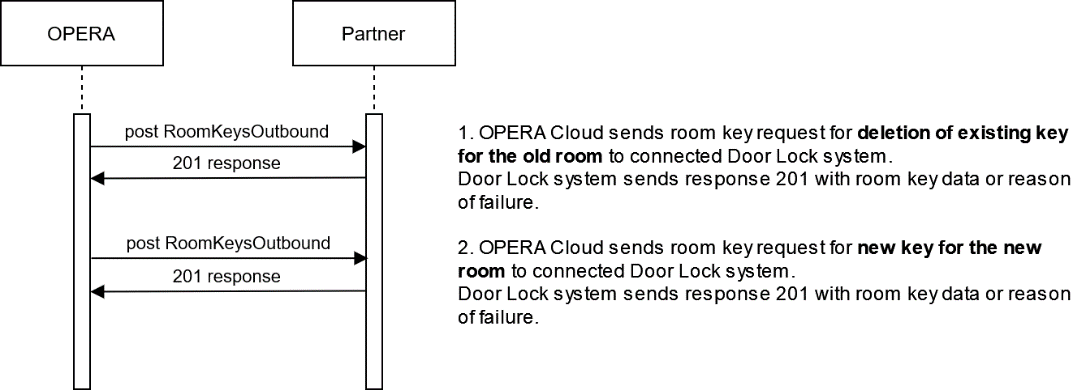
Description of Steps:
| Description | Sample Call | |
|---|---|---|
| 1 |
Request to "Remove" room key(s) for the old room is sent to the door lock system from OPERA Cloud. The door lock system must respond within 20 seconds with a "201" status message that the room key(s) have been set to inactive, or if an unsuccessful request, a "201" response containing message information on why the request could not be processed. As the room move is processing in OPERA Cloud PMS, the guest moves to another room, and the old room key becomes invalid and should no longer work. The guest might or might not hand the room key back to the hotel staff even if the guest receives a new room key. |
Offline - Room Move Remove Room Key Request POST {{HostName}}/fof/v1/hotels/{{HotelId}}/roomKeysOutbound Offline - Room Move Remove Room Key Response |
| 2 |
Now a request for a "New" room key or Pincode for the new room is sent to the Door Lock system from OPERA Cloud. The door lock system must respond within 20 seconds with a "201" status message that the room key(s) have been set to inactive, or if an unsuccessful request, a "201" response containing message information on why the request could not be processed. With the move to another Room, the guest receives a room key with the new room data. This can either be a new room key or Pincode, or the "old" room key can be used. However, the room key must be encoded with the new data (roomId, Additional rooms, Key Options). Optional: Additional room keys can also be requested. |
Offline - Room Move New Room Key Request POST {{HostName}}/fof/v1/hotels/{{HotelId}}/roomKeysOutbound Offline - Room Move New Room Key Response |
When the Door lock system is an online system:
The room keys can be handled based on the room and reservationId. Key data is not written on the physical key but stored in the Door Lock System database.
In this case, OPERA Cloud sends out a request with keyType "RoomMove" for the existing reservationId and sends the old and the new room number as well as the new "additionalRooms and/or new "keyOptions."
It is expected that the Door Lock system will update the existing room key data with the new roomId plus optionally update it with "additionalRooms" and "keyOptions."
Sequence Diagram
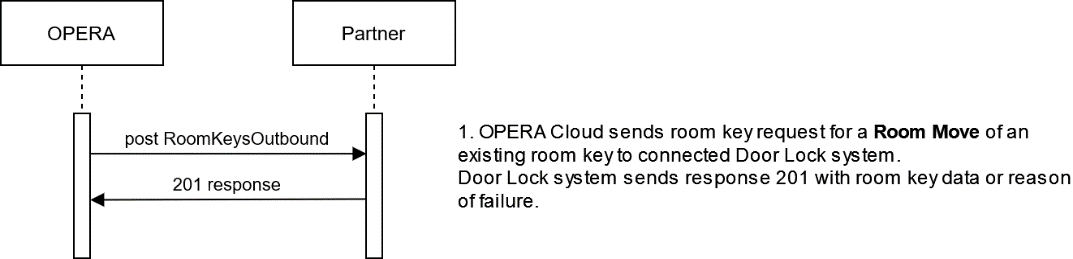
Description of Steps:
| Description | Sample Call | |
|---|---|---|
| 1 |
Request for a "RoomMove" of existing active room key(s) or Pin code is sent to the door lock system from the OPERA Cloud PMS UI. The door lock system must respond within 20 seconds with a "201" status message that the room key(s) have been set to inactive, or if an unsuccessful request, a "201" response containing message information on why the request could not be processed. As the existing room Key information is not stored on the room key(s) itself but stored on Door Lock Systems database, the new room data (new roomId, new additional rooms, and new KeyOptions) must be updated on the database only. The new room data does not need to be encoded on the room key(s). The hotel guest does not need a new room key(s) or Pincode, but the guest can use the existing one for the old room. The old room must no longer be accessible with the room key(s) or Pin code after successful processing of the "RoomMove" request. |
Online - Room Move Room Key Request POST {{HostName}}/fof/v1/hotels/{{HotelId}}/roomKeysOutbound Online - Room Move Room Key Response |
Parent topic: Workflows