1 Business Context
The Guest Messages function can be enabled for a hotel and allows messages to be set for reservations before or during a guest’s stay. Messages can be created by hotel staff and are linked to the guest’s reservation.
Guest messages for a reservation can be printed to paper, passed over as text messages to a phone number, or sent to an integrated system that stores the message and displays it on a device in the guest's room or directly to a guest's own device (for example, a mobile phone).
External systems connected to OPERA Cloud Property Management System (PMS) can also create guest messages and pass them to OPERA Cloud, where they are stored and linked to the guest’s reservation.
This implementation guide describes the following use cases for guest messages between OPERA Cloud and a connected partner system and describes the API operations to use for proper functionality.
| Use Case | API Operation |
|---|---|
| Actions Initiated by the External System: | |
|
Use the API operation post GuestMessages. |
|
Use the API operation get Reservations with fetchInstructions GuestMessages. |
|
Use the API operation put GuestMessages with GuestMessageId. |
|
Use the API operation Delete GuestMessage by GuestMessageId. |
| Actions Initiated by OPERA Cloud PMS: | |
|
Use the Streaming Event INTERFACE STATUS UPDATE. |
|
Use the Streaming Event NEW GUEST MESSAGE. |
|
Use the Streaming Event UPDATE GUEST MESSAGE. |
|
Use the Streaming Event DELETE GUEST MESSAGE. |
To execute above actions, use the OHIP guestMessages operations (see Postman examples). A workflow walking you through these messages is available on the APIs tab.
For the above actions, OPERA Cloud generates the following Business Events: INTERFACE STATUS UPDATE, NEW GUEST MESSAGE, UPDATE GUEST MESSAGE, and DELETE GUEST MESSAGE. You can receive these events when you subscribe to them under the Reservation module. See the Business Events and Streaming use case article for more information.
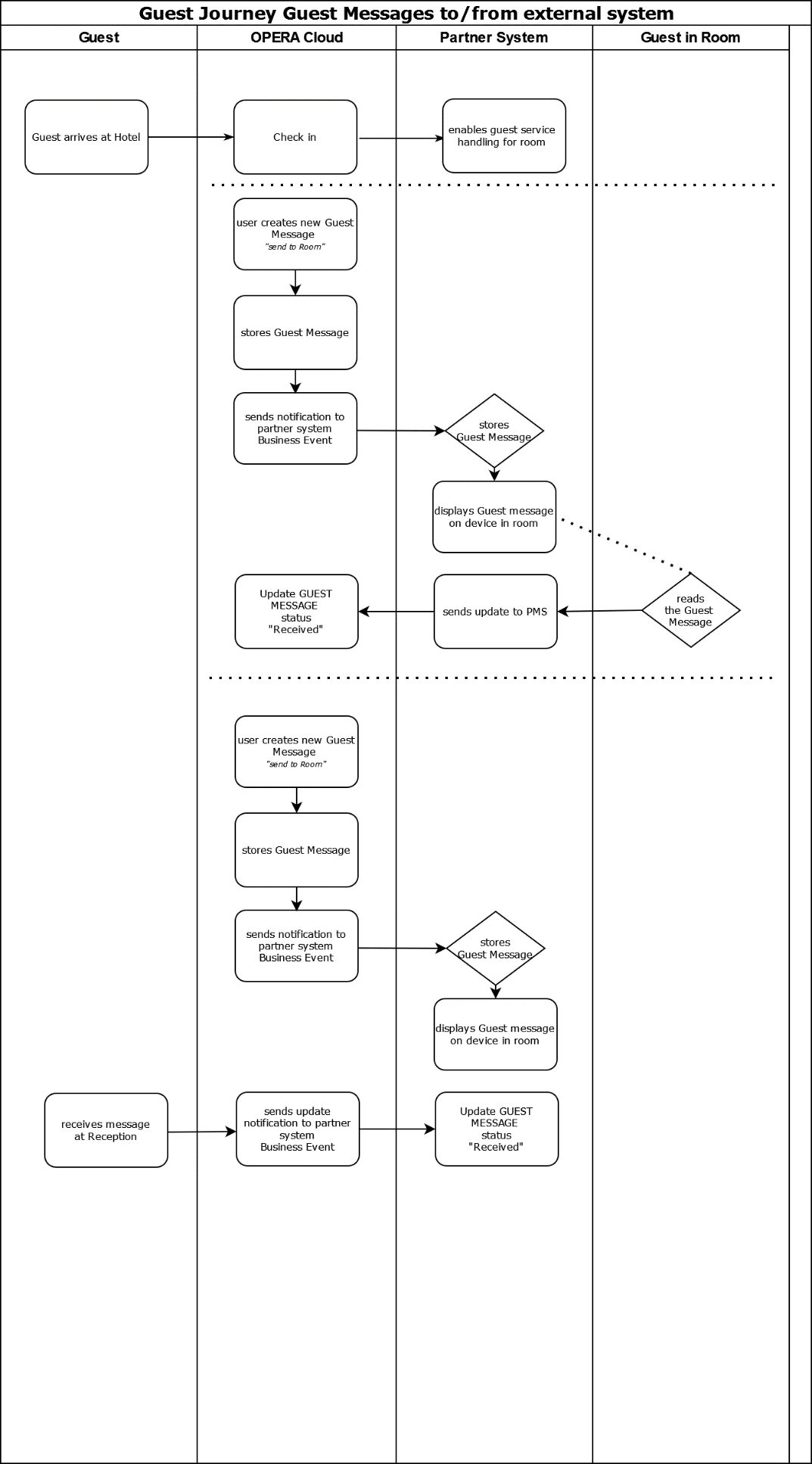
Guest Journey Workflow
|
Workflow: Guest Message is created in OPERA Cloud, Guest receives the message in guest room. After Guest arrives to the hotel and checks in, the partner systems receives a notification that the reservation is checked in. When an OPERA Cloud user creates a guest message for the checked in reservation, a notification message is sent to the partner system containing the message text. The partner system now displays the message on a device in the guest's room. Once the guest has confirmed receiving the message, the partner system sends an update message to OPERA Cloud with the message status "delivered." In OPERA Cloud, the guest message status is then updated to status "delivered." Workflow: Guest Message is created in OPERA Cloud, Guest receives the message at the Hotel Front desk. When an OPERA Cloud user creates a guest message for the checked-in reservation, a notification message is sent to the partner system containing the message text. The partner system now displays the message on a device in the guest's room. The guest now receives the guest message at the hotel front desk, OPERA Cloud changes the message status to status "received" and sends an update message to the partner system with the message status "delivered." |
Disclaimer
Please note that the API usage and capabilities are subject to change. You can find more information about API versioning in the Versioning chapter of the Oracle Hospitality Integration Platform (OHIP) User Guide. For the most comprehensive and up-to-date information, including additional query parameters and detailed descriptions, always refer to the latest API specifications in GitHub. This will ensure that you are accessing the most current and complete set of features available.