Workflow: Delete Existing Wake-Up Calls
This section describes the use cases for sending notification to OPERA Cloud for a wake-up call that will be deleted in the partner system.
Sequence Diagram
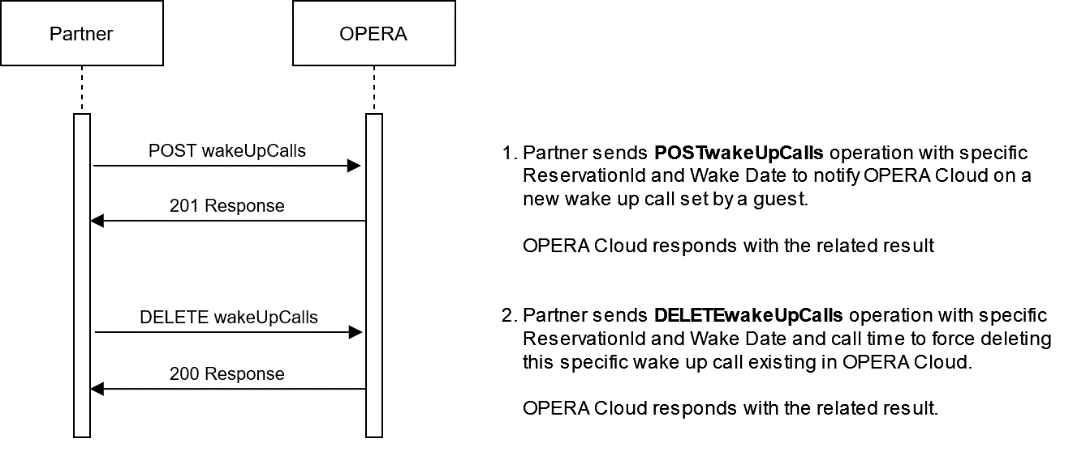
Description of Steps:
| Description of Steps: | Operation | |
|---|---|---|
| UC6.1 |
Set a new wake-up call and send notification to OPERA Cloud Use the POSTwakeUpCallsoperation to send new wake-up call requests to OPERA Cloud. OPERA Cloud stores the wake-up call internally, so the OPERA Cloud user can see all the wake-up calls set on the partner system. Once OPERA Cloud has stored the new wake-up call request, it responds with a HTTP 201 response. Note: The wake date and wake time must be in the future. If the wake-up call contains a date or time that is past, then the wake-up will not be accepted. |
New wake-up call to OPERA Cloud Wake-Up Call - New Wake-Up POST {{HostName}}/fof/v1/hotels/{{HotelId}}/reservations/{{ReservationId}}/wakeUpCalls 201 Created response |
| UC6.2 |
Guest cancels the wake-up call on the partner system, partner system sends notification to OPERA Cloud Use the DELETE WakeupCalls operation to send notification to OPERA Cloud for an existing wake-up call to set to cancel. Add the callTime value (wake date and time) to the URI as identifier for the wake-up call to delete. OPERA Cloud will change the status of the wake-up call to Cancelled. |
Delete existing wake-up call wake-up call - Delete wake-up call DELETE {{HostName}}/fof/v1/hotels/{{HotelId}}/reservations/{{ReservationId}}/wakeUpCalls?callTime=2025-01-23+13:00:00 no body content 200 OK response no content |
Parent topic: Workflows