Load a J Drug dictionary

To load a J Drug dictionary:
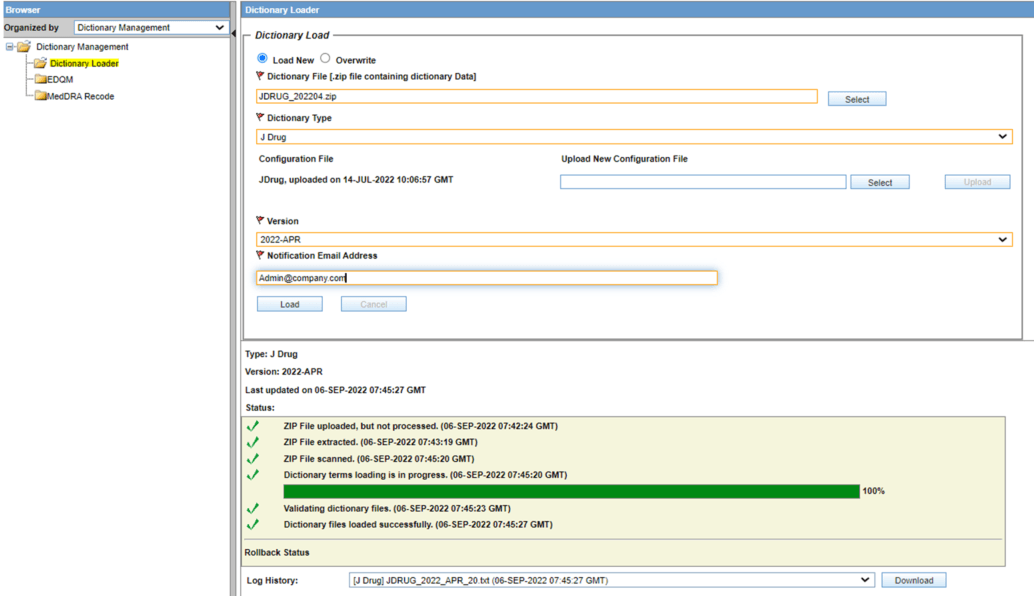
  1. From Argus Console, go to Tools, click Dictionary Management and select Dictionary Loader.
  2. Select Load New.
  3. From the Dictionary Type drop-down, select the type of dictionary you want to overwrite.
  4. In the Dictionary File (.zip file containing dictionary data) field, select the local path to the Dictionary ZIP file. For more information, see About J Drug dictionaries.
  5. In the Configuration File section, upload the JDrug MDB file by browsing the local folders.
    Once the MDB is loaded, the file is automatically used for the future dictionary type loading.
  6. Select the dictionary version from the list. The list is populated based on the used MDB configuration file.
  7. In the Notification Email Address field, set the email address you want to receive an update on the load operation status after completion.
  8. Click Load.
  9. When the load is complete, download the log.
JDrug Dictionary Loader

For more information about the Dictionary Loader window, see Dictionary Loader field descriptions.