Load a MedDRA or MedDRA J dictionary

To load a MedDRA or a MedDRA J dictionary:
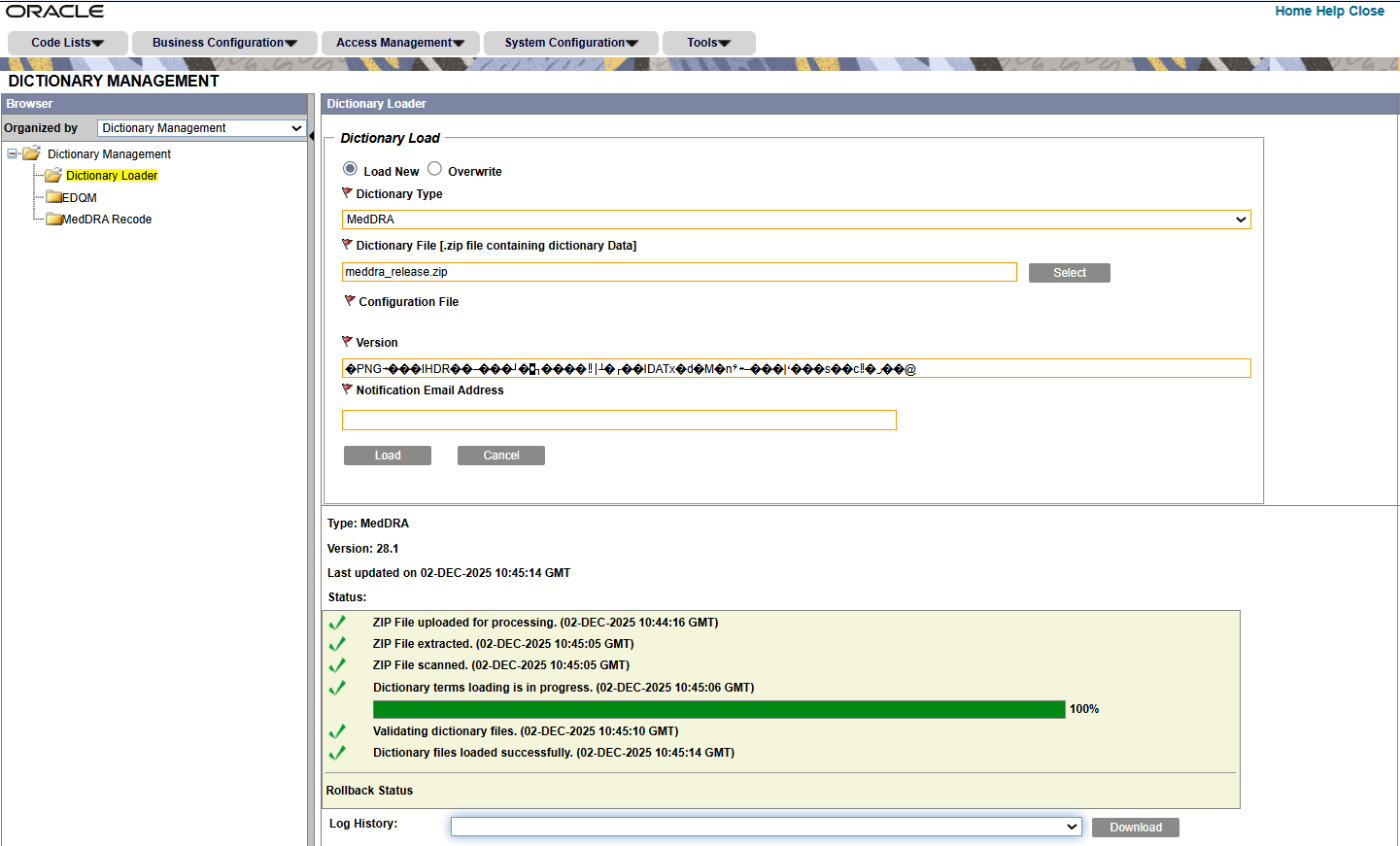
  1. From Argus Console, go to Tools, click Dictionary Management and select Dictionary Loader.
  2. Select Load New.
  3. From the Dictionary Type drop-down, select MedDRA or MedDRA J.
  4. In the Dictionary File (.zip file containing dictionary data) field, select the local path to the dictionary ZIP file.
    The version is automatically populated based on the selected ZIP file.
  5. In the Configuration File field, the MDB file is auto-populated for the selected dictionary type that is available in the installation folder, and used for the future loading of the same dictionary type.

    Note:

    Any new version of the MDB upload overwrites the existing MDB files. To upload a custom MDB/Configuration file, use the Upload New Configuration file field.
  6. In the Notification Email Address field, set the email address to receive an update on the status of the load operation after completion. This field is autopopulated with the email address of the logged-in user from the user setup in Access Management.
  7. Click Load.

    Note:

    You can provide multiple email addresses separated by semicolon (;).
    The Status section will display the progress of the load. Once the load is complete, the log file is available for download.
MedDRA Dictionary Loader

For more information about the Dictionary Loader window, see Dictionary Loader field descriptions.