API integration
API integration enhancements add more artifact and submission package date information, provide queued message totals for Event Message Retry responses, and expand Event Messages with bulk retry controls and longer message history.
Manual send to eTMF messages
Manual Send to eTMF messages for completed submission packages now include the package completion date in the submission_package object. With this release, when an authorized user selects Send to eTMF for a completed submission package, each generated document message includes submission_package.approval_date. This enhancement applies only to the manual Send to eTMF package flow and does not change existing submission_package fields.
We also updated eTMF Publish API documentation to reflect this enhancement. The existing submission_package section schema now reflects inclusion of the package approval_date field.
Epic: CHK-51233
Artifact GET API
Artifact GET now returns document_date for Document, Submission, and Submission Package artifacts when a document date is configured. When an artifact doesn’t have a configured document date, the API returns "null." Note that the API will always return "null" document date for IP Release Packages.
The API documentation is also updated in this release to remove the previous restriction that document_date is available only for Document artifacts.
Epic: CHK-51233
Event Messages Retry API
Event Message Retry API responses now include the total number of messages queued. Returned message GUID lists are limited to 25,000 entries, and "guids_truncated" indicates when additional GUIDs were omitted. Messages with a status of "trying," "processing," or "in_progress" cannot be retried. Bulk retries that include successful messages are limited to one week.
The Event Message Retry API documentation now provides detailed guidance for retrying individual messages and bulk sets of messages. Updates clarify supported retry time ranges, failed-only behavior, how messages already queued or being processed are handled, and the restrictions that apply when successful messages are included in a bulk retry.
The documentation also describes the information returned for successful retries, including the total number of messages queued and whether the returned message list was truncated. Error documentation now more clearly explains invalid retry requests, missing Event Messages, and cases where no retryable messages match the request.
Epic: CHK-51233
Event messages bulk retry
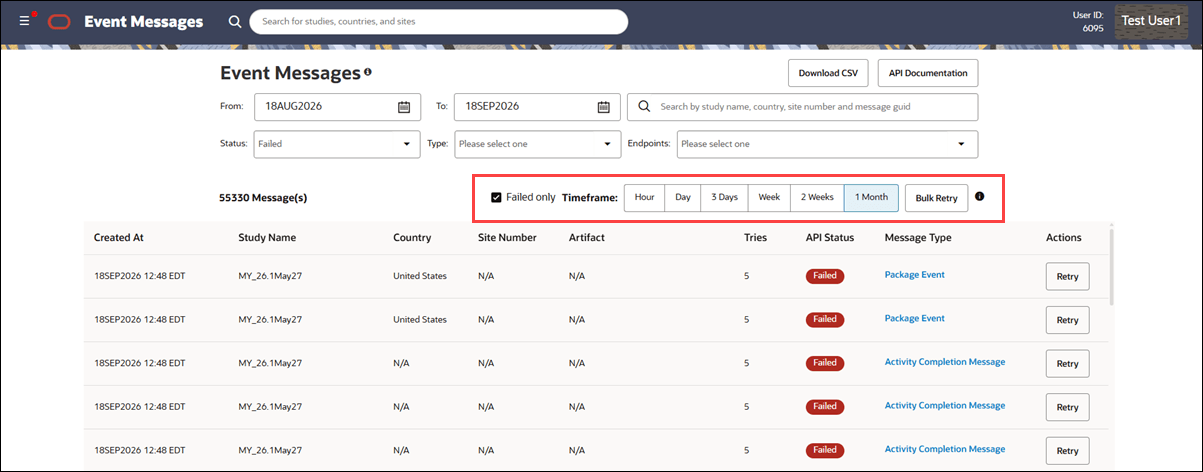
To give you more flexibility to reprocess failed Event Messages directly from the user interface, release 26.1 adds bulk retry controls and extends the available message history. You can view successful and failed messages from up to one month ago and select retry periods of one hour, one day, three days, one week, two weeks, or one month. Selecting a retry period automatically updates the From and To filters and refreshes the messages displayed for that date range.
Bulk retry applies to failed messages that aren’t already queued or being processed. Messages with Trying, Processing, or legacy In Progress status aren’t eligible for retry. You can also use the From and To filters to select a date range of up to one month.
The expanded retention means the Event Messages page now keeps both successful and failed messages available for up to one month.
Previously, successful messages were retained for 7 days, while failed messages were retained for 15 days. Extending both to one month gives you a longer window to review messages and retry failed events directly from the UI, including after longer periods away from the system.
Epic: CHK-51233