Standard Oracle Site Activate reports
The TMF Status Dashboard has new worksheets that help you assess document processing timelines, identify bottlenecks, and understand rejection trends; Portfolio is now a data slicing option in several reports; and we disabled data preselection (brushing) functionality to improve report response time.
TMF Status Dashboard
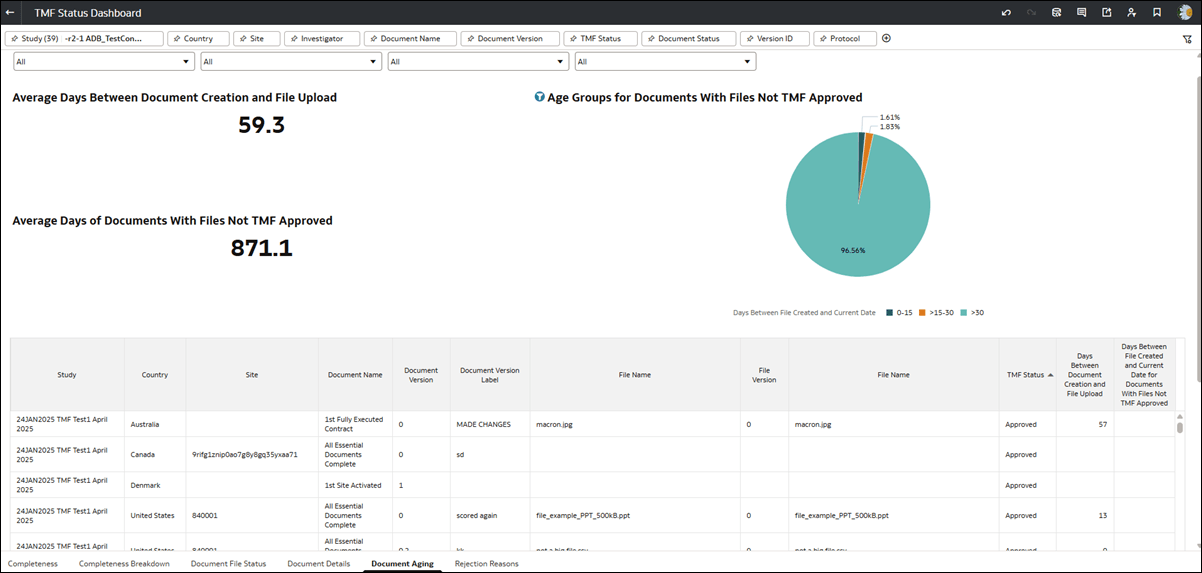
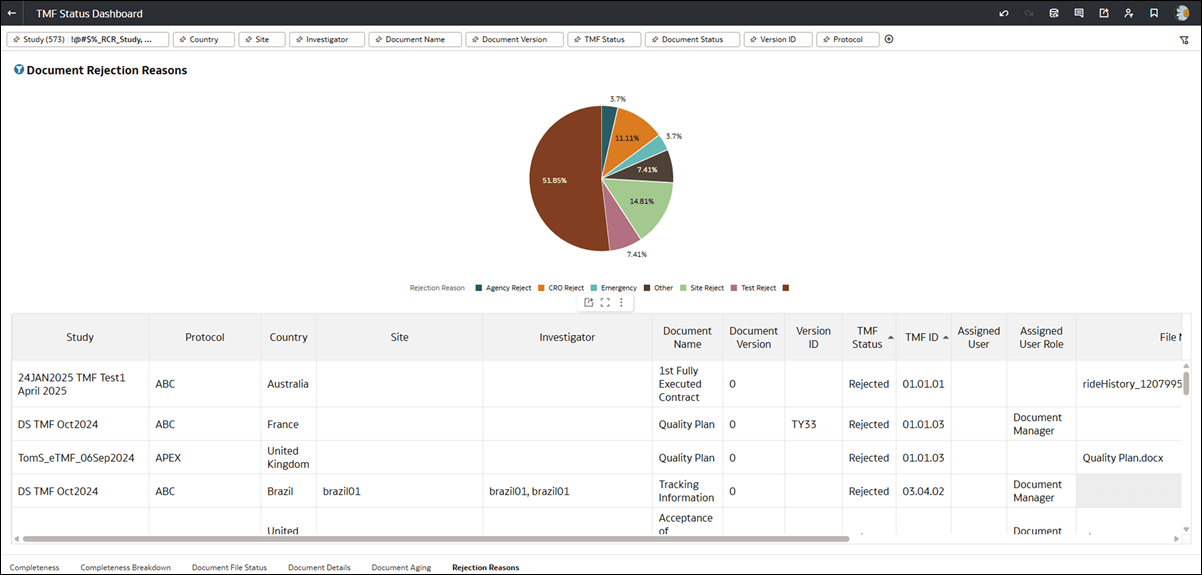
Release 25.1.1 introduces new “Document Aging” and “Rejection Reasons” datasheets in the TMF Status Dashboard. These new sheets make it easier for you to assess document processing timelines, identify bottlenecks, and understand rejection trends within the eTMF. Both new worksheets include a pie chart. Click any slice in the chart to filter the worksheet results to the documents that make up that slice. To clear the pie slice filtering, click white space anywhere surrounding the pie chart.
The Document Aging sheet allows you to review key metrics for eTMF, such as the average time between artifact creation and file upload, and the average number of days documents with files remain not TMF-approved. You can also view an age breakdown for documents not yet approved, sorted into brackets like 0–15 days, 15–30 days, and more than 30 days, with flexibility for these ranges to adjust based on your data. If you are interested in a specific time bracket, you can drill down to see the associated artifacts or documents.
The Document Aging sheet includes filtering options that let you focus on specific TMF sections, zones, artifacts, artifact names, studies, countries, or sites. These filters help you identify patterns or areas for follow-up.
Additionally, the Rejection Reasons sheet helps you track the most common reasons documents are rejected and includes the latest note for each rejected document, when available.
Data Slicing
- Compliance Dashboard
- Executive Summary - Entry Delay
- Executive Summary - Milestone Accuracy
- Milestone & Submission Planning Accuracy
- Contemporaneous Milestone & Submission Entry
- Cycle Times Dashboard
- Key Cycle Analysis ("Slice Key Cycle Data by" and "Compare Key Cycle Data by" drop downs)
- Cycle Trends
Brushing disabled
- Management reports
- Account Metrics
- Adoption Dashboard - Artifacts and Activities
- Cycle Times Dashboard
- Planning Impact Analysis
- Resource Allocation
- Study progress reports
- Contract Module Dashboard
- Milestone and Submission Planning
- Milestone Predictions Dashboard
- Open Activities
- Site IP Release Package Dashboard
- Study Summary Dashboard
- Submission and Approval Status
Submission and Approval Report
In this release, we added a new "Approval Date" filter in the Submission and Approval Report. This date range filter will show only approved items in the date range you specify and will allow you to determine metrics for the number of documents processed in packages.
The Approval Date filter is not applicable to the Submissions and Approval Dashboard worksheet and does not appear there; however, you can add it to the following report worksheets as preferred:
- Submission and Approval Status
- Submission and Approval Activities
- Submission Package Details
Parent topic: What's new for Oracle Site Activate users