5 Notes Report
Workbook synopsis
The Oracle Site Analyze Notes Report, intended for Oracle Site Select customers, allows you to view and export notes for one or more studies.
Study-level filtering determines your access to this report by limiting data based on your team assignments in Oracle Site Select. You can view studies linked to your assigned team only if the team is enabled, has at least one associated study, and has Analyze reports permission enabled. All three conditions must be met for study-level access so that you can access this report.
Dashboards and sheets
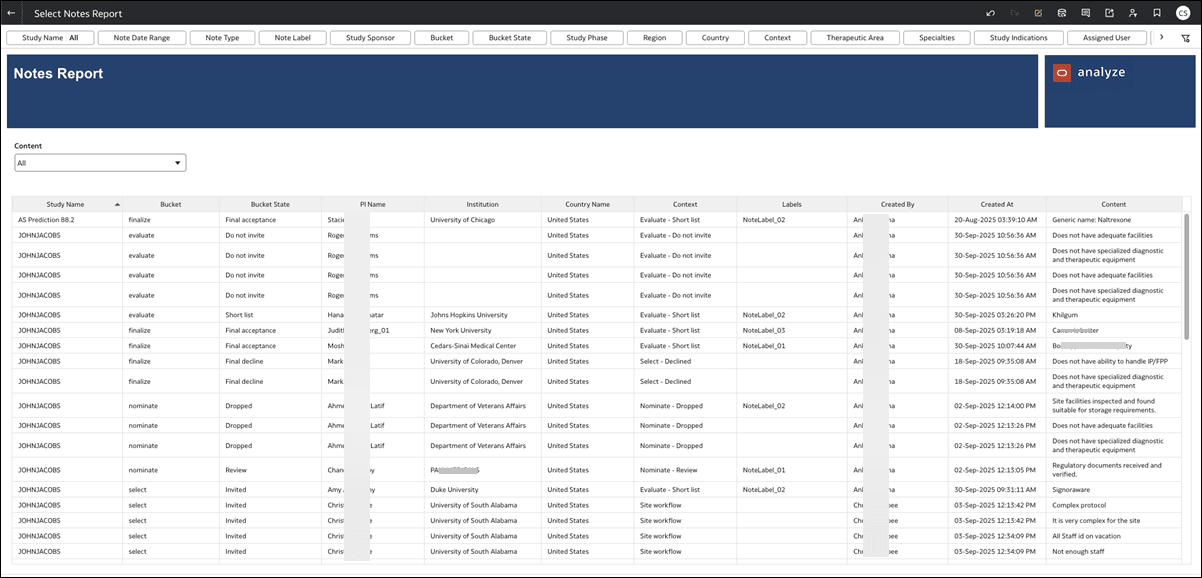
Notes Report
The Notes Report worksheet provides a tabular view of notes composed for a study. Use the filters along the top of the report worksheet to adjust the report data. For instance, you can specify Study, Note Date Range, Note Label, Context, etc.
If preferred, you can export the Notes Report worksheet by right-clicking anywhere on the worksheet to access the shortcut menu. Choose Export and select the preferred file type.