8 Chargebacks
You can manage chargebacks made against accounts from the Chargebacks page. Your main dashboard includes chargeback metrics including the number of chargebacks, amount, and those requiring action. See Chargeback Transactions Report for more details.
Chargebacks happen when a guest challenges a charge and requests a chargeback. A chargeback is the return of funds to the guest’s card. The chargeback is initiated by the bank that issued the payment. The chargeback then appears in the Chargebacks page and the dispute process begins.
You can respond to the chargeback in one of three ways:
-
Accept: You agree to transfer the funds back to the guest. See Accept a Chargeback for more details.
-
Defend: You disagree with the chargeback and you have supporting evidence that you can upload and submit along with a defense reason. See Defend a Chargeback for more details.
-
Refund: In some cases this is an option if the chargeback hasn’t been initiated yet. See Refund a Transaction for more details.
Note:
Some disputes are processed automatically and you do not have the option to accept or defend.
There are four types of chargebacks:
-
Fraud
-
Consumer disputes
-
Processing errors
-
Authorization
Chargeback Lifecycle
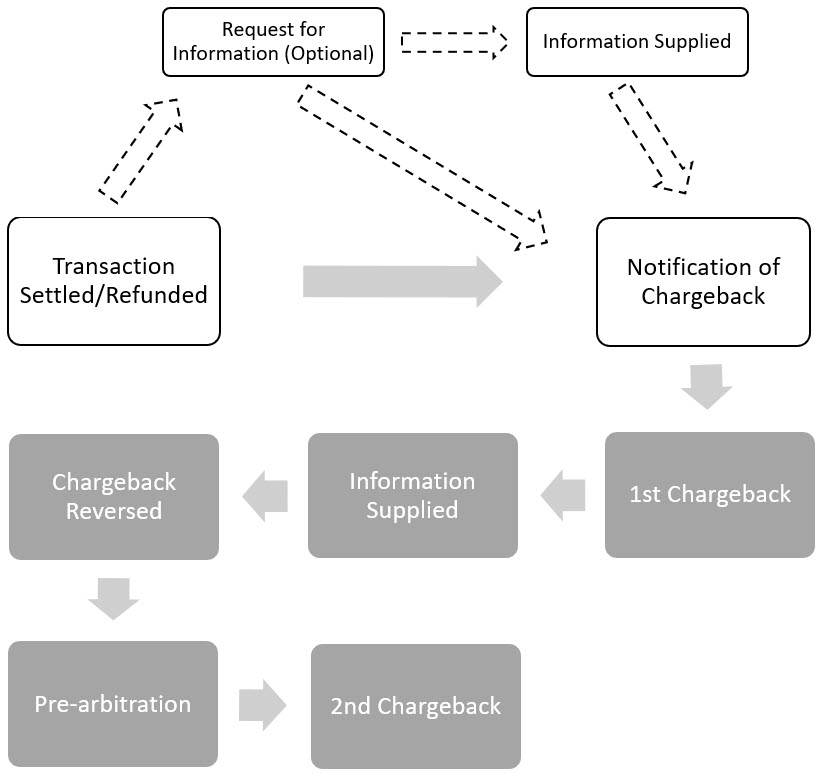
The life cycle depends on how you respond to the chargeback. The process is explained below and a flow chart of the process appears below that.
-
Request for Information (optional): More information is requested about the transaction and money is not yet withdrawn from your account. If you do not respond with the requested transactional information, then a chargeback withdrawing money from your account my occur.
-
Notification of Chargeback: A chargeback was issued and you can defend it. This can occur after a Request for Information or it may occur immediately after the payment status is set to Settled or Refunded. A few days after you receive the Notification of Chargeback, the chargeback debit usually occurs.
-
1st Chargeback: The disputed amount is withdrawn from your account. If you accept the dispute or do not upload defense documents, then this is the final stage.
-
Information Supplied: Upload documents that support your defense against the chargeback. Once they are uploaded, you can’t change the documents.
-
Chargeback Reversed: The disputed amount is transferred back to your account. During this stage, the issuer reviews the defense. If they accept the defense or if the issuer response timeframe expires, then this is the final stage.
-
Pre-arbitration: If the issuer declines your defense, they open pre-arbitration, which is then reviewed.
-
2nd Chargeback: If the issuer declines your defense or if their pre-arbitration case is accepted, then a second chargeback occurs. You can’t upload defense documents. This is the final stage.
Chargeback Statuses
The following table summarizes chargeback statuses:
| Status | Description |
|---|---|
| Chargeback | The payment was reversed by the guest and the issuer has started the dispute process. Oracle withdraws the disputed funds from your account. You can accept the chargeback or supply defense documents. If you accept the chargeback, this is the final status. |
| Chargeback Reversed | You defended the chargeback successfully or the guest repaid the funds. Oracle has transferred the funds back to your account. If the defense is successful, this is the final status. |
| Second Chargeback | The defense of the first chargeback was not successful. This is the end of the dispute process and the final status. |
- Accept a Chargeback
Confirm a chargeback. - Defend a Chargeback
Provide defense reason and documents to defend a chargeback. - Explanation of Chargeback Fees