Generate and Send the Payment Link
- In OPERA Cloud, go to Front Desk > Arrivals
- Search for and open the reservation
- Select the I Want To… menu (blue arrow)
- Select Deposit/Cancellation
- In the Deposit panel, click New to create a deposit
- Enter:
- Deposit Amount
- Due Date
- Click Save
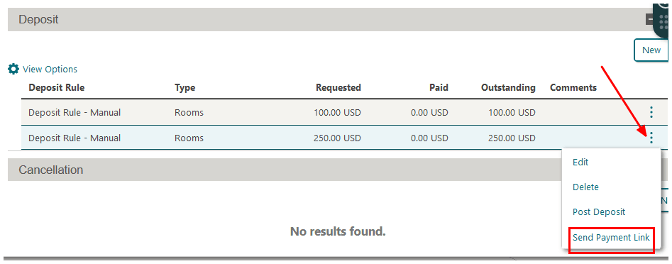
- Select the deposit, open the ellipsis (…) menu, then select Send Payment Link

Guest experience (what the guest sees)
- The guest receives an email containing the payment link (as per the configured OPERA template).
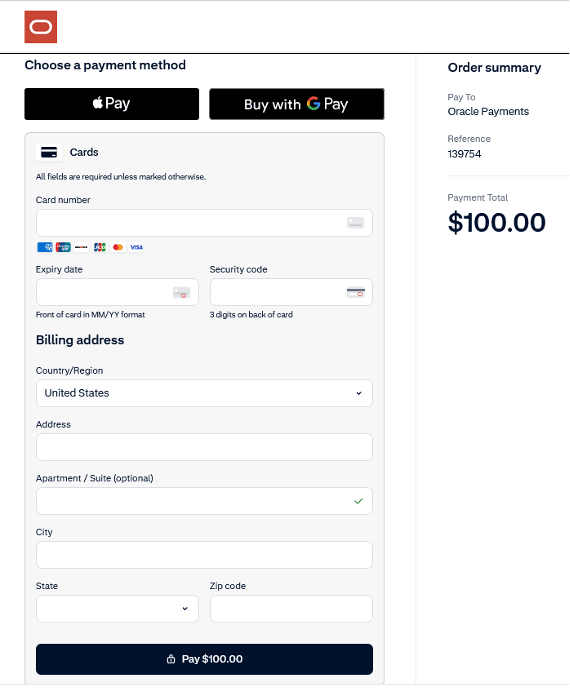
- The guest clicks the link and is taken to a secure hosted checkout page.
- If needed the guest can change the language on the payment page
- The guest completes the payment using credit card/debit card/Google Pay /Apple Pay .
- The guest is displayed the payment result on the payment page.
Parent topic: Pay by Link