B Appendix: Modular MFP for Non-Template Customers
Merchandise Financial Planning Cloud Service now allows non-template customers to choose Modular MFP from Starter Kit and choose the modules they want to implement from MFP and add their own custom modules using Solution Designer Tool and then manage the Work flows using Work flow Manager option directly from the application. In order to use that option, they need to build the first application using the modular MFP configuration available in the Starter Kit.
Refer to Oracle Retail Predictive Application Server Cloud Edition Solution Designer User Guide for more details about Solution Designer and how to configure new modules using Solution Designer.
Refer to the Oracle Retail Predictive Application Server Cloud Edition Administration Guide - Work Flow Manager section for more details about managing Work Flows in Application.
The following sections provide details about how to open Solution Designer from the Starter Kit and also about the list of modules available as part of Modular MFP which the user can choose to include for their modular configuration.
Solution Designer and MFP Modules in Starter Kit
Solution Designer is present in the sub-directory sd in the Starter kit as "Solution Designer.exe." That will launch the Solution Designer.
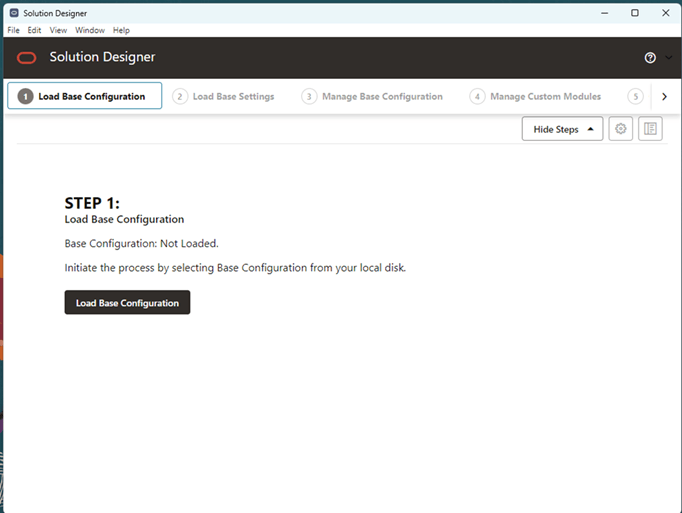
MFP Base Configuration is present under the sd_config/mfpcs directory in the Starter Kit. The user can click the Load Base Configuration option and then select the mfpcs directory under sd_config to load the MFP base configuration.
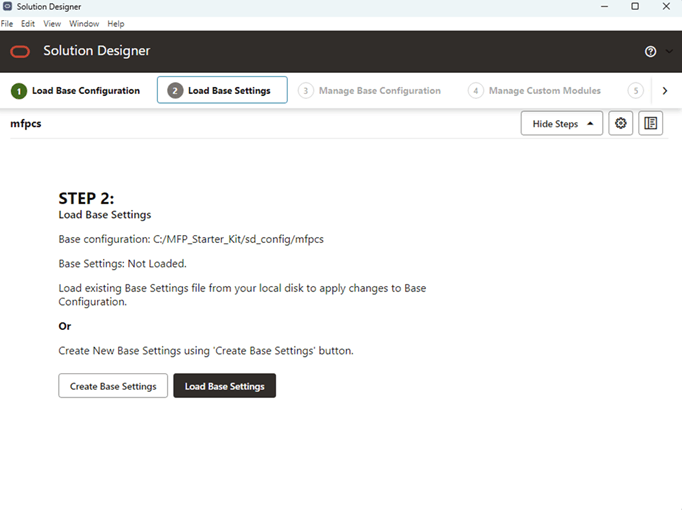
Once the base configuration is loaded, the user can create their own base settings file to choose the modules or use the sample all_modules_settings.json available to include all the modules of Modular MFP. The user selects either Create Base Settings or Load Base Settings.
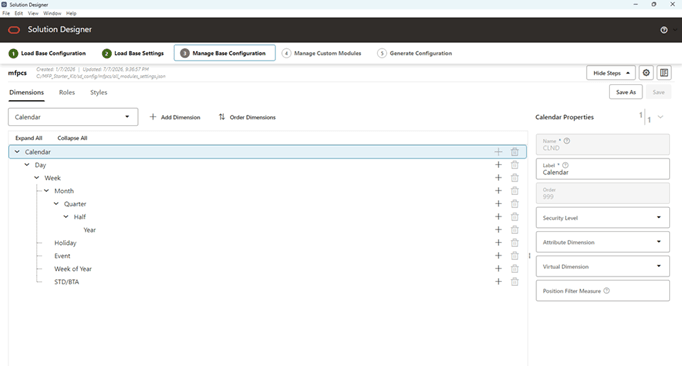
MFP SD Config Contents
The MFP Starter Kit sd_config subdirectory contains the following components used by MFP Modular configuration:
-
mfpcs
This is the packaged sd config for MFP which contains the modules sub-directory with <modules>.json for each available MFP module and also json files for base hierarchies and module relations. Users should not change any files directly in this module. They can use the Solution Designer tool to create their own custom module. Users can directly use the all_modules_settings.json file for base settings if they do not want any changes to the GA modules, otherwise they need to create their own settings file in a different directory where they can also create their own custom modules
-
batch_control
This contains the list of compatible batch control files to include all the modules for the MFP GA. The SI may need to manage these files to adjust as needed for any changes to modules needed.
-
interface.cfg
The interface mapping file provided is compatible to include all the modules of the MFP GA. The SI may need to update the interfaces as needed for changes to modules if measures are removed or added in the custom modules.
-
serviceConfig.json
This serviceConfig.json is needed only if the Portfolio Optimization module is used in the MFP GA.
-
dashboardSettings.json
Update dashboardSettings.json only if some modules are removed from GA.
Users can use the above files with necessary updates for module changes in addition to the Generated Config from the Solution Designer with their custom modules and use the standard non-template upload process to upload the config and build the MFP base application.
MFP Modules and Workspace Usage
This section describes how Modular Merchandise Financial Planning is organized and how those modules relate to the MFP workspaces used by planners and planning managers. It explains the relationship between roles, modules, module dependencies, and planning workspaces.
In Modular MFP, modules are created by combining three elements:
- Role
- Metric
- Unit of Measure, or UOM
The module structure helps organize MFP content into logical business groups. These modules support the planning process within the role-based workspaces, such as Merch Target, Merch Plan, Location Target, and Location Plan. These modules are functional areas which help identify which configuration content is included for an implementation, such as measures, calculations, alerts, and custom menu actions.
Modules do not create separate workspaces. Users continue to work in the standard role-based workspaces. For example, a Merch Plan user works in the Merch Plan workspace. The Merch Plan modules identify the business content used within that workspace, such as Sales and Returns, Units, Local Currency, Inventory and Receipt, Margin, and Portfolio Optimization.
Understanding Modules
A module represents a defined part of the MFP planning content. Each module is based on the combination of a planning role, a metric area, and, where applicable, a unit of measure. Each module includes measure, measure components, rules, custom menu, and alerts details.
The three elements of Module:
| Element | Description | Example |
|---|---|---|
| Role | The planning role or process area where the module is used. | Merch Target, Merch Plan, Location Target, Location Plan |
| Metric | The business metric area supported by the module. | Sales and Returns, Inventory and Receipt, Margin, Portfolio Optimization |
| UOM | The unit of measure or value type supported by the module, where applicable. | Retail, Units, Local Currency |
The modular structure allows MFP to organize planning content by the type of planning work being performed.
For example:
- Merch Plan Sales and Returns is a module for Sales and Returns content used by the Merch Plan role.
- Merch Plan Sales and Returns Units is a module for unit-based Sales and Returns content used by the Merch Plan role.
- Merch Plan Sales and Returns Local Currency is a module for local currency Sales and Returns content used by the Merch Plan role.
- Location Plan Inventory and Receipt is a module for Inventory and Receipt content used by the Location Plan role.
This structure helps users understand what type of business content is being referenced in a workspace or procedure.
Roles and Modules
The role identifies where the module belongs. The main planning roles in Modular MFP are:
| Role | What You Use It For |
|---|---|
| Merch Target | Creating, reviewing, publishing, and updating merchandise financial targets. |
| Merch Plan | Creating, reviewing, approving, and updating merchandise financial plans. |
| Location Target | Creating and reviewing location-level targets. |
| Location Plan | Creating, reconciling, approving, and updating location-level plans. |
| Strategic Target | Creating higher-level strategic targets, if enabled for your implementation. |
Each role may include several modules. These modules represent the type of financial or operational data you use while planning.
Module Types
Each role-based module set includes a combination of common, metric, and UOM-specific modules. The exact modules vary by role, but the purpose of each module type is consistent across MFP.
Common Measures modules provide the common content used across a role’s planning process. These modules support base measures and shared planning information needed before metric-specific planning content is used.
Sales and Returns modules support sales, markdown, and return-related planning content. These modules provide the base sales and returns information used for the related planning role.
Sales and Returns - Local Currency modules support local currency sales and returns content. These modules are used where sales and returns values need to be planned or reviewed in local currency.
Sales and Returns - Units modules support unit-based sales and returns content. These modules are used where sales and returns planning includes unit measures in addition to retail values.
Inventory and Receipt modules support receipt, inventory, and stock-related planning content. These modules typically depend on Sales and Returns because inventory and receipt planning is related to sales expectations.
Inventory and Receipt - Units modules support unit-based inventory and receipt content. These modules typically depend on both Inventory and Receipt and Sales and Returns - Units because unit-based inventory and receipt planning relies on both inventory content and unit planning content.
Margin modules support gross margin and related margin planning content. These modules typically depend on Sales and Returns and Inventory and Receipt because margin values use sales, cost, receipt, and inventory-related information.
Portfolio Optimization modules support portfolio optimization content, where applicable. These modules typically depend on Sales and Returns because optimization content uses sales-related information as part of the portfolio review process.
For example, the Merch Plan Sales and Returns Units module can be read as:
| Module Element | Value |
|---|---|
| Role | Merch Plan |
| Metric | Sales and Returns |
| UOM | Units |
Some modules do not include a separate UOM in the module name because the module represents the retail value content for that metric. For example, Merch Plan Sales and Returns represents the Retail UOM for Sales and Returns module.
List of Modules in MFP by Role:
| Role | Module | Modules JSON |
|---|---|---|
| Merch Target | MT Common | MT_Common.json |
| Merch Target | MT Sales & Returns | MTSR.json |
| Merch Target | MT Sales & Returns _ Local Currency | MTSRLC.json |
| Merch Target | MT Sales & Returns_Units | MTSRU.json |
| Merch Target | MT Inventory & Receipt | MTIR.json |
| Merch Target | MT Inventory & Receipt_Units | MTIRU.json |
| Merch Target | MT Margin | MTMR.json |
| Merch Target | MT Portfolio Optimization | MTPO.json |
| Merch Plan | MP Common | MP_Common.json |
| Merch Plan | MP Sales & Returns | MPSR.json |
| Merch Plan | MP Sales & Returns _ Local Currency | MPSRLC.json |
| Merch Plan | MP Sales & Returns_Units | MPSRU.json |
| Merch Plan | MP Inventory & Receipt | MPIR.json |
| Merch Plan | MP Inventory & Receipt_Units | MPIRU.json |
| Merch Plan | MP Margin | MPMR.json |
| Merch Plan | MP Portfolio Optimization | MPMR.json |
| Location Target | LT Common | LT_Common.json |
| Location Target | LT Sales & Returns | LTSR.json |
| Location Target | LT Sales & Returns _ Local Currency | LTSRLC.json |
| Location Target | LT Sales & Returns_Units | LTSRU.json |
| Location Plan | LP_Common | LP_Common.json |
| Location Plan | LP Sales & Returns | LPSR.json |
| Location Plan | LP Sales & Returns _ Local Currency | LPSRLC.json |
| Location Plan | LP Sales & Returns_Units | LPSRU.json |
| Location Plan | LP Inventory & Receipt | LPIR.json |
| Location Plan | LP Inventory & Receipt_Units | LPIRU.json |
| Location Plan | LP Margin | LPMR.json |
| Strategic Target | ST Common | ST_Common.json |
| Strategic Target | ST Sales & Margin | STTG.json |
Core Module
The Core module is the base module for MFP. It is mandatory for the application. It provides the common foundation required by the application.
The Core module contains common MFP content used across roles. The Core module includes shared administrative, integration, and application-level configuration content. It supports common setup and data flow requirements that are used across the role-based planning areas. It is enabled by default for the MFP configuration.
| Role | Module | Module Code | Dependency |
|---|---|---|---|
| All | Core | Core | Base / Mandatory for MFP |
The Core module is not specific to one planning workspace. It supports the overall MFP application and provides the foundation for the role-based modules.
How Modules Relate to Workspaces
Modules and workspaces are related, but they are not the same thing.
A module represents a packaged set of configuration content. This content may include measures, calculations, alerts, custom menu actions, and other configuration artifacts required to support a planning area.
A workspace is the user-facing planning area where planners create, review, update, reconcile, submit, or approve plans. Workspaces are organized by role and planning process.
For example, the Merch Plan Sales and Returns module is utilized in the Merch Plan workspace. However, selecting the Merch Plan Sales and Returns module does not create a separate Sales and Returns workspace, and it does not mean that only Sales and Returns views are available. The user continues to work in the Merch Plan workspace.
The following principles apply:
- Modules package configuration content.
- Workspaces provide the user-facing planning experience.
- Workspaces are organized by role and planning process.
- Modules are utilized within the related role workspace.
- Module selection does not create separate workspace procedures.
- Module selection should not be interpreted as a direct view-level availability rule.
For details on the workspace and process, see the Oracle Retail Merchandise Financial Planning Modular User Guide.
Modules Dependencies
Some modules depend on other modules. A dependency means that one module requires content from another module such as measures, calculations, or configuration content. Module dependencies help ensure that configuration content is implemented in the correct sequence.
For example:
- Inventory and Receipt planning may depend on Sales and Returns content as it required the sales & returns metric & calculation to work seamlessly.
- Unit-based Inventory and Receipt content may depend on both Inventory and Receipt and Sales and Returns Units.
- Margin content may depend on Sales and Returns and Inventory and Receipt.
Dependencies should be understood as module relationships. They do not mean that a user must open a different workspace first. They also do not mean that a workspace is restricted to only the selected module.
For users, dependencies help explain why certain modules are grouped together and why one planning metric may rely on another.
Merch Target Modules
Merch Target modules support merchandise target planning. Merch Target is used to create and manage financial targets before the detailed merchandise plan is created. These targets provide the financial direction against which plans can later be reviewed, compared, and approved.
The Merch Target module set is organized by role, metric, and UOM. The role is Merch Target. The metric identifies the type of target content, such as Sales and Returns, Inventory and Receipt, Margin, or Portfolio Optimization. The UOM identifies whether the module supports base retail values, unit values, or local currency values.
These modules are used in the Merch Target planning process and are referenced in the Create Merch Target chapter.
The following modules are associated with Merch Target:
| Module | Dependency | Workspace Reference |
|---|---|---|
| Common Measures | Base / Mandatory for Merch Target Role | Create Merch Target Pre-season & In-season |
| Sales and Returns | Base / Mandatory | |
| Sales and Returns - Local Currency | Sales & Returns | |
| Sales and Returns - Units | Sales & Returns | |
| Inventory and Receipt | Sales & Returns | |
| Inventory and Receipt - Units | Inventory and Receipt; Sales & Returns Units | |
| Margin | Sales & Returns; Inventory and Receipt | |
| Portfolio Optimization | Sales & Returns |
In the Merch Target workspace, users continue to work through the target planning workflow. The modules listed in this section help identify the type of target content used in that workflow. The detailed workspace procedures are described in the Oracle Retail Merchandise Financial Planning Modular User Guide.
Merch Plan Modules
Merch Plan modules support the merchandise plan process. These modules are used for creating, reviewing, submitting, approving, and updating merchandise financial plans.
The Merch Plan module set is organized by role, metric, and UOM. The role is Merch Plan. The metric identifies the type of plan content, such as Sales and Returns, Inventory and Receipt, Margin, or Portfolio Optimization. The UOM identifies whether the module supports base retail values, unit values, or local currency values.
| Module | Dependency | Workspace Reference |
|---|---|---|
| Common Measures | Base / Mandatory for Merch Plan Role | Create Merch Plan Pre-season & In-season |
| Sales and Returns | Base / Mandatory | |
| Sales and Returns - Local Currency | Sales & Returns | |
| Sales and Returns - Units | Sales & Returns | |
| Inventory and Receipt | Sales & Returns | |
| Inventory and Receipt - Units | Inventory & Receipt; Sales & Returns Units | |
| Margin | Sales & Returns; Inventory & Receipt | |
| Portfolio Optimization | Sales & Returns |
These modules are used in the Merch Planning process and are described in the Oracle Retail Merchandise Financial Planning Modular User Guide.
Location Target Modules
Location Target modules support the location target planning process. These modules are used for creating, reviewing, reconciling, and publishing location-level targets.
The Location Target module set is organized by role, metric, and UOM. The role is Location Target. The metric identifies the type of location target content, such as Sales and Returns. The UOM identifies whether the module supports base retail values, unit values, or local currency values.
| Module | Dependency | Workspace Reference |
|---|---|---|
| Common Measures | Base / Mandatory for Location Target Role | Create Location Target |
| Sales and Returns | Base / Mandatory | |
| Sales and Returns - Local Currency | Sales & Returns | |
| Sales and Returns - Units | Sales & Returns |
These modules are used in the Location Target Planning process and are described in the Oracle Retail Merchandise Financial Planning Modular User Guide.
Location Plan Modules
Location Plan modules support the location plan process. These modules are used for creating, reviewing, reconciling, approving, and updating location-level plans.
The Location Plan module set is organized by role, metric, and UOM. The role is Location Plan. The metric identifies the type of plan content, such as Sales and Returns, Inventory and Receipt, or Margin. The UOM identifies whether the module supports base retail values, unit values, or local currency values.
| Module | Dependency | Workspace Reference |
|---|---|---|
| Common Measures | Base / Mandatory for Location Plan Role | Create Location Plan Pre-season & In-season plan |
| Sales and Returns | Base / Mandatory | |
| Sales and Returns - Local Currency | Sales & Returns | |
| Sales and Returns - Units | Sales & Returns | |
| Inventory and Receipt | Sales & Returns | |
| Inventory and Receipt - Units | Inventory & Receipt; Sales & Returns Units | |
| Margin | Sales & Returns; Inventory & Receipt |
Strategic Target Modules
Strategic Target modules support strategic-level target planning, where Strategic Target is enabled for the implementation.
The Strategic Target module set is organized by role and metric. The role is Strategic Target. The metric identifies the type of strategic target content, such as Sales and Margin.
| Module | Dependency | Workspace Reference |
|---|---|---|
| Common Measure | Base / Mandatory for Strategic Target Module | Create Strategic Target Plan |
| Sales and Margin | Base / Mandatory |