Configuring the Integration
The following sections describe how to configure components of the integration procedure.
Production Configuration
The Production Configuration section configures a number of details as well as the mappings for payment types and shipping methods. These values are passed to Oracle Retail Order Management allowing the orders to be identified.
Note:
These settings are duplicated in the other Oracle Retail Order Management Integration setting, Preview Configuration.
The following properties are set in the fields provided by the Production Configuration page. Note that all fields are required unless otherwise noted.
| Field | Description |
|---|---|
| XSLT Path | Name of the custom XSLT file to load. |
| Source | Identifies the source of the XML message. The source should default to IDC. |
| Target |
Identifies the target of the XML message. The target should default to RDC. If multiple webhooks are specified in the Target field, all of the systems receive the same data. Transformation for specific URLs can be performed by adding the URLs to both the webhook and integration settings. |
| Company Code | Identifies the company for the order. The company code is validated against the Company table. |
| Source Code | Updates the source code field in the Order Header table. The source code provides information about the currency code. You must provide the Retail Digital Commerce currency code to the Oracle Retail Order Management System source code mapping using the Currency Code mapping table. |
| Order Type | Updates the order type field in the Order Header table. |
| URL |
The URL path to the Oracle Retail Order Management Web Service CWMessageIn. For example:
Note: Use the same hostname and port number that you provided for the Order Submit URL on the Web APIs Webhook page. |
| User Name | The name of the user who should have access to the Web Service. |
| Password | The password associated with the user name. To see the password, click the Reveal button to display the password. |
Orders and multiple site configurations
The Retail Digital Commerce currency codes are mapped to the Oracle Retail Order Management Source Code. For example:
| Retail Digital Commerce Currency Code | Oracle Retail Order Management Source Code |
|---|---|
| USD | CC_USD |
| EUR | CC_EUR |
In an environment with multiple sites, you could configure the settings like this:
| Site | Retail Digital Commerce Currency Code | Oracle Retail Order Management Source Code |
|---|---|---|
| USA | USD | CC_USD |
| UK | GBP | CC-UK_GBP |
| UK | EUR | CC_UK_EUR |
| Germany | EUR | CC_DE_EUR |
Select the site with the site picker and select the appropriate Oracle Retail Order Management source code. Each source code points to a single offer record, which contains the currency code. This is how the offer record can provide the currency representation for an order.
Using XSLT
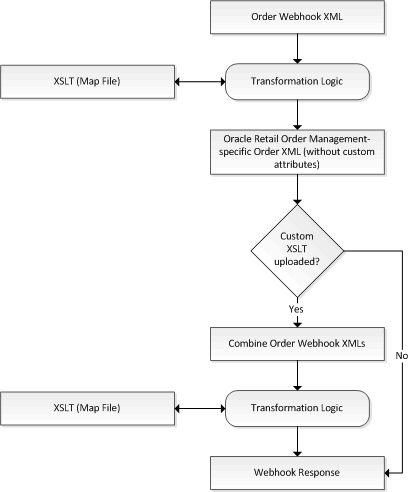
You can use the
customized XSLT capability to extend the default integration. The system contains an
internal XSLT file that maps all attributes. The merchant does not have access to this XSLT
file; however, you can provide a path to the XSLT. The XSLT should contain the logic that
customizes the Oracle Retail Order Management createOrder payload so that
it includes dynamic properties or makes mapping changes.
This XSLT workflow is active only when the Oracle Retail Order Management integration is enabled. The merchant must upload the XSLT using Retail Digital Commerce’s file upload endpoints. If no customized XSLT file is uploaded, the system uses the default XSLT file to pass orders, ignoring any custom attributes.
When creating a custom XSLT file:
- The default mapping can be overridden and mapped to other attributes as necessary.
- The merchant can use dynamic attributes created with Retail Digital Commerce to map attributes of the Oracle Retail Order Management.
- Because mapping is configured in the customized XSLT file, the merchant can map custom attributes that were created for an Order header level in Retail Digital Commerce to an order header or order line status in Oracle Retail Order Management.
To use a customized XSLT file, do the following:
- Create a new XSLT file mapping.
- Upload the XSLT file to Retail Digital Commerce using the file endpoints.
- Use the Oracle Retail Order Management Integration Settings to provide the name of the uploaded XSLT.
The following illustration defines the way that the merchant’s transformation is applied when the XSLT path is provided.
Order Creation
Orders created in Retail Digital Commerce are sent to Oracle Retail Order Management using the Submit Order webhook.
Note that the Oracle Retail Order Management webhook overrides the Submit Order Webhook to send XML messages that contain the entire XML payload. If the webhook is configured to send to multiple destinations, all of the destinations will receive this XML payload.
The following is an XML example of an order creation message received by Oracle Retail Order Management.
Sample Order Creation Message
<Message source="IDC" target="RDC" type="CWOrderIn">
  <Header order_number="o60412" order_type="Y" company_code="51" order_channel="I"
    source_code="A123_USD" payment_only="N" response_type="E"
        order_date="08222016"
    sold_to_prefix=""sold_to_fname="Kim" sold_to_lname="Anderson"     sold_to_suffix=""sold_to_busres="R" sold_to_address1="21 Cedar Ave"
    sold_to_address2=""sold_to_address3="" sold_to_address4=""
    sold_to_city="Syracuse" sold_to_state="NY" sold_to_zip="13202"
    sold_to_country="US"sold_to_email_update="N" sold_to_day_phone="212-555-977"
    sold_to_eve_phone="212-555-1977"sold_to_address_update="Y" pay_incl="Y"
    bill_to_prefix=""bill_to_fname="Kim" bill_to_lname="Anderson"
    bill_to_suffix=""bill_to_address1="21 Cedar Ave" bill_to_address2=""
    bill_to_address3=""bill_to_address4="" bill_to_city="Syracuse"
    bill_to_state="NY"bill_to_zip="13202" bill_to_country="US"
    bill_to_day_phone="212-555-1977" bill_to_eve_phone="212-555-1977"
    bill_to_fax_phone=""bill_to_email="kim@example.com" bill_to_company_name=""
    ind_number=""order_email="kim@example.com" alternate_sold_to_id="se-570031">
  <Payments>
    <Payment payment_type=""cc_number="9997000108950573" cc_exp_month="03"
      cc_exp_year="2018" auth_amount="75.88" auth_date="01011970"
      ecommerce_indicator="Y" already_tokenized="Y"
      transaction_id="1ni4eg211lj6iqt6097hopidv7" vendor_response="100"/>
  </Payments>
  <ShipTos>
    <ShipTo shipping_method="01" freight_tax_override="Y"
      freight_tax_amount="4.22" calc_frt="N" ship_to_fax_phone=""
      ship_to_evening_phone="212-555-1977" ship_to_day_phone="212-555-1977"
      ship_to_email=kim@example.com ship_to_zip="13202" ship_to_state="NY"
      ship_to_country="US" ship_to_city="Syracuse" ship_to_address3=""
      ship_to_address2="" ship_to_address1="21 Cedar Ave" ship_to_company=""
      ship_to_suffix=""ship_to_lname="Anderson" ship_to_fname="Kim"
      ship_to_prefix="" freight="50"contact_name="KimAnderson">
        <Items>
          <Item tax_override="Y" price_override="Y" short_sku_number="130"
            item_id="LAPTOP" actual_price="6.67" tax_amount="1.11" quantity="2"/>
          <Item tax_override="Y" price_override="Y" short_sku_number="130"
            item_id="LAPTOP" actual_price="6.66" tax_amount="0.55" quantity="1"/>
        </Items>
      <ShipTo>
    <ShipTos>
  </Header>
</Message>
Order Status Updates
Retail Digital Commerce retrieves the order status and tracking information from the Oracle Retail Order Management System to display in the client. The status, which is obtained when an order detail is queried, will not be persisted or updated in the repository.
Promotions
Promotions and offers are handled by Retail Digital Commerce with the corresponding discount price sent as part of the order.
Returns and Exchanges
By default, the Oracle Retail Order Management integration does not support returns and exchanges.
Configurable Product Support
By default, the Oracle Retail Order Management integration does not support configurable products.
Payment Methods
Oracle Retail Order Management uses payment methods that are identified with unique integers. For integration, Retail Digital Commerce Payment Methods are mapped to Oracle Retail Order Management numeric payment methods.
You can obtain a list of the payment methods available by calling the following endpoint:
GET
        /ccadmin/v1/merchant/paymentGateways
This returns a list of available payment methods. The response also includes the ID of the merchant, whether the method has been enabled, and the repository ID of the payment method. The repository ID identifies the payment method code to use. The following example displays a partial response that identifies a CyberSource payment method:
{
  "paymentGateways": [
  {
    "sopCredentials": {
      "storefront": {
      "sopURL": "http://10.101.101.101:8080/ccstore/v1/PM/cybersourceSOP",
      "expirationDate": "2019-01-28T11:54:30.207Z",
      "profileId": "Admin",
      "applicationName": "storefront",
      "hasSecretKey": true,
      "hasAccessKey": true,
      "repositoryId": "SOP-A"
  },
In an environment with multiple sites, you need to pass the
siteId value in header to get payment gateway details for the site. To
fetch payment gateways specific to a site, you need to pass x-ccsite
header. For example, to fetch payment gateways for siteUS site, the header
should include x-ccsite: siteUS.
You can find information about individual endpoints in the REST API documentation that is available through the Oracle Help Center.
Note that this documentation reflects the most recent version of Retail Digital Commerce. If you are currently using an earlier version of Retail Digital Commerce, the API documentation on the Oracle Help Center may include endpoints that are not available on your version.
Once you have obtained the repository ID, use it to map the payment method as follows:
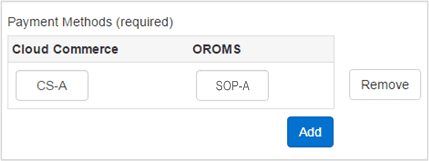
As orders are created in Retail Digital Commerce and passed to Oracle Retail Order Management, the payment mappings are passed to Oracle Retail Order Management for fulfillment and settlement with the required payment gateways.
Note:
To ensure PCI compliance, no credit card or gift card numbers are sent to Oracle Retail Order Management. The transaction reference and the authorization ID are sent with the order.
Payment Gateways
Note: When using the CyberSource payment gateway, you must provide the AuthNumber for reauthorization and settlement. Because Retail Digital Commerce does not store the AuthNumber, the field is set to NA by default. You must update this field with the AuthNumber values for the CyberSource gateway.
To configure integrations with other order processing systems, use the Generic Payment Framework, as described in the Retail Digital Commerce documentation. Generic payment is not supported by default; however, Oracle Retail Order Management APIs can support sending payment details separately for an order. Whenever a generic payment is used in Retail Digital Commerce, payment details are not sent and the order is put into an error state. Once you update the payment details for the order, the Oracle Retail Order Management System changes the order to an open state.
External Pricing
Note that this integration does not support external pricing. If you are using a combination of external prices and sale prices from Retail Digital Commerce, this integration will average the prices of items of the same SKU. For example, a customer qualifies for a promotion in Retail Digital Commerce that enables him to purchase 5 hats for the sales price of $5 each, instead of the list price of $6. If the customer wants to buy 10 hats, in Retail Digital Commerce, 5 of the hats would be sold at $5 and 5 of the hats would be sold at $6 for a total of $55. Oracle Retail Order Management does not differentiate between the price lists. Instead, it averages the final price between all of the hats, therefore all 10 hats are priced at $5.50 each for a total of $55. This may impact return processes, as in the above example, the return price of a hat would be $5.50 and not $5 or $6.
Payment Types
Payment Types are set up and configured using the Payment Processing setting and the Payment Types tab, which is described in the Retail Digital Commerce documentation. For information on Oracle Retail Order Management payment types, refer to the Oracle Retail Order Management documentation.
Shipping Methods
Oracle Retail Order Management uses shipping methods that are identified by unique integers. You can configure multiple shipping methods. For integration, Retail Digital Commerce shipping methods are mapped to Oracle Retail Order Management numeric shipping methods.
The shipping methods are sent to Oracle Retail Order Management during fulfillment. Retail Digital Commerce and Oracle Retail Order Management shipping methods should be synchronized. These mapping ensure that the orders created on Retail Digital Commerce refer to and use similar shipping method chosen by the customer for shipping.
You can obtain a list of the shipping methods available by calling the following endpoint:
GET
        /ccadmin/v1/merchant/shippingMethods
This returns a list of available shipping methods. The response also includes information on each shipping method, and the repository ID of the shipping method. The repository ID identifies the shipping method code to use. The following example displays a partial response that identifies a ground shipping method:
    "enabled": true,
    "displaySequence": 0,
    "eligibleForProductWithSurcharges": false,
    "ranges": [
      {
        "amount": 4.75,
        "high": 14.99,
        "low": 0,
        "repositoryId": "groundRange1"
      }
Once you have obtained the repository ID, use it to map the shipping method:
Shipping methods are set up and configured using the Shipping Methods setting, which is described in the Retail Digital Commerce documentation. For information for integrating with external shipping systems, refer to the Retail Digital Commerce documentation. For information on Oracle Retail Order Management shipping methods, refer to the Oracle Retail Order Management documentation.
External Shipping Methods
Retail Digital Commerce supports external shipping methods. However, these shipping methods may not be available in the list of shipping methods displayed in the administration interface when configuring your Oracle Retail Order Management integration. To use the shipping methods for your external system you must add them to the Shipping Methods mapping table.
Once all of the integration parameters have been configured and saved, the integration process can occur.