Data Configuration
The product and SKU information should be in sync on both the Retail Digital Commerce and Oracle Retail Order Management servers.
The following describes the Item and SKU fields and the mapping between them:
Item Configuration
Oracle Retail Order Management
allows the ITEM_ID field to contain
a maximum of 12 alphanumeric characters. Therefore, items created
with Retail Digital Commerce should contain no more than 12 alphanumeric
characters, for example, Item001, wallet, etc.
SKU ID Configuration
The Oracle Retail Order Management system generated
short_sku_number number is unique
for a company as well as a site. As such, the Retail
Digital Commerce SKU ID should also have a unique ID for the site.
Note that the SKU ID must be numeric and limited to
7 characters.
Variant Configuration
Oracle Retail Order Management
allows a maximum of three SKU attributes, for example, color, size and collar. Note that all items will have the same elements.
For example, both the shirts and the shoe SKUs will
contain the same variants, for example, color, size, and collar.
Retail Digital Commerce
allows more than three variants, for example, color, size, collar, and sleeve. However, Oracle Retail
Order Management cannot recognize more than three variants.
If the SKU attribute in Oracle Retail Order Management and
the SKU variant in Retail Digital Commerce both contain fewer than
three entries, the SKU attribute will be the same.
While creating items and SKUs in Retail Digital Commerce and Oracle Retail Order Management, consider the following:
- When creating SKUs, limit variants to less than three
- Create SKUS in Oracle Retail Order Management. The same SKUs with
the
short_sku_numberfield can be manually exported and created in Commerce - Create variants that are as general as possible so that they can be shared across items
- Before the integration process begins, the Retail Digital Commerce and Oracle Retail Order Management inventories should be synchronized
For detailed information on configuring and managing catalogs and SKUs, refer to the Oracle Retail Digital Commerce documentation.
Working with More Than Three Variants
Retail Digital Commerce allows you to configure SKUs so that
they contain variants, such as color, size, collar, etc.
However, Oracle Retail Order Management can accept only up to
three of these variants. In the following example,
the SKU for a shirt, as it is defined in Retail Digital Commerce,
contains the variants for color, size, sleeve and collar. Because Oracle Retail Order Management can only
accept three of these variants to be part of the SKU, the SKU is
could be modified.
Note:
If a Retail Digital Commerce SKU contains three or less variants, it is converted into the Oracle Retail Order Management system without any changes.
In the following example,
the Retail Digital Commerce Shirt 1234 item contains the following
variants: color, size, collar, and sleeve. A
SKU with the sku_id 1234567 is a Shirt1234
item that has the variants values of black, small, crew, half.
Because the Retail Digital Commerce SKU has more variants
than Oracle Retail Order Management can accept, you might
configure your SKU so that the last variant, sleeve, is removed, creating three separate items: Shirt1234
Full, Shirt 1234 Half and Shirt 1234 3/4. The Retail
Digital Commerce SKU now matches the Oracle Retail Order Management
Shirt1234 Half item. The SKU with the Retail Digital
Commerce sku_id 1234567 receives
the system-generated short_sku_number 1234567.
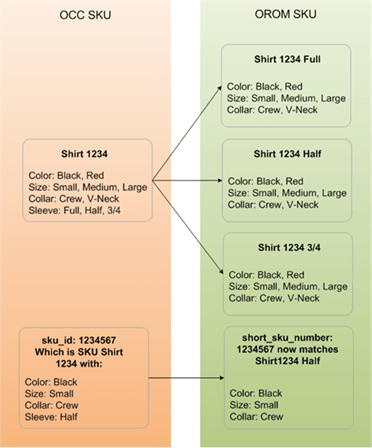
The above diagram shows how the Retail Digital Commerce item Shirt
1234 can be converted into three separate Oracle Retail Order
Management items based on the fourth variant, sleeve. The diagram also shows how the Retail
Digital Commerce SKU Shirt1234 relates to the Oracle Retail Order
Management SKU 1234567.