System Architecture
EFTLink connects to the OPI using only a secure HTTPS connection (using HTTP POST) and uses a Transport Layer Security (TLS) protocol version 1.3 by default, additional restrictions to protocol and ciphers can be applied via dedicated configuration.
Note:
IMPORTANT
Please note that starting from version 24, strict validation of EPS device SSL certificates will be enforced using a dedicated truststore.
The OPI terminal certificate chain, with root or intermediate, should be provided by the OPI partner and imported on the EFTLink truststore; also note they may be different for production and test/stage environments.
Refer to the Oracle Retail EFTLink Framework and Configuration Installation Guide, Securing Communication to EPS Devices by Importing Trusted Xertificates section to set up the truststore with the required trusted certificates.
Also note that the core default configuration for protocols and ciphers may need changing for some OPI implementations. Please verify and eventually update the following configuration keys held within the relevant trustStore section of the opiretail.json file:
-
protocolsAllowList
-
cipherAllowList
-
cipherDenyList
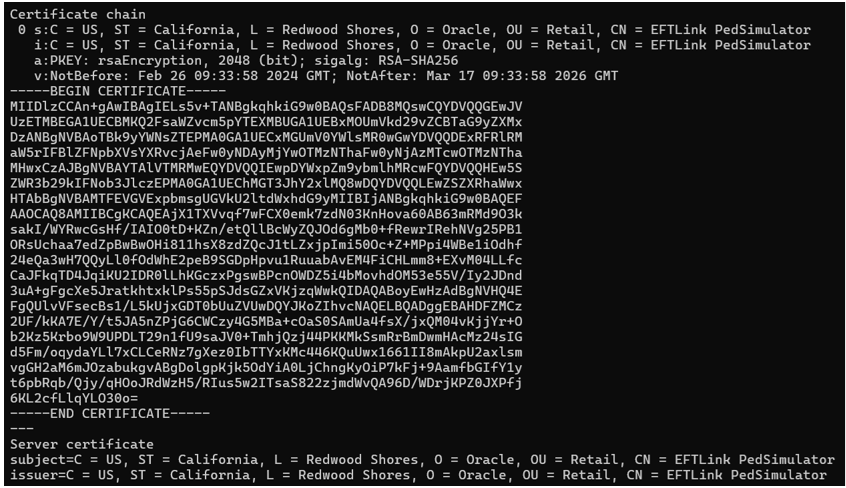
The above configuration keys should be updated with the device supported values by contacting the PSP vendor. Alternately you could attempt to inspect the SSL yourself using a tool such as openssl, for example:
openssl s_client -showcerts -connect <terminal ip:port>
Please note that opiretail.json configuration keys expect cipher suite names as IANA names while openssl uses proprietary names, refer to https://www.ssl.org/cipher-suite-mapping to translate them.
Example of a terminal certificate details by inspecting with openssl command:
Example of the TLS protocol and cipher used by a terminal by inspecting with openssl command:
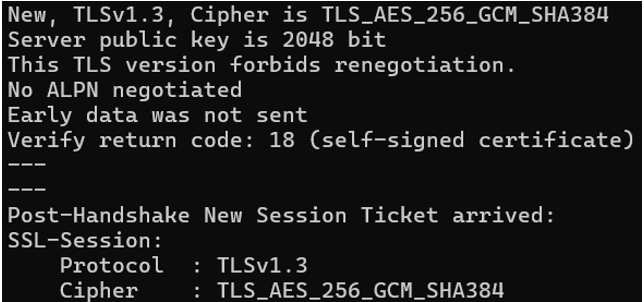
Following these examples, the reported certificate or its root should present in the truststore protocolsAllowList and TLS_AES_256_GCM_SHA384 in the truststore cipherAllowList configuration keys in opiretail.json to allow EFTLink to connect to the terminal device.
Please always contact the OPI partner for any questions about production and test terminal certificates, TLS protocols, and ciphers.
Note:
The certificates and ciphers used by OPI implementations may change over time. Please contact your OPI partner for details on how they manage this.