EFTLink Server (PED Pooling)
When EFTLink is configured to use WebSocket communication, all communication between clients (for example, Xstore Workstations) and the EFTLink Server is performed over a single bidirectional channel. As a result, the only information required on the Xstore side is the host address and port number of the EFTLink Server installation.
The EFTLink Server is responsible for processing requests from the connected clients and routing them to the appropriate payment endpoint or terminal. Depending on the configured routing rules, EFTLink can either automatically select a terminal or present the associate with a list of available terminals from which to choose.
At a high level, routing decisions are based on the following factors:
-
The system implementer can configure routing rules held in the EFTLink configuration file that associate specific workstation, or groups of workstations, with predefined terminals or endpoints.
-
If no predefined terminal is targeted, then the routing rules can define what terminals are presented to the client through a DeviceRequest. The list identifies which terminals are currently available and which are in use. The associate can refresh the list and wait for an unavailable terminal to become available before making a selection.
The following diagram illustrates the routing process and provides examples of routing rules can be configured.
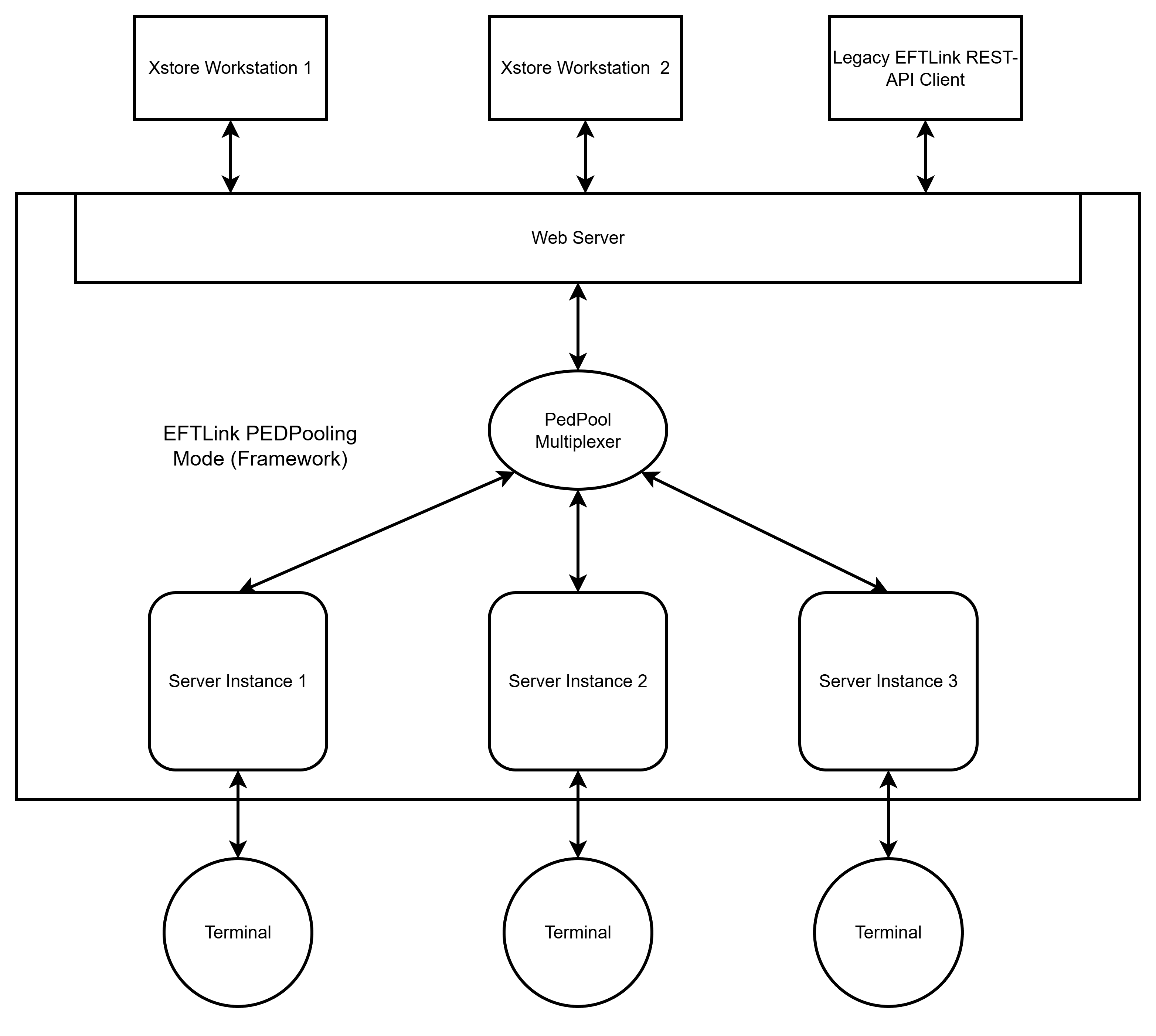
The diagram above illustrates an EFTLink Server installation running three EFTLink server instances, each configured to bridge POS requests to a dedicated PSP endpoint. this configuration can be achieved by following the steps below.
The examples below demonstrate how the configuration for each server instance can differ.
| EFTLink Server | ||||
|---|---|---|---|---|
| Root | eftlinkserver.json |
"restApiEnabled": true "terminals": [ { "serverNumber": 1, "terminal": "terminal1", "description": "Terminal 1" }, { "serverNumber": 2, "terminal": "terminal2", "description": "Terminal 2" }, { "serverNumber": 3, "terminal": "terminal3", "description": "Terminal 3" } ]
"pools": [ { "id": "pool1", "description": "Pool", "terminals": [ "terminal1", "terminal2", "terminal3" ] } ], "posMappings": [ { "workstationId": "1", "poolId": "pool1", "customForms": true, "defaultTerminal": "terminal1", "posDescription": "POS {}" }, { "workstationId": "2", "poolId": "pool1", "posDescription": "POS {}" }, { "workstationId": "^10[0-5]$", "poolId": "pool1", "posDescription": "POS {}" } ] |
||
| server1, 2 | eftlinkserver.json |
"epsCores": { "cores": { "0": "oracle.eftlink.opiretail.OPIRetailCore } |
||
| opiretail.json | "endPoint": "https://<IP Address of endpoint>:<port>" | |||
| server3 |
eftlinkserver.json
|
"epsCores": { "cores": { "0": "oracle.eftlink.opiretail.OPIRetailCore”, "1": " oracle.eftlink.paybylink.PayByLinkCore” }, "routing": { "payByLinkCore": "1" }, } |
||
| opiretail.json | "endPoint": "https://<IP Address of endpoint>:<port>" | |||
| Xstore | ||||
| AuthConfig.xml | <Host dtype="String">socket://<IP Address>:<Port></Host> | |||
The above example illustrates that each server instance can have its own configuration.
The eftlinkserver.json file located in the root of the EFTLink Installation directory is used to define the EFTLink Server instances that are started, and the terminal mappings associated with them. To configure three server instances, ensure that the terminals section contains an entry for each instance.
Once the root eftlinkserver.json file has been configured, copy it into each Server<n> directory. Each copy can then be customised with settings specific to that instance, such as the active core configuration, endpoint routing, line display behaviour.
The root eftlinkserver.json file is used to enable and configure PedPooling. It can also be configured to accept requests from clients that adhere to the EFTLink REST API specification.
The server instances can then be configured independently. For example:
- Server 1 and Server 2 only differ in terms of the endpoint specified in the opiretail.json file.
- Server 3 is configured to route PayByLink requests to Core 1.
For further information about PedPooling configuration options, refer to the Oracle Retail EFTLink Framework Installation and Basic Configuration Guide.