4 Multiple Cores
This chapter describes the concept and procedures of configuring EFTLink using Multiple Cores.
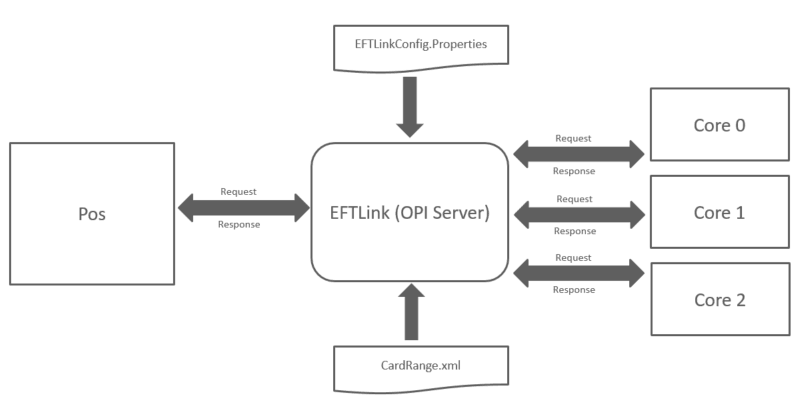
EFTLink can be configured to use multiple cores for the purpose of redirecting requests based on:
-
Line Display
-
Request Type
-
CardRange.xml
-
Requested in CardServiceRequest
Figure 4-1 Multiple Cores
Line Display
Sale State Notification requests can either be disabled altogether or be forwarded to either one core or a delegated list of cores.
CardRange.xml
For non-PCI transactions, such as gift cards transactions, EFTLink evaluates the cardrange.xml before determining which core should process the CardServiceRequest.
When a card PAN is supplied in the CardServiceRequest, the cardrange.xml file can be used to route the requests to a predefined core. This allows different gift card providers to be routed to different core instances.
Preselected Cores
By default, all requests are routed to the first core specified in the configuration file. However, this behavior can be modified so that requests are directed to a specific core based on the request type.
EFTLink can be configured to route requests to a particular core according to the type of request being processed, for example:
- CardServiceRequest: EWallet, GiftCard, PayByLink
- Device Request: Custom Form
It is also possible, through customization, for Xstore to target a specific core when submitting a CardServiceRequest. Requests that explicitly specify a target core take precedence over any routing rule configured through the EFTLink configuration file.