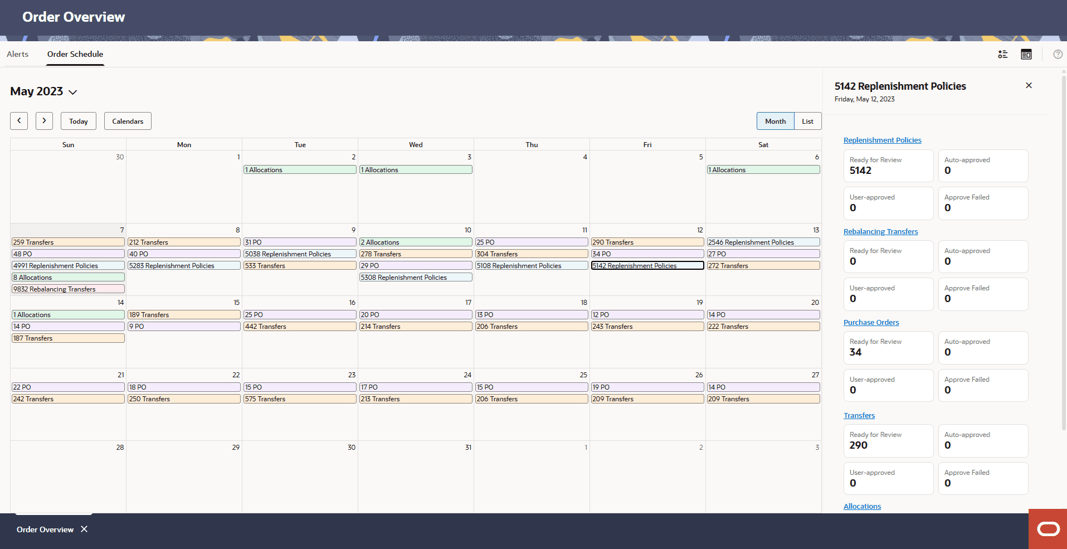
Order Overview
Recommendations are the outputs of a run. In the Overview tab, recommendations are summarized by status and type to help the users prioritize their work.
In the Alerts tab you will use the Oracle Assistant to build an alerts dashboard that best drives your business priorities.
Open the Oracle Assistant

Invoke the Dashboard Agent by describing the alert, metrics ensuring the keyword "dashboard" is used to describe the desired charts and metrics to display.
Order Schedule
The Order Schedule section shows the Calendar. The calendar provides details about all types of recommendations for the current date and future dates. The user can see the number of recommendations for different types and different statuses in the panel on the right. For each day in the calendar, click the link of a recommendation type to open the detail panel.