5 ReSTful Web Services
This chapter gives an overview about the Merchandising and Sales Audit ReSTful Web service implementation and the APIs used in Merchandising and Sales Audit. For more information on ReST architectural style applied for building Web services, access the following URL:
http://www.oracle.com/technetwork/articles/javase/index-137171.htmlTo provide visibility to the background processing that's occurring, services write to the JOB_AUDIT_LOGS table in the database. Reports can be built based on this to provide visibility to what is happening in the background.
Additionally, to assist users and developers in troubleshooting any error that may arise, the payload that was processed is
also stored in the JOB_AUDIT_PAYLOAD table in the database.
Once the nightly batch run has started, web service execution will be halted, and users will receive a warning message that the nightly batch run has commenced.
Introduction
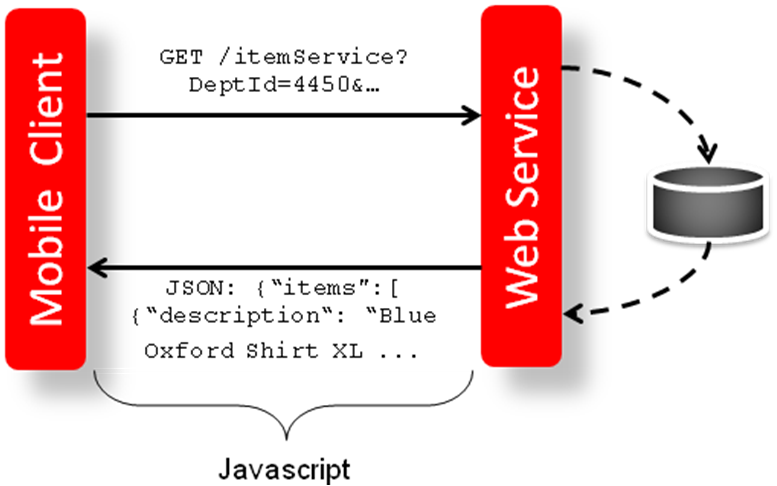
Merchandising and Sales Audit ReST support several web services, including the ability to query data and the ability to create and update data within the solutions. The ReSTful Web services Java code cannot be customized. The diagram below shows how the services are intended to interact with an external application which is a mobile client.
Figure 5-1 Mobile Client and Web Services Integration through Javascript
Note:
Several of the ReST services that may impact inventory or conflicts with data processing happening during nightly batch should not be used during the restricted nightly batch window.
Common Characteristics
Security
Services are secured using J2EE-based security model.
-
Realm-based User Authentication: This verifies users through an underlying Realm. The username and password are passed using HTTP basic authentication.
-
Role-based Authorization: This assigns users to roles; authenticated users can access the services with Merchandising or Sales Audit application roles or custom roles that are assigned to:
-
For Merchandising MERCH_SERVICE_ACCESS_PRIV
-
For Sales Audit MERCH_SERVICE_ACCESS_PRIV
-
-
The communication between the server and client is encrypted using one-way SSL. In non-SSL environments the encoding defaults to BASE-64 so it is highly recommended that these ReST services are configured to be used in production environments secured with SSL connections.
-
If you are using Merchandising data filtering, that will apply to the services as well. The app user ID used for the calling the service should be added to the Merchandising SEC_USER table (APP_USER_ID), and then associated to the appropriate group in SEC_USER _GROUP table. For more information on this see the Merchandising Security Guide - Volume 2.
Note:
oAuth App/Client Name (which is different than client ID) should be configured in theSEC_USERtable.
Standard Request and Response Headers
Merchandising and Sales Audit ReSTful web services have the following standard HTTP headers:
Accept: application/xml or application/JSON Accept-Version: 16.0 (service version number) Accept-Language: en-US,en;q=0.8
Note:
Accept-Language is not mandatory, and defaults to en-US. The user can change it though; in case they need content in a specific language. The language support in
the response payload is limited to a selective service which was created for the mobile client use case.
Depending on the type of the operation or HTTP method, the corresponding response header is updated in the HTTP response with the following codes:
-
GET/READ : 200 -
PUT/CREATE : 201(Created) or200(Success) -
POST/UPDATE : 204or200(Success) -
DELETE : 204or200(Success)
Standard Error Response
Example response payload in case of service error is depicted below:
<?xml version="1.0" encoding="UTF-8" standalone="yes"?>
<messagesRDOes>
<messagesRDO>
<message>REST Service Version Mismatch</message>
<messageType>ERROR</messageType>
<status>BAD_REQUEST</status>
</messagesRDO>
</messagesRDOes>-
Message: The error message - translated.
-
Message Type: Value of 'ERROR' is returned.
-
Status: For a bad request or error, the status is BAD_REQUEST.
-
The http error code for an error response is 400.
Merchandising URL Paths
Based on your implementation you will need to prefix the end point with just the deployment hostname. The format that should
be used for the hostname is rex.retail.<Region Name>.ocs.oraclecloud.com/<Customer Subnamespace>/,
where <Region Name> will be the region for your data center and <Customer Subnamespace> will be specific to your company’s name and environment (production, stage, and so on).
The Merchandising services are hosted on two separate application servers. The application server named MerchIntegrations contains new Integration web services for data publishing and subscription. The RmsReSTServices contains
other, legacy web services.
The following links provide access to the Merchandising services:
-
The ReSTful Web services swagger URL is available at:
https://<hostname/namespace>/RmsReSTServices/swagger-ui/https://<hostname/namespace>/MerchIntegrations/swagger-ui/ -
The ReSTful Web services
openapi.yamlis available at:https://<hostname/namespace>/RmsReSTServices/services/openapi.yamlhttps://<hostname/namespace>/MerchIntegrations/services/openapi.yaml -
The ReSTful Web services’s WADL file is available at:
https://<hostname/namespace>/RmsReSTServices/services/private/application.wadlhttps://<hostname/namespace>/MerchIntegrations/services/application.wadl -
The ReSTful Web services are available at:
https://<hostname/namespace>/RmsReSTServices/services/private/<service>https://<hostname/namespace>/MerchIntegrations/services/<service>
Sales Audit URL Paths
Based on the Implementation you may need to prefix the end point with just the deployment hostname or hostname plus access port.
The following links provide access to the Sales Audit services:
-
The ReSTful Web services swagger URL is available at:
https://<hostname/namespace>/ResaReSTServices/swagger-ui/ -
The ReSTful Web services
openapi.yamlis available at:https://<hostname/namespace>/ResaReSTServices/services/openapi.yaml -
The ReSTful Web services’s WADL file is available at:
https://<hostname/namespace>/ResaReSTServices/services/private/application.wadl -
To access the ReSTful web services:
https://<hostname/namespace>/ResaReSTServices/services/private/<ResaService>
Fiscal Document Generation URL Paths
Based on your implementation you will need to prefix the end point with just the deployment hostname. The format to be
used for the hostname is xxx-yyy-mfcs-rhs.oracleindustry.com, where xxx-yyy is specific
to your company's name and environment (production, stage, and so on). The following links provide access to the Fiscal Document
Generation services:
-
The ReSTful Web services Javadocs are available at:
https://<hostname>/RfmReSTServices -
The ReSTful Web services's WADL file is available at:
https://<hostname>/RfmReSTServices/services/private/application.wadl -
The ReSTful Web services are available at:
https://<hostname>/RfmReSTServices/services/private/application.wadl
OAuth for REST Service Authentication
OAuth 2.0 is the industry standard protocol for authorization. Merchandising cloud services REST Services now supports OAuth 2.0. To invoke these services, you need to obtain and access token and use it as a bearer token.
Note:
Basic Authentication access is no longer supported for these services. Allocation Cloud Service will still use Basic Authentication with this release.Steps to Enable
To obtain a token and call the services, use the following steps:
-
This step should be performed one time for a given environment. Generate OAuth Client App with the environment-specific scope.
Each environment has a different scope that is available after the provisioning of the environment. Use this scope to generate the OAuth Client App using the Retail Home UI. For details, refer to the ”Creating OAuth Client Apps” section of the Retail Home Administration Guide, which can be found under Common Cloud Services Solutions in the Oracle Retail Help Center. Once the OAuth Client App is generated, note the client ID and secret. This information will be required for an access token to call REST services.
-
Get an access token using the OAuth client ID and secret from IDCS.
export ACCESS_TOKEN="$(curl -u <Client ID>:<Secret> -H 'Content-Type: application/x-www-form-urlencoded;charset=UTF-8' --request POST https://<IDCS_BASE_URL>/oauth2/v1/token -d 'grant_type=client_credentials&scope=<Customer Environment Specific Scope>' | jq -r '.access_token')"The token is generally valid for 1 hour.
-
REST clients that need to call Merchandising REST service end points should use the client ID and secret of the OAuth client generated in the previous step to get an access token.
OAuth tokens can also be obtained by REST client tools like Postman for testing purposes by filling in the necessary details like client ID/secret and scope. Use the below information in such cases:
-
Authorization: OAuth 2.0
-
Access Token URL:
https://<IDCS_BASE_URL>/oauth2/v1/token -
Client ID: <Client id of OAuth client app>
-
Client Secret: <Client secret of OAuth client app>
-
Scope: <Custom environment specific scope>
-
The scope pattern that is used in the MFCS IDCS app creation template is
rgbu:merch:<SERVICETYPE>-<ENVIRONMENT>whereSERVICETYPEis MFCS andENVIRONMENTis the environment type (STG, PRD, UAT, DEV1, DEV2, and so on).For example:
-
"scope": "rgbu:merch:MFCS-PRD" -
"scope": "rgbu:merch:MFCS-STG"
-
-
Example using the access token as a bearer token:
curl --location --request GET 'http://<hostname or IP address>:<port number>/ RmsReSTServices/services/private/Common/vDate' \ --header 'Authorization: Bearer $ACCESS_TOKEN'Date Format
Few input date and output date fields are in long format. The others are in SQL Date format. The new MerchIntegrations service supports dates in the yyyy-mm-dd format and datetimes in the yyyy-mm-ddTHH24:Mi:SS.SSSZ format.
Dynamic Response Field Filtering
The ReST service call responses can be customised for precise data retrieval through the use
of the include and exclude query parameters. These
parameters provide the capability to selectively choose data fields to be included or excluded
in the API response to ensure the presence of only relevant information.
'Include' Parameter
Through the 'include' parameter, you can provide a list of specific attributes/data fields to
be included in the specific response from available fields in the service. This list should be
formatted using JSON dot notation; for example, items.item,items.status,
items.dept,items.itemSupplier.supplier. Use of this parameter will make the API
response concise, containing only the requested fields.
'Exclude' Parameter
In contrast, the exclude parameter offers a complementary approach. You can
provide a list of attributes to be excluded from the response, using JSON dot notation. The
API then returns a comprehensive dataset, filtered to exclude only the specified fields. This
is particularly useful when most of the data is required but you need to omit certain fields
from the response.
For details on the Publish API, refer to reference paper Publish APIs - Customer Enablement Overview available in Oracle Retail Merchandising Documentation Library (Doc ID 1585843.1) in My Oracle Support.
Limited Availability During Nightly Batch Cycle
Several of the consume ReST services can interfere with batch jobs running during the MFCS nightly batch window. To avoid data processing conflicts, several ReST services are either not available during the entire duration of the nightly batch window or unavailable for a portion of the nightly batch. These services will fail with a 400 error if they are invoked during the window of unavailability.
The availability of the Rest services is categorized as:
-
Available 24/7 – These services are available 24/7 except for the time during which the application is being patched. Most services are available 24/7 and this includes all the GET services and most of the foundation data setup.
-
Not available during entire nightly batch – A small set of services are not available during the entire window of the nightly batch cycle. This includes services that are only active on certain dates (like stock count schedule, cost changes) or services that can influence the business logic of several jobs (like update item, item/supplier, store, reclassification, and so on).
The POM job
START_BATCH_JOBdisables these services by setting the value ofbatch_running_indtoYin therms_batch_statustable. The POM jobEND_BATCH_JOBswitches the indicator back toNand the services are then available to process the data. -
Not available during Inventory batch window - The web services that impact inventory buckets are not available during portions of the nightly batch during which inventory-related batch processes are running. This includes the services related to the functionality of receipts, transfers, allocations, inventory adjustment, customer orders, and so on.
The POM job
STOP_RIB_ADAPTOR_INV_JOBdisables these services by setting the value ofinventory_batch_running_indtoYin the tablerms_batch_status. The jobSTART_RIB_ADAPTOR_INV_JOBswitches the indicator toNto reenable the services. -
Not available during Costing and Inventory batch window – Some of the services interfere with (in addition to impacting) the inventory buckets, which also impacts the cost component and expenses. These services are not available during the inventory batch window (
inventory_batch_running_ind = Y) and while costing batch jobs are running at the initial phase of the nightly batch. This includes services related to functionality of purchase orders, item expenses, item HTS, supplier updates, exchange rate updates, and so on.The POM job
DUMMY_START_NIGHT_BATCH_JOBdisables these services during the costing batch window by settingcosting_batch_running_indtoYin therms_batch_statustable. The jobEND_COSTING_BATCH_JOBswitches the indicator toN, which reenables the services once the costing batches are complete.
Note:
MerchIntegration services having limited availability during nightly batch have a custom property namedx-batch-dependency in the openapi.yaml file.
Custom HTTP Headers
The Rest Service supports custom HTTP Headers that can be used to exchange additional metadata about the service calls. These are:
-
X-Correlation-ID: The client can include a unique ID in the HTTP header “X-Correlation-ID” to uniquely trace the service call. The input X-Correlation-ID is captured in server logs and in the
service_metricstable to provide details of the outcome of the service call. While the expectation is that the client should have a unique correlation ID in every request, the uniqueness is not validated by the ReST service.In the response HTTP header, X-Correlation-ID is always included. If the request HTTP header contains a X-Correlation-ID, the same value IS returned in the response HTTP header. If the input header is missing the correlation id, a server generated request id (UUID) IS populated in the response X-Correlation-ID header field. The server generated request ID is captured in
service_metricstable.Best Practice – The client should generate a UUID (up to 36 bytes) and include the UUID in the request in the HTTP header X-Correlation-ID and persist the ID in some data store for traceability purposes. In case of exceptions or troubleshooting, this ID is handy when checking the table
service_metricsfor how the server processed the request.Example usage: The client makes a call and the client crashes before the response is received, or there was timeout thrown by one of the infrastructure components between the client and the application server (like load balancer or routers). The correlation ID can be checked in the table
service_metricsto identify the actual response. If the service method is POST or PUT or DELETE, the tableservice_payloadcan be referenced to get the response payload for that request.Note:
Capturing X-Correlation-ID in server logs or in the tableservice_metricsis done by the ReST Service application server and the request should have arrived at this server for the service request to be logged. The application server captures the request in theservice_metricstable when the request is received. After the request is processed, the server updates the same row in theservice_metricstable to capture the response status. -
X-Client-Principal-User: The client can include an optional HTTP Header in the request to provide a business user identifier in a system-to-system service call to allow for capturing the business user that created or updated the content of the request. As part of the service request in which data is created or updated, the audit columns
create_idandlast_update_idcapture the OAuth client name used to make the service call. In the request containing X-Client-Principal-User, this value is used as-is (without any validation) to populate the audit columns. -
X-Content-Has-More: This HTTP Header (
trueorfalse) is included in the response for several Merch Integration Publish API. The GET services that supports pagination includes the fieldhasMorein the payload to inform the client if there are additional pages to be requested. This information is also captured in the HTTP Header to allow the client to quickly access this information without parsing the response payload. -
X-Content-Offset-Key: This HTTP Header is included in the response, along with X-Content-Has-More, when there are additional pages to be requested for a service supporting pagination using the query parameter
offsetkey. The client can use the value from the HTTP Header instead of reading it from inside the payload to construct the URL for the next page. -
X-Content-Count: This HTTP Header is included as an additional information in several Merch Integration Publish APIs to inform the client of the number of records in the response payload.
Paging
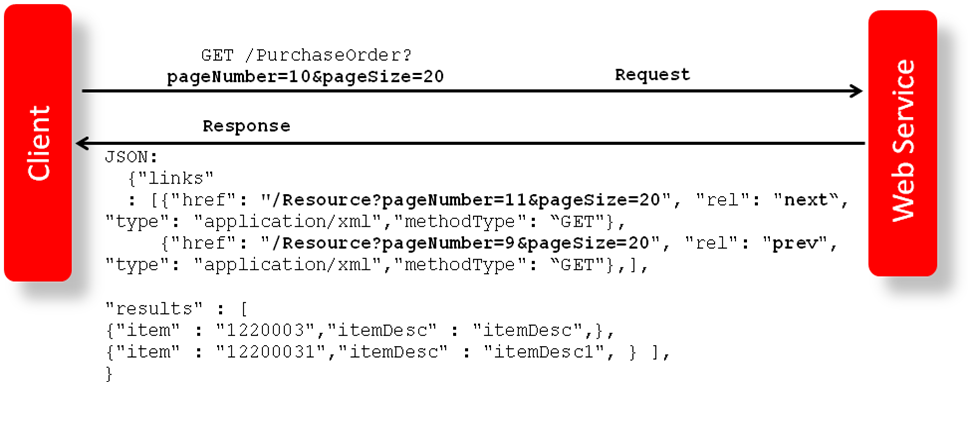
Some of the Merchandising and Sales Audit ReSTful web services have the potential to bring back a significant number of records, and therefore these services are equipped to segment the result into pages. The page number to retrieve and the size of the page are added as input parameters to all the paged services.
Each paged result includes the following information:
-
Total Record Count: Displays the number of all records matching the service input criteria.
-
Next Page URL: Shows the service URL with same input parameters, but with the pageNumber plus 1, when more records exist.
-
Previous Page URL: Shows the service URL with same input parameters and the pageNumber input value minus 1, when page number is not 1.
Next or previous page URL is not provided when:
-
No records are returned
-
Previous page is not returned, when the page number is 1.
-
Next page is not returned, when the record reaches the last page.
Figure 5-2 Javascript for Paging Information in RMS Web Services
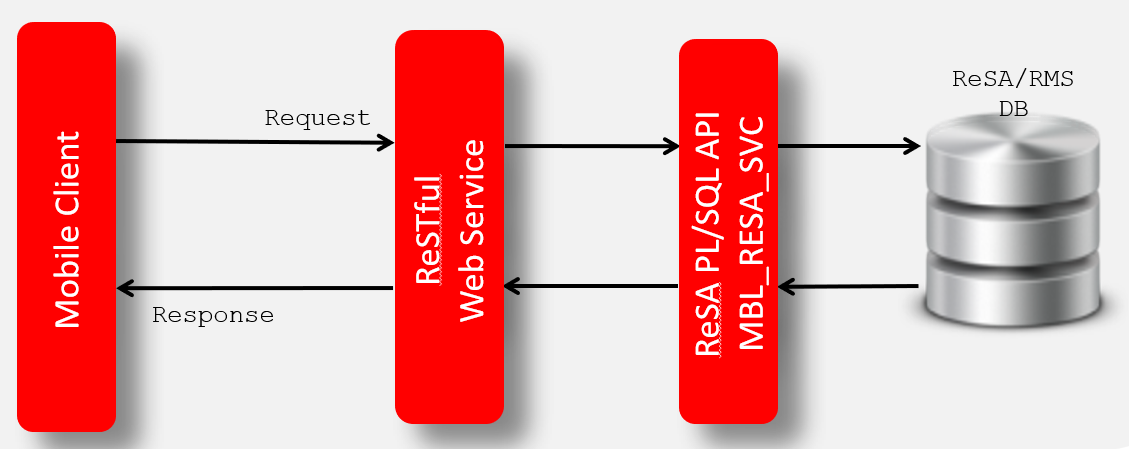
Web Service APIs Process Flow
The diagram shows the Web Service API process flow.
Figure 5-3 Web Service APIs Process Flow
Configuring ReSTful Web Services for Integration with External Systems
Based on your implementation, you will need to enable the Merchandising ReSTful publishing services for data replication between Merchandising and external systems. Additionally, the Omnichannel integration ReSTful services may also be enabled for external consumers. These two enablements are performed through the Web Service Configuration Screen in Merchandising. After a service is enabled, the table triggers will start writing data to respective change log tables and the corresponding background job will start populating JSON cache tables. When a service is disabled, the ReST service will be unavailable, triggers will stop capturing new changes, and background process will clean up the JSON cache table. For details on the Publish API, refer to reference paper Publish APIs - Customer Enablement Overview available in Oracle Retail Merchandising Documentation Library (Doc ID 1585843.1) in My Oracle Support. For more details on how to enable a web service, see the Merchandising Administration Guide.
The below listed services can be enabled or disabled using the Merchandising UI,
File Transfer Services (FTS)
Business Overview
File Transfer Services (FTS) provide an endpoint for the customer to be used when working with files that are uploaded to and downloaded from the Merchandising Cloud Service Suite. These services are used by Merchandising and Sales Audit (RMFCS), Pricing (RPCS), Invoice Matching (ReIMCS), Allocation (RACS) and the Data Conversion tool. They allow you to manage uploading and downloading files to Oracle Cloud Infrastructure Object Storage, which is an internet-scale, high-performance storage platform that offers reliable and cost-efficient data durability.
For each customer environment, buckets, which are logical containers for storing objects, will be created in Object Storage. Any type of data, regardless of content type, is stored as an object. An object is composed of the object itself and metadata about the object. Any file uploaded through FTS to Object Storage has a retention period of 7 days before it is automatically purged.
The services use OAUTH 2.0 client credential authentication. Once authentication passes, the internal file transfer services that retrieve a pre-authenticated request (PAR) are called to upload and download files to Object Storage. The primary role of these services is to ensure that only valid external users can call the service by enforcing authorization policies.
List of services:
- List Storage Prefixes
- Retrieve PAR for Uploading Files
- Retrieve PAR for Downloading Files
- Delete Files
- List Files
- FTS Health Check
URL Prefix: https://rex.retail.<Region Name>.ocs.oraclecloud.com/<Customer Subnamespace>/RmsPlatformServices/services/private
The final URL will be the URL Prefix followed by the ReST URL path mentioned in each service description below.
To start uploading or downloading the files to/from Object Storage, storage prefixes should be registered first.
The table below shows the prefixes used by each of the solutions when calling the above listed services. By default, all the storage prefixes below will be registered automatically.
| RMFCS | RPCS | ReIMCS | RACS | Data Conversion | |
|---|---|---|---|---|---|
|
Incoming |
/incoming |
/incoming/reim |
/incoming/alloc |
/dataconversion/incoming |
|
|
Outgoing |
/outgoing |
/dataconversion/outgoing |
|||
|
Reject |
/reject |
n/a |
n/a |
||
|
Downloaded |
/downloaded |
/downloaded/reim |
/downloaded/alloc |
n/a |
|
|
Archive |
n/a |
n/a |
n/a |
n/a |
|
Table 5-1 Administrative Processes
| Storage Prefix | Service | File Name |
|---|---|---|
|
AdminProcess |
Dynamic Hierarchy |
dynamic_hierarchy/dynamic_hierarchy_mapping_tl.csv |
Retrieve PAR for Uploading Files
Business Overview
This service is used for retrieving an Object Storage pre-authenticated request (PAR) for uploading files. The response from the service is then used to upload the files in the user specified prefix from Object Storage using curl. The specified prefix is the staging location for input file that is processed by one of the Merchandising cloud service upload batches.
Headers
| Key | Value |
|---|---|
|
Accept-Language |
String (Ex: en-US) |
Request body
{
"listOfFiles": [
{
"storagePrefix": "string",
"fileName": "string"
}
]
}
Output
| Parameter Name | Data Type |
|---|---|
|
id |
String |
|
name |
String |
|
accessUri |
String |
|
objectNames |
<List> String |
|
access |
String |
|
timeExpires |
Timestamp |
|
timeCreated |
Timestamp |
The output metadata contains the PAR details of the request including validation error, if any
For Success:
{
"id": "string",
"name": "string",
"accessUri": "string",
"objectNames": [
"string"
],
"accessType": "string",
"timeExpires": "timestamp",
"timeCreated": "timestamp"
}
For Failure:
{
"error_message": "string"
}
Uploading the Batch Incoming File
To upload the file, use a curl command as shown below in the example, including the accessUri returned from the ReST service call. Provide the location of the file to be uploaded. The file must be uploaded before the
expiration time. Below is an format of the curl command structure. The specified prefix is the staging location
for input files that is processed by one of the Merchandising cloud service upload batches.
Example
curl https://<objectstorage_hostname/p/<pre authenticated request>/n/<namespace>/b/<bucketname>/o/<prefixname>/<filename> --upload-file <filename>Retrieve PAR for Downloading Files
Business Overview
This service is used for retrieving an Object Storage pre-authenticated request (PAR) for downloading files. The response
from the service is then used to download the files in the user specified prefix from Object Storage using curl. The specified prefix is the staging location for file that is processed by one of the Merchandising cloud service batches.
Headers
| Key | Value |
|---|---|
|
Accept-Language |
String (Ex: en-US) |
Request Body
{
"listOfFiles": [
{
"storagePrefix": "string",
"fileName": "string"
}
]
}
Output
| Parameter Name | Data Type |
|---|---|
|
id |
String |
|
name |
String |
|
accessUri |
String |
|
objectNames |
<List> String |
|
access |
String |
|
timeExpires |
Timestamp |
|
timeCreated |
Timestamp |
The output metadata contains the PAR details of the request including validation error, if any.
For Success:
{
"id": "string",
"name": "string",
"accessUri": "string",
"objectNames": [
"string"
],
"accessType": "string",
"timeExpires": "timestamp",
"timeCreated": "timestamp"
}
For Failure:
{
"error_message": "string"
}
Downloading the File
To download the file, use the curl command to the accessUri returned from the output
metadata. You can download the file before the expiration time. The specified prefix is the staging location for file that
is processed by one of the Merchandising cloud service batches.
Example
curl https://<objectstorage_hostname>/p/<pre authenticated request>/n/<namespace>/b/<bucketname>/o/<prefixname>/<filename> -ODelete Files
Business Overview
This service is used for deleting files in Object Storage based on the provided prefix.
Headers
| Key | Value |
|---|---|
|
Accept-Language |
String (Ex: en-US) |
Request body
{
"listOfFiles": [
{
"storagePrefix": "string",
"fileName": "string"
}
]
}
Output
The output metadata contains the output of the FTS service for deletion. Validation error will be output, if any.
For Success:
{
"filesDeleted": [
{
"filePath": {
"storagePrefix": "incoming",
"fileName": "testFile.txt"
},
"responseMessage": "File successfully deleted incoming/testFile.txt"
}
],
"filesFailedDeletion": []
}
For Failure:
{
"error_message": "string"
}
List Files
Business Overview
This service provides a list of Object Storage files under the specified directory/prefix.
Input Parameters
| Parameter Name | Data Type |
|---|---|
|
prefix |
String |
|
contains |
String |
|
scanStatus |
String |
|
Limit |
String |
|
Offset |
String |
|
Sort |
String |
Output
| Parameter Name | Data Type |
|---|---|
|
name |
String |
|
size |
String |
|
md5 |
String |
|
version |
String |
|
etag |
String |
|
createdDate |
Timestamp |
|
modifiedDate |
Timestamp |
|
scanStatus |
String |
|
scanDate |
Timestamp |
|
scanMessage |
String |
The output metadata contains the file detail of the request.
For Success:
{
"name": "string",
"size": "string",
"md5": "string",
"version":”string",
"etag": "string",
"createdDate": "timestamp",
"modifiedDate": "timestamp",
"scanStatus": "string",
"scanDate": "timestamp",
"scanMessage": "string",
}
Merchandising to Omnichannel Services
The following services are included in this functional area:
REST Endpoint for Omni channel/Diff Group
Business Overview
This service publishes differentiator groups to the Omnichannel application and can also be consumed by downstream consuming systems. Functionally, the source view uses the differentiator-group header-plus-detail relationship, so only differentiator groups that currently have detail rows are published.
Technical Details
This service follows the Publish API cache architecture in which the REST service serves pre-generated JSON from an integration cache table that is initially seeded and then maintained through asynchronous delta processing. For overall enablement, scheduling, and guidance on how publish api works and how webhook for this api can be implemented to stream the data out, refer to the white paper Publish APIs - Customer Enablement Overview.
Core business tables: DIFF_GROUP_HEAD, DIFF_GROUP_DETAIL
Additional business tables: DIFF_TYPE
JSON cache table: MERCHAPI_DIFF_GROUP
JSON generation view: V_MERCHAPI_DIFF_GROUP_JSON
The cache is refreshed from V_MERCHAPI_DIFF_GROUP_JSON, which builds the payload from DIFF_GROUP_HEAD, DIFF_TYPE, and DIFF_GROUP_DETAIL.
The view uses the header-plus-detail relationship, so only differentiator groups that currently have detail rows are published.
When the omnichannel dimension-type API is enabled, the same diff-group processing flow also repopulates the child dimension-type cache for impacted items.
Initial Seeding and post enablement rebuild/repair
Initial seeding and rebuild pull published rows from V_MERCHAPI_DIFF_GROUP_JSON. No additional filter criteria were identified beyond the cache-build logic.
Rebuild marks cache rows deleted when the group no longer exists in V_MERCHAPI_DIFF_GROUP_JSON.
ICL (Integration Change Log) table: ICL_RMS_DIFF_GROUP (ICL consumer name = MERCHAPI)
Delta processing is driven by ICL_RMS_DIFF_GROUP.
Batch Configuration. Asynchronous delta processing is supported using Background engine and also via POM scheduling. Choose one.
Process configuration name: API_OMNI_DIFF_GROUP
To enable via Background engine set BACKGROUND_RUN_FLAG to Y and review the BACKGROUND_RUN_INTERVAL_SECOND parameter.
POM Batch schedule process and job: MERCHAPI_DELTA_OMNI_DIFF_GROUP_ADHOC_PROCESS -> MERCHAPI_OMNI_DIFF_GROUP_ADHOC_JOB
Webhook configuration api name: foundation/omnichannel/diff/group
Special handling
Input Parameters
| Parameter Name | Required | Data Type | Description |
|---|---|---|---|
|
since |
No |
String |
Since Date (Example: 2010-12-31T23:59:59.999Z) |
|
before |
No |
String |
Before Date (Example: 2040-12-31T23:59:59.999Z) |
|
limit |
No |
String (6) |
Pagination limit. Default value is 1000. |
|
offsetkey |
No |
String |
Offset key |
|
include |
No |
String |
Fields to include - comma separated (Example items.name,items.address.city) |
|
exclude |
No |
String |
Fields to exclude - comma separated (Example items.address.contactFax,items.customFlexAttribute) |
Output
Table 5-2 PageResultsItemsVMerchapiDiffGrp - Object. See list of elements for detail
| Element Name | Required | Data Type | Description |
|---|---|---|---|
|
items |
No |
Collection of Object |
Collection of records |
|
hasMore |
No |
Boolean |
Boolean to signify if there are additional pages of data. This is true if limit = count for pagination supported request |
|
limit |
No |
Number |
Requested page size. If the page size was not defined in the input request, a default page size is used to limit the number of records to fetch |
|
count |
No |
Number |
Number of record in the response object |
|
links |
No |
Collection of Object |
List of Self and/or Next URL |
Table 5-3 VMerchapiDiffGrp - Object. See list of elements for detail
| Element Name | Required | Data Type | Description |
|---|---|---|---|
|
action |
No |
String (6) |
Action for Diff group. |
|
diffgroupid |
No |
String (10) |
This column contains the Diff group ID. |
|
diffgroupdesc |
No |
String (120) |
This column contains the Diff group's description. |
|
difftypeid |
No |
String (6) |
This column contains the Diff type ID. |
|
diffid |
No |
String (10) |
This column contains the Diff ID. |
Table 5-4 LinkItems - Object. See list of elements for detail
| Element Name | Required | Data Type | Description |
|---|---|---|---|
|
href |
No |
String |
Service URL |
|
rel |
No |
String |
This can be either 'self' or 'next'. The 'next' link is present if there are more pages to fetch and contains the offsetkey which uniquely identifies the last record of this response. |
Sample Response Message
{
"items": [
{
"action": "INSERT",
"diffgroupid": "BASIC CLRS",
"diffgroupdesc": "Basic Color Pallet",
"difftypeid": "C",
"diffid": "GREEN"
}
],
"hasMore": true,
"limit": 1000,
"count": 1000,
"links": [
{
"href": "https://<server>:<port>/Application/services/resources?limit=1000&since=1970-01-01T00:00:00.001Z&before=2024-01-01T00:00:00.001Z&offsetkey=1234,XYZ",
"rel": "next"
}
]
}Elements in JSON Output
| Elements | Description |
|---|---|
| items | The first element is named as items and contains a number of child elements. Each child element corresponds to a row in the result set generated by the query. |
| hasMore | This is dependent on limit value. If the total rows are more than then limit defined then hasMore will be set to true else false. |
| limit |
This is used to limit the rows to control the paging of result data. Based on the limit, next and previous links are displayed. For example: If the limit is set to 25, internal it tries to fetch 26 rows. If 26th row exists then 25 rows are returned along with a "next" link else no links would be added to the JSON response. |
| links |
“self” : This contains URI pointing to current page. “next”: This contains URI pointing to the next page of results. |
Example JSON input:
" {
"items": [
{
"action": "INSERT",
"diffgroupid": "1177",
"diffgroupdesc": "EIT_Diff_Group_1",
"difftypeid": "CF",
"diffid": "4280"
}
],
"hasMore": true,
"limit": 1,
"count": 1,
"links": [
{
"href": "http://<hostname>/MerchIntegrations/services/foundation/omnichannel/diff/group?before=2021-05-06T16%3A12%3A02.551757%2B08%3A00&limit=1&since=1970-01-01T00%3A00%3A00.001Z",
"rel": "self"
},
{
"href": "http:// <hostname>/MerchIntegrations/services/foundation/omnichannel/diff/group?before=2021-05-06T16%3A12%3A02.551757%2B08%3A00&limit=1&offsetkey=1177%2C4280&since=1970-01-01T00%3A00%3A00.001Z",
"rel": "next"
}
]
} "Table Impact
The list of table includes the data pre-processing for this service along with the table/views queried during the ReST call.
| TABLE | SELECT | INSERT | UPDATE | DELETE |
|---|---|---|---|---|
| MERCHAPI_CONFIG | Yes | No | No | No |
| MERCHAPI_CONSUMER_CONFIG | Yes | No | No | No |
| MERCH_BATCH_PARAM |
Yes
|
No | No | No |
| ICL_RMS_DIFF_GROUP | Yes | Yes | Yes | Yes |
| MERCHAPI_DIFF_GROUP | Yes | Yes | Yes | Yes |
| V_MERCHAPI_DIFF_GROUP | Yes | No | No | No |
| V_MERCHAPI_DIFF_GROUP_JSON | Yes | No | No | No |
| V_MERCHAPI_ITEM_JSON | Yes | No | No | No |
| MERCHAPI_ITEM_DIFF_TYPE | Yes | Yes | Yes | Yes |
REST Endpoint for Omni channel/diff Ids
Business Overview
This service publishes differentiator IDs to the Omnichannel application and can also be consumed by downstream consuming systems. Functionally, it publishes the current differentiator master data only while the differentiator still resolves to a valid differentiator type.
Technical Details
This service follows the Publish API cache architecture in which the REST service serves pre-generated JSON from an integration cache table that is initially seeded and then maintained through asynchronous delta processing. For overall enablement, scheduling, and guidance on how publish api works and how webhook for this api can be implemented to stream the data out, refer to the white paper Publish APIs - Customer Enablement Overview.
Core business tables: DIFF_IDS, DIFF_TYPE
Additional business tables: none
JSON cache table: MERCHAPI_DIFF_IDS
JSON generation view: V_MERCHAPI_DIFF_IDS_JSON
The cache is refreshed from V_MERCHAPI_DIFF_IDS_JSON, which joins DIFF_IDS to DIFF_TYPE so the payload includes both the differentiator and its type information.
Functionally, the published set is the current differentiator master data that still resolves to a valid differentiator type.
When the omnichannel dimension-type or dimension-value APIs are enabled, the same diff-ID processing flow also repopulates those child caches for impacted items.
Initial Seeding and post enablement rebuild/repair
Initial seeding and rebuild pull published rows from V_MERCHAPI_DIFF_IDS_JSON. No additional filter criteria were identified beyond the cache-build logic.
Rebuild marks cache rows deleted when the differentiator no longer exists in V_MERCHAPI_DIFF_IDS_JSON.
ICL (Integration Change Log) table: ICL_RMS_DIFF_IDS, ICL_RMS_DIFF_TYPE (ICL consumer name = MERCHAPI)
ICL entries are created using triggers on DIFF_IDS, DIFF_TYPE.
Batch Configuration. Asynchronous delta processing is supported using Background engine and also via POM scheduling. Choose one.
Process configuration name: API_OMNI_DIFF_IDS
To enable via Background engine set BACKGROUND_RUN_FLAG to Y and review the BACKGROUND_RUN_INTERVAL_SECOND parameter.
POM Batch schedule process and job: MERCHAPI_DELTA_OMNI_DIFF_IDS_ADHOC_PROCESS -> MERCHAPI_OMNI_DIFF_IDS_ADHOC_JOB
Webhook configuration api name: foundation/omnichannel/diff
Special handling
Input Parameters
| Parameter Name | Required | Data Type | Description |
|---|---|---|---|
|
since |
No |
String |
Since Date (Example: 2010-12-31T23:59:59.999Z) |
|
before |
No |
String |
Before Date (Example: 2040-12-31T23:59:59.999Z) |
|
limit |
No |
String (6) |
Pagination limit. Default value is 1000. |
|
offsetkey |
No |
String |
Offset key |
|
include |
No |
String |
Fields to include - comma separated (Example items.name,items.address.city) |
|
exclude |
No |
String |
Fields to exclude - comma separated (Example items.address.contactFax,items.customFlexAttribute) |
Output
Table 5-5 PageResultsItemsVMerchapiDiffIds - Object. See list of elements for detail
| Element Name | Required | Data Type | Description |
|---|---|---|---|
|
items |
No |
Collection of Object |
Collection of records |
|
hasMore |
No |
Boolean |
Boolean to signify if there are additional pages of data. This is true if limit = count for pagination supported request |
|
limit |
No |
Number |
Requested page size. If the page size was not defined in the input request, a default page size is used to limit the number of records to fetch |
|
count |
No |
Number |
Number of record in the response object |
|
links |
No |
Collection of Object |
List of Self and/or Next URL |
Table 5-6 VMerchapiDiffIds - Object. See list of elements for detail
| Element Name | Required | Data Type | Description |
|---|---|---|---|
|
action |
No |
String (6) |
Action for Diff. |
|
diffid |
No |
String (10) |
This column contains the Diff ID. |
|
diffdesc |
No |
String (120) |
This column contains the Diff description. |
|
difftype |
No |
String (6) |
This column contains the Diff type. |
|
difftypedesc |
No |
String (120) |
This column contains the Diff type description. |
Table 5-7 LinkItems - Object. See list of elements for detail
| Element Name | Required | Data Type | Description |
|---|---|---|---|
|
href |
No |
String |
Service URL |
|
rel |
No |
String |
This can be either 'self' or 'next'. The 'next' link is present if there are more pages to fetch and contains the offsetkey which uniquely identifies the last record of this response. |
Sample Response Message
{
"items": [
{
"action": "INSERT",
"diffid": "1930",
"diffdesc": "Green",
"difftype": "C",
"difftypedesc": "Color"
}
],
"hasMore": true,
"limit": 1000,
"count": 1000,
"links": [
{
"href": "https://<server>:<port>/Application/services/resources?limit=1000&since=1970-01-01T00:00:00.001Z&before=2024-01-01T00:00:00.001Z&offsetkey=1234,XYZ",
"rel": "next"
}
]
}Elements in JSON Output
| Elements | Description |
|---|---|
| items | The first element is named as items and contains a number of child elements. Each child element corresponds to a row in the result set generated by the query. |
| hasMore | This is dependent on limit value. If the total rows are more than then limit defined then hasMore will be set to true else false. |
| limit |
This is used to limit the rows to control the paging of result data. Based on the limit, next and previous links are displayed. For example: If the limit is set to 25, internal it tries to fetch 26 rows. If 26th row exists then 25 rows are returned along with a "next" link else no links would be added to the JSON response. |
| links |
“self” : This contains URI pointing to current page. “next”: This contains URI pointing to the next page of results. |
Example JSON input:
" {
"items": [
{
"action": "INSERT",
"diffid": "1005",
"diffdesc": "EIT_Diff_ID : Black",
"difftype": "CF",
"difftypedesc": "Cereal Flavour"
}
],
"hasMore": true,
"limit": 1,
"count": 1,
"links": [
{
"href": "http://<hostname>/MerchIntegrations/services/foundation/omnichannel/diff?before=2021-05-05T16%3A18%3A57.100893%2B08%3A00&limit=1&since=1970-01-01T00%3A00%3A00.001Z",
"rel": "self"
},
{
"href": "http:// <hostname> /MerchIntegrations/services/foundation/omnichannel/diff?before=2021-05-05T16%3A18%3A57.100893%2B08%3A00&limit=1&offsetkey=1005&since=1970-01-01T00%3A00%3A00.001Z",
"rel": "next"
}
]
}
"Table Impact
The list of table includes the data pre-processing for this service along with the table/views queried during the ReST call.
| TABLE | SELECT | INSERT | UPDATE | DELETE |
|---|---|---|---|---|
| MERCHAPI_CONFIG | Yes | No | No | No |
| MERCHAPI_CONSUMER_CONFIG | Yes | No | No | No |
| MERCHAPI_ASYNC_REQUEST |
Yes
|
No | No | No |
| MERCH_BATCH_PARAM | Yes | No | No | No |
| ICL_RMS_DIFF_IDS | Yes | Yes | Yes | Yes |
| ICL_RMS_DIFF_TYPE | Yes | Yes | Yes | Yes |
| DIFF_IDS | Yes | No | No | No |
| MERCHAPI_DIFF_IDS | Yes | Yes | Yes | Yes |
| V_MERCHAPI_DIFF_IDS_JSON | Yes | No | No | No |
|
V_MERCHAPI_DIFF_IDS V_MERCHAPI_ITEM_JSON MERCHAPI_ITEM_DIFF_TYPE MERCHAPI_ITEM_DIFF_VALUE |
Yes Yes Yes Yes |
No No Yes Yes |
No No Yes Yes |
No No Yes Yes |
REST Endpoint for Omni channel/Inventory/Store details
Business Overview
This service publishes store available inventory to the Omnichannel application and can also be consumed by downstream consuming systems. It includes the store availability position for active, transaction-level inventory items at stockholding stores that are enabled for customer orders, limited to sellable non-pack store rows. The response exposes stock on hand together with the derived available quantity after subtracting reserved and other non-available inventory buckets so consuming systems receive the store availability position used for fulfillment.
The underlying technical component for this service is same as '/inventory/available'. Refer to the API documentation for '/inventory/available' for more details.
Input Parameters
| Parameter Name | Required | Data Type | Description |
|---|---|---|---|
|
since |
No |
String |
Since Date (Example: 2010-12-31T23:59:59.999Z) |
|
before |
No |
String |
Before Date (Example: 2040-12-31T23:59:59.999Z) |
|
nodelevel |
No |
String |
Node Level. Allowed value is 'STORE'. If not defined, fetches details for all stores. |
|
nodeid |
No |
String (10) |
Node Id. Should be a valid store number. |
|
offsetkey |
No |
String |
Offset key |
|
limit |
No |
String (6) |
Pagination limit. Default value is 1000. |
|
optimalBefore |
No |
String |
Enables histogram-based calculation of the before timestamp when before is not provided. Valid values are Y or N. Default value is N. |
|
include |
No |
String |
Fields to include - comma separated (Example items.name,items.address.city) |
|
exclude |
No |
String |
Fields to exclude - comma separated (Example items.address.contactFax,items.customFlexAttribute) |
Output
Table 5-8 PageResultsItemsStoreAvailable - Object. See list of elements for detail
| Element Name | Required | Data Type | Description |
|---|---|---|---|
|
items |
No |
Collection of Object |
Collection of records |
|
hasMore |
No |
Boolean |
Boolean to signify if there are additional pages of data. This is true if limit = count for pagination supported request |
|
limit |
No |
Number |
Requested page size. If the page size was not defined in the input request, a default page size is used to limit the number of records to fetch |
|
count |
No |
Number |
Number of record in the response object |
|
links |
No |
Collection of Object |
List of Self and/or Next URL |
Table 5-9 StoreAvailable - Object. See list of elements for detail
| Element Name | Required | Data Type | Description |
|---|---|---|---|
|
action |
No |
String (6) |
This field contains the action for Store Inventory. |
|
item |
No |
String (25) |
This field contains the unique alphanumeric value that identifies the item. This will be an approved sellable transaction-level item. |
|
location |
No |
Number(10,0) |
This field contains the numeric identifier of the location in which the item is to be found. |
|
loctype |
No |
String (1) |
This field contains the type of location in the location field. Valid values are S (store). |
|
availablequantity |
No |
Number(12,4) |
This field represents the available inventory of an item in a particular location. |
|
stockonhand |
No |
Number(12,4) |
This field contains current stock on hand for the item. |
|
standarduom |
No |
String (4) |
This field contains the unit of measure in which stock of the item is tracked at a corporate level. |
Table 5-10 LinkItems - Object. See list of elements for detail
| Element Name | Required | Data Type | Description |
|---|---|---|---|
|
href |
No |
String |
Service URL |
|
rel |
No |
String |
This can be either 'self' or 'next'. The 'next' link is present if there are more pages to fetch and contains the offsetkey which uniquely identifies the last record of this response. |
Sample Response Message
{
"items": [
{
"action": null,
"item": "100100092",
"location": 1521,
"loctype": "S",
"availablequantity": 10,
"stockonhand": 12,
"standarduom": "EA"
}
],
"hasMore": true,
"limit": 1000,
"count": 1000,
"links": [
{
"href": "https://<server>:<port>/Application/services/resources?limit=1000&since=1970-01-01T00:00:00.001Z&before=2024-01-01T00:00:00.001Z&offsetkey=1234,XYZ",
"rel": "next"
}
]
}Elements in JSON Output
| Elements | Description |
|---|---|
| items | The first element is named as items and contains a number of child elements. Each child element corresponds to a row in the result set generated by the query. |
| hasMore | This is dependent on limit value. If the total rows are more than then limit defined, then hasMore will be set to true else false. |
| limit |
This is used to limit the rows to control the paging of result data. Based on the limit, next and previous links are displayed. For example: If the limit is set to 25, internal it tries to fetch 26 rows. If 26th row exists then 25 rows are returned along with a "next" link else no links would be added to the JSON response. |
| links |
“self” : This contains URI pointing to current page. “next”: This contains URI pointing to the next page of results. |
" {
"items": [
{
"action": "INSERT",
"item": "100000286",
"location": "1341",
"loctype": "S",
"availablequantity": 100,
"stockonhand": 100,
"standarduom": "EA"
}
],
"hasMore": true,
"limit": 1,
"count": 1,
"links": [
{
"href": "http://<hostname>:<portnumber>/MerchIntegrations/services/inventory/omnichannel/inventory/store?before=2021-05-13T18%3A28%3A10.129377%2B05%3A30&limit=1&since=1970-01-01T00%3A00%3A00.001Z",
"rel": "self"
},
{
"href": "http://<hostname>:<portnumber>/MerchIntegrations/services/inventory/omnichannel/inventory/store?before=2021-05-13T18%3A28%3A10.129377%2B05%3A30&limit=1&offsetkey=1341%2C100000286&since=1970-01-01T00%3A00%3A00.001Z",
"rel": "next"
}
]
}"Table Impact
| TABLE | SELECT | INSERT | UPDATE | DELETE |
|---|---|---|---|---|
| MERCHAPI_CONFIG | Yes | No | No | No |
| MERCHAPI_CONSUMER_CONFIG | Yes | No | No | No |
| ITEM_MASTER | Yes | No | No | No |
| ITEM_LOC_SOH | Yes | No | No | No |
| STORE | Yes | No | No | No |
| MERCHAPI_ITEM_LOC | Yes | No | No | No |
REST Endpoint for Omni channel/Inventory/Warehouse details
Business Overview
This service publishes warehouse available inventory to the Omnichannel application and can also be consumed by downstream consuming systems. It includes the warehouse availability position for active, transaction-level inventory items at stockholding warehouses that are enabled for customer orders, limited to sellable rows while still allowing warehouse pack items to publish. The response exposes stock on hand, the derived available quantity, and the physical warehouse linkage used for virtual-warehouse sourcing scenarios.
The underlying technical component for this service is same as '/inventory/available'. Refer to the API documentation for '/inventory/available' for more details.
Input Parameters
| Parameter Name | Required | Data Type | Description |
|---|---|---|---|
|
since |
No |
String |
Since Date (Example: 2010-12-31T23:59:59.999Z) |
|
before |
No |
String |
Before Date (Example: 2040-12-31T23:59:59.999Z) |
|
nodelevel |
No |
String |
Node Level. Allowed value is 'WAREHOUSE'. If not defined, fetches details for all warehouses. |
|
nodeid |
No |
String (10) |
Node Id. Should be a valid warehouse number if nodelevel is 'WAREHOUSE'. |
|
offsetkey |
No |
String |
Offset key |
|
limit |
No |
String (6) |
Pagination limit. Default value is 1000. |
|
optimalBefore |
No |
String |
Enables histogram-based calculation of the before timestamp when before is not provided. Valid values are Y or N. Default value is N. |
|
include |
No |
String |
Fields to include - comma separated (Example items.name,items.address.city) |
|
exclude |
No |
String |
Fields to exclude - comma separated (Example items.address.contactFax,items.customFlexAttribute) |
Output
Table 5-11 PageResultsItemsOmnichannel_MerchapiItemLocSoh - Object. See list of elements for detail
| Element Name | Required | Data Type | Description |
|---|---|---|---|
|
items |
No |
Collection of Object |
Collection of records |
|
hasMore |
No |
Boolean |
Boolean to signify if there are additional pages of data. This is true if limit = count for pagination supported request |
|
limit |
No |
Number |
Requested page size. If the page size was not defined in the input request, a default page size is used to limit the number of records to fetch |
|
count |
No |
Number |
Number of record in the response object |
|
links |
No |
Collection of Object |
List of Self and/or Next URL |
Table 5-12 Omnichannel_MerchapiItemLocSoh - Object. See list of elements for detail
| Element Name | Required | Data Type | Description |
|---|---|---|---|
|
action |
No |
String (6) |
This field contains the action for Warehouse Inventory. |
|
item |
No |
String (25) |
This field contains the unique alphanumeric value that identifies the item. This will be an approved sellable transaction-level item. For warehouse locations, pack items are also included. |
|
location |
No |
Number(10,0) |
This field contains the numeric identifier of the location in which the item is to be found. |
|
loctype |
No |
String (1) |
This field contains the type of location in the location field. Valid values are W (warehouse). |
|
availablequantity |
No |
Number(12,4) |
This field represents the available inventory of an item in a particular location. |
|
stockonhand |
No |
Number(12,4) |
This field contains current stock on hand for the item. |
|
standarduom |
No |
String (4) |
This field contains the unit of measure in which stock of the item is tracked at a corporate level. |
|
physicalwarehouse |
No |
Number(10,0) |
This field contains the physical warehouse for location type of warehouse. |
Table 5-13 LinkItems - Object. See list of elements for detail
| Element Name | Required | Data Type | Description |
|---|---|---|---|
|
href |
No |
String |
Service URL |
|
rel |
No |
String |
This can be either 'self' or 'next'. The 'next' link is present if there are more pages to fetch and contains the offsetkey which uniquely identifies the last record of this response. |
Sample Response Message
{
"items": [
{
"action": null,
"item": "100100092",
"location": 11001,
"loctype": "W",
"availablequantity": 10,
"stockonhand": 12,
"standarduom": "EA",
"physicalwarehouse": 11
}
],
"hasMore": true,
"limit": 1000,
"count": 1000,
"links": [
{
"href": "https://<server>:<port>/Application/services/resources?limit=1000&since=1970-01-01T00:00:00.001Z&before=2024-01-01T00:00:00.001Z&offsetkey=1234,XYZ",
"rel": "next"
}
]
}Elements in JSON Output
| Elements | Description |
|---|---|
| items | The first element is named as items and contains a number of child elements. Each child element corresponds to a row in the result set generated by the query. |
| hasMore | This is dependent on limit value. If the total rows are more than then limit defined then hasMore will be set to true else false. |
| limit |
This is used to limit the rows to control the paging of result data. Based on the limit, next and previous links are displayed. For example: If the limit is set to 25, internal it tries to fetch 26 rows. If 26th row exists then 25 rows are returned along with a "next" link else no links would be added to the JSON response. |
| links |
“self” : This contains URI pointing to current page. “next”: This contains URI pointing to the next page of results. |
Example JSON input:
" {
"items": [
{
"action": "INSERT",
"item": "100000075",
"location": "10001",
"loctype": "W",
"availablequantity": 0,
"stockonhand": 0,
"standarduom": "EA",
"physicalwarehouse": 2
}
],
"hasMore": true,
"limit": 1,
"count": 1,
"links": [
{
"href": "http://<hostname>:<portnumber>/MerchIntegrations/services/inventory/omnichannel/inventory/warehouse?before=2021-05-13T19%3A14%3A44.470363%2B05%3A30&limit=1&since=1970-01-01T00%3A00%3A00.001Z",
"rel": "self"
},
{
"href": "http://<hostname>:<portnumber>/MerchIntegrations/services/inventory/omnichannel/inventory/warehouse?before=2021-05-13T19%3A14%3A44.470363%2B05%3A30&limit=1&offsetkey=10001%2C100000075&since=1970-01-01T00%3A00%3A00.001Z",
"rel": "next"
}
]
}"Table Impact
The list of table includes the data pre-processing for this service along with the table/views queried during the ReST call.
| TABLE | SELECT | INSERT | UPDATE | DELETE |
|---|---|---|---|---|
| MERCHAPI_CONFIG | Yes | No | No | No |
| MERCHAPI_CONSUMER_CONFIG | Yes | No | No | No |
| ITEM_MASTER | Yes | No | No | No |
| ITEM_LOC_SOH | Yes | No | No | No |
| WH | Yes | No | No | No |
| MERCHAPI_ITEM_LOC | Yes | No | No | No |
REST Endpoint for Omni channel/ Item details
Business Overview
This service publishes the item payload to the Omnichannel application and can also be consumed by downstream consuming systems. It publishes item definitions from approved item records and enriches them with merchandise hierarchy, differentiator, brand, and selected code-detail attributes. When callers supply nodelevel and nodeid, the service returns the item in the context of the requested store or warehouse by joining to MERCHAPI_ITEM_LOC, which adds local item description, local short description, and UIN type for that node. The source view itself publishes only current ITEM_MASTER rows in status A, while refresh processing also selects status D rows so delete actions can still be represented in the cache.
Technical Details
This service follows the Publish API cache architecture in which the REST service serves pre-generated JSON from an integration cache table that is initially seeded and then maintained through asynchronous delta processing. For overall enablement, scheduling, and guidance on how publish api works and how webhook for this api can be implemented to stream the data out, refer to the white paper Publish APIs - Customer Enablement Overview.
Core business tables: ITEM_MASTER
Additional business tables: DEPS, GROUPS, DIVISION, CLASS, SUBCLASS, DIFF_GROUP_HEAD, DIFF_IDS, BRAND, SYSTEM_OPTIONS, CODE_DETAIL
JSON cache table: MERCHAPI_ITEM_MASTER
JSON generation view: V_MERCHAPI_ITEM_JSON
The JSON view is driven from ITEM_MASTER and enriched from hierarchy tables, differentiator setup, brand, system options, and code-detail lookups.
The source view publishes only items whose current ITEM_MASTER.STATUS = 'A', while refresh processing selects ITEM_MASTER rows in status A or D so deletes can still be represented in the cache.
The REST layer also supports location-scoped item output by joining the item cache to MERCHAPI_ITEM_LOC when nodelevel and nodeid are supplied, which adds local item description and UIN context for the requested store or warehouse.
Initial Seeding and post enablement rebuild/repair
Initial seeding and rebuild use V_MERCHAPI_ITEM_JSON and apply ITEM_MASTER.STATUS IN ('A','D').
ICL (Integration Change Log) table: ICL_RMS_ITEM_MASTER (ICL consumer name = MERCHAPI)
ICL entries are created using triggers on ITEM_MASTER, and the shared item delta flow also refreshes the related UPC and dimension projections maintained under the same process configuration.
Item Approval Handling
Approval of an item also results in publish of foundation/omnichannel/item/upc, foundation/omnichannel/item/dimensiontype, and foundation/omnichannel/item/dimensionvalue through the shared item flow. Approval also queues foundation/omnichannel/item/image, foundation/omnichannel/item/relateditem, foundation/item/location, foundation/item/vat, and foundation/taxLocationItem by writing the existing dependent source rows to those APIs' ICL tables when the item reaches approved status.
Batch Configuration. Asynchronous delta processing is supported using Background engine and also via POM scheduling. Choose one.
Process configuration name: API_OMNI_ITEM_DIM_UPC
To enable via Background engine set BACKGROUND_RUN_FLAG to Y and review the BACKGROUND_RUN_INTERVAL_SECOND parameter.
POM Batch schedule process and job: MERCHAPI_DELTA_OMNI_ITEM_DIM_UPC_ADHOC_PROCESS -> MERCHAPI_OMNI_ITEM_DIM_UPC_ADHOC_JOB
Webhook configuration api name: foundation/omnichannel/item
Special handling
Additional GET query parameters: nodelevel, nodeid.
Performance Considerations
For customers expecting high to very high publish volume from this API, sizing and operational tuning should be addressed early in the implementation lifecycle. Initial cache seeding, ongoing delta processing, full extracts, and incremental downloads or webhook-driven delivery have different runtime characteristics and should be evaluated separately. The available configuration for this service should therefore be reviewed and validated against the customer production data profile, including expected volume, message size, and access pattern, with the key performance-related configuration for this service covering the following:
Multi-threading and commit control
This service shares the API_OMNI_ITEM_DIM_UPC runtime with the omnichannel item, UPC, and dimension caches. Delta processing on that shared flow remains single-threaded, while initial seeding supports multi-threaded execution. Delta commit sizing is controlled through API_COMMIT_MAX_COUNTER, and initial-seeding thread and commit sizing are controlled through API_REFRESH_OVERRIDE_NO_OF_THREADS and API_REFRESH_OVERRIDE_COMMIT_MAX_COUNTER.
For initial seeding, thread and commit settings should be chosen together based on expected row volume, average message size, and the complex SQL query required to build the item message from ITEM_MASTER together with hierarchy, differentiator, brand, and lookup data. Common starting points for large-volume seeding are 8, 16, or 32 threads. Values of 48 or 64 threads should be considered only after testing and with awareness of competing workload in the environment. The delivered refresh override is currently 4 threads.
Commit sizing should be reviewed together with the thread setting. Typical values can range from about 1,000 rows, or even higher values such as 10,000. The delivered delta commit setting is currently 1000, and the delivered refresh override commit setting is currently 10000.
Dropping indexes and constraints during seeding
This option applies only to initial seeding, including truncate-and-load execution of the shared item cache. Even with refresh-override threading, larger parallel insert volumes can increase index maintenance overhead and slow the load.
To reduce that overhead, DROP_INDEX_ON_REFRESH can be enabled so indexes and constraints are dropped before seeding and rebuilt after the load completes.
This can improve data-load throughput, but the overall refresh plan should also account for the additional time needed for index rebuild after the seeding step finishes. GATHER_STATS_ON_REFRESH should normally remain enabled unless testing shows a need to change it.
REST fetch considerations
Item payloads can be comparatively large, so REST page size should be selected based on average message size so that the average response remains below about 10 MB per call. Common page-limit values are 1,000, 5,000, or 10,000 rows.
For full downloads, do not provide the since query parameter so the database can favor the primary-key access path. For delta downloads, use a small time window, typically a few minutes and at most a few hours, so the eligible row set on the LAST_UPDATE_DATETIME index remains small.
Wider delta windows, especially multi-day windows that can arise during outages or data recovery, generally do not perform well. For such scenarios, keeping BUILD_HISTOGRAM enabled allows the service to support recovery through smaller, more selective polling windows using the optimalBefore query parameter.
In this catch-up pattern, for requests up to 30 days in the past, the client provides optimalBefore and leaves before empty. The client then uses the returned before timestamp to continue polling incrementally until the backlog is cleared, and then resumes the normal short-window delta pattern. Hourly histogram processing groups LAST_UPDATE_DATETIME values into buckets of 10,000 rows in MERCHAPI_TIMESTAMP_HISTOGRAM using the shared HISTOGRAM_ROW_COUNT configuration.
Input Parameters
| Parameter Name | Required | Data Type | Description |
|---|---|---|---|
|
since |
No |
String |
Since Date (Example: 2010-12-31T23:59:59.999Z) |
|
before |
No |
String |
Before Date (Example: 2040-12-31T23:59:59.999Z) |
|
nodelevel |
No |
String |
Node Level (STORE or WAREHOUSE) |
|
nodeid |
No |
String (10) |
Node Id |
|
offsetkey |
No |
String |
Offset key |
|
limit |
No |
String (6) |
Pagination limit. Default value is 1000. |
|
optimalBefore |
No |
String |
Enables histogram-based calculation of the before timestamp when before is not provided. Valid values are Y or N. Default value is N. |
|
include |
No |
String |
Fields to include - comma separated (Example items.name,items.address.city) |
|
exclude |
No |
String |
Fields to exclude - comma separated (Example items.address.contactFax,items.customFlexAttribute) |
Output
Table 5-14 PageResultsItemsVMerchApiItem - Object. See list of elements for detail
| Element Name | Required | Data Type | Description |
|---|---|---|---|
|
items |
No |
Collection of Object |
Collection of records |
|
hasMore |
No |
Boolean |
Boolean to signify if there are additional pages of data. This is true if limit = count for pagination supported request |
|
limit |
No |
Number |
Requested page size. If the page size was not defined in the input request, a default page size is used to limit the number of records to fetch |
|
count |
No |
Number |
Number of record in the response object |
|
links |
No |
Collection of Object |
List of Self and/or Next URL |
Table 5-15 VMerchApiItem - Object. See list of elements for detail
| Element Name | Required | Data Type | Description |
|---|---|---|---|
|
action |
No |
String (6) |
Action for item details. |
|
item |
No |
String (25) |
This field specifies the unique alphanumeric value that identifies the item. |
|
itemparent |
No |
String (25) |
This field specifies the alphanumeric value that uniquely identifies the item or group at the level above the item. |
|
itemgrandparent |
No |
String (25) |
This field specifies the alphanumeric value that uniquely identifies the item or group two levels above the item. |
|
itemlevel |
No |
Number(1,0) |
This field specifies the number indicating which of the three levels the item resides. The item level determines if the item stands alone or if it is part of a family of related items. |
|
tranlevel |
No |
Number(1,0) |
This field specifies the number indicating which of the three levels transactions occur for the item's group. The transaction level is the level at which the item's inventory is tracked in the system. |
|
inventoryind |
No |
String (1) |
This field determines if an item holds inventory or not for item transformations. |
|
diff1level |
No |
String (5) |
This field specifies diff1 level. |
|
diff1type |
No |
String (6) |
This field specifies diff1 type. |
|
diff1 |
No |
String (10) |
This field specifies the diff_group or diff_id that differentiates the current item from its item_parent. For an item that is a parent, this field may be either a group or value. For an item that is not a parent, this field may contain a value. |
|
diff2level |
No |
String (5) |
This field specifies diff2 level. |
|
diff2type |
No |
String (6) |
This field specifies diff2 type. |
|
diff2 |
No |
String (10) |
This field specifies the diff_group or diff_id that differentiates the current item from its item_parent. For an item that is a parent, this field may be either a group or value. For an item that is not a parent, this field may contain a value. |
|
diff3level |
No |
String (5) |
This field specifies diff3 level. |
|
diff3type |
No |
String (6) |
This field specifies diff3 type. |
|
diff3 |
No |
String (10) |
This field specifies the diff_group or diff_id that differentiates the current item from its item_parent. For an item that is a parent, this field may be either a group or value. For an item that is not a parent, this field may contain a value. |
|
division |
No |
Number(4,0) |
This field specifies the number which uniquely identifies the division of the company. |
|
groupid |
No |
Number(4,0) |
This field specifies the group in which the department exists. |
|
dept |
No |
Number(4,0) |
This field uniquely identifies the department. |
|
class |
No |
Number(4,0) |
This field uniquely identifies the class within the system. |
|
uniqueclass |
No |
Number(10,0) |
This field uniquely identifies the department/class combination. |
|
subclass |
No |
Number(4,0) |
This field uniquely identifies the subclass. |
|
uniquesubclass |
No |
Number(10,0) |
This field uniquely identifies the department/class/subclass combination. |
|
description |
No |
String (250) |
This field specifies the description of the item. For items that have parents, this description will default to the parent's description plus any differentiators. |
|
shortdescription |
No |
String (120) |
This field specifies the short description of the item. |
|
brandname |
No |
String (30) |
This field specifies the brand associated with an item. |
|
merchandiseind |
No |
String (1) |
This field indicates if the item is a merchandise item. Merchandise items are generally physical items that must be shipped or received and for which there is inventory. Non-merchandise items are often items which do not have inventory. Common examples include extra fees for service, extended warranties, alterations, or endlessly available items such as downloads, in-app purchases of bonus content, and subscriptions. |
|
mfgrecretail |
No |
Number(20,4) |
This field specifies the manufacturer's recommended retail price for the item. This field is stored in the primary currency. |
|
orginalunitretail |
No |
Number(20,4) |
This field specifies the retail price for the item. |
|
catchweightind |
No |
String (1) |
This field specifies whether the item should be weighed when it arrives at a location. |
|
itemservicelevel |
No |
String (6) |
This field specifies the value that restricts the type of shipment methods that RCOM can select for an item. |
|
giftwrapind |
No |
String (1) |
This field determines whether the location will support gift wrapping or not. |
|
shipaloneind |
No |
String (1) |
This field indicates if the item should be shipped to the customer in a separate package versus being grouped together in a box. |
|
standarduom |
No |
String (4) |
This field specifies the unit of measure in which stock of the item is tracked at a corporate level. |
|
productclassification |
No |
String (6) |
This field determines how to pack customer orders, such as to determine products that may not be able to be packaged together. Examples of classifications may include fragile, toxic, and heavy. |
|
xdiff1desc |
No |
String (120) |
This field specifies diff1 description. |
|
xdiff2desc |
No |
String (120) |
This field specifies diff2 description. |
|
xdiff3desc |
No |
String (120) |
This field specifies diff3 description. |
|
itemnumbertype |
No |
String (6) |
This field specifies what type the item is. Valid values for this field are in the code type UPCT on the code_head and code_detail tables. |
|
itemlocation |
No |
String (10) |
This field specifies if the service call was to fetch the enterprise view or a specific location. The value is either 'ent' or the node ID parameter. |
|
localdescription |
No |
String (250) |
This field specifies the local description of the item. This is applicable when the service query parameter of node level and node ID is used to fetch data for a specific location. |
|
localshortdescription |
No |
String (120) |
This field specifies the local short description of the item. This is applicable when the service query parameter of node level and node ID is used to fetch data for a specific location. |
|
uintype |
No |
String (6) |
This field specifies the unique identification number (UIN) type used to identify the instances of the item at the location. This is applicable when the service query parameter of node level and node ID is used to fetch data for a specific location. |
Table 5-16 LinkItems - Object. See list of elements for detail
| Element Name | Required | Data Type | Description |
|---|---|---|---|
|
href |
No |
String |
Service URL |
|
rel |
No |
String |
This can be either 'self' or 'next'. The 'next' link is present if there are more pages to fetch and contains the offsetkey which uniquely identifies the last record of this response. |
Sample Response Message
{
"items": [
{
"action": "INSERT",
"item": "100100076",
"itemparent": null,
"itemgrandparent": null,
"itemlevel": 1,
"tranlevel": 1,
"inventoryind": "Y",
"diff1level": null,
"diff1type": null,
"diff1": null,
"diff2level": null,
"diff2type": null,
"diff2": null,
"diff3level": null,
"diff3type": null,
"diff3": null,
"division": 1,
"groupid": 1,
"dept": 3041,
"class": 1,
"uniqueclass": 1,
"subclass": 1,
"uniquesubclass": 1,
"description": "Regular Item 100100076",
"shortdescription": "100100076 Item",
"brandname": null,
"merchandiseind": "Y",
"mfgrecretail": 12.99,
"orginalunitretail": 12.99,
"catchweightind": "Y",
"itemservicelevel": null,
"giftwrapind": "Y",
"shipaloneind": "Y",
"standarduom": "EA",
"productclassification": null,
"xdiff1desc": null,
"xdiff2desc": null,
"xdiff3desc": null,
"itemnumbertype": "MANL",
"itemlocation": "ent",
"localdescription": "localItemDesc",
"localshortdescription": "localShortDesc",
"uintype": null
}
],
"hasMore": true,
"limit": 1000,
"count": 1000,
"links": [
{
"href": "https://<server>:<port>/Application/services/resources?limit=1000&since=1970-01-01T00:00:00.001Z&before=2024-01-01T00:00:00.001Z&offsetkey=1234,XYZ",
"rel": "next"
}
]
}Elements in JSON Output
| Elements | Description |
|---|---|
| items | The first element is named as items and contains a number of child elements. Each child element corresponds to a row in the result set generated by the query. |
| hasMore | This is dependent on limit value. If the total rows are more than then limit defined then hasMore will be set to true else false. |
| limit |
This is used to limit the rows to control the paging of result data. Based on the limit, next and previous links are displayed. For example: If the limit is set to 25, internal it tries to fetch 26 rows. If 26th row exists then 25 rows are returned along with a "next" link else no links would be added to the JSON response. |
| links |
“self” : This contains URI pointing to current page. “next”: This contains URI pointing to the next page of results. |
Example JSON Input
{
"items": [
{
"item": "100000024",
"action": "INSERT",
"itemlocation": "ent",
"itemparent": null,
"itemgrandparent": null,
"itemlevel": 1,
"tranlevel": 3,
"inventoryind": "Y",
"diff1level": null,
"diff1type": null,
"diff1": null,
"diff2level": null,
"diff2type": null,
"diff2": null,
"diff3level": null,
"diff3type": null,
"diff3": null,
"division": 1000,
"groupid": 108,
"dept": 1117,
"class": 1,
"uniqueclass": 51,
"subclass": 1,
"uniquesubclass": 432,
"description": "Test Item 100000024 ",
"shortdescription": "Test Item",
"localdescription": null,
"localshortdescription": null,
"brandname": null,
"merchandiseind": "Y",
"uintype": null,
"mfgrecretail": null,
"orginalunitretail": 13.2,
"catchweightind": "N",
"itemservicelevel": null,
"giftwrapind": "N",
"shipaloneind": "N",
"standarduom": "EA",
"productclassification": "APP",
"xdiff1desc": null,
"xdiff2desc": null,
"xdiff3desc": null,
"itemnumbertype": "MANL" }
],
"hasMore": true,
"limit": 1,
"count": 1,
"links": [
{
"href": "http://<hostname>:<portnumber>/MerchIntegrations/services/foundation/omnichannel/item?before=2021-05-12T23%3A35%3A49.770127%2B05%3A30&nodelevel=COMPANY&limit=1&nodeid=1&since=1970-01-01T00%3A00%3A00.001Z",
"rel": "self"
},
{
"href": "http://<hostname>:<portnumber>/MerchIntegrations/services/foundation/omnichannel/item?before=2021-05-12T23%3A35%3A49.770127%2B05%3A30&nodelevel=COMPANY&limit=1&nodeid=1&offsetkey=100000024&since=1970-01-01T00%3A00%3A00.001Z ",
"rel": "next"
}
]
}Table Impact
| TABLE | SELECT | INSERT | UPDATE | DELETE |
|---|---|---|---|---|
| MERCHAPI_CONFIG | Yes | No | No | No |
| MERCHAPI_CONSUMER_CONFIG | Yes | No | No | No |
| MERCHAPI_ASYNC_REQUEST | Yes | No | No | No |
| MERCH_BATCH_PARAM | Yes | No | No | No |
| ITEM_MASTER | Yes | No | No | No |
| ICL_RMS_ITEM_MASTER | Yes | No | Yes | Yes |
| MERCHAPI_ITEM_MASTER | Yes | Yes | Yes | Yes |
| V_MERCHAPI_ITEM_MASTER | Yes | No | No | No |
| ICL_RMS_ITEM_IMAGE | No | Yes | No | No |
| ICL_RMS_RELATED_ITEM | No | Yes | No | No |
| ICL_RMS_ITEM_LOC | No | Yes | No | No |
| SYSTEM_OPTIONS | Yes | No | No | No |
REST Endpoint for Omni channel/ Item UPC details
Business Overview
This service publishes reference-item and UPC-style rows to the Omnichannel application and can also be consumed by downstream consuming systems. It uses the same underlying component as 'foundation/omnichannel/item'. Functionally, the enterprise query returns only below-transaction-level items whose parent item is present in the published item cache. When callers supply nodelevel and nodeid, the service further requires a matching MERCHAPI_ITEM_LOC row for that parent item at the requested store or warehouse, so the reference item is returned only when the parent is published for that node.
Refer to the documentation for 'foundation/omnichannel/item' for technical details and functional considerations.
Input Parameters
| Parameter Name | Required | Data Type | Description |
|---|---|---|---|
|
since |
No |
String |
Since Date (Example: 2010-12-31T23:59:59.999Z) |
|
before |
No |
String |
Before Date (Example: 2040-12-31T23:59:59.999Z) |
|
nodelevel |
No |
String |
Node Level (STORE or WAREHOUSE) |
|
nodeid |
No |
String (10) |
Node Id |
|
offsetkey |
No |
String |
Offset key |
|
limit |
No |
String (6) |
Pagination limit. Default value is 1000. |
|
include |
No |
String |
Fields to include - comma separated (Example items.name,items.address.city) |
|
exclude |
No |
String |
Fields to exclude - comma separated (Example items.address.contactFax,items.customFlexAttribute) |
Output
Table 5-17 PageResultsItemsVMerchApiItemUPC - Object. See list of elements for detail
| Element Name | Required | Data Type | Description |
|---|---|---|---|
|
items |
No |
Collection of Object |
Collection of records |
|
hasMore |
No |
Boolean |
Boolean to signify if there are additional pages of data. This is true if limit = count for pagination supported request |
|
limit |
No |
Number |
Requested page size. If the page size was not defined in the input request, a default page size is used to limit the number of records to fetch |
|
count |
No |
Number |
Number of record in the response object |
|
links |
No |
Collection of Object |
List of Self and/or Next URL |
Table 5-18 VMerchApiItemUPC - Object. See list of elements for detail
| Element Name | Required | Data Type | Description |
|---|---|---|---|
|
action |
No |
String (6) |
Action for item details. |
|
item |
No |
String (25) |
This field specifies the unique alphanumeric value that identifies the item. |
|
itemparent |
No |
String (25) |
This field specifies the alphanumeric value that uniquely identifies the item or group at the level above the item. |
|
itemgrandparent |
No |
String (25) |
This field specifies the alphanumeric value that uniquely identifies the item or group two levels above the item. |
|
itemlevel |
No |
Number(1,0) |
This field specifies the number indicating which of the three levels the item resides. The item level determines if the item stands alone or if it is part of a family of related items. |
|
tranlevel |
No |
Number(1,0) |
This field specifies the number indicating which of the three levels transactions occur for the item's group. The transaction level is the level at which the item's inventory is tracked in the system. |
|
inventoryind |
No |
String (1) |
This field determines if an item holds inventory or not for item transformations. |
|
diff1level |
No |
String (5) |
This field specifies diff1 level. |
|
diff1type |
No |
String (6) |
This field specifies diff1 type. |
|
diff1 |
No |
String (10) |
This field specifies the diff_group or diff_id that differentiates the current item from its item_parent. For an item that is a parent, this field may be either a group or value. For an item that is not a parent, this field may contain a value. |
|
diff2level |
No |
String (5) |
This field specifies diff2 level. |
|
diff2type |
No |
String (6) |
This field specifies diff2 type. |
|
diff2 |
No |
String (10) |
This field specifies the diff_group or diff_id that differentiates the current item from its item_parent. For an item that is a parent, this field may be either a group or value. For an item that is not a parent, this field may contain a value. |
|
diff3level |
No |
String (5) |
This field specifies diff3 level. |
|
diff3type |
No |
String (6) |
This field specifies diff3 type. |
|
diff3 |
No |
String (10) |
This field specifies the diff_group or diff_id that differentiates the current item from its item_parent. For an item that is a parent, this field may be either a group or value. For an item that is not a parent, this field may contain a value. |
|
division |
No |
Number(4,0) |
This field specifies the number which uniquely identifies the division of the company. |
|
groupid |
No |
Number(4,0) |
This field specifies the group in which the department exists. |
|
dept |
No |
Number(4,0) |
This field uniquely identifies the department. |
|
class |
No |
Number(4,0) |
This field uniquely identifies the class within the system. |
|
uniqueclass |
No |
Number(10,0) |
This field uniquely identifies the department/class combination. |
|
subclass |
No |
Number(4,0) |
This field uniquely identifies the subclass. |
|
uniquesubclass |
No |
Number(10,0) |
This field uniquely identifies the department/class/subclass combination. |
|
description |
No |
String (250) |
This field specifies the description of the item. For items that have parents, this description will default to the parent's description plus any differentiators. |
|
shortdescription |
No |
String (120) |
This field specifies the short description of the item. |
|
brandname |
No |
String (30) |
This field specifies the brand associated with an item. |
|
merchandiseind |
No |
String (1) |
This field indicates if the item is a merchandise item. Merchandise items are generally physical items that must be shipped or received and for which there is inventory. Non-merchandise items are often items which do not have inventory. Common examples include extra fees for service, extended warranties, alterations, or endlessly available items such as downloads, in-app purchases of bonus content, and subscriptions. |
|
mfgrecretail |
No |
Number(20,4) |
This field specifies the manufacturer's recommended retail price for the item. This field is stored in the primary currency. |
|
orginalunitretail |
No |
Number(20,4) |
This field specifies the retail price for the item. |
|
catchweightind |
No |
String (1) |
This field specifies whether the item should be weighed when it arrives at a location. |
|
itemservicelevel |
No |
String (6) |
This field specifies the value that restricts the type of shipment methods that RCOM can select for an item. |
|
giftwrapind |
No |
String (1) |
This field determines whether the location will support gift wrapping or not. |
|
shipaloneind |
No |
String (1) |
This field indicates if the item should be shipped to the customer in a separate package versus being grouped together in a box. |
|
standarduom |
No |
String (4) |
This field specifies the unit of measure in which stock of the item is tracked at a corporate level. |
|
productclassification |
No |
String (6) |
This field determines how to pack customer orders, such as to determine products that may not be able to be packaged together. Examples of classifications may include fragile, toxic, and heavy. |
|
xdiff1desc |
No |
String (120) |
This field specifies diff1 description. |
|
xdiff2desc |
No |
String (120) |
This field specifies diff2 description. |
|
xdiff3desc |
No |
String (120) |
This field specifies diff3 description. |
|
itemnumbertype |
No |
String (6) |
This field specifies what type the item is. Valid values for this field are in the code type UPCT on the code_head and code_detail tables. |
|
itemlocation |
No |
String (10) |
This field specifies if the service call was to fetch the enterprise view or a specific location. The value is either 'ent' or the node ID parameter. |
|
localdescription |
No |
String (250) |
This field specifies the local description of the item. This is applicable when the service query parameter of node level and node ID is used to fetch data for a specific location. |
|
localshortdescription |
No |
String (120) |
This field specifies the local short description of the item. This is applicable when the service query parameter of node level and node ID is used to fetch data for a specific location. |
|
uintype |
No |
String (6) |
This field specifies the unique identification number (UIN) type used to identify the instances of the item at the location. This is applicable when the service query parameter of node level and node ID is used to fetch data for a specific location. |
Table 5-19 LinkItems - Object. See list of elements for detail
| Element Name | Required | Data Type | Description |
|---|---|---|---|
|
href |
No |
String |
Service URL |
|
rel |
No |
String |
This can be either 'self' or 'next'. The 'next' link is present if there are more pages to fetch and contains the offsetkey which uniquely identifies the last record of this response. |
Sample Response Message
{
"items": [
{
"action": "INSERT",
"item": "100100076",
"itemparent": null,
"itemgrandparent": null,
"itemlevel": 1,
"tranlevel": 1,
"inventoryind": "Y",
"diff1level": null,
"diff1type": null,
"diff1": null,
"diff2level": null,
"diff2type": null,
"diff2": null,
"diff3level": null,
"diff3type": null,
"diff3": null,
"division": 1,
"groupid": 1,
"dept": 3041,
"class": 1,
"uniqueclass": 1,
"subclass": 1,
"uniquesubclass": 1,
"description": "Regular Item 100100076",
"shortdescription": "100100076 Item",
"brandname": null,
"merchandiseind": "Y",
"mfgrecretail": 12.99,
"orginalunitretail": 12.99,
"catchweightind": "Y",
"itemservicelevel": null,
"giftwrapind": "Y",
"shipaloneind": "Y",
"standarduom": "EA",
"productclassification": null,
"xdiff1desc": null,
"xdiff2desc": null,
"xdiff3desc": null,
"itemnumbertype": "MANL",
"itemlocation": "ent",
"localdescription": "localItemDesc",
"localshortdescription": "localShortDesc",
"uintype": null
}
],
"hasMore": true,
"limit": 1000,
"count": 1000,
"links": [
{
"href": "https://<server>:<port>/Application/services/resources?limit=1000&since=1970-01-01T00:00:00.001Z&before=2024-01-01T00:00:00.001Z&offsetkey=1234,XYZ",
"rel": "next"
}
]
}Elements in JSON Output
| Elements | Description |
|---|---|
| items | The first element is named as items and contains a number of child elements. Each child element corresponds to a row in the result set generated by the query. |
| hasMore | This is dependent on limit value. If the total rows are more than then limit defined then hasMore will be set to true else false. |
| limit |
This is used to limit the rows to control the paging of result data. Based on the limit, next and previous links are displayed. For example: If the limit is set to 25, internal it tries to fetch 26 rows. If 26th row exists then 25 rows are returned along with a "next" link else no links would be added to the JSON response. |
| links |
“self” : This contains URI pointing to current page. “next”: This contains URI pointing to the next page of results. |
Example JSON input:
" {
"items": [
{
"item": "101100001",
"action": "INSERT",
"itemlocation": "ent",
"itemparent": "100250007",
"itemgrandparent": null,
"itemlevel": 2,
"tranlevel": 1,
"inventoryind": "Y",
"diff1level": null,
"diff1type": null,
"diff1": null,
"diff2level": null,
"diff2type": null,
"diff2": null,
"diff3level": null,
"diff3type": null,
"diff3": null,
"division": 3000,
"groupid": 304,
"dept": 3041,
"class": 1,
"uniqueclass": 139,
"subclass": 1,
"uniquesubclass": 17,
"description": "Something - MK",
"shortdescription": "Something",
"localdescription": null,
"merchandiseind": "Y",
"uintype": null,
"mfgrecretail": null,
"orginalunitretail": null,
"catchweightind": "N",
"itemservicelevel": null,
"giftwrapind": "N",
"shipaloneind": "N",
"standarduom": "EA",
"productclassification": null,
"xdiff1desc": null,
"xdiff2desc": null,
"xdiff3desc": null,
"itemnumbertype": "UPC-A"
}
],
"hasMore": true,
"limit": 1,
"count": 1,
"links": [
{
"href": "http://<hostname>:<portnumber>/MerchIntegrations/services/foundation/omnichannel/item/upc?before=2021-05-13T16%3A38%3A07.284763%2B05%3A30&nodelevel=COMPANY&limit=1&nodeid=1&since=1970-01-01T00%3A00%3A00.001Z ",
"rel": "self"
},
{
"href": "http://<hostname>:<portnumber>/MerchIntegrations/services/foundation/omnichannel/item/upc?before=2021-05-13T16%3A38%3A07.284763%2B05%3A30&nodelevel=COMPANY&limit=1&nodeid=1&offsetkey=101100001&since=1970-01-01T00%3A00%3A00.001Z ",
"rel": "next"
}
]
}"Table Impact
The list of table includes the data pre-processing for this service along with the table/views queried during the ReST call.
| TABLE | SELECT | INSERT | UPDATE | DELETE |
|---|---|---|---|---|
| MERCHAPI_CONFIG | Yes | No | No | No |
| MERCHAPI_CONSUMER_CONFIG | Yes | No | No | No |
| MERCHAPI_ASYNC_REQUEST | Yes | No | No | No |
| MERCH_BATCH_PARAM | Yes | No | No | No |
| ITEM_MASTER | Yes | No | No | No |
| ICL_RMS_ITEM_MASTER | Yes | No | Yes | Yes |
| MERCHAPI_ITEM_MASTER | Yes | Yes | Yes | Yes |
| V_MERCHAPI_ITEM_MASTER | Yes | No | No | No |
| ICL_RMS_ITEM_IMAGE | No | Yes | No | No |
| ICL_RMS_RELATED_ITEM | No | Yes | No | No |
| ICL_RMS_ITEM_LOC | No | Yes | No | No |
| SYSTEM_OPTIONS | Yes | No | No | No |
REST Endpoint for Omni channel/ Merchandise Hierarchy details
Business Overview
This service retrieves the merchandise hierarchy relationships. No details about each hierarchy value are provided, only the hierarchy tree relationships are returned. In order to fetch new updates pass the parameter of since/before timestamp.
This service publishes the merchandise hierarchy to the Omnichannel application and can also be consumed by downstream consuming systems. It publishes the current company-through-subclass hierarchy tree with parent-child links, hierarchy display identifiers, and buyer assignments where they are maintained in Merchandising. This service does not provide details about individual hierarchy value, only the hierarchy tree relationships are returned.
Technical Details
This service follows the Publish API cache architecture in which the REST service serves pre-generated JSON from an integration cache table that is initially seeded and then maintained through asynchronous delta processing. For overall enablement, scheduling, and guidance on how publish api works and how webhook for this api can be implemented to stream the data out, refer to the white paper Publish APIs - Customer Enablement Overview.
Core business tables: DIVISION, GROUPS, DEPS, CLASS, SUBCLASS
Additional business tables: COMPHEAD, CODE_DETAIL
JSON cache table: MERCHAPI_MERCH_HIER
JSON generation view: V_MERCHAPI_MERCH_HIER_JSON
The source view builds the company-through-subclass hierarchy from COMPHEAD, DIVISION, GROUPS, DEPS, CLASS, SUBCLASS, and CODE_DETAIL, and it uses CODE_DETAIL (CODE_TYPE = 'MHSO') to label and sort the hierarchy levels.
Functionally, the service publishes the current hierarchy tree with parent-child links, display identifiers, and buyer assignments where they are maintained, and it seeds the company row when it is missing so the tree always has a company root.
The cache is refreshed from that current-state hierarchy source so the published tree stays aligned with the latest company-through-subclass structure in Merchandising.
Initial Seeding and post enablement rebuild/repair
Initial seeding and rebuild pull published rows from V_MERCHAPI_MERCH_HIER_JSON. No additional filter criteria were identified beyond the cache-build logic.
Rebuild marks cache rows deleted when the hierarchy row no longer exists in V_MERCHAPI_MERCH_HIER_JSON.
ICL (Integration Change Log) table: ICL_RMS_DIVISION, ICL_RMS_GROUPS, ICL_RMS_DEPS, ICL_RMS_CLASS, ICL_RMS_SUBCLASS (ICL consumer name = MERCHAPI)
Delta processing is driven by ICL_RMS_DIVISION, ICL_RMS_GROUPS, ICL_RMS_DEPS, ICL_RMS_CLASS, and ICL_RMS_SUBCLASS.
Batch Configuration. Asynchronous delta processing is supported using Background engine and also via POM scheduling. Choose one.
Process configuration name: API_OMNI_MERCH_HIER
To enable via Background engine set BACKGROUND_RUN_FLAG to Y and review the BACKGROUND_RUN_INTERVAL_SECOND parameter.
POM Batch schedule process and job: MERCHAPI_DELTA_OMNI_MERCH_HIER_ADHOC_PROCESS -> MERCHAPI_OMNI_MERCH_HIER_ADHOC_JOB
Webhook configuration api name: foundation/omnichannel/merchhier
Input Parameters
| Parameter Name | Required | Data Type | Description |
|---|---|---|---|
|
since |
No |
String |
Since Date (Example: 2010-12-31T23:59:59.999Z) |
|
before |
No |
String |
Before Date (Example: 2040-12-31T23:59:59.999Z) |
|
limit |
No |
String (6) |
Pagination limit. Default value is 1000. |
|
offsetkey |
No |
String |
Offset key |
|
include |
No |
String |
Fields to include - comma separated (Example items.name,items.address.city) |
|
exclude |
No |
String |
Fields to exclude - comma separated (Example items.address.contactFax,items.customFlexAttribute) |
Output
Table 5-20 PageResultsItemsVMerchapiMerchHier - Object. See list of elements for detail
| Element Name | Required | Data Type | Description |
|---|---|---|---|
|
items |
No |
Collection of Object |
Collection of records |
|
hasMore |
No |
Boolean |
Boolean to signify if there are additional pages of data. This is true if limit = count for pagination supported request |
|
limit |
No |
Number |
Requested page size. If the page size was not defined in the input request, a default page size is used to limit the number of records to fetch |
|
count |
No |
Number |
Number of record in the response object |
|
links |
No |
Collection of Object |
List of Self and/or Next URL |
Table 5-21 VMerchapiMerchHier - Object. See list of elements for detail
| Element Name | Required | Data Type | Description |
|---|---|---|---|
|
action |
No |
String (6) |
Action for merchandising hierarchy. |
|
nodeid |
No |
Number(10,0) |
This column contains the Merchandising Hierarchy ID. |
|
hierarchylevel |
No |
String (10) |
This column contains the Merchandising Hierarchy Level. |
|
nodename |
No |
String (120) |
This column contains the name of the Merchandising Hierarchy. |
|
parentlevel |
No |
String (10) |
This column contains the Parent Merchandising Hierarchy Level. |
|
parentnodeid |
No |
Number(10,0) |
This column contains the Parent Merchandising Hierarchy ID. |
|
merchdisplayid |
No |
Number(10,0) |
This column contains the merchandising hierarchy display ID. |
|
buyer |
No |
Number(4,0) |
This column contains the number of the buyer associated with the merchandising hierarchy. |
Table 5-22 LinkItems - Object. See list of elements for detail
| Element Name | Required | Data Type | Description |
|---|---|---|---|
|
href |
No |
String |
Service URL |
|
rel |
No |
String |
This can be either 'self' or 'next'. The 'next' link is present if there are more pages to fetch and contains the offsetkey which uniquely identifies the last record of this response. |
Sample Response Message
{
"items": [
{
"action": "INSERT",
"nodeid": 1,
"hierarchylevel": "COMPANY",
"nodename": "Retailers Ltd",
"parentlevel": "COMPANY",
"parentnodeid": 1,
"merchdisplayid": 1,
"buyer": 1002
}
],
"hasMore": true,
"limit": 1000,
"count": 1000,
"links": [
{
"href": "https://<server>:<port>/Application/services/resources?limit=1000&since=1970-01-01T00:00:00.001Z&before=2024-01-01T00:00:00.001Z&offsetkey=1234,XYZ",
"rel": "next"
}
]
}Elements in JSON Output
| Elements | Description |
|---|---|
| items | The first element is named as items and contains a number of child elements. Each child element corresponds to a row in the result set generated by the query. |
| hasMore | This is dependent on limit value. If the total rows are more than then limit defined then hasMore will be set to true else false. |
| limit |
This is used to limit the rows to control the paging of result data. Based on the limit, next and previous links are displayed. For example: If the limit is set to 25, internal it tries to fetch 26 rows. If 26th row exists then 25 rows are returned along with a "next" link else no links would be added to the JSON response. |
| links |
“self” : This contains URI pointing to current page. “next”: This contains URI pointing to the next page of results. |
" {
"items": [
{
"action": "UPDATE",
"nodeid": 1,
"hierarchylevel": "COMPANY",
"nodename": "Retailers Ltd",
"parentlevel": null,
"parentnodeid": null,
"merchdisplayid": 1,
"buyer": null
}
],
"hasMore": true,
"limit": 1,
"count": 1,
"links": [
{
"href": "http://<hostname>:<portnumber>/MerchIntegrations/services/foundation/omnichannel/merchhier?before=2021-05-12T20%3A43%3A04.296066%2B05%3A30&limit=1&since=1970-01-01T00%3A00%3A00.001Z",
"rel": "self"
},
{
"href": "http://<hostname>:<portnumber>/MerchIntegrations/services/foundation/omnichannel/location/warehouse?before=2021-05-12T20%3A15%3A13.253929%2B05%3A30&limit=1&offsetkey=2%2Cvirtual&since=1970-01-01T00%3A00%3A00.001Z ",
"rel": "next"
}
]
}"Table Impact
| TABLE | SELECT | INSERT | UPDATE | DELETE |
|---|---|---|---|---|
| MERCHAPI_CONFIG | Yes | No | No | No |
| MERCHAPI_CONSUMER_CONFIG | Yes | No | No | No |
| MERCHAPI_ASYNC_REQUEST | Yes | No | No | No |
| MERCH_BATCH_PARAM | Yes | No | No | No |
| ICL_RMS_DIVISION | Yes | No | Yes | Yes |
| ICL_RMS_GROUPS | Yes | No | Yes | Yes |
| ICL_RMS_DEPS | Yes | No | Yes | Yes |
| ICL_RMS_CLASS | Yes | No | Yes | Yes |
| ICL_RMS_SUBCLASS | Yes | No | Yes | Yes |
| COMPHEAD | Yes | No | No | No |
| CODE_DETAIL | Yes | No | No | No |
| MERCHAPI_MERCH_HIER | Yes | Yes | Yes | Yes |
| V_ MERCHAPI_MERCH_HIER | Yes | No | No | No |
| V_ MERCHAPI_MERCH_HIER _JSON | Yes | No | No | No |
| SYSTEM_OPTIONS | Yes | No | No | No |
REST Endpoint for Omni channel/Org hier descendant’s details
Business Overview
This service retrieves organization hierarchy relationships for the levels below the provided hierarchy value (including warehouses). For example, if a region is sent in as the input information, the service will return all of the districts and stores in the provided region. No details about each hierarchy value are provided, only the hierarchy tree relationships are returned. In order to fetch new updates pass the parameter of since/before timestamp.
Technical Details
This service follows the Publish API cache architecture in which the REST service serves pre-generated JSON from an integration cache table that is initially seeded and then maintained through asynchronous delta processing. For overall enablement, scheduling, and guidance on how publish api works and how webhook for this api can be implemented to stream the data out, refer to the white paper Publish APIs - Customer Enablement Overview.
Core business tables: CHAIN, AREA, REGION, DISTRICT, STORE, WH, ADDR
Additional business tables: COMPHEAD, CODE_DETAIL
JSON cache table: MERCHAPI_ORG_HIER (shared with foundation/omnichannel/orghier)
JSON generation view: V_ORG_HIER_FULL_VW (shared cache source used by foundation/omnichannel/orghier)
This service is the descendant projection over the same organizational hierarchy cache table, MERCHAPI_ORG_HIER.
It uses the same underlying hierarchy data built from V_ORG_HIER_FULL_VW, but functionally it returns the current non-deleted descendants beneath a supplied organization node rather than the broader change-tracked relationship feed.
Because it is a child merchapi of foundation/omnichannel/orghier, it does not have its own separate cache-population process.
Initial Seeding and post enablement rebuild/repair
This service relies on the shared initial-seeding and rebuild flow used by foundation/omnichannel/orghier.
That shared rebuild uses the all-level org-hierarchy refresh path.
ICL (Integration Change Log) table: ICL_RMS_CHAIN, ICL_RMS_AREA, ICL_RMS_REGION, ICL_RMS_DISTRICT, ICL_RMS_STORE, ICL_RMS_WH, ICL_RMS_ADDR (ICL consumer name = MERCHAPI)
This child service relies on the shared org-hierarchy delta flow, with address deltas scoped to modules WH, ST, and WFST.
Batch Configuration. Asynchronous delta processing is supported using Background engine and also via POM scheduling. Choose one.
Process configuration name: API_OMNI_ORG_HIER_STR_WH
To enable via Background engine set BACKGROUND_RUN_FLAG to Y and review the BACKGROUND_RUN_INTERVAL_SECOND parameter.
POM Batch schedule process and job: MERCHAPI_DELTA_OMNI_ORG_HIER_STR_WH_ADHOC_PROCESS -> MERCHAPI_OMNI_ORG_HIER_STR_WH_ADHOC_JOB
Webhook configuration api name: foundation/omnichannel/orghier/descendant
Special handling
Additional GET query parameters: nodelevel, nodeid.
Supported nodelevel values for this service are COMPANY, CHAIN, AREA, REGION, DISTRICT.
Foundation/omnichannel/orghier/descendant is a child merchapi of foundation/omnichannel/orghier.
Input Parameters
| Parameter Name | Required | Data Type | Description |
|---|---|---|---|
|
since |
No |
String |
Since Date (Example: 2010-12-31T23:59:59.999Z) |
|
before |
No |
String |
Before Date (Example: 2040-12-31T23:59:59.999Z) |
|
nodelevel |
No |
String |
Node Level |
|
nodeid |
No |
String (10) |
Node Id |
|
offsetkey |
No |
String |
Offset key |
|
limit |
No |
String (6) |
Pagination limit. Default value is 1000. |
|
include |
No |
String |
Fields to include - comma separated (Example items.name,items.address.city) |
|
exclude |
No |
String |
Fields to exclude - comma separated (Example items.address.contactFax,items.customFlexAttribute) |
Output
Table 5-23 PageResultsItemsVMerchApiOrgHier - Object. See list of elements for detail
| Element Name | Required | Data Type | Description |
|---|---|---|---|
|
items |
No |
Collection of Object |
Collection of records |
|
hasMore |
No |
Boolean |
Boolean to signify if there are additional pages of data. This is true if limit = count for pagination supported request |
|
limit |
No |
Number |
Requested page size. If the page size was not defined in the input request, a default page size is used to limit the number of records to fetch |
|
count |
No |
Number |
Number of record in the response object |
|
links |
No |
Collection of Object |
List of Self and/or Next URL |
Table 5-24 VMerchApiOrgHier - Object. See list of elements for detail
| Element Name | Required | Data Type | Description |
|---|---|---|---|
|
hierarchylevel |
No |
String (10) |
This field specifies Organization Hierarchy Level. |
|
hierarchynodeid |
No |
Number(10,0) |
This field specifies Organization Hierarchy ID. |
|
hierarchynodename |
No |
String (120) |
This field specifies the name of the Organization Hierarchy ID. |
|
parentlevel |
No |
String (10) |
This field specifies the Parent Organization Hierarchy Level. |
|
parentid |
No |
Number(10,0) |
This field specifies Parent Organization Hierarchy ID. |
|
levelorder |
No |
Number(4,0) |
This field specifies the hierarchy level order. |
Table 5-25 LinkItems - Object. See list of elements for detail
| Element Name | Required | Data Type | Description |
|---|---|---|---|
|
href |
No |
String |
Service URL |
|
rel |
No |
String |
This can be either 'self' or 'next'. The 'next' link is present if there are more pages to fetch and contains the offsetkey which uniquely identifies the last record of this response. |
Sample Response Message
{
"items": [
{
"hierarchylevel": "CHAIN",
"hierarchynodeid": 100,
"hierarchynodename": null,
"parentlevel": null,
"parentid": 1,
"levelorder": 10
}
],
"hasMore": true,
"limit": 1000,
"count": 1000,
"links": [
{
"href": "https://<server>:<port>/Application/services/resources?limit=1000&since=1970-01-01T00:00:00.001Z&before=2024-01-01T00:00:00.001Z&offsetkey=1234,XYZ",
"rel": "next"
}
]
}Elements in JSON Output
| Elements | Description |
|---|---|
| items | The first element is named as items and contains a number of child elements. Each child element corresponds to a row in the result set generated by the query. |
| hasMore | This is dependent on limit value. If the total rows are more than then limit defined then hasMore will be set to true else false. |
| limit |
This is used to limit the rows to control the paging of result data. Based on the limit, next and previous links are displayed. For example: If the limit is set to 25, internal it tries to fetch 26 rows. If 26th row exists then 25 rows are returned along with a "next" link else no links would be added to the JSON response. |
| links |
“self” : This contains URI pointing to current page. “next”: This contains URI pointing to the next page of results. |
Example JSON input:
" {
"items": [
{
"hierarchylevel": "COMPANY",
"hierarchynodeid": 9118,
"hierarchynodename": "Retailers Ltd",
"parentlevel": null,
"parentid": null,
"levelorder": 1
}
],
"hasMore": true,
"limit": 1,
"count": 1,
"links": [
{
"href": "http://<hostname>/MerchIntegrations/services/foundation/omnichannel/orghier/descendant?nodelevel=COMPANY&limit=1&nodeid=9118",
"rel": "self"
},
{
"href": "http://<hostname>/MerchIntegrations/services/foundation/omnichannel/orghier/descendant?nodelevel=COMPANY&limit=1&nodeid=9118&offsetkey=1%2C9118",
"rel": "next"
}
]
}"Table Impact
| TABLE | SELECT | INSERT | UPDATE | DELETE |
|---|---|---|---|---|
| MERCHAPI_CONFIG | Yes | No | No | No |
| MERCHAPI_CONSUMER_CONFIG | Yes | No | No | No |
| MERCHAPI_ASYNC_REQUEST | Yes | No | No | No |
| MERCH_BATCH_PARAM | Yes | No | No | No |
| V_ICL_RMS_ORGHIER | Yes | No | No | No |
| ICL_RMS_CHAIN | Yes | Yes | Yes | Yes |
| ICL_RMS_AREA | Yes | Yes | Yes | Yes |
| ICL_RMS_REGION | Yes | Yes | Yes | Yes |
| ICL_RMS_DISTRICT | Yes | Yes | Yes | Yes |
| ITEM_LOC | Yes | No | No | No |
| MERCHAPI_ORG_HIER | Yes | Yes | Yes | Yes |
| V_ORG_HIER_FULL_VW | Yes | No | No | No |
| V_MERCHAPI_ORG_HIER | Yes | No | No | No |
REST Endpoint for Omni channel/Org hierarchy details
Business Overview
This service publishes organizational hierarchy relationships to downstream consuming systems. It expands the company, chain, area, region, district, store, and warehouse node set into hierarchy relationship rows so consuming systems can retrieve descendants beneath a selected parent node while each row still carries its immediate parent information.
Technical Details
This service follows the Publish API cache architecture in which the REST service serves pre-generated JSON from an integration cache table that is initially seeded and then maintained through asynchronous delta processing. For overall enablement, scheduling, and guidance on how publish api works and how webhook for this api can be implemented to stream the data out, refer to the white paper Publish APIs - Customer Enablement Overview.
Core business tables: CHAIN, AREA, REGION, DISTRICT, STORE, WH, ADDR
Additional business tables: COMPHEAD, CODE_DETAIL
JSON cache table: MERCHAPI_ORG_HIER
JSON generation view: not applicable; source hierarchy view is V_ORG_HIER_FULL_VW
That source view builds company, chain, area, region, district, store, and warehouse nodes from COMPHEAD, CHAIN, AREA, REGION, DISTRICT, STORE, WH, and CODE_DETAIL.
Functionally, V_MERCHAPI_ORG_HIER expands those nodes into ancestor-to-descendant relationship rows, so consumers can retrieve the hierarchy beneath a selected parent node while each row still carries its immediate parent information.
The shared package processes higher organization levels directly and then invokes the retail-store and warehouse loaders so the broader org-hierarchy, store, and warehouse caches stay aligned.
Initial Seeding and post enablement rebuild/repair
Initial seeding and rebuild pull published rows from V_ORG_HIER_FULL_VW. No additional filter criteria were identified beyond the cache-build logic.
Foundation/omnichannel/orghier rebuilds all hierarchy levels.
ICL (Integration Change Log) table: ICL_RMS_CHAIN, ICL_RMS_AREA, ICL_RMS_REGION, ICL_RMS_DISTRICT, ICL_RMS_STORE, ICL_RMS_WH, ICL_RMS_ADDR (ICL consumer name = MERCHAPI)
Delta processing uses ICL_RMS_CHAIN, ICL_RMS_AREA, ICL_RMS_REGION, ICL_RMS_DISTRICT, ICL_RMS_STORE, ICL_RMS_WH, and ICL_RMS_ADDR, with address deltas scoped to modules WH, ST, and WFST.
Batch Configuration. Asynchronous delta processing is supported using Background engine and also via POM scheduling. Choose one.
Process configuration name: API_OMNI_ORG_HIER_STR_WH
To enable via Background engine set BACKGROUND_RUN_FLAG to Y and review the BACKGROUND_RUN_INTERVAL_SECOND parameter.
POM Batch schedule process and job: MERCHAPI_DELTA_OMNI_ORG_HIER_STR_WH_ADHOC_PROCESS -> MERCHAPI_OMNI_ORG_HIER_STR_WH_ADHOC_JOB
Webhook configuration api name: foundation/omnichannel/orghier
Special handling
Additional GET query parameters: nodelevel, nodeid.
Supported nodelevel values for this service are COMPANY, CHAIN, AREA, REGION, DISTRICT, STORE.
Input Parameters
| Parameter Name | Required | Data Type | Description |
|---|---|---|---|
|
since |
No |
String |
Since Date (Example: 2010-12-31T23:59:59.999Z) |
|
before |
No |
String |
Before Date (Example: 2040-12-31T23:59:59.999Z) |
|
nodelevel |
No |
String |
Node Level |
|
nodeid |
No |
String (10) |
Node Id |
|
offsetkey |
No |
String |
Offset key |
|
limit |
No |
String (6) |
Pagination limit. Default value is 1000. |
|
include |
No |
String |
Fields to include - comma separated (Example items.name,items.address.city) |
|
exclude |
No |
String |
Fields to exclude - comma separated (Example items.address.contactFax,items.customFlexAttribute) |
Output
Table 5-26 PageResultsItemsVMerchApiOrgHierDetail - Object. See list of elements for detail
| Element Name | Required | Data Type | Description |
|---|---|---|---|
|
items |
No |
Collection of Object |
Collection of records |
|
hasMore |
No |
Boolean |
Boolean to signify if there are additional pages of data. This is true if limit = count for pagination supported request |
|
limit |
No |
Number |
Requested page size. If the page size was not defined in the input request, a default page size is used to limit the number of records to fetch |
|
count |
No |
Number |
Number of record in the response object |
|
links |
No |
Collection of Object |
List of Self and/or Next URL |
Table 5-27 VMerchApiOrgHierDetail - Object. See list of elements for detail
| Element Name | Required | Data Type | Description |
|---|---|---|---|
|
action |
No |
String (6) |
Action for organization hierarchy detail. |
|
hierarchylevel |
No |
String (10) |
This field specifies Organization Hierarchy Level. |
|
hierarchynodeid |
No |
Number(10,0) |
This field specifies Organization Hierarchy ID. |
|
hierarchynodename |
No |
String (120) |
This field specifies the name of the Organization Hierarchy ID. |
|
parentlevel |
No |
String (10) |
This field specifies the Parent Organization Hierarchy Level. |
|
parentid |
No |
Number(10,0) |
This field specifies Parent Organization Hierarchy ID. |
|
mgrname |
No |
String (120) |
This field specifies the name of the store manager. |
|
stockholding |
No |
String (1) |
This field specifies whether the store can hold stock. This field holds value only for stores. |
|
integratedpos |
No |
String (1) |
This field indicates whether or not the POS system at the store is integrated. This field holds value only for stores. |
Table 5-28 LinkItems - Object. See list of elements for detail
| Element Name | Required | Data Type | Description |
|---|---|---|---|
|
href |
No |
String |
Service URL |
|
rel |
No |
String |
This can be either 'self' or 'next'. The 'next' link is present if there are more pages to fetch and contains the offsetkey which uniquely identifies the last record of this response. |
Sample Response Message
{
"items": [
{
"action": null,
"hierarchylevel": "CHAIN",
"hierarchynodeid": 100,
"hierarchynodename": null,
"parentlevel": null,
"parentid": 1,
"mgrname": null,
"stockholding": null,
"integratedpos": null
}
],
"hasMore": true,
"limit": 1000,
"count": 1000,
"links": [
{
"href": "https://<server>:<port>/Application/services/resources?limit=1000&since=1970-01-01T00:00:00.001Z&before=2024-01-01T00:00:00.001Z&offsetkey=1234,XYZ",
"rel": "next"
}
]
}Elements in JSON Output
| Elements | Description |
|---|---|
| items | The first element is named as items and contains a number of child elements. Each child element corresponds to a row in the result set generated by the query. |
| hasMore | This is dependent on limit value. If the total rows are more than limit defined then hasMore will be set to true else false. |
| Limit |
This is used to limit the rows to control the paging of result data. Based on the limit, next and previous links are displayed. For example: If the limit is set to 25, internal it tries to fetch 26 rows. If 26th row exists then 25 rows are returned along with a "next" link else no links would be added to the JSON response. |
| Links |
“self” : This contains URI pointing to current page. “next”: This contains URI pointing to the next page of results. |
Example JSON input:
" {
"action": "UPDATE",
"hierarchylevel": "AREA",
"hierarchynodeid": 1212,
"hierarchynodename": "Area 12121",
"parentlevel": "CHAIN",
"parentid": 1212,
"mgrname": "V",
"stockholding": null,
"integratedpos": null
}
],
"hasMore": true,
"limit": 1,
"count": 1,
"links": [
{
"href": "http://<hostname>/MerchIntegrations/services/foundation/omnichannel/orghier?before=2021-05-11T15%3A20%3A25.711306%2B00%3A00&nodelevel=COMPANY&limit=1&nodeid=9118&since=1970-01-01T00%3A00%3A00.001Z",
"rel": "self"
},
{
"href": "http://<hostname>/MerchIntegrations/services/foundation/omnichannel/orghier?before=2021-05-11T15%3A20%3A25.711306%2B00%3A00&nodelevel=COMPANY&limit=1&nodeid=9118&offsetkey=AREA%2C1212&since=1970-01-01T00%3A00%3A00.001Z",
"rel": "next"
}
]
}"Table Impact
The list of table includes the data pre-processing for this service along with the table/views queried during the ReST call.
| TABLE | SELECT | INSERT | UPDATE | DELETE |
|---|---|---|---|---|
| MERCHAPI_CONFIG | Yes | No | No | No |
| MERCHAPI_CONSUMER_CONFIG | Yes | No | No | No |
| MERCHAPI_ASYNC_REQUEST | Yes | No | No | No |
| MERCH_BATCH_PARAM | Yes | No | No | No |
| V_ICL_RMS_ORGHIER | Yes | No | No | No |
| ICL_RMS_CHAIN | Yes | Yes | Yes | Yes |
| ICL_RMS_AREA | Yes | Yes | Yes | Yes |
| ICL_RMS_REGION | Yes | Yes | Yes | Yes |
| ICL_RMS_DISTRICT | Yes | Yes | Yes | Yes |
| ITEM_LOC | Yes | No | No | No |
| MERCHAPI_ORG_HIER | Yes | Yes | Yes | Yes |
| V_ORG_HIER_FULL_VW | Yes | No | No | No |
| V_MERCHAPI_ORG_HIER | Yes | No | No | No |
Get Integration Service Last Data Refresh And Latest Data Update Time
Business Overview
This is a metadata publish service that exposes the list of enabled integration services together with cache-refresh and latest-change information for each service. It is intended as a lightweight pre-check for clients that call multiple integration APIs as part of the same batch or polling process. By calling this service first, a client can identify which APIs have had a real data change and avoid redundant requests to services whose published data has not changed.
Cache refresh timestamp: The timestamp when the JSON cache for a service was initially loaded or most recently fully refreshed. This helps determine when a cache was last rebuilt and whether a downstream consumer should perform a bulk reload or continue with delta retrieval. This information is sourced from MERCHAPI_CONFIG.
Latest data update timestamp: The most recent data-update timestamp for the service. This helps reduce unnecessary calls across multiple integration services by allowing a client to identify, in a single request, which services have had recent data changes. This information is derived by querying the applicable underlying table for each individual service.
Implementation usage: Where a client batch process calls multiple publish APIs in sequence, this service can be used as a gating step to determine which APIs need to be called in that cycle and which can be skipped because no new published data is available.
XStore usage: XStore relies extensively on this service to keep integration calls from XOCS to MFCS relevant by helping avoid unnecessary requests to APIs whose published data has not changed.
Performance note: This service relies on the LAST_UPDATE_DATETIME index being available on each JSON cache table. If any API is running initial seeding with the drop-index option enabled and the index rebuild has not yet completed, performance of this service for that table can degrade.
Input Parameters
| Parameter Name | Required | Data Type | Description |
|---|---|---|---|
|
entitytype |
No |
String |
entity type |
|
include |
No |
String |
Fields to include - comma separated (Example items.name,items.address.city) |
|
exclude |
No |
String |
Fields to exclude - comma separated (Example items.address.contactFax,items.customFlexAttribute) |
Output
Table 5-29 PageResultsItemsVMerchApiRefreshDate - Object. See list of elements for detail
| Element Name | Required | Data Type | Description |
|---|---|---|---|
|
items |
No |
Collection of Object |
Collection of records |
|
hasMore |
No |
Boolean |
Boolean to signify if there are additional pages of data. This is true if limit = count for pagination supported request |
|
limit |
No |
Number |
Requested page size. If the page size was not defined in the input request, a default page size is used to limit the number of records to fetch |
|
count |
No |
Number |
Number of record in the response object |
|
links |
No |
Collection of Object |
List of Self and/or Next URL |
Table 5-30 VMerchApiRefreshDate - Object. See list of elements for detail
| Element Name | Required | Data Type | Description |
|---|---|---|---|
|
entity |
No |
String (100) |
This field gives the service name which is defined in merchapi_config table. |
|
refreshdate |
No |
dateTime |
This field gives the refresh date which is the time when the initial loading of the service completes and the API is enabled in merchapi_config table. This field can be used to identify if a bulk process (api enablement or refresh with the option truncate and load) was done for the api. A change of refresh date indicates that the entire dataset is available for subscribe for the publish API. Note: XOCS heavily relies on this this field during every 30 min polling request to identify if the fetch for an API will be delta increment or a full download for an API and accordingly handle the call differently. |
|
latestupdatetime |
No |
dateTime |
This field provides the most recent update timestamp for the dataset applicable for the API. The purpose of this field is to provide additional visibility of the data changes across all the API in a single place to have the client calling the differnet publish API at regular frequency to optimize the number of service calls. |
Table 5-31 LinkItems - Object. See list of elements for detail
| Element Name | Required | Data Type | Description |
|---|---|---|---|
|
href |
No |
String |
Service URL |
|
rel |
No |
String |
This can be either 'self' or 'next'. The 'next' link is present if there are more pages to fetch and contains the offsetkey which uniquely identifies the last record of this response. |
Sample Response Message
{
"items": [
{
"entity": "ItemImage",
"refreshdate": "2001-12-31T23:59:59.000Z",
"latestupdatetime": "2001-12-31T23:59:59.000Z"
}
],
"hasMore": true,
"limit": 1000,
"count": 1000,
"links": [
{
"href": "https://<server>:<port>/Application/services/resources?limit=1000&since=1970-01-01T00:00:00.001Z&before=2024-01-01T00:00:00.001Z&offsetkey=1234,XYZ",
"rel": "next"
}
]
}Elements in JSON Output
| Elements | Description |
|---|---|
| items | The first element is named as items and contains a number of child elements. Each child element corresponds to a row in the result set generated by the query. |
| hasMore | This is dependent on limit value. If the total rows are more than then limit defined then hasMore will be set to true else false. |
| limit |
This is used to limit the rows to control the paging of result data. Based on the limit, next and previous links are displayed. For example: If the limit is set to 25, internal it tries to fetch 26 rows. If 26th row exists then 25 rows are returned along with a "next" link else no links would be added to the JSON response. |
| links |
“self” : This contains URI pointing to current page. “next”: This contains URI pointing to the next page of results. |
" {
"items": [
{
"entity": "COFutureAvail",
"refreshdate": "2020-12-17T10:03:12.324664000-06:00",
"latestupdatetime": "2022-04-25T11:26:01.714875000+00:00"
}
],
"hasMore": false,
"limit": 10000,
"count": 15,
"links": [
{
"href": "http://<hostname> /MerchIntegrations/services/omnichannel/refreshdate?before=2021-05-06T21%3A00%3A34.238393%2B08%3A00&limit=10000&since=1970-01-01T00%3A00%3A00.001Z",
"rel": "self"
}
]
}REST Endpoint for Omni channel/Warehouse details
Business Overview
This service publishes warehouse details to the Omnichannel application and can also be consumed by downstream consuming systems. It publishes warehouse records with the primary warehouse address maintained in Merchandising and derives the published warehouse type as physical or virtual from the warehouse relationship data.
Technical Details
This service follows the Publish API cache architecture in which the REST service serves pre-generated JSON from an integration cache table that is initially seeded and then maintained through asynchronous delta processing. For overall enablement, scheduling, and guidance on how publish api works and how webhook for this api can be implemented to stream the data out, refer to the white paper Publish APIs - Customer Enablement Overview.
Core business tables: WH, ADDR
Additional business tables: CHANNELS, ADD_TYPE_MODULE, V_ADD_TYPE_TL, STATE, COUNTRY
JSON cache table: MERCHAPI_WH
JSON generation view: V_MERCHAPI_WH_JSON
The JSON view is built from WH, CHANNELS, ADDR, ADD_TYPE_MODULE, STATE, COUNTRY, and V_ADD_TYPE_TL.
Functionally, it publishes warehouse records with their primary warehouse address (ADDR_TYPE = 1 and PRIMARY_ADDR_IND = 'Y') and derives the published warehouse type as physical or virtual from the PHYSICAL_WH relationship.
The warehouse cache shares its loader with the omnichannel organization hierarchy and retail-store caches through the shared API_OMNI_ORG_HIER_STR_WH process.
Initial Seeding and post enablement rebuild/repair
Initial seeding and rebuild use V_MERCHAPI_WH_JSON and publish warehouse records with the primary warehouse address where ADDR_TYPE = 1 and PRIMARY_ADDR_IND = 'Y'.
ICL (Integration Change Log) table: ICL_RMS_WH, ICL_RMS_ADDR (ICL consumer name = MERCHAPI)
Warehouse changes come from ICL_RMS_WH, and address-only changes come from ICL_RMS_ADDR for module WH.
Batch Configuration. Asynchronous delta processing is supported using Background engine and also via POM scheduling. Choose one.
Process configuration name: API_OMNI_ORG_HIER_STR_WH
To enable via Background engine set BACKGROUND_RUN_FLAG to Y and review the BACKGROUND_RUN_INTERVAL_SECOND parameter.
POM Batch schedule process and job: MERCHAPI_DELTA_OMNI_ORG_HIER_STR_WH_ADHOC_PROCESS -> MERCHAPI_OMNI_ORG_HIER_STR_WH_ADHOC_JOB
Webhook configuration api name: foundation/omnichannel/location/warehouse
Input Parameters
| Parameter Name | Required | Data Type | Description |
|---|---|---|---|
|
since |
No |
String |
Since Date (Example: 2010-12-31T23:59:59.999Z) |
|
before |
No |
String |
Before Date (Example: 2040-12-31T23:59:59.999Z) |
|
offsetkey |
No |
String |
Offset key |
|
limit |
No |
String (6) |
Pagination limit. Default value is 1000. |
|
include |
No |
String |
Fields to include - comma separated (Example items.name,items.address.city) |
|
exclude |
No |
String |
Fields to exclude - comma separated (Example items.address.contactFax,items.customFlexAttribute) |
Output
Table 5-32 PageResultsItemsVMerchApiWarehouse - Object. See list of elements for detail
| Element Name | Required | Data Type | Description |
|---|---|---|---|
|
items |
No |
Collection of Object |
Collection of records |
|
hasMore |
No |
Boolean |
Boolean to signify if there are additional pages of data. This is true if limit = count for pagination supported request |
|
limit |
No |
Number |
Requested page size. If the page size was not defined in the input request, a default page size is used to limit the number of records to fetch |
|
count |
No |
Number |
Number of record in the response object |
|
links |
No |
Collection of Object |
List of Self and/or Next URL |
Table 5-33 VMerchApiWarehouse - Object. See list of elements for detail
| Element Name | Required | Data Type | Description |
|---|---|---|---|
|
action |
No |
String (6) |
Action for warehouse details. |
|
warehouseid |
No |
Number(10,0) |
This field uniquely identifies the warehouse. |
|
type |
No |
String (8) |
This field determines which warehouses are physical and which are virtual. |
|
warehousename |
No |
String (150) |
This field specifies the name of the warehouse which, along with the warehouse number, identifies the warehouse. |
|
whnamesecondary |
No |
String (150) |
This field specifies the secondary name of the warehouse. |
|
contactname |
No |
String (120) |
This field specifies the name of the contact at this location. |
|
phonenumber |
No |
String (20) |
This field specifies the phone number of the contact person at this location. |
|
faxnumber |
No |
String (20) |
This field specifies the fax number of the contact person at this location. |
|
|
No |
String (100) |
This field specifies the email of the contact person at this location. |
|
currencycode |
No |
String (3) |
This field specifies the currency code under which the warehouse operates. |
|
physicalwh |
No |
Number(10,0) |
This field specifies the number of the physical warehouse that is assigned to the virtual warehouse. |
|
vatregion |
No |
Number(4,0) |
This field specifies the unique identifying number for the VAT region where this warehouse is located. |
|
orghiertype |
No |
Number(4,0) |
This field specifies the organization type that will be used for reporting purposes for the warehouse. The type comes from the organizational hierarchy. |
|
orghiervalue |
No |
Number(10,0) |
This field specifies the code associated with the specific organizational hierarchy type. |
|
orgentitytype |
No |
String (1) |
This field specifies if the warehouse is a legal entity (importer, exporter) or a regular warehouse. |
|
channelid |
No |
Number(4,0) |
This field specifies the channel for which the virtual warehouse will be assigned. |
|
channelname |
No |
String (120) |
This field specifies the name of the channel for which the virtual warehouse will be assigned. |
|
address1 |
No |
String (240) |
This field specifies the first line of the address. |
|
address2 |
No |
String (240) |
This field specifies the second line of the address. |
|
address3 |
No |
String (240) |
This field specifies the third line of the address. |
|
city |
No |
String (120) |
This field specifies the name of the city that is associated with the address. |
|
state |
No |
String (3) |
This field specifies the state abbreviation for the address. |
|
country |
No |
String (3) |
This field specifies the country where the address exists. |
|
postalcode |
No |
String (30) |
This field specifies the zip code for the address. |
Table 5-34 LinkItems - Object. See list of elements for detail
| Element Name | Required | Data Type | Description |
|---|---|---|---|
|
href |
No |
String |
Service URL |
|
rel |
No |
String |
This can be either 'self' or 'next'. The 'next' link is present if there are more pages to fetch and contains the offsetkey which uniquely identifies the last record of this response. |
Sample Response Message
{
"items": [
{
"action": null,
"warehouseid": 6000,
"type": "physical",
"warehousename": null,
"whnamesecondary": null,
"contactname": "Laura Johnson",
"phonenumber": "1800800800",
"faxnumber": "617-897-0902",
"email": "someone@email.com",
"currencycode": "USD",
"physicalwh": 6000,
"vatregion": 1000,
"orghiertype": 50,
"orghiervalue": 1,
"orgentitytype": "R",
"channelid": 1,
"channelname": null,
"address1": "101 First Street",
"address2": "201 Second Street",
"address3": null,
"city": "Minneapolis",
"state": "MN",
"country": "US",
"postalcode": "55555-1234"
}
],
"hasMore": true,
"limit": 1000,
"count": 1000,
"links": [
{
"href": "https://<server>:<port>/Application/services/resources?limit=1000&since=1970-01-01T00:00:00.001Z&before=2024-01-01T00:00:00.001Z&offsetkey=1234,XYZ",
"rel": "next"
}
]
}Elements in JSON Output
| Elements | Description |
|---|---|
| items | The first element is named as items and contains a number of child elements. Each child element corresponds to a row in the result set generated by the query. |
| hasMore | This is dependent on limit value. If the total rows are more than then limit defined then hasMore will be set to true else false. |
| limit |
This is used to limit the rows to control the paging of result data. Based on the limit, next and previous links are displayed. For example: If the limit is set to 25, internal it tries to fetch 26 rows. If 26th row exists then 25 rows are returned along with a "next" link else no links would be added to the JSON response. |
| links |
“self” : This contains URI pointing to current page. “next”: This contains URI pointing to the next page of results. |
" {
"items": [
{
"action": "INSERT",
"warehouseid": 2,
"type": "virtual",
"warehousename": "N. America Central",
"whnamesecondary": null,
"contactname": "Sue Glass",
"phonenumber": "3122222473",
"faxnumber": null,
"email": null,
"currencycode": "USD",
"physicalwh": 2,
"vatregion": 1000,
"orghiertype": null,
"orghiervalue": null,
"orgentitytype": "R",
"channelid": null,
"channelname": null,
"address1": "123 Street",
"address2": "Anytown",
"address3": null,
"city": "Anycity",
"state": "MN",
"country": "US",
"postalcode": "50250" }
],
"hasMore": true,
"limit": 1,
"count": 1,
"links": [
{
"href": "http://<hostname>:<portnumber>/MerchIntegrations/services/foundation/omnichannel/location/warehouse?before=2021-05-12T20%3A15%3A13.253929%2B05%3A30&limit=1&since=1970-01-01T00%3A00%3A00.001Z ",
"rel": "self"
},
{
"href": "http://<hostname>:<portnumber>/MerchIntegrations/services/foundation/omnichannel/merchhier?before=2021-05-12T21%3A00%3A13.036021%2B05%3A30&limit=1&offsetkey=10%2C1&since=1970-01-01T00%3A00%3A00.001Z ",
"rel": "next"
}
]
}"Table Impact
The list of table includes the data pre-processing for this service along with the table/views queried during the ReST call.
| TABLE | SELECT | INSERT | UPDATE | DELETE |
|---|---|---|---|---|
| MERCHAPI_CONFIG | Yes | No | No | No |
| MERCHAPI_CONSUMER_CONFIG | Yes | No | No | No |
| MERCHAPI_ASYNC_REQUEST | Yes | No | No | No |
| MERCH_BATCH_PARAM | Yes | No | No | No |
| ICL_RMS_WH | Yes | No | Yes | Yes |
| ICL_RMS_ADDR | Yes | No | Yes | Yes |
| ADDR | Yes | No | No | No |
| MERCHAPI_WH | Yes | Yes | Yes | Yes |
| MERCHAPI_ORG_HIER | No | No | Yes | No |
| V_MERCHAPI_WH | Yes | No | No | No |
| V_MERCHAPI_WH_JSON | Yes | No | No | No |
| SYSTEM_OPTIONS | Yes | No | No | No |
Get Related Items
Business Overview
This service publishes related-item relationships to the Omnichannel application and can also be consumed by downstream consuming systems. It publishes relationships between a primary item and related items only while both item records remain approved in Merchandising, so relationships tied to non-approved primary or related items are not returned.
Technical Details
This service follows the Publish API cache architecture in which the REST service serves pre-generated JSON from an integration cache table that is initially seeded and then maintained through asynchronous delta processing. For overall enablement, scheduling, and guidance on how publish api works and how webhook for this api can be implemented to stream the data out, refer to the white paper Publish APIs - Customer Enablement Overview.
Core business tables: RELATED_ITEM_HEAD, RELATED_ITEM_DETAIL, ITEM_MASTER
Additional business tables: none
JSON cache table: MERCHAPI_RELATED_ITEM
JSON generation view: V_MERCHAPI_RELATED_ITEM_JSON
The JSON view joins RELATED_ITEM_HEAD, RELATED_ITEM_DETAIL, and ITEM_MASTER for both the primary and related items.
Functionally, the main item and the related item must both still be approved (ITEM_MASTER.STATUS = 'A'), so the service publishes only active relationships between approved items.
The cache is refreshed from the approved relationship set in V_MERCHAPI_RELATED_ITEM_JSON and is republished when qualifying relationship or item approval changes occur.
Initial Seeding and post enablement rebuild/repair
Initial seeding and rebuild use V_MERCHAPI_RELATED_ITEM_JSON and apply the rule that both item rows must have STATUS = 'A'.
ICL (Integration Change Log) table: ICL_RMS_RELATED_ITEM (ICL consumer name = MERCHAPI)
ICL entries are created using triggers on RELATED_ITEM_HEAD, RELATED_ITEM_DETAIL, ITEM_MASTER.
Item Approval Handling
On item approval, the main item publish flow writes related-item head and detail rows where the approved item is the primary item to ICL_RMS_RELATED_ITEM so qualifying relationships can publish when the item becomes approved.
Batch Configuration. Asynchronous delta processing is supported using Background engine and also via POM scheduling. Choose one.
Process configuration name: API_OMNI_RELATED_ITEM
To enable via Background engine set BACKGROUND_RUN_FLAG to Y and review the BACKGROUND_RUN_INTERVAL_SECOND parameter.
POM Batch schedule process and job: MERCHAPI_DELTA_OMNI_RELATED_ITEM_ADHOC_PROCESS -> MERCHAPI_OMNI_RELATED_ITEM_ADHOC_JOB
Webhook configuration api name: foundation/omnichannel/item/relateditem
Special handling
Additional GET query parameters: nodelevel, nodeid.
Input Parameters
| Parameter Name | Required | Data Type | Description |
|---|---|---|---|
|
since |
No |
String |
Since Date (Example: 2010-12-31T23:59:59.999Z) |
|
before |
No |
String |
Before Date (Example: 2040-12-31T23:59:59.999Z) |
|
nodelevel |
No |
String |
Node Level |
|
nodeid |
No |
String (10) |
Node Id |
|
limit |
No |
String (6) |
Pagination limit. Default value is 1000. |
|
offsetkey |
No |
String |
Offset key |
|
include |
No |
String |
Fields to include - comma separated (Example items.name,items.address.city) |
|
exclude |
No |
String |
Fields to exclude - comma separated (Example items.address.contactFax,items.customFlexAttribute) |
Output
Table 5-35 PageResultsItemsVMerchApiRelatedItem - Object. See list of elements for detail
| Element Name | Required | Data Type | Description |
|---|---|---|---|
|
items |
No |
Collection of Object |
Collection of records |
|
hasMore |
No |
Boolean |
Boolean to signify if there are additional pages of data. This is true if limit = count for pagination supported request |
|
limit |
No |
Number |
Requested page size. If the page size was not defined in the input request, a default page size is used to limit the number of records to fetch |
|
count |
No |
Number |
Number of record in the response object |
|
links |
No |
Collection of Object |
List of Self and/or Next URL |
Table 5-36 VMerchApiRelatedItem - Object. See list of elements for detail
| Element Name | Required | Data Type | Description |
|---|---|---|---|
|
action |
No |
String (6) |
Action for related item. |
|
relationshipid |
No |
Number(20,0) |
This column contains the Relationship ID. |
|
item |
No |
String (25) |
This column contains the item. |
|
relationshiptype |
No |
String (6) |
This column contains the relationship type. |
|
mandatoryind |
No |
String (1) |
This column contains the mandatory indicator. |
|
relateditem |
No |
String (25) |
This column contains the related item. |
|
relateditemaction |
No |
String (6) |
Action for related item detail. |
|
startdate |
No |
date |
This column contains the start date. |
|
enddate |
No |
date |
This column contains the end date. |
|
priority |
No |
Number(4,0) |
This column contains the priority. |
Table 5-37 LinkItems - Object. See list of elements for detail
| Element Name | Required | Data Type | Description |
|---|---|---|---|
|
href |
No |
String |
Service URL |
|
rel |
No |
String |
This can be either 'self' or 'next'. The 'next' link is present if there are more pages to fetch and contains the offsetkey which uniquely identifies the last record of this response. |
Sample Response Message
{
"items": [
{
"action": "INSERT",
"relationshipid": 1,
"item": null,
"relationshiptype": null,
"mandatoryind": null,
"relateditem": null,
"relateditemaction": null,
"startdate": "2001-12-31",
"enddate": "2001-12-31",
"priority": 1
}
],
"hasMore": true,
"limit": 1000,
"count": 1000,
"links": [
{
"href": "https://<server>:<port>/Application/services/resources?limit=1000&since=1970-01-01T00:00:00.001Z&before=2024-01-01T00:00:00.001Z&offsetkey=1234,XYZ",
"rel": "next"
}
]
}Elements in JSON Output
| Elements | Description |
|---|---|
| items | The first element is named as items and contains a number of child elements. Each child element corresponds to a row in the result set generated by the query. |
| hasMore | This is dependent on limit value. If the total rows are more than then limit defined then hasMore will be set to true else false. |
| limit |
This is used to limit the rows to control the paging of result data. Based on the limit, next and previous links are displayed. For example: If the limit is set to 25, internal it tries to fetch 26 rows. If 26th row exists then 25 rows are returned along with a "next" link else no links would be added to the JSON response. |
| links |
“self” : This contains URI pointing to current page. “next”: This contains URI pointing to the next page of results. |
" {
"items": [
{
"action": "INSERT",
"relationshipid": 120001,
"item": "111150001",
"relationshiptype": "CRSL",
"mandatoryind": "N",
"relateditem": "111051290",
"relateditemaction": "INSERT",
"startdate": null,
"enddate": null,
"priority": null
}
],
"hasMore": true,
"limit": 1,
"count": 1,
"links": [
{
"href": "http://<hostname>/MerchIntegrations/services/foundation/omnichannel/item/relateditem?before=2021-05-06T18%3A17%3A30.285106%2B08%3A00&limit=1&since=1970-01-01T00%3A00%3A00.001Z",
"rel": "self"
},
{
"href": "http://localhost:8080/MerchIntegrations/services/foundation/omnichannel/item/relateditem?before=2021-05-06T18%3A17%3A30.285106%2B08%3A00&limit=1&offsetkey=120001%2C111051290&since=1970-01-01T00%3A00%3A00.001Z",
"rel": "next"
}
]
}"Table Impact
| TABLE | SELECT | INSERT | UPDATE | DELETE |
|---|---|---|---|---|
| MERCHAPI_CONFIG | Yes | No | No | No |
| MERCHAPI_CONSUMER_CONFIG | Yes | No | No | No |
| MERCHAPI_ASYNC_REQUEST |
Yes
|
No | No | No |
| MERCH_BATCH_PARAM | Yes | No | No | No |
| ICL_RMS_RELATED_ITEM | Yes | Yes | Yes | Yes |
| MERCHAPI_RELATED_ITEM | Yes | Yes | Yes | Yes |
| V_MERCHAPI_RELATED_ITEM_JSON | Yes | No | No | No |
| V_MERCHAPI_RELATED_ITEM | Yes | Yes | Yes | Yes |
REST Endpoint for Omnichannel/Retail Store details
Business Overview
This service publishes retail store details to the Omnichannel application and can also be consumed by downstream consuming systems. It publishes each store together with its company-through-district hierarchy placement and the primary address maintained for the store or workforce-store address modules in Merchandising.
Technical Details
This service follows the Publish API cache architecture in which the REST service serves pre-generated JSON from an integration cache table that is initially seeded and then maintained through asynchronous delta processing. For overall enablement, scheduling, and guidance on how publish api works and how webhook for this api can be implemented to stream the data out, refer to the white paper Publish APIs - Customer Enablement Overview.
Core business tables: STORE, ADDR
Additional business tables: STORE_HIERARCHY, ADD_TYPE_MODULE
JSON cache table: MERCHAPI_RETAIL_STORE
JSON generation view: V_MERCHAPI_RETAIL_STORE_JSON
The JSON view joins STORE, STORE_HIERARCHY, ADDR, and ADD_TYPE_MODULE, so each published row carries the store's company-through-district placement together with the primary address maintained for store modules ST and WFST.
The store cache shares its loader with the omnichannel organization hierarchy and warehouse caches through the shared API_OMNI_ORG_HIER_STR_WH process.
Address publication is limited to the primary address rows for store modules ST and WFST.
Initial Seeding and post enablement rebuild/repair
Initial seeding and rebuild use V_MERCHAPI_RETAIL_STORE_JSON and publish store hierarchy placement together with the primary address rows for modules ST and WFST.
Rebuild deletes or marks rows when the store no longer exists in the source view.
ICL (Integration Change Log) table: ICL_RMS_STORE, ICL_RMS_ADDR (ICL consumer name = MERCHAPI)
Store changes come from ICL_RMS_STORE, and address-only changes come from ICL_RMS_ADDR for ST and WFST addresses when no store ICL row exists.
Batch Configuration. Asynchronous delta processing is supported using Background engine and also via POM scheduling. Choose one.
Process configuration name: API_OMNI_ORG_HIER_STR_WH
To enable via Background engine set BACKGROUND_RUN_FLAG to Y and review the BACKGROUND_RUN_INTERVAL_SECOND parameter.
POM Batch schedule process and job: MERCHAPI_DELTA_OMNI_ORG_HIER_STR_WH_ADHOC_PROCESS -> MERCHAPI_OMNI_ORG_HIER_STR_WH_ADHOC_JOB
Webhook configuration api name: foundation/omnichannel/location/retailstore
Special handling
Additional GET query parameters: nodelevel, nodeid.
Supported nodelevel values for this service are COMPANY, CHAIN, AREA, REGION, DISTRICT, STORE.
Input Parameters
| Parameter Name | Required | Data Type | Description |
|---|---|---|---|
|
since |
No |
String |
Since Date (Example: 2010-12-31T23:59:59.999Z) |
|
before |
No |
String |
Before Date (Example: 2040-12-31T23:59:59.999Z) |
|
nodelevel |
No |
String |
Node Level |
|
nodeid |
No |
String (10) |
Node Id |
|
limit |
No |
String (6) |
Pagination limit. Default value is 1000. |
|
offsetkey |
No |
String |
Offset key |
|
include |
No |
String |
Fields to include - comma separated (Example items.name,items.address.city) |
|
exclude |
No |
String |
Fields to exclude - comma separated (Example items.address.contactFax,items.customFlexAttribute) |
Output
Table 5-38 PageResultsItemsVMerchapiRetailStore - Object. See list of elements for detail
| Element Name | Required | Data Type | Description |
|---|---|---|---|
|
items |
No |
Collection of Object |
Collection of records |
|
hasMore |
No |
Boolean |
Boolean to signify if there are additional pages of data. This is true if limit = count for pagination supported request |
|
limit |
No |
Number |
Requested page size. If the page size was not defined in the input request, a default page size is used to limit the number of records to fetch |
|
count |
No |
Number |
Number of record in the response object |
|
links |
No |
Collection of Object |
List of Self and/or Next URL |
Table 5-39 VMerchapiRetailStore - Object. See list of elements for detail
| Element Name | Required | Data Type | Description |
|---|---|---|---|
|
action |
No |
String (6) |
Action for the store. |
|
storeid |
No |
Number(10,0) |
This column contains the number which uniquely identifies the store. |
|
storename |
No |
String (150) |
This column contains the name of the store which, along with the store number, identifies the store. |
|
storename10 |
No |
String (10) |
This column contains a ten-character abbreviation of the store name. |
|
manager |
No |
String (120) |
This column contains the name of the store manager. |
|
phonenumber |
No |
String (20) |
This column contains the phone number for the store. |
|
faxnumber |
No |
String (20) |
This column contains the fax number for the store. |
|
|
No |
String (100) |
This column contains the email address for the location. |
|
totalsqfeet |
No |
Number(8,0) |
This column contains the total square footage of the store. |
|
sellingsqfeet |
No |
Number(8,0) |
This column contains the total square footage of the store's selling area. |
|
currencycode |
No |
String (3) |
This column contains the currency code under which the store operates. |
|
vatregion |
No |
Number(4,0) |
This column contains the number of the Value Added Tax region in which this store is contained. |
|
stockholding |
No |
String (1) |
This column indicates whether the store can hold stock. In a non-multichannel environment this will always be Y. |
|
integratedpos |
No |
String (1) |
This column indicates whether or not the POS system at the store is integrated. |
|
contactname |
No |
String (120) |
This column contains the name of the contact for the store at this address. |
|
address1 |
No |
String (240) |
This column contains the first line of the store address. |
|
address2 |
No |
String (240) |
This column contains the second line of the store address. |
|
address3 |
No |
String (240) |
This column contains the third line of the store address. |
|
city |
No |
String (120) |
This column contains the name of the city that is associated with the store address. |
|
state |
No |
String (3) |
This column contains the state abbreviation for the store address. |
|
country |
No |
String (3) |
This column contains the country where the store address exists. |
|
postalcode |
No |
String (30) |
This column contains the zip code for the store address. |
Table 5-40 LinkItems - Object. See list of elements for detail
| Element Name | Required | Data Type | Description |
|---|---|---|---|
|
href |
No |
String |
Service URL |
|
rel |
No |
String |
This can be either 'self' or 'next'. The 'next' link is present if there are more pages to fetch and contains the offsetkey which uniquely identifies the last record of this response. |
Sample Response Message
{
"items": [
{
"action": "INSERT",
"storeid": 1521,
"storename": "Albuquerque",
"storename10": "Albuquerqu",
"manager": "Paul Petros",
"phonenumber": "505-388-5577",
"faxnumber": "458121212",
"email": "someone@oracle.com",
"totalsqfeet": 4500,
"sellingsqfeet": 4000,
"currencycode": "USD",
"vatregion": 1000,
"stockholding": "Y",
"integratedpos": "Y",
"contactname": "Sue Glass",
"address1": "123 Street",
"address2": "Anaheim",
"address3": "California",
"city": "Anaheim",
"state": "MN",
"country": "US",
"postalcode": "50250"
}
],
"hasMore": true,
"limit": 1000,
"count": 1000,
"links": [
{
"href": "https://<server>:<port>/Application/services/resources?limit=1000&since=1970-01-01T00:00:00.001Z&before=2024-01-01T00:00:00.001Z&offsetkey=1234,XYZ",
"rel": "next"
}
]
}Elements in JSON Output
| Elements | Description |
|---|---|
| items | The first element is named as items and contains a number of child elements. Each child element corresponds to a row in the result set generated by the query. |
| hasMore | This is dependent on limit value. If the total rows are more than then limit defined then hasMore will be set to true else false. |
| limit |
This is used to limit the rows to control the paging of result data. Based on the limit, next and previous links are displayed. For example: If the limit is set to 25, internal it tries to fetch 26 rows. If 26th row exists then 25 rows are returned along with a "next" link else no links would be added to the JSON response. |
| links |
“self” : This contains URI pointing to current page. “next”: This contains URI pointing to the next page of results. |
" {
"items": [
{
"action": "INSERT",
"storeid": 1111,
"storename": "Rebuild with refresh N NO ICL Charlotte *",
"storename10": "Charlotte",
"manager": "Don Wright",
"phonenumber": "704-555-2121",
"faxnumber": null,
"email": null,
"totalsqfeet": 64400,
"sellingsqfeet": 59500,
"currencycode": "USD",
"vatregion": 1000,
"stockholding": "Y",
"integratedpos": "Y",
"contactname": "Sue Glass",
"address1": "123 Street",
"address2": "Anytown",
"address3": null,
"city": "Anycity",
"state": "MN",
"country": "US",
"postalcode": "50250"
}
],
"hasMore": true,
"limit": 1,
"count": 1,
"links": [
{
"href": "http://<hostname>:<portnumber>/MerchIntegrations/services/foundation/omnichannel/location/retailstore?before=2021-05-12T17%3A30%3A45.385517%2B05%3A30&nodelevel=COMPANY&limit=1&nodeid=1&since=1970-01-01T00%3A00%3A00.001Z",
"rel": "self"
},
{
"href": "http://<hostname>:<portnumber>/MerchIntegrations/services/foundation/omnichannel/location/retailstore?before=2021-05-12T17%3A30%3A45.385517%2B05%3A30&nodelevel=COMPANY&limit=1&nodeid=1&offsetkey=1111&since=1970-01-01T00%3A00%3A00.001Z",
"rel": "next"
}
]
}"Table Impact
| TABLE | SELECT | INSERT | UPDATE | DELETE |
|---|---|---|---|---|
| MERCHAPI_CONFIG | Yes | No | No | No |
| MERCHAPI_CONSUMER_CONFIG | Yes | No | No | No |
| MERCHAPI_ASYNC_REQUEST | Yes | No | No | No |
| MERCH_BATCH_PARAM | Yes | No | No | No |
| ICL_RMS_STORE | Yes | Yes | Yes | Yes |
| ICL_RMS_ADDR | Yes | No | Yes | Yes |
| ADDR | Yes | No | No | No |
| STORE | Yes | No | No | No |
| MERCHAPI_RETAIL_STORE | Yes | Yes | Yes | Yes |
| MERCHAPI_ORG_HIER | No | No | Yes | No |
| V_MERCHAPI_RETAIL_STORE_JSON | Yes | No | No | No |
| SYSTEM_OPTIONS | Yes | No | No | No |
REST Endpoint for Omnichannel/Dimension Type details
Business Overview
This service publishes dimension-type rows to the Omnichannel application and can also be consumed by downstream consuming systems. Functionally, the published dimensionSystem is resolved as the item itself, the item parent, or the item grandparent depending on item level, and the service publishes dimension-type rows for differentiator group-level data or for ID-level data when the item resolves to a style dimension system.
This service retrieves the item differentiator types 1, 2 and 3 (referred to as dimension types in XStore). For example, it might return that an item is differentiated by 'color' (diff 1 type), 'waist size' (diff 2 type) and 'inseam' (diff 3 type). While items can be defined with up to four differentiators, this service only returns up to 3 because the Omnichannel cloud services only support up to 3 dimensions. In order to fetch new updates pass the parameter of since/before timestamp.
Technical Details
This service follows the Publish API cache architecture in which the REST service serves pre-generated JSON from an integration cache table that is initially seeded and then maintained through asynchronous delta processing. For overall enablement, scheduling, and guidance on how publish api works and how webhook for this api can be implemented to stream the data out, refer to the white paper Publish APIs - Customer Enablement Overview.
The data processing for this service is controlled by the main 'foundation/omnichannel/item' service. Refer to API documentation for additional batch configuration details.
Core business tables: ITEM_MASTER, DIFF_GROUP_HEAD, DIFF_GROUP_DETAIL, DIFF_IDS
Additional business tables: none
JSON cache table: MERCHAPI_ITEM_DIFF_TYPE
JSON generation view: not applicable; cache rows are derived from the shared V_MERCHAPI_ITEM_JSON item source
The shared item source already resolves item level, transaction level, item parent, item grandparent, differentiator level, differentiator type, and differentiator description for DIFF_1 through DIFF_3.
The dimension-type cache unpivots those DIFF_1 through DIFF_3 columns, resolves dimensionSystem as item, item parent, or item grandparent based on item level, and publishes GROUP differentiator rows plus ID differentiator rows only when the derived item type resolves to STYLE.
Qualifying diff-group and diff-ID update flows can also republish affected dimension-type rows after resolving the impacted items from the shared item source.
Webhook configuration api name: foundation/omnichannel/item/dimensiontype
Input Parameters
| Parameter Name | Required | Data Type | Description |
|---|---|---|---|
|
since |
No |
String |
Since Date (Example: 2010-12-31T23:59:59.999Z) |
|
before |
No |
String |
Before Date (Example: 2040-12-31T23:59:59.999Z) |
|
limit |
No |
String (6) |
Pagination limit. Default value is 10000. |
|
offsetkey |
No |
String |
Offset key |
|
optimalBefore |
No |
String |
Enables histogram-based calculation of the before timestamp when before is not provided. Valid values are Y or N. Default value is N. |
|
include |
No |
String |
Fields to include - comma separated (Example items.name,items.address.city) |
|
exclude |
No |
String |
Fields to exclude - comma separated (Example items.address.contactFax,items.customFlexAttribute) |
Output
Table 5-41 PageResultsItemsVMerchapiDimType - Object. See list of elements for detail
| Element Name | Required | Data Type | Description |
|---|---|---|---|
|
items |
No |
Collection of Object |
Collection of records |
|
hasMore |
No |
Boolean |
Boolean to signify if there are additional pages of data. This is true if limit = count for pagination supported request |
|
limit |
No |
Number |
Requested page size. If the page size was not defined in the input request, a default page size is used to limit the number of records to fetch |
|
count |
No |
Number |
Number of record in the response object |
|
links |
No |
Collection of Object |
List of Self and/or Next URL |
Table 5-42 VMerchapiDimType - Object. See list of elements for detail
| Element Name | Required | Data Type | Description |
|---|---|---|---|
|
action |
No |
String (6) |
Action for the Dimension Type group. |
|
itemaction |
No |
String (6) |
Action for the Item changes related to Dimension Type Group. |
|
dimensionsystem |
No |
String (25) |
This column contains the dimension system. This contains the item, item parent or the item grandparent depending on the item level. |
|
dimension |
No |
String (6) |
This column contains the dimension. This is the differentiator type of the item. |
|
description |
No |
String (120) |
This field contains the description of the dimension. |
|
seq |
No |
Number(1,0) |
This column contains the sequence number of the dimension. Valid values are 1 for Diff 1, 2 for Diff 2 and 3 for Diff 3. |
Table 5-43 LinkItems - Object. See list of elements for detail
| Element Name | Required | Data Type | Description |
|---|---|---|---|
|
href |
No |
String |
Service URL |
|
rel |
No |
String |
This can be either 'self' or 'next'. The 'next' link is present if there are more pages to fetch and contains the offsetkey which uniquely identifies the last record of this response. |
Sample Response Message
{
"items": [
{
"action": "INSERT",
"itemaction": null,
"dimensionsystem": "1000000010",
"dimension": "MT",
"description": "Mens TShirt Small",
"seq": 1
}
],
"hasMore": true,
"limit": 1000,
"count": 1000,
"links": [
{
"href": "https://<server>:<port>/Application/services/resources?limit=1000&since=1970-01-01T00:00:00.001Z&before=2024-01-01T00:00:00.001Z&offsetkey=1234,XYZ",
"rel": "next"
}
]
}Elements in JSON Output
| Elements | Description |
|---|---|
| Items | The first element is named as items and contains a number of child elements. Each child element corresponds to a row in the result set generated by the query. |
| hasMore | This is dependent on limit value. If the total rows are more than then limit defined then hasMore will be set to true else false. |
| Limit |
This is used to limit the rows to control the paging of result data. Based on the limit, next and previous links are displayed. For example: If the limit is set to 25, internal it tries to fetch 26 rows. If 26th row exists then 25 rows are returned along with a "next" link else no links would be added to the JSON response. |
| Links |
“self” : This contains URI pointing to current page. “next”: This contains URI pointing to the next page of results. |
Example JSON input:
" {
"items": [
{
"action": "INSERT",
"itemaction": null,
"dimensionsystem": "1000023212",
"dimension": "C_3815",
"description": "Smoke Diff Group Clr",
"seq": 1
}
],
"hasMore": true,
"limit": 1,
"count": 1,
"links": [
{
"href": "http://<hostname>/MerchIntegrations/services/foundation/omnichannel/item/dimensiontype?before=2021-05-11T17%3A41%3A38.052402%2B00%3A00&limit=1&since=1970-01-01T00%3A00%3A00.001Z",
"rel": "self"
},
{
"href": "http://<hostname>/MerchIntegrations/services/foundation/omnichannel/item/dimensiontype?before=2021-05-11T17%3A41%3A38.052402%2B00%3A00&limit=1&offsetkey=0430.PD.1%2C1%2CC_3815&since=1970-01-01T00%3A00%3A00.001Z",
"rel": "next"
}
]
}"Table Impact
| TABLE | SELECT | INSERT | UPDATE | DELETE |
|---|---|---|---|---|
| MERCHAPI_CONFIG | Yes | No | No | No |
| MERCHAPI_CONSUMER_CONFIG | Yes | No | No | No |
| MERCHAPI_ASYNC_REQUEST | Yes | No | No | No |
| MERCH_BATCH_PARAM | Yes | No | No | No |
| MERCHAPI_ITEM_DIFF_TYPE | Yes | Yes | Yes | Yes |
| V_MERCHAPI_ITEM_JSON | Yes | No | No | No |
| V_MERCHAPI_DIM_TYPE | Yes | No | No | No |
REST Endpoint for Omnichannel/Dimension Value details
Business Overview
This service publishes dimension-value rows to the Omnichannel application and can also be consumed by downstream consuming systems. Functionally, the published dimensionSystem is resolved as the item itself, the item parent, or the item grandparent depending on item level, and the cache publishes differentiator values only for rows where DIFF_LEVEL = 'ID'. The display sequence is derived from the matching differentiator-group detail.
This service retrieves item differentiators (referred to as 'dimensions' in XStore). Only differentiators that are associated with approved items are returned.
Technical Details
This service follows the Publish API cache architecture in which the REST service serves pre-generated JSON from an integration cache table that is initially seeded and then maintained through asynchronous delta processing. For overall enablement, scheduling, and guidance on how publish api works and how webhook for this api can be implemented to stream the data out, refer to the white paper Publish APIs - Customer Enablement Overview.
The data processing for this service is controlled by the main 'foundation/omnichannel/item' service. Refer to API documentation for additional batch configuration details.
Core business tables: ITEM_MASTER, DIFF_IDS
Additional business tables: DIFF_GROUP_DETAIL
JSON cache table: MERCHAPI_ITEM_DIFF_VALUE
JSON generation view: not applicable; cache rows are derived from the shared V_MERCHAPI_ITEM_JSON item source
The shared item source already resolves item level, transaction level, item parent, item grandparent, differentiator level, differentiator type, and differentiator description for DIFF_1 through DIFF_3.
The dimension-value cache unpivots those DIFF_1 through DIFF_3 columns, resolves dimensionSystem as item, item parent, or item grandparent based on item level, keeps only ID differentiator rows, and derives displayseq from DIFF_GROUP_DETAIL for the matching differentiator group and differentiator value combination.
Qualifying diff-ID update flows can also republish affected dimension-value rows after resolving the impacted items from the shared item source.
Webhook configuration api name: foundation/omnichannel/item/dimensionvalue
Input Parameters
| Parameter Name | Required | Data Type | Description |
|---|---|---|---|
|
since |
No |
String |
Since Date (Example: 2010-12-31T23:59:59.999Z) |
|
before |
No |
String |
Before Date (Example: 2040-12-31T23:59:59.999Z) |
|
limit |
No |
String (6) |
Pagination limit. Default value is 10000. |
|
offsetkey |
No |
String |
Offset key |
|
optimalBefore |
No |
String |
Enables histogram-based calculation of the before timestamp when before is not provided. Valid values are Y or N. Default value is N. |
|
include |
No |
String |
Fields to include - comma separated (Example items.name,items.address.city) |
|
exclude |
No |
String |
Fields to exclude - comma separated (Example items.address.contactFax,items.customFlexAttribute) |
Output
Table 5-44 PageResultsItemsVMerchapiDimValue - Object. See list of elements for detail
| Element Name | Required | Data Type | Description |
|---|---|---|---|
|
items |
No |
Collection of Object |
Collection of records |
|
hasMore |
No |
Boolean |
Boolean to signify if there are additional pages of data. This is true if limit = count for pagination supported request |
|
limit |
No |
Number |
Requested page size. If the page size was not defined in the input request, a default page size is used to limit the number of records to fetch |
|
count |
No |
Number |
Number of record in the response object |
|
links |
No |
Collection of Object |
List of Self and/or Next URL |
Table 5-45 VMerchapiDimValue - Object. See list of elements for detail
| Element Name | Required | Data Type | Description |
|---|---|---|---|
|
action |
No |
String (6) |
Action for the Dimension Value group. |
|
itemaction |
No |
String (9) |
Action for the item changes related to the Dimension Value group. |
|
dimensionsystem |
No |
String (25) |
This column contains the dimension system. This contains the item, item parent or the item grandparent depending on the item level. |
|
dimension |
No |
String (6) |
This column contains the dimension. This is the differentiator type of the item. |
|
value |
No |
String (10) |
This column contains the value of the dimension. |
|
description |
No |
String (120) |
This field contains the description of the dimension. |
|
displayseq |
No |
Number(4,0) |
This column contains the display sequence number of the dimension. |
Table 5-46 LinkItems - Object. See list of elements for detail
| Element Name | Required | Data Type | Description |
|---|---|---|---|
|
href |
No |
String |
Service URL |
|
rel |
No |
String |
This can be either 'self' or 'next'. The 'next' link is present if there are more pages to fetch and contains the offsetkey which uniquely identifies the last record of this response. |
Sample Response Message
{
"items": [
{
"action": "INSERT",
"itemaction": null,
"dimensionsystem": "1000000010",
"dimension": "MT",
"value": "MT-Small",
"description": "Mens TShirt Small",
"displayseq": 1
}
],
"hasMore": true,
"limit": 1000,
"count": 1000,
"links": [
{
"href": "https://<server>:<port>/Application/services/resources?limit=1000&since=1970-01-01T00:00:00.001Z&before=2024-01-01T00:00:00.001Z&offsetkey=1234,XYZ",
"rel": "next"
}
]
}Elements in JSON Output
| Elements | Description |
|---|---|
| Items | The first element is named as items and contains a number of child elements. Each child element corresponds to a row in the result set generated by the query. |
| hasMore | This is dependent on limit value. If the total rows are more than then limit defined then hasMore will be set to true else false. |
| Limit |
This is used to limit the rows to control the paging of result data. Based on the limit, next and previous links are displayed. For example: If the limit is set to 25, internal it tries to fetch 26 rows. If 26th row exists then 25 rows are returned along with a "next" link else no links would be added to the JSON response. |
| Links |
“self” : This contains URI pointing to current page. “next”: This contains URI pointing to the next page of results. |
Example JSON input:
" {
"items": [
{
"action": "INSERT",
"itemaction": "NO_CHANGE",
"dimensionsystem": "1000012345",
"dimension": "C_3815",
"value": "BLACK_8742",
"description": "Auto Black BLACK_8742",
"displayseq": 1
}
],
"hasMore": true,
"limit": 1,
"count": 1,
"links": [
{
"href": "http://<hostname>/MerchIntegrations/services/foundation/omnichannel/item/dimensionvalue?before=2021-05-11T17%3A51%3A17.671921%2B00%3A00&limit=1&since=1970-01-01T00%3A00%3A00.001Z",
"rel": "self"
},
{
"href": "http://<hostname>/MerchIntegrations/services/foundation/omnichannel/item/dimensionvalue?before=2021-05-11T17%3A51%3A17.671921%2B00%3A00&limit=1&offsetkey=0430.PD.1%2CC_3815%2CBLACK_8742&since=1970-01-01T00%3A00%3A00.001Z",
"rel": "next"
}
]
}"Table Impact
| TABLE | SELECT | INSERT | UPDATE | DELETE |
|---|---|---|---|---|
| MERCHAPI_CONFIG | Yes | No | No | No |
| MERCHAPI_CONSUMER_CONFIG | Yes | No | No | No |
| MERCHAPI_ASYNC_REQUEST | Yes | No | No | No |
| MERCH_BATCH_PARAM | Yes | No | No | No |
| MERCHAPI_ITEM_DIFF_VALUE | Yes | Yes | Yes | Yes |
| V_MERCHAPI_ITEM_JSON | Yes | No | No | No |
| V_MERCHAPI_DIM_VALUE | Yes | No | No | No |
Get Item Future Inventory
Business Overview
This service publishes future inventory to the Omnichannel application and can also be consumed by downstream consuming systems. It includes only the future inventory that is relevant to customer-order fulfillment for active, transaction-level, orderable items that are backorder-enabled at stockholding customer-order locations, together with the backorder, open-order, and received quantities that still contribute to fulfillment. The calculation excludes non-customer-order allocation branches from open order quantity and applies the source pack rules so warehouse sellable packs publish at pack level while store sellable packs and non-sellable packs publish through component items.
This service retrieves future inventory information aggregated at an item level. The service returns on-order, received, and back-ordered quantity against an item.
Technical Details
This service follows the Publish API cache architecture in which the REST service serves pre-generated JSON from an integration cache table that is initially seeded and then maintained through asynchronous delta processing. For overall enablement, scheduling, and guidance on how publish api works and how webhook for this api can be implemented to stream the data out, refer to the white paper Publish APIs - Customer Enablement Overview.
Core business tables: STORE, WH, ITEM_LOC_SOH, ITEM_MASTER, ITEM_LOC_TRAITS, ALLOC_HEADER
Additional business tables: ALLOC_DETAIL, ORDHEAD, ORDLOC, PERIOD, V_PACKSKU_QTY
JSON cache table: MERCHAPI_FUTURE_AVAIL_CO_INV
JSON generation view: V_BDI_CO_FUTURE_AVAIL
The source view pulls future availability from STORE, WH, ITEM_LOC_SOH, ITEM_MASTER, ITEM_LOC_TRAITS, ALLOC_HEADER, ALLOC_DETAIL, ORDHEAD, ORDLOC, PERIOD, and V_PACKSKU_QTY.
Functionally, it publishes only the future inventory that is relevant to customer-order fulfillment: active transaction-level orderable items that are backorder-enabled at stockholding customer-order locations, together with the backorder, open-order, and received quantities that still contribute to fulfillment.
The calculation excludes non-customer-order allocation branches from open order quantity and applies pack rules so sellable warehouse packs publish at pack level while store sellable packs and non-sellable packs publish through their component items.
Initial Seeding and post enablement rebuild/repair
Initial seeding and rebuild pull published rows from V_BDI_CO_FUTURE_AVAIL. No additional filter criteria were identified beyond the cache-build logic.
Mark rows deleted when the item is no longer backorderable in ITEM_LOC_TRAITS.
ICL (Integration Change Log) table: none; delta processing compares V_BDI_CO_FUTURE_AVAIL directly to MERCHAPI_FUTURE_AVAIL_CO_INV
No ICL table is used; both delta and refresh compare V_BDI_CO_FUTURE_AVAIL directly to MERCHAPI_FUTURE_AVAIL_CO_INV.
Batch Configuration. Asynchronous delta processing is supported using Background engine and also via POM scheduling. Choose one.
This service does bulk heavy data processing for the entire dataset and hence this job should be run once or twice per day. This should not be configured to run hourly or multiple times in an hour.
Process configuration name: API_OMNI_FUTURE_AVL_CO_INV
To enable via Background engine set BACKGROUND_RUN_FLAG to Y and review the BACKGROUND_RUN_INTERVAL_SECOND parameter.
POM Batch schedule process and job: MERCHAPI_DELTA_OMNI_FUT_AVL_CO_INV_ADHOC_PROCESS -> MERCHAPI_OMNI_FUTURE_AVL_CO_INV_ADHOC_JOB
Webhook configuration api name: inventory/omnichannel/inventory/futureinventory
Input Parameters
| Parameter Name | Required | Data Type | Description |
|---|---|---|---|
|
since |
No |
String |
Since Date (Example: 2010-12-31T23:59:59.999Z) |
|
before |
No |
String |
Before Date (Example: 2040-12-31T23:59:59.999Z) |
|
limit |
No |
String (6) |
Pagination limit. Default value is 1000. |
|
offsetkey |
No |
String |
Offset key |
|
include |
No |
String |
Fields to include - comma separated (Example items.name,items.address.city) |
|
exclude |
No |
String |
Fields to exclude - comma separated (Example items.address.contactFax,items.customFlexAttribute) |
Output
Table 5-47 PageResultsItemsVMerchapiFutureAvailCoInv - Object. See list of elements for detail
| Element Name | Required | Data Type | Description |
|---|---|---|---|
|
items |
No |
Collection of Object |
Collection of records |
|
hasMore |
No |
Boolean |
Boolean to signify if there are additional pages of data. This is true if limit = count for pagination supported request |
|
limit |
No |
Number |
Requested page size. If the page size was not defined in the input request, a default page size is used to limit the number of records to fetch |
|
count |
No |
Number |
Number of record in the response object |
|
links |
No |
Collection of Object |
List of Self and/or Next URL |
Table 5-48 VMerchapiFutureAvailCoInv - Object. See list of elements for detail
| Element Name | Required | Data Type | Description |
|---|---|---|---|
|
action |
No |
String (6) |
Action for Item Future Available Inventory. |
|
item |
No |
String (25) |
This column contains the item. |
|
onorderquantity |
No |
Number(12,4) |
This column contains the on order quantity of the item. |
|
receivedquantity |
No |
Number(12,4) |
This column contains the received quantity of the item. |
|
backorderquantity |
No |
Number(12,4) |
This column contains the backorder quantity of the item. |
Table 5-49 LinkItems - Object. See list of elements for detail
| Element Name | Required | Data Type | Description |
|---|---|---|---|
|
href |
No |
String |
Service URL |
|
rel |
No |
String |
This can be either 'self' or 'next'. The 'next' link is present if there are more pages to fetch and contains the offsetkey which uniquely identifies the last record of this response. |
Sample Response Message
{
"items": [
{
"action": "INSERT",
"item": "100001000",
"onorderquantity": 10,
"receivedquantity": 10,
"backorderquantity": 10
}
],
"hasMore": true,
"limit": 1000,
"count": 1000,
"links": [
{
"href": "https://<server>:<port>/Application/services/resources?limit=1000&since=1970-01-01T00:00:00.001Z&before=2024-01-01T00:00:00.001Z&offsetkey=1234,XYZ",
"rel": "next"
}
]
}Elements in JSON Output
| Elements | Description |
|---|---|
| items | The first element is named as items and contains a number of child elements. Each child element corresponds to a row in the result set generated by the query. |
| hasMore | This is dependent on limit value. If the total rows are more than then limit defined then hasMore will be set to true else false. |
| limit |
This is used to limit the rows to control the paging of result data. Based on the limit, next and previous links are displayed. For example: If the limit is set to 25, internal it tries to fetch 26 rows. If 26th row exists then 25 rows are returned along with a "next" link else no links would be added to the JSON response. |
| links |
“self” : This contains URI pointing to current page. “next”: This contains URI pointing to the next page of results. |
Example JSON input:
" {
"items": [
{
"action": "UPDATE",
"item": "105700020",
"onorderquantity": "0",
"receivedquantity": "0",
"backorderquantity": "30"
}
],
"hasMore": true,
"limit": 1,
"count": 1,
"links": [
{
"href": "http://<hostname>/MerchIntegrations/services/inventory/omnichannel/inventory/futureinventory?before=2021-05-06T20%3A56%3A51.316158%2B08%3A00&limit=1&since=1970-01-01T00%3A00%3A00.001Z",
"rel": "self"
},
{
"href": "http:// <hostname>/MerchIntegrations/services/inventory/omnichannel/inventory/futureinventory?before=2021-05-06T20%3A56%3A51.316158%2B08%3A00&limit=1&offsetkey=105700020&since=1970-01-01T00%3A00%3A00.001Z",
"rel": "next"
}
]
}"Table Impact
| TABLE | SELECT | INSERT | UPDATE | DELETE |
|---|---|---|---|---|
| MERCHAPI_CONFIG | Yes | No | No | No |
| MERCHAPI_CONSUMER_CONFIG | Yes | No | No | No |
| MERCHAPI_ASYNC_REQUEST |
Yes
|
No | No | No |
| MERCH_BATCH_PARAM | Yes | No | No | No |
| MERCHAPI_BOOKMARK | Yes | Yes | Yes | Yes |
| V_BDI_CO_FUTURE_AVAIL | Yes | No | No | No |
| MERCHAPI_FUTURE_AVAIL_CO_INV | Yes | Yes | Yes | Yes |
| V_MERCHAPI_FUTURE_AVAIL_CO_INV | Yes | No | No | No |
Get Item Image Details
Business Overview
This service publishes item images to the Omnichannel application and can also be consumed by downstream consuming systems. The source view publishes images only for currently approved items, and when callers supply nodelevel and nodeid the service returns images only for items that also have a matching MERCHAPI_ITEM_LOC row at the requested store or warehouse.
Technical Details
This service follows the Publish API cache architecture in which the REST service serves pre-generated JSON from an integration cache table that is initially seeded and then maintained through asynchronous delta processing. For overall enablement, scheduling, and guidance on how publish api works and how webhook for this api can be implemented to stream the data out, refer to the white paper Publish APIs - Customer Enablement Overview.
Core business tables: ITEM_IMAGE
Additional business tables: ITEM_MASTER
JSON cache table: MERCHAPI_ITEM_IMAGE
JSON generation view: V_MERCHAPI_ITEM_IMAGE_JSON
The JSON view is built from ITEM_IMAGE and ITEM_MASTER, and it explicitly filters to ITEM_MASTER.STATUS = 'A', so only images for currently approved items are published from the source view.
When callers supply nodelevel and nodeid, the REST query further requires a matching MERCHAPI_ITEM_LOC row for the item at the requested store or warehouse, which scopes the published images to items active at that node.
When nodelevel and nodeid are supplied, the service requires a matching MERCHAPI_ITEM_LOC row for the item at the requested node.
Initial Seeding and post enablement rebuild/repair
Initial seeding and rebuild use V_MERCHAPI_ITEM_IMAGE_JSON and apply ITEM_MASTER.STATUS = 'A'.
ICL (Integration Change Log) table: ICL_RMS_ITEM_IMAGE (ICL consumer name = MERCHAPI)
ICL entries are created using item-image changes, while ITEM_MASTER.STATUS = 'A' is enforced through the source view when rows are rebuilt or merged.
Item Approval Handling
On item approval, the main item publish flow writes existing ITEM_IMAGE rows for the item to ICL_RMS_ITEM_IMAGE so image data is also queued when the item becomes approved.
Batch Configuration. Asynchronous delta processing is supported using Background engine and also via POM scheduling. Choose one.
Process configuration name: API_OMNI_ITEM_IMAGE
To enable via Background engine set BACKGROUND_RUN_FLAG to Y and review the BACKGROUND_RUN_INTERVAL_SECOND parameter.
POM Batch schedule process and job: MERCHAPI_DELTA_OMNI_ITEM_IMAGE_ADHOC_PROCESS -> MERCHAPI_OMNI_ITEM_IMAGE_ADHOC_JOB
Webhook configuration api name: foundation/omnichannel/item/image
Special handling
Additional GET query parameters: nodelevel, nodeid.
Performance Considerations
For customers expecting high to very high publish volume from this API, sizing and operational tuning should be addressed early in the implementation lifecycle. Initial cache seeding, ongoing delta processing, full extracts, and incremental downloads or webhook-driven delivery have different runtime characteristics and should be evaluated separately.
Multi-threading and commit control
This service batch processing for delta and initial seeding is single threaded.
The delivered setting for API_COMMIT_MAX_COUNTER is currently 1000 and it can be extend to 10,000.
REST fetch considerations
REST page size should be selected based on average payload size so the average response remains below about 10 MB per call. Common page-limit values are 1,000 or 10,000 rows.
For full downloads, do not provide the since query parameter so the database can favor the primary-key access path. For delta downloads, use a small time window, typically a few minutes and at most a few hours, so the eligible row set on the LAST_UPDATE_DATETIME index remains small.
Wider delta windows, especially multi-day windows that can arise during outages or data recovery, generally do not perform well. For such scenarios, keeping BUILD_HISTOGRAM enabled allows the service to support recovery through smaller, more selective polling windows using the optimalBefore query parameter.
In this catch-up pattern, for requests up to 30 days in the past, the client provides optimalBefore and leaves before empty. The client then uses the returned before timestamp to continue polling incrementally until the backlog is cleared, and then resumes the normal short-window delta pattern. Hourly histogram processing groups LAST_UPDATE_DATETIME values into buckets of 10,000 rows in MERCHAPI_TIMESTAMP_HISTOGRAM using the shared HISTOGRAM_ROW_COUNT configuration.
Input Parameters
| Parameter Name | Required | Data Type | Description |
|---|---|---|---|
|
since |
No |
String |
Since Date (Example: 2010-12-31T23:59:59.999Z) |
|
before |
No |
String |
Before Date (Example: 2040-12-31T23:59:59.999Z) |
|
nodelevel |
No |
String |
Node Level |
|
nodeid |
No |
String (10) |
Node Id |
|
limit |
No |
String (6) |
Pagination limit. Default value is 1000. |
|
offsetkey |
No |
String |
Offset key |
|
optimalBefore |
No |
String |
Enables histogram-based calculation of the before timestamp when before is not provided. Valid values are Y or N. Default value is N. |
|
include |
No |
String |
Fields to include - comma separated (Example items.name,items.address.city) |
|
exclude |
No |
String |
Fields to exclude - comma separated (Example items.address.contactFax,items.customFlexAttribute) |
Output
Table 5-50 PageResultsItemsVMerchapiItemImage - Object. See list of elements for detail
| Element Name | Required | Data Type | Description |
|---|---|---|---|
|
items |
No |
Collection of Object |
Collection of records |
|
hasMore |
No |
Boolean |
Boolean to signify if there are additional pages of data. This is true if limit = count for pagination supported request |
|
limit |
No |
Number |
Requested page size. If the page size was not defined in the input request, a default page size is used to limit the number of records to fetch |
|
count |
No |
Number |
Number of record in the response object |
|
links |
No |
Collection of Object |
List of Self and/or Next URL |
Table 5-51 VMerchapiItemImage - Object. See list of elements for detail
| Element Name | Required | Data Type | Description |
|---|---|---|---|
|
action |
No |
String (6) |
Action for the Item Image. |
|
item |
No |
String (25) |
This column contains the unique alphanumeric identifier for the item. |
|
imagename |
No |
String (120) |
This column contains the name of the image of the item. |
|
imageaddr |
No |
String (255) |
This field contains the actual path where the file of the image of the item is stored. |
|
imageuri |
No |
String (375) |
This column contains the URI of the image of the item. |
|
imagedesc |
No |
String (40) |
This field contains the description associated with the image of the item. |
|
imagetype |
No |
String (6) |
This field contains the type of the image of the item. Valid values are defined as members of IITD code type. |
|
primaryind |
No |
String (1) |
This field indicates whether this record is the primary image of the item or not. Valid values are Y and N. It defaults to N if left blank or set to null. |
|
displaypriority |
No |
Number(4,0) |
This field specifies the display sequence order of images associated with the item by priority. |
Table 5-52 LinkItems - Object. See list of elements for detail
| Element Name | Required | Data Type | Description |
|---|---|---|---|
|
href |
No |
String |
Service URL |
|
rel |
No |
String |
This can be either 'self' or 'next'. The 'next' link is present if there are more pages to fetch and contains the offsetkey which uniquely identifies the last record of this response. |
Sample Response Message
{
"items": [
{
"action": "INSERT",
"item": "1000000010",
"imagename": "imageName1",
"imageaddr": "http://www.oracle.com/",
"imageuri": "http://www.oracle.com/imageName1",
"imagedesc": "imageDesc1",
"imagetype": "T",
"primaryind": "Y",
"displaypriority": 1
}
],
"hasMore": true,
"limit": 1000,
"count": 1000,
"links": [
{
"href": "https://<server>:<port>/Application/services/resources?limit=1000&since=1970-01-01T00:00:00.001Z&before=2024-01-01T00:00:00.001Z&offsetkey=1234,XYZ",
"rel": "next"
}
]
}Elements in JSON Output
| Elements | Description |
|---|---|
| items | The first element is named as items and contains a number of child elements. Each child element corresponds to a row in the result set generated by the query. |
| hasMore | This is dependent on limit value. If the total rows are more than then limit defined then hasMore will be set to true else false. |
| limit |
This is used to limit the rows to control the paging of result data. Based on the limit, next and previous links are displayed. For example: If the limit is set to 25, internal it tries to fetch 26 rows. If 26th row exists then 25 rows are returned along with a "next" link else no links would be added to the JSON response. |
| links |
“self” : This contains URI pointing to current page. “next”: This contains URI pointing to the next page of results. |
Example JSON input:
" {
"items": [
{
"action": "INSERT",
"item": "100200042",
"imagename": "image1",
"imageaddr": "http://www.oracle.com/",
"imageuri": "http://www.oracle.com/image1",
"imagedesc": "image1Desc",
"imagetype": "T",
"primaryind": "Y",
"displaypriority": 1
}
],
"hasMore": true,
"limit": 1,
"count": 1,
"links": [
{
"href": "http://<hostname>/MerchIntegrations/services/foundation/omnichannel/item/image?before=2021-05-06T17%3A32%3A13.265046%2B08%3A00&limit=1&since=1970-01-01T00%3A00%3A00.001Z",
"rel": "self"
},
{
"href": "http:// <hostname>/MerchIntegrations/services/foundation/omnichannel/item/image?before=2021-05-06T17%3A32%3A13.265046%2B08%3A00&limit=1&offsetkey=100200042%2Cimage1&since=1970-01-01T00%3A00%3A00.001Z",
"rel": "next"
}
]
}"Table Impact
The list of table includes the data pre-processing for this service along with the table/views queried during the ReST call.
| TABLE | SELECT | INSERT | UPDATE | DELETE |
|---|---|---|---|---|
| MERCHAPI_CONFIG | Yes | No | No | No |
| MERCHAPI_CONSUMER_CONFIG | Yes | No | No | No |
| MERCHAPI_ASYNC_REQUEST |
Yes
|
No | No | No |
| MERCH_BATCH_PARAM | Yes | No | No | No |
|
MERCHAPI_BOOKMARK ICL_RMS_ITEM_IMAGE |
Yes Yes |
Yes Yes |
Yes Yes |
Yes Yes |
| ITEM_MASTER | Yes | No | No | No |
| ITEM_IMAGE | Yes | No | No | No |
| MERCHAPI_ITEM_IMAGE | Yes | Yes | Yes | Yes |
| V_MERCHAPI_ITEM_IMAGE_JSON | Yes | No | No | No |
| V_MERCHAPI_ITEM_IMAGE | Yes | No | No | No |
REST Endpoint for Omnichannel/Item Initial Price details
Business Overview
This service should not be used for external consumption. This service is very specific for XStore consumption and the roadmap plan is to deprecated this service in future once XStore dependency is removed. The information provided by this service is same as 'foundation/omnichannel/item/itemlocation'. The term 'initial price' for this service is misleading for external consumption because this service provides the current price for the item/location combination.
If Xstore is part of the implementation, refer to the technical details for API documentation for 'foundation/omnichannel/item/itemlocation' because the underlying components are the same.
Input Parameters
| Parameter Name | Required | Data Type | Description |
|---|---|---|---|
|
since |
No |
String |
Since Date (Example: 2010-12-31T23:59:59.999Z) |
|
before |
No |
String |
Before Date (Example: 2040-12-31T23:59:59.999Z) |
|
nodelevel |
No |
String |
Node Level |
|
nodeid |
No |
String (10) |
Node Id |
|
offsetkey |
No |
String |
Offset key |
|
limit |
No |
String (6) |
Pagination limit. Default value is 10000. |
|
optimalBefore |
No |
String |
Enables histogram-based calculation of the before timestamp when before is not provided. Valid values are Y or N. Default value is N. |
|
include |
No |
String |
Fields to include - comma separated (Example items.name,items.address.city) |
|
exclude |
No |
String |
Fields to exclude - comma separated (Example items.address.contactFax,items.customFlexAttribute) |
Output
Table 5-53 PageResultsItemsVMerchApiInitialItemPrice - Object. See list of elements for detail
| Element Name | Required | Data Type | Description |
|---|---|---|---|
|
items |
No |
Collection of Object |
Collection of records |
|
hasMore |
No |
Boolean |
Boolean to signify if there are additional pages of data. This is true if limit = count for pagination supported request |
|
limit |
No |
Number |
Requested page size. If the page size was not defined in the input request, a default page size is used to limit the number of records to fetch |
|
count |
No |
Number |
Number of record in the response object |
|
links |
No |
Collection of Object |
List of Self and/or Next URL |
Table 5-54 VMerchApiInitialItemPrice - Object. See list of elements for detail
| Element Name | Required | Data Type | Description |
|---|---|---|---|
|
action |
No |
String (6) |
Action for Item details. |
|
loctype |
No |
String (1) |
This field specifies the type of location in the location field. Valid values are S (store) and W (warehouse). |
|
location |
No |
Number(10,0) |
This field contains the numeric identifier of the location in which the item is to be found. This field may contain a store or warehouse. |
|
item |
No |
String (25) |
This field specifies the unique alphanumeric value that identifies the item. |
|
pricetype |
No |
String (7) |
This field specifies the price type. Valid value is INITIAL. |
|
price |
No |
Number(20,4) |
This field specifies the initial unit retail price in the standard unit of measure for the item/location combination. This field is stored in the local currency. |
|
effective |
No |
date |
This field specifies the date on which the unit retail price became or will become active. This field is always null in the current implementation. |
|
source |
No |
String (6) |
This field contains the source of the initial unit retail price of each item. This field is always direct in the current implementation. |
|
eventid |
No |
String |
This field specifies the event ID. This field is always null in the current implementation. |
|
resetind |
No |
String |
This field specifies the reset indicator. This field is always null in the current implementation. |
|
clearanceind |
No |
Number(1,0) |
This field specifies if the item is on clearance at the store. A value of 1 indicates clearance. |
Table 5-55 LinkItems - Object. See list of elements for detail
| Element Name | Required | Data Type | Description |
|---|---|---|---|
|
href |
No |
String |
Service URL |
|
rel |
No |
String |
This can be either 'self' or 'next'. The 'next' link is present if there are more pages to fetch and contains the offsetkey which uniquely identifies the last record of this response. |
Sample Response Message
{
"items": [
{
"action": "INSERT",
"loctype": "S",
"location": 1521,
"item": "100012012",
"pricetype": "INITIAL",
"price": 19.5,
"effective": "2001-12-31",
"source": "direct",
"eventid": null,
"resetind": null,
"clearanceind": 1
}
],
"hasMore": true,
"limit": 1000,
"count": 1000,
"links": [
{
"href": "https://<server>:<port>/Application/services/resources?limit=1000&since=1970-01-01T00:00:00.001Z&before=2024-01-01T00:00:00.001Z&offsetkey=1234,XYZ",
"rel": "next"
}
]
}Elements in JSON Output
| Elements | Description |
|---|---|
| items | The first element is named as items and contains a number of child elements. Each child element corresponds to a row in the result set generated by the query. |
| hasMore | This is dependent on limit value. If the total rows are more than then limit defined then hasMore will be set to true else false. |
| limit |
This is used to limit the rows to control the paging of result data. Based on the limit, next and previous links are displayed. For example: If the limit is set to 25, internal it tries to fetch 26 rows. If 26th row exists then 25 rows are returned along with a "next" link else no links would be added to the JSON response. |
| links |
“self” : This contains URI pointing to current page. “next”: This contains URI pointing to the next page of results. |
Example JSON input:
" {
"items": [
{
"action": "INSERT",
"loctype": "S",
"location": 121,
"item": "100000104",
"pricetype": "INITIAL",
"price": 12.1,
"effective": null,
"source": "direct",
"eventid": null,
"resetind": null,
"clearanceind": 0
}
],
"hasMore": true,
"limit": 1,
"count": 1,
"links": [
{
"href": "http://<hostname>/MerchIntegrations/services/foundation/omnichannel/item/initialprice?before=2021-05-11T17%3A23%3A22.208547%2B00%3A00&nodelevel=COMPANY&limit=1&nodeid=9118&since=1970-01-01T00%3A00%3A00.001Z",
"rel": "self"
},
{
"href": "http://<hostname>/MerchIntegrations/services/foundation/omnichannel/item/initialprice?before=2021-05-11T17%3A23%3A22.208547%2B00%3A00&nodelevel=COMPANY&limit=1&nodeid=9118&offsetkey=S%2C121%2C100000104&since=1970-01-01T00%3A00%3A00.001Z",
"rel": "next"
}
]
}"Table Impact
| TABLE | SELECT | INSERT | UPDATE | DELETE |
|---|---|---|---|---|
| MERCHAPI_CONFIG | Yes | No | No | No |
| MERCHAPI_CONSUMER_CONFIG | Yes | No | No | No |
| MERCHAPI_ASYNC_REQUEST | Yes | No | No | No |
| MERCH_BATCH_PARAM | Yes | No | No | No |
| ICL_RMS_ITEM_LOC | Yes | Yes | Yes | Yes |
| ITEM_MASTER | Yes | No | No | No |
| ITEM_LOC | Yes | No | No | No |
| MERCHAPI_ITEM_LOC | Yes | Yes | Yes | Yes |
| V_MERCHAPI_ITEM_LOC_JSON | Yes | No | No | No |
| V_MERCHAPI_INITIAL_ITEM_PRICE | Yes | No | No | No |
REST Endpoint for Omnichannel/Item Location details
Business Overview
This service publishes the item/location payload to the Omnichannel application and can also be consumed by downstream consuming systems. It serves the store and warehouse projection of the shared item/location cache with 'foundation/item/location' service and returns the location-specific selling, sourcing, VAT-code, and tax-group details used by omnichannel selling flows. Although the shared cache also supports broader location coverage for other services, this omnichannel projection does not return external-finisher rows.
The shared source view behind the cache is limited to items whose current ITEM_MASTER.STATUS is A or D. This service then applies its own store or warehouse query scope and enriches matching rows with tax-group data when corresponding GTS cache data exists in the requested window.
Refer to the api documentation for 'foundation/item/location' for technical and performance consideration for this service as these two share the same underlying component.
Input Parameters
| Parameter Name | Required | Data Type | Description |
|---|---|---|---|
|
since |
No |
String |
Since Date (Example: 2010-12-31T23:59:59.999Z) |
|
before |
No |
String |
Before Date (Example: 2040-12-31T23:59:59.999Z) |
|
nodelevel |
No |
String |
Node Level |
|
nodeid |
No |
String (10) |
Node Id |
|
offsetkey |
No |
String |
Offset key |
|
limit |
No |
String (6) |
Pagination limit. Default value is 10000. |
|
changeType |
No |
String |
Filter records that were created or deleted within since/before time range. Valid values create or delete |
|
optimalBefore |
No |
String |
Enables histogram-based calculation of the before timestamp when before is not provided. Valid values are Y or N. Default value is N. |
|
include |
No |
String |
Fields to include - comma separated (Example items.name,items.address.city) |
|
exclude |
No |
String |
Fields to exclude - comma separated (Example items.address.contactFax,items.customFlexAttribute) |
Output
Table 5-56 PageResultsItemsVMerchApiItemLoc - Object. See list of elements for detail
| Element Name | Required | Data Type | Description |
|---|---|---|---|
|
items |
No |
Collection of Object |
Collection of records |
|
hasMore |
No |
Boolean |
Boolean to signify if there are additional pages of data. This is true if limit = count for pagination supported request |
|
limit |
No |
Number |
Requested page size. If the page size was not defined in the input request, a default page size is used to limit the number of records to fetch |
|
count |
No |
Number |
Number of record in the response object |
|
links |
No |
Collection of Object |
List of Self and/or Next URL |
Table 5-57 VMerchApiItemLoc - Object. See list of elements for detail
| Element Name | Required | Data Type | Description |
|---|---|---|---|
|
action |
No |
String (6) |
Action for item details. |
|
loctype |
No |
String (1) |
This field specifies the type of location in the location field. Valid values are S (store) and W (warehouse). |
|
location |
No |
Number(10,0) |
This field contains the numeric identifier of the location in which the item is to be found. This field may contain a store or warehouse. |
|
item |
No |
String (25) |
This field specifies the unique alphanumeric value that identifies the item. |
|
sellingunitretail |
No |
Number(20,4) |
This field specifies the unit retail price in the selling unit of measure for the item/location combination. This field is stored in the local currency. |
|
sellinguom |
No |
String (4) |
This field specifies the selling unit of measure for an item's single-unit retail. |
|
sellingUomDecimalPrecision |
No |
Number(1,0) |
This field defines the number of decimal places to be considered for the specific selling UOM in XOCS. |
|
taxableind |
No |
String (1) |
This field indicates if the item is taxable at the store. |
|
localitemdesc |
No |
String (250) |
This field specifies the local description of the item. This field will default to the item's description but will be overridable. This value will be downloaded to the POS. |
|
status |
No |
String (1) |
This field specifies the current status of the item at the store. |
|
qtykeyoptions |
No |
String (6) |
This field specifies whether the qty key on a POS should be used for this item at the location. Valid values are in the code_type RPO. Current values include R - required, P - prohibited, and O - optional. Additional values can be added to the code type as needed. This value will be downloaded to the POS as needed. |
|
manualpriceentry |
No |
String (6) |
This field specifies whether the price can or should be entered manually on a POS for this item at the location. |
|
foodstampind |
No |
String (1) |
This field specifies whether the item is approved for food stamps at the location. This value will be downloaded to the POS. |
|
fixedtarevalue |
No |
Number(12,4) |
This field holds the value associated with the packaging in items sold by weight at the location. Fixed tare is the tare of the packaging used. The only processing RMS does involving the fixed tare value is downloading it to the POS. Fixed tare is not subtracted from items sold by weight when sales are uploaded to RMS. This kind of processing is the responsibility of the client and should occur before sales are sent to any Oracle Retail application. |
|
fixedtareuom |
No |
String (4) |
This field holds the unit of measure value associated with the tare value. The only processing RMS does involving the fixed tare value and UOM is downloading it to the POS. Fixed tare is not subtracted from items sold by weight when sales are uploaded to RMS. This kind of processing is the responsibility of the client and should occur before sales are sent to any Oracle Retail application. |
|
stopsaleind |
No |
String (1) |
This field specifies whether sale of the item should be stopped immediately at the location (for example, in case of recall). This value will be downloaded to the POS. |
|
returnableind |
No |
String (1) |
This field contains a value of Yes when the item can be returned to the location. |
|
backorderind |
No |
String (1) |
This field contains a value of Yes when the item can be back ordered to the location. |
|
merchandiseind |
No |
String (1) |
This field indicates if the item is a merchandise item. |
|
clearanceind |
No |
String (1) |
This field indicates if the item is on clearance at the store. |
|
crosssell |
No |
String (1) |
This field indicates if a substitute item exists for the main item. |
|
attacheditem |
No |
String (1) |
This field indicates if cross-sell or up-sell items are attached to the main item. |
|
vatcodes |
No |
String (4000) |
This field specifies VAT code information for the item. |
|
localshortdescription |
No |
String (120) |
This field contains the local short description of the item. This field will default to the item's short description but will be overridable. This value will be downloaded to the POS. |
|
sourcemethod |
No |
String (1) |
This value will be used to specify how the ad-hoc PO or TSF creation process should source the item/location request. If the value is Warehouse, the process will attempt to fill the request by creating a transfer from the warehouse mentioned in the source_wh field. If this warehouse does not have enough inventory to fill the request, a purchase order will be created for the item/location's primary supplier. For warehouses, it is used by Oracle Retail Allocation to determine the valid sources and destinations for warehouse-to-warehouse allocations. |
|
sourcewarehouse |
No |
Number(10,0) |
This value will be used by the ad-hoc PO or transfer creation process to determine which warehouse to fill the store's request from. It will also be used by the Allocation process to support warehouse-to-warehouse allocations. A value will be required in this field if the sourcing method is Warehouse. |
|
taxGroupId |
No |
String (60) |
Tax group ID. |
Table 5-58 LinkItems - Object. See list of elements for detail
| Element Name | Required | Data Type | Description |
|---|---|---|---|
|
href |
No |
String |
Service URL |
|
rel |
No |
String |
This can be either 'self' or 'next'. The 'next' link is present if there are more pages to fetch and contains the offsetkey which uniquely identifies the last record of this response. |
Sample Response Message
{
"items": [
{
"action": "INSERT",
"loctype": "S",
"location": 1521,
"item": "100100076",
"sellingunitretail": 19.5,
"sellinguom": "EA",
"sellingUomDecimalPrecision": 1,
"taxableind": "Y",
"localitemdesc": "localItemDesc",
"status": null,
"qtykeyoptions": null,
"manualpriceentry": null,
"foodstampind": null,
"fixedtarevalue": 1.0,
"fixedtareuom": null,
"stopsaleind": null,
"returnableind": null,
"backorderind": null,
"merchandiseind": "Y",
"clearanceind": null,
"crosssell": null,
"attacheditem": null,
"vatcodes": null,
"localshortdescription": "localShortDesc",
"sourcemethod": null,
"sourcewarehouse": 1,
"taxGroupId": null
}
],
"hasMore": true,
"limit": 1000,
"count": 1000,
"links": [
{
"href": "https://<server>:<port>/Application/services/resources?limit=1000&since=1970-01-01T00:00:00.001Z&before=2024-01-01T00:00:00.001Z&offsetkey=1234,XYZ",
"rel": "next"
}
]
}vatcodes JSON Output
| Name | Data Type | Description |
|---|---|---|
| code | String | This field contains vat code which is used to uniquely identify a VAT rate. |
| date | Date | This filed contains date on which VAT rate become active. Format: YYYY-MM-DD |
Elements in JSON Output
| Elements | Description |
|---|---|
| items | The first element is named as items and contains a number of child elements. Each child element corresponds to a row in the result set generated by the query. |
| hasMore | This is dependent on limit value. If the total rows are more than then limit defined then hasMore will be set to true else false. |
| limit |
This is used to limit the rows to control the paging of result data. Based on the limit, next and previous links are displayed. For example: If the limit is set to 25, internal it tries to fetch 26 rows. If 26th row exists then 25 rows are returned along with a "next" link else no links would be added to the JSON response. |
| links |
“self” : This contains URI pointing to current page. “next”: This contains URI pointing to the next page of results. |
Example JSON input:
" {
"items": [
{
"action": "INSERT",
"loctype": "S",
"location": 1111,
"item": "100750001",
"sellingunitretail": "132.13",
"sellinguom": "EA",
"taxableind": "Y",
"localitemdesc": "100750001",
"status": "A",
"qtykeyoptions": null,
"manualpriceentry": null,
"foodstampind": null,
"fixedtarevalue": null,
"fixedtareuom": null,
"stopsaleind": null,
"returnableind": null,
"backorderind": null,
"merchandiseind": "Y",
"clearanceind": "N",
"crosssell": "N",
"attacheditem": "N",
"vatcodes": "[{\"code\":\"S\",\"date\":\"2020-07-25\"}]",
"localshortdescription": "New Component Item",
"sourcemethod": "W",
"sourcewarehouse": 10001,
"taxGroupId":null
}
],
"hasMore": true,
"limit": 1,
"count": 1,
"links": [
{
"href": "http://<hostname>/MerchIntegrations/services/foundation/omnichannel/item/itemlocation?before=2021-05-03T15%3A50%3A19.189562000%2B00%3A00&nodelevel=COMPANY&limit=2&nodeid=1&offsetkey=S%2C1111%2C100550000%26since%3D1970-01-01T00%3A00%3A00.001Z&since=1970-01-01T00%3A00%3A00.001000000%2B00%3A00",
"rel": "self"
},
{
"href": "http://<hostname>/MerchIntegrations/services/foundation/omnichannel/item/itemlocation?before=2021-05-03T15%3A50%3A19.189562000%2B00%3A00&nodelevel=COMPANY&limit=2&nodeid=1&offsetkey=S%2C1151%2C100000067%26since%3D1970-01-01T00%3A00%3A00.001Z&since=1970-01-01T00%3A00%3A00.001000000%2B00%3A00",
"rel": "next"
}
]
}"Table Impact
The list of table includes the data pre-processing for this service along with the table/views queried during the ReST call.
| TABLE | SELECT | INSERT | UPDATE | DELETE |
|---|---|---|---|---|
| MERCHAPI_CONFIG | Yes | No | No | No |
| MERCHAPI_CONSUMER_CONFIG | Yes | No | No | No |
| MERCHAPI_ASYNC_REQUEST | Yes | No | No | No |
| MERCH_BATCH_PARAM | Yes | No | No | No |
| ICL_RMS_ITEM_LOC | Yes | Yes | Yes | Yes |
| ITEM_MASTER | Yes | No | No | No |
| ITEM_LOC | Yes | No | No | No |
| MERCHAPI_ITEM_LOC | Yes | Yes | Yes | Yes |
| V_MERCHAPI_ITEM_LOC_JSON | Yes | No | No | No |
| V_MERCHAPI_ITEM_LOC | Yes | No | No | No |
| MERCHAPI_GTS_TAX_LOC_ITEM | Yes | No | No | No |
| MERCHAPI_GTS_TAX_LOC | Yes | No | No | No |
Get Value Added Tax (VAT) Definitions
Business Overview
This service publishes VAT definitions to the Omnichannel application and can also be consumed by downstream consuming systems. It publishes VAT region and VAT code rate definitions for non-exempt tax regions only, and it derives the published end date from the next more recent effective row for the same VAT region and VAT code combination.
This includes data such as VAT code, active date, and VAT rate, and is applicable for VAT implmentations only (Default Tax Type system option is 'Simple VAT'). This service does not support incremental date updates, it always returns all VAT related information, even if only one VAT definition was modified.
Technical Details
This service follows the Publish API cache architecture in which the REST service serves pre-generated JSON from an integration cache table that is initially seeded and then maintained through asynchronous delta processing. For overall enablement, scheduling, and guidance on how publish api works and how webhook for this api can be implemented to stream the data out, refer to the white paper Publish APIs - Customer Enablement Overview.
Core business tables: VAT_CODES
Additional business tables: VAT_CODE_RATES, VAT_REGION
JSON cache table: MERCHAPI_VAT
JSON generation view: V_MERCHAPI_VAT_JSON
The JSON view is built from VAT_CODES, VAT_CODE_RATES, and VAT_REGION.
Functionally, it publishes VAT-region and VAT-code combinations for non-exempt tax regions only (VAT_REGION.VAT_CALC_TYPE <> 'E'), ranks ACTIVE_DATE descending within each (vat_region, vat_code) pair, and derives endDate from the next newer effective row for that same region/code combination.
This API is unusual compared with the rest of the omnichannel caches because delta maintenance compares the current VAT source directly to the cache table rather than using row-level ICL driven change capture.
Initial Seeding and post enablement rebuild/repair
Initial seeding and rebuild use V_MERCHAPI_VAT_JSON and apply VAT_REGION.VAT_CALC_TYPE <> 'E'.
ICL (Integration Change Log) table: none; refresh and delta processing compare V_MERCHAPI_VAT_JSON directly to MERCHAPI_VAT
No ICL table is used; fine-grained delete and update publishing is intentionally not implemented because omnichannel VAT uses kill-and-fill behavior.
Related bulk publish handling for item/location cache
Tomorrow-effective VAT rate activation through VAT code-rate maintenance using batch job VATDLXPL and its prepost (post) can insert a record into MERCHAPI_ASYNC_REQUEST for foundation/omnichannel/item/itemlocation with REQUEST_TYPE = DATA_REFRESH and REFRESH_TYPE = REBUILD when the VAT change can affect a broad item/location population. This bulk publish handling is driven through the Vat Rate Change Explode (VATDLXPL) flow as part of prepost.pc.
If the future-effective change is narrower and item-specific, targeted item/location delta rows are staged instead of the broader rebuild request.
Refer to foundation/item/location for the detailed item/location operational and performance implications of this bulk publish handling.
Batch Configuration. This API does not have a dedicated delivered asynchronous schedule configuration.
Process configuration name: API_OMNI_VAT
No POM batch schedule entry was identified for this API.
No API-specific BACKGROUND_RUN_FLAG or BACKGROUND_RUN_INTERVAL_SECOND rows were found for this API.
Webhook configuration api name: foundation/omnichannel/vat
Input Parameters
| Parameter Name | Required | Data Type | Description |
|---|---|---|---|
|
since |
No |
String |
Since Date (Example: 2010-12-31T23:59:59.999Z) |
|
before |
No |
String |
Before Date (Example: 2040-12-31T23:59:59.999Z) |
|
offsetkey |
No |
String |
Offset key |
|
limit |
No |
String (6) |
Pagination limit. Default value is 1000. |
|
include |
No |
String |
Fields to include - comma separated (Example items.name,items.address.city) |
|
exclude |
No |
String |
Fields to exclude - comma separated (Example items.address.contactFax,items.customFlexAttribute) |
Output
Table 5-59 PageResultsItemsVMerchApiVat - Object. See list of elements for detail
| Element Name | Required | Data Type | Description |
|---|---|---|---|
|
items |
No |
Collection of Object |
Collection of records |
|
hasMore |
No |
Boolean |
Boolean to signify if there are additional pages of data. This is true if limit = count for pagination supported request |
|
limit |
No |
Number |
Requested page size. If the page size was not defined in the input request, a default page size is used to limit the number of records to fetch |
|
count |
No |
Number |
Number of record in the response object |
|
links |
No |
Collection of Object |
List of Self and/or Next URL |
Table 5-60 VMerchApiVat - Object. See list of elements for detail
| Element Name | Required | Data Type | Description |
|---|---|---|---|
|
action |
No |
String (6) |
Action for VAT details. |
|
vatregion |
No |
Number(4,0) |
This field gives the VAT region. |
|
vatregionname |
No |
String (120) |
This field gives the VAT region name. |
|
vatcode |
No |
String (6) |
This field gives the VAT code. |
|
vatcodedesc |
No |
String (120) |
This field gives the VAT code description. |
|
activedate |
No |
date |
This field gives the active date. |
|
vatrate |
No |
Number(20,10) |
This field gives the VAT rate. |
|
enddate |
No |
date |
This field gives the end date. |
Table 5-61 LinkItems - Object. See list of elements for detail
| Element Name | Required | Data Type | Description |
|---|---|---|---|
|
href |
No |
String |
Service URL |
|
rel |
No |
String |
This can be either 'self' or 'next'. The 'next' link is present if there are more pages to fetch and contains the offsetkey which uniquely identifies the last record of this response. |
Sample Response Message
{
"items": [
{
"action": null,
"vatregion": 1000,
"vatregionname": null,
"vatcode": "S",
"vatcodedesc": null,
"activedate": "2001-12-31",
"vatrate": 1.0,
"enddate": "2001-12-31"
}
],
"hasMore": true,
"limit": 1000,
"count": 1000,
"links": [
{
"href": "https://<server>:<port>/Application/services/resources?limit=1000&since=1970-01-01T00:00:00.001Z&before=2024-01-01T00:00:00.001Z&offsetkey=1234,XYZ",
"rel": "next"
}
]
}Elements in JSON Output
| Elements | Description |
|---|---|
| items | The first element is named as items and contains a number of child elements. Each child element corresponds to a row in the result set generated by the query. |
| hasMore | This is dependent on limit value. If the total rows are more than then limit defined then hasMore will be set to true else false. |
| limit |
This is used to limit the rows to control the paging of result data. Based on the limit, next and previous links are displayed. For example: If the limit is set to 25, internal it tries to fetch 26 rows. If 26th row exists then 25 rows are returned along with a "next" link else no links would be added to the JSON response. |
| links |
“self” : This contains URI pointing to current page. “next”: This contains URI pointing to the next page of results. |
" {
"items": [
{
"action": "INSERT",
"vatregion": 1000,
"vatregionname": "Vat Region 1000",
"vatcode": "E",
"vatcodedesc": "Exempt",
"activedate": "2019-02-10T00:00:00",
"vatrate": null,
"enddate": "2019-02-18T00:00:00"
}
],
"hasMore": true,
"limit": 1,
"count": 1,
"links": [
{
"href": "http:// <hostname> /MerchIntegrations/services/foundation/omnichannel/vat?before=2021-05-06T19%3A34%3A38.158110%2B08%3A00&limit=1&since=1970-01-01T00%3A00%3A00.001Z",
"rel": "self"
},
{
"href": "http://<hostname>/MerchIntegrations/services/foundation/omnichannel/vat?before=2021-05-06T19%3A34%3A38.158110%2B08%3A00&limit=1&offsetkey=1000%2CE%2C2019-02-10T00%3A00%3A00&since=1970-01-01T00%3A00%3A00.001Z",
"rel": "next"
}"Table Impact
The list of table includes the data pre-processing for this service along with the table/views queried during the ReST call.
| TABLE | SELECT | INSERT | UPDATE | DELETE |
|---|---|---|---|---|
| MERCHAPI_CONFIG | Yes | No | No | No |
| MERCHAPI_CONSUMER_CONFIG | Yes | No | No | No |
| MERCHAPI_ASYNC_REQUEST |
Yes
|
No | No | No |
| MERCH_BATCH_PARAM | Yes | No | No | No |
| VAT_CODES | Yes | No | No | No |
| VAT_CODE_RATES | Yes | No | No | No |
| VAT_ITEM | Yes | No | No | No |
| MERCHAPI_VAT | Yes | Yes | Yes | Yes |
| V_MERCHAPI_VAT_JSON | Yes | No | No | No |
| V_MERCHAPI_VAT | Yes | No | No | No |
Merchandising Services
The following services are included in this functional area:
Administration
The following services are included in this functional area:
Data Privacy
The following services are included in this functional area:
Data Privacy Download Service
Get Personally Identifiable Information
This section describes the Data Privacy Access service for Merchandising and Sales Audit.
Business Overview
This query service provides access to data stored in Merchandising and Sales Audit that contains personally identifiable information.
ReST URL
https://rex.retail.<Region Name>.ocs.oraclecloud.com/<Customer Subnamespace>/RetailAppsDataPrivServicesRESTApp/rest/privatedata/<entityName>?customer_id={entityName}::{entityType}::{entityId}::{fullName}:: {phone}::{email}Query Parameters
-
customer_id (required): The customer ID string containing the parameters to be used in looking up data. The format of this string is as follows:
-
{entity name}::{entity type}::{entity id}::{full name}::{phone}::{email}
-
Path Parameters
| Parameter | Description |
|---|---|
|
Entity Name |
The query group type for which data is to be retrieved. The available group types for Merchandising are:
The available group types for Sales Audit are:
Note: The supported entity names can also be retrieved by accessing the below URL either in the browser or through a REST client like Postman, cURL and so on: Sample Response: In the above response, |
|
Entity Type |
In case of Merchandising, this parameter
is used if the entity name is
In case of Sales Audit, this parameter is used if the entity name is |
|
Entity ID |
The ID of the entity being queried. For example, the supplier ID (in Merchandising) or employee ID (in Sales Audit). |
|
Full Name |
The full name to be searched for the selected entity. |
|
Phone |
The phone number to be searched for the selected entity. |
|
|
The email to be searched for the selected entity. |
Default Response
The response will return all instances of the data being searched that occur in the requested entity. For example, if the
entity requested was BUYER, all instances where the buyer, name, and phone match the data sent will be returned.
If any of these parameters are not sent (for example, email), then it will not be used as part of the search. The following
data is included in the response:
| Parameter | Description |
|---|---|
|
Entity Name |
For Merchandising:
For Sales Audit:
|
|
Entity Type |
In the case of Merchandising, if the entity name is
For other entity types, this will be null. In the case of Sales Audit, if the entity name is |
|
Entity ID |
The ID of the entity where the data was found. |
|
Full Name |
The name associated with the entity. |
|
Phone |
The phone number associated with the entity. |
|
Fax |
The fax number associated with the entity. |
|
Telex |
The telex number associated with the entity. |
|
Pager |
The pager number associated with the entity. |
|
|
The email address associated with the entity. |
Sample Response
{
"Buyer Information": {
"list": [],
"Get Buyer Information": {
"list": [
[
{
"ENTITY_NAME": "BUYER",
"ENTITY_TYPE": "null",
"ENTITY_ID": "1002",
"FULL_NAME": "Matt Wilsman",
"PHONE": "6125251034",
"FAX": "6125259800",
"TELEX": "null",
"PAGER": "null",
"EMAIL": "test.abd.com"
}
]
]
}
}
}
}Response Codes and Error Messages
-
200 - Success
-
400 - Bad Request - for the following situations:
-
Customer ID does not match the required format.
-
Invalid input type
-
Missing customer ID
-
Invalid JSON Format
-
-
500 - Internal Server Errors - for all other types of errors (for example, configuration errors, SQL errors, and so on).
Success Payloads
-
When
Accept=application/json, this API will return data in JSON format -
When
Accept=application/xml, this API will return data formatted as an HTML page
The below table gives a sample of URLs for invoking the GET service for the different entity names.
Note:
-
The entity ID should be replaced with the appropriate valid ID based on the customer environment.
-
The sample response formats shown here are with using a REST client like PostMan and with the Header
Acceptvalue set toapplication/json
| Entity Name | Reference URL | Sample Response |
|---|---|---|
|
BUYER |
|
|
|
MERCHANT |
https:// rex.retail.<Region Name>.ocs.oraclecloud.com/<Customer Subnamespace /RetailAppsDataPrivServicesRESTApp/rest/privatedata/MERCHANT?customer_id=MERCHANT::2114:::: |
|
|
STORE |
|
|
|
WAREHOUSE |
|
|
|
SUPPLIER |
|
|
|
PARTNER |
|
|
|
OUTLOC |
|
|
|
ORDER_CUSTOMER |
|
|
|
EMPLOYEE |
|
|
|
CUSTOMER |
|
|
Data Privacy Upload Service
Delete Personally Identifiable Information
This section describes the Data Privacy Forget service for Merchandising and Sales Audit.
Business Overview
This service supports updating personal information stored in Merchandising and Sales Audit. When the service is invoked with mask strings as inputs, it overwrites the fields with mask strings, which effectively removes the personal information from the system.
ReST URL
https://<host:port>/RetailAppsDataPrivServicesRESTApp/rest/privatedata/<updateEntityName>?customer_id={entityName}::{entityType}::{entityId}::{fullName}:: {phone}::{fax}::{telex}::{pager}::{email}::{addr1}::{addr2}::{addr3}::{county}::{city}::{state}::{countryId}::{postalCode}Query Parameters
-
customer_id (required): The customer ID string containing the parameters to be used in updating data. The format of this string is as follows:
-
{entityName}::{entityType}::{entityId}::{fullName}::{phone}::{fax}::{telex}::{pager}::{email}::{addr1}::{addr2}::{addr3}::{county}::{city}::{state}::{countryId}::{postalCode}
-
Path Parameters
| Parameter | Description |
|---|---|
|
Update Entity Name |
The update group type for which data is to be updated. The available group types for Merchandising are:
The available group types for Sales Audit are:
Note: To view the supported forget PII data types, the below URL can be invoked with a GET request |
|
Entity Name (required) |
The group type for which data is to be updated. The available group types for Merchandising are:
The available group types for Sales Audit are:
|
|
Entity Type |
In case of Merchandising, this parameter is used if the entity name is
In case of Sales Audit, this parameter is used if the entity name is |
|
Entity ID (required) |
The ID of the entity to be updated. For example, the supplier ID (in Merchandising) or employee ID (in Sales Audit). |
|
Full Name |
The value to update the full name with. If the value is null and this is a required field in the entity, |
|
Phone |
The value to update the phone number with. If the value is null and this is a required field in the entity, |
|
Fax |
The value to update the fax number with. |
|
Telex |
The value to update the telex number with. |
|
Pager |
The value to update the pager number with. |
|
|
The value to update the email address with. |
|
Addr1 |
The value to update the address 1 with. |
|
Addr2 |
The value to update the address 2 with. |
|
Addr3 |
The value to update the address 3 with. |
|
County |
The value to update the county with. |
|
City |
The value to update the city with. |
|
State |
The value to update the state with. |
|
Country |
The value to update the country with. |
|
Postal Code |
The value to update the postal code with. |
Default Response
This service only returns a response code to signify if the request is successful or not. If no record is updated, the service returns an error.
Response Codes and Error Messages
-
200 - Success
-
400 - Bad Request - for the following situations:
-
Customer ID does not match the required format
-
Invalid input type
-
Missing customer ID
-
Invalid JSON Format
-
-
500 - Internal Server Errors - for all other types of errors (for example, configuration errors, SQL errors, and so on).
Success Payloads
N/A
The below section depicts the sample URL for Delete API for PII (Personally Identifiable Information) for the various entity names.
| Entity Name | Reference URL |
|---|---|
|
BUYER |
https:// rex.retail.<Region Name>.ocs.oraclecloud.com/<Customer Subnamespace/RetailAppsDataPrivServicesRESTApp/rest/privatedata/updateBuyerInformation?customer_id=BUYER::3933:::::: |
|
SUPPLIER |
https:// rex.retail.<Region Name>.ocs.oraclecloud.com/<Customer Subnamespace/RetailAppsDataPrivServicesRESTApp/rest/privatedata/updateSupplierInformation?customer_id=SUPPLIER::2001:::::: |
|
MERCHANT |
https:// rex.retail.<Region Name>.ocs.oraclecloud.com/<Customer Subnamespace /RetailAppsDataPrivServicesRESTApp/rest/privatedata/updateMerchantInformation?customer_id=MERCHANT::2114:::: |
|
STORE |
https:// rex.retail.<Region Name>.ocs.oraclecloud.com/<Customer Subnamespace/RetailAppsDataPrivServicesRESTApp/rest/privatedata/updateStoreInformation?customer_id=STORE::7143876752:::::: |
|
WAREHOUSE |
https:// rex.retail.<Region Name>.ocs.oraclecloud.com/<Customer Subnamespace /RetailAppsDataPrivServicesRESTApp/rest/privatedata/updateWarehouseInformation?customer_id=WAREHOUSE::9993:: |
|
PARTNER |
https:// rex.retail.<Region Name>.ocs.oraclecloud.com/<Customer Subnamespace /RetailAppsDataPrivServicesRESTApp/rest/privatedata/updatePartnerInformation?customer_id=PARTNER::::464694358:::::: |
|
OUTLOC |
https:// rex.retail.<Region Name>.ocs.oraclecloud.com/<Customer Subnamespace /RetailAppsDataPrivServicesRESTApp/rest/privatedata/updateOutLocInformation?customer_id=OUTLOC::::97285:::::: |
|
CUSTOMER |
https:// rex.retail.<Region Name>.ocs.oraclecloud.com/<Customer Subnamespace/RetailAppsDataPrivServicesRESTApp/rest/privatedata/CUSTOMER?customer_id=CUSTOMER::CUSTID::1234567:::::: |
|
ORDER_CUSTOMER |
https:// rex.retail.<Region Name>.ocs.oraclecloud.com/<Customer Subnamespace /RetailAppsDataPrivServicesRESTApp/rest/privatedata/updateOrderCustomerInformation?customer_id=ORDER_CUSTOMER::90003:::: |
|
EMPLOYEE |
https:// rex.retail.<Region Name>.ocs.oraclecloud.com/<Customer Subnamespace /RetailAppsDataPrivServicesRESTApp/rest/privatedata/updateEmployeeInformation?customer_id=EMPLOYEE::SAMMYSMITH:::::: |
Security Pre-requisites/Considerations for accessing Data Privacy ReST Services
The preferred access method for these services is through Oauth2–based security. For OAuth credential configuration, see the section titled OAuth for REST Service Authentication in this document.
In the rare event of using basic Auth for accessing these services, ensure the user accessing these services has the necessary IDCS groups associated as listed below:
-
For Production environments,
-
DATAPRIV_ADMINISTRATOR_REST_API_ROLE
-
DATA_PRIVACY_ADMINISTRATOR_JOB
-
-
For Non-Prod environments,
-
DATAPRIV_ADMINISTRATOR_REST_API_ROLE_PREPROD
-
DATA_PRIVACY_ADMINISTRATOR_JOB_PREPROD
-
Operations
The following services are included in this functional area:
Upload RDE Batch Status for Business Date
Functional Area
Administration - Operations
Business Overview
This service can be used by RDE to send job status to MFCS. It inserts a record in RMS_RDE_BATCH_STATUS with job name, business date and status from the payload.
When the service is called with job name = ‘RDE_COMPLETION’, the relevant business date, and status = ‘C’ (completed), it serves as a signal to MFCS that RDE has successfully extracted data for a specific business date.
Service Type
POST
ReST URL
MerchIntegrations/services/private/administration/operations/rdeBatchDependency/create
Input Payload Details
Table 5-62 Create - Object. See list of elements for detail
| Element Name | Required | Data Type | Description |
|---|---|---|---|
| jobName | Yes | String (50) | Job name to write to the RMS_RDE_BATCH_STATUS table for dependency check. |
| businessDate | Yes | date | Business date when the job is run. |
| status | Yes | String (1) | Status of the job. Valid values are C for complete. |
Sample Input Message
{
"jobName": "RDE_COMPLETION",
"businessDate": "2001-12-31",
"status": "C"
}Response Code: 200 (Success)
Response Code: 400 (Error)
In case of error, the following standard error response will be returned. The element "validationErrors" will be present when input payload or input parameters are not as per the schema definition of this service.
Sample Error Message
{
"status": "ERROR",
"message": "Error found in validation of input payload",
"validationErrors": [
{
"error": "must be one of Y, N",
"field": "createRecord.arg0.approveInd",
"inputValue": "X"
}
]
}Background Job Configuration Upload Service
The following services are included in this functional area:
Get Batch Run Status Services
Business Overview
This service returns the current running status of nightly batch. During the nightly batch window, certain REST services may be unavailable either for the entire duration or for a portion of the night, especially when inventory or costing batch flows are in progress. This API enables clients to monitor the status of batch processes, allowing them to optimize their service calls by pausing or resuming dependent REST services accordingly.
Response Code: 200 (Success)
Table 5-63 BatchStatus - Object. See list of elements for detail
| Element Name | Required | Data Type | Description |
|---|---|---|---|
|
batchRunningInd |
Yes |
String |
This field indicates if Nightly batch jobs are running. It is set to 'Y' at the beginning of the RMS nightly batch cycle and set to 'N' at the end of the cycle. |
|
inventoryBatchRunningInd |
Yes |
String |
This field indicates whether inventory batch jobs are running. Valid values are Y or N. |
|
costingBatchRunningInd |
Yes |
String |
This field indicates whether costing batch jobs are running. Valid values are Y or N. |
|
batchStartWarningInd |
Yes |
String |
Indicates whether the nightly batch is about to start, allowing clients to pause operations that are not permitted during the batch window. Valid values are Y or N. |
Sample Response Message
{
"batchRunningInd": "Y",
"inventoryBatchRunningInd": "N",
"costingBatchRunningInd": "N",
"batchStartWarningInd": "N"
}Response Code: 400 (Error)
In case of error, the following standard error response will be returned. The element "validationErrors" will be present when input payload or input parameters are not as per the schema definition of this service.
Sample Error Message
{
"status": "ERROR",
"message": "Error found in validation of input payload",
"validationErrors": [
{
"error": "must be one of Y, N",
"field": "createRecord.arg0.approveInd",
"inputValue": "X"
}
]
}Update Background Job Configuration
This section describes the Background Process Configuration.
Business Overview
This service is used to update the configuration for each background jobs in Merchandising.
Input Parameters
| Parameter Name | Required | Description |
|---|---|---|
|
JobName |
Yes |
Job Name |
|
numThreads |
No |
Maximum number of threads the job will execute |
|
numDataToProcess |
No |
Number of records a jobs will process each run. |
|
commitMaxCtr |
No |
Max number of records processed before a commit is issued. |
|
archiveInd |
No |
This field will be used to determine if associated tables for this job needs to be archived to history or not. |
BI Publisher Report URL Download Service
The following services are included in this functional area:
Get BI Publisher Report URL
Business Overview
This service is used by Oracle Retail Financial Integration (RFI) to retrieve the URL of a BI Publisher report from Merchandising or Sales Audit that can be invoked from the PeopleSoft Financials General Ledger based on a particular journal entry. The report URL that will be returned will be different based on the ID sent in the service call. Based on that ID, Merchandising will determine if it was a Merchandising, Sales Audit, or Invoice Matching ID and return a URL for the appropriate report.
The possible reports for Merchandising and Sales Audit are:
-
GL Fixed Deal Data Report
-
GL Item level Data Report
-
GL Item Rollup Daily Data Report
-
GL Item Rollup Monthly Data Report
-
GL Sales Audit Data Report
Also, for Invoice Matching, one of the following reports might be returned:
-
Merchandise Invoice Document Report
-
Non-Merchandise Invoice Document Report
-
Credit Note Document Report
-
Credit Memo Cost Document Report
-
Credit Memo Quantity Document Report
-
Debit Memo Cost Document Report
-
Debit Memo Quantity Document Report
-
Debit Memo VAT Document Report
-
Receipt Write Off Document Report
For cloud service implementations, this configuration should be done if you are working with PeopleSoft Financials. For on premise implementations, you may need to configure this in the RETAIL_SERVICE_REPORT_URL table. For cloud service implementations, this configuration can be done by the Oracle Cloud Operations team.
The report is similar functionality to the Drill Forward and Drill Back functionality available in the Merchandising Transaction Data and Fixed Deal pages and the Sales Audit General Ledger Transaction page. See also Get Drill Back Forward URL Service for more on the APIs that support this functionality.
Input Payload Details
Table 5-64 Get - Object. See list of elements for detail
| Element Name | Required | Data Type | Description |
|---|---|---|---|
|
reportReferenceKey |
Yes |
String (32) |
Holds the unique reference trace ID that is used to match to the report URL. |
Sample Input Message
{
"reportReferenceKey": "String"
}Response Code: 200 (Success)
Table 5-65 GetResponse - Object. See list of elements for detail
| Element Name | Required | Data Type | Description |
|---|---|---|---|
|
reportReferenceKey |
Yes |
String (32) |
Holds the unique reference trace ID that is used to match to the report URL. |
|
reportUrl |
Yes |
String (256) |
Contains the report URL with parameters for financial integration. |
Sample Response Message
{
"reportReferenceKey": "String",
"reportUrl": "String"
}Response Code: 400 (Error)
In case of error, the following standard error response will be returned. The element "validationErrors" will be present when input payload or input parameters are not as per the schema definition of this service. The element "businessError" will be present if the payload passes schema validation but exception is caught while processing business logic.
Sample Error Message
{
"status": "ERROR",
"message": "Error found in validation of input payload",
"validationErrors": [
{
"error": "must be one of Y, N",
"field": "createRecord.arg0.approveInd",
"inputValue": "X"
}
],
"businessError": [
"Error message"
]
}Calendar Download Service
The following services are included in this functional area:
Get 4-5-4 Calendar
Business Overview
This service retrieves 4-5-4 calendar details. This service takes an optional query parameter of year to retrieve details for that year
Response Code: 200 (Success)
Table 5-66 Calendar - Object. See list of elements for detail
| Element Name | Required | Data Type | Description |
|---|---|---|---|
|
year |
Yes |
Number |
Contains the year. The 4-5-4 year begins on the first day of the first 4-5-4 month regardless of when the calendar year begins. |
|
month |
Yes |
Number |
Contains the number ranging from 1 to 12 which indicates the 4-5-4 month. |
|
noOfWeeks |
Yes |
Number |
Indicates whether there are 4 or 5 calendar weeks in the 4-5-4 month. |
|
firstDay |
Yes |
date |
Contains the first day of the 4-5-4 month in YYYY-MM-DD format |
Sample Response Message
[
{
"year": 2020,
"month": 2,
"noOfWeeks": 4,
"firstDay": "2001-12-31"
}
]Response Code: 400 (Error)
In case of error, the following standard error response will be returned. The element "validationErrors" will be present when input payload or input parameters are not as per the schema definition of this service.
Sample Error Message
{
"status": "ERROR",
"message": "Error found in validation of input payload",
"validationErrors": [
{
"error": "must be one of Y, N",
"field": "createRecord.arg0.approveInd",
"inputValue": "X"
}
]
}Codes and Descriptions Download Service
The following services are included in this functional area:
Get Codes and Descriptions
Business Overview
Code Detail service allows user to retrieve code details for a selected code and code type.
Input Parameters
| Parameter Name | Required | Description | Valid values |
|---|---|---|---|
|
Code |
Yes |
Code |
NA |
|
Code Type |
Yes |
Code Type |
NA |
Output
RestCodeDetailRecRDO
| Parameter Name | Data Type |
|---|---|
|
codeDesc |
String |
|
requiredInd |
String |
|
codeSeq |
BigDecimal |
|
codeType |
String |
|
codeTypeDesc |
String |
|
code |
String |
JSON Structure
{
"codeDesc": null,
"requiredInd": null,
"codeSeq": null,
"codeType": null,
"codeTypeDesc": null,
"code": null,
"links": [],
"hyperMediaContent": {
"linkRDO": []
}
}Get Codes and Descriptions for All or Provided Code Type
Business Overview
This service returns full dataset of code and code detail. This service supports pagination and the page size of each response is controlled by the query parameter 'limit'. This service optionally takes code type as input for returning back the code details for a single code type.
Input Parameters
Table 5-67 Input Parameters
| Parameter Name | Required | Data Type | Description |
|---|---|---|---|
|
limit |
No |
String (6) |
Pagination limit. Default value is 1000. |
|
offsetkey |
No |
String |
Offset key (Code Type) |
|
codeType |
No |
String |
Code Type |
|
include |
No |
String |
Fields to include - comma separated (Example items.name,items.address.city) |
|
exclude |
No |
String |
Fields to exclude - comma separated (Example items.address.contactFax,items.customFlexAttribute) |
Response Code: 200 (Success)
Table 5-68 PageResultItemsCode - Object. See list of elements for detail
| Element Name | Required | Data Type | Description |
|---|---|---|---|
|
items |
No |
Collection of Object |
Collection of records |
|
hasMore |
No |
Boolean |
Boolean to signify if there are additional pages of data. This is true if limit = count |
|
limit |
No |
Number |
Requested page size. If the page size was not defined in the input request, a default page size is used to limit the number of records to fetch |
|
count |
No |
Number |
Number of record in the response object |
|
links |
No |
Collection of Object |
List of Self and/or Next URL |
Table 5-69 Code - Object. See list of elements for detail
| Element Name | Required | Data Type | Description |
|---|---|---|---|
|
codeType |
No |
String |
This field contains the code type which will serve as a grouping mechanism for the multiple codes. |
|
description |
No |
String |
This field will contain the description of the code type. |
|
details |
No |
Collection of Object |
List of Code against this codeType |
Table 5-70 CodeDetail - Object. See list of elements for detail
| Element Name | Required | Data Type | Description |
|---|---|---|---|
|
code |
No |
String (6) |
This field contains the code used in the application. |
|
codeDescription |
No |
String |
This field contains the description associated with the code and code type. |
|
sequence |
No |
String |
This is a number used to order the elements so that they appear consistently when using to populate a list or display in user interface. |
|
usedInd |
No |
String |
Indicate if the code is in use or not. Records set to N will not display as possible options for users. |
Table 5-71 LinkItem - Object. See list of elements for detail
| Element Name | Required | Data Type | Description |
|---|---|---|---|
|
href |
No |
String |
Service URL |
|
rel |
No |
String |
This can be either 'self' or 'next'. The 'next' link is present if there are more pages to fetches and contains the offsetkey which unique identifies the last record of this response. |
Sample Response Message
{
"items": [
{
"codeType": "LOC",
"description": "Location Types",
"details": [
{
"code": "S",
"codeDescription": "Store",
"sequence": "1",
"usedInd": "Y"
}
]
}
],
"hasMore": true,
"limit": 1,
"count": 1,
"links": [
{
"href": "https://<server>:<port>/Application/services/resources?limit=1000",
"rel": "self"
}
]
}Response Code: 400 (Error)
In case of error, the following standard error response will be returned. The element validationErrors will be present when input payload or input parameters are not as per the schema definition of this service.
Sample Error Message
{
"status": "ERROR",
"message": "Error found in validation of input payload",
"validationErrors": [
{
"error": "must be one of Y, N",
"field": "createRecord.arg0.approveInd",
"inputValue": "X"
}
]
}External Reference Service
The following services are included in this functional area:
Manage External Cross Reference Identifier
Business Overview
This is a helper service to bulk update external reference id column of few selected tables that can be used during migration activity, like financial integration migration. This only supports the following entities - Supplier, Partner, Payment Terms, Freight Terms, Organization Unit, Language and State. This service allows the client to publish Merchandising internal entity id, optional additional sub-idenfier key, and its corresponding external reference id and this service will update the column external_ref_id column in the table. This service does basic validation that the merchandising entity id is valid and exists in the corresponding table. For the external reference id field, there is no validation and it expects the caller to pass in the correct value. If the external reference id is left blank in the request, it will be nulled out in the table.
Input Payload Details
Manage - Object. See list of elements for detail
| Element Name | Required | Data Type | Description |
|---|---|---|---|
|
items |
Yes |
Collection of Object |
References a collection of mapping of merchandising identifier to external reference id. |
Items - Object. See list of elements for detail
| Element Name | Required | Data Type | Description |
|---|---|---|---|
|
entityType |
Yes |
String (20) |
This holds the type of entities for which the external reference id will be maintained. The valid values are 'SUPPLIER', 'PARTNER', 'PAYMENT_TERMS', 'FREIGHT_TERMS', 'ORG_UNIT', 'LANGUAGE', 'STATE'. |
|
entityId |
Yes |
String (50) |
Based on the entity type, this should hold the value of an existing merchandising identifier in the corresponding table for the entity. If this identifier is not present in the entity table, it will result in error. While this field takes a generic String input, this will be validated based on the identifier in the specific entity table. Example for SUPPLIER, this attribute should be numeric and up to 10 digit long. |
|
entitySubId1 |
No |
String (50) |
Conditionally optional secondary idnetifier for the entity when more than one keys are required to identify the entity. In case of entity type of PARTNER, this field is mandatory and should hold valid partner type. In case of entity type of STATE, this field is mandatory and should hold the country id. |
|
externalReferenceId |
No |
String (50) |
The external Reference id that should be attached to the merchandising identifier in the column external_ref_id. There is no validation for this attribute, and it will save as is. If this field is null, it will be saved as null. |
|
externalParentReferenceId |
No |
String (32) |
This field is applicable only for entity type PARTNER and is used to maintain the field external parent reference id in partner table. |
ManageError - Object. See list of elements for detail
| Element Name | Required | Data Type | Description |
|---|---|---|---|
|
entityType |
Yes |
String (20) |
This holds the entity type that was provided in the input. |
|
entityId |
Yes |
String (50) |
This holds the merchandising entity identifier provided in the input. |
|
entitySubId1 |
No |
String (50) |
This holds the internal merchandising sub-entity 1 identifier provided in the input. |
|
externalReferenceId |
No |
String (50) |
This holds the external reference id provided in the input. |
|
message |
Yes |
String (2000) |
This holds a concatenated list of error message if there were business validation error against this record. |
Sample Input Message
{
"items": [
{
"entityType": "PAYMENT_TERMS",
"entityId": "22",
"entitySubId1": null,
"externalReferenceId": "15 Net (terms date + 15)",
"externalParentReferenceId": null
}
]
}Response Code: 400 (Error)
In case of error, the following standard error response will be returned. The element "validationErrors" will be present when input payload or input parameters are not as per the schema definition of this service. The element "businessError" will be present if the payload passes schema validation but exception is caught while processing business logic.
ManageError - Object. See list of elements for detail
| Element Name | Required | Data Type | Description |
|---|---|---|---|
|
entityType |
Yes |
String (20) |
This holds the entity type that was provided in the input. |
|
entityId |
Yes |
String (50) |
This holds the merchandising entity identifier provided in the input. |
|
entitySubId1 |
No |
String (50) |
This holds the internal merchandising sub-entity 1 identifier provided in the input. |
|
externalReferenceId |
No |
String (50) |
This holds the external reference id provided in the input. |
|
message |
Yes |
String (2000) |
This holds a concatenated list of error message if there were business validation error against this record. |
Sample Error Message
{
"status": "ERROR",
"message": "Error found in validation of input payload",
"validationErrors": [
{
"error": "must be one of Y, N",
"field": "createRecord.arg0.approveInd",
"inputValue": "X"
}
],
"businessError": [
{
"entityType": "SUPPLIER",
"entityId": "1001",
"entitySubId1": null,
"externalReferenceId": "15 Net (terms date + 15)",
"message": "Payment Terms identifier does not exist in Merchandising. Input entity identifier: 22;"
}
]
}POM End of Week Signal Download Service
The following services are included in this functional area:
Get POM End of Week Signal Detail
Business Overview
This service is used to determine whether the Vdate is an End of Week Date or Not.
If Vdate is at EOW, it returns 'Y', else 'N'.
Service Status Download Service
Get ReST Service Status
Business Overview
This service allows the querying of the status of ReST web service call using an X-Correlation-ID. The correlation id that was included in the request HTTP header can be used as the input, or if one was not passed one in the original request, the one from the response HTTP header can be used as the input. This service will return all the entries in service_metrics table against that correlation ID. The response support pagination and if there are multiple pages of response, use the next link to call subsequent pages. This service additionally checks the input correlation ID against the request_id field to handle the scenario where the x_correlation_id is null in the service_metrics table because it was not included in request HTTP header.
An additional query parameter of includePayload, supports a value of yes ('Y') or no ('N') can be used to retrieve the request and response payload for that request. In the case of a service error (response code of 300 or greater) the response payload will be included irrespective of includePayload parameter.
Service Metrics
Merchandising ReST Service framework keeps a log of every service call in the service_metrics table. When the service request is received at the application server, it makes an entry to service_metrics table using a unique request ID and the time of the call. Once the service request has been processed and the response is ready to be served back, the application server updates the service metrics table to capture the run time and response code.
The application server optionally saves the payload in service_payload table. The payloads are only captured for POST, PUT or DELETE service calls. The payload for GET service calls are captured if service call had an error (response code is 300 or greater) or while running in debugging mode.
The service metrics and payload entry are held for short period and get purged after configurable (default 3 months) purge window.
X-Correlation-ID
Merchandising ReST Service framework supports a custom HTTP Header named as X-Correlation-ID and it is recommended to include this in every ReST web service call for traceability purpose.
The request X-Correlation-ID is copied and is returned in the Response HTTP Header X-Correlation-ID field. This is also captured in the service_metrics table against that request.
In the case where, X-Correlation-ID was not included in the request header, the internally generated unique request ID is populated in the Response HTTP Header X-Correlation-ID field. The response X-Correlation-ID should be logged if one is not passed in the request.
It is recommended that a unique X-Correlation-ID is always passed as part of every request (including retry) to trace each unique call. The validation for unique value is not enforced.
A log of X-Correlation-IDs should be maintained for traceability purpose and troubleshooting exceptions.
Service Metrics
- Merchandising ReST Service framework keeps a log of every service call in the service_metrics table. When the service request is received at the application server, it makes an entry to service_metrics table using a unique request ID and the time of the call. Once the service request has been processed and the response is ready to be served back, the application server updates the service metrics table to capture the run time and response code.
- The application server optionally saves the payload in service_payload table. The payloads are only captured for POST, PUT or DELETE service calls. The payload for GET service calls are captured if service call had an error (response code is 300 or greater) or while running in debugging mode.
- The service metrics and payload entry are held for short period and get purged after configurable (default 3 months) purge window.
X-Correlation-ID
- Merchandising ReST Service framework supports a custom HTTP Header named as X-Correlation-ID and it is recommended to include this in every ReST web service call for traceability purpose.
- The request X-Correlation-ID is copied and is returned in the Response HTTP Header X-Correlation-ID field. This is also captured in the service_metrics table against that request.
- In the case where, X-Correlation-ID was not included in the request header, the internally generated unique request ID is populated in the Response HTTP Header X-Correlation-ID field. The response X-Correlation-ID should be logged if one is not passed in the request.
- It is recommended that a unique X-Correlation-ID is always passed as part of every request (including retry) to trace each unique call. The validation for unique value is not enforced.
- A log of X-Correlation-IDs should be maintained for traceability purpose and troubleshooting exceptions.
Input Parameters
| Parameter Name | Required | Data Type | Description |
|---|---|---|---|
|
xCorrelationId |
Yes |
String |
X-Correlation-ID |
|
includePayload |
No |
String |
Include Payload Y/N. Default value is N. |
|
limit |
No |
String (6) |
Pagination limit. Default value is 1000. |
|
offsetkey |
No |
String |
Offset key |
|
include |
No |
String |
Fields to include - comma separated (Example items.name,items.address.city) |
|
exclude |
No |
String |
Fields to exclude - comma separated (Example items.address.contactFax,items.customFlexAttribute) |
Response Code: 200 (Success)
Table 5-72 PageResultItemsServiceMetrics - Object. See list of elements for detail
| Element Name | Required | Data Type | Description |
|---|---|---|---|
|
items |
No |
Collection of Object |
Collection of records |
|
hasMore |
No |
Boolean |
Boolean to signify if there are additional pages of data. This is true if limit = count |
|
limit |
No |
Number |
Requested page size. If the page size was not defined in the input request, a default page size is used to limit the number of records to fetch |
|
count |
No |
Number |
Number of record in the response object |
|
links |
No |
Collection of Object |
List of Self and/or Next URL |
Table 5-73 ServiceMetrics - Object. See list of elements for detail
| Element Name | Required | Data Type | Description |
|---|---|---|---|
|
requestId |
Yes |
String (36) |
This field contains unique Request id. |
|
xCorrelationId |
No |
String (36) |
This field contains the X-Correlation_ID in the response http header. If the client passed a X-Correlation_ID in the request HTTP Header, the same is returned or else a generated UUID (captured in request_id) is returned back |
|
method |
Yes |
String (10) |
Contains the HTTP Method like GET, PUT, POST, DELETE. |
|
path |
Yes |
String (255) |
Contains the Rest Service path. |
|
responseCode |
No |
String (10) |
This field contains the HTTP Code for the response. This will hold a value after the server processed the request and responded. Example 200, 400, 500 |
|
requestTimestamp |
Yes |
dateTime |
This field hold the timestamp in UTC when the request was received by the server. |
|
responseTimestamp |
No |
dateTime |
This field hold the timestamp in UTC when the request processing completes and server is ready to transmit the response back. |
|
durationMillisecond |
No |
Number |
This field contains the millisecond to process the request. This is populated after server completes the request. |
|
requestSizeByte |
No |
Number |
This field contains the bytes in request payload. |
|
responseSizeByte |
No |
Number |
This field contains the bytes in the response payload. This is populated after server completes the request. |
|
clientName |
Yes |
String (255) |
This field contains the oAuth Client name used to make the request |
|
serviceUrl |
Yes |
String (2000) |
This field the complete path for the service call |
|
requestPayload |
No |
String |
This field contains the request payload if query parameter of includePayload is set to Y. |
|
responsePayload |
No |
String |
This field contains the response payload if query parameter of includePayload is set to Y or there was an exception in the request and the response code is 300 or greater. |
Table 5-74 LinkItem - Object. See list of elements for detail
| Element Name | Required | Data Type | Description |
|---|---|---|---|
|
href |
No |
String |
Service URL |
|
rel |
No |
String |
This can be either 'self' or 'next'. The 'next' link is present if there are more pages to fetches and contains the offsetkey which unique identifies the last record of this response. |
Sample Response Message
{
"items": [
{
"requestId": "6ccc5287-a078-4aae-b697-9ade58d70bd1",
"xCorrelationId": "034b9672-4818-40b4-916d-210a21e0de84",
"method": "POST",
"path": "/MerchIntegrations/services/foundation/item",
"responseCode": "200",
"requestTimestamp": "2001-12-31T23:59:59.000Z",
"responseTimestamp": "2001-12-31T23:59:59.000Z",
"durationMillisecond": 450,
"requestSizeByte": 720,
"responseSizeByte": 18240,
"clientName": "xocs_client",
"serviceUrl": "https://<server>/MerchIntegrations/services/administration/operations/service/status?xCorrelationId=36c6b984-8e16-4efb-b73f-5984357c1d72",
"requestPayload": "{}",
"responsePayload": "{}"
}
],
"hasMore": true,
"limit": 1,
"count": 1,
"links": [
{
"href": "https://<server>:<port>/Application/services/resources?limit=1000",
"rel": "self"
}
]
}Virtual Date Download Service
The following services are included in this functional area:
Get Current Virtual Date in Date Format
Business Overview
Deprecated in v23.1.401.0: Scheduled for Removal in 2 Years. Use RmsReSTServices/services/private/Common/vDate
This service retrieves the Merchandising virtual business date (vdate).
Webhook Configuration Download Service
Get Webhook Configuration and Status
Business Overview
This service retrieves the configured Webhook Listeners and any unused credential names. The response contains three types of information:
- Webhook Configurations: Provides details about the current webhook configuration, including the listener URL and interval seconds. This information is retrieved from the webhook_config table.
- Current Status: Indicates the current status of the webhook, including the since timestamp to be used in the next call and an estimate of when the next heartbeat or polling process will be triggered. If the most recent heartbeat encountered a failure, the error message will be included. This information is retrieved from the webhook_status table.
- Metrics Summary for today and yesterday: Included only if the query parameter includeMetrics is set to Y. The metrics summary is at day level and is limited to the current day (starting from midnight GMT) and yesterday (GMT timezone) and provides total counts of webhook calls and heartbeats triggered on the day, along with the number of successful calls. It additionally contains detailed activity log message of the last webhook and heartbeat processes executed for the day to assist with troubleshooting if webhook publish is unsuccessful. This data is retrieved from the webhook_metrics table. Note: The number of rows in this table can grow very large over time and fetching the metrics summary will be a performance-intensive operation and service may take additional time compared to a call with includeMetrics = N.
Input Parameters
| Parameter Name | Required | Data Type | Description |
|---|---|---|---|
|
limit |
No |
String (6) |
Pagination limit. Default value is 1000. |
|
offsetkey |
No |
String |
Offset key |
|
service |
No |
String |
Service |
|
includeMetrics |
No |
String |
Include metrics summary for last two day - Y/N. Default N. |
|
include |
No |
String |
Fields to include - comma separated (Example items.name,items.address.city) |
|
exclude |
No |
String |
Fields to exclude - comma separated (Example items.address.contactFax,items.customFlexAttribute) |
Response Code: 200 (Success)
Table 5-77 PageResultItemsWebhookConfig - Object. See list of elements for detail
| Element Name | Required | Data Type | Description |
|---|---|---|---|
|
items |
No |
Collection of Object |
Collection of records |
|
hasMore |
No |
Boolean |
Boolean to signify if there are additional pages of data. This is true if limit = count |
|
limit |
No |
Number |
Requested page size. If the page size was not defined in the input request, a default page size is used to limit the number of records to fetch |
|
count |
No |
Number |
Number of record in the response object |
|
links |
No |
Collection of Object |
List of Self and/or Next URL |
Table 5-78 WebhookConfig - Object. See list of elements for detail
| Element Name | Required | Data Type | Description |
|---|---|---|---|
|
credentialName |
Yes |
String (100) |
This field contains the Credential name. |
|
credentialType |
Yes |
String (30) |
This field contains the Credential type. |
|
service |
No |
String (100) |
This field contains the service name. |
|
listenerUrl |
No |
String (255) |
This field contains the listener URL. |
|
enabled |
No |
String (1) |
This field indicates if the service is enabled. Default is 'Y'. |
|
intervalSeconds |
No |
Number |
This field contains the frequency in seconds webhook will poll for new events. Default is 900 seconds. |
|
includePayload |
No |
String (1) |
This field indicates if data should be included in the webhook call. Default is 'N'. |
|
pageLimit |
No |
Number |
This field contains the number of record within a payload during pagination and is used to control the message size. Default is 1000. |
|
queryParameter |
No |
String |
This field contains the configured query parameter (include or exclude) for this api. |
|
heartbeatIntervalHours |
No |
Number |
This field frequency in hours on which heartbeat will be pinged to listener. Default is 6 hours. |
|
sinceTimestamp |
No |
dateTime |
This field hold the configured since-timestamp for this API. |
|
status |
No |
Object |
This node hold the current status of the webhook for reference |
|
metrics |
No |
Collection of Object |
This will be only populated if query parameter includeMetrics is Y. This node hold the summary view of webhook activities at day level since midnight (UTC) yesterday and can hold upto two entries - one for today and one for yesterday. The record for today or yesterday is populated only if some webhook or heartbeat activity happened for the day. |
Table 5-79 Status - Object. See list of elements for detail
| Element Name | Required | Data Type | Description |
|---|---|---|---|
|
nextPollTime |
No |
dateTime |
This field holds the timestamp when the next internal polling to check for delta change is due. |
|
nextPollSinceTimestamp |
No |
dateTime |
This field holds the since-timestamp that will be used in the next internal poll. This field is updated after every successful publish and holds the pointer of the last successful publish. |
|
nextPollOffsetKey |
No |
String |
This field holds a value only when multi-page publish is in progress. During a multi-page publish, this helps to identify the key of the last record of the last page published. After the last page is published, it is reset to blank. |
|
nextHeartbeatTime |
No |
dateTime |
This field holds the timestamp when the heartbeat is due. One the heartbeat is due, before any subsequent webhook publish, an heartbeat will be fired. |
|
heartbeatError |
No |
String |
This field will hold the error message if the previous heartbeat was a failure. |
Table 5-80 Metrics - Object. See list of elements for detail
| Element Name | Required | Data Type | Description |
|---|---|---|---|
|
date |
No |
dateTime |
This field holds either today or yesterday date for which the subsequent metrics information is applicable. |
|
count |
No |
Number |
This field contains the number of calls (excluding heartbeat) made to the listener for the date |
|
countSuccess |
No |
Number |
This field contains the number of successful calls (excluding heartbeat) made to the listener for the date |
|
lastPublishTime |
No |
dateTime |
This field holds the timestamp when the webhook engine initiated the last publish for the date. |
|
lastPublishActivityLog |
No |
String |
This field holds the log messages when the webhook engine initiated the last publish call for the date. |
|
countHeartbeat |
No |
Number |
This field contains the number of heartbeat calls made to the listener for the date |
|
countSuccessHeartbeat |
No |
Number |
This field contains the number of successful heartbeat calls made to the listener for the date |
|
lastHeartbeatTime |
No |
dateTime |
This field holds the timestamp when the webhook engine initiated the last heartbeat call for the date. |
|
lastHeartbeatActivityLog |
No |
String |
This field holds the log messages when the webhook engine initiated the last heartbeat call for the date. |
Table 5-81 LinkItem - Object. See list of elements for detail
| Element Name | Required | Data Type | Description |
|---|---|---|---|
|
href |
No |
String |
Service URL |
|
rel |
No |
String |
This can be either 'self' or 'next'. The 'next' link is present if there are more pages to fetches and contains the offsetkey which unique identifies the last record of this response. |
Sample Response Message
{
"items": [
{
"credentialName": "APP_DEV1",
"credentialType": "OAUTH",
"service": "foundation/item",
"listenerUrl": "https://apigateway.myretailer.com/webhook/mfcs/item",
"enabled": "Y",
"intervalSeconds": 900,
"includePayload": "N",
"pageLimit": 1000,
"queryParameter": "include=items.item,items.status",
"heartbeatIntervalHours": 6,
"sinceTimestamp": "2001-12-31T23:59:59.000Z",
"status": {
"nextPollTime": "2001-12-31T23:59:59.000Z",
"nextPollSinceTimestamp": "2001-12-31T23:59:59.000Z",
"nextPollOffsetKey": null,
"nextHeartbeatTime": "2001-12-31T23:59:59.000Z",
"heartbeatError": null
},
"metrics": [
{
"date": "2001-12-31T23:59:59.000Z",
"count": 7,
"countSuccess": 6,
"lastPublishTime": "2001-12-31T23:59:59.000Z",
"lastPublishActivityLog": "<Timestamp>: Calling url for payload...",
"countHeartbeat": 3,
"countSuccessHeartbeat": 3,
"lastHeartbeatTime": "2001-12-31T23:59:59.000Z",
"lastHeartbeatActivityLog": "<Timestamp>: Calling url for heartbeat..."
}
]
}
],
"hasMore": true,
"limit": 1,
"count": 1,
"links": [
{
"href": "https://<server>:<port>/Application/services/resources?limit=1000",
"rel": "self"
}
]
}Webhook Configuration Upload Service
Manage Webhook Credential
Business Overview
This service maintains credentials for the Webhooks listener and allows for setting up new credentials, along with updating or deleting existing credentials. Credentials must be set up in advance of webhook listener setup. A credential cannot be deleted if it is attached to a listener.
The credentials are securely stored in OCI S3. The supported credentials are Basic Auth, oAuth2 (Client Credentials) and
API key (Request Parameter - X-API-Key). Based on the type of credential, the corresponding field should
be provided. In case of oAuth, the URL to retrieve the oAuth token should be allowlisted and should have a publicly trusted
SSL/TLS certificate.
Input Payload Details
Table 5-82 Manage - Object. See list of elements for detail
| Element Name | Required | Data Type | Description |
|---|---|---|---|
|
credentialName |
Yes |
String (100) |
Unique Credential name for storing credential details for webhook listener endpoint. |
|
credentialType |
No |
String (30) |
Type of credential supported by listener. Valid options are OAUTH, BASICAUTH or APIKEY |
|
username |
No |
String (100) |
Contains the username for basic auth credential |
|
password |
No |
String (100) |
Contains the password for basic auth credential |
|
apikey |
No |
String (2000) |
Contains apikey. API Key will be passed in Request Parameter X-API-Key |
|
oauthClientId |
No |
String (255) |
Contains the client id for Oauth - Client Credential authentication |
|
oauthClientSecret |
No |
String (255) |
Contains the client secret for Oauth - Client Credential authentication |
|
oauthTokenUrl |
No |
String (255) |
Contains the oAuth Token URL for Oauth - Client Credential authentication |
|
oauthScope |
No |
String (255) |
Contains the scope for Oauth - Client Credential authentication. Scope is optional. |
|
heartbeatIntervalHours |
No |
Number (2) |
Controls the frequency in which heartbeat will be published to the listener URL |
|
deleteInd |
No |
String (1) |
Pass a value of Y to delete the credential. To delete a credential, none of the listener should be using this credential. Supported values as Y or N. The default if left blank is N. |
Sample Input Message
{
"credentialName": "APP_DEV1",
"credentialType": "OAUTH",
"username": "",
"password": "",
"apikey": "",
"oauthClientId": "oracle_mfcs_client_dev1",
"oauthClientSecret": "6c2c0acb-88a1-4067-865b-5eb75b2989c3",
"oauthTokenUrl": "https://iam-6c2c0acb.iamprovider.com:443/oauth2/v1/token",
"oauthScope": "mfcs-webhook-dev1",
"deleteInd": ""
}Response Code: 200 (Success)
Sample Response Message
{
"status": "SUCCESS",
"message": "Create record was successful"
}Response Code: 400 (Error)
In case of error, the following standard error response will be returned. The element validationErrors is present when the input payload or input parameters do not match the schema definition for this service.
Sample Error Message
{
"status": "ERROR",
"message": "Error found in validation of input payload",
"validationErrors": [
{
"error": "must be one of Y, N",
"field": "createRecord.arg0.approveInd",
"inputValue": "X"
}
]
}Manage Webhooks
Business Overview
This service is used to register and manage webhook listeners. To register a listener, the credential for the listener should be set up first using the Manage Webhook Credential service.
Webhook Overview
The listener URL should be an allowlisted https ReST endpoint supporting THE POST method and having publicly trusted SSL/TLS
certificate. a Webhook can be configured for THE Publish API and THE name of the service should match with the value in THE merchapi_name column from the merchapi_config table. Once a webhook is successfully registered,
it is added to the server threadpool after a short interval and, thereafter, runs based on the configured interval.
Three types of publish are available:
-
HEARTBEAT - The frequency (in hours) of this can be defined using the field
heartbeatIntervalHours. A ping call is made to the listener endpoint to validate the connectivity, credential, and to ensure that the webhook server is up and running. If the heartbeat call fails, the webhook call with the event or payload is put on hold until the heartbeat connectivity is established. Once the heartbeat connectivity is established, the event or payload publish starts. -
EVENT - A webhook call of type Event indicates to the listener that there are one or more functional data packets that have been created or updated since the last webhook call, and the listener should poll the Publish API to publish the change. A webhook of type Event is the default webhook configuration and should be the preferred configuration to keep the data traffic through the webhook to a minimum. If the field
includePayloadis left blank or is set toN, this indicates that the webhook is configured for event publishing. -
PAYLOAD - A webhook of type Payload includes the data as part of the webhook publish. The data is published in JSON format and is enclosed in the attribute named
payload. To enable payload publish, set the value ofincludePayloadtoY. The payload supports pagination to keep the individual message size in control. Use the fieldpageLimitto define the number of records included in the call. IfpageLimitis not defined, it is set to 1000. For a payload publish, the server posts each subsequent page immediately upon receiving the success response from the client for the previous page.
The processing of a webhook is asynchronous. Using a background micro batch engine, the webhook server checks for new events
in merchapi json tables for changes. The frequency at which the server polls the merchapi json table is configured using the field intervalSeconds. Every <interval> seconds, the server polls the
table to check for new entries and, if there are updates, it makes a webhook call to the listener URL to publish the event
or payload depending on the webhook configuration. If there are no new entries, it does not make an empty webhook call.
To keep track of the records that have been published, and have the subsequent webhook publish only include the newer records
since the last call, the timestamp of the webhook pool is persisted by the server and is named the since timestamp. When the webhook is registered for the first time, the since timestamp is defaulted to Unix time zero
(1970) unless a since timestamp was provided as part of the registration. The server polls the json table to check for newer entries having timestamp greater than since timestamp.
-
For a webhook of type Event, the
since timestampis included in the publish to inform the listener that there are records having a timestamp greater than thesince timestampand they should poll the Publish API using a query parameter ofsince timestamp. -
For a webhook of type Payload, the server internally calls the Publish API with the
since timestampand usingbeforeas the current server time and the configured pagination limit. The server redirects the response from the Publish API to the webhook listener. Depending on the number of records and the pagination size, more than one call can be made to the listener URL. Once the last page is published, the server replaces thesince timestampwith the server time when the first poll is performed. Subsequent polling uses the new since timestamp to check for newer entries. -
If there are no new entries, the value of
since timestampis not changed and this value can be seen as a the timestamp when the last publish of type Event or Payload was made.
The since timestamp is available as part of webhook configuration and this can be updated for existing
webhooks. This can be useful to request a full download or to replay all changes since, for example, last week for data corruption
scenarios.
Enable/Disable The flag Enabled takes a value of Y or
N, and can be used to activate or deactivate a webhook. If the
webhook is disabled, it pauses all polls and even heartbeat calls to the listener. Once
the webhook is enabled, it starts polling using the since timestamp of
the last publish.
Query Parameter This optional field enables Dynamic Payload Filtering, allowing
clients to fetch selective fields or exclude fields based on the listener application's
needs. Several webhook-supported APIs accept a query parameter of
include or exclude, with values representing JSON
field names using dot notation (for example,
include=items.item,items.status,itemDescription). When provided,
this query parameter is appended to the internal service call URL when fetching the
payload. The only supported query parameters through webhooks are
include and exclude, and it is recommended to test
the query parameter values before configuring them in a webhook.
Update Webhook Configuration
To update the configuration of a webhook listener, include the fields that need to be updated and their values will be replaced. The fields left blank will not be changed. A configuration change can have an impact on the current publish process (multi-page payload publish).
-
Listener URL change will be applied immediately. A change of listener causes a heartbeat to be fired and, once the heartbeat is successful, subsequent calls are published to the new URL. If the change happened in between pagination publishes, the remaining pages are published to the new URL. A listener change is a major change and, if the intention for the new listener URL is to get the entire dataset or to start with a particular date and time, adjust the
since timestampaccordingly to get the complete/required payload. -
A change of credential takes effect immediately. A change of credential causes a heartbeat check to be fired before the next event or payload publish.
-
Since Timestamp change is applied immediately. This will terminate any in-progress pagination call and publish will restart with the new since timestamp.
-
Page limit change takes effect immediately for the subsequent page publish. In case of an in-progress pagination publish, the remaining pages publish happens with the new page limit.
-
Interval second change takes effect a few minutes after the webhook engine syncs up with update configuration.
-
Disable webhook - This takes effect immediately and may pause a pagination call in between. The remaining pagination pages are published when the webhook is enabled. Enabling of the webhook takes few minutes for the server engine to include this webhook in its thread pool.
-
A change of heartbeat interval hour takes effect after the next heartbeat is fired.
-
IncludePayload - This change takes effect immediately and stops any pagination call. It uses the currently active since timestamp to check for changes, unless the
since timestampwas also updated as part of the update request. - Query Parameter change will take into effect immediately for the subsequent page publish. To remove a previously set query parameter, provide blank spaces.
Input Payload Details
Table 5-83 Manage - Object. See list of elements for detail
| Element Name | Required | Data Type | Description |
|---|---|---|---|
|
collectionSize |
Yes |
Number (4) |
Number of items in the collection. |
|
items |
Yes |
Collection of Object |
References a collection of webhook listeners |
Table 5-84 Items - Object. See list of elements for detail
| Element Name | Required | Data Type | Description |
|---|---|---|---|
|
service |
Yes |
String (100) |
Service name for which webhook listener has to be configured. The service name should match with merchapi_name in merchapi_config table. On the api's having the json_table column populated are eligible for webhook. |
|
credentialName |
No |
String (100) |
Registered credential name that was setup using the Manage Webhook Credential service. For update, this can be left blank. |
|
listenerUrl |
No |
String (255) |
A whitelisted listener endpoint which is running a post service to consume the webhook call and returns 200 for success. |
|
includePayload |
No |
String (1) |
Indicates if the webhook publish will contain the data or just the event. Takes a value of Y or N. A value of blank is defaulted to N during initail registration. In case of update of already registered webhook, leave it blank to keep the value unchanged. |
|
intervalSeconds |
No |
Number (6) |
Defines the polling seconds for the webhook server to poll to json table for new events. This value is in seconds. |
|
pageLimit |
No |
Number (6) |
If the webhook is registered to include payload, this defines the maximum number of records in one publish call. If the number of records to be published are greater than page limit, additional pagination call will be made to publish the entire data set. Default value is 1000. |
|
sinceTimestamp |
No |
date-time |
Allows the listener to define if the publish should include events that happens after a particular time. This also allows for replaying already published daata/event by setting this to a earlier time. |
|
enabled |
No |
String (1) |
Takes a value of Y (default if null) or N. If the webhook is disabled, it will pause polling and publish of webhook (inlcuding heartbeat) |
|
heartbeatIntervalHours |
No |
Number (2) |
Controls the frequency in which heartbeat will be published to the listener URL |
|
deleteInd |
No |
String (1) |
Use this to delete an existing listener by setting the value as Y. the default if left blank is N. |
| queryParameter | No | String (2000) | This field can be used to apply API-supported query parameter of
include or exclude when an internal service is
invoked to fetch a payload. It is highly recommended to test the query parameter by
calling the GET APIs to avoid unexpected errors at runtime. To remove an earlier
provided query paramter value, submit the value with an empty space.
|
Table 5-85 ManageError - Object. See list of elements for detail
| Element Name | Required | Data Type | Description |
|---|---|---|---|
|
service |
Yes |
String (100) |
Service name for which the registration failed |
|
errorMessage |
Yes |
String (2000) |
Error message |
Sample Input Message
{
"collectionSize": 1,
"items": [
{
"service": "foundation/item",
"credentialName": "APP_DEV1",
"listenerUrl": "https://apigateway.myretailer.com/webhook/mfcs/item",
"includePayload": null,
"intervalSeconds": 900,
"pageLimit": 1000,
"sinceTimestamp": "2001-12-31T23:59:59.123Z",
"enabled": null,
"heartbeatIntervalHours": 6,
"deleteInd": null,
"queryParameter": "include\u003ditems.item,items.status"
}
]
}Response Code: 400 (Error)
In case of error, the following standard error response will be returned. The element validationErrors will be present when input payload or input parameters do not match the schema definition for this service. The element businessError will be present if the payload passes schema validation but an exception is caught while processing
the business logic.
Table 5-86 ManageError - Object. See list of elements for detail
| Element Name | Required | Data Type | Description |
|---|---|---|---|
|
service |
Yes |
String (100) |
Service name for which the registration failed |
|
errorMessage |
Yes |
String (2000) |
Error message |
Sample Error Message
{
"status": "ERROR",
"message": "Error found in validation of input payload",
"validationErrors": [
{
"error": "must be one of Y, N",
"field": "createRecord.arg0.approveInd",
"inputValue": "X"
}
],
"businessError": [
{
"service": "foundation/items/manage",
"errorMessage": "Invalid API"
}
]
}System Options
The following services are included in this functional area:
System Options Download Service
The following services are included in this functional area:
Get Functional System Options
Output
Table 5-87 FunctionalConfigRDO
| Parameter Name | Data Type |
|---|---|
|
importInd |
String |
|
orgUnitInd |
String |
|
supplierSitesInd |
String |
|
contractInd |
String |
|
elcInd |
String |
JSON Structure:
"{
""links"": [],
""importInd"": ""Y"",
""orgUnitInd"": ""Y"",
""supplierSitesInd"": ""Y"",
""contractInd"": ""Y"",
""elcInd"": ""Y"",
""hyperMediaContent"": {
""linkRDO"": []
}Get Inventory Movement System Options
Output
Table 5-88 InvMoveUnitOptRDO
| Parameter Name | Data Type |
|---|---|
|
allocMethod |
String |
|
applyProfPresStock |
String |
|
autoRcvStore |
String |
|
closeOpenShipDays |
BigDecimal |
|
costMoney |
BigDecimal |
|
costOutStorage |
BigDecimal |
|
costOutStorageMeas |
String |
|
costOutStorageUom |
String |
|
costWhStorage |
BigDecimal |
|
costWhStorageMeas |
String |
|
costWhStorageUom |
String |
|
defaultAllocChrgInd |
String |
|
defaultOrderType |
String |
|
defaultSizeProfile |
String |
|
deptLevelTransfers |
String |
|
distributionRule |
String |
|
duplicateReceivingInd |
String |
|
increaseTsfQtyInd |
String |
|
intercompanyTransferBasis |
String |
|
invHistLevel |
String |
|
locActivityInd |
String |
|
locDlvryInd |
String |
|
lookAheadDays |
BigDecimal |
|
maxWeeksSupply |
BigDecimal |
|
ordWorksheetCleanUpDelay |
BigDecimal |
|
racRtvTsfInd |
BigDecimal |
|
rejectStoreOrdInd |
String |
|
replOrderDays |
String |
|
rtvNadLeadTime |
BigDecimal |
|
rtvUnitCostInd |
BigDecimal |
|
shipRcvStore |
String |
|
shipRcvWh |
String |
|
storageType |
String |
|
storePackCompRcvInd |
String |
|
wfDefaultWh |
String |
|
targetRoi |
BigDecimal |
|
tsfAutoCloseStore |
BigDecimal |
|
tsfAutoCloseWh |
String |
|
tsfCloseOverdue |
String |
|
simForceCloseInd |
String |
|
tsfForceCloseInd |
String |
|
tsfOverReceiptInd |
String |
|
tsfMdStoreToStoreSndRcv |
String |
|
tsfMdStoreToWhSndRcv |
String |
|
tsfMdWhToStoreSndRcv |
String |
|
tsfMdWhToWhSndRcv |
String |
|
tsfPriceExceedWacInd |
String |
|
ssAutoCloseDays |
String |
|
wsAutoCloseDays |
BigDecimal |
|
swAutoCloseDays |
BigDecimal |
|
wwAutoCloseDays |
BigDecimal |
|
wfOrderLeadDays |
BigDecimal |
|
whCrossLinkInd |
BigDecimal |
|
wrongStReceiptInd |
String |
JSON Structure:
{
"links": [],
"allocMethod": "P",
"applyProfPresStock": "N",
"autoRcvStore": "Y",
"closeOpenShipDays": 3,
"costMoney": 7.5,
"costOutStorage": 1.5,
"costOutStorageMeas": "P",
"costOutStorageUom": null,
"costWhStorage": 1.5,
"costWhStorageMeas": "P",
"costWhStorageUom": null,
"defaultAllocChrgInd": "Y",
"defaultOrderType": "WAVE",
"defaultSizeProfile": "N",
"deptLevelTransfers": "Y",
"distributionRule": "PRORAT",
"duplicateReceivingInd": "N",
"increaseTsfQtyInd": "N",
"intercompanyTransferBasis": "T",
"invHistLevel": "A",
"locActivityInd": "Y",
"locDlvryInd": "Y",
"lookAheadDays": 7,
"maxScalingIterations": null,
"maxWeeksSupply": 5,
"ordWorksheetCleanUpDelay": 1,
"racRtvTsfInd": "A",
"rejectStoreOrdInd": "N",
"replOrderDays": 3,
"rtvNadLeadTime": 1,
"rtvUnitCostInd": "A",
"shipRcvStore": "Y",
"shipRcvWh": "Y",
"storageType": "W",
"storePackCompRcvInd": "Y",
"wfDefaultWh": 1212,
"targetRoi": 7,
"tsfAutoCloseStore": "Y",
"tsfAutoCloseWh": "Y",
"tsfCloseOverdue": "Y",
"simForceCloseInd": "NL",
"tsfForceCloseInd": "SL",
"tsfOverReceiptInd": "NL",
"tsfMdStoreToStoreSndRcv": "S",
"tsfMdStoreToWhSndRcv": "S",
"tsfMdWhToStoreSndRcv": "S",
"tsfMdWhToWhSndRcv": "S",
"tsfPriceExceedWacInd": "Y",
"ssAutoCloseDays": 1,
"wsAutoCloseDays": 1,
"swAutoCloseDays": 1,
"wwAutoCloseDays": 1,
"wfOrderLeadDays": null,
"whCrossLinkInd": "Y",
"wrongStReceiptInd": "Y",
"hyperMediaContent": {
"linkRDO": []
}
}Get Procurement System Options
Output
ProcurementUnitOptionsRDO
| Parameter Name | Data Type |
|---|---|
|
backpostRcaRuaInd |
String |
|
calcNegativeIncome |
String |
|
copyPoCurrRate |
String |
|
costLevel |
String |
|
creditMemoLevel |
String |
|
dealAgePriority |
String |
|
dealLeadDays |
BigDecimal |
|
dealTypePriority |
String |
|
deptLevelOrders |
String |
|
ediCostOverrideInd |
String |
|
expiryDelayPreIssue |
BigDecimal |
|
genConsignmentInvcFreq |
String |
|
genConInvcItmSupLocInd |
String |
|
latestShipDays |
BigDecimal |
|
ordApprCloseDelay |
BigDecimal |
|
ordApprAmtCode |
String |
|
ordAutoClosePartRcvdInd |
String |
|
ordPartRcvdCloseDelay |
BigDecimal |
|
orderBeforeDays |
BigDecimal |
|
orderExchInd |
String |
|
otbSystemInd |
String |
|
rcvCostAdjType |
String |
|
reclassApprOrderInd |
String |
|
redistFactor |
BigDecimal |
|
softContractInd |
String |
|
wacRecalcAdjInd |
String |
JSON Structure:
{
"links": [],
"backpostRcaRuaInd": "N",
"billToLoc": "1000",
"calcNegativeIncome": "N",
"copyPoCurrRate": null,
"costLevel": "DNN",
"creditMemoLevel": "D",
"dealAgePriority": "O",
"dealLeadDays": 1,
"dealTypePriority": "P",
"deptLevelOrders": "N",
"ediCostOverrideInd": "Y",
"expiryDelayPreIssue": 30,
"genConsignmentInvcFreq": "M",
"genConInvcItmSupLocInd": "I",
"latestShipDays": 30,
"ordApprCloseDelay": 1,
"ordApprAmtCode": "C",
"ordAutoClosePartRcvdInd": "N",
"ordPartRcvdCloseDelay": 1,
"orderBeforeDays": 5,
"orderExchInd": "N",
"otbSystemInd": "N",
"rcvCostAdjType": "F",
"reclassApprOrderInd": "Y",
"redistFactor": 2,
"softContractInd": "Y",
"wacRecalcAdjInd": "N",
"hyperMediaContent": {
"linkRDO": []
}
}Cost
The following services are included in this functional area:
Average Cost
The following services are included in this functional area:
Average Cost Upload Service
The following services are included in this functional area:
Update Average Cost
Business Overview
This service can be used to update the weighted average cost (WAC) from an external system for one or more item/location combinations. It also creates a transaction data record posting with transaction code 70 for the difference in cost, based on the owned inventory at the location at the time the cost change is applied.
The web service can be called with the following details:
-
Item
-
Location
-
Location type
-
New average cost (must be greater than 0)
Input Payload Details
Table 5-89 Update - Object. See list of elements for detail
| Element Name | Required | Data Type | Description |
|---|---|---|---|
|
items |
No |
Collection of Object |
Collection of items and locations for which weight average cost needs to be updated. |
Table 5-90 Items - Object. See list of elements for detail
| Element Name | Required | Data Type | Description |
|---|---|---|---|
|
item |
Yes |
String (25) |
Contains the item number for which the average cost has to be updated |
|
location |
Yes |
Number (10) |
Store or virtual warehouse location number. |
|
locationType |
Yes |
String (1) |
Location Type. Valid values are 'S' (store) and 'W' (warehouse). |
|
averageCost |
Yes |
Number (20,4) |
New average cost. |
Sample Input Message
{
"items": [
{
"item": "101450060",
"location": 6000,
"locationType": "S",
"averageCost": 19.50
}
]
}Response Code: 200 (Success)
Sample Response Message
{
"status": "SUCCESS",
"message": "Service call is successful"
}Response Code: 400 (Error)
In case of error, the following standard error response will be returned. The element "validationErrors" will be present when input payload or input parameters are not as per the schema definition of this service. The element "businessError" will be present if the payload passes schema validation but exception is caught while processing business logic.
Sample Error Message
{
"status": "ERROR",
"message": "Error found in validation of input payload",
"validationErrors": [
{
"error": "must be one of Y, N",
"field": "createRecord.arg0.approveInd",
"inputValue": "X"
}
],
"businessError": [
"Error message"
]
}Cost Changes
The following services are included in this functional area:
Cost Change Upload Service
The following services are included in this functional area:
Create Cost Change Effective Immediately
Business Overview
This service allows external systems to update unit costs within Merchandising. All cost changes that are sent through this service are executed immediately. This service creates both the cost change events with an effective date of the current date, as well as updates unit costs for item/locations that already exist in Merchandising. It does not create or delete item/location relationships in Merchandising. Cost changes can be performed at the item level, or at the following levels of the organization hierarchy - chain, area, region, district or store. Unit costs are updated for all stores within the location group. Warehouses are only impacted by cost changes applied at the warehouse level, since they are not part of the organization hierarchy. Since the user has the flexibility to have child items with the same or different purchase type compared to the parent item, any cost change created at the parent item level will impact only those child items having the same ownership as the parent. Cost changes can be created for individual child items as well.
The service takes in a collection of cost changes and will return success and failure through the service response object. This service validates that all the required fields are provided and also checks the supplier's currency and the item status. In case differentiator IDs are passed in the message, it verifies that they are valid for the provided item. The service also retrieves the following:
-
Transaction level items, if the passed in item is an item parent.
-
All locations based on the passed in hierarchy type and value, if provided.
-
All item/location combinations where the passed in supplier/country is the primary supplier/country at an item location.
-
All orderable buyer packs that the passed-in item or its children, if above transaction level.
-
All item/locations on approved (and worksheet) order, if the recalculate order indicator is set to Yes.
This service performs the following actions:
-
Creates a cost change event in the ‘Executed’ status, with the current date set as the effective date.
-
Updates the unit cost in Merchandising for all item/supplier/country and item/supplier/country/locations based on the information provided.
-
Creates price history records for all item/locations that get updated as part of the cost change.
-
If the recalculate order indicator is set to Yes, it updates all relevant order/item/locations unit cost in Merchandising.
It is important to note that cost changes sent through this service do not include estimated landed costs. The cost updated here is the default purchase cost, before any deals, that will be used for purchase orders created in Merchandising, similar to cost changes initiated in Merchandising.
Availability During Nightly Batch Cycle
This service will not be available during total duration of nightly batch run cycle.
Input Payload Details
Table 5-91 Create - Object. See list of elements for detail
| Element Name | Required | Data Type | Description |
|---|---|---|---|
|
items |
Yes |
Collection of Object |
It's a referenced element. For detailed description, please refer referenced element doc. |
Table 5-92 Items - Object. See list of elements for detail
| Element Name | Required | Data Type | Description |
|---|---|---|---|
|
item |
Yes |
String (25) |
The item to which the cost change applies. It can be a parent item, but its item level cannot be greater than its transaction level. This cannot be a buyer pack. |
|
supplier |
Yes |
Number (10) |
The ID of the supplier that sources the items the cost change affects. This value must be predefined on the SUPS table. This can be a primary or non-primary supplier. |
|
originCountry |
Yes |
String (3) |
The identifier of the origin country of the item supplier to which the cost change will apply. This value must be predefined on the COUNTRIES table. This can be the primary or a non-primary country. |
|
diffId |
No |
String (10) |
The identifier for a differentiator. This can be used with a parent or grandparent item. The cost change will explode to all the parent's transaction level items with the differentiator. This value must be predefined on the DIFF_IDS table. |
|
unitCost |
Yes |
Number (20,4) |
The new unit cost of the item in the currency specified on the message. Tables item_supp_country_loc, item_loc_soh, and ordloc will also be updated with this value, depending on the values in tags hier_level and hier_value. |
|
recalculateOrderInd |
Yes |
String (1) |
This field will indicate if orders in approved status for items on the cost change will be recalculated with the new cost. Valid values will be Y (yes) and N (no). |
|
currencyCode |
Yes |
String (3) |
The currency code of the unit cost. This value must be predefined on the currencies table and must be the currency of the supplier. |
|
hierarchyLevel |
No |
String (2) |
The hierarchy level of the hierarchy value. This field will indicate the level of the organizational hierarchy to which the cost change applies. Valid values are CH (chain), AR (area), RE (region), DI (district), S (store), W (warehouse). |
|
details |
No |
Collection of Object |
References a collection of hierarchy details |
|
customFlexAttribute |
No |
Collection of Object |
References a collection of custom flexible attributes. This collection is treated as a single group and should include all named flexible attributes for the business entity. If any configured named attribute is missing from the input collection, its value will be set to NULL |
|
purchaseRate |
No |
Number (12,4) |
This column contains the percentage of the retail price which will determine the cost paid to the supplier for a consignment or concession item. |
Table 5-93 Details - Object. See list of elements for detail
| Element Name | Required | Data Type | Description |
|---|---|---|---|
|
hierarchyValue |
Yes |
Number (10) |
The ID of the specified hierarchy level which encompasses the locations affected by the cost change. |
Table 5-94 CustomFlexAttribute - Object. See list of elements for detail
| Element Name | Required | Data Type | Description |
|---|---|---|---|
|
name |
Yes |
String (30) |
Holds the attribute name. |
|
value |
No |
String (250) |
Holds the numeric or string value of the attribute. |
|
valueDate |
No |
date |
Holds the date value of the attribute. |
Sample Input Message
{
"items": [
{
"item": "100900006",
"supplier": 2400,
"originCountry": "US",
"diffId": "String",
"unitCost": 9.65,
"recalculateOrderInd": "N",
"currencyCode": "USD",
"hierarchyLevel": "S",
"details": [
{
"hierarchyValue": 1521
}
],
"customFlexAttribute": [
{
"name": "REVIEW_DATE",
"value": null,
"valueDate": "2001-12-31"
}
],
"purchaseRate": 18.00
}
]
}Response Code: 200 (Success)
Sample Response Message
{
"status": "SUCCESS",
"message": "Service call is successful"
}Response Code: 400 (Error)
In case of error, the following standard error response will be returned. The element "validationErrors" will be present when input payload or input parameters are not as per the schema definition of this service. The element "businessError" will be present if the payload passes schema validation but exception is caught while processing business logic.
Sample Error Message
{
"status": "ERROR",
"message": "Error found in validation of input payload",
"validationErrors": [
{
"error": "must be one of Y, N",
"field": "createRecord.arg0.approveInd",
"inputValue": "X"
}
],
"businessError": [
"Error message"
]
}Manage Cost Changes
Business Overview
This service is used by an external source, usually a supplier, to create and maintain future-dated cost changes in Merchandising. The service accepts a collection of cost changes and returns success or failure through the service response object. This service uses the cost change induction staging tables, populates those tables, then invokes the existing cost change induction API that validates the data and populates the base tables.
Input Parameters – Cost Change Header Record
| Parameter Name | Required (For Create) | Required (For Update) | Required (For Delete) | Data Type | Description |
|---|---|---|---|---|---|
|
action |
No |
No |
No |
string |
Action type for Cost Change. Valid values are |
|
costChange |
Yes |
Yes |
Yes |
number |
Holds the ID that uniquely identifies the cost change. The ID should not overlap with cost changes created through other modes such as induction or the Merchandising UI. |
|
costChangeDesc |
Yes |
Yes |
No |
string |
Cost change description. This along with the cost change number identifies the cost change for modification and deletion. |
|
reason |
Yes |
Yes |
No |
string |
Indicates the reason code for the cost change. Valid values for
this input can be found in the |
|
activeDate |
Yes |
Yes |
No |
date |
Indicates the date on which the cost change will become active.
The date format should be |
|
status |
Yes |
Yes |
No |
string |
Contains the status of the cost change. Valid values are |
|
costChangeOrigin |
Yes |
Yes |
No |
string |
Contains a code that identifies the origin of the cost change. This code is used to determine whether the event was created by supplier or by SKU. Cost events with a supplier origin will have multiple detail records all having the same supplier. Cost events with a SKU origin will have multiple detail records that may have multiple SKUs and multiple suppliers. Valid Values are |
|
approvalId |
No |
No |
No |
string |
Contains the user ID who last approved the cost change. |
|
suppItemDetails |
Child Node – cost change detail record. Either this node is populated or the detail location node. |
||||
|
suppItemLocDetails |
Child Node – cost change detail location record. Either this node or the detail node is populated. |
||||
|
customFlexAttribute |
Child Node – custom flex attributes |
Input Parameters – Cost Change Detail Record
| Parameter Name | Required (For Create) | Required (For Update) | Required (For Delete) | Data Type | Description |
|---|---|---|---|---|---|
|
action |
No |
No |
No |
string |
Holds action type. Valid values are |
|
supplier |
Yes |
Yes |
Yes |
number |
Contains the number that identifies the supplier associated with the cost change. |
|
originCountryId |
Yes |
Yes |
Yes |
string |
The country where the item was manufactured or significantly altered. |
|
item |
Yes |
Yes |
Yes |
string |
Unique alphanumeric value that identifies the item. |
|
bracketValue1 |
No |
Yes |
Yes |
number |
The values are the various levels in the vendor price list whereby costing of the items will be affected as the levels are achieved on the purchase orders. |
|
costChangeType |
Yes |
Yes |
No |
number |
Describes the type of cost change. Valid
values are |
|
costChangeValue |
Yes |
Yes |
No |
number |
Holds the value of cost change |
|
recalcOrdInd |
No |
Yes |
No |
string |
This field indicates whether or not approved order costs should be re-calculated when a supplier cost has changed. Default value for this input is No. Valid values
are |
|
defaultBracketInd |
No |
No |
No |
string |
This field contains the value that will control which cost is the base cost for processing throughout the system. Each bracket group (either by supplier, supplier/department, supplier/department/location, supplier/location) must have one bracket defined as the default bracket. |
|
calculationBasis |
No |
No |
No |
string |
This indicates whether the cost for the consignment/concession item will be managed either based on cost per unit or as a percentage of retail. Valid values are |
|
purchaseRate |
No |
No |
No |
number |
This column contains the percentage of the retail price which will determine the cost paid to the supplier for a consignment or concession item. |
Input Parameters – Cost Change Detail Location Record
| Parameter Name | Required (For Create) | Required (For Update) | Required (For Delete) | Data Type | Description |
|---|---|---|---|---|---|
|
action |
No |
No |
No |
string |
Holds action type. Valid values are |
|
supplier |
Yes |
Yes |
Yes |
number |
Contains the number that identifies the supplier associated with the cost change. |
|
originCountryId |
Yes |
Yes |
Yes |
string |
The country where the item was manufactured or significantly altered. |
|
item |
Yes |
Yes |
Yes |
string |
Unique alphanumeric value that identifies the item. |
|
locType |
Yes |
Yes |
Yes |
string |
Contains the type of the location. Valid values are |
|
loc |
Yes |
Yes |
Yes |
number |
Number of the location the cost change will occur at.
This can represent a store or a warehouse. Cost changes will be managed and stored at the physical warehouse level since the
unit cost must remain consistent across all virtual warehouses within the same physical warehouse. The |
|
bracketValue1 |
No |
No |
No |
number |
The values are the various levels in the vendors price list whereby costing of the items will be affected as the levels are achieved on purchase orders. |
|
costChangeType |
Yes |
Yes |
No |
string |
Describes the type of cost change |
|
costChangeValue |
Yes |
Yes |
No |
number |
Holds the value of the cost change |
|
recalcOrdInd |
No |
Yes |
No |
string |
This field indicates whether or not approved
order costs should be re-calculated when a supplier cost has changed. Default value for this input is No. Valid values are |
|
defaultBracketInd |
No |
No |
No |
string |
This field contains the value that will control which cost is the base cost for processing throughout the system. Each bracket group (either by supplier, supplier/department, supplier/department/location, supplier/location) must have one bracket defined as the default bracket. |
|
calculationBasis |
No |
No |
No |
string |
The ID of the user who last updated this record. |
|
purchaseRate |
No |
No |
No |
number |
The date and time when this record was last updated. |
Input Parameters – Custom Flex Attribute Record
| Parameter Name | Required (For Create) | Required (For Update) | Required (For Delete) | Data Type | Description |
|---|---|---|---|---|---|
|
action |
No |
No |
NA |
string |
Holds action type. Valid values are |
|
cfaName |
Yes |
Yes |
NA |
string |
|
|
cfaValue |
No |
No |
NA |
string |
|
|
cfaValueDate |
No |
No |
NA |
date |
Example JSON input:
[
{
"action": "NEW",
"costChange": 123412,
"costChangeDesc": "Sample Cost Change",
"reason": 6,
"activeDate": "2022-04-18",
"status": "A",
"costChangeOrigin": "SKU",
"approvalId": "SomeUser",
"suppItemDetails": [
{
"action": "NEW",
"supplier": 60000,
"originCountryId": "US",
"item": "123412312",
"bracketValue1": 0,
"costChangeType": "F",
"costChangeValue": 19,
"recalcOrdInd": "N",
"defaultBracketInd": "",
"calculationBasis": "C",
"purchaseRate": 0
}
],
"suppItemLocDetails": [
{
"action": "NEW",
"supplier": 30201,
"originCountryId": "US",
"item": "103500024",
"locType": "S",
"loc": 1521,
"bracketValue1": 0,
"costChangeType": "F",
"costChangeValue": 19,
"recalcOrdInd": "N",
"defaultBracketInd": "",
"calculationBasis": "",
"purchaseRate": null
}
],
"customFlexAttribute": [
{
"action": "NEW",
"cfaName": "string",
"cfaValue": "string",
"cfaValueDate": "2022-04-18"
}
]
}
]
Output – Cost Change Response Object
| Attribute | Datatype | Description |
|---|---|---|
|
message |
string |
Indicates processing outcome and the message is defined by cost type IIPS. Default configured values are “Processed Successfully”, “Processed with errors” or “Processed with warnings” |
|
errors |
Child Node – This will be empty when all the records got successfully processed. In case of multiple cost change request in the input and there are one/multiple/all failures, the error/warning reasons for each of the Non-successful cost change request will be captured here. |
Output – Cost Change Response Record
| Attribute | Datatype | Description |
|---|---|---|
|
costChange |
number |
Contains the number that uniquely identifies the cost change. |
|
field |
string |
This will contain the field in error. |
|
item |
string |
Unique alphanumeric value that identifies the item. |
|
supplier |
number |
Contains the number that identifies the supplier associated with the cost change. |
|
originCountryId |
string |
The country where the item was manufactured or significantly altered. |
|
loc |
number |
Number of the location the cost change will occur at. |
|
locType |
string |
Contains the type of the location. |
|
errorMessage |
string |
Contains the error message |
Example JSON Output:
{
"message": "Processed Successfully",
"errors": [
{
"costChange": 123123,
"field": "ACTIVE_DATE",
"item": "123412312",
"supplier": 60000,
"originCountryId": "string",
"loc": 0,
"locType": "string",
"errorMessage": "Invalid Active Date."
}
]
}
Table Impact
| TABLE | SELECT | INSERT | UPDATE | DELETE |
|---|---|---|---|---|
|
SVC_COST_SUSP_SUP_HEAD |
Yes |
Yes |
No |
Yes |
|
SVC_COST_SUSP_SUP_DETAIL |
Yes |
Yes |
No |
Yes |
|
SVC_COST_SUSP_SUP_DETAIL_LOC |
Yes |
Yes |
No |
Yes |
|
CORESVC_COSTCHG_ERR |
Yes |
Yes |
No |
Yes |
|
SVC_PROCESS_TRACKER |
Yes |
Yes |
No |
Yes |
|
SVC_CFA_EXT |
Yes |
Yes |
No |
Yes |
|
COST_SUSP_SUP_HEAD |
Yes |
Yes |
Yes |
Yes |
|
COST_SUSP_SUP_DETAIL |
Yes |
Yes |
Yes |
Yes |
|
COST_SUSP_SUP_DETAIL_LOC |
Yes |
Yes |
Yes |
Yes |
|
COST_CHANGE_TEMP |
Yes |
Yes |
Yes |
Yes |
|
COST_CHANGE_LOC_TEMP |
Yes |
Yes |
Yes |
Yes |
|
COST_SUSP_SUP_HEAD_CFA_EXT |
Yes |
Yes |
No |
Yes |
Pricing Cost
The following services are included in this functional area:
Pricing Cost Download Service
The following services are included in this functional area:
Get Pricing Cost
Business Overview
This web service is used to provide pricing cost information to external systems. This information is assumed to be primarily used by Order Management System (OMS), which manages franchise customer orders and needs visibility to cost information as part of the negotiation process for margin visibility.
Pricing cost for an item at an owned location is the unit cost for the primary supplier/country, less off invoice deals, plus estimated landed costs. Pricing cost for an item at a customer (franchise) location is the unit cost for the costing location, less any deals passed through, plus estimated landed costs (based on system option), plus the franchise cost template details. This service supports providing cost information for an item/location or item/supplier/location.
The following validations are carried out for this service -
-
Only approved, transaction level items are valid.
-
The location must be a company store or a physical warehouse that is customer orderable. For a physical warehouse, it must also include the channel ID that should be used.
-
For physical warehouses, the cost returned will be for the virtual warehouse that matches the channel ID that is provided in the input. If there is no virtual warehouse that matches that channel in the physical warehouse, then the next best match will be determined based on channel type and the primary warehouse and protected flags on the virtual warehouses in the physical warehouse.
Input Payload Details
Table 5-95 Get - Object. See list of elements for detail
| Element Name | Required | Data Type | Description |
|---|---|---|---|
|
items |
No |
Collection of Object |
It's a referenced element. For detailed description, please refer referenced element doc. |
Table 5-96 Items - Object. See list of elements for detail
| Element Name | Required | Data Type | Description |
|---|---|---|---|
|
item |
Yes |
String (25) |
Contains the Merchandising item number that uniquely identifies the item. This is required input for the Pricing Cost Service |
|
supplier |
No |
Number (10) |
Contains the Merchandising Supplier number for retrieving the Pricing Cost |
|
supplierCountry |
No |
String (3) |
Contains the country, supplier belongs to for which the Pricing Cost needs to be retrieved. |
|
fulfillLocation |
Yes |
Number (10) |
Contains the location number. This is required input for the Pricing Cost Service. |
|
locationType |
Yes |
String (1) |
Type of item inventory location. Valid values are 'S' (store) and 'W' (warehouse). |
|
channelId |
No |
Number (4) |
Only used when a physical WH is passed. If a channel is passed the results will be limited by the passed in channel. |
|
activeDate |
No |
date |
Contains the active date for which the pricing cost needs to be retrieved. |
Sample Input Message
{
"items": [
{
"item": "100100068",
"supplier": 2400,
"supplierCountry": "US",
"fulfillLocation": 1141,
"locationType": "S",
"channelId": 1,
"activeDate": "2001-12-31"
}
]
}Response Code: 200 (Success)
Table 5-97 GetResponse - Object. See list of elements for detail
| Element Name | Required | Data Type | Description |
|---|---|---|---|
|
items |
No |
Collection of Object |
It's a referenced element. For detailed description, please refer referenced element doc. |
Table 5-98 GetResponse.Items - Object. See list of elements for detail
| Element Name | Required | Data Type | Description |
|---|---|---|---|
|
item |
Yes |
String (25) |
Contains the Merchandising item number that uniquely identifies the item. This is required input for the Pricing Cost Service |
|
supplier |
No |
Number (10) |
Contains the Merchandising Supplier number for retrieving the Pricing Cost. |
|
supplierCountry |
No |
String (3) |
Contains the country, supplier belongs to for which the Pricing Cost needs to be retrieved. |
|
fulfillLocation |
Yes |
Number (10) |
Contains the location number. This is required input for the Pricing Cost Service. |
|
locationType |
Yes |
String (1) |
Type of item inventory location. Valid values are 'S' (store) and 'W' (warehouse). |
|
channelId |
No |
Number (4) |
Only used when a physical WH is passed. If a channel is passed the results will be limited by the passed in channel. |
|
activeDate |
No |
date |
Contains the active date for which the pricing cost needs to be retrieved. |
|
pricingCost |
Yes |
Number (20,4) |
Contains the retrieved pricing cost from the future cost table for the passed parameters. |
Sample Response Message
{
"items": [
{
"item": "100100076",
"supplier": 6000,
"supplierCountry": "US",
"fulfillLocation": 6000,
"locationType": "S",
"channelId": 1,
"activeDate": "2001-12-31",
"pricingCost": 9.65
}
]
}Response Code: 400 (Error)
In case of error, the following standard error response will be returned. The element "validationErrors" will be present when input payload or input parameters are not as per the schema definition of this service. The element "businessError" will be present if the payload passes schema validation but exception is caught while processing business logic.
Sample Error Message
{
"status": "ERROR",
"message": "Error found in validation of input payload",
"validationErrors": [
{
"error": "must be one of Y, N",
"field": "createRecord.arg0.approveInd",
"inputValue": "X"
}
],
"businessError": [
"Error message"
]
}Customer Orders
The following services are included in this functional area:
Customer Order Available Inventory Download Service
The following services are included in this functional area:
Get Available Inventory for Customer Orderable Items
Business Overview
This real-time inventory availability lookup facility can be used by external systems, such as an on-line order capture system (OOC) or order management system (OMS), to retrieve item/location available inventory based on Merchandising's current view of inventory. Merchandising will provide this information for any warehouse or store which is valid for customer order sourcing/fulfillment.
The Available inventory is calculated as Stock on Hand - (Transfer Reserved Quantity + Customer Reserved Quantity + RTV Quantity + Non-sellable Quantity)
Assumptions:
-
This inventory detail lookup is only for customer orderable inventory - sellable items at customer order locations. If a physical warehouse and channel are passed into the service, then only the inventory for the customer orderable virtual warehouses for that physical warehouse/channel are returned.
-
If the inventory lookup is for a pack item at store, the pack inventory is estimated based on the maximum number of complete packs which can be created by using the available inventory of its components.
Input Payload Details
Get - Object. See list of elements for detail
| Element Name | Required | Data Type | Description |
|---|---|---|---|
|
items |
Yes |
Array of String |
Contains the transaction-level item numbers for which the inventory must be checked. |
|
inventoryLocations |
Yes |
Collection of Object |
Contains the locations at which to check inventory. |
InventoryLocations - Object. See list of elements for detail
| Element Name | Required | Data Type | Description |
|---|---|---|---|
|
location |
Yes |
Number (10) |
The location at which to check item inventory. |
|
locationType |
Yes |
String (1) |
Type of item inventory location. Valid values are |
|
channelId |
No |
Number (4) |
Only used when a physical warehouse is passed. If a channel is passed the results will be limited by the passed-in channel. |
Sample Input Message
{
"items": [
"String"
],
"inventoryLocations": [
{
"location": 6000,
"locationType": "S",
"channelId": 1
}
]
}Response Code: 200 (Success)
GetResponse - Object. See list of elements for detail
| Element Name | Required | Data Type | Description |
|---|---|---|---|
|
items |
No |
Collection of Object |
A collection of items and locations for which inventory must be retrieved. |
Items - Object. See list of elements for detail
| Element Name | Required | Data Type | Description |
|---|---|---|---|
|
item |
Yes |
String (25) |
The item identifier. |
|
location |
Yes |
Number (10) |
Location where the item is to be found. This field may contain a store or a warehouse. |
|
locationType |
Yes |
String (1) |
Type of location. Valid values are |
|
channelId |
No |
Number (4) |
Channel identifier of the warehouse. If the location is a store, |
|
availableQuantity |
Yes |
Number (12,4) |
Contains the available quantity for the item/location in the standard unit of measure. |
|
uom |
Yes |
String (4) |
Contains the unit of measure for available quantity. |
|
packCalculateInd |
No |
String (1) |
Valid for pack item only. Indicates whether the pack item’s available quantity
is actual a held value ( |
Sample Response Message
{
"items": [
{
"item": "100100076",
"location": 6000,
"locationType": "S",
"channelId": 1,
"availableQuantity": 3,
"uom": "EA",
"packCalculateInd": "Y"
}
]
}Response Code: 400 (Error)
In case of error, the following standard error response will be returned. The element validationErrors is present when the input payload or input parameters do not match the schema definition for this service. The element businessError is present when the payload passes the schema validation but an exception is caught while processing
the business logic.
Sample Error Message
{
"status": "ERROR",
"message": "Error found in validation of input payload",
"validationErrors": [
{
"error": "must be one of Y, N",
"field": "createRecord.arg0.approveInd",
"inputValue": "X"
}
],
"businessError": [
"Error message"
]
}Customer Order Inventory Backorder Upload Service
The following services are included in this functional area:
Create Inventory Backorder
Business Overview
Retailers selling through e-commerce channels often take customer orders even if inventory is not available immediately, with the expectation of future inventory being available to fill the order. If an order is captured against future inventory by the Order Management System (OMS), then a backorder message is sent to Merchandising through this service. The location which will be back ordered is decided by OMS.
This web service updates the backorder quantity in Merchandising - increasing when the backorder is taken and decreasing when the backorder is released for fulfillment or cancellation. Backorders can be taken against both stores and warehouses.
Input Payload Details
Table 5-99 Create - Object. See list of elements for detail
| Element Name | Required | Data Type | Description |
|---|---|---|---|
|
collectionSize |
Yes |
Number (4) |
Number of items in the collection. |
|
items |
No |
Collection of Object |
A collection of items for which backorder quantity has to be updated. |
Table 5-100 Items - Object. See list of elements for detail
| Element Name | Required | Data Type | Description |
|---|---|---|---|
|
item |
Yes |
String (25) |
The item identifier. An item does not need to have an open purchase order in order to increase backorder quantity. Catchweight, Transformable, Consignment, Concession and Deposit container items are not supported for backorder requests. The item should not be in discontinued status at the specified location. |
|
locationType |
Yes |
String (1) |
Type of location. Valid values are 'S' (store) and 'W' (warehouse). |
|
location |
Yes |
Number (10) |
Location where the item back order inventory has to be updated. This field may contain a store or a physical warehouse. |
|
channelId |
No |
Number (4) |
Channel id for the Physical Warehouse. |
|
backorderQuantity |
Yes |
Number (12,4) |
Contains the Back Order quantity to be adjusted for the item/location. |
|
uom |
No |
String (4) |
Contains the unit of measure for Back Order quantity. If not defined, back orderable quantity is assumed to be in standard unit of measure. |
Sample Input Message
{
"collectionSize": 1,
"items": [
{
"item": "100050005",
"locationType": "S",
"location": 1521,
"channelId": 1,
"backorderQuantity": 3,
"uom": "EA"
}
]
}Response Code: 200 (Success)
Sample Response Message
{
"status": "SUCCESS",
"message": "Service call is successful"
}Response Code: 400 (Error)
In case of error, the following standard error response will be returned. The element "validationErrors" will be present when input payload or input parameters are not as per the schema definition of this service. The element "businessError" will be present if the payload passes schema validation but exception is caught while processing business logic.
Sample Error Message
{
"status": "ERROR",
"message": "Error found in validation of input payload",
"validationErrors": [
{
"error": "must be one of Y, N",
"field": "createRecord.arg0.approveInd",
"inputValue": "X"
}
],
"businessError": [
"Error message"
]
}Customer Order Item Substitution Upload Service
The following services are included in this functional area:
Create Customer Order Item Substitution
Business Overview
When a store is picking inventory in order to fulfill a customer order, if the inventory of the item ordered does not meet the required quality standards or is unavailable and the order indicates that substitutions are allowed for that item, the store may choose to fulfill the order with a substitute item. If that occurs, the Store Inventory Operations Cloud Services (SIOCS) has the ability to substitute items on the customer order with another predefined substitute item. In such cases, it will notify the Order Management System (OMS) via the Stock Order Status message that an alternative item has been pushed into the order.
Based on this notification, OMS updates the customer order and notifies Merchandising with the same details received from SIOCS using this service. Merchandising will then update the inventory and customer order details by removing the reservation for the original item and adding a reservation for the new item. It will also update the cancelled quantity for the original item on the order and add the details for the substituted item, with a cross reference to the original item.
Input Payload Details
Table 5-101 Create - Object. See list of elements for detail
| Element Name | Required | Data Type | Description |
|---|---|---|---|
|
collectionSize |
Yes |
Number (4) |
Number of items in the collection. |
|
items |
No |
Collection of Object |
A collection of CustOrdSubDesc objects. |
Table 5-102 Items - Object. See list of elements for detail
| Element Name | Required | Data Type | Description |
|---|---|---|---|
|
customerOrderNo |
Yes |
String (48) |
Holds the master customer order number from OMS. |
|
fulfillOrderNo |
Yes |
String (48) |
Unique number from OMS related to the fulfillment details. |
|
location |
Yes |
Number (10) |
Indicates the store number associated with the customer order. Should be a valid store location number as item substitution is only supported for Store location. |
|
item |
Yes |
String (25) |
Contains the item number for which substitute item is used. |
|
quantity |
Yes |
Number (12,4) |
Contains the revised order quantity of the original item. |
|
uom |
Yes |
String (4) |
Contains the unit of measure for original item order quantity. This will be the standard uom of the item. |
|
details |
Yes |
Collection of Object |
Contains the substitute item details. |
|
itemLineNo |
No |
Number (10) |
Indicates the detail item line number on the order being substituted for. |
Table 5-103 Details - Object. See list of elements for detail
| Element Name | Required | Data Type | Description |
|---|---|---|---|
|
substituteItem |
Yes |
String (25) |
Contains the substitute item number. Catchweight, Transformable, Consignment, Concession and Deposit container items are not supported for customer order item substitution. |
|
substituteItemQuantity |
Yes |
Number (12,4) |
Contains the order quantity for the substitute item. |
|
substituteItemQuantityUom |
Yes |
String (4) |
Contains the unit of measure for the substitute item order quantity. This will be the standard uom for the substitute item. |
Sample Input Message
{
"collectionSize": 1,
"items": [
{
"customerOrderNo": "180008",
"fulfillOrderNo": "180008",
"location": 1311,
"item": "101550001",
"quantity": 3,
"uom": "EA",
"details": [
{
"substituteItem": "100000198",
"substituteItemQuantity": 3,
"substituteItemQuantityUom": "EA"
}
],
"itemLineNo": 1
}
]
}Response Code: 200 (Success)
Sample Response Message
{
"status": "SUCCESS",
"message": "Service call is successful"
}Response Code: 400 (Error)
In case of error, the following standard error response will be returned. The element "validationErrors" will be present when input payload or input parameters are not as per the schema definition of this service. The element "businessError" will be present if the payload passes schema validation but exception is caught while processing business logic.
Sample Error Message
{
"status": "ERROR",
"message": "Error found in validation of input payload",
"validationErrors": [
{
"error": "must be one of Y, N",
"field": "createRecord.arg0.approveInd",
"inputValue": "X"
}
],
"businessError": [
"Error message"
]
}Customer Order Upload Service
The following services are included in this functional area:
Cancel Fulfillment Order
Business Overview
This service can be used to cancel an existing Customer Order or Transfer within Merchandising based on cancellation requests from an external Order Management System.
Input Payload Details
Table 5-104 Cancel - Object. See list of elements for detail
| Element Name | Required | Data Type | Description |
|---|---|---|---|
|
items |
No |
Collection of Object |
It's a referenced element. For detailed description, please refer referenced element doc. |
Table 5-105 Items - Object. See list of elements for detail
| Element Name | Required | Data Type | Description |
|---|---|---|---|
|
customerOrderNo |
Yes |
String (48) |
Holds the master customer order number from OMS. |
|
fulfillOrderNo |
Yes |
String (48) |
Unique number from OMS related to the fulfillment details. One or more fulfillment orders could relate back to a single customer order in OMS. |
|
sourceLocationType |
No |
String (2) |
This would be either 'SU' for supplier, 'ST' for store, or 'WH' for warehouse. This would only be populated for vendor, warehouse or multi-site fulfillment orders. |
|
sourceLocation |
No |
Number (10) |
Indicates the supplier, store or warehouse number associated with sourcing the customer order. Only populated for vendor, warehouse or multi-site fulfillment orders. |
|
fulfillLocationType |
No |
String (1) |
This would be either 'S' (for physical store) or 'V' (for virtual store). |
|
fulfillLocation |
Yes |
Number (10) |
Indicates the store or warehouse number associated with fulfilling the customer order. For this release, this should always be populated with a virtual or physical store number. |
|
details |
Yes |
Collection of Object |
Indicates the customer order fulfillment cancellation detail. |
Table 5-106 Details - Object. See list of elements for detail
| Element Name | Required | Data Type | Description |
|---|---|---|---|
|
item |
Yes |
String (25) |
Indicates the item ordered by the customer. |
|
referenceItem |
No |
String (25) |
Indicates the reference item ordered by the customer. Used only if a specific UPC is ordered. This is supported for vendor drop-ships orders only as we don't support transfer requests for a specific reference item. |
|
cancelQuantityInSuom |
Yes |
Number (12,4) |
Indicates the quantity that should be cancelled from the order in item's standard unit of measure. |
|
standardUom |
No |
String (4) |
Indicates item's standard unit of measure. |
|
transactionUom |
No |
String (4) |
Indicates the original transaction unit of measure the order is placed in. |
|
itemLineNo |
No |
Number (10) |
Indicates the detail item line number on the order. |
Sample Input Message
{
"items": [
{
"customerOrderNo": "123124",
"fulfillOrderNo": "123124",
"sourceLocationType": "SU",
"sourceLocation": 2400,
"fulfillLocationType": "S",
"fulfillLocation": 1521,
"details": [
{
"item": "100100068",
"referenceItem": "String",
"cancelQuantityInSuom": 3,
"standardUom": "EA",
"transactionUom": "EA",
"itemLineNo": 1
}
]
}
]
}Response Code: 200 (Success)
Sample Response Message
{
"status": "SUCCESS",
"message": "Service call is successful"
}Response Code: 400 (Error)
In case of error, the following standard error response will be returned. The element "validationErrors" will be present when input payload or input parameters are not as per the schema definition of this service. The element "businessError" will be present if the payload passes schema validation but exception is caught while processing business logic.
Sample Error Message
{
"status": "ERROR",
"message": "Error found in validation of input payload",
"validationErrors": [
{
"error": "must be one of Y, N",
"field": "createRecord.arg0.approveInd",
"inputValue": "X"
}
],
"businessError": [
"Error message"
]
}Create Fulfillment Order
Business Overview
This service is used to process Customer Order Fulfillment requests from an external order management system (OMS). If the system option OMS_IND = ‘Y’, then Merchandising expects to receive customer orders through this API. If the system option PERSIST_CUSTOMER_DATA_IND = ‘N’, personal information will not be stored in the customer order table in Merchandising.
The confirmation messages will be sent in a collection as part of the response object.
-
Accepts a collection of fulfillment orders as input. If one order fails, the entire service call fails, and no orders will be created.
-
Returns Failure status as part of the response object in the web service call if customer orders are not created due to validation errors.
-
Returns Success status and a confirmation message as part of the response object of type:
-
X if customer orders are not created due to lack of inventory
-
P if customer orders are partially created due to insufficient inventory
-
C if customer orders are completely created, when sufficient inventory is available.
-
R if inventory reservations are created.
-
-
A confirmation type of C and P will be accompanied by a confirmation number, which is the transfer or purchase order number created.
The Customer Order Fulfillment message staged will go through a process of validation. Records that pass validation will create new customer order records. If any validation error occurs, transaction will be rolled back, and no customer orders will be created.
There are two scenarios where a customer order fulfillment request cannot be created in Merchandising:
-
Due to data validation errors (e.g., invalid item).
-
Due to 'No Inventory' - There is not enough inventory available at the source location or item is not ranged or inactive at the source location, or item is not supplied by the supplier (in a PO scenario).
Notes:
-
Non-stockholding franchise stores cannot part of a fulfillment order, either as a sourcing location or as a fulfillment location.
-
Catch weight and transformable sellable items are not supported in this integration. To sell items that can vary by weight, like bananas through online channels, setup should be done as a regular (non-catch weight) item with a unit cost and standard UOM defined in items of eaches.
-
It is assumed that customer orders will be captured in the selling UOM in OMS, but that all transactions will be communicated to Merchandising in standard UOM.
-
If the same customer order fulfillment request is sent for a different item or for an existing item but with a different item line number, the existing PO or transfer will be updated.
The Customer Order Fulfillment messages contain information such as delivery type, source type and destination type. Based on these, the system will proceed to create a Purchase Order, Transfer or Inventory Reservation.
Input Payload Details
Table 5-107 Create - Object. See list of elements for detail
| Element Name | Required | Data Type | Description |
|---|---|---|---|
|
items |
Yes |
Collection of Object |
It's a referenced element. For detailed description, please refer referenced element doc. |
Table 5-108 Items - Object. See list of elements for detail
| Element Name | Required | Data Type | Description |
|---|---|---|---|
|
customerOrderNo |
Yes |
String (48) |
Holds the master customer order number from OMS. |
|
fulfillOrderNo |
Yes |
String (48) |
Unique number from OMS related to the fulfillment details. One or more fulfillment orders could relate back to a single customer order in OMS. |
|
sourceLocationType |
No |
String (2) |
This would be either 'SU' for supplier, 'ST' for store, or 'WH' for warehouse. This would only be populated for vendor, warehouse or multi-site fulfillment orders. |
|
sourceLocation |
No |
Number (10) |
Indicates the supplier, store or warehouse number associated with sourcing the customer order. Only populated for vendor, warehouse or multi-site fulfillment orders. |
|
fulfillLocationType |
No |
String (1) |
This would be either 'S' (for physical store) or 'V' (for virtual store). |
|
fulfillLocation |
Yes |
Number (10) |
Indicates the store or warehouse number associated with fulfilling the customer order. For this release, this should always be populated with a virtual or physical store number. |
|
partialDeliveryInd |
Yes |
String (1) |
Indicates if the order can be picked and shipped partially ('N') or if it should be shipped only when complete ('Y'). |
|
deliveryType |
No |
String (1) |
Indicates the fulfillment method - ship to customer or store pickup. Expected values are 'S' (ship direct) and 'C' (customer pickup). |
|
carrierCode |
No |
String (4) |
Indicates the carrier the order is to be shipped with, if specified on the order. |
|
carrierServiceCode |
No |
String (6) |
Indicates the method that was selected for shipping by the customer placing the order (e. g. Standard Shipping, Overnight, etc. ). |
|
consumerDeliveryDate |
Yes |
date |
Indicates the desired date the delivery is required by the customer. This will be the GMT time. |
|
consumerDeliveryTime |
No |
date-time |
Indicates the desired time the delivery is required by the customer. This will be the GMT time. |
|
deliveryCharges |
No |
Number (20,4) |
Contains the delivery charges on drop ship. Mostly relevant for Brazil. |
|
deliveryChargesCurrency |
No |
String (3) |
Contains the currency of the delivery charges. |
|
comments |
No |
String (2000) |
Any comments sent by OMS about the order. |
|
customerDetails |
No |
Record |
Referenced object for customer information related to the order. |
|
details |
Yes |
Collection of Object |
References a collection of customer order fulfillment details. |
|
orderPlacedStore |
No |
Number (10) |
Indicates the store number associated with the location that the customer order was placed. For on-line orders this will contain the virtual store number associated with the on-line store. For orders captured in a physical store this will contain the store number for the physical store. |
Table 5-109 CustomerDetails - Object. See list of elements for detail
| Element Name | Required | Data Type | Description |
|---|---|---|---|
|
customerNo |
No |
String (14) |
Indicates the number that uniquely identifies the customer in OMS. |
|
deliverFirstName |
No |
String (120) |
Contains the first name for the delivery address on the order. |
|
deliverPhoneticFirst |
No |
String (120) |
Contains the phonetic first name for the delivery address on the order. |
|
deliverLastName |
No |
String (120) |
Contains the last name for the delivery address on the order. |
|
deliverPhoneticLast |
No |
String (120) |
Contains the phonetic last name for the delivery address on the order. |
|
deliverPreferredName |
No |
String (120) |
Contains the preferred name for the delivery address on the order. |
|
deliverCompanyName |
No |
String (120) |
Contains the company name for the delivery address on the order. |
|
deliverAdd1 |
No |
String (240) |
First line of the delivery address for the customer. |
|
deliverAdd2 |
No |
String (240) |
Second line of the delivery address for the customer. |
|
deliverAdd3 |
No |
String (240) |
Third line of the delivery address for the customer. |
|
deliverCounty |
No |
String (250) |
County portion of the delivery address. |
|
deliverCity |
No |
String (120) |
City portion of the delivery address. |
|
deliverState |
No |
String (3) |
State portion of the delivery address. |
|
deliverCountryId |
No |
String (3) |
Country portion of the delivery address. |
|
deliverPost |
No |
String (30) |
Postal code portion of the delivery address. |
|
deliverJurisdiction |
No |
String (10) |
Identifies the jurisdiction code for the delivery country-state relationship. |
|
deliverPhone |
No |
String (20) |
Contains the delivery phone number. |
|
deliverEmail |
No |
String (120) |
Contains the delivery email. |
|
billFirstName |
No |
String (120) |
Contains the first name for the billing address on the order. |
|
billPhoneticFirst |
No |
String (120) |
Contains the phonetic first name for the billing address on the order. |
|
billLastName |
No |
String (120) |
Contains the last name for the billing address on the order. |
|
billPhoneticLast |
No |
String (120) |
Contains the phonetic last name for the billing address on the order. |
|
billPreferredName |
No |
String (120) |
Contains the preferred name for the billing address on the order. |
|
billCompanyName |
No |
String (120) |
Contains the company name for the billing address on the order. |
|
billAdd1 |
No |
String (240) |
First line of the billing address for the customer. |
|
billAdd2 |
No |
String (240) |
Second line of the billing address for the customer. |
|
billAdd3 |
No |
String (240) |
Third line of the billing address for the customer. |
|
billCounty |
No |
String (250) |
County portion of the billing address. |
|
billCity |
No |
String (120) |
City portion of the billing address. |
|
billState |
No |
String (3) |
State portion of the billing address. |
|
billCountryId |
No |
String (3) |
Country portion of the billing address. |
|
billPost |
No |
String (30) |
Postal code portion of the billing address. |
|
billJurisdiction |
No |
String (10) |
Identifies the jurisdiction code for the billing country-state relationship. |
|
billPhone |
No |
String (20) |
Contains the billing phone number. |
|
billEmail |
No |
String (120) |
Contains the billing email. |
|
localizationExtensions |
No |
Collection of Object |
Holds optional localization attributes that will be processed by the localization extension module. |
Table 5-110 LocalizationExtensions - Object. See list of elements for detail
| Element Name | Required | Data Type | Description |
|---|---|---|---|
|
country |
Yes |
String (3) |
Id of the country associated with the localization attributes. |
|
attributes |
Yes |
Collection of Object |
This holds the details of localization attributes. |
Table 5-111 Attributes - Object. See list of elements for detail
| Element Name | Required | Data Type | Description |
|---|---|---|---|
|
name |
Yes |
String (30) |
Holds the attribute name. |
|
value |
No |
String (250) |
Holds the numeric or string value of the attribute. |
|
valueDate |
No |
date |
Holds the date value of the attribute. |
Table 5-112 Details - Object. See list of elements for detail
| Element Name | Required | Data Type | Description |
|---|---|---|---|
|
item |
Yes |
String (25) |
Indicates the item ordered by the customer. |
|
referenceItem |
No |
String (25) |
Indicates the reference item ordered by the customer. Used only if a specific UPC is ordered. This is supported for vendor drop-ships orders only as we don't support transfer requests for a specific reference item. |
|
orderQuantitySuom |
Yes |
Number (12,4) |
Indicates the quantity of the item ordered by the customer in item's standard unit of measure. |
|
standardUom |
No |
String (4) |
Indicates item's standard unit of measure. |
|
transactionUom |
No |
String (4) |
Indicates the original transaction unit of measure the order is placed in. |
|
substituteInd |
Yes |
String (1) |
Indicates if substitutes are allowed on a customer order. This will only be used by orders passed to SIM. |
|
unitRetail |
No |
Number (20,4) |
Indicates the unit sales retail of item on the customer order. This will only be used by Brazil orders in case of Warehouse Fulfillment or vendor sourced POs shipped directly to the customer. It is needed for Sales NF generation. |
|
retailCurrency |
No |
String (3) |
Indicates currency of unit retail and total retail. This will only be used by Brazil orders in case of Warehouse Fulfillment or vendor sourced POs shipped directly to the customer. It is needed for Sales NF generation. |
|
comments |
No |
String (2000) |
Used to indicate any special instructions for the item, such as services (monograms, engrave, etc). |
|
itemLineNo |
No |
Number (10) |
Indicates the detail item line number on the order. |
Sample Input Message
{
"items": [
{
"customerOrderNo": "123124",
"fulfillOrderNo": "123124",
"sourceLocationType": "SU",
"sourceLocation": 2400,
"fulfillLocationType": "S",
"fulfillLocation": 1521,
"partialDeliveryInd": "N",
"deliveryType": "S",
"carrierCode": "30",
"carrierServiceCode": "D",
"consumerDeliveryDate": "2001-12-31",
"consumerDeliveryTime": "2001-12-31T23:59:59.123Z",
"deliveryCharges": 3.55,
"deliveryChargesCurrency": "USD",
"comments": "CO for John Scott",
"customerDetails": {
"customerNo": "123456",
"deliverFirstName": "John",
"deliverPhoneticFirst": "Mr",
"deliverLastName": "Scott",
"deliverPhoneticLast": null,
"deliverPreferredName": null,
"deliverCompanyName": null,
"deliverAdd1": "7th Street",
"deliverAdd2": "2504 Centergate Dr Apt 103",
"deliverAdd3": null,
"deliverCounty": "Miramar County",
"deliverCity": "Minneapolis",
"deliverState": "MN",
"deliverCountryId": "US",
"deliverPost": "55555-1234",
"deliverJurisdiction": null,
"deliverPhone": "1800800800",
"deliverEmail": "someone@email.com",
"billFirstName": "John",
"billPhoneticFirst": "Mr",
"billLastName": "Scott",
"billPhoneticLast": null,
"billPreferredName": null,
"billCompanyName": null,
"billAdd1": "7th Street",
"billAdd2": "2504 Centergate Dr Apt 103",
"billAdd3": null,
"billCounty": "Miramar County",
"billCity": "Minneapolis",
"billState": "MN",
"billCountryId": "US",
"billPost": "55555-1234",
"billJurisdiction": null,
"billPhone": "1800800800",
"billEmail": "johnscott@gmail.com",
"localizationExtensions": [
{
"country": "BR",
"attributes": [
{
"name": "SPECIAL_CATEGORY_CODE",
"value": "WS_PRC_08",
"valueDate": "2001-12-31"
}
]
}
]
},
"details": [
{
"item": "100100068",
"referenceItem": null,
"orderQuantitySuom": 3,
"standardUom": "EA",
"transactionUom": "EA",
"substituteInd": "N",
"unitRetail": 12.99,
"retailCurrency": "USD",
"comments": "Customer Order Item Details",
"itemLineNo": 1
}
],
"orderPlacedStore": 1311
}
]
}Response Code: 200 (Success)
Table 5-113 CreateResponse - Object. See list of elements for detail
| Element Name | Required | Data Type | Description |
|---|---|---|---|
|
items |
No |
Collection of Object |
It's a referenced element. For detailed description, please refer referenced element doc. |
Table 5-114 CreateResponse.Items - Object. See list of elements for detail
| Element Name | Required | Data Type | Description |
|---|---|---|---|
|
customerOrderNo |
Yes |
String (48) |
Holds the master customer order number from OMS. |
|
fulfillOrderNo |
Yes |
String (48) |
Unique number from OMS related to the fulfillment details. One or more fulfillment orders could relate back to a single customer order in OMS. |
|
confirmationType |
Yes |
String (1) |
Contains the confirmation type. 'P' - Order Partially Created; 'X' - Order Could not be Created; 'C' - Order Completely Created, 'R' - Inventory Reservation. |
|
confirmationNo |
No |
Number (12) |
Contains the PO or Transfer number in RMS related to the fulfillment order line. Required if fulfillment status is 'P'. |
|
details |
No |
Collection of Object |
References a collection of customer order confirmation item details. This will be null for confirmation type 'R' - inventory reservation. |
|
fulfillLocation |
No |
Number (10) |
Contains the fulfillment location for the order. This will be null for confirmation type 'R' - inventory reservation. |
|
systemCode |
No |
String (10) |
The code identifying the system associated with the location. This will be null for confirmation type 'R' - inventory reservation. |
Table 5-115 CreateResponse.Items.Details - Object. See list of elements for detail
| Element Name | Required | Data Type | Description |
|---|---|---|---|
|
item |
Yes |
String (25) |
Indicates the item ordered by the customer. This will be null for confirmation type 'R' - inventory reservation. |
|
referenceItem |
No |
String (25) |
Indicates the reference item ordered by the customer. Used only if a specific UPC is ordered. This is supported for vendor drop-ships orders only as we don't support transfer requests for a specific reference item. This will be null for confirmation type 'R' - inventory reservation. |
|
confirmedQuantity |
Yes |
Number (12,4) |
Indicates the quantity of the item that can be sourced or fulfilled on the order. This will be null for confirmation type 'R' - inventory reservation. |
|
confirmedQuantityUom |
Yes |
String (4) |
Indicates the unit of measure of the confirmation quantity. This will be null for confirmation type 'R' - inventory reservation. |
|
itemLineNo |
No |
Number (10) |
Indicates the detail item line number on the order. This will be null for confirmation type 'R' - inventory reservation. |
Sample Response Message
{
"items": [
{
"customerOrderNo": "123123",
"fulfillOrderNo": "123124",
"confirmationType": "P",
"confirmationNo": 9999999,
"details": [
{
"item": "100100076",
"referenceItem": null,
"confirmedQuantity": 3,
"confirmedQuantityUom": "EA",
"itemLineNo": 1
}
],
"fulfillLocation": 6000,
"systemCode": "INV"
}
]
}Response Code: 400 (Error)
In case of error, the following standard error response will be returned. The element "validationErrors" will be present when input payload or input parameters are not as per the schema definition of this service. The element "businessError" will be present if the payload passes schema validation but exception is caught while processing business logic.
Sample Error Message
{
"status": "ERROR",
"message": "Error found in validation of input payload",
"validationErrors": [
{
"error": "must be one of Y, N",
"field": "createRecord.arg0.approveInd",
"inputValue": "X"
}
],
"businessError": [
"Error message"
]
}Deals
The following services are included in this functional area:
Manage Complex Deals
Business Overview
This service can be used to create, modify and delete all forms of complex deals that are currently supported via the application UI such as Off Invoice, Allowance, Bill Back, Bill Back Rebate, Vendor Funded Markdown, Vendor Funded Promotion, Promotional Consignment Rate and Clearance Consignment Rate.
It would work as an enhanced version of the existing dealupld batch but containing the latest set of enhancements that have taken place in this workflow.
Input Payload Details
Manage - Object. See list of elements for detail
| Element Name | Required | Data Type | Description |
|---|---|---|---|
|
collectionSize |
Yes |
Number (4) |
Number of complex deals in the collection. |
|
items |
Yes |
Collection of Object |
Collection of complex deals to be uploaded. |
Items - Object. See list of elements for detail
| Element Name | Required | Data Type | Description |
|---|---|---|---|
|
action |
Yes |
String (10) |
Contains the action for the request. Valid values: CREATE, UPDATE, DELETE. |
|
externalReferenceNo |
No |
String (30) |
Unique external reference number associated with the deal. Can be null. If not NULL, then it must be unique. |
|
dealId |
No |
Number (10) |
Unique deal number. If Null, it will be generated based of a sequence. If Not Null (i.e. external system generated number), it must be unique. |
|
vendorType |
No |
String (6) |
Type of the supplier or partner the deal applies to. Valid values are S for supplier, SS for supplier site, S1 for supplier hierarchy level 1 (e.g. manufacturer), S2 for supplier hierarchy level 2 (e.g. distributor) and S3 for supplier hierarchy level 3 (e.g. wholesaler). Descriptions of these codes will be held on the codes table under a code_type of SUHL. |
|
vendorId |
No |
String (10) |
Level of supplier hierarchy (e.g., manufacturer, distributor or wholesaler), set up as a partner in the PARTNER table, used for assigning rebates by a level other than supplier. Rebates at this level will include all eligible supplier/item/country records assigned to this supplier hierarchy level. |
|
supplierId |
No |
Number (10) |
Contains the unique number representing a supplier or supplier site. It holds a value when partner_type is S (Supplier) or SS (Supplier Site). |
|
dealTimingType |
No |
String (6) |
Type of the deal. Valid values are A for annual deal, P for promotional deal, O for PO-specific deal. |
|
status |
No |
String (6) |
Code for the status of the deal. Valid values are W for worksheet, S for submitted, A for approved, R for rejected and C for closed. |
|
currencyCode |
No |
String (3) |
Currency code of the deal's currency. All costs on the deal will be held in this currency. |
|
activeDate |
No |
date |
Date on which the deal will become active. This date will determine when deal components begin to be factored into item costs. For a PO-specific deal, the active_date will be the orders Not Before date. |
|
closeDate |
No |
date |
Date the deal will/did end. This date determines when deal components are no longer factored into item costs. It is optional for annual deals, required for promotional deals. It must be NULL for PO-specific Off Invoice/Allowance type of deals and required for PO-specific Bill Back/Bill Back Rebate type of deals. |
|
clearCloseDate |
No |
String (1) |
This field indicates if the corresponding field i.e. closeDate must be set to NULL during an UPDATE action. Valid values are Y and N. If the 'Close Date' of a deal needs to be updated to NULL, then this field must be set to 'Y' and closeDate set to NULL in the input payload. |
|
orderNo |
No |
Number (12) |
Order the deal applies to, if the deal is PO-specific. |
|
billingType |
No |
String (6) |
Billing type of the deal component. Valid values will be held on the codes table under a code type of DLBT. |
|
thresholdLimitType |
No |
String (6) |
Identifies whether thresholds will be set up as qty values, currency amount values or percentages (growth rebates only). Valid values are held on the codes table under code type of DLLT. |
|
thresholdLimitUom |
No |
String (4) |
Unit of measure of the threshold limits, if the limit type is quantity. Only UOMs with a UOM class of VOL (volume), MASS or QTY (quantity) can be used in this field. |
|
comparisonDate |
No |
String (6) |
Indicates the type of date on the purchase order to be used to determine deal eligibility. Applies to off-invoice deals. Valid values are held on the codes table under code_type of DQCD. |
|
recalculateApprovedOrdersInd |
No |
String (1) |
Indicates if approved orders should be recalculated based on this deal once the deal is approved. Valid values are Y and N. |
|
recalculateInventoryValueInd |
No |
String (1) |
This field controls whether deal income will be posted in aggregate or should impact the WAC of the item-locations on the deal. For Off-Invoice and Allowance this indicator must be 'Y'. For Vendor Funded Promotion, Vendor Funded Markdown, Clearance Consignment Rate and Promotional Consignment deals, this flag must be 'N'. For Billback/Billback Rebate deals, this flag can be either 'Y' or 'N'. |
|
billBackReportingLevel |
No |
String (6) |
This will determine the periods to be shown in the deal income screen and the frequency of the deal income accrual reporting. Valid values are D for day, W for week, M for month or Q for Quarter - which are held on the codes table under the code type of DLRL. This field only applies when the billing type is BB, BBR, VFP or VFM. Other billing types require this field to be NULL. |
|
billBackDealBasis |
No |
String (6) |
Indicates if the rebate should be applied to purchases, sales or issues. Valid values are P for purchases, S for sales or I for Issues. Rebate purchase/sales indicators will be held on the codes table under a code type of DLRP. This field only applies when the billing type is BB, BBR, VFP. Other billing types require this field to be NULL. |
|
billBackInvoicingBasis |
No |
String (6) |
Indicates the timing of application of the deal component which could be at the time of PO approval, time of receiving, when the invoice is matched or time of shipment to the deal location. Valid values are O for PO approval, R for receiving, G for Gross Receipt, I for Invoice Matched and S for Shipment. These values are held on the codes tables under a code_type of AALC. It will be NULL for an VFM type of deal (vendor funded markdown). This field is applicable only when the billing type is BB or BBR. Other billing types require this field to be NULL. |
|
billBackIncludeFranchiseLocations |
No |
String (1) |
This field defines whether franchise purchases or sales need to be considered as part of the deal income calculation in case the related invoicing location has been added as part of the deal definition. Valid values are Y and N. If the billBackDealBasis is set to 'P' and this field is Y, then INCLUDE_FRANCHISE_PURCH_IND will be set to Y else it will be set to N. If the billBackDealBasis is set to 'S' and this field is Y, then INCLUDE_FRANCHISE_SALES_IND will be set to Y else it will be set to N. This does not apply for a billBackDealBasis value of 'I'. This field applies only when the billing type is BB, BBR, VFP or VFM. Other billing types require this field to be NULL. |
|
billBackUseSuggestedRetailInd |
No |
String (1) |
This field indicates if the Suggested Retail value present at the item-location level is to be used while calculating deal income in case of Sales-based deals instead of the selling unit retail. Valid values are Y and N. This field applies only when the billing type is BB, BBR, VFP or VFM. Other billing types require this field to be NULL. |
|
useSupplierCostInd |
No |
String (1) |
This field indicates if Supplier Unit Cost should be used for deal income calculation. Valid values are Y and N. This field only applies when the billing type is BB, BBR, VFP or VFM. Other billing types require this field to be NULL. |
|
billBackAdditionalReportingDays |
No |
Number (3) |
This column will give the number of extra reporting days that should be added to the Deal_actuals_forecast table to cater to the late postings of the transactions after the deal close date. This field only applies when the billing type is BB or BBR. Other billing types require this field to be NULL. |
|
billBackAddPeriodScope |
No |
String (6) |
Code that determines whether to apply billBackAdditionalReportingDays to the last reporting period. Valid values are 'L' (apply to last period) or 'A' (apply to all periods). These values are maintained in the codes table under code type 'BAPS'. This field only applies when the billing type is BB or BBR. Other billing types require this field to be NULL. |
|
billBackPackLevelTrackingInd |
No |
String (1) |
Used to indicate whether the packs are to be tracked at pack level or not. Valid values are Y and N. This field only applies when the billing type is BB or BBR. Other billing types require this field to be Null and will be defaulted to N. |
|
billBackRebateCalculationType |
No |
String (6) |
Indicates if the rebate should be calculated using linear or scalar calculation methods. Valid values are L for linear or S for scalar. This field will be required if billing type is Bill Back Rebate. Rebate calculation types are held on the codes table under the code type of DLCT. This field only applies when the billing type is BBR. Other billing types require this field to be NULL. |
|
billBackGrowthRebateInd |
No |
String (1) |
Indicates if the rebate is a growth rebate, meaning it is calculated and applied based on an increase in purchases or sales over a specified period of time. Valid values are Y and N. This field is applicable only for billing type BBR. Other billing types require this field to be NULL and will be defaulted to N. |
|
billBackRebateHistCompareStartDate |
No |
date |
The first date of the historical period against which growth will be measured in this growth rebate. Note performance and the rebate amount are not calculated - this field is for informational/reporting purposes only. This field is applicable only for billing type BBR. Other billing types require this field to be NULL. |
|
billBackRebateHistCompareEndDate |
No |
date |
The last date of the historical period against which growth will be measured in this growth rebate. Note performance and the rebate amount are not calculated - this field is for informational/reporting purposes only. This field is applicable only for billing type BBR. Other billing types require this field to be NULL. |
|
billBackPeriod |
No |
String (6) |
Code that identifies the bill-back period for the deal component. This field will only be populated for billing types of BB and BBR. Valid billing periods are held on the codes table under a new code type of DLBP. Valid values are W for week, M for month, Q for Quarter, H for Half Year, A for Annual and D for Deal End. This field only applies when the billing type is BB, BBR, VFP or VFM. Other billing types require this field to be NULL. |
|
billBackMethod |
No |
String (6) |
This will determine the bill back method. It will be required for bill back deals only. Valid values are Credit note or Debit note and these are held on the codes table under the code type of DLBM. This field only applies when the billing type is BB, BBR, VFP or VFM. Other billing types require this field to be NULL. |
|
billingVendorType |
No |
String (6) |
Type of the partner the deal applies to. Valid values are S1 for supplier hierarchy level 1 (e.g. manufacturer), S2 for supplier hierarchy level 2 (e.g. distributor), S3 for supplier hierarchy level 3 (e.g. wholesaler), S for supplier and SS for supplier site. This field only applies when the billing type is BB, BBR, VFP or VFM. Other billing types require this field to be NULL. |
|
clearBillingVendorType |
No |
String (1) |
This field indicates if the corresponding fields i.e. billingVendorType, billingVendorId and billingSupplierId must be set to NULL during an UPDATE action. Valid values are Y and N. If the 'Billing Partner Type', 'Billing Partner Id' and 'Billing Supplier Id' of a deal needs to be updated to NULL, then this field must be set to 'Y', billingPartnerType set to NULL, billingPartnerId set to NULL and billingSupplierId set to NULL in the input payload. |
|
billingVendorId |
No |
String (10) |
Level of supplier hierarchy (e.g. manufacturer, distributor or wholesaler), set up as a partner in the PARTNER table, used for assigning rebates by a level other than supplier. Rebates at this level will include all eligible supplier/item/country records assigned to this supplier hierarchy level. This field only applies when the billing type is BB, BBR, VFP or VFM. Other billing types require this field to be NULL. |
|
billingSupplierId |
No |
Number (10) |
Unique identifying number for a supplier within the system. This indicates the supplier that will be included on the invoice information. This field only applies when the billing type is BB, BBR, VFP or VFM. Other billing types require this field to be NULL. |
|
estimatedNextInvoiceDate |
No |
date |
This is the estimated next invoice date for the deal. This field only applies when the billing type is BB, BBR, VFP or VFM. Other billing types require this field to be NULL. At the time of create, if this field is NULL (for applicable billing types) , then the estimated next invoice date is calculated. |
|
dealIncomeCalculationLogic |
No |
String (6) |
This will determine how the income will be calculated. Valid values are Actuals earned to date or Pro-rated using forecast and these are held on the codes table under the code type of DLIC. This field only applies when the billing type is BB, BBR, VFP or VFM. Other billing types require this field to be NULL. |
|
invoiceProcessingLogic |
No |
String (6) |
This will determine if the credit notes or debit notes created should be created manually or require manual intervention and also if negative amounts should be included. Valid values are held on the codes table under code type of CDIP. This field only applies when the billing type is BB, BBR, VFP or VFM. Other billing types require this field to be NULL. |
|
includeIncomeInStockLedgerInd |
No |
String (1) |
Indicates if the deal income accrual will also be written to the Merchandising stock ledger. Valid values are Y and N. This field only applies when the billing type is BB, BBR, VFP or VFM. Other billing types require this field to be NULL. |
|
includeTaxInd |
No |
String (1) |
Indicates if VAT will be included in the billing information. Valid values are Y and N. This field only applies when the billing type is BB, BBR, VFP or VFM. Other billing types require this field to be NULL. |
|
taxRegion |
No |
Number (4) |
Holds the tax region for which the corresponding tax rates would need to be considered while processing the income for the related deals. This field only applies when the billing type is BB, BBR, VFP or VFM and when includeTaxInd is Y. Other billing types require this field to be NULL. |
|
clearTaxRegion |
No |
String (1) |
This field indicates if the corresponding field i.e. taxRegion must be set to NULL during an UPDATE action. Valid values are Y and N. If the 'Tax Region' of a deal needs to be updated to NULL, then this field must be set to 'Y', taxRegion set to NULL and includeTaxInd set to 'Y' in the input payload. |
|
comments |
No |
String (2000) |
Free-form comments entered with the deal. |
|
clearComments |
No |
String (1) |
This field indicates if the corresponding field i.e. comments must be set to NULL during an UPDATE action. Valid values are Y and N. If the 'Comments' of a deal needs to be updated to NULL, then this field must be set to 'Y' and comments set to NULL in the input payload. |
|
components |
No |
Collection of Object |
Collection of deal component records. |
|
referencedPromotion |
No |
Collection of Object |
Collection of deal promotion records. |
|
proofOfPerformance |
No |
Collection of Object |
Collection of deal proof of performance records. |
Components - Object. See list of elements for detail
| Element Name | Required | Data Type | Description |
|---|---|---|---|
|
action |
Yes |
String (10) |
Contains the action for the request. Valid values: CREATE, UPDATE, DELETE. |
|
dealDetailId |
Yes |
Number (10) |
Deal component ID number, uniquely sequenced within each deal. |
|
dealComponentType |
No |
String (6) |
Type of the deal component, user-defined and stored on the DEAL_COMP_TYPE table. |
|
applyOrderSequenceNo |
No |
Number (10) |
Number indicating the order in which the deal component should be applied with respect to any other deal components applicable to the item within the deal. This number will be unique across all deal components within the deal. |
|
thresholdValueType |
No |
String (6) |
Identifies whether the discount values associated with the thresholds will be set up as qty values, currency amount values, percentages or fixed amounts. Valid values are Q for qty, A for currency amount, P for percentage or F for fixed amount. Qty threshold deals are only allowed on off-invoice discounts. Deal threshold value types are held on the codes table under the code type of DLL2. |
|
dealClass |
No |
String (6) |
Identifies the calculation class of the deal component. Valid values are CU for cumulative (discounts are added together and taken off as one lump sum), CS for cascade (discounts are taken one at a time with subsequent discounts taken off the result of the previous discount) and EX for exclusive (overrides all other discounts). EX type deal components are only valid for promotional deals. Deal classes are held on the codes table under the code type of DLCL. |
|
clearDealClass |
No |
String (1) |
This field indicates if the corresponding field i.e. dealClass must be set to NULL during an UPDATE action. Valid values are Y and N. If the 'Deal Class' of a deal component needs to be updated to NULL, then this field must be set to 'Y' and dealClass set to NULL in the input payload. |
|
costApplicationType |
No |
String (6) |
Indicates what cost bucket the deal component should affect. Valid values are N for net cost, NN for net net cost and DNN for dead net net cost. These values are held on the codes tables under the code type of DLCA. |
|
clearCostApplicationType |
No |
String (1) |
This field indicates if the corresponding field i.e. costApplicationType must be set to NULL during an UPDATE action. Valid values are Y and N. If the 'Cost Application Indicator' of a deal component needs to be updated to NULL, then this field must be set to 'Y' and costApplicationType set to NULL in the input payload. |
|
includeDealInPricingCost |
No |
String (1) |
Identifies deal components that should be included when calculating a pricing cost. Valid values are Y and N. |
|
quantityThresholdBuyItem |
No |
String (25) |
Identifies the item that must be purchased for a quantity threshold-type discount. This value is required for quantity threshold-type discounts. |
|
quantityThresholdBuyQuantity |
No |
Number (12,4) |
Identifies the quantity of the threshold buy item that must be ordered to qualify for the free item. This value is required for quantity threshold-type discounts. |
|
quantityThresholdBuyOrderTarget |
No |
Number (12,4) |
Indicates the targeted purchase level for all locs on a purchase order. This is the target level that will be used for future calculation of net cost. |
|
quantityThresholdBuyAverageQuantityPerLocation |
No |
Number (12,4) |
Indicates the average targeted purchase level per location on the deal. This value will be used in future cost calculations. |
|
quantityThresholdRecursiveInd |
No |
String (1) |
For buy/get free discounts, indicates if the quantity threshold discount is only for the first buy amt. purchased (e.g. for the first 10 purchased, get 1 free), or if a free item will be given for every multiple of the buy amt purchased on the order (e.g. for each 10 purchased, get 1 free). This value is required for quantity threshold-type discounts with a get type of free. Valid values are Y and N. |
|
quantityThresholdGetType |
No |
String (6) |
Identifies the type of the get discount for a quantity threshold-type (buy/get) discount. Valid values include X (free), P (percent), A (amount) and F (fixed amount). They are held on the codes table under the code type of DQGT. This value is required for quantity threshold deals. |
|
quantityThresholdGetItem |
No |
String (25) |
Identifies the get item for a quantity threshold-type (buy/get) discount. This value is required for quantity threshold deals. |
|
quantityThresholdGetValue |
No |
Number (20,4) |
Identifies the value of the get discount for a quantity threshold-type (buy/get) discount that is not a free goods deal. The type of the value is identified by the get type in the quantityThresholdGetType field. This value is required for quantity threshold deals that are not a get type of free. |
|
quantityThresholdGetQuantity |
No |
Number (12,4) |
Identifies the quantity of the identified get item that will be given at the specified get discount if the buy amt of the buy item is purchased. This value is required for quantity threshold-type discounts. |
|
quantityThresholdFreeItemUnitCost |
No |
Number (20,4) |
For buy/get free discounts, identifies the unit cost of the threshold free item that will be used in calculating the prorated qty. discount. It will default to the item/supplier cost, but can be modified based on the agreement with the supplier. It must be greater than zero as this is the cost that would normally be charged for the goods if no deal applied. |
|
discountApportionPercentage |
No |
Number (12,4) |
This column specifies how much percentage of the total discount should be apportioned from the get items unit cost for off invoice deals where buy item is not same as the get item and quantityThresholdGetType is X, P and A. The remaining will be apportioned from the buy item unit cost. |
|
transactionDiscountInd |
No |
String (1) |
Indicates if the discount is a transaction-level discount (e.g. 10% across an entire PO). |
|
calculateIncomeFromZeroThresholdInd |
No |
String (1) |
Indicates if the valid values are Y and N. In cases where multiple thresholds are created but one does not exist from zero upwards, this additional indicator when checked will apply the income calculation from zero to the upper limit on the lower threshold rather than on just between the lower and upper limit of the lowest threshold. |
|
totalBaselineTurnover |
No |
Number (20,4) |
This column holds the total baseline turnover at the deal component level. This value cannot be updated once deal is approved. It must be either NULL or 0 for OI/ALW/CCR/PCR/VFP/VFM type of deals. |
|
totalBudgetTurnover |
No |
Number (20,4) |
This column holds the total budget turnover at the deal component level. This value cannot be updated once deal is approved. It must be either NULL or 0 for OI/ALW/CCR/PCR/VFP/VFM type of deals. |
|
totalActualOrForecastTurnover |
No |
Number (20,4) |
This column holds the total actual/forecast turnover at the deal component level. This field is applicable only during update of approved BB/BBR deals else it must be NULL. |
|
vendorContributionType |
No |
String (6) |
Identifies the type of component contribution for a vendor funded-type of deal. Valid values include P (percent) and A (amount). They are held on the deal_comp_type table. This value is required for vendor funded markdown/promotion deals. |
|
vendorContributionValue |
No |
Number (20,4) |
Identifies the value of component contribution for a vendor funded-type of deal. The type of the value is identified by the contribution type in the vend_contrib_type. This value is required for vendor funded markdown/promotion deals. |
|
consignmentRate |
No |
Number (12,4) |
Rate used to capture the deal consignment rate applicable for the set of item/location combinations that are included in the deal during the deal timeframe, instead of the regular consignment rate. |
|
comments |
No |
String (2000) |
Free-form comments entered with the deal component. |
|
clearComments |
No |
String (1) |
This field indicates if the corresponding field i.e. comments must be set to NULL during an UPDATE action. Valid values are Y and N. If the 'Comments' of a deal component needs to be updated to NULL, then this field must be set to 'Y' and comments set to NULL in the input payload. |
|
itemLocation |
No |
Collection of Object |
Collection of deal component item location records. |
|
threshold |
No |
Collection of Object |
Collection of deal component threshold records. |
|
promotion |
No |
Collection of Object |
Collection of deal component promotion records. |
|
proofOfPerformance |
No |
Collection of Object |
Collection of deal component proof of performance records. |
ItemLocation - Object. See list of elements for detail
| Element Name | Required | Data Type | Description |
|---|---|---|---|
|
action |
Yes |
String (10) |
Contains the action for the request. Valid values: CREATE, UPDATE, DELETE. Update of deal component item location information is not supported. Update action can be used to add new proof of performance definition information at the deal component item-loc level. |
|
itemLocationSequenceNo |
Yes |
Number (10) |
Sequence number that uniquely identifies each item/location line within the deal component. |
|
excludeInd |
No |
String (1) |
Indicates if the deal component item/location line is included in the deal component or excluded from it. Valid values are Y and N. While creating an exclusion record, there must be at least one inclusion record that is part of the payload. While creating an exclusion record, the merchandiseHierarchyLevel of this exclusion record must be less than the max(merchandiseHierarchyLevel) of the inclusion records. While creating an inclusion record, the merchandiseHierarchyLevel of this inclusion record must be greater than the max(merchandiseHierarchyLevel) of the exclusion records |
|
merchandiseHierarchyLevel |
No |
String (6) |
Indicates what level of the merchandise hierarchy the record is at. |
|
division |
No |
Number (4) |
ID of the division included in or excluded from the deal component. |
|
group |
No |
Number (4) |
ID of the group included in or excluded from the deal component. |
|
dept |
No |
Number (4) |
ID of the department included in or excluded from the deal component. |
|
class |
No |
Number (4) |
ID of the class included in or excluded from the deal component. |
|
subclass |
No |
Number (4) |
ID of the subclass included in or excluded from the deal component. |
|
itemParent |
No |
String (25) |
Alphanumeric value that uniquely identifies the item/group at the level above the item. This value must exist as an item in another row on the item_master table. |
|
item |
No |
String (25) |
This contains the item associated to the deal. |
|
diff1 |
No |
String (10) |
Diff_group or diff_id that differentiates the current item from its item_parent. |
|
diff2 |
No |
String (10) |
Diff_group or diff_id that differentiates the current item from its item_parent |
|
diff3 |
No |
String (10) |
Diff_group or diff_id that differentiates the current item from its item_parent. |
|
diff4 |
No |
String (10) |
Diff_group or diff_id that differentiates the current item from its item_parent. |
|
originCountryId |
No |
String (3) |
This contains the Origin country of the item that the deal component should apply to. |
|
organizationHierarchyLevel |
No |
String (6) |
Indicates what level of the organizational hierarchy the record is at. Valid values include 1 for chain, 2 for area, 3 for region, 4 for district and 5 for location. These level types are held on the codes table under the code type of DIOL. |
|
chain |
No |
Number (10) |
ID of the chain included in or excluded from the deal component. |
|
area |
No |
Number (10) |
ID of the area included in or excluded from the deal component. |
|
region |
No |
Number (10) |
ID of the region included in or excluded from the deal component |
|
district |
No |
Number (10) |
ID of the district included in or excluded from the deal component. |
|
location |
No |
Number (10) |
This contains the location associated to the deal. |
|
locationType |
No |
String (1) |
This contains the location type of the location associated to the deal. |
|
proofOfPerformance |
No |
Collection of Object |
Collection of deal item location proof of performance records. |
ProofOfPerformance - Object. See list of elements for detail
| Element Name | Required | Data Type | Description |
|---|---|---|---|
|
action |
Yes |
String (10) |
Contains the action for the request. Valid values: CREATE, UPDATE, DELETE. |
|
proofOfPerformanceSequenceNo |
Yes |
Number (10) |
Sequence number that uniquely identifies each proof of performance line for a deal/deal component/deal item loc record. This number must be unique across Merchandising and within the payload. |
|
dealReferenceItem |
No |
String (25) |
Specific transaction level (or below) item whose proof of performance is being measured. This can be populated when the deal itself is on a case UPC but the proof of performance is on an individual selling unit. |
|
type |
No |
String (6) |
Code that identifies the proof of performance type (i.e. term is that the item must be displayed on an end cap for 28 days - the type is code E for end cap display). Valid values are held on the codes table under the code type of PPT. |
|
duration |
No |
Number (4) |
Value that describes the term of the proof of performance type (i.e. term is that the item must be displayed on an end cap for 28 days - the duration is 28). This field is required if durationType is provided. |
|
durationType |
No |
String (6) |
Value that describes the type of the duration (i.e. term is that the item must be displayed on an end cap for 28 days - the durationType is the code D for days). Valid values are held on the codes table under the code type of PPVT. This field is required if duration is provided. |
|
vendorRecommendedStartDate |
No |
date |
This column holds the date that the vendor recommends that the POP begin. |
|
vendorRecommendedEndDate |
No |
date |
This column holds the date that the vendor recommends that the POP end. |
|
plannedStartDate |
No |
date |
This column holds the date that the merchandiser/category manager plans to begin the POP. |
|
plannedEndDate |
No |
date |
This column holds the date that the merchandiser/category manager plans to end the POP. |
|
comments |
No |
String (2000) |
Free-form comments entered with the deal/deal component or deal item loc record. |
|
fulfillment |
No |
Collection of Object |
Collection of proof of performance fulfillment records. |
Fulfillment - Object. See list of elements for detail
| Element Name | Required | Data Type | Description |
|---|---|---|---|
|
action |
Yes |
String (10) |
Contains the action for the request. Valid values: CREATE, DELETE. |
|
fulfillmentSequenceNo |
Yes |
Number (10) |
Instance of the proof of performance fulfillment (i.e. POP is that an item must be advertised three times during the month of July - three records will be required for one proofOfPerformanceSequenceNo). The values in this column must be sequenced for each proofOfPerformanceSequenceNo. |
|
promotion |
No |
Number (10) |
This column holds the Merchandising identification number that is associated with the proof of performance. This must be the Promotion Display Id of the promotion in Merchandising. |
|
startDate |
No |
date |
This column holds the first date of the proof of performance. |
|
endDate |
No |
date |
This column holds the last date of the proof of performance. |
|
comments |
No |
String (2000) |
Free-form comments entered with the deal/deal component or deal item loc record proof of performance fulfillment record. |
Threshold - Object. See list of elements for detail
| Element Name | Required | Data Type | Description |
|---|---|---|---|
|
action |
Yes |
String (10) |
Contains the action for the request. Valid values: CREATE, UPDATE, DELETE. |
|
lowerLimit |
Yes |
Number (20,4) |
Lower limit of the deal component. This is the minimum value that must be met in order to get the specified discount. This value will be either a currency amount or quantity value, depending on the value in the deal_detail.threshold_limit_type field of this deal component. |
|
upperLimit |
Yes |
Number (20,4) |
Upper limit of the deal component. This is the maximum value for which the specified discount will apply. This value will be either a currency amount or quantity value, depending on the value in the deal_detail.threshold_limit_type field of this deal component. |
|
updatedLowerLimit |
No |
Number (20,4) |
Updated value to be considered as the lower threshold limit while applying the corresponding rate/discount. |
|
updatedUpperLimit |
No |
Number (20,4) |
Updated value to be considered as the upper threshold limit while applying the corresponding rate/discount. |
|
allowanceCode |
No |
String (10) |
This field contains the allowance component ID and is populated only in case of Allowance deals. |
|
allowanceRate |
No |
Number (20,4) |
Holds the allowance rate for the allowance component ID. This field is defaulted from the ELC_COMP table and is populated only in case of Allowance deals. The value in this field will be a percentage if the allowance component’s Calculation Basis is V (Value) and a monetary amount in Deal’s currency if the Calculation Basis is S (Specific). |
|
discountValue |
No |
Number (20,4) |
Value of the discount that will be given for meeting the specified thresholds for this deal component. This value will be either a currency amount or quantity value, depending on the value of the thresholdValueType field of this deal component. For allowance deals this will have value 1 by default. |
|
useForCostCalculationInd |
No |
String (1) |
Indicates if a threshold level is the targeted purchase or sales level for a deal component. This indicator will be used for cost calculations. Valid values are Y and N. |
|
applyAtTotalOrUnit |
No |
String (1) |
Indicates if the value for deal components for which the threshold type is amount off is amount off by unit or in total. Valid values are Y (by total) and N (by unit). |
|
reason |
No |
String (250) |
This holds the reason for changing / adding / deleting a threshold for an approved complex deal. |
Promotion - Object. See list of elements for detail
| Element Name | Required | Data Type | Description |
|---|---|---|---|
|
action |
Yes |
String (10) |
Contains the action for the request. Valid values: CREATE, UPDATE, DELETE. Update of component promotion is only supported for PCR type of deals. |
|
promotionSource |
Yes |
String (2) |
This identifies the source of the associated deal promotion. Valid values are MP (Merch Pricing) or CE (Customer Engagement) and are held on the codes table under the code type of PRSC. |
|
promotionId |
Yes |
Number (10) |
Promotion identification number. This can be either the Promotion Display Id of promotion in Merch Pricing or Promotion Id of promotion in CE. |
|
offerId |
Yes |
Number (10) |
Promotion offer identification number. This must be the Offer Display Id of the promotion if the source is MP else it must be the Deal Id of the promotion if the source is CE. |
|
vendorContributionType |
No |
String (6) |
Identifies the type of component contribution for a vendor funded-type. Valid values include P (percent) and A (amount). They are held on the deal_comp_type table. This value is required for vendor funded markdown/promotion deals. |
|
vendorContributionValue |
No |
Number (20,4) |
Identifies the value of component contribution for a vendor funded-type. The type of the value is identified by the contribution type in the vend_contrib_type. This value is required for vendor funded markdown/promotion deals. |
|
promotionalConsignmentRate |
No |
Number (12,4) |
Rate used to capture the deal consignment rate applicable for the set of item/location combinations that are included in the deal during the deal timeframe, instead of the regular consignment rate. This field is updatable for PCR type of deals. |
ReferencedPromotion - Object. See list of elements for detail
| Element Name | Required | Data Type | Description |
|---|---|---|---|
|
action |
Yes |
String (10) |
Contains the action for the request. Valid values: CREATE, DELETE. |
|
promotionId |
Yes |
Number (10) |
Promotion identification number. This must be the Promotion Display Id of the promotion in Merchandising. |
ManageError - Object. See list of elements for detail
| Element Name | Required | Data Type | Description |
|---|---|---|---|
|
externalReferenceNo |
Yes |
String (30) |
The external reference number of the deal that failed validation. |
|
dealId |
Yes |
Number (10) |
The deal Id of the deal that failed validation. |
|
dealDetailId |
Yes |
Number (10) |
The deal detail Id of the deal that failed validation. |
|
itemLocationSequenceNo |
Yes |
Number (10) |
The sequence of the deal hierarchy record of the deal that failed validation. |
|
proofOfPerformanceSequenceNo |
Yes |
Number (10) |
Sequence number that uniquely identifies each proof of performance line for a deal/deal component/deal item loc record. |
|
proofOfPerformanceType |
Yes |
String (6) |
Proof of performance Type. This is for information purpose only. |
|
fulfillmentSequenceNo |
Yes |
Number (10) |
Sequence number that uniquely identifies the fulfillment for each proof of performance line for a deal/deal component/deal item loc record. |
|
thresholdLowerLimit |
Yes |
Number (20,4) |
Lower limit of the deal component that failed validation. |
|
thresholdUpperLimit |
Yes |
Number (20,4) |
Upper limit of the deal component that failed validation. |
|
promotionId |
Yes |
Number (10) |
Promotion Id of the deal component that failed validation. |
|
offerId |
Yes |
Number (10) |
Offer Id of the deal component promotion that failed validation. When source is MP, this maps to Offer ID else it maps to Deal Id. |
|
referencedPromotionId |
Yes |
Number (10) |
Promotion Id of the deal that failed validation. |
|
errorMessage |
Yes |
Array of String |
List of errors for the deal/deal component/deal hierarchy/deal threshold/deal component promotion/deal promotion. |
Sample Input Message
{
"collectionSize": 1,
"items": [
{
"action": "CREATE",
"externalReferenceNo": "CDEALREST_01",
"dealId": 133578,
"vendorType": "SS",
"vendorId": null,
"supplierId": 2400,
"dealTimingType": "A",
"status": "W",
"currencyCode": "USD",
"activeDate": "2001-12-31",
"closeDate": "2001-12-31",
"clearCloseDate": "N",
"orderNo": null,
"billingType": "BB",
"thresholdLimitType": "Q",
"thresholdLimitUom": "EA",
"comparisonDate": null,
"recalculateApprovedOrdersInd": "N",
"recalculateInventoryValueInd": "N",
"billBackReportingLevel": "W",
"billBackDealBasis": "P",
"billBackInvoicingBasis": "O",
"billBackIncludeFranchiseLocations": "Y",
"billBackUseSuggestedRetailInd": "Y",
"useSupplierCostInd": "Y",
"billBackAdditionalReportingDays": 2,
"billBackAddPeriodScope": "L",
"billBackPackLevelTrackingInd": "N",
"billBackRebateCalculationType": "L",
"billBackGrowthRebateInd": "N",
"billBackRebateHistCompareStartDate": null,
"billBackRebateHistCompareEndDate": null,
"billBackPeriod": "W",
"billBackMethod": "C",
"billingVendorType": "SS",
"clearBillingVendorType": "N",
"billingVendorId": null,
"billingSupplierId": 2400,
"estimatedNextInvoiceDate": null,
"dealIncomeCalculationLogic": "A",
"invoiceProcessingLogic": "AA",
"includeIncomeInStockLedgerInd": "Y",
"includeTaxInd": "Y",
"taxRegion": 1000,
"clearTaxRegion": "N",
"comments": "Deal Header via ReST CDEALREST_01",
"clearComments": "N",
"components": [
{
"action": "CREATE",
"dealDetailId": 1,
"dealComponentType": "TBB",
"applyOrderSequenceNo": 1,
"thresholdValueType": "Q",
"dealClass": "CS",
"clearDealClass": "N",
"costApplicationType": "NN",
"clearCostApplicationType": "N",
"includeDealInPricingCost": "N",
"quantityThresholdBuyItem": "100950003",
"quantityThresholdBuyQuantity": 20,
"quantityThresholdBuyOrderTarget": 5,
"quantityThresholdBuyAverageQuantityPerLocation": 5,
"quantityThresholdRecursiveInd": "N",
"quantityThresholdGetType": "P",
"quantityThresholdGetItem": "100100068",
"quantityThresholdGetValue": 12,
"quantityThresholdGetQuantity": 4,
"quantityThresholdFreeItemUnitCost": 25,
"discountApportionPercentage": 6,
"transactionDiscountInd": "N",
"calculateIncomeFromZeroThresholdInd": "N",
"totalBaselineTurnover": 1000,
"totalBudgetTurnover": 800,
"totalActualOrForecastTurnover": 0,
"vendorContributionType": null,
"vendorContributionValue": null,
"consignmentRate": null,
"comments": "Deal Detail for CDEALREST_01",
"clearComments": "N",
"itemLocation": [
{
"action": "CREATE",
"itemLocationSequenceNo": 1,
"excludeInd": "N",
"merchandiseHierarchyLevel": "12",
"division": null,
"group": null,
"dept": null,
"class": null,
"subclass": null,
"itemParent": null,
"item": "100100050",
"diff1": null,
"diff2": null,
"diff3": null,
"diff4": null,
"originCountryId": null,
"organizationHierarchyLevel": "5",
"chain": null,
"area": null,
"region": null,
"district": null,
"location": 1531,
"locationType": "S",
"proofOfPerformance": [
{
"action": "CREATE",
"proofOfPerformanceSequenceNo": 1,
"dealReferenceItem": "100100092",
"type": "ECD",
"duration": 7,
"durationType": "MONTH",
"vendorRecommendedStartDate": "2001-12-31",
"vendorRecommendedEndDate": "2001-12-31",
"plannedStartDate": "2001-12-31",
"plannedEndDate": "2001-12-31",
"comments": "proof of performance at deal",
"fulfillment": [
{
"action": "CREATE",
"fulfillmentSequenceNo": 1,
"promotion": 14,
"startDate": "2001-12-31",
"endDate": "2001-12-31",
"comments": "fulfillment of pop"
}
]
}
]
}
],
"threshold": [
{
"action": "CREATE",
"lowerLimit": 1,
"upperLimit": 50,
"updatedLowerLimit": null,
"updatedUpperLimit": null,
"allowanceCode": null,
"allowanceRate": 21.00,
"discountValue": 6,
"useForCostCalculationInd": "Y",
"applyAtTotalOrUnit": "Y",
"reason": "promotional"
}
],
"promotion": [
{
"action": "CREATE",
"promotionSource": "MP",
"promotionId": 1081,
"offerId": 1191,
"vendorContributionType": "OTHER",
"vendorContributionValue": 4,
"promotionalConsignmentRate": null
}
],
"proofOfPerformance": [
{
"action": "CREATE",
"proofOfPerformanceSequenceNo": 1,
"dealReferenceItem": "100100092",
"type": "ECD",
"duration": 7,
"durationType": "MONTH",
"vendorRecommendedStartDate": "2001-12-31",
"vendorRecommendedEndDate": "2001-12-31",
"plannedStartDate": "2001-12-31",
"plannedEndDate": "2001-12-31",
"comments": "proof of performance at deal",
"fulfillment": [
{
"action": "CREATE",
"fulfillmentSequenceNo": 1,
"promotion": 14,
"startDate": "2001-12-31",
"endDate": "2001-12-31",
"comments": "fulfillment of pop"
}
]
}
]
}
],
"referencedPromotion": [
{
"action": "CREATE",
"promotionId": 1121
}
],
"proofOfPerformance": [
{
"action": "CREATE",
"proofOfPerformanceSequenceNo": 1,
"dealReferenceItem": "100100092",
"type": "ECD",
"duration": 7,
"durationType": "MONTH",
"vendorRecommendedStartDate": "2001-12-31",
"vendorRecommendedEndDate": "2001-12-31",
"plannedStartDate": "2001-12-31",
"plannedEndDate": "2001-12-31",
"comments": "proof of performance at deal",
"fulfillment": [
{
"action": "CREATE",
"fulfillmentSequenceNo": 1,
"promotion": 14,
"startDate": "2001-12-31",
"endDate": "2001-12-31",
"comments": "fulfillment of pop"
}
]
}
]
}
]
}Response Code: 200 (Success)
ManageResponse - Object. See list of elements for detail
| Element Name | Required | Data Type | Description |
|---|---|---|---|
|
complexDeals |
Yes |
Collection of Object |
Collection of deals (deal ID and external Reference No) successfully uploaded. |
ComplexDeals - Object. See list of elements for detail
| Element Name | Required | Data Type | Description |
|---|---|---|---|
|
dealId |
Yes |
Number (10) |
Deal number. If input payload had this field as NULL then a unique system generated deal Id will be sent in the response. If input payload had a number sent from the external system, the same will be sent in the response. |
|
externalReferenceNo |
Yes |
String (30) |
Unique external reference number associated with the deal. |
Sample Response Message
{
"complexDeals": [
{
"dealId": 133578,
"externalReferenceNo": "String"
}
]
}Response Code: 400 (Error)
In case of error, the following standard error response will be returned. The element "validationErrors" will be present when input payload or input parameters are not as per the schema definition of this service. The element "businessError" will be present if the payload passes schema validation but exception is caught while processing business logic.
ManageError - Object. See list of elements for detail
| Element Name | Required | Data Type | Description |
|---|---|---|---|
|
externalReferenceNo |
Yes |
String (30) |
The external reference number of the deal that failed validation. |
|
dealId |
Yes |
Number (10) |
The deal Id of the deal that failed validation. |
|
dealDetailId |
Yes |
Number (10) |
The deal detail Id of the deal that failed validation. |
|
itemLocationSequenceNo |
Yes |
Number (10) |
The sequence of the deal hierarchy record of the deal that failed validation. |
|
proofOfPerformanceSequenceNo |
Yes |
Number (10) |
Sequence number that uniquely identifies each proof of performance line for a deal/deal component/deal item loc record. |
|
proofOfPerformanceType |
Yes |
String (6) |
Proof of performance Type. This is for information purpose only. |
|
fulfillmentSequenceNo |
Yes |
Number (10) |
Sequence number that uniquely identifies the fulfillment for each proof of performance line for a deal/deal component/deal item loc record. |
|
thresholdLowerLimit |
Yes |
Number (20,4) |
Lower limit of the deal component that failed validation. |
|
thresholdUpperLimit |
Yes |
Number (20,4) |
Upper limit of the deal component that failed validation. |
|
promotionId |
Yes |
Number (10) |
Promotion Id of the deal component that failed validation. |
|
offerId |
Yes |
Number (10) |
Offer Id of the deal component promotion that failed validation. When source is MP, this maps to Offer ID else it maps to Deal Id. |
|
referencedPromotionId |
Yes |
Number (10) |
Promotion Id of the deal that failed validation. |
|
errorMessage |
Yes |
Array of String |
List of errors for the deal/deal component/deal hierarchy/deal threshold/deal component promotion/deal promotion. |
Sample Error Message
{
"status": "ERROR",
"message": "Error found in validation of input payload",
"validationErrors": [
{
"error": "must be one of Y, N",
"field": "createRecord.arg0.approveInd",
"inputValue": "X"
}
],
"businessError": [
{
"externalReferenceNo": "String",
"dealId": 133578,
"dealDetailId": 510756,
"itemLocationSequenceNo": 155375,
"proofOfPerformanceSequenceNo": 390833,
"proofOfPerformanceType": "String",
"fulfillmentSequenceNo": 195679,
"thresholdLowerLimit": 14.00,
"thresholdUpperLimit": 67.00,
"promotionId": 756050,
"offerId": 154881,
"referencedPromotionId": 154554,
"errorMessage": [
"String"
]
}
]
}Manage Fixed Deals
Functional Area
Deals
Business Overview
This service can be used to create, modify and delete Merchandise as well as non-Merchandise based Fixed Deals.
Service Type
PUT
ReST URL
MerchIntegrations/services/deals/fixedDeals/manage
Input Payload Details
Table 5-116 Manage - Object. See list of elements for detail
| Element Name | Required | Data Type | Description |
|---|---|---|---|
| collectionSize | Yes | Number (4) | Number of fixed deals in the collection. |
| items | Yes | Collection of Object | Collection of fixed deals to be uploaded. |
Table 5-117 Items - Object. See list of elements for detail
| Element Name | Required | Data Type | Description |
|---|---|---|---|
| action | Yes | String (10) | Contains the action for the request. Valid values: CREATE, UPDATE, DELETE. |
| externalReferenceNo | No | String (30) | Unique external reference number associated with the deal. Can be NULL. If not NULL, then it must be unique. |
| dealId | No | Number (10) | Unique deal number. If NULL, it will be generated based of a sequence. If not NULL (i.e. external system generated number), it must be unique. |
| status | No | String (1) | Code for the status of the deal. Valid values are A for Active and I for Inactive. Valid values for this field are held in the CODES table under a code_type of FXST. |
| dealDescription | No | String (250) | Contains the description of the fixed deal. |
| vendorType | No | String (6) | Type of the supplier or partner the deal applies to. Valid values are S for Supplier, SS for Supplier Site, S1 for Supplier Hierarchy Level 1 (e.g. Manufacturer), S2 for Supplier Hierarchy Level 2 (e.g. Distributor) and S3 for Supplier Hierarchy Level 3 (e.g. Wholesaler). Descriptions of these codes will be held in the CODES table under a code_type of SUHL. |
| vendorId | No | String (10) | Level of supplier hierarchy (e.g., manufacturer, distributor or wholesaler), set up as a partner in the PARTNER table, used for assigning rebates by a level other than supplier. Rebates at this level will include all eligible supplier/item/country records assigned to this supplier hierarchy level. |
| supplierId | No | Number (10) | Contains the unique number representing a supplier or supplier site. It holds a value when the PARTNER_TYPE is S (Supplier) or SS (Supplier Site). |
| dealType | No | String (6) | Type of the fixed deal. Valid values for this field are defined in the CODES table under a code_type of FXDT. |
| dealAmount | No | Number (20,4) | Represents the amount of the fixed deal to be collected from the supplier. This value is in deal currency. |
| currencyCode | No | String (3) | Currency code of the deal's currency. All costs on the deal will be held in this currency. |
| organizationUnitId | No | Number (15) | Contains the Organisational Unit ID linked with the fixed deal. |
| merchandiseInd | No | String (1) | Indicates if Organisational and Merchandise contribution percentages will be captured for the fixed deal. Valid values are Y for Yes or N for No. |
| nonMerchandiseCode | No | String (6) | Contains the Non merchandise code for the fixed deal and is populated only for non-merchandise fixed deals. |
| taxInd | No | String (1) | Indicates if a tax rate is to be captured for the deal. Valid values are Y for Yes or N for No. |
| taxCode | No | String (6) | Contains the tax code associated with the deal. |
| merchandiseIncomeApportionMethod | No | String (1) | Determines the way in which the income is to be apportioned at the Merchandise level. Valid values are R for Ratio and V for Value, as defined in the CODES table under a code_type of FXIA. If the option selected is 'Ratio', then the income will be apportioned accordingly at the subclass level or item level based on the hierarchy added to the deal. If the selected option is 'Value', then the income will be apportioned among the transactional item/locations based on their current stock ledger value (i.e., WAC*SOH). |
| locationIncomeApportionMethod | No | String (1) | Determines the way in which the income will be apportioned at the location level. Valid values are R for Ratio and V for Value, as defined in the CODES table under a code_type of FXIA. If the option selected for income apportionment at the Merchandise Hierarchy level is 'Ratio', then this field can be either Ratio or Value. If the option selected for income apportionment at Merchandise Hierarchy level is 'Value', then this field can only be Value since income proration by value would be done using the current stock value at the item/location level. If the selected option is 'Value', then the income will be apportioned among the transactional item/locations based on their current stock ledger value (i.e., WAC*SOH). |
| recalculateInventoryValueInd | No | String (1) | Determines whether the fixed deal income should be applied back to the inventory value of the impacted item/locations. Valid values are Y for Yes and N for No, as defined in the CODES table under a code_type of YSNO. If this is set to Y(Yes) or checked, then the fixed deal income will be used to recalculate the average cost (WAC) for the impacted item/locations. If this is set to N(No) or unchecked, then the average cost (WAC) will not get recalculated for impacted item/locations. It can only be Y (Yes) for merchandise deals. |
| prepaidInd | No | String (1) | Indicates that the fixed deal would accrue income at one time, but this income would be apportioned and applied to inventory value to impacted item/locations based on a defined schedule. Valid values are Y for Yes and N for No, as defined in the CODES table under a code_type of YSNO. When this is set as Y(Yes) or checked, then the fixed deal income will be collected at one time on the selected 'First Collect Date', but the income is apportioned to item/locations over a period based on the schedule defined using the set of Posting fields. |
| collectFrequency | No | String (1) | Indicates how the fixed deal amount will be collected from the supplier. Valid values are D - Date, M - Monthly, Q - Quarterly, A - Annually. It is not applicable for prepaid deals. |
| collectStartDate | No | date | Represents the start date on which the fixed deal amount can be claimed from the supplier. |
| collectCount | No | Number (2) | Indicates the number of collection periods from the supplier. |
| postingFrequency | No | String (6) | Determines the frequency of apportioning the income at the item/location level and posting it to stock ledger for prepaid fixed deals. The options provided will depend on the calendar type that is being used in the Merchandising instance. For a 4-5-4 calendar, this can be set to Weekly (W), Monthly (M), or Quarterly (Q), while for a Gregorian calendar, only Monthly (M) or Quarterly (Q) can be selected. Valid values are defined in the CODES table under a code_type of FXPF. It will only hold a value for prepaid deals. |
| postingOccurrence | No | Number (10) | Holds the number of posting periods. If the posting frequency is Quarterly for instance, then this field will contain the number of quarters for which the posting should occur. It will only hold a value for prepaid deals. |
| invoiceProcessingLogic | No | String (6) | Determines whether debit or credit notes are created automatically or manually. Valid values for this field are held in the CODES table under a code_type of DLIP. |
| invoiceDocumentType | No | String (6) | Determines the bill back method: Credit note or Debit note. Valid values for this field are held in the CODES table under a code_type of DLBM. |
| comments | No | String (2000) | Contains any comments associated with the fixed deal. |
| clearComments | No | String (1) | This field indicates if the corresponding field i.e. comments must be set to NULL during an UPDATE action. Valid values are Y and N. If the 'Comments' of a deal needs to be updated to NULL, then this field must be set to 'Y' and comments set to NULL in the input payload. |
| taxes | No | Collection of Object | Collection of deal tax records. This is populated only if tax type is GTS. |
| merchandise | No | Collection of Object | Collection of deal merchandise records. |
| promotions | No | Collection of Object | Collection of deal promotion records. |
| proofOfPerformance | No | Collection of Object | Collection of deal proof of performance records. |
Table 5-118 Taxes - Object. See list of elements for detail
| Element Name | Required | Data Type | Description |
|---|---|---|---|
| action | Yes | String (10) | Contains the action for the request. Valid values: CREATE, UPDATE, DELETE. |
| taxCode | Yes | String (6) | Code identifying tax category. |
| taxBasis | No | Number (20,10) | Contains the fixed deal income in deal currency. |
| clearTaxBasis | No | String (1) | This field indicates if the corresponding field i.e., taxBasis must be set to NULL during an UPDATE action. Valid values are Y and N. If the 'Tax Basis’ of a deal needs to be updated to NULL, then this field must be set to 'Y' and taxBasis set to NULL in the input payload. |
| taxAmount | No | Number (20,10) | Contains the total tax value in deal currency. For merchandise based deals, this contains the prorated tax amount by merchandise/location/tax code. For non-merchandise based deals, this contains the tax amount by tax code. |
| clearTaxAmount | No | String (1) | This field indicates if the corresponding field i.e., taxAmount must be set to NULL during an UPDATE action. Valid values are Y and N. If the 'Tax Amount' of a deal needs to be updated to NULL, then this field must be set to 'Y' and taxAmount set to NULL in the input payload. |
Table 5-119 Merchandise - Object. See list of elements for detail
| Element Name | Required | Data Type | Description |
|---|---|---|---|
| action | Yes | String (10) | Contains the action for the request. Valid values: CREATE, UPDATE, DELETE. |
| sequenceNo | Yes | Number (10) | Sequence number that uniquely identifies each merchandise location line within the deal. |
| merchandiseLevel | No | String (6) | Indicates the level of the merchandise hierarchy corresponding to the record. Valid values include: D (Department), C (Class), S (Subclass), IP (Item Parent) and IM (Item). |
| dept | No | Number (4) | Number identifying the department. Valid values for this field are present in the DEPS table. |
| class | No | Number (4) | Number identifying the class. Valid values for this field are present in the CLASS table. |
| subclass | No | Number (4) | Number identifying the subclass. Valid values for this field are present in the SUBCLASS table. |
| itemParent | No | String (25) | This field holds the Parent Item ID when Item Parent is selected as the merchandise level for inclusion in the deal. |
| item | No | String (25) | This field holds the Item ID when Item is selected as the merchandise level for inclusion in the deal. |
| contributionRatio | No | Number (12,4) | This column indicates the percentage of the fixed deal that is contributed by the associated merchandise hierarchy and the deal income is prorated across the subclasses/items based on their ratio values. This is only applicable when MERCH_INCOME_APPORTION_METHOD for the fixed deal is set to R (ratio). |
| clearContributionRatio | No | String (1) | This field indicates if the corresponding field i.e., contributionRatio must be set to NULL during an UPDATE action. Valid values are Y and N. If the Merchandise Income Apportionment Method needs to be updated to 'V' Value then 'Merchandise Contribution Ratio' of a fixed deal needs to be updated to NULL, then this field must be set to 'Y' and merchandise contributionRatio to NULL. |
| locations | No | Collection of Object |
Table 5-120 Locations - Object. See list of elements for detail
| Element Name | Required | Data Type | Description |
|---|---|---|---|
| action | Yes | String (10) | Contains the action for the request. Valid values: CREATE, UPDATE, DELETE. |
| locationType | Yes | String (6) | Indicates if the location is a Store or a Warehouse. |
| location | Yes | Number (10) | Number of the location in which the item is to be found. This field may contain a store or a warehouse. |
| contributionRatio | No | Number (12,4) | The contribution ratio assigned to the merchandise level (corresponds to FIXED_DEAL_MERCH_LOC.CONTRIB_RATIO). |
| clearContributionRatio | No | String (1) | This field indicates if the corresponding field i.e. contributionRatio must be set to NULL during an UPDATE action. Valid values are Y and N. If the Location Income Apportionment Method needs to be updated to 'V' Value then 'Location Contribution Ratio' of a fixed deal needs to be updated to NULL, then this field must be set to 'Y' and location contributionRatio to NULL. |
Table 5-121 Promotions - Object. See list of elements for detail
| Element Name | Required | Data Type | Description |
|---|---|---|---|
| action | Yes | String (10) | Contains the action for the request. Valid values: CREATE, DELETE. |
| promotionId | Yes | Number (10) | Contains the Promotion Identifier. Needs to correspond to the Promotion Display ID of the promotion in Merchandising. |
Table 5-122 ProofOfPerformance - Object. See list of elements for detail
| Element Name | Required | Data Type | Description |
|---|---|---|---|
| action | Yes | String (10) | Contains the action for the request. Valid values: CREATE, UPDATE, DELETE. |
| proofOfPerformanceSequenceNo | Yes | Number (10) | Sequence number that uniquely identifies each proof of performance line for a deal record. This number must be unique across Merchandising and within the payload. |
| dealReferenceItem | No | String (25) | Specific transaction level (or below) item whose proof of performance is being measured. This can be populated when the deal itself is on a case UPC but the proof of performance is on an individual selling unit. |
| type | No | String (6) | Code that identifies the proof of performance type (i.e. term is that the item must be displayed on an end cap for 28 days - the type is code E for end cap display). Valid values are held on the codes table under the code type of PPT. |
| duration | No | Number (4) | Value that describes the term of the proof of performance type (i.e. term is that the item must be displayed on an end cap for 28 days - the duration is 28). This field is required if durationType is provided. |
| durationType | No | String (6) | Value that describes the type of the duration (i.e. term is that the item must be displayed on an end cap for 28 days - the durationType is the code D for days). Valid values are held on the codes table under the code type of PPVT. This field is required if duration is provided. |
| vendorRecommendedStartDate | No | date | This column holds the date that the vendor recommends that the POP begin. |
| vendorRecommendedEndDate | No | date | This column holds the date that the vendor recommends that the POP end. |
| plannedStartDate | No | date | This column holds the date that the merchandiser/category manager plans to begin the POP. |
| plannedEndDate | No | date | This column holds the date that the merchandiser/category manager plans to end the POP. |
| comments | No | String (2000) | Free-form comments entered with the deal/deal component or deal item loc record. |
| fulfillment | No | Collection of Object | Collection of proof of performance fulfillment records. |
Table 5-123 Fulfillment - Object. See list of elements for detail
| Element Name | Required | Data Type | Description |
|---|---|---|---|
| action | Yes | String (10) | Contains the action for the request. Valid values: CREATE, DELETE. |
| fulfillmentSequenceNo | Yes | Number (10) | Instance of the proof of performance fulfillment (i.e., POP is that an item must be advertised three times during the month of July – in such a case, three records will be required for one proofOfPerformanceSequenceNo). The values in this column must be sequenced for each proofOfPerformanceSequenceNo. |
| promotionId | No | Number (10) | This column holds the Merchandising identification number that is associated with the proof of performance. This must be the Promotion Display Id of the promotion in Merchandising. |
| startDate | No | date | This column holds the first date of the proof of performance. |
| endDate | No | date | This column holds the last date of the proof of performance. |
| comments | No | String (2000) | Free-form comments entered with the deal/deal component or deal item loc record proof of performance fulfillment record. |
Table 5-124 ManageError - Object. See list of elements for detail
| Element Name | Required | Data Type | Description |
|---|---|---|---|
| externalReferenceNo | Yes | String (30) | The external reference number of the deal that failed validation. |
| dealId | Yes | Number (10) | The deal Id of the deal that failed validation. |
| merchSeqNo | Yes | Number (10) | Sequence number that uniquely identifies each merchandise location line within the deal. |
| location | Yes | Number (10) | Number of the location in which the item is to be found. This field may contain a store or a warehouse. |
| taxCode | Yes | String (6) | Code identifying tax category. |
| popDefSeqNo | Yes | Number (10) | Sequence number that uniquely identifies each proof of performance line for a deal record. |
| popType | Yes | String (6) | Proof of performance Type. This is for information purpose only. |
| popFulfillSeqNo | Yes | Number (10) | Sequence number that uniquely identifies the fulfillment for each proof of performance line for a deal record. |
| promotionId | Yes | Number (10) | Promotion Id of the deal that failed validation. |
| errorMessage | Yes | Array of String | List of errors for the deal promotion. |
Sample Input Message
{
"collectionSize": 1,
"items": [
{
"action": "CREATE",
"externalReferenceNo": "FIXEDDEALREST_01",
"dealId": 133588,
"status": "A",
"dealDescription": "Fixed Deal",
"vendorType": "SS",
"vendorId": null,
"supplierId": 2400,
"dealType": "OTHER",
"dealAmount": 1000,
"currencyCode": "USD",
"organizationUnitId": null,
"merchandiseInd": "Y",
"nonMerchandiseCode": null,
"taxInd": "N",
"taxCode": null,
"merchandiseIncomeApportionMethod": "R",
"locationIncomeApportionMethod": "R",
"recalculateInventoryValueInd": "N",
"prepaidInd": "N",
"collectFrequency": "M",
"collectStartDate": "2001-12-31",
"collectCount": 1,
"postingFrequency": null,
"postingOccurrence": null,
"invoiceProcessingLogic": "AA",
"invoiceDocumentType": "C",
"comments": "Fixed Deal Header via ReST FDEALREST_01",
"clearComments": "N",
"taxes": [
{
"action": "CREATE",
"taxCode": "S",
"taxBasis": 1000,
"clearTaxBasis": "N",
"taxAmount": 50,
"clearTaxAmount": "N"
}
],
"merchandise": [
{
"action": "CREATE",
"sequenceNo": 1,
"merchandiseLevel": "D",
"dept": 1000,
"class": null,
"subclass": null,
"itemParent": null,
"item": null,
"contributionRatio": null,
"clearContributionRatio": "N",
"locations": [
{
"action": "CREATE",
"locationType": "S",
"location": 1521,
"contributionRatio": null,
"clearContributionRatio": "N"
}
]
}
],
"promotions": [
{
"action": "CREATE",
"promotionId": 1121
}
],
"proofOfPerformance": [
{
"action": "CREATE",
"proofOfPerformanceSequenceNo": 1,
"dealReferenceItem": "100100092",
"type": "ECD",
"duration": 7,
"durationType": "MONTH",
"vendorRecommendedStartDate": "2001-12-31",
"vendorRecommendedEndDate": "2001-12-31",
"plannedStartDate": "2001-12-31",
"plannedEndDate": "2001-12-31",
"comments": "Proof of performance for fixed deal",
"fulfillment": [
{
"action": "CREATE",
"fulfillmentSequenceNo": 1,
"promotionId": 14,
"startDate": "2001-12-31",
"endDate": "2001-12-31",
"comments": "Fulfillment of POP"
}
]
}
]
}
]
}Response Code: 200 (Success)
Table 5-125 ManageResponse - Object. See list of elements for detail
| Element Name | Required | Data Type | Description |
|---|---|---|---|
| fixedDeals | Yes | Collection of Object | Collection of deals (deal ID and external Reference No) successfully uploaded. |
Table 5-126 FixedDeals - Object. See list of elements for detail
| Element Name | Required | Data Type | Description |
|---|---|---|---|
| dealId | Yes | Number (10) | Deal number. If input payload had this field as NULL, then a unique system generated deal Id will be sent in the response. If input payload had a number sent from the external system, the same will be sent in the response. |
| externalReferenceNo | Yes | String (30) | Unique external reference number associated with the deal. |
Sample Response Message
{
"fixedDeals": [
{
"dealId": 133578,
"externalReferenceNo": "String"
}
]
}Response Code: 400 (Error)
In case of error, the following standard error response will be returned. The element "validationErrors" will be present when input payload or input parameters are not as per the schema definition of this service. The element "businessError" will be present if the payload passes schema validation but exception is caught while processing business logic.
Table 5-127 ManageError - Object. See list of elements for detail
| Element Name | Required | Data Type | Description |
|---|---|---|---|
| externalReferenceNo | Yes | String (30) | The external reference number of the deal that failed validation. |
| dealId | Yes | Number (10) | The deal Id of the deal that failed validation. |
| merchSeqNo | Yes | Number (10) | Sequence number that uniquely identifies each merchandise location line within the deal. |
| location | Yes | Number (10) | Number of the location in which the item is to be found. This field may contain a store or a warehouse. |
| taxCode | Yes | String (6) | Code identifying tax category. |
| popDefSeqNo | Yes | Number (10) | Sequence number that uniquely identifies each proof of performance line for a deal record. |
| popType | Yes | String (6) | Proof of performance Type. This is for information purpose only. |
| popFulfillSeqNo | Yes | Number (10) | Sequence number that uniquely identifies the fulfillment for each proof of performance line for a deal record. |
| promotionId | Yes | Number (10) | Promotion Id of the deal that failed validation. |
| errorMessage | Yes | Array of String | List of errors for the deal promotion. |
Sample Error Message
{
"status": "ERROR",
"message": "Error found in validation of input payload",
"validationErrors": [
{
"error": "must be one of Y, N",
"field": "createRecord.arg0.approveInd",
"inputValue": "X"
}
],
"businessError": [
{
"externalReferenceNo": "String",
"dealId": 133578,
"merchSeqNo": 271772,
"location": 190104,
"taxCode": "String",
"popDefSeqNo": 390833,
"popType": "String",
"popFulfillSeqNo": 195679,
"promotionId": 799212,
"errorMessage": [
"String"
]
}
]
}Deals Download Service
The following services are included in this functional area:
Get Item Location Deals
Business Overview
This service allows the Store Inventory system to query Merchandising for deals that are present for a given item/location combination based on a specific date and source (supplier, partner) criteria. Merchandising will respond with details of the off-invoice deals that the item/location are part of based on the date that has been provided. These details will include the active and close dates and the discounts that are present on these deals.
Input Payload Details
Table 5-128 Get - Object. See list of elements for detail
| Element Name | Required | Data Type | Description |
|---|---|---|---|
|
sourceId |
Yes |
Number (10) |
This is the source supplier or warehouse. |
|
location |
Yes |
Number (10) |
This contains the destination location of the store order. |
|
locationType |
Yes |
String (1) |
This contains the destination location type of the store order. |
|
item |
Yes |
String (25) |
Contains the item number in the distro. |
|
notBeforeDate |
Yes |
date |
Contains the first date that the delivery of the order will be accepted. |
Sample Input Message
{
"sourceId": 2400,
"location": 6000,
"locationType": "S",
"item": "100100076",
"notBeforeDate": "2001-12-31"
}Response Code: 200 (Success)
Table 5-129 GetResponse - Object. See list of elements for detail
| Element Name | Required | Data Type | Description |
|---|---|---|---|
|
items |
No |
Collection of Object |
References a collection of store order initiated deals. |
Table 5-130 Items - Object. See list of elements for detail
| Element Name | Required | Data Type | Description |
|---|---|---|---|
|
dealId |
Yes |
Number (10) |
Deal that applies to the order item. |
|
dealType |
Yes |
String (10) |
Contains the Deal Type |
|
activeDate |
Yes |
date |
Date the deal will become active. |
|
closeDate |
No |
date |
Date the deal will end or ended |
|
dealClass |
No |
String (6) |
Identifies the calculation class of the deal component. |
|
limitType |
No |
String (6) |
Identifies whether thresholds will be set up as quantity values, currency amount values or percentages. Deal limit types will be held on the codes table under a code type of DLLT (Deal Component Threshold Limits). It can only be NULL for an M-type deal (vendor funded markdown). Examples of theshold limits are Amount - total value of units (A) and Quantity - number of Units (Q). |
|
valueType |
No |
String (6) |
Identifies whether the discount values associated with the thresholds will be set up as qty values, currency amount values, percentages or fixed amounts. Valid values are Q for qty, A for currency amount, P for percentage or F for fixed amount. Qty threshold deals are only allowed on off-invoice discounts. Deal threshold value types will be held on the codes table under a code type of DLL2. It can only be NULL for an M-type deal (vendor funded markdown). |
|
lowerLimit |
Yes |
Number (20,4) |
Lower limit of the deal component. This is the minimum value that must be met in order to get the specified discount. This value will be either a currency amount or quantity value, depending on the value of the threshold limit type. |
|
upperLimit |
Yes |
Number (20,4) |
Upper limit of the deal component. This is the maximum value for which the specified discount will apply. This value will be either a currency amount or quantity value, depending on the threshold_limit_type of this deal component. |
|
value |
Yes |
Number (20,4) |
Value of the discount that will be given for meeting the specified thresholds for this deal component. |
Sample Response Message
{
"items": [
{
"dealId": 133578,
"dealType": "String",
"activeDate": "2001-12-31",
"closeDate": "2001-12-31",
"dealClass": "String",
"limitType": "String",
"valueType": "String",
"lowerLimit": 500,
"upperLimit": 10000,
"value": 20
}
]
}Response Code: 400 (Error)
In case of error, the following standard error response will be returned. The element "validationErrors" will be present when input payload or input parameters are not as per the schema definition of this service. The element "businessError" will be present if the payload passes schema validation but exception is caught while processing business logic.
Sample Error Message
{
"status": "ERROR",
"message": "Error found in validation of input payload",
"validationErrors": [
{
"error": "must be one of Y, N",
"field": "createRecord.arg0.approveInd",
"inputValue": "X"
}
],
"businessError": [
"Error message"
]
}Financials
The following services are included in this functional area:
Budgets
The following services are included in this functional area:
Half Data Budget Upload Service
Update Half Data Budget
Business Overview
The primary role of this service is to modify half data budgets and send them to Merchandising.
Modify Half Data Budget
Business Overview
This service modifies half data budget by calling the SVCPROV_HDB package to
load input data to the staging tables and then calling the core half data budget package
to validate and update data to the HALF_DATA_BUDGET table.
Input Parameters
SvcprovHdbdescRecRDO
| Parameter Name | Data Type |
|---|---|
|
dept |
BigDecimal |
|
class1 |
BigDecimal |
|
subclass |
BigDecimal |
|
halfNo |
BigDecimal |
|
locType |
String |
|
location |
BigDecimal |
|
setOfBooksId |
BigDecimal |
|
cumMarkonPct |
BigDecimal |
|
shrinkagePct |
BigDecimal |
|
markdownPct |
BigDecimal |
JSON Structure
[
{
"dept": null,
"class1":null,
"subclass":null,
"halfNo": null,
"locType": null,
"location": null,
"setOfBooksId": null,
"cumMarkonPct": null,
"shrinkagePct": null,
"markdownPct": null
}
]Output
SvcprovHdbStatusRecRDO
| Parameter Name | Data Type |
|---|---|
|
statusMsg |
String |
|
hdbErrTbl |
List< SvcprovFailHdbRecRDO> |
SvcprovFailHdbRecRDO
| Parameter Name | Data Type |
|---|---|
|
dept |
BigDecimal |
|
class1 |
BigDecimal |
|
subclass |
BigDecimal |
|
halfNo |
BigDecimal |
|
locType |
String |
|
location |
BigDecimal |
|
setOfBooksId |
BigDecimal |
|
errorMsg |
String |
The output will contain the status of the request including validation errors, if any.
JSON Structure
{
"statusMsg": null,
" hdbErrTbl ": [
{
"dept": null,
"class1":null,
"subclass":null,
"halfNo": null,
"locType": null,
"location": null,
"setOfBooksId": null,
"errorMsg": null,
"links": [],
"hyperMediaContent": {
"linkRDO": []
}
}
],
"links": [],
"hyperMediaContent": {
"linkRDO": []
}
}Currency
The following services are included in this functional area:
Currency Download Service
Get Currency Definitions
Output
Table 5-131 MblCurrenciesRDO
| Parameter Name | Data Type |
|---|---|
|
currencyCode |
String |
|
currencyDescription |
String |
|
currencyCostFormat |
String |
|
currencyRetailFormat |
String |
|
currencyCostDecimal |
BigDecimal |
|
currencyRetailDecimal |
BigDecimal |
JSON Structure:
[
{
"links": [],
"currencyCode": "AED",
"currencyDescription": "U.A.E. Dirham",
"currencyCostFormat": "FM9G999G999G999G990D9099PR",
"currencyRetailFormat": "FM9G999G999G999G990D90PR",
"currencyCostDecimal": 4,
"currencyRetailDecimal": 2,
"hyperMediaContent": {
"linkRDO": []
}
},
{
"links": [],
"currencyCode": "ALL",
"currencyDescription": "UNKNOWN",
"currencyCostFormat": "FMD0",
"currencyRetailFormat": "FMD90",
"currencyCostDecimal": 2,
"currencyRetailDecimal": 2,
"hyperMediaContent": {
"linkRDO": []
}
},
........Currency Exchange Rate Download Service
Get Currency Exchange Rates
This section describes the Currency Rate service.
Business Overview
This service is used to retrieve all currencies and currency conversion rates. The conversion rate is the value used to convert to the primary currency.
Output
RestCurrencyRatesRecRDO
| Parameter Name | Data Type |
|---|---|
|
exchangeRate |
BigDecimal |
|
effectiveDate |
Timestamp |
|
currencyCode |
String |
|
exchangeType |
String |
JSON Structure
[
{
"exchangeRate": null,
"effectiveDate": null,
"currencyCode": null,
"exchangeType": null,
"links": [],
"hyperMediaContent": {
"linkRDO": []
}
}
]Currency Exchange Rate Upload Service
Manage Currency Exchange Rates
Business Overview
Currency exchange rates constitute financial information that is subscribed to by Merchandising. A currency exchange rate is the price of one country's currency expressed in another country's currency. This webservice assumes that currency codes are already present in Merchandising. This service supports creating new rates by date and updating existing rates for the same conversion date.
Availability During Nightly Batch Cycle
This service will not be available when batches that affect costs are in-progress.
Input Payload Details
Table 5-132 Manage - Object. See list of elements for detail
| Element Name | Required | Data Type | Description |
|---|---|---|---|
|
collectionSize |
Yes |
Number (4) |
Number of items in the collection. |
|
items |
Yes |
Collection of Object |
References a collection of currency exchange rate details. |
Table 5-133 Items - Object. See list of elements for detail
| Element Name | Required | Data Type | Description |
|---|---|---|---|
|
fromCurrency |
Yes |
String (3) |
Contains the currency code that the rate exchange is from. |
|
toCurrency |
Yes |
String (3) |
Contains the currency code that the rate exchange is to. |
|
conversionDate |
Yes |
date |
Contains the date on which the currency rate became or will become active. |
|
conversionRate |
Yes |
Number (20,10) |
The exchange rate between the two currency codes for the type and effective date. |
|
conversionType |
Yes |
String (30) |
This field identifies the type of exchange rate the history exists for. Valid values are valid exchange types in fif_currency_xref table. |
Sample Input Message
{
"collectionSize": 1,
"items": [
{
"fromCurrency": "USD",
"toCurrency": "AUD",
"conversionDate": "2001-12-31",
"conversionRate": 3,
"conversionType": "C"
}
]
}Response Code: 400 (Error)
In case of error, the following standard error response will be returned. The element validationErrors will be present when input payload or input parameters do not match the schema definition for this service.
Sample Error Message
{
"status": "ERROR",
"message": "Error found in validation of input payload",
"validationErrors": [
{
"error": "must be one of Y, N",
"field": "createRecord.arg0.approveInd",
"inputValue": "X"
}
]
}General Ledger
The following services are included in this functional area:
General Ledger Chart of Accounts Upload Service
Manage General Ledger Chart of Accounts
Business Overview
This service is used when Retail Financial Integration (RFI) is not being used and integration with a financial system is a custom or to a non-Oracle financials system. When using RFI with an Oracle Financial system, the chart of accounts (COA) information in Merchandising and Sales Audit is created through a mapping and COA validation process. It is used to create new chart of account entries, as well as update existing entries.
Before Merchandising can publish stock ledger data to an external financial application, it must receive the General Ledger chart of accounts (GLCOA) structure. The chart of accounts is the financial application's debit and credit account segments (for example, company, cost center, account, and so on). These are mapped to the transactions, locations, and product hierarchy in Merchandising when stock ledger data and Sales Audit totals are sent to the General Ledger. In some financial applications, these are known as code combination chart fields. There is also a primary account, in some systems know as a CCID that uniquely identifies the combination of segment or chart field values. Upon receipt of GLCOA message data, Merchandising populates the data to the FIF_GL_ACCT table.
Input Payload Details
Table 5-134 Manage - Object. See list of elements for detail
| Element Name | Required | Data Type | Description |
|---|---|---|---|
|
collectionSize |
Yes |
Number (4) |
Number of items in the collection. |
|
items |
Yes |
Collection of Object |
References a collection of GL chart of accounts. |
Table 5-135 Items - Object. See list of elements for detail
| Element Name | Required | Data Type | Description |
|---|---|---|---|
|
primaryAccount |
Yes |
String (25) |
This denotes the primary account for a chart of accounts. |
|
attribute1 |
No |
String (25) |
Secondary Account information. A value is required if description1 is supplied. |
|
attribute2 |
No |
String (25) |
Secondary Account information. A value is required if description2 is supplied. |
|
attribute3 |
No |
String (25) |
Secondary Account information. A value is required if description3 is supplied. |
|
attribute4 |
No |
String (25) |
Secondary Account information. A value is required if description4 is supplied. |
|
attribute5 |
No |
String (25) |
Secondary Account information. A value is required if description5 is supplied. |
|
attribute6 |
No |
String (25) |
Secondary Account information. A value is required if description6 is supplied. |
|
attribute7 |
No |
String (25) |
Secondary Account information. A value is required if description7 is supplied. |
|
attribute8 |
No |
String (25) |
Secondary Account information. A value is required if description8 is supplied. |
|
attribute9 |
No |
String (25) |
Secondary Account information. A value is required if description9 is supplied. |
|
attribute10 |
No |
String (25) |
Secondary Account information. A value is required if description10 is supplied. |
|
attribute11 |
No |
String (25) |
Secondary Account information. A value is required if description11 is supplied. |
|
attribute12 |
No |
String (25) |
Secondary Account information. A value is required if description12 is supplied. |
|
attribute13 |
No |
String (25) |
Secondary Account information. A value is required if description13 is supplied. |
|
attribute14 |
No |
String (25) |
Secondary Account information. A value is required if description14 is supplied. |
|
attribute15 |
No |
String (25) |
Secondary Account information. A value is required if description15 is supplied. |
|
description1 |
No |
String (50) |
Description of the attribute1 field. Required if attribute1 is supplied and you are not using Oracle Financials 11.5.10 or greater. |
|
description2 |
No |
String (50) |
Description of the attribute2 field. Required if attribute2 is supplied and you are not using Oracle Financials 11.5.10 or greater. |
|
description3 |
No |
String (50) |
Description of the attribute3 field. Required if attribute3 is supplied and you are not using Oracle Financials 11.5.10 or greater. |
|
description4 |
No |
String (50) |
Description of the attribute4 field. Required if attribute4 is supplied and you are not using Oracle Financials 11.5.10 or greater. |
|
description5 |
No |
String (50) |
Description of the attribute5 field. Required if attribute5 is supplied and you are not using Oracle Financials 11.5.10 or greater. |
|
description6 |
No |
String (50) |
Description of the attribute6 field. Required if attribute6 is supplied and you are not using Oracle Financials 11.5.10 or greater. |
|
description7 |
No |
String (50) |
Description of the attribute7 field. Required if attribute7 is supplied and you are not using Oracle Financials 11.5.10 or greater. |
|
description8 |
No |
String (50) |
Description of the attribute8 field. Required if attribute8 is supplied and you are not using Oracle Financials 11.5.10 or greater. |
|
description9 |
No |
String (50) |
Description of the attribute9 field. Required if attribute9 is supplied and you are not using Oracle Financials 11.5.10 or greater. |
|
description10 |
No |
String (50) |
Description of the attribute10 field. Required if attribute10 is supplied and you are not using Oracle Financials 11.5.10 or greater. |
|
description11 |
No |
String (50) |
Description of the attribute11 field. Required if attribute11 is supplied and you are not using Oracle Financials 11.5.10 or greater. |
|
description12 |
No |
String (50) |
Description of the attribute12 field. Required if attribute12 is supplied and you are not using Oracle Financials 11.5.10 or greater. |
|
description13 |
No |
String (50) |
Description of the attribute13 field. Required if attribute13 is supplied and you are not using Oracle Financials 11.5.10 or greater. |
|
description14 |
No |
String (50) |
Description of the attribute14 field. Required if attribute14 is supplied and you are not using Oracle Financials 11.5.10 or greater |
|
description15 |
No |
String (50) |
Description of the attribute15 field. Required if attribute15 is supplied and you are not using Oracle Financials 11.5.10 or greater. |
|
setOfBooksId |
No |
Number (15) |
The Set of books Identifier. |
|
attribute16 |
No |
String (25) |
Secondary Account information. A value is required if description16 is supplied. |
|
attribute17 |
No |
String (25) |
Secondary Account information. A value is required if description17 is supplied. |
|
attribute18 |
No |
String (25) |
Secondary Account information. A value is required if description18 is supplied. |
|
attribute19 |
No |
String (25) |
Secondary Account information. A value is required if description19 is supplied. |
|
attribute20 |
No |
String (25) |
Secondary Account information. A value is required if description20 is supplied. |
|
description16 |
No |
String (50) |
Description of the attribute16 field. Required if attribute16 supplied and you are not using Oracle Financials 11. 5. 10 or greater. |
|
description17 |
No |
String (50) |
Description of the attribute17 field. Required if attribute17 supplied and you are not using Oracle Financials 11. 5. 10 or greater. |
|
description18 |
No |
String (50) |
Description of the attribute18 field. Required if attribute18 supplied and you are not using Oracle Financials 11. 5. 10 or greater. |
|
description19 |
No |
String (50) |
Description of the attribute19 field. Required if attribute19 supplied and you are not using Oracle Financials 11. 5. 10 or greater. |
|
description20 |
No |
String (50) |
Description of the attribute20 field. Required if attribute20 supplied and you are not using Oracle Financials 11. 5. 10 or greater. |
Sample Input Message
{
"collectionSize": 1,
"items": [
{
"primaryAccount": "99338",
"attribute1": "1001",
"attribute2": "1002",
"attribute3": "1003",
"attribute4": "1004",
"attribute5": "1005",
"attribute6": null,
"attribute7": null,
"attribute8": null,
"attribute9": null,
"attribute10": null,
"attribute11": null,
"attribute12": null,
"attribute13": null,
"attribute14": null,
"attribute15": null,
"description1": "Attribute 1001",
"description2": "Attribute 1002",
"description3": "Attribute 1003",
"description4": "Attribute 1004",
"description5": "Attribute 1005",
"description6": null,
"description7": null,
"description8": null,
"description9": null,
"description10": null,
"description11": null,
"description12": null,
"description13": null,
"description14": null,
"description15": null,
"setOfBooksId": 111111111111111,
"attribute16": null,
"attribute17": null,
"attribute18": null,
"attribute19": null,
"attribute20": null,
"description16": null,
"description17": null,
"description18": null,
"description19": null,
"description20": null
}
]
}Response Code: 400 (Error)
In case of error, the following standard error response will be returned. The element validationErrors will be present when input payload or input parameters do not match the schema definition for this service.
Sample Error Message
{
"status": "ERROR",
"message": "Error found in validation of input payload",
"validationErrors": [
{
"error": "must be one of Y, N",
"field": "createRecord.arg0.approveInd",
"inputValue": "X"
}
]
}Manage Merchandising General Ledger Cross Reference
Business Overview
This service will aid management of the General Ledger Cross Reference Data in Merchandising in addition to the existing spreadsheet upload. This will allow create, update and delete of records from FIF_GL_CROSS_REF table based on the action.
The account validation offered by this service will be based on the configuration of the ‘External Account Validation’ system option. If external account validation is opted for and if the account combination specified on the cross-reference record is not found locally (in the FIF_GL_ACCT table), a webservice call will be invoked to validate account combinations in Cloud Financials. (Note: The Account validation service credentials and end point will need to be configured in Merchandising to carry out this service call/validation). If the account is found to be valid via the service call, then the account will be added to the local account repository (FIF_GL_ACCT) for future reference and the cross reference saved successfully.
If External Account Validation is not opted for, then the account validation will be limited to validating against the accounts available locally (in the FIF_GL_ACCT table). Combinations not existing in FIF_GL_ACCT will not be included in the cross-reference table.
Availability During Nightly Batch Cycle
This service will not be available during total duration of nightly batch run cycle.
Input Payload Details
Table 5-136 Manage - Object. See list of elements for detail
| Element Name | Required | Data Type | Description |
|---|---|---|---|
|
collectionSize |
Yes |
Number (4) |
Number of items in the collection. |
|
items |
Yes |
Collection of Object |
Reference a collection of GL Cross Reference Data. |
Table 5-137 Items - Object. See list of elements for detail
| Element Name | Required | Data Type | Description |
|---|---|---|---|
| action | Yes | String (10) | Specifies the intended action to create, update or delete an externally generated location list. Valid values are CREATE, UPDATE or DELETE. |
| setOfBooksId | Yes | Number (15) | The Set of books Identifier. |
| dept | No | Number (4) | Oracle Retail department. A value of -1 will be used as a wildcard to mean all departments. |
| class | No | Number (4) | Oracle Retail Class. A value of -1 will be used as a wildcard to mean all classes. |
| subclass | No | Number (4) | Oracle Retail Subclass. A value of -1 will be used as a wildcard to mean all subclasses. |
| location | No | Number (10) | Oracle Retail Location. A value of -1 will be used as a wildcard to mean all locations. |
| transactionCode | Yes | Number (4) | Oracle Retail Transaction code. A value of -1 will be used as a wildcard to mean all tran codes. A tran code of zero will be used to refer to purchase order accounts. |
| costRetailInd | Yes | String (1) | Cost C or Retail R Flag. |
| lineType | Yes | String (6) | This indicates whether the account code of this record is for an Item, Freight, Tax, or Miscellaneous. This information will be necessary when choosing which Oracle Financials account to associate with each line in the invoice. Without this field, we are only able to choose an account code for an item, not for freight, tax, or miscellaneous charges. |
| transactionReferenceNo | No | String (25) | Contains the intercompany transfer from/to location (tran code = 37, 38), the work order activity ID (tran code = 63, 64), the inventory adjustment reason (tran code = 22, 23), the vat code (tran code = 87, 88) or -1 as a catch-all value, the merchandise cost mapping code system option, the unmapped cost component mapping code system option or a non-merchandise code found on the non-merchandise codes table (tran code = 20). If the tran code is Intercompany Out, the field will contain the transfer To Location. If the tran code is Intercompany, the field will contain the transfer From Location. If the tran code is sales or return (Tran codes 1,2,3,4,5), the field will contain the posting classifier. If the tran code is sales-based deal (tran code 6), the field will contain the deal billing type. |
| debitAccount | No | Number (18) | Oracle debit account combination code ID, determined from the 10 sequence numbers. |
| debitSegment1 | No | String (25) | Oracle debit account mapping field1, maps to Oracle side GL_Code_combinations table. |
| debitSegment2 | No | String (25) | Oracle debit account mapping field2, maps to Oracle side GL_Code_combinations table. |
| debitSegment3 | No | String (25) | Oracle debit account mapping field3, maps to Oracle side GL_Code_combinations table. |
| debitSegment4 | No | String (25) | Oracle debit account mapping field4, maps to Oracle side GL_Code_combinations table. |
| debitSegment5 | No | String (25) | Oracle debit account mapping field5, maps to Oracle side GL_Code_combinations table. |
| debitSegment6 | No | String (25) | Oracle debit account mapping field6, maps to Oracle side GL_Code_combinations table. |
| debitSegment7 | No | String (25) | Oracle debit account mapping field7, maps to Oracle side GL_Code_combinations table. |
| debitSegment8 | No | String (25) | Oracle debit account mapping field8, maps to Oracle side GL_Code_combinations table. |
| debitSegment9 | No | String (25) | Oracle debit account mapping field9, maps to Oracle side GL_Code_combinations table. |
| debitSegment10 | No | String (25) | Oracle debit account mapping field10, maps to Oracle side GL_Code_combinations table. |
| debitSegment11 | No | String (25) | Oracle debit account mapping field11, maps to Oracle side GL_Code_combinations table. |
| debitSegment12 | No | String (25) | Oracle debit account mapping field12, maps to Oracle side GL_Code_combinations table. |
| debitSegment13 | No | String (25) | Oracle debit account mapping field13, maps to Oracle side GL_Code_combinations table. |
| debitSegment14 | No | String (25) | Oracle debit account mapping field14, maps to Oracle side GL_Code_combinations table. |
| debitSegment15 | No | String (25) | Oracle debit account mapping field15, maps to Oracle side GL_Code_combinations table. |
| debitSegment16 | No | String (25) | Oracle debit account mapping field16, maps to Oracle side GL_Code_combinations table. |
| debitSegment17 | No | String (25) | Oracle debit account mapping field17, maps to Oracle side GL_Code_combinations table. |
| debitSegment18 | No | String (25) | Oracle debit account mapping field18, maps to Oracle side GL_Code_combinations table. |
| debitSegment19 | No | String (25) | Oracle debit account mapping field19, maps to Oracle side GL_Code_combinations table. |
| debitSegment20 | No | String (25) | Oracle debit account mapping field20, maps to Oracle side GL_Code_combinations table. |
| creditAccount | No | Number (18) | Oracle credit account combination code ID, determined from the 10 sequence numbers. |
| creditSegment1 | No | String (25) | Oracle credit account mapping field1, maps to Oracle side GL_Code_combinations table. |
| creditSegment2 | No | String (25) | Oracle credit account mapping field2, maps to Oracle side GL_Code_combinations table. |
| creditSegment3 | No | String (25) | Oracle credit account mapping field3, maps to Oracle side GL_Code_combinations table. |
| creditSegment4 | No | String (25) | Oracle credit account mapping field4, maps to Oracle side GL_Code_combinations table. |
| creditSegment5 | No | String (25) | Oracle credit account mapping field5, maps to Oracle side GL_Code_combinations table. |
| creditSegment6 | No | String (25) | Oracle credit account mapping field6, maps to Oracle side GL_Code_combinations table. |
| creditSegment7 | No | String (25) | Oracle credit account mapping field7, maps to Oracle side GL_Code_combinations table. |
| creditSegment8 | No | String (25) | Oracle credit account mapping field8, maps to Oracle side GL_Code_combinations table. |
| creditSegment9 | No | String (25) | Oracle credit account mapping field9, maps to Oracle side GL_Code_combinations table. |
| creditSegment10 | No | String (25) | Oracle credit account mapping field10, maps to Oracle side GL_Code_combinations table. |
| creditSegment11 | No | String (25) | Oracle credit account mapping field11, maps to Oracle side GL_Code_combinations table. |
| creditSegment12 | No | String (25) | Oracle credit account mapping field12, maps to Oracle side GL_Code_combinations table. |
| creditSegment13 | No | String (25) | Oracle credit account mapping field13, maps to Oracle side GL_Code_combinations table. |
| creditSegment14 | No | String (25) | Oracle credit account mapping field14, maps to Oracle side GL_Code_combinations table. |
| creditSegment15 | No | String (25) | Oracle credit account mapping field15, maps to Oracle side GL_Code_combinations table. |
| creditSegment16 | No | String (25) | Oracle credit account mapping field16, maps to Oracle side GL_Code_combinations table. |
| creditSegment17 | No | String (25) | Oracle credit account mapping field17, maps to Oracle side GL_Code_combinations table. |
| creditSegment18 | No | String (25) | Oracle credit account mapping field18, maps to Oracle side GL_Code_combinations table. |
| creditSegment19 | No | String (25) | Oracle credit account mapping field19, maps to Oracle side GL_Code_combinations table. |
| creditSegment20 | No | String (25) | Oracle credit account mapping field20, maps to Oracle side GL_Code_combinations table. |
| baseInd | No | String (1) | This column indicates if the record will be used as priority for cross reference mapping with dynamic segments.Valid values are 'Y' or Null. |
Sample Input Message
{
"collectionSize": 1,
"items": [
{
"action": "CREATE",
"setOfBooksId": 1,
"dept": 209,
"class": -1,
"subclass": -1,
"location": 265080,
"transactionCode": 30,
"costRetailInd": "C",
"lineType": "ITEM",
"transactionReferenceNo": "265109",
"debitAccount": 1922,
"debitSegment1": "KS LLC",
"debitSegment2": "123100",
"debitSegment3": "32520",
"debitSegment4": "0",
"debitSegment5": null,
"debitSegment6": null,
"debitSegment7": null,
"debitSegment8": null,
"debitSegment9": null,
"debitSegment10": null,
"debitSegment11": null,
"debitSegment12": null,
"debitSegment13": null,
"debitSegment14": null,
"debitSegment15": null,
"debitSegment16": null,
"debitSegment17": null,
"debitSegment18": null,
"debitSegment19": null,
"debitSegment20": null,
"creditAccount": 498,
"creditSegment1": "KS LLC",
"creditSegment2": "123200",
"creditSegment3": "32520",
"creditSegment4": "0",
"creditSegment5": null,
"creditSegment6": null,
"creditSegment7": null,
"creditSegment8": null,
"creditSegment9": null,
"creditSegment10": null,
"creditSegment11": null,
"creditSegment12": null,
"creditSegment13": null,
"creditSegment14": null,
"creditSegment15": null,
"creditSegment16": null,
"creditSegment17": null,
"creditSegment18": null,
"creditSegment19": null,
"creditSegment20": null,
"baseInd": null
}
]
}Response Code: 200 (Success)
Table 5-138 ManageResponse - Object. See list of elements for detail
| Element Name | Required | Data Type | Description |
|---|---|---|---|
|
message |
Yes |
String (250) |
Indicates processing outcome and the message is defined by code_detail code_type IIPS. Default configured values are Processed Successfully or Processed with errors or Processed with warnings or Pending validation from external Financial System. |
|
errors |
Yes |
Collection of Object |
References a collection non-successful Cross Reference Data with its corresponding errors. This will be empty when all the records get successfully processed. In case of multiple GL Cross Reference data in the input and there are one/multiple/all failures, the error/warning reasons for each of the non-successful Cross Reference data will be captured here. |
Table 5-139 Errors - Object. See list of elements for detail
| Element Name | Required | Data Type | Description |
|---|---|---|---|
| setOfBooksId | Yes | Number (15) | The Set of books Identifier. |
| dept | Yes | Number (4) | Oracle Retail department. A value of -1 will be used as a wildcard to mean all departments. |
| class | Yes | Number (4) | Oracle Retail Class. A value of -1 will be used as a wildcard to mean all classes. |
| subclass | Yes | Number (4) | Oracle Retail Subclass. A value of -1 will be used as a wildcard to mean all subclasses. |
| location | Yes | Number (10) | Oracle Retail Location. A value of -1 will be used as a wildcard to mean all locations. |
| transactionCode | Yes | Number (4) | Oracle Retail Transaction code. A value of -1 will be used as a wildcard to mean all tran codes. A tran code of zero will be used to refer to purchase order accounts. |
| costRetailInd | Yes | String (1) | Cost C or Retail R Flag. |
| lineType | Yes | String (6) | This indicates whether the account code of this record is for an Item, Freight, Tax, or Miscellaneous. This information will be necessary when choosing which Oracle Financials account to associate with each line in the invoice. Without this field, we are only able to choose an account code for an item, not for freight, tax, or miscellaneous charges. |
| transactionReferenceNo | Yes | String (25) | Contains the intercompany transfer from/to location (tran code = 37, 38), the work order activity ID (tran code = 63, 64), the inventory adjustment reason (tran code = 22, 23), the vat code (tran code = 87, 88) or -1 as a catch-all value, the merchandise cost mapping code system option, the unmapped cost component mapping code system option or a non-merchandise code found on the non-merchandise codes table (tran code = 20). If the tran code is Intercompany Out, the field will contain the transfer To Location. If the tran code is Intercompany, the field will contain the transfer From Location. If the tran code is sales or return (Tran codes 1,2,3,4,5), the field will contain the posting classifier. If the tran code is sales-based deal (tran code 6), the field will contain the deal billing type. |
| errorMessage | Yes | Array of String | References a collection of errors for a given setOfBooksId, dept, class, subclass, location, transactionCode, costRetailInd, lineType, transactionReferenceNo record. |
Sample Response Message
{
"message": "Processed Successfully",
"errors": [
{
"setOfBooksId": null,
"dept": null,
"class": null,
"subclass": null,
"location": null,
"transactionCode": null,
"costRetailInd": null,
"lineType": null,
"transactionReferenceNo": null,
"errorMessage": [
"null"
]
}
]
}Response Code: 400 (Error)
In case of error, the following standard error response will be returned. The element "validationErrors" will be present when input payload or input parameters are not as per the schema definition of this service.
Sample Error Message
{
"status": "ERROR",
"message": "Error found in validation of input payload",
"validationErrors": [
{
"error": "must be one of Y, N",
"field": "createRecord.arg0.approveInd",
"inputValue": "X"
}
]
}Manage Sales Audit General Ledger Cross Reference
Business Overview
This service will aid management of the General Ledger Cross Reference Data in Sales Audit in addition to the existing spreadsheet upload. This will allow create, update and delete of records from SA_FIF_GL_CROSS_REF table based on the action.
The account validation offered by this service will be based on the configuration of the ‘External Account Validation’ system option. If external account validation is opted for and if the account combination specified on the cross-reference record is not found locally (in the FIF_GL_ACCT table), a webservice call will be invoked to validate account combinations in Cloud Financials. (Note: The Account validation service credentials and end point will need to be configured in Merchandising to carry out this service call/validation). If the account is found to be valid via the service call, then the account will be added to the local account repository (FIF_GL_ACCT) for future reference and the cross reference saved successfully.
If External Account Validation is not opted for, then the account validation will be limited to validating against the accounts available locally (in the FIF_GL_ACCT table). Combinations not existing in FIF_GL_ACCT will not be included in the cross-reference table.
Availability During Nightly Batch Cycle
This service will not be available during total duration of nightly batch run cycle.
Input Payload Details
Table 5-140 Manage - Object. See list of elements for detail
| Element Name | Required | Data Type | Description |
|---|---|---|---|
| collectionSize | Yes | Number (4) | Number of items in the collection. |
| items | Yes | Collection of Object | Reference a collection of GL Cross Reference Data. |
Table 5-141 Items - Object. See list of elements for detail
| Element Name | Required | Data Type | Description |
|---|---|---|---|
| action | Yes | String (10) | Specifies the intended action to create, update or delete an externally generated location list. Valid values are CREATE, UPDATE or DELETE. |
| store | Yes | Number (10) | This column indicates the location the account code is valid for. |
| total | Yes | String (10) | This column indicates the type of total the account is valid for. |
| setOfBooksId | Yes | Number (15) | Oracle set of books for Oracle Retail transactions. |
| rollupLevel1 | Yes | String (120) | This column indicates the first rollup level of total. |
| rollupLevel2 | Yes | String (120) | This column indicates the second rollup level of total. |
| rollupLevel3 | Yes | String (120) | This column indicates the third rollup level of total. |
| debitAccount | No | Number (18) | Oracle debit account combination code ID, determined from the 10 sequence numbers. |
| debitSegment1 | No | String (25) | Oracle debit account mapping field1, maps to Oracle side GL_Code_combinations table. |
| debitSegment2 | No | String (25) | Oracle debit account mapping field2, maps to Oracle side GL_Code_combinations table. |
| debitSegment3 | No | String (25) | Oracle debit account mapping field3, maps to Oracle side GL_Code_combinations table. |
| debitSegment4 | No | String (25) | Oracle debit account mapping field4, maps to Oracle side GL_Code_combinations table. |
| debitSegment5 | No | String (25) | Oracle debit account mapping field5, maps to Oracle side GL_Code_combinations table. |
| debitSegment6 | No | String (25) | Oracle debit account mapping field6, maps to Oracle side GL_Code_combinations table. |
| debitSegment7 | No | String (25) | Oracle debit account mapping field7, maps to Oracle side GL_Code_combinations table. |
| debitSegment8 | No | String (25) | Oracle debit account mapping field8, maps to Oracle side GL_Code_combinations table. |
| debitSegment9 | No | String (25) | Oracle debit account mapping field9, maps to Oracle side GL_Code_combinations table. |
| debitSegment10 | No | String (25) | Oracle debit account mapping field10, maps to Oracle side GL_Code_combinations table. |
| debitSegment11 | No | String (25) | Oracle debit account mapping field11, maps to Oracle side GL_Code_combinations table. |
| debitSegment12 | No | String (25) | Oracle debit account mapping field12, maps to Oracle side GL_Code_combinations table. |
| debitSegment13 | No | String (25) | Oracle debit account mapping field13, maps to Oracle side GL_Code_combinations table. |
| debitSegment14 | No | String (25) | Oracle debit account mapping field14, maps to Oracle side GL_Code_combinations table. |
| debitSegment15 | No | String (25) | Oracle debit account mapping field15, maps to Oracle side GL_Code_combinations table. |
| debitSegment16 | No | String (25) | Oracle debit account mapping field16, maps to Oracle side GL_Code_combinations table. |
| debitSegment17 | No | String (25) | Oracle debit account mapping field17, maps to Oracle side GL_Code_combinations table. |
| debitSegment18 | No | String (25) | Oracle debit account mapping field18, maps to Oracle side GL_Code_combinations table. |
| debitSegment19 | No | String (25) | Oracle debit account mapping field19, maps to Oracle side GL_Code_combinations table. |
| debitSegment20 | No | String (25) | Oracle debit account mapping field20, maps to Oracle side GL_Code_combinations table. |
| creditAccount | No | Number (18) | Oracle credit account combination code ID, determined from the 10 sequence numbers. |
| creditSegment1 | No | String (25) | Oracle credit account mapping field1, maps to Oracle side GL_Code_combinations table. |
| creditSegment2 | No | String (25) | Oracle credit account mapping field2, maps to Oracle side GL_Code_combinations table. |
| creditSegment3 | No | String (25) | Oracle credit account mapping field3, maps to Oracle side GL_Code_combinations table. |
| creditSegment4 | No | String (25) | Oracle credit account mapping field4, maps to Oracle side GL_Code_combinations table. |
| creditSegment5 | No | String (25) | Oracle credit account mapping field5, maps to Oracle side GL_Code_combinations table. |
| creditSegment6 | No | String (25) | Oracle credit account mapping field6, maps to Oracle side GL_Code_combinations table. |
| creditSegment7 | No | String (25) | Oracle credit account mapping field7, maps to Oracle side GL_Code_combinations table. |
| creditSegment8 | No | String (25) | Oracle credit account mapping field8, maps to Oracle side GL_Code_combinations table. |
| creditSegment9 | No | String (25) | Oracle credit account mapping field9, maps to Oracle side GL_Code_combinations table. |
| creditSegment10 | No | String (25) | Oracle credit account mapping field10, maps to Oracle side GL_Code_combinations table. |
| creditSegment11 | No | String (25) | Oracle credit account mapping field11, maps to Oracle side GL_Code_combinations table. |
| creditSegment12 | No | String (25) | Oracle credit account mapping field12, maps to Oracle side GL_Code_combinations table. |
| creditSegment13 | No | String (25) | Oracle credit account mapping field13, maps to Oracle side GL_Code_combinations table. |
| creditSegment14 | No | String (25) | Oracle credit account mapping field14, maps to Oracle side GL_Code_combinations table. |
| creditSegment15 | No | String (25) | Oracle credit account mapping field15, maps to Oracle side GL_Code_combinations table. |
| creditSegment16 | No | String (25) | Oracle credit account mapping field16, maps to Oracle side GL_Code_combinations table. |
| creditSegment17 | No | String (25) | Oracle credit account mapping field17, maps to Oracle side GL_Code_combinations table. |
| creditSegment18 | No | String (25) | Oracle credit account mapping field18, maps to Oracle side GL_Code_combinations table. |
| creditSegment19 | No | String (25) | Oracle credit account mapping field19, maps to Oracle side GL_Code_combinations table. |
| creditSegment20 | No | String (25) | Oracle credit account mapping field20, maps to Oracle side GL_Code_combinations table. |
| attribute3Map | No | String (30) | This column will store the metadata information on which field can be mapped to the STG_FIF_GL_DATA.ATTRIBUTE3 column for a specific GL cross reference mapping. |
| attribute4Map | No | String (30) | This column will store the metadata information on which field can be mapped to the STG_FIF_GL_DATA.ATTRIBUTE4 column for a specific GL cross reference mapping. |
| attribute5Map | No | String (30) | This column will store the metadata information on which field can be mapped to the STG_FIF_GL_DATA.ATTRIBUTE5 column for a specific GL cross reference mapping. |
Sample Input Message
{
"collectionSize": 1,
"items": [
{
"action": "CREATE",
"store": 320,
"total": "TENDER",
"setOfBooksId": 2021,
"rollupLevel1": "44",
"rollupLevel2": "-1",
"rollupLevel3": "-1",
"debitAccount": null,
"debitSegment1": "1",
"debitSegment2": "1",
"debitSegment3": "0",
"debitSegment4": "0",
"debitSegment5": "10003",
"debitSegment6": "52028",
"debitSegment7": "0",
"debitSegment8": "0",
"debitSegment9": null,
"debitSegment10": null,
"debitSegment11": null,
"debitSegment12": null,
"debitSegment13": null,
"debitSegment14": null,
"debitSegment15": null,
"debitSegment16": null,
"debitSegment17": null,
"debitSegment18": null,
"debitSegment19": null,
"debitSegment20": null,
"creditAccount": null,
"creditSegment1": "1",
"creditSegment2": "1",
"creditSegment3": "0",
"creditSegment4": "0",
"creditSegment5": "10003",
"creditSegment6": "52045",
"creditSegment7": "0",
"creditSegment8": "0",
"creditSegment9": null,
"creditSegment10": null,
"creditSegment11": null,
"creditSegment12": null,
"creditSegment13": null,
"creditSegment14": null,
"creditSegment15": null,
"creditSegment16": null,
"creditSegment17": null,
"creditSegment18": null,
"creditSegment19": null,
"creditSegment20": null,
"attribute3Map": "ROLLUP_LEVEL_1",
"attribute4Map": null,
"attribute5Map": null
}
]
}Response Code: 200 (Success)
Table 5-142 ManageResponse - Object. See list of elements for detail
| Element Name | Required | Data Type | Description |
|---|---|---|---|
| message | Yes | String (30) | Indicates processing outcome and the message is defined by code_detail code_type IIPS. Default configured values are Processed Successfully or Processed with errors or Processed with warnings or Pending validation from external Financial System. |
| errors | Yes | Collection of Object | References a collection non-successful Cross Reference Data with its corresponding errors. This will be empty when all the records get successfully processed. In case of multiple GL Cross Reference data in the input and there are one/multiple/all failures, the error/warning reasons for each of the non-successful Cross Reference data will be captured here. |
Table 5-143 Errors - Object. See list of elements for detail
| Element Name | Required | Data Type | Description |
|---|---|---|---|
| store | Yes | Number (10) | This column indicates the location the account code is valid for |
| total | Yes | String (10) | This column indicates the type of total the account is valid for. |
| rollupLevel1 | Yes | String (120) | This column indicates the first rollup level of total. |
| rollupLevel2 | Yes | String (120) | This column indicates the second rollup level of total. |
| rollupLevel3 | Yes | String (120) | This column indicates the third rollup level of total. |
| setOfBooksId | Yes | Number (15) | Oracle set of books for Oracle Retail transactions. |
| errorMessage | Yes | Array of String | References a collection of errors for a given setOfBooksId, dept, class, subclass, location, transactionCode, costRetailInd, lineType, transactionReferenceNo record. |
Sample Response Message
{
"message": "Processed Successfully",
"errors": [
{
"store": null,
"total": null,
"rollupLevel1": null,
"rollupLevel2": null,
"rollupLevel3": null,
"setOfBooksId": null,
"errorMessage": [
"null"
]
}
]
}Response Code: 400 (Error)
In case of error, the following standard error response will be returned. The element validationErrors will be present when input payload or input parameters do not match the schema definition for this service.
Sample Error Message
{
"status": "ERROR",
"message": "Error found in validation of input payload",
"validationErrors": [
{
"error": "must be one of Y, N",
"field": "createRecord.arg0.approveInd",
"inputValue": "X"
}
]
}Terms
The following services are included in this functional area:
Freight Term Upload Service
Manage Freight Term
Business Overview
This service is exposed to allow an external financial system to manage freight terms in Merchandising. Freight Terms are financial arrangement information related to shipping that can be subscribed to by Merchandising from a financial system. Freight terms are the terms for shipping - for example, the freight terms could be a certain percentage of the total cost; a flat fee per order, etc. After confirming the validity of the records enclosed within the message, Merchandising is updated with the information.
Both new records and updates to already existing ones are sent through this single service. Freight Terms and external reference ID are optional fields. If both are empty or the external reference ID does not map to an existing record, a new ID will be generated to create the freight term. If both are passed, Freight Terms will be used to create or update the record. If only the external reference ID is provided and more than one matching record is found, service will raise an error.
When a new freight term is created, this service will validate that all required fields such as description, enabled flag, start and end dates are present in the message. After this field validation is completed successfully, the freight term record in the message will be inserted if the term does not exist. If the freight term exists, then the external reference ID, dates and enabled flag will be updated.
Input Payload Details
Table 5-144 Manage - Object. See list of elements for detail
| Element Name | Required | Data Type | Description |
|---|---|---|---|
|
freightTerms |
No |
String (30) |
Contains a number that uniquely identifies the freight terms. |
|
externalReferenceId |
No |
String (50) |
Contains the ID for the freight terms used in the external financial system. |
|
description |
Yes |
String (240) |
Contains a description of the freight terms used in the system. |
|
enabledFlag |
Yes |
String (1) |
Indicates whether the freight terms are valid or invalid within the respective application. Valid values are 'Y'es or 'N'o. If interface is from Oracle Financials, the Check_Enabled logic will be bypassed which means field would not be required. |
|
startActiveDate |
No |
date |
Indicates the date for assigning an active date to the Freight Terms. |
|
endActiveDate |
No |
date |
Indicates the date for assigning an inactive date to the Freight Terms. |
Sample Input Message
{
"freightTerms": "FTTERM01",
"externalReferenceId": "FTTERM55",
"description": "Freight Term 01",
"enabledFlag": "Y",
"startActiveDate": "2001-12-31",
"endActiveDate": "2001-12-31"
}Response Code: 200 (Success)
Table 5-145 ManageResponse - Object. See list of elements for detail
| Element Name | Required | Data Type | Description |
|---|---|---|---|
|
status |
Yes |
String (10) |
Status code for a successful service call. |
|
freightTerms |
Yes |
String (30) |
Contains a number that uniquely identifies the freight terms. |
|
externalReferenceId |
No |
String (50) |
Contains the ID for the freight terms used in the external financial system. |
Sample Response Message
{
"status": "SUCCESS",
"freightTerms": "FTTERM01",
"externalReferenceId": "FTTERM55"
}Response Code: 400 (Error)
In case of error, the following standard error response will be returned. The element validationErrors will be present when input payload or input parameters do not match the schema definition for this service.
Sample Error Message
{
"status": "ERROR",
"message": "Error found in validation of input payload",
"validationErrors": [
{
"error": "must be one of Y, N",
"field": "createRecord.arg0.approveInd",
"inputValue": "X"
}
]
}Payment Term Upload Service
Create Payment Term
Business Overview
This service is used by Oracle Retail Financial Integration (RFI) for integration of payment terms with PeopleSoft Financials, and can also be used by an external financial system to send new payment terms information to Merchandising. Terms and external reference Id are optional fields. If Terms id is empty, a new Id will be generated to create the payment term.
Input Payload Details
Table 5-146 Create - Object. See list of elements for detail
| Element Name | Required | Data Type | Description |
|---|---|---|---|
|
terms |
No |
String (15) |
Unique id for this payment term. |
|
externalReferenceId |
No |
String (50) |
ID for the supplier terms used in the external financial system. |
|
termsCode |
Yes |
String (50) |
The alpha value which acts as the Term code in Oracle Financials. |
|
description |
Yes |
String (240) |
Description of the payment terms. |
|
rank |
No |
Number (10) |
Unique rank to rate invoice payment terms against PO terms |
|
details |
No |
Collection of Object |
Child node. |
Table 5-147 Details - Object. See list of elements for detail
| Element Name | Required | Data Type | Description |
|---|---|---|---|
|
termsSequence |
Yes |
Number (10) |
Sequence for the discount percent and part of unique identifier for the detail line. |
|
dueDays |
Yes |
Number (3) |
The number of days until payment is due. |
|
dueMaximumAmount |
Yes |
Number (12,4) |
Maximum payment amount due by a certain date. |
|
dueDayOfMonth |
Yes |
Number (2) |
Day of month used to calculate due date. |
|
discountDays |
Yes |
Number (3) |
Number of days in which payment must be made to get the discount. |
|
percent |
Yes |
Number (12,4) |
Percentage used to calculate discount available. |
|
discountDayOfMonth |
Yes |
Number (2) |
Day of month used to calculate discount date. |
|
discountMonthForward |
Yes |
Number (3) |
Number of months ahead to calculate discount date. |
|
fixedDate |
No |
date |
Fixed due date. |
|
enabledFlag |
Yes |
String (1) |
Indicates whether the Payment terms are valid or invalid within the respective application. The values would be either (Y)es or (N)o. |
|
startActiveDate |
No |
date |
Start date terms are in effect. |
|
endActiveDate |
No |
date |
End date terms are in effect. |
|
dueMonthForward |
Yes |
Number (3) |
Number of months ahead to calculate due date. |
|
cutoffDay |
Yes |
Number (2) |
Day of month after which the following month will be used for calculations. |
Sample Input Message
{
"terms": "55",
"externalReferenceId": "55",
"termsCode": "55",
"description": "55 termsDesc",
"rank": 12,
"details": [
{
"termsSequence": 1,
"dueDays": 100,
"dueMaximumAmount": 12.95,
"dueDayOfMonth": 10,
"discountDays": 100,
"percent": 3,
"discountDayOfMonth": 10,
"discountMonthForward": 100,
"fixedDate": "2001-12-31",
"enabledFlag": "N",
"startActiveDate": "2001-12-31",
"endActiveDate": "2001-12-31",
"dueMonthForward": 100,
"cutoffDay": 10
}
]
}Response Code: 200 (Success)
Table 5-148 CreateResponse - Object. See list of elements for detail
| Element Name | Required | Data Type | Description |
|---|---|---|---|
|
status |
Yes |
String (10) |
Status code for a successful service call. |
|
terms |
Yes |
String (15) |
Unique id for this payment term. |
|
externalReferenceId |
No |
String (50) |
ID for the supplier terms used in the external financial system. |
Sample Response Message
{
"status": "SUCCESS",
"terms": "55",
"externalReferenceId": "55"
}Response Code: 400 (Error)
In case of error, the following standard error response will be returned. The element validationErrors will be present when input payload or input parameters do not match the schema definition for this service.
Sample Error Message
{
"status": "ERROR",
"message": "Error found in validation of input payload",
"validationErrors": [
{
"error": "must be one of Y, N",
"field": "createRecord.arg0.approveInd",
"inputValue": "X"
}
]
}Create Payment Term Detail
Business Overview
This service can be used by an external financial system to send additional details for existing payment terms to Merchandising. Terms and external reference ID are optional fields, but at least one must be provided when adding details to an existing payment term. If both are passed, Terms will be used to identify the record. If only the external reference ID is provided, it will be used to find a matching payment term. If more than one record is found, service will raise an error.
Input Payload Details
Table 5-149 Create - Object. See list of elements for detail
| Element Name | Required | Data Type | Description |
|---|---|---|---|
|
terms |
No |
String (15) |
Unique id for this payment term. |
|
externalReferenceId |
No |
String (50) |
ID for the supplier terms used in the external financial system. |
|
termsCode |
Yes |
String (50) |
The alpha value which acts as the Term code in Oracle Financials. |
|
description |
Yes |
String (240) |
Description of the payment terms. |
|
rank |
No |
Number (10) |
Unique rank to rate invoice payment terms against PO terms |
|
details |
No |
Collection of Object |
Child node. |
Table 5-150 Details - Object. See list of elements for detail
| Element Name | Required | Data Type | Description |
|---|---|---|---|
|
termsSequence |
Yes |
Number (10) |
Sequence for the discount percent and part of unique identifier for the detail line. |
|
dueDays |
Yes |
Number (3) |
The number of days until payment is due. |
|
dueMaximumAmount |
Yes |
Number (12,4) |
Maximum payment amount due by a certain date. |
|
dueDayOfMonth |
Yes |
Number (2) |
Day of month used to calculate due date. |
|
discountDays |
Yes |
Number (3) |
Number of days in which payment must be made to get the discount. |
|
percent |
Yes |
Number (12,4) |
Percentage used to calculate discount available. |
|
discountDayOfMonth |
Yes |
Number (2) |
Day of month used to calculate discount date. |
|
discountMonthForward |
Yes |
Number (3) |
Number of months ahead to calculate discount date. |
|
fixedDate |
No |
date |
Fixed due date. |
|
enabledFlag |
Yes |
String (1) |
Indicates whether the Payment terms are valid or invalid within the respective application. The values would be either (Y)es or (N)o. |
|
startActiveDate |
No |
date |
Start date terms are in effect. |
|
endActiveDate |
No |
date |
End date terms are in effect. |
|
dueMonthForward |
Yes |
Number (3) |
Number of months ahead to calculate due date. |
|
cutoffDay |
Yes |
Number (2) |
Day of month after which the following month will be used for calculations. |
Sample Input Message
{
"terms": "55",
"externalReferenceId": "55",
"termsCode": "55DTLADD",
"description": "55DESCDTLADD",
"rank": 14,
"details": [
{
"termsSequence": 2,
"dueDays": 100,
"dueMaximumAmount": 12.95,
"dueDayOfMonth": 10,
"discountDays": 100,
"percent": 4,
"discountDayOfMonth": 10,
"discountMonthForward": 100,
"fixedDate": "2001-12-31",
"enabledFlag": "N",
"startActiveDate": "2001-12-31",
"endActiveDate": "2001-12-31",
"dueMonthForward": 100,
"cutoffDay": 12
}
]
}Response Code: 200 (Success)
Table 5-151 CreateResponse - Object. See list of elements for detail
| Element Name | Required | Data Type | Description |
|---|---|---|---|
|
status |
Yes |
String (10) |
Status code for a successful service call |
Sample Response Message
{
"status": "SUCCESS"
}Response Code: 400 (Error)
In case of error, the following standard error response will be returned. The element validationErrors will be present when input payload or input parameters do not match the schema definition for this service.
Sample Error Message
{
"status": "ERROR",
"message": "Error found in validation of input payload",
"validationErrors": [
{
"error": "must be one of Y, N",
"field": "createRecord.arg0.approveInd",
"inputValue": "X"
}
]
}Update Payment Term
Business Overview
This service can be used by an external financial system to send updated payment terms information to Merchandising. Terms and external reference ID are optional fields, but at least one must be provided when updating a payment term. If both are passed, Terms will be used to identify the record. If only the external reference ID is provided, it will be used to find a matching payment term. If more than one record is found, the service will raise an error.
For more details on Payment Terms, see the Create Payment Term service description.
Input Payload Details
Table 5-152 Update - Object. See list of elements for detail
| Element Name | Required | Data Type | Description |
|---|---|---|---|
|
terms |
No |
String (15) |
Unique id for this payment term. |
|
externalReferenceId |
No |
String (50) |
ID for the supplier terms used in the external financial system. |
|
termsCode |
Yes |
String (50) |
The alpha value which acts as the Term code in Oracle Financials. |
|
description |
Yes |
String (240) |
Description of the payment terms. |
|
rank |
No |
Number (10) |
Unique rank to rate invoice payment terms against PO terms |
Sample Input Message
{
"terms": "55",
"externalReferenceId": "55",
"termsCode": "55HDRUPD",
"description": "55 TERMS Description HDR UPD",
"rank": 13
}Response Code: 200 (Success)
Table 5-153 UpdateResponse - Object. See list of elements for detail
| Element Name | Required | Data Type | Description |
|---|---|---|---|
|
status |
Yes |
String (10) |
Status code for a successful service call |
Sample Response Message
{
"status": "SUCCESS"
}Response Code: 400 (Error)
In case of error, the following standard error response will be returned. The element validationErrors will be present when input payload or input parameters do not match the schema definition for this service.
Sample Error Message
{
"status": "ERROR",
"message": "Error found in validation of input payload",
"validationErrors": [
{
"error": "must be one of Y, N",
"field": "createRecord.arg0.approveInd",
"inputValue": "X"
}
]
}Update Payment Term Detail
Business Overview
This service can be used by an external financial systems to send detail level updates to the payment terms that already exist within Merchandising. Terms and external reference ID are optional fields, but at least one must be provided when updating details of an existing payment term. If both are passed, Terms will be used to identify the record. If only the external reference ID is provided, it will be used to find a matching payment term. If more than one record is found, service will raise an error.
Input Payload Details
Table 5-154 Update - Object. See list of elements for detail
| Element Name | Required | Data Type | Description |
|---|---|---|---|
|
terms |
No |
String (15) |
Unique id for this payment term. |
|
externalReferenceId |
No |
String (50) |
ID for the supplier terms used in the external financial system. |
|
termsCode |
Yes |
String (50) |
The alpha value which acts as the Term code in Oracle Financials. |
|
description |
Yes |
String (240) |
Description of the payment terms. |
|
rank |
No |
Number (10) |
Unique rank to rate invoice payment terms against PO terms |
|
details |
No |
Collection of Object |
Child node. |
Table 5-155 Details - Object. See list of elements for detail
| Element Name | Required | Data Type | Description |
|---|---|---|---|
|
termsSequence |
Yes |
Number (10) |
Sequence for the discount percent and part of unique identifier for the detail line. |
|
dueDays |
Yes |
Number (3) |
The number of days until payment is due. |
|
dueMaximumAmount |
Yes |
Number (12,4) |
Maximum payment amount due by a certain date. |
|
dueDayOfMonth |
Yes |
Number (2) |
Day of month used to calculate due date. |
|
discountDays |
Yes |
Number (3) |
Number of days in which payment must be made to get the discount. |
|
percent |
Yes |
Number (12,4) |
Percentage used to calculate discount available. |
|
discountDayOfMonth |
Yes |
Number (2) |
Day of month used to calculate discount date. |
|
discountMonthForward |
Yes |
Number (3) |
Number of months ahead to calculate discount date. |
|
fixedDate |
No |
date |
Fixed due date. |
|
enabledFlag |
Yes |
String (1) |
Indicates whether the Payment terms are valid or invalid within the respective application. The values would be either (Y)es or (N)o. |
|
startActiveDate |
No |
date |
Start date terms are in effect. |
|
endActiveDate |
No |
date |
End date terms are in effect. |
|
dueMonthForward |
Yes |
Number (3) |
Number of months ahead to calculate due date. |
|
cutoffDay |
Yes |
Number (2) |
Day of month after which the following month will be used for calculations. |
Sample Input Message
{
"terms": "55",
"externalReferenceId": "55",
"termsCode": "55DTLUPD",
"description": "55DESCDTLUPD",
"rank": 14,
"details": [
{
"termsSequence": 2,
"dueDays": 55,
"dueMaximumAmount": 12.95,
"dueDayOfMonth": 10,
"discountDays": 55,
"percent": 4,
"discountDayOfMonth": 10,
"discountMonthForward": 100,
"fixedDate": "2001-12-31",
"enabledFlag": "N",
"startActiveDate": "2001-12-31",
"endActiveDate": "2001-12-31",
"dueMonthForward": 55,
"cutoffDay": 12
}
]
}Response Code: 200 (Success)
Table 5-156 UpdateResponse - Object. See list of elements for detail
| Element Name | Required | Data Type | Description |
|---|---|---|---|
|
status |
Yes |
String (10) |
Status code for a successful service call |
Sample Response Message
{
"status": "SUCCESS"
}Response Code: 400 (Error)
In case of error, the following standard error response will be returned. The element validationErrors will be present when input payload or input parameters do not match the schema definition for this service.
Sample Error Message
{
"status": "ERROR",
"message": "Error found in validation of input payload",
"validationErrors": [
{
"error": "must be one of Y, N",
"field": "createRecord.arg0.approveInd",
"inputValue": "X"
}
]
}Transaction Data
The following services are included in this functional area:
Transaction Data Upload Service
Manage Transaction Data
Business Overview
The primary role of this service is to create transaction data records in the stock ledger, such as to adjust previously posted transactions. If the transaction is marked for WAC recalculation, it will recalculate the WAC for the item/location at the same time. The transactions written by this service will not impact unit inventory in Merchandising.
Input Parameters
| Parameter Name | Required | Data Type | Description |
|---|---|---|---|
|
Item |
No |
String |
Item Identification |
|
Dept |
Yes |
Number |
Department Id |
|
Class |
Yes |
Number |
Class Id |
|
Subclass |
Yes |
Number |
Subclass Id |
|
LocType |
Yes |
String |
Location Type, Valid values are |
|
Location |
Yes |
Number |
Location ID |
|
TranDate |
No |
Date |
Date of Transaction. (Format: |
|
TranCode |
Yes |
Number |
Transaction Type Identification. |
|
AdjCode |
No |
String |
Type of Adjustment. Valid values are |
|
Units |
Yes |
BigDecimal |
Number of units involved in transaction. |
|
TotalCost |
No |
BigDecimal |
Total Cost associated with transaction. |
|
TotalRetail |
No |
BigDecimal |
Total Retail value associated with transaction. |
|
RefNo1 |
No |
String |
Reference number associated with transaction. |
|
RefNo2 |
No |
String |
Reference number associated with transaction. |
|
GLRefNo |
No |
String |
Reference number associated with transactions, and is used for defining the General Ledger account relationship, along with dept, class, subclass, location and tran_code. |
|
OldUnitRetail |
No |
BigDecimal |
Old Unit Retail |
|
NewUnitRetail |
No |
BigDecimal |
New Unit Retail |
|
PgmName |
No |
String |
Identifies the Oracle Retail module which inserted the record into the transaction data table. |
|
SalesType |
No |
String |
Type of Sale.Valid Values are ‘C’learance,’P’romotion and ‘R’egular. |
|
VatRate |
No |
BigDecimal |
VAT Rate |
|
Avg Cost |
No |
BigDecimal |
Average cost for the SKU |
|
RefPackNo |
No |
String |
Pack Number for the transaction item. |
|
TotalCostExclusiveELC |
No |
BigDecimal |
Cost Exclusive for ELC |
|
WACRecalcIndicator |
No |
String |
WAC should be recalculated.Valid values are |
Example JSON input
[
{
"item": "string",
"dept": 0,
"classId": 0,
"subClass": 0,
"locType": "string",
"location": 0,
"tranDate": "string",
"tranCode": 0,
"adjCode": "string",
"units": 0,
"totalCost": 0,
"totalRetail": 0,
"refNo1": "string",
"refNo2": "string",
"glRefNo": "string",
"oldUnitRetail": 0,
"newUnitRetail": 0,
"pgmName": "string",
"salesType": "string",
"vatRate": 0,
"avCost": 0,
"refPackNo": "string",
"totalCostExclElc": 0,
"wacRecalcInd": "string"
"hyperMediaContent": {}
}
]
Output
Table 5-157 RestTranDataStatusRec
| Parameter Name | Data Type |
|---|---|
|
Status Message |
String |
|
TranDataErrorTBL |
List< RestTranDataFailTbl> |
Table 5-158 TranDataErrorTBL
| Parameter Name | Data Type |
|---|---|
|
Item |
String |
|
Dept |
Number |
|
Class |
Number |
|
Subclass |
Number |
|
Location Type |
String |
|
Location |
Number |
|
Tran Code |
Number |
|
Units |
BigDecimal |
|
Total Cost |
BigDecimal |
|
Total Retail |
BigDecimal |
|
RefNo1 |
String |
|
RefNo2 |
String |
|
GLRefNo |
String |
|
WACRecalcIndicator |
String |
|
ErrorMessage |
String |
Table Impact
| TABLE | SELECT | INSERT | UPDATE | DELETE |
|---|---|---|---|---|
|
TRAN_DATA |
No |
Yes |
No |
No |
|
ITEM_MASTER |
Yes |
No |
No |
No |
|
DEPS |
Yes |
No |
No |
No |
|
SUBCLASS |
Yes |
No |
No |
No |
|
STORE |
Yes |
No |
No |
No |
|
WH |
Yes |
No |
No |
No |
|
PARTNER |
Yes |
No |
No |
No |
|
TRAN_DATA_CODES |
Yes |
No |
No |
No |
|
ITEM_LOC |
Yes |
No |
No |
No |
|
ITEM_LOC_SOH |
Yes |
No |
Yes |
No |
|
VAT_RATE |
Yes |
No |
No |
No |
|
VAT_REGION |
Yes |
No |
No |
No |
|
PACKITEM |
Yes |
No |
No |
No |
|
SYSTEM_OPTIONS |
Yes |
No |
No |
No |
|
PERIOD |
Yes |
No |
No |
No |
Foundation
The following services are included in this functional area:
Banners and Channels Download Service
The following services are included in this functional area:
Get Banners
Business Overview
This service retrieves all Banners. This service takes an optional query parameter of bannerId to retrieve detail for specified banner id
Output – Banner
Table 5-159 Banner - Object. See list of elements for detail
| Element Name | Required | Data Type | Description |
|---|---|---|---|
|
bannerId |
Yes |
Number |
This field contains the banner id. |
|
bannerName |
Yes |
String (120) |
This field contains the banner name. |
Sample Response Message
[
{
"bannerId": 1,
"bannerName": "Brick and mortar"
}
]Get Channels
Business Overview
This service retrieves all Channel records. This service takes an optional query parameter of channel id to retrieve detail for specified channel
Output – Channel
Table 5-160 Channel - Object. See list of elements for detail
| Element Name | Required | Data Type | Description |
|---|---|---|---|
|
channelId |
Yes |
Number |
This field contains the channel id. |
|
channelName |
Yes |
String (120) |
This field contains the channel name. |
|
channelType |
Yes |
String (6) |
This field contains the channel type. Channel type is a user configured value defined in Code Detail with code_type as CHTY. Default values (which can be changed) are BANDM - Brick and Mortar, WEBSTR - Webstore, CAT - Catalog. |
|
bannerId |
Yes |
Number |
This field contains the banner id associated with this Channel. |
Sample Response Message
[
{
"channelId": 1,
"channelName": "Brick and mortar",
"channelType": "BANDM",
"bannerId": 1
}
]Location List Upload Service
The following services are included in this functional area:
Manage Location Lists
Business Overview
This service allows for the creation and management of externally generated static location lists, as well as managing translated location list descriptions. Externally generated location lists are a list of explicitly provided stores and/or virtual warehouses. Static location lists cannot be rebuilt; no criteria is stored against externally generated static location lists. These lists can only be maintained through the web service; no updates are allowed through the Merchandising user interface. Externally generated location lists are always public. Restricting the modification of an externally generated list should be handled in the source system.
This service supports three actions: Create, Update and Delete. The Create action allows the creation of a new location list, along with a list of one or more stores and/or stock-holding virtual warehouses that are not finishers to be grouped within. The Update action supports edits to location list definitions, adding or deleting of stores or virtual warehouses grouped in a list and adding or deleting translations of location list descriptions. The Delete action supports the ability to delete an entire location list. Physical warehouses can be passed to the service to be added to or deleted from a given list, the result will be the addition or removal of all virtual warehouses within the provided physical warehouse to/from the location list.
If Data Filtering is enabled in Merchandising through system options, you can control which users may use a given location list within Merchandising solutions by providing a filter organizational identifier with the list. This identifier can be for a chain, area, region or district depending on the Data Filtering Location List Organization Hierarchy level selected in system options. For example, if the system option level is area, then an area can be associated with a location list. Subsequently, only users with data filtering access to that area are able to use that location list on transactions throughout Merchandising. If no filter organizational identifier is associated with a location list, then any user can use the list within Merchandising.
Upon successful completion the service returns success along with the location list identifier and, if provided, the external reference. If there are upload validation errors the entire message is rejected and the service returns a failure status, along with a list of errors for each location list identifier, external reference, and location.
Input Payload Details
Table 5-161 Manage - Object. See list of elements for detail
| Element Name | Required | Data Type | Description |
|---|---|---|---|
|
collectionSize |
Yes |
Number (4) |
Number of items in the collection. |
|
items |
Yes |
Collection of Object |
References a collection of Location List Data. |
Table 5-162 Items - Object. See list of elements for detail
| Element Name | Required | Data Type | Description |
|---|---|---|---|
|
action |
Yes |
String (10) |
Specifies the intended action to create, update or delete an externally generated location list. Valid values are CREATE, UPDATE, or DELETE. |
|
locationList |
No |
Number (10) |
Contains a location list identifier. When creating a location list, if a value is not provided, the system will create a unique sequence-generated identifier. For action as UPDATE, DELETE and if this value is provided, then it will be used to identify the location list. |
|
locationListDescription |
No |
String (120) |
Contains the location list description. This is mandatory field with action as CREATE. |
|
externalReferenceNo |
No |
Number (20) |
This field will optionally contain an external reference number used by an external system to identify the location list. For action as UPDATE and DELETE, if the location list id is not provided, then this field is mandatory. |
|
filterOrganizationHierarchy |
No |
Number (10) |
When Data Filtering is enabled in the system, the Filter Organizational Hierarchy may contain the Organizational Hierarchy value to which the Location List is assigned. This field will be used to control the Location Lists a user can use, based on whether the user has data filtering access to the Filter Organizational Hierarchy value |
|
comments |
No |
String (2000) |
Contains comments about the location list. For externally generated lists user may wish to provide information about the list origins or intended use. |
|
locations |
No |
Collection of Object |
References a collection of location list locations. |
|
translations |
No |
Collection of Object |
References a collection of translations of the location list description field. |
Table 5-163 Locations - Object. See list of elements for detail
| Element Name | Required | Data Type | Description |
|---|---|---|---|
|
locationType |
Yes |
String (1) |
This field will carry the location type of the location being added to or deleted from the location list. Valid values for this field are Store (S) or Warehouse (W). |
|
location |
Yes |
Number (10) |
This field will contain a location to be added to or deleted from the location list. The provided location may be a store, a stockholding virtual warehouses that is not finisher, or a physical warehouse. If a physical warehouse is provided, all stockholding/non-finisher virtual warehouses within that physical warehouse will be added or deleted. |
|
deleteInd |
No |
String (1) |
This optional field indicates if an existing location (or all virtual warehouses matching a physical warehouse location) should be deleted from a location list. This field will not have a value as Y with action as CREATE. |
Table 5-164 Translations - Object. See list of elements for detail
| Element Name | Required | Data Type | Description |
|---|---|---|---|
|
language |
Yes |
Number (6) |
This field contains the language ID. |
|
locationListDescription |
No |
String (120) |
This field contains the translated description of the location list in the provided language. This field is mandatory is the translation tag is present. This field is not needed for delete of an existing translation. |
|
deleteInd |
No |
String (1) |
This optional field indicates if an existing translation should be deleted from a location list. |
Table 5-165 ManageError - Object. See list of elements for detail
| Element Name | Required | Data Type | Description |
|---|---|---|---|
|
locationList |
Yes |
Number (10) |
Contains a location list identifier. |
|
externalReferenceNo |
Yes |
Number (20) |
This field will optionally contain an external reference number used by an external system to identify the location list. |
|
errors |
Yes |
Array of String |
Sample Input Message
{
"collectionSize": 1,
"items": [
{
"action": "CREATE",
"locationList": 585313,
"locationListDescription": "location list description",
"externalReferenceNo": 157810,
"filterOrganizationHierarchy": 126882,
"comments": "comments",
"locations": [
{
"locationType": "S",
"location": 190104,
"deleteInd": "N"
}
],
"translations": [
{
"language": 2,
"locationListDescription": "Standortliste Beschreibung",
"deleteInd": "N"
}
]
}
]
}Response Code: 200 (Success)
Table 5-166 ManageResponse - Object. See list of elements for detail
| Element Name | Required | Data Type | Description |
|---|---|---|---|
|
items |
Yes |
Collection of Object |
Table 5-167 ManageResponse.Items - Object. See list of elements for detail
| Element Name | Required | Data Type | Description |
|---|---|---|---|
|
locationList |
Yes |
Number (10) |
Contains a location list identifier. |
|
externalReferenceNo |
Yes |
Number (20) |
This field will optionally contain an external reference number used by an external system to identify the location list. |
Sample Response Message
{
"items": [
{
"locationList": 585313,
"externalReferenceNo": 157810
}
]
}Response Code: 400 (Error)
In case of error, the following standard error response will be returned. The element validationErrors will be present when input payload or input parameters do not match the schema definition for this service. The element businessError will be present if the payload passes schema validation but an exception is caught while processing
the business logic.
Table 5-168 ManageError - Object. See list of elements for detail
| Element Name | Required | Data Type | Description |
|---|---|---|---|
|
locationList |
Yes |
Number (10) |
Contains a location list identifier. |
|
externalReferenceNo |
Yes |
Number (20) |
This field will optionally contain an external reference number used by an external system to identify the location list. |
|
errors |
Yes |
Array of String |
Sample Error Message
{
"status": "ERROR",
"message": "Error found in validation of input payload",
"validationErrors": [
{
"error": "must be one of Y, N",
"field": "createRecord.arg0.approveInd",
"inputValue": "X"
}
],
"businessError": [
{
"locationList": 585313,
"externalReferenceNo": 433378,
"errors": [
"String"
]
}
]
}Location Trait Upload Service
The following services are included in this functional area:
Create Location Trait
Business Overview
The service is used to create location traits within Merchandising in order to keep it in sync with an external system that is used to maintain location traits. While a location trait is being created, this service will first validate that all required fields are present in the payload. Next, business level validations will be performed on the input information. Once all the validations are met, the location trait gets created in Merchandising.
Input Payload Details
Table 5-169 Create - Object. See list of elements for detail
| Element Name | Required | Data Type | Description |
|---|---|---|---|
|
traitId |
Yes |
Number (4) |
The unique id number of the location trait. |
|
description |
Yes |
String (120) |
The description of the location trait. |
Sample Input Message
{
"traitId": 1000,
"description": "traitDesc"
}Response Code: 400 (Error)
In case of error, the following standard error response will be returned. The element validationErrors will be present when input payload or input parameters do not match the schema definition for this service.
Sample Error Message
{
"status": "ERROR",
"message": "Error found in validation of input payload",
"validationErrors": [
{
"error": "must be one of Y, N",
"field": "createRecord.arg0.approveInd",
"inputValue": "X"
}
]
}Delete Location Trait
Business Overview
The service is used to delete an existing location trait from Merchandising in order to keep it in sync with an external system that is used to maintain location traits. While deleting a location trait, this service will first validate that all required fields are present in the payload. If all the validations are met, the location trait data is deleted from Merchandising.
Input Payload Details
Table 5-170 Delete - Object. See list of elements for detail
| Element Name | Required | Data Type | Description |
|---|---|---|---|
|
traitId |
Yes |
Number (4) |
The id number of the location trait being deleted. |
Sample Input Message
{
"traitId": 1000
}Response Code: 400 (Error)
In case of error, the following standard error response will be returned. The element validationErrors will be present when input payload or input parameters do not match the schema definition for this service.
Sample Error Message
{
"status": "ERROR",
"message": "Error found in validation of input payload",
"validationErrors": [
{
"error": "must be one of Y, N",
"field": "createRecord.arg0.approveInd",
"inputValue": "X"
}
]
}Update Location Trait
Business Overview
This service is used to update existing location traits within Merchandising in order to keep it in sync with an external system that is used to maintain location traits. While updating a location trait, this service will first validate that all required fields are present in the payload. Next, business level validations will be performed on the input information. Once all the validations are met, the location trait data gets updated in Merchandising.
Input Payload Details
Table 5-171 Update - Object. See list of elements for detail
| Element Name | Required | Data Type | Description |
|---|---|---|---|
|
traitId |
Yes |
Number (4) |
The unique id number of the location trait. |
|
description |
Yes |
String (120) |
The description of the location trait. |
Sample Input Message
{
"traitId": 1000,
"description": "traitDesc"
}Response Code: 400 (Error)
In case of error, the following standard error response will be returned. The element validationErrors will be present when input payload or input parameters do not match the schema definition for this service.
Sample Error Message
{
"status": "ERROR",
"message": "Error found in validation of input payload",
"validationErrors": [
{
"error": "must be one of Y, N",
"field": "createRecord.arg0.approveInd",
"inputValue": "X"
}
]
}Suppliers and Partners
The following services are included in this functional area:
Partner Download Service
Partner Publish Services
Endpoints
MerchIntegrations/services/foundation/partner MerchIntegrations/services/foundation/partner/{partnerId}Business Overview
This service publishes partner master data to downstream consuming systems. There is no explicit filter in V_MERCHAPI_EXT_PARTNER_JSON, so functionally all rows from PARTNER are eligible for publication.
Technical Details
This service follows the Publish API cache architecture in which the REST service serves pre-generated JSON from an integration cache table that is initially seeded and then maintained through asynchronous delta processing. For overall enablement, scheduling, and guidance on how publish api works and how webhook for this api can be implemented to stream the data out, refer to the white paper Publish APIs - Customer Enablement Overview.
Core business tables: PARTNER, PARTNER_ADDR
Additional business tables: ADDR, ADD_TYPE_MODULE, V_ADD_TYPE_TL, STATE, COUNTRY, PARTNER_CFA_EXT, ADDR_CFA_EXT
JSON cache table: MERCHAPI_EXT_PARTNER
JSON generation view: V_MERCHAPI_EXT_PARTNER_JSON
Builds the partner header from PARTNER, derives the primary address from ADDR joined to ADD_TYPE_MODULE, V_ADD_TYPE_TL, STATE, and COUNTRY, aggregates all partner addresses from ADDR, and adds partner- and address-level custom flex attributes from MERCHAPI_EXT_PARTNER_CFA and MERCHAPI_EXT_PARTNER_ADDR_CFA.
There is no explicit filter in V_MERCHAPI_EXT_PARTNER_JSON, so functionally all rows from PARTNER are eligible for publication.
The primary-address portion of the payload uses ADDR.MODULE = 'PTNR', ADD_TYPE_MODULE.PRIMARY_IND = 'Y', and ADDR.PRIMARY_ADDR_IND = 'Y'; the address array includes all partner addresses for ADDR.MODULE = 'PTNR'.
Initial Seeding and post enablement rebuild/repair
Initial seeding and rebuild use V_MERCHAPI_EXT_PARTNER_JSON and apply no additional filter criteria; all PARTNER rows are eligible for publication.
The REBUILD branch updates changed and new rows and marks missing cache rows with DELETE_DATETIME.
ICL (Integration Change Log) table: ICL_RMS_PARTNER and ICL_RMS_ADDR (ICL consumer name = MERCHAPI)
ICL entries are created using triggers on PARTNER, and address-related republishes are captured through ICL_RMS_ADDR for PARTNER_ADDR and PARTNER_ADDR_CFA_EXT changes.
ICL_RMS_ADDR rows are filtered to MODULE = 'PTNR' and ICL_TABLE_NAME IN ('PARTNER_ADDR','PARTNER_ADDR_CFA_EXT'), then republish the parent partner payload.
Batch Configuration. Asynchronous delta processing is supported using Background engine and also via POM scheduling. Choose one.
Process configuration name: API_EXT_PARTNER
To enable via Background engine set BACKGROUND_RUN_FLAG to Y and review the BACKGROUND_RUN_INTERVAL_SECOND parameter.
POM Batch schedule process and job: MERCHAPI_DELTA_EXT_PARTNER_ADHOC_PROCESS -> MERCHAPI_EXT_PARTNER_ADHOC_JOB
Webhook configuration api name: foundation/partner
ReST URL
MerchIntegrations/services/foundation/partner
MerchIntegrations/services/foundation/partner/{partnerId}
Input Parameters for ​​MerchIntegrations/services/foundation/partner
| Parameter Name | Required | Data Type | Description |
|---|---|---|---|
|
since |
No |
String |
Since Date (Example: 2010-12-31T23:59:59.999Z) |
|
before |
No |
String |
Before Date (Example: 2040-12-31T23:59:59.999Z) |
|
offsetkey |
No |
String (17) |
Offset key ([partner type],[partner id] Example: AG,17) |
|
limit |
No |
String (6) |
Pagination limit. Default value is 1000. |
|
include |
No |
String |
Fields to include - comma separated (Example items.name,items.address.city) |
|
exclude |
No |
String |
Fields to exclude - comma separated (Example items.address.contactFax,items.customFlexAttribute) |
Table 5-172 Input Parameter for "MerchIntegrations/services/foundation/partner/{partnerId}"
| Parameter Name | Required | Data Type | Description |
|---|---|---|---|
|
partnerId |
Yes |
String |
|
|
include |
No |
String |
Fields to include - comma separated (Example items.name,items.address.city) |
|
exclude |
No |
String |
Fields to exclude - comma separated (Example items.address.contactFax,items.customFlexAttribute) |
Input Parameters for MerchIntegrations/services/foundation/partner/{partnerId}
| Parameter Name | Required | Data Type | Description |
|---|---|---|---|
| partnerId | Yes | String | Partner ID |
| include | No | String | Fields to include - comma separated (Example items.name,items.address.city) |
| exclude | No | String | Fields to exclude - comma separated (Example items.address.contactFax,items.customFlexAttribute) |
Output - Partner
Table 5-173 PageResultsItemsMerchApiPartner - Object. See list of elements for detail
| Element Name | Required | Data Type | Description |
|---|---|---|---|
|
items |
No |
Collection of Object |
Collection of records |
|
hasMore |
No |
Boolean |
Boolean to signify if there are additional pages of data. This is true if limit = count for pagination supported request |
|
limit |
No |
Number |
Requested page size. If the page size was not defined in the input request, a default page size is used to limit the number of records to fetch |
|
count |
No |
Number |
Number of record in the response object |
|
links |
No |
Collection of Object |
List of Self and/or Next URL |
Table 5-174 MerchApiPartner - Object. See list of elements for detail
| Element Name | Required | Data Type | Description |
|---|---|---|---|
|
action |
No |
String (6) |
Action for partner details. |
|
partnerType |
No |
String (6) |
Specifies the type of partner. Valid partner types are held on the code tables under code type PTNR. |
|
partnerId |
No |
String (10) |
This field contains the unique number that identifies the partner within the system. |
|
partnerName |
No |
String (240) |
This field contains the partner's description or name. |
|
partnerNameSecondary |
No |
String (240) |
This field contains the secondary name of the partner. |
|
currencyCode |
No |
String (3) |
This field contains a code identifying the currency the partner uses for business transactions. |
|
language |
No |
Number(6,0) |
This field contains the partner's preferred language. |
|
status |
No |
String (1) |
This field indicates if the partner is currently active. |
|
contactName |
No |
String (120) |
This field contains the name of the partner's representative contact. |
|
contactPhone |
No |
String (20) |
This field contains the phone number of the partner's representative contact. |
|
contactFax |
No |
String (20) |
This field contains the fax number of the partner's representative contact. |
|
contactTelex |
No |
String (20) |
This field contains the telex number of the partner's representative contact. |
|
contactEmail |
No |
String (100) |
This field contains the email address of the partner's representative contact. |
|
manufacturerTaxId |
No |
String (18) |
This field contains the manufacturer's tax identification number. This field is used for partner type Manufacturer. |
|
principleCountryId |
No |
String (3) |
This field contains the country ID to which the partner is assigned. |
|
lineOfCredit |
No |
Number(20,4) |
This field contains the line of credit the company has at the bank in the partner's currency. This field is not null when the partner type is Bank (BK). |
|
outstandingCredit |
No |
Number(20,4) |
This field contains the total amount of credit that the company has used or has charged against in the partner's currency. This field is not null when the partner type is Bank (BK). |
|
openCredit |
No |
Number(20,4) |
This field contains the total amount that the company can still charge against in the partner's currency. This field is not null when the partner type is Bank (BK). |
|
yearToDateCredit |
No |
Number(20,4) |
This field contains the total amount of credit the company has used year to date in the partner's currency. This field is not null when the partner type is Bank (BK). |
|
yearToDateDrawdowns |
No |
Number(20,4) |
This field contains the year-to-date payments the bank has made on behalf of the company in the partner's currency. This field is not null when the partner type is Bank (BK). |
|
taxId |
No |
String (20) |
This field contains the unique tax identification number of the partner. This will be used for reporting during the Customs Entry process. |
|
terms |
No |
String (15) |
This field contains the payment terms for the partner. These terms specify when payment is due and if any discounts exist for early payment. If populated, they will default on any invoice entered for this partner. |
|
servicePerfReqInd |
No |
String (1) |
This field indicates if the expense vendor's services (for example, snowplowing and window washing) must be confirmed as performed before paying an invoice from that expense vendor. Valid values are Y and N. |
|
invoicePayLocation |
No |
String (6) |
This field indicates where invoices from this expense vendor are paid, either at the store or centrally through corporate accounting. Valid values are S and C. This field will only be populated for expense vendors, and should only be S if using ReSA to accept payment at the store. |
|
invoicecReceiveLocation |
No |
String (6) |
This field indicates where invoices from this expense vendor are received, either at the store or centrally through corporate accounting. Valid values are S and C. This field should only be populated when using invoice matching. |
|
importCountryId |
No |
String (3) |
This field contains the import country of the Import Authority. This field is not populated for other partner types. |
|
primaryImportAuthInd |
No |
String (1) |
This field indicates if an Import Authority is the primary Import Authority for an import country. This field will always be N for other partner types. There must be one and only one primary Import Authority for each country associated with an Import Authority on the partner table. |
|
comments |
No |
String (2000) |
This field contains any comments associated with the partner. |
|
transferEntityId |
No |
Number(10,0) |
This field contains the transfer entity with which an external finisher is associated. |
|
vatRegion |
No |
Number(4,0) |
This field contains the tax region with which a partner is associated. Valid values will be found on the VAT_REGION table. If SYSTEM_OPTIONS.DEFAULT_TAX_TYPE is SVAT or GTS, then each partner will be required to have an associated VAT_REGION. For other DEFAULT_TAX_TYPE values, VAT functionality is not used and PARTNER.VAT_REGION will not be required. |
|
orgUnitId |
No |
Number(15,0) |
This field contains the org unit ID with which the partner is associated. |
|
autoRcvStockInd |
No |
String (1) |
This field indicates whether the system will update the stock for the external finisher when the first leg of the transfer is shipped. Valid values are Y and N. |
|
primaryAddressType |
No |
String (2) |
This field specifies the type for the address. Valid values are: 01 - Business, 02 - Postal, 03 - Returns, 04 - Order, 05 - Invoice, 06 - Remittance. |
|
primaryAddressTypeDescription |
No |
String (40) |
This field specifies the address type description. |
|
primaryAddressAdd1 |
No |
String (240) |
This field contains the first line of the address. |
|
primaryAddressAdd2 |
No |
String (240) |
This field contains the second line of the address. |
|
primaryAddressAdd3 |
No |
String (240) |
This field contains the third line of the address. |
|
primaryAddressCity |
No |
String (120) |
This field contains the name of the city that is associated with the address. |
|
primaryAddressState |
No |
String (3) |
This field contains the abbreviation of the state for the address. |
|
primaryAddressStateName |
No |
String (120) |
This field contains the full name of the state for the address. |
|
primaryAddressCountryId |
No |
String (3) |
This field contains the country where the address exists. |
|
primaryAddressCountryName |
No |
String (120) |
This field contains the country name for the address. |
|
primaryAddressPost |
No |
String (30) |
This field contains the zip code for the address. |
|
primaryAddressContactName |
No |
String (120) |
This field contains the name of the contact for the partner at this address. |
|
primaryAddressContactPhone |
No |
String (20) |
This field contains the phone number of the contact person at this address. |
|
primaryAddressContactTelex |
No |
String (20) |
This field contains the telex number of the partner's representative contact. |
|
primaryAddressContactFax |
No |
String (20) |
This field contains the fax number of the contact person at this address. |
|
primaryAddressContactEmail |
No |
String (100) |
This field contains the email address of the partner's representative contact. |
|
primaryAddressCounty |
No |
String (250) |
This field contains the county name for the address. |
|
primaryAddressJurisdictionCode |
No |
String (10) |
This field identifies the jurisdiction code for the country-state relationship. |
|
createDateTime |
No |
dateTime |
This field holds the date and time when the record was inserted (UTC). |
|
updateDateTime |
No |
dateTime |
This field holds the date and time when the record was updated (UTC). |
|
customFlexAttribute |
No |
Collection of Object |
This list holds custom flex attributes for the partner. |
|
address |
No |
Collection of Object |
This list holds address details for the partner. |
|
cacheTimestamp |
No |
dateTime |
This field specifies the date and time when the partner record was fetched into the cache for web service publication (UTC). |
|
cacheCreateTimestamp |
No |
dateTime |
This field specifies the date and time when the record was first created for web service publication (UTC). |
Table 5-175 CustomFlexAttribute - Object. See list of elements for detail
| Element Name | Required | Data Type | Description |
|---|---|---|---|
|
name |
No |
String (30) |
This field holds the custom flex attribute name. |
|
value |
No |
String (250) |
This field holds the numeric or character value of the custom flex attribute. |
|
valueDate |
No |
date |
This field holds the date value of the custom flex attribute. |
|
createDateTime |
No |
dateTime |
This field holds the date and time when the custom flex attribute was created (UTC). |
|
updateDateTime |
No |
dateTime |
This field holds the date and time when the custom flex attribute was last updated (UTC). |
Table 5-176 Address - Object. See list of elements for detail
| Element Name | Required | Data Type | Description |
|---|---|---|---|
|
addressKey |
No |
Number(11,0) |
This field contains the unique address key. |
|
addressType |
No |
String (2) |
This field specifies the type for the address. Valid values are: 01 - Business, 02 - Postal, 03 - Returns, 04 - Order, 05 - Invoice, 06 - Remittance. |
|
addressTypeDescription |
No |
String (40) |
This field specifies the address type description. |
|
primaryAddressInd |
No |
String (1) |
This field indicates whether the address is the primary address for the address type. |
|
add1 |
No |
String (240) |
This field contains the first line of the address. |
|
add2 |
No |
String (240) |
This field contains the second line of the address. |
|
add3 |
No |
String (240) |
This field contains the third line of the address. |
|
city |
No |
String (120) |
This field contains the name of the city that is associated with the address. |
|
state |
No |
String (3) |
This field contains the state abbreviation that is associated with the address. |
|
stateName |
No |
String (120) |
This field contains the state description that is associated with the address. |
|
countryId |
No |
String (3) |
This field contains the country where the address exists. |
|
countryName |
No |
String (120) |
This field contains the country description that is associated with the address. |
|
post |
No |
String (30) |
This field contains the zip code for the address. |
|
contactName |
No |
String (120) |
This field contains the name of the contact person at this address. |
|
contactPhone |
No |
String (20) |
This field contains the phone number of the contact person at this address. |
|
contactTelex |
No |
String (20) |
This field contains the telex number of the contact person at this address. |
|
contactFax |
No |
String (20) |
This field contains the fax number of the contact person at this address. |
|
contactEmail |
No |
String (100) |
This field contains the email address of the contact person at this address. |
|
phone2Type |
No |
String (6) |
This field contains the type of the phone number stored in the phone2 field. Valid values are AS - Assistant, CM - Company Main, HF - Home Fax, HO - Home, MA - Main, PA - Pager, WF - Work Fax, WO - Work, and can also be found on the codes table with a code type of PHTP. |
|
phone2 |
No |
String (20) |
This field contains an additional phone number associated with the address. |
|
phone3Type |
No |
String (6) |
This field contains the type of the phone number stored in the phone3 field. Valid values are AS - Assistant, CM - Company Main, HF - Home Fax, HO - Home, MA - Main, PA - Pager, WF - Work Fax, WO - Work, and can also be found on the codes table with a code type of PHTP. |
|
phone3 |
No |
String (20) |
This field contains a second additional phone number associated with the address. |
|
latitude |
No |
String (30) |
This field contains the north-south geographic coordinate of the address, represented in decimal degrees. |
|
longitude |
No |
String (30) |
This field contains the east-west geographic coordinate of the address, represented in decimal degrees. |
|
county |
No |
String (250) |
This field contains the county where the address exists. |
|
jurisdictionCode |
No |
String (10) |
This field contains the ID associated with the tax jurisdiction of the country-state relationship. |
|
createDateTime |
No |
dateTime |
This field holds the record creation date and time (UTC). |
|
updateDateTime |
No |
dateTime |
This field holds the date and time when the record was last updated (UTC). |
|
customFlexAttribute |
No |
Collection of Object |
This List holds custom flex attributes for the warehouse's address. |
Table 5-177 LinkItems - Object. See list of elements for detail
| Element Name | Required | Data Type | Description |
|---|---|---|---|
|
href |
No |
String |
Service URL |
|
rel |
No |
String |
This can be either 'self' or 'next'. The 'next' link is present if there are more pages to fetch and contains the offsetkey which uniquely identifies the last record of this response. |
Sample Response Message
{
"items": [
{
"action": "INSERT",
"partnerType": "AG",
"partnerId": null,
"partnerName": null,
"partnerNameSecondary": null,
"currencyCode": "USD",
"language": 1,
"status": null,
"contactName": "contactName",
"contactPhone": "1800800800",
"contactFax": "617-897-0902",
"contactTelex": null,
"contactEmail": "someone@email.com",
"manufacturerTaxId": null,
"principleCountryId": null,
"lineOfCredit": 1.0,
"outstandingCredit": 1.0,
"openCredit": 1.0,
"yearToDateCredit": 1.0,
"yearToDateDrawdowns": 1.0,
"taxId": null,
"terms": "108",
"servicePerfReqInd": null,
"invoicePayLocation": "S",
"invoicecReceiveLocation": null,
"importCountryId": null,
"primaryImportAuthInd": null,
"comments": null,
"transferEntityId": 1,
"vatRegion": 1000,
"orgUnitId": 1111111111,
"autoRcvStockInd": null,
"primaryAddressType": "01",
"primaryAddressTypeDescription": null,
"primaryAddressAdd1": "101 First Street",
"primaryAddressAdd2": "201 Second Street",
"primaryAddressAdd3": null,
"primaryAddressCity": "Minneapolis",
"primaryAddressState": "MN",
"primaryAddressStateName": "stateName",
"primaryAddressCountryId": "US",
"primaryAddressCountryName": "countryName",
"primaryAddressPost": "55555-1234",
"primaryAddressContactName": "contactName",
"primaryAddressContactPhone": "1800800800",
"primaryAddressContactTelex": null,
"primaryAddressContactFax": "617-897-0902",
"primaryAddressContactEmail": "someone@email.com",
"primaryAddressCounty": "Some County",
"primaryAddressJurisdictionCode": null,
"createDateTime": "2001-12-31T23:59:59.000Z",
"updateDateTime": "2001-12-31T23:59:59.000Z",
"customFlexAttribute": [
{
"name": "attribute1",
"value": "value1",
"valueDate": "2001-12-31",
"createDateTime": "2001-12-31T23:59:59.000Z",
"updateDateTime": "2001-12-31T23:59:59.000Z"
}
],
"address": [
{
"addressKey": 114772,
"addressType": "01",
"addressTypeDescription": null,
"primaryAddressInd": "Y",
"add1": "101 First Street",
"add2": "201 Second Street",
"add3": null,
"city": "Minneapolis",
"state": "MN",
"stateName": "MN",
"countryId": "US",
"countryName": "US",
"post": "55555-1234",
"contactName": "Laura Johnson",
"contactPhone": "1800800800",
"contactTelex": null,
"contactFax": "617-897-0902",
"contactEmail": "someone@email.com",
"phone2Type": "WO",
"phone2": "5551234567",
"phone3Type": "WO",
"phone3": "5551234567",
"latitude": "44.38129",
"longitude": "-92.03521",
"county": null,
"jurisdictionCode": null,
"createDateTime": "2001-12-31T23:59:59.000Z",
"updateDateTime": "2001-12-31T23:59:59.000Z",
"customFlexAttribute": [
{
"name": "attribute1",
"value": "value1",
"valueDate": "2001-12-31",
"createDateTime": "2001-12-31T23:59:59.000Z",
"updateDateTime": "2001-12-31T23:59:59.000Z"
}
]
}
],
"cacheTimestamp": "2001-12-31T23:59:59.000Z",
"cacheCreateTimestamp": "2001-12-31T23:59:59.000Z"
}
],
"hasMore": true,
"limit": 1000,
"count": 1000,
"links": [
{
"href": "https://<server>:<port>/Application/services/resources?limit=1000&since=1970-01-01T00:00:00.001Z&before=2024-01-01T00:00:00.001Z&offsetkey=1234,XYZ",
"rel": "next"
}
]
}Output - Address
| Name | Data Type | Description |
|---|---|---|
| addressKey | Number | This field contains the unique address key. |
| addressType | String | This field specifies type for the address. Valid values are: 01 -Business, 02 - Postal, 03 - Returns, 04 - Order, 05 - Invoice, 06 -Remittance. |
| addressTypeDescription | String | This field specifies address type description. |
| primaryAddressInd | String | This field indicates whether the address is the primary address for the address type. |
| add1 | String | This field contains the first line of the address. |
| add2 | String | This field contains the second line of the address. |
| add3 | String | This field contains the third line of the address. |
| city | String | This field contains name of the city that is associated with the address. |
| state | String | This field contains name of the state that is associated with the address. |
| stateName | String | This field contains name of the state description that is associated with the address. |
| countryID | String | This field contains name of the country that is associated with the address. |
| countryName | String | This field contains name of the country description that is associated with the address. |
| post | String | This field contains the zip code for the address. |
| contactName | String | This field contains the name of the contact person at this address. |
| contactPhone | String | This field contains the phone number of the contact person at this address. |
| contactTelex | String | This field contains the telex number of the warehouse's representative contact. |
| contactFax | String | This field contains the fax number of the contact person at this address. |
| contactEmail | String | This field contains email address of the warehouse's representative contact. |
| county | String | This field contains the county where the address exists. |
| jurisdictionCode | String | This field contains the ID associated to the tax jurisdiction of the country-state relationship. |
| createDateTime | String | This field holds the record creation date. |
| updateDateTime | String | This field holds the date when the record was last updated. |
| customFlexAttribute | This list holds custom flex attributes for the address. |
Output - Custom Flex Attribute
| Name | Data Type | Description |
|---|---|---|
| name | String | This field will hold the custom flex attribute name. |
| value | String | This field will hold the numeric or string value of the custom flex attribute. |
| valueDate | String | This field will hold the date value of the custom flex attribute. |
| createDateTime | String | This field will hold the date time when the custom flex attribute was inserted. |
| updateDateTime | String | This field will hold the date time when the custom flex attribute was last updated. |
Elements in JSON Output
| Elements | Description |
|---|---|
| items | The first element is named as items and contains a number of child elements. Each child element corresponds to a row in the result set generated by the query. |
| hasMore | This is dependent on limit value. If the total rows are more than then limit defined then hasMore will be set to true else false. |
| limit |
This is used to limit the rows to control the paging of result data. Based on the limit, next and previous links are displayed. For example: If the limit is set to 25, internal it tries to fetch 26 rows. If 26th row exists then 25 rows are returned along with a "next" link else no links would be added to the JSON response. |
| links |
“self” : This contains URI pointing to current page. “next”: This contains URI pointing to the next page of results. |
Example JSON output:
{
"items": [
{
"action": "INSERT",
"partnerType": "E",
"partnerId": "B",
"partnerName": "Packaging External Finisher updated",
"partnerNameSecondary": "Packaging External Finisher",
"currencyCode": "USD",
"language": null,
"status": "A",
"contactName": "Elinor",
"contactPhone": "1545223556",
"contactFax": null,
"contactTelex": null,
"contactEmail": null,
"manufacturerTaxId": null,
"principleCountryId": "US",
"lineOfCredit": null,
"outstandingCredit": null,
"openCredit": null,
"yearToDateCredit": null,
"yearToDateDrawdowns": null,
"taxId": null,
"terms": "1",
"servicePerfReqInd": "N",
"invoicePayLocation": null,
"invoicecReceiveLocation": null,
"importCountryId": null,
"primaryImportAuthInd": "N",
"comments": null,
"transferEntityInd": 2000,
"vatRegion": null,
"orgUnitId": 1111111111,
"autoRcvStockInd": "N",
"primaryAddrAdd1": "Add1",
"primaryAddrAdd2": null,
"primaryAddrAdd3": null,
"primaryAddrCity": "City",
"primaryAddrState": null,
"primaryAddrStateName": null,
"primaryAddrCountryId": "US",
"primaryAddrCountryName": "United States of America",
"primaryAddrPost": null,
"primaryAddrContactName": null,
"primaryAddrContactPhone": null,
"primaryAddrContactTelex": null,
"primaryAddrContactFax": null,
"primaryAddrContactEmail": null,
"primaryAddrOracleVendorSiteId": null,
"primaryAddrCounty": null,
"primaryAddrJurisdictionCode": null,
"createDateTime": "2021-05-07T09:23:59",
"updateDateTime": "2021-05-07T09:23:59",
"customFlexAttribute": [{
"name": "LANGUAGE",
"value": "German",
"valueDate": null,
"createDateTime": "2021-02-17T00:00:00",
"updateDateTime": "2021-02-17T00:00:00"
}, {
"name": "COMPANY_SIZE",
"value": "525",
"valueDate": null,
"createDateTime": "2021-02-17T00:00:00",
"updateDateTime": "2021-02-17T00:00:00"
}],
"address": [{
"addressKey": 20069,
"addressType": "05",
"primaryAddressInd": "Y",
"add1": "Add1",
"add2": null,
"add3": null,
"city": "City",
"state": null,
"stateName": null,
"countryId": "US",
"countryName": "United States of America",
"post": null,
"contactName": null,
"contactPhone": null,
"contactTelex": null,
"contactFax": null,
"contactEmail": null,
"oracleVendorSiteId": null,
"county": null,
"jurisdictionCode": null,
"createDateTime": "2021-02-16T00:00:00",
"updateDateTime": "2018-09-20T00:00:00",
"customFlexAttribute": null
}, {
"addressKey": 20068,
"addressType": "01",
"primaryAddressInd": "Y",
"add1": "Add1",
"add2": null,
"add3": null,
"city": "City",
"state": null,
"stateName": null,
"countryId": "US",
"countryName": "United States of America",
"post": null,
"contactName": null,
"contactPhone": null,
"contactTelex": null,
"contactFax": null,
"contactEmail": null,
"oracleVendorSiteId": null,
"county": null,
"jurisdictionCode": null,
"createDateTime": "2021-02-16T00:00:00",
"updateDateTime": "2018-09-20T00:00:00",
"customFlexAttribute": null
}],
"hasMore": false,
"limit": 10000,
"count": 3,
"links": [
{
"href": "https://rex.retail.us-phoenix-1.ocs.oc-test.com/rgbu-rex-rgbu-dev1-mfcs19-1/MerchIntegrations/services/foundation/partner?limit=10000&since=1970-01-01T00:00:00.001Z&before=2022-03-25T10:34:36.748111+00:00",
"rel": "self"
}
]
}Table Impact
| TABLE | SELECT | INSERT | UPDATE | DELETE |
|---|---|---|---|---|
| MERCHAPI_CONFIG | Yes | No | No | No |
| MERCHAPI_CONSUMER_CONFIG | Yes | No | No | No |
| MERCHAPI_ASYNC_REQUEST | Yes | No | No | No |
| MERCH_BATCH_PARAM | Yes | No | No | No |
| ICL_RMS_PARTNER | Yes | No | Yes | Yes |
| ICL_RMS_ADDR | Yes | No | Yes | Yes |
| MERCHAPI_PARTNER | Yes | Yes | Yes | Yes |
| PARTNER_CFA_EXT | Yes | No | No | No |
| ADDR_CFA_EXT | Yes | No | No | No |
| V_ MERCHAPI_EXT_PARTNER_JSON | Yes | No | No | No |
Supplier and Partner Upload Service
Manage Suppliers and Partners
Business Overview
This service is used for the creation and update of suppliers, supplier sites, partners, org unit association, addresses and flex attributes from an external application.
When new suppliers or supplier sites are sent from an external system, they must contain the required header details, as well as address and org unit information. One or more org units can be associated with a supplier site using this service, if applicable. When creating a supplier parent, providing the supplier site information is optional. However, when creating or updating supplier sites, both supplier parent and supplier site information must be provided.
The following defaults are performed by the service:
Yes/No indicators are defaulted to No if not provided.
Settlement code - defaulted to N if not provided.
EDI sales report frequency - defaulted to NULL if the provided value is not D or W.
Supplier Quantity Level - defaulted to EA if not provided.
Inventory Management Level - Defaulted to D/S if not provided. Updating this value later will trigger deletion of all existing Supplier Inventory Management Records.
Delivery Policy - Defaulted to NEXT if not provided.
Invoice Gross Net - Defaulted to Net if not provided.
Mandatory addresses as defined in the system are defaulted when creating address records even if the request does not contain the mandatory address types.
Finance Integration Specific Enrichment Workflow
The dependence of this service on the FINANCIAL_AP system option has been functionally migrated to the External Supplier Management system option and a set of sub options discussed below. When External Supplier Management is enabled, the optional attribute vendorTypeCode in the payload will be used to identify if the inbound information should be used to create or update a supplier or a partner record in Merchandising. External financial systems can utilize this attribute to create partners in Merchandising. The vendorTypeCode will be validated against data available in the Vendor type code mapping table in Merchandising that holds detail of whether a specific code maps to a supplier or partner and the type of partner intended. The vendor type code mapping must be setup via the Merchandising spreadsheet upload functionality prior to the integration of supplier/partner records. Additionally, if External Supplier Management is opted for the payload would be subject to enrichment based on the below options.
Filter inactive suppliers - Controls whether inactive suppliers should be excluded in the Create subscription.
Use Purchase Pay Site Flag - Controls if the Purchase Pay site Flags should be used to create and manage the ‘Purchasing Address’ and ‘Remittance Address’ respectively if a specific address type isn’t specified in the payload.
Use Site Defaults - Controls if a subset of supplier details should be populated using information at the site level if not specified for the supplier.
Use Supplier Alternate Name - Controls if the secondary name on the payload should be used for Supplier Description Creation as opposed to the Supplier Name
As part of the Financial Integration specific workflow, supplier/partner integration into Merchandising will be subject to the below.
While creating a new supplier, there must be at least one supplier site that is either a payment site or purchasing site as part of the payload. If there is only one supplier site associated, it must be both a purchasing and payment site.
Freight Terms, Payment Terms, Language, Currency, Contact Name, and Contact Phone information will be defaulted from the supplier site (primary pay site/procurement site/payment site) to the supplier record.
Address Type is typically not expected from the external financial system and will be determined using the procurement site and payment site attributes if the Purchase Pay Site Flag is set. An address type of 04 will be created for a procurement site while an address type of 06 will be created for a payment site. If the supplier site has both procurement and payment site flags set , both address types 04 and 06 will be created.
Contact specific defaulting will be based on the below
If there are multiple contacts for a supplier site, the contact name with the lowest external reference key (earliest record) will be used as the default contact name for the supplier site.
If there are multiple contacts for a supplier site and the contact phone/contact fax for the supplier site is not provided, it will be defaulted to 999999999.
If no contact name is available for the supplier and supplier site, it will be set to 'UNKNOWN'.
If no contact phone is available for the supplier and supplier site, it will be set to 0.
If no contact fax/contact email is available for the supplier site, it will be set to its addresses’ contact fax/contact email.
If default tax type is SVAT or GTS, vat region on the supplier/partner record will be defaulted from a store having the same state in the address as the payment site or procurement site address. If state is not provided, country will be used as the basis for defaulting. If a default value is not found, the supplier/supplier site will be created with a null vat region and set to Inactive status until the vat region is associated in Merchandising.
The Use Alternate Supplier Site Name system option will control if the supplier site name will be substituted with the secondary name in the payload and vice versa. This is intended to allow for a more descriptive supplier name integration into Merchandising if the site name carried an abridged description/key. Substitution will only be performed if supplier site secondary name is provided. This system option can be managed via the System Options screen.
For the nullable fields, if no value is passed or value passed is NULL in the payload, then the service will update the corresponding fields in the database to NULL. For non-nullable fields the existing value will be retained.
Note:
Creation of partners of type Escheat-State and Escheat-Country will not be supported through this integration.
If the vendorTypeCode is not provided in the payload, a supplier record will be created.
The payload provides reference id fields for certain attributes that will enable the external financial system to send its own IDs for these attributes as opposed to sending IDs generated by Merchandising. These are listed below.
languageReferenceId - defaulted to primary language if not provided.
termsReferenceId
freightTermsReferenceId
orgUnitReferenceId
Usage of the external reference IDs is subject to the assumption that these external references have been setup and maintained against the attribute in Merchandising. For example, the external financial system can send a terms reference id provided that the same information has been sent to Merchandising as part of the terms import process. This will allow for Merchandising to use the terms reference id provided to cross reference and identify the correct term in Merchandising to be associated with the supplier/partner record being created. If an external reference id is provided for any attribute say terms it will be cross-referenced against the attribute definition tables (terms tables in this case) for a match. If the cross-reference check returns multiple records one of these will be associated with the supplier/partner record being created. If no matching data is found an error will be raised.
Partner Integration
If the vendor type code specified maps to a partner, the sites in the inbound payload will correspond to the partner record created. The partner record will however hold a reference of the supplier record associated with the site via the parent reference ID and parent name fields stored in the partner table. The defaulting logic and validations for partners is similar to that supplier sites with the below exceptions.
For new external finisher type partners, the service defaults the transfer entity from the resolved org unit. If the org unit or matching transfer entity cannot be resolved, the partner is created in Inactive status until the transfer entity is populated in Merchandising. Existing partner updates do not override the stored transfer entity.
For Bank type partners, the fields Line of Credit, Outstanding Credit, Open Credit, Year to Date Credit and Year to Date Drawdowns will be defaulted to 0. Principle Country ID will be defaulted from the address as also done for the Import Authority partner type).
Any information present in the webservice request will update the existing attributes with the following exceptions- (contact fax, contact pager, ship method, payment method, contact telex, contact email, default lead time, duns number, duns loc, tax id, vat region). When modifying a supplier parent, providing the supplier site information is optional. Updates will be accepted for both supplier and partner irrespective of status.
Input Payload Details
Create - Object. See list of elements for detail
| Element Name | Required | Data Type | Description |
|---|---|---|---|
|
items |
Yes |
Collection of Object |
References a collection of suppliers. |
Items - Object. See list of elements for detail
| Element Name | Required | Data Type | Description |
|---|---|---|---|
|
supplierReferenceNo |
Yes |
String (32) |
This holds the ID for the supplier or parent partner used in the external financial system. It is populated by the integration that brings suppliers from external financial systems into Merchandising. This ID and the supplier site ID or partner ID can be used to join to information about the supplier in the external system. |
|
supplier |
No |
Number (10) |
Unique identifying number for a supplier parent within the system. When a new supplier is added to the system, this value can either be provided by the user or it can be system generated. Leave this field as null for a system generated supplier ID. |
|
vendorTypeCode |
No |
String (50) |
This column contains the identifier for the vendor type from the external financial system. |
|
attributes |
Yes |
Record |
This contains supplier parent information. |
|
supplierSites |
No |
Collection of Object |
References a collection of supplier sites. |
Attributes - Object. See list of elements for detail
| Element Name | Required | Data Type | Description |
|---|---|---|---|
|
supplierName |
Yes |
String (240) |
This field contains the supplier or partner name. |
|
supplierNameSecondary |
No |
String (240) |
This type can hold secondary name for the supplier or partner with a max length of 240 characters. |
|
contactName |
No |
String (120) |
This field contains the name of the supplier or partner representative contact for this site. |
|
contactPhone |
No |
String (20) |
This field contains a telephone number for the supplier's or partner's representative contact. |
|
contactFax |
No |
String (20) |
This field contains a fax number for the supplier's or partner's representative contact. |
|
contactPager |
No |
String (20) |
This field contains a pager number for the supplier's representative contact. |
|
supplierStatus |
Yes |
String (1) |
This field contains the status of the supplier or partner. Valid values include: 'A' for an active supplier or 'I' for an inactive supplier. The status of a supplier will be checked when an order is being created to make certain the supplier is active. |
|
qualityControlInd |
No |
String (1) |
This field determines whether orders from this supplier will require quality control. Valid values are Yes (Y) and No (N). |
|
qualityControlPercentage |
No |
Number (12,4) |
This field contains the percentage of items per receipt that will be marked for quality checking. |
|
qualityControlFrequency |
No |
String (2) |
This field contains the frequency for which items per receipt will be marked for quality checking. |
|
vendorCheckingInd |
No |
String (1) |
This field determines whether orders from this supplier will require vendor control. Valid values are Yes (Y) and No (N). |
|
vendorCheckingPercentage |
No |
Number (12,4) |
This field contains percentage of items per receipt that will be marked for vendor checking. |
|
vendorCheckingFrequency |
No |
Number (2) |
This field contains the frequency for which items per receipt that will be marked for vendor checking. |
|
currencyCode |
No |
String (3) |
This field contains code identifying the currency the supplier site or partner uses for business transactions. |
|
language |
No |
Number (6) |
This field contains the suppliers or partners preferred language. This field is provided for custom purchase orders in a specified language. |
|
languageReferenceId |
No |
String (50) |
This field is primarily used to hold the ID for the language used in the external financial system. |
|
terms |
No |
String (15) |
This field contains an indicator identifying the purchase terms that will default when an order is created for the supplier site or partner. These terms specify when payment is due and if any discounts exist for early payment. |
|
termsReferenceId |
No |
String (50) |
This column holds the ID for the supplier or partner terms used in the external financial system. |
|
freightTerms |
No |
String (30) |
This field contains code indicating what freight terms will default when an order is created for the supplier site. |
|
freightTermsReferenceId |
No |
String (50) |
This column holds the ID for the freight terms used in the external financial system. |
|
returnAllowedInd |
No |
String (1) |
This field indicates whether the supplier site will accept returns. Valid values are Yes (Y) or No (N). |
|
returnAuthReqInd |
No |
String (1) |
This field indicates if returns must be accompanied by an authorization number when sent back to the vendor. Valid values are Yes (Y) and No (N). |
|
minReturnValue |
No |
Number (20,4) |
This field contains a value if the supplier site requires a minimum merchandise value to be returned to accept the return. Returns of less than this amount will not be processed by the system. This field is stored in the supplier's currency. |
|
returnCourier |
No |
String (250) |
This field contains the name of the courier that should be used for returns to the supplier site. |
|
handlingPercentage |
No |
Number (12,4) |
This field contains the default percent to be multiplied by the return's total cost to determine the handling cost for the return. |
|
ediOrderInd |
No |
String (1) |
This field indicates whether purchase orders will be sent to the supplier via Electronic Data Interchange (EDI). Valid values are Yes (Y) and No (N). |
|
ediOrderChangeInd |
No |
String (1) |
This field indicates whether purchase order changes will be sent to the supplier via EDI. Valid values are Yes (Y) and No (N). |
|
ediOrderConfirmInd |
No |
String (1) |
This field indicates whether acknowledgements of purchase orders will be sent from the supplier via EDI. Valid values are Yes (Y) and No (N). |
|
ediAsnInd |
No |
String (1) |
This field indicates whether the supplier will send Advance Shipment Notifications electronically. Valid values are Yes (Y) and No (N). |
|
ediSalesReportFreq |
No |
String (1) |
This field contains the EDI sales report frequency for the supplier. Valid values are weekly (W) or daily (D). |
|
ediSupplierAvailabilityInd |
No |
String (1) |
This field indicates whether the supplier will send availability via EDI. Valid values are Yes (Y) and No (N). |
|
ediContractInd |
No |
String (1) |
Indicates whether contracts will be sent to the supplier via EDI. Valid values are Yes (Y) and No (N). |
|
ediInvcInd |
No |
String (1) |
This field indicates whether invoices, debit memos, and credit note requests will be sent to/from the supplier via EDI. Valid values are Yes (Y) and No (N). |
|
ediChannel |
No |
Number (4) |
If the supplier is an EDI supplier and supports vendor initiated ordering, this field will contain the channel ID for the channel to which all inventory for these types of orders will flow. This field is used when a vendor initiated order is created for a physical warehouse to determine the virtual warehouse within the physical warehouse to which the inventory will flow. The virtual warehouse belonging to the indicated channel will be used. This will only be used in a multichannel environment. Valid values are Yes (Y) and No (N). |
|
costChangeVariancePercentage |
No |
Number (12,4) |
This field contains a percent that determines whether a cost change can be auto approve via induction. If the cost change falls within these boundaries, it will be approved when uploaded. |
|
costChangeVarianceAmt |
No |
Number (20,4) |
This field contains an amount (in supplier currency) that determines whether a cost change can be auto approve via induction. If the cost change falls within these boundaries, it will be approved when uploaded. |
|
replenApprovalInd |
No |
String (1) |
This field indicates whether contract orders created via replenishment should be created in Approved status. Valid values are Yes (Y) and No (N). |
|
shipMethod |
No |
String (6) |
This field contains the default method used to ship the items on the purchase order from the supplier site. Valid values are held in the Shipment Type code type, SHPM. Examples of shipment types are Vessel, Non-Container (10 ), Vessel, Container (11), Rail, Non-container (20) and Rail, Container (21). |
|
paymentMethod |
No |
String (6) |
This field indicates the default method for how purchase orders for this site will be paid. Valid values are in the code type PYMT(Payment Method). Examples are Open Account(OA), Letter of Credit(LC) and Wire Transfer(WT). |
|
contactTelex |
No |
String (20) |
This field contains the telex number of the partner or suppliers representative contact. |
|
contactEmail |
No |
String (100) |
This field contains the email address of the partner or suppliers representative contact. |
|
settlementCode |
No |
String (1) |
This field indicates which payment process method is used for this supplier. |
|
preMarkInd |
No |
String (1) |
This field indicates whether or not the supplier has agreed to break an order into separate boxes (and mark them) that can be shipped directly to the stores. Valid values are Yes (Y) and No (N). |
|
autoApproveInvoiceInd |
No |
String (1) |
Indicates whether or not the suppliers invoice matches can be automatically approved for payment. This field will only be populated if invoice matching is installed. Valid values are Yes (Y) and No (N). |
|
debitMemoCode |
No |
String (1) |
This field indicates when a debit memo will be sent to the supplier site to resolve a discrepancy. Valid values are 'Y' - if debit memos are always to be sent, 'L '- if debit memos are used only if a credit note is not sent by the invoice due date and 'N' - if debit memos are never sent. |
|
freightChargeInd |
No |
String (1) |
This field indicates whether a supplier site can charge freight costs. Valid values are Yes (Y) and No (N). |
|
autoApproveDebitMemoInd |
No |
String (1) |
This field indicates whether debit memos sent to the supplier site can be automatically approved on creation. Valid values are Yes (Y) and No (N). |
|
prepayInvoiceInd |
No |
String (1) |
This field indicates whether all invoices for the supplier can be pre-paid. Valid values are Yes (Y) and No (N). |
|
backorderInd |
No |
String (1) |
This field indicates if backorders or partial shipments will be accepted. Valid values are Yes (Y) and No (N). |
|
vatRegion |
No |
Number (4) |
This field contains the unique identifying number for the VAT region applicable for this site. |
|
invManagementLevel |
No |
String (6) |
This field indicates the level for managing supplier inventory information. Valid values are supplier (S), supplier/location (L), supplier/department (D), or supplier/department/location (A). If no value is provided, then if the department level orders system option is set to Yes, then this is defaulted to supplier/department, otherwise it is defaulted to supplier. |
|
servicePerfReqInd |
No |
String (1) |
This field indicates if the supplier's or partner's services must be confirmed as performed before paying an invoice from that supplier site or partner. Valid values are Yes (Y) and No (N). |
|
invoicePayLocation |
No |
String (6) |
This field indicates where invoices from this supplier site or partner are paid - at the store (S) or centrally through corporate accounting (C). |
|
invoiceReceiveLocation |
No |
String (6) |
This field indicates where invoices from this supplier site or partner are received - at the store (S) or centrally through corporate accounting (C). |
|
invoiceGrossNet |
No |
String (6) |
This field indicates if the supplier site invoice lists items at gross cost (G) or net cost (N). |
|
deliveryPolicy |
No |
String (6) |
This field contains the default delivery policy of the supplier site. Valid values come from the DLVY (Delivery Policy) code type. Examples of delivery policies are Next Valid Delivery Day (NDD), Next Day (NEXT) and Bank Instructions (BI). |
|
comments |
No |
String (2000) |
This field contains any miscellaneous comments associated with the supplier or partner. |
|
defaultItemLeadTime |
No |
Number (4) |
This field holds the default lead time for the supplier site. The lead time is the time the supplier needs between receiving an order and having the order ready to ship. This value will be defaulted to item/supplier relationships. |
|
dunsNumber |
No |
String (9) |
The Dun and Bradstreet number of the supplier. |
|
dunsLocation |
No |
String (4) |
The Dun and Bradstreet number of the location of the supplier. |
|
bracketCostingInd |
No |
String (1) |
This field will determine if the supplier site supports bracket costing pricing structures. Valid values are Yes (Y) and No (N). |
|
vmiOrderStatus |
No |
String (6) |
This field determines the status in which any inbound POs from this supplier will be created. A NULL value indicates that the supplier is not a VMI supplier. |
|
dsdSupplierInd |
No |
String (1) |
This field specifies whether the vendor supports DSD ordering, where the supplier replenishes the store directly, creating the PO and receipt at the same time. Valid values are Y and N. Valid values are Yes (Y) and No (N). |
|
scaleAipOrders |
No |
String (1) |
Depending upon the value in this column, scaling is done for Inventory Planning orders. Default value is N. Valid values are Yes (Y) and No (N). |
|
supplierQuantityLevel |
No |
String (6) |
This field indicates the supplier site order quantity level. Valid values are cases (CA) or eaches (EA). |
|
defaultPricingControl |
No |
String (1) |
Indicates the default value of the pricing control attribute at the supplier site level when supplier-controlled pricing for Consignment/Concession ownership model is used within the Merchandising suite of solutions. Valid values are: R - Retailer , S - Supplier. |
|
generateConsignmentOrderInd |
No |
String (1) |
This field will allow specification of whether Merchandising is required to generate POs against consignment sales. Valid values are: 'Y' - MFCS will create PO, 'N' - POs will get created externally. If supplier parent, this is defaulted to Y. If supplier site and field is null, this is defaulted to Y. |
|
generateSelfInvoicingInd |
No |
String (1) |
This field will allow specification of whether self-invoicing needs to be done for consignment purchases or if vendor will send invoices to be matched. Valid values are: 'Y' - MFCS will create invoice, 'N' - Invoice will get created by vendor. If supplier parent, this is defaulted to Y. If supplier site and field is null, this is defaulted to Y. |
|
customFlexAttribute |
No |
Collection of Object |
References a collection of custom flexible attributes. This collection is treated as a single group and should include all named flexible attributes for the business entity. If any configured named attribute is missing from the input collection, its value will be set to NULL |
|
dealUploadStatus |
No |
String (6) |
Indicates the status in which the deal needs to be uploaded into the system by upload batch process. Valid values are in the code type DLUS(Deal Upload Status). Examples are Worksheet(W), Submitted(S) and Approved(A). If the supplier does not exist and there is no deal_upload_status input then this is defaulted to W (worksheet). |
|
taxId |
No |
String (20) |
This field contains the unique tax identification number of the supplier site or partner. |
|
procurementSiteInd |
No |
String (1) |
Indicates if the supplier site or partner is a procurement site used for purchasing. |
|
paymentSiteInd |
No |
String (1) |
Indicates if the supplier site or partner is a payment site used for invoice payment. |
|
aggregateRtvByLocationFrequency |
No |
String (1) |
This column holds the frequency with which RTVs will get aggregated at supplier site / location level, or if each RTV will be posted individually to Invoice Matching. Valid values are Daily (D), Weekly (W) or Monthly (M). For Supplier this value is null. |
|
localizationExtensions |
No |
Collection of Object |
Holds optional localization attributes that will be processed by the localization extension module. |
CustomFlexAttribute - Object. See list of elements for detail
| Element Name | Required | Data Type | Description |
|---|---|---|---|
|
name |
Yes |
String (30) |
Holds the attribute name. |
|
value |
No |
String (250) |
Holds the numeric or string value of the attribute. |
|
valueDate |
No |
date |
Holds the date value of the attribute. |
LocalizationExtensions - Object. See list of elements for detail
| Element Name | Required | Data Type | Description |
|---|---|---|---|
|
country |
Yes |
String (3) |
Id of the country associated with the localization attributes. |
|
attributes |
Yes |
Collection of Object |
This holds the details of localization attributes. |
LocalizationExtensions.Attributes - Object. See list of elements for detail
| Element Name | Required | Data Type | Description |
|---|---|---|---|
|
name |
Yes |
String (30) |
Holds the attribute name. |
|
value |
No |
String (250) |
Holds the numeric or string value of the attribute. |
|
valueDate |
No |
date |
Holds the date value of the attribute. |
SupplierSites - Object. See list of elements for detail
| Element Name | Required | Data Type | Description |
|---|---|---|---|
|
supplierSiteReferenceNo |
Yes |
String (32) |
This holds the ID for the supplier or partner used in the external financial system. It is populated by the integration that brings suppliers or partneres from external financial systems into Merchandising. This ID and the supplier site ID or partner ID can be used to join to information about the supplier in the external system. |
|
supplierSite |
No |
Number (10) |
Unique identifying number for a supplier site or partner within the system. When a new supplier site or partner is added to the system, this can either be provided by the user or it can be system generated. Leave this field as null for a system generated supplier site or partner ID. |
|
attributes |
Yes |
Record |
This contains supplier site attributes. |
|
orgUnit |
Yes |
Collection of Object |
References a collection of supplier org units. |
|
address |
Yes |
Collection of Object |
References a collection of supplier addresses. |
OrgUnit - Object. See list of elements for detail
| Element Name | Required | Data Type | Description |
|---|---|---|---|
|
orgUnitId |
No |
Number (15) |
This field contains org_unit_id. |
|
orgUnitReferenceId |
No |
String (50) |
This column holds the organizational unit ID used in the external financial system. |
|
primaryPaySite |
No |
String (1) |
This field contains the primary pay site indicator. |
Address - Object. See list of elements for detail
| Element Name | Required | Data Type | Description |
|---|---|---|---|
|
addressReferenceKey |
No |
String (32) |
This column contains the external reference ID used to distinguish between different addresses. |
|
addressKey |
No |
Number (11) |
This column contains a unique number used to distinguish between different addresses. |
|
address |
Yes |
Record |
This contains the supplier's address information. |
Address.Address - Object. See list of elements for detail
| Element Name | Required | Data Type | Description |
|---|---|---|---|
|
addressType |
No |
String (2) |
This contains the address type. Valid values (e. g. 01 - Business, 02 - Postal, etc. ) are on the add_type table. If any address types have been flagged as mandatory and are not included when the supplier or partner is being created, then if an ordering address has been included, the missing mandatory addresses will be defaulted to that address. If not, then the remittance address will be used. If neither an order nor remittance address is included, then the first address sent is used. |
|
primaryAddressInd |
No |
String (1) |
This column indicates whether the address is the primary address for the address type. |
|
add1 |
Yes |
String (240) |
This field contains the first line of the address. |
|
add2 |
No |
String (240) |
This field contains the second line of the address. |
|
add3 |
No |
String (240) |
This field contains the third line of the address. |
|
city |
Yes |
String (120) |
This column contains the name of the city that is associated with the address. |
|
state |
No |
String (3) |
This column contains the state abbreviation for the address. |
|
country |
Yes |
String (3) |
This column contains the country where the address exists. |
|
post |
No |
String (30) |
This column contains the zip code for the address. |
|
contactName |
No |
String (120) |
This column contains the name of the contact for the supplier or partner at this address. |
|
contactPhone |
No |
String (20) |
This column contains the phone number of the contact person at this address. |
|
contactFax |
No |
String (20) |
This column contains the fax number of the contact person at this address. |
|
contactEmail |
No |
String (100) |
This column contains the email address of the partner or suppliers representative contact. |
|
jurisdictionCode |
No |
String (10) |
ID associated to the tax jurisdiction of the country-state relationship. |
|
customFlexAttribute |
No |
Collection of Object |
References a collection of custom flexible attributes. This collection is treated as a single group and should include all named flexible attributes for the business entity. If any configured named attribute is missing from the input collection, its value will be set to NULL |
|
contactTelex |
No |
String (20) |
This field contains the telex number of the partner or suppliers representative contact. |
Sample Input Message
{
"items": [
{
"supplierReferenceNo": "1",
"supplier": 3026,
"vendorTypeCode": null,
"attributes": {
"supplierName": "Prime Hardware",
"supplierNameSecondary": "Prime Hardware 2",
"contactName": "Alexandre Roma",
"contactPhone": "234-112-7654",
"contactFax": "234-112-7654",
"contactPager": null,
"supplierStatus": "A",
"qualityControlInd": "Y",
"qualityControlPercentage": 3,
"qualityControlFrequency": "5",
"vendorCheckingInd": "Y",
"vendorCheckingPercentage": 3,
"vendorCheckingFrequency": 2,
"currencyCode": "USD",
"language": 1,
"languageReferenceId": null,
"terms": "108",
"termsReferenceId": null,
"freightTerms": "03",
"freightTermsReferenceId": null,
"returnAllowedInd": "Y",
"returnAuthReqInd": "N",
"minReturnValue": 3.55,
"returnCourier": "125",
"handlingPercentage": 3,
"ediOrderInd": "Y",
"ediOrderChangeInd": "Y",
"ediOrderConfirmInd": "Y",
"ediAsnInd": "Y",
"ediSalesReportFreq": "W",
"ediSupplierAvailabilityInd": "Y",
"ediContractInd": "Y",
"ediInvcInd": "Y",
"ediChannel": 2,
"costChangeVariancePercentage": 9.65,
"costChangeVarianceAmt": 9.65,
"replenApprovalInd": "Y",
"shipMethod": "30",
"paymentMethod": "OA",
"contactTelex": "234-112-7654",
"contactEmail": "a_roma@primehardware.com",
"settlementCode": "N",
"preMarkInd": "Y",
"autoApproveInvoiceInd": "Y",
"debitMemoCode": "N",
"freightChargeInd": "Y",
"autoApproveDebitMemoInd": "Y",
"prepayInvoiceInd": "Y",
"backorderInd": "Y",
"vatRegion": 1000,
"invManagementLevel": "S",
"servicePerfReqInd": "Y",
"invoicePayLocation": "S",
"invoiceReceiveLocation": "C",
"invoiceGrossNet": "G",
"deliveryPolicy": "NEXT",
"comments": null,
"defaultItemLeadTime": 7,
"dunsNumber": "108890",
"dunsLocation": "1055",
"bracketCostingInd": "Y",
"vmiOrderStatus": null,
"dsdSupplierInd": "Y",
"scaleAipOrders": "N",
"supplierQuantityLevel": "EA",
"defaultPricingControl": "R",
"generateConsignmentOrderInd": "Y",
"generateSelfInvoicingInd": "Y",
"customFlexAttribute": [
{
"name": "REVIEW_DATE",
"value": null,
"valueDate": "2001-12-31"
}
],
"dealUploadStatus": "W",
"taxId": null,
"procurementSiteInd": "Y",
"paymentSiteInd": "Y",
"aggregateRtvByLocationFrequency": "D",
"localizationExtensions": [
{
"country": "BR",
"attributes": [
{
"name": "SPECIAL_CATEGORY_CODE",
"value": "WS_PRC_08",
"valueDate": "2001-12-31"
}
]
}
]
},
"supplierSites": [
{
"supplierSiteReferenceNo": "2",
"supplierSite": 3026001,
"attributes": {
"supplierName": "Prime Hardware",
"supplierNameSecondary": "Prime Hardware 2",
"contactName": "Alexandre Roma",
"contactPhone": "234-112-7654",
"contactFax": "234-112-7654",
"contactPager": null,
"supplierStatus": "A",
"qualityControlInd": "Y",
"qualityControlPercentage": 3,
"qualityControlFrequency": "5",
"vendorCheckingInd": "Y",
"vendorCheckingPercentage": 3,
"vendorCheckingFrequency": 2,
"currencyCode": "USD",
"language": 1,
"languageReferenceId": null,
"terms": "108",
"termsReferenceId": null,
"freightTerms": "03",
"freightTermsReferenceId": null,
"returnAllowedInd": "Y",
"returnAuthReqInd": "N",
"minReturnValue": 3.55,
"returnCourier": "125",
"handlingPercentage": 3,
"ediOrderInd": "Y",
"ediOrderChangeInd": "Y",
"ediOrderConfirmInd": "Y",
"ediAsnInd": "Y",
"ediSalesReportFreq": "W",
"ediSupplierAvailabilityInd": "Y",
"ediContractInd": "Y",
"ediInvcInd": "Y",
"ediChannel": 2,
"costChangeVariancePercentage": 9.65,
"costChangeVarianceAmt": 9.65,
"replenApprovalInd": "Y",
"shipMethod": "30",
"paymentMethod": "OA",
"contactTelex": "234-112-7654",
"contactEmail": "a_roma@primehardware.com",
"settlementCode": "N",
"preMarkInd": "Y",
"autoApproveInvoiceInd": "Y",
"debitMemoCode": "N",
"freightChargeInd": "Y",
"autoApproveDebitMemoInd": "Y",
"prepayInvoiceInd": "Y",
"backorderInd": "Y",
"vatRegion": 1000,
"invManagementLevel": "S",
"servicePerfReqInd": "Y",
"invoicePayLocation": "S",
"invoiceReceiveLocation": "C",
"invoiceGrossNet": "G",
"deliveryPolicy": "NEXT",
"comments": null,
"defaultItemLeadTime": 7,
"dunsNumber": "108890",
"dunsLocation": "1055",
"bracketCostingInd": "Y",
"vmiOrderStatus": null,
"dsdSupplierInd": "Y",
"scaleAipOrders": "N",
"supplierQuantityLevel": "EA",
"defaultPricingControl": "R",
"generateConsignmentOrderInd": "Y",
"generateSelfInvoicingInd": "Y",
"customFlexAttribute": [
{
"name": "REVIEW_DATE",
"value": null,
"valueDate": "2001-12-31"
}
],
"dealUploadStatus": "W",
"taxId": null,
"procurementSiteInd": "Y",
"paymentSiteInd": "Y",
"aggregateRtvByLocationFrequency": "D",
"localizationExtensions": [
{
"country": "BR",
"attributes": [
{
"name": "SPECIAL_CATEGORY_CODE",
"value": "WS_PRC_08",
"valueDate": "2001-12-31"
}
]
}
]
},
"orgUnit": [
{
"orgUnitId": 1111111111,
"orgUnitReferenceId": null,
"primaryPaySite": "Y"
}
],
"address": [
{
"addressReferenceKey": "2",
"addressKey": 114772,
"address": {
"addressType": "01",
"primaryAddressInd": "Y",
"add1": "200 Ryan Way",
"add2": "Suite 100",
"add3": null,
"city": "Somerville",
"state": "MA",
"country": "US",
"post": "55555-1234",
"contactName": "Laura Johnson",
"contactPhone": "617-897-0900",
"contactFax": "617-897-0902",
"contactEmail": "l_johnson@primehardware.com",
"jurisdictionCode": null,
"customFlexAttribute": [
{
"name": "REVIEW_DATE",
"value": null,
"valueDate": "2001-12-31"
}
],
"contactTelex": null
}
}
]
}
]
}
]
}Response Code: 200 (Success)
CreateResponse - Object. See list of elements for detail
| Element Name | Required | Data Type | Description |
|---|---|---|---|
|
items |
No |
Collection of Object |
References a collection of suppliers created. |
CreateResponse.Items - Object. See list of elements for detail
| Element Name | Required | Data Type | Description |
|---|---|---|---|
|
supplierReferenceNo |
Yes |
String (32) |
This column holds the ID for the supplier or partner used in the external financial system. It is populated by the integration that brings suppliers/partners from external financial systems into RMS. This ID and the supplier site ID can be used to join to information about the supplier/partner in the external system. |
|
supplier |
No |
Number (10) |
Unique identifying number for a supplier within the system. This will be null if entity type is P (partner). |
|
entityType |
No |
String (1) |
Indicates whether a supplier or partner is created from an external financial system. This field will have a value of S or P. |
|
supplierSites |
No |
Collection of Object |
References a collection of supplier sites created. |
CreateResponse.Items.SupplierSites - Object. See list of elements for detail
| Element Name | Required | Data Type | Description |
|---|---|---|---|
|
supplierSiteReferenceNo |
Yes |
String (32) |
This field holds the ID for the supplier site or partner used in the external financial system. It is populated by the integration that brings suppliers/partners from external financial systems into RMS. This ID and the supplier site ID can be used to join to information about the supplier/partner in the external system. |
|
supplierSite |
Yes |
Number (10) |
Unique identifying number for a supplier or partner within the system. This field is numeric because Rest service only support creation of partners in which partner id is generated using sequence. |
|
partnerType |
No |
String (6) |
Specifies the type of partner. This field will be null if entity type is S (supplier). |
|
address |
Yes |
Collection of Object |
References a collection of supplier addresses created. |
CreateResponse.Items.SupplierSites.Address - Object. See list of elements for detail
| Element Name | Required | Data Type | Description |
|---|---|---|---|
|
addressReferenceKey |
Yes |
String (32) |
This column contains the external reference ID used to distinguish between different addresses. |
|
addressKey |
Yes |
Number (11) |
This column contains a unique number used to distinguish between different addresses. |
Sample Response Message
{
"items": [
{
"supplierReferenceNo": "1",
"supplier": 2400,
"entityType": "S",
"supplierSites": [
{
"supplierSiteReferenceNo": "2",
"supplierSite": 3026001,
"partnerType": null,
"address": [
{
"addressReferenceKey": null,
"addressKey": 33445
}
]
}
]
}
]
}Response Code: 400 (Error)
In case of error, the following standard error response will be returned. The element "validationErrors" will be present when input payload or input parameters are not as per the schema definition of this service. The element "businessError" will be present if the payload passes schema validation but exception is caught while processing business logic.
Update Suppliers and Partners (deprecated)
Business Overview
Deprecated in 25.0.201.0: Scheduled for Removal in 2 years. Use MerchIntegrations/services/foundation/suppliers/create.
This service is used to modify existing parent suppliers, supplier sites, partners, org unit association, addresses and flex attributes. Any information present in the webservice request will update the existing attributes with a few exceptions, mentioned below. When modifying a supplier parent, providing the supplier site information is optional.
The following attribute values will be defaulted to the old value if not provided in the request:
-
contact name
-
contact phone
-
contact fax
-
contact pager
-
ship method
-
payment method
-
contact telex
-
contact email
-
default lead time
-
duns number
-
duns loc
-
tax id
-
vat region
When modifying supplier sites, it is expected that both supplier parent and supplier site information will be provided. Certain supplier attribute values are defaulted to the old values if not provided in the update request. Refer to the list of attributes under Modifying a Supplier Parent. Attributes not in the above list will be replaced by user provided values.
Existing address details will be overwritten by the information contained in the address section of the service request. Addresses
with address types 04 - Order and 06 - Remittance, however will be deleted from the system
if these addresses are not included in the request.
When financials integration is enabled (financial_ap = ‘A’), the optional attribute vendorTypeCode will be used to identify between suppliers and partners. External financial systems utilizing this attribute can also update
partners in Merchandising. Note: The vendor type code mapping must be setup via the Merchandising spreadsheet upload functionality.
Integration of partners of type Escheat-State and Escheat-Country partner types will not be supported through
this interface. If vendorTypeCode is blank, it is assumed that a supplier is being updated.
The external financial system can send its own ID for certain supplier attributes on optional reference fields in the payload. These external reference ids will need to be setup against the relevant data to enable their usage. Reference IDs that are available in the payload are listed below. If provided these will be used to cross-reference and identify the corresponding Merchandising ID and data. If the external ID provided maps to multiple records in the foundation data, then one of the records will be associated with the supplier/partner record being created. An error will be raised if no match is found.
-
languageReferenceId - defaulted to primary language if not provided.
-
termsReferenceId
-
freightTermsReferenceId
-
orgUnitReferenceId
Updates will be accepted for both supplier and partner irrespective of status.
Availability During Nightly Batch Cycle
This service will not be available when batches that affect costs are in-progress.
Input Payload Details
Table 5-178 Update - Object. See list of elements for detail
| Element Name | Required | Data Type | Description |
|---|---|---|---|
|
items |
Yes |
Collection of Object |
References a collection of suppliers. |
Table 5-179 Items - Object. See list of elements for detail
| Element Name | Required | Data Type | Description |
|---|---|---|---|
|
supplierReferenceNo |
Yes |
String (32) |
This holds the ID for the supplier or parent partner used in the external financial system. It is populated by the integration that brings suppliers or partners from external financial systems into Merchandising. This ID and the supplier site ID or partner ID can be used to join to information about the supplier in the external system. |
|
supplier |
No |
Number (10) |
Unique identifying number for a supplier parent within the system. When a new supplier is added to the system, this value can either be provided by the user or it can be system generated. Leave this field as null for a system generated supplier ID. |
|
vendorTypeCode |
No |
String (50) |
This column contains the identifier for the vendor type from the external financial system. |
|
attributes |
Yes |
Record |
This contains supplier parent information. |
|
supplierSites |
No |
Collection of Object |
References a collection of supplier sites. |
Table 5-180 Attributes - Object. See list of elements for detail
| Element Name | Required | Data Type | Description |
|---|---|---|---|
| supplierName | Yes | String (240) | This field contains the supplier or partner name. |
| supplierNameSecondary | No | String (240) | This type can hold secondary name for the supplier or partner with a max length of 240 characters. |
| contactName | No | String (120) | This field contains the name of the supplier or partner representative contact for this site. |
| contactPhone | No | String (20) | This field contains a telephone number for the supplier's or partner's representative contact. |
| contactFax | No | String (20) | This field contains a fax number for the supplier's or partner's representative contact. |
| contactPager | No | String (20) | This field contains a pager number for the supplier's representative contact. |
| supplierStatus | Yes | String (1) | This field contains the status of the supplier or partner. Valid values include: 'A' for an active supplier or 'I' for an inactive supplier. The status of a supplier will be checked when an order is being created to make certain the supplier is active. |
| qualityControlPercentage | No | Number (12,4) | This field contains the percentage of items per receipt that will be marked for quality checking. If the field is null and qc_ind is Y, existing value will be retained. |
| qualityControlFrequency | No | String (2) | This field contains the frequency for which items per receipt will be marked for quality checking. If the field is null and qc_ind is Y, existing value will be retained. |
| vendorCheckingPercentage | No | Number (12,4) | This field contains percentage of items per receipt that will be marked for vendor checking. If the field is null and vc_ind is Y, existing value will be retained. |
| vendorCheckingFrequency | No | Number (2) | This field contains the frequency for which items per receipt that will be marked for vendor checking. If the field is null and vc_ind is Y, existing value will be retained. |
| currencyCode | No | String (3) | This field contains code identifying the currency the supplier site or partner uses for business transactions. |
| language | No | Number (6) | This field contains the suppliers or partners preferred language. This field is provided for custom purchase orders in a specified language. |
| languageReferenceId | No | String (50) | This field is primarily used to hold the ID for the language used in the external financial system. |
| terms | No | String (15) | This field contains an indicator identifying the purchase terms that will default when an order is created for the supplier site or partner. These terms specify when payment is due and if any discounts exist for early payment. |
| termsReferenceId | No | String (50) | This column holds the ID for the supplier or partner terms used in the external financial system. |
| freightTerms | No | String (30) | This field contains code indicating what freight terms will default when an order is created for the supplier site. |
| freightTermsReferenceId | No | String (50) | This column holds the ID for the freight terms used in the external financial system. |
| minReturnValue | No | Number (20,4) | This field contains a value if the supplier site requires a minimum merchandise value to be returned to accept the return. Returns of less than this amount will not be processed by the system. This field is stored in the supplier's currency. |
| returnCourier | No | String (250) | This field contains the name of the courier that should be used for returns to the supplier site. |
| handlingPercentage | No | Number (12,4) | This field contains the default percent to be multiplied by the return's total cost to determine the handling cost for the return. |
| ediChannel | No | Number (4) | If the supplier is an EDI supplier and supports vendor initiated ordering, this field will contain the channel ID for the channel to which all inventory for these types of orders will flow. This field is used when a vendor initiated order is created for a physical warehouse to determine the virtual warehouse within the physical warehouse to which the inventory will flow. The virtual warehouse belonging to the indicated channel will be used. This will only be used in a multichannel environment. Valid values are Yes (Y) and No (N). |
| costChangeVariancePercentage | No | Number (12,4) | This field contains a percent that determines whether a cost change can be auto approve via induction. If the cost change falls within these boundaries, it will be approved when uploaded. |
| costChangeVarianceAmt | No | Number (20,4) | This field contains an amount (in supplier currency) that determines whether a cost change can be auto approve via induction. If the cost change falls within these boundaries, it will be approved when uploaded. |
| shipMethod | No | String (6) | This field contains the default method used to ship the items on the purchase order from the supplier site. Valid values are held in the Shipment Type code type, SHPM. Examples of shipment types are Vessel, Non-Container (10 ), Vessel, Container (11), Rail, Non-container (20) and Rail, Container (21). |
| paymentMethod | No | String (6) | This field indicates the default method for how purchase orders for this site will be paid. Valid values are in the code type PYMT(Payment Method). Examples are Open Account(OA), Letter of Credit(LC) and Wire Transfer(WT). |
| contactTelex | No | String (20) | This field contains the telex number of the partner or suppliers representative contact. |
| contactEmail | No | String (100) | This field contains the email address of the partner or suppliers representative contact. |
| vatRegion | No | Number (4) | This field contains the unique identifying number for the VAT region applicable for this site. |
| invoicePayLocation | No | String (6) | This field indicates where invoices from this supplier site or partner are paid - at the store (S) or centrally through corporate accounting (C). |
| invoiceReceiveLocation | No | String (6) | This field indicates where invoices from this supplier site or partner are received - at the store (S) or centrally through corporate accounting (C). |
| comments | No | String (2000) | This field contains any miscellaneous comments associated with the supplier or partner. |
| defaultItemLeadTime | No | Number (4) | This field holds the default lead time for the supplier site. The lead time is the time the supplier needs between receiving an order and having the order ready to ship. This value will be defaulted to item/supplier relationships. |
| dunsNumber | No | String (9) | The Dun and Bradstreet number of the supplier. |
| dunsLocation | No | String (4) | The Dun and Bradstreet number of the location of the supplier. |
| defaultPricingControl | No | String (1) | Indicates the default value of the pricing control attribute at the supplier site level when supplier-controlled pricing for Consignment/Concession ownership model is used within the Merchandising suite of solutions. Valid values are: R - Retailer, S - Supplier. |
| generateConsignmentOrderInd | No | String (1) | This field will allow specification of whether Merchandising is required to generate POs against consignment sales. Valid values are: 'Y' - MFCS will create PO, 'N' - POs will get created externally. If supplier parent, this is defaulted to Y. If supplier site and field is null, this is defaulted to Y. |
| generateSelfInvoicingInd | No | String (1) | This field will allow specification of whether self-invoicing needs to be done for consignment purchases or if vendor will send invoices to be matched. Valid values are: 'Y' - MFCS will create invoice, 'N' - Invoice will get created by vendor. If supplier parent, this is defaulted to Y. If supplier site and field is null, this is defaulted to Y. |
| customFlexAttribute | No | Collection of Object | References a collection of custom flexible attributes. This collection is treated as a single group and should include all named flexible attributes for the business entity. If any configured named attribute is missing from the input collection, its value will be set to NULL |
| dealUploadStatus | No | String (6) | Indicates the status in which the deal needs to be uploaded into the system by upload batch process. Valid values are in the code type DLUS(Deal Upload Status). Examples are Worksheet(W), Submitted(S) and Approved(A). If the supplier does not exist and there is no deal_upload_status input then this is defaulted to W (worksheet). |
| taxId | No | String (20) | This field contains the unique tax identification number of the supplier site or partner. |
| procurementSiteInd | No | String (1) | Indicates if the supplier site or partner is a procurement site used for purchasing. |
| paymentSiteInd | No | String (1) | Indicates if the supplier site or partner is a payment site used for invoice payment. |
| localizationExtensions | No | Collection of Object | Holds optional localization attributes that will be processed by the localization extension module. |
Table 5-181 CustomFlexAttribute - Object. See list of elements for detail
| Element Name | Required | Data Type | Description |
|---|---|---|---|
|
name |
Yes |
String (30) |
Holds the attribute name. |
|
value |
No |
String (250) |
Holds the numeric or string value of the attribute. |
|
valueDate |
No |
date |
Holds the date value of the attribute. |
Table 5-182 LocalizationExtensions - Object. See list of elements for detail
| Element Name | Required | Data Type | Description |
|---|---|---|---|
|
country |
Yes |
String (3) |
Id of the country associated with the localization attributes. |
|
attributes |
Yes |
Collection of Object |
This holds the details of localization attributes. |
Table 5-183 LocalizationExtensions.Attributes - Object. See list of elements for detail
| Element Name | Required | Data Type | Description |
|---|---|---|---|
|
name |
Yes |
String (30) |
Holds the attribute name. |
|
value |
No |
String (250) |
Holds the numeric or string value of the attribute. |
|
valueDate |
No |
date |
Holds the date value of the attribute. |
Table 5-184 SupplierSites - Object. See list of elements for detail
| Element Name | Required | Data Type | Description |
|---|---|---|---|
|
supplierSiteReferenceNo |
Yes |
String (32) |
This holds the ID for the supplier or partner used in the external financial system. It is populated by the integration that brings suppliers or partners from external financial systems into Merchandising. This ID and the supplier site ID or partner ID can be used to join to information about the supplier in the external system. |
|
supplierSite |
No |
Number (10) |
Unique identifying number for a supplier site or partner within the system. When a new supplier site is added to the system, this can either be provided by the user or it can be system generated. Leave this field as null for a system generated supplier site ID. |
|
attributes |
Yes |
Record |
This contains supplier site attributes. |
|
orgUnit |
Yes |
Collection of Object |
References a collection of supplier org units. |
|
address |
Yes |
Collection of Object |
References a collection of supplier addresses. |
Table 5-185 OrgUnit - Object. See list of elements for detail
| Element Name | Required | Data Type | Description |
|---|---|---|---|
|
orgUnitId |
No |
Number (15) |
This field contains org_unit_id. |
|
orgUnitReferenceId |
No |
String (50) |
This column holds the organizational unit ID used in the external financial system. |
|
primaryPaySite |
No |
String (1) |
This field contains the primary pay site indicator. |
Table 5-186 Address - Object. See list of elements for detail
| Element Name | Required | Data Type | Description |
|---|---|---|---|
|
addressReferenceKey |
No |
String (32) |
This column contains the external reference ID used to distinguish between different addresses. |
|
addressKey |
No |
Number (11) |
This column contains a unique number used to distinguish between different addresses. |
|
address |
Yes |
Record |
This contains the supplier's address information. |
Table 5-187 Address.Address - Object. See list of elements for detail
| Element Name | Required | Data Type | Description |
|---|---|---|---|
|
addressType |
No |
String (2) |
This contains the address type. Valid values (e. g. 01 - Business, 02 - Postal, etc. ) are on the add_type table. If any address types have been flagged as mandatory and are not included when the supplier or partner is being created, then if an ordering address has been included, the missing mandatory addresses will be defaulted to that address. If not, then the remittance address will be used. If neither an order nor remittance address is included, then the first address sent is used. |
|
primaryAddressInd |
No |
String (1) |
This column indicates whether the address is the primary address for the address type. |
|
add1 |
Yes |
String (240) |
This field contains the first line of the address. |
|
add2 |
No |
String (240) |
This field contains the second line of the address. |
|
add3 |
No |
String (240) |
This field contains the third line of the address. |
|
city |
Yes |
String (120) |
This column contains the name of the city that is associated with the address. |
|
state |
No |
String (3) |
This column contains the state abbreviation for the address. |
|
country |
Yes |
String (3) |
This column contains the country where the address exists. |
|
post |
No |
String (30) |
This column contains the zip code for the address. |
|
contactName |
No |
String (120) |
This column contains the name of the contact for the supplier or partner at this address. |
|
contactPhone |
No |
String (20) |
This column contains the phone number of the contact person at this address. |
|
contactFax |
No |
String (20) |
This column contains the fax number of the contact person at this address. |
|
contactEmail |
No |
String (100) |
This column contains the email address of the partner or suppliers representative contact. |
|
jurisdictionCode |
No |
String (10) |
ID associated to the tax jurisdiction of the country-state relationship. |
|
customFlexAttribute |
No |
Collection of Object |
References a collection of custom flexible attributes. This collection is treated as a single group and should include all named flexible attributes for the business entity. If any configured named attribute is missing from the input collection, its value will be set to NULL. |
| contactTelex | No | String (20) | This field contains the telex number of the partner or suppliers representative contact. |
Sample Input Message
{
"items": [
{
"supplierReferenceNo": "1",
"supplier": 3026,
"vendorTypeCode": null,
"attributes": {
"supplierName": "Prime Hardware",
"supplierNameSecondary": "Prime Hardware 2",
"contactName": "Alexandre Roma",
"contactPhone": "234-112-7654",
"contactFax": "234-112-7654",
"contactPager": null,
"supplierStatus": "A",
"qualityControlPercentage": 3,
"qualityControlFrequency": "5",
"vendorCheckingPercentage": 3,
"vendorCheckingFrequency": 2,
"currencyCode": "USD",
"language": 1,
"languageReferenceId": null,
"terms": "108",
"termsReferenceId": null,
"freightTerms": "03",
"freightTermsReferenceId": null,
"minReturnValue": 3.55,
"returnCourier": "125",
"handlingPercentage": 3,
"ediChannel": 2,
"costChangeVariancePercentage": 9.65,
"costChangeVarianceAmt": 9.65,
"shipMethod": "30",
"paymentMethod": "OA",
"contactTelex": "234-112-7654",
"contactEmail": "a_roma@primehardware.com",
"vatRegion": 1000,
"invoicePayLocation": "S",
"invoiceReceiveLocation": "C",
"comments": null,
"defaultItemLeadTime": 7,
"dunsNumber": "108890",
"dunsLocation": "1055",
"defaultPricingControl": "R",
"generateConsignmentOrderInd": "Y",
"generateSelfInvoicingInd": "Y",
"customFlexAttribute": [
{
"name": "REVIEW_DATE",
"value": null,
"valueDate": "2001-12-31"
}
],
"dealUploadStatus": "W",
"taxId": null,
"procurementSiteInd": "N",
"paymentSiteInd": "N",
"localizationExtensions": [
{
"country": "BR",
"attributes": [
{
"name": "SPECIAL_CATEGORY_CODE",
"value": "WS_PRC_08",
"valueDate": "2001-12-31"
}
]
}
]
},
"supplierSites": [
{
"supplierSiteReferenceNo": "2",
"supplierSite": 3026001,
"attributes": {
"supplierName": "Prime Hardware",
"supplierNameSecondary": "Prime Hardware 2",
"contactName": "Alexandre Roma",
"contactPhone": "234-112-7654",
"contactFax": "234-112-7654",
"contactPager": null,
"supplierStatus": "A",
"qualityControlPercentage": 3,
"qualityControlFrequency": "5",
"vendorCheckingPercentage": 3,
"vendorCheckingFrequency": 2,
"currencyCode": "USD",
"language": 1,
"languageReferenceId": null,
"terms": "108",
"termsReferenceId": null,
"freightTerms": "03",
"freightTermsReferenceId": null,
"minReturnValue": 3.55,
"returnCourier": "125",
"handlingPercentage": 3,
"ediChannel": 2,
"costChangeVariancePercentage": 9.65,
"costChangeVarianceAmt": 9.65,
"shipMethod": "30",
"paymentMethod": "OA",
"contactTelex": "234-112-7654",
"contactEmail": "a_roma@primehardware.com",
"vatRegion": 1000,
"invoicePayLocation": "S",
"invoiceReceiveLocation": "C",
"comments": null,
"defaultItemLeadTime": 7,
"dunsNumber": "108890",
"dunsLocation": "1055",
"defaultPricingControl": "R",
"generateConsignmentOrderInd": "Y",
"generateSelfInvoicingInd": "Y",
"customFlexAttribute": [
{
"name": "REVIEW_DATE",
"value": null,
"valueDate": "2001-12-31"
}
],
"dealUploadStatus": "W",
"taxId": null,
"procurementSiteInd": "N",
"paymentSiteInd": "N",
"localizationExtensions": [
{
"country": "BR",
"attributes": [
{
"name": "SPECIAL_CATEGORY_CODE",
"value": "WS_PRC_08",
"valueDate": "2001-12-31"
}
]
}
]
},
"orgUnit": [
{
"orgUnitId": 1111111111,
"orgUnitReferenceId": null,
"primaryPaySite": "Y"
}
],
"address": [
{
"addressReferenceKey": "2",
"addressKey": 114772,
"address": {
"addressType": "01",
"primaryAddressInd": "Y",
"add1": "200 Ryan Way",
"add2": "Suite 100",
"add3": null,
"city": "Somerville",
"state": "MA",
"country": "US",
"post": "55555-1234",
"contactName": "Laura Johnson",
"contactPhone": "617-897-0900",
"contactFax": "617-897-0902",
"contactEmail": "l_johnson@primehardware.com",
"jurisdictionCode": null,
"customFlexAttribute": [
{
"name": "REVIEW_DATE",
"value": null,
"valueDate": "2001-12-31"
}
],
"contactTelex": null
}
}
]
}
]
}
]
}Response Code: 200 (Success)
Sample Response Message
{
"items": [
{
"supplierReferenceNo": "1",
"supplier": 3026,
"vendorTypeCode": null,
"attributes": {
"supplierName": "Prime Hardware",
"supplierNameSecondary": "Prime Hardware 2",
"contactName": "Alexandre Roma",
"contactPhone": "234-112-7654",
"contactFax": "234-112-7654",
"contactPager": null,
"supplierStatus": "A",
"qualityControlPercentage": 3,
"qualityControlFrequency": "5",
"vendorCheckingPercentage": 3,
"vendorCheckingFrequency": 2,
"currencyCode": "USD",
"language": 1,
"languageReferenceId": null,
"terms": "108",
"termsReferenceId": null,
"freightTerms": "03",
"freightTermsReferenceId": null,
"minReturnValue": 3.55,
"returnCourier": "125",
"handlingPercentage": 3,
"ediChannel": 2,
"costChangeVariancePercentage": 9.65,
"costChangeVarianceAmt": 9.65,
"shipMethod": "30",
"paymentMethod": "OA",
"contactTelex": "234-112-7654",
"contactEmail": "a_roma@primehardware.com",
"vatRegion": 1000,
"invoicePayLocation": "S",
"invoiceReceiveLocation": "C",
"comments": null,
"defaultItemLeadTime": 7,
"dunsNumber": "108890",
"dunsLocation": "1055",
"defaultPricingControl": "R",
"generateConsignmentOrderInd": "Y",
"generateSelfInvoicingInd": "Y",
"customFlexAttribute": [
{
"name": "REVIEW_DATE",
"value": null,
"valueDate": "2001-12-31"
}
],
"dealUploadStatus": "W",
"taxId": null,
"procurementSiteInd": "N",
"paymentSiteInd": "N",
"localizationExtensions": [
{
"country": "BR",
"attributes": [
{
"name": "SPECIAL_CATEGORY_CODE",
"value": "WS_PRC_08",
"valueDate": "2001-12-31"
}
]
}
]
},
"supplierSites": [
{
"supplierSiteReferenceNo": "2",
"supplierSite": 3026001,
"attributes": {
"supplierName": "Prime Hardware",
"supplierNameSecondary": "Prime Hardware 2",
"contactName": "Alexandre Roma",
"contactPhone": "234-112-7654",
"contactFax": "234-112-7654",
"contactPager": null,
"supplierStatus": "A",
"qualityControlPercentage": 3,
"qualityControlFrequency": "5",
"vendorCheckingPercentage": 3,
"vendorCheckingFrequency": 2,
"currencyCode": "USD",
"language": 1,
"languageReferenceId": null,
"terms": "108",
"termsReferenceId": null,
"freightTerms": "03",
"freightTermsReferenceId": null,
"minReturnValue": 3.55,
"returnCourier": "125",
"handlingPercentage": 3,
"ediChannel": 2,
"costChangeVariancePercentage": 9.65,
"costChangeVarianceAmt": 9.65,
"shipMethod": "30",
"paymentMethod": "OA",
"contactTelex": "234-112-7654",
"contactEmail": "a_roma@primehardware.com",
"vatRegion": 1000,
"invoicePayLocation": "S",
"invoiceReceiveLocation": "C",
"comments": null,
"defaultItemLeadTime": 7,
"dunsNumber": "108890",
"dunsLocation": "1055",
"defaultPricingControl": "R",
"generateConsignmentOrderInd": "Y",
"generateSelfInvoicingInd": "Y",
"customFlexAttribute": [
{
"name": "REVIEW_DATE",
"value": null,
"valueDate": "2001-12-31"
}
],
"dealUploadStatus": "W",
"taxId": null,
"procurementSiteInd": "N",
"paymentSiteInd": "N",
"localizationExtensions": [
{
"country": "BR",
"attributes": [
{
"name": "SPECIAL_CATEGORY_CODE",
"value": "WS_PRC_08",
"valueDate": "2001-12-31"
}
]
}
]
},
"orgUnit": [
{
"orgUnitId": 1111111111,
"orgUnitReferenceId": null,
"primaryPaySite": "Y"
}
],
"address": [
{
"addressReferenceKey": "2",
"addressKey": 114772,
"address": {
"addressType": "01",
"primaryAddressInd": "Y",
"add1": "200 Ryan Way",
"add2": "Suite 100",
"add3": null,
"city": "Somerville",
"state": "MA",
"country": "US",
"post": "55555-1234",
"contactName": "Laura Johnson",
"contactPhone": "617-897-0900",
"contactFax": "617-897-0902",
"contactEmail": "l_johnson@primehardware.com",
"jurisdictionCode": null,
"customFlexAttribute": [
{
"name": "REVIEW_DATE",
"value": null,
"valueDate": "2001-12-31"
}
],
"contactTelex": null
}
}
]
}
]
}
]
}Response Code: 400 (Error)
In case of error, the following standard error response is returned. The element validationErrors is present
when the input payload or input parameters do not follow the schema definition of this service. The element businessError is present if the payload passes schema validation but an exception is caught while processing the business logic.
Sample Error Message
{
"status": "ERROR",
"message": "Error found in validation of input payload",
"validationErrors": [
{
"error": "must be one of Y, N",
"field": "createRecord.arg0.approveInd",
"inputValue": "X"
}
],
"businessError": [
"Error message"
]
}Supplier Download Service
Supplier Detail Service
This section describes the Supplier Detail service.
Business Overview
This service publishes supplier-site master data to downstream consuming systems. It publishes the supplier-site definition together with primary and additional addresses, supplier org-unit relationships, and supplier and address custom flex attributes. Functionally, only supplier sites are published because both the main view query and the address CTEs require SUPS.SUPPLIER_PARENT IS NOT NULL; parent supplier rows are excluded.
Technical Details
This service follows the Publish API cache architecture in which the REST service serves pre-generated JSON from an integration cache table that is initially seeded and then maintained through asynchronous delta processing. For overall enablement, scheduling, and guidance on how publish api works and how webhook for this api can be implemented to stream the data out, refer to the white paper Publish APIs - Customer Enablement Overview.
Core business tables: SUPS, ADDR
Additional business tables: ADD_TYPE_MODULE, V_ADD_TYPE_TL, PARTNER_ORG_UNIT, SYSTEM_OPTIONS, SUPS_CFA_EXT, ADDR_CFA_EXT
JSON cache table: MERCHAPI_EXT_SUPPLIER
JSON generation view: V_MERCHAPI_EXT_SUPPLIER_JSON
Builds the supplier-site header from SUPS, derives the primary address from ADDR joined to ADD_TYPE_MODULE and V_ADD_TYPE_TL, aggregates all supplier-site addresses from ADDR, adds supplier-site org-unit relationships from PARTNER_ORG_UNIT, and enriches supplier- and address-level custom flex attributes from MERCHAPI_EXT_SUPPLIER_CFA and MERCHAPI_EXT_SUPPLIER_ADDR_CFA.
The view also reads SYSTEM_OPTIONS to derive defaultPricingControl.
Functionally, only supplier sites are published because both the main view query and the address CTEs require SUPS.SUPPLIER_PARENT IS NOT NULL; parent supplier rows are excluded.
Initial Seeding and post enablement rebuild/repair
Initial seeding and rebuild use V_MERCHAPI_EXT_SUPPLIER_JSON and apply supplier-site rows only where SUPS.SUPPLIER_PARENT IS NOT NULL.
The current REBUILD branch merges changed and new rows only; it does not include a delete-marking pass for supplier sites that disappear from V_MERCHAPI_EXT_SUPPLIER_JSON.
ICL (Integration Change Log) table: ICL_RMS_SUPPLIER and ICL_RMS_ADDR (ICL consumer name = MERCHAPI)
ICL entries are created using triggers on SUPS, and address changes are captured through ICL_RMS_ADDR for ADDR rows where MODULE = 'SUPP'.
ICL_RMS_ADDR rows are filtered to MODULE = 'SUPP' and republish the parent supplier-site payload.
Batch Configuration. Asynchronous delta processing is supported using Background engine and also via POM scheduling. Choose one.
Process configuration name: API_EXT_SUPPLIER
To enable via Background engine set BACKGROUND_RUN_FLAG to Y and review the BACKGROUND_RUN_INTERVAL_SECOND parameter.
POM Batch schedule process and job: MERCHAPI_DELTA_EXT_SUPPLIER_ADHOC_PROCESS -> MERCHAPI_EXT_SUPPLIER_ADHOC_JOB
Webhook configuration api name: foundation/supplier
ReST URL
MerchIntegrations/services/foundation/supplier
MerchIntegrations/services/foundation/supplier/{supplierId}
Functional Area
Foundation - Suppliers
Input Parameters
| Parameter Name | Required | Data Type | Description |
|---|---|---|---|
|
since |
No |
String |
Since Date (Example: 2010-12-31T23:59:59.999Z) |
|
before |
No |
String |
Before Date (Example: 2040-12-31T23:59:59.999Z) |
|
offsetkey |
No |
String |
Offset key (Supplier) |
|
limit |
No |
String (6) |
Pagination limit. Default value is 1000. |
|
include |
No |
String |
Fields to include - comma separated (Example items.name,items.address.city) |
|
exclude |
No |
String |
Fields to exclude - comma separated (Example items.address.contactFax,items.customFlexAttribute) |
Table 5-188 Input Parameter for "MerchIntegrations/services/foundation/supplier/{supplierId}"
| Parameter Name | Required | Data Type | Description |
|---|---|---|---|
|
supplierId |
Yes |
Number |
Supplier Id |
|
include |
No |
String |
Fields to include - comma separated (Example items.name,items.address.city) |
|
exclude |
No |
String |
Fields to exclude - comma separated (Example items.address.contactFax,items.customFlexAttribute) |
Output
Table 5-189 PageResultsItemsMerchApiSupplier - Object. See list of elements for detail
| Element Name | Required | Data Type | Description |
|---|---|---|---|
|
items |
No |
Collection of Object |
Collection of records |
|
hasMore |
No |
Boolean |
Boolean to signify if there are additional pages of data. This is true if limit = count for pagination supported request |
|
limit |
No |
Number |
Requested page size. If the page size was not defined in the input request, a default page size is used to limit the number of records to fetch |
|
count |
No |
Number |
Number of record in the response object |
|
links |
No |
Collection of Object |
List of Self and/or Next URL |
Table 5-190 MerchApiSupplier - Object. See list of elements for detail
| Element Name | Required | Data Type | Description |
|---|---|---|---|
| action | No | String | Action for supplier details. |
| supplier | No | Number(10,0) | This field specifies the unique identifying number for a supplier site within the system. |
| supplierName | No | String (240) | This field specifies the supplier site's name. |
| supplierNameSecondary | No | String (240) | This field specifies the secondary name of the supplier. |
| supplierStatus | No | String (1) | This field specifies whether the supplier is currently active. |
| parentSupplier | No | Number(10,0) | This field contains the supplier number of the supplier parent. |
| contactName | No | String (120) | This field contains the name of the supplier's representative contact for this site. |
| contactPhone | No | String (20) | This field contains the telephone number for the supplier's representative contact. |
| contactFax | No | String (20) | This field contains the fax number for the supplier's representative contact. |
| contactPager | No | String (20) | This field contains the number for the pager of the supplier's representative contact. |
| contactTelex | No | String (20) | This field contains the telex number of the partner's or supplier's representative contact. |
| contactEmail | No | String (100) | This field contains the email address of the partner's or supplier's representative contact. |
| qualityControlInd | No | String (1) | This field determines whether orders from this supplier will default as requiring quality control. |
| qualityControlPercentage | No | Number(12,4) | This field specifies the percentage of items per receipt that will be marked for quality checking. |
| qualityControlFrequency | No | Number(2,0) | This field specifies the frequency in which items per receipt will be marked for quality checking. |
| vendorCheckingInd | No | String (1) | This field specifies whether orders from this supplier will default as requiring vendor control. |
| vendorCheckingPercentage | No | Number(12,4) | This field specifies the percentage of items per receipt that will be marked for vendor checking. |
| vendorCheckingFrequency | No | Number(2,0) | This field specifies the frequency in which items per receipt will be marked for vendor checking. |
| currencyCode | No | String (3) | This field specifies the code identifying the currency the supplier uses for business transactions. |
| language | No | Number(6,0) | This field contains the supplier's preferred language. |
| terms | No | String (15) | This field contains an indicator identifying the purchase terms that will default when an order is created for the supplier site. These terms specify when payment is due and if any discounts exist for early payment. |
| freightTerms | No | String (30) | This field contains the code indicating what freight terms will default when an order is created for the supplier site. |
| returnAllowedInd | No | String (1) | This field specifies whether or not the supplier will accept returns. |
| returnAuthorizationRequiredInd | No | String (1) | This field specifies if returns must be accompanied by an authorization number when sent back to the vendor. |
| minimumReturnValue | No | Number(20,4) | This field contains a value if the supplier site requires a minimum merchandise value to be returned to accept the return. Returns of less than this amount will not be processed by the system. This field is stored in the supplier's currency. |
| returnCourier | No | String (250) | This field specifies the name of the courier that should be used for all returns to the supplier site. |
| handlingPercentage | No | Number(12,4) | This field contains the default percent to be multiplied by the return's total cost to determine the handling cost for the return. |
| ediOrderInd | No | String (1) | This field specifies whether purchase orders will be sent to the supplier via EDI. |
| ediOrderChangeInd | No | String (1) | This field specifies whether purchase order changes will be sent to the supplier via EDI. |
| ediOrderConfirmInd | No | String (1) | This field specifies whether this supplier will send acknowledgment of purchase orders sent via EDI. |
| ediAsnInd | No | String (1) | This field specifies whether this supplier will send Advance Shipment Notifications electronically. |
| ediSalesReportFrequency | No | String (1) | This field specifies the EDI sales report frequency for this supplier. |
| ediSupplierAvailabilityInd | No | String (1) | This field specifies whether the supplier will send availability via EDI. |
| ediContractInd | No | String (1) | This field indicates whether the supplier site supports contract ordering sent via EDI. |
| ediInvoiceInd | No | String (1) | This field specifies whether invoices, debit memos and credit note requests will be sent to/from the supplier via Electronic Data Interchange. |
| ediChannelId | No | Number(4,0) | This field specifies if the supplier is an EDI supplier and supports vendor initiated ordering, this field will contain the channel ID for the channel to which all inventory for these types of orders will flow. |
| costChangeVariancePercentage | No | Number(12,4) | This field contains a percent that determines whether a cost change can be auto approved via induction. If the cost change falls within these boundaries, it will be approved when uploaded. |
| costChangeVarianceAmt | No | Number(20,4) | This field contains an amount (in supplier currency) that determines whether a cost change can be auto approved via induction. If the cost change falls within these boundaries, it will be approved when uploaded. |
| replenishmentApprovalInd | No | String (1) | This field indicates whether contract orders created via replenishment should be created in Approved status. |
| shipMethod | No | String (6) | This field contains the default method used to ship the items on the purchase order from the supplier site. Valid values are held in code type SHPM. |
| paymentMethod | No | String (6) | This field indicates the default method for how purchase orders for this site will be paid. Valid values are Letter of Credit (LC), Wire Transfer (WT) and Open Account (OA). |
| settlementCode | No | String (1) | This field indicates which payment process method is used for the supplier. Valid values are N/A (N) and Evaluated Receipts Settlement (E). |
| preMarkInd | No | String (1) | This field indicates whether the supplier site supports pre-marking containers for cross-dock orders. |
| autoApproveInvoiceInd | No | String (1) | This field indicates whether the supplier's invoices can be automatically approved for payment. |
| debitMemoCode | No | String (1) | This field indicates when a debit memo will be sent to the supplier site to resolve a discrepancy. Valid values are: Y - if debit memos are always to be sent, L - if debit memos are used only if a credit note is not sent by the invoice due date and N - if debit memos are never sent. |
| freightChargeInd | No | String (1) | This field indicates whether a supplier site can charge freight costs. |
| autoApproveDebitMemoInd | No | String (1) | This field specifies whether debit memos sent to the supplier can be automatically approved on creation. |
| invManagementLevel | No | String (6) | This field indicates the level for managing supplier inventory information. Valid values are: supplier (S), supplier/location (L), supplier/department (D), and supplier/department/location (A). |
| backorderInd | No | String (1) | This field specifies if backorders or partial shipments will be accepted. |
| vatRegion | No | Number(4,0) | This field contains the unique identifying number for the VAT region applicable for this site. |
| prepayInvoiceInd | No | String (1) | This field specifies whether all invoices for the supplier can be pre-paid. |
| servicePerformedRequiredInd | No | String (1) | This field indicates if the supplier's services must be confirmed as performed before paying an invoice from that supplier site. |
| invoicePayLocation | No | String (6) | This field indicates where invoices from this supplier site are paid - at the store (S) or centrally through corporate accounting (C). |
| invoiceReceiveLocation | No | String (6) | This field indicates where invoices from this supplier site are received - at the store (S) or centrally through corporate accounting (C). |
| invoiceGrossNet | No | String (6) | This field indicates if the supplier site invoice lists items at gross cost (G) or net cost (N). |
| deliveryPolicy | No | String (6) | This field contains the default delivery policy of the supplier site. Valid values are held in code type DLVY. |
| comments | No | String (2000) | This field contains any miscellaneous comments associated with the supplier. |
| defaultItemLeadTime | No | Number(4,0) | This field specifies the default lead time for the supplier site. The lead time is the time the supplier needs between receiving an order and having the order ready to ship. This value will be defaulted to item/supplier relationships. |
| dunsNo | No | String (9) | This field holds the Dun and Bradstreet number to identify the supplier. |
| dunsLocation | No | String (4) | This field holds the Dun and Bradstreet number to identify the location of the supplier. |
| bracketCostingInd | No | String (1) | This field will determine if the supplier site supports bracket costing pricing structures. |
| vmiOrderStatus | No | String (6) | This field determines the status in which any inbound POs from this supplier will be created. A NULL value indicates that the supplier is not a VMI supplier. |
| dsdSupplierInd | No | String (1) | This field specifies whether the vendor supports DSD ordering, where the supplier replenishes the store directly, creating the PO and receipt at the same time. |
| supplierQuantityLevel | No | String (6) | This field indicates the supplier site order quantity level. Valid values are cases (CA) or eaches (EA). |
| finalDestinationInd | No | String (1) | This field indicates whether the supplier site can ship to final destination or not. |
| externalReferenceId | No | String (32) | This field holds the ID for the supplier used in the external financial system. |
| statusUpdateByRms | No | String (1) | This field indicates that the supplier is inactivated from RMS. Suppliers inactivated in RMS will have this field updated as Y. Otherwise this field will be null. |
| defaultPricingControl | No | String (1) | This field contains the pricing control of the supplier and determines whether the supplier can control the price. Valid values are R - Managed by Retailer and S - Managed by Supplier. |
| primaryAddressType | No | String (2) | This field specifies the type for the address. Valid values are: 01 - Business, 02 - Postal, 03 - Returns, 04 - Order, 05 - Invoice, 06 - Remittance. |
| primaryAddressTypeDescription | No | String (40) | This field specifies the address type description. |
| primaryAddressAdd1 | No | String (240) | This field contains the first line of the address. |
| primaryAddressAdd2 | No | String (240) | This field contains the second line of the address. |
| primaryAddressAdd3 | No | String (240) | This field contains the third line of the address. |
| primaryAddressCity | No | String (120) | This field contains the name of the city that is associated with the address. |
| primaryAddressState | No | String (3) | This field contains the state abbreviation for the address. |
| primaryAddressCountryId | No | String (3) | This field contains the country where the address exists. |
| primaryAddressJurisdictionCode | No | String (10) | This field identifies the jurisdiction code for the country-state relationship. |
| primaryAddressPost | No | String (30) | This field contains the zip code for the address. |
| primaryAddressContactName | No | String (120) | This field contains the name of the contact person at this address. |
| primaryAddressContactPhone | No | String (20) | This field contains the phone number of the contact person at this address. |
| primaryAddressContactTelex | No | String (20) | This field contains the telex number of the contact person at this address. |
| primaryAddressContactFax | No | String (20) | This field contains the fax number of the contact person at this address. |
| primaryAddressContactEmail | No | String (100) | This field contains the email address of the supplier site's contact person. |
| generateConsignmentOrderInd | No | String (1) | This field will allow specification of whether Merchandising is required to generate POs against consignment sales. |
| generateSelfInvoicingInd | No | String (1) | This field will allow specification of whether self-invoicing needs to be done for consignment purchases or if the vendor will send invoices to be matched. |
| aggregateRtvByLocationFrequency | No | String(1) | This column holds the frequency with which RTVs will get aggregated at supplier site / location level, or if each RTV will be posted individually to Invoice Matching. Valid values are Daily (D), Weekly (W) or Monthly (M). For Supplier this value is null. |
| createDateTime | No | dateTime | This field holds the record creation date and time (UTC). |
| updateDateTime | No | dateTime | This field holds the date and time when the record was last updated (UTC). |
| customFlexAttribute | No | Collection of Object | This list holds custom flex attributes for the supplier. |
| address | No | Collection of Object | This list holds all supplier addresses. |
| supplierOrgUnit | No | Collection of Object | This list holds supplier or supplier site attributes by org unit ID. The list is populated when either Multiple Set of Books is on and/or Financial AP is on. |
| cacheTimestamp | No | dateTime | This field specifies the date and time when the supplier record was last fetched into the cache. |
| cacheCreateTimestamp | No | dateTime | This field specifies the date and time when the record was first created for web service publication. |
Table 5-191 CustomFlexAttribute - Object. See list of elements for detail
| Element Name | Required | Data Type | Description |
|---|---|---|---|
|
name |
No |
String (30) |
This field holds the custom flex attribute name. |
|
value |
No |
String (250) |
This field holds the numeric or character value of the custom flex attribute. |
|
valueDate |
No |
date |
This field holds the date value of the custom flex attribute. |
|
createDateTime |
No |
dateTime |
This field holds the date and time when the custom flex attribute was created (UTC). |
|
updateDateTime |
No |
dateTime |
This field holds the date and time when the custom flex attribute was last updated (UTC). |
Table 5-192 Address - Object. See list of elements for detail
| Element Name | Required | Data Type | Description |
|---|---|---|---|
|
addressKey |
No |
Number(11,0) |
This field contains the unique address key. |
|
addressType |
No |
String (2) |
This field specifies the type for the address. Valid values are: 01 - Business, 02 - Postal, 03 - Returns, 04 - Order, 05 - Invoice, 06 - Remittance. |
|
addressTypeDescription |
No |
String (40) |
This field specifies the address type description. |
|
primaryAddressInd |
No |
String (1) |
This field indicates whether the address is the primary address for the address type. |
|
add1 |
No |
String (240) |
This field contains the first line of the address. |
|
add2 |
No |
String (240) |
This field contains the second line of the address. |
|
add3 |
No |
String (240) |
This field contains the third line of the address. |
|
city |
No |
String (120) |
This field contains the name of the city that is associated with the address. |
|
state |
No |
String (3) |
This field contains the state abbreviation that is associated with the address. |
|
stateName |
No |
String (120) |
This field contains the state description that is associated with the address. |
|
countryId |
No |
String (3) |
This field contains the country where the address exists. |
|
countryName |
No |
String (120) |
This field contains the country description that is associated with the address. |
|
post |
No |
String (30) |
This field contains the zip code for the address. |
|
contactName |
No |
String (120) |
This field contains the name of the contact person at this address. |
|
contactPhone |
No |
String (20) |
This field contains the phone number of the contact person at this address. |
|
contactTelex |
No |
String (20) |
This field contains the telex number of the contact person at this address. |
|
contactFax |
No |
String (20) |
This field contains the fax number of the contact person at this address. |
|
contactEmail |
No |
String (100) |
This field contains the email address of the contact person at this address. |
|
phone2Type |
No |
String (6) |
This field contains the type of the phone number stored in the phone2 field. Valid values are AS - Assistant, CM - Company Main, HF - Home Fax, HO - Home, MA - Main, PA - Pager, WF - Work Fax, WO - Work, and can also be found on the codes table with a code type of PHTP. |
|
phone2 |
No |
String (20) |
This field contains an additional phone number associated with the address. |
|
phone3Type |
No |
String (6) |
This field contains the type of the phone number stored in the phone3 field. Valid values are AS - Assistant, CM - Company Main, HF - Home Fax, HO - Home, MA - Main, PA - Pager, WF - Work Fax, WO - Work, and can also be found on the codes table with a code type of PHTP. |
|
phone3 |
No |
String (20) |
This field contains a second additional phone number associated with the address. |
|
latitude |
No |
String (30) |
This field contains the north-south geographic coordinate of the address, represented in decimal degrees. |
|
longitude |
No |
String (30) |
This field contains the east-west geographic coordinate of the address, represented in decimal degrees. |
|
county |
No |
String (250) |
This field contains the county where the address exists. |
|
jurisdictionCode |
No |
String (10) |
This field contains the ID associated with the tax jurisdiction of the country-state relationship. |
|
createDateTime |
No |
dateTime |
This field holds the record creation date and time (UTC). |
|
updateDateTime |
No |
dateTime |
This field holds the date and time when the record was last updated (UTC). |
|
customFlexAttribute |
No |
Collection of Object |
This List holds custom flex attributes for the warehouse's address. |
Table 5-193 SupplierOrgUnit - Object. See list of elements for detail
| Element Name | Required | Data Type | Description |
|---|---|---|---|
|
orgUnitId |
No |
Number(15,0) |
This field holds the org unit ID. |
|
primaryPaySiteInd |
No |
String (1) |
This field holds the primary payment site indicator. |
|
createDateTime |
No |
dateTime |
This field holds the record creation date and time (UTC). |
|
updateDateTime |
No |
dateTime |
This field holds the date and time when the record was last updated (UTC). |
Table 5-194 LinkItems - Object. See list of elements for detail
| Element Name | Required | Data Type | Description |
|---|---|---|---|
|
href |
No |
String |
Service URL |
|
rel |
No |
String |
This can be either 'self' or 'next'. The 'next' link is present if there are more pages to fetch and contains the offsetkey which uniquely identifies the last record of this response. |
Sample Response Message
{
"items": [
{
"action": "INSERT",
"supplier": 3026001,
"supplierName": "Prime Hardware",
"supplierNameSecondary": "Prime Hardware 2",
"supplierStatus": "A",
"parentSupplier": 3026,
"contactName": "Alexandre Roma",
"contactPhone": "234-112-7654",
"contactFax": "234-112-7654",
"contactPager": null,
"contactTelex": "234-112-7654",
"contactEmail": "a_roma@primehardware.com",
"qualityControlInd": "Y",
"qualityControlPercentage": 3,
"qualityControlFrequency": 5,
"vendorCheckingInd": "Y",
"vendorCheckingPercentage": 3,
"vendorCheckingFrequency": 2,
"currencyCode": "USD",
"language": 1,
"terms": "108",
"freightTerms": "03",
"returnAllowedInd": "Y",
"returnAuthorizationRequiredInd": "N",
"minimumReturnValue": 3.55,
"returnCourier": "125",
"handlingPercentage": 3,
"ediOrderInd": "Y",
"ediOrderChangeInd": "Y",
"ediOrderConfirmInd": "Y",
"ediAsnInd": "Y",
"ediSalesReportFrequency": null,
"ediSupplierAvailabilityInd": "Y",
"ediContractInd": "Y",
"ediInvoiceInd": "Y",
"ediChannelId": 1,
"costChangeVariancePercentage": 9.65,
"costChangeVarianceAmt": 9.65,
"replenishmentApprovalInd": "Y",
"shipMethod": "30",
"paymentMethod": "OA",
"settlementCode": "N",
"preMarkInd": "Y",
"autoApproveInvoiceInd": "Y",
"debitMemoCode": "N",
"freightChargeInd": "Y",
"autoApproveDebitMemoInd": "Y",
"invManagementLevel": "S",
"backorderInd": "Y",
"vatRegion": 1000,
"prepayInvoiceInd": "Y",
"servicePerformedRequiredInd": "Y",
"invoicePayLocation": "S",
"invoiceReceiveLocation": "C",
"invoiceGrossNet": "G",
"deliveryPolicy": "NEXT",
"comments": null,
"defaultItemLeadTime": 7,
"dunsNo": "108890",
"dunsLocation": "1055",
"bracketCostingInd": "Y",
"vmiOrderStatus": null,
"dsdSupplierInd": "Y",
"supplierQuantityLevel": "EA",
"finalDestinationInd": null,
"externalReferenceId": null,
"statusUpdateByRms": null,
"defaultPricingControl": "R",
"primaryAddressType": "01",
"primaryAddressTypeDescription": null,
"primaryAddressAdd1": "200 Ryan Way",
"primaryAddressAdd2": "Suite 100",
"primaryAddressAdd3": null,
"primaryAddressCity": "Somerville",
"primaryAddressState": "MA",
"primaryAddressCountryId": "US",
"primaryAddressJurisdictionCode": null,
"primaryAddressPost": "55555-1234",
"primaryAddressContactName": "Laura Johnson",
"primaryAddressContactPhone": "617-897-0900",
"primaryAddressContactTelex": null,
"primaryAddressContactFax": "617-897-0902",
"primaryAddressContactEmail": "l_johnson@primehardware.com",
"generateConsignmentOrderInd": null,
"generateSelfInvoicingInd": null,
"aggregateRtvByLocationFrequency":"D",
"createDateTime": "2001-12-31T23:59:59.000Z",
"updateDateTime": "2001-12-31T23:59:59.000Z",
"customFlexAttribute": [
{
"name": "attribute1",
"value": "value1",
"valueDate": "2001-12-31",
"createDateTime": "2001-12-31T23:59:59.000Z",
"updateDateTime": "2001-12-31T23:59:59.000Z"
}
],
"address": [
{
"addressKey": 114772,
"addressType": "01",
"addressTypeDescription": null,
"primaryAddressInd": "Y",
"add1": "101 First Street",
"add2": "201 Second Street",
"add3": null,
"city": "Minneapolis",
"state": "MN",
"stateName": "MN",
"countryId": "US",
"countryName": "US",
"post": "55555-1234",
"contactName": "Laura Johnson",
"contactPhone": "1800800800",
"contactTelex": null,
"contactFax": "617-897-0902",
"contactEmail": "someone@email.com",
"phone2Type": "WO",
"phone2": "5551234567",
"phone3Type": "WO",
"phone3": "5551234567",
"latitude": "44.38129",
"longitude": "-92.03521",
"county": null,
"jurisdictionCode": null,
"createDateTime": "2001-12-31T23:59:59.000Z",
"updateDateTime": "2001-12-31T23:59:59.000Z",
"customFlexAttribute": [
{
"name": "attribute1",
"value": "value1",
"valueDate": "2001-12-31",
"createDateTime": "2001-12-31T23:59:59.000Z",
"updateDateTime": "2001-12-31T23:59:59.000Z"
}
]
}
],
"supplierOrgUnit": [
{
"orgUnitId": 1111111111,
"primaryPaySiteInd": "Y",
"createDateTime": "2001-12-31T23:59:59.000Z",
"updateDateTime": "2001-12-31T23:59:59.000Z"
}
],
"cacheTimestamp": "2001-12-31T23:59:59.000Z",
"cacheCreateTimestamp": "2001-12-31T23:59:59.000Z"
}
],
"hasMore": true,
"limit": 1000,
"count": 1000,
"links": [
{
"href": "https://<server>:<port>/Application/services/resources?limit=1000&since=1970-01-01T00:00:00.001Z&before=2024-01-01T00:00:00.001Z&offsetkey=1234,XYZ",
"rel": "next"
}
]
}Supplier Publish Services
Endpoints
MerchIntegrations/services/foundation/supplier MerchIntegrations/services/foundation/supplier/{supplierId}Business Overview
This service can be used by external applications to get all or selected supplier sites and the address information from Merchandising. This information is further subscribed by integrating systems like Oracle Retail Store Inventory and Operations Cloud Service (SIOCS). The address types included as part of the information are Returns, Order and Invoice address types.
Only supplier site level information is published. The supplier level information will not be published.
ReST URL
/MerchIntegrations/services/foundation/supplier? since={since}&before={before}&offsetkey={offsetkey}&limit={limit}/MerchIntegrations/services/foundation/supplier/{supplierId}Input Parameters
Table 5-195 MerchIntegrations/services/foundation/supplier
| Parameter Name | Required | Data Type | Description |
|---|---|---|---|
| since | No | String |
Since Date. Format: yyyy-mm-dd"T"hh24:mi:ss.fftzh:tzm |
| before | No | String |
Before Date Format: yyyy-mm-dd"T"hh24:mi:ss.fftzh:tzm |
| offsetkey | No | String | Offset Key. Valid Value is combination of sort_order_seq and node id. |
| limit | No | BigDecimal | Pagination limit. Default Value is 1000. |
| include | No | String | Fields to include - comma separated (Example items.name,items.address.city) |
| exclude | No | String | Fields to exclude - comma separated (Example items.address.contactFax,items.customFlexAttribute) |
Table 5-196 /MerchIntegrations/services/ foundation/supplier/{supplierId}
| Parameter Name | Required | Data Type | Description |
|---|---|---|---|
| supplierId | Yes | String | Supplier ID. |
| include | No | String | Fields to include - comma separated (Example items.name,items.address.city) |
| exclude | No | String | Fields to exclude - comma separated (Example items.address.contactFax,items.customFlexAttribute) |
Output
| Name | Data Type | Description |
|---|---|---|
| action | String | Action for supplier details. Valid values are INSERT, UPDATE and DELETE. |
| supplier | Number | This field specifies unique identifying number for a supplier site within the system. |
| supplierName | String | This field specifies supplier’s site's name. |
| supplierNameSecondary | String | This field specifies secondary name of the supplier. |
| supplierStatus | String | This field specifies whether the supplier is currently active. |
| parentSupplier | String | This field contains the supplier number for the supplier site. |
| contactName | String | This field contains the name of the supplier's representative contact for this site. |
| contactPhone | String | This field contains telephone number for the supplier’s representative contact. |
| contactFax | String | This field contains fax number for the supplier’s representative contact. |
| contactPager | String | This field contains number for the pager of the supplier’s representative contact. |
| contactTelex | String | This field contains telex number of the partner or supplier’s representative contact. |
| contactEmail | String | This field contains email address of the partner or supplier’s representative contact. |
| qualityControlInd | String | This field determines whether orders from this supplier will default as requiring quality control. |
| qualityControlPercentage | Number | This field specifies percentage of items per receipt that will be marked for quality checking. |
| qualityControlFrequency | Number | This field specifies frequency in which items per receipt will be marked for quality checking. |
| vendorCheckingInd | String | This field specifies whether orders from this supplier will default as requiring vendor control. |
| vendorCheckingPercentage | Number | This field specifies percentage of items per receipt that will be marked for vendor checking. |
| vendorCheckingFrequency | Number | This field specifies frequency in which items per receipt will be marked for vendor checking. |
| CurrencyCode | String | This field specifies code identifying the currency the supplier uses for business transactions. |
| language | String | This field contains the supplier's preferred language. |
| terms | String | This field contains an indicator identifying the purchase terms that will default when an order is created for the supplier site. These terms specify when payment is due and if any discounts exist for early payment. |
| freightTerms | String | This field contains code indicating what freight terms will default when an order is created for the supplier site. |
| returnAllowedInd | String | This field specifies whether the supplier will accept returns. |
| returnAuthorizationRequiredInd | String | This field specifies if returns must be accompanied by an authorization number when sent back to the vendor. |
| minimumReturnValue | Number | This field contains a value if the supplier site requires a minimum merchandise value to be returned to accept the return. Returns of less than this amount will not be processed by the system. This field is stored in the supplier's currency. |
| returnCourier | String | This field specifies name of the courier that should be used for all returns to the supplier site. |
| handlingPercentage | Number | This field contains the default percent to be multiplied by the return’s total cost to determine the handling cost for the return. |
| ediOrderInd | String | This field specifies whether purchase orders will be sent to the supplier via EDI. |
| ediOrderChangeInd | String | This field specifies whether purchase order changes will be sent to the supplier via EDI. |
| ediOrderConfirmInd | String | This field specifies whether this supplier will send acknowledgment of a purchase orders sent via EDI. |
| ediAsnInd | String | This field specifies whether this supplier will send Advance Shipment Notifications electronically. |
| ediSalesReportFrequency | String | This field specifies EDI sales report frequency for this supplier. |
| ediSupplierAvailabilityInd | String | This field specifies whether the supplier will send availability via EDI. |
| ediContractInd | String | This field indicates whether the supplier site supports contract ordering sent via EDI. |
| ediInvoiceInd | String | This field specifies whether invoices, debit memos and credit note requests will be sent to/from the supplier via Electronic Data Interchange. |
| EdiChannelId | String | This field specifies if the supplier is an EDI supplier and supports vendor-initiated ordering, this field will contain the channel ID for the channel to which all inventory for these types of orders will flow. |
| costChangeVariancePercentage | Number | This field contains a percent that determines whether a cost change can be auto approved via induction. If the cost change falls within these boundaries, it will be approved when uploaded. |
| costChangeVarianceAmt | Number | This field contains an amount (in supplier currency) that determines whether a cost change can be auto approved via induction. If the cost change falls within these boundaries, it will be approved when uploaded. |
| replenishmentApprovalInd | String | This field indicates whether contract orders created via replenishment should be created in Approved status. |
| shipMethod | String | This field contains the default method used to ship the items on the purchase order from the supplier site. Valid values are held in code type SHPM. |
| paymentMethod | String | This field indicates the default method for how purchase orders for this site will be paid. Valid values are Letter of Credit (LC), Wire Transfer (WT) and Open Account (OA). |
| settlementCode | String | This field indicates which payment process method is used for the supplier. Valid values are N/A (N) and Evaluated Receipts Settlement (E). |
| preMarkInd | String | This field indicates whether the supplier site supports pre-marking containers for cross dock order. |
| autoApproveInvoiceInd | String | This field indicates whether the supplier's invoices can be automatically approved for payment. |
| debitMemoCode | String | This field indicates when a debit memo will be sent to the supplier site to resolve a discrepancy. Valid values are: Y - if debit memos are always to be sent, L - if debit memos are used only if a credit note is not sent by the invoice due date and N - if debit memos are never sent. |
| freightChargeInd | String | This field indicates whether a supplier site can charge freight costs. |
| autoApproveDebitMemoInd | String | This field specifies whether debit memos sent to the supplier can be automatically approved on creation. |
| invManagementLevel | String | This field indicates the level for managing supplier inventory information. Valid values are: supplier (S), supplier/location (L), supplier/department (D), and supplier/department/location (A). |
| backorderInd | String | This field specifies if backorders or partial shipments will be accepted. |
| vatRegion | Number | This field contains the unique identifying number for the VAT region applicable for this site. |
| prepayInvoiceInd | String | This field specifies whether all invoices for the supplier can be pre-paid. |
| servicePerformedRequiredInd | String | This field indicates if the supplier's services must be confirmed as performed before paying an invoice from that supplier site. |
| invoicePayLocation | String | This field indicates where invoices from this supplier site are received - at the store (S) or centrally through corporate accounting (C). |
| invoiceReceiveLocation | String | This field indicates where invoices from this supplier site are received - at the store (S) or centrally through corporate accounting (C). |
| invoiceGrossNet | String | This field indicates if the supplier site invoice lists items at gross cost (G) or net cost (N). |
| deliveryPolicy | String | This field contains the default delivery policy of the supplier site. Valid values are held in code type DLVY. |
| comments | String | This field contains any miscellaneous comments associated with the supplier. |
| defaultItemLeadTime | Number | This field specifies default lead time for the supplier site. The lead time is the time the supplier needs between receiving an order and having the order ready to ship. This value will be defaulted to item/supplier relationships. |
| dunsNo | String | This field holds the Dun and Bradstreet number to identify the supplier. |
| dunsLocation | String | This field holds the Dun and Bradstreet number to identify the location of the supplier. |
| bracketCostingInd | String | This field will determine if the supplier site supports bracket costing pricing structures. |
| vmiOrderStatus | String | This field determines the status in which any inbound POs from this supplier will be created. A NULL value indicates that the supplier is not a VMI supplier. |
| dsdSupplierInd | String | This field specifies whether the vendor supports DSD ordering, where the supplier replenishes the store directly, creating the PO and receipt at the same time. |
| supplierQuantityLevel | String | This field indicates the supplier site order quantity level. Valid values are cases (CA) or eaches (EA). |
| finalDestinationInd | String | This field indicates whether the supplier site can ship to final destination or not. |
| externalReferenceId | String | This field holds the ID for the supplier used in the external financial system. |
| statusUpdateByRms | String | This field indicates that Supplier is inactivated from RMS. Suppliers inactivated in RMS will have this field updated as Y. Otherwise this field will be null. |
| defaultPricingControl | String | Indicates the default value of the pricing control attribute at the supplier site level when supplier-controlled pricing for Consignment/Concession ownership model is used within the Merchandising suite of solutions. Valid values are R – Retailer and S – Supplier. |
| primaryAddressType | String | This field specifies type for the address. Valid values are: 01 -Business, 02 - Postal, 03 - Returns, 04 - Order, 05 - Invoice, 06 -Remittance. |
| primaryAddressTypeDescription | String | This field specifies address type description. |
| primaryAddressAdd1 | String | This field contains the first line of the address. |
| primaryAddressAdd2 | String | This field contains the second line of the address. |
| primaryAddressAdd3 | String | This field contains the third line of the address. |
| primaryAddressCity | String | This field contains the name of the city that is associated with the address. |
| primaryAddressState | String | This field contains abbreviation of the state for the address |
| primaryAddressStateName | String | This field contains full name of the state for the address. |
| primaryAddressCountryId | String | This field contains the country where the address exists. |
| primaryAddressJurisdictionCode | String | This field contains the ID associated to the tax jurisdiction of the country-state relationship. |
| primaryAddressPost | String | This field contains the zip code for the address. |
| primaryAddressContactName | String | This field contains the name of the contact for the supplier at this address. |
| primaryAddressContactPhone | String | This field contains the phone number of the contact person at this address. |
| primaryAddressContactTelex | String | This field contains the telex number of the partner or supplier’s representative contact. |
| primaryAddressContactFax | String | This field contains the fax number of the contact person at this address. |
| primaryAddressContactEmail | String | This field contains the email address of the partner or supplier’s representative contact. |
| generateConsignmentOrderInd | String | This field will allow specification of the whether Merchandising is required to generate POs against consignment sales. |
| generateSelfInvoicingInd | String | This field will allow specification of the whether the self-invoicing needs to be done for consignment Purchases or if Vendor will send invoices to be matched. |
| createDateTime | String | This field holds the record creation date. |
| updateDateTime | String | This field holds the date when the record was last updated. |
| customFlexAttribute | This List holds custom flex attributes for address details. | |
| address | This list holds all the addresses of the supplier. | |
| supplierOrgUnit | This List holds list attributes for supplier/supplier site and Org unit id. List is populated when populated when either Multiple Set of Books is ON And/or Financial AP is O. | |
| cacheTimestamp | String | This field specifies date and time when the supplier record was last maintained. |
Table 5-197 address
| Name | Data Type | Description |
|---|---|---|
| addressType | String | This field specifies type for the address. Valid values are: 01 -Business, 02 - Postal, 03 - Returns, 04 - Order, 05 - Invoice, 06 -Remittance. |
| addressTypeDescription | String | This field specifies address type description. |
| sequenceNo | Number | This field indicates the sequence that addresses within the same type were entered. |
| primaryAddressInd | String | This field indicates whether the address is the primary address for the address type. |
| add1 | String | This field contains the first line of the address. |
| add2 | String | This field contains the second line of the address. |
| add3 | String | This field contains the third line of the address. |
| city | String | This field contains name of the city that is associated with the address. |
| state | String | This field contains name of the state that is associated with the address. |
| stateName | String | This field contains name of the state description that is associated with the address. |
| countryID | String | This field contains name of the country that is associated with the address. |
| jurisdictionCode | String | This field contains the ID associated to the tax jurisdiction of the country-state relationship. |
| post | String | This field contains the zip code for the address. |
| contactName | String | This field contains the name of the contact person at this address. |
| contactPhone | String | This field contains the phone number of the contact person at this address. |
| contactTelex | String | This field contains the telex number of the warehouse's representative contact. |
| contactFax | String | This field contains the fax number of the contact person at this address. |
| contactEmail | String | This field contains email address of the warehouse's representative contact. |
| createDateTime | String | This field holds the record creation date. |
| updateDateTime | String | This field holds the date when the record was last updated. |
| customFlexAttribute | This list holds custom flex attributes for the address. | |
Table 5-198 supplierOrgUnit
| Name | Data Type | Description |
|---|---|---|
| orgUnitId | Number | This field holds org unit id. |
| primaryPaySiteInd | String | This field holds primary payment site indicator. |
| createDateTime | String | This field holds the record creation date. |
| updateDateTime | String | This field holds the date when the record was last updated. |
Table 5-199 customFlexAttribute
| Name | Data Type | Description |
|---|---|---|
| name | String | This field will hold the custom flex attribute name. |
| value | String | This field will hold the numeric or string value of the custom flex attribute. |
| valueDate | String | This field will hold the date value of the custom flex attribute. |
| createDateTime | String | This field will hold the date time when the custom flex attribute was inserted. |
| updateDateTime | String | This field will hold the date time when the custom flex attribute was last updated. |
Table 5-200 Elements in JSON Output
| Elements | Description |
|---|---|
| items | The first element is named as items and contains a number of child elements. Each child element corresponds to a row in the result set generated by the query. |
| hasMore | This is dependent on limit value. If the total rows are more than then limit defined, then hasMore will be set to true else false. |
| limit |
This is used to limit the rows to control the paging of result data. Based on the limit, next and previous links are displayed. For example: If the limit is set to 25, internal it tries to fetch 26 rows. If 26th row exists, then 25 rows are returned along with a "next" link else no links would be added to the JSON response. |
| links |
“self”: This contains URI pointing to current page. “next”: This contains URI pointing to the next page of results. |
Example JSON output:
{
"items": [
{
"action": null,
"supplier": 2330,
"supplierName": "Dummy site 1",
"supplierNameSecondary": null,
"supplierStatus": "A",
"parentSupplier": "2300",
"contactName": "Shaurya S",
"contactPhone": "98787987",
"contactFax": null,
"contactPager": null,
"contactTelex": null,
"contactEmail": null,
"qualityControlInd": "N",
"qualityControlPercentage": null,
"qualityControlFrequency": null,
"vendorCheckingInd": "N",
"vendorCheckingPercentage": null,
"vendorCheckingFrequency": null,
"currencyCode": "USD",
"language": null,
"terms": "108",
"freightTerms": null,
"returnAllowedInd": "N",
"returnAuthorizationRequiredInd": "Y",
"minimumReturnValue": null,
"returnCourier": null,
"handlingPercentage": null,
"ediOrderInd": "N",
"ediOrderChangeInd": "N",
"ediOrderConfirmInd": "N",
"ediAsnInd": "N",
"ediSalesReportFrequency": null,
"ediSupplierAvailabilityInd": "N",
"ediContractInd": "N",
"ediInvoiceInd": "N",
"ediChannelId": null,
"costChangeVariancePercentage": 0,
"costChangeVarianceAmt": 0,
"replenishmentApprovalInd": "N",
"shipMethod": null,
"paymentMethod": null,
"settlementCode": "N",
"preMarkInd": "N",
"autoApproveInvoiceInd": "N",
"debitMemoCode": null,
"freightChargeInd": "N",
"autoApproveDebitMemoInd": "N",
"invManagementLevel": "D",
"backorderInd": "N",
"vatRegion": 1000,
"prepayInvoiceInd": "N",
"servicePerformedRequiredInd": "N",
"invoicePayLocation": null,
"invoiceReceiveLocation": null,
"invoiceGrossNet": "N",
"deliveryPolicy": "NEXT",
"comments": null,
"defaultItemLeadTime": null,
"dunsNo": null,
"dunsLocation": null,
"bracketCostingInd": "N",
"vmiOrderStatus": null,
"dsdSupplierInd": "N",
"supplierQuantityLevel": "EA",
"finalDestinationInd": "N",
"externalReferenceId": null,
"statusUpdateByRms": null,
"defaultPricingControl": null,
"primaryAddressType": "01",
"primaryAddressTypeDescription": "Business",
"primaryAddressAdd1": "test address",
"primaryAddressAdd2": null,
"primaryAddressAdd3": null,
"primaryAddressCity": "MN",
"primaryAddressState": "PA",
"primaryAddressCountryId": "US",
"primaryAddressJurisdictionCode": null,
"primaryAddressPost": "3182",
"primaryAddressContactName": null,
"primaryAddressContactPhone": null,
"primaryAddressContactTelex": null,
"primaryAddressContactFax": null,
"primaryAddressContactEmail": null,
"generateConsignmentOrderInd": "Y",
"generateSelfInvoicingInd": "Y",
"createDateTime": "2023-08-08T01:23:39.000Z",
"updateDateTime": "2023-10-26T17:07:34.000Z",
"customFlexAttribute": [
{
"name": "PARTS_ATTR",
"value": "test",
"valueDate": null,
"createDateTime": "2023-08-09T01:25:13.000Z",
"updateDateTime": "2023-08-09T01:33:18.000Z"
},
],
"address": [
{
"addressType": "01",
"addressTypeDescription": "Business",
"sequenceNo": 1,
"primaryAddressInd": "Y",
"add1": "test address",
"add2": null,
"add3": null,
"city": "MN",
"state": "PA",
"countryId": "US",
"jurisdictionCode": null,
"post": "3182",
"contactName": null,
"contactPhone": null,
"contactTelex": null,
"contactFax": null,
"contactEmail": null,
"createDateTime": "2023-08-08T01:34:34.000Z",
"updateDateTime": "2023-08-09T00:56:21.000Z",
"customFlexAttribute": null
},
{
"addressType": "02",
"addressTypeDescription": "Postal",
"sequenceNo": 1,
"primaryAddressInd": "Y",
"add1": "test address",
"add2": null,
"add3": null,
"city": "MN",
"state": "PA",
"countryId": "US",
"jurisdictionCode": null,
"post": "3182",
"contactName": null,
"contactPhone": null,
"contactTelex": null,
"contactFax": null,
"contactEmail": null,
"createDateTime": "2023-08-08T01:34:35.000Z",
"updateDateTime": "2023-08-09T00:57:07.000Z",
"customFlexAttribute": null
}
],
"supplierOrgUnit": [
{
"orgUnitId": 1111111111,
"primaryPaySiteInd": "N",
"createDateTime": "2023-08-08T01:36:30.000Z",
"updateDateTime": "2023-08-08T01:36:30.000Z"
}
],
"cacheTimestamp": "2023-10-26T20:03:46.186Z"
}
],
"hasMore": false,
"limit": 1,
"count": 1,
"links": null
}Table Impact
The list of table includes the data pre-processing for this service along with the table/views queried during the ReST call.
| TABLE | SELECT | INSERT | UPDATE | DELETE |
|---|---|---|---|---|
| MERCHAPI_CONFIG | Yes | No | No | No |
| MERCHAPI_CONSUMER_CONFIG | Yes | No | No | No |
| MERCHAPI_ASYNC_REQUEST | Yes | No | No | No |
| MERCH_BATCH_PARAM | Yes | No | No | No |
| SUPS | Yes | No | No | No |
| SUPS_CFA_EXT | Yes | No | No | No |
| ICL_RMS_SUPPLIER | Yes | No | Yes | Yes |
| ICL_RMS_ADDR | Yes | No | Yes | Yes |
| MERCHAPI_SUPPLIER | Yes | Yes | Yes | Yes |
| V_ MERCHAPI_EXT_SUPPLIER_JSON | Yes | No | No | No |
Supplier Upload Service
Manage Supplier Evaluation Codes
Business Overview
The Supplier Evaluation Codes Service is used by the Supplier Evaluation (ORSE) module to integrate master glossary data to Merchandising. The glossary contains a list of codes and valid values for each code. It is expected that the complete glossary will be published in a single request and Merchandising will overlay the existing codes with the information received in the service call.
Input Payload Details
Table 5-201 Codes - Object. See list of elements for detail
| Element Name | Required | Data Type | Description |
|---|---|---|---|
|
items |
Yes |
Collection of Object |
Table 5-202 Items - Object. See list of elements for detail
| Element Name | Required | Data Type | Description |
|---|---|---|---|
|
type |
Yes |
String (255) |
This contains the supplier evaluation code type. Valid values are ASSESSMENT_STATUS, AUDIT_STATUS, AUDIT_SCORE, SCORE, EVALUATION_TYPE, STATUS, and ITEM_STATUS. |
|
code |
Yes |
String (255) |
This is the supplier evaluation code which contains valid values for the code type. |
|
locale |
Yes |
Collection of Object |
Table 5-203 Locale - Object. See list of elements for detail
| Element Name | Required | Data Type | Description |
|---|---|---|---|
|
language |
Yes |
String (255) |
This field contains the Supplier Evaluation language code in which the translated text is maintained. The supported language codes are defined in SELG code type. Few examples are en_GB, en_US, sv, ru, nl, ja, zh_CN, it, pt_BR, de, fr, es. Any text in a non supported language will be ignored. |
|
description |
Yes |
String (255) |
This field contains the translated value of the code. |
Table 5-204 CodesError - Object. See list of elements for detail
| Element Name | Required | Data Type | Description |
|---|---|---|---|
|
type |
Yes |
String (255) |
This contains the supplier evaluation code type. Valid values are ASSESSMENT_STATUS, AUDIT_STATUS, AUDIT_SCORE, SCORE, EVALUATION_TYPE, STATUS, and ITEM_STATUS. |
|
code |
Yes |
String (255) |
This is the supplier evaluation code which contains valid values for the code type. |
|
errorMessage |
Yes |
String (2000) |
This field contains the error message. |
Sample Input Message
{
"items": [
{
"type": "EVALUATION_TYPE",
"code": "SITE_AUDIT",
"locale": [
{
"language": "it",
"description": "Verifica del sito"
}
]
}
]
}Response Code: 400 (Error)
In case of error, the following standard error response will be returned. The element "validationErrors" will be present when input payload or input parameters are not as per the schema definition of this service. The element "businessError" will be present if the payload passes schema validation but exception is caught while processing business logic.
Table 5-205 CodesError - Object. See list of elements for detail
| Element Name | Required | Data Type | Description |
|---|---|---|---|
|
type |
Yes |
String (255) |
This contains the supplier evaluation code type. Valid values are ASSESSMENT_STATUS, AUDIT_STATUS, AUDIT_SCORE, SCORE, EVALUATION_TYPE, STATUS, and ITEM_STATUS. |
|
code |
Yes |
String (255) |
This is the supplier evaluation code which contains valid values for the code type. |
|
errorMessage |
Yes |
String (2000) |
This field contains the error message. |
Sample Error Message
{
"status": "ERROR",
"message": "Error found in validation of input payload",
"validationErrors": [
{
"error": "must be one of Y, N",
"field": "createRecord.arg0.approveInd",
"inputValue": "X"
}
],
"businessError": [
{
"type": "EVALUATION_TYPE",
"code": "SITE_AUDIT",
"errorMessage": "More than one record for the same type, code and language exist."
}
]
}Manage Supplier Evaluation Transactions
Business Overview
The Supplier Evaluation Transactions service is used by the Supplier Evaluation (ORSE) module for providing supplier evaluation related information to Merchandising. The information provided by this service includes detailed information about each evaluation event undertaken by ORSE at the supplier site level. This information can be used in Merchandising for decision making such as supplier activation or purchase order approval etc.
Input Payload Details
Table 5-206 Transactions - Object. See list of elements for detail
| Element Name | Required | Data Type | Description |
|---|---|---|---|
|
items |
Yes |
Collection of Object |
Table 5-207 Items - Object. See list of elements for detail
| Element Name | Required | Data Type | Description |
|---|---|---|---|
|
supplier |
Yes |
Number (10) |
This is the supplier site. |
|
transactionType |
Yes |
String (255) |
This field determines the type of transaction. This identifies the message type as Audit, Assessment, Summary, Document or Site Score. |
|
evaluationType |
Yes |
String (255) |
This field contains the code specific to the supplier evaluation type. The default set of suggested supplier evaluation types will be Ethical, Environmental and Governance, however the retailer/portal owner can configure their own set of values in addition or instead of these |
|
typeBusinessKey |
No |
String (255) |
This field contains the code of the assessment type or the audit template. |
|
typeBusinessKeyDescription |
No |
Collection of Object |
This node contains the language and the corresponding translation of the typeBusinessKey. |
|
recordBusinessKey |
No |
String (255) |
This field contains the name of the assessment or audit code. |
|
createdOn |
No |
date-time |
This field contains the timestamp of the event. |
|
dueDate |
No |
date |
This field contains the due date of the latest assessment for the assessment type for this site. |
|
status |
No |
String (255) |
This field contains the status of the supplier evaluation. |
|
due |
No |
String (5) |
For assessments, this field indicates whether the latest assessment for the assessment type for this site is due. For audit events, this indicates whether the latest audit/visit based on the audit template for this site is due. |
|
overDue |
No |
String (5) |
For assessments, this field indicates whether the latest assessment for the assessment type for this site is overdue. For audit events, this indicates whether the latest audit/visit based on the audit template for this site is overdue. |
|
completionDate |
No |
date |
For documents, this field contains the date on which the document was last published. For assessments, this field contains the timestamp that the most recent assessment at completed status for this assessment type for this site most recently moved to completed status. For audits, this field contains the timestamp that the most recent audit/visit at completed status for this audit template for this site most recently moved to completed status. |
|
score |
No |
String (255) |
This field contains the descriptive score of the most recent assessment at completed status for this assessment type for this site. |
|
scoreValue |
No |
Number (10) |
For assessments, this field contains the numeric score of the most recent assessment at completed status for this assessment type for this site. For audits, this field contains the numeric score of the most recent audit/visit at completed status for this audit template for this site. For supplier site score, this field contains the numeric value of the site's latest SE score. |
|
auditOpenIssues |
No |
Number (10) |
This field contains the count of open issues/non-conformances of the latest audit/visit based on the audit template for this site. |
|
auditCompletedIssues |
No |
Number (10) |
This field contains the count of completed issues/non-conformances of the latest audit/visit based on the audit template for this site. |
|
auditTotalIssues |
No |
Number (10) |
This field contains the count of total issues/non-conformances of the latest audit/visit based on the audit template for this site. |
Table 5-208 TypeBusinessKeyDescription - Object. See list of elements for detail
| Element Name | Required | Data Type | Description |
|---|---|---|---|
|
language |
Yes |
String (255) |
This field contains the Supplier Evaluation language code in which the translated text is maintained. The supported language codes are defined in SELG code type. Few examples are en_GB, en_US, sv, ru, nl, ja, zh_CN, it, pt_BR, de, fr, es. Any text in a non supported language will be ignored. |
|
typeDescription |
Yes |
String (255) |
This field contains the translated value of the typeBusinessKeyDescription. |
Table 5-209 TransactionsError - Object. See list of elements for detail
| Element Name | Required | Data Type | Description |
|---|---|---|---|
|
supplier |
Yes |
Number (10) |
This is the supplier site. |
|
transactionType |
Yes |
String (255) |
This field determines the type of transaction. This identifies the message type as Audit, Assessment, Summary, Document or Site Score. |
|
evaluationType |
Yes |
String (255) |
This field contains the code specific to the supplier evaluation type. The default set of suggested supplier evaluation types will be Ethical, Environmental and Governance, however the retailer/portal owner can configure their own set of values in addition or instead of these |
|
typeBusinessKey |
No |
String (255) |
This field contains the code of the assessment type or the audit template. |
|
recordBusinessKey |
No |
String (255) |
This field contains the name of the assessment or audit code. |
|
errors |
Yes |
Array of String |
Collection of validation errors for the supplier evaluation record. |
Sample Input Message
{
"items": [
{
"supplier": 30201,
"transactionType": "Audit",
"evaluationType": "ETHICAL",
"typeBusinessKey": "SITE_AUDIT",
"typeBusinessKeyDescription": [
{
"language": "es",
"typeDescription": "Auditoría del sitio"
}
],
"recordBusinessKey": "AUD45",
"createdOn": "2001-12-31T23:59:59.123Z",
"dueDate": "2001-12-31",
"status": "COMPLETED",
"due": "true",
"overDue": "false",
"completionDate": "2001-12-31",
"score": "PASS",
"scoreValue": 80,
"auditOpenIssues": 1,
"auditCompletedIssues": 7,
"auditTotalIssues": 8
}
]
}Response Code: 400 (Error)
In case of error, the following standard error response will be returned. The element "validationErrors" will be present when input payload or input parameters are not as per the schema definition of this service. The element "businessError" will be present if the payload passes schema validation but exception is caught while processing business logic.
Table 5-210 TransactionsError - Object. See list of elements for detail
| Element Name | Required | Data Type | Description |
|---|---|---|---|
|
supplier |
Yes |
Number (10) |
This is the supplier site. |
|
transactionType |
Yes |
String (255) |
This field determines the type of transaction. This identifies the message type as Audit, Assessment, Summary, Document or Site Score. |
|
evaluationType |
Yes |
String (255) |
This field contains the code specific to the supplier evaluation type. The default set of suggested supplier evaluation types will be Ethical, Environmental and Governance, however the retailer/portal owner can configure their own set of values in addition or instead of these |
|
typeBusinessKey |
No |
String (255) |
This field contains the code of the assessment type or the audit template. |
|
recordBusinessKey |
No |
String (255) |
This field contains the name of the assessment or audit code. |
|
errors |
Yes |
Array of String |
Collection of validation errors for the supplier evaluation record. |
Sample Error Message
{
"status": "ERROR",
"message": "Error found in validation of input payload",
"validationErrors": [
{
"error": "must be one of Y, N",
"field": "createRecord.arg0.approveInd",
"inputValue": "X"
}
],
"businessError": [
{
"supplier": 30201,
"transactionType": "Audit",
"evaluationType": "ETHICAL",
"typeBusinessKey": "SITE_AUDIT",
"recordBusinessKey": "AUD45",
"errors": [
"Invalid evaluation type: ETHICAL"
]
}
]
}Tax Rules
The following services are included in this functional area:
Tax Rule Download Service
The following services are included in this functional area:
Get Tax Location Item
Business Overview
This service retrieves the tax rules which determine how retail tax is calculated on a sales transaction for an item at the location level. This service will be used by external systems that require this information to obtain the tax rules for items being sold at a given store.
The service can retrieve tax rule details for all items at a given store, for all stores for a given item, or for all items at all stores depending on the provided input. For example, if a location is provided, the service will return information for the provided location.
Technical Details
This service follows the Publish API cache architecture in which the REST service serves pre-generated JSON from an integration cache table that is initially seeded and then maintained through asynchronous delta processing. For overall enablement, scheduling, and guidance on how publish api works and how webhook for this api can be implemented to stream the data out, refer to the white paper Publish APIs - Customer Enablement Overview.
Core business tables: ITEM_LOC
Additional business tables: GTS_RULES_CONFIG, VAT_CODES, MERCHAPI_GTS_TAX_LOC, SYSTEM_OPTIONS
JSON cache table: MERCHAPI_GTS_TAX_LOC_ITEM
JSON generation view: V_MERCHAPI_GTS_TAX_RULE_JSON
The rule-detail portion of the payload comes from V_MERCHAPI_GTS_TAX_RULE_JSON, which is built from GTS_RULES_CONFIG and VAT_CODES.
Functionally, the GET query only returns rows whose item/location combination still exists in ITEM_LOC, and the package flow only runs when SYSTEM_OPTIONS.DEFAULT_TAX_TYPE = 'GTS'.
Delta and refresh processing use a multi-stage GTS calculation flow.
Initial Seeding and post enablement rebuild/repair
Mark cache rows deleted when a rule is no longer returned for an affected item in the current GTS calculation result.
Thread 1 refreshes MERCHAPI_GTS_TAX_LOC before item-level tax rows are refreshed.
ICL (Integration Change Log) table: ICL_RMS_ITEM_LOC plus the upstream tax-event feeder path (ICL consumer name = MERCHAPI)
Item/location changes enter through ICL_RMS_ITEM_LOC, and the upstream tax-event feeder path submits the calculation work used to refresh affected tax rows.
Item Approval Handling
On item approval, the main item publish flow writes store ITEM_LOC rows for approved transaction-level items to ICL_RMS_ITEM_LOC so this API is also queued when the item becomes approved.
Batch Configuration. Asynchronous delta processing is supported using Background engine and also via POM scheduling. Choose one.
Process configuration name: API_GTS_TAX_LOC_ITEM
To enable via Background engine set BACKGROUND_RUN_FLAG to Y and review the BACKGROUND_RUN_INTERVAL_SECOND parameter.
POM Batch schedule process and job: MERCHAPI_DELTA_GTS_TAX_LOC_ITEM_ADHOC_PROCESS -> MERCHAPI_GTS_TAX_LOC_ITEM_ADHOC_JOB
Webhook configuration api name: foundation/taxLocationItem
Special handling
Additional GET query parameters: item, locationType, locationId.
The filters item, locationType, and locationId are not backed by dedicated cache-table indexes. At high volume, use them only as additional criteria on top of a small-window delta fetch and not for full downloads.
Request query values are STORE|WAREHOUSE|EXTERNAL_FINISHER, while payload values are S|W|E.
Performance Considerations
For customers expecting high to very high publish volume from this API, sizing and operational tuning should be addressed early in the implementation lifecycle. Initial cache seeding, ongoing delta processing, full extracts, and incremental downloads or webhook-driven delivery have different runtime characteristics and should be evaluated separately. Because this is the main shared GTS merchapi, the available configuration should be validated against the customer production item, location, and tax-rule profile, with the key performance-related configuration for this service covering the following:
Multi-threading and commit control
This service supports multi-threaded execution for both initial seeding and delta processing through the shared API_GTS_TAX_LOC_ITEM flow. Thread count is controlled through API_NO_OF_THREADS, and commit sizing is controlled through API_COMMIT_MAX_COUNTER.
Thread and commit settings should be chosen together based on expected item-location volume, average payload size, and the multi-stage shared tax calculation required to build and maintain the related GTS caches. Common starting points for large-volume runs are 8 or 16 threads. Higher settings such as 32 should be considered only after testing, and the delivered shared setting is currently 10.
API_COMMIT_MAX_COUNTER should be sized together with the thread setting. Typical values range from about 100 to 1,000 rows and can extend to 10,000 for simpler restartable workloads; the delivered shared setting is currently 10000 and should be changed only after validating restart behavior and database capacity. Where tax calculation cost is high, a lower thread count with a higher commit value may perform better.
REST fetch considerations
REST page size should be selected based on average payload size so the average response remains below about 10 MB per call. Common page-limit values are 1,000, 5,000, or 10,000 rows.
For full downloads, do not provide the since query parameter so the database can favor the primary-key access path. For delta downloads, use a small time window, typically a few minutes and at most a few hours, so the eligible row set on the LAST_UPDATE_DATETIME index remains small.
Wider delta windows, especially multi-day windows that can arise during outages or data recovery, generally do not perform well. For such scenarios, keeping BUILD_HISTOGRAM enabled allows the service to support recovery through smaller, more selective polling windows using the optimalBefore query parameter.
In this catch-up pattern, for requests up to 30 days in the past, the client provides optimalBefore and leaves before empty. The client then uses the returned before timestamp to continue polling incrementally until the backlog is cleared, and then resumes the normal short-window delta pattern. Hourly histogram processing groups LAST_UPDATE_DATETIME values into buckets of 10,000 rows in MERCHAPI_TIMESTAMP_HISTOGRAM using the shared HISTOGRAM_ROW_COUNT configuration.
Input Parameters
| Parameter Name | Required | Data Type | Description |
|---|---|---|---|
|
since |
No |
String |
Since Date (Example: 2010-12-31T23:59:59.999Z) |
|
before |
No |
String |
Before Date (Example: 2040-12-31T23:59:59.999Z) |
|
item |
No |
String |
Item |
|
locationType |
No |
String |
Location Type |
|
locationId |
No |
String (10) |
Location |
|
offsetkey |
No |
String |
Offset key ([location type],[location], [item], Example: S,120091,Item-35) |
|
limit |
No |
String (6) |
Pagination limit. Default value is 1000. |
|
optimalBefore |
No |
String |
Enables histogram-based calculation of the before timestamp when before is not provided. Valid values are Y or N. Default value is N. |
|
include |
No |
String |
Fields to include - comma separated (Example items.name,items.address.city) |
|
exclude |
No |
String |
Fields to exclude - comma separated (Example items.address.contactFax,items.customFlexAttribute) |
Output
Table 5-211 PageResultsItemsMerchapiGtsTaxLocItem - Object. See list of elements for detail
| Element Name | Required | Data Type | Description |
|---|---|---|---|
|
items |
No |
Collection of Object |
Collection of records |
|
hasMore |
No |
Boolean |
Boolean to signify if there are additional pages of data. This is true if limit = count for pagination supported request |
|
limit |
No |
Number |
Requested page size. If the page size was not defined in the input request, a default page size is used to limit the number of records to fetch |
|
count |
No |
Number |
Number of record in the response object |
|
links |
No |
Collection of Object |
List of Self and/or Next URL |
Table 5-212 MerchapiGtsTaxLocItem - Object. See list of elements for detail
| Element Name | Required | Data Type | Description |
|---|---|---|---|
|
action |
No |
String (6) |
Action for tax location item details. |
|
item |
No |
String (25) |
The item ID of an approved sellable transaction-level item, including a vendor pack. |
|
loctype |
No |
String (1) |
The location type. Valid values are S - store, W - warehouse, E - external finisher. |
|
location |
No |
Number(10,0) |
The location ID, including stores, warehouses, and external finishers. |
|
taxLocationId |
No |
Number(11,0) |
A unique identifier of a group of tax locations. |
|
ruleId |
No |
Number(15,0) |
The tax rule unique ID. |
|
taxRegionDestination |
No |
Number(4,0) |
Destination Tax Region. |
|
taxValuePerUnit |
No |
Number(20,10) |
Tax value when tax calculation type is in per unit. |
|
ruleName |
No |
String (300) |
Tax rule name. |
|
taxRegionSource |
No |
Number(4,0) |
Source Tax Region. |
|
taxAuthorityId |
No |
String (60) |
A specific tax authority that establishes the tax rate. The tax authority is normally a government body. For example, National, State, Province, City, and so on. |
|
taxCalcType |
No |
String (6) |
Define the tax calculation type. Possible values are 'P'ercentage or 'U'nit'. |
|
taxCode |
No |
String (6) |
Tax code. |
|
taxRate |
No |
Number(20,10) |
Tax rate in percentage when tax calculation type is in percentage. |
|
effectiveTaxRate |
No |
Number(20,10) |
Tax over tax rate calculated based in predecessor tax rule when applied. |
|
activeDate |
No |
date |
Effective date when this tax rule becomes active. |
|
endDate |
No |
date |
End date when this tax rule expires. |
|
currencyCode |
No |
String (3) |
Contains the currency code for the tax rule. For unit tax application. |
|
createDateTime |
No |
dateTime |
This field holds the date and time the record was created. |
|
updateDateTime |
No |
dateTime |
This field holds the date and time the record was last updated. |
|
cacheTimestamp |
No |
dateTime |
This field specifies the date and time when the tax location item record was last maintained. |
|
cacheCreateTimestamp |
No |
dateTime |
This field specifies the date and time when the record was first created for web service publication. |
|
taxGroupId |
No |
String (60) |
A unique identifier of a group of tax rules for a given tax location. |
Table 5-213 LinkItems - Object. See list of elements for detail
| Element Name | Required | Data Type | Description |
|---|---|---|---|
|
href |
No |
String |
Service URL |
|
rel |
No |
String |
This can be either 'self' or 'next'. The 'next' link is present if there are more pages to fetch and contains the offsetkey which uniquely identifies the last record of this response. |
Sample Response Message
{
"items": [
{
"action": "INSERT",
"item": "Item-35",
"loctype": "S",
"location": 120091,
"taxLocationId": 10000000012,
"ruleId": 1,
"taxRegionDestination": 1,
"taxValuePerUnit": 1.0,
"ruleName": null,
"taxRegionSource": 1,
"taxAuthorityId": null,
"taxCalcType": null,
"taxCode": "S",
"taxRate": 1,
"effectiveTaxRate": 1.0,
"activeDate": "2001-12-31",
"endDate": "2001-12-31",
"currencyCode": "USD",
"createDateTime": "2001-12-31T23:59:59.000Z",
"updateDateTime": "2001-12-31T23:59:59.000Z",
"cacheTimestamp": "2001-12-31T23:59:59.000Z",
"cacheCreateTimestamp": "2001-12-31T23:59:59.000Z",
"taxGroupId": null
}
],
"hasMore": true,
"limit": 1000,
"count": 1000,
"links": [
{
"href": "https://<server>:<port>/Application/services/resources?limit=1000&since=1970-01-01T00:00:00.001Z&before=2024-01-01T00:00:00.001Z&offsetkey=1234,XYZ",
"rel": "next"
}
]
}Table Impact
The list of table includes the data pre-processing for this service along with the table/views queried during the ReST call.
| TABLE | SELECT | INSERT | UPDATE | DELETE |
|---|---|---|---|---|
|
MERCHAPI_CONFIG |
Yes |
No |
No |
No |
|
MERCHAPI_CONSUMER_CONFIG |
Yes |
No |
No |
No |
|
MERCHAPI_GTS_TAX_LOC_ITEM |
Yes |
No |
No |
No |
|
MERCHAPI_GTS_TAX_LOC |
Yes |
No |
No |
No |
Get Tax Locations
Business Overview
This service can be used by external applications to obtain the tax location for a provided store or all stores.
In Merchandising, Tax (or VAT) Regions are associated with store definitions. These tax regions can be, or can have, a parent tax region. The tax region associated with a location must be at the lowest level, meaning a parent region cannot be assigned to a location. Store definitions may also have custom flexible attributes (CFAs) defined. If one or more of the CFAs associated with the store are flagged as taxable, it is possible to create tax rules that utilize these CFAs.
The Global Tax Solution (GTS) determines a store's tax location based on the store's tax region and the CFAs applied to the location and to tax rules. A location with CFAs used on a tax rule may have a different tax location from other locations that have the same tax region. If all stores are placed in the same tax region and there are no location level CFAs used on a GTS tax rule, all of these stores will have the same tax location, such as 10000001000, where 1000 is the tax region identifier. The CFA for locations is used in GTS as exception criteria for applying tax rules. For instance, all locations have the same tax region but one store qualifies for a benefit from the government to have a reduce rate. This store will have a CFA to reflect designation and rules to use the CFA. In this case, this store with the CFA will be placed in a different tax location than the other stores in the same tax region.
If a location is provided, the service will return that store's tax location, if no location is provided the system will return all stores and their associated tax location. In order to fetch new updates pass the parameter of since/before timestamp.
Technical Details
This service follows the Publish API cache architecture in which the REST service serves pre-generated JSON from an integration cache table that is initially seeded and then maintained through asynchronous delta processing. For overall enablement, scheduling, and guidance on how publish api works and how webhook for this api can be implemented to stream the data out, refer to the white paper Publish APIs - Customer Enablement Overview.
Core business tables: STORE
Additional business tables: GTS_RULES_CFA, SYSTEM_OPTIONS
JSON cache table: MERCHAPI_GTS_TAX_LOC
JSON generation view: not applicable; cache rows are populated directly by package logic
Functionally, the current delta and refresh logic only builds store rows (LOC_TYPE = 'S') and only for stores with a non-null STORE.VAT_REGION.
Stores without a matching GTS CFA restriction are assigned a tax location ID based on tax region, while stores with matching CFA restrictions are assigned a location-specific tax location ID.
The package compares the derived tax-location set with existing MERCHAPI_GTS_TAX_LOC rows to determine insert, merge, and delete behavior, and rebuild refresh marks cache rows deleted when the store no longer exists in STORE.
Initial Seeding and post enablement rebuild/repair
This service relies on the shared initial-seeding and rebuild flow used by foundation/taxLocationItem.
Rebuild marks cache rows deleted when the store no longer exists in STORE.
ICL (Integration Change Log) table: ICL_RMS_STORE (ICL consumer name = MERCHAPI_3)
This service relies on the shared GTS change-capture and delta-processing flow used by foundation/taxLocationItem.
Batch Configuration. Asynchronous delta processing is supported using Background engine and also via POM scheduling. Choose one.
Process configuration name: API_GTS_TAX_LOC_ITEM
To enable via Background engine set BACKGROUND_RUN_FLAG to Y and review the BACKGROUND_RUN_INTERVAL_SECOND parameter.
POM Batch schedule process and job: MERCHAPI_DELTA_GTS_TAX_LOC_ITEM_ADHOC_PROCESS -> MERCHAPI_GTS_TAX_LOC_ITEM_ADHOC_JOB
Webhook configuration api name: foundation/taxLocation
Special handling
Additional GET query parameters: locationType, locationId.
This service shares the same GTS process family as foundation/taxLocationItem and foundation/taxGroupRule.
Input Parameters
| Parameter Name | Required | Data Type | Description |
|---|---|---|---|
|
since |
No |
String |
Since Date (Example: 2010-12-31T23:59:59.999Z) |
|
before |
No |
String |
Before Date (Example: 2040-12-31T23:59:59.999Z) |
|
locationType |
No |
String |
Location Type |
|
locationId |
No |
String (10) |
Location |
|
offsetkey |
No |
String |
Offset key ([location type],[location],[tax location id] Example: S,120091,10000000012) |
|
limit |
No |
String (6) |
Pagination limit. Default value is 1000. |
|
include |
No |
String |
Fields to include - comma separated (Example items.name,items.address.city) |
|
exclude |
No |
String |
Fields to exclude - comma separated (Example items.address.contactFax,items.customFlexAttribute) |
Output
Table 5-214 PageResultsItemsMerchapiGtsTaxLoc - Object. See list of elements for detail
| Element Name | Required | Data Type | Description |
|---|---|---|---|
|
items |
No |
Collection of Object |
Collection of records |
|
hasMore |
No |
Boolean |
Boolean to signify if there are additional pages of data. This is true if limit = count for pagination supported request |
|
limit |
No |
Number |
Requested page size. If the page size was not defined in the input request, a default page size is used to limit the number of records to fetch |
|
count |
No |
Number |
Number of record in the response object |
|
links |
No |
Collection of Object |
List of Self and/or Next URL |
Table 5-215 MerchapiGtsTaxLoc - Object. See list of elements for detail
| Element Name | Required | Data Type | Description |
|---|---|---|---|
|
action |
No |
String (6) |
Action for tax location details. |
|
location |
No |
Number(10,0) |
The location ID of the store. |
|
locationType |
No |
String (1) |
The location type. Valid value is S - store. |
|
taxLocationId |
No |
Number(11,0) |
A unique identifier of a group of tax locations. |
|
createDateTime |
No |
dateTime |
This field holds the date and time the record was created. |
|
updateDateTime |
No |
dateTime |
This field holds the date and time the record was last updated. |
|
cacheTimestamp |
No |
dateTime |
This field specifies the date and time when the tax location record was last maintained. |
|
cacheCreateTimestamp |
No |
dateTime |
This field specifies the date and time when the record was first created for web service publication. |
Table 5-216 LinkItems - Object. See list of elements for detail
| Element Name | Required | Data Type | Description |
|---|---|---|---|
|
href |
No |
String |
Service URL |
|
rel |
No |
String |
This can be either 'self' or 'next'. The 'next' link is present if there are more pages to fetch and contains the offsetkey which uniquely identifies the last record of this response. |
Sample Response Message
{
"items": [
{
"action": "INSERT",
"location": 120091,
"locationType": "S",
"taxLocationId": 10000001000,
"createDateTime": "2001-12-31T23:59:59.000Z",
"updateDateTime": "2001-12-31T23:59:59.000Z",
"cacheTimestamp": "2001-12-31T23:59:59.000Z",
"cacheCreateTimestamp": "2001-12-31T23:59:59.000Z"
}
],
"hasMore": true,
"limit": 1000,
"count": 1000,
"links": [
{
"href": "https://<server>:<port>/Application/services/resources?limit=1000&since=1970-01-01T00:00:00.001Z&before=2024-01-01T00:00:00.001Z&offsetkey=1234,XYZ",
"rel": "next"
}
]
}Get Tax group rule
Business Overview
This service retrieves the tax groups and associated tax rules for use by external systems. Tax rule groups are determined by Merchandising based on how many tax rules are applied to a given item/tax region combination.
Tax rules are defined for tax regions and a set of items. Tax rules contain calculation details that inform the system how to calculate the tax. A given item/location may have one or more applicable tax rules.
Tax Rules
Tax Rule | Items | Tax Region | Tax Calculation\
Tax Rule A | 111, 222, 333 | Main Region | Standard VAT 16%\
Tax Rule B | 444, 555, 666 | Main Region | Reduced VAT 0%\
Tax Rule C | 111, 222, 333 | Border Region | Standard VAT 8%\
Tax Rule D | 444, 555, 666 | Border Region | Reduced VAT 0%\
Tax Rule E | 222, 444 | Main Region | IEPS Tax 2.00 per unit\
Tax Rule F | 333, 555 | Border Region | IEPS Tax 1%
Each store in Merchandising will have an associated tax region:
Store Definitions
Location | Tax Region\
Store A | Main Region\
Store B | Main Region\
Store C | Border Region\
Store D | Border Region
Merchandising will organize the tax rules into tax groups using the tax rule definitions and location's tax region associations.
For any case where one or more items have a unique tax rule, or a unique set of tax rules at one or more stores, the system will create a tax group for the tax rule or group of tax rules.
Steps to determine the Tax Group for a given item/location:
Find the store's tax location. The tax location identifier is derived based on the location's tax region and the association of the location's CFAs to one or more tax rules. A store with CFAs used on a tax rule may have a different tax location from other stores that are part of the same tax region.
Using the item and the store's tax region, find the applicable tax rules.
For each unique result, whether it is one tax rule or multiple, the system will assign a new tax group identifier.
The table below shows the associated tax group for Items 111, 222, 333, 444, 555, or 666 at either the Main Region or Border Region based on the Tax Rules and Store Definitions listed above. Both items 111 and 333 at stores associated with the Main tax region, only require Tax Rule A, this is Group 1. There is one item that requires Tax Rule B, and it is item 666 at stores in the Main Region, this is Group 2. Item 222 at stores in the Main tax region have both Tax Rule A and Tax Rule E, this is Group 5. The table below shows the tax groups for this set of items and tax regions. This service will return the Tax Groups, the Tax Regions (referred to as Tax Location in the output) and the associated tax rules.
Tax Groups
Item | Tax Region | Tax Rule or Rules Applied | Tax Group\
111, 333 | Main Region | Tax Rule A | Group 1\
666 | Main Region | Tax Rule B | Group 2\
111, 222 | Border Region | Tax Rule C | Group 3\
444, 666 | Border Region | Tax Rule D | Group 4\
222 | Main Region | Tax Rule A and Tax Rule E | Group 5\
444 | Main Region | Tax Rule B and Tax Rule E | Group 6\
333 | Border Region | Tax Rule C and Tax Rule F | Group 7\
555 | Border Region | Tax Rule D and Tax Rule F | Group 8
The Tax Authority provided in the output of this service is derived by Merchandising Tax Codes setup (vat_codes).
In order to fetch new updates pass the parameter of since/before timestamp.
Technical Details
This service follows the Publish API cache architecture in which the REST service serves pre-generated JSON from an integration cache table that is initially seeded and then maintained through asynchronous delta processing. For overall enablement, scheduling, and guidance on how publish api works and how webhook for this api can be implemented to stream the data out, refer to the white paper Publish APIs - Customer Enablement Overview.
Core business tables: MERCHAPI_GTS_TAX_LOC_ITEM, GTS_RULES_CONFIG
Additional business tables: VAT_CODES
JSON cache table: MERCHAPI_GTS_TAX_GROUP_RULE
JSON generation view: not applicable; cache rows are populated directly by package logic
The package derives the published groups from MERCHAPI_GTS_TAX_LOC_ITEM, enriches rule names from GTS_RULES_CONFIG, and pulls rule-detail JSON from V_MERCHAPI_GTS_TAX_RULE_JSON, which is built from GTS_RULES_CONFIG and VAT_CODES.
Functionally, the service publishes one row per (tax_group_id, tax_loc_id, rule_id) and represents the unique set of tax rules that applies to an item/tax-location combination.
To build a tax group, the package concatenates the ordered rule IDs with LISTAGG, hashes that string with ORA_HASH to derive tax_group_id, concatenates the corresponding rule names into group_name, and assigns rule_sequence by ascending rule_id.
Initial Seeding and post enablement rebuild/repair
This service relies on the shared initial-seeding and rebuild flow used by foundation/taxLocationItem.
Mark cache rows deleted when a rule is no longer returned for an affected item in the current GTS calculation result.
Rebuild updates or inserts changed rows; no separate rebuild delete step was found in this package.
ICL (Integration Change Log) table: ICL_RMS_GTS_RULES_CONFIG delete events (ICL consumer name = MERCHAPI_3)
This service relies on the shared GTS change-capture and delta-processing flow used by foundation/taxLocationItem.
Batch Configuration. Asynchronous delta processing is supported using Background engine and also via POM scheduling. Choose one.
Process configuration name: API_GTS_TAX_LOC_ITEM
To enable via Background engine set BACKGROUND_RUN_FLAG to Y and review the BACKGROUND_RUN_INTERVAL_SECOND parameter.
POM Batch schedule process and job: MERCHAPI_DELTA_GTS_TAX_LOC_ITEM_ADHOC_PROCESS -> MERCHAPI_GTS_TAX_LOC_ITEM_ADHOC_JOB
Webhook configuration api name: foundation/taxGroupRule
Input Parameters
| Parameter Name | Required | Data Type | Description |
|---|---|---|---|
|
since |
No |
String |
Since Date (Example: 2010-12-31T23:59:59.999Z) |
|
before |
No |
String |
Before Date (Example: 2040-12-31T23:59:59.999Z) |
|
offsetkey |
No |
String |
Offset key ([Tax Group Id],[Tax location], [Tax Rule Id] Example: 43242,5435345,12314254) |
|
limit |
No |
String (6) |
Pagination limit. Default value is 1000. |
|
include |
No |
String |
Fields to include - comma separated (Example items.name,items.address.city) |
|
exclude |
No |
String |
Fields to exclude - comma separated (Example items.address.contactFax,items.customFlexAttribute) |
Response Code: 200 (Success)
Table 5-217 PageResultsItemsMerchapiGtsTaxGroupRule - Object. See list of elements for detail
| Element Name | Required | Data Type | Description |
|---|---|---|---|
|
items |
No |
Collection of Object |
Collection of records |
|
hasMore |
No |
Boolean |
Boolean to signify if there are additional pages of data. This is true if limit = count for pagination supported request |
|
limit |
No |
Number |
Requested page size. If the page size was not defined in the input request, a default page size is used to limit the number of records to fetch |
|
count |
No |
Number |
Number of record in the response object |
|
links |
No |
Collection of Object |
List of Self and/or Next URL |
Table 5-218 MerchapiGtsTaxGroupRule - Object. See list of elements for detail
| Element Name | Required | Data Type | Description |
|---|---|---|---|
|
action |
No |
String (6) |
Action for tax group rule details. |
|
taxGroupId |
No |
String (60) |
A unique identifier of a group of tax rules for a given tax location. |
|
groupName |
No |
String (254) |
Tax group name. |
|
taxLocationId |
No |
Number(11,0) |
A unique identifier of a group of tax locations. |
|
ruleId |
No |
Number(15,0) |
Tax rule unique ID. |
|
ruleSequence |
No |
Number(15,0) |
A sequential number for the tax rule within the group. |
|
ruleName |
No |
String (300) |
Tax rule name. |
|
taxRegionSource |
No |
Number(4,0) |
Source Tax Region. |
|
taxRegionDestination |
No |
Number(4,0) |
Destination Tax Region. |
|
taxAuthorityId |
No |
String (60) |
A specific tax authority that establishes the tax rate. The tax authority is normally a government body. For example, National, State, Province, City, and so on. |
|
taxCalcType |
No |
String (6) |
Define the tax calculation type. Possible values are 'P'ercentage or 'U'nit'. |
|
taxCode |
No |
String (6) |
Tax code. |
|
taxRate |
No |
Number(20,10) |
Tax rate in percentage when tax calculation type is in percentage. |
|
effectiveTaxRate |
No |
Number(20,10) |
Tax over tax rate calculated based in predecessor tax rule when applied. |
|
activeDate |
No |
date |
Effective date when this tax rule becomes active. |
|
endDate |
No |
date |
End date when this tax rule expires. |
|
currencyCode |
No |
String (3) |
Contains the currency code for the tax rule. For unit tax application. |
|
taxValuePerUnit |
No |
Number(20,10) |
Tax value when tax calculation type is in per unit. |
|
createDateTime |
No |
dateTime |
This field holds the date and time the record was created. |
|
updateDateTime |
No |
dateTime |
This field holds the date and time the record was last updated. |
|
cacheTimestamp |
No |
dateTime |
This field specifies the date and time when the tax group rule record was last maintained. |
|
cacheCreateTimestamp |
No |
dateTime |
This field specifies the date and time when the record was first created for web service publication. |
Table 5-219 LinkItems - Object. See list of elements for detail
| Element Name | Required | Data Type | Description |
|---|---|---|---|
|
href |
No |
String |
Service URL |
|
rel |
No |
String |
This can be either 'self' or 'next'. The 'next' link is present if there are more pages to fetch and contains the offsetkey which uniquely identifies the last record of this response. |
Sample Response Message
{
"items": [
{
"action": "INSERT",
"taxGroupId": "43242",
"groupName": "Tax Rule A|Tax Rule E",
"taxLocationId": 10000001000,
"ruleId": 12314254,
"ruleSequence": 1,
"ruleName": "Tax Rule A",
"taxRegionSource": 1,
"taxRegionDestination": 1,
"taxAuthorityId": null,
"taxCalcType": null,
"taxCode": "S",
"taxRate": 1,
"effectiveTaxRate": 1.0,
"activeDate": "2001-12-31",
"endDate": "2001-12-31",
"currencyCode": "USD",
"taxValuePerUnit": 1.0,
"createDateTime": "2001-12-31T23:59:59.000Z",
"updateDateTime": "2001-12-31T23:59:59.000Z",
"cacheTimestamp": "2001-12-31T23:59:59.000Z",
"cacheCreateTimestamp": "2001-12-31T23:59:59.000Z"
}
],
"hasMore": true,
"limit": 1000,
"count": 1000,
"links": [
{
"href": "https://<server>:<port>/Application/services/resources?limit=1000&since=1970-01-01T00:00:00.001Z&before=2024-01-01T00:00:00.001Z&offsetkey=1234,XYZ",
"rel": "next"
}
]
}Elements in JSON Output
| Elements | Description | |
|---|---|---|
|
items |
The first element is named as items and contains a number of child elements. Each child element corresponds to a row in the result set generated by the query. |
|
|
hasMore |
This is dependent on limit value. If the total rows are more than the limit defined, then hasMore will be set to true else false. |
|
|
limit |
This is used to limit the rows to control the paging of result data. Based on the limit, next and previous links are displayed. For example: If the limit is set to 25, internal it tries to fetch 26 rows. If 26th row exists, then 25 rows are returned along with a "next" link else no links would be added to the JSON response. |
|
|
links |
“self”: This contains URI pointing to current page. “next”: This contains URI pointing to the next page of results. |
|
Table 5-220 Items - Object. See list of elements for detail
| Name | Data Type | Description |
|---|---|---|
|
action |
String |
Action for tax group rules details. Valid Values are INSERT, UPSERT, UPDATE and DELETE. |
|
taxGroupId |
String |
The tax group identifier is determined by Merchandising based on the criteria applied on the combinations of location tax identification, tax rules and items. |
|
groupName |
String |
Group Name |
|
taxLocationId |
String |
The tax location identifier is derived based on the location’s tax region and the association of the location’s CFAs to one or more tax rules. A store with CFAs used on a tax rule may have a different tax location from other stores that are part of the same tax region. |
|
ruleId |
String |
Tax Rule identifier |
|
ruleSequence |
String |
Sequence of the rule within the tax group |
|
ruleName |
String |
Tax Rule Name |
|
taxRegionSource |
String |
Source Tax Region. |
|
taxRegionDestination |
String |
Destination Tax Region |
|
taxAuthorityId |
String |
A specific tax authority that establishes the tax rate. The tax authority is normally a government body. For example, National, State, Province, City, and so on. |
|
taxCalcType |
String |
The tax calculation type which indicates if the tax is calculated as a percentage of a value or as a monetary amount per unit. Possible values are Percentage (P) or Per Unit (U). |
|
taxCode |
String |
Tax code |
|
taxRate |
String |
Tax rate in percentage when tax calculation type is Percentage (P). |
|
effectiveTaxRate |
String |
Tax over tax rate calculated based on predecessor tax rule when applied |
|
taxValuePerUnit |
String |
Tax value when tax calculation type is Per Unit (U). |
|
activeDate |
String |
Date upon which this tax rule became, or will become active. |
|
endDate |
String |
Date upon which this tax rule expired or will expire. |
|
currencyCode |
String |
Contains the currency code for the tax rule. For per unit tax application. |
|
createDateTime |
String |
This field holds the record creation date. |
|
updateDateTime |
String |
This field holds the date when the record was last updated. |
|
cacheTimestamp |
String |
This field specifies date and time when the tax group record was last maintained. |
Sample Response Message
{
"items": [
{
"action": "INSERT",
"taxGroupId": 2654787678,
"groupName": "Rule 55003",
"taxLocationId": 10000000011,
"ruleId": "55003",
"createDateTime": "2024-07-19T02:37:21.757Z",
"updateDateTime": "2024-07-19T02:37:21.757Z",
"cacheTimestamp": "2024-07-19T02:37:21.757Z",
"ruleName": "Rule 55003",
"taxRegionSource": 1,
"taxRegionDestionation": 11,
"taxAuthorityId": null,
"taxCalcType": "P",
"taxCode": "MIV2",
"taxRate": 0,
"effectiveTaxRate": null,
"taxValuePerUnity": null,
"activeDate": "2024-04-23",
"endDate": null,
"currencyCode": null,
"ruleSequence": "1"
}
],
"hasMore": true,
"limit": 1,
"count": 1,
"links": [
{
"href": "https://<server>:<port>/Application/services/foundation/taxGroupRule?limit=1&since=1970-01-01T00:00:00.001Z&before=2024-07-24T17:26:51.588Z",
"rel": "self"
},
{
"href": "https://<server>:<port>/Application/services/foundation/taxGroupRule?offsetkey=2654787678%2C10000000011%2C55003&limit=1&since=1970-01-01T00:00:00.001Z&before=2024-07-24T17:26:51.588Z",
"rel": "next"
}
]
}Tax Rule Upload Service
Business Overview
The primary role of this service is to create, update or delete Merchandising’s Tax Rules.
Create Tax Rule
Input Parameters
| Parameter Name | Required | Data Type | Description |
|---|---|---|---|
|
ruleId |
No |
Number (15) |
Tax rule unique ID. |
|
ruleName |
No |
String (300) |
Tax Rule Name. |
|
taxRegionSource |
No |
Number (4) |
Source Tax Region. |
|
taxRegionDestination |
No |
Number (4) |
Destination Tax Region. |
|
activeDate |
No |
date |
Effective date when this tax rule become active. |
|
endDate |
No |
date |
End date when this tax rule expired. |
|
status |
No |
String (6) |
Status of the Rule. Valid Values are 'AC' for Active, 'AP' for Approved, 'O' Obsoleted, 'S' for Submitted, 'U' for Updated, 'W' for Worksheet. |
|
taxCode |
No |
String (6) |
Tax code. |
|
taxCalcType |
No |
String (6) |
Define the tax calculation type. Possible values are 'P' for Percentage or 'U' for Unit'. |
|
taxRate |
No |
Number (20,10) |
Tax rate in percentage when tax calculation type is in percentage. |
|
taxBasisType |
No |
String (6) |
Indicate which value is used as base calculation to apply tax. Valid values are:’C’ for UNIT_COST, ‘R’ for UNIT_R'ETAIL, or ‘B’ for BOTH, 'N'ON_MERCH_COST. |
|
taxBasisFactor |
No |
Number (20,10) |
Contains a unique user specified code representing the non-merchandise code. |
|
nonMerchCode |
No |
String (6) |
Contains a unique user specified code representing the non-merchandise code. |
|
uomType |
No |
String (4) |
UOM type selected to be considered when tax calculation is in unit. |
|
uomValue |
No |
Number (20,10) |
UOM value selected to be considered when tax calculation is in unit. |
|
currencyCode |
No |
String (3) |
Contains the currency code for the tax rule. For unit tax application. |
|
reverseTaxInd |
No |
String (1) |
Reverse Tax Indicator: Valid values are ‘Y’ for Enable or ‘N’ for Disable. |
|
reverseTaxThreshold |
No |
Number (20,10) |
Threshold amount to be taken in consideration while returning the tax code. It will have value when REVERSE_TAX_IND is Y. |
|
predecessorTaxRulesId |
No |
Number (15) |
Holds the predecessor rule ID that the result of the tax calculated in the predecessor rule will be added to the tax basis of the current rule in order to address Tax over Tax calculation requirement. |
|
regionExplodeType |
No |
String (6) |
Tax over tax rate calculated based in predecessor tax rule when applied. |
|
gtsRulesConfigTlTbl |
No |
Collection of Object |
Translation records associated with tax record. |
|
gtsRulesConditionsTbl |
No |
Collection of Object |
Conditions associated with tax record. |
|
gtsRulesCfaTbl |
No |
Collection of Object |
Rules restrictions associated with tax record. |
Table 5-221 GtsRulesConfigTlTbl - This table receive information regarding translations that may be necessary.
| Parameter Name | Required | Data Type | Description |
|---|---|---|---|
|
ruleName |
No |
String (300) |
Translated Rule. |
|
lang |
No |
Number (6) |
Lang. |
Table 5-222 GtsRulesConditionsTbl - This table receives the conditions that will be used in the processing.
| Parameter Name | Required | Data Type | Description |
|---|---|---|---|
|
conditionType |
No |
String (6) |
Type of condition used. Valid values are '1' for All Departments,'2' for Department,'3' for Class,'4' for Subclass,'5' for Item,'6' for Parent/Diff,'7' for Item List and '8' for Upload List. |
|
dept |
No |
Number (4) |
Item Department. |
|
class |
No |
Number (4) |
Item Class. |
|
subclass |
No |
Number (4) |
Item subclass. |
|
itemId |
No |
String (25) |
Item ID. |
|
itemList |
No |
Number (8) |
This field contains Item List number that was used to create this item record. |
|
excludeInd |
No |
String (1) |
Indicates if the condition in exclude or include. Valid values are Y or N. |
|
diffId |
No |
String (10) |
Diff ID used when condition type is Parent/DIFF. |
Table 5-223 GtsRulesCfaTbl - This table (CFA) receives and process the restrictions associated with the rules.
| Element Name | Required | Data Type | Description |
|---|---|---|---|
|
attributeId |
No |
Number (10) |
This column holds the attribute id that this extended data is associated with. |
|
attributeValue |
No |
String (250) |
This column holds the CFA value selected for the rule. |
|
restrictionLevel |
No |
String (6) |
Restriction Level. Valid values are M for Merchandise Hierarchy, D for Destination Region and S for Source Region. |
JSON Structure:
{
"ruleId": 919875,
"ruleName": "Tax Rules US-CA",
"taxRegionSource": 1000,
"taxRegionDestination": 200,
"activeDate": "2022-09-01",
"endDate": "2022-12-31",
"status": "S",
"taxCode": "S",
"taxCalcType": "P",
"taxRate": 35.00,
"taxBasisType": "B",
"taxBasisFactor": 11.00,
"nonMerchCode": "",
"uomType": ",
"uomValue": 68.00,
"currencyCode": "",
"reverseTaxInd": "",
"reverseTaxThreshold": 19.00,
"predecessorTaxRulesId": 514301,
"regionExplodeType": "A",
"gtsRulesConfigTlTbl": [
{
"ruleName": "Tax Rules TL US-CA",
"lang": 2
}
],
"gtsRulesConditionsTbl": [
{
"conditionType": "1"
}
],
"gtsRulesCfaTbl": [
{
"attributeId": 4,
"attributeValue": "A",
"restrictionLevel": "S"
}
]
}Output
| Element Name | Required | Data Type | Description |
|---|---|---|---|
|
status |
No |
String (255) |
Process Execution status.E – Execution finished with errors. S – Execution completed successfully. |
|
errMsg |
No |
String (4000) |
Error message, in case of error. |
|
errTbl |
No |
Collection of Object |
Error table in case of existing errors. |
Table 5-224 ErrTbl - Table used to detail errors associated with execution.
| Element Name | Required | Data Type | Description |
|---|---|---|---|
|
columnName |
No |
String (255) |
Column name associated with error message. |
|
errorMsg |
No |
String (4000) |
Error msg. |
JSON Structure:
{
"status": "E",
"errMsg": "”
"errTbl": [
{
"columnName": "STATUS",
"errorMsg": "Invalid Status.","
}
]
}Response Code: 400 (Error)
In case of error, the following standard error response will be returned. The element validationErrors will be present when input payload or input parameters do not match the schema definition for this service.
Sample Error Message
{
"status": "ERROR",
"message": "Error found in validation of input payload",
"validationErrors": [
{
"error": "must be one of Y, N",
"field": "createRecord.arg0.approveInd",
"inputValue": "X"
}
]
}Table Impact
| TABLE | SELECT | INSERT | UPDATE | DELETE |
|---|---|---|---|---|
|
SVC_GTS_RULES_CONFIG |
Yes |
Yes |
No |
No |
|
SVC_GTS_RULES_CONFIG_TL |
Yes |
Yes |
No |
No |
|
SVC_GTS_RULES_CFA |
Yes |
Yes |
No |
No |
|
SVC_GTS_RULES_CONDITIONS |
Yes |
Yes |
No |
No |
|
GTS_RULES_CONFIG |
Yes |
No |
No |
No |
|
GTS_RULES_CONFIG_TL |
Yes |
No |
No |
No |
|
GTS_RULES_CFA |
Yes |
No |
No |
No |
|
GTS_RULES_CONDITIONS |
Yes |
No |
No |
No |
Update Tax Rule
Input
| Parameter Name | Required | Data Type | Description |
|---|---|---|---|
|
ruleId |
No |
Number (15) |
Tax rule unique ID. |
|
ruleName |
No |
String (300) |
Tax Rule Name. |
|
taxRegionSource |
No |
Number (4) |
Source Tax Region. |
|
taxRegionDestination |
No |
Number (4) |
Destination Tax Region. |
|
activeDate |
No |
date |
Effective date when this tax rule become active. |
|
endDate |
No |
date |
End date when this tax rule expired. |
|
status |
No |
String (6) |
Status of the Rule. Valid Values are 'AC' for Active, 'AP' for Approved, 'O' Obsoleted, 'S' for Submitted, 'U' for Updated, 'W' for Worksheet. |
|
taxCode |
No |
String (6) |
Tax code. |
|
taxCalcType |
No |
String (6) |
Define the tax calculation type. Possible values are 'P' for Percentage or 'U' for Unit'. |
|
taxRate |
No |
Number (20,10) |
Tax rate in percentage when tax calculation type is in percentage. |
|
taxBasisType |
No |
String (6) |
Indicate which value is used as base calculation to apply tax. Valid values are: ’C’ for UNIT_COST, ‘R’ for UNIT_R'ETAIL, or ‘B’ for BOTH, 'N'ON_MERCH_COST. |
|
taxBasisFactor |
No |
Number (20,10) |
Contains a unique user specified code representing the non-merchandise code. |
|
nonMerchCode |
No |
String (6) |
Contains a unique user specified code representing the non-merchandise code. |
|
uomType |
No |
String (4) |
UOM type selected to be considered when tax calculation is in unit. |
|
uomValue |
No |
Number (20,10) |
UOM value selected to be considered when tax calculation is in unit. |
|
currencyCode |
No |
String (3) |
Contains the currency code for the tax rule. For unit tax application. |
|
reverseTaxInd |
No |
String (1) |
Reverse Tax Indicator: Valid values are ‘Y’ for Enable or ‘N’ for Disable. |
|
reverseTaxThreshold |
No |
Number (20,10) |
Threshold amount to be taken in consideration while returning the tax code. It will have value when REVERSE_TAX_IND is Y. |
|
predecessorTaxRulesId |
No |
Number (15) |
Holds the predecessor rule ID that the result of the tax calculated in the predecessor rule will be added to the tax basis of the current rule in order to address Tax over Tax calculation requirement. |
|
regionExplodeType |
No |
String (6) |
Tax over tax rate calculated based in predecessor tax rule when applied. |
|
gtsRulesConfigTlTbl |
No |
Collection of Object |
Translation records associated with tax record. |
|
gtsRulesConditionsTbl |
No |
Collection of Object |
Conditions associated with tax record. |
|
gtsRulesCfaTbl |
No |
Collection of Object |
Rules restrictions associated with tax record. |
Table 5-225 GtsRulesConfigTlTbl - This table receive information regarding translations that may be necessary.
| Element Name | Required | Data Type | Description |
|---|---|---|---|
|
ruleName |
No |
String (300) |
Translated Rule. |
|
lang |
No |
Number (6) |
Lang. |
Table 5-226 GtsRulesConditionsTbl - This table receives the conditions that will be used in the processing.
| Element Name | Required | Data Type | Description |
|---|---|---|---|
|
conditionType |
No |
String (6) |
Type of condition used. Valid values are '1' for All Departments,'2' for Department,'3' for Class,'4' for Subclass,'5' for Item,'6' for Parent/Diff,'7' for Item List and '8' for Upload List. |
|
dept |
No |
Number (4) |
Item Department. |
|
class |
No |
Number (4) |
Item Class. |
|
subclass |
No |
Number (4) |
Item subclass. |
|
itemId |
No |
String (25) |
Item ID. |
|
itemList |
No |
Number (8) |
This field contains Item List number that was used to create this item record. |
|
excludeInd |
No |
String (1) |
Indicates if the condition in exclude or include. Valid values are Y or N. |
|
diffId |
No |
String (10) |
Diff ID used when condition type is Parent/DIFF. |
Table 5-227 GtsRulesCfaTbl - This table (CFA) receives and process the restrictions associated with the rules.
| Element Name | Required | Data Type | Description |
|---|---|---|---|
|
attributeId |
No |
Number (10) |
This column holds the attribute id that this extended data is associated with. |
|
attributeValue |
No |
String (250) |
This column holds the CFA value selected for the rule. |
|
restrictionLevel |
No |
String (6) |
Restriction Level. Valid values are M for Merchandise Hierarchy, D for Destination Region and S for Source Region. |
JSON Structure:
{
"ruleId": 919875,
"ruleName": "Tax Rules US-CA",
"taxRegionSource": 1000,
"taxRegionDestination": 200,
"activeDate": "2022-09-01",
"endDate": "2022-12-31",
"status": "W",
"taxCode": "S",
"taxCalcType": "P",
"taxRate": 35.00,
"taxBasisType": "B",
"taxBasisFactor": 11.00,
"nonMerchCode": "",
"uomType": ",
"uomValue": 68.00,
"currencyCode": "",
"reverseTaxInd": "",
"reverseTaxThreshold": 19.00,
"predecessorTaxRulesId": 514301,
"regionExplodeType": "A",
"gtsRulesConfigTlTbl": [
{
"ruleName": "Tax Rules TL US-CA",
"lang": 2
}
],
"gtsRulesConditionsTbl": [
{
"conditionType": "1"
}
],
"gtsRulesCfaTbl": [
{
"attributeId": 4,
"attributeValue": "A",
"restrictionLevel": "S"
}
]
}Output
| Element Name | Required | Data Type | Description |
|---|---|---|---|
|
status |
No |
String (255) |
Process Execution status.E – Execution finished with errors. S – Execution completed successfully. |
|
errMsg |
No |
String (4000) |
Error message, in case of error. |
|
errTbl |
No |
Collection of Object |
Error table in case of existing errors. |
Table 5-228 ErrTbl - Table used to detail errors associated with execution.
| Element Name | Required | Data Type | Description |
|---|---|---|---|
|
columnName |
No |
String (255) |
Column name associated with error message. |
|
errorMsg |
No |
String (4000) |
Error msg. |
JSON Structure:
{
"status": "E",
"errMsg": " CANNOT_UPD_RULE ",
"errTbl": [
{
"columnName": "",
"errorMsg": " The rule was not submitted successfully."
}
]
}Response Code: 400 (Error)
In case of error, the following standard error response will be returned. The element validationErrors will be present when input payload or input parameters do not match the schema definition for this service.
JSON Structure:
{
"status": "ERROR",
"message": "Error found in validation of input payload",
"validationErrors": [
{
"error": "must be one of Y, N",
"field": "createRecord.arg0.approveInd",
"inputValue": "X"
}
]
}Table Impact
| TABLE | SELECT | INSERT | UPDATE | DELETE |
|---|---|---|---|---|
|
SVC_GTS_RULES_CONFIG |
Yes |
Yes |
No |
No |
|
SVC_GTS_RULES_CONFIG_TL |
Yes |
Yes |
No |
No |
|
SVC_GTS_RULES_CFA |
Yes |
Yes |
No |
No |
|
SVC_GTS_RULES_CONDITIONS |
Yes |
Yes |
No |
No |
|
GTS_RULES_CONFIG |
Yes |
No |
Yes |
No |
|
GTS_RULES_CONFIG_TL |
Yes |
No |
Yes |
No |
|
GTS_RULES_CFA |
Yes |
No |
Yes |
No |
|
GTS_RULES_CONDITIONS |
Yes |
No |
Yes |
No |
Delete Tax Rule
Input
| Parameter Name | Required | Data Type | Description |
|---|---|---|---|
|
ruleId |
No |
Number (15) |
Tax rule unique ID. |
|
ruleName |
No |
String (300) |
Tax Rule Name. |
|
taxRegionSource |
No |
Number (4) |
Source Tax Region. |
|
taxRegionDestination |
No |
Number (4) |
Destination Tax Region. |
|
activeDate |
No |
date |
Effective date when this tax rule become active. |
|
endDate |
No |
date |
End date when this tax rule expired. |
|
status |
No |
String (6) |
Status of the Rule. Valid Values are 'AC' for Active, 'AP' for Approved, 'O' Obsoleted, 'S' for Submitted, 'U' for Updated, 'W' for Worksheet. |
|
taxCode |
No |
String (6) |
Tax code. |
|
taxCalcType |
No |
String (6) |
Define the tax calculation type. Possible values are 'P' for Percentage or 'U' for Unit'. |
|
taxRate |
No |
Number (20,10) |
Tax rate in percentage when tax calculation type is in percentage. |
|
taxBasisType |
No |
String (6) |
Indicate which value is used as base calculation to apply tax. Valid values are: ’C’ for UNIT_COST, ‘R’ for UNIT_R'ETAIL, or ‘B’ for BOTH, 'N'ON_MERCH_COST. |
|
taxBasisFactor |
No |
Number (20,10) |
Contains a unique user specified code representing the non-merchandise code. |
|
nonMerchCode |
No |
String (6) |
Contains a unique user specified code representing the non-merchandise code. |
|
uomType |
No |
String (4) |
UOM type selected to be considered when tax calculation is in unit. |
|
uomValue |
No |
Number (20,10) |
UOM value selected to be considered when tax calculation is in unit. |
|
currencyCode |
No |
String (3) |
Contains the currency code for the tax rule. For unit tax application. |
|
reverseTaxInd |
No |
String (1) |
Reverse Tax Indicator: Valid values are ‘Y’ for Enable or ‘N’ for Disable. |
|
reverseTaxThreshold |
No |
Number (20,10) |
Threshold amount to be taken in consideration while returning the tax code. It will have value when REVERSE_TAX_IND is Y. |
|
predecessorTaxRulesId |
No |
Number (15) |
Holds the predecessor rule ID that the result of the tax calculated in the predecessor rule will be added to the tax basis of the current rule to address Tax over Tax calculation requirement. |
|
regionExplodeType |
No |
String (6) |
Tax over tax rate calculated based in predecessor tax rule when applied. |
|
gtsRulesConfigTlTbl |
No |
Collection of Object |
Translation records associated with tax record. |
|
gtsRulesConditionsTbl |
No |
Collection of Object |
Conditions associated with tax record. |
|
gtsRulesCfaTbl |
No |
Collection of Object |
Rules restrictions associated with tax record. |
Table 5-229 GtsRulesConfigTlTbl - This table receive information regarding translations that may be necessary.
| Element Name | Required | Data Type | Description |
|---|---|---|---|
|
ruleName |
No |
String (300) |
Translated Rule. |
|
lang |
No |
Number (6) |
Lang. |
Table 5-230 GtsRulesConditionsTbl - This table receives the conditions that will be used in the processing.
| Element Name | Required | Data Type | Description |
|---|---|---|---|
|
conditionType |
No |
String (6) |
Type of condition used. Valid values are '1' for All Departments,'2' for Department,'3' for Class,'4' for Subclass,'5' for Item,'6' for Parent/Diff,'7' for Item List and '8' for Upload List. |
|
dept |
No |
Number (4) |
Item Department. |
|
class |
No |
Number (4) |
Item Class. |
|
subclass |
No |
Number (4) |
Item subclass. |
|
itemId |
No |
String (25) |
Item ID. |
|
itemList |
No |
Number (8) |
This field contains Item List number that was used to create this item record. |
|
excludeInd |
No |
String (1) |
Indicates if the condition in exclude or include. Valid values are Y or N. |
|
diffId |
No |
String (10) |
Diff ID used when condition type is Parent/DIFF. |
Table 5-231 GtsRulesCfaTbl - This table (CFA) receives and process the restrictions associated with the rules.
| Element Name | Required | Data Type | Description |
|---|---|---|---|
|
attributeId |
No |
Number (10) |
This column holds the attribute id that this extended data is associated with. |
|
attributeValue |
No |
String (250) |
This column holds the CFA value selected for the rule. |
|
restrictionLevel |
No |
String (6) |
Restriction Level. Valid values are M for Merchandise Hierarchy, D for Destination Region and S for Source Region. |
JSON Structure:
{
"ruleId": 919875,
"ruleName": "Tax Rules US-CA",
"taxRegionSource": 1000,
"taxRegionDestination": 200,
"activeDate": "2022-09-01",
"endDate": "2022-12-31",
"status": "W",
"taxCode": "S",
"taxCalcType": "P",
"taxRate": 35.00,
"taxBasisType": "B",
"taxBasisFactor": 11.00,
"nonMerchCode": "",
"uomType": ",
"uomValue": 68.00,
"currencyCode": "",
"reverseTaxInd": "",
"reverseTaxThreshold": 19.00,
"predecessorTaxRulesId": 514301,
"regionExplodeType": "A",
"gtsRulesConfigTlTbl": [
{
"ruleName": "Tax Rules TL US-CA",
"lang": 2
}
],
"gtsRulesConditionsTbl": [
{
"conditionType": "1"
}
],
"gtsRulesCfaTbl": [
{
"attributeId": 4,
"attributeValue": "A",
"restrictionLevel": "S"
}
]
}Output
| Element Name | Required | Data Type | Description |
|---|---|---|---|
|
status |
No |
String (255) |
Process Execution status.E – Execution finished with errors. S – Execution completed successfully. |
|
errMsg |
No |
String (4000) |
Error message, in case of error. |
|
errTbl |
No |
Collection of Object |
Error table in case of existing errors. |
Table 5-232 ErrTbl - Table used to detail errors associated with execution.
| Element Name | Required | Data Type | Description |
|---|---|---|---|
|
columnName |
No |
String (255) |
Column name associated with error message. |
|
errorMsg |
No |
String (4000) |
Error msg. |
JSON Structure:
{
"status": "E",
"errMsg": " CANNOT_UPD_RULE ",
"errTbl": [
{
"columnName": "",
"errorMsg": " The rule was not submitted successfully."
}
]
}Response Code: 400 (Error)
In case of error, the following standard error response will be returned. The element validationErrors will be present when input payload or input parameters do not match the schema definition for this service.
Sample Error Message
{
"status": "ERROR",
"message": "Error found in validation of input payload",
"validationErrors": [
{
"error": "must be one of Y, N",
"field": "createRecord.arg0.approveInd",
"inputValue": "X"
}
]
}Table Impact
| TABLE | SELECT | INSERT | UPDATE | DELETE |
|---|---|---|---|---|
|
SVC_GTS_RULES_CONFIG |
Yes |
Yes |
No |
No |
|
SVC_GTS_RULES_CONFIG_TL |
Yes |
Yes |
No |
No |
|
SVC_GTS_RULES_CFA |
Yes |
Yes |
No |
No |
|
SVC_GTS_RULES_CONDITIONS |
Yes |
Yes |
No |
No |
|
GTS_RULES_CONFIG |
Yes |
No |
No |
Yes |
|
GTS_RULES_CONFIG_TL |
Yes |
No |
No |
Yes |
|
GTS_RULES_CFA |
Yes |
No |
No |
Yes |
|
GTS_RULES_CONDITIONS |
Yes |
No |
No |
Yes |
Franchise Management
The following services are included in this functional area:
Customer Credit Status Upload Service
The following services are included in this functional area:
Update Customer Credit Status
Business Overview
This service provides a way for an external source, usually a financials system, to update the credit status for a franchise customer in Merchandising. This status is used when determining whether a franchisee order can be approved. Valid values are Y (credit is good) and N (credit issues). For each collection of customer and customer group passed into the service, the credit flag will be updated with the value indicated in the service call.
Merchandising returns failure status as part of the response object in the web service call if credit flag is not updated due to validation errors.
This service supports a collection of record to be submitted. The service either processes all the records or rejects all the record if there is a one or more bad record.
Input Payload Details
Table 5-233 Update - Object. See list of elements for detail
| Element Name | Required | Data Type | Description |
|---|---|---|---|
|
collectionSize |
Yes |
Number (4) |
Number of items in the collection. This should match with the number of records in the input message. |
|
items |
No |
Collection of Object |
Collection of Customer records. |
Table 5-234 Items - Object. See list of elements for detail
| Element Name | Required | Data Type | Description |
|---|---|---|---|
|
customerId |
Yes |
Number (10) |
The unique customer identifier. |
|
customerGroupId |
Yes |
Number (10) |
Customer Group to which the customer belongs to. |
|
creditInd |
Yes |
String (1) |
Determine if the customer has good credit. valid values 'Y' and 'N'. |
Sample Input Message
{
"collectionSize": 1,
"items": [
{
"customerId": 10061,
"customerGroupId": 1006,
"creditInd": "Y"
}
]
}Response Code: 200 (Success)
Sample Response Message
{
"status": "SUCCESS",
"message": "Service call is successful"
}Response Code: 400 (Error)
In case of error, the following standard error response will be returned. The element "validationErrors" will be present when input payload or input parameters are not as per the schema definition of this service. The element "businessError" will be present if the payload passes schema validation but exception is caught while processing business logic.
Sample Error Message
{
"status": "ERROR",
"message": "Error found in validation of input payload",
"validationErrors": [
{
"error": "must be one of Y, N",
"field": "createRecord.arg0.approveInd",
"inputValue": "X"
}
],
"businessError": [
"Error message"
]
}Franchise Order Upload Service
The following services are included in this functional area:
Create Franchise Orders
Business Overview
Deprecated in v24.1.301.0: Scheduled for Removal in 2 Years.
Use MerchIntegrations/services/franchiseManagement/franchiseOrder/manage
This service is used from an external source, usually an order management system, to create franchise orders in Merchandising. This service accepts a collection of franchise order and will return success or failure through the service response object. The franchise order uploaded through this service will be created with an order type of 'EDI'. A linked transfer, PO or store order will be created for the approved franchise orders.
Franchise orders created via this service will be systematically approved if the customer is setup for auto approval, provided the customer has valid credit. If the order does not meet the criteria for auto-approval, Merchandising will create the franchise order in Input or Require Credit Approval and will provide the reason of approval failure in the response object. Franchise orders from customers that are not identified for 'Auto Approval' are uploaded into Merchandising in Input status. Such orders will need to be manually approved in Merchandising to be considered active.
The service allows upload of one or more franchise orders in a single service call. Each request is treated as a single unit of work and if there are no validation errors or business validation errors, all the franchise orders in the message will be created and the service will return success through the service response object. In case of one or more validation errors, the service call will be rejected, and the error response will contain the details of the validation errors.
Item Validation
-
Packs are allowed for warehouse sourced or supplier sourced franchise orders only. If the pack added is a buyer pacwith an 'order as' type of eaches, then the pack is exploded to its components.
-
Deposit container items cannot be added to franchise orders. When the deposit content item is added to an order, the associated container item gets added as well. Deposit item content and container items must have the same costing location.
-
Transformable orderable items can be added to an order, however, transformable sellable items are not allowed, as these are not inventoried.
-
There cannot be multiple detail record for the same source location/item/customer location combination within a franchise order.
-
Multiple order detail lines with the same source location, item and customer location combination in the franchise order is not allowed.
Source Validations
-
For supplier sourced orders, the supplier must be an active supplier and allows direct store deliveries.
-
For supplier sourced franchise order, items must be 'Active' at the franchise store in order to be included on the order.
-
The supplier must belong to the same org unit as the costing location.
-
For warehouse or company store sourced order, the items must not be in 'Delete' status at the source location and must be in either 'Active' or 'Discontinued' status at the franchise store.
-
If the source for franchise order is not specified, then the costing location for the item and franchise store will be used as the source location.
-
If the source location is a physical warehouse, then the service will use distribution rules to determine from which virtual warehouse the inventory will be pulled, similar to distribution rules used for non-franchise transfers.
Customer Location Validation
-
If item/franchise store relationship does not exist, the franchise store would be auto ranged as part of franchise order creation.
-
For source location as a store, the customer store cannot be non-stockholding.
-
When a franchise order is uploaded through this service, having a future cost record for the item/franchise store combination is not necessary. Whether or not the cost template relationship is defined for the item/franchise store, the order can still be approved based on the provided fixed cost. However, if the fixed cost is also not provided, then the order creation would fail.
Inventory Validations
The inventory validation for Franchise orders sourced from company locations is subject to the setting of the 'Validate Availability for External Franchise Orders' system option. If set to No, Franchise Order creation would be carried out without checking for inventory availability. If set to Yes, then the requested quantity is validated against the available inventory at location for the warehouse or store sourced franchise orders. For the warehouse sourced orders, if the requested quantity exceeds the available stock at the warehouse, then Merchandising checks whether the item is on the Store Order replenishment at the same sourcing warehouse for the franchise store. If so, then an order is placed for the sourcing warehouse from the supplier for the unavailable quantity and the sourcing for the franchise location is handled via transfers created through Merchandising replenishment process. When the source location is a store, requested inventory must be available at the location.
Order Date Validations
-
Multiple franchise orders with the same source location, item, customer location and need date combination are not allowed in Merchandising.
-
For the supplier sourced franchise orders, the not after date must be greater than supplier lead time.
-
For the warehouse sourced franchise orders, if the franchise order has a need date that is less than the order lead days in the future, the franchise order is fulfilled with the available warehouse inventory. Any remaining is fulfilled via Store Order replenishment if the item is on Store Order replenishment at the same sourcing warehouse for the franchise store.
-
For store sourced franchise orders, the need date must be within order lead days.
Item Validation
-
Packs are allowed for warehouse sourced or supplier sourced franchise orders only. If the pack added is a buyer pacwith an 'order as' type of eaches, then the pack is exploded to its components.
-
Deposit container items cannot be added to franchise orders. When the deposit content item is added to an order, the associated container item gets added as well. Deposit item content and container items must have the same costing location.
-
Transformable orderable items can be added to an order, however, transformable sellable items are not allowed, as these are not inventoried.
-
There cannot be multiple detail record for the same source location/item/customer location combination within a franchise order.
-
Multiple order detail lines with the same source location, item and customer location combination in the franchise order is not allowed.
Source Validations
-
For supplier sourced orders, the supplier must be an active supplier and allows direct store deliveries.
-
For supplier sourced franchise order, items must be 'Active' at the franchise store in order to be included on the order.
-
The supplier must belong to the same org unit as the costing location.
-
For warehouse or company store sourced order, the items must not be in 'Delete' status at the source location and must be in either 'Active' or 'Discontinued' status at the franchise store.
-
If the source for franchise order is not specified, then the costing location for the item and franchise store will be used as the source location.
-
If the source location is a physical warehouse, then the service will use distribution rules to determine from which virtual warehouse the inventory will be pulled, similar to distribution rules used for non-franchise transfers.
Customer Location Validation
-
If item/franchise store relationship does not exist, the franchise store would be auto ranged as part of franchise order creation.
-
For source location as a store, the customer store cannot be non-stockholding.
-
When a franchise order is uploaded through this service, having a future cost record for the item/franchise store combination is not necessary. Whether or not the cost template relationship is defined for the item/franchise store, the order can still be approved based on the provided fixed cost. However, if the fixed cost is also not provided, then the order creation would fail.
Inventory Validations
The inventory validation for Franchise orders sourced from company locations is subject to the setting of the 'Validate Availability for External Franchise Orders' system option. If set to No, Franchise Order creation would be carried out without checking for inventory availability. If set to Yes, then the requested quantity is validated against the available inventory at location for the warehouse or store sourced franchise orders. For the warehouse sourced orders, if the requested quantity exceeds the available stock at the warehouse, then Merchandising checks whether the item is on the Store Order replenishment at the same sourcing warehouse for the franchise store. If so, then an order is placed for the sourcing warehouse from the supplier for the unavailable quantity and the sourcing for the franchise location is handled via transfers created through Merchandising replenishment process. When the source location is a store, requested inventory must be available at the location.
Order Date Validations
-
Multiple franchise orders with the same source location, item, customer location and need date combination are not allowed in Merchandising.
-
For the supplier sourced franchise orders, the not after date must be greater than supplier lead time.
-
For the warehouse sourced franchise orders, if the franchise order has a need date that is less than the order lead days in the future, the franchise order is fulfilled with the available warehouse inventory. Any remaining is fulfilled via Store Order replenishment if the item is on Store Order replenishment at the same sourcing warehouse for the franchise store.
-
For store sourced franchise orders, the need date must be within order lead days.
Input Payload Details
Table 5-235 Create - Object. See list of elements for detail
| Element Name | Required | Data Type | Description |
|---|---|---|---|
|
items |
Yes |
Collection of Object |
References a collection of franchise order creation details. |
Table 5-236 Items - Object. See list of elements for detail
| Element Name | Required | Data Type | Description |
|---|---|---|---|
|
customerId |
Yes |
Number (10) |
This value should be a valid customer id. |
|
orderReferenceNo |
Yes |
String (20) |
This is an external reference number that would be provided by the franchisee for their tracking purposes. |
|
currencyCode |
Yes |
String (3) |
This field represents the currency of the order, which may or may not be different from the primary currency in the system. Valid values for this field are based on the currency codes held in the CURRENCIES table. |
|
exchangeRate |
No |
Number (20,10) |
This field represents the exchange rate between the primary currency and the franchise order currency. If this is not provided, it is defaulted based on the conversion type set at system level. |
|
freight |
No |
Number (20,4) |
This field represents any freight charges associated to the franchise order. |
|
otherCharges |
No |
Number (20,4) |
This field represents other miscellaneous charges associated to the franchise order. |
|
defaultBillingLocation |
No |
Number (10) |
A customer's location where the billing for the entire order is sent. If blank, each location is billed. |
|
billToAddressType |
No |
String (2) |
This field represents the address type for the default billing location. This field is defaulted to Invoice address. |
|
comments |
No |
String (2000) |
Free form comments associated with the franchise order. |
|
details |
Yes |
Collection of Object |
Details of the orders. At least one detail item is mandatory. |
Table 5-237 Details - Object. See list of elements for detail
| Element Name | Required | Data Type | Description |
|---|---|---|---|
|
item |
Yes |
String (25) |
This is the item which is on the Franchise Order. This should be an approved, inventory, orderable and transaction level item. The item should be ranged to both customer location and source location and must not be a consignment/concession item. |
|
customerLocation |
Yes |
Number (10) |
This field holds a valid franchise location number. |
|
sourceLocationType |
No |
String (2) |
Contains the source entity type from where the items will originate. Valid values are ST - Store, WH - Warehouse, SU - Supplier. If this field is populated, the source location should also be populated. |
|
sourceLocation |
No |
Number (10) |
Contains the location id from where this item will be sourced from. The id will correspond to a company store, warehouse or supplier depending on the source type value. |
|
requestedQuantity |
Yes |
Number (12,4) |
This field represents the quantity of the item on this record being ordered. This value is always written in the standard UOM for the item. |
|
unitOfPurchase |
No |
String (3) |
This field contains the unit of purchase information. Must be the standard unit of measure or a valid pallet name/case name/inner name for the item/supplier. |
|
needDate |
Yes |
date |
This date represents the initial date by which the franchisee wants the item on this order. The date format should be YYYY-MM-DD. The need date can be business date (VDATE) or a date in future. |
|
notAfterDate |
Yes |
date |
This date represents the last date by which the franchisee will accept the item on this order. The date format should be YYYY-MM-DD. This date should be after need date. |
|
fixedCost |
No |
Number (20,4) |
This is a user defined cost which will override the customer cost for the item on this order if populated. This should be a positive numeric value. This must be provided if there are no cost templates associated with the item. |
Table 5-238 CreateError - Object. See list of elements for detail
| Element Name | Required | Data Type | Description |
|---|---|---|---|
|
customerId |
Yes |
Number (10) |
Input Customer Id |
|
orderReferenceNo |
Yes |
String (20) |
Input order reference number |
|
item |
No |
String (25) |
Input item |
|
customerLocation |
No |
Number (10) |
Input franchise location number |
|
sourceLocationType |
No |
String (2) |
Input source location type |
|
sourceLocation |
Yes |
Number (10) |
Input source location id |
|
errors |
Yes |
Array of String |
List of errors identified during business data processing of the request |
Sample Input Message
{
"items": [
{
"customerId": 1001,
"orderReferenceNo": "1001-A",
"currencyCode": "USD",
"exchangeRate": 52.5,
"freight": 23.5,
"otherCharges": 2.58,
"defaultBillingLocation": 100123,
"billToAddressType": "01",
"comments": "Franchise order 1001-A",
"details": [
{
"item": "104300083",
"customerLocation": 100123,
"sourceLocationType": "ST",
"sourceLocation": 909090,
"requestedQuantity": 9000,
"unitOfPurchase": "EA",
"needDate": "2001-12-31",
"notAfterDate": "2001-12-31",
"fixedCost": 95
}
]
}
]
}Response Code: 200 (Success)
Table 5-239 CreateResponse - Object. See list of elements for detail
| Element Name | Required | Data Type | Description |
|---|---|---|---|
|
items |
No |
Collection of Object |
References a collection of franchise orders created. |
Table 5-240 CreateResponse.Items - Object. See list of elements for detail
| Element Name | Required | Data Type | Description |
|---|---|---|---|
|
franchiseOrder |
Yes |
Number (10) |
This is the unique identifier of the franchise order that is generated by Merchandising. |
|
customerId |
Yes |
Number (10) |
Input Customer Id |
|
orderReferenceNo |
Yes |
String (20) |
Input order reference number |
|
status |
Yes |
String (1) |
This contains the status in which the Franchise order was created. This can be I - Input or A - Approved. |
|
autoApproveErrors |
No |
Array of String |
This will be populated with the reason (like customer fails credit check) why the order could not be approved and ended up getting created in Input status. Using the UI, the franchise order should be approved after fixing the issue. |
|
transactions |
No |
Collection of Object |
References a collection of transfers or purchase orders created. |
Table 5-241 Transactions - Object. See list of elements for detail
| Element Name | Required | Data Type | Description |
|---|---|---|---|
|
customerLocation |
Yes |
Number (10) |
This field holds a valid franchise location number. |
|
sourceLocation |
Yes |
Number (10) |
Contains the location id from where this item will be sourced from. The id will correspond to a company store, warehouse or supplier depending on the source type value. |
|
sourceLocationType |
Yes |
String (2) |
Contains the source entity type from where the items will originate. Valid values are ST - Store, WH - Warehouse, SU - Supplier. If this field is populated, the source location should also be populated. |
|
needDate |
Yes |
date |
This date represents the initial date by which the franchisee wants the item on this order. The date format should be YYYY-MM-DD. The need date can be business date (VDATE) or a date in future. |
|
documentNo |
Yes |
Number (12) |
This contains the purchase order or transfer number created. |
|
documentType |
Yes |
String (1) |
This contains the document type generated. This can be P - Purchase Order or T - Transfer. |
Sample Response Message
{
"items": [
{
"franchiseOrder": 30001,
"customerId": 1001,
"orderReferenceNo": "1001-A",
"status": "A",
"autoApproveErrors": [
"null"
],
"transactions": [
{
"customerLocation": 100123,
"sourceLocation": 909090,
"sourceLocationType": "ST",
"needDate": "2001-12-31",
"documentNo": 22145453,
"documentType": "T"
}
]
}
]
}Response Code: 400 (Error)
In case of error, the following standard error response will be returned. The element "validationErrors" will be present when input payload or input parameters are not as per the schema definition of this service. The element "businessError" will be present if the payload passes schema validation but exception is caught while processing business logic.
Table 5-242 CreateError - Object. See list of elements for detail
| Element Name | Required | Data Type | Description |
|---|---|---|---|
|
customerId |
Yes |
Number (10) |
Input Customer Id |
|
orderReferenceNo |
Yes |
String (20) |
Input order reference number |
|
item |
No |
String (25) |
Input item |
|
customerLocation |
No |
Number (10) |
Input franchise location number |
|
sourceLocationType |
No |
String (2) |
Input source location type |
|
sourceLocation |
Yes |
Number (10) |
Input source location id |
|
errors |
Yes |
Array of String |
List of errors identified during business data processing of the request |
Sample Error Message
{
"status": "ERROR",
"message": "Error found in validation of input payload",
"validationErrors": [
{
"error": "must be one of Y, N",
"field": "createRecord.arg0.approveInd",
"inputValue": "X"
}
],
"businessError": [
{
"customerId": 1001,
"orderReferenceNo": "1001-A",
"item": "104300083",
"customerLocation": 100123,
"sourceLocationType": "ST",
"sourceLocation": 909090,
"errors": [
"Customer Location passed in franchise order is not a valid franchise store."
]
}
]
}Manage Franchise Orders
Business Overview
This service is used from an external source, usually an order management system, to create and maintain (that is, update, delete and cancel) franchise orders in Merchandising. The service allows upload of one or more franchise orders in a single service call. Each request is treated as a single unit of work and if there are no validation errors or business validation errors, all the franchise orders in the message will be created/updated/deleted and the service will return success through the service response object. In case of one or more validation errors, the service call will be rejected, and the error response will contain the details of the validation errors.
Order Creation
Franchise orders created through this service will have an order type of EDI. A linked transfer, PO or
store order will be created for the approved franchise orders.
Franchise orders created through this service will be systematically approved if the customer is set up for auto-approval, provided the customer has valid credit. If the order does not meet the criteria for auto-approval, Merchandising will create the franchise order in Input or Require Credit Approval and will provide the reason of approval failure in the response object. Franchise orders from customers that are not set up for auto-approval are uploaded into Merchandising in Input status. Such orders will need to be manually approved in Merchandising to be considered active.
Item Validation
-
Packs are allowed for warehouse sourced or supplier sourced franchise orders only. If the pack added is a buyer pack with an
order astype ofeaches, then the pack is exploded to its components. -
Deposit container items cannot be added to franchise orders. When the deposit content item is added to an order, the associated container item gets added as well. Deposit item content and container items must have the same costing location.
-
Transformable orderable items can be added to an order, however, transformable sellable items are not allowed, as these are not inventoried.
-
There cannot be multiple detail record for the same source location/item/customer location combination within a franchise order.
-
Multiple order detail lines with the same source location, item and customer location combination in the franchise order is not allowed.
Source Validation
-
For supplier sourced orders, the supplier must be an active supplier and allows direct store deliveries.
-
For supplier sourced franchise order, items must be
Activeat the franchise store in order to be included on the order. -
The supplier must belong to the same org unit as the costing location.
-
For warehouse or company store sourced order, the items must not be in
Deletestatus at the source location and must be in eitherActiveorDiscontinuedstatus at the franchise store. -
If the source for franchise order is not specified, then the costing location for the item and franchise store will be used as the source location.
-
If the source location is a physical warehouse, then the service will use distribution rules to determine from which virtual warehouse the inventory will be pulled, similar to distribution rules used for non-franchise transfers.
Customer Location Validation
-
If item/franchise store relationship does not exist, the franchise store would be auto ranged as part of franchise order creation.
-
For source location as a store, the customer store cannot be non-stockholding.
-
When a franchise order is uploaded through this service, having a future cost record for the item/franchise store combination is not necessary. Whether or not the cost template relationship is defined for the item/franchise store, the order can still be approved based on the provided fixed cost. However, if the fixed cost is also not provided, then the order creation would fail.
Inventory Validations
The inventory validation for Franchise orders sourced from company locations is subject to the setting of the Validate Availability for External Franchise Orders system option. If set to No, Franchise Order creation would be carried out without checking for inventory availability. If set to Yes, then the requested quantity is validated against the available inventory at location for the warehouse or store sourced franchise orders. For the warehouse sourced orders, if the requested quantity exceeds the available stock at the warehouse, then Merchandising checks whether the item is on the Store Order replenishment at the same sourcing warehouse for the franchise store. If so, then an order is placed for the sourcing warehouse from the supplier for the unavailable quantity and the sourcing for the franchise location is handled through transfers created through the Merchandising replenishment process. When the source location is a store, requested inventory must be available at the location.
Order Date Validations
-
Multiple franchise orders with the same source location, item, customer location and need date combination are not allowed in Merchandising.
-
For the supplier sourced franchise orders, the not after date must be greater than supplier lead time.
-
For the warehouse sourced franchise orders, if the franchise order has a need date that is less than the order lead days in the future, the franchise order is fulfilled with the available warehouse inventory. Any remaining is fulfilled through Store Order replenishment if the item is on Store Order replenishment at the same sourcing warehouse for the franchise store.
-
For store sourced franchise orders, the need date must be within order lead days.
Order Updates
For franchise orders Input status, the Update action will support the updating of a franchise order header and the adding, updating, or deleting of a franchise order detail. Header level updates includes changes such as customer order reference no, freight, and other charges as well as requested quantity, fixed cost, need date, and not after date at the detail level. Besides this, billing address details such as default bill to location, and bill to address can be updated. A new item can be added, and an existing item can be deleted using a Update header level action and a detail level Create or Delete level action respectively.
For an Approved franchise orders, only the requested quantity and fixed cost can be updated via this service. When the requested quantity is decremented, a line level cancellation reason must be provided.
Order Deletes and Cancellations
A franchise order can be deleted by sending an Update action with the status of the order set to Delete (D). Only orders in Input status can be deleted in Merchandising. If the user sends an Update action, with the status Delete
(D) for a franchise order that is not in Input status, it will be treated as a cancellation and the quantity
on all the order lines will be set to zero. A warning will be logged for the process to indicate to the user that the order
was cancelled as opposed to being deleted.
Line level cancellations can be performed on approved franchise orders by using a header level action of Update and an
order detail level action of Update with either the cancelled quantity field populated with the quantity to be cancelled;
or with a header level action of Update and an order detail level action of Delete for the desired line, in which case the
entire open quantity on the line will be cancelled. As part of cancellation, franchise orders in Approved or In progress status
will get cancelled by providing the appropriate cancellation reason. Cancellation reasons are configured under the Franchise
Order Cancel Reasons (WFCO) code type.
Input Payload Details
Table 5-243 Manage - Object. See list of elements for detail
| Element Name | Required | Data Type | Description |
|---|---|---|---|
|
collectionSize |
Yes |
Number (4) |
|
|
items |
Yes |
Collection of Object |
Table 5-244 Items - Object. See list of elements for detail
| Element Name | Required | Data Type | Description |
|---|---|---|---|
|
action |
Yes |
String (10) |
Contains the intended action for the franchise order. Valid values are CREATE, UPDATE and DELETE. |
|
franchiseOrder |
No |
Number (15) |
Contains a unique identifier for the franchise order. |
|
customerId |
No |
Number (10) |
Contains the numeric identifier of the customer requesting the franchise order. |
|
orderReferenceNo |
No |
String (20) |
This field holds the ID for the franchise order used in the external system. This a reference number that would be provided by the franchisee which will help in tracking the franchise order created in Merchandising (RMS). |
|
currencyCode |
No |
String (3) |
Contains the currency of the franchise order. |
|
exchangeRate |
No |
Number (20,10) |
Contains the exchange rate associated with the franchise order. |
|
freight |
No |
Number (20,4) |
Contains the freight charge associated with the franchise order. |
|
otherCharges |
No |
Number (20,4) |
Contains other miscellaneous charges associated with the franchise order. |
|
billToAddressType |
No |
String (2) |
Contains the address type of the default billing address of the billing location. |
|
defaultBillingLocation |
No |
Number (10) |
Contains the default billing location of the order. It will hold the customer's location where the billing for the entire order is sent. |
|
billToIndividualshipmentLocation |
No |
String (1) |
This field indicates if the franchise order is created for billing to individual shipment location. |
|
orderCancelReason |
No |
String (6) |
This field indicates the reason for order cancellation. |
|
comments |
No |
String (2000) |
Contains the comments associated with the franchise order. |
|
status |
No |
String (1) |
Contains the status of the franchise order. |
|
details |
No |
Collection of Object |
Details of the orders. At least one detail item is mandatory for header action CREATE otherwise ignored. |
Table 5-245 Details - Object. See list of elements for detail
| Element Name | Required | Data Type | Description |
|---|---|---|---|
|
action |
Yes |
String (10) |
Contains the intended action for the franchise order. Valid values are CREATE, UPDATE and DELETE. |
|
item |
Yes |
String (25) |
Contains the item on the franchise order. |
|
customerLocation |
Yes |
Number (10) |
Contains the franchise store requesting the item. |
|
sourceLocationType |
Yes |
String (2) |
Contains the source entity type from where the items will originate. Valid values are ST - Store, WH - Warehouse, SU - Supplier. |
|
sourceLocation |
Yes |
Number (10) |
Contains the location Id from where this item will be sourced from. |
|
requestedQuantity |
No |
Number (12,4) |
Contains the quantity of the item on this record being ordered. The value is in the mentioned UOP. |
|
unitOfPurchase |
No |
String (3) |
Contains the unit of purchase of the requested quantity. |
|
fixedCost |
No |
Number (20,4) |
Contains the cost which will be charged to the customer for the item on the franchise order instead of using pricing cost. |
|
needDate |
No |
date |
Contains the initial date by which the item is needed in the franchise store. |
|
notAfterDate |
No |
date |
Contains the last date after which the item may no longer be accepted for a franchise store. |
|
itemCancelReason |
No |
String (6) |
This field represents the reason an item was cancelled from the franchise order. The cancellation of the item record results in the reduction of the overall order quantity. |
Table 5-246 ManageError - Object. See list of elements for detail
| Element Name | Required | Data Type | Description |
|---|---|---|---|
|
customerId |
Yes |
Number (10) |
Input Customer Id |
|
orderReferenceNo |
Yes |
String (20) |
Input order reference number |
|
item |
No |
String (25) |
Input item |
|
customerLocation |
No |
Number (10) |
Input franchise location number |
|
sourceLocationType |
No |
String (2) |
Input source location type |
|
sourceLocation |
Yes |
Number (10) |
Input source location id |
|
errors |
Yes |
Array of String |
List of errors identified during business data processing of the request |
Sample Input Message
{
"collectionSize": 1000,
"items": [
{
"action": "CREATE",
"franchiseOrder": 584081,
"customerId": 1001,
"orderReferenceNo": "1001-A",
"currencyCode": "USD",
"exchangeRate": 52.5,
"freight": 23.5,
"otherCharges": 2.58,
"billToAddressType": "01",
"defaultBillingLocation": 100123,
"billToIndividualshipmentLocation": "Y",
"orderCancelReason": "NS",
"comments": "Franchise order 1001-A",
"status": "A",
"details": [
{
"action": "CREATE",
"item": "104300083",
"customerLocation": 100123,
"sourceLocationType": "ST",
"sourceLocation": 909090,
"requestedQuantity": 9000,
"unitOfPurchase": "EA",
"fixedCost": 95,
"needDate": "2001-12-31",
"notAfterDate": "2001-12-31",
"itemCancelReason": "ED"
}
]
}
]
}Response Code: 200 (Success)
Table 5-247 ManageResponse - Object. See list of elements for detail
| Element Name | Required | Data Type | Description |
|---|---|---|---|
|
franchiseOrders |
Yes |
Collection of Object |
Table 5-248 FranchiseOrders - Object. See list of elements for detail
| Element Name | Required | Data Type | Description |
|---|---|---|---|
|
franchiseOrder |
Yes |
Number (10) |
|
|
customerId |
Yes |
Number (10) |
Input Customer Id. |
|
orderReferenceNo |
Yes |
String (20) |
Input order reference number. |
|
status |
Yes |
String (1) |
This contains the status in which the Franchise order was created. This can be I - Input or A - Approved. |
|
processedStatus |
Yes |
String (20) |
Status of the request action. |
|
autoApproveErrors |
No |
Array of String |
This will be populated with the reason (like customer fails credit check) why the order could not be approved and ended up getting created in Input status. Using the UI, the franchise order should be approved after fixing the issue. |
|
transactions |
No |
Collection of Object |
References a collection of transfers or purchase orders created. |
Table 5-249 Transactions - Object. See list of elements for detail
| Element Name | Required | Data Type | Description |
|---|---|---|---|
|
customerLocation |
Yes |
Number (10) |
This field holds a valid franchise location number. |
|
sourceLocation |
Yes |
Number (10) |
Contains the location id from where this item will be sourced from. The id will correspond to a company store, warehouse or supplier depending on the source type value. |
|
sourceLocationType |
Yes |
String (2) |
Contains the source entity type from where the items will originate. Valid values are ST - Store, WH - Warehouse, SU - Supplier. If this field is populated, the source location should also be populated. |
|
needDate |
Yes |
date |
This date represents the initial date by which the franchisee wants the item on this order. The date format should be YYYY-MM-DD. The need date can be business date (VDATE) or a date in future. |
|
documentNo |
Yes |
Number (12) |
This contains the purchase order or transfer number created. |
|
documentType |
Yes |
String (1) |
This contains the document type generated. This can be P - Purchase Order or T - Transfer. |
Sample Response Message
{
"franchiseOrders": [
{
"franchiseOrder": 584081,
"customerId": 1001,
"orderReferenceNo": "1001-A",
"status": "A",
"processedStatus": "CREATED",
"autoApproveErrors": [
"null"
],
"transactions": [
{
"customerLocation": 100123,
"sourceLocation": 909090,
"sourceLocationType": "ST",
"needDate": "2001-12-31",
"documentNo": 22145453,
"documentType": "T"
}
]
}
]
}Response Code: 400 (Error)
In case of error, the following standard error response will be returned. The element validationErrors will be present when input payload or input parameters do not match the schema definition for this service. The element businessError will be present if the payload passes schema validation but an exception is caught while processing
the business logic.
Table 5-250 ManageError - Object. See list of elements for detail
| Element Name | Required | Data Type | Description |
|---|---|---|---|
|
customerId |
Yes |
Number (10) |
Input Customer Id |
|
orderReferenceNo |
Yes |
String (20) |
Input order reference number |
|
item |
No |
String (25) |
Input item |
|
customerLocation |
No |
Number (10) |
Input franchise location number |
|
sourceLocationType |
No |
String (2) |
Input source location type |
|
sourceLocation |
Yes |
Number (10) |
Input source location id |
|
errors |
Yes |
Array of String |
List of errors identified during business data processing of the request |
Sample Error Message
{
"status": "ERROR",
"message": "Error found in validation of input payload",
"validationErrors": [
{
"error": "must be one of Y, N",
"field": "createRecord.arg0.approveInd",
"inputValue": "X"
}
],
"businessError": [
{
"customerId": 1001,
"orderReferenceNo": "1001-A",
"item": "104300083",
"customerLocation": 100123,
"sourceLocationType": "ST",
"sourceLocation": 909090,
"errors": [
"Customer Location passed in franchise order is not a valid franchise store."
]
}
]
}Import Management
The following services are included in this functional area:
Actual Landed Cost
The following services are included in this functional area:
Actual Landed Cost Upload Service
The following services are included in this functional area:
Finalize Actual Landed Cost
Business Overview
This service is used to finalize the Actual Landed Cost (ALC) for a list of purchase orders or purchase order/shipment combinations matching the provided collection of purchase order, ASN, obligation, and/or customs entry input records. The available inputs for this service are purchase order, ASN, obligation, customs entry, method of finalization and the Back Out Estimates with No Actuals flag. Success or failure of the operation will be returned as part of the response object. The value of the Allocation Shipment Level Obligations Method system option will determine if orders or order/shipment combinations are processed as follows:
-
When the Allocate Shipment Level Obligations Using system option is set to ASN (
ASN), the service processes order/shipment combinations matching the input provided. -
When the Allocate Shipment Level Obligations Using system option is set to Transportation (
TRNSPRT), the service processes purchase orders matching the input provided; the service will not acceptASNas an input in this case.
This service compares the actual value from obligations or customs entries with the estimated value on the purchase order
and posts records to transaction data (transaction code 20A), update weighted average cost (WAC) and open
to buy (OTB) with the difference between the estimate and the actual.
For the pending ALC to be finalized, the associated obligation or customs entry must be approved or confirmed respectively.
Further, when Allocate Shipment Level Obligations Using is set to Transportation, orders cannot be
finalized until the purchase order has been closed. When the Allocate Shipment Level Obligations Using is set to ASN,
order/shipments must be received before the ALC can be finalized, and for ALC from Purchase Order Header or Purchase Order/Item
level obligations, the associated purchase order must be closed before the associated ALC can be finalized.
When the provided method of finalization is No Finalization, the pending ALC records are updated to have
a status of No Finalization, which means that the actual values are ignored and the estimated values that
were posted at the time of receipt will be retained. Subsequent finalizations of the same purchase orders or purchase order/shipments
will only attempt to finalize new ALC records in Pending status; the records previously marked as No Finalization or Processed will not be processed during future finalizations.
Input Payload Details
Table 5-251 Finalize - Object. See list of elements for detail
| Element Name | Required | Data Type | Description |
|---|---|---|---|
|
collectionSize |
Yes |
Number (4) |
Number of items in the collection. |
|
items |
Yes |
Collection of Object |
Collection of the input details for which the ALC Finalization needs to be done. |
Table 5-252 Items - Object. See list of elements for detail
| Element Name | Required | Data Type | Description |
|---|---|---|---|
|
orderNo |
No |
Number (12) |
The unique identifier for the Purchase Order. |
|
asn |
No |
String (30) |
The ASN linked to the Shipment. |
|
obligation |
No |
Number (10) |
The unique identifier for the Obligation. |
|
customsEntryNo |
No |
String (40) |
The Customs Entry Number. |
|
methodOfFinalization |
Yes |
String (6) |
The method of ALC Finalization to be used. |
|
backOutEstimatesWithNoActualsInd |
No |
String (1) |
Indicates whether the Order Estimates, which are not having Actuals, need to be Backed out or not. |
Table 5-253 FinalizeError - Object. See list of elements for detail
| Element Name | Required | Data Type | Description |
|---|---|---|---|
|
alcFinalizeError |
Yes |
Collection of Object |
Table 5-254 AlcFinalizeError - Object. See list of elements for detail
| Element Name | Required | Data Type | Description |
|---|---|---|---|
|
orderNo |
Yes |
Number (12) |
|
|
asn |
Yes |
String (30) |
|
|
obligation |
Yes |
Number (10) |
|
|
customsEntryNo |
Yes |
String (40) |
|
|
errorMessages |
Yes |
Array of String |
List of errors identified during business data processing of the request. |
Sample Input Message
{
"collectionSize": 1,
"items": [
{
"orderNo": 100000,
"asn": "ASN_1234",
"obligation": 56789,
"customsEntryNo": "CE_1234",
"methodOfFinalization": "W",
"backOutEstimatesWithNoActualsInd": "N"
}
]
}Response Code: 200 (Success)
Table 5-255 FinalizeResponse - Object. See list of elements for detail
| Element Name | Required | Data Type | Description |
|---|---|---|---|
|
items |
Yes |
Collection of Object |
Table 5-256 FinalizeResponse.Items - Object. See list of elements for detail
| Element Name | Required | Data Type | Description |
|---|---|---|---|
|
orderNo |
Yes |
Number (12) |
|
|
asn |
Yes |
String (30) |
|
|
obligation |
Yes |
Number (10) |
|
|
customsEntryNo |
Yes |
String (40) |
|
|
alcStatus |
Yes |
String (250) |
The status of the ALC records, after the successful completion of the ALC Finalization. |
Sample Response Message
{
"items": [
{
"orderNo": 120711,
"asn": "String",
"obligation": 389535,
"customsEntryNo": "String",
"alcStatus": "String"
}
]
}Response Code: 400 (Error)
In case of error, the following standard error response will be returned. The element validationErrors is present when the input payload or input parameters do not match the schema definition of this service. The element businessError is present if the payload passes schema validation but an exception is caught while processing the
business logic.
Table 5-257 FinalizeError - Object. See list of elements for detail
| Element Name | Required | Data Type | Description |
|---|---|---|---|
|
alcFinalizeError |
Yes |
Collection of Object |
Table 5-258 AlcFinalizeError - Object. See list of elements for detail
| Element Name | Required | Data Type | Description |
|---|---|---|---|
|
orderNo |
Yes |
Number (12) |
|
|
asn |
Yes |
String (30) |
|
|
obligation |
Yes |
Number (10) |
|
|
customsEntryNo |
Yes |
String (40) |
|
|
errorMessages |
Yes |
Array of String |
List of errors identified during business data processing of the request. |
Sample Error Message
{
"status": "ERROR",
"message": "Error found in validation of input payload",
"validationErrors": [
{
"error": "must be one of Y, N",
"field": "createRecord.arg0.approveInd",
"inputValue": "X"
}
],
"businessError": [
{
"alcFinalizeError": [
{
"orderNo": 120711,
"asn": "String",
"obligation": 389535,
"customsEntryNo": "String",
"errorMessages": [
"String"
]
}
]
}
]
}Obligations
The following services are included in this functional area:
Obligations Upload Services
This section describes the Obligations Upload Services.
Business Overview
The primary role of these services is to support requests from trading partners or suppliers for bulk uploads of obligations in Merchandising.
Create Obligation
Business Overview
This service creates obligations by calling the SVCPROV_OBLIGATION package, then calling the core obligation
package to validate and insert data to the Merchandising tables.
This service creates obligations with required fields. At least one component is needed to create a successful obligation.
If the obligation level is Purchase Order Header (PO) or Purchase Order/Items (POIT) then
component locations can be added if desired. Allocation to Actual Landed Cost (ALC) will be performed after obligation creation.
When creating a new Purchase Order Header (PO) or Purchase Order/Item (POIT) level obligation
with a provided status of Approved, if the purchase order has a single location or if the component/location level details
are provided on the obligation, you are able to specify whether the corresponding non-merchandise invoice should be generated
and sent to Invoice Matching (REIMCS) upon obligation approval, or if the system should wait until the purchase order is closed.
To have the system generate the non-merchandise invoice upon obligation approval, the Create Non-Merchandise Invoice upon
Obligation Approval flag (createInvoiceOnObligationApproval) should be passed in as Yes (Y); otherwise you can send a value of No (N). If no value is provided for the flag, the system will assume
a value of No (N). If the purchase order has multiple locations, the non-merchandise invoice will not be
generated or sent to Invoice Matching until the purchase order is closed. The reason for waiting until closure in this case
is because this allows the system to know the final receipt quantities in order to determine the location allocation of the
expenses on the obligation.
When creating new obligations of any level besides Purchase Order Header or Purchase Order/Item, non-merchandise invoices will be generated and sent to Invoice Matching (REIMCS) upon obligation approval.
Purchase Order and Purchase Order/Item level obligations are intended to be used for a full purchase order, meaning the system expects that a given expense component will only appear on one obligation for a given purchase order or for a given purchase order/item. For example, if you are being charged a freight expense for each of two shipments for a single purchase order. To use a Purchase Order Header level obligation, you would need to total the freight expense for the two shipments and enter the total value on a single Purchase Order Header level obligation with the total quantity on the order. You cannot create two separate Purchase Order Header level obligations for the same Freight expense component for a partial quantity. If you want to create separate obligations for a subset of the total ordered quantity, you need to use one of the transportation or ASN level obligations.
Service Type
Post
ReST URL
/ObligationUpload/createObligation
Input Parameters
RestObligationRecRDO
| Parameter Name | Data Type |
|---|---|
|
obligationKey |
BigDecimal |
|
obligationLevel |
String |
|
keyValue1 |
String |
|
keyValue2 |
String |
|
keyValue3 |
String |
|
keyValue4 |
String |
|
keyValue5 |
String |
|
keyValue6 |
String |
|
status |
String |
|
partnerType |
String |
|
partnerId |
String |
|
supplierSite |
String |
|
invoice |
String |
|
invoiceDate |
Timestamp |
|
qty |
BigDecimal |
|
qtyUom |
String |
|
currency |
String |
|
exchangeRate |
BigDecimal |
|
checkAuthNo |
String |
|
paidAmt |
BigDecimal |
|
paidDate |
Timestamp |
|
comments |
String |
|
obligationCompTbl |
List<RestObligationCompRecRDO> |
RestObligationCompRecRDO
| Parameter Name | Data Type |
|---|---|
|
compId |
String |
|
allocateToAlc |
String |
|
allocationType |
String |
|
allocationBasisUom |
String |
|
amt |
BigDecimal |
|
rate |
BigDecimal |
|
perCount |
BigDecimal |
|
perCountUom |
String |
|
obligationCompLocTbl |
List<RestObligationCompLocRecRDO> |
RestObligationCompLocRecRDO
| Parameter Name | Data Type |
|---|---|
|
action |
String |
|
locType |
String |
|
locId |
BigDecimal |
|
qty |
BigDecimal |
|
amt |
BigDecimal |
JSON Structure
invoiceDate and paidDate will take input in strings the 'YYYY-MM-DD' format that will be converted to Timestamp format and inserted into tables.
[{
"obligationKey": null,
"obligationLevel":null ,
"keyValue1":null,
"keyValue2":null,
"keyValue3":null,
"keyValue4":null,
"keyValue5":null,
"keyValue6":null,
"status":null,
"partnerType":null,
"partnerId":null,
"supplierSite":null,
"invoice":null,
"invoiceDate":null,
"qty":null,
"qtyUom":null,
"exchangeRate":null,
"currency":null,
"paymentMethod":null,
"checkAuthNo":null,
"paidAmt":null,
"paidDate":null,
"comments":null,
"obligationCompTbl" : [{
"compId":null,
"allocateToAlc":null,
"allocationType":null,
"allocationBasisUom": null,
"amt":null,
"rate":null,
"perCount":null,
"perCountUom":null,
"obligationCompLocTbl":[{
"action":null,
"locType":null,
"locId": null,
"qty":null,
"amt":null}]
}]
}]Output
RestObligationStatusRecRDO
| Parameter Name | Data Type |
|---|---|
|
successObligationTbl |
List<RestObligationSuccessRecRDO> |
|
successObligationCount |
BigDecimal |
|
failObligationTbl |
List<RestObligationFailRecRDO> |
|
failObligationCount |
BigDecimal |
RestObligationSuccessRecRDO
| Parameter Name | Data Type |
|---|---|
|
obligationKey |
BigDecimal |
|
status |
String |
|
invoice |
String |
RestObligationFailRecRDO
| Parameter Name | Data Type |
|---|---|
|
obligationKey |
BigDecimal |
|
status |
String |
|
invoice |
String |
|
errorMessage |
String |
The output will contain the status of the request including validation error, if any.
The service will insert data into the Obligation (obligation), Obligation Component (obligation_comp) and Obligation Component Location (obligation_comp_loc) tables based on obligation levels. Obligation
amounts will be allocated to each order/item/location represented on the obligation and will be recorded in the Actual Landed
Cost (ALC) tables. Non-merchandise invoices generated for approved obligations will be inserted into invoice staging tables
to be loaded into Invoice Matching.
For Success:
{
"successObligationTbl": [
{
"status": null,
"invoice": null,
"obligationKey": null,
"links": [],
"hyperMediaContent": {
"linkRDO": []
}
}
],
"successObligationCount": null,
"failObligationTbl": [],
"failObligationCount": null,
"links": [],
"hyperMediaContent": {
"linkRDO": []
}
}
For Failure:
{
"successObligationTbl": [],
"successObligationCount": null,
"failObligationTbl": [
{
"errorMessage": null,
"status": null,
"invoice": null,
"obligationKey": null,
"links": [],
"hyperMediaContent": {
"linkRDO": []
}
}
],
"failObligationCount": null,
"links": [],
"hyperMediaContent": {
"linkRDO": []
}
}Table Impact
| TABLE | SELECT | INSERT | UPDATE | DELETE |
|---|---|---|---|---|
|
OBLIGATION |
No |
Yes |
No |
No |
|
OBLIGATION_COMP |
No |
Yes |
No |
No |
|
OBLIGATION_COMP_LOC |
No |
Yes |
No |
No |
|
ORDHEAD |
Yes |
No |
No |
No |
|
ORDSKU |
Yes |
No |
No |
No |
|
ORDLOC |
Yes |
No |
No |
No |
|
TRANSPORTATION |
Yes |
No |
No |
No |
|
SHIPMENT |
Yes |
No |
No |
No |
|
SHIPSKU |
Yes |
No |
No |
No |
|
V_PACKSKU_QTY |
Yes |
No |
No |
No |
|
ITEM_SUPP_COUNTRY |
Yes |
No |
No |
No |
|
ORDLOC_EXP |
Yes |
No |
No |
No |
|
CE_HEAD |
Yes |
No |
No |
No |
|
ELC_COMP |
Yes |
No |
No |
No |
|
RTM_UNIT_OPTIONS |
Yes |
No |
No |
No |
|
ALC_HEAD |
Yes |
Yes |
Yes |
No |
|
ALC_COMP_LOC |
Yes |
Yes |
Yes |
No |
|
INVC_HEAD |
No |
Yes |
No |
No |
|
INVC_NON_MERCH |
No |
Yes |
No |
No |
|
INVC_XREF |
No |
Yes |
No |
No |
Create Obligation Component
Business Overview
This service creates obligation
components for existing obligations in Pending status by calling the SVCPROV_OBLIGATION package, then calling
the core obligation package to validate and insert data to the Merchandising tables.
This service accepts an obligation key, a supplier/invoice combination, or a partner type/partner/invoice combination to identify the existing obligation. Expense component details can be added.. Allocation to Actual Landed Cost (ALC) will be done after component creation.
Service Type
Post
ReST URL
/ObligationUpload/createObligationComp
Input Parameters
RestObligationRecRDO
| Parameter Name | Data Type |
|---|---|
|
obligationKey |
BigDecimal |
|
obligationLevel |
String |
|
keyValue1 |
String |
|
keyValue2 |
String |
|
keyValue3 |
String |
|
keyValue4 |
String |
|
keyValue5 |
String |
|
keyValue6 |
String |
|
Status |
String |
|
partnerType |
String |
|
partnerId |
String |
|
supplierSite |
String |
|
invoice |
String |
|
invoiceDate |
Timestamp |
|
Qty |
BigDecimal |
|
qtyUom |
String |
|
Currency |
String |
|
exchangeRate |
BigDecimal |
|
checkAuthNo |
String |
|
paidAmt |
BigDecimal |
|
paidDate |
Timestamp |
|
Comments |
String |
|
obligationCompTbl |
List<RestObligationCompRecRDO> |
RestObligationCompRecRDO
| Parameter Name | Data Type |
|---|---|
|
compId |
String |
|
allocateToAlc |
String |
|
allocationType |
String |
|
allocationBasisUom |
String |
|
Amt |
BigDecimal |
|
Rate |
BigDecimal |
|
perCount |
BigDecimal |
|
perCountUom |
String |
|
obligationCompLocTbl |
List<RestObligationCompLocRecRDO> |
RestObligationCompLocRecRDO
| Parameter Name | Data Type |
|---|---|
|
Action |
String |
|
locType |
String |
|
locId |
BigDecimal |
|
Qty |
BigDecimal |
|
Amt |
BigDecimal |
JSON Structure: The same RDO 'RestObligationRecRDO' will be used for createObligationComp, but only the below parameters will be considered for the request. The rest of the parameters will be ignored.
[{
"obligationKey": null,
"partnerType":null,
"partnerId":null,
"supplierSite":null,
"invoice":null,
"obligationCompTbl" : [
{
"compId":null,
"allocateToAlc":null,
"allocationType":null,
"allocationBasisUom": null,
"amt":null,
"rate":null,
"perCount":null,
"perCountUom":null,
"obligationCompLocTbl":[
{
"action":null,
"locType":null,
"locId": null,
"qty":null,
"amt":null}]
}]
}]Output
RestObligationStatusRecRDO
| Parameter Name | Data Type |
|---|---|
|
successObligationTbl |
List<RestObligationSuccessRecRDO> |
|
successObligationCount |
BigDecimal |
|
failObligationTbl |
List<RestObligationFailRecRDO> |
|
failObligationCount |
BigDecimal |
RestObligationSuccessRecRDO
| Parameter Name | Data Type |
|---|---|
|
obligationKey |
BigDecimal |
|
status |
String |
|
invoice |
String |
RestObligationFailRecRDO
| Parameter Name | Data Type |
|---|---|
|
obligationKey |
BigDecimal |
|
status |
String |
|
invoice |
String |
|
errorMessage |
String |
The output will contain the status of the request including validation error, if any.
The service will insert data into the Obligation Component (obligation_comp) table, and for Purchase Order
Header or Purchase Order/Item obligations with location details, into the Obligation Component Location (obligation_comp_loc) table. Obligation amounts will be allocated to each order/item/location represented on the obligation and will be recorded
in the Actual Landed Cost (ALC) tables.
For Success:
{
"successObligationTbl": [
{
"status": null,
"invoice": null,
"obligationKey": null,
"links": [],
"hyperMediaContent": {
"linkRDO": []
}
}
],
"successObligationCount": null,
"failObligationTbl": [],
"failObligationCount": null,
"links": [],
"hyperMediaContent": {
"linkRDO": []
}
}
For Failure:
{
"successObligationTbl": [],
"successObligationCount": null,
"failObligationTbl": [
{
"errorMessage": null,
"status": null,
"invoice": null,
"obligationKey": null,
"links": [],
"hyperMediaContent": {
"linkRDO": []
}
}
],
"failObligationCount": null,
"links": [],
"hyperMediaContent": {
"linkRDO": []
}
}
Table Impact
| TABLE | SELECT | INSERT | UPDATE | DELETE |
|---|---|---|---|---|
|
OBLIGATION |
Yes |
No |
No |
No |
|
OBLIGATION_COMP |
Yes |
Yes |
No |
No |
|
OBLIGATION_COMP_LOC |
Yes |
Yes |
No |
No |
|
ORDHEAD |
Yes |
No |
No |
No |
|
ORDSKU |
Yes |
No |
No |
No |
|
ORDLOC |
Yes |
No |
No |
No |
|
SHIPMENT |
Yes |
No |
No |
No |
|
SHIPSKU |
Yes |
No |
No |
No |
|
V_PACKSKU_QTY |
Yes |
No |
No |
No |
|
ITEM_SUPP_COUNTRY |
Yes |
No |
No |
No |
|
ORDLOC_EXP |
Yes |
No |
No |
No |
|
ELC_COMP |
Yes |
No |
No |
No |
|
ALC_HEAD |
Yes |
Yes |
Yes |
No |
|
ALC_COMP_LOC |
Yes |
Yes |
Yes |
No |
Create Obligation Component Location
Business Overview
This service creates obligation
component locations for Purchase Order Header or Purchase Order/Item level obligations by calling the SVCPROV_OBLIGATION package and then calling the core obligation package to validate and insert data into the Merchandising tables.
For
Purchase Order Header (PO) and Purchase Order/Item (POIT) obligation levels, a location-level
breakdown of the obligation component amounts can be added. This service accepts an obligation key, supplier/invoice or partner
type/partner/invoice combination to identify the existing obligation. Allocation to Actual Landed Cost (ALC) will be done
done after successful location creation.
Service Type
Post
ReST URL
/ObligationUpload/createObligationCompLoc
Input Parameters
RestObligationRecRDO
| Parameter Name | Data Type |
|---|---|
|
obligationKey |
BigDecimal |
|
obligationLevel |
String |
|
keyValue1 |
String |
|
keyValue2 |
String |
|
keyValue3 |
String |
|
keyValue4 |
String |
|
keyValue5 |
String |
|
keyValue6 |
String |
|
status |
String |
|
partnerType |
String |
|
partnerId |
String |
|
supplierSite |
String |
|
invoice |
String |
|
invoiceDate |
Timestamp |
|
qty |
BigDecimal |
|
qtyUom |
String |
|
currency |
String |
|
exchangeRate |
BigDecimal |
|
checkAuthNo |
String |
|
paidAmt |
BigDecimal |
|
paidDate |
Timestamp |
|
comments |
String |
|
obligationCompTbl |
List<RestObligationCompRecRDO> |
RestObligationCompRecRDO
| Parameter Name | Data Type |
|---|---|
|
compId |
String |
|
allocateToAlc |
String |
|
allocationType |
String |
|
allocationBasisUom |
String |
|
amt |
BigDecimal |
|
rate |
BigDecimal |
|
perCount |
BigDecimal |
|
perCountUom |
String |
|
obligationCompLocTbl |
List<RestObligationCompLocRecRDO> |
RestObligationCompLocRecRDO
| Parameter Name | Data Type |
|---|---|
|
action |
String |
|
locType |
String |
|
locId |
BigDecimal |
|
qty |
BigDecimal |
|
amt |
BigDecimal |
JSON Structure: Same RDO 'RestObligationRecRDO' will be used for createObligationComp, but only the below parameters will be considered for the request. The rest of the parameters will be ignored.
[{
"obligationKey": null,
"partnerType":null,
"partnerId":null,
"supplierSite":null,
"invoice":null,
"obligationCompTbl" : [{
"compId":null,
"obligationCompLocTbl":[{
"action":null,
"locType":null,
"locId": null,
"qty":null,
"amt":null}]
}]
}]Output
RestObligationStatusRecRDO
| Parameter Name | Data Type |
|---|---|
|
successObligationTbl |
List<RestObligationSuccessRecRDO> |
|
successObligationCount |
BigDecimal |
|
failObligationTbl |
List<RestObligationFailRecRDO> |
|
failObligationCount |
BigDecimal |
RestObligationSuccessRecRDO
| Parameter Name | Data Type |
|---|---|
|
obligationKey |
BigDecimal |
|
status |
String |
|
invoice |
String |
RestObligationFailRecRDO
| Parameter Name | Data Type |
|---|---|
|
obligationKey |
BigDecimal |
|
status |
String |
|
invoice |
String |
|
errorMessage |
String |
The output will contain the status of the request, including validation errors, if any.
For Success:
{
"successObligationTbl": [
{
"status": null,
"invoice": null,
"obligationKey": null,
"links": [],
"hyperMediaContent": {
"linkRDO": []
}
}
],
"successObligationCount": null,
"failObligationTbl": [],
"failObligationCount": null,
"links": [],
"hyperMediaContent": {
"linkRDO": []
}
}
For Failure:
{
"successObligationTbl": [],
"successObligationCount": null,
"failObligationTbl": [
{
"errorMessage": null,
"status": null,
"invoice": null,
"obligationKey": null,
"links": [],
"hyperMediaContent": {
"linkRDO": []
}
}
],
"failObligationCount": null,
"links": [],
"hyperMediaContent": {
"linkRDO": []
}
}Table Impact
| TABLE | SELECT | INSERT | UPDATE | DELETE |
|---|---|---|---|---|
|
OBLIGATION |
Yes |
No |
No |
No |
|
OBLIGATION_COMP |
Yes |
No |
No |
No |
|
OBLIGATION_COMP_LOC |
Yes |
Yes |
No |
No |
|
ORDHEAD |
Yes |
No |
No |
No |
|
ORDSKU |
Yes |
No |
No |
No |
|
ORDLOC |
Yes |
No |
No |
No |
|
SHIPMENT |
Yes |
No |
No |
No |
|
SHIPSKU |
Yes |
No |
No |
No |
|
V_PACKSKU_QTY |
Yes |
No |
No |
No |
|
ITEM_SUPP_COUNTRY |
Yes |
No |
No |
No |
|
ORDLOC_EXP |
Yes |
No |
No |
No |
|
ALC_HEAD |
Yes |
Yes |
Yes |
No |
|
ALC_COMP_LOC |
Yes |
Yes |
Yes |
No |
Modify Obligation
Business Overview
This service updates obligation header record by calling the SVCPROV_OBLIGATION package and then calling
the core obligation package to validate and update data to the Obligation table.
This service accepts an obligation key, a supplier/invoice combination or a partner type/partner/invoice combination to identify the existing obligation.
When approving an existing Purchase Order Header (PO) or Purchase Order/Item (POIT) level
obligation, if purchase order has a single location or if component/location level details are provided on the obligation,
you are able to specify whether the corresponding non-merchandise invoice should be generated and sent to Invoice Matching
(REIMCS) upon obligation approval, or if the system should wait until the purchase order is closed. To have the system generate
the non-merchandise invoice upon obligation approval, the Create Non-Merchandise Invoice upon Obligation Approval flag (createInvoiceOnObligationApproval) should be passed in as Yes (Y), otherwise you can send a value
of No (N). If no value is provided for the flag, the system will assume a value of No (N). If the purchase order has multiple locations, the non-merchandise invoice will not be generated or sent to Invoice Matching
until the purchase order is closed. The reason for waiting until closure in this case is because this allows the system to
know the final receipt quantities in order to determine the location allocation of the expenses on the obligation.
When approving obligations of any level besides Purchase Order Header or Purchase Order/Item, non-merchandise invoices will be generated and sent to Invoice Matching (REIMCS) upon obligation approval.
When modifying and/or approving a pending Purchase Order Header (PO) or Purchase Order/Item (POIT) level
obligation, if purchase order has a single location or if component/location level details are provided on the obligation,
you are able to specify whether the corresponding non-merchandise invoice should be generated and sent to Invoice Matching
(REIMCS) upon obligation approval, or if the system should wait until the purchase order is closed. To have the system generate
the non-merchandise invoice upon obligation approval, the Create Non-Merchandise Invoice upon Obligation Approval flag (createInvoiceOnObligationApproval) should be passed in as Yes (Y), otherwise you can send a value
of No (N). If no value is provided for the flag, the system will assume a value of No (N). If the purchase order has multiple locations, the non-merchandise invoice will not be generated or sent to Invoice Matching
until the purchase order is closed. The reason for waiting until closure in this case is because this allows the system to
know the final receipt quantities in order to determine the location allocation of the expenses on the obligation.
When approving existing obligations of any level besides Purchase Order Header or Purchase Order/Item, non-merchandise invoices will be generated and sent to Invoice Matching (REIMCS) upon obligation approval.
The following fields can be updated when the obligation is in Pending status.
-
Status
-
Partner Type
-
Partner ID
-
Supplier Site
-
Invoice
-
Invoice Date
-
Quantity
-
Quantity UOM
-
Currency
-
Exchange Rate
The below fields, which are not mandatory, can be updated in pending as well as approved status.
-
Payment Method
-
Check Authorization No.
-
Amount Paid
-
Paid Date
-
Comments
Service Type
Post
ReST URL
/ObligationUpload/modifyObligation
RestObligationRecRDO
| Parameter Name | Data Type |
|---|---|
|
obligationKey |
BigDecimal |
|
obligationLevel |
String |
|
keyValue1 |
String |
|
keyValue2 |
String |
|
keyValue3 |
String |
|
keyValue4 |
String |
|
keyValue5 |
String |
|
keyValue6 |
String |
|
status |
String |
|
partnerType |
String |
|
partnerId |
String |
|
supplierSite |
String |
|
invoice |
String |
|
invoiceDate |
Timestamp |
|
qty |
BigDecimal |
|
qtyUom |
String |
|
currency |
String |
|
exchangeRate |
BigDecimal |
|
checkAuthNo |
String |
|
paidAmt |
BigDecimal |
|
paidDate |
Timestamp |
|
comments |
String |
|
obligationCompTbl |
List<RestObligationCompRecRDO> |
RestObligationCompRecRDO
| Parameter Name | Data Type |
|---|---|
|
compId |
String |
|
allocateToAlc |
String |
|
allocationType |
String |
|
allocationBasisUom |
String |
|
amt |
BigDecimal |
|
rate |
BigDecimal |
|
perCount |
BigDecimal |
|
perCountUom |
String |
|
obligationCompLocTbl |
List<RestObligationCompLocRecRDO> |
RestObligationCompLocRecRDO
| Parameter Name | Data Type |
|---|---|
|
action |
String |
|
locType |
String |
|
locId |
BigDecimal |
|
qty |
BigDecimal |
|
amt |
BigDecimal |
JSON Structure: Same RDO 'RestObligationRecRDO' will be used for modifyObligation but only the below parameters will be considered for the request. The rest of the parameters will be ignored.
invoiceDate and paidDate will take input in a string with the 'YYYY-MM-DD' format, which will be converted to Timestamp format and insert into the tables.
[{
"obligationKey": null,
"status":null,
"partnerType":null,
"partnerId":null,
"supplierSite":null,
"invoice":null,
"invoiceDate":null,
"qty":null,
"qtyUom":null,
"exchangeRate":null,
"currency":null,
"paymentMethod":null,
"checkAuthNo":null,
"paidAmt":null,
"paidDate":null,
"comments":null
}]Output
RestObligationStatusRecRDO
| Parameter Name | Data Type |
|---|---|
|
successObligationTbl |
List<RestObligationSuccessRecRDO> |
|
successObligationCount |
BigDecimal |
|
failObligationTbl |
List<RestObligationFailRecRDO> |
|
failObligationCount |
BigDecimal |
RestObligationSuccessRecRDO
| Parameter Name | Data Type |
|---|---|
|
obligationKey |
BigDecimal |
|
status |
String |
|
invoice |
String |
RestObligationFailRecRDO
| Parameter Name | Data Type |
|---|---|
|
obligationKey |
BigDecimal |
|
status |
String |
|
invoice |
String |
|
errorMessage |
String |
The output will contain the status of the request, including validation errors, if any.
NULL values will be ignored for mandatory fields. Non-mandatory fields can be updated to NULL.
For Success:
{
"successObligationTbl": [
{
"status": null,
"invoice": null,
"obligationKey": null,
"links": [],
"hyperMediaContent": {
"linkRDO": []
}
}
],
"successObligationCount": null,
"failObligationTbl": [],
"failObligationCount": null,
"links": [],
"hyperMediaContent": {
"linkRDO": []
}
}
For Failure:
{
"successObligationTbl": [],
"successObligationCount": null,
"failObligationTbl": [
{
"errorMessage": null,
"status": null,
"invoice": null,
"obligationKey": null,
"links": [],
"hyperMediaContent": {
"linkRDO": []
}
}
],
"failObligationCount": null,
"links": [],
"hyperMediaContent": {
"linkRDO": []
}
}Table Impact
| TABLE | SELECT | INSERT | UPDATE | DELETE |
|---|---|---|---|---|
|
OBLIGATION |
Yes |
No |
No |
No |
|
OBLIGATION_COMP |
Yes |
No |
No |
No |
|
OBLIGATION_COMP_LOC |
Yes |
No |
No |
No |
|
ORDHEAD |
Yes |
No |
No |
No |
|
ORDSKU |
Yes |
No |
No |
No |
|
ORDLOC |
Yes |
No |
No |
No |
|
SHIPMENT |
Yes |
No |
No |
No |
|
SHIPSKU |
Yes |
No |
No |
No |
|
V_PACKSKU_QTY |
Yes |
No |
No |
No |
|
ITEM_SUPP_COUNTRY |
Yes |
No |
No |
No |
|
ORDLOC_EXP |
Yes |
No |
No |
No |
|
ALC_HEAD |
Yes |
Yes |
Yes |
No |
|
ALC_COMP_LOC |
Yes |
Yes |
Yes |
No |
|
INVC_HEAD |
No |
Yes |
No |
No |
|
INVC_NON_MERCH |
No |
Yes |
No |
No |
|
INVC_XREF |
No |
Yes |
No |
No |
Modify Obligation Comp
Business Overview
This service updates existing obligation component records which are in pending status by calling the SVCPROV_OBLIGATION package and then calling the core obligation package to validate and update data in the obligation_comp table.
This service accepts an obligation key, a supplier/invoice combination, or a partner type/partner/invoice combination to identify the existing obligation. The user can modify component level fields on pending obligations. Reallocation to ALC will be done after update.
Service Type
Post
ReST URL
/ObligationUpload/modifyObligationComp
Input Parameters
RestObligationRecRDO
| Parameter Name | Data Type |
|---|---|
|
obligationKey |
BigDecimal |
|
obligationLevel |
String |
|
keyValue1 |
String |
|
keyValue2 |
String |
|
keyValue3 |
String |
|
keyValue4 |
String |
|
keyValue5 |
String |
|
keyValue6 |
String |
|
status |
String |
|
partnerType |
String |
|
partnerId |
String |
|
supplierSite |
String |
|
invoice |
String |
|
invoiceDate |
Timestamp |
|
qty |
BigDecimal |
|
qtyUom |
String |
|
currency |
String |
|
exchangeRate |
BigDecimal |
|
checkAuthNo |
String |
|
paidAmt |
BigDecimal |
|
paidDate |
Timestamp |
|
comments |
String |
|
obligationCompTbl |
List<RestObligationCompRecRDO> |
RestObligationCompRecRDO
| Parameter Name | Data Type |
|---|---|
|
compId |
String |
|
allocateToAlc |
String |
|
allocationType |
String |
|
allocationBasisUom |
String |
|
amt |
BigDecimal |
|
rate |
BigDecimal |
|
perCount |
BigDecimal |
|
perCountUom |
String |
|
obligationCompLocTbl |
List<RestObligationCompLocRecRDO> |
RestObligationCompLocRecRDO
| Parameter Name | Data Type |
|---|---|
|
action |
String |
|
locType |
String |
|
locId |
BigDecimal |
|
qty |
BigDecimal |
|
amt |
BigDecimal |
JSON Structure: The same RDO 'RestObligationRecRDO' will be used for modifyObligationComp, but only the below parameters will be considered for the request. The rest of the parameters will be ignored.
[{
"obligationKey": null,
"partnerType":null,
"partnerId":null,
"supplierSite":null,
"invoice":null,
"obligationCompTbl" : [{"compId":null,
"allocateToAlc":null,
"allocationType":null,
"allocationBasisUom": null,
"amt":null,
"rate":null,
"perCount":null,
"perCountUom":null,
}]
}]Output
RestObligationStatusRecRDO
| Parameter Name | Data Type |
|---|---|
|
successObligationTbl |
List<RestObligationSuccessRecRDO> |
|
successObligationCount |
BigDecimal |
|
failObligationTbl |
List<RestObligationFailRecRDO> |
|
failObligationCount |
BigDecimal |
RestObligationSuccessRecRDO
| Parameter Name | Data Type |
|---|---|
|
obligationKey |
BigDecimal |
|
status |
String |
|
invoice |
String |
RestObligationFailRecRDO
| Parameter Name | Data Type |
|---|---|
|
obligationKey |
BigDecimal |
|
status |
String |
|
invoice |
String |
|
errorMessage |
String |
The output will contain the status of the request, including validation errors, if any.
For Success:
{
"successObligationTbl": [
{
"status": null,
"invoice": null,
"obligationKey": null,
"links": [],
"hyperMediaContent": {
"linkRDO": []
}
}
],
"successObligationCount": null,
"failObligationTbl": [],
"failObligationCount": null,
"links": [],
"hyperMediaContent": {
"linkRDO": []
}
}
For Failure:
{
"successObligationTbl": [],
"successObligationCount": null,
"failObligationTbl": [
{
"errorMessage": null,
"status": null,
"invoice": null,
"obligationKey": null,
"links": [],
"hyperMediaContent": {
"linkRDO": []
}
}
],
"failObligationCount": null,
"links": [],
"hyperMediaContent": {
"linkRDO": []
}
}Table Impact
| TABLE | SELECT | INSERT | UPDATE | DELETE |
|---|---|---|---|---|
|
OBLIGATION |
Yes |
No |
No |
No |
|
OBLIGATION_COMP |
Yes |
No |
No |
No |
|
OBLIGATION_COMP_LOC |
Yes |
No |
No |
No |
|
ORDHEAD |
Yes |
No |
No |
No |
|
ORDSKU |
Yes |
No |
No |
No |
|
ORDLOC |
Yes |
No |
No |
No |
|
SHIPMENT |
Yes |
No |
No |
No |
|
SHIPSKU |
Yes |
No |
No |
No |
|
V_PACKSKU_QTY |
Yes |
No |
No |
No |
|
ITEM_SUPP_COUNTRY |
Yes |
No |
No |
No |
|
ORDLOC_EXP |
Yes |
No |
No |
No |
|
ALC_HEAD |
Yes |
Yes |
Yes |
No |
|
ALC_COMP_LOC |
Yes |
Yes |
Yes |
No |
Modify Obligation Component Location
Business Overview
This service updates existing obligation component records which are in pending status by calling the SVCPROV_OBLIGATION package and then calling the core obligation package to validate and update data in the obligation_comp table.
This service accepts an obligation key, a supplier/invoice combination, or a partner type/partner/invoice combination to identify the obligation. Enter an expense component for which you want to modify the location. Reallocation to ALC will be done after update.
Service Type
Post
ReST URL
/ObligationUpload/modifyObligationCompLoc
Input Parameters
RestObligationRecRDO
| Parameter Name | Data Type |
|---|---|
|
obligationKey |
BigDecimal |
|
obligationLevel |
String |
|
keyValue1 |
String |
|
keyValue2 |
String |
|
keyValue3 |
String |
|
keyValue4 |
String |
|
keyValue5 |
String |
|
keyValue6 |
String |
|
status |
String |
|
partnerType |
String |
|
partnerId |
String |
|
supplierSite |
String |
|
invoice |
String |
|
invoiceDate |
Timestamp |
|
qty |
BigDecimal |
|
qtyUom |
String |
|
currency |
String |
|
exchangeRate |
BigDecimal |
|
checkAuthNo |
String |
|
paidAmt |
BigDecimal |
|
paidDate |
Timestamp |
|
comments |
String |
|
obligationCompTbl |
List<RestObligationCompRecRDO> |
RestObligationCompRecRDO
| Parameter Name | Data Type |
|---|---|
|
compId |
String |
|
allocateToAlc |
String |
|
allocationType |
String |
|
allocationBasisUom |
String |
|
amt |
BigDecimal |
|
rate |
BigDecimal |
|
perCount |
BigDecimal |
|
perCountUom |
String |
|
obligationCompLocTbl |
List<RestObligationCompLocRecRDO> |
RestObligationCompLocRecRDO
| Parameter Name | Data Type |
|---|---|
|
action |
String |
|
locType |
String |
|
locId |
BigDecimal |
|
qty |
BigDecimal |
|
amt |
BigDecimal |
JSON Structure: The same RDO 'RestObligationRecRDO' will be used for modifyObligationCompLoc but only the below parameters will be considered for the request. The rest of the parameters will be ignored.
[{
"obligationKey": null,
"partnerType":null,
"partnerId":null,
"supplierSite":null,
"invoice":null,
"obligationCompTbl" : [{
"compId":null,
"obligationCompLocTbl":[{
"action":null,
"locType":null,
"locId": null,
"qty":null,
"amt":null}]
}]
}]Output
RestObligationStatusRecRDO
| Parameter Name | Data Type |
|---|---|
|
successObligationTbl |
List<RestObligationSuccessRecRDO> |
|
successObligationCount |
BigDecimal |
|
failObligationTbl |
List<RestObligationFailRecRDO> |
|
failObligationCount |
BigDecimal |
RestObligationSuccessRecRDO
| Parameter Name | Data Type |
|---|---|
|
obligationKey |
BigDecimal |
|
status |
String |
|
invoice |
String |
RestObligationFailRecRDO
| Parameter Name | Data Type |
|---|---|
|
obligationKey |
BigDecimal |
|
status |
String |
|
invoice |
String |
|
errorMessage |
String |
The output will contain the status of the request, including validation errors, if any.
The action field is mandatory here. Valid value for this are MOD/DEL. MOD is to update a location and DEL to delete a location.
For Success:
{
"successObligationTbl": [
{
"status": null,
"invoice": null,
"obligationKey": null,
"links": [],
"hyperMediaContent": {
"linkRDO": []
}
}
],
"successObligationCount": null,
"failObligationTbl": [],
"failObligationCount": null,
"links": [],
"hyperMediaContent": {
"linkRDO": []
}
}
For Failure:
{
"successObligationTbl": [],
"successObligationCount": null,
"failObligationTbl": [
{
"errorMessage": null,
"status": null,
"invoice": null,
"obligationKey": null,
"links": [],
"hyperMediaContent": {
"linkRDO": []
}
}
],
"failObligationCount": null,
"links": [],
"hyperMediaContent": {
"linkRDO": []
}
}Table Impact
| TABLE | SELECT | INSERT | UPDATE | DELETE |
|---|---|---|---|---|
|
OBLIGATION |
Yes |
No |
No |
No |
|
OBLIGATION_COMP |
Yes |
No |
Yes |
No |
|
OBLIGATION_COMP_LOC |
Yes |
No |
Yes |
No |
|
ORDHEAD |
Yes |
No |
No |
No |
|
ORDSKU |
Yes |
No |
No |
No |
|
ORDLOC |
Yes |
No |
No |
No |
|
SHIPMENT |
Yes |
No |
No |
No |
|
SHIPSKU |
Yes |
No |
No |
No |
|
V_PACKSKU_QTY |
Yes |
No |
No |
No |
|
ITEM_SUPP_COUNTRY |
Yes |
No |
No |
No |
|
ORDLOC_EXP |
Yes |
No |
No |
No |
|
ALC_HEAD |
Yes |
No |
Yes |
No |
|
ALC_COMP_LOC |
Yes |
No |
Yes |
No |
Delete Obligation
Business Overview
This service deletes existing obligation records with pending status by calling the SVCPROV_OBLIGATION package and then calling the core obligation package to validate and delete entire obligation records from Merchandising
tables.
This service accepts an obligation key, a supplier/invoice combination, or a partner type/partner/invoice combination to identify the obligation. This service will delete the entire obligation record.
Service Type
Post
ReST URL
/ObligationUpload/deleteObligation
Input Parameters
RestObligationRecRDO
| Parameter Name | Data Type |
|---|---|
|
obligationKey |
BigDecimal |
|
obligationLevel |
String |
|
keyValue1 |
String |
|
keyValue2 |
String |
|
keyValue3 |
String |
|
keyValue4 |
String |
|
keyValue5 |
String |
|
keyValue6 |
String |
|
status |
String |
|
partnerType |
String |
|
partnerId |
String |
|
supplierSite |
String |
|
invoice |
String |
|
invoiceDate |
Timestamp |
|
qty |
BigDecimal |
|
qtyUom |
String |
|
currency |
String |
|
exchangeRate |
BigDecimal |
|
checkAuthNo |
String |
|
paidAmt |
BigDecimal |
|
paidDate |
Timestamp |
|
comments |
String |
|
obligationCompTbl |
List<RestObligationCompRecRDO> |
RestObligationCompRecRDO
| Parameter Name | Data Type |
|---|---|
|
compId |
String |
|
allocateToAlc |
String |
|
allocationType |
String |
|
allocationBasisUom |
String |
|
amt |
BigDecimal |
|
rate |
BigDecimal |
|
perCount |
BigDecimal |
|
perCountUom |
String |
|
obligationCompLocTbl |
List<RestObligationCompLocRecRDO> |
RestObligationCompLocRecRDO
| Parameter Name | Data Type |
|---|---|
|
action |
String |
|
locType |
String |
|
locId |
BigDecimal |
|
qty |
BigDecimal |
|
amt |
BigDecimal |
JSON Structure: The same RDO 'RestObligationRecRDO' will be used for deleteObligation but only the below parameters will be considered for the request. The rest of the parameters will be ignored.
[{
"obligationKey": null,
"partnerType":null,
"partnerId":null,
"supplierSite":null,
"invoice":null }]Output
RestObligationStatusRecRDO
| Parameter Name | Data Type |
|---|---|
|
successObligationTbl |
List<RestObligationSuccessRecRDO> |
|
successObligationCount |
BigDecimal |
|
failObligationTbl |
List<RestObligationFailRecRDO> |
|
failObligationCount |
BigDecimal |
RestObligationSuccessRecRDO
| Parameter Name | Data Type |
|---|---|
|
obligationKey |
BigDecimal |
|
status |
String |
|
invoice |
String |
RestObligationFailRecRDO
| Parameter Name | Data Type |
|---|---|
|
obligationKey |
BigDecimal |
|
status |
String |
|
invoice |
String |
|
errorMessage |
String |
The output will contain the status of the request, including validation errors, if any.
For Success:
{
"successObligationTbl": [
{
"status": null,
"invoice": null,
"obligationKey": null,
"links": [],
"hyperMediaContent": {
"linkRDO": []
}
}
],
"successObligationCount": null,
"failObligationTbl": [],
"failObligationCount": null,
"links": [],
"hyperMediaContent": {
"linkRDO": []
}
}
For Failure:
{
"successObligationTbl": [],
"successObligationCount": null,
"failObligationTbl": [
{
"errorMessage": null,
"status": null,
"invoice": null,
"obligationKey": null,
"links": [],
"hyperMediaContent": {
"linkRDO": []
}
}
],
"failObligationCount": null,
"links": [],
"hyperMediaContent": {
"linkRDO": []
}
}Table Impact
| TABLE | SELECT | INSERT | UPDATE | DELETE |
|---|---|---|---|---|
|
OBLIGATION |
Yes |
No |
No |
Yes |
|
OBLIGATION_COMP |
Yes |
No |
No |
Yes |
|
OBLIGATION_COMP_LOC |
Yes |
No |
No |
Yes |
|
ALC_HEAD |
Yes |
No |
No |
Yes |
|
ALC_COMP_LOC |
Yes |
No |
No |
Yes |
Delete Obligation Component
Business Overview
This service deletes obligation components for existing obligations by calling the SVCPROV_OBLIGATION package
and then calling the core obligation package to validate and delete data from Merchandising tables.
This service accepts an obligation key, a supplier/invoice combination or a partner type/partner/invoice combination to identify the obligation. Pass the expense component to be deleted. This service will delete the component if the obligation is in Pending status and the component is not the only component on the obligation. If locations are attached to the components then that will be deleted as well. Reallocation to ALC will be done after deletion.
Service Type
Post
ReST URL
/ObligationUpload/deleteObligationComp
Input Parameters
RestObligationRecRDO
| Parameter Name | Data Type |
|---|---|
|
obligationKey |
BigDecimal |
|
obligationLevel |
String |
|
keyValue1 |
String |
|
keyValue2 |
String |
|
keyValue3 |
String |
|
keyValue4 |
String |
|
keyValue5 |
String |
|
keyValue6 |
String |
|
status |
String |
|
partnerType |
String |
|
partnerId |
String |
|
supplierSite |
String |
|
invoice |
String |
|
invoiceDate |
Timestamp |
|
qty |
BigDecimal |
|
qtyUom |
String |
|
currency |
String |
|
exchangeRate |
BigDecimal |
|
checkAuthNo |
String |
|
paidAmt |
BigDecimal |
|
paidDate |
Timestamp |
|
comments |
String |
|
obligationCompTbl |
List<RestObligationCompRecRDO> |
RestObligationCompRecRDO
| Parameter Name | Data Type |
|---|---|
|
compId |
String |
|
allocateToAlc |
String |
|
allocationType |
String |
|
allocationBasisUom |
String |
|
amt |
BigDecimal |
|
rate |
BigDecimal |
|
perCount |
BigDecimal |
|
perCountUom |
String |
|
obligationCompLocTbl |
List<RestObligationCompLocRecRDO> |
RestObligationCompLocRecRDO
| Parameter Name | Data Type |
|---|---|
|
action |
String |
|
locType |
String |
|
locId |
BigDecimal |
|
qty |
BigDecimal |
|
amt |
BigDecimal |
JSON Structure: The same RDO 'RestObligationRecRDO' will be used for deleteObligationComp, but only the below parameters will be considered for the request. The rest of the parameters will be ignored.
[{
"obligationKey": null,
"partnerType":null,
"partnerId":null,
"supplierSite":null,
"invoice":null,
"obligationCompTbl" : [{
"compId":null
}]
}]
Output
RestObligationStatusRecRDO
| Parameter Name | Data Type |
|---|---|
|
successObligationTbl |
List<RestObligationSuccessRecRDO> |
|
successObligationCount |
BigDecimal |
|
failObligationTbl |
List<RestObligationFailRecRDO> |
|
failObligationCount |
BigDecimal |
RestObligationSuccessRecRDO
| Parameter Name | Data Type |
|---|---|
|
obligationKey |
BigDecimal |
|
status |
String |
|
invoice |
String |
RestObligationFailRecRDO
| Parameter Name | Data Type |
|---|---|
|
obligationKey |
BigDecimal |
|
status |
String |
|
invoice |
String |
|
errorMessage |
String |
The output will contain the status of the request, including validation errors, if any.
For Success:
{
"successObligationTbl": [
{
"status": null,
"invoice": null,
"obligationKey": null,
"links": [],
"hyperMediaContent": {
"linkRDO": []
}
}
],
"successObligationCount": null,
"failObligationTbl": [],
"failObligationCount": null,
"links": [],
"hyperMediaContent": {
"linkRDO": []
}
}
For Failure:
{
"successObligationTbl": [],
"successObligationCount": null,
"failObligationTbl": [
{
"errorMessage": null,
"status": null,
"invoice": null,
"obligationKey": null,
"links": [],
"hyperMediaContent": {
"linkRDO": []
}
}
],
"failObligationCount": null,
"links": [],
"hyperMediaContent": {
"linkRDO": []
}
}Table Impact
| TABLE | SELECT | INSERT | UPDATE | DELETE |
|---|---|---|---|---|
|
OBLIGATION |
Yes |
No |
No |
Yes |
|
OBLIGATION_COMP |
Yes |
No |
No |
Yes |
|
OBLIGATION_COMP_LOC |
Yes |
No |
No |
Yes |
|
ORDHEAD |
Yes |
No |
No |
Yes |
|
ORDSKU |
Yes |
No |
No |
Yes |
|
ORDLOC |
Yes |
No |
No |
Yes |
|
SHIPMENT |
Yes |
No |
No |
Yes |
|
SHIPSKU |
Yes |
No |
No |
Yes |
|
V_PACKSKU_QTY |
Yes |
No |
No |
Yes |
|
ITEM_SUPP_COUNTRY |
Yes |
No |
No |
Yes |
|
ORDLOC_EXP |
Yes |
No |
No |
Yes |
|
ALC_HEAD |
Yes |
No |
Yes |
Yes |
|
ALC_COMP_LOC |
Yes |
No |
Yes |
Yes |
Inventory
The following services are included in this functional area:
Appointments
The following services are included in this functional area:
Appointment Upload Service
The following services are included in this functional area:
Create Appointment
Business Overview
This service can be used to create a new appointment in Merchandising. An appointment is sent to Merchandising when merchandise is about to arrive at a location. After performing the business level validations, appointments will be created through this message in the Scheduled status.
Input Payload Details
Table 5-259 Create - Object. See list of elements for detail
| Element Name | Required | Data Type | Description |
|---|---|---|---|
|
collectionSize |
Yes |
Number (4) |
Number of items in the collection. |
|
items |
Yes |
Collection of Object |
References a collection of appointments. |
Table 5-260 Items - Object. See list of elements for detail
| Element Name | Required | Data Type | Description |
|---|---|---|---|
|
location |
Yes |
Number (10) |
This field contains the location where the merchandise has been sent. |
|
appointmentNo |
Yes |
Number (9) |
This field contains the unique number generated by warehouse while creating an appointment. |
|
appointmentDateTime |
No |
date-time |
The date and time of the scheduled appointment,i.e. when the goods are expected to arrive at the receiving location. |
|
action |
Yes |
String (2) |
The status of the Appointment. Valid values include: SC - Scheduled, MS - Modified Scheduled, AR - Arrived, AC - Closed. |
|
details |
No |
Collection of Object |
References a collection of appointment details. |
|
receiptDateTime |
No |
date-time |
The actual date and time upon which the trailer arrived at the receiving location for the appointment. |
Table 5-261 Details - Object. See list of elements for detail
| Element Name | Required | Data Type | Description |
|---|---|---|---|
|
item |
Yes |
String (25) |
This field contains the items shipped to the location. |
|
unitQuantity |
Yes |
Number (12,4) |
This field contains the quantity of the item slated to be sent to the location. |
|
documentNo |
Yes |
Number (12) |
This field contains the purchase order, transfer or allocation corresponding to the shipped merchandise. |
|
documentType |
Yes |
String (1) |
This field indicates the type of document corresponding to the shipped merchandise. Possible choices are Purchase Order (P), Transfer (T), or Allocation (A). Types 'D' and 'V' are also valid document types that are treated the same as transfers. |
|
asnNo |
No |
String (30) |
This field contains the advance shipping notice number associated with the appointment. It is populated only when the appointment is based on an ASN. |
Sample Input Message
{
"collectionSize": 1,
"items": [
{
"location": 2,
"appointmentNo": 200911,
"appointmentDateTime": "2001-12-31T23:59:59.123Z",
"action": "SC",
"details": [
{
"item": "101200001",
"unitQuantity": 3,
"documentNo": 100000135000,
"documentType": "T",
"asnNo": null
}
],
"receiptDateTime": "2001-12-31T23:59:59.123Z"
}
]
}Response Code: 400 (Error)
In case of error, the following standard error response will be returned. The element validationErrors will be present when input payload or input parameters do not match the schema definition for this service.
Sample Error Message
{
"status": "ERROR",
"message": "Error found in validation of input payload",
"validationErrors": [
{
"error": "must be one of Y, N",
"field": "createRecord.arg0.approveInd",
"inputValue": "X"
}
]
}Delete Appointment
Business Overview
This service can be used to delete existing appointments in Merchandising. In addition, Merchandising attempts to close the document that is related to the appointment, when applicable. For more details on Appointments, see the Create Appointment service description.
Input Payload Details
Table 5-262 Delete - Object. See list of elements for detail
| Element Name | Required | Data Type | Description |
|---|---|---|---|
|
collectionSize |
Yes |
Number (4) |
Number of items in the collection. |
|
items |
Yes |
Collection of Object |
References a collection of appointments. |
Table 5-263 Items - Object. See list of elements for detail
| Element Name | Required | Data Type | Description |
|---|---|---|---|
|
appointmentNo |
Yes |
Number (9) |
This field contains the unique number generated by warehouse while creating an appointment. |
|
location |
Yes |
Number (10) |
This field contains the location where the merchandise has been sent. |
Sample Input Message
{
"collectionSize": 1,
"items": [
{
"appointmentNo": 200911,
"location": 2
}
]
}Response Code: 400 (Error)
In case of error, the following standard error response will be returned. The element validationErrors will be present when input payload or input parameters do not match the schema definition for this service.
Sample Error Message
{
"status": "ERROR",
"message": "Error found in validation of input payload",
"validationErrors": [
{
"error": "must be one of Y, N",
"field": "createRecord.arg0.approveInd",
"inputValue": "X"
}
]
}Delete Appointment Details
Business Overview
This service is used to delete appointment details from Merchandising. To know more about appointment details, see the Manage Appointment Details service description.
Input Payload Details
Table 5-264 Delete - Object. See list of elements for detail
| Element Name | Required | Data Type | Description |
|---|---|---|---|
|
collectionSize |
Yes |
Number (4) |
Number of items in the collection. |
|
items |
Yes |
Collection of Object |
References a collection of appointment details. |
Table 5-265 Items - Object. See list of elements for detail
| Element Name | Required | Data Type | Description |
|---|---|---|---|
|
appointmentNo |
Yes |
Number (9) |
This field contains the unique number generated by warehouse while creating an appointment. |
|
location |
Yes |
Number (10) |
This field contains the location where the merchandise has been sent. |
|
details |
No |
Collection of Object |
References a collection of appointment details. |
Table 5-266 Details - Object. See list of elements for detail
| Element Name | Required | Data Type | Description |
|---|---|---|---|
|
item |
Yes |
String (25) |
This field contains the items shipped to the location. |
|
documentNo |
Yes |
Number (12) |
This field contains the purchase order, transfer or allocation corresponding to the shipped merchandise. |
|
asnNo |
No |
String (30) |
This field contains the advance shipping notice number associated with the appointment. It is populated only when the appointment is based on an ASN. |
Sample Input Message
{
"collectionSize": 1,
"items": [
{
"appointmentNo": 200911,
"location": 2,
"details": [
{
"item": "101200001",
"documentNo": 100000135000,
"asnNo": null
}
]
}
]
}Response Code: 400 (Error)
In case of error, the following standard error response will be returned. The element validationErrors will be present when input payload or input parameters do not match the schema definition for this service.
Sample Error Message
{
"status": "ERROR",
"message": "Error found in validation of input payload",
"validationErrors": [
{
"error": "must be one of Y, N",
"field": "createRecord.arg0.approveInd",
"inputValue": "X"
}
]
}Manage Appointment Details
Business Overview
This service updates an appointment detail record that was previously sent, such as an update to the quantity for an item. If the record doesn't already exist, it is added.
An appointment is sent to Merchandising when merchandise is about to arrive at a location. These appointment messages are processed by Merchandising and it attempts to receive against the appointment and close it, wherever it is possible. This message contains the item information associated with an appointment, including the ASN and the document number (PO, transfer, or allocation)
Input Payload Details
Table 5-267 Manage - Object. See list of elements for detail
| Element Name | Required | Data Type | Description |
|---|---|---|---|
|
collectionSize |
Yes |
Number (4) |
Number of items in the collection. |
|
items |
Yes |
Collection of Object |
References a collection of appointments. |
Table 5-268 Items - Object. See list of elements for detail
| Element Name | Required | Data Type | Description |
|---|---|---|---|
|
location |
Yes |
Number (10) |
This field contains the location where the merchandise has been sent. |
|
appointmentNo |
Yes |
Number (9) |
This field contains the unique number generated by warehouse while creating an appointment. |
|
action |
Yes |
String (2) |
The status of the Appointment. Valid values include: SC - Scheduled, MS - Modified Scheduled, AR - Arrived, AC - Closed. |
|
details |
No |
Collection of Object |
References a collection of appointment details. |
Table 5-269 Details - Object. See list of elements for detail
| Element Name | Required | Data Type | Description |
|---|---|---|---|
|
item |
Yes |
String (25) |
This field contains the items shipped to the location. |
|
unitQuantity |
Yes |
Number (12,4) |
This field contains the quantity of the item slated to be sent to the location. |
|
documentNo |
Yes |
Number (12) |
This field contains the purchase order, transfer or allocation corresponding to the shipped merchandise. |
|
documentType |
Yes |
String (1) |
This field indicates the type of document corresponding to the shipped merchandise. Possible choices are Purchase Order (P), Transfer (T), or Allocation (A). Types 'D' and 'V' are also valid document types that are treated the same as transfers. |
|
asnNo |
No |
String (30) |
This field contains the advance shipping notice number associated with the appointment. It is populated only when the appointment is based on an ASN. |
Sample Input Message
{
"collectionSize": 1,
"items": [
{
"location": 2,
"appointmentNo": 200911,
"action": "SC",
"details": [
{
"item": "101200001",
"unitQuantity": 12,
"documentNo": 100000135000,
"documentType": "T",
"asnNo": null
}
]
}
]
}Response Code: 400 (Error)
In case of error, the following standard error response will be returned. The element validationErrors will be present when input payload or input parameters do not match the schema definition for this service.
Sample Error Message
{
"status": "ERROR",
"message": "Error found in validation of input payload",
"validationErrors": [
{
"error": "must be one of Y, N",
"field": "createRecord.arg0.approveInd",
"inputValue": "X"
}
]
}Update Appointment
Business Overview
This service is used to edit an existing appointment in Merchandising. An update message updates the status of an existing appointment if already exists. Valid values for the status column include:
-
SC–Scheduled
-
MS–Modified Scheduled
-
AR–Arrived
-
AC–Closed
For more details about Appointments, see the Create Appointment service description.
Input Payload Details
Table 5-270 Update - Object. See list of elements for detail
| Element Name | Required | Data Type | Description |
|---|---|---|---|
|
collectionSize |
Yes |
Number (4) |
Number of items in the collection. |
|
items |
Yes |
Collection of Object |
References a collection of appointments. |
Table 5-271 Items - Object. See list of elements for detail
| Element Name | Required | Data Type | Description |
|---|---|---|---|
|
location |
Yes |
Number (10) |
This field contains the location where the merchandise has been sent. |
|
appointmentNo |
Yes |
Number (9) |
This field contains the unique number generated by warehouse while creating an appointment. |
|
appointmentDateTime |
No |
date-time |
The date and time of the scheduled appointment,i.e. when the goods are expected to arrive at the receiving location. |
|
action |
Yes |
String (2) |
The status of the Appointment. Valid values include: SC - Scheduled, MS - Modified Scheduled, AR - Arrived, AC - Closed. |
|
receiptDateTime |
No |
date-time |
The actual date and time upon which the trailer arrived at the receiving location for the appointment. |
Sample Input Message
{
"collectionSize": 1,
"items": [
{
"location": 2,
"appointmentNo": 200911,
"appointmentDateTime": "2001-12-31T23:59:59.123Z",
"action": "SC",
"receiptDateTime": "2001-12-31T23:59:59.123Z"
}
]
}Response Code: 400 (Error)
In case of error, the following standard error response will be returned. The element validationErrors will be present when input payload or input parameters do not match the schema definition for this service.
Sample Error Message
{
"status": "ERROR",
"message": "Error found in validation of input payload",
"validationErrors": [
{
"error": "must be one of Y, N",
"field": "createRecord.arg0.approveInd",
"inputValue": "X"
}
]
}Inventory Download Service
The following services are included in this functional area:
Get Item Available Inventory at Customer Orderable Locations
Business Overview
This service publishes available inventory data to downstream consuming systems. It is intended for sellable inventory visibility and returns only rows that are currently sellable, belong to a stockholding and customer-orderable store or warehouse, and are either warehouse inventory or non-pack store inventory. The payload exposes available quantity and stock on hand for the qualifying item/location, and available quantity is calculated at read time from the cached inventory buckets, with warehouse calculations also including pack-component quantities.
This web service is used to fetch available inventory at customer orderable store or warehouse locations. The service considers only approved transaction level items which are sellable, inventoried and ranged to stockholding and customer orderable locations. To keep the data volume manageable for performance consideration, the service publishes inventory availability for item/locations which currently have non-zero inventory position, or had non-zero inventory position in the last 7 days when the current inventory position is zero.
Initial seeding is narrower than steady-state updates. Refresh seeds approved transaction-level inventoried items that changed recently or still carry non-zero inventory in tracked buckets, while delta updates are driven by ITEM_LOC_SOH quantity changes. Changes to store or warehouse customer-orderable or stockholding flags are handled through targeted rebuild requests so the published population stays aligned with location eligibility.
Technical Details
This service follows the Publish API cache architecture in which the REST service serves pre-generated JSON from an integration cache table that is initially seeded and then maintained through asynchronous delta processing. For overall enablement, scheduling, and guidance on how publish api works and how webhook for this api can be implemented to stream the data out, refer to the white paper Publish APIs - Customer Enablement Overview.
Core business tables: ITEM_LOC_SOH
Additional business tables: ITEM_MASTER, STORE, WH
JSON cache table: MERCHAPI_ITEM_LOC_SOH
JSON generation view: not applicable; cache rows are populated directly by package logic
The runtime response is read directly from that cache table, and the cache is populated from ITEM_LOC_SOH, ITEM_MASTER, STORE, and WH through the available-inventory cache processing flow.
Functionally, it serves sellable inventory visibility for customer-orderable locations and returns only rows that are currently sellable, belong to a stockholding and customer-orderable store or warehouse, and are either warehouse inventory or non-pack store inventory.
The payload exposes available quantity and stock on hand for the qualifying item/location, and available quantity is calculated at read time from the cached inventory buckets, with warehouse calculations also including pack-component quantities.
Initial Seeding and post enablement rebuild/repair
Refresh seeds approved transaction-level inventoried items where ITEM_MASTER.STATUS = 'A', ITEM_MASTER.ITEM_LEVEL = ITEM_MASTER.TRAN_LEVEL, and ITEM_MASTER.INVENTORY_IND = 'Y'.
Refresh keeps rows changed in the last 7 days or rows that still have a non-zero quantity in one of the tracked inventory buckets, and DATA_REFRESH/REBUILD marks cache rows deleted when the item/location no longer exists in ITEM_LOC_SOH.
ICL (Integration Change Log) table: ICL_RMS_ITEM_LOC_SOH (ICL consumer name = MERCHAPI)
Triggers on ITEM_LOC_SOH stage ICL_RMS_ITEM_LOC_SOH updates for store and warehouse ITEM_LOC_SOH rows whenever tracked inventory buckets change.
Batch-driven bulk rebuild handling for specific events
Store stockholding indicator change, store customer-orderable indicator change, warehouse stockholding indicator change, and warehouse customer-orderable indicator change do not rely only on ITEM_LOC_SOH delta staging.
Those source events insert a record into MERCHAPI_ASYNC_REQUEST for inventory/available with REQUEST_TYPE = DATA_REFRESH, REFRESH_TYPE = REBUILD, and REQUEST_PARAMETERS set to the affected store or warehouse so the rebuild stays scoped to that location.
These requests are processed through MERCHAPI_DATA_REBUILD_ADHOC_PROCESS -> MERCHAPI_DATA_REBUILD_ADHOC_JOB and realign the MERCHAPI_ITEM_LOC_SOH cache when location eligibility changes can add or remove a large inventory population at once.
Batch Configuration. Asynchronous delta processing is supported using Background engine and also via POM scheduling. Choose one.
Process configuration name: API_ITEM_LOC_SOH
To enable via Background engine set BACKGROUND_RUN_FLAG to Y and review the BACKGROUND_RUN_INTERVAL_SECOND parameter.
POM Batch schedule process and job: MERCHAPI_DELTA_ITEM_LOC_SOH_PROCESS -> MERCHAPI_ITEM_LOC_SOH_ADHOC_JOB
Webhook configuration api name: inventory/available
Special handling
Additional GET query parameters: locationType, location.
Request windows greater than 30 days use the full-download access path, while shorter windows use the delta access path.
Performance Considerations
For customers expecting high to very high publish volume from this API, sizing and operational tuning should be addressed early in the implementation lifecycle. Initial cache seeding, ongoing delta processing, full extracts, and incremental downloads or webhook-driven delivery have different runtime characteristics and should be evaluated separately. Because this service is driven primarily by ITEM_LOC_SOH row volume and inventory-bucket churn rather than by complex source SQL, the available configuration should be validated against the customer production inventory profile, with the key performance-related configuration for this service covering the following:
Multi-threading and commit control
This service supports multi-threaded execution for both initial seeding and delta processing. Thread count is controlled through API_NO_OF_THREADS, and commit sizing is controlled through API_COMMIT_MAX_COUNTER.
Because the cache is populated directly from ITEM_LOC_SOH together with a small set of eligibility tables, runtime is usually driven more by row volume and inventory-change frequency than by join complexity. Common starting points for large-volume runs are 8, 16, or 32 threads. Values of 48 or 64 threads should be considered only after testing and with awareness of competing workload in the environment.
API_COMMIT_MAX_COUNTER should be sized together with the thread setting. Typical values range from about 1,000 rows and can extend to 10,000 for simpler restartable workloads. Lower commit values may perform better when sustained inventory-change spikes need to drain in smaller units of work.
Dropping indexes and constraints during seeding
This option applies only to initial seeding, including truncate-and-load execution. When thread and commit settings are high, concurrent inserts can increase index maintenance overhead and slow the load.
To reduce that overhead, DROP_INDEX_ON_REFRESH can be enabled so indexes and constraints are dropped before seeding and rebuilt after the load completes. GATHER_STATS_ON_REFRESH should normally remain enabled unless testing shows a specific reason to change it.
REST fetch considerations
Because the payload is relatively narrow, larger page limits are often practical after testing. REST page size should still be selected so the average response remains below about 10 MB per call, using common page-limit values such as 1,000, 5,000, or 10,000 rows.
For full downloads, do not provide the since query parameter so the database can favor the primary-key access path. For delta downloads, use a small time window, typically a few minutes and at most a few hours, so the eligible row set on the LAST_UPDATE_DATETIME index remains small.
Wider delta windows, especially multi-day windows that can arise during outages or data recovery, generally do not perform well. For such scenarios, keeping BUILD_HISTOGRAM enabled allows the service to support recovery through smaller, more selective polling windows using the optimalBefore query parameter.
In this catch-up pattern, for requests up to 30 days in the past, the client provides optimalBefore and leaves before empty. The client then uses the returned before timestamp to continue polling incrementally until the backlog is cleared, and then resumes the normal short-window delta pattern. Hourly histogram processing groups LAST_UPDATE_DATETIME values into buckets of 100,000 rows in MERCHAPI_TIMESTAMP_HISTOGRAM using API specific HISTOGRAM_ROW_COUNT configuration.
Handling Bulk Publish on Store/Warehouse attribute change
This API also uses batch-driven REBUILD handling when store or warehouse stockholding or customer-orderable attributes change.
Those source changes insert MERCHAPI_ASYNC_REQUEST REBUILD requests for inventory/available with the affected location in REQUEST_PARAMETERS. A single store or warehouse eligibility change can therefore republish the full qualifying inventory population for that location rather than only the base inventory rows that changed.
A bulk location stockholding or customer-orderable change can result in a very large number of inventory records being published to downstream systems and should be planned with the downstream performance implication of that message volume in mind.
Input Parameters
| Parameter Name | Required | Data Type | Description |
|---|---|---|---|
|
since |
No |
String |
Since Date (Example: 2010-12-31T23:59:59.999Z) |
|
before |
No |
String |
Before Date (Example: 2040-12-31T23:59:59.999Z) |
|
locationType |
No |
String |
Allowed value for locationType is 'S' for Store or 'W' for Warehouse. If not defined, fetches details for all locations. If defined, fetches for the specified location type. |
|
location |
No |
String (10) |
Should be a valid store or a virtual warehouse if inventory position for a particular location has to be fetched. locationType is mandatory if this is populated |
|
offsetkey |
No |
String |
Offset key |
|
limit |
No |
String (6) |
Pagination limit. Default value is 1000. |
|
optimalBefore |
No |
String |
Enables histogram-based calculation of the before timestamp when before is not provided. Valid values are Y or N. Default value is N. |
|
include |
No |
String |
Fields to include - comma separated (Example items.name,items.address.city) |
|
exclude |
No |
String |
Fields to exclude - comma separated (Example items.address.contactFax,items.customFlexAttribute) |
Output
Table 5-272 PageResultsItemsMerchapiItemLocSoh - Object. See list of elements for detail
| Element Name | Required | Data Type | Description |
|---|---|---|---|
|
items |
No |
Collection of Object |
Collection of records |
|
hasMore |
No |
Boolean |
Boolean to signify if there are additional pages of data. This is true if limit = count for pagination supported request |
|
limit |
No |
Number |
Requested page size. If the page size was not defined in the input request, a default page size is used to limit the number of records to fetch |
|
count |
No |
Number |
Number of record in the response object |
|
links |
No |
Collection of Object |
List of Self and/or Next URL |
Table 5-273 MerchapiItemLocSoh - Object. See list of elements for detail
| Element Name | Required | Data Type | Description |
|---|---|---|---|
|
action |
No |
String (6) |
This field contains the action for available inventory. |
|
locationType |
No |
String (1) |
This field contains the type of location in the location field. This will be either S for store or W for warehouse. |
|
location |
No |
Number(10,0) |
This field contains the numeric identifier of the location in which the item is to be found. |
|
item |
No |
String (25) |
This field contains the unique alphanumeric value that identifies the item. This will be an approved sellable transaction-level item. For warehouse locations, pack items are also included. |
|
availableQuantity |
No |
Number(12,4) |
This field represents the available inventory of an item in a particular location. This is calculated as stock on hand minus the sum of non-sellable, transfer reserved, customer order reserved, RTV, and in-progress sales quantity. For warehouse locations, the inventory of an item as a component of a pack is also included in the available inventory calculation. |
|
stockOnHand |
No |
Number(12,4) |
This field contains the current stock on hand for the item. |
|
standardUom |
No |
String (4) |
This field contains the unit of measure in which stock of the item is tracked at a corporate level. |
|
physicalWarehouse |
No |
Number(10,0) |
This field contains the physical warehouse for a warehouse location. |
|
channelId |
No |
Number(4,0) |
This field contains the channel ID for the store, or the channel of the virtual warehouse when the location type is warehouse. |
|
cacheTimestamp |
No |
dateTime |
This field holds the database timestamp when the message was prepared or cached to serve this service for an item/location combination. The message serving this service is cached for an item/location when inventory position is changed, and this will continue to hold the same timestamp value until the next inventory change. The consumer can use this field for sequencing records for an item/location. UTC timestamp. |
|
cacheCreateTimestamp |
No |
dateTime |
This field specifies the date and time when the record was first created for web service publication (UTC). |
Table 5-274 LinkItems - Object. See list of elements for detail
| Element Name | Required | Data Type | Description |
|---|---|---|---|
|
href |
No |
String |
Service URL |
|
rel |
No |
String |
This can be either 'self' or 'next'. The 'next' link is present if there are more pages to fetch and contains the offsetkey which uniquely identifies the last record of this response. |
Sample Response Message
{
"items": [
{
"action": "INSERT",
"locationType": null,
"location": 6000,
"item": "100100076",
"availableQuantity": 3,
"stockOnHand": 12,
"standardUom": "EA",
"physicalWarehouse": 11,
"channelId": 1,
"cacheTimestamp": "2001-12-31T23:59:59.000Z",
"cacheCreateTimestamp": "2001-12-31T23:59:59.000Z"
}
],
"hasMore": true,
"limit": 1000,
"count": 1000,
"links": [
{
"href": "https://<server>:<port>/Application/services/resources?limit=1000&since=1970-01-01T00:00:00.001Z&before=2024-01-01T00:00:00.001Z&offsetkey=1234,XYZ",
"rel": "next"
}
]
}Elements in JSON Output
| Elements | Description |
|---|---|
| items | The first element is named as items and contains a number of child elements. Each child element corresponds to a row in the result set generated by the query. |
| hasMore | This is dependent on limit value. If the total rows are more than then limit defined then hasMore will be set to true else false. |
| limit |
This is used to limit the rows to control the paging of result data. Based on the limit, next and previous links are displayed. For example: If the limit is set to 25, internal it tries to fetch 26 rows. If 26th row exists then 25 rows are returned along with a "next" link else no links would be added to the JSON response. |
| links |
“self” : This contains URI pointing to current page. “next”: This contains URI pointing to the next page of results. |
Example JSON Input
{
"items": [{
"action": "INSERT",
"locationType": "W",
"location": "13",
"item": "102900026",
"availableQuantity": 1,
"stockOnHand": 1,
"standardUom": "EA",
"physicalWarehouse": 1,
"channelId": 1,
"cacheTimestamp": "2022-07-11T15:57:42.147Z"
}],
"hasMore": true,
"limit": 1,
"count": 1,
"links": [{
"href": "http://<hostname>:<portnumber>/MerchIntegrations/services/inventory/available?locationType=W&limit=1&since=1970-01-01T00:00:00.001Z&before=2022-07-18T23:27:26.547666+00:00",
"rel": "self"
},
{
"href": "http://<hostname>:<portnumber>/MerchIntegrations/services/inventory/available?locationType=W&offsetkey=W%2C13%2C102900026&limit=1&since=1970-01-01T00:00:00.001Z&before=2022-07-18T23:27:26.547666+00:00",
"rel": "next"
}
]
}Get Item Location Inventory
This section describes the Item Loc Inventory Detail service.
Business Overview
Item Loc Inventory Detail service allows user to retrieve Item Location and Item Location Stock on Hand information for a selected item and location. If location and location type are not specified, all locations for the item will be retrieved. If location type is specified but not the location, all locations for the item and location type will be retrieved.
ReST URL
ItemlocInvDtl/itemlocInvDetail?item={itemNumber}&location={locationNumber}&locationType={locationType}Input Parameters
| Parameter Name | Required | Description |
|---|---|---|
|
Item |
Yes |
Item ID |
|
Location |
No |
Location ID. |
|
Location Type |
No |
Location Type. |
Output
RestItemlocInvDtlRecRDO
| Parameter Name | Data Type |
|---|---|
|
item |
String |
|
itemParent |
String |
|
loc |
BigDecimal |
|
locType |
String |
|
unitRetail |
BigDecimal |
|
sellingUom |
String |
|
clearInd |
String |
|
taxableInd |
String |
|
localItemDesc |
String |
|
status |
String |
|
primarySupp |
BigDecimal |
|
primaryCntry |
String |
|
avCost |
BigDecimal |
|
unitCost |
BigDecimal |
|
stockOnHand |
BigDecimal |
|
sohUpdateDatetime |
Timestamp |
|
inTransitQty |
BigDecimal |
|
packCompSoh |
BigDecimal |
|
packCompResv |
BigDecimal |
|
packCompExp |
BigDecimal |
|
rtvQty |
BigDecimal |
|
customerResv |
BigDecimal |
|
sellingUnitRetail |
BigDecimal |
|
localShortDesc |
String |
|
packCompIntran |
BigDecimal |
|
tsfReservedQty |
BigDecimal |
|
tsfExpectedQty |
BigDecimal |
|
nonSellableQty |
BigDecimal |
|
customerBackorder |
BigDecimal |
|
packCompCustResv |
BigDecimal |
|
packCompCustBack |
BigDecimal |
|
packCompNonSellable |
BigDecimal |
|
inProgressSalesQty |
BigDecimal |
|
firstReceived |
Timestamp |
|
lastReceived |
Timestamp |
JSON Structure
{
"item": null,
"itemParent": null,
"loc": null,
"locType": null,
"unitRetail": null,
"sellingUom": null,
"clearInd": null,
"taxableInd": null,
"localItemDesc": null,
"status": null,
"primarySupp": null,
"primaryCntry": null,
"avCost": null,
"unitCost": null,
"stockOnHand": null,
"sohUpdateDatetime": null,
"inTransitQty": null,
"packCompSoh": null,
"packCompResv": null,
"packCompExp": null,
"rtvQty": null,
"customerResv": null,
"sellingUnitRetail": null,
"localShortDesc": null,
"packCompIntran": null,
"tsfReservedQty": null,
"tsfExpectedQty": null,
"nonSellableQty": null,
"customerBackorder": null,
"packCompCustResv": null,
"packCompCustBack": null,
"packCompNonSellable": null,
"inProgressSalesQty": null,
"firstReceived": null,
"lastReceived": null,
"links": [],
"hyperMediaContent": {
"linkRDO": []
}
}Inventory Adjustments
The following services are included in this functional area:
Inventory Adjustment Upload Service
The following services are included in this functional area:
Create Inventory Adjustment for Items at a Location
This section describes the Inventory Adjustment service.
Business Overview
Deprecated in v23.1.401.0: Scheduled for Removal in 2 Years. Use MerchIntegrations/services/inventory/inventoryAdjustments/create
The primary role of this service is to create inventory adjustment and send them to Merchandising.
Inventory Adjustment
Business Overview
Deprecated in v23.1.401.0: Scheduled for Removal in 2 Years. Use MerchIntegrations/services/inventory/inventoryAdjustments/create
This service creates inventory adjustment by calling the package SVCPROV_INVADJ to load input data to
the staging tables and then calling the core inventory adjustment package to validate and insert data to the Merchandising
tables.
Input Parameters
SvcprovInvadjdescRecRDO
| Parameter Name | Data Type |
|---|---|
|
location |
BigDecimal |
|
Invadjdtl |
List<SvcprovInvadjdescdtlRecRDO> |
SvcprovInvadjdescdtlRecRDO
| Parameter Name | Data Type |
|---|---|
|
unitQty |
BigDecimal |
|
toDisposition |
String |
|
adjReasonCode |
BigDecimal |
|
docType |
String |
|
toWipCode |
String |
|
item |
String |
|
poNbr |
String |
|
auxReasonCode |
String |
|
weight |
BigDecimal |
|
toTroubleCode |
String |
|
fromWipCode |
String |
|
weightUom |
String |
|
unitCost |
BigDecimal |
|
fromTroubleCode |
String |
|
transshipmentNumber |
String |
|
fromDisposition |
String |
|
transactionCode |
BigDecimal |
|
adjTranDate |
Date (Format: |
|
userId |
String |
JSON Structure
[
{
"location":null,
"invadjdtl":[
{
"unitQty":null,
"toDisposition":null,
"adjReasonCode":null,
"docType":null,
"toWipCode":null,
"item":null,
"poNbr":null,
"auxReasonCode":null,
"weight":null,
"toTroubleCode":null,
"fromWipCode":null,
"weightUom":null,
"unitCost":null,
"fromTroubleCode":null,
"transshipmentNumber":null,
"fromDisposition":null,
"transactionCode":null,
"adjTranDate":null,
"userId":null,
}
]
}
]Output
SvcprovInvadjStatusRecRDO
| Parameter Name | Data Type |
|---|---|
|
statusMsg |
String |
|
invadjErrTbl |
List< SvcprovFailInvadjRecRDO > |
SvcprovFailInvadjRecRDO
| Parameter Name | Data Type |
|---|---|
|
location |
BigDecimal |
|
unitQty |
BigDecimal |
|
adjReasonCode |
BigDecimal |
|
item |
String |
|
errorMsg |
String |
The output will contain the status of the request including validation errors, if any.
JSON Structure
{
"statusMsg": null,
" invadjErrTbl ": [
{
" location": null,
"unitQty": null,
" adjReasonCode": null,
" item": null,
"errorMsg": null,
"links": [],
"hyperMediaContent": {
"linkRDO": []
}
}
],
"links": [],
"hyperMediaContent": {
"linkRDO": []
}
}Create Inventory Adjustments
Business Overview
Merchandising receives requests for inventory adjustments from an integration subsystem through this service. The request contains information about the item and location whose inventory is being adjusted, the quantity to adjust, a ‘from’ and a ‘to’ disposition code, and the reason for the adjustment. Merchandising uses the information in these requests to perform the following actions :
Adjust overall quantities of stock on hand for the item and location combination
Adjust the availability of item-location quantities based on status.
After initial processing and validation, Merchandising performs the following tasks:
The item/location is ranged if it does not already exist.
For total stock on hand adjustments:
Stock on hand is updated for the item at the location, for total stock on hand adjustments.
Stock adjustment is recorded to the Merchandising transaction level stock ledger.
For status-based adjustments:
Quantities by inventory status are adjusted for the item/location combination.
Non-sellable quantity is updated for the item/location.
For both types, an audit trail is created for the inventory adjustment by item, location, inventory status and reason.
Note: An adjustment can impact both total stock on hand and inventory status at the same time.
Inventory Adjustment Transaction Codes
Whenever the status or quantity of inventory changes, Merchandising writes transaction codes to adjust inventory values in the stock ledger. The types of inventory adjustment transaction codes are:
-
Tran code 22 - adjustments where positive and negative adjustments are made to total stock on hand using a reason code with the COGS indicator = N. In this case, a transaction is inserted to the transaction level stock ledger for both the retail and cost value of the adjustment.
-
Tran code 23 - adjustments where positive and negative adjustments are made to total stock on hand using a reason code with the COGS indicator = Y. In this case, a transaction is inserted to the transaction level stock ledger for both the retail and cost value of the adjustment.
-
Tran code 25 - adjustments to inventory status, where inventory is moved to or from an unavailable or non-sellable status.
Other Notes
One or both of the ‘from’ disposition and ‘to’ disposition fields must have values. Both cannot be empty. If both contain equal values, no adjustment will be made.
The item must be inventoried and approved.
If the item is a simple pack catch weight item, then both the weight and weight UOM need to be defined or NULL. The weight UOM must be of the type ‘Mass’.
The item should be a transaction-level or a reference item. When a reference item is passed in, its parent item (the transaction level item) has its inventory adjusted.
If adjusting a pack at a warehouse, the pack item must have its inventory tracked at the pack level (receive as type = Pack for the item/warehouse).
If the location is a warehouse, then either a virtual or physical warehouse can be supported. If it is a virtual warehouse, it must be a stockholding warehouse. If it is a physical warehouse, then the adjusted quantity is distributed among the virtual locations of the physical location.
Input Payload Details
Create - Object. See list of elements for detail
| Element Name | Required | Data Type | Description |
|---|---|---|---|
|
collectionSize |
Yes |
Number (4) |
Number of items in the collection. |
|
items |
Yes |
Collection of Object |
References a collection of inventory adjustment details. |
Items - Object. See list of elements for detail
| Element Name | Required | Data Type | Description |
|---|---|---|---|
|
location |
Yes |
Number (10) |
This field contains the location where the inventory adjustment is being made. |
|
details |
Yes |
Collection of Object |
References a collection of items for which stock is being adjusted. |
Details - Object. See list of elements for detail
| Element Name | Required | Data Type | Description |
|---|---|---|---|
|
item |
Yes |
String (25) |
This contains the item for which stock is being adjusted. The item should be an approved inventory item. |
|
adjustmentReasonCode |
No |
Number (4) |
Contains the reason for inventory adjustment. This field will only have a value for saleable inventory types. |
|
unitQuantity |
No |
Number (12,4) |
This field contains the number of units to be added or reduced. The value should not be 0 and should be a whole number if the standard UOM of the item is EA. The value should be null for Weight-only adjustments which is applicable for Catch weight simple packs and catch weight type 3 and 4 component items having standard UOM as EA. |
|
fromDisposition |
No |
String (4) |
Used to fetch the inv_status. Also used to determine if the adjustment quantity is negative or positive. |
|
toDisposition |
No |
String (4) |
Used to fetch the inv_status. Also used to determine if the adjustment quantity is negative or positive. |
|
userId |
Yes |
String (30) |
This field contains the name of the user who created the inventory adjustment. |
|
createDate |
Yes |
date-time |
This field contains the date and time the inventory adjustment was made. It has a deprecation support for the date only format, yyyy-MM-dd. |
|
poNo |
No |
String (12) |
This field contains either a PO, Allocation, BOL or Transfer number associated to the inventory adjustment based on the doc_type. The value should exist in Merchandising. |
|
documentType |
No |
String (1) |
This field indicates the type of document where the inventory adjustment originated from. Valid values are: P - Purchase Order, T - Transfer, A - Allocation, D - Distro |
|
weight |
No |
Number (12,4) |
This contains the weight of the item. Weight and Weight UOM should both have values or both should be NULL. |
|
weightUom |
No |
String (4) |
This is the unit of measurement for weight. Weight and Weight UOM should both have values, or both should be NULL. This value should belong to the uom_class, MASS. |
|
unitCost |
No |
Number (20,4) |
Contains the current unit cost of the item |
|
weightType |
No |
String (6) |
Indicates whether the weight adjustment is the Total weight (T) or the Weight per unit (WPU). This field is applicable only for Catch weight simple packs and catch weight type 3 and 4 component items having standard UOM as EA. |
|
weightOnlyAdjustment |
No |
String (1) |
Indicates whether the adjustment is only for the weight (Y) or for both stock and weight (N). |
|
inventoryIdentifierType |
No |
String (6) |
This inventory identifier type field get passed during inventory adjustment. Valid values are found under the Inventory Identifier Types (IIDT) code type, which include Lot (L), Expiry Date (E), Import Document (D). |
|
inventoryId |
No |
String (120) |
Holds the inventory identifier provided on inventory adjustment transaction messages. It is a free-form text id field that will be interfaced and displayed as a text field. |
|
comments |
No |
String (2000) |
Contains any comments about the inventory adjustment. |
Sample Input Message
{
"collectionSize": 1,
"items": [
{
"location": 6000,
"details": [
{
"item": "100100076",
"adjustmentReasonCode": 99,
"unitQuantity": 3,
"fromDisposition": null,
"toDisposition": "ATS",
"userId": "BOYLE",
"createDate": "2001-12-31T23:59:59.123Z",
"poNo": null,
"documentType": null,
"weight": 2.5,
"weightUom": "KG",
"unitCost": 9.65,
"weightType": "WPU",
"weightOnlyAdjustment": "N",
"inventoryIdentifierType": "L",
"inventoryId": "5346",
"comments": "Inventory Adjustment for the item 110766775 at location 1441."
}
]
}
]
}Response Code: 400 (Error)
In case of error, the following standard error response will be returned. The element "validationErrors" will be present when input payload or input parameters are not as per the schema definition of this service.
Sample Error Message
{
"status": "ERROR",
"message": "Error found in validation of input payload",
"validationErrors": [
{
"error": "must be one of Y, N",
"field": "createRecord.arg0.approveInd",
"inputValue": "X"
}
]
}
Item Transformation Upload Service
The following services are included in this functional area:
Create Item Transformations
Business Overview
The service provides the ability to process inventory adjustments and WAC recalculation in Merchandising for item transformations from an external system such as the Fresh Product Management System. The service accepts the list of input & output items involved in the transformation and carry out inventory adjustments to account for inventory conversions in the transformation. Based on the product transformations details, the inventory of the input item(s) will be decremented, and the inventory of the output item(s) will be incremented.
An item transformation may also include the costs involved in labor and packaging. In order to communicate the conversion cost to Merchandising as this will have impact on Stock Ledger postings and WAC calculation, the transformation request can also carry activity codes for each transformation activity involved in producing the output items. The cost associated with each of these activities can be predefined in Merchandising or can be interfaced in the transformation message with the activity code.
The service supports a collection of item transformation request and will return success or failure through the service response object. If there are upload validation errors, the record will be rejected, and a failure status will be returned as part of the response object in the web service call.
Input Payload Details
Table 5-275 Create - Object. See list of elements for detail
| Element Name | Required | Data Type | Description |
|---|---|---|---|
|
collectionSize |
Yes |
Number (4) |
Number of items in the collection. |
|
items |
Yes |
Collection of Object |
Collection of item transformations. |
Table 5-276 Items - Object. See list of elements for detail
| Element Name | Required | Data Type | Description |
|---|---|---|---|
|
transformationId |
Yes |
String (15) |
The external reference id corresponding to a transformation. This should be unique at LOCATION and TRANSFORMATION DATE level. |
|
location |
Yes |
Number (10) |
The stockholding company store or the stockholding virtual warehouse at which the transformation was performed. |
|
locationType |
Yes |
String (1) |
The type of the location. Valid values are S - Store and W - Warehouse. |
|
transformationDate |
No |
date |
The date of transformation. This can be a past or present date in reference to the Vdate. Valid format is 'yyyy-mm-dd'. |
|
workOrderActivity |
No |
Collection of Object |
Collection of all the work order activities involved in the transformation. |
|
transformationInput |
Yes |
Collection of Object |
Collection of the input item details involved in the transformation. |
|
transformationOutput |
Yes |
Collection of Object |
Collection of the output item details involved in the transformation. |
Table 5-277 WorkOrderActivity - Object. See list of elements for detail
| Element Name | Required | Data Type | Description |
|---|---|---|---|
|
activityCode |
Yes |
String (10) |
The activity code corresponding to the work order activity involved in transformation such as labor and packaging cost. |
|
activityCost |
No |
Number (20,4) |
The cost involved in the work order activity. |
|
currencyCode |
No |
String (3) |
The currency in which the activity cost is provided. If the value is null and an activity cost is provided, then it is assumed that the given activity cost is in the location's currency. |
Table 5-278 TransformationInput - Object. See list of elements for detail
| Element Name | Required | Data Type | Description |
|---|---|---|---|
|
item |
Yes |
String (25) |
The transaction level or below transaction level item which was used as an input item or as an output item in the transformation activity. |
|
disposition |
No |
String (10) |
This value is used to determine if the quantity of the input/output item consumed/generated in the transformation is from available or unavailable inventory buckets based on the dispositions INV_STATUS value in the INV_STATUS_CODES table. |
|
quantity |
Yes |
Number (12,4) |
The quantity consumed for the input item or the quantity generated for the output item. |
|
quantityUom |
No |
String (4) |
The UOM corresponding to the quantity value. It should be a UOM from the same uom class as that of the uom class of the Standard UOM of the item. |
|
weightType |
No |
String (6) |
Indicates whether the WEIGHT is the Total weight (T) or the Weight per unit (WPU). Valid values are defined in code detail with code type INVW. |
|
weight |
No |
Number (12,4) |
Weight of the item utilized (input) or generated (output). For weight type Total, the given weight is the Total weight for the quantity utilized or generated. |
|
weightUom |
No |
String (4) |
Unit of Measure of the weight. |
|
inventoryIdentifierType |
No |
String (6) |
This inventory identifier type field is passed during Item Transformation message. Valid values are found under the Inventory Identifier Types (IIDT) code type; for example, Lot (L), Expiry Date (E), Import Document (D). |
|
inventoryId |
No |
String (120) |
Holds the inventory identifier provided on item transformation messages. It is a free-form text ID field that will be interfaced and displayed as a text field. |
Table 5-279 CreateError - Object. See list of elements for detail
| Element Name | Required | Data Type | Description |
|---|---|---|---|
|
itemTransformationError |
Yes |
Collection of Object |
Collection of Item transformation error records. |
Table 5-280 ItemTransformationError - Object. See list of elements for detail
| Element Name | Required | Data Type | Description |
|---|---|---|---|
|
transformationId |
Yes |
String (15) |
The external reference id corresponding to a transformation. This should be unique at LOCATION and TRANSFORMATION DATE level. |
|
location |
Yes |
Number (10) |
The stockholding company store or the stockholding virtual warehouse at which the transformation was performed. |
|
locationType |
Yes |
String (1) |
The type of the location. Valid values are S - Store and W - Warehouse. |
|
transformationDate |
Yes |
date |
The date of transformation. This can be a past or present date in reference to the Vdate. Valid format is 'yyyy-mm-dd'. |
|
errors |
Yes |
Array of String |
Collection of error messages. |
Sample Input Message
{
"collectionSize": 1,
"items": [
{
"transformationId": "10001",
"location": 1531,
"locationType": "S",
"transformationDate": "2001-12-31",
"workOrderActivity": [
{
"activityCode": "12122",
"activityCost": 10,
"currencyCode": "USD"
}
],
"transformationInput": [
{
"item": "101050103",
"disposition": "ATS",
"quantity": 2,
"quantityUom": "EA",
"weightType": "WPU",
"weight": 2.5,
"weightUom": "KG",
"inventoryIdentifierType": "L",
"inventoryId": "5346"
}
],
"transformationOutput": [
{
"item": "101050103",
"disposition": "ATS",
"quantity": 2,
"quantityUom": "EA",
"weightType": "WPU",
"weight": 2.5,
"weightUom": "KG",
"inventoryIdentifierType": "L",
"inventoryId": "5346"
}
]
}
]
}Response Code: 400 (Error)
In case of error, the following standard error response will be returned. The element "validationErrors" will be present when input payload or input parameters are not as per the schema definition of this service. The element "businessError" will be present if the payload passes schema validation but exception is caught while processing business logic.
Table 5-281 CreateError - Object. See list of elements for detail
| Element Name | Required | Data Type | Description |
|---|---|---|---|
|
itemTransformationError |
Yes |
Collection of Object |
Collection of Item transformation error records. |
Table 5-282 ItemTransformationError - Object. See list of elements for detail
| Element Name | Required | Data Type | Description |
|---|---|---|---|
|
transformationId |
Yes |
String (15) |
The external reference id corresponding to a transformation. This should be unique at LOCATION and TRANSFORMATION DATE level. |
|
location |
Yes |
Number (10) |
The stockholding company store or the stockholding virtual warehouse at which the transformation was performed. |
|
locationType |
Yes |
String (1) |
The type of the location. Valid values are S - Store and W - Warehouse. |
|
transformationDate |
Yes |
date |
The date of transformation. This can be a past or present date in reference to the Vdate. Valid format is 'yyyy-mm-dd'. |
|
errors |
Yes |
Array of String |
Collection of error messages. |
Sample Error Message
{
"status": "ERROR",
"message": "Error found in validation of input payload",
"validationErrors": [
{
"error": "must be one of Y, N",
"field": "createRecord.arg0.approveInd",
"inputValue": "X"
}
],
"businessError": [
{
"itemTransformationError": [
{
"transformationId": "String",
"location": 190104,
"locationType": "?",
"transformationDate": "2001-12-31",
"errors": [
"String"
]
}
]
}
]
}Returns To Vendor
The following services are included in this functional area:
Return to Vendor Download Service
The following services are included in this functional area:
RTV Publish Services
Endpoints
MerchIntegrations/services/inventory/rtvMerchIntegrations/services/inventory/rtv/{rtvOrderNo}Business Overview
This service publishes return-to-vendor data to downstream consuming systems. It publishes the RTV header together with RTV detail lines, warehouse and supplier enrichment, and header custom flex attributes. Functionally, the view does not apply a direct RTV status filter, but it only publishes RTVs that currently have at least one detail row. The payload also derives the published location fields from the header so location and locationType resolve to either the store or warehouse side of the RTV.
Technical Details
This service follows the Publish API cache architecture in which the REST service serves pre-generated JSON from an integration cache table that is initially seeded and then maintained through asynchronous delta processing. For overall enablement, scheduling, and guidance on how publish api works and how webhook for this api can be implemented to stream the data out, refer to the white paper Publish APIs - Customer Enablement Overview.
Core business tables: RTV_HEAD, RTV_DETAIL
Additional business tables: WH, SUPS, RTV_HEAD_CFA_EXT
JSON cache table: MERCHAPI_EXT_RTV
JSON generation view: V_MERCHAPI_EXT_RTV_JSON
Builds the RTV header from RTV_HEAD, uses aggregated line data from RTV_DETAIL, enriches the payload with warehouse information from WH and supplier information from SUPS, and adds header custom flex attributes from MERCHAPI_EXT_RTV_HEAD_CFA.
The view does not apply a direct RTV status filter, but it only publishes RTVs that currently have at least one detail row.
The payload also derives several location fields from the header: location is either RTV_HEAD.WH or RTV_HEAD.STORE, locationType is S or W based on the same warehouse/store split, and physicalLocation resolves to WH.PHYSICAL_WH or the store.
Initial Seeding and post enablement rebuild/repair
Initial seeding and rebuild use V_MERCHAPI_EXT_RTV_JSON and apply RTV_HEAD.STATUS_IND <> 5.
Mark cache rows deleted when the RTV no longer exists in V_MERCHAPI_EXT_RTV_JSON.
ICL (Integration Change Log) table: ICL_RMS_RTV (ICL consumer name = MERCHAPI)
ICL entries are created using triggers on RTV_HEAD, RTV_DETAIL, and RTV_HEAD_CFA_EXT.
Queue detail changes only when the related header status = 10.
Queue CFA changes only when RTV status not in (5,12,15).
Batch Configuration. Asynchronous delta processing is supported using Background engine and also via POM scheduling. Choose one.
Process configuration name: API_EXT_RTV
To enable via Background engine set BACKGROUND_RUN_FLAG to Y and review the BACKGROUND_RUN_INTERVAL_SECOND parameter.
POM Batch schedule process and job: MERCHAPI_DELTA_EXT_RTV_ADHOC_PROCESS -> MERCHAPI_EXT_RTV_ADHOC_JOB
Webhook configuration api name: inventory/rtv
Performance Considerations
For customers expecting high to very high publish volume from this API, sizing and operational tuning should be addressed early in the implementation lifecycle. Initial cache seeding, ongoing delta processing, full extracts, and incremental downloads or webhook-driven delivery have different runtime characteristics and should be evaluated separately. Because this service is built primarily from RTV header and detail data with a smaller supporting-table footprint, runtime is usually driven more by transaction volume and detail density than by source SQL complexity, with the key performance-related configuration for this service covering the following:
Multi-threading and commit control
This service supports multi-threaded execution for both initial seeding and delta processing. Thread count is controlled through API_NO_OF_THREADS, commit sizing through API_COMMIT_MAX_COUNTER, and long-running initial seeding can also be segmented through API_EXEC_SECONDS.
Common starting points for higher-volume runs are 8 or 16 threads, while higher settings such as 32 should be considered only after testing. This service is delivered seeded at 1 thread and should be increased gradually after validating throughput and restart behavior.
API_COMMIT_MAX_COUNTER should be sized together with the thread setting. Typical values range from about 1,000 rows and can extend to 10,000 for simpler restartable workloads. Lower commit values may perform better when RTV detail changes arrive in short-term spikes.
API_EXEC_SECONDS is mainly relevant for initial seeding. A value of about 30 minutes helps the batch pause and resume cleanly so tuning changes can be applied between runs if needed.
Dropping indexes and constraints during seeding
This option applies only to initial seeding, including truncate-and-load execution. When thread and commit settings are high, concurrent inserts can increase index maintenance overhead and slow the load.
To reduce that overhead, DROP_INDEX_ON_REFRESH can be enabled so indexes and constraints are dropped before seeding and rebuilt after the load completes. GATHER_STATS_ON_REFRESH should normally remain enabled unless testing shows a specific reason to change it.
REST fetch considerations
REST page size should be selected based on average payload size so the average response remains below about 10 MB per call. Common page-limit values are 1,000, 5,000, or 10,000 rows.
For full downloads, do not provide the since query parameter so the database can favor the primary-key access path. For delta downloads, use a small time window, typically a few minutes and at most a few hours, so the eligible row set on the LAST_UPDATE_DATETIME index remains small.
Wider delta windows, especially multi-day windows that can arise during outages or data recovery, generally do not perform well. For such scenarios, keeping BUILD_HISTOGRAM enabled allows the service to support recovery through smaller, more selective polling windows using the optimalBefore query parameter.
In this catch-up pattern, for requests up to 30 days in the past, the client provides optimalBefore and leaves before empty. The client then uses the returned before timestamp to continue polling incrementally until the backlog is cleared, and then resumes the normal short-window delta pattern. Hourly histogram processing groups LAST_UPDATE_DATETIME values into buckets of 10,000 rows in MERCHAPI_TIMESTAMP_HISTOGRAM using the shared HISTOGRAM_ROW_COUNT configuration.
ReST URL
MerchIntegrations/services/inventory/rtv
MerchIntegrations/services/inventory/rtv/{rtvOrderNo}
Input Parameters for MerchIntegrations/services/inventory/rtv
| Parameter Name | Required | Data Type | Description |
|---|---|---|---|
|
since |
No |
String |
Since Date (Example: 2010-12-31T23:59:59.999Z) |
|
before |
No |
String |
Before Date (Example: 2040-12-31T23:59:59.999Z) |
|
offsetkey |
No |
String |
Offset key |
|
limit |
No |
String (6) |
Pagination limit. Default value is 1000. |
|
optimalBefore |
No |
String |
Enables histogram-based calculation of the before timestamp when before is not provided. Valid values are Y or N. Default value is N. |
|
include |
No |
String |
Fields to include - comma separated (Example items.name,items.address.city) |
|
exclude |
No |
String |
Fields to exclude - comma separated (Example items.address.contactFax,items.customFlexAttribute) |
Table 5-283 Input Parameter for "MerchIntegrations/services/inventory/rtv/{rtvOrderNo}"
| Parameter Name | Required | Data Type | Description |
|---|---|---|---|
|
rtvOrderNo |
Yes |
String |
RTV Order Number |
|
include |
No |
String |
Fields to include - comma separated (Example items.name,items.address.city) |
|
exclude |
No |
String |
Fields to exclude - comma separated (Example items.address.contactFax,items.customFlexAttribute) |
Input Parameters for MerchIntegrations/services/inventory/rtv/{rtvOrderNo}
| Parameter Name | Required | Data Type | Description |
|---|---|---|---|
| rtvOrderNo | Yes | Number | This number uniquely identifies the return to vendor within the system. |
| include | No | String | Fields to include - comma separated (Example items.name,items.address.city) |
| exclude | No | String | Fields to exclude - comma separated (Example items.address.contactFax,items.customFlexAttribute) |
Output - RTV Head
Table 5-284 PageResultsItemsMerchApiRTV - Object. See list of elements for detail
| Element Name | Required | Data Type | Description |
|---|---|---|---|
|
items |
No |
Collection of Object |
Collection of records |
|
hasMore |
No |
Boolean |
Boolean to signify if there are additional pages of data. This is true if limit = count for pagination supported request |
|
limit |
No |
Number |
Requested page size. If the page size was not defined in the input request, a default page size is used to limit the number of records to fetch |
|
count |
No |
Number |
Number of record in the response object |
|
links |
No |
Collection of Object |
List of Self and/or Next URL |
Table 5-285 MerchApiRTV - Object. See list of elements for detail
| Element Name | Required | Data Type | Description |
|---|---|---|---|
| action | No | String (6) | Action for RTV details. |
| rtvOrderNo | No | Number(10,0) | This field contains the number that uniquely identifies the return to vendor within the system. |
| supplier | No | Number(10,0) | This field contains the unique identifier for the supplier or supplier site to which the merchandise is being returned. |
| supplierName | No | String (240) | This field contains the supplier's trading name. |
| status | No | Number(2,0) | This field contains the current status of the return. Valid values include 10 - Approved, 12 - In Progress, 15 - Shipped, and 20 - Cancelled. |
| location | No | Number(10,0) | This field contains the unique identifier for the location where the items are being returned from. |
| locationType | No | String (1) | This field contains the type of location from which the items are being returned. |
| physicalLocation | No | Number(10,0) | This field contains the store number or the physical warehouse from which the items are being returned. |
| totalOrderAmount | No | Number(20,4) | This field contains the total amount of the return. This field is stored in the supplier's currency. |
| shipToAddress1 | No | String (240) | This field contains the first line of the supplier's address for returns. |
| shipToAddress2 | No | String (240) | This field contains the second line of the supplier's address for returns. |
| shipToAddress3 | No | String (240) | This field contains the third line of the supplier's address for returns. |
| shipToCity | No | String (120) | This field contains the city name of the supplier's address for returns. |
| state | No | String (3) | This field contains the state of the supplier's address for returns. |
| shipToCountry | No | String (3) | This field contains the country ID of the supplier's address for returns. |
| shipToPostalCode | No | String (30) | This field contains the zip code of the supplier's address for returns. |
| returnAuthorizationNo | No | String (12) | This field contains the number that the supplier provides when the decision is made that an order may be returned. |
| returnCourier | No | String (250) | This field contains the courier name if the supplier requires that returns be sent by a designated carrier. |
| freightCharge | No | Number(20,4) | This field contains the freight cost associated with the vendor return, if applicable, and is stored in the supplier's currency. |
| creationDate | No | date | This field contains the date on which the RTV order was created. |
| completedDate | No | date | This field contains the date the RTV order was completed. |
| restockingPercentage | No | Number(12,4) | This field contains the restocking fee percentage applicable to the order. This is the fee as a percentage of the total return value charged by the supplier for recovering the expenses that may have to be incurred while restocking them at the supplier's location. |
| restockingCost | No | Number(20,4) | This field contains the restocking fee value. This is calculated based on the restocking percentage by multiplying it by the total return value. |
| externalReferenceNo | No | String (30) | This field contains an audit trail reference to an external system when an RTV is created by external store or warehouse systems. |
| comments | No | String (2000) | This field contains any comments associated with the return. |
| notAfterDate | No | date | This field contains the last date that an RTV can be sent to a supplier. |
| massReturnTransferNo | No | Number(10,0) | This field holds the unique identifier for the mass return transfer if the RTV is created through a mass return transfer. |
| shipToJurisdictionCode | No | String (10) | This field identifies the jurisdiction code for the country-state relationship. |
| rtvOriginatedInd | No | String (6) | This field identifies the source of the return present in the table. |
| createDateTime | No | dateTime | This column holds the record creation date and time (UTC). |
| updateDateTime | No | dateTime | This column holds the date and time when the record was last updated (UTC). |
| rtvAggregateIdentifier | No | String(50) | This field stores the unique aggregated RTV ID. It is generated by concatenating the supplier site, location, aggregation frequency, and aggregation period end date. This aggregated RTV ID is used to map multiple RTVs to a single invoice. It will be populated in batch process AGGREGRATE_RTV_TO_INVOICE, which aggregate the RTV. |
| details | No | Collection of Object | This list holds attributes for RTV detail records. |
| customFlexAttribute | No | Collection of Object | This list holds custom flex attributes for the RTV. |
| cacheTimestamp | No | dateTime | This field specifies the date and time when the RTV record was first picked for processing from the ICL table. |
| cacheCreateTimestamp | No | dateTime | This field specifies the date and time when the record was first created for web service publication. |
Table 5-286 Details - Object. See list of elements for detail
| Element Name | Required | Data Type | Description |
|---|---|---|---|
|
item |
No |
String (25) |
This field contains the unique identifier for the item being returned to the supplier. |
|
shipment |
No |
Number(12,0) |
This field is no longer used by RMS. |
|
invStatus |
No |
Number(2,0) |
This field contains the number representing the inventory status code. This field is only required if the reason field has a value of U for unavailable inventory. |
|
quantityRequested |
No |
Number(12,4) |
This field contains the quantity of this item requested to be returned to the supplier. |
|
unitCost |
No |
Number(20,4) |
This field contains the cost per unit for the item being returned that is expected to be recovered from the supplier. This field is stored in the supplier's currency. |
|
reason |
No |
String (6) |
This field contains the value identifying the reason for the return. Valid values for this field are defined on CODE_DETAIL where CODE_TYPE = 'RTVR'. |
|
sequenceNo |
No |
Number(4,0) |
This field contains a sequence number which makes the record unique when combined with the RTV order number. |
|
quantityCancelled |
No |
Number(12,4) |
This field contains the difference between quantity requested and quantity returned. This is updated after the RTV has been shipped. |
|
quantityReturned |
No |
Number(12,4) |
This field contains the quantity of this item that was shipped to the supplier on this RTV. |
|
restockPercentage |
No |
Number(12,4) |
This field contains the restocking fee percentage applicable to the item. This is the fee as a percentage of the total return value charged by the supplier for recovering the expenses that may have to be incurred while restocking them at the supplier's location. |
|
originalUnitCost |
No |
Number(20,4) |
This field contains the current weighted average cost for the item at the return location. |
|
updatedByRmsInd |
No |
String (1) |
This field indicates if the last update to RTV_DETAIL was done by RMS or an external application. If by RMS, the indicator will be set to Y and a message will be published to external systems. If by an external application, the indicator will be set to N and a message will not be published to external systems. |
|
createDateTime |
No |
dateTime |
This column holds the record creation date and time (UTC). |
|
updateDateTime |
No |
dateTime |
This column holds the date and time when the record was last updated (UTC). |
Table 5-287 CustomFlexAttribute - Object. See list of elements for detail
| Element Name | Required | Data Type | Description |
|---|---|---|---|
|
name |
No |
String (30) |
This field holds the custom flex attribute name. |
|
value |
No |
String (250) |
This field holds the numeric or character value of the custom flex attribute. |
|
valueDate |
No |
date |
This field holds the date value of the custom flex attribute. |
|
createDateTime |
No |
dateTime |
This field holds the date and time when the custom flex attribute was created (UTC). |
|
updateDateTime |
No |
dateTime |
This field holds the date and time when the custom flex attribute was last updated (UTC). |
Table 5-288 LinkItems - Object. See list of elements for detail
| Element Name | Required | Data Type | Description |
|---|---|---|---|
|
href |
No |
String |
Service URL |
|
rel |
No |
String |
This can be either 'self' or 'next'. The 'next' link is present if there are more pages to fetch and contains the offsetkey which uniquely identifies the last record of this response. |
Sample Response Message
{
"items": [
{
"action": "INSERT",
"rtvOrderNo": 1,
"supplier": 1,
"supplierName": null,
"status": 1,
"location": 1,
"locationType": null,
"physicalLocation": 1,
"totalOrderAmount": 1.0,
"shipToAddress1": null,
"shipToAddress2": null,
"shipToAddress3": null,
"shipToCity": "Minneapolis",
"state": "MN",
"shipToCountry": "US",
"shipToPostalCode": null,
"returnAuthorizationNo": null,
"returnCourier": null,
"freightCharge": 1.0,
"creationDate": "2001-12-31",
"completedDate": "2001-12-31",
"restockingPercentage": 1.0,
"restockingCost": 1.0,
"externalReferenceNo": null,
"comments": "commentDesc",
"notAfterDate": "2001-12-31",
"massReturnTransferNo": 1,
"shipToJurisdictionCode": null,
"rtvOriginatedInd": null,
"createDateTime": "2001-12-31T23:59:59.000Z",
"updateDateTime": "2001-12-31T23:59:59.000Z",
"rtvAggregateIdentifier": null,
"details": [
{
"item": null,
"shipment": 1,
"invStatus": 1,
"quantityRequested": 3,
"unitCost": 9.65,
"reason": null,
"sequenceNo": 1,
"quantityCancelled": 1.0,
"quantityReturned": 1.0,
"restockPercentage": 1.0,
"originalUnitCost": 1.0,
"updatedByRmsInd": null,
"createDateTime": "2001-12-31T23:59:59.000Z",
"updateDateTime": "2001-12-31T23:59:59.000Z"
}
],
"customFlexAttribute": [
{
"name": "attribute1",
"value": "value1",
"valueDate": "2001-12-31",
"createDateTime": "2001-12-31T23:59:59.000Z",
"updateDateTime": "2001-12-31T23:59:59.000Z"
}
],
"cacheTimestamp": "2001-12-31T23:59:59.000Z",
"cacheCreateTimestamp": "2001-12-31T23:59:59.000Z"
}
],
"hasMore": true,
"limit": 1000,
"count": 1000,
"links": [
{
"href": "https://<server>:<port>/Application/services/resources?limit=1000&since=1970-01-01T00:00:00.001Z&before=2024-01-01T00:00:00.001Z&offsetkey=1234,XYZ",
"rel": "next"
}
]
}Output - RTV Details
| Name | Data Type | Description |
|---|---|---|
| item | String | Unique identifier for the item. |
| shipment | Number | The RTV shipment number. |
| invStatus | String | The inventory status code. Only applicable if the reason field has a value of 'U' for unavailable inventory. |
| quantityRequested | Number | The quantity of items requested to be returned to the supplier. |
| unitCost | Number | The cost per unit for the SKU being returned in the supplier's currency. |
| Reason | String | The cost per unit for the SKU being returned in the supplier's currency. |
| sequenceNo | Number | The sequence number of the RTV detail record that is being deleted. |
| quantityCancelled | Number | The difference between qty_requested and qty_returned. This is updated after the RTV has been shipped. |
| quantityReturned | Number | This field contains the quantity of this item that was shipped to the supplier on this RTV. |
| restockPercentage | Number | This field contains the Restocking Fee percentage applicable to the item. This is the fee as percentage of the total return value charged by the supplier for recovering the expenses that may have to be incurred while restocking them at suppliers location. |
| originalUnitCost | Number | This field contains the current weighted average cost for the item at the return location. |
| updatedByRmsInd | String | This field indicates if the last update to RTV_DETAIL table is done by RMS or an external application. If by RMS, then the indicator will be set to Y and a message will be published to external systems; otherwise, the indicator will be set to N and a message will not be published to external systems. |
| createDateTime | String | Date time when record was inserted. |
| updateDateTime | string | Date time when record was updated. |
Output - Custom Flex Attributes
| Name | Data Type | Description |
|---|---|---|
| name | String | This field will hold the custom flex attribute name. |
| value | String | This field will hold the numeric or string value of the custom flex attribute. |
| valueDate | String | This field will hold the date value of the custom flex attribute. |
| createDateTime | String | This field will hold the date time when the custom flex attribute was inserted. |
| updateDateTime | String | This field will hold the date time when the custom flex attribute was last updated. |
Elements in JSON Output
| Elements | Description |
|---|---|
| items | The first element is named as items and contains a number of child elements. Each child element corresponds to a row in the result set generated by the query. |
| hasMore | This is dependent on limit value. If the total rows are more than then limit defined then hasMore will be set to true else false. |
| limit |
This is used to limit the rows to control the paging of result data. Based on the limit, next and previous links are displayed. For example: If the limit is set to 25, internal it tries to fetch 26 rows. If 26th row exists then 25 rows are returned along with a "next" link else no links would be added to the JSON response. |
| links |
“self” : This contains URI pointing to current page. “next”: This contains URI pointing to the next page of results. |
Example JSON output:
{
"items": [
{
"action": "NO_CHANGE",
"rtvOrderNo": 0,
"supplier": 0,
"supplierName": "string",
"status": 0,
"location": 0,
"locationType": "string",
"physicalLocation": 0,
"totalOrderAmount": 0,
"shipToAddress1": "string",
"shipToAddress2": "string",
"shipToAddress3": "string",
"shipToCity": "string",
"state": "string",
"shipToCountry": "string",
"shipToPostalCode": "string",
"returnAuthorizationNo": "string",
"returnCourier": "string",
"freightCharge": 0,
"creationDate": "string",
"completedDate": "string",
"restockingPercentage": 0,
"restockingCost": 0,
"externalReferenceNo": "string",
"comments": "string",
"notAfterDate": "string",
"massReturnTransferNo": 0,
"shipToJurisdictionCode": "string",
"originInd": "string",
"createDateTime": "string",
"updateDateTime": "string",
"details": [
{
"item": "string",
"shipment": "string",
"invStatus": "string",
"quantityRequested": 0,
"unitCost": 0,
"reason": "string",
"sequenceNo": 0,
"quantityCancelled": 0,
"quantityReturned": 0,
"restockPercentage": 0,
"originalUnitCost": 0,
"updatedByRmsInd": "string",
"createDateTime": "string",
"updateDateTime": "string"
}
],
"customFlexAttribute": [
{
"name": "string",
"value": "string",
"valueDate": "string",
"createDateTime": "string",
"updateDateTime": "string"
}
],
"rtvOriginatedInd": "string",
"cacheTimestamp": "string"
}
],
"hasMore": true,
"limit": 0,
"count": 0,
"links": [
"SELF_LINK"
]
}Table Impact
| TABLE | SELECT | INSERT | UPDATE | DELETE |
|---|---|---|---|---|
| MERCHAPI_CONFIG | Yes | No | No | No |
| MERCHAPI_CONSUMER_CONFIG | Yes | No | No | No |
| MERCHAPI_ASYNC_REQUEST | Yes | No | No | No |
| MERCH_BATCH_PARAM | Yes | No | No | No |
| ICL_RMS_RTV | Yes | No | Yes | Yes |
| MERCHAPI_EXT_RTV | Yes | Yes | Yes | Yes |
| V_ MERCHAPI_EXT_RTV _JSON | Yes | No | No | No |
Return to Vendor Upload Service
The following services are included in this functional area:
Manage Returns to Vendor
Business Overview
Merchandising subscribes to return-to-vendor (RTV) messages when an RTV is shipped out from a warehouse or store. This shipment could be for an RTV that was initially created in Merchandising, or one initiated at the store or warehouse. The RTV information is sent from a warehouse management system (WMS), such as Oracle WMS Cloud or the store inventory solutions, such as Oracle Retail Store Inventory and Operations Cloud Service (SIOCS) when the RTV is created or shipped out of the location. Additionally, RTV information may also come from an external application where RTVs are planned. The external system can create, cancel or update RTVs using this service in the similar manner these are created in Merchandising.
This service allows the above listed systems to create, update or cancel RTVs in Merchandising. Create, update and cancel messages can be sent through this single service.
This service accepts the following status:
A - Approved
P - In-Progress
S - Shipped
C - Cancelled
Create RTVs
If the message contains a new RTV generated in the store or warehouse, then it must contain both header and detail information. RTVs from external systems can be created in Approved, In-Progress or Shipped status. RTVs created in Approved status will be editable through Merchandising screen where details can be updated including an approved RTVs being shipped and cancelled. RTVs created in Approved status via this service will be integrated to downstream systems.
Update RTVs
RTVs in Input (created via Merchandising UI), In-Progress, Approved and Shipped status can be updated using this service. To update an RTV, you can send either only the header information or both header and detail level information. The most common update is to ship a previously created RTV. While updating an approved or in-progress RTV to the Shipped status, if only the header information is provided, then the requested quantity of all the items that are present in the approved RTV will be shipped. Note: Once RTVs are Shipped, they cannot be changed back to the approved status. Alternatively, approved RTVs can also be set to Cancelled status by updating the quantities in case they cannot be shipped for some reason.
Cancel RTV
An RTV can be cancelled without specifying the individual item quantities by sending the header information with Cancelled status. Only Input and Approved RTVs can be cancelled.
Input Payload Details
Table 5-289 Manage - Object. See list of elements for detail
| Element Name | Required | Data Type | Description |
|---|---|---|---|
|
collectionSize |
Yes |
Number (4) |
Number of items in the collection. |
|
items |
Yes |
Collection of Object |
References a collection of return to vendor details. |
Table 5-290 Items - Object. See list of elements for detail
| Element Name | Required | Data Type | Description |
|---|---|---|---|
|
rtvNo |
No |
Number (10) |
Contains the number that uniquely identifies the return to vendor within the system. If both the rtvNo and extRefNo are provided, it is assumed that an existing externally generated RTV that contains the same rtvNo/extRefNo combination needs to be updated. If no match is found, then the service will return an error. In order to create a new return to vendor, the rtvNo field must be blank. When updating a return to vendor that was initiated in Merchandising, both the rtvNo and extRefNo must be provided but only the rtvNo is expected to match since the extRefNo is blank for these types of RTVs. |
|
location |
Yes |
Number (10) |
Contains the location number that the items are returned from. If the location is a store, the STORE column gets populated with the location value, and the WH column is defaulted to -1. If the location is a warehouse, the WH column gets populated. |
|
externalReferenceNo |
No |
String (30) |
Audit trail reference to external system when an external transaction initiates master record creation in Merchandising. |
|
returnAuthorizationNo |
No |
String (12) |
Contains the number that the supplier provides when the decision is made that an order may be returned. This value is not always required and is determined by vendor level data. |
|
supplier |
Yes |
Number (10) |
Contains the supplier ID to which the merchandise is being returned. |
|
shipToAddress1 |
No |
String (240) |
Contains the first line of the supplier's address for returns. |
|
shipToAddress2 |
No |
String (240) |
Contains the second line of the supplier's address for returns. |
|
shipToAddress3 |
No |
String (240) |
Contains the third line of the supplier's address for returns. |
|
shipToState |
No |
String (3) |
Contains the state of the supplier's address for returns. |
|
shipToCity |
No |
String (120) |
Contains the city name of the supplier's address for returns. |
|
shipToPostalCode |
No |
String (30) |
Contains the zip code of the supplier's address for returns. |
|
shipToCountry |
No |
String (3) |
Contains the country ID of the supplier's address for returns. |
|
createdDate |
No |
date |
Contains the date the vendor return was created. |
|
status |
No |
String (1) |
This value is used to determine the current status of the return. If this is 'A', Merchandising will set the status to 10 (Approved). If this is 'P', Merchandising will set the status to 12 (In Progress). If this is 'S' or null, it will be set to 15 (Shipped). If this is 'C', Merchandising will set the status to 20 (Cancelled). |
|
comments |
No |
String (2000) |
Contains any comments associated with the return. |
|
details |
No |
Collection of Object |
References a collection of items on the RTV. If no details are provided for the RTV status being updated from Approved to Shipped, then the quantity requested for all the items that are present in the RTV will be shipped. |
|
customFlexAttribute |
No |
Collection of Object |
References a collection of custom flexible attributes. This collection is treated as a single group and should include all named flexible attributes for the business entity. If any configured named attribute is missing from the input collection, its value will be set to NULL. |
|
consignmentVendorRtvInd |
No |
String (1) |
This indicator determine whether the RTV being interfaced is a Consignment Vendor RTV. |
Table 5-291 Details - Object. See list of elements for detail
| Element Name | Required | Data Type | Description |
|---|---|---|---|
|
item |
Yes |
String (25) |
Unique identifier for the item on the RTV. |
|
unitQuantity |
Yes |
Number (12,4) |
Contains the item quantity that is being returned to the supplier under this RTV number. When updating the quantity in an RTV, the value of the return/requested quantity will be increased if the unit quantity provided is positive whereas a negative unit quantity will increase the quantity cancelled. This quantity cannot be negative for RTVs in shipped status, and should always be greater than zero when creating a new RTV detail record. |
|
fromDisposition |
No |
String (4) |
This value is used to determine if the inventory is available or unavailable, based on the code's INV_STATUS value on the INV_STATUS_CODES table. |
|
unitCost |
No |
Number (20,4) |
Contains the cost per unit for the SKU being returned. This field is stored in the supplier's currency. |
|
reason |
No |
String (6) |
Contains the value identifying the reason for the return. Valid values are: Q - QC Failed, U - Unavailable Inventory. Other values may also be entered via the codes table under code type 'RTVR', however, the two codes listed previously may never be deleted. Note that any value added can only be related to RTV from existing inventory (e. g. overstock). |
|
weight |
No |
Number (12,4) |
Contains the actual weight shipped for the items on the RTV. This should not be provided for RTVs in the approved status. |
|
weightUom |
No |
String (4) |
Unit of Measure for the weight (for example, pounds, kilograms). |
|
inventoryIdentifierType |
No |
String (6) |
This inventory identifier type field is passed during Return to Vendor Integration. Valid values are found under the Inventory Identifier Types (IIDT) code type; for example, Lot (L), Expiry Date (E), Import Document (D). |
|
inventoryId |
No |
String (120) |
Holds the inventory identifier provided on inventory transaction messages. It is a free-form text ID field that will be interfaced and displayed as a text field. |
Table 5-292 CustomFlexAttribute - Object. See list of elements for detail
| Element Name | Required | Data Type | Description |
|---|---|---|---|
|
name |
Yes |
String (30) |
Holds the attribute name. |
|
value |
No |
String (250) |
Holds the numeric or string value of the attribute. |
|
valueDate |
No |
date |
Holds the date value of the attribute. |
Sample Input Message
{
"collectionSize": 1,
"items": [
{
"rtvNo": 188295,
"location": 1521,
"externalReferenceNo": "RETURN01",
"returnAuthorizationNo": "5522014",
"supplier": 2400,
"shipToAddress1": "2243 Pennys Way",
"shipToAddress2": null,
"shipToAddress3": null,
"shipToState": "ORE",
"shipToCity": "Woodburn",
"shipToPostalCode": "4522",
"shipToCountry": "US",
"createdDate": "2001-12-31",
"status": "A",
"comments": "creating RTV via ReST service",
"details": [
{
"item": "100100068",
"unitQuantity": 3,
"fromDisposition": "ATS",
"unitCost": 9.65,
"reason": "O",
"weight": 1,
"weightUom": "KG",
"inventoryIdentifierType": "L",
"inventoryId": "5346"
}
],
"customFlexAttribute": [
{
"name": "COMMENT",
"value": "CFA Comment creating RTV via ReST service",
"valueDate": "2001-12-31"
}
],
"consignmentVendorRtvInd": "Y"
}
]
}Response Code: 400 (Error)
In case of error, the following standard error response will be returned. The element validationErrors will be present when input payload or input parameters do not match the schema definition for this service.
Sample Error Message
{
"status": "ERROR",
"message": "Error found in validation of input payload",
"validationErrors": [
{
"error": "must be one of Y, N",
"field": "createRecord.arg0.approveInd",
"inputValue": "X"
}
]
}Shipments and Receipts
The following services are included in this functional area:
Receiver Unit Adjustment Download Service
The following services are included in this functional area:
Get Receiver Unit Adjustment
Business Overview
This service publishes receiver unit adjustment data to downstream consuming systems. It publishes incremental receiver-unit-adjustment transactions together with the ASN reference, receiving location, adjusted unit quantity, and from/to disposition movement. Functionally, the upstream receiver-unit-adjustment logic writes to RUA_RIB_INTERFACE when the calling program is REIM or RECUTADJ, and only when the adjusted quantity is non-zero.
Technical Details
This service follows the Publish API cache architecture in which the REST service serves pre-generated JSON from an integration cache table that is initially seeded and then maintained through asynchronous delta processing. For overall enablement, scheduling, and guidance on how publish api works and how webhook for this api can be implemented to stream the data out, refer to the white paper Publish APIs - Customer Enablement Overview.
Core business tables: RUA_RIB_INTERFACE
Additional business tables: SHIPMENT
JSON cache table: MERCHAPI_EXT_RCV_UNIT_ADJ
JSON generation view: not applicable; cache rows are populated directly from ICL_RMS_RCV_UNIT_ADJ and SHIPMENT by the delta-processing logic
Functionally, the upstream receiver-unit-adjustment logic only writes to RUA_RIB_INTERFACE when the calling program is REIM or RECUTADJ, and only when the adjusted quantity is non-zero.
The published asnNo is derived as the first available value of SHIPMENT.EXT_REF_NO_IN or SHIPMENT.ASN), so SIM's external receipt number takes precedence over the shipment ASN when it exists.
This API is delta-only by design.
Initial Seeding and post enablement rebuild/repair
This API has no initial load or rebuild; the refresh step only performs API-disable handling for the cache table.
ICL (Integration Change Log) table: ICL_RMS_RCV_UNIT_ADJ (ICL consumer name = MERCHAPI)
The delta async process reads unprocessed ICL_RMS_RCV_UNIT_ADJ rows for consumer MERCHAPI, inserts one cache row per event, and deletes the processed ICL rows after publication.
Batch Configuration. Asynchronous delta processing is supported using Background engine and also via POM scheduling. Choose one.
Process configuration name: API_EXT_RUA
To enable via Background engine set BACKGROUND_RUN_FLAG to Y and review the BACKGROUND_RUN_INTERVAL_SECOND parameter.
POM Batch schedule process and job: MERCHAPI_DELTA_EXT_RUA_ADHOC_PROCESS -> MERCHAPI_EXT_RUA_ADHOC_JOB
Webhook configuration api name: inventory/receiverunitadj
Input Parameters
| Parameter Name | Required | Data Type | Description |
|---|---|---|---|
|
since |
No |
String |
Since Date (Example: 2010-12-31T23:59:59.999Z) |
|
before |
No |
String |
Before Date (Example: 2040-12-31T23:59:59.999Z) |
|
offsetkey |
No |
String |
Offset key (Sequence Number) |
|
limit |
No |
String (6) |
Pagination limit. Default value is 1000. |
|
include |
No |
String |
Fields to include - comma separated (Example items.name,items.address.city) |
|
exclude |
No |
String |
Fields to exclude - comma separated (Example items.address.contactFax,items.customFlexAttribute) |
Output
Table 5-293 PageResultsItemsMerchApiRua - Object. See list of elements for detail
| Element Name | Required | Data Type | Description |
|---|---|---|---|
|
items |
No |
Collection of Object |
Collection of records |
|
hasMore |
No |
Boolean |
Boolean to signify if there are additional pages of data. This is true if limit = count for pagination supported request |
|
limit |
No |
Number |
Requested page size. If the page size was not defined in the input request, a default page size is used to limit the number of records to fetch |
|
count |
No |
Number |
Number of record in the response object |
|
links |
No |
Collection of Object |
List of Self and/or Next URL |
Table 5-294 MerchApiRua - Object. See list of elements for detail
| Element Name | Required | Data Type | Description |
|---|---|---|---|
|
action |
No |
String (6) |
Action for receiver unit adjustment details. |
|
location |
No |
Number(10,0) |
This field contains the unique identifier for the location for which the receiver unit adjustment is performed. The location will be a store if the location type is S, and a warehouse if the location type is W. |
|
locationType |
No |
String (1) |
This field contains the type of the location for which the receiver unit adjustment is performed. Valid values are S for store and W for warehouse. |
|
orderNo |
No |
Number(12,0) |
This field contains the unique identifier for the order against which a receiver unit adjustment was performed. |
|
asnNo |
No |
String (30) |
This field contains the advance shipment notification number associated with the shipment for which a receiver unit adjustment was performed. |
|
item |
No |
String (25) |
This field contains the unique identifier for the item for which the receiver unit adjustment is being made. |
|
containerId |
No |
String (30) |
This field contains the unique identifier for the carton that contained the item against which the receiver unit adjustment was performed. |
|
unitQuantity |
No |
Number(12,4) |
This field contains the quantity of the receiver unit adjustment. |
|
fromDisposition |
No |
String (4) |
This value, along with the to disposition value, is used to determine if the inventory is available or unavailable. |
|
toDisposition |
No |
String (4) |
This field contains the value used to determine if the inventory is available or unavailable based on the value of the INV_STATUS column in the INV_STATUS_CODES table. |
|
cacheTimestamp |
No |
dateTime |
This field specifies the date and time when the record was first picked for processing from ICL table (UTC). |
|
cacheCreateTimestamp |
No |
dateTime |
This field specifies the date and time when the record was first created for web service publication (UTC). |
Table 5-295 LinkItems - Object. See list of elements for detail
| Element Name | Required | Data Type | Description |
|---|---|---|---|
|
href |
No |
String |
Service URL |
|
rel |
No |
String |
This can be either 'self' or 'next'. The 'next' link is present if there are more pages to fetch and contains the offsetkey which uniquely identifies the last record of this response. |
Sample Response Message
{
"items": [
{
"action": "INSERT",
"location": 1111,
"locationType": "S",
"orderNo": 545005,
"asnNo": "ASN_11223344_2",
"item": "106400029",
"containerId": "CTN_1_ASN_11223344_2",
"unitQuantity": 3,
"fromDisposition": "ATS",
"toDisposition": "ATS",
"cacheTimestamp": "2001-12-31T23:59:59.000Z",
"cacheCreateTimestamp": "2001-12-31T23:59:59.000Z"
}
],
"hasMore": true,
"limit": 1000,
"count": 1000,
"links": [
{
"href": "https://<server>:<port>/Application/services/resources?limit=1000&since=1970-01-01T00:00:00.001Z&before=2024-01-01T00:00:00.001Z&offsetkey=1234,XYZ",
"rel": "next"
}
]
}Shipment and Receipt Download Service
The following services are included in this functional area:
Get Shipment Detail
This section describes the Shipment Detail Service.
Business Overview
This service allows users to retrieve shipment and shipment item details for a given distro (transfer or allocation) or purchase order (PO).
ReST URL
Shipment/shipmentDetail?orderNumber={orderNumber}&distroNumber={distroNumber}&distroType={distroType}Input Parameters
| Parameter Name | Required | Description |
|---|---|---|
|
orderNumber |
No |
Order Number. If none is specified, then Distro Number and Distro Type are required. |
|
distroNumber |
No |
Distro Number. If none is specified, then Order Number is required. |
|
distroType |
No |
Distro Type. If none is specified, then Order Number is required. |
Output
RestShipmentRecRDO
| Parameter Name | Data Type |
|---|---|
|
shipment |
BigDecimal |
|
bolNo |
String |
|
asn |
String |
|
shipDate |
Timestamp |
|
receiveDate |
Timestamp |
|
estArrDate |
Timestamp |
|
shipOrigin |
String |
|
statusCode |
String |
|
toLoc |
BigDecimal |
|
toLocType |
String |
|
fromLoc |
BigDecimal |
|
fromLocType |
String |
|
parentShipment |
BigDecimal |
|
seqNo |
BigDecimal |
|
item |
String |
|
refItem |
String |
|
carton |
String |
|
invStatus |
BigDecimal |
|
shipskuStatusCode |
String |
|
qtyReceived |
BigDecimal |
|
unitCost |
BigDecimal |
|
unitRetail |
BigDecimal |
|
qtyExpected |
BigDecimal |
|
adjustType |
String |
|
actualReceivingStore |
BigDecimal |
|
reconcileUserId |
String |
|
reconcileDate |
Timestamp |
|
tamperedInd |
String |
|
dispositionedInd |
String |
JSON Structure
{
"shipment":null,
"bolNo":null,
"asn":null,
"shipDate":null,
"receiveDate":null,
"estArrDate":null,
"shipOrigin":null,
"statusCode":null,
"toLoc":null,
"toLocType":null,
"fromLoc":null,
"fromLocType":null,
"parentShipment":null,
"seqNo":null,
"item":null,
"refItem":null,
"carton":null,
"invStatus":null,
"shipskuStatusCode":null,
"qtyReceived":null,
"unitCost":null,
"unitRetail":null,
"qtyExpected":null,
"adjustType":null,
"actualReceivingStore":null,
"reconcileUserId":null,
"reconcileDate":null,
"tamperedInd":null,
"dispositionedInd":null,
"links": [],
"hyperMediaContent": {
"linkRDO": []
}
}Shipment and Receipt Upload Service
The following services are included in this functional area:
Create DSD Receipts
Business Overview
Direct store delivery (DSD) is the delivery of merchandise to and/or the performance of services in a store without the benefit of a pre-approved purchase order. When the delivery or service occurs, the store inventory system (for example, SIOCS) informs Merchandising of the receipt, which also generates the purchase order at the same time. The receipt can include both the merchandise item as well as the non-merchandise information associated with the order. This information works in conjunction with payment details sent through Sales Audit if payment was made a part of the delivery or service at the store.
Input Payload Details
Table 5-296 Create - Object. See list of elements for detail
| Element Name | Required | Data Type | Description |
|---|---|---|---|
|
items |
Yes |
Collection of Object |
References a collection of DSD Receipts. |
Table 5-297 Items - Object. See list of elements for detail
| Element Name | Required | Data Type | Description |
|---|---|---|---|
|
supplier |
Yes |
Number (10) |
This field contains the unique identifying number for a supplier for the receipt. |
|
originCountry |
Yes |
String (3) |
This field contains the identifier of the country from which the item is being sourced. |
|
store |
Yes |
Number (10) |
This field contains the location where the items were delivered. |
|
dept |
No |
Number (4) |
The department in which all the items on the order belong. |
|
currencyCode |
Yes |
String (3) |
This field contains a code identifying the currency the supplier uses for business transactions. |
|
paidInd |
Yes |
String (1) |
This field indicates if the invoice has already been paid. Valid values are Y (invoice has already been paid) or N (invoice should be paid in accounts payable system). |
|
externalReferenceNo |
No |
String (30) |
If the invoice indicator is Y (invoice has been created), the external reference number, proof of delivery number, or payment reference number must be provided. |
|
proofOfDeliveryNo |
No |
String (30) |
This field contains the proof of delivery or service number given at the time of receipt at the store. This field will also be included when the invoice is interfaced through Sales Audit. |
|
paymentReferenceNo |
No |
String (16) |
This field contains the reference number attached to the invoice payment, used when the invoice is paid from the POS system and interfaced through Sales Audit. |
|
paymentDate |
No |
date |
This field contains the date when the invoice was paid from the POS system. This field will be populated when the invoice is interfaced through Sales Audit. |
|
invoiceInd |
Yes |
String (1) |
This field indicates whether an invoice was created for this receipt by the supplier. Valid values are Yes (Y) and No (N). |
|
dealsInd |
Yes |
String (1) |
This field indicates whether deals need to be applied to the DSD Purchase Order or not. Valid values are Yes (Y) and No (N). |
|
externalReceiptNo |
No |
String (17) |
This field holds the external transaction sequence number for the receipt. |
|
receiptDate |
No |
date |
This field contains the date of the receipt. |
|
details |
No |
Collection of Object |
References a collection of DSD Receipt detail records. |
|
nonMerchDetails |
No |
Collection of Object |
References a collection of DSD Non Merchandise detail records. |
Table 5-298 Details - Object. See list of elements for detail
| Element Name | Required | Data Type | Description |
|---|---|---|---|
|
item |
Yes |
String (25) |
This field contains the item in the receipt. The item must be an approved item that is at transaction level or above. |
|
quantityReceived |
Yes |
Number (12,4) |
This field contains the number of items received for the item/shipment combination. The value must be greater than 0. |
|
unitCost |
No |
Number (20,4) |
This field contains the cost of the item from the supplier/origin country in the supplier's currency. |
|
weight |
No |
Number (12,4) |
This field contains the weight of the item in the receipt, if it is a catch weight item. |
|
weightUom |
No |
String (4) |
This field contains the unit of measure of the received weight. |
|
inventoryIdentifierType |
No |
String (6) |
This inventory identifier type field is passed during a DSD receipt message. Valid values are found under the Inventory Identifier Types (IIDT) code type; for example, Lot (L), Expiry Date (E), Import Document (D). |
|
inventoryId |
No |
String (120) |
Holds the inventory identifier provided on inventory transaction messages. It is a free-form text ID field that will be interfaced and displayed as a text field. |
Table 5-299 NonMerchDetails - Object. See list of elements for detail
| Element Name | Required | Data Type | Description |
|---|---|---|---|
|
nonMerchCode |
Yes |
String (6) |
This field contains the non-merchandising code that will be added to an invoice for services or other non-merchandise costs associated with the order. |
|
nonMerchAmount |
Yes |
Number (20) |
This field contains the amount of the non-merchandise cost that was invoiced. This field will be held in the invoice currency. |
|
vatCode |
No |
String (6) |
This field contains the code identifying the VAT rate that should be applied to the non-merchandise amount entered. |
|
servicePerformedInd |
Yes |
String (1) |
Indicates if a service non-merchandise cost has actually been performed. Valid values are 'Y' (service has been performed) or 'N' (service has not been performed or non-merchandise cost is not a service cost). |
Sample Input Message
{
"items": [
{
"supplier": 2400,
"originCountry": "US",
"store": 1531,
"dept": 1117,
"currencyCode": "USD",
"paidInd": "Y",
"externalReferenceNo": "REF1531",
"proofOfDeliveryNo": null,
"paymentReferenceNo": null,
"paymentDate": "2001-12-31",
"invoiceInd": "Y",
"dealsInd": "Y",
"externalReceiptNo": "RECREF1531",
"receiptDate": "2001-12-31",
"details": [
{
"item": "100750001",
"quantityReceived": 3,
"unitCost": 9.65,
"weight": 79.00,
"weightUom": null,
"inventoryIdentifierType": "L",
"inventoryId": "5346"
}
],
"nonMerchDetails": [
{
"nonMerchCode": "B720",
"nonMerchAmount": 123456,
"vatCode": "S",
"servicePerformedInd": "N"
}
]
}
]
}Response Code: 400 (Error)
In case of error, the following standard error response will be returned. The element validationErrors will be present when input payload or input parameters do not match the schema definition for this service.
Sample Error Message
{
"status": "ERROR",
"message": "Error found in validation of input payload",
"validationErrors": [
{
"error": "must be one of Y, N",
"field": "createRecord.arg0.approveInd",
"inputValue": "X"
}
]
}Create Outbound ASNs
Business Overview
Merchandising receives advanced shipping notifications (ASNs), also known as a bill of lading (BOL) messages, from a warehouse management system, like Oracle Warehouse Management Cloud, or a store inventory system like Oracle Retail Store Inventory and Operations Cloud Service (SIOCS).
These ASNs are notifications to Merchandising that inventory is moving from one location to another and they contain data that is used by Merchandising to create or modify a shipment record. ASNs are received for:
-
Pre-existing allocations
-
Pre-existing transfers
-
Externally generated transfers created in the store or warehouse (created as transfer type of EG within Merchandising).
An ASN message may contain details related to multiple transfers or allocations, and would enable the shipment record in Merchandising to reflect these multiple movements of the merchandise. The BOL number present on the shipment record is a way to track one or more transfers and allocations through their respective stock order records. Shipments for customer orders, franchise orders, and franchise returns are also managed through this service. If the receiving location is a non-stockholding location, like in the case of a warehouse shipment to a non-stockholding franchise store, or a warehouse shipment direct to a customer (that is processed through a non-stockholding store), then the shipment will be automatically received when processed by Merchandising.
Note:
ASNs related to a purchase order from a supplier are classified as an Inbound ASNs. Details for those types of expected shipments are found in the ASN In Subscription service documentation.Other Notes
-
For customer order fulfillment, SIOCS will send an ASN Out message that does not include a ship-to location. Such messages are ignored by Merchandising.
-
Store to customer fulfillment requests will not have associated transfers in Merchandising. When Oracle Retail Store Inventory and Operations Cloud Service (SIOCS) ships the customer order, then SIOCS will generate an Outbound ASN message with an empty ‘To Location’ or with the Location Type set as Customer (C). Since there are no associated transfers within Merchandising, it will not process these Outbound ASN messages. The reserved inventory will be backed out when Merchandising processes the related SALES transaction.
-
Messages received through this service can create new shipments or update existing shipments. A new shipment record will be created in Merchandising in the ‘Input’ status if the BOL number is not yet associated to any shipment record. If the BOL number is already associated to a shipment record, the shipment record will be updated accordingly.
Input Payload Details
Table 5-300 Create - Object. See list of elements for detail
| Element Name | Required | Data Type | Description |
|---|---|---|---|
|
collectionSize |
Yes |
Number (4) |
Number of items in the collection. |
|
items |
Yes |
Collection of Object |
References a collection of ASN details. |
Table 5-301 Items - Object. See list of elements for detail
| Element Name | Required | Data Type | Description |
|---|---|---|---|
|
toLocation |
No |
Number (10) |
Contains the location that the shipment will be delivered to. |
|
fromLocation |
Yes |
Number (10) |
For transfer and allocation shipments, this field will hold the location from which the shipment was sourced. |
|
cartonQuantity |
No |
Number (6) |
Contains the number of boxes associated with the shipment. |
|
asnNo |
No |
String (30) |
Holds the bill of lading number associated with a shipment. This field will be persisted in the bol_no column of the Shipment table in Merchandising. |
|
bolNo |
Yes |
String (17) |
Holds the transaction sequence number on the message from the transfer shipment confirmation process. This field will be persisted in the ext_ref_no_out column of the Shipment table in Merchandising. |
|
shipDate |
No |
date |
This field contains the date the transfer or PO was shipped. |
|
estimatedArrivalDate |
No |
date |
This field contains the estimated arrival date of a vendor PO shipment. It is updated by EDIUP856. It is used for vendor/lead time analysis. |
|
comments |
No |
String (2000) |
Contains any miscellaneous comments about the shipment. |
|
carrierCode |
No |
String (4) |
Contains the courier that will deliver the shipment. |
|
shipmentDetails |
No |
Collection of Object |
Description is not available. |
Table 5-302 ShipmentDetails - Object. See list of elements for detail
| Element Name | Required | Data Type | Description |
|---|---|---|---|
|
distroNo |
Yes |
Number (12) |
Specifies the transfer or allocation number associated with the shipment/item/carton. |
|
distroDocumentType |
Yes |
String (1) |
Specifies what the distro_nbr field corresponds to in Merchandising: V, D, and T specify transfer, A specifies Allocation. |
|
customerOrderNo |
No |
String (48) |
This is the customer order number that was generated by OMS and contains multiple fulfillment numbers. |
|
fulfillOrderNo |
No |
String (48) |
Based on a customer order - OMS will generate fulfillments to specific locations based on availability. RMS will generate Transfers based on the fulfillment request. |
|
comments |
No |
String (2000) |
Not used by RMS. |
|
cartons |
Yes |
Collection of Object |
Description is not available. |
Table 5-303 Cartons - Object. See list of elements for detail
| Element Name | Required | Data Type | Description |
|---|---|---|---|
|
carton |
Yes |
String (30) |
Identifies the UCC-128 carton number for shipments originating from the Advance Shipment Notification process as carton shipments. This field will be zero for all shipments that are not at a carton level. |
|
weight |
No |
Number (12,4) |
Actual weight shipped for the container. |
|
weightUom |
No |
String (4) |
Unit of measurement for weight (e. g. pounds, kilograms) that was shipped. |
|
items |
Yes |
Collection of Object |
Description is not available. |
Table 5-304 Cartons.Items - Object. See list of elements for detail
| Element Name | Required | Data Type | Description |
|---|---|---|---|
|
item |
Yes |
String (25) |
Unique identifier for the item. |
|
unitQuantity |
Yes |
Number (12,4) |
Contains the number of items expected to be received based on the supplier's advance shipment notification for this item/shipment combination. |
|
fromDisposition |
No |
String (4) |
This value is used to determine if the inventory is available or unavailable, based on the code's INV_STATUS value on the INV_STATUS_CODES table. |
|
unitCost |
No |
Number (20,4) |
Contains the unit cost of the item in the shipment. |
|
baseCost |
No |
Number (20,4) |
This value will be used to get the base cost (BC) from RFM for a transfer, which will flow into RMS. |
|
weight |
No |
Number (12,4) |
Actual weight shipped. |
|
weightUom |
No |
String (4) |
Unit of measurement for weight (for example, pounds, kilograms) shipped. |
|
inventoryIdentifierType |
No |
String (6) |
This inventory identifier type field is passed during shipment of transfer/allocations. Valid values are found under the Inventory Identifier Types (IIDT) code type; for example, Lot (L), Expiry Date (E), Import Document (D). |
|
inventoryId |
No |
String (120) |
Holds the inventory identifier provided on shipment transaction messages. It is a free-form text ID field that will be interfaced and displayed as a text field. |
Sample Input Message
{
"collectionSize": 1,
"items": [
{
"toLocation": 1221,
"fromLocation": 1151,
"cartonQuantity": 5,
"asnNo": "ASN-100100990",
"bolNo": "BOL-100100990",
"shipDate": "2001-12-31",
"estimatedArrivalDate": "2001-12-31",
"comments": "Shipment for transfer 100100990",
"carrierCode": "FDX",
"shipmentDetails": [
{
"distroNo": 100100990,
"distroDocumentType": "T",
"customerOrderNo": null,
"fulfillOrderNo": null,
"comments": "Shipment for transfer 100100990",
"cartons": [
{
"carton": "CRTN10001",
"weight": 3,
"weightUom": "KG",
"items": [
{
"item": "100100991",
"unitQuantity": 10,
"fromDisposition": "ATS",
"unitCost": 9.65,
"baseCost": 10.65,
"weight": 3,
"weightUom": "KG",
"inventoryIdentifierType": "L",
"inventoryId": "5346"
}
]
}
]
}
]
}
]
}Response Code: 400 (Error)
In case of error, the following standard error response will be returned. The element validationErrors will be present when input payload or input parameters do not match the schema definition for this service.
Sample Error Message
{
"status": "ERROR",
"message": "Error found in validation of input payload",
"validationErrors": [
{
"error": "must be one of Y, N",
"field": "createRecord.arg0.approveInd",
"inputValue": "X"
}
]
}Delete Inbound ASNs
Business Overview
This service is used to delete shipments from Merchandising that have not been received. Only ASN shipments (Ship Origin = 0) and ASN UCC-128 shipments (Ship Origin = 6) can be deleted using this service.
Input Payload Details
Table 5-305 Delete - Object. See list of elements for detail
| Element Name | Required | Data Type | Description |
|---|---|---|---|
|
collectionSize |
Yes |
Number (4) |
Number of items in the collection. |
|
items |
Yes |
Collection of Object |
References a collection of ASN details for deletion. |
Table 5-306 Items - Object. See list of elements for detail
| Element Name | Required | Data Type | Description |
|---|---|---|---|
|
asnNo |
Yes |
String (30) |
Not used in Merchandising. |
Sample Input Message
{
"collectionSize": 1,
"items": [
{
"asnNo": "ASN-464690028"
}
]
}Response Code: 400 (Error)
In case of error, the following standard error response will be returned. The element validationErrors will be present when input payload or input parameters do not match the schema definition for this service.
Sample Error Message
{
"status": "ERROR",
"message": "Error found in validation of input payload",
"validationErrors": [
{
"error": "must be one of Y, N",
"field": "createRecord.arg0.approveInd",
"inputValue": "X"
}
]
}Manage Inbound ASN
Business Overview
This service creates a new shipment record or updates an existing shipment for ASNs that have not been received once the supplier or consolidator sends an advanced shipping notice (ASN) to Merchandising. Merchandising subscribes to this ASN information and stores the information in the related tables depending upon the validity of the records enclosed within the ASN message. If an existing ASN number and carton combination already exists, the shipment details (shipment date, carrier code, unit quantity, etc.) will be updated with the values in the request, otherwise a new shipment record will be created.
The ASN message will consist of a header record, a series of order records, carton records, and item records. For each message, the header, order and item records are required while the carton portion of the record is optional. However, if a carton record is present or the ASN type is ‘C’, then the carton details must be present. The header record will contain information about the shipment, such as it's destination location and estimated arrival date. The order records will identify the purchase orders that are associated with the shipment. If the shipment is packed in cartons, then the carton records will identify the items present in the cartons. The item records will contain details on the items that are present on the shipments, along with the quantity that will be shipped.
The location that is contained on the ASN will represent the expected receiving location for the order. If the location is set up as a non-stockholding store in Merchandising, then the shipment will also be automatically received when the ASN is processed. The two types of non-stockholding stores/orders for which orders are supported in this integration are Franchise stores and Customer orders.
Once the ship quantity is matched, an invoice is generated for Invoice Matching.
Note: This message can also be used by stores and warehouses for inbound transfer and allocation shipments. However, for Merchandising, all those shipments are processed as Outbound ASNs.
Input Payload Details
Table 5-307 Manage - Object. See list of elements for detail
| Element Name | Required | Data Type | Description |
|---|---|---|---|
|
collectionSize |
Yes |
Number (4) |
Number of items in the collection. |
|
items |
Yes |
Collection of Object |
References a collection of ASN details. |
Table 5-308 Items - Object. See list of elements for detail
| Element Name | Required | Data Type | Description |
|---|---|---|---|
|
toLocation |
No |
Number (10) |
Contains the location that the shipment will be delivered to. For purchase orders this will always be either a store or a physical warehouse. |
|
asnNo |
Yes |
String (30) |
Not used in Merchandising. |
|
shipDate |
Yes |
date |
This field contains the date the transfer or PO was shipped. |
|
estimatedArrivalDate |
No |
date |
This field contains the estimated arrival date of a vendor PO shipment. It is updated by EDIUP856. It is used for vendor/lead time analysis. |
|
comments |
No |
String (2000) |
Contains any comments about the shipment. |
|
carrierCode |
No |
String (4) |
This column contains a code that indicates the carrier that is involved in the shipment. |
|
asnType |
Yes |
String (1) |
This field is used to determine the ship origin. If asn_type is 'C', ship_origin will be set to '6' (ASN UCC-128) upon insert to the SHIPMENT table. Otherwise, SHIP_ORIGIN is defaulted to '0' (ASN Shipment). |
|
supplier |
Yes |
Number (10) |
Contains the supplier who will provide the merchandise specified in the order. This element is used to validate the order number(s) in ASNInPO (ASNInPO. po_nbr). The order number must be in the table ORDHEAD, in either the ORDER_NO column or VENDOR_ORDER_NO column. |
|
shipPayMethod |
No |
String (2) |
This column indicates the payment terms for freight charges associated with the order. Valid values are found in code type SHMT. Examples are Collect (CC), Collected Freight Credited Back to Cust (CF) and Defined by Buyer and Seller (DF). |
|
asnDetails |
Yes |
Collection of Object |
References a collection of ASN details. |
Table 5-309 AsnDetails - Object. See list of elements for detail
| Element Name | Required | Data Type | Description |
|---|---|---|---|
|
orderNo |
Yes |
Number (12) |
Identifies the order number which relates to the goods delivered in the shipment. Validated against the ORDHEAD table, and also the SHIPMENT table if the message applies to an existing shipment. |
|
notAfterDate |
No |
date |
This field contains the last date that delivery of the order will be accepted. |
|
containers |
No |
Collection of Object |
References a collection of shipment cartons. |
|
items |
No |
Collection of Object |
References a collection of items and item details. |
Table 5-310 Containers - Object. See list of elements for detail
| Element Name | Required | Data Type | Description |
|---|---|---|---|
| containerId | Yes | String (30) | Holds the UCC-128 carton number. |
| finalLocation | Yes | Number (10) | This will be the final destination of the carton. For a cross-dock order this will be the allocation location, otherwise it will be the direct to order location. |
| items | Yes | Collection of Object | References a collection of items and item details. |
| trackingNbr | No | String (120) | This is a unique tracking number that is used to track containers through carriers system. Not used in Merchandising. |
Table 5-311 Containers.Items - Object. See list of elements for detail
| Element Name | Required | Data Type | Description |
|---|---|---|---|
|
item |
No |
String (25) |
Unique identifier for the item. Either vpn, item_id, or ref_item must be specified in the message. |
|
unitQuantity |
Yes |
Number (12,4) |
This column contains the quantity of the item that is expected to be received. |
|
vpn |
No |
String (30) |
This column contains the vendor product number used to find the item number. Either VPN, item number, or reference item must be specified in the message. |
|
referenceItem |
No |
String (25) |
The column contains a bar code or reference item. Either VPN, item number, or reference item must be specified in the message. |
| uins | No | Collection of Object | Collection of Universal Identification Numbers. Not used in Merchandising. |
Table 5-312 Uins - Object. See list of elements for detail
| Element Name | Required | Data Type | Description |
|---|---|---|---|
| uin | Yes | String (128) | Universal Identification Number |
Sample Input Message
{
"collectionSize": 1,
"items": [
{
"toLocation": 2,
"asnNo": "ASN-464690028",
"shipDate": "2001-12-31",
"estimatedArrivalDate": "2001-12-31",
"comments": "commentDesc",
"carrierCode": "FDX",
"asnType": "C",
"supplier": 2400,
"shipPayMethod": "PO",
"asnDetails": [
{
"orderNo": 464690028,
"notAfterDate": "2001-12-31",
"containers": [
{
"containerId": "00152100-1",
"finalLocation": 1521,
"items": [
{
"item": "103900095",
"unitQuantity": 3,
"vpn": "vpn-00152100-1-103900095",
"referenceItem": null,
"uins": [
{
"uin": "103-64323123-12"
}
]
}
],
"trackingNbr": "1234567A89"
}
],
"items": [
{
"item": "103900095",
"unitQuantity": 3,
"vpn": "vpn-00152100-1-103900095",
"referenceItem": null,
"uins": [
{
"uin": "103-64323123-12"
}
]
}
]
}
]
}
]
}Response Code: 400 (Error)
In case of error, the following standard error response will be returned. The element validationErrors will be present when input payload or input parameters do not match the schema definition for this service.
Sample Error Message
{
"status": "ERROR",
"message": "Error found in validation of input payload",
"validationErrors": [
{
"error": "must be one of Y, N",
"field": "createRecord.arg0.approveInd",
"inputValue": "X"
}
]
}Manage Purchase Order and Stock Order Receipts
Business Overview
This service processes receipts that Merchandising receives against purchase orders, transfers, and allocations received at a store, warehouse or finisher. Purchase orders can be received at the item level only using this message, while transfers and allocations, collectively referred to as stock orders, may be received at the bill of lading (BOL) level, where the entire shipment is received without including details, carton level, or item level.
When a transfer, PO or allocation is received at a location, Merchandising will update the appropriate tables, including the shipment, the transfer, allocation, purchase order, stock on hand, as well as other inventory buckets (for example, in-transit). A record of the receipt is also made in the Stock Ledger.
Receiving Exceptions
Merchandising has the ability to automatically resolve several common exceptions that can occur during the receiving process. The following exceptions can be automatically processed when a stock order is received through this service:
Receipt Against the Wrong BOL
In this case, the receiving location should send a carton status of Dummy (D) or Overage (O), indicating that a dummy BOL number was used. But, even if that status is not used, this exception processing can still take place. Merchandising will attempt to match the contents of the receipt to a valid BOL as follows:
If the carton belongs to a valid BOL at the given location, Merchandising receives the carton against the intended BOL at the given location.
If the carton belongs to a valid BOL at a related walk-through store, Merchandising receives the carton against the intended BOL at the intended location.
If the carton belongs to a valid BOL at an unrelated location, Merchandising uses the wrong store receiving process.
Walk-through Store Receiving
If you have configured two or more stores as 'walk-through' locations, via attribution at on the store table in Merchandising, then if the BOL was intended to be received at the walk-through location instead of the location on the message, Merchandising will automatically adjust the receipt and process against the correct location.
Misdirected Container
Misdirected containers, or wrong store receiving, is when one or more containers on a receipt is identified as having been originally shipped to a different location (Location A) than the location that sent the receipt message (Location B). Whether or not misdirected container receiving is supported in Merchandising is controlled by a system option called Wrong Store Receipt Exception Handling. If this option is unchecked (N), then the receipt at the Location B will raise an error in this service. If set to checked (Y), then the shipment at Location A will be backed out, including in-transit updates, WAC adjustments, and stock ledger postings, and re-applied to Location B, prior to processing the receipt into Location B.
In order correctly manage this processing, Merchandising must receive the original carton number on the receipt. In some cases, such as when integrating with Store Inventory and Operations Cloud Service (SIOCS), the carton ID is reassigned by the receiving location. In that case, the reference carton field in the Receipt Detail node of the message must be populated to trigger this process. Otherwise, it will be treated as an overage at the actual receiving location and the original location will not have its quantities reversed until the transfer is reconciled.
Note: Wrong location receiving is supported only for item-level transfer/allocation receipts.
Unwanted Cartons
An unwanted carton is a situation where Merchandising never received notification of the original shipment, only the receipt. In this case, if receiving is done at the item level, Merchandising will process both the shipment and receipt together. If item level details are not included for the carton, an error will be raised, as Merchandising will not be able to determine the contents of the carton, having never received the initial shipment details.
Zero Receipts
This type of exception occurs when a location indicates to Merchandising that nothing was received for the item at the location by sending a receipt of zero and indicating that the carton is closed. Merchandising will reconcile the original ship to location based on system option settings to determine where to write off the lost items.
If a zero receipt occurs for an item that is part of a misdirected container, then some slightly different processing will occur. If the zero receipt is sent after a misdirected container reconciliation, then no further updates will be made, as the line would have been previously reconciled. If a zero receipt occurs before misdirected container processing, then the misdirected container processing at the actual receiving location will be treated as an overage, as the original location would have already been reconciled.
Other Key Notes
Externally generated warehouse-to-warehouse transfers are not supported in Merchandising, where the transfer is created in Merchandising at the physical warehouse level for both locations. For example, a warehouse-to-warehouse transfer created in WMS. This includes the receipt of such a transfer using this service.
Wrong store receiving is not supported for franchise transactions.
Input Payload Details
Manage - Object. See list of elements for detail
| Element Name | Required | Data Type | Description |
|---|---|---|---|
|
collectionSize |
Yes |
Number (4) |
Number of items in the collection. |
|
items |
Yes |
Collection of Object |
References a collection of receipt records. |
Items - Object. See list of elements for detail
| Element Name | Required | Data Type | Description |
|---|---|---|---|
|
appointmentNo |
No |
Number (9) |
Unique identifier for receiving a group of items. |
|
receipts |
Yes |
Collection of Object |
References a collection of customer order receipts. |
|
receiptOverages |
No |
Collection of Object |
Contains the Receipt Overage Information. This optional overage node is ignored by MFCS. This overage group is used by Retail Fiscal Management system to differentiate whether an item or item quantity was not received due to specific reason codes such as damaged for example. |
Receipts - Object. See list of elements for detail
| Element Name | Required | Data Type | Description |
|---|---|---|---|
|
location |
Yes |
Number (10) |
Indicates the location that has processed the receipt. For stores, this will be the store ID. For warehouses, this will be the physical warehouse ID. |
|
distroNo |
No |
Number (12) |
Specified the unique identifier of the purchase order, allocation or transfer. |
|
documentType |
Yes |
String (1) |
Specified whether the receipt is for an allocation 'A', purchase order 'P', or transfer 'T'. Types 'D' and 'V' are also valid document types that are treated the same as transfers. |
|
referenceDocumentNo |
No |
Number (10) |
Contains a reference number for a document associated to the shipment (e.g., Fiscal Document ID for Brazilian based transactions). |
|
asnNo |
No |
String (30) |
Used to relate the receipt message to the previous ASN message. This field is required for transfers and allocations. |
|
receiptType |
No |
String (2) |
This field is used in receiving transfers or allocations to determine if the receipt is at the BOL level (BL) or SKU level (SK). If not provided, the value will be defaulted to SK. It is not used for a PO receipt.This field is used in receiving transfers or allocations to determine if the receipt is at the BOL level (BL) or SKU level (SK). If not provided, the value will be defaulted to SK. It is not used for a PO receipt. |
|
fromLocation |
No |
Number (10) |
Contains the source location of the shipment. |
|
fromLocationType |
No |
String (1) |
Contains the from location type of the shipment. Valid values are W - Warehouse, E - External Finisher and S - Store. |
|
status |
No |
String (1) |
Indicates the status of the ASN received. This field is used only for stock order receiving and a status of C indicates that the entire ASN is will be set to closed. |
|
receiptDetails |
No |
Collection of Object |
References a collection of receipt details. |
|
cartons |
No |
Collection of Object |
References a collection of container details. |
ReceiptDetails - Object. See list of elements for detail
| Element Name | Required | Data Type | Description |
|---|---|---|---|
|
item |
Yes |
String (25) |
Specifies the item on the allocation, purchase order, or transfer that has been received. |
|
receivedQuantity |
Yes |
Number (12,4) |
Contains the quantity received for the allocation, purchase order, or transfer in the standard unit of measure. |
|
receiptTransactionType |
Yes |
String (1) |
Specifies whether the receipt detail line item is for a 'R'eceipt, 'T'ransshipment, or 'A'djustment. For purchase order receiving, Transshipments are not allowed. For stock order (ie. Allocation and Transfer) receiving, Transshipments are handled the same way as 'R'eceipt type. |
|
receiptDate |
No |
date |
Identifies the date on which the transaction was received. |
|
externalReferenceNo |
Yes |
String (17) |
An externally generated identifier corresponding to the receipt of the item at the location. |
|
distroLocation |
No |
Number (10) |
Only used for purchase order receipt, when the purchase order has an allocation attached to it. This element specifies the location to which the allocation is being sent. |
|
containerId |
No |
String (30) |
Identifies the carton number for shipments originating from the Advance Shipment Notification process as carton shipments. |
|
refContainerId |
No |
String (30) |
Identifies the original carton number the item was shipped under, if it was being received at the wrong destination. This is required by Merchandising to process the updates correctly, as SIOCS reassigns the container ID at the receiving location. |
|
distroNo |
No |
Number (12) |
Only used for purchase order receipts, when the purchase order has an allocation attached to it. This element contains the allocation id. |
|
distroDocumentType |
No |
String (1) |
Only used for purchase orders, when the purchase order has an allocation attached to it. When populated, this value should always be A to specify an allocation. |
|
toDisposition |
No |
String (4) |
This value is used to determine if the inventory is available or unavailable, based on the code's INV_STATUS value on the INV_STATUS_CODES table. |
|
fromDisposition |
No |
String (4) |
This value is used to determine inventory availability. Valid values are in the INV_STATUS_CODES table. The from disposition is used when the to disposition is not provided. |
|
unitCost |
No |
Number (20,4) |
Used for purchase order receipts when configured for Global Tax (GTS) where the location’s country is localized. Otherwise, it will be ignored except in scenarios where there is an unexpected item on the receipt, in which case it can be optionally included to indicate the receipt cost of the item. If not included for unexpected receipts, the default supplier cost will be used. Cost is converted to the order’s currency before insert/update. |
|
shippedQuantity |
No |
Number (12,4) |
Only used for doc_type of 'P'. Updates the number of items expected to be received, originally set by the ASN process. |
|
weight |
No |
Number (12,4) |
Contains the actual weight of the item received for the shipment. This will be included for some catch weight items. |
|
weightUom |
No |
String (4) |
Contains the unit of measure of the received weight (e.g., pounds, kilograms) where UOM class is of type MASS. Weight and Weight UOM must both be populated, or both must be NULL. |
|
grossCost |
No |
Number (20,4) |
Contains the Unit cost and Expenses incurred on an item in a particular transaction. |
|
dummyCartonInd |
No |
String (1) |
Indicates if this carton is a dummy carton. This field is only used for transfer receipts. |
|
tamperedCartonInd |
No |
String (1) |
Indicates if the carton was tampered. This field is only used for transfer receipts. |
|
itemLineNo |
No |
Number (10) |
This field indicates the item line number from customer orders. |
|
inventoryIdentifierType |
No |
String (6) |
This inventory identifier type field get passed during receipt consume at item level. Valid values are found under the Inventory Identifier Types (IIDT) code type, which include Lot (L), Expiry Date (E), Import Document (D). |
|
inventoryId |
No |
String (120) |
Holds the inventory identifier provided on inventory transaction messages. It is a free-form text id field that will be interfaced and displayed as a text field. |
Cartons - Object. See list of elements for detail
| Element Name | Required | Data Type | Description |
|---|---|---|---|
|
cartonStatus |
No |
String (1) |
Denotes the status of the carton received. It can be Actual (A), Dummy (D), Overage (O), or Closed (C). This field is used only for stock order receiving. A status of C indicates that the entire container is missing and the missing stock will be reconciled in RMS. |
|
containerId |
No |
String (30) |
Contains the carton ID for the shipment. |
|
receiptTransactionType |
Yes |
String (1) |
Specifies whether the receipt detail line item is for a 'R'eceipt, 'T'ransshipment, or 'A'djustment. For purchase order receiving, Transshipments are not allowed. For stock order (ie. Allocation and Transfer) receiving, Transshipments are handled the same way as 'R'eceipt type. |
|
receiptDate |
No |
date |
This field contains the date on which the carton is received. |
|
externalReferenceNo |
No |
String (17) |
This field holds the externally generated number when the shipment is received at the location. |
|
toDisposition |
No |
String (4) |
This value is used to determine if the inventory is available or unavailable, based on the code's INV_STATUS value on the INV_STATUS_CODES table. |
|
weight |
No |
Number (12,4) |
Contains the actual weight of the item received for the shipment. This will be included for some catch weight items. |
|
weightUom |
No |
String (4) |
Contains the unit of measure of the received weight (e.g., pounds, kilograms) where UOM class is of type MASS. Weight and Weight UOM must both be populated, or both must be NULL. |
ReceiptOverages - Object. See list of elements for detail
| Element Name | Required | Data Type | Description |
|---|---|---|---|
|
orderNo |
No |
String (12) |
Contains purchase order number. |
|
details |
No |
Collection of Object |
References a collection of Overage Receipt Detail Information |
Details - Object. See list of elements for detail
| Element Name | Required | Data Type | Description |
|---|---|---|---|
|
item |
No |
String (25) |
Unique identifier for the item. |
|
overageQuantity |
No |
Number (12,4) |
Contains the quantity of the item received at the location as overage, damaged etc. |
|
reasonCode |
No |
Number (4) |
Contains the rejection reason code or overage reason code. |
Sample Input Message
{
"collectionSize": 1,
"items": [
{
"appointmentNo": 2,
"receipts": [
{
"location": 1111,
"distroNo": 100000055001,
"documentType": "T",
"referenceDocumentNo": 531121,
"asnNo": "ASN_11223344_2",
"receiptType": "BL",
"fromLocation": 2,
"fromLocationType": "W",
"status": null,
"receiptDetails": [
{
"item": "106400029",
"receivedQuantity": 3,
"receiptTransactionType": "R",
"receiptDate": "2001-12-31",
"externalReferenceNo": "ERN_10091",
"distroLocation": 2,
"containerId": "CTN_1_ASN_11223344_2",
"refContainerId": null,
"distroNo": 100000055001,
"distroDocumentType": "A",
"toDisposition": "ATS",
"fromDisposition": "ATS",
"unitCost": 9.65,
"shippedQuantity": 3,
"weight": 3,
"weightUom": "KG",
"grossCost": 9.65,
"dummyCartonInd": "Y",
"tamperedCartonInd": "Y",
"itemLineNo": null,
"inventoryIdentifierType": "L",
"inventoryId": "5346"
}
],
"cartons": [
{
"cartonStatus": "A",
"containerId": "CTN_1_ASN_11223344_2",
"receiptTransactionType": "R",
"receiptDate": "2001-12-31",
"externalReferenceNo": "ERN_10091",
"toDisposition": "ATS",
"weight": 3,
"weightUom": "KG"
}
]
}
],
"receiptOverages": [
{
"orderNo": "545005",
"details": [
{
"item": "106400029",
"overageQuantity": 24,
"reasonCode": 3
}
]
}
]
}
]
}Manage Purchase Order Receipts
Business Overview
This service is used to process receipts within Merchandising against purchase orders. The receipt gets processed against the matching shipment if it already exists within Merchandising whereas a new shipment record and receipt are created if it does not find a matching shipment. Purchase orders can be received only at an item level using this service.
When a PO is received at a location, Merchandising will update the appropriate tables, including the shipment and purchase order, stock on hand, as well as other inventory buckets (e.g., in-transit). A record of the receipt is also made in the transaction level stock ledger.
Input Payload Details
Table 5-313 Manage - Object. See list of elements for detail
| Element Name | Required | Data Type | Description |
|---|---|---|---|
|
collectionSize |
Yes |
Number (4) |
Number of items in the collection. |
|
items |
Yes |
Collection of Object |
References a collection of receipt records. |
Table 5-314 Items - Object. See list of elements for detail
| Element Name | Required | Data Type | Description |
|---|---|---|---|
|
appointmentNo |
No |
Number (9) |
Unique identifier for receiving a group of items. |
|
receipts |
Yes |
Collection of Object |
References a collection of purchase order receipts. |
|
receiptOverages |
No |
Collection of Object |
Contains the Receipt Overage Information. This optional overage node is ignored by MFCS. This overage group is used by Retail Fiscal Management system to differentiate whether an item or item quantity was not received due to specific reason codes such as damaged for example. |
Table 5-315 Receipts - Object. See list of elements for detail
| Element Name | Required | Data Type | Description |
|---|---|---|---|
|
location |
Yes |
Number (10) |
Indicates the location that has processed the receipt. For stores, this will be the store ID. For warehouses, this will be the physical warehouse ID. |
|
orderNo |
No |
Number (12) |
Specified the unique identifier of the purchase order, allocation or transfer. |
|
referenceDocumentNo |
No |
Number (10) |
Contains a reference number for a document associated to the shipment (e.g., Fiscal Document ID for Brazilian based transactions). |
|
asnNo |
No |
String (30) |
Used to relate the receipt message to the previous ASN message. This field is required for transfers and allocations. |
|
receiptDetails |
No |
Collection of Object |
References a collection of receipt details. |
Table 5-316 ReceiptDetails - Object. See list of elements for detail
| Element Name | Required | Data Type | Description |
|---|---|---|---|
|
item |
Yes |
String (25) |
Specifies the item on the allocation, purchase order, or transfer that has been received. |
|
receivedQuantity |
Yes |
Number (12,4) |
Contains the quantity received for the allocation, purchase order, or transfer in the standard unit of measure. |
|
receiptTransactionType |
Yes |
String (1) |
Specifies whether the receipt detail line item is for a 'R'eceipt, 'T'ransshipment, or 'A'djustment. For purchase order receiving, Transshipments are not allowed. For stock order (ie. Allocation and Transfer) receiving, Transshipments are handled the same way as 'R'eceipt type. |
|
receiptDate |
No |
date |
Identifies the date on which the transaction was received. |
|
externalReferenceNo |
Yes |
String (17) |
An externally generated identifier corresponding to the receipt of the item at the location. |
|
distroLocation |
No |
Number (10) |
Only used for purchase order receipt, when the purchase order has an allocation attached to it. This element specifies the location to which the allocation is being sent. |
|
containerId |
No |
String (30) |
Identifies the carton number for shipments originating from the Advance Shipment Notification process as carton shipments. |
|
distroNo |
No |
Number (12) |
Only used for purchase order receipts, when the purchase order has an allocation attached to it. This element contains the allocation id. |
|
distroDocumentType |
No |
String (1) |
Only used for purchase orders, when the purchase order has an allocation attached to it. When populated, this value should always be A to specify an allocation. |
|
toDisposition |
No |
String (4) |
This value is used to determine if the inventory is available or unavailable, based on the code's INV_STATUS value on the INV_STATUS_CODES table. |
|
fromDisposition |
No |
String (4) |
This value is used to determine inventory availability. Valid values are in the INV_STATUS_CODES table. The from disposition is used when the to disposition is not provided. |
|
unitCost |
No |
Number (20,4) |
Used for purchase order receipts when configured for Global Tax (GTS) where the location’s country is localized. Otherwise, it is ignored except in scenarios where there is an unexpected item on the receipt, in which case it can be optionally included to indicate the receipt cost of the item. If not included for unexpected receipts, the default supplier cost will be used. Cost is converted to the order’s currency before insert/update. |
|
shippedQuantity |
No |
Number (12,4) |
Only used for doc_type of 'P'. Updates the number of items expected to be received, originally set by the ASN process. |
|
weight |
No |
Number (12,4) |
Contains the actual weight of the item received for the shipment. This will be included for some catch weight items. |
|
weightUom |
No |
String (4) |
Contains the unit of measure of the received weight (e.g., pounds, kilograms) where UOM class is of type MASS. Weight and Weight UOM must both be populated, or both must be NULL. |
|
grossCost |
No |
Number (20,4) |
Contains the Unit cost and Expenses incurred on an item in a particular transaction. |
|
itemLineNo |
No |
Number (10) |
This field indicates the item line number from customer orders. |
|
inventoryIdentifierType |
No |
String (6) |
This inventory identifier type field is passed during receipt consume at item level. Valid values are found under the Inventory Identifier Types (IIDT) code type; for example, Lot (L), Expiry Date (E), Import Document (D). |
|
inventoryId |
No |
String (120) |
Holds the inventory identifier provided on inventory transaction messages. It is a free-form text ID field that will be interfaced and displayed as a text field. |
Table 5-317 ReceiptOverages - Object. See list of elements for detail
| Element Name | Required | Data Type | Description |
|---|---|---|---|
|
orderNo |
No |
String (12) |
Specifies the unique identifier of the purchase order. |
|
details |
No |
Collection of Object |
References a collection of Overage Receipt Detail Information |
Table 5-318 Details - Object. See list of elements for detail
| Element Name | Required | Data Type | Description |
|---|---|---|---|
|
item |
No |
String (25) |
Unique identifier for the item. |
|
overageQuantity |
No |
Number (12,4) |
Contains the quantity of the item received at the location as overage, damaged etc. |
|
reasonCode |
No |
Number (4) |
Contains the rejection reason code or overage reason code. |
Sample Input Message
{
"collectionSize": 1,
"items": [
{
"appointmentNo": 1,
"receipts": [
{
"location": 1211,
"orderNo": 545005,
"referenceDocumentNo": 531121,
"asnNo": "PO_54005_2",
"receiptDetails": [
{
"item": "106400029",
"receivedQuantity": 3,
"receiptTransactionType": "R",
"receiptDate": "2001-12-31",
"externalReferenceNo": "Receipt_531121",
"distroLocation": null,
"containerId": null,
"distroNo": 100000055001,
"distroDocumentType": null,
"toDisposition": "ATS",
"fromDisposition": "ATS",
"unitCost": 10,
"shippedQuantity": 5,
"weight": 5,
"weightUom": "KG",
"grossCost": 10.5,
"itemLineNo": null,
"inventoryIdentifierType": "L",
"inventoryId": "5346"
}
]
}
],
"receiptOverages": [
{
"orderNo": "545005",
"details": [
{
"item": "106400029",
"overageQuantity": 24,
"reasonCode": 3
}
]
}
]
}
]
}Response Code: 400 (Error)
In case of error, the following standard error response will be returned. The element validationErrors will be present when input payload or input parameters do not match the schema definition for this service.
Sample Error Message
{
"status": "ERROR",
"message": "Error found in validation of input payload",
"validationErrors": [
{
"error": "must be one of Y, N",
"field": "createRecord.arg0.approveInd",
"inputValue": "X"
}
]
}Manage Stock Order Receipts
Business Overview
This service processes receipts that Merchandising receives against transfers, and allocations received at a store, warehouse or finisher. Transfers and allocations, collectively referred to as stock orders, may be received at the bill of lading (BOL) level, where the entire shipment is received without including details, carton level, or item level.
When a transfer or allocation is received at a location, Merchandising will update the appropriate tables, including the shipment, the transfer or allocation, stock on hand, as well as other inventory buckets (e.g., in-transit). A record of the receipt is also made in the Stock Ledger.
Input Payload Details
Table 5-319 Manage - Object. See list of elements for detail
| Element Name | Required | Data Type | Description |
|---|---|---|---|
|
collectionSize |
Yes |
Number (4) |
Number of items in the collection. |
|
items |
Yes |
Collection of Object |
References a collection of receipt records. |
Table 5-320 Items - Object. See list of elements for detail
| Element Name | Required | Data Type | Description |
|---|---|---|---|
|
appointmentNo |
No |
Number (9) |
Unique identifier for receiving a group of items. |
|
receipts |
Yes |
Collection of Object |
References a collection of transfer receipts. |
Table 5-321 Receipts - Object. See list of elements for detail
| Element Name | Required | Data Type | Description |
|---|---|---|---|
|
location |
Yes |
Number (10) |
Indicates the location that has processed the receipt. For stores, this will be the store ID. For warehouses, this will be the physical warehouse ID. |
|
distroNo |
No |
Number (12) |
Specified the unique identifier of the purchase order, allocation or transfer. |
|
documentType |
Yes |
String (1) |
Specified whether the receipt is for an allocation 'A', purchase order 'P', or transfer 'T'. Types 'D' and 'V' are also valid document types that are treated the same as transfers. |
|
asnNo |
No |
String (30) |
Used to relate the receipt message to the previous ASN message. This field is required for transfers and allocations. |
|
receiptType |
No |
String (2) |
This field is used in receiving transfers or allocations to determine if the receipt is at the BOL level (BL) or SKU level (SK). If not provided, the value will be defaulted to SK. It is not used for a PO receipt.This field is used in receiving transfers or allocations to determine if the receipt is at the BOL level (BL) or SKU level (SK). If not provided, the value will be defaulted to SK. It is not used for a PO receipt. |
|
fromLocation |
No |
Number (10) |
Contains the source location of the shipment. |
|
fromLocationType |
No |
String (1) |
Contains the from location type of the shipment. Valid values are W - Warehouse, E - External Finisher and S - Store. |
|
status |
No |
String (1) |
Indicates the status of the ASN received. This field is used only for stock order receiving and a status of C indicates that the entire ASN is will be set to closed. |
|
receiptDetails |
No |
Collection of Object |
References a collection of receipt details. |
|
cartons |
No |
Collection of Object |
References a collection of container details. |
Table 5-322 ReceiptDetails - Object. See list of elements for detail
| Element Name | Required | Data Type | Description |
|---|---|---|---|
|
item |
Yes |
String (25) |
Specifies the item on the allocation, purchase order, or transfer that has been received. |
|
receivedQuantity |
Yes |
Number (12,4) |
Contains the quantity received for the allocation, purchase order, or transfer in the standard unit of measure. |
|
receiptTransactionType |
Yes |
String (1) |
Specifies whether the receipt detail line item is for a 'R'eceipt, 'T'ransshipment, or 'A'djustment. For purchase order receiving, Transshipments are not allowed. For stock order (ie. Allocation and Transfer) receiving, Transshipments are handled the same way as 'R'eceipt type. |
|
receiptDate |
No |
date |
Identifies the date on which the transaction was received. |
|
externalReferenceNo |
Yes |
String (17) |
An externally generated identifier corresponding to the receipt of the item at the location. |
|
containerId |
No |
String (30) |
Identifies the carton number for shipments originating from the Advance Shipment Notification process as carton shipments. |
|
refContainerId |
No |
String (30) |
Identifies the original carton number the item was shipped under, if it was being received at the wrong destination. This is required by Merchandising to process the updates correctly, as SIOCS reassigns the container ID at the receiving location. |
|
toDisposition |
No |
String (4) |
This value is used to determine if the inventory is available or unavailable, based on the code's INV_STATUS value on the INV_STATUS_CODES table. |
|
fromDisposition |
No |
String (4) |
This value is used to determine inventory availability. Valid values are in the INV_STATUS_CODES table. The from disposition is used when the to disposition is not provided. |
|
weight |
No |
Number (12,4) |
Contains the actual weight of the item received for the shipment. This will be included for some catch weight items. |
|
weightUom |
No |
String (4) |
Contains the unit of measure of the received weight (e.g., pounds, kilograms) where UOM class is of type MASS. Weight and Weight UOM must both be populated, or both must be NULL. |
|
dummyCartonInd |
No |
String (1) |
Indicates if this carton is a dummy carton. This field is only used for transfer receipts. |
|
tamperedCartonInd |
No |
String (1) |
Indicates if the carton was tampered. This field is only used for transfer receipts. |
|
inventoryIdentifierType |
No |
String (6) |
This inventory identifier type field is passed during receipt consume at item level. Valid values are found under the Inventory Identifier Types (IIDT) code type; for example, Lot (L), Expiry Date (E), Import Document (D). |
|
inventoryId |
No |
String (120) |
Holds the inventory identifier provided on inventory transaction messages. It is a free-form text ID field that will be interfaced and displayed as a text field. |
Table 5-323 Cartons - Object. See list of elements for detail
| Element Name | Required | Data Type | Description |
|---|---|---|---|
|
cartonStatus |
No |
String (1) |
Denotes the status of the carton received. It can be Actual (A), Dummy (D), Overage (O), or Closed (C). This field is used only for stock order receiving. A status of C indicates that the entire container is missing and the missing stock will be reconciled in RMS. |
|
containerId |
No |
String (30) |
Contains the carton ID for the shipment. |
|
receiptTransactionType |
Yes |
String (1) |
Specifies whether the receipt detail line item is for a 'R'eceipt, 'T'ransshipment, or 'A'djustment. For purchase order receiving, Transshipments are not allowed. For stock order (ie. Allocation and Transfer) receiving, Transshipments are handled the same way as 'R'eceipt type. |
|
receiptDate |
No |
date |
This field contains the date on which the carton is received. |
|
externalReferenceNo |
No |
String (17) |
This field holds the externally generated number when the shipment is received at the location. |
|
toDisposition |
No |
String (4) |
This value is used to determine if the inventory is available or unavailable, based on the code's INV_STATUS value on the INV_STATUS_CODES table. |
|
weight |
No |
Number (12,4) |
Contains the actual weight of the item received for the shipment. This will be included for some catch weight items. |
|
weightUom |
No |
String (4) |
Contains the unit of measure of the received weight (e.g., pounds, kilograms) where UOM class is of type MASS. Weight and Weight UOM must both be populated, or both must be NULL. |
Sample Input Message
{
"collectionSize": 1,
"items": [
{
"appointmentNo": 2,
"receipts": [
{
"location": 1111,
"distroNo": 100000055001,
"documentType": "T",
"asnNo": "ASN_11223344_2",
"receiptType": "BL",
"fromLocation": 2,
"fromLocationType": "W",
"status": null,
"receiptDetails": [
{
"item": "104100022",
"receivedQuantity": 3,
"receiptTransactionType": "R",
"receiptDate": "2001-12-31",
"externalReferenceNo": "ERN_10091",
"containerId": "CTN_1_ASN_11223344_2",
"refContainerId": null,
"toDisposition": "ATS",
"fromDisposition": "ATS",
"weight": 3,
"weightUom": "KG",
"dummyCartonInd": "Y",
"tamperedCartonInd": "Y",
"inventoryIdentifierType": "L",
"inventoryId": "5346"
}
],
"cartons": [
{
"cartonStatus": "A",
"containerId": "CTN_1_ASN_11223344_2",
"receiptTransactionType": "R",
"receiptDate": "2001-12-31",
"externalReferenceNo": "ERN_10091",
"toDisposition": "ATS",
"weight": 3,
"weightUom": "KG"
}
]
}
]
}
]
}Response Code: 400 (Error)
In case of error, the following standard error response will be returned. The element validationErrors will be present when input payload or input parameters do not match the schema definition for this service.
Sample Error Message
{
"status": "ERROR",
"message": "Error found in validation of input payload",
"validationErrors": [
{
"error": "must be one of Y, N",
"field": "createRecord.arg0.approveInd",
"inputValue": "X"
}
]
}Get Stock Order Shipment Created in Merchandising
Business Overview
This service publishes stock-order shipment data to downstream consuming systems. It publishes shipment transactions together with shipment lines, physical from and to fulfillment locations, customer-order and fulfillment-order references, and the published base cost. Functionally, the payload only includes shipment lines whose SHIPSKU.DISTRO_TYPE is A or T, derives fromLocation and toLocation as physical fulfillment locations, uses ORDCUST for customer-order and fulfillment-order references, and uses V_ITEM_SUPP_COUNTRY_LOC.BASE_COST for baseCost.
This service can be used to publish details of stock order (transfer or allocation) shipments that were created within the Merchandising solution, including two-legged transfers involving Finisher locations. If one or more filters of the available filters, (From Location, From Location Type, To Location, To Location Type, and/or Bill of Lading (BOL) Number), are present as input parameters, the stock order shipments published will be those matching the provided filter values.
In some retail implementations, the management of stores or warehouses are done by third party systems that are not designed to efficiently handle shipments related to vital processes such as transfers and allocations on a regular basis. For these store or warehouse locations, subscribing to this service will allow these locations to be updated with the latest inventory movement information.
Technical Details
This service follows the Publish API cache architecture in which the REST service serves pre-generated JSON from an integration cache table that is initially seeded and then maintained through asynchronous delta processing. For overall enablement, scheduling, and guidance on how publish api works and how webhook for this api can be implemented to stream the data out, refer to the white paper Publish APIs - Customer Enablement Overview.
Core business tables: SHIPMENT, SHIPSKU
Additional business tables: ORDCUST, V_ITEM_SUPP_COUNTRY_LOC, STORE, WH, PARTNER, TSFHEAD, ALLOC_HEADER
JSON cache table: MERCHAPI_EXT_SHIPMENT
JSON generation view: not applicable; cache rows are populated directly by package logic
The JSON payload is built from SHIPMENT, SHIPSKU, ORDCUST, V_ITEM_SUPP_COUNTRY_LOC, and derived location mapping from STORE, WH, PARTNER, TSFHEAD, and ALLOC_HEADER.
The view only publishes shipment lines whose SHIPSKU.DISTRO_TYPE in ('A','T'), derives fromLocation and toLocation as physical fulfillment locations, uses ORDCUST for customer-order and fulfillment-order references, and uses V_ITEM_SUPP_COUNTRY_LOC.BASE_COST for the published baseCost.
This API is effectively delta-only.
Initial Seeding and post enablement rebuild/repair
This API has no initial load or rebuild; the refresh step only performs API-disable handling for the cache table.
ICL (Integration Change Log) table: ICL_RMS_SHIPMENT (ICL consumer name = MERCHAPI)
ICL entries are created using triggers on SHIPMENT and SHIPSKU.
Batch Configuration. Asynchronous delta processing is supported using Background engine and also via POM scheduling. Choose one.
Process configuration name: API_EXT_SHIPMENT
To enable via Background engine set BACKGROUND_RUN_FLAG to Y and review the BACKGROUND_RUN_INTERVAL_SECOND parameter.
POM Batch schedule process and job: MERCHAPI_DELTA_EXT_SHIPMENT_ADHOC_PROCESS -> MERCHAPI_EXT_SHIPMENT_ADHOC_JOB
Webhook configuration api name: inventory/shipmentsAndReceipts/stockOrder/shipment
Special handling
Additional GET query parameters: fromLoc, toLoc, fromLocType, toLocType, bolNo.
Input Parameters
| Parameter Name | Required | Data Type | Description |
|---|---|---|---|
|
since |
No |
String |
Since Date (Example: 2010-12-31T23:59:59.999Z) |
|
before |
No |
String |
Before Date (Example: 2040-12-31T23:59:59.999Z) |
|
fromLoc |
No |
Number |
From Location |
|
toLoc |
No |
Number |
To Location |
|
fromLocType |
No |
String |
From Location Type |
|
toLocType |
No |
String |
To Location Type |
|
bolNo |
No |
String |
Bill of Lading (BOL) |
|
offsetkey |
No |
String |
Offset key |
|
limit |
No |
String (6) |
Pagination limit. Default value is 1000. |
|
include |
No |
String |
Fields to include - comma separated (Example items.name,items.address.city) |
|
exclude |
No |
String |
Fields to exclude - comma separated (Example items.address.contactFax,items.customFlexAttribute) |
Response Code: 200 (Success)
Table 5-324 PageResultsItemsMerchApiShipment - Object. See list of elements for detail
| Element Name | Required | Data Type | Description |
|---|---|---|---|
|
items |
No |
Collection of Object |
Collection of records |
|
hasMore |
No |
Boolean |
Boolean to signify if there are additional pages of data. This is true if limit = count for pagination supported request |
|
limit |
No |
Number |
Requested page size. If the page size was not defined in the input request, a default page size is used to limit the number of records to fetch |
|
count |
No |
Number |
Number of record in the response object |
|
links |
No |
Collection of Object |
List of Self and/or Next URL |
Table 5-325 MerchApiShipment - Object. See list of elements for detail
| Element Name | Required | Data Type | Description |
|---|---|---|---|
|
action |
No |
String (6) |
Action for Shipment details. |
|
shipmentNo |
No |
Number(12,0) |
This field specifies a number that uniquely identifies the shipment within the system. |
|
toLocation |
No |
Number(10,0) |
This field specifies the destination location of the shipment. |
|
toLocationType |
No |
String (1) |
This field specifies the location type of the destination location of the shipment. |
|
fromLocation |
No |
Number(10,0) |
This field specifies the source location of the shipment. |
|
fromLocationType |
No |
String (1) |
This field specifies the location type of the source location of the shipment. |
|
bolNo |
No |
String (30) |
This field specifies the Bill of Lading linked with the shipment. |
|
shipDate |
No |
date |
This field specifies the date on which the stock order was shipped. |
|
cartonQuantity |
No |
Number(6,0) |
This field specifies the number of cartons associated with the shipment. |
|
carrierCode |
No |
String (250) |
This field specifies the carrier associated with the shipment. |
|
comments |
No |
String (2000) |
This field specifies any comments associated with the shipment. |
|
createDateTime |
No |
dateTime |
This column holds the record creation date. |
|
updateDateTime |
No |
dateTime |
This column holds the date when the record was last updated. |
|
details |
No |
Collection of Object |
This List holds attributes for details of shipment record. |
|
cacheTimestamp |
No |
dateTime |
This field specifies date and time when the shipment record was last maintained. |
|
cacheCreateTimestamp |
No |
dateTime |
This field specifies date and time when the record was first created for web service publication. |
Table 5-326 ShipmentDetails - Object. See list of elements for detail
| Element Name | Required | Data Type | Description |
|---|---|---|---|
|
distroNo |
No |
Number(12,0) |
This field specifies the transfer/allocation number associated with the shipment. |
|
distroDocumentType |
No |
String (1) |
This field specifies the type of document associated with the shipment. |
|
customerOrderNo |
No |
String (48) |
This field specifies the linked customer order number generated by Order Management System, if applicable. This field will be NULL until Merchandising UI allows shipment of customer order transfers. |
|
fulfillmentOrderNo |
No |
String (48) |
This field specifies the fulfillment order number linked with the customer order number. This field will be NULL until Merchandising UI allows shipment of customer order transfers. |
|
cartons |
No |
Collection of Object |
This List holds attributes for details of cartons linked to the shipment. |
Table 5-327 ShipmentDetailsCarton - Object. See list of elements for detail
| Element Name | Required | Data Type | Description |
|---|---|---|---|
|
carton |
No |
String (30) |
This field specifies carton number associated with the shipment. |
|
items |
No |
Collection of Object |
This List holds attributes for items present in the specific carton. |
Table 5-328 ShipmentDetailsCartonItems - Object. See list of elements for detail
| Element Name | Required | Data Type | Description |
|---|---|---|---|
|
item |
No |
String (25) |
This field specifies the unique alphanumeric value that identifies the item. |
|
unitQuantity |
No |
Number(12,4) |
This field specifies the number of items expected to be received for the item/shipment combination. |
|
unitCost |
No |
Number(20,4) |
This field specifies the unit cost associated with the item excluding any landed cost components. |
|
baseCost |
No |
Number(20,4) |
This field specifies the base cost (BC) from RFMCS. |
|
weight |
No |
Number(12,4) |
This field specifies the actual weight of the item. |
|
weightUom |
No |
String (4) |
This field specifies the unit of measure associated with the weight. |
|
createDateTime |
No |
dateTime |
This column holds the record creation date. |
|
updateDateTime |
No |
dateTime |
This column holds the date when the record was last updated. |
Table 5-329 LinkItems - Object. See list of elements for detail
| Element Name | Required | Data Type | Description |
|---|---|---|---|
|
href |
No |
String |
Service URL |
|
rel |
No |
String |
This can be either 'self' or 'next'. The 'next' link is present if there are more pages to fetch and contains the offsetkey which uniquely identifies the last record of this response. |
Sample Response Message
{
"items": [
{
"action": "INSERT",
"shipmentNo": 1,
"toLocation": 6000,
"toLocationType": "S",
"fromLocation": 10001,
"fromLocationType": null,
"bolNo": null,
"shipDate": "2001-12-31",
"cartonQuantity": 5,
"carrierCode": "FDX",
"comments": null,
"createDateTime": "2001-12-31T23:59:59.000Z",
"updateDateTime": "2001-12-31T23:59:59.000Z",
"details": [
{
"distroNo": 1,
"distroDocumentType": "T",
"customerOrderNo": null,
"fulfillmentOrderNo": null,
"cartons": [
{
"carton": null,
"items": [
{
"item": null,
"unitQuantity": 1.0,
"unitCost": 1.0,
"baseCost": 1.0,
"weight": 1.0,
"weightUom": null,
"createDateTime": "2001-12-31T23:59:59.000Z",
"updateDateTime": "2001-12-31T23:59:59.000Z"
}
]
}
]
}
],
"cacheTimestamp": "2001-12-31T23:59:59.000Z",
"cacheCreateTimestamp": "2001-12-31T23:59:59.000Z"
}
],
"hasMore": true,
"limit": 1000,
"count": 1000,
"links": [
{
"href": "https://<server>:<port>/Application/services/resources?limit=1000&since=1970-01-01T00:00:00.001Z&before=2024-01-01T00:00:00.001Z&offsetkey=1234,XYZ",
"rel": "next"
}
]
}Table Impact
The list of table includes the data pre-processing for this service along with the table/views queried during the ReST call.
| TABLE | SELECT | INSERT | UPDATE | DELETE |
|---|---|---|---|---|
|
MERCHAPI_CONFIG |
Yes |
No |
Yes |
No |
|
MERCHAPI_CONSUMER_CONFIG |
Yes |
No |
No |
No |
|
MERCHAPI_ASYNC_REQUEST |
Yes |
No |
No |
No |
|
MERCH_BATCH_PARAM |
Yes |
No |
No |
No |
|
ICL_RMS_SHIPMENT |
Yes |
Yes |
Yes |
Yes |
|
MERCHAPI_EXT_SHIPMENT |
Yes |
Yes |
No |
Yes |
|
SHIPMENT |
Yes |
No |
No |
No |
|
SHIPSKU |
Yes |
No |
No |
No |
|
STORE |
Yes |
No |
No |
No |
|
WH |
Yes |
No |
No |
No |
|
PARTNER |
Yes |
No |
No |
No |
|
V_ITEM_SUPP_COUNTRY_LOC |
Yes |
No |
No |
No |
|
TSFHEAD |
Yes |
No |
No |
No |
|
ALLOC_HEADER |
Yes |
No |
No |
No |
|
ORDCUST |
Yes |
No |
No |
No |
|
V_MERCHAPI_EXT_SHIPMENT_JSON |
Yes |
No |
No |
No |
Update DSD Receipts
Business Overview
This service allows to modify an existing direct store delivery (DSD) receipt within Merchandising. For more information about the DSD receipts, see the Create DSD Receipts service.
Input Payload Details
Table 5-330 Update - Object. See list of elements for detail
| Element Name | Required | Data Type | Description |
|---|---|---|---|
|
items |
Yes |
Collection of Object |
References a collection of DSD Receipts. |
Table 5-331 Items - Object. See list of elements for detail
| Element Name | Required | Data Type | Description |
|---|---|---|---|
|
supplier |
Yes |
Number (10) |
This field contains the unique identifying number for a supplier for the receipt. |
|
store |
Yes |
Number (10) |
This field contains the location where the items were delivered. |
|
externalReceiptNo |
No |
String (17) |
This field holds the external transaction sequence number for the receipt. |
|
receiptDate |
No |
date |
This field contains the date of the receipt. |
|
details |
No |
Collection of Object |
References a collection of DSD Receipt detail records. |
Table 5-332 Details - Object. See list of elements for detail
| Element Name | Required | Data Type | Description |
|---|---|---|---|
|
item |
Yes |
String (25) |
This field contains the item in the receipt. The item must be an approved item that is at transaction level or above. |
|
quantityReceived |
Yes |
Number (12,4) |
This field contains the number of items received for the item/shipment combination. The value must be greater than 0. |
|
unitCost |
No |
Number (20,4) |
This field contains the cost of the item from the supplier/origin country in the supplier's currency. |
|
weight |
No |
Number (12,4) |
This field contains the weight of the item in the receipt, if it is a catch weight item. |
|
weightUom |
No |
String (4) |
This field contains the unit of measure of the received weight. |
|
inventoryIdentifierType |
No |
String (6) |
This inventory identifier type field is passed during DSD receipt message. Valid values are found under the Inventory Identifier Types (IIDT) code type; for example, Lot (L), Expiry Date (E), Import Document (D). |
|
inventoryId |
No |
String (120) |
Holds the inventory identifier provided on inventory transaction messages. It is a free-form text ID field that will be interfaced and displayed as a text field. |
Sample Input Message
{
"items": [
{
"supplier": 2400,
"store": 1531,
"externalReceiptNo": "RECREF1531",
"receiptDate": "2001-12-31",
"details": [
{
"item": "100750001",
"quantityReceived": 3,
"unitCost": 9.65,
"weight": 3,
"weightUom": null,
"inventoryIdentifierType": "L",
"inventoryId": "5346"
}
]
}
]
}Response Code: 400 (Error)
In case of error, the following standard error response will be returned. The element validationErrors will be present when input payload or input parameters do not match the schema definition for this service.
Sample Error Message
{
"status": "ERROR",
"message": "Error found in validation of input payload",
"validationErrors": [
{
"error": "must be one of Y, N",
"field": "createRecord.arg0.approveInd",
"inputValue": "X"
}
]
}Stock Counts
The following services are included in this functional area:
Stock Count Download Service
The following services are included in this functional area:
Get Stock Count Detail
This section describes the Stock Count Detail service.
Business Overview
Stock Count Detail service allows user to retrieve open stock count details for a given item and/or store.
ReST URL
StockCount/stockCountDetail?cycleCount={cycleCount}&locationType={locationType}&location={location}&item={item}&stocktakeDate={stocktakeDate}&pageSize={pageSize}&pageNumber={pageNumber}Input Parameters
| Parameter Name | Required | Description |
|---|---|---|
|
Item |
No |
Item |
|
Location |
No |
Location |
|
Location Type |
No |
Location Type |
|
Cycle Count |
No |
Cycle Count |
|
Stocktake Date |
No |
Stocktake Date (always optional) |
Output
RestStockCountRecRDO
| Parameter Name | Data Type |
|---|---|
|
cycleCount |
BigDecimal |
|
cycleCountDesc |
String |
|
stocktakeDate |
Timestamp |
|
stocktakeType |
String |
|
stakeSkuLoc |
List<RestStakeSkuLocRecRDO> |
RestStakeSkuLocRecRDO
| Parameter Name | Data Type |
|---|---|
|
item |
String |
|
location |
BigDecimal |
|
locType |
String |
|
snapshotOnHandQty |
BigDecimal |
|
snapshotInTransitQty |
BigDecimal |
|
snapshotUnitCost |
BigDecimal |
|
snapshotUnitRetail |
BigDecimal |
|
processed |
String |
|
physicalCountQty |
BigDecimal |
|
packCompQty |
BigDecimal |
|
inTransitAmt |
BigDecimal |
|
depositItemType |
String |
|
xformItemType |
String |
|
distributeQty |
BigDecimal |
JSON Structure
{
"cycleCount":null,
"cycleCountDesc":null,
"stocktakeDate":null,
"stocktakeType":null,
"stakeSkuLoc": [
{
"item":null,
"location":null,
"locType":null,
"snapshotOnHandQty":null,
"snapshotInTransitQty":null,
"snapshotUnitCost":null,
"snapshotUnitRetail":null,
"processed":null,
"physicalCountQty":null,
"packCompQty":null,
"inTransitAmt":null,
"depositItemType":null,
"xformItemType":null,
"distributeQty":null,
"links": [],
"hyperMediaContent": {
"linkRDO": []
}
}
],
"links": [],
"hyperMediaContent": {
"linkRDO": []
}
}Stock Count Upload Service
The following services are included in this functional area:
Create Stock Count Schedules
Business Overview
Stock count schedules are published by an inventory sub-system, such as Oracle Retail Store Inventory and Operations Cloud Service (SIOCS), to communicate unit and value stock count schedules to Merchandising. This stock count schedule data helps in synchronizing the inventory values of the integrated system and Merchandising. This integrated system then performs a physical inventory count and uploads the results, and Merchandising compares the discrepancies.
This webservice allows the external systems to create Unit and Value stock count requests within Merchandising. The count is assumed to be for the full location, unless any department, class or subclass details are included.
When a new stock count request is created, this webservice will validate all the required fields that are present in the message which includes a description, date, location type and location details. The stock take type will always be B (both unit and dollar). Optionally, the merchandise hierarchy information can also be included, but, if not included, it will be assumed the entire location will be counted. After the required field and business validations are successfully completed, the stock counts will be created in Merchandising.
Availability During Nightly Batch Cycle
This service will not be available during total duration of nightly batch run cycle.
Input Payload Details
Table 5-333 Create - Object. See list of elements for detail
| Element Name | Required | Data Type | Description |
|---|---|---|---|
|
collectionSize |
Yes |
Number (4) |
Number of items in the collection. |
|
items |
Yes |
Collection of Object |
References a collection of stock count schedule records. |
Table 5-334 Items - Object. See list of elements for detail
| Element Name | Required | Data Type | Description |
|---|---|---|---|
|
cycleCount |
Yes |
Number (8) |
Contains the number which uniquely identifies the stock or cycle count. |
|
description |
Yes |
String (250) |
This field contains a description of the cycle or stock count which, along with the cycle count number, identifies the cycle or stock count. |
|
locationType |
Yes |
String (1) |
This field contains an indicator which identifies whether the cycle count will be for Stores or Warehouses. Valid values are Store (S) and Warehouse (W). |
|
stocktakeDate |
Yes |
date |
Contains the date on which the stock or cycle count even will take place. |
|
merchandiseHierarchy |
No |
Collection of Object |
References a collection of merchandies hierarchies to be included in the stock count. If not present, all departments will be included in the count. |
|
locations |
No |
Collection of Object |
References a collection of locations to be included in the stock count. |
Table 5-335 MerchandiseHierarchy - Object. See list of elements for detail
| Element Name | Required | Data Type | Description |
|---|---|---|---|
|
dept |
Yes |
Number (4) |
This field contains the department number where the cycle count will occur. If the value = -1, the stock count will apply to all departments. The dept/class/subclass hierarchy must be a valid hierarchy in Merchandising. |
|
class |
No |
Number (4) |
This field contains the class number where the cycle count will occur. The dept/class/subclass hierarchy must be a valid hierarchy in Merchandising. |
|
subclass |
No |
Number (4) |
This field contains the subclass number where the cycle count will occur. The dept/class/subclass hierarchy must be a valid hierarchy in Merchandising. |
Table 5-336 Locations - Object. See list of elements for detail
| Element Name | Required | Data Type | Description |
|---|---|---|---|
|
location |
Yes |
Number (10) |
This field contains the store or warehouse number on the cycle count. This must be a valid store or a stockholding warehouse in Merchandising. |
Sample Input Message
{
"collectionSize": 1,
"items": [
{
"cycleCount": 1001,
"description": "Cycle count 1001",
"locationType": "S",
"stocktakeDate": "2001-12-31",
"merchandiseHierarchy": [
{
"dept": 3041,
"class": 1,
"subclass": 1
}
],
"locations": [
{
"location": 6000
}
]
}
]
}Response Code: 400 (Error)
In case of error, the following standard error response will be returned. The element validationErrors will be present when input payload or input parameters do not match the schema definition for this service.
Sample Error Message
{
"status": "ERROR",
"message": "Error found in validation of input payload",
"validationErrors": [
{
"error": "must be one of Y, N",
"field": "createRecord.arg0.approveInd",
"inputValue": "X"
}
]
}Delete Stock Count Schedule Locations
Business Overview
This webservice allows external systems to delete locations from existing stock counts within Merchandising. This validates if all the required fields are present in the message and after the required field and business validations are completed successfully, the stock count locations will be removed. If all locations in the stock count are deleted, the entire stock count will be marked for deletion.
Availability During Nightly Batch Cycle
This service will not be available during total duration of nightly batch run cycle.
Input Payload Details
Table 5-337 Delete - Object. See list of elements for detail
| Element Name | Required | Data Type | Description |
|---|---|---|---|
|
cycleCount |
Yes |
Number (8) |
Contains the number which uniquely identifies the stock or cycle count. |
|
locations |
No |
Collection of Object |
References a collection of locations to be deleted from the stock count. |
Table 5-338 Locations - Object. See list of elements for detail
| Element Name | Required | Data Type | Description |
|---|---|---|---|
|
location |
Yes |
Number (10) |
This field contains the store or warehouse number on the cycle count. This must be a valid store or a stockholding warehouse in Merchandising. |
Sample Input Message
{
"cycleCount": 1001,
"locations": [
{
"location": 6000
}
]
}Response Code: 400 (Error)
In case of error, the following standard error response will be returned. The element validationErrors will be present when input payload or input parameters do not match the schema definition for this service.
Sample Error Message
{
"status": "ERROR",
"message": "Error found in validation of input payload",
"validationErrors": [
{
"error": "must be one of Y, N",
"field": "createRecord.arg0.approveInd",
"inputValue": "X"
}
]
}Delete Stock Count Schedules
Business Overview
This webservice allows the external systems to delete stock counts from Merchandising. This webservice will validate if all the required fields are present in the message. After required field and business validation are successfully completed, the stock counts will be marked for deletion in Merchandising.
A separate webservice Delete Stock Count Schedule Locations supports deleting a location from the count.
For more details on Stock Count Schedules, see the Create Stock Count Schedule service description.
Availability During Nightly Batch Cycle
This service will not be available during total duration of nightly batch run cycle.
Input Payload Details
Table 5-339 Delete - Object. See list of elements for detail
| Element Name | Required | Data Type | Description |
|---|---|---|---|
|
cycleCount |
Yes |
Number (8) |
Contains the number which uniquely identifies the stock or cycle count. |
Sample Input Message
{
"cycleCount": 1001
}Response Code: 400 (Error)
In case of error, the following standard error response will be returned. The element validationErrors will be present when input payload or input parameters do not match the schema definition for this service.
Sample Error Message
{
"status": "ERROR",
"message": "Error found in validation of input payload",
"validationErrors": [
{
"error": "must be one of Y, N",
"field": "createRecord.arg0.approveInd",
"inputValue": "X"
}
]
}Update Stock Count Schedules
Business Overview
This webservice allows external systems to modify Unit and Value stock count requests that are already present within Merchandising. When an existing stock count request is updated, this webservice will validate all the required fields that are present in the message which includes a description, date, location type, and location details. After the required field and business validations are completed successfully, the stock counts will be updated in Merchandising.
For more details on Stock Count Schedules, see the Create Stock Count Schedule service description.
Availability During Nightly Batch Cycle
This service will not be available during total duration of nightly batch run cycle.
Input Payload Details
Table 5-340 Update - Object. See list of elements for detail
| Element Name | Required | Data Type | Description |
|---|---|---|---|
|
cycleCount |
Yes |
Number (8) |
Contains the number which uniquely identifies the stock or cycle count. |
|
description |
Yes |
String (250) |
This field contains a description of the cycle or stock count which, along with the cycle count number, identifies the cycle or stock count. |
|
locationType |
Yes |
String (1) |
This field contains an indicator which identifies whether the cycle count will be for Stores or Warehouses. Valid values are Store (S) and Warehouse (W). |
|
stocktakeDate |
Yes |
date |
Contains the date on which the stock or cycle count even will take place. |
|
merchandiseHierarchy |
No |
Collection of Object |
References a collection of merchandies hierarchies to be included in the stock count. If not present, all departments will be included in the count. |
|
locations |
No |
Collection of Object |
References a collection of locations to be included in the stock count. |
Table 5-341 MerchandiseHierarchy - Object. See list of elements for detail
| Element Name | Required | Data Type | Description |
|---|---|---|---|
|
dept |
Yes |
Number (4) |
This field contains the department number where the cycle count will occur. If the value = -1, the stock count will apply to all departments. The dept/class/subclass hierarchy must be a valid hierarchy in Merchandising. |
|
class |
No |
Number (4) |
This field contains the class number where the cycle count will occur. The dept/class/subclass hierarchy must be a valid hierarchy in Merchandising. |
|
subclass |
No |
Number (4) |
This field contains the subclass number where the cycle count will occur. The dept/class/subclass hierarchy must be a valid hierarchy in Merchandising. |
Table 5-342 Locations - Object. See list of elements for detail
| Element Name | Required | Data Type | Description |
|---|---|---|---|
|
location |
Yes |
Number (10) |
This field contains the store or warehouse number on the cycle count. This must be a valid store or a stockholding warehouse in Merchandising. |
Sample Input Message
{
"cycleCount": 1001,
"description": "Cycle count 1001",
"locationType": "S",
"stocktakeDate": "2001-12-31",
"merchandiseHierarchy": [
{
"dept": 3041,
"class": 1,
"subclass": 1
}
],
"locations": [
{
"location": 6000
}
]
}Response Code: 400 (Error)
In case of error, the following standard error response will be returned. The element validationErrors will be present when input payload or input parameters do not match the schema definition for this service.
Sample Error Message
{
"status": "ERROR",
"message": "Error found in validation of input payload",
"validationErrors": [
{
"error": "must be one of Y, N",
"field": "createRecord.arg0.approveInd",
"inputValue": "X"
}
]
}Transfers and Allocations
The following services are included in this functional area:
Get Allocation Details for AIF Applications
Table 5-343 Service Details
|
Service Type |
GET |
|
ReST URL |
MerchIntegrations/services/inventory/aif/allocation |
|
Functional Area |
Inventory - Transfers and Allocations |
Business Overview
This service publishes allocation data from Merchandising for AIF applications, data warehousing, and other downstream consuming systems. It publishes allocation-header information together with the related allocation detail rows in the nested details array for allocations that currently exist in approved or closed status. The payload includes allocation source and document context, item, source warehouse and physical warehouse, release and pick-window dates, creation and update timestamps, and detail-level destination, quantity, receiving, scaling, in-store date, rush, and franchise-order information.
Technical Details
This service follows the Publish API cache architecture in which the REST service serves pre-generated JSON from an integration cache table that is initially seeded and then maintained through asynchronous delta processing. For overall enablement, scheduling, and guidance on how publish api works and how webhook for this api can be implemented to stream the data out, refer to the white paper _Publish APIs - Customer Enablement Overview_.
Core business tables: ALLOC_HEADER, ALLOC_DETAIL
Additional business tables: WH, ORDHEAD, V_CODE_DETAIL_TL
JSON cache table: MERCHAPI_AIF_ALLOC
JSON generation view: V_MERCHAPI_AIF_ALLOC_JSON
Builds the allocation header from ALLOC_HEADER, enriches source physical warehouse from WH, derives purchase-order pick-window dates from ORDHEAD and V_CODE_DETAIL_TL, and aggregates allocation details from ALLOC_DETAIL.
Functionally, this view publishes allocations whose current ALLOC_HEADER status is A or C.
The payload derives documentType from ALLOC_HEADER.DOC_TYPE when present, otherwise uses PO when the allocation has an order number, and WH when the allocation is warehouse sourced without an order number.
Initial Seeding and post enablement rebuild/repair
Initial seeding and API enablement insert rows from V_MERCHAPI_AIF_ALLOC_JSON, so only allocations that currently satisfy the approved-or-closed view criteria are loaded into the cache.
Rebuild compares the current JSON from V_MERCHAPI_AIF_ALLOC_JSON with the cached message and republishes changed allocation payloads.
Rebuild marks cache rows deleted when the allocation no longer exists in ALLOC_HEADER.
ICL (Integration Change Log) table: ICL_RMS_ALLOC (ICL consumer name = MERCHAPI_4)
ICL entries are created using allocation change capture on ALLOC_HEADER and ALLOC_DETAIL.
Insert and update change events republish the current allocation payload when the allocation is still present in V_MERCHAPI_AIF_ALLOC_JSON.
Delete change events mark an existing cache row deleted, which causes the GET-all delta response to return action DELETE for the affected allocation.
Batch Configuration. Background-engine execution is the delivered asynchronous option for this API.
Process configuration name: API_AIF_ALLOC
To enable via Background engine set BACKGROUND_RUN_FLAG to Y and review the BACKGROUND_RUN_INTERVAL_SECOND parameter.
POM batch scheduler based delta processing is not supported for this API.
Webhook configuration api name: inventory/aif/allocation
Special handling:
Additional GET query parameter: allocNo.
When allocNo is provided, the service performs an exact cache lookup for that allocation number, returns only a non-deleted cache row, and sets action to null. Normal since and before delta action behavior applies when allocNo is not provided.
Performance Considerations
For customers expecting high to very high publish volume from this API, sizing and operational tuning should be addressed early in the implementation lifecycle. Initial cache seeding, ongoing delta processing, full extracts, and incremental downloads or webhook-driven delivery have different runtime characteristics and should be evaluated separately. Because this service builds allocation messages from allocation headers and all related details, the available configuration should be validated against the customer production allocation profile, with the key performance-related configuration for this service covering the following:
Multi-threading and commit control
This service supports multi-threaded execution for both initial seeding and delta processing. Thread count is controlled through API_NO_OF_THREADS, commit sizing through API_COMMIT_MAX_COUNTER, and long-running initial seeding can also be segmented through API_EXEC_SECONDS.
Thread and commit settings should be chosen together based on expected allocation volume, average message size, and the number of detail rows per allocation. This service is delivered seeded at 1 thread and should be increased gradually after validating throughput and restart behavior.
API_COMMIT_MAX_COUNTER should be sized together with the thread setting. The delivered seed value is 1000, and lower values may work better when allocation messages commonly contain many detail rows or when bursty allocation events need to drain in smaller units of work.
API_EXEC_SECONDS is mainly relevant for initial seeding and rebuild processing. It lets long-running refresh work pause and resume cleanly so tuning changes can be applied between runs if needed.
Dropping indexes and constraints during seeding
This option applies only to initial seeding, including truncate-and-load execution. When thread and commit settings are high, concurrent inserts can increase index maintenance overhead and slow the load.
To reduce that overhead, DROP_INDEX_ON_REFRESH can be enabled so non-unique indexes and JSON constraints are dropped before seeding and rebuilt after the load completes. GATHER_STATS_ON_REFRESH should normally remain enabled unless testing shows a specific reason to change it.
REST fetch considerations
REST page size should be selected based on average payload size so the average response remains below about 10 MB per call. Common page-limit values are 1,000, 5,000, or 10,000 rows, but allocation detail counts should drive the final setting.
For full downloads, do not provide the since query parameter so the database can favor the allocation-number access path. For delta downloads, use a small time window, typically a few minutes and at most a few hours, so the eligible row set on the LAST_UPDATE_DATETIME index remains small.
Wider delta windows, especially multi-day windows that can arise during outages or data recovery, generally do not perform well. For such scenarios, keeping BUILD_HISTOGRAM enabled allows the service to support recovery through smaller, more selective polling windows using the optimalBefore query parameter.
In this catch-up pattern, for requests up to 30 days in the past, the client provides optimalBefore and leaves before empty. The client then uses the returned before timestamp to continue polling incrementally until the backlog is cleared, and then resumes the normal short-window delta pattern. Hourly histogram processing groups LAST_UPDATE_DATETIME values into buckets of 10,000 rows in MERCHAPI_TIMESTAMP_HISTOGRAM using the shared HISTOGRAM_ROW_COUNT configuration.
Input Parameters
| Parameter Name | Required | Data Type | Description |
|---|---|---|---|
|
since |
No |
String |
Since Date (Example: 2010-12-31T23:59:59.999Z) |
|
before |
No |
String |
Before Date (Example: 2040-12-31T23:59:59.999Z) |
|
allocNo |
No |
Number |
Allocation Number. This field is used to filter the response for a specific allocation. |
|
offsetkey |
No |
String |
Offset key - Allocation Number |
|
limit |
No |
String (6) |
Pagination limit. Default value is 1000. |
|
optimalBefore |
No |
String |
Enables a performance-optimized calculation of the before date based on histogram data when the before query parameter is not provided on the request. Repeat polling requests to fetch the full window. Valid values are Y or N. Default value is N. |
|
include |
No |
String |
Fields to include - comma separated (Example items.name,items.address.city) |
|
exclude |
No |
String |
Fields to exclude - comma separated (Example items.address.contactFax,items.customFlexAttribute) |
Response Code: 200 (Success)
PageResultsItemsMerchApiAifAllocation - Object. See list of elements for detail
| Element Name | Required | Data Type | Description |
|---|---|---|---|
|
items |
No |
Collection of Object |
Collection of records |
|
hasMore |
No |
Boolean |
Boolean to signify if there are additional pages of data. This is true if limit = count for pagination supported request |
|
limit |
No |
Number |
Requested page size. If the page size was not defined in the input request, a default page size is used to limit the number of records to fetch |
|
count |
No |
Number |
Number of record in the response object |
|
links |
No |
Collection of Object |
List of Self and/or Next URL |
MerchApiAifAllocation - Object. See list of elements for detail
| Element Name | Required | Data Type | Description |
|---|---|---|---|
|
action |
No |
String (6) |
Action for allocation details. |
|
allocNo |
No |
Number |
Allocation number. |
|
orderNo |
No |
Number(12,0) |
This field specifies the order number to which the allocation applies. |
|
item |
No |
String (25) |
This field specifies the unique alphanumeric value that identifies the item. |
|
allocStatus |
No |
String (1) |
This field specifies the status of the allocation. |
|
poType |
No |
String (4) |
This field specifies the value associated with the PO_TYPE for the order. |
|
allocMethod |
No |
String (1) |
This field specifies the preferred allocation method, which is used to distribute goods when the stock received at a warehouse cannot immediately fill all requested allocations to stores. Valid values are A - Allocation quantity based, P - Prorate method, and C - Custom. |
|
releaseDate |
No |
date |
This field specifies the date on which the allocation should be released from the warehouse for delivery to the store locations. |
|
documentNo |
No |
String (30) |
This field specifies the ASN or BOL number for an ASN- or BOL-sourced allocation. This will be populated for the product source of the tier-one allocation. |
|
documentType |
No |
String (5) |
This field contains the type of allocation product source. Valid values are ASN, TSF, BOL, or ALLOC. When this field is null, the source is assumed to be a purchase order or warehouse inventory if no purchase order number is provided. |
|
warehouse |
No |
Number(10,0) |
This field specifies the number that uniquely identifies the warehouse. |
|
allocDesc |
No |
String (300) |
This field specifies the description of the allocation. |
|
orderType |
No |
String (9) |
This field specifies the type of the order. Allocations created against purchase orders will be marked as PREDIST order types. Allocations created against warehouse stock will be populated with the DEFAULT_ORDER_TYPE from the SYSTEM_OPTIONS table, which can be AUTOMATIC, MANUAL, or WAVE. |
|
contextType |
No |
String (6) |
This field specifies the functional area code to which the allocation relates, for example, Promotions. Valid values are defined in the CNTX code type. |
|
contextValue |
No |
String (25) |
This field specifies the value relating to the context type, for example, Promotion Number. |
|
commentDesc |
No |
String (2000) |
This field specifies additional information concerning the allocation. |
|
originInd |
No |
String (6) |
This field identifies the origin point of the allocation. Valid values are AIP, EG, RMS, and ALC. |
|
closeDate |
No |
date |
This field specifies the date when the allocation is closed. |
|
sourceParentAllocId |
No |
Number(15,0) |
This field contains the parent allocation identifier from the source system that interfaced the allocation to merchandising after splitting at item level. |
|
physicalWarehouse |
No |
Number(10,0) |
This field specifies the number that is used to identify the physical warehouse for a virtual warehouse. |
|
pickNotBeforeDate |
No |
date |
This field specifies the first date on which the allocation should be released from the warehouse for delivery to the store locations. |
|
pickNotAfterDate |
No |
date |
This field specifies the last date on which the allocation should be released from the warehouse for delivery to the store locations. |
|
orderDocType |
No |
String (1) |
This field specifies the order type and is defaulted to P. |
|
priority |
No |
Number(1,0) |
This field is currently defaulted to 1. |
|
createDateTime |
No |
dateTime |
This column holds the record creation date and time (UTC). |
|
updateDateTime |
No |
dateTime |
This column holds the date and time when the record was last updated (UTC). |
|
details |
No |
Collection of Object |
This list holds attributes for allocation detail records. |
|
cacheTimestamp |
No |
String |
|
|
cacheCreateTimestamp |
No |
String |
aifAllocationDetails - Object. See list of elements for detail
| Element Name | Required | Data Type | Description |
|---|---|---|---|
|
allocNo |
No |
Number(10,0) |
This field specifies the number that uniquely identifies the allocation within the system. |
|
physicaltoLocation |
No |
Number(10,0) |
This field specifies the physical warehouse of a virtual warehouse. The store ID is populated when the to location is a store. |
|
toLocation |
No |
Number(10,0) |
This field specifies the location to which the allocation is being sent. |
|
locationType |
No |
String (1) |
This field specifies the type of location in the location field. Valid values are Store and Warehouse. |
|
storeType |
No |
String (6) |
This field specifies whether the store is a company or franchise store and is not populated in the case of a warehouse. |
|
stockholdingInd |
No |
String (1) |
This field specifies whether the store can hold stock. In a non-multichannel environment, this field is defaulted to Y. It is not populated in the case of a warehouse. |
|
quantityAllocated |
No |
Number(12,4) |
This column contains the total number of items allocated. |
|
price |
No |
Number(20,4) |
This field specifies the unit retail price in the selling unit retail. |
|
transferPrice |
No |
Number(20,4) |
This field holds the unit cost of the item that will be used for this specific allocation if being transferred at something other than current WAC. This field should only have a value for intercompany allocations. |
|
sellingUom |
No |
String (4) |
This field specifies the selling unit of measure for an item. |
|
priority |
No |
Number(1,0) |
This field is defaulted to 1. |
|
storeOrderMultiple |
No |
String (1) |
This column contains the multiple in which the item needs to be shipped from a warehouse to the location. |
|
inStoreDate |
No |
date |
This field contains the date to be included in the publication for communication to the warehouse. |
|
rushFlag |
No |
String (1) |
This field contains the rush flag indicator to be included in the publication for communication to the warehouse. |
|
quantityTransferred |
No |
Number(12,4) |
This column contains the number of items that have already been transferred under this allocation. |
|
quantityPrescaled |
No |
Number(12,4) |
This column contains the allocation quantity (system generated or manually generated) for the item/location before order scaling processing was performed. |
|
quantityDistro |
No |
Number(12,4) |
This column contains the final quantity that the external system plans on filling. |
|
quantitySelected |
No |
Number(12,4) |
This column contains the initial quantity that the external system plans on filling. |
|
quantityCancelled |
No |
Number(12,4) |
This column contains the quantity that was left to be allocated when the line item was cancelled. |
|
quantityReceived |
No |
Number(12,4) |
This column contains the quantity of the item that has been received at the to location on the allocation. |
|
quantityReconciled |
No |
Number(12,4) |
This column contains the quantity received at another location for this allocated item. |
|
poReceivedQty |
No |
Number(12,4) |
This column tracks the quantity received against a cross-docked order. It is only used to distribute unallocated quantities that are received in a physical warehouse. |
|
nonScaleInd |
No |
String (1) |
This column determines whether the item/location allocation quantity should not be scaled during the order scaling process. |
|
franchiseOrderNo |
No |
Number(10,0) |
This field holds the franchise order number to which this allocation detail line is linked. |
|
createDateTime |
No |
dateTime |
This column holds the record creation date and time (UTC). |
|
updateDateTime |
No |
dateTime |
This column holds the date and time when the record was last updated (UTC). |
LinkItems - Object. See list of elements for detail
| Element Name | Required | Data Type | Description |
|---|---|---|---|
|
href |
No |
String |
Service URL |
|
rel |
No |
String |
This can be either 'self' or 'next'. The 'next' link is present if there are more pages to fetch and contains the offsetkey which uniquely identifies the last record of this response. |
Sample Response Message
{
"items": [
{
"action": "INSERT",
"allocNo": 12345,
"orderNo": 585036,
"item": "2147483647",
"allocStatus": "A",
"poType": null,
"allocMethod": null,
"releaseDate": "2001-12-31",
"documentNo": null,
"documentType": null,
"warehouse": 10001,
"allocDesc": "Allocation to 1311.",
"orderType": null,
"contextType": "PROM",
"contextValue": "79890",
"commentDesc": null,
"originInd": "EG",
"closeDate": "2001-12-31",
"sourceParentAllocId": 225414,
"physicalWarehouse": 1,
"pickNotBeforeDate": "2001-12-31",
"pickNotAfterDate": "2001-12-31",
"orderDocType": null,
"priority": 1,
"createDateTime": "2001-12-31T23:59:59.000Z",
"updateDateTime": "2001-12-31T23:59:59.000Z",
"details": [
{
"allocNo": 102881222,
"physicaltoLocation": 1,
"toLocation": 6000,
"locationType": "S",
"storeType": "C",
"stockholdingInd": "Y",
"quantityAllocated": 3,
"price": 1.0,
"transferPrice": 1.0,
"sellingUom": "EA",
"priority": 1,
"storeOrderMultiple": "E",
"inStoreDate": "2001-12-31",
"rushFlag": null,
"quantityTransferred": 1.0,
"quantityPrescaled": 1.0,
"quantityDistro": 1.0,
"quantitySelected": 1.0,
"quantityCancelled": 1.0,
"quantityReceived": 1.0,
"quantityReconciled": 1.0,
"poReceivedQty": 1.0,
"nonScaleInd": null,
"franchiseOrderNo": 1,
"createDateTime": "2001-12-31T23:59:59.000Z",
"updateDateTime": "2001-12-31T23:59:59.000Z"
}
],
"cacheTimestamp": "String",
"cacheCreateTimestamp": "String"
}
],
"hasMore": true,
"limit": 1000,
"count": 1000,
"links": [
{
"href": "https://<server>:<port>/Application/services/resources?limit=1000&since=1970-01-01T00:00:00.001Z&before=2024-01-01T00:00:00.001Z&offsetkey=1234,XYZ",
"rel": "next"
}
]
}Response Code: 400 (Error)
In case of error, the following standard error response will be returned. The element "validationErrors" will be present when input payload or input parameters are not as per the schema definition of this service.
Sample Error Message
{
"status": "ERROR",
"message": "Error found in validation of input payload",
"validationErrors": [
{
"error": "must be one of Y, N",
"field": "createRecord.arg0.approveInd",
"inputValue": "X"
}
]
}Get Transfer Details for AIF Applications
Table 5-344 Service Details
|
Service Type |
GET |
|
ReST URL |
MerchIntegrations/services/inventory/aif/transfer |
|
Functional Area |
Inventory - Transfers and Allocations |
Business Overview
This service publishes transfer data from Merchandising for AIF applications, data warehousing, and other downstream consuming systems. It publishes transfer-header information together with the related transfer detail rows in the nested details array.
Technical Details
This service follows the Publish API cache architecture in which the REST service serves pre-generated JSON from the MERCHAPI_AIF_TRANSFER integration cache table.
JSON cache table: MERCHAPI_AIF_TRANSFER
Webhook configuration api name: inventory/aif/transfer
Special handling: Additional GET query parameter tsfNo filters the response for a specific transfer number.
Input Parameters
| Parameter Name | Required | Data Type | Description |
|---|---|---|---|
|
since |
No |
String |
Since Date (Example: 2010-12-31T23:59:59.999Z) |
|
before |
No |
String |
Before Date (Example: 2040-12-31T23:59:59.999Z) |
|
tsfNo |
No |
Number |
Transfer Number. This field is used to filter the response for a specific transfer. |
|
fromLoc |
No |
Number |
From Location |
|
toLoc |
No |
Number |
To Location |
|
fromLocType |
No |
String |
From Location Type |
|
toLocType |
No |
String |
To Location Type |
|
offsetkey |
No |
String |
Offset key - Transfer Number |
|
limit |
No |
String (6) |
Pagination limit. Default value is 1000. |
|
optimalBefore |
No |
String |
Enables a performance-optimized calculation of the before date based on histogram data when the before query parameter is not provided on the request. Repeat polling requests to fetch the full window. Valid values are Y or N. Default value is N. |
|
include |
No |
String |
Fields to include - comma separated |
|
exclude |
No |
String |
Fields to exclude - comma separated |
Response Code: 200 (Success)
PageResultsItemsMerchApiAifTransfer - Object. See list of elements for detail
| Element Name | Required | Data Type | Description |
|---|---|---|---|
|
items |
No |
Collection of Object |
Collection of records |
|
hasMore |
No |
Boolean |
Boolean to signify if there are additional pages of data. This is true if limit = count for pagination supported request |
|
limit |
No |
Number |
Requested page size. If the page size was not defined in the input request, a default page size is used to limit the number of records to fetch |
|
count |
No |
Number |
Number of record in the response object |
|
links |
No |
Collection of Object |
List of Self and/or Next URL |
MerchApiAifTransfer - Object. See list of elements for detail
| Element Name | Required | Data Type | Description |
|---|---|---|---|
|
action |
No |
String (6) |
Action for transfer details. |
|
transferNo |
No |
Number(12,0) |
This field specifies a number that uniquely identifies the transfer within the system. |
|
transferParentNo |
No |
Number(12,0) |
This field identifies the transfer at the level above the transfer. |
|
orderNo |
No |
Number(12,0) |
This field contains the order number associated with the transfer. |
|
fromLocationType |
No |
String (1) |
This field specifies the location type of the transfer from location. |
|
fromLocation |
No |
Number(10,0) |
This field specifies the location number of the transfer from location. |
|
toLocation |
No |
Number(10,0) |
This field specifies the location number of the transfer to location. |
|
createDateTime |
No |
dateTime |
This field holds the record creation date and time in UTC. |
|
expectedDcDate |
No |
date |
This field specifies the date the inventory is expected to arrive at the DC. |
|
invType |
No |
String (6) |
This field indicates whether the transfer is for available or unavailable inventory. |
|
transferType |
No |
String (6) |
This field identifies the type or reason for the transfer. |
|
transferStatus |
No |
String (1) |
This field specifies the status of the transfer. |
|
freightCode |
No |
String (1) |
This field is used to determine the priority for this transfer. |
|
routingCode |
No |
String (1) |
This field is used to indicate the type of freight to use on the transfer. |
|
createId |
No |
String (254) |
This field contains the user ID of the user that created the transfer. |
|
approvalDate |
No |
date |
This field specifies the date the transfer was approved. |
|
approvalId |
No |
String (30) |
This field specifies the ID of the user who approved the transfer. |
|
deliveryDate |
No |
date |
This field specifies the earliest date that the transfer can be delivered. |
|
closeDate |
No |
date |
This field contains the date the transfer was closed. |
|
externalReferenceNo |
No |
String (14) |
This field contains the audit trail reference to an external system when an external transaction initiates the transfer. |
|
comments |
No |
String (2000) |
This field specifies any comments associated with the transfer. |
|
expectedDcEowDate |
No |
date |
This field holds the end-of-week date for the expected DC date. |
|
massReturnTransferNo |
No |
Number(10,0) |
This field holds the mass return transfer number with which this transfer is associated. |
|
notAfterDate |
No |
date |
This field specifies the last day delivery of the transfer will be accepted. |
|
contextType |
No |
String (6) |
This field can be used to indicate the transfer reason or category. |
|
contextValue |
No |
String (25) |
This field can be used to further indicate the reason or category for the transfer. |
|
restockingPercentage |
No |
Number(12,4) |
This field holds the percentage of cost charged by the receiving location for re-stocking. |
|
franchiseNeedDate |
No |
date |
This field contains the need date of the franchise order. |
|
deliverySlotId |
No |
String (15) |
This field specifies when the transfer quantity is needed at the location. |
|
franchiseOrder |
No |
Number(10,0) |
This field holds the franchise order number this transfer is linked to. |
|
franchiseReturnAuthorizationNo |
No |
Number(10,0) |
This field holds the franchise return authorization number this transfer is linked to. |
|
toLocationType |
No |
String (1) |
This field specifies the location type of the transfer to location. |
|
pickNotBeforeDate |
No |
date |
This field specifies the date the transfer was approved. |
|
pickNotAfterDate |
No |
date |
This field is calculated as the transfer approval date plus the default transfer days. |
|
updateDateTime |
No |
dateTime |
This field holds the date and time when the record was last updated in UTC. |
|
details |
No |
Collection of Object |
This list holds attributes for transfer detail records. |
|
cacheTimestamp |
No |
dateTime |
This field specifies the date and time when the transfer record was fetched from the cache table. |
|
cacheCreateTimestamp |
No |
dateTime |
This field specifies the date and time when the record was first created for web service publication. |
aifTransferDetail - Object. See list of elements for detail
| Element Name | Required | Data Type | Description |
|---|---|---|---|
|
item |
No |
String (25) |
This field specifies the unique alphanumeric value that identifies the item. |
|
transferSeqNo |
No |
Number(8,0) |
This field contains a sequence number that, when combined with the transfer number, makes this detail row unique. |
|
invStatus |
No |
Number(2,0) |
This field specifies inventory status, if one exists, for the transfer detail record. |
|
transferPrice |
No |
Number(20,4) |
This field holds the unit cost of the item used for this specific transfer when transferred at something other than current WAC. |
|
transferAverageCost |
No |
Number(20,4) |
This field contains the average cost for the transfer item. |
|
transferQuantity |
No |
Number(12,4) |
This field specifies the total quantity of the item reserved at the from location for this transfer. |
|
fillQuantity |
No |
Number(12,4) |
This field contains the filled quantity for this transfer detail. |
|
shipQuantity |
No |
Number(12,4) |
This field contains the shipped quantity for this transfer detail. |
|
receivedQuantity |
No |
Number(12,4) |
This field contains the received quantity for this transfer detail. |
|
reconciledQuantity |
No |
Number(12,4) |
This field contains the reconciled quantity for this transfer detail. |
|
distroQuantity |
No |
Number(12,4) |
This field contains the final quantity that the external system plans on filling. |
|
selectedQuantity |
No |
Number(12,4) |
This field contains the initial quantity that the external system plans on filling. |
|
cancelledQuantity |
No |
Number(12,4) |
This field contains the cancelled quantity for this transfer detail. |
|
supplierPackSize |
No |
Number(12,4) |
This field contains the supplier pack size for this transfer item. |
|
transferOrderLinkNo |
No |
Number(12,0) |
This field specifies the reference number to link the item on the transfer to related purchase orders. |
|
defaultCharges2ndLegInd |
No |
String (1) |
This field indicates whether item up charges should be defaulted to the second leg of the transfer. |
|
transferCost |
No |
Number(20,4) |
This field holds the unit cost of the item used for this specific transfer if the current shipping location's WAC is not used. |
|
restockingPercentage |
No |
Number(12,4) |
This field contains the percentage of cost charged by the supplier for re-stocking. |
|
finisherAverageRetail |
No |
Number(20,4) |
This field contains the weighted average retail of all units of the transfer item currently at or in transit to the finisher. |
|
finisherUnits |
No |
Number(12,4) |
This field contains the number of units of the transfer item currently at or in transit to the finisher. |
|
createDateTime |
No |
dateTime |
This field holds the record creation date and time in UTC. |
|
updateDateTime |
No |
dateTime |
This field holds the date and time when the record was last updated in UTC. |
LinkItems - Object. See list of elements for detail
| Element Name | Required | Data Type | Description |
|---|---|---|---|
|
href |
No |
String |
Service URL |
|
rel |
No |
String |
This can be either 'self' or 'next'. The 'next' link is present if there are more pages to fetch and contains the offsetkey which uniquely identifies the last record of this response. |
Sample Response Message
{
"items": [
{
"action": "INSERT",
"transferNo": 100000405015,
"transferParentNo": 100000405015,
"orderNo": 152455,
"fromLocationType": "W",
"fromLocation": 10001,
"toLocation": 1111,
"createDateTime": "2001-12-31T23:59:59.000Z",
"expectedDcDate": "2001-12-31",
"invType": "A",
"transferType": "MR",
"transferStatus": "A",
"freightCode": "N",
"routingCode": "2",
"createId": "RMS_ADMIN",
"approvalDate": "2001-12-31",
"approvalId": "RMS_ADMIN",
"deliveryDate": "2001-12-31",
"closeDate": "2001-12-31",
"externalReferenceNo": "10027740",
"comments": "Create a Manual Requisation transfer from warehouse to Store For Regular item",
"expectedDcEowDate": "2001-12-31",
"massReturnTransferNo": 100000405015,
"notAfterDate": "2001-12-31",
"contextType": "123456",
"contextValue": "123456",
"restockingPercentage": 10,
"franchiseNeedDate": "2001-12-31",
"deliverySlotId": "1",
"franchiseOrder": 90011,
"franchiseReturnAuthorizationNo": null,
"toLocationType": "S",
"pickNotBeforeDate": "2001-12-31",
"pickNotAfterDate": "2001-12-31",
"updateDateTime": "2001-12-31T23:59:59.000Z",
"details": [
{
"item": "105200252",
"transferSeqNo": 1,
"invStatus": 1,
"transferPrice": 100.48,
"transferAverageCost": 100.48,
"transferQuantity": 1,
"fillQuantity": 1,
"shipQuantity": 1,
"receivedQuantity": 1,
"reconciledQuantity": 1,
"distroQuantity": 1,
"selectedQuantity": 1,
"cancelledQuantity": 1,
"supplierPackSize": 20,
"transferOrderLinkNo": null,
"defaultCharges2ndLegInd": null,
"transferCost": 21,
"restockingPercentage": 16,
"finisherAverageRetail": 11,
"finisherUnits": 78,
"createDateTime": "2001-12-31T23:59:59.000Z",
"updateDateTime": "2001-12-31T23:59:59.000Z"
}
],
"cacheTimestamp": "2026-05-27T10:11:24.488Z",
"cacheCreateTimestamp": "2026-05-27T10:11:24.488Z"
}
],
"hasMore": true,
"limit": 1000,
"count": 1000,
"links": [
{
"href": "https://<server>:<port>/Application/services/resources?limit=1000&since=1970-01-01T00:00:00.001Z&before=2024-01-01T00:00:00.001Z&offsetkey=1234,XYZ",
"rel": "next"
}
]
}Response Code: 400 (Error)
In case of error, the following standard error response will be returned. The element "validationErrors" will be present when input payload or input parameters are not as per the schema definition of this service.
Sample Error Message
{
"status": "ERROR",
"message": "Error found in validation of input payload",
"validationErrors": [
{
"error": "must be one of Y, N",
"field": "createRecord.arg0.approveInd",
"inputValue": "X"
}
]
}Update Transfer Price for Intercompany Allocations
Functional Area
Inventory - Transfers and Allocations
Business Overview
This service is used to define and update the transfer price for intercompany allocations prior to the first shipment of an allocation. It enables users to override the default Weighted Average Cost (WAC) and explicitly specify transfer prices at either the allocation level or for specific destination locations within an allocation.
The available inputs for this service are allocation number, default transfer price, clear default transfer price flag, destination location, destination location type, and transfer price. The service processes requests to update transfer prices only for allocations that exist and have not yet undergone shipment processing.
The service provides the ability to accept a collection of allocation records and corresponding destination-level details from an external system or source to update transfer pricing for intercompany movements. Transfer prices can be applied globally across all eligible locations within an allocation or selectively for specific destination locations.
The service will attempt to process the request as a new update request. Success or failure of the operation will be returned as part of the response object.
When a default transfer price is provided at the header level, the service will update all intercompany destination locations within the allocation with the specified value.
When destination location details are provided, the service will update transfer prices only for the specified intercompany locations matching the allocation and location type.
When the clear default transfer price flag is set to ‘Y’, the service will remove any previously defined transfer prices for all intercompany locations within the allocation, provided the default transfer price is sent as NULL.
The service will only allow updates prior to the first shipment (i.e., when no quantity has been transferred.
Service Type
PUT
ReST URL
MerchIntegrations/services/inventory/allocation/transferPrice/update
Input Payload Details
Table 5-345 Update - Object. See list of elements for detail
| Element Name | Required | Data Type | Description |
|---|---|---|---|
| collectionSize | Yes | Number (4) | Number of allocation to be updated with the transfer price in the collection. |
| items | Yes | Collection of Object | Collection of allocation to be updated with the transfer price to be uploaded |
Table 5-346 Items - Object. See list of elements for detail
| Element Name | Required | Data Type | Description |
|---|---|---|---|
| allocationNo | Yes | Number (10) | This column contains the allocation to be updated with the transfer price. |
| defaultTransferPrice | No | Number (20,4) | This column contains a single value of the transfer price to all intercompany locations present in the allocation |
| clearTransferPrice | No | String (1) | This column value can be used to clear the transfer price from all intercompany locations present in the allocation. |
| details | No | Collection of Object | References a collection of allocation details to be updated with the transfer price. |
Table 5-347 Details - Object. See list of elements for detail
| Element Name | Required | Data Type | Description |
|---|---|---|---|
| toLocation | Yes | Number (10) | This column value if provided, will be used to identify the destination location within the Allocation that are to be updated with the new transfer price. |
| toLocationType | Yes | String (1) | This column value needs to be sent along with the destination location and will be used to identify the location type (store/warehouse) for the specific records within the Allocation that are to be updated with the new transfer price |
| transferPrice | No | Number (20,4) | This column will hold the new transfer price for the destination location within the Allocation. |
Table 5-348 UpdateError - Object. See list of elements for detail
| Element Name | Required | Data Type | Description |
|---|---|---|---|
| allocationNo | Yes | Number (10) | This column contains the allocation to be updated with the transfer price. |
| toLocation | Yes | Number (10) | This column value if provided, will be used to identify the destination location within the Allocation that are to be updated with the new transfer price. |
| toLocationType | Yes | String (1) | This column value needs to be sent along with the destination location and will be used to identify the location type (store/warehouse) for the specific records within the Allocation that are to be updated with the new transfer price |
| errorMessage | Yes | Array of String | List of errors for the allocation number. |
Sample Input Message
{
"collectionSize": 1000,
"items": [
{
"allocationNo": 10002,
"defaultTransferPrice": 20,
"clearTransferPrice": "N",
"details": [
{
"toLocation": 9625519,
"toLocationType": "S",
"transferPrice": 10
}
]
}
]
}Response Code: 200 (Success)
Table 5-349 UpdateResponse - Object. See list of elements for detail
| Element Name | Required | Data Type | Description |
|---|---|---|---|
| allocations | Yes | Collection of Object | Collection of allocations, updated with the transfer price. |
Table 5-350 Allocations - Object. See list of elements for detail
| Element Name | Required | Data Type | Description |
|---|---|---|---|
| allocationNo | Yes | Number (10) | This column contains the allocation to be updated with the transfer price. |
Sample Response Message
{
"allocations": [
{
"allocationNo": 10002
}
]
}Response Code: 400 (Error)
In case of error, the following standard error response will be returned. The element "validationErrors" will be present when input payload or input parameters are not as per the schema definition of this service. The element "businessError" will be present if the payload passes schema validation but exception is caught while processing business logic.
Table 5-351 UpdateError - Object. See list of elements for detail
| Element Name | Required | Data Type | Description |
|---|---|---|---|
| allocationNo | Yes | Number (10) | This column contains the allocation to be updated with the transfer price. |
| toLocation | Yes | Number (10) | This column value if provided, will be used to identify the destination location within the Allocation that are to be updated with the new transfer price. |
| toLocationType | Yes | String (1) | This column value needs to be sent along with the destination location and will be used to identify the location type (store/warehouse) for the specific records within the Allocation that are to be updated with the new transfer price |
| errorMessage | Yes | Array of String | List of errors for the allocation number. |
Sample Error Message
{
"status": "ERROR",
"message": "Error found in validation of input payload",
"validationErrors": [
{
"error": "must be one of Y, N",
"field": "createRecord.arg0.approveInd",
"inputValue": "X"
}
],
"businessError": [
{
"allocationNo": 10002,
"toLocation": 9625519,
"toLocationType": "S",
"errorMessage": [
"String"
]
}
]
}Allocation Download Service
The following services are included in this functional area:
Get Allocation Details for Provided Allocation
Endpoint
MerchIntegrations/services/inventory/allocationMerchIntegrations/services/inventory/allocation/{allocNo}Business Overview
This service publishes allocation data to downstream consuming systems. It covers allocations that still exist in Merchandising and have at least one publishable destination row, where the destination is either a store or a warehouse on a different physical warehouse from the source; same-physical-warehouse warehouse destinations are excluded. The payload provides the allocation header together with qualifying destination details, related order context, pick window dates, ticket information, and supported pack-component detail.
Merchandising is responsible for communicating allocation information with external systems such as a store inventory system (SIOCS, for example) and a warehouse management system, like Oracle WMS Cloud.
There are several ways in which allocation information can be created in Merchandising:
Via integration with the Allocation Cloud Service
Via Merchandising replenishment, where cross dock orders generate allocations
Via the Allocation Subscription API, where a third-party system can create allocations and send to Merchandising for execution.
Allocations can be created from a virtual warehouse to any type of stockholding location in Merchandising, including other virtual warehouses, and to both company and franchise stores. Allocations include a store type and stockholding indicator at the detail level when allocating to stores, to allow the store and warehouse inventory management system to filter out the data irrelevant to their respective systems. When allocating to a franchise store, the linked franchise orders are not published; only the allocation itself is published. When allocating to another warehouse, the allocation quantities are summed up to the physical warehouse level and the physical warehouse is what is communicated in the integration.
Allocations in Approved, Closed or Deleted status can be retrieved by this service.
Technical Details
This service follows the Publish API cache architecture in which the REST service serves pre-generated JSON from an integration cache table that is initially seeded and then maintained through asynchronous delta processing. For overall enablement, scheduling, and guidance on how publish api works and how webhook for this api can be implemented to stream the data out, refer to the white paper Publish APIs - Customer Enablement Overview.
Core business tables: ALLOC_HEADER, ALLOC_DETAIL
Additional business tables: WH, ORDHEAD, ITEM_MASTER, ITEM_LOC, STORE, ITEM_TICKET, PACKITEM_BREAKOUT, V_CODE_DETAIL_TL
JSON cache table: MERCHAPI_EXT_ALLOC
JSON generation view: V_MERCHAPI_EXT_ALLOC_JSON
The current JSON view builds the header from ALLOC_HEADER, derives source-warehouse enrichment from WH, uses ORDHEAD and V_CODE_DETAIL_TL to calculate the pick-not-before and pick-not-after dates, derives ticket type from ITEM_TICKET, and builds detail rows from ALLOC_DETAIL, ITEM_LOC, STORE, WH, and PACKITEM_BREAKOUT.
Functionally, it publishes allocations that still exist in Merchandising and have at least one qualifying destination detail row, where the destination is either a store or a warehouse on a different physical warehouse from the source; same-physical-warehouse warehouse destinations are excluded.
The view itself does not apply a direct allocation-status filter, so eligibility is determined by those destination rules, while delta staging begins when an allocation first becomes approved and then continues for qualifying header and detail changes.
Initial Seeding and post enablement rebuild/repair
Initial seeding and rebuild use V_MERCHAPI_EXT_ALLOC_JSON and therefore publish only allocations that still have at least one qualifying destination detail row, where the destination is either a store or a warehouse on a different physical warehouse from the source.
Mark cache rows deleted when the allocation no longer exists in ALLOC_HEADER.
ICL (Integration Change Log) table: ICL_RMS_ALLOC (ICL consumer name = MERCHAPI)
ICL entries are created using triggers on ALLOC_HEADER and ALLOC_DETAIL.
ICL detail publication only when the related header status is A, the destination is publishable, and detail inserts satisfy QTY_TRANSFERRED <= 0.
ICL insert when the allocation is inserted in status A or changes to status A; ICL update when header publication logic fires for status A or C or a release-date change; ICL delete on header delete.
Batch Configuration. Asynchronous delta processing is supported using Background engine and also via POM scheduling. Choose one.
Process configuration name: API_EXT_ALLOC
To enable via Background engine set BACKGROUND_RUN_FLAG to Y and review the BACKGROUND_RUN_INTERVAL_SECOND parameter.
POM Batch schedule process and job: MERCHAPI_DELTA_EXT_ALLOCATION_ADHOC_PROCESS -> MERCHAPI_EXT_ALLOCATION_ADHOC_JOB
Webhook configuration api name: inventory/allocation
Performance Considerations
For customers expecting high to very high publish volume from this API, sizing and operational tuning should be addressed early in the implementation lifecycle. Initial cache seeding, ongoing delta processing, full extracts, and incremental downloads or webhook-driven delivery have different runtime characteristics and should be evaluated separately. Because this service builds allocation messages from multiple base and supporting tables, including destination-eligibility logic and pack detail, the available configuration should be validated against the customer production allocation profile, with the key performance-related configuration for this service covering the following:
Multi-threading and commit control
This service supports multi-threaded execution for both initial seeding and delta processing. Thread count is controlled through API_NO_OF_THREADS, commit sizing through API_COMMIT_MAX_COUNTER, and long-running initial seeding can also be segmented through API_EXEC_SECONDS.
Thread and commit settings should be chosen together based on expected row volume, average message size, and the complex SQL query required to build the message from multiple base and supporting tables. Common starting points for large-volume runs are 8, 16, or 32 threads. Values of 48 or 64 threads should be considered only after testing and with awareness of competing workload in the environment.
API_COMMIT_MAX_COUNTER should be sized together with the thread setting. Typical values range from about 1,000 rows and can extend to 10,000. If the number of details line for allocation will be very high, start with smaller commit counter and then go up to see best throughput.
API_EXEC_SECONDS is mainly relevant for initial seeding. A value of about 30 minutes helps the batch pause and resume cleanly so tuning changes can be applied between runs if needed.
Dropping indexes and constraints during seeding
This option applies only to initial seeding, including truncate-and-load execution. When thread and commit settings are high, concurrent inserts can increase index maintenance overhead and slow the load.
To reduce that overhead, DROP_INDEX_ON_REFRESH can be enabled so indexes and constraints are dropped before seeding and rebuilt after the load completes. GATHER_STATS_ON_REFRESH should normally remain enabled unless testing shows a specific reason to change it.
REST fetch considerations
REST page size should be selected based on average payload size so the average response remains below about 10 MB per call. Common page-limit values are 500, 1,000, 5,000, or 10,000 rows and this should be selected based on average number of details lines in the allocation.
For full downloads, do not provide the since query parameter so the database can favor the primary-key access path. For delta downloads, use a small time window, typically a few minutes and at most a few hours, so the eligible row set on the LAST_UPDATE_DATETIME index remains small.
Wider delta windows, especially multi-day windows that can arise during outages or data recovery, generally do not perform well. For such scenarios, keeping BUILD_HISTOGRAM enabled allows the service to support recovery through smaller, more selective polling windows using the optimalBefore query parameter.
In this catch-up pattern, for requests up to 30 days in the past, the client provides optimalBefore and leaves before empty. The client then uses the returned before timestamp to continue polling incrementally until the backlog is cleared, and then resumes the normal short-window delta pattern. Hourly histogram processing groups LAST_UPDATE_DATETIME values into buckets of 10,000 rows in MERCHAPI_TIMESTAMP_HISTOGRAM using the shared HISTOGRAM_ROW_COUNT configuration.
ReST URL
MerchIntegrations/services/inventory/allocation
MerchIntegrations/services/inventory/allocation/{allocNo}
Input Parameters
| Parameter Name | Required | Data Type | Description |
|---|---|---|---|
|
since |
No |
String |
Since Date (Example: 2010-12-31T23:59:59.999Z) |
|
before |
No |
String |
Before Date (Example: 2040-12-31T23:59:59.999Z) |
|
offsetkey |
No |
String |
Offset key |
|
limit |
No |
String (6) |
Pagination limit. Default value is 1000. |
|
optimalBefore |
No |
String |
Enables histogram-based calculation of the before timestamp when before is not provided. Valid values are Y or N. Default value is N. |
|
include |
No |
String |
Fields to include - comma separated (Example items.name,items.address.city) |
|
exclude |
No |
String |
Fields to exclude - comma separated (Example items.address.contactFax,items.customFlexAttribute) |
Table 5-352 Input Parameter for "MerchIntegrations/services/inventory/allocation/{allocNo}"
| Parameter Name | Required | Data Type | Description |
|---|---|---|---|
|
allocNo |
Yes |
Number |
|
|
include |
No |
String |
Fields to include - comma separated (Example items.name,items.address.city) |
|
exclude |
No |
String |
Fields to exclude - comma separated (Example items.address.contactFax,items.customFlexAttribute) |
Output
Table 5-353 PageResultsItemsMerchApiAllocation - Object. See list of elements for detail
| Element Name | Required | Data Type | Description |
|---|---|---|---|
|
items |
No |
Collection of Object |
Collection of records |
|
hasMore |
No |
Boolean |
Boolean to signify if there are additional pages of data. This is true if limit = count for pagination supported request |
|
limit |
No |
Number |
Requested page size. If the page size was not defined in the input request, a default page size is used to limit the number of records to fetch |
|
count |
No |
Number |
Number of record in the response object |
|
links |
No |
Collection of Object |
List of Self and/or Next URL |
Table 5-354 MerchApiAllocation - Object. See list of elements for detail
| Element Name | Required | Data Type | Description |
|---|---|---|---|
|
action |
No |
String (6) |
Action for allocation details. |
|
allocNo |
No |
Number(10,0) |
This field specifies the number that uniquely identifies the allocation within the system. |
|
docType |
No |
String (1) |
This field specifies that this document is of type allocation. This field is defaulted to A. |
|
physicalWarehouse |
No |
Number(10,0) |
This field specifies the number that is used to identify the physical warehouse for a virtual warehouse. |
|
warehouse |
No |
Number(10,0) |
This field specifies the number that uniquely identifies the warehouse. |
|
item |
No |
String (25) |
This field specifies the unique alphanumeric value that identifies the item. |
|
pickNotBeforeDate |
No |
date |
This field specifies the first date on which the allocation should be released from the warehouse for delivery to the store locations. |
|
pickNotAfterDate |
No |
date |
This field specifies the last date on which the allocation should be released from the warehouse for delivery to the store locations. |
|
orderType |
No |
String (9) |
This field specifies the type of the order. Allocations created against purchase orders will be marked as PREDIST order types. Allocations created against warehouse stock will be populated with the DEFAULT_ORDER_TYPE from the SYSTEM_OPTIONS table, which can be AUTOMATIC, MANUAL, or WAVE. |
|
orderNo |
No |
Number(12,0) |
This field specifies the order number to which the allocation applies. |
|
orderDocType |
No |
String (1) |
This field specifies the order type and is defaulted to P. |
|
priority |
No |
Number(1,0) |
This field is currently defaulted to 1. |
|
ticketTypeId |
No |
String (4) |
This field uniquely identifies the ticket type that is associated with the item. |
|
contextType |
No |
String (6) |
This field specifies the functional area code to which the allocation relates, for example, Promotions. Valid values are defined in the CNTX code type. |
|
contextValue |
No |
String (25) |
This field specifies the value relating to the context type, for example, Promotion Number. |
|
allocStatus |
No |
String (1) |
This field specifies the status of the allocation. |
|
poType |
No |
String (4) |
This field specifies the value associated with the PO_TYPE for the order. |
|
allocMethod |
No |
String (1) |
This field specifies the preferred allocation method, which is used to distribute goods when the stock received at a warehouse cannot immediately fill all requested allocations to stores. Valid values are A - Allocation quantity based, P - Prorate method, and C - Custom. |
|
releaseDate |
No |
date |
This field specifies the date on which the allocation should be released from the warehouse for delivery to the store locations. |
|
documentNo |
No |
String (30) |
This field specifies the ASN or BOL number for an ASN- or BOL-sourced allocation. This will be populated for the product source of the tier-one allocation. |
|
documentType |
No |
String (5) |
This field contains the type of allocation product source. Valid values are ASN, TSF, BOL, or ALLOC. When this field is null, the source is assumed to be a purchase order or warehouse inventory if no purchase order number is provided. |
|
sourceParentAllocId |
No |
Number(15,0) |
This field contains the parent allocation identifier from the source system that interfaced the allocation to merchandising after splitting at item level. |
|
allocDesc |
No |
String (300) |
This field specifies the description of the allocation. |
|
commentDesc |
No |
String (2000) |
This field specifies additional information concerning the allocation. |
|
originInd |
No |
String (6) |
This field identifies the origin point of the allocation. Valid values are AIP, EG, RMS, and ALC. |
|
closeDate |
No |
date |
This field specifies the date when the allocation is closed. |
|
createDateTime |
No |
dateTime |
This column holds the record creation date and time (UTC). |
|
updateDateTime |
No |
dateTime |
This column holds the date and time when the record was last updated (UTC). |
|
details |
No |
Collection of Object |
This list holds attributes for allocation detail records. |
|
cacheTimestamp |
No |
dateTime |
This field specifies the date and time when the allocation record was last picked for publication processing. |
|
cacheCreateTimestamp |
No |
dateTime |
This field specifies the date and time when the record was first created for web service publication. |
Table 5-355 AllocationDetails - Object. See list of elements for detail
| Element Name | Required | Data Type | Description |
|---|---|---|---|
|
physicaltoLocation |
No |
Number(10,0) |
This field specifies the physical warehouse of a virtual warehouse. The store ID is populated when the to location is a store. |
|
toLocation |
No |
Number(10,0) |
This field specifies the location to which the allocation is being sent. |
|
locationType |
No |
String (1) |
This field specifies the type of location in the location field. Valid values are Store and Warehouse. |
|
storeType |
No |
String (6) |
This field specifies whether the store is a company or franchise store and is not populated in the case of a warehouse. |
|
stockholdingInd |
No |
String (1) |
This field specifies whether the store can hold stock. In a non-multichannel environment, this field is defaulted to Y. It is not populated in the case of a warehouse. |
|
quantityAllocated |
No |
Number(12,4) |
This column contains the total number of items allocated. |
|
price |
No |
Number(20,4) |
This field specifies the unit retail price in the selling unit retail. |
|
sellingUom |
No |
String (4) |
This field specifies the selling unit of measure for an item. |
|
priority |
No |
Number(1,0) |
This field is defaulted to 1. |
|
storeOrderMultiple |
No |
String (1) |
This column contains the multiple in which the item needs to be shipped from a warehouse to the location. |
|
inStoreDate |
No |
date |
This field contains the date to be included in the publication for communication to the warehouse. |
|
rushFlag |
No |
String (1) |
This field contains the rush flag indicator to be included in the publication for communication to the warehouse. |
|
quantityTransferred |
No |
Number(12,4) |
This column contains the number of items that have already been transferred under this allocation. |
|
quantityPrescaled |
No |
Number(12,4) |
This column contains the allocation quantity (system generated or manually generated) for the item/location before order scaling processing was performed. |
|
quantityDistro |
No |
Number(12,4) |
This column contains the final quantity that the external system plans on filling. |
|
quantitySelected |
No |
Number(12,4) |
This column contains the initial quantity that the external system plans on filling. |
|
quantityCancelled |
No |
Number(12,4) |
This column contains the quantity that was left to be allocated when the line item was cancelled. |
|
quantityReceived |
No |
Number(12,4) |
This column contains the quantity of the item that has been received at the to location on the allocation. |
|
quantityReconciled |
No |
Number(12,4) |
This column contains the quantity received at another location for this allocated item. |
|
poReceivedQty |
No |
Number(12,4) |
This column tracks the quantity received against a cross-docked order. It is only used to distribute unallocated quantities that are received in a physical warehouse. |
|
nonScaleInd |
No |
String (1) |
This column determines whether the item/location allocation quantity should not be scaled during the order scaling process. |
|
franchiseOrderNo |
No |
Number(10,0) |
This field holds the franchise order number to which this allocation detail line is linked. |
|
createDateTime |
No |
dateTime |
This column holds the record creation date and time (UTC). |
|
updateDateTime |
No |
dateTime |
This column holds the date and time when the record was last updated (UTC). |
|
detailsTicket |
No |
Collection of Object |
This list holds attributes for allocation detail ticket records. |
Table 5-356 AllocationDetailsTicket - Object. See list of elements for detail
| Element Name | Required | Data Type | Description |
|---|---|---|---|
|
componentItem |
No |
String (25) |
This field specifies the alphanumeric value that identifies the component item within the pack. |
|
componentPrice |
No |
Number(20,4) |
This field specifies the unit retail price in the selling unit retail of the component item within the pack. |
|
componentSellingUom |
No |
String (4) |
This field specifies the selling unit of measure for a component item within the pack. |
Table 5-357 LinkItems - Object. See list of elements for detail
| Element Name | Required | Data Type | Description |
|---|---|---|---|
|
href |
No |
String |
Service URL |
|
rel |
No |
String |
This can be either 'self' or 'next'. The 'next' link is present if there are more pages to fetch and contains the offsetkey which uniquely identifies the last record of this response. |
Sample Response Message
{
"items": [
{
"action": "INSERT",
"allocNo": 102881222,
"docType": null,
"physicalWarehouse": 1,
"warehouse": 10001,
"item": "2147483647",
"pickNotBeforeDate": "2001-12-31",
"pickNotAfterDate": "2001-12-31",
"orderType": null,
"orderNo": 585036,
"orderDocType": null,
"priority": 1,
"ticketTypeId": "TKT1",
"contextType": "PROM",
"contextValue": "79890",
"allocStatus": "A",
"poType": null,
"allocMethod": null,
"releaseDate": "2001-12-31",
"documentNo": null,
"documentType": null,
"sourceParentAllocId": 225414,
"allocDesc": "Allocation to 1311.",
"commentDesc": null,
"originInd": "EG",
"closeDate": "2001-12-31",
"createDateTime": "2001-12-31T23:59:59.000Z",
"updateDateTime": "2001-12-31T23:59:59.000Z",
"details": [
{
"physicaltoLocation": 1,
"toLocation": 6000,
"locationType": "S",
"storeType": "C",
"stockholdingInd": "Y",
"quantityAllocated": 3,
"price": 1.0,
"sellingUom": "EA",
"priority": 1,
"storeOrderMultiple": "E",
"inStoreDate": "2001-12-31",
"rushFlag": null,
"quantityTransferred": 1.0,
"quantityPrescaled": 1.0,
"quantityDistro": 1.0,
"quantitySelected": 1.0,
"quantityCancelled": 1.0,
"quantityReceived": 1.0,
"quantityReconciled": 1.0,
"poReceivedQty": 1.0,
"nonScaleInd": null,
"franchiseOrderNo": 1,
"createDateTime": "2001-12-31T23:59:59.000Z",
"updateDateTime": "2001-12-31T23:59:59.000Z",
"detailsTicket": [
{
"componentItem": null,
"componentPrice": 1.0,
"componentSellingUom": null
}
]
}
],
"cacheTimestamp": "2001-12-31T23:59:59.000Z",
"cacheCreateTimestamp": "2001-12-31T23:59:59.000Z"
}
],
"hasMore": true,
"limit": 1000,
"count": 1000,
"links": [
{
"href": "https://<server>:<port>/Application/services/resources?limit=1000&since=1970-01-01T00:00:00.001Z&before=2024-01-01T00:00:00.001Z&offsetkey=1234,XYZ",
"rel": "next"
}
]
}Table Impact
| TABLE | SELECT | INSERT | UPDATE | DELETE |
|---|---|---|---|---|
| MERCHAPI_CONFIG | Yes | No | No | No |
| MERCHAPI_CONSUMER_CONFIG | Yes | No | No | No |
| MERCHAPI_ASYNC_REQUEST | Yes | No | No | No |
| MERCH_BATCH_PARAM | Yes | No | No | No |
| ICL_RMS_ALLOC | Yes | No | Yes | Yes |
| MERCHAPI_EXT_ALLOC | Yes | Yes | Yes | No |
| V_MERCHAPI_EXT_ALLOC_JSON | Yes | No | No | No |
| SYSTEM_OPTIONS | Yes | No | No | No |
Get Details for an Allocation
This section describes the Allocation Detail service.
Business Overview
Allocation Detail service allows user to retrieve Allocation information for a selected allocation number.
Output
RestAllocRecRDO
| Parameter Name | Data Type |
|---|---|
|
alloc_no |
BigDecimal |
|
order_no |
BigDecimal |
|
wh |
BigDecimal |
|
item |
String |
|
status |
String |
|
alloc_desc |
String |
|
po_type |
String |
|
alloc_method |
String |
|
release_date |
Date |
|
order_type |
String |
|
doc |
String |
|
doc_type |
String |
|
origin_ind |
String |
|
close_date |
Date |
|
alloc_detail |
List<RestAllocDetailRecRDO> |
RestAllocDetailRecRDO
| Parameter Name | Data Type |
|---|---|
|
to_loc |
BigDecimal |
|
to_loc_type |
String |
|
qty_transferred |
BigDecimal |
|
qty_allocated |
BigDecimal |
|
qty_prescaled |
BigDecimal |
|
qty_distro |
BigDecimal |
|
qty_selected |
BigDecimal |
|
qty_cancelled |
BigDecimal |
|
qty_received |
BigDecimal |
|
qty_reconciled |
BigDecimal |
|
po_rcvd_qty |
BigDecimal |
|
non_scale_ind |
String |
|
in_store_date |
Date |
|
wf_order_no |
BigDecimal |
|
rush_flag |
String |
JSON Structure
[
{
"docType": null,
"allocDetail": [
{
"qtyTransferred": null,
"rushFlag": null,
"wfOrderNo": null,
"inStoreDate": null,
"qtyAllocated": null,
"nonScaleInd": null,
"toLoc": null,
"qtyPrescaled": null,
"toLocType": null,
"qtyDistro": null,
"qtySelected": null,
"qtyReceived": null,
"qtyCancelled": null,
"qtyReconciled": null,
"poRcvdQty": null,
"links": [],
"hyperMediaContent": {
"linkRDO": []
}
}
],
"doc": null,
"originInd": null,
"allocNo": null,
"wh": null,
"allocMethod": null,
"allocDesc": null,
"poType": null,
"item": null,
"status": null,
"orderNo": null,
"orderType": null,
"releaseDate": null,
"closeDate": null,
"links": [],
"hyperMediaContent": {
"linkRDO": []
}
}
]Allocation Number Download Service
The following services are included in this functional area:
Get Next Allocation Numbers Service
Business Overview
This service retrieves next available allocation numbers from Merchandising. This service
takes an optional query parameter of count to retreive multiple (up to
999) allocation numbers. The count defaults to
1 if the query parameter is not provided.
Input Parameters
| Parameter Name | Required | Description |
|---|---|---|
| Count | No | Count (1-999) of allocation numbers to be fetched. Default value is
1.
|
Output
| Parameter Name | Data Type | Details |
|---|---|---|
| allocNo | Number | Deprecated (Use allocNumbers) as this service has been enhanced
to return multiple allocation numbers. This field will contain the first allocation
number from the allocNumbers list.
|
| allocNumbers | Array |
Contains list of available allocation numbers. |
JSON Structure:
{
"allocNo": 123456,
"allocNumbers": [123456,123457]
}Allocation Upload Service
The following services are included in this functional area:
Close Allocations
Business Overview
This service can be used to close allocations within Merchandising from an external system. After successfully validating the information in the message, the header level record is updated to the Closed (C) status.
Input Payload Details
Table 5-358 Close - Object. See list of elements for detail
| Element Name | Required | Data Type | Description |
|---|---|---|---|
|
items |
No |
Collection of Object |
References a collection of allocations. |
Table 5-359 Items - Object. See list of elements for detail
| Element Name | Required | Data Type | Description |
|---|---|---|---|
|
allocationNo |
Yes |
Number (10) |
Contains the unique identifier of the allocation. This should fall within the range of Merchandising IDs already designated for allocations. |
Sample Input Message
{
"items": [
{
"allocationNo": 102881222
}
]
}Response Code: 200 (Success)
Sample Response Message
{
"status": "SUCCESS",
"message": "Service call is successful"
}Response Code: 400 (Error)
In case of error, the following standard error response will be returned. The element "validationErrors" will be present when input payload or input parameters are not as per the schema definition of this service. The element "businessError" will be present if the payload passes schema validation but exception is caught while processing business logic.
Sample Error Message
{
"status": "ERROR",
"message": "Error found in validation of input payload",
"validationErrors": [
{
"error": "must be one of Y, N",
"field": "createRecord.arg0.approveInd",
"inputValue": "X"
}
],
"businessError": [
"Error message"
]
}Create Allocation Details
Business Overview
This service can be used to create detail level records for one or more allocations within Merchandising from an external application. This would add new destination locations to the items that are already present in existing allocations.
Input Payload Details
Table 5-360 Create - Object. See list of elements for detail
| Element Name | Required | Data Type | Description |
|---|---|---|---|
|
items |
Yes |
Collection of Object |
References a collection of allocations. |
Table 5-361 Items - Object. See list of elements for detail
| Element Name | Required | Data Type | Description |
|---|---|---|---|
|
allocationNo |
Yes |
Number (10) |
Contains the unique identifier of the allocation. This should fall within the range of Merchandising IDs already designated for allocations. |
|
allocationDescription |
Yes |
String (300) |
Contains the user defined description of the allocation. |
|
orderNo |
No |
Number (12) |
Contains the purchase order with which the allocation is associated. Only used if the source for the allocation is a purchase order. |
|
item |
Yes |
String (25) |
Contains the transaction level item that is being allocated. |
|
fromLocation |
Yes |
Number (10) |
Contains the location that is the source of the allocation. This must be a valid stockholding virtual warehouse. |
|
documentNo |
No |
String (30) |
Contains identification number for a transfer, another allocation, bill of landing number (BOL), or advanced shipping notice (ASN) number for a purchase order. This field is populated according to documentation type and indicates where the inventory for the allocation should be sourced. This should be null if the source for the allocation is warehouse inventory or a purchase order. |
|
documentType |
No |
String (5) |
Contains the type of allocation product source. Valid values are ASN, Transfer (TSF), Bill of Lading (BOL), or Allocation (ALLOC). When this is passed in as null, the source is assumed to be a PO or warehouse inventory if not PO number provided. |
|
details |
No |
Collection of Object |
References a collection of allocation details. |
Table 5-362 Details - Object. See list of elements for detail
| Element Name | Required | Data Type | Description |
|---|---|---|---|
|
toLocation |
Yes |
Number (10) |
Contains the destination location of the allocation. This must be an active stockholding store or virtual warehouse. |
|
toLocationType |
Yes |
String (1) |
Contains the type of the destination location. Valid values are S (store) and W (warehouse). |
|
quantityAllocated |
Yes |
Number (12,4) |
Contains the allocated quantity of the item for the destination location. When the allocation is being created this value must be a positive integer. If this value is being modified, it will contain the quantity adjusted (positive or negative), rather than an override value. |
|
inStoreDate |
No |
date |
Contains the date the item is to be in store. This date will be included in the Merchandising publication for communication to the warehouse. |
Sample Input Message
{
"items": [
{
"allocationNo": 102881222,
"allocationDescription": "Allocation to 1311.",
"orderNo": 585036,
"item": "2147483647",
"fromLocation": 10001,
"documentNo": null,
"documentType": null,
"details": [
{
"toLocation": 6000,
"toLocationType": "S",
"quantityAllocated": 3,
"inStoreDate": "2001-12-31"
}
]
}
]
}Response Code: 200 (Success)
Sample Response Message
{
"status": "SUCCESS",
"message": "Service call is successful"
}Response Code: 400 (Error)
In case of error, the following standard error response will be returned. The element "validationErrors" will be present when input payload or input parameters are not as per the schema definition of this service. The element "businessError" will be present if the payload passes schema validation but exception is caught while processing business logic.
Sample Error Message
{
"status": "ERROR",
"message": "Error found in validation of input payload",
"validationErrors": [
{
"error": "must be one of Y, N",
"field": "createRecord.arg0.approveInd",
"inputValue": "X"
}
],
"businessError": [
"Error message"
]
}Create Allocations
Business Overview
This service can be used to create allocations within Merchandising from an external system. Allocations created or updated using this API include those that are based on warehouse inventory, as well as those using inventory from another transaction such as a purchase order, another allocation, a transfer, or a shipment (Vendor ASN or BOL). When allocating using something other than warehouse inventory, the ID of the transaction must also be included as part of the message.
Allocations can involve both stockholding and non-stockholding locations. This includes the ability to process allocations to both stockholding and non-stockholding company and franchise stores, as well as any stockholding warehouse locations, except internal finishers. If an allocation for a franchise store is received, Merchandising will also create a corresponding franchise order. This API supports multiple types of destination locations (warehouses as well as stores) as part of the detail section within the same message.
The release date for the allocation cannot be earlier than the release date of the document (ASN/BOL/ALLOC/TSF/PO) which it is based on. The requested total allocation quantity for an item cannot exceed the quantity available to allocate from the source location or the document it is based on.
The Oracle Retail Allocation Cloud Service does not use this API to interface allocations to Merchandising.
Input Payload Details
Create - Object. See list of elements for detail
| Element Name | Required | Data Type | Description |
|---|---|---|---|
|
items |
Yes |
Collection of Object |
References a collection of allocations. |
Items - Object. See list of elements for detail
| Element Name | Required | Data Type | Description |
|---|---|---|---|
|
allocationNo |
Yes |
Number (10) |
Contains the unique identifier of the allocation. This should fall within the range of Merchandising IDs already designated for allocations. |
|
allocationDescription |
Yes |
String (300) |
Contains the user defined description of the allocation. |
|
orderNo |
No |
Number (12) |
Contains the purchase order with which the allocation is associated. Only used if the source for the allocation is a purchase order. |
|
item |
Yes |
String (25) |
Contains the transaction level item that is being allocated. |
|
fromLocation |
Yes |
Number (10) |
Contains the location that is the source of the allocation. This must be a valid stockholding virtual warehouse. |
|
releaseDate |
No |
date |
Contains the earliest date on which the warehouse should ship the allocation. |
|
originInd |
No |
String (6) |
Indicates the source application that sends the allocation. Valid values are 'AIP' and 'EG'. It will be defaulted to 'EG' in Merchandising if not defined. |
|
documentNo |
No |
String (30) |
Contains identification number for a transfer, another allocation, bill of landing number (BOL), or advanced shipping notice (ASN) number for a purchase order. This field is populated according to documentation type and indicates where the inventory for the allocation should be sourced. This should be null if the source for the allocation is warehouse inventory or a purchase order. |
|
documentType |
No |
String (5) |
Contains the type of allocation product source. Valid values are ASN, Transfer (TSF), Bill of Lading (BOL), or Allocation (ALLOC). When this is passed in as null, the source is assumed to be a PO or warehouse inventory if not PO number provided. |
|
contextType |
No |
String (6) |
Contains the functional area code to which the allocation relates to. Valid codes are defined in the CNTX code type. Examples are Promotion, Repairing. |
|
contextValue |
No |
String (25) |
Contains the value relating to the context type. Example: Promotion Number. |
|
allocStatus |
No |
String (1) |
If specified, needs to be either 'R' (Reserved) or 'A' (Approved). |
|
sourceParentAllocationId |
No |
Number (15) |
This field contains the parent allocation identifier from the source system that interfaced the allocation to merchandising after splitting at item level. The field is only for reference purpose. |
|
details |
No |
Collection of Object |
References a collection of allocation details |
Details - Object. See list of elements for detail
| Element Name | Required | Data Type | Description |
|---|---|---|---|
|
toLocation |
Yes |
Number (10) |
Contains the destination location of the allocation. This must be an active stockholding store or virtual warehouse. |
|
toLocationType |
Yes |
String (1) |
Contains the type of the destination location. Valid values are S (store) and W (warehouse). |
|
quantityAllocated |
Yes |
Number (12,4) |
Contains the allocated quantity of the item for the destination location. When the allocation is being created this value must be a positive integer. If this value is being modified, it will contain the quantity adjusted (positive or negative), rather than an override value. |
|
inStoreDate |
No |
date |
Contains the date the item is to be in store. This date will be included in the Merchandising publication for communication to the warehouse. |
CreateError - Object. See list of elements for detail
| Element Name | Required | Data Type | Description |
|---|---|---|---|
|
allocationNo |
No |
Number (10) |
Contains the unique identifier of the allocation. |
|
toLocation |
No |
Number (10) |
Contains the destination location for which the allocation/location level validation failed. For now this field will be null but will be populated in the future release. |
|
errorMessage |
No |
Array of String |
List of errors for the allocation number. |
Sample Input Message
{
"items": [
{
"allocationNo": 102881222,
"allocationDescription": "Allocation to 1311.",
"orderNo": 585036,
"item": "2147483647",
"fromLocation": 10001,
"releaseDate": "2001-12-31",
"originInd": "EG",
"documentNo": null,
"documentType": null,
"contextType": "PROM",
"contextValue": "79890",
"allocStatus": "A",
"sourceParentAllocationId": 225414,
"details": [
{
"toLocation": 6000,
"toLocationType": "S",
"quantityAllocated": 3,
"inStoreDate": "2001-12-31"
}
]
}
]
}Response Code: 400 (Error)
In case of error, the following standard error response will be returned. The element "validationErrors" will be present when input payload or input parameters are not as per the schema definition of this service. The element "businessErrors" will be present if the payload passes schema validation but exception is caught while processing business logic. The element businessErorr will be present but deprecated.
CreateError - Object. See list of elements for detail
| Element Name | Required | Data Type | Description |
|---|---|---|---|
|
allocationNo |
No |
Number (10) |
Contains the unique identifier of the allocation. |
|
toLocation |
No |
Number (10) |
Contains the destination location for which the allocation/location level validation failed. For now this field will be null but will be populated in the future release. |
|
errorMessage |
No |
Array of String |
List of errors for the allocation number. |
Sample Error Message
{
"status": "ERROR",
"message": "Error found in validation of input payload",
"validationErrors": [
{
"error": "must be one of Y, N",
"field": "createRecord.arg0.approveInd",
"inputValue": "X"
}
],
"businessError": [
"Error message"
],
"businessErrors": [
{
"allocationNo": 102881222,
"toLocation": 110511,
"errorMessage": [
"String"
]
}
]
}Delete Allocation Details
Business Overview
This service can be used to remove detail level data from one or more allocations within Merchandising from an external system. On successful validation of the information present in the message, the detail level records are deleted from the database.
Input Payload Details
Table 5-363 Delete - Object. See list of elements for detail
| Element Name | Required | Data Type | Description |
|---|---|---|---|
|
items |
No |
Collection of Object |
References a collection of allocations. |
Table 5-364 Items - Object. See list of elements for detail
| Element Name | Required | Data Type | Description |
|---|---|---|---|
|
allocationNo |
Yes |
Number (10) |
Contains the unique identifier of the allocation. This should fall within the range of Merchandising IDs already designated for allocations. |
|
details |
No |
Collection of Object |
References a collection of allocation details |
Table 5-365 Details - Object. See list of elements for detail
| Element Name | Required | Data Type | Description |
|---|---|---|---|
|
toLocation |
Yes |
Number (10) |
Contains the destination location of the allocation. This must be an active stockholding store or virtual warehouse. |
|
toLocationType |
Yes |
String (1) |
Contains the type of the destination location. Valid values are S (store) and W (warehouse). |
Sample Input Message
{
"items": [
{
"allocationNo": 102881222,
"details": [
{
"toLocation": 1311,
"toLocationType": "S"
}
]
}
]
}Response Code: 200 (Success)
Sample Response Message
{
"status": "SUCCESS",
"message": "Service call is successful"
}Response Code: 400 (Error)
In case of error, the following standard error response will be returned. The element "validationErrors" will be present when input payload or input parameters are not as per the schema definition of this service. The element "businessError" will be present if the payload passes schema validation but exception is caught while processing business logic.
Sample Error Message
{
"status": "ERROR",
"message": "Error found in validation of input payload",
"validationErrors": [
{
"error": "must be one of Y, N",
"field": "createRecord.arg0.approveInd",
"inputValue": "X"
}
],
"businessError": [
"Error message"
]
}Update Allocation Details
Business Overview
This service allows an external application modify details on one or more allocations at a time within Merchandising. If modifying an existing location, Merchandising assumes the passed in quantity is an adjustment to the current quantity as opposed to an overwrite. The service verifies the allocation is not in-transit, received, nor in progress and that the quantity does not fall to zero or below.
For more information about allocation, see the Create Allocation Service.
Input Payload Details
Table 5-366 Update - Object. See list of elements for detail
| Element Name | Required | Data Type | Description |
|---|---|---|---|
|
items |
Yes |
Collection of Object |
References a collection of allocations. |
Table 5-367 Items - Object. See list of elements for detail
| Element Name | Required | Data Type | Description |
|---|---|---|---|
|
allocationNo |
Yes |
Number (10) |
Contains the unique identifier of the allocation. This should fall within the range of Merchandising IDs already designated for allocations. |
|
orderNo |
No |
Number (12) |
Contains the purchase order with which the allocation is associated. Only used if the source for the allocation is a purchase order. |
|
item |
Yes |
String (25) |
Contains the transaction level item that is being allocated. |
|
fromLocation |
Yes |
Number (10) |
Contains the location that is the source of the allocation. This must be a valid stockholding virtual warehouse. |
|
documentNo |
No |
String (30) |
Contains identification number for a transfer, another allocation, bill of landing number (BOL), or advanced shipping notice (ASN) number for a purchase order. This field is populated according to documentation type and indicates where the inventory for the allocation should be sourced. This should be null if the source for the allocation is warehouse inventory or a purchase order. |
|
documentType |
No |
String (5) |
Contains the type of allocation product source. Valid values are ASN, Transfer (TSF), Bill of Lading (BOL), or Allocation (ALLOC). When this is passed in as null, the source is assumed to be a PO or warehouse inventory if not PO number provided. |
|
details |
No |
Collection of Object |
References a collection of allocation details. |
Table 5-368 Details - Object. See list of elements for detail
| Element Name | Required | Data Type | Description |
|---|---|---|---|
|
toLocation |
Yes |
Number (10) |
Contains the destination location of the allocation. This must be an active stockholding store or virtual warehouse. |
|
toLocationType |
Yes |
String (1) |
Contains the type of the destination location. Valid values are S (store) and W (warehouse). |
|
quantityAllocated |
Yes |
Number (12,4) |
Contains the allocated quantity of the item for the destination location. When the allocation is being created this value must be a positive integer. If this value is being modified, it will contain the quantity adjusted (positive or negative), rather than an override value. |
|
inStoreDate |
No |
date |
Contains the date the item is to be in store. This date will be included in the Merchandising publication for communication to the warehouse. |
Sample Input Message
{
"items": [
{
"allocationNo": 102881222,
"orderNo": 585036,
"item": "2147483647",
"fromLocation": 10001,
"documentNo": null,
"documentType": null,
"details": [
{
"toLocation": 6000,
"toLocationType": "S",
"quantityAllocated": 3,
"inStoreDate": "2001-12-31"
}
]
}
]
}Response Code: 200 (Success)
Sample Response Message
{
"status": "SUCCESS",
"message": "Service call is successful"
}Response Code: 400 (Error)
In case of error, the following standard error response will be returned. The element "validationErrors" will be present when input payload or input parameters are not as per the schema definition of this service. The element "businessError" will be present if the payload passes schema validation but exception is caught while processing business logic.
Sample Error Message
{
"status": "ERROR",
"message": "Error found in validation of input payload",
"validationErrors": [
{
"error": "must be one of Y, N",
"field": "createRecord.arg0.approveInd",
"inputValue": "X"
}
],
"businessError": [
"Error message"
]
}Update Allocations
Business Overview
This service can be used to update allocations within Merchandising from an external system. In order to perform an update, the existence of a matching record in the allocation header table is mandatory. Currently, only the allocation description, the release date and status can be modified at the header level.
Input Payload Details
Table 5-369 Update - Object. See list of elements for detail
| Element Name | Required | Data Type | Description |
|---|---|---|---|
|
items |
Yes |
Collection of Object |
References a collection of allocations. |
Table 5-370 Items - Object. See list of elements for detail
| Element Name | Required | Data Type | Description |
|---|---|---|---|
|
allocationNo |
Yes |
Number (10) |
Contains the unique identifier of the allocation. This should fall within the range of Merchandising IDs already designated for allocations. |
|
allocationDescription |
Yes |
String (300) |
Contains the user defined description of the allocation. |
|
releaseDate |
No |
date |
Contains the earliest date on which the warehouse should ship the allocation. |
|
contextType |
No |
String (6) |
Contains the actual purpose behind the creation of the allocation in the overall business setup. Valid codes need to be defined in the code type = 'CNTX'. E.g. - Promotion, Repairing, etc. |
|
contextValue |
No |
String (25) |
Contains the value related to the specified context type, wherever applicable. E.g.: Promotion ID when the context type is set as 'Promotion'. |
|
allocStatus |
No |
String (1) |
If specified, needs to be either 'R' (Reserved) or 'A' (Approved). |
Sample Input Message
{
"items": [
{
"allocationNo": 102881222,
"allocationDescription": "Allocation to 1311.",
"releaseDate": "2001-12-31",
"contextType": "REPAIR",
"contextValue": "71256",
"allocStatus": "A"
}
]
}Response Code: 200 (Success)
Sample Response Message
{
"status": "SUCCESS",
"message": "Service call is successful"
}Response Code: 400 (Error)
In case of error, the following standard error response will be returned. The element "validationErrors" will be present when input payload or input parameters are not as per the schema definition of this service. The element "businessError" will be present if the payload passes schema validation but exception is caught while processing business logic.
Sample Error Message
{
"status": "ERROR",
"message": "Error found in validation of input payload",
"validationErrors": [
{
"error": "must be one of Y, N",
"field": "createRecord.arg0.approveInd",
"inputValue": "X"
}
],
"businessError": [
"Error message"
]
}Mobile Workflow Transfer Download Service
The following services are included in this functional area:
Create Transfer - Get From Locations for Transfer
This section describes the Search From Location service.
Business Overview
This service retrieves locations applicable for inventory transfer. Location can be searched by either 'S'tore or 'W'arehouse. Then enter a location number, a partial location number, a location description, or a partial location description in the search string.
The locations returned are constrained by the following criteria:
-
When search type is warehouse only virtual warehouses are returned.
-
Only stockholding location.
-
When search type is store then only open stores are returned.
-
When items are sent as input then only locations with available inventory are returned.
-
When To Location is sent as input then:
-
It cannot be the same as the To Location.
-
When transfer type is Manual Requisition, then only locations with the same Transfer Entity/Set of Books as the To Location are returned in the search results.
-
When the transfer type is Intercompany, then only locations with a different Transfer Entity/Set of Books to the To Location are returned in the search results.
-
Only locations in the same transfer zone are returned in the search results.
-
ReST URL
/Transfer/fromLocation?locationType={locationType}&searchString={searchString}&tsfType={tsfType}&toLocation={toLocation}&items={items}&pageSize={pageSize}&pageNumber={pageNumber}Input Parameters
| Parameter Name | Required | Description | Valid values |
|---|---|---|---|
|
LocationType |
Yes |
Location type Store or warehouse |
|
|
SearchString |
Yes |
search string for locations Id or Name |
NA |
|
tsfType |
Yes |
Transfer type |
|
|
toLocation |
No |
Selected to location ID |
NA |
|
items |
No |
Comma Separated values for selected items |
NA |
|
PageSize |
No |
Maximum number of locations to retrieve per page |
NA |
|
PageNumber |
No |
Result page to retrieve |
NA |
Output
TsfLocSearchResultRDO
| Parameter Name | Data Type |
|---|---|
|
location |
BigDecimal |
|
locType |
String |
|
locName |
String |
|
locCurrencyCode |
String |
|
entity |
BigDecimal |
|
entityDesc |
String |
|
tsfLocitemSearchRes |
List<TsfLocitemSearchResRDO> |
TsfLocitemSearchResRDO
| Parameter Name | Data Type |
|---|---|
|
item |
String |
|
availQty |
BigDecimal |
|
averageCost |
BigDecimal |
|
unitRetail |
BigDecimal |
|
currencyCode |
String |
PagedResultsRDO
| Parameter Name | Data Type |
|---|---|
|
totalRecordCount |
BigDecimal |
|
Next Page URL |
String |
|
Previous Page URL |
String |
JSON Structure
{
"links": [],
"totalRecordCount": 1,
"results": [
{
"links": [],
"location": 5991,
"locType": "S",
"locName": "DIT Company Stockholding Store",
"locCurrencyCode": "USD",
"entity": 1000,
"entityDesc": "Regular Stores",
"tsfLocitemSearchRes": [
{
"links": [],
"item": "100054006",
"availQty": 100,
"averageCost": 0,
"unitRetail": 181.82,
"currencyCode": "USD",
"hyperMediaContent": {
"linkRDO": []
}
},
{
"links": [],
"item": "100040051",
"availQty": 998,
"averageCost": 1,
"unitRetail": 1.54,
"currencyCode": "USD",
"hyperMediaContent": {
"linkRDO": []
}
}
],
"hyperMediaContent": {
"linkRDO": []
}
}
],
"hyperMediaContent": {
"linkRDO": []
}
}Table Impact
| TABLE | SELECT | INSERT | UPDATE | DELETE |
|---|---|---|---|---|
|
ALLOC_HEADER |
Yes |
No |
No |
No |
|
ALLOC_DETAIL |
Yes |
No |
No |
No |
|
ITEM_LOC |
Yes |
No |
No |
No |
|
ITEM_LOC_SOH |
Yes |
No |
No |
No |
|
ITEM_MASTER |
Yes |
No |
No |
No |
|
MV_LOC_SOB |
Yes |
No |
No |
No |
|
ORDHEAD |
Yes |
No |
No |
No |
|
ORG_UNIT |
Yes |
No |
No |
No |
|
STORE |
Yes |
No |
No |
No |
|
TRANSFER_LOC |
Yes |
No |
No |
No |
|
TSF_ENTITY |
Yes |
No |
No |
No |
|
V_STORE |
Yes |
No |
No |
No |
|
V_TRANSFER_FROM_LOC |
Yes |
No |
No |
No |
|
V_TRANSFER_TO_LOC |
Yes |
No |
No |
No |
|
V_WH |
Yes |
No |
No |
No |
|
JOB_AUDIT_LOGS |
No |
Yes |
No |
No |
|
JOB_AUDIT_PAYLOAD |
No |
Yes |
No |
No |
Create Transfer - Get Items for Transfer
Business Overview
This service retrieves items applicable for inventory transfer. Item can be searched either by Item or VPN. To search the item, enter an item number, a partial item description, or a VPN in the search string.
-
When search type is ITEM, the search string can be an item number, a partial item number, an item description, or partial item description. In this case, the query returns all items which match the item description or partial description, or which match the item number entered.
-
When search type is VPN, the search string can be a VPN or partial VPN, the API should return all items with that VPN.
The items returned are constrained by the following criteria:
-
Approved status.
-
Transaction-level items.
-
Inventory items.
-
-
When From Location is sent as an input, then only the following items are returned:
-
With available inventory at the From Location.
-
Packs with Receive as Type as Each are filtered out when, from location is a virtual warehouse.
-
-
If the System Option for DEPT_LEVEL_TRANSFERS is set as"Y" and a Department ID is sent as input, then only the input department items are returned.
ReST URL
/Transfer/item?itemSearchType={itemSearchType}&searchString={searchString}&dept={dept}&fromLocation={fromLocation}&pageSize={pageSize}&pageNumber={pageNumber}Input Parameters
| Parameter Name | Required | Description | Valid values |
|---|---|---|---|
|
itemSearchType |
Yes |
Search type item or VPN. |
ITEM, VPN |
|
searchString |
Yes |
Search string for items ID or Name. |
NA |
|
dept |
No |
Selected items' department ID. |
NA |
|
fromLocation |
No |
Selected from location ID. |
NA |
|
PageSize |
No |
Maximum number of items to retrieve per page. |
NA |
|
PageNumber |
No |
Result page to retrieve. |
NA |
Output
Table 5-371 TsfItemSearchRDO
| Parameter Name | Data Type |
|---|---|
|
item |
String |
|
itemDesc |
String |
|
dept |
BigDecimal |
|
availQty |
BigDecimal |
|
averageCost |
BigDecimal |
|
unitRetail |
BigDecimal |
|
currencyCode |
String |
|
standardlUnitOfMeasure |
String |
|
suppPackSize |
BigDecimal |
|
innerPackSize |
BigDecimal |
|
itemImageUrl |
String |
Table 5-372 PagedResultsRDO
| Parameter Name | Data Type |
|---|---|
|
totalRecordCount |
BigDecimal |
|
Next Page URL |
String |
|
Previous Page URL |
String |
JSON Structure
{
"links": [
{
"href": "/Transfer/item?itemSearchType=ITEM&searchString=Black&fromLocation=363640301&pageSize=1&pageNumber=3",
"rel": "next",
"type": "GET",
"methodType": null
},
{
"href": "/Transfer/item?itemSearchType=ITEM&searchString=Black&fromLocation=363640301&pageSize=1&pageNumber=1",
"rel": "prev",
"type": "GET",
"methodType": null
}
],
"totalRecordCount": 51,
"results": [
{
"links": [],
"item": "100001406",
"itemDesc": "DIT Test 11:Black:Extra Small",
"dept": 1102,
"availQty": 100,
"averageCost": 5,
"unitRetail": 7.26,
"currencyCode": "USD",
"standardlUnitOfMeasure": "CKG",
"suppPackSize": 1,
"innerPackSize": 1,
"itemImageUrl": null,
"hyperMediaContent": {
"linkRDO": []
}
}
],
"hyperMediaContent": {
"linkRDO": [
{
"href": "/Transfer/item?itemSearchType=ITEM&searchString=Black&fromLocation=363640301&pageSize=1&pageNumber=3",
"rel": "next",
"type": "GET",
"methodType": null
},
{
"href": "/Transfer/item?itemSearchType=ITEM&searchString=Black&fromLocation=363640301&pageSize=1&pageNumber=1",
"rel": "prev",
"type": "GET",
"methodType": null
}
]
}
}Table Impact
| TABLE | SELECT | INSERT | UPDATE | DELETE |
|---|---|---|---|---|
|
ALLOC_HEADER |
Yes |
No |
No |
No |
|
ALLOC_DETAIL |
Yes |
No |
No |
No |
|
DAILY_PURGE |
Yes |
No |
No |
No |
|
ITEM_LOC |
Yes |
No |
No |
No |
|
ITEM_LOC_SOH |
Yes |
No |
No |
No |
|
ITEM_IMAGE |
Yes |
No |
No |
No |
|
ITEM_SUPPLIER |
Yes |
No |
No |
No |
|
ITEM_SUPP_COUNTRY |
Yes |
No |
No |
No |
|
ORDHEAD |
Yes |
No |
No |
No |
|
STORE |
Yes |
No |
No |
No |
|
V_ITEM_MASTER |
Yes |
No |
No |
No |
|
WH |
Yes |
No |
No |
No |
|
JOB_AUDIT_LOGS |
No |
Yes |
No |
No |
|
JOB_AUDIT_PAYLOAD |
No |
Yes |
No |
No |
Create Transfer - Get Next Transfer Numbers
Business Overview
This service retrieves the next available transfer numbers from Merchandising. This service
takes an optional query parameter of count to retrieve multiple (up to 999)
transfer numbers. The count defaults to 1 if the query
parameter is not provided.
Input Parameters
| Parameter Name | Required | Description | |
|---|---|---|---|
| count | No | Count (1-999) of transfer numbers to be fetched. Default value is
1.
|
|
Output
| Parameter Name | Data Type | Details |
|---|---|---|
| transfer_no | Number | Deprecated (Use transferNumbers) as this service has been
enhanced to return multiple transfer numbers. This field will contain the first
transfer number from transferNumbers list.
|
| transferNumbers | Array |
Contains list of available transfer numbers. |
JSON Output
{
"transfer_no": 123456,
"transferNumbers": [123456, 123457]
}Create Transfer - Get To Locations for Transfer
This section describes the Search To Location service.
Business Overview
This service retrieves locations applicable for inventory transfer. Location can be searched by either 'S'tore or 'W'arehouse. Then enter a location number, a partial location number, a location description, or a partial location description in the search string.
The locations returned are constrained by the following criteria:
-
When search type is warehouse only virtual warehouses are returned.
-
Internal finishers are filtered out.
-
Only stockholding location.
-
When search type is Store then only open stores are returned.
-
When items are sent as input then only locations with available inventory are returned.
-
When From Location is sent as input then:
-
To Location cannot be the same as the From Location.
-
When Transfer Type is set as a manual request, then only locations with the same Transfer Entity/Set of Books as the From Location are returned in the search results.
-
When the Transfer Type is Intercompany, then only locations with a different Transfer Entity/Set of Books to the From Location are returned in the search results.
-
Only locations in the same transfer zone are returned in the search results.
-
ReST URL
/Transfer/toLocation?locationType={locationType}&searchString={searchString}&tsfType={tsfType}&fromLocation={fromLocation}&pageSize={pageSize}&pageNumber={pageNumber}")Input Parameters
| Parameter Name | Required | Description | Valid values |
|---|---|---|---|
|
LocationType |
Yes |
Location type Store or warehouse |
|
|
SearchString |
Yes |
search string for locations Id or Name |
NA |
|
tsfType |
Yes |
Transfer type |
|
|
fromLocation |
No |
Selected from location ID |
N/A |
|
PageSize |
No |
Maximum number of locations to retrieve per page |
N/A |
|
PageNumber |
No |
Result page to retrieve |
N/A |
Output
TsfLocSearchResultRDO
| Parameter Name | Data Type |
|---|---|
|
location |
BigDecimal |
|
locType |
String |
|
locName |
String |
|
locCurrencyCode |
String |
|
entity |
BigDecimal |
|
entityDesc |
String |
|
tsfLocitemSearchRes |
List<TsfLocitemSearchResRDO> |
TsfLocitemSearchResRDO
| Parameter Name | Data Type |
|---|---|
|
item |
String |
|
availQty |
BigDecimal |
|
averageCost |
BigDecimal |
|
unitRetail |
BigDecimal |
|
currencyCode |
String |
PagedResultsRDO
| Parameter Name | Data Type |
|---|---|
|
totalRecordCount |
BigDecimal |
|
Next Page URL |
String |
|
Previous Page URL |
String |
JSON Structure
{
"links": [],
"totalRecordCount": 1,
"results": [
{
"links": [],
"location": 5991,
"locType": "S",
"locName": "DIT Company Stockholding Store",
"locCurrencyCode": "USD",
"entity": 1000,
"entityDesc": "Regular Stores",
"tsfLocitemSearchRes": [],
"hyperMediaContent": {
"linkRDO": []
}
}
],
"hyperMediaContent": {
"linkRDO": []
}
}Table Impact
| TABLE | SELECT | INSERT | UPDATE | DELETE |
|---|---|---|---|---|
|
ALLOC_HEADER |
Yes |
No |
No |
No |
|
ALLOC_DETAIL |
Yes |
No |
No |
No |
|
ITEM_LOC |
Yes |
No |
No |
No |
|
ITEM_LOC_SOH |
Yes |
No |
No |
No |
|
ITEM_MASTER |
Yes |
No |
No |
No |
|
MV_LOC_SOB |
Yes |
No |
No |
No |
|
ORDHEAD |
Yes |
No |
No |
No |
|
ORG_UNIT |
Yes |
No |
No |
No |
|
STORE |
Yes |
No |
No |
No |
|
TRANSFER_LOC |
Yes |
No |
No |
No |
|
TSF_ENTITY |
Yes |
No |
No |
No |
|
V_STORE |
Yes |
No |
No |
No |
|
V_TRANSFER_FROM_LOC |
Yes |
No |
No |
No |
|
V_TRANSFER_TO_LOC |
Yes |
No |
No |
No |
|
V_WH |
Yes |
No |
No |
No |
|
JOB_AUDIT_LOGS |
No |
Yes |
No |
No |
|
JOB_AUDIT_PAYLOAD |
No |
Yes |
No |
No |
Create Transfer - Refresh Transfer Items
This section describes the load items.
Business Overview
Load items service allows the user to refresh item records information for already selected items.
Service Type
Get
ReST URL
/Transfer/item/load?items={items}&fromLocation={fromLocation}Input Parameters
| Parameter Name | Required | Description |
|---|---|---|
|
items |
Yes |
Comma Separated values for selected items' ID. |
|
fromLocation |
No |
Selected from location ID. |
Output
TsfItemSearchRDO
| Parameter Name | Data Type |
|---|---|
|
item |
String |
|
itemDesc |
String |
|
dept |
BigDecimal |
|
availQty |
BigDecimal |
|
averageCost |
BigDecimal |
|
unitRetail |
BigDecimal |
|
currencyCode |
String |
|
standardlUnitOfMeasure |
String |
|
suppPackSize |
BigDecimal |
|
innerPackSize |
BigDecimal |
|
itemImageUrl |
String |
JSON Structure
[
{
"links": [],
"item": "100001887",
"itemDesc": "DIT Test 12:Black:Medium",
"dept": 1102,
"availQty": 100,
"averageCost": 5,
"unitRetail": 7.26,
"currencyCode": "USD",
"standardlUnitOfMeasure": "CKG",
"suppPackSize": 1,
"innerPackSize": 1,
"itemImageUrl": null,
"hyperMediaContent": {
"linkRDO": []
}
}
]Table Impact
| TABLE | SELECT | INSERT | UPDATE | DELETE |
|---|---|---|---|---|
|
ALLOC_HEADER |
Yes |
No |
No |
No |
|
ALLOC_DETAIL |
Yes |
No |
No |
No |
|
DAILY_PURGE |
Yes |
No |
No |
No |
|
ITEM_LOC |
Yes |
No |
No |
No |
|
ITEM_LOC_SOH |
Yes |
No |
No |
No |
|
ITEM_IMAGE |
Yes |
No |
No |
No |
|
ITEM_SUPPLIER |
Yes |
No |
No |
No |
|
ITEM_SUPP_COUNTRY |
Yes |
No |
No |
No |
|
ORDHEAD |
Yes |
No |
No |
No |
|
STORE |
Yes |
No |
No |
No |
|
V_ITEM_MASTER |
Yes |
No |
No |
No |
|
WH |
Yes |
No |
No |
No |
|
JOB_AUDIT_LOGS |
No |
Yes |
No |
No |
|
JOB_AUDIT_PAYLOAD |
No |
Yes |
No |
No |
Create Transfer - Refresh Transfer Locations
This section describes the Load Locations service.
Input Parameters
| Parameter Name | Required | Description |
|---|---|---|
|
FromLocation |
No |
Selected from location ID. |
|
ToLocation |
No |
Selected to location ID. |
Output
TsfLocSearchResultRDO
| Parameter Name | Data Type |
|---|---|
|
location |
BigDecimal |
|
locType |
String |
|
locName |
String |
|
locCurrencyCode |
String |
|
entity |
BigDecimal |
|
entityDesc |
String |
|
tsfLocitemSearchRes |
List<TsfLocitemSearchResRDO> |
TsfLocitemSearchResRDO
| Parameter Name | Data Type |
|---|---|
|
item |
String |
|
availQty |
BigDecimal |
|
averageCost |
BigDecimal |
|
unitRetail |
BigDecimal |
|
currencyCode |
String |
JSON Structure
[
{
"links": [],
"location": 5991,
"locType": "S",
"locName": "DIT Company Stockholding Store",
"locCurrencyCode": "USD",
"entity": 1000,
"entityDesc": "Regular Stores",
"tsfLocitemSearchRes": [],
"hyperMediaContent": {
"linkRDO": []
}
},
{
"links": [],
"location": 12310101,
"locType": "W",
"locName": "test",
"locCurrencyCode": "USD",
"entity": 1000,
"entityDesc": "Regular Stores",
"tsfLocitemSearchRes": [],
"hyperMediaContent": {
"linkRDO": []
}
}
]Table Impact
| TABLE | SELECT | INSERT | UPDATE | DELETE |
|---|---|---|---|---|
|
ALLOC_HEADER |
Yes |
No |
No |
No |
|
ALLOC_DETAIL |
Yes |
No |
No |
No |
|
ITEM_LOC |
Yes |
No |
No |
No |
|
ITEM_LOC_SOH |
Yes |
No |
No |
No |
|
ITEM_MASTER |
Yes |
No |
No |
No |
|
MV_LOC_SOB |
Yes |
No |
No |
No |
|
ORDHEAD |
Yes |
No |
No |
No |
|
ORG_UNIT |
Yes |
No |
No |
No |
|
STORE |
Yes |
No |
No |
No |
|
TRANSFER_LOC |
Yes |
No |
No |
No |
|
TSF_ENTITY |
Yes |
No |
No |
No |
|
V_STORE |
Yes |
No |
No |
No |
|
V_TRANSFER_FROM_LOC |
Yes |
No |
No |
No |
|
V_TRANSFER_TO_LOC |
Yes |
No |
No |
No |
|
V_WH |
Yes |
No |
No |
No |
|
JOB_AUDIT_LOGS |
No |
Yes |
No |
No |
|
JOB_AUDIT_PAYLOAD |
No |
Yes |
No |
No |
Mobile Workflow - Get Locations on Existing Transfers
This section describes the transfer location search service.
Business Overview
The web service enables location search applicable for Transfers. Locations can be searched by either 'S'tore or 'W'arehouse, with the subsequent entry of a location number, a partial location number, a location description, or a partial location description in the search string.
The locations returned are constrained by the following criteria:
-
When search type is warehouse then:
-
Internal finishers are filtered out
-
-
When search type is store then:
-
Only company stores are returned
-
Only stockholding stores are returned
-
ReST URL
/Transfer/recent/transferLocSearch?searchString={searchString}&locType={locType}&pageSize={pageSize}&pageNumber={pageNumber}Input Parameters
| Parameter Name | Required | Description | Valid values |
|---|---|---|---|
|
SearchString |
No |
Search string for locations ID or Name |
N/A |
|
LocType |
No |
Location type: Store or warehouse |
|
|
PageSize |
No |
Maximum number of locations to retrieve per page |
N/A |
|
PageNumber |
No |
Result page to retrieve |
N/A |
Output
PagedResultsRDO
| Parameter Name | Data Type |
|---|---|
|
totalRecordCount |
BigDecimal |
|
results |
List<RtsfLocSearchResultRDO> |
RtsfLocSearchResultRDO
| Parameter Name | Data Type |
|---|---|
|
location |
BigDecimal |
|
locationType |
String |
|
locationName |
String |
|
currency |
String |
JSON Structure
{
"totalRecordCount": 1,
"results": [
{
"location": null,
"locationType": null,
"locationName": null,
"currency": null,
"links": [ ],
"hyperMediaContent": {
"linkRDO": [ ]
}
}
],
"links": [ ],
"hyperMediaContent": {
"linkRDO": [ ]
}
}Mobile Workflow - Get Transfer Statuses
This section describes the Transfer Status List service.
Mobile Workflow - Get Transfer Summary
This section describes the Get Transfer Detail service.
Business Overview
Get Transfer Detail service allow user to retrieve Transfer information for a selected transfer number.
ReST URL
/Transfer/recent/transferDetail?transferNumber={transferNumber}&pageSize={pageSize}&pageNumber={pageNumber}Input Parameters
| Parameter Name | Required | Description |
|---|---|---|
|
TransferNumber |
Yes |
Transfer Number ID |
|
PageSize |
No |
Maximum number of items to retrieve per page |
|
PageNumber |
No |
Result page to retrieve |
Output
PagedResultsRDO
| Parameter Name | Data Type |
|---|---|
|
totalRecordCount |
BigDecimal |
|
results |
List<RtsfTsfDtlRDO> |
RtsfTsfDtlRDO
| Parameter Name | Data Type |
|---|---|
|
transferNumber |
BigDecimal |
|
status |
String |
|
fromLocation |
BigDecimal |
|
fromLocationName |
String |
|
finisher |
BigDecimal |
|
finisherName |
String |
|
toLocation |
BigDecimal |
|
toLocationName |
String |
|
transferType |
String |
|
totalCost |
BigDecimal |
|
totalRetail |
BigDecimal |
|
currency |
String |
|
deliveryDate |
Long |
|
createId |
String |
|
createDate |
Long |
|
transferItemsTable |
List<RtsfTsfDtlItemRDO> |
RtsfTsfDtlItemRDO
| Parameter Name | Data Type |
|---|---|
|
item |
String |
|
itemDescription |
String |
|
transferQuantity |
BigDecimal |
JSON Structure
{
"totalRecordCount": null,
"results": [
{
"transferNumber": null,
"status": null,
"fromLocation": null,
"fromLocationName": null,
"finisher": null,
"finisherName": null,
"toLocation": null,
"toLocationName": null,
"transferType": null,
"totalCost": null,
"totalRetail": null,
"currency": null,
"deliveryDate": null,
"createId": null,
"createDate": null,
"transferItemsTable": [
{
"item": null,
"itemDescription": null,
"transferQuantity": null,
"links": [ ],
"hyperMediaContent": {
"linkRDO": [ ]
}
}
],
"links": [ ],
"hyperMediaContent": {
"linkRDO": [ ]
}
}
],
"links": [],
"hyperMediaContent": {
"linkRDO": [ ]
}
}Table Impact
| TABLE | SELECT | INSERT | UPDATE | DELETE |
|---|---|---|---|---|
|
ITEM_LOC |
Yes |
No |
No |
No |
|
ITEM_LOC_SOH |
Yes |
No |
No |
No |
|
TSF_ITEM_INV_FLOW |
Yes |
No |
No |
No |
|
V_EXTERNAL_FINISHER |
Yes |
No |
No |
No |
|
V_INTERNAL_FINISHER |
Yes |
No |
No |
No |
|
V_ITEM_MASTER |
Yes |
No |
No |
No |
|
V_LOCATION |
Yes |
No |
No |
No |
|
V_STORE |
Yes |
No |
No |
No |
|
V_TSFDETAIL |
Yes |
No |
No |
No |
|
V_TSFHEAD |
Yes |
No |
No |
No |
|
V_WH |
Yes |
No |
No |
No |
|
JOB_AUDIT_LOGS |
No |
Yes |
No |
No |
|
JOB_AUDIT_PAYLOAD |
No |
Yes |
No |
No |
Mobile Workflow - Get Transfer Types
This section describes the Transfer Type List service.
Mobile Workflow - Get Transfer Users
This section describes the Search Transfer User IDs.
Business Overview
The Search Transfer User IDs service retrieves for all User IDs that created transfers.
ReST URL
/Transfer/recent/searchUserIds?searchString={searchString}&pageSize={pageSize}&pageNumber={pageNumber}Input Parameters
| Parameter Name | Required | Description |
|---|---|---|
|
SearchString |
Yes |
search string for User Id |
|
PageSize |
No |
Maximum number of transfer user IDs to retrieve per page |
|
PageNumber |
No |
Result page to retrieve |
Output
PagedResultsRDO
| Parameter Name | Data Type |
|---|---|
|
totalRecordCount |
BigDecimal |
|
results |
List<VarcharIdRDO> |
VarcharIdRDO
| Parameter Name | Data Type |
|---|---|
|
id |
String |
JSON Structure
{
"totalRecordCount": null,
"results": [
{
"id": null,
"links": [ ],
"hyperMediaContent": {
"linkRDO": [ ]
}
}
],
"links": [ ],
"hyperMediaContent": {
"linkRDO": [ ]
}
}Mobile Workflow - Get Transfers
This section describes the Transfer Search service.
Business Overview
The web services in this area enables search for applicable transfers. Transfers can be searched by their status, transfer types, transfer number, create date, delivery date, create ID, item department and/or locations.The transfers returned are constrained by the following criteria:
-
Customer Orders and Book Transfers are filtered out.
-
Only Transfers with transfer details are returned.
ReST URL
/Transfer/recent/transferSearch?statuses={statuses}&transferTypes={transferTypes}&createIds={createIds}&startCreateDate={startCreateDate}&endCreateDate={endCreateDate}&startDeliveryDate={startDeliveryDate}&endDeliveryDate={endDeliveryDate}&transferNumber={transferNumber}&locations={locations}&departments={departments}&pageSize={pageSize}&pageNumber={pageNumber}Input Parameters
| Parameter Name | Required | Description | Valid values |
|---|---|---|---|
|
Statuses |
No |
Comma Separated values for selected transfer statuses |
|
|
TransferTypes |
No |
Comma Separated values for selected transfer types |
|
|
CreateIds |
No |
Comma Separated values for selected transfer create ID |
|
|
StartCreateDate |
No |
Start of the range of transfer create dates |
|
|
EndCreateDate |
No |
End of the range of transfer create dates |
|
|
StartDeliveryDate |
No |
Start of the range of transfer create dates |
|
|
EndDeliveryDate |
No |
End of the range of transfer create dates |
|
|
TransferNumber |
No |
Transfer Number |
|
|
Locations |
No |
Comma Separated values for selected Location IDs |
|
|
Departments |
No |
Comma Separated values for selected Department IDs |
|
|
PageSize |
No |
Maximum number of locations to retrieve per page |
|
|
PageNumber |
No |
Result page to retrieve |
Output
PagedResultsRDO
| Parameter Name | Data Type |
|---|---|
|
totalRecordCount |
BigDecimal |
|
results |
List<RtsfSearchResRDO> |
RtsfSearchResRDO
| Parameter Name | Data Type |
|---|---|
|
transferNumber |
BigDecimal |
|
tsfType |
String |
|
fromLocation |
BigDecimal |
|
fromLocationType |
String |
|
fromLocationName |
String |
|
toLocation |
BigDecimal |
|
toLocationType |
String |
|
toLocationName |
String |
|
status |
String |
|
totalCost |
BigDecimal |
|
currency |
String |
|
deliveryDate |
Long |
JSON Structure
{
"totalRecordCount": null,
"results": [
{
"transferNumber": null,
"tsfType": null,
"fromLocation": null,
"fromLocationType": null,
"fromLocationName": null,
"toLocation": null,
"toLocationType": null,
"toLocationName": null,
"status": null,
"totalCost": null,
"currency": null,
"deliveryDate": null,
"links": [ ],
"hyperMediaContent": {
"linkRDO": [ ]
}
}
],
"links": [ ],
"hyperMediaContent": {
"linkRDO": [ ]
}
}Mobile Workflow - Refresh Transfer Locations
This section describes the Transfer Location Load service.
Business Overview
This web service allows the user to refresh already selected Transfer locations records.
Input Parameters
| Parameter Name | Required | Description |
|---|---|---|
|
Locations |
No |
Comma-separated values for selected locations' ID |
Mobile Workflow Transfer Upload Service
The following services are included in this functional area:
Create Transfer
This section describes the Create Transfer service.
Business Overview
The Web service calls the existing Merchandising XTSF API directly with input parameters. For more information on Merchandising XTSF API, see Store Order Subscription API and Transfer Subscription API sections.
Input Parameters
Example JSON RDO Input
{
"links" : [ ],
"tsfdtlRDOs" : [
{
"links" : [ ],
"item" : null,
"tsfQty" : null,
"suppPackSize" : null,
"invStatus" : null,
"unitCost" : null,
"hyperMediaContent" : {
"linkRDO" : [ ]
}
}
],
"tsfNo" : null,
"fromLocType" : null,
"fromLoc" : null,
"toLocType" : null,
"toLoc" : null,
"deliveryDate" : null,
"dept" : null,
"routingCode" : null,
"freightCode" : null,
"tsfType" : null,
"status" : null,
"userId" : null,
"commentDesc" : null,
"contextType" : null,
"contextValue" : null,
"hyperMediaContent" : {
"linkRDO" : [ ]
}
}Mobile Workflow - Update Transfer Status
This section describes the Update Transfer Status service.
ReST URL
/Transfer/recent/updateTransferStatus?newStatus={newStatus}&transferNumbers={transferNumbers}Input Parameters
| Parameter Name | Required | Description | Valid values |
|---|---|---|---|
|
NewStatus |
Yes |
New status
of the transfer. May only be |
|
|
TransferNumbers |
Yes |
Comma Separated values for selected locations' ID |
Table Impact
| TABLE | SELECT | INSERT | UPDATE | DELETE |
|---|---|---|---|---|
|
TSFHEAD |
Yes |
No |
Yes |
No |
|
TSFDETAIL |
Yes |
Yes |
Yes |
Yes |
|
ITEM_LOC |
Yes |
No |
No |
No |
|
ITEM_LOC_SOH |
Yes |
No |
Yes |
No |
|
ITEM_MASTER |
Yes |
No |
No |
No |
|
PACKITEM_BREAKOUT |
Yes |
No |
No |
No |
|
STORE |
Yes |
No |
No |
No |
|
SYSTEM_OPTIONS |
Yes |
No |
No |
No |
|
V_TSFHEAD |
Yes |
No |
No |
No |
|
WH |
Yes |
No |
No |
No |
|
JOB_AUDIT_LOGS |
No |
Yes |
No |
No |
|
JOB_AUDIT_PAYLOAD |
No |
Yes |
No |
No |
Stock Order Status Upload Service
The following services are included in this functional area:
Manage Stock Order Status
Business Overview
A stock order is an outbound merchandise request from a warehouse or store. In Merchandising, a stock order takes the form of either a transfer or allocation. Merchandising subscribes to stock order status messages published by an external application, such as a store system (SIOCS, for example) or a warehouse management system (Oracle WMS Cloud, for example) to communicate the status of a specific stock order.
Listed are the stock order statuses for both transfers and allocation document types and what occurs in Merchandising after receiving the respective status. Statuses other than listed below are ignored by Merchandising.
#### Statuses for Document Types T, D, and S
Document types of T, D, and S all refer to transfers and indicate if the transfer is initiated in Merchandising, a warehouse system, or a store system, respectively.
-
SI (Stock Increased) - Insert or increase transfer quantity and increase item/location transfer reserve quantity for the source location and transfer expected quantity for the destination location.
-
SD (Stock Decreased) - Delete or decrease the transfer quantity for the transfer/item combination. Transfer quantity for the transfer/item combination will be deleted if the transfer has been created but has not been shipped. Additionally, the item/location transfer reserved quantity for the source location and the transfer expected quantity for the destination location will be decreased.
-
DS (Details Selected) - Increase the selected quantity for the transfer/item combination.
-
DU (Details Un-selected) - Decrease selected and transfer quantity for the transfer/item by the quantity on the message and increase the cancelled quantity. Additionally, it will decrease the reserved quantity for the source location and decrease the expected quantity for the destination location by the lesser of the quantity on the message and transfer - shipped quantity. The transfer will also be added to the document close queue if transfer status is not closed. Document Close batch program will then determine if the transfer should be closed based on certain conditions. Transfers with outstanding appointments are not closed.
-
PP (Distributed) - Decreases the selected quantity and increases the distro quantity for the transfer/item.
-
PU (Un-Distribute) - Decreases the distro quantity for the transfer/item.
-
RS (Return to Stock) - Decreases distro quantity and transfer quantity for the transfer/item; the cancelled quantity for the transfer/item is increased. Additionally, transfer reserved is decreased for the item/source location and transfer expected is decreased for the item/destination location for the lesser of the quantity in the message and the transfer - shipped quantity if the transfer status is not closed.
-
EX (Expired) - Decreases transfer quantity for the transfer/item; the cancelled quantity for the transfer/item is increased. Additionally, transfer reserved is decreased for the item/source location and transfer expected is decreased for the item/destination location for the lesser of the quantity in the message and the transfer - shipped quantity if the transfer status is not closed. The transfer will also be added to the document close queue if transfer status is not closed. Document Close batch program will then determine if the transfer should be closed based on certain conditions. Transfers with outstanding appointments are not closed.
-
SR (Store Reassign) - Updates the distro quantity for the transfer/item. This can either increase or decrease the value, depending on whether a positive or negative value is sent.
#### Statuses for Document Type A
Document type A is always used for Allocations.
-
SI (Stock Increased) - Insert or increase allocated quantity and increase item/location transfer reserve quantity for the source location and transfer expected quantity for the destination location.
-
SD (Stock Decreased) - Decrease the allocated quantity for the allocation/item combination. Additionally, the item/location transfer reserved quantity for the source location and the transfer expected quantity for the destination location will be decreased.
-
DS (Details Selected) - Increase the selected quantity for the allocation/item combination.
-
DU (Details Un-Selected) - Decrease the selected quantity for the allocation/item combination.
-
NI (WMS Line Cancellation) - Decrease selected and allocation quantity for the allocation/item by the quantity on the message and increase the cancelled quantity. Additionally, it will decrease the reserved quantity for the source location and decrease the expected quantity for the destination location by the lesser of the quantity on the message and allocation - shipped quantity if the allocation is not closed. The allocation will also be added to the document close queue if allocation status is not closed. Document Close batch program will then determine if the allocation should be closed based on certain conditions. Allocations with outstanding appointments are not closed.
-
PP (Distributed) - Decreases the selected quantity and increases the distro quantity for the allocation/item.
-
PU (Un-Distribute) - Decreases the distro quantity for the allocation/item.
-
RS (Return to Stock) - Decreases distro quantity and allocation quantity for the allocation/item; the cancelled quantity for the allocation/item is increased. Additionally, transfer reserved is decreased for the item/source location and transfer expected is decreased for the item/destination location for the lesser of the quantity in the message and the allocation - shipped quantity if the allocation status is not closed.
-
EX (Expired) - Decreases allocation quantity for the allocation/item; the cancelled quantity for the allocation/item is increased. Additionally, transfer reserved is decreased for the item/source location and transfer expected is decreased for the item/destination location for the lesser of the quantity in the message and the allocation - shipped quantity if the allocation status is not closed. The allocation will also be added to the document close queue if allocation status is not closed. Document Close batch program will then determine if the allocation should be closed based on certain conditions. Allocations with outstanding appointments are not closed.
-
SR (Store Reassign) - Updates the distro quantity for the allocation/item. This can either increase or decrease the value, depending on whether a positive or negative value is sent.
For customer orders, Merchandising assumes it will get updates from an OMS for customer order related stock orders. Therefore, to avoid duplicate processing, Merchandising will ignore No Inventory, Expired, Stock Decreased, and Stock Increased statuses received for a customer order transfer.
Input Payload Details
Table 5-373 Manage - Object. See list of elements for detail
| Element Name | Required | Data Type | Description |
|---|---|---|---|
|
collectionSize |
Yes |
Number (4) |
Number of items in the collection. |
|
items |
Yes |
Collection of Object |
References a collection of stock order status records. |
Table 5-374 Items - Object. See list of elements for detail
| Element Name | Required | Data Type | Description |
|---|---|---|---|
|
location |
Yes |
Number (10) |
Contains the location number of the stock order source location. |
|
distroNo |
No |
Number (12) |
This field contains the stock order number. This is either the transfer or allocation number in Merchandising. |
|
distroType |
Yes |
String (1) |
This field specifies whether the stock order status pertains to an allocation (A) or transfer (T - transfers created in Merchandising, D - transfers created in a warehouse management system or S - transfers created in a store inventory system) that is already existing in Merchandising. Customer Order (C), and Virtual Distro (V) are also valid document types but will be ignored by Merchandising. |
|
contextType |
No |
String (6) |
This field holds the reason code related to which a transfer is made. Valid values are found in the code type CNTX. Examples are Promotion (PROM), Customer Transfer (WED), Store Requisition (STORE) and Repairing (REPAIR). |
|
contextValue |
No |
String (25) |
This field holds the value relating to the context type like promotion number. |
|
inventoryType |
No |
String (6) |
This field indicates if a transfer is made from the available (A) or unavailable (U) inventory. |
|
customerOrderNo |
No |
String (48) |
This field holds the master customer order number for a stock order associated with a customer order. |
|
fulfillOrderNo |
No |
String (48) |
This field holds the number related to the fulfillment details for a stock order associated with a customer order. One or more fulfillment orders could relate back to a single customer order. |
|
details |
Yes |
Collection of Object |
References a collection of stock order details. |
Table 5-375 Details - Object. See list of elements for detail
| Element Name | Required | Data Type | Description |
|---|---|---|---|
|
toLocation |
Yes |
Number (10) |
Contains the location number of the stock order receiving location. |
|
item |
Yes |
String (25) |
This contains the unique identifier for the item. |
|
unitQuantity |
No |
Number (12,4) |
This field contains the difference between the number of item units shipped versus the receiving count for the given item. This is subtracted from the document-line-item-unit-count to yield an over/under variance between what a supplier said was shipped and what was counted and received at by the store's staff. |
|
status |
Yes |
String (2) |
This field contains the status of the stock order. Valid values are: Accepted (SI), Rejected (SD), Distributed (PP), Un-Distributed (PU), Details Selected (DS), Details Un-selected (DU), WMS Line Cancellation (NI), Return To Stock (RS), Expired (EX), and Store Reassign (SR). Statuses other than listed are ignored by Merchandising. |
Sample Input Message
{
"collectionSize": 1,
"items": [
{
"location": 2,
"distroNo": 100000190000,
"distroType": "T",
"contextType": "PROM",
"contextValue": "2255",
"inventoryType": "A",
"customerOrderNo": null,
"fulfillOrderNo": null,
"details": [
{
"toLocation": 1211,
"item": "102900034",
"unitQuantity": 10,
"status": "SI"
}
]
}
]
}Response Code: 400 (Error)
In case of error, the following standard error response will be returned. The element "validationErrors" will be present when input payload or input parameters are not as per the schema definition of this service.
Sample Error Message
{
"status": "ERROR",
"message": "Error found in validation of input payload",
"validationErrors": [
{
"error": "must be one of Y, N",
"field": "createRecord.arg0.approveInd",
"inputValue": "X"
}
]
}Transfer Detail Service
This section describes the Transfer Detail service.
Output
RestTsfheadRecRDO
| Parameter Name | Data Type |
|---|---|
|
tsfNo |
BigDecimal |
|
tsfParentNo |
BigDecimal |
|
fromLocType |
String |
|
fromLoc |
BigDecimal |
|
toLocType |
String |
|
toLoc |
BigDecimal |
|
expDcDate |
Timestamp |
|
dept |
BigDecimal |
|
inventoryType |
String |
|
tsfType |
String |
|
status |
String |
|
deliveryDate |
Timestamp |
|
closeDate |
Timestamp |
|
notAfterDate |
Timestamp |
|
contextType |
String |
|
contextValue |
String |
|
wfOrderNo |
BigDecimal |
|
tsfdetail |
List<RestTsfdetailRecRDO> |
RestTsfdetailRecRDO
| Parameter Name | Data Type |
|---|---|
|
tsfSeqNo |
BigDecimal |
|
item |
String |
|
invStatus |
BigDecimal |
|
tsfPrice |
BigDecimal |
|
tsfQty |
BigDecimal |
|
fillQty |
BigDecimal |
|
shipQty |
BigDecimal |
|
receivedQty |
BigDecimal |
|
reconciledQty |
BigDecimal |
|
distroQty |
BigDecimal |
|
selectedQty |
BigDecimal |
|
cancelledQty |
BigDecimal |
|
suppPackSize |
BigDecimal |
|
tsfCost |
BigDecimal |
|
publishInd |
String |
JSON Structure
{
"tsfNo": null,
"tsfParentNo": null,
"fromLocType": null,
"fromLoc": null,
"toLocType": null,
"toLoc": null,
"expDcDate": null,
"dept": null,
"inventoryType": null,
"tsfType": null,
"status": null,
"deliveryDate": null,
"closeDate": null,
"notAfterDate": null,
"contextType": null,
"contextValue": null,
"wfOrderNo": null,
"tsfdetail": [
{
"tsfSeqNo": null,
"item": null,
"invStatus": null,
"tsfPrice": null,
"tsfQty": null,
"fillQty": null,
"shipQty": null,
"receivedQty": null,
"reconciledQty": null,
"distroQty": null,
"selectedQty": null,
"cancelledQty": null,
"suppPackSize": null,
"tsfCost": null,
"publishInd": null,
"links": [],
"hyperMediaContent": {
"linkRDO": []
}
}
],
"links": [],
"hyperMediaContent": {
"linkRDO": []
}
}Transfer Download Service
The following services are included in this functional area:
Get Transfer
Endpoint
MerchIntegrations/services/inventory/transferMerchIntegrations/services/inventory/transfer/{tsfNo}Business Overview
This service publishes transfer transactions to downstream consuming systems. It covers transfer header and line-detail information for stock movement between stores, warehouses, internal finishers, and external finishers, and, for customer-order transfers, it also publishes delivery, billing, and consumer-fulfillment enrichment. Only transfers in Approved (A), Shipped (S), Closed (C), Picked (P), or Selected (L) status are published. Transfers still in Input (I), Submitted (B), externally closed (X), or Deleted (D) status do not appear in this API payload.
Technical Details
This service follows the Publish API cache architecture in which the REST service serves pre-generated JSON from an integration cache table that is initially seeded and then maintained through asynchronous delta processing. For overall enablement, scheduling, and guidance on how publish api works and how webhook for this api can be implemented to stream the data out, refer to the white paper Publish APIs - Customer Enablement Overview.
Core business tables: TSFHEAD, TSFDETAIL, ORDCUST
Additional business tables: ITEM_LOC, ITEM_TICKET, PACKITEM_BREAKOUT, ITEM_MASTER, ORDCUST_DETAIL, ORDCUST_CUSTOMER_DETAIL, STORE, WH, PARTNER, DELIVERY_SLOT, V_CODE_DETAIL_TL, SYSTEM_OPTIONS, TSFHEAD_CFA_EXT
JSON cache table: MERCHAPI_EXT_TRANSFER
JSON generation view: V_MERCHAPI_EXT_TSF_JSON
Pulls transfer header data from TSFHEAD, line details from TSFDETAIL, item-location selling attributes from ITEM_LOC, ticket and component detail from ITEM_TICKET, PACKITEM_BREAKOUT, and ITEM_MASTER, customer-order enrichment from ORDCUST, ORDCUST_DETAIL, and ORDCUST_CUSTOMER_DETAIL, delivery-slot text from DELIVERY_SLOT, location enrichment from STORE, WH, and PARTNER, and custom flex attributes from MERCHAPI_EXT_TRANSFER_CFA.
The view only publishes transfers whose TSFHEAD.STATUS is one of A, S, C, P, or L, so input, submitted, externally closed, and already-deleted transfer headers are not published through this API.
The view also derives additional business fields needed by downstream consumers.
Initial Seeding and post enablement rebuild/repair
Initial seeding and rebuild use V_MERCHAPI_EXT_TSF_JSON and apply TSFHEAD.STATUS IN ('A','S','C','P','L').
Mark cache rows deleted when the transfer no longer exists in TSFHEAD.
ICL (Integration Change Log) table: ICL_RMS_TRANSFER (ICL consumer name = MERCHAPI)
ICL entries are created using triggers on TSFHEAD, TSFDETAIL, TSFHEAD_CFA_EXT, and qualifying ORDCUST updates.
Batch Configuration. Asynchronous delta processing is supported using Background engine and also via POM scheduling. Choose one.
Process configuration name: API_EXT_TRANSFER
To enable via Background engine set BACKGROUND_RUN_FLAG to Y and review the BACKGROUND_RUN_INTERVAL_SECOND parameter.
POM Batch schedule process and job: MERCHAPI_DELTA_EXT_TRANSFER_ADHOC_PROCESS -> MERCHAPI_EXT_TRANSFER_ADHOC_JOB
Webhook configuration api name: inventory/transfer
Special handling
Additional GET query parameters: fromLoc, toLoc, fromLocType, toLocType.
These filters are not backed by dedicated cache-table indexes. At high volume, use them only as additional criteria on top of a small-window delta fetch and not for full downloads.
Performance Considerations
For customers expecting high to very high publish volume from this API, sizing and operational tuning should be addressed early in the implementation lifecycle. Initial cache seeding, ongoing delta processing, full extracts, and incremental downloads or webhook-driven delivery have different runtime characteristics and should be evaluated separately. Because this service builds transfer messages from multiple base and supporting tables, including customer-order enrichment and line-detail expansion, the available configuration should be validated against the customer production transfer profile, with the key performance-related configuration for this service covering the following:
Multi-threading and commit control
This service supports multi-threaded execution for both initial seeding and delta processing. Thread count is controlled through API_NO_OF_THREADS, commit sizing through API_COMMIT_MAX_COUNTER, and long-running initial seeding can also be segmented through API_EXEC_SECONDS.
Thread and commit settings should be chosen together based on expected row volume, average message size, and the complex SQL query required to build the message from multiple base and supporting tables. Common starting points for large-volume runs are 8, 16, or 32 threads. Values of 48 or 64 threads should be considered only after testing and with awareness of competing workload in the environment.
API_COMMIT_MAX_COUNTER should be sized together with the thread setting. Typical values range from about 1,000 rows and can extend to 10,000.
API_EXEC_SECONDS is mainly relevant for initial seeding. A value of about 30 minutes helps the batch pause and resume cleanly so tuning changes can be applied between runs if needed.
Dropping indexes and constraints during seeding
This option applies only to initial seeding, including truncate-and-load execution. When thread and commit settings are high, concurrent inserts can increase index maintenance overhead and slow the load.
To reduce that overhead, DROP_INDEX_ON_REFRESH can be enabled so indexes and constraints are dropped before seeding and rebuilt after the load completes. GATHER_STATS_ON_REFRESH should normally remain enabled unless testing shows a specific reason to change it.
REST fetch considerations
Transfer payloads can be comparatively large, so REST page size should be selected based on average payload size so the average response remains below about 10 MB per call. Common page-limit values are 500, 1,000, 5,000, or 10,000 rows, with the lower end often proving better for broader transfer messages.
For full downloads, do not provide the since query parameter so the database can favor the primary-key access path. For delta downloads, use a small time window, typically a few minutes and at most a few hours, so the eligible row set on the LAST_UPDATE_DATETIME index remains small.
Wider delta windows, especially multi-day windows that can arise during outages or data recovery, generally do not perform well. For such scenarios, keeping BUILD_HISTOGRAM enabled allows the service to support recovery through smaller, more selective polling windows using the optimalBefore query parameter.
In this catch-up pattern, for requests up to 30 days in the past, the client provides optimalBefore and leaves before empty. The client then uses the returned before timestamp to continue polling incrementally until the backlog is cleared, and then resumes the normal short-window delta pattern. Hourly histogram processing groups LAST_UPDATE_DATETIME values into buckets of 10,000 rows in MERCHAPI_TIMESTAMP_HISTOGRAM using the shared HISTOGRAM_ROW_COUNT configuration.
ReST URL
MerchIntegrations/services/inventory/transfer
MerchIntegrations/services/inventory/transfer/{tsfNo}
Input Parameters
| Parameter Name | Required | Data Type | Description |
|---|---|---|---|
|
since |
No |
String |
Since Date (Example: 2010-12-31T23:59:59.999Z) |
|
before |
No |
String |
Before Date (Example: 2040-12-31T23:59:59.999Z) |
|
fromLoc |
No |
Number |
From Location |
|
toLoc |
No |
Number |
To Location |
|
fromLocType |
No |
String |
From Location Type |
|
toLocType |
No |
String |
To Location Type |
|
offsetkey |
No |
String |
Offset key |
|
limit |
No |
String (6) |
Pagination limit. Default value is 1000. |
|
optimalBefore |
No |
String |
Enables histogram-based calculation of the before timestamp when before is not provided. Valid values are Y or N. Default value is N. |
|
include |
No |
String |
Fields to include - comma separated (Example items.name,items.address.city) |
|
exclude |
No |
String |
Fields to exclude - comma separated (Example items.address.contactFax,items.customFlexAttribute) |
Table 5-376 Input Parameter for "MerchIntegrations/services/inventory/transfer/{tsfNo}"
| Parameter Name | Required | Data Type | Description |
|---|---|---|---|
|
tsfNo |
Yes |
Number |
|
|
include |
No |
String |
Fields to include - comma separated (Example items.name,items.address.city) |
|
exclude |
No |
String |
Fields to exclude - comma separated (Example items.address.contactFax,items.customFlexAttribute) |
Output
Table 5-377 PageResultsItemsMerchApiTransfer - Object. See list of elements for detail
| Element Name | Required | Data Type | Description |
|---|---|---|---|
|
items |
No |
Collection of Object |
Collection of records |
|
hasMore |
No |
Boolean |
Boolean to signify if there are additional pages of data. This is true if limit = count for pagination supported request |
|
limit |
No |
Number |
Requested page size. If the page size was not defined in the input request, a default page size is used to limit the number of records to fetch |
|
count |
No |
Number |
Number of record in the response object |
|
links |
No |
Collection of Object |
List of Self and/or Next URL |
Table 5-378 MerchApiTransfer - Object. See list of elements for detail
| Element Name | Required | Data Type | Description |
|---|---|---|---|
|
action |
No |
String (6) |
Action for transfer details. |
|
transferNo |
No |
Number(12,0) |
This field specifies a number that uniquely identifies the transfer within the system. |
|
docType |
No |
String (1) |
This field is defaulted to T for transfers. |
|
physicalFromLocation |
No |
Number(10,0) |
This field specifies the number that is used to identify the physical warehouse for a virtual warehouse when the from location is a warehouse. Store ID is populated when the from location is a store. |
|
fromLocationType |
No |
String (1) |
This field specifies the location type of the transfer from location. |
|
fromStoreType |
No |
String (6) |
This field specifies whether a particular store is a franchise or company store if the from location is a store. This field is not populated if the from location is a warehouse. |
|
fromStockholdingInd |
No |
String (1) |
This field specifies whether the store can hold stock. In a non-multichannel environment this will always be Y if the from location is a store. This field is not populated if the from location is a warehouse. |
|
fromLocation |
No |
Number(10,0) |
This field specifies the location number of the transfer from location. |
|
physicalToLocation |
No |
Number(10,0) |
This field specifies the number that is used to identify the physical warehouse for a virtual warehouse when the to location is a warehouse. Store ID is populated when the to location is a store. |
|
toLocationType |
No |
String (1) |
This field specifies the location type of the transfer to location. |
|
toStoreType |
No |
String (6) |
This field specifies whether a particular store is a franchise or company store if the to location is a store. This field is not populated if the to location is a warehouse. |
|
toStockholdingInd |
No |
String (1) |
This field specifies whether the store can hold stock. In a non-multichannel environment this will always be Y if the to location is a store. This field is not populated if the to location is a warehouse. |
|
toLocation |
No |
Number(10,0) |
This field specifies the location number of the transfer to location. |
|
transferType |
No |
String (6) |
This field identifies the type or reason for the transfer. |
|
pickNotBeforeDate |
No |
date |
This field specifies the date the transfer was approved. |
|
pickNotAfterDate |
No |
date |
This field is calculated as the transfer approval date plus the days from code_detail where code_type = 'DEFT' and code = 'DATE'. |
|
orderType |
No |
String (9) |
This field specifies the order type associated with transfers. RWMS uses this value to determine how to distribute stock orders. |
|
breakByDistro |
No |
String (1) |
This field is set to 'Y' if the delivery_type for the transfer's customer is 'S'. Otherwise, it is set to 'N'. |
|
deliveryDate |
No |
date |
This field specifies the earliest date that the transfer can be delivered to the store. This will be populated if the transfer type is PO-Linked. |
|
deliverAdd1 |
No |
String (240) |
For customer order transfers, this field contains the first line of the customer's delivery address. For other types of transfer this field is not populated. |
|
deliverAdd2 |
No |
String (240) |
For customer order transfers, this field contains the second line of the customer's delivery address. For other types of transfer this field is not populated. |
|
deliverCity |
No |
String (120) |
For customer order transfers, this field contains the city portion of the customer's delivery address. For other types of transfer this field is not populated. |
|
deliverState |
No |
String (3) |
For customer order transfers, this field contains the state portion of the customer's delivery address. For other types of transfer this field is not populated. |
|
deliverPost |
No |
String (30) |
For customer order transfers, this field contains the postal code portion of the customer's delivery address. For other types of transfer this field is not populated. |
|
deliverCountryId |
No |
String (3) |
For customer order transfers, this field contains the country portion of the customer's delivery address. For other types of transfer this field is not populated. |
|
comments |
No |
String (2000) |
This field specifies any comments associated with the transfer. |
|
transferParentNo |
No |
Number(12,0) |
This field identifies the transfer at the level above the transfer. |
|
expectedDcDate |
No |
date |
This field specifies the date the inventory is expected to arrive at the DC. |
|
expectedDcEowDate |
No |
date |
This column holds the eow_date for the exp_dc_date column. It is used for OTB extracts for intercompany transfers. |
|
approvalId |
No |
String (30) |
This field specifies the ID of the user who approved the transfer. |
|
approvalDate |
No |
date |
This field specifies the date the transfer was approved. |
|
fromLocationTransferEntity |
No |
Number(10,0) |
This field specifies the transfer entity of the from location. |
|
toLocationTransferEntity |
No |
Number(10,0) |
This field specifies the transfer entity of the to location. |
|
invType |
No |
String (6) |
This field specifies that a transfer can only contain available or unavailable merchandise, never a combination of both. This field indicates whether the transfer is for available inventory or unavailable inventory. |
|
transferStatus |
No |
String (1) |
This field specifies the status of the transfer. |
|
notAfterDate |
No |
date |
This field specifies the last day delivery of the transfer will be accepted. |
|
contextType |
No |
String (6) |
This field can be used to indicate the transfer reason or category, for example 'promotion'. |
|
contextValue |
No |
String (25) |
This field can be used to further indicate the reason or category for the transfer. For instance, if context_type was 'promotion', this could be the promotion number. |
|
deliverySlotId |
No |
String (15) |
This field specifies when the transfer quantity is needed at the location. |
|
deliverySlotDescription |
No |
String (240) |
This field specifies the delivery slot description. |
|
customerOrderNo |
No |
String (48) |
For customer order transfers, this field contains the master customer order number from the Order Management System. |
|
fulfillmentOrderNumber |
No |
String (48) |
This field contains the fulfillment order number for the transfer as provided by OMS. One or more fulfillment orders could relate back to a single customer order in OMS. |
|
carrierCode |
No |
String (4) |
This field indicates the carrier the order is to be shipped with, if specified on the order. |
|
carrierServiceCode |
No |
String (6) |
This field indicates the method that was selected for shipping by the customer placing the order (for example, Standard Shipping or Overnight). |
|
consumerDeliveryDate |
No |
date |
This field specifies the desired date the delivery is required by the customer. |
|
consumerDeliveryTime |
No |
dateTime |
This field specifies the desired time the delivery is required by the customer. |
|
deliverFirstName |
No |
String (120) |
For customer order transfers, this field contains the first name for the delivery address on the order. For other types of transfer this field is not populated. |
|
deliverPhoneticFirst |
No |
String (120) |
For customer order transfers, this field contains the phonetic first name for the delivery address on the order. For other types of transfer this field is not populated. |
|
deliverLastName |
No |
String (120) |
For customer order transfers, this field contains the last name for the delivery address on the order. For other types of transfer this field is not populated. |
|
deliverPhoneticLast |
No |
String (120) |
For customer order transfers, this field contains the phonetic last name for the delivery address on the order. For other types of transfer this field is not populated. |
|
deliverPreferredName |
No |
String (120) |
For customer order transfers, this field contains the preferred name for the delivery address on the order. For other types of transfer this field is not populated. |
|
deliverCompanyName |
No |
String (120) |
For customer order transfers, this field contains the company name for the delivery address on the order. For other types of transfer this field is not populated. |
|
deliverAdd3 |
No |
String (240) |
For customer order transfers, this field contains the third line of the customer's delivery address. For other types of transfer this field is not populated. |
|
deliverCounty |
No |
String (250) |
For customer order transfers, this field contains the county portion of the customer's delivery address. For other types of transfer this field is not populated. |
|
deliverPhone |
No |
String (20) |
For customer order transfers, this field contains the delivery phone number. For other types of transfer this field is not populated. |
|
billFirstName |
No |
String (120) |
For customer order transfers, this field contains the first name for the billing address on the order. For other types of transfer this field is not populated. |
|
billPhoneticFirst |
No |
String (120) |
For customer order transfers, this field contains the phonetic first name for the billing address on the order. For other types of transfer this field is not populated. |
|
billLastName |
No |
String (120) |
For customer order transfers, this field contains the last name for the billing address on the order. For other types of transfer this field is not populated. |
|
billPhoneticLast |
No |
String (120) |
For customer order transfers, this field contains the phonetic last name for the billing address on the order. For other types of transfer this field is not populated. |
|
billPreferredName |
No |
String (120) |
For customer order transfers, this field contains the preferred name for the billing address on the order. For other types of transfer this field is not populated. |
|
billCompanyName |
No |
String (120) |
For customer order transfers, this field contains the company name for the billing address on the order. For other types of transfer this field is not populated. |
|
billAdd1 |
No |
String (240) |
For customer order transfers, this field contains the first line of the customer's billing address. For other types of transfer this field is not populated. |
|
billAdd2 |
No |
String (240) |
For customer order transfers, this field contains the second line of the customer's billing address. For other types of transfer this field is not populated. |
|
billAdd3 |
No |
String (240) |
For customer order transfers, this field contains the third line of the customer's billing address. For other types of transfer this field is not populated. |
|
billCounty |
No |
String (250) |
For customer order transfers, this field contains the county portion of the customer's billing address. For other types of transfer this field is not populated. |
|
billCity |
No |
String (120) |
For customer order transfers, this field contains the city portion of the customer's billing address. For other types of transfer this field is not populated. |
|
billCountry |
No |
String (3) |
For customer order transfers, this field contains the country portion of the customer's billing address. For other types of transfer this field is not populated. |
|
billPost |
No |
String (30) |
For customer order transfers, this field contains the postal code portion of the customer's billing address. For other types of transfer this field is not populated. |
|
billState |
No |
String (3) |
For customer order transfers, this field contains the state portion of the customer's billing address. For other types of transfer this field is not populated. |
|
billPhone |
No |
String (20) |
For customer order transfers, this field contains the billing phone number. For other types of transfer this field is not populated. |
|
partialDeliveryInd |
No |
String (1) |
For customer order transfers, this field indicates if the order can be picked and shipped partially or if it should be shipped only when complete. |
|
consumerDirectInd |
No |
String (1) |
This field indicates the order as being consumer direct (Y) or not (N). An order is consumer direct if it is a customer order. |
|
orderNo |
No |
Number(12,0) |
This field contains the import order number for which the intercompany book transfer was created for POs created using an importer. |
|
freightCode |
No |
String (1) |
This field is used to determine the priority for this transfer. Valid values for this field are: N - Normal, E - Expedite, H - Hold. |
|
routingCode |
No |
String (1) |
This field is used to indicate the type of freight to use on the transfer. Valid values are 1 - 1 day expedite, 2 - 2 day expedite, 3 - 3 day expedite. |
|
externalReferenceNo |
No |
String (14) |
This field contains the audit trail reference to an external system when an external transaction initiates master record creation in the Oracle Retail system. |
|
massReturnTransferNo |
No |
Number(10,0) |
This field holds the mass return transfer number with which this transfer is associated. This is the primary key for the table MRT. |
|
restockingPercentage |
No |
Number(12,4) |
This field holds the percentage of cost charged by the receiving location for re-stocking. |
|
franchiseOrder |
No |
Number(10,0) |
This field holds the franchise order number this transfer is linked to. |
|
franchiseReturnAuthorizationNo |
No |
Number(10,0) |
This field holds the franchise return number this transfer is linked to. |
|
franchiseNeedDate |
No |
date |
This field contains the need date of the franchise order. This is populated only for franchise order transfers. |
|
closeDate |
No |
date |
This field contains the date the transfer was closed. |
|
createId |
No |
String (254) |
This field contains the user ID of the user that created the transfer. |
|
createDateTime |
No |
dateTime |
This column holds the record creation date and time (UTC). |
|
updateDateTime |
No |
dateTime |
This column holds the date and time when the record was last updated (UTC). |
|
details |
No |
Collection of Object |
This list holds attributes for transfer record details. |
|
customFlexAttribute |
No |
Collection of Object |
This list holds custom flex attributes for the transfer. |
|
cacheTimestamp |
No |
dateTime |
This field specifies the date and time when the transfer record was first picked for processing from the ICL table. |
|
cacheCreateTimestamp |
No |
dateTime |
This field specifies the date and time when the record was first created for web service publication. |
Table 5-379 TransferDetails - Object. See list of elements for detail
| Element Name | Required | Data Type | Description |
|---|---|---|---|
|
transferSeqNo |
No |
Number(8,0) |
This field contains a sequence number that, when combined with the transfer number, makes this detail row unique. |
|
item |
No |
String (25) |
This field specifies the unique alphanumeric value that identifies the item. |
|
transferQuantity |
No |
Number(12,4) |
This field specifies the total quantity of the item reserved at the from location for this transfer. |
|
price |
No |
Number(20,4) |
This field specifies the unit retail price in the selling unit of measure for the item/location combination. |
|
sellingUom |
No |
String (4) |
This field specifies the selling unit of measure of the item. |
|
expediteFlag |
No |
String (1) |
This field is determined from the transfer's freight code field. |
|
storeOrderMultiple |
No |
String (1) |
This field specifies the multiple in which the item needs to be shipped from a warehouse to the location. |
|
transferOrderLinkNo |
No |
Number(12,0) |
This field specifies the reference number to link the item on the transfer to any purchase orders that have been created to allow the from location (that is, warehouse) on the transfer to fulfill the transfer quantity to the to location (that is, store) on the transfer. |
|
ticketTypeId |
No |
String (4) |
This field specifies the ticket type associated with the item. |
|
ticketDetails |
No |
Collection of Object |
This list holds attributes for transfer detail ticket records. |
|
invStatus |
No |
Number(2,0) |
This field specifies inventory status, if one exists, for the transfer detail record. The inventory status field corresponds to the inventory status type found on the INV_STATUS_TYPES table. |
|
transactionUom |
No |
String (4) |
This field specifies the original transaction unit of measure to be passed on to the store system. It is only used for customer direct orders coming from the Order Management System. All quantities in the response payload are expressed in the item's standard unit of measure. |
|
itemLineNo |
No |
Number(10,0) |
This field specifies the detail item line number for customer order transfers. For other types of transfer this field is not populated. |
|
comments |
No |
String (2000) |
This field specifies any comments associated with the transfer line item. |
|
transferPrice |
No |
Number(20,4) |
This field holds the unit cost of the item that will be used for this specific transfer if being transferred at something other than current WAC. This field should only have a value for intercompany transfers. |
|
transferCost |
No |
Number(20,4) |
This field holds the unit cost of the item that will be used for this specific transfer if the current shipping location's WAC is not used. |
|
supplierPackSize |
No |
Number(12,4) |
This field contains the supplier pack size for this transfer/item. |
|
defaultCharges2ndLegInd |
No |
String (1) |
This field is an indicator to identify whether item up charges, if they exist, should be defaulted to the 2nd leg of the transfer. The valid values are Y, N, and NULL. Its value is set on the transfer detail form when applying item up charges to the 1st leg. |
|
restockingPercentage |
No |
Number(12,4) |
This field contains the percentage of cost charged by the supplier for re-stocking. This could be different than the restocking percentage held in TSFHEAD if the user decides to change the percentage at item level. |
|
finisherAverageRetail |
No |
Number(20,4) |
This field is applicable to two-legged transfers and contains the weighted average retail of all the units of the transfer item currently at or in transit to the finisher. |
|
finisherUnits |
No |
Number(12,4) |
This field is applicable to two-legged transfers and contains the number of units of the transfer item currently at or in transit to the finisher. |
|
createDateTime |
No |
dateTime |
This column holds the record creation date and time (UTC). |
|
updateDateTime |
No |
dateTime |
This column holds the date and time when the record was last updated (UTC). |
Table 5-380 TransferDetailsTicket - Object. See list of elements for detail
| Element Name | Required | Data Type | Description |
|---|---|---|---|
|
componentItem |
No |
String (25) |
This field specifies the alphanumeric value that identifies the component item within the pack. |
|
componentPrice |
No |
Number(20,4) |
This field specifies the unit retail price in the selling unit retail of the component item within the pack. |
|
componentSellingUom |
No |
String (4) |
This field specifies the selling unit of measure for a component item within the pack. |
Table 5-381 CustomFlexAttribute - Object. See list of elements for detail
| Element Name | Required | Data Type | Description |
|---|---|---|---|
|
name |
No |
String (30) |
This field holds the custom flex attribute name. |
|
value |
No |
String (250) |
This field holds the numeric or character value of the custom flex attribute. |
|
valueDate |
No |
date |
This field holds the date value of the custom flex attribute. |
|
createDateTime |
No |
dateTime |
This field holds the date and time when the custom flex attribute was created (UTC). |
|
updateDateTime |
No |
dateTime |
This field holds the date and time when the custom flex attribute was last updated (UTC). |
Table 5-382 LinkItems - Object. See list of elements for detail
| Element Name | Required | Data Type | Description |
|---|---|---|---|
|
href |
No |
String |
Service URL |
|
rel |
No |
String |
This can be either 'self' or 'next'. The 'next' link is present if there are more pages to fetch and contains the offsetkey which uniquely identifies the last record of this response. |
Sample Response Message
{
"items": [
{
"action": "INSERT",
"transferNo": 12300056,
"docType": null,
"physicalFromLocation": 1,
"fromLocationType": "S",
"fromStoreType": "C",
"fromStockholdingInd": "Y",
"fromLocation": 1521,
"physicalToLocation": 1,
"toLocationType": "S",
"toStoreType": "C",
"toStockholdingInd": "Y",
"toLocation": 1511,
"transferType": "AD",
"pickNotBeforeDate": "2001-12-31",
"pickNotAfterDate": "2001-12-31",
"orderType": null,
"breakByDistro": null,
"deliveryDate": "2001-12-31",
"deliverAdd1": null,
"deliverAdd2": null,
"deliverCity": null,
"deliverState": null,
"deliverPost": null,
"deliverCountryId": null,
"comments": "transfer to loc 1511",
"transferParentNo": 1,
"expectedDcDate": "2001-12-31",
"expectedDcEowDate": "2001-12-31",
"approvalId": null,
"approvalDate": "2001-12-31",
"fromLocationTransferEntity": 1,
"toLocationTransferEntity": 1,
"invType": null,
"transferStatus": null,
"notAfterDate": "2001-12-31",
"contextType": null,
"contextValue": null,
"deliverySlotId": null,
"deliverySlotDescription": null,
"customerOrderNo": "12342132156",
"fulfillmentOrderNumber": "123123213",
"carrierCode": "30",
"carrierServiceCode": "D",
"consumerDeliveryDate": "2001-12-31",
"consumerDeliveryTime": "2001-12-31T23:59:59.000Z",
"deliverFirstName": null,
"deliverPhoneticFirst": null,
"deliverLastName": null,
"deliverPhoneticLast": null,
"deliverPreferredName": null,
"deliverCompanyName": null,
"deliverAdd3": null,
"deliverCounty": null,
"deliverPhone": null,
"billFirstName": null,
"billPhoneticFirst": null,
"billLastName": null,
"billPhoneticLast": null,
"billPreferredName": null,
"billCompanyName": null,
"billAdd1": null,
"billAdd2": null,
"billAdd3": null,
"billCounty": null,
"billCity": null,
"billCountry": null,
"billPost": null,
"billState": null,
"billPhone": null,
"partialDeliveryInd": "N",
"consumerDirectInd": null,
"orderNo": 464690012,
"freightCode": "N",
"routingCode": null,
"externalReferenceNo": null,
"massReturnTransferNo": 1,
"restockingPercentage": 1.0,
"franchiseOrder": 1,
"franchiseReturnAuthorizationNo": 1,
"franchiseNeedDate": "2001-12-31",
"closeDate": "2001-12-31",
"createId": "RMS01APP",
"createDateTime": "2001-12-31T23:59:59.000Z",
"updateDateTime": "2001-12-31T23:59:59.000Z",
"details": [
{
"transferSeqNo": 1,
"item": "104100022",
"transferQuantity": 3,
"price": 1.0,
"sellingUom": "EA",
"expediteFlag": "Y",
"storeOrderMultiple": null,
"transferOrderLinkNo": 1,
"ticketTypeId": null,
"ticketDetails": [
{
"componentItem": null,
"componentPrice": 1.0,
"componentSellingUom": "EA"
}
],
"invStatus": 1,
"transactionUom": "EA",
"itemLineNo": 1,
"comments": null,
"transferPrice": 1.0,
"transferCost": 1.0,
"supplierPackSize": 3,
"defaultCharges2ndLegInd": null,
"restockingPercentage": 1.0,
"finisherAverageRetail": 1.0,
"finisherUnits": 1.0,
"createDateTime": "2001-12-31T23:59:59.000Z",
"updateDateTime": "2001-12-31T23:59:59.000Z"
}
],
"customFlexAttribute": [
{
"name": "attribute1",
"value": "value1",
"valueDate": "2001-12-31",
"createDateTime": "2001-12-31T23:59:59.000Z",
"updateDateTime": "2001-12-31T23:59:59.000Z"
}
],
"cacheTimestamp": "2001-12-31T23:59:59.000Z",
"cacheCreateTimestamp": "2001-12-31T23:59:59.000Z"
}
],
"hasMore": true,
"limit": 1000,
"count": 1000,
"links": [
{
"href": "https://<server>:<port>/Application/services/resources?limit=1000&since=1970-01-01T00:00:00.001Z&before=2024-01-01T00:00:00.001Z&offsetkey=1234,XYZ",
"rel": "next"
}
]
}Get Transfer Details for Provided Transfer
Endpoint
MerchIntegrations/services/inventory/transfer
MerchIntegrations/services/inventory/transfer/{tsfNo}
Business Overview
This service can be used by external applications to get all or selected transfers and its details from Merchandising.
ReST URL
/MerchIntegrations/services/inventory/transfer? since={since}&before={before}&offsetkey={offsetkey}&limit={limit}Input Parameters
| Parameter Name | Required | Data Type | Description |
|---|---|---|---|
|
since |
No |
String |
Since Date. Format: |
|
before |
No |
String |
Before Date Format: |
|
fromLoc |
No |
Number |
Source Location |
|
toLoc |
No |
Number |
Destination location |
|
fromLocType |
No |
String |
Source location type |
|
toLocType |
No |
String |
Destination location type |
|
offsetkey |
No |
String |
Offset Key. Valid Value is transfer ID. |
|
limit |
No |
BigDecimal |
Pagination limit. Default Value is |
Output
| Name | Data Type | Description |
|---|---|---|
|
action |
String |
Action for Item details. Valid Values are INSERT, UPDATE and DELETE. |
|
transferNo |
Number |
This field specifies a number that uniquely identifies the transfer within the system. |
|
docType |
String |
This field Specifies the type of document. This field is defaulted to T for Transfers. |
|
physicalFromLocation |
String |
This field specifies number that is used to identify physical warehouse for virtual warehouse in case from location is warehouse. Store+ id is populated in case of store. |
|
fromLocationType |
String |
This field specifies the location type of from location of the transfer |
|
fromStoreType |
String |
This field specifies whether a particular store is a franchise or company store if from location is Store. Field not populated if from location is Warehouse. |
|
fromStockholdingInd |
Number |
This field specifies whether the store can hold stock. In a non-multichannel environment this will always be Y, if from location is Store. Field not populated if from location is Warehouse. |
|
fromLocation |
Number |
This field specifies location number of the transfer from location. |
|
physicalToLocation |
String |
This field specifies number that is used to identify physical warehouse for virtual warehouse in case to location is warehouse. Store id is populated in case of store. |
|
toLocationType |
String |
This field specifies the location type of to location of the transfer. |
|
toStoreType |
String |
This field specifies whether a particular store is a franchise or company store if to location is Store. Field not populated if to location is Warehouse. |
|
toStockholdingInd |
Number |
This field specifies whether the store can hold stock. In a non-multichannel environment this will always be Y, if to location is Store. Field not populated if to location is Warehouse. |
|
toLocation |
Number |
This field specifies location number of the transfer to location. |
|
transferType |
Number |
This field identifies the type or reason for the transfer. |
|
pickNotBeforeDate |
String |
This field Contains the date on which the transfer should be released from the from location for delivery to the to location. |
|
pickNotAfterDate |
Number |
This field is calculated as transfer approval date + days from code_detail where code_type = 'DEFT' and code = 'DATE'. |
|
orderType |
String |
This field specifies order type associated with transfers. |
|
breakByDistro |
String |
This field is set to 'Y' if the deliver_type for the transfer's customer is 'S'. Otherwise, set to N |
|
deliveryDate |
String |
This field specifies earliest date that the transfer can be delivered to the store. This will be populated if the transfer type is PO-Linked. |
|
deliverAdd1 |
String |
For customer order transfers, this field contains the first line of the delivery address of the customer. For other type's of transfer this field would not be populated. |
|
deliverAdd2 |
String |
For customer order transfers, this field contains the second line of the delivery address of the customer. For other types of transfer this field would not be populated. |
|
deliverCity |
String |
For customer order transfers, this field contains the city portion of the customer. For other types of transfer this field would not be populated. |
|
deliverState |
String |
For customer order transfers, this field contains the state portion of the customer. For other types of transfer this field would not be populated. |
|
deliverPost |
String |
For customer order transfers, this field contains the postal code portion of the customer. For other types of transfer this field would not be populated. |
|
deliverCountryId |
String |
For customer order transfers, this field contains the country portion of the customer. For other types of transfer this field would not be populated. |
|
comments |
String |
This field specifies any comments associated with the transfer. |
|
details |
This list holds detail records for the transfers |
|
|
transferParentNo |
Number |
This field identifies the transfer at the level above the transfer. |
|
expectedDcDate |
String |
This field specifies date the inventory is expected to arrive at the DC. |
|
approvalId |
String |
This field specifies ID of the user who approved the transfer. |
|
approvalDate |
String |
This field specifies date the transfer was approved. |
|
fromLocationTransferEntity |
Number |
This field specifies transfer entity of the from location. |
|
toLocationTransferEntity |
Number |
This field specifies transfer entity of the to location. |
|
invType |
String |
This field specifies transfer can only contain available or unavailable merchandise, never a combination of both. This field will indicate whether the transfer is for Available inventory or Unavailable inventory. |
|
transferStatus |
String |
This field specifies Status of the transfer. |
|
notAfterDate |
String |
This field specifies last day delivery of the transfer will be accepted. |
|
contextType |
String |
This field can be used to indicate the transfer reason or category, e.g., 'promotion'. |
|
contextValue |
String |
This field can be used to further info to indicate the reason or category for the transfer. For instance, if context type was 'promotion', this could be the promotion number. |
|
deliverySlotId |
String |
This field Specifies when the transfer quantity is needed at the location. |
|
deliverySlotDescription |
String |
This field Specifies delivery slot description. |
|
customerOrderNo |
String |
or customer order transfers, this field contains the master customer order number from the Order Management System. |
|
fulfillmentOrderNumber |
String |
Contains the fulfillment order number for the transfer as provided by OMS. One or more fulfillment orders could relate back to a single customer order in OMS. |
|
carrierCode |
String |
This field indicates the carrier the order is to be shipped with, if specified on the order. |
|
carrierServiceCode |
String |
This field indicates method that was selected for shipping by the customer placing the order (e.g., Standard Shipping, Overnight, etc.). |
|
consumerDeliveryDate |
String |
This field specifies desired date the delivery is required by the customer. |
|
consumerDeliveryTime |
String |
This field specifies desired time the delivery is required by the customer. |
|
deliverFirstName |
String |
For customer order transfers, this field contains the first name for the delivery address on the order. For other types of transfer this field would not be populated. |
|
deliverPhoneticFirst |
String |
For customer order transfers, this field contains the phonetic first name for the delivery address on the order. For other types of transfer this field would not be populated. |
|
deliverLastName |
String |
For customer order transfers, this field contains the phonetic first name for the delivery address on the order. For other types of transfer this field would not be populated. |
|
deliverPhoneticLast |
String |
For customer order transfers, this field contains the phonetic last name for the delivery address on the order. For other types of transfer this field would not be populated. |
|
deliverPreferredName |
String |
For customer order transfers, this field contains the preferred name for the delivery address on the order. For other types of transfer this field would not be populated. |
|
deliverCompanyName |
String |
For customer order transfers, this field contains the company name for the delivery address on the order. For other types of transfer this field would not be populated. |
|
deliverAdd3 |
String |
For customer order transfers, this field contains the third line of the delivery address of the customer. For other types of transfer this field would not be populated. |
|
deliverCounty |
String |
For customer order transfers, this field contains country of the delivery address of the customer. For other types of transfer this field would not be populated. |
|
deliverPhone |
String |
For customer order transfers, this field contains delivery phone number. For other types of transfer this field would not be populated. |
|
billFirstName |
String |
For customer order transfers, this field contains the first name for the billing address on the order. For other types of transfer this field would not be populated. |
|
billPhoneticFirst |
String |
For customer order transfers, this field contains the phonetic first name for the billing address on the order. For other types of transfer this field would not be populated. |
|
billLastName |
String |
For customer order transfers, this field contains the last name for the billing address on the order. For other types of transfer this field would not be populated. |
|
billPhoneticLast |
String |
For customer order transfers, this field contains the phonetic last name for the billing address on the order. For other types of transfer this field would not be populated. |
|
billPreferredName |
String |
For customer order transfers, this field contains the preferred name for the billing address on the order. For other types of transfer this field would not be populated. |
|
billCompanyName |
String |
For customer order transfers, this field contains the preferred name for the billing address on the order. For other types of transfer this field would not be populated. |
|
billAdd1 |
String |
For customer order transfers, this field contains the first line of the billing address of the customer. For other types of transfer this field would not be populated. |
|
billAdd2 |
String |
For customer order transfers, this field contains the second line of the billing address of the customer. For other types of transfer this field would not be populated. |
|
billAdd3 |
String |
For customer order transfers, this field contains the third line of the billing address of the customer. For other types of transfer this field would not be populated. |
|
billCounty |
String |
For customer order transfers, this field contains the county portion of the billing address of the customer. For other types of transfer this field would not be populated. |
|
billCity |
String |
For customer order transfers, this field contains the city portion of the billing address of the customer. For other types of transfer this field would not be populated. |
|
billCountry |
String |
For customer order transfers, this field contains the city portion of the billing address of the customer. For other types of transfer this field would not be populated. |
|
billPost |
String |
For customer order transfers, this field contains the postal code portion of the billing address of the customer. For other types of transfer this field would not be populated. |
|
billState |
String |
For customer order transfers, this field contains the state portion of the billing address of the customer. For other types of transfer this field would not be populated. |
|
billPhone |
String |
For customer order transfers, this field contains the billing phone number. For other types of transfer this field would not be populated. |
|
partialDeliveryInd |
String |
For customer order transfers, this field indicates if the order can be picked and shipped partially or if it should be shipped only when complete. |
|
consumerDirectInd |
String |
This field indicates the order as being consumer direct (Y) or not (N). An order is consumer direct if it is a customer order. |
|
customFlexAttribute |
This list holds custom flex attributes for the transfers. |
|
|
createDateTime |
String |
This column holds the record creation date. |
|
updateDateTime |
String |
his column holds the date when the record was last updated. |
Table 5-383 details
| Name | Data Type | Description |
|---|---|---|
|
item |
String |
This field specifies unique alphanumeric value that identifies the item. |
|
transferQuantity |
Number |
This field specifies total quantity of the item reserved at the from location for this transfer. |
|
price |
Number |
This field specifies unit retail price in the selling unit of measure for the item/location combination. |
|
sellingUom |
String |
This field specifies selling unit of measure of the item. |
|
expediteFlag |
String |
This field is determined from transfer's freight code field. |
|
storeOrderMultiple |
String |
This field specifies multiple in which the item needs to be shipped from a warehouse to the location. |
|
transferOrderLinkNo |
Number |
This field specifies reference number to link the item on the transfer to any purchase orders that have been created to allow the from location (i.e. warehouse) on the transfer to fulfill the transfer quantity to the to location (i.e. store) on the transfer. |
|
ticketTypeId |
String |
This field specifies reference number to link the item on the transfer to any purchase orders that have been created to allow the from location (i.e., warehouse) on the transfer to fulfill the transfer quantity to the to location (i.e. store) on the transfer. |
|
ticketDetails |
This List holds attributes for details of transfer details ticket record. |
|
|
invStatus |
String |
This field specifies inventory status, if one exists, for the transfer detail record. The inventory status field corresponds to the inventory status type found on the INV_STATUS_TYPES table |
|
transactionUom |
String |
This field specifies original transaction unit of measure to be passed on to the store system. It is only used for customer direct orders coming from the Order Management System. All quantities in the response payload are expressed in item's standard unit of measure. |
|
itemLineNo |
String |
This field specifies detail item line number for customer order transfers. For other types of transfer this field is not populated. |
|
comments |
String |
This field specifies any comments associated with the transfer line item. |
|
createDateTime |
String |
This column holds the record creation date. |
|
updateDateTime |
String |
This column holds the date when the record was last updated. |
Table 5-384 ticketDetails
| Name | Data Type | Description |
|---|---|---|
|
componentItem |
String |
This field specifies Alphanumeric value that identifies the component item within the pack. |
|
componentPrice |
Number |
This field specifies unit retail price in the selling unit retail of the component item within the pack. |
|
componentSellingUom |
String |
This field specifies selling unit of measure for a component item within the pack. |
Table 5-385 customFlexAttribute
| Name | Data Type | Description |
|---|---|---|
|
name |
String |
This field will hold the custom flex attribute name. |
|
value |
String |
This field will hold the numeric or string value of the custom flex attribute. |
|
valueDate |
String |
This field will hold the date value of the custom flex attribute. |
|
createDateTime |
String |
This field will hold the date time when the custom flex attribute was inserted. |
|
updateDateTime |
String |
This field will hold the date time when the custom flex attribute was last updated. |
Table 5-386 Elements in JSON Output
| Elements | Description |
|---|---|
|
items |
The first element is named as items and contains a number of child elements. Each child element corresponds to a row in the result set generated by the query. |
|
hasMore |
This is dependent on limit value. If the total rows are more than then limit defined then hasMore will be set to true else false. |
|
limit |
This is used to limit the rows to control the paging of result data. Based on the limit, next and previous links are displayed. For example: If the limit is set to 25, internal it tries to fetch 26 rows. If 26th row exists then 25 rows are returned along with a "next" link else no links would be added to the JSON response. |
|
links |
“self” : This contains URI pointing to current page. “next”: This contains URI pointing to the next page of results. |
Example JSON input:
" {
"items": [
{
"action": "INSERT",
"transferNo": 100000005000,
"docType": "T",
"physicalFromLocation": 1515,
"fromLocationType": "S",
"fromStoreType": "C",
"fromStockholdingInd": "Y",
"fromLocation": 1515,
"physicalToLocation": 8811,
"toLocationType": "S",
"toStoreType": "C",
"toStockholdingInd": "Y",
"toLocation": 8811,
"transferType": "MR",
"pickNotBeforeDate": "2021-12-08",
"pickNotAfterDate": "2022-01-07",
"orderType": "AUTOMATIC",
"breakByDistro": "N",
"deliveryDate": "2021-12-08",
"deliverAdd1": null,
"deliverAdd2": null,
"deliverCity": null,
"deliverState": null,
"deliverPost": null,
"deliverCountryId": null,
"comments": null,
"details": [
{
"item": "100500002",
"transferQuantity": 1,
"price": 12.22,
"sellingUom": "EA",
"expediteFlag": "N",
"storeOrderMultiple": "E",
"transferOrderLinkNo": null,
"ticketTypeId": null,
"ticketDetails": null,
"invStatus": null,
"transactionUom": null,
"itemLineNo": null,
"comments": null,
"createDateTime": "2021-12-08T18:16:04.000Z",
"updateDateTime": "2021-12-08T18:16:10.000Z"
}
],
"transferParentNo": null,
"expectedDcDate": "2021-12-08",
"approvalId": "RMS_ADMIN",
"approvalDate": "2021-12-08",
"fromLocationTransferEntity": 1111,
"toLocationTransferEntity": 1111,
"invType": "A",
"transferStatus": "A",
"notAfterDate": "2021-12-10",
"contextType": null,
"contextValue": null,
"deliverySlotId": null,
"deliverySlotDescription": null,
"customerOrderNo": null,
"fulfillmentOrderNumber": null,
"carrierCode": null,
"carrierServiceCode": null,
"consumerDeliveryDate": null,
"consumerDeliveryTime": null,
"deliverFirstName": null,
"deliverPhoneticFirst": null,
"deliverLastName": null,
"deliverPhoneticLast": null,
"deliverPreferredName": null,
"deliverCompanyName": null,
"deliverAdd3": null,
"deliverCounty": null,
"deliverPhone": null,
"billFirstName": null,
"billPhoneticFirst": null,
"billLastName": null,
"billPhoneticLast": null,
"billPreferredName": null,
"billCompanyName": null,
"billAdd1": null,
"billAdd2": null,
"billAdd3": null,
"billCounty": null,
"billCity": null,
"billCountry": null,
"billPost": null,
"billState": null,
"billPhone": null,
"partialDeliveryInd": null,
"consumerDirectInd": "N",
"customFlexAttribute": null,
"createDateTime": "2021-12-08T00:00:00.000Z",
"updateDateTime": "2021-12-08T18:16:24.000Z",
"cacheTimestamp": "2022-04-06T10:00:47.220Z"
},
{
"action": "INSERT",
"transferNo": 100000015002,
"docType": "T",
"physicalFromLocation": 440,
"fromLocationType": "W",
"fromStoreType": null,
"fromStockholdingInd": null,
"fromLocation": 441,
"physicalToLocation": 2345,
"toLocationType": "E",
"toStoreType": null,
"toStockholdingInd": null,
"toLocation": 2345,
"transferType": "MR",
"pickNotBeforeDate": "2021-12-20",
"pickNotAfterDate": "2022-01-19",
"orderType": "AUTOMATIC",
"breakByDistro": "N",
"deliveryDate": "2021-12-21",
"deliverAdd1": null,
"deliverAdd2": null,
"deliverCity": null,
"deliverState": null,
"deliverPost": null,
"deliverCountryId": null,
"comments": null,
"details": [
{
"item": "100500002",
"transferQuantity": 3,
"price": 12.22,
"sellingUom": "EA",
"expediteFlag": "N",
"storeOrderMultiple": "E",
"transferOrderLinkNo": null,
"ticketTypeId": null,
"ticketDetails": null,
"invStatus": null,
"transactionUom": null,
"itemLineNo": null,
"comments": null,
"createDateTime": "2021-12-21T14:07:46.000Z",
"updateDateTime": "2021-12-21T14:07:50.000Z"
}
],
"transferParentNo": null,
"expectedDcDate": "2021-12-21",
"approvalId": "RMS_ADMIN",
"approvalDate": "2021-12-20",
"fromLocationTransferEntity": 1111,
"toLocationTransferEntity": 1111,
"invType": "A",
"transferStatus": "A",
"notAfterDate": "2021-12-22",
"contextType": null,
"contextValue": null,
"deliverySlotId": null,
"deliverySlotDescription": null,
"customerOrderNo": null,
"fulfillmentOrderNumber": null,
"carrierCode": null,
"carrierServiceCode": null,
"consumerDeliveryDate": null,
"consumerDeliveryTime": null,
"deliverFirstName": null,
"deliverPhoneticFirst": null,
"deliverLastName": null,
"deliverPhoneticLast": null,
"deliverPreferredName": null,
"deliverCompanyName": null,
"deliverAdd3": null,
"deliverCounty": null,
"deliverPhone": null,
"billFirstName": null,
"billPhoneticFirst": null,
"billLastName": null,
"billPhoneticLast": null,
"billPreferredName": null,
"billCompanyName": null,
"billAdd1": null,
"billAdd2": null,
"billAdd3": null,
"billCounty": null,
"billCity": null,
"billCountry": null,
"billPost": null,
"billState": null,
"billPhone": null,
"partialDeliveryInd": null,
"consumerDirectInd": "N",
"customFlexAttribute": null,
"createDateTime": "2021-12-20T00:00:00.000Z",
"updateDateTime": "2021-12-21T14:08:42.000Z",
"cacheTimestamp": "2022-04-06T10:00:48.823Z"
}
],
"hasMore": true,
"limit": 2,
"count": 2,
"links": [
{
"href": "https://rex.retail.us-phoenix-1.ocs.oc-test.com/rgbu-rex-rgbu-stg83-mfcs/MerchIntegrations/services/inventory/transfer?limit=2&since=1970-01-01T00:00:00.001Z&before=2022-04-10T15:26:38.684995+00:00",
"rel": "self"
},
{
"href": "https://rex.retail.us-phoenix-1.ocs.oc-test.com/rgbu-rex-rgbu-stg83-mfcs/MerchIntegrations/services/inventory/transfer?offsetkey=100000015002&limit=2&since=1970-01-01T00:00:00.001Z&before=2022-04-10T15:26:38.684995+00:00",
"rel": "next"
}
]
}"
Table Impact
The list of table includes the data pre-processing for this service along with the table/views queried during the ReST call.
| TABLE | SELECT | INSERT | UPDATE | DELETE |
|---|---|---|---|---|
|
MERCHAPI_CONFIG |
Yes |
No |
Yes |
No |
|
MERCHAPI_CONSUMER_CONFIG |
Yes |
No |
No |
No |
|
MERCHAPI_ASYNC_REQUEST |
Yes |
No |
No |
No |
|
MERCH_BATCH_PARAM |
Yes |
No |
No |
No |
|
ICL_RMS_TRANSFER |
Yes |
No |
Yes |
Yes |
|
MERCHAPI_EXT_TRANSFER |
Yes |
Yes |
Yes |
Yes |
|
MERCHAPI_EXT_TRANSFER_CFA |
No |
Yes |
No |
Yes |
|
TSFHEAD |
Yes |
No |
No |
No |
|
TSFHEAD_CFA_EXT |
Yes |
No |
No |
No |
|
V_MERCHAPI_EXT_TSF_JSON |
Yes |
No |
No |
No |
|
SYSTEM_OPTIONS |
Yes |
No |
No |
No |
Transfer Upload Service
The following services are included in this functional area:
Create Book Transfer
This section describes the Book Transfer ReSTful Web Service
Business Overview
This web service will be built to virtually move inventory from one location to the other for the purposes of attributing the sale to a location different from the location that is fulfilling the order physically. For example, if the order is being fulfilled via shipment from a physical store, some retailers will want to actually have the sale processed against the e-commerce store. This service also accept a customer order number and fulfillment order number to be associated with the transfer when it is created as a cross reference.
Input Parameters
The Book Transfer web service has the following parameters:
| Parameter Name | Required | Data Type | Description |
|---|---|---|---|
|
FromLocation |
Yes |
BigDecimal |
Transfer source location |
|
ToLocation |
Yes |
BigDecimal |
Transfer destination |
|
CustomerOrderNumber |
No |
String |
Customer order identification |
|
FulfillOrderNumber |
No |
String |
Fulfillment order identification |
|
UpdateCustomerReservedQty |
No |
String |
Indicates if any of the customer reserved quantity should be update either the source or destination location or both. Valid values:
|
|
ItemsDetail |
Yes |
Collection of itemsDetail RDO |
|
|
ApprovalDate |
No |
Date |
Approval date of the transfer (Format: ‘ |
ItemDetail RDO
The Book Transfer web service has the following parameters:
| Parameter Name | Required | Data Type | Description |
|---|---|---|---|
|
Item |
Yes |
String |
Item identification |
|
Quantity |
Yes |
BigDecimal |
Item quantity to be transferred |
Example JSON Input
[
{
"toLocation":null,
"fromLocation":null,
"customerOrderNumber":null,
"fulfillOrderNumber":null,
"updateCustomerReservedQty":null,
"itemsDetail":[
{
"item":null,
"quantity":null
},
{
"item":null,
"quantity":null
},
{
"item":null,
"quantity":null
}
],
"approvalDate":null
},
{
"fromLocation":null,
"toLocation":null,
"customerOrderNumber":null,
"fulfillOrderNumber":null,
"updateCustomerReservedQty":null,
"itemsDetail":[
{
"item":null,
"quantity":null
}
],
"approvalDate":null
}
]Output
RestCobtsfStatuRDO
| Parameter Name | Data Type |
|---|---|
|
successCobtsfCount |
Big Decimal |
|
successCobtsfTbl |
List< successCobtsfRDO> |
|
failCobtsfCount |
BigDecimal |
|
failCobtsfTable |
List<failCobtsfRDO> |
SuccessCobtsfRDO
| Parameter Name | Data Type |
|---|---|
|
FromLocation |
Big Decimal |
|
ToLocation |
Big Decimal |
|
TransferNumber |
BigDecimal |
FailCobtsfRDO
| Parameter Name | Data Type |
|---|---|
|
FromLocation |
Big Decimal |
|
ToLocation |
Big Decimal |
|
errorMessage |
BigDecimal |
JSON Structure
{
"successCobtsfCount": 2,
"successCobtsfTable": [
{
"fromLocation ": 123,
"toLocation ": 987,
"transferNumber ": 123456789
"links": [],
"hyperMediaContent": {
"linkRDO": []
}
},
{
"fromLocation ": 456,
"toLocation ": 654,
"transferNumber ": 987654321
"links": [],
"hyperMediaContent": {
"linkRDO": []
}
}
],
"failCobtsfCount": 1,
"failCobtsfTable": [
{
"orderNumber": 123,
"errorMessage": "Invalid Item.",
"links": [],
"hyperMediaContent": {
"linkRDO": []
}
}
],
"links": [],
"hyperMediaContent": {
"linkRDO": []
}
}Table Impact
The following tables are affected:
| TABLE | SELECT | INSERT | UPDATE | DELETE |
|---|---|---|---|---|
|
CURRENCIES |
Yes |
No |
No |
No |
|
DEPS |
Yes |
No |
No |
No |
|
ITEM_LOC |
Yes |
Yes |
No |
No |
|
ITEM_LOC_SOH |
Yes |
Yes |
Yes |
No |
|
ITEM_MASTER |
Yes |
No |
No |
No |
|
ITEM_SUPP_COUNTRY |
Yes |
No |
No |
No |
|
MONTH_DATA |
Yes |
No |
No |
No |
|
MV_CURRENCY_CONVERSION_RATES |
Yes |
No |
No |
No |
|
ORDCUST |
Yes |
Yes |
No |
No |
|
STORE |
Yes |
No |
No |
No |
|
TRAN_DATA |
No |
Yes |
No |
No |
|
TSFDETAIL |
No |
Yes |
No |
No |
|
TSFHEAD |
No |
No |
No |
No |
|
UOM_CLASS |
Yes |
No |
No |
No |
|
V_PACKSKU_QTY |
Yes |
No |
No |
No |
|
WEEK_DATA |
Yes |
No |
No |
No |
|
WH |
Yes |
No |
No |
No |
|
JOB_AUDIT_LOGS |
No |
Yes |
No |
No |
|
JOB_AUDIT_PAYLOAD |
No |
Yes |
No |
No |
Create Transfer Details
Business Overview
This service is used to create additional line items for one or more existing transfers at a time in Merchandising. For more information about transfer, see the Create Transfer service.
Input Payload Details
Table 5-387 Create - Object. See list of elements for detail
| Element Name | Required | Data Type | Description |
|---|---|---|---|
|
items |
Yes |
Collection of Object |
References a collection of transfers. |
Table 5-388 Items - Object. See list of elements for detail
| Element Name | Required | Data Type | Description |
|---|---|---|---|
|
transferNo |
Yes |
Number (12) |
Number that uniquely identifies the transfer. |
|
fromLocationType |
Yes |
String (1) |
The location type of the from location. Valid values are 'S' and 'W'. |
|
fromLocation |
Yes |
String (10) |
The location number of the from location. |
|
toLocationType |
Yes |
String (1) |
The location type of the to location. Valid values are 'S', 'W' and 'E' |
|
toLocation |
Yes |
String (10) |
The location number of the to location. |
|
details |
No |
Collection of Object |
References collection of transfer details |
Table 5-389 Details - Object. See list of elements for detail
| Element Name | Required | Data Type | Description |
|---|---|---|---|
|
item |
Yes |
String (25) |
The unique identifier of the item being transferred. |
|
transferQuantity |
Yes |
Number (12,4) |
The total quantity of the item reserved for this transfer at the from location. |
|
supplierPackSize |
No |
Number (12,4) |
The supplier pack size for this item/transfer. |
|
invStatus |
No |
Number (2) |
A code indicating the inventory status for this transfer detail. Valid values are found on the inv_status_types table. |
|
adjustmentType |
No |
String (6) |
This field, along with the adjustment value, is used to calculate the transfer price for intercompany transfers. It will be ignored for all other transfers. If the adjustment value is provided, then the type must also be specified. Valid values are: 'IA', 'IP', 'DA', 'DP', 'S'. IA and IP can only be used if you have your system options set to allow the transfer price to exceed weighted average cost. |
|
adjustmentValue |
No |
Number (20,4) |
If the adjustment type is provided, then the value must also be specified. This must always be a positive amount. |
Sample Input Message
{
"items": [
{
"transferNo": 12300056,
"fromLocationType": "S",
"fromLocation": "1521",
"toLocationType": "S",
"toLocation": "1511",
"details": [
{
"item": "100100076",
"transferQuantity": 3,
"supplierPackSize": 3,
"invStatus": 1,
"adjustmentType": "IA",
"adjustmentValue": 3.55
}
]
}
]
}Response Code: 200 (Success)
Sample Response Message
{
"status": "SUCCESS",
"message": "Service call is successful"
}Response Code: 400 (Error)
In case of error, the following standard error response will be returned. The element "validationErrors" will be present when input payload or input parameters are not as per the schema definition of this service. The element "businessError" will be present if the payload passes schema validation but exception is caught while processing business logic.
Sample Error Message
{
"status": "ERROR",
"message": "Error found in validation of input payload",
"validationErrors": [
{
"error": "must be one of Y, N",
"field": "createRecord.arg0.approveInd",
"inputValue": "X"
}
],
"businessError": [
"Error message"
]
}Create Transfers
Business Overview
This service is used to by external systems to create one or more transfers at a time in Merchandising. Within Oracle Retail solutions, this is also leveraged by Advanced Inventory Planning (AIP) to create standalone transfers generated out of its replenishment processing.
When a new transfer is created, this service will first validate that all required fields are present in the message. Certain fields are required regardless of transfer type and system configuration, while others are dependent on other Merchandising configurations. Additionally, when creating a new transfer at least one detail line must also be included in the message. After that, business level validation on the input information will be performed.
Location Validation
The from and to locations passed into the message must be valid stores or warehouses in Merchandising; but they cannot be the same. If both locations are stores, then they must both exist in the same transfer zone. Additionally, if the to location is a store, then it must be open. This is determined based on whether there is a close date defined for the store and the stop order days.
If either location is a warehouse, then it can be either a physical warehouse or a virtual warehouse, depending on transfer type. A physical warehouse is only allowed as the from location type for an EG type of transfer. Additionally, only Book type transfers are allowed between two warehouses in the same physical warehouse.
If either the from or to location is a franchise store, then the other location cannot be a finisher. If the franchise store is a non-stockholding location, then the other location on the transfer must be a warehouse.
Validation is also done at the item level based on the locations on the transfer. Each item on the transfer must be in active, inactive, or discontinued status at the from location. It also must have been ranged to the from location in Merchandising, when that location is a warehouse. However, if the from location is a store, there is an exception where the transfer can still be created even though it is not yet ranged, which also bypasses inventory validation. This is to support a specific function in Oracle Retail Store Inventory Management (SIM). If the item is not already ranged to the to location, then ranging will occur when the transfer is created, regardless of status. The ranging that occurs will flag the item/location as unintentionally ranged for all transfer types except service. If the to location is an external finisher, see the section below on transfers with finishing.
Inventory Validation
Another part of the validation that is applicable for all transfers created is that inventory is available for transfer if the status passed through the integration is approve (A), with a few exceptions. First, EG type transfers do not have inventory validated as it is assumed that this type of transfer is generated in the store or warehouse and the inventory availability check has been done in that solution as part of the shipping of the inventory. Additionally, if the system option titled Validate External Warehouse Availability is set to No (unchecked), then warehouse inventory will not be validated for any transfers initiated in this service regardless of type. Store inventory availability is never validated by this service because of support for the process where the item does not need to be ranged to the shipping store.
Status Validation
Transfers can be created in a status of Input (I) or Approved (A) using this service. Transfers in input status are not subject to inventory validation, but all other validations are applicable. Book type transfers can only be created in Input status using this service, as there isn't really a concept of an 'approved' book transfer. As soon as it is approved it is executed. Additionally, transfers of type Reallocation (RAC) and Return to Vendor (RV) can also only be created in Input status. Conversely, transfers of type AIP, SIM, and EG must always be created in Approved status. If any validation fails when processing the new transfer that results in it not being able to be approved, the transfer will be created but will remain in input status. The exception to this is for transfers of type AIP, SIM, and EG, as they must always be created in approved status. If they are not able to be approved, the transfer is not created or updated.
Transfer Type Specific Validation
Most of the validation defined above is relevant regardless of transfer type, except where noted. However, there are also some other validations done as part of this service processing that are specific to a type of transfer.
Administrative (AD)
See Manual Requisition
AIP Generated (AIP)
This type of transfer is expected only to be sent from AIP as an output of the replenishment process. As such, Merchandising assumes certain validations have been done by AIP in advance of receiving the transfer and slightly different validation is enforced. The following special validations apply for this transfer type using this service:
Must be created in Approved status
Can only be to stockholding locations
Supports transferring packs from stores
Allows the department number to be passed even when the system option is N
Item/location ranging to the to location will result in the Ranged flag being set to Yes as it is assumed this an intentional ranging.
Can be an intercompany transfer
Book (BT)
Book transfers processed through this service can be created for two virtual warehouses in the same physical warehouse only. This is usually used for inventory rebalancing between virtual locations. The following special validations apply for this transfer type using this service:
Can only be created in Input status
Can only be created for virtual warehouses in the same physical warehouse
Warehouses must be in the same legal entity
Confirmation (CF)
See Manual Requisition
Externally Generated (EG)
Externally Generated transfers are assumed to be created in the store or warehouse. Further, it is assumed that once they get to Merchandising, the transfer is already in process at that location. As such, there are certain validations that are managed differently for this transfer type in this service:
Must be created in Approved status
Supports transferring packs from stores
Allows the department number to be passed even when the system option is N
Can be an intercompany transfer
Uses the physical warehouse number, not a virtual warehouse number, if warehouses are involved
Intercompany (IC)
An intercompany transfer is a type of business to business transaction that sells product from one legal entity and purchases it into another. Legal entities in Merchandising are determined based on the setting of the Intercompany Basis system option, which indicates whether the transfer entity or the set of books of a location should be used. This transfer type is used when either it is explicitly passed into the service or if the transfer type is NULL in the inbound message and the locations are in different legal entities. Other transfer types may also be intercompany, as well, but the below rules apply for those flagged as intercompany type explicitly:
The legal entity of the from and to locations must be different.
If an adjustment type or value is passed into the message, that will be used to calculate the 'selling' price between entities. Otherwise, the from location's weighted average cost is used
Manual Requisition (MR)
This is the most basic type of transfer in Merchandising, so it is used as a default transfer type when either it is explicitly passed into the service or if the transfer type is NULL in the inbound message and the locations are in the same legal entity. The behavior for this transfer type is the same as that for AD and CF types of transfers, those could be used as different reasons for a transfer. For this transfer type the following validation rules are enforced:
Locations must be in the same legal entity
Reallocation (RAC)
A reallocation transfer is assumed to be used to pull back inventory from stores or warehouses to a single warehouse for re-allocation to other stores or other warehouses. This is the type of transfer that is created when a mass-return transfer is created, for example. Because it has unique rules tied to it related to MRTs, some additional validations are followed:
Can only be created in Input status in this service
Locations must be in the same legal entity
Return to Vendor (RV)
A return to vendor type of transfer is similar to a reallocation type, in that it is assumed to be pulling inventory back to a warehouse from stores or other warehouses, but in this case, for the purpose of returning the merchandise to the supplier. This is the type of transfer that is created when a mass-return transfer is created, for example. Because it has some unique rules tied to it related to MRTs, some additional validations are followed:
Can only be created in Input status in this service
Locations must be in the same legal entity
SIM Generated (SIM)
SIM generated transfers are created only by the store orders process in SIM. This functionality is not available in SIOCS. Because of this, they have special rules applied, including the ability to create the transfer even though no item/store relationship exists for the originating location in Merchandising. The rules that apply for this type of transfer include:
Must be created in Approved status
Supports transferring packs from stores
Allows the department number to be passed even when the Merchandising system option is No
Can be an intercompany transfer
All Transfer Types
For all of the above transfer types, if all validation described above passes, then the transfer will be created. If the transfer is created in Approved status, then in addition to the transfer itself, other details may also be created based on the items and locations involved.
Inventory will be updated to reflect the reserved quantity at the from location and expected quantity at the to location.
Upcharges will be applied, if configured, for transfers that do not include a physical warehouse location. For transfers with a physical warehouse, the records for upcharges are added when the transfer is shipped.
An associated franchise order or return will be created if the transfer involves a franchise location.
Transfers with Finishing
Transfers with finishing are sometimes referred to as a two-legged transfer, as they generate two transfers in Merchandising. One from the originating store or warehouse to the finisher and one from the finisher back to a store or warehouse. This service supports the creation of a transfer with finishing only through an external finisher, a type of partner, and back to the originating location. Transfers to an internal finisher are not supported via this integration. To do this, when sending the transfer details in the message, you will indicate the external finisher as the to location. Then when the transfer is created, it will automatically generate the second leg.
When creating transfers in this way, it does not generate any work order activities to send to the finisher with the transfer. These will either need to be added manually in the Merchandising screens, or sent separately to the finisher.
Flex Attributes
If you have defined any custom flex attributes (CFAS) for transfers, then they can be integrated as part of this service. The node of the integration that supports this will accept the name of the attribute as it is defined in the group set level view and the value for the attribute. Flex attributes can only be added or updated to a transfer, they cannot be deleted. Additionally, for transfers with finishing, flex attributes can only be added to the first leg of the transfer.
Location Validation
The from and to locations passed into the message must be valid stores or warehouses in Merchandising; but they cannot be the same. If both locations are stores, then they must both exist in the same transfer zone. Additionally, if the to location is a store, then it must be open. This is determined based on whether there is a close date defined for the store and the stop order days.
If either location is a warehouse, then it can be either a physical warehouse or a virtual warehouse, depending on transfer type. A physical warehouse is only allowed as the from location type for an EG type of transfer. Additionally, only Book type transfers are allowed between two warehouses in the same physical warehouse.
If either the from or to location is a franchise store, then the other location cannot be a finisher. If the franchise store is a non-stockholding location, then the other location on the transfer must be a warehouse.
Validation is also done at the item level based on the locations on the transfer. Each item on the transfer must be in active, inactive, or discontinued status at the from location. It also must have been ranged to the from location in Merchandising, when that location is a warehouse. However, if the from location is a store, there is an exception where the transfer can still be created even though it is not yet ranged, which also bypasses inventory validation. This is to support a specific function in Oracle Retail Store Inventory Management (SIM). If the item is not already ranged to the to location, then ranging will occur when the transfer is created, regardless of status. The ranging that occurs will flag the item/location as unintentionally ranged for all transfer types except service. If the to location is an external finisher, see the section below on transfers with finishing.
Inventory Validation
Another part of the validation that is applicable for all transfers created is that inventory is available for transfer if the status passed through the integration is approve (A), with a few exceptions. First, EG type transfers do not have inventory validated as it is assumed that this type of transfer is generated in the store or warehouse and the inventory availability check has been done in that solution as part of the shipping of the inventory. Additionally, if the system option titled Validate External Warehouse Availability is set to No (unchecked), then warehouse inventory will not be validated for any transfers initiated in this service regardless of type. Store inventory availability is never validated by this service because of support for the process where the item does not need to be ranged to the shipping store.
Status Validation
Transfers can be created in a status of Input (I) or Approved (A) using this service. Transfers in input status are not subject to inventory validation, but all other validations are applicable. Book type transfers can only be created in Input status using this service, as there isn't really a concept of an 'approved' book transfer. As soon as it is approved it is executed. Additionally, transfers of type Reallocation (RAC) and Return to Vendor (RV) can also only be created in Input status. Conversely, transfers of type AIP, SIM, and EG must always be created in Approved status. If any validation fails when processing the new transfer that results in it not being able to be approved, the transfer will be created but will remain in input status. The exception to this is for transfers of type AIP, SIM, and EG, as they must always be created in approved status. If they are not able to be approved, the transfer is not created or updated.
Transfer Type Specific Validation
Most of the validation defined above is relevant regardless of transfer type, except where noted. However, there are also some other validations done as part of this service processing that are specific to a type of transfer.
Service Type
This type of transfer is expected only to be sent from AIP as an output of the replenishment process. As such, Merchandising assumes certain validations have been done by AIP in advance of receiving the transfer and slightly different validation is enforced. The following special validations apply for this transfer type using this service:
-
Must be created in Approved status
-
Can only be to stockholding locations
-
Supports transferring packs from stores
-
Allows the department number to be passed even when the system option is N
-
Item/location ranging to the to location will result in the Ranged flag being set to Yes as it is assumed this an intentional ranging.
-
Can be an intercompany transfer
Book (BT)
Book transfers processed through this service can be created for two virtual warehouses in the same physical warehouse only. This is usually used for inventory rebalancing between virtual locations. The following special validations apply for this transfer type using this service:
-
Can only be created in Input status
-
Can only be created for virtual warehouses in the same physical warehouse
-
Warehouses must be in the same legal entity
Externally Generated (EG)
Externally Generated transfers are assumed to be created in the store or warehouse. Further, it is assumed that once they get to Merchandising, the transfer is already in process at that location. As such, there are certain validations that are managed differently for this transfer type in this service:
-
Must be created in Approved status
-
Supports transferring packs from stores
-
Allows the department number to be passed even when the system option is N
-
Can be an intercompany transfer
-
Uses the physical warehouse number, not a virtual warehouse number, if warehouses are involved
Intercompany (IC)
An intercompany transfer is a type of business to business transaction that sells product from one legal entity and purchases it into another. Legal entities in Merchandising are determined based on the setting of the Intercompany Basis system option, which indicates whether the transfer entity or the set of books of a location should be used. This transfer type is used when either it is explicitly passed into the service or if the transfer type is NULL in the inbound message and the locations are in different legal entities. Other transfer types may also be intercompany, as well, but the below rules apply for those flagged as intercompany type explicitly:
-
The legal entity of the from and to locations must be different.
-
If an adjustment type or value is passed into the message, that will be used to calculate the 'selling' price between entities. Otherwise, the from location's weighted average cost is used
Manual Requisition (MR)
This is the most basic type of transfer in Merchandising, so it is used as a default transfer type when either it is explicitly passed into the service or if the transfer type is NULL in the inbound message and the locations are in the same legal entity. The behavior for this transfer type is the same as that for AD and CF types of transfers, those could be used as different reasons for a transfer. For this transfer type the following validation rules are enforced:
-
Locations must be in the same legal entity
Reallocation (RAC)
A reallocation transfer is assumed to be used to pull back inventory from stores or warehouses to a single warehouse for re-allocation to other stores or other warehouses. This is the type of transfer that is created when a mass-return transfer is created, for example. Because it has unique rules tied to it related to MRTs, some additional validations are followed:
-
Can only be created in Input status in this service
-
Locations must be in the same legal entity
Return to Vendor (RV)
A return to vendor type of transfer is similar to a reallocation type, in that it is assumed to be pulling inventory back to a warehouse from stores or other warehouses, but in this case, for the purpose of returning the merchandise to the supplier. This is the type of transfer that is created when a mass-return transfer is created, for example. Because it has some unique rules tied to it related to MRTs, some additional validations are followed:
-
Can only be created in Input status in this service
-
Locations must be in the same legal entity
SIM Generated (SIM)
SIM generated transfers are created only by the store orders process in SIM. This functionality is not available in SIOCS. Because of this, they have special rules applied, including the ability to create the transfer even though no item/store relationship exists for the originating location in Merchandising. The rules that apply for this type of transfer include:
-
Must be created in Approved status
-
Supports transferring packs from stores
-
Allows the department number to be passed even when the Merchandising system option is No
-
Can be an intercompany transfer
All Transfer Types
For all of the above transfer types, if all validation described above passes, then the transfer will be created. If the transfer is created in Approved status, then in addition to the transfer itself, other details may also be created based on the items and locations involved.
-
Inventory will be updated to reflect the reserved quantity at the from location and expected quantity at the to location.
-
Upcharges will be applied, if configured, for transfers that do not include a physical warehouse location. For transfers with a physical warehouse, the records for upcharges are added when the transfer is shipped.
-
An associated franchise order or return will be created if the transfer involves a franchise location.
Transfers with Finishing
Transfers with finishing are sometimes referred to as a two-legged transfer, as they generate two transfers in Merchandising. One from the originating store or warehouse to the finisher and one from the finisher back to a store or warehouse. This service supports the creation of a transfer with finishing only through an external finisher, a type of partner, and back to the originating location. Transfers to an internal finisher are not supported via this integration. To do this, when sending the transfer details in the message, you will indicate the external finisher as the to location. Then when the transfer is created, it will automatically generate the second leg.
When creating transfers in this way, it does not generate any work order activities to send to the finisher with the transfer. These will either need to be added manually in the Merchandising screens, or sent separately to the finisher.
Flex Attributes
If you have defined any custom flex attributes (CFAS) for transfers, then they can be integrated as part of this service. The node of the integration that supports this will accept the name of the attribute as it is defined in the group set level view and the value for the attribute. Flex attributes can only be added or updated to a transfer, they cannot be deleted. Additionally, for transfers with finishing, flex attributes can only be added to the first leg of the transfer.
Input Payload Details
Table 5-390 Create - Object. See list of elements for detail
| Element Name | Required | Data Type | Description |
|---|---|---|---|
|
items |
Yes |
Collection of Object |
References a collection of transfers. |
Table 5-391 Items - Object. See list of elements for detail
| Element Name | Required | Data Type | Description |
|---|---|---|---|
|
transferNo |
Yes |
Number (12) |
Number that uniquely identifies the transfer. |
|
fromLocationType |
Yes |
String (1) |
The location type of the from location. Valid values are 'S' and 'W'. |
|
fromLocation |
Yes |
Number (10) |
The location number of the from location. |
|
toLocationType |
Yes |
String (1) |
The location type of the to location. Valid values are 'S', 'W' and 'E' |
|
toLocation |
Yes |
Number (10) |
The location number of the to location. |
|
deliveryDate |
No |
date |
The earliest date the transfer can be delivered. When Inventory Planning is part of your implementation, this is required for all transfer types, except RAC, EG, and Store Inventory Operations transfers. If included in the message, this must be today or a future date. |
|
expectedDcDate |
No |
date |
The date that the transfer is expected to be shipped at the warehouse. If included in the message, this must be today or a future date. |
|
department |
No |
Number (4) |
The department number associated with the transfer. A system option determines whether or not the department is required for transfers. If the system option is set to require a department, then this must be included in the message. If the system option is set to not require the department, then the department must be null in this message unless the transfer type is SIM (Store Inventory Operations), AIP (Inventory Planning), or EG (Externally Generated). |
|
routingCode |
No |
String (1) |
If the freight code is Expedite (E), then this must have a value. Otherwise, it must be null. The descriptions for these three options are held in the Codes table under code TRRC and can be configured as needed for your business. Examples are Federal Express (1), UPS (2) and mail (3). |
|
freightCode |
No |
String (1) |
A code indicating the freight status of the transfer (e. g. normal, expedite, etc. ). |
|
transferType |
No |
String (6) |
A code indicating the type of transfer (e. g. store requisition, book transfer, etc. ). The following types of transfers can be created in this service: Administrative (AD), Inventory Planning Generated (AIP), Book (BT), Confirmation (CF), Externally Generated (EG), Intercompany (IC), Manual Requisition (MR), Reallocation (RAC), Return to Vendor ,(RV) and Store Inventory Operations Generated (SIM). |
|
details |
No |
Collection of Object |
References a collection of transfer details. |
|
status |
No |
String (1) |
A code indicating the status of the transfer. Valid values are 'I' and 'A'. |
|
createdBy |
No |
String (30) |
The userid of the user who created the transfer. |
|
comments |
No |
String (2000) |
Comments associated with the transfer. |
|
contextType |
No |
String (6) |
This field holds the reason code related to which a transfer is made. Valid values are found in the code type CNTX. Examples are Promotion (PROM), Customer Transfer (WED), Store Requisition (STORE) and Repairing (REPAIR). |
|
contextValue |
No |
String (25) |
This field holds the value relating to the context type like Promotion number. |
|
customFlexAttribute |
No |
Collection of Object |
References a collection of custom flexible attributes. This collection is treated as a single group and should include all named flexible attributes for the business entity. If any configured named attribute is missing from the input collection, its value will be set to NULL |
Table 5-392 Details - Object. See list of elements for detail
| Element Name | Required | Data Type | Description |
|---|---|---|---|
|
item |
Yes |
String (25) |
The unique identifier of the item being transferred. |
|
transferQuantity |
Yes |
Number (12,4) |
The total quantity of the item reserved for this transfer at the from location. |
|
supplierPackSize |
No |
Number (12,4) |
The supplier pack size for this item/transfer. |
|
invStatus |
No |
Number (2) |
A code indicating the inventory status for this transfer detail. Valid values are found on the inv_status_types table. |
|
adjustmentType |
No |
String (6) |
This field, along with the adjustment value, is used to calculate the transfer price for intercompany transfers. It will be ignored for all other transfers. If the adjustment value is provided, then the type must also be specified. Valid values are: 'IA', 'IP', 'DA', 'DP', 'S'. IA and IP can only be used if you have your system options set to allow the transfer price to exceed weighted average cost. |
|
adjustmentValue |
No |
Number (20,4) |
If the adjustment type is provided, then the value must also be specified. This must always be a positive amount. |
Table 5-393 CustomFlexAttribute - Object. See list of elements for detail
| Element Name | Required | Data Type | Description |
|---|---|---|---|
|
name |
Yes |
String (30) |
Holds the attribute name. |
|
value |
No |
String (250) |
Holds the numeric or string value of the attribute. |
|
valueDate |
No |
date |
Holds the date value of the attribute. |
Sample Input Message
{
"items": [
{
"transferNo": 12300056,
"fromLocationType": "S",
"fromLocation": 1521,
"toLocationType": "S",
"toLocation": 1511,
"deliveryDate": "2001-12-31",
"expectedDcDate": "2001-12-31",
"department": null,
"routingCode": null,
"freightCode": "N",
"transferType": "AD",
"details": [
{
"item": "104100022",
"transferQuantity": 3,
"supplierPackSize": 3,
"invStatus": 1,
"adjustmentType": "IA",
"adjustmentValue": 3.6
}
],
"status": "I",
"createdBy": "RMS01APP",
"comments": "transfer to loc 1511",
"contextType": "PROM",
"contextValue": "2255",
"customFlexAttribute": [
{
"name": "REVIEW_DATE",
"value": null,
"valueDate": "2001-12-31"
}
]
}
]
}Response Code: 200 (Success)
Sample Response Message
{
"status": "SUCCESS",
"message": "Service call is successful"
}Response Code: 400 (Error)
In case of error, the following standard error response will be returned. The element "validationErrors" will be present when input payload or input parameters are not as per the schema definition of this service. The element "businessError" will be present if the payload passes schema validation but exception is caught while processing business logic.
Sample Error Message
{
"status": "ERROR",
"message": "Error found in validation of input payload",
"validationErrors": [
{
"error": "must be one of Y, N",
"field": "createRecord.arg0.approveInd",
"inputValue": "X"
}
],
"businessError": [
"Error message"
]
}Delete Transfer Details
Business Overview
This service is used to delete line items from one or more existing transfers at a time in Merchandising.
If you are deleting a detail on the transfer, this service will validate that the transfer number is valid and that the transfer or transfer line was not already shipped or received, at least partially, or is not in process at the shipping warehouse or store. Validation will be done to ensure that the item exists on the transfer after transfer line level deletes have been performed. Deleting the last line on the transfer will result in the transfer being flagged for delete.
If the transfer is in a status other than input, deleting a line will also update inventory to release the reserved inventory at the from location and decrease expected quantity at the to location. As well, if the transfer involves any franchise stores, then any franchise order or return created with the transfer will also be cancelled.
Input Payload Details
Table 5-394 Delete - Object. See list of elements for detail
| Element Name | Required | Data Type | Description |
|---|---|---|---|
|
items |
Yes |
Collection of Object |
References a collection of transfers. |
Table 5-395 Items - Object. See list of elements for detail
| Element Name | Required | Data Type | Description |
|---|---|---|---|
|
transferNo |
Yes |
Number (12) |
The transfer number where info is being deleted from. |
|
details |
No |
Collection of Object |
References collection of transfer details |
Table 5-396 Details - Object. See list of elements for detail
| Element Name | Required | Data Type | Description |
|---|---|---|---|
|
item |
Yes |
String (25) |
The item for which transfer info is being deleted. |
Sample Input Message
{
"items": [
{
"transferNo": 12300056,
"details": [
{
"item": "100100076"
}
]
}
]
}Response Code: 200 (Success)
Sample Response Message
{
"status": "SUCCESS",
"message": "Service call is successful"
}Response Code: 400 (Error)
In case of error, the following standard error response will be returned. The element "validationErrors" will be present when input payload or input parameters are not as per the schema definition of this service. The element "businessError" will be present if the payload passes schema validation but exception is caught while processing business logic.
Sample Error Message
{
"status": "ERROR",
"message": "Error found in validation of input payload",
"validationErrors": [
{
"error": "must be one of Y, N",
"field": "createRecord.arg0.approveInd",
"inputValue": "X"
}
],
"businessError": [
"Error message"
]
}Delete Transfers
Business Overview
This service is used to to delete one or more transfers from Merchandising.
When deleting a transfer, this API will validate that the transfer number is valid and that the transfer or transfer line has not already shipped or received already or is not undergoing any processing at the shipping warehouse or store. Transfers are not actually deleted via this API, rather they are updated to a deleted status and a secondary process does the actual removal. If you want to delete the entire transfer, then no detail level records should be included in the message.
Transfers can be deleted in any status, other than ones that are already in a closed or deleted status. If the transfer involves an external finisher, then both legs of the transfer will be marked for deletion. If the transfer is in a status other than Input, then moving it to a deleted status will also update the related inventory data to release the reserved inventory at the source location and decrease the expected quantity at the destination location. If the transfer involves any franchise stores, then the franchise order or return that was created with the transfer will also be cancelled.
Input Payload Details
Table 5-397 Delete - Object. See list of elements for detail
| Element Name | Required | Data Type | Description |
|---|---|---|---|
|
items |
Yes |
Collection of Object |
References a collection of transfers. |
Table 5-398 Items - Object. See list of elements for detail
| Element Name | Required | Data Type | Description |
|---|---|---|---|
|
transferNo |
Yes |
Number (12) |
This is the transfer being deleted. |
Sample Input Message
{
"items": [
{
"transferNo": 12300001
}
]
}Response Code: 200 (Success)
Sample Response Message
{
"status": "SUCCESS",
"message": "Service call is successful"
}Response Code: 400 (Error)
In case of error, the following standard error response will be returned. The element "validationErrors" will be present when input payload or input parameters are not as per the schema definition of this service. The element "businessError" will be present if the payload passes schema validation but exception is caught while processing business logic.
Sample Error Message
{
"status": "ERROR",
"message": "Error found in validation of input payload",
"validationErrors": [
{
"error": "must be one of Y, N",
"field": "createRecord.arg0.approveInd",
"inputValue": "X"
}
],
"businessError": [
"Error message"
]
}Update Transfer Details
Business Overview
This service is used to modify line items for one or more existing transfers at a time in Merchandising.
To add or update a line item - only the transfer number is required in the header record, the other details are ignored. If not included, then the message will be rejected. Adding a new item to the transfer will use similar validations when creating the transfer.
If modifying an existing transfer line item, the full transfer quantity should be sent with the update, not the difference from the original quantity. This will be compared to the previous transfer quantity to determine how to update the transfer. For example, if the transfer is in approved or submitted status, a reduction in quantity would update the cancelled quantity on the transfer. It will also be validated to ensure that the quantity change doesn't result in the total transfer quantity being lower than what has already been shipped or what is expected to be picked based on updates to the selected or distro quantities on the transfer. For increases in transfer quantity, if the transfer is in submitted or approved status, then inventory will be validated based on the changed quantity (depending on system option settings) to validate that the additional units are available. The inventory status for the item cannot be modified.
For more information about transfer, see the Create Transfer service.
Input Payload Details
Table 5-399 Update - Object. See list of elements for detail
| Element Name | Required | Data Type | Description |
|---|---|---|---|
|
items |
Yes |
Collection of Object |
References a collection of transfers. |
Table 5-400 Items - Object. See list of elements for detail
| Element Name | Required | Data Type | Description |
|---|---|---|---|
|
transferNo |
Yes |
Number (12) |
Number that uniquely identifies the transfer. |
|
fromLocationType |
Yes |
String (1) |
The location type of the from location. Valid values are 'S' and 'W'. |
|
fromLocation |
Yes |
Number (10) |
The location number of the from location. |
|
toLocationType |
Yes |
String (1) |
The location type of the to location. Valid values are 'S', 'W' and 'E' |
|
toLocation |
Yes |
Number (10) |
The location number of the to location. |
|
details |
No |
Collection of Object |
References collection of transfer details |
Table 5-401 Details - Object. See list of elements for detail
| Element Name | Required | Data Type | Description |
|---|---|---|---|
|
item |
Yes |
String (25) |
The unique identifier of the item being transferred. |
|
transferQuantity |
Yes |
Number (12,4) |
The total quantity of the item reserved for this transfer at the from location. |
|
supplierPackSize |
No |
Number (12,4) |
The supplier pack size for this item/transfer. |
|
invStatus |
No |
Number (2) |
A code indicating the inventory status for this transfer detail. Valid values are found on the inv_status_types table. |
|
adjustmentType |
No |
String (6) |
This field, along with the adjustment value, is used to calculate the transfer price for intercompany transfers. It will be ignored for all other transfers. If the adjustment value is provided, then the type must also be specified. Valid values are: 'IA', 'IP', 'DA', 'DP', 'S'. IA and IP can only be used if you have your system options set to allow the transfer price to exceed weighted average cost. |
|
adjustmentValue |
No |
Number (20,4) |
If the adjustment type is provided, then the value must also be specified. This must always be a positive amount. |
Sample Input Message
{
"items": [
{
"transferNo": 12300056,
"fromLocationType": "S",
"fromLocation": 1521,
"toLocationType": "S",
"toLocation": 1511,
"details": [
{
"item": "104100022",
"transferQuantity": 3,
"supplierPackSize": 3,
"invStatus": 1,
"adjustmentType": "IA",
"adjustmentValue": 3.55
}
]
}
]
}Response Code: 200 (Success)
Sample Response Message
{
"status": "SUCCESS",
"message": "Service call is successful"
}Response Code: 400 (Error)
In case of error, the following standard error response will be returned. The element "validationErrors" will be present when input payload or input parameters are not as per the schema definition of this service. The element "businessError" will be present if the payload passes schema validation but exception is caught while processing business logic.
Sample Error Message
{
"status": "ERROR",
"message": "Error found in validation of input payload",
"validationErrors": [
{
"error": "must be one of Y, N",
"field": "createRecord.arg0.approveInd",
"inputValue": "X"
}
],
"businessError": [
"Error message"
]
}Update Transfers
Business Overview
This service is used to update transfers in Merchandising at the header level. The transfer number included in the message must already exist in Merchandising. All the required header level information needs to be included in the update, similar to that for creating a new transfer. Fields that can be updated at the header level using this service include:
-
Delivery Date - Must always be a date today or later.
- Routing Code - If the freight code is updated to expedite (
E), then this must also have a value. If freight code is updated to something other than expedite, then this should be null. -
Freight Code
-
Status - Used to move from Input or Submitted to Approved only. Transfers cannot be moved back to Input status using this API.
-
Comments
-
Context Type
-
Context Value
Input Payload Details
Table 5-402 Update - Object. See list of elements for detail
| Element Name | Required | Data Type | Description |
|---|---|---|---|
|
items |
Yes |
Collection of Object |
References a collection of transfers. |
Table 5-403 Items - Object. See list of elements for detail
| Element Name | Required | Data Type | Description |
|---|---|---|---|
|
transferNo |
Yes |
Number (12) |
Number that uniquely identifies the transfer. |
|
fromLocationType |
Yes |
String (1) |
The location type of the from location. Valid values are 'S' and 'W'. |
|
fromLocation |
Yes |
String (10) |
The location number of the from location. |
|
toLocationType |
Yes |
String (1) |
The location type of the to location. Valid values are 'S', 'W' and 'E' |
|
toLocation |
Yes |
String (10) |
The location number of the to location. |
|
deliveryDate |
No |
date |
The earliest date the transfer can be delivered. When Inventory Planning is part of your implementation, this is required for all transfer types, except RAC, EG, and SIM transfers. If included in the message, this must be today or a future date. |
|
expectedDcDate |
No |
date |
The date that the transfer is expected to be shipped at the warehouse. If included in the message, this must be today or a future date. |
|
routingCode |
No |
String (1) |
If the freight code is Expedite (E), then this must have a value. Otherwise, it must be null. The descriptions for these three options are held in the Codes table under code TRRC and can be configured as needed for your business. Examples are Federal Express (1), UPS (2) and mail (3). |
|
transferType |
No |
String (6) |
A code indicating the type of transfer (e. g. store requisition, book transfer, etc. ). The following types of transfers can be created in this service: Administrative (AD), Inventory Planning Generated (AIP), Book (BT), Confirmation (CF), Externally Generated (EG), Intercompany (IC), Manual Requisition (MR), Reallocation (RAC), Return to Vendor ,(RV) and Store Inventory Operations Generated (SIM). |
|
status |
No |
String (1) |
A code indicating the status of the transfer. Valid values are 'I' and 'A'. |
|
createdBy |
No |
String (30) |
The userid of the user who created the transfer. |
|
comments |
No |
String (2000) |
Comments associated with the transfer. |
|
contextType |
No |
String (6) |
This field holds the reason code related to which a transfer is made. Valid values are found in the code type CNTX. Examples are Promotion (PROM), Customer Transfer (WED), Store Requisition (STORE) and Repairing (REPAIR). |
|
contextValue |
No |
String (25) |
This field holds the value relating to the context type like Promotion number. |
|
customFlexAttribute |
No |
Collection of Object |
References a collection of custom flexible attributes. This collection is treated as a single group and should include all named flexible attributes for the business entity. If any configured named attribute is missing from the input collection, its value will be set to NULL |
Table 5-404 CustomFlexAttribute - Object. See list of elements for detail
| Element Name | Required | Data Type | Description |
|---|---|---|---|
|
name |
Yes |
String (30) |
Holds the attribute name. |
|
value |
No |
String (250) |
Holds the numeric or string value of the attribute. |
|
valueDate |
No |
date |
Holds the date value of the attribute. |
Sample Input Message
{
"items": [
{
"transferNo": 12300056,
"fromLocationType": "S",
"fromLocation": "1521",
"toLocationType": "S",
"toLocation": "1511",
"deliveryDate": "2001-12-31",
"expectedDcDate": "2001-12-31",
"routingCode": null,
"transferType": "AD",
"status": "A",
"createdBy": "RMS01APP",
"comments": "transfer to loc 1511",
"contextType": "PROM",
"contextValue": "2255",
"customFlexAttribute": [
{
"name": "REVIEW_DATE",
"value": null,
"valueDate": "2001-12-31"
}
]
}
]
}Response Code: 200 (Success)
Sample Response Message
{
"status": "SUCCESS",
"message": "Service call is successful"
}Response Code: 400 (Error)
In case of error, the following standard error response will be returned. The element "validationErrors" will be present when input payload or input parameters are not as per the schema definition of this service. The element "businessError" will be present if the payload passes schema validation but exception is caught while processing business logic.
Sample Error Message
{
"status": "ERROR",
"message": "Error found in validation of input payload",
"validationErrors": [
{
"error": "must be one of Y, N",
"field": "createRecord.arg0.approveInd",
"inputValue": "X"
}
],
"businessError": [
"Error message"
]
}Work Order Status Upload Service
The following services are included in this functional area:
Update Work Orders Status
Business Overview
For transfers with finishing, Merchandising subscribes to Work Order Status messages sent from internal finishers indicating that the work order activities are complete. This message is used for internal finishers located in the same physical warehouse as the final destination for the transfer, as there is no physical shipment of goods. Other finishing scenarios exist in which the finisher is not a virtual warehouse that shares a physical warehouse with the transfer's final receiving location. In these instances, Work Order Status messages are not necessary, and Merchandising will disregard Work Order Status messages sent in these scenarios.
Work order status messages contain the items for which the activities have been completed along with the quantity that was completed. All items on transfers that pass through an internal finisher must have at least one work order activity associated with them. When Work Order status messages are received for a particular item/quantity, it is assumed that all activities on the work order associated with the item/quantity have been completed. If work order activities involve item transformation or repacking, the work order status messages are always created in terms of the resultant item or pack.
On processing the work order status update, a book transfer is executed between the internal finisher (which is held as a virtual warehouse) and the final receiving location (also a virtual warehouse). If the internal finisher belongs to the sending location's transfer entity, intercompany out and intercompany in transactions are recorded. Quantities on hand, reserved quantities, and weighted average costs are adjusted to accurately reflect the status of the stock.
It is possible to receive multiple Work Order Status messages for a particular item/transfer. Work order completion of partial quantities addresses the following scenarios:
-
Work order activities could not be performed for the entire quantity of a particular item at one time.
-
A given quantity of the particular item was damaged while work order activities were performed.
Work Order Example
Assume that a quantity of 20 of item 100 (White XL T-shirt) are sent to an internal finisher at the receiving physical warehouse, where they will be dyed black, thereby transforming them into item 101 (Black XL T-shirt). If all finishing activities were successfully completed in this example, Merchandising could expect to receive a Work Order Status message containing item 101 with a quantity of 20.
Work Order Update Process
While consuming the Work Order Status message, Merchandising validates that the finisher and the transfer's final receiving location are in the same physical warehouse. If not, processing is halted. If the message contains an item, work order complete processing will be called for that item. Otherwise, said processing will be called for all items on the transfer. If the entire transfer is processed, the child transfer (that is, the second leg) will be set to Shipped status. Note that work orders are always associated with the second leg of multi-leg transfers. Whether processing is performed at the item or transfer level, transfer closing logic will be used to determine if the entire multi-leg transfer can be closed.
Input Payload Details
Table 5-405 Update - Object. See list of elements for detail
| Element Name | Required | Data Type | Description |
|---|---|---|---|
|
collectionSize |
Yes |
Number (4) |
Number of items in the collection. |
|
items |
Yes |
Collection of Object |
References a collection of work orders. |
Table 5-406 Items - Object. See list of elements for detail
| Element Name | Required | Data Type | Description |
|---|---|---|---|
|
transferNo |
Yes |
Number (12) |
This field contains the identifier of the transfer during which the work order activities will be performed. For 2-legged transfers, this is the transfer number of the 1st leg transfer. |
|
parentTransferNo |
No |
Number (12) |
The higher level transfer that this transfer is part of. |
|
item |
No |
String (25) |
The item on which the work order has been completed. If an item transformation occurred, this should be the resultant item. This should be populated if completedQty is provided. |
|
location |
Yes |
Number (10) |
This is the finisher location. |
|
completeDate |
Yes |
date |
This is the workorder completion date. If this is not provided, the value will be defaulted to the current date. |
|
completedQuantity |
No |
Number (12,4) |
The quantity of the item on which work has been completed. This should be provided if item is provided. |
Sample Input Message
{
"collectionSize": 1,
"items": [
{
"transferNo": 100000135001,
"parentTransferNo": 100000135000,
"item": "101300002",
"location": 15000,
"completeDate": "2001-12-31",
"completedQuantity": 1
}
]
}Response Code: 400 (Error)
In case of error, the following standard error response will be returned. The element validationErrors will be present when input payload or input parameters do not match the schema definition for this service.
Sample Error Message
{
"status": "ERROR",
"message": "Error found in validation of input payload",
"validationErrors": [
{
"error": "must be one of Y, N",
"field": "createRecord.arg0.approveInd",
"inputValue": "X"
}
]
}Work Order Download Service
The following services are included in this functional area:
Purchase Order Work Order Publish Services
Endpoints
MerchIntegrations/services/inventory/woinMerchIntegrations/services/inventory/woin/{workOrderId}Business Overview
This service publishes work-order-in data to downstream consuming systems. The payload is keyed by the work order ID and publishes one header row together with its detail lines. Functionally, the JSON view builds the payload directly from WO_HEAD and WO_DETAIL.
Technical Details
This service follows the Publish API cache architecture in which the REST service serves pre-generated JSON from an integration cache table that is initially seeded and then maintained through asynchronous delta processing. For overall enablement, scheduling, and guidance on how publish api works and how webhook for this api can be implemented to stream the data out, refer to the white paper Publish APIs - Customer Enablement Overview.
Core business tables: WO_HEAD, WO_DETAIL
Additional business tables: none
JSON cache table: MERCHAPI_EXT_WOIN
JSON generation view: V_MERCHAPI_EXT_WOIN_JSON
Builds the payload directly from WO_HEAD and WO_DETAIL.
Functionally, the payload is keyed by WO_HEAD.WO_ID and publishes one header row with an array of detail lines.
Refresh loads rows from V_MERCHAPI_EXT_WOIN_JSON into the cache, rebuild compares the current payload against the live cache by MD5 and republishes changed rows, and rows that no longer exist in WO_HEAD are marked deleted.
Initial Seeding and post enablement rebuild/repair
Initial seeding and rebuild pull published rows from V_MERCHAPI_EXT_WOIN_JSON. No additional filter criteria were identified beyond the cache-build logic.
Delete handling can mark a cache row deleted when the source WO_HEAD row no longer exists.
ICL (Integration Change Log) table: ICL_RMS_WOIN (ICL consumer name = MERCHAPI)
ICL entries are created using triggers on WO_HEAD, WO_DETAIL.
Batch Configuration. Asynchronous delta processing is supported using Background engine and also via POM scheduling. Choose one.
Process configuration name: API_EXT_WOIN
To enable via Background engine set BACKGROUND_RUN_FLAG to Y and review the BACKGROUND_RUN_INTERVAL_SECOND parameter.
POM Batch schedule process and job: MERCHAPI_DELTA_EXT_WO_IN_ADHOC_PROCESS -> MERCHAPI_EXT_WO_IN_ADHOC_JOB
Webhook configuration api name: inventory/woin
Special handling
Additional GET query parameters: orderNo.
ReST URL
MerchIntegrations/services/inventory/woin
MerchIntegrations/services/inventory/woin/{workOrderId}
Input Parameters for MerchIntegrations/services/inventory/woin
| Parameter Name | Required | Data Type | Description |
|---|---|---|---|
|
since |
No |
String |
Since Date (Example: 2010-12-31T23:59:59.999Z) |
|
before |
No |
String |
Before Date (Example: 2040-12-31T23:59:59.999Z) |
|
orderNo |
No |
Number |
OrderNo |
|
offsetkey |
No |
String |
Offset key |
|
limit |
No |
String (6) |
Pagination limit. Default value is 1000. |
|
include |
No |
String |
Fields to include - comma separated (Example items.name,items.address.city) |
|
exclude |
No |
String |
Fields to exclude - comma separated (Example items.address.contactFax,items.customFlexAttribute) |
Table 5-407 Input Parameter for "MerchIntegrations/services/inventory/woin/{workOrderId}"
| Parameter Name | Required | Data Type | Description |
|---|---|---|---|
|
workOrderId |
Yes |
Number |
|
|
include |
No |
String |
Fields to include - comma separated (Example items.name,items.address.city) |
|
exclude |
No |
String |
Fields to exclude - comma separated (Example items.address.contactFax,items.customFlexAttribute) |
Input Parameters for MerchIntegrations/services/inventory/woin/{workOrderId}
| Parameter Name | Required | Data Type | Description |
|---|---|---|---|
| workOrderId | Yes | Number | This is the unique identifier for work in process associated with an order. |
| include | No | String | Fields to include - comma separated (Example items.name,items.address.city) |
| exclude | No | String | Fields to exclude - comma separated (Example items.address.contactFax,items.customFlexAttribute) |
Output – WO In Head
Table 5-408 PageResultsItemsMerchApiWorkOrderIn - Object. See list of elements for detail
| Element Name | Required | Data Type | Description |
|---|---|---|---|
|
items |
No |
Collection of Object |
Collection of records |
|
hasMore |
No |
Boolean |
Boolean to signify if there are additional pages of data. This is true if limit = count for pagination supported request |
|
limit |
No |
Number |
Requested page size. If the page size was not defined in the input request, a default page size is used to limit the number of records to fetch |
|
count |
No |
Number |
Number of record in the response object |
|
links |
No |
Collection of Object |
List of Self and/or Next URL |
Table 5-409 MerchApiWorkOrderIn - Object. See list of elements for detail
| Element Name | Required | Data Type | Description |
|---|---|---|---|
|
action |
No |
String (6) |
Action for Work Order In details. |
|
workOrderId |
No |
Number(10,0) |
This field contains the unique identifier for work in process associated with an order or transfer. |
|
orderNo |
No |
Number(12,0) |
This field contains the order number associated with the work order. |
|
createDateTime |
No |
dateTime |
This column holds the record creation date. |
|
details |
No |
Collection of Object |
This List holds attributes for details of Work Order In record. |
|
cacheTimestamp |
No |
dateTime |
This field specifies date and time when the Work Order In record was last maintained. |
|
cacheCreateTimestamp |
No |
dateTime |
This field specifies date and time when the record was first created for web service publication. |
Table 5-410 WorkOrderInDetails - Object. See list of elements for detail
| Element Name | Required | Data Type | Description |
|---|---|---|---|
|
warehouse |
No |
Number(10,0) |
This field holds the physical warehouse where the work order will be done. |
|
item |
No |
String (25) |
This field holds the item on which the work order will be done. |
|
locationType |
No |
String (1) |
This field holds the location type of the final destination. |
|
location |
No |
Number(10,0) |
This field holds the final destination for the item on the order. If the item is pre-distributed this location will be the store or warehouse on the allocation. If not, it will be the same warehouse as above. |
|
sequenceNo |
No |
Number(4,0) |
This field holds the sequence number that is needed to ensure each record is unique, since the same work-in-progress code can be listed more than once on the same work order. |
|
activityCode |
No |
String (6) |
This field holds the WIP code for the work to be done on the item. Valid values are in the codes table under the WWIP code type. |
|
createDateTime |
No |
dateTime |
This column holds the record creation date. |
Table 5-411 LinkItems - Object. See list of elements for detail
| Element Name | Required | Data Type | Description |
|---|---|---|---|
|
href |
No |
String |
Service URL |
|
rel |
No |
String |
This can be either 'self' or 'next'. The 'next' link is present if there are more pages to fetch and contains the offsetkey which uniquely identifies the last record of this response. |
Sample Response Message
{
"items": [
{
"action": "INSERT",
"workOrderId": 1,
"orderNo": 545005,
"createDateTime": "2001-12-31T23:59:59.000Z",
"details": [
{
"warehouse": 1,
"item": "101300002",
"locationType": "S",
"location": 15000,
"sequenceNo": 1,
"activityCode ": "12122",
"createDateTime": "2001-12-31T23:59:59.000Z"
}
],
"cacheTimestamp": "2001-12-31T23:59:59.000Z",
"cacheCreateTimestamp": "2001-12-31T23:59:59.000Z"
}
],
"hasMore": true,
"limit": 1000,
"count": 1000,
"links": [
{
"href": "https://<server>:<port>/Application/services/resources?limit=1000&since=1970-01-01T00:00:00.001Z&before=2024-01-01T00:00:00.001Z&offsetkey=1234,XYZ",
"rel": "next"
}
]
}Output – WO In Detail
| Name | Data Type | Description |
|---|---|---|
| warehouse | Number | This field holds physical warehouse where the work order will be done. |
| item | String | This field holds item on which the work order will be done. |
| locationType | String | This field holds location type of the final destination. |
| location | Number | This field holds final destination for the item on the order. If the item is pre-distributed this location will be the store or warehouse on the allocation. If not, it will be the same warehouse as above. |
| sequenceNo | Number | This field holds sequence number that is needed to ensure each record is unique, since the same work-in-progress code can be listed more than once on the same work order. |
| activityCode | String | This field holds WIP code for the work to be done on the item. Valid values are in the codes table under the WWIP code type. |
| createDateTime | String | This column holds the record creation date. |
Elements in JSON Output
| Elements | Description |
|---|---|
| items | The first element is named as items and contains a number of child elements. Each child element corresponds to a row in the result set generated by the query. |
| hasMore | This is dependent on limit value. If the total rows are more than then limit defined then hasMore will be set to true else false. |
| limit |
This is used to limit the rows to control the paging of result data. Based on the limit, next and previous links are displayed. For example: If the limit is set to 25, internal it tries to fetch 26 rows. If 26th row exists then 25 rows are returned along with a "next" link else no links would be added to the JSON response. |
| links |
“self” : This contains URI pointing to current page. “next”: This contains URI pointing to the next page of results. |
Example JSON output:
"items": [
{
"action": "INSERT",
"workOrderId": 10007,
"orderNo": 10001,
"createDateTime": "2021-05-13T19:47:33.000Z",
"details": [
{
"warehouse": 5,
"item": "101550001",
"locationType": "W",
"location": 5,
"sequenceNo": 1,
"activityCode ": "QC",
"createDateTime": "2021-05-13T19:47:49.000Z"
}
],
"cacheTimestamp": "2021-06-21T05:42:18.934Z"
},
{
"action": "UPDATE",
"workOrderId": 15001,
"orderNo": 655005,
"createDateTime": "2021-08-05T03:17:27.000Z",
"details": [
{
"warehouse": 2,
"item": "100950020",
"locationType": "W",
"location": 2,
"sequenceNo": 2,
"activityCode ": "QC",
"createDateTime": "2021-08-05T03:20:54.000Z"
},
{
"warehouse": 2,
"item": "100950062",
"locationType": "W",
"location": 2,
"sequenceNo": 4,
"activityCode ": "KIT",
"createDateTime": "2021-08-05T12:08:03.000Z"
},
{
"warehouse": 2,
"item": "100950062",
"locationType": "W",
"location": 2,
"sequenceNo": 3,
"activityCode ": "TICKET",
"createDateTime": "2021-08-05T03:32:18.000Z"
},
{
"warehouse": 2,
"item": "100950062",
"locationType": "W",
"location": 2,
"sequenceNo": 2,
"activityCode ": "QC",
"createDateTime": "2021-08-05T03:20:54.000Z"
},
{
"warehouse": 2,
"item": "100950020",
"locationType": "W",
"location": 2,
"sequenceNo": 4,
"activityCode ": "KIT",
"createDateTime": "2021-08-05T12:08:03.000Z"
},
{
"warehouse": 2,
"item": "100950020",
"locationType": "W",
"location": 2,
"sequenceNo": 3,
"activityCode ": "TICKET",
"createDateTime": "2021-08-05T03:32:18.000Z"
}
],
"cacheTimestamp": "2021-08-05T12:08:56.163Z"
},
],
"hasMore": false,
"limit": 10000,
"count": 2,
"links": [
{
"href": "https://<hostname>:<port>/rgbu-rex-rgbu-dev1-mfcs19-1/MerchIntegrations/services/inventory/woin?limit=10000&since=1970-01-01T00:00:00.001Z&before=2022-03-26T02:28:02.971902+00:00",
"rel": "self"
}
]
}Table Impact
| TABLE | SELECT | INSERT | UPDATE | DELETE |
|---|---|---|---|---|
| MERCHAPI_CONFIG | Yes | No | No | No |
| MERCHAPI_CONSUMER_CONFIG | Yes | No | No | No |
| MERCHAPI_ASYNC_REQUEST | Yes | No | No | No |
| MERCH_BATCH_PARAM | Yes | No | No | No |
| ICL_RMS_WOIN | Yes | No | Yes | Yes |
| MERCHAPI_EXT_WOIN | Yes | Yes | Yes | Yes |
| V_ MERCHAPI_EXT_WOIN _JSON | Yes | No | No | No |
Transfer Work Order Publish Services
Endpoints
MerchIntegrations/services/inventory/wooutMerchIntegrations/services/inventory/woout/{workOrderId}Business Overview
This service publishes work-order-out data to downstream consuming systems. It publishes transfer work orders together with the related transfer and work-order detail built for outbound fulfillment. Functionally, the view only publishes transfer work orders whose source transfer location resolves to either a warehouse or an external finisher partner, and refresh and rebuild only load transfers whose TSFHEAD.APPROVAL_DATE is not null.
Technical Details
This service follows the Publish API cache architecture in which the REST service serves pre-generated JSON from an integration cache table that is initially seeded and then maintained through asynchronous delta processing. For overall enablement, scheduling, and guidance on how publish api works and how webhook for this api can be implemented to stream the data out, refer to the white paper Publish APIs - Customer Enablement Overview.
Core business tables: TSF_WO_DETAIL, TSF_WO_HEAD, TSFDETAIL, TSF_XFORM_DETAIL, TSF_PACKING_DETAIL, TSFHEAD
Additional business tables: TSF_XFORM, TSF_PACKING, WH, PARTNER
JSON cache table: MERCHAPI_EXT_WOOUT
JSON generation view: V_MERCHAPI_EXT_WOOUT_JSON
The payload is assembled from transfer work-order data in TSF_WO_DETAIL, TSF_WO_HEAD, TSFDETAIL, TSF_XFORM_DETAIL, TSF_XFORM, TSF_PACKING_DETAIL, TSF_PACKING, TSFHEAD, WH, and PARTNER.
The view only publishes transfer work orders whose source transfer location resolves to either a warehouse or an external finisher partner, and the refresh/rebuild logic only loads transfers whose TSFHEAD.APPROVAL_DATE is not null.
Insert and update events republish the JSON payload as a merge, while direct delete events only mark the cache row deleted when a live cache row still exists.
Initial Seeding and post enablement rebuild/repair
Initial seeding and rebuild use V_MERCHAPI_EXT_WOOUT_JSON and apply refresh and rebuild only load rows where TSFHEAD.APPROVAL_DATE is not null.
ICL (Integration Change Log) table: ICL_RMS_WOOUT (ICL consumer name = MERCHAPI)
ICL entries are created using triggers on TSF_WO_DETAIL, TSF_WO_HEAD, TSFDETAIL, TSF_XFORM_DETAIL, TSF_PACKING_DETAIL, TSFHEAD.
Batch Configuration. Asynchronous delta processing is supported using Background engine and also via POM scheduling. Choose one.
Process configuration name: API_EXT_WOOUT
To enable via Background engine set BACKGROUND_RUN_FLAG to Y and review the BACKGROUND_RUN_INTERVAL_SECOND parameter.
POM Batch schedule process and job: MERCHAPI_DELTA_EXT_WO_OUT_ADHOC_PROCESS -> MERCHAPI_EXT_WO_OUT_ADHOC_JOB
Webhook configuration api name: inventory/woout
Special handling
Additional GET query parameters: tsfNo.
ReST URL
MerchIntegrations/services/inventory/woout
MerchIntegrations/services/inventory/woout/{workOrderId}
Input Parameters for MerchIntegrations/services/inventory/woout
| Parameter Name | Required | Data Type | Description |
|---|---|---|---|
|
since |
No |
String |
Since Date (Example: 2010-12-31T23:59:59.999Z) |
|
before |
No |
String |
Before Date (Example: 2040-12-31T23:59:59.999Z) |
|
tsfNo |
No |
Number |
TransferNo |
|
offsetkey |
No |
String |
Offset key |
|
limit |
No |
String (6) |
Pagination limit. Default value is 1000. |
|
include |
No |
String |
Fields to include - comma separated (Example items.name,items.address.city) |
|
exclude |
No |
String |
Fields to exclude - comma separated (Example items.address.contactFax,items.customFlexAttribute) |
Table 5-412 Input Parameter for "MerchIntegrations/services/inventory/woout/{workOrderId}"
| Parameter Name | Required | Data Type | Description |
|---|---|---|---|
|
workOrderId |
Yes |
Number |
|
|
include |
No |
String |
Fields to include - comma separated (Example items.name,items.address.city) |
|
exclude |
No |
String |
Fields to exclude - comma separated (Example items.address.contactFax,items.customFlexAttribute) |
Input Parameters for MerchIntegrations/services/inventory/woout/{workOrderId}
| Parameter Name | Required | Data Type | Description |
|---|---|---|---|
| workOrderId | Yes | Number | This is the unique identifier for work in process associated with an order or transfer. |
| include | No | String | Fields to include - comma separated (Example items.name,items.address.city) |
| exclude | No | String | Fields to exclude - comma separated (Example items.address.contactFax,items.customFlexAttribute) |
Output – WO Out Head
Table 5-413 PageResultsItemsMerchApiWorkOrderOut - Object. See list of elements for detail
| Element Name | Required | Data Type | Description |
|---|---|---|---|
|
items |
No |
Collection of Object |
Collection of records |
|
hasMore |
No |
Boolean |
Boolean to signify if there are additional pages of data. This is true if limit = count for pagination supported request |
|
limit |
No |
Number |
Requested page size. If the page size was not defined in the input request, a default page size is used to limit the number of records to fetch |
|
count |
No |
Number |
Number of record in the response object |
|
links |
No |
Collection of Object |
List of Self and/or Next URL |
Table 5-414 MerchApiWorkOrderOut - Object. See list of elements for detail
| Element Name | Required | Data Type | Description |
|---|---|---|---|
|
action |
No |
String (6) |
Action for Work Order Out details. |
|
workOrderId |
No |
Number(15,0) |
This field contains the unique identifier for work in process associated with an order or transfer. |
|
distroNo |
No |
Number(12,0) |
This field contains the first leg transfer number of the 2-legged transfer. |
|
parentDistroNo |
No |
Number(12,0) |
This field contains the second leg transfer number of the 2-legged transfer. |
|
finisherLocationId |
No |
Number(10,0) |
This field contains the destination location for the transfer. |
|
inventoryType |
No |
String (6) |
This field contains the code to indicate whether the inventory on the transfer is available. |
|
createDateTime |
No |
dateTime |
This column holds the record creation date. |
|
updateDateTime |
No |
dateTime |
This column holds the record updated date. |
|
activityDetails |
No |
Collection of Object |
This List holds attributes for details of Work Order Out record. |
|
transformationDetails |
No |
Collection of Object |
This List holds attributes for details of Work Order transformation details record. |
|
packingDetails |
No |
Collection of Object |
This List holds attributes for details of Work Order packing details record. |
|
cacheTimestamp |
No |
dateTime |
This field specifies date and time when the Work Order Out record was last maintained. |
|
cacheCreateTimestamp |
No |
dateTime |
This field specifies date and time when the record was first created for web service publication. |
Table 5-415 WorkOrderOutDetails - Object. See list of elements for detail
| Element Name | Required | Data Type | Description |
|---|---|---|---|
|
item |
No |
String (25) |
This field contains the item associated with the finishing activity. |
|
activityId |
No |
Number(10,0) |
This field contains a code number indicating the activity that will be performed on the item. |
|
activityUnitCost |
No |
Number(20,4) |
This field contains the per unit cost of the finishing activity. |
|
comments |
No |
String (2000) |
This field contains any comments regarding this activity. |
|
invStatus |
No |
Number(2,0) |
This field contains the inventory status of the transfer detail. |
|
createDateTime |
No |
dateTime |
This column holds the record creation date. |
|
updateDateTime |
No |
dateTime |
This column holds the record updated date. |
Table 5-416 TransformationDetails - Object. See list of elements for detail
| Element Name | Required | Data Type | Description |
|---|---|---|---|
|
fromItem |
No |
String (25) |
This field contains the original item on the transfer. |
|
toItem |
No |
String (25) |
This field contains the item which results from the finishing activity. |
|
createDateTime |
No |
dateTime |
This column holds the record creation date. |
|
updateDateTime |
No |
dateTime |
This column holds the record updated date. |
Table 5-417 PackingDetails - Object. See list of elements for detail
| Element Name | Required | Data Type | Description |
|---|---|---|---|
|
item |
No |
String (25) |
This field contains the item resulting from the packing process. |
|
packingSetNo |
No |
Number(10,0) |
This field contains packing set number from the packing process. |
|
recordType |
No |
String (1) |
This field determines if the item in the ITEM field is being used to create a pack (F - From) an item or a result of the pack creation process (R - Result). |
|
quantity |
No |
Number(12,4) |
This field contains the quantity of the item used to create the pack or as a result of the packing process. |
|
createDateTime |
No |
dateTime |
This column holds the record creation date. |
|
updateDateTime |
No |
dateTime |
This column holds the record updated date. |
Table 5-418 LinkItems - Object. See list of elements for detail
| Element Name | Required | Data Type | Description |
|---|---|---|---|
|
href |
No |
String |
Service URL |
|
rel |
No |
String |
This can be either 'self' or 'next'. The 'next' link is present if there are more pages to fetch and contains the offsetkey which uniquely identifies the last record of this response. |
Sample Response Message
{
"items": [
{
"action": "INSERT",
"workOrderId": 1,
"distroNo": 100000135001,
"parentDistroNo": 100000135000,
"finisherLocationId": 1,
"inventoryType": "A",
"createDateTime": "2001-12-31T23:59:59.000Z",
"updateDateTime": "2001-12-31T23:59:59.000Z",
"activityDetails": [
{
"item": "101300002",
"activityId": 12122,
"activityUnitCost": 10,
"comments": null,
"invStatus": 1,
"createDateTime": "2001-12-31T23:59:59.000Z",
"updateDateTime": "2001-12-31T23:59:59.000Z"
}
],
"transformationDetails": [
{
"fromItem": null,
"toItem": null,
"createDateTime": "2001-12-31T23:59:59.000Z",
"updateDateTime": "2001-12-31T23:59:59.000Z"
}
],
"packingDetails": [
{
"item": null,
"packingSetNo": 1,
"recordType": null,
"quantity": 2,
"createDateTime": "2001-12-31T23:59:59.000Z",
"updateDateTime": "2001-12-31T23:59:59.000Z"
}
],
"cacheTimestamp": "2001-12-31T23:59:59.000Z",
"cacheCreateTimestamp": "2001-12-31T23:59:59.000Z"
}
],
"hasMore": true,
"limit": 1000,
"count": 1000,
"links": [
{
"href": "https://<server>:<port>/Application/services/resources?limit=1000&since=1970-01-01T00:00:00.001Z&before=2024-01-01T00:00:00.001Z&offsetkey=1234,XYZ",
"rel": "next"
}
]
}Output – WO Activity Details
| Name | Data Type | Description |
|---|---|---|
| item | String | Unique identifier for the item. |
| activityId | Number | This field contains a code number indicating the activity that will be performed on the item. |
| activityUnitCost | Number | This field contains the per unit cost of the finishing activity. |
| comments | String | This field contains any comments regarding this activity |
| invStatus | String | This field contains the inventory status of the transfer detail. |
| createDateTime | String | This column holds the record creation date. |
| updateDateTime | String | This column holds the record updated date. |
Output – WO Transformation Details
| Name | Data Type | Description |
|---|---|---|
| fromItem | String | This field contains the original item on the transfer. |
| toItem | String | This field contains the item which results from the finishing activity. |
| createDateTime | String | This column holds the record creation date. |
| updateDateTime | String | This column holds the record updated date. |
Output – WO Packing Details
| Name | Data Type | Description |
|---|---|---|
| item | String | This field contains the item resulting from the packing process |
| packingSetNo | Number | This field contains packing set number from the packing process. |
| recordType | String | This field determines if the item in the ITEM field is being used to create a pack (F - From) an item or a result of the pack creation process (R - Result). |
| quantity | Number | his field contains the quantity of the item used to create the pack or as a result of the packing process. |
| createDateTime | String | This column holds the record creation date. |
| updateDateTime | String | This column holds the record updated date. |
Elements in JSON Output
| Elements | Description |
|---|---|
| items | The first element is named as items and contains a number of child elements. Each child element corresponds to a row in the result set generated by the query. |
| hasMore | This is dependent on limit value. If the total rows are more than then limit defined then hasMore will be set to true else false. |
| limit |
This is used to limit the rows to control the paging of result data. Based on the limit, next and previous links are displayed. For example: If the limit is set to 25, internal it tries to fetch 26 rows. If 26th row exists then 25 rows are returned along with a "next" link else no links would be added to the JSON response. |
| links |
“self” : This contains URI pointing to current page. “next”: This contains URI pointing to the next page of results. |
Example JSON output:
"items": [
{
"workOrderId": 1,
"distroNo": 100000135001,
"parentDistroNo": 100000135000,
"finisherLocationId": 15000,
"inventoryType": "A",
"createDateTime": "2020-10-31T16:00:00.000Z",
"updateDatetime": "2021-06-13T09:44:00.000Z",
"activityDetails": [{
"item": "101200001",
"activityId": 2,
"activityUnitCost": 0.3,
"comments": "2 pc 1 kit",
"invStatus": null,
"createDatetime": "2021-06-11T03:32:34.000Z",
"updateDateTime": "2021-06-11T03:32:34.000Z"
}, {
"item": "101300002",
"activityId": 3,
"activityUnitCost": 0.3,
"comments": null,
"invStatus": null,
"createDatetime": "2021-06-11T03:57:54.000Z",
"updateDateTime": "2021-06-11T03:57:54.000Z"
}, {
"item": "101800040",
"activityId": 2,
"activityUnitCost": 0.3,
"comments": null,
"invStatus": null,
"createDatetime": "2021-06-11T03:35:58.000Z",
"updateDateTime": "2021-06-11T03:35:58.000Z"
}],
"transformationDetails": [{
"fromItem": "OMNITESTITEM",
"toItem": "100000323",
"createDateTime": "2021-06-11T03:13:17.000Z",
"updateDateTime": "2021-06-11T03:13:17.000Z"
}],
"packingDetails": [{
"item": "101800040",
"packingSetNo": 1,
"recordType": "F",
"quantity": 10,
"createDateTime": "2021-06-11T03:10:13.000Z",
"updateDateTime": "2021-06-11T03:10:13.000Z"
}, {
"item": "101800040",
"packingSetNo": 1,
"recordType": "R",
"quantity": 10,
"createDateTime": "2021-06-11T03:10:13.000Z",
"updateDateTime": "2021-06-11T03:10:13.000Z"
}]
},
],
"hasMore": false,
"limit": 10000,
"count": 1,
"links": [
{
"href": "https://rex.retail.us-phoenix-1.ocs.oc-test.com/rgbu-rex-rgbu-dev1-mfcs19-1/MerchIntegrations/services/inventory/woin?limit=10000&since=1970-01-01T00:00:00.001Z&before=2022-03-26T02:28:02.971902+00:00",
"rel": "self"
}
]
}Table Impact
| TABLE | SELECT | INSERT | UPDATE | DELETE |
|---|---|---|---|---|
| MERCHAPI_CONFIG | Yes | No | No | No |
| MERCHAPI_CONSUMER_CONFIG | Yes | No | No | No |
| MERCHAPI_ASYNC_REQUEST | Yes | No | No | No |
| MERCH_BATCH_PARAM | Yes | No | No | No |
| ICL_RMS_WOOUT | Yes | No | Yes | Yes |
| MERCHAPI_EXT_WOOUT | Yes | Yes | Yes | Yes |
| V_ MERCHAPI_EXT_WOOUT_JSON | Yes | No | No | No |
Items
The following services are included in this functional area:
Item AI Services
The following services are included in this functional area:
Item Attribute Extraction Services
The following services are included in this functional area:
Get Item Attributes Base
Business Overview
Fetches the default (out-of-the-box) set of item attributes that ODA can extract. Use this to see all pre-configured attributes.
Output
| Name | Data Type | Description |
|---|---|---|
|
<CategoryName> |
Array of String |
Each key in the JSON response is a product category name (e.g., APPAREL, ELECTRONICS). The value is an array of extractable attribute names (Strings) for that category. |
|
attribute |
String |
Each element within the array is the name of an attribute extractable for the given category (e.g., color, brand, price) |
Elements in JSON Output
| Elements | Description |
|---|---|
|
CATEGORY_NAME |
Product category name (e.g., "APPAREL", "ELECTRONICS") |
|
Attribute |
Extractable attribute for the category (e.g., "color", "price") |
JSON Schema Overview
{
"CATEGORY_NAME": [
"attribute1",
"attribute2",
"attribute3"
// ...more attributes
],
// ...more categories
}Example JSON output
{
"APPAREL": [
"productType",
"material",
"color",
"size",
"fit",
"pattern",
"sleeveLength",
"neckStyle",
"gender",
"occasion",
"price"
],
"BAGS": [
"productType",
"material",
"color",
"capacity",
"closureType",
"style",
"price"
],
"COSMETICS": [
"productType",
"brand",
"shade",
"form",
"skinType",
"scent",
"size",
"price"
],
"ELECTRONICS": [
"productType",
"brand",
"model",
"color",
"memory",
"features",
"price"
],
"FOOTWEAR": [
"productType",
"material",
"color",
"size",
"closureType",
"soleMaterial",
"heelType",
"usage",
"price"
],
"FRESH PRODUCE": [
"productType",
"brand",
"weight",
"units",
"packaging",
"expiryDate",
"price"
],
"FURNITURE": [
"productType",
"material",
"color",
"dimensions",
"style",
"roomType",
"price"
],
"GROCERY": [
"productType",
"brand",
"flavor",
"weight",
"packaging",
"expiryDate",
"price"
],
"JEWELRY": [
"productType",
"material",
"stoneType",
"cutShape",
"color",
"sizeDimensions",
"price"
],
"PET SUPPLIES": [
"productType",
"brand",
"packaging",
"weight",
"flavor",
"petCategory",
"expiryDate",
"price"
],
"PHARMA": [
"productType",
"brand",
"flavor",
"packaging",
"expiryDate",
"price"
]
}Get Item Attributes Customized
Business Overview
Retrieves only those item attributes that have been customized for extraction. If no customizations have been made, the response will be empty. Use this endpoint to check which product categories and attributes have customized extraction setups in your system.
Output
| Name | Data Type | Description |
|---|---|---|
|
<CategoryName> |
Array of String |
Each key in the JSON response is a product category name (e.g., APPAREL, ELECTRONICS). The value is an array of extractable attribute names (Strings) for that category. |
|
attribute |
String |
Each element within the array is the name of an attribute extractable for the given category (e.g., color, brand, price) |
Elements in JSON Output
| Elements | Description |
|---|---|
|
CATEGORY_NAME |
Product category name (e.g., "APPAREL", "ELECTRONICS") |
|
Attribute |
Extractable attribute for the category (e.g., "color", "price") |
JSON Schema Overview
{
"CATEGORY_NAME": [
"attribute1",
"attribute2",
"attribute3"
// ...more attributes
],
// ...more categories
}Example JSON output
{
"APPAREL": [
"productType",
"material",
"color",
"size",
"fit",
"pattern",
"sleeveLength",
"neckStyle",
"gender",
"occasion",
"price"
],
"BAGS": [
"productType",
"material",
"color",
"capacity",
"closureType",
"style",
"price"
],
"COSMETICS": [
"productType",
"brand",
"shade",
"form",
"skinType",
"scent",
"size",
"price"
],
"ELECTRONICS": [
"productType",
"brand",
"model",
"color",
"memory",
"features",
"price"
],
"FOOTWEAR": [
"productType",
"material",
"color",
"size",
"closureType",
"soleMaterial",
"heelType",
"usage",
"price"
],
"FRESH PRODUCE": [
"productType",
"brand",
"weight",
"units",
"packaging",
"expiryDate",
"price"
],
"FURNITURE": [
"productType",
"material",
"color",
"dimensions",
"style",
"roomType",
"price"
],
"GROCERY": [
"productType",
"brand",
"flavor",
"weight",
"packaging",
"expiryDate",
"price"
],
"JEWELRY": [
"productType",
"material",
"stoneType",
"cutShape",
"color",
"sizeDimensions",
"price"
],
"PET SUPPLIES": [
"productType",
"brand",
"packaging",
"weight",
"flavor",
"petCategory",
"expiryDate",
"price"
],
"PHARMA": [
"productType",
"brand",
"flavor",
"packaging",
"expiryDate",
"price"
]
}Update Item Attributes Customized
Business Overview
Allows you to add or remove attributes to be extracted through the Oracle Digital Assistant (ODA).
Input
| Name | Data Type | Description |
|---|---|---|
|
<CategoryName> |
Array of String |
Each key in the JSON response is a product category name (e.g., APPAREL, ELECTRONICS). The value is an array of extractable attribute names (Strings) for that category. |
|
attribute |
String |
Each element within the array is the name of an attribute extractable for the given category (e.g., color, brand, price) |
Output
| Name | Data Type | Description |
|---|---|---|
|
status |
String |
Indicates the result of the data override action. The value will confirm successful completion if updates were processed without error. |
Elements in JSON Input
| Elements | Description |
|---|---|
|
CATEGORY_NAME |
Product category name (e.g., "APPAREL", "ELECTRONICS") |
|
Attribute |
Extractable attribute for the category (e.g., "color", "price") |
Input JSON Schema Overview
{
"CATEGORY_NAME": [
"attribute1",
"attribute2",
"attribute3"
// ...more attributes
],
// ...more categories
}Example JSON input
{
"APPAREL": [
"productType",
"material",
"color",
"size",
"fit",
"pattern",
"sleeveLength",
"neckStyle",
"gender",
"occasion",
"price"
],
"BAGS": [
"productType",
"material",
"color",
"capacity",
"closureType",
"style",
"price"
],
"COSMETICS": [
"productType",
"brand",
"shade",
"form",
"skinType",
"scent",
"size",
"price"
],
"ELECTRONICS": [
"productType",
"brand",
"model",
"color",
"memory",
"features",
"price"
],
"FOOTWEAR": [
"productType",
"material",
"color",
"size",
"closureType",
"soleMaterial",
"heelType",
"usage",
"price"
],
"FRESH PRODUCE": [
"productType",
"brand",
"weight",
"units",
"packaging",
"expiryDate",
"price"
],
"FURNITURE": [
"productType",
"material",
"color",
"dimensions",
"style",
"roomType",
"price"
],
"GROCERY": [
"productType",
"brand",
"flavor",
"weight",
"packaging",
"expiryDate",
"price"
],
"JEWELRY": [
"productType",
"material",
"stoneType",
"cutShape",
"color",
"sizeDimensions",
"price"
],
"PET SUPPLIES": [
"productType",
"brand",
"packaging",
"weight",
"flavor",
"petCategory",
"expiryDate",
"price"
],
"PHARMA": [
"productType",
"brand",
"flavor",
"packaging",
"expiryDate",
"price"
]
}Elements in JSON Output
| Elements | Description |
|---|---|
|
status |
Indicates the result of the customization operation. Returns a message confirming success or providing details in case of failure. |
Output JSON Schema Overview
{
"status": "string"
}Example JSON Output
{
"status": "Data overrides done successfully"
}Item Definition
The following services are included in this functional area:
Item Download Service
The following services are included in this functional area:
Get Item Details
This section describes the Item Detail service.
Output
RestItemRecRDO
| Parameter Name | Data Type |
|---|---|
|
itemGrandparent |
String |
|
itemParent |
String |
|
item |
String |
|
itemDesc |
String |
|
shortDesc |
String |
|
packInd |
String |
|
status |
String |
|
itemLevel |
BigDecimal |
|
tranLevel |
BigDecimal |
|
dept |
BigDecimal |
|
classAttribute |
BigDecimal |
|
subclass |
BigDecimal |
|
diff1 |
String |
|
diff2 |
String |
|
diff3 |
String |
|
diff4 |
String |
|
primaryRefItemInd |
String |
|
originalRetail |
BigDecimal |
|
sellableInd |
String |
|
orderableInd |
String |
|
inventoryInd |
String |
|
packitemBreakout |
List<RestPackitemBreakoutRecRDO> |
|
itemSupplier |
List<RestItemSupplierRecRDO> |
|
itemSupplierCountry |
List<RestItemSupplierCountryRecRDO> |
|
vatItem |
List<RestVatItemRecRDO> |
| longDesc | String |
RestPackitemBreakoutRecRDO
| Parameter Name | Data Type |
|---|---|
|
item |
String |
|
seqNo |
BigDecimal |
|
packItemQty |
BigDecimal |
RestItemSupplierRecRDO
| Parameter Name | Data Type |
|---|---|
|
supplier |
BigDecimal |
|
vpn |
String |
|
primarySuppInd |
String |
|
directShipInd |
String |
RestItemSupplierCountryRecRDO
| Parameter Name | Data Type |
|---|---|
|
originCountryId |
String |
|
primaryCountryInd |
String |
|
unitCost |
BigDecimal |
|
suppPackSize |
BigDecimal |
|
innerPackSize |
BigDecimal |
|
leadTime |
BigDecimal |
|
pickupLeadTime |
BigDecimal |
RestVatItemRecRDO
| Parameter Name | Data Type |
|---|---|
|
vatRegion |
BigDecimal |
|
vatType |
String |
|
vatCode |
String |
|
vatRate |
BigDecimal |
|
activeDate |
Timestamp |
JSON Structure
{
"itemGrandparent": null,
"itemParent": null,
"item": null,
"itemDesc": null,
"shortDesc": null,
"packInd": null,
"status": null,
"itemLevel": null,
"tranLevel": null,
"dept": null,
"classAttribute": null,
"subclass": null,
"diff1": null,
"diff2": null,
"diff3": null,
"diff4": null,
"primaryRefItemInd": null,
"originalRetail": null,
"sellableInd": null,
"orderableInd": null,
"inventoryInd": null,
"packitemBreakout": [],
"itemSupplier": [
{
"primarySuppInd": null,
"itemSupplierCountry": [
{
"unitCost": null,
"leadTime": null,
"suppPackSize": null,
"originCountryId": null,
"primaryCountryInd": null,
"pickupLeadTime": null,
"innerPackSize": null,
"links": [],
"hyperMediaContent": {
"linkRDO": []
}
}
],
"supplier": null,
"vpn": null,
"directShipInd": null,
"links": [],
"hyperMediaContent": {
"linkRDO": []
}
}
],
"vatItem": [
{
"vatRegion": null,
"activeDate": null,
"vatType": null,
"vatCode": null,
"vatRate": null,
"links": [],
"hyperMediaContent": {
"linkRDO": []
}
}
],
"longDesc": null,
"links": [],
"hyperMediaContent": {
"linkRDO": []
}
}Get Item Details for All or Provided Items
Business Overview
This service publishes item master data for transaction-level items and higher merchandise hierarchy nodes to downstream consuming systems. The payload combines core item attributes with translations, supplier and sourcing details, UDA values, images, tickets, related items, compliance and import data, and custom flex attributes. End-to-end publication is limited to items that qualify through the refresh and delta flow: refresh seeds items in approved or deleted status, item-master inserts are not queued until the item is approved, and item-master updates in worksheet or submitted status are suppressed. Below-transaction-level reference or UPC items are not published as standalone records; their changes refresh the parent item's referenceItem node.
Technical Details
This service follows the Publish API cache architecture in which the REST service serves pre-generated JSON from an integration cache table that is initially seeded and then maintained through asynchronous delta processing. For overall enablement, scheduling, and guidance on how publish api works and how webhook for this api can be implemented to stream the data out, refer to the white paper Publish APIs - Customer Enablement Overview.
Core business tables: ITEM_MASTER, ITEM_MASTER_TL, ITEM_SUPPLIER, ITEM_SUPP_UOM, ITEM_SUPP_COUNTRY, ITEM_SUPP_COUNTRY_DIM, ITEM_SUPP_MANU_COUNTRY, ITEM_TICKET, UDA_ITEM_DATE, UDA_ITEM_LOV, UDA_ITEM_FF, ITEM_IMAGE, ITEM_SEASONS, ITEM_HTS, ITEM_EXP_HEAD, ITEM_EXP_DETAIL, RELATED_ITEM_HEAD, RELATED_ITEM_DETAIL, REQ_DOC, ITEM_IMPORT_ATTR
Additional business tables: ITEM_MASTER_CFA_EXT, ITEM_SUPPLIER_CFA_EXT, ITEM_SUPP_COUNTRY_CFA_EXT, DEPS, GROUPS, DIVISION, CLASS, SUBCLASS, BRAND, DIFF_IDS, DIFF_GROUP_HEAD, SYSTEM_OPTIONS, SYSTEM_CONFIG_OPTIONS, CODE_DETAIL
JSON cache table: MERCHAPI_EXT_ITEM
JSON generation view: V_MERCHAPI_EXT_ITEM_JSON
Is keyed by ITEM_MASTER rows with ITEM_LEVEL <= TRAN_LEVEL, so the published entity is the transaction-level item or a higher hierarchy node.
The payload combines core item attributes with translations, supplier and sourcing data, UDAs, images, tickets, related items, HTS and expense data, import attributes, custom flex attributes, and supporting hierarchy and lookup values.
Below-transaction-level reference or UPC items are not published as standalone payloads; their data is rolled into the parent item's referenceItem node.
Initial Seeding and post enablement rebuild/repair
Initial seeding selects ITEM_MASTER rows where STATUS IN ('A', 'D') and ITEM_LEVEL <= TRAN_LEVEL, then builds the published JSON through V_MERCHAPI_EXT_ITEM_JSON.
Rebuild marks cache rows deleted when the item no longer exists in ITEM_MASTER.
ICL (Integration Change Log) table: ICL_RMS_ITEM_MASTER, ICL_RMS_ITEM_SUPPLIER, ICL_RMS_ITEM_SUPP_UOM, ICL_RMS_ITEM_SUPP_CTRY, ICL_RMS_ITEM_SUPP_CTRY_DIM, ICL_RMS_ITEM_SUPP_MANU_CTRY, ICL_RMS_ITEM_TICKET, ICL_RMS_UDA_ITEM_DATE, ICL_RMS_UDA_ITEM_LOV, ICL_RMS_UDA_ITEM_FF, ICL_RMS_ITEM_IMAGE, ICL_RMS_ITEM_SEASONS, ICL_RMS_ITEM_HTS, ICL_RMS_ITEM_EXP, ICL_RMS_RELATED_ITEM, ICL_RMS_REQ_DOC, ICL_RMS_ITEM_IMPORT_ATTR (ICL consumer name = MERCHAPI)
Item-master inserts are staged only when the new item is approved, approval transitions are staged as insert-style publishes, and item-master updates in worksheet or submitted status are suppressed.
ITEM_MASTER_TL changes are queued only for items with ITEM_LEVEL <= TRAN_LEVEL, and below-transaction-level item changes are rolled up to ITEM_PARENT so the parent payload is refreshed.
Item Approval Handling
Approval of an item also results in publish of foundation/omnichannel/item/image, foundation/omnichannel/item/relateditem, foundation/item/location, foundation/item/vat, and foundation/taxLocationItem. The item approval flow writes the existing ITEM_IMAGE, RELATED_ITEM_HEAD/DETAIL, ITEM_LOC, and VAT_ITEM source rows for that item into those APIs' ICL tables so dependent approved-item data is queued together with the item.
Batch Configuration. Asynchronous delta processing is supported using Background engine and also via POM scheduling. Choose one.
Process configuration name: API_EXT_ITEM
To enable via Background engine set BACKGROUND_RUN_FLAG to Y and review the BACKGROUND_RUN_INTERVAL_SECOND parameter.
POM Batch schedule process and job: MERCHAPI_DELTA_EXT_ITEM_ADHOC_PROCESS -> MERCHAPI_EXT_ITEM_ADHOC_JOB
Webhook configuration api name: foundation/item
Special handling
Additional GET query parameters: itemLevel, tranLevel, deptId, classId, subclassId, status, itemType, inventoryInd, supplier, referenceItem.
The filters itemLevel, tranLevel, deptId, classId, subclassId, status, and itemType are not backed by dedicated cache-table indexes. At high volume, use them only as additional criteria on top of a small-window delta fetch and not for full downloads.
Performance Considerations
For customers expecting high to very high publish volume from this API, sizing and operational tuning should be addressed early in the implementation lifecycle. Initial cache seeding, ongoing delta processing, full extracts, and incremental downloads or webhook-driven delivery have different runtime characteristics and should be evaluated separately. The available configuration for this service should therefore be reviewed and validated against the customer production data profile, including expected volume, message size, and access pattern, with the key performance-related configuration for this service covering the following:
Multi-threading and commit control
This service supports multi-threaded execution for initial seeding, while delta processing remains a single threaded process. Initial-seeding thread count is controlled through API_REFRESH_OVERRIDE_NO_OF_THREADS, and initial-seeding commit sizing is controlled through API_REFRESH_OVERRIDE_COMMIT_MAX_COUNTER.
For initial seeding, thread and commit settings should be chosen together based on expected row volume, average message size, and the complex SQL query required to build the item message from ITEM_MASTER together with supplier, UDA, image, ticket, related-item, HTS, expense, import, and hierarchy data. Common starting points for large-volume seeding are 8, 16, or 32 threads. Values of 48 or 64 threads should be considered only after testing and with awareness of competing workload in the environment. The delivered refresh override is currently 4 threads.
Refresh commit sizing should be reviewed together with the thread setting. The delivered refresh override commit setting is currently 10000 and that should be used if the thread value is low. If running with higher thread value, the typical value can range from about 100 to 1,000 rows.
Dropping indexes and constraints during seeding
This option applies only to initial seeding, including truncate-and-load execution. Even with refresh-override threading, larger parallel insert volumes can increase index maintenance overhead and slow the load.
To reduce that overhead, DROP_INDEX_ON_REFRESH can be enabled so indexes and constraints are dropped before seeding and rebuilt after the load completes.
This can improve data-load throughput, but the overall refresh plan should also account for the additional time needed for index rebuild after the seeding step finishes. GATHER_STATS_ON_REFRESH should normally remain enabled unless testing shows a need to change it.
REST fetch considerations
Item payloads can be comparatively large, so REST page size should be selected based on average message size so that the average response remains below about 10 MB per call. Common page-limit values for this service should be 500 or 1,000, and very small limits, especially below 100, should generally be avoided.
For full downloads, do not provide the since query parameter so the database can favor the primary-key access path. For delta downloads, use a small time window, typically a few minutes and at most a few hours, so the eligible row set on the LAST_UPDATE_DATETIME index remains small.
Wider delta windows, especially multi-day windows that can arise during outages or data recovery, generally do not perform well. For such scenarios, keeping BUILD_HISTOGRAM enabled allows the service to support recovery through smaller, more selective polling windows using the optimalBefore query parameter.
In this catch-up pattern, for requests up to 30 days in the past, the client provides optimalBefore and leaves before empty. The client then uses the returned before timestamp to continue polling incrementally until the backlog is cleared, and then resumes the normal short-window delta pattern. Hourly histogram processing groups LAST_UPDATE_DATETIME values into buckets of 10,000 rows in MERCHAPI_TIMESTAMP_HISTOGRAM using the shared HISTOGRAM_ROW_COUNT configuration.
ReST URL
MerchIntegrations/services/foundation/item
MerchIntegrations/services/foundation/item/{itemId}
Input Parameters
| Parameter Name | Required | Data Type | Description |
|---|---|---|---|
|
since |
No |
String |
Since Date (Example: 2010-12-31T23:59:59.999Z) |
|
before |
No |
String |
Before Date (Example: 2040-12-31T23:59:59.999Z) |
|
itemLevel |
No |
String |
Item Level - 1, 2, or 3 |
|
tranLevel |
No |
String |
Transaction Level- 1, 2, or 3 |
|
deptId |
No |
String (4) |
Department Id |
|
classId |
No |
String (4) |
Class Id |
|
subclassId |
No |
String (4) |
Sub Class Id |
|
status |
No |
String |
Status |
|
itemType |
No |
String |
Item Type |
|
inventoryInd |
No |
String |
Inventoried |
|
supplier |
No |
String |
Supplier |
|
referenceItem |
No |
String |
Reference Item |
|
offsetkey |
No |
String |
Offset key (Item) |
|
limit |
No |
String (6) |
Pagination limit. Default value is 1000. |
|
optimalBefore |
No |
String |
Enables histogram-based calculation of the before timestamp when before is not provided. Valid values are Y or N. Default value is N. |
|
include |
No |
String |
Fields to include - comma separated (Example items.name,items.address.city) |
|
exclude |
No |
String |
Fields to exclude - comma separated (Example items.address.contactFax,items.customFlexAttribute) |
Table 5-419 Input Parameter for "MerchIntegrations/services/foundation/item/{itemId}"
| Parameter Name | Required | Data Type | Description |
|---|---|---|---|
|
itemId |
Yes |
String |
Item Id |
|
include |
No |
String |
Fields to include - comma separated (Example items.name,items.address.city) |
|
exclude |
No |
String |
Fields to exclude - comma separated (Example items.address.contactFax,items.customFlexAttribute) |
Output
Table 5-420 PageResultsItemsMerchApiExtItem - Object. See list of elements for detail
| Element Name | Required | Data Type | Description |
|---|---|---|---|
|
items |
No |
Collection of Object |
Collection of records |
|
hasMore |
No |
Boolean |
Boolean to signify if there are additional pages of data. This is true if limit = count for pagination supported request |
|
limit |
No |
Number |
Requested page size. If the page size was not defined in the input request, a default page size is used to limit the number of records to fetch |
|
count |
No |
Number |
Number of record in the response object |
|
links |
No |
Collection of Object |
List of Self and/or Next URL |
Table 5-421 MerchApiExtItem - Object. See list of elements for detail
| Element Name | Required | Data Type | Description |
|---|---|---|---|
|
action |
No |
String (6) |
Action for Item details |
|
longtDescription |
No |
String |
|
|
item |
No |
String (25) |
This field specifies Unique alphanumeric value that identifies the item. |
|
itemNumberType |
No |
String (6) |
This field holds the type of item number. Valid values are defined by code type UPCT. |
|
status |
No |
String (1) |
This field specifies status of the item. |
|
itemLevel |
No |
Number(1,0) |
This field specifies Number indicating which of the three levels the item resides. The item level determines if the item stands alone or if it is part of a family of related items. The item level also determines how the item may be used throughout the system. |
|
tranLevel |
No |
Number(1,0) |
This field specifies Number indicating which of the three levels transactions occur for the item's group. The transaction level is the level at which the item's inventory is tracked in the system. The transaction level item will be counted, transferred, shipped, etc. The transaction level may be at the current item or up to 2 levels above or below the current item. Only one level of the hierarchy of an item family may contain transaction level items. |
|
itemDescription |
No |
String (250) |
This field specifies long description of the item. This description is used through out the system to help online users identify the item. For items that have parents, this description will default to the parents description plus any differentiators. For items without parents this description will default to null. |
|
shortDescription |
No |
String (120) |
This field specifies shortened description of the item. This description is the default for downloading to the POS. For items that have parents, this description will default to the parent's short description. For items without parents, this description will default to null. |
|
itemDescriptionUppercase |
No |
String (250) |
This field specifies all upper case description of the item (same as upper(item_desc)). This field is not displayed in the on-line item maintenance dialog, but is used in item list of value search processing through out the system. |
|
itemDescriptionSecondary |
No |
String (250) |
This field specifies secondary descriptions of the item. This field can only be populated when system_options.secondary_desc_ind = Y. |
|
longDescription |
No |
String (2000) |
This field specifies long description of the item. This is a more descriptive writeup about the item targeted largely for platforms like Ecommerce platforms, Marketplaces, Order Management Systems etc. |
|
itemParent |
No |
String (25) |
This field specifies alphanumeric value that uniquely identifies the item/group at the level above the item. |
|
itemGrandparent |
No |
String (25) |
This field specifies alphanumeric value that uniquely identifies the item/group at the level above the item. |
|
sellableInd |
No |
String (1) |
This field indicates if pack item may be sold as a unit. If it is 'Y' then the pack will have its own unique unit retail. If it is 'N' then the pack's unit retail is the sum of each individual item's total retail within the pack. This field will only be available if the item is a pack item. Value values are: Y = Yes, this pack may be sold as a unit; N = No, this pack man not be sold as a unit. |
|
orderableInd |
No |
String (1) |
This field indicates if pack item is orderable. If it is 'Y' then the suppliers of the pack must supply all components in the pack. If it is 'N' then the components may have different suppliers. This field will only be available if the item is a pack item. Valid values are: Y = Yes, this pack may be ordered, N = No, this pack may not be ordered. |
|
inventoryInd |
No |
String (1) |
This field specifies inventory Indicator. |
|
packInd |
No |
String (1) |
This field indicates if the item is a pack. A pack item is a collection of items that may be either ordered or sold as a unit. Packs require details (i.e. component items and qtys, etc.) that other items do not. This field is required by the database. |
|
simplePackInd |
No |
String (1) |
This field indicates if pack item is a simple pack or not. This field will only be available if the item is a pack item. A simple pack is an item whose components are all the same item (i.e. a six pack of cola, etc). Valid values are:Y = Yes, this item is a simple pack; N = No if this is not a simple pack. |
|
containsInnerInd |
No |
String (1) |
This field indicates if pack item contains inner packs. Vendor packs will never contain inner packs and this field will be defaulted to 'N'. This field will only be available if the item is a pack item. Valid values are Y = Yes, this pack contains inner packs; N = No, this pack does not contain inner packs. |
|
dept |
No |
Number(4,0) |
This field specifies number identifying the department to which the item is attached. The item's department will be the same as that of its parent (and, by transitivity, to that of its grandparent). Valid values for this field are located on the deps table. |
|
deptName |
No |
String (120) |
This field contains the name of the department. |
|
class |
No |
Number |
|
|
className |
No |
String (120) |
This field contains the name of the class. |
|
uniqueClassId |
No |
Number(10,0) |
This field uniquely identify the class which the item belongs to.Class is not unique ID the merchandise hierarchy.The combination of Dept/Class is unique, but requires use of a composite key.The composite key is generally used in user interfaces.The unique ID can be used in back end processing or in systems that can not have a composite key in the merchandise hierarchy. |
|
subclass |
No |
Number(4,0) |
This field specifies number identifying the subclass to which the item is attached. The item's subclass will be the same as that of its parent (and, by transitivity, to that of its grandparent). Valid values for this field are located on the subclass table. |
|
subclassName |
No |
String (120) |
This field contains the name of the subclass. |
|
uniqueSubclassId |
No |
Number(10,0) |
This field uniquely identify the subclass which the item belongs to.Sublass is not unique ID the merchandise hierarchy.The combination of Dept/Class/Subclass is unique, but requires use of a composite key.The composite key is generally used in user interfaces.The unique ID can be used in back end processing or in systems that can not have a composite key in the merchandise hierarchy. |
|
unitRetail |
No |
Number(20,4) |
This field holds the unit retail in the standard unit of measure for the item/zone combination. This field is stored in the local currency. |
|
variableUpcFormatId |
No |
String (1) |
This field will hold the format ID that corresponds to the item's variable UPC. This value is only used for items with variable UPCs. |
|
variableWeightUpcPrefix |
No |
Number(2,0) |
This field holds the prefix for variable weight UPCs. The prefix determines the format of the eventual UPC and will be used to decode variable weight UPCs that are uploaded from the POS. It is the clients responsibility to download this value to their POS system. |
|
diff1 |
No |
String (10) |
This field contains diff_group or diff_id that differentiates the current item from its item_parent. For an item that is a parent, this field may be either a group (i.e. Men's pant sizes) or a value (6 oz). For an item that is not a parent, this field may contain a value (34X34, Red, etc.). Valid values are found on the diff_group and diff_id tables. |
|
diff1Type |
No |
String (6) |
This field will hold a value of all possible differential types. (for example, 'S' - size, 'C' - color, 'F' - flavor, 'E' - scent, 'P' - pattern). Valid values are stored on the code_detail table with the code_type 'DIFF' and on the diff_type table. |
|
diff2 |
No |
String (10) |
This field contains diff_group or diff_id that differentiates the current item from its item_parent. For an item that is a parent, this field may be either a group (i.e. Men's pant sizes) or a value (6 oz). For an item that is not a parent, this field may contain a value (34X34, Red, etc.). Valid values are found on the diff_group and diff_id tables. |
|
diff2Type |
No |
String (6) |
This field will hold a value of all possible differential types. (for example, 'S' - size, 'C' - color, 'F' - flavor, 'E' - scent, 'P' - pattern). Valid values are stored on the code_detail table with the code_type 'DIFF' and on the diff_type table. |
|
diff3 |
No |
String (10) |
This field contains diff_group or diff_id that differentiates the current item from its item_parent. For an item that is a parent, this field may be either a group (i.e. Men's pant sizes) or a value (6 oz). For an item that is not a parent, this field may contain a value (34X34, Red, etc.). Valid values are found on the diff_group and diff_id tables. |
|
diff3Type |
No |
String (6) |
This field will hold a value of all possible differential types. (for example, 'S' - size, 'C' - color, 'F' - flavor, 'E' - scent, 'P' - pattern). Valid values are stored on the code_detail table with the code_type 'DIFF' and on the diff_type table. |
|
diff4 |
No |
String (10) |
This field contains diff_group or diff_id that differentiates the current item from its item_parent. For an item that is a parent, this field may be either a group (i.e. Men's pant sizes) or a value (6 oz). For an item that is not a parent, this field may contain a value (34X34, Red, etc.). Valid values are found on the diff_group and diff_id tables. |
|
diff4Type |
No |
String (6) |
This field will hold a value of all possible differential types. (for example, 'S' - size, 'C' - color, 'F' - flavor, 'E' - scent, 'P' - pattern). Valid values are stored on the code_detail table with the code_type 'DIFF' and on the diff_type table. |
|
costZoneGroupId |
No |
Number(4,0) |
This field contains cost zone group associated with the item. This field is only required when elc_ind (landed cost indicator) is set to 'Y' on the system_options table. |
|
standardUom |
No |
String (4) |
This field contains unit of measure in which stock of the item is tracked at a corporate level. |
|
uomConversionFactor |
No |
Number(20,10) |
This field contains Conversion factor between an 'Each' and the standard_uom when the standard_uom is not in the quantity class (e.g. if standard_uom = lb and 1 lb = 10 eaches, this factor will be 10). This factor will be used to convert sales and stock data when an item is retailed in eaches but does not have eaches as its standard unit of measure. |
|
packageSize |
No |
Number(12,4) |
This field holds the size of the product printed on any packaging (i.e. 24 ounces). This field is used for reporting purposes, as well as by Retek Price Mangement to determine same sized and different sized items. |
|
packageUom |
No |
String (4) |
This field holds the unit of measure associated with the package size. This field is used for reporting purposes and by Retek Price Management to determine same sized and different sized items. |
|
merchandiseInd |
No |
String (1) |
This field indicates if the item is a merchandise item (Y, N). |
|
storeOrderMultiple |
No |
String (1) |
This field indicates Merchandise shipped from the warehouses to the stores must be specified in this unit type. Valid values are:C = Cases; I = Inner; E = Eaches. |
|
forecastInd |
No |
String (1) |
This field indicates if this item will be interfaced to an external forecasting system (Y, N). |
|
manufacturerRecommendedRetail |
No |
Number(20,4) |
This field contains manufacturer's recommended retail price for the item. Used for informational purposes only. This field is stored in the primary currency. |
|
manufacturerRetailCurrencyCode |
No |
String (3) |
The field indicates the currency code of the Manufacturer's retail price. |
|
originalRetail |
No |
Number(20,4) |
The field indicated the original retail price of the item per unit. This field is stored in the primary currency. |
|
originalRetailCurrencyCode |
No |
String (3) |
The field indicates the currency code of the original retail price. |
|
retailLabelType |
No |
String (6) |
This field indicates any special label type associated with an item. |
|
retailLabelTypeDescription |
No |
String (250) |
This field holds the description of the retail label type. |
|
retailLabelValue |
No |
Number(20,4) |
This field represents the value associated with the retail label type. |
|
handlingTemperature |
No |
String (6) |
This field holds the temperature information associated with the item. |
|
handlingTemperatureDescription |
No |
String (250) |
This field holds the description of the handling temperature. |
|
handlingSensitivity |
No |
String (6) |
This field holds the sensitivity information associated with the item. |
|
handlingSensitivityDescription |
No |
String (250) |
This field holds the description of the handling sensitivity. |
|
catchWeightInd |
No |
String (1) |
This field indicates whether the item should be weighed when it arrives at a location. |
|
catchWeightType |
No |
String (1) |
The field will hold catch weight type for a simple pack catch weight item. The value is based on the component items order_type and sale_type: 2 - order_type = Variable Weight, sale_type = Loose Weight 4 - order_type = Variable Weight, sale_type = Variable Weight Each. |
|
catchWeightUom |
No |
String (4) |
The field indicates the UOM for Catchweight Items. |
|
orderType |
No |
String (6) |
The field determines how catch weight items are ordered. Valid values are: F - fixed weight V - Variable weight Valid values are held on the CODE_DETAIL table with a code type = ORDT. |
|
saleType |
No |
String (6) |
The field indicates the method of how catch weight items are sold in store locations. Valid values are: V - variable weight each L - Loose weight. Valid values are held on the CODE_DETAIL table with a code type = STPE. |
|
wasteType |
No |
String (6) |
The field indicates identifies the wastage type as either sales or spoilage wastage. Sales wastage occurs during processes that make an item saleable (i.e. fat is trimmed off at customer request). Spoilage wastage occurs during the products shelf life (i.e. evaporation causes the product to weigh less after a period of time). Valid values are: SP - spoilage; and SL - Sales. |
|
wasteTypeDescription |
No |
String (250) |
The field contains the Waste Type description corresponding to the Waste_Type value in item_master. |
|
averageWastePercentage |
No |
Number(12,4) |
The field indicates average percent of wastage for the item over its shelf life. Used in inflating the retail price for wastage items. |
|
defaultWastePercentage |
No |
Number(12,4) |
The field indicates default daily wastage percent for spoilage type wastage items. This value will default to all item locations and represents the average amount of wastage that occurs on a daily basis. |
|
constantDimensionInd |
No |
String (1) |
The field indicates that the dimensions of the product are always the same, regardless of the supplier. If this field is Y, the dimensions for all suppliers will be defaulted to the primary supplier/primary country dimensions. Editing of dimensions for the item will only be allowed for the primary supplier/primary country. |
|
packType |
No |
String (1) |
The field Indicates if pack item is a vendor pack or a buyer pack. A vendor pack is a pack that the vendor or supplier recognizes and sells to the retailer. If the pack item is a vendor pack, communication with the supplier will use the vendor pack number. A buyer pack is a pack that a buyer created for internal ease of use. If the pack item is a buyer pack communication with the supplier will explode the pack out to its component items. This field will only be used if the item is a pack item. If the pack item is not orderable this field must be null. Valid values are: V = Vendor; B = Buyer. |
|
orderAsType |
No |
String (1) |
This field indicates if pack item is receivable at the component level or at the pack level (for a buyer pack only). This field is required if pack item is an orderable buyer pack. This field must be NULL if the pack is sellable only or a vendor pack. This field will only be available if the item is a pack item. Valid Values are: E = Eaches (component level) P = Pack (buyer pack only).. |
|
comments |
No |
String (2000) |
The field holds any comments associated with the item. |
|
itemServiceLevel |
No |
String (6) |
The field Holds a value that restricts the type of shipment methods that RCOM can select for an item. |
|
giftWrapInd |
No |
String (1) |
This field will contain a value of 'Y' if the item is eligible to be gift wrapped. |
|
shipAloneInd |
No |
String (1) |
This field will contain a value of Y if the item should be shipped to the customer in a separate package. |
|
brandName |
No |
String (30) |
This field contains the brand associated to an item. |
|
brandDescription |
No |
String (120) |
This field contains the description of the brand associated with the item. |
|
perishableInd |
No |
String (1) |
The field is not used by RMS. |
|
itemTransformInd |
No |
String (1) |
The field show that an item is associated with an item transformation. The item will be either the sellable item or orderable item in the transformation process. |
|
depositItemType |
No |
String (6) |
The field contains deposit item component type. A NULL value in this field indicates that this item is not part of a deposit item relationship. The possible values are - E - Contents A - Container Z - Crate T - Returned Item (Empty bottle) P - Complex pack (with deposit items) The Returned item is flagged only to enable these items to be mapped to a separate GL account if required. |
|
containerItem |
No |
String (25) |
The field holds the container item number for a contents item. This field is only populated and required if the DEPOSIT_ITEM_TYPE = E. |
|
depositInPricePerUom |
No |
String (6) |
This field indicates if the deposit amount is included in the price per UOM calculation for a contents item ticket. This value is only required if the DEPOSIT_ITEM_TYPE = E. Valid values are I - Include deposit amount E - Exclude deposit amount. |
|
storePackInventoryInd |
No |
String (1) |
This field indicates whether downstream systems should track pack inventory at the pack level. |
|
sohInquiryAtPackInd |
No |
String (1) |
The field indicates to the Store Inventory System if a notional simple pack item's inventory should be displayed in packs. |
|
purchaseType |
No |
String (1) |
The field indicates if an item is a normal, consignment or concession item - 'N' for normal, 'S' for consignment, 'C' for concession. |
|
productClassification |
No |
String (6) |
The field contains item combinability codes (with code type 'PCLA') which provide a way to define which items can be combined (packed or boxed) together. |
|
productClassificationDescription |
No |
String (250) |
This field will hold the description of the product classification. |
|
itemAggregateInd |
No |
String (1) |
This field holds indicator to aggregate inventory and sales for the item. Currently, this indicator is used by allocation and MFP to aggregate inventory for items. For staple items this indictor should be N. |
|
diff1AggregateInd |
No |
String (1) |
This field holds indicator for the corresponding diff. Indicator to aggregate inventory and sales for an item at Parent/Diff level (e.g. Style/Color or Style/Size . |
|
diff2AggregateInd |
No |
String (1) |
This field holds indicator for the corresponding diff. Indicator to aggregate inventory and sales for an item at Parent/Diff level (e.g. Style/Color or Style/Size. |
|
diff3AggregateInd |
No |
String (1) |
This field holds indicator for the corresponding diff. Indicator to aggregate inventory and sales for an item at Parent/Diff level (e.g. Style/Color or Style/Size. |
|
diff4AggregateInd |
No |
String (1) |
This field holds indicator for the corresponding diff. Indicator to aggregate inventory and sales for an item at Parent/Diff level (e.g. Style/Color or Style/Size. |
|
diff1Level |
No |
String (6) |
This field will contain either ID or GROUP, based on whether the diff_1 is a group diff or a diff id. |
|
diff1Description |
No |
String (120) |
This field will hold the description of differentiator. |
|
diff2Level |
No |
String (6) |
This field will contain either ID or GROUP, based on whether the diff_1 is a group diff or a diff id. |
|
diff2Description |
No |
String (120) |
This field will hold the description of differentiator. |
|
diff3Level |
No |
String (6) |
This field will contain either ID or GROUP, based on whether the diff_1 is a group diff or a diff id. |
|
diff3Description |
No |
String (120) |
This field will hold the description of differentiator. |
|
diff4Level |
No |
String (6) |
This field will contain either ID or GROUP, based on whether the diff_1 is a group diff or a diff id. |
|
diff4Description |
No |
String (120) |
This field will hold the description of differentiator. |
|
primaryImageUrl |
No |
String (375) |
This field will hold the primary item image URL. It is only included for the ItemCre and ItemFulRep message types. Updates to the primary image for an item are published in the Item Image node. |
|
transferAllocUpChargeSourceType |
No |
String (6) |
This field impacts how up charges default to transfers and allocations when an item is added. When set to 'D', department-level up charges are applied if item-level up charges are not defined for the item/from-location/to-location combination. When set to 'I', only item-level up charges are applied; department-level up charges are not inherited. |
|
createDateTime |
No |
dateTime |
This field holds the record creation date. |
|
updateDateTime |
No |
dateTime |
This field holds the date when the record was last updated. |
|
customFlexAttribute |
No |
Collection of Object |
This List holds custom flex attributes for the item. |
|
itemTranslation |
No |
Collection of Object |
This List holds translation attributes for the item. |
|
itemSupplier |
No |
Collection of Object |
This List holds supplier's attributes for the item. |
|
itemUda |
No |
Object |
This record holds uda attributes for the item. |
|
itemImage |
No |
Collection of Object |
This List holds image attributes for the item. |
|
itemSeason |
No |
Collection of Object |
This List holds season attributes for the item. |
|
referenceItem |
No |
Collection of Object |
This List holds referenc item's attributes for the item. |
|
itemBOM |
No |
Collection of Object |
This List holds pack attributes for the item. |
|
itemTicket |
No |
Collection of Object |
This List holds ticket attributes for the item. |
|
relatedItem |
No |
Collection of Object |
This List holds related item's attributes for the item. |
|
hts |
No |
Collection of Object |
This List holds hts attributes for the item. |
|
expense |
No |
Collection of Object |
This List holds expense attributes for the item. |
|
requiredDocuments |
No |
Collection of Object |
This List holds the required documents of the item. |
|
itemImportAttributes |
No |
Collection of Object |
This List holds the import specific attributes associated with a given item. |
|
cacheTimestamp |
No |
dateTime |
This field specifies date and time when item record was last maintained. |
|
cacheCreateTimestamp |
No |
dateTime |
This field specifies date and time when the record was first created for web serivce publication. |
Table 5-422 CustomFlexAttribute - Object. See list of elements for detail
| Element Name | Required | Data Type | Description |
|---|---|---|---|
|
name |
No |
String (30) |
This field holds the custom flex attribute name. |
|
value |
No |
String (250) |
This field holds the numeric or character value of the custom flex attribute. |
|
valueDate |
No |
date |
This field holds the date value of the custom flex attribute. |
|
createDateTime |
No |
dateTime |
This field holds the date and time when the custom flex attribute was created (UTC). |
|
updateDateTime |
No |
dateTime |
This field holds the date and time when the custom flex attribute was last updated (UTC). |
Table 5-423 ItemTranslation - Object. See list of elements for detail
| Element Name | Required | Data Type | Description |
|---|---|---|---|
|
languageCode |
No |
Number(6,0) |
This field contains the language in which the translated text is maintained |
|
languageName |
No |
String (120) |
This field contains description of language code in which the translated text is maintained |
|
isoCode |
No |
String (6) |
This field will hold the ISO code associated with the given language. |
|
itemDescription |
No |
String (250) |
This field will hold the ISO code associated with the given language. |
|
itemDescriptionSecondary |
No |
String (250) |
This field holds long description of the item. This description is used through out the system to help online users identify the item. For items that have parents,this description will default to the parents description plus any differentiators. For items without parents, this description will default to null |
|
shortDescription |
No |
String (120) |
This field holds shortened description of the item. This description is the default for downloading to the POS. For items that have parents, this description will default to the parents short description. For items without parents, this description will default to null |
|
longDescription |
No |
String (2000) |
This field specifies long description of the item. This is a more descriptive writeup about the item targeted largely for platforms like Ecommerce platforms, Marketplaces, Order Management Systems etc. |
|
createDateTime |
No |
dateTime |
This field holds the record creation date. |
|
updateDateTime |
No |
dateTime |
This field holds the date when the record was last updated. |
Table 5-424 ItemSupplier - Object. See list of elements for detail
| Element Name | Required | Data Type | Description |
|---|---|---|---|
|
supplier |
No |
Number(10,0) |
This field specifies unique identifier for the supplier. |
|
primarySupplierInd |
No |
String (1) |
This field indicates whether this supplier is the primary supplier for the item. An item can have one and only one primary supplier. |
|
vpn |
No |
String (30) |
This field contains the Vendor Product Number for the Item/Supplier. |
|
supplierLabel |
No |
String (15) |
This field contains the supplier label. It will only be populated if item is a parent item. |
|
consignmentRate |
No |
Number(12,4) |
This field contains the consignment rate for this item for the supplier. |
|
supplierDiff1 |
No |
String (120) |
This field contains the first supplier differentiator and/or description. This field may only contain a value for items with an item_parent. |
|
supplierDiff2 |
No |
String (120) |
This field contains the first supplier differentiator and/or description. This field may only contain a value for items with an item_parent. |
|
supplierDiff3 |
No |
String (120) |
This field contains the first supplier differentiator and/or description. This field may only contain a value for items with an item_parent. |
|
supplierDiff4 |
No |
String (120) |
This field contains the first supplier differentiator and/or description. This field may only contain a value for items with an item_parent. |
|
palletName |
No |
String (6) |
This field specifies code referencing the name used to refer to the pallet. |
|
caseName |
No |
String (6) |
This field specifies code referencing the name used to refer to the case. |
|
innerName |
No |
String (6) |
This field specifies code referencing the name used to refer to the inner. |
|
supplierDiscontinueDate |
No |
date |
This field specifies the date when the supplier discontinues an item. |
|
directShipInd |
No |
String (1) |
This field indicates that any item associated with this supplier is eligible for a direct shipment from the supplier to the customer. |
|
primaryCaseSize |
No |
String (6) |
This field indicates the primary case size for the item supplier when an orderable item is configured for informal case types. |
|
createDateTime |
No |
dateTime |
This field holds the record creation date. |
|
updateDateTime |
No |
dateTime |
This field holds the date when the record was last updated. |
|
customFlexAttribute |
No |
Collection of Object |
This List holds custom flex attributes for the item's supplier record. |
|
itemSupplierCountry |
No |
Collection of Object |
This List holds custom flex attributes for the item supplier's country record. |
|
itemSupplierCountryOfManufacture |
No |
Collection of Object |
This List holds custom flex attributes for the item supplier's manufacture record. |
|
itemSupplierUom |
No |
Collection of Object |
This List holds custom flex attributes for the item's supplier UOM record. |
|
translation |
No |
Collection of Object |
List of translations for Item Supplier |
Table 5-425 ItemSupplierCountry - Object. See list of elements for detail
| Element Name | Required | Data Type | Description |
|---|---|---|---|
|
originCountry |
No |
String (3) |
This field specifies country where the item was manufactured or significantly altered. |
|
primarySupplierInd |
No |
String (1) |
This field indicates whether this supplier is the primary supplier for the item. Each item can have one and only one primary supplier. |
|
primaryCountryInd |
No |
String (1) |
This field indicates whether this country is the primary country for the item/supplier. Each item/supplier combination can have one and only one primary country. |
|
unitCost |
No |
Number(20,4) |
This field contains the current corporate unit cost for the item from the supplier /origin country. This field is stored in the Supplier's currency.. |
|
leadTime |
No |
Number(4,0) |
This field contains the number of days that will elapse between the date an order is written and the delivery to the store or warehouse from the supplier. |
|
pickupLeadTime |
No |
Number(4,0) |
This field Contains the time that will be taken to get the item from the supplier to the initial receiving location. |
|
supplierPackSize |
No |
Number(12,4) |
This field contains the quantity that orders must be placed in multiples of for the supplier for the item. |
|
innerPackSize |
No |
Number(12,4) |
This field contains the break pack size for this item from the supplier. |
|
roundLevel |
No |
String (6) |
This field is used to determine how order quantities will be rounded to case, layer and pallet. |
|
minimumOrderQuantity |
No |
Number(12,4) |
This field contains the minimum quantity that can be ordered at once from the supplier for the item. |
|
maximumOrderQuantity |
No |
Number(12,4) |
This field contains the maximum quantity that can be ordered at once from the supplier for the item. |
|
packingMethod |
No |
String (6) |
This field indicates whether the packing method for the item in the container is flat or hanging. |
|
defaultUop |
No |
String (6) |
This field contains the default unit of purchase for the item/supplier/country. Valid values include 'C' (Case) and 'P' (Pallet) |
|
ti |
No |
Number(12,4) |
This field contains number of shipping units (cases) that make up one tier of the pallet. Multiply TI x HI to get total number of units (cases) in a Pallet. |
|
hi |
No |
Number(12,4) |
This field contains number of tiers that make up a complete pallet. Multiply TI x HI to get total number of units (cases) in a Pallet. |
|
costUom |
No |
String (4) |
This field contains cost UOM is held to allow costs to be managed in a separate UOM to the standard UOM. |
|
toleranceType |
No |
String (6) |
The unit of tolerance for catch weight simple packs. Valid values are: 'A' - actual 'P' - percent. |
|
maximumTolerance |
No |
Number(12,4) |
The maximum tolerance value for the catch weight simple pack. |
|
minimumTolerance |
No |
Number(12,4) |
The minimum tolerance value for the catch weight simple pack. |
|
roundToInnerPercentage |
No |
Number(12,4) |
This field will hold the Inner Rounding Threshold value. During rounding, this value is used to determine whether to round partial Inner quantities up or down. If the Inner-fraction in question is less than the Threshold proportion, it is rounded down; if not, it is rounded up. |
|
roundToCasePercentage |
No |
Number(12,4) |
This field will hold the Case Rounding Threshold value. During rounding, this value is used to determine whether to round partial Case quantities up or down. If the Case-fraction in question is less than the Threshold proportion, it is rounded down; if not, it is rounded up. |
|
roundToLayerPercentage |
No |
Number(12,4) |
This field will hold the Layer Rounding Threshold value. During rounding, this value is used to determine whether to round partial Layer quantities up or down. If the Layer-fraction in question is less than the Threshold proportion, it is rounded down; if not, it is rounded up. |
|
roundToPalletPercentage |
No |
Number(12,4) |
This field will hold the Pallet Rounding Threshold value. During rounding, this value is used to determine whether to round partial Pallet quantities up or down. If the Pallet -fraction in question is less than the Threshold proportion, it is rounded down; if not, it is rounded up. |
|
supplierHierarchyType1 |
No |
String (6) |
This field identifies partner type of supplier hierarchy level 1. This field will always have the partner type S1 which indicates manufacturer. |
|
supplierHierarchyLevel1 |
No |
String (10) |
This field contains highest level of supplier hierarchy which is there to indicate a partner, such as a manufacturer, in the supply chain that gives rebates to the retailer. |
|
supplierHierarchyType2 |
No |
String (6) |
This field identifies partner type of supplier hierarchy level 2. This field will always have the partner type S2 which indicates distributor. |
|
supplierHierarchyLevel2 |
No |
String (10) |
This field conatins second highest level of supplier hierarchy which is there to indicate a partner, such as a distributor, in the supply chain that gives rebates to the retailer.. |
|
supplierHierarchyType3 |
No |
String (6) |
This field identifies partner type of supplier hierarchy level 3. This field will always have the partner type S3 which indicates wholesaler. |
|
supplierHierarchyLevel3 |
No |
String (10) |
Third highest level of supplier hierarchy which is there to indicate a partner, such as a wholesaler, in the supply chain that gives rebates to the retailer. |
|
negotiatedItemCost |
No |
Number(20,4) |
This field will hold the supplier negotiated item cost for the primary delivery country of the item. Once a location is associated with the item, the primary locations negotiated item cost will be stored in this field. |
|
extendedBaseCost |
No |
Number(20,4) |
This field will hold the extended base cost for the primary delivery country of the item. Once a location is associated with the item, the primary locations extended base cost will be stored in this field. Extended base cost is the cost inclusive of all the taxes that affect the WAC. In case of GTAX, Extended Base Cost = Base Cost + Non-recoverable taxes. In case of VAT, Extended Base Cost = Base Cost. |
|
inclusiveCost |
No |
Number(20,4) |
This field will hold the inclusive cost for the primary delivery country of the item. Once a location is associated with the item, the primary locations inclusive cost will be stored in this field. This cost will have both the recoverable and non-recoverable taxes included. In case of GTAX, Inclusive Cost = Base Cost + Non-recoverable taxes + Recoverable Taxes. In case of VAT, Inclusive Cost = Base Cost + VAT. |
|
baseCost |
No |
Number(20,4) |
This field will hold the tax exclusive cost of the item. |
|
purchaseType |
No |
Number(1,0) |
This field contains a code to indicate whether the item is normal merchandise (i.e. owned by the retailer), consignment stock or a concession item. Valid values are 0 - Owned, 1 - Consignment, 2 - Concession. |
|
calculationBasis |
No |
String (1) |
This field indicates if the cost for the consignment/concession item will be managed either based on cost per unit or as a percentage of retail. Valid values are C - Cost per Unit, P - Purchase Rate. |
|
purchaseRate |
No |
Number(12,4) |
This field contains the percentage of the retail price which will determine the cost paid to the supplier for a consignment or concession item. |
|
pricingControl |
No |
String (1) |
This field contains the pricing control of the item which will determine the item price is controlled by Retailer or Supplier. Valid value are R - Managed by Retailer, S - Managed by Supplier, NULL - For Owned Items |
|
createDateTime |
No |
dateTime |
This field holds the record creation date. |
|
updateDateTime |
No |
dateTime |
This field holds the date when the record was last updated. |
|
customFlexAttribute |
No |
Collection of Object |
This List holds custom flex attributes for the item supplier's country record. |
|
itemSupplierCountryDimension |
No |
Collection of Object |
This List holds dimension attributes for the item supplier's country record. |
Table 5-426 ItemSupplierCountryDimension - Object. See list of elements for detail
| Element Name | Required | Data Type | Description |
|---|---|---|---|
|
dimensionObject |
No |
String (6) |
This field Specific object whose dimensions are specified in this record (e.g. case, pallet, each). Valid values for this field are in the code type DIMO on the codes tables. |
|
dimensionObjectDescription |
No |
String (250) |
This field conatins description of the dimesnion object. |
|
presentationMethod |
No |
String (6) |
This field describes the packaging (if any) being taken into consideration in the specified dimensions. Valid values for this field are in the code type PCKT on the codes tables. |
|
presentationMethodDescription |
No |
String (250) |
This field conatins description of the presentation method. |
|
length |
No |
Number(12,4) |
This field conatins length of dim_object measured in units specified in terms of the LWH Unit of Measure. |
|
width |
No |
Number(12,4) |
This field conatins width of dim_object measured in units specified in terms of the LWH Unit of Measure. |
|
height |
No |
Number(12,4) |
This field conatins height of dim_object measured in units specified in terms of the LWH Unit of Measure. |
|
lwhUom |
No |
String (4) |
This field conatins measurement for length, width, and height. |
|
weight |
No |
Number(12,4) |
This field conatins weight of dim_object measured in units specified in terms of the Weight Unit of Measure. |
|
netWeight |
No |
Number(12,4) |
This field conatins net weight of the dim_object (weight without packaging) measured in units specified in terms of the Weight Unit of Measure. |
|
weightUom |
No |
String (4) |
This field conatins unit of measurement for Weight and Net Weight. |
|
liquidVolume |
No |
Number(12,4) |
This field conatins unit of measurement for vloume. |
|
liquidVolumeUom |
No |
String (4) |
This field conatins unit of measurement for liquid volume. Liquid volumes are only convertible to other liquid volumes. |
|
statisticalCase |
No |
Number(12,4) |
This field conatins statistical value of the dim_object's dimensions to be used for loading purposes. |
|
tareWeight |
No |
Number(12,4) |
This field conatins amount of weight to be subtracted for packaging materials. Used to calculate the true net weight of the dim_object. |
|
tareType |
No |
String (6) |
This field indicates whether the tare weight for the dim_object is wet or dry. |
|
createDateTime |
No |
dateTime |
This field holds the record creation date. |
|
updateDateTime |
No |
dateTime |
This field holds the date when the record was last updated. |
Table 5-427 ItemSupplierCountryOfManufacture - Object. See list of elements for detail
| Element Name | Required | Data Type | Description |
|---|---|---|---|
|
countryId |
No |
String (3) |
This field holds country ID of manufacturer. |
|
primaryInd |
No |
String (1) |
This field indicates primary country of manufacturer indicator. |
|
createDateTime |
No |
dateTime |
This field holds the record creation date. |
|
updateDateTime |
No |
dateTime |
This field holds the date when the record was last updated. |
Table 5-428 ItemSupplierUom - Object. See list of elements for detail
| Element Name | Required | Data Type | Description |
|---|---|---|---|
|
uom |
No |
String (4) |
This field holds unit of measure that the item is being measured in. |
|
value |
No |
Number(20,4) |
This field holds value of measure. |
|
createDateTime |
No |
dateTime |
This field holds the record creation date. |
|
updateDateTime |
No |
dateTime |
This field holds the date when the record was last updated. |
Table 5-429 ItemSupplierTranslation - Object. See list of elements for detail
| Element Name | Required | Data Type | Description |
|---|---|---|---|
|
languageCode |
No |
Number(6,0) |
The code identifying the language. |
|
languageName |
No |
String (120) |
The display name of the language. |
|
isoCode |
No |
String (6) |
The ISO code of the language. |
|
supplierDiff1 |
No |
String (120) |
This field contains the first supplier differentiator and/or description. |
|
supplierDiff2 |
No |
String (120) |
This field contains the second supplier differentiator and/or description. |
|
supplierDiff3 |
No |
String (120) |
This field contains the third supplier differentiator and/or description. |
|
supplierDiff4 |
No |
String (120) |
This field contains the fourth supplier differentiator and/or description. |
|
supplierLabel |
No |
String (15) |
The translated supplier label for the item. |
|
createDateTime |
No |
dateTime |
The creation date/time of the translation record. |
|
updateDateTime |
No |
dateTime |
The last update date/time of the translation record. |
Table 5-430 ItemUda - Object. See list of elements for detail
| Element Name | Required | Data Type | Description |
|---|---|---|---|
|
udaLov |
No |
Collection of Object |
This List attributes for the item's uda list of values. |
|
udaFreeform |
No |
Collection of Object |
This List holds attributes for the item's uda free form . |
|
udaDate |
No |
Collection of Object |
This List holds attributes for the item's uda date. |
Table 5-431 UdaLov - Object. See list of elements for detail
| Element Name | Required | Data Type | Description |
|---|---|---|---|
|
udaId |
No |
Number(5,0) |
This field contains a number identifying the user-defined attribute. |
|
udaDescription |
No |
String (120) |
This field contains description of user-defined attribute. |
|
udaValue |
No |
Number(5,0) |
This field contains the unique identified of the Attribute Group being added or delete to the item list. |
|
udaValueDescription |
No |
String (250) |
This field contains the value of the Attribute Group. |
|
createDateTime |
No |
dateTime |
This field holds the record creation date. |
|
updateDateTime |
No |
dateTime |
This field holds the date when the record was last updated. |
Table 5-432 UdaFreeForm - Object. See list of elements for detail
| Element Name | Required | Data Type | Description |
|---|---|---|---|
|
udaId |
No |
Number(5,0) |
This field contains a number identifying the user-defined attribute. |
|
udaDescription |
No |
String (120) |
This field contains description of user-defined attribute. |
|
udaText |
No |
String (250) |
This field contains the text value of the user-defined attribute for the item. |
|
createDateTime |
No |
dateTime |
This field holds the record creation date. |
|
updateDateTime |
No |
dateTime |
This field holds the date when the record was last updated. |
|
translation |
No |
Collection of Object |
List of translations for UDA free form text. |
Table 5-433 UdaFreeFormTranslation - Object. See list of elements for detail
| Element Name | Required | Data Type | Description |
|---|---|---|---|
|
languageCode |
No |
Number(6,0) |
The code identifying the language. |
|
languageName |
No |
String (120) |
The display name of the language. |
|
isoCode |
No |
String (6) |
The ISO code of the language. |
|
udaTextDesc |
No |
String (250) |
The translated UDA text. |
|
createDateTime |
No |
dateTime |
The creation date/time of the translation record. |
|
updateDateTime |
No |
dateTime |
The last update date/time of the translation record. |
Table 5-434 UdaDate - Object. See list of elements for detail
| Element Name | Required | Data Type | Description |
|---|---|---|---|
|
udaId |
No |
Number(5,0) |
This field contains a number identifying the user-defined attribute. |
|
udaDescription |
No |
String (120) |
This field contains description of user-defined attribute. |
|
udaDate |
No |
date |
This field contains the effective date for the UDA id. |
|
createDateTime |
No |
dateTime |
This field holds the record creation date. |
|
updateDateTime |
No |
dateTime |
This field holds the date when the record was last updated. |
Table 5-435 ItemImage - Object. See list of elements for detail
| Element Name | Required | Data Type | Description |
|---|---|---|---|
|
imageName |
No |
String (120) |
This field specifies name of the image. |
|
imageAddress |
No |
String (255) |
This field specifies path where the image file is stored. |
|
imageType |
No |
String (6) |
This field contains the type of the image of the item. Valid values are defined as member of IITD code type. |
|
primaryImageInd |
No |
String (1) |
This field specifies display sequence order of images associated to the item per priority. |
|
displayPriority |
No |
Number(4,0) |
This field specifies display sequence order of images associated to the item per priority. |
|
imageDescription |
No |
String (40) |
This field contains the description associated with the image of the item. |
|
createDateTime |
No |
dateTime |
This field holds the record creation date. |
|
updateDateTime |
No |
dateTime |
This field holds the date when the record was last updated. |
|
translation |
No |
Collection of Object |
List of translations for Item Image |
Table 5-436 ItemImageTranslation - Object. See list of elements for detail
| Element Name | Required | Data Type | Description |
|---|---|---|---|
|
languageCode |
No |
Number(6,0) |
The code identifying the language. |
|
languageName |
No |
String (120) |
The display name of the language. |
|
isoCode |
No |
String (6) |
The ISO code of the language. |
|
imageDescription |
No |
String (40) |
This field contains the translated description associated with the image of the item. |
|
createDateTime |
No |
dateTime |
The creation date/time of the translation record. |
|
updateDateTime |
No |
dateTime |
The last update date/time of the translation record. |
Table 5-437 ItemSeason - Object. See list of elements for detail
| Element Name | Required | Data Type | Description |
|---|---|---|---|
|
seasonId |
No |
Number(3,0) |
The season identifier. |
|
phaseId |
No |
Number(3,0) |
The phase identifier. |
|
sequenceNo |
No |
Number(4,0) |
This field contains a sequence number that combined with the item number will make each record unique. |
|
diffId |
No |
String (10) |
This field will hold a value for group/differentiator combination records only. |
|
createDateTime |
No |
dateTime |
This field holds the record creation date. |
|
updateDateTime |
No |
dateTime |
This field holds the date when the record was last updated. |
Table 5-438 ReferenceItem - Object. See list of elements for detail
| Element Name | Required | Data Type | Description |
|---|---|---|---|
|
referenceItem |
No |
String (25) |
This field holds Unique identifier for the item. |
|
primaryInd |
No |
String (1) |
This field Indicates if the sub-transaction level item is designated as the primary sub-transaction level item. For transaction level items and above, the value in this field will be 'N'. |
|
formatId |
No |
String (1) |
This field will hold the format id that corresponds to the item's variable UPC. This value is only used for items with variable UPCs. |
|
prefix |
No |
Number(2,0) |
This field holds the prefix for variable weight UPCs. The prefix determines the format of the eventual UPC and will be used to decode variable weight UPCs that are uploaded from the POS. |
|
itemNoType |
No |
String (6) |
This field holds code specifying what type the item is. Valid values for this field are in the code type UPCT on the code_head and code_detail tables. |
|
createDateTime |
No |
dateTime |
This field holds the record creation date. |
|
updateDateTime |
No |
dateTime |
This field holds the date when the record was last updated. |
Table 5-439 ItemBom - Object. See list of elements for detail
| Element Name | Required | Data Type | Description |
|---|---|---|---|
|
componentItem |
No |
String (25) |
This field specifies unique identifier for the component item. |
|
packQuantity |
No |
Number(12,4) |
This field specifies contains the quantity of each item in the pack item. |
Table 5-440 ItemTicket - Object. See list of elements for detail
| Element Name | Required | Data Type | Description |
|---|---|---|---|
|
ticketOverPercentage |
No |
Number |
|
|
printOnPcInd |
No |
String |
|
|
ticketTypeId |
No |
String (4) |
This field uniquely identifies the ticket type which is associated with the item. |
|
ticketTypeDescription |
No |
String (120) |
This field contains a description of the ticket or label type. |
|
shelfEdgeLabelInd |
No |
String (1) |
This field contains a description of the ticket or label type. |
|
poPrintType |
No |
String (1) |
This field indicates when the ticket type for the given item should be printed by default, upon the approval or receipt of the purchase order. Valid values are: A and R. |
|
printOnPriceChangeInd |
No |
String (1) |
This field indicates whether or not this type of ticket should be printed for this item when a permanent price change goes into effect. Valid values in this field are:Y - Yes N - No. |
|
ticketOverPrintPercentage |
No |
Number(12,4) |
This field contains a percent which indicates the amount of tickets which should be printed for a given event. If the event causing tickets to be printed is approving or receiving a purchase order, then this field indicates the quantity of tickets which should be printed greater than the quantity of the purchase order. If the event causing the tickets to be printed is a permanent price change, this field would indicate the quantity of tickets which should be printed greater than the stock on hand. |
|
createDateTime |
No |
dateTime |
This field holds the record creation date. |
|
updateDateTime |
No |
dateTime |
This field holds the date when the record was last updated. |
|
details |
No |
Collection of Object |
This List holds attributes for the item ticket details. |
Table 5-441 ItemTicketDetails - Object. See list of elements for detail
| Element Name | Required | Data Type | Description |
|---|---|---|---|
|
ticketItemId |
No |
String (4) |
This field contains a character string which uniquely identifies an attribute which will appear on a ticket or label such as retail price or price per unit of measure. |
|
ticketItemIdDescription |
No |
String (250) |
This field contains the description of the ticket_item_id. |
|
udaId |
No |
Number(5,0) |
This field contains a number which uniquely defines a user-defined attribute which is to be printed on this ticket type. |
|
sequenceNo |
No |
Number(4,0) |
This field contains sequence number of item's ticket record. |
Table 5-442 RelatedItem - Object. See list of elements for detail
| Element Name | Required | Data Type | Description |
|---|---|---|---|
|
relationshipId |
No |
Number(20,0) |
A system generated numeric field that uniquely identifies the relationship record in related_item_head table. |
|
relationshipName |
No |
String (255) |
This field holds user entered name of the relationshipe. |
|
relationshipType |
No |
String (6) |
This field holds user entered name of the relationshipe. |
|
mandatoryInd |
No |
String (1) |
Indicates whether the relationship is mandatory or not. Valid values: 'Y' (yes), 'N' (no). |
|
createDateTime |
No |
dateTime |
This field holds the record creation date. |
|
updateDateTime |
No |
dateTime |
This field holds the date when the record was last updated. |
|
translation |
No |
Collection of Object |
This List holds translation attributes for the relationship. |
|
details |
No |
Collection of Object |
This List holds attributes for the related item details. |
Table 5-443 RelatedItemTranslation - Object. See list of elements for detail
| Element Name | Required | Data Type | Description |
|---|---|---|---|
|
languageCode |
No |
Number(6,0) |
This field contains the language in which the translated text is maintained |
|
languageName |
No |
String (120) |
This field contains description of language code in which the translated text is maintained |
|
isoCode |
No |
String (6) |
This field will hold the ISO code associated with the given language. |
|
relationshipName |
No |
String (255) |
This field holds the translated value of the relationship name |
|
createDateTime |
No |
dateTime |
This field holds the record creation date. |
|
updateDateTime |
No |
dateTime |
This field holds the date when the record was last updated. |
Table 5-444 RelatedItemDetails - Object. See list of elements for detail
| Element Name | Required | Data Type | Description |
|---|---|---|---|
|
relatedItem |
No |
String (25) |
Item for which related items are defined. Valid transaction level/sellable item. Multiple items can be defined for a relationship. |
|
priority |
No |
Number(4,0) |
This field indicates relationship priority. Applicable only for relationship type Substitute. |
|
startDate |
No |
date |
The related item can be used on transactions starting this date. |
|
endDate |
No |
date |
This field related item can be used on transactions until this date. A value of null means that it is always effective. |
|
createDateTime |
No |
dateTime |
This field holds the record creation date. |
|
updateDateTime |
No |
dateTime |
This field holds the date when the record was last updated. |
Table 5-445 ItemHts - Object. See list of elements for detail
| Element Name | Required | Data Type | Description |
|---|---|---|---|
|
hts |
No |
String (25) |
The unique identifier for the Harmonized Tariff Schedule code. |
|
importCountry |
No |
String (3) |
The unique identifier for the country that the item will be imported into. |
|
originCountry |
No |
String (3) |
The country where the item was manufactured or significantly altered. |
|
effectFrom |
No |
date |
The date from which the Item/HTS relationship is valid. This field is used to maintain historical information related to the Item/HTS relationship. |
|
effectTo |
No |
date |
The date until when the Item/HTS relationship is valid. This field is used to maintain historical information related to the item/HTS relationship. |
|
clearingZoneId |
No |
String (5) |
The concept of 'clearing zone' represents a country's zone-level point of entry of goods (for example, zones within the country where the goods are clearing customs). No locations or cost zones are associated to a clearing zone. This field holds the Clearing Zone ID for the effective HTS code. Clearing zones are defined by import country. |
|
status |
No |
String (1) |
Used to indicate the status of the Item/HTS relationship. Valid values are (W)orksheet and (A)pproved. |
|
createDateTime |
No |
dateTime |
This field holds the record creation date. |
|
updateDateTime |
No |
dateTime |
This field holds the date when the record was last updated. |
|
assessments |
No |
Collection of Object |
References a collection of assessments associated to the item HTS. |
Table 5-446 ItemHtsAssess - Object. See list of elements for detail
| Element Name | Required | Data Type | Description |
|---|---|---|---|
|
componentId |
No |
String (10) |
The code representing the specific assessment component. |
|
computationValueBase |
No |
String (10) |
The Computation Value Base representing the base value for calculating the assessment. |
|
componentRate |
No |
Number(20,4) |
The rate to be charged against the calculation base. This field will hold a percentage value if the Calculation Basis of the Component is Value or a monetary amount if the Calculation Basis is Specific. |
|
perCount |
No |
Number(12,4) |
A count indicating the amount of the Per Count Unit of Measure to which the rate applies. This column is only used for specific (per-unit) assessments. |
|
perCountUom |
No |
String (4) |
The unit of measure in which the Per Count is specified. This column is only used from specific (per-unit) assessments. |
|
estimatedAssessmentValue |
No |
Number(26,10) |
Contains the calculated value of the Component. |
|
componentCurrency |
No |
String (3) |
This field contains component currency. |
|
nominationFlag1 |
No |
String (1) |
This field contains a flag that is used to indicate if the value of the cost component should be included in the calculation of another. Nomination flags are used to calculate the value of a Computation Value Base (CVB) which has the corresponding nomination flag set to Yes (Y). Valid values are: N/A (N) (the value of this component will not be included in CVBs which look at Nomination Flag 1), Add (+) (the value of this component will be added to CVBs which look at Nomination Flag 1), and Subtract (-) (the value of this component will be deducted from CVBs which look at Nomination Flag 1). For example, if cost component ABC has a + in Nomination Flag 1, then all CVBs that include Nomination Flag 1 will include this cost component value in their calculation basis. |
|
inDuty |
No |
String (1) |
If Import Management is enabled in Merchandising (i. e. system_options. import_ind = Y), the inDuty flag is used to indicate if the value of the cost component should be included in total duty. |
|
nominationFlag3 |
No |
String (1) |
This field contains a flag that is used to indicate if the value of the cost component should be included in the calculation of another. Nomination flags are used to calculate the value of a Computation Value Base (CVB) which has the corresponding nomination flag set to Yes (Y). Valid values are: N/A (N) (the value of this component will not be included in CVBs which look at Nomination Flag 3), Add (+) (the value of this component will be added to CVBs which look at Nomination Flag 3), and Subtract (-) (the value of this component will be deducted from CVBs which look at Nomination Flag 3). For example, if cost component ABC has a + in Nomination Flag 3, then all CVBs that include Nomination Flag 3 will include this cost component value in their calculation basis. |
|
inExpense |
No |
String (1) |
The inExpense flag is used to indicate if the value of the cost component should be included in total expenses. |
|
inAlc |
No |
String (1) |
The inALC flag is used for cost components where the retailer does not expect to receive an actual value for the charge via an obligation or customs entry. The inALC flag allows the value of the cost component to be included in ALC via direct nomination and indicates to the system that the estimated value on the order should be used as the actual value as well because no other actual will be provided. |
|
createDateTime |
No |
dateTime |
This field holds the record creation date. |
|
updateDateTime |
No |
dateTime |
This field holds the date when the record was last updated. |
Table 5-447 ItemExpense - Object. See list of elements for detail
| Element Name | Required | Data Type | Description |
|---|---|---|---|
|
supplier |
No |
Number(10,0) |
The unique identifier for the supplier. |
|
countryOfSourcing |
No |
String (3) |
The country where the item was manufactured or significantly altered. |
|
ladingPort |
No |
String (5) |
The final destination lading port of the item if the Expense Type is Country. |
|
dischargePort |
No |
String (5) |
The port where the item will enter the importing country. |
|
costZoneGroupId |
No |
Number(4,0) |
This field holds the items Zone Group, it is stored here for performance reasons. |
|
costZoneId |
No |
Number(10,0) |
The final destination zone of the item if the Expense Type is Zone. |
|
baseExpenseInd |
No |
String (1) |
This field indicates whether or not this Set of Expenses is also the base Set of Expenses. |
|
componentId |
No |
String (10) |
The code representing the specific expense component. |
|
computationValueBase |
No |
String (10) |
The Computation Value Base representing the base value for calculating the expense. |
|
componentRate |
No |
Number(20,4) |
The rate to be charged against the calculation base. This field will hold a percentage value if the Calculation basis of the Component is Value or a monetary amount if the Calculation Basis is Specific. |
|
perCount |
No |
Number(12,4) |
A count indicating the amount of the Per Count Unit of Measure to which the rate applies. This column is only used for specific (per-unit) expenses. |
|
perCountUom |
No |
String (4) |
The unit of measure in which the Per Count is specified. This column is only used from specific (per-unit) expenses. |
|
estimatedExpenseValue |
No |
Number(26,10) |
This field contains the calculated value of the Component. |
|
componentCurrency |
No |
String (3) |
This field contains the currency the expense is to be entered in. If the Calculation Basis is V (Value), then the comp_currency will be NULL. |
|
nominationFlag1 |
No |
String (1) |
This field contains a flag that is used to indicate if the value of the cost component should be included in the calculation of another. Nomination flags are used to calculate the value of a Computation Value Base (CVB) which has the corresponding nomination flag set to Yes (Y). Valid values are: N/A (N) (the value of this component will not be included in CVBs which look at Nomination Flag 1), Add (+) (the value of this component will be added to CVBs which look at Nomination Flag 1), and Subtract (-) (the value of this component will be deducted from CVBs which look at Nomination Flag 1). For example, if cost component ABC has a + in Nomination Flag 1, then all CVBs that include Nomination Flag 1 will include this cost component value in their calculation basis. |
|
inDuty |
No |
String (1) |
If Import Management is enabled in Merchandising (i. e. system_options. import_ind = Y), the inDuty flag is used to indicate if the value of the cost component should be included in total duty. |
|
nominationFlag3 |
No |
String (1) |
This field contains a flag that is used to indicate if the value of the cost component should be included in the calculation of another. Nomination flags are used to calculate the value of a Computation Value Base (CVB) which has the corresponding nomination flag set to Yes (Y). Valid values are: N/A (N) (the value of this component will not be included in CVBs which look at Nomination Flag 3), Add (+) (the value of this component will be added to CVBs which look at Nomination Flag 3), and Subtract (-) (the value of this component will be deducted from CVBs which look at Nomination Flag 3). For example, if cost component ABC has a + in Nomination Flag 3, then all CVBs that include Nomination Flag 3 will include this cost component value in their calculation basis. |
|
inExpense |
No |
String (1) |
The inExpense flag is used to indicate if the value of the cost component should be included in total expenses. |
|
inAlc |
No |
String (1) |
The inALC flag is used for cost components where the retailer does not expect to receive an actual value for the charge via an obligation or customs entry. The inALC flag allows the value of the cost component to be included in ALC via direct nomination and indicates to the system that the estimated value on the order should be used as the actual value as well because no other actual will be provided. |
|
createDateTime |
No |
dateTime |
This field holds the record creation date. |
|
updateDateTime |
No |
dateTime |
This field holds the date when the record was last updated. |
Table 5-448 RequiredDocuments - Object. See list of elements for detail
| Element Name | Required | Data Type | Description |
|---|---|---|---|
|
documentId |
No |
Number(6,0) |
This field contains documents of the items. |
Table 5-449 ItemImportAttr - Object. See list of elements for detail
| Element Name | Required | Data Type | Description |
|---|---|---|---|
|
importDescription |
No |
String (2000) |
This field contains description of the item used for importing purposes.. |
|
commodity |
No |
String (6) |
This field contains the code used to classify the item by their type of merchandise. |
|
tooling |
No |
Number(20,4) |
This field contains the cost associated with a given Tooling/Assist charge. |
|
firstOrderIndicator |
No |
String (1) |
This field contains indicator to determine if duty is to be paid on the total value of the tooling expense the first time the item is shipped |
|
amortizeBase |
No |
Number(12,4) |
This field contains the number of units over which the tooling/assist cost will be amortized. |
|
openBalance |
No |
Number(12,4) |
This field contains the open balance of the number of units yet to be received over which the tooling costs will be amortized. |
|
createDateTime |
No |
dateTime |
This field holds the record creation date. |
Table 5-450 LinkItems - Object. See list of elements for detail
| Element Name | Required | Data Type | Description |
|---|---|---|---|
|
href |
No |
String |
Service URL |
|
rel |
No |
String |
This can be either 'self' or 'next'. The 'next' link is present if there are more pages to fetch and contains the offsetkey which uniquely identifies the last record of this response. |
Sample Response Message
{
"items": [
{
"action": "INSERT",
"longtDescription": "String",
"item": "100100076",
"itemNumberType": "MANL",
"status": "A",
"itemLevel": 1,
"tranLevel": 1,
"itemDescription": "Regular Item 100100076",
"shortDescription": "100100076 Item",
"itemDescriptionUppercase": "100100076 ITEM REGULAR",
"itemDescriptionSecondary": "100100076 Item Regular",
"longDescription": null,
"itemParent": null,
"itemGrandparent": null,
"sellableInd": "Y",
"orderableInd": "Y",
"inventoryInd": "Y",
"packInd": "Y",
"simplePackInd": "N",
"containsInnerInd": "N",
"dept": 3041,
"deptName": null,
"class": 1.0,
"className": null,
"uniqueClassId": 1,
"subclass": 1,
"subclassName": null,
"uniqueSubclassId": 1,
"unitRetail": 1.0,
"variableUpcFormatId": null,
"variableWeightUpcPrefix": 1,
"diff1": null,
"diff1Type": null,
"diff2": null,
"diff2Type": null,
"diff3": null,
"diff3Type": null,
"diff4": null,
"diff4Type": null,
"costZoneGroupId": 1000,
"standardUom": "EA",
"uomConversionFactor": 3,
"packageSize": 1.0,
"packageUom": null,
"merchandiseInd": "Y",
"storeOrderMultiple": "E",
"forecastInd": null,
"manufacturerRecommendedRetail": 12.99,
"manufacturerRetailCurrencyCode": "USD",
"originalRetail": 12.99,
"originalRetailCurrencyCode": "USD",
"retailLabelType": null,
"retailLabelTypeDescription": null,
"retailLabelValue": 1.0,
"handlingTemperature": null,
"handlingTemperatureDescription": null,
"handlingSensitivity": null,
"handlingSensitivityDescription": null,
"catchWeightInd": "Y",
"catchWeightType": null,
"catchWeightUom": "EA",
"orderType": null,
"saleType": null,
"wasteType": null,
"wasteTypeDescription": null,
"averageWastePercentage": 1.0,
"defaultWastePercentage": 1.0,
"constantDimensionInd": "Y",
"packType": null,
"orderAsType": null,
"comments": null,
"itemServiceLevel": null,
"giftWrapInd": "Y",
"shipAloneInd": "Y",
"brandName": null,
"brandDescription": null,
"perishableInd": "Y",
"itemTransformInd": "N",
"depositItemType": null,
"containerItem": null,
"depositInPricePerUom": null,
"storePackInventoryInd": "Y",
"sohInquiryAtPackInd": "Y",
"purchaseType": null,
"productClassification": null,
"productClassificationDescription": null,
"itemAggregateInd": "Y",
"diff1AggregateInd": "Y",
"diff2AggregateInd": "Y",
"diff3AggregateInd": "Y",
"diff4AggregateInd": "Y",
"diff1Level": null,
"diff1Description": null,
"diff2Level": null,
"diff2Description": null,
"diff3Level": null,
"diff3Description": null,
"diff4Level": null,
"diff4Description": null,
"primaryImageUrl": null,
"transferAllocUpChargeSourceType": "D",
"createDateTime": "2001-12-31T23:59:59.000Z",
"updateDateTime": "2001-12-31T23:59:59.000Z",
"customFlexAttribute": [
{
"name": "attribute1",
"value": "value1",
"valueDate": "2001-12-31",
"createDateTime": "2001-12-31T23:59:59.000Z",
"updateDateTime": "2001-12-31T23:59:59.000Z"
}
],
"itemTranslation": [
{
"languageCode": 2,
"languageName": null,
"isoCode": "en-US",
"itemDescription": "itemDesc",
"itemDescriptionSecondary": "itemDescSecondary",
"shortDescription": "shortDesc",
"longDescription": null,
"createDateTime": "2001-12-31T23:59:59.000Z",
"updateDateTime": "2001-12-31T23:59:59.000Z"
}
],
"itemSupplier": [
{
"supplier": 2400,
"primarySupplierInd": "Y",
"vpn": null,
"supplierLabel": null,
"consignmentRate": 3,
"supplierDiff1": null,
"supplierDiff2": null,
"supplierDiff3": null,
"supplierDiff4": null,
"palletName": "PAL",
"caseName": "CS",
"innerName": "INR",
"supplierDiscontinueDate": "2001-12-31",
"directShipInd": "Y",
"primaryCaseSize": null,
"createDateTime": "2001-12-31T23:59:59.000Z",
"updateDateTime": "2001-12-31T23:59:59.000Z",
"customFlexAttribute": [
{
"name": "attribute1",
"value": "value1",
"valueDate": "2001-12-31",
"createDateTime": "2001-12-31T23:59:59.000Z",
"updateDateTime": "2001-12-31T23:59:59.000Z"
}
],
"itemSupplierCountry": [
{
"originCountry": null,
"primarySupplierInd": null,
"primaryCountryInd": "Y",
"unitCost": 9.65,
"leadTime": 1,
"pickupLeadTime": 1,
"supplierPackSize": 1,
"innerPackSize": 1,
"roundLevel": "C",
"minimumOrderQuantity": 1.0,
"maximumOrderQuantity": 1,
"packingMethod": "HANG",
"defaultUop": null,
"ti": 1,
"hi": 1,
"costUom": "EA",
"toleranceType": null,
"maximumTolerance": 1.0,
"minimumTolerance": 1.0,
"roundToInnerPercentage": 50,
"roundToCasePercentage": 50,
"roundToLayerPercentage": 50,
"roundToPalletPercentage": 50,
"supplierHierarchyType1": null,
"supplierHierarchyLevel1": null,
"supplierHierarchyType2": null,
"supplierHierarchyLevel2": null,
"supplierHierarchyType3": null,
"supplierHierarchyLevel3": null,
"negotiatedItemCost": 1.0,
"extendedBaseCost": 1.0,
"inclusiveCost": 1.0,
"baseCost": 1.0,
"purchaseType": 0,
"calculationBasis": null,
"purchaseRate": 1.0,
"pricingControl": "R",
"createDateTime": "2001-12-31T23:59:59.000Z",
"updateDateTime": "2001-12-31T23:59:59.000Z",
"customFlexAttribute": [
{
"name": "attribute1",
"value": "value1",
"valueDate": "2001-12-31",
"createDateTime": "2001-12-31T23:59:59.000Z",
"updateDateTime": "2001-12-31T23:59:59.000Z"
}
],
"itemSupplierCountryDimension": [
{
"dimensionObject": null,
"dimensionObjectDescription": null,
"presentationMethod": null,
"presentationMethodDescription": null,
"length": 1.0,
"width": 1.0,
"height": 1.0,
"lwhUom": null,
"weight": 1.0,
"netWeight": 1.0,
"weightUom": null,
"liquidVolume": 1.0,
"liquidVolumeUom": null,
"statisticalCase": 1.0,
"tareWeight": 1.0,
"tareType": null,
"createDateTime": "2001-12-31T23:59:59.000Z",
"updateDateTime": "2001-12-31T23:59:59.000Z"
}
]
}
],
"itemSupplierCountryOfManufacture": [
{
"countryId": "BR",
"primaryInd": "N",
"createDateTime": "2001-12-31T23:59:59.000Z",
"updateDateTime": "2001-12-31T23:59:59.000Z"
}
],
"itemSupplierUom": [
{
"uom": null,
"value": 1.0,
"createDateTime": "2001-12-31T23:59:59.000Z",
"updateDateTime": "2001-12-31T23:59:59.000Z"
}
],
"translation": [
{
"languageCode": 2,
"languageName": null,
"isoCode": "en-US",
"supplierDiff1": null,
"supplierDiff2": null,
"supplierDiff3": null,
"supplierDiff4": null,
"supplierLabel": null,
"createDateTime": "2001-12-31T23:59:59.000Z",
"updateDateTime": "2001-12-31T23:59:59.000Z"
}
]
}
],
"itemUda": {
"udaLov": [
{
"udaId": 1,
"udaDescription": null,
"udaValue": 1,
"udaValueDescription": null,
"createDateTime": "2001-12-31T23:59:59.000Z",
"updateDateTime": "2001-12-31T23:59:59.000Z"
}
],
"udaFreeform": [
{
"udaId": 1,
"udaDescription": null,
"udaText": null,
"createDateTime": "2001-12-31T23:59:59.000Z",
"updateDateTime": "2001-12-31T23:59:59.000Z",
"translation": [
{
"languageCode": 2,
"languageName": null,
"isoCode": "en-US",
"udaTextDesc": null,
"createDateTime": "2001-12-31T23:59:59.000Z",
"updateDateTime": "2001-12-31T23:59:59.000Z"
}
]
}
],
"udaDate": [
{
"udaId": 1,
"udaDescription": null,
"udaDate": "2001-12-31",
"createDateTime": "2001-12-31T23:59:59.000Z",
"updateDateTime": "2001-12-31T23:59:59.000Z"
}
]
},
"itemImage": [
{
"imageName": "imageName1",
"imageAddress": "http://www.oracle.com/",
"imageType": "T",
"primaryImageInd": "Y",
"displayPriority": 1,
"imageDescription": "imageDesc1",
"createDateTime": "2001-12-31T23:59:59.000Z",
"updateDateTime": "2001-12-31T23:59:59.000Z",
"translation": [
{
"languageCode": 2,
"languageName": null,
"isoCode": "en-US",
"imageDescription": "Item Image",
"createDateTime": "2001-12-31T23:59:59.000Z",
"updateDateTime": "2001-12-31T23:59:59.000Z"
}
]
}
],
"itemSeason": [
{
"seasonId": 1,
"phaseId": 1,
"sequenceNo": 1,
"diffId": null,
"createDateTime": "2001-12-31T23:59:59.000Z",
"updateDateTime": "2001-12-31T23:59:59.000Z"
}
],
"referenceItem": [
{
"referenceItem": null,
"primaryInd": "N",
"formatId": null,
"prefix": 1,
"itemNoType": "MANL",
"createDateTime": "2001-12-31T23:59:59.000Z",
"updateDateTime": "2001-12-31T23:59:59.000Z"
}
],
"itemBOM": [
{
"componentItem": null,
"packQuantity": 1.0
}
],
"itemTicket": [
{
"ticketOverPercentage": 1.0,
"printOnPcInd": "String",
"ticketTypeId": null,
"ticketTypeDescription": null,
"shelfEdgeLabelInd": null,
"poPrintType": null,
"printOnPriceChangeInd": "Y",
"ticketOverPrintPercentage": 3,
"createDateTime": "2001-12-31T23:59:59.000Z",
"updateDateTime": "2001-12-31T23:59:59.000Z",
"details": [
{
"ticketItemId": null,
"ticketItemIdDescription": null,
"udaId": 1,
"sequenceNo": 1
}
]
}
],
"relatedItem": [
{
"relationshipId": 1,
"relationshipName": null,
"relationshipType": null,
"mandatoryInd": null,
"createDateTime": "2001-12-31T23:59:59.000Z",
"updateDateTime": "2001-12-31T23:59:59.000Z",
"translation": [
{
"languageCode": 2,
"languageName": null,
"isoCode": "en-US",
"relationshipName": null,
"createDateTime": "2001-12-31T23:59:59.000Z",
"updateDateTime": "2001-12-31T23:59:59.000Z"
}
],
"details": [
{
"relatedItem": null,
"priority": 1,
"startDate": "2001-12-31",
"endDate": "2001-12-31",
"createDateTime": "2001-12-31T23:59:59.000Z",
"updateDateTime": "2001-12-31T23:59:59.000Z"
}
]
}
],
"hts": [
{
"hts": null,
"importCountry": "US",
"originCountry": "US",
"effectFrom": "2001-12-31",
"effectTo": "2001-12-31",
"clearingZoneId": null,
"status": null,
"createDateTime": "2001-12-31T23:59:59.000Z",
"updateDateTime": "2001-12-31T23:59:59.000Z",
"assessments": [
{
"componentId": null,
"computationValueBase": null,
"componentRate": 1.0,
"perCount": 1.0,
"perCountUom": null,
"estimatedAssessmentValue": 1.0,
"componentCurrency": null,
"nominationFlag1": null,
"inDuty": null,
"nominationFlag3": null,
"inExpense": null,
"inAlc": null,
"createDateTime": "2001-12-31T23:59:59.000Z",
"updateDateTime": "2001-12-31T23:59:59.000Z"
}
]
}
],
"expense": [
{
"supplier": 2400,
"countryOfSourcing": "US",
"ladingPort": "7",
"dischargePort": "480",
"costZoneGroupId": 1,
"costZoneId": 1,
"baseExpenseInd": "N",
"componentId": "AGCOMM",
"computationValueBase": "TDTYUS",
"componentRate": 3.55,
"perCount": 3,
"perCountUom": "EA",
"estimatedExpenseValue": 1.0,
"componentCurrency": "USD",
"nominationFlag1": null,
"inDuty": null,
"nominationFlag3": null,
"inExpense": null,
"inAlc": null,
"createDateTime": "2001-12-31T23:59:59.000Z",
"updateDateTime": "2001-12-31T23:59:59.000Z"
}
],
"requiredDocuments": [
{
"documentId": 1
}
],
"itemImportAttributes": [
{
"importDescription": "import desc",
"commodity": "A123",
"tooling": 12,
"firstOrderIndicator": "Y",
"amortizeBase": 12.4568,
"openBalance": 12.4568,
"createDateTime": "2001-12-31T23:59:59.000Z"
}
],
"cacheTimestamp": "2001-12-31T23:59:59.000Z",
"cacheCreateTimestamp": "2001-12-31T23:59:59.000Z"
}
],
"hasMore": true,
"limit": 1000,
"count": 1000,
"links": [
{
"href": "https://<server>:<port>/Application/services/resources?limit=1000&since=1970-01-01T00:00:00.001Z&before=2024-01-01T00:00:00.001Z&offsetkey=1234,XYZ",
"rel": "next"
}
]
}Get Item Details for Provided Item
Business Overview
This service publishes item master data for transaction-level items and higher merchandise hierarchy nodes to downstream consuming systems. The payload combines core item attributes with translations, supplier and sourcing details, UDA values, images, tickets, related items, compliance and import data, and custom flex attributes. End-to-end publication is limited to items that qualify through the refresh and delta flow: refresh seeds items in approved or deleted status, item-master inserts are not queued until the item is approved, and item-master updates in worksheet or submitted status are suppressed. Below-transaction-level reference or UPC items are not published as standalone records; their changes refresh the parent item's referenceItem node.
Technical Details
This service follows the Publish API cache architecture in which the REST service serves pre-generated JSON from an integration cache table that is initially seeded and then maintained through asynchronous delta processing. For overall enablement, scheduling, and guidance on how publish api works and how webhook for this api can be implemented to stream the data out, refer to the white paper Publish APIs - Customer Enablement Overview.
Core business tables: ITEM_MASTER, ITEM_MASTER_TL, ITEM_SUPPLIER, ITEM_SUPP_UOM, ITEM_SUPP_COUNTRY, ITEM_SUPP_COUNTRY_DIM, ITEM_SUPP_MANU_COUNTRY, ITEM_TICKET, UDA_ITEM_DATE, UDA_ITEM_LOV, UDA_ITEM_FF, ITEM_IMAGE, ITEM_SEASONS, ITEM_HTS, ITEM_EXP_HEAD, ITEM_EXP_DETAIL, RELATED_ITEM_HEAD, RELATED_ITEM_DETAIL, REQ_DOC, ITEM_IMPORT_ATTR
Additional business tables: ITEM_MASTER_CFA_EXT, ITEM_SUPPLIER_CFA_EXT, ITEM_SUPP_COUNTRY_CFA_EXT, DEPS, GROUPS, DIVISION, CLASS, SUBCLASS, BRAND, DIFF_IDS, DIFF_GROUP_HEAD, SYSTEM_OPTIONS, SYSTEM_CONFIG_OPTIONS, CODE_DETAIL
JSON cache table: MERCHAPI_EXT_ITEM
JSON generation view: V_MERCHAPI_EXT_ITEM_JSON
Is keyed by ITEM_MASTER rows with ITEM_LEVEL <= TRAN_LEVEL, so the published entity is the transaction-level item or a higher hierarchy node.
The payload combines core item attributes with translations, supplier and sourcing data, UDAs, images, tickets, related items, HTS and expense data, import attributes, custom flex attributes, and supporting hierarchy and lookup values.
Below-transaction-level reference or UPC items are not published as standalone payloads; their data is rolled into the parent item's referenceItem node.
Initial Seeding and post enablement rebuild/repair
Initial seeding selects ITEM_MASTER rows where STATUS IN ('A', 'D') and ITEM_LEVEL <= TRAN_LEVEL, then builds the published JSON through V_MERCHAPI_EXT_ITEM_JSON.
Rebuild marks cache rows deleted when the item no longer exists in ITEM_MASTER.
ICL (Integration Change Log) table: ICL_RMS_ITEM_MASTER, ICL_RMS_ITEM_SUPPLIER, ICL_RMS_ITEM_SUPP_UOM, ICL_RMS_ITEM_SUPP_CTRY, ICL_RMS_ITEM_SUPP_CTRY_DIM, ICL_RMS_ITEM_SUPP_MANU_CTRY, ICL_RMS_ITEM_TICKET, ICL_RMS_UDA_ITEM_DATE, ICL_RMS_UDA_ITEM_LOV, ICL_RMS_UDA_ITEM_FF, ICL_RMS_ITEM_IMAGE, ICL_RMS_ITEM_SEASONS, ICL_RMS_ITEM_HTS, ICL_RMS_ITEM_EXP, ICL_RMS_RELATED_ITEM, ICL_RMS_REQ_DOC, ICL_RMS_ITEM_IMPORT_ATTR (ICL consumer name = MERCHAPI)
Item-master inserts are staged only when the new item is approved, approval transitions are staged as insert-style publishes, and item-master updates in worksheet or submitted status are suppressed.
ITEM_MASTER_TL changes are queued only for items with ITEM_LEVEL <= TRAN_LEVEL, and below-transaction-level item changes are rolled up to ITEM_PARENT so the parent payload is refreshed.
Item Approval Handling
Approval of an item also results in publish of foundation/omnichannel/item/image, foundation/omnichannel/item/relateditem, foundation/item/location, foundation/item/vat, and foundation/taxLocationItem. The item approval flow writes the existing ITEM_IMAGE, RELATED_ITEM_HEAD/DETAIL, ITEM_LOC, and VAT_ITEM source rows for that item into those APIs' ICL tables so dependent approved-item data is queued together with the item.
Batch Configuration. Asynchronous delta processing is supported using Background engine and also via POM scheduling. Choose one.
Process configuration name: API_EXT_ITEM
To enable via Background engine set BACKGROUND_RUN_FLAG to Y and review the BACKGROUND_RUN_INTERVAL_SECOND parameter.
POM Batch schedule process and job: MERCHAPI_DELTA_EXT_ITEM_ADHOC_PROCESS -> MERCHAPI_EXT_ITEM_ADHOC_JOB
Webhook configuration api name: foundation/item
Special handling
Additional GET query parameters: itemLevel, tranLevel, deptId, classId, subclassId, status, itemType, inventoryInd, supplier, referenceItem.
The filters itemLevel, tranLevel, deptId, classId, subclassId, status, and itemType are not backed by dedicated cache-table indexes. At high volume, use them only as additional criteria on top of a small-window delta fetch and not for full downloads.
Performance Considerations
For customers expecting high to very high publish volume from this API, sizing and operational tuning should be addressed early in the implementation lifecycle. Initial cache seeding, ongoing delta processing, full extracts, and incremental downloads or webhook-driven delivery have different runtime characteristics and should be evaluated separately. The available configuration for this service should therefore be reviewed and validated against the customer production data profile, including expected volume, message size, and access pattern, with the key performance-related configuration for this service covering the following:
Multi-threading and commit control
This service supports multi-threaded execution for initial seeding, while delta processing remains a single threaded process. Initial-seeding thread count is controlled through API_REFRESH_OVERRIDE_NO_OF_THREADS, and initial-seeding commit sizing is controlled through API_REFRESH_OVERRIDE_COMMIT_MAX_COUNTER.
For initial seeding, thread and commit settings should be chosen together based on expected row volume, average message size, and the complex SQL query required to build the item message from ITEM_MASTER together with supplier, UDA, image, ticket, related-item, HTS, expense, import, and hierarchy data. Common starting points for large-volume seeding are 8, 16, or 32 threads. Values of 48 or 64 threads should be considered only after testing and with awareness of competing workload in the environment. The delivered refresh override is currently 4 threads.
Refresh commit sizing should be reviewed together with the thread setting. The delivered refresh override commit setting is currently 10000 and that should be used if the thread value is low. If running with higher thread value, the typical value can range from about 100 to 1,000 rows.
Dropping indexes and constraints during seeding
This option applies only to initial seeding, including truncate-and-load execution. Even with refresh-override threading, larger parallel insert volumes can increase index maintenance overhead and slow the load.
To reduce that overhead, DROP_INDEX_ON_REFRESH can be enabled so indexes and constraints are dropped before seeding and rebuilt after the load completes.
This can improve data-load throughput, but the overall refresh plan should also account for the additional time needed for index rebuild after the seeding step finishes. GATHER_STATS_ON_REFRESH should normally remain enabled unless testing shows a need to change it.
REST fetch considerations
Item payloads can be comparatively large, so REST page size should be selected based on average message size so that the average response remains below about 10 MB per call. Common page-limit values for this service should be 500 or 1,000, and very small limits, especially below 100, should generally be avoided.
For full downloads, do not provide the since query parameter so the database can favor the primary-key access path. For delta downloads, use a small time window, typically a few minutes and at most a few hours, so the eligible row set on the LAST_UPDATE_DATETIME index remains small.
Wider delta windows, especially multi-day windows that can arise during outages or data recovery, generally do not perform well. For such scenarios, keeping BUILD_HISTOGRAM enabled allows the service to support recovery through smaller, more selective polling windows using the optimalBefore query parameter.
In this catch-up pattern, for requests up to 30 days in the past, the client provides optimalBefore and leaves before empty. The client then uses the returned before timestamp to continue polling incrementally until the backlog is cleared, and then resumes the normal short-window delta pattern. Hourly histogram processing groups LAST_UPDATE_DATETIME values into buckets of 10,000 rows in MERCHAPI_TIMESTAMP_HISTOGRAM using the shared HISTOGRAM_ROW_COUNT configuration.
ReST URL
MerchIntegrations/services/foundation/item
MerchIntegrations/services/foundation/item/{itemId}
Input Parameters
| Parameter Name | Required | Data Type | Description |
|---|---|---|---|
|
since |
No |
String |
Since Date (Example: 2010-12-31T23:59:59.999Z) |
|
before |
No |
String |
Before Date (Example: 2040-12-31T23:59:59.999Z) |
|
itemLevel |
No |
String |
Item Level - 1, 2, or 3 |
|
tranLevel |
No |
String |
Transaction Level- 1, 2, or 3 |
|
deptId |
No |
String (4) |
Department Id |
|
classId |
No |
String (4) |
Class Id |
|
subclassId |
No |
String (4) |
Sub Class Id |
|
status |
No |
String |
Status |
|
itemType |
No |
String |
Item Type |
|
inventoryInd |
No |
String |
Inventoried |
|
supplier |
No |
String |
Supplier |
|
referenceItem |
No |
String |
Reference Item |
|
offsetkey |
No |
String |
Offset key (Item) |
|
limit |
No |
String (6) |
Pagination limit. Default value is 1000. |
|
optimalBefore |
No |
String |
Enables histogram-based calculation of the before timestamp when before is not provided. Valid values are Y or N. Default value is N. |
|
include |
No |
String |
Fields to include - comma separated (Example items.name,items.address.city) |
|
exclude |
No |
String |
Fields to exclude - comma separated (Example items.address.contactFax,items.customFlexAttribute) |
Table 5-451 Input Parameter for "MerchIntegrations/services/foundation/item/{itemId}"
| Parameter Name | Required | Data Type | Description |
|---|---|---|---|
|
itemId |
Yes |
String |
Item Id |
|
include |
No |
String |
Fields to include - comma separated (Example items.name,items.address.city) |
|
exclude |
No |
String |
Fields to exclude - comma separated (Example items.address.contactFax,items.customFlexAttribute) |
Output
Table 5-452 PageResultsItemsMerchApiExtItem - Object. See list of elements for detail
| Element Name | Required | Data Type | Description |
|---|---|---|---|
|
items |
No |
Collection of Object |
Collection of records |
|
hasMore |
No |
Boolean |
Boolean to signify if there are additional pages of data. This is true if limit = count for pagination supported request |
|
limit |
No |
Number |
Requested page size. If the page size was not defined in the input request, a default page size is used to limit the number of records to fetch |
|
count |
No |
Number |
Number of record in the response object |
|
links |
No |
Collection of Object |
List of Self and/or Next URL |
Table 5-453 MerchApiExtItem - Object. See list of elements for detail
| Element Name | Required | Data Type | Description |
|---|---|---|---|
|
action |
No |
String (6) |
Action for Item details |
|
longtDescription |
No |
String |
|
|
item |
No |
String (25) |
This field specifies Unique alphanumeric value that identifies the item. |
|
itemNumberType |
No |
String (6) |
This field holds the type of item number. Valid values are defined by code type UPCT. |
|
status |
No |
String (1) |
This field specifies status of the item. |
|
itemLevel |
No |
Number(1,0) |
This field specifies Number indicating which of the three levels the item resides. The item level determines if the item stands alone or if it is part of a family of related items. The item level also determines how the item may be used throughout the system. |
|
tranLevel |
No |
Number(1,0) |
This field specifies Number indicating which of the three levels transactions occur for the item's group. The transaction level is the level at which the item's inventory is tracked in the system. The transaction level item will be counted, transferred, shipped, etc. The transaction level may be at the current item or up to 2 levels above or below the current item. Only one level of the hierarchy of an item family may contain transaction level items. |
|
itemDescription |
No |
String (250) |
This field specifies long description of the item. This description is used through out the system to help online users identify the item. For items that have parents, this description will default to the parents description plus any differentiators. For items without parents this description will default to null. |
|
shortDescription |
No |
String (120) |
This field specifies shortened description of the item. This description is the default for downloading to the POS. For items that have parents, this description will default to the parent's short description. For items without parents, this description will default to null. |
|
itemDescriptionUppercase |
No |
String (250) |
This field specifies all upper case description of the item (same as upper(item_desc)). This field is not displayed in the on-line item maintenance dialog, but is used in item list of value search processing through out the system. |
|
itemDescriptionSecondary |
No |
String (250) |
This field specifies secondary descriptions of the item. This field can only be populated when system_options.secondary_desc_ind = Y. |
|
longDescription |
No |
String (2000) |
This field specifies long description of the item. This is a more descriptive writeup about the item targeted largely for platforms like Ecommerce platforms, Marketplaces, Order Management Systems etc. |
|
itemParent |
No |
String (25) |
This field specifies alphanumeric value that uniquely identifies the item/group at the level above the item. |
|
itemGrandparent |
No |
String (25) |
This field specifies alphanumeric value that uniquely identifies the item/group at the level above the item. |
|
sellableInd |
No |
String (1) |
This field indicates if pack item may be sold as a unit. If it is 'Y' then the pack will have its own unique unit retail. If it is 'N' then the pack's unit retail is the sum of each individual item's total retail within the pack. This field will only be available if the item is a pack item. Value values are: Y = Yes, this pack may be sold as a unit; N = No, this pack man not be sold as a unit. |
|
orderableInd |
No |
String (1) |
This field indicates if pack item is orderable. If it is 'Y' then the suppliers of the pack must supply all components in the pack. If it is 'N' then the components may have different suppliers. This field will only be available if the item is a pack item. Valid values are: Y = Yes, this pack may be ordered, N = No, this pack may not be ordered. |
|
inventoryInd |
No |
String (1) |
This field specifies inventory Indicator. |
|
packInd |
No |
String (1) |
This field indicates if the item is a pack. A pack item is a collection of items that may be either ordered or sold as a unit. Packs require details (i.e. component items and qtys, etc.) that other items do not. This field is required by the database. |
|
simplePackInd |
No |
String (1) |
This field indicates if pack item is a simple pack or not. This field will only be available if the item is a pack item. A simple pack is an item whose components are all the same item (i.e. a six pack of cola, etc). Valid values are:Y = Yes, this item is a simple pack; N = No if this is not a simple pack. |
|
containsInnerInd |
No |
String (1) |
This field indicates if pack item contains inner packs. Vendor packs will never contain inner packs and this field will be defaulted to 'N'. This field will only be available if the item is a pack item. Valid values are Y = Yes, this pack contains inner packs; N = No, this pack does not contain inner packs. |
|
dept |
No |
Number(4,0) |
This field specifies number identifying the department to which the item is attached. The item's department will be the same as that of its parent (and, by transitivity, to that of its grandparent). Valid values for this field are located on the deps table. |
|
deptName |
No |
String (120) |
This field contains the name of the department. |
|
class |
No |
Number |
|
|
className |
No |
String (120) |
This field contains the name of the class. |
|
uniqueClassId |
No |
Number(10,0) |
This field uniquely identify the class which the item belongs to.Class is not unique ID the merchandise hierarchy.The combination of Dept/Class is unique, but requires use of a composite key.The composite key is generally used in user interfaces.The unique ID can be used in back end processing or in systems that can not have a composite key in the merchandise hierarchy. |
|
subclass |
No |
Number(4,0) |
This field specifies number identifying the subclass to which the item is attached. The item's subclass will be the same as that of its parent (and, by transitivity, to that of its grandparent). Valid values for this field are located on the subclass table. |
|
subclassName |
No |
String (120) |
This field contains the name of the subclass. |
|
uniqueSubclassId |
No |
Number(10,0) |
This field uniquely identify the subclass which the item belongs to.Sublass is not unique ID the merchandise hierarchy.The combination of Dept/Class/Subclass is unique, but requires use of a composite key.The composite key is generally used in user interfaces.The unique ID can be used in back end processing or in systems that can not have a composite key in the merchandise hierarchy. |
|
unitRetail |
No |
Number(20,4) |
This field holds the unit retail in the standard unit of measure for the item/zone combination. This field is stored in the local currency. |
|
variableUpcFormatId |
No |
String (1) |
This field will hold the format ID that corresponds to the item's variable UPC. This value is only used for items with variable UPCs. |
|
variableWeightUpcPrefix |
No |
Number(2,0) |
This field holds the prefix for variable weight UPCs. The prefix determines the format of the eventual UPC and will be used to decode variable weight UPCs that are uploaded from the POS. It is the clients responsibility to download this value to their POS system. |
|
diff1 |
No |
String (10) |
This field contains diff_group or diff_id that differentiates the current item from its item_parent. For an item that is a parent, this field may be either a group (i.e. Men's pant sizes) or a value (6 oz). For an item that is not a parent, this field may contain a value (34X34, Red, etc.). Valid values are found on the diff_group and diff_id tables. |
|
diff1Type |
No |
String (6) |
This field will hold a value of all possible differential types. (for example, 'S' - size, 'C' - color, 'F' - flavor, 'E' - scent, 'P' - pattern). Valid values are stored on the code_detail table with the code_type 'DIFF' and on the diff_type table. |
|
diff2 |
No |
String (10) |
This field contains diff_group or diff_id that differentiates the current item from its item_parent. For an item that is a parent, this field may be either a group (i.e. Men's pant sizes) or a value (6 oz). For an item that is not a parent, this field may contain a value (34X34, Red, etc.). Valid values are found on the diff_group and diff_id tables. |
|
diff2Type |
No |
String (6) |
This field will hold a value of all possible differential types. (for example, 'S' - size, 'C' - color, 'F' - flavor, 'E' - scent, 'P' - pattern). Valid values are stored on the code_detail table with the code_type 'DIFF' and on the diff_type table. |
|
diff3 |
No |
String (10) |
This field contains diff_group or diff_id that differentiates the current item from its item_parent. For an item that is a parent, this field may be either a group (i.e. Men's pant sizes) or a value (6 oz). For an item that is not a parent, this field may contain a value (34X34, Red, etc.). Valid values are found on the diff_group and diff_id tables. |
|
diff3Type |
No |
String (6) |
This field will hold a value of all possible differential types. (for example, 'S' - size, 'C' - color, 'F' - flavor, 'E' - scent, 'P' - pattern). Valid values are stored on the code_detail table with the code_type 'DIFF' and on the diff_type table. |
|
diff4 |
No |
String (10) |
This field contains diff_group or diff_id that differentiates the current item from its item_parent. For an item that is a parent, this field may be either a group (i.e. Men's pant sizes) or a value (6 oz). For an item that is not a parent, this field may contain a value (34X34, Red, etc.). Valid values are found on the diff_group and diff_id tables. |
|
diff4Type |
No |
String (6) |
This field will hold a value of all possible differential types. (for example, 'S' - size, 'C' - color, 'F' - flavor, 'E' - scent, 'P' - pattern). Valid values are stored on the code_detail table with the code_type 'DIFF' and on the diff_type table. |
|
costZoneGroupId |
No |
Number(4,0) |
This field contains cost zone group associated with the item. This field is only required when elc_ind (landed cost indicator) is set to 'Y' on the system_options table. |
|
standardUom |
No |
String (4) |
This field contains unit of measure in which stock of the item is tracked at a corporate level. |
|
uomConversionFactor |
No |
Number(20,10) |
This field contains Conversion factor between an 'Each' and the standard_uom when the standard_uom is not in the quantity class (e.g. if standard_uom = lb and 1 lb = 10 eaches, this factor will be 10). This factor will be used to convert sales and stock data when an item is retailed in eaches but does not have eaches as its standard unit of measure. |
|
packageSize |
No |
Number(12,4) |
This field holds the size of the product printed on any packaging (i.e. 24 ounces). This field is used for reporting purposes, as well as by Retek Price Mangement to determine same sized and different sized items. |
|
packageUom |
No |
String (4) |
This field holds the unit of measure associated with the package size. This field is used for reporting purposes and by Retek Price Management to determine same sized and different sized items. |
|
merchandiseInd |
No |
String (1) |
This field indicates if the item is a merchandise item (Y, N). |
|
storeOrderMultiple |
No |
String (1) |
This field indicates Merchandise shipped from the warehouses to the stores must be specified in this unit type. Valid values are:C = Cases; I = Inner; E = Eaches. |
|
forecastInd |
No |
String (1) |
This field indicates if this item will be interfaced to an external forecasting system (Y, N). |
|
manufacturerRecommendedRetail |
No |
Number(20,4) |
This field contains manufacturer's recommended retail price for the item. Used for informational purposes only. This field is stored in the primary currency. |
|
manufacturerRetailCurrencyCode |
No |
String (3) |
The field indicates the currency code of the Manufacturer's retail price. |
|
originalRetail |
No |
Number(20,4) |
The field indicated the original retail price of the item per unit. This field is stored in the primary currency. |
|
originalRetailCurrencyCode |
No |
String (3) |
The field indicates the currency code of the original retail price. |
|
retailLabelType |
No |
String (6) |
This field indicates any special label type associated with an item. |
|
retailLabelTypeDescription |
No |
String (250) |
This field holds the description of the retail label type. |
|
retailLabelValue |
No |
Number(20,4) |
This field represents the value associated with the retail label type. |
|
handlingTemperature |
No |
String (6) |
This field holds the temperature information associated with the item. |
|
handlingTemperatureDescription |
No |
String (250) |
This field holds the description of the handling temperature. |
|
handlingSensitivity |
No |
String (6) |
This field holds the sensitivity information associated with the item. |
|
handlingSensitivityDescription |
No |
String (250) |
This field holds the description of the handling sensitivity. |
|
catchWeightInd |
No |
String (1) |
This field indicates whether the item should be weighed when it arrives at a location. |
|
catchWeightType |
No |
String (1) |
The field will hold catch weight type for a simple pack catch weight item. The value is based on the component items order_type and sale_type: 2 - order_type = Variable Weight, sale_type = Loose Weight 4 - order_type = Variable Weight, sale_type = Variable Weight Each. |
|
catchWeightUom |
No |
String (4) |
The field indicates the UOM for Catchweight Items. |
|
orderType |
No |
String (6) |
The field determines how catch weight items are ordered. Valid values are: F - fixed weight V - Variable weight Valid values are held on the CODE_DETAIL table with a code type = ORDT. |
|
saleType |
No |
String (6) |
The field indicates the method of how catch weight items are sold in store locations. Valid values are: V - variable weight each L - Loose weight. Valid values are held on the CODE_DETAIL table with a code type = STPE. |
|
wasteType |
No |
String (6) |
The field indicates identifies the wastage type as either sales or spoilage wastage. Sales wastage occurs during processes that make an item saleable (i.e. fat is trimmed off at customer request). Spoilage wastage occurs during the products shelf life (i.e. evaporation causes the product to weigh less after a period of time). Valid values are: SP - spoilage; and SL - Sales. |
|
wasteTypeDescription |
No |
String (250) |
The field contains the Waste Type description corresponding to the Waste_Type value in item_master. |
|
averageWastePercentage |
No |
Number(12,4) |
The field indicates average percent of wastage for the item over its shelf life. Used in inflating the retail price for wastage items. |
|
defaultWastePercentage |
No |
Number(12,4) |
The field indicates default daily wastage percent for spoilage type wastage items. This value will default to all item locations and represents the average amount of wastage that occurs on a daily basis. |
|
constantDimensionInd |
No |
String (1) |
The field indicates that the dimensions of the product are always the same, regardless of the supplier. If this field is Y, the dimensions for all suppliers will be defaulted to the primary supplier/primary country dimensions. Editing of dimensions for the item will only be allowed for the primary supplier/primary country. |
|
packType |
No |
String (1) |
The field Indicates if pack item is a vendor pack or a buyer pack. A vendor pack is a pack that the vendor or supplier recognizes and sells to the retailer. If the pack item is a vendor pack, communication with the supplier will use the vendor pack number. A buyer pack is a pack that a buyer created for internal ease of use. If the pack item is a buyer pack communication with the supplier will explode the pack out to its component items. This field will only be used if the item is a pack item. If the pack item is not orderable this field must be null. Valid values are: V = Vendor; B = Buyer. |
|
orderAsType |
No |
String (1) |
This field indicates if pack item is receivable at the component level or at the pack level (for a buyer pack only). This field is required if pack item is an orderable buyer pack. This field must be NULL if the pack is sellable only or a vendor pack. This field will only be available if the item is a pack item. Valid Values are: E = Eaches (component level) P = Pack (buyer pack only).. |
|
comments |
No |
String (2000) |
The field holds any comments associated with the item. |
|
itemServiceLevel |
No |
String (6) |
The field Holds a value that restricts the type of shipment methods that RCOM can select for an item. |
|
giftWrapInd |
No |
String (1) |
This field will contain a value of 'Y' if the item is eligible to be gift wrapped. |
|
shipAloneInd |
No |
String (1) |
This field will contain a value of Y if the item should be shipped to the customer in a separate package. |
|
brandName |
No |
String (30) |
This field contains the brand associated to an item. |
|
brandDescription |
No |
String (120) |
This field contains the description of the brand associated with the item. |
|
perishableInd |
No |
String (1) |
The field is not used by RMS. |
|
itemTransformInd |
No |
String (1) |
The field show that an item is associated with an item transformation. The item will be either the sellable item or orderable item in the transformation process. |
|
depositItemType |
No |
String (6) |
The field contains deposit item component type. A NULL value in this field indicates that this item is not part of a deposit item relationship. The possible values are - E - Contents A - Container Z - Crate T - Returned Item (Empty bottle) P - Complex pack (with deposit items) The Returned item is flagged only to enable these items to be mapped to a separate GL account if required. |
|
containerItem |
No |
String (25) |
The field holds the container item number for a contents item. This field is only populated and required if the DEPOSIT_ITEM_TYPE = E. |
|
depositInPricePerUom |
No |
String (6) |
This field indicates if the deposit amount is included in the price per UOM calculation for a contents item ticket. This value is only required if the DEPOSIT_ITEM_TYPE = E. Valid values are I - Include deposit amount E - Exclude deposit amount. |
|
storePackInventoryInd |
No |
String (1) |
This field indicates whether downstream systems should track pack inventory at the pack level. |
|
sohInquiryAtPackInd |
No |
String (1) |
The field indicates to the Store Inventory System if a notional simple pack item's inventory should be displayed in packs. |
|
purchaseType |
No |
String (1) |
The field indicates if an item is a normal, consignment or concession item - 'N' for normal, 'S' for consignment, 'C' for concession. |
|
productClassification |
No |
String (6) |
The field contains item combinability codes (with code type 'PCLA') which provide a way to define which items can be combined (packed or boxed) together. |
|
productClassificationDescription |
No |
String (250) |
This field will hold the description of the product classification. |
|
itemAggregateInd |
No |
String (1) |
This field holds indicator to aggregate inventory and sales for the item. Currently, this indicator is used by allocation and MFP to aggregate inventory for items. For staple items this indictor should be N. |
|
diff1AggregateInd |
No |
String (1) |
This field holds indicator for the corresponding diff. Indicator to aggregate inventory and sales for an item at Parent/Diff level (e.g. Style/Color or Style/Size . |
|
diff2AggregateInd |
No |
String (1) |
This field holds indicator for the corresponding diff. Indicator to aggregate inventory and sales for an item at Parent/Diff level (e.g. Style/Color or Style/Size. |
|
diff3AggregateInd |
No |
String (1) |
This field holds indicator for the corresponding diff. Indicator to aggregate inventory and sales for an item at Parent/Diff level (e.g. Style/Color or Style/Size. |
|
diff4AggregateInd |
No |
String (1) |
This field holds indicator for the corresponding diff. Indicator to aggregate inventory and sales for an item at Parent/Diff level (e.g. Style/Color or Style/Size. |
|
diff1Level |
No |
String (6) |
This field will contain either ID or GROUP, based on whether the diff_1 is a group diff or a diff id. |
|
diff1Description |
No |
String (120) |
This field will hold the description of differentiator. |
|
diff2Level |
No |
String (6) |
This field will contain either ID or GROUP, based on whether the diff_1 is a group diff or a diff id. |
|
diff2Description |
No |
String (120) |
This field will hold the description of differentiator. |
|
diff3Level |
No |
String (6) |
This field will contain either ID or GROUP, based on whether the diff_1 is a group diff or a diff id. |
|
diff3Description |
No |
String (120) |
This field will hold the description of differentiator. |
|
diff4Level |
No |
String (6) |
This field will contain either ID or GROUP, based on whether the diff_1 is a group diff or a diff id. |
|
diff4Description |
No |
String (120) |
This field will hold the description of differentiator. |
|
primaryImageUrl |
No |
String (375) |
This field will hold the primary item image URL. It is only included for the ItemCre and ItemFulRep message types. Updates to the primary image for an item are published in the Item Image node. |
|
transferAllocUpChargeSourceType |
No |
String (6) |
This field impacts how up charges default to transfers and allocations when an item is added. When set to 'D', department-level up charges are applied if item-level up charges are not defined for the item/from-location/to-location combination. When set to 'I', only item-level up charges are applied; department-level up charges are not inherited. |
|
createDateTime |
No |
dateTime |
This field holds the record creation date. |
|
updateDateTime |
No |
dateTime |
This field holds the date when the record was last updated. |
|
customFlexAttribute |
No |
Collection of Object |
This List holds custom flex attributes for the item. |
|
itemTranslation |
No |
Collection of Object |
This List holds translation attributes for the item. |
|
itemSupplier |
No |
Collection of Object |
This List holds supplier's attributes for the item. |
|
itemUda |
No |
Object |
This record holds uda attributes for the item. |
|
itemImage |
No |
Collection of Object |
This List holds image attributes for the item. |
|
itemSeason |
No |
Collection of Object |
This List holds season attributes for the item. |
|
referenceItem |
No |
Collection of Object |
This List holds referenc item's attributes for the item. |
|
itemBOM |
No |
Collection of Object |
This List holds pack attributes for the item. |
|
itemTicket |
No |
Collection of Object |
This List holds ticket attributes for the item. |
|
relatedItem |
No |
Collection of Object |
This List holds related item's attributes for the item. |
|
hts |
No |
Collection of Object |
This List holds hts attributes for the item. |
|
expense |
No |
Collection of Object |
This List holds expense attributes for the item. |
|
requiredDocuments |
No |
Collection of Object |
This List holds the required documents of the item. |
|
itemImportAttributes |
No |
Collection of Object |
This List holds the import specific attributes associated with a given item. |
|
cacheTimestamp |
No |
dateTime |
This field specifies date and time when item record was last maintained. |
|
cacheCreateTimestamp |
No |
dateTime |
This field specifies date and time when the record was first created for web serivce publication. |
Table 5-454 CustomFlexAttribute - Object. See list of elements for detail
| Element Name | Required | Data Type | Description |
|---|---|---|---|
|
name |
No |
String (30) |
This field holds the custom flex attribute name. |
|
value |
No |
String (250) |
This field holds the numeric or character value of the custom flex attribute. |
|
valueDate |
No |
date |
This field holds the date value of the custom flex attribute. |
|
createDateTime |
No |
dateTime |
This field holds the date and time when the custom flex attribute was created (UTC). |
|
updateDateTime |
No |
dateTime |
This field holds the date and time when the custom flex attribute was last updated (UTC). |
Table 5-455 ItemTranslation - Object. See list of elements for detail
| Element Name | Required | Data Type | Description |
|---|---|---|---|
|
languageCode |
No |
Number(6,0) |
This field contains the language in which the translated text is maintained |
|
languageName |
No |
String (120) |
This field contains description of language code in which the translated text is maintained |
|
isoCode |
No |
String (6) |
This field will hold the ISO code associated with the given language. |
|
itemDescription |
No |
String (250) |
This field will hold the ISO code associated with the given language. |
|
itemDescriptionSecondary |
No |
String (250) |
This field holds long description of the item. This description is used through out the system to help online users identify the item. For items that have parents,this description will default to the parents description plus any differentiators. For items without parents, this description will default to null |
|
shortDescription |
No |
String (120) |
This field holds shortened description of the item. This description is the default for downloading to the POS. For items that have parents, this description will default to the parents short description. For items without parents, this description will default to null |
|
longDescription |
No |
String (2000) |
This field specifies long description of the item. This is a more descriptive writeup about the item targeted largely for platforms like Ecommerce platforms, Marketplaces, Order Management Systems etc. |
|
createDateTime |
No |
dateTime |
This field holds the record creation date. |
|
updateDateTime |
No |
dateTime |
This field holds the date when the record was last updated. |
Table 5-456 ItemSupplier - Object. See list of elements for detail
| Element Name | Required | Data Type | Description |
|---|---|---|---|
|
supplier |
No |
Number(10,0) |
This field specifies unique identifier for the supplier. |
|
primarySupplierInd |
No |
String (1) |
This field indicates whether this supplier is the primary supplier for the item. An item can have one and only one primary supplier. |
|
vpn |
No |
String (30) |
This field contains the Vendor Product Number for the Item/Supplier. |
|
supplierLabel |
No |
String (15) |
This field contains the supplier label. It will only be populated if item is a parent item. |
|
consignmentRate |
No |
Number(12,4) |
This field contains the consignment rate for this item for the supplier. |
|
supplierDiff1 |
No |
String (120) |
This field contains the first supplier differentiator and/or description. This field may only contain a value for items with an item_parent. |
|
supplierDiff2 |
No |
String (120) |
This field contains the first supplier differentiator and/or description. This field may only contain a value for items with an item_parent. |
|
supplierDiff3 |
No |
String (120) |
This field contains the first supplier differentiator and/or description. This field may only contain a value for items with an item_parent. |
|
supplierDiff4 |
No |
String (120) |
This field contains the first supplier differentiator and/or description. This field may only contain a value for items with an item_parent. |
|
palletName |
No |
String (6) |
This field specifies code referencing the name used to refer to the pallet. |
|
caseName |
No |
String (6) |
This field specifies code referencing the name used to refer to the case. |
|
innerName |
No |
String (6) |
This field specifies code referencing the name used to refer to the inner. |
|
supplierDiscontinueDate |
No |
date |
This field specifies the date when the supplier discontinues an item. |
|
directShipInd |
No |
String (1) |
This field indicates that any item associated with this supplier is eligible for a direct shipment from the supplier to the customer. |
|
primaryCaseSize |
No |
String (6) |
This field indicates the primary case size for the item supplier when an orderable item is configured for informal case types. |
|
createDateTime |
No |
dateTime |
This field holds the record creation date. |
|
updateDateTime |
No |
dateTime |
This field holds the date when the record was last updated. |
|
customFlexAttribute |
No |
Collection of Object |
This List holds custom flex attributes for the item's supplier record. |
|
itemSupplierCountry |
No |
Collection of Object |
This List holds custom flex attributes for the item supplier's country record. |
|
itemSupplierCountryOfManufacture |
No |
Collection of Object |
This List holds custom flex attributes for the item supplier's manufacture record. |
|
itemSupplierUom |
No |
Collection of Object |
This List holds custom flex attributes for the item's supplier UOM record. |
|
translation |
No |
Collection of Object |
List of translations for Item Supplier |
Table 5-457 ItemSupplierCountry - Object. See list of elements for detail
| Element Name | Required | Data Type | Description |
|---|---|---|---|
|
originCountry |
No |
String (3) |
This field specifies country where the item was manufactured or significantly altered. |
|
primarySupplierInd |
No |
String (1) |
This field indicates whether this supplier is the primary supplier for the item. Each item can have one and only one primary supplier. |
|
primaryCountryInd |
No |
String (1) |
This field indicates whether this country is the primary country for the item/supplier. Each item/supplier combination can have one and only one primary country. |
|
unitCost |
No |
Number(20,4) |
This field contains the current corporate unit cost for the item from the supplier /origin country. This field is stored in the Supplier's currency.. |
|
leadTime |
No |
Number(4,0) |
This field contains the number of days that will elapse between the date an order is written and the delivery to the store or warehouse from the supplier. |
|
pickupLeadTime |
No |
Number(4,0) |
This field Contains the time that will be taken to get the item from the supplier to the initial receiving location. |
|
supplierPackSize |
No |
Number(12,4) |
This field contains the quantity that orders must be placed in multiples of for the supplier for the item. |
|
innerPackSize |
No |
Number(12,4) |
This field contains the break pack size for this item from the supplier. |
|
roundLevel |
No |
String (6) |
This field is used to determine how order quantities will be rounded to case, layer and pallet. |
|
minimumOrderQuantity |
No |
Number(12,4) |
This field contains the minimum quantity that can be ordered at once from the supplier for the item. |
|
maximumOrderQuantity |
No |
Number(12,4) |
This field contains the maximum quantity that can be ordered at once from the supplier for the item. |
|
packingMethod |
No |
String (6) |
This field indicates whether the packing method for the item in the container is flat or hanging. |
|
defaultUop |
No |
String (6) |
This field contains the default unit of purchase for the item/supplier/country. Valid values include 'C' (Case) and 'P' (Pallet) |
|
ti |
No |
Number(12,4) |
This field contains number of shipping units (cases) that make up one tier of the pallet. Multiply TI x HI to get total number of units (cases) in a Pallet. |
|
hi |
No |
Number(12,4) |
This field contains number of tiers that make up a complete pallet. Multiply TI x HI to get total number of units (cases) in a Pallet. |
|
costUom |
No |
String (4) |
This field contains cost UOM is held to allow costs to be managed in a separate UOM to the standard UOM. |
|
toleranceType |
No |
String (6) |
The unit of tolerance for catch weight simple packs. Valid values are: 'A' - actual 'P' - percent. |
|
maximumTolerance |
No |
Number(12,4) |
The maximum tolerance value for the catch weight simple pack. |
|
minimumTolerance |
No |
Number(12,4) |
The minimum tolerance value for the catch weight simple pack. |
|
roundToInnerPercentage |
No |
Number(12,4) |
This field will hold the Inner Rounding Threshold value. During rounding, this value is used to determine whether to round partial Inner quantities up or down. If the Inner-fraction in question is less than the Threshold proportion, it is rounded down; if not, it is rounded up. |
|
roundToCasePercentage |
No |
Number(12,4) |
This field will hold the Case Rounding Threshold value. During rounding, this value is used to determine whether to round partial Case quantities up or down. If the Case-fraction in question is less than the Threshold proportion, it is rounded down; if not, it is rounded up. |
|
roundToLayerPercentage |
No |
Number(12,4) |
This field will hold the Layer Rounding Threshold value. During rounding, this value is used to determine whether to round partial Layer quantities up or down. If the Layer-fraction in question is less than the Threshold proportion, it is rounded down; if not, it is rounded up. |
|
roundToPalletPercentage |
No |
Number(12,4) |
This field will hold the Pallet Rounding Threshold value. During rounding, this value is used to determine whether to round partial Pallet quantities up or down. If the Pallet -fraction in question is less than the Threshold proportion, it is rounded down; if not, it is rounded up. |
|
supplierHierarchyType1 |
No |
String (6) |
This field identifies partner type of supplier hierarchy level 1. This field will always have the partner type S1 which indicates manufacturer. |
|
supplierHierarchyLevel1 |
No |
String (10) |
This field contains highest level of supplier hierarchy which is there to indicate a partner, such as a manufacturer, in the supply chain that gives rebates to the retailer. |
|
supplierHierarchyType2 |
No |
String (6) |
This field identifies partner type of supplier hierarchy level 2. This field will always have the partner type S2 which indicates distributor. |
|
supplierHierarchyLevel2 |
No |
String (10) |
This field conatins second highest level of supplier hierarchy which is there to indicate a partner, such as a distributor, in the supply chain that gives rebates to the retailer.. |
|
supplierHierarchyType3 |
No |
String (6) |
This field identifies partner type of supplier hierarchy level 3. This field will always have the partner type S3 which indicates wholesaler. |
|
supplierHierarchyLevel3 |
No |
String (10) |
Third highest level of supplier hierarchy which is there to indicate a partner, such as a wholesaler, in the supply chain that gives rebates to the retailer. |
|
negotiatedItemCost |
No |
Number(20,4) |
This field will hold the supplier negotiated item cost for the primary delivery country of the item. Once a location is associated with the item, the primary locations negotiated item cost will be stored in this field. |
|
extendedBaseCost |
No |
Number(20,4) |
This field will hold the extended base cost for the primary delivery country of the item. Once a location is associated with the item, the primary locations extended base cost will be stored in this field. Extended base cost is the cost inclusive of all the taxes that affect the WAC. In case of GTAX, Extended Base Cost = Base Cost + Non-recoverable taxes. In case of VAT, Extended Base Cost = Base Cost. |
|
inclusiveCost |
No |
Number(20,4) |
This field will hold the inclusive cost for the primary delivery country of the item. Once a location is associated with the item, the primary locations inclusive cost will be stored in this field. This cost will have both the recoverable and non-recoverable taxes included. In case of GTAX, Inclusive Cost = Base Cost + Non-recoverable taxes + Recoverable Taxes. In case of VAT, Inclusive Cost = Base Cost + VAT. |
|
baseCost |
No |
Number(20,4) |
This field will hold the tax exclusive cost of the item. |
|
purchaseType |
No |
Number(1,0) |
This field contains a code to indicate whether the item is normal merchandise (i.e. owned by the retailer), consignment stock or a concession item. Valid values are 0 - Owned, 1 - Consignment, 2 - Concession. |
|
calculationBasis |
No |
String (1) |
This field indicates if the cost for the consignment/concession item will be managed either based on cost per unit or as a percentage of retail. Valid values are C - Cost per Unit, P - Purchase Rate. |
|
purchaseRate |
No |
Number(12,4) |
This field contains the percentage of the retail price which will determine the cost paid to the supplier for a consignment or concession item. |
|
pricingControl |
No |
String (1) |
This field contains the pricing control of the item which will determine the item price is controlled by Retailer or Supplier. Valid value are R - Managed by Retailer, S - Managed by Supplier, NULL - For Owned Items |
|
createDateTime |
No |
dateTime |
This field holds the record creation date. |
|
updateDateTime |
No |
dateTime |
This field holds the date when the record was last updated. |
|
customFlexAttribute |
No |
Collection of Object |
This List holds custom flex attributes for the item supplier's country record. |
|
itemSupplierCountryDimension |
No |
Collection of Object |
This List holds dimension attributes for the item supplier's country record. |
Table 5-458 ItemSupplierCountryDimension - Object. See list of elements for detail
| Element Name | Required | Data Type | Description |
|---|---|---|---|
|
dimensionObject |
No |
String (6) |
This field Specific object whose dimensions are specified in this record (e.g. case, pallet, each). Valid values for this field are in the code type DIMO on the codes tables. |
|
dimensionObjectDescription |
No |
String (250) |
This field conatins description of the dimesnion object. |
|
presentationMethod |
No |
String (6) |
This field describes the packaging (if any) being taken into consideration in the specified dimensions. Valid values for this field are in the code type PCKT on the codes tables. |
|
presentationMethodDescription |
No |
String (250) |
This field conatins description of the presentation method. |
|
length |
No |
Number(12,4) |
This field conatins length of dim_object measured in units specified in terms of the LWH Unit of Measure. |
|
width |
No |
Number(12,4) |
This field conatins width of dim_object measured in units specified in terms of the LWH Unit of Measure. |
|
height |
No |
Number(12,4) |
This field conatins height of dim_object measured in units specified in terms of the LWH Unit of Measure. |
|
lwhUom |
No |
String (4) |
This field conatins measurement for length, width, and height. |
|
weight |
No |
Number(12,4) |
This field conatins weight of dim_object measured in units specified in terms of the Weight Unit of Measure. |
|
netWeight |
No |
Number(12,4) |
This field conatins net weight of the dim_object (weight without packaging) measured in units specified in terms of the Weight Unit of Measure. |
|
weightUom |
No |
String (4) |
This field conatins unit of measurement for Weight and Net Weight. |
|
liquidVolume |
No |
Number(12,4) |
This field conatins unit of measurement for vloume. |
|
liquidVolumeUom |
No |
String (4) |
This field conatins unit of measurement for liquid volume. Liquid volumes are only convertible to other liquid volumes. |
|
statisticalCase |
No |
Number(12,4) |
This field conatins statistical value of the dim_object's dimensions to be used for loading purposes. |
|
tareWeight |
No |
Number(12,4) |
This field conatins amount of weight to be subtracted for packaging materials. Used to calculate the true net weight of the dim_object. |
|
tareType |
No |
String (6) |
This field indicates whether the tare weight for the dim_object is wet or dry. |
|
createDateTime |
No |
dateTime |
This field holds the record creation date. |
|
updateDateTime |
No |
dateTime |
This field holds the date when the record was last updated. |
Table 5-459 ItemSupplierCountryOfManufacture - Object. See list of elements for detail
| Element Name | Required | Data Type | Description |
|---|---|---|---|
|
countryId |
No |
String (3) |
This field holds country ID of manufacturer. |
|
primaryInd |
No |
String (1) |
This field indicates primary country of manufacturer indicator. |
|
createDateTime |
No |
dateTime |
This field holds the record creation date. |
|
updateDateTime |
No |
dateTime |
This field holds the date when the record was last updated. |
Table 5-460 ItemSupplierUom - Object. See list of elements for detail
| Element Name | Required | Data Type | Description |
|---|---|---|---|
|
uom |
No |
String (4) |
This field holds unit of measure that the item is being measured in. |
|
value |
No |
Number(20,4) |
This field holds value of measure. |
|
createDateTime |
No |
dateTime |
This field holds the record creation date. |
|
updateDateTime |
No |
dateTime |
This field holds the date when the record was last updated. |
Table 5-461 ItemSupplierTranslation - Object. See list of elements for detail
| Element Name | Required | Data Type | Description |
|---|---|---|---|
|
languageCode |
No |
Number(6,0) |
The code identifying the language. |
|
languageName |
No |
String (120) |
The display name of the language. |
|
isoCode |
No |
String (6) |
The ISO code of the language. |
|
supplierDiff1 |
No |
String (120) |
This field contains the first supplier differentiator and/or description. |
|
supplierDiff2 |
No |
String (120) |
This field contains the second supplier differentiator and/or description. |
|
supplierDiff3 |
No |
String (120) |
This field contains the third supplier differentiator and/or description. |
|
supplierDiff4 |
No |
String (120) |
This field contains the fourth supplier differentiator and/or description. |
|
supplierLabel |
No |
String (15) |
The translated supplier label for the item. |
|
createDateTime |
No |
dateTime |
The creation date/time of the translation record. |
|
updateDateTime |
No |
dateTime |
The last update date/time of the translation record. |
Table 5-462 ItemUda - Object. See list of elements for detail
| Element Name | Required | Data Type | Description |
|---|---|---|---|
|
udaLov |
No |
Collection of Object |
This List attributes for the item's uda list of values. |
|
udaFreeform |
No |
Collection of Object |
This List holds attributes for the item's uda free form . |
|
udaDate |
No |
Collection of Object |
This List holds attributes for the item's uda date. |
Table 5-463 UdaLov - Object. See list of elements for detail
| Element Name | Required | Data Type | Description |
|---|---|---|---|
|
udaId |
No |
Number(5,0) |
This field contains a number identifying the user-defined attribute. |
|
udaDescription |
No |
String (120) |
This field contains description of user-defined attribute. |
|
udaValue |
No |
Number(5,0) |
This field contains the unique identified of the Attribute Group being added or delete to the item list. |
|
udaValueDescription |
No |
String (250) |
This field contains the value of the Attribute Group. |
|
createDateTime |
No |
dateTime |
This field holds the record creation date. |
|
updateDateTime |
No |
dateTime |
This field holds the date when the record was last updated. |
Table 5-464 UdaFreeForm - Object. See list of elements for detail
| Element Name | Required | Data Type | Description |
|---|---|---|---|
|
udaId |
No |
Number(5,0) |
This field contains a number identifying the user-defined attribute. |
|
udaDescription |
No |
String (120) |
This field contains description of user-defined attribute. |
|
udaText |
No |
String (250) |
This field contains the text value of the user-defined attribute for the item. |
|
createDateTime |
No |
dateTime |
This field holds the record creation date. |
|
updateDateTime |
No |
dateTime |
This field holds the date when the record was last updated. |
|
translation |
No |
Collection of Object |
List of translations for UDA free form text. |
Table 5-465 UdaFreeFormTranslation - Object. See list of elements for detail
| Element Name | Required | Data Type | Description |
|---|---|---|---|
|
languageCode |
No |
Number(6,0) |
The code identifying the language. |
|
languageName |
No |
String (120) |
The display name of the language. |
|
isoCode |
No |
String (6) |
The ISO code of the language. |
|
udaTextDesc |
No |
String (250) |
The translated UDA text. |
|
createDateTime |
No |
dateTime |
The creation date/time of the translation record. |
|
updateDateTime |
No |
dateTime |
The last update date/time of the translation record. |
Table 5-466 UdaDate - Object. See list of elements for detail
| Element Name | Required | Data Type | Description |
|---|---|---|---|
|
udaId |
No |
Number(5,0) |
This field contains a number identifying the user-defined attribute. |
|
udaDescription |
No |
String (120) |
This field contains description of user-defined attribute. |
|
udaDate |
No |
date |
This field contains the effective date for the UDA id. |
|
createDateTime |
No |
dateTime |
This field holds the record creation date. |
|
updateDateTime |
No |
dateTime |
This field holds the date when the record was last updated. |
Table 5-467 ItemImage - Object. See list of elements for detail
| Element Name | Required | Data Type | Description |
|---|---|---|---|
|
imageName |
No |
String (120) |
This field specifies name of the image. |
|
imageAddress |
No |
String (255) |
This field specifies path where the image file is stored. |
|
imageType |
No |
String (6) |
This field contains the type of the image of the item. Valid values are defined as member of IITD code type. |
|
primaryImageInd |
No |
String (1) |
This field specifies display sequence order of images associated to the item per priority. |
|
displayPriority |
No |
Number(4,0) |
This field specifies display sequence order of images associated to the item per priority. |
|
imageDescription |
No |
String (40) |
This field contains the description associated with the image of the item. |
|
createDateTime |
No |
dateTime |
This field holds the record creation date. |
|
updateDateTime |
No |
dateTime |
This field holds the date when the record was last updated. |
|
translation |
No |
Collection of Object |
List of translations for Item Image |
Table 5-468 ItemImageTranslation - Object. See list of elements for detail
| Element Name | Required | Data Type | Description |
|---|---|---|---|
|
languageCode |
No |
Number(6,0) |
The code identifying the language. |
|
languageName |
No |
String (120) |
The display name of the language. |
|
isoCode |
No |
String (6) |
The ISO code of the language. |
|
imageDescription |
No |
String (40) |
This field contains the translated description associated with the image of the item. |
|
createDateTime |
No |
dateTime |
The creation date/time of the translation record. |
|
updateDateTime |
No |
dateTime |
The last update date/time of the translation record. |
Table 5-469 ItemSeason - Object. See list of elements for detail
| Element Name | Required | Data Type | Description |
|---|---|---|---|
|
seasonId |
No |
Number(3,0) |
The season identifier. |
|
phaseId |
No |
Number(3,0) |
The phase identifier. |
|
sequenceNo |
No |
Number(4,0) |
This field contains a sequence number that combined with the item number will make each record unique. |
|
diffId |
No |
String (10) |
This field will hold a value for group/differentiator combination records only. |
|
createDateTime |
No |
dateTime |
This field holds the record creation date. |
|
updateDateTime |
No |
dateTime |
This field holds the date when the record was last updated. |
Table 5-470 ReferenceItem - Object. See list of elements for detail
| Element Name | Required | Data Type | Description |
|---|---|---|---|
|
referenceItem |
No |
String (25) |
This field holds Unique identifier for the item. |
|
primaryInd |
No |
String (1) |
This field Indicates if the sub-transaction level item is designated as the primary sub-transaction level item. For transaction level items and above, the value in this field will be 'N'. |
|
formatId |
No |
String (1) |
This field will hold the format id that corresponds to the item's variable UPC. This value is only used for items with variable UPCs. |
|
prefix |
No |
Number(2,0) |
This field holds the prefix for variable weight UPCs. The prefix determines the format of the eventual UPC and will be used to decode variable weight UPCs that are uploaded from the POS. |
|
itemNoType |
No |
String (6) |
This field holds code specifying what type the item is. Valid values for this field are in the code type UPCT on the code_head and code_detail tables. |
|
createDateTime |
No |
dateTime |
This field holds the record creation date. |
|
updateDateTime |
No |
dateTime |
This field holds the date when the record was last updated. |
Table 5-471 ItemBom - Object. See list of elements for detail
| Element Name | Required | Data Type | Description |
|---|---|---|---|
|
componentItem |
No |
String (25) |
This field specifies unique identifier for the component item. |
|
packQuantity |
No |
Number(12,4) |
This field specifies contains the quantity of each item in the pack item. |
Table 5-472 ItemTicket - Object. See list of elements for detail
| Element Name | Required | Data Type | Description |
|---|---|---|---|
|
ticketOverPercentage |
No |
Number |
|
|
printOnPcInd |
No |
String |
|
|
ticketTypeId |
No |
String (4) |
This field uniquely identifies the ticket type which is associated with the item. |
|
ticketTypeDescription |
No |
String (120) |
This field contains a description of the ticket or label type. |
|
shelfEdgeLabelInd |
No |
String (1) |
This field contains a description of the ticket or label type. |
|
poPrintType |
No |
String (1) |
This field indicates when the ticket type for the given item should be printed by default, upon the approval or receipt of the purchase order. Valid values are: A and R. |
|
printOnPriceChangeInd |
No |
String (1) |
This field indicates whether or not this type of ticket should be printed for this item when a permanent price change goes into effect. Valid values in this field are:Y - Yes N - No. |
|
ticketOverPrintPercentage |
No |
Number(12,4) |
This field contains a percent which indicates the amount of tickets which should be printed for a given event. If the event causing tickets to be printed is approving or receiving a purchase order, then this field indicates the quantity of tickets which should be printed greater than the quantity of the purchase order. If the event causing the tickets to be printed is a permanent price change, this field would indicate the quantity of tickets which should be printed greater than the stock on hand. |
|
createDateTime |
No |
dateTime |
This field holds the record creation date. |
|
updateDateTime |
No |
dateTime |
This field holds the date when the record was last updated. |
|
details |
No |
Collection of Object |
This List holds attributes for the item ticket details. |
Table 5-473 ItemTicketDetails - Object. See list of elements for detail
| Element Name | Required | Data Type | Description |
|---|---|---|---|
|
ticketItemId |
No |
String (4) |
This field contains a character string which uniquely identifies an attribute which will appear on a ticket or label such as retail price or price per unit of measure. |
|
ticketItemIdDescription |
No |
String (250) |
This field contains the description of the ticket_item_id. |
|
udaId |
No |
Number(5,0) |
This field contains a number which uniquely defines a user-defined attribute which is to be printed on this ticket type. |
|
sequenceNo |
No |
Number(4,0) |
This field contains sequence number of item's ticket record. |
Table 5-474 RelatedItem - Object. See list of elements for detail
| Element Name | Required | Data Type | Description |
|---|---|---|---|
|
relationshipId |
No |
Number(20,0) |
A system generated numeric field that uniquely identifies the relationship record in related_item_head table. |
|
relationshipName |
No |
String (255) |
This field holds user entered name of the relationshipe. |
|
relationshipType |
No |
String (6) |
This field holds user entered name of the relationshipe. |
|
mandatoryInd |
No |
String (1) |
Indicates whether the relationship is mandatory or not. Valid values: 'Y' (yes), 'N' (no). |
|
createDateTime |
No |
dateTime |
This field holds the record creation date. |
|
updateDateTime |
No |
dateTime |
This field holds the date when the record was last updated. |
|
translation |
No |
Collection of Object |
This List holds translation attributes for the relationship. |
|
details |
No |
Collection of Object |
This List holds attributes for the related item details. |
Table 5-475 RelatedItemTranslation - Object. See list of elements for detail
| Element Name | Required | Data Type | Description |
|---|---|---|---|
|
languageCode |
No |
Number(6,0) |
This field contains the language in which the translated text is maintained |
|
languageName |
No |
String (120) |
This field contains description of language code in which the translated text is maintained |
|
isoCode |
No |
String (6) |
This field will hold the ISO code associated with the given language. |
|
relationshipName |
No |
String (255) |
This field holds the translated value of the relationship name |
|
createDateTime |
No |
dateTime |
This field holds the record creation date. |
|
updateDateTime |
No |
dateTime |
This field holds the date when the record was last updated. |
Table 5-476 RelatedItemDetails - Object. See list of elements for detail
| Element Name | Required | Data Type | Description |
|---|---|---|---|
|
relatedItem |
No |
String (25) |
Item for which related items are defined. Valid transaction level/sellable item. Multiple items can be defined for a relationship. |
|
priority |
No |
Number(4,0) |
This field indicates relationship priority. Applicable only for relationship type Substitute. |
|
startDate |
No |
date |
The related item can be used on transactions starting this date. |
|
endDate |
No |
date |
This field related item can be used on transactions until this date. A value of null means that it is always effective. |
|
createDateTime |
No |
dateTime |
This field holds the record creation date. |
|
updateDateTime |
No |
dateTime |
This field holds the date when the record was last updated. |
Table 5-477 ItemHts - Object. See list of elements for detail
| Element Name | Required | Data Type | Description |
|---|---|---|---|
|
hts |
No |
String (25) |
The unique identifier for the Harmonized Tariff Schedule code. |
|
importCountry |
No |
String (3) |
The unique identifier for the country that the item will be imported into. |
|
originCountry |
No |
String (3) |
The country where the item was manufactured or significantly altered. |
|
effectFrom |
No |
date |
The date from which the Item/HTS relationship is valid. This field is used to maintain historical information related to the Item/HTS relationship. |
|
effectTo |
No |
date |
The date until when the Item/HTS relationship is valid. This field is used to maintain historical information related to the item/HTS relationship. |
|
clearingZoneId |
No |
String (5) |
The concept of 'clearing zone' represents a country's zone-level point of entry of goods (for example, zones within the country where the goods are clearing customs). No locations or cost zones are associated to a clearing zone. This field holds the Clearing Zone ID for the effective HTS code. Clearing zones are defined by import country. |
|
status |
No |
String (1) |
Used to indicate the status of the Item/HTS relationship. Valid values are (W)orksheet and (A)pproved. |
|
createDateTime |
No |
dateTime |
This field holds the record creation date. |
|
updateDateTime |
No |
dateTime |
This field holds the date when the record was last updated. |
|
assessments |
No |
Collection of Object |
References a collection of assessments associated to the item HTS. |
Table 5-478 ItemHtsAssess - Object. See list of elements for detail
| Element Name | Required | Data Type | Description |
|---|---|---|---|
|
componentId |
No |
String (10) |
The code representing the specific assessment component. |
|
computationValueBase |
No |
String (10) |
The Computation Value Base representing the base value for calculating the assessment. |
|
componentRate |
No |
Number(20,4) |
The rate to be charged against the calculation base. This field will hold a percentage value if the Calculation Basis of the Component is Value or a monetary amount if the Calculation Basis is Specific. |
|
perCount |
No |
Number(12,4) |
A count indicating the amount of the Per Count Unit of Measure to which the rate applies. This column is only used for specific (per-unit) assessments. |
|
perCountUom |
No |
String (4) |
The unit of measure in which the Per Count is specified. This column is only used from specific (per-unit) assessments. |
|
estimatedAssessmentValue |
No |
Number(26,10) |
Contains the calculated value of the Component. |
|
componentCurrency |
No |
String (3) |
This field contains component currency. |
|
nominationFlag1 |
No |
String (1) |
This field contains a flag that is used to indicate if the value of the cost component should be included in the calculation of another. Nomination flags are used to calculate the value of a Computation Value Base (CVB) which has the corresponding nomination flag set to Yes (Y). Valid values are: N/A (N) (the value of this component will not be included in CVBs which look at Nomination Flag 1), Add (+) (the value of this component will be added to CVBs which look at Nomination Flag 1), and Subtract (-) (the value of this component will be deducted from CVBs which look at Nomination Flag 1). For example, if cost component ABC has a + in Nomination Flag 1, then all CVBs that include Nomination Flag 1 will include this cost component value in their calculation basis. |
|
inDuty |
No |
String (1) |
If Import Management is enabled in Merchandising (i. e. system_options. import_ind = Y), the inDuty flag is used to indicate if the value of the cost component should be included in total duty. |
|
nominationFlag3 |
No |
String (1) |
This field contains a flag that is used to indicate if the value of the cost component should be included in the calculation of another. Nomination flags are used to calculate the value of a Computation Value Base (CVB) which has the corresponding nomination flag set to Yes (Y). Valid values are: N/A (N) (the value of this component will not be included in CVBs which look at Nomination Flag 3), Add (+) (the value of this component will be added to CVBs which look at Nomination Flag 3), and Subtract (-) (the value of this component will be deducted from CVBs which look at Nomination Flag 3). For example, if cost component ABC has a + in Nomination Flag 3, then all CVBs that include Nomination Flag 3 will include this cost component value in their calculation basis. |
|
inExpense |
No |
String (1) |
The inExpense flag is used to indicate if the value of the cost component should be included in total expenses. |
|
inAlc |
No |
String (1) |
The inALC flag is used for cost components where the retailer does not expect to receive an actual value for the charge via an obligation or customs entry. The inALC flag allows the value of the cost component to be included in ALC via direct nomination and indicates to the system that the estimated value on the order should be used as the actual value as well because no other actual will be provided. |
|
createDateTime |
No |
dateTime |
This field holds the record creation date. |
|
updateDateTime |
No |
dateTime |
This field holds the date when the record was last updated. |
Table 5-479 ItemExpense - Object. See list of elements for detail
| Element Name | Required | Data Type | Description |
|---|---|---|---|
|
supplier |
No |
Number(10,0) |
The unique identifier for the supplier. |
|
countryOfSourcing |
No |
String (3) |
The country where the item was manufactured or significantly altered. |
|
ladingPort |
No |
String (5) |
The final destination lading port of the item if the Expense Type is Country. |
|
dischargePort |
No |
String (5) |
The port where the item will enter the importing country. |
|
costZoneGroupId |
No |
Number(4,0) |
This field holds the items Zone Group, it is stored here for performance reasons. |
|
costZoneId |
No |
Number(10,0) |
The final destination zone of the item if the Expense Type is Zone. |
|
baseExpenseInd |
No |
String (1) |
This field indicates whether or not this Set of Expenses is also the base Set of Expenses. |
|
componentId |
No |
String (10) |
The code representing the specific expense component. |
|
computationValueBase |
No |
String (10) |
The Computation Value Base representing the base value for calculating the expense. |
|
componentRate |
No |
Number(20,4) |
The rate to be charged against the calculation base. This field will hold a percentage value if the Calculation basis of the Component is Value or a monetary amount if the Calculation Basis is Specific. |
|
perCount |
No |
Number(12,4) |
A count indicating the amount of the Per Count Unit of Measure to which the rate applies. This column is only used for specific (per-unit) expenses. |
|
perCountUom |
No |
String (4) |
The unit of measure in which the Per Count is specified. This column is only used from specific (per-unit) expenses. |
|
estimatedExpenseValue |
No |
Number(26,10) |
This field contains the calculated value of the Component. |
|
componentCurrency |
No |
String (3) |
This field contains the currency the expense is to be entered in. If the Calculation Basis is V (Value), then the comp_currency will be NULL. |
|
nominationFlag1 |
No |
String (1) |
This field contains a flag that is used to indicate if the value of the cost component should be included in the calculation of another. Nomination flags are used to calculate the value of a Computation Value Base (CVB) which has the corresponding nomination flag set to Yes (Y). Valid values are: N/A (N) (the value of this component will not be included in CVBs which look at Nomination Flag 1), Add (+) (the value of this component will be added to CVBs which look at Nomination Flag 1), and Subtract (-) (the value of this component will be deducted from CVBs which look at Nomination Flag 1). For example, if cost component ABC has a + in Nomination Flag 1, then all CVBs that include Nomination Flag 1 will include this cost component value in their calculation basis. |
|
inDuty |
No |
String (1) |
If Import Management is enabled in Merchandising (i. e. system_options. import_ind = Y), the inDuty flag is used to indicate if the value of the cost component should be included in total duty. |
|
nominationFlag3 |
No |
String (1) |
This field contains a flag that is used to indicate if the value of the cost component should be included in the calculation of another. Nomination flags are used to calculate the value of a Computation Value Base (CVB) which has the corresponding nomination flag set to Yes (Y). Valid values are: N/A (N) (the value of this component will not be included in CVBs which look at Nomination Flag 3), Add (+) (the value of this component will be added to CVBs which look at Nomination Flag 3), and Subtract (-) (the value of this component will be deducted from CVBs which look at Nomination Flag 3). For example, if cost component ABC has a + in Nomination Flag 3, then all CVBs that include Nomination Flag 3 will include this cost component value in their calculation basis. |
|
inExpense |
No |
String (1) |
The inExpense flag is used to indicate if the value of the cost component should be included in total expenses. |
|
inAlc |
No |
String (1) |
The inALC flag is used for cost components where the retailer does not expect to receive an actual value for the charge via an obligation or customs entry. The inALC flag allows the value of the cost component to be included in ALC via direct nomination and indicates to the system that the estimated value on the order should be used as the actual value as well because no other actual will be provided. |
|
createDateTime |
No |
dateTime |
This field holds the record creation date. |
|
updateDateTime |
No |
dateTime |
This field holds the date when the record was last updated. |
Table 5-480 RequiredDocuments - Object. See list of elements for detail
| Element Name | Required | Data Type | Description |
|---|---|---|---|
|
documentId |
No |
Number(6,0) |
This field contains documents of the items. |
Table 5-481 ItemImportAttr - Object. See list of elements for detail
| Element Name | Required | Data Type | Description |
|---|---|---|---|
|
importDescription |
No |
String (2000) |
This field contains description of the item used for importing purposes.. |
|
commodity |
No |
String (6) |
This field contains the code used to classify the item by their type of merchandise. |
|
tooling |
No |
Number(20,4) |
This field contains the cost associated with a given Tooling/Assist charge. |
|
firstOrderIndicator |
No |
String (1) |
This field contains indicator to determine if duty is to be paid on the total value of the tooling expense the first time the item is shipped |
|
amortizeBase |
No |
Number(12,4) |
This field contains the number of units over which the tooling/assist cost will be amortized. |
|
openBalance |
No |
Number(12,4) |
This field contains the open balance of the number of units yet to be received over which the tooling costs will be amortized. |
|
createDateTime |
No |
dateTime |
This field holds the record creation date. |
Table 5-482 LinkItems - Object. See list of elements for detail
| Element Name | Required | Data Type | Description |
|---|---|---|---|
|
href |
No |
String |
Service URL |
|
rel |
No |
String |
This can be either 'self' or 'next'. The 'next' link is present if there are more pages to fetch and contains the offsetkey which uniquely identifies the last record of this response. |
Sample Response Message
{
"items": [
{
"action": "INSERT",
"longtDescription": "String",
"item": "100100076",
"itemNumberType": "MANL",
"status": "A",
"itemLevel": 1,
"tranLevel": 1,
"itemDescription": "Regular Item 100100076",
"shortDescription": "100100076 Item",
"itemDescriptionUppercase": "100100076 ITEM REGULAR",
"itemDescriptionSecondary": "100100076 Item Regular",
"longDescription": null,
"itemParent": null,
"itemGrandparent": null,
"sellableInd": "Y",
"orderableInd": "Y",
"inventoryInd": "Y",
"packInd": "Y",
"simplePackInd": "N",
"containsInnerInd": "N",
"dept": 3041,
"deptName": null,
"class": 1.0,
"className": null,
"uniqueClassId": 1,
"subclass": 1,
"subclassName": null,
"uniqueSubclassId": 1,
"unitRetail": 1.0,
"variableUpcFormatId": null,
"variableWeightUpcPrefix": 1,
"diff1": null,
"diff1Type": null,
"diff2": null,
"diff2Type": null,
"diff3": null,
"diff3Type": null,
"diff4": null,
"diff4Type": null,
"costZoneGroupId": 1000,
"standardUom": "EA",
"uomConversionFactor": 3,
"packageSize": 1.0,
"packageUom": null,
"merchandiseInd": "Y",
"storeOrderMultiple": "E",
"forecastInd": null,
"manufacturerRecommendedRetail": 12.99,
"manufacturerRetailCurrencyCode": "USD",
"originalRetail": 12.99,
"originalRetailCurrencyCode": "USD",
"retailLabelType": null,
"retailLabelTypeDescription": null,
"retailLabelValue": 1.0,
"handlingTemperature": null,
"handlingTemperatureDescription": null,
"handlingSensitivity": null,
"handlingSensitivityDescription": null,
"catchWeightInd": "Y",
"catchWeightType": null,
"catchWeightUom": "EA",
"orderType": null,
"saleType": null,
"wasteType": null,
"wasteTypeDescription": null,
"averageWastePercentage": 1.0,
"defaultWastePercentage": 1.0,
"constantDimensionInd": "Y",
"packType": null,
"orderAsType": null,
"comments": null,
"itemServiceLevel": null,
"giftWrapInd": "Y",
"shipAloneInd": "Y",
"brandName": null,
"brandDescription": null,
"perishableInd": "Y",
"itemTransformInd": "N",
"depositItemType": null,
"containerItem": null,
"depositInPricePerUom": null,
"storePackInventoryInd": "Y",
"sohInquiryAtPackInd": "Y",
"purchaseType": null,
"productClassification": null,
"productClassificationDescription": null,
"itemAggregateInd": "Y",
"diff1AggregateInd": "Y",
"diff2AggregateInd": "Y",
"diff3AggregateInd": "Y",
"diff4AggregateInd": "Y",
"diff1Level": null,
"diff1Description": null,
"diff2Level": null,
"diff2Description": null,
"diff3Level": null,
"diff3Description": null,
"diff4Level": null,
"diff4Description": null,
"primaryImageUrl": null,
"transferAllocUpChargeSourceType": "D",
"createDateTime": "2001-12-31T23:59:59.000Z",
"updateDateTime": "2001-12-31T23:59:59.000Z",
"customFlexAttribute": [
{
"name": "attribute1",
"value": "value1",
"valueDate": "2001-12-31",
"createDateTime": "2001-12-31T23:59:59.000Z",
"updateDateTime": "2001-12-31T23:59:59.000Z"
}
],
"itemTranslation": [
{
"languageCode": 2,
"languageName": null,
"isoCode": "en-US",
"itemDescription": "itemDesc",
"itemDescriptionSecondary": "itemDescSecondary",
"shortDescription": "shortDesc",
"longDescription": null,
"createDateTime": "2001-12-31T23:59:59.000Z",
"updateDateTime": "2001-12-31T23:59:59.000Z"
}
],
"itemSupplier": [
{
"supplier": 2400,
"primarySupplierInd": "Y",
"vpn": null,
"supplierLabel": null,
"consignmentRate": 3,
"supplierDiff1": null,
"supplierDiff2": null,
"supplierDiff3": null,
"supplierDiff4": null,
"palletName": "PAL",
"caseName": "CS",
"innerName": "INR",
"supplierDiscontinueDate": "2001-12-31",
"directShipInd": "Y",
"primaryCaseSize": null,
"createDateTime": "2001-12-31T23:59:59.000Z",
"updateDateTime": "2001-12-31T23:59:59.000Z",
"customFlexAttribute": [
{
"name": "attribute1",
"value": "value1",
"valueDate": "2001-12-31",
"createDateTime": "2001-12-31T23:59:59.000Z",
"updateDateTime": "2001-12-31T23:59:59.000Z"
}
],
"itemSupplierCountry": [
{
"originCountry": null,
"primarySupplierInd": null,
"primaryCountryInd": "Y",
"unitCost": 9.65,
"leadTime": 1,
"pickupLeadTime": 1,
"supplierPackSize": 1,
"innerPackSize": 1,
"roundLevel": "C",
"minimumOrderQuantity": 1.0,
"maximumOrderQuantity": 1,
"packingMethod": "HANG",
"defaultUop": null,
"ti": 1,
"hi": 1,
"costUom": "EA",
"toleranceType": null,
"maximumTolerance": 1.0,
"minimumTolerance": 1.0,
"roundToInnerPercentage": 50,
"roundToCasePercentage": 50,
"roundToLayerPercentage": 50,
"roundToPalletPercentage": 50,
"supplierHierarchyType1": null,
"supplierHierarchyLevel1": null,
"supplierHierarchyType2": null,
"supplierHierarchyLevel2": null,
"supplierHierarchyType3": null,
"supplierHierarchyLevel3": null,
"negotiatedItemCost": 1.0,
"extendedBaseCost": 1.0,
"inclusiveCost": 1.0,
"baseCost": 1.0,
"purchaseType": 0,
"calculationBasis": null,
"purchaseRate": 1.0,
"pricingControl": "R",
"createDateTime": "2001-12-31T23:59:59.000Z",
"updateDateTime": "2001-12-31T23:59:59.000Z",
"customFlexAttribute": [
{
"name": "attribute1",
"value": "value1",
"valueDate": "2001-12-31",
"createDateTime": "2001-12-31T23:59:59.000Z",
"updateDateTime": "2001-12-31T23:59:59.000Z"
}
],
"itemSupplierCountryDimension": [
{
"dimensionObject": null,
"dimensionObjectDescription": null,
"presentationMethod": null,
"presentationMethodDescription": null,
"length": 1.0,
"width": 1.0,
"height": 1.0,
"lwhUom": null,
"weight": 1.0,
"netWeight": 1.0,
"weightUom": null,
"liquidVolume": 1.0,
"liquidVolumeUom": null,
"statisticalCase": 1.0,
"tareWeight": 1.0,
"tareType": null,
"createDateTime": "2001-12-31T23:59:59.000Z",
"updateDateTime": "2001-12-31T23:59:59.000Z"
}
]
}
],
"itemSupplierCountryOfManufacture": [
{
"countryId": "BR",
"primaryInd": "N",
"createDateTime": "2001-12-31T23:59:59.000Z",
"updateDateTime": "2001-12-31T23:59:59.000Z"
}
],
"itemSupplierUom": [
{
"uom": null,
"value": 1.0,
"createDateTime": "2001-12-31T23:59:59.000Z",
"updateDateTime": "2001-12-31T23:59:59.000Z"
}
],
"translation": [
{
"languageCode": 2,
"languageName": null,
"isoCode": "en-US",
"supplierDiff1": null,
"supplierDiff2": null,
"supplierDiff3": null,
"supplierDiff4": null,
"supplierLabel": null,
"createDateTime": "2001-12-31T23:59:59.000Z",
"updateDateTime": "2001-12-31T23:59:59.000Z"
}
]
}
],
"itemUda": {
"udaLov": [
{
"udaId": 1,
"udaDescription": null,
"udaValue": 1,
"udaValueDescription": null,
"createDateTime": "2001-12-31T23:59:59.000Z",
"updateDateTime": "2001-12-31T23:59:59.000Z"
}
],
"udaFreeform": [
{
"udaId": 1,
"udaDescription": null,
"udaText": null,
"createDateTime": "2001-12-31T23:59:59.000Z",
"updateDateTime": "2001-12-31T23:59:59.000Z",
"translation": [
{
"languageCode": 2,
"languageName": null,
"isoCode": "en-US",
"udaTextDesc": null,
"createDateTime": "2001-12-31T23:59:59.000Z",
"updateDateTime": "2001-12-31T23:59:59.000Z"
}
]
}
],
"udaDate": [
{
"udaId": 1,
"udaDescription": null,
"udaDate": "2001-12-31",
"createDateTime": "2001-12-31T23:59:59.000Z",
"updateDateTime": "2001-12-31T23:59:59.000Z"
}
]
},
"itemImage": [
{
"imageName": "imageName1",
"imageAddress": "http://www.oracle.com/",
"imageType": "T",
"primaryImageInd": "Y",
"displayPriority": 1,
"imageDescription": "imageDesc1",
"createDateTime": "2001-12-31T23:59:59.000Z",
"updateDateTime": "2001-12-31T23:59:59.000Z",
"translation": [
{
"languageCode": 2,
"languageName": null,
"isoCode": "en-US",
"imageDescription": "Item Image",
"createDateTime": "2001-12-31T23:59:59.000Z",
"updateDateTime": "2001-12-31T23:59:59.000Z"
}
]
}
],
"itemSeason": [
{
"seasonId": 1,
"phaseId": 1,
"sequenceNo": 1,
"diffId": null,
"createDateTime": "2001-12-31T23:59:59.000Z",
"updateDateTime": "2001-12-31T23:59:59.000Z"
}
],
"referenceItem": [
{
"referenceItem": null,
"primaryInd": "N",
"formatId": null,
"prefix": 1,
"itemNoType": "MANL",
"createDateTime": "2001-12-31T23:59:59.000Z",
"updateDateTime": "2001-12-31T23:59:59.000Z"
}
],
"itemBOM": [
{
"componentItem": null,
"packQuantity": 1.0
}
],
"itemTicket": [
{
"ticketOverPercentage": 1.0,
"printOnPcInd": "String",
"ticketTypeId": null,
"ticketTypeDescription": null,
"shelfEdgeLabelInd": null,
"poPrintType": null,
"printOnPriceChangeInd": "Y",
"ticketOverPrintPercentage": 3,
"createDateTime": "2001-12-31T23:59:59.000Z",
"updateDateTime": "2001-12-31T23:59:59.000Z",
"details": [
{
"ticketItemId": null,
"ticketItemIdDescription": null,
"udaId": 1,
"sequenceNo": 1
}
]
}
],
"relatedItem": [
{
"relationshipId": 1,
"relationshipName": null,
"relationshipType": null,
"mandatoryInd": null,
"createDateTime": "2001-12-31T23:59:59.000Z",
"updateDateTime": "2001-12-31T23:59:59.000Z",
"translation": [
{
"languageCode": 2,
"languageName": null,
"isoCode": "en-US",
"relationshipName": null,
"createDateTime": "2001-12-31T23:59:59.000Z",
"updateDateTime": "2001-12-31T23:59:59.000Z"
}
],
"details": [
{
"relatedItem": null,
"priority": 1,
"startDate": "2001-12-31",
"endDate": "2001-12-31",
"createDateTime": "2001-12-31T23:59:59.000Z",
"updateDateTime": "2001-12-31T23:59:59.000Z"
}
]
}
],
"hts": [
{
"hts": null,
"importCountry": "US",
"originCountry": "US",
"effectFrom": "2001-12-31",
"effectTo": "2001-12-31",
"clearingZoneId": null,
"status": null,
"createDateTime": "2001-12-31T23:59:59.000Z",
"updateDateTime": "2001-12-31T23:59:59.000Z",
"assessments": [
{
"componentId": null,
"computationValueBase": null,
"componentRate": 1.0,
"perCount": 1.0,
"perCountUom": null,
"estimatedAssessmentValue": 1.0,
"componentCurrency": null,
"nominationFlag1": null,
"inDuty": null,
"nominationFlag3": null,
"inExpense": null,
"inAlc": null,
"createDateTime": "2001-12-31T23:59:59.000Z",
"updateDateTime": "2001-12-31T23:59:59.000Z"
}
]
}
],
"expense": [
{
"supplier": 2400,
"countryOfSourcing": "US",
"ladingPort": "7",
"dischargePort": "480",
"costZoneGroupId": 1,
"costZoneId": 1,
"baseExpenseInd": "N",
"componentId": "AGCOMM",
"computationValueBase": "TDTYUS",
"componentRate": 3.55,
"perCount": 3,
"perCountUom": "EA",
"estimatedExpenseValue": 1.0,
"componentCurrency": "USD",
"nominationFlag1": null,
"inDuty": null,
"nominationFlag3": null,
"inExpense": null,
"inAlc": null,
"createDateTime": "2001-12-31T23:59:59.000Z",
"updateDateTime": "2001-12-31T23:59:59.000Z"
}
],
"requiredDocuments": [
{
"documentId": 1
}
],
"itemImportAttributes": [
{
"importDescription": "import desc",
"commodity": "A123",
"tooling": 12,
"firstOrderIndicator": "Y",
"amortizeBase": 12.4568,
"openBalance": 12.4568,
"createDateTime": "2001-12-31T23:59:59.000Z"
}
],
"cacheTimestamp": "2001-12-31T23:59:59.000Z",
"cacheCreateTimestamp": "2001-12-31T23:59:59.000Z"
}
],
"hasMore": true,
"limit": 1000,
"count": 1000,
"links": [
{
"href": "https://<server>:<port>/Application/services/resources?limit=1000&since=1970-01-01T00:00:00.001Z&before=2024-01-01T00:00:00.001Z&offsetkey=1234,XYZ",
"rel": "next"
}
]
}Get Item Location Details
Business Overview
This service publishes item/location relationships to downstream consuming systems. It covers item/location combinations whose source view still resolves to a store, warehouse, or external finisher and whose item is currently in status A or D. The payload carries the location-specific selling, sourcing, replenishment, VAT, substitute-item, and custom-flex details that downstream commerce and inventory integrations use to interpret item behavior at a location.
This API follows a broader merged-cache pattern than the simpler single-entity publish services. The external foundation/item/location endpoint shares its cache and runtime configuration with foundation/omnichannel/item/itemlocation, and the GET-all query switches between the delta and full access paths based on whether the requested window is 30 days or less or greater than 30 days.
Technical Details
This service follows the Publish API cache architecture in which the REST service serves pre-generated JSON from an integration cache table that is initially seeded and then maintained through asynchronous delta processing. For overall enablement, scheduling, and guidance on how publish api works and how webhook for this api can be implemented to stream the data out, refer to the white paper Publish APIs - Customer Enablement Overview.
Core business tables: ITEM_LOC, ITEM_LOC_TRAITS, REPL_ITEM_LOC, SUB_ITEMS_HEAD, SUB_ITEMS_DETAIL
Additional business tables: ITEM_MASTER, ITEM_SUPP_COUNTRY, ITEM_SUPP_COUNTRY_LOC, VAT_ITEM, RELATED_ITEM_HEAD, SYSTEM_OPTIONS, UOM_CLASS, STORE, WH, PARTNER, ITEM_LOC_CFA_EXT
JSON cache table: MERCHAPI_ITEM_LOC
JSON generation view: V_MERCHAPI_ITEM_LOC_JSON
Builds the payload from ITEM_LOC, optional traits from ITEM_LOC_TRAITS, replenishment attributes from REPL_ITEM_LOC, item hierarchy and search attributes from ITEM_MASTER, supplier/country and location cost fields from ITEM_SUPP_COUNTRY and ITEM_SUPP_COUNTRY_LOC, custom flex attributes from MERCHAPI_EXT_ITEM_LOC_CFA, VAT data from VAT_ITEM, related-item flags from RELATED_ITEM_HEAD, and location enrichment from a loc CTE over STORE, WH, and PARTNER where PARTNER_TYPE = 'E'.
The source view is limited to item/location combinations whose item is currently in status A or D and whose location resolves to a store, warehouse, or external finisher.
The published payload carries the location-specific selling, sourcing, replenishment, VAT, substitute-item, and custom-flex details that downstream commerce and inventory integrations use to interpret item behavior at a location.
Initial Seeding and post enablement rebuild/repair
Initial seeding and rebuild use V_MERCHAPI_ITEM_LOC_JSON and apply ITEM_MASTER.STATUS IN ('A','D'); loc includes stores, warehouses, and partners with PARTNER.PARTNER_TYPE = 'E'.
Rebuild marks cache rows deleted when the item/location no longer exists in V_MERCHAPI_ITEM_LOC_JSON.
ICL (Integration Change Log) table: ICL_RMS_ITEM_LOC, ICL_RMS_REPL_ITEM_LOC (ICL consumer name = MERCHAPI_2)
ICL_RMS_ITEM_LOC is fed by triggers on ITEM_LOC, ITEM_LOC_TRAITS, ITEM_LOC_CFA_EXT, SUB_ITEMS_HEAD, SUB_ITEMS_DETAIL, and ownership-publish updates through OWNERSHIP_PUB_GTT.
ICL_RMS_REPL_ITEM_LOC rows are staged from REPL_ITEM_LOC and are republished as updates to the parent item-location payload.
Item Approval Handling
On item approval, the main item publish flow writes existing store and warehouse ITEM_LOC rows to ICL_RMS_ITEM_LOC so this API is also queued once the parent item becomes approved. ITEM_LOC rows are not backfilled through this path while the item remains in worksheet or submitted status.
Batch-driven bulk rebuild handling for specific events
Store VAT region change and warehouse VAT region change do not rely only on ICL staging. Those source events insert a record into MERCHAPI_ASYNC_REQUEST with REQUEST_TYPE = DATA_REFRESH, REFRESH_TYPE = REBUILD, and REQUEST_PARAMETERS set to the affected location so the rebuild stays scoped to that store or warehouse.
Tomorrow-effective VAT rate activation through VAT code-rate maintenance using batch job VATDLXPL and its prepost (post) can also insert a record into MERCHAPI_ASYNC_REQUEST with REQUEST_TYPE = DATA_REFRESH and REFRESH_TYPE = REBUILD when the VAT change can affect a broad item/location population. This broader rebuild path is handled through the Vat Rate Change Explode (VATDLXPL) flow as part of prepost.pc. Smaller tomorrow-effective item VAT changes are handled through targeted item/location delta staging instead of the broader rebuild path.
These requests are processed through MERCHAPI_DATA_REBUILD_ADHOC_PROCESS -> MERCHAPI_DATA_REBUILD_ADHOC_JOB and refresh the shared MERCHAPI_ITEM_LOC cache used by foundation/item/location and foundation/omnichannel/item/itemlocation.
Batch Configuration. Asynchronous delta processing is supported using Background engine and also via POM scheduling. Choose one.
Process configuration name: API_OMNI_ITEM_LOC
To enable via Background engine set BACKGROUND_RUN_FLAG to Y and review the BACKGROUND_RUN_INTERVAL_SECOND parameter.
POM Batch schedule process and job: MERCHAPI_DELTA_OMNI_ITEM_LOC_ADHOC_PROCESS -> MERCHAPI_OMNI_ITEM_LOC_ADHOC_JOB
Webhook configuration api name: foundation/item/location
Special handling
Additional GET query parameters: item, locationType, location, itemLocationStatus, purchaseType, tranLevelInd, itemNumberType, departmentId, classId, subclassId, inventoried, sellable, orderable, changeType.
The filters itemLocationStatus, purchaseType, tranLevelInd, itemNumberType, departmentId, classId, subclassId, inventoried, sellable, and orderable are not backed by dedicated cache-table indexes. At high volume, use them only as additional criteria on top of a small-window delta fetch and not for full downloads.
Performance Considerations
For customers expecting high to very high publish volume from this API, sizing and operational tuning should be addressed early in the implementation lifecycle. Initial cache seeding, ongoing delta processing, full extracts, and incremental downloads or webhook-driven delivery have different runtime characteristics and should be evaluated separately. Because this service builds a merged item-location cache from multiple base and supporting tables, the available configuration should be validated against the customer production item-location profile, with the key performance-related configuration for this service covering the following:
Multi-threading and commit control
This service supports multi-threaded execution for both initial seeding and delta processing. Thread count is controlled through API_NO_OF_THREADS, and commit sizing is controlled through API_COMMIT_MAX_COUNTER.
Thread and commit settings should be chosen together based on expected row volume, average message size, and the complex SQL query required to build the shared item-location cache from multiple base and supporting tables. Common starting points for large-volume (multi-millions) runs are 16 or 32 threads. Values of 48 or 64 threads should be considered only after testing and with awareness of competing workload in the environment.
API_COMMIT_MAX_COUNTER should be sized together with the thread setting. Typical values range from about 1,000 rows to 10,000.
For delta processing, the same parameters apply. It is advisable to reduce the thread values to 2 or 4 after the seeding is complete.
Dropping indexes and constraints during seeding
This option applies only to initial seeding, including truncate-and-load execution. When thread and commit settings are high, concurrent inserts can increase index maintenance overhead and slow the load.
To reduce that overhead, DROP_INDEX_ON_REFRESH can be enabled so indexes and constraints are dropped before seeding and rebuilt after the load completes. GATHER_STATS_ON_REFRESH should normally remain enabled unless testing shows a specific reason to change it.
REST fetch considerations
Item-location payloads can be comparatively large, so REST page size should be selected based on average message size so the average response remains below about 10 MB per call. Common page-limit values between 1,000 or 10,000 rows can be used.
For full downloads, do not provide the since query parameter so the database can favor the primary-key access path. For delta downloads, use a small time window, typically a few minutes and at most a few hours, so the eligible row set on the LAST_UPDATE_DATETIME index remains small.
Wider delta windows, especially multi-day windows that can arise during outages or data recovery, generally do not perform well. For such scenarios, keeping BUILD_HISTOGRAM enabled allows the service to support recovery through smaller, more selective polling windows using the optimalBefore query parameter.
In this catch-up pattern, for requests up to 30 days in the past, the client provides optimalBefore and leaves before empty. The client then uses the returned before timestamp to continue polling incrementally until the backlog is cleared, and then resumes the normal short-window delta pattern. Hourly histogram processing groups LAST_UPDATE_DATETIME values into buckets of 100,000 rows in MERCHAPI_TIMESTAMP_HISTOGRAM using API specific HISTOGRAM_ROW_COUNT configuration.
Handling Bulk Publish on VAT Rate change event or Store/Warehouse attribute change
This API also uses batch-driven REBUILD handling for store or warehouse VAT-region changes and broader VAT rate events that can materially increase the publish population.
Because the VAT effect must be recalculated for all affected items at affected locations, those changes can expand into a much larger item/location republish set.
A larger VAT code-rate change can result in a very large number of records being published to downstream systems and should be planned with the downstream performance implication of that message volume in mind.
Full-refresh workload balancing and monitoring
This API uses a different full-refresh balancing pattern than the simpler fixed-thread publish services because item/location volume is not evenly distributed by location. A smaller store can contribute only a limited number of rows while a larger store or warehouse can contribute millions, so the refresh balances work by item/location workload rather than by location number alone.
As processing continues, MERCHAPI_BOOKMARK can show newly active entries for individual locations created from that workload balancing while earlier entries complete, and the rebuild remains in progress as long as at least one MERCHAPI_BOOKMARK row is still active.
Input Parameters
| Parameter Name | Required | Data Type | Description |
|---|---|---|---|
|
since |
No |
String |
Since Date (Example: 2010-12-31T23:59:59.999Z) |
|
before |
No |
String |
Before Date (Example: 2040-12-31T23:59:59.999Z) |
|
item |
No |
String |
Item |
|
locationType |
No |
String |
Location Type - STORE, WAREHOUSE or EXTERNAL_FINISHER |
|
location |
No |
String (10) |
Location |
|
itemLocationStatus |
No |
String |
Item Location Status - A, I, C or D |
|
purchaseType |
No |
String |
Purchase Type - 0, 1 or 2 |
|
tranLevelInd |
No |
String |
Transaction Level Indicator - Y or N |
|
itemNumberType |
No |
String |
Item Type |
|
departmentId |
No |
String (4) |
Department |
|
classId |
No |
String (4) |
Class |
|
subclassId |
No |
String (4) |
Subclass |
|
inventoried |
No |
String |
Inventoried - Y or N |
|
sellable |
No |
String |
Sellable - Y or N |
|
orderable |
No |
String |
Orderable - Y or N |
|
offsetkey |
No |
String |
Offset key ([location type],[location],[item] Example: S,120091,Item-35) |
|
limit |
No |
String (6) |
Pagination limit. Default value is 1000. |
|
changeType |
No |
String |
Filter records that were created or deleted within since/before time range. Valid values create or delete |
|
optimalBefore |
No |
String |
Enables histogram-based calculation of the before timestamp when before is not provided. Valid values are Y or N. Default value is N. |
|
include |
No |
String |
Fields to include - comma separated (Example items.name,items.address.city) |
|
exclude |
No |
String |
Fields to exclude - comma separated (Example items.address.contactFax,items.customFlexAttribute) |
Output
Table 5-483 PageResultsItemsMerchApiItemLoc - Object. See list of elements for detail
| Element Name | Required | Data Type | Description |
|---|---|---|---|
|
items |
No |
Collection of Object |
Collection of records |
|
hasMore |
No |
Boolean |
Boolean to signify if there are additional pages of data. This is true if limit = count for pagination supported request |
|
limit |
No |
Number |
Requested page size. If the page size was not defined in the input request, a default page size is used to limit the number of records to fetch |
|
count |
No |
Number |
Number of record in the response object |
|
links |
No |
Collection of Object |
List of Self and/or Next URL |
Table 5-484 MerchApiItemLoc - Object. See list of elements for detail
| Element Name | Required | Data Type | Description |
|---|---|---|---|
| action | No | String (6) | Action for item-location details. |
| item | No | String (25) | This field specifies the unique alphanumeric value that identifies the item. |
| itemLevel | No | Number(1,0) | This field specifies Number indicating which of the three levels the item resides. The item level determines if the item stands alone or if it is part of a family of related items. The item level also determines how the item may be used throughout the system. |
| tranLevel | No | Number(1,0) | This field specifies Number indicating which of the three levels transactions occur for the item's group. The transaction level is the level at which the item's inventory is tracked in the system. The transaction level item will be counted, transferred, shipped, etc. The transaction level may be at the current item or up to 2 levels above or below the current item. Only one level of the hierarchy of an item family may contain transaction level items. |
| location | No | Number(10,0) | This field contains the numeric identifier of the location in which the item is to be found. This field may contain a store, warehouse, or external finisher. |
| locationType | No | String (1) | This field contains the type of location in which the item is to be found. Valid values are Store (S), Warehouse (W), and External Finisher (E). |
| status | No | String (1) | Current status of item at the store or warehouse. Valid values are: A = Active, item is valid and can be ordered and sold; I = Inactive, item is valid but cannot be ordered or sold; C = Discontinued, item is valid and sellable but no longer orderable; D = Delete, item is invalid and cannot be ordered or sold. |
| physicalWarehouse | No | Number(10,0) | This field contains the numeric identifier of the physical warehouse in which the item is to be found. |
| storeType | No | String (6) | This field indicates whether a particular store is a franchise or company store. |
| stockholdingInd | No | String (1) | This field indicates whether or not the location can hold stock. |
| localItemDescription | No | String (250) | This field specifies selling local description of the item. This field will default to the item's description but will be over-ridable. This value will be downloaded to the POS. |
| localShortDescription | No | String (120) | Contains the local short description of the item. This field will default to the item's short description but will be over-ridable. This value will be downloaded to the POS. |
| primarySupplier | No | Number(10,0) | This field contains the primary supplier of the item at the location. |
| primaryCountry | No | String (3) | This field contains the primary country of the item at the location. |
| unitCost | No | Number(20,4) | This field is the current unit cost of the item for the item/supplier/origin_country combination. This field is stored in the supplier's currency. |
| costUom | No | String (4) | A cost UOM is held to allow costs to be managed in a separate UOM than the standard UOM. |
| purchaseType | No | Number(1,0) | This field contains a code to indicate whether the item is normal merchandise (i.e. owned by the retailer), consignment stock, or a concession item. Valid values are 0 - Owned, 1 - Consignment, 2 - Concession. |
| calculationBasis | No | String (1) | This field indicates if the cost for the consignment/concession item will be managed either based on cost per unit or as a percentage of retail. Valid values are C - Cost per Unit, P - Purchase Rate. |
| purchaseRate | No | Number(12,4) | This column contains the percentage of the retail price which will determine the cost paid to the supplier for a consignment or concession item. |
| pricingControl | No | String (1) | This field contains the pricing control of the item which will determine whether the item price is controlled by the retailer or supplier. Valid values are R - Managed by Retailer, S - Managed by Supplier, NULL - For Owned Items. |
| receiveAsType | No | String (1) | This column determines whether the stock on hand for a pack component item or the pack itself will be updated when a pack is received at a warehouse. Valid values are Each (E) or Pack (P). This value is required for all pack items where the location type is Warehouse (W). For vendor packs, this must be set to Pack (P); for buyer packs, it can be either Each (E) or Pack (P). |
| taxableInd | No | String (1) | This field indicates whether or not the item is taxable at the store. Valid values are: Y = Yes, the item is taxable; N = No, the item is not taxable. |
| sourceMethod | No | String (1) | This field will be used to specify how the ad-hoc PO/TSF creation process should source the item/location request. If the value is Warehouse, the process will attempt to fill the request by creating a transfer from the warehouse mentioned in the source_wh field. If this warehouse does not have enough inventory to fill the request, a purchase order will be created for the item/location's primary supplier. For warehouses, it is used by Oracle Retail Allocation to determine the valid sources and destinations for warehouse-to-warehouse allocations. |
| sourceWarehouse | No | Number(10,0) | This field will be used by the ad-hoc PO/Transfer creation process to determine which warehouse to fill the store's request from. It will also be used by the Allocation process to support warehouse-to-warehouse allocations. A value will be required in this field if the sourcing method is Warehouse. |
| unitRetail | No | Number(20,4) | This field contains the unit retail price in the standard unit of measure for the item/location combination. This field is stored in the local currency. |
| sellingUnitRetail | No | Number(20,4) | This field contains the unit retail price in the selling unit of measure for the item/location combination. This field is stored in the local currency. |
| sellingUom | No | String (4) | This field contains the selling unit of measure for an item's single-unit retail. |
| storePriceInd | No | String (1) | This field indicates if an item at a particular store location can have the unit retail marked down by the store. |
| uinType | No | String (6) | This field contains the unique identification number (UIN) used to identify the instances of the item at the location. |
| uinLabel | No | String (6) | This field contains the label for the UIN when displayed in the store system. |
| captureTime | No | String (6) | This field indicates when the UIN should be captured for an item during transaction processing. |
| externalUinInd | No | String (1) | This Yes/No indicator indicates if UIN is being generated in the external system. |
| rangedInd | No | String (1) | This field determines if the location is ranged intentionally by the user for replenishment/selling or incidentally ranged by the Merchandising programs when the item is not ranged to a specific location on the transaction. |
| itemParent | No | String (25) | This field contains the alphanumeric value that uniquely identifies the item/group at the level above the item. |
| itemGrandparent | No | String (25) | This field contains the alphanumeric value that uniquely identifies the item/group two levels above the item. |
| ti | No | Number(12,4) | This field contains the number of shipping units (cases) that make up one tier of a pallet. Multiply TI x HI to get the total number of cases for a pallet. |
| hi | No | Number(12,4) | This field contains the number of tiers that make up a complete pallet (height). Multiply TI x HI to get the total number of cases for a pallet. |
| storeOrderMultiple | No | String (1) | This field contains the multiple in which the item needs to be shipped from a warehouse to the location. |
| dailyWastePercent | No | Number(12,4) | This field contains the average percentage lost from inventory on a daily basis due to natural wastage. |
| measureOfEach | No | Number(12,4) | This field contains the size of an each in terms of the uom_of_price. For example, 12 oz. Used in ticketing. |
| measureOfPrice | No | Number(12,4) | This field contains the size to be used on the ticket in terms of the uom_of_price. For example, if the user wants the ticket to have the label print the price per ounce, this value would be 1. If the user wanted the price per 100 grams, this value would be 100. This is used in ticketing. |
| uomOfPrice | No | String (4) | This field contains the unit of measure that will be used on the ticket for this item. |
| primaryVariant | No | String (25) | This field is used to address sales of PLUs (i.e. above transaction level items) when inventory is tracked at a lower level (i.e. UPC). This field will only contain a value for items one level higher than the transaction level. Valid choices will be any transaction-level item that is a child of this item. In order to select a transaction-level item as the primary variant, the item/location relationship must exist at the transaction level. Both the transaction-level item (i.e. UPC) and the higher-than-transaction-level item (i.e. PLU) will be sent to the POS to allow the store to sell the PLU. The information sent for the PLU will be the same information sent for the transaction-level item (i.e. UPC). |
| primaryCostPack | No | String (25) | This field contains an item number that is a simple pack containing the item in the item column for this record. If populated, the cost of the future cost table will be driven from the simple pack and the deals and cost changes for the simple pack. |
| inboundHandlingDays | No | Number(2,0) | This field indicates the number of inbound handling days for an item at a warehouse type location. |
| regularUnitRetail | No | Number(20,4) | This field holds the unit retail in the standard unit of measure for the item/location (zone) combination. This field is stored in the local currency. |
| multiUnits | No | Number(12,4) | This field contains the multi-units for the item/location (zone) combination. |
| multiUnitRetail | No | Number(20,4) | This field holds the multi-unit retail in the multi-selling unit of measure for the item/location (zone) combination. This field is stored in the local currency. |
| multiSellingUom | No | String (4) | This field holds the selling unit of measure for this item/location (zone) combination's multi-unit retail. |
| clearanceInd | No | String (1) | Indicates if item is on clearance at the store. Valid values are: Y = Yes, the item is on clearance; N = No, the item is not on clearance. |
| costingLocation | No | Number(10,0) | This field contains the identifier of the costing location for the franchise store. This field may contain a store or a warehouse. |
| costingLocationType | No | String (1) | This field holds the type of costing location in the costing location field. |
| currencyCode | No | String (3) | This field contains the currency code under which the location operates. |
| pickupLeadTime | No | Number(4,0) | This field contains the time it takes to get the item from the Supplier to the Initial Receiving Location. This value will be defaulted to the item_supp_country_loc pickup lead time field. The ordering dialog will reference the item/supplier/country/location pickup lead time as the value may vary by location. |
| rfidInd | No | String (1) | This field allows the retailer to specify if the item should be RFID tagged or not. |
| primaryReplenishmentSupplier | No | Number(10,0) | This field contains the numeric identifier of the supplier from which the specified location will source the replenishment demand for the specified item location. Used for items on Direct to Store/Warehouse or Cross-docked replenishment. |
| replenishmentMethod | No | String (6) | This field contains the character code for the algorithm that will be used to calculate the recommended order quantity for the item location. Valid values include Constant, Min/Max, Floating point, Time Supply, Dynamic, SO Store Orders. |
| rejectStoreOrderInd | No | String (1) | This field contains an indicator that determines if uploaded store orders should be rejected. If the indicator is N, then store orders for all need dates are valid. If Y, store orders with needs date on or after the NEXT_DELIVERY_DATE are valid. |
| nextDeliveryDate | No | date | This field contains the next delivery date calculated for the next review cycle. If, for the next review cycle, an order will be created that is calculated to arrive on Thursday, this field will be updated with Thursday's date. |
| multipleReplenishmentsPerDayInd | No | String (1) | This field indicates if an item can be replenished multiple times per day at the location. Default value is N. |
| launchDate | No | date | This field holds the date that the item should first be sold at the location. This value will be downloaded to the POS. |
| quantityKeyOptions | No | String (6) | This field determines whether the qty key on a POS should be used for this item at the location. Valid values are in the code_type RPO. Current values include R - required, P - Prohibited, and O - Optional. Additional values can be added to the code type as needed. This value will be downloaded to the POS as needed. |
| manualPriceEntry | No | String (6) | Determines whether the price can/should be entered manually on a POS for this item at the location. Valid values are in the code_type RPO. Current values include R - required, P - Prohibited, and O - Optional. Additional values can be added or removed as needed. This value will be downloaded to the POS. |
| depositCode | No | String (6) | This field indicates whether a deposit is associated with this item at the location. Valid values are in the code_type DEPO. Additional values may be added or removed as needed. The only processing in Merchandising involving the deposit code is downloading it to the POS. Deposits are not subtracted from the retail of an item uploaded to Merchandising, etc. This kind of processing is the responsibility of the client and should occur before sales are sent to any Oracle Retail application. |
| foodStampInd | No | String (1) | This field indicates whether the item is approved for food stamps at the location. This value will be downloaded to the POS. |
| wicInd | No | String (1) | This field indicates whether the item is approved for WIC at the location. This value will be downloaded to the POS. |
| proportionalTarePercent | No | Number(12,4) | This field holds the value associated with the packaging in items sold by weight at the location. The proportional tare is the proportion of the total weight of a unit of an item that is packaging (i.e. if the tare item is bulk candy, this is the proportion of the total weight of one piece of candy that is the candy wrapper). The only processing Merchandising does involving the proportional tare percent is downloading it to the POS. Proportional tare is not subtracted from items sold by weight when sales are uploaded to Merchandising, etc. This kind of processing is the responsibility of the client and should occur before sales are sent to any Oracle Retail application. |
| fixedTareValue | No | Number(12,4) | This field holds the value associated with the packaging in items sold by weight at the location. Fixed tare is the tare of the packaging used (i.e. if the tare item is bulk candy, this is the weight of the bag and twist tie). The only processing Merchandising does involving the fixed tare value is downloading it to the POS. Fixed tare is not subtracted from items sold by weight when sales are uploaded to Merchandising, etc. This kind of processing is the responsibility of the client and should occur before sales are sent to any Oracle Retail application. |
| fixedTareUom | No | String (4) | This field holds the unit of measure value associated with the tare value. The only processing Merchandising does involving the fixed tare value and UOM is downloading it to the POS. Fixed tare is not subtracted from items sold by weight when sales are uploaded to Merchandising, etc. This kind of processing is the responsibility of the client and should occur before sales are sent to any Oracle Retail application. |
| rewardEligibleInd | No | String (1) | This field holds whether the item is legally valid for various types of bonus point/award programs at the location. This value will be downloaded to the POS. |
| nationalBrandCompetitorItem | No | String (25) | This field holds the nationally branded item to which you would like to compare the current item. This nationally branded item must exist as an item in Merchandising (i.e. on the item_master table). |
| returnPolicy | No | String (6) | This field contains the return policy for the item at the location. |
| stopSaleInd | No | String (1) | This field indicates that sale of the item should be stopped immediately at the location (i.e. in case of recall etc). This value will be downloaded to the POS. |
| electronicMarketClubs | No | String (6) | This field holds the code that represents the marketing clubs to which the item belongs at the location. Valid values can belong to the code_type MTKC. Additional values can be added or removed from the code type as needed. This value will be downloaded to the POS. |
| reportCode | No | String (6) | This field contains the code to determine which reports the location should run. Valid values are defined in the code type REPC. Values may be added and removed as necessary. This field is not required. No Merchandising processing is based on the value in this field. It is the client's responsibility to communicate this value to external systems that may need it for processing. |
| requiredShelfLifeOnSelection | No | Number(4,0) | This field holds the required shelf life for an item on selection in days. This field is not required. No Merchandising processing is based on the value in this field. It is the client's responsibility to communicate this value to external systems that may need it for processing. |
| requiredShelfLifeOnReceipt | No | Number(4,0) | This field holds the required shelf life for an item on receipt in days. This field is not required. No Merchandising processing is based on the value in this field. It is the client's responsibility to communicate this value to external systems that may need it for processing. |
| storeReorderableInd | No | String (1) | This field indicates whether the store may re-order the item. This field is required to be either Y - yes or N - no. The field will default to N. No Merchandising processing is based on the value in this field. It is the client's responsibility to communicate this value to external systems that may need it for processing. |
| rackSize | No | String (6) | This field indicates the rack size that should be used for the item. This field is not required. Valid values for the field can be found and defined in the code_type RACK. No Merchandising processing is based on the value in this field. It is the client's responsibility to communicate this value to external systems that may need it for processing. |
| fullPalletItem | No | String (1) | This field indicates whether a store must reorder an item in full pallets only. This field is required to be either Y - yes or N - no. The field will default to N. No Merchandising processing is based on the value in this field. It is the client's responsibility to communicate this value to external systems that may need it for processing. |
| inStoreMarketBasket | No | String (6) | This field holds the in store market basket code for this item/location combination. Valid values for the field can be found in the code_type STMB. No Merchandising processing is based on the value in this field. It is the client's responsibility to communicate this value to external systems that may need it for processing. |
| storageLocation | No | String (7) | This field holds the current storage location or bin number for the item at the location. No Merchandising processing is based on the value in this field. It is the client's responsibility to communicate this value to external systems that may need it for processing. |
| alternateStorageLocation | No | String (7) | This field holds the preferred alternate storage location or bin number for the item at the location. No Merchandising processing is based on the value in this field. It is the client's responsibility to communicate this value to external systems that may need it for processing. |
| returnableInd | No | String (1) | This field contains a value of Yes when the item can be returned to the location. |
| refundableInd | No | String (1) | This field contains a value of Yes when the item is refundable at the location. |
| backOrderInd | No | String (1) | This field contains a value of Yes when the item can be back ordered to the location. |
| promotableInd | No | String (1) | This attribute, which has valid values of Y or N, determines whether or not the item can be promoted. This flag will be sent to the selling solutions (e.g. POS, OMS) to help their pricing engines know whether or not to include this item location in the items eligible for a specific promotion. This new attribute is intended to be used for item-location combinations that are never promoted so that users setting up promotions do not need to specify them as exclusions on the promotion. |
| createDateTime | No | dateTime | This field holds the record creation date and time. |
| updateDateTime | No | dateTime | This field holds the date when the record was last updated. |
| customFlexAttribute | No | Collection of Object | This List holds custom flex attributes for the item-location. |
| substituteItems | No | Collection of Object | This List holds substitute items for the item-location. |
| cacheTimestamp | No | dateTime | This field specifies the date and time when the item-location record was last maintained. |
| cacheCreateTimestamp | No | dateTime | This field specifies the date and time when the record was first created for web service publication. |
Table 5-485 CustomFlexAttribute - Object. See list of elements for detail
| Element Name | Required | Data Type | Description |
|---|---|---|---|
|
name |
No |
String (30) |
This field holds the custom flex attribute name. |
|
value |
No |
String (250) |
This field holds the numeric or character value of the custom flex attribute. |
|
valueDate |
No |
date |
This field holds the date value of the custom flex attribute. |
|
createDateTime |
No |
dateTime |
This field holds the date and time when the custom flex attribute was created (UTC). |
|
updateDateTime |
No |
dateTime |
This field holds the date and time when the custom flex attribute was last updated (UTC). |
Table 5-486 SubstituteItem - Object. See list of elements for detail
| Element Name | Required | Data Type | Description |
|---|---|---|---|
|
fillPriority |
No |
String (10) |
This field contains the fill priority for substitute items. |
|
useSales |
No |
String (1) |
This field indicates whether to use sales data. |
|
useStock |
No |
String (1) |
This field indicates whether to use stock data. |
|
useForecastSales |
No |
String (1) |
This field indicates whether to use forecast sales data. |
|
details |
No |
Collection of Object |
This field contains the list of substitute item details. |
Table 5-487 SubstituteItemDetail - Object. See list of elements for detail
| Element Name | Required | Data Type | Description |
|---|---|---|---|
|
substituteItem |
No |
String (25) |
This field contains the substitute item identifier. |
|
primaryReplenishmentPack |
No |
String (25) |
This field contains the primary replenishment pack. |
|
pickPriority |
No |
Number(10,0) |
This field contains the pick priority. |
Table 5-488 LinkItems - Object. See list of elements for detail
| Element Name | Required | Data Type | Description |
|---|---|---|---|
|
href |
No |
String |
Service URL |
|
rel |
No |
String |
This can be either 'self' or 'next'. The 'next' link is present if there are more pages to fetch and contains the offsetkey which uniquely identifies the last record of this response. |
Sample Response Message
{
"items": [
{
"action": "INSERT",
"item": "100100076",
"itemLevel": 1,
"tranLevel": 1,
"location": 1,
"locationType": null,
"status": null,
"physicalWarehouse": 1,
"storeType": null,
"stockholdingInd": null,
"localItemDescription": "localItemDesc",
"localShortDescription": "localShortDesc",
"primarySupplier": 2400,
"primaryCountry": null,
"unitCost": 9.65,
"costUom": "EA",
"purchaseType": 1,
"calculationBasis": null,
"purchaseRate": 3,
"pricingControl": "R",
"receiveAsType": null,
"taxableInd": "Y",
"sourceMethod": null,
"sourceWarehouse": 1,
"unitRetail": 1.0,
"sellingUnitRetail": 1.0,
"sellingUom": null,
"storePriceInd": null,
"uinType": null,
"uinLabel": null,
"captureTime": null,
"externalUinInd": "Y",
"rangedInd": "Y",
"itemParent": null,
"itemGrandparent": null,
"ti": 3,
"hi": 3,
"storeOrderMultiple": null,
"dailyWastePercent": 3,
"measureOfEach": 2,
"measureOfPrice": 1,
"uomOfPrice": "EA",
"primaryVariant": "100100090",
"primaryCostPack": "100100080",
"inboundHandlingDays": 1,
"regularUnitRetail": 1.0,
"multiUnits": 1.0,
"multiUnitRetail": 1.0,
"multiSellingUom": null,
"clearanceInd": null,
"costingLocation": 199,
"costingLocationType": null,
"currencyCode": null,
"pickupLeadTime": 1,
"rfidInd": "Y",
"primaryReplenishmentSupplier": 1,
"replenishmentMethod": null,
"rejectStoreOrderInd": null,
"nextDeliveryDate": "2001-12-31",
"multipleReplenishmentsPerDayInd": null,
"launchDate": "2001-12-31",
"quantityKeyOptions": null,
"manualPriceEntry": null,
"depositCode": null,
"foodStampInd": "Y",
"wicInd": "Y",
"proportionalTarePercent": 3,
"fixedTareValue": 3,
"fixedTareUom": "EA",
"rewardEligibleInd": "Y",
"nationalBrandCompetitorItem": null,
"returnPolicy": null,
"stopSaleInd": "Y",
"electronicMarketClubs": null,
"reportCode": null,
"requiredShelfLifeOnSelection": 1,
"requiredShelfLifeOnReceipt": 1,
"storeReorderableInd": "Y",
"rackSize": null,
"fullPalletItem": null,
"inStoreMarketBasket": null,
"storageLocation": null,
"alternateStorageLocation": null,
"returnableInd": "Y",
"refundableInd": "Y",
"backOrderInd": "Y",
"promotableInd": "Y",
"createDateTime": "2001-12-31T23:59:59.000Z",
"updateDateTime": "2001-12-31T23:59:59.000Z",
"customFlexAttribute": [
{
"name": "attribute1",
"value": "value1",
"valueDate": "2001-12-31",
"createDateTime": "2001-12-31T23:59:59.000Z",
"updateDateTime": "2001-12-31T23:59:59.000Z"
}
],
"substituteItems": [
{
"fillPriority": null,
"useSales": null,
"useStock": null,
"useForecastSales": null,
"details": [
{
"substituteItem": null,
"primaryReplenishmentPack": null,
"pickPriority": 1
}
]
}
],
"cacheTimestamp": "2001-12-31T23:59:59.000Z",
"cacheCreateTimestamp": "2001-12-31T23:59:59.000Z"
}
],
"hasMore": true,
"limit": 1000,
"count": 1000,
"links": [
{
"href": "https://<server>:<port>/Application/services/resources?limit=1000&since=1970-01-01T00:00:00.001Z&before=2024-01-01T00:00:00.001Z&offsetkey=1234,XYZ",
"rel": "next"
}
]
}Get Item Location Basic Details
Business Overview
Retrieves basic item-location details for the specified items and locations. Provide a comma-separated list of up to 10 item IDs and a comma-separated list of up to 10 location IDs. The service returns the matching records from ITEM_LOC table. If no matching item-location combinations are found, the request succeeds and the response contains no records.
Input Parameters
| Parameter Name | Required | Data Type | Description |
|---|---|---|---|
|
items |
Yes |
String |
Up to 10 comma-separated item IDs. No whitespace. |
|
locations |
Yes |
String |
Up to 10 comma-separated numeric location IDs. No whitespace. |
Response Code: 200 (Success)
Table 5-489 ItemLocation - Object. See list of elements for detail
| Element Name | Required | Data Type | Description |
|---|---|---|---|
|
item |
No |
String (25) |
Unique alphanumeric value that identifies the item. |
|
location |
No |
Number(10,0) |
Numeric identifier of the location where the item is ranged. The location can be a store, warehouse, or external finisher. |
|
locationType |
No |
String (1) |
Type of location in the location field. Valid values are S (Store), W (Warehouse), and E (External Finisher). |
|
status |
No |
String (1) |
Current status of the item at the location. Valid values are A (Active), I (Inactive), C (Discontinued), and D (Deleted). |
|
unitRetail |
No |
Number(20,4) |
Unit retail price for the item-location combination in the standard unit of measure. The value is stored in the local currency. |
|
sellingUnitRetail |
No |
Number(20,4) |
Unit retail price for the item-location combination in the selling unit of measure. The value is stored in the local currency. |
|
sellingUom |
No |
String (4) |
Selling unit of measure used for the item's single-unit retail. |
|
clearanceInd |
No |
String (1) |
Indicates whether the item is on clearance at the location. Valid values are Y (Yes) and N (No). |
|
localItemDescription |
No |
String (250) |
Local description of the item. This value defaults to the item description and can be overridden for the location. |
Sample Response Message
[
{
"item": "211001211",
"location": 10000089,
"locationType": "S",
"status": "A",
"unitRetail": 19.95,
"sellingUnitRetail": 19.95,
"sellingUom": "EA",
"clearanceInd": "N",
"localItemDescription": "Graphic T-shirt - Red"
}
]Response Code: 400 (Error)
In case of error, the following standard error response will be returned. The element "validationErrors" will be present when input payload or input parameters are not as per the schema definition of this service.
Sample Error Message
{
"status": "ERROR",
"message": "Error found in validation of input payload",
"validationErrors": [
{
"error": "must be one of Y, N",
"field": "createRecord.arg0.approveInd",
"inputValue": "X"
}
]
}Get Item VAT Details
Business Overview
This service publishes item VAT data to downstream consuming systems. The payload includes the item, VAT region, active date, VAT type, VAT code, VAT rate, reverse-VAT indicator, and audit timestamps. Functionally, the JSON view publishes only approved transaction-level items because it requires ITEM_MASTER.STATUS = 'A' and ITEM_MASTER.ITEM_LEVEL = ITEM_MASTER.TRAN_LEVEL.
Technical Details
This service follows the Publish API cache architecture in which the REST service serves pre-generated JSON from an integration cache table that is initially seeded and then maintained through asynchronous delta processing. For overall enablement, scheduling, and guidance on how publish api works and how webhook for this api can be implemented to stream the data out, refer to the white paper Publish APIs - Customer Enablement Overview.
Core business tables: VAT_ITEM, ITEM_MASTER
Additional business tables: none
JSON cache table: MERCHAPI_EXT_ITEM_VAT
JSON generation view: V_MERCHAPI_EXT_ITEM_VAT_JSON
The JSON view is built from VAT_ITEM joined to ITEM_MASTER, and it publishes the item key, VAT region, active date, VAT type, VAT code, VAT rate, reverse-VAT indicator, and audit timestamps.
The view only publishes rows where the item is approved and transaction-level because it requires ITEM_MASTER.STATUS = 'A' and ITEM_MASTER.ITEM_LEVEL = ITEM_MASTER.TRAN_LEVEL.
Initial refresh supports both truncate-and-load and rebuild behavior, and rebuild marks cache rows deleted when an item no longer resolves in the JSON view.
Initial Seeding and post enablement rebuild/repair
Initial seeding and rebuild use V_MERCHAPI_EXT_ITEM_VAT_JSON and apply ITEM_MASTER.STATUS = 'A' and ITEM_MASTER.ITEM_LEVEL = ITEM_MASTER.TRAN_LEVEL.
Mark cache rows deleted when the item no longer exists in V_MERCHAPI_EXT_ITEM_VAT_JSON for the current thread.
ICL (Integration Change Log) table: ICL_RMS_VAT_ITEM (ICL consumer name = MERCHAPI)
ICL entries are created using triggers on VAT_ITEM, ITEM_MASTER.
Item Approval Handling
On item approval, the main item publish flow writes existing VAT_ITEM rows for the item to ICL_RMS_VAT_ITEM so this API is also queued when the item becomes approved. VAT rows are not staged through this path while the item remains in worksheet or submitted status.
Batch Configuration. Asynchronous delta processing is supported using Background engine and also via POM scheduling. Choose one.
Process configuration name: API_EXT_ITEM_VAT
To enable via Background engine set BACKGROUND_RUN_FLAG to Y and review the BACKGROUND_RUN_INTERVAL_SECOND parameter.
POM Batch schedule process and job: MERCHAPI_DELTA_EXT_ITEM_VAT_ADHOC_PROCESS -> MERCHAPI_EXT_ITEM_VAT_ADHOC_JOB
Webhook configuration api name: foundation/item/vat
Special handling
Additional GET query parameters: item, vatRegion, activeDate, vatType.
Performance Considerations
For customers expecting high to very high publish volume from this API, sizing and operational tuning should be addressed early in the implementation lifecycle. Initial cache seeding, ongoing delta processing, full extracts, and incremental downloads or webhook-driven delivery have different runtime characteristics and should be evaluated separately. The available configuration for this service should therefore be reviewed and validated against the customer production data profile, including expected volume, message size, and access pattern, with the key performance-related configuration for this service covering the following:
Multi-threading and commit control
This service supports multi-threaded execution for initial seeding, while delta processing remains single-threaded. Initial-seeding thread count is controlled through API_REFRESH_OVERRIDE_NO_OF_THREADS, and initial-seeding commit sizing is controlled through API_REFRESH_OVERRIDE_COMMIT_MAX_COUNTER.
For initial seeding, thread and commit settings should be chosen together based on expected row volume, average message size, and the simpler VAT_ITEM and ITEM_MASTER join used to build the payload. Common starting points for large-volume seeding are 8, 16, or 32 threads. The delivered refresh override is currently 4 threads.
Refresh commit sizing should be reviewed together with the thread setting. Typical values can range from 1,000 rows or higher values such as 10,000. The delivered refresh override commit setting is currently 5000.
Dropping indexes and constraints during seeding
This option applies only to initial seeding, including truncate-and-load execution. Even with refresh-override threading, larger parallel insert volumes can increase index maintenance overhead and slow the load.
To reduce that overhead, DROP_INDEX_ON_REFRESH can be enabled so indexes and constraints are dropped before seeding and rebuilt after the load completes.
This can improve data-load throughput, but the overall refresh plan should also account for the additional time needed for index rebuild after the seeding step finishes. GATHER_STATS_ON_REFRESH should normally remain enabled unless testing shows a need to change it.
REST fetch considerations
Because the payload is relatively narrow, larger page-limit values are often practical after testing. REST page size should still be selected so that the average response remains below about 10 MB per call, using common page-limit values such as 1,000, 5,000, or 10,000 rows.
For full downloads, do not provide the since query parameter so the database can favor the primary-key access path. For delta downloads, use a small time window, typically a few minutes and at most a few hours, so the eligible row set on the LAST_UPDATE_DATETIME index remains small.
Wider delta windows, especially multi-day windows that can arise during outages or data recovery, generally do not perform well. For such scenarios, keeping BUILD_HISTOGRAM enabled allows the service to support recovery through smaller, more selective polling windows using the optimalBefore query parameter.
In this catch-up pattern, for requests up to 30 days in the past, the client provides optimalBefore and leaves before empty. The client then uses the returned before timestamp to continue polling incrementally until the backlog is cleared, and then resumes the normal short-window delta pattern. Hourly histogram processing groups LAST_UPDATE_DATETIME values into buckets of 10,000 rows in MERCHAPI_TIMESTAMP_HISTOGRAM using the shared HISTOGRAM_ROW_COUNT configuration.
ReST URL
MerchIntegrations/services/foundation/item/vat
MerchIntegrations/services/foundation/item/vat/{item}
Input Parameters
| Parameter Name | Required | Data Type | Description |
|---|---|---|---|
|
since |
No |
String |
Since Date (Example: 2010-12-31T23:59:59.999Z) |
|
before |
No |
String |
Before Date (Example: 2040-12-31T23:59:59.999Z) |
|
item |
No |
String |
Item |
|
vatRegion |
No |
String (4) |
VAT Region |
|
activeDate |
No |
String |
Active Date format required: YYYY-MM-DD |
|
vatType |
No |
String |
VAT Type |
|
offsetkey |
No |
String |
Offset key ([item],[vat region],[active date],[vat type] Example: Cross_1001,1000,2020-10-22,R) |
|
limit |
No |
String (6) |
Pagination limit. Default value is 1000. |
|
optimalBefore |
No |
String |
Enables histogram-based calculation of the before timestamp when before is not provided. Valid values are Y or N. Default value is N. |
|
include |
No |
String |
Fields to include - comma separated (Example items.name,items.address.city) |
|
exclude |
No |
String |
Fields to exclude - comma separated (Example items.address.contactFax,items.customFlexAttribute) |
Table 5-490 Input Parameter for "MerchIntegrations/services/foundation/item/vat/{item}"
| Parameter Name | Required | Data Type | Description |
|---|---|---|---|
|
item |
Yes |
String |
|
|
offsetkey |
No |
String |
Offset key ([item],[vat region],[active date],[vat type] Example: Cross_1001,1000,2020-10-22,R) |
|
limit |
No |
String (6) |
Pagination limit. Default value is 1000. |
|
include |
No |
String |
Fields to include - comma separated (Example items.name,items.address.city) |
|
exclude |
No |
String |
Fields to exclude - comma separated (Example items.address.contactFax,items.customFlexAttribute) |
Output
Table 5-491 PageResultsItemsMerchApiItemVat - Object. See list of elements for detail
| Element Name | Required | Data Type | Description |
|---|---|---|---|
|
items |
No |
Collection of Object |
Collection of records |
|
hasMore |
No |
Boolean |
Boolean to signify if there are additional pages of data. This is true if limit = count for pagination supported request |
|
limit |
No |
Number |
Requested page size. If the page size was not defined in the input request, a default page size is used to limit the number of records to fetch |
|
count |
No |
Number |
Number of record in the response object |
|
links |
No |
Collection of Object |
List of Self and/or Next URL |
Table 5-492 MerchApiItemVat - Object. See list of elements for detail
| Element Name | Required | Data Type | Description |
|---|---|---|---|
|
action |
No |
String (6) |
Action for item VAT details. |
|
item |
No |
String (25) |
This field contains the unique number that identifies an item. |
|
vatRegion |
No |
Number(4,0) |
This field contains the number of the Value Added Tax region a location belongs to. |
|
activeDate |
No |
date |
This field contains the date that the VAT rate became active for the item/VAT region combination. |
|
vatType |
No |
String (1) |
This field indicates the type of VAT. Valid values include R (Retail), C (Cost), B (Both). |
|
vatCode |
No |
String (6) |
This field contains the alphanumeric identification for the VAT code. |
|
vatRate |
No |
Number(20,10) |
This field contains the VAT rate for the item/location. |
|
reverseVatInd |
No |
String (1) |
This field indicates if the item is subject to reverse charge VAT at the VAT region. Valid values are Y and N. |
|
createDateTime |
No |
dateTime |
This field holds the record creation date and time. |
|
updateDateTime |
No |
dateTime |
This field holds the date and time when the record was last updated. |
|
cacheTimestamp |
No |
dateTime |
This field specifies the date and time when the item VAT record was fetched into the cache for web service publication (UTC). |
|
cacheCreateTimestamp |
No |
dateTime |
This field specifies the date and time when the record was first created for web service publication (UTC). |
Table 5-493 LinkItems - Object. See list of elements for detail
| Element Name | Required | Data Type | Description |
|---|---|---|---|
|
href |
No |
String |
Service URL |
|
rel |
No |
String |
This can be either 'self' or 'next'. The 'next' link is present if there are more pages to fetch and contains the offsetkey which uniquely identifies the last record of this response. |
Sample Response Message
{
"items": [
{
"action": "INSERT",
"item": "100100076",
"vatRegion": 1000,
"activeDate": "2001-12-31",
"vatType": "R",
"vatCode": "S",
"vatRate": 1.0,
"reverseVatInd": "N",
"createDateTime": "2001-12-31T23:59:59.000Z",
"updateDateTime": "2001-12-31T23:59:59.000Z",
"cacheTimestamp": "2001-12-31T23:59:59.000Z",
"cacheCreateTimestamp": "2001-12-31T23:59:59.000Z"
}
],
"hasMore": true,
"limit": 1000,
"count": 1000,
"links": [
{
"href": "https://<server>:<port>/Application/services/resources?limit=1000&since=1970-01-01T00:00:00.001Z&before=2024-01-01T00:00:00.001Z&offsetkey=1234,XYZ",
"rel": "next"
}
]
}Get Item VAT Details by Item Number
Endpoints
MerchIntegrations/services/foundation/item/vat
MerchIntegrations/services/foundation/item/vat/{item}
Business Overview
This service can be used by external applications to retrieve VAT information for all or selected items from Merchandising.
ReST URL
/MerchIntegrations/services/foundation/vat/item?item={item}&vatRegion={vatRegion}&activeDate={activeDate}&vatType={vatType}&offsetkey={offsetkey}&limit={limit}&since={since}&before={before}
/MerchIntegrations/services/foundation/item/vat/{item}
Input Parameters
Table 5-494 /MerchIntegrations/services/foundation/item/vat
| Parameter Name | Required | Data Type | Description |
|---|---|---|---|
|
since |
No |
String |
Since Date. Format: |
|
before |
No |
String |
Before Date. Format: |
|
item |
No |
String |
Item Number. |
|
vatRegion |
No |
Number |
Vat Region. |
|
activeDate |
No |
String |
Active date for item VAT on future cost. Format: |
|
vatType |
No |
String |
VAT Type. Valid values are |
|
offsetkey |
No |
String |
Offset Key. Valid Value is an Item ID. |
|
limit |
No |
BigDecimal |
Pagination limit. Default Value is |
Table 5-495 /MerchIntegrations/services/foundation/item/vat/{item}
| Parameter Name | Required | Data Type | Description |
|---|---|---|---|
|
item |
Yes |
Number |
Item Number. |
Output
| Name | Data Type | Description |
|---|---|---|
|
action |
String |
Action for Item VAT details. Valid Values are INSERT, UPDATE and DELETE. |
|
item |
String |
This field holds the ID of the item. |
|
vatRegion |
Number |
This field contains the number of the Value Added Tax region a location belongs to. |
|
activeDate |
String |
This field holds the active date for record on future cost. |
|
vatType |
String |
This field indicates the type of VAT. Valid values include R (Retail), C (Cost), B (Both). |
|
vatCode |
String |
This field contains the alphanumeric identification for the VAT code. |
|
vatRate |
Number |
This field contains the VAT rate for the item-location. |
|
reverseVatInd |
String |
This field contains the VAT rate for the item-location. |
|
createDateTime |
String |
This field holds the record creation date. |
|
updateDateTime |
String |
This field holds the date when the record was last updated. |
|
cacheTimestamp |
String |
This field specifies date and time when the item VAT record was last maintained. |
Elements in JSON Output
| Elements | Description |
|---|---|
|
items |
The first element is named as items and contains a number of child elements. Each child element corresponds to a row in the result set generated by the query. |
|
hasMore |
This is dependent on limit value. If the total rows are more than the limit defined, then hasMore will be set to true else false. |
|
limit |
This is used to limit the rows to control the paging of result data. Based on the limit, next and previous links are displayed. For example: If the limit is set to 25, internal it tries to fetch 26 rows. If 26th row exists, then 25 rows are returned along with a "next" link else no links would be added to the JSON response. |
|
links |
“self”: This contains URI pointing to current page. “next”: This contains URI pointing to the next page of results. |
Example JSON input:
"{
"items": [
{
"action": null,
"item": "104900054",
"vatRegion": 1000,
"activeDate": "2021-10-01",
"vatType": "B",
"vatCode": "S",
"vatRate": 10,
"reverseVatInd": "N",
"createDateTime": "2022-03-29T10:07:45.000Z",
"updateDateTime": "2022-03-29T10:07:45.000Z",
"cacheTimestamp": "2022-03-29T12:32:58.009Z"
}
],
"hasMore": false,
"limit": 10000,
"count": 1,
"links": null
}"
Table Impact
The list of table includes the data pre-processing for this service along with the table/views queried during the ReST call.
| TABLE | SELECT | INSERT | UPDATE | DELETE |
|---|---|---|---|---|
|
MERCHAPI_CONFIG |
Yes |
No |
No |
No |
|
MERCHAPI_CONSUMER_CONFIG |
Yes |
No |
No |
No |
|
MERCHAPI_ASYNC_REQUEST |
Yes |
No |
No |
No |
|
MERCH_BATCH_PARAM |
Yes |
No |
No |
No |
|
VAT_ITEM |
Yes |
No |
No |
No |
|
ITEM_MASTER |
Yes |
No |
No |
No |
|
MERCHAPI_EXT_ITEM_VAT |
Yes |
Yes |
Yes |
Yes |
|
V_MERCHAPI_EXT_ITEM_VAT_JSON |
Yes |
No |
No |
No |
|
ICL_RMS_VAT_ITEM |
Yes |
No |
Yes |
Yes |
Item ELC Upload Service
The following services are included in this functional area:
Create Item Conditional Tariff Treatments
Business Overview
Tariff Treatments, also known as Special Programs, are used to determine the applicable duty to be assessed when importing goods into a particular country. Tariff treatments may or may not be conditional. A conditional tariff treatment indicates that only certain types of goods will be eligible for the special rates. When import items are defined in the system, the user must indicate for which conditional tariff treatments the item is eligible.
This service allows the user to add one or more conditional tariff treatments to an item that is at or above the transaction level, including vendor packs.
Recalculate Orders
-
The Recalculate Orders parameter can be passed in as Yes (
Y) or No (N) when a conditional tariff treatment is being added to or removed from an item. Adding and removing conditional tariff treatments to or from an item changes the item's eligibility for the tariff treatment which may result in a different duty rate. This parameter provides a way to indicate whether or not open orders should be recalculated. -
When Recalculate Orders is passed in as Yes (
Y) on a ‘Create’ or ‘Delete’, after successful creation or deletion of the item conditional tariff treatment record, during the nightly batch run, the system searches for and recalculates all the order/item/HTS/assessments for the item followed by all expenses for all locations for the same item in order to update the value of any expenses that are based on assessment values, where the order/item or order/item/location has no receipts and the order is not closed. -
When Recalculate Orders is passed in as Yes (
Y) on a parent item, then all child items will be queued for order/item recalculation.
Availability During Nightly Batch Cycle
This service will not be available when batches that affect costs are in-progress.
Input Payload Details
Table 5-496 Create - Object. See list of elements for detail
| Element Name | Required | Data Type | Description |
|---|---|---|---|
|
collectionSize |
Yes |
Number (4) |
Number of items in the collection. |
|
items |
Yes |
Collection of Object |
References a collection of items. |
Table 5-497 Items - Object. See list of elements for detail
| Element Name | Required | Data Type | Description |
|---|---|---|---|
|
item |
Yes |
String (25) |
The unique identifier of the main item on the message. |
|
dataLoadingDestination |
No |
String (6) |
This field indicates if the item will be created in Merchandising or the
staging tables. Valid values are |
|
conditionalTariffTreatment |
No |
Collection of Object |
Child node. |
Table 5-498 ConditionalTariffTreatment - Object. See list of elements for detail
| Element Name | Required | Data Type | Description |
|---|---|---|---|
|
tariffTreatment |
Yes |
String (10) |
The unique identifier for the Conditional Tariff Program code. This
refers to the |
|
recalculateOrderInd |
No |
String (1) |
The optional field indicates if open orders associated with the item should have assessments and expenses recalculated. |
Sample Input Message
{
"collectionSize": 1,
"items": [
{
"item": "100100076",
"dataLoadingDestination": "RMS",
"conditionalTariffTreatment": [
{
"tariffTreatment": "CA",
"recalculateOrderInd": "Y"
}
]
}
]
}Response Code: 400 (Error)
In case of error, the following standard error response will be returned. The element validationErrors will be present when input payload or input parameters do not match the schema definition for this service.
Sample Error Message
{
"status": "ERROR",
"message": "Error found in validation of input payload",
"validationErrors": [
{
"error": "must be one of Y, N",
"field": "createRecord.arg0.approveInd",
"inputValue": "X"
}
]
}Create Item Expenses
Business Overview
This service is used to add expenses to an existing item in Merchandising. Expenses can also be created together with the creation of a new item. For more details on item creation, see the Create Items service description.
Availability During Nightly Batch Cycle
This service will not be available when batches that affect costs are in-progress.
Input Payload Details
Table 5-499 Create - Object. See list of elements for detail
| Element Name | Required | Data Type | Description |
|---|---|---|---|
|
collectionSize |
Yes |
Number (4) |
Number of items in the collection. |
|
items |
Yes |
Collection of Object |
References a collection of items. |
Table 5-500 Items - Object. See list of elements for detail
| Element Name | Required | Data Type | Description |
|---|---|---|---|
|
item |
Yes |
String (25) |
The unique identifier of the main item on the message. |
|
dataLoadingDestination |
No |
String (6) |
This field indicates if the item will be created in Merchandising or the staging tables. Valid values are RMS or STG. If not defined, the default is STG. |
|
expense |
No |
Collection of Object |
References a collection of item expenses. |
|
localizationExtensions |
No |
Collection of Object |
Holds optional localization attributes that will be processed by the localization extension module. |
Table 5-501 Expense - Object. See list of elements for detail
| Element Name | Required | Data Type | Description |
|---|---|---|---|
|
supplier |
Yes |
Number (10) |
The unique identifier for the supplier. |
|
componentId |
Yes |
String (10) |
The code representing the specific expense component. |
|
dischargePort |
Yes |
String (5) |
The port where the item will enter the importing country. |
|
originCountry |
No |
String (3) |
The country where the item was manufactured or significantly altered. |
|
ladingPort |
No |
String (5) |
The final destination lading port of the item if the Expense Type is Country. |
|
costZoneId |
No |
Number (10) |
The final destination zone of the item if the Expense Type is Zone. |
|
costZoneGroupId |
No |
Number (4) |
This field holds the items Zone Group, it is stored here for performance reasons. |
|
baseExpenseInd |
No |
String (1) |
Indicates whether or not this Set of Expenses is also the base Set of Expenses. |
|
computationValueBase |
No |
String (10) |
The Computation Value Base representing the base value for calculating the expense. |
|
componentRate |
No |
Number (20,4) |
The rate to be charged against the calculation base. This field will hold a percentage value if the Calculation basis of the Component is Value or a monetary amount if the Calculation Basis is Specific. |
|
perCount |
No |
Number (12,4) |
A count indicating the amount of the Per Count Unit of Measure to which the rate applies. This column is only used for specific (per-unit) expenses. |
|
perCountUom |
No |
String (4) |
The unit of measure in which the Per Count is specified. This column is only used from specific (per-unit) expenses. |
|
componentCurrency |
No |
String (3) |
Contains the currency the expense is to be entered in. If the Calculation Basis is V (Value), then the comp_currency will be NULL. |
|
updateOrdersInd |
No |
String (1) |
Indicates that new changes will be reflected to associated order-location expense record. |
|
nominationFlag1 |
No |
String (1) |
This field contains a flag that is used to indicate if the value of the cost component should be included in the calculation of another. Nomination flags are used to calculate the value of a Computation Value Base (CVB) which has the corresponding nomination flag set to Yes (Y). Valid values are: N/A (N) (the value of this component will not be included in CVBs which look at Nomination Flag 1), Add (+) (the value of this component will be added to CVBs which look at Nomination Flag 1), and Subtract (-) (the value of this component will be deducted from CVBs which look at Nomination Flag 1). For example, if cost component ABC has a + in Nomination Flag 1, then all CVBs that include Nomination Flag 1 will include this cost component value in their calculation basis. |
|
inDuty |
No |
String (1) |
If Import Management is enabled in Merchandising (i. e. system_options. import_ind = Y), the inDuty flag is used to indicate if the value of the cost component should be included in total duty. |
|
nominationFlag3 |
No |
String (1) |
This field contains a flag that is used to indicate if the value of the cost component should be included in the calculation of another. Nomination flags are used to calculate the value of a Computation Value Base (CVB) which has the corresponding nomination flag set to Yes (Y). Valid values are: N/A (N) (the value of this component will not be included in CVBs which look at Nomination Flag 3), Add (+) (the value of this component will be added to CVBs which look at Nomination Flag 3), and Subtract (-) (the value of this component will be deducted from CVBs which look at Nomination Flag 3). For example, if cost component ABC has a + in Nomination Flag 3, then all CVBs that include Nomination Flag 3 will include this cost component value in their calculation basis. |
|
inExpense |
No |
String (1) |
The inExpense flag is used to indicate if the value of the cost component should be included in total expenses. |
|
inAlc |
No |
String (1) |
The inALC flag is used for cost components where the retailer does not expect to receive an actual value for the charge via an obligation or customs entry. The inALC flag allows the value of the cost component to be included in ALC via direct nomination and indicates to the system that the estimated value on the order should be used as the actual value as well because no other actual will be provided. |
Table 5-502 LocalizationExtensions - Object. See list of elements for detail
| Element Name | Required | Data Type | Description |
|---|---|---|---|
|
country |
Yes |
String (3) |
Id of the country associated with the localization attributes. |
|
attributes |
Yes |
Collection of Object |
This holds the details of localization attributes. |
Table 5-503 Attributes - Object. See list of elements for detail
| Element Name | Required | Data Type | Description |
|---|---|---|---|
|
name |
Yes |
String (30) |
Holds the attribute name. |
|
value |
No |
String (250) |
Holds the numeric or string value of the attribute. |
|
valueDate |
No |
date |
Holds the date value of the attribute. |
Sample Input Message
{
"collectionSize": 1,
"items": [
{
"item": "100100076",
"dataLoadingDestination": "RMS",
"expense": [
{
"supplier": 2400,
"componentId": "AGCOMM",
"dischargePort": "480",
"originCountry": "US",
"ladingPort": "7",
"costZoneId": 696323,
"costZoneGroupId": 1000,
"baseExpenseInd": "N",
"computationValueBase": null,
"componentRate": 3.55,
"perCount": 1,
"perCountUom": "EA",
"componentCurrency": "USD",
"updateOrdersInd": "Y",
"nominationFlag1": "N",
"inDuty": "N",
"nominationFlag3": "N",
"inExpense": "+",
"inAlc": "N"
}
],
"localizationExtensions": [
{
"country": "BR",
"attributes": [
{
"name": "SPECIAL_CATEGORY_CODE",
"value": "WS_PRC_08",
"valueDate": "2001-12-31"
}
]
}
]
}
]
}Response Code: 400 (Error)
In case of error, the following standard error response will be returned. The element validationErrors will be present when input payload or input parameters do not match the schema definition for this service.
Sample Error Message
{
"status": "ERROR",
"message": "Error found in validation of input payload",
"validationErrors": [
{
"error": "must be one of Y, N",
"field": "createRecord.arg0.approveInd",
"inputValue": "X"
}
]
}Create Item HTS
Business Overview
This service is used to add HTS and Assessments to an existing item in Merchandising. HTS and Assessments can also be created together with the creation of a new item. For more details on item creation, see the Create Items service description.
Availability During Nightly Batch Cycle
This service will not be available when batches that affect costs are in-progress.
Input Payload Details
Create - Object. See list of elements for detail
| Element Name | Required | Data Type | Description |
|---|---|---|---|
|
collectionSize |
Yes |
Number (4) |
Number of items in the collection. |
|
items |
Yes |
Collection of Object |
References a collection of items. |
Items - Object. See list of elements for detail
| Element Name | Required | Data Type | Description |
|---|---|---|---|
|
item |
Yes |
String (25) |
The unique identifier of the main item on the message. |
|
dataLoadingDestination |
No |
String (6) |
This field indicates if the item will be created in Merchandising or the staging tables. Valid values are RMS or STG. If not defined, the default is STG. |
|
hts |
No |
Collection of Object |
References a collection of item HTS. |
|
localizationExtensions |
No |
Collection of Object |
Holds optional localization attributes that will be processed by the localization extension module. |
Hts - Object. See list of elements for detail
| Element Name | Required | Data Type | Description |
|---|---|---|---|
|
hts |
Yes |
String (25) |
The unique identifier for the Harmonized Tariff Schedule code. |
|
importCountry |
Yes |
String (3) |
The unique identifier for the country that the item will be imported into. |
|
originCountry |
Yes |
String (3) |
The country where the item was manufactured or significantly altered. |
|
effectFrom |
Yes |
date |
The date from which the Item/HTS relationship is valid. This field is used to maintain historical information related to the Item/HTS relationship. |
|
effectTo |
Yes |
date |
The date until when the Item/HTS relationship is valid. This field is used to maintain historical information related to the item/HTS relationship. |
|
clearingZoneId |
No |
String (5) |
The concept of 'clearing zone' represents a country's zone-level point of entry of goods. This field holds the Clearing Zone ID for the effective HTS code. Clearing zones are defined by import country. |
|
status |
No |
String (1) |
Used to indicate the status of the Item/HTS relationship. Valid values are (W)orksheet and (A)pproved. |
|
assessments |
No |
Collection of Object |
References a collection of assessments associated to the item HTS. |
Assessments - Object. See list of elements for detail
| Element Name | Required | Data Type | Description |
|---|---|---|---|
|
componentId |
Yes |
String (10) |
The code representing the specific assessment component. |
|
computationValueBase |
No |
String (10) |
The Computation Value Base representing the base value for calculating the assessment. |
|
componentRate |
No |
Number (20,4) |
The rate to be charged against the calculation base. This field will hold a percentage value if the Calculation basis of the Component is Value or a monetary amount if the Calculation Basis is Specific. |
|
perCount |
No |
Number (12,4) |
A count indicating the amount of the Per Count Unit of Measure to which the rate applies. This column is only used for specific (per-unit) assessments. |
|
perCountUom |
No |
String (4) |
The unit of measure in which the Per Count is specified. This column is only used from specific (per-unit) assessments. |
|
estimatedAssessmentValue |
No |
Number (26,10) |
Contains the calculated value of the component. |
|
updateOrdersInd |
No |
String (1) |
Indicates that new changes will be reflected to associated order-location HTS assessment record. |
|
nominationFlag1 |
No |
String (1) |
This field contains a flag that is used to indicate if the value of the cost component should be included in the calculation of another. Nomination flags are used to calculate the value of a Computation Value Base (CVB) which has the corresponding nomination flag set to Yes (Y). Valid values are: N/A (N) (the value of this component will not be included in CVBs which look at Nomination Flag 1), Add (+) (the value of this component will be added to CVBs which look at Nomination Flag 1), and Subtract (-) (the value of this component will be deducted from CVBs which look at Nomination Flag 1). For example, if cost component ABC has a + in Nomination Flag 1, then all CVBs that include Nomination Flag 1 will include this cost component value in their calculation basis. |
|
inDuty |
No |
String (1) |
If Import Management is enabled in Merchandising (i. e. system_options. import_ind = Y), the inDuty flag is used to indicate if the value of the cost component should be included in total duty. |
|
nominationFlag3 |
No |
String (1) |
This field contains a flag that is used to indicate if the value of the cost component should be included in the calculation of another. Nomination flags are used to calculate the value of a Computation Value Base (CVB) which has the corresponding nomination flag set to Yes (Y). Valid values are: N/A (N) (the value of this component will not be included in CVBs which look at Nomination Flag 3), Add (+) (the value of this component will be added to CVBs which look at Nomination Flag 3), and Subtract (-) (the value of this component will be deducted from CVBs which look at Nomination Flag 3). For example, if cost component ABC has a + in Nomination Flag 3, then all CVBs that include Nomination Flag 3 will include this cost component value in their calculation basis. |
|
inExpense |
No |
String (1) |
The inExpense flag is used to indicate if the value of the cost component should be included in total expenses. |
|
inAlc |
No |
String (1) |
The inALC flag is used for cost components where the retailer does not expect to receive an actual value for the charge via an obligation or customs entry. The inALC flag allows the value of the cost component to be included in ALC via direct nomination and indicates to the system that the estimated value on the order should be used as the actual value as well because no other actual will be provided. |
LocalizationExtensions - Object. See list of elements for detail
| Element Name | Required | Data Type | Description |
|---|---|---|---|
|
country |
Yes |
String (3) |
Id of the country associated with the localization attributes. |
|
attributes |
Yes |
Collection of Object |
This holds the details of localization attributes. |
Attributes - Object. See list of elements for detail
| Element Name | Required | Data Type | Description |
|---|---|---|---|
|
name |
Yes |
String (30) |
Holds the attribute name. |
|
value |
No |
String (250) |
Holds the numeric or string value of the attribute. |
|
valueDate |
No |
date |
Holds the date value of the attribute. |
Sample Input Message
{
"collectionSize": 1,
"items": [
{
"item": "106150023",
"dataLoadingDestination": "RMS",
"hts": [
{
"hts": "9014111112",
"importCountry": "US",
"originCountry": "HK",
"effectFrom": "2001-12-31",
"effectTo": "2001-12-31",
"clearingZoneId": null,
"status": "W",
"assessments": [
{
"componentId": "DTY7AUS",
"computationValueBase": null,
"componentRate": 3.55,
"perCount": 1,
"perCountUom": "EA",
"estimatedAssessmentValue": 12.25,
"updateOrdersInd": "Y",
"nominationFlag1": "N",
"inDuty": "+",
"nominationFlag3": "N",
"inExpense": "N",
"inAlc": "N"
}
]
}
],
"localizationExtensions": [
{
"country": "BR",
"attributes": [
{
"name": "SPECIAL_CATEGORY_CODE",
"value": "WS_PRC_08",
"valueDate": "2001-12-31"
}
]
}
]
}
]
}Create Item HTS Assessments
Business Overview
This service is used to add HTS Assessments to an existing item in Merchandising. HTS Assessments can also be created together with the creation of a new item. For more details on item creation, see the Create Items service description.
Availability During Nightly Batch Cycle
This service will not be available when batches that affect costs are in-progress.
Input Payload Details
Create - Object. See list of elements for detail
| Element Name | Required | Data Type | Description |
|---|---|---|---|
|
collectionSize |
Yes |
Number (4) |
Number of items in the collection. |
|
items |
Yes |
Collection of Object |
References a collection of items. |
Items - Object. See list of elements for detail
| Element Name | Required | Data Type | Description |
|---|---|---|---|
|
item |
Yes |
String (25) |
The unique identifier of the main item on the message. |
|
dataLoadingDestination |
No |
String (6) |
This field indicates if the item will be created in Merchandising or the staging tables. Valid values are RMS or STG. If not defined, the default is STG. |
|
hts |
No |
Collection of Object |
References a collection of item HTS. |
|
localizationExtensions |
No |
Collection of Object |
Holds optional localization attributes that will be processed by the localization extension module. |
Hts - Object. See list of elements for detail
| Element Name | Required | Data Type | Description |
|---|---|---|---|
|
hts |
Yes |
String (25) |
The unique identifier for the Harmonized Tariff Schedule code. |
|
importCountry |
Yes |
String (3) |
The unique identifier for the country that the item will be imported into. |
|
originCountry |
Yes |
String (3) |
The country where the item was manufactured or significantly altered. |
|
effectFrom |
Yes |
date |
The date from which the Item/HTS relationship is valid. This field is used to maintain historical information related to the Item/HTS relationship. |
|
effectTo |
Yes |
date |
The date until when the Item/HTS relationship is valid. This field is used to maintain historical information related to the item/HTS relationship. |
|
assessments |
No |
Collection of Object |
References a collection of assessments associated to the item HTS. |
Assessments - Object. See list of elements for detail
| Element Name | Required | Data Type | Description |
|---|---|---|---|
|
componentId |
Yes |
String (10) |
The code representing the specific assessment component. |
|
computationValueBase |
No |
String (10) |
The Computation Value Base representing the base value for calculating the assessment. |
|
componentRate |
No |
Number (20,4) |
The rate to be charged against the calculation base. This field will hold a percentage value if the Calculation basis of the Component is Value or a monetary amount if the Calculation Basis is Specific. |
|
perCount |
No |
Number (12,4) |
A count indicating the amount of the Per Count Unit of Measure to which the rate applies. This column is only used for specific (per-unit) assessments. |
|
perCountUom |
No |
String (4) |
The unit of measure in which the Per Count is specified. This column is only used from specific (per-unit) assessments. |
|
estimatedAssessmentValue |
No |
Number (26,10) |
Contains the calculated value of the component. |
|
updateOrdersInd |
No |
String (1) |
Indicates that new changes will be reflected to associated order-location HTS assessment record. |
|
nominationFlag1 |
No |
String (1) |
This field contains a flag that is used to indicate if the value of the cost component should be included in the calculation of another. Nomination flags are used to calculate the value of a Computation Value Base (CVB) which has the corresponding nomination flag set to Yes (Y). Valid values are: N/A (N) (the value of this component will not be included in CVBs which look at Nomination Flag 1), Add (+) (the value of this component will be added to CVBs which look at Nomination Flag 1), and Subtract (-) (the value of this component will be deducted from CVBs which look at Nomination Flag 1). For example, if cost component ABC has a + in Nomination Flag 1, then all CVBs that include Nomination Flag 1 will include this cost component value in their calculation basis. |
|
inDuty |
No |
String (1) |
If Import Management is enabled in Merchandising (i. e. system_options. import_ind = Y), the inDuty flag is used to indicate if the value of the cost component should be included in total duty. |
|
nominationFlag3 |
No |
String (1) |
This field contains a flag that is used to indicate if the value of the cost component should be included in the calculation of another. Nomination flags are used to calculate the value of a Computation Value Base (CVB) which has the corresponding nomination flag set to Yes (Y). Valid values are: N/A (N) (the value of this component will not be included in CVBs which look at Nomination Flag 3), Add (+) (the value of this component will be added to CVBs which look at Nomination Flag 3), and Subtract (-) (the value of this component will be deducted from CVBs which look at Nomination Flag 3). For example, if cost component ABC has a + in Nomination Flag 3, then all CVBs that include Nomination Flag 3 will include this cost component value in their calculation basis. |
|
inExpense |
No |
String (1) |
The inExpense flag is used to indicate if the value of the cost component should be included in total expenses. |
|
inAlc |
No |
String (1) |
The inALC flag is used for cost components where the retailer does not expect to receive an actual value for the charge via an obligation or customs entry. The inALC flag allows the value of the cost component to be included in ALC via direct nomination and indicates to the system that the estimated value on the order should be used as the actual value as well because no other actual will be provided. |
LocalizationExtensions - Object. See list of elements for detail
| Element Name | Required | Data Type | Description |
|---|---|---|---|
|
country |
Yes |
String (3) |
Id of the country associated with the localization attributes. |
|
attributes |
Yes |
Collection of Object |
This holds the details of localization attributes. |
Attributes - Object. See list of elements for detail
| Element Name | Required | Data Type | Description |
|---|---|---|---|
|
name |
Yes |
String (30) |
Holds the attribute name. |
|
value |
No |
String (250) |
Holds the numeric or string value of the attribute. |
|
valueDate |
No |
date |
Holds the date value of the attribute. |
Sample Input Message
{
"collectionSize": 1,
"items": [
{
"item": "106150023",
"dataLoadingDestination": "RMS",
"hts": [
{
"hts": "9014111112",
"importCountry": "US",
"originCountry": "HK",
"effectFrom": "2001-12-31",
"effectTo": "2001-12-31",
"assessments": [
{
"componentId": "MPFUS",
"computationValueBase": "VFDUS",
"componentRate": 0.21,
"perCount": null,
"perCountUom": null,
"estimatedAssessmentValue": 0,
"updateOrdersInd": "Y",
"nominationFlag1": "N",
"inDuty": "+",
"nominationFlag3": "N",
"inExpense": "N",
"inAlc": "N"
}
]
}
],
"localizationExtensions": [
{
"country": "BR",
"attributes": [
{
"name": "SPECIAL_CATEGORY_CODE",
"value": "WS_PRC_08",
"valueDate": "2001-12-31"
}
]
}
]
}
]
}Delete Item Conditional Tariff Treatments
Business Overview
Tariff Treatments, also known as Special Programs, are used to determine the applicable duty to be assessed when importing goods into a particular country. Tariff treatments may or may not be conditional. A conditional tariff treatment indicates that only certain types of goods will be eligible for the special rates. When import items are defined in the system, the user must indicate for which conditional tariff treatments the item is eligible.
This service will allow the user to add one or more conditional tariff treatments to an item that is at or above the transaction level, including vendor packs.
Recalculate Orders
-
The Recalculate Orders parameter can be passed in as Yes (
Y) or No (N) when a conditional tariff treatment is being added to or removed from an item. Adding and removing conditional tariff treatments to or from an item changes the item's eligibility for the tariff treatment which may result in a different duty rate. This parameter provides a way to indicate whether or not open orders should be recalculated. -
When Recalculate Orders is passed in as Yes (
Y) on a ‘Create’ or ‘Delete’, after successful creation or deletion of the item conditional tariff treatment record, during the nightly batch run, the system will search for and recalculate all the order/item/HTS/assessments for the item followed by all expenses for all locations for the same item in order to update the value of any expenses that are based on assessment values, where the order/item or order/item/location has no receipts and the order is not closed. -
When Recalculate Orders is passed in as Yes (
Y) on a parent item, then all child items will be queued for order/item recalculation.
Availability During Nightly Batch Cycle
This service will not be available when batches that affect costs are in-progress.
Input Payload Details
Table 5-504 Delete - Object. See list of elements for detail
| Element Name | Required | Data Type | Description |
|---|---|---|---|
|
collectionSize |
Yes |
Number (4) |
Number of items in the collection. |
|
items |
Yes |
Collection of Object |
References a collection of items. |
Table 5-505 Items - Object. See list of elements for detail
| Element Name | Required | Data Type | Description |
|---|---|---|---|
|
item |
Yes |
String (25) |
The unique identifier for the item. |
|
conditionalTariffTreatment |
No |
Collection of Object |
Child node. |
Table 5-506 ConditionalTariffTreatment - Object. See list of elements for detail
| Element Name | Required | Data Type | Description |
|---|---|---|---|
|
tariffTreatment |
Yes |
String (10) |
The code representing the Conditional Tariff Program code to be
deleted. This refers to the |
|
recalculateOrderInd |
No |
String (1) |
The optional field indicates if open orders associated with the item should have assessments and expenses recalculated. |
Sample Input Message
{
"collectionSize": 1,
"items": [
{
"item": "100100076",
"conditionalTariffTreatment": [
{
"tariffTreatment": "CA",
"recalculateOrderInd": "Y"
}
]
}
]
}Response Code: 400 (Error)
In case of error, the following standard error response will be returned. The element validationErrors will be present when input payload or input parameters do not match the schema definition for this service.
Sample Error Message
{
"status": "ERROR",
"message": "Error found in validation of input payload",
"validationErrors": [
{
"error": "must be one of Y, N",
"field": "createRecord.arg0.approveInd",
"inputValue": "X"
}
]
}Delete Item Expenses
Business Overview
This service is used to delete any expenses that are associated with an item in Merchandising. In order to perform this deletion, the item/supplier/component ID/discharge port must exist for the item in Merchandising, else an error will be returned.
Input Payload Details
Table 5-507 Delete - Object. See list of elements for detail
| Element Name | Required | Data Type | Description |
|---|---|---|---|
|
collectionSize |
Yes |
Number (4) |
Number of items in the collection. |
|
items |
Yes |
Collection of Object |
References a collection of items. |
Table 5-508 Items - Object. See list of elements for detail
| Element Name | Required | Data Type | Description |
|---|---|---|---|
|
item |
Yes |
String (25) |
The unique identifier for the item. |
|
expense |
No |
Collection of Object |
References a collection of item expense. |
Table 5-509 Expense - Object. See list of elements for detail
| Element Name | Required | Data Type | Description |
|---|---|---|---|
|
supplier |
Yes |
Number (10) |
The supplier affected by the deletion activity. |
|
componentId |
Yes |
String (10) |
The code representing the specific expense component to be deleted. |
|
dischargePort |
Yes |
String (5) |
The port where the item will enter the importing country. |
|
originCountry |
No |
String (3) |
The country where the item was manufactured or significantly altered. |
|
ladingPort |
No |
String (5) |
The final destination lading port of the item if the Expense Type is Country. |
|
costZoneId |
No |
Number (10) |
The final destination zone of the item if the Expense Type is Zone. |
Sample Input Message
{
"collectionSize": 1,
"items": [
{
"item": "100100076",
"expense": [
{
"supplier": 2400,
"componentId": "ORDCST",
"dischargePort": "480",
"originCountry": "US",
"ladingPort": "7",
"costZoneId": 696323
}
]
}
]
}Response Code: 400 (Error)
In case of error, the following standard error response will be returned. The element validationErrors will be present when input payload or input parameters do not match the schema definition for this service.
Sample Error Message
{
"status": "ERROR",
"message": "Error found in validation of input payload",
"validationErrors": [
{
"error": "must be one of Y, N",
"field": "createRecord.arg0.approveInd",
"inputValue": "X"
}
]
}Delete Item HTS
Business Overview
This service is used to delete any Harmonized Tariff Schedule (HTS) that is linked with an item within Merchandising. In order to perform the deletion, the record to be deleted must exist in Merchandising, else an error will be returned.
Availability During Nightly Batch Cycle
This service will not be available when batches that affect costs are in-progress.
Input Payload Details
Table 5-510 Delete - Object. See list of elements for detail
| Element Name | Required | Data Type | Description |
|---|---|---|---|
|
collectionSize |
Yes |
Number (4) |
Number of items in the collection. |
|
items |
Yes |
Collection of Object |
References a collection of items. |
Table 5-511 Items - Object. See list of elements for detail
| Element Name | Required | Data Type | Description |
|---|---|---|---|
|
item |
Yes |
String (25) |
The unique identifier for the item. |
|
hts |
No |
Collection of Object |
References a collection of item hts. |
Table 5-512 Hts - Object. See list of elements for detail
| Element Name | Required | Data Type | Description |
|---|---|---|---|
|
hts |
Yes |
String (25) |
The unique identifier for the Harmonized Tariff Schedule code. |
|
importCountry |
Yes |
String (3) |
The unique identifier for the country that the item will be imported into. |
|
originCountry |
Yes |
String (3) |
The country where the item was manufactured or significantly altered. |
|
effectFrom |
Yes |
date |
The date from which the Item/HTS relationship is valid. This field is used to maintain historical information related to the Item/HTS relationship. |
|
effectTo |
Yes |
date |
The date until when the Item/HTS relationship is valid. This field is used to maintain historical information related to the item/HTS relationship. |
Sample Input Message
{
"collectionSize": 1,
"items": [
{
"item": "100100076",
"hts": [
{
"hts": "9014111112",
"importCountry": "US",
"originCountry": "CA",
"effectFrom": "2001-12-31",
"effectTo": "2001-12-31"
}
]
}
]
}Response Code: 400 (Error)
In case of error, the following standard error response will be returned. The element validationErrors will be present when input payload or input parameters do not match the schema definition for this service.
Sample Error Message
{
"status": "ERROR",
"message": "Error found in validation of input payload",
"validationErrors": [
{
"error": "must be one of Y, N",
"field": "createRecord.arg0.approveInd",
"inputValue": "X"
}
]
}Delete Item HTS Assessments
Business Overview
This service is used to delete any assessments that are associated with an existing item HTS record within Merchandising.
Availability During Nightly Batch Cycle
This service will not be available when batches that affect costs are in-progress.
Input Payload Details
Table 5-513 Delete - Object. See list of elements for detail
| Element Name | Required | Data Type | Description |
|---|---|---|---|
|
collectionSize |
Yes |
Number (4) |
Number of items in the collection. |
|
items |
Yes |
Collection of Object |
References a collection of items. |
Table 5-514 Items - Object. See list of elements for detail
| Element Name | Required | Data Type | Description |
|---|---|---|---|
|
item |
Yes |
String (25) |
The unique identifier for the item. |
|
hts |
No |
Collection of Object |
References a collection of item hts. |
Table 5-515 Hts - Object. See list of elements for detail
| Element Name | Required | Data Type | Description |
|---|---|---|---|
|
hts |
Yes |
String (25) |
The unique identifier for the Harmonized Tariff Schedule code. |
|
importCountry |
Yes |
String (3) |
The unique identifier for the country that the item will be imported into. |
|
originCountry |
Yes |
String (3) |
The country where the item was manufactured or significantly altered. |
|
effectFrom |
Yes |
date |
The date from which the Item/HTS relationship is valid. This field is used to maintain historical information related to the Item/HTS relationship. |
|
effectTo |
Yes |
date |
The date until when the Item/HTS relationship is valid. This field is used to maintain historical information related to the item/HTS relationship. |
|
assessments |
No |
Collection of Object |
References a collection of assessments associated to the item HTS. |
Table 5-516 Assessments - Object. See list of elements for detail
| Element Name | Required | Data Type | Description |
|---|---|---|---|
|
componentId |
Yes |
String (10) |
The code representing the specific assessment component to be deleted. |
Sample Input Message
{
"collectionSize": 1,
"items": [
{
"item": "106150023",
"hts": [
{
"hts": "9014111112",
"importCountry": "US",
"originCountry": "CA",
"effectFrom": "2001-12-31",
"effectTo": "2001-12-31",
"assessments": [
{
"componentId": "DTYCAUS"
}
]
}
]
}
]
}Response Code: 400 (Error)
In case of error, the following standard error response will be returned. The element validationErrors will be present when input payload or input parameters do not match the schema definition for this service.
Sample Error Message
{
"status": "ERROR",
"message": "Error found in validation of input payload",
"validationErrors": [
{
"error": "must be one of Y, N",
"field": "createRecord.arg0.approveInd",
"inputValue": "X"
}
]
}Update Item Expenses
Business Overview
This service is used to update one or more expenses that are associated with an item within Merchandising. In order to perform an update, the specified item/supplier/component ID must exist within Merchandising, else an error will be returned.
Availability During Nightly Batch Cycle
This service will not be available when batches that affect costs are in-progress.
Input Payload Details
Table 5-517 Update - Object. See list of elements for detail
| Element Name | Required | Data Type | Description |
|---|---|---|---|
|
collectionSize |
Yes |
Number (4) |
Number of items in the collection. |
|
items |
Yes |
Collection of Object |
References a collection of items. |
Table 5-518 Items - Object. See list of elements for detail
| Element Name | Required | Data Type | Description |
|---|---|---|---|
|
item |
Yes |
String (25) |
The unique identifier of the main item on the message. |
|
dataLoadingDestination |
No |
String (6) |
This field indicates if the item will be created in Merchandising or the staging tables. Valid values are RMS or STG. If not defined, the default is STG. |
|
expense |
No |
Collection of Object |
References a collection of item expenses. |
|
localizationExtensions |
No |
Collection of Object |
Holds optional localization attributes that will be processed by the localization extension module. |
Table 5-519 Expense - Object. See list of elements for detail
| Element Name | Required | Data Type | Description |
|---|---|---|---|
|
supplier |
Yes |
Number (10) |
The unique identifier for the supplier. |
|
componentId |
Yes |
String (10) |
The code representing the specific expense component. |
|
dischargePort |
Yes |
String (5) |
The port where the item will enter the importing country. |
|
originCountry |
No |
String (3) |
The country where the item was manufactured or significantly altered. |
|
ladingPort |
No |
String (5) |
The final destination lading port of the item if the Expense Type is Country. |
|
costZoneId |
No |
Number (10) |
The final destination zone of the item if the Expense Type is Zone. |
|
costZoneGroupId |
No |
Number (4) |
This field holds the items Zone Group, it is stored here for performance reasons. |
|
baseExpenseInd |
No |
String (1) |
Indicates whether or not this Set of Expenses is also the base Set of Expenses. |
|
computationValueBase |
No |
String (10) |
The Computation Value Base representing the base value for calculating the expense. |
|
componentRate |
No |
Number (20,4) |
The rate to be charged against the calculation, base. This field will hold a percentage value if the Calculation basis of the Component is Value or a monetary amount if the Calculation Basis is Specific. |
|
perCount |
No |
Number (12,4) |
A count indicating the amount of the Per Count Unit of Measure to which the rate applies. This column is only used for specific (per-unit) expenses. |
|
perCountUom |
No |
String (4) |
The unit of measure in which the Per Count is specified. This column is only used from specific (per-unit) expenses. |
|
componentCurrency |
No |
String (3) |
Contains the currency the expense is to be entered in. If the Calculation Basis is V (Value), then the comp_currency will be NULL. |
|
updateOrdersInd |
No |
String (1) |
Indicates that new changes will be reflected to associated order-location expense record. |
|
nominationFlag1 |
No |
String (1) |
This field contains a flag that is used to indicate if the value of the cost component should be included in the calculation of another. Nomination flags are used to calculate the value of a Computation Value Base (CVB) which has the corresponding nomination flag set to Yes (Y). Valid values are: N/A (N) (the value of this component will not be included in CVBs which look at Nomination Flag 1), Add (+) (the value of this component will be added to CVBs which look at Nomination Flag 1), and Subtract (-) (the value of this component will be deducted from CVBs which look at Nomination Flag 1). For example, if cost component ABC has a + in Nomination Flag 1, then all CVBs that include Nomination Flag 1 will include this cost component value in their calculation basis. |
|
inDuty |
No |
String (1) |
See description for nomFlag1. If ALC is turned on (i. e. system_options. import_ind = Y), inDuty flag is used to indicate the status of a component in duty calculation, inExpense flag is used to indicate the status of a component in ELC calculation, inALC flag is used to indicate the status of a component in ALC calculation, i. e. these 3 flags can not be used for any other purposes if ALC is turned on. |
|
nominationFlag3 |
No |
String (1) |
This field contains a flag that is used to indicate if the value of the cost component should be included in the calculation of another. Nomination flags are used to calculate the value of a Computation Value Base (CVB) which has the corresponding nomination flag set to Yes (Y). Valid values are: N/A (N) (the value of this component will not be included in CVBs which look at Nomination Flag 3), Add (+) (the value of this component will be added to CVBs which look at Nomination Flag 3), and Subtract (-) (the value of this component will be deducted from CVBs which look at Nomination Flag 3). For example, if cost component ABC has a + in Nomination Flag 3, then all CVBs that include Nomination Flag 3 will include this cost component value in their calculation basis. |
|
inExpense |
No |
String (1) |
The inExpense flag is used to indicate if the value of the cost component should be included in total expenses. |
|
inAlc |
No |
String (1) |
The inALC flag is used for cost components where the retailer does not expect to receive an actual value for the charge via an obligation or customs entry. The inALC flag allows the value of the cost component to be included in ALC via direct nomination and indicates to the system that the estimated value on the order should be used as the actual value as well because no other actual will be provided. |
Table 5-520 LocalizationExtensions - Object. See list of elements for detail
| Element Name | Required | Data Type | Description |
|---|---|---|---|
|
country |
Yes |
String (3) |
Id of the country associated with the localization attributes. |
|
attributes |
Yes |
Collection of Object |
This holds the details of localization attributes. |
Table 5-521 Attributes - Object. See list of elements for detail
| Element Name | Required | Data Type | Description |
|---|---|---|---|
|
name |
Yes |
String (30) |
Holds the attribute name. |
|
value |
No |
String (250) |
Holds the numeric or string value of the attribute. |
|
valueDate |
No |
date |
Holds the date value of the attribute. |
Sample Input Message
{
"collectionSize": 1,
"items": [
{
"item": "100100076",
"dataLoadingDestination": "RMS",
"expense": [
{
"supplier": 2400,
"componentId": "AGCOMM",
"dischargePort": "480",
"originCountry": "US",
"ladingPort": "7",
"costZoneId": 696323,
"costZoneGroupId": 1000,
"baseExpenseInd": "N",
"computationValueBase": null,
"componentRate": 5.6,
"perCount": 3,
"perCountUom": "EA",
"componentCurrency": "USD",
"updateOrdersInd": "Y",
"nominationFlag1": "N",
"inDuty": "N",
"nominationFlag3": "N",
"inExpense": "+",
"inAlc": "N"
}
],
"localizationExtensions": [
{
"country": "BR",
"attributes": [
{
"name": "SPECIAL_CATEGORY_CODE",
"value": "WS_PRC_08",
"valueDate": "2001-12-31"
}
]
}
]
}
]
}Response Code: 400 (Error)
In case of error, the following standard error response will be returned. The element validationErrors will be present when input payload or input parameters do not match the schema definition for this service.
Sample Error Message
{
"status": "ERROR",
"message": "Error found in validation of input payload",
"validationErrors": [
{
"error": "must be one of Y, N",
"field": "createRecord.arg0.approveInd",
"inputValue": "X"
}
]
}Update Item HTS
Business Overview
This service is used to update HTS of an existing item in Merchandising. In order to update HTS, the record to be updated must exist in Merchandising, otherwise, an error will be returned. Status and origin country ID can be updated at the HTS level.
Availability During Nightly Batch Cycle
This service will not be available when batches that affect costs are in-progress.
Input Payload Details
Table 5-522 Update - Object. See list of elements for detail
| Element Name | Required | Data Type | Description |
|---|---|---|---|
|
collectionSize |
Yes |
Number (4) |
Number of items in the collection. |
|
items |
Yes |
Collection of Object |
References a collection of items. |
Table 5-523 Items - Object. See list of elements for detail
| Element Name | Required | Data Type | Description |
|---|---|---|---|
|
item |
Yes |
String (25) |
The unique identifier of the main item on the message. |
|
dataLoadingDestination |
No |
String (6) |
This field indicates if the item will be created in Merchandising or the staging tables. Valid values are RMS or STG. If not defined, the default is STG. |
|
hts |
No |
Collection of Object |
References a collection of item HTS. |
|
localizationExtensions |
No |
Collection of Object |
Holds optional localization attributes that will be processed by the localization extension module. |
Table 5-524 Hts - Object. See list of elements for detail
| Element Name | Required | Data Type | Description |
|---|---|---|---|
|
hts |
Yes |
String (25) |
The unique identifier for the Harmonized Tariff Schedule code. |
|
importCountry |
Yes |
String (3) |
The unique identifier for the country that the item will be imported into. |
|
originCountry |
Yes |
String (3) |
The country where the item was manufactured or significantly altered. |
|
effectFrom |
Yes |
date |
The date from which the Item/HTS relationship is valid. This field is used to maintain historical information related to the Item/HTS relationship. |
|
effectTo |
Yes |
date |
The date until when the Item/HTS relationship is valid. This field is used to maintain historical information related to the item/HTS relationship. |
|
clearingZoneId |
No |
String (5) |
The concept of 'clearing zone' represents a country's zone-level point of entry of goods. This field holds the Clearing Zone ID for the effective HTS code. Clearing zones are defined by import country. |
|
status |
No |
String (1) |
Used to indicate the status of the Item/HTS relationship. Valid values are (W)orksheet and (A)pproved. |
Table 5-525 LocalizationExtensions - Object. See list of elements for detail
| Element Name | Required | Data Type | Description |
|---|---|---|---|
|
country |
Yes |
String (3) |
Id of the country associated with the localization attributes. |
|
attributes |
Yes |
Collection of Object |
This holds the details of localization attributes. |
Table 5-526 Attributes - Object. See list of elements for detail
| Element Name | Required | Data Type | Description |
|---|---|---|---|
|
name |
Yes |
String (30) |
Holds the attribute name. |
|
value |
No |
String (250) |
Holds the numeric or string value of the attribute. |
|
valueDate |
No |
date |
Holds the date value of the attribute. |
Sample Input Message
{
"collectionSize": 1,
"items": [
{
"item": "100100076",
"dataLoadingDestination": "RMS",
"hts": [
{
"hts": "9014111111",
"importCountry": "US",
"originCountry": "CA",
"effectFrom": "2001-12-31",
"effectTo": "2001-12-31",
"clearingZoneId": null,
"status": "W"
}
],
"localizationExtensions": [
{
"country": "BR",
"attributes": [
{
"name": "SPECIAL_CATEGORY_CODE",
"value": "WS_PRC_08",
"valueDate": "2001-12-31"
}
]
}
]
}
]
}Response Code: 400 (Error)
In case of error, the following standard error response will be returned. The element validationErrors will be present when input payload or input parameters do not match the schema definition for this service.
Sample Error Message
{
"status": "ERROR",
"message": "Error found in validation of input payload",
"validationErrors": [
{
"error": "must be one of Y, N",
"field": "createRecord.arg0.approveInd",
"inputValue": "X"
}
]
}Update Item HTS Assessments
Business Overview
This service is used to update existing item HTS assessments in Merchandising. To update HTS assessments, the record to be updated must exist in Merchandising; otherwise, an error will be returned. All HTS assessment fields except for component ID can be updated.
Input Payload Details
Update - Object. See list of elements for detail
| Element Name | Required | Data Type | Description |
|---|---|---|---|
|
collectionSize |
Yes |
Number (4) |
Number of items in the collection. |
|
items |
Yes |
Collection of Object |
References a collection of items. |
Items - Object. See list of elements for detail
| Element Name | Required | Data Type | Description |
|---|---|---|---|
|
item |
Yes |
String (25) |
The unique identifier of the main item on the message. |
|
dataLoadingDestination |
No |
String (6) |
This field indicates if the item will be created in Merchandising or the staging tables. Valid values are RMS or STG. If not defined, the default is STG. |
|
hts |
No |
Collection of Object |
References a collection of item HTS. |
|
localizationExtensions |
No |
Collection of Object |
Holds optional localization attributes that will be processed by the localization extension module. |
Hts - Object. See list of elements for detail
| Element Name | Required | Data Type | Description |
|---|---|---|---|
|
hts |
Yes |
String (25) |
The unique identifier for the Harmonized Tariff Schedule code. |
|
importCountry |
Yes |
String (3) |
The unique identifier for the country that the item will be imported into. |
|
originCountry |
Yes |
String (3) |
The country where the item was manufactured or significantly altered. |
|
effectFrom |
Yes |
date |
The date from which the Item/HTS relationship is valid. This field is used to maintain historical information related to the Item/HTS relationship. |
|
effectTo |
Yes |
date |
The date until when the Item/HTS relationship is valid. This field is used to maintain historical information related to the item/HTS relationship. |
|
assessments |
No |
Collection of Object |
References a collection of assessments associated to the item HTS. |
Assessments - Object. See list of elements for detail
| Element Name | Required | Data Type | Description |
|---|---|---|---|
|
componentId |
Yes |
String (10) |
The code representing the specific assessment component. |
|
computationValueBase |
No |
String (10) |
The Computation Value Base representing the base value for calculating the assessment. |
|
componentRate |
No |
Number (20,4) |
The rate to be charged against the calculation base. This field will hold a percentage value if the Calculation basis of the Component is Value or a monetary amount if the Calculation Basis is Specific. |
|
perCount |
No |
Number (12,4) |
A count indicating the amount of the Per Count Unit of Measure to which the rate applies. This column is only used for specific (per-unit) assessments. |
|
perCountUom |
No |
String (4) |
The unit of measure in which the Per Count is specified. This column is only used from specific (per-unit) assessments. |
|
estimatedAssessmentValue |
No |
Number (26,10) |
Contains the calculated value of the component. |
|
updateOrdersInd |
No |
String (1) |
Indicates that new changes will be reflected to associated order-location HTS assessment record. |
|
nominationFlag1 |
No |
String (1) |
This field contains a flag that is used to indicate if the value of the cost component should be included in the calculation of another. Nomination flags are used to calculate the value of a Computation Value Base (CVB) which has the corresponding nomination flag set to Yes (Y). Valid values are: N/A (N) (the value of this component will not be included in CVBs which look at Nomination Flag 1), Add (+) (the value of this component will be added to CVBs which look at Nomination Flag 1), and Subtract (-) (the value of this component will be deducted from CVBs which look at Nomination Flag 1). For example, if cost component ABC has a + in Nomination Flag 1, then all CVBs that include Nomination Flag 1 will include this cost component value in their calculation basis. |
|
inDuty |
No |
String (1) |
If Import Management is enabled in Merchandising (i. e. system_options. import_ind = Y), the inDuty flag is used to indicate if the value of the cost component should be included in total duty. |
|
nominationFlag3 |
No |
String (1) |
This field contains a flag that is used to indicate if the value of the cost component should be included in the calculation of another. Nomination flags are used to calculate the value of a Computation Value Base (CVB) which has the corresponding nomination flag set to Yes (Y). Valid values are: N/A (N) (the value of this component will not be included in CVBs which look at Nomination Flag 3), Add (+) (the value of this component will be added to CVBs which look at Nomination Flag 3), and Subtract (-) (the value of this component will be deducted from CVBs which look at Nomination Flag 3). For example, if cost component ABC has a + in Nomination Flag 3, then all CVBs that include Nomination Flag 3 will include this cost component value in their calculation basis. |
|
inExpense |
No |
String (1) |
The inExpense flag is used to indicate if the value of the cost component should be included in total expenses. |
|
inAlc |
No |
String (1) |
The inALC flag is used for cost components where the retailer does not expect to receive an actual value for the charge via an obligation or customs entry. The inALC flag allows the value of the cost component to be included in ALC via direct nomination and indicates to the system that the estimated value on the order should be used as the actual value as well because no other actual will be provided. |
LocalizationExtensions - Object. See list of elements for detail
| Element Name | Required | Data Type | Description |
|---|---|---|---|
|
country |
Yes |
String (3) |
Id of the country associated with the localization attributes. |
|
attributes |
Yes |
Collection of Object |
This holds the details of localization attributes. |
Attributes - Object. See list of elements for detail
| Element Name | Required | Data Type | Description |
|---|---|---|---|
|
name |
Yes |
String (30) |
Holds the attribute name. |
|
value |
No |
String (250) |
Holds the numeric or string value of the attribute. |
|
valueDate |
No |
date |
Holds the date value of the attribute. |
Sample Input Message
{
"collectionSize": 1,
"items": [
{
"item": "106150023",
"dataLoadingDestination": "RMS",
"hts": [
{
"hts": "9014111112",
"importCountry": "US",
"originCountry": "CA",
"effectFrom": "2001-12-31",
"effectTo": "2001-12-31",
"assessments": [
{
"componentId": "DTYCAUS",
"computationValueBase": null,
"componentRate": 100,
"perCount": 1,
"perCountUom": "EA",
"estimatedAssessmentValue": 100,
"updateOrdersInd": "Y",
"nominationFlag1": "N",
"inDuty": "+",
"nominationFlag3": "N",
"inExpense": "N",
"inAlc": "N"
}
]
}
],
"localizationExtensions": [
{
"country": "BR",
"attributes": [
{
"name": "SPECIAL_CATEGORY_CODE",
"value": "WS_PRC_08",
"valueDate": "2001-12-31"
}
]
}
]
}
]
}Item Location Upload Service
The following services are included in this functional area:
Create Item Locations
Business Overview
This service subscribes to items and their locations from external systems to create item location combinations in Merchandising. Item/location relationships can be created for an item and a single location or using one of the levels of the organizational hierarchy.
When a new item location is created, this service will first validate that all required fields are present in the message. Additionally, when creating a new item location at least one detail line must also be included in the request payload. After that, business level validation on the input information will be performed.
Availability During Nightly Batch Cycle
This service will not be available during total duration of nightly batch run cycle.
Input Payload Details
Table 5-527 Create - Object. See list of elements for detail
| Element Name | Required | Data Type | Description |
|---|---|---|---|
|
collectionSize |
Yes |
Number (4) |
Number of items in the collection. |
|
items |
Yes |
Collection of Object |
References a collection of item-location records. |
Table 5-528 Items - Object. See list of elements for detail
| Element Name | Required | Data Type | Description |
|---|---|---|---|
|
item |
Yes |
String (25) |
The identifier for the item. |
|
hierarchyLevel |
Yes |
String (2) |
The level of the organizational hierarchy to which the hier_value field pertains. Valid values are CH (chain), AR (area), RE (region), DI (district), S (store), and W (warehouse). |
|
locations |
Yes |
Collection of Object |
References a collection of hierarchy details. |
Table 5-529 Locations - Object. See list of elements for detail
| Element Name | Required | Data Type | Description |
|---|---|---|---|
|
hierarchyValue |
Yes |
Number (10) |
Valid ID for a chain, area, region, district, store or warehouse given based on the hierarchy Level. |
|
primarySupplier |
No |
Number (10) |
The primary supplier for the item at the location. If not populated, this will default from the primary supplier on the ITEM_SUPPLIER table. |
|
primaryCountry |
No |
String (3) |
The primary country for the item at the location. If not populated on a create message this will default from the primary country on the ITEM_SUPP_COUNTRY table. |
|
localItemDescription |
No |
String (250) |
Local description for the item at the location. If not populated on the message this will default from the ITEM_MASTER table. |
|
status |
Yes |
String (1) |
The status of the item at the location. |
|
storeOrderMultiple |
Yes |
String (1) |
The unit type of the item shipped from the warehouse to the location. Valid values are C (cases), I (inners), and E (eaches). Eaches will default if left null on a create message. |
|
receiveAsType |
No |
String (1) |
The unit in which the warehouse will receive goods. Valid values are E (eaches) and P (pack). This field only applies to buyer packs. If the item is not a buyer pack this field should be null. |
|
taxableInd |
Yes |
String (1) |
Indicates if the item is taxable at the location. Valid values are 'Y' and 'N'. If not populated on the message it will default to 'Y'. |
|
ti |
No |
Number (12) |
Number of shipping units (cases) that make up one tier of a pallet. Multiply TI x HI to get total number of cases for a pallet. |
|
hi |
No |
Number (12) |
Number of tiers that make up a complete pallet (height). Multiply TI x HI to get total number of cases for a pallet. |
|
dailyWastePercent |
No |
Number (12,4) |
Average percentage lost from inventory on a daily basis due to natural wastage. |
|
localShortDescription |
No |
String (120) |
The local short description of the item. Will default to the item's short description. Will be downloaded to the POS. |
|
uinType |
No |
String (6) |
This attribute will contain the type of the unique identification number (UIN) used to identify instances of the item at the location. Valid values for this attribute should be user-definable on the Merchandising code tables. This attribute should be nullable. |
|
uinLabel |
No |
String (6) |
This attribute will contain the label for the UIN when displayed in Store Inventory Operations. Valid values should be user-definable on the Merchandising code tables. This attribute should be nullable but a value is required when a UIN Type is specified. |
|
captureTime |
No |
String (6) |
This attribute will indicate when the UIN should be captured for an item during transaction processing. There are 2 valid values for this field which should be stored on the Merchandising code tables: Sale and Store Receiving. This attribute should be nullable. |
|
externalUinInd |
No |
String (1) |
This Yes/No indicator indicates if UIN is being generated in the external system (e. g. SIM). This value will always be N (no) when the Capture Time attribute is set to Sale. |
|
sourceMethod |
No |
String (1) |
Determines the source method for a requested item at a store. Valid values: 'W'(warehouse) and 'S'(supplier), default value is 'S'. |
|
sourceWarehouse |
No |
Number (10) |
If the source_method is 'W', this field contains the source warehouse for fulfilling item requests at a store. |
|
unitCost |
No |
Number (20,4) |
The current corporate unit cost for the item in the location's currency. This field will only be used to establish the item supplier country loc unit cost; it cannot be modified. |
|
purchaseType |
No |
String (1) |
This contains a code to indicate whether the item is normal merchandise (i. e. owned by the retailer), consignment stock or a concession item. Valid values are 0 - Owned, 1 - Consignment, 2 - Concession. |
|
calculationBasis |
No |
String (1) |
This indicates if the cost for the consignment/concession item will be managed either based on cost per unit or as a percentage of retail. Valid values are C - Cost per Unit, P - Purchase Rate. |
|
purchaseRate |
No |
Number (12,4) |
This column contains the percentage of the retail price which will determine the cost paid to the supplier for a consignment or concession item. |
|
pricingControl |
No |
String (1) |
This indicates whether the price for the consignment/concession item will be managed by supplier or by retailer when supplier-controlled pricing for Consignment/Concession ownership model is used within the Merchandising suite of solutions. Valid values are: R - Retailer S - Supplier If no value is provided for consignment/concession purchase types, this will be defaulted from item/supplier/country of sourcing /location if purchase type is Consignment/Concession at item/supplier/ country of sourcing/location level. If purchase type is Owned at item/supplier/country of sourcing/location level, then this will be defaulted from item/supplier/country of sourcing if purchase type is Consignment/Concession at item/supplier/country of sourcing level. If purchase type is Owned at item/supplier/country of sourcing level, then this will be defaulted based on Default Pricing Control at supplier site level. |
|
promotableInd |
No |
String (1) |
This field will indicates,if the item can be included on promotions or not. |
|
rfidInd |
No |
String (1) |
This indicates if the item is RFID tagged or not. Valid values are Yes (Y) and No (N). |
|
ticketMeasureOfAnEach |
No |
Number (12,4) |
Size of an each in terms of the uom_of_price. For example 12 oz. Used in ticketing. |
|
ticketPerCount |
No |
Number (12,4) |
Size to be used on the ticket in terms of the uom_of_price. For example, if the user wants the ticket to have the label print the price per ounce, this value would be 1. If the user wanted the price per 100 grams this value would be 100. Used in ticketing. |
|
ticketUom |
No |
String (4) |
Unit of measure that will be used on the ticket for this item. |
|
primaryVariant |
No |
String (25) |
This field is used to address sales of PLUs (i. e. above transaction level items) when inventory is tracked at a lower level (i. e. UPC). This field will only contain a value for items one level higher than the transaction level. |
|
primaryCostPack |
No |
String (25) |
This field contains an item number that is a simple pack containing the item in the item column for this record. If populated, the cost of the future cost table will be driven from the simple pack and the deals and cost changes for the simple pack. |
|
inboundHandlingDays |
No |
Number (2) |
This field indicates the number of inbound handling days for an item at a warehouse type location. |
|
rangedInd |
No |
String (1) |
This column determines if the location is ranged intentionally by the user for replenishment/selling or incidentally ranged by the RMS programs when item is not ranged to a specific location on the transaction. |
|
costingLocation |
No |
Number (10) |
Numeric identifier of the costing location for the franchise store. This field may contain a store or a warehouse. |
|
sellingPhaseStartDate |
No |
date |
It is used to determine the timing of the generation of markdown recommendation, which will occur x weeks after the start of this phase. |
|
updSellDateOnStOrdRcpt |
No |
String (1) |
This indicates whether or not to update the Selling Phase Start Date for the item/loc when a purchase order of this item is received at the store. |
|
updSellDateOnWh2stRcpt |
No |
String (1) |
This indicates whether or not to update the Selling Phase Start Date for the item/loc when a warehouse to store transfer/allocation of this item is received at the store. |
|
updSellDateOnSt2stRcpt |
No |
String (1) |
This indicates whether or not to update the Selling Phase Start Date for the item/loc when a store to store transfer of this item is received at the store. |
|
minUnitsForSellDateReset |
No |
Number (12,4) |
This field contains the minimum shipped quantity of an item on a transfer/allocation that will trigger the resetting of the Selling Phase Start Date. This value is only used if either of the Set Selling Start Date upon Receipt of a Warehouse to Store Transfer/Allocation or Set Selling Start Date upon Receipt of a Store to Store Transfer are set to Yes (Y). |
|
mfgSugRetailInclTax |
No |
Number (20,4) |
This field holds the tax-inclusive Manufacturer Suggested Retail in local currency and in item’s standard UOM. It is used when default_tax_type is GTS or SVAT. |
|
mfgSugRetailExclTax |
No |
Number (20,4) |
This field holds the tax-exclusive Manufacturer Suggested Retail in local currency and in item’s standard UOM. It is used when default_tax_type is SALES. |
|
postingClassifier |
No |
String (6) |
'Contains a classifier that will be used to segregate the sales posting of the item-loc combination to various GL accounts. Valid values are user-definable on the RMS code tables under code_type 'POCL'. |
|
customFlexAttribute |
No |
Collection of Object |
References a collection of custom flexible attributes. This collection is treated as a single group and should include all named flexible attributes for the business entity. If any configured named attribute is missing from the input collection, its value will be set to NULL |
|
trait |
No |
Record |
References a location trait record. |
|
localizationExtensions |
No |
Collection of Object |
Holds optional localization attributes that will be processed by the localization extension module. |
Table 5-530 Trait - Object. See list of elements for detail
| Element Name | Required | Data Type | Description |
|---|---|---|---|
|
launchDate |
No |
date |
The date the item should first be sold at the location. Value will be downloaded to the POS. No internal processing occurs from this field. |
|
quantityKeyOptions |
No |
String (6) |
Determines whether the qty key on a POS should be used for this item at the location. Valid values are in the code_type 'RPO'. Current values include 'R - required', 'P - Prohibited', and 'O - Optional'. Additional values can be added to the code type |
|
manualPriceEntry |
No |
String (6) |
Determines whether the price can/should be entered manually on a POS for this item at the location. Valid values are in the code_type 'RPO'. Current values include 'R - required', 'P - Prohibited', and 'O - Optional'. Additional values can be added. |
|
depositCode |
No |
String (6) |
Indicates whether a deposit is associated with this item at the location. Values are in the code_type 'DEPO'. The only processing in Merchandising is downloading it to the POS. Examples are None (NONE), Maine - 0.10 (ME2) and Maine - 0.05 (ME1). |
|
foodStampInd |
No |
String (1) |
Indicates whether the item is approved for food stamps at the location. This value will be downloaded to the POS. |
|
wicInd |
No |
String (1) |
Indicates whether the item is approved for WIC at the location. This value will be downloaded to the POS. |
|
proportionalTarePercent |
No |
Number (12,4) |
For items sold by weight, this is the proportion of the total weight of a unit of an item that is packaging. |
|
fixedTareValue |
No |
Number (12,4) |
Holds the weight of the packaging in items sold by weight at the location; i. e. if the tare item is bulk candy, this is weight of the bag and twist tie). The only processing Merchandising does is to download it to POS. |
|
fixedTareUom |
No |
String (4) |
Holds the unit of measure value associated with the tare value. The only processing Merchandising does involving the fixed tare value and UOM is downloading it to the POS. Fixed tare is not subtracted from items sold by weight when sales are uploaded to Merchandising, etc |
|
rewardEligibleInd |
No |
String (1) |
Holds whether the item is legally valid for various types of bonus point/award programs at the location. This value will be downloaded to the POS. |
|
nationalBrandCompetitorItem |
No |
String (25) |
Holds the nationally branded item to which you would like to compare the current item. This nationally branded item must exist as an item in Merchandising (i. e. on the item_master table). |
|
returnPolicy |
No |
String (6) |
The return policy for the item at the location. Valid values are in the code_type 'RETP'. This value will be downloaded to the POS. Examples are All returns accepted (ALL), Customer ID needed for return (ID) and Manager approval needed for return (MNGR). |
|
stopSaleInd |
No |
String (1) |
Indicates that sale of the item should be stopped immediately at the location (i. e. in case of recall etc). This value will be downloaded to the POS. |
|
electronicMarketClubs |
No |
String (6) |
Code for the marketing clubs to which the item belongs at the location. Valid values are in the code_type 'MTKC'. Examples are Baby Club (B), Baby/Family Clubs (BF) and Deli Club (D). |
|
reportCode |
No |
String (6) |
Code to determine which reports the location should run. Values are in the code type REPC (Report Code). Examples are All Locations Reports(ALL) and No Location Report (NO). |
|
requiredShelfLifeOnSelection |
No |
Number (4) |
Holds the required shelf life for an item on selection in days. This field is not required. No Merchandising processing is based on the value in this field. It is clients responsibility to communicate this value to external systems that may need it. |
|
requiredShelfLifeOnReceipt |
No |
Number (4) |
Holds the required shelf life for an item on receipt in days. This field is not required. No Merchandising processing is based on the value in this field. It is clients responsibility to communicate this value to external systems that may need it for processing |
|
investmentBuyShelfLife |
No |
Number (4) |
The Investment Buy-specific shelf life for the item/location. |
|
storeReorderableInd |
No |
String (1) |
A code (Y or N) to indicate whether the store may re-order the item. Will default to N. No Merchandising processing is based on the value in this field. It is clients responsibility to communicate this value to external systems. |
|
rackSize |
No |
String (6) |
Indicates the rack size that should be used for the item. Valid values for the field are in the code_type 'RACK'. No Merchandising processing is based on the value in this field. It is clients responsibility to communicate to external systems. Examples are large (L), Medium (M) and Small (S). |
|
fullPalletItem |
No |
String (1) |
A code (Y or N) to indicate whether a store must reorder an item in full pallets only. Will default to N. No Merchandising processing is based on the value in this field. It is clients responsibility to communicate to external systems. |
|
inStoreMarketBasket |
No |
String (6) |
The in store market basket code for this item/location. Valid values for the field are in the code_type 'STMB'. No Merchandising processing is based on the value in this field. It is clients responsibility to communicate this value to external systems. Examples are A item at this loc (A), B item at this loc (B) and C item at this loc (C). |
|
storageLocation |
No |
String (7) |
Holds the current storage location or bin number for the item at the location. No Merchandising processing is based on the value in this field. It is clients responsibility to communicate this value to external systems that may need it for processing. |
|
alternateStorageLocation |
No |
String (7) |
Holds the preferred alternate storage location or bin number for the item at the location. No Merchandising processing is based on the value in this field. It is clients responsibility to communicate this value to external systems that may need it for processing |
|
returnableInd |
No |
String (1) |
This field will contain a value of 'Y'es when the item can be returned to the location, |
|
refundableInd |
No |
String (1) |
This field will contain a value of 'Y'es when the item is refundable at the location. |
|
backOrderInd |
No |
String (1) |
This field will contain a value of 'Y'es when the item can be back ordered to the location. |
Table 5-531 CustomFlexAttribute - Object. See list of elements for detail
| Element Name | Required | Data Type | Description |
|---|---|---|---|
|
name |
Yes |
String (30) |
Holds the attribute name. |
|
value |
No |
String (250) |
Holds the numeric or string value of the attribute. |
|
valueDate |
No |
date |
Holds the date value of the attribute. |
Table 5-532 LocalizationExtensions - Object. See list of elements for detail
| Element Name | Required | Data Type | Description |
|---|---|---|---|
|
country |
Yes |
String (3) |
Id of the country associated with the localization attributes. |
|
attributes |
Yes |
Collection of Object |
This holds the details of localization attributes. |
Table 5-533 Attributes - Object. See list of elements for detail
| Element Name | Required | Data Type | Description |
|---|---|---|---|
|
name |
Yes |
String (30) |
Holds the attribute name. |
|
value |
No |
String (250) |
Holds the numeric or string value of the attribute. |
|
valueDate |
No |
date |
Holds the date value of the attribute. |
Sample Input Message
{
"collectionSize": 1,
"items": [
{
"item": "100000024",
"hierarchyLevel": "S",
"locations": [
{
"hierarchyValue": 6000,
"primarySupplier": 6100,
"primaryCountry": "US",
"localItemDescription": "100000024 at 6000",
"status": "A",
"storeOrderMultiple": "E",
"receiveAsType": null,
"taxableInd": "N",
"ti": 1,
"hi": 1,
"dailyWastePercent": 1,
"localShortDescription": "100000024 at 6000",
"uinType": null,
"uinLabel": null,
"captureTime": null,
"externalUinInd": "N",
"sourceMethod": "S",
"sourceWarehouse": null,
"unitCost": 9.65,
"purchaseType": null,
"calculationBasis": null,
"purchaseRate": 1,
"pricingControl": "R",
"promotableInd": "N",
"rfidInd": "N",
"ticketMeasureOfAnEach": 2,
"ticketPerCount": 1,
"ticketUom": "EA",
"primaryVariant": "100100090",
"primaryCostPack": "100100080",
"inboundHandlingDays": 1,
"rangedInd": "Y",
"costingLocation": 199,
"sellingPhaseStartDate": "2001-12-31",
"updSellDateOnStOrdRcpt": "N",
"updSellDateOnWh2stRcpt": "N",
"updSellDateOnSt2stRcpt": "N",
"minUnitsForSellDateReset": 50,
"mfgSugRetailInclTax": 20,
"mfgSugRetailExclTax": 18.12,
"postingClassifier": "String",
"customFlexAttribute": [
{
"name": "REVIEW_DATE",
"value": null,
"valueDate": null
}
],
"trait": {
"launchDate": "2001-12-31",
"quantityKeyOptions": null,
"manualPriceEntry": null,
"depositCode": null,
"foodStampInd": "N",
"wicInd": "N",
"proportionalTarePercent": 3,
"fixedTareValue": 3,
"fixedTareUom": "EA",
"rewardEligibleInd": "N",
"nationalBrandCompetitorItem": null,
"returnPolicy": null,
"stopSaleInd": "N",
"electronicMarketClubs": null,
"reportCode": null,
"requiredShelfLifeOnSelection": 1000,
"requiredShelfLifeOnReceipt": 1000,
"investmentBuyShelfLife": 1000,
"storeReorderableInd": "Y",
"rackSize": null,
"fullPalletItem": null,
"inStoreMarketBasket": null,
"storageLocation": null,
"alternateStorageLocation": null,
"returnableInd": "N",
"refundableInd": "N",
"backOrderInd": "N"
},
"localizationExtensions": [
{
"country": "BR",
"attributes": [
{
"name": "SPECIAL_CATEGORY_CODE",
"value": "WS_PRC_08",
"valueDate": "2001-12-31"
}
]
}
]
}
]
}
]
}Response Code: 400 (Error)
In case of error, the following standard error response will be returned. The element "validationErrors" will be present when input payload or input parameters are not as per the schema definition of this service.
Sample Error Message
{
"status": "ERROR",
"message": "Error found in validation of input payload",
"validationErrors": [
{
"error": "must be one of Y, N",
"field": "createRecord.arg0.approveInd",
"inputValue": "X"
}
]
}Manage Item Location Status Update Requests
Business Overview
This service provides the capability to create and maintain requests to update item/location status from an external system or source. This service takes in a collection of item locations along with the desired status and the effective date upon which each update should take place.
Possible status values can be found under the Item/Location Statuses (STST) code type, which includes values such as Active (A), Inactive (I), Discontinued (C) and Deleted (D). The effective date on a new request must be at least one day later than the current business date (virtual date + 1). The service will accept approved transaction level items or approved reference items. When a reference item is provided, the system will update the item/location status for the associated transaction level item. Locations must be a store, physical warehouse or virtual warehouse. If a physical warehouse is provided, requests will be created/updated/deleted for all virtual warehouses under the physical warehouse. Requests can be created for item/location combinations where the item is not yet ranged to the location. In this case, when the request is processed by the Scheduled Item Maintenance (sitmain) batch program, the item will be ranged to the location with the provided status.
This single service supports complete maintenance of item location status update requests, which includes the ability to create, update and delete requests. The service takes in an external request reference number. The external system can update or delete a previously created request by passing updates against an external request reference number sent earlier. Removal of item locations or scheduled status date can be accomplished by omitting them in an update request. Deleting of an existing request will require the Delete flag to be set on the update request. No details (item locations or status-date combinations) are required on a Request having the Delete flag set.
Item/location status update requests created via this service can also be viewed and maintained via the Item/Location Update screen which is accessed via the Manage Scheduled Item Updates link under the Items > Scheduled Item Maintenance folder in the Tasks list.
This webservice will enable interfacing of item locations status change requests into Merchandising. Processing of these requests out will continue to be carried out by the Scheduled Item Maintenance (sitmain) batch process. This batch program will update the item-location status the night before the effective date on the request.
Availability During Nightly Batch Cycle
This service will not be available during total duration of nightly batch run cycle.
Input Payload Details
Table 5-534 Manage - Object. See list of elements for detail
| Element Name | Required | Data Type | Description |
|---|---|---|---|
|
collectionSize |
Yes |
Number (4) |
Number of items in the collection. |
|
items |
Yes |
Collection of Object |
Collection of the input details for which item location status update is requested. |
Table 5-535 Items - Object. See list of elements for detail
| Element Name | Required | Data Type | Description |
|---|---|---|---|
|
externalRequestId |
Yes |
Number (10) |
External request id against which the item location status update request will be created. |
|
description |
No |
String (120) |
Request description. |
|
deleteFlag |
No |
String (1) |
Indicate if the request is to be deleted. Valid values are Y - Yes and N - No. |
|
details |
No |
Collection of Object |
Collection of status/update dates on which the new status will be updated. The maximum number of the status/update dates allowed is 999. |
|
itemLocations |
No |
Collection of Object |
Collection of item/locations for which the status updates are requested. The maximum number of the items/locations allowed is 999. |
Table 5-536 Details - Object. See list of elements for detail
| Element Name | Required | Data Type | Description |
|---|---|---|---|
|
status |
Yes |
String (1) |
The status to update. Valid values are A - Active, I - Inactive, C - Discontinued and D - Delete. |
|
updateDate |
Yes |
date |
The future date on which status update will take place. The expected date format is YYYY-MM-DD. |
Table 5-537 ItemLocations - Object. See list of elements for detail
| Element Name | Required | Data Type | Description |
|---|---|---|---|
|
item |
Yes |
String (25) |
The transaction level or below transaction level item for which status update is requested. |
|
location |
Yes |
Number (10) |
The location at which item status will be updated. Valid location can be a store, physical warehouse or virtual warehouse. |
Table 5-538 ManageError - Object. See list of elements for detail
| Element Name | Required | Data Type | Description |
|---|---|---|---|
|
externalRequestId |
Yes |
Number (10) |
External requested id against which errors are encountered. |
|
errorMessages |
Yes |
Array of String |
List of errors identified during business data processing of the request. |
Sample Input Message
{
"collectionSize": 1,
"items": [
{
"externalRequestId": 12122,
"description": "Request description",
"deleteFlag": "N",
"details": [
{
"status": "I",
"updateDate": "2001-12-31"
}
],
"itemLocations": [
{
"item": "101050103",
"location": 1531
}
]
}
]
}Response Code: 400 (Error)
In case of error, the following standard error response will be returned. The element "validationErrors" will be present when input payload or input parameters are not as per the schema definition of this service. The element "businessError" will be present if the payload passes schema validation but exception is caught while processing business logic.
Table 5-539 ManageError - Object. See list of elements for detail
| Element Name | Required | Data Type | Description |
|---|---|---|---|
|
externalRequestId |
Yes |
Number (10) |
External requested id against which errors are encountered. |
|
errorMessages |
Yes |
Array of String |
List of errors identified during business data processing of the request. |
Sample Error Message
{
"status": "ERROR",
"message": "Error found in validation of input payload",
"validationErrors": [
{
"error": "must be one of Y, N",
"field": "createRecord.arg0.approveInd",
"inputValue": "X"
}
],
"businessError": [
{
"externalRequestId": 12122,
"errorMessages": [
"Input location is not a valid store or warehouse. Input location is 1531."
]
}
]
}Update Item Locations
Business Overview
This service is used to subscribe to items and their linked locations from external systems in order to update this data at the item/location level within Merchandising. Item/location relationships can be updated for an item and a single location or using one of the levels of the organizational hierarchy.
When an item location is updated, this service will first validate that all the required fields are present in the message. Additionally, when creating a new item/location record, at least one detail line must also be included in the request payload in order to be able to perform business level validation on the input information.
Availability During Nightly Batch Cycle
This service will not be available during total duration of nightly batch run cycle.
Input Payload Details
Table 5-540 Update - Object. See list of elements for detail
| Element Name | Required | Data Type | Description |
|---|---|---|---|
|
collectionSize |
Yes |
Number (4) |
Number of items in the collection. |
|
items |
Yes |
Collection of Object |
References a collection of item-location records. |
Table 5-541 Items - Object. See list of elements for detail
| Element Name | Required | Data Type | Description |
|---|---|---|---|
|
item |
Yes |
String (25) |
The identifier for the item. |
|
hierarchyLevel |
Yes |
String (2) |
The level of the organizational hierarchy to which the hier_value field pertains. Valid values are CH (chain), AR (area), RE (region), DI (district), S (store), and W (warehouse). |
|
locations |
Yes |
Collection of Object |
References a collection of hierarchy details. |
Table 5-542 Locations - Object. See list of elements for detail
| Element Name | Required | Data Type | Description |
|---|---|---|---|
|
hierarchyValue |
Yes |
Number (10) |
The same value as in the hier_level field. |
|
primarySupplier |
No |
Number (10) |
The primary supplier for the item at the location. If not populated on a create message this will default from the primary supplier on the ITEM_SUPPLIER table. |
|
primaryCountry |
No |
String (3) |
The primary country for the item at the location. If not populated on a create message this will default from the primary country on the ITEM_SUPP_COUNTRY table. |
|
localItemDescription |
No |
String (250) |
Local description for the item at the location. If not populated on the message this will default from the ITEM_MASTER table. |
|
status |
Yes |
String (1) |
The status of the item at the location. |
|
storeOrderMultiple |
Yes |
String (1) |
The unit type of the item shipped from the warehouse to the location. Valid values are C (cases), I (inners), and E (eaches). Eaches will default if left null on a create message. |
|
receiveAsType |
No |
String (1) |
The unit in which the warehouse will receive goods. Valid values are E (eaches) and P (pack). This field only applies to buyer packs. If the item is not a buyer pack this field should be null. |
|
taxableInd |
Yes |
String (1) |
Indicates if the item is taxable at the location. Valid values are 'Y' and 'N'. If not populated on the message it will default to 'Y'. |
|
ti |
No |
Number (12) |
Number of shipping units (cases) that make up one tier of a pallet. Multiply TI x HI to get total number of cases for a pallet. |
|
hi |
No |
Number (12) |
Number of tiers that make up a complete pallet (height). Multiply TI x HI to get total number of cases for a pallet. |
|
dailyWastePercent |
No |
Number (12,4) |
Average percentage lost from inventory on a daily basis due to natural wastage. |
|
localShortDescription |
No |
String (120) |
The local short description of the item. Will default to the item's short description. Will be downloaded to the POS. |
|
uinType |
No |
String (6) |
This attribute will contain the type of the unique identification number (UIN) used to identify instances of the item at the location. Valid values for this attribute should be user-definable on the Merchandising code tables. This attribute should be nullable. |
|
uinLabel |
No |
String (6) |
This attribute will contain the label for the UIN when displayed in Store Inventory Operations. Valid values should be user-definable on the Merchandising code tables. This attribute should be nullable but a value is required when a UIN Type is specified. |
|
captureTime |
No |
String (6) |
This attribute will indicate when the UIN should be captured for an item during transaction processing. There are 2 valid values for this field which should be stored on the Merchandising code tables: Sale and Store Receiving. This attribute should be nullable. |
|
externalUinInd |
No |
String (1) |
This Yes/No indicator indicates if UIN is being generated in the external system (e. g. SIM). This value will always be N (no) when the Capture Time attribute is set to Sale. |
|
sourceMethod |
No |
String (1) |
Determines the source method for a requested item at a store. Valid values: 'W'(warehouse) and 'S'(supplier), default value is 'S'. |
|
sourceWarehouse |
No |
Number (10) |
If the source_method is 'W', this field contains the source warehouse for fulfilling item requests at a store. |
|
promotableInd |
No |
String (1) |
This field will indicates,if the item can be included on promotions or not. |
|
rfidInd |
No |
String (1) |
This indicates if the item is RFID tagged or not. Valid values are Yes (Y) and No (N). |
|
ticketMeasureOfAnEach |
No |
Number (12,4) |
Size of an each in terms of the uom_of_price. For example 12 oz. Used in ticketing. |
|
ticketPerCount |
No |
Number (12,4) |
Size to be used on the ticket in terms of the uom_of_price. For example, if the user wants the ticket to have the label print the price per ounce, this value would be 1. If the user wanted the price per 100 grams this value would be 100. Used in ticketing. |
|
ticketUom |
No |
String (4) |
Unit of measure that will be used on the ticket for this item. |
|
primaryVariant |
No |
String (25) |
This field is used to address sales of PLUs (i. e. above transaction level items) when inventory is tracked at a lower level (i. e. UPC). This field will only contain a value for items one level higher than the transaction level. |
|
primaryCostPack |
No |
String (25) |
This field contains an item number that is a simple pack containing the item in the item column for this record. If populated, the cost of the future cost table will be driven from the simple pack and the deals and cost changes for the simple pack. |
|
inboundHandlingDays |
No |
Number (2) |
This field indicates the number of inbound handling days for an item at a warehouse type location. |
|
rangedInd |
No |
String (1) |
This column determines if the location is ranged intentionally by the user for replenishment/selling or incidentally ranged by the RMS programs when item is not ranged to a specific location on the transaction. |
|
costingLocation |
No |
Number (10) |
Numeric identifier of the costing location for the franchise store. This field may contain a store or a warehouse. |
|
sellingPhaseStartDate |
No |
date |
It is used to determine the timing of the generation of markdown recommendation, which will occur x weeks after the start of this phase. |
|
updSellDateOnStOrdRcpt |
No |
String (1) |
This indicates whether or not to update the Selling Phase Start Date for the item/loc when a purchase order of this item is received at the store. |
|
updSellDateOnWh2stRcpt |
No |
String (1) |
This indicates whether or not to update the Selling Phase Start Date for the item/loc when a warehouse to store transfer/allocation of this item is received at the store. |
|
updSellDateOnSt2stRcpt |
No |
String (1) |
This indicates whether or not to update the Selling Phase Start Date for the item/loc when a store to store transfer of this item is received at the store. |
|
minUnitsForSellDateReset |
No |
Number (12,4) |
This field contains the minimum shipped quantity of an item on a transfer/allocation that will trigger the resetting of the Selling Phase Start Date. This value is only used if either of the Set Selling Start Date upon Receipt of a Warehouse to Store Transfer/Allocation or Set Selling Start Date upon Receipt of a Store to Store Transfer are set to Yes (Y). |
|
mfgSugRetailInclTax |
No |
Number (20,4) |
This field holds the tax-inclusive Manufacturer Suggested Retail in local currency and in item’s standard UOM. It is used when default_tax_type is GTS or SVAT. |
|
mfgSugRetailExclTax |
No |
Number (20,4) |
This field holds the tax-exclusive Manufacturer Suggested Retail in local currency and in item’s standard UOM. It is used when default_tax_type is SALES. |
|
postingClassifier |
No |
String (6) |
'Contains a classifier that will be used to segregate the sales posting of the item-loc combination to various GL accounts. Valid values are user-definable on the RMS code tables under code_type 'POCL'. |
|
customFlexAttribute |
No |
Collection of Object |
References a collection of custom flexible attributes. This collection is treated as a single group and should include all named flexible attributes for the business entity. If any configured named attribute is missing from the input collection, its value will be set to NULL |
|
trait |
No |
Record |
Child node. |
|
localizationExtensions |
No |
Collection of Object |
Holds optional localization attributes that will be processed by the localization extension module. |
Table 5-543 Trait - Object. See list of elements for detail
| Element Name | Required | Data Type | Description |
|---|---|---|---|
|
launchDate |
No |
date |
The date the item should first be sold at the location. Value will be downloaded to the POS. No internal processing occurs from this field. |
|
quantityKeyOptions |
No |
String (6) |
Determines whether the qty key on a POS should be used for this item at the location. Valid values are in the code_type 'RPO'. Current values include 'R - required', 'P - Prohibited', and 'O - Optional'. Additional values can be added to the code type |
|
manualPriceEntry |
No |
String (6) |
Determines whether the price can/should be entered manually on a POS for this item at the location. Valid values are in the code_type 'RPO'. Current values include 'R - required', 'P - Prohibited', and 'O - Optional'. Additional values can be added. |
|
depositCode |
No |
String (6) |
Indicates whether a deposit is associated with this item at the location. Values are in the code_type 'DEPO'. The only processing in Merchandising is downloading it to the POS. Examples are None (NONE), Maine - 0.10 (ME2) and Maine - 0.05 (ME1). |
|
foodStampInd |
No |
String (1) |
Indicates whether the item is approved for food stamps at the location. This value will be downloaded to the POS. |
|
wicInd |
No |
String (1) |
Indicates whether the item is approved for WIC at the location. This value will be downloaded to the POS. |
|
proportionalTarePercent |
No |
Number (12,4) |
For items sold by weight, this is the proportion of the total weight of a unit of an item that is packaging. |
|
fixedTareValue |
No |
Number (12,4) |
Holds the weight of the packaging in items sold by weight at the location; i. e. if the tare item is bulk candy, this is weight of the bag and twist tie). The only processing Merchandising does is to download it to POS. |
|
fixedTareUom |
No |
String (4) |
Holds the unit of measure value associated with the tare value. The only processing Merchandising does involving the fixed tare value and UOM is downloading it to the POS. Fixed tare is not subtracted from items sold by weight when sales are uploaded to Merchandising, etc |
|
rewardEligibleInd |
No |
String (1) |
Holds whether the item is legally valid for various types of bonus point/award programs at the location. This value will be downloaded to the POS. |
|
nationalBrandCompetitorItem |
No |
String (25) |
Holds the nationally branded item to which you would like to compare the current item. This nationally branded item must exist as an item in Merchandising (i. e. on the item_master table). |
|
returnPolicy |
No |
String (6) |
The return policy for the item at the location. Valid values are in the code_type 'RETP'. This value will be downloaded to the POS. Examples are All returns accepted (ALL), Customer ID needed for return (ID) and Manager approval needed for return (MNGR). |
|
stopSaleInd |
No |
String (1) |
Indicates that sale of the item should be stopped immediately at the location (i. e. in case of recall etc). This value will be downloaded to the POS. |
|
electronicMarketClubs |
No |
String (6) |
Code for the marketing clubs to which the item belongs at the location. Valid values are in the code_type 'MTKC'. Examples are Baby Club (B), Baby/Family Clubs (BF) and Deli Club (D). |
|
reportCode |
No |
String (6) |
Code to determine which reports the location should run. Values are in the code type REPC (Report Code). Examples are All Locations Reports(ALL) and No Location Report (NO). |
|
requiredShelfLifeOnSelection |
No |
Number (4) |
Holds the required shelf life for an item on selection in days. This field is not required. No Merchandising processing is based on the value in this field. It is clients responsibility to communicate this value to external systems that may need it. |
|
requiredShelfLifeOnReceipt |
No |
Number (4) |
Holds the required shelf life for an item on receipt in days. This field is not required. No Merchandising processing is based on the value in this field. It is clients responsibility to communicate this value to external systems that may need it for processing |
|
investmentBuyShelfLife |
No |
Number (4) |
The Investment Buy-specific shelf life for the item/location |
|
storeReorderableInd |
No |
String (1) |
A code (Y or N) to indicate whether the store may re-order the item. Will default to N. No Merchandising processing is based on the value in this field. It is clients responsibility to communicate this value to external systems. |
|
rackSize |
No |
String (6) |
Indicates the rack size that should be used for the item. Valid values for the field are in the code_type 'RACK'. No Merchandising processing is based on the value in this field. It is clients responsibility to communicate to external systems. Examples are large (L), Medium (M) and Small (S). |
|
fullPalletItem |
No |
String (1) |
A code (Y or N) to indicate whether a store must reorder an item in full pallets only. Will default to N. No Merchandising processing is based on the value in this field. It is clients responsibility to communicate to external systems. |
|
inStoreMarketBasket |
No |
String (6) |
The in store market basket code for this item/location. Valid values for the field are in the code_type 'STMB'. No Merchandising processing is based on the value in this field. It is clients responsibility to communicate this value to external systems. Examples are A item at this loc (A), B item at this loc (B) and C item at this loc (C). |
|
storageLocation |
No |
String (7) |
Holds the current storage location or bin number for the item at the location. No Merchandising processing is based on the value in this field. It is clients responsibility to communicate this value to external systems that may need it for processing. |
|
alternateStorageLocation |
No |
String (7) |
Holds the preferred alternate storage location or bin number for the item at the location. No Merchandising processing is based on the value in this field. It is clients responsibility to communicate this value to external systems that may need it for processing |
|
returnableInd |
No |
String (1) |
This field will contain a value of 'Y'es when the item can be returned to the location |
|
refundableInd |
No |
String (1) |
This field will contain a value of 'Y'es when the item is refundable at the location. |
|
backOrderInd |
No |
String (1) |
This field will contain a value of 'Y'es when the item can be back ordered to the location |
Table 5-544 CustomFlexAttribute - Object. See list of elements for detail
| Element Name | Required | Data Type | Description |
|---|---|---|---|
|
name |
Yes |
String (30) |
Holds the attribute name. |
|
value |
No |
String (250) |
Holds the numeric or string value of the attribute. |
|
valueDate |
No |
date |
Holds the date value of the attribute. |
Table 5-545 LocalizationExtensions - Object. See list of elements for detail
| Element Name | Required | Data Type | Description |
|---|---|---|---|
|
country |
Yes |
String (3) |
Id of the country associated with the localization attributes. |
|
attributes |
Yes |
Collection of Object |
This holds the details of localization attributes. |
Table 5-546 Attributes - Object. See list of elements for detail
| Element Name | Required | Data Type | Description |
|---|---|---|---|
|
name |
Yes |
String (30) |
Holds the attribute name. |
|
value |
No |
String (250) |
Holds the numeric or string value of the attribute. |
|
valueDate |
No |
date |
Holds the date value of the attribute. |
Sample Input Message
{
"collectionSize": 1,
"items": [
{
"item": "100000024",
"hierarchyLevel": "S",
"locations": [
{
"hierarchyValue": 6000,
"primarySupplier": 6100,
"primaryCountry": "US",
"localItemDescription": "100000024 at 6000",
"status": "I",
"storeOrderMultiple": "E",
"receiveAsType": null,
"taxableInd": "N",
"ti": 1,
"hi": 1,
"dailyWastePercent": 1,
"localShortDescription": "100000024 at 6000",
"uinType": null,
"uinLabel": null,
"captureTime": null,
"externalUinInd": "N",
"sourceMethod": "S",
"sourceWarehouse": null,
"promotableInd": "N",
"rfidInd": "N",
"ticketMeasureOfAnEach": 2,
"ticketPerCount": 1,
"ticketUom": "EA",
"primaryVariant": "100100090",
"primaryCostPack": "100100080",
"inboundHandlingDays": 1,
"rangedInd": "Y",
"costingLocation": 199,
"sellingPhaseStartDate": "2001-12-31",
"updSellDateOnStOrdRcpt": "N",
"updSellDateOnWh2stRcpt": "N",
"updSellDateOnSt2stRcpt": "N",
"minUnitsForSellDateReset": 50,
"mfgSugRetailInclTax": 20,
"mfgSugRetailExclTax": 18.16,
"postingClassifier": "String",
"customFlexAttribute": [
{
"name": "REVIEW_DATE",
"value": null,
"valueDate": null
}
],
"trait": {
"launchDate": "2001-12-31",
"quantityKeyOptions": null,
"manualPriceEntry": null,
"depositCode": null,
"foodStampInd": "N",
"wicInd": "N",
"proportionalTarePercent": 3,
"fixedTareValue": 3,
"fixedTareUom": "EA",
"rewardEligibleInd": "N",
"nationalBrandCompetitorItem": null,
"returnPolicy": null,
"stopSaleInd": "N",
"electronicMarketClubs": null,
"reportCode": null,
"requiredShelfLifeOnSelection": 1000,
"requiredShelfLifeOnReceipt": 1000,
"investmentBuyShelfLife": 1000,
"storeReorderableInd": "Y",
"rackSize": null,
"fullPalletItem": null,
"inStoreMarketBasket": null,
"storageLocation": null,
"alternateStorageLocation": null,
"returnableInd": "N",
"refundableInd": "N",
"backOrderInd": "N"
},
"localizationExtensions": [
{
"country": "BR",
"attributes": [
{
"name": "SPECIAL_CATEGORY_CODE",
"value": "WS_PRC_08",
"valueDate": "2001-12-31"
}
]
}
]
}
]
}
]
}Response Code: 400 (Error)
In case of error, the following standard error response will be returned. The element "validationErrors" will be present when input payload or input parameters are not as per the schema definition of this service.
Sample Error Message
{
"status": "ERROR",
"message": "Error found in validation of input payload",
"validationErrors": [
{
"error": "must be one of Y, N",
"field": "createRecord.arg0.approveInd",
"inputValue": "X"
}
]
}Item Number Reservation Upload Service
The following services are included in this functional area:
Manage Item Numbers
Business Overview
This service allows external systems to create or delete item number reservations. A list of item identifiers can
be provided to be reserved (or removed from reservation) within Merchandising. These pre-reserved numbers will not be considered
for any auto-generated item numbers or manual item entry in Merchandising. Reserved numbers can be used as identifiers
on new items through Item spreadsheet upload by providing the desired reserved item identifier and setting the Pre-Reserved
flag to Yes on the Item_Master worksheet. During upload into Merchandising, the system will
validate that the number exists as a reserved number. If found, the new item will be uploaded with the reserved number as
its identifier and the reserved number will be deleted from the item reservation table (SVC_ITEM_RESERVATION).
-
With an Action of
CREATE, this service accepts one or more item numbers to be reserved. If the Action is left blank, it will be assumed to beCREATE.-
The provided item identifiers must not correspond to existing items in Merchandising, nor should they be an existing reserved item number.
-
-
With an Action of
DELETE, this service accepts one or more currently reserved item numbers. These reservations will be removed, freeing up the identifiers for future item creation in Merchandising.-
The provided item identifiers must be existing reserved item numbers.
-
Input Payload Details
Table 5-547 Manage - Object. See list of elements for detail
| Element Name | Required | Data Type | Description |
|---|---|---|---|
|
collectionSize |
Yes |
Number (4) |
Number of items in the collection. |
|
items |
Yes |
Collection of Object |
References a collection of items identifiers to be reserved. |
Table 5-548 Items - Object. See list of elements for detail
| Element Name | Required | Data Type | Description |
|---|---|---|---|
|
action |
No |
String (10) |
This optional field should be used to delete an existing reserved item number. Valid values are CREATE or DELETE. If this is not provided, it is defaulted to CREATE. |
|
item |
Yes |
String (25) |
References the item identifier that the external system wants to reserve. This item
identifier should not exist in |
Table 5-549 ManageError - Object. See list of elements for detail
| Element Name | Required | Data Type | Description |
|---|---|---|---|
|
item |
No |
String (25) |
Reference the item identifier that failed business validation |
|
errorMessage |
Yes |
String (2000) |
Contains the error message |
Sample Input Message
{
"collectionSize": 1,
"items": [
{
"action": "CREATE",
"item": "1000012332"
}
]
}Response Code: 400 (Error)
In case of error, the following standard error response will be returned. The element validationErrors will be present when input payload or input parameters do not match the schema definition for this service. The element businessError will be present if the payload passes schema validation but an exception is caught while processing
the business logic.
Table 5-550 ManageError - Object. See list of elements for detail
| Element Name | Required | Data Type | Description |
|---|---|---|---|
|
item |
No |
String (25) |
Reference the item identifier that failed business validation |
|
errorMessage |
Yes |
String (2000) |
Contains the error message |
Sample Error Message
{
"status": "ERROR",
"message": "Error found in validation of input payload",
"validationErrors": [
{
"error": "must be one of Y, N",
"field": "createRecord.arg0.approveInd",
"inputValue": "X"
}
],
"businessError": [
{
"item": "1000012332",
"errorMessage": "An item with this number is already in use"
}
]
}Generate and Reserve Item Numbers
Business Overview
This service allows external systems such as Oracle Retail Assortment Planning (AP) to send a request to Merchandising to generate and reserve one or more item numbers. The next available item numbers are generated by Merchandising and are sent back to the calling solution as a response. These reserved numbers will not be considered for any auto-generated item numbers or manual item entry in Merchandising.
-
This service allows the calling system to ask for 1 to n item numbers where n cannot exceed the 'Maximum Item Reserved Quantity', which is defined in the 'Coresvc_Item_Configuration' worksheet of the ‘Item Data Loading Configuration’ foundation data spreadsheet template, which is listed under the ‘Administration’ template type.
-
The service generates the numbers and they are considered reserved until they expire. The calling system can specify for how long the numbers are reserved. The days until expiry cannot exceed the ‘Maximum Item Expiry Days’, which is defined in the 'Coresvc_Item_Configuration' worksheet of the ‘Item Data Loading Configuration’ foundation data spreadsheet template, which is listed under the ‘Administration’ template type.
-
The generated numbers can be of any item number type for which Merchandising supports auto-generation: ITEM, UPC-A, UPC-AS, EAN13, or EAN13S.
-
Reserved numbers are stored in the Item Reservation table (SVC_ITEM_RESERVATION).
-
Reserved numbers can be used as identifiers on new items through Item spreadsheet upload by providing the desired, reserved item identifier and setting the Pre-Reserved flag to Yes on the Item_Master worksheet. During upload into Merchandising, the system will validate that the number exists as a reserved number. If found, the new item will be uploaded with the reserved number as its identifier and the reserved number will be deleted from the item reservation table (SVC_ITEM_RESERVATION).
Input Payload Details
Table 5-551 Reserve - Object. See list of elements for detail
| Element Name | Required | Data Type | Description |
|---|---|---|---|
|
itemNumberType |
Yes |
String (6) |
Contains the type of item number to reserve. It must be a valid number type in RMS that supports auto generation of item numbers, including ITEM, UPC-A, UPC-AS, EAN13. |
|
quantity |
Yes |
Number (10) |
Contains the number of item numbers to reserve. The maximum number of items that can be requested is configurable using Item Service configuration. |
|
daysUntilExpiry |
Yes |
Number (10) |
Indicates how long the calling solution wants Merchandising to retain the reservation. After this many days, the reservation will be released allowing these numbers to be used for other purposes. This is required and must be a value greater than 0. The max number of days is configurable using Item Service configuration. |
Sample Input Message
{
"itemNumberType": "ITEM",
"quantity": 50,
"daysUntilExpiry": 14
}Response Code: 200 (Success)
Table 5-552 ReserveResponse - Object. See list of elements for detail
| Element Name | Required | Data Type | Description |
|---|---|---|---|
|
items |
No |
Collection of Object |
This is collection record. Refer to corresponding record details |
Table 5-553 Items - Object. See list of elements for detail
| Element Name | Required | Data Type | Description |
|---|---|---|---|
|
item |
Yes |
String (25) |
Contains the unique item number reserved in RMS. |
|
itemNumberType |
Yes |
String (6) |
Contains the type of item number in the item field. |
|
expiryDate |
Yes |
date |
The date when the reserved item number will expire. |
Sample Response Message
{
"items": [
{
"item": "100100076",
"itemNumberType": "UPC-A",
"expiryDate": "2001-12-31"
}
]
}Response Code: 400 (Error)
In case of error, the following standard error response will be returned. The element "validationErrors" will be present when input payload or input parameters are not as per the schema definition of this service. The element "businessError" will be present if the payload passes schema validation but exception is caught while processing business logic.
Sample Error Message
{
"status": "ERROR",
"message": "Error found in validation of input payload",
"validationErrors": [
{
"error": "must be one of Y, N",
"field": "createRecord.arg0.approveInd",
"inputValue": "X"
}
],
"businessError": [
"Error message"
]
}Item Placeholder Upload Service
The following services are included in this functional area:
Create Placeholder Items
Business Overview
This service supports subscribing to new placeholder items (Style/Color or Styles) created in A&IP as part of the slow item creation workflow. Using this service, A&IP can create items in the Item induction staging area within Merchandising with partial information of the item that can be enriched at a later point using the item induction process. The item number fetched using the Reserve item number service for the placeholder item number is used by A&IP.
The following item attributes are defaulted in this service -
-
The transaction level of the item will be 2.
-
The item will be a regular (non-pack, non-catchweight), sellable, orderable, inventoried, merchandise one.
-
The item will be created in the Worksheet status
-
The standard UOM will be set to Each (EA)
-
The Store order multiple will be set to 'E' (Eaches).
-
The item number type will be Manual.
-
The aggregate indictors for the 2nd, 3rd and 4th differentiators will be set to 'N'.
-
The pallet/case/inner name will be set to PAL/CS/INR respectively.
-
The only UDA supported is LV (List of Values)
Input Payload Details
Table 5-554 Create - Object. See list of elements for detail
| Element Name | Required | Data Type | Description |
|---|---|---|---|
|
items |
Yes |
Collection of Object |
It's a collection of Items record. Refer to items details |
Table 5-555 Items - Object. See list of elements for detail
| Element Name | Required | Data Type | Description |
|---|---|---|---|
|
item |
Yes |
String (25) |
The unique identifier of the main item on the message. |
|
itemParent |
No |
String (25) |
The item at the level above this item. This value must be predefined as an item on the ITEM_MASTER table. |
|
itemLevel |
Yes |
Number (1) |
The level of the item. Valid values are 1 - Style item, 2 - Sku |
|
diff1 |
No |
String (10) |
A differentiator id which differentiates a transaction level item from its parent item. If the item on the message is a parent this field may hold a differentiator group id. |
|
dept |
Yes |
Number (4) |
The number of the department to which this item belongs. This value must be predefined on the DEPS table. It cannot be modified. |
|
class |
Yes |
Number (4) |
The number of the class to which the item belongs. This value must be predefined on the CLASS table. It cannot be modified. |
|
subclass |
Yes |
Number (4) |
The number of the subclass to which the item belongs. This value must be predefined on the SUBCLASS table. It cannot be modified. |
|
itemDescription |
Yes |
String (250) |
The long description of the item. |
|
itemSuppliers |
No |
Collection of Object |
It is a collection of ItemSupplier record. Refer to itemSupplier details |
|
itemUdas |
No |
Collection of Object |
It is a collection of ItemUda's record. Refer to itemUdas details |
|
itemAggregateInd |
No |
String (1) |
Indicator to aggregate inventory and sales for the item. |
|
diff1AggregateInd |
No |
String (1) |
Indicator for the corresponding diff. Indicator to aggregate inventory and sales for an item at Parent/Diff level (e.g Style/Color or Style/Size). |
|
brand |
No |
String (120) |
This is added to capture the brand information of an item. |
Table 5-556 ItemSuppliers - Object. See list of elements for detail
| Element Name | Required | Data Type | Description |
|---|---|---|---|
|
supplier |
Yes |
Number (10) |
The identifier of the supplier who sources the item. This value must be predefined on the SUPS table. |
Table 5-557 ItemUdas - Object. See list of elements for detail
| Element Name | Required | Data Type | Description |
|---|---|---|---|
|
udaId |
Yes |
Number (5) |
This field contains a number identifying the User-Defined Attribute of type List of Value |
|
udaValue |
No |
String (30) |
This field contains value of the Used Defined attribute for the item. |
Sample Input Message
{
"items": [
{
"item": "100100076",
"itemParent": null,
"itemLevel": "1",
"diff1": "BLACK",
"dept": 3041,
"class": 1,
"subclass": 1,
"itemDescription": "Placeholder item",
"itemSuppliers": [
{
"supplier": 2400
}
],
"itemUdas": [
{
"udaId": 25021,
"udaValue": "10"
}
],
"itemAggregateInd": "Y",
"diff1AggregateInd": "Y",
"brand": null
}
]
}Response Code: 200 (Success)
Sample Response Message
{
"status": "SUCCESS",
"message": "Service call is successful"
}Response Code: 400 (Error)
In case of error, the following standard error response will be returned. The element "validationErrors" will be present when input payload or input parameters are not as per the schema definition of this service. The element "businessError" will be present if the payload passes schema validation but exception is caught while processing business logic.
Sample Error Message
{
"status": "ERROR",
"message": "Error found in validation of input payload",
"validationErrors": [
{
"error": "must be one of Y, N",
"field": "createRecord.arg0.approveInd",
"inputValue": "X"
}
],
"businessError": [
"Error message"
]
}Item Sourcing Upload Service
The following services are included in this functional area:
Create Item Supplier Countries
Business Overview
This service is used to add country information to existing item supplier in Merchandising. The item supplier must already exist in Merchandising, else an error will be returned. Item supplier country can also be created together with the creation of a new item. For more details on item creation, see the Create Items service description.
Input Payload Details
Table 5-558 Create - Object. See list of elements for detail
| Element Name | Required | Data Type | Description |
|---|---|---|---|
|
collectionSize |
Yes |
Number (4) |
Number of items in the collection. |
|
items |
Yes |
Collection of Object |
References a collection of items. |
Table 5-559 Items - Object. See list of elements for detail
| Element Name | Required | Data Type | Description |
|---|---|---|---|
|
item |
Yes |
String (25) |
The unique identifier of the main item on the message. |
|
dataLoadingDestination |
No |
String (6) |
This field indicates if the item will be created in Merchandising or the staging tables. Valid values are RMS or STG. If not defined, the default is STG. |
|
supplier |
No |
Collection of Object |
References a collection of suppliers associated to the item. |
|
localizationExtensions |
No |
Collection of Object |
Holds optional localization attributes that will be processed by the localization extension module. |
Table 5-560 Supplier - Object. See list of elements for detail
| Element Name | Required | Data Type | Description |
|---|---|---|---|
|
supplier |
Yes |
String (10) |
The identifier of the supplier who sources the item. This value must be predefined on the SUPS table. |
|
countryOfSourcing |
No |
Collection of Object |
References a collection of country of sourcing of the item. |
Table 5-561 CountryOfSourcing - Object. See list of elements for detail
| Element Name | Required | Data Type | Description |
|---|---|---|---|
|
originCountry |
Yes |
String (3) |
The identifier for the country where the item is sourced. This value must be predefined on the COUNTRY table. |
|
primaryCountryInd |
No |
String (1) |
This indicates if the country is the primary country for the item supplier. Valid values are Y (yes) and N (no). |
|
unitCost |
No |
Number (20,4) |
The current corporate unit cost for the item in the supplier's currency. This field will only be used to establish the item supplier country unit cost; it cannot be modified. |
|
leadTime |
No |
Number (4) |
This field contains the number of days that will elapse between the date an order is written and the delivery to the store or warehouse from the supplier. This field is defaulted from the default lead time set at the supplier level. |
|
pickupLeadTime |
No |
Number (4) |
Contains time it takes to get the item from the Supplier to the Initial Receiving Location. This value will be defaulted to the item_supp_country_loc pickup lead time field. The ordering dialog will reference the item/supplier/country/location pickup lead time as the value may vary by location. |
|
mininumOrderQuantity |
No |
Number (12,4) |
This field contains the minimum quantity that can be ordered at one time from the supplier for the item. |
|
maximumOrderQuantity |
No |
Number (12,4) |
This field contains the maximum quantity that can be ordered at one time from the supplier for the item. |
|
supplierHierarchyLevel1 |
No |
String (10) |
Highest level of supplier hierarchy (e. g. manufacturer). This will be used for assigning rebates that come from a level in the supply chain that is higher than the supplier. This information is stored on item_supp_country for defaulting into item_supp_country_loc. |
|
supplierHierarchyLevel2 |
No |
String (10) |
Second highest level of supplier hierarchy. This information is stored on item_supp_country for defaulting into item_supp_country_loc. |
|
supplierHierarchyLevel3 |
No |
String (10) |
Third highest level of supplier hierarchy. This information is stored on item_supp_country for defaulting into item_supp_country_loc. |
|
defaultUop |
No |
String (6) |
Contains the default unit of purchase for the item/supplier/country. Valid values include: Standard Units of Measure C for Case P for Pallet |
|
supplierPackSize |
No |
Number (12,4) |
Contains the quantity that orders must be placed in multiples of for the supplier for the item. |
|
innerPackSize |
No |
Number (12,4) |
This field contains the break pack size for this item from the supplier. |
|
ti |
No |
Number (12) |
Number of shipping units (cases) that make up one tier of a pallet. Multiply TI x HI to get total number of units (cases) for a pallet. |
|
hi |
No |
Number (12) |
Number of tiers that make up a complete pallet (height). Multiply TI x HI to get total number of units (cases) for a pallet. |
|
costUom |
No |
String (4) |
Unit of measure associated with the item cost. It is held to allow costs to be managed in a separate UOM from the standard UOM. |
|
toleranceType |
No |
String (6) |
The unit of the tolerances for catch weight simple packs: A - actual, P - percent. |
|
minimumTolerance |
No |
Number (12,4) |
The minimum tolerance value for a catch weight simple pack. |
|
maximumTolerance |
No |
Number (12,4) |
The maximum tolerance value for a catch weight simple pack. |
|
supplierHierarchyType1 |
No |
String (6) |
Identifies partner type of supplier hierarchy level 1 for the foreign key to the partner table. |
|
supplierHierarchyType2 |
No |
String (6) |
Identifies partner type of supplier hierarchy level 2 for the foreign key to the partner table. |
|
supplierHierarchyType3 |
No |
String (6) |
Identifies partner type of supplier hierarchy level 3 for the foreign key to the partner table. |
|
roundLevel |
No |
String (6) |
This column will be used to determine how order quantities will be rounded to Case, Layer and Pallet. |
|
roundToInnerPercentage |
No |
Number (12,4) |
The Inner Rounding Threshold value. Used to determine whether to round partial Inner quantities up or down. |
|
roundToCasePercentage |
No |
Number (12,4) |
The Case Rounding Threshold value. Used to determine whether to round partial Case quantities up or down. |
|
roundToLayerPercentage |
No |
Number (12,4) |
The Layer Rounding Threshold value. Used to determine whether to round partial Layer quantities up or down. |
|
roundToPalletPercentage |
No |
Number (12,4) |
The Pallet Rounding Threshold value. Used to determine whether to round partial Pallet quantities up or down. |
|
packingMethod |
No |
String (6) |
This field indicates whether the packing method of the item in the container is Flat or Hanging. Values for this field are defined in PKMT code type. Examples are: FLAT - Flat, HANG - Hanging. |
|
defaultExpenseProfilesInd |
No |
String (1) |
This field indicates whether expense profiles will be defaulted to new item-supplier-country relationship. |
|
purchaseType |
No |
String (1) |
This contains a code to indicate whether the item is normal merchandise (i. e. owned by the retailer), consignment stock or a concession item. Valid values are 0 - Owned, 1 - Consignment, 2 - Concession. |
|
calculationBasis |
No |
String (1) |
This indicates if the cost for the consignment/concession item will be managed either based on cost per unit or as a percentage of retail. Valid values are C - Cost per Unit, P - Purchase Rate. |
|
purchaseRate |
No |
Number (12,4) |
This column contains the percentage of the retail price which will determine the cost paid to the supplier for a consignment or concession item. |
|
pricingControl |
No |
String (1) |
This indicates whether the price for the consignment/concession item will be managed by supplier or by retailer when supplier-controlled pricing for Consignment/Concession ownership model is used within the Merchandising suite of solutions. Valid values are: R – Retailer S – Supplier If no value is provided for consignment/concession items, this will be defaulted based on the default pricing control at supplier site level. |
|
dimension |
No |
Collection of Object |
References a collection of item supplier country dimensions. |
|
customFlexAttribute |
No |
Collection of Object |
References a collection of custom flexible attributes. This collection is treated as a single group and should include all named flexible attributes for the business entity. If any configured named attribute is missing from the input collection, its value will be set to NULL |
|
localizationExtensions |
No |
Collection of Object |
Holds optional localization attributes that will be processed by the localization extension module. |
Table 5-562 Dimension - Object. See list of elements for detail
| Element Name | Required | Data Type | Description |
|---|---|---|---|
|
dimensionObject |
Yes |
String (6) |
Specific object whose dimensions are specified in this record (e. g. case, pallet, each). Valid codes are defined in the DIMO code type. Examples are: CA - Case, EA - Each. |
|
tareWeight |
No |
Number (12,4) |
Amount of weight to be subtracted for packaging materials. Used to calculate the true net weight of the dimensionObject. |
|
tareType |
No |
String (6) |
Indicates if tare weight for this dimensionObject is wet or dry. Valid values are defined in the TARE code type. Examples are: W - Wet tare weight, D - Dry tare weight. |
|
lwhUom |
No |
String (4) |
Unit of measurement for length, width, and height (e. g. inches, centimeters, feet). Valid values for this field are contained in uom field on uom_class table where uom_class field = DIMEN. |
|
length |
No |
Number (12,4) |
Length of dim_object measured in units specified in lwh_uom. |
|
width |
No |
Number (12,4) |
Width of dim_object measured in units specified in lwh_uom. |
|
height |
No |
Number (12,4) |
Height of dim_object measured in units specified in lwh_uom. |
|
liquidVolume |
No |
Number (12,4) |
Liquid volume, or capacity, of dim_object measured in units specified in volume_uom. Liquid volumes are only convertible to other liquid volumes. |
|
liquidVolumeUom |
No |
String (4) |
Unit of measurement for liquid_volume (e. g. ounces, liters). Liquid volumes are only convertible to other liquid volumes. Valid values for this field are contained in uom field on uom_class table where uom_class field = LVOL. |
|
statisticalCase |
No |
String (12) |
Statistical value of the dim_objects dimensions to be used for loading purposes. |
|
weightUom |
No |
String (4) |
Unit of measurement for weight (e. g. pounds, kilograms). Valid values for this field are contained in uom field on uom_class table where uom_class field = MASS. |
|
weight |
No |
Number (12,4) |
Weight of dim_object measured in units specified in weight_uom. |
|
netWeight |
No |
Number (12,4) |
Unit of measurement for length, width, and height (e. g. inches, centimeters, feet). Valid values for this field are contained in uom field on uom_class table where uom_class field = DIMEN. |
|
presentationMethod |
No |
String (6) |
Describes the packaging (if any) being taken into consideration in the specified dimensions. Valid codes are defined in the PCKT code type. Examples are: JHOOK - Peggable Packaging, STACK - Stackable Packaging. |
Table 5-563 CustomFlexAttribute - Object. See list of elements for detail
| Element Name | Required | Data Type | Description |
|---|---|---|---|
|
name |
Yes |
String (30) |
Holds the attribute name. |
|
value |
No |
String (250) |
Holds the numeric or string value of the attribute. |
|
valueDate |
No |
date |
Holds the date value of the attribute. |
Table 5-564 LocalizationExtensions - Object. See list of elements for detail
| Element Name | Required | Data Type | Description |
|---|---|---|---|
|
country |
Yes |
String (3) |
Id of the country associated with the localization attributes. |
|
attributes |
Yes |
Collection of Object |
This holds the details of localization attributes. |
Table 5-565 Attributes - Object. See list of elements for detail
| Element Name | Required | Data Type | Description |
|---|---|---|---|
|
name |
Yes |
String (30) |
Holds the attribute name. |
|
value |
No |
String (250) |
Holds the numeric or string value of the attribute. |
|
valueDate |
No |
date |
Holds the date value of the attribute. |
Sample Input Message
{
"collectionSize": 1,
"items": [
{
"item": "100100076",
"dataLoadingDestination": "RMS",
"supplier": [
{
"supplier": "2400",
"countryOfSourcing": [
{
"originCountry": "US",
"primaryCountryInd": "Y",
"unitCost": 9.65,
"leadTime": 1,
"pickupLeadTime": 1,
"mininumOrderQuantity": 1,
"maximumOrderQuantity": 1,
"supplierHierarchyLevel1": null,
"supplierHierarchyLevel2": null,
"supplierHierarchyLevel3": null,
"defaultUop": null,
"supplierPackSize": 1,
"innerPackSize": 1,
"ti": 1,
"hi": 1,
"costUom": "EA",
"toleranceType": null,
"minimumTolerance": 76.00,
"maximumTolerance": 69.00,
"supplierHierarchyType1": null,
"supplierHierarchyType2": null,
"supplierHierarchyType3": null,
"roundLevel": "C",
"roundToInnerPercentage": 50,
"roundToCasePercentage": 50,
"roundToLayerPercentage": 50,
"roundToPalletPercentage": 50,
"packingMethod": "HANG",
"defaultExpenseProfilesInd": "Y",
"purchaseType": "0",
"calculationBasis": null,
"purchaseRate": 18.00,
"pricingControl": "R",
"dimension": [
{
"dimensionObject": "CA",
"tareWeight": 3,
"tareType": "D",
"lwhUom": "IN",
"length": 3,
"width": 3,
"height": 3,
"liquidVolume": 3,
"liquidVolumeUom": "EA",
"statisticalCase": null,
"weightUom": "EA",
"weight": 3,
"netWeight": 11.00,
"presentationMethod": null
}
],
"customFlexAttribute": [
{
"name": "REVIEW_DATE",
"value": null,
"valueDate": "2001-12-31"
}
],
"localizationExtensions": [
{
"country": "BR",
"attributes": [
{
"name": "SPECIAL_CATEGORY_CODE",
"value": "WS_PRC_08",
"valueDate": "2001-12-31"
}
]
}
]
}
]
}
],
"localizationExtensions": [
{
"country": "BR",
"attributes": [
{
"name": "SPECIAL_CATEGORY_CODE",
"value": "WS_PRC_08",
"valueDate": "2001-12-31"
}
]
}
]
}
]
}Response Code: 400 (Error)
In case of error, the following standard error response will be returned. The element validationErrors will be present when input payload or input parameters do not match the schema definition for this service.
Sample Error Message
{
"status": "ERROR",
"message": "Error found in validation of input payload",
"validationErrors": [
{
"error": "must be one of Y, N",
"field": "createRecord.arg0.approveInd",
"inputValue": "X"
}
]
}Create Item Supplier Countries of Manufacture
Business Overview
This service is used to add item supplier manufacturing country to an existing item supplier in Merchandising. The item supplier must already exist in Merchandising, else an error will be returned. Item supplier manufacturing country can also be created together with the creation of a new item. For more details on item creation, see the Create Items service description.
Input Payload Details
Table 5-566 Create - Object. See list of elements for detail
| Element Name | Required | Data Type | Description |
|---|---|---|---|
|
collectionSize |
Yes |
Number (4) |
Number of items in the collection. |
|
items |
Yes |
Collection of Object |
References a collection of items. |
Table 5-567 Items - Object. See list of elements for detail
| Element Name | Required | Data Type | Description |
|---|---|---|---|
|
item |
Yes |
String (25) |
The unique identifier of the main item on the message. |
|
dataLoadingDestination |
No |
String (6) |
This field indicates if the item will be created in Merchandising or the staging tables. Valid values are RMS or STG. If not defined, the default is STG. |
|
supplier |
No |
Collection of Object |
References a collection of suppliers associated to the item. |
|
localizationExtensions |
No |
Collection of Object |
Holds optional localization attributes that will be processed by the localization extension module. |
Table 5-568 Supplier - Object. See list of elements for detail
| Element Name | Required | Data Type | Description |
|---|---|---|---|
|
supplier |
Yes |
String (10) |
The identifier of the supplier who sources the item. This value must be predefined on the SUPS table. |
|
countryOfManufacture |
No |
Collection of Object |
References a collection of country of manufacture of the item. |
Table 5-569 CountryOfManufacture - Object. See list of elements for detail
| Element Name | Required | Data Type | Description |
|---|---|---|---|
|
manufacturerCountry |
Yes |
String (23) |
Country ID of manufacturer. |
|
primaryManufacturerCountryInd |
No |
String (1) |
Indicates if it's the primary country of manufacturer. |
Table 5-570 LocalizationExtensions - Object. See list of elements for detail
| Element Name | Required | Data Type | Description |
|---|---|---|---|
|
country |
Yes |
String (3) |
Id of the country associated with the localization attributes. |
|
attributes |
Yes |
Collection of Object |
This holds the details of localization attributes. |
Table 5-571 Attributes - Object. See list of elements for detail
| Element Name | Required | Data Type | Description |
|---|---|---|---|
|
name |
Yes |
String (30) |
Holds the attribute name. |
|
value |
No |
String (250) |
Holds the numeric or string value of the attribute. |
|
valueDate |
No |
date |
Holds the date value of the attribute. |
Sample Input Message
{
"collectionSize": 1,
"items": [
{
"item": "100300001",
"dataLoadingDestination": "RMS",
"supplier": [
{
"supplier": "2400",
"countryOfManufacture": [
{
"manufacturerCountry": "BR",
"primaryManufacturerCountryInd": "N"
}
]
}
],
"localizationExtensions": [
{
"country": "BR",
"attributes": [
{
"name": "SPECIAL_CATEGORY_CODE",
"value": "WS_PRC_08",
"valueDate": "2001-12-31"
}
]
}
]
}
]
}Response Code: 400 (Error)
In case of error, the following standard error response will be returned. The element validationErrors will be present when input payload or input parameters do not match the schema definition for this service.
Sample Error Message
{
"status": "ERROR",
"message": "Error found in validation of input payload",
"validationErrors": [
{
"error": "must be one of Y, N",
"field": "createRecord.arg0.approveInd",
"inputValue": "X"
}
]
}Create Item Supplier Country Dimensions
Business Overview
This service is used to add dimensions to an existing item supplier country in Merchandising. Dimensions are not required for an item. However, if non-standard units of measure will be used for the item there must be a case-type dimension provided. For example, for a selling unit retail to be defined in ounces there must be a dimension defined containing the liquid and volume to be used when converting between a unit and an ounce. The item supplier country must already exist in Merchandising, else an error will be returned. Item supplier country dimension can also be created together with the creation of a new item. For more details on item creation, see the Create Items service description.
Input Payload Details
Table 5-572 Create - Object. See list of elements for detail
| Element Name | Required | Data Type | Description |
|---|---|---|---|
|
collectionSize |
Yes |
Number (4) |
Number of items in the collection. |
|
items |
Yes |
Collection of Object |
References a collection of items. |
Table 5-573 Items - Object. See list of elements for detail
| Element Name | Required | Data Type | Description |
|---|---|---|---|
|
item |
Yes |
String (25) |
The unique identifier of the main item on the message. |
|
dataLoadingDestination |
No |
String (6) |
This field indicates if the item will be created in Merchandising or the staging tables. Valid values are RMS or STG. If not defined, the default is STG. |
|
supplier |
No |
Collection of Object |
References a collection of suppliers associated to the item. |
|
localizationExtensions |
No |
Collection of Object |
Holds optional localization attributes that will be processed by the localization extension module. |
Table 5-574 Supplier - Object. See list of elements for detail
| Element Name | Required | Data Type | Description |
|---|---|---|---|
|
supplier |
Yes |
String (10) |
The identifier of the supplier who sources the item. This value must be predefined on the SUPS table. |
|
countryOfSourcing |
No |
Collection of Object |
References a collection of country of sourcing of the item. |
Table 5-575 CountryOfSourcing - Object. See list of elements for detail
| Element Name | Required | Data Type | Description |
|---|---|---|---|
|
originCountry |
Yes |
String (3) |
The identifier for the country where the item is sourced. This value must be predefined on the COUNTRY table. |
|
dimension |
No |
Collection of Object |
References a collection of item supplier country dimensions. |
|
localizationExtensions |
No |
Collection of Object |
Holds optional localization attributes that will be processed by the localization extension module. |
Table 5-576 Dimension - Object. See list of elements for detail
| Element Name | Required | Data Type | Description |
|---|---|---|---|
|
dimensionObject |
Yes |
String (6) |
Specific object whose dimensions are specified in this record (e. g. case, pallet, each). Valid codes are defined in the DIMO code type. Examples are: CA - Case, EA - Each. |
|
tareWeight |
No |
Number (12,4) |
Amount of weight to be subtracted for packaging materials. Used to calculate the true net weight of the dimensionObject. |
|
tareType |
No |
String (6) |
Indicates if tare weight for this dimensionObject is wet or dry. Valid values are defined in the TARE code type. Examples are: W - Wet tare weight, D - Dry tare weight. |
|
lwhUom |
No |
String (4) |
Unit of measurement for length, width, and height (e. g. inches, centimeters, feet). Valid values for this field are contained in uom field on uom_class table where uom_class field = DIMEN. |
|
length |
No |
Number (12,4) |
Length of dim_object measured in units specified in lwh_uom. |
|
width |
No |
Number (12,4) |
Width of dim_object measured in units specified in lwh_uom. |
|
height |
No |
Number (12,4) |
Height of dim_object measured in units specified in lwh_uom. |
|
liquidVolume |
No |
Number (12,4) |
Liquid volume, or capacity, of dim_object measured in units specified in volume_uom. Liquid volumes are only convertible to other liquid volumes. |
|
liquidVolumeUom |
No |
String (4) |
Unit of measurement for liquid_volume (e. g. ounces, liters). Liquid volumes are only convertible to other liquid volumes. Valid values for this field are contained in uom field on uom_class table where uom_class field = LVOL. |
|
statisticalCase |
No |
String (12) |
Statistical value of the dim_objects dimensions to be used for loading purposes. |
|
weightUom |
No |
String (4) |
Unit of measurement for weight (e. g. pounds, kilograms). Valid values for this field are contained in uom field on uom_class table where uom_class field = MASS. |
|
weight |
No |
Number (12,4) |
Weight of dim_object measured in units specified in weight_uom. |
|
netWeight |
No |
Number (12,4) |
Unit of measurement for length, width, and height (e. g. inches, centimeters, feet). Valid values for this field are contained in uom field on uom_class table where uom_class field = DIMEN. |
|
presentationMethod |
No |
String (6) |
Describes the packaging (if any) being taken into consideration in the specified dimensions. Valid codes are defined in the PCKT code type. Examples are: JHOOK - Peggable Packaging, STACK - Stackable Packaging. |
Table 5-577 LocalizationExtensions - Object. See list of elements for detail
| Element Name | Required | Data Type | Description |
|---|---|---|---|
|
country |
Yes |
String (3) |
Id of the country associated with the localization attributes. |
|
attributes |
Yes |
Collection of Object |
This holds the details of localization attributes. |
Table 5-578 Attributes - Object. See list of elements for detail
| Element Name | Required | Data Type | Description |
|---|---|---|---|
|
name |
Yes |
String (30) |
Holds the attribute name. |
|
value |
No |
String (250) |
Holds the numeric or string value of the attribute. |
|
valueDate |
No |
date |
Holds the date value of the attribute. |
Sample Input Message
{
"collectionSize": 1,
"items": [
{
"item": "102250001",
"dataLoadingDestination": "RMS",
"supplier": [
{
"supplier": "2400",
"countryOfSourcing": [
{
"originCountry": "US",
"dimension": [
{
"dimensionObject": "CA",
"tareWeight": 3,
"tareType": "D",
"lwhUom": "IN",
"length": 3,
"width": 3,
"height": 3,
"liquidVolume": 3,
"liquidVolumeUom": "EA",
"statisticalCase": null,
"weightUom": "EA",
"weight": 3,
"netWeight": 11.00,
"presentationMethod": null
}
],
"localizationExtensions": [
{
"country": "BR",
"attributes": [
{
"name": "SPECIAL_CATEGORY_CODE",
"value": "WS_PRC_08",
"valueDate": "2001-12-31"
}
]
}
]
}
]
}
],
"localizationExtensions": [
{
"country": "BR",
"attributes": [
{
"name": "SPECIAL_CATEGORY_CODE",
"value": "WS_PRC_08",
"valueDate": "2001-12-31"
}
]
}
]
}
]
}Response Code: 400 (Error)
In case of error, the following standard error response will be returned. The element validationErrors will be present when input payload or input parameters do not match the schema definition for this service.
Sample Error Message
{
"status": "ERROR",
"message": "Error found in validation of input payload",
"validationErrors": [
{
"error": "must be one of Y, N",
"field": "createRecord.arg0.approveInd",
"inputValue": "X"
}
]
}Create Item Supplier Country Locations
Business Overview
This service is used to add location information to an existing item supplier country in Merchandising. Records are not required at this level for an item however, if provided the values override those defined at the item/supplier/country level for the specified location(s). The item supplier country must already exist in Merchandising, else an error will be returned. Item supplier country location can also be created together with the creation of a new item. For more details on item creation, see the Create Items service description.
Input Payload Details
Table 5-579 Create - Object. See list of elements for detail
| Element Name | Required | Data Type | Description |
|---|---|---|---|
|
collectionSize |
Yes |
Number (4) |
Number of items in the collection. |
|
items |
Yes |
Collection of Object |
References a collection of items. |
Table 5-580 Items - Object. See list of elements for detail
| Element Name | Required | Data Type | Description |
|---|---|---|---|
|
item |
Yes |
String (25) |
The unique identifier of the main item on the message. |
|
itemSuppCountryLocHierarchyLevel |
No |
String (2) |
The level of the organizational hierarchy used to create item supplier country location relationships. Valid values are: 'AS' - All Store, 'S' - Store, 'DW'- Default Warehouse, 'AW' - All Warehouses, 'W' - Warehouse, 'PW' - Physical Warehouse, 'D' - District, 'R' - Region, 'A' - Area, 'T' - Transfer zone, 'L' - Location trait. |
|
dataLoadingDestination |
No |
String (6) |
This field indicates if the item will be created in Merchandising or the staging tables. Valid values are RMS or STG. If not defined, the default is STG. |
|
supplier |
No |
Collection of Object |
References a collection of suppliers associated to the item. |
|
localizationExtensions |
No |
Collection of Object |
Holds optional localization attributes that will be processed by the localization extension module. |
Table 5-581 Supplier - Object. See list of elements for detail
| Element Name | Required | Data Type | Description |
|---|---|---|---|
|
supplier |
Yes |
String (10) |
The identifier of the supplier who sources the item. This value must be predefined on the SUPS table. |
|
countryOfSourcing |
No |
Collection of Object |
References a collection of country of sourcing of the item. |
Table 5-582 CountryOfSourcing - Object. See list of elements for detail
| Element Name | Required | Data Type | Description |
|---|---|---|---|
|
originCountry |
Yes |
String (3) |
The identifier for the country where the item is sourced. This value must be predefined on the COUNTRY table. |
|
location |
No |
Collection of Object |
References a collection of item supplier country locations. |
|
localizationExtensions |
No |
Collection of Object |
Holds optional localization attributes that will be processed by the localization extension module. |
Table 5-583 Location - Object. See list of elements for detail
| Element Name | Required | Data Type | Description |
|---|---|---|---|
|
hierarchyId |
No |
Number (10) |
The specific location id for this Item Supplier Country Loc message. Corresponds with the value used in the iscloc_hier_level field. |
|
unitCost |
No |
Number (20,4) |
The unit cost for the item at the item supplier country loc level in the supplier's currency. This field will be used for creating new records, not updating existing records. |
|
negotiatedItemCost |
No |
Number (20,4) |
This will hold the supplier negotiated item cost. |
|
pickupLeadTime |
No |
Number (4) |
Contains time it takes to get the item from the Supplier to the Initial Receiving Location. This value will be defaulted to the item_supp_country_loc pickup lead time field. The ordering dialog will reference the item/supplier/country/location pickup lead time as the value may vary by location. |
|
roundLevel |
No |
String (6) |
This column will be used to determine how order quantities will be rounded to Case, Layer and Pallet. |
|
roundToCasePercentage |
No |
Number (12,4) |
The Case Rounding Threshold value. Used to determine whether to round partial case quantities up or down. |
|
roundToLayerPercentage |
No |
Number (12,4) |
The Layer Rounding Threshold value. Used to determine whether to round partial Layer quantities up or down. |
|
roundToPalletPercentage |
No |
Number (12,4) |
The Pallet Rounding Threshold value. Used to determine whether to round partial Pallet quantities up or down. |
|
roundToInnerPercentage |
No |
Number (12,4) |
The Inner Rounding Threshold value. Used to determine whether to round partial Inner quantities up or down. |
|
supplierHierarchyLevel1 |
No |
String (10) |
Highest level of supplier hierarchy (e. g. manufacturer). This will be used forassigning rebates that come from a level in the supply chain that is higher than the supplier. |
|
supplierHierarchyLevel2 |
No |
String (10) |
Second highest level of supplier hierarchy. Rebates at this level will include all eligible supplier/item/country/loc records assigned to this supplier hierarchy level. |
|
supplierHierarchyLevel3 |
No |
String (10) |
Third highest level of supplier hierarchy, used for assigning rebates by a level other than supplier. |
|
costUom |
No |
String (4) |
Unit of measure associated with the item cost. It is held to allow costs to be managed in a separate UOM from the standard UOM. |
|
purchaseType |
No |
String (1) |
This contains a code to indicate whether the item is normal merchandise (i. e. owned by the retailer), consignment stock or a concession item. Valid values are 0 - Owned, 1 - Consignment, 2 - Concession. |
|
calculationBasis |
No |
String (1) |
This indicates if the cost for the consignment/concession item will be managed either based on cost per unit or as a percentage of retail. Valid values are C - Cost per Unit, P - Purchase Rate. |
|
purchaseRate |
No |
Number (12,4) |
This column contains the percentage of the retail price which will determine the cost paid to the supplier for a consignment or concession item. |
|
pricingControl |
No |
String (1) |
This indicates whether the price for the consignment/concession item will be managed by supplier or by retailer when supplier-controlled pricing for Consignment/Concession ownership model is used within the Merchandising suite of solutions. Valid values are:
If no value is provided for consignment/concession items, this will be defaulted based on the default pricing control at supplier site level. |
|
customFlexAttribute |
No |
Collection of Object |
References a collection of custom flexible attributes. This collection is treated as a single group and should include all named, flexible attributes for the business entity. If any configured named attribute is missing from the input collection, its value will be set to NULL. |
Table 5-584 CustomFlexAttribute - Object. See list of elements for detail
| Element Name | Required | Data Type | Description |
|---|---|---|---|
|
name |
Yes |
String (30) |
Holds the attribute name. |
|
value |
No |
String (250) |
Holds the numeric or string value of the attribute. |
|
valueDate |
No |
date |
Holds the date value of the attribute. |
Table 5-585 LocalizationExtensions - Object. See list of elements for detail
| Element Name | Required | Data Type | Description |
|---|---|---|---|
|
country |
Yes |
String (3) |
Id of the country associated with the localization attributes. |
|
attributes |
Yes |
Collection of Object |
This holds the details of localization attributes. |
Table 5-586 Attributes - Object. See list of elements for detail
| Element Name | Required | Data Type | Description |
|---|---|---|---|
|
name |
Yes |
String (30) |
Holds the attribute name. |
|
value |
No |
String (250) |
Holds the numeric or string value of the attribute. |
|
valueDate |
No |
date |
Holds the date value of the attribute. |
Sample Input Message
{
"collectionSize": 1,
"items": [
{
"item": "100100041",
"itemSuppCountryLocHierarchyLevel": "S",
"dataLoadingDestination": "RMS",
"supplier": [
{
"supplier": "2400",
"countryOfSourcing": [
{
"originCountry": "US",
"location": [
{
"hierarchyId": 1521,
"unitCost": 9.65,
"negotiatedItemCost": 9.65,
"pickupLeadTime": 1,
"roundLevel": "C",
"roundToCasePercentage": 50,
"roundToLayerPercentage": 50,
"roundToPalletPercentage": 50,
"roundToInnerPercentage": 50,
"supplierHierarchyLevel1": null,
"supplierHierarchyLevel2": null,
"supplierHierarchyLevel3": null,
"costUom": "EA",
"purchaseType": "0",
"calculationBasis": null,
"purchaseRate": 3,
"pricingControl": "R",
"customFlexAttribute": [
{
"name": "REVIEW_DATE",
"value": null,
"valueDate": "2001-12-31"
}
]
}
],
"localizationExtensions": [
{
"country": "BR",
"attributes": [
{
"name": "SPECIAL_CATEGORY_CODE",
"value": "WS_PRC_08",
"valueDate": "2001-12-31"
}
]
}
]
}
]
}
],
"localizationExtensions": [
{
"country": "BR",
"attributes": [
{
"name": "SPECIAL_CATEGORY_CODE",
"value": "WS_PRC_08",
"valueDate": "2001-12-31"
}
]
}
]
}
]
}Response Code: 400 (Error)
In case of error, the following standard error response will be returned. The element validationErrors will be present when input payload or input parameters do not match the schema definition for this service.
Sample Error Message
{
"status": "ERROR",
"message": "Error found in validation of input payload",
"validationErrors": [
{
"error": "must be one of Y, N",
"field": "createRecord.arg0.approveInd",
"inputValue": "X"
}
]
}Create Item Supplier Translations
Business Overview
If translations have been defined for items, at the supplier level, then they can be integrated as part of this service. This service will accept the language and the description specified in the language to add supplier level translations to an existing item in Merchandising.
Input Payload Details
Table 5-587 Create - Object. See list of elements for detail
| Element Name | Required | Data Type | Description |
|---|---|---|---|
|
collectionSize |
Yes |
Number (4) |
Number of items in the collection. |
|
items |
Yes |
Collection of Object |
References a collection of items. |
Table 5-588 Items - Object. See list of elements for detail
| Element Name | Required | Data Type | Description |
|---|---|---|---|
|
item |
Yes |
String (25) |
The unique identifier of the main item on the message. |
|
dataLoadingDestination |
No |
String (6) |
This field indicates if the item will be created in Merchandising or the staging tables. Valid values are RMS or STG. If not defined, the default is STG. |
|
supplier |
No |
Collection of Object |
References a collection of suppliers associated to the item. |
|
localizationExtensions |
No |
Collection of Object |
Holds optional localization attributes that will be processed by the localization extension module. |
Table 5-589 Supplier - Object. See list of elements for detail
| Element Name | Required | Data Type | Description |
|---|---|---|---|
|
supplier |
Yes |
String (10) |
The identifier of the supplier who sources the item. This value must be predefined on the SUPS table. |
|
translation |
No |
Collection of Object |
References a collection of translations of item supplier description fields. |
Table 5-590 Translation - Object. See list of elements for detail
| Element Name | Required | Data Type | Description |
|---|---|---|---|
|
language |
Yes |
Number (6) |
This is the language ID. |
|
supplierDiff1 |
No |
String (120) |
This field contains the first supplier differentiator and/or description. This field may only contain a value for items with an item_parent. |
|
supplierDiff2 |
No |
String (120) |
This field contains the second supplier differentiator and/or description. This field may only contain a value for items with an item_parent. |
|
supplierDiff3 |
No |
String (120) |
This field contains the third supplier differentiator and/or description. This field may only contain a value for items with an item_parent. |
|
supplierDiff4 |
No |
String (120) |
This field contains the fourth supplier differentiator and/or description. This field may only contain a value for items with an item_parent. |
|
supplierLabel |
No |
String (15) |
The supplier label for the item. |
Table 5-591 LocalizationExtensions - Object. See list of elements for detail
| Element Name | Required | Data Type | Description |
|---|---|---|---|
|
country |
Yes |
String (3) |
Id of the country associated with the localization attributes. |
|
attributes |
Yes |
Collection of Object |
This holds the details of localization attributes. |
Table 5-592 Attributes - Object. See list of elements for detail
| Element Name | Required | Data Type | Description |
|---|---|---|---|
|
name |
Yes |
String (30) |
Holds the attribute name. |
|
value |
No |
String (250) |
Holds the numeric or string value of the attribute. |
|
valueDate |
No |
date |
Holds the date value of the attribute. |
Sample Input Message
{
"collectionSize": 1,
"items": [
{
"item": "100100076",
"dataLoadingDestination": "RMS",
"supplier": [
{
"supplier": "2400",
"translation": [
{
"language": 13,
"supplierDiff1": "فرق المورد 1",
"supplierDiff2": "فرق المورد 2",
"supplierDiff3": "فرق المورد 3",
"supplierDiff4": "فرق المورد 4",
"supplierLabel": "عنصر تسمية المورد"
}
]
}
],
"localizationExtensions": [
{
"country": "BR",
"attributes": [
{
"name": "SPECIAL_CATEGORY_CODE",
"value": "WS_PRC_08",
"valueDate": "2001-12-31"
}
]
}
]
}
]
}Response Code: 400 (Error)
In case of error, the following standard error response will be returned. The element validationErrors will be present when input payload or input parameters do not match the schema definition for this service.
Sample Error Message
{
"status": "ERROR",
"message": "Error found in validation of input payload",
"validationErrors": [
{
"error": "must be one of Y, N",
"field": "createRecord.arg0.approveInd",
"inputValue": "X"
}
]
}Create Item Suppliers
Business Overview
This service is used to add item suppliers to an existing item in Merchandising. The item must already exist in Merchandising, else an error will be returned. Item supplier can also be created together with the creation of a new item. For more details on item creation, see the Create Items service description.
Input Payload Details
Table 5-593 Create - Object. See list of elements for detail
| Element Name | Required | Data Type | Description |
|---|---|---|---|
|
collectionSize |
Yes |
Number (4) |
Number of items in the collection. |
|
items |
Yes |
Collection of Object |
References a collection of items. |
Table 5-594 Items - Object. See list of elements for detail
| Element Name | Required | Data Type | Description |
|---|---|---|---|
|
item |
Yes |
String (25) |
The unique identifier of the main item on the message. |
|
dataLoadingDestination |
No |
String (6) |
This field indicates if the item will be created in Merchandising or the staging tables. Valid values are RMS or STG. If not defined, the default is STG. |
|
supplier |
No |
Collection of Object |
References a collection of suppliers associated to the item. |
|
localizationExtensions |
No |
Collection of Object |
Holds optional localization attributes that will be processed by the localization extension module. |
Table 5-595 Supplier - Object. See list of elements for detail
| Element Name | Required | Data Type | Description |
|---|---|---|---|
|
supplier |
Yes |
String (10) |
The identifier of the supplier who sources the item. This value must be predefined on the SUPS table. |
|
primarySupplierInd |
No |
String (3) |
Indicates if the supplier is the primary supplier for the item. Valid values are Y (yes) and N (no). |
|
vpn |
No |
String (30) |
The vendor product number associated with the item. |
|
supplierLabel |
No |
String (15) |
The supplier label for the item. |
|
consignmentRate |
No |
Number (12,4) |
This field contains the consignment rate for this item for the supplier. |
|
supplierDiscontinueDate |
No |
date |
Date which the supplier discontinues an item. The retailor should be aware that the supplier is able to reuse a UPC after 30 months and should work to ensure that no data exists in RMS for a UPC 30 months after it has been discontinued. |
|
directShipInd |
No |
String (1) |
Contains a value of Yes to indicate that any item asssociated with this supplier is eligible for a direct shipment from the supplier to the customer. |
|
palletName |
No |
String (6) |
Code referencing the name used to refer to the pallet. Valid codes are defined in the PALN code type. Examples are FLA - Flat, PAL - Pallet. |
|
caseName |
No |
String (6) |
Code referencing the name used to refer to the case. Valid codes are defined in the CASN code type. Examples are PACK - Pack, BX - Box, BG - Bag. |
|
innerName |
No |
String (6) |
Code referencing the name used to refer to the inner. Valid codes are defined in the INRN code type. Examples are SCS - Sub-Case, SPACK - Sub-Pack. |
|
primaryCaseSize |
No |
String (6) |
Used only if AIP is interfaced. Indicates the primary case size for the item supplier when an orderable item is configured for informal case types. |
|
supplierDiff1 |
No |
String (120) |
This field contains the first supplier differentiator and/or description. This field may only contain a value for items with an item_parent. |
|
supplierDiff2 |
No |
String (120) |
This field contains the second supplier differentiator and/or description. This field may only contain a value for items with an item_parent. |
|
supplierDiff3 |
No |
String (120) |
This field contains the third supplier differentiator and/or description. This field may only contain a value for items with an item_parent. |
|
supplierDiff4 |
No |
String (120) |
This field contains the fourth supplier differentiator and/or description. This field may only contain a value for items with an item_parent. |
|
concessionRate |
No |
Number (12,4) |
The concession rate is the margin that a particular supplier receives for the sale of a concession item. |
|
defaultExpenseProfilesInd |
No |
String (1) |
This field indicates whether expense profiles will be defaulted to new item-supplier relationship. Valid values are Y (yes) and N (no). |
|
customFlexAttribute |
No |
Collection of Object |
References a collection of custom flexible attributes. This collection is treated as a single group and should include all named flexible attributes for the business entity. If any configured named attribute is missing from the input collection, its value will be set to NULL |
|
translation |
No |
Collection of Object |
References a collection of translations of item supplier description fields. |
|
countryOfSourcing |
No |
Collection of Object |
References a collection of country of sourcing of the item. |
|
countryOfManufacture |
No |
Collection of Object |
References a collection of country of manufacture of the item. |
|
uom |
No |
Collection of Object |
Child node holding miscellaneous units of measure (UOM) for an item/supplier combination. |
Table 5-596 CountryOfSourcing - Object. See list of elements for detail
| Element Name | Required | Data Type | Description |
|---|---|---|---|
|
originCountry |
Yes |
String (3) |
The identifier for the country where the item is sourced. This value must be predefined on the COUNTRY table. |
|
primaryCountryInd |
No |
String (1) |
This indicates if the country is the primary country for the item supplier. Valid values are Y (yes) and N (no). |
|
unitCost |
No |
Number (20,4) |
The current corporate unit cost for the item in the supplier's currency. This field will only be used to establish the item supplier country unit cost; it cannot be modified. |
|
leadTime |
No |
Number (4) |
This field contains the number of days that will elapse between the date an order is written and the delivery to the store or warehouse from the supplier. This field is defaulted from the default lead time set at the supplier level. |
|
pickupLeadTime |
No |
Number (4) |
Contains time it takes to get the item from the Supplier to the Initial Receiving Location. This value will be defaulted to the item_supp_country_loc pickup lead time field. The ordering dialog will reference the item/supplier/country/location pickup lead time as the value may vary by location. |
|
mininumOrderQuantity |
No |
Number (12,4) |
This field contains the minimum quantity that can be ordered at one time from the supplier for the item. |
|
maximumOrderQuantity |
No |
Number (12,4) |
This field contains the maximum quantity that can be ordered at one time from the supplier for the item. |
|
supplierHierarchyLevel1 |
No |
String (10) |
Highest level of supplier hierarchy (e. g. manufacturer). This will be used for assigning rebates that come from a level in the supply chain that is higher than the supplier. This information is stored on item_supp_country for defaulting into item_supp_country_loc. |
|
supplierHierarchyLevel2 |
No |
String (10) |
Second highest level of supplier hierarchy. This information is stored on item_supp_country for defaulting into item_supp_country_loc. |
|
supplierHierarchyLevel3 |
No |
String (10) |
Third highest level of supplier hierarchy. This information is stored on item_supp_country for defaulting into item_supp_country_loc. |
|
defaultUop |
No |
String (6) |
Contains the default unit of purchase for the item/supplier/country. Valid values include: Standard Units of Measure C for Case P for Pallet |
|
supplierPackSize |
No |
Number (12,4) |
Contains the quantity that orders must be placed in multiples of for the supplier for the item. |
|
innerPackSize |
No |
Number (12,4) |
This field contains the break pack size for this item from the supplier. |
|
ti |
No |
Number (12) |
Number of shipping units (cases) that make up one tier of a pallet. Multiply TI x HI to get total number of units (cases) for a pallet. |
|
hi |
No |
Number (12) |
Number of tiers that make up a complete pallet (height). Multiply TI x HI to get total number of units (cases) for a pallet. |
|
costUom |
No |
String (4) |
Unit of measure associated with the item cost. It is held to allow costs to be managed in a separate UOM from the standard UOM. |
|
toleranceType |
No |
String (6) |
The unit of the tolerances for catch weight simple packs: A - actual, P - percent. |
|
minimumTolerance |
No |
Number (12,4) |
The minimum tolerance value for a catch weight simple pack. |
|
maximumTolerance |
No |
Number (12,4) |
The maximum tolerance value for a catch weight simple pack. |
|
supplierHierarchyType1 |
No |
String (6) |
Identifies partner type of supplier hierarchy level 1 for the foreign key to the partner table. |
|
supplierHierarchyType2 |
No |
String (6) |
Identifies partner type of supplier hierarchy level 2 for the foreign key to the partner table. |
|
supplierHierarchyType3 |
No |
String (6) |
Identifies partner type of supplier hierarchy level 3 for the foreign key to the partner table. |
|
roundLevel |
No |
String (6) |
This column will be used to determine how order quantities will be rounded to Case, Layer and Pallet. |
|
roundToInnerPercentage |
No |
Number (12,4) |
The Inner Rounding Threshold value. Used to determine whether to round partial Inner quantities up or down. |
|
roundToCasePercentage |
No |
Number (12,4) |
The Case Rounding Threshold value. Used to determine whether to round partial Case quantities up or down. |
|
roundToLayerPercentage |
No |
Number (12,4) |
The Layer Rounding Threshold value. Used to determine whether to round partial Layer quantities up or down. |
|
roundToPalletPercentage |
No |
Number (12,4) |
The Pallet Rounding Threshold value. Used to determine whether to round partial Pallet quantities up or down. |
|
packingMethod |
No |
String (6) |
This field indicates whether the packing method of the item in the container is Flat or Hanging. Values for this field are defined in PKMT code type. Examples are: FLAT - Flat, HANG - Hanging. |
|
defaultExpenseProfilesInd |
No |
String (1) |
This field indicates whether expense profiles will be defaulted to new item-supplier-country relationship. |
|
purchaseType |
No |
String (1) |
This contains a code to indicate whether the item is normal merchandise (i. e. owned by the retailer), consignment stock or a concession item. Valid values are 0 - Owned, 1 - Consignment, 2 - Concession. |
|
calculationBasis |
No |
String (1) |
This indicates if the cost for the consignment/concession item will be managed either based on cost per unit or as a percentage of retail. Valid values are C - Cost per Unit, P - Purchase Rate. |
|
purchaseRate |
No |
Number (12,4) |
This column contains the percentage of the retail price which will determine the cost paid to the supplier for a consignment or concession item. |
|
pricingControl |
No |
String (1) |
This indicates whether the price for the consignment/concession item will be managed by supplier or by retailer when supplier-controlled pricing for Consignment/Concession ownership model is used within the Merchandising suite of solutions.Valid values are:R - Retailer, S - Supplier.If no value is provided for consignment/concession items, this will be defaulted based on the default pricing control at supplier site level. |
|
dimension |
No |
Collection of Object |
References a collection of item supplier country dimensions. |
|
customFlexAttribute |
No |
Collection of Object |
References a collection of custom flexible attributes. This collection is treated as a single group and should include all named flexible attributes for the business entity. If any configured named attribute is missing from the input collection, its value will be set to NULL |
|
localizationExtensions |
No |
Collection of Object |
Holds optional localization attributes that will be processed by the localization extension module. |
Table 5-597 Dimension - Object. See list of elements for detail
| Element Name | Required | Data Type | Description |
|---|---|---|---|
|
dimensionObject |
Yes |
String (6) |
Specific object whose dimensions are specified in this record (e. g. case, pallet, each). Valid codes are defined in the DIMO code type. Examples are: CA - Case, EA - Each. |
|
tareWeight |
No |
Number (12,4) |
Amount of weight to be subtracted for packaging materials. Used to calculate the true net weight of the dimensionObject. |
|
tareType |
No |
String (6) |
Indicates if tare weight for this dimensionObject is wet or dry. Valid values are defined in the TARE code type. Examples are: W - Wet tare weight, D - Dry tare weight. |
|
lwhUom |
No |
String (4) |
Unit of measurement for length, width, and height (e. g. inches, centimeters, feet). Valid values for this field are contained in uom field on uom_class table where uom_class field = DIMEN. |
|
length |
No |
Number (12,4) |
Length of dim_object measured in units specified in lwh_uom. |
|
width |
No |
Number (12,4) |
Width of dim_object measured in units specified in lwh_uom. |
|
height |
No |
Number (12,4) |
Height of dim_object measured in units specified in lwh_uom. |
|
liquidVolume |
No |
Number (12,4) |
Liquid volume, or capacity, of dim_object measured in units specified in volume_uom. Liquid volumes are only convertible to other liquid volumes. |
|
liquidVolumeUom |
No |
String (4) |
Unit of measurement for liquid_volume (e. g. ounces, liters). Liquid volumes are only convertible to other liquid volumes. Valid values for this field are contained in uom field on uom_class table where uom_class field = LVOL. |
|
statisticalCase |
No |
String (12) |
Statistical value of the dim_objects dimensions to be used for loading purposes. |
|
weightUom |
No |
String (4) |
Unit of measurement for weight (e. g. pounds, kilograms). Valid values for this field are contained in uom field on uom_class table where uom_class field = MASS. |
|
weight |
No |
Number (12,4) |
Weight of dim_object measured in units specified in weight_uom. |
|
netWeight |
No |
Number (12,4) |
Unit of measurement for length, width, and height (e. g. inches, centimeters, feet). Valid values for this field are contained in uom field on uom_class table where uom_class field = DIMEN. |
|
presentationMethod |
No |
String (6) |
Describes the packaging (if any) being taken into consideration in the specified dimensions. Valid codes are defined in the PCKT code type. Examples are: JHOOK - Peggable Packaging, STACK - Stackable Packaging. |
Table 5-598 CustomFlexAttribute - Object. See list of elements for detail
| Element Name | Required | Data Type | Description |
|---|---|---|---|
|
name |
Yes |
String (30) |
Holds the attribute name. |
|
value |
No |
String (250) |
Holds the numeric or string value of the attribute. |
|
valueDate |
No |
date |
Holds the date value of the attribute. |
Table 5-599 LocalizationExtensions - Object. See list of elements for detail
| Element Name | Required | Data Type | Description |
|---|---|---|---|
|
country |
Yes |
String (3) |
Id of the country associated with the localization attributes. |
|
attributes |
Yes |
Collection of Object |
This holds the details of localization attributes. |
Table 5-600 Attributes - Object. See list of elements for detail
| Element Name | Required | Data Type | Description |
|---|---|---|---|
|
name |
Yes |
String (30) |
Holds the attribute name. |
|
value |
No |
String (250) |
Holds the numeric or string value of the attribute. |
|
valueDate |
No |
date |
Holds the date value of the attribute. |
Table 5-601 CountryOfManufacture - Object. See list of elements for detail
| Element Name | Required | Data Type | Description |
|---|---|---|---|
|
manufacturerCountry |
Yes |
String (23) |
Country ID of manufacturer. |
|
primaryManufacturerCountryInd |
No |
String (1) |
Indicates if it's the primary country of manufacturer. |
Table 5-602 Translation - Object. See list of elements for detail
| Element Name | Required | Data Type | Description |
|---|---|---|---|
|
language |
Yes |
Number (6) |
This is the language ID. |
|
supplierDiff1 |
No |
String (120) |
This field contains the first supplier differentiator and/or description. This field may only contain a value for items with an item_parent. |
|
supplierDiff2 |
No |
String (120) |
This field contains the second supplier differentiator and/or description. This field may only contain a value for items with an item_parent. |
|
supplierDiff3 |
No |
String (120) |
This field contains the third supplier differentiator and/or description. This field may only contain a value for items with an item_parent. |
|
supplierDiff4 |
No |
String (120) |
This field contains the fourth supplier differentiator and/or description. This field may only contain a value for items with an item_parent. |
|
supplierLabel |
No |
String (15) |
The supplier label for the item. |
Table 5-603 Uom - Object. See list of elements for detail
| Element Name | Required | Data Type | Description |
|---|---|---|---|
|
uom |
Yes |
String (4) |
Contains the unit of measure that the item is being measured in. |
|
value |
Yes |
Number (20,4) |
Contains the equivalent value of the Item/Suppliers shipping carton in the associated unit of measure. |
Sample Input Message
{
"collectionSize": 1,
"items": [
{
"item": "100100076",
"dataLoadingDestination": "RMS",
"supplier": [
{
"supplier": "2400",
"primarySupplierInd": "Y",
"vpn": null,
"supplierLabel": null,
"consignmentRate": 3,
"supplierDiscontinueDate": "2001-12-31",
"directShipInd": "Y",
"palletName": "PAL",
"caseName": "CS",
"innerName": "INR",
"primaryCaseSize": null,
"supplierDiff1": null,
"supplierDiff2": null,
"supplierDiff3": null,
"supplierDiff4": null,
"concessionRate": 1,
"defaultExpenseProfilesInd": "Y",
"customFlexAttribute": [
{
"name": "REVIEW_DATE",
"value": null,
"valueDate": "2001-12-31"
}
],
"translation": [
{
"language": 2,
"supplierDiff1": null,
"supplierDiff2": null,
"supplierDiff3": null,
"supplierDiff4": null,
"supplierLabel": null
}
],
"countryOfSourcing": [
{
"originCountry": "US",
"primaryCountryInd": "Y",
"unitCost": 9.65,
"leadTime": 1,
"pickupLeadTime": 1,
"mininumOrderQuantity": 1,
"maximumOrderQuantity": 1,
"supplierHierarchyLevel1": null,
"supplierHierarchyLevel2": null,
"supplierHierarchyLevel3": null,
"defaultUop": "EA",
"supplierPackSize": 1,
"innerPackSize": 1,
"ti": 1,
"hi": 1,
"costUom": "EA",
"toleranceType": null,
"minimumTolerance": 76.00,
"maximumTolerance": 69.00,
"supplierHierarchyType1": null,
"supplierHierarchyType2": null,
"supplierHierarchyType3": null,
"roundLevel": "C",
"roundToInnerPercentage": 50,
"roundToCasePercentage": 50,
"roundToLayerPercentage": 50,
"roundToPalletPercentage": 50,
"packingMethod": "HANG",
"defaultExpenseProfilesInd": "Y",
"purchaseType": "0",
"calculationBasis": null,
"purchaseRate": 18.00,
"pricingControl": "R",
"dimension": [
{
"dimensionObject": "PA",
"tareWeight": 17.00,
"tareType": "D",
"lwhUom": "IN",
"length": 3,
"width": 3,
"height": 3,
"liquidVolume": 3,
"liquidVolumeUom": null,
"statisticalCase": null,
"weightUom": "LBS",
"weight": 3,
"netWeight": 11.00,
"presentationMethod": null
}
],
"customFlexAttribute": [
{
"name": "REVIEW_DATE",
"value": null,
"valueDate": "2001-12-31"
}
],
"localizationExtensions": [
{
"country": "BR",
"attributes": [
{
"name": "SPECIAL_CATEGORY_CODE",
"value": "WS_PRC_08",
"valueDate": "2001-12-31"
}
]
}
]
}
],
"countryOfManufacture": [
{
"manufacturerCountry": "BR",
"primaryManufacturerCountryInd": "N"
}
],
"uom": [
{
"uom": "STK",
"value": 10
}
]
}
],
"localizationExtensions": [
{
"country": "BR",
"attributes": [
{
"name": "SPECIAL_CATEGORY_CODE",
"value": "WS_PRC_08",
"valueDate": "2001-12-31"
}
]
}
]
}
]
}Response Code: 400 (Error)
In case of error, the following standard error response will be returned. The element "validationErrors" will be present when input payload or input parameters are not as per the schema definition of this service.
Sample Error Message
{
"status": "ERROR",
"message": "Error found in validation of input payload",
"validationErrors": [
{
"error": "must be one of Y, N",
"field": "createRecord.arg0.approveInd",
"inputValue": "X"
}
]
}Create Item Supplier UOM
Business Overview
Service to create miscellaneous units of measure (UOM) for an item/supplier combination. Supplier UOM can also be added together with the creation of a new item. This UOM indicates the equivalent of one unit of the item in the specified UOM.
For example, if the item is a single package of cigars, and the single package sold in stores contains 10 cigar 'sticks'. The standard UOM of the item will be EA, and one Each of the item is a package of 10 cigar sticks. The retailer can create a MISC UOM of 'Sticks' and in Item Supplier UOM, the UOM would be set to 'Sticks' and a Value = 10 because there are 10 sticks in a single unit of the item. This definition will allow expense, assessment and/or up charge components to be created to calculate a tax. So, if the tax is 0.13 USD per stick, then the system will use the item supplier UOM record for Sticks to determine that 1 unit of the item is 10 sticks and will therefore calculate the cost component as 0.13 x 10 sticks = 1.30 USD for one package of cigars.
Input Payload Details
Table 5-604 Create - Object. See list of elements for detail
| Element Name | Required | Data Type | Description |
|---|---|---|---|
|
collectionSize |
Yes |
Number (4) |
Number of items in the collection. |
|
items |
Yes |
Collection of Object |
References a collection of items. |
Table 5-605 Items - Object. See list of elements for detail
| Element Name | Required | Data Type | Description |
|---|---|---|---|
|
item |
Yes |
String (25) |
The unique identifier of the main item on the message. |
|
dataLoadingDestination |
No |
String (6) |
This field indicates if the item will be created in Merchandising or the staging tables. Valid values are RMS or STG. If not defined, the default is STG. |
|
supplier |
No |
Collection of Object |
References a collection of suppliers associated to the item. |
Table 5-606 Supplier - Object. See list of elements for detail
| Element Name | Required | Data Type | Description |
|---|---|---|---|
|
supplier |
Yes |
String (10) |
The identifier of the supplier who sources the item. This value must be predefined on the SUPS table. |
|
uom |
No |
Collection of Object |
Child node holding miscellaneous units of measure (UOM) for an item/supplier combination. |
Table 5-607 Uom - Object. See list of elements for detail
| Element Name | Required | Data Type | Description |
|---|---|---|---|
|
uom |
Yes |
String (4) |
Contains the unit of measure that the item is being measured in. |
|
value |
Yes |
Number (20,4) |
Contains the equivalent value of the Item/Suppliers shipping carton in the associated unit of measure. |
Sample Input Message
{
"collectionSize": 1,
"items": [
{
"item": "100100076",
"dataLoadingDestination": "RMS",
"supplier": [
{
"supplier": "2400",
"uom": [
{
"uom": "STK",
"value": 10
}
]
}
]
}
]
}Response Code: 400 (Error)
In case of error, the following standard error response will be returned. The element "validationErrors" will be present when input payload or input parameters are not as per the schema definition of this service.
Sample Error Message
{
"status": "ERROR",
"message": "Error found in validation of input payload",
"validationErrors": [
{
"error": "must be one of Y, N",
"field": "createRecord.arg0.approveInd",
"inputValue": "X"
}
]
}Delete Item Supplier Countries
Business Overview
This service is used to delete existing item/supplier/country level information from Merchandising.
Input Payload Details
Table 5-608 Delete - Object. See list of elements for detail
| Element Name | Required | Data Type | Description |
|---|---|---|---|
|
collectionSize |
Yes |
Number (4) |
Number of items in the collection. |
|
items |
Yes |
Collection of Object |
References a collection of items. |
Table 5-609 Items - Object. See list of elements for detail
| Element Name | Required | Data Type | Description |
|---|---|---|---|
|
item |
Yes |
String (25) |
The unique identifier for the item. |
|
supplier |
No |
Collection of Object |
References a collection of item supplier. |
Table 5-610 Supplier - Object. See list of elements for detail
| Element Name | Required | Data Type | Description |
|---|---|---|---|
|
supplier |
Yes |
String (10) |
Item Supplier affected by the deletion activity. |
|
countryOfSourcing |
No |
Collection of Object |
References a collection of item supplier country information. |
Table 5-611 CountryOfSourcing - Object. See list of elements for detail
| Element Name | Required | Data Type | Description |
|---|---|---|---|
|
originCountry |
Yes |
String (3) |
The supplier country affected by the deletion activity. |
Sample Input Message
{
"collectionSize": 1,
"items": [
{
"item": "100100076",
"supplier": [
{
"supplier": "2400",
"countryOfSourcing": [
{
"originCountry": "US"
}
]
}
]
}
]
}Response Code: 400 (Error)
In case of error, the following standard error response will be returned. The element validationErrors will be present when input payload or input parameters do not match the schema definition for this service.
Sample Error Message
{
"status": "ERROR",
"message": "Error found in validation of input payload",
"validationErrors": [
{
"error": "must be one of Y, N",
"field": "createRecord.arg0.approveInd",
"inputValue": "X"
}
]
}Delete Item Supplier Countries of Manufacture
Business Overview
This service is used to delete an existing item supplier country of manufacturing information from Merchandising. In order to delete an item supplier manufacturing country, the supplier manufacturing country must exist for the item in Merchandising, otherwise, an error will be returned.
Input Payload Details
Table 5-612 Delete - Object. See list of elements for detail
| Element Name | Required | Data Type | Description |
|---|---|---|---|
|
collectionSize |
Yes |
Number (4) |
Number of items in the collection. |
|
items |
Yes |
Collection of Object |
References a collection of items. |
Table 5-613 Items - Object. See list of elements for detail
| Element Name | Required | Data Type | Description |
|---|---|---|---|
|
item |
Yes |
String (25) |
The unique identifier for the item. |
|
supplier |
No |
Collection of Object |
References a collection of item supplier. |
Table 5-614 Supplier - Object. See list of elements for detail
| Element Name | Required | Data Type | Description |
|---|---|---|---|
|
supplier |
Yes |
String (10) |
Item Supplier affected by the deletion activity. |
|
countryOfManufacture |
No |
Collection of Object |
References a collection of country of manufacture of the item. |
Table 5-615 CountryOfManufacture - Object. See list of elements for detail
| Element Name | Required | Data Type | Description |
|---|---|---|---|
|
manufacturerCountry |
Yes |
String (23) |
Country ID of manufacturer. |
Sample Input Message
{
"collectionSize": 1,
"items": [
{
"item": "100000059",
"supplier": [
{
"supplier": "2400",
"countryOfManufacture": [
{
"manufacturerCountry": "BR"
}
]
}
]
}
]
}Response Code: 400 (Error)
In case of error, the following standard error response will be returned. The element validationErrors will be present when input payload or input parameters do not match the schema definition for this service.
Sample Error Message
{
"status": "ERROR",
"message": "Error found in validation of input payload",
"validationErrors": [
{
"error": "must be one of Y, N",
"field": "createRecord.arg0.approveInd",
"inputValue": "X"
}
]
}Delete Item Supplier Country Dimensions
Business Overview
This service is used to delete item supplier country dimensions in Merchandising. In order to delete an item supplier country dimension, the supplier country dimension must exist for the item in Merchandising, otherwise, an error will be returned.
Input Payload Details
Table 5-616 Delete - Object. See list of elements for detail
| Element Name | Required | Data Type | Description |
|---|---|---|---|
|
collectionSize |
Yes |
Number (4) |
Number of items in the collection. |
|
items |
Yes |
Collection of Object |
References a collection of items. |
Table 5-617 Items - Object. See list of elements for detail
| Element Name | Required | Data Type | Description |
|---|---|---|---|
|
item |
Yes |
String (25) |
The unique identifier for the item. |
|
supplier |
No |
Collection of Object |
References a collection of item supplier. |
Table 5-618 Supplier - Object. See list of elements for detail
| Element Name | Required | Data Type | Description |
|---|---|---|---|
|
supplier |
Yes |
String (10) |
Item Supplier affected by the deletion activity. |
|
countryOfSourcing |
No |
Collection of Object |
References a collection of item supplier country information. |
Table 5-619 CountryOfSourcing - Object. See list of elements for detail
| Element Name | Required | Data Type | Description |
|---|---|---|---|
|
originCountry |
Yes |
String (3) |
The supplier country affected by the deletion activity. |
|
dimension |
No |
Collection of Object |
References a collection of item supplier country dimension. |
Table 5-620 Dimension - Object. See list of elements for detail
| Element Name | Required | Data Type | Description |
|---|---|---|---|
|
dimensionObject |
Yes |
String (6) |
The dimension object. |
Sample Input Message
{
"collectionSize": 1,
"items": [
{
"item": "100100076",
"supplier": [
{
"supplier": "2400",
"countryOfSourcing": [
{
"originCountry": "US",
"dimension": [
{
"dimensionObject": "CA"
}
]
}
]
}
]
}
]
}Response Code: 400 (Error)
In case of error, the following standard error response will be returned. The element validationErrors will be present when input payload or input parameters do not match the schema definition for this service.
Sample Error Message
{
"status": "ERROR",
"message": "Error found in validation of input payload",
"validationErrors": [
{
"error": "must be one of Y, N",
"field": "createRecord.arg0.approveInd",
"inputValue": "X"
}
]
}Delete Item Supplier Country Locations
Business Overview
This service is used to delete item supplier country locations from an existing item supplier country in Merchandising. To delete an item supplier country location, the supplier country location must exist for the item in Merchandising; otherwise, an error will be returned.
Input Payload Details
Table 5-621 Delete - Object. See list of elements for detail
| Element Name | Required | Data Type | Description |
|---|---|---|---|
|
collectionSize |
Yes |
Number (4) |
Number of items in the collection. |
|
items |
Yes |
Collection of Object |
References a collection of items. |
Table 5-622 Items - Object. See list of elements for detail
| Element Name | Required | Data Type | Description |
|---|---|---|---|
|
item |
Yes |
String (25) |
The unique identifier for the item. |
|
hierarchyLevel |
No |
String (2) |
The level of the organizational hierarchy used to delete item supplier country location relationships. Valid values are: 'AS' - All Store, 'S' - Store, 'DW'- Default Warehouse, 'AW' - All Warehouses, 'W' - Warehouse, 'PW' - Physical Warehouse, 'AI' - All internal finishers, 'I' - Internal finisher, 'D' - District, 'R' - Region, 'A' - Area, 'T' - Transfer zone, 'L' - Location trait. |
|
supplier |
No |
Collection of Object |
References a collection of item supplier. |
Table 5-623 Supplier - Object. See list of elements for detail
| Element Name | Required | Data Type | Description |
|---|---|---|---|
|
supplier |
Yes |
String (10) |
Item Supplier affected by the deletion activity. |
|
countryOfSourcing |
No |
Collection of Object |
References a collection of item supplier country information. |
Table 5-624 CountryOfSourcing - Object. See list of elements for detail
| Element Name | Required | Data Type | Description |
|---|---|---|---|
|
originCountry |
Yes |
String (3) |
The supplier country affected by the deletion activity. |
|
location |
No |
Collection of Object |
References a collection of item supplier country location. |
Table 5-625 Location - Object. See list of elements for detail
| Element Name | Required | Data Type | Description |
|---|---|---|---|
|
hierarchyId |
Yes |
Number (10) |
The id of the location hierarchy level affected by the message. |
Sample Input Message
{
"collectionSize": 1,
"items": [
{
"item": "100100068",
"hierarchyLevel": "S",
"supplier": [
{
"supplier": "2400",
"countryOfSourcing": [
{
"originCountry": "US",
"location": [
{
"hierarchyId": 1111
}
]
}
]
}
]
}
]
}Response Code: 400 (Error)
In case of error, the following standard error response will be returned. The element validationErrors will be present when input payload or input parameters do not match the schema definition for this service.
Sample Error Message
{
"status": "ERROR",
"message": "Error found in validation of input payload",
"validationErrors": [
{
"error": "must be one of Y, N",
"field": "createRecord.arg0.approveInd",
"inputValue": "X"
}
]
}Delete Item Supplier Translations
Business Overview
This service is used to delete supplier level translations from an existing item in Merchandising.
Input Payload Details
Table 5-626 Delete - Object. See list of elements for detail
| Element Name | Required | Data Type | Description |
|---|---|---|---|
|
collectionSize |
Yes |
Number (4) |
Number of items in the collection. |
|
items |
Yes |
Collection of Object |
References a collection of items. |
Table 5-627 Items - Object. See list of elements for detail
| Element Name | Required | Data Type | Description |
|---|---|---|---|
|
item |
Yes |
String (25) |
The unique identifier for the item. |
|
supplier |
No |
Collection of Object |
References a collection of item supplier. |
Table 5-628 Supplier - Object. See list of elements for detail
| Element Name | Required | Data Type | Description |
|---|---|---|---|
|
supplier |
Yes |
String (10) |
Item Supplier affected by the deletion activity. |
|
translation |
No |
Collection of Object |
References a collection of translations of item supplier description fields. |
Table 5-629 Translation - Object. See list of elements for detail
| Element Name | Required | Data Type | Description |
|---|---|---|---|
|
language |
Yes |
Number (6) |
The language ID. |
Sample Input Message
{
"collectionSize": 1,
"items": [
{
"item": "100100076",
"supplier": [
{
"supplier": "2400",
"translation": [
{
"language": 2
}
]
}
]
}
]
}Response Code: 400 (Error)
In case of error, the following standard error response will be returned. The element validationErrors will be present when input payload or input parameters do not match the schema definition for this service.
Sample Error Message
{
"status": "ERROR",
"message": "Error found in validation of input payload",
"validationErrors": [
{
"error": "must be one of Y, N",
"field": "createRecord.arg0.approveInd",
"inputValue": "X"
}
]
}Delete Item Suppliers
Business Overview
This service is used to delete supplier details from existing items within Merchandising. In order to delete an item supplier, the specified supplier must exist for the item in Merchandising, else an error will be returned.
Input Payload Details
Table 5-630 Delete - Object. See list of elements for detail
| Element Name | Required | Data Type | Description |
|---|---|---|---|
|
collectionSize |
Yes |
Number (4) |
Number of items in the collection. |
|
items |
Yes |
Collection of Object |
References a collection of items. |
Table 5-631 Items - Object. See list of elements for detail
| Element Name | Required | Data Type | Description |
|---|---|---|---|
|
item |
Yes |
String (25) |
The unique identifier for the item. |
|
supplier |
No |
Collection of Object |
References a collection of item supplier. |
Table 5-632 Supplier - Object. See list of elements for detail
| Element Name | Required | Data Type | Description |
|---|---|---|---|
|
supplier |
Yes |
String (10) |
Item Supplier affected by the deletion activity. |
Sample Input Message
{
"collectionSize": 1,
"items": [
{
"item": "100100076",
"supplier": [
{
"supplier": "2400"
}
]
}
]
}Response Code: 400 (Error)
In case of error, the following standard error response will be returned. The element validationErrors will be present when input payload or input parameters do not match the schema definition for this service.
Sample Error Message
{
"status": "ERROR",
"message": "Error found in validation of input payload",
"validationErrors": [
{
"error": "must be one of Y, N",
"field": "createRecord.arg0.approveInd",
"inputValue": "X"
}
]
}Delete Item Supplier UOM
Business Overview
Service to delete miscellaneous units of measure (UOM) for an item/supplier combination.
Input Payload Details
Table 5-633 Delete - Object. See list of elements for detail
| Element Name | Required | Data Type | Description |
|---|---|---|---|
|
collectionSize |
Yes |
Number (4) |
Number of items in the collection. |
|
items |
Yes |
Collection of Object |
References a collection of items. |
Table 5-634 Items - Object. See list of elements for detail
| Element Name | Required | Data Type | Description |
|---|---|---|---|
|
item |
Yes |
String (25) |
The unique identifier for the item. |
|
supplier |
Yes |
Collection of Object |
References a collection of item supplier. |
Table 5-635 Supplier - Object. See list of elements for detail
| Element Name | Required | Data Type | Description |
|---|---|---|---|
|
supplier |
Yes |
String (10) |
Item Supplier affected by the deletion activity. |
|
uom |
Yes |
Collection of Object |
Child node. |
Table 5-636 Uom - Object. See list of elements for detail
| Element Name | Required | Data Type | Description |
|---|---|---|---|
|
uom |
Yes |
String (4) |
Contains the unit of measure that the item is being measured in. |
Sample Input Message
{
"collectionSize": 1,
"items": [
{
"item": "100100076",
"supplier": [
{
"supplier": "2400",
"uom": [
{
"uom": "STK"
}
]
}
]
}
]
}Response Code: 400 (Error)
In case of error, the following standard error response will be returned. The element "validationErrors" will be present when input payload or input parameters are not as per the schema definition of this service.
Sample Error Message
{
"status": "ERROR",
"message": "Error found in validation of input payload",
"validationErrors": [
{
"error": "must be one of Y, N",
"field": "createRecord.arg0.approveInd",
"inputValue": "X"
}
]
}Update Item Supplier Countries
Business Overview
This service is used to modify existing item supplier country information in Merchandising. To update item supplier country information, the supplier country must exist for the item in Merchandising; otherwise, an error will be returned.
Availability During Nightly Batch Cycle
This service will not be available when batches that affect costs are in-progress.
Input Payload Details
Table 5-637 Update - Object. See list of elements for detail
| Element Name | Required | Data Type | Description |
|---|---|---|---|
|
collectionSize |
Yes |
Number (4) |
Number of items in the collection. |
|
items |
Yes |
Collection of Object |
References a collection of items. |
Table 5-638 Items - Object. See list of elements for detail
| Element Name | Required | Data Type | Description |
|---|---|---|---|
|
item |
Yes |
String (25) |
The unique identifier of the main item on the message. |
|
dataLoadingDestination |
No |
String (6) |
This field indicates if the item will be created in Merchandising or the staging tables. Valid values are RMS or STG. If not defined, the default is STG. |
|
supplier |
No |
Collection of Object |
References a collection of suppliers associated to the item. |
|
localizationExtensions |
No |
Collection of Object |
Holds optional localization attributes that will be processed by the localization extension module. |
Table 5-639 Supplier - Object. See list of elements for detail
| Element Name | Required | Data Type | Description |
|---|---|---|---|
|
supplier |
Yes |
String (10) |
The identifier of the supplier who sources the item. This value must be predefined on the SUPS table. |
|
countryOfSourcing |
No |
Collection of Object |
References a collection of country of sourcing of the item. |
Table 5-640 CountryOfSourcing - Object. See list of elements for detail
| Element Name | Required | Data Type | Description |
|---|---|---|---|
|
originCountry |
Yes |
String (3) |
The identifier for the country where the item is sourced. This value must be predefined on the COUNTRY table. |
|
primaryCountryInd |
No |
String (1) |
This indicates if the country is the primary country for the item supplier. Valid values are Y (yes) and N (no). |
|
unitCost |
No |
Number (20,4) |
The current corporate unit cost for the item in the supplier's currency. This field will only be used to establish the item supplier country unit cost; it cannot be modified. |
|
leadTime |
No |
Number (4) |
This field contains the number of days that will elapse between the date an order is written and the delivery to the store or warehouse from the supplier. This field is defaulted from the default lead time set at the supplier level. |
|
pickupLeadTime |
No |
Number (4) |
Contains time it takes to get the item from the Supplier to the Initial Receiving Location. This value will be defaulted to the item_supp_country_loc pickup lead time field. The ordering dialog will reference the item/supplier/country/location pickup lead time as the value may vary by location. |
|
mininumOrderQuantity |
No |
Number (12,4) |
This field contains the minimum quantity that can be ordered at one time from the supplier for the item. |
|
maximumOrderQuantity |
No |
Number (12,4) |
This field contains the maximum quantity that can be ordered at one time from the supplier for the item. |
|
supplierHierarchyLevel1 |
No |
String (10) |
Highest level of supplier hierarchy (e. g. manufacturer). This will be used for assigning rebates that come from a level in the supply chain that is higher than the supplier. This information is stored on item_supp_country for defaulting into item_supp_country_loc. |
|
supplierHierarchyLevel2 |
No |
String (10) |
Second highest level of supplier hierarchy. This information is stored on item_supp_country for defaulting into item_supp_country_loc. |
|
supplierHierarchyLevel3 |
No |
String (10) |
Third highest level of supplier hierarchy. This information is stored on item_supp_country for defaulting into item_supp_country_loc. |
|
defaultUop |
No |
String (6) |
Contains the default unit of purchase for the item/supplier/country. Valid values include: Standard Units of Measure C for Case P for Pallet |
|
supplierPackSize |
No |
Number (12,4) |
Contains the quantity that orders must be placed in multiples of for the supplier for the item. |
|
innerPackSize |
No |
Number (12,4) |
This field contains the break pack size for this item from the supplier. |
|
ti |
No |
Number (12) |
Number of shipping units (cases) that make up one tier of a pallet. Multiply TI x HI to get total number of units (cases) for a pallet. |
|
hi |
No |
Number (12) |
Number of tiers that make up a complete pallet (height). Multiply TI x HI to get total number of units (cases) for a pallet. |
|
costUom |
No |
String (4) |
Unit of measure associated with the item cost. It is held to allow costs to be managed in a separate UOM from the standard UOM. |
|
toleranceType |
No |
String (6) |
The unit of the tolerances for catch weight simple packs: A - actual, P - percent. |
|
minimumTolerance |
No |
Number (12,4) |
The minimum tolerance value for a catch weight simple pack. |
|
maximumTolerance |
No |
Number (12,4) |
The maximum tolerance value for a catch weight simple pack. |
|
supplierHierarchyType1 |
No |
String (6) |
Identifies partner type of supplier hierarchy level 1 for the foreign key to the partner table. |
|
supplierHierarchyType2 |
No |
String (6) |
Identifies partner type of supplier hierarchy level 2 for the foreign key to the partner table. |
|
supplierHierarchyType3 |
No |
String (6) |
Identifies partner type of supplier hierarchy level 3 for the foreign key to the partner table. |
|
roundLevel |
No |
String (6) |
This column will be used to determine how order quantities will be rounded to Case, Layer and Pallet. |
|
roundToInnerPercentage |
No |
Number (12,4) |
The Inner Rounding Threshold value. Used to determine whether to round partial Inner quantities up or down. |
|
roundToCasePercentage |
No |
Number (12,4) |
The Case Rounding Threshold value. Used to determine whether to round partial Case quantities up or down. |
|
roundToLayerPercentage |
No |
Number (12,4) |
The Layer Rounding Threshold value. Used to determine whether to round partial Layer quantities up or down. |
|
roundToPalletPercentage |
No |
Number (12,4) |
The Pallet Rounding Threshold value. Used to determine whether to round partial Pallet quantities up or down. |
|
packingMethod |
No |
String (6) |
This field indicates whether the packing method of the item in the container is Flat or Hanging. Values for this field are defined in PKMT code type. Examples are: FLAT - Flat, HANG - Hanging. |
|
defaultExpenseProfilesInd |
No |
String (1) |
This field indicates whether expense profiles will be defaulted to new item-supplier-country relationship. |
|
purchaseType |
No |
String (1) |
This contains a code to indicate whether the item is normal merchandise (i. e. owned by the retailer), consignment stock or a concession item. Valid values are 0 - Owned, 1 - Consignment, 2 - Concession. |
|
calculationBasis |
No |
String (1) |
This indicates if the cost for the consignment/concession item will be managed either based on cost per unit or as a percentage of retail. Valid values are C - Cost per Unit, P - Purchase Rate. |
|
purchaseRate |
No |
Number (12,4) |
This column contains the percentage of the retail price which will determine the cost paid to the supplier for a consignment or concession item. |
|
pricingControl |
No |
String (1) |
This indicates whether the price for the consignment/concession item will be managed by supplier or by retailer when supplier-controlled pricing for Consignment/Concession ownership model is used within the Merchandising suite of solutions. Valid values are: R – Retailer S – Supplier. If no value is provided for consignment/concession items, this will be defaulted based on the default pricing control at supplier site level. |
|
dimension |
No |
Collection of Object |
References a collection of item supplier country dimensions. |
|
customFlexAttribute |
No |
Collection of Object |
References a collection of custom flexible attributes. This collection is treated as a single group and should include all named flexible attributes for the business entity. If any configured named attribute is missing from the input collection, its value will be set to NULL. |
|
localizationExtensions |
No |
Collection of Object |
Holds optional localization attributes that will be processed by the localization extension module. |
Table 5-641 Dimension - Object. See list of elements for detail
| Element Name | Required | Data Type | Description |
|---|---|---|---|
|
dimensionObject |
Yes |
String (6) |
Specific object whose dimensions are specified in this record (e. g. case, pallet, each). Valid codes are defined in the DIMO code type. Examples are: CA - Case, EA - Each. |
|
tareWeight |
No |
Number (12,4) |
Amount of weight to be subtracted for packaging materials. Used to calculate the true net weight of the dimensionObject. |
|
tareType |
No |
String (6) |
Indicates if tare weight for this dimensionObject is wet or dry. Valid values are defined in the TARE code type. Examples are: W - Wet tare weight, D - Dry tare weight. |
|
lwhUom |
No |
String (4) |
Unit of measurement for length, width, and height (e. g. inches, centimeters, feet). Valid values for this field are contained in uom field on uom_class table where uom_class field = DIMEN. |
|
length |
No |
Number (12,4) |
Length of dim_object measured in units specified in lwh_uom. |
|
width |
No |
Number (12,4) |
Width of dim_object measured in units specified in lwh_uom. |
|
height |
No |
Number (12,4) |
Height of dim_object measured in units specified in lwh_uom. |
|
liquidVolume |
No |
Number (12,4) |
Liquid volume, or capacity, of dim_object measured in units specified in volume_uom. Liquid volumes are only convertible to other liquid volumes. |
|
liquidVolumeUom |
No |
String (4) |
Unit of measurement for liquid_volume (e. g. ounces, liters). Liquid volumes are only convertible to other liquid volumes. Valid values for this field are contained in uom field on uom_class table where uom_class field = LVOL. |
|
statisticalCase |
No |
String (12) |
Statistical value of the dim_objects dimensions to be used for loading purposes. |
|
weightUom |
No |
String (4) |
Unit of measurement for weight (e. g. pounds, kilograms). Valid values for this field are contained in uom field on uom_class table where uom_class field = MASS. |
|
weight |
No |
Number (12,4) |
Weight of dim_object measured in units specified in weight_uom. |
|
netWeight |
No |
Number (12,4) |
Unit of measurement for length, width, and height (e. g. inches, centimeters, feet). Valid values for this field are contained in uom field on uom_class table where uom_class field = DIMEN. |
|
presentationMethod |
No |
String (6) |
Describes the packaging (if any) being taken into consideration in the specified dimensions. Valid codes are defined in the PCKT code type. Examples are: JHOOK - Peggable Packaging, STACK - Stackable Packaging. |
Table 5-642 CustomFlexAttribute - Object. See list of elements for detail
| Element Name | Required | Data Type | Description |
|---|---|---|---|
|
name |
Yes |
String (30) |
Holds the attribute name. |
|
value |
No |
String (250) |
Holds the numeric or string value of the attribute. |
|
valueDate |
No |
date |
Holds the date value of the attribute. |
Table 5-643 LocalizationExtensions - Object. See list of elements for detail
| Element Name | Required | Data Type | Description |
|---|---|---|---|
|
country |
Yes |
String (3) |
Id of the country associated with the localization attributes. |
|
attributes |
Yes |
Collection of Object |
This holds the details of localization attributes. |
Table 5-644 Attributes - Object. See list of elements for detail
| Element Name | Required | Data Type | Description |
|---|---|---|---|
|
name |
Yes |
String (30) |
Holds the attribute name. |
|
value |
No |
String (250) |
Holds the numeric or string value of the attribute. |
|
valueDate |
No |
date |
Holds the date value of the attribute. |
Sample Input Message
{
"collectionSize": 1,
"items": [
{
"item": "100100076",
"dataLoadingDestination": "RMS",
"supplier": [
{
"supplier": "2400",
"countryOfSourcing": [
{
"originCountry": "US",
"primaryCountryInd": "Y",
"unitCost": 9.65,
"leadTime": 1,
"pickupLeadTime": 1,
"mininumOrderQuantity": 1,
"maximumOrderQuantity": 1,
"supplierHierarchyLevel1": null,
"supplierHierarchyLevel2": null,
"supplierHierarchyLevel3": null,
"defaultUop": null,
"supplierPackSize": 1,
"innerPackSize": 1,
"ti": 1,
"hi": 1,
"costUom": "EA",
"toleranceType": null,
"minimumTolerance": 76.00,
"maximumTolerance": 69.00,
"supplierHierarchyType1": null,
"supplierHierarchyType2": null,
"supplierHierarchyType3": null,
"roundLevel": "C",
"roundToInnerPercentage": 50,
"roundToCasePercentage": 50,
"roundToLayerPercentage": 50,
"roundToPalletPercentage": 50,
"packingMethod": "HANG",
"defaultExpenseProfilesInd": "Y",
"purchaseType": "0",
"calculationBasis": null,
"purchaseRate": 18.00,
"pricingControl": "R",
"dimension": [
{
"dimensionObject": "CA",
"tareWeight": 3,
"tareType": "D",
"lwhUom": "IN",
"length": 3,
"width": 3,
"height": 3,
"liquidVolume": 3,
"liquidVolumeUom": "EA",
"statisticalCase": null,
"weightUom": "EA",
"weight": 3,
"netWeight": 11.00,
"presentationMethod": null
}
],
"customFlexAttribute": [
{
"name": "REVIEW_DATE",
"value": null,
"valueDate": "2001-12-31"
}
],
"localizationExtensions": [
{
"country": "BR",
"attributes": [
{
"name": "SPECIAL_CATEGORY_CODE",
"value": "WS_PRC_08",
"valueDate": "2001-12-31"
}
]
}
]
}
]
}
],
"localizationExtensions": [
{
"country": "BR",
"attributes": [
{
"name": "SPECIAL_CATEGORY_CODE",
"value": "WS_PRC_08",
"valueDate": "2001-12-31"
}
]
}
]
}
]
}Response Code: 400 (Error)
In case of error, the following standard error response will be returned. The element validationErrors will be present when input payload or input parameters do not match the schema definition for this service.
Sample Error Message
{
"status": "ERROR",
"message": "Error found in validation of input payload",
"validationErrors": [
{
"error": "must be one of Y, N",
"field": "createRecord.arg0.approveInd",
"inputValue": "X"
}
]
}Update Item Supplier Countries of Manufacture
Business Overview
This service is used to modify manufacturing country of an existing item supplier in Merchandising. To update item supplier country manufacturing information, the supplier manufacturing country must exist for the item in Merchandising; otherwise, an error will be returned.
Input Payload Details
Table 5-645 Update - Object. See list of elements for detail
| Element Name | Required | Data Type | Description |
|---|---|---|---|
|
collectionSize |
Yes |
Number (4) |
Number of items in the collection. |
|
items |
Yes |
Collection of Object |
References a collection of items. |
Table 5-646 Items - Object. See list of elements for detail
| Element Name | Required | Data Type | Description |
|---|---|---|---|
|
item |
Yes |
String (25) |
The unique identifier of the main item on the message. |
|
dataLoadingDestination |
No |
String (6) |
This field indicates if the item will be created in Merchandising or the staging tables. Valid values are RMS or STG. If not defined, the default is STG. |
|
supplier |
No |
Collection of Object |
References a collection of suppliers associated to the item. |
|
localizationExtensions |
No |
Collection of Object |
Holds optional localization attributes that will be processed by the localization extension module. |
Table 5-647 Supplier - Object. See list of elements for detail
| Element Name | Required | Data Type | Description |
|---|---|---|---|
|
supplier |
Yes |
String (10) |
The identifier of the supplier who sources the item. This value must be predefined on the SUPS table. |
|
countryOfManufacture |
No |
Collection of Object |
References a collection of country of manufacture of the item. |
Table 5-648 CountryOfManufacture - Object. See list of elements for detail
| Element Name | Required | Data Type | Description |
|---|---|---|---|
|
manufacturerCountry |
Yes |
String (23) |
Country ID of manufacturer. |
|
primaryManufacturerCountryInd |
No |
String (1) |
Indicates if it's the primary country of manufacturer. |
Table 5-649 LocalizationExtensions - Object. See list of elements for detail
| Element Name | Required | Data Type | Description |
|---|---|---|---|
|
country |
Yes |
String (3) |
Id of the country associated with the localization attributes. |
|
attributes |
Yes |
Collection of Object |
This holds the details of localization attributes. |
Table 5-650 Attributes - Object. See list of elements for detail
| Element Name | Required | Data Type | Description |
|---|---|---|---|
|
name |
Yes |
String (30) |
Holds the attribute name. |
|
value |
No |
String (250) |
Holds the numeric or string value of the attribute. |
|
valueDate |
No |
date |
Holds the date value of the attribute. |
Sample Input Message
{
"collectionSize": 1,
"items": [
{
"item": "100600020",
"dataLoadingDestination": "RMS",
"supplier": [
{
"supplier": "2400",
"countryOfManufacture": [
{
"manufacturerCountry": "BR",
"primaryManufacturerCountryInd": "N"
}
]
}
],
"localizationExtensions": [
{
"country": "BR",
"attributes": [
{
"name": "SPECIAL_CATEGORY_CODE",
"value": "WS_PRC_08",
"valueDate": "2001-12-31"
}
]
}
]
}
]
}Response Code: 400 (Error)
In case of error, the following standard error response will be returned. The element validationErrors will be present when input payload or input parameters do not match the schema definition for this service.
Sample Error Message
{
"status": "ERROR",
"message": "Error found in validation of input payload",
"validationErrors": [
{
"error": "must be one of Y, N",
"field": "createRecord.arg0.approveInd",
"inputValue": "X"
}
]
}Update Item Supplier Country Dimensions
Business Overview
This service is used to modify dimensions for an existing item supplier country in Merchandising. To update item supplier country dimension information, the supplier country dimension must exist for the item in Merchandising, otherwise, an error will be returned.
Input Payload Details
Table 5-651 Update - Object. See list of elements for detail
| Element Name | Required | Data Type | Description |
|---|---|---|---|
|
collectionSize |
Yes |
Number (4) |
Number of items in the collection. |
|
items |
Yes |
Collection of Object |
References a collection of items. |
Table 5-652 Items - Object. See list of elements for detail
| Element Name | Required | Data Type | Description |
|---|---|---|---|
|
item |
Yes |
String (25) |
The unique identifier of the main item on the message. |
|
dataLoadingDestination |
No |
String (6) |
This field indicates if the item will be created in Merchandising or the staging tables. Valid values are RMS or STG. If not defined, the default is STG. |
|
supplier |
No |
Collection of Object |
References a collection of suppliers associated to the item. |
|
localizationExtensions |
No |
Collection of Object |
Holds optional localization attributes that will be processed by the localization extension module. |
Table 5-653 Supplier - Object. See list of elements for detail
| Element Name | Required | Data Type | Description |
|---|---|---|---|
|
supplier |
Yes |
String (10) |
The identifier of the supplier who sources the item. This value must be predefined on the SUPS table. |
|
countryOfSourcing |
No |
Collection of Object |
References a collection of country of sourcing of the item. |
Table 5-654 CountryOfSourcing - Object. See list of elements for detail
| Element Name | Required | Data Type | Description |
|---|---|---|---|
|
originCountry |
Yes |
String (3) |
The identifier for the country where the item is sourced. This value must be predefined on the COUNTRY table. |
|
dimension |
No |
Collection of Object |
References a collection of item supplier country dimensions. |
|
localizationExtensions |
No |
Collection of Object |
Holds optional localization attributes that will be processed by the localization extension module. |
Table 5-655 Dimension - Object. See list of elements for detail
| Element Name | Required | Data Type | Description |
|---|---|---|---|
|
dimensionObject |
Yes |
String (6) |
Specific object whose dimensions are specified in this record (e. g. case, pallet, each). Valid codes are defined in the DIMO code type. Examples are: CA - Case, EA - Each. |
|
tareWeight |
No |
Number (12,4) |
Amount of weight to be subtracted for packaging materials. Used to calculate the true net weight of the dimensionObject. |
|
tareType |
No |
String (6) |
Indicates if tare weight for this dimensionObject is wet or dry. Valid values are defined in the TARE code type. Examples are: W - Wet tare weight, D - Dry tare weight. |
|
lwhUom |
No |
String (4) |
Unit of measurement for length, width, and height (e. g. inches, centimeters, feet). Valid values for this field are contained in uom field on uom_class table where uom_class field = DIMEN. |
|
length |
No |
Number (12,4) |
Length of dim_object measured in units specified in lwh_uom. |
|
width |
No |
Number (12,4) |
Width of dim_object measured in units specified in lwh_uom. |
|
height |
No |
Number (12,4) |
Height of dim_object measured in units specified in lwh_uom. |
|
liquidVolume |
No |
Number (12,4) |
Liquid volume, or capacity, of dim_object measured in units specified in volume_uom. Liquid volumes are only convertible to other liquid volumes. |
|
liquidVolumeUom |
No |
String (4) |
Unit of measurement for liquid_volume (e. g. ounces, liters). Liquid volumes are only convertible to other liquid volumes. Valid values for this field are contained in uom field on uom_class table where uom_class field = LVOL. |
|
statisticalCase |
No |
String (12) |
Statistical value of the dim_objects dimensions to be used for loading purposes. |
|
weightUom |
No |
String (4) |
Unit of measurement for weight (e. g. pounds, kilograms). Valid values for this field are contained in uom field on uom_class table where uom_class field = MASS. |
|
weight |
No |
Number (12,4) |
Weight of dim_object measured in units specified in weight_uom. |
|
netWeight |
No |
Number (12,4) |
Unit of measurement for length, width, and height (e. g. inches, centimeters, feet). Valid values for this field are contained in uom field on uom_class table where uom_class field = DIMEN. |
|
presentationMethod |
No |
String (6) |
Describes the packaging (if any) being taken into consideration in the specified dimensions. Valid codes are defined in the PCKT code type. Examples are: JHOOK - Peggable Packaging, STACK - Stackable Packaging. |
Table 5-656 LocalizationExtensions - Object. See list of elements for detail
| Element Name | Required | Data Type | Description |
|---|---|---|---|
|
country |
Yes |
String (3) |
Id of the country associated with the localization attributes. |
|
attributes |
Yes |
Collection of Object |
This holds the details of localization attributes. |
Table 5-657 Attributes - Object. See list of elements for detail
| Element Name | Required | Data Type | Description |
|---|---|---|---|
|
name |
Yes |
String (30) |
Holds the attribute name. |
|
value |
No |
String (250) |
Holds the numeric or string value of the attribute. |
|
valueDate |
No |
date |
Holds the date value of the attribute. |
Sample Input Message
{
"collectionSize": 1,
"items": [
{
"item": "100100076",
"dataLoadingDestination": "RMS",
"supplier": [
{
"supplier": "2400",
"countryOfSourcing": [
{
"originCountry": "US",
"dimension": [
{
"dimensionObject": "CA",
"tareWeight": 3,
"tareType": "D",
"lwhUom": "IN",
"length": 3,
"width": 3,
"height": 3,
"liquidVolume": 3,
"liquidVolumeUom": "EA",
"statisticalCase": null,
"weightUom": "EA",
"weight": 3,
"netWeight": 11.00,
"presentationMethod": null
}
],
"localizationExtensions": [
{
"country": "BR",
"attributes": [
{
"name": "SPECIAL_CATEGORY_CODE",
"value": "WS_PRC_08",
"valueDate": "2001-12-31"
}
]
}
]
}
]
}
],
"localizationExtensions": [
{
"country": "BR",
"attributes": [
{
"name": "SPECIAL_CATEGORY_CODE",
"value": "WS_PRC_08",
"valueDate": "2001-12-31"
}
]
}
]
}
]
}Response Code: 400 (Error)
In case of error, the following standard error response will be returned. The element validationErrors will be present when input payload or input parameters do not match the schema definition for this service.
Sample Error Message
{
"status": "ERROR",
"message": "Error found in validation of input payload",
"validationErrors": [
{
"error": "must be one of Y, N",
"field": "createRecord.arg0.approveInd",
"inputValue": "X"
}
]
}Update Item Supplier Country Locations
Business Overview
This service is used to modify locations of an existing item supplier country in Merchandising. To update item supplier country location information, the supplier country location must exist for the item in Merchandising; otherwise, an error will be returned.
Availability During Nightly Batch Cycle
This service will not be available when batches that affect costs are in-progress.
Input Payload Details
Table 5-658 Update - Object. See list of elements for detail
| Element Name | Required | Data Type | Description |
|---|---|---|---|
|
collectionSize |
Yes |
Number (4) |
Number of items in the collection. |
|
items |
Yes |
Collection of Object |
References a collection of items. |
Table 5-659 Items - Object. See list of elements for detail
| Element Name | Required | Data Type | Description |
|---|---|---|---|
|
item |
Yes |
String (25) |
The unique identifier of the main item on the message. |
|
itemSuppCountryLocHierarchyLevel |
No |
String (2) |
The level of the organizational hierarchy used to update item supplier country location relationships. Valid values are: 'S' - Store and 'W' - Warehouse. |
|
dataLoadingDestination |
No |
String (6) |
This field indicates if the item will be created in Merchandising or the staging tables. Valid values are RMS or STG. If not defined, the default is STG. |
|
supplier |
No |
Collection of Object |
References a collection of suppliers associated to the item. |
|
localizationExtensions |
No |
Collection of Object |
Holds optional localization attributes that will be processed by the localization extension module. |
Table 5-660 Supplier - Object. See list of elements for detail
| Element Name | Required | Data Type | Description |
|---|---|---|---|
|
supplier |
Yes |
String (10) |
The identifier of the supplier who sources the item. This value must be predefined on the SUPS table. |
|
countryOfSourcing |
No |
Collection of Object |
References a collection of country of sourcing of the item. |
Table 5-661 CountryOfSourcing - Object. See list of elements for detail
| Element Name | Required | Data Type | Description |
|---|---|---|---|
|
originCountry |
Yes |
String (3) |
The identifier for the country where the item is sourced. This value must be predefined on the COUNTRY table. |
|
location |
No |
Collection of Object |
References a collection of item supplier country locations. |
|
localizationExtensions |
No |
Collection of Object |
Holds optional localization attributes that will be processed by the localization extension module. |
Table 5-662 Location - Object. See list of elements for detail
| Element Name | Required | Data Type | Description |
|---|---|---|---|
|
hierarchyId |
Yes |
Number (10) |
The specific location id for this Item Supplier Country Loc message. Corresponds with the value used in the iscloc_hier_level field. |
|
unitCost |
No |
Number (20,4) |
The unit cost for the item at the item supplier country loc level in the supplier's currency. This field will be used for creating new records, not updating existing records. |
|
negotiatedItemCost |
No |
Number (20,4) |
This will hold the supplier negotiated item cost. |
|
pickupLeadTime |
No |
Number (4) |
Contains time it takes to get the item from the Supplier to the Initial Receiving Location. This value will be defaulted to the item_supp_country_loc pickup lead time field. The ordering dialog will reference the item/supplier/country/location pickup lead time as the value may vary by location. |
|
roundLevel |
No |
String (6) |
This column will be used to determine how order quantities will be rounded to Case, Layer and Pallet. |
|
roundToCasePercentage |
No |
Number (12,4) |
The Case Rounding Threshold value. Used to determine whether to round partial case quantities up or down. |
|
roundToLayerPercentage |
No |
Number (12,4) |
The Layer Rounding Threshold value. Used to determine whether to round partial Layer quantities up or down. |
|
roundToPalletPercentage |
No |
Number (12,4) |
The Pallet Rounding Threshold value. Used to determine whether to round partial Pallet quantities up or down. |
|
roundToInnerPercentage |
No |
Number (12,4) |
The Inner Rounding Threshold value. Used to determine whether to round partial Inner quantities up or down. |
|
supplierHierarchyLevel1 |
No |
String (10) |
Highest level of supplier hierarchy (e. g. manufacturer). This will be used forassigning rebates that come from a level in the supply chain that is higher than the supplier. |
|
supplierHierarchyLevel2 |
No |
String (10) |
Second highest level of supplier hierarchy. Rebates at this level will include all eligible supplier/item/country/loc records assigned to this supplier hierarchy level. |
|
supplierHierarchyLevel3 |
No |
String (10) |
Third highest level of supplier hierarchy, used for assigning rebates by a level other than supplier. |
|
costUom |
No |
String (4) |
Unit of measure associated with the item cost. It is held to allow costs to be managed in a separate UOM from the standard UOM. |
|
purchaseType |
No |
String (1) |
This contains a code to indicate whether the item is normal merchandise (i. e. owned by the retailer), consignment stock or a concession item. Valid values are 0 - Owned, 1 - Consignment, 2 - Concession. |
|
calculationBasis |
No |
String (1) |
This indicates if the cost for the consignment/concession item will be managed either based on cost per unit or as a percentage of retail. Valid values are C - Cost per Unit, P - Purchase Rate. |
|
purchaseRate |
No |
Number (12,4) |
This column contains the percentage of the retail price which will determine the cost paid to the supplier for a consignment or concession item. |
|
pricingControl |
No |
String (1) |
This indicates whether the price for the consignment/concession item will be managed by supplier or by retailer when supplier-controlled pricing for Consignment/Concession ownership model is used within the Merchandising suite of solutions. Valid values are: R – Retailer S – Supplier. If no value is provided for consignment/concession purchase types, this will be defaulted from item/supplier/country of sourcing if purchase type is Consignment/Concession at item/supplier/country of sourcing level. If purchase type is Owned at item/supplier/country of sourcing level, this will be defaulted based on Default Pricing Control at supplier site level. |
|
customFlexAttribute |
No |
Collection of Object |
References a collection of custom flexible attributes. This collection is treated as a single group and should include all named flexible attributes for the business entity. If any configured named attribute is missing from the input collection, its value will be set to NULL. |
Table 5-663 CustomFlexAttribute - Object. See list of elements for detail
| Element Name | Required | Data Type | Description |
|---|---|---|---|
|
name |
Yes |
String (30) |
Holds the attribute name. |
|
value |
No |
String (250) |
Holds the numeric or string value of the attribute. |
|
valueDate |
No |
date |
Holds the date value of the attribute. |
Table 5-664 LocalizationExtensions - Object. See list of elements for detail
| Element Name | Required | Data Type | Description |
|---|---|---|---|
|
country |
Yes |
String (3) |
Id of the country associated with the localization attributes. |
|
attributes |
Yes |
Collection of Object |
This holds the details of localization attributes. |
Table 5-665 Attributes - Object. See list of elements for detail
| Element Name | Required | Data Type | Description |
|---|---|---|---|
|
name |
Yes |
String (30) |
Holds the attribute name. |
|
value |
No |
String (250) |
Holds the numeric or string value of the attribute. |
|
valueDate |
No |
date |
Holds the date value of the attribute. |
Sample Input Message
{
"collectionSize": 1,
"items": [
{
"item": "100100068",
"itemSuppCountryLocHierarchyLevel": "S",
"dataLoadingDestination": "RMS",
"supplier": [
{
"supplier": "2400",
"countryOfSourcing": [
{
"originCountry": "US",
"location": [
{
"hierarchyId": 1111,
"unitCost": 9.65,
"negotiatedItemCost": 9.65,
"pickupLeadTime": 1000,
"roundLevel": "C",
"roundToCasePercentage": 50,
"roundToLayerPercentage": 50,
"roundToPalletPercentage": 50,
"roundToInnerPercentage": 50,
"supplierHierarchyLevel1": null,
"supplierHierarchyLevel2": null,
"supplierHierarchyLevel3": null,
"costUom": "EA",
"purchaseType": "0",
"calculationBasis": null,
"purchaseRate": 3,
"pricingControl": "R",
"customFlexAttribute": [
{
"name": "REVIEW_DATE",
"value": null,
"valueDate": "2001-12-31"
}
]
}
],
"localizationExtensions": [
{
"country": "BR",
"attributes": [
{
"name": "SPECIAL_CATEGORY_CODE",
"value": "WS_PRC_08",
"valueDate": "2001-12-31"
}
]
}
]
}
]
}
],
"localizationExtensions": [
{
"country": "BR",
"attributes": [
{
"name": "SPECIAL_CATEGORY_CODE",
"value": "WS_PRC_08",
"valueDate": "2001-12-31"
}
]
}
]
}
]
}Response Code: 400 (Error)
In case of error, the following standard error response will be returned. The element validationErrors will be present when input payload or input parameters do not match the schema definition for this service.
Sample Error Message
{
"status": "ERROR",
"message": "Error found in validation of input payload",
"validationErrors": [
{
"error": "must be one of Y, N",
"field": "createRecord.arg0.approveInd",
"inputValue": "X"
}
]
}Update Item Supplier Translations
Business Overview
This service is used to modify supplier level translations of an existing item within Merchandising.
Input Payload Details
Table 5-666 Update - Object. See list of elements for detail
| Element Name | Required | Data Type | Description |
|---|---|---|---|
|
collectionSize |
Yes |
Number (4) |
Number of items in the collection. |
|
items |
Yes |
Collection of Object |
References a collection of items. |
Table 5-667 Items - Object. See list of elements for detail
| Element Name | Required | Data Type | Description |
|---|---|---|---|
|
item |
Yes |
String (25) |
The unique identifier of the main item on the message. |
|
dataLoadingDestination |
No |
String (6) |
This field indicates if the item will be created in Merchandising or the staging tables. Valid values are RMS or STG. If not defined, the default is STG. |
|
supplier |
No |
Collection of Object |
References a collection of suppliers associated to the item. |
|
localizationExtensions |
No |
Collection of Object |
Holds optional localization attributes that will be processed by the localization extension module. |
Table 5-668 Supplier - Object. See list of elements for detail
| Element Name | Required | Data Type | Description |
|---|---|---|---|
|
supplier |
Yes |
String (10) |
The identifier of the supplier who sources the item. This value must be predefined on the SUPS table. |
|
translation |
No |
Collection of Object |
References a collection of translations of item supplier description fields. |
Table 5-669 Translation - Object. See list of elements for detail
| Element Name | Required | Data Type | Description |
|---|---|---|---|
|
language |
Yes |
Number (6) |
This is the language ID. |
|
supplierDiff1 |
No |
String (120) |
This field contains the first supplier differentiator and/or description. This field may only contain a value for items with an item_parent. |
|
supplierDiff2 |
No |
String (120) |
This field contains the second supplier differentiator and/or description. This field may only contain a value for items with an item_parent. |
|
supplierDiff3 |
No |
String (120) |
This field contains the third supplier differentiator and/or description. This field may only contain a value for items with an item_parent. |
|
supplierDiff4 |
No |
String (120) |
This field contains the fourth supplier differentiator and/or description. This field may only contain a value for items with an item_parent. |
|
supplierLabel |
No |
String (15) |
The supplier label for the item. |
Table 5-670 LocalizationExtensions - Object. See list of elements for detail
| Element Name | Required | Data Type | Description |
|---|---|---|---|
|
country |
Yes |
String (3) |
Id of the country associated with the localization attributes. |
|
attributes |
Yes |
Collection of Object |
This holds the details of localization attributes. |
Table 5-671 Attributes - Object. See list of elements for detail
| Element Name | Required | Data Type | Description |
|---|---|---|---|
|
name |
Yes |
String (30) |
Holds the attribute name. |
|
value |
No |
String (250) |
Holds the numeric or string value of the attribute. |
|
valueDate |
No |
date |
Holds the date value of the attribute. |
Sample Input Message
{
"collectionSize": 1,
"items": [
{
"item": "106150023",
"dataLoadingDestination": "RMS",
"supplier": [
{
"supplier": "2400",
"translation": [
{
"language": 2,
"supplierDiff1": "Lieferantenunterschied 1",
"supplierDiff2": "Lieferant Diff 2 Modifiziert",
"supplierDiff3": "Lieferantenunterschied 3",
"supplierDiff4": "Lieferantenunterschied 4",
"supplierLabel": "Lieferantenetikett Geändert"
}
]
}
],
"localizationExtensions": [
{
"country": "BR",
"attributes": [
{
"name": "SPECIAL_CATEGORY_CODE",
"value": "WS_PRC_08",
"valueDate": "2001-12-31"
}
]
}
]
}
]
}Response Code: 400 (Error)
In case of error, the following standard error response will be returned. The element validationErrors will be present when input payload or input parameters do not match the schema definition for this service.
Sample Error Message
{
"status": "ERROR",
"message": "Error found in validation of input payload",
"validationErrors": [
{
"error": "must be one of Y, N",
"field": "createRecord.arg0.approveInd",
"inputValue": "X"
}
]
}Update Item Suppliers
Business Overview
This service is used to update supplier level information linked with an item within Merchandising. The specified supplier must already exist for the item in Merchandising, else an error will be returned.
Availability During Nightly Batch Cycle
This service will not be available during total duration of nightly batch run cycle.
Input Payload Details
Table 5-672 Update - Object. See list of elements for detail
| Element Name | Required | Data Type | Description |
|---|---|---|---|
|
collectionSize |
Yes |
Number (4) |
Number of items in the collection. |
|
items |
Yes |
Collection of Object |
References a collection of items. |
Table 5-673 Items - Object. See list of elements for detail
| Element Name | Required | Data Type | Description |
|---|---|---|---|
|
item |
Yes |
String (25) |
The unique identifier of the main item on the message. |
|
dataLoadingDestination |
No |
String (6) |
This field indicates if the item will be created in Merchandising or the staging tables. Valid values are RMS or STG. If not defined, the default is STG. |
|
supplier |
No |
Collection of Object |
References a collection of suppliers associated to the item. |
|
localizationExtensions |
No |
Collection of Object |
Holds optional localization attributes that will be processed by the localization extension module. |
Table 5-674 Supplier - Object. See list of elements for detail
| Element Name | Required | Data Type | Description |
|---|---|---|---|
|
supplier |
Yes |
String (10) |
The identifier of the supplier who sources the item. This value must be predefined on the SUPS table. |
|
primarySupplierInd |
No |
String (3) |
Indicates if the supplier is the primary supplier for the item. Valid values are Y (yes) and N (no). |
|
vpn |
No |
String (30) |
The vendor product number associated with the item. |
|
supplierLabel |
No |
String (15) |
The supplier label for the item. |
|
consignmentRate |
No |
Number (12,4) |
This field contains the consignment rate for this item for the supplier. |
|
supplierDiscontinueDate |
No |
date |
Date which the supplier discontinues an item. The retailor should be aware that the supplier is able to reuse a UPC after 30 months and should work to ensure that no data exists in RMS for a UPC 30 months after it has been discontinued. |
|
directShipInd |
No |
String (1) |
Contains a value of Yes to indicate that any item asssociated with this supplier is eligible for a direct shipment from the supplier to the customer. |
|
palletName |
No |
String (6) |
Code referencing the name used to refer to the pallet. Valid codes are defined in the PALN code type. Examples are FLA - Flat, PAL - Pallet. |
|
caseName |
No |
String (6) |
Code referencing the name used to refer to the case. Valid codes are defined in the CASN code type. Examples are PACK - Pack, BX - Box, BG - Bag. |
|
innerName |
No |
String (6) |
Code referencing the name used to refer to the inner. Valid codes are defined in the INRN code type. Examples are SCS - Sub-Case, SPACK - Sub-Pack. |
|
primaryCaseSize |
No |
String (6) |
Used only if AIP is interfaced. Indicates the primary case size for the item supplier when an orderable item is configured for informal case types. |
|
supplierDiff1 |
No |
String (120) |
This field contains the first supplier differentiator and/or description. This field may only contain a value for items with an item_parent. |
|
supplierDiff2 |
No |
String (120) |
This field contains the second supplier differentiator and/or description. This field may only contain a value for items with an item_parent. |
|
supplierDiff3 |
No |
String (120) |
This field contains the third supplier differentiator and/or description. This field may only contain a value for items with an item_parent. |
|
supplierDiff4 |
No |
String (120) |
This field contains the fourth supplier differentiator and/or description. This field may only contain a value for items with an item_parent. |
|
concessionRate |
No |
Number (12,4) |
The concession rate is the margin that a particular supplier receives for the sale of a concession item. |
|
defaultExpenseProfilesInd |
No |
String (1) |
This field indicates whether expense profiles will be defaulted to new item-supplier relationship. Valid values are Y (yes) and N (no). |
|
customFlexAttribute |
No |
Collection of Object |
References a collection of custom flexible attributes. This collection is treated as a single group and should include all named flexible attributes for the business entity. If any configured named attribute is missing from the input collection, its value will be set to NULL. |
Table 5-675 CustomFlexAttribute - Object. See list of elements for detail
| Element Name | Required | Data Type | Description |
|---|---|---|---|
|
name |
Yes |
String (30) |
Holds the attribute name. |
|
value |
No |
String (250) |
Holds the numeric or string value of the attribute. |
|
valueDate |
No |
date |
Holds the date value of the attribute. |
Table 5-676 LocalizationExtensions - Object. See list of elements for detail
| Element Name | Required | Data Type | Description |
|---|---|---|---|
|
country |
Yes |
String (3) |
Id of the country associated with the localization attributes. |
|
attributes |
Yes |
Collection of Object |
This holds the details of localization attributes. |
Table 5-677 Attributes - Object. See list of elements for detail
| Element Name | Required | Data Type | Description |
|---|---|---|---|
|
name |
Yes |
String (30) |
Holds the attribute name. |
|
value |
No |
String (250) |
Holds the numeric or string value of the attribute. |
|
valueDate |
No |
date |
Holds the date value of the attribute. |
Sample Input Message
{
"collectionSize": 1,
"items": [
{
"item": "100100076",
"dataLoadingDestination": "RMS",
"supplier": [
{
"supplier": "2400",
"primarySupplierInd": "Y",
"vpn": null,
"supplierLabel": null,
"consignmentRate": 3,
"supplierDiscontinueDate": "2001-12-31",
"directShipInd": "Y",
"palletName": "PAL",
"caseName": "CS",
"innerName": "INR",
"primaryCaseSize": null,
"supplierDiff1": null,
"supplierDiff2": null,
"supplierDiff3": null,
"supplierDiff4": null,
"concessionRate": 1,
"defaultExpenseProfilesInd": "Y",
"customFlexAttribute": [
{
"name": "REVIEW_DATE",
"value": null,
"valueDate": "2001-12-31"
}
]
}
],
"localizationExtensions": [
{
"country": "BR",
"attributes": [
{
"name": "SPECIAL_CATEGORY_CODE",
"value": "WS_PRC_08",
"valueDate": "2001-12-31"
}
]
}
]
}
]
}Response Code: 400 (Error)
In case of error, the following standard error response will be returned. The element validationErrors will be present when input payload or input parameters do not match the schema definition for this service.
Sample Error Message
{
"status": "ERROR",
"message": "Error found in validation of input payload",
"validationErrors": [
{
"error": "must be one of Y, N",
"field": "createRecord.arg0.approveInd",
"inputValue": "X"
}
]
}Update Item Supplier UOM
Business Overview
Service to update miscellaneous units of measure (UOM) for an item/supplier combination. This UOM indicates the equivalent of one unit of the item in the specified UOM.
For example, if the item is a single package of cigars, and the single package sold in stores contains 10 cigar 'sticks'. The standard UOM of the item will be EA, and one Each of the item is a package of 10 cigar sticks. The retailer can create a MISC UOM of 'Sticks' and in Item Supplier UOM, the UOM would be set to 'Sticks' and a Value = 10 because there are 10 sticks in a single unit of the item. This definition will allow expense, assessment and/or up charge components to be created to calculate a tax. So, if the tax is 0.13 USD per stick, then the system will use the item supplier UOM record for Sticks to determine that 1 unit of the item is 10 sticks and will therefore calculate the cost component as 0.13 x 10 sticks = 1.30 USD for one package of cigars.
Input Payload Details
Table 5-678 Update - Object. See list of elements for detail
| Element Name | Required | Data Type | Description |
|---|---|---|---|
|
collectionSize |
Yes |
Number (4) |
Number of items in the collection. |
|
items |
Yes |
Collection of Object |
References a collection of items. |
Table 5-679 Items - Object. See list of elements for detail
| Element Name | Required | Data Type | Description |
|---|---|---|---|
|
item |
Yes |
String (25) |
The unique identifier of the main item on the message. |
|
dataLoadingDestination |
No |
String (6) |
This field indicates if the item will be created in Merchandising or the staging tables. Valid values are RMS or STG. If not defined, the default is STG. |
|
supplier |
No |
Collection of Object |
References a collection of suppliers associated to the item. |
Table 5-680 Supplier - Object. See list of elements for detail
| Element Name | Required | Data Type | Description |
|---|---|---|---|
|
supplier |
Yes |
String (10) |
The identifier of the supplier who sources the item. This value must be predefined on the SUPS table. |
|
uom |
No |
Collection of Object |
Child node holding miscellaneous units of measure (UOM) for an item/supplier combination. |
Table 5-681 Uom - Object. See list of elements for detail
| Element Name | Required | Data Type | Description |
|---|---|---|---|
|
uom |
Yes |
String (4) |
Contains the unit of measure that the item is being measured in. |
|
value |
Yes |
Number (20,4) |
Contains the equivalent value of the Item/Suppliers shipping carton in the associated unit of measure. |
Sample Input Message
{
"collectionSize": 1,
"items": [
{
"item": "100100076",
"dataLoadingDestination": "RMS",
"supplier": [
{
"supplier": "2400",
"uom": [
{
"uom": "STK",
"value": 10
}
]
}
]
}
]
}Response Code: 400 (Error)
In case of error, the following standard error response will be returned. The element "validationErrors" will be present when input payload or input parameters are not as per the schema definition of this service.
Sample Error Message
{
"status": "ERROR",
"message": "Error found in validation of input payload",
"validationErrors": [
{
"error": "must be one of Y, N",
"field": "createRecord.arg0.approveInd",
"inputValue": "X"
}
]
}Item Taxes Upload Service
The following services are included in this functional area:
Create Item Taxes
Business Overview
This service is used to add Value Added Tax (VAT) information to an existing item in Merchandising when the tax solution for the system is Simple VAT (SVAT). The item must already exist in Merchandising, else an error will be returned. Item Tax information can also be provided during the creation of a new item. For more details on item creation, see the Item Upload Service description.
Availability During Nightly Batch Cycle
This service will not be available during total duration of nightly batch run cycle.
Input Payload Details
Table 5-682 Create - Object. See list of elements for detail
| Element Name | Required | Data Type | Description |
|---|---|---|---|
|
collectionSize |
Yes |
Number (4) |
Number of items in the collection. |
|
items |
Yes |
Collection of Object |
References a collection of items. |
Table 5-683 Items - Object. See list of elements for detail
| Element Name | Required | Data Type | Description |
|---|---|---|---|
|
item |
Yes |
String (25) |
The unique identifier of the main item on the message. |
|
itemLevel |
No |
Number (1) |
The level of the item. Valid values are 1 (single level or pack item), 2 (child item), and 3 (grandchild item). |
|
tranLevel |
No |
Number (1) |
The transaction level of the item. Valid values are 1, 2, and 3. If this is a transaction item this will equal the item level. If the item is a pack this will equal 1. This value cannot be modified. |
|
dataLoadingDestination |
No |
String (6) |
This field indicates if the item will be created in Merchandising or the staging tables. Valid values are RMS or STG. If not defined, the default is STG. |
|
vat |
No |
Collection of Object |
References a collection of vat information. |
|
localizationExtensions |
No |
Collection of Object |
Holds optional localization attributes that will be processed by the localization extension module. |
Table 5-684 Vat - Object. See list of elements for detail
| Element Name | Required | Data Type | Description |
|---|---|---|---|
|
vatType |
Yes |
String (1) |
Indicates if the VAT rate is used for purchasing or selling. Valid values are C (cost), R (retail) and B (both). |
|
vatRegion |
Yes |
Number (6) |
The identifier for the VAT region. This value must be predefined on the VAT_REGION table. This node is optional, if it is included this field is required. |
|
vatCode |
Yes |
String (6) |
The identifier for the VAT code. This node is optional, if it is included in the message this field is required. |
|
activeDate |
Yes |
date |
The date that the VAT rate became active for the item/VAT region combination. |
|
reverseVatInd |
No |
String (1) |
Indicates if the item is subject to reverse charge VAT at the vat region. Valid values are Y (yes) and N (no). |
Table 5-685 LocalizationExtensions - Object. See list of elements for detail
| Element Name | Required | Data Type | Description |
|---|---|---|---|
|
country |
Yes |
String (3) |
Id of the country associated with the localization attributes. |
|
attributes |
Yes |
Collection of Object |
This holds the details of localization attributes. |
Table 5-686 Attributes - Object. See list of elements for detail
| Element Name | Required | Data Type | Description |
|---|---|---|---|
|
name |
Yes |
String (30) |
Holds the attribute name. |
|
value |
No |
String (250) |
Holds the numeric or string value of the attribute. |
|
valueDate |
No |
date |
Holds the date value of the attribute. |
Sample Input Message
{
"collectionSize": 1,
"items": [
{
"item": "100100076",
"itemLevel": 1,
"tranLevel": 1,
"dataLoadingDestination": "RMS",
"vat": [
{
"vatType": "B",
"vatRegion": 1000,
"vatCode": "S",
"activeDate": null,
"reverseVatInd": "N"
}
],
"localizationExtensions": [
{
"country": "BR",
"attributes": [
{
"name": "SPECIAL_CATEGORY_CODE",
"value": "WS_PRC_08",
"valueDate": "2001-12-31"
}
]
}
]
}
]
}Response Code: 400 (Error)
In case of error, the following standard error response will be returned. The element validationErrors will be present when input payload or input parameters do not match the schema definition for this service.
Sample Error Message
{
"status": "ERROR",
"message": "Error found in validation of input payload",
"validationErrors": [
{
"error": "must be one of Y, N",
"field": "createRecord.arg0.approveInd",
"inputValue": "X"
}
]
}Delete Item Taxes
Business Overview
This service is used to delete VAT (value added tax) information of an existing item in Merchandising when default tax type for the system is SVAT (Simple VAT). In order to delete an item tax, the tax information must exist for the item in Merchandising, otherwise, an error will be returned.
Availability During Nightly Batch Cycle
This service will not be available during total duration of nightly batch run cycle.
Input Payload Details
Table 5-687 Delete - Object. See list of elements for detail
| Element Name | Required | Data Type | Description |
|---|---|---|---|
|
collectionSize |
Yes |
Number (4) |
Number of items in the collection. |
|
items |
Yes |
Collection of Object |
References a collection of items. |
Table 5-688 Items - Object. See list of elements for detail
| Element Name | Required | Data Type | Description |
|---|---|---|---|
|
item |
Yes |
String (25) |
The unique identifier for the item. |
|
vat |
No |
Collection of Object |
References a collection of item VAT. |
Table 5-689 Vat - Object. See list of elements for detail
| Element Name | Required | Data Type | Description |
|---|---|---|---|
|
vatType |
Yes |
String (1) |
The vat type of the vat item info to be deleted. Valid values are C (cost), R (retail) and B (both). |
|
vatRegion |
Yes |
Number (6) |
The vat region of the vat item info to be deleted. |
|
activeDate |
Yes |
date |
The active date of the vat item info to be deleted. |
Sample Input Message
{
"collectionSize": 1,
"items": [
{
"item": "100100076",
"vat": [
{
"vatType": "R",
"vatRegion": 1000,
"activeDate": null
}
]
}
]
}Response Code: 400 (Error)
In case of error, the following standard error response will be returned. The element validationErrors will be present when input payload or input parameters do not match the schema definition for this service.
Sample Error Message
{
"status": "ERROR",
"message": "Error found in validation of input payload",
"validationErrors": [
{
"error": "must be one of Y, N",
"field": "createRecord.arg0.approveInd",
"inputValue": "X"
}
]
}Item Up Charge Download Service
The following services are included in this functional area:
Get Item Up Charges for Future Date
Business Overview
This service can be used to retrieve the complete list of up charges and the calculated up charge value that is expected to be a part of the future cost for the item, location and future date combination provided in the service call.
The From Location input is optional, and if one is not provided, the system will use the source/default location of the provided To Location as the From Location in order to determine the list of up charges to be calculated and passed out of the service.
Input Payload Details
Table 5-690 Get - Object. See list of elements for detail
| Element Name | Required | Data Type | Description |
|---|---|---|---|
|
collectionSize |
Yes |
Number (4) |
Number of items in the collection. The maximum number of the items allowed in a collection is 9999. |
|
items |
Yes |
Collection of Object |
References a collection of From Location, To Location, Future Date and Items. |
Table 5-691 Items - Object. See list of elements for detail
| Element Name | Required | Data Type | Description |
|---|---|---|---|
|
fromLocation |
No |
Number (10) |
The source location to fetch the Item Up Charges. This does not need to be provided if the To Location is a franchise location. |
|
toLocation |
Yes |
Number (10) |
The destination location to fetch the Item Up Charges. |
|
futureDate |
Yes |
date |
The future date to fetch the details of the Future Cost for the given Item/ToLocation combination. The expected date format is YYYY-MM-DD. |
|
itemList |
Yes |
Array of String |
The item/items for which the Up Charge details are requested. The maximum number of the items allowed is 9999. |
Table 5-692 GetError - Object. See list of elements for detail
| Element Name | Required | Data Type | Description |
|---|---|---|---|
|
errors |
Yes |
Collection of Object |
Table 5-693 Errors - Object. See list of elements for detail
| Element Name | Required | Data Type | Description |
|---|---|---|---|
|
fromLocation |
Yes |
Number (10) |
The source location to fetch the Item Up Charges. |
|
toLocation |
Yes |
Number (10) |
The destination location to fetch the Item Up Charges. |
|
futureDate |
Yes |
date |
The future date to fetch the details of the Future Cost for the given Item/ToLocation combination. The expected date format is YYYY-MM-DD. |
|
errors |
Yes |
Array of String |
List of errors. |
Sample Input Message
{
"collectionSize": 1,
"items": [
{
"fromLocation": 10003,
"toLocation": 1521,
"futureDate": "2001-12-31",
"itemList": [
"108200021"
]
}
]
}Response Code: 200 (Success)
Table 5-694 GetResponse - Object. See list of elements for detail
| Element Name | Required | Data Type | Description |
|---|---|---|---|
|
items |
Yes |
Collection of Object |
References a collection of From Location, To Location, Item and Upcharge details returned as response. |
Table 5-695 GetResponse.Items - Object. See list of elements for detail
| Element Name | Required | Data Type | Description |
|---|---|---|---|
|
fromLocation |
Yes |
Number (10) |
The source location to fetch the Item Up Charges. |
|
toLocation |
Yes |
Number (10) |
The destination location to fetch the Item Up Charges. |
|
futureDate |
Yes |
date |
The future date to fetch the details of the Future Cost for the given Item/ToLocation combination. The expected date format is YYYY-MM-DD. |
|
item |
Yes |
String (25) |
The item for which the Up Charge details are requested. |
|
totalUpChargeAmount |
Yes |
Number (20,4) |
The Total Up Charge Amount for the given Item/FromLocation/ToLocation/FutureDate combination. |
|
currencyCode |
Yes |
String (3) |
The currency of the ToLocation in which the Total Up Charge Amount is calculated. |
|
upCharges |
Yes |
Collection of Object |
Details of the individual Item Up Charge Components. |
Table 5-696 UpCharges - Object. See list of elements for detail
| Element Name | Required | Data Type | Description |
|---|---|---|---|
|
componentId |
Yes |
String (10) |
Up Charge component. |
|
componentDescription |
Yes |
String (250) |
Description of the Up Charge component. |
|
upChargeGroup |
Yes |
String (6) |
Group to which the Up Charge component belongs. Valid values are defined in code type UCHG (Up Charge Group) with values: A-Admin. Fee, F-Freight, K-Special K Fees, M-Miscellaneous, T-Taxes, W-Franchise. |
|
calculationBasis |
Yes |
String (6) |
Indicates whether the component is calculated on a per-unit (Specific) or ad valorem (Value) basis. Valid values are Value (V) or Specific (S). |
|
componentRate |
Yes |
Number (20,4) |
The rate to be charged against the cost of the Item/To Location combinations. The value in this field will be a percentage if the calculation basis is V (Value), and a monetary amount if the calculation basis is S (Specific). |
|
costBasis |
Yes |
String (1) |
The basis, the Up Charge will be calculated against. Valid values are defined in code type UCCB (Up Charge Cost Basis) with values: Weighted Average Cost (W) and Supplier Cost (S) and Off-Invoice Net Cost (N). |
|
computationValueBase |
Yes |
String (10) |
The Computation Value Basis for the Up Charge component. |
|
perCount |
Yes |
Number (12,4) |
The amount of the Per Count Unit of Measure to which the rate applies. This will only contain a value if the calculation basis is S (Specific). |
|
perCountUom |
Yes |
String (4) |
The unit of measure in which the Per Count is specified. This column will only contain a value if the calculation basis is S (Specific). |
|
componentCurrency |
Yes |
String (3) |
Currency of the Up Charge component. |
|
upChargeAmount |
Yes |
Number (20,4) |
The calculated Up Charge Amount for the specific Up Charge Component. This will be in the currency of the ToLocation. |
|
upChargeLevel |
No |
String (1) |
This field contains the level at which the up charge is defined. Valid values are: 'D' (up charge is derived from the department level), 'I' (up charge is derived from the item level), and 'F' (up charge is tied to a Franchise store). |
Sample Response Message
{
"items": [
{
"fromLocation": 10003,
"toLocation": 1521,
"futureDate": "2001-12-31",
"item": "108200021",
"totalUpChargeAmount": 1.5,
"currencyCode": "USD",
"upCharges": [
{
"componentId": "TSFINSUR",
"componentDescription": "Transfer Insurance",
"upChargeGroup": "M",
"calculationBasis": "V",
"componentRate": 1.5,
"costBasis": "W",
"computationValueBase": null,
"perCount": null,
"perCountUom": null,
"componentCurrency": "USD",
"upChargeAmount": 1.5,
"upChargeLevel": "I"
}
]
}
]
}Response Code: 400 (Error)
In case of error, the following standard error response will be returned. The element "validationErrors" will be present when input payload or input parameters are not as per the schema definition of this service. The element "businessError" will be present if the payload passes schema validation but exception is caught while processing business logic.
Table 5-697 GetError - Object. See list of elements for detail
| Element Name | Required | Data Type | Description |
|---|---|---|---|
|
errors |
Yes |
Collection of Object |
Table 5-698 Errors - Object. See list of elements for detail
| Element Name | Required | Data Type | Description |
|---|---|---|---|
|
fromLocation |
Yes |
Number (10) |
The source location to fetch the Item Up Charges. |
|
toLocation |
Yes |
Number (10) |
The destination location to fetch the Item Up Charges. |
|
futureDate |
Yes |
date |
The future date to fetch the details of the Future Cost for the given Item/ToLocation combination. The expected date format is YYYY-MM-DD. |
|
errors |
Yes |
Array of String |
List of errors. |
Sample Error Message
{
"status": "ERROR",
"message": "Error found in validation of input payload",
"validationErrors": [
{
"error": "must be one of Y, N",
"field": "createRecord.arg0.approveInd",
"inputValue": "X"
}
],
"businessError": [
{
"errors": [
{
"fromLocation": 10003,
"toLocation": 1521,
"futureDate": "2001-12-31",
"errors": [
"Invalid Item."
]
}
]
}
]
}Item Upload Service
The following services are included in this functional area:
Create Item Description Translations
Business Overview
If translations have been defined for items, at item header level, then they can be integrated as part of this service. This service will accept the language and the description specified in the language to add item description translations to an existing item in Merchandising.
Input Payload Details
Table 5-699 Create - Object. See list of elements for detail
| Element Name | Required | Data Type | Description |
|---|---|---|---|
|
collectionSize |
Yes |
Number (4) |
Number of items in the collection. |
|
items |
Yes |
Collection of Object |
References a collection of items. |
Table 5-700 Items - Object. See list of elements for detail
| Element Name | Required | Data Type | Description |
|---|---|---|---|
|
item |
Yes |
String (25) |
The unique identifier of the main item on the message. |
|
dataLoadingDestination |
No |
String (6) |
This field indicates if the item will be created in Merchandising or the staging tables. Valid values are RMS or STG. If not defined, the default is STG. |
|
translation |
No |
Collection of Object |
References a collection of translations of the item description field. |
|
localizationExtensions |
No |
Collection of Object |
Holds optional localization attributes that will be processed by the localization extension module. |
Table 5-701 Translation - Object. See list of elements for detail
| Element Name | Required | Data Type | Description |
|---|---|---|---|
|
language |
Yes |
Number (6) |
This field will hold the language in which the translated text is maintained. |
|
shortDescription |
No |
String (120) |
This field will hold the translated text of the shortened description of the item. |
|
itemDescription |
Yes |
String (250) |
This field will hold the translated text of the primary description of the item. |
|
itemDescriptionSecondary |
No |
String (250) |
This field will hold the translated text of the secondary description of the item. |
| longDesc | No | String (2000) | Long description of the item. |
Table 5-702 LocalizationExtensions - Object. See list of elements for detail
| Element Name | Required | Data Type | Description |
|---|---|---|---|
|
country |
Yes |
String (3) |
Id of the country associated with the localization attributes. |
|
attributes |
Yes |
Collection of Object |
This holds the details of localization attributes. |
Table 5-703 Attributes - Object. See list of elements for detail
| Element Name | Required | Data Type | Description |
|---|---|---|---|
|
name |
Yes |
String (30) |
Holds the attribute name. |
|
value |
No |
String (250) |
Holds the numeric or string value of the attribute. |
|
valueDate |
No |
date |
Holds the date value of the attribute. |
Sample Input Message
{
"collectionSize": 1,
"items": [
{
"item": "106150023",
"dataLoadingDestination": "RMS",
"translation": [
{
"language": 5,
"shortDescription": "登録項目",
"itemDescription": "レギュラーアイテム 106150023",
"itemDescriptionSecondary": "レギュラーアイテム二次 106150023",
"longDesc": "100100076 Item Regular"
}
],
"localizationExtensions": [
{
"country": "BR",
"attributes": [
{
"name": "SPECIAL_CATEGORY_CODE",
"value": "WS_PRC_08",
"valueDate": "2001-12-31"
}
]
}
]
}
]
}Response Code: 400 (Error)
In case of error, the following standard error response will be returned. The element validationErrors will be present when input payload or input parameters do not match the schema definition for this service.
Sample Error Message
{
"status": "ERROR",
"message": "Error found in validation of input payload",
"validationErrors": [
{
"error": "must be one of Y, N",
"field": "createRecord.arg0.approveInd",
"inputValue": "X"
}
]
}Create Item Image Translations
Business Overview
If translations have been defined for items, at the image level, then they can be integrated as part of this service. The service will accept the language and the description specified in the language to add image level translations to an existing item in Merchandising.
Input Payload Details
Table 5-704 Create - Object. See list of elements for detail
| Element Name | Required | Data Type | Description |
|---|---|---|---|
|
collectionSize |
Yes |
Number (4) |
Number of items in the collection. |
|
items |
Yes |
Collection of Object |
References a collection of items. |
Table 5-705 Items - Object. See list of elements for detail
| Element Name | Required | Data Type | Description |
|---|---|---|---|
|
item |
Yes |
String (25) |
The unique identifier of the main item on the message. |
|
dataLoadingDestination |
No |
String (6) |
This field indicates if the item will be created in Merchandising or the staging tables. Valid values are RMS or STG. If not defined, the default is STG. |
|
image |
No |
Collection of Object |
References a collection of item images. |
|
localizationExtensions |
No |
Collection of Object |
Holds optional localization attributes that will be processed by the localization extension module. |
Table 5-706 Image - Object. See list of elements for detail
| Element Name | Required | Data Type | Description |
|---|---|---|---|
|
imageName |
Yes |
String (120) |
The name of the image. |
|
translation |
No |
Collection of Object |
References a collection of translations of item image description field. |
Table 5-707 Translation - Object. See list of elements for detail
| Element Name | Required | Data Type | Description |
|---|---|---|---|
|
language |
Yes |
Number (6) |
This is the language ID. |
|
imageDescription |
Yes |
String (40) |
The description associated with the image. |
Table 5-708 LocalizationExtensions - Object. See list of elements for detail
| Element Name | Required | Data Type | Description |
|---|---|---|---|
|
country |
Yes |
String (3) |
Id of the country associated with the localization attributes. |
|
attributes |
Yes |
Collection of Object |
This holds the details of localization attributes. |
Table 5-709 Attributes - Object. See list of elements for detail
| Element Name | Required | Data Type | Description |
|---|---|---|---|
|
name |
Yes |
String (30) |
Holds the attribute name. |
|
value |
No |
String (250) |
Holds the numeric or string value of the attribute. |
|
valueDate |
No |
date |
Holds the date value of the attribute. |
Sample Input Message
{
"collectionSize": 1,
"items": [
{
"item": "100100083",
"dataLoadingDestination": "RMS",
"image": [
{
"imageName": "imageName1",
"translation": [
{
"language": 8,
"imageDescription": "供应商形象优先"
}
]
}
],
"localizationExtensions": [
{
"country": "BR",
"attributes": [
{
"name": "SPECIAL_CATEGORY_CODE",
"value": "WS_PRC_08",
"valueDate": "2001-12-31"
}
]
}
]
}
]
}Response Code: 400 (Error)
In case of error, the following standard error response will be returned. The element validationErrors will be present when input payload or input parameters do not match the schema definition for this service.
Sample Error Message
{
"status": "ERROR",
"message": "Error found in validation of input payload",
"validationErrors": [
{
"error": "must be one of Y, N",
"field": "createRecord.arg0.approveInd",
"inputValue": "X"
}
]
}Create Item Images
Business Overview
This service is used to add images to an existing item in Merchandising. If translations have been defined for the item image, then these can be integrated as part of this service as well. The supporting node of this integration will accept the language and the related description specified in the language.
Input Payload Details
Table 5-710 Create - Object. See list of elements for detail
| Element Name | Required | Data Type | Description |
|---|---|---|---|
|
collectionSize |
Yes |
Number (4) |
Number of items in the collection. |
|
items |
Yes |
Collection of Object |
References a collection of items. |
Table 5-711 Items - Object. See list of elements for detail
| Element Name | Required | Data Type | Description |
|---|---|---|---|
|
item |
Yes |
String (25) |
The unique identifier of the main item on the message. |
|
dataLoadingDestination |
No |
String (6) |
This field indicates if the item will be created in Merchandising or the staging tables. Valid values are RMS or STG. If not defined, the default is STG. |
|
image |
No |
Collection of Object |
References a collection of item images. |
|
localizationExtensions |
No |
Collection of Object |
Holds optional localization attributes that will be processed by the localization extension module. |
Table 5-712 Image - Object. See list of elements for detail
| Element Name | Required | Data Type | Description |
|---|---|---|---|
|
imageName |
Yes |
String (120) |
The name of the image. |
|
imageAddress |
No |
String (255) |
Path where the file of the image is stored. |
|
imageDescription |
No |
String (40) |
The description associated with the image. |
|
imageType |
No |
String (6) |
Field indicating the type of the image of the item. Can be H(igh), M(edium), L(ow) and T(humbnail). |
|
primaryImageInd |
No |
String (1) |
Field indicating whether the record is a primary image or not. |
|
displayPriority |
No |
Number (4) |
Field to specify the display sequence order of images associated to the item per priority. |
|
translation |
No |
Collection of Object |
References a collection of translations of item image description field. |
Table 5-713 Translation - Object. See list of elements for detail
| Element Name | Required | Data Type | Description |
|---|---|---|---|
|
language |
Yes |
Number (6) |
This is the language ID. |
|
imageDescription |
Yes |
String (40) |
The description associated with the image. |
Table 5-714 LocalizationExtensions - Object. See list of elements for detail
| Element Name | Required | Data Type | Description |
|---|---|---|---|
|
country |
Yes |
String (3) |
Id of the country associated with the localization attributes. |
|
attributes |
Yes |
Collection of Object |
This holds the details of localization attributes. |
Table 5-715 Attributes - Object. See list of elements for detail
| Element Name | Required | Data Type | Description |
|---|---|---|---|
|
name |
Yes |
String (30) |
Holds the attribute name. |
|
value |
No |
String (250) |
Holds the numeric or string value of the attribute. |
|
valueDate |
No |
date |
Holds the date value of the attribute. |
Sample Input Message
{
"collectionSize": 1,
"items": [
{
"item": "100100076",
"dataLoadingDestination": "RMS",
"image": [
{
"imageName": "imageName1",
"imageAddress": "http://www.oracle.com/",
"imageDescription": "imageDesc1",
"imageType": "T",
"primaryImageInd": "Y",
"displayPriority": 1,
"translation": [
{
"language": 2,
"imageDescription": "Item Image"
}
]
}
],
"localizationExtensions": [
{
"country": "BR",
"attributes": [
{
"name": "SPECIAL_CATEGORY_CODE",
"value": "WS_PRC_08",
"valueDate": "2001-12-31"
}
]
}
]
}
]
}Response Code: 400 (Error)
In case of error, the following standard error response will be returned. The element validationErrors will be present when input payload or input parameters do not match the schema definition for this service.
Sample Error Message
{
"status": "ERROR",
"message": "Error found in validation of input payload",
"validationErrors": [
{
"error": "must be one of Y, N",
"field": "createRecord.arg0.approveInd",
"inputValue": "X"
}
]
}Create Item Seasons
Business Overview
This service is used to add seasons to an existing item in Merchandising. Item Seasons can also be created together with the creation of a new item. For more details on item creation, see the Create Items service description.
Input Payload Details
Table 5-716 Create - Object. See list of elements for detail
| Element Name | Required | Data Type | Description |
|---|---|---|---|
|
collectionSize |
Yes |
Number (4) |
Number of items in the collection. |
|
items |
Yes |
Collection of Object |
References a collection of items. |
Table 5-717 Items - Object. See list of elements for detail
| Element Name | Required | Data Type | Description |
|---|---|---|---|
|
item |
Yes |
String (25) |
The unique identifier of the main item on the message. |
|
dataLoadingDestination |
No |
String (6) |
This field indicates if the item will be created in Merchandising or the staging tables. Valid values are RMS or STG. If not defined, the default is STG. |
|
season |
No |
Collection of Object |
References a collection of item seasons. |
|
localizationExtensions |
No |
Collection of Object |
Holds optional localization attributes that will be processed by the localization extension module. |
Table 5-718 Season - Object. See list of elements for detail
| Element Name | Required | Data Type | Description |
|---|---|---|---|
|
seasonId |
Yes |
Number (3) |
The season identifier. |
|
phaseId |
Yes |
Number (3) |
The phase identifier. |
|
sequenceNo |
No |
Number (4) |
This field contains a sequence number that combined with the item number will make each record unique. |
|
diffId |
No |
String (10) |
This field will hold a value for group/differentiator combination records only. |
Table 5-719 LocalizationExtensions - Object. See list of elements for detail
| Element Name | Required | Data Type | Description |
|---|---|---|---|
|
country |
Yes |
String (3) |
Id of the country associated with the localization attributes. |
|
attributes |
Yes |
Collection of Object |
This holds the details of localization attributes. |
Table 5-720 Attributes - Object. See list of elements for detail
| Element Name | Required | Data Type | Description |
|---|---|---|---|
|
name |
Yes |
String (30) |
Holds the attribute name. |
|
value |
No |
String (250) |
Holds the numeric or string value of the attribute. |
|
valueDate |
No |
date |
Holds the date value of the attribute. |
Sample Input Message
{
"collectionSize": 1,
"items": [
{
"item": "100100076",
"dataLoadingDestination": "RMS",
"season": [
{
"seasonId": 1,
"phaseId": 1,
"sequenceNo": 1,
"diffId": null
}
],
"localizationExtensions": [
{
"country": "BR",
"attributes": [
{
"name": "SPECIAL_CATEGORY_CODE",
"value": "WS_PRC_08",
"valueDate": "2001-12-31"
}
]
}
]
}
]
}Response Code: 400 (Error)
In case of error, the following standard error response will be returned. The element validationErrors will be present when input payload or input parameters do not match the schema definition for this service.
Sample Error Message
{
"status": "ERROR",
"message": "Error found in validation of input payload",
"validationErrors": [
{
"error": "must be one of Y, N",
"field": "createRecord.arg0.approveInd",
"inputValue": "X"
}
]
}Create Item Tickets
Business Overview
This service is used to add tickets to an existing item in Merchandising. Tickets may be created together with the creation of a new item as well. For more details on item creation, see the Create Items service description.
Input Payload Details
Table 5-721 Create - Object. See list of elements for detail
| Element Name | Required | Data Type | Description |
|---|---|---|---|
|
collectionSize |
Yes |
Number (4) |
Number of items in the collection. |
|
items |
Yes |
Collection of Object |
References a collection of items. |
Table 5-722 Items - Object. See list of elements for detail
| Element Name | Required | Data Type | Description |
|---|---|---|---|
|
item |
Yes |
String (25) |
The unique identifier of the main item on the message. |
|
dataLoadingDestination |
No |
String (6) |
This field indicates if the item will be created in Merchandising or the staging tables. Valid values are RMS or STG. If not defined, the default is STG. |
|
ticket |
No |
Collection of Object |
References a collection of item ticket. |
|
localizationExtensions |
No |
Collection of Object |
Holds optional localization attributes that will be processed by the localization extension module. |
Table 5-723 Ticket - Object. See list of elements for detail
| Element Name | Required | Data Type | Description |
|---|---|---|---|
|
ticketTypeId |
Yes |
String (4) |
This unique identifier for the ticket type which is associated with the item. |
|
poPrintType |
No |
String (1) |
This field indicates when the ticket type for the given item should be printed by default, upon the approval (A) or receipt (R) of the purchase order. |
|
printOnPriceChangeInd |
No |
String (1) |
This field indicates whether or not this type of ticket should be printed for this item when a permanent price change goes into effect. Valid values are Y (yes) and N (no). |
|
ticketOverPrintPercentage |
No |
Number (12,4) |
This field contains a percent which indicates the amount of tickets which should be printed for a given event. |
Table 5-724 LocalizationExtensions - Object. See list of elements for detail
| Element Name | Required | Data Type | Description |
|---|---|---|---|
|
country |
Yes |
String (3) |
Id of the country associated with the localization attributes. |
|
attributes |
Yes |
Collection of Object |
This holds the details of localization attributes. |
Table 5-725 Attributes - Object. See list of elements for detail
| Element Name | Required | Data Type | Description |
|---|---|---|---|
|
name |
Yes |
String (30) |
Holds the attribute name. |
|
value |
No |
String (250) |
Holds the numeric or string value of the attribute. |
|
valueDate |
No |
date |
Holds the date value of the attribute. |
Sample Input Message
{
"collectionSize": 1,
"items": [
{
"item": "102350095",
"dataLoadingDestination": "RMS",
"ticket": [
{
"ticketTypeId": "TKT2",
"poPrintType": "R",
"printOnPriceChangeInd": "Y",
"ticketOverPrintPercentage": 99
}
],
"localizationExtensions": [
{
"country": "BR",
"attributes": [
{
"name": "SPECIAL_CATEGORY_CODE",
"value": "WS_PRC_08",
"valueDate": "2001-12-31"
}
]
}
]
}
]
}Response Code: 400 (Error)
In case of error, the following standard error response will be returned. The element validationErrors will be present when input payload or input parameters do not match the schema definition for this service.
Sample Error Message
{
"status": "ERROR",
"message": "Error found in validation of input payload",
"validationErrors": [
{
"error": "must be one of Y, N",
"field": "createRecord.arg0.approveInd",
"inputValue": "X"
}
]
}Create Item UDA Free Form Translations
Business Overview
If translations have been defined for items at the freeform UDA level, they can be included as part of this service. The service will accept both the language and the description specified in the language to add freeform UDA translations to an existing item in Merchandising.
Input Payload Details
Table 5-726 Create - Object. See list of elements for detail
| Element Name | Required | Data Type | Description |
|---|---|---|---|
|
collectionSize |
Yes |
Number (4) |
Number of items in the collection. |
|
items |
Yes |
Collection of Object |
References a collection of items. |
Table 5-727 Items - Object. See list of elements for detail
| Element Name | Required | Data Type | Description |
|---|---|---|---|
|
item |
Yes |
String (25) |
The unique identifier of the main item on the message. |
|
dataLoadingDestination |
No |
String (6) |
This field indicates if the item will be created in Merchandising or the staging tables. Valid values are RMS or STG. If not defined, the default is STG. |
|
uda |
No |
Collection of Object |
References a collection of item UDAs. |
|
localizationExtensions |
No |
Collection of Object |
Holds localization attributes, including Brazil fiscal attributes. |
Table 5-728 Uda - Object. See list of elements for detail
| Element Name | Required | Data Type | Description |
|---|---|---|---|
|
udaId |
Yes |
Number (5) |
This field contains a number identifying the User-Defined Attribute. |
|
displayType |
Yes |
String (2) |
This field contains the display type (how the UDA values will be displayed to the user) for the given UDA. The valid values are DT -Date, FF - Free From, LV - List of values. |
|
udaText |
No |
String (250) |
This field contains the text value of the Used Defined attribute for the item. |
|
translation |
No |
Collection of Object |
Child node holding translated UDA text values by language for the item. |
Table 5-729 Translation - Object. See list of elements for detail
| Element Name | Required | Data Type | Description |
|---|---|---|---|
|
language |
Yes |
Number (6) |
This field represents the language in which the translated text is maintained. The language should be from the installed language pack. |
|
udaTextDesc |
Yes |
String (250) |
This contains the translated value for the UDA text in the selected language. |
Table 5-730 LocalizationExtensions - Object. See list of elements for detail
| Element Name | Required | Data Type | Description |
|---|---|---|---|
|
countryId |
Yes |
String (3) |
Id of the country associated with the localization attributes. |
|
attributes |
Yes |
Collection of Object |
This holds the details of localization attributes. |
Table 5-731 Attributes - Object. See list of elements for detail
| Element Name | Required | Data Type | Description |
|---|---|---|---|
|
name |
Yes |
String (30) |
Holds the attribute name. |
|
value |
No |
String (250) |
Holds the numeric or string value of the attribute. |
|
valueDate |
No |
date |
Holds the date value of the attribute. |
Sample Input Message
{
"collectionSize": 1,
"items": [
{
"item": "100100076",
"dataLoadingDestination": "RMS",
"uda": [
{
"udaId": 10000,
"displayType": "FF",
"udaText": null,
"translation": [
{
"language": 2,
"udaTextDesc": null
}
]
}
],
"localizationExtensions": [
{
"countryId": "BR",
"attributes": [
{
"name": "SPECIAL_CATEGORY_CODE",
"value": "WS_PRC_08",
"valueDate": "2001-12-31"
}
]
}
]
}
]
}Response Code: 400 (Error)
In case of error, the following standard error response will be returned. The element "validationErrors" will be present when input payload or input parameters are not as per the schema definition of this service.
Sample Error Message
{
"status": "ERROR",
"message": "Error found in validation of input payload",
"validationErrors": [
{
"error": "must be one of Y, N",
"field": "createRecord.arg0.approveInd",
"inputValue": "X"
}
]
}Create Item UDAs
Business Overview
This service is used to add user defined attributes (UDAs) of type date, freeform text, or list of values to an existing item in Merchandising. UDAs can also be added to a item as the item is being created. For more details on item creation, see the Create Items service description.
Input Payload Details
Table 5-732 Create - Object. See list of elements for detail
| Element Name | Required | Data Type | Description |
|---|---|---|---|
|
collectionSize |
Yes |
Number (4) |
Number of items in the collection. |
|
items |
Yes |
Collection of Object |
References a collection of items. |
Table 5-733 Items - Object. See list of elements for detail
| Element Name | Required | Data Type | Description |
|---|---|---|---|
|
item |
Yes |
String (25) |
The unique identifier of the main item on the message. |
|
dataLoadingDestination |
No |
String (6) |
This field indicates if the item will be created in Merchandising or the staging tables. Valid values are RMS or STG. If not defined, the default is STG. |
|
uda |
No |
Collection of Object |
References a collection of item UDAs. |
|
localizationExtensions |
No |
Collection of Object |
Holds optional localization attributes that will be processed by the localization extension module. |
Table 5-734 Uda - Object. See list of elements for detail
| Element Name | Required | Data Type | Description |
|---|---|---|---|
|
udaId |
Yes |
Number (5) |
This field contains a number identifying the User-Defined Attribute. |
|
displayType |
Yes |
String (2) |
This field contains the display type (how the UDA values will be displayed to the user) for the given UDA. The valid values are DT -Date, FF - Free From, LV - List of values. |
|
udaDate |
No |
date |
This field contains the text value of the Used Defined attribute for the item. |
|
udaValue |
No |
String (30) |
This field contains value of the Used Defined attribute for the item. |
|
udaText |
No |
String (250) |
This field contains the text value of the Used Defined attribute for the item. |
|
translation |
No |
Collection of Object |
Child node holding translated UDA text values by language for the item. |
Table 5-735 Translation - Object. See list of elements for detail
| Element Name | Required | Data Type | Description |
|---|---|---|---|
|
language |
Yes |
Number (6) |
This field represents the language in which the translated text is maintained. The language should be from the installed language pack. |
|
udaTextDesc |
Yes |
String (250) |
This contains the translated value for the UDA text in the selected language. |
Table 5-736 LocalizationExtensions - Object. See list of elements for detail
| Element Name | Required | Data Type | Description |
|---|---|---|---|
|
country |
Yes |
String (3) |
Id of the country associated with the localization attributes. |
|
attributes |
Yes |
Collection of Object |
This holds the details of localization attributes. |
Table 5-737 Attributes - Object. See list of elements for detail
| Element Name | Required | Data Type | Description |
|---|---|---|---|
|
name |
Yes |
String (30) |
Holds the attribute name. |
|
value |
No |
String (250) |
Holds the numeric or string value of the attribute. |
|
valueDate |
No |
date |
Holds the date value of the attribute. |
Sample Input Message
{
"collectionSize": 1,
"items": [
{
"item": "100100087",
"dataLoadingDestination": "RMS",
"uda": [
{
"udaId": 201,
"displayType": "FF",
"udaDate": "2001-12-31",
"udaValue": null,
"udaText": "UDA FF Text 100100087",
"translation": [
{
"language": 2,
"udaTextDesc": null
}
]
}
],
"localizationExtensions": [
{
"country": "BR",
"attributes": [
{
"name": "SPECIAL_CATEGORY_CODE",
"value": "WS_PRC_08",
"valueDate": "2001-12-31"
}
]
}
]
}
]
}Response Code: 400 (Error)
In case of error, the following standard error response will be returned. The element "validationErrors" will be present when input payload or input parameters are not as per the schema definition of this service.
Sample Error Message
{
"status": "ERROR",
"message": "Error found in validation of input payload",
"validationErrors": [
{
"error": "must be one of Y, N",
"field": "createRecord.arg0.approveInd",
"inputValue": "X"
}
]
}Create Item Up Charges
Business Overview
This service is used to add upcharges to an existing item in Merchandising. Upcharges can also be created together with the creation of a new item. For more details on item creation, see the Create Items service description.
Availability During Nightly Batch Cycle
This service will not be available when batches that affect costs are in-progress.
Input Payload Details
Create - Object. See list of elements for detail
| Element Name | Required | Data Type | Description |
|---|---|---|---|
|
collectionSize |
Yes |
Number (4) |
Number of items in the collection. |
|
items |
Yes |
Collection of Object |
References a collection of items. |
Items - Object. See list of elements for detail
| Element Name | Required | Data Type | Description |
|---|---|---|---|
|
item |
Yes |
String (25) |
The unique identifier of the main item on the message. |
|
dataLoadingDestination |
No |
String (6) |
This field indicates if the item will be created in Merchandising or the staging tables. Valid values are RMS or STG. If not defined, the default is STG. |
|
upcharge |
No |
Collection of Object |
References a collection of item upcharges. |
|
localizationExtensions |
No |
Collection of Object |
Holds optional localization attributes that will be processed by the localization extension module. |
Upcharge - Object. See list of elements for detail
| Element Name | Required | Data Type | Description |
|---|---|---|---|
|
fromLocationType |
Yes |
String (6) |
Location type of the from_loc. This can be S - Store,W - Warehouse,A - Area,R - Region,C - Country,AS - All Stores,AW - All Warehouses,PW - Physical Warehouse |
|
fromLocation |
No |
String (10) |
Depending on the from_loc_type, this contains the organization hierarchy value of store, warehouse, area, region, or country from which transferring goods will incur upcharges. It will not contain a value when from_loc_type is AS (all stores) or AW (all warehouses). |
|
toLocationType |
Yes |
String (6) |
Location_type of the to_loc. This can be S - Store,W - Warehouse,A - Area,R - Region,C - Country,AS - All Stores,AW - All Warehouses,PW - Physical Warehouse |
|
toLocation |
No |
String (10) |
Depending on the to_loc_type, this contains the organization hierarchy value of store, warehouse, area, region, or country to which transferring goods will incur upcharges. It will not contain a value when to_loc_type is AS (all stores) or AW (all warehouses). |
|
details |
Yes |
Collection of Object |
References a collection of item upcharge detail records. |
Details - Object. See list of elements for detail
| Element Name | Required | Data Type | Description |
|---|---|---|---|
|
componentId |
Yes |
String (10) |
Up Charge component. |
|
componentRate |
Yes |
Number (20,4) |
The rate to be charged against the cost of the Item/To Location combinations within the department. The value in this field will be a percentage if the calculation basis is V (Value), and a monetary amount if the calculation basis is S. |
|
perCount |
No |
Number (12,4) |
count indicating the amount of the Per Count Unit of Measure to which the rate applies. This will only contain a value if the calculation basis is S (Specific). |
|
perCountUom |
No |
String (4) |
contains the unit of measure in which the Per Count is specified. This column will only contain a value if the calculation basis is S (Specific). |
|
upChargeGroup |
Yes |
String (6) |
group to which the component ID belongs. This can be A-Admin. Fee,F-Freight,K-Special K Fees,M-Miscellaneous,T-Taxes,W-Franchise. |
|
componentCurrency |
Yes |
String (3) |
Currency of the Up Charge component. |
|
computationValueBase |
No |
String (10) |
Contains the Computation Value Basis for the Up Charge component. |
|
costBasis |
No |
String (6) |
Contains the basis the Up Charge will be calculated against. Valid values are defined in code type UCCB (Up Charge Cost Basis) with values: Weighted Average Cost (W) and Supplier Cost (S) and Off-Invoice Net Cost (N). |
|
includeInTotalUpchargeInd |
No |
String (1) |
Used to determine if the value of the individual up charge component is used to calculate the total up charge (Y) or if it is only used as the basis of calculating another up charge (N). |
LocalizationExtensions - Object. See list of elements for detail
| Element Name | Required | Data Type | Description |
|---|---|---|---|
|
country |
Yes |
String (3) |
Id of the country associated with the localization attributes. |
|
attributes |
Yes |
Collection of Object |
This holds the details of localization attributes. |
Attributes - Object. See list of elements for detail
| Element Name | Required | Data Type | Description |
|---|---|---|---|
|
name |
Yes |
String (30) |
Holds the attribute name. |
|
value |
No |
String (250) |
Holds the numeric or string value of the attribute. |
|
valueDate |
No |
date |
Holds the date value of the attribute. |
Sample Input Message
{
"collectionSize": 1,
"items": [
{
"item": "100550000",
"dataLoadingDestination": "RMS",
"upcharge": [
{
"fromLocationType": "S",
"fromLocation": "1411",
"toLocationType": "W",
"toLocation": "50002",
"details": [
{
"componentId": "WHFEE",
"componentRate": 6.66,
"perCount": 1,
"perCountUom": "EA",
"upChargeGroup": "A",
"componentCurrency": "USD",
"computationValueBase": null,
"costBasis": null,
"includeInTotalUpchargeInd": "Y"
}
]
}
],
"localizationExtensions": [
{
"country": "BR",
"attributes": [
{
"name": "SPECIAL_CATEGORY_CODE",
"value": "WS_PRC_08",
"valueDate": "2001-12-31"
}
]
}
]
}
]
}Create Items
Business Overview
This service is used by an external system to create items in Merchandising.
Item request payload include the detail nodes the suppliers and supplier/countries. If the item is not a non-sellable pack, the item/zone/price node is also required. Optional nodes can be included in the message for supplier/countries, supplier/country/locations, pack components, item/VAT, dimensions, UDAs, seasons, images, translations, HTS, assessments, expenses, and up charges.
This service supports the insertion of data into the Item Induction staging tables without requiring that the data sent to be functionally complete. If a complete set of item data is sent by the external system through this service, then it is possible to automatically trigger the upload of the data directly into Merchandising by setting a flag in the input payload, such that item information is uploaded without further user interaction.
Items must be created and maintained following a logical hierarchy as outlined by the referential integrity of the item database tables: Item parents before child items; item components before items that are packs; items before item-suppliers; item/suppliers before item/supplier/countries; items before item/locations (a separate service), and so on. Failing to do so results in message failure.
The auto-creation of item children using differentiator records attached to an item parent, as currently occurs using Merchandising online processes, is not supported in this service.
When a new item is created, this service will first validate that all required fields are present in the message. After that, business level validation on the input information will be performed. If all the validations are met, then the item is created with the status defined in the message. If the status in the message is approved, then the item is also subjected to a series of approval checks. For an item to be successfully approved, mandatory information, such as supplier, supplier country, component item information (if item is a pack), is required to be passed as part of the item message. If the item cannot be approved, it is not created. The following information can be included for the item: Expenses, HTS and Assessments, Tickets, UDAs, VAT (for SVAT tax type), Up Charges, Images, Seasons, Item Supplier Country Locations, Item Supplier Countries of Manufacture, and Item Supplier Country Dimensions. If included, these are created simultaneously with the creation of the item.
If item VAT is not populated, item VAT defaults to the corresponding department's VAT information.
Input Payload Details
Create - Object. See list of elements for detail
| Element Name | Required | Data Type | Description |
|---|---|---|---|
|
collectionSize |
Yes |
Number (4) |
Number of items in the collection. |
|
items |
Yes |
Collection of Object |
References a collection of items. |
Items - Object. See list of elements for detail
| Element Name | Required | Data Type | Description |
|---|---|---|---|
|
item |
Yes |
String (25) |
The unique identifier of the main item on the message. |
|
itemParent |
No |
String (25) |
The item at the level above this item. This value must be predefined as an item on the ITEM_MASTER table. |
|
itemGrandparent |
No |
String (25) |
The item two levels above this item. This value must be predefined as an item on the ITEM_MASTER table. |
|
itemNumberType |
No |
String (6) |
Contains the code specifying what type the item is. Valid codes are defined in the UPCT code type. Examples are: MANL - Manual, ITEM - Oracle Retail Item Number. |
|
itemLevel |
No |
Number (1) |
The level of the item. Valid values are 1 (single level or pack item), 2 (child item), and 3 (grandchild item). |
|
tranLevel |
No |
Number (1) |
The transaction level of the item. Valid values are 1, 2, and 3. If this is a transaction item this will equal the item level. If the item is a pack this will equal 1. This value cannot be modified. |
|
status |
No |
String (1) |
Status of the item. |
|
inventoryInd |
No |
String (1) |
This indicates if an item holds inventory or not for item transformation. Valid values are Y (yes) and N (no). |
|
dept |
No |
Number (4) |
The number of the department to which this item belongs. This value must be predefined on the DEPS table. It cannot be modified. |
|
class |
No |
Number (4) |
The number of the class to which the item belongs. This value must be predefined on the CLASS table. It cannot be modified. |
|
subclass |
No |
Number (4) |
The number of the subclass to which the item belongs. This value must be predefined on the SUBCLASS table. It cannot be modified. |
|
itemDescription |
No |
String (250) |
The long description of the item. |
|
shortDescription |
No |
String (120) |
The short description of the item. If this field is not populated it will default from the long description. |
|
itemDescriptionSecondary |
No |
String (250) |
Secondary descriptions of the item. |
|
longDesc |
No |
String (2000) |
Long description of the item. |
|
standardUom |
No |
String (4) |
The unit of measure at which the item is tracked at the corporate level. This will be defaulted to EA (eaches) if not populated on the message. It cannot be modified. |
|
sellableInd |
No |
String (1) |
If the item is a pack, this value indicates if the pack can be sold as a unique unit. Valid values are Y (yes) and N (no). This value cannot be modified. It should be Y for a non-pack item. |
|
orderableInd |
No |
String (1) |
If the item is a pack, this field indicates if it can be placed on orders. Valid values are Y (yes) and N (no). This field cannot be modified. It should be Y for a non-pack item. |
|
simplePackInd |
No |
String (1) |
Indicates if the item is a simple pack. This field is required if the item is a pack. Valid values are Y (yes) and N (no). This value cannot be modified. |
|
packInd |
No |
String (1) |
Indicates if the item is a pack item. Valid values are Y (yes) and N (no). This value cannot be modified. |
|
containsInnerInd |
No |
String (1) |
This should be Y (yes) if the item is a pack and at least one component item is a pack; otherwise it should be N (no). |
|
packType |
No |
String (1) |
If the item is a pack, this field will indicate what type of pack it is. Valid values are B (buyer) and V (vendor). This field cannot be modified. If the item is not a pack this value should be null. |
|
orderAsType |
No |
String (1) |
If the item is an orderable buyer pack, this indicates how it will be ordered. Valid values are E (eaches) and P (pack). This field cannot be modified. If the item is not a pack, this should be null. |
|
primaryReferenceItemInd |
No |
String (1) |
This filed indicates if the sub-transation level item is designated as the primary sub-transaction level item. For transaction level items and above the value in this field will be No. |
|
diff1 |
No |
String (10) |
Diff_group or diff_id that differentiates the current item from its item_parent. For an item that is a parent, this field may be either a group (i.e. Mens pant sizes) or a value (6 oz). |
|
diff2 |
No |
String (10) |
Diff_group or diff_id that differentiates the current item from its item_parent. For an item that is a parent, this field may be either a group (i.e. Mens pant sizes) or a value (6 oz). |
|
diff3 |
No |
String (10) |
Diff_group or diff_id that differentiates the current item from its item_parent. For an item that is a parent, this field may be either a group (i.e. Mens pant sizes) or a value (6 oz). |
|
diff4 |
No |
String (10) |
Diff_group or diff_id that differentiates the current item from its item_parent. For an item that is a parent, this field may be either a group (i.e. Mens pant sizes) or a value (6 oz). |
|
storeOrderMultiple |
No |
String (1) |
The unit type of merchandise shipped from the warehouse to the store for this item. Valid values are C (cases), I (inners), and E (eaches). |
|
forecastInd |
No |
String (1) |
Indicates whether the item is forecastable. Valid value are Y (yes) and N (no). This value should be N if the item is a pack. |
|
uomConversionFactor |
No |
Number (20,10) |
Conversion factor between an Each and the standard_uom when the standard_uom is not in the quantity class (e. g. if standard_uom = lb and 1 lb = 10 eaches, this factor will be 10). This factor will be used to convert sales and stock data when an item is retailed in eaches but does not have eaches as its standard unit of measure. |
|
packageSize |
No |
Number (12,4) |
Holds the size of the product printed on any packaging (i. e. 24 ounces). This field is used for reporting purposes, as well as by Oracle Retail Price Mangement to determine same sized and different sized items. |
|
handlingTemperature |
No |
String (6) |
Holds the temperature information associated with the item. Valid codes are defined in the HTMP code type. Examples are: FRIDGE - Keep Refrigerated, FROZEN - Keep Frozen. |
|
handlingSensitivity |
No |
String (6) |
Holds the sensitivity information associated with the item. Valid codes are defined in the HSEN code type. Examples are: EXPLOD - Explosive, FRAG - Fragile. |
|
manufacturerRecommendedRetail |
No |
Number (20,4) |
Manufacturers recommended retail price for the item in primary currency. Used for informational purposes only. |
|
wasteType |
No |
String (6) |
Identifies the wastage type as either sales or spoilage wastage. Valid values are: SP - Spoilage, SL - Sales Wastage is not applicable to pack items. |
|
averageWastePercentage |
No |
Number (12,4) |
Average percent of wastage for the item over its shelf life. Used in inflating the retail price for wastage items. |
|
catchWeightInd |
No |
String (1) |
Indiactes whether the item should be weighed when it arives at a location. Valid values for this field are Y and N. |
|
orderType |
No |
String (6) |
This determines how catch weight items are ordered. Valid codes are defined in the ORDT code type. Examples are: F - fixed weight, V - Variable weight. |
|
saleType |
No |
String (6) |
This indicates the method of how catch weight items are sold in store locations. Valid values are: V - variable weight each, L - Loose weight. |
|
catchWeightUom |
No |
String (4) |
Unit of measure of a catch weight item. |
|
depositItemType |
No |
String (6) |
This is the deposit item component type. Valid values are: E - Contents, A - Container, Z - Crate, T - Returned Item (Empty bottle), P - Complex pack (with deposit items). |
|
containerItem |
No |
String (25) |
This holds the container item number for a content item. |
|
packageUom |
No |
String (4) |
Holds the unit of measure associated with the package size. This field is used for reporting purposes and by Retek Price Management to determine same sized and different sized items. |
|
formatId |
No |
String (1) |
This field will hold the format ID that corresponds to the items variable UPC. This value is only used for items with variable UPCs. |
|
prefix |
No |
Number (2) |
This column holds the prefix for variable weight UPCs. |
|
itemTransformationInd |
No |
String (1) |
This indicates if an item is associated with an item transformation process. If yes, the item will be either the sellable item or the orderable item in the transformation process. |
|
brandName |
No |
String (120) |
This is added to capture the brand information of an item. |
|
productClassification |
No |
String (6) |
This defines which items can be combined (packed or boxed) together. Valid codes are defined in the PCLA code type. Examples are: APP - Apparel, GRC - Grocery. |
|
merchandiseInd |
No |
String (1) |
Indicates if the item is a merchandise item. Valid values are Y (yes) and N (no). |
|
originalRetail |
No |
Number (20,4) |
The original retail price of the item per unit. This field is stored in the primary currency. |
|
retailLabelType |
No |
String (6) |
This field indicates any special label type assoctiated with an item. Valid codes are defined in the RTLT code type. Examples are: COFF - Cents Off, EXTRA - Extra Product, PREP - Pre-Priced. |
|
retailLabelValue |
No |
Number (20,4) |
This field represents the value associated with the retail label type. |
|
defaultWastePercentage |
No |
Number (12,4) |
Default daily wastage percent for spoilage type wastage items. |
|
itemServiceLevel |
No |
String (6) |
Holds a value that restricts the type of shipment methods that RCOM can select for an item. |
|
depositInPricePerUom |
No |
String (6) |
This field indicates if the deposit amount is included in the price per UOM calculation for a contents item ticket. Valid codes are defined in the DITM code type. Examples are: E - Exclusive of Deposit Amount, I - Inclusive of Deposit Amount. |
|
constantDimensionInd |
No |
String (1) |
Indicates that the dimensions of the product are always the same, regardless of the supplier. If this field is Y, the dimensions for all suppliers will be defaulted to the primary supplier/primary country dimensions. Editing of dimensions for the item will only be allowed for the primary supplier/primary country. |
|
giftWrapInd |
No |
String (1) |
This field will contain a value of 'Y' if the item is eligible to be gift wrapped. |
|
shipAloneInd |
No |
String (1) |
This field will contain a value of Y if the item should be shipped to the customer is a seperate package versus being grouped together in a box. |
|
itemAggregateInd |
No |
String (1) |
This field holds an indicator of whether the retailer wants to aggregate inventory and sales for the item with the inventory and sales of other child items. For staple items, this indicator is always set to N. For fashion items, this indicator may be Y. If this indicator is Y, the retailer may also define which diff positions should be aggregated into item/diff combinations. Aggregated sales and inventory planning data can be used for inventory decision making and other reporting. |
|
diff1AggregateInd |
No |
String (1) |
This field holds an indicator (Y/N) of whether the retailer wants to aggregate inventory and sales for the item by the first Diff defined for the item (e.g Style/Color). |
|
diff2AggregateInd |
No |
String (1) |
This field holds an indicator (Y/N) of whether the retailer wants to aggregate inventory and sales for the item by the second Diff defined for the item (e.g Style/Waist Size). |
|
diff3AggregateInd |
No |
String (1) |
This field holds an indicator (Y/N) of whether the retailer wants to aggregate inventory and sales for the item by the third Diff defined for the item (e.g Style/Inseam). |
|
diff4AggregateInd |
No |
String (1) |
This field holds an indicator (Y/N) of whether the retailer wants to aggregate inventory and sales for the item by the fourth Diff defined for the item (e.g Style/Pattern). |
|
perishableInd |
No |
String (1) |
Indicates if an item is perishable. |
|
storePackInventoryInd |
No |
String (1) |
Indicates if inventory for a sellable simple pack should be tracked at a pack level in Store Inventory Operations. Valid values are Y (yes) for tracking at a pack level and N (no) for tracking at a component level. |
|
sohInquiryAtPackInd |
No |
String (1) |
Indicates in Store Inventory Operations if a notional simple pack item's inventory should be displayed in packs. Valid values are Y (yes) and N (no). |
|
aipCaseType |
No |
String (6) |
Only used if AIP is integrated. Determines which case sizes to extract against an item in the AIP interface. Applicable only to non-pack orderable items. Valid values are defined in the AIPT code type. Examples are: F - Formal and I - Informal. |
|
costZoneGroupId |
No |
Number (4) |
The cost zone from the cost_zone_group table to which the item belongs. This should be null if landed cost is not being used in the system or the item is an orderable buyer pack. |
|
itemSuppCountryLocHierarchyLevel |
No |
String (2) |
The level of the organizational hierarchy used to create item supplier country location relationships. Valid values are: 'AS' - All Store, 'S' - Store, 'DW'- Default Warehouse, 'AW' - All Warehouses, 'W' - Warehouse, 'PW' - Physical Warehouse, 'D' - District, 'R' - Region, 'A' - Area, 'T' - Transfer zone, 'L' - Location trait. |
|
itemZonePriceHierarchyLevel |
No |
String (2) |
The level of the organizational hierarchy used to create item zone price relationships. Valid values are CH (chain), AR (area), RE (region), DI (district), S (store), and W (warehouse). This value should be null if the item is a non sellable pack. Additionally, this field is required if retailByZone is populated. |
|
transferAllocUpChargeSourceType |
No |
String (6) |
This field impacts how up charges default to transfers and allocations when an item is added. When set to 'D', department-level up charges are applied if item-level up charges are not defined for the item/from-location/to-location combination. When set to 'I', only item-level up charges are applied; department-level up charges are not inherited. |
|
comments |
No |
String (2000) |
Comments associated with the item. |
|
dataLoadingDestination |
No |
String (6) |
This field indicates if the item will be created in Merchandising or the staging tables. Valid values are RMS or STG. If not defined, the default is STG. |
|
customFlexAttribute |
No |
Collection of Object |
References a collection of custom flexible attributes. This collection is treated as a single group and should include all named flexible attributes for the business entity. If any configured named attribute is missing from the input collection, its value will be set to NULL |
|
translation |
No |
Collection of Object |
References a collection of translations of the item description field. |
|
supplier |
No |
Collection of Object |
References a collection of suppliers associated to the item. |
|
retailByZone |
No |
Collection of Object |
References a collection of item zone price information. |
|
packDetail |
No |
Collection of Object |
References a collection of component items if the item is a pack item. |
|
vat |
No |
Collection of Object |
References a collection of vat information. |
|
uda |
No |
Collection of Object |
References a collection of item UDAs. |
|
season |
No |
Collection of Object |
References a collection of item seasons. |
|
image |
No |
Collection of Object |
References a collection of item images. |
|
hts |
No |
Collection of Object |
References a collection of item HTS. |
|
expense |
No |
Collection of Object |
References a collection of item expenses. |
|
ticket |
No |
Collection of Object |
References a collection of item ticket. |
|
upcharge |
No |
Collection of Object |
References a collection of item upcharges. |
|
conditionalTariffTreatment |
No |
Collection of Object |
References a collection of item conditional tariff treatments. |
|
requiredDocuments |
No |
Collection of Object |
Child node holding documents information of the item. |
|
relatedItems |
No |
Collection of Object |
Child node holding related-item information for the item. |
|
itemImportAttributes |
No |
Collection of Object |
Child node holding import specific attributes associated with a given item. |
|
localizationExtensions |
No |
Collection of Object |
Holds optional localization attributes that will be processed by the localization extension module. |
Supplier - Object. See list of elements for detail
| Element Name | Required | Data Type | Description |
|---|---|---|---|
|
supplier |
Yes |
String (10) |
The identifier of the supplier who sources the item. This value must be predefined on the SUPS table. |
|
primarySupplierInd |
No |
String (3) |
Indicates if the supplier is the primary supplier for the item. Valid values are Y (yes) and N (no). |
|
vpn |
No |
String (30) |
The vendor product number associated with the item. |
|
supplierLabel |
No |
String (15) |
The supplier label for the item. |
|
consignmentRate |
No |
Number (12,4) |
This field contains the consignment rate for this item for the supplier. |
|
supplierDiscontinueDate |
No |
date |
Date which the supplier discontinues an item. The retailor should be aware that the supplier is able to reuse a UPC after 30 months and should work to ensure that no data exists in RMS for a UPC 30 months after it has been discontinued. |
|
directShipInd |
No |
String (1) |
Contains a value of Yes to indicate that any item asssociated with this supplier is eligible for a direct shipment from the supplier to the customer. |
|
palletName |
No |
String (6) |
Code referencing the name used to refer to the pallet. Valid codes are defined in the PALN code type. Examples are FLA - Flat, PAL - Pallet. |
|
caseName |
No |
String (6) |
Code referencing the name used to refer to the case. Valid codes are defined in the CASN code type. Examples are PACK - Pack, BX - Box, BG - Bag. |
|
innerName |
No |
String (6) |
Code referencing the name used to refer to the inner. Valid codes are defined in the INRN code type. Examples are SCS - Sub-Case, SPACK - Sub-Pack. |
|
primaryCaseSize |
No |
String (6) |
Used only if AIP is interfaced. Indicates the primary case size for the item supplier when an orderable item is configured for informal case types. |
|
supplierDiff1 |
No |
String (120) |
This field contains the first supplier differentiator and/or description. This field may only contain a value for items with an item_parent. |
|
supplierDiff2 |
No |
String (120) |
This field contains the second supplier differentiator and/or description. This field may only contain a value for items with an item_parent. |
|
supplierDiff3 |
No |
String (120) |
This field contains the third supplier differentiator and/or description. This field may only contain a value for items with an item_parent. |
|
supplierDiff4 |
No |
String (120) |
This field contains the fourth supplier differentiator and/or description. This field may only contain a value for items with an item_parent. |
|
concessionRate |
No |
Number (12,4) |
The concession rate is the margin that a particular supplier receives for the sale of a concession item. |
|
defaultExpenseProfilesInd |
No |
String (1) |
This field indicates whether expense profiles will be defaulted to new item-supplier relationship. Valid values are Y (yes) and N (no). |
|
customFlexAttribute |
No |
Collection of Object |
References a collection of custom flexible attributes. This collection is treated as a single group and should include all named flexible attributes for the business entity. If any configured named attribute is missing from the input collection, its value will be set to NULL |
|
translation |
No |
Collection of Object |
References a collection of translations of item supplier description fields. |
|
countryOfSourcing |
No |
Collection of Object |
References a collection of country of sourcing of the item. |
|
countryOfManufacture |
No |
Collection of Object |
References a collection of country of manufacture of the item. |
|
uom |
No |
Collection of Object |
Child node holding miscellaneous units of measure (UOM) for an item/supplier combination. |
CountryOfSourcing - Object. See list of elements for detail
| Element Name | Required | Data Type | Description |
|---|---|---|---|
|
originCountry |
Yes |
String (3) |
The identifier for the country where the item is sourced. This value must be predefined on the COUNTRY table. |
|
primaryCountryInd |
No |
String (1) |
This indicates if the country is the primary country for the item supplier. Valid values are Y (yes) and N (no). |
|
unitCost |
No |
Number (20,4) |
The current corporate unit cost for the item in the supplier's currency. This field will only be used to establish the item supplier country unit cost; it cannot be modified. |
|
leadTime |
No |
Number (4) |
This field contains the number of days that will elapse between the date an order is written and the delivery to the store or warehouse from the supplier. This field is defaulted from the default lead time set at the supplier level. |
|
pickupLeadTime |
No |
Number (4) |
Contains time it takes to get the item from the Supplier to the Initial Receiving Location. This value will be defaulted to the item_supp_country_loc pickup lead time field. The ordering dialog will reference the item/supplier/country/location pickup lead time as the value may vary by location. |
|
mininumOrderQuantity |
No |
Number (12,4) |
This field contains the minimum quantity that can be ordered at one time from the supplier for the item. |
|
maximumOrderQuantity |
No |
Number (12,4) |
This field contains the maximum quantity that can be ordered at one time from the supplier for the item. |
|
supplierHierarchyLevel1 |
No |
String (10) |
Highest level of supplier hierarchy (e. g. manufacturer). This will be used for assigning rebates that come from a level in the supply chain that is higher than the supplier. This information is stored on item_supp_country for defaulting into item_supp_country_loc. |
|
supplierHierarchyLevel2 |
No |
String (10) |
Second highest level of supplier hierarchy. This information is stored on item_supp_country for defaulting into item_supp_country_loc. |
|
supplierHierarchyLevel3 |
No |
String (10) |
Third highest level of supplier hierarchy. This information is stored on item_supp_country for defaulting into item_supp_country_loc. |
|
defaultUop |
No |
String (6) |
Contains the default unit of purchase for the item/supplier/country. Valid values include: Standard Units of Measure C for Case P for Pallet |
|
supplierPackSize |
No |
Number (12,4) |
Contains the quantity that orders must be placed in multiples of for the supplier for the item. |
|
innerPackSize |
No |
Number (12,4) |
This field contains the break pack size for this item from the supplier. |
|
ti |
No |
Number (12) |
Number of shipping units (cases) that make up one tier of a pallet. Multiply TI x HI to get total number of units (cases) for a pallet. |
|
hi |
No |
Number (12) |
Number of tiers that make up a complete pallet (height). Multiply TI x HI to get total number of units (cases) for a pallet. |
|
costUom |
No |
String (4) |
Unit of measure associated with the item cost. It is held to allow costs to be managed in a separate UOM from the standard UOM. |
|
toleranceType |
No |
String (6) |
The unit of the tolerances for catch weight simple packs: A - actual, P - percent. |
|
minimumTolerance |
No |
Number (12,4) |
The minimum tolerance value for a catch weight simple pack. |
|
maximumTolerance |
No |
Number (12,4) |
The maximum tolerance value for a catch weight simple pack. |
|
supplierHierarchyType1 |
No |
String (6) |
Identifies partner type of supplier hierarchy level 1 for the foreign key to the partner table. |
|
supplierHierarchyType2 |
No |
String (6) |
Identifies partner type of supplier hierarchy level 2 for the foreign key to the partner table. |
|
supplierHierarchyType3 |
No |
String (6) |
Identifies partner type of supplier hierarchy level 3 for the foreign key to the partner table. |
|
roundLevel |
No |
String (6) |
This column will be used to determine how order quantities will be rounded to Case, Layer and Pallet. |
|
roundToInnerPercentage |
No |
Number (12,4) |
The Inner Rounding Threshold value. Used to determine whether to round partial Inner quantities up or down. |
|
roundToCasePercentage |
No |
Number (12,4) |
The Case Rounding Threshold value. Used to determine whether to round partial Case quantities up or down. |
|
roundToLayerPercentage |
No |
Number (12,4) |
The Layer Rounding Threshold value. Used to determine whether to round partial Layer quantities up or down. |
|
roundToPalletPercentage |
No |
Number (12,4) |
The Pallet Rounding Threshold value. Used to determine whether to round partial Pallet quantities up or down. |
|
packingMethod |
No |
String (6) |
This field indicates whether the packing method of the item in the container is Flat or Hanging. Values for this field are defined in PKMT code type. Examples are: FLAT - Flat, HANG - Hanging. |
|
defaultExpenseProfilesInd |
No |
String (1) |
This field indicates whether expense profiles will be defaulted to new item-supplier-country relationship. |
|
purchaseType |
No |
String (1) |
This contains a code to indicate whether the item is normal merchandise (i. e. owned by the retailer), consignment stock or a concession item. Valid values are 0 - Owned, 1 - Consignment, 2 - Concession. |
|
calculationBasis |
No |
String (1) |
This indicates if the cost for the consignment/concession item will be managed either based on cost per unit or as a percentage of retail. Valid values are C - Cost per Unit, P - Purchase Rate. |
|
purchaseRate |
No |
Number (12,4) |
This column contains the percentage of the retail price which will determine the cost paid to the supplier for a consignment or concession item. |
|
pricingControl |
No |
String (1) |
This indicates whether the price for the consignment/concession item will be managed by supplier or by retailer when supplier-controlled pricing for Consignment/Concession ownership model is used within the Merchandising suite of solutions.Valid values are:R - Retailer,S - Supplier.If no value is provided for consignment/concession items, this will be defaulted based on the default pricing control at supplier site level. |
|
dimension |
No |
Collection of Object |
References a collection of item supplier country dimensions. |
|
customFlexAttribute |
No |
Collection of Object |
References a collection of custom flexible attributes. This collection is treated as a single group and should include all named flexible attributes for the business entity. If any configured named attribute is missing from the input collection, its value will be set to NULL |
|
location |
No |
Collection of Object |
References a collection of item supplier country locations. |
|
localizationExtensions |
No |
Collection of Object |
Holds optional localization attributes that will be processed by the localization extension module. |
Location - Object. See list of elements for detail
| Element Name | Required | Data Type | Description |
|---|---|---|---|
|
hierarchyId |
Yes |
Number (10) |
The specific location id for this Item Supplier Country Loc message. Corresponds with the value used in the iscloc_hier_level field. |
|
unitCost |
No |
Number (20,4) |
The unit cost for the item at the item supplier country loc level in the supplier's currency. This field will be used for creating new records, not updating existing records. |
|
negotiatedItemCost |
No |
Number (20,4) |
This will hold the supplier negotiated item cost. |
|
pickupLeadTime |
No |
Number (4) |
Contains time it takes to get the item from the Supplier to the Initial Receiving Location. This value will be defaulted to the item_supp_country_loc pickup lead time field. The ordering dialog will reference the item/supplier/country/location pickup lead time as the value may vary by location. |
|
roundLevel |
No |
String (6) |
This column will be used to determine how order quantities will be rounded to Case, Layer and Pallet. |
|
roundToCasePercentage |
No |
Number (12,4) |
The Case Rounding Threshold value. Used to determine whether to round partial case quantities up or down. |
|
roundToLayerPercentage |
No |
Number (12,4) |
The Layer Rounding Threshold value. Used to determine whether to round partial Layer quantities up or down. |
|
roundToPalletPercentage |
No |
Number (12,4) |
The Pallet Rounding Threshold value. Used to determine whether to round partial Pallet quantities up or down. |
|
roundToInnerPercentage |
No |
Number (12,4) |
The Inner Rounding Threshold value. Used to determine whether to round partial Inner quantities up or down. |
|
supplierHierarchyLevel1 |
No |
String (10) |
Highest level of supplier hierarchy (e. g. manufacturer). This will be used forassigning rebates that come from a level in the supply chain that is higher than the supplier. |
|
supplierHierarchyLevel2 |
No |
String (10) |
Second highest level of supplier hierarchy. Rebates at this level will include all eligible supplier/item/country/loc records assigned to this supplier hierarchy level. |
|
supplierHierarchyLevel3 |
No |
String (10) |
Third highest level of supplier hierarchy, used for assigning rebates by a level other than supplier. |
|
costUom |
No |
String (4) |
Unit of measure associated with the item cost. It is held to allow costs to be managed in a separate UOM from the standard UOM. |
|
purchaseType |
No |
String (1) |
This contains a code to indicate whether the item is normal merchandise (i. e. owned by the retailer), consignment stock or a concession item. Valid values are 0 - Owned, 1 - Consignment, 2 - Concession. |
|
calculationBasis |
No |
String (1) |
This indicates if the cost for the consignment/concession item will be managed either based on cost per unit or as a percentage of retail. Valid values are C - Cost per Unit, P - Purchase Rate. |
|
purchaseRate |
No |
Number (12,4) |
This column contains the percentage of the retail price which will determine the cost paid to the supplier for a consignment or concession item. |
|
pricingControl |
No |
String (1) |
This indicates whether the price for the consignment/concession item will be managed by supplier or by retailer when supplier-controlled pricing for Consignment/Concession ownership model is used within the Merchandising suite of solutions.Valid values are:R - Retailer,S - Supplier.If no value is provided for consignment/concession items, this will be defaulted based on the default pricing control at supplier site level. |
|
customFlexAttribute |
No |
Collection of Object |
References a collection of custom flexible attributes. This collection is treated as a single group and should include all named flexible attributes for the business entity. If any configured named attribute is missing from the input collection, its value will be set to NULL |
CustomFlexAttribute - Object. See list of elements for detail
| Element Name | Required | Data Type | Description |
|---|---|---|---|
|
name |
Yes |
String (30) |
Holds the attribute name. |
|
value |
No |
String (250) |
Holds the numeric or string value of the attribute. |
|
valueDate |
No |
date |
Holds the date value of the attribute. |
Dimension - Object. See list of elements for detail
| Element Name | Required | Data Type | Description |
|---|---|---|---|
|
dimensionObject |
Yes |
String (6) |
Specific object whose dimensions are specified in this record (e. g. case, pallet, each). Valid codes are defined in the DIMO code type. Examples are: CA - Case, EA - Each. |
|
tareWeight |
No |
Number (12,4) |
Amount of weight to be subtracted for packaging materials. Used to calculate the true net weight of the dimensionObject. |
|
tareType |
No |
String (6) |
Indicates if tare weight for this dimensionObject is wet or dry. Valid values are defined in the TARE code type. Examples are: W - Wet tare weight, D - Dry tare weight. |
|
lwhUom |
No |
String (4) |
Unit of measurement for length, width, and height (e. g. inches, centimeters, feet). Valid values for this field are contained in uom field on uom_class table where uom_class field = DIMEN. |
|
length |
No |
Number (12,4) |
Length of dim_object measured in units specified in lwh_uom. |
|
width |
No |
Number (12,4) |
Width of dim_object measured in units specified in lwh_uom. |
|
height |
No |
Number (12,4) |
Height of dim_object measured in units specified in lwh_uom. |
|
liquidVolume |
No |
Number (12,4) |
Liquid volume, or capacity, of dim_object measured in units specified in volume_uom. Liquid volumes are only convertible to other liquid volumes. |
|
liquidVolumeUom |
No |
String (4) |
Unit of measurement for liquid_volume (e. g. ounces, liters). Liquid volumes are only convertible to other liquid volumes. Valid values for this field are contained in uom field on uom_class table where uom_class field = LVOL. |
|
statisticalCase |
No |
String (12) |
Statistical value of the dim_objects dimensions to be used for loading purposes. |
|
weightUom |
No |
String (4) |
Unit of measurement for weight (e. g. pounds, kilograms). Valid values for this field are contained in uom field on uom_class table where uom_class field = MASS. |
|
weight |
No |
Number (12,4) |
Weight of dim_object measured in units specified in weight_uom. |
|
netWeight |
No |
Number (12,4) |
Unit of measurement for length, width, and height (e. g. inches, centimeters, feet). Valid values for this field are contained in uom field on uom_class table where uom_class field = DIMEN. |
|
presentationMethod |
No |
String (6) |
Describes the packaging (if any) being taken into consideration in the specified dimensions. Valid codes are defined in the PCKT code type. Examples are: JHOOK - Peggable Packaging, STACK - Stackable Packaging. |
LocalizationExtensions - Object. See list of elements for detail
| Element Name | Required | Data Type | Description |
|---|---|---|---|
|
country |
Yes |
String (3) |
Id of the country associated with the localization attributes. |
|
attributes |
Yes |
Collection of Object |
This holds the details of localization attributes. |
Attributes - Object. See list of elements for detail
| Element Name | Required | Data Type | Description |
|---|---|---|---|
|
name |
Yes |
String (30) |
Holds the attribute name. |
|
value |
No |
String (250) |
Holds the numeric or string value of the attribute. |
|
valueDate |
No |
date |
Holds the date value of the attribute. |
CountryOfManufacture - Object. See list of elements for detail
| Element Name | Required | Data Type | Description |
|---|---|---|---|
|
manufacturerCountry |
Yes |
String (23) |
Country ID of manufacturer. |
|
primaryManufacturerCountryInd |
No |
String (1) |
Indicates if it's the primary country of manufacturer. |
Translation - Object. See list of elements for detail
| Element Name | Required | Data Type | Description |
|---|---|---|---|
|
language |
Yes |
Number (6) |
This is the language ID. |
|
supplierDiff1 |
No |
String (120) |
This field contains the first supplier differentiator and/or description. This field may only contain a value for items with an item_parent. |
|
supplierDiff2 |
No |
String (120) |
This field contains the second supplier differentiator and/or description. This field may only contain a value for items with an item_parent. |
|
supplierDiff3 |
No |
String (120) |
This field contains the third supplier differentiator and/or description. This field may only contain a value for items with an item_parent. |
|
supplierDiff4 |
No |
String (120) |
This field contains the fourth supplier differentiator and/or description. This field may only contain a value for items with an item_parent. |
|
supplierLabel |
No |
String (15) |
The supplier label for the item. |
Uom - Object. See list of elements for detail
| Element Name | Required | Data Type | Description |
|---|---|---|---|
|
uom |
Yes |
String (4) |
Contains the unit of measure that the item is being measured in. |
|
value |
Yes |
Number (20,4) |
Contains the equivalent value of the Item/Suppliers shipping carton in the associated unit of measure. |
PackDetail - Object. See list of elements for detail
| Element Name | Required | Data Type | Description |
|---|---|---|---|
|
componentItem |
Yes |
String (25) |
The component item within the pack. This value must be predefined on ITEM_MASTER. It will only be populated if the item on the message is a pack item. This value cannot be modified. Only transaction level items can be pack components. |
|
quantity |
Yes |
Number (12,4) |
The quantity of the component item. This value cannot be modified. |
Vat - Object. See list of elements for detail
| Element Name | Required | Data Type | Description |
|---|---|---|---|
|
vatType |
Yes |
String (1) |
Indicates if the VAT rate is used for purchasing or selling. Valid values are C (cost), R (retail) and B (both). |
|
vatRegion |
Yes |
Number (6) |
The identifier for the VAT region. This value must be predefined on the VAT_REGION table. This node is optional, if it is included this field is required. |
|
vatCode |
Yes |
String (6) |
The identifier for the VAT code. This node is optional, if it is included in the message this field is required. |
|
activeDate |
Yes |
date |
The date that the VAT rate became active for the item/VAT region combination. |
|
reverseVatInd |
No |
String (1) |
Indicates if the item is subject to reverse charge VAT at the vat region. Valid values are Y (yes) and N (no). |
RetailByZone - Object. See list of elements for detail
| Element Name | Required | Data Type | Description |
|---|---|---|---|
|
hierarchyId |
Yes |
Number (10) |
The specific hierarchy id for this Item Zone Price message. Corresponds with value used in izp_hier_level field. |
|
sellingUnitRetail |
No |
Number (20,4) |
The selling unit retail value in the currency and the selling UOM on the message. This field cannot be modified. |
|
sellingUom |
No |
String (4) |
The selling unit of measure for the item's single unit retail. This field cannot be modified. |
|
multiUnitSellingUom |
No |
String (4) |
The selling unit of measure for the item's multi unit retail. This field cannot be modified. |
|
country |
No |
String (3) |
Not used. |
|
currencyCode |
No |
String (3) |
The code of the currency the retail value and zones are in. Item zone price records will only be created for stores with the same currency as the retail value on the message. |
|
multiUnits |
No |
Number (12,4) |
The multi units for the item zone. This field cannot be modified. |
|
multiUnitRetail |
No |
Number (20,4) |
The multi unit retail in the currency and the multi unit UOM specified on the message. This field cannot be modified. |
Uda - Object. See list of elements for detail
| Element Name | Required | Data Type | Description |
|---|---|---|---|
|
udaId |
Yes |
Number (5) |
This field contains a number identifying the User-Defined Attribute. |
|
displayType |
Yes |
String (2) |
This field contains the display type (how the UDA values will be displayed to the user) for the given UDA. The valid values are DT -Date, FF - Free From, LV - List of values. |
|
udaDate |
No |
date |
This field contains the text value of the Used Defined attribute for the item. |
|
udaValue |
No |
String (30) |
This field contains value of the Used Defined attribute for the item. |
|
udaText |
No |
String (250) |
This field contains the text value of the Used Defined attribute for the item. |
|
translation |
No |
Collection of Object |
Child node holding translated UDA text values by language for the item. |
Uda.Translation - Object. See list of elements for detail
| Element Name | Required | Data Type | Description |
|---|---|---|---|
|
language |
Yes |
Number (6) |
This field represents the language in which the translated text is maintained. The language should be from the installed language pack. |
|
udaTextDesc |
Yes |
String (250) |
This contains the translated value for the UDA text in the selected language. |
Season - Object. See list of elements for detail
| Element Name | Required | Data Type | Description |
|---|---|---|---|
|
seasonId |
Yes |
Number (3) |
The season identifier. |
|
phaseId |
Yes |
Number (3) |
The phase identifier. |
|
sequenceNo |
No |
Number (4) |
This field contains a sequence number that combined with the item number will make each record unique. |
|
diffId |
No |
String (10) |
This field will hold a value for group/differentiator combination records only. |
Image - Object. See list of elements for detail
| Element Name | Required | Data Type | Description |
|---|---|---|---|
|
imageName |
Yes |
String (120) |
The name of the image. |
|
imageAddress |
No |
String (255) |
Path where the file of the image is stored. |
|
imageDescription |
No |
String (40) |
The description associated with the image. |
|
imageType |
No |
String (6) |
Field indicating the type of the image of the item. Can be H(igh), M(edium), L(ow) and T(humbnail). |
|
primaryImageInd |
No |
String (1) |
Field indicating whether the record is a primary image or not. |
|
displayPriority |
No |
Number (4) |
Field to specify the display sequence order of images associated to the item per priority. |
|
translation |
No |
Collection of Object |
References a collection of translations of item image description field. |
Image.Translation - Object. See list of elements for detail
| Element Name | Required | Data Type | Description |
|---|---|---|---|
|
language |
Yes |
Number (6) |
This is the language ID. |
|
imageDescription |
Yes |
String (40) |
The description associated with the image. |
Items.Translation - Object. See list of elements for detail
| Element Name | Required | Data Type | Description |
|---|---|---|---|
|
language |
Yes |
Number (6) |
This field will hold the language in which the translated text is maintained. |
|
shortDescription |
No |
String (120) |
This field will hold the translated text of the shortened description of the item. |
|
itemDescription |
Yes |
String (250) |
This field will hold the translated text of the primary description of the item. |
|
itemDescriptionSecondary |
No |
String (250) |
This field will hold the translated text of the secondary description of the item. |
|
longDesc |
No |
String (2000) |
Long description of the item. |
Hts - Object. See list of elements for detail
| Element Name | Required | Data Type | Description |
|---|---|---|---|
|
hts |
Yes |
String (25) |
The unique identifier for the Harmonized Tariff Schedule code. |
|
importCountry |
Yes |
String (3) |
The unique identifier for the country that the item will be imported into. |
|
originCountry |
Yes |
String (3) |
The country where the item was manufactured or significantly altered. |
|
effectFrom |
Yes |
date |
The date from which the Item/HTS relationship is valid. This field is used to maintain historical information related to the Item/HTS relationship. |
|
effectTo |
Yes |
date |
The date until when the Item/HTS relationship is valid. This field is used to maintain historical information related to the item/HTS relationship. |
|
clearingZoneId |
No |
String (5) |
The concept of 'clearing zone' represents a country's zone-level point of entry of goods. This field holds the Clearing Zone ID for the effective HTS code. Clearing zones are defined by import country. |
|
status |
No |
String (1) |
Used to indicate the status of the Item/HTS relationship. Valid values are (W)orksheet and (A)pproved. |
|
assessments |
No |
Collection of Object |
References a collection of assessments associated to the item HTS. |
Assessments - Object. See list of elements for detail
| Element Name | Required | Data Type | Description |
|---|---|---|---|
|
componentId |
Yes |
String (10) |
The code representing the specific assessment component. |
|
computationValueBase |
No |
String (10) |
The Computation Value Base representing the base value for calculating the assessment. |
|
componentRate |
No |
Number (20,4) |
The rate to be charged against the calculation base. This field will hold a percentage value if the Calculation basis of the Component is Value or a monetary amount if the Calculation Basis is Specific. |
|
perCount |
No |
Number (12,4) |
A count indicating the amount of the Per Count Unit of Measure to which the rate applies. This column is only used for specific (per-unit) assessments. |
|
perCountUom |
No |
String (4) |
The unit of measure in which the Per Count is specified. This column is only used from specific (per-unit) assessments. |
|
estimatedAssessmentValue |
No |
Number (26,10) |
Contains the calculated value of the component. |
|
updateOrdersInd |
No |
String (1) |
Indicates that new changes will be reflected to associated order-location HTS assessment record. |
|
nominationFlag1 |
No |
String (1) |
This field contains a flag that is used to indicate if the value of the cost component should be included in the calculation of another. Nomination flags are used to calculate the value of a Computation Value Base (CVB) which has the corresponding nomination flag set to Yes (Y). Valid values are: N/A (N) (the value of this component will not be included in CVBs which look at Nomination Flag 1), Add (+) (the value of this component will be added to CVBs which look at Nomination Flag 1), and Subtract (-) (the value of this component will be deducted from CVBs which look at Nomination Flag 1). For example, if cost component ABC has a + in Nomination Flag 1, then all CVBs that include Nomination Flag 1 will include this cost component value in their calculation basis. |
|
inDuty |
No |
String (1) |
If Import Management is enabled in Merchandising (i. e. system_options. import_ind = Y), the inDuty flag is used to indicate if the value of the cost component should be included in total duty. |
|
nominationFlag3 |
No |
String (1) |
This field contains a flag that is used to indicate if the value of the cost component should be included in the calculation of another. Nomination flags are used to calculate the value of a Computation Value Base (CVB) which has the corresponding nomination flag set to Yes (Y). Valid values are: N/A (N) (the value of this component will not be included in CVBs which look at Nomination Flag 3), Add (+) (the value of this component will be added to CVBs which look at Nomination Flag 3), and Subtract (-) (the value of this component will be deducted from CVBs which look at Nomination Flag 3). For example, if cost component ABC has a + in Nomination Flag 3, then all CVBs that include Nomination Flag 3 will include this cost component value in their calculation basis. |
|
inExpense |
No |
String (1) |
The inExpense flag is used to indicate if the value of the cost component should be included in total expenses. |
|
inAlc |
No |
String (1) |
The inALC flag is used for cost components where the retailer does not expect to receive an actual value for the charge via an obligation or customs entry. The inALC flag allows the value of the cost component to be included in ALC via direct nomination and indicates to the system that the estimated value on the order should be used as the actual value as well because no other actual will be provided. |
Expense - Object. See list of elements for detail
| Element Name | Required | Data Type | Description |
|---|---|---|---|
|
supplier |
Yes |
Number (10) |
The unique identifier for the supplier. |
|
componentId |
Yes |
String (10) |
The code representing the specific expense component. |
|
dischargePort |
Yes |
String (5) |
The port where the item will enter the importing country. |
|
originCountry |
No |
String (3) |
The country where the item was manufactured or significantly altered. |
|
ladingPort |
No |
String (5) |
The final destination lading port of the item if the Expense Type is Country. |
|
costZoneId |
No |
Number (10) |
The final destination zone of the item if the Expense Type is Zone. |
|
costZoneGroupId |
No |
Number (4) |
This field holds the items Zone Group, it is stored here for performance reasons. |
|
baseExpenseInd |
No |
String (1) |
Indicates whether or not this Set of Expenses is also the base Set of Expenses. |
|
computationValueBase |
No |
String (10) |
The Computation Value Base representing the base value for calculating the expense. |
|
componentRate |
No |
Number (20,4) |
The rate to be charged against the calculation base. This field will hold a percentage value if the Calculation basis of the Component is Value or a monetary amount if the Calculation Basis is Specific. |
|
perCount |
No |
Number (12,4) |
A count indicating the amount of the Per Count Unit of Measure to which the rate applies. This column is only used for specific (per-unit) expenses. |
|
perCountUom |
No |
String (4) |
The unit of measure in which the Per Count is specified. This column is only used from specific (per-unit) expenses. |
|
componentCurrency |
No |
String (3) |
Contains the currency the expense is to be entered in. If the Calculation Basis is V (Value), then the comp_currency will be NULL. |
|
updateOrdersInd |
No |
String (1) |
Indicates that new changes will be reflected to associated order-location expense record. |
|
nominationFlag1 |
No |
String (1) |
This field contains a flag that is used to indicate if the value of the cost component should be included in the calculation of another. Nomination flags are used to calculate the value of a Computation Value Base (CVB) which has the corresponding nomination flag set to Yes (Y). Valid values are: N/A (N) (the value of this component will not be included in CVBs which look at Nomination Flag 1), Add (+) (the value of this component will be added to CVBs which look at Nomination Flag 1), and Subtract (-) (the value of this component will be deducted from CVBs which look at Nomination Flag 1). For example, if cost component ABC has a + in Nomination Flag 1, then all CVBs that include Nomination Flag 1 will include this cost component value in their calculation basis. |
|
inDuty |
No |
String (1) |
If Import Management is enabled in Merchandising (i. e. system_options. import_ind = Y), the inDuty flag is used to indicate if the value of the cost component should be included in total duty. |
|
nominationFlag3 |
No |
String (1) |
This field contains a flag that is used to indicate if the value of the cost component should be included in the calculation of another. Nomination flags are used to calculate the value of a Computation Value Base (CVB) which has the corresponding nomination flag set to Yes (Y). Valid values are: N/A (N) (the value of this component will not be included in CVBs which look at Nomination Flag 3), Add (+) (the value of this component will be added to CVBs which look at Nomination Flag 3), and Subtract (-) (the value of this component will be deducted from CVBs which look at Nomination Flag 3). For example, if cost component ABC has a + in Nomination Flag 3, then all CVBs that include Nomination Flag 3 will include this cost component value in their calculation basis. |
|
inExpense |
No |
String (1) |
The inExpense flag is used to indicate if the value of the cost component should be included in total expenses. |
|
inAlc |
No |
String (1) |
The inALC flag is used for cost components where the retailer does not expect to receive an actual value for the charge via an obligation or customs entry. The inALC flag allows the value of the cost component to be included in ALC via direct nomination and indicates to the system that the estimated value on the order should be used as the actual value as well because no other actual will be provided. |
Ticket - Object. See list of elements for detail
| Element Name | Required | Data Type | Description |
|---|---|---|---|
|
ticketTypeId |
Yes |
String (4) |
This unique identifier for the ticket type which is associated with the item. |
|
poPrintType |
No |
String (1) |
This field indicates when the ticket type for the given item should be printed by default, upon the approval or receipt of the purchase order. |
|
printOnPriceChangeInd |
No |
String (1) |
This field indicates whether or not this type of ticket should be printed for this item when a permanent price change goes into effect. Valid values are Y (yes) and N (no). |
|
ticketOverPrintPercentage |
No |
Number (12,4) |
This field contains a percent which indicates the amount of tickets which should be printed for a given event. |
Upcharge - Object. See list of elements for detail
| Element Name | Required | Data Type | Description |
|---|---|---|---|
|
fromLocationType |
Yes |
String (6) |
Location type of the from_loc. This can be S - Store,W - Warehouse,A - Area,R - Region,C - Country,AS - All Stores,AW - All Warehouses,PW - Physical Warehouse |
|
fromLocation |
No |
String (10) |
Depending on the from_loc_type, this contains the organization hierarchy value of store, warehouse, area, region, or country from which transferring goods will incur upcharges. It will not contain a value when from_loc_type is AS (all stores) or AW (all warehouses). |
|
toLocationType |
Yes |
String (6) |
Location_type of the to_loc. This can be S - Store,W - Warehouse,A - Area,R - Region,C - Country,AS - All Stores,AW - All Warehouses,PW - Physical Warehouse |
|
toLocation |
No |
String (10) |
Depending on the to_loc_type, this contains the organization hierarchy value of store, warehouse, area, region, or country to which transferring goods will incur upcharges. It will not contain a value when to_loc_type is AS (all stores) or AW (all warehouses). |
|
details |
Yes |
Collection of Object |
References a collection of item upcharge detail records. |
Details - Object. See list of elements for detail
| Element Name | Required | Data Type | Description |
|---|---|---|---|
|
componentId |
Yes |
String (10) |
Up Charge component. |
|
componentRate |
Yes |
Number (20,4) |
The rate to be charged against the cost of the Item/To Location combinations within the department. The value in this field will be a percentage if the calculation basis is V (Value), and a monetary amount if the calculation basis is S. |
|
perCount |
No |
Number (12,4) |
count indicating the amount of the Per Count Unit of Measure to which the rate applies. This will only contain a value if the calculation basis is S (Specific). |
|
perCountUom |
No |
String (4) |
contains the unit of measure in which the Per Count is specified. This column will only contain a value if the calculation basis is S (Specific). |
|
upChargeGroup |
Yes |
String (6) |
group to which the component ID belongs. This can be A-Admin. Fee,F-Freight,K-Special K Fees,M-Miscellaneous,T-Taxes,W-Franchise. |
|
componentCurrency |
Yes |
String (3) |
Currency of the Up Charge component. |
|
computationValueBase |
No |
String (10) |
Contains the Computation Value Basis for the Up Charge component. |
|
costBasis |
No |
String (6) |
Contains the basis the Up Charge will be calculated against. Valid values are defined in code type UCCB (Up Charge Cost Basis) with values: Weighted Average Cost (W) and Supplier Cost (S) and Off-Invoice Net Cost (N). |
|
includeInTotalUpchargeInd |
No |
String (1) |
Used to determine if the value of the individual up charge component is used to calculate the total up charge (Y) or if it is only used as the basis of calculating another up charge (N). |
ConditionalTariffTreatment - Object. See list of elements for detail
| Element Name | Required | Data Type | Description |
|---|---|---|---|
|
tariffTreatment |
No |
String (10) |
The unique identifier for the Conditional Tariff Program code.This refers to the tariff_treatment field from tariff_treatment table which are conditional.Example values are - CA (NAFTA for Canada CA), A+ (Generalized System of Preferences A+). |
|
recalculateOrderInd |
No |
String (1) |
The optional field indicates if open orders associated with the item should have assessments and expenses recalculated. |
RelatedItems - Object. See list of elements for detail
| Element Name | Required | Data Type | Description |
|---|---|---|---|
|
relationshipId |
No |
Number (20) |
Unique identifier for each relationship header. |
|
relationshipName |
Yes |
String (255) |
Name given to the relationship. |
|
relationshipType |
Yes |
String (6) |
Describes the type of relationship. Values are configured in code_detail table under code_type IREL. |
|
mandatoryInd |
No |
String (1) |
Indicates whether the relationship is mandatory. |
|
translation |
No |
Collection of Object |
Child node containing the translated value of the relationship name. |
|
details |
Yes |
Collection of Object |
Child node containing the details for related item. |
RelatedItems.Translation - Object. See list of elements for detail
| Element Name | Required | Data Type | Description |
|---|---|---|---|
|
lang |
Yes |
Number (6) |
This field contains the language in which the translated text is maintained. |
|
relationshipName |
Yes |
String (255) |
The translated text of the relationship name. |
RelatedItems.Details - Object. See list of elements for detail
| Element Name | Required | Data Type | Description |
|---|---|---|---|
|
relatedItem |
Yes |
String (25) |
Item id of the related item. |
|
priority |
No |
Number (4) |
Applicable only in case of relationship type SUBS. In case of multiple related substitute items, this column could be used (optional) to define relative priority. |
|
startDate |
No |
date |
From this date related item can be used on transactions. |
|
endDate |
No |
date |
Till this date related item can be used on transactions. A value of null means that it is effective forever. |
RequiredDocuments - Object. See list of elements for detail
| Element Name | Required | Data Type | Description |
|---|---|---|---|
|
documentId |
Yes |
Number (6) |
Unique number used to distinguish the different documents. |
ItemImportAttributes - Object. See list of elements for detail
| Element Name | Required | Data Type | Description |
|---|---|---|---|
|
importDescription |
No |
String (2000) |
Contains description of the item used for importing purposes. |
|
commodity |
No |
String (6) |
Contains the code used to classify the item by their type of merchandise. |
|
tooling |
No |
Number (20,4) |
Represents the cost associated with a specific Tooling/Assist charge. The value will be provided in the system’s primary currency. |
|
firstOrder |
No |
String (1) |
Used to determine if duty is to be paid on the total value of the tooling expense the first time the item is shipped. |
|
amortizeBase |
No |
Number (12,4) |
Contains the number of units over which the tooling/assist cost will be amortized. |
|
openBalance |
No |
Number (12,4) |
Contains the open balance of the number of units yet to be received over which the tooling costs will be amortized. |
Sample Input Message
{
"collectionSize": 1,
"items": [
{
"item": "100100076",
"itemParent": null,
"itemGrandparent": null,
"itemNumberType": "MANL",
"itemLevel": 1,
"tranLevel": 1,
"status": "W",
"inventoryInd": "Y",
"dept": 3041,
"class": 1,
"subclass": 1,
"itemDescription": "Regular Item 100100076",
"shortDescription": "100100076 Item",
"itemDescriptionSecondary": "100100076 Item Regular",
"longDesc": "100100076 Item Regular",
"standardUom": "EA",
"sellableInd": "Y",
"orderableInd": "Y",
"simplePackInd": "N",
"packInd": "N",
"containsInnerInd": "N",
"packType": null,
"orderAsType": null,
"primaryReferenceItemInd": "N",
"diff1": null,
"diff2": null,
"diff3": null,
"diff4": null,
"storeOrderMultiple": "E",
"forecastInd": null,
"uomConversionFactor": 3,
"packageSize": 90.00,
"handlingTemperature": null,
"handlingSensitivity": null,
"manufacturerRecommendedRetail": 12.99,
"wasteType": null,
"averageWastePercentage": 18.00,
"catchWeightInd": "N",
"orderType": null,
"saleType": null,
"catchWeightUom": null,
"depositItemType": null,
"containerItem": null,
"packageUom": null,
"formatId": null,
"prefix": null,
"itemTransformationInd": "N",
"brandName": null,
"productClassification": null,
"merchandiseInd": "Y",
"originalRetail": 12.99,
"retailLabelType": null,
"retailLabelValue": null,
"defaultWastePercentage": null,
"itemServiceLevel": null,
"depositInPricePerUom": "I",
"constantDimensionInd": "Y",
"giftWrapInd": "Y",
"shipAloneInd": "Y",
"itemAggregateInd": "N",
"diff1AggregateInd": "N",
"diff2AggregateInd": "N",
"diff3AggregateInd": "N",
"diff4AggregateInd": "N",
"perishableInd": "Y",
"storePackInventoryInd": "N",
"sohInquiryAtPackInd": "N",
"aipCaseType": null,
"costZoneGroupId": 1000,
"itemSuppCountryLocHierarchyLevel": "S",
"itemZonePriceHierarchyLevel": "S",
"transferAllocUpChargeSourceType": "D",
"comments": null,
"dataLoadingDestination": "RMS",
"customFlexAttribute": [
{
"name": "REVIEW_DATE",
"value": null,
"valueDate": "2001-12-31"
}
],
"translation": [
{
"language": 2,
"shortDescription": "shortDesc",
"itemDescription": "itemDesc",
"itemDescriptionSecondary": "itemDescSecondary",
"longDesc": "100100076 Item Regular"
}
],
"supplier": [
{
"supplier": "2400",
"primarySupplierInd": "Y",
"vpn": null,
"supplierLabel": null,
"consignmentRate": 3,
"supplierDiscontinueDate": "2001-12-31",
"directShipInd": "Y",
"palletName": "PAL",
"caseName": "CS",
"innerName": "INR",
"primaryCaseSize": null,
"supplierDiff1": null,
"supplierDiff2": null,
"supplierDiff3": null,
"supplierDiff4": null,
"concessionRate": 1,
"defaultExpenseProfilesInd": "Y",
"customFlexAttribute": [
{
"name": "REVIEW_DATE",
"value": null,
"valueDate": "2001-12-31"
}
],
"translation": [
{
"language": 2,
"supplierDiff1": null,
"supplierDiff2": null,
"supplierDiff3": null,
"supplierDiff4": null,
"supplierLabel": null
}
],
"countryOfSourcing": [
{
"originCountry": "US",
"primaryCountryInd": "Y",
"unitCost": 9.65,
"leadTime": 1,
"pickupLeadTime": 1,
"mininumOrderQuantity": 1,
"maximumOrderQuantity": 1,
"supplierHierarchyLevel1": null,
"supplierHierarchyLevel2": null,
"supplierHierarchyLevel3": null,
"defaultUop": "EA",
"supplierPackSize": 1,
"innerPackSize": 1,
"ti": 1,
"hi": 1,
"costUom": "EA",
"toleranceType": null,
"minimumTolerance": 76.00,
"maximumTolerance": 69.00,
"supplierHierarchyType1": null,
"supplierHierarchyType2": null,
"supplierHierarchyType3": null,
"roundLevel": "C",
"roundToInnerPercentage": 50,
"roundToCasePercentage": 50,
"roundToLayerPercentage": 50,
"roundToPalletPercentage": 50,
"packingMethod": "HANG",
"defaultExpenseProfilesInd": "Y",
"purchaseType": "0",
"calculationBasis": null,
"purchaseRate": 18.00,
"pricingControl": "R",
"dimension": [
{
"dimensionObject": "PA",
"tareWeight": 12,
"tareType": "D",
"lwhUom": "IN",
"length": 3,
"width": 3,
"height": 3,
"liquidVolume": 3,
"liquidVolumeUom": null,
"statisticalCase": null,
"weightUom": "LBS",
"weight": 3,
"netWeight": 11.00,
"presentationMethod": null
}
],
"customFlexAttribute": [
{
"name": "REVIEW_DATE",
"value": null,
"valueDate": "2001-12-31"
}
],
"location": [
{
"hierarchyId": 113605,
"unitCost": 9.65,
"negotiatedItemCost": 9.65,
"pickupLeadTime": 1000,
"roundLevel": "C",
"roundToCasePercentage": 3,
"roundToLayerPercentage": 3,
"roundToPalletPercentage": 3,
"roundToInnerPercentage": 3,
"supplierHierarchyLevel1": null,
"supplierHierarchyLevel2": null,
"supplierHierarchyLevel3": null,
"costUom": "EA",
"purchaseType": "0",
"calculationBasis": null,
"purchaseRate": 3,
"pricingControl": "R",
"customFlexAttribute": [
{
"name": "REVIEW_DATE",
"value": null,
"valueDate": "2001-12-31"
}
]
}
],
"localizationExtensions": [
{
"country": "BR",
"attributes": [
{
"name": "SPECIAL_CATEGORY_CODE",
"value": "WS_PRC_08",
"valueDate": "2001-12-31"
}
]
}
]
}
],
"countryOfManufacture": [
{
"manufacturerCountry": "BR",
"primaryManufacturerCountryInd": "N"
}
],
"uom": [
{
"uom": "STK",
"value": 10
}
]
}
],
"retailByZone": [
{
"hierarchyId": 113605,
"sellingUnitRetail": 12.99,
"sellingUom": "EA",
"multiUnitSellingUom": "EA",
"country": "US",
"currencyCode": "USD",
"multiUnits": 3,
"multiUnitRetail": 12.99
}
],
"packDetail": [
{
"componentItem": null,
"quantity": 3
}
],
"vat": [
{
"vatType": "B",
"vatRegion": 1000,
"vatCode": "S",
"activeDate": null,
"reverseVatInd": "N"
}
],
"uda": [
{
"udaId": 201,
"displayType": "FF",
"udaDate": null,
"udaValue": null,
"udaText": null,
"translation": [
{
"language": 2,
"udaTextDesc": null
}
]
}
],
"season": [
{
"seasonId": 100,
"phaseId": 100,
"sequenceNo": 1000,
"diffId": null
}
],
"image": [
{
"imageName": "imageName1",
"imageAddress": "http://www.oracle.com/",
"imageDescription": "imageDesc1",
"imageType": "T",
"primaryImageInd": "Y",
"displayPriority": 1,
"translation": [
{
"language": 2,
"imageDescription": "Item Image"
}
]
}
],
"hts": [
{
"hts": null,
"importCountry": "US",
"originCountry": "US",
"effectFrom": "2001-12-31",
"effectTo": "2001-12-31",
"clearingZoneId": null,
"status": "W",
"assessments": [
{
"componentId": "AGCOMM",
"computationValueBase": "TDTYUS",
"componentRate": 3.55,
"perCount": null,
"perCountUom": null,
"estimatedAssessmentValue": null,
"updateOrdersInd": "Y",
"nominationFlag1": "N",
"inDuty": "+",
"nominationFlag3": "N",
"inExpense": "N",
"inAlc": "N"
}
]
}
],
"expense": [
{
"supplier": 2400,
"componentId": "AGCOMM",
"dischargePort": "480",
"originCountry": "US",
"ladingPort": "7",
"costZoneId": 696323,
"costZoneGroupId": 1000,
"baseExpenseInd": "N",
"computationValueBase": null,
"componentRate": 3.55,
"perCount": 1,
"perCountUom": "EA",
"componentCurrency": "USD",
"updateOrdersInd": "Y",
"nominationFlag1": "N",
"inDuty": "N",
"nominationFlag3": "N",
"inExpense": "+",
"inAlc": "N"
}
],
"ticket": [
{
"ticketTypeId": null,
"poPrintType": null,
"printOnPriceChangeInd": "Y",
"ticketOverPrintPercentage": 3
}
],
"upcharge": [
{
"fromLocationType": "S",
"fromLocation": "6000",
"toLocationType": "S",
"toLocation": "6001",
"details": [
{
"componentId": null,
"componentRate": 3.55,
"perCount": 3,
"perCountUom": "EA",
"upChargeGroup": null,
"componentCurrency": "USD",
"computationValueBase": null,
"costBasis": null,
"includeInTotalUpchargeInd": null
}
]
}
],
"conditionalTariffTreatment": [
{
"tariffTreatment": "CA",
"recalculateOrderInd": "Y"
}
],
"requiredDocuments": [
{
"documentId": 1
}
],
"relatedItems": [
{
"relationshipId": 10001,
"relationshipName": "Related Item Test",
"relationshipType": "SUBS",
"mandatoryInd": "Y",
"translation": [
{
"lang": 1,
"relationshipName": "Related Item Test - English"
}
],
"details": [
{
"relatedItem": "100100141",
"priority": 1,
"startDate": "2001-12-31",
"endDate": "2001-12-31"
}
]
}
],
"itemImportAttributes": [
{
"importDescription": "import desc",
"commodity": "A123",
"tooling": 12,
"firstOrder": "Y",
"amortizeBase": 12.4568,
"openBalance": 12.4568
}
],
"localizationExtensions": [
{
"country": "BR",
"attributes": [
{
"name": "SPECIAL_CATEGORY_CODE",
"value": "WS_PRC_08",
"valueDate": "2001-12-31"
}
]
}
]
}
]
}Response Code: 400 (Error)
In case of error, the following standard error response will be returned. The element "validationErrors" will be present when input payload or input parameters are not as per the schema definition of this service.
Sample Error Message
{
"status": "ERROR",
"message": "Error found in validation of input payload",
"validationErrors": [
{
"error": "must be one of Y, N",
"field": "createRecord.arg0.approveInd",
"inputValue": "X"
}
]
}
Create Item Import Attributes
Business Overview
New service endpoints to create the import specific attributes associated with a given item.
Input Payload Details
Table 5-738 Create - Object. See list of elements for detail
| Element Name | Required | Data Type | Description |
|---|---|---|---|
|
collectionSize |
Yes |
Number (4) |
Number of items in the collection. |
|
items |
Yes |
Collection of Object |
References a collection of items. |
Table 5-739 Items - Object. See list of elements for detail
| Element Name | Required | Data Type | Description |
|---|---|---|---|
|
item |
Yes |
String (25) |
The unique identifier of the main item on the message. |
|
dataLoadingDestination |
No |
String (6) |
This field indicates if the item will be created in Merchandising or the staging tables. Valid values are RMS or STG. If not defined, the default is STG. |
|
itemImportAttributes |
No |
Collection of Object |
Child node holding import specific attributes associated with a given item. |
|
localizationExtensions |
No |
Collection of Object |
Holds localization attributes, including Brazil fiscal attributes. |
Table 5-740 LocalizationExtensions - Object. See list of elements for detail
| Element Name | Required | Data Type | Description |
|---|---|---|---|
|
countryId |
Yes |
String (3) |
Id of the country associated with the localization attributes. |
|
attributes |
Yes |
Collection of Object |
This holds the details of localization attributes. |
Table 5-741 Attributes - Object. See list of elements for detail
| Element Name | Required | Data Type | Description |
|---|---|---|---|
|
name |
Yes |
String (30) |
Holds the attribute name. |
|
value |
No |
String (250) |
Holds the numeric or string value of the attribute. |
|
valueDate |
No |
date |
Holds the date value of the attribute. |
Table 5-742 ItemImportAttributes - Object. See list of elements for detail
| Element Name | Required | Data Type | Description |
|---|---|---|---|
|
importDescription |
No |
String (2000) |
Contains description of the item used for importing purposes. |
|
commodity |
No |
String (6) |
Contains the code used to classify the item by their type of merchandise. |
|
tooling |
No |
Number (20,4) |
Represents the cost associated with a specific Tooling/Assist charge. The value will be provided in the system’s primary currency. |
|
firstOrder |
No |
String (1) |
Used to determine if duty is to be paid on the total value of the tooling expense the first time the item is shipped. |
|
amortizeBase |
No |
Number (12,4) |
Contains the number of units over which the tooling/assist cost will be amortized. |
|
openBalance |
No |
Number (12,4) |
Contains the open balance of the number of units yet to be received over which the tooling costs will be amortized. |
Sample Input Message
{
"collectionSize": 1,
"items": [
{
"item": "100100076",
"dataLoadingDestination": "RMS",
"itemImportAttributes": [
{
"importDescription": "import desc",
"commodity": "A123",
"tooling": 12,
"firstOrder": "Y",
"amortizeBase": 12.4568,
"openBalance": 12.4568
}
],
"localizationExtensions": [
{
"countryId": "BR",
"attributes": [
{
"name": "SPECIAL_CATEGORY_CODE",
"value": "WS_PRC_08",
"valueDate": "2001-12-31"
}
]
}
]
}
]
}Response Code: 400 (Error)
In case of error, the following standard error response will be returned. The element "validationErrors" will be present when input payload or input parameters are not as per the schema definition of this service.
Sample Error Message
{
"status": "ERROR",
"message": "Error found in validation of input payload",
"validationErrors": [
{
"error": "must be one of Y, N",
"field": "createRecord.arg0.approveInd",
"inputValue": "X"
}
]
}Create Required Documents
Business Overview
This service is used to add required documents to an existing item in Merchandising. Required documents may be added together with the creation of a new item as well. For more details on item creation, see the Create Items service description.
Input Payload Details
Table 5-743 Create - Object. See list of elements for detail
| Element Name | Required | Data Type | Description |
|---|---|---|---|
| collectionSize | Yes | Number (4) | Number of items in the collection. |
| items | Yes | Collection of Object | References a collection of items. |
Table 5-744 Items - Object. See list of elements for detail
| Element Name | Required | Data Type | Description |
|---|---|---|---|
| item | Yes | String (25) | The unique identifier of the main item on the message. |
| dataLoadingDestination | No | String (6) | This field indicates if the item will be created in Merchandising or the staging tables. Valid values are RMS or STG. If not defined, the default is STG. |
| requiredDocuments | No | Collection of Object | Child node holding documents information of the item. |
| localizationExtensions | No | Collection of Object | Holds localization attributes, including Brazil fiscal attributes. |
Table 5-745 LocalizationExtensions - Object. See list of elements for detail
| Element Name | Required | Data Type | Description |
|---|---|---|---|
| countryId | Yes | String (3) | ID of the country associated with the localization attributes. |
| attributes | Yes | Collection of Object | This holds the details of localization attributes. |
Table 5-746 Attributes - Object. See list of elements for detail
| Element Name | Required | Data Type | Description |
|---|---|---|---|
| name | Yes | String (30) | Holds the attribute name. |
| value | No | String (250) | Holds the numeric or string value of the attribute. |
| valueDate | No | date | Holds the date value of the attribute. |
Table 5-747 RequiredDocuments - Object. See list of elements for detail
| Element Name | Required | Data Type | Description |
|---|---|---|---|
| documentId | Yes | Number (6) | Unique number used to distinguish the different documents. |
Sample Input Message
{
"collectionSize": 1,
"items": [
{
"item": "100100076",
"dataLoadingDestination": "RMS",
"requiredDocuments": [
{
"documentId": 1
}
],
"localizationExtensions": [
{
"countryId": "BR",
"attributes": [
{
"name": "SPECIAL_CATEGORY_CODE",
"value": "WS_PRC_08",
"valueDate": "2001-12-31"
}
]
}
]
}
]
}Response Code: 400 (Error)
In case of error, the following standard error response will be returned. The element validationErrors will be present when input payload or input parameters do not match the schema definition for this service.
Sample Error Message
{
"status": "ERROR",
"message": "Error found in validation of input payload",
"validationErrors": [
{
"error": "must be one of Y, N",
"field": "createRecord.arg0.approveInd",
"inputValue": "X"
}
]
}Delete Item Description Translations
Business Overview
This service is used to delete header level translations of an existing item in Merchandising.
Input Payload Details
Table 5-748 Delete - Object. See list of elements for detail
| Element Name | Required | Data Type | Description |
|---|---|---|---|
|
collectionSize |
Yes |
Number (4) |
Number of items in the collection. |
|
items |
Yes |
Collection of Object |
References a collection of items. |
Table 5-749 Items - Object. See list of elements for detail
| Element Name | Required | Data Type | Description |
|---|---|---|---|
|
item |
Yes |
String (25) |
The unique identifier for the item. |
|
translation |
No |
Collection of Object |
References a collection of translations of item description field. |
Table 5-750 Translation - Object. See list of elements for detail
| Element Name | Required | Data Type | Description |
|---|---|---|---|
|
language |
Yes |
Number (6) |
The language ID. |
Sample Input Message
{
"collectionSize": 1,
"items": [
{
"item": "100100076",
"translation": [
{
"language": 5
}
]
}
]
}Response Code: 400 (Error)
In case of error, the following standard error response will be returned. The element validationErrors will be present when input payload or input parameters do not match the schema definition for this service.
Sample Error Message
{
"status": "ERROR",
"message": "Error found in validation of input payload",
"validationErrors": [
{
"error": "must be one of Y, N",
"field": "createRecord.arg0.approveInd",
"inputValue": "X"
}
]
}Delete Item Image Translations
Business Overview
This service is used to delete image level translations from an existing item within Merchandising.
Input Payload Details
Table 5-751 Delete - Object. See list of elements for detail
| Element Name | Required | Data Type | Description |
|---|---|---|---|
|
collectionSize |
Yes |
Number (4) |
Number of items in the collection. |
|
items |
Yes |
Collection of Object |
References a collection of items. |
Table 5-752 Items - Object. See list of elements for detail
| Element Name | Required | Data Type | Description |
|---|---|---|---|
|
item |
Yes |
String (25) |
The unique identifier for the item. |
|
image |
No |
Collection of Object |
References a collection of item image. |
Table 5-753 Image - Object. See list of elements for detail
| Element Name | Required | Data Type | Description |
|---|---|---|---|
|
imageName |
Yes |
String (120) |
The name of the image. |
|
translation |
No |
Collection of Object |
References a collection of translations of item image description field. |
Table 5-754 Translation - Object. See list of elements for detail
| Element Name | Required | Data Type | Description |
|---|---|---|---|
|
language |
Yes |
Number (6) |
The language ID. |
Sample Input Message
{
"collectionSize": 1,
"items": [
{
"item": "100000041",
"image": [
{
"imageName": "Omni_Int_Delta_Change",
"translation": [
{
"language": 38
}
]
}
]
}
]
}Response Code: 400 (Error)
In case of error, the following standard error response will be returned. The element validationErrors will be present when input payload or input parameters do not match the schema definition for this service.
Sample Error Message
{
"status": "ERROR",
"message": "Error found in validation of input payload",
"validationErrors": [
{
"error": "must be one of Y, N",
"field": "createRecord.arg0.approveInd",
"inputValue": "X"
}
]
}Delete Item Images
Business Overview
This service is used to delete an existing item image information from Merchandising. In order to perform this deletion, the image must exist for the item in Merchandising, else an error will be returned.
Input Payload Details
Table 5-755 Delete - Object. See list of elements for detail
| Element Name | Required | Data Type | Description |
|---|---|---|---|
|
collectionSize |
Yes |
Number (4) |
Number of items in the collection. |
|
items |
Yes |
Collection of Object |
References a collection of items. |
Table 5-756 Items - Object. See list of elements for detail
| Element Name | Required | Data Type | Description |
|---|---|---|---|
|
item |
Yes |
String (25) |
The unique identifier for the item. |
|
image |
No |
Collection of Object |
References a collection of item image. |
Table 5-757 Image - Object. See list of elements for detail
| Element Name | Required | Data Type | Description |
|---|---|---|---|
|
imageName |
Yes |
String (120) |
The name of the image. |
Sample Input Message
{
"collectionSize": 1,
"items": [
{
"item": "100100076",
"image": [
{
"imageName": "imageName"
}
]
}
]
}Response Code: 400 (Error)
In case of error, the following standard error response will be returned. The element validationErrors will be present when input payload or input parameters do not match the schema definition for this service.
Sample Error Message
{
"status": "ERROR",
"message": "Error found in validation of input payload",
"validationErrors": [
{
"error": "must be one of Y, N",
"field": "createRecord.arg0.approveInd",
"inputValue": "X"
}
]
}Delete Item Seasons
Business Overview
This service is used to delete season data from an existing item in Merchandising.
Input Payload Details
Table 5-758 Delete - Object. See list of elements for detail
| Element Name | Required | Data Type | Description |
|---|---|---|---|
|
collectionSize |
Yes |
Number (4) |
Number of items in the collection. |
|
items |
Yes |
Collection of Object |
References a collection of items. |
Table 5-759 Items - Object. See list of elements for detail
| Element Name | Required | Data Type | Description |
|---|---|---|---|
|
item |
Yes |
String (25) |
The unique identifier for the item. |
|
season |
No |
Collection of Object |
References a collection of item season. |
Table 5-760 Season - Object. See list of elements for detail
| Element Name | Required | Data Type | Description |
|---|---|---|---|
|
seasonId |
Yes |
Number (3) |
The season identifier. |
|
phaseId |
Yes |
Number (3) |
The phase identifier |
|
diffId |
No |
String (10) |
This field will hold a value for group/differentiator combination records only. |
Sample Input Message
{
"collectionSize": 1,
"items": [
{
"item": "100100076",
"season": [
{
"seasonId": 1,
"phaseId": 1,
"diffId": null
}
]
}
]
}Response Code: 400 (Error)
In case of error, the following standard error response will be returned. The element validationErrors will be present when input payload or input parameters do not match the schema definition for this service.
Sample Error Message
{
"status": "ERROR",
"message": "Error found in validation of input payload",
"validationErrors": [
{
"error": "must be one of Y, N",
"field": "createRecord.arg0.approveInd",
"inputValue": "X"
}
]
}Delete Item Tickets
Business Overview
This service is used to delete existing item tickets from Merchandising. In order to perform this deletion, the item/ticket type ID must exist within Merchandising, else an error will be returned.
Input Payload Details
Table 5-761 Delete - Object. See list of elements for detail
| Element Name | Required | Data Type | Description |
|---|---|---|---|
|
collectionSize |
Yes |
Number (4) |
Number of items in the collection. |
|
items |
Yes |
Collection of Object |
References a collection of items. |
Table 5-762 Items - Object. See list of elements for detail
| Element Name | Required | Data Type | Description |
|---|---|---|---|
|
item |
Yes |
String (25) |
The unique identifier for the item. |
|
ticket |
No |
Collection of Object |
References a collection of item ticket. |
Table 5-763 Ticket - Object. See list of elements for detail
| Element Name | Required | Data Type | Description |
|---|---|---|---|
|
ticketTypeId |
Yes |
String (4) |
Id of the ticket type associated with the item. |
Sample Input Message
{
"collectionSize": 1,
"items": [
{
"item": "100100076",
"ticket": [
{
"ticketTypeId": "TKT1"
}
]
}
]
}Response Code: 400 (Error)
In case of error, the following standard error response will be returned. The element validationErrors will be present when input payload or input parameters do not match the schema definition for this service.
Sample Error Message
{
"status": "ERROR",
"message": "Error found in validation of input payload",
"validationErrors": [
{
"error": "must be one of Y, N",
"field": "createRecord.arg0.approveInd",
"inputValue": "X"
}
]
}Delete Item UDA Free Form Translations
Business Overview
This service is used to delete freeform UDA translation from an existing item in Merchandising.
Input Payload Details
Table 5-764 Delete - Object. See list of elements for detail
| Element Name | Required | Data Type | Description |
|---|---|---|---|
|
collectionSize |
Yes |
Number (4) |
Number of items in the collection. |
|
items |
Yes |
Collection of Object |
References a collection of items. |
Table 5-765 Items - Object. See list of elements for detail
| Element Name | Required | Data Type | Description |
|---|---|---|---|
|
item |
Yes |
String (25) |
The unique identifier for the item. |
|
uda |
No |
Collection of Object |
References a collection of item uda. |
Table 5-766 Uda - Object. See list of elements for detail
| Element Name | Required | Data Type | Description |
|---|---|---|---|
|
udaId |
Yes |
Number (5) |
This field contains a number uniquely identifying the User-Defined Attribute. |
|
displayType |
Yes |
String (2) |
This field contains the display type (how the UDA values will be displayed to the user) for the given UDA. The valid values are DT -Date, FF - Free From, LV - List of values. |
|
udaValue |
No |
String (250) |
This field contains value of the Used Defined attribute for the item |
|
translation |
No |
Collection of Object |
Child node. |
Table 5-767 Translation - Object. See list of elements for detail
| Element Name | Required | Data Type | Description |
|---|---|---|---|
|
language |
Yes |
Number (6) |
This field represents the language for which the translation needs to be deleted. |
Sample Input Message
{
"collectionSize": 1,
"items": [
{
"item": "100100076",
"uda": [
{
"udaId": 201,
"displayType": "FF",
"udaValue": null,
"translation": [
{
"language": 2
}
]
}
]
}
]
}Response Code: 400 (Error)
In case of error, the following standard error response will be returned. The element "validationErrors" will be present when input payload or input parameters are not as per the schema definition of this service.
Sample Error Message
{
"status": "ERROR",
"message": "Error found in validation of input payload",
"validationErrors": [
{
"error": "must be one of Y, N",
"field": "createRecord.arg0.approveInd",
"inputValue": "X"
}
]
}Delete Item UDAs
Business Overview
This service is used to delete item UDAs in Merchandising. In order to delete an item UDA, the UDA must exist for the item in Merchandising, otherwise, an error will be returned.
Input Payload Details
Table 5-768 Delete - Object. See list of elements for detail
| Element Name | Required | Data Type | Description |
|---|---|---|---|
|
collectionSize |
Yes |
Number (4) |
Number of items in the collection. |
|
items |
Yes |
Collection of Object |
References a collection of items. |
Table 5-769 Items - Object. See list of elements for detail
| Element Name | Required | Data Type | Description |
|---|---|---|---|
|
item |
Yes |
String (25) |
The unique identifier for the item. |
|
uda |
No |
Collection of Object |
References a collection of item uda. |
Table 5-770 Uda - Object. See list of elements for detail
| Element Name | Required | Data Type | Description |
|---|---|---|---|
|
udaId |
Yes |
Number (5) |
This field contains a number uniquely identifying the User-Defined Attribute. |
|
displayType |
Yes |
String (2) |
This field contains the display type (how the UDA values will be displayed to the user) for the given UDA. The valid values are DT -Date, FF - Free From, LV - List of values. |
|
udaDateValueText |
No |
String (250) |
This field contains value of the Used Defined attribute for the item |
Sample Input Message
{
"collectionSize": 1,
"items": [
{
"item": "100100076",
"uda": [
{
"udaId": 201,
"displayType": "FF",
"udaDateValueText": "FF14St"
}
]
}
]
}Response Code: 400 (Error)
In case of error, the following standard error response will be returned. The element "validationErrors" will be present when input payload or input parameters are not as per the schema definition of this service.
Sample Error Message
{
"status": "ERROR",
"message": "Error found in validation of input payload",
"validationErrors": [
{
"error": "must be one of Y, N",
"field": "createRecord.arg0.approveInd",
"inputValue": "X"
}
]
}Delete Item Up Charges
Business Overview
This service is used to delete existing item upcharges from Merchandising. In order to delete item upcharges, the upcharge or upcharge/component id must exist for the item in Merchandising, otherwise, an error will be returned.
Availability During Nightly Batch Cycle
This service will not be available when batches that affect costs are in-progress.
Input Payload Details
Table 5-771 Delete - Object. See list of elements for detail
| Element Name | Required | Data Type | Description |
|---|---|---|---|
|
collectionSize |
Yes |
Number (4) |
Number of items in the collection. |
|
items |
Yes |
Collection of Object |
References a collection of items. |
Table 5-772 Items - Object. See list of elements for detail
| Element Name | Required | Data Type | Description |
|---|---|---|---|
|
item |
Yes |
String (25) |
The unique identifier for the item. |
|
upcharge |
No |
Collection of Object |
References a collection of item upcharge. |
Table 5-773 Upcharge - Object. See list of elements for detail
| Element Name | Required | Data Type | Description |
|---|---|---|---|
|
fromLocationType |
Yes |
String (6) |
Location type of the from_loc. This can be S - Store,W - Warehouse,A - Area,R - Region,C - Country,AS - All Stores,AW - All Warehouses,PW - Physical Warehouse |
|
fromLocation |
No |
String (10) |
Depending on the from_loc_type, this contains the organization hierarchy value of store, warehouse, area, region, or country from which transferring goods will incur upcharges. It will not contain a value when from_loc_type is AS (all stores) or AW (all warehouses). |
|
toLocationType |
Yes |
String (6) |
Location_type of the to_loc. This can be S - Store,W - Warehouse,A - Area,R - Region,C - Country,AS - All Stores,AW - All Warehouses,PW - Physical Warehouse |
|
toLocation |
No |
String (10) |
Depending on the to_loc_type, this contains the organization hierarchy value of store, warehouse, area, region, or country from which transferring goods will incur upcharges. It will not contain a value when to_loc_type is AS (all stores) or AW (all warehouses). |
|
details |
No |
Collection of Object |
References a collection of item upcharge detail records. |
Table 5-774 Details - Object. See list of elements for detail
| Element Name | Required | Data Type | Description |
|---|---|---|---|
|
componentId |
Yes |
String (10) |
This field contains the unique identifier of the Up Charge component. |
Sample Input Message
{
"collectionSize": 1,
"items": [
{
"item": "104600060",
"upcharge": [
{
"fromLocationType": "S",
"fromLocation": "1211",
"toLocationType": "S",
"toLocation": "1111",
"details": [
{
"componentId": "WHFEE"
}
]
}
]
}
]
}Response Code: 400 (Error)
In case of error, the following standard error response will be returned. The element validationErrors will be present when input payload or input parameters do not match the schema definition for this service.
Sample Error Message
{
"status": "ERROR",
"message": "Error found in validation of input payload",
"validationErrors": [
{
"error": "must be one of Y, N",
"field": "createRecord.arg0.approveInd",
"inputValue": "X"
}
]
}Delete Items
Business Overview
This service is used to delete existing items within Merchandising based on the item number present in the message.
If you are deleting an item, the service will first validate that the item number provided is valid. If the item does not exist in Merchandising, an error message will be returned.
Input Payload Details
Table 5-775 Delete - Object. See list of elements for detail
| Element Name | Required | Data Type | Description |
|---|---|---|---|
|
collectionSize |
Yes |
Number (4) |
Number of items in the collection. |
|
items |
Yes |
Collection of Object |
References a collection of items. |
Table 5-776 Items - Object. See list of elements for detail
| Element Name | Required | Data Type | Description |
|---|---|---|---|
|
item |
Yes |
String (25) |
The unique identifier for the item. |
Sample Input Message
{
"collectionSize": 1,
"items": [
{
"item": "100100076"
}
]
}Response Code: 400 (Error)
In case of error, the following standard error response will be returned. The element validationErrors will be present when input payload or input parameters do not match the schema definition for this service.
Sample Error Message
{
"status": "ERROR",
"message": "Error found in validation of input payload",
"validationErrors": [
{
"error": "must be one of Y, N",
"field": "createRecord.arg0.approveInd",
"inputValue": "X"
}
]
}Delete Required Documents
Business Overview
This service is used to delete required document data from an existing item in Merchandising.
Input Payload Details
Table 5-777 Delete - Object. See list of elements for detail
| Element Name | Required | Data Type | Description |
|---|---|---|---|
| collectionSize | Yes | Number (4) | Number of items in the collection. |
| items | Yes | Collection of Object | References a collection of items. |
Table 5-778 Items - Object. See list of elements for detail
| Element Name | Required | Data Type | Description |
|---|---|---|---|
| item | Yes | String (25) | The unique identifier for the item. |
| requiredDocuments | No | Collection of Object | Child node. |
Table 5-779 RequiredDocuments - Object. See list of elements for detail
| Element Name | Required | Data Type | Description |
|---|---|---|---|
| documentId | Yes | Number (6) | Unique number used to distinguish the different documents. |
Sample Input Message
{
"collectionSize": 1,
"items": [
{
"item": "100100076",
"requiredDocuments": [
{
"documentId": 1
}
]
}
]
}Response Code: 400 (Error)
In case of error, the following standard error response will be returned. The element validationErrors will be present when input payload or input parameters do not match the schema definition for this service.
Sample Error Message
{
"status": "ERROR",
"message": "Error found in validation of input payload",
"validationErrors": [
{
"error": "must be one of Y, N",
"field": "createRecord.arg0.approveInd",
"inputValue": "X"
}
]
}Update Item Description Translations
Business Overview
This service is used to modify header level translations of an existing item in Merchandising.
Input Payload Details
Table 5-780 Update - Object. See list of elements for detail
| Element Name | Required | Data Type | Description |
|---|---|---|---|
|
collectionSize |
Yes |
Number (4) |
Number of items in the collection. |
|
items |
Yes |
Collection of Object |
References a collection of items. |
Table 5-781 Items - Object. See list of elements for detail
| Element Name | Required | Data Type | Description |
|---|---|---|---|
|
item |
Yes |
String (25) |
The unique identifier of the main item on the message. |
|
dataLoadingDestination |
No |
String (6) |
This field indicates if the item will be created in Merchandising or the staging tables. Valid values are RMS or STG. If not defined, the default is STG. |
|
translation |
No |
Collection of Object |
References a collection of translations of the item description field. |
|
localizationExtensions |
No |
Collection of Object |
Holds optional localization attributes that will be processed by the localization extension module. |
Table 5-782 Translation - Object. See list of elements for detail
| Element Name | Required | Data Type | Description |
|---|---|---|---|
|
language |
Yes |
Number (6) |
This field will hold the language in which the translated text is maintained. |
|
shortDescription |
No |
String (120) |
This field will hold the translated text of the shortened description of the item. |
|
itemDescription |
Yes |
String (250) |
This field will hold the translated text of the primary description of the item. |
|
itemDescriptionSecondary |
No |
String (250) |
This field will hold the translated text of the secondary description of the item. |
| longDesc | No | String (2000) | Long description of the item. |
Table 5-783 LocalizationExtensions - Object. See list of elements for detail
| Element Name | Required | Data Type | Description |
|---|---|---|---|
|
country |
Yes |
String (3) |
Id of the country associated with the localization attributes. |
|
attributes |
Yes |
Collection of Object |
This holds the details of localization attributes. |
Table 5-784 Attributes - Object. See list of elements for detail
| Element Name | Required | Data Type | Description |
|---|---|---|---|
|
name |
Yes |
String (30) |
Holds the attribute name. |
|
value |
No |
String (250) |
Holds the numeric or string value of the attribute. |
|
valueDate |
No |
date |
Holds the date value of the attribute. |
Sample Input Message
{
"collectionSize": 1,
"items": [
{
"item": "106150023",
"dataLoadingDestination": "RMS",
"translation": [
{
"language": 5,
"shortDescription": "アイテム106150023",
"itemDescription": "レギュラーアイテム 106150023",
"itemDescriptionSecondary": "レギュラーアイテム二次 106150023",
"longDesc": "100100076 Item Regular"
}
],
"localizationExtensions": [
{
"country": "BR",
"attributes": [
{
"name": "SPECIAL_CATEGORY_CODE",
"value": "WS_PRC_08",
"valueDate": "2001-12-31"
}
]
}
]
}
]
}Response Code: 400 (Error)
In case of error, the following standard error response will be returned. The element validationErrors will be present when input payload or input parameters do not match the schema definition for this service.
Sample Error Message
{
"status": "ERROR",
"message": "Error found in validation of input payload",
"validationErrors": [
{
"error": "must be one of Y, N",
"field": "createRecord.arg0.approveInd",
"inputValue": "X"
}
]
}Update Item Image Translations
Business Overview
This service is used to modify image level translations of an existing item within Merchandising.
Input Payload Details
Table 5-785 Update - Object. See list of elements for detail
| Element Name | Required | Data Type | Description |
|---|---|---|---|
|
collectionSize |
Yes |
Number (4) |
Number of items in the collection. |
|
items |
Yes |
Collection of Object |
References a collection of items. |
Table 5-786 Items - Object. See list of elements for detail
| Element Name | Required | Data Type | Description |
|---|---|---|---|
|
item |
Yes |
String (25) |
The unique identifier of the main item on the message. |
|
dataLoadingDestination |
No |
String (6) |
This field indicates if the item will be created in Merchandising or the staging tables. Valid values are RMS or STG. If not defined, the default is STG. |
|
image |
No |
Collection of Object |
References a collection of item images. |
|
localizationExtensions |
No |
Collection of Object |
Holds optional localization attributes that will be processed by the localization extension module. |
Table 5-787 Image - Object. See list of elements for detail
| Element Name | Required | Data Type | Description |
|---|---|---|---|
|
imageName |
Yes |
String (120) |
The name of the image. |
|
translation |
No |
Collection of Object |
References a collection of translations of item image description field. |
Table 5-788 Translation - Object. See list of elements for detail
| Element Name | Required | Data Type | Description |
|---|---|---|---|
|
language |
Yes |
Number (6) |
This is the language ID. |
|
imageDescription |
Yes |
String (40) |
The description associated with the image. |
Table 5-789 LocalizationExtensions - Object. See list of elements for detail
| Element Name | Required | Data Type | Description |
|---|---|---|---|
|
country |
Yes |
String (3) |
Id of the country associated with the localization attributes. |
|
attributes |
Yes |
Collection of Object |
This holds the details of localization attributes. |
Table 5-790 Attributes - Object. See list of elements for detail
| Element Name | Required | Data Type | Description |
|---|---|---|---|
|
name |
Yes |
String (30) |
Holds the attribute name. |
|
value |
No |
String (250) |
Holds the numeric or string value of the attribute. |
|
valueDate |
No |
date |
Holds the date value of the attribute. |
Sample Input Message
{
"collectionSize": 1,
"items": [
{
"item": "100100076",
"dataLoadingDestination": "RMS",
"image": [
{
"imageName": "imageName1",
"translation": [
{
"language": 20,
"imageDescription": "Προηγούμενη εικόνα"
}
]
}
],
"localizationExtensions": [
{
"country": "BR",
"attributes": [
{
"name": "SPECIAL_CATEGORY_CODE",
"value": "WS_PRC_08",
"valueDate": "2001-12-31"
}
]
}
]
}
]
}Response Code: 400 (Error)
In case of error, the following standard error response will be returned. The element validationErrors will be present when input payload or input parameters do not match the schema definition for this service.
Sample Error Message
{
"status": "ERROR",
"message": "Error found in validation of input payload",
"validationErrors": [
{
"error": "must be one of Y, N",
"field": "createRecord.arg0.approveInd",
"inputValue": "X"
}
]
}Update Item Images
Business Overview
This service is used to update an existing item image within Merchandising. In order to update an item image, the specified image name must exist for the item in Merchandising, else an error will be returned.
Input Payload Details
Table 5-791 Update - Object. See list of elements for detail
| Element Name | Required | Data Type | Description |
|---|---|---|---|
|
collectionSize |
Yes |
Number (4) |
Number of items in the collection. |
|
items |
Yes |
Collection of Object |
References a collection of items. |
Table 5-792 Items - Object. See list of elements for detail
| Element Name | Required | Data Type | Description |
|---|---|---|---|
|
item |
Yes |
String (25) |
The unique identifier of the main item on the message. |
|
dataLoadingDestination |
No |
String (6) |
This field indicates if the item will be created in Merchandising or the staging tables. Valid values are RMS or STG. If not defined, the default is STG. |
|
image |
No |
Collection of Object |
References a collection of item images. |
|
localizationExtensions |
No |
Collection of Object |
Holds optional localization attributes that will be processed by the localization extension module. |
Table 5-793 Image - Object. See list of elements for detail
| Element Name | Required | Data Type | Description |
|---|---|---|---|
|
imageName |
Yes |
String (120) |
The name of the image. |
|
imageAddress |
No |
String (255) |
Path where the file of the image is stored. |
|
imageDescription |
No |
String (40) |
The description associated with the image. |
|
imageType |
No |
String (6) |
Field indicating the type of the image of the item. Can be H(igh), M(edium), L(ow) and T(humbnail). |
|
primaryImageInd |
No |
String (1) |
Field indicating whether the record is a primary image or not. |
|
displayPriority |
No |
Number (4) |
Field to specify the display sequence order of images associated to the item per priority. |
Table 5-794 LocalizationExtensions - Object. See list of elements for detail
| Element Name | Required | Data Type | Description |
|---|---|---|---|
|
country |
Yes |
String (3) |
Id of the country associated with the localization attributes. |
|
attributes |
Yes |
Collection of Object |
This holds the details of localization attributes. |
Table 5-795 Attributes - Object. See list of elements for detail
| Element Name | Required | Data Type | Description |
|---|---|---|---|
|
name |
Yes |
String (30) |
Holds the attribute name. |
|
value |
No |
String (250) |
Holds the numeric or string value of the attribute. |
|
valueDate |
No |
date |
Holds the date value of the attribute. |
Sample Input Message
{
"collectionSize": 1,
"items": [
{
"item": "100100076",
"dataLoadingDestination": "RMS",
"image": [
{
"imageName": "imageName1",
"imageAddress": "http://www.oracle.com/",
"imageDescription": "imageDesc1",
"imageType": "T",
"primaryImageInd": "Y",
"displayPriority": 1
}
],
"localizationExtensions": [
{
"country": "BR",
"attributes": [
{
"name": "SPECIAL_CATEGORY_CODE",
"value": "WS_PRC_08",
"valueDate": "2001-12-31"
}
]
}
]
}
]
}Response Code: 400 (Error)
In case of error, the following standard error response will be returned. The element validationErrors will be present when input payload or input parameters do not match the schema definition for this service.
Sample Error Message
{
"status": "ERROR",
"message": "Error found in validation of input payload",
"validationErrors": [
{
"error": "must be one of Y, N",
"field": "createRecord.arg0.approveInd",
"inputValue": "X"
}
]
}Update Item Tickets
Business Overview
This service is used to modify tickets of existing items in Merchandising. In order to update tickets, the item/ticket type id must exist in Merchandising, otherwise, an error will be returned. All item ticket fields except for ticket type ID are updateable and will go through the same validation as in the creation of item tickets.
Input Payload Details
Table 5-796 Update - Object. See list of elements for detail
| Element Name | Required | Data Type | Description |
|---|---|---|---|
|
collectionSize |
Yes |
Number (4) |
Number of items in the collection. |
|
items |
Yes |
Collection of Object |
References a collection of items. |
Table 5-797 Items - Object. See list of elements for detail
| Element Name | Required | Data Type | Description |
|---|---|---|---|
|
item |
Yes |
String (25) |
The unique identifier of the main item on the message. |
|
dataLoadingDestination |
No |
String (6) |
This field indicates if the item will be created in Merchandising or the staging tables. Valid values are RMS or STG. If not defined, the default is STG. |
|
ticket |
No |
Collection of Object |
References a collection of item ticket. |
|
localizationExtensions |
No |
Collection of Object |
Holds optional localization attributes that will be processed by the localization extension module. |
Table 5-798 Ticket - Object. See list of elements for detail
| Element Name | Required | Data Type | Description |
|---|---|---|---|
|
ticketTypeId |
Yes |
String (4) |
This unique identifier for the ticket type which is associated with the item. |
|
poPrintType |
No |
String (1) |
This field indicates when the ticket type for the given item should be printed by default, upon the approval (A) or receipt (R) of the purchase order. |
|
printOnPriceChangeInd |
No |
String (1) |
This field indicates whether or not this type of ticket should be printed for this item when a permanent price change goes into effect. Valid values are Y (yes) and N (no). |
|
ticketOverPrintPercentage |
No |
Number (12,4) |
This field contains a percent which indicates the amount of tickets which should be printed for a given event. |
Table 5-799 LocalizationExtensions - Object. See list of elements for detail
| Element Name | Required | Data Type | Description |
|---|---|---|---|
|
country |
Yes |
String (3) |
Id of the country associated with the localization attributes. |
|
attributes |
Yes |
Collection of Object |
This holds the details of localization attributes. |
Table 5-800 Attributes - Object. See list of elements for detail
| Element Name | Required | Data Type | Description |
|---|---|---|---|
|
name |
Yes |
String (30) |
Holds the attribute name. |
|
value |
No |
String (250) |
Holds the numeric or string value of the attribute. |
|
valueDate |
No |
date |
Holds the date value of the attribute. |
Sample Input Message
{
"collectionSize": 1,
"items": [
{
"item": "102350132",
"dataLoadingDestination": "RMS",
"ticket": [
{
"ticketTypeId": "TKT1",
"poPrintType": "R",
"printOnPriceChangeInd": "N",
"ticketOverPrintPercentage": 3
}
],
"localizationExtensions": [
{
"country": "BR",
"attributes": [
{
"name": "SPECIAL_CATEGORY_CODE",
"value": "WS_PRC_08",
"valueDate": "2001-12-31"
}
]
}
]
}
]
}Response Code: 400 (Error)
In case of error, the following standard error response will be returned. The element validationErrors will be present when input payload or input parameters do not match the schema definition for this service.
Sample Error Message
{
"status": "ERROR",
"message": "Error found in validation of input payload",
"validationErrors": [
{
"error": "must be one of Y, N",
"field": "createRecord.arg0.approveInd",
"inputValue": "X"
}
]
}Update Item UDA Free Form Translations
Business Overview
This service is used to update freeform item UDA level translations of an existing item within Merchandising.
Input Payload Details
Table 5-801 Update - Object. See list of elements for detail
| Element Name | Required | Data Type | Description |
|---|---|---|---|
|
collectionSize |
Yes |
Number (4) |
Number of items in the collection. |
|
items |
Yes |
Collection of Object |
References a collection of items. |
Table 5-802 Items - Object. See list of elements for detail
| Element Name | Required | Data Type | Description |
|---|---|---|---|
|
item |
Yes |
String (25) |
The unique identifier of the main item on the message. |
|
dataLoadingDestination |
No |
String (6) |
This field indicates if the item will be created in Merchandising or the staging tables. Valid values are RMS or STG. If not defined, the default is STG. |
|
uda |
No |
Collection of Object |
References a collection of item UDAs. |
|
localizationExtensions |
No |
Collection of Object |
Holds localization attributes, including Brazil fiscal attributes. |
Table 5-803 Uda - Object. See list of elements for detail
| Element Name | Required | Data Type | Description |
|---|---|---|---|
|
udaId |
Yes |
Number (5) |
This field contains a number identifying the User-Defined Attribute. |
|
displayType |
Yes |
String (2) |
This field contains the display type (how the UDA values will be displayed to the user) for the given UDA. The valid values are DT -Date, FF - Free From, LV - List of values. |
|
udaText |
No |
String (250) |
This field contains the text value of the Used Defined attribute for the item. |
|
translation |
No |
Collection of Object |
Child node holding translated UDA text values by language for the item. |
Table 5-804 Translation - Object. See list of elements for detail
| Element Name | Required | Data Type | Description |
|---|---|---|---|
|
language |
Yes |
Number (6) |
This field represents the language in which the translated text is maintained. The language should be from the installed language pack. |
|
udaTextDesc |
Yes |
String (250) |
This contains the translated value for the UDA text in the selected language. |
Table 5-805 LocalizationExtensions - Object. See list of elements for detail
| Element Name | Required | Data Type | Description |
|---|---|---|---|
|
countryId |
Yes |
String (3) |
Id of the country associated with the localization attributes. |
|
attributes |
Yes |
Collection of Object |
This holds the details of localization attributes. |
Table 5-806 Attributes - Object. See list of elements for detail
| Element Name | Required | Data Type | Description |
|---|---|---|---|
|
name |
Yes |
String (30) |
Holds the attribute name. |
|
value |
No |
String (250) |
Holds the numeric or string value of the attribute. |
|
valueDate |
No |
date |
Holds the date value of the attribute. |
Sample Input Message
{
"collectionSize": 1,
"items": [
{
"item": "100100076",
"dataLoadingDestination": "RMS",
"uda": [
{
"udaId": 10000,
"displayType": "FF",
"udaText": null,
"translation": [
{
"language": 2,
"udaTextDesc": null
}
]
}
],
"localizationExtensions": [
{
"countryId": "BR",
"attributes": [
{
"name": "SPECIAL_CATEGORY_CODE",
"value": "WS_PRC_08",
"valueDate": "2001-12-31"
}
]
}
]
}
]
}Response Code: 400 (Error)
In case of error, the following standard error response will be returned. The element "validationErrors" will be present when input payload or input parameters are not as per the schema definition of this service.
Sample Error Message
{
"status": "ERROR",
"message": "Error found in validation of input payload",
"validationErrors": [
{
"error": "must be one of Y, N",
"field": "createRecord.arg0.approveInd",
"inputValue": "X"
}
]
}Update Item UDAs
Business Overview
This service is used to modify UDAs for an existing item in Merchandising. In order to update an item UDA of type date, freeform text, or list of values, the UDA must exist for the item in Merchandising, otherwise, an error will be returned.
Input Payload Details
Table 5-807 Update - Object. See list of elements for detail
| Element Name | Required | Data Type | Description |
|---|---|---|---|
|
collectionSize |
Yes |
Number (4) |
Number of items in the collection. |
|
items |
Yes |
Collection of Object |
References a collection of items. |
Table 5-808 Items - Object. See list of elements for detail
| Element Name | Required | Data Type | Description |
|---|---|---|---|
|
item |
Yes |
String (25) |
The unique identifier of the main item on the message. |
|
dataLoadingDestination |
No |
String (6) |
This field indicates if the item will be created in Merchandising or the staging tables. Valid values are RMS or STG. If not defined, the default is STG. |
|
uda |
No |
Collection of Object |
References a collection of item UDAs. |
|
localizationExtensions |
No |
Collection of Object |
Holds optional localization attributes that will be processed by the localization extension module. |
Table 5-809 Uda - Object. See list of elements for detail
| Element Name | Required | Data Type | Description |
|---|---|---|---|
|
udaId |
Yes |
Number (5) |
This field contains a number identifying the User-Defined Attribute. |
|
displayType |
Yes |
String (2) |
This field contains the display type (how the UDA values will be displayed to the user) for the given UDA. The valid values are DT -Date, FF - Free From, LV - List of values. |
|
udaDate |
No |
date |
This field contains the text value of the Used Defined attribute for the item. |
|
udaValue |
No |
String (30) |
This field contains value of the Used Defined attribute for the item. |
|
udaText |
No |
String (250) |
This field contains the text value of the Used Defined attribute for the item. |
|
newUdaDate |
No |
date |
This field contains the value for modification the uda_date of the Used Defined attribute for the item. |
|
newUdaValue |
No |
String (30) |
This field contains the value for modification the uda_value of the Used Defined attribute for the item. |
|
newUdaText |
No |
String (250) |
This field contains the value for modification the uda_date of the Used Defined attribute for the item. |
Table 5-810 LocalizationExtensions - Object. See list of elements for detail
| Element Name | Required | Data Type | Description |
|---|---|---|---|
|
country |
Yes |
String (3) |
Id of the country associated with the localization attributes. |
|
attributes |
Yes |
Collection of Object |
This holds the details of localization attributes. |
Table 5-811 Attributes - Object. See list of elements for detail
| Element Name | Required | Data Type | Description |
|---|---|---|---|
|
name |
Yes |
String (30) |
Holds the attribute name. |
|
value |
No |
String (250) |
Holds the numeric or string value of the attribute. |
|
valueDate |
No |
date |
Holds the date value of the attribute. |
Sample Input Message
{
"collectionSize": 1,
"items": [
{
"item": "100100076",
"dataLoadingDestination": "RMS",
"uda": [
{
"udaId": 10000,
"displayType": "FF",
"udaDate": "2001-12-31",
"udaValue": null,
"udaText": null,
"newUdaDate": "2001-12-31",
"newUdaValue": null,
"newUdaText": null
}
],
"localizationExtensions": [
{
"country": "BR",
"attributes": [
{
"name": "SPECIAL_CATEGORY_CODE",
"value": "WS_PRC_08",
"valueDate": "2001-12-31"
}
]
}
]
}
]
}Response Code: 400 (Error)
In case of error, the following standard error response will be returned. The element "validationErrors" will be present when input payload or input parameters are not as per the schema definition of this service.
Sample Error Message
{
"status": "ERROR",
"message": "Error found in validation of input payload",
"validationErrors": [
{
"error": "must be one of Y, N",
"field": "createRecord.arg0.approveInd",
"inputValue": "X"
}
]
}Update Item Up Charge Details
Business Overview
This service is used to modify details for existing item upcharges in Merchandising. To update an item upcharge detail, the upcharge/component ID must exist for the item in Merchandising; otherwise, an error will be returned.
Availability During Nightly Batch Cycle
This service will not be available when batches that affect costs are in-progress.
Input Payload Details
Table 5-812 Update - Object. See list of elements for detail
| Element Name | Required | Data Type | Description |
|---|---|---|---|
|
collectionSize |
Yes |
Number (4) |
Number of items in the collection. |
|
items |
Yes |
Collection of Object |
References a collection of items. |
Table 5-813 Items - Object. See list of elements for detail
| Element Name | Required | Data Type | Description |
|---|---|---|---|
|
item |
Yes |
String (25) |
The unique identifier of the main item on the message. |
|
dataLoadingDestination |
No |
String (6) |
This field indicates if the item will be created in Merchandising or the staging tables. Valid values are RMS or STG. If not defined, the default is STG. |
|
upcharge |
No |
Collection of Object |
References a collection of item upcharges. |
|
localizationExtensions |
No |
Collection of Object |
Holds optional localization attributes that will be processed by the localization extension module. |
Table 5-814 Upcharge - Object. See list of elements for detail
| Element Name | Required | Data Type | Description |
|---|---|---|---|
|
fromLocationType |
Yes |
String (6) |
Location type of the from_loc. This can be S - Store,W - Warehouse,A - Area,R - Region,C - Country,AS - All Stores,AW - All Warehouses,PW - Physical Warehouse |
|
fromLocation |
No |
String (10) |
Depending on the from_loc_type, this contains the organization hierarchy value of store, warehouse, area, region, or country from which transferring goods will incur upcharges. It will not contain a value when from_loc_type is AS (all stores) or AW (all warehouses). |
|
toLocationType |
Yes |
String (6) |
Location_type of the to_loc. This can be S - Store,W - Warehouse,A - Area,R - Region,C - Country,AS - All Stores,AW - All Warehouses,PW - Physical Warehouse |
|
toLocation |
No |
String (10) |
Depending on the to_loc_type, this contains the organization hierarchy value of store, warehouse, area, region, or country to which transferring goods will incur upcharges. It will not contain a value when to_loc_type is AS (all stores) or AW (all warehouses). |
|
details |
Yes |
Collection of Object |
References a collection of item upcharge detail records. |
Table 5-815 Details - Object. See list of elements for detail
| Element Name | Required | Data Type | Description |
|---|---|---|---|
|
componentId |
Yes |
String (10) |
Up Charge component. |
|
componentRate |
Yes |
Number (20,4) |
The rate to be charged against the cost of the Item/To Location combinations within the department. The value in this field will be a percentage if the calculation basis is V (Value), and a monetary amount if the calculation basis is S. |
|
perCount |
No |
Number (12,4) |
count indicating the amount of the Per Count Unit of Measure to which the rate applies. This will only contain a value if the calculation basis is S (Specific). |
|
perCountUom |
No |
String (4) |
contains the unit of measure in which the Per Count is specified. This column will only contain a value if the calculation basis is S (Specific). |
|
upChargeGroup |
Yes |
String (6) |
group to which the component ID belongs. This can be A-Admin. Fee,F-Freight,K-Special K Fees,M-Miscellaneous,T-Taxes,W-Franchise. |
|
componentCurrency |
Yes |
String (3) |
Currency of the Up Charge component. |
|
transferAllocationDefaultInd |
No |
String (1) |
Indicates whether all existing transfers and allocations belonging to the hierarchy should be updated or not. |
|
computationValueBase |
No |
String (10) |
Contains the Computation Value Basis for the Up Charge component. |
|
costBasis |
No |
String (6) |
Contains the basis the Up Charge will be calculated against. Valid values are defined in code type UCCB (Up Charge Cost Basis) with values: Weighted Average Cost (W) and Supplier Cost (S) and Off-Invoice Net Cost (N). |
|
includeInTotalUpchargeInd |
No |
String (1) |
Used to determine if the value of the individual up charge component is used to calculate the total up charge (Y) or if it is only used as the basis of calculating another up charge (N). |
Table 5-816 LocalizationExtensions - Object. See list of elements for detail
| Element Name | Required | Data Type | Description |
|---|---|---|---|
|
country |
Yes |
String (3) |
Id of the country associated with the localization attributes. |
|
attributes |
Yes |
Collection of Object |
This holds the details of localization attributes. |
Table 5-817 Attributes - Object. See list of elements for detail
| Element Name | Required | Data Type | Description |
|---|---|---|---|
|
name |
Yes |
String (30) |
Holds the attribute name. |
|
value |
No |
String (250) |
Holds the numeric or string value of the attribute. |
|
valueDate |
No |
date |
Holds the date value of the attribute. |
Sample Input Message
{
"collectionSize": 1,
"items": [
{
"item": "100500029",
"dataLoadingDestination": "RMS",
"upcharge": [
{
"fromLocationType": "W",
"fromLocation": "10001",
"toLocationType": "S",
"toLocation": "1231",
"details": [
{
"componentId": "WHFEE",
"componentRate": 3.55,
"perCount": 1,
"perCountUom": "EA",
"upChargeGroup": "A",
"componentCurrency": "USD",
"transferAllocationDefaultInd": "Y",
"computationValueBase": null,
"costBasis": null,
"includeInTotalUpchargeInd": "Y"
}
]
}
],
"localizationExtensions": [
{
"country": "BR",
"attributes": [
{
"name": "SPECIAL_CATEGORY_CODE",
"value": "WS_PRC_08",
"valueDate": "2001-12-31"
}
]
}
]
}
]
}Response Code: 400 (Error)
In case of error, the following standard error response will be returned. The element validationErrors will be present when input payload or input parameters do not match the schema definition for this service.
Sample Error Message
{
"status": "ERROR",
"message": "Error found in validation of input payload",
"validationErrors": [
{
"error": "must be one of Y, N",
"field": "createRecord.arg0.approveInd",
"inputValue": "X"
}
]
}Update Items
Business Overview
This service is used to modify header level information of existing items in Merchandising.
Updates can be made to the items that are in Worksheet, Submitted, or Approved status. In order to perform the update, the service will validate that the item number included in the message already exists within Merchandising. Only header level fields need to be provided for header level updates. Any item details included in the message will be ignored for a header level update message. There are certain fields that are not allowed to be updated at the header level depending on the status, and if these are still provided in the message, an appropriate error message will be returned. Any custom flexible attributes (CFAS) defined at the item level, can be updated as part of this service. The flexible attributes are treated as a single group and the complete CFAS payload needs to be included in the message for Update. If an attribute is omitted from the message or is included with an empty (NULL) value, then the existing value will be cleared out.
This service can also be used to reinstate a deleted item back to its previous status. In such a scenario, the status needs to be passed as 'R' which will solely reinstate the item to its last defined status and ignore any updates to other fields included in the payload.
Availability During Nightly Batch Cycle
This service will not be available during total duration of nightly batch run cycle.
Input Payload Details
Table 5-818 Update - Object. See list of elements for detail
| Element Name | Required | Data Type | Description |
|---|---|---|---|
|
collectionSize |
Yes |
Number (4) |
Number of items in the collection. |
|
items |
Yes |
Collection of Object |
References a collection of items. |
Table 5-819 Items - Object. See list of elements for detail
| Element Name | Required | Data Type | Description |
|---|---|---|---|
|
item |
Yes |
String (25) |
The unique identifier of the main item on the message. |
|
status |
No |
String (1) |
Status of the item. |
|
itemDescription |
No |
String (250) |
The long description of the item. |
|
shortDescription |
No |
String (120) |
The short description of the item. If this field is not populated it will default from the long description. |
|
itemDescriptionSecondary |
No |
String (250) |
Secondary descriptions of the item. |
| longDesc | No | String (2000) | Long description of the item. |
|
standardUom |
No |
String (4) |
The unit of measure at which the item is tracked at the corporate level. This will be defaulted to EA (eaches) if not populated on the message. It cannot be modified. |
| primaryReferenceItemInd | No | String (1) | This field indicates whether the sub-transation level item is designated as the primary sub-transaction level item. For transaction level items and above the value in this field will be No. |
|
diff1 |
No |
String (10) |
Diff_group or diff_id that differentiates the current item from its item_parent. For an item that is a parent, this field may be either a group (i.e. Mens pant sizes) or a value (6 oz). |
|
diff2 |
No |
String (10) |
Diff_group or diff_id that differentiates the current item from its item_parent. For an item that is a parent, this field may be either a group (i.e. Mens pant sizes) or a value (6 oz). |
|
diff3 |
No |
String (10) |
Diff_group or diff_id that differentiates the current item from its item_parent. For an item that is a parent, this field may be either a group (i.e. Mens pant sizes) or a value (6 oz). |
|
diff4 |
No |
String (10) |
Diff_group or diff_id that differentiates the current item from its item_parent. For an item that is a parent, this field may be either a group (i.e. Mens pant sizes) or a value (6 oz). |
|
storeOrderMultiple |
No |
String (1) |
The unit type of merchandise shipped from the warehouse to the store for this item. Valid values are C (cases), I (inners), and E (eaches). |
|
forecastInd |
No |
String (1) |
Indicates whether the item is forecastable. Valid value are Y (yes) and N (no). This value should be N if the item is a pack. |
|
uomConversionFactor |
No |
Number (20,10) |
Conversion factor between an Each and the standard_uom when the standard_uom is not in the quantity class (e. g. if standard_uom = lb and 1 lb = 10 eaches, this factor will be 10). This factor will be used to convert sales and stock data when an item is retailed in eaches but does not have eaches as its standard unit of measure. |
|
packageSize |
No |
Number (12,4) |
Holds the size of the product printed on any packaging (i. e. 24 ounces). This field is used for reporting purposes, as well as by Oracle Retail Price Mangement to determine same sized and different sized items. |
|
handlingTemperature |
No |
String (6) |
Holds the temperature information associated with the item. Valid codes are defined in the HTMP code type. Examples are: FRIDGE - Keep Refrigerated, FROZEN - Keep Frozen. |
|
handlingSensitivity |
No |
String (6) |
Holds the sensitivity information associated with the item. Valid codes are defined in the HSEN code type. Examples are: EXPLOD - Explosive, FRAG - Fragile. |
|
manufacturerRecommendedRetail |
No |
Number (20,4) |
Manufacturers recommended retail price for the item in primary currency. Used for informational purposes only. |
|
wasteType |
No |
String (6) |
Identifies the wastage type as either sales or spoilage wastage. Valid values are: SP - Spoilage, SL - Sales Wastage is not applicable to pack items. |
|
averageWastePercentage |
No |
Number (12,4) |
Average percent of wastage for the item over its shelf life. Used in inflating the retail price for wastage items. |
|
catchWeightInd |
No |
String (1) |
Indiactes whether the item should be weighed when it arives at a location. Valid values for this field are Y and N. |
|
containerItem |
No |
String (25) |
This holds the container item number for a content item. |
|
packageUom |
No |
String (4) |
Holds the unit of measure associated with the package size. This field is used for reporting purposes and by Retek Price Management to determine same sized and different sized items. |
|
brandName |
No |
String (120) |
This is added to capture the brand information of an item. |
|
productClassification |
No |
String (6) |
This defines which items can be combined (packed or boxed) together. Valid codes are defined in the PCLA code type. Examples are: APP - Apparel, GRC - Grocery. |
|
originalRetail |
No |
Number (20,4) |
The original retail price of the item per unit. This field is stored in the primary currency. |
|
retailLabelType |
No |
String (6) |
This field indicates any special label type assoctiated with an item. Valid codes are defined in the RTLT code type. Examples are: COFF - Cents Off, EXTRA - Extra Product, PREP - Pre-Priced. |
|
retailLabelValue |
No |
Number (20,4) |
This field represents the value associated with the retail label type. |
|
defaultWastePercentage |
No |
Number (12,4) |
Default daily wastage percent for spoilage type wastage items. |
|
itemServiceLevel |
No |
String (6) |
Holds a value that restricts the type of shipment methods that RCOM can select for an item. |
|
depositInPricePerUom |
No |
String (6) |
This field indicates if the deposit amount is included in the price per UOM calculation for a contents item ticket. Valid codes are defined in the DITM code type. Examples are: E - Exclusive of Deposit Amount, I - Inclusive of Deposit Amount. |
|
constantDimensionInd |
No |
String (1) |
Indicates that the dimensions of the product are always the same, regardless of the supplier. If this field is Y, the dimensions for all suppliers will be defaulted to the primary supplier/primary country dimensions. Editing of dimensions for the item will only be allowed for the primary supplier/primary country. |
|
giftWrapInd |
No |
String (1) |
This field will contain a value of 'Y' if the item is eligible to be gift wrapped. |
|
shipAloneInd |
No |
String (1) |
This field will contain a value of Y if the item should be shipped to the customer is a seperate package versus being grouped together in a box. |
|
aipCaseType |
No |
String (6) |
Only used if AIP is integrated. Determines which case sizes to extract against an item in the AIP interface. Applicable only to non-pack orderable items. Valid values are defined in the AIPT code type. Examples are: F - Formal and I - Informal. |
| transferAllocUpChargeSourceType | No | String (6) | This field impacts how up charges default to transfers and allocations when an item is added. When set to 'D', department-level up charges are applied if item-level up charges are not defined for the item/from-location/to-location combination. When set to 'I', only item-level up charges are applied; department-level up charges are not inherited. |
|
comments |
No |
String (2000) |
Comments associated with the item. |
|
dataLoadingDestination |
No |
String (6) |
This field indicates if the item will be created in Merchandising or the staging tables. Valid values are RMS or STG. If not defined, the default is STG. |
|
customFlexAttribute |
No |
Collection of Object |
References a collection of custom flexible attributes. This collection is treated as a single group and should include all named flexible attributes for the business entity. If any configured named attribute is missing from the input collection, its value will be set to NULL. |
|
localizationExtensions |
No |
Collection of Object |
Holds optional localization attributes that will be processed by the localization extension module. |
Table 5-820 CustomFlexAttribute - Object. See list of elements for detail
| Element Name | Required | Data Type | Description |
|---|---|---|---|
|
name |
Yes |
String (30) |
Holds the attribute name. |
|
value |
No |
String (250) |
Holds the numeric or string value of the attribute. |
|
valueDate |
No |
date |
Holds the date value of the attribute. |
Table 5-821 LocalizationExtensions - Object. See list of elements for detail
| Element Name | Required | Data Type | Description |
|---|---|---|---|
|
country |
Yes |
String (3) |
Id of the country associated with the localization attributes. |
|
attributes |
Yes |
Collection of Object |
This holds the details of localization attributes. |
Table 5-822 Attributes - Object. See list of elements for detail
| Element Name | Required | Data Type | Description |
|---|---|---|---|
|
name |
Yes |
String (30) |
Holds the attribute name. |
|
value |
No |
String (250) |
Holds the numeric or string value of the attribute. |
|
valueDate |
No |
date |
Holds the date value of the attribute. |
Sample Input Message
{
"collectionSize": 1,
"items": [
{
"item": "100100076",
"status": "W",
"itemDescription": "Regular Item 100100076",
"shortDescription": "100100076 Item",
"itemDescriptionSecondary": "100100076 Item Regular",
"longDesc": "100100076 Item Regular",
"standardUom": "EA",
"primaryReferenceItemInd": "N",
"diff1": null,
"diff2": null,
"diff3": null,
"diff4": null,
"storeOrderMultiple": "E",
"forecastInd": null,
"uomConversionFactor": 3,
"packageSize": 90.00,
"handlingTemperature": null,
"handlingSensitivity": null,
"manufacturerRecommendedRetail": 12.99,
"wasteType": null,
"averageWastePercentage": 18.00,
"catchWeightInd": "N",
"containerItem": null,
"packageUom": null,
"brandName": null,
"productClassification": null,
"originalRetail": 12.99,
"retailLabelType": null,
"retailLabelValue": null,
"defaultWastePercentage": null,
"itemServiceLevel": null,
"depositInPricePerUom": "I",
"constantDimensionInd": "Y",
"giftWrapInd": "Y",
"shipAloneInd": "Y",
"aipCaseType": null,
"transferAllocUpChargeSourceType": "D",
"comments": null,
"dataLoadingDestination": "RMS",
"customFlexAttribute": [
{
"name": "REVIEW_DATE",
"value": null,
"valueDate": "2001-12-31"
}
],
"localizationExtensions": [
{
"country": "BR",
"attributes": [
{
"name": "SPECIAL_CATEGORY_CODE",
"value": "WS_PRC_08",
"valueDate": "2001-12-31"
}
]
}
]
}
]
}Response Code: 400 (Error)
In case of error, the following standard error response will be returned. The element validationErrors will be present when input payload or input parameters do not match the schema definition for this service.
Sample Error Message
{
"status": "ERROR",
"message": "Error found in validation of input payload",
"validationErrors": [
{
"error": "must be one of Y, N",
"field": "createRecord.arg0.approveInd",
"inputValue": "X"
}
]
}Update Item Import Attributes
Business Overview
New service endpoints will be added to modify the import specific attributes associated with a given item.
Input Payload Details
Table 5-823 Update - Object. See list of elements for detail
| Element Name | Required | Data Type | Description |
|---|---|---|---|
|
collectionSize |
Yes |
Number (4) |
Number of items in the collection. |
|
items |
Yes |
Collection of Object |
References a collection of items. |
Table 5-824 Items - Object. See list of elements for detail
| Element Name | Required | Data Type | Description |
|---|---|---|---|
|
item |
Yes |
String (25) |
The unique identifier of the main item on the message. |
|
dataLoadingDestination |
No |
String (6) |
This field indicates if the item will be created in Merchandising or the staging tables. Valid values are RMS or STG. If not defined, the default is STG. |
|
itemImportAttributes |
No |
Collection of Object |
Child node holding import specific attributes associated with a given item. |
|
localizationExtensions |
No |
Collection of Object |
Holds localization attributes, including Brazil fiscal attributes. |
Table 5-825 LocalizationExtensions - Object. See list of elements for detail
| Element Name | Required | Data Type | Description |
|---|---|---|---|
|
countryId |
Yes |
String (3) |
Id of the country associated with the localization attributes. |
|
attributes |
Yes |
Collection of Object |
This holds the details of localization attributes. |
Table 5-826 Attributes - Object. See list of elements for detail
| Element Name | Required | Data Type | Description |
|---|---|---|---|
|
name |
Yes |
String (30) |
Holds the attribute name. |
|
value |
No |
String (250) |
Holds the numeric or string value of the attribute. |
|
valueDate |
No |
date |
Holds the date value of the attribute. |
Table 5-827 ItemImportAttributes - Object. See list of elements for detail
| Element Name | Required | Data Type | Description |
|---|---|---|---|
|
importDescription |
No |
String (2000) |
Contains description of the item used for importing purposes. |
|
commodity |
No |
String (6) |
Contains the code used to classify the item by their type of merchandise. |
|
tooling |
No |
Number (20,4) |
Represents the cost associated with a specific Tooling/Assist charge. The value will be provided in the system’s primary currency. |
|
firstOrder |
No |
String (1) |
Used to determine if duty is to be paid on the total value of the tooling expense the first time the item is shipped. |
|
amortizeBase |
No |
Number (12,4) |
Contains the number of units over which the tooling/assist cost will be amortized. |
|
openBalance |
No |
Number (12,4) |
Contains the open balance of the number of units yet to be received over which the tooling costs will be amortized. |
Sample Input Message
{
"collectionSize": 1,
"items": [
{
"item": "100100076",
"dataLoadingDestination": "RMS",
"itemImportAttributes": [
{
"importDescription": "import desc",
"commodity": "A123",
"tooling": 12,
"firstOrder": "Y",
"amortizeBase": 12.4568,
"openBalance": 12.4568
}
],
"localizationExtensions": [
{
"countryId": "BR",
"attributes": [
{
"name": "SPECIAL_CATEGORY_CODE",
"value": "WS_PRC_08",
"valueDate": "2001-12-31"
}
]
}
]
}
]
}Response Code: 400 (Error)
In case of error, the following standard error response will be returned. The element "validationErrors" will be present when input payload or input parameters are not as per the schema definition of this service.
Sample Error Message
{
"status": "ERROR",
"message": "Error found in validation of input payload",
"validationErrors": [
{
"error": "must be one of Y, N",
"field": "createRecord.arg0.approveInd",
"inputValue": "X"
}
]
}Manage Substitute Items
Input Payload Details
Table 5-828 Manage - Object. See list of elements for detail
| Element Name | Required | Data Type | Description |
|---|---|---|---|
|
collectionSize |
Yes |
Number (4) |
|
|
items |
Yes |
Collection of Object |
Table 5-829 Items - Object. See list of elements for detail
| Element Name | Required | Data Type | Description |
|---|---|---|---|
|
action |
Yes |
String (10) |
Describes type of action. |
|
item |
Yes |
String (25) |
Alphanumeric identifier for the main item. This item must exist as a main sku on the sub_items_head table. |
|
locationHierarchyLevel |
Yes |
String (5) |
The corresponding ID based on the specified level of the organizational hierarchy. Valied values are codes from code_type 'GRTA'. |
|
hierarchy |
No |
String (20) |
The level of the organizational hierarchy used for item-location relationships to add substitute item. |
|
fillPriority |
No |
String (1) |
This contains the fill priority for the main item. This field applies only to Warehouses. |
|
useSales |
No |
String (1) |
This indicates whether substitute items will be used in calculating the maximum stock for the floating-point replenishment method. |
|
useStock |
No |
String (1) |
This indicates whether the substitute items will be used in calculating the net inventory at a location when determining the locations need for the main item. When set Yes (‘Y’), the substitute item stock can be used to fulfil a locations warehouse demands for the main item. |
|
useForecastSales |
No |
String (1) |
This indicates whether the substitute item be used to determine the required stock at a given location when a forecasting replenishment method is used for the main item. |
|
details |
No |
Collection of Object |
Child node containing the details of substitute items. |
Table 5-830 Details - Object. See list of elements for detail
| Element Name | Required | Data Type | Description |
|---|---|---|---|
|
substituteItem |
Yes |
String (25) |
This contains unique identifier for the substitute item. |
|
primaryReplenishmentPack |
No |
String (25) |
This contains the replenishment pack, which will be used to fulfill the demand of the associated item. |
|
pickPriority |
No |
Number (3) |
Contains the pick priority for the substitute item. If there are multiple substitute items for a main item, then the pick priority will determine the order in which the substitute items will fulfill the store's demand. |
Sample Input Message
{
"collectionSize": 1,
"items": [
{
"action": "CREATE",
"item": "100100050",
"locationHierarchyLevel": "S",
"hierarchy": "1010",
"fillPriority": "M",
"useSales": "Y",
"useStock": "Y",
"useForecastSales": "Y",
"details": [
{
"substituteItem": "100100068",
"primaryReplenishmentPack": "100100092",
"pickPriority": 1
}
]
}
]
}Response Code: 400 (Error)
In case of error, the following standard error response will be returned. The element "validationErrors" will be present when input payload or input parameters are not as per the schema definition of this service.
Sample Error Message
{
"status": "ERROR",
"message": "Error found in validation of input payload",
"validationErrors": [
{
"error": "must be one of Y, N",
"field": "createRecord.arg0.approveInd",
"inputValue": "X"
}
]
}Related Items Upload Service
The following services are included in this functional area:
Create Related Items
Business Overview
This service is used to add related items to an existing item in Merchandising. Related items can also be added together with the creation of a new item. For more details on item creation, see the Create Items service description.
Input Payload Details
Table 5-831 Create - Object. See list of elements for detail
| Element Name | Required | Data Type | Description |
|---|---|---|---|
|
collectionSize |
Yes |
Number (4) |
Number of items in the collection. |
|
items |
Yes |
Collection of Object |
References a collection of items. |
Table 5-832 Items - Object. See list of elements for detail
| Element Name | Required | Data Type | Description |
|---|---|---|---|
|
item |
Yes |
String (25) |
The unique identifier of the main item on the message. |
|
dataLoadingDestination |
Yes |
String (6) |
This field indicates if the item will be created in Merchandising or the staging tables. Valid values are RMS or STG. If not defined, the default is STG. |
|
relatedItems |
Yes |
Collection of Object |
Child node holding related-item information for the item. |
|
localizationExtensions |
No |
Collection of Object |
Holds localization attributes, including Brazil fiscal attributes. |
Table 5-833 LocalizationExtensions - Object. See list of elements for detail
| Element Name | Required | Data Type | Description |
|---|---|---|---|
|
country |
Yes |
String (3) |
Id of the country associated with the localization attributes. |
|
attributes |
Yes |
Collection of Object |
This holds the details of localization attributes. |
Table 5-834 Attributes - Object. See list of elements for detail
| Element Name | Required | Data Type | Description |
|---|---|---|---|
|
name |
Yes |
String (30) |
Holds the attribute name. |
|
value |
No |
String (250) |
Holds the numeric or string value of the attribute. |
|
valueDate |
No |
date |
Holds the date value of the attribute. |
Table 5-835 RelatedItems - Object. See list of elements for detail
| Element Name | Required | Data Type | Description |
|---|---|---|---|
|
relationshipId |
No |
Number (20) |
Unique identifier for each relationship header. |
|
relationshipName |
Yes |
String (255) |
Name given to the relationship. |
|
relationshipType |
Yes |
String (6) |
Describes the type of relationship. Values are configured in code_detail table under code_type IREL. |
|
mandatoryInd |
No |
String (1) |
Indicates whether the relationship is mandatory. |
|
details |
Yes |
Collection of Object |
Child node containing the details for related item. |
Table 5-836 Details - Object. See list of elements for detail
| Element Name | Required | Data Type | Description |
|---|---|---|---|
|
relatedItem |
Yes |
String (25) |
Item id of the related item. |
|
priority |
No |
Number (4) |
Applicable only in case of relationship type SUBS. In case of multiple related substitute items, this column could be used (optional) to define relative priority. |
|
startDate |
No |
date |
From this date related item can be used on transactions. |
|
endDate |
No |
date |
Till this date related item can be used on transactions. A value of null means that it is effective forever. |
Sample Input Message
{
"collectionSize": 1,
"items": [
{
"item": "100100076",
"dataLoadingDestination": "RMS",
"relatedItems": [
{
"relationshipId": 10001,
"relationshipName": "Related Item Test",
"relationshipType": "SUBS",
"mandatoryInd": "Y",
"details": [
{
"relatedItem": "100100141",
"priority": 1,
"startDate": "2001-12-31",
"endDate": "2001-12-31"
}
]
}
],
"localizationExtensions": [
{
"country": "BR",
"attributes": [
{
"name": "SPECIAL_CATEGORY_CODE",
"value": "WS_PRC_08",
"valueDate": "2001-12-31"
}
]
}
]
}
]
}Response Code: 400 (Error)
In case of error, the following standard error response will be returned. The element "validationErrors" will be present when input payload or input parameters are not as per the schema definition of this service.
Sample Error Message
{
"status": "ERROR",
"message": "Error found in validation of input payload",
"validationErrors": [
{
"error": "must be one of Y, N",
"field": "createRecord.arg0.approveInd",
"inputValue": "X"
}
]
}Create Related Item Translations
Business Overview
If translations have been defined for items, at related item level, then they can be integrated as part of this service. The service will accept the language and the description specified in the language to add related item translations to an existing item in Merchandising.
Input Payload Details
Table 5-837 Create - Object. See list of elements for detail
| Element Name | Required | Data Type | Description |
|---|---|---|---|
|
collectionSize |
Yes |
Number (4) |
Number of items in the collection. |
|
items |
Yes |
Collection of Object |
References a collection of items. |
Table 5-838 Items - Object. See list of elements for detail
| Element Name | Required | Data Type | Description |
|---|---|---|---|
|
item |
Yes |
String (25) |
The unique identifier of the main item on the message. |
|
dataLoadingDestination |
Yes |
String (6) |
This field indicates if the item will be created in Merchandising or the staging tables. Valid values are RMS or STG. If not defined, the default is STG. |
|
relateditem |
Yes |
Collection of Object |
Child node holding related-item information for the item. |
Table 5-839 Relateditem - Object. See list of elements for detail
| Element Name | Required | Data Type | Description |
|---|---|---|---|
|
relationshipId |
Yes |
Number (20) |
Unique identifier for each relationship header. |
|
translation |
Yes |
Collection of Object |
Child node containing the translated value of the relationship name. |
Table 5-840 Translation - Object. See list of elements for detail
| Element Name | Required | Data Type | Description |
|---|---|---|---|
|
lang |
Yes |
Number (6) |
This field contains the language in which the translated text is maintained. |
|
relationshipName |
Yes |
String (255) |
The translated text of the relationship name. |
Sample Input Message
{
"collectionSize": 1,
"items": [
{
"item": "100100076",
"dataLoadingDestination": "RMS",
"relateditem": [
{
"relationshipId": 10041,
"translation": [
{
"lang": 2,
"relationshipName": "Descripción de la relación"
}
]
}
]
}
]
}Response Code: 400 (Error)
In case of error, the following standard error response will be returned. The element "validationErrors" will be present when input payload or input parameters are not as per the schema definition of this service.
Sample Error Message
{
"status": "ERROR",
"message": "Error found in validation of input payload",
"validationErrors": [
{
"error": "must be one of Y, N",
"field": "createRecord.arg0.approveInd",
"inputValue": "X"
}
]
}Delete Related Items
Business Overview
This service is used to delete existing item relationship from Merchandising. In order to perform this deletion, the relationship ID must exist within Merchandising, else an error will be returned.
Input Payload Details
Table 5-841 Delete - Object. See list of elements for detail
| Element Name | Required | Data Type | Description |
|---|---|---|---|
|
collectionSize |
Yes |
Number (4) |
Number of items in the collection. |
|
items |
Yes |
Collection of Object |
References a collection of items. |
Table 5-842 Items - Object. See list of elements for detail
| Element Name | Required | Data Type | Description |
|---|---|---|---|
|
item |
Yes |
String (25) |
The unique identifier for the item. |
|
relatedItem |
Yes |
Collection of Object |
Child node. |
Table 5-843 RelatedItem - Object. See list of elements for detail
| Element Name | Required | Data Type | Description |
|---|---|---|---|
|
relationshipId |
Yes |
Number (20) |
Unique identifier for the relationship. |
|
details |
No |
Collection of Object |
Child node. |
Table 5-844 Details - Object. See list of elements for detail
| Element Name | Required | Data Type | Description |
|---|---|---|---|
|
relatedItem |
No |
String (25) |
Item id of the related item. |
Sample Input Message
{
"collectionSize": 1,
"items": [
{
"item": "100100076",
"relatedItem": [
{
"relationshipId": 10001,
"details": [
{
"relatedItem": "100100141"
}
]
}
]
}
]
}Response Code: 400 (Error)
In case of error, the following standard error response will be returned. The element "validationErrors" will be present when input payload or input parameters are not as per the schema definition of this service.
Sample Error Message
{
"status": "ERROR",
"message": "Error found in validation of input payload",
"validationErrors": [
{
"error": "must be one of Y, N",
"field": "createRecord.arg0.approveInd",
"inputValue": "X"
}
]
}Delete Related Item Translations
Business Overview
This service is used to delete an existing translation record of a related item relationship in Merchandising.
Input Payload Details
Table 5-845 Delete - Object. See list of elements for detail
| Element Name | Required | Data Type | Description |
|---|---|---|---|
|
collectionSize |
Yes |
Number (4) |
Number of items in the collection. |
|
items |
Yes |
Collection of Object |
References a collection of items. |
Table 5-846 Items - Object. See list of elements for detail
| Element Name | Required | Data Type | Description |
|---|---|---|---|
|
item |
Yes |
String (25) |
The unique identifier for the item. |
|
relatedItem |
No |
Collection of Object |
Child node. |
Table 5-847 RelatedItem - Object. See list of elements for detail
| Element Name | Required | Data Type | Description |
|---|---|---|---|
|
relationshipId |
Yes |
Number (20) |
Unique identifier for the relationship. |
|
translation |
No |
Collection of Object |
Child node. |
Table 5-848 Translation - Object. See list of elements for detail
| Element Name | Required | Data Type | Description |
|---|---|---|---|
|
lang |
Yes |
Number (6) |
The language ID. |
Sample Input Message
{
"collectionSize": 1,
"items": [
{
"item": "100100076",
"relatedItem": [
{
"relationshipId": 10001,
"translation": [
{
"lang": 2
}
]
}
]
}
]
}Response Code: 400 (Error)
In case of error, the following standard error response will be returned. The element "validationErrors" will be present when input payload or input parameters are not as per the schema definition of this service.
Sample Error Message
{
"status": "ERROR",
"message": "Error found in validation of input payload",
"validationErrors": [
{
"error": "must be one of Y, N",
"field": "createRecord.arg0.approveInd",
"inputValue": "X"
}
]
}Update Related Items
Business Overview
This service is used to update item relationships of an existing item within Merchandising. In order to update an item relationship, the specified relationship ID must exist for the item in Merchandising, else an error will be returned.
Input Payload Details
Table 5-849 Update - Object. See list of elements for detail
| Element Name | Required | Data Type | Description |
|---|---|---|---|
|
collectionSize |
Yes |
Number (4) |
Number of items in the collection. |
|
items |
Yes |
Collection of Object |
References a collection of items. |
Table 5-850 Items - Object. See list of elements for detail
| Element Name | Required | Data Type | Description |
|---|---|---|---|
|
item |
Yes |
String (25) |
The unique identifier of the main item on the message. |
|
dataLoadingDestination |
Yes |
String (6) |
This field indicates if the item will be created in Merchandising or the staging tables. Valid values are RMS or STG. If not defined, the default is STG. |
|
relatedItems |
Yes |
Collection of Object |
Child node holding related-item information for the item. |
Table 5-851 RelatedItems - Object. See list of elements for detail
| Element Name | Required | Data Type | Description |
|---|---|---|---|
|
relationshipId |
Yes |
Number (20) |
Unique identifier for each relationship header. |
|
relationshipName |
Yes |
String (255) |
Name given to the relationship. |
|
relationshipType |
Yes |
String (6) |
Describes the type of relationship. Values are configured in code_detail table under code_type IREL. |
|
mandatoryInd |
Yes |
String (1) |
Indicates whether the relationship is mandatory. |
|
details |
No |
Collection of Object |
Child node containing the details for related item. |
Table 5-852 Details - Object. See list of elements for detail
| Element Name | Required | Data Type | Description |
|---|---|---|---|
|
relatedItem |
No |
String (25) |
Item id of the related item. |
|
priority |
No |
Number (4) |
Applicable only in case of relationship type SUBS. In case of multiple related substitute items, this column could be used (optional) to define relative priority. |
|
startDate |
No |
date |
From this date related item can be used on transactions. |
|
endDate |
No |
date |
Till this date related item can be used on transactions. A value of null means that it is effective forever. |
Sample Input Message
{
"collectionSize": 1,
"items": [
{
"item": "100100076",
"dataLoadingDestination": "RMS",
"relatedItems": [
{
"relationshipId": 10001,
"relationshipName": "Related Item Test - Updated",
"relationshipType": "SUBS",
"mandatoryInd": "N",
"details": [
{
"relatedItem": "100100141",
"priority": 2,
"startDate": "2001-12-31",
"endDate": "2001-12-31"
}
]
}
]
}
]
}Response Code: 400 (Error)
In case of error, the following standard error response will be returned. The element "validationErrors" will be present when input payload or input parameters are not as per the schema definition of this service.
Sample Error Message
{
"status": "ERROR",
"message": "Error found in validation of input payload",
"validationErrors": [
{
"error": "must be one of Y, N",
"field": "createRecord.arg0.approveInd",
"inputValue": "X"
}
]
}Update Related Item Translations
Business Overview
This service is used to update related item level translations of an existing item within Merchandising.
Input Payload Details
Table 5-853 Update - Object. See list of elements for detail
| Element Name | Required | Data Type | Description |
|---|---|---|---|
|
collectionSize |
Yes |
Number (4) |
Number of items in the collection. |
|
items |
Yes |
Collection of Object |
References a collection of items. |
Table 5-854 Items - Object. See list of elements for detail
| Element Name | Required | Data Type | Description |
|---|---|---|---|
|
item |
Yes |
String (25) |
The unique identifier of the main item on the message. |
|
dataLoadingDestination |
Yes |
String (6) |
This field indicates if the item will be created in Merchandising or the staging tables. Valid values are RMS or STG. If not defined, the default is STG. |
|
relatedItem |
Yes |
Collection of Object |
Child node holding related-item information for the item. |
Table 5-855 RelatedItem - Object. See list of elements for detail
| Element Name | Required | Data Type | Description |
|---|---|---|---|
|
relationshipId |
Yes |
Number (20) |
Unique identifier for each relationship header. |
|
translation |
Yes |
Collection of Object |
Child node containing the translated value of the relationship name. |
Table 5-856 Translation - Object. See list of elements for detail
| Element Name | Required | Data Type | Description |
|---|---|---|---|
|
lang |
Yes |
Number (6) |
This field contains the language in which the translated text is maintained. |
|
relationshipName |
Yes |
String (255) |
The translated text of the relationship name. |
Sample Input Message
{
"collectionSize": 1,
"items": [
{
"item": "100100076",
"dataLoadingDestination": "RMS",
"relatedItem": [
{
"relationshipId": 10041,
"translation": [
{
"lang": 20,
"relationshipName": "ενημερωμένη περιγραφή της σχέσης"
}
]
}
]
}
]
}Response Code: 400 (Error)
In case of error, the following standard error response will be returned. The element "validationErrors" will be present when input payload or input parameters are not as per the schema definition of this service.
Sample Error Message
{
"status": "ERROR",
"message": "Error found in validation of input payload",
"validationErrors": [
{
"error": "must be one of Y, N",
"field": "createRecord.arg0.approveInd",
"inputValue": "X"
}
]
}Item Foundation
The following services are included in this functional area:
Brand Download Service
The following services are included in this functional area:
Get Brands
Business Overview
This service retrieves all Brand records. This service supports pagination and the page size of each response is controlled by the query parameter 'limit'. This service takes an optional query parameter of brand name to retrieve the specified brand.
Input Parameters
| Parameter Name | Required | Data Type | Description |
|---|---|---|---|
|
limit |
No |
String (6) |
Pagination limit. Default value is 1000. |
|
offsetkey |
No |
String |
Offset key (Brand Name) |
|
brandName |
No |
String |
Brand Name |
|
include |
No |
String |
Fields to include - comma separated (Example items.name,items.address.city) |
|
exclude |
No |
String |
Fields to exclude - comma separated (Example items.address.contactFax,items.customFlexAttribute) |
Response Code: 200 (Success)
Table 5-857 PageResultItemsBrand - Object. See list of elements for detail
| Element Name | Required | Data Type | Description |
|---|---|---|---|
|
items |
No |
Collection of Object |
Collection of records |
|
hasMore |
No |
Boolean |
Boolean to signify if there are additional pages of data. This is true if limit = count |
|
limit |
No |
Number |
Requested page size. If the page size was not defined in the input request, a default page size is used to limit the number of records to fetch |
|
count |
No |
Number |
Number of record in the response object |
|
links |
No |
Collection of Object |
List of Self and/or Next URL |
Table 5-858 Brand - Object. See list of elements for detail
| Element Name | Required | Data Type | Description |
|---|---|---|---|
|
brandName |
Yes |
String (30) |
This field contains the brand name. |
|
brandDescription |
Yes |
String (120) |
This field contains the brand description. |
|
createDatetime |
Yes |
dateTime |
This field contains the date-time in UTC when this record was created. |
|
lastUpdateDatetime |
Yes |
dateTime |
This field contains the date-time in UTC when this record was updated. |
Table 5-859 LinkItem - Object. See list of elements for detail
| Element Name | Required | Data Type | Description |
|---|---|---|---|
|
href |
No |
String |
Service URL |
|
rel |
No |
String |
This can be either 'self' or 'next'. The 'next' link is present if there are more pages to fetches and contains the offsetkey which unique identifies the last record of this response. |
Sample Response Message
{
"items": [
{
"brandName": "ORCL",
"brandDescription": "Oracle",
"createDatetime": "2001-12-31T23:59:59.000Z",
"lastUpdateDatetime": "2001-12-31T23:59:59.000Z"
}
],
"hasMore": true,
"limit": 1,
"count": 1,
"links": [
{
"href": "https://<server>:<port>/Application/services/resources?limit=1000",
"rel": "self"
}
]
}Response Code: 400 (Error)
In case of error, the following standard error response will be returned. The element "validationErrors" will be present when input payload or input parameters are not as per the schema definition of this service.
Sample Error Message
{
"status": "ERROR",
"message": "Error found in validation of input payload",
"validationErrors": [
{
"error": "must be one of Y, N",
"field": "createRecord.arg0.approveInd",
"inputValue": "X"
}
]
}Brand Upload Service
The following services are included in this functional area:
Manage Brands
Business Overview
This service allows external system to manage brand data. It supports creating, updating and deleting brand records as well as managing translated brand descriptions.
This service accepts brand data as input. If the delete indicator is set to 'N' (or is empty) and the input brand name does not exists in the system, a new brand record will be created. If the brand name already exists, it will update the brand description (if provided) and the provided translation entries.
A value of 'Y' in the delete indicator will delete the brand record if the brand is not attached with any item.
Input Payload Details
Table 5-860 Manage - Object. See list of elements for detail
| Element Name | Required | Data Type | Description |
|---|---|---|---|
|
collectionSize |
Yes |
Number (4) |
Number of items in the collection. |
|
items |
Yes |
Collection of Object |
References a collection of Brand Data. |
Table 5-861 Items - Object. See list of elements for detail
| Element Name | Required | Data Type | Description |
|---|---|---|---|
|
brandName |
Yes |
String (30) |
This field contains the brand name. This is maintained in upper case. |
|
brandDescription |
No |
String (120) |
This field contains the description of the brand. This field is optional and if provided, brand description will be updated for an existing record. This field is requried for new brand creation and any update request where transalation records are not being maintained. |
|
deleteInd |
No |
String (1) |
This optional field allows for delete of existing brand record provided the brand is not attached to any item. If this is set to Y (Yes), input brand name must exists in the system. Default value is 'N' |
|
translation |
No |
Collection of Object |
References a collection of translations of the brand description field. |
Table 5-862 Translation - Object. See list of elements for detail
| Element Name | Required | Data Type | Description |
|---|---|---|---|
|
language |
Yes |
Number (6) |
This field contains the language ID. This value must be predefined on the LANG table. This should not be the system primary language id. |
|
brandDescription |
No |
String (120) |
This field contains the translated description of the brand in the provided language id. This field is optional for delete of an existing transaction entry. |
|
deleteInd |
No |
String (1) |
This optional field allows for delete of existing translation entry for brand. If this is set to Y (Yes), the transalation entry must exists for the input language id. Default value is 'N' |
Table 5-863 ManageError - Object. See list of elements for detail
| Element Name | Required | Data Type | Description |
|---|---|---|---|
|
brandName |
Yes |
String (30) |
This field contains the input brand name for which validation error happened |
|
errorMessage |
Yes |
String (2000) |
This field contains the error message. |
Sample Input Message
{
"collectionSize": 1,
"items": [
{
"brandName": "NEW",
"brandDescription": "New Brand",
"deleteInd": null,
"translation": [
{
"language": 3,
"brandDescription": "Nouvelle marque",
"deleteInd": null
}
]
}
]
}Response Code: 400 (Error)
In case of error, the following standard error response will be returned. The element "validationErrors" will be present when input payload or input parameters are not as per the schema definition of this service. The element "businessError" will be present if the payload passes schema validation but exception is caught while processing business logic.
Table 5-864 ManageError - Object. See list of elements for detail
| Element Name | Required | Data Type | Description |
|---|---|---|---|
|
brandName |
Yes |
String (30) |
This field contains the input brand name for which validation error happened |
|
errorMessage |
Yes |
String (2000) |
This field contains the error message. |
Sample Error Message
{
"status": "ERROR",
"message": "Error found in validation of input payload",
"validationErrors": [
{
"error": "must be one of Y, N",
"field": "createRecord.arg0.approveInd",
"inputValue": "X"
}
],
"businessError": [
{
"brandName": "NEW",
"errorMessage": "Delete failed because brand is associated with one or more items"
}
]
}Differentiator Download Service
The following services are included in this functional area:
Get Differentiator Details
Business Overview
This service publishes differentiator master data to downstream consuming systems. It publishes only differentiators whose DIFF_TYPE still resolves to a valid row in DIFF_TYPE.
Technical Details
This service follows the Publish API cache architecture in which the REST service serves pre-generated JSON from an integration cache table that is initially seeded and then maintained through asynchronous delta processing. For overall enablement, scheduling, and guidance on how publish api works and how webhook for this api can be implemented to stream the data out, refer to the white paper _Publish APIs - Customer Enablement Overview_.
Core business tables: DIFF_IDS
Additional business tables: DIFF_TYPE
JSON cache table: MERCHAPI_EXT_DIFF_IDS
JSON generation view: V_MERCHAPI_EXT_DIFF_IDS_JSON
Builds the payload from DIFF_IDS and joins DIFF_TYPE to add the differentiator type description.
Functionally, that means only differentiators whose DIFF_TYPE still resolves to a valid row in DIFF_TYPE are published.
Initial refresh supports both truncate-and-load and rebuild behavior, and rebuild marks cache rows deleted when the differentiator no longer exists in V_MERCHAPI_EXT_DIFF_IDS_JSON.
Initial Seeding and post enablement rebuild/repair
Initial seeding and rebuild use V_MERCHAPI_EXT_DIFF_IDS_JSON and apply only DIFF_IDS rows with a matching DIFF_TYPE row are published.
Mark cache rows deleted when the differentiator no longer exists in V_MERCHAPI_EXT_DIFF_IDS_JSON.
ICL (Integration Change Log) table: ICL_RMS_DIFF_IDS (ICL consumer name = MERCHAPI)
ICL entries are created using triggers on DIFF_IDS.
Batch Configuration. Asynchronous delta processing is supported using Background engine and also via POM scheduling. Choose one.
Process configuration name: API_EXT_DIFF_ID
To enable via Background engine set BACKGROUND_RUN_FLAG to Y and review the BACKGROUND_RUN_INTERVAL_SECOND parameter.
POM Batch schedule process and job: MERCHAPI_DELTA_EXT_DIFF_IDS_ADHOC_PROCESS -> MERCHAPI_EXT_DIFF_IDS_ADHOC_JOB
Webhook configuration api name: foundation/diffid
Special handling:
Input Parameters
| Parameter Name | Required | Data Type | Description |
|---|---|---|---|
|
since |
No |
String |
Since Date (Example: 2010-12-31T23:59:59.999Z) |
|
before |
No |
String |
Before Date (Example: 2040-12-31T23:59:59.999Z) |
|
offsetkey |
No |
String |
Offset key (Diff ID) |
|
limit |
No |
String (6) |
Pagination limit. Default value is 1000. |
|
include |
No |
String |
Fields to include - comma separated (Example items.name,items.address.city) |
|
exclude |
No |
String |
Fields to exclude - comma separated (Example items.address.contactFax,items.customFlexAttribute) |
Input Parameter for "MerchIntegrations/services/foundation/diffid/{diffId}"
| Parameter Name | Required | Data Type | Description |
|---|---|---|---|
|
diffId |
Yes |
String |
Differentiator Id |
|
include |
No |
String |
Fields to include - comma separated (Example items.name,items.address.city) |
|
exclude |
No |
String |
Fields to exclude - comma separated (Example items.address.contactFax,items.customFlexAttribute) |
Response Code: 200 (Success)
PageResultsItemsMerchApiDiffId - Object. See list of elements for detail
| Element Name | Required | Data Type | Description |
|---|---|---|---|
|
items |
No |
Collection of Object |
Collection of records |
|
hasMore |
No |
Boolean |
Boolean to signify if there are additional pages of data. This is true if limit = count for pagination supported request |
|
limit |
No |
Number |
Requested page size. If the page size was not defined in the input request, a default page size is used to limit the number of records to fetch |
|
count |
No |
Number |
Number of record in the response object |
|
links |
No |
Collection of Object |
List of Self and/or Next URL |
MerchApiDiffId - Object. See list of elements for detail
| Element Name | Required | Data Type | Description |
|---|---|---|---|
|
action |
No |
String (6) |
Action for differentiator ID details. |
|
diffId |
No |
String (10) |
This field contains a unique identifier of the differentiator. |
|
diffDescription |
No |
String (120) |
This field contains the description of the differentiator. |
|
diffType |
No |
String (6) |
This field contains a code indicating the type of differentiator, for example C for Color. |
|
diffTypeDescription |
No |
String (120) |
This field contains the description of the differentiator type. |
|
industryCode |
No |
String (10) |
This field is used to hold the unique code used by industry standards to identify the differentiator. |
|
industrySubgroup |
No |
String (10) |
This field is used to hold a sub-grouping code used by industry standards to further identify the differentiator. |
|
createDateTime |
No |
dateTime |
This field holds the record creation date and time (UTC). |
|
updateDateTime |
No |
dateTime |
This field holds the date and time when the record was last updated (UTC). |
|
cacheTimestamp |
No |
dateTime |
This field specifies the date and time when the diff ID record was fetched into the cache for web service publication (UTC). |
|
cacheCreateTimestamp |
No |
dateTime |
This field specifies the date and time when the record was first created for web service publication (UTC). |
LinkItems - Object. See list of elements for detail
| Element Name | Required | Data Type | Description |
|---|---|---|---|
|
href |
No |
String |
Service URL |
|
rel |
No |
String |
This can be either 'self' or 'next'. The 'next' link is present if there are more pages to fetch and contains the offsetkey which uniquely identifies the last record of this response. |
Sample Response Message
{
"items": [
{
"action": "INSERT",
"diffId": "XYZ01",
"diffDescription": "diffDesc",
"diffType": "C",
"diffTypeDescription": null,
"industryCode": null,
"industrySubgroup": null,
"createDateTime": "2001-12-31T23:59:59.000Z",
"updateDateTime": "2001-12-31T23:59:59.000Z",
"cacheTimestamp": "2001-12-31T23:59:59.000Z",
"cacheCreateTimestamp": "2001-12-31T23:59:59.000Z"
}
],
"hasMore": true,
"limit": 1000,
"count": 1000,
"links": [
{
"href": "https://<server>:<port>/Application/services/resources?limit=1000&since=1970-01-01T00:00:00.001Z&before=2024-01-01T00:00:00.001Z&offsetkey=1234,XYZ",
"rel": "next"
}
]
}Response Code: 400 (Error)
In case of error, the following standard error response will be returned. The element "validationErrors" will be present when input payload or input parameters are not as per the schema definition of this service.
Sample Error Message
{
"status": "ERROR",
"message": "Error found in validation of input payload",
"validationErrors": [
{
"error": "must be one of Y, N",
"field": "createRecord.arg0.approveInd",
"inputValue": "X"
}
]
}ReST URL
MerchIntegrations/services/foundation/diffid
MerchIntegrations/services/foundation/diffid/{diffId}
Input Parameters for MerchIntegrations/services/foundation/diffId
| Parameter Name | Required | Data Type | Description |
|---|---|---|---|
|
since |
No |
String |
Since Date (Example: 2010-12-31T23:59:59.999Z) |
|
before |
No |
String |
Before Date (Example: 2040-12-31T23:59:59.999Z) |
|
offsetkey |
No |
String |
Offset key (Diff ID) |
|
limit |
No |
String (6) |
Pagination limit. Default value is 1000. |
|
include |
No |
String |
Fields to include - comma separated (Example items.name,items.address.city) |
|
exclude |
No |
String |
Fields to exclude - comma separated (Example items.address.contactFax,items.customFlexAttribute) |
Table 5-865 Input Parameter for "MerchIntegrations/services/foundation/diffid/{diffId}"
| Parameter Name | Required | Data Type | Description |
|---|---|---|---|
|
diffId |
Yes |
String |
Differentiator Id |
|
include |
No |
String |
Fields to include - comma separated (Example items.name,items.address.city) |
|
exclude |
No |
String |
Fields to exclude - comma separated (Example items.address.contactFax,items.customFlexAttribute) |
Input Parameters for MerchIntegrations/services/foundation/diffId/{diffId}
| Parameter Name | Required | Data Type | Description |
|---|---|---|---|
| differentiatorId | Yes | String | This field contains a unique identifier of the differentiator |
| include | No | String | Fields to include - comma separated (Example items.name,items.address.city) |
| exclude | No | String | Fields to exclude - comma separated (Example items.address.contactFax,items.customFlexAttribute) |
Output – Diff ID
Table 5-866 PageResultsItemsMerchApiDiffId - Object. See list of elements for detail
| Element Name | Required | Data Type | Description |
|---|---|---|---|
|
items |
No |
Collection of Object |
Collection of records |
|
hasMore |
No |
Boolean |
Boolean to signify if there are additional pages of data. This is true if limit = count for pagination supported request |
|
limit |
No |
Number |
Requested page size. If the page size was not defined in the input request, a default page size is used to limit the number of records to fetch |
|
count |
No |
Number |
Number of record in the response object |
|
links |
No |
Collection of Object |
List of Self and/or Next URL |
Table 5-867 MerchApiDiffId - Object. See list of elements for detail
| Element Name | Required | Data Type | Description |
|---|---|---|---|
|
action |
No |
String (6) |
Action for differentiator ID details. |
|
diffId |
No |
String (10) |
This field contains a unique identifier of the differentiator. |
|
diffDescription |
No |
String (120) |
This field contains the description of the differentiator. |
|
diffType |
No |
String (6) |
This field contains a code indicating the type of differentiator, for example C for Color. |
|
diffTypeDescription |
No |
String (120) |
This field contains the description of the differentiator type. |
|
industryCode |
No |
String (10) |
This field is used to hold the unique code used by industry standards to identify the differentiator. |
|
industrySubgroup |
No |
String (10) |
This field is used to hold a sub-grouping code used by industry standards to further identify the differentiator. |
|
createDateTime |
No |
dateTime |
This field holds the record creation date and time (UTC). |
|
updateDateTime |
No |
dateTime |
This field holds the date and time when the record was last updated (UTC). |
|
cacheTimestamp |
No |
dateTime |
This field specifies the date and time when the diff ID record was fetched into the cache for web service publication (UTC). |
|
cacheCreateTimestamp |
No |
dateTime |
This field specifies the date and time when the record was first created for web service publication (UTC). |
Table 5-868 LinkItems - Object. See list of elements for detail
| Element Name | Required | Data Type | Description |
|---|---|---|---|
|
href |
No |
String |
Service URL |
|
rel |
No |
String |
This can be either 'self' or 'next'. The 'next' link is present if there are more pages to fetch and contains the offsetkey which uniquely identifies the last record of this response. |
Sample Response Message
{
"items": [
{
"action": "INSERT",
"diffId": "XYZ01",
"diffDescription": "diffDesc",
"diffType": "C",
"diffTypeDescription": null,
"industryCode": null,
"industrySubgroup": null,
"createDateTime": "2001-12-31T23:59:59.000Z",
"updateDateTime": "2001-12-31T23:59:59.000Z",
"cacheTimestamp": "2001-12-31T23:59:59.000Z",
"cacheCreateTimestamp": "2001-12-31T23:59:59.000Z"
}
],
"hasMore": true,
"limit": 1000,
"count": 1000,
"links": [
{
"href": "https://<server>:<port>/Application/services/resources?limit=1000&since=1970-01-01T00:00:00.001Z&before=2024-01-01T00:00:00.001Z&offsetkey=1234,XYZ",
"rel": "next"
}
]
}Elements in JSON Output
| Elements | Description |
|---|---|
| items | The first element is named as items and contains a number of child elements. Each child element corresponds to a row in the result set generated by the query. |
| hasMore | This is dependent on limit value. If the total rows are more than then limit defined then hasMore will be set to true else false. |
| limit |
This is used to limit the rows to control the paging of result data. Based on the limit, next and previous links are displayed. For example: If the limit is set to 25, internal it tries to fetch 26 rows. If 26th row exists then 25 rows are returned along with a "next" link else no links would be added to the JSON response. |
| links |
“self” : This contains URI pointing to current page. “next”: This contains URI pointing to the next page of results. |
Example JSON Output
{
"items": [
{
"action": "INSERT",
"diffId": "1",
"diffDescription": "Pot Size",
"diffType": "POTSZ",
"industryCode": null,
"industrySubgroup": null,
"createDateTime": "2005-02-01T00:00:00.000Z",
"updateDateTime": "2005-02-01T00:00:00.000Z",
"cacheTimestamp": "2021-08-31T07:55:38.434Z"
}
],
"hasMore": false,
"limit": 1000,
"count": 1,
"links": [
{
"href": "https://<hostname>:<port>/rgbu-rex-rgbu-dev1-mfcs19-1/MerchIntegrations/services/foundation/diffid?limit=10000&since=1970-01-01T00:00:00.001Z&before=2022-03-25T09:17:01.879357+00:00",
"rel": "self"
}
]
}Get Differentiator Details for Provided Differentiator
Endpoints
MerchIntegrations/services/foundation/diffid
MerchIntegrations/services/foundation/diffid/{diffId}
Business Overview
This service can be used by external applications to get all or selected diff IDs and its details from Merchandising.
ReST URL
/MerchIntegrations/services/foundation/diffid? since={since}&before={before}&offsetkey={offsetkey}&limit={limit}
/MerchIntegrations/services/foundation/diffId/{diffId}
Input Parameters for MerchIntegrations/services/foundation/diffId
| Parameter Name | Required | Data Type | Description |
|---|---|---|---|
|
since |
No |
String |
Since Date. Format: |
|
before |
No |
String |
Before Date Format: |
|
offsetkey |
No |
String |
Offset Key. Valid Value is combination of |
|
limit |
No |
BigDecimal |
Pagination limit. Default Value is |
Input Parameters for MerchIntegrations/services/foundation/diffId/{diffId}
| Parameter Name | Required | Data Type | Description |
|---|---|---|---|
|
differentiatorId |
Yes |
String |
This field contains a unique identifier of the differentiator |
Output - Diff ID
| Name | Data Type | Description |
|---|---|---|
|
action |
String |
Action for Item details. Valid Values are INSERT, UPDATE and DELETE. |
|
diffId |
String |
This field contains a unique identifier of the differentiator. |
|
diffDescription |
String |
This field contains the description of the differentiator. |
|
diffType |
String |
This field contains a code indicating the type of differentiator, for example C for Color. |
|
industryCode |
String |
This field is used to hold the unique code used by industry standards to identify the differentiator |
|
industrySubgroup |
String |
This field is used to hold a sub-grouping code used by industry standards to further identify the differentiator |
|
createDateTime |
String |
This field holds the record creation date. |
|
updateDateTime |
String |
This field holds the date when the record was last updated. |
|
cacheTimestamp |
String |
This field specifies date and time when the Diff ID record was last maintained. |
Elements in JSON Output
| Elements | Description |
|---|---|
|
items |
The first element is named as items and contains a number of child elements. Each child element corresponds to a row in the result set generated by the query. |
|
hasMore |
This is dependent on limit value. If the total rows are more than then limit defined then hasMore will be set to true else false. |
|
limit |
This is used to limit the rows to control the paging of result data. Based on the limit, next and previous links are displayed. For example: If the limit is set to 25, internal it tries to fetch 26 rows. If 26th row exists then 25 rows are returned along with a "next" link else no links would be added to the JSON response. |
|
links |
“self” : This contains URI pointing to current page. “next”: This contains URI pointing to the next page of results. |
Example JSON output:
{
"items": [
{
"action": "INSERT",
"diffId": "1",
"diffDescription": "Pot Size",
"diffType": "POTSZ",
"industryCode": null,
"industrySubgroup": null,
"createDateTime": "2005-02-01T00:00:00.000Z",
"updateDateTime": "2005-02-01T00:00:00.000Z",
"cacheTimestamp": "2021-08-31T07:55:38.434Z"
}
],
"hasMore": false,
"limit": 1000,
"count": 1,
"links": [
{
"href": "https://<hostname>:<port>/rgbu-rex-rgbu-dev1-mfcs19-1/MerchIntegrations/services/foundation/diffid?limit=10000&since=1970-01-01T00:00:00.001Z&before=2022-03-25T09:17:01.879357+00:00",
"rel": "self"
}
]
}
Table Impact
The list of table includes the data pre-processing for this service along with the table/views queried during the ReST call.
| TABLE | SELECT | INSERT | UPDATE | DELETE |
|---|---|---|---|---|
|
MERCHAPI_CONFIG |
Yes |
No |
No |
No |
|
MERCHAPI_CONSUMER_CONFIG |
Yes |
No |
No |
No |
|
MERCHAPI_ASYNC_REQUEST |
Yes |
No |
No |
No |
|
MERCH_BATCH_PARAM |
Yes |
No |
No |
No |
|
ICL_RMS_DIFF_IDS |
Yes |
No |
Yes |
Yes |
|
MERCHAPI_EXT_DIFF_IDS |
Yes |
Yes |
Yes |
Yes |
|
V_ MERCHAPI_EXT_DIFF_IDS _JSON |
Yes |
No |
No |
No |
Get Differentiator Details for Single Differentiator
This section describes the Diff Detail service.
Business Overview
Diff Detail service allows user to retrieve Diff description for a selected Diff Id.
Output
RestDiffIdsRecRDO
| Parameter Name | Data Type |
|---|---|
|
industrySubgroup |
String |
|
diffGroupDesc |
String |
|
diffType |
String |
|
diffDesc |
String |
|
industryCode |
String |
|
diffGroupId |
String |
|
diffTypeDesc |
String |
JSON Structure
{
"industrySubgroup": null,
"diffGroupDesc": null,
"diffType": null,
"diffDesc": "null,
"industryCode": null,
"diffGroupId": null,
"diffTypeDesc": null,
"links": [],
"hyperMediaContent": {
"linkRDO": []
}
}Differentiator Group Download Service
The following services are included in this functional area:
Get Differentiator Groups
Business Overview
This service publishes differentiator group master data to downstream consuming systems. The payload includes the differentiator group definition together with its member differentiator IDs and display sequence. This service only publishes differentiator groups that currently have at least one detail row.
Technical Details
This service follows the Publish API cache architecture in which the REST service serves pre-generated JSON from an integration cache table that is initially seeded and then maintained through asynchronous delta processing. For overall enablement, scheduling, and guidance on how publish api works and how webhook for this api can be implemented to stream the data out, refer to the white paper _Publish APIs - Customer Enablement Overview_.
Core business tables: DIFF_GROUP_HEAD, DIFF_GROUP_DETAIL
Additional business tables: none
JSON cache table: MERCHAPI_EXT_DIFF_GROUP
JSON generation view: V_MERCHAPI_EXT_DIFF_GROUP_JSON
Builds the header from DIFF_GROUP_HEAD and the detail array from DIFF_GROUP_DETAIL.
The view uses an inner join between the header and aggregated detail rows, so only differentiator groups that currently have at least one detail row are published.
Detail-level changes from DIFF_GROUP_DETAIL are treated as updates to the parent differentiator group, so adds, updates, and deletes on detail rows republish the full group payload.
Initial Seeding and post enablement rebuild/repair
Initial seeding and rebuild apply the same publication rule used by V_MERCHAPI_EXT_DIFF_GROUP_JSON: groups publish only when DIFF_GROUP_HEAD has at least one matching DIFF_GROUP_DETAIL row.
Mark cache rows deleted when the diff group no longer exists in V_MERCHAPI_EXT_DIFF_GROUP_JSON.
ICL (Integration Change Log) table: ICL_RMS_DIFF_GROUP (ICL consumer name = MERCHAPI)
ICL entries are created using triggers on DIFF_GROUP_HEAD, DIFF_GROUP_DETAIL.
DIFF_GROUP_DETAIL inserts, updates, and deletes are treated as updates to the parent diff group.
Batch Configuration. Asynchronous delta processing is supported using Background engine and also via POM scheduling. Choose one.
Process configuration name: API_EXT_DIFF_GROUP
To enable via Background engine set BACKGROUND_RUN_FLAG to Y and review the BACKGROUND_RUN_INTERVAL_SECOND parameter.
POM Batch schedule process and job: MERCHAPI_DELTA_EXT_DIFF_GROUP_ADHOC_PROCESS -> MERCHAPI_EXT_DIFF_GROUP_ADHOC_JOB
Webhook configuration api name: foundation/diffgroup
Special handling:
Input Parameters
| Parameter Name | Required | Data Type | Description |
|---|---|---|---|
|
since |
No |
String |
Since Date (Example: 2010-12-31T23:59:59.999Z) |
|
before |
No |
String |
Before Date (Example: 2040-12-31T23:59:59.999Z) |
|
offsetkey |
No |
String |
Offset key (Diff Group ID) |
|
limit |
No |
String (6) |
Pagination limit. Default value is 1000. |
|
include |
No |
String |
Fields to include - comma separated (Example items.name,items.address.city) |
|
exclude |
No |
String |
Fields to exclude - comma separated (Example items.address.contactFax,items.customFlexAttribute) |
Input Parameter for "MerchIntegrations/services/foundation/diffgroup/{diffGroupId}"
| Parameter Name | Required | Data Type | Description |
|---|---|---|---|
|
diffGroupId |
Yes |
String |
Differentiator Group Id |
|
include |
No |
String |
Fields to include - comma separated (Example items.name,items.address.city) |
|
exclude |
No |
String |
Fields to exclude - comma separated (Example items.address.contactFax,items.customFlexAttribute) |
Response Code: 200 (Success)
PageResultsItemsMerchApiDiffGroup - Object. See list of elements for detail
| Element Name | Required | Data Type | Description |
|---|---|---|---|
|
items |
No |
Collection of Object |
Collection of records |
|
hasMore |
No |
Boolean |
Boolean to signify if there are additional pages of data. This is true if limit = count for pagination supported request |
|
limit |
No |
Number |
Requested page size. If the page size was not defined in the input request, a default page size is used to limit the number of records to fetch |
|
count |
No |
Number |
Number of record in the response object |
|
links |
No |
Collection of Object |
List of Self and/or Next URL |
MerchApiDiffGroup - Object. See list of elements for detail
| Element Name | Required | Data Type | Description |
|---|---|---|---|
|
action |
No |
String (6) |
Action for differentiator group details. |
|
diffGroupId |
No |
String (10) |
This field contains the ID of the diff group being added or updated. |
|
diffGroupDescription |
No |
String (120) |
This field contains the description of the diff group. |
|
diffType |
No |
String (6) |
This field contains the code for the type of diff contained in this group, such as S for size. |
|
createDateTime |
No |
dateTime |
This field holds the record creation date and time (UTC). |
|
updateDateTime |
No |
dateTime |
This field holds the date and time when the record was last updated (UTC). |
|
details |
No |
Collection of Object |
This list holds attributes for diff group details. |
|
cacheTimestamp |
No |
dateTime |
This field specifies the date and time when the diff group record was fetched into the cache for web service publication (UTC). |
|
cacheCreateTimestamp |
No |
dateTime |
This field specifies the date and time when the record was first created for web service publication (UTC). |
DiffGroupDetail - Object. See list of elements for detail
| Element Name | Required | Data Type | Description |
|---|---|---|---|
|
diffId |
No |
String (10) |
This field contains the ID of the diff that is included in the group. |
|
displaySequence |
No |
Number(4,0) |
This field contains the display sequence for the diff in the group. |
|
createDateTime |
No |
dateTime |
This field holds the record creation date and time (UTC). |
LinkItems - Object. See list of elements for detail
| Element Name | Required | Data Type | Description |
|---|---|---|---|
|
href |
No |
String |
Service URL |
|
rel |
No |
String |
This can be either 'self' or 'next'. The 'next' link is present if there are more pages to fetch and contains the offsetkey which uniquely identifies the last record of this response. |
Sample Response Message
{
"items": [
{
"action": "INSERT",
"diffGroupId": "Y21 Colors",
"diffGroupDescription": "Year 2021 Colors",
"diffType": "C",
"createDateTime": "2001-12-31T23:59:59.000Z",
"updateDateTime": "2001-12-31T23:59:59.000Z",
"details": [
{
"diffId": "BLACK",
"displaySequence": 1,
"createDateTime": "2001-12-31T23:59:59.000Z"
}
],
"cacheTimestamp": "2001-12-31T23:59:59.000Z",
"cacheCreateTimestamp": "2001-12-31T23:59:59.000Z"
}
],
"hasMore": true,
"limit": 1000,
"count": 1000,
"links": [
{
"href": "https://<server>:<port>/Application/services/resources?limit=1000&since=1970-01-01T00:00:00.001Z&before=2024-01-01T00:00:00.001Z&offsetkey=1234,XYZ",
"rel": "next"
}
]
}Response Code: 400 (Error)
In case of error, the following standard error response will be returned. The element "validationErrors" will be present when input payload or input parameters are not as per the schema definition of this service.
Sample Error Message
{
"status": "ERROR",
"message": "Error found in validation of input payload",
"validationErrors": [
{
"error": "must be one of Y, N",
"field": "createRecord.arg0.approveInd",
"inputValue": "X"
}
]
}ReST URL
MerchIntegrations/services/foundation/diffgroup
MerchIntegrations/services/foundation/diffgroup/{diffGroupId}
Input Parameters for MerchIntegrations/services/foundation/diffgroup
| Parameter Name | Required | Data Type | Description |
|---|---|---|---|
|
since |
No |
String |
Since Date (Example: 2010-12-31T23:59:59.999Z) |
|
before |
No |
String |
Before Date (Example: 2040-12-31T23:59:59.999Z) |
|
offsetkey |
No |
String |
Offset key (Diff Group ID) |
|
limit |
No |
String (6) |
Pagination limit. Default value is 1000. |
|
include |
No |
String |
Fields to include - comma separated (Example items.name,items.address.city) |
|
exclude |
No |
String |
Fields to exclude - comma separated (Example items.address.contactFax,items.customFlexAttribute) |
Table 5-869 Input Parameter for "MerchIntegrations/services/foundation/diffgroup/{diffGroupId}"
| Parameter Name | Required | Data Type | Description |
|---|---|---|---|
|
diffGroupId |
Yes |
String |
Differentiator Group Id |
|
include |
No |
String |
Fields to include - comma separated (Example items.name,items.address.city) |
|
exclude |
No |
String |
Fields to exclude - comma separated (Example items.address.contactFax,items.customFlexAttribute) |
Input Parameters for MerchIntegrations/services/foundation/diffgroup/{diffGroupId}
| Parameter Name | Required | Data Type | Description |
|---|---|---|---|
| diffGroupId | Yes | String | Differentiator Group ID |
| include | No | String | Fields to include - comma separated (Example items.name,items.address.city) |
| exclude | No | String | Fields to exclude - comma separated (Example items.address.contactFax,items.customFlexAttribute) |
Output – Diff Group Head
Table 5-870 PageResultsItemsMerchApiDiffGroup - Object. See list of elements for detail
| Element Name | Required | Data Type | Description |
|---|---|---|---|
|
items |
No |
Collection of Object |
Collection of records |
|
hasMore |
No |
Boolean |
Boolean to signify if there are additional pages of data. This is true if limit = count for pagination supported request |
|
limit |
No |
Number |
Requested page size. If the page size was not defined in the input request, a default page size is used to limit the number of records to fetch |
|
count |
No |
Number |
Number of record in the response object |
|
links |
No |
Collection of Object |
List of Self and/or Next URL |
Table 5-871 MerchApiDiffGroup - Object. See list of elements for detail
| Element Name | Required | Data Type | Description |
|---|---|---|---|
|
action |
No |
String (6) |
Action for differentiator group details. |
|
diffGroupId |
No |
String (10) |
This field contains the ID of the diff group being added or updated. |
|
diffGroupDescription |
No |
String (120) |
This field contains the description of the diff group. |
|
diffType |
No |
String (6) |
This field contains the code for the type of diff contained in this group, such as S for size. |
|
createDateTime |
No |
dateTime |
This field holds the record creation date and time (UTC). |
|
updateDateTime |
No |
dateTime |
This field holds the date and time when the record was last updated (UTC). |
|
details |
No |
Collection of Object |
This list holds attributes for diff group details. |
|
cacheTimestamp |
No |
dateTime |
This field specifies the date and time when the diff group record was fetched into the cache for web service publication (UTC). |
|
cacheCreateTimestamp |
No |
dateTime |
This field specifies the date and time when the record was first created for web service publication (UTC). |
Table 5-872 DiffGroupDetail - Object. See list of elements for detail
| Element Name | Required | Data Type | Description |
|---|---|---|---|
|
diffId |
No |
String (10) |
This field contains the ID of the diff that is included in the group. |
|
displaySequence |
No |
Number(4,0) |
This field contains the display sequence for the diff in the group. |
|
createDateTime |
No |
dateTime |
This field holds the record creation date and time (UTC). |
Table 5-873 LinkItems - Object. See list of elements for detail
| Element Name | Required | Data Type | Description |
|---|---|---|---|
|
href |
No |
String |
Service URL |
|
rel |
No |
String |
This can be either 'self' or 'next'. The 'next' link is present if there are more pages to fetch and contains the offsetkey which uniquely identifies the last record of this response. |
Sample Response Message
{
"items": [
{
"action": "INSERT",
"diffGroupId": "Y21 Colors",
"diffGroupDescription": "Year 2021 Colors",
"diffType": "C",
"createDateTime": "2001-12-31T23:59:59.000Z",
"updateDateTime": "2001-12-31T23:59:59.000Z",
"details": [
{
"diffId": "BLACK",
"displaySequence": 1,
"createDateTime": "2001-12-31T23:59:59.000Z"
}
],
"cacheTimestamp": "2001-12-31T23:59:59.000Z",
"cacheCreateTimestamp": "2001-12-31T23:59:59.000Z"
}
],
"hasMore": true,
"limit": 1000,
"count": 1000,
"links": [
{
"href": "https://<server>:<port>/Application/services/resources?limit=1000&since=1970-01-01T00:00:00.001Z&before=2024-01-01T00:00:00.001Z&offsetkey=1234,XYZ",
"rel": "next"
}
]
}Output – Diff Group Details
| Name | Data Type | Description |
|---|---|---|
| diffId | String | This field contains the ID of the diff that is included in the group. |
| displaySequence | Number | This field contains the display sequence for the diff in the group. |
| createDateTime | String | This field holds the record creation date. |
Elements in JSON Output
| Elements | Description |
|---|---|
| items | The first element is named as items and contains a number of child elements. Each child element corresponds to a row in the result set generated by the query. |
| hasMore | This is dependent on limit value. If the total rows are more than then limit defined then hasMore will be set to true else false. |
| limit |
This is used to limit the rows to control the paging of result data. Based on the limit, next and previous links are displayed. For example: If the limit is set to 25, internal it tries to fetch 26 rows. If 26th row exists then 25 rows are returned along with a "next" link else no links would be added to the JSON response. |
| links |
“self” : This contains URI pointing to current page. “next”: This contains URI pointing to the next page of results. |
Example JSON Output
{
"items": [
{
"action": "UPDATE",
"diffGroupId": "BASIC CLRS",
"diffGroupDescription": "Basic Color Pallet",
"diffType": "C",
"createDateTime": "2004-10-12T08:52:47.000Z",
"updateDateTime": "2004-10-12T08:52:47.000Z",
"details": [
{
"diffId": "BLACK",
"displaySequence": null,
"createDateTime": "2004-09-27T00:00:00.000Z"
},
{
"diffId": "WHITE",
"displaySequence": null,
"createDateTime": "2005-01-29T00:00:00.000Z"
}
],
"cacheTimestamp": "2022-07-02T00:15:20.548Z"
}
],
"hasMore": true,
"limit": 1,
"count": 1,
"links": [
{
"href": "http://<hostname>:<port>/MerchIntegrations/services/foundation/diffgroup?limit=1&since=1970-01-01T00:00:00.001Z&before=2022-07-18T23:39:19.734588+00:00",
"rel": "self"
},
{
"href": "http://<hostname>:<port>/MerchIntegrations/services/foundation/diffgroup?offsetkey=BASIC+CLRS&limit=1&since=1970-01-01T00:00:00.001Z&before=2022-07-18T23:39:19.734588+00:00",
"rel": "next"
}
]
}Get Differentiators for Provided Group
Endpoints
MerchIntegrations/services/foundation/diffgroup
MerchIntegrations/services/foundation/diffgroup/{diffGroupId}
Business Overview
This service can be used by external applications to get all or selected diff groups and its details from Merchandising.
ReST URL
/MerchIntegrations/services/foundation/diffgroup? since={since}&before={before}&offsetkey={offsetkey}&limit={limit}
/MerchIntegrations/services/foundation/diffgroup/{diffGroupId}
Input Parameters for MerchIntegrations/services/foundation/diffgroup
| Parameter Name | Required | Data Type | Description |
|---|---|---|---|
|
since |
No |
String |
Since Date. Format: |
|
before |
No |
String |
Before Date Format: |
|
offsetkey |
No |
String |
Offset Key. Valid Value is combination of |
|
limit |
No |
BigDecimal |
Pagination limit. Default Value is |
Input Parameters for MerchIntegrations/services/foundation/diffgroup/{diffGroupId}
| Parameter Name | Required | Data Type | Description |
|---|---|---|---|
|
diffGroupId |
Yes |
String |
Differentiator Group ID |
Output – Diff Group Head
| Name | Data Type | Description |
|---|---|---|
|
action |
String |
Action for Item details. Valid Values are INSERT, UPDATE and DELETE. |
|
diffGroupId |
String |
This field contains the ID of the diff group being added or updated. |
|
diffGroupDescription |
String |
This field contains the description of the diff group. |
|
diffType |
String |
This field contains the code for the types of diffs contained in this group, such as S for size. |
|
createDateTime |
String |
This field holds the record creation date. |
|
UpdateDateTime |
String |
This field holds the date when the record was last updated. |
|
details |
This List holds list attributes for Diff Group Details |
|
|
cacheTimestamp |
String |
This field specifies date and time when Diff Group record was last maintained. |
Output – Diff Group Details
| Name | Data Type | Description |
|---|---|---|
|
diffId |
String |
This field contains the ID of the diff that is included in the group. |
|
displaySequence |
Number |
This field contains the display sequence for the diff in the group. |
|
createDateTime |
String |
This field holds the record creation date. |
Elements in JSON Output
| Elements | Description |
|---|---|
|
items |
The first element is named as items and contains a number of child elements. Each child element corresponds to a row in the result set generated by the query. |
|
hasMore |
This is dependent on limit value. If the total rows are more than then limit defined then hasMore will be set to true else false. |
|
limit |
This is used to limit the rows to control the paging of result data. Based on the limit, next and previous links are displayed. For example: If the limit is set to 25, internal it tries to fetch 26 rows. If 26th row exists then 25 rows are returned along with a "next" link else no links would be added to the JSON response. |
|
links |
“self” : This contains URI pointing to current page. “next”: This contains URI pointing to the next page of results. |
Example JSON output:
{
"items": [
{
"action": "UPDATE",
"diffGroupId": "BASIC CLRS",
"diffGroupDescription": "Basic Color Pallet",
"diffType": "C",
"createDateTime": "2004-10-12T08:52:47.000Z",
"updateDateTime": "2004-10-12T08:52:47.000Z",
"details": [
{
"diffId": "BLACK",
"displaySequence": null,
"createDateTime": "2004-09-27T00:00:00.000Z"
},
{
"diffId": "WHITE",
"displaySequence": null,
"createDateTime": "2005-01-29T00:00:00.000Z"
}
],
"cacheTimestamp": "2022-07-02T00:15:20.548Z"
}
],
"hasMore": true,
"limit": 1,
"count": 1,
"links": [
{
"href": "http://<hostname>:<port>/MerchIntegrations/services/foundation/diffgroup?limit=1&since=1970-01-01T00:00:00.001Z&before=2022-07-18T23:39:19.734588+00:00",
"rel": "self"
},
{
"href": "http://<hostname>:<port>/MerchIntegrations/services/foundation/diffgroup?offsetkey=BASIC+CLRS&limit=1&since=1970-01-01T00:00:00.001Z&before=2022-07-18T23:39:19.734588+00:00",
"rel": "next"
}
]
}Table Impact
The list of table includes the data pre-processing for this service along with the table/views queried during the ReST call.
| TABLE | SELECT | INSERT | UPDATE | DELETE |
|---|---|---|---|---|
|
MERCHAPI_CONFIG |
Yes |
No |
No |
No |
|
MERCHAPI_CONSUMER_CONFIG |
Yes |
No |
No |
No |
|
MERCHAPI_ASYNC_REQUEST |
Yes |
No |
No |
No |
|
MERCH_BATCH_PARAM |
Yes |
No |
No |
No |
|
ICL_RMS_DIFF_GROUP |
Yes |
No |
Yes |
Yes |
|
MERCHAPI_EXT_DIFF_GROUP |
Yes |
Yes |
Yes |
Yes |
|
V_ MERCHAPI_EXT_DIFF_GROUP _JSON |
Yes |
No |
No |
No |
Differentiator Group Upload Service
The following services are included in this functional area:
Create Differentiator Group Details
Business Overview
This service is used to create Differentiator Group details for existing Diff Groups in Merchandising. Successful creation of a Differentiator Group detail depends on if all required fields are present in the message and field specific business validations.
Input Payload Details
Table 5-874 Create - Object. See list of elements for detail
| Element Name | Required | Data Type | Description |
|---|---|---|---|
|
items |
Yes |
Collection of Object |
It's a referenced element. For detailed description, please refer referenced element doc. |
Table 5-875 Items - Object. See list of elements for detail
| Element Name | Required | Data Type | Description |
|---|---|---|---|
|
diffGroupId |
Yes |
String (10) |
A unique differentiator group identifier. |
|
details |
No |
Collection of Object |
Description is not available. |
Table 5-876 Details - Object. See list of elements for detail
| Element Name | Required | Data Type | Description |
|---|---|---|---|
|
diffId |
Yes |
String (10) |
The identifier of the differentiator contained within the differentiator group. This id must be unique within the diff group. This must be populated when a diff group is being created since a diff group needs at least one diff id. Value must be predefined in the DIFF_IDS table. |
|
displaySequence |
No |
Number (4) |
The order in which the differentiators within the differentiator group are displayed on-line. |
Sample Input Message
{
"items": [
{
"diffGroupId": "Y21 Colors",
"details": [
{
"diffId": "BLACK",
"displaySequence": 1
}
]
}
]
}Response Code: 200 (Success)
Sample Response Message
{
"status": "SUCCESS",
"message": "Service call is successful"
}Response Code: 400 (Error)
In case of error, the following standard error response will be returned. The element "validationErrors" will be present when input payload or input parameters are not as per the schema definition of this service. The element "businessError" will be present if the payload passes schema validation but exception is caught while processing business logic.
Sample Error Message
{
"status": "ERROR",
"message": "Error found in validation of input payload",
"validationErrors": [
{
"error": "must be one of Y, N",
"field": "createRecord.arg0.approveInd",
"inputValue": "X"
}
],
"businessError": [
"Error message"
]
}Create Differentiator Groups
Business Overview
This service is used to create Differentiator Groups in Merchandising. Successful creation of a Differentiator Group depends on if all required fields are present in the message and field specific business validations.
Input Payload Details
Table 5-877 Create - Object. See list of elements for detail
| Element Name | Required | Data Type | Description |
|---|---|---|---|
|
items |
Yes |
Collection of Object |
References a collection of differentiator groups. |
Table 5-878 Items - Object. See list of elements for detail
| Element Name | Required | Data Type | Description |
|---|---|---|---|
|
diffGroupId |
Yes |
String (10) |
A unique differentiator group identifier. |
|
diffType |
Yes |
String (6) |
A differentiator type which is predefined on the DIFF_TYPE table. Each diff group is composed of one diff type. |
|
diffGroupDescription |
Yes |
String (120) |
The description of the differentiator group. |
|
details |
No |
Collection of Object |
References a collection of differentiators within the differentiator group. |
Table 5-879 Details - Object. See list of elements for detail
| Element Name | Required | Data Type | Description |
|---|---|---|---|
|
diffId |
Yes |
String (10) |
The identifier of the differentiator contained within the differentiator group. This id must be unique within the diff group. This must be populated when a diff group is being created since a diff group needs at least one diff id. Value must be predefined in the DIFF_IDS table. |
|
displaySequence |
No |
Number (4) |
The order in which the differentiators within the differentiator group are displayed on-line. |
Sample Input Message
{
"items": [
{
"diffGroupId": "Y21 Colors",
"diffType": "C",
"diffGroupDescription": "Year 2021 Colors",
"details": [
{
"diffId": "BLACK",
"displaySequence": 1
}
]
}
]
}Response Code: 200 (Success)
Sample Response Message
{
"status": "SUCCESS",
"message": "Service call is successful"
}Response Code: 400 (Error)
In case of error, the following standard error response will be returned. The element "validationErrors" will be present when input payload or input parameters are not as per the schema definition of this service. The element "businessError" will be present if the payload passes schema validation but exception is caught while processing business logic.
Sample Error Message
{
"status": "ERROR",
"message": "Error found in validation of input payload",
"validationErrors": [
{
"error": "must be one of Y, N",
"field": "createRecord.arg0.approveInd",
"inputValue": "X"
}
],
"businessError": [
"Error message"
]
}Delete Differentiator Group Details
Business Overview
This service is used to delete existing differentiator group details from Merchandising. For successful deletion, validation is performed to ensure that the provided Differentiator is associated with the Differentiator Group.
Input Payload Details
Table 5-880 Delete - Object. See list of elements for detail
| Element Name | Required | Data Type | Description |
|---|---|---|---|
|
items |
No |
Collection of Object |
It's a referenced element. For detailed description, please refer referenced element doc. |
Table 5-881 Items - Object. See list of elements for detail
| Element Name | Required | Data Type | Description |
|---|---|---|---|
|
diffGroupId |
Yes |
String (10) |
A unique differentiator group identifier. |
|
details |
No |
Collection of Object |
Description is not available. |
Table 5-882 Details - Object. See list of elements for detail
| Element Name | Required | Data Type | Description |
|---|---|---|---|
|
diffId |
Yes |
String (10) |
The identifier of the differentiator contained within the differentiator group. This id must be unique within the diff group. Value must be predefined in the DIFF_IDS table. |
Sample Input Message
{
"items": [
{
"diffGroupId": "Y21 Colors",
"details": [
{
"diffId": "BLACK"
}
]
}
]
}Response Code: 200 (Success)
Sample Response Message
{
"status": "SUCCESS",
"message": "Service call is successful"
}Response Code: 400 (Error)
In case of error, the following standard error response will be returned. The element "validationErrors" will be present when input payload or input parameters are not as per the schema definition of this service. The element "businessError" will be present if the payload passes schema validation but exception is caught while processing business logic.
Sample Error Message
{
"status": "ERROR",
"message": "Error found in validation of input payload",
"validationErrors": [
{
"error": "must be one of Y, N",
"field": "createRecord.arg0.approveInd",
"inputValue": "X"
}
],
"businessError": [
"Error message"
]
}Delete Differentiator Groups
Business Overview
This service is used to delete existing Differentiator Groups from Merchandising. For successful deletion, this API will validate that the Differentiator Group is valid and that it is not associated with any items or diff ranges.
Input Payload Details
Delete - Object. See list of elements for detail
| Element Name | Required | Data Type | Description |
|---|---|---|---|
|
items |
No |
Collection of Object |
References a collection of differentiator groups. |
Items - Object. See list of elements for detail
| Element Name | Required | Data Type | Description |
|---|---|---|---|
|
diffGroupId |
Yes |
String (10) |
A unique differentiator group identifier. |
Sample Input Message
{
"items": [
{
"diffGroupId": "Y21 Colors"
}
]
}Response Code: 200 (Success)
Sample Response Message
{
"status": "SUCCESS",
"message": "Service call is successful"
}Response Code: 400 (Error)
In case of error, the following standard error response will be returned. The element validationErrors is present when the input payload or input parameters do not match the schema definition for this service. The element businessError is present when the payload passes the schema validation but an exception is caught while processing
the business logic.
Sample Error Message
{
"status": "ERROR",
"message": "Error found in validation of input payload",
"validationErrors": [
{
"error": "must be one of Y, N",
"field": "createRecord.arg0.approveInd",
"inputValue": "X"
}
],
"businessError": [
"Error message"
]
}Update Differentiator Group Details
Business Overview
This service is used to update existing Differentiator Group details in Merchandising. Successful update of a Differentiator Group detail depends on if all required fields are present in the message. Only field that can be updated using this API is Display Sequence.
Input Payload Details
Table 5-883 Update - Object. See list of elements for detail
| Element Name | Required | Data Type | Description |
|---|---|---|---|
|
items |
Yes |
Collection of Object |
It's a referenced element. For detailed description, please refer referenced element doc. |
Table 5-884 Items - Object. See list of elements for detail
| Element Name | Required | Data Type | Description |
|---|---|---|---|
|
diffGroupId |
Yes |
String (10) |
A unique differentiator group identifier. |
|
items |
No |
Collection of Object |
Description is not available. |
Table 5-885 Items.Items - Object. See list of elements for detail
| Element Name | Required | Data Type | Description |
|---|---|---|---|
|
diffId |
Yes |
String (10) |
The identifier of the differentiator contained within the differentiator group. This id must be unique within the diff group. This must be populated when a diff group is being created since a diff group needs at least one diff id. Value must be predefined in the DIFF_IDS table. |
|
displaySequence |
No |
Number (4) |
The order in which the differentiators within the differentiator group are displayed on-line. |
Sample Input Message
{
"items": [
{
"diffGroupId": "Y21 Colors",
"items": [
{
"diffId": "BLACK",
"displaySequence": 1
}
]
}
]
}Response Code: 200 (Success)
Sample Response Message
{
"status": "SUCCESS",
"message": "Service call is successful"
}Response Code: 400 (Error)
In case of error, the following standard error response will be returned. The element "validationErrors" will be present when input payload or input parameters are not as per the schema definition of this service. The element "businessError" will be present if the payload passes schema validation but exception is caught while processing business logic.
Sample Error Message
{
"status": "ERROR",
"message": "Error found in validation of input payload",
"validationErrors": [
{
"error": "must be one of Y, N",
"field": "createRecord.arg0.approveInd",
"inputValue": "X"
}
],
"businessError": [
"Error message"
]
}Update Differentiator Groups
Business Overview
This service is used to update existing Differentiator Groups in Merchandising. When updating a differentiator group, the group ID must already be present in the Merchandising. For a successful update, all of the required header level information needs to be included in the update, similar to that for creating a new Differentiator Group. However, the diff details should not be included in a header only update. Fields that can be updated using this API include:
-
Differentiator type
-
Differentiator group description
Input Payload Details
Table 5-886 Update - Object. See list of elements for detail
| Element Name | Required | Data Type | Description |
|---|---|---|---|
|
items |
Yes |
Collection of Object |
References a collection of differentiator groups. |
Table 5-887 Items - Object. See list of elements for detail
| Element Name | Required | Data Type | Description |
|---|---|---|---|
|
diffGroupId |
Yes |
String (10) |
A unique differentiator group identifier. |
|
diffType |
Yes |
String (6) |
A differentiator type which is predefined on the DIFF_TYPE table. Each diff group is composed of one diff type. |
|
diffGroupDescription |
Yes |
String (120) |
The description of the differentiator group. |
Sample Input Message
{
"items": [
{
"diffGroupId": "Y21 Colors",
"diffType": "C",
"diffGroupDescription": "Year 2021 Colors"
}
]
}Response Code: 200 (Success)
Sample Response Message
{
"status": "SUCCESS",
"message": "Service call is successful"
}Response Code: 400 (Error)
In case of error, the following standard error response will be returned. The element "validationErrors" will be present when input payload or input parameters are not as per the schema definition of this service. The element "businessError" will be present if the payload passes schema validation but exception is caught while processing business logic.
Sample Error Message
{
"status": "ERROR",
"message": "Error found in validation of input payload",
"validationErrors": [
{
"error": "must be one of Y, N",
"field": "createRecord.arg0.approveInd",
"inputValue": "X"
}
],
"businessError": [
"Error message"
]
}Differentiator Type Download Service
The following services are included in this functional area:
Get Differentiator Type Details for Provided Type
Endpoints
MerchIntegrations/services/foundation/difftype MerchIntegrations/services/foundation/difftype/{diffType}Business Overview
This service publishes all differentiator type master data to downstream consuming systems. Diff Types are used to qualify the diff IDs included in other integration. Examples of diff types are size, color, flavor, etc.
Technical Details
This service follows the Publish API cache architecture in which the REST service serves pre-generated JSON from an integration cache table that is initially seeded and then maintained through asynchronous delta processing. For overall enablement, scheduling, and guidance on how publish api works and how webhook for this api can be implemented to stream the data out, refer to the white paper Publish APIs - Customer Enablement Overview.
Core business tables: DIFF_TYPE
Additional business tables: none
JSON cache table: MERCHAPI_EXT_DIFF_TYPE
JSON generation view: V_MERCHAPI_EXT_DIFF_TYPE_JSON
The JSON view is intentionally simple: it reads directly from DIFF_TYPE and publishes the differentiator type code, description, and audit timestamps.
There is no additional functional filter in the view, so every row in DIFF_TYPE is eligible for publication.
Initial refresh reads the full V_MERCHAPI_EXT_DIFF_TYPE_JSON view, supports both truncate-and-load and rebuild modes, and marks cache rows deleted when a diff type no longer exists in the view.
Initial Seeding and post enablement rebuild/repair
Initial seeding and rebuild use V_MERCHAPI_EXT_DIFF_TYPE_JSON and apply none; all DIFF_TYPE rows are eligible.
Mark cache rows deleted when the diff type no longer exists in V_MERCHAPI_EXT_DIFF_TYPE_JSON.
ICL (Integration Change Log) table: ICL_RMS_DIFF_TYPE (ICL consumer name = MERCHAPI)
ICL entries are created using triggers on DIFF_TYPE.
Batch Configuration. Asynchronous delta processing is supported using Background engine and also via POM scheduling. Choose one.
Process configuration name: API_EXT_DIFF_TYPE
To enable via Background engine set BACKGROUND_RUN_FLAG to Y and review the BACKGROUND_RUN_INTERVAL_SECOND parameter.
POM Batch schedule process and job: MERCHAPI_DELTA_EXT_DIFF_TYPE_ADHOC_PROCESS -> MERCHAPI_EXT_DIFF_TYPE_ADHOC_JOB
Webhook configuration api name: foundation/difftype
Special handling
ReST URL
MerchIntegrations/services/foundation/difftype
MerchIntegrations/services/foundation/difftype/{diffType}
Input Parameters for Merchintegrations/services/foundation/difftype
| Parameter Name | Required | Data Type | Description |
|---|---|---|---|
|
since |
No |
String |
Since Date (Example: 2010-12-31T23:59:59.999Z) |
|
before |
No |
String |
Before Date (Example: 2040-12-31T23:59:59.999Z) |
|
offsetkey |
No |
String |
Offset key (Diff Type) |
|
limit |
No |
String (6) |
Pagination limit. Default value is 1000. |
|
include |
No |
String |
Fields to include - comma separated (Example items.name,items.address.city) |
|
exclude |
No |
String |
Fields to exclude - comma separated (Example items.address.contactFax,items.customFlexAttribute) |
Table 5-888 Input Parameter for "MerchIntegrations/services/foundation/difftype/{diffType}"
| Parameter Name | Required | Data Type | Description |
|---|---|---|---|
|
diffType |
Yes |
String |
Differentiator Type |
|
include |
No |
String |
Fields to include - comma separated (Example items.name,items.address.city) |
|
exclude |
No |
String |
Fields to exclude - comma separated (Example items.address.contactFax,items.customFlexAttribute) |
Input Parameters for Merchintegrations/services/foundation/difftype/{diffType}
| Parameter Name | Required | Data Type | Description |
|---|---|---|---|
| diffType | Yes | String | Differentiator Type |
| include | No | String | Fields to include - comma separated (Example items.name,items.address.city) |
| exclude | No | String | Fields to exclude - comma separated (Example items.address.contactFax,items.customFlexAttribute) |
Output – Diff ID
Table 5-889 PageResultsItemsMerchApiDiffType - Object. See list of elements for detail
| Element Name | Required | Data Type | Description |
|---|---|---|---|
|
items |
No |
Collection of Object |
Collection of records |
|
hasMore |
No |
Boolean |
Boolean to signify if there are additional pages of data. This is true if limit = count for pagination supported request |
|
limit |
No |
Number |
Requested page size. If the page size was not defined in the input request, a default page size is used to limit the number of records to fetch |
|
count |
No |
Number |
Number of record in the response object |
|
links |
No |
Collection of Object |
List of Self and/or Next URL |
Table 5-890 MerchApiDiffType - Object. See list of elements for detail
| Element Name | Required | Data Type | Description |
|---|---|---|---|
|
action |
No |
String (6) |
Action for differentiator type details. |
|
diffType |
No |
String (6) |
This field contains a code indicating the type of differentiator, for example C for Color. |
|
diffTypeDescription |
No |
String (120) |
This field holds the description of the diff type (e.g., Color, Size, and so on). |
|
createDateTime |
No |
dateTime |
This field holds the record creation date and time (UTC). |
|
updateDateTime |
No |
dateTime |
This field holds the date and time when the record was last updated (UTC). |
|
cacheTimestamp |
No |
dateTime |
This field specifies the date and time when the record was fetched into the cache for web service publication (UTC). |
|
cacheCreateTimestamp |
No |
dateTime |
This field specifies the date and time when the record was first created for web service publication (UTC). |
Table 5-891 LinkItems - Object. See list of elements for detail
| Element Name | Required | Data Type | Description |
|---|---|---|---|
|
href |
No |
String |
Service URL |
|
rel |
No |
String |
This can be either 'self' or 'next'. The 'next' link is present if there are more pages to fetch and contains the offsetkey which uniquely identifies the last record of this response. |
Sample Response Message
{
"items": [
{
"action": "INSERT",
"diffType": "C",
"diffTypeDescription": null,
"createDateTime": "2001-12-31T23:59:59.000Z",
"updateDateTime": "2001-12-31T23:59:59.000Z",
"cacheTimestamp": "2001-12-31T23:59:59.000Z",
"cacheCreateTimestamp": "2001-12-31T23:59:59.000Z"
}
],
"hasMore": true,
"limit": 1000,
"count": 1000,
"links": [
{
"href": "https://<server>:<port>/Application/services/resources?limit=1000&since=1970-01-01T00:00:00.001Z&before=2024-01-01T00:00:00.001Z&offsetkey=1234,XYZ",
"rel": "next"
}
]
}Elements in JSON Output
| Elements | Description |
|---|---|
| items | The first element is named as items and contains a number of child elements. Each child element corresponds to a row in the result set generated by the query. |
| hasMore | This is dependent on limit value. If the total rows are more than then limit defined then hasMore will be set to true else false. |
| limit |
This is used to limit the rows to control the paging of result data. Based on the limit, next and previous links are displayed. For example: If the limit is set to 25, internal it tries to fetch 26 rows. If 26th row exists then 25 rows are returned along with a "next" link else no links would be added to the JSON response. |
| links |
“self” : This contains URI pointing to current page. “next”: This contains URI pointing to the next page of results. |
Example JSON Output
{
"items": [
{
"action": "INSERT",
"diffType": "POTSZ",
"diffTypeDescription": "Pot Size",
"createDateTime": "2020-11-23T00:00:00.000Z",
"updateDateTime": "2021-07-13T00:00:00.000Z",
"cacheTimestamp": "2021-08-31T07:51:43.095Z"
}
],
"hasMore": false,
"limit": 10000,
"count": 1,
"links": [
{
"href": "https://rex.retail.us-phoenix-1.ocs.oc-test.com/rgbu-rex-rgbu-dev1-mfcs19-1/MerchIntegrations/services/foundation/difftype?limit=10000&since=1970-01-01T00:00:00.001Z&before=2022-03-25T09:27:21.798652+00:00",
"rel": "self"
}
]
}Table Impact
The list of table includes the data pre-processing for this service along with the table/views queried during the ReST call.
| TABLE | SELECT | INSERT | UPDATE | DELETE |
|---|---|---|---|---|
| MERCHAPI_CONFIG | Yes | No | No | No |
| MERCHAPI_CONSUMER_CONFIG | Yes | No | No | No |
| MERCHAPI_ASYNC_REQUEST | Yes | No | No | No |
| MERCH_BATCH_PARAM | Yes | No | No | No |
| ICL_RMS_DIFF_TYPE | Yes | No | Yes | Yes |
| MERCHAPI_EXT_DIFF_TYPE | Yes | Yes | Yes | Yes |
| V_ MERCHAPI_EXT_DIFF_TYPE _JSON | Yes | No | No | No |
Get Differentiator Types
Business Overview
This service publishes all differentiator type master data to downstream consuming systems. Diff Types are used to qualify the diff IDs included in other integration. Examples of diff types are size, color, flavor, etc.
Technical Details
This service follows the Publish API cache architecture in which the REST service serves pre-generated JSON from an integration cache table that is initially seeded and then maintained through asynchronous delta processing. For overall enablement, scheduling, and guidance on how publish api works and how webhook for this api can be implemented to stream the data out, refer to the white paper _Publish APIs - Customer Enablement Overview_.
Core business tables: DIFF_TYPE
Additional business tables: none
JSON cache table: MERCHAPI_EXT_DIFF_TYPE
JSON generation view: V_MERCHAPI_EXT_DIFF_TYPE_JSON
The JSON view is intentionally simple: it reads directly from DIFF_TYPE and publishes the differentiator type code, description, and audit timestamps.
There is no additional functional filter in the view, so every row in DIFF_TYPE is eligible for publication.
Initial refresh reads the full V_MERCHAPI_EXT_DIFF_TYPE_JSON view, supports both truncate-and-load and rebuild modes, and marks cache rows deleted when a diff type no longer exists in the view.
Initial Seeding and post enablement rebuild/repair
Initial seeding and rebuild use V_MERCHAPI_EXT_DIFF_TYPE_JSON and apply none; all DIFF_TYPE rows are eligible.
Mark cache rows deleted when the diff type no longer exists in V_MERCHAPI_EXT_DIFF_TYPE_JSON.
ICL (Integration Change Log) table: ICL_RMS_DIFF_TYPE (ICL consumer name = MERCHAPI)
ICL entries are created using triggers on DIFF_TYPE.
Batch Configuration. Asynchronous delta processing is supported using Background engine and also via POM scheduling. Choose one.
Process configuration name: API_EXT_DIFF_TYPE
To enable via Background engine set BACKGROUND_RUN_FLAG to Y and review the BACKGROUND_RUN_INTERVAL_SECOND parameter.
POM Batch schedule process and job: MERCHAPI_DELTA_EXT_DIFF_TYPE_ADHOC_PROCESS -> MERCHAPI_EXT_DIFF_TYPE_ADHOC_JOB
Webhook configuration api name: foundation/difftype
Special handling:
Input Parameters
| Parameter Name | Required | Data Type | Description |
|---|---|---|---|
|
since |
No |
String |
Since Date (Example: 2010-12-31T23:59:59.999Z) |
|
before |
No |
String |
Before Date (Example: 2040-12-31T23:59:59.999Z) |
|
offsetkey |
No |
String |
Offset key (Diff Type) |
|
limit |
No |
String (6) |
Pagination limit. Default value is 1000. |
|
include |
No |
String |
Fields to include - comma separated (Example items.name,items.address.city) |
|
exclude |
No |
String |
Fields to exclude - comma separated (Example items.address.contactFax,items.customFlexAttribute) |
Input Parameter for "MerchIntegrations/services/foundation/difftype/{diffType}"
| Parameter Name | Required | Data Type | Description |
|---|---|---|---|
|
diffType |
Yes |
String |
Differentiator Type |
|
include |
No |
String |
Fields to include - comma separated (Example items.name,items.address.city) |
|
exclude |
No |
String |
Fields to exclude - comma separated (Example items.address.contactFax,items.customFlexAttribute) |
Response Code: 200 (Success)
PageResultsItemsMerchApiDiffType - Object. See list of elements for detail
| Element Name | Required | Data Type | Description |
|---|---|---|---|
|
items |
No |
Collection of Object |
Collection of records |
|
hasMore |
No |
Boolean |
Boolean to signify if there are additional pages of data. This is true if limit = count for pagination supported request |
|
limit |
No |
Number |
Requested page size. If the page size was not defined in the input request, a default page size is used to limit the number of records to fetch |
|
count |
No |
Number |
Number of record in the response object |
|
links |
No |
Collection of Object |
List of Self and/or Next URL |
MerchApiDiffType - Object. See list of elements for detail
| Element Name | Required | Data Type | Description |
|---|---|---|---|
|
action |
No |
String (6) |
Action for differentiator type details. |
|
diffType |
No |
String (6) |
This field contains a code indicating the type of differentiator, for example C for Color. |
|
diffTypeDescription |
No |
String (120) |
This field holds the description of the diff type (e.g., Color, Size, and so on). |
|
createDateTime |
No |
dateTime |
This field holds the record creation date and time (UTC). |
|
updateDateTime |
No |
dateTime |
This field holds the date and time when the record was last updated (UTC). |
|
cacheTimestamp |
No |
dateTime |
This field specifies the date and time when the record was fetched into the cache for web service publication (UTC). |
|
cacheCreateTimestamp |
No |
dateTime |
This field specifies the date and time when the record was first created for web service publication (UTC). |
LinkItems - Object. See list of elements for detail
| Element Name | Required | Data Type | Description |
|---|---|---|---|
|
href |
No |
String |
Service URL |
|
rel |
No |
String |
This can be either 'self' or 'next'. The 'next' link is present if there are more pages to fetch and contains the offsetkey which uniquely identifies the last record of this response. |
Sample Response Message
{
"items": [
{
"action": "INSERT",
"diffType": "C",
"diffTypeDescription": null,
"createDateTime": "2001-12-31T23:59:59.000Z",
"updateDateTime": "2001-12-31T23:59:59.000Z",
"cacheTimestamp": "2001-12-31T23:59:59.000Z",
"cacheCreateTimestamp": "2001-12-31T23:59:59.000Z"
}
],
"hasMore": true,
"limit": 1000,
"count": 1000,
"links": [
{
"href": "https://<server>:<port>/Application/services/resources?limit=1000&since=1970-01-01T00:00:00.001Z&before=2024-01-01T00:00:00.001Z&offsetkey=1234,XYZ",
"rel": "next"
}
]
}Response Code: 400 (Error)
In case of error, the following standard error response will be returned. The element "validationErrors" will be present when input payload or input parameters are not as per the schema definition of this service.
Sample Error Message
{
"status": "ERROR",
"message": "Error found in validation of input payload",
"validationErrors": [
{
"error": "must be one of Y, N",
"field": "createRecord.arg0.approveInd",
"inputValue": "X"
}
]
}ReST URL
/MerchIntegrations/services/foundation/difftype? since={since}&before={before}&offsetkey={offsetkey}&limit={limit}/MerchIntegrations/services/foundation/difftype/{diffType}Input Parameters for Merchintegrations/services/foundation/difftype
| Parameter Name | Required | Data Type | Description |
|---|---|---|---|
| since | No | String |
Since Date. Format: yyyy-mm-dd"T"hh24:mi:ss.fftzh:tzm |
| before | No | String |
Before Date Format: yyyy-mm-dd"T"hh24:mi:ss.fftzh:tzm |
| offsetkey | No | String | Offset Key. Valid Value is combination of sort_order_seq and node id. |
| limit | No | BigDecimal | Pagination limit. Default Value is 1000. |
| include | No | String | Fields to include - comma separated (Example items.name,items.address.city) |
| exclude | No | String | Fields to exclude - comma separated (Example items.address.contactFax,items.customFlexAttribute) |
Input Parameters for Merchintegrations/services/foundation/difftype/{diffType}
| Parameter Name | Required | Data Type | Description |
|---|---|---|---|
| diffType | Yes | String | Differentiator Type |
| include | No | String | Fields to include - comma separated (Example items.name,items.address.city) |
| exclude | No | String | Fields to exclude - comma separated (Example items.address.contactFax,items.customFlexAttribute) |
Output – Diff ID
| Name | Data Type | Description |
|---|---|---|
| action | String | Action for Item details. Valid Values are INSERT, UPDATE and DELETE. |
| diffType | string | This field contains a code indicating the type of differentiator, for example C for Color. |
| diffTypeDescription | string | This field holds the description of the diff type (e.g., Color, Size, and so on). |
| createDateTime | String | This field holds the record creation date. |
| updateDateTime | String | This field holds the date when the record was last updated. |
| cacheTimestamp | String | This field specifies date and time when Diff Type record was last maintained. |
Elements in JSON Output
| Elements | Description |
|---|---|
| items | The first element is named as items and contains a number of child elements. Each child element corresponds to a row in the result set generated by the query. |
| hasMore | This is dependent on limit value. If the total rows are more than then limit defined then hasMore will be set to true else false. |
| limit |
This is used to limit the rows to control the paging of result data. Based on the limit, next and previous links are displayed. For example: If the limit is set to 25, internal it tries to fetch 26 rows. If 26th row exists then 25 rows are returned along with a "next" link else no links would be added to the JSON response. |
| links |
“self” : This contains URI pointing to current page. “next”: This contains URI pointing to the next page of results. |
Example JSON output:
{
"items": [
{
"action": "INSERT",
"diffType": "POTSZ",
"diffTypeDescription": "Pot Size",
"createDateTime": "2020-11-23T00:00:00.000Z",
"updateDateTime": "2021-07-13T00:00:00.000Z",
"cacheTimestamp": "2021-08-31T07:51:43.095Z"
}
],
"hasMore": false,
"limit": 10000,
"count": 1,
"links": [
{
"href": "https://rex.retail.us-phoenix-1.ocs.oc-test.com/rgbu-rex-rgbu-dev1-mfcs19-1/MerchIntegrations/services/foundation/difftype?limit=10000&since=1970-01-01T00:00:00.001Z&before=2022-03-25T09:27:21.798652+00:00",
"rel": "self"
}
]
}Differentiator Upload Service
The following services are included in this functional area:
Create Differentiators
Business Overview
This service is used to create Differentiators in Merchandising from an external system. For successful creation of a new differentiator, this service will first validate that all required fields are present in the payload. After that, the following business level validation on the input information are performed before creating the differentiator.
-
Verifies if the diff id does not contain white space or underscores
-
Verifies if diff id is not already present as a diff id or diff group id
-
Verifies if the diff type is a valid value in the DIFF_TYPE table
Input Payload Details
Table 5-892 Create - Object. See list of elements for detail
| Element Name | Required | Data Type | Description |
|---|---|---|---|
|
items |
Yes |
Collection of Object |
References a collection of differentiators. |
Table 5-893 Items - Object. See list of elements for detail
| Element Name | Required | Data Type | Description |
|---|---|---|---|
|
diffId |
Yes |
String (10) |
The unique identifier of the differentiator. |
|
diffType |
Yes |
String (6) |
The identifier of the differentiator type. This value must be predefined on the DIFF_TYPE table. |
|
diffDescription |
Yes |
String (120) |
The description of the differentiator. |
|
industryCode |
No |
String (10) |
The unique reference number which represents all possible combinations of sizes according to the National Retail Federation. |
|
industrySubgroup |
No |
String (10) |
The unique reference number to represent a sub-grouping code used by industry standards to further identify the differentiator. For example, in the US, the National Retail Federation uses a subgroup for colors (e.g., purple is defined as 500; dark purple represents a range from 501 - 509, medium purple represents a range from 510 - 519, bright purple represents a range from 520 - 529, etc.). |
Sample Input Message
{
"items": [
{
"diffId": "XYZ02",
"diffType": "C",
"diffDescription": "XYZ02 diffDesc",
"industryCode": null,
"industrySubgroup": null
}
]
}Response Code: 200 (Success)
Sample Response Message
{
"status": "SUCCESS",
"message": "Service call is successful"
}Response Code: 400 (Error)
In case of error, the following standard error response will be returned. The element "validationErrors" will be present when input payload or input parameters are not as per the schema definition of this service. The element "businessError" will be present if the payload passes schema validation but exception is caught while processing business logic.
Sample Error Message
{
"status": "ERROR",
"message": "Error found in validation of input payload",
"validationErrors": [
{
"error": "must be one of Y, N",
"field": "createRecord.arg0.approveInd",
"inputValue": "X"
}
],
"businessError": [
"Error message"
]
}Delete Differentiators
Business Overview
This service is used to delete existing Differentiator from Merchandising. For a successful deletion, this service first validates that all required fields are present in the message and if Diff id to be deleted exists in Merchandising.
Input Payload Details
Delete - Object. See list of elements for detail
| Element Name | Required | Data Type | Description |
|---|---|---|---|
|
items |
No |
Collection of Object |
References a collection of differentiators. |
Items - Object. See list of elements for detail
| Element Name | Required | Data Type | Description |
|---|---|---|---|
|
diffId |
Yes |
String (10) |
The unique identifier for the differentiator. |
Sample Input Message
{
"items": [
{
"diffId": "XYZ02"
}
]
}Response Code: 200 (Success)
Sample Response Message
{
"status": "SUCCESS",
"message": "Service call is successful"
}Response Code: 400 (Error)
In case of error, the following standard error response will be returned. The element validationErrors is present when the input payload or input parameters do not match the schema definition for this service. The element businessError is present when the payload passes the schema validation but an exception is caught while processing
the business logic.
Sample Error Message
{
"status": "ERROR",
"message": "Error found in validation of input payload",
"validationErrors": [
{
"error": "must be one of Y, N",
"field": "createRecord.arg0.approveInd",
"inputValue": "X"
}
],
"businessError": [
"Error message"
]
}Update Differentiators
Business Overview
This service is used to update existing Differentiator in Merchandising. For a successful update of an existing differentiator, this sevice will first validate that all required fields are present in the payload and business level validations are met. These business level validations are similar to those performed at the time of creation. Please refer to Create Differentiators service description for more details.
Input Payload Details
Table 5-894 Update - Object. See list of elements for detail
| Element Name | Required | Data Type | Description |
|---|---|---|---|
|
items |
Yes |
Collection of Object |
References a collection of differentiators. |
Table 5-895 Items - Object. See list of elements for detail
| Element Name | Required | Data Type | Description |
|---|---|---|---|
|
diffId |
Yes |
String (10) |
The unique identifier of the differentiator. |
|
diffDescription |
Yes |
String (120) |
The description of the differentiator. |
|
industryCode |
No |
String (10) |
The unique reference number which represents all possible combinations of sizes according to the National Retail Federation. |
|
industrySubgroup |
No |
String (10) |
The unique reference number to represent a sub-grouping code used by industry standards to further identify the differentiator. For example, in the US, the National Retail Federation uses a subgroup for colors (e.g., purple is defined as 500; dark purple represents a range from 501 - 509, medium purple represents a range from 510 - 519, bright purple represents a range from 520 - 529, etc.). |
Sample Input Message
{
"items": [
{
"diffId": "XYZ02",
"diffDescription": "XYZ02 diffDesc UPdate",
"industryCode": null,
"industrySubgroup": null
}
]
}Response Code: 200 (Success)
Sample Response Message
{
"status": "SUCCESS",
"message": "Service call is successful"
}Response Code: 400 (Error)
In case of error, the following standard error response will be returned. The element "validationErrors" will be present when input payload or input parameters are not as per the schema definition of this service. The element "businessError" will be present if the payload passes schema validation but exception is caught while processing business logic.
Sample Error Message
{
"status": "ERROR",
"message": "Error found in validation of input payload",
"validationErrors": [
{
"error": "must be one of Y, N",
"field": "createRecord.arg0.approveInd",
"inputValue": "X"
}
],
"businessError": [
"Error message"
]
}Seasons and Phases Download Service
The following services are included in this functional area:
Get Seasons and Phases Service
Business Overview
This service returns all seasons and all phases within a season. This service supports pagination, and the page size of each response is controlled by the query parameter 'limit'. This service additionally supports two optional query parameters.
season - Include season id as a query parameter to restrict the response to a specific season.
status - This optional parameter allows filtering the response based on season start and/or end date. The comparison uses current server date. Following values are supported.
OLD - Retrieves seasons having end date less than system date
ACTIVE - Retrieves seasons having system date between start date (inclusive) and end date (inclusive)
FUTURE - Retrieves seasons having start date greater than system date
ACTIVE_FUTURE - Retrieves seasons having end date greater than or equal to system date
OLD_ACTIVE - Retrieves seasons where start date is less than or equal to system date
Input Parameters for MerchIntegrations/services/foundation/seasons
| Parameter Name | Required | Data Type | Description |
|---|---|---|---|
|
limit |
No |
String (6) |
Pagination limit. Default value is 1000. |
|
offsetkey |
No |
String |
Offset key |
|
season |
No |
String (3) |
Season Id |
|
status |
No |
String |
Status |
|
include |
No |
String |
Fields to include - comma separated (Example items.name,items.address.city) |
|
exclude |
No |
String |
Fields to exclude - comma separated (Example items.address.contactFax,items.customFlexAttribute) |
Output – Season
Table 5-896 PageResultItemsSeason - Object. See list of elements for detail
| Element Name | Required | Data Type | Description |
|---|---|---|---|
|
items |
No |
Collection of Object |
Collection of records |
|
hasMore |
No |
Boolean |
Boolean to signify if there are additional pages of data. This is true if limit = count |
|
limit |
No |
Number |
Requested page size. If the page size was not defined in the input request, a default page size is used to limit the number of records to fetch |
|
count |
No |
Number |
Number of record in the response object |
|
links |
No |
Collection of Object |
List of Self and/or Next URL |
Table 5-897 Season - Object. See list of elements for detail
| Element Name | Required | Data Type | Description |
|---|---|---|---|
|
season |
No |
Number |
This field contains the unique identifier for season |
|
description |
No |
String |
This field contains the description associated with the season |
|
startDate |
No |
date |
This field contains the starting date for the season |
|
endDate |
No |
date |
This field contains the ending date for the season |
|
phases |
No |
Collection of Object |
List of Phases associated with the season |
Table 5-898 Phases - Object. See list of elements for detail
| Element Name | Required | Data Type | Description |
|---|---|---|---|
|
phase |
No |
Number |
This field contains the identifier for phase that is associated to a season. The combination of season id and phase id makes a phase unique. |
|
description |
No |
String |
This field holds the description of the phase |
|
startDate |
No |
date |
This field contains the starting date for the phase |
|
endDate |
No |
date |
This field contains the ending date for the phase |
Table 5-899 LinkItem - Object. See list of elements for detail
| Element Name | Required | Data Type | Description |
|---|---|---|---|
|
href |
No |
String |
Service URL |
|
rel |
No |
String |
This can be either 'self' or 'next'. The 'next' link is present if there are more pages to fetches and contains the offsetkey which unique identifies the last record of this response. |
Sample Response Message
{
"items": [
{
"season": 10,
"description": "Spring 2023 Collections",
"startDate": "2001-12-31",
"endDate": "2001-12-31",
"phases": [
{
"phase": 2,
"description": "Spring Break/Easter 2023",
"startDate": "2001-12-31",
"endDate": "2001-12-31"
}
]
}
],
"hasMore": true,
"limit": 1,
"count": 1,
"links": [
{
"href": "https://<server>:<port>/Application/services/resources?limit=1000",
"rel": "self"
}
]
}Output – Phases
| Name | Data Type | Description |
|---|---|---|
|
phase |
Number |
This field contains the identifier for phase that is associated with a season. The combination of season ID and phase ID makes a phase unique. |
|
description |
String |
This field holds the description of the phase |
|
startDate |
Date |
This field contains the starting date
for the phase. Format |
|
endDate |
Date |
This field contains the ending date
for the phase. Format |
Elements in JSON Output
| Elements | Description |
|---|---|
|
items |
The first element is named |
|
hasMore |
This is dependent on the |
|
limit |
This is used to limit the rows to
control the paging of result data. Based on the For example: If |
|
links |
|
Example JSON Output
{
"items": [
{
"season": 10,
"description": "Spring 2023 Collections",
"startDate": "2023-03-20",
"endDate": "2023-06-21",
"phases": [
{
"phase": 2,
"description": "Spring Break/Easter 2023",
"startDate": "2023-04-03",
"endDate": "2023-04-16"
}
]
}
],
"hasMore": true,
"limit": 1,
"count": 1,
"links": [
{
"href": "https Server:port/MerchIntegrations/services/item/foundation/seasons?limit=1",
"rel": "self"
},
{
"href": "https Server:port/MerchIntegrations/services/item/foundation/seasons?offsetkey=10&limit=1",
"rel": "next"
}
]
}User Defined Attribute (UDA) Download Service
The following services are included in this functional area:
REST Endpoint for UDA details
Endpoints
MerchIntegrations/services/foundation/udaMerchIntegrations/services/foundation/uda/{udaId}Business Overview
This service publishes user-defined attribute master data to downstream consuming systems. It publishes the UDA definition for date, free-form, and list-of-values UDAs, and list-of-values UDAs also include their configured value list. Functionally, there is no additional filter in the view, so every row in UDA is eligible for publication.
Technical Details
This service follows the Publish API cache architecture in which the REST service serves pre-generated JSON from an integration cache table that is initially seeded and then maintained through asynchronous delta processing. For overall enablement, scheduling, and guidance on how publish api works and how webhook for this api can be implemented to stream the data out, refer to the white paper Publish APIs - Customer Enablement Overview.
Core business tables: UDA
Additional business tables: UDA_VALUES
JSON cache table: MERCHAPI_EXT_UDA
JSON generation view: V_MERCHAPI_EXT_UDA_JSON
The JSON view reads the UDA header from UDA and left-joins an aggregated UDA_VALUES array to populate udaListOfValues for list-of-values UDAs.
Functionally, there is no additional filter in the view, so every row in UDA is eligible for publication.
Date, free-form, and list-of-values UDAs are all included; only the LOV-style UDAs contribute rows to the udaListOfValues array.
Initial Seeding and post enablement rebuild/repair
Initial seeding and rebuild pull published rows from V_MERCHAPI_EXT_UDA_JSON. No additional filter criteria were identified beyond the cache-build logic.
Mark cache rows deleted when the UDA no longer exists in V_MERCHAPI_EXT_UDA_JSON.
ICL (Integration Change Log) table: ICL_RMS_UDA (ICL consumer name = MERCHAPI)
ICL entries are created using triggers on UDA.
Queue logic distinguishes UDA versus UDA_VALUES changes through ICL_TABLE_NAME.
Batch Configuration. Asynchronous delta processing is supported using Background engine and also via POM scheduling. Choose one.
Process configuration name: API_EXT_UDA
To enable via Background engine set BACKGROUND_RUN_FLAG to Y and review the BACKGROUND_RUN_INTERVAL_SECOND parameter.
POM Batch schedule process and job: MERCHAPI_DELTA_EXT_UDA_ADHOC_PROCESS -> MERCHAPI_EXT_UDA_ADHOC_JOB
Webhook configuration api name: foundation/uda
ReST URL
MerchIntegrations/services/foundation/uda
MerchIntegrations/services/foundation/uda/{udaId}
Input Parameters
| Parameter Name | Required | Data Type | Description |
|---|---|---|---|
|
since |
No |
String |
Since Date (Example: 2010-12-31T23:59:59.999Z) |
|
before |
No |
String |
Before Date (Example: 2040-12-31T23:59:59.999Z) |
|
offsetkey |
No |
String |
Offset key (UDA Id) |
|
limit |
No |
String (6) |
Pagination limit. Default value is 1000. |
|
include |
No |
String |
Fields to include - comma separated (Example items.name,items.address.city) |
|
exclude |
No |
String |
Fields to exclude - comma separated (Example items.address.contactFax,items.customFlexAttribute) |
Table 5-900 Input Parameter for "MerchIntegrations/services/foundation/uda/{udaId}"
| Parameter Name | Required | Data Type | Description |
|---|---|---|---|
|
udaId |
Yes |
Number |
UDA Id |
|
include |
No |
String |
Fields to include - comma separated (Example items.name,items.address.city) |
|
exclude |
No |
String |
Fields to exclude - comma separated (Example items.address.contactFax,items.customFlexAttribute) |
Output
Table 5-901 PageResultsItemsMerchApiUda - Object. See list of elements for detail
| Element Name | Required | Data Type | Description |
|---|---|---|---|
|
items |
No |
Collection of Object |
Collection of records |
|
hasMore |
No |
Boolean |
Boolean to signify if there are additional pages of data. This is true if limit = count for pagination supported request |
|
limit |
No |
Number |
Requested page size. If the page size was not defined in the input request, a default page size is used to limit the number of records to fetch |
|
count |
No |
Number |
Number of record in the response object |
|
links |
No |
Collection of Object |
List of Self and/or Next URL |
Table 5-902 MerchApiUda - Object. See list of elements for detail
| Element Name | Required | Data Type | Description |
|---|---|---|---|
|
action |
No |
String (6) |
Action for UDA details. |
|
udaId |
No |
Number(5,0) |
This field contains a unique number identifying the user-defined attribute. |
|
udaDescription |
No |
String (120) |
This field contains a description of the user-defined attribute. |
|
displayType |
No |
String (2) |
This field contains the display type, which is how the UDA values will be displayed to the user. Valid values are DT - Date, FF - Free Form, and LV - List of Values. |
|
dataType |
No |
String (12) |
This field contains the data type of any valid values for the UDA. Valid values are Number, Alphanumeric, and Date. |
|
dataLength |
No |
Number(3,0) |
This field contains the data length of any valid values for the UDA. |
|
singleValueInd |
No |
String (1) |
This field indicates whether or not the UDA should be constrained to having at most one value. Valid values are Y and N. |
|
createDateTime |
No |
dateTime |
This field holds the record creation date and time (UTC). |
|
updateDateTime |
No |
dateTime |
This field holds the date and time when the record was last updated (UTC). |
|
udaListOfValues |
No |
Collection of Object |
This list holds the UDA list of values. |
|
cacheTimestamp |
No |
dateTime |
This field specifies the date and time when the UDA record was fetched into the cache for web service publication (UTC). |
|
cacheCreateTimestamp |
No |
dateTime |
This field specifies the date and time when the record was first created for web service publication (UTC). |
Table 5-903 UdaValues - Object. See list of elements for detail
| Element Name | Required | Data Type | Description |
|---|---|---|---|
|
udaValue |
No |
Number(5,0) |
This field contains a unique number identifying the user-defined attribute value for the UDA. A UDA can have multiple values. |
|
udaValueDescription |
No |
String (250) |
This field contains a description of the user-defined attribute value. |
|
createDateTime |
No |
dateTime |
This field holds the record creation date and time (UTC). |
|
updateDateTime |
No |
dateTime |
This field holds the date and time when the record was last updated (UTC). |
Table 5-904 LinkItems - Object. See list of elements for detail
| Element Name | Required | Data Type | Description |
|---|---|---|---|
|
href |
No |
String |
Service URL |
|
rel |
No |
String |
This can be either 'self' or 'next'. The 'next' link is present if there are more pages to fetch and contains the offsetkey which uniquely identifies the last record of this response. |
Sample Response Message
{
"items": [
{
"action": "INSERT",
"udaId": 201,
"udaDescription": null,
"displayType": "FF",
"dataType": null,
"dataLength": 1,
"singleValueInd": null,
"createDateTime": "2001-12-31T23:59:59.000Z",
"updateDateTime": "2001-12-31T23:59:59.000Z",
"udaListOfValues": [
{
"udaValue": 1,
"udaValueDescription": null,
"createDateTime": "2001-12-31T23:59:59.000Z",
"updateDateTime": "2001-12-31T23:59:59.000Z"
}
],
"cacheTimestamp": "2001-12-31T23:59:59.000Z",
"cacheCreateTimestamp": "2001-12-31T23:59:59.000Z"
}
],
"hasMore": true,
"limit": 1000,
"count": 1000,
"links": [
{
"href": "https://<server>:<port>/Application/services/resources?limit=1000&since=1970-01-01T00:00:00.001Z&before=2024-01-01T00:00:00.001Z&offsetkey=1234,XYZ",
"rel": "next"
}
]
}Table Impact
| TABLE | SELECT | INSERT | UPDATE | DELETE |
|---|---|---|---|---|
| MERCHAPI_CONFIG | Yes | No | No | No |
| MERCHAPI_CONSUMER_CONFIG | Yes | No | No | No |
| MERCHAPI_ASYNC_REQUEST | Yes | No | No | No |
| MERCH_BATCH_PARAM | Yes | No | No | No |
| MERCHAPI_EXT_UDA | Yes | Yes | Yes | Yes |
| V_MERCHAPI_EXT_UDA_JSON | Yes | No | No | No |
| ICL_RMS_UDA | Yes | No | Yes | Yes |
REST Endpoint to Fetch UDA by UDA ID
Endpoints
MerchIntegrations/services/foundation/uda
MerchIntegrations/services/foundation/uda/{udaId}Business Overview
This service can be used by external applications to get all or selected user defined attributes and its details from Merchandising.
ReST URL
/MerchIntegrations/services/foundation/uda?offsetkey={offsetkey}&limit={limit}&since={since}&before={before}/MerchIntegrations/services/foundation/uda/{udaId}Input Parameters
Table 5-905 /MerchIntegrations/services/foundation/uda
| Parameter Name | Required | Data Type | Description |
|---|---|---|---|
|
since |
No |
String |
Since Date. Format: yyyy-mm-dd"T"hh24:mi:ss.fftzh:tzm |
|
before |
No |
String |
Before Date. Format: yyyy-mm-dd"T"hh24:mi:ss.fftzh:tzm |
|
offsetkey |
No |
String |
Offset Key. Valid Value is a Uda Id. |
|
limit |
No |
BigDecimal |
Pagination limit. Default Value is 1000. |
Table 5-906 /MerchIntegrations/services/foundation/uda/{udaId}
| Parameter Name | Required | Data Type | Description |
|---|---|---|---|
|
udaId |
Yes |
Number |
Number identifying the User Defined Attribute. |
Output
| Name | Data Type | Description |
|---|---|---|
|
action |
String |
Action for UDA details. Valid Values are INSERT, UPDATE and DELETE. |
|
udaId |
Number |
Number identifying the User Defined Attribute. |
|
udaDescription |
String |
Description of the User Defined Attribute. |
|
displayType |
String |
This field contains the display type (how the UDA values will be displayed to the user) for the given UDA. The valid values are DT-Date, FF - Free From, LV - List of values. |
|
dataType |
String |
This field contains the data type of any valid values for the UDA. Valid values are Number, Alphanumeric and Date. |
|
dataLength |
Number |
This field contains the data length of any valid values for the UDA. |
|
singleValueInd |
String |
This field indicates whether or not the UDA should be constrained to having at most one value. Valid values are Y and N. |
|
createDateTime |
String |
This field holds the record creation date. |
|
updateDateTime |
String |
This field holds the date when the record was last updated. |
|
udaListOfValues |
This list holds the UDA list of values. |
|
|
cacheTimestamp |
String |
This field specifies date and time when the UDA record was last maintained. |
Table 5-907 udaListOfValues
| Name | Data Type | Description |
|---|---|---|
|
action |
String |
Action for UDA Value details. Valid Values are INSERT, UPDATE and DELETE. |
|
udaValue |
Number |
This field contains a unique number identifying the User Defined Attribute value for the UDA. A UDA can have multiple values. |
|
udaValueDescription |
String |
Description of the User Defined Attribute Values. |
|
createDateTime |
String |
This field holds the record creation date. |
|
updateDateTime |
String |
This field holds the date when the record was last updated. |
Table 5-908 Elements in JSON Output
| Elements | Description |
|---|---|
|
items |
The first element is named as items and contains a number of child elements. Each child element corresponds to a row in the result set generated by the query. |
|
hasMore |
This is dependent on limit value. If the total rows are more than the limit defined, then hasMore will be set to true else false. |
|
limit |
This is used to limit the rows to control the paging of result data. Based on the limit, next and previous links are displayed. For example: If the limit is set to 25, internal it tries to fetch 26 rows. If 26th row exists, then 25 rows are returned along with a "next" link else no links would be added to the JSON response. |
|
links |
“self”: This contains URI pointing to current page. “next”: This contains URI pointing to the next page of results. |
Example JSON input:
{
"items": [
{
"action": null,
"udaId": 23,
"udaDescription": "NEW_UDA_MATERIAL",
"displayType": "LV",
"dataType": "ALPHA",
"dataLength": 250,
"singleValueInd": "N",
"createDateTime": "2021-10-04T08:40:53.000Z",
"updateDateTime": "2021-10-04T08:40:53.000Z",
"udaListOfValues": [
{
"udaValue": 3,
"udaValueDescription": "AUTO_ADMIN_Nylon",
"createDateTime": "2021-10-04T08:40:53.000Z",
"updateDateTime": "2021-10-04T08:40:53.000Z"
},
{
"udaValue": 2,
"udaValueDescription": "AUTO_ADMIN_Silk_Cotton",
"createDateTime": "2021-10-04T08:40:53.000Z",
"updateDateTime": "2021-10-04T08:40:53.000Z"
},
{
"udaValue": 1,
"udaValueDescription": "AUTO_ADMIN_100_Synthetic",
"createDateTime": "2021-10-04T08:40:53.000Z",
"updateDateTime": "2021-10-04T08:40:53.000Z"
}
],
"cacheTimestamp": "2021-10-04T08:50:56.868Z"
}
],
"hasMore": false,
"limit": 1,
"count": 1,
"links": null
}Table Impact
The list of table includes the data pre-processing for this service along with the table/views queried during the ReST call.
| TABLE | SELECT | INSERT | UPDATE | DELETE |
|---|---|---|---|---|
|
MERCHAPI_CONFIG |
Yes |
No |
No |
No |
|
MERCHAPI_CONSUMER_CONFIG |
Yes |
No |
No |
No |
|
MERCHAPI_ASYNC_REQUEST |
Yes |
No |
No |
No |
|
MERCH_BATCH_PARAM |
Yes |
No |
No |
No |
|
MERCHAPI_EXT_UDA |
Yes |
Yes |
Yes |
Yes |
|
V_MERCHAPI_EXT_UDA_JSON |
Yes |
No |
No |
No |
|
ICL_RMS_UDA |
Yes |
No |
Yes |
Yes |
Merchandise Hierarchy
The following services are included in this functional area:
Copy Department Up Charges
Functional Area
Merchandise Hierarchy
Business Overview
This service allows the user to upload a request to copy the department up charges from one location to another for all departments, all departments in a group or a single department.
Valid Apply To types are defined under the Department Up Charge Apply To (DUAT) code type.
The Copy From and Copy To locations can be a store, virtual warehouse, importer, exporter, internal finisher, or external finisher.
The request to copy up charges will be staged and later processed through asynchronous processing.
Up charges will be copied based on the copy method. Copy methods are defined under the Department Up Charges Copy Methods (DUCM) code type and include:
Full Replace (FR)
For each department specified by the Apply To, this copy method deletes all shipping routes and associated up charges from the Copy To Location, and copies over all routes/up charges from the Copy From Location.
Copy Missing Shipping Routes (CM)
For each department specified by the Apply To, this copy method preserves existing shipping routes and up charges already defined for the Copy To Location, and copies missing shipping routes and associated up charges from the Copy From Location to the Copy To Location.
Merge Shipping Routes / Replace Up Charges (MRRU)
For each department specified by the Apply To, this copy method keeps existing routes on Copy To Location. Where the same route exists for the Copy From Location, the system deletes up charges from the Copy To Location and replaces then with up charges from the Copy From Location for that same route. Lastly, the process copies missing routes and associated up charges from the Copy From Location to the Copy To Location.
Merge Shipping Routes / Add Missing Up Charges (MRAU)
For each department specified by the Apply To, this copy method keeps existing routes defined for Copy To Location and keeps existing up charges, but adds missing charges from the Copy From Location for the same route. Then the process copies missing routes and associated up charges from the Copy From Location to the Copy To Location.
Responses:
Upon successfully staging the copy request, the service will return success status.
If there are validation errors the entire payload will be rejected, the service will return a failure status with the error message.
The service allows to stage a copy request which is duplicate at “copy from location, copy to location and department” level. In this case, the service will return success status with a warning message. The background processing, which processes the data from stage table and copies the up charges to the copy to location, will process the latest request and will ignore the previous duplicate requests.
Service Type
POST
ReST URL
MerchIntegrations/services/merchandiseHierarchy/department/upCharge/copy
Availability During Nightly Batch Cycle
This service will not be available when batches that affect costs are in-progress.
Input Payload Details
Table 5-909 Copy - Object. See list of elements for detail
| Element Name | Required | Data Type | Description |
|---|---|---|---|
|
collectionSize |
Yes |
Number (4) |
|
|
items |
Yes |
Collection of Object |
Table 5-910 Items - Object. See list of elements for detail
| Element Name | Required | Data Type | Description |
|---|---|---|---|
|
fromLocationType |
Yes |
String (6) |
The location type for COPY_FROM_LOC. Valid values are defined in codes table with code_type DULT and DUWT. |
|
copyFromLocation |
Yes |
Number (10) |
The location from which up charges should be copied to COPY_TO_LOC. |
|
whereCopyFrom |
Yes |
String (6) |
The Department Up Charges Shipping Route. Valid values are defined in codes table with code_type DUSR. |
|
toLocationType |
Yes |
String (6) |
The location type for COPY_TO_LOC. Valid values are defined in codes table with code_type DULT and DUWT. |
|
copyToLocation |
Yes |
Number (10) |
The location to which up charges should be copied. |
|
copyMethod |
No |
String (6) |
The method to be used to copy the up charges. Valid values are defined in codes table with code_type DUCM. |
|
applyToType |
Yes |
String (6) |
The Department Up Charge Apply To Type. Valid values are defined in codes table with code_type DUAT. |
|
applyTo |
No |
Number (4) |
The department id or Group id if APPLY_TO_TYPE is Department(D) or Group(G). For APPLY_TO_TYPE All departments(A), it will be null. |
Table 5-911 CopyError - Object. See list of elements for detail
| Element Name | Required | Data Type | Description |
|---|---|---|---|
|
fromLocationType |
Yes |
String (6) |
|
|
copyFromLocation |
Yes |
Number (10) |
|
|
whereCopyFrom |
Yes |
String (6) |
|
|
toLocationType |
Yes |
String (6) |
|
|
copyToLocation |
Yes |
Number (10) |
|
|
copyMethod |
Yes |
String (6) |
|
|
applyToType |
Yes |
String (6) |
|
|
applyTo |
Yes |
Number (4) |
|
|
errorMessages |
Yes |
Array of String |
Sample Input Message
{
"collectionSize": 1,
"items": [
{
"fromLocationType": "S",
"copyFromLocation": 1521,
"whereCopyFrom": "E",
"toLocationType": "S",
"copyToLocation": 1111,
"copyMethod": "FR",
"applyToType": "D",
"applyTo": 1810
}
]
}Response Code: 200 (Success)
Table 5-912 CopyResponse - Object. See list of elements for detail
| Element Name | Required | Data Type | Description |
|---|---|---|---|
|
copyUpchargesResponse |
Yes |
Collection of Object |
Table 5-913 CopyUpchargesResponse - Object. See list of elements for detail
| Element Name | Required | Data Type | Description |
|---|---|---|---|
|
fromLocationType |
Yes |
String (6) |
|
|
copyFromLocation |
Yes |
Number (10) |
|
|
whereCopyFrom |
Yes |
String (6) |
|
|
toLocationType |
Yes |
String (6) |
|
|
copyToLocation |
Yes |
Number (10) |
|
|
copyMethod |
Yes |
String (6) |
|
|
applyToType |
Yes |
String (6) |
|
|
applyTo |
Yes |
Number (4) |
|
|
warning |
Yes |
String (255) |
Sample Response Message
{
"copyUpchargesResponse": [
{
"fromLocationType": "S",
"copyFromLocation": 1521,
"whereCopyFrom": "E",
"toLocationType": "S",
"copyToLocation": 1111,
"copyMethod": "FR",
"applyToType": "D",
"applyTo": 1810,
"warning": "String"
}
]
}Response Code: 400 (Error)
In case of error, the following standard error response will be returned. The element "validationErrors" will be present when input payload or input parameters are not as per the schema definition of this service. The element "businessError" will be present if the payload passes schema validation but exception is caught while processing business logic.
Table 5-914 CopyError - Object
| Element Name | Required | Data Type | Description |
|---|---|---|---|
|
fromLocationType |
Yes |
String (6) |
|
|
copyFromLocation |
Yes |
Number (10) |
|
|
whereCopyFrom |
Yes |
String (6) |
|
|
toLocationType |
Yes |
String (6) |
|
|
copyToLocation |
Yes |
Number (10) |
|
|
copyMethod |
Yes |
String (6) |
|
|
applyToType |
Yes |
String (6) |
|
|
applyTo |
Yes |
Number (4) |
|
|
errorMessages |
Yes |
Array of String |
Sample Error Message
{
"status": "ERROR",
"message": "Error found in validation of input payload",
"validationErrors": [
{
"error": "must be one of Y, N",
"field": "createRecord.arg0.approveInd",
"inputValue": "X"
}
],
"businessError": [
{
"fromLocationType": "S",
"copyFromLocation": 1521,
"whereCopyFrom": "E",
"toLocationType": "S",
"copyToLocation": 1111,
"copyMethod": "FR",
"applyToType": "D",
"applyTo": 1810,
"errorMessages": [
"String"
]
}
]
}Class Download Service
The following services are included in this functional area:
Get Class Details for Provided Class
Endpoints
MerchIntegrations/services/foundation/merchhier/division/{division}MerchIntegrations/services/foundation/merchhier/divisionMerchIntegrations/services/foundation/merchhier/groups/{group}MerchIntegrations/services/foundation/merchhier/groupsMerchIntegrations/services/foundation/merchhier/deps/{dept}MerchIntegrations/services/foundation/merchhier/depsMerchIntegrations/services/foundation/merchhier/class/{uniqueClassId}MerchIntegrations/services/foundation/merchhier/classMerchIntegrations/services/foundation/merchhier/subclass/{uniqueSubclassId}MerchIntegrations/services/foundation/merchhier/subclassBusiness Overview
This service publishes merchandise hierarchy class data to downstream consuming systems. It is the class-level projection of the shared merchandise hierarchy cache and publishes the current class definition together with class name, department, class VAT indicator, inventory-layer identifier type, the unique class identifier, and class custom flex attributes.
The different merchandise level API shares the same underlying technical components. Refer to api documentation of '/foundation/merchhier/deps' for additional details.
Table 5-915 Input Parameters
| Parameter Name | Required | Data Type | Description |
|---|---|---|---|
|
dept |
No |
String (4) |
Department |
|
class |
No |
String (4) |
Class |
|
since |
No |
String |
Since Date (Example: 2010-12-31T23:59:59.999Z) |
|
before |
No |
String |
Before Date (Example: 2040-12-31T23:59:59.999Z) |
|
offsetkey |
No |
String (10) |
Offset key (Hierarchy ID) |
|
limit |
No |
String (6) |
Pagination limit. Default value is 1000. |
|
include |
No |
String |
Fields to include - comma separated (Example items.name,items.address.city) |
|
exclude |
No |
String |
Fields to exclude - comma separated (Example items.address.contactFax,items.customFlexAttribute) |
Table 5-916 Input Parameter for "MerchIntegrations/services/foundation/merchhier/class/{uniqueClassId}"
| Parameter Name | Required | Data Type | Description |
|---|---|---|---|
|
uniqueClassId |
Yes |
Number |
|
|
include |
No |
String |
Fields to include - comma separated (Example items.name,items.address.city) |
|
exclude |
No |
String |
Fields to exclude - comma separated (Example items.address.contactFax,items.customFlexAttribute) |
ReST URLs for Division
/MerchIntegrations/services/foundation/merchhier/division? since={since}&before={before}&offsetkey={offsetkey}&limit={limit}/MerchIntegrations/services/foundation/merchhier/division/{division}ReST URLs for Groups
/MerchIntegrations/services/foundation/merchhier/groups? since={since}&before={before}&offsetkey={offsetkey}&limit={limit}/MerchIntegrations/services/foundation/merchhier/groups/{group}ReST URLs for Department
/MerchIntegrations/services/foundation/merchhier/deps? since={since}&before={before}&offsetkey={offsetkey}&limit={limit}/MerchIntegrations/services/foundation/merchhier/deps/{dept}ReST URLs for Class
MerchIntegrations/services/foundation/merchhier/class
MerchIntegrations/services/foundation/merchhier/class/{uniqueClassId}
ReST URLs for Subclass
/MerchIntegrations/services/foundation/merchhier/subclass? since={since}&before={before}&offsetkey={offsetkey}&limit={limit}&dept={dept}&class={class}&subclass={subclass}/MerchIntegrations/services/foundation/merchhier/subclass/{uniqueSubclassId}Common Input parameters for URLs without path parameter
| Parameter Name | Required | Data Type | Description |
|---|---|---|---|
| since | No | String |
Since Date. Format: yyyy-mm-dd"T"hh24:mi:ss.fftzh:tzm |
| before | No | String |
Before Date Format: yyyy-mm-dd"T"hh24:mi:ss.fftzh:tzm |
| offsetkey | No | String | Offset Key. Valid Value is combination of sort_order_seq and node id. |
| limit | No | BigDecimal | Pagination limit. Default Value is 1000. |
| include | No | String | Fields to include - comma separated (Example items.name,items.address.city) |
| exclude | No | String | Fields to exclude - comma separated (Example items.address.contactFax,items.customFlexAttribute) |
Input query parameter for /MerchIntegrations/services/foundation/merchhier/class
| Parameter Name | Required | Data Type | Description |
|---|---|---|---|
| dept | No | Number | If dept is provided, the service will return classes which belong to this dept |
| class | No | Number | If class is provided, the service will return class(es) matching the input class number. To query a specific class, value for both dept and class should be provided. |
| include | No | String | Fields to include - comma separated (Example items.name,items.address.city) |
| exclude | No | String | Fields to exclude - comma separated (Example items.address.contactFax,items.customFlexAttribute) |
Input query parameter for /MerchIntegrations/services/foundation/merchhier/subclass
| Parameter Name | Required | Data Type | Description |
|---|---|---|---|
| dept | No | Number | If dept is provided, the service will return subclasses which belong to this dept |
| class | No | Number | If class is provided, the service will return subclass(es) whose parent class number matches the input class number. |
| subclass | No | Number | If subclass is provided, the service will return subclass(es) matching the input subclass number. To query a specific subclass, value for dept and class and subclass should be provided. |
| include | No | String | Fields to include - comma separated (Example items.name,items.address.city) |
| exclude | No | String | Fields to exclude - comma separated (Example items.address.contactFax,items.customFlexAttribute) |
Input path parameter for /MerchIntegrations/services/foundation/merchhier/division/{division}
| Parameter Name | Required | Data Type | Description |
|---|---|---|---|
| division | Yes | Number | This field contains the number which uniquely identifies the division of the company |
| include | No | String | Fields to include - comma separated (Example items.name,items.address.city) |
| exclude | No | String | Fields to exclude - comma separated (Example items.address.contactFax,items.customFlexAttribute) |
Input path parameter for /MerchIntegrations/services/foundation/merchhier/groups/{group}
| Parameter Name | Required | Data Type | Description |
|---|---|---|---|
| group | Yes | Number | This field contains the number which uniquely identifies the group. |
| include | No | String | Fields to include - comma separated (Example items.name,items.address.city) |
| exclude | No | String | Fields to exclude - comma separated (Example items.address.contactFax,items.customFlexAttribute) |
Input path parameter for /MerchIntegrations/services/foundation/merchhier/deps/{dept}
| Parameter Name | Required | Data Type | Description |
|---|---|---|---|
| dept | Yes | Number | This field contains the number which uniquely identifies the department. |
| include | No | String | Fields to include - comma separated (Example items.name,items.address.city) |
| exclude | No | String | Fields to exclude - comma separated (Example items.address.contactFax,items.customFlexAttribute) |
Input path parameter for /MerchIntegrations/services/foundation/merchhier/class/{uniqueClassId}
| Parameter Name | Required | Data Type | Description |
|---|---|---|---|
| uniqueClassId | Yes | Number | This field contains the number that uniquely identifies the department/class combination. |
| include | No | String | Fields to include - comma separated (Example items.name,items.address.city) |
| exclude | No | String | Fields to exclude - comma separated (Example items.address.contactFax,items.customFlexAttribute) |
Input path parameter for /MerchIntegrations/services/foundation/merchhier/subclass/{uniqueSubclassId}
| Parameter Name | Required | Data Type | Description |
|---|---|---|---|
| uniqueSubclassId | Yes | Number | This field contains the number that uniquely identifies the department/class/subclass combination. |
| include | No | String | Fields to include - comma separated (Example items.name,items.address.city) |
| exclude | No | String | Fields to exclude - comma separated (Example items.address.contactFax,items.customFlexAttribute) |
Output - Division
Table 5-917 PageResultsItemsMerchApiClass - Object. See list of elements for detail
| Element Name | Required | Data Type | Description |
|---|---|---|---|
|
items |
No |
Collection of Object |
Collection of records |
|
hasMore |
No |
Boolean |
Boolean to signify if there are additional pages of data. This is true if limit = count for pagination supported request |
|
limit |
No |
Number |
Requested page size. If the page size was not defined in the input request, a default page size is used to limit the number of records to fetch |
|
count |
No |
Number |
Number of record in the response object |
|
links |
No |
Collection of Object |
List of Self and/or Next URL |
Table 5-918 MerchApiClass - Object. See list of elements for detail
| Element Name | Required | Data Type | Description |
|---|---|---|---|
|
action |
No |
String (6) |
Action for class details. |
|
hierarchyLevel |
No |
String (10) |
This field contains the merchandise hierarchy level. |
|
class |
No |
Number(4,0) |
This field contains the number which uniquely identifies the class within the department. |
|
className |
No |
String (120) |
This field contains the name of the class which, along with the class number, identifies the class. |
|
classVatInd |
No |
String (1) |
This field indicates whether retail is displayed and held with or without VAT for items within the class. Valid values are Y and N. |
|
dept |
No |
Number(4,0) |
This field contains the number of the department of which the class is a member. |
|
uniqueClassId |
No |
Number(10,0) |
This field contains the number that uniquely identifies the department/class combination. This column is populated by the system and not displayed to end users. This will be used for integration to downstream systems as many downstream systems are unable to accommodate the composite dept/class key in their hierarchy and item structures. |
|
createDateTime |
No |
dateTime |
This field holds the record creation date and time. |
|
updateDateTime |
No |
dateTime |
This field holds the date and time when the record was last updated. |
|
customFlexAttribute |
No |
Collection of Object |
This list holds custom flex attributes for the class in merchandise hierarchy. |
|
inventoryLayerIdentifierType |
No |
String (6) |
This field holds the inventory layer identifier type at the class level. |
|
cacheTimestamp |
No |
dateTime |
This field specifies the date and time when the merchandise hierarchy record was fetched into the cache for web service publication (UTC). |
|
cacheCreateTimestamp |
No |
dateTime |
This field specifies the date and time when the record was first created for web service publication (UTC). |
Table 5-919 CustomFlexAttribute - Object. See list of elements for detail
| Element Name | Required | Data Type | Description |
|---|---|---|---|
|
name |
No |
String (30) |
This field holds the custom flex attribute name. |
|
value |
No |
String (250) |
This field holds the numeric or character value of the custom flex attribute. |
|
valueDate |
No |
date |
This field holds the date value of the custom flex attribute. |
|
createDateTime |
No |
dateTime |
This field holds the date and time when the custom flex attribute was created (UTC). |
|
updateDateTime |
No |
dateTime |
This field holds the date and time when the custom flex attribute was last updated (UTC). |
Table 5-920 LinkItems - Object. See list of elements for detail
| Element Name | Required | Data Type | Description |
|---|---|---|---|
|
href |
No |
String |
Service URL |
|
rel |
No |
String |
This can be either 'self' or 'next'. The 'next' link is present if there are more pages to fetch and contains the offsetkey which uniquely identifies the last record of this response. |
Sample Response Message
{
"items": [
{
"action": "INSERT",
"hierarchyLevel": null,
"class": 1,
"className": "className",
"classVatInd": "Y",
"dept": 3041,
"uniqueClassId": 1,
"createDateTime": "2001-12-31T23:59:59.000Z",
"updateDateTime": "2001-12-31T23:59:59.000Z",
"customFlexAttribute": [
{
"name": "attribute1",
"value": "value1",
"valueDate": "2001-12-31",
"createDateTime": "2001-12-31T23:59:59.000Z",
"updateDateTime": "2001-12-31T23:59:59.000Z"
}
],
"inventoryLayerIdentifierType": null,
"cacheTimestamp": "2001-12-31T23:59:59.000Z",
"cacheCreateTimestamp": "2001-12-31T23:59:59.000Z"
}
],
"hasMore": true,
"limit": 1000,
"count": 1000,
"links": [
{
"href": "https://<server>:<port>/Application/services/resources?limit=1000&since=1970-01-01T00:00:00.001Z&before=2024-01-01T00:00:00.001Z&offsetkey=1234,XYZ",
"rel": "next"
}
]
}Output - Groups
| Name | Data Type | Description |
|---|---|---|
| action | String | Action for group details. Valid Values are INSERT, UPDATE and DELETE. |
| hierarchylevel | String | This field contains the Merchandising Hierarchy Level. |
| group | Number | This field contains the number which uniquely identifies the group. |
| groupName | String | This field contains the description which, along with the group number, identifies the group. |
| Buyer | Number | This field contains the number of the buyer associated with the division. |
| merchantId | String | This field contains the number of the merchandiser associated with the division. |
| division | Number | This field contains the number which uniquely identifies the division of the company. |
| createDateTime | String | This field holds the record creation date. |
| updateDateTime | String | This field holds the date when the record was last updated. |
| cacheTimestamp | String | This field specifies date and time when Merch Hier record was last maintained. |
Output - Department
| Name | Data Type | Description |
|---|---|---|
| action | String | Action for department details. Valid values are INSERT, UPDATE and DELETE. |
| hierarchylevel | String | This field contains the Merchandising Hierarchy Level. |
| dept | Number | This field contains the number which uniquely identifies the department. |
| deptName | String | This field contains the description which identifies the department. |
| buyer | Number | This field contains the number of the buyer associated with the division. |
| purchaseType | Number | This field Contains a code which indicates whether items in this department are, by default, owned (normal) merchandise, consignment, or concession. |
| totalMarketAmount | Number | This field contains the total market amount that is expected for the division. The field can be used for analytics or reporting. |
| merchantId | String | This field contains the number of the merchandiser associated with the division. |
| group | Number | This field contains the number which uniquely identifies the group. |
| budgetMarkup | Number | This field contains the number of the group in which the department exists. |
| profitCalcType | Number | This field contains a number which indicates whether profit will be calculated by cost or retail, indicating the accounting method to be used for the department. |
| markupCalcType | String | This field contains the code which determines how markup is calculated in this department. |
| otbCalcType | String | This field contains the code which determines how markup is calculated in this department. |
| budgetedIntakePercent | Number | This field contains maximum average counter will hold the maximum count of days with acceptable data to include in an average for items within the department. |
| deptVatIncludeInd | String | This field is no longer used by Merchandising and will always be defaulted to Y. |
| createDateTime | String | This field holds the record creation date. |
| updateDateTime | String | This field holds the date when the record was last updated. |
| customFlexAttributes | This list holds custom flex attributes for the Department. | |
| cacheTimestamp | String | This field specifies date and time when Merch Hier record was last maintained. |
| inventoryLayerIdentifierType | String | This field holds type of identifier that will be used across systems to manage and identify inventory layers at department level. |
Output - Class
Table 5-921 PageResultsItemsMerchApiClass - Object. See list of elements for detail
| Element Name | Required | Data Type | Description |
|---|---|---|---|
|
items |
No |
Collection of Object |
Collection of records |
|
hasMore |
No |
Boolean |
Boolean to signify if there are additional pages of data. This is true if limit = count for pagination supported request |
|
limit |
No |
Number |
Requested page size. If the page size was not defined in the input request, a default page size is used to limit the number of records to fetch |
|
count |
No |
Number |
Number of record in the response object |
|
links |
No |
Collection of Object |
List of Self and/or Next URL |
Table 5-922 MerchApiClass - Object. See list of elements for detail
| Element Name | Required | Data Type | Description |
|---|---|---|---|
|
action |
No |
String (6) |
Action for class details. |
|
hierarchyLevel |
No |
String (10) |
This field contains the merchandise hierarchy level. |
|
class |
No |
Number(4,0) |
This field contains the number which uniquely identifies the class within the department. |
|
className |
No |
String (120) |
This field contains the name of the class which, along with the class number, identifies the class. |
|
classVatInd |
No |
String (1) |
This field indicates whether retail is displayed and held with or without VAT for items within the class. Valid values are Y and N. |
|
dept |
No |
Number(4,0) |
This field contains the number of the department of which the class is a member. |
|
uniqueClassId |
No |
Number(10,0) |
This field contains the number that uniquely identifies the department/class combination. This column is populated by the system and not displayed to end users. This will be used for integration to downstream systems as many downstream systems are unable to accommodate the composite dept/class key in their hierarchy and item structures. |
|
createDateTime |
No |
dateTime |
This field holds the record creation date and time. |
|
updateDateTime |
No |
dateTime |
This field holds the date and time when the record was last updated. |
|
customFlexAttribute |
No |
Collection of Object |
This list holds custom flex attributes for the class in merchandise hierarchy. |
|
inventoryLayerIdentifierType |
No |
String (6) |
This field holds the inventory layer identifier type at the class level. |
|
cacheTimestamp |
No |
dateTime |
This field specifies the date and time when the merchandise hierarchy record was fetched into the cache for web service publication (UTC). |
|
cacheCreateTimestamp |
No |
dateTime |
This field specifies the date and time when the record was first created for web service publication (UTC). |
Table 5-923 CustomFlexAttribute - Object. See list of elements for detail
| Element Name | Required | Data Type | Description |
|---|---|---|---|
|
name |
No |
String (30) |
This field holds the custom flex attribute name. |
|
value |
No |
String (250) |
This field holds the numeric or character value of the custom flex attribute. |
|
valueDate |
No |
date |
This field holds the date value of the custom flex attribute. |
|
createDateTime |
No |
dateTime |
This field holds the date and time when the custom flex attribute was created (UTC). |
|
updateDateTime |
No |
dateTime |
This field holds the date and time when the custom flex attribute was last updated (UTC). |
Table 5-924 LinkItems - Object. See list of elements for detail
| Element Name | Required | Data Type | Description |
|---|---|---|---|
|
href |
No |
String |
Service URL |
|
rel |
No |
String |
This can be either 'self' or 'next'. The 'next' link is present if there are more pages to fetch and contains the offsetkey which uniquely identifies the last record of this response. |
Sample Response Message
{
"items": [
{
"action": "INSERT",
"hierarchyLevel": null,
"class": 1,
"className": "className",
"classVatInd": "Y",
"dept": 3041,
"uniqueClassId": 1,
"createDateTime": "2001-12-31T23:59:59.000Z",
"updateDateTime": "2001-12-31T23:59:59.000Z",
"customFlexAttribute": [
{
"name": "attribute1",
"value": "value1",
"valueDate": "2001-12-31",
"createDateTime": "2001-12-31T23:59:59.000Z",
"updateDateTime": "2001-12-31T23:59:59.000Z"
}
],
"inventoryLayerIdentifierType": null,
"cacheTimestamp": "2001-12-31T23:59:59.000Z",
"cacheCreateTimestamp": "2001-12-31T23:59:59.000Z"
}
],
"hasMore": true,
"limit": 1000,
"count": 1000,
"links": [
{
"href": "https://<server>:<port>/Application/services/resources?limit=1000&since=1970-01-01T00:00:00.001Z&before=2024-01-01T00:00:00.001Z&offsetkey=1234,XYZ",
"rel": "next"
}
]
}Output - Subclass
| Name | Data Type | Description |
|---|---|---|
| action | String | Action for subclass details. Valid values are INSERT, UPDATE and DELETE. |
| hierarchylevel | String | This field contains the Merchandising Hierarchy Level. |
| subclass | Number | This field Contains the number which uniquely identifies the subclass within the department and class. |
| subclassName | String | This field Contains the name of the subclass which, along with the subclass number, uniquely identifies the subclass. |
| class | Number | Contains the number which uniquely identifies the class within the department. |
| dept | Number | This field contains the number of the department of which the class is a member. |
| uniqueSubclassId | Number | This field contains the number that uniquely identifies the department/class/subclass combination. This column is populated by the system and not displayed to end users. This will be used for integration to downstream systems as many downstream systems are unable to accommodate the composite dept/class/subclass key in their hierarchy and item structures. |
| uniqueClassId | Number | This field contains the number that uniquely identifies the department/class combination. This column is populated by the system and not displayed to end users. This will be used for integration to downstream systems as many downstream systems are unable to accommodate the composite dept/class key in their hierarchy and item structures. |
| createDateTime | String | This field holds the record creation date. |
| updateDateTime | String | This field holds the date when the record was last updated. |
| customFlexAttributes | This list holds custom flex attributes for the Department. | |
| cacheTimestamp | String | This field specifies date and time when Merch Hier record was last maintained. |
Output - Custom Flex Attribute
| Name | Data Type | Description |
|---|---|---|
| name | String | This field will hold the custom flex attribute name. |
| value | String | This field will hold the numeric or string value of the custom flex attribute. |
| valueDate | String | This field will hold the date value of the custom flex attribute. |
| createDateTime | String | This field will hold the date time when the custom flex attribute was inserted. |
| updateDateTime | String | This field will hold the date time when the custom flex attribute was last updated. |
Elements in JSON Output
| Elements | Description |
|---|---|
| items | The first element is named as items and contains a number of child elements. Each child element corresponds to a row in the result set generated by the query. |
| hasMore | This is dependent on limit value. If the total rows are more than then limit defined then hasMore will be set to true else false. |
| limit |
This is used to limit the rows to control the paging of result data. Based on the limit, next and previous links are displayed. For example: If the limit is set to 25, internal it tries to fetch 26 rows. If 26th row exists then 25 rows are returned along with a "next" link else no links would be added to the JSON response. |
| links |
“self” : This contains URI pointing to current page. “next”: This contains URI pointing to the next page of results. |
Example JSON Output
Division
{
"items": [
{
"action": null,
"hierarchyLevel": "DIVISION",
"division": 1000,
"divisionName": "Grocery",
"buyer": 1002,
"merchantId": "612",
"totalMarketAmount": null,
"company": 1,
"createDateTime": "2020-08-18T08:45:53.000Z",
"updateDateTime": "2021-07-23T11:34:21.000Z",
"cacheTimestamp": "2021-08-19T06:55:11.469Z"
}
],
"hasMore": false,
"limit": 1,
"count": 1,
"links": null
}Groups
{
"items": [
{
"action": null,
"hierarchyLevel": "GROUP",
"group": 1841,
"groupName": "Smoke Group",
"buyer": 1003,
"merchantId": "845",
"division": 3978,
"createDateTime": "2020-08-24T17:06:58.000Z",
"updateDateTime": null,
"cacheTimestamp": "2021-08-19T06:55:11.469Z"
}
],
"hasMore": false,
"limit": 1,
"count": 1,
"links": null
}Department
{
"items": [
{
"action": null,
"hierarchyLevel": "DEPARTMENT",
"dept": 3061,
"deptName": "Cats",
"buyer": 610,
"purchaseType": 0,
"totalMarketAmount": null,
"merchantId": "840",
"group": 306,
"budgetedMarkup": 33.3333,
"profitCalcType": 1,
"markupCalcType": "C",
"otbCalcType": "C",
"budgetedIntakePercent": 25,
"deptVatIncludeInd": "Y",
"createDateTime": "2020-08-18T08:45:53.000Z",
"updateDateTime": "2021-07-23T12:01:34.000Z",
"customFlexAttribute": null,
"cacheTimestamp": "2021-08-19T06:55:11.469Z"
}
],
"hasMore": false,
"limit": 1,
"count": 1,
"links": null
}Class
{
"items": [
{
"action": null,
"hierarchyLevel": "CLASS",
"class": 1,
"className": "Childrens",
"classVatInd": "Y",
"dept": 3100,
"uniqueClassId": 204,
"createDateTime": "2020-08-18T08:45:55.000Z",
"updateDateTime": null,
"customFlexAttribute": null,
"cacheTimestamp": "2021-08-19T06:55:11.469Z"
}
],
"hasMore": false,
"limit": 1,
"count": 1,
"links": null
}Subclass
{
"items": [
{
"action": null,
"hierarchyLevel": "SUBCLASS",
"subclass": 2,
"subclassName": "Reels",
"class": 3,
"dept": 3032,
"uniqueSubclassId": 15,
"uniqueClassId": 137,
"createDateTime": "2020-08-18T08:45:55.000Z",
"updateDateTime": "2021-07-23T12:12:17.000Z",
"customFlexAttribute": null,
"cacheTimestamp": "2021-08-19T06:55:11.469Z"
}
],
"hasMore": false,
"limit": 1,
"count": 1,
"links": null
}Table Impact
| TABLE | SELECT | INSERT | UPDATE | DELETE |
|---|---|---|---|---|
| MERCHAPI_CONFIG | Yes | No | No | No |
| MERCHAPI_CONSUMER_CONFIG | Yes | No | No | No |
| MERCHAPI_ASYNC_REQUEST | Yes | No | No | No |
| MERCH_BATCH_PARAM | Yes | No | No | No |
| ICL_RMS_DIVISION | Yes | No | Yes | Yes |
| ICL_RMS_GROUPS | Yes | No | Yes | Yes |
| ICL_RMS_DEPS | Yes | No | Yes | Yes |
| ICL_RMS_CLASS | Yes | No | Yes | Yes |
| ICL_RMS_SUBCLASS | Yes | No | Yes | Yes |
| COMPHEAD | Yes | No | No | No |
| CODE_DETAIL | Yes | No | No | No |
| MERCHAPI_EXT_MERCHHIER | Yes | Yes | Yes | Yes |
| V_ MERCHAPI_EXT_MERCH_HIER _JSON | Yes | No | No | No |
| SYSTEM_OPTIONS | Yes | No | No | No |
| MERCHAPI_EXT_CLASS_CFA | Yes | Yes | No | Yes |
| MERCHAPI_EXT_DEPS_CFA | Yes | Yes | No | Yes |
| MERCHAPI_EXT_SUBCLASS_CFA | Yes | Yes | No | Yes |
| DEPS_CFA_EXT | Yes | No | No | No |
| CLASS_CFA_EXT | Yes | No | No | No |
| SUBCLASS_CFA_EXT | Yes | No | No | No |
Get Classes
Business Overview
This service publishes merchandise hierarchy class data to downstream consuming systems. It is the class-level projection of the shared merchandise hierarchy cache and publishes the current class definition together with class name, department, class VAT indicator, inventory-layer identifier type, the unique class identifier, and class custom flex attributes.
The different merchandise level API shares the same underlying technical components. Refer to api documentation of '/foundation/merchhier/deps' for additional details.
Input Parameters
| Parameter Name | Required | Data Type | Description |
|---|---|---|---|
|
dept |
No |
String (4) |
Department |
|
class |
No |
String (4) |
Class |
|
since |
No |
String |
Since Date (Example: 2010-12-31T23:59:59.999Z) |
|
before |
No |
String |
Before Date (Example: 2040-12-31T23:59:59.999Z) |
|
offsetkey |
No |
String (10) |
Offset key (Hierarchy ID) |
|
limit |
No |
String (6) |
Pagination limit. Default value is 1000. |
|
include |
No |
String |
Fields to include - comma separated (Example items.name,items.address.city) |
|
exclude |
No |
String |
Fields to exclude - comma separated (Example items.address.contactFax,items.customFlexAttribute) |
Input Parameter for "MerchIntegrations/services/foundation/merchhier/class/{uniqueClassId}"
| Parameter Name | Required | Data Type | Description |
|---|---|---|---|
|
uniqueClassId |
Yes |
Number |
|
|
include |
No |
String |
Fields to include - comma separated (Example items.name,items.address.city) |
|
exclude |
No |
String |
Fields to exclude - comma separated (Example items.address.contactFax,items.customFlexAttribute) |
Response Code: 200 (Success)
PageResultsItemsMerchApiClass - Object. See list of elements for detail
| Element Name | Required | Data Type | Description |
|---|---|---|---|
|
items |
No |
Collection of Object |
Collection of records |
|
hasMore |
No |
Boolean |
Boolean to signify if there are additional pages of data. This is true if limit = count for pagination supported request |
|
limit |
No |
Number |
Requested page size. If the page size was not defined in the input request, a default page size is used to limit the number of records to fetch |
|
count |
No |
Number |
Number of record in the response object |
|
links |
No |
Collection of Object |
List of Self and/or Next URL |
MerchApiClass - Object. See list of elements for detail
| Element Name | Required | Data Type | Description |
|---|---|---|---|
|
action |
No |
String (6) |
Action for class details. |
|
hierarchyLevel |
No |
String (10) |
This field contains the merchandise hierarchy level. |
|
class |
No |
Number(4,0) |
This field contains the number which uniquely identifies the class within the department. |
|
className |
No |
String (120) |
This field contains the name of the class which, along with the class number, identifies the class. |
|
classVatInd |
No |
String (1) |
This field indicates whether retail is displayed and held with or without VAT for items within the class. Valid values are Y and N. |
|
dept |
No |
Number(4,0) |
This field contains the number of the department of which the class is a member. |
|
uniqueClassId |
No |
Number(10,0) |
This field contains the number that uniquely identifies the department/class combination. This column is populated by the system and not displayed to end users. This will be used for integration to downstream systems as many downstream systems are unable to accommodate the composite dept/class key in their hierarchy and item structures. |
|
createDateTime |
No |
dateTime |
This field holds the record creation date and time. |
|
updateDateTime |
No |
dateTime |
This field holds the date and time when the record was last updated. |
|
customFlexAttribute |
No |
Collection of Object |
This list holds custom flex attributes for the class in merchandise hierarchy. |
|
inventoryLayerIdentifierType |
No |
String (6) |
This field holds the inventory layer identifier type at the class level. |
|
cacheTimestamp |
No |
dateTime |
This field specifies the date and time when the merchandise hierarchy record was fetched into the cache for web service publication (UTC). |
|
cacheCreateTimestamp |
No |
dateTime |
This field specifies the date and time when the record was first created for web service publication (UTC). |
CustomFlexAttribute - Object. See list of elements for detail
| Element Name | Required | Data Type | Description |
|---|---|---|---|
|
name |
No |
String (30) |
This field holds the custom flex attribute name. |
|
value |
No |
String (250) |
This field holds the numeric or character value of the custom flex attribute. |
|
valueDate |
No |
date |
This field holds the date value of the custom flex attribute. |
|
createDateTime |
No |
dateTime |
This field holds the date and time when the custom flex attribute was created (UTC). |
|
updateDateTime |
No |
dateTime |
This field holds the date and time when the custom flex attribute was last updated (UTC). |
LinkItems - Object. See list of elements for detail
| Element Name | Required | Data Type | Description |
|---|---|---|---|
|
href |
No |
String |
Service URL |
|
rel |
No |
String |
This can be either 'self' or 'next'. The 'next' link is present if there are more pages to fetch and contains the offsetkey which uniquely identifies the last record of this response. |
Sample Response Message
{
"items": [
{
"action": "INSERT",
"hierarchyLevel": null,
"class": 1,
"className": "className",
"classVatInd": "Y",
"dept": 3041,
"uniqueClassId": 1,
"createDateTime": "2001-12-31T23:59:59.000Z",
"updateDateTime": "2001-12-31T23:59:59.000Z",
"customFlexAttribute": [
{
"name": "attribute1",
"value": "value1",
"valueDate": "2001-12-31",
"createDateTime": "2001-12-31T23:59:59.000Z",
"updateDateTime": "2001-12-31T23:59:59.000Z"
}
],
"inventoryLayerIdentifierType": null,
"cacheTimestamp": "2001-12-31T23:59:59.000Z",
"cacheCreateTimestamp": "2001-12-31T23:59:59.000Z"
}
],
"hasMore": true,
"limit": 1000,
"count": 1000,
"links": [
{
"href": "https://<server>:<port>/Application/services/resources?limit=1000&since=1970-01-01T00:00:00.001Z&before=2024-01-01T00:00:00.001Z&offsetkey=1234,XYZ",
"rel": "next"
}
]
}Response Code: 400 (Error)
In case of error, the following standard error response will be returned. The element "validationErrors" will be present when input payload or input parameters are not as per the schema definition of this service.
Sample Error Message
{
"status": "ERROR",
"message": "Error found in validation of input payload",
"validationErrors": [
{
"error": "must be one of Y, N",
"field": "createRecord.arg0.approveInd",
"inputValue": "X"
}
]
}ReST URLs for Division
/MerchIntegrations/services/foundation/merchhier/division? since={since}&before={before}&offsetkey={offsetkey}&limit={limit}/MerchIntegrations/services/foundation/merchhier/division/{division}ReST URLs for Groups
/MerchIntegrations/services/foundation/merchhier/groups? since={since}&before={before}&offsetkey={offsetkey}&limit={limit}/MerchIntegrations/services/foundation/merchhier/groups/{group}ReST URLs for Department
/MerchIntegrations/services/foundation/merchhier/deps? since={since}&before={before}&offsetkey={offsetkey}&limit={limit}/MerchIntegrations/services/foundation/merchhier/deps/{dept}ReST URLs for Class
/MerchIntegrations/services/foundation/merchhier/class? since={since}&before={before}&offsetkey={offsetkey}&limit={limit}&dept={dept}&class={class}/MerchIntegrations/services/foundation/merchhier/class/{uniqueClassId}ReST URLs for Subclass
/MerchIntegrations/services/foundation/merchhier/subclass? since={since}&before={before}&offsetkey={offsetkey}&limit={limit}&dept={dept}&class={class}&subclass={subclass}/MerchIntegrations/services/foundation/merchhier/subclass/{uniqueSubclassId}Common Input parameters for URLs without path parameter
| Parameter Name | Required | Data Type | Description |
|---|---|---|---|
| since | No | String |
Since Date. Format: yyyy-mm-dd"T"hh24:mi:ss.fftzh:tzm |
| before | No | String |
Before Date Format: yyyy-mm-dd"T"hh24:mi:ss.fftzh:tzm |
| offsetkey | No | String | Offset Key. Valid Value is combination of sort_order_seq and node id. |
| limit | No | BigDecimal | Pagination limit. Default Value is 1000. |
| include | No | String | Fields to include - comma separated (Example items.name,items.address.city) |
| exclude | No | String | Fields to exclude - comma separated (Example items.address.contactFax,items.customFlexAttribute) |
Input query parameter for /MerchIntegrations/services/foundation/merchhier/class
| Parameter Name | Required | Data Type | Description |
|---|---|---|---|
| dept | No | Number | If dept is provided, the service will return classes which belong to this dept |
| class | No | Number | If class is provided, the service will return class(es) matching the input class number. To query a specific class, value for both dept and class should be provided. |
| include | No | String | Fields to include - comma separated (Example items.name,items.address.city) |
| exclude | No | String | Fields to exclude - comma separated (Example items.address.contactFax,items.customFlexAttribute) |
Input query parameter for /MerchIntegrations/services/foundation/merchhier/subclass
| Parameter Name | Required | Data Type | Description |
|---|---|---|---|
| dept | No | Number | If dept is provided, the service will return subclasses which belong to this dept |
| class | No | Number | If class is provided, the service will return subclass(es) whose parent class number matches the input class number. |
| subclass | No | Number | If subclass is provided, the service will return subclass(es) matching the input subclass number. To query a specific subclass, value for dept and class and subclass should be provided. |
| include | No | String | Fields to include - comma separated (Example items.name,items.address.city) |
| exclude | No | String | Fields to exclude - comma separated (Example items.address.contactFax,items.customFlexAttribute) |
Input path parameter for /MerchIntegrations/services/foundation/merchhier/division/{division}
| Parameter Name | Required | Data Type | Description |
|---|---|---|---|
| division | Yes | Number | This field contains the number which uniquely identifies the division of the company |
| include | No | String | Fields to include - comma separated (Example items.name,items.address.city) |
| exclude | No | String | Fields to exclude - comma separated (Example items.address.contactFax,items.customFlexAttribute) |
Input path parameter for /MerchIntegrations/services/foundation/merchhier/groups/{group}
| Parameter Name | Required | Data Type | Description |
|---|---|---|---|
| group | Yes | Number | This field contains the number which uniquely identifies the group. |
| include | No | String | Fields to include - comma separated (Example items.name,items.address.city) |
| exclude | No | String | Fields to exclude - comma separated (Example items.address.contactFax,items.customFlexAttribute) |
Input path parameter for /MerchIntegrations/services/foundation/merchhier/deps/{dept}
| Parameter Name | Required | Data Type | Description |
|---|---|---|---|
| dept | Yes | Number | This field contains the number which uniquely identifies the department. |
| include | No | String | Fields to include - comma separated (Example items.name,items.address.city) |
| exclude | No | String | Fields to exclude - comma separated (Example items.address.contactFax,items.customFlexAttribute) |
Input path parameter for /MerchIntegrations/services/foundation/merchhier/class/{uniqueClassId}
| Parameter Name | Required | Data Type | Description |
|---|---|---|---|
| uniqueClassId | Yes | Number | This field contains the number that uniquely identifies the department/class combination. |
| include | No | String | Fields to include - comma separated (Example items.name,items.address.city) |
| exclude | No | String | Fields to exclude - comma separated (Example items.address.contactFax,items.customFlexAttribute) |
Input path parameter for /MerchIntegrations/services/foundation/merchhier/subclass/{uniqueSubclassId}
| Parameter Name | Required | Data Type | Description |
|---|---|---|---|
| uniqueSubclassId | Yes | Number | This field contains the number that uniquely identifies the department/class/subclass combination. |
| include | No | String | Fields to include - comma separated (Example items.name,items.address.city) |
| exclude | No | String | Fields to exclude - comma separated (Example items.address.contactFax,items.customFlexAttribute) |
Output - Division
| Name | Data Type | Description |
|---|---|---|
| action | String | Action for division details. Valid Values are INSERT, UPDATE and DELETE. |
| hierarchylevel | String | This field contains the Merchandising Hierarchy Level. |
| division | Number | This field contains the number which uniquely identifies the division of the company. |
| divisionName | String | This field contains the name which, along with the division number, identifies the division of the company. |
| buyer | Number | This field contains the number of the buyer associated with the division. |
| merchantId | String | This field contains the number of the merchandiser associated with the division. |
| totalMarketAmount | Number | This field contains the total market amount that is expected for the division. The field can be used for analytics or reporting. |
| company | Number | This field contains the number which uniquely identifies the Company. |
| createDateTime | String | This field holds the record creation date. |
| updateDateTime | String | This field holds the date when the record was last updated. |
| cacheTimestamp | String | This field specifies date and time when Merch Hier record was last maintained. |
Output - Groups
| Name | Data Type | Description |
|---|---|---|
| action | String | Action for group details. Valid Values are INSERT, UPDATE and DELETE. |
| hierarchylevel | String | This field contains the Merchandising Hierarchy Level. |
| group | Number | This field contains the number which uniquely identifies the group. |
| groupName | String | This field contains the description which, along with the group number, identifies the group. |
| Buyer | Number | This field contains the number of the buyer associated with the division. |
| merchantId | String | This field contains the number of the merchandiser associated with the division. |
| division | Number | This field contains the number which uniquely identifies the division of the company. |
| createDateTime | String | This field holds the record creation date. |
| updateDateTime | String | This field holds the date when the record was last updated. |
| cacheTimestamp | String | This field specifies date and time when Merch Hier record was last maintained. |
Output - Department
| Name | Data Type | Description |
|---|---|---|
| action | String | Action for department details. Valid values are INSERT, UPDATE and DELETE. |
| hierarchylevel | String | This field contains the Merchandising Hierarchy Level. |
| dept | Number | This field contains the number which uniquely identifies the department. |
| deptName | String | This field contains the description which identifies the department. |
| buyer | Number | This field contains the number of the buyer associated with the division. |
| purchaseType | Number | This field Contains a code which indicates whether items in this department are, by default, owned (normal) merchandise, consignment, or concession. |
| totalMarketAmount | Number | This field contains the total market amount that is expected for the division. The field can be used for analytics or reporting. |
| merchantId | String | This field contains the number of the merchandiser associated with the division. |
| group | Number | This field contains the number which uniquely identifies the group. |
| budgetMarkup | Number | This field contains the number of the group in which the department exists. |
| profitCalcType | Number | This field contains a number which indicates whether profit will be calculated by cost or retail, indicating the accounting method to be used for the department. |
| markupCalcType | String | This field contains the code which determines how markup is calculated in this department. |
| otbCalcType | String | This field contains the code which determines how markup is calculated in this department. |
| budgetedIntakePercent | Number | This field contains maximum average counter will hold the maximum count of days with acceptable data to include in an average for items within the department. |
| deptVatIncludeInd | String | This field is no longer used by Merchandising and will always be defaulted to Y. |
| createDateTime | String | This field holds the record creation date. |
| updateDateTime | String | This field holds the date when the record was last updated. |
| customFlexAttributes | This list holds custom flex attributes for the Department. | |
| cacheTimestamp | String | This field specifies date and time when Merch Hier record was last maintained. |
| inventoryLayerIdentifierType | String | This field holds type of identifier that will be used across systems to manage and identify inventory layers at department level. |
Output - Class
| Name | Data Type | Description |
|---|---|---|
| action | String | Action for class details. Valid values are INSERT, UPDATE and DELETE. |
| hierarchylevel | String | This field contains the Merchandising Hierarchy Level. |
| class | Number | Contains the number which uniquely identifies the class within the department. |
| className | String | This field contains the name of the class which, along with the class number, identifies the class. |
| classVATInd | String | This field is no longer used by Merchandising and will always default to N. |
| dept | Number | This field contains the number of the department of which the class is a member. |
| uniqueClassId | Number | This field contains the number that uniquely identifies the department/class combination. This column is populated by the system and not displayed to end users. This will be used for integration to downstream systems as many downstream systems are unable to accommodate the composite dept/class key in their hierarchy and item structures. |
| createDateTime | String | This field holds the record creation date. |
| updateDateTime | String | This field holds the date when the record was last updated. |
| customFlexAttributes | This list holds custom flex attributes for the Department. | |
|
cacheTimestamp |
String |
This field specifies date and time when Merch Hier record was last maintained. |
| inventoryLayerIdentifierType |
String |
This field holds type of identifier that will be used across systems to manage and identify inventory layers at class level. |
Output - Subclass
| Name | Data Type | Description |
|---|---|---|
| action | String | Action for subclass details. Valid values are INSERT, UPDATE and DELETE. |
| hierarchylevel | String | This field contains the Merchandising Hierarchy Level. |
| subclass | Number | This field Contains the number which uniquely identifies the subclass within the department and class. |
| subclassName | String | This field Contains the name of the subclass which, along with the subclass number, uniquely identifies the subclass. |
| class | Number | Contains the number which uniquely identifies the class within the department. |
| dept | Number | This field contains the number of the department of which the class is a member. |
| uniqueSubclassId | Number | This field contains the number that uniquely identifies the department/class/subclass combination. This column is populated by the system and not displayed to end users. This will be used for integration to downstream systems as many downstream systems are unable to accommodate the composite dept/class/subclass key in their hierarchy and item structures. |
| uniqueClassId | Number | This field contains the number that uniquely identifies the department/class combination. This column is populated by the system and not displayed to end users. This will be used for integration to downstream systems as many downstream systems are unable to accommodate the composite dept/class key in their hierarchy and item structures. |
| createDateTime | String | This field holds the record creation date. |
| updateDateTime | String | This field holds the date when the record was last updated. |
| customFlexAttributes | This list holds custom flex attributes for the Department. | |
| cacheTimestamp | String | This field specifies date and time when Merch Hier record was last maintained. |
Output - Custom Flex Attribute
| Name | Data Type | Description |
|---|---|---|
| name | String | This field will hold the custom flex attribute name. |
| value | String | This field will hold the numeric or string value of the custom flex attribute. |
| valueDate | String | This field will hold the date value of the custom flex attribute. |
| createDateTime | String | This field will hold the date time when the custom flex attribute was inserted. |
| updateDateTime | String | This field will hold the date time when the custom flex attribute was last updated. |
Elements in JSON Output
| Elements | Description |
|---|---|
| items | The first element is named as items and contains a number of child elements. Each child element corresponds to a row in the result set generated by the query. |
| hasMore | This is dependent on limit value. If the total rows are more than then limit defined then hasMore will be set to true else false. |
| limit |
This is used to limit the rows to control the paging of result data. Based on the limit, next and previous links are displayed. For example: If the limit is set to 25, internal it tries to fetch 26 rows. If 26th row exists then 25 rows are returned along with a "next" link else no links would be added to the JSON response. |
| links |
“self” : This contains URI pointing to current page. “next”: This contains URI pointing to the next page of results. |
Example JSON Output
Division
{
"items": [
{
"action": null,
"hierarchyLevel": "DIVISION",
"division": 1000,
"divisionName": "Grocery",
"buyer": 1002,
"merchantId": "612",
"totalMarketAmount": null,
"company": 1,
"createDateTime": "2020-08-18T08:45:53.000Z",
"updateDateTime": "2021-07-23T11:34:21.000Z",
"cacheTimestamp": "2021-08-19T06:55:11.469Z"
}
],
"hasMore": false,
"limit": 1,
"count": 1,
"links": null
}Groups
{
"items": [
{
"action": null,
"hierarchyLevel": "GROUP",
"group": 1841,
"groupName": "Smoke Group",
"buyer": 1003,
"merchantId": "845",
"division": 3978,
"createDateTime": "2020-08-24T17:06:58.000Z",
"updateDateTime": null,
"cacheTimestamp": "2021-08-19T06:55:11.469Z"
}
],
"hasMore": false,
"limit": 1,
"count": 1,
"links": null
}Department
{
"items": [
{
"action": null,
"hierarchyLevel": "DEPARTMENT",
"dept": 3061,
"deptName": "Cats",
"buyer": 610,
"purchaseType": 0,
"totalMarketAmount": null,
"merchantId": "840",
"group": 306,
"budgetedMarkup": 33.3333,
"profitCalcType": 1,
"markupCalcType": "C",
"otbCalcType": "C",
"budgetedIntakePercent": 25,
"deptVatIncludeInd": "Y",
"createDateTime": "2020-08-18T08:45:53.000Z",
"updateDateTime": "2021-07-23T12:01:34.000Z",
"customFlexAttribute": null,
"cacheTimestamp": "2021-08-19T06:55:11.469Z"
}
],
"hasMore": false,
"limit": 1,
"count": 1,
"links": null
}Class
{
"items": [
{
"action": null,
"hierarchyLevel": "CLASS",
"class": 1,
"className": "Childrens",
"classVatInd": "Y",
"dept": 3100,
"uniqueClassId": 204,
"createDateTime": "2020-08-18T08:45:55.000Z",
"updateDateTime": null,
"customFlexAttribute": null,
"cacheTimestamp": "2021-08-19T06:55:11.469Z"
}
],
"hasMore": false,
"limit": 1,
"count": 1,
"links": null
}Subclass
{
"items": [
{
"action": null,
"hierarchyLevel": "SUBCLASS",
"subclass": 2,
"subclassName": "Reels",
"class": 3,
"dept": 3032,
"uniqueSubclassId": 15,
"uniqueClassId": 137,
"createDateTime": "2020-08-18T08:45:55.000Z",
"updateDateTime": "2021-07-23T12:12:17.000Z",
"customFlexAttribute": null,
"cacheTimestamp": "2021-08-19T06:55:11.469Z"
}
],
"hasMore": false,
"limit": 1,
"count": 1,
"links": null
}Class Upload Service
The following services are included in this functional area:
Create Class
Business Overview
The merchandise hierarchy allows the retailer to create the relationships that are necessary to support the product management structure of a company. This hierarchy reflects a classification of merchandise into multi-level descriptive categorizations to facilitate the planning, tracking, reporting, and management of merchandise within the company. This service may be used to create the class element of the merchandise hierarchy based on an external system if Merchandising is not the system of record for merchandise hierarchy information.
The merchandise hierarchy must be created from the highest-level down. This means a department is associated with a group; a class is associated with a department; and a subclass is associated with department/class combination because classes are not unique across departments.
When a new class is created, this service will first validate that all the required fields are present in the request payload. Business level validation on the input information will be performed, which checks whether the class already exists. If the class does not exist, the class is created. Active custom flex attributes that are associated with a class can also be created through this service.
Input Payload Details
Table 5-925 Create - Object. See list of elements for detail
| Element Name | Required | Data Type | Description |
|---|---|---|---|
|
class |
Yes |
Number (4) |
The unique number of the class. This field cannot be modified. |
|
className |
Yes |
String (120) |
The name of the class. |
|
dept |
Yes |
Number (4) |
The number of the department which contains the class. This value must be predefined on the DEPS table. This value cannot be modified. |
|
customFlexAttribute |
No |
Collection of Object |
References a collection of custom flexible attributes. This collection is treated as a single group and should include all named flexible attributes for the business entity. If any configured named attribute is missing from the input collection, its value will be set to NULL |
|
invLayerIdentifierType |
No |
String (6) |
This field holds the type of identifier that will be used across systems to manage and identify inventory layers at class level. |
Table 5-926 CustomFlexAttribute - Object. See list of elements for detail
| Element Name | Required | Data Type | Description |
|---|---|---|---|
|
name |
Yes |
String (30) |
Holds the attribute name. |
|
value |
No |
String (250) |
Holds the numeric or string value of the attribute. |
|
valueDate |
No |
date |
Holds the date value of the attribute. |
Sample Input Message
{
"class": 1,
"className": "className",
"dept": 3041,
"customFlexAttribute": [
{
"name": "REVIEW_DATE",
"value": null,
"valueDate": "2001-12-31"
}
],
"invLayerIdentifierType": "L"
}Response Code: 400 (Error)
In case of error, the following standard error response will be returned. The element validationErrors will be present when input payload or input parameters do not match the schema definition for this service.
Sample Error Message
{
"status": "ERROR",
"message": "Error found in validation of input payload",
"validationErrors": [
{
"error": "must be one of Y, N",
"field": "createRecord.arg0.approveInd",
"inputValue": "X"
}
]
}Delete Class
Business Overview
This service may be used to delete the class element of the merchandise hierarchy based on an external system if Merchandising is not the system of record for merchandise hierarchy information. When a class is deleted, this service will add the class to a purging staging table for processing in the Daily Purge of Foundation Data process.
Note: Associated custom flex attributes are deleted when the class is deleted.
For more details on Class, see the Create Class service description.
Input Payload Details
Table 5-927 Delete - Object. See list of elements for detail
| Element Name | Required | Data Type | Description |
|---|---|---|---|
|
class |
Yes |
Number (4) |
The unique number of the class. |
|
dept |
Yes |
Number (4) |
The ID of the department which which contains the class. |
Sample Input Message
{
"class": 1,
"dept": 3041
}Response Code: 400 (Error)
In case of error, the following standard error response will be returned. The element validationErrors will be present when input payload or input parameters do not match the schema definition for this service.
Sample Error Message
{
"status": "ERROR",
"message": "Error found in validation of input payload",
"validationErrors": [
{
"error": "must be one of Y, N",
"field": "createRecord.arg0.approveInd",
"inputValue": "X"
}
]
}Update Class
Business Overview
This service may be used to update the class element of the merchandise hierarchy based on an external system if Merchandising is not the system of record for merchandise hierarchy information. When a class is updated, this service first validates that all the required fields are present in the request payload. Business level validation on the input information will be performed, which verifies if the class to be updated already exists. If class already exists, the class details are updated. Active custom flex attributes can also be updated for the class.
For more details on Class, see the Create Class service description.
Input Payload Details
Table 5-928 Update - Object. See list of elements for detail
| Element Name | Required | Data Type | Description |
|---|---|---|---|
|
class |
Yes |
Number (4) |
The unique number of the class. This field cannot be modified. |
|
className |
Yes |
String (120) |
The name of the class. |
|
dept |
Yes |
Number (4) |
The number of the department which contains the class. This value must be predefined on the DEPS table. This value cannot be modified. |
|
customFlexAttribute |
No |
Collection of Object |
References a collection of custom flexible attributes. This collection is treated as a single group and should include all named flexible attributes for the business entity. If any configured named attribute is missing from the input collection, its value will be set to NULL. |
|
invLayerIdentifierType |
No |
String (6) |
This field holds the type of identifier that will be used across systems to manage and identify inventory layers at class level. |
Table 5-929 CustomFlexAttribute - Object. See list of elements for detail
| Element Name | Required | Data Type | Description |
|---|---|---|---|
|
name |
Yes |
String (30) |
Holds the attribute name. |
|
value |
No |
String (250) |
Holds the numeric or string value of the attribute. |
|
valueDate |
No |
date |
Holds the date value of the attribute. |
Sample Input Message
{
"class": 1,
"className": "className",
"dept": 3041,
"customFlexAttribute": [
{
"name": "REVIEW_DATE",
"value": null,
"valueDate": "2001-12-31"
}
],
"invLayerIdentifierType": "L"
}Response Code: 400 (Error)
In case of error, the following standard error response will be returned. The element validationErrors will be present when input payload or input parameters do not match the schema definition for this service.
Sample Error Message
{
"status": "ERROR",
"message": "Error found in validation of input payload",
"validationErrors": [
{
"error": "must be one of Y, N",
"field": "createRecord.arg0.approveInd",
"inputValue": "X"
}
]
}Company Upload Service
The following services are included in this functional area:
Update Company
Business Overview
This service may be used to update the company element of the merchandise hierarchy based on an external system if Merchandising is not the system of record for merchandise hierarchy information.
When a company is updated, this service will first validate that all the required fields are present in the request payload. Business level validation on the input information will be performed, which verifies if the company ID to be updated already exists. If the company already exists, the details of the company are updated.
Input Payload Details
Table 5-930 Update - Object. See list of elements for detail
| Element Name | Required | Data Type | Description |
|---|---|---|---|
|
company |
Yes |
Number (4) |
The unique number which identifies the company for which the system is running. This value cannot be modified. |
|
companyName |
Yes |
String (120) |
The name of the company for which the system is running. |
|
add1 |
Yes |
String (240) |
The first line of the company headquarters address. |
|
add2 |
No |
String (240) |
The second line of the company headquarters address. |
|
add3 |
No |
String (240) |
The third line of the company headquarters address. |
|
city |
Yes |
String (120) |
The city the company headquarters. |
|
state |
No |
String (3) |
The abbreviation of the state of the company headquarters. This value must be predefined on the STATE table. |
|
countryCode |
Yes |
String (3) |
The abbreviation of the country of the company headquarters. This value must be predefined on the COUNTRY table. |
|
postalCode |
No |
String (30) |
The postal zip code of the company headquarters. |
Sample Input Message
{
"company": 1000,
"companyName": "companyName",
"add1": "101 First Street",
"add2": "201 Second Street",
"add3": "301 Third Street",
"city": "Minneapolis",
"state": "MN",
"countryCode": "US",
"postalCode": "55555-1234"
}Response Code: 400 (Error)
In case of error, the following standard error response will be returned. The element validationErrors will be present when input payload or input parameters do not match the schema definition for this service.
Sample Error Message
{
"status": "ERROR",
"message": "Error found in validation of input payload",
"validationErrors": [
{
"error": "must be one of Y, N",
"field": "createRecord.arg0.approveInd",
"inputValue": "X"
}
]
}Department Download Service
The following services are included in this functional area:
Get Department Details
ReST URL
/Common/departmentSearch?searchString={searchString}&pageSize={pageSize}&pageNumber={pageNumber}Input Parameters
| Parameter Name | Required | Description | Valid values |
|---|---|---|---|
|
searchString |
Yes |
search string for department Id or Name |
|
|
PageSize |
No |
Maximum number of records to retrieve per page |
|
|
PageNumber |
No |
Result page to retrieve |
Output
Table 5-931 MerchHierDeptRDO
| Parameter Name | Data Type |
|---|---|
|
department |
BigDecimal |
|
departmentName |
String |
Table 5-932 PagedResultsRDO
| Parameter Name | Data Type |
|---|---|
|
totalRecordCount |
BigDecimal |
|
Next Page URL |
String |
|
Previous Page URL |
String |
JSON Structure:
{
“type": “paginationRDO",
“totalRecordCount": 3512,
“hyperMediaContent": {},
“links" : [],
“results": [{
“departmentId": 3252,
“departmentDescription": “some description"
}]
}Get Department Details for Provided Department
Business Overview
This service publishes merchandise hierarchy department data to downstream consuming systems. It is the department-level projection of the shared merchandise hierarchy cache and publishes the current department definition together with department name, buyer, purchase type, group, budgeting and markup attributes, inventory-layer identifier type, and department custom flex attributes.
The merch hierarchy publication for the different hierarchy level (Division, Gruops, Department, Class and Subclass) shares the same underlying processing logic and each of the level have its own endpoint. The below technical details covers all the hierarchy levels.
Technical Details
This service follows the Publish API cache architecture in which the REST service serves pre-generated JSON from an integration cache table that is initially seeded and then maintained through asynchronous delta processing. For overall enablement, scheduling, and guidance on how publish api works and how webhook for this api can be implemented to stream the data out, refer to the white paper Publish APIs - Customer Enablement Overview.
Core business tables: DIVISION, GROUPS, DEPS, CLASS, SUBCLASS
Additional business tables: COMPHEAD, DEPS_CFA_EXT, CLASS_CFA_EXT, SUBCLASS_CFA_EXT
JSON cache table: MERCHAPI_EXT_MERCHHIER
JSON generation view: not applicable; this service reads from the shared cache maintained by foundation/merchhier
This service is the department-level child merchapi of the shared foundation/merchhier family.
It publishes only department rows from the shared cache table MERCHAPI_EXT_MERCHHIER, so the source tables, delta drivers, refresh logic, CFA helper handling, batch job, and background-engine controls are the same as the parent merchapi family section above.
Functionally, it is the department-only projection of the current merchandise hierarchy.
Initial Seeding and post enablement rebuild/repair
Initial seeding and rebuild use V_MERCHAPI_EXT_MERCHHIER_JSON and apply no status filter; publishes current hierarchy rows that exist in the source tables.
Rebuild marks cache rows deleted when the hierarchy key no longer exists in V_MERCHAPI_EXT_MERCHHIER_JSON.
ICL (Integration Change Log) table: ICL_RMS_DIVISION, ICL_RMS_GROUPS, ICL_RMS_DEPS, ICL_RMS_CLASS, ICL_RMS_SUBCLASS (ICL consumer name = MERCHAPI)
This service relies on the shared delta-processing flow used by foundation/merchhier.
Batch Configuration. Asynchronous delta processing is supported using Background engine and also via POM scheduling. Choose one.
Process configuration name: API_EXT_MERCHHIER
To enable via Background engine set BACKGROUND_RUN_FLAG to Y and review the BACKGROUND_RUN_INTERVAL_SECOND parameter.
POM Batch schedule process and job: MERCHAPI_DELTA_EXT_MERCH_HIER_ADHOC_PROCESS -> MERCHAPI_EXT_MERCH_HIER_ADHOC_JOB
Webhook configuration api name:
Division: foundation/merchhier/division
Groups: foundation/merchhier/groups
Department: foundation/merchhier/deps
Class: foundation/merchhier/class
Subclass: foundation/merchhier/subclass
Special handling
The parent merchapi configuration name for all the hierarchy level is 'foundation/merchhier'.
Table 5-933 Input Parameters
| Parameter Name | Required | Data Type | Description |
|---|---|---|---|
|
since |
No |
String |
Since Date (Example: 2010-12-31T23:59:59.999Z) |
|
before |
No |
String |
Before Date (Example: 2040-12-31T23:59:59.999Z) |
|
offsetkey |
No |
String (10) |
Offset key (Hierarchy ID) |
|
limit |
No |
String (6) |
Pagination limit. Default value is 1000. |
|
include |
No |
String |
Fields to include - comma separated (Example items.name,items.address.city) |
|
exclude |
No |
String |
Fields to exclude - comma separated (Example items.address.contactFax,items.customFlexAttribute) |
Table 5-934 Input Parameter for "MerchIntegrations/services/foundation/merchhier/deps/{dept}"
| Parameter Name | Required | Data Type | Description |
|---|---|---|---|
|
dept |
Yes |
Number |
|
|
include |
No |
String |
Fields to include - comma separated (Example items.name,items.address.city) |
|
exclude |
No |
String |
Fields to exclude - comma separated (Example items.address.contactFax,items.customFlexAttribute) |
ReST URLs for Division
MerchIntegrations/services/foundation/merchhier/division
MerchIntegrations/services/foundation/merchhier/division/{division}
ReST URLs for Groups
MerchIntegrations/services/foundation/merchhier/groups
MerchIntegrations/services/foundation/merchhier/groups/{group}
ReST URLs for Department
MerchIntegrations/services/foundation/merchhier/deps
MerchIntegrations/services/foundation/merchhier/deps/{dept}
ReST URLs for Class
/MerchIntegrations/services/foundation/merchhier/class? since={since}&before={before}&offsetkey={offsetkey}&limit={limit}&dept={dept}&class={class}/MerchIntegrations/services/foundation/merchhier/class/{uniqueClassId}ReST URLs for Subclass
MerchIntegrations/services/foundation/merchhier/subclass
MerchIntegrations/services/foundation/merchhier/subclass/{uniqueSubclassId}
Common Input parameters for URLs without path parameter
| Parameter Name | Required | Data Type | Description |
|---|---|---|---|
| since | No | String |
Since Date. Format: yyyy-mm-dd"T"hh24:mi:ss.fftzh:tzm |
| before | No | String |
Before Date Format: yyyy-mm-dd"T"hh24:mi:ss.fftzh:tzm |
| offsetkey | No | String | Offset Key. Valid Value is combination of sort_order_seq and node id. |
| limit | No | BigDecimal | Pagination limit. Default Value is 1000. |
| include | No | String | Fields to include - comma separated (Example items.name,items.address.city) |
| exclude | No | String | Fields to exclude - comma separated (Example items.address.contactFax,items.customFlexAttribute) |
Input query parameter for /MerchIntegrations/services/foundation/merchhier/class
| Parameter Name | Required | Data Type | Description |
|---|---|---|---|
| dept | No | Number | If dept is provided, the service will return classes which belong to this dept |
| class | No | Number | If class is provided, the service will return class(es) matching the input class number. To query a specific class, value for both dept and class should be provided. |
| include | No | String | Fields to include - comma separated (Example items.name,items.address.city) |
| exclude | No | String | Fields to exclude - comma separated (Example items.address.contactFax,items.customFlexAttribute) |
Input query parameter for /MerchIntegrations/services/foundation/merchhier/subclass
Table 5-935 Input Parameters
| Parameter Name | Required | Data Type | Description |
|---|---|---|---|
| dept | No | String (4) | Department |
| class | No | String (4) | Class |
| subclass | No | String (4) | Subclass |
| since | No | String | Since Date (Example: 2010-12-31T23:59:59.999Z) |
| before | No | String | Before Date (Example: 2040-12-31T23:59:59.999Z) |
| offsetkey | No | String (10) | Offset key (Hierarchy ID) |
| limit | No | String (6) | Pagination limit. Default value is 1000. |
| include | No | String | Fields to include - comma separated (Example items.name,items.address.city) |
| exclude | No | String | Fields to exclude - comma separated (Example items.address.contactFax,items.customFlexAttribute) |
Input path parameter for /MerchIntegrations/services/foundation/merchhier/division/{division}
Table 5-936 Input Parameter for "MerchIntegrations/services/foundation/merchhier/division/{division}"
| Parameter Name | Required | Data Type | Description |
|---|---|---|---|
| division | Yes | Number | |
| include | No | String | Fields to include - comma separated (Example items.name,items.address.city) |
| exclude | No | String | Fields to exclude - comma separated (Example items.address.contactFax,items.customFlexAttribute) |
Input path parameter for /MerchIntegrations/services/foundation/merchhier/groups/{group}
Table 5-937 Input Parameter for "MerchIntegrations/services/foundation/merchhier/groups/{group}"
| Parameter Name | Required | Data Type | Description |
|---|---|---|---|
| group | Yes | Number | |
| include | No | String | Fields to include - comma separated (Example items.name,items.address.city) |
| exclude | No | String | Fields to exclude - comma separated (Example items.address.contactFax,items.customFlexAttribute) |
Input path parameter for /MerchIntegrations/services/foundation/merchhier/deps/{dept}
| Parameter Name | Required | Data Type | Description |
|---|---|---|---|
| dept | Yes | Number | This field contains the number which uniquely identifies the department. |
| include | No | String | Fields to include - comma separated (Example items.name,items.address.city) |
| exclude | No | String | Fields to exclude - comma separated (Example items.address.contactFax,items.customFlexAttribute) |
Input path parameter for /MerchIntegrations/services/foundation/merchhier/class/{uniqueClassId}
| Parameter Name | Required | Data Type | Description |
|---|---|---|---|
| uniqueClassId | Yes | Number | This field contains the number that uniquely identifies the department/class combination. |
| include | No | String | Fields to include - comma separated (Example items.name,items.address.city) |
| exclude | No | String | Fields to exclude - comma separated (Example items.address.contactFax,items.customFlexAttribute) |
Input path parameter for /MerchIntegrations/services/foundation/merchhier/subclass/{uniqueSubclassId}
Table 5-938 Input Parameter for "MerchIntegrations/services/foundation/merchhier/subclass/{uniqueSubclassId}"
| Parameter Name | Required | Data Type | Description |
|---|---|---|---|
| uniqueSubclassId | Yes | Number | |
| include | No | String | Fields to include - comma separated (Example items.name,items.address.city) |
| exclude | No | String | Fields to exclude - comma separated (Example items.address.contactFax,items.customFlexAttribute) |
Output - Division
Table 5-939 PageResultsItemsMerchApiDivision - Object. See list of elements for detail
| Element Name | Required | Data Type | Description |
|---|---|---|---|
|
items |
No |
Collection of Object |
Collection of records |
|
hasMore |
No |
Boolean |
Boolean to signify if there are additional pages of data. This is true if limit = count for pagination supported request |
|
limit |
No |
Number |
Requested page size. If the page size was not defined in the input request, a default page size is used to limit the number of records to fetch |
|
count |
No |
Number |
Number of record in the response object |
|
links |
No |
Collection of Object |
List of Self and/or Next URL |
Table 5-940 MerchApiDivision - Object. See list of elements for detail
| Element Name | Required | Data Type | Description |
|---|---|---|---|
|
action |
No |
String (6) |
Action for division details. |
|
hierarchyLevel |
No |
String (10) |
This field contains the merchandise hierarchy level. |
|
division |
No |
Number(4,0) |
This field contains the number which uniquely identifies the division of the company. |
|
divisionName |
No |
String (120) |
This field contains the name which, along with the division number, identifies the division of the company. |
|
buyer |
No |
Number(4,0) |
This field contains the number of the buyer associated with the division. |
|
merchantId |
No |
Number(4,0) |
This field contains the number of the merchandiser associated with the division. |
|
totalMarketAmount |
No |
Number(24,4) |
This field contains the total market amount that is expected for the division. The field can be used for analytics or reporting. |
|
company |
No |
Number(4,0) |
This field contains the number which uniquely identifies the company. |
|
createDateTime |
No |
dateTime |
This field holds the record creation date and time. |
|
updateDateTime |
No |
dateTime |
This field holds the date and time when the record was last updated. |
|
cacheTimestamp |
No |
dateTime |
This field specifies the date and time when the merchandise hierarchy record was fetched into the cache for web service publication (UTC). |
|
cacheCreateTimestamp |
No |
dateTime |
This field specifies the date and time when the record was first created for web service publication (UTC). |
Table 5-941 LinkItems - Object. See list of elements for detail
| Element Name | Required | Data Type | Description |
|---|---|---|---|
|
href |
No |
String |
Service URL |
|
rel |
No |
String |
This can be either 'self' or 'next'. The 'next' link is present if there are more pages to fetch and contains the offsetkey which uniquely identifies the last record of this response. |
Sample Response Message
{
"items": [
{
"action": "INSERT",
"hierarchyLevel": null,
"division": 1,
"divisionName": "divName",
"buyer": 1,
"merchantId": 1,
"totalMarketAmount": 3,
"company": 1,
"createDateTime": "2001-12-31T23:59:59.000Z",
"updateDateTime": "2001-12-31T23:59:59.000Z",
"cacheTimestamp": "2001-12-31T23:59:59.000Z",
"cacheCreateTimestamp": "2001-12-31T23:59:59.000Z"
}
],
"hasMore": true,
"limit": 1000,
"count": 1000,
"links": [
{
"href": "https://<server>:<port>/Application/services/resources?limit=1000&since=1970-01-01T00:00:00.001Z&before=2024-01-01T00:00:00.001Z&offsetkey=1234,XYZ",
"rel": "next"
}
]
}Output - Groups
Table 5-942 PageResultsItemsMerchApiGroup - Object. See list of elements for detail
| Element Name | Required | Data Type | Description |
|---|---|---|---|
|
items |
No |
Collection of Object |
Collection of records |
|
hasMore |
No |
Boolean |
Boolean to signify if there are additional pages of data. This is true if limit = count for pagination supported request |
|
limit |
No |
Number |
Requested page size. If the page size was not defined in the input request, a default page size is used to limit the number of records to fetch |
|
count |
No |
Number |
Number of record in the response object |
|
links |
No |
Collection of Object |
List of Self and/or Next URL |
Table 5-943 MerchApiGroup - Object. See list of elements for detail
| Element Name | Required | Data Type | Description |
|---|---|---|---|
|
action |
No |
String (6) |
Action for group details. |
|
hierarchyLevel |
No |
String (10) |
This field contains the merchandise hierarchy level. |
|
group |
No |
Number(4,0) |
This field contains the number which uniquely identifies the group. |
|
groupName |
No |
String (120) |
This field contains the description which, along with the group number, identifies the group. |
|
buyer |
No |
Number(4,0) |
This field contains the number of the buyer associated with the group. |
|
merchantId |
No |
Number(4,0) |
This field contains the number of the merchandiser associated with the group. |
|
division |
No |
Number(4,0) |
This field contains the number which uniquely identifies the division of the company. |
|
createDateTime |
No |
dateTime |
This field holds the record creation date and time. |
|
updateDateTime |
No |
dateTime |
This field holds the date and time when the record was last updated. |
|
cacheTimestamp |
No |
dateTime |
This field specifies the date and time when the merchandise hierarchy record was fetched into the cache for web service publication (UTC). |
|
cacheCreateTimestamp |
No |
dateTime |
This field specifies the date and time when the record was first created for web service publication (UTC). |
Table 5-944 LinkItems - Object. See list of elements for detail
| Element Name | Required | Data Type | Description |
|---|---|---|---|
|
href |
No |
String |
Service URL |
|
rel |
No |
String |
This can be either 'self' or 'next'. The 'next' link is present if there are more pages to fetch and contains the offsetkey which uniquely identifies the last record of this response. |
Sample Response Message
{
"items": [
{
"action": "INSERT",
"hierarchyLevel": null,
"group": 1,
"groupName": "groupName",
"buyer": 1,
"merchantId": 1,
"division": 1,
"createDateTime": "2001-12-31T23:59:59.000Z",
"updateDateTime": "2001-12-31T23:59:59.000Z",
"cacheTimestamp": "2001-12-31T23:59:59.000Z",
"cacheCreateTimestamp": "2001-12-31T23:59:59.000Z"
}
],
"hasMore": true,
"limit": 1000,
"count": 1000,
"links": [
{
"href": "https://<server>:<port>/Application/services/resources?limit=1000&since=1970-01-01T00:00:00.001Z&before=2024-01-01T00:00:00.001Z&offsetkey=1234,XYZ",
"rel": "next"
}
]
}Output - Department
Table 5-945 PageResultsItemsMerchApiDepartment - Object. See list of elements for detail
| Element Name | Required | Data Type | Description |
|---|---|---|---|
|
items |
No |
Collection of Object |
Collection of records |
|
hasMore |
No |
Boolean |
Boolean to signify if there are additional pages of data. This is true if limit = count for pagination supported request |
|
limit |
No |
Number |
Requested page size. If the page size was not defined in the input request, a default page size is used to limit the number of records to fetch |
|
count |
No |
Number |
Number of record in the response object |
|
links |
No |
Collection of Object |
List of Self and/or Next URL |
Table 5-946 MerchApiDepartment - Object. See list of elements for detail
| Element Name | Required | Data Type | Description |
|---|---|---|---|
|
action |
No |
String (6) |
Action for department details. |
|
hierarchyLevel |
No |
String (10) |
This field contains the merchandise hierarchy level. |
|
dept |
No |
Number(4,0) |
This field contains the number which uniquely identifies the department. |
|
deptName |
No |
String (120) |
This field contains the description which identifies the department. |
|
buyer |
No |
Number(4,0) |
This field contains the number of the buyer associated with the department. |
|
purchaseType |
No |
Number(1,0) |
This field contains a code which indicates whether items in this department are, by default, owned (normal) merchandise, consignment stock, or concession stock. |
|
totalMarketAmount |
No |
Number(24,4) |
This field contains the total market amount that is expected for the department. The field can be used for analytics or reporting. |
|
merchantId |
No |
Number(4,0) |
This field contains the number of the merchandiser associated with the department. |
|
group |
No |
Number(4,0) |
This field contains the number of the group to which the department belongs. |
|
budgetedMarkup |
No |
Number(12,4) |
This field contains the budgeted markup percentage. |
|
profitCalcType |
No |
Number(1,0) |
This field contains a number which indicates whether profit will be calculated by cost or retail, indicating the accounting method to be used for the department. |
|
markupCalcType |
No |
String (2) |
This field contains the code which determines how markup is calculated in this department. |
|
otbCalcType |
No |
String (1) |
This field contains the code which determines how OTB is calculated in this department. |
|
budgetedIntakePercent |
No |
Number(12,4) |
This field contains the budgeted intake percentage. |
|
deptVatIncludeInd |
No |
String (1) |
This field indicates the default value for the class VAT indicator. When classes are initially set up they inherit this value. |
|
createDateTime |
No |
dateTime |
This field holds the record creation date and time. |
|
updateDateTime |
No |
dateTime |
This field holds the date and time when the record was last updated. |
|
customFlexAttribute |
No |
Collection of Object |
This list holds custom flex attributes for the department. |
|
inventoryLayerIdentifierType |
No |
String (6) |
This field holds the inventory layer identifier type at the department level. |
|
cacheTimestamp |
No |
dateTime |
This field specifies the date and time when the merchandise hierarchy record was fetched into the cache for web service publication (UTC). |
|
cacheCreateTimestamp |
No |
dateTime |
This field specifies the date and time when the record was first created for web service publication (UTC). |
Table 5-947 CustomFlexAttribute - Object. See list of elements for detail
| Element Name | Required | Data Type | Description |
|---|---|---|---|
|
name |
No |
String (30) |
This field holds the custom flex attribute name. |
|
value |
No |
String (250) |
This field holds the numeric or character value of the custom flex attribute. |
|
valueDate |
No |
date |
This field holds the date value of the custom flex attribute. |
|
createDateTime |
No |
dateTime |
This field holds the date and time when the custom flex attribute was created (UTC). |
|
updateDateTime |
No |
dateTime |
This field holds the date and time when the custom flex attribute was last updated (UTC). |
Table 5-948 LinkItems - Object. See list of elements for detail
| Element Name | Required | Data Type | Description |
|---|---|---|---|
|
href |
No |
String |
Service URL |
|
rel |
No |
String |
This can be either 'self' or 'next'. The 'next' link is present if there are more pages to fetch and contains the offsetkey which uniquely identifies the last record of this response. |
Sample Response Message
{
"items": [
{
"action": "INSERT",
"hierarchyLevel": null,
"dept": 3041,
"deptName": "deptName",
"buyer": 1,
"purchaseType": 1,
"totalMarketAmount": 3,
"merchantId": 1,
"group": 1,
"budgetedMarkup": 3,
"profitCalcType": 1,
"markupCalcType": null,
"otbCalcType": null,
"budgetedIntakePercent": 3,
"deptVatIncludeInd": "Y",
"createDateTime": "2001-12-31T23:59:59.000Z",
"updateDateTime": "2001-12-31T23:59:59.000Z",
"customFlexAttribute": [
{
"name": "attribute1",
"value": "value1",
"valueDate": "2001-12-31",
"createDateTime": "2001-12-31T23:59:59.000Z",
"updateDateTime": "2001-12-31T23:59:59.000Z"
}
],
"inventoryLayerIdentifierType": null,
"cacheTimestamp": "2001-12-31T23:59:59.000Z",
"cacheCreateTimestamp": "2001-12-31T23:59:59.000Z"
}
],
"hasMore": true,
"limit": 1000,
"count": 1000,
"links": [
{
"href": "https://<server>:<port>/Application/services/resources?limit=1000&since=1970-01-01T00:00:00.001Z&before=2024-01-01T00:00:00.001Z&offsetkey=1234,XYZ",
"rel": "next"
}
]
}Output - Class
| Name | Data Type | Description |
|---|---|---|
| action | String | Action for class details. Valid values are INSERT, UPDATE and DELETE. |
| hierarchylevel | String | This field contains the Merchandising Hierarchy Level. |
| class | Number | Contains the number which uniquely identifies the class within the department. |
| className | String | This field contains the name of the class which, along with the class number, identifies the class. |
| classVATInd | String | This field is no longer used by Merchandising and will always default to N. |
| dept | Number | This field contains the number of the department of which the class is a member. |
| uniqueClassId | Number | This field contains the number that uniquely identifies the department/class combination. This column is populated by the system and not displayed to end users. This will be used for integration to downstream systems as many downstream systems are unable to accommodate the composite dept/class key in their hierarchy and item structures. |
| createDateTime | String | This field holds the record creation date. |
| updateDateTime | String | This field holds the date when the record was last updated. |
| customFlexAttributes | This list holds custom flex attributes for the Department. | |
|
cacheTimestamp |
String |
This field specifies date and time when Merch Hier record was last maintained. |
| inventoryLayerIdentifierType | String | This field holds type of identifier that will be used across systems to manage and identify inventory layers at class level. |
Output - Subclass
Table 5-949 PageResultsItemsMerchApiSubclass - Object. See list of elements for detail
| Element Name | Required | Data Type | Description |
|---|---|---|---|
|
items |
No |
Collection of Object |
Collection of records |
|
hasMore |
No |
Boolean |
Boolean to signify if there are additional pages of data. This is true if limit = count for pagination supported request |
|
limit |
No |
Number |
Requested page size. If the page size was not defined in the input request, a default page size is used to limit the number of records to fetch |
|
count |
No |
Number |
Number of record in the response object |
|
links |
No |
Collection of Object |
List of Self and/or Next URL |
Table 5-950 MerchApiSubclass - Object. See list of elements for detail
| Element Name | Required | Data Type | Description |
|---|---|---|---|
|
action |
No |
String (6) |
Action for subclass details. |
|
hierarchyLevel |
No |
String (10) |
This field contains the merchandise hierarchy level. |
|
subclass |
No |
Number(4,0) |
This field contains the number which uniquely identifies the subclass within the department and class. |
|
subclassName |
No |
String (120) |
This field contains the name of the subclass which, along with the subclass number, uniquely identifies the subclass. |
|
class |
No |
Number(4,0) |
This field contains the number which uniquely identifies the class within the department. |
|
dept |
No |
Number(4,0) |
This field contains the number of the department of which the subclass is a member. |
|
uniqueSubclassId |
No |
Number(10,0) |
This field contains the number that uniquely identifies the department/class/subclass combination. This column is populated by the system and not displayed to end users. This will be used for integration to downstream systems as many downstream systems are unable to accommodate the composite dept/class/subclass key in their hierarchy and item structures. |
|
uniqueClassId |
No |
Number(10,0) |
This field contains the number that uniquely identifies the department/class combination. This column is populated by the system and not displayed to end users. This will be used for integration to downstream systems as many downstream systems are unable to accommodate the composite dept/class key in their hierarchy and item structures. |
|
createDateTime |
No |
dateTime |
This field holds the record creation date and time. |
|
updateDateTime |
No |
dateTime |
This field holds the date and time when the record was last updated. |
|
customFlexAttribute |
No |
Collection of Object |
This list holds custom flex attributes for the subclass in merchandise hierarchy. |
|
cacheTimestamp |
No |
dateTime |
This field specifies the date and time when the merchandise hierarchy record was fetched into the cache for web service publication (UTC). |
|
cacheCreateTimestamp |
No |
dateTime |
This field specifies the date and time when the record was first created for web service publication (UTC). |
Table 5-951 CustomFlexAttribute - Object. See list of elements for detail
| Element Name | Required | Data Type | Description |
|---|---|---|---|
|
name |
No |
String (30) |
This field holds the custom flex attribute name. |
|
value |
No |
String (250) |
This field holds the numeric or character value of the custom flex attribute. |
|
valueDate |
No |
date |
This field holds the date value of the custom flex attribute. |
|
createDateTime |
No |
dateTime |
This field holds the date and time when the custom flex attribute was created (UTC). |
|
updateDateTime |
No |
dateTime |
This field holds the date and time when the custom flex attribute was last updated (UTC). |
Table 5-952 LinkItems - Object. See list of elements for detail
| Element Name | Required | Data Type | Description |
|---|---|---|---|
|
href |
No |
String |
Service URL |
|
rel |
No |
String |
This can be either 'self' or 'next'. The 'next' link is present if there are more pages to fetch and contains the offsetkey which uniquely identifies the last record of this response. |
Sample Response Message
{
"items": [
{
"action": "INSERT",
"hierarchyLevel": null,
"subclass": 1,
"subclassName": "subclassName",
"class": 1,
"dept": 3041,
"uniqueSubclassId": 1,
"uniqueClassId": 1,
"createDateTime": "2001-12-31T23:59:59.000Z",
"updateDateTime": "2001-12-31T23:59:59.000Z",
"customFlexAttribute": [
{
"name": "attribute1",
"value": "value1",
"valueDate": "2001-12-31",
"createDateTime": "2001-12-31T23:59:59.000Z",
"updateDateTime": "2001-12-31T23:59:59.000Z"
}
],
"cacheTimestamp": "2001-12-31T23:59:59.000Z",
"cacheCreateTimestamp": "2001-12-31T23:59:59.000Z"
}
],
"hasMore": true,
"limit": 1000,
"count": 1000,
"links": [
{
"href": "https://<server>:<port>/Application/services/resources?limit=1000&since=1970-01-01T00:00:00.001Z&before=2024-01-01T00:00:00.001Z&offsetkey=1234,XYZ",
"rel": "next"
}
]
}Output – Custom Flex Attribute
| Name | Data Type | Description |
|---|---|---|
| name | String | This field will hold the custom flex attribute name. |
| value | String | This field will hold the numeric or string value of the custom flex attribute. |
| valueDate | String | This field will hold the date value of the custom flex attribute. |
| createDateTime | String | This field will hold the date time when the custom flex attribute was inserted. |
| updateDateTime | String | This field will hold the date time when the custom flex attribute was last updated. |
Elements in JSON Output
| Elements | Description |
|---|---|
| items | The first element is named as items and contains a number of child elements. Each child element corresponds to a row in the result set generated by the query. |
| hasMore | This is dependent on limit value. If the total rows are more than then limit defined then hasMore will be set to true else false. |
| limit |
This is used to limit the rows to control the paging of result data. Based on the limit, next and previous links are displayed. For example: If the limit is set to 25, internal it tries to fetch 26 rows. If 26th row exists then 25 rows are returned along with a "next" link else no links would be added to the JSON response. |
| links |
“self” : This contains URI pointing to current page. “next”: This contains URI pointing to the next page of results. |
Example JSON Output
Division
{
"items": [
{
"action": null,
"hierarchyLevel": "DIVISION",
"division": 1000,
"divisionName": "Grocery",
"buyer": 1002,
"merchantId": "612",
"totalMarketAmount": null,
"company": 1,
"createDateTime": "2020-08-18T08:45:53.000Z",
"updateDateTime": "2021-07-23T11:34:21.000Z",
"cacheTimestamp": "2021-08-19T06:55:11.469Z"
}
],
"hasMore": false,
"limit": 1,
"count": 1,
"links": null
}Groups
{
"items": [
{
"action": null,
"hierarchyLevel": "GROUP",
"group": 1841,
"groupName": "Smoke Group",
"buyer": 1003,
"merchantId": "845",
"division": 3978,
"createDateTime": "2020-08-24T17:06:58.000Z",
"updateDateTime": null,
"cacheTimestamp": "2021-08-19T06:55:11.469Z"
}
],
"hasMore": false,
"limit": 1,
"count": 1,
"links": null
}Department
{
"items": [
{
"action": null,
"hierarchyLevel": "DEPARTMENT",
"dept": 3061,
"deptName": "Cats",
"buyer": 610,
"purchaseType": 0,
"totalMarketAmount": null,
"merchantId": "840",
"group": 306,
"budgetedMarkup": 33.3333,
"profitCalcType": 1,
"markupCalcType": "C",
"otbCalcType": "C",
"budgetedIntakePercent": 25,
"deptVatIncludeInd": "Y",
"createDateTime": "2020-08-18T08:45:53.000Z",
"updateDateTime": "2021-07-23T12:01:34.000Z",
"customFlexAttribute": null,
"cacheTimestamp": "2021-08-19T06:55:11.469Z"
}
],
"hasMore": false,
"limit": 1,
"count": 1,
"links": null
}Class
{
"items": [
{
"action": null,
"hierarchyLevel": "CLASS",
"class": 1,
"className": "Childrens",
"classVatInd": "Y",
"dept": 3100,
"uniqueClassId": 204,
"createDateTime": "2020-08-18T08:45:55.000Z",
"updateDateTime": null,
"customFlexAttribute": null,
"cacheTimestamp": "2021-08-19T06:55:11.469Z"
}
],
"hasMore": false,
"limit": 1,
"count": 1,
"links": null
}Subclass
{
"items": [
{
"action": null,
"hierarchyLevel": "SUBCLASS",
"subclass": 2,
"subclassName": "Reels",
"class": 3,
"dept": 3032,
"uniqueSubclassId": 15,
"uniqueClassId": 137,
"createDateTime": "2020-08-18T08:45:55.000Z",
"updateDateTime": "2021-07-23T12:12:17.000Z",
"customFlexAttribute": null,
"cacheTimestamp": "2021-08-19T06:55:11.469Z"
}
],
"hasMore": false,
"limit": 1,
"count": 1,
"links": null
}Get Department Name
Input Parameters
| Parameter Name | Required | Description | Valid values |
|---|---|---|---|
|
departments |
Yes |
Comma separated values for Departments |
NA |
Get Department Tax Details
This section describes the VAT Detail service.
Business Overview
VAT Detail service allows user to retrieve VAT information for a selected department.
Output
RestVatRecRDO
| Parameter Name | Data Type |
|---|---|
|
vatRegion |
BigDecimal |
|
vatRegionName |
String |
|
vatRegionType |
String |
|
vatType |
String |
|
vatCode |
String |
|
vatCodeDesc |
String |
|
vatRate |
BigDecimal |
JSON Structure:
{
"vatRegion": null,
"vatRegionName": null,
"vatRegionType": null,
"vatType": null,
"vatCode": null,
"vatCodeDesc": null,
"vatRate": null,
"links": [],
"hyperMediaContent": {
"linkRDO": []
}
}Get Departments
Business Overview
This service publishes merchandise hierarchy department data to downstream consuming systems. It is the department-level projection of the shared merchandise hierarchy cache and publishes the current department definition together with department name, buyer, purchase type, group, budgeting and markup attributes, inventory-layer identifier type, and department custom flex attributes.
The merch hierarchy publication for the different hierarchy level (Division, Gruops, Department, Class and Subclass) shares the same underlying processing logic and each of the level have its own endpoint. The below technical details covers all the hierarchy levels.
Technical Details
This service follows the Publish API cache architecture in which the REST service serves pre-generated JSON from an integration cache table that is initially seeded and then maintained through asynchronous delta processing. For overall enablement, scheduling, and guidance on how publish api works and how webhook for this api can be implemented to stream the data out, refer to the white paper Publish APIs - Customer Enablement Overview.
Core business tables: DIVISION, GROUPS, DEPS, CLASS, SUBCLASS
Additional business tables: COMPHEAD, DEPS_CFA_EXT, CLASS_CFA_EXT, SUBCLASS_CFA_EXT
JSON cache table: MERCHAPI_EXT_MERCHHIER
JSON generation view: not applicable; this service reads from the shared cache maintained by foundation/merchhier
This service is the department-level child merchapi of the shared foundation/merchhier family.
It publishes only department rows from the shared cache table MERCHAPI_EXT_MERCHHIER, so the source tables, delta drivers, refresh logic, CFA helper handling, batch job, and background-engine controls are the same as the parent merchapi family section above.
Functionally, it is the department-only projection of the current merchandise hierarchy.
Initial Seeding and post enablement rebuild/repair
Initial seeding and rebuild use V_MERCHAPI_EXT_MERCHHIER_JSON and apply no status filter; publishes current hierarchy rows that exist in the source tables.
Rebuild marks cache rows deleted when the hierarchy key no longer exists in V_MERCHAPI_EXT_MERCHHIER_JSON.
ICL (Integration Change Log) table: ICL_RMS_DIVISION, ICL_RMS_GROUPS, ICL_RMS_DEPS, ICL_RMS_CLASS, ICL_RMS_SUBCLASS (ICL consumer name = MERCHAPI)
This service relies on the shared delta-processing flow used by foundation/merchhier.
Batch Configuration. Asynchronous delta processing is supported using Background engine and also via POM scheduling. Choose one.
Process configuration name: API_EXT_MERCHHIER
To enable via Background engine set BACKGROUND_RUN_FLAG to Y and review the BACKGROUND_RUN_INTERVAL_SECOND parameter.
POM Batch schedule process and job: MERCHAPI_DELTA_EXT_MERCH_HIER_ADHOC_PROCESS -> MERCHAPI_EXT_MERCH_HIER_ADHOC_JOB
Webhook configuration api name:
Division: foundation/merchhier/division
Groups: foundation/merchhier/groups
Department: foundation/merchhier/deps
Class: foundation/merchhier/class
Subclass: foundation/merchhier/subclass
Special handling
The parent merchapi configuration name for all the hierarchy level is 'foundation/merchhier'.
Table 5-954 Input Parameters
| Parameter Name | Required | Data Type | Description |
|---|---|---|---|
|
since |
No |
String |
Since Date (Example: 2010-12-31T23:59:59.999Z) |
|
before |
No |
String |
Before Date (Example: 2040-12-31T23:59:59.999Z) |
|
offsetkey |
No |
String (10) |
Offset key (Hierarchy ID) |
|
limit |
No |
String (6) |
Pagination limit. Default value is 1000. |
|
include |
No |
String |
Fields to include - comma separated (Example items.name,items.address.city) |
|
exclude |
No |
String |
Fields to exclude - comma separated (Example items.address.contactFax,items.customFlexAttribute) |
Table 5-955 Input Parameter for "MerchIntegrations/services/foundation/merchhier/deps/{dept}"
| Parameter Name | Required | Data Type | Description |
|---|---|---|---|
|
dept |
Yes |
Number |
|
|
include |
No |
String |
Fields to include - comma separated (Example items.name,items.address.city) |
|
exclude |
No |
String |
Fields to exclude - comma separated (Example items.address.contactFax,items.customFlexAttribute) |
ReST URLs for Division
MerchIntegrations/services/foundation/merchhier/division
MerchIntegrations/services/foundation/merchhier/division/{division}
ReST URLs for Groups
MerchIntegrations/services/foundation/merchhier/groups
MerchIntegrations/services/foundation/merchhier/groups/{group}
ReST URLs for Department
MerchIntegrations/services/foundation/merchhier/deps
MerchIntegrations/services/foundation/merchhier/deps/{dept}
ReST URLs for Class
/MerchIntegrations/services/foundation/merchhier/class? since={since}&before={before}&offsetkey={offsetkey}&limit={limit}&dept={dept}&class={class}/MerchIntegrations/services/foundation/merchhier/class/{uniqueClassId}ReST URLs for Subclass
MerchIntegrations/services/foundation/merchhier/subclass
MerchIntegrations/services/foundation/merchhier/subclass/{uniqueSubclassId}
Common Input parameters for URLs without path parameter
| Parameter Name | Required | Data Type | Description |
|---|---|---|---|
| since | No | String |
Since Date. Format: yyyy-mm-dd"T"hh24:mi:ss.fftzh:tzm |
| before | No | String |
Before Date Format: yyyy-mm-dd"T"hh24:mi:ss.fftzh:tzm |
| offsetkey | No | String | Offset Key. Valid Value is combination of sort_order_seq and node id. |
| limit | No | BigDecimal | Pagination limit. Default Value is 1000. |
| include | No | String | Fields to include - comma separated (Example items.name,items.address.city) |
| exclude | No | String | Fields to exclude - comma separated (Example items.address.contactFax,items.customFlexAttribute) |
Input query parameter for /MerchIntegrations/services/foundation/merchhier/class
| Parameter Name | Required | Data Type | Description |
|---|---|---|---|
| dept | No | Number | If dept is provided, the service will return classes which belong to this dept |
| class | No | Number | If class is provided, the service will return class(es) matching the input class number. To query a specific class, value for both dept and class should be provided. |
| include | No | String | Fields to include - comma separated (Example items.name,items.address.city) |
| exclude | No | String | Fields to exclude - comma separated (Example items.address.contactFax,items.customFlexAttribute) |
Input query parameter for /MerchIntegrations/services/foundation/merchhier/subclass
Table 5-956 Input Parameters
| Parameter Name | Required | Data Type | Description |
|---|---|---|---|
| dept | No | String (4) | Department |
| class | No | String (4) | Class |
| subclass | No | String (4) | Subclass |
| since | No | String | Since Date (Example: 2010-12-31T23:59:59.999Z) |
| before | No | String | Before Date (Example: 2040-12-31T23:59:59.999Z) |
| offsetkey | No | String (10) | Offset key (Hierarchy ID) |
| limit | No | String (6) | Pagination limit. Default value is 1000. |
| include | No | String | Fields to include - comma separated (Example items.name,items.address.city) |
| exclude | No | String | Fields to exclude - comma separated (Example items.address.contactFax,items.customFlexAttribute) |
Input path parameter for /MerchIntegrations/services/foundation/merchhier/division/{division}
Table 5-957 Input Parameter for "MerchIntegrations/services/foundation/merchhier/division/{division}"
| Parameter Name | Required | Data Type | Description |
|---|---|---|---|
| division | Yes | Number | |
| include | No | String | Fields to include - comma separated (Example items.name,items.address.city) |
| exclude | No | String | Fields to exclude - comma separated (Example items.address.contactFax,items.customFlexAttribute) |
Input path parameter for /MerchIntegrations/services/foundation/merchhier/groups/{group}
Table 5-958 Input Parameter for "MerchIntegrations/services/foundation/merchhier/groups/{group}"
| Parameter Name | Required | Data Type | Description |
|---|---|---|---|
| group | Yes | Number | |
| include | No | String | Fields to include - comma separated (Example items.name,items.address.city) |
| exclude | No | String | Fields to exclude - comma separated (Example items.address.contactFax,items.customFlexAttribute) |
Input path parameter for /MerchIntegrations/services/foundation/merchhier/deps/{dept}
| Parameter Name | Required | Data Type | Description |
|---|---|---|---|
| dept | Yes | Number | This field contains the number which uniquely identifies the department. |
| include | No | String | Fields to include - comma separated (Example items.name,items.address.city) |
| exclude | No | String | Fields to exclude - comma separated (Example items.address.contactFax,items.customFlexAttribute) |
Input path parameter for /MerchIntegrations/services/foundation/merchhier/class/{uniqueClassId}
| Parameter Name | Required | Data Type | Description |
|---|---|---|---|
| uniqueClassId | Yes | Number | This field contains the number that uniquely identifies the department/class combination. |
| include | No | String | Fields to include - comma separated (Example items.name,items.address.city) |
| exclude | No | String | Fields to exclude - comma separated (Example items.address.contactFax,items.customFlexAttribute) |
Input path parameter for /MerchIntegrations/services/foundation/merchhier/subclass/{uniqueSubclassId}
Table 5-959 Input Parameter for "MerchIntegrations/services/foundation/merchhier/subclass/{uniqueSubclassId}"
| Parameter Name | Required | Data Type | Description |
|---|---|---|---|
| uniqueSubclassId | Yes | Number | |
| include | No | String | Fields to include - comma separated (Example items.name,items.address.city) |
| exclude | No | String | Fields to exclude - comma separated (Example items.address.contactFax,items.customFlexAttribute) |
Output - Division
Table 5-960 PageResultsItemsMerchApiDivision - Object. See list of elements for detail
| Element Name | Required | Data Type | Description |
|---|---|---|---|
|
items |
No |
Collection of Object |
Collection of records |
|
hasMore |
No |
Boolean |
Boolean to signify if there are additional pages of data. This is true if limit = count for pagination supported request |
|
limit |
No |
Number |
Requested page size. If the page size was not defined in the input request, a default page size is used to limit the number of records to fetch |
|
count |
No |
Number |
Number of record in the response object |
|
links |
No |
Collection of Object |
List of Self and/or Next URL |
Table 5-961 MerchApiDivision - Object. See list of elements for detail
| Element Name | Required | Data Type | Description |
|---|---|---|---|
|
action |
No |
String (6) |
Action for division details. |
|
hierarchyLevel |
No |
String (10) |
This field contains the merchandise hierarchy level. |
|
division |
No |
Number(4,0) |
This field contains the number which uniquely identifies the division of the company. |
|
divisionName |
No |
String (120) |
This field contains the name which, along with the division number, identifies the division of the company. |
|
buyer |
No |
Number(4,0) |
This field contains the number of the buyer associated with the division. |
|
merchantId |
No |
Number(4,0) |
This field contains the number of the merchandiser associated with the division. |
|
totalMarketAmount |
No |
Number(24,4) |
This field contains the total market amount that is expected for the division. The field can be used for analytics or reporting. |
|
company |
No |
Number(4,0) |
This field contains the number which uniquely identifies the company. |
|
createDateTime |
No |
dateTime |
This field holds the record creation date and time. |
|
updateDateTime |
No |
dateTime |
This field holds the date and time when the record was last updated. |
|
cacheTimestamp |
No |
dateTime |
This field specifies the date and time when the merchandise hierarchy record was fetched into the cache for web service publication (UTC). |
|
cacheCreateTimestamp |
No |
dateTime |
This field specifies the date and time when the record was first created for web service publication (UTC). |
Table 5-962 LinkItems - Object. See list of elements for detail
| Element Name | Required | Data Type | Description |
|---|---|---|---|
|
href |
No |
String |
Service URL |
|
rel |
No |
String |
This can be either 'self' or 'next'. The 'next' link is present if there are more pages to fetch and contains the offsetkey which uniquely identifies the last record of this response. |
Sample Response Message
{
"items": [
{
"action": "INSERT",
"hierarchyLevel": null,
"division": 1,
"divisionName": "divName",
"buyer": 1,
"merchantId": 1,
"totalMarketAmount": 3,
"company": 1,
"createDateTime": "2001-12-31T23:59:59.000Z",
"updateDateTime": "2001-12-31T23:59:59.000Z",
"cacheTimestamp": "2001-12-31T23:59:59.000Z",
"cacheCreateTimestamp": "2001-12-31T23:59:59.000Z"
}
],
"hasMore": true,
"limit": 1000,
"count": 1000,
"links": [
{
"href": "https://<server>:<port>/Application/services/resources?limit=1000&since=1970-01-01T00:00:00.001Z&before=2024-01-01T00:00:00.001Z&offsetkey=1234,XYZ",
"rel": "next"
}
]
}Output - Groups
Table 5-963 PageResultsItemsMerchApiGroup - Object. See list of elements for detail
| Element Name | Required | Data Type | Description |
|---|---|---|---|
|
items |
No |
Collection of Object |
Collection of records |
|
hasMore |
No |
Boolean |
Boolean to signify if there are additional pages of data. This is true if limit = count for pagination supported request |
|
limit |
No |
Number |
Requested page size. If the page size was not defined in the input request, a default page size is used to limit the number of records to fetch |
|
count |
No |
Number |
Number of record in the response object |
|
links |
No |
Collection of Object |
List of Self and/or Next URL |
Table 5-964 MerchApiGroup - Object. See list of elements for detail
| Element Name | Required | Data Type | Description |
|---|---|---|---|
|
action |
No |
String (6) |
Action for group details. |
|
hierarchyLevel |
No |
String (10) |
This field contains the merchandise hierarchy level. |
|
group |
No |
Number(4,0) |
This field contains the number which uniquely identifies the group. |
|
groupName |
No |
String (120) |
This field contains the description which, along with the group number, identifies the group. |
|
buyer |
No |
Number(4,0) |
This field contains the number of the buyer associated with the group. |
|
merchantId |
No |
Number(4,0) |
This field contains the number of the merchandiser associated with the group. |
|
division |
No |
Number(4,0) |
This field contains the number which uniquely identifies the division of the company. |
|
createDateTime |
No |
dateTime |
This field holds the record creation date and time. |
|
updateDateTime |
No |
dateTime |
This field holds the date and time when the record was last updated. |
|
cacheTimestamp |
No |
dateTime |
This field specifies the date and time when the merchandise hierarchy record was fetched into the cache for web service publication (UTC). |
|
cacheCreateTimestamp |
No |
dateTime |
This field specifies the date and time when the record was first created for web service publication (UTC). |
Table 5-965 LinkItems - Object. See list of elements for detail
| Element Name | Required | Data Type | Description |
|---|---|---|---|
|
href |
No |
String |
Service URL |
|
rel |
No |
String |
This can be either 'self' or 'next'. The 'next' link is present if there are more pages to fetch and contains the offsetkey which uniquely identifies the last record of this response. |
Sample Response Message
{
"items": [
{
"action": "INSERT",
"hierarchyLevel": null,
"group": 1,
"groupName": "groupName",
"buyer": 1,
"merchantId": 1,
"division": 1,
"createDateTime": "2001-12-31T23:59:59.000Z",
"updateDateTime": "2001-12-31T23:59:59.000Z",
"cacheTimestamp": "2001-12-31T23:59:59.000Z",
"cacheCreateTimestamp": "2001-12-31T23:59:59.000Z"
}
],
"hasMore": true,
"limit": 1000,
"count": 1000,
"links": [
{
"href": "https://<server>:<port>/Application/services/resources?limit=1000&since=1970-01-01T00:00:00.001Z&before=2024-01-01T00:00:00.001Z&offsetkey=1234,XYZ",
"rel": "next"
}
]
}Output - Department
Table 5-966 PageResultsItemsMerchApiDepartment - Object. See list of elements for detail
| Element Name | Required | Data Type | Description |
|---|---|---|---|
|
items |
No |
Collection of Object |
Collection of records |
|
hasMore |
No |
Boolean |
Boolean to signify if there are additional pages of data. This is true if limit = count for pagination supported request |
|
limit |
No |
Number |
Requested page size. If the page size was not defined in the input request, a default page size is used to limit the number of records to fetch |
|
count |
No |
Number |
Number of record in the response object |
|
links |
No |
Collection of Object |
List of Self and/or Next URL |
Table 5-967 MerchApiDepartment - Object. See list of elements for detail
| Element Name | Required | Data Type | Description |
|---|---|---|---|
|
action |
No |
String (6) |
Action for department details. |
|
hierarchyLevel |
No |
String (10) |
This field contains the merchandise hierarchy level. |
|
dept |
No |
Number(4,0) |
This field contains the number which uniquely identifies the department. |
|
deptName |
No |
String (120) |
This field contains the description which identifies the department. |
|
buyer |
No |
Number(4,0) |
This field contains the number of the buyer associated with the department. |
|
purchaseType |
No |
Number(1,0) |
This field contains a code which indicates whether items in this department are, by default, owned (normal) merchandise, consignment stock, or concession stock. |
|
totalMarketAmount |
No |
Number(24,4) |
This field contains the total market amount that is expected for the department. The field can be used for analytics or reporting. |
|
merchantId |
No |
Number(4,0) |
This field contains the number of the merchandiser associated with the department. |
|
group |
No |
Number(4,0) |
This field contains the number of the group to which the department belongs. |
|
budgetedMarkup |
No |
Number(12,4) |
This field contains the budgeted markup percentage. |
|
profitCalcType |
No |
Number(1,0) |
This field contains a number which indicates whether profit will be calculated by cost or retail, indicating the accounting method to be used for the department. |
|
markupCalcType |
No |
String (2) |
This field contains the code which determines how markup is calculated in this department. |
|
otbCalcType |
No |
String (1) |
This field contains the code which determines how OTB is calculated in this department. |
|
budgetedIntakePercent |
No |
Number(12,4) |
This field contains the budgeted intake percentage. |
|
deptVatIncludeInd |
No |
String (1) |
This field indicates the default value for the class VAT indicator. When classes are initially set up they inherit this value. |
|
createDateTime |
No |
dateTime |
This field holds the record creation date and time. |
|
updateDateTime |
No |
dateTime |
This field holds the date and time when the record was last updated. |
|
customFlexAttribute |
No |
Collection of Object |
This list holds custom flex attributes for the department. |
|
inventoryLayerIdentifierType |
No |
String (6) |
This field holds the inventory layer identifier type at the department level. |
|
cacheTimestamp |
No |
dateTime |
This field specifies the date and time when the merchandise hierarchy record was fetched into the cache for web service publication (UTC). |
|
cacheCreateTimestamp |
No |
dateTime |
This field specifies the date and time when the record was first created for web service publication (UTC). |
Table 5-968 CustomFlexAttribute - Object. See list of elements for detail
| Element Name | Required | Data Type | Description |
|---|---|---|---|
|
name |
No |
String (30) |
This field holds the custom flex attribute name. |
|
value |
No |
String (250) |
This field holds the numeric or character value of the custom flex attribute. |
|
valueDate |
No |
date |
This field holds the date value of the custom flex attribute. |
|
createDateTime |
No |
dateTime |
This field holds the date and time when the custom flex attribute was created (UTC). |
|
updateDateTime |
No |
dateTime |
This field holds the date and time when the custom flex attribute was last updated (UTC). |
Table 5-969 LinkItems - Object. See list of elements for detail
| Element Name | Required | Data Type | Description |
|---|---|---|---|
|
href |
No |
String |
Service URL |
|
rel |
No |
String |
This can be either 'self' or 'next'. The 'next' link is present if there are more pages to fetch and contains the offsetkey which uniquely identifies the last record of this response. |
Sample Response Message
{
"items": [
{
"action": "INSERT",
"hierarchyLevel": null,
"dept": 3041,
"deptName": "deptName",
"buyer": 1,
"purchaseType": 1,
"totalMarketAmount": 3,
"merchantId": 1,
"group": 1,
"budgetedMarkup": 3,
"profitCalcType": 1,
"markupCalcType": null,
"otbCalcType": null,
"budgetedIntakePercent": 3,
"deptVatIncludeInd": "Y",
"createDateTime": "2001-12-31T23:59:59.000Z",
"updateDateTime": "2001-12-31T23:59:59.000Z",
"customFlexAttribute": [
{
"name": "attribute1",
"value": "value1",
"valueDate": "2001-12-31",
"createDateTime": "2001-12-31T23:59:59.000Z",
"updateDateTime": "2001-12-31T23:59:59.000Z"
}
],
"inventoryLayerIdentifierType": null,
"cacheTimestamp": "2001-12-31T23:59:59.000Z",
"cacheCreateTimestamp": "2001-12-31T23:59:59.000Z"
}
],
"hasMore": true,
"limit": 1000,
"count": 1000,
"links": [
{
"href": "https://<server>:<port>/Application/services/resources?limit=1000&since=1970-01-01T00:00:00.001Z&before=2024-01-01T00:00:00.001Z&offsetkey=1234,XYZ",
"rel": "next"
}
]
}Output - Class
| Name | Data Type | Description |
|---|---|---|
| action | String | Action for class details. Valid values are INSERT, UPDATE and DELETE. |
| hierarchylevel | String | This field contains the Merchandising Hierarchy Level. |
| class | Number | Contains the number which uniquely identifies the class within the department. |
| className | String | This field contains the name of the class which, along with the class number, identifies the class. |
| classVATInd | String | This field is no longer used by Merchandising and will always default to N. |
| dept | Number | This field contains the number of the department of which the class is a member. |
| uniqueClassId | Number | This field contains the number that uniquely identifies the department/class combination. This column is populated by the system and not displayed to end users. This will be used for integration to downstream systems as many downstream systems are unable to accommodate the composite dept/class key in their hierarchy and item structures. |
| createDateTime | String | This field holds the record creation date. |
| updateDateTime | String | This field holds the date when the record was last updated. |
| customFlexAttributes | This list holds custom flex attributes for the Department. | |
|
cacheTimestamp |
String |
This field specifies date and time when Merch Hier record was last maintained. |
| inventoryLayerIdentifierType | String | This field holds type of identifier that will be used across systems to manage and identify inventory layers at class level. |
Output - Subclass
Table 5-970 PageResultsItemsMerchApiSubclass - Object. See list of elements for detail
| Element Name | Required | Data Type | Description |
|---|---|---|---|
|
items |
No |
Collection of Object |
Collection of records |
|
hasMore |
No |
Boolean |
Boolean to signify if there are additional pages of data. This is true if limit = count for pagination supported request |
|
limit |
No |
Number |
Requested page size. If the page size was not defined in the input request, a default page size is used to limit the number of records to fetch |
|
count |
No |
Number |
Number of record in the response object |
|
links |
No |
Collection of Object |
List of Self and/or Next URL |
Table 5-971 MerchApiSubclass - Object. See list of elements for detail
| Element Name | Required | Data Type | Description |
|---|---|---|---|
|
action |
No |
String (6) |
Action for subclass details. |
|
hierarchyLevel |
No |
String (10) |
This field contains the merchandise hierarchy level. |
|
subclass |
No |
Number(4,0) |
This field contains the number which uniquely identifies the subclass within the department and class. |
|
subclassName |
No |
String (120) |
This field contains the name of the subclass which, along with the subclass number, uniquely identifies the subclass. |
|
class |
No |
Number(4,0) |
This field contains the number which uniquely identifies the class within the department. |
|
dept |
No |
Number(4,0) |
This field contains the number of the department of which the subclass is a member. |
|
uniqueSubclassId |
No |
Number(10,0) |
This field contains the number that uniquely identifies the department/class/subclass combination. This column is populated by the system and not displayed to end users. This will be used for integration to downstream systems as many downstream systems are unable to accommodate the composite dept/class/subclass key in their hierarchy and item structures. |
|
uniqueClassId |
No |
Number(10,0) |
This field contains the number that uniquely identifies the department/class combination. This column is populated by the system and not displayed to end users. This will be used for integration to downstream systems as many downstream systems are unable to accommodate the composite dept/class key in their hierarchy and item structures. |
|
createDateTime |
No |
dateTime |
This field holds the record creation date and time. |
|
updateDateTime |
No |
dateTime |
This field holds the date and time when the record was last updated. |
|
customFlexAttribute |
No |
Collection of Object |
This list holds custom flex attributes for the subclass in merchandise hierarchy. |
|
cacheTimestamp |
No |
dateTime |
This field specifies the date and time when the merchandise hierarchy record was fetched into the cache for web service publication (UTC). |
|
cacheCreateTimestamp |
No |
dateTime |
This field specifies the date and time when the record was first created for web service publication (UTC). |
Table 5-972 CustomFlexAttribute - Object. See list of elements for detail
| Element Name | Required | Data Type | Description |
|---|---|---|---|
|
name |
No |
String (30) |
This field holds the custom flex attribute name. |
|
value |
No |
String (250) |
This field holds the numeric or character value of the custom flex attribute. |
|
valueDate |
No |
date |
This field holds the date value of the custom flex attribute. |
|
createDateTime |
No |
dateTime |
This field holds the date and time when the custom flex attribute was created (UTC). |
|
updateDateTime |
No |
dateTime |
This field holds the date and time when the custom flex attribute was last updated (UTC). |
Table 5-973 LinkItems - Object. See list of elements for detail
| Element Name | Required | Data Type | Description |
|---|---|---|---|
|
href |
No |
String |
Service URL |
|
rel |
No |
String |
This can be either 'self' or 'next'. The 'next' link is present if there are more pages to fetch and contains the offsetkey which uniquely identifies the last record of this response. |
Sample Response Message
{
"items": [
{
"action": "INSERT",
"hierarchyLevel": null,
"subclass": 1,
"subclassName": "subclassName",
"class": 1,
"dept": 3041,
"uniqueSubclassId": 1,
"uniqueClassId": 1,
"createDateTime": "2001-12-31T23:59:59.000Z",
"updateDateTime": "2001-12-31T23:59:59.000Z",
"customFlexAttribute": [
{
"name": "attribute1",
"value": "value1",
"valueDate": "2001-12-31",
"createDateTime": "2001-12-31T23:59:59.000Z",
"updateDateTime": "2001-12-31T23:59:59.000Z"
}
],
"cacheTimestamp": "2001-12-31T23:59:59.000Z",
"cacheCreateTimestamp": "2001-12-31T23:59:59.000Z"
}
],
"hasMore": true,
"limit": 1000,
"count": 1000,
"links": [
{
"href": "https://<server>:<port>/Application/services/resources?limit=1000&since=1970-01-01T00:00:00.001Z&before=2024-01-01T00:00:00.001Z&offsetkey=1234,XYZ",
"rel": "next"
}
]
}Output – Custom Flex Attribute
| Name | Data Type | Description |
|---|---|---|
| name | String | This field will hold the custom flex attribute name. |
| value | String | This field will hold the numeric or string value of the custom flex attribute. |
| valueDate | String | This field will hold the date value of the custom flex attribute. |
| createDateTime | String | This field will hold the date time when the custom flex attribute was inserted. |
| updateDateTime | String | This field will hold the date time when the custom flex attribute was last updated. |
Elements in JSON Output
| Elements | Description |
|---|---|
| items | The first element is named as items and contains a number of child elements. Each child element corresponds to a row in the result set generated by the query. |
| hasMore | This is dependent on limit value. If the total rows are more than then limit defined then hasMore will be set to true else false. |
| limit |
This is used to limit the rows to control the paging of result data. Based on the limit, next and previous links are displayed. For example: If the limit is set to 25, internal it tries to fetch 26 rows. If 26th row exists then 25 rows are returned along with a "next" link else no links would be added to the JSON response. |
| links |
“self” : This contains URI pointing to current page. “next”: This contains URI pointing to the next page of results. |
Example JSON Output
Division
{
"items": [
{
"action": null,
"hierarchyLevel": "DIVISION",
"division": 1000,
"divisionName": "Grocery",
"buyer": 1002,
"merchantId": "612",
"totalMarketAmount": null,
"company": 1,
"createDateTime": "2020-08-18T08:45:53.000Z",
"updateDateTime": "2021-07-23T11:34:21.000Z",
"cacheTimestamp": "2021-08-19T06:55:11.469Z"
}
],
"hasMore": false,
"limit": 1,
"count": 1,
"links": null
}Groups
{
"items": [
{
"action": null,
"hierarchyLevel": "GROUP",
"group": 1841,
"groupName": "Smoke Group",
"buyer": 1003,
"merchantId": "845",
"division": 3978,
"createDateTime": "2020-08-24T17:06:58.000Z",
"updateDateTime": null,
"cacheTimestamp": "2021-08-19T06:55:11.469Z"
}
],
"hasMore": false,
"limit": 1,
"count": 1,
"links": null
}Department
{
"items": [
{
"action": null,
"hierarchyLevel": "DEPARTMENT",
"dept": 3061,
"deptName": "Cats",
"buyer": 610,
"purchaseType": 0,
"totalMarketAmount": null,
"merchantId": "840",
"group": 306,
"budgetedMarkup": 33.3333,
"profitCalcType": 1,
"markupCalcType": "C",
"otbCalcType": "C",
"budgetedIntakePercent": 25,
"deptVatIncludeInd": "Y",
"createDateTime": "2020-08-18T08:45:53.000Z",
"updateDateTime": "2021-07-23T12:01:34.000Z",
"customFlexAttribute": null,
"cacheTimestamp": "2021-08-19T06:55:11.469Z"
}
],
"hasMore": false,
"limit": 1,
"count": 1,
"links": null
}Class
{
"items": [
{
"action": null,
"hierarchyLevel": "CLASS",
"class": 1,
"className": "Childrens",
"classVatInd": "Y",
"dept": 3100,
"uniqueClassId": 204,
"createDateTime": "2020-08-18T08:45:55.000Z",
"updateDateTime": null,
"customFlexAttribute": null,
"cacheTimestamp": "2021-08-19T06:55:11.469Z"
}
],
"hasMore": false,
"limit": 1,
"count": 1,
"links": null
}Subclass
{
"items": [
{
"action": null,
"hierarchyLevel": "SUBCLASS",
"subclass": 2,
"subclassName": "Reels",
"class": 3,
"dept": 3032,
"uniqueSubclassId": 15,
"uniqueClassId": 137,
"createDateTime": "2020-08-18T08:45:55.000Z",
"updateDateTime": "2021-07-23T12:12:17.000Z",
"customFlexAttribute": null,
"cacheTimestamp": "2021-08-19T06:55:11.469Z"
}
],
"hasMore": false,
"limit": 1,
"count": 1,
"links": null
}Department Upload Service
The following services are included in this functional area:
Create Department
Business Overview
The merchandise hierarchy allows the retailer to create the relationships that are necessary to support the product management structure of a company. This hierarchy reflects a classification of merchandise into multi-level descriptive categorizations to facilitate the planning, tracking, reporting, and management of merchandise within the company. This service may be used to create the department element of the merchandise hierarchy based on an external system if Merchandising is not the system of record for merchandise hierarchy information,
When a new department is created, this service will first validate that all required fields are present in the request payload. Business level validation on the input information will be performed to:
-
Verify if the department is not already present.
-
Verify if total market amount is received. If received then it should be at least 1000.
-
Verify the child details, if included, have their required fields present. The child detail contains the VAT and up charge details for a department.
If all the validations are completed successfully, then the department data is created. Active custom flex attributes that are associated with a department can also be created through this service.
Input Payload Details
Table 5-974 Create - Object. See list of elements for detail
| Element Name | Required | Data Type | Description |
|---|---|---|---|
|
dept |
Yes |
Number (4) |
The number which uniquely identifies the department. This value cannot be modified. |
|
deptName |
Yes |
String (120) |
The name of the department. |
|
buyer |
No |
Number (4) |
The number of the buyer associated to the department. This value must be predefined on the BUYER table. |
|
purchaseType |
Yes |
Number (1) |
The code which indicates whether items in this department are normal merchandise (0) or consignment stock (1). |
|
totalMarketAmount |
No |
Number (24,4) |
The total market amount that is expected for the department. This value cannot be less than 1000. |
|
merchandiser |
No |
Number (4) |
The number of the merchandiser that is associated to the department. This value must be predefined on the MERCHANT table. |
|
groupNo |
Yes |
Number (4) |
The number of the group to which the department belongs. This value must be predefined on the GROUPS table. |
|
budgetedMarkup |
No |
Number (12,4) |
The budgeted markup percentage. The markup percent of cost. If this value is not populated on the message it will be calculated to be the inverse of the budgeted intake percentage. This column will hold 70% as 70, not. 70. |
|
profitCalcType |
Yes |
Number (1) |
The number which indicates whether profit will be calculated by direct cost (1) or retail inventory (2). |
|
markupCalcType |
Yes |
String (2) |
The code letter that indicates how markup is calculated in this department. Valid values are cost (C) and retail (R). |
|
otbCalcType |
No |
String (1) |
The code letter which indicates how OTB is calculated for this department. Valid values are cost (C) and retail (R). |
|
maximumAverageCounter |
No |
Number (5) |
The maximum count of days with acceptable data to include in an average for items within the department. |
|
averageTolerancePercent |
No |
Number (12,4) |
The tolerance percentage value used in averaging for items within this value. This column will hold 70% as 70, not. 70. |
|
budgetedIntakePercent |
No |
Number (12,4) |
The budgeted intake percentage. The percent of the total take that is income. If this field is not populated on the message it will be calculated as the inverse of the budgeted markup percentage. This column will hold 70% as 70, not. 70. |
|
vat |
No |
Collection of Object |
References a collection of department VAT information. |
|
customFlexAttribute |
No |
Collection of Object |
References a collection of custom flexible attributes. This collection is treated as a single group and should include all named flexible attributes for the business entity. If any configured named attribute is missing from the input collection, its value will be set to NULL. |
|
upcharge |
No |
Collection of Object |
References a collection of department upcharges. |
|
invLayerIdentifierType |
No |
String (6) |
This field holds the type of identifier that will be used across systems to manage and identify inventory layers at department level. |
|
applyInvIdentifierType |
No |
String (1) |
This field determines whether the values at the class level should be overwritten with department-level values. |
Table 5-975 Vat - Object. See list of elements for detail
| Element Name | Required | Data Type | Description |
|---|---|---|---|
|
vatRegion |
Yes |
Number (4) |
The number of the VAT region to which this department is associated. This value must be predefined on the VAT_REGION table. |
|
vatCode |
Yes |
String (6) |
The alphanumeric identifier of the VAT code. This value must be predefined on the VAT_CODES table. |
|
vatType |
Yes |
String (1) |
Indicates if the VAT rate is used for purchasing (C), selling (R), or both (B). |
|
reverseVatInd |
No |
String (1) |
Indicates if items in the department are subject to reverse charge VAT at the vat region. Valid values are Y and N. |
Table 5-976 CustomFlexAttribute - Object. See list of elements for detail
| Element Name | Required | Data Type | Description |
|---|---|---|---|
|
name |
Yes |
String (30) |
Holds the attribute name. |
|
value |
No |
String (250) |
Holds the numeric or string value of the attribute. |
|
valueDate |
No |
date |
Holds the date value of the attribute. |
Table 5-977 Upcharge - Object. See list of elements for detail
| Element Name | Required | Data Type | Description |
|---|---|---|---|
|
fromLocation |
No |
String (10) |
Contains the source location from which goods will be transferred. This column can contain Country/Area/Region IDs when From Location Type is 'C', 'A', or 'R'. It will be a store, virtual warehouse or physical warehouse when From Location Type is 'S', 'W' or 'PW'. Otherwise, it should be left blank when From Location Type is either 'AS' or 'AW'. |
|
toLocation |
No |
String (10) |
Contains the destination location to which goods will be transferred. This column can contain Country/Area/Region IDs when To Location Type is 'C', 'A', or 'R'. It will be a store, virtual warehouse or physical warehouse when To Location Type is 'S', 'W' or 'PW'. Otherwise, it should be left blank when To Location Type is either 'AS' or 'AW'. |
|
fromLocationType |
Yes |
String (6) |
Contains the type of source location from which goods will be transferred. Valid values are defined in code type 'LTPC'. Examples are: C - Country, A - Area, R - Region, S - Store, W - Virtual Warehouse, PW - Physical Warehouse, AS - All Stores, AW - All Warehouses |
|
toLocationType |
Yes |
String (6) |
Contains the type of destination location to which goods will be transferred. Valid values are defined in code type 'LTPC'. Examples are: C - Country, A - Area, R - Region, S - Store, W - Virtual Warehouse, PW - Physical Warehouse, AS - All Stores, AW - All Warehouses. |
|
details |
No |
Collection of Object |
References a collection of department upcharge detail information. |
Table 5-978 Details - Object. See list of elements for detail
| Element Name | Required | Data Type | Description |
|---|---|---|---|
|
component |
Yes |
String (10) |
This field contains the unique identifier of the Up Charge component. |
|
componentRate |
Yes |
Number (20,4) |
This field contains the rate to be charged against the cost of the Item/To Location combinations within the department. |
|
perCount |
No |
Number (12,4) |
This field contains a count indicating the amount of the Per Count Unit of Measure to which the rate applies. |
|
perCountUom |
No |
String (4) |
This field contains the unit of measure in which the Per Count is specified. |
|
upChargeGroup |
Yes |
String (6) |
This field contains the up charge group to which the component ID belongs. Valid values can be found on the codes table with a code type of UCHG. Examples are Admin. Fee (A), Freight (F) and Special K Fees (K). |
|
componentCurrency |
Yes |
String (3) |
This field contains the currency of the Up Charge component. |
|
effectiveDate |
No |
date |
The date from which the new values are effective in the system. |
|
itemDefaultInd |
No |
String (1) |
Indicates if component rate information is updated or not for existing items under the department. |
|
transferAllocationDefaultInd |
No |
String (1) |
Indicates if component rate information is updated or not for existing transfers and allocations under the department. |
|
computationValueBase |
No |
String (10) |
Contains the Computation Value Basis for the Up Charge component. |
|
costBasis |
No |
String (6) |
Contains the basis the Up Charge will be calculated against. Valid values are defined in code type UCCB (Up Charge Cost Basis) with values: Weighted Average Cost (W), Supplier Cost (S) and Off-Invoice Net Cost (N). |
|
includeInTotalUpChargeInd |
No |
String (1) |
Used to determine if the value of the individual up charge component is used to calculate the total up charge (Y) or if it is only used as the basis of calculating another up charge (N). This column will default to the value in the ELC_COMP table but can be updated at the department level. |
Sample Input Message
{
"dept": 3041,
"deptName": "deptName",
"buyer": 610,
"purchaseType": 1,
"totalMarketAmount": 1010,
"merchandiser": 810,
"groupNo": 300,
"budgetedMarkup": 3,
"profitCalcType": 1,
"markupCalcType": "C",
"otbCalcType": "C",
"maximumAverageCounter": 42,
"averageTolerancePercent": 3,
"budgetedIntakePercent": 3,
"vat": [
{
"vatRegion": 1000,
"vatCode": "S",
"vatType": "B",
"reverseVatInd": "Y"
}
],
"customFlexAttribute": [
{
"name": "REVIEW_DATE",
"value": null,
"valueDate": "2001-12-31"
}
],
"upcharge": [
{
"fromLocation": "1231",
"toLocation": "3111",
"fromLocationType": "S",
"toLocationType": "S",
"details": [
{
"component": "UC1",
"componentRate": 3.55,
"perCount": 3,
"perCountUom": "EA",
"upChargeGroup": "A",
"componentCurrency": "USD",
"effectiveDate": "2001-12-31",
"itemDefaultInd": "Y",
"transferAllocationDefaultInd": "Y",
"computationValueBase": "C1",
"costBasis": "S",
"includeInTotalUpChargeInd": "N"
}
]
}
],
"invLayerIdentifierType": "L",
"applyInvIdentifierType": "N"
}Response Code: 400 (Error)
In case of error, the following standard error response will be returned. The element validationErrors will be present when input payload or input parameters do not match the schema definition for this service.
Sample Error Message
{
"status": "ERROR",
"message": "Error found in validation of input payload",
"validationErrors": [
{
"error": "must be one of Y, N",
"field": "createRecord.arg0.approveInd",
"inputValue": "X"
}
]
}Create Department Taxes
Business Overview
If you are configured to run Merchandising using the Simple VAT (SVAT) setup for your default tax type, then you can set the VAT rates by region for the department using this service. VAT details can be passed in the Department create service payload, or they can be passed in specifically using this service. VAT region and VAT codes records must exist prior to creating department VAT records. Also, when passing in a new VAT region to an existing department with attached items, the VAT information will default to all items.
Input Payload Details
Table 5-979 Create - Object. See list of elements for detail
| Element Name | Required | Data Type | Description |
|---|---|---|---|
|
dept |
Yes |
Number (4) |
The number which uniquely identifies the department. This value cannot be modified. |
|
vat |
No |
Collection of Object |
References a collection of department VAT information. |
|
invLayerIdentifierType |
No |
String (6) |
This field holds type of identifier that will be used across systems to manage and identify inventory layers at department level. |
|
applyInvIdentifierType |
No |
String (1) |
This field will determine if the values at the class level should be overwritten with department level values. |
Table 5-980 Vat - Object. See list of elements for detail
| Element Name | Required | Data Type | Description |
|---|---|---|---|
|
vatRegion |
Yes |
Number (4) |
The number of the VAT region to which this department is associated. This value must be predefined on the VAT_REGION table. |
|
vatCode |
Yes |
String (6) |
The alphanumeric identifier of the VAT code. This value must be predefined on the VAT_CODES table. |
|
vatType |
Yes |
String (1) |
Indicates if the VAT rate is used for purchasing (C), selling (R), or both (B). |
|
reverseVatInd |
No |
String (1) |
Indicates if items in the department are subject to reverse charge VAT at the vat region. Valid values are Y and N. |
Sample Input Message
{
"dept": 3041,
"vat": [
{
"vatRegion": 1000,
"vatCode": "S",
"vatType": "C",
"reverseVatInd": "Y"
}
],
"invLayerIdentifierType": "L",
"applyInvIdentifierType": "N"
}Response Code: 400 (Error)
In case of error, the following standard error response will be returned. The element validationErrors will be present when input payload or input parameters do not match the schema definition for this service.
Sample Error Message
{
"status": "ERROR",
"message": "Error found in validation of input payload",
"validationErrors": [
{
"error": "must be one of Y, N",
"field": "createRecord.arg0.approveInd",
"inputValue": "X"
}
]
}Create Department Up Charge
Business Overview
This service is used to create up charges for a department.
This service first validates the set of required fields, including the from-locations and to-locations in the request payload. If no up-charge record is found, this message creates the up-charge for the department and from/to location combination. As part of the addition, you can indicate in the payload if you want to have the up-charges added to existing items or only added for new items. Similarly, there is a flag in the message to indicate whether the new up charges need to be cascaded to transfers and allocations which are unshipped and not in closed or deleted status. The department up charges will be created as soon as the request payload is consumed, but the new up charges will be cascaded to items, transfers, and allocations via batches which runs at the end of every business day.
Input Payload Details
Table 5-981 Create - Object. See list of elements for detail
| Element Name | Required | Data Type | Description |
|---|---|---|---|
|
dept |
Yes |
Number (4) |
The number which uniquely identifies the department. This value cannot be modified. |
|
upcharge |
No |
Collection of Object |
References a collection of department upcharges. |
|
invLayerIdentifierType |
No |
String (6) |
This field holds type of identifier that will be used across systems to manage and identify inventory layers at department level. |
|
applyInvIdentifierType |
No |
String (1) |
This field will determine if the values at the class level should be overwritten with department level values. |
Table 5-982 Upcharge - Object. See list of elements for detail
| Element Name | Required | Data Type | Description |
|---|---|---|---|
|
fromLocation |
No |
String (10) |
Contains the source location from which goods will be transferred. This column can contain Country/Area/Region IDs when From Location Type is 'C', 'A', or 'R'. It will be a store, virtual warehouse or physical warehouse when From Location Type is 'S', 'W' or 'PW'. Otherwise, it should be left blank when From Location Type is either 'AS' or 'AW'. |
|
toLocation |
No |
String (10) |
Contains the destination location to which goods will be transferred. This column can contain Country/Area/Region IDs when To Location Type is 'C', 'A', or 'R'. It will be a store, virtual warehouse or physical warehouse when To Location Type is 'S', 'W' or 'PW'. Otherwise, it should be left blank when To Location Type is either 'AS' or 'AW'. |
|
fromLocationType |
Yes |
String (6) |
Contains the type of source location from which goods will be transferred. Valid values are defined in code type 'LTPC'. Examples are: C - Country, A - Area, R - Region, S - Store, W - Virtual Warehouse, PW - Physical Warehouse, AS - All Stores, AW - All Warehouses |
|
toLocationType |
Yes |
String (6) |
Contains the type of destination location to which goods will be transferred. Valid values are defined in code type 'LTPC'. Examples are: C - Country, A - Area, R - Region, S - Store, W - Virtual Warehouse, PW - Physical Warehouse, AS - All Stores, AW - All Warehouses. |
|
details |
No |
Collection of Object |
References a collection of department upcharge detail information. |
Table 5-983 Details - Object. See list of elements for detail
| Element Name | Required | Data Type | Description |
|---|---|---|---|
|
component |
Yes |
String (10) |
This field contains the unique identifier of the Up Charge component. |
|
componentRate |
Yes |
Number (20,4) |
This field contains the rate to be charged against the cost of the Item/To Location combinations within the department. |
|
perCount |
No |
Number (12,4) |
This field contains a count indicating the amount of the Per Count Unit of Measure to which the rate applies. |
|
perCountUom |
No |
String (4) |
This field contains the unit of measure in which the Per Count is specified. |
|
upChargeGroup |
Yes |
String (6) |
This field contains the up charge group to which the component ID belongs. Valid values can be found on the codes table with a code type of UCHG. Examples are Admin. Fee (A), Freight (F) and Special K Fees (K). |
|
componentCurrency |
Yes |
String (3) |
This field contains the currency of the Up Charge component. |
|
effectiveDate |
No |
date |
The date from which the new values are effective in the system. |
|
itemDefaultInd |
No |
String (1) |
Indicates if component rate information is updated or not for existing items under the department. |
|
transferAllocationDefaultInd |
No |
String (1) |
Indicates if component rate information is updated or not for existing transfers and allocations under the department. |
|
computationValueBase |
No |
String (10) |
Contains the Computation Value Basis for the Up Charge component. |
|
costBasis |
No |
String (6) |
Contains the basis the Up Charge will be calculated against. Valid values are defined in code type UCCB (Up Charge Cost Basis) with values: Weighted Average Cost (W), Supplier Cost (S) and Off-Invoice Net Cost (N). |
|
includeInTotalUpChargeInd |
No |
String (1) |
Used to determine if the value of the individual up charge component is used to calculate the total up charge (Y) or if it is only used as the basis of calculating another up charge (N). This column will default to the value in the ELC_COMP table but can be updated at the department level. |
Sample Input Message
{
"dept": 3041,
"upcharge": [
{
"fromLocation": "1231",
"toLocation": "6000",
"fromLocationType": "S",
"toLocationType": "S",
"details": [
{
"component": "UC1",
"componentRate": 6.2,
"perCount": 3,
"perCountUom": "EA",
"upChargeGroup": "A",
"componentCurrency": "USD",
"effectiveDate": "2001-12-31",
"itemDefaultInd": "N",
"transferAllocationDefaultInd": "Y",
"computationValueBase": "C1",
"costBasis": "S",
"includeInTotalUpChargeInd": "N"
}
]
}
],
"invLayerIdentifierType": "L",
"applyInvIdentifierType": "Y"
}Response Code: 400 (Error)
In case of error, the following standard error response will be returned. The element "validationErrors" will be present when input payload or input parameters are not as per the schema definition of this service.
Sample Error Message
{
"status": "ERROR",
"message": "Error found in validation of input payload",
"validationErrors": [
{
"error": "must be one of Y, N",
"field": "createRecord.arg0.approveInd",
"inputValue": "X"
}
]
}Delete Department
Business Overview
This service may be used to delete the department element of the merchandise hierarchy based on an external system if Merchandising is not the system of record for merchandise hierarchy information. When a department is deleted, this service will add the department to a purge staging table for processing in the Daily Purge of Foundation Data process.
Note: Associated custom flex attributes are also deleted when the department is deleted.
For more details on Departments, see the Create Department service description.
Input Payload Details
Table 5-984 Delete - Object. See list of elements for detail
| Element Name | Required | Data Type | Description |
|---|---|---|---|
|
dept |
Yes |
Number (4) |
The number which uniquely identifies the department. |
Sample Input Message
{
"dept": 3041
}Response Code: 400 (Error)
In case of error, the following standard error response will be returned. The element validationErrors will be present when input payload or input parameters do not match the schema definition for this service.
Sample Error Message
{
"status": "ERROR",
"message": "Error found in validation of input payload",
"validationErrors": [
{
"error": "must be one of Y, N",
"field": "createRecord.arg0.approveInd",
"inputValue": "X"
}
]
}Delete Department Up Charge
Business Overview
This service is used to delete up charges linked with a department. When a request containing an up charge is received, the set of required fields is validated. If the up charge record exists for the department, then this gets deleted. If no up charge component is provided, the system will delete all the up charge components along with the from location / to location combination. Deleting up charges from a department does not automatically remove them from the items or transfers and allocations for items in the department.
Input Payload Details
Table 5-985 Delete - Object. See list of elements for detail
| Element Name | Required | Data Type | Description |
|---|---|---|---|
|
dept |
Yes |
Number (4) |
The number which uniquely identifies the department. |
|
upcharge |
No |
Collection of Object |
References a collection of department upcharge information. |
Table 5-986 Upcharge - Object. See list of elements for detail
| Element Name | Required | Data Type | Description |
|---|---|---|---|
|
fromLocation |
No |
String (10) |
Contains the source location from which goods will be transferred. This column can contain Country/Area/Region IDs when From Location Type is 'C', 'A', or 'R'. It will be a store, virtual warehouse or physical warehouse when From Location Type is 'S', 'W' or 'PW'. Otherwise, it should be left blank when From Location Type is either 'AS' or 'AW'. |
|
toLocation |
No |
String (10) |
Contains the destination location to which goods will be transferred. This column can contain Country/Area/Region IDs when To Location Type is 'C', 'A', or 'R'. It will be a store, virtual warehouse or physical warehouse when To Location Type is 'S', 'W' or 'PW'. Otherwise, it should be left blank when To Location Type is either 'AS' or 'AW'. |
|
fromLocationType |
Yes |
String (6) |
Contains the type of source location from which goods will be transferred. Valid values are defined in code type 'LTPC'. Examples are: C - Country, A - Area, R - Region, S - Store, W - Virtual Warehouse, PW - Physical Warehouse, AS - All Stores, AW - All Warehouses. |
|
toLocationType |
Yes |
String (6) |
Contains the type of destination location to which goods will be transferred. Valid values are defined in code type 'LTPC'. Examples are: C - Country, A - Area, R - Region, S - Store, W - Virtual Warehouse, PW - Physical Warehouse, AS - All Stores, AW - All Warehouses. |
|
details |
No |
Collection of Object |
References a collection of department upcharge detail information. |
Table 5-987 Details - Object. See list of elements for detail
| Element Name | Required | Data Type | Description |
|---|---|---|---|
|
component |
No |
String (10) |
This field contains the unique identifier of the Up Charge component. |
|
itemDefaultInd |
No |
String (1) |
Indicates if component rate information is deleted or not for existing items under the department. |
Sample Input Message
{
"dept": 3041,
"upcharge": [
{
"fromLocation": "1121",
"toLocation": "1311",
"fromLocationType": "S",
"toLocationType": "S",
"details": [
{
"component": "UC1",
"itemDefaultInd": "N"
}
]
}
]
}Response Code: 400 (Error)
In case of error, the following standard error response will be returned. The element "validationErrors" will be present when input payload or input parameters are not as per the schema definition of this service.
Sample Error Message
{
"status": "ERROR",
"message": "Error found in validation of input payload",
"validationErrors": [
{
"error": "must be one of Y, N",
"field": "createRecord.arg0.approveInd",
"inputValue": "X"
}
]
}Update Department
Business Overview
This service may be used to update the department element of the merchandise hierarchy based on an external system if Merchandising is not the system of record for merchandise hierarchy information. When a department is updated, this service will first validate that all the required fields are present in the message. Business level validation on the input information will be performed to:
-
Verify if the department is present.
-
Verify if total market amount is received then it should be at least 1000.
-
Verify the child detail, if included, contain all required fields. The child detail contain VAT and upcharge details for a department.
If all the validations are completed successfully, then the department is updated. Active custom flex attributes can also be updated for the department via this service.
For more details on Department, see the Create Department service description.
Input Payload Details
Table 5-988 Update - Object. See list of elements for detail
| Element Name | Required | Data Type | Description |
|---|---|---|---|
|
dept |
Yes |
Number (4) |
The number which uniquely identifies the department. This value cannot be modified. |
|
deptName |
Yes |
String (120) |
The name of the department. |
|
buyer |
No |
Number (4) |
The number of the buyer associated to the department. This value must be predefined on the BUYER table. |
|
totalMarketAmount |
No |
Number (24,4) |
The total market amount that is expected for the department. This value cannot be less than 1000. |
|
merchandiser |
No |
Number (4) |
The number of the merchandiser that is associated to the department. This value must be predefined on the MERCHANT table. |
|
groupNo |
Yes |
Number (4) |
The number of the group to which the department belongs. This value must be predefined on the GROUPS table. |
|
budgetedMarkup |
No |
Number (12,4) |
The budgeted markup percentage. The markup percent of cost. If this value is not populated on the message it will be calculated to be the inverse of the budgeted intake percentage. This column will hold 70% as 70, not. 70. |
|
markupCalcType |
Yes |
String (2) |
The code letter that indicates how markup is calculated in this department. Valid values are cost (C) and retail (R). |
|
maximumAverageCounter |
No |
Number (5) |
The maximum count of days with acceptable data to include in an average for items within the department. |
|
averageTolerancePercent |
No |
Number (12,4) |
The tolerance percentage value used in averaging for items within this value. This column will hold 70% as 70, not. 70. |
|
budgetedIntakePercent |
No |
Number (12,4) |
The budgeted intake percentage. The percent of the total take that is income. If this field is not populated on the message it will be calculated as the inverse of the budgeted markup percentage. This column will hold 70% as 70, not. 70. |
|
customFlexAttribute |
No |
Collection of Object |
References a collection of custom flexible attributes. This collection is treated as a single group and should include all named flexible attributes for the business entity. If any configured named attribute is missing from the input collection, its value will be set to NULL. |
|
invLayerIdentifierType |
No |
String (6) |
This field holds the type of identifier that will be used across systems to manage and identify inventory layers at department level. |
|
applyInvIdentifierType |
No |
String (1) |
This field determine whether the values at the class level should be overwritten with department-level values. |
Table 5-989 CustomFlexAttribute - Object. See list of elements for detail
| Element Name | Required | Data Type | Description |
|---|---|---|---|
|
name |
Yes |
String (30) |
Holds the attribute name. |
|
value |
No |
String (250) |
Holds the numeric or string value of the attribute. |
|
valueDate |
No |
date |
Holds the date value of the attribute. |
Sample Input Message
{
"dept": 3041,
"deptName": "deptName",
"buyer": 1000,
"totalMarketAmount": 3,
"merchandiser": 1000,
"groupNo": 1000,
"budgetedMarkup": 3,
"markupCalcType": "C",
"maximumAverageCounter": 10000,
"averageTolerancePercent": 3,
"budgetedIntakePercent": 3,
"customFlexAttribute": [
{
"name": "REVIEW_DATE",
"value": null,
"valueDate": "2001-12-31"
}
],
"invLayerIdentifierType": "L",
"applyInvIdentifierType": "N"
}Response Code: 400 (Error)
In case of error, the following standard error response will be returned. The element validationErrors will be present when input payload or input parameters do not match the schema definition for this service.
Sample Error Message
{
"status": "ERROR",
"message": "Error found in validation of input payload",
"validationErrors": [
{
"error": "must be one of Y, N",
"field": "createRecord.arg0.approveInd",
"inputValue": "X"
}
]
}Update Department Taxes
Business Overview
If you are configured to run Merchandising using Simple VAT (SVAT) for your default tax type, then you can update the VAT rates by region for the department using this service. This service will check for all the required fields in the message and updates the VAT information for a department. When updating VAT details for a department containing items, the VAT information will default to all items within the department.
Input Payload Details
Table 5-990 Update - Object. See list of elements for detail
| Element Name | Required | Data Type | Description |
|---|---|---|---|
|
dept |
Yes |
Number (4) |
The number which uniquely identifies the department. This value cannot be modified. |
|
vat |
No |
Collection of Object |
References a collection of department VAT information. |
|
invLayerIdentifierType |
No |
String (6) |
This field holds the type of identifier that will be used across systems to manage and identify inventory layers at department level. |
|
applyInvIdentifierType |
No |
String (1) |
This field determines whether the values at the class level should be overwritten with department-level values. |
Table 5-991 Vat - Object. See list of elements for detail
| Element Name | Required | Data Type | Description |
|---|---|---|---|
|
vatRegion |
Yes |
Number (4) |
The number of the VAT region to which this department is associated. This value must be predefined on the VAT_REGION table. |
|
vatCode |
Yes |
String (6) |
The alphanumeric identifier of the VAT code. This value must be predefined on the VAT_CODES table. |
|
vatType |
Yes |
String (1) |
Indicates if the VAT rate is used for purchasing (C), selling (R), or both (B). |
|
reverseVatInd |
No |
String (1) |
Indicates if items in the department are subject to reverse charge VAT at the vat region. Valid values are Y and N. |
Sample Input Message
{
"dept": 3041,
"vat": [
{
"vatRegion": 1000,
"vatCode": "S",
"vatType": "C",
"reverseVatInd": "Y"
}
],
"invLayerIdentifierType": "L",
"applyInvIdentifierType": "N"
}Response Code: 400 (Error)
In case of error, the following standard error response will be returned. The element validationErrors will be present when input payload or input parameters do not match the schema definition for this service.
Sample Error Message
{
"status": "ERROR",
"message": "Error found in validation of input payload",
"validationErrors": [
{
"error": "must be one of Y, N",
"field": "createRecord.arg0.approveInd",
"inputValue": "X"
}
]
}Update Department Up Charge
Business Overview
This service is used to update up charges linked with a department. When a message containing up charge details is received, the set of required fields is validated. If an up charge record exists for a department and the from-location and to-location combination in the request payload, then the up charge details are updated for the department. As part of the update there is also an option to have the up charges updated for items in the department, or unshipped transfers and allocations for items in the department. The department up charges will be updated as soon as the request payload is consumed, but the updates will be cascaded to items, transfers, and allocations via batches which runs at the end of every day.
Input Payload Details
Table 5-992 Update - Object. See list of elements for detail
| Element Name | Required | Data Type | Description |
|---|---|---|---|
|
dept |
Yes |
Number (4) |
The number which uniquely identifies the department. This value cannot be modified. |
|
upcharge |
No |
Collection of Object |
References a collection of department upcharges. |
|
invLayerIdentifierType |
No |
String (6) |
This field holds type of identifier that will be used across systems to manage and identify inventory layers at department level. |
|
applyInvIdentifierType |
No |
String (1) |
This field will determine if the values at the class level should be overwritten with department level values. |
Table 5-993 Upcharge - Object. See list of elements for detail
| Element Name | Required | Data Type | Description |
|---|---|---|---|
|
fromLocation |
No |
String (10) |
Contains the source location from which goods will be transferred. This column can contain Country/Area/Region IDs when From Location Type is 'C', 'A', or 'R'. It will be a store, virtual warehouse or physical warehouse when From Location Type is 'S', 'W' or 'PW'. Otherwise, it should be left blank when From Location Type is either 'AS' or 'AW'. |
|
toLocation |
No |
String (10) |
Contains the destination location to which goods will be transferred. This column can contain Country/Area/Region IDs when To Location Type is 'C', 'A', or 'R'. It will be a store, virtual warehouse or physical warehouse when To Location Type is 'S', 'W' or 'PW'. Otherwise, it should be left blank when To Location Type is either 'AS' or 'AW'. |
|
fromLocationType |
Yes |
String (6) |
Contains the type of source location from which goods will be transferred. Valid values are defined in code type 'LTPC'. Examples are: C - Country, A - Area, R - Region, S - Store, W - Virtual Warehouse, PW - Physical Warehouse, AS - All Stores, AW - All Warehouses |
|
toLocationType |
Yes |
String (6) |
Contains the type of destination location to which goods will be transferred. Valid values are defined in code type 'LTPC'. Examples are: C - Country, A - Area, R - Region, S - Store, W - Virtual Warehouse, PW - Physical Warehouse, AS - All Stores, AW - All Warehouses. |
|
details |
No |
Collection of Object |
References a collection of department upcharge detail information. |
Table 5-994 Details - Object. See list of elements for detail
| Element Name | Required | Data Type | Description |
|---|---|---|---|
|
component |
Yes |
String (10) |
This field contains the unique identifier of the Up Charge component. |
|
componentRate |
Yes |
Number (20,4) |
This field contains the rate to be charged against the cost of the Item/To Location combinations within the department. |
|
perCount |
No |
Number (12,4) |
This field contains a count indicating the amount of the Per Count Unit of Measure to which the rate applies. |
|
perCountUom |
No |
String (4) |
This field contains the unit of measure in which the Per Count is specified. |
|
upChargeGroup |
Yes |
String (6) |
This field contains the up charge group to which the component ID belongs. Valid values can be found on the codes table with a code type of UCHG. Examples are Admin. Fee (A), Freight (F) and Special K Fees (K). |
|
componentCurrency |
Yes |
String (3) |
This field contains the currency of the Up Charge component. |
|
effectiveDate |
No |
date |
The date from which the new values are effective in the system. |
|
itemDefaultInd |
No |
String (1) |
Indicates if component rate information is updated or not for existing items under the department. |
|
transferAllocationDefaultInd |
No |
String (1) |
Indicates if component rate information is updated or not for existing transfers and allocations under the department. |
|
computationValueBase |
No |
String (10) |
Contains the Computation Value Basis for the Up Charge component. |
|
costBasis |
No |
String (6) |
Contains the basis the Up Charge will be calculated against. Valid values are defined in code type UCCB (Up Charge Cost Basis) with values: Weighted Average Cost (W), Supplier Cost (S) and Off-Invoice Net Cost (N). |
|
includeInTotalUpChargeInd |
No |
String (1) |
Used to determine if the value of the individual up charge component is used to calculate the total up charge (Y) or if it is only used as the basis of calculating another up charge (N). This column will default to the value in the ELC_COMP table but can be updated at the department level. |
Sample Input Message
{
"dept": 3041,
"upcharge": [
{
"fromLocation": "1231",
"toLocation": "1521",
"fromLocationType": "S",
"toLocationType": "S",
"details": [
{
"component": "UC1",
"componentRate": 3.55,
"perCount": 3,
"perCountUom": "EA",
"upChargeGroup": "A",
"componentCurrency": "USD",
"effectiveDate": "2001-12-31",
"itemDefaultInd": "N",
"transferAllocationDefaultInd": "Y",
"computationValueBase": null,
"costBasis": "S",
"includeInTotalUpChargeInd": "N"
}
]
}
],
"invLayerIdentifierType": "L",
"applyInvIdentifierType": "N"
}Response Code: 400 (Error)
In case of error, the following standard error response will be returned. The element "validationErrors" will be present when input payload or input parameters are not as per the schema definition of this service.
Sample Error Message
{
"status": "ERROR",
"message": "Error found in validation of input payload",
"validationErrors": [
{
"error": "must be one of Y, N",
"field": "createRecord.arg0.approveInd",
"inputValue": "X"
}
]
}Division Download Service
The following services are included in this functional area:
Get Division Details for Provided Division
Business Overview
This service publishes merchandise hierarchy department data to downstream consuming systems. It is the department-level projection of the shared merchandise hierarchy cache and publishes the current department definition together with department name, buyer, purchase type, group, budgeting and markup attributes, inventory-layer identifier type, and department custom flex attributes.
The merch hierarchy publication for the different hierarchy level (Division, Gruops, Department, Class and Subclass) shares the same underlying processing logic and each of the level have its own endpoint. The below technical details covers all the hierarchy levels.
Technical Details
This service follows the Publish API cache architecture in which the REST service serves pre-generated JSON from an integration cache table that is initially seeded and then maintained through asynchronous delta processing. For overall enablement, scheduling, and guidance on how publish api works and how webhook for this api can be implemented to stream the data out, refer to the white paper Publish APIs - Customer Enablement Overview.
Core business tables: DIVISION, GROUPS, DEPS, CLASS, SUBCLASS
Additional business tables: COMPHEAD, DEPS_CFA_EXT, CLASS_CFA_EXT, SUBCLASS_CFA_EXT
JSON cache table: MERCHAPI_EXT_MERCHHIER
JSON generation view: not applicable; this service reads from the shared cache maintained by foundation/merchhier
This service is the department-level child merchapi of the shared foundation/merchhier family.
It publishes only department rows from the shared cache table MERCHAPI_EXT_MERCHHIER, so the source tables, delta drivers, refresh logic, CFA helper handling, batch job, and background-engine controls are the same as the parent merchapi family section above.
Functionally, it is the department-only projection of the current merchandise hierarchy.
Initial Seeding and post enablement rebuild/repair
Initial seeding and rebuild use V_MERCHAPI_EXT_MERCHHIER_JSON and apply no status filter; publishes current hierarchy rows that exist in the source tables.
Rebuild marks cache rows deleted when the hierarchy key no longer exists in V_MERCHAPI_EXT_MERCHHIER_JSON.
ICL (Integration Change Log) table: ICL_RMS_DIVISION, ICL_RMS_GROUPS, ICL_RMS_DEPS, ICL_RMS_CLASS, ICL_RMS_SUBCLASS (ICL consumer name = MERCHAPI)
This service relies on the shared delta-processing flow used by foundation/merchhier.
Batch Configuration. Asynchronous delta processing is supported using Background engine and also via POM scheduling. Choose one.
Process configuration name: API_EXT_MERCHHIER
To enable via Background engine set BACKGROUND_RUN_FLAG to Y and review the BACKGROUND_RUN_INTERVAL_SECOND parameter.
POM Batch schedule process and job: MERCHAPI_DELTA_EXT_MERCH_HIER_ADHOC_PROCESS -> MERCHAPI_EXT_MERCH_HIER_ADHOC_JOB
Webhook configuration api name:
Division: foundation/merchhier/division
Groups: foundation/merchhier/groups
Department: foundation/merchhier/deps
Class: foundation/merchhier/class
Subclass: foundation/merchhier/subclass
Special handling
The parent merchapi configuration name for all the hierarchy level is 'foundation/merchhier'.
Table 5-995 Input Parameters
| Parameter Name | Required | Data Type | Description |
|---|---|---|---|
|
since |
No |
String |
Since Date (Example: 2010-12-31T23:59:59.999Z) |
|
before |
No |
String |
Before Date (Example: 2040-12-31T23:59:59.999Z) |
|
offsetkey |
No |
String (10) |
Offset key (Hierarchy ID) |
|
limit |
No |
String (6) |
Pagination limit. Default value is 1000. |
|
include |
No |
String |
Fields to include - comma separated (Example items.name,items.address.city) |
|
exclude |
No |
String |
Fields to exclude - comma separated (Example items.address.contactFax,items.customFlexAttribute) |
Table 5-996 Input Parameter for "MerchIntegrations/services/foundation/merchhier/deps/{dept}"
| Parameter Name | Required | Data Type | Description |
|---|---|---|---|
|
dept |
Yes |
Number |
|
|
include |
No |
String |
Fields to include - comma separated (Example items.name,items.address.city) |
|
exclude |
No |
String |
Fields to exclude - comma separated (Example items.address.contactFax,items.customFlexAttribute) |
ReST URLs for Division
MerchIntegrations/services/foundation/merchhier/division
MerchIntegrations/services/foundation/merchhier/division/{division}
ReST URLs for Groups
MerchIntegrations/services/foundation/merchhier/groups
MerchIntegrations/services/foundation/merchhier/groups/{group}
ReST URLs for Department
MerchIntegrations/services/foundation/merchhier/deps
MerchIntegrations/services/foundation/merchhier/deps/{dept}
ReST URLs for Class
/MerchIntegrations/services/foundation/merchhier/class? since={since}&before={before}&offsetkey={offsetkey}&limit={limit}&dept={dept}&class={class}/MerchIntegrations/services/foundation/merchhier/class/{uniqueClassId}ReST URLs for Subclass
MerchIntegrations/services/foundation/merchhier/subclass
MerchIntegrations/services/foundation/merchhier/subclass/{uniqueSubclassId}
Common Input parameters for URLs without path parameter
| Parameter Name | Required | Data Type | Description |
|---|---|---|---|
| since | No | String |
Since Date. Format: yyyy-mm-dd"T"hh24:mi:ss.fftzh:tzm |
| before | No | String |
Before Date Format: yyyy-mm-dd"T"hh24:mi:ss.fftzh:tzm |
| offsetkey | No | String | Offset Key. Valid Value is combination of sort_order_seq and node id. |
| limit | No | BigDecimal | Pagination limit. Default Value is 1000. |
| include | No | String | Fields to include - comma separated (Example items.name,items.address.city) |
| exclude | No | String | Fields to exclude - comma separated (Example items.address.contactFax,items.customFlexAttribute) |
Input query parameter for /MerchIntegrations/services/foundation/merchhier/class
| Parameter Name | Required | Data Type | Description |
|---|---|---|---|
| dept | No | Number | If dept is provided, the service will return classes which belong to this dept |
| class | No | Number | If class is provided, the service will return class(es) matching the input class number. To query a specific class, value for both dept and class should be provided. |
| include | No | String | Fields to include - comma separated (Example items.name,items.address.city) |
| exclude | No | String | Fields to exclude - comma separated (Example items.address.contactFax,items.customFlexAttribute) |
Input query parameter for /MerchIntegrations/services/foundation/merchhier/subclass
Table 5-997 Input Parameters
| Parameter Name | Required | Data Type | Description |
|---|---|---|---|
| dept | No | String (4) | Department |
| class | No | String (4) | Class |
| subclass | No | String (4) | Subclass |
| since | No | String | Since Date (Example: 2010-12-31T23:59:59.999Z) |
| before | No | String | Before Date (Example: 2040-12-31T23:59:59.999Z) |
| offsetkey | No | String (10) | Offset key (Hierarchy ID) |
| limit | No | String (6) | Pagination limit. Default value is 1000. |
| include | No | String | Fields to include - comma separated (Example items.name,items.address.city) |
| exclude | No | String | Fields to exclude - comma separated (Example items.address.contactFax,items.customFlexAttribute) |
Input path parameter for /MerchIntegrations/services/foundation/merchhier/division/{division}
Table 5-998 Input Parameter for "MerchIntegrations/services/foundation/merchhier/division/{division}"
| Parameter Name | Required | Data Type | Description |
|---|---|---|---|
| division | Yes | Number | |
| include | No | String | Fields to include - comma separated (Example items.name,items.address.city) |
| exclude | No | String | Fields to exclude - comma separated (Example items.address.contactFax,items.customFlexAttribute) |
Input path parameter for /MerchIntegrations/services/foundation/merchhier/groups/{group}
Table 5-999 Input Parameter for "MerchIntegrations/services/foundation/merchhier/groups/{group}"
| Parameter Name | Required | Data Type | Description |
|---|---|---|---|
| group | Yes | Number | |
| include | No | String | Fields to include - comma separated (Example items.name,items.address.city) |
| exclude | No | String | Fields to exclude - comma separated (Example items.address.contactFax,items.customFlexAttribute) |
Input path parameter for /MerchIntegrations/services/foundation/merchhier/deps/{dept}
| Parameter Name | Required | Data Type | Description |
|---|---|---|---|
| dept | Yes | Number | This field contains the number which uniquely identifies the department. |
| include | No | String | Fields to include - comma separated (Example items.name,items.address.city) |
| exclude | No | String | Fields to exclude - comma separated (Example items.address.contactFax,items.customFlexAttribute) |
Input path parameter for /MerchIntegrations/services/foundation/merchhier/class/{uniqueClassId}
| Parameter Name | Required | Data Type | Description |
|---|---|---|---|
| uniqueClassId | Yes | Number | This field contains the number that uniquely identifies the department/class combination. |
| include | No | String | Fields to include - comma separated (Example items.name,items.address.city) |
| exclude | No | String | Fields to exclude - comma separated (Example items.address.contactFax,items.customFlexAttribute) |
Input path parameter for /MerchIntegrations/services/foundation/merchhier/subclass/{uniqueSubclassId}
Table 5-1000 Input Parameter for "MerchIntegrations/services/foundation/merchhier/subclass/{uniqueSubclassId}"
| Parameter Name | Required | Data Type | Description |
|---|---|---|---|
| uniqueSubclassId | Yes | Number | |
| include | No | String | Fields to include - comma separated (Example items.name,items.address.city) |
| exclude | No | String | Fields to exclude - comma separated (Example items.address.contactFax,items.customFlexAttribute) |
Output - Division
Table 5-1001 PageResultsItemsMerchApiDivision - Object. See list of elements for detail
| Element Name | Required | Data Type | Description |
|---|---|---|---|
|
items |
No |
Collection of Object |
Collection of records |
|
hasMore |
No |
Boolean |
Boolean to signify if there are additional pages of data. This is true if limit = count for pagination supported request |
|
limit |
No |
Number |
Requested page size. If the page size was not defined in the input request, a default page size is used to limit the number of records to fetch |
|
count |
No |
Number |
Number of record in the response object |
|
links |
No |
Collection of Object |
List of Self and/or Next URL |
Table 5-1002 MerchApiDivision - Object. See list of elements for detail
| Element Name | Required | Data Type | Description |
|---|---|---|---|
|
action |
No |
String (6) |
Action for division details. |
|
hierarchyLevel |
No |
String (10) |
This field contains the merchandise hierarchy level. |
|
division |
No |
Number(4,0) |
This field contains the number which uniquely identifies the division of the company. |
|
divisionName |
No |
String (120) |
This field contains the name which, along with the division number, identifies the division of the company. |
|
buyer |
No |
Number(4,0) |
This field contains the number of the buyer associated with the division. |
|
merchantId |
No |
Number(4,0) |
This field contains the number of the merchandiser associated with the division. |
|
totalMarketAmount |
No |
Number(24,4) |
This field contains the total market amount that is expected for the division. The field can be used for analytics or reporting. |
|
company |
No |
Number(4,0) |
This field contains the number which uniquely identifies the company. |
|
createDateTime |
No |
dateTime |
This field holds the record creation date and time. |
|
updateDateTime |
No |
dateTime |
This field holds the date and time when the record was last updated. |
|
cacheTimestamp |
No |
dateTime |
This field specifies the date and time when the merchandise hierarchy record was fetched into the cache for web service publication (UTC). |
|
cacheCreateTimestamp |
No |
dateTime |
This field specifies the date and time when the record was first created for web service publication (UTC). |
Table 5-1003 LinkItems - Object. See list of elements for detail
| Element Name | Required | Data Type | Description |
|---|---|---|---|
|
href |
No |
String |
Service URL |
|
rel |
No |
String |
This can be either 'self' or 'next'. The 'next' link is present if there are more pages to fetch and contains the offsetkey which uniquely identifies the last record of this response. |
Sample Response Message
{
"items": [
{
"action": "INSERT",
"hierarchyLevel": null,
"division": 1,
"divisionName": "divName",
"buyer": 1,
"merchantId": 1,
"totalMarketAmount": 3,
"company": 1,
"createDateTime": "2001-12-31T23:59:59.000Z",
"updateDateTime": "2001-12-31T23:59:59.000Z",
"cacheTimestamp": "2001-12-31T23:59:59.000Z",
"cacheCreateTimestamp": "2001-12-31T23:59:59.000Z"
}
],
"hasMore": true,
"limit": 1000,
"count": 1000,
"links": [
{
"href": "https://<server>:<port>/Application/services/resources?limit=1000&since=1970-01-01T00:00:00.001Z&before=2024-01-01T00:00:00.001Z&offsetkey=1234,XYZ",
"rel": "next"
}
]
}Output - Groups
Table 5-1004 PageResultsItemsMerchApiGroup - Object. See list of elements for detail
| Element Name | Required | Data Type | Description |
|---|---|---|---|
|
items |
No |
Collection of Object |
Collection of records |
|
hasMore |
No |
Boolean |
Boolean to signify if there are additional pages of data. This is true if limit = count for pagination supported request |
|
limit |
No |
Number |
Requested page size. If the page size was not defined in the input request, a default page size is used to limit the number of records to fetch |
|
count |
No |
Number |
Number of record in the response object |
|
links |
No |
Collection of Object |
List of Self and/or Next URL |
Table 5-1005 MerchApiGroup - Object. See list of elements for detail
| Element Name | Required | Data Type | Description |
|---|---|---|---|
|
action |
No |
String (6) |
Action for group details. |
|
hierarchyLevel |
No |
String (10) |
This field contains the merchandise hierarchy level. |
|
group |
No |
Number(4,0) |
This field contains the number which uniquely identifies the group. |
|
groupName |
No |
String (120) |
This field contains the description which, along with the group number, identifies the group. |
|
buyer |
No |
Number(4,0) |
This field contains the number of the buyer associated with the group. |
|
merchantId |
No |
Number(4,0) |
This field contains the number of the merchandiser associated with the group. |
|
division |
No |
Number(4,0) |
This field contains the number which uniquely identifies the division of the company. |
|
createDateTime |
No |
dateTime |
This field holds the record creation date and time. |
|
updateDateTime |
No |
dateTime |
This field holds the date and time when the record was last updated. |
|
cacheTimestamp |
No |
dateTime |
This field specifies the date and time when the merchandise hierarchy record was fetched into the cache for web service publication (UTC). |
|
cacheCreateTimestamp |
No |
dateTime |
This field specifies the date and time when the record was first created for web service publication (UTC). |
Table 5-1006 LinkItems - Object. See list of elements for detail
| Element Name | Required | Data Type | Description |
|---|---|---|---|
|
href |
No |
String |
Service URL |
|
rel |
No |
String |
This can be either 'self' or 'next'. The 'next' link is present if there are more pages to fetch and contains the offsetkey which uniquely identifies the last record of this response. |
Sample Response Message
{
"items": [
{
"action": "INSERT",
"hierarchyLevel": null,
"group": 1,
"groupName": "groupName",
"buyer": 1,
"merchantId": 1,
"division": 1,
"createDateTime": "2001-12-31T23:59:59.000Z",
"updateDateTime": "2001-12-31T23:59:59.000Z",
"cacheTimestamp": "2001-12-31T23:59:59.000Z",
"cacheCreateTimestamp": "2001-12-31T23:59:59.000Z"
}
],
"hasMore": true,
"limit": 1000,
"count": 1000,
"links": [
{
"href": "https://<server>:<port>/Application/services/resources?limit=1000&since=1970-01-01T00:00:00.001Z&before=2024-01-01T00:00:00.001Z&offsetkey=1234,XYZ",
"rel": "next"
}
]
}Output - Department
Table 5-1007 PageResultsItemsMerchApiDepartment - Object. See list of elements for detail
| Element Name | Required | Data Type | Description |
|---|---|---|---|
|
items |
No |
Collection of Object |
Collection of records |
|
hasMore |
No |
Boolean |
Boolean to signify if there are additional pages of data. This is true if limit = count for pagination supported request |
|
limit |
No |
Number |
Requested page size. If the page size was not defined in the input request, a default page size is used to limit the number of records to fetch |
|
count |
No |
Number |
Number of record in the response object |
|
links |
No |
Collection of Object |
List of Self and/or Next URL |
Table 5-1008 MerchApiDepartment - Object. See list of elements for detail
| Element Name | Required | Data Type | Description |
|---|---|---|---|
|
action |
No |
String (6) |
Action for department details. |
|
hierarchyLevel |
No |
String (10) |
This field contains the merchandise hierarchy level. |
|
dept |
No |
Number(4,0) |
This field contains the number which uniquely identifies the department. |
|
deptName |
No |
String (120) |
This field contains the description which identifies the department. |
|
buyer |
No |
Number(4,0) |
This field contains the number of the buyer associated with the department. |
|
purchaseType |
No |
Number(1,0) |
This field contains a code which indicates whether items in this department are, by default, owned (normal) merchandise, consignment stock, or concession stock. |
|
totalMarketAmount |
No |
Number(24,4) |
This field contains the total market amount that is expected for the department. The field can be used for analytics or reporting. |
|
merchantId |
No |
Number(4,0) |
This field contains the number of the merchandiser associated with the department. |
|
group |
No |
Number(4,0) |
This field contains the number of the group to which the department belongs. |
|
budgetedMarkup |
No |
Number(12,4) |
This field contains the budgeted markup percentage. |
|
profitCalcType |
No |
Number(1,0) |
This field contains a number which indicates whether profit will be calculated by cost or retail, indicating the accounting method to be used for the department. |
|
markupCalcType |
No |
String (2) |
This field contains the code which determines how markup is calculated in this department. |
|
otbCalcType |
No |
String (1) |
This field contains the code which determines how OTB is calculated in this department. |
|
budgetedIntakePercent |
No |
Number(12,4) |
This field contains the budgeted intake percentage. |
|
deptVatIncludeInd |
No |
String (1) |
This field indicates the default value for the class VAT indicator. When classes are initially set up they inherit this value. |
|
createDateTime |
No |
dateTime |
This field holds the record creation date and time. |
|
updateDateTime |
No |
dateTime |
This field holds the date and time when the record was last updated. |
|
customFlexAttribute |
No |
Collection of Object |
This list holds custom flex attributes for the department. |
|
inventoryLayerIdentifierType |
No |
String (6) |
This field holds the inventory layer identifier type at the department level. |
|
cacheTimestamp |
No |
dateTime |
This field specifies the date and time when the merchandise hierarchy record was fetched into the cache for web service publication (UTC). |
|
cacheCreateTimestamp |
No |
dateTime |
This field specifies the date and time when the record was first created for web service publication (UTC). |
Table 5-1009 CustomFlexAttribute - Object. See list of elements for detail
| Element Name | Required | Data Type | Description |
|---|---|---|---|
|
name |
No |
String (30) |
This field holds the custom flex attribute name. |
|
value |
No |
String (250) |
This field holds the numeric or character value of the custom flex attribute. |
|
valueDate |
No |
date |
This field holds the date value of the custom flex attribute. |
|
createDateTime |
No |
dateTime |
This field holds the date and time when the custom flex attribute was created (UTC). |
|
updateDateTime |
No |
dateTime |
This field holds the date and time when the custom flex attribute was last updated (UTC). |
Table 5-1010 LinkItems - Object. See list of elements for detail
| Element Name | Required | Data Type | Description |
|---|---|---|---|
|
href |
No |
String |
Service URL |
|
rel |
No |
String |
This can be either 'self' or 'next'. The 'next' link is present if there are more pages to fetch and contains the offsetkey which uniquely identifies the last record of this response. |
Sample Response Message
{
"items": [
{
"action": "INSERT",
"hierarchyLevel": null,
"dept": 3041,
"deptName": "deptName",
"buyer": 1,
"purchaseType": 1,
"totalMarketAmount": 3,
"merchantId": 1,
"group": 1,
"budgetedMarkup": 3,
"profitCalcType": 1,
"markupCalcType": null,
"otbCalcType": null,
"budgetedIntakePercent": 3,
"deptVatIncludeInd": "Y",
"createDateTime": "2001-12-31T23:59:59.000Z",
"updateDateTime": "2001-12-31T23:59:59.000Z",
"customFlexAttribute": [
{
"name": "attribute1",
"value": "value1",
"valueDate": "2001-12-31",
"createDateTime": "2001-12-31T23:59:59.000Z",
"updateDateTime": "2001-12-31T23:59:59.000Z"
}
],
"inventoryLayerIdentifierType": null,
"cacheTimestamp": "2001-12-31T23:59:59.000Z",
"cacheCreateTimestamp": "2001-12-31T23:59:59.000Z"
}
],
"hasMore": true,
"limit": 1000,
"count": 1000,
"links": [
{
"href": "https://<server>:<port>/Application/services/resources?limit=1000&since=1970-01-01T00:00:00.001Z&before=2024-01-01T00:00:00.001Z&offsetkey=1234,XYZ",
"rel": "next"
}
]
}Output - Class
| Name | Data Type | Description |
|---|---|---|
| action | String | Action for class details. Valid values are INSERT, UPDATE and DELETE. |
| hierarchylevel | String | This field contains the Merchandising Hierarchy Level. |
| class | Number | Contains the number which uniquely identifies the class within the department. |
| className | String | This field contains the name of the class which, along with the class number, identifies the class. |
| classVATInd | String | This field is no longer used by Merchandising and will always default to N. |
| dept | Number | This field contains the number of the department of which the class is a member. |
| uniqueClassId | Number | This field contains the number that uniquely identifies the department/class combination. This column is populated by the system and not displayed to end users. This will be used for integration to downstream systems as many downstream systems are unable to accommodate the composite dept/class key in their hierarchy and item structures. |
| createDateTime | String | This field holds the record creation date. |
| updateDateTime | String | This field holds the date when the record was last updated. |
| customFlexAttributes | This list holds custom flex attributes for the Department. | |
|
cacheTimestamp |
String |
This field specifies date and time when Merch Hier record was last maintained. |
| inventoryLayerIdentifierType | String | This field holds type of identifier that will be used across systems to manage and identify inventory layers at class level. |
Output - Subclass
Table 5-1011 PageResultsItemsMerchApiSubclass - Object. See list of elements for detail
| Element Name | Required | Data Type | Description |
|---|---|---|---|
|
items |
No |
Collection of Object |
Collection of records |
|
hasMore |
No |
Boolean |
Boolean to signify if there are additional pages of data. This is true if limit = count for pagination supported request |
|
limit |
No |
Number |
Requested page size. If the page size was not defined in the input request, a default page size is used to limit the number of records to fetch |
|
count |
No |
Number |
Number of record in the response object |
|
links |
No |
Collection of Object |
List of Self and/or Next URL |
Table 5-1012 MerchApiSubclass - Object. See list of elements for detail
| Element Name | Required | Data Type | Description |
|---|---|---|---|
|
action |
No |
String (6) |
Action for subclass details. |
|
hierarchyLevel |
No |
String (10) |
This field contains the merchandise hierarchy level. |
|
subclass |
No |
Number(4,0) |
This field contains the number which uniquely identifies the subclass within the department and class. |
|
subclassName |
No |
String (120) |
This field contains the name of the subclass which, along with the subclass number, uniquely identifies the subclass. |
|
class |
No |
Number(4,0) |
This field contains the number which uniquely identifies the class within the department. |
|
dept |
No |
Number(4,0) |
This field contains the number of the department of which the subclass is a member. |
|
uniqueSubclassId |
No |
Number(10,0) |
This field contains the number that uniquely identifies the department/class/subclass combination. This column is populated by the system and not displayed to end users. This will be used for integration to downstream systems as many downstream systems are unable to accommodate the composite dept/class/subclass key in their hierarchy and item structures. |
|
uniqueClassId |
No |
Number(10,0) |
This field contains the number that uniquely identifies the department/class combination. This column is populated by the system and not displayed to end users. This will be used for integration to downstream systems as many downstream systems are unable to accommodate the composite dept/class key in their hierarchy and item structures. |
|
createDateTime |
No |
dateTime |
This field holds the record creation date and time. |
|
updateDateTime |
No |
dateTime |
This field holds the date and time when the record was last updated. |
|
customFlexAttribute |
No |
Collection of Object |
This list holds custom flex attributes for the subclass in merchandise hierarchy. |
|
cacheTimestamp |
No |
dateTime |
This field specifies the date and time when the merchandise hierarchy record was fetched into the cache for web service publication (UTC). |
|
cacheCreateTimestamp |
No |
dateTime |
This field specifies the date and time when the record was first created for web service publication (UTC). |
Table 5-1013 CustomFlexAttribute - Object. See list of elements for detail
| Element Name | Required | Data Type | Description |
|---|---|---|---|
|
name |
No |
String (30) |
This field holds the custom flex attribute name. |
|
value |
No |
String (250) |
This field holds the numeric or character value of the custom flex attribute. |
|
valueDate |
No |
date |
This field holds the date value of the custom flex attribute. |
|
createDateTime |
No |
dateTime |
This field holds the date and time when the custom flex attribute was created (UTC). |
|
updateDateTime |
No |
dateTime |
This field holds the date and time when the custom flex attribute was last updated (UTC). |
Table 5-1014 LinkItems - Object. See list of elements for detail
| Element Name | Required | Data Type | Description |
|---|---|---|---|
|
href |
No |
String |
Service URL |
|
rel |
No |
String |
This can be either 'self' or 'next'. The 'next' link is present if there are more pages to fetch and contains the offsetkey which uniquely identifies the last record of this response. |
Sample Response Message
{
"items": [
{
"action": "INSERT",
"hierarchyLevel": null,
"subclass": 1,
"subclassName": "subclassName",
"class": 1,
"dept": 3041,
"uniqueSubclassId": 1,
"uniqueClassId": 1,
"createDateTime": "2001-12-31T23:59:59.000Z",
"updateDateTime": "2001-12-31T23:59:59.000Z",
"customFlexAttribute": [
{
"name": "attribute1",
"value": "value1",
"valueDate": "2001-12-31",
"createDateTime": "2001-12-31T23:59:59.000Z",
"updateDateTime": "2001-12-31T23:59:59.000Z"
}
],
"cacheTimestamp": "2001-12-31T23:59:59.000Z",
"cacheCreateTimestamp": "2001-12-31T23:59:59.000Z"
}
],
"hasMore": true,
"limit": 1000,
"count": 1000,
"links": [
{
"href": "https://<server>:<port>/Application/services/resources?limit=1000&since=1970-01-01T00:00:00.001Z&before=2024-01-01T00:00:00.001Z&offsetkey=1234,XYZ",
"rel": "next"
}
]
}Output – Custom Flex Attribute
| Name | Data Type | Description |
|---|---|---|
| name | String | This field will hold the custom flex attribute name. |
| value | String | This field will hold the numeric or string value of the custom flex attribute. |
| valueDate | String | This field will hold the date value of the custom flex attribute. |
| createDateTime | String | This field will hold the date time when the custom flex attribute was inserted. |
| updateDateTime | String | This field will hold the date time when the custom flex attribute was last updated. |
Elements in JSON Output
| Elements | Description |
|---|---|
| items | The first element is named as items and contains a number of child elements. Each child element corresponds to a row in the result set generated by the query. |
| hasMore | This is dependent on limit value. If the total rows are more than then limit defined then hasMore will be set to true else false. |
| limit |
This is used to limit the rows to control the paging of result data. Based on the limit, next and previous links are displayed. For example: If the limit is set to 25, internal it tries to fetch 26 rows. If 26th row exists then 25 rows are returned along with a "next" link else no links would be added to the JSON response. |
| links |
“self” : This contains URI pointing to current page. “next”: This contains URI pointing to the next page of results. |
Example JSON Output
Division
{
"items": [
{
"action": null,
"hierarchyLevel": "DIVISION",
"division": 1000,
"divisionName": "Grocery",
"buyer": 1002,
"merchantId": "612",
"totalMarketAmount": null,
"company": 1,
"createDateTime": "2020-08-18T08:45:53.000Z",
"updateDateTime": "2021-07-23T11:34:21.000Z",
"cacheTimestamp": "2021-08-19T06:55:11.469Z"
}
],
"hasMore": false,
"limit": 1,
"count": 1,
"links": null
}Groups
{
"items": [
{
"action": null,
"hierarchyLevel": "GROUP",
"group": 1841,
"groupName": "Smoke Group",
"buyer": 1003,
"merchantId": "845",
"division": 3978,
"createDateTime": "2020-08-24T17:06:58.000Z",
"updateDateTime": null,
"cacheTimestamp": "2021-08-19T06:55:11.469Z"
}
],
"hasMore": false,
"limit": 1,
"count": 1,
"links": null
}Department
{
"items": [
{
"action": null,
"hierarchyLevel": "DEPARTMENT",
"dept": 3061,
"deptName": "Cats",
"buyer": 610,
"purchaseType": 0,
"totalMarketAmount": null,
"merchantId": "840",
"group": 306,
"budgetedMarkup": 33.3333,
"profitCalcType": 1,
"markupCalcType": "C",
"otbCalcType": "C",
"budgetedIntakePercent": 25,
"deptVatIncludeInd": "Y",
"createDateTime": "2020-08-18T08:45:53.000Z",
"updateDateTime": "2021-07-23T12:01:34.000Z",
"customFlexAttribute": null,
"cacheTimestamp": "2021-08-19T06:55:11.469Z"
}
],
"hasMore": false,
"limit": 1,
"count": 1,
"links": null
}Class
{
"items": [
{
"action": null,
"hierarchyLevel": "CLASS",
"class": 1,
"className": "Childrens",
"classVatInd": "Y",
"dept": 3100,
"uniqueClassId": 204,
"createDateTime": "2020-08-18T08:45:55.000Z",
"updateDateTime": null,
"customFlexAttribute": null,
"cacheTimestamp": "2021-08-19T06:55:11.469Z"
}
],
"hasMore": false,
"limit": 1,
"count": 1,
"links": null
}Subclass
{
"items": [
{
"action": null,
"hierarchyLevel": "SUBCLASS",
"subclass": 2,
"subclassName": "Reels",
"class": 3,
"dept": 3032,
"uniqueSubclassId": 15,
"uniqueClassId": 137,
"createDateTime": "2020-08-18T08:45:55.000Z",
"updateDateTime": "2021-07-23T12:12:17.000Z",
"customFlexAttribute": null,
"cacheTimestamp": "2021-08-19T06:55:11.469Z"
}
],
"hasMore": false,
"limit": 1,
"count": 1,
"links": null
}Get Divisions
Business Overview
This service publishes merchandise hierarchy department data to downstream consuming systems. It is the department-level projection of the shared merchandise hierarchy cache and publishes the current department definition together with department name, buyer, purchase type, group, budgeting and markup attributes, inventory-layer identifier type, and department custom flex attributes.
The merch hierarchy publication for the different hierarchy level (Division, Gruops, Department, Class and Subclass) shares the same underlying processing logic and each of the level have its own endpoint. The below technical details covers all the hierarchy levels.
Technical Details
This service follows the Publish API cache architecture in which the REST service serves pre-generated JSON from an integration cache table that is initially seeded and then maintained through asynchronous delta processing. For overall enablement, scheduling, and guidance on how publish api works and how webhook for this api can be implemented to stream the data out, refer to the white paper Publish APIs - Customer Enablement Overview.
Core business tables: DIVISION, GROUPS, DEPS, CLASS, SUBCLASS
Additional business tables: COMPHEAD, DEPS_CFA_EXT, CLASS_CFA_EXT, SUBCLASS_CFA_EXT
JSON cache table: MERCHAPI_EXT_MERCHHIER
JSON generation view: not applicable; this service reads from the shared cache maintained by foundation/merchhier
This service is the department-level child merchapi of the shared foundation/merchhier family.
It publishes only department rows from the shared cache table MERCHAPI_EXT_MERCHHIER, so the source tables, delta drivers, refresh logic, CFA helper handling, batch job, and background-engine controls are the same as the parent merchapi family section above.
Functionally, it is the department-only projection of the current merchandise hierarchy.
Initial Seeding and post enablement rebuild/repair
Initial seeding and rebuild use V_MERCHAPI_EXT_MERCHHIER_JSON and apply no status filter; publishes current hierarchy rows that exist in the source tables.
Rebuild marks cache rows deleted when the hierarchy key no longer exists in V_MERCHAPI_EXT_MERCHHIER_JSON.
ICL (Integration Change Log) table: ICL_RMS_DIVISION, ICL_RMS_GROUPS, ICL_RMS_DEPS, ICL_RMS_CLASS, ICL_RMS_SUBCLASS (ICL consumer name = MERCHAPI)
This service relies on the shared delta-processing flow used by foundation/merchhier.
Batch Configuration. Asynchronous delta processing is supported using Background engine and also via POM scheduling. Choose one.
Process configuration name: API_EXT_MERCHHIER
To enable via Background engine set BACKGROUND_RUN_FLAG to Y and review the BACKGROUND_RUN_INTERVAL_SECOND parameter.
POM Batch schedule process and job: MERCHAPI_DELTA_EXT_MERCH_HIER_ADHOC_PROCESS -> MERCHAPI_EXT_MERCH_HIER_ADHOC_JOB
Webhook configuration api name:
Division: foundation/merchhier/division
Groups: foundation/merchhier/groups
Department: foundation/merchhier/deps
Class: foundation/merchhier/class
Subclass: foundation/merchhier/subclass
Special handling
The parent merchapi configuration name for all the hierarchy level is 'foundation/merchhier'.
Table 5-1015 Input Parameters
| Parameter Name | Required | Data Type | Description |
|---|---|---|---|
|
since |
No |
String |
Since Date (Example: 2010-12-31T23:59:59.999Z) |
|
before |
No |
String |
Before Date (Example: 2040-12-31T23:59:59.999Z) |
|
offsetkey |
No |
String (10) |
Offset key (Hierarchy ID) |
|
limit |
No |
String (6) |
Pagination limit. Default value is 1000. |
|
include |
No |
String |
Fields to include - comma separated (Example items.name,items.address.city) |
|
exclude |
No |
String |
Fields to exclude - comma separated (Example items.address.contactFax,items.customFlexAttribute) |
Table 5-1016 Input Parameter for "MerchIntegrations/services/foundation/merchhier/deps/{dept}"
| Parameter Name | Required | Data Type | Description |
|---|---|---|---|
|
dept |
Yes |
Number |
|
|
include |
No |
String |
Fields to include - comma separated (Example items.name,items.address.city) |
|
exclude |
No |
String |
Fields to exclude - comma separated (Example items.address.contactFax,items.customFlexAttribute) |
ReST URLs for Division
MerchIntegrations/services/foundation/merchhier/division
MerchIntegrations/services/foundation/merchhier/division/{division}
ReST URLs for Groups
MerchIntegrations/services/foundation/merchhier/groups
MerchIntegrations/services/foundation/merchhier/groups/{group}
ReST URLs for Department
MerchIntegrations/services/foundation/merchhier/deps
MerchIntegrations/services/foundation/merchhier/deps/{dept}
ReST URLs for Class
/MerchIntegrations/services/foundation/merchhier/class? since={since}&before={before}&offsetkey={offsetkey}&limit={limit}&dept={dept}&class={class}/MerchIntegrations/services/foundation/merchhier/class/{uniqueClassId}ReST URLs for Subclass
MerchIntegrations/services/foundation/merchhier/subclass
MerchIntegrations/services/foundation/merchhier/subclass/{uniqueSubclassId}
Common Input parameters for URLs without path parameter
| Parameter Name | Required | Data Type | Description |
|---|---|---|---|
| since | No | String |
Since Date. Format: yyyy-mm-dd"T"hh24:mi:ss.fftzh:tzm |
| before | No | String |
Before Date Format: yyyy-mm-dd"T"hh24:mi:ss.fftzh:tzm |
| offsetkey | No | String | Offset Key. Valid Value is combination of sort_order_seq and node id. |
| limit | No | BigDecimal | Pagination limit. Default Value is 1000. |
| include | No | String | Fields to include - comma separated (Example items.name,items.address.city) |
| exclude | No | String | Fields to exclude - comma separated (Example items.address.contactFax,items.customFlexAttribute) |
Input query parameter for /MerchIntegrations/services/foundation/merchhier/class
| Parameter Name | Required | Data Type | Description |
|---|---|---|---|
| dept | No | Number | If dept is provided, the service will return classes which belong to this dept |
| class | No | Number | If class is provided, the service will return class(es) matching the input class number. To query a specific class, value for both dept and class should be provided. |
| include | No | String | Fields to include - comma separated (Example items.name,items.address.city) |
| exclude | No | String | Fields to exclude - comma separated (Example items.address.contactFax,items.customFlexAttribute) |
Input query parameter for /MerchIntegrations/services/foundation/merchhier/subclass
Table 5-1017 Input Parameters
| Parameter Name | Required | Data Type | Description |
|---|---|---|---|
| dept | No | String (4) | Department |
| class | No | String (4) | Class |
| subclass | No | String (4) | Subclass |
| since | No | String | Since Date (Example: 2010-12-31T23:59:59.999Z) |
| before | No | String | Before Date (Example: 2040-12-31T23:59:59.999Z) |
| offsetkey | No | String (10) | Offset key (Hierarchy ID) |
| limit | No | String (6) | Pagination limit. Default value is 1000. |
| include | No | String | Fields to include - comma separated (Example items.name,items.address.city) |
| exclude | No | String | Fields to exclude - comma separated (Example items.address.contactFax,items.customFlexAttribute) |
Input path parameter for /MerchIntegrations/services/foundation/merchhier/division/{division}
Table 5-1018 Input Parameter for "MerchIntegrations/services/foundation/merchhier/division/{division}"
| Parameter Name | Required | Data Type | Description |
|---|---|---|---|
| division | Yes | Number | |
| include | No | String | Fields to include - comma separated (Example items.name,items.address.city) |
| exclude | No | String | Fields to exclude - comma separated (Example items.address.contactFax,items.customFlexAttribute) |
Input path parameter for /MerchIntegrations/services/foundation/merchhier/groups/{group}
Table 5-1019 Input Parameter for "MerchIntegrations/services/foundation/merchhier/groups/{group}"
| Parameter Name | Required | Data Type | Description |
|---|---|---|---|
| group | Yes | Number | |
| include | No | String | Fields to include - comma separated (Example items.name,items.address.city) |
| exclude | No | String | Fields to exclude - comma separated (Example items.address.contactFax,items.customFlexAttribute) |
Input path parameter for /MerchIntegrations/services/foundation/merchhier/deps/{dept}
| Parameter Name | Required | Data Type | Description |
|---|---|---|---|
| dept | Yes | Number | This field contains the number which uniquely identifies the department. |
| include | No | String | Fields to include - comma separated (Example items.name,items.address.city) |
| exclude | No | String | Fields to exclude - comma separated (Example items.address.contactFax,items.customFlexAttribute) |
Input path parameter for /MerchIntegrations/services/foundation/merchhier/class/{uniqueClassId}
| Parameter Name | Required | Data Type | Description |
|---|---|---|---|
| uniqueClassId | Yes | Number | This field contains the number that uniquely identifies the department/class combination. |
| include | No | String | Fields to include - comma separated (Example items.name,items.address.city) |
| exclude | No | String | Fields to exclude - comma separated (Example items.address.contactFax,items.customFlexAttribute) |
Input path parameter for /MerchIntegrations/services/foundation/merchhier/subclass/{uniqueSubclassId}
Table 5-1020 Input Parameter for "MerchIntegrations/services/foundation/merchhier/subclass/{uniqueSubclassId}"
| Parameter Name | Required | Data Type | Description |
|---|---|---|---|
| uniqueSubclassId | Yes | Number | |
| include | No | String | Fields to include - comma separated (Example items.name,items.address.city) |
| exclude | No | String | Fields to exclude - comma separated (Example items.address.contactFax,items.customFlexAttribute) |
Output - Division
Table 5-1021 PageResultsItemsMerchApiDivision - Object. See list of elements for detail
| Element Name | Required | Data Type | Description |
|---|---|---|---|
|
items |
No |
Collection of Object |
Collection of records |
|
hasMore |
No |
Boolean |
Boolean to signify if there are additional pages of data. This is true if limit = count for pagination supported request |
|
limit |
No |
Number |
Requested page size. If the page size was not defined in the input request, a default page size is used to limit the number of records to fetch |
|
count |
No |
Number |
Number of record in the response object |
|
links |
No |
Collection of Object |
List of Self and/or Next URL |
Table 5-1022 MerchApiDivision - Object. See list of elements for detail
| Element Name | Required | Data Type | Description |
|---|---|---|---|
|
action |
No |
String (6) |
Action for division details. |
|
hierarchyLevel |
No |
String (10) |
This field contains the merchandise hierarchy level. |
|
division |
No |
Number(4,0) |
This field contains the number which uniquely identifies the division of the company. |
|
divisionName |
No |
String (120) |
This field contains the name which, along with the division number, identifies the division of the company. |
|
buyer |
No |
Number(4,0) |
This field contains the number of the buyer associated with the division. |
|
merchantId |
No |
Number(4,0) |
This field contains the number of the merchandiser associated with the division. |
|
totalMarketAmount |
No |
Number(24,4) |
This field contains the total market amount that is expected for the division. The field can be used for analytics or reporting. |
|
company |
No |
Number(4,0) |
This field contains the number which uniquely identifies the company. |
|
createDateTime |
No |
dateTime |
This field holds the record creation date and time. |
|
updateDateTime |
No |
dateTime |
This field holds the date and time when the record was last updated. |
|
cacheTimestamp |
No |
dateTime |
This field specifies the date and time when the merchandise hierarchy record was fetched into the cache for web service publication (UTC). |
|
cacheCreateTimestamp |
No |
dateTime |
This field specifies the date and time when the record was first created for web service publication (UTC). |
Table 5-1023 LinkItems - Object. See list of elements for detail
| Element Name | Required | Data Type | Description |
|---|---|---|---|
|
href |
No |
String |
Service URL |
|
rel |
No |
String |
This can be either 'self' or 'next'. The 'next' link is present if there are more pages to fetch and contains the offsetkey which uniquely identifies the last record of this response. |
Sample Response Message
{
"items": [
{
"action": "INSERT",
"hierarchyLevel": null,
"division": 1,
"divisionName": "divName",
"buyer": 1,
"merchantId": 1,
"totalMarketAmount": 3,
"company": 1,
"createDateTime": "2001-12-31T23:59:59.000Z",
"updateDateTime": "2001-12-31T23:59:59.000Z",
"cacheTimestamp": "2001-12-31T23:59:59.000Z",
"cacheCreateTimestamp": "2001-12-31T23:59:59.000Z"
}
],
"hasMore": true,
"limit": 1000,
"count": 1000,
"links": [
{
"href": "https://<server>:<port>/Application/services/resources?limit=1000&since=1970-01-01T00:00:00.001Z&before=2024-01-01T00:00:00.001Z&offsetkey=1234,XYZ",
"rel": "next"
}
]
}Output - Groups
Table 5-1024 PageResultsItemsMerchApiGroup - Object. See list of elements for detail
| Element Name | Required | Data Type | Description |
|---|---|---|---|
|
items |
No |
Collection of Object |
Collection of records |
|
hasMore |
No |
Boolean |
Boolean to signify if there are additional pages of data. This is true if limit = count for pagination supported request |
|
limit |
No |
Number |
Requested page size. If the page size was not defined in the input request, a default page size is used to limit the number of records to fetch |
|
count |
No |
Number |
Number of record in the response object |
|
links |
No |
Collection of Object |
List of Self and/or Next URL |
Table 5-1025 MerchApiGroup - Object. See list of elements for detail
| Element Name | Required | Data Type | Description |
|---|---|---|---|
|
action |
No |
String (6) |
Action for group details. |
|
hierarchyLevel |
No |
String (10) |
This field contains the merchandise hierarchy level. |
|
group |
No |
Number(4,0) |
This field contains the number which uniquely identifies the group. |
|
groupName |
No |
String (120) |
This field contains the description which, along with the group number, identifies the group. |
|
buyer |
No |
Number(4,0) |
This field contains the number of the buyer associated with the group. |
|
merchantId |
No |
Number(4,0) |
This field contains the number of the merchandiser associated with the group. |
|
division |
No |
Number(4,0) |
This field contains the number which uniquely identifies the division of the company. |
|
createDateTime |
No |
dateTime |
This field holds the record creation date and time. |
|
updateDateTime |
No |
dateTime |
This field holds the date and time when the record was last updated. |
|
cacheTimestamp |
No |
dateTime |
This field specifies the date and time when the merchandise hierarchy record was fetched into the cache for web service publication (UTC). |
|
cacheCreateTimestamp |
No |
dateTime |
This field specifies the date and time when the record was first created for web service publication (UTC). |
Table 5-1026 LinkItems - Object. See list of elements for detail
| Element Name | Required | Data Type | Description |
|---|---|---|---|
|
href |
No |
String |
Service URL |
|
rel |
No |
String |
This can be either 'self' or 'next'. The 'next' link is present if there are more pages to fetch and contains the offsetkey which uniquely identifies the last record of this response. |
Sample Response Message
{
"items": [
{
"action": "INSERT",
"hierarchyLevel": null,
"group": 1,
"groupName": "groupName",
"buyer": 1,
"merchantId": 1,
"division": 1,
"createDateTime": "2001-12-31T23:59:59.000Z",
"updateDateTime": "2001-12-31T23:59:59.000Z",
"cacheTimestamp": "2001-12-31T23:59:59.000Z",
"cacheCreateTimestamp": "2001-12-31T23:59:59.000Z"
}
],
"hasMore": true,
"limit": 1000,
"count": 1000,
"links": [
{
"href": "https://<server>:<port>/Application/services/resources?limit=1000&since=1970-01-01T00:00:00.001Z&before=2024-01-01T00:00:00.001Z&offsetkey=1234,XYZ",
"rel": "next"
}
]
}Output - Department
Table 5-1027 PageResultsItemsMerchApiDepartment - Object. See list of elements for detail
| Element Name | Required | Data Type | Description |
|---|---|---|---|
|
items |
No |
Collection of Object |
Collection of records |
|
hasMore |
No |
Boolean |
Boolean to signify if there are additional pages of data. This is true if limit = count for pagination supported request |
|
limit |
No |
Number |
Requested page size. If the page size was not defined in the input request, a default page size is used to limit the number of records to fetch |
|
count |
No |
Number |
Number of record in the response object |
|
links |
No |
Collection of Object |
List of Self and/or Next URL |
Table 5-1028 MerchApiDepartment - Object. See list of elements for detail
| Element Name | Required | Data Type | Description |
|---|---|---|---|
|
action |
No |
String (6) |
Action for department details. |
|
hierarchyLevel |
No |
String (10) |
This field contains the merchandise hierarchy level. |
|
dept |
No |
Number(4,0) |
This field contains the number which uniquely identifies the department. |
|
deptName |
No |
String (120) |
This field contains the description which identifies the department. |
|
buyer |
No |
Number(4,0) |
This field contains the number of the buyer associated with the department. |
|
purchaseType |
No |
Number(1,0) |
This field contains a code which indicates whether items in this department are, by default, owned (normal) merchandise, consignment stock, or concession stock. |
|
totalMarketAmount |
No |
Number(24,4) |
This field contains the total market amount that is expected for the department. The field can be used for analytics or reporting. |
|
merchantId |
No |
Number(4,0) |
This field contains the number of the merchandiser associated with the department. |
|
group |
No |
Number(4,0) |
This field contains the number of the group to which the department belongs. |
|
budgetedMarkup |
No |
Number(12,4) |
This field contains the budgeted markup percentage. |
|
profitCalcType |
No |
Number(1,0) |
This field contains a number which indicates whether profit will be calculated by cost or retail, indicating the accounting method to be used for the department. |
|
markupCalcType |
No |
String (2) |
This field contains the code which determines how markup is calculated in this department. |
|
otbCalcType |
No |
String (1) |
This field contains the code which determines how OTB is calculated in this department. |
|
budgetedIntakePercent |
No |
Number(12,4) |
This field contains the budgeted intake percentage. |
|
deptVatIncludeInd |
No |
String (1) |
This field indicates the default value for the class VAT indicator. When classes are initially set up they inherit this value. |
|
createDateTime |
No |
dateTime |
This field holds the record creation date and time. |
|
updateDateTime |
No |
dateTime |
This field holds the date and time when the record was last updated. |
|
customFlexAttribute |
No |
Collection of Object |
This list holds custom flex attributes for the department. |
|
inventoryLayerIdentifierType |
No |
String (6) |
This field holds the inventory layer identifier type at the department level. |
|
cacheTimestamp |
No |
dateTime |
This field specifies the date and time when the merchandise hierarchy record was fetched into the cache for web service publication (UTC). |
|
cacheCreateTimestamp |
No |
dateTime |
This field specifies the date and time when the record was first created for web service publication (UTC). |
Table 5-1029 CustomFlexAttribute - Object. See list of elements for detail
| Element Name | Required | Data Type | Description |
|---|---|---|---|
|
name |
No |
String (30) |
This field holds the custom flex attribute name. |
|
value |
No |
String (250) |
This field holds the numeric or character value of the custom flex attribute. |
|
valueDate |
No |
date |
This field holds the date value of the custom flex attribute. |
|
createDateTime |
No |
dateTime |
This field holds the date and time when the custom flex attribute was created (UTC). |
|
updateDateTime |
No |
dateTime |
This field holds the date and time when the custom flex attribute was last updated (UTC). |
Table 5-1030 LinkItems - Object. See list of elements for detail
| Element Name | Required | Data Type | Description |
|---|---|---|---|
|
href |
No |
String |
Service URL |
|
rel |
No |
String |
This can be either 'self' or 'next'. The 'next' link is present if there are more pages to fetch and contains the offsetkey which uniquely identifies the last record of this response. |
Sample Response Message
{
"items": [
{
"action": "INSERT",
"hierarchyLevel": null,
"dept": 3041,
"deptName": "deptName",
"buyer": 1,
"purchaseType": 1,
"totalMarketAmount": 3,
"merchantId": 1,
"group": 1,
"budgetedMarkup": 3,
"profitCalcType": 1,
"markupCalcType": null,
"otbCalcType": null,
"budgetedIntakePercent": 3,
"deptVatIncludeInd": "Y",
"createDateTime": "2001-12-31T23:59:59.000Z",
"updateDateTime": "2001-12-31T23:59:59.000Z",
"customFlexAttribute": [
{
"name": "attribute1",
"value": "value1",
"valueDate": "2001-12-31",
"createDateTime": "2001-12-31T23:59:59.000Z",
"updateDateTime": "2001-12-31T23:59:59.000Z"
}
],
"inventoryLayerIdentifierType": null,
"cacheTimestamp": "2001-12-31T23:59:59.000Z",
"cacheCreateTimestamp": "2001-12-31T23:59:59.000Z"
}
],
"hasMore": true,
"limit": 1000,
"count": 1000,
"links": [
{
"href": "https://<server>:<port>/Application/services/resources?limit=1000&since=1970-01-01T00:00:00.001Z&before=2024-01-01T00:00:00.001Z&offsetkey=1234,XYZ",
"rel": "next"
}
]
}Output - Class
| Name | Data Type | Description |
|---|---|---|
| action | String | Action for class details. Valid values are INSERT, UPDATE and DELETE. |
| hierarchylevel | String | This field contains the Merchandising Hierarchy Level. |
| class | Number | Contains the number which uniquely identifies the class within the department. |
| className | String | This field contains the name of the class which, along with the class number, identifies the class. |
| classVATInd | String | This field is no longer used by Merchandising and will always default to N. |
| dept | Number | This field contains the number of the department of which the class is a member. |
| uniqueClassId | Number | This field contains the number that uniquely identifies the department/class combination. This column is populated by the system and not displayed to end users. This will be used for integration to downstream systems as many downstream systems are unable to accommodate the composite dept/class key in their hierarchy and item structures. |
| createDateTime | String | This field holds the record creation date. |
| updateDateTime | String | This field holds the date when the record was last updated. |
| customFlexAttributes | This list holds custom flex attributes for the Department. | |
|
cacheTimestamp |
String |
This field specifies date and time when Merch Hier record was last maintained. |
| inventoryLayerIdentifierType | String | This field holds type of identifier that will be used across systems to manage and identify inventory layers at class level. |
Output - Subclass
Table 5-1031 PageResultsItemsMerchApiSubclass - Object. See list of elements for detail
| Element Name | Required | Data Type | Description |
|---|---|---|---|
|
items |
No |
Collection of Object |
Collection of records |
|
hasMore |
No |
Boolean |
Boolean to signify if there are additional pages of data. This is true if limit = count for pagination supported request |
|
limit |
No |
Number |
Requested page size. If the page size was not defined in the input request, a default page size is used to limit the number of records to fetch |
|
count |
No |
Number |
Number of record in the response object |
|
links |
No |
Collection of Object |
List of Self and/or Next URL |
Table 5-1032 MerchApiSubclass - Object. See list of elements for detail
| Element Name | Required | Data Type | Description |
|---|---|---|---|
|
action |
No |
String (6) |
Action for subclass details. |
|
hierarchyLevel |
No |
String (10) |
This field contains the merchandise hierarchy level. |
|
subclass |
No |
Number(4,0) |
This field contains the number which uniquely identifies the subclass within the department and class. |
|
subclassName |
No |
String (120) |
This field contains the name of the subclass which, along with the subclass number, uniquely identifies the subclass. |
|
class |
No |
Number(4,0) |
This field contains the number which uniquely identifies the class within the department. |
|
dept |
No |
Number(4,0) |
This field contains the number of the department of which the subclass is a member. |
|
uniqueSubclassId |
No |
Number(10,0) |
This field contains the number that uniquely identifies the department/class/subclass combination. This column is populated by the system and not displayed to end users. This will be used for integration to downstream systems as many downstream systems are unable to accommodate the composite dept/class/subclass key in their hierarchy and item structures. |
|
uniqueClassId |
No |
Number(10,0) |
This field contains the number that uniquely identifies the department/class combination. This column is populated by the system and not displayed to end users. This will be used for integration to downstream systems as many downstream systems are unable to accommodate the composite dept/class key in their hierarchy and item structures. |
|
createDateTime |
No |
dateTime |
This field holds the record creation date and time. |
|
updateDateTime |
No |
dateTime |
This field holds the date and time when the record was last updated. |
|
customFlexAttribute |
No |
Collection of Object |
This list holds custom flex attributes for the subclass in merchandise hierarchy. |
|
cacheTimestamp |
No |
dateTime |
This field specifies the date and time when the merchandise hierarchy record was fetched into the cache for web service publication (UTC). |
|
cacheCreateTimestamp |
No |
dateTime |
This field specifies the date and time when the record was first created for web service publication (UTC). |
Table 5-1033 CustomFlexAttribute - Object. See list of elements for detail
| Element Name | Required | Data Type | Description |
|---|---|---|---|
|
name |
No |
String (30) |
This field holds the custom flex attribute name. |
|
value |
No |
String (250) |
This field holds the numeric or character value of the custom flex attribute. |
|
valueDate |
No |
date |
This field holds the date value of the custom flex attribute. |
|
createDateTime |
No |
dateTime |
This field holds the date and time when the custom flex attribute was created (UTC). |
|
updateDateTime |
No |
dateTime |
This field holds the date and time when the custom flex attribute was last updated (UTC). |
Table 5-1034 LinkItems - Object. See list of elements for detail
| Element Name | Required | Data Type | Description |
|---|---|---|---|
|
href |
No |
String |
Service URL |
|
rel |
No |
String |
This can be either 'self' or 'next'. The 'next' link is present if there are more pages to fetch and contains the offsetkey which uniquely identifies the last record of this response. |
Sample Response Message
{
"items": [
{
"action": "INSERT",
"hierarchyLevel": null,
"subclass": 1,
"subclassName": "subclassName",
"class": 1,
"dept": 3041,
"uniqueSubclassId": 1,
"uniqueClassId": 1,
"createDateTime": "2001-12-31T23:59:59.000Z",
"updateDateTime": "2001-12-31T23:59:59.000Z",
"customFlexAttribute": [
{
"name": "attribute1",
"value": "value1",
"valueDate": "2001-12-31",
"createDateTime": "2001-12-31T23:59:59.000Z",
"updateDateTime": "2001-12-31T23:59:59.000Z"
}
],
"cacheTimestamp": "2001-12-31T23:59:59.000Z",
"cacheCreateTimestamp": "2001-12-31T23:59:59.000Z"
}
],
"hasMore": true,
"limit": 1000,
"count": 1000,
"links": [
{
"href": "https://<server>:<port>/Application/services/resources?limit=1000&since=1970-01-01T00:00:00.001Z&before=2024-01-01T00:00:00.001Z&offsetkey=1234,XYZ",
"rel": "next"
}
]
}Output – Custom Flex Attribute
| Name | Data Type | Description |
|---|---|---|
| name | String | This field will hold the custom flex attribute name. |
| value | String | This field will hold the numeric or string value of the custom flex attribute. |
| valueDate | String | This field will hold the date value of the custom flex attribute. |
| createDateTime | String | This field will hold the date time when the custom flex attribute was inserted. |
| updateDateTime | String | This field will hold the date time when the custom flex attribute was last updated. |
Elements in JSON Output
| Elements | Description |
|---|---|
| items | The first element is named as items and contains a number of child elements. Each child element corresponds to a row in the result set generated by the query. |
| hasMore | This is dependent on limit value. If the total rows are more than then limit defined then hasMore will be set to true else false. |
| limit |
This is used to limit the rows to control the paging of result data. Based on the limit, next and previous links are displayed. For example: If the limit is set to 25, internal it tries to fetch 26 rows. If 26th row exists then 25 rows are returned along with a "next" link else no links would be added to the JSON response. |
| links |
“self” : This contains URI pointing to current page. “next”: This contains URI pointing to the next page of results. |
Example JSON Output
Division
{
"items": [
{
"action": null,
"hierarchyLevel": "DIVISION",
"division": 1000,
"divisionName": "Grocery",
"buyer": 1002,
"merchantId": "612",
"totalMarketAmount": null,
"company": 1,
"createDateTime": "2020-08-18T08:45:53.000Z",
"updateDateTime": "2021-07-23T11:34:21.000Z",
"cacheTimestamp": "2021-08-19T06:55:11.469Z"
}
],
"hasMore": false,
"limit": 1,
"count": 1,
"links": null
}Groups
{
"items": [
{
"action": null,
"hierarchyLevel": "GROUP",
"group": 1841,
"groupName": "Smoke Group",
"buyer": 1003,
"merchantId": "845",
"division": 3978,
"createDateTime": "2020-08-24T17:06:58.000Z",
"updateDateTime": null,
"cacheTimestamp": "2021-08-19T06:55:11.469Z"
}
],
"hasMore": false,
"limit": 1,
"count": 1,
"links": null
}Department
{
"items": [
{
"action": null,
"hierarchyLevel": "DEPARTMENT",
"dept": 3061,
"deptName": "Cats",
"buyer": 610,
"purchaseType": 0,
"totalMarketAmount": null,
"merchantId": "840",
"group": 306,
"budgetedMarkup": 33.3333,
"profitCalcType": 1,
"markupCalcType": "C",
"otbCalcType": "C",
"budgetedIntakePercent": 25,
"deptVatIncludeInd": "Y",
"createDateTime": "2020-08-18T08:45:53.000Z",
"updateDateTime": "2021-07-23T12:01:34.000Z",
"customFlexAttribute": null,
"cacheTimestamp": "2021-08-19T06:55:11.469Z"
}
],
"hasMore": false,
"limit": 1,
"count": 1,
"links": null
}Class
{
"items": [
{
"action": null,
"hierarchyLevel": "CLASS",
"class": 1,
"className": "Childrens",
"classVatInd": "Y",
"dept": 3100,
"uniqueClassId": 204,
"createDateTime": "2020-08-18T08:45:55.000Z",
"updateDateTime": null,
"customFlexAttribute": null,
"cacheTimestamp": "2021-08-19T06:55:11.469Z"
}
],
"hasMore": false,
"limit": 1,
"count": 1,
"links": null
}Subclass
{
"items": [
{
"action": null,
"hierarchyLevel": "SUBCLASS",
"subclass": 2,
"subclassName": "Reels",
"class": 3,
"dept": 3032,
"uniqueSubclassId": 15,
"uniqueClassId": 137,
"createDateTime": "2020-08-18T08:45:55.000Z",
"updateDateTime": "2021-07-23T12:12:17.000Z",
"customFlexAttribute": null,
"cacheTimestamp": "2021-08-19T06:55:11.469Z"
}
],
"hasMore": false,
"limit": 1,
"count": 1,
"links": null
}Division Upload Service
The following services are included in this functional area:
Create Division
Business Overview
This service may be used to create the division element of the merchandise hierarchy based on an external system if Merchandising is not the system of record for merchandise hierarchy information. When a new division is created, this service will first validate that all the required fields are present in the request payload. Business level validation on the input information will be performed to:
-
Verify division is not already present
-
Verify if the total market amount is received, then it should be at least 1000.
If both the above validations are met, the division in the message data is created.
Input Payload Details
Table 5-1035 Create - Object. See list of elements for detail
| Element Name | Required | Data Type | Description |
|---|---|---|---|
|
division |
Yes |
Number (4) |
The unique identifier of the division. |
|
divisionName |
Yes |
String (120) |
The name of the division. |
|
merchandiser |
No |
Number (4) |
The number of the merchant associated with the division. This value must be predefined on the MERCHANT table. |
|
buyer |
No |
Number (4) |
The number of the buyer associated with the division. This value must be predefined on the BUYER table. |
|
totalMarketAmount |
No |
Number (24,4) |
The total market amount that is expected for the division. If this field is not null it must be at least 1000. |
Sample Input Message
{
"division": 200,
"divisionName": "Division 200",
"merchandiser": 612,
"buyer": 307,
"totalMarketAmount": 1010
}Response Code: 400 (Error)
In case of error, the following standard error response will be returned. The element validationErrors will be present when input payload or input parameters do not match the schema definition for this service.
Sample Error Message
{
"status": "ERROR",
"message": "Error found in validation of input payload",
"validationErrors": [
{
"error": "must be one of Y, N",
"field": "createRecord.arg0.approveInd",
"inputValue": "X"
}
]
}Delete Division
Business Overview
This service may be used to delete the division element of the merchandise hierarchy based on an external system if Merchandising is not the system of record for merchandise hierarchy information. When a division is deleted, this service will first validate that all required fields are present in the message. Business level validation on the input information will be performed to:
-
Verify the division already exists.
-
Verify the division is not associated to a differentiator group.
-
Verify the division is not associated to a season ID.
-
Verify the division is not associated to a ticket type.
-
Verify the division is not associated to a UDA.
If the information passes the above validations, the division will be deleted in Merchandising. Deletion of a division will get processed immediately upon receipt of the request, assuming that there are no dependent levels below it.
Input Payload Details
Table 5-1036 Delete - Object. See list of elements for detail
| Element Name | Required | Data Type | Description |
|---|---|---|---|
|
division |
Yes |
Number (4) |
The unique identifier of the division. |
Sample Input Message
{
"division": 1000
}Response Code: 400 (Error)
In case of error, the following standard error response will be returned. The element validationErrors will be present when input payload or input parameters do not match the schema definition for this service.
Sample Error Message
{
"status": "ERROR",
"message": "Error found in validation of input payload",
"validationErrors": [
{
"error": "must be one of Y, N",
"field": "createRecord.arg0.approveInd",
"inputValue": "X"
}
]
}Update Division
Business Overview
This service may be used to update the division element of the merchandise hierarchy based on an external system if Merchandising is not the system of record for merchandise hierarchy information. When a division is updated, this service will first validate that all required fields are present in the request payload. Business level validation on the input information will be performed to:
-
Verify division is present.
-
Verify if the total market amount is received, then it should be at least 1000.
If all the validations are met, the details of the division are updated.
For more details on Division, see the Create Division service description.
Input Payload Details
Table 5-1037 Update - Object. See list of elements for detail
| Element Name | Required | Data Type | Description |
|---|---|---|---|
|
division |
Yes |
Number (4) |
The unique identifier of the division. |
|
divisionName |
Yes |
String (120) |
The name of the division. |
|
merchandiser |
No |
Number (4) |
The number of the merchant associated with the division. This value must be predefined on the MERCHANT table. |
|
buyer |
No |
Number (4) |
The number of the buyer associated with the division. This value must be predefined on the BUYER table. |
|
totalMarketAmount |
No |
Number (24,4) |
The total market amount that is expected for the division. If this field is not null it must be at least 1000. |
Sample Input Message
{
"division": 1000,
"divisionName": "divName",
"merchandiser": 1000,
"buyer": 1000,
"totalMarketAmount": 3
}Response Code: 400 (Error)
In case of error, the following standard error response will be returned. The element validationErrors will be present when input payload or input parameters do not match the schema definition for this service.
Sample Error Message
{
"status": "ERROR",
"message": "Error found in validation of input payload",
"validationErrors": [
{
"error": "must be one of Y, N",
"field": "createRecord.arg0.approveInd",
"inputValue": "X"
}
]
}Group Download Service
The following services are included in this functional area:
Get Group for Provided Group
Business Overview
This service publishes merchandise hierarchy department data to downstream consuming systems. It is the department-level projection of the shared merchandise hierarchy cache and publishes the current department definition together with department name, buyer, purchase type, group, budgeting and markup attributes, inventory-layer identifier type, and department custom flex attributes.
The merch hierarchy publication for the different hierarchy level (Division, Gruops, Department, Class and Subclass) shares the same underlying processing logic and each of the level have its own endpoint. The below technical details covers all the hierarchy levels.
Technical Details
This service follows the Publish API cache architecture in which the REST service serves pre-generated JSON from an integration cache table that is initially seeded and then maintained through asynchronous delta processing. For overall enablement, scheduling, and guidance on how publish api works and how webhook for this api can be implemented to stream the data out, refer to the white paper Publish APIs - Customer Enablement Overview.
Core business tables: DIVISION, GROUPS, DEPS, CLASS, SUBCLASS
Additional business tables: COMPHEAD, DEPS_CFA_EXT, CLASS_CFA_EXT, SUBCLASS_CFA_EXT
JSON cache table: MERCHAPI_EXT_MERCHHIER
JSON generation view: not applicable; this service reads from the shared cache maintained by foundation/merchhier
This service is the department-level child merchapi of the shared foundation/merchhier family.
It publishes only department rows from the shared cache table MERCHAPI_EXT_MERCHHIER, so the source tables, delta drivers, refresh logic, CFA helper handling, batch job, and background-engine controls are the same as the parent merchapi family section above.
Functionally, it is the department-only projection of the current merchandise hierarchy.
Initial Seeding and post enablement rebuild/repair
Initial seeding and rebuild use V_MERCHAPI_EXT_MERCHHIER_JSON and apply no status filter; publishes current hierarchy rows that exist in the source tables.
Rebuild marks cache rows deleted when the hierarchy key no longer exists in V_MERCHAPI_EXT_MERCHHIER_JSON.
ICL (Integration Change Log) table: ICL_RMS_DIVISION, ICL_RMS_GROUPS, ICL_RMS_DEPS, ICL_RMS_CLASS, ICL_RMS_SUBCLASS (ICL consumer name = MERCHAPI)
This service relies on the shared delta-processing flow used by foundation/merchhier.
Batch Configuration. Asynchronous delta processing is supported using Background engine and also via POM scheduling. Choose one.
Process configuration name: API_EXT_MERCHHIER
To enable via Background engine set BACKGROUND_RUN_FLAG to Y and review the BACKGROUND_RUN_INTERVAL_SECOND parameter.
POM Batch schedule process and job: MERCHAPI_DELTA_EXT_MERCH_HIER_ADHOC_PROCESS -> MERCHAPI_EXT_MERCH_HIER_ADHOC_JOB
Webhook configuration api name:
Division: foundation/merchhier/division
Groups: foundation/merchhier/groups
Department: foundation/merchhier/deps
Class: foundation/merchhier/class
Subclass: foundation/merchhier/subclass
Special handling
The parent merchapi configuration name for all the hierarchy level is 'foundation/merchhier'.
Table 5-1038 Input Parameters
| Parameter Name | Required | Data Type | Description |
|---|---|---|---|
|
since |
No |
String |
Since Date (Example: 2010-12-31T23:59:59.999Z) |
|
before |
No |
String |
Before Date (Example: 2040-12-31T23:59:59.999Z) |
|
offsetkey |
No |
String (10) |
Offset key (Hierarchy ID) |
|
limit |
No |
String (6) |
Pagination limit. Default value is 1000. |
|
include |
No |
String |
Fields to include - comma separated (Example items.name,items.address.city) |
|
exclude |
No |
String |
Fields to exclude - comma separated (Example items.address.contactFax,items.customFlexAttribute) |
Table 5-1039 Input Parameter for "MerchIntegrations/services/foundation/merchhier/deps/{dept}"
| Parameter Name | Required | Data Type | Description |
|---|---|---|---|
|
dept |
Yes |
Number |
|
|
include |
No |
String |
Fields to include - comma separated (Example items.name,items.address.city) |
|
exclude |
No |
String |
Fields to exclude - comma separated (Example items.address.contactFax,items.customFlexAttribute) |
ReST URLs for Division
MerchIntegrations/services/foundation/merchhier/division
MerchIntegrations/services/foundation/merchhier/division/{division}
ReST URLs for Groups
MerchIntegrations/services/foundation/merchhier/groups
MerchIntegrations/services/foundation/merchhier/groups/{group}
ReST URLs for Department
MerchIntegrations/services/foundation/merchhier/deps
MerchIntegrations/services/foundation/merchhier/deps/{dept}
ReST URLs for Class
/MerchIntegrations/services/foundation/merchhier/class? since={since}&before={before}&offsetkey={offsetkey}&limit={limit}&dept={dept}&class={class}/MerchIntegrations/services/foundation/merchhier/class/{uniqueClassId}ReST URLs for Subclass
MerchIntegrations/services/foundation/merchhier/subclass
MerchIntegrations/services/foundation/merchhier/subclass/{uniqueSubclassId}
Common Input parameters for URLs without path parameter
| Parameter Name | Required | Data Type | Description |
|---|---|---|---|
| since | No | String |
Since Date. Format: yyyy-mm-dd"T"hh24:mi:ss.fftzh:tzm |
| before | No | String |
Before Date Format: yyyy-mm-dd"T"hh24:mi:ss.fftzh:tzm |
| offsetkey | No | String | Offset Key. Valid Value is combination of sort_order_seq and node id. |
| limit | No | BigDecimal | Pagination limit. Default Value is 1000. |
| include | No | String | Fields to include - comma separated (Example items.name,items.address.city) |
| exclude | No | String | Fields to exclude - comma separated (Example items.address.contactFax,items.customFlexAttribute) |
Input query parameter for /MerchIntegrations/services/foundation/merchhier/class
| Parameter Name | Required | Data Type | Description |
|---|---|---|---|
| dept | No | Number | If dept is provided, the service will return classes which belong to this dept |
| class | No | Number | If class is provided, the service will return class(es) matching the input class number. To query a specific class, value for both dept and class should be provided. |
| include | No | String | Fields to include - comma separated (Example items.name,items.address.city) |
| exclude | No | String | Fields to exclude - comma separated (Example items.address.contactFax,items.customFlexAttribute) |
Input query parameter for /MerchIntegrations/services/foundation/merchhier/subclass
Table 5-1040 Input Parameters
| Parameter Name | Required | Data Type | Description |
|---|---|---|---|
| dept | No | String (4) | Department |
| class | No | String (4) | Class |
| subclass | No | String (4) | Subclass |
| since | No | String | Since Date (Example: 2010-12-31T23:59:59.999Z) |
| before | No | String | Before Date (Example: 2040-12-31T23:59:59.999Z) |
| offsetkey | No | String (10) | Offset key (Hierarchy ID) |
| limit | No | String (6) | Pagination limit. Default value is 1000. |
| include | No | String | Fields to include - comma separated (Example items.name,items.address.city) |
| exclude | No | String | Fields to exclude - comma separated (Example items.address.contactFax,items.customFlexAttribute) |
Input path parameter for /MerchIntegrations/services/foundation/merchhier/division/{division}
Table 5-1041 Input Parameter for "MerchIntegrations/services/foundation/merchhier/division/{division}"
| Parameter Name | Required | Data Type | Description |
|---|---|---|---|
| division | Yes | Number | |
| include | No | String | Fields to include - comma separated (Example items.name,items.address.city) |
| exclude | No | String | Fields to exclude - comma separated (Example items.address.contactFax,items.customFlexAttribute) |
Input path parameter for /MerchIntegrations/services/foundation/merchhier/groups/{group}
Table 5-1042 Input Parameter for "MerchIntegrations/services/foundation/merchhier/groups/{group}"
| Parameter Name | Required | Data Type | Description |
|---|---|---|---|
| group | Yes | Number | |
| include | No | String | Fields to include - comma separated (Example items.name,items.address.city) |
| exclude | No | String | Fields to exclude - comma separated (Example items.address.contactFax,items.customFlexAttribute) |
Input path parameter for /MerchIntegrations/services/foundation/merchhier/deps/{dept}
| Parameter Name | Required | Data Type | Description |
|---|---|---|---|
| dept | Yes | Number | This field contains the number which uniquely identifies the department. |
| include | No | String | Fields to include - comma separated (Example items.name,items.address.city) |
| exclude | No | String | Fields to exclude - comma separated (Example items.address.contactFax,items.customFlexAttribute) |
Input path parameter for /MerchIntegrations/services/foundation/merchhier/class/{uniqueClassId}
| Parameter Name | Required | Data Type | Description |
|---|---|---|---|
| uniqueClassId | Yes | Number | This field contains the number that uniquely identifies the department/class combination. |
| include | No | String | Fields to include - comma separated (Example items.name,items.address.city) |
| exclude | No | String | Fields to exclude - comma separated (Example items.address.contactFax,items.customFlexAttribute) |
Input path parameter for /MerchIntegrations/services/foundation/merchhier/subclass/{uniqueSubclassId}
Table 5-1043 Input Parameter for "MerchIntegrations/services/foundation/merchhier/subclass/{uniqueSubclassId}"
| Parameter Name | Required | Data Type | Description |
|---|---|---|---|
| uniqueSubclassId | Yes | Number | |
| include | No | String | Fields to include - comma separated (Example items.name,items.address.city) |
| exclude | No | String | Fields to exclude - comma separated (Example items.address.contactFax,items.customFlexAttribute) |
Output - Division
Table 5-1044 PageResultsItemsMerchApiDivision - Object. See list of elements for detail
| Element Name | Required | Data Type | Description |
|---|---|---|---|
|
items |
No |
Collection of Object |
Collection of records |
|
hasMore |
No |
Boolean |
Boolean to signify if there are additional pages of data. This is true if limit = count for pagination supported request |
|
limit |
No |
Number |
Requested page size. If the page size was not defined in the input request, a default page size is used to limit the number of records to fetch |
|
count |
No |
Number |
Number of record in the response object |
|
links |
No |
Collection of Object |
List of Self and/or Next URL |
Table 5-1045 MerchApiDivision - Object. See list of elements for detail
| Element Name | Required | Data Type | Description |
|---|---|---|---|
|
action |
No |
String (6) |
Action for division details. |
|
hierarchyLevel |
No |
String (10) |
This field contains the merchandise hierarchy level. |
|
division |
No |
Number(4,0) |
This field contains the number which uniquely identifies the division of the company. |
|
divisionName |
No |
String (120) |
This field contains the name which, along with the division number, identifies the division of the company. |
|
buyer |
No |
Number(4,0) |
This field contains the number of the buyer associated with the division. |
|
merchantId |
No |
Number(4,0) |
This field contains the number of the merchandiser associated with the division. |
|
totalMarketAmount |
No |
Number(24,4) |
This field contains the total market amount that is expected for the division. The field can be used for analytics or reporting. |
|
company |
No |
Number(4,0) |
This field contains the number which uniquely identifies the company. |
|
createDateTime |
No |
dateTime |
This field holds the record creation date and time. |
|
updateDateTime |
No |
dateTime |
This field holds the date and time when the record was last updated. |
|
cacheTimestamp |
No |
dateTime |
This field specifies the date and time when the merchandise hierarchy record was fetched into the cache for web service publication (UTC). |
|
cacheCreateTimestamp |
No |
dateTime |
This field specifies the date and time when the record was first created for web service publication (UTC). |
Table 5-1046 LinkItems - Object. See list of elements for detail
| Element Name | Required | Data Type | Description |
|---|---|---|---|
|
href |
No |
String |
Service URL |
|
rel |
No |
String |
This can be either 'self' or 'next'. The 'next' link is present if there are more pages to fetch and contains the offsetkey which uniquely identifies the last record of this response. |
Sample Response Message
{
"items": [
{
"action": "INSERT",
"hierarchyLevel": null,
"division": 1,
"divisionName": "divName",
"buyer": 1,
"merchantId": 1,
"totalMarketAmount": 3,
"company": 1,
"createDateTime": "2001-12-31T23:59:59.000Z",
"updateDateTime": "2001-12-31T23:59:59.000Z",
"cacheTimestamp": "2001-12-31T23:59:59.000Z",
"cacheCreateTimestamp": "2001-12-31T23:59:59.000Z"
}
],
"hasMore": true,
"limit": 1000,
"count": 1000,
"links": [
{
"href": "https://<server>:<port>/Application/services/resources?limit=1000&since=1970-01-01T00:00:00.001Z&before=2024-01-01T00:00:00.001Z&offsetkey=1234,XYZ",
"rel": "next"
}
]
}Output - Groups
Table 5-1047 PageResultsItemsMerchApiGroup - Object. See list of elements for detail
| Element Name | Required | Data Type | Description |
|---|---|---|---|
|
items |
No |
Collection of Object |
Collection of records |
|
hasMore |
No |
Boolean |
Boolean to signify if there are additional pages of data. This is true if limit = count for pagination supported request |
|
limit |
No |
Number |
Requested page size. If the page size was not defined in the input request, a default page size is used to limit the number of records to fetch |
|
count |
No |
Number |
Number of record in the response object |
|
links |
No |
Collection of Object |
List of Self and/or Next URL |
Table 5-1048 MerchApiGroup - Object. See list of elements for detail
| Element Name | Required | Data Type | Description |
|---|---|---|---|
|
action |
No |
String (6) |
Action for group details. |
|
hierarchyLevel |
No |
String (10) |
This field contains the merchandise hierarchy level. |
|
group |
No |
Number(4,0) |
This field contains the number which uniquely identifies the group. |
|
groupName |
No |
String (120) |
This field contains the description which, along with the group number, identifies the group. |
|
buyer |
No |
Number(4,0) |
This field contains the number of the buyer associated with the group. |
|
merchantId |
No |
Number(4,0) |
This field contains the number of the merchandiser associated with the group. |
|
division |
No |
Number(4,0) |
This field contains the number which uniquely identifies the division of the company. |
|
createDateTime |
No |
dateTime |
This field holds the record creation date and time. |
|
updateDateTime |
No |
dateTime |
This field holds the date and time when the record was last updated. |
|
cacheTimestamp |
No |
dateTime |
This field specifies the date and time when the merchandise hierarchy record was fetched into the cache for web service publication (UTC). |
|
cacheCreateTimestamp |
No |
dateTime |
This field specifies the date and time when the record was first created for web service publication (UTC). |
Table 5-1049 LinkItems - Object. See list of elements for detail
| Element Name | Required | Data Type | Description |
|---|---|---|---|
|
href |
No |
String |
Service URL |
|
rel |
No |
String |
This can be either 'self' or 'next'. The 'next' link is present if there are more pages to fetch and contains the offsetkey which uniquely identifies the last record of this response. |
Sample Response Message
{
"items": [
{
"action": "INSERT",
"hierarchyLevel": null,
"group": 1,
"groupName": "groupName",
"buyer": 1,
"merchantId": 1,
"division": 1,
"createDateTime": "2001-12-31T23:59:59.000Z",
"updateDateTime": "2001-12-31T23:59:59.000Z",
"cacheTimestamp": "2001-12-31T23:59:59.000Z",
"cacheCreateTimestamp": "2001-12-31T23:59:59.000Z"
}
],
"hasMore": true,
"limit": 1000,
"count": 1000,
"links": [
{
"href": "https://<server>:<port>/Application/services/resources?limit=1000&since=1970-01-01T00:00:00.001Z&before=2024-01-01T00:00:00.001Z&offsetkey=1234,XYZ",
"rel": "next"
}
]
}Output - Department
Table 5-1050 PageResultsItemsMerchApiDepartment - Object. See list of elements for detail
| Element Name | Required | Data Type | Description |
|---|---|---|---|
|
items |
No |
Collection of Object |
Collection of records |
|
hasMore |
No |
Boolean |
Boolean to signify if there are additional pages of data. This is true if limit = count for pagination supported request |
|
limit |
No |
Number |
Requested page size. If the page size was not defined in the input request, a default page size is used to limit the number of records to fetch |
|
count |
No |
Number |
Number of record in the response object |
|
links |
No |
Collection of Object |
List of Self and/or Next URL |
Table 5-1051 MerchApiDepartment - Object. See list of elements for detail
| Element Name | Required | Data Type | Description |
|---|---|---|---|
|
action |
No |
String (6) |
Action for department details. |
|
hierarchyLevel |
No |
String (10) |
This field contains the merchandise hierarchy level. |
|
dept |
No |
Number(4,0) |
This field contains the number which uniquely identifies the department. |
|
deptName |
No |
String (120) |
This field contains the description which identifies the department. |
|
buyer |
No |
Number(4,0) |
This field contains the number of the buyer associated with the department. |
|
purchaseType |
No |
Number(1,0) |
This field contains a code which indicates whether items in this department are, by default, owned (normal) merchandise, consignment stock, or concession stock. |
|
totalMarketAmount |
No |
Number(24,4) |
This field contains the total market amount that is expected for the department. The field can be used for analytics or reporting. |
|
merchantId |
No |
Number(4,0) |
This field contains the number of the merchandiser associated with the department. |
|
group |
No |
Number(4,0) |
This field contains the number of the group to which the department belongs. |
|
budgetedMarkup |
No |
Number(12,4) |
This field contains the budgeted markup percentage. |
|
profitCalcType |
No |
Number(1,0) |
This field contains a number which indicates whether profit will be calculated by cost or retail, indicating the accounting method to be used for the department. |
|
markupCalcType |
No |
String (2) |
This field contains the code which determines how markup is calculated in this department. |
|
otbCalcType |
No |
String (1) |
This field contains the code which determines how OTB is calculated in this department. |
|
budgetedIntakePercent |
No |
Number(12,4) |
This field contains the budgeted intake percentage. |
|
deptVatIncludeInd |
No |
String (1) |
This field indicates the default value for the class VAT indicator. When classes are initially set up they inherit this value. |
|
createDateTime |
No |
dateTime |
This field holds the record creation date and time. |
|
updateDateTime |
No |
dateTime |
This field holds the date and time when the record was last updated. |
|
customFlexAttribute |
No |
Collection of Object |
This list holds custom flex attributes for the department. |
|
inventoryLayerIdentifierType |
No |
String (6) |
This field holds the inventory layer identifier type at the department level. |
|
cacheTimestamp |
No |
dateTime |
This field specifies the date and time when the merchandise hierarchy record was fetched into the cache for web service publication (UTC). |
|
cacheCreateTimestamp |
No |
dateTime |
This field specifies the date and time when the record was first created for web service publication (UTC). |
Table 5-1052 CustomFlexAttribute - Object. See list of elements for detail
| Element Name | Required | Data Type | Description |
|---|---|---|---|
|
name |
No |
String (30) |
This field holds the custom flex attribute name. |
|
value |
No |
String (250) |
This field holds the numeric or character value of the custom flex attribute. |
|
valueDate |
No |
date |
This field holds the date value of the custom flex attribute. |
|
createDateTime |
No |
dateTime |
This field holds the date and time when the custom flex attribute was created (UTC). |
|
updateDateTime |
No |
dateTime |
This field holds the date and time when the custom flex attribute was last updated (UTC). |
Table 5-1053 LinkItems - Object. See list of elements for detail
| Element Name | Required | Data Type | Description |
|---|---|---|---|
|
href |
No |
String |
Service URL |
|
rel |
No |
String |
This can be either 'self' or 'next'. The 'next' link is present if there are more pages to fetch and contains the offsetkey which uniquely identifies the last record of this response. |
Sample Response Message
{
"items": [
{
"action": "INSERT",
"hierarchyLevel": null,
"dept": 3041,
"deptName": "deptName",
"buyer": 1,
"purchaseType": 1,
"totalMarketAmount": 3,
"merchantId": 1,
"group": 1,
"budgetedMarkup": 3,
"profitCalcType": 1,
"markupCalcType": null,
"otbCalcType": null,
"budgetedIntakePercent": 3,
"deptVatIncludeInd": "Y",
"createDateTime": "2001-12-31T23:59:59.000Z",
"updateDateTime": "2001-12-31T23:59:59.000Z",
"customFlexAttribute": [
{
"name": "attribute1",
"value": "value1",
"valueDate": "2001-12-31",
"createDateTime": "2001-12-31T23:59:59.000Z",
"updateDateTime": "2001-12-31T23:59:59.000Z"
}
],
"inventoryLayerIdentifierType": null,
"cacheTimestamp": "2001-12-31T23:59:59.000Z",
"cacheCreateTimestamp": "2001-12-31T23:59:59.000Z"
}
],
"hasMore": true,
"limit": 1000,
"count": 1000,
"links": [
{
"href": "https://<server>:<port>/Application/services/resources?limit=1000&since=1970-01-01T00:00:00.001Z&before=2024-01-01T00:00:00.001Z&offsetkey=1234,XYZ",
"rel": "next"
}
]
}Output - Class
| Name | Data Type | Description |
|---|---|---|
| action | String | Action for class details. Valid values are INSERT, UPDATE and DELETE. |
| hierarchylevel | String | This field contains the Merchandising Hierarchy Level. |
| class | Number | Contains the number which uniquely identifies the class within the department. |
| className | String | This field contains the name of the class which, along with the class number, identifies the class. |
| classVATInd | String | This field is no longer used by Merchandising and will always default to N. |
| dept | Number | This field contains the number of the department of which the class is a member. |
| uniqueClassId | Number | This field contains the number that uniquely identifies the department/class combination. This column is populated by the system and not displayed to end users. This will be used for integration to downstream systems as many downstream systems are unable to accommodate the composite dept/class key in their hierarchy and item structures. |
| createDateTime | String | This field holds the record creation date. |
| updateDateTime | String | This field holds the date when the record was last updated. |
| customFlexAttributes | This list holds custom flex attributes for the Department. | |
|
cacheTimestamp |
String |
This field specifies date and time when Merch Hier record was last maintained. |
| inventoryLayerIdentifierType | String | This field holds type of identifier that will be used across systems to manage and identify inventory layers at class level. |
Output - Subclass
Table 5-1054 PageResultsItemsMerchApiSubclass - Object. See list of elements for detail
| Element Name | Required | Data Type | Description |
|---|---|---|---|
|
items |
No |
Collection of Object |
Collection of records |
|
hasMore |
No |
Boolean |
Boolean to signify if there are additional pages of data. This is true if limit = count for pagination supported request |
|
limit |
No |
Number |
Requested page size. If the page size was not defined in the input request, a default page size is used to limit the number of records to fetch |
|
count |
No |
Number |
Number of record in the response object |
|
links |
No |
Collection of Object |
List of Self and/or Next URL |
Table 5-1055 MerchApiSubclass - Object. See list of elements for detail
| Element Name | Required | Data Type | Description |
|---|---|---|---|
|
action |
No |
String (6) |
Action for subclass details. |
|
hierarchyLevel |
No |
String (10) |
This field contains the merchandise hierarchy level. |
|
subclass |
No |
Number(4,0) |
This field contains the number which uniquely identifies the subclass within the department and class. |
|
subclassName |
No |
String (120) |
This field contains the name of the subclass which, along with the subclass number, uniquely identifies the subclass. |
|
class |
No |
Number(4,0) |
This field contains the number which uniquely identifies the class within the department. |
|
dept |
No |
Number(4,0) |
This field contains the number of the department of which the subclass is a member. |
|
uniqueSubclassId |
No |
Number(10,0) |
This field contains the number that uniquely identifies the department/class/subclass combination. This column is populated by the system and not displayed to end users. This will be used for integration to downstream systems as many downstream systems are unable to accommodate the composite dept/class/subclass key in their hierarchy and item structures. |
|
uniqueClassId |
No |
Number(10,0) |
This field contains the number that uniquely identifies the department/class combination. This column is populated by the system and not displayed to end users. This will be used for integration to downstream systems as many downstream systems are unable to accommodate the composite dept/class key in their hierarchy and item structures. |
|
createDateTime |
No |
dateTime |
This field holds the record creation date and time. |
|
updateDateTime |
No |
dateTime |
This field holds the date and time when the record was last updated. |
|
customFlexAttribute |
No |
Collection of Object |
This list holds custom flex attributes for the subclass in merchandise hierarchy. |
|
cacheTimestamp |
No |
dateTime |
This field specifies the date and time when the merchandise hierarchy record was fetched into the cache for web service publication (UTC). |
|
cacheCreateTimestamp |
No |
dateTime |
This field specifies the date and time when the record was first created for web service publication (UTC). |
Table 5-1056 CustomFlexAttribute - Object. See list of elements for detail
| Element Name | Required | Data Type | Description |
|---|---|---|---|
|
name |
No |
String (30) |
This field holds the custom flex attribute name. |
|
value |
No |
String (250) |
This field holds the numeric or character value of the custom flex attribute. |
|
valueDate |
No |
date |
This field holds the date value of the custom flex attribute. |
|
createDateTime |
No |
dateTime |
This field holds the date and time when the custom flex attribute was created (UTC). |
|
updateDateTime |
No |
dateTime |
This field holds the date and time when the custom flex attribute was last updated (UTC). |
Table 5-1057 LinkItems - Object. See list of elements for detail
| Element Name | Required | Data Type | Description |
|---|---|---|---|
|
href |
No |
String |
Service URL |
|
rel |
No |
String |
This can be either 'self' or 'next'. The 'next' link is present if there are more pages to fetch and contains the offsetkey which uniquely identifies the last record of this response. |
Sample Response Message
{
"items": [
{
"action": "INSERT",
"hierarchyLevel": null,
"subclass": 1,
"subclassName": "subclassName",
"class": 1,
"dept": 3041,
"uniqueSubclassId": 1,
"uniqueClassId": 1,
"createDateTime": "2001-12-31T23:59:59.000Z",
"updateDateTime": "2001-12-31T23:59:59.000Z",
"customFlexAttribute": [
{
"name": "attribute1",
"value": "value1",
"valueDate": "2001-12-31",
"createDateTime": "2001-12-31T23:59:59.000Z",
"updateDateTime": "2001-12-31T23:59:59.000Z"
}
],
"cacheTimestamp": "2001-12-31T23:59:59.000Z",
"cacheCreateTimestamp": "2001-12-31T23:59:59.000Z"
}
],
"hasMore": true,
"limit": 1000,
"count": 1000,
"links": [
{
"href": "https://<server>:<port>/Application/services/resources?limit=1000&since=1970-01-01T00:00:00.001Z&before=2024-01-01T00:00:00.001Z&offsetkey=1234,XYZ",
"rel": "next"
}
]
}Output – Custom Flex Attribute
| Name | Data Type | Description |
|---|---|---|
| name | String | This field will hold the custom flex attribute name. |
| value | String | This field will hold the numeric or string value of the custom flex attribute. |
| valueDate | String | This field will hold the date value of the custom flex attribute. |
| createDateTime | String | This field will hold the date time when the custom flex attribute was inserted. |
| updateDateTime | String | This field will hold the date time when the custom flex attribute was last updated. |
Elements in JSON Output
| Elements | Description |
|---|---|
| items | The first element is named as items and contains a number of child elements. Each child element corresponds to a row in the result set generated by the query. |
| hasMore | This is dependent on limit value. If the total rows are more than then limit defined then hasMore will be set to true else false. |
| limit |
This is used to limit the rows to control the paging of result data. Based on the limit, next and previous links are displayed. For example: If the limit is set to 25, internal it tries to fetch 26 rows. If 26th row exists then 25 rows are returned along with a "next" link else no links would be added to the JSON response. |
| links |
“self” : This contains URI pointing to current page. “next”: This contains URI pointing to the next page of results. |
Example JSON Output
Division
{
"items": [
{
"action": null,
"hierarchyLevel": "DIVISION",
"division": 1000,
"divisionName": "Grocery",
"buyer": 1002,
"merchantId": "612",
"totalMarketAmount": null,
"company": 1,
"createDateTime": "2020-08-18T08:45:53.000Z",
"updateDateTime": "2021-07-23T11:34:21.000Z",
"cacheTimestamp": "2021-08-19T06:55:11.469Z"
}
],
"hasMore": false,
"limit": 1,
"count": 1,
"links": null
}Groups
{
"items": [
{
"action": null,
"hierarchyLevel": "GROUP",
"group": 1841,
"groupName": "Smoke Group",
"buyer": 1003,
"merchantId": "845",
"division": 3978,
"createDateTime": "2020-08-24T17:06:58.000Z",
"updateDateTime": null,
"cacheTimestamp": "2021-08-19T06:55:11.469Z"
}
],
"hasMore": false,
"limit": 1,
"count": 1,
"links": null
}Department
{
"items": [
{
"action": null,
"hierarchyLevel": "DEPARTMENT",
"dept": 3061,
"deptName": "Cats",
"buyer": 610,
"purchaseType": 0,
"totalMarketAmount": null,
"merchantId": "840",
"group": 306,
"budgetedMarkup": 33.3333,
"profitCalcType": 1,
"markupCalcType": "C",
"otbCalcType": "C",
"budgetedIntakePercent": 25,
"deptVatIncludeInd": "Y",
"createDateTime": "2020-08-18T08:45:53.000Z",
"updateDateTime": "2021-07-23T12:01:34.000Z",
"customFlexAttribute": null,
"cacheTimestamp": "2021-08-19T06:55:11.469Z"
}
],
"hasMore": false,
"limit": 1,
"count": 1,
"links": null
}Class
{
"items": [
{
"action": null,
"hierarchyLevel": "CLASS",
"class": 1,
"className": "Childrens",
"classVatInd": "Y",
"dept": 3100,
"uniqueClassId": 204,
"createDateTime": "2020-08-18T08:45:55.000Z",
"updateDateTime": null,
"customFlexAttribute": null,
"cacheTimestamp": "2021-08-19T06:55:11.469Z"
}
],
"hasMore": false,
"limit": 1,
"count": 1,
"links": null
}Subclass
{
"items": [
{
"action": null,
"hierarchyLevel": "SUBCLASS",
"subclass": 2,
"subclassName": "Reels",
"class": 3,
"dept": 3032,
"uniqueSubclassId": 15,
"uniqueClassId": 137,
"createDateTime": "2020-08-18T08:45:55.000Z",
"updateDateTime": "2021-07-23T12:12:17.000Z",
"customFlexAttribute": null,
"cacheTimestamp": "2021-08-19T06:55:11.469Z"
}
],
"hasMore": false,
"limit": 1,
"count": 1,
"links": null
}Get Groups
Business Overview
This service publishes merchandise hierarchy department data to downstream consuming systems. It is the department-level projection of the shared merchandise hierarchy cache and publishes the current department definition together with department name, buyer, purchase type, group, budgeting and markup attributes, inventory-layer identifier type, and department custom flex attributes.
The merch hierarchy publication for the different hierarchy level (Division, Gruops, Department, Class and Subclass) shares the same underlying processing logic and each of the level have its own endpoint. The below technical details covers all the hierarchy levels.
Technical Details
This service follows the Publish API cache architecture in which the REST service serves pre-generated JSON from an integration cache table that is initially seeded and then maintained through asynchronous delta processing. For overall enablement, scheduling, and guidance on how publish api works and how webhook for this api can be implemented to stream the data out, refer to the white paper Publish APIs - Customer Enablement Overview.
Core business tables: DIVISION, GROUPS, DEPS, CLASS, SUBCLASS
Additional business tables: COMPHEAD, DEPS_CFA_EXT, CLASS_CFA_EXT, SUBCLASS_CFA_EXT
JSON cache table: MERCHAPI_EXT_MERCHHIER
JSON generation view: not applicable; this service reads from the shared cache maintained by foundation/merchhier
This service is the department-level child merchapi of the shared foundation/merchhier family.
It publishes only department rows from the shared cache table MERCHAPI_EXT_MERCHHIER, so the source tables, delta drivers, refresh logic, CFA helper handling, batch job, and background-engine controls are the same as the parent merchapi family section above.
Functionally, it is the department-only projection of the current merchandise hierarchy.
Initial Seeding and post enablement rebuild/repair
Initial seeding and rebuild use V_MERCHAPI_EXT_MERCHHIER_JSON and apply no status filter; publishes current hierarchy rows that exist in the source tables.
Rebuild marks cache rows deleted when the hierarchy key no longer exists in V_MERCHAPI_EXT_MERCHHIER_JSON.
ICL (Integration Change Log) table: ICL_RMS_DIVISION, ICL_RMS_GROUPS, ICL_RMS_DEPS, ICL_RMS_CLASS, ICL_RMS_SUBCLASS (ICL consumer name = MERCHAPI)
This service relies on the shared delta-processing flow used by foundation/merchhier.
Batch Configuration. Asynchronous delta processing is supported using Background engine and also via POM scheduling. Choose one.
Process configuration name: API_EXT_MERCHHIER
To enable via Background engine set BACKGROUND_RUN_FLAG to Y and review the BACKGROUND_RUN_INTERVAL_SECOND parameter.
POM Batch schedule process and job: MERCHAPI_DELTA_EXT_MERCH_HIER_ADHOC_PROCESS -> MERCHAPI_EXT_MERCH_HIER_ADHOC_JOB
Webhook configuration api name:
Division: foundation/merchhier/division
Groups: foundation/merchhier/groups
Department: foundation/merchhier/deps
Class: foundation/merchhier/class
Subclass: foundation/merchhier/subclass
Special handling
The parent merchapi configuration name for all the hierarchy level is 'foundation/merchhier'.
Table 5-1058 Input Parameters
| Parameter Name | Required | Data Type | Description |
|---|---|---|---|
|
since |
No |
String |
Since Date (Example: 2010-12-31T23:59:59.999Z) |
|
before |
No |
String |
Before Date (Example: 2040-12-31T23:59:59.999Z) |
|
offsetkey |
No |
String (10) |
Offset key (Hierarchy ID) |
|
limit |
No |
String (6) |
Pagination limit. Default value is 1000. |
|
include |
No |
String |
Fields to include - comma separated (Example items.name,items.address.city) |
|
exclude |
No |
String |
Fields to exclude - comma separated (Example items.address.contactFax,items.customFlexAttribute) |
Table 5-1059 Input Parameter for "MerchIntegrations/services/foundation/merchhier/deps/{dept}"
| Parameter Name | Required | Data Type | Description |
|---|---|---|---|
|
dept |
Yes |
Number |
|
|
include |
No |
String |
Fields to include - comma separated (Example items.name,items.address.city) |
|
exclude |
No |
String |
Fields to exclude - comma separated (Example items.address.contactFax,items.customFlexAttribute) |
ReST URLs for Division
MerchIntegrations/services/foundation/merchhier/division
MerchIntegrations/services/foundation/merchhier/division/{division}
ReST URLs for Groups
MerchIntegrations/services/foundation/merchhier/groups
MerchIntegrations/services/foundation/merchhier/groups/{group}
ReST URLs for Department
MerchIntegrations/services/foundation/merchhier/deps
MerchIntegrations/services/foundation/merchhier/deps/{dept}
ReST URLs for Class
/MerchIntegrations/services/foundation/merchhier/class? since={since}&before={before}&offsetkey={offsetkey}&limit={limit}&dept={dept}&class={class}/MerchIntegrations/services/foundation/merchhier/class/{uniqueClassId}ReST URLs for Subclass
MerchIntegrations/services/foundation/merchhier/subclass
MerchIntegrations/services/foundation/merchhier/subclass/{uniqueSubclassId}
Common Input parameters for URLs without path parameter
| Parameter Name | Required | Data Type | Description |
|---|---|---|---|
| since | No | String |
Since Date. Format: yyyy-mm-dd"T"hh24:mi:ss.fftzh:tzm |
| before | No | String |
Before Date Format: yyyy-mm-dd"T"hh24:mi:ss.fftzh:tzm |
| offsetkey | No | String | Offset Key. Valid Value is combination of sort_order_seq and node id. |
| limit | No | BigDecimal | Pagination limit. Default Value is 1000. |
| include | No | String | Fields to include - comma separated (Example items.name,items.address.city) |
| exclude | No | String | Fields to exclude - comma separated (Example items.address.contactFax,items.customFlexAttribute) |
Input query parameter for /MerchIntegrations/services/foundation/merchhier/class
| Parameter Name | Required | Data Type | Description |
|---|---|---|---|
| dept | No | Number | If dept is provided, the service will return classes which belong to this dept |
| class | No | Number | If class is provided, the service will return class(es) matching the input class number. To query a specific class, value for both dept and class should be provided. |
| include | No | String | Fields to include - comma separated (Example items.name,items.address.city) |
| exclude | No | String | Fields to exclude - comma separated (Example items.address.contactFax,items.customFlexAttribute) |
Input query parameter for /MerchIntegrations/services/foundation/merchhier/subclass
Table 5-1060 Input Parameters
| Parameter Name | Required | Data Type | Description |
|---|---|---|---|
| dept | No | String (4) | Department |
| class | No | String (4) | Class |
| subclass | No | String (4) | Subclass |
| since | No | String | Since Date (Example: 2010-12-31T23:59:59.999Z) |
| before | No | String | Before Date (Example: 2040-12-31T23:59:59.999Z) |
| offsetkey | No | String (10) | Offset key (Hierarchy ID) |
| limit | No | String (6) | Pagination limit. Default value is 1000. |
| include | No | String | Fields to include - comma separated (Example items.name,items.address.city) |
| exclude | No | String | Fields to exclude - comma separated (Example items.address.contactFax,items.customFlexAttribute) |
Input path parameter for /MerchIntegrations/services/foundation/merchhier/division/{division}
Table 5-1061 Input Parameter for "MerchIntegrations/services/foundation/merchhier/division/{division}"
| Parameter Name | Required | Data Type | Description |
|---|---|---|---|
| division | Yes | Number | |
| include | No | String | Fields to include - comma separated (Example items.name,items.address.city) |
| exclude | No | String | Fields to exclude - comma separated (Example items.address.contactFax,items.customFlexAttribute) |
Input path parameter for /MerchIntegrations/services/foundation/merchhier/groups/{group}
Table 5-1062 Input Parameter for "MerchIntegrations/services/foundation/merchhier/groups/{group}"
| Parameter Name | Required | Data Type | Description |
|---|---|---|---|
| group | Yes | Number | |
| include | No | String | Fields to include - comma separated (Example items.name,items.address.city) |
| exclude | No | String | Fields to exclude - comma separated (Example items.address.contactFax,items.customFlexAttribute) |
Input path parameter for /MerchIntegrations/services/foundation/merchhier/deps/{dept}
| Parameter Name | Required | Data Type | Description |
|---|---|---|---|
| dept | Yes | Number | This field contains the number which uniquely identifies the department. |
| include | No | String | Fields to include - comma separated (Example items.name,items.address.city) |
| exclude | No | String | Fields to exclude - comma separated (Example items.address.contactFax,items.customFlexAttribute) |
Input path parameter for /MerchIntegrations/services/foundation/merchhier/class/{uniqueClassId}
| Parameter Name | Required | Data Type | Description |
|---|---|---|---|
| uniqueClassId | Yes | Number | This field contains the number that uniquely identifies the department/class combination. |
| include | No | String | Fields to include - comma separated (Example items.name,items.address.city) |
| exclude | No | String | Fields to exclude - comma separated (Example items.address.contactFax,items.customFlexAttribute) |
Input path parameter for /MerchIntegrations/services/foundation/merchhier/subclass/{uniqueSubclassId}
Table 5-1063 Input Parameter for "MerchIntegrations/services/foundation/merchhier/subclass/{uniqueSubclassId}"
| Parameter Name | Required | Data Type | Description |
|---|---|---|---|
| uniqueSubclassId | Yes | Number | |
| include | No | String | Fields to include - comma separated (Example items.name,items.address.city) |
| exclude | No | String | Fields to exclude - comma separated (Example items.address.contactFax,items.customFlexAttribute) |
Output - Division
Table 5-1064 PageResultsItemsMerchApiDivision - Object. See list of elements for detail
| Element Name | Required | Data Type | Description |
|---|---|---|---|
|
items |
No |
Collection of Object |
Collection of records |
|
hasMore |
No |
Boolean |
Boolean to signify if there are additional pages of data. This is true if limit = count for pagination supported request |
|
limit |
No |
Number |
Requested page size. If the page size was not defined in the input request, a default page size is used to limit the number of records to fetch |
|
count |
No |
Number |
Number of record in the response object |
|
links |
No |
Collection of Object |
List of Self and/or Next URL |
Table 5-1065 MerchApiDivision - Object. See list of elements for detail
| Element Name | Required | Data Type | Description |
|---|---|---|---|
|
action |
No |
String (6) |
Action for division details. |
|
hierarchyLevel |
No |
String (10) |
This field contains the merchandise hierarchy level. |
|
division |
No |
Number(4,0) |
This field contains the number which uniquely identifies the division of the company. |
|
divisionName |
No |
String (120) |
This field contains the name which, along with the division number, identifies the division of the company. |
|
buyer |
No |
Number(4,0) |
This field contains the number of the buyer associated with the division. |
|
merchantId |
No |
Number(4,0) |
This field contains the number of the merchandiser associated with the division. |
|
totalMarketAmount |
No |
Number(24,4) |
This field contains the total market amount that is expected for the division. The field can be used for analytics or reporting. |
|
company |
No |
Number(4,0) |
This field contains the number which uniquely identifies the company. |
|
createDateTime |
No |
dateTime |
This field holds the record creation date and time. |
|
updateDateTime |
No |
dateTime |
This field holds the date and time when the record was last updated. |
|
cacheTimestamp |
No |
dateTime |
This field specifies the date and time when the merchandise hierarchy record was fetched into the cache for web service publication (UTC). |
|
cacheCreateTimestamp |
No |
dateTime |
This field specifies the date and time when the record was first created for web service publication (UTC). |
Table 5-1066 LinkItems - Object. See list of elements for detail
| Element Name | Required | Data Type | Description |
|---|---|---|---|
|
href |
No |
String |
Service URL |
|
rel |
No |
String |
This can be either 'self' or 'next'. The 'next' link is present if there are more pages to fetch and contains the offsetkey which uniquely identifies the last record of this response. |
Sample Response Message
{
"items": [
{
"action": "INSERT",
"hierarchyLevel": null,
"division": 1,
"divisionName": "divName",
"buyer": 1,
"merchantId": 1,
"totalMarketAmount": 3,
"company": 1,
"createDateTime": "2001-12-31T23:59:59.000Z",
"updateDateTime": "2001-12-31T23:59:59.000Z",
"cacheTimestamp": "2001-12-31T23:59:59.000Z",
"cacheCreateTimestamp": "2001-12-31T23:59:59.000Z"
}
],
"hasMore": true,
"limit": 1000,
"count": 1000,
"links": [
{
"href": "https://<server>:<port>/Application/services/resources?limit=1000&since=1970-01-01T00:00:00.001Z&before=2024-01-01T00:00:00.001Z&offsetkey=1234,XYZ",
"rel": "next"
}
]
}Output - Groups
Table 5-1067 PageResultsItemsMerchApiGroup - Object. See list of elements for detail
| Element Name | Required | Data Type | Description |
|---|---|---|---|
|
items |
No |
Collection of Object |
Collection of records |
|
hasMore |
No |
Boolean |
Boolean to signify if there are additional pages of data. This is true if limit = count for pagination supported request |
|
limit |
No |
Number |
Requested page size. If the page size was not defined in the input request, a default page size is used to limit the number of records to fetch |
|
count |
No |
Number |
Number of record in the response object |
|
links |
No |
Collection of Object |
List of Self and/or Next URL |
Table 5-1068 MerchApiGroup - Object. See list of elements for detail
| Element Name | Required | Data Type | Description |
|---|---|---|---|
|
action |
No |
String (6) |
Action for group details. |
|
hierarchyLevel |
No |
String (10) |
This field contains the merchandise hierarchy level. |
|
group |
No |
Number(4,0) |
This field contains the number which uniquely identifies the group. |
|
groupName |
No |
String (120) |
This field contains the description which, along with the group number, identifies the group. |
|
buyer |
No |
Number(4,0) |
This field contains the number of the buyer associated with the group. |
|
merchantId |
No |
Number(4,0) |
This field contains the number of the merchandiser associated with the group. |
|
division |
No |
Number(4,0) |
This field contains the number which uniquely identifies the division of the company. |
|
createDateTime |
No |
dateTime |
This field holds the record creation date and time. |
|
updateDateTime |
No |
dateTime |
This field holds the date and time when the record was last updated. |
|
cacheTimestamp |
No |
dateTime |
This field specifies the date and time when the merchandise hierarchy record was fetched into the cache for web service publication (UTC). |
|
cacheCreateTimestamp |
No |
dateTime |
This field specifies the date and time when the record was first created for web service publication (UTC). |
Table 5-1069 LinkItems - Object. See list of elements for detail
| Element Name | Required | Data Type | Description |
|---|---|---|---|
|
href |
No |
String |
Service URL |
|
rel |
No |
String |
This can be either 'self' or 'next'. The 'next' link is present if there are more pages to fetch and contains the offsetkey which uniquely identifies the last record of this response. |
Sample Response Message
{
"items": [
{
"action": "INSERT",
"hierarchyLevel": null,
"group": 1,
"groupName": "groupName",
"buyer": 1,
"merchantId": 1,
"division": 1,
"createDateTime": "2001-12-31T23:59:59.000Z",
"updateDateTime": "2001-12-31T23:59:59.000Z",
"cacheTimestamp": "2001-12-31T23:59:59.000Z",
"cacheCreateTimestamp": "2001-12-31T23:59:59.000Z"
}
],
"hasMore": true,
"limit": 1000,
"count": 1000,
"links": [
{
"href": "https://<server>:<port>/Application/services/resources?limit=1000&since=1970-01-01T00:00:00.001Z&before=2024-01-01T00:00:00.001Z&offsetkey=1234,XYZ",
"rel": "next"
}
]
}Output - Department
Table 5-1070 PageResultsItemsMerchApiDepartment - Object. See list of elements for detail
| Element Name | Required | Data Type | Description |
|---|---|---|---|
|
items |
No |
Collection of Object |
Collection of records |
|
hasMore |
No |
Boolean |
Boolean to signify if there are additional pages of data. This is true if limit = count for pagination supported request |
|
limit |
No |
Number |
Requested page size. If the page size was not defined in the input request, a default page size is used to limit the number of records to fetch |
|
count |
No |
Number |
Number of record in the response object |
|
links |
No |
Collection of Object |
List of Self and/or Next URL |
Table 5-1071 MerchApiDepartment - Object. See list of elements for detail
| Element Name | Required | Data Type | Description |
|---|---|---|---|
|
action |
No |
String (6) |
Action for department details. |
|
hierarchyLevel |
No |
String (10) |
This field contains the merchandise hierarchy level. |
|
dept |
No |
Number(4,0) |
This field contains the number which uniquely identifies the department. |
|
deptName |
No |
String (120) |
This field contains the description which identifies the department. |
|
buyer |
No |
Number(4,0) |
This field contains the number of the buyer associated with the department. |
|
purchaseType |
No |
Number(1,0) |
This field contains a code which indicates whether items in this department are, by default, owned (normal) merchandise, consignment stock, or concession stock. |
|
totalMarketAmount |
No |
Number(24,4) |
This field contains the total market amount that is expected for the department. The field can be used for analytics or reporting. |
|
merchantId |
No |
Number(4,0) |
This field contains the number of the merchandiser associated with the department. |
|
group |
No |
Number(4,0) |
This field contains the number of the group to which the department belongs. |
|
budgetedMarkup |
No |
Number(12,4) |
This field contains the budgeted markup percentage. |
|
profitCalcType |
No |
Number(1,0) |
This field contains a number which indicates whether profit will be calculated by cost or retail, indicating the accounting method to be used for the department. |
|
markupCalcType |
No |
String (2) |
This field contains the code which determines how markup is calculated in this department. |
|
otbCalcType |
No |
String (1) |
This field contains the code which determines how OTB is calculated in this department. |
|
budgetedIntakePercent |
No |
Number(12,4) |
This field contains the budgeted intake percentage. |
|
deptVatIncludeInd |
No |
String (1) |
This field indicates the default value for the class VAT indicator. When classes are initially set up they inherit this value. |
|
createDateTime |
No |
dateTime |
This field holds the record creation date and time. |
|
updateDateTime |
No |
dateTime |
This field holds the date and time when the record was last updated. |
|
customFlexAttribute |
No |
Collection of Object |
This list holds custom flex attributes for the department. |
|
inventoryLayerIdentifierType |
No |
String (6) |
This field holds the inventory layer identifier type at the department level. |
|
cacheTimestamp |
No |
dateTime |
This field specifies the date and time when the merchandise hierarchy record was fetched into the cache for web service publication (UTC). |
|
cacheCreateTimestamp |
No |
dateTime |
This field specifies the date and time when the record was first created for web service publication (UTC). |
Table 5-1072 CustomFlexAttribute - Object. See list of elements for detail
| Element Name | Required | Data Type | Description |
|---|---|---|---|
|
name |
No |
String (30) |
This field holds the custom flex attribute name. |
|
value |
No |
String (250) |
This field holds the numeric or character value of the custom flex attribute. |
|
valueDate |
No |
date |
This field holds the date value of the custom flex attribute. |
|
createDateTime |
No |
dateTime |
This field holds the date and time when the custom flex attribute was created (UTC). |
|
updateDateTime |
No |
dateTime |
This field holds the date and time when the custom flex attribute was last updated (UTC). |
Table 5-1073 LinkItems - Object. See list of elements for detail
| Element Name | Required | Data Type | Description |
|---|---|---|---|
|
href |
No |
String |
Service URL |
|
rel |
No |
String |
This can be either 'self' or 'next'. The 'next' link is present if there are more pages to fetch and contains the offsetkey which uniquely identifies the last record of this response. |
Sample Response Message
{
"items": [
{
"action": "INSERT",
"hierarchyLevel": null,
"dept": 3041,
"deptName": "deptName",
"buyer": 1,
"purchaseType": 1,
"totalMarketAmount": 3,
"merchantId": 1,
"group": 1,
"budgetedMarkup": 3,
"profitCalcType": 1,
"markupCalcType": null,
"otbCalcType": null,
"budgetedIntakePercent": 3,
"deptVatIncludeInd": "Y",
"createDateTime": "2001-12-31T23:59:59.000Z",
"updateDateTime": "2001-12-31T23:59:59.000Z",
"customFlexAttribute": [
{
"name": "attribute1",
"value": "value1",
"valueDate": "2001-12-31",
"createDateTime": "2001-12-31T23:59:59.000Z",
"updateDateTime": "2001-12-31T23:59:59.000Z"
}
],
"inventoryLayerIdentifierType": null,
"cacheTimestamp": "2001-12-31T23:59:59.000Z",
"cacheCreateTimestamp": "2001-12-31T23:59:59.000Z"
}
],
"hasMore": true,
"limit": 1000,
"count": 1000,
"links": [
{
"href": "https://<server>:<port>/Application/services/resources?limit=1000&since=1970-01-01T00:00:00.001Z&before=2024-01-01T00:00:00.001Z&offsetkey=1234,XYZ",
"rel": "next"
}
]
}Output - Class
| Name | Data Type | Description |
|---|---|---|
| action | String | Action for class details. Valid values are INSERT, UPDATE and DELETE. |
| hierarchylevel | String | This field contains the Merchandising Hierarchy Level. |
| class | Number | Contains the number which uniquely identifies the class within the department. |
| className | String | This field contains the name of the class which, along with the class number, identifies the class. |
| classVATInd | String | This field is no longer used by Merchandising and will always default to N. |
| dept | Number | This field contains the number of the department of which the class is a member. |
| uniqueClassId | Number | This field contains the number that uniquely identifies the department/class combination. This column is populated by the system and not displayed to end users. This will be used for integration to downstream systems as many downstream systems are unable to accommodate the composite dept/class key in their hierarchy and item structures. |
| createDateTime | String | This field holds the record creation date. |
| updateDateTime | String | This field holds the date when the record was last updated. |
| customFlexAttributes | This list holds custom flex attributes for the Department. | |
|
cacheTimestamp |
String |
This field specifies date and time when Merch Hier record was last maintained. |
| inventoryLayerIdentifierType | String | This field holds type of identifier that will be used across systems to manage and identify inventory layers at class level. |
Output - Subclass
Table 5-1074 PageResultsItemsMerchApiSubclass - Object. See list of elements for detail
| Element Name | Required | Data Type | Description |
|---|---|---|---|
|
items |
No |
Collection of Object |
Collection of records |
|
hasMore |
No |
Boolean |
Boolean to signify if there are additional pages of data. This is true if limit = count for pagination supported request |
|
limit |
No |
Number |
Requested page size. If the page size was not defined in the input request, a default page size is used to limit the number of records to fetch |
|
count |
No |
Number |
Number of record in the response object |
|
links |
No |
Collection of Object |
List of Self and/or Next URL |
Table 5-1075 MerchApiSubclass - Object. See list of elements for detail
| Element Name | Required | Data Type | Description |
|---|---|---|---|
|
action |
No |
String (6) |
Action for subclass details. |
|
hierarchyLevel |
No |
String (10) |
This field contains the merchandise hierarchy level. |
|
subclass |
No |
Number(4,0) |
This field contains the number which uniquely identifies the subclass within the department and class. |
|
subclassName |
No |
String (120) |
This field contains the name of the subclass which, along with the subclass number, uniquely identifies the subclass. |
|
class |
No |
Number(4,0) |
This field contains the number which uniquely identifies the class within the department. |
|
dept |
No |
Number(4,0) |
This field contains the number of the department of which the subclass is a member. |
|
uniqueSubclassId |
No |
Number(10,0) |
This field contains the number that uniquely identifies the department/class/subclass combination. This column is populated by the system and not displayed to end users. This will be used for integration to downstream systems as many downstream systems are unable to accommodate the composite dept/class/subclass key in their hierarchy and item structures. |
|
uniqueClassId |
No |
Number(10,0) |
This field contains the number that uniquely identifies the department/class combination. This column is populated by the system and not displayed to end users. This will be used for integration to downstream systems as many downstream systems are unable to accommodate the composite dept/class key in their hierarchy and item structures. |
|
createDateTime |
No |
dateTime |
This field holds the record creation date and time. |
|
updateDateTime |
No |
dateTime |
This field holds the date and time when the record was last updated. |
|
customFlexAttribute |
No |
Collection of Object |
This list holds custom flex attributes for the subclass in merchandise hierarchy. |
|
cacheTimestamp |
No |
dateTime |
This field specifies the date and time when the merchandise hierarchy record was fetched into the cache for web service publication (UTC). |
|
cacheCreateTimestamp |
No |
dateTime |
This field specifies the date and time when the record was first created for web service publication (UTC). |
Table 5-1076 CustomFlexAttribute - Object. See list of elements for detail
| Element Name | Required | Data Type | Description |
|---|---|---|---|
|
name |
No |
String (30) |
This field holds the custom flex attribute name. |
|
value |
No |
String (250) |
This field holds the numeric or character value of the custom flex attribute. |
|
valueDate |
No |
date |
This field holds the date value of the custom flex attribute. |
|
createDateTime |
No |
dateTime |
This field holds the date and time when the custom flex attribute was created (UTC). |
|
updateDateTime |
No |
dateTime |
This field holds the date and time when the custom flex attribute was last updated (UTC). |
Table 5-1077 LinkItems - Object. See list of elements for detail
| Element Name | Required | Data Type | Description |
|---|---|---|---|
|
href |
No |
String |
Service URL |
|
rel |
No |
String |
This can be either 'self' or 'next'. The 'next' link is present if there are more pages to fetch and contains the offsetkey which uniquely identifies the last record of this response. |
Sample Response Message
{
"items": [
{
"action": "INSERT",
"hierarchyLevel": null,
"subclass": 1,
"subclassName": "subclassName",
"class": 1,
"dept": 3041,
"uniqueSubclassId": 1,
"uniqueClassId": 1,
"createDateTime": "2001-12-31T23:59:59.000Z",
"updateDateTime": "2001-12-31T23:59:59.000Z",
"customFlexAttribute": [
{
"name": "attribute1",
"value": "value1",
"valueDate": "2001-12-31",
"createDateTime": "2001-12-31T23:59:59.000Z",
"updateDateTime": "2001-12-31T23:59:59.000Z"
}
],
"cacheTimestamp": "2001-12-31T23:59:59.000Z",
"cacheCreateTimestamp": "2001-12-31T23:59:59.000Z"
}
],
"hasMore": true,
"limit": 1000,
"count": 1000,
"links": [
{
"href": "https://<server>:<port>/Application/services/resources?limit=1000&since=1970-01-01T00:00:00.001Z&before=2024-01-01T00:00:00.001Z&offsetkey=1234,XYZ",
"rel": "next"
}
]
}Output – Custom Flex Attribute
| Name | Data Type | Description |
|---|---|---|
| name | String | This field will hold the custom flex attribute name. |
| value | String | This field will hold the numeric or string value of the custom flex attribute. |
| valueDate | String | This field will hold the date value of the custom flex attribute. |
| createDateTime | String | This field will hold the date time when the custom flex attribute was inserted. |
| updateDateTime | String | This field will hold the date time when the custom flex attribute was last updated. |
Elements in JSON Output
| Elements | Description |
|---|---|
| items | The first element is named as items and contains a number of child elements. Each child element corresponds to a row in the result set generated by the query. |
| hasMore | This is dependent on limit value. If the total rows are more than then limit defined then hasMore will be set to true else false. |
| limit |
This is used to limit the rows to control the paging of result data. Based on the limit, next and previous links are displayed. For example: If the limit is set to 25, internal it tries to fetch 26 rows. If 26th row exists then 25 rows are returned along with a "next" link else no links would be added to the JSON response. |
| links |
“self” : This contains URI pointing to current page. “next”: This contains URI pointing to the next page of results. |
Example JSON Output
Division
{
"items": [
{
"action": null,
"hierarchyLevel": "DIVISION",
"division": 1000,
"divisionName": "Grocery",
"buyer": 1002,
"merchantId": "612",
"totalMarketAmount": null,
"company": 1,
"createDateTime": "2020-08-18T08:45:53.000Z",
"updateDateTime": "2021-07-23T11:34:21.000Z",
"cacheTimestamp": "2021-08-19T06:55:11.469Z"
}
],
"hasMore": false,
"limit": 1,
"count": 1,
"links": null
}Groups
{
"items": [
{
"action": null,
"hierarchyLevel": "GROUP",
"group": 1841,
"groupName": "Smoke Group",
"buyer": 1003,
"merchantId": "845",
"division": 3978,
"createDateTime": "2020-08-24T17:06:58.000Z",
"updateDateTime": null,
"cacheTimestamp": "2021-08-19T06:55:11.469Z"
}
],
"hasMore": false,
"limit": 1,
"count": 1,
"links": null
}Department
{
"items": [
{
"action": null,
"hierarchyLevel": "DEPARTMENT",
"dept": 3061,
"deptName": "Cats",
"buyer": 610,
"purchaseType": 0,
"totalMarketAmount": null,
"merchantId": "840",
"group": 306,
"budgetedMarkup": 33.3333,
"profitCalcType": 1,
"markupCalcType": "C",
"otbCalcType": "C",
"budgetedIntakePercent": 25,
"deptVatIncludeInd": "Y",
"createDateTime": "2020-08-18T08:45:53.000Z",
"updateDateTime": "2021-07-23T12:01:34.000Z",
"customFlexAttribute": null,
"cacheTimestamp": "2021-08-19T06:55:11.469Z"
}
],
"hasMore": false,
"limit": 1,
"count": 1,
"links": null
}Class
{
"items": [
{
"action": null,
"hierarchyLevel": "CLASS",
"class": 1,
"className": "Childrens",
"classVatInd": "Y",
"dept": 3100,
"uniqueClassId": 204,
"createDateTime": "2020-08-18T08:45:55.000Z",
"updateDateTime": null,
"customFlexAttribute": null,
"cacheTimestamp": "2021-08-19T06:55:11.469Z"
}
],
"hasMore": false,
"limit": 1,
"count": 1,
"links": null
}Subclass
{
"items": [
{
"action": null,
"hierarchyLevel": "SUBCLASS",
"subclass": 2,
"subclassName": "Reels",
"class": 3,
"dept": 3032,
"uniqueSubclassId": 15,
"uniqueClassId": 137,
"createDateTime": "2020-08-18T08:45:55.000Z",
"updateDateTime": "2021-07-23T12:12:17.000Z",
"customFlexAttribute": null,
"cacheTimestamp": "2021-08-19T06:55:11.469Z"
}
],
"hasMore": false,
"limit": 1,
"count": 1,
"links": null
}Group Upload Service
The following services are included in this functional area:
Create Group
Business Overview
This service may be used to create the group element of the merchandise hierarchy based on an external system if Merchandising is not the system of record for merchandise hierarchy information.
When a new group is created, this service will first validate that all the required fields are present in the request payload. Business level validation on the input information will be performed, which checks whether the group already exists. If it does not exist, the group is created.
Input Payload Details
Table 5-1078 Create - Object. See list of elements for detail
| Element Name | Required | Data Type | Description |
|---|---|---|---|
|
groupNo |
Yes |
Number (4) |
The number which uniquely identifies the group. This field cannot be modified. |
|
groupName |
Yes |
String (120) |
Description is not available. |
|
division |
Yes |
Number (4) |
The identifier of the division of which the group is a member. This value must be predefined on the DIVISION table. |
|
merchandiser |
No |
Number (4) |
The number of the merchandiser associated to the group. This value must be predefined on the MERCHANT table. |
|
buyer |
No |
Number (4) |
The number of the buyer associated to the group. This value must be predefined on the BUYER table. |
Sample Input Message
{
"groupNo": 1000,
"groupName": "groupName",
"division": 1000,
"merchandiser": 1000,
"buyer": 1000
}Response Code: 400 (Error)
In case of error, the following standard error response will be returned. The element validationErrors will be present when input payload or input parameters do not match the schema definition for this service.
Sample Error Message
{
"status": "ERROR",
"message": "Error found in validation of input payload",
"validationErrors": [
{
"error": "must be one of Y, N",
"field": "createRecord.arg0.approveInd",
"inputValue": "X"
}
]
}Delete Group
Business Overview
This service may be used to delete the group element of the merchandise hierarchy based on an external system if Merchandising is not the system of record for merchandise hierarchy information. When a group is deleted, this service will first validate that all required fields are present in the request payload. Business level validation on the input information will be performed to:
-
Verify the group already exists.
-
Verify the group is not associated to a differentiator group.
-
Verify the group is not associated to a season ID
-
Verify the group is not associated to a ticket type.
-
Verify the group is not associated to a UDA.
If the information passes the above validations, the group will be deleted from Merchandising. Deletion of a group will get processed immediately upon receipt of the request, assuming that there are no dependent levels below it.
Input Payload Details
Table 5-1079 Delete - Object. See list of elements for detail
| Element Name | Required | Data Type | Description |
|---|---|---|---|
|
groupNo |
Yes |
Number (4) |
Description is not available. |
Sample Input Message
{
"groupNo": 1000
}Response Code: 400 (Error)
In case of error, the following standard error response will be returned. The element validationErrors will be present when input payload or input parameters do not match the schema definition for this service.
Sample Error Message
{
"status": "ERROR",
"message": "Error found in validation of input payload",
"validationErrors": [
{
"error": "must be one of Y, N",
"field": "createRecord.arg0.approveInd",
"inputValue": "X"
}
]
}Update Group
Business Overview
This service may be used to update the group element of the merchandise hierarchy based on an external system if Merchandising is not the system of record for merchandise hierarchy information. When a group is updated, this service will first validate that all required fields are present in the request payload. Business level validation on the input information will be performed to verify whether the group to be updated already exists. If group already exists, the details of the group are updated.
For more details on Group, see the Create Group service description.
Input Payload Details
Table 5-1080 Update - Object. See list of elements for detail
| Element Name | Required | Data Type | Description |
|---|---|---|---|
|
groupNo |
Yes |
Number (4) |
The number which uniquely identifies the group. This field cannot be modified. |
|
groupName |
Yes |
String (120) |
Description is not available. |
|
division |
Yes |
Number (4) |
The identifier of the division of which the group is a member. This value must be predefined on the DIVISION table. |
|
merchandiser |
No |
Number (4) |
The number of the merchandiser associated to the group. This value must be predefined on the MERCHANT table. |
|
buyer |
No |
Number (4) |
The number of the buyer associated to the group. This value must be predefined on the BUYER table. |
Sample Input Message
{
"groupNo": 1000,
"groupName": "groupName",
"division": 1000,
"merchandiser": 1000,
"buyer": 1000
}Response Code: 400 (Error)
In case of error, the following standard error response will be returned. The element validationErrors will be present when input payload or input parameters do not match the schema definition for this service.
Sample Error Message
{
"status": "ERROR",
"message": "Error found in validation of input payload",
"validationErrors": [
{
"error": "must be one of Y, N",
"field": "createRecord.arg0.approveInd",
"inputValue": "X"
}
]
}Merchandise Hierarchy Download Service
The following services are included in this functional area:
Get Merchandise Hierarchy
This section describes the MerchHierarchy Detail service.
Business Overview
MerchHierarchyDetail service allows user to retrieve full merchandising hierarchy information for the input Department.
Output
RestMerchHierarchyRecRDO
| Parameter Name | Data Type |
|---|---|
|
profitCalcType |
BigDecimal |
|
deptVatInclInd |
String |
|
classAttribute |
BigDecimal |
|
division |
BigDecimal |
|
classVatInd |
String |
|
subclass |
BigDecimal |
|
buyer |
BigDecimal |
|
dept |
BigDecimal |
|
className |
String |
|
subName |
String |
|
groupNo |
BigDecimal |
|
otbCalcType |
String |
|
groupName |
String |
|
divName |
String |
|
purchaseType |
BigDecimal |
|
merch |
BigDecimal |
|
deptName |
String |
JSON Structure
{
"profitCalcType": null,
"deptVatInclInd": null,
"classAttribute": null,
"division": null,
"classVatInd": null,
"subclass": null,
"buyer": null,
"dept": null,
"className": null,
"subName": null,
"groupNo": null,
"otbCalcType": null,
"groupName": null,
"divName": null,
"purchaseType": null,
"merch": null,
"deptName": null,
"links": [],
"hyperMediaContent": {
"linkRDO": []
}
}Subclass Download Service
The following services are included in this functional area:
Get Subclass Details for Provided Subclass
Business Overview
This service publishes merchandise hierarchy department data to downstream consuming systems. It is the department-level projection of the shared merchandise hierarchy cache and publishes the current department definition together with department name, buyer, purchase type, group, budgeting and markup attributes, inventory-layer identifier type, and department custom flex attributes.
The merch hierarchy publication for the different hierarchy level (Division, Gruops, Department, Class and Subclass) shares the same underlying processing logic and each of the level have its own endpoint. The below technical details covers all the hierarchy levels.
Technical Details
This service follows the Publish API cache architecture in which the REST service serves pre-generated JSON from an integration cache table that is initially seeded and then maintained through asynchronous delta processing. For overall enablement, scheduling, and guidance on how publish api works and how webhook for this api can be implemented to stream the data out, refer to the white paper Publish APIs - Customer Enablement Overview.
Core business tables: DIVISION, GROUPS, DEPS, CLASS, SUBCLASS
Additional business tables: COMPHEAD, DEPS_CFA_EXT, CLASS_CFA_EXT, SUBCLASS_CFA_EXT
JSON cache table: MERCHAPI_EXT_MERCHHIER
JSON generation view: not applicable; this service reads from the shared cache maintained by foundation/merchhier
This service is the department-level child merchapi of the shared foundation/merchhier family.
It publishes only department rows from the shared cache table MERCHAPI_EXT_MERCHHIER, so the source tables, delta drivers, refresh logic, CFA helper handling, batch job, and background-engine controls are the same as the parent merchapi family section above.
Functionally, it is the department-only projection of the current merchandise hierarchy.
Initial Seeding and post enablement rebuild/repair
Initial seeding and rebuild use V_MERCHAPI_EXT_MERCHHIER_JSON and apply no status filter; publishes current hierarchy rows that exist in the source tables.
Rebuild marks cache rows deleted when the hierarchy key no longer exists in V_MERCHAPI_EXT_MERCHHIER_JSON.
ICL (Integration Change Log) table: ICL_RMS_DIVISION, ICL_RMS_GROUPS, ICL_RMS_DEPS, ICL_RMS_CLASS, ICL_RMS_SUBCLASS (ICL consumer name = MERCHAPI)
This service relies on the shared delta-processing flow used by foundation/merchhier.
Batch Configuration. Asynchronous delta processing is supported using Background engine and also via POM scheduling. Choose one.
Process configuration name: API_EXT_MERCHHIER
To enable via Background engine set BACKGROUND_RUN_FLAG to Y and review the BACKGROUND_RUN_INTERVAL_SECOND parameter.
POM Batch schedule process and job: MERCHAPI_DELTA_EXT_MERCH_HIER_ADHOC_PROCESS -> MERCHAPI_EXT_MERCH_HIER_ADHOC_JOB
Webhook configuration api name:
Division: foundation/merchhier/division
Groups: foundation/merchhier/groups
Department: foundation/merchhier/deps
Class: foundation/merchhier/class
Subclass: foundation/merchhier/subclass
Special handling
The parent merchapi configuration name for all the hierarchy level is 'foundation/merchhier'.
Table 5-1081 Input Parameters
| Parameter Name | Required | Data Type | Description |
|---|---|---|---|
|
since |
No |
String |
Since Date (Example: 2010-12-31T23:59:59.999Z) |
|
before |
No |
String |
Before Date (Example: 2040-12-31T23:59:59.999Z) |
|
offsetkey |
No |
String (10) |
Offset key (Hierarchy ID) |
|
limit |
No |
String (6) |
Pagination limit. Default value is 1000. |
|
include |
No |
String |
Fields to include - comma separated (Example items.name,items.address.city) |
|
exclude |
No |
String |
Fields to exclude - comma separated (Example items.address.contactFax,items.customFlexAttribute) |
Table 5-1082 Input Parameter for "MerchIntegrations/services/foundation/merchhier/deps/{dept}"
| Parameter Name | Required | Data Type | Description |
|---|---|---|---|
|
dept |
Yes |
Number |
|
|
include |
No |
String |
Fields to include - comma separated (Example items.name,items.address.city) |
|
exclude |
No |
String |
Fields to exclude - comma separated (Example items.address.contactFax,items.customFlexAttribute) |
ReST URLs for Division
MerchIntegrations/services/foundation/merchhier/division
MerchIntegrations/services/foundation/merchhier/division/{division}
ReST URLs for Groups
MerchIntegrations/services/foundation/merchhier/groups
MerchIntegrations/services/foundation/merchhier/groups/{group}
ReST URLs for Department
MerchIntegrations/services/foundation/merchhier/deps
MerchIntegrations/services/foundation/merchhier/deps/{dept}
ReST URLs for Class
/MerchIntegrations/services/foundation/merchhier/class? since={since}&before={before}&offsetkey={offsetkey}&limit={limit}&dept={dept}&class={class}/MerchIntegrations/services/foundation/merchhier/class/{uniqueClassId}ReST URLs for Subclass
MerchIntegrations/services/foundation/merchhier/subclass
MerchIntegrations/services/foundation/merchhier/subclass/{uniqueSubclassId}
Common Input parameters for URLs without path parameter
| Parameter Name | Required | Data Type | Description |
|---|---|---|---|
| since | No | String |
Since Date. Format: yyyy-mm-dd"T"hh24:mi:ss.fftzh:tzm |
| before | No | String |
Before Date Format: yyyy-mm-dd"T"hh24:mi:ss.fftzh:tzm |
| offsetkey | No | String | Offset Key. Valid Value is combination of sort_order_seq and node id. |
| limit | No | BigDecimal | Pagination limit. Default Value is 1000. |
| include | No | String | Fields to include - comma separated (Example items.name,items.address.city) |
| exclude | No | String | Fields to exclude - comma separated (Example items.address.contactFax,items.customFlexAttribute) |
Input query parameter for /MerchIntegrations/services/foundation/merchhier/class
| Parameter Name | Required | Data Type | Description |
|---|---|---|---|
| dept | No | Number | If dept is provided, the service will return classes which belong to this dept |
| class | No | Number | If class is provided, the service will return class(es) matching the input class number. To query a specific class, value for both dept and class should be provided. |
| include | No | String | Fields to include - comma separated (Example items.name,items.address.city) |
| exclude | No | String | Fields to exclude - comma separated (Example items.address.contactFax,items.customFlexAttribute) |
Input query parameter for /MerchIntegrations/services/foundation/merchhier/subclass
Table 5-1083 Input Parameters
| Parameter Name | Required | Data Type | Description |
|---|---|---|---|
| dept | No | String (4) | Department |
| class | No | String (4) | Class |
| subclass | No | String (4) | Subclass |
| since | No | String | Since Date (Example: 2010-12-31T23:59:59.999Z) |
| before | No | String | Before Date (Example: 2040-12-31T23:59:59.999Z) |
| offsetkey | No | String (10) | Offset key (Hierarchy ID) |
| limit | No | String (6) | Pagination limit. Default value is 1000. |
| include | No | String | Fields to include - comma separated (Example items.name,items.address.city) |
| exclude | No | String | Fields to exclude - comma separated (Example items.address.contactFax,items.customFlexAttribute) |
Input path parameter for /MerchIntegrations/services/foundation/merchhier/division/{division}
Table 5-1084 Input Parameter for "MerchIntegrations/services/foundation/merchhier/division/{division}"
| Parameter Name | Required | Data Type | Description |
|---|---|---|---|
| division | Yes | Number | |
| include | No | String | Fields to include - comma separated (Example items.name,items.address.city) |
| exclude | No | String | Fields to exclude - comma separated (Example items.address.contactFax,items.customFlexAttribute) |
Input path parameter for /MerchIntegrations/services/foundation/merchhier/groups/{group}
Table 5-1085 Input Parameter for "MerchIntegrations/services/foundation/merchhier/groups/{group}"
| Parameter Name | Required | Data Type | Description |
|---|---|---|---|
| group | Yes | Number | |
| include | No | String | Fields to include - comma separated (Example items.name,items.address.city) |
| exclude | No | String | Fields to exclude - comma separated (Example items.address.contactFax,items.customFlexAttribute) |
Input path parameter for /MerchIntegrations/services/foundation/merchhier/deps/{dept}
| Parameter Name | Required | Data Type | Description |
|---|---|---|---|
| dept | Yes | Number | This field contains the number which uniquely identifies the department. |
| include | No | String | Fields to include - comma separated (Example items.name,items.address.city) |
| exclude | No | String | Fields to exclude - comma separated (Example items.address.contactFax,items.customFlexAttribute) |
Input path parameter for /MerchIntegrations/services/foundation/merchhier/class/{uniqueClassId}
| Parameter Name | Required | Data Type | Description |
|---|---|---|---|
| uniqueClassId | Yes | Number | This field contains the number that uniquely identifies the department/class combination. |
| include | No | String | Fields to include - comma separated (Example items.name,items.address.city) |
| exclude | No | String | Fields to exclude - comma separated (Example items.address.contactFax,items.customFlexAttribute) |
Input path parameter for /MerchIntegrations/services/foundation/merchhier/subclass/{uniqueSubclassId}
Table 5-1086 Input Parameter for "MerchIntegrations/services/foundation/merchhier/subclass/{uniqueSubclassId}"
| Parameter Name | Required | Data Type | Description |
|---|---|---|---|
| uniqueSubclassId | Yes | Number | |
| include | No | String | Fields to include - comma separated (Example items.name,items.address.city) |
| exclude | No | String | Fields to exclude - comma separated (Example items.address.contactFax,items.customFlexAttribute) |
Output - Division
Table 5-1087 PageResultsItemsMerchApiDivision - Object. See list of elements for detail
| Element Name | Required | Data Type | Description |
|---|---|---|---|
|
items |
No |
Collection of Object |
Collection of records |
|
hasMore |
No |
Boolean |
Boolean to signify if there are additional pages of data. This is true if limit = count for pagination supported request |
|
limit |
No |
Number |
Requested page size. If the page size was not defined in the input request, a default page size is used to limit the number of records to fetch |
|
count |
No |
Number |
Number of record in the response object |
|
links |
No |
Collection of Object |
List of Self and/or Next URL |
Table 5-1088 MerchApiDivision - Object. See list of elements for detail
| Element Name | Required | Data Type | Description |
|---|---|---|---|
|
action |
No |
String (6) |
Action for division details. |
|
hierarchyLevel |
No |
String (10) |
This field contains the merchandise hierarchy level. |
|
division |
No |
Number(4,0) |
This field contains the number which uniquely identifies the division of the company. |
|
divisionName |
No |
String (120) |
This field contains the name which, along with the division number, identifies the division of the company. |
|
buyer |
No |
Number(4,0) |
This field contains the number of the buyer associated with the division. |
|
merchantId |
No |
Number(4,0) |
This field contains the number of the merchandiser associated with the division. |
|
totalMarketAmount |
No |
Number(24,4) |
This field contains the total market amount that is expected for the division. The field can be used for analytics or reporting. |
|
company |
No |
Number(4,0) |
This field contains the number which uniquely identifies the company. |
|
createDateTime |
No |
dateTime |
This field holds the record creation date and time. |
|
updateDateTime |
No |
dateTime |
This field holds the date and time when the record was last updated. |
|
cacheTimestamp |
No |
dateTime |
This field specifies the date and time when the merchandise hierarchy record was fetched into the cache for web service publication (UTC). |
|
cacheCreateTimestamp |
No |
dateTime |
This field specifies the date and time when the record was first created for web service publication (UTC). |
Table 5-1089 LinkItems - Object. See list of elements for detail
| Element Name | Required | Data Type | Description |
|---|---|---|---|
|
href |
No |
String |
Service URL |
|
rel |
No |
String |
This can be either 'self' or 'next'. The 'next' link is present if there are more pages to fetch and contains the offsetkey which uniquely identifies the last record of this response. |
Sample Response Message
{
"items": [
{
"action": "INSERT",
"hierarchyLevel": null,
"division": 1,
"divisionName": "divName",
"buyer": 1,
"merchantId": 1,
"totalMarketAmount": 3,
"company": 1,
"createDateTime": "2001-12-31T23:59:59.000Z",
"updateDateTime": "2001-12-31T23:59:59.000Z",
"cacheTimestamp": "2001-12-31T23:59:59.000Z",
"cacheCreateTimestamp": "2001-12-31T23:59:59.000Z"
}
],
"hasMore": true,
"limit": 1000,
"count": 1000,
"links": [
{
"href": "https://<server>:<port>/Application/services/resources?limit=1000&since=1970-01-01T00:00:00.001Z&before=2024-01-01T00:00:00.001Z&offsetkey=1234,XYZ",
"rel": "next"
}
]
}Output - Groups
Table 5-1090 PageResultsItemsMerchApiGroup - Object. See list of elements for detail
| Element Name | Required | Data Type | Description |
|---|---|---|---|
|
items |
No |
Collection of Object |
Collection of records |
|
hasMore |
No |
Boolean |
Boolean to signify if there are additional pages of data. This is true if limit = count for pagination supported request |
|
limit |
No |
Number |
Requested page size. If the page size was not defined in the input request, a default page size is used to limit the number of records to fetch |
|
count |
No |
Number |
Number of record in the response object |
|
links |
No |
Collection of Object |
List of Self and/or Next URL |
Table 5-1091 MerchApiGroup - Object. See list of elements for detail
| Element Name | Required | Data Type | Description |
|---|---|---|---|
|
action |
No |
String (6) |
Action for group details. |
|
hierarchyLevel |
No |
String (10) |
This field contains the merchandise hierarchy level. |
|
group |
No |
Number(4,0) |
This field contains the number which uniquely identifies the group. |
|
groupName |
No |
String (120) |
This field contains the description which, along with the group number, identifies the group. |
|
buyer |
No |
Number(4,0) |
This field contains the number of the buyer associated with the group. |
|
merchantId |
No |
Number(4,0) |
This field contains the number of the merchandiser associated with the group. |
|
division |
No |
Number(4,0) |
This field contains the number which uniquely identifies the division of the company. |
|
createDateTime |
No |
dateTime |
This field holds the record creation date and time. |
|
updateDateTime |
No |
dateTime |
This field holds the date and time when the record was last updated. |
|
cacheTimestamp |
No |
dateTime |
This field specifies the date and time when the merchandise hierarchy record was fetched into the cache for web service publication (UTC). |
|
cacheCreateTimestamp |
No |
dateTime |
This field specifies the date and time when the record was first created for web service publication (UTC). |
Table 5-1092 LinkItems - Object. See list of elements for detail
| Element Name | Required | Data Type | Description |
|---|---|---|---|
|
href |
No |
String |
Service URL |
|
rel |
No |
String |
This can be either 'self' or 'next'. The 'next' link is present if there are more pages to fetch and contains the offsetkey which uniquely identifies the last record of this response. |
Sample Response Message
{
"items": [
{
"action": "INSERT",
"hierarchyLevel": null,
"group": 1,
"groupName": "groupName",
"buyer": 1,
"merchantId": 1,
"division": 1,
"createDateTime": "2001-12-31T23:59:59.000Z",
"updateDateTime": "2001-12-31T23:59:59.000Z",
"cacheTimestamp": "2001-12-31T23:59:59.000Z",
"cacheCreateTimestamp": "2001-12-31T23:59:59.000Z"
}
],
"hasMore": true,
"limit": 1000,
"count": 1000,
"links": [
{
"href": "https://<server>:<port>/Application/services/resources?limit=1000&since=1970-01-01T00:00:00.001Z&before=2024-01-01T00:00:00.001Z&offsetkey=1234,XYZ",
"rel": "next"
}
]
}Output - Department
Table 5-1093 PageResultsItemsMerchApiDepartment - Object. See list of elements for detail
| Element Name | Required | Data Type | Description |
|---|---|---|---|
|
items |
No |
Collection of Object |
Collection of records |
|
hasMore |
No |
Boolean |
Boolean to signify if there are additional pages of data. This is true if limit = count for pagination supported request |
|
limit |
No |
Number |
Requested page size. If the page size was not defined in the input request, a default page size is used to limit the number of records to fetch |
|
count |
No |
Number |
Number of record in the response object |
|
links |
No |
Collection of Object |
List of Self and/or Next URL |
Table 5-1094 MerchApiDepartment - Object. See list of elements for detail
| Element Name | Required | Data Type | Description |
|---|---|---|---|
|
action |
No |
String (6) |
Action for department details. |
|
hierarchyLevel |
No |
String (10) |
This field contains the merchandise hierarchy level. |
|
dept |
No |
Number(4,0) |
This field contains the number which uniquely identifies the department. |
|
deptName |
No |
String (120) |
This field contains the description which identifies the department. |
|
buyer |
No |
Number(4,0) |
This field contains the number of the buyer associated with the department. |
|
purchaseType |
No |
Number(1,0) |
This field contains a code which indicates whether items in this department are, by default, owned (normal) merchandise, consignment stock, or concession stock. |
|
totalMarketAmount |
No |
Number(24,4) |
This field contains the total market amount that is expected for the department. The field can be used for analytics or reporting. |
|
merchantId |
No |
Number(4,0) |
This field contains the number of the merchandiser associated with the department. |
|
group |
No |
Number(4,0) |
This field contains the number of the group to which the department belongs. |
|
budgetedMarkup |
No |
Number(12,4) |
This field contains the budgeted markup percentage. |
|
profitCalcType |
No |
Number(1,0) |
This field contains a number which indicates whether profit will be calculated by cost or retail, indicating the accounting method to be used for the department. |
|
markupCalcType |
No |
String (2) |
This field contains the code which determines how markup is calculated in this department. |
|
otbCalcType |
No |
String (1) |
This field contains the code which determines how OTB is calculated in this department. |
|
budgetedIntakePercent |
No |
Number(12,4) |
This field contains the budgeted intake percentage. |
|
deptVatIncludeInd |
No |
String (1) |
This field indicates the default value for the class VAT indicator. When classes are initially set up they inherit this value. |
|
createDateTime |
No |
dateTime |
This field holds the record creation date and time. |
|
updateDateTime |
No |
dateTime |
This field holds the date and time when the record was last updated. |
|
customFlexAttribute |
No |
Collection of Object |
This list holds custom flex attributes for the department. |
|
inventoryLayerIdentifierType |
No |
String (6) |
This field holds the inventory layer identifier type at the department level. |
|
cacheTimestamp |
No |
dateTime |
This field specifies the date and time when the merchandise hierarchy record was fetched into the cache for web service publication (UTC). |
|
cacheCreateTimestamp |
No |
dateTime |
This field specifies the date and time when the record was first created for web service publication (UTC). |
Table 5-1095 CustomFlexAttribute - Object. See list of elements for detail
| Element Name | Required | Data Type | Description |
|---|---|---|---|
|
name |
No |
String (30) |
This field holds the custom flex attribute name. |
|
value |
No |
String (250) |
This field holds the numeric or character value of the custom flex attribute. |
|
valueDate |
No |
date |
This field holds the date value of the custom flex attribute. |
|
createDateTime |
No |
dateTime |
This field holds the date and time when the custom flex attribute was created (UTC). |
|
updateDateTime |
No |
dateTime |
This field holds the date and time when the custom flex attribute was last updated (UTC). |
Table 5-1096 LinkItems - Object. See list of elements for detail
| Element Name | Required | Data Type | Description |
|---|---|---|---|
|
href |
No |
String |
Service URL |
|
rel |
No |
String |
This can be either 'self' or 'next'. The 'next' link is present if there are more pages to fetch and contains the offsetkey which uniquely identifies the last record of this response. |
Sample Response Message
{
"items": [
{
"action": "INSERT",
"hierarchyLevel": null,
"dept": 3041,
"deptName": "deptName",
"buyer": 1,
"purchaseType": 1,
"totalMarketAmount": 3,
"merchantId": 1,
"group": 1,
"budgetedMarkup": 3,
"profitCalcType": 1,
"markupCalcType": null,
"otbCalcType": null,
"budgetedIntakePercent": 3,
"deptVatIncludeInd": "Y",
"createDateTime": "2001-12-31T23:59:59.000Z",
"updateDateTime": "2001-12-31T23:59:59.000Z",
"customFlexAttribute": [
{
"name": "attribute1",
"value": "value1",
"valueDate": "2001-12-31",
"createDateTime": "2001-12-31T23:59:59.000Z",
"updateDateTime": "2001-12-31T23:59:59.000Z"
}
],
"inventoryLayerIdentifierType": null,
"cacheTimestamp": "2001-12-31T23:59:59.000Z",
"cacheCreateTimestamp": "2001-12-31T23:59:59.000Z"
}
],
"hasMore": true,
"limit": 1000,
"count": 1000,
"links": [
{
"href": "https://<server>:<port>/Application/services/resources?limit=1000&since=1970-01-01T00:00:00.001Z&before=2024-01-01T00:00:00.001Z&offsetkey=1234,XYZ",
"rel": "next"
}
]
}Output - Class
| Name | Data Type | Description |
|---|---|---|
| action | String | Action for class details. Valid values are INSERT, UPDATE and DELETE. |
| hierarchylevel | String | This field contains the Merchandising Hierarchy Level. |
| class | Number | Contains the number which uniquely identifies the class within the department. |
| className | String | This field contains the name of the class which, along with the class number, identifies the class. |
| classVATInd | String | This field is no longer used by Merchandising and will always default to N. |
| dept | Number | This field contains the number of the department of which the class is a member. |
| uniqueClassId | Number | This field contains the number that uniquely identifies the department/class combination. This column is populated by the system and not displayed to end users. This will be used for integration to downstream systems as many downstream systems are unable to accommodate the composite dept/class key in their hierarchy and item structures. |
| createDateTime | String | This field holds the record creation date. |
| updateDateTime | String | This field holds the date when the record was last updated. |
| customFlexAttributes | This list holds custom flex attributes for the Department. | |
|
cacheTimestamp |
String |
This field specifies date and time when Merch Hier record was last maintained. |
| inventoryLayerIdentifierType | String | This field holds type of identifier that will be used across systems to manage and identify inventory layers at class level. |
Output - Subclass
Table 5-1097 PageResultsItemsMerchApiSubclass - Object. See list of elements for detail
| Element Name | Required | Data Type | Description |
|---|---|---|---|
|
items |
No |
Collection of Object |
Collection of records |
|
hasMore |
No |
Boolean |
Boolean to signify if there are additional pages of data. This is true if limit = count for pagination supported request |
|
limit |
No |
Number |
Requested page size. If the page size was not defined in the input request, a default page size is used to limit the number of records to fetch |
|
count |
No |
Number |
Number of record in the response object |
|
links |
No |
Collection of Object |
List of Self and/or Next URL |
Table 5-1098 MerchApiSubclass - Object. See list of elements for detail
| Element Name | Required | Data Type | Description |
|---|---|---|---|
|
action |
No |
String (6) |
Action for subclass details. |
|
hierarchyLevel |
No |
String (10) |
This field contains the merchandise hierarchy level. |
|
subclass |
No |
Number(4,0) |
This field contains the number which uniquely identifies the subclass within the department and class. |
|
subclassName |
No |
String (120) |
This field contains the name of the subclass which, along with the subclass number, uniquely identifies the subclass. |
|
class |
No |
Number(4,0) |
This field contains the number which uniquely identifies the class within the department. |
|
dept |
No |
Number(4,0) |
This field contains the number of the department of which the subclass is a member. |
|
uniqueSubclassId |
No |
Number(10,0) |
This field contains the number that uniquely identifies the department/class/subclass combination. This column is populated by the system and not displayed to end users. This will be used for integration to downstream systems as many downstream systems are unable to accommodate the composite dept/class/subclass key in their hierarchy and item structures. |
|
uniqueClassId |
No |
Number(10,0) |
This field contains the number that uniquely identifies the department/class combination. This column is populated by the system and not displayed to end users. This will be used for integration to downstream systems as many downstream systems are unable to accommodate the composite dept/class key in their hierarchy and item structures. |
|
createDateTime |
No |
dateTime |
This field holds the record creation date and time. |
|
updateDateTime |
No |
dateTime |
This field holds the date and time when the record was last updated. |
|
customFlexAttribute |
No |
Collection of Object |
This list holds custom flex attributes for the subclass in merchandise hierarchy. |
|
cacheTimestamp |
No |
dateTime |
This field specifies the date and time when the merchandise hierarchy record was fetched into the cache for web service publication (UTC). |
|
cacheCreateTimestamp |
No |
dateTime |
This field specifies the date and time when the record was first created for web service publication (UTC). |
Table 5-1099 CustomFlexAttribute - Object. See list of elements for detail
| Element Name | Required | Data Type | Description |
|---|---|---|---|
|
name |
No |
String (30) |
This field holds the custom flex attribute name. |
|
value |
No |
String (250) |
This field holds the numeric or character value of the custom flex attribute. |
|
valueDate |
No |
date |
This field holds the date value of the custom flex attribute. |
|
createDateTime |
No |
dateTime |
This field holds the date and time when the custom flex attribute was created (UTC). |
|
updateDateTime |
No |
dateTime |
This field holds the date and time when the custom flex attribute was last updated (UTC). |
Table 5-1100 LinkItems - Object. See list of elements for detail
| Element Name | Required | Data Type | Description |
|---|---|---|---|
|
href |
No |
String |
Service URL |
|
rel |
No |
String |
This can be either 'self' or 'next'. The 'next' link is present if there are more pages to fetch and contains the offsetkey which uniquely identifies the last record of this response. |
Sample Response Message
{
"items": [
{
"action": "INSERT",
"hierarchyLevel": null,
"subclass": 1,
"subclassName": "subclassName",
"class": 1,
"dept": 3041,
"uniqueSubclassId": 1,
"uniqueClassId": 1,
"createDateTime": "2001-12-31T23:59:59.000Z",
"updateDateTime": "2001-12-31T23:59:59.000Z",
"customFlexAttribute": [
{
"name": "attribute1",
"value": "value1",
"valueDate": "2001-12-31",
"createDateTime": "2001-12-31T23:59:59.000Z",
"updateDateTime": "2001-12-31T23:59:59.000Z"
}
],
"cacheTimestamp": "2001-12-31T23:59:59.000Z",
"cacheCreateTimestamp": "2001-12-31T23:59:59.000Z"
}
],
"hasMore": true,
"limit": 1000,
"count": 1000,
"links": [
{
"href": "https://<server>:<port>/Application/services/resources?limit=1000&since=1970-01-01T00:00:00.001Z&before=2024-01-01T00:00:00.001Z&offsetkey=1234,XYZ",
"rel": "next"
}
]
}Output – Custom Flex Attribute
| Name | Data Type | Description |
|---|---|---|
| name | String | This field will hold the custom flex attribute name. |
| value | String | This field will hold the numeric or string value of the custom flex attribute. |
| valueDate | String | This field will hold the date value of the custom flex attribute. |
| createDateTime | String | This field will hold the date time when the custom flex attribute was inserted. |
| updateDateTime | String | This field will hold the date time when the custom flex attribute was last updated. |
Elements in JSON Output
| Elements | Description |
|---|---|
| items | The first element is named as items and contains a number of child elements. Each child element corresponds to a row in the result set generated by the query. |
| hasMore | This is dependent on limit value. If the total rows are more than then limit defined then hasMore will be set to true else false. |
| limit |
This is used to limit the rows to control the paging of result data. Based on the limit, next and previous links are displayed. For example: If the limit is set to 25, internal it tries to fetch 26 rows. If 26th row exists then 25 rows are returned along with a "next" link else no links would be added to the JSON response. |
| links |
“self” : This contains URI pointing to current page. “next”: This contains URI pointing to the next page of results. |
Example JSON Output
Division
{
"items": [
{
"action": null,
"hierarchyLevel": "DIVISION",
"division": 1000,
"divisionName": "Grocery",
"buyer": 1002,
"merchantId": "612",
"totalMarketAmount": null,
"company": 1,
"createDateTime": "2020-08-18T08:45:53.000Z",
"updateDateTime": "2021-07-23T11:34:21.000Z",
"cacheTimestamp": "2021-08-19T06:55:11.469Z"
}
],
"hasMore": false,
"limit": 1,
"count": 1,
"links": null
}Groups
{
"items": [
{
"action": null,
"hierarchyLevel": "GROUP",
"group": 1841,
"groupName": "Smoke Group",
"buyer": 1003,
"merchantId": "845",
"division": 3978,
"createDateTime": "2020-08-24T17:06:58.000Z",
"updateDateTime": null,
"cacheTimestamp": "2021-08-19T06:55:11.469Z"
}
],
"hasMore": false,
"limit": 1,
"count": 1,
"links": null
}Department
{
"items": [
{
"action": null,
"hierarchyLevel": "DEPARTMENT",
"dept": 3061,
"deptName": "Cats",
"buyer": 610,
"purchaseType": 0,
"totalMarketAmount": null,
"merchantId": "840",
"group": 306,
"budgetedMarkup": 33.3333,
"profitCalcType": 1,
"markupCalcType": "C",
"otbCalcType": "C",
"budgetedIntakePercent": 25,
"deptVatIncludeInd": "Y",
"createDateTime": "2020-08-18T08:45:53.000Z",
"updateDateTime": "2021-07-23T12:01:34.000Z",
"customFlexAttribute": null,
"cacheTimestamp": "2021-08-19T06:55:11.469Z"
}
],
"hasMore": false,
"limit": 1,
"count": 1,
"links": null
}Class
{
"items": [
{
"action": null,
"hierarchyLevel": "CLASS",
"class": 1,
"className": "Childrens",
"classVatInd": "Y",
"dept": 3100,
"uniqueClassId": 204,
"createDateTime": "2020-08-18T08:45:55.000Z",
"updateDateTime": null,
"customFlexAttribute": null,
"cacheTimestamp": "2021-08-19T06:55:11.469Z"
}
],
"hasMore": false,
"limit": 1,
"count": 1,
"links": null
}Subclass
{
"items": [
{
"action": null,
"hierarchyLevel": "SUBCLASS",
"subclass": 2,
"subclassName": "Reels",
"class": 3,
"dept": 3032,
"uniqueSubclassId": 15,
"uniqueClassId": 137,
"createDateTime": "2020-08-18T08:45:55.000Z",
"updateDateTime": "2021-07-23T12:12:17.000Z",
"customFlexAttribute": null,
"cacheTimestamp": "2021-08-19T06:55:11.469Z"
}
],
"hasMore": false,
"limit": 1,
"count": 1,
"links": null
}Get Subclasses
Business Overview
This service publishes merchandise hierarchy department data to downstream consuming systems. It is the department-level projection of the shared merchandise hierarchy cache and publishes the current department definition together with department name, buyer, purchase type, group, budgeting and markup attributes, inventory-layer identifier type, and department custom flex attributes.
The merch hierarchy publication for the different hierarchy level (Division, Gruops, Department, Class and Subclass) shares the same underlying processing logic and each of the level have its own endpoint. The below technical details covers all the hierarchy levels.
Technical Details
This service follows the Publish API cache architecture in which the REST service serves pre-generated JSON from an integration cache table that is initially seeded and then maintained through asynchronous delta processing. For overall enablement, scheduling, and guidance on how publish api works and how webhook for this api can be implemented to stream the data out, refer to the white paper Publish APIs - Customer Enablement Overview.
Core business tables: DIVISION, GROUPS, DEPS, CLASS, SUBCLASS
Additional business tables: COMPHEAD, DEPS_CFA_EXT, CLASS_CFA_EXT, SUBCLASS_CFA_EXT
JSON cache table: MERCHAPI_EXT_MERCHHIER
JSON generation view: not applicable; this service reads from the shared cache maintained by foundation/merchhier
This service is the department-level child merchapi of the shared foundation/merchhier family.
It publishes only department rows from the shared cache table MERCHAPI_EXT_MERCHHIER, so the source tables, delta drivers, refresh logic, CFA helper handling, batch job, and background-engine controls are the same as the parent merchapi family section above.
Functionally, it is the department-only projection of the current merchandise hierarchy.
Initial Seeding and post enablement rebuild/repair
Initial seeding and rebuild use V_MERCHAPI_EXT_MERCHHIER_JSON and apply no status filter; publishes current hierarchy rows that exist in the source tables.
Rebuild marks cache rows deleted when the hierarchy key no longer exists in V_MERCHAPI_EXT_MERCHHIER_JSON.
ICL (Integration Change Log) table: ICL_RMS_DIVISION, ICL_RMS_GROUPS, ICL_RMS_DEPS, ICL_RMS_CLASS, ICL_RMS_SUBCLASS (ICL consumer name = MERCHAPI)
This service relies on the shared delta-processing flow used by foundation/merchhier.
Batch Configuration. Asynchronous delta processing is supported using Background engine and also via POM scheduling. Choose one.
Process configuration name: API_EXT_MERCHHIER
To enable via Background engine set BACKGROUND_RUN_FLAG to Y and review the BACKGROUND_RUN_INTERVAL_SECOND parameter.
POM Batch schedule process and job: MERCHAPI_DELTA_EXT_MERCH_HIER_ADHOC_PROCESS -> MERCHAPI_EXT_MERCH_HIER_ADHOC_JOB
Webhook configuration api name:
Division: foundation/merchhier/division
Groups: foundation/merchhier/groups
Department: foundation/merchhier/deps
Class: foundation/merchhier/class
Subclass: foundation/merchhier/subclass
Special handling
The parent merchapi configuration name for all the hierarchy level is 'foundation/merchhier'.
Table 5-1101 Input Parameters
| Parameter Name | Required | Data Type | Description |
|---|---|---|---|
|
since |
No |
String |
Since Date (Example: 2010-12-31T23:59:59.999Z) |
|
before |
No |
String |
Before Date (Example: 2040-12-31T23:59:59.999Z) |
|
offsetkey |
No |
String (10) |
Offset key (Hierarchy ID) |
|
limit |
No |
String (6) |
Pagination limit. Default value is 1000. |
|
include |
No |
String |
Fields to include - comma separated (Example items.name,items.address.city) |
|
exclude |
No |
String |
Fields to exclude - comma separated (Example items.address.contactFax,items.customFlexAttribute) |
Table 5-1102 Input Parameter for "MerchIntegrations/services/foundation/merchhier/deps/{dept}"
| Parameter Name | Required | Data Type | Description |
|---|---|---|---|
|
dept |
Yes |
Number |
|
|
include |
No |
String |
Fields to include - comma separated (Example items.name,items.address.city) |
|
exclude |
No |
String |
Fields to exclude - comma separated (Example items.address.contactFax,items.customFlexAttribute) |
ReST URLs for Division
MerchIntegrations/services/foundation/merchhier/division
MerchIntegrations/services/foundation/merchhier/division/{division}
ReST URLs for Groups
MerchIntegrations/services/foundation/merchhier/groups
MerchIntegrations/services/foundation/merchhier/groups/{group}
ReST URLs for Department
MerchIntegrations/services/foundation/merchhier/deps
MerchIntegrations/services/foundation/merchhier/deps/{dept}
ReST URLs for Class
/MerchIntegrations/services/foundation/merchhier/class? since={since}&before={before}&offsetkey={offsetkey}&limit={limit}&dept={dept}&class={class}/MerchIntegrations/services/foundation/merchhier/class/{uniqueClassId}ReST URLs for Subclass
MerchIntegrations/services/foundation/merchhier/subclass
MerchIntegrations/services/foundation/merchhier/subclass/{uniqueSubclassId}
Common Input parameters for URLs without path parameter
| Parameter Name | Required | Data Type | Description |
|---|---|---|---|
| since | No | String |
Since Date. Format: yyyy-mm-dd"T"hh24:mi:ss.fftzh:tzm |
| before | No | String |
Before Date Format: yyyy-mm-dd"T"hh24:mi:ss.fftzh:tzm |
| offsetkey | No | String | Offset Key. Valid Value is combination of sort_order_seq and node id. |
| limit | No | BigDecimal | Pagination limit. Default Value is 1000. |
| include | No | String | Fields to include - comma separated (Example items.name,items.address.city) |
| exclude | No | String | Fields to exclude - comma separated (Example items.address.contactFax,items.customFlexAttribute) |
Input query parameter for /MerchIntegrations/services/foundation/merchhier/class
| Parameter Name | Required | Data Type | Description |
|---|---|---|---|
| dept | No | Number | If dept is provided, the service will return classes which belong to this dept |
| class | No | Number | If class is provided, the service will return class(es) matching the input class number. To query a specific class, value for both dept and class should be provided. |
| include | No | String | Fields to include - comma separated (Example items.name,items.address.city) |
| exclude | No | String | Fields to exclude - comma separated (Example items.address.contactFax,items.customFlexAttribute) |
Input query parameter for /MerchIntegrations/services/foundation/merchhier/subclass
Table 5-1103 Input Parameters
| Parameter Name | Required | Data Type | Description |
|---|---|---|---|
| dept | No | String (4) | Department |
| class | No | String (4) | Class |
| subclass | No | String (4) | Subclass |
| since | No | String | Since Date (Example: 2010-12-31T23:59:59.999Z) |
| before | No | String | Before Date (Example: 2040-12-31T23:59:59.999Z) |
| offsetkey | No | String (10) | Offset key (Hierarchy ID) |
| limit | No | String (6) | Pagination limit. Default value is 1000. |
| include | No | String | Fields to include - comma separated (Example items.name,items.address.city) |
| exclude | No | String | Fields to exclude - comma separated (Example items.address.contactFax,items.customFlexAttribute) |
Input path parameter for /MerchIntegrations/services/foundation/merchhier/division/{division}
Table 5-1104 Input Parameter for "MerchIntegrations/services/foundation/merchhier/division/{division}"
| Parameter Name | Required | Data Type | Description |
|---|---|---|---|
| division | Yes | Number | |
| include | No | String | Fields to include - comma separated (Example items.name,items.address.city) |
| exclude | No | String | Fields to exclude - comma separated (Example items.address.contactFax,items.customFlexAttribute) |
Input path parameter for /MerchIntegrations/services/foundation/merchhier/groups/{group}
Table 5-1105 Input Parameter for "MerchIntegrations/services/foundation/merchhier/groups/{group}"
| Parameter Name | Required | Data Type | Description |
|---|---|---|---|
| group | Yes | Number | |
| include | No | String | Fields to include - comma separated (Example items.name,items.address.city) |
| exclude | No | String | Fields to exclude - comma separated (Example items.address.contactFax,items.customFlexAttribute) |
Input path parameter for /MerchIntegrations/services/foundation/merchhier/deps/{dept}
| Parameter Name | Required | Data Type | Description |
|---|---|---|---|
| dept | Yes | Number | This field contains the number which uniquely identifies the department. |
| include | No | String | Fields to include - comma separated (Example items.name,items.address.city) |
| exclude | No | String | Fields to exclude - comma separated (Example items.address.contactFax,items.customFlexAttribute) |
Input path parameter for /MerchIntegrations/services/foundation/merchhier/class/{uniqueClassId}
| Parameter Name | Required | Data Type | Description |
|---|---|---|---|
| uniqueClassId | Yes | Number | This field contains the number that uniquely identifies the department/class combination. |
| include | No | String | Fields to include - comma separated (Example items.name,items.address.city) |
| exclude | No | String | Fields to exclude - comma separated (Example items.address.contactFax,items.customFlexAttribute) |
Input path parameter for /MerchIntegrations/services/foundation/merchhier/subclass/{uniqueSubclassId}
Table 5-1106 Input Parameter for "MerchIntegrations/services/foundation/merchhier/subclass/{uniqueSubclassId}"
| Parameter Name | Required | Data Type | Description |
|---|---|---|---|
| uniqueSubclassId | Yes | Number | |
| include | No | String | Fields to include - comma separated (Example items.name,items.address.city) |
| exclude | No | String | Fields to exclude - comma separated (Example items.address.contactFax,items.customFlexAttribute) |
Output - Division
Table 5-1107 PageResultsItemsMerchApiDivision - Object. See list of elements for detail
| Element Name | Required | Data Type | Description |
|---|---|---|---|
|
items |
No |
Collection of Object |
Collection of records |
|
hasMore |
No |
Boolean |
Boolean to signify if there are additional pages of data. This is true if limit = count for pagination supported request |
|
limit |
No |
Number |
Requested page size. If the page size was not defined in the input request, a default page size is used to limit the number of records to fetch |
|
count |
No |
Number |
Number of record in the response object |
|
links |
No |
Collection of Object |
List of Self and/or Next URL |
Table 5-1108 MerchApiDivision - Object. See list of elements for detail
| Element Name | Required | Data Type | Description |
|---|---|---|---|
|
action |
No |
String (6) |
Action for division details. |
|
hierarchyLevel |
No |
String (10) |
This field contains the merchandise hierarchy level. |
|
division |
No |
Number(4,0) |
This field contains the number which uniquely identifies the division of the company. |
|
divisionName |
No |
String (120) |
This field contains the name which, along with the division number, identifies the division of the company. |
|
buyer |
No |
Number(4,0) |
This field contains the number of the buyer associated with the division. |
|
merchantId |
No |
Number(4,0) |
This field contains the number of the merchandiser associated with the division. |
|
totalMarketAmount |
No |
Number(24,4) |
This field contains the total market amount that is expected for the division. The field can be used for analytics or reporting. |
|
company |
No |
Number(4,0) |
This field contains the number which uniquely identifies the company. |
|
createDateTime |
No |
dateTime |
This field holds the record creation date and time. |
|
updateDateTime |
No |
dateTime |
This field holds the date and time when the record was last updated. |
|
cacheTimestamp |
No |
dateTime |
This field specifies the date and time when the merchandise hierarchy record was fetched into the cache for web service publication (UTC). |
|
cacheCreateTimestamp |
No |
dateTime |
This field specifies the date and time when the record was first created for web service publication (UTC). |
Table 5-1109 LinkItems - Object. See list of elements for detail
| Element Name | Required | Data Type | Description |
|---|---|---|---|
|
href |
No |
String |
Service URL |
|
rel |
No |
String |
This can be either 'self' or 'next'. The 'next' link is present if there are more pages to fetch and contains the offsetkey which uniquely identifies the last record of this response. |
Sample Response Message
{
"items": [
{
"action": "INSERT",
"hierarchyLevel": null,
"division": 1,
"divisionName": "divName",
"buyer": 1,
"merchantId": 1,
"totalMarketAmount": 3,
"company": 1,
"createDateTime": "2001-12-31T23:59:59.000Z",
"updateDateTime": "2001-12-31T23:59:59.000Z",
"cacheTimestamp": "2001-12-31T23:59:59.000Z",
"cacheCreateTimestamp": "2001-12-31T23:59:59.000Z"
}
],
"hasMore": true,
"limit": 1000,
"count": 1000,
"links": [
{
"href": "https://<server>:<port>/Application/services/resources?limit=1000&since=1970-01-01T00:00:00.001Z&before=2024-01-01T00:00:00.001Z&offsetkey=1234,XYZ",
"rel": "next"
}
]
}Output - Groups
Table 5-1110 PageResultsItemsMerchApiGroup - Object. See list of elements for detail
| Element Name | Required | Data Type | Description |
|---|---|---|---|
|
items |
No |
Collection of Object |
Collection of records |
|
hasMore |
No |
Boolean |
Boolean to signify if there are additional pages of data. This is true if limit = count for pagination supported request |
|
limit |
No |
Number |
Requested page size. If the page size was not defined in the input request, a default page size is used to limit the number of records to fetch |
|
count |
No |
Number |
Number of record in the response object |
|
links |
No |
Collection of Object |
List of Self and/or Next URL |
Table 5-1111 MerchApiGroup - Object. See list of elements for detail
| Element Name | Required | Data Type | Description |
|---|---|---|---|
|
action |
No |
String (6) |
Action for group details. |
|
hierarchyLevel |
No |
String (10) |
This field contains the merchandise hierarchy level. |
|
group |
No |
Number(4,0) |
This field contains the number which uniquely identifies the group. |
|
groupName |
No |
String (120) |
This field contains the description which, along with the group number, identifies the group. |
|
buyer |
No |
Number(4,0) |
This field contains the number of the buyer associated with the group. |
|
merchantId |
No |
Number(4,0) |
This field contains the number of the merchandiser associated with the group. |
|
division |
No |
Number(4,0) |
This field contains the number which uniquely identifies the division of the company. |
|
createDateTime |
No |
dateTime |
This field holds the record creation date and time. |
|
updateDateTime |
No |
dateTime |
This field holds the date and time when the record was last updated. |
|
cacheTimestamp |
No |
dateTime |
This field specifies the date and time when the merchandise hierarchy record was fetched into the cache for web service publication (UTC). |
|
cacheCreateTimestamp |
No |
dateTime |
This field specifies the date and time when the record was first created for web service publication (UTC). |
Table 5-1112 LinkItems - Object. See list of elements for detail
| Element Name | Required | Data Type | Description |
|---|---|---|---|
|
href |
No |
String |
Service URL |
|
rel |
No |
String |
This can be either 'self' or 'next'. The 'next' link is present if there are more pages to fetch and contains the offsetkey which uniquely identifies the last record of this response. |
Sample Response Message
{
"items": [
{
"action": "INSERT",
"hierarchyLevel": null,
"group": 1,
"groupName": "groupName",
"buyer": 1,
"merchantId": 1,
"division": 1,
"createDateTime": "2001-12-31T23:59:59.000Z",
"updateDateTime": "2001-12-31T23:59:59.000Z",
"cacheTimestamp": "2001-12-31T23:59:59.000Z",
"cacheCreateTimestamp": "2001-12-31T23:59:59.000Z"
}
],
"hasMore": true,
"limit": 1000,
"count": 1000,
"links": [
{
"href": "https://<server>:<port>/Application/services/resources?limit=1000&since=1970-01-01T00:00:00.001Z&before=2024-01-01T00:00:00.001Z&offsetkey=1234,XYZ",
"rel": "next"
}
]
}Output - Department
Table 5-1113 PageResultsItemsMerchApiDepartment - Object. See list of elements for detail
| Element Name | Required | Data Type | Description |
|---|---|---|---|
|
items |
No |
Collection of Object |
Collection of records |
|
hasMore |
No |
Boolean |
Boolean to signify if there are additional pages of data. This is true if limit = count for pagination supported request |
|
limit |
No |
Number |
Requested page size. If the page size was not defined in the input request, a default page size is used to limit the number of records to fetch |
|
count |
No |
Number |
Number of record in the response object |
|
links |
No |
Collection of Object |
List of Self and/or Next URL |
Table 5-1114 MerchApiDepartment - Object. See list of elements for detail
| Element Name | Required | Data Type | Description |
|---|---|---|---|
|
action |
No |
String (6) |
Action for department details. |
|
hierarchyLevel |
No |
String (10) |
This field contains the merchandise hierarchy level. |
|
dept |
No |
Number(4,0) |
This field contains the number which uniquely identifies the department. |
|
deptName |
No |
String (120) |
This field contains the description which identifies the department. |
|
buyer |
No |
Number(4,0) |
This field contains the number of the buyer associated with the department. |
|
purchaseType |
No |
Number(1,0) |
This field contains a code which indicates whether items in this department are, by default, owned (normal) merchandise, consignment stock, or concession stock. |
|
totalMarketAmount |
No |
Number(24,4) |
This field contains the total market amount that is expected for the department. The field can be used for analytics or reporting. |
|
merchantId |
No |
Number(4,0) |
This field contains the number of the merchandiser associated with the department. |
|
group |
No |
Number(4,0) |
This field contains the number of the group to which the department belongs. |
|
budgetedMarkup |
No |
Number(12,4) |
This field contains the budgeted markup percentage. |
|
profitCalcType |
No |
Number(1,0) |
This field contains a number which indicates whether profit will be calculated by cost or retail, indicating the accounting method to be used for the department. |
|
markupCalcType |
No |
String (2) |
This field contains the code which determines how markup is calculated in this department. |
|
otbCalcType |
No |
String (1) |
This field contains the code which determines how OTB is calculated in this department. |
|
budgetedIntakePercent |
No |
Number(12,4) |
This field contains the budgeted intake percentage. |
|
deptVatIncludeInd |
No |
String (1) |
This field indicates the default value for the class VAT indicator. When classes are initially set up they inherit this value. |
|
createDateTime |
No |
dateTime |
This field holds the record creation date and time. |
|
updateDateTime |
No |
dateTime |
This field holds the date and time when the record was last updated. |
|
customFlexAttribute |
No |
Collection of Object |
This list holds custom flex attributes for the department. |
|
inventoryLayerIdentifierType |
No |
String (6) |
This field holds the inventory layer identifier type at the department level. |
|
cacheTimestamp |
No |
dateTime |
This field specifies the date and time when the merchandise hierarchy record was fetched into the cache for web service publication (UTC). |
|
cacheCreateTimestamp |
No |
dateTime |
This field specifies the date and time when the record was first created for web service publication (UTC). |
Table 5-1115 CustomFlexAttribute - Object. See list of elements for detail
| Element Name | Required | Data Type | Description |
|---|---|---|---|
|
name |
No |
String (30) |
This field holds the custom flex attribute name. |
|
value |
No |
String (250) |
This field holds the numeric or character value of the custom flex attribute. |
|
valueDate |
No |
date |
This field holds the date value of the custom flex attribute. |
|
createDateTime |
No |
dateTime |
This field holds the date and time when the custom flex attribute was created (UTC). |
|
updateDateTime |
No |
dateTime |
This field holds the date and time when the custom flex attribute was last updated (UTC). |
Table 5-1116 LinkItems - Object. See list of elements for detail
| Element Name | Required | Data Type | Description |
|---|---|---|---|
|
href |
No |
String |
Service URL |
|
rel |
No |
String |
This can be either 'self' or 'next'. The 'next' link is present if there are more pages to fetch and contains the offsetkey which uniquely identifies the last record of this response. |
Sample Response Message
{
"items": [
{
"action": "INSERT",
"hierarchyLevel": null,
"dept": 3041,
"deptName": "deptName",
"buyer": 1,
"purchaseType": 1,
"totalMarketAmount": 3,
"merchantId": 1,
"group": 1,
"budgetedMarkup": 3,
"profitCalcType": 1,
"markupCalcType": null,
"otbCalcType": null,
"budgetedIntakePercent": 3,
"deptVatIncludeInd": "Y",
"createDateTime": "2001-12-31T23:59:59.000Z",
"updateDateTime": "2001-12-31T23:59:59.000Z",
"customFlexAttribute": [
{
"name": "attribute1",
"value": "value1",
"valueDate": "2001-12-31",
"createDateTime": "2001-12-31T23:59:59.000Z",
"updateDateTime": "2001-12-31T23:59:59.000Z"
}
],
"inventoryLayerIdentifierType": null,
"cacheTimestamp": "2001-12-31T23:59:59.000Z",
"cacheCreateTimestamp": "2001-12-31T23:59:59.000Z"
}
],
"hasMore": true,
"limit": 1000,
"count": 1000,
"links": [
{
"href": "https://<server>:<port>/Application/services/resources?limit=1000&since=1970-01-01T00:00:00.001Z&before=2024-01-01T00:00:00.001Z&offsetkey=1234,XYZ",
"rel": "next"
}
]
}Output - Class
| Name | Data Type | Description |
|---|---|---|
| action | String | Action for class details. Valid values are INSERT, UPDATE and DELETE. |
| hierarchylevel | String | This field contains the Merchandising Hierarchy Level. |
| class | Number | Contains the number which uniquely identifies the class within the department. |
| className | String | This field contains the name of the class which, along with the class number, identifies the class. |
| classVATInd | String | This field is no longer used by Merchandising and will always default to N. |
| dept | Number | This field contains the number of the department of which the class is a member. |
| uniqueClassId | Number | This field contains the number that uniquely identifies the department/class combination. This column is populated by the system and not displayed to end users. This will be used for integration to downstream systems as many downstream systems are unable to accommodate the composite dept/class key in their hierarchy and item structures. |
| createDateTime | String | This field holds the record creation date. |
| updateDateTime | String | This field holds the date when the record was last updated. |
| customFlexAttributes | This list holds custom flex attributes for the Department. | |
|
cacheTimestamp |
String |
This field specifies date and time when Merch Hier record was last maintained. |
| inventoryLayerIdentifierType | String | This field holds type of identifier that will be used across systems to manage and identify inventory layers at class level. |
Output - Subclass
Table 5-1117 PageResultsItemsMerchApiSubclass - Object. See list of elements for detail
| Element Name | Required | Data Type | Description |
|---|---|---|---|
|
items |
No |
Collection of Object |
Collection of records |
|
hasMore |
No |
Boolean |
Boolean to signify if there are additional pages of data. This is true if limit = count for pagination supported request |
|
limit |
No |
Number |
Requested page size. If the page size was not defined in the input request, a default page size is used to limit the number of records to fetch |
|
count |
No |
Number |
Number of record in the response object |
|
links |
No |
Collection of Object |
List of Self and/or Next URL |
Table 5-1118 MerchApiSubclass - Object. See list of elements for detail
| Element Name | Required | Data Type | Description |
|---|---|---|---|
|
action |
No |
String (6) |
Action for subclass details. |
|
hierarchyLevel |
No |
String (10) |
This field contains the merchandise hierarchy level. |
|
subclass |
No |
Number(4,0) |
This field contains the number which uniquely identifies the subclass within the department and class. |
|
subclassName |
No |
String (120) |
This field contains the name of the subclass which, along with the subclass number, uniquely identifies the subclass. |
|
class |
No |
Number(4,0) |
This field contains the number which uniquely identifies the class within the department. |
|
dept |
No |
Number(4,0) |
This field contains the number of the department of which the subclass is a member. |
|
uniqueSubclassId |
No |
Number(10,0) |
This field contains the number that uniquely identifies the department/class/subclass combination. This column is populated by the system and not displayed to end users. This will be used for integration to downstream systems as many downstream systems are unable to accommodate the composite dept/class/subclass key in their hierarchy and item structures. |
|
uniqueClassId |
No |
Number(10,0) |
This field contains the number that uniquely identifies the department/class combination. This column is populated by the system and not displayed to end users. This will be used for integration to downstream systems as many downstream systems are unable to accommodate the composite dept/class key in their hierarchy and item structures. |
|
createDateTime |
No |
dateTime |
This field holds the record creation date and time. |
|
updateDateTime |
No |
dateTime |
This field holds the date and time when the record was last updated. |
|
customFlexAttribute |
No |
Collection of Object |
This list holds custom flex attributes for the subclass in merchandise hierarchy. |
|
cacheTimestamp |
No |
dateTime |
This field specifies the date and time when the merchandise hierarchy record was fetched into the cache for web service publication (UTC). |
|
cacheCreateTimestamp |
No |
dateTime |
This field specifies the date and time when the record was first created for web service publication (UTC). |
Table 5-1119 CustomFlexAttribute - Object. See list of elements for detail
| Element Name | Required | Data Type | Description |
|---|---|---|---|
|
name |
No |
String (30) |
This field holds the custom flex attribute name. |
|
value |
No |
String (250) |
This field holds the numeric or character value of the custom flex attribute. |
|
valueDate |
No |
date |
This field holds the date value of the custom flex attribute. |
|
createDateTime |
No |
dateTime |
This field holds the date and time when the custom flex attribute was created (UTC). |
|
updateDateTime |
No |
dateTime |
This field holds the date and time when the custom flex attribute was last updated (UTC). |
Table 5-1120 LinkItems - Object. See list of elements for detail
| Element Name | Required | Data Type | Description |
|---|---|---|---|
|
href |
No |
String |
Service URL |
|
rel |
No |
String |
This can be either 'self' or 'next'. The 'next' link is present if there are more pages to fetch and contains the offsetkey which uniquely identifies the last record of this response. |
Sample Response Message
{
"items": [
{
"action": "INSERT",
"hierarchyLevel": null,
"subclass": 1,
"subclassName": "subclassName",
"class": 1,
"dept": 3041,
"uniqueSubclassId": 1,
"uniqueClassId": 1,
"createDateTime": "2001-12-31T23:59:59.000Z",
"updateDateTime": "2001-12-31T23:59:59.000Z",
"customFlexAttribute": [
{
"name": "attribute1",
"value": "value1",
"valueDate": "2001-12-31",
"createDateTime": "2001-12-31T23:59:59.000Z",
"updateDateTime": "2001-12-31T23:59:59.000Z"
}
],
"cacheTimestamp": "2001-12-31T23:59:59.000Z",
"cacheCreateTimestamp": "2001-12-31T23:59:59.000Z"
}
],
"hasMore": true,
"limit": 1000,
"count": 1000,
"links": [
{
"href": "https://<server>:<port>/Application/services/resources?limit=1000&since=1970-01-01T00:00:00.001Z&before=2024-01-01T00:00:00.001Z&offsetkey=1234,XYZ",
"rel": "next"
}
]
}Output – Custom Flex Attribute
| Name | Data Type | Description |
|---|---|---|
| name | String | This field will hold the custom flex attribute name. |
| value | String | This field will hold the numeric or string value of the custom flex attribute. |
| valueDate | String | This field will hold the date value of the custom flex attribute. |
| createDateTime | String | This field will hold the date time when the custom flex attribute was inserted. |
| updateDateTime | String | This field will hold the date time when the custom flex attribute was last updated. |
Elements in JSON Output
| Elements | Description |
|---|---|
| items | The first element is named as items and contains a number of child elements. Each child element corresponds to a row in the result set generated by the query. |
| hasMore | This is dependent on limit value. If the total rows are more than then limit defined then hasMore will be set to true else false. |
| limit |
This is used to limit the rows to control the paging of result data. Based on the limit, next and previous links are displayed. For example: If the limit is set to 25, internal it tries to fetch 26 rows. If 26th row exists then 25 rows are returned along with a "next" link else no links would be added to the JSON response. |
| links |
“self” : This contains URI pointing to current page. “next”: This contains URI pointing to the next page of results. |
Example JSON Output
Division
{
"items": [
{
"action": null,
"hierarchyLevel": "DIVISION",
"division": 1000,
"divisionName": "Grocery",
"buyer": 1002,
"merchantId": "612",
"totalMarketAmount": null,
"company": 1,
"createDateTime": "2020-08-18T08:45:53.000Z",
"updateDateTime": "2021-07-23T11:34:21.000Z",
"cacheTimestamp": "2021-08-19T06:55:11.469Z"
}
],
"hasMore": false,
"limit": 1,
"count": 1,
"links": null
}Groups
{
"items": [
{
"action": null,
"hierarchyLevel": "GROUP",
"group": 1841,
"groupName": "Smoke Group",
"buyer": 1003,
"merchantId": "845",
"division": 3978,
"createDateTime": "2020-08-24T17:06:58.000Z",
"updateDateTime": null,
"cacheTimestamp": "2021-08-19T06:55:11.469Z"
}
],
"hasMore": false,
"limit": 1,
"count": 1,
"links": null
}Department
{
"items": [
{
"action": null,
"hierarchyLevel": "DEPARTMENT",
"dept": 3061,
"deptName": "Cats",
"buyer": 610,
"purchaseType": 0,
"totalMarketAmount": null,
"merchantId": "840",
"group": 306,
"budgetedMarkup": 33.3333,
"profitCalcType": 1,
"markupCalcType": "C",
"otbCalcType": "C",
"budgetedIntakePercent": 25,
"deptVatIncludeInd": "Y",
"createDateTime": "2020-08-18T08:45:53.000Z",
"updateDateTime": "2021-07-23T12:01:34.000Z",
"customFlexAttribute": null,
"cacheTimestamp": "2021-08-19T06:55:11.469Z"
}
],
"hasMore": false,
"limit": 1,
"count": 1,
"links": null
}Class
{
"items": [
{
"action": null,
"hierarchyLevel": "CLASS",
"class": 1,
"className": "Childrens",
"classVatInd": "Y",
"dept": 3100,
"uniqueClassId": 204,
"createDateTime": "2020-08-18T08:45:55.000Z",
"updateDateTime": null,
"customFlexAttribute": null,
"cacheTimestamp": "2021-08-19T06:55:11.469Z"
}
],
"hasMore": false,
"limit": 1,
"count": 1,
"links": null
}Subclass
{
"items": [
{
"action": null,
"hierarchyLevel": "SUBCLASS",
"subclass": 2,
"subclassName": "Reels",
"class": 3,
"dept": 3032,
"uniqueSubclassId": 15,
"uniqueClassId": 137,
"createDateTime": "2020-08-18T08:45:55.000Z",
"updateDateTime": "2021-07-23T12:12:17.000Z",
"customFlexAttribute": null,
"cacheTimestamp": "2021-08-19T06:55:11.469Z"
}
],
"hasMore": false,
"limit": 1,
"count": 1,
"links": null
}Subclass Upload Service
The following services are included in this functional area:
Create Subclass
Business Overview
This service is can be used to create subclasses for an existing department-class in Merchandising. When a new subclass is created, this service will first validate that all required fields are present in the request payload. Business level validation on the input information will be performed, which checks whether the subclass already exists. If the subclass does not exist, then it is created. Active custom flex attributes that are associated with a subclass can also be created through this service.
Input Payload Details
Table 5-1121 Create - Object. See list of elements for detail
| Element Name | Required | Data Type | Description |
|---|---|---|---|
|
subclass |
Yes |
Number (4) |
The unique number which identifies the subclass. This value cannot be modified. |
|
subclassName |
Yes |
String (120) |
The name of the subclass. |
|
class |
Yes |
Number (4) |
The number of the class which contains the subclass. This value must be predefined on the CLASS table. This value cannot be modified. |
|
dept |
Yes |
Number (4) |
The number of the department which contains the subclass. This value must be predefined on the DEPS table. This value cannot be modified. |
|
intercompanyTransferPriceBasis |
No |
String (6) |
This specifies the Default Intercompany Transfer Price that will be used during recording of transaction data postings on intercompany transfers and allocations. Valid values are 'W'(Weighted Average Cost) and 'S'(Supplier Cost). If not defined, the value will default to 'W' for subclasses under departments with cost-based profit calculation type or to 'R' (Retail Based) for subclasses under departments with retail-based profit calculation type. |
|
customFlexAttribute |
No |
Collection of Object |
References a collection of custom flexible attributes at the order header level. This collection is treated as a single group and should include all named flexible attributes for the business entity. If any configured named attribute is missing from the input collection, its value will be set to NULL. |
| updSellDateOnStOrdRcpt | No | String (1) | This field is used to capture whether the selling phase start date at an item/location level would need to be updated in case of receipts against purchase orders having a store as their destination. |
| updSellDateOnWh2stRcpt | No | String (1) | This field is used to capture whether the selling phase start date at an item/location level would need to be updated in case of receipts against Warehouse to Store transfers or allocation. |
| updSellDateOnSt2stRcpt | No | String (1) | This field is used to capture whether the selling phase start date at an item/location level would need to be updated in case of receipts against Store to Store transfers. |
| minUnitsForSellDateReset | No | Number (12,4) | This field is to capture at the subclass level the minimum number of units that would trigger an update to the selling phase start date to the receipt date in case of a warehouse to store transfer/allocation or a store to store transfer. |
Table 5-1122 CustomFlexAttribute - Object. See list of elements for detail
| Element Name | Required | Data Type | Description |
|---|---|---|---|
|
name |
Yes |
String (30) |
Holds the attribute name. |
|
value |
No |
String (250) |
Holds the numeric or string value of the attribute. |
|
valueDate |
No |
date |
Holds the date value of the attribute. |
Sample Input Message
{
"subclass": 1,
"subclassName": "subclassName",
"class": 1,
"dept": 3041,
"intercompanyTransferPriceBasis": null,
"customFlexAttribute": [
{
"name": "REVIEW_DATE",
"value": null,
"valueDate": "2001-12-31"
}
],
"updSellDateOnStOrdRcpt": "N",
"updSellDateOnWh2stRcpt": "N",
"updSellDateOnSt2stRcpt": "N",
"minUnitsForSellDateReset": 50
}Response Code: 400 (Error)
In case of error, the following standard error response will be returned. The element validationErrors will be present when input payload or input parameters do not match the schema definition for this service.
Sample Error Message
{
"status": "ERROR",
"message": "Error found in validation of input payload",
"validationErrors": [
{
"error": "must be one of Y, N",
"field": "createRecord.arg0.approveInd",
"inputValue": "X"
}
]
}Delete Subclass
Business Overview
This service is used to delete an existing subclass from Merchandising. When a subclass is deleted, this service will add the subclass to a purging staging table for processing in the Daily Purge of Foundation Data process.
Note: Associated custom flex attributes are deleted when the subclass is deleted.
For more details on Subclass, see the Create Subclass service description.
Input Payload Details
Table 5-1123 Delete - Object. See list of elements for detail
| Element Name | Required | Data Type | Description |
|---|---|---|---|
|
subclass |
Yes |
Number (4) |
The unique number which identifies the subclass. |
|
class |
Yes |
Number (4) |
The number of the class which contains the subclass. This value must be predefined on the CLASS table. |
|
dept |
Yes |
Number (4) |
The number of the department which contains the subclass. This value must be predefined on the DEPS table. |
Sample Input Message
{
"subclass": 1,
"class": 1,
"dept": 3041
}Response Code: 400 (Error)
In case of error, the following standard error response will be returned. The element validationErrors will be present when input payload or input parameters do not match the schema definition for this service.
Sample Error Message
{
"status": "ERROR",
"message": "Error found in validation of input payload",
"validationErrors": [
{
"error": "must be one of Y, N",
"field": "createRecord.arg0.approveInd",
"inputValue": "X"
}
]
}Update Subclass
Business Overview
This service is used to update an existing subclass in Merchandising. When a subclass is updated, this service will first validate that all the required fields are present in the request payload. Business level validation on the input information will be performed which verifies if the subclass to be updated already exists. If the subclass already exists, it is updated. Active custom flex attributes that are associated with a subclass can also be updated using this service.
For more details on Subclass, see the Create Subclass service description.
Input Payload Details
Table 5-1124 Update - Object. See list of elements for detail
| Element Name | Required | Data Type | Description |
|---|---|---|---|
|
subclass |
Yes |
Number (4) |
The unique number which identifies the subclass. This value cannot be modified. |
|
subclassName |
Yes |
String (120) |
The name of the subclass. |
|
class |
Yes |
Number (4) |
The number of the class which contains the subclass. This value must be predefined on the CLASS table. This value cannot be modified. |
|
dept |
Yes |
Number (4) |
The number of the department which contains the subclass. This value must be predefined on the DEPS table. This value cannot be modified. |
|
intercompanyTransferPriceBasis |
No |
String (6) |
This specifies the Default Intercompany Transfer Price that will be used during recording of transaction data postings on intercompany transfers and allocations. Valid values are 'W'(Weighted Average Cost) and 'S'(Supplier Cost). If not defined, the value will default to 'W' for subclasses under departments with cost-based profit calculation type or to 'R' (Retail Based) for subclasses under departments with retail-based profit calculation type. |
|
customFlexAttribute |
No |
Collection of Object |
References a collection of custom flexible attributes. This collection is treated as a single group and should include all named flexible attributes for the business entity. If any configured named attribute is missing from the input collection, its value will be set to NULL. |
| updSellDateOnStOrdRcpt | No | String (1) | This field is used to capture whether the selling phase start date at an item/location level would need to be updated in case of receipts against purchase orders having a store as their destination. |
| updSellDateOnWh2stRcpt | No | String (1) | This field is used to capture whether the selling phase start date at an item/location level would need to be updated in case of receipts against Warehouse to Store transfers or allocation. |
| updSellDateOnSt2stRcpt | No | String (1) | This field is used to capture whether the selling phase start date at an item/location level would need to be updated in case of receipts against Store to Store transfers. |
| minUnitsForSellDateReset | No | Number (12,4) | This field is to capture at the subclass level the minimum number of units that would trigger an update to the selling phase start date to the receipt date in case of a warehouse to store transfer/allocation or a store to store transfer. |
Table 5-1125 CustomFlexAttribute - Object. See list of elements for detail
| Element Name | Required | Data Type | Description |
|---|---|---|---|
|
name |
Yes |
String (30) |
Holds the attribute name. |
|
value |
No |
String (250) |
Holds the numeric or string value of the attribute. |
|
valueDate |
No |
date |
Holds the date value of the attribute. |
Sample Input Message
{
"subclass": 1,
"subclassName": "subclassName",
"class": 1,
"dept": 3041,
"intercompanyTransferPriceBasis": null,
"customFlexAttribute": [
{
"name": "REVIEW_DATE",
"value": null,
"valueDate": "2001-12-31"
}
],
"updSellDateOnStOrdRcpt": "N",
"updSellDateOnWh2stRcpt": "N",
"updSellDateOnSt2stRcpt": "N",
"minUnitsForSellDateReset": 50
}Response Code: 400 (Error)
In case of error, the following standard error response will be returned. The element validationErrors will be present when input payload or input parameters do not match the schema definition for this service.
Sample Error Message
{
"status": "ERROR",
"message": "Error found in validation of input payload",
"validationErrors": [
{
"error": "must be one of Y, N",
"field": "createRecord.arg0.approveInd",
"inputValue": "X"
}
]
}Reclassification
The following services are included in this functional area:
Item Reclassification Download Service
Get Item Reclassifications
This section describes the Reclass Detail service.
Output
RestReclassRecRDO
| Parameter Name | Data Type |
|---|---|
|
toClass |
BigDecimal |
|
reclassDate |
Timestamp |
|
reclassDesc |
String |
|
toSubclass |
BigDecimal |
|
reclassNo |
BigDecimal |
|
toDept |
toDept |
JSON Structure
[
{
"toClass": null,
"reclassDate": null,
"reclassDesc": null,
"toSubclass": null,
"reclassNo": null,
"toDept": null,
"links": [],
"hyperMediaContent": {
"linkRDO": []
}
}
]Item Reclassification Upload Service
Create Item Reclassification
Business Overview
This service allows external systems to create item reclassification events within Merchandising which are necessary in order to keep it in sync with the external system. Merchandising subscribes to item reclassification messages, which updates the department, class, and/or subclass for an item, based on the data that is published by the external system. Only the following item types can be interfaced using this API:
-
Transaction level items without a parent
-
Parent items, whose child items are the transaction level, such as with a fashion style (parent) and its SKUs (children)
-
Complex pack items - but the reclassification cannot include the component items in the pack
The following item types cannot be reclassified:
-
Child items with a parent - these are reclassified when the parent is updated
-
Reference items - these below transaction level items are automatically reclassified with the transaction level item or its parent, whichever applies.
-
Simple Packs - these are reclassified when the component item is reclassified
This service also allows a reclassification event to be created for a department/class/subclass combination that does not exist yet. This is valid as long as the merchandise hierarchy is scheduled to be created on or prior to the reclassification taking effect. In order to create a reclassification, both header and detail level records are required.
Availability During Nightly Batch Cycle
This service will not be available during total duration of nightly batch run cycle.
Input Payload Details
Table 5-1126 Create - Object. See list of elements for detail
| Element Name | Required | Data Type | Description |
|---|---|---|---|
|
collectionSize |
Yes |
Number (4) |
Number of items in the collection. |
|
items |
Yes |
Collection of Object |
References a collection of item reclassification records. |
Table 5-1127 Items - Object. See list of elements for detail
| Element Name | Required | Data Type | Description |
|---|---|---|---|
|
reclassNo |
Yes |
Number (4) |
The unique number which identifies the reclass event. |
|
description |
Yes |
String (120) |
The description of the reclass event. |
|
reclassDate |
Yes |
date |
The date on which the reclass event is scheduled to take place. |
|
toDept |
Yes |
Number (4) |
The department to which the item will belong after the reclass event. |
|
toClass |
Yes |
Number (4) |
The class to which the item will belong after the reclass event. |
|
toSubclass |
Yes |
Number (4) |
The subclass to which the item will belong after the reclass event. |
|
items |
No |
Collection of Object |
References a collection of items in the reclassification event. |
Table 5-1128 Items.Items - Object. See list of elements for detail
| Element Name | Required | Data Type | Description |
|---|---|---|---|
|
item |
Yes |
String (25) |
The item in the reclass event. |
Sample Input Message
{
"collectionSize": 1,
"items": [
{
"reclassNo": 1,
"description": "reclassDesc",
"reclassDate": "2001-12-31",
"toDept": 3041,
"toClass": 1,
"toSubclass": 1,
"items": [
{
"item": "100100076"
}
]
}
]
}Response Code: 400 (Error)
In case of error, the following standard error response will be returned. The element validationErrors will be present when input payload or input parameters do not match the schema definition for this service.
Sample Error Message
{
"status": "ERROR",
"message": "Error found in validation of input payload",
"validationErrors": [
{
"error": "must be one of Y, N",
"field": "createRecord.arg0.approveInd",
"inputValue": "X"
}
]
}Create Item Reclassification Detail
Business Overview
This service allows external systems to add items to an existing item reclassification event in Merchandising in order to keep it in sync with the external system. Merchandising subscribes to item reclassification requests, which update the department, class, and/or subclass for the item, based on the data that is published by the external system.
Before an item is added to the reclassification event, the following things would be validated:
-
Must be a level 1 item
-
If the item is a pack, it should not be a simple pack
-
Must not be on any approved order
-
Must not be an orderable buyer pack that can be received as component items
-
Must not be on an existing reclassification
Availability During Nightly Batch Cycle
This service will not be available during total duration of nightly batch run cycle.
Input Payload Details
Table 5-1129 Create - Object. See list of elements for detail
| Element Name | Required | Data Type | Description |
|---|---|---|---|
|
collectionSize |
Yes |
Number (4) |
Number of items in the collection. |
|
items |
Yes |
Collection of Object |
References a collection of item reclassification details. |
Table 5-1130 Items - Object. See list of elements for detail
| Element Name | Required | Data Type | Description |
|---|---|---|---|
|
reclassNo |
Yes |
Number (4) |
The unique number which identifies the reclass event. |
|
description |
Yes |
String (120) |
The description of the reclass event. |
|
reclassDate |
Yes |
date |
The date on which the reclass event is scheduled to take place. |
|
toDept |
Yes |
Number (4) |
The department to which the item will belong after the reclass event. |
|
toClass |
Yes |
Number (4) |
The class to which the item will belong after the reclass event. |
|
toSubclass |
Yes |
Number (4) |
The subclass to which the item will belong after the reclass event. |
|
items |
No |
Collection of Object |
References a collection of items in the reclassification event. |
Table 5-1131 Items.Items - Object. See list of elements for detail
| Element Name | Required | Data Type | Description |
|---|---|---|---|
|
item |
Yes |
String (25) |
The item to be added to the reclassification event. |
Sample Input Message
{
"collectionSize": 1,
"items": [
{
"reclassNo": 1,
"description": "reclassDesc",
"reclassDate": "2001-12-31",
"toDept": 3041,
"toClass": 1,
"toSubclass": 1,
"items": [
{
"item": "100100076"
}
]
}
]
}Response Code: 400 (Error)
In case of error, the following standard error response will be returned. The element validationErrors will be present when input payload or input parameters do not match the schema definition for this service.
Sample Error Message
{
"status": "ERROR",
"message": "Error found in validation of input payload",
"validationErrors": [
{
"error": "must be one of Y, N",
"field": "createRecord.arg0.approveInd",
"inputValue": "X"
}
]
}Delete Item Reclassification
Business Overview
This service allows external systems to delete item reclassification events within Merchandising in order to keep it in sync with the external system. Reclassifications can be deleted using any of the following:
-
Deleting a single reclassification event
-
Deleting all reclassification events on a particular event date
-
Deleting all reclassification events
Availability During Nightly Batch Cycle
This service will not be available during total duration of nightly batch run cycle.
Input Payload Details
Table 5-1132 Delete - Object. See list of elements for detail
| Element Name | Required | Data Type | Description |
|---|---|---|---|
|
reclassNo |
No |
Number (4) |
If this is provided, then the particular reclass event will be deleted. The purgeAllInd must be N when this is provided. |
|
reclassDate |
No |
date |
If this is provided, then all reclass events with this date will be deleted. The purgeAllInd must be N when this is provided. |
|
purgeAllInd |
No |
String (1) |
If this field is Y, then all item reclass events will be deleted. If this is provided, both reclassNo and reclassDate must not be provided. |
Sample Input Message
{
"reclassNo": 1,
"reclassDate": "2001-12-31",
"purgeAllInd": "Y"
}Response Code: 400 (Error)
In case of error, the following standard error response will be returned. The element validationErrors will be present when input payload or input parameters do not match the schema definition for this service.
Sample Error Message
{
"status": "ERROR",
"message": "Error found in validation of input payload",
"validationErrors": [
{
"error": "must be one of Y, N",
"field": "createRecord.arg0.approveInd",
"inputValue": "X"
}
]
}Delete Item Reclassification Detail
Business Overview
This service allows external systems to remove items from an existing item reclassification event in Merchandising in order to keep it in sync with the external system. The entire reclassification event gets deleted once there are no remaining item lines based on detail level deletion.
Availability During Nightly Batch Cycle
This service will not be available during total duration of nightly batch run cycle.
Input Payload Details
Table 5-1133 Delete - Object. See list of elements for detail
| Element Name | Required | Data Type | Description |
|---|---|---|---|
|
reclassNo |
Yes |
Number (4) |
The reclass event for which deletion activity is occurring. |
|
items |
Yes |
Collection of Object |
References a collection of items to be deleted from a reclassification event. |
Table 5-1134 Items - Object. See list of elements for detail
| Element Name | Required | Data Type | Description |
|---|---|---|---|
|
item |
Yes |
String (25) |
The item in the reclassification event that needs to be deleted. |
Sample Input Message
{
"reclassNo": 1,
"items": [
{
"item": "100100076"
}
]
}Response Code: 400 (Error)
In case of error, the following standard error response will be returned. The element validationErrors will be present when input payload or input parameters do not match the schema definition for this service.
Sample Error Message
{
"status": "ERROR",
"message": "Error found in validation of input payload",
"validationErrors": [
{
"error": "must be one of Y, N",
"field": "createRecord.arg0.approveInd",
"inputValue": "X"
}
]
}Merchandise Hierarchy Reclassification Upload Service
Create Merchandise Hierarchy Reclassification
Business Overview
This service allows Merchandising to subscribe to merchandise hierarchy reclassification requests from an external system and is intended to be used by retailers who manage their hierarchies in an external system which is outside Merchandising. This service creates pending merchandise hierarchy reclassification events within Merchandising based on the data sent by the external system.
When a new merchandise hierarchy reclassification is created, the service will first validate that all the required fields are present in the payload. There are certain fields that are required irrespective of the hierarchy level, while there are a few which depend on other hierarchy configurations. After this is completed, business level validation will be carried out on the input information.
There is a separate batch process to read the information that is present in the pending merchandise hierarchy table and create the merchandise hierarchy information in Merchandising on the effective date.
Availability During Nightly Batch Cycle
This service will not be available during total duration of nightly batch run cycle.
Input Payload Details
Table 5-1135 Create - Object. See list of elements for detail
| Element Name | Required | Data Type | Description |
|---|---|---|---|
|
hierarchyLevel |
Yes |
String (1) |
Indicates the level of the merchandise hierarchy. Valid values are V (division), G (group), D (department), C (class), and S (subclass). |
|
hierarchyId |
Yes |
Number (4) |
Contains the merchandise hierarchy ID. |
|
parentHierarchyId |
No |
Number (4) |
The parent of the hierarchy identified in the hierarchyId field. This field is optional when hierarchyLevel is V (Division). For a Division, if parent is provided, it must be Company. |
|
grandparentHierarchyId |
No |
Number (4) |
The grandparent of the hierarchy identified in the hierarchyId field. This field will only be used when the hierarchyLevel indicates subclass. It will contain the number of the department the subclass belongs to. |
|
hierarchyName |
Yes |
String (120) |
The name of the hierarchy value. |
|
effectiveDate |
Yes |
date |
The date the hierarchy change will become effective. |
|
actionType |
No |
String (1) |
Indicates if this field is an addition or modification. Valid values are A and M. It is required on a create message and should not be populated on a modify message. |
|
buyer |
No |
Number (4) |
The number of the buyer associated with the entity. This value must be predefined on the BUYER table. This field should only hold a value if the hierarchy level indicates division, group, or department. |
|
purchaseType |
No |
Number (1) |
The code which indicates whether items in the department are normal merchandise (0) or consignment stock (1). This field will only be used if the hierarchy level indicates department. |
|
totalMarketAmount |
No |
Number (24,4) |
The total market amount that is expected for the entity. This field will only be used if the hierarchy value indicates division or department. |
|
merchandiser |
No |
Number (4) |
The number of the merchandiser associated with the entity. This value must be predefined on the MERCHANT table. This field should hold a value only if the hierarchy level indicates division, group, or department. |
|
budgetedMarkupPercent |
No |
Number (12,4) |
The budgeted markup percentage. The markup percent of cost. This field will only be used if the hierarchy level indicates department. |
|
profitCalcType |
No |
Number (1) |
The number which indicates whether profit will be calculated by direct cost (1) or retail inventory (2). This field will only be used if the hierarchy level indicates department. |
|
markupCalcType |
No |
String (2) |
The code letter which indicates how markup is calculated in the department. This field will only be used if the hierarchy level indicates department. Valid values are C (cost) and R (retail). |
|
otbCalcType |
No |
String (1) |
The code letter which indicates how OTB is calculated in the department. Valid values are cost (C) and retail (R). This field will only be used if the hierarchy value indicates department. |
|
maximumAverageCounter |
No |
Number (5) |
The maximum count of days with acceptable data to include in an average for items with the department. This field will only be used if the hierarchy level indicates department. It is required if RPM is installed. |
|
averageTolerancePercent |
No |
Number (12,4) |
The tolerance percentage value used in averaging for items within this value. This column will hold 70% as 70, not. 70. This field will only be used if the hierarchy value indicates department. |
|
budgetedIntakePercent |
No |
Number (12,4) |
The budgeted intake percentage. The percent of the total take that is income. This field will only be used if the hierarchy value indicates department. |
|
deptVatIncludeInd |
No |
String (1) |
Indicates the default value for the class VAT indicator. When classes are initially set up they will inherit this value. This field will only be populated when the hierarchy level indicates department. |
|
classVatInd |
No |
String (1) |
Indicates if retail is displayed and held with or without VAT for items within a class. Valid values are Y (yes) and N (no). This field will only be used if the hierarchy level indicates class. |
Sample Input Message
{
"hierarchyLevel": "D",
"hierarchyId": 100,
"parentHierarchyId": 108,
"grandparentHierarchyId": 1000,
"hierarchyName": "Dept 100 MrchRcls Action New",
"effectiveDate": null,
"actionType": "A",
"buyer": 305,
"purchaseType": 0,
"totalMarketAmount": 3,
"merchandiser": 601,
"budgetedMarkupPercent": 3,
"profitCalcType": 1,
"markupCalcType": "C",
"otbCalcType": "C",
"maximumAverageCounter": 10000,
"averageTolerancePercent": 3,
"budgetedIntakePercent": 15.00,
"deptVatIncludeInd": "Y",
"classVatInd": null
}Response Code: 400 (Error)
In case of error, the following standard error response will be returned. The element validationErrors will be present when input payload or input parameters do not match the schema definition for this service.
Sample Error Message
{
"status": "ERROR",
"message": "Error found in validation of input payload",
"validationErrors": [
{
"error": "must be one of Y, N",
"field": "createRecord.arg0.approveInd",
"inputValue": "X"
}
]
}Delete Merchandise Hierarchy Reclassification
Business Overview
This service allows for pending merchandise hierarchy reclassification events to be deleted in Merchandising. Prior to deleting a previously created reclassification event, the existence of any related child reclassification records will be checked and the necessary validations will be executed to ensure there are no conflicts.
Availability During Nightly Batch Cycle
This service will not be available during total duration of nightly batch run cycle.
Input Payload Details
Table 5-1136 Delete - Object. See list of elements for detail
| Element Name | Required | Data Type | Description |
|---|---|---|---|
|
hierarchyLevel |
Yes |
String (1) |
Indicates the level of the merchandise hierarchy. Valid values are V (division), G (group), D (department), C (class), and S (subclass). |
|
hierarchyId |
Yes |
Number (4) |
Contains the merchandise hierarchy ID. |
|
parentHierarchyId |
No |
Number (4) |
The parent of the hierarchy identified in the hierarchyId field. |
|
grandparentHierarchyId |
No |
Number (4) |
The grandparent of the hierarchy identified in the hierarchyId field. This column will only be populated if the hierarchyLevel = subclass. In this case, the column will contain the dept number. |
Sample Input Message
{
"hierarchyLevel": "D",
"hierarchyId": 100,
"parentHierarchyId": 108,
"grandparentHierarchyId": 1000
}Response Code: 400 (Error)
In case of error, the following standard error response will be returned. The element validationErrors will be present when input payload or input parameters do not match the schema definition for this service.
Sample Error Message
{
"status": "ERROR",
"message": "Error found in validation of input payload",
"validationErrors": [
{
"error": "must be one of Y, N",
"field": "createRecord.arg0.approveInd",
"inputValue": "X"
}
]
}Update Merchandise Hierarchy Reclassification
Business Overview
This service allows for pending merchandise hierarchy reclassification events to be modified in Merchandising. In order to update a previously created reclassification, the hierarchy type must be already present in Merchandising. While updating the effective date of a reclassification that involves an addition, there should not be any child hierarchy addition with an earlier effective date. For example, if you are adding a department within Merchandising on a given date, there cannot be a reclassification event for adding a class within the department with an earlier effective date.
Availability During Nightly Batch Cycle
This service will not be available during total duration of nightly batch run cycle.
Input Payload Details
Table 5-1137 Update - Object. See list of elements for detail
| Element Name | Required | Data Type | Description |
|---|---|---|---|
|
hierarchyLevel |
Yes |
String (1) |
Indicates the level of the merchandise hierarchy. Valid values are V (division), G (group), D (department), C (class), and S (subclass). |
|
hierarchyId |
Yes |
Number (4) |
Contains the merchandise hierarchy ID. |
|
parentHierarchyId |
No |
Number (4) |
The parent of the hierarchy identified in the hierarchyId field. This field is optional when hierarchyLevel is V (Division). For a Division, if parent is provided, it must be Company. |
|
grandparentHierarchyId |
No |
Number (4) |
The grandparent of the hierarchy identified in the hierarchyId field. This field will only be used when the hierarchyLevel indicates subclass. It will contain the number of the department the subclass belongs to. |
|
hierarchyName |
Yes |
String (120) |
The name of the hierarchy value. |
|
effectiveDate |
Yes |
date |
The date the hierarchy change will become effective. |
|
buyer |
No |
Number (4) |
The number of the buyer associated with the entity. This value must be predefined on the BUYER table. This field should only hold a value if the hierarchy level indicates division, group, or department. |
|
purchaseType |
No |
Number (1) |
The code which indicates whether items in the department are normal merchandise (0) or consignment stock (1). This field will only be used if the hierarchy level indicates department. |
|
totalMarketAmount |
No |
Number (24,4) |
The total market amount that is expected for the entity. This field will only be used if the hierarchy value indicates division or department. |
|
merchandiser |
No |
Number (4) |
The number of the merchandiser associated with the entity. This value must be predefined on the MERCHANT table. This field should hold a value only if the hierarchy level indicates division, group, or department. |
|
budgetedMarkupPercent |
No |
Number (12,4) |
The budgeted markup percentage. The markup percent of cost. This field will only be used if the hierarchy level indicates department. |
|
profitCalcType |
No |
Number (1) |
The number which indicates whether profit will be calculated by direct cost (1) or retail inventory (2). This field will only be used if the hierarchy level indicates department. |
|
markupCalcType |
No |
String (2) |
The code letter which indicates how markup is calculated in the department. This field will only be used if the hierarchy level indicates department. Valid values are C (cost) and R (retail). |
|
otbCalcType |
No |
String (1) |
The code letter which indicates how OTB is calculated in the department. Valid values are cost (C) and retail (R). This field will only be used if the hierarchy value indicates department. |
|
maximumAverageCounter |
No |
Number (5) |
The maximum count of days with acceptable data to include in an average for items with the department. This field will only be used if the hierarchy level indicates department. |
|
averageTolerancePercent |
No |
Number (12,4) |
The tolerance percentage value used in averaging for items within this value. This column will hold 70% as 70, not. 70. This field will only be used if the hierarchy value indicates department. |
|
budgetedIntakePercent |
No |
Number (12,4) |
The budgeted intake percentage. The percent of the total take that is income. This field will only be used if the hierarchy value indicates department. |
|
deptVatIncludeInd |
No |
String (1) |
Indicates the default value for the class VAT indicator. When classes are initially set up they will inherit this value. This field will only be populated when the hierarchy level indicates department. |
|
classVatInd |
No |
String (1) |
Indicates if retail is displayed and held with or without VAT for items within a class. Valid values are Y (yes) and N (no). This field will only be used if the hierarchy level indicates class. |
Sample Input Message
{
"hierarchyLevel": "D",
"hierarchyId": 100,
"parentHierarchyId": 108,
"grandparentHierarchyId": 1000,
"hierarchyName": "merchHierName",
"effectiveDate": "2001-12-31",
"buyer": 1000,
"purchaseType": 1,
"totalMarketAmount": 3,
"merchandiser": 1000,
"budgetedMarkupPercent": 3,
"profitCalcType": 1,
"markupCalcType": "C",
"otbCalcType": "C",
"maximumAverageCounter": 10000,
"averageTolerancePercent": 3,
"budgetedIntakePercent": 15.00,
"deptVatIncludeInd": "Y",
"classVatInd": null
}Response Code: 400 (Error)
In case of error, the following standard error response will be returned. The element validationErrors will be present when input payload or input parameters do not match the schema definition for this service.
Sample Error Message
{
"status": "ERROR",
"message": "Error found in validation of input payload",
"validationErrors": [
{
"error": "must be one of Y, N",
"field": "createRecord.arg0.approveInd",
"inputValue": "X"
}
]
}Organizational Hierarchy
The following services are included in this functional area:
Get Company Closings
Service Type
GET
ReST URL
MerchIntegrations/services/foundation/companyClosings/get
Functional Area
Foundation
Business Overview
This service retrieves company-wide closings along with their associated location-level exceptions. This service accepts optional query parameters for closed date to retrieve details for the specified closed date.
Input Parameters
Table 5-1138 Input Parameters
| Parameter Name | Required | Data Type | Description |
|---|---|---|---|
| closedDate | No | date | The date of closing for the company. |
Response Code: 200 (Success)
Table 5-1139 Company Closings - Object. See list of elements for detail
| Element Name | Required | Data Type | Description |
|---|---|---|---|
| closedDate | No | Number (10) | This field contains the date of closing for the company. |
| closedDescription | No | String (120) | This field contains a description of the close. |
| locationExceptions | No | Collection of Object | |
| translations | No | Collection of Object |
Table 5-1140 LocationExceptions - Object. See list of elements for detail
| Element Name | Required | Data Type | Description |
|---|---|---|---|
| location | No | Number (10) | This field contains the location identifier. |
| locationType | No | String (6) | This field contains the location type for the company closing exception (i.e. store or warehouse). |
| openForSales | No | String (1) | This field contains the indicator that the location is open for sales. |
| openForShipping | No | String (1) | This field contains the indicator that the location is open for shipping. |
| openForReceiving | No | String (1) | This field contains the indicator that the location is open for receiving. |
Table 5-1141 Translations - Object. See list of elements for detail
| Element Name | Required | Data Type | Description |
|---|---|---|---|
| languageCode | No | Number | This field contains the language code in which the translated text is maintained. |
| languageName | No | String (120) | This field contains the display name of the language. |
| isoCode | No | String (6) | This field will hold the ISO code associated with the given language. |
| closedDescription | No | String (250) | This field contains the translated text of the closed description. |
Sample Response Message
{
"closedDate": "2026-06-29",
"closedDescription": "Christmas",
"locationExceptions": [
{
"location": 6000,
"locationType": "S",
"openForSales": "N",
"openForShipping": "Y",
"openForReceiving": "Y"
}
],
"translations": [
{
"languageCode": 3,
"languageName": "French",
"isoCode": "FR",
"closedDescription": "Noel"
}
]
}Response Code: 400 (Error)
In case of error, the following standard error response will be returned. The element "validationErrors" will be present when input payload or input parameters are not as per the schema definition of this service.
Sample Error Message
{
"status": "ERROR",
"message": "Error found in validation of input payload",
"validationErrors": [
{
"error": "must be one of Y, N",
"field": "createRecord.arg0.approveInd",
"inputValue": "X"
}
]
}Get Location Closings
Service Type
GET
ReST URL
MerchIntegrations/services/foundation/locationClosings/get
Functional Area
Foundation
Business Overview
This service retrieves location-specific closings for one or more specified locations, or for all locations. This service accepts optional query parameters for location, location type and closed date to retrieve details for the specified location, location type and closed date.
Input Parameters
Table 5-1142 Input Parameters
| Parameter Name | Required | Data Type | Description |
|---|---|---|---|
| location | No | Number (10) | Location identifier. |
| locationType | No | String (6) | Location type for the location being closed. |
| closedDate | No | date | Date of closing for the location. |
Response Code: 200 (Success)
Table 5-1143 Location Closings - Object. See list of elements for detail
| Element Name | Required | Data Type | Description |
|---|---|---|---|
| location | No | Number (10) | This field contains the location identifier. |
| locationType | No | String (6) | This field contains the location type for the location being closed. |
| closedDate | No | date | This field contains the date of closing for the location. |
| closedForSales | No | String (1) | This field contains the indicator that a location is closed for sales. |
| closedForShipping | No | String (1) | This field contains the indicator that a location is closed for shipping. |
| closedForReceiving | No | String (1) | This field contains the indicator that a location is closed for receiving. |
| reason | No | String (250) | This field contains the reason why the store is closed. |
| translations | No | Collection of Object |
Table 5-1144 Translations - Object. See list of elements for detail
| Element Name | Required | Data Type | Description |
|---|---|---|---|
| languageCode | No | Number | This field contains the language code in which the translated text is maintained. |
| languageName | No | String (120) | This field contains the display name of the language. |
| isoCode | No | String (6) | This field will hold the ISO code associated with the given language. |
| reason | No | String (250) | This field contains the translated reason why the store is closed. |
Sample Response Message
{
"location": 6000,
"locationType": "S",
"closedDate": "2026-06-29",
"closedForSales": "N",
"closedForShipping": "Y",
"closedForReceiving": "Y",
"reason": "Christmas",
"translations": [
{
"languageCode": 3,
"languageName": "French",
"isoCode": "FR",
"reason": "Noel"
}
]
}Response Code: 400 (Error)
In case of error, the following standard error response will be returned. The element "validationErrors" will be present when input payload or input parameters are not as per the schema definition of this service.
Sample Error Message
{
"status": "ERROR",
"message": "Error found in validation of input payload",
"validationErrors": [
{
"error": "must be one of Y, N",
"field": "createRecord.arg0.approveInd",
"inputValue": "X"
}
]
}Get Locations for AIF Applications
Table 5-1145 Get Locations for AIF Applications
| Service Type | GET |
|---|---|
| ReST URL | MerchIntegrations/services/foundation/aif/locations |
| Functional Area | Foundation |
Business Overview
The service is used to fetch all locations from Merchandising for AIF application usage, data warehousing needs, or other downstream consuming systems. This service follows the AIF publish pattern and provides cache-backed JSON messages for consumers that need current location data.
Technical Details
This service follows the Publish API cache architecture in which the REST service serves pre-generated JSON from an integration cache table that is initially seeded and then maintained through asynchronous delta processing. For overall enablement, scheduling, and guidance on how publish api works and interacts with webhooks, refer to the common Publish API operational guidance.
Core business tables: STORE, WH, PARTNER, ADDR
Additional business tables: DISTRICT, REGION, AREA, CHAIN, COMPANY and related foundation reference tables
JSON cache table: MERCHAPI_AIF_LOCATION
JSON generation view: V_MERCHAPI_AIF_LOCATION_JSON
Builds a unified location message for stores, warehouses, and external finishers, including address, hierarchy, channel, banner, and operational attributes.
A location is published when it is present in the location JSON view and has a cacheable location message for AIF downstream consumption.
Initial Seeding and post enablement rebuild/repair
Initial seeding and rebuild pull published rows from V_MERCHAPI_AIF_LOCATION_JSON. No additional filter criteria were identified beyond the cache-build logic.
Mark cache rows deleted when the location no longer exists in V_MERCHAPI_AIF_LOCATION_JSON.
ICL (Integration Change Log) table: ICL_RMS_ADDR, ICL_RMS_PARTNER, ICL_RMS_STORE, ICL_RMS_WH (ICL consumer name = MERCHAPI_4)
ICL entries are created using the delivered entity map and table map for foundation/aif/locations. Qualifying inserts, updates, and deletes are written with change type U for cache refresh processing.
Batch Configuration. Background-engine execution is the delivered asynchronous option for this API.
Process configuration name: API_AIF_LOCATION
To enable via Background engine set BACKGROUND_RUN_FLAG to Y and review the BACKGROUND_RUN_INTERVAL_SECOND parameter.
POM batch scheduler based delta processing is not supported for this API.
Webhook configuration api name: foundation/aif/locations
Special handling:
Additional GET query parameters: location, locationType.
Performance Considerations
For customers expecting high to very high publish volume from this API, sizing and operational tuning should be addressed early in the implementation lifecycle. Initial cache seeding, ongoing delta processing, full extracts, and incremental downloads or webhook-driven delivery have different runtime profiles.
Multi-threading and commit control
This service supports multi-threaded execution for both initial seeding and delta processing. Thread count is controlled through API_NO_OF_THREADS, and commit sizing is controlled through API_COMMIT_MAX_COUNTER. Choose these settings together based on expected row volume, average message size, and the SQL cost of building each JSON message.
Dropping indexes and constraints during seeding
DROP_INDEX_ON_REFRESH applies only to initial seeding, including truncate-and-load execution. When enabled, indexes and constraints are dropped before seeding and rebuilt after the load completes. GATHER_STATS_ON_REFRESH should normally remain enabled unless implementation testing shows a specific reason to change it.
REST fetch considerations
Select REST page size based on average payload size so the average response remains below about 10 MB per call. For full downloads, omit the since query parameter. For delta downloads, use a short time window; wider outage or recovery windows should be handled through smaller polling windows, using optimalBefore where applicable.
Input Parameters
Table 5-1146 Input Parameters
| since | Optional. Return rows changed since the supplied timestamp. |
|---|---|
| before | Optional. Upper boundary timestamp for delta polling. |
| optimalBefore | Optional. Recovery-oriented timestamp used to find smaller polling windows for historical catch-up. |
| limit | Optional. Maximum number of rows to return in a single response. |
Response Code: 200 (Success)
PageResultsItemsMerchApiAifLocation - Object. See list of elements for detail
MerchApiAifLocation - Object. See list of elements for detail
Location address and operational attribute objects - Object. See list of elements for detail
LinkItems - Object. See list of elements for detail
Sample Response Message
{
"items": [
{
"action": "INSERT",
"location": 101,
"locationType": "S",
"currencyCode": "USD",
"locationName": "Store 101",
"addressType": "01",
"address1": "100 Main Street",
"city": "Austin",
"state": "TX",
"post": "78701",
"country": "US",
"district": 10,
"region": 1,
"channelId": 1,
"channelName": "Stores",
"stockholdingFlag": "Y",
"createDateTime": "2001-12-31T10:15:30Z",
"updateDateTime": "2001-12-31T10:15:30Z"
}
],
"hasMore": false,
"limit": 1,
"count": 1,
"links": []
}Manage Company Closings
Functional Area
Foundation
Business Overview
This service endpoint will be used to create, update or delete company-wide closings and any exception at location level.
Service Type
POST
ReST URL
MerchIntegrations/services/foundation/companyClosings/manage
Input Payload Details
Table 5-1147 Manage - Object. See list of elements for detail
| Element Name | Required | Data Type | Description |
|---|---|---|---|
|
companyClosings |
Yes |
Collection of Object |
Table 5-1148 CompanyClosings - Object. See list of elements for detail
| Element Name | Required | Data Type | Description |
|---|---|---|---|
|
action |
Yes |
String (10) |
|
|
closedDate |
Yes |
date |
The date of closing for the company. |
|
closedDescription |
No |
String (120) |
The reason why the company is closed. |
|
locationExceptions |
No |
Collection of Object |
|
|
translations |
No |
Collection of Object |
Table 5-1149 LocationExceptions - Object. See list of elements for detail
| Element Name | Required | Data Type | Description |
|---|---|---|---|
|
action |
Yes |
String (10) |
|
|
location |
Yes |
Number (10) |
The location identifier. The valid values are from the WH or Store tables. |
|
locationType |
Yes |
String (6) |
The location type for the company closing exception (i.e. store or warehouse). The valid values are: 'S' - Store, 'W'- Warehouse. |
|
openForSales |
Yes |
String (1) |
Indicator that the location is open for sales. Only stores can be marked open for sales. The valid values are: 'Y' - Yes, 'N' - No. |
|
openForShipping |
Yes |
String (1) |
Indicator that the location is open for shipping. The valid values are: 'Y' - Yes, 'N' - No. |
|
openForReceiving |
Yes |
String (1) |
Indicator that the location is open for receiving. The valid values are: 'Y' - Yes, 'N' - No. |
Table 5-1150 Translations - Object. See list of elements for detail
| Element Name | Required | Data Type | Description |
|---|---|---|---|
|
action |
Yes |
String (10) |
|
|
lang |
Yes |
Number (6) |
The language code in which the translated text is maintained. |
|
closedDescription |
No |
String (120) |
The translated text of the closed description. |
Sample Input Message
{
"companyClosings": [
{
"action": "CREATE",
"closedDate": "2001-12-31",
"closedDescription": "Independence Day",
"locationExceptions": [
{
"action": "CREATE",
"location": 1521,
"locationType": "S",
"openForSales": "N",
"openForShipping": "N",
"openForReceiving": "Y"
}
],
"translations": [
{
"action": "CREATE",
"lang": 3,
"closedDescription": "Jour de l\u0027indépendance"
}
]
}
]
}Response Code: 200 (Success)
Response Code: 400 (Error)
In case of error, the following standard error response will be returned. The element "validationErrors" will be present when input payload or input parameters are not as per the schema definition of this service.
Sample Error Message
{
"status": "ERROR",
"message": "Error found in validation of input payload",
"validationErrors": [
{
"error": "must be one of Y, N",
"field": "createRecord.arg0.approveInd",
"inputValue": "X"
}
]
}Manage Location Closings
Functional Area
Foundation
Business Overview
This service endpoint will be used to create, update or delete location-specific closings, for individual locations.
Service Type
POST
ReST URL
MerchIntegrations/services/foundation/locationClosings/manage
Input Payload Details
Table 5-1151 Manage - Object. See list of elements for detail
| Element Name | Required | Data Type | Description |
|---|---|---|---|
|
locationClosings |
Yes |
Collection of Object |
Table 5-1152 LocationClosings - Object. See list of elements for detail
| Element Name | Required | Data Type | Description |
|---|---|---|---|
|
action |
Yes |
String (10) |
|
|
location |
Yes |
Number (10) |
The location identifier. The valid values are from the WH or Store tables. |
|
locationType |
Yes |
String (6) |
The location type for the location being closed (i.e. store or warehouse). The valid values are: 'S' - Store, 'W'- Warehouse |
|
closedDate |
Yes |
date |
The date of closing for the location. |
|
closedForSales |
Yes |
String (1) |
Indicator that a location is closed for sales. Only stores can be closed for sales. The valid values are: 'Y' - Yes, 'N' - No. |
|
closedForShipping |
Yes |
String (1) |
Indicator that a location is closed for shipping. The valid values are: 'Y' - Yes, 'N' - No. |
|
closedForReceiving |
Yes |
String (1) |
Indicator that a location is closed for receiving. The valid values are: 'Y' - Yes, 'N' - No. |
|
reason |
No |
String (250) |
The reason why the store is closed. |
|
translations |
No |
Collection of Object |
Table 5-1153 Translations - Object. See list of elements for detail
| Element Name | Required | Data Type | Description |
|---|---|---|---|
|
action |
Yes |
String (10) |
|
|
lang |
Yes |
Number (6) |
The language code in which the translated text is maintained. |
|
reason |
No |
String (250) |
The translated text of the reason why the store is closed. |
Sample Input Message
{
"locationClosings": [
{
"action": "CREATE",
"location": 1521,
"locationType": "S",
"closedDate": "2001-12-31",
"closedForSales": "N",
"closedForShipping": "Y",
"closedForReceiving": "Y",
"reason": "Christmas",
"translations": [
{
"action": "CREATE",
"lang": 3,
"reason": "Noël"
}
]
}
]
}Response Code: 200 (Success)
Response Code: 400 (Error)
In case of error, the following standard error response will be returned. The element "validationErrors" will be present when input payload or input parameters are not as per the schema definition of this service.
Sample Error Message
{
"status": "ERROR",
"message": "Error found in validation of input payload",
"validationErrors": [
{
"error": "must be one of Y, N",
"field": "createRecord.arg0.approveInd",
"inputValue": "X"
}
]
}Manage Warehouse
Functional Area
Organizational Hierarchy - Warehouses
Business Overview
This service supports the maintenance of physical warehouses and their associated virtual warehouses, along with related data such as addresses and translations based on the request from an external system if Merchandising is not the system of record for organizational hierarchy information. Warehouse creation also supports importing custom flexible attributes (CFAS) from an external system.
Valid actions are Create, Update and Delete.
When the provided Action is ‘Create’, a new warehouse is created in Merchandising synchronously after the payload is validated first. When creating a new physical warehouse, the payload must include mandatory address details and at least one virtual warehouse.
When the provided Action is ‘Update’, an existing warehouse's data can be updated after the data has been validated.
When the provided Action is ‘Delete’, an existing physical warehouse and associated data can be deleted. After the data has been validated, the service will add the warehouse to the DAILY_PURGE table for processing deletion through a batch process.
Physical Warehouse Translations
This sub node allows to create, update, or delete translations of a warehouse’s name and secondary name in Merchandising. This service will accept a warehouse, language and name specified in the language, to add or update a translation, or a warehouse and language to delete a translation.
Addresses
This sub node supports maintenance of addresses along with their translations for an existing physical warehouse in Merchandising based on the request from an external system if Merchandising is not the system of record for organizational hierarchy information. Address creation also supports importing custom flexible attributes (CFAS) from an external system.
Valid actions are Create, Update and Delete.
When the provided Action is ‘Create’, a new address is created in Merchandising after the payload has been validated.
When the provided Action is ‘Update’, an existing warehouse's address data can be updated after the payload has been validated.
When the provided Action is ‘Delete’, an existing address for the physical warehouse and its associated data can be deleted after the payload has been validated.
Address Translations
This sub node allows to create, update, or delete translations of a warehouse’s address in Merchandising. This service will accept a warehouse, in the language, to add or update a translation, or a warehouse and language to delete a translation.
Virtual Warehouses
This sub node supports the maintenance of virtual warehouses and along with related translations based on the request from an external system if Merchandising is not the system of record for organizational hierarchy information. This also supports importing custom flexible attributes (CFAS) from an external system.
Valid actions are Create, Update and Delete.
When a physical warehouse is scheduled for one or more stock counts that are not yet within the lockout period. Newly created virtual warehouses will be added to the existing open stock counts.
Each channel that includes a finishing virtual warehouse must also include a corresponding non-finishing virtual warehouse.
If replenishment is used in Merchandising, each physical warehouse is expected to include a replenishable virtual warehouse.
When the provided Action is ‘Create’, an additional virtual warehouse for the existing physical warehouse is created after the payload has been validated.
When the provided Action is ‘Update’, an existing virtual warehouse's data is updated after the payload has been validated.
When the provided Action is ‘Delete’, an existing virtual warehouse and associated data can be deleted after the payload has been validated. The service will add the warehouse to the DAILY_PURGE table for processing deletion through a batch process.
Virtual Warehouse Translations
This sub node allows you to create, update, or delete translations of a virtual warehouse’s name and secondary name in Merchandising. This service will accept a warehouse, language and name specified in the language, to add or update a translation, or a warehouse and language to delete a translation.
Note: For action UPDATE and subnodes Physical Warehouse Translations, Address, Address Translations, Virtual Warehouse Translations and CFAS, all the fields are expected to be available. If not provided, all such fields will be updated to null.
Service Type
POST
ReST URL
MerchIntegrations/services/organizationalHierarchy/warehouse/manage
Input Payload Details
Table 5-1154 Manage - Object. See list of elements for detail
| Element Name | Required | Data Type | Description |
|---|---|---|---|
|
collectionSize |
Yes |
Number (4) |
Number of physical warehouse records in the request payload. |
|
items |
Yes |
Collection of Object |
Collection of physical warehouse records to create, update, or delete. |
Table 5-1155 Items - Object. See list of elements for detail
| Element Name | Required | Data Type | Description |
|---|---|---|---|
|
action |
Yes |
String (10) |
Specifies the intended action to be performed. Valid values are Create, Update, and Delete. |
|
physicalWarehouse |
Yes |
Number (10) |
Contains the unique identifier for the physical warehouse. |
|
name |
No |
String (150) |
Contains the physical warehouse name. |
|
secondaryName |
No |
String (150) |
Contains the secondary name of the physical warehouse. |
|
clearSecondaryName |
No |
String (1) |
Indicates whether the physical warehouse secondary name should be cleared on update. |
|
|
No |
String (100) |
Holds the email address for the physical warehouse. |
|
clearEmail |
No |
String (1) |
Indicates whether the physical warehouse email should be cleared on update. |
|
currencyCode |
No |
String (3) |
Contains the currency code used by the physical warehouse. |
|
inboundHandlingDays |
No |
Number (2) |
Indicates the number of days the physical warehouse requires to receive an item and make it ready to pick. |
|
deliveryPolicy |
No |
String (6) |
Indicates the delivery policy of the physical warehouse. NEXT delivers the next day; NDD waits until the next scheduled delivery day. |
|
costLocation |
No |
Number (10) |
Identifies the location from which cost information is copied to the new warehouse. |
|
breakPackWarehouseInd |
No |
String (1) |
Indicates whether the physical warehouse can distribute less than the supplier case quantity. |
|
redistributionWarehouseInd |
No |
String (1) |
Indicates whether the physical warehouse is used as a redistribution warehouse for purchase orders. |
|
taxRegion |
No |
Number (4) |
Holds the tax region to which the physical warehouse belongs. |
|
taxId |
No |
String (20) |
Contains the tax identification number of the physical warehouse. |
|
clearTaxId |
No |
String (1) |
Indicates whether the physical warehouse tax identifier should be cleared on update. |
|
dunsNumber |
No |
String (9) |
Holds the Dun and Bradstreet number used to identify the physical warehouse. |
|
clearDunsNumber |
No |
String (1) |
Indicates whether the physical warehouse DUNS number should be cleared on update. |
|
dunsLoc |
No |
String (4) |
Holds the Dun and Bradstreet number used to identify the location. |
|
clearDunsLocation |
No |
String (1) |
Indicates whether the physical warehouse DUNS location should be cleared on update. |
|
reportingLevelType |
No |
Number (4) |
Contains the reporting level type for the physical warehouse within organizational hierarchy. |
|
clearReportingLevelType |
No |
String (1) |
Indicates whether reportingLevelType and reportingLevel should be cleared on update. |
|
reportingLevel |
No |
Number (10) |
Contains the company, chain, area, region, district, or store identifier that acts as the reporting level for the physical warehouse. |
|
address |
No |
Collection of Object |
Sub-node that contains the address records for the physical warehouse. For action 'UPDATE', all the fields are expected to be available. If not provided, all such fields will be updated to null. |
|
virtualWarehouse |
No |
Collection of Object |
Sub-node that contains the virtual warehouse records for the physical warehouse. |
|
translation |
No |
Collection of Object |
Sub-node that contains the physical warehouse translation records. For action 'UPDATE', all the fields are expected to be available. If not provided, all such fields will be updated to null. |
|
customFlexAttribute |
No |
Collection of Object |
Sub-node that contains the physical warehouse custom flex attributes. For action 'UPDATE', all the fields are expected to be available. If not provided, all such fields will be updated to null. |
Table 5-1156 Address - Object. See list of elements for detail
| Element Name | Required | Data Type | Description |
|---|---|---|---|
|
action |
Yes |
String (10) |
Specifies the intended action to be performed. Valid values are Create, Update, and Delete. |
|
addressType |
Yes |
String (2) |
Indicates the type for the address. |
|
externalReferenceId |
No |
String (32) |
Holds the unique address identifier from the source system. |
|
primaryAddressType |
No |
String (1) |
Indicates whether the address type is the primary address type for the module. |
|
primaryAddress |
No |
String (1) |
Indicates whether this address is the primary address for this address type. |
|
add1 |
No |
String (240) |
Contains the first line of the address. |
|
add2 |
No |
String (240) |
Contains the second line of the address. |
|
add3 |
No |
String (240) |
Contains the third line of the address. |
|
city |
No |
String (120) |
Contains the name of the city associated with the address. |
|
state |
No |
String (3) |
Contains the postal abbreviation for the state in which the warehouse is located. |
|
country |
No |
String (3) |
Contains the country where the address exists. |
|
post |
No |
String (30) |
Contains the ZIP or postal code for the address. |
|
county |
No |
String (250) |
Contains the county name for the location. |
|
latitude |
No |
String (30) |
Identifies the geographic coordinate that specifies the location's north-south position. |
|
longitude |
No |
String (30) |
Identifies the geographic coordinate that specifies the location's east-west position. |
|
jurisdictionCode |
No |
String (10) |
Contains the identifier associated with the tax jurisdiction of the country-state relationship. |
|
contactName |
No |
String (120) |
Contains the name of the contact for the address. |
|
contactPhone |
No |
String (20) |
Contains the phone number of the contact person at this address. |
|
contactTelex |
No |
String (20) |
Contains the telex number of the contact for this address. |
|
contactFax |
No |
String (20) |
Contains the fax number of the contact person at this address. |
|
contactEmail |
No |
String (100) |
Contains the email address of the contact for this address. |
|
phone2Type |
No |
String (6) |
Holds a custom phone type. |
|
phone2 |
No |
String (20) |
Holds a custom phone number. |
|
phone3Type |
No |
String (6) |
Holds a custom phone type. |
|
phone3 |
No |
String (20) |
Holds a custom phone number. |
|
oracleVendorSiteId |
No |
Number (22) |
Contains the unique identifier of this address in Oracle Financials, if used. |
|
translation |
No |
Collection of Object |
Sub-node that contains the address translation records. For action 'UPDATE', all the fields are expected to be available. If not provided, all such fields will be updated to null. |
|
customFlexAttribute |
No |
Collection of Object |
Sub-node that contains the address custom flex attributes. For action 'UPDATE', all the fields are expected to be available. If not provided, all such fields will be updated to null. |
Table 5-1157 Translation - Object. See list of elements for detail
| Element Name | Required | Data Type | Description |
|---|---|---|---|
|
action |
Yes |
String (10) |
Specifies the intended action to be performed. Valid values are Create, Update, and Delete. |
|
addressType |
Yes |
String (2) |
Indicates the type for the address. |
|
language |
Yes |
Number (6) |
Holds the language code in which the translated text is maintained. |
|
add1 |
No |
String (240) |
Holds the translated text of address line 1. |
|
add2 |
No |
String (240) |
Holds the translated text of address line 2. |
|
add3 |
No |
String (240) |
Holds the translated text of address line 3. |
|
city |
No |
String (120) |
Holds the translated text of the city. |
|
contactName |
No |
String (120) |
Holds the translated text of the contact name. |
|
county |
No |
String (250) |
Holds the translated text of the county. |
Table 5-1158 CustomFlexAttribute - Object. See list of elements for detail
| Element Name | Required | Data Type | Description |
|---|---|---|---|
|
name |
Yes |
String (30) |
Holds the attribute name. |
|
value |
No |
String (4000) |
Holds the numeric or string value of the attribute. |
|
valueDate |
No |
date |
Holds the date value of the attribute. |
Table 5-1159 VirtualWarehouse - Object. See list of elements for detail
| Element Name | Required | Data Type | Description |
|---|---|---|---|
|
action |
Yes |
String (10) |
Specifies the intended action to be performed. Valid values are Create, Update, and Delete. |
|
virtualWarehouse |
Yes |
Number (10) |
Contains the unique identifier for the virtual warehouse. |
|
name |
No |
String (150) |
Contains the virtual warehouse name. |
|
secondaryName |
No |
String (150) |
Contains the secondary name of the virtual warehouse. |
|
clearSecondaryName |
No |
String (1) |
Indicates whether the virtual warehouse secondary name should be cleared on update. |
|
primaryVirtualWarehouseInd |
No |
String (1) |
Indicates whether this virtual warehouse is the primary virtual warehouse for the physical warehouse. |
|
orgEntityType |
No |
String (1) |
Specifies whether the virtual warehouse is a legal entity or a regular warehouse. |
|
channel |
No |
Number (4) |
Contains the channel identifier. |
|
virtualWarehouseType |
No |
String (6) |
Contains the virtual warehouse type. |
|
transferEntity |
No |
Number (10) |
Contains the transfer entity of which the warehouse is a part. |
|
organizationalUnit |
No |
Number (15) |
Contains the organizational unit identifier. |
|
legalEntity |
No |
String (50) |
Contains the legal entity associated with the warehouse. |
|
clearLegalEntity |
No |
String (1) |
Indicates whether the virtual warehouse legal entity should be cleared on update. |
|
pricingLocation |
No |
Number (10) |
Identifies the location from which pricing information is copied to the new virtual warehouse. |
|
defaultWarehouse |
No |
Number (10) |
Contains the default sourcing warehouse linked to the virtual warehouse. |
|
roundingWarehouse |
No |
Number (10) |
Identifies the virtual warehouse used for rounding within the physical warehouse. |
|
protectedInd |
No |
String (1) |
Indicates whether the virtual warehouse inventory is protected. |
|
restrictedInd |
No |
String (1) |
Indicates whether the virtual warehouse inventory is restricted. |
|
forecastableInd |
No |
String (1) |
Indicates whether the virtual warehouse should be forecasted. |
|
replenishmentWarehouseInd |
No |
String (1) |
Indicates whether the virtual warehouse is replenishable. |
|
replenishmentWarehouseLink |
No |
Number (10) |
Contains the replenishment warehouse linked to this virtual warehouse. |
|
sourceSequence |
No |
Number (4) |
Contains the sourcing order for inventory from linked warehouses. |
|
investmentBuyWarehouseInd |
No |
String (1) |
Indicates whether investment buy is configured for this warehouse. |
|
investmentBuyWarehouseLink |
No |
Number (10) |
Contains the linked warehouse used for investment-buy processing. |
|
inventoryBuyAutoClearInventory |
No |
String (1) |
Indicates whether investment-buy inventory should be cleared on receipt. |
|
finisherInd |
No |
String (1) |
Indicates whether the virtual warehouse is an internal finisher. |
|
customerOrderInd |
No |
String (1) |
Indicates whether the virtual warehouse is a customer order location. |
|
customerShippingInd |
No |
String (1) |
Indicates whether the virtual warehouse is a customer shipping location. |
|
giftWrappingInd |
No |
String (1) |
Indicates whether the virtual warehouse supports gift wrapping. |
|
translation |
No |
Collection of Object |
Sub-node that contains the virtual warehouse translation records. For action 'UPDATE', all the fields are expected to be available. If not provided, all such fields will be updated to null. |
|
customFlexAttribute |
No |
Collection of Object |
Sub-node that contains the virtual warehouse custom flex attributes. For action 'UPDATE', all the fields are expected to be available. If not provided, all such fields will be updated to null. |
Table 5-1160 VirtualWarehouse.Translation - Object. See list of elements for detail
| Element Name | Required | Data Type | Description |
|---|---|---|---|
|
action |
Yes |
String (10) |
Specifies the intended action to be performed. Valid values are Create, Update, and Delete. |
|
language |
Yes |
Number (6) |
Holds the language code in which the translated text is maintained. |
|
warehouseName |
No |
String (150) |
Holds the translated text of the warehouse name. |
|
warehouseSecondaryName |
No |
String (150) |
Holds the translated text of the warehouse secondary name. |
Table 5-1161 ManageError - Object. See list of elements for detail
| Element Name | Required | Data Type | Description |
|---|---|---|---|
|
physicalWarehouse |
Yes |
Number (10) |
Physical warehouse identifier for the row in error. |
|
addressType |
No |
String (2) |
Address type context for an address-related error. |
|
externalReferenceId |
No |
String (32) |
External reference identifier context for an address-related error. |
|
virtualWarehouse |
No |
Number (10) |
Virtual warehouse identifier for the row in error. |
|
language |
No |
Number (6) |
Language context for a translation-related error. |
|
cfaName |
No |
String (30) |
Custom flex attribute name context for a CFA-related error. |
|
errorMessage |
Yes |
Array of String |
Business validation error message for the row in error. |
Sample Input Message
{
"collectionSize": 1,
"items": [
{
"action": "CREATE",
"physicalWarehouse": 990000001,
"name": "String",
"secondaryName": "String",
"clearSecondaryName": "N",
"email": "String",
"clearEmail": "N",
"currencyCode": "USD",
"inboundHandlingDays": 1,
"deliveryPolicy": "NDD",
"costLocation": 6,
"breakPackWarehouseInd": "N",
"redistributionWarehouseInd": "N",
"taxRegion": 1000,
"taxId": "123456789",
"clearTaxId": "N",
"dunsNumber": "123456789",
"clearDunsNumber": "N",
"dunsLoc": "1234",
"clearDunsLocation": "N",
"reportingLevelType": null,
"clearReportingLevelType": "N",
"reportingLevel": null,
"address": [
{
"action": "CREATE",
"addressType": "01",
"externalReferenceId": "ADDR_01",
"primaryAddressType": "Y",
"primaryAddress": "Y",
"add1": "Primary Address",
"add2": "Suite 100",
"add3": null,
"city": "Redwood City",
"state": "CA",
"country": "US",
"post": "94065",
"county": "San Mateo",
"latitude": "37.5300",
"longitude": "-122.2600",
"jurisdictionCode": null,
"contactName": "Contact",
"contactPhone": "6505550100",
"contactTelex": null,
"contactFax": null,
"contactEmail": "String",
"phone2Type": "MA",
"phone2": "6505550101",
"phone3Type": "WO",
"phone3": "6505550102",
"oracleVendorSiteId": null,
"translation": [
{
"action": "CREATE",
"addressType": "01",
"language": 2,
"add1": "Primaere Adresse",
"add2": "Uebersetzte Suite 100",
"add3": null,
"city": "Redwood City DE",
"contactName": "Uebersetzter Kontakt",
"county": "Uebersetzter Bezirk"
}
],
"customFlexAttribute": [
{
"name": "ADDR_PC",
"value": "10001",
"valueDate": "2001-12-31"
}
]
}
],
"virtualWarehouse": [
{
"action": "CREATE",
"virtualWarehouse": 990000002,
"name": "String",
"secondaryName": "String",
"clearSecondaryName": "N",
"primaryVirtualWarehouseInd": "Y",
"orgEntityType": "R",
"channel": 1,
"virtualWarehouseType": "CS_NT",
"transferEntity": 1379346183,
"organizationalUnit": 385168665527164,
"legalEntity": null,
"clearLegalEntity": "N",
"pricingLocation": 6,
"defaultWarehouse": null,
"roundingWarehouse": null,
"protectedInd": "N",
"restrictedInd": "N",
"forecastableInd": "Y",
"replenishmentWarehouseInd": "Y",
"replenishmentWarehouseLink": null,
"sourceSequence": null,
"investmentBuyWarehouseInd": "N",
"investmentBuyWarehouseLink": null,
"inventoryBuyAutoClearInventory": "N",
"finisherInd": "N",
"customerOrderInd": "N",
"customerShippingInd": "N",
"giftWrappingInd": "N",
"translation": [
{
"action": "CREATE",
"language": 2,
"warehouseName": "Physisches Lager",
"warehouseSecondaryName": "Physisches Lager Zweitname"
}
],
"customFlexAttribute": [
{
"name": "ADDR_PC",
"value": "10001",
"valueDate": "2001-12-31"
}
]
}
],
"translation": [
{
"action": "CREATE",
"language": 2,
"warehouseName": "Physisches Lager",
"warehouseSecondaryName": "Physisches Lager Zweitname"
}
],
"customFlexAttribute": [
{
"name": "ADDR_PC",
"value": "10001",
"valueDate": "2001-12-31"
}
]
}
]
}Response Code: 200 (Success)
Response Code: 400 (Error)
In case of error, the following standard error response will be returned. The element "validationErrors" will be present when input payload or input parameters are not as per the schema definition of this service. The element "businessError" will be present if the payload passes schema validation but exception is caught while processing business logic.
ManageError - Object. See list of elements for detail
Sample Error Message
{
"status": "ERROR",
"message": "Error found in validation of input payload",
"validationErrors": [
{
"error": "must be one of Y, N",
"field": "createRecord.arg0.approveInd",
"inputValue": "X"
}
],
"businessError": [
{
"physicalWarehouse": 987654321,
"addressType": "01",
"externalReferenceId": "ADDR_01",
"virtualWarehouse": 987654322,
"language": 2,
"cfaName": "ADDR_PC",
"errorMessage": [
"Invalid value for deliveryPolicy."
]
}
]
}Organizational Hierarchy Download Service
The following services are included in this functional area:
Get Organizational Hierarchy for Provided Level
Endpoints
MerchIntegrations/services/foundation/orghier MerchIntegrations/services/foundation/orghier/{orgLevel}MerchIntegrations/services/foundation/orghier/{param1}/{param2}Business Overview
This service publishes organizational hierarchy master data to downstream consuming systems. It publishes the company, chain, area, region, and district nodes used to describe the organizational structure, together with hierarchy name, manager name, currency code, and parent-hierarchy linkage. Functionally, only the five organizational levels COMPANY, CHAIN, AREA, REGION, and DISTRICT are published; store and warehouse nodes are not part of this external API even though the broader org-hierarchy framework also uses those levels elsewhere.
Technical Details
This service follows the Publish API cache architecture in which the REST service serves pre-generated JSON from an integration cache table that is initially seeded and then maintained through asynchronous delta processing. For overall enablement, scheduling, and guidance on how publish api works and how webhook for this api can be implemented to stream the data out, refer to the white paper Publish APIs - Customer Enablement Overview.
Core business tables: COMPHEAD, CHAIN, AREA, REGION, DISTRICT
Additional business tables: SYSTEM_OPTIONS, CODE_DETAIL
JSON cache table: MERCHAPI_EXT_ORGHIER
JSON generation view: V_MERCHAPI_EXT_ORGHIER_JSON
Builds the payload by unioning COMPHEAD, CHAIN, AREA, REGION, and DISTRICT, uses SYSTEM_OPTIONS to supply the company currency code, and uses CODE_DETAIL to translate internal hierarchy codes into the published hierarchy-level values and their numeric sequence order.
The view only publishes the five organizational levels COMPANY, CHAIN, AREA, REGION, and DISTRICT; store and warehouse nodes are not part of this external API even though the broader org-hierarchy framework also uses those levels elsewhere.
Initial refresh supports both truncate-and-load and rebuild behavior, and rebuild marks cache rows deleted when a hierarchy node no longer exists in V_MERCHAPI_EXT_ORGHIER_JSON.
Initial Seeding and post enablement rebuild/repair
Initial seeding and rebuild pull published rows from V_MERCHAPI_EXT_ORGHIER_JSON. No additional filter criteria were identified beyond the cache-build logic.
Mark cache rows deleted when the hierarchy node no longer exists in V_MERCHAPI_EXT_ORGHIER_JSON.
ICL (Integration Change Log) table: ICL_RMS_COMPHEAD, ICL_RMS_CHAIN, ICL_RMS_AREA, ICL_RMS_REGION, ICL_RMS_DISTRICT (ICL consumer name = MERCHAPI)
ICL entries are created using triggers on COMPHEAD, CHAIN, AREA, REGION, DISTRICT.
Batch Configuration. Asynchronous delta processing is supported using Background engine and also via POM scheduling. Choose one.
Process configuration name: API_EXT_ORGHIER
To enable via Background engine set BACKGROUND_RUN_FLAG to Y and review the BACKGROUND_RUN_INTERVAL_SECOND parameter.
POM Batch schedule process and job: MERCHAPI_DELTA_EXT_ORG_HIER_ADHOC_PROCESS -> MERCHAPI_EXT_ORG_HIER_ADHOC_JOB
Webhook configuration api name: foundation/orghier
Special handling
ReST URL
MerchIntegrations/services/foundation/orghier
MerchIntegrations/services/foundation/orghier/{orgLevel}
MerchIntegrations/services/foundation/orghier/{param1}/{param2}
Input Parameters for MerchIntegrations/services/foundation/orghier
| Parameter Name | Required | Data Type | Description |
|---|---|---|---|
|
since |
No |
String |
Since Date (Example: 2010-12-31T23:59:59.999Z) |
|
before |
No |
String |
Before Date (Example: 2040-12-31T23:59:59.999Z) |
|
offsetkey |
No |
String (15) |
Offset key ([level order],[hierarchy id] Example: 30,17) |
|
limit |
No |
String (6) |
Pagination limit. Default value is 1000. |
|
include |
No |
String |
Fields to include - comma separated (Example items.name,items.address.city) |
|
exclude |
No |
String |
Fields to exclude - comma separated (Example items.address.contactFax,items.customFlexAttribute) |
Table 5-1162 Input Parameter for "MerchIntegrations/services/foundation/orghier/{orgLevel}"
| Parameter Name | Required | Data Type | Description |
|---|---|---|---|
|
orgLevel |
Yes |
String |
Organization level - COMPANY or CHAIN or AREA or REGION or DISTRICT |
|
offsetkey |
No |
String (15) |
Offset key ([level order],[hierarchy id] Example: 30,17) |
|
limit |
No |
String (6) |
Pagination limit. Default value is 1000. |
|
include |
No |
String |
Fields to include - comma separated (Example items.name,items.address.city) |
|
exclude |
No |
String |
Fields to exclude - comma separated (Example items.address.contactFax,items.customFlexAttribute) |
Table 5-1163 Input Parameter for "MerchIntegrations/services/foundation/orghier/{param1}/{param2}"
| Parameter Name | Required | Data Type | Description |
|---|---|---|---|
|
param1 |
Yes |
String |
Organization level - COMPANY or CHAIN or AREA or REGION or DISTRICT |
|
param2 |
Yes |
String (10) |
Hirerachy Id |
|
include |
No |
String |
Fields to include - comma separated (Example items.name,items.address.city) |
|
exclude |
No |
String |
Fields to exclude - comma separated (Example items.address.contactFax,items.customFlexAttribute) |
Input Parameters for MerchIntegrations/services/foundation/orghier/{orgLevel}
| Parameter Name | Required | Data Type | Description |
|---|---|---|---|
| orgLevel | Yes | String | Level of the organization hierarchy. Valid values are COMPANY, CHAIN, AREA, REGION, DISTRICT. |
| offsetkey | No | String | Offset Key. Valid Value is combination of sort_order_seq and node id. |
| limit | No | BigDecimal | Pagination limit. Default Value is 1000. |
| include | No | String | Fields to include - comma separated (Example items.name,items.address.city) |
| exclude | No | String | Fields to exclude - comma separated (Example items.address.contactFax,items.customFlexAttribute) |
Input Parameters for MerchIntegrations/services/foundation/orghier/{param1}/{param2}
| Parameter Name | Required | Data Type | Description |
|---|---|---|---|
| param1 | Yes | String | This is the organization hierarchy level. Valid values are COMPANY, CHAIN, AREA, REGION, DISTRICT. |
| param2 | Yes | String | This is the hierarchy ID. |
| include | No | String | Fields to include - comma separated (Example items.name,items.address.city) |
| exclude | No | String | Fields to exclude - comma separated (Example items.address.contactFax,items.customFlexAttribute) |
Output - Diff ID
Table 5-1164 PageResultsItemsMerchApiOrghier - Object. See list of elements for detail
| Element Name | Required | Data Type | Description |
|---|---|---|---|
|
items |
No |
Collection of Object |
Collection of records |
|
hasMore |
No |
Boolean |
Boolean to signify if there are additional pages of data. This is true if limit = count for pagination supported request |
|
limit |
No |
Number |
Requested page size. If the page size was not defined in the input request, a default page size is used to limit the number of records to fetch |
|
count |
No |
Number |
Number of record in the response object |
|
links |
No |
Collection of Object |
List of Self and/or Next URL |
Table 5-1165 MerchApiOrghier - Object. See list of elements for detail
| Element Name | Required | Data Type | Description |
|---|---|---|---|
|
action |
No |
String (6) |
Action for organizational hierarchy details. |
|
hierarchyLevel |
No |
String (10) |
This field contains the organizational hierarchy level. |
|
hierarchyId |
No |
Number(10,0) |
This field contains the number that uniquely identifies the hierarchy value. |
|
hierarchyName |
No |
String (120) |
This field contains the description of the hierarchy value. |
|
managerName |
No |
String (120) |
This field contains the manager's name. |
|
currencyCode |
No |
String (3) |
This field contains the currency code for the hierarchy. |
|
parentHierarchyId |
No |
Number(10,0) |
This field contains the identifier of the parent hierarchy value. |
|
parentHierarchyLevel |
No |
String (10) |
This field contains the parent level of the current organizational hierarchy. |
|
createDateTime |
No |
dateTime |
This field holds the record creation date and time (UTC). |
|
updateDateTime |
No |
dateTime |
This field holds the date and time when the record was last updated (UTC). |
|
cacheTimestamp |
No |
dateTime |
This field specifies the date and time when the organization hierarchy record was fetched into the cache for web service publication (UTC). |
|
cacheCreateTimestamp |
No |
dateTime |
This field specifies the date and time when the record was first created for web service publication (UTC). |
Table 5-1166 LinkItems - Object. See list of elements for detail
| Element Name | Required | Data Type | Description |
|---|---|---|---|
|
href |
No |
String |
Service URL |
|
rel |
No |
String |
This can be either 'self' or 'next'. The 'next' link is present if there are more pages to fetch and contains the offsetkey which uniquely identifies the last record of this response. |
Sample Response Message
{
"items": [
{
"action": "INSERT",
"hierarchyLevel": null,
"hierarchyId": 1,
"hierarchyName": "hierDesc",
"managerName": "mgrName",
"currencyCode": "USD",
"parentHierarchyId": 1,
"parentHierarchyLevel": null,
"createDateTime": "2001-12-31T23:59:59.000Z",
"updateDateTime": "2001-12-31T23:59:59.000Z",
"cacheTimestamp": "2001-12-31T23:59:59.000Z",
"cacheCreateTimestamp": "2001-12-31T23:59:59.000Z"
}
],
"hasMore": true,
"limit": 1000,
"count": 1000,
"links": [
{
"href": "https://<server>:<port>/Application/services/resources?limit=1000&since=1970-01-01T00:00:00.001Z&before=2024-01-01T00:00:00.001Z&offsetkey=1234,XYZ",
"rel": "next"
}
]
}Table Impact
The list of table includes the data pre-processing for this service along with the table/views queried during the ReST call.
| TABLE | SELECT | INSERT | UPDATE | DELETE |
|---|---|---|---|---|
| MERCHAPI_CONFIG | Yes | No | No | No |
| MERCHAPI_CONSUMER_CONFIG | Yes | No | No | No |
| MERCHAPI_ASYNC_REQUEST | Yes | No | No | No |
| MERCH_BATCH_PARAM | Yes | No | No | No |
| ICL_RMS_CHAIN | Yes | No | Yes | Yes |
| ICL_RMS_COMPHEAD | Yes | No | Yes | Yes |
| ICL_RMS_AREA | Yes | No | Yes | Yes |
| ICL_RMS_REGION | Yes | No | Yes | Yes |
| ICL_RMS_DISTRICT | Yes | No | Yes | Yes |
| MERCHAPI_EXT_ORGHIER | Yes | Yes | Yes | Yes |
| V_ MERCHAPI_EXT_ORGHIER _JSON | Yes | No | No | No |
Get Organizational Hierarchy for Provided Level and Hierarchy Identifier
Endpoints
MerchIntegrations/services/foundation/orghier MerchIntegrations/services/foundation/orghier/{orgLevel}MerchIntegrations/services/foundation/orghier/{param1}/{param2}Business Overview
This service publishes organizational hierarchy master data to downstream consuming systems. It publishes the company, chain, area, region, and district nodes used to describe the organizational structure, together with hierarchy name, manager name, currency code, and parent-hierarchy linkage. Functionally, only the five organizational levels COMPANY, CHAIN, AREA, REGION, and DISTRICT are published; store and warehouse nodes are not part of this external API even though the broader org-hierarchy framework also uses those levels elsewhere.
Technical Details
This service follows the Publish API cache architecture in which the REST service serves pre-generated JSON from an integration cache table that is initially seeded and then maintained through asynchronous delta processing. For overall enablement, scheduling, and guidance on how publish api works and how webhook for this api can be implemented to stream the data out, refer to the white paper Publish APIs - Customer Enablement Overview.
Core business tables: COMPHEAD, CHAIN, AREA, REGION, DISTRICT
Additional business tables: SYSTEM_OPTIONS, CODE_DETAIL
JSON cache table: MERCHAPI_EXT_ORGHIER
JSON generation view: V_MERCHAPI_EXT_ORGHIER_JSON
Builds the payload by unioning COMPHEAD, CHAIN, AREA, REGION, and DISTRICT, uses SYSTEM_OPTIONS to supply the company currency code, and uses CODE_DETAIL to translate internal hierarchy codes into the published hierarchy-level values and their numeric sequence order.
The view only publishes the five organizational levels COMPANY, CHAIN, AREA, REGION, and DISTRICT; store and warehouse nodes are not part of this external API even though the broader org-hierarchy framework also uses those levels elsewhere.
Initial refresh supports both truncate-and-load and rebuild behavior, and rebuild marks cache rows deleted when a hierarchy node no longer exists in V_MERCHAPI_EXT_ORGHIER_JSON.
Initial Seeding and post enablement rebuild/repair
Initial seeding and rebuild pull published rows from V_MERCHAPI_EXT_ORGHIER_JSON. No additional filter criteria were identified beyond the cache-build logic.
Mark cache rows deleted when the hierarchy node no longer exists in V_MERCHAPI_EXT_ORGHIER_JSON.
ICL (Integration Change Log) table: ICL_RMS_COMPHEAD, ICL_RMS_CHAIN, ICL_RMS_AREA, ICL_RMS_REGION, ICL_RMS_DISTRICT (ICL consumer name = MERCHAPI)
ICL entries are created using triggers on COMPHEAD, CHAIN, AREA, REGION, DISTRICT.
Batch Configuration. Asynchronous delta processing is supported using Background engine and also via POM scheduling. Choose one.
Process configuration name: API_EXT_ORGHIER
To enable via Background engine set BACKGROUND_RUN_FLAG to Y and review the BACKGROUND_RUN_INTERVAL_SECOND parameter.
POM Batch schedule process and job: MERCHAPI_DELTA_EXT_ORG_HIER_ADHOC_PROCESS -> MERCHAPI_EXT_ORG_HIER_ADHOC_JOB
Webhook configuration api name: foundation/orghier
Special handling
ReST URL
MerchIntegrations/services/foundation/orghier
MerchIntegrations/services/foundation/orghier/{orgLevel}
MerchIntegrations/services/foundation/orghier/{param1}/{param2}
Input Parameters for MerchIntegrations/services/foundation/orghier
| Parameter Name | Required | Data Type | Description |
|---|---|---|---|
|
since |
No |
String |
Since Date (Example: 2010-12-31T23:59:59.999Z) |
|
before |
No |
String |
Before Date (Example: 2040-12-31T23:59:59.999Z) |
|
offsetkey |
No |
String (15) |
Offset key ([level order],[hierarchy id] Example: 30,17) |
|
limit |
No |
String (6) |
Pagination limit. Default value is 1000. |
|
include |
No |
String |
Fields to include - comma separated (Example items.name,items.address.city) |
|
exclude |
No |
String |
Fields to exclude - comma separated (Example items.address.contactFax,items.customFlexAttribute) |
Table 5-1167 Input Parameter for "MerchIntegrations/services/foundation/orghier/{orgLevel}"
| Parameter Name | Required | Data Type | Description |
|---|---|---|---|
|
orgLevel |
Yes |
String |
Organization level - COMPANY or CHAIN or AREA or REGION or DISTRICT |
|
offsetkey |
No |
String (15) |
Offset key ([level order],[hierarchy id] Example: 30,17) |
|
limit |
No |
String (6) |
Pagination limit. Default value is 1000. |
|
include |
No |
String |
Fields to include - comma separated (Example items.name,items.address.city) |
|
exclude |
No |
String |
Fields to exclude - comma separated (Example items.address.contactFax,items.customFlexAttribute) |
Table 5-1168 Input Parameter for "MerchIntegrations/services/foundation/orghier/{param1}/{param2}"
| Parameter Name | Required | Data Type | Description |
|---|---|---|---|
|
param1 |
Yes |
String |
Organization level - COMPANY or CHAIN or AREA or REGION or DISTRICT |
|
param2 |
Yes |
String (10) |
Hirerachy Id |
|
include |
No |
String |
Fields to include - comma separated (Example items.name,items.address.city) |
|
exclude |
No |
String |
Fields to exclude - comma separated (Example items.address.contactFax,items.customFlexAttribute) |
Input Parameters for MerchIntegrations/services/foundation/orghier/{orgLevel}
| Parameter Name | Required | Data Type | Description |
|---|---|---|---|
| orgLevel | Yes | String | Level of the organization hierarchy. Valid values are COMPANY, CHAIN, AREA, REGION, DISTRICT. |
| offsetkey | No | String | Offset Key. Valid Value is combination of sort_order_seq and node id. |
| limit | No | BigDecimal | Pagination limit. Default Value is 1000. |
| include | No | String | Fields to include - comma separated (Example items.name,items.address.city) |
| exclude | No | String | Fields to exclude - comma separated (Example items.address.contactFax,items.customFlexAttribute) |
Input Parameters for MerchIntegrations/services/foundation/orghier/{param1}/{param2}
| Parameter Name | Required | Data Type | Description |
|---|---|---|---|
| param1 | Yes | String | This is the organization hierarchy level. Valid values are COMPANY, CHAIN, AREA, REGION, DISTRICT. |
| param2 | Yes | String | This is the hierarchy ID. |
| include | No | String | Fields to include - comma separated (Example items.name,items.address.city) |
| exclude | No | String | Fields to exclude - comma separated (Example items.address.contactFax,items.customFlexAttribute) |
Output - Diff ID
Table 5-1169 PageResultsItemsMerchApiOrghier - Object. See list of elements for detail
| Element Name | Required | Data Type | Description |
|---|---|---|---|
|
items |
No |
Collection of Object |
Collection of records |
|
hasMore |
No |
Boolean |
Boolean to signify if there are additional pages of data. This is true if limit = count for pagination supported request |
|
limit |
No |
Number |
Requested page size. If the page size was not defined in the input request, a default page size is used to limit the number of records to fetch |
|
count |
No |
Number |
Number of record in the response object |
|
links |
No |
Collection of Object |
List of Self and/or Next URL |
Table 5-1170 MerchApiOrghier - Object. See list of elements for detail
| Element Name | Required | Data Type | Description |
|---|---|---|---|
|
action |
No |
String (6) |
Action for organizational hierarchy details. |
|
hierarchyLevel |
No |
String (10) |
This field contains the organizational hierarchy level. |
|
hierarchyId |
No |
Number(10,0) |
This field contains the number that uniquely identifies the hierarchy value. |
|
hierarchyName |
No |
String (120) |
This field contains the description of the hierarchy value. |
|
managerName |
No |
String (120) |
This field contains the manager's name. |
|
currencyCode |
No |
String (3) |
This field contains the currency code for the hierarchy. |
|
parentHierarchyId |
No |
Number(10,0) |
This field contains the identifier of the parent hierarchy value. |
|
parentHierarchyLevel |
No |
String (10) |
This field contains the parent level of the current organizational hierarchy. |
|
createDateTime |
No |
dateTime |
This field holds the record creation date and time (UTC). |
|
updateDateTime |
No |
dateTime |
This field holds the date and time when the record was last updated (UTC). |
|
cacheTimestamp |
No |
dateTime |
This field specifies the date and time when the organization hierarchy record was fetched into the cache for web service publication (UTC). |
|
cacheCreateTimestamp |
No |
dateTime |
This field specifies the date and time when the record was first created for web service publication (UTC). |
Table 5-1171 LinkItems - Object. See list of elements for detail
| Element Name | Required | Data Type | Description |
|---|---|---|---|
|
href |
No |
String |
Service URL |
|
rel |
No |
String |
This can be either 'self' or 'next'. The 'next' link is present if there are more pages to fetch and contains the offsetkey which uniquely identifies the last record of this response. |
Sample Response Message
{
"items": [
{
"action": "INSERT",
"hierarchyLevel": null,
"hierarchyId": 1,
"hierarchyName": "hierDesc",
"managerName": "mgrName",
"currencyCode": "USD",
"parentHierarchyId": 1,
"parentHierarchyLevel": null,
"createDateTime": "2001-12-31T23:59:59.000Z",
"updateDateTime": "2001-12-31T23:59:59.000Z",
"cacheTimestamp": "2001-12-31T23:59:59.000Z",
"cacheCreateTimestamp": "2001-12-31T23:59:59.000Z"
}
],
"hasMore": true,
"limit": 1000,
"count": 1000,
"links": [
{
"href": "https://<server>:<port>/Application/services/resources?limit=1000&since=1970-01-01T00:00:00.001Z&before=2024-01-01T00:00:00.001Z&offsetkey=1234,XYZ",
"rel": "next"
}
]
}Table Impact
The list of table includes the data pre-processing for this service along with the table/views queried during the ReST call.
| TABLE | SELECT | INSERT | UPDATE | DELETE |
|---|---|---|---|---|
| MERCHAPI_CONFIG | Yes | No | No | No |
| MERCHAPI_CONSUMER_CONFIG | Yes | No | No | No |
| MERCHAPI_ASYNC_REQUEST | Yes | No | No | No |
| MERCH_BATCH_PARAM | Yes | No | No | No |
| ICL_RMS_CHAIN | Yes | No | Yes | Yes |
| ICL_RMS_COMPHEAD | Yes | No | Yes | Yes |
| ICL_RMS_AREA | Yes | No | Yes | Yes |
| ICL_RMS_REGION | Yes | No | Yes | Yes |
| ICL_RMS_DISTRICT | Yes | No | Yes | Yes |
| MERCHAPI_EXT_ORGHIER | Yes | Yes | Yes | Yes |
| V_ MERCHAPI_EXT_ORGHIER _JSON | Yes | No | No | No |
Get Organizational Hierarchy
Endpoints
MerchIntegrations/services/foundation/orghier MerchIntegrations/services/foundation/orghier/{orgLevel}MerchIntegrations/services/foundation/orghier/{param1}/{param2}Business Overview
This service publishes organizational hierarchy master data to downstream consuming systems. It publishes the company, chain, area, region, and district nodes used to describe the organizational structure, together with hierarchy name, manager name, currency code, and parent-hierarchy linkage. Functionally, only the five organizational levels COMPANY, CHAIN, AREA, REGION, and DISTRICT are published; store and warehouse nodes are not part of this external API even though the broader org-hierarchy framework also uses those levels elsewhere.
Technical Details
This service follows the Publish API cache architecture in which the REST service serves pre-generated JSON from an integration cache table that is initially seeded and then maintained through asynchronous delta processing. For overall enablement, scheduling, and guidance on how publish api works and how webhook for this api can be implemented to stream the data out, refer to the white paper Publish APIs - Customer Enablement Overview.
Core business tables: COMPHEAD, CHAIN, AREA, REGION, DISTRICT
Additional business tables: SYSTEM_OPTIONS, CODE_DETAIL
JSON cache table: MERCHAPI_EXT_ORGHIER
JSON generation view: V_MERCHAPI_EXT_ORGHIER_JSON
Builds the payload by unioning COMPHEAD, CHAIN, AREA, REGION, and DISTRICT, uses SYSTEM_OPTIONS to supply the company currency code, and uses CODE_DETAIL to translate internal hierarchy codes into the published hierarchy-level values and their numeric sequence order.
The view only publishes the five organizational levels COMPANY, CHAIN, AREA, REGION, and DISTRICT; store and warehouse nodes are not part of this external API even though the broader org-hierarchy framework also uses those levels elsewhere.
Initial refresh supports both truncate-and-load and rebuild behavior, and rebuild marks cache rows deleted when a hierarchy node no longer exists in V_MERCHAPI_EXT_ORGHIER_JSON.
Initial Seeding and post enablement rebuild/repair
Initial seeding and rebuild pull published rows from V_MERCHAPI_EXT_ORGHIER_JSON. No additional filter criteria were identified beyond the cache-build logic.
Mark cache rows deleted when the hierarchy node no longer exists in V_MERCHAPI_EXT_ORGHIER_JSON.
ICL (Integration Change Log) table: ICL_RMS_COMPHEAD, ICL_RMS_CHAIN, ICL_RMS_AREA, ICL_RMS_REGION, ICL_RMS_DISTRICT (ICL consumer name = MERCHAPI)
ICL entries are created using triggers on COMPHEAD, CHAIN, AREA, REGION, DISTRICT.
Batch Configuration. Asynchronous delta processing is supported using Background engine and also via POM scheduling. Choose one.
Process configuration name: API_EXT_ORGHIER
To enable via Background engine set BACKGROUND_RUN_FLAG to Y and review the BACKGROUND_RUN_INTERVAL_SECOND parameter.
POM Batch schedule process and job: MERCHAPI_DELTA_EXT_ORG_HIER_ADHOC_PROCESS -> MERCHAPI_EXT_ORG_HIER_ADHOC_JOB
Webhook configuration api name: foundation/orghier
Special handling
ReST URL
MerchIntegrations/services/foundation/orghier
MerchIntegrations/services/foundation/orghier/{orgLevel}
MerchIntegrations/services/foundation/orghier/{param1}/{param2}
Input Parameters for MerchIntegrations/services/foundation/orghier
| Parameter Name | Required | Data Type | Description |
|---|---|---|---|
|
since |
No |
String |
Since Date (Example: 2010-12-31T23:59:59.999Z) |
|
before |
No |
String |
Before Date (Example: 2040-12-31T23:59:59.999Z) |
|
offsetkey |
No |
String (15) |
Offset key ([level order],[hierarchy id] Example: 30,17) |
|
limit |
No |
String (6) |
Pagination limit. Default value is 1000. |
|
include |
No |
String |
Fields to include - comma separated (Example items.name,items.address.city) |
|
exclude |
No |
String |
Fields to exclude - comma separated (Example items.address.contactFax,items.customFlexAttribute) |
Table 5-1172 Input Parameter for "MerchIntegrations/services/foundation/orghier/{orgLevel}"
| Parameter Name | Required | Data Type | Description |
|---|---|---|---|
|
orgLevel |
Yes |
String |
Organization level - COMPANY or CHAIN or AREA or REGION or DISTRICT |
|
offsetkey |
No |
String (15) |
Offset key ([level order],[hierarchy id] Example: 30,17) |
|
limit |
No |
String (6) |
Pagination limit. Default value is 1000. |
|
include |
No |
String |
Fields to include - comma separated (Example items.name,items.address.city) |
|
exclude |
No |
String |
Fields to exclude - comma separated (Example items.address.contactFax,items.customFlexAttribute) |
Table 5-1173 Input Parameter for "MerchIntegrations/services/foundation/orghier/{param1}/{param2}"
| Parameter Name | Required | Data Type | Description |
|---|---|---|---|
|
param1 |
Yes |
String |
Organization level - COMPANY or CHAIN or AREA or REGION or DISTRICT |
|
param2 |
Yes |
String (10) |
Hirerachy Id |
|
include |
No |
String |
Fields to include - comma separated (Example items.name,items.address.city) |
|
exclude |
No |
String |
Fields to exclude - comma separated (Example items.address.contactFax,items.customFlexAttribute) |
Input Parameters for MerchIntegrations/services/foundation/orghier/{orgLevel}
| Parameter Name | Required | Data Type | Description |
|---|---|---|---|
| orgLevel | Yes | String | Level of the organization hierarchy. Valid values are COMPANY, CHAIN, AREA, REGION, DISTRICT. |
| offsetkey | No | String | Offset Key. Valid Value is combination of sort_order_seq and node id. |
| limit | No | BigDecimal | Pagination limit. Default Value is 1000. |
| include | No | String | Fields to include - comma separated (Example items.name,items.address.city) |
| exclude | No | String | Fields to exclude - comma separated (Example items.address.contactFax,items.customFlexAttribute) |
Input Parameters for MerchIntegrations/services/foundation/orghier/{param1}/{param2}
| Parameter Name | Required | Data Type | Description |
|---|---|---|---|
| param1 | Yes | String | This is the organization hierarchy level. Valid values are COMPANY, CHAIN, AREA, REGION, DISTRICT. |
| param2 | Yes | String | This is the hierarchy ID. |
| include | No | String | Fields to include - comma separated (Example items.name,items.address.city) |
| exclude | No | String | Fields to exclude - comma separated (Example items.address.contactFax,items.customFlexAttribute) |
Output - Diff ID
Table 5-1174 PageResultsItemsMerchApiOrghier - Object. See list of elements for detail
| Element Name | Required | Data Type | Description |
|---|---|---|---|
|
items |
No |
Collection of Object |
Collection of records |
|
hasMore |
No |
Boolean |
Boolean to signify if there are additional pages of data. This is true if limit = count for pagination supported request |
|
limit |
No |
Number |
Requested page size. If the page size was not defined in the input request, a default page size is used to limit the number of records to fetch |
|
count |
No |
Number |
Number of record in the response object |
|
links |
No |
Collection of Object |
List of Self and/or Next URL |
Table 5-1175 MerchApiOrghier - Object. See list of elements for detail
| Element Name | Required | Data Type | Description |
|---|---|---|---|
|
action |
No |
String (6) |
Action for organizational hierarchy details. |
|
hierarchyLevel |
No |
String (10) |
This field contains the organizational hierarchy level. |
|
hierarchyId |
No |
Number(10,0) |
This field contains the number that uniquely identifies the hierarchy value. |
|
hierarchyName |
No |
String (120) |
This field contains the description of the hierarchy value. |
|
managerName |
No |
String (120) |
This field contains the manager's name. |
|
currencyCode |
No |
String (3) |
This field contains the currency code for the hierarchy. |
|
parentHierarchyId |
No |
Number(10,0) |
This field contains the identifier of the parent hierarchy value. |
|
parentHierarchyLevel |
No |
String (10) |
This field contains the parent level of the current organizational hierarchy. |
|
createDateTime |
No |
dateTime |
This field holds the record creation date and time (UTC). |
|
updateDateTime |
No |
dateTime |
This field holds the date and time when the record was last updated (UTC). |
|
cacheTimestamp |
No |
dateTime |
This field specifies the date and time when the organization hierarchy record was fetched into the cache for web service publication (UTC). |
|
cacheCreateTimestamp |
No |
dateTime |
This field specifies the date and time when the record was first created for web service publication (UTC). |
Table 5-1176 LinkItems - Object. See list of elements for detail
| Element Name | Required | Data Type | Description |
|---|---|---|---|
|
href |
No |
String |
Service URL |
|
rel |
No |
String |
This can be either 'self' or 'next'. The 'next' link is present if there are more pages to fetch and contains the offsetkey which uniquely identifies the last record of this response. |
Sample Response Message
{
"items": [
{
"action": "INSERT",
"hierarchyLevel": null,
"hierarchyId": 1,
"hierarchyName": "hierDesc",
"managerName": "mgrName",
"currencyCode": "USD",
"parentHierarchyId": 1,
"parentHierarchyLevel": null,
"createDateTime": "2001-12-31T23:59:59.000Z",
"updateDateTime": "2001-12-31T23:59:59.000Z",
"cacheTimestamp": "2001-12-31T23:59:59.000Z",
"cacheCreateTimestamp": "2001-12-31T23:59:59.000Z"
}
],
"hasMore": true,
"limit": 1000,
"count": 1000,
"links": [
{
"href": "https://<server>:<port>/Application/services/resources?limit=1000&since=1970-01-01T00:00:00.001Z&before=2024-01-01T00:00:00.001Z&offsetkey=1234,XYZ",
"rel": "next"
}
]
}Table Impact
The list of table includes the data pre-processing for this service along with the table/views queried during the ReST call.
| TABLE | SELECT | INSERT | UPDATE | DELETE |
|---|---|---|---|---|
| MERCHAPI_CONFIG | Yes | No | No | No |
| MERCHAPI_CONSUMER_CONFIG | Yes | No | No | No |
| MERCHAPI_ASYNC_REQUEST | Yes | No | No | No |
| MERCH_BATCH_PARAM | Yes | No | No | No |
| ICL_RMS_CHAIN | Yes | No | Yes | Yes |
| ICL_RMS_COMPHEAD | Yes | No | Yes | Yes |
| ICL_RMS_AREA | Yes | No | Yes | Yes |
| ICL_RMS_REGION | Yes | No | Yes | Yes |
| ICL_RMS_DISTRICT | Yes | No | Yes | Yes |
| MERCHAPI_EXT_ORGHIER | Yes | Yes | Yes | Yes |
| V_ MERCHAPI_EXT_ORGHIER _JSON | Yes | No | No | No |
Organizational Hierarchy Upload Service
The following services are included in this functional area:
Create Organizational Hierarchy
Business Overview
If Merchandising is not the system of record for organizational hierarchy information for an implementation, then this service may be used to create hierarchy based on an external system.
The following organizational hierarchy elements can be created using this service: chain, area, region, or district. The organizational hierarchy must be created from the highest level down.
Input Payload Details
Table 5-1177 Create - Object. See list of elements for detail
| Element Name | Required | Data Type | Description |
|---|---|---|---|
|
hierarchyValue |
Yes |
Number (10) |
The ID of the specified hierarchy level. This value must be unique among other values of the same hierarchy level. |
|
hierarchyDescription |
Yes |
String (120) |
The description of the hierarchy value. |
|
hierarchyLevel |
Yes |
String (2) |
The hierarchy level of the hierarchy value. This field will indicate the level of the organizational hierarchy to which the cost change applies. Valid values are CH (chain), AR (area), RE (region), DI (district). |
|
parentHierarchyId |
No |
Number (10) |
The ID of the hierarchy value's parent hierarchy value. This value must be predefined on either the CHAIN, AREA or REGION table. |
|
managerName |
No |
String (120) |
The manager name of the hierarchy value. |
|
currencyCode |
No |
String (3) |
The code which identifies the currency under which the hierarchy value operates. This value must be predefined on the CURRENCIES table. |
Sample Input Message
{
"hierarchyValue": 6,
"hierarchyDescription": "6 South East",
"hierarchyLevel": "AR",
"parentHierarchyId": 3,
"managerName": "McMillan",
"currencyCode": "USD"
}Response Code: 400 (Error)
In case of error, the following standard error response will be returned. The element validationErrors will be present when input payload or input parameters do not match the schema definition for this service.
Sample Error Message
{
"status": "ERROR",
"message": "Error found in validation of input payload",
"validationErrors": [
{
"error": "must be one of Y, N",
"field": "createRecord.arg0.approveInd",
"inputValue": "X"
}
]
}Delete Organizational Hierarchy
Business Overview
If Merchandising is not the system of record for organizational hierarchy information for an implementation, then this service may be used to delete an existing hierarchy in Merchandising based on the request from an external system.
The following organizational hierarchy elements can be deleted using this service: chain, area, region, or district. The organizational hierarchy must be deleted from the lowest level up.
Input Payload Details
Table 5-1178 Delete - Object. See list of elements for detail
| Element Name | Required | Data Type | Description |
|---|---|---|---|
|
hierarchyValue |
Yes |
Number (10) |
The ID of the specified hierarchy level. This value must be unique among other values of the same hierarchy level. |
|
hierarchyLevel |
Yes |
String (2) |
The hierarchy level of the hierarchy value. This field will indicate the level of the organizational hierarchy to which the cost change applies. Valid values are CH (chain), AR (area), RE (region), DI (district). |
Sample Input Message
{
"hierarchyValue": 4,
"hierarchyLevel": "CH"
}Response Code: 400 (Error)
In case of error, the following standard error response will be returned. The element validationErrors will be present when input payload or input parameters do not match the schema definition for this service.
Sample Error Message
{
"status": "ERROR",
"message": "Error found in validation of input payload",
"validationErrors": [
{
"error": "must be one of Y, N",
"field": "createRecord.arg0.approveInd",
"inputValue": "X"
}
]
}Update Organizational Hierarchy
Business Overview
If Merchandising is not the system of record for organizational hierarchy information for an implementation, then this service may be used to update an existing hierarchy based on the request from an external system.
The following organizational hierarchy elements can be modified using this service: chain, area, region, or district.
Input Payload Details
Table 5-1179 Update - Object. See list of elements for detail
| Element Name | Required | Data Type | Description |
|---|---|---|---|
|
hierarchyValue |
Yes |
Number (10) |
The ID of the specified hierarchy level. This value must be unique among other values of the same hierarchy level. |
|
hierarchyDescription |
Yes |
String (120) |
The description of the hierarchy value. |
|
hierarchyLevel |
Yes |
String (2) |
The hierarchy level of the hierarchy value. This field will indicate the level of the organizational hierarchy to which the cost change applies. Valid values are CH (chain), AR (area), RE (region), DI (district). |
|
parentHierarchyId |
No |
Number (10) |
The ID of the hierarchy value's parent hierarchy value. This value must be predefined on either the CHAIN, AREA or REGION table. |
|
managerName |
No |
String (120) |
The manager name of the hierarchy value. |
|
currencyCode |
No |
String (3) |
The code which identifies the currency under which the hierarchy value operates. This value must be predefined on the CURRENCIES table. |
Sample Input Message
{
"hierarchyValue": 4,
"hierarchyDescription": "Chain 4 North America",
"hierarchyLevel": "CH",
"parentHierarchyId": 117516,
"managerName": "McCarthy",
"currencyCode": "USD"
}Response Code: 400 (Error)
In case of error, the following standard error response will be returned. The element validationErrors will be present when input payload or input parameters do not match the schema definition for this service.
Sample Error Message
{
"status": "ERROR",
"message": "Error found in validation of input payload",
"validationErrors": [
{
"error": "must be one of Y, N",
"field": "createRecord.arg0.approveInd",
"inputValue": "X"
}
]
}Stores
The following services are included in this functional area:
Store Download Service
The following services are included in this functional area:
Get Basic Store Details
This section describes the Store Detail service.
Business Overview
Store Detail service allows user to retrieve Store information for a selected store or for all stores.
Input Parameters
| Parameter Name | Required | Description |
|---|---|---|
|
Store |
No |
Store ID. If none is specified, all stores will be retrieved. |
Output
RestStoreRecRDO
| Parameter Name | Data Type |
|---|---|
|
store |
BigDecimal |
|
storeName |
String |
|
storeName10 |
String |
|
storeName3 |
String |
|
storeNameSecondary |
String |
|
storeClass |
String |
|
storeOpenDate |
Timestamp |
|
storeCloseDate |
Timestamp |
|
acquiredDate |
Timestamp |
|
remodelDate |
Timestamp |
|
vatRegion |
BigDecimal |
|
vatIncludeInd |
String |
|
stockholdingInd |
String |
|
channelId |
BigDecimal |
|
transferZone |
BigDecimal |
|
defaultWh |
BigDecimal |
|
stopOrderDays |
BigDecimal |
|
startOrderDays |
BigDecimal |
|
currencyCode |
String |
|
lang |
BigDecimal |
|
dunsNumber |
String |
|
dunsLoc |
String |
|
sisterStore |
BigDecimal |
|
tsfEntityId |
BigDecimal |
|
orgUnitId |
BigDecimal |
|
storeType |
String |
|
wfCustomerId |
BigDecimal |
|
timezoneName |
String |
|
customerOrderLocInd |
String |
|
company |
BigDecimal |
|
chain |
BigDecimal |
|
area |
BigDecimal |
|
region |
BigDecimal |
|
district |
BigDecimal |
|
add1 |
String |
|
add2 |
String |
|
add3 |
String |
|
city |
String |
|
state |
String |
|
countryId |
String |
|
post |
String |
|
contactName |
String |
|
contactPhone |
String |
|
contactEmail |
String |
JSON Structure
{
"store": null,
"storeName": null,
"storeName10": null,
"storeName3": null,
"storeNameSecondary": null,
"storeClass": null,
"storeOpenDate": null,
"storeCloseDate": null,
"acquiredDate": null,
"remodelDate": null,
"vatRegion": null,
"vatIncludeInd": null,
"stockholdingInd": null,
"channelId": null,
"transferZone": null,
"defaultWh": null,
"stopOrderDays": null,
"startOrderDays": null,
"currencyCode": null,
"lang": null,
"dunsNumber": null,
"dunsLoc": null,
"sisterStore": null,
"tsfEntityId": null,
"orgUnitId": null,
"storeType": null,
"wfCustomerId": null,
"timezoneName": null,
"customerOrderLocInd": null,
"company": null,
"chain": null,
"area": null,
"region": null,
"district": null,
"add1": null,
"add2": null,
"add3": null,
"city": null,
"state": null,
"countryId": null,
"post": null,
"contactName": null,
"contactPhone": null,
"contactEmail": null,
"links": [],
"hyperMediaContent": {
"linkRDO": []
}
}Get Store Details
Endpoint
MerchIntegrations/services/foundation/storeMerchIntegrations/services/foundation/store/{storeId}Business Overview
This service publishes store master data to downstream consuming systems. It publishes the store definition together with primary and additional addresses, store hours, store services, store conditions, and related descriptive attributes used to interpret the store record. There is no explicit filter in V_MERCHAPI_EXT_STORE_JSON, so all STORE rows are eligible for publication.
Technical Details
This service follows the Publish API cache architecture in which the REST service serves pre-generated JSON from an integration cache table that is initially seeded and then maintained through asynchronous delta processing. For overall enablement, scheduling, and guidance on how publish api works and how webhook for this api can be implemented to stream the data out, refer to the white paper Publish APIs - Customer Enablement Overview.
Core business tables: STORE, ADDR
Additional business tables: ADD_TYPE_MODULE, V_ADD_TYPE_TL, STATE, COUNTRY, STORE_HOURS, STORE_SERVICE, STORE_CONDITION, CHANNELS, STORE_FORMAT, DISTRICT, TSFZONE, WH, LANG, CODE_DETAIL, STORE_CFA_EXT, ADDR_CFA_EXT
JSON cache table: MERCHAPI_EXT_STORE
JSON generation view: V_MERCHAPI_EXT_STORE_JSON
Builds the store header from STORE, derives the primary address from ADDR joined to ADD_TYPE_MODULE, V_ADD_TYPE_TL, STATE, and COUNTRY, aggregates all store addresses from ADDR, aggregates store hours from STORE_HOURS, store services from STORE_SERVICE, store conditions from STORE_CONDITION, and enriches descriptive values from CHANNELS, STORE_FORMAT, DISTRICT, TSFZONE, WH, LANG, and CODE_DETAIL.
Store- and address-level custom flex attributes are added from MERCHAPI_EXT_STORE_CFA and MERCHAPI_EXT_STORE_ADDR_CFA.
There is no explicit filter in V_MERCHAPI_EXT_STORE_JSON, so functionally all rows from STORE are eligible for publication.
Initial Seeding and post enablement rebuild/repair
Initial seeding and rebuild use V_MERCHAPI_EXT_STORE_JSON and apply no additional filter criteria; all STORE rows are eligible for publication.
The current REBUILD branch merges changed and new rows only; it does not include a delete-marking pass for stores that disappear from V_MERCHAPI_EXT_STORE_JSON.
ICL (Integration Change Log) table: ICL_RMS_STORE and ICL_RMS_ADDR (ICL consumer name = MERCHAPI)
ICL entries are created using triggers on STORE, and address changes are captured through ICL_RMS_ADDR for ADDR rows on modules ST and WFST.
ICL_RMS_ADDR rows are filtered to MODULE IN ('ST','WFST') and republish the parent store payload.
Batch Configuration. Asynchronous delta processing is supported using Background engine and also via POM scheduling. Choose one.
Process configuration name: API_EXT_STORE
To enable via Background engine set BACKGROUND_RUN_FLAG to Y and review the BACKGROUND_RUN_INTERVAL_SECOND parameter.
POM Batch schedule process and job: MERCHAPI_DELTA_EXT_STORE_ADHOC_PROCESS -> MERCHAPI_EXT_STORE_ADHOC_JOB
Webhook configuration api name: foundation/store
ReST URL
MerchIntegrations/services/foundation/store
MerchIntegrations/services/foundation/store/{storeId}
Input Parameters
| Parameter Name | Required | Data Type | Description |
|---|---|---|---|
|
since |
No |
String |
Since Date (Example: 2010-12-31T23:59:59.999Z) |
|
before |
No |
String |
Before Date (Example: 2040-12-31T23:59:59.999Z) |
|
offsetkey |
No |
String |
Offset key (Store) |
|
limit |
No |
String (6) |
Pagination limit. Default value is 1000. |
|
include |
No |
String |
Fields to include - comma separated (Example items.name,items.address.city) |
|
exclude |
No |
String |
Fields to exclude - comma separated (Example items.address.contactFax,items.customFlexAttribute) |
Table 5-1180 Input Parameter for "MerchIntegrations/services/foundation/store/{storeId}"
| Parameter Name | Required | Data Type | Description |
|---|---|---|---|
|
storeId |
Yes |
Number |
Store Id |
|
include |
No |
String |
Fields to include - comma separated (Example items.name,items.address.city) |
|
exclude |
No |
String |
Fields to exclude - comma separated (Example items.address.contactFax,items.customFlexAttribute) |
Output
Table 5-1181 PageResultsItemsMerchApiStore - Object. See list of elements for detail
| Element Name | Required | Data Type | Description |
|---|---|---|---|
|
items |
No |
Collection of Object |
Collection of records |
|
hasMore |
No |
Boolean |
Boolean to signify if there are additional pages of data. This is true if limit = count for pagination supported request |
|
limit |
No |
Number |
Requested page size. If the page size was not defined in the input request, a default page size is used to limit the number of records to fetch |
|
count |
No |
Number |
Number of record in the response object |
|
links |
No |
Collection of Object |
List of Self and/or Next URL |
Table 5-1182 MerchApiStore - Object. See list of elements for detail
| Element Name | Required | Data Type | Description |
|---|---|---|---|
|
action |
No |
String (6) |
Action for store details. |
|
store |
No |
Number(10,0) |
This field contains the number that uniquely identifies the store. |
|
storeType |
No |
String (6) |
This field indicates whether a particular store is a franchise or company store. |
|
storeName |
No |
String (150) |
This field contains the name of the store which, along with the store number, identifies the store. |
|
storeName10 |
No |
String (10) |
This field contains a ten-character abbreviation of the store name. |
|
storeName3 |
No |
String (3) |
This field contains a three-character abbreviation of the store name. |
|
storeClass |
No |
String (1) |
This field contains the code letter indicating the class of which the store is a member. |
|
storeClassDescription |
No |
String (250) |
This field contains the description indicating the class of which the store is a member. |
|
managerName |
No |
String (120) |
This field contains the name of the store manager. |
|
openDate |
No |
date |
This field contains the date on which the store opened. |
|
closeDate |
No |
date |
This field contains the date on which the store closed. |
|
acquireDate |
No |
date |
This field contains the date on which the store was acquired. |
|
remodelDate |
No |
date |
This field contains the date on which the store was last remodeled. |
|
faxNumber |
No |
String (20) |
This field contains the fax number for the store. |
|
phoneNumber |
No |
String (20) |
This field contains the phone number for the store. |
|
|
No |
String (100) |
This field contains the email address for the location. |
|
totalSquareFeet |
No |
Number(8,0) |
This field contains the total square footage of the store. |
|
sellingSquareFeet |
No |
Number(8,0) |
This field contains the total square footage of the store's selling area. |
|
linearDistance |
No |
Number(8,0) |
This field contains the total merchandisable space of the location. |
|
stockholdingInd |
No |
String (1) |
This field indicates whether the store can hold stock. |
|
channelId |
No |
Number(4,0) |
This field contains the channel with which the store is associated. |
|
channelName |
No |
String (120) |
This field contains the channel description with which the store is associated. |
|
storeFormat |
No |
Number(4,0) |
This field contains the number indicating the format of the store. Valid values are found on the store format table. |
|
storeFormatName |
No |
String (60) |
This field contains the description for the format of the store. |
|
mallName |
No |
String (120) |
This field contains the name of the mall in which the store is located. |
|
district |
No |
Number(10,0) |
This field contains the number of the district in which the store is a member. |
|
districtName |
No |
String (120) |
This field contains the name of the district in which the store is a member. |
|
transferZone |
No |
Number(4,0) |
This field contains the transfer zone ID in which the store is located. |
|
transferZoneDescription |
No |
String (120) |
This field contains the transfer zone description in which the store is located. |
|
defaultWarehouse |
No |
Number(10,0) |
This field contains the number of the warehouse that is the primary sourcing warehouse for the store. |
|
stopOrderdays |
No |
Number(3,0) |
This field contains the number of days before a store closing that the store will stop accepting orders. This column will be used when the store close date is defined. |
|
startOrderDays |
No |
Number(3,0) |
This field contains the number of days before the store open date that the store will begin accepting orders. |
|
currencyCode |
No |
String (3) |
This field contains the currency code under which the store operates. |
|
language |
No |
String (6) |
This field contains the ISO code of the language to be used for the given store. |
|
integratedPosInd |
No |
String (1) |
This field indicates whether Sales Audit should expect files from this store for processing. |
|
dunsNumber |
No |
String (9) |
This field contains the Dun and Bradstreet number to identify the store. |
|
dunsLocation |
No |
String (4) |
This field contains the Dun and Bradstreet number to identify the location. |
|
pricingStore |
No |
Number(10,0) |
This field contains the location from which pricing records will be copied for a new store or will be used to determine the price for this store if not otherwise defined for an item. |
|
timezoneName |
No |
String (64) |
This field contains the text value of the time zone of the store. |
|
pricingStoreCurrency |
No |
String (3) |
This field contains the currency code of the location from which pricing records will be copied. |
|
orgUnitId |
No |
Number(15,0) |
This field contains the organizational unit ID that this store is associated with. |
|
storeNameSecondary |
No |
String (150) |
This field contains the secondary name of the store. |
|
vatRegion |
No |
Number(4,0) |
This field contains the ID of the tax region the store is associated with. |
|
vatIncludeInd |
No |
String (1) |
This field indicates whether tax will be included in the retail prices for the store. |
|
sisterStore |
No |
Number(10,0) |
This field contains the store number that will be used to relate the current store to the historical data of an existing store. This is used by Allocation. |
|
trasferEntityId |
No |
Number(10,0) |
This field contains the transfer entity ID with which the store is associated. |
|
autoReceiveInd |
No |
String (1) |
This field indicates whether receipts for the store will be made automatically by Merchandising. |
|
remerchandisingInd |
No |
String (1) |
This field is currently not used. |
|
franchiseCustomerId |
No |
Number(10,0) |
This field indicates which franchise customer this store is associated with. |
|
customerOrderLocationInd |
No |
String (1) |
This field indicates whether the location is a customer order location. If the indicator is Y, then the location can be used for sourcing and fulfillment orders; else it cannot be used and inventory information will not be shared with OMS. |
|
giftWrappingInd |
No |
String (1) |
This field indicates if the location will support gift wrapping. |
|
customerOrderShippingInd |
No |
String (1) |
This field indicates if the location will support shipping to a customer for customer orders. |
|
onlineStoreInd |
No |
String (1) |
This field indicates that the store is an online store. |
|
taxId |
No |
String (20) |
This field contains the unique tax identification number of the store. |
|
primaryAddressType |
No |
String (2) |
This field specifies the type for the address. Valid values are: 01 - Business, 02 - Postal, 03 - Returns, 04 - Order, 05 - Invoice, 06 - Remittance. |
|
primaryAddressTypeDescription |
No |
String (40) |
This field specifies the address type description. |
|
primaryAddressAdd1 |
No |
String (240) |
This field contains the first line of the address. |
|
primaryAddressAdd2 |
No |
String (240) |
This field contains the second line of the address. |
|
primaryAddressAdd3 |
No |
String (240) |
This field contains the third line of the address. |
|
primaryAddressCity |
No |
String (120) |
This field contains the name of the city that is associated with the address. |
|
primaryAddressState |
No |
String (3) |
This field contains the state abbreviation for the address. |
|
primaryAddressStateName |
No |
String (120) |
This field contains the state description for the address. |
|
primaryAddressCountryId |
No |
String (3) |
This field contains the country where the address exists. |
|
primaryAddressCountryName |
No |
String (120) |
This field contains the country description where the address exists. |
|
primaryAddressPost |
No |
String (30) |
This field contains the zip code for the address. |
|
primaryAddressContactName |
No |
String (120) |
This field contains the name of the contact person at this address. |
|
primaryAddressContactPhone |
No |
String (20) |
This field contains the phone number of the contact person at this address. |
|
primaryAddressContactTelex |
No |
String (20) |
This field contains the telex number of the contact person at this address. |
|
primaryAddressContactFax |
No |
String (20) |
This field contains the fax number of the contact person at this address. |
|
primaryAddressContactEmail |
No |
String (100) |
This field contains the email address of the contact person at this address. |
|
primaryAddressPhone2 |
No |
String (20) |
This field contains an additional phone number associated with the primary address. |
|
primaryAddressPhone2Type |
No |
String (6) |
This field contains the type of the phone number stored in the primaryAddressPhone2 field. Valid values are AS - Assistant, CM - Company Main, HF - Home Fax, HO - Home, MA - Main, PA - Pager, WF - Work Fax, WO - Work, and can also be found on the codes table with a code type of PHTP. |
|
primaryAddressPhone3 |
No |
String (20) |
This field contains a second additional phone number associated with the primary address. |
|
primaryAddressPhone3Type |
No |
String (6) |
This field contains the type of the phone number stored in the primaryAddressPhone3 field. Valid values are AS - Assistant, CM - Company Main, HF - Home Fax, HO - Home, MA - Main, PA - Pager, WF - Work Fax, WO - Work, and can also be found on the codes table with a code type of PHTP. |
|
primaryAddressLatitude |
No |
String (30) |
This field contains the north-south geographic coordinate of the primary address, represented in decimal degrees. |
|
primaryAddressLongitude |
No |
String (30) |
This field contains the east-west geographic coordinate of the primary address, represented in decimal degrees. |
|
primaryAddressOracleVendorSiteId |
No |
Number(15,0) |
This field contains the Oracle vendor site ID. |
|
primaryAddressCounty |
No |
String (250) |
This field contains the county where the address exists. |
|
primaryAddressJurisdictionCode |
No |
String (10) |
This field contains the ID associated with the tax jurisdiction of the country-state relationship. |
|
createDateTime |
No |
dateTime |
This field holds the record creation date and time (UTC). |
|
updateDateTime |
No |
dateTime |
This field holds the date and time when the record was last updated (UTC). |
|
customFlexAttribute |
No |
Collection of Object |
This List holds custom flex attributes for the Store. |
|
address |
No |
Collection of Object |
This List holds all the Store addresses. |
|
storeHours |
No |
Collection of Object |
This List holds all the Store Hours attributes. |
|
storeServices |
No |
Collection of Object |
This List holds all the Store Services attributes. Each StoreService element contains the code representing the store service provided at the store and its creation datetime. |
|
storeConditions |
No |
Collection of Object |
This List holds all the Store Conditions attributes. |
|
storeTranslations |
No |
Collection of Object |
This List holds all the store translations, providing language-specific store names and details. |
|
cacheTimestamp |
No |
dateTime |
This field specifies the date and time when the store record was fetched into the cache for web service publication (UTC). |
|
cacheCreateTimestamp |
No |
dateTime |
This field specifies the date and time when the record was first created for web service publication (UTC). |
Table 5-1183 CustomFlexAttribute - Object. See list of elements for detail
| Element Name | Required | Data Type | Description |
|---|---|---|---|
|
name |
No |
String (30) |
This field holds the custom flex attribute name. |
|
value |
No |
String (250) |
This field holds the numeric or character value of the custom flex attribute. |
|
valueDate |
No |
date |
This field holds the date value of the custom flex attribute. |
|
createDateTime |
No |
dateTime |
This field holds the date and time when the custom flex attribute was created (UTC). |
|
updateDateTime |
No |
dateTime |
This field holds the date and time when the custom flex attribute was last updated (UTC). |
Table 5-1184 Address - Object. See list of elements for detail
| Element Name | Required | Data Type | Description |
|---|---|---|---|
|
addressKey |
No |
Number(11,0) |
This field contains the unique address key. |
|
addressType |
No |
String (2) |
This field specifies the type for the address. Valid values are: 01 - Business, 02 - Postal, 03 - Returns, 04 - Order, 05 - Invoice, 06 - Remittance. |
|
addressTypeDescription |
No |
String (40) |
This field specifies the address type description. |
|
primaryAddressInd |
No |
String (1) |
This field indicates whether the address is the primary address for the address type. |
|
add1 |
No |
String (240) |
This field contains the first line of the address. |
|
add2 |
No |
String (240) |
This field contains the second line of the address. |
|
add3 |
No |
String (240) |
This field contains the third line of the address. |
|
city |
No |
String (120) |
This field contains the name of the city that is associated with the address. |
|
state |
No |
String (3) |
This field contains the state abbreviation that is associated with the address. |
|
stateName |
No |
String (120) |
This field contains the state description that is associated with the address. |
|
countryId |
No |
String (3) |
This field contains the country where the address exists. |
|
countryName |
No |
String (120) |
This field contains the country description that is associated with the address. |
|
post |
No |
String (30) |
This field contains the zip code for the address. |
|
contactName |
No |
String (120) |
This field contains the name of the contact person at this address. |
|
contactPhone |
No |
String (20) |
This field contains the phone number of the contact person at this address. |
|
contactTelex |
No |
String (20) |
This field contains the telex number of the contact person at this address. |
|
contactFax |
No |
String (20) |
This field contains the fax number of the contact person at this address. |
|
contactEmail |
No |
String (100) |
This field contains the email address of the contact person at this address. |
|
phone2Type |
No |
String (6) |
This field contains the type of the phone number stored in the phone2 field. Valid values are AS - Assistant, CM - Company Main, HF - Home Fax, HO - Home, MA - Main, PA - Pager, WF - Work Fax, WO - Work, and can also be found on the codes table with a code type of PHTP. |
|
phone2 |
No |
String (20) |
This field contains an additional phone number associated with the address. |
|
phone3Type |
No |
String (6) |
This field contains the type of the phone number stored in the phone3 field. Valid values are AS - Assistant, CM - Company Main, HF - Home Fax, HO - Home, MA - Main, PA - Pager, WF - Work Fax, WO - Work, and can also be found on the codes table with a code type of PHTP. |
|
phone3 |
No |
String (20) |
This field contains a second additional phone number associated with the address. |
|
latitude |
No |
String (30) |
This field contains the north-south geographic coordinate of the address, represented in decimal degrees. |
|
longitude |
No |
String (30) |
This field contains the east-west geographic coordinate of the address, represented in decimal degrees. |
|
county |
No |
String (250) |
This field contains the county where the address exists. |
|
jurisdictionCode |
No |
String (10) |
This field contains the ID associated with the tax jurisdiction of the country-state relationship. |
|
createDateTime |
No |
dateTime |
This field holds the record creation date and time (UTC). |
|
updateDateTime |
No |
dateTime |
This field holds the date and time when the record was last updated (UTC). |
|
customFlexAttribute |
No |
Collection of Object |
This List holds custom flex attributes for the warehouse's address. |
Table 5-1185 StoreHours - Object. See list of elements for detail
| Element Name | Required | Data Type | Description |
|---|---|---|---|
|
dayNo |
No |
Number(1,0) |
This field contains the numeric value that indicates the day that the open and close times pertain to. Valid values are 1-Sunday, 2-Monday, 3-Tuesday, 4-Wednesday, 5-Thursday, 6-Friday, or 7-Saturday. |
|
storeOpenTime |
No |
String (8) |
This field contains the open time for the store for each day of the week. The time format will be in HH:MM AM or HH:MM PM. |
|
storeCloseTime |
No |
String (8) |
This field contains the close time for the store for each day of the week. The time format will be in HH:MM AM or HH:MM PM. |
|
createDateTime |
No |
dateTime |
This field holds the record creation date and time (UTC). |
|
updateDateTime |
No |
dateTime |
This field holds the date and time when the record was last updated (UTC). |
Table 5-1186 StoreService - Object. See list of elements for detail
| Element Name | Required | Data Type | Description |
|---|---|---|---|
|
storeService |
No |
String (6) |
This field contains the code representing the store service provided at the store. |
|
createDateTime |
No |
dateTime |
This field holds the record creation date and time of the store service (UTC). |
Table 5-1187 StoreConditions - Object. See list of elements for detail
| Element Name | Required | Data Type | Description |
|---|---|---|---|
|
conditionType |
No |
String (6) |
This field holds the condition type configured under code type SCND with the used indicator set to Y. |
|
startDate |
No |
date |
This field holds the start date of the condition. |
|
endDate |
No |
date |
This field holds the end date of the condition. |
|
comments |
No |
String (250) |
This field holds the extra information about the condition setup. |
|
createDateTime |
No |
dateTime |
This field holds the record creation date and time (UTC). |
|
updateDateTime |
No |
dateTime |
This field holds the date and time when the record was last updated (UTC). |
Table 5-1188 StoreTranslation - Object. See list of elements for detail
| Element Name | Required | Data Type | Description |
|---|---|---|---|
|
languageCode |
No |
String |
The short code for the language (e.g. EN, FR). |
|
languageName |
No |
String |
The name of the language (e.g. English, French). |
|
isoCode |
No |
String |
The ISO code for the language (e.g. en_US, fr_FR). |
|
storeName |
No |
String |
The store name in this language. |
|
storeNameSecondary |
No |
String |
The secondary store name in this language. |
|
createDateTime |
No |
String |
Record creation datetime for this translation. |
|
updateDateTime |
No |
String |
Datetime this translation was last updated. |
Table 5-1189 LinkItems - Object. See list of elements for detail
| Element Name | Required | Data Type | Description |
|---|---|---|---|
|
href |
No |
String |
Service URL |
|
rel |
No |
String |
This can be either 'self' or 'next'. The 'next' link is present if there are more pages to fetch and contains the offsetkey which uniquely identifies the last record of this response. |
Sample Response Message
{
"items": [
{
"action": "INSERT",
"store": 6000,
"storeType": null,
"storeName": "storeName",
"storeName10": null,
"storeName3": null,
"storeClass": null,
"storeClassDescription": null,
"managerName": "storeMgrName",
"openDate": "2001-12-31",
"closeDate": "2001-12-31",
"acquireDate": "2001-12-31",
"remodelDate": "2001-12-31",
"faxNumber": null,
"phoneNumber": "1800800800",
"email": "someone@email.com",
"totalSquareFeet": 1,
"sellingSquareFeet": 1,
"linearDistance": 1,
"stockholdingInd": "Y",
"channelId": 1,
"channelName": null,
"storeFormat": 1,
"storeFormatName": null,
"mallName": "mallName",
"district": 1,
"districtName": null,
"transferZone": 1,
"transferZoneDescription": null,
"defaultWarehouse": 1,
"stopOrderdays": 1,
"startOrderDays": 1,
"currencyCode": "USD",
"language": null,
"integratedPosInd": "Y",
"dunsNumber": null,
"dunsLocation": null,
"pricingStore": 1,
"timezoneName": "timezoneName",
"pricingStoreCurrency": null,
"orgUnitId": 1,
"storeNameSecondary": "storeNameSecondary",
"vatRegion": 1,
"vatIncludeInd": "Y",
"sisterStore": 1,
"trasferEntityId": 1,
"autoReceiveInd": null,
"remerchandisingInd": null,
"franchiseCustomerId": 1,
"customerOrderLocationInd": "Y",
"giftWrappingInd": "Y",
"customerOrderShippingInd": "Y",
"onlineStoreInd": "Y",
"taxId": null,
"primaryAddressType": "01",
"primaryAddressTypeDescription": null,
"primaryAddressAdd1": "101 First Street",
"primaryAddressAdd2": "201 Second Street",
"primaryAddressAdd3": null,
"primaryAddressCity": "Minneapolis",
"primaryAddressState": "MN",
"primaryAddressStateName": "stateName",
"primaryAddressCountryId": "US",
"primaryAddressCountryName": "countryName",
"primaryAddressPost": "55555-1234",
"primaryAddressContactName": "contactName",
"primaryAddressContactPhone": "1800800800",
"primaryAddressContactTelex": null,
"primaryAddressContactFax": "617-897-0902",
"primaryAddressContactEmail": "someone@email.com",
"primaryAddressPhone2": "5551234567",
"primaryAddressPhone2Type": "WO",
"primaryAddressPhone3": "5551234567",
"primaryAddressPhone3Type": "WO",
"primaryAddressLatitude": "44.38129",
"primaryAddressLongitude": "-92.03521",
"primaryAddressOracleVendorSiteId": 1,
"primaryAddressCounty": "Some County",
"primaryAddressJurisdictionCode": null,
"createDateTime": "2001-12-31T23:59:59.000Z",
"updateDateTime": "2001-12-31T23:59:59.000Z",
"customFlexAttribute": [
{
"name": "attribute1",
"value": "value1",
"valueDate": "2001-12-31",
"createDateTime": "2001-12-31T23:59:59.000Z",
"updateDateTime": "2001-12-31T23:59:59.000Z"
}
],
"address": [
{
"addressKey": 114772,
"addressType": "01",
"addressTypeDescription": null,
"primaryAddressInd": "Y",
"add1": "101 First Street",
"add2": "201 Second Street",
"add3": null,
"city": "Minneapolis",
"state": "MN",
"stateName": "MN",
"countryId": "US",
"countryName": "US",
"post": "55555-1234",
"contactName": "Laura Johnson",
"contactPhone": "1800800800",
"contactTelex": null,
"contactFax": "617-897-0902",
"contactEmail": "someone@email.com",
"phone2Type": "WO",
"phone2": "5551234567",
"phone3Type": "WO",
"phone3": "5551234567",
"latitude": "44.38129",
"longitude": "-92.03521",
"county": null,
"jurisdictionCode": null,
"createDateTime": "2001-12-31T23:59:59.000Z",
"updateDateTime": "2001-12-31T23:59:59.000Z",
"customFlexAttribute": [
{
"name": "attribute1",
"value": "value1",
"valueDate": "2001-12-31",
"createDateTime": "2001-12-31T23:59:59.000Z",
"updateDateTime": "2001-12-31T23:59:59.000Z"
}
]
}
],
"storeHours": [
{
"dayNo": 1,
"storeOpenTime": null,
"storeCloseTime": null,
"createDateTime": "2001-12-31T23:59:59.000Z",
"updateDateTime": "2001-12-31T23:59:59.000Z"
}
],
"storeServices": [
{
"storeService": null,
"createDateTime": "2001-12-31T23:59:59.000Z"
}
],
"storeConditions": [
{
"conditionType": null,
"startDate": "2001-12-31",
"endDate": "2001-12-31",
"comments": null,
"createDateTime": "2001-12-31T23:59:59.000Z",
"updateDateTime": "2001-12-31T23:59:59.000Z"
}
],
"storeTranslations": [
{
"languageCode": "String",
"languageName": "String",
"isoCode": "String",
"storeName": "String",
"storeNameSecondary": "String",
"createDateTime": "String",
"updateDateTime": "String"
}
],
"cacheTimestamp": "2001-12-31T23:59:59.000Z",
"cacheCreateTimestamp": "2001-12-31T23:59:59.000Z"
}
],
"hasMore": true,
"limit": 1000,
"count": 1000,
"links": [
{
"href": "https://<server>:<port>/Application/services/resources?limit=1000&since=1970-01-01T00:00:00.001Z&before=2024-01-01T00:00:00.001Z&offsetkey=1234,XYZ",
"rel": "next"
}
]
}Get Store Details for Provided Store
Endpoint
MerchIntegrations/services/foundation/storeMerchIntegrations/services/foundation/store/{storeId}Business Overview
This service publishes store master data to downstream consuming systems. It publishes the store definition together with primary and additional addresses, store hours, store services, store conditions, and related descriptive attributes used to interpret the store record. There is no explicit filter in V_MERCHAPI_EXT_STORE_JSON, so all STORE rows are eligible for publication.
Technical Details
This service follows the Publish API cache architecture in which the REST service serves pre-generated JSON from an integration cache table that is initially seeded and then maintained through asynchronous delta processing. For overall enablement, scheduling, and guidance on how publish api works and how webhook for this api can be implemented to stream the data out, refer to the white paper Publish APIs - Customer Enablement Overview.
Core business tables: STORE, ADDR
Additional business tables: ADD_TYPE_MODULE, V_ADD_TYPE_TL, STATE, COUNTRY, STORE_HOURS, STORE_SERVICE, STORE_CONDITION, CHANNELS, STORE_FORMAT, DISTRICT, TSFZONE, WH, LANG, CODE_DETAIL, STORE_CFA_EXT, ADDR_CFA_EXT
JSON cache table: MERCHAPI_EXT_STORE
JSON generation view: V_MERCHAPI_EXT_STORE_JSON
Builds the store header from STORE, derives the primary address from ADDR joined to ADD_TYPE_MODULE, V_ADD_TYPE_TL, STATE, and COUNTRY, aggregates all store addresses from ADDR, aggregates store hours from STORE_HOURS, store services from STORE_SERVICE, store conditions from STORE_CONDITION, and enriches descriptive values from CHANNELS, STORE_FORMAT, DISTRICT, TSFZONE, WH, LANG, and CODE_DETAIL.
Store- and address-level custom flex attributes are added from MERCHAPI_EXT_STORE_CFA and MERCHAPI_EXT_STORE_ADDR_CFA.
There is no explicit filter in V_MERCHAPI_EXT_STORE_JSON, so functionally all rows from STORE are eligible for publication.
Initial Seeding and post enablement rebuild/repair
Initial seeding and rebuild use V_MERCHAPI_EXT_STORE_JSON and apply no additional filter criteria; all STORE rows are eligible for publication.
The current REBUILD branch merges changed and new rows only; it does not include a delete-marking pass for stores that disappear from V_MERCHAPI_EXT_STORE_JSON.
ICL (Integration Change Log) table: ICL_RMS_STORE and ICL_RMS_ADDR (ICL consumer name = MERCHAPI)
ICL entries are created using triggers on STORE, and address changes are captured through ICL_RMS_ADDR for ADDR rows on modules ST and WFST.
ICL_RMS_ADDR rows are filtered to MODULE IN ('ST','WFST') and republish the parent store payload.
Batch Configuration. Asynchronous delta processing is supported using Background engine and also via POM scheduling. Choose one.
Process configuration name: API_EXT_STORE
To enable via Background engine set BACKGROUND_RUN_FLAG to Y and review the BACKGROUND_RUN_INTERVAL_SECOND parameter.
POM Batch schedule process and job: MERCHAPI_DELTA_EXT_STORE_ADHOC_PROCESS -> MERCHAPI_EXT_STORE_ADHOC_JOB
Webhook configuration api name: foundation/store
ReST URL
MerchIntegrations/services/foundation/store
MerchIntegrations/services/foundation/store/{storeId}
Input Parameters
| Parameter Name | Required | Data Type | Description |
|---|---|---|---|
|
since |
No |
String |
Since Date (Example: 2010-12-31T23:59:59.999Z) |
|
before |
No |
String |
Before Date (Example: 2040-12-31T23:59:59.999Z) |
|
offsetkey |
No |
String |
Offset key (Store) |
|
limit |
No |
String (6) |
Pagination limit. Default value is 1000. |
|
include |
No |
String |
Fields to include - comma separated (Example items.name,items.address.city) |
|
exclude |
No |
String |
Fields to exclude - comma separated (Example items.address.contactFax,items.customFlexAttribute) |
Table 5-1190 Input Parameter for "MerchIntegrations/services/foundation/store/{storeId}"
| Parameter Name | Required | Data Type | Description |
|---|---|---|---|
|
storeId |
Yes |
Number |
Store Id |
|
include |
No |
String |
Fields to include - comma separated (Example items.name,items.address.city) |
|
exclude |
No |
String |
Fields to exclude - comma separated (Example items.address.contactFax,items.customFlexAttribute) |
Output
Table 5-1191 PageResultsItemsMerchApiStore - Object. See list of elements for detail
| Element Name | Required | Data Type | Description |
|---|---|---|---|
|
items |
No |
Collection of Object |
Collection of records |
|
hasMore |
No |
Boolean |
Boolean to signify if there are additional pages of data. This is true if limit = count for pagination supported request |
|
limit |
No |
Number |
Requested page size. If the page size was not defined in the input request, a default page size is used to limit the number of records to fetch |
|
count |
No |
Number |
Number of record in the response object |
|
links |
No |
Collection of Object |
List of Self and/or Next URL |
Table 5-1192 MerchApiStore - Object. See list of elements for detail
| Element Name | Required | Data Type | Description |
|---|---|---|---|
|
action |
No |
String (6) |
Action for store details. |
|
store |
No |
Number(10,0) |
This field contains the number that uniquely identifies the store. |
|
storeType |
No |
String (6) |
This field indicates whether a particular store is a franchise or company store. |
|
storeName |
No |
String (150) |
This field contains the name of the store which, along with the store number, identifies the store. |
|
storeName10 |
No |
String (10) |
This field contains a ten-character abbreviation of the store name. |
|
storeName3 |
No |
String (3) |
This field contains a three-character abbreviation of the store name. |
|
storeClass |
No |
String (1) |
This field contains the code letter indicating the class of which the store is a member. |
|
storeClassDescription |
No |
String (250) |
This field contains the description indicating the class of which the store is a member. |
|
managerName |
No |
String (120) |
This field contains the name of the store manager. |
|
openDate |
No |
date |
This field contains the date on which the store opened. |
|
closeDate |
No |
date |
This field contains the date on which the store closed. |
|
acquireDate |
No |
date |
This field contains the date on which the store was acquired. |
|
remodelDate |
No |
date |
This field contains the date on which the store was last remodeled. |
|
faxNumber |
No |
String (20) |
This field contains the fax number for the store. |
|
phoneNumber |
No |
String (20) |
This field contains the phone number for the store. |
|
|
No |
String (100) |
This field contains the email address for the location. |
|
totalSquareFeet |
No |
Number(8,0) |
This field contains the total square footage of the store. |
|
sellingSquareFeet |
No |
Number(8,0) |
This field contains the total square footage of the store's selling area. |
|
linearDistance |
No |
Number(8,0) |
This field contains the total merchandisable space of the location. |
|
stockholdingInd |
No |
String (1) |
This field indicates whether the store can hold stock. |
|
channelId |
No |
Number(4,0) |
This field contains the channel with which the store is associated. |
|
channelName |
No |
String (120) |
This field contains the channel description with which the store is associated. |
|
storeFormat |
No |
Number(4,0) |
This field contains the number indicating the format of the store. Valid values are found on the store format table. |
|
storeFormatName |
No |
String (60) |
This field contains the description for the format of the store. |
|
mallName |
No |
String (120) |
This field contains the name of the mall in which the store is located. |
|
district |
No |
Number(10,0) |
This field contains the number of the district in which the store is a member. |
|
districtName |
No |
String (120) |
This field contains the name of the district in which the store is a member. |
|
transferZone |
No |
Number(4,0) |
This field contains the transfer zone ID in which the store is located. |
|
transferZoneDescription |
No |
String (120) |
This field contains the transfer zone description in which the store is located. |
|
defaultWarehouse |
No |
Number(10,0) |
This field contains the number of the warehouse that is the primary sourcing warehouse for the store. |
|
stopOrderdays |
No |
Number(3,0) |
This field contains the number of days before a store closing that the store will stop accepting orders. This column will be used when the store close date is defined. |
|
startOrderDays |
No |
Number(3,0) |
This field contains the number of days before the store open date that the store will begin accepting orders. |
|
currencyCode |
No |
String (3) |
This field contains the currency code under which the store operates. |
|
language |
No |
String (6) |
This field contains the ISO code of the language to be used for the given store. |
|
integratedPosInd |
No |
String (1) |
This field indicates whether Sales Audit should expect files from this store for processing. |
|
dunsNumber |
No |
String (9) |
This field contains the Dun and Bradstreet number to identify the store. |
|
dunsLocation |
No |
String (4) |
This field contains the Dun and Bradstreet number to identify the location. |
|
pricingStore |
No |
Number(10,0) |
This field contains the location from which pricing records will be copied for a new store or will be used to determine the price for this store if not otherwise defined for an item. |
|
timezoneName |
No |
String (64) |
This field contains the text value of the time zone of the store. |
|
pricingStoreCurrency |
No |
String (3) |
This field contains the currency code of the location from which pricing records will be copied. |
|
orgUnitId |
No |
Number(15,0) |
This field contains the organizational unit ID that this store is associated with. |
|
storeNameSecondary |
No |
String (150) |
This field contains the secondary name of the store. |
|
vatRegion |
No |
Number(4,0) |
This field contains the ID of the tax region the store is associated with. |
|
vatIncludeInd |
No |
String (1) |
This field indicates whether tax will be included in the retail prices for the store. |
|
sisterStore |
No |
Number(10,0) |
This field contains the store number that will be used to relate the current store to the historical data of an existing store. This is used by Allocation. |
|
trasferEntityId |
No |
Number(10,0) |
This field contains the transfer entity ID with which the store is associated. |
|
autoReceiveInd |
No |
String (1) |
This field indicates whether receipts for the store will be made automatically by Merchandising. |
|
remerchandisingInd |
No |
String (1) |
This field is currently not used. |
|
franchiseCustomerId |
No |
Number(10,0) |
This field indicates which franchise customer this store is associated with. |
|
customerOrderLocationInd |
No |
String (1) |
This field indicates whether the location is a customer order location. If the indicator is Y, then the location can be used for sourcing and fulfillment orders; else it cannot be used and inventory information will not be shared with OMS. |
|
giftWrappingInd |
No |
String (1) |
This field indicates if the location will support gift wrapping. |
|
customerOrderShippingInd |
No |
String (1) |
This field indicates if the location will support shipping to a customer for customer orders. |
|
onlineStoreInd |
No |
String (1) |
This field indicates that the store is an online store. |
|
taxId |
No |
String (20) |
This field contains the unique tax identification number of the store. |
|
primaryAddressType |
No |
String (2) |
This field specifies the type for the address. Valid values are: 01 - Business, 02 - Postal, 03 - Returns, 04 - Order, 05 - Invoice, 06 - Remittance. |
|
primaryAddressTypeDescription |
No |
String (40) |
This field specifies the address type description. |
|
primaryAddressAdd1 |
No |
String (240) |
This field contains the first line of the address. |
|
primaryAddressAdd2 |
No |
String (240) |
This field contains the second line of the address. |
|
primaryAddressAdd3 |
No |
String (240) |
This field contains the third line of the address. |
|
primaryAddressCity |
No |
String (120) |
This field contains the name of the city that is associated with the address. |
|
primaryAddressState |
No |
String (3) |
This field contains the state abbreviation for the address. |
|
primaryAddressStateName |
No |
String (120) |
This field contains the state description for the address. |
|
primaryAddressCountryId |
No |
String (3) |
This field contains the country where the address exists. |
|
primaryAddressCountryName |
No |
String (120) |
This field contains the country description where the address exists. |
|
primaryAddressPost |
No |
String (30) |
This field contains the zip code for the address. |
|
primaryAddressContactName |
No |
String (120) |
This field contains the name of the contact person at this address. |
|
primaryAddressContactPhone |
No |
String (20) |
This field contains the phone number of the contact person at this address. |
|
primaryAddressContactTelex |
No |
String (20) |
This field contains the telex number of the contact person at this address. |
|
primaryAddressContactFax |
No |
String (20) |
This field contains the fax number of the contact person at this address. |
|
primaryAddressContactEmail |
No |
String (100) |
This field contains the email address of the contact person at this address. |
|
primaryAddressPhone2 |
No |
String (20) |
This field contains an additional phone number associated with the primary address. |
|
primaryAddressPhone2Type |
No |
String (6) |
This field contains the type of the phone number stored in the primaryAddressPhone2 field. Valid values are AS - Assistant, CM - Company Main, HF - Home Fax, HO - Home, MA - Main, PA - Pager, WF - Work Fax, WO - Work, and can also be found on the codes table with a code type of PHTP. |
|
primaryAddressPhone3 |
No |
String (20) |
This field contains a second additional phone number associated with the primary address. |
|
primaryAddressPhone3Type |
No |
String (6) |
This field contains the type of the phone number stored in the primaryAddressPhone3 field. Valid values are AS - Assistant, CM - Company Main, HF - Home Fax, HO - Home, MA - Main, PA - Pager, WF - Work Fax, WO - Work, and can also be found on the codes table with a code type of PHTP. |
|
primaryAddressLatitude |
No |
String (30) |
This field contains the north-south geographic coordinate of the primary address, represented in decimal degrees. |
|
primaryAddressLongitude |
No |
String (30) |
This field contains the east-west geographic coordinate of the primary address, represented in decimal degrees. |
|
primaryAddressOracleVendorSiteId |
No |
Number(15,0) |
This field contains the Oracle vendor site ID. |
|
primaryAddressCounty |
No |
String (250) |
This field contains the county where the address exists. |
|
primaryAddressJurisdictionCode |
No |
String (10) |
This field contains the ID associated with the tax jurisdiction of the country-state relationship. |
|
createDateTime |
No |
dateTime |
This field holds the record creation date and time (UTC). |
|
updateDateTime |
No |
dateTime |
This field holds the date and time when the record was last updated (UTC). |
|
customFlexAttribute |
No |
Collection of Object |
This List holds custom flex attributes for the Store. |
|
address |
No |
Collection of Object |
This List holds all the Store addresses. |
|
storeHours |
No |
Collection of Object |
This List holds all the Store Hours attributes. |
|
storeServices |
No |
Collection of Object |
This List holds all the Store Services attributes. Each StoreService element contains the code representing the store service provided at the store and its creation datetime. |
|
storeConditions |
No |
Collection of Object |
This List holds all the Store Conditions attributes. |
|
storeTranslations |
No |
Collection of Object |
This List holds all the store translations, providing language-specific store names and details. |
|
cacheTimestamp |
No |
dateTime |
This field specifies the date and time when the store record was fetched into the cache for web service publication (UTC). |
|
cacheCreateTimestamp |
No |
dateTime |
This field specifies the date and time when the record was first created for web service publication (UTC). |
Table 5-1193 CustomFlexAttribute - Object. See list of elements for detail
| Element Name | Required | Data Type | Description |
|---|---|---|---|
|
name |
No |
String (30) |
This field holds the custom flex attribute name. |
|
value |
No |
String (250) |
This field holds the numeric or character value of the custom flex attribute. |
|
valueDate |
No |
date |
This field holds the date value of the custom flex attribute. |
|
createDateTime |
No |
dateTime |
This field holds the date and time when the custom flex attribute was created (UTC). |
|
updateDateTime |
No |
dateTime |
This field holds the date and time when the custom flex attribute was last updated (UTC). |
Table 5-1194 Address - Object. See list of elements for detail
| Element Name | Required | Data Type | Description |
|---|---|---|---|
|
addressKey |
No |
Number(11,0) |
This field contains the unique address key. |
|
addressType |
No |
String (2) |
This field specifies the type for the address. Valid values are: 01 - Business, 02 - Postal, 03 - Returns, 04 - Order, 05 - Invoice, 06 - Remittance. |
|
addressTypeDescription |
No |
String (40) |
This field specifies the address type description. |
|
primaryAddressInd |
No |
String (1) |
This field indicates whether the address is the primary address for the address type. |
|
add1 |
No |
String (240) |
This field contains the first line of the address. |
|
add2 |
No |
String (240) |
This field contains the second line of the address. |
|
add3 |
No |
String (240) |
This field contains the third line of the address. |
|
city |
No |
String (120) |
This field contains the name of the city that is associated with the address. |
|
state |
No |
String (3) |
This field contains the state abbreviation that is associated with the address. |
|
stateName |
No |
String (120) |
This field contains the state description that is associated with the address. |
|
countryId |
No |
String (3) |
This field contains the country where the address exists. |
|
countryName |
No |
String (120) |
This field contains the country description that is associated with the address. |
|
post |
No |
String (30) |
This field contains the zip code for the address. |
|
contactName |
No |
String (120) |
This field contains the name of the contact person at this address. |
|
contactPhone |
No |
String (20) |
This field contains the phone number of the contact person at this address. |
|
contactTelex |
No |
String (20) |
This field contains the telex number of the contact person at this address. |
|
contactFax |
No |
String (20) |
This field contains the fax number of the contact person at this address. |
|
contactEmail |
No |
String (100) |
This field contains the email address of the contact person at this address. |
|
phone2Type |
No |
String (6) |
This field contains the type of the phone number stored in the phone2 field. Valid values are AS - Assistant, CM - Company Main, HF - Home Fax, HO - Home, MA - Main, PA - Pager, WF - Work Fax, WO - Work, and can also be found on the codes table with a code type of PHTP. |
|
phone2 |
No |
String (20) |
This field contains an additional phone number associated with the address. |
|
phone3Type |
No |
String (6) |
This field contains the type of the phone number stored in the phone3 field. Valid values are AS - Assistant, CM - Company Main, HF - Home Fax, HO - Home, MA - Main, PA - Pager, WF - Work Fax, WO - Work, and can also be found on the codes table with a code type of PHTP. |
|
phone3 |
No |
String (20) |
This field contains a second additional phone number associated with the address. |
|
latitude |
No |
String (30) |
This field contains the north-south geographic coordinate of the address, represented in decimal degrees. |
|
longitude |
No |
String (30) |
This field contains the east-west geographic coordinate of the address, represented in decimal degrees. |
|
county |
No |
String (250) |
This field contains the county where the address exists. |
|
jurisdictionCode |
No |
String (10) |
This field contains the ID associated with the tax jurisdiction of the country-state relationship. |
|
createDateTime |
No |
dateTime |
This field holds the record creation date and time (UTC). |
|
updateDateTime |
No |
dateTime |
This field holds the date and time when the record was last updated (UTC). |
|
customFlexAttribute |
No |
Collection of Object |
This List holds custom flex attributes for the warehouse's address. |
Table 5-1195 StoreHours - Object. See list of elements for detail
| Element Name | Required | Data Type | Description |
|---|---|---|---|
|
dayNo |
No |
Number(1,0) |
This field contains the numeric value that indicates the day that the open and close times pertain to. Valid values are 1-Sunday, 2-Monday, 3-Tuesday, 4-Wednesday, 5-Thursday, 6-Friday, or 7-Saturday. |
|
storeOpenTime |
No |
String (8) |
This field contains the open time for the store for each day of the week. The time format will be in HH:MM AM or HH:MM PM. |
|
storeCloseTime |
No |
String (8) |
This field contains the close time for the store for each day of the week. The time format will be in HH:MM AM or HH:MM PM. |
|
createDateTime |
No |
dateTime |
This field holds the record creation date and time (UTC). |
|
updateDateTime |
No |
dateTime |
This field holds the date and time when the record was last updated (UTC). |
Table 5-1196 StoreService - Object. See list of elements for detail
| Element Name | Required | Data Type | Description |
|---|---|---|---|
|
storeService |
No |
String (6) |
This field contains the code representing the store service provided at the store. |
|
createDateTime |
No |
dateTime |
This field holds the record creation date and time of the store service (UTC). |
Table 5-1197 StoreConditions - Object. See list of elements for detail
| Element Name | Required | Data Type | Description |
|---|---|---|---|
|
conditionType |
No |
String (6) |
This field holds the condition type configured under code type SCND with the used indicator set to Y. |
|
startDate |
No |
date |
This field holds the start date of the condition. |
|
endDate |
No |
date |
This field holds the end date of the condition. |
|
comments |
No |
String (250) |
This field holds the extra information about the condition setup. |
|
createDateTime |
No |
dateTime |
This field holds the record creation date and time (UTC). |
|
updateDateTime |
No |
dateTime |
This field holds the date and time when the record was last updated (UTC). |
Table 5-1198 StoreTranslation - Object. See list of elements for detail
| Element Name | Required | Data Type | Description |
|---|---|---|---|
|
languageCode |
No |
String |
The short code for the language (e.g. EN, FR). |
|
languageName |
No |
String |
The name of the language (e.g. English, French). |
|
isoCode |
No |
String |
The ISO code for the language (e.g. en_US, fr_FR). |
|
storeName |
No |
String |
The store name in this language. |
|
storeNameSecondary |
No |
String |
The secondary store name in this language. |
|
createDateTime |
No |
String |
Record creation datetime for this translation. |
|
updateDateTime |
No |
String |
Datetime this translation was last updated. |
Table 5-1199 LinkItems - Object. See list of elements for detail
| Element Name | Required | Data Type | Description |
|---|---|---|---|
|
href |
No |
String |
Service URL |
|
rel |
No |
String |
This can be either 'self' or 'next'. The 'next' link is present if there are more pages to fetch and contains the offsetkey which uniquely identifies the last record of this response. |
Sample Response Message
{
"items": [
{
"action": "INSERT",
"store": 6000,
"storeType": null,
"storeName": "storeName",
"storeName10": null,
"storeName3": null,
"storeClass": null,
"storeClassDescription": null,
"managerName": "storeMgrName",
"openDate": "2001-12-31",
"closeDate": "2001-12-31",
"acquireDate": "2001-12-31",
"remodelDate": "2001-12-31",
"faxNumber": null,
"phoneNumber": "1800800800",
"email": "someone@email.com",
"totalSquareFeet": 1,
"sellingSquareFeet": 1,
"linearDistance": 1,
"stockholdingInd": "Y",
"channelId": 1,
"channelName": null,
"storeFormat": 1,
"storeFormatName": null,
"mallName": "mallName",
"district": 1,
"districtName": null,
"transferZone": 1,
"transferZoneDescription": null,
"defaultWarehouse": 1,
"stopOrderdays": 1,
"startOrderDays": 1,
"currencyCode": "USD",
"language": null,
"integratedPosInd": "Y",
"dunsNumber": null,
"dunsLocation": null,
"pricingStore": 1,
"timezoneName": "timezoneName",
"pricingStoreCurrency": null,
"orgUnitId": 1,
"storeNameSecondary": "storeNameSecondary",
"vatRegion": 1,
"vatIncludeInd": "Y",
"sisterStore": 1,
"trasferEntityId": 1,
"autoReceiveInd": null,
"remerchandisingInd": null,
"franchiseCustomerId": 1,
"customerOrderLocationInd": "Y",
"giftWrappingInd": "Y",
"customerOrderShippingInd": "Y",
"onlineStoreInd": "Y",
"taxId": null,
"primaryAddressType": "01",
"primaryAddressTypeDescription": null,
"primaryAddressAdd1": "101 First Street",
"primaryAddressAdd2": "201 Second Street",
"primaryAddressAdd3": null,
"primaryAddressCity": "Minneapolis",
"primaryAddressState": "MN",
"primaryAddressStateName": "stateName",
"primaryAddressCountryId": "US",
"primaryAddressCountryName": "countryName",
"primaryAddressPost": "55555-1234",
"primaryAddressContactName": "contactName",
"primaryAddressContactPhone": "1800800800",
"primaryAddressContactTelex": null,
"primaryAddressContactFax": "617-897-0902",
"primaryAddressContactEmail": "someone@email.com",
"primaryAddressPhone2": "5551234567",
"primaryAddressPhone2Type": "WO",
"primaryAddressPhone3": "5551234567",
"primaryAddressPhone3Type": "WO",
"primaryAddressLatitude": "44.38129",
"primaryAddressLongitude": "-92.03521",
"primaryAddressOracleVendorSiteId": 1,
"primaryAddressCounty": "Some County",
"primaryAddressJurisdictionCode": null,
"createDateTime": "2001-12-31T23:59:59.000Z",
"updateDateTime": "2001-12-31T23:59:59.000Z",
"customFlexAttribute": [
{
"name": "attribute1",
"value": "value1",
"valueDate": "2001-12-31",
"createDateTime": "2001-12-31T23:59:59.000Z",
"updateDateTime": "2001-12-31T23:59:59.000Z"
}
],
"address": [
{
"addressKey": 114772,
"addressType": "01",
"addressTypeDescription": null,
"primaryAddressInd": "Y",
"add1": "101 First Street",
"add2": "201 Second Street",
"add3": null,
"city": "Minneapolis",
"state": "MN",
"stateName": "MN",
"countryId": "US",
"countryName": "US",
"post": "55555-1234",
"contactName": "Laura Johnson",
"contactPhone": "1800800800",
"contactTelex": null,
"contactFax": "617-897-0902",
"contactEmail": "someone@email.com",
"phone2Type": "WO",
"phone2": "5551234567",
"phone3Type": "WO",
"phone3": "5551234567",
"latitude": "44.38129",
"longitude": "-92.03521",
"county": null,
"jurisdictionCode": null,
"createDateTime": "2001-12-31T23:59:59.000Z",
"updateDateTime": "2001-12-31T23:59:59.000Z",
"customFlexAttribute": [
{
"name": "attribute1",
"value": "value1",
"valueDate": "2001-12-31",
"createDateTime": "2001-12-31T23:59:59.000Z",
"updateDateTime": "2001-12-31T23:59:59.000Z"
}
]
}
],
"storeHours": [
{
"dayNo": 1,
"storeOpenTime": null,
"storeCloseTime": null,
"createDateTime": "2001-12-31T23:59:59.000Z",
"updateDateTime": "2001-12-31T23:59:59.000Z"
}
],
"storeServices": [
{
"storeService": null,
"createDateTime": "2001-12-31T23:59:59.000Z"
}
],
"storeConditions": [
{
"conditionType": null,
"startDate": "2001-12-31",
"endDate": "2001-12-31",
"comments": null,
"createDateTime": "2001-12-31T23:59:59.000Z",
"updateDateTime": "2001-12-31T23:59:59.000Z"
}
],
"storeTranslations": [
{
"languageCode": "String",
"languageName": "String",
"isoCode": "String",
"storeName": "String",
"storeNameSecondary": "String",
"createDateTime": "String",
"updateDateTime": "String"
}
],
"cacheTimestamp": "2001-12-31T23:59:59.000Z",
"cacheCreateTimestamp": "2001-12-31T23:59:59.000Z"
}
],
"hasMore": true,
"limit": 1000,
"count": 1000,
"links": [
{
"href": "https://<server>:<port>/Application/services/resources?limit=1000&since=1970-01-01T00:00:00.001Z&before=2024-01-01T00:00:00.001Z&offsetkey=1234,XYZ",
"rel": "next"
}
]
}Store Upload Service
The following services are included in this functional area:
Create Store
Business Overview
This service provides the ability to keep store data in Merchandising in sync with an external system if Merchandising is not being used as the system of record for organizational hierarchy information. The store data handled by this service includes basic store data in addition to addresses, store hours, up-charges.
Location traits and walkthrough store attributes cannot be attached while creating a store. The store create batch must first process the store before it can have these attributes attached to it. Up-charges, store hours, and addresses can be included for new stores.
The store creation also supports the ability to import custom flex attributes from an external system
When creating a new store in Merchandising via this service, the data is first validated, and then the service will create store in an asynchronous mode.
Input Payload Details
Table 5-1200 Create - Object. See list of elements for detail
| Element Name | Required | Data Type | Description |
|---|---|---|---|
|
store |
Yes |
Number (10) |
The unique identifier of the store. |
|
storeName |
Yes |
String (150) |
The name of the store. |
|
storeType |
No |
String (1) |
The one character abbreviation of the store type. |
|
storeNameSecondary |
No |
String (150) |
Secondary name of the store. This field can only be populated when system_options. secondary_desc_ind = Y. |
|
channelId |
No |
Number (4) |
The identifier of the channel. This value must be predefined on the CHANNELS table. In a multichannel environment this field is required. |
|
district |
Yes |
Number (10) |
The number of the district of which the store is a member. This value must be predefined on the DISTRICT table. |
|
transferZone |
No |
Number (4) |
The transfer zone in which the store is located. This value must be predefined on the TSFZONE table. |
|
defaultWarehouse |
No |
Number (10) |
This field contains the default warehouse for the store. This value must be a virtual warehouse predefined on the WH table. |
|
currencyCode |
Yes |
String (3) |
The code of the currency under which the store operates. This value must be predefined on the CURRENCIES table. It cannot be modified. |
|
orgUnitId |
No |
Number (15) |
Column will contain the organizational unit ID value. |
|
stockholdingInd |
Yes |
String (1) |
Indicates if the store can hold stock. This field cannot be modified. |
|
customerOrderLocationInd |
No |
String (1) |
Customer order location indicator. This field can have Y or N. |
|
customerOrderShippingInd |
No |
String (1) |
This field indicates wheather the customer order has been been shipped from Warehouse or not. |
|
giftWrappingInd |
No |
String (1) |
This field indicates weathere a gift wrapping needs to be done or not. |
|
onlineStoreInd |
No |
String (1) |
This field indicates how store day will be managed by ReSA. If the indicator is Y then ReSA will automatically open and close the store day. |
|
storeName10 |
No |
String (10) |
The ten character abbreviation of the store name. |
|
storeName3 |
No |
String (3) |
The three character abbreviation of the store name. |
|
storeClass |
Yes |
String (1) |
The code of the class of which the store is a member. |
|
storeManagerName |
Yes |
String (120) |
The name of the store manager. |
|
storeOpenDate |
Yes |
date |
The date on which the store opened. |
|
storeCloseDate |
No |
date |
The date on which the store closed. |
|
acquiredDate |
No |
date |
The date on which the store was acquired. |
|
remodelDate |
No |
date |
The date on which the store was remodeled. |
|
faxNo |
No |
String (20) |
Contains the fax number for the store. |
|
phoneNo |
No |
String (20) |
This type can hold a number of digits count number. |
|
|
No |
String (100) |
The email address of the store. |
|
totalSquareFeet |
No |
Number (8) |
The total square footage of the store. |
|
sellingSquareFeet |
No |
Number (8) |
The total square footage of the store's selling area. |
|
linearDistance |
No |
Number (8) |
The total merchandise space of the store. |
|
storeFormat |
No |
Number (4) |
The code of the store format of the store. This value must be predefined on the STORE_FORMAT table. |
|
mallName |
No |
String (120) |
The name of the mall in which the store is located. |
|
stopOrderDays |
No |
Number (3) |
The number of days before the store close date that the store will stop accepting orders. |
|
startOrderDays |
Yes |
Number (3) |
The number of days before the store open date that the store will begin accepting orders. |
|
language |
No |
Number (6) |
The code of the language used at the store. This value must be predefined on the LANG table. |
|
isoCode |
No |
String (6) |
The character code corresponding to the Language used at the store |
|
integratedPosInd |
Yes |
String (1) |
Indicates whether the store's POS is integrated. |
|
dunsNumber |
No |
String (9) |
Holds the Dun and Bradsteet (DUNS) number |
|
dunsLocation |
No |
String (4) |
The Dun and Bradstreet number to identify the location. |
|
copyDeliveryInd |
No |
String (1) |
Indicates if the like store's delivery schedule information should be copied to the new store. This value cannot be modified. It will only be populated on a store create message. |
|
copyActivityInd |
No |
String (1) |
Indicates if the like store's closing date schedule should be copied to the new store. This value cannot be modified. It will only be populated on a store create message. |
|
priceStore |
No |
Number (10) |
The store from which pricing information will be copied to the new store. The pricing store does not need the same currency as the new store. This value is not required on a create message and should not be populated on a modify message. |
|
costLocation |
No |
Number (10) |
The location from which to copy cost information to the new store. This field should only be populated on store create messages. This value must be predefined on the WH or STORE table. This value cannot be modified. |
|
vatIncludeInd |
No |
String (1) |
Indicates whether retail prices for the store will contain VAT. |
|
vatRegion |
No |
Number (4) |
The vat region of which the store is a part. This value must be predefined on the VAT_REGION table. It is required if VAT is on in the system. |
|
likeStore |
No |
Number (10) |
The store from which the new store will have item locations copied. This value must be predefined on the STORE table. It cannot be modified and will only be populated on a create message. |
|
copyReplenishmentInd |
No |
String (1) |
Indicates whether replenishment information should be copied from the like store to the new store. This field cannot be modified. It will only be populated on a store create message. |
|
transferEntity |
Yes |
Number (10) |
The transfer entity of which the store is a part. This value must be predefined on the TSF_ENTITY table. If the system allows intercompany transfers this field is required. |
|
sisterStore |
No |
Number (10) |
The store which will be used to relate historical data to the new store. This value must be predefined on the STORE table. |
|
transactionNoGenerated |
Yes |
String (6) |
The level at which unique POS transaction numbers are generated. |
|
timezoneName |
No |
String (64) |
TimeZone name. |
|
customerId |
No |
Number (10) |
Customer ID associated with the WF Store. |
|
taxId |
No |
String (20) |
Contains the unique tax identification number of the store. |
|
copyClearanceInd |
No |
String (1) |
Indicates if the like store's clearance items should be copied to the new store. This value cannot be modified. It will only be populated on a store create message. |
|
autoReceive |
No |
String (1) |
This column will indicate whether the client is allowing automatic receipt for the store. Valid Values are Y (Yes), N (No). |
|
customFlexAttribute |
No |
Collection of Object |
References a collection of custom flexible attributes. This collection is treated as a single group and should include all named flexible attributes for the business entity. If any configured named attribute is missing from the input collection, its value will be set to NULL |
|
address |
No |
Collection of Object |
References a collection of store address. |
|
hours |
No |
Collection of Object |
References a collection of store hours details. |
|
localizationExtensions |
No |
Collection of Object |
Holds optional localization attributes that will be processed by the localization extension module. |
Table 5-1201 Address - Object. See list of elements for detail
| Element Name | Required | Data Type | Description |
|---|---|---|---|
|
addressType |
Yes |
String (2) |
Indicates the type for the address. Valid values (e. g. 01-business, 02-postal) are in the add_type table. |
|
externalReferenceId |
Yes |
String (32) |
This field holds the unique address ID from the source system. For addresses that are interfaced into Merchandising, it will hold the external system's address ID. |
|
primaryAddressTypeInd |
No |
String (1) |
Indicates whether the address type is the primary address type for the module. |
|
primaryAddressInd |
Yes |
String (1) |
Indicates whether this address is the primary address for this address type. |
|
add1 |
Yes |
String (240) |
Contains the first line of the address |
|
add2 |
No |
String (240) |
Contains the second line of the address. |
|
add3 |
No |
String (240) |
Contains the thirdline of the address. |
|
city |
Yes |
String (120) |
Contains the name of the city that is associated with the address. |
|
state |
No |
String (3) |
Contains the postal abbreviation for the state in which the warehouse is located. |
|
stateName |
No |
String (120) |
Indicates the State name. |
|
country |
Yes |
String (3) |
Contains the country where the address exists. |
|
countryName |
No |
String (120) |
Indicates the Country Name. For e. g Brazil,United States |
|
post |
No |
String (30) |
Contains the zip code for the address. |
|
county |
No |
String (250) |
Contains the county name for the location. |
|
jurisdictionCode |
No |
String (10) |
ID associated to the tax jurisdiction of the country-state relationship. |
|
contactName |
No |
String (120) |
Contains the name of the contact for the supplier at this address. |
|
contactPhone |
No |
String (20) |
Contains the phone number of the contact person at this address. |
|
contactTelex |
No |
String (20) |
Contains the telex number of the partner or suppliers representative contact. |
|
contactFax |
No |
String (20) |
Contains the fax number of the contact person at this address. |
|
contactEmail |
No |
String (100) |
Contains the email address of the partner or suppliers representative contact. |
|
oracleVendorSiteId |
No |
Number (15) |
The unique identifier of this address in the Oracle Financials systems, if used. |
|
phone2Type |
No |
String (6) |
This column contains the type of the phone number stored in Phone2 field. Valid values are AS - Assistant, CM - Company Main, HF - Home Fax, HO - Home, MA - Main, PA - Pager, WF - Work Fax, WO - Work also can be found on the codes table with a code type of PHTP. |
|
phone2 |
No |
String (20) |
This column contains an additional phone number associated with the address. |
|
phone3Type |
No |
String (6) |
This column contains the type of the phone number stored in Phone3 field. Valid values are AS - Assistant, CM - Company Main, HF - Home Fax, HO - Home, MA - Main, PA - Pager, WF - Work Fax, WO - Work also can be found on the codes table with a code type of PHTP. |
|
phone3 |
No |
String (20) |
This column contains a second additional phone number associated with the address. |
|
latitude |
No |
String (30) |
This column contains the north-south geographic coordinate of the address, represented in decimal degrees (e. g. , 37. 7749). |
|
longitude |
No |
String (30) |
This column contains the east-west geographic coordinate of the address, represented in decimal degrees (e. g. , -122. 4194). |
|
customFlexAttribute |
No |
Collection of Object |
References a collection of custom flexible attributes. This collection is treated as a single group and should include all named flexible attributes for the business entity. If any configured named attribute is missing from the input collection, its value will be set to NULL |
Table 5-1202 CustomFlexAttribute - Object. See list of elements for detail
| Element Name | Required | Data Type | Description |
|---|---|---|---|
|
name |
Yes |
String (30) |
Holds the attribute name. |
|
value |
No |
String (250) |
Holds the numeric or string value of the attribute. |
|
valueDate |
No |
date |
Holds the date value of the attribute. |
Table 5-1203 Hours - Object. See list of elements for detail
| Element Name | Required | Data Type | Description |
|---|---|---|---|
|
dayNo |
Yes |
Number (1) |
This field indicates the day of the week for which store timing is being stored. |
|
storeOpenTime |
No |
String (8) |
Contains the open time for the store. The time format must be in HH:MM AM or HH:MM PM. |
|
storeCloseTime |
No |
String (8) |
Contains the close time for the store. The time format must be in HH:MM AM or HH:MM PM. |
Table 5-1204 LocalizationExtensions - Object. See list of elements for detail
| Element Name | Required | Data Type | Description |
|---|---|---|---|
|
country |
Yes |
String (3) |
Id of the country associated with the localization attributes. |
|
attributes |
Yes |
Collection of Object |
This holds the details of localization attributes. |
Table 5-1205 Attributes - Object. See list of elements for detail
| Element Name | Required | Data Type | Description |
|---|---|---|---|
|
name |
Yes |
String (30) |
Holds the attribute name. |
|
value |
No |
String (250) |
Holds the numeric or string value of the attribute. |
|
valueDate |
No |
date |
Holds the date value of the attribute. |
Sample Input Message
{
"store": 6001,
"storeName": "6001 Retail",
"storeType": "C",
"storeNameSecondary": "storeNameSecondary",
"channelId": 1,
"district": 121,
"transferZone": 1000,
"defaultWarehouse": 5,
"currencyCode": "USD",
"orgUnitId": 1111111111,
"stockholdingInd": "Y",
"customerOrderLocationInd": "Y",
"customerOrderShippingInd": "Y",
"giftWrappingInd": "Y",
"onlineStoreInd": "N",
"storeName10": "6001Retail",
"storeName3": "600",
"storeClass": "A",
"storeManagerName": "storeMgrName",
"storeOpenDate": "2001-12-31",
"storeCloseDate": "2001-12-31",
"acquiredDate": "2001-12-31",
"remodelDate": "2001-12-31",
"faxNo": null,
"phoneNo": "1800800800",
"email": "someone@email.com",
"totalSquareFeet": 762426,
"sellingSquareFeet": 570207,
"linearDistance": 717780,
"storeFormat": 10,
"mallName": "mallName",
"stopOrderDays": 5,
"startOrderDays": 10,
"language": 1,
"isoCode": "en",
"integratedPosInd": "Y",
"dunsNumber": null,
"dunsLocation": null,
"copyDeliveryInd": "Y",
"copyActivityInd": "Y",
"priceStore": 6000,
"costLocation": 6000,
"vatIncludeInd": "Y",
"vatRegion": 1000,
"likeStore": null,
"copyReplenishmentInd": "Y",
"transferEntity": 1000,
"sisterStore": 1913,
"transactionNoGenerated": "S",
"timezoneName": "America/New_York",
"customerId": 121902,
"taxId": null,
"copyClearanceInd": "Y",
"autoReceive": "Y",
"customFlexAttribute": [
{
"name": "REVIEW_DATE",
"value": null,
"valueDate": null
}
],
"address": [
{
"addressType": "01",
"externalReferenceId": "REF6001",
"primaryAddressTypeInd": "Y",
"primaryAddressInd": "Y",
"add1": "101 First Street",
"add2": "201 Second Street",
"add3": "301 Third Street",
"city": "Minneapolis",
"state": "MN",
"stateName": "MN",
"country": "US",
"countryName": "US",
"post": "55555-1234",
"county": null,
"jurisdictionCode": null,
"contactName": "contactName",
"contactPhone": "1800800800",
"contactTelex": null,
"contactFax": null,
"contactEmail": "someone@email.com",
"oracleVendorSiteId": 625128,
"phone2Type": "WO",
"phone2": "5551234567",
"phone3Type": "WO",
"phone3": "5551234567",
"latitude": "44.38129",
"longitude": "-92.03521",
"customFlexAttribute": [
{
"name": "REVIEW_DATE",
"value": null,
"valueDate": null
}
]
}
],
"hours": [
{
"dayNo": 1,
"storeOpenTime": null,
"storeCloseTime": null
}
],
"localizationExtensions": [
{
"country": "BR",
"attributes": [
{
"name": "SPECIAL_CATEGORY_CODE",
"value": "WS_PRC_08",
"valueDate": "2001-12-31"
}
]
}
]
}Response Code: 400 (Error)
In case of error, the following standard error response will be returned. The element "validationErrors" will be present when input payload or input parameters are not as per the schema definition of this service.
Sample Error Message
{
"status": "ERROR",
"message": "Error found in validation of input payload",
"validationErrors": [
{
"error": "must be one of Y, N",
"field": "createRecord.arg0.approveInd",
"inputValue": "X"
}
]
}Create Store Address
Business Overview
This service is used to create additional address for an existing store in Merchandising.
Input Payload Details
Table 5-1206 Create - Object. See list of elements for detail
| Element Name | Required | Data Type | Description |
|---|---|---|---|
|
store |
Yes |
Number (10) |
The unique identifier of the store. |
|
storeType |
No |
String (1) |
The one character abbreviation of the store type. |
|
address |
No |
Collection of Object |
References a collection of store address. |
|
customerId |
No |
Number (10) |
Customer ID associated with the WF Store. |
|
localizationExtensions |
No |
Collection of Object |
Holds optional localization attributes that will be processed by the localization extension module. |
Table 5-1207 Address - Object. See list of elements for detail
| Element Name | Required | Data Type | Description |
|---|---|---|---|
|
addressType |
Yes |
String (2) |
Indicates the type for the address. Valid values (e. g. 01-business, 02-postal) are in the add_type table. |
|
externalReferenceId |
Yes |
String (32) |
This field holds the unique address ID from the source system. For addresses that are interfaced into Merchandising, it will hold the external system's address ID. |
|
primaryAddressTypeInd |
No |
String (1) |
Indicates whether the address type is the primary address type for the module. |
|
primaryAddressInd |
Yes |
String (1) |
Indicates whether this address is the primary address for this address type. |
|
add1 |
Yes |
String (240) |
Contains the first line of the address |
|
add2 |
No |
String (240) |
Contains the second line of the address. |
|
add3 |
No |
String (240) |
Contains the thirdline of the address. |
|
city |
Yes |
String (120) |
Contains the name of the city that is associated with the address. |
|
state |
No |
String (3) |
Contains the postal abbreviation for the state in which the warehouse is located. |
|
stateName |
No |
String (120) |
Indicates the State name. |
|
country |
Yes |
String (3) |
Contains the country where the address exists. |
|
countryName |
No |
String (120) |
Indicates the Country Name. For e. g Brazil,United States |
|
post |
No |
String (30) |
Contains the zip code for the address. |
|
county |
No |
String (250) |
Contains the county name for the location. |
|
jurisdictionCode |
No |
String (10) |
ID associated to the tax jurisdiction of the country-state relationship. |
|
contactName |
No |
String (120) |
Contains the name of the contact for the supplier at this address. |
|
contactPhone |
No |
String (20) |
Contains the phone number of the contact person at this address. |
|
contactTelex |
No |
String (20) |
Contains the telex number of the partner or suppliers representative contact. |
|
contactFax |
No |
String (20) |
Contains the fax number of the contact person at this address. |
|
contactEmail |
No |
String (100) |
Contains the email address of the partner or suppliers representative contact. |
|
oracleVendorSiteId |
No |
Number (15) |
The unique identifier of this address in the Oracle Financials systems, if used. |
|
phone2Type |
No |
String (6) |
This column contains the type of the phone number stored in Phone2 field. Valid values are AS - Assistant, CM - Company Main, HF - Home Fax, HO - Home, MA - Main, PA - Pager, WF - Work Fax, WO - Work also can be found on the codes table with a code type of PHTP. |
|
phone2 |
No |
String (20) |
This column contains an additional phone number associated with the address. |
|
phone3Type |
No |
String (6) |
This column contains the type of the phone number stored in Phone3 field. Valid values are AS - Assistant, CM - Company Main, HF - Home Fax, HO - Home, MA - Main, PA - Pager, WF - Work Fax, WO - Work also can be found on the codes table with a code type of PHTP. |
|
phone3 |
No |
String (20) |
This column contains a second additional phone number associated with the address. |
|
latitude |
No |
String (30) |
This column contains the north-south geographic coordinate of the address, represented in decimal degrees (e. g. , 37. 7749). |
|
longitude |
No |
String (30) |
This column contains the east-west geographic coordinate of the address, represented in decimal degrees (e. g. , -122. 4194). |
|
customFlexAttribute |
No |
Collection of Object |
References a collection of custom flexible attributes. This collection is treated as a single group and should include all named flexible attributes for the business entity. If any configured named attribute is missing from the input collection, its value will be set to NULL |
Table 5-1208 CustomFlexAttribute - Object. See list of elements for detail
| Element Name | Required | Data Type | Description |
|---|---|---|---|
|
name |
Yes |
String (30) |
Holds the attribute name. |
|
value |
No |
String (250) |
Holds the numeric or string value of the attribute. |
|
valueDate |
No |
date |
Holds the date value of the attribute. |
Table 5-1209 LocalizationExtensions - Object. See list of elements for detail
| Element Name | Required | Data Type | Description |
|---|---|---|---|
|
country |
Yes |
String (3) |
Id of the country associated with the localization attributes. |
|
attributes |
Yes |
Collection of Object |
This holds the details of localization attributes. |
Table 5-1210 Attributes - Object. See list of elements for detail
| Element Name | Required | Data Type | Description |
|---|---|---|---|
|
name |
Yes |
String (30) |
Holds the attribute name. |
|
value |
No |
String (250) |
Holds the numeric or string value of the attribute. |
|
valueDate |
No |
date |
Holds the date value of the attribute. |
Sample Input Message
{
"store": 6000,
"storeType": "C",
"address": [
{
"addressType": "01",
"externalReferenceId": "REF6001",
"primaryAddressTypeInd": "Y",
"primaryAddressInd": "Y",
"add1": "101 First Street",
"add2": "201 Second Street",
"add3": "301 Third Street",
"city": "Minneapolis",
"state": "MN",
"stateName": "stateName",
"country": "US",
"countryName": "countryName",
"post": "55555-1234",
"county": "Some County",
"jurisdictionCode": null,
"contactName": "contactName",
"contactPhone": "1800800800",
"contactTelex": null,
"contactFax": null,
"contactEmail": "someone@email.com",
"oracleVendorSiteId": 625128,
"phone2Type": "WO",
"phone2": "5551234567",
"phone3Type": "WO",
"phone3": "5551234567",
"latitude": "44.38129",
"longitude": "-92.03521",
"customFlexAttribute": [
{
"name": "REVIEW_DATE",
"value": null,
"valueDate": "2001-12-31"
}
]
}
],
"customerId": 121902,
"localizationExtensions": [
{
"country": "BR",
"attributes": [
{
"name": "SPECIAL_CATEGORY_CODE",
"value": "WS_PRC_08",
"valueDate": "2001-12-31"
}
]
}
]
}Response Code: 400 (Error)
In case of error, the following standard error response will be returned. The element "validationErrors" will be present when input payload or input parameters are not as per the schema definition of this service.
Sample Error Message
{
"status": "ERROR",
"message": "Error found in validation of input payload",
"validationErrors": [
{
"error": "must be one of Y, N",
"field": "createRecord.arg0.approveInd",
"inputValue": "X"
}
]
}Create Store Department Up Charges
Business Overview
This service is used to include department level up-charges for an existing store in Merchandising.
Input Payload Details
Table 5-1211 Create - Object. See list of elements for detail
| Element Name | Required | Data Type | Description |
|---|---|---|---|
|
store |
Yes |
Number (10) |
The unique identifier of the store. |
|
storeType |
No |
String (1) |
The one character abbreviation of the store type. |
|
upcharge |
No |
Collection of Object |
References a collection of store department upcharges. |
|
localizationExtensions |
No |
Collection of Object |
Holds optional localization attributes that will be processed by the localization extension module. |
Table 5-1212 Upcharge - Object. See list of elements for detail
| Element Name | Required | Data Type | Description |
|---|---|---|---|
|
hierarchyLevel |
Yes |
String (6) |
The hierarchy level for Up Charges. Valid values are: DI - Division, GR - Group, DE - Department, AD - All Department. |
|
hierarchyValue |
No |
Number (4) |
The value of the hierarchy. This column can contain Division/Group/Department IDs when Hier Level is 'DI', 'GR', or 'DE'. Otherwise, it should be left blank when Hier Level is 'AD'. |
|
fromLocation |
No |
String (10) |
Contains the source location from which goods will be transferred. This column can contain Country/Area/Region IDs when From Location Type is 'C', 'A', or 'R'. It will be a store, virtual warehouse or physical warehouse when From Location Type is 'S', 'W' or 'PW'. Otherwise, it should be left blank when From Location Type is either 'AS' or 'AW'. |
|
toLocation |
No |
String (10) |
Contains the destination location to which goods will be transferred. This column can contain Country/Area/Region IDs when To Location Type is 'C', 'A', or 'R'. It will be a store, virtual warehouse or physical warehouse when To Location Type is 'S', 'W' or 'PW'. Otherwise, it should be left blank when To Location Type is either 'AS' or 'AW'. |
|
fromLocationType |
Yes |
String (6) |
Contains the type of source location from which goods will be transferred. Valid values are defined in code type 'LTPC'. Examples are: C - Country, A - Area, R - Region, S - Store, W - Virtual Warehouse, PW - Physical Warehouse, AS - All Stores, AW - All Warehouses. |
|
toLocationType |
Yes |
String (6) |
Contains the type of source location from which goods will be transferred. Valid values are defined in code type 'LTPC'. Examples are: C - Country, A - Area, R - Region, S - Store, W - Virtual Warehouse, PW - Physical Warehouse, AS - All Stores, AW - All Warehouses. |
|
details |
No |
Collection of Object |
References a collection of store department upcharge details. |
Table 5-1213 Details - Object. See list of elements for detail
| Element Name | Required | Data Type | Description |
|---|---|---|---|
|
componentId |
Yes |
String (10) |
This field contains the unique identifier of the Up Charge component. |
|
componentRate |
Yes |
Number (20,4) |
This field contains the rate to be charged against the cost of the Item/To Location combinations within the department. |
|
perCount |
No |
Number (12,4) |
This field contains a count indicating the amount of the Per Count Unit of Measure to which the rate applies. |
|
perCountUom |
No |
String (4) |
This field contains the unit of measure in which the Per Count is specified. |
|
upChargeGroup |
Yes |
String (6) |
This field contains the up charge group to which the component ID belongs. Valid values can be found on the codes table with a code type of UCHG. Examples are Admin. Fee (A), Freight (F) and Special K Fees (K). |
|
componentCurrency |
Yes |
String (3) |
This field contains the currency of the Up Charge component. |
|
effectiveDate |
No |
date |
The date from which the new values are effective in the system. |
|
itemDefaultInd |
No |
String (1) |
Indicates if component rate information is updated or not for existing items under the department. |
|
transferAllocationDefaultInd |
No |
String (1) |
Indicates if component rate information is updated or not for existing transfers and allocations under the department. |
|
computationValueBase |
No |
String (10) |
Contains the Computation Value Basis for the Up Charge component. |
|
costBasis |
No |
String (6) |
Contains the basis the Up Charge will be calculated against. Valid values are defined in code type UCCB (Up Charge Cost Basis) with values: Weighted Average Cost (W), Supplier Cost (S) and Off-Invoice Net Cost (N). |
|
includeInTotalUpChargeInd |
No |
String (1) |
Used to determine if the value of the individual up charge component is used to calculate the total up charge (Y) or if it is only used as the basis of calculating another up charge (N). This column will default to the value in the ELC_COMP table but can be updated at the department level. |
Table 5-1214 LocalizationExtensions - Object. See list of elements for detail
| Element Name | Required | Data Type | Description |
|---|---|---|---|
|
country |
Yes |
String (3) |
Id of the country associated with the localization attributes. |
|
attributes |
Yes |
Collection of Object |
This holds the details of localization attributes. |
Table 5-1215 Attributes - Object. See list of elements for detail
| Element Name | Required | Data Type | Description |
|---|---|---|---|
|
name |
Yes |
String (30) |
Holds the attribute name. |
|
value |
No |
String (250) |
Holds the numeric or string value of the attribute. |
|
valueDate |
No |
date |
Holds the date value of the attribute. |
Sample Input Message
{
"store": 6000,
"storeType": "C",
"upcharge": [
{
"hierarchyLevel": "DI",
"hierarchyValue": 1000,
"fromLocation": "1231",
"toLocation": "3112",
"fromLocationType": "S",
"toLocationType": "S",
"details": [
{
"componentId": "UC1",
"componentRate": 3.55,
"perCount": 3,
"perCountUom": "EA",
"upChargeGroup": "A",
"componentCurrency": "USD",
"effectiveDate": "2001-12-31",
"itemDefaultInd": "Y",
"transferAllocationDefaultInd": "Y",
"computationValueBase": null,
"costBasis": "S",
"includeInTotalUpChargeInd": "N"
}
]
}
],
"localizationExtensions": [
{
"country": "BR",
"attributes": [
{
"name": "SPECIAL_CATEGORY_CODE",
"value": "WS_PRC_08",
"valueDate": "2001-12-31"
}
]
}
]
}Response Code: 400 (Error)
In case of error, the following standard error response will be returned. The element validationErrors will be present when input payload or input parameters do not match the schema definition for this service.
Sample Error Message
{
"status": "ERROR",
"message": "Error found in validation of input payload",
"validationErrors": [
{
"error": "must be one of Y, N",
"field": "createRecord.arg0.approveInd",
"inputValue": "X"
}
]
}Create Store Hours
Business Overview
This service is used to define the store hours attribute for an existing store in Merchandising.
Input Payload Details
Table 5-1216 Create - Object. See list of elements for detail
| Element Name | Required | Data Type | Description |
|---|---|---|---|
|
store |
Yes |
Number (10) |
The unique identifier of the store. |
|
storeType |
No |
String (1) |
The one character abbreviation of the store type. |
|
hours |
No |
Collection of Object |
References a collection of store hours details. |
|
localizationExtensions |
No |
Collection of Object |
Holds optional localization attributes that will be processed by the localization extension module. |
Table 5-1217 Hours - Object. See list of elements for detail
| Element Name | Required | Data Type | Description |
|---|---|---|---|
|
dayNo |
Yes |
Number (1) |
This field indicates the day of the week for which store timing is being stored. |
|
storeOpenTime |
No |
String (8) |
Contains the open time for the store. The time format must be in HH:MM AM or HH:MM PM. |
|
storeCloseTime |
No |
String (8) |
Contains the close time for the store. The time format must be in HH:MM AM or HH:MM PM. |
Table 5-1218 LocalizationExtensions - Object. See list of elements for detail
| Element Name | Required | Data Type | Description |
|---|---|---|---|
|
country |
Yes |
String (3) |
Id of the country associated with the localization attributes. |
|
attributes |
Yes |
Collection of Object |
This holds the details of localization attributes. |
Table 5-1219 Attributes - Object. See list of elements for detail
| Element Name | Required | Data Type | Description |
|---|---|---|---|
|
name |
Yes |
String (30) |
Holds the attribute name. |
|
value |
No |
String (250) |
Holds the numeric or string value of the attribute. |
|
valueDate |
No |
date |
Holds the date value of the attribute. |
Sample Input Message
{
"store": 6000,
"storeType": "C",
"hours": [
{
"dayNo": 1,
"storeOpenTime": null,
"storeCloseTime": null
}
],
"localizationExtensions": [
{
"country": "BR",
"attributes": [
{
"name": "SPECIAL_CATEGORY_CODE",
"value": "WS_PRC_08",
"valueDate": "2001-12-31"
}
]
}
]
}Response Code: 400 (Error)
In case of error, the following standard error response will be returned. The element validationErrors will be present when input payload or input parameters do not match the schema definition for this service.
Sample Error Message
{
"status": "ERROR",
"message": "Error found in validation of input payload",
"validationErrors": [
{
"error": "must be one of Y, N",
"field": "createRecord.arg0.approveInd",
"inputValue": "X"
}
]
}Create Store Location Trait
Business Overview
The primary role of this service is to assign location trait to an existing store in Merchandising. Location traits must already exist prior to being added to the store.
Input Payload Details
Table 5-1220 Create - Object. See list of elements for detail
| Element Name | Required | Data Type | Description |
|---|---|---|---|
|
store |
Yes |
Number (10) |
The unique identifier of the store. |
|
storeType |
No |
String (1) |
The one character abbreviation of the store type. |
|
traits |
No |
Collection of Object |
References a collection of location traits. |
|
localizationExtensions |
No |
Collection of Object |
Holds optional localization attributes that will be processed by the localization extension module. |
Table 5-1221 Traits - Object. See list of elements for detail
| Element Name | Required | Data Type | Description |
|---|---|---|---|
|
traitId |
Yes |
Number (4) |
The identifier of the location trait. Though the node is optional, this field is required if the node is included. The node can not be populated on the store create message. |
Table 5-1222 LocalizationExtensions - Object. See list of elements for detail
| Element Name | Required | Data Type | Description |
|---|---|---|---|
|
country |
Yes |
String (3) |
Id of the country associated with the localization attributes. |
|
attributes |
Yes |
Collection of Object |
This holds the details of localization attributes. |
Table 5-1223 Attributes - Object. See list of elements for detail
| Element Name | Required | Data Type | Description |
|---|---|---|---|
|
name |
Yes |
String (30) |
Holds the attribute name. |
|
value |
No |
String (250) |
Holds the numeric or string value of the attribute. |
|
valueDate |
No |
date |
Holds the date value of the attribute. |
Sample Input Message
{
"store": 6000,
"storeType": "C",
"traits": [
{
"traitId": 1000
}
],
"localizationExtensions": [
{
"country": "BR",
"attributes": [
{
"name": "SPECIAL_CATEGORY_CODE",
"value": "WS_PRC_08",
"valueDate": "2001-12-31"
}
]
}
]
}Response Code: 400 (Error)
In case of error, the following standard error response will be returned. The element validationErrors will be present when input payload or input parameters do not match the schema definition for this service.
Sample Error Message
{
"status": "ERROR",
"message": "Error found in validation of input payload",
"validationErrors": [
{
"error": "must be one of Y, N",
"field": "createRecord.arg0.approveInd",
"inputValue": "X"
}
]
}Create Walk-Through Store
Business Overview
This service can be used to assign walk-through store to an existing store in Merchandising. Walk-through stores are used in Merchandising as part of the transfer reconciliation process and are used to indicate two or more stores that have a 'walk through' connection between them - on the sales floor and/or the backroom.
Input Payload Details
Table 5-1224 Create - Object. See list of elements for detail
| Element Name | Required | Data Type | Description |
|---|---|---|---|
|
store |
Yes |
Number (10) |
The unique identifier of the store. |
|
storeType |
No |
String (1) |
The one character abbreviation of the store type. |
|
walkThrough |
No |
Collection of Object |
References a collection of walkthrough stores. |
|
localizationExtensions |
No |
Collection of Object |
Holds optional localization attributes that will be processed by the localization extension module. |
Table 5-1225 WalkThrough - Object. See list of elements for detail
| Element Name | Required | Data Type | Description |
|---|---|---|---|
|
walkThroughStore |
Yes |
Number (10) |
A walk through store of the store being modified. Though the node is optional, if it is included this field is required. This node can not be populated on a store create message. |
Table 5-1226 LocalizationExtensions - Object. See list of elements for detail
| Element Name | Required | Data Type | Description |
|---|---|---|---|
|
country |
Yes |
String (3) |
Id of the country associated with the localization attributes. |
|
attributes |
Yes |
Collection of Object |
This holds the details of localization attributes. |
Table 5-1227 Attributes - Object. See list of elements for detail
| Element Name | Required | Data Type | Description |
|---|---|---|---|
|
name |
Yes |
String (30) |
Holds the attribute name. |
|
value |
No |
String (250) |
Holds the numeric or string value of the attribute. |
|
valueDate |
No |
date |
Holds the date value of the attribute. |
Sample Input Message
{
"store": 6000,
"storeType": "C",
"walkThrough": [
{
"walkThroughStore": 187308
}
],
"localizationExtensions": [
{
"country": "BR",
"attributes": [
{
"name": "SPECIAL_CATEGORY_CODE",
"value": "WS_PRC_08",
"valueDate": "2001-12-31"
}
]
}
]
}Response Code: 400 (Error)
In case of error, the following standard error response will be returned. The element validationErrors will be present when input payload or input parameters do not match the schema definition for this service.
Sample Error Message
{
"status": "ERROR",
"message": "Error found in validation of input payload",
"validationErrors": [
{
"error": "must be one of Y, N",
"field": "createRecord.arg0.approveInd",
"inputValue": "X"
}
]
}Delete Store
Business Overview
This service provides the ability to delete an existing store data based on the request from an external system if Merchandising is not the system of record for organizational hierarchy information.
After the data has been validated, the service will add the store to the DAILY_PURGE table for processing deletion through a batch process.
Input Payload Details
Table 5-1228 Delete - Object. See list of elements for detail
| Element Name | Required | Data Type | Description |
|---|---|---|---|
|
store |
Yes |
Number (10) |
The store number being deleted, or for which a location trait or walk through store is being disassociated. |
Sample Input Message
{
"store": 6000
}Response Code: 400 (Error)
In case of error, the following standard error response will be returned. The element validationErrors will be present when input payload or input parameters do not match the schema definition for this service.
Sample Error Message
{
"status": "ERROR",
"message": "Error found in validation of input payload",
"validationErrors": [
{
"error": "must be one of Y, N",
"field": "createRecord.arg0.approveInd",
"inputValue": "X"
}
]
}Delete Store Address
Business Overview
This service is used to delete the address from an existing store in Merchandising.
Input Payload Details
Table 5-1229 Delete - Object. See list of elements for detail
| Element Name | Required | Data Type | Description |
|---|---|---|---|
|
store |
Yes |
Number (10) |
The store number being deleted, or for which a location trait or walk through store is being disassociated. |
|
address |
No |
Collection of Object |
It's a referenced element. For detailed description, please refer referenced element doc. |
Table 5-1230 Address - Object. See list of elements for detail
| Element Name | Required | Data Type | Description |
|---|---|---|---|
|
externalReferenceId |
Yes |
String (32) |
The unique identifier of the address being deleted. For address delete messages that are interfaced into RMS, it will hold the external store system's address ID. For address delete messages published out of RMS, it will hold RMS's address ID. |
Sample Input Message
{
"store": 6000,
"address": [
{
"externalReferenceId": "ADDREF01"
}
]
}Response Code: 400 (Error)
In case of error, the following standard error response will be returned. The element validationErrors will be present when input payload or input parameters do not match the schema definition for this service.
Sample Error Message
{
"status": "ERROR",
"message": "Error found in validation of input payload",
"validationErrors": [
{
"error": "must be one of Y, N",
"field": "createRecord.arg0.approveInd",
"inputValue": "X"
}
]
}Delete Store Department Up Charges
Business Overview
This service is used to delete department level up-charges from an existing store in Merchandising.
Input Payload Details
Table 5-1231 Delete - Object. See list of elements for detail
| Element Name | Required | Data Type | Description |
|---|---|---|---|
|
store |
Yes |
Number (10) |
The store number being deleted, or for which a location trait or walk through store is being disassociated. |
|
upcharge |
No |
Collection of Object |
Child node. |
Table 5-1232 Upcharge - Object. See list of elements for detail
| Element Name | Required | Data Type | Description |
|---|---|---|---|
|
hierarchyLevel |
Yes |
String (6) |
The hierarchy level for Department Up Charges. Valid values are: DI - Division, GR - Group, DE - Department, AD - All Department. |
|
hierarchyValue |
No |
Number (4) |
The value of the hierarchy. |
|
fromLocation |
No |
String (10) |
Contains the source location from which goods will be transferred. This column can contain Country/Area/Region IDs when From Location Type is 'C', 'A', or 'R'. It will be a store, virtual warehouse or physical warehouse when From Location Type is 'S', 'W' or 'PW'. Otherwise, it should be left blank when From Location Type is either 'AS' or 'AW'. |
|
toLocation |
No |
String (10) |
Contains the destination location to which goods will be transferred. This column can contain Country/Area/Region IDs when To Location Type is 'C', 'A', or 'R'. It will be a store, virtual warehouse or physical warehouse when To Location Type is 'S', 'W' or 'PW'. Otherwise, it should be left blank when To Location Type is either 'AS' or 'AW'. |
|
fromLocationType |
Yes |
String (6) |
Contains the type of source location from which goods will be transferred. Valid values are defined in code type 'LTPC'. Examples are: C - Country, A - Area, R - Region, S - Store, W - Virtual Warehouse, PW - Physical Warehouse, AS - All Stores, AW - All Warehouses. |
|
toLocationType |
Yes |
String (6) |
Contains the type of source location from which goods will be transferred. Valid values are defined in code type 'LTPC'. Examples are: C - Country, A - Area, R - Region, S - Store, W - Virtual Warehouse, PW - Physical Warehouse, AS - All Stores, AW - All Warehouses. |
|
details |
No |
Collection of Object |
References a collectiion of store department upcharge details. |
Table 5-1233 Details - Object. See list of elements for detail
| Element Name | Required | Data Type | Description |
|---|---|---|---|
|
componentId |
No |
String (10) |
This field contains the unique identifier of the Up Charge component. |
| itemDefaultInd | No | String (1) | Indicates whether component rate information is deleted or not for existing items under the department. |
Sample Input Message
{
"store": 6000,
"upcharge": [
{
"hierarchyLevel": "GR",
"hierarchyValue": 1000,
"fromLocation": "1231",
"toLocation": "100124",
"fromLocationType": "S",
"toLocationType": "S",
"details": [
{
"componentId": "UC2",
"itemDefaultInd": "Y"
}
]
}
]
}Response Code: 400 (Error)
In case of error, the following standard error response will be returned. The element validationErrors will be present when input payload or input parameters do not match the schema definition for this service.
Sample Error Message
{
"status": "ERROR",
"message": "Error found in validation of input payload",
"validationErrors": [
{
"error": "must be one of Y, N",
"field": "createRecord.arg0.approveInd",
"inputValue": "X"
}
]
}Delete Store Hours
Business Overview
This service is used to delete the store hours from an existing store in Merchandising.
Input Payload Details
Table 5-1234 Delete - Object. See list of elements for detail
| Element Name | Required | Data Type | Description |
|---|---|---|---|
|
store |
Yes |
Number (10) |
The store number being deleted, or for which a location trait or walk through store is being disassociated. |
|
hours |
No |
Collection of Object |
It's a referenced element. For detailed description, please refer referenced element doc. |
Table 5-1235 Hours - Object. See list of elements for detail
| Element Name | Required | Data Type | Description |
|---|---|---|---|
|
dayNo |
Yes |
Number (1) |
This field indicates the day of the week for which store timing is being stored. |
Sample Input Message
{
"store": 6000,
"hours": [
{
"dayNo": 4
}
]
}Response Code: 400 (Error)
In case of error, the following standard error response will be returned. The element validationErrors will be present when input payload or input parameters do not match the schema definition for this service.
Sample Error Message
{
"status": "ERROR",
"message": "Error found in validation of input payload",
"validationErrors": [
{
"error": "must be one of Y, N",
"field": "createRecord.arg0.approveInd",
"inputValue": "X"
}
]
}Delete Store Location Trait
Business Overview
This service is used to delete the location trait from an existing store in Merchandising.
Input Payload Details
Table 5-1236 Delete - Object. See list of elements for detail
| Element Name | Required | Data Type | Description |
|---|---|---|---|
|
store |
Yes |
Number (10) |
The store number being deleted, or for which a location trait or walk through store is being disassociated. |
|
traits |
No |
Collection of Object |
It's a referenced element. For detailed description, please refer referenced element doc. |
Table 5-1237 Traits - Object. See list of elements for detail
| Element Name | Required | Data Type | Description |
|---|---|---|---|
|
traitId |
Yes |
Number (4) |
The identifier of the location trait. Though the node is optional, this field is required if the node is included. The node can not be populated on the store create message. |
Sample Input Message
{
"store": 6000,
"traits": [
{
"traitId": 1000
}
]
}Response Code: 400 (Error)
In case of error, the following standard error response will be returned. The element validationErrors will be present when input payload or input parameters do not match the schema definition for this service.
Sample Error Message
{
"status": "ERROR",
"message": "Error found in validation of input payload",
"validationErrors": [
{
"error": "must be one of Y, N",
"field": "createRecord.arg0.approveInd",
"inputValue": "X"
}
]
}Delete Walk-Through Store
Business Overview
This service can be used to delete the walk-through store from an existing store in Merchandising.
Input Payload Details
Table 5-1238 Delete - Object. See list of elements for detail
| Element Name | Required | Data Type | Description |
|---|---|---|---|
|
store |
Yes |
Number (10) |
The store number being deleted, or for which a location trait or walk through store is being disassociated. |
|
walkThrough |
No |
Collection of Object |
It's a referenced element. For detailed description, please refer referenced element doc. |
Table 5-1239 WalkThrough - Object. See list of elements for detail
| Element Name | Required | Data Type | Description |
|---|---|---|---|
|
walkThroughStore |
Yes |
Number (10) |
A walk through store of the store being modified. Though the node is optional, if it is included this field is required. This node can not be populated on a store create message. |
Sample Input Message
{
"store": 6000,
"walkThrough": [
{
"walkThroughStore": 187308
}
]
}Response Code: 400 (Error)
In case of error, the following standard error response will be returned. The element validationErrors will be present when input payload or input parameters do not match the schema definition for this service.
Sample Error Message
{
"status": "ERROR",
"message": "Error found in validation of input payload",
"validationErrors": [
{
"error": "must be one of Y, N",
"field": "createRecord.arg0.approveInd",
"inputValue": "X"
}
]
}Update Store
Business Overview
This service provides the ability to update an existing store data based on the request from an external system if Merchandising is not the system of record for organizational hierarchy information.
After the data has been validated, unlike store creation or deletion, the update is applied in Merchandising immediately upon message receipt.
For more details on stores, see the Create store service description.
Availability During Nightly Batch Cycle
This service will not be available during total duration of nightly batch run cycle.
Input Payload Details
Table 5-1240 Update - Object. See list of elements for detail
| Element Name | Required | Data Type | Description |
|---|---|---|---|
|
store |
Yes |
Number (10) |
The unique identifier of the store. |
|
storeName |
Yes |
String (150) |
The name of the store. |
|
storeType |
No |
String (1) |
The one character abbreviation of the store type. This field cannot be modified. |
|
storeNameSecondary |
No |
String (150) |
Secondary name of the store. This field can only be populated when system_options. secondary_desc_ind = Y. |
|
channelId |
No |
Number (4) |
The identifier of the channel. This value must be predefined on the CHANNELS table. In a multichannel environment this field is required. |
|
district |
Yes |
Number (10) |
The number of the district of which the store is a member. This value must be predefined on the DISTRICT table. |
|
transferZone |
No |
Number (4) |
The transfer zone in which the store is located. This value must be predefined on the TSFZONE table. |
|
defaultWarehouse |
No |
Number (10) |
This field contains the default warehouse for the store. This value must be a virtual warehouse predefined on the WH table. |
|
currencyCode |
Yes |
String (3) |
The code of the currency under which the store operates. This value must be predefined on the CURRENCIES table. It cannot be modified. |
|
orgUnitId |
No |
Number (15) |
Column will contain the organizational unit ID value. This field cannot be modified. |
|
stockholdingInd |
Yes |
String (1) |
Indicates if the store can hold stock. This field cannot be modified. |
|
customerOrderLocationInd |
No |
String (1) |
Customer order location indicator. This field can have Y or N. |
|
customerOrderShippingInd |
No |
String (1) |
This field indicates wheather the customer order has been been shipped from Warehouse or not. |
|
giftWrappingInd |
No |
String (1) |
This field indicates weathere a gift wrapping needs to be done or not. |
|
onlineStoreInd |
No |
String (1) |
This field indicates how store day will be managed by ReSA. If the indicator is Y then ReSA will automatically open and close the store day. |
|
storeName10 |
No |
String (10) |
The ten character abbreviation of the store name. |
|
storeName3 |
No |
String (3) |
The three character abbreviation of the store name. |
|
storeClass |
Yes |
String (1) |
The code of the class of which the store is a member. |
|
storeManagerName |
Yes |
String (120) |
The name of the store manager. |
|
storeOpenDate |
Yes |
date |
The date on which the store opened. |
|
storeCloseDate |
No |
date |
The date on which the store closed. |
|
acquiredDate |
No |
date |
The date on which the store was acquired. |
|
remodelDate |
No |
date |
The date on which the store was remodeled. |
|
faxNo |
No |
String (20) |
Contains the fax number for the store. |
|
phoneNo |
No |
String (20) |
This type can hold a number of digits count number. |
|
|
No |
String (100) |
The email address of the store. |
|
totalSquareFeet |
No |
Number (8) |
The total square footage of the store. |
|
sellingSquareFeet |
No |
Number (8) |
The total square footage of the store's selling area. |
|
linearDistance |
No |
Number (8) |
The total merchandise space of the store. |
|
storeFormat |
No |
Number (4) |
The code of the store format of the store. This value must be predefined on the STORE_FORMAT table. |
|
mallName |
No |
String (120) |
The name of the mall in which the store is located. |
|
stopOrderDays |
No |
Number (3) |
The number of days before the store close date that the store will stop accepting orders. |
|
startOrderDays |
Yes |
Number (3) |
The number of days before the store open date that the store will begin accepting orders. |
|
language |
No |
Number (6) |
The code of the language used at the store. This value must be predefined on the LANG table. |
|
isoCode |
No |
String (6) |
The character code corresponding to the Language used at the store |
|
integratedPosInd |
Yes |
String (1) |
Indicates whether the store's POS is integrated. |
|
dunsNumber |
No |
String (9) |
Holds the Dun and Bradsteet (DUNS) number |
|
dunsLocation |
No |
String (4) |
The Dun and Bradstreet number to identify the location. |
|
priceStore |
No |
Number (10) |
The store from which pricing information will be copied to the new store. The pricing store does not need the same currency as the new store. This value is not required on a create message and should not be populated on a modify message. |
|
costLocation |
No |
Number (10) |
The location from which to copy cost information to the new store. This field should only be populated on store create messages. This value must be predefined on the WH or STORE table. This value cannot be modified. |
|
vatIncludeInd |
No |
String (1) |
Indicates whether retail prices for the store will contain VAT. |
|
vatRegion |
No |
Number (4) |
The vat region of which the store is a part. This value must be predefined on the VAT_REGION table. It is required if VAT is on in the system. |
|
likeStore |
No |
Number (10) |
The store from which the new store will have item locations copied. This value must be predefined on the STORE table. It cannot be modified and will only be populated on a create message. |
|
transferEntity |
Yes |
Number (10) |
The transfer entity of which the store is a part. This value must be predefined on the TSF_ENTITY table. If the system allows intercompany transfers this field is required. |
|
sisterStore |
No |
Number (10) |
The store which will be used to relate historical data to the new store. This value must be predefined on the STORE table. |
|
transactionNoGenerated |
Yes |
String (6) |
The level at which unique POS transaction numbers are generated. |
|
timezoneName |
No |
String (64) |
TimeZone name. |
|
customerId |
No |
Number (10) |
Customer ID associated with the WF Store. |
|
taxId |
No |
String (20) |
Contains the unique tax identification number of the store. |
|
autoReceive |
No |
String (1) |
This column will indicate whether the client is allowing automatic receipt for the store. Valid Values are Y (Yes), N (No). |
|
customFlexAttribute |
No |
Collection of Object |
References a collection of custom flexible attributes. This collection is treated as a single group and should include all named flexible attributes for the business entity. If any configured named attribute is missing from the input collection, its value will be set to NULL |
|
hours |
No |
Collection of Object |
References a collection of store hours details. |
|
localizationExtensions |
No |
Collection of Object |
Holds optional localization attributes that will be processed by the localization extension module. |
Table 5-1241 CustomFlexAttribute - Object. See list of elements for detail
| Element Name | Required | Data Type | Description |
|---|---|---|---|
|
name |
Yes |
String (30) |
Holds the attribute name. |
|
value |
No |
String (250) |
Holds the numeric or string value of the attribute. |
|
valueDate |
No |
date |
Holds the date value of the attribute. |
Table 5-1242 Hours - Object. See list of elements for detail
| Element Name | Required | Data Type | Description |
|---|---|---|---|
|
dayNo |
Yes |
Number (1) |
This field indicates the day of the week for which store timing is being stored. |
|
storeOpenTime |
No |
String (8) |
Contains the open time for the store. The time format must be in HH:MM AM or HH:MM PM. |
|
storeCloseTime |
No |
String (8) |
Contains the close time for the store. The time format must be in HH:MM AM or HH:MM PM. |
Table 5-1243 LocalizationExtensions - Object. See list of elements for detail
| Element Name | Required | Data Type | Description |
|---|---|---|---|
|
country |
Yes |
String (3) |
Id of the country associated with the localization attributes. |
|
attributes |
Yes |
Collection of Object |
This holds the details of localization attributes. |
Table 5-1244 Attributes - Object. See list of elements for detail
| Element Name | Required | Data Type | Description |
|---|---|---|---|
|
name |
Yes |
String (30) |
Holds the attribute name. |
|
value |
No |
String (250) |
Holds the numeric or string value of the attribute. |
|
valueDate |
No |
date |
Holds the date value of the attribute. |
Sample Input Message
{
"store": 6001,
"storeName": "6001 Retail storeName",
"storeType": "C",
"storeNameSecondary": "storeNameSecondary",
"channelId": 1,
"district": 121,
"transferZone": 1000,
"defaultWarehouse": 5,
"currencyCode": "USD",
"orgUnitId": 1111111111,
"stockholdingInd": "Y",
"customerOrderLocationInd": "Y",
"customerOrderShippingInd": "Y",
"giftWrappingInd": "Y",
"onlineStoreInd": "N",
"storeName10": "StoreName",
"storeName3": "Str",
"storeClass": "A",
"storeManagerName": "storeMgrName",
"storeOpenDate": "2001-12-31",
"storeCloseDate": "2001-12-31",
"acquiredDate": "2001-12-31",
"remodelDate": "2001-12-31",
"faxNo": null,
"phoneNo": "1800800800",
"email": "someone@email.com",
"totalSquareFeet": 762426,
"sellingSquareFeet": 570207,
"linearDistance": 717780,
"storeFormat": 1000,
"mallName": "mallName",
"stopOrderDays": 100,
"startOrderDays": 6,
"language": 1,
"isoCode": "en",
"integratedPosInd": "Y",
"dunsNumber": null,
"dunsLocation": null,
"priceStore": 6000,
"costLocation": 6000,
"vatIncludeInd": "Y",
"vatRegion": 1000,
"likeStore": null,
"transferEntity": 1000,
"sisterStore": 1913,
"transactionNoGenerated": "S",
"timezoneName": "timezoneName",
"customerId": 121902,
"taxId": null,
"autoReceive": "Y",
"customFlexAttribute": [
{
"name": "REVIEW_DATE",
"value": null,
"valueDate": "2001-12-31"
}
],
"hours": [
{
"dayNo": 1,
"storeOpenTime": null,
"storeCloseTime": null
}
],
"localizationExtensions": [
{
"country": "BR",
"attributes": [
{
"name": "SPECIAL_CATEGORY_CODE",
"value": "WS_PRC_08",
"valueDate": "2001-12-31"
}
]
}
]
}Response Code: 400 (Error)
In case of error, the following standard error response will be returned. The element "validationErrors" will be present when input payload or input parameters are not as per the schema definition of this service.
Sample Error Message
{
"status": "ERROR",
"message": "Error found in validation of input payload",
"validationErrors": [
{
"error": "must be one of Y, N",
"field": "createRecord.arg0.approveInd",
"inputValue": "X"
}
]
}Update Store Address
Input Payload Details
Table 5-1245 Update - Object. See list of elements for detail
| Element Name | Required | Data Type | Description |
|---|---|---|---|
|
store |
Yes |
Number (10) |
The unique identifier of the store. |
|
storeType |
No |
String (1) |
The one character abbreviation of the store type. |
|
address |
No |
Collection of Object |
References a collection of store address. |
|
customerId |
No |
Number (10) |
Customer ID associated with the WF Store. |
|
localizationExtensions |
No |
Collection of Object |
Holds optional localization attributes that will be processed by the localization extension module. |
Table 5-1246 Address - Object. See list of elements for detail
| Element Name | Required | Data Type | Description |
|---|---|---|---|
|
addressType |
Yes |
String (2) |
Indicates the type for the address. Valid values (e. g. 01-business, 02-postal) are in the add_type table. |
|
externalReferenceId |
Yes |
String (32) |
This field holds the unique address ID from the source system. For addresses that are interfaced into Merchandising, it will hold the external system's address ID. |
|
primaryAddressTypeInd |
No |
String (1) |
Indicates whether the address type is the primary address type for the module. |
|
primaryAddressInd |
Yes |
String (1) |
Indicates whether this address is the primary address for this address type. |
|
add1 |
Yes |
String (240) |
Contains the first line of the address |
|
add2 |
No |
String (240) |
Contains the second line of the address. |
|
add3 |
No |
String (240) |
Contains the thirdline of the address. |
|
city |
Yes |
String (120) |
Contains the name of the city that is associated with the address. |
|
state |
No |
String (3) |
Contains the postal abbreviation for the state in which the warehouse is located. |
|
stateName |
No |
String (120) |
Indicates the State name. |
|
country |
Yes |
String (3) |
Contains the country where the address exists. |
|
countryName |
No |
String (120) |
Indicates the Country Name. For e. g Brazil,United States |
|
post |
No |
String (30) |
Contains the zip code for the address. |
|
county |
No |
String (250) |
Contains the county name for the location. |
|
jurisdictionCode |
No |
String (10) |
ID associated to the tax jurisdiction of the country-state relationship. |
|
contactName |
No |
String (120) |
Contains the name of the contact for the supplier at this address. |
|
contactPhone |
No |
String (20) |
Contains the phone number of the contact person at this address. |
|
contactTelex |
No |
String (20) |
Contains the telex number of the partner or suppliers representative contact. |
|
contactFax |
No |
String (20) |
Contains the fax number of the contact person at this address. |
|
contactEmail |
No |
String (100) |
Contains the email address of the partner or suppliers representative contact. |
|
oracleVendorSiteId |
No |
Number (15) |
The unique identifier of this address in the Oracle Financials systems, if used. |
|
phone2Type |
No |
String (6) |
This column contains the type of the phone number stored in Phone2 field. Valid values are AS - Assistant, CM - Company Main, HF - Home Fax, HO - Home, MA - Main, PA - Pager, WF - Work Fax, WO - Work also can be found on the codes table with a code type of PHTP. |
|
phone2 |
No |
String (20) |
This column contains an additional phone number associated with the address. |
|
phone3Type |
No |
String (6) |
This column contains the type of the phone number stored in Phone3 field. Valid values are AS - Assistant, CM - Company Main, HF - Home Fax, HO - Home, MA - Main, PA - Pager, WF - Work Fax, WO - Work also can be found on the codes table with a code type of PHTP. |
|
phone3 |
No |
String (20) |
This column contains a second additional phone number associated with the address. |
|
latitude |
No |
String (30) |
This column contains the north-south geographic coordinate of the address, represented in decimal degrees (e. g. , 37. 7749). |
|
longitude |
No |
String (30) |
This column contains the east-west geographic coordinate of the address, represented in decimal degrees (e. g. , -122. 4194). |
|
customFlexAttribute |
No |
Collection of Object |
References a collection of custom flexible attributes. This collection is treated as a single group and should include all named flexible attributes for the business entity. If any configured named attribute is missing from the input collection, its value will be set to NULL |
Table 5-1247 CustomFlexAttribute - Object. See list of elements for detail
| Element Name | Required | Data Type | Description |
|---|---|---|---|
|
name |
Yes |
String (30) |
Holds the attribute name. |
|
value |
No |
String (250) |
Holds the numeric or string value of the attribute. |
|
valueDate |
No |
date |
Holds the date value of the attribute. |
Table 5-1248 LocalizationExtensions - Object. See list of elements for detail
| Element Name | Required | Data Type | Description |
|---|---|---|---|
|
country |
Yes |
String (3) |
Id of the country associated with the localization attributes. |
|
attributes |
Yes |
Collection of Object |
This holds the details of localization attributes. |
Table 5-1249 Attributes - Object. See list of elements for detail
| Element Name | Required | Data Type | Description |
|---|---|---|---|
|
name |
Yes |
String (30) |
Holds the attribute name. |
|
value |
No |
String (250) |
Holds the numeric or string value of the attribute. |
|
valueDate |
No |
date |
Holds the date value of the attribute. |
Sample Input Message
{
"store": 6000,
"storeType": "C",
"address": [
{
"addressType": "01",
"externalReferenceId": "REF6001",
"primaryAddressTypeInd": "Y",
"primaryAddressInd": "Y",
"add1": "101 First Street",
"add2": "201 Second Street",
"add3": "301 Third Street",
"city": "Minneapolis",
"state": "MN",
"stateName": "stateName",
"country": "US",
"countryName": "countryName",
"post": "55555-1234",
"county": "Some County",
"jurisdictionCode": null,
"contactName": "contactName",
"contactPhone": "1800800800",
"contactTelex": null,
"contactFax": null,
"contactEmail": "someone@email.com",
"oracleVendorSiteId": 625128,
"phone2Type": "WO",
"phone2": "5551234567",
"phone3Type": "WO",
"phone3": "5551234567",
"latitude": "44.38129",
"longitude": "-92.03521",
"customFlexAttribute": [
{
"name": "REVIEW_DATE",
"value": null,
"valueDate": "2001-12-31"
}
]
}
],
"customerId": 121902,
"localizationExtensions": [
{
"country": "BR",
"attributes": [
{
"name": "SPECIAL_CATEGORY_CODE",
"value": "WS_PRC_08",
"valueDate": "2001-12-31"
}
]
}
]
}Response Code: 400 (Error)
In case of error, the following standard error response will be returned. The element "validationErrors" will be present when input payload or input parameters are not as per the schema definition of this service.
Sample Error Message
{
"status": "ERROR",
"message": "Error found in validation of input payload",
"validationErrors": [
{
"error": "must be one of Y, N",
"field": "createRecord.arg0.approveInd",
"inputValue": "X"
}
]
}Update Store Department Up Charges
Business Overview
This service is used to update department level up-charges for an existing store in Merchandising.
Input Payload Details
Table 5-1250 Update - Object. See list of elements for detail
| Element Name | Required | Data Type | Description |
|---|---|---|---|
|
store |
Yes |
Number (10) |
The unique identifier of the store. |
|
storeType |
No |
String (1) |
The one character abbreviation of the store type. |
|
upcharge |
No |
Collection of Object |
References a collection of store department upcharges. |
|
localizationExtensions |
No |
Collection of Object |
Holds optional localization attributes that will be processed by the localization extension module. |
Table 5-1251 Upcharge - Object. See list of elements for detail
| Element Name | Required | Data Type | Description |
|---|---|---|---|
|
hierarchyLevel |
Yes |
String (6) |
The hierarchy level for Up Charges. Valid values are: DI - Division, GR - Group, DE - Department, AD - All Department. |
|
hierarchyValue |
No |
Number (4) |
The value of the hierarchy. This column can contain Division/Group/Department IDs when Hier Level is 'DI', 'GR', or 'DE'. Otherwise, it should be left blank when Hier Level is 'AD'. |
|
fromLocation |
No |
String (10) |
Contains the source location from which goods will be transferred. This column can contain Country/Area/Region IDs when From Location Type is 'C', 'A', or 'R'. It will be a store, virtual warehouse or physical warehouse when From Location Type is 'S', 'W' or 'PW'. Otherwise, it should be left blank when From Location Type is either 'AS' or 'AW'. |
|
toLocation |
No |
String (10) |
Contains the destination location to which goods will be transferred. This column can contain Country/Area/Region IDs when To Location Type is 'C', 'A', or 'R'. It will be a store, virtual warehouse or physical warehouse when To Location Type is 'S', 'W' or 'PW'. Otherwise, it should be left blank when To Location Type is either 'AS' or 'AW'. |
|
fromLocationType |
Yes |
String (6) |
Contains the type of source location from which goods will be transferred. Valid values are defined in code type 'LTPC'. Examples are: C - Country, A - Area, R - Region, S - Store, W - Virtual Warehouse, PW - Physical Warehouse, AS - All Stores, AW - All Warehouses. |
|
toLocationType |
Yes |
String (6) |
Contains the type of source location from which goods will be transferred. Valid values are defined in code type 'LTPC'. Examples are: C - Country, A - Area, R - Region, S - Store, W - Virtual Warehouse, PW - Physical Warehouse, AS - All Stores, AW - All Warehouses. |
|
details |
No |
Collection of Object |
References a collection of store department upcharge details. |
Table 5-1252 Details - Object. See list of elements for detail
| Element Name | Required | Data Type | Description |
|---|---|---|---|
|
componentId |
Yes |
String (10) |
This field contains the unique identifier of the Up Charge component. |
|
componentRate |
Yes |
Number (20,4) |
This field contains the rate to be charged against the cost of the Item/To Location combinations within the department. |
|
perCount |
No |
Number (12,4) |
This field contains a count indicating the amount of the Per Count Unit of Measure to which the rate applies. |
|
perCountUom |
No |
String (4) |
This field contains the unit of measure in which the Per Count is specified. |
|
upChargeGroup |
Yes |
String (6) |
This field contains the up charge group to which the component ID belongs. Valid values can be found on the codes table with a code type of UCHG. Examples are Admin. Fee (A), Freight (F) and Special K Fees (K). |
|
componentCurrency |
Yes |
String (3) |
This field contains the currency of the Up Charge component. |
|
effectiveDate |
No |
date |
The date from which the new values are effective in the system. |
|
itemDefaultInd |
No |
String (1) |
Indicates if component rate information is updated or not for existing items under the department. |
|
transferAllocationDefaultInd |
No |
String (1) |
Indicates if component rate information is updated or not for existing transfers and allocations under the department. |
|
computationValueBase |
No |
String (10) |
Contains the Computation Value Basis for the Up Charge component. |
|
costBasis |
No |
String (6) |
Contains the basis the Up Charge will be calculated against. Valid values are defined in code type UCCB (Up Charge Cost Basis) with values: Weighted Average Cost (W), Supplier Cost (S) and Off-Invoice Net Cost (N). |
|
includeInTotalUpChargeInd |
No |
String (1) |
Used to determine if the value of the individual up charge component is used to calculate the total up charge (Y) or if it is only used as the basis of calculating another up charge (N). This column will default to the value in the ELC_COMP table but can be updated at the department level. |
Table 5-1253 LocalizationExtensions - Object. See list of elements for detail
| Element Name | Required | Data Type | Description |
|---|---|---|---|
|
country |
Yes |
String (3) |
Id of the country associated with the localization attributes. |
|
attributes |
Yes |
Collection of Object |
This holds the details of localization attributes. |
Table 5-1254 Attributes - Object. See list of elements for detail
| Element Name | Required | Data Type | Description |
|---|---|---|---|
|
name |
Yes |
String (30) |
Holds the attribute name. |
|
value |
No |
String (250) |
Holds the numeric or string value of the attribute. |
|
valueDate |
No |
date |
Holds the date value of the attribute. |
Sample Input Message
{
"store": 6000,
"storeType": "C",
"upcharge": [
{
"hierarchyLevel": "DI",
"hierarchyValue": 1000,
"fromLocation": "1231",
"toLocation": "3112",
"fromLocationType": "S",
"toLocationType": "S",
"details": [
{
"componentId": "UC1",
"componentRate": 3.55,
"perCount": 3,
"perCountUom": "EA",
"upChargeGroup": "A",
"componentCurrency": "USD",
"effectiveDate": "2001-12-31",
"itemDefaultInd": "Y",
"transferAllocationDefaultInd": "Y",
"computationValueBase": null,
"costBasis": "S",
"includeInTotalUpChargeInd": "N"
}
]
}
],
"localizationExtensions": [
{
"country": "BR",
"attributes": [
{
"name": "SPECIAL_CATEGORY_CODE",
"value": "WS_PRC_08",
"valueDate": "2001-12-31"
}
]
}
]
}Response Code: 400 (Error)
In case of error, the following standard error response will be returned. The element validationErrors will be present when input payload or input parameters do not match the schema definition for this service.
Sample Error Message
{
"status": "ERROR",
"message": "Error found in validation of input payload",
"validationErrors": [
{
"error": "must be one of Y, N",
"field": "createRecord.arg0.approveInd",
"inputValue": "X"
}
]
}Update Store Hours
Business Overview
This service is used to modify the store hours for an existing store in Merchandising.
Input Payload Details
Table 5-1255 Update - Object. See list of elements for detail
| Element Name | Required | Data Type | Description |
|---|---|---|---|
|
store |
Yes |
Number (10) |
The unique identifier of the store. |
|
storeType |
No |
String (1) |
The one character abbreviation of the store type. |
|
hours |
No |
Collection of Object |
References a collection of store hours details. |
|
localizationExtensions |
No |
Collection of Object |
Holds optional localization attributes that will be processed by the localization extension module. |
Table 5-1256 Hours - Object. See list of elements for detail
| Element Name | Required | Data Type | Description |
|---|---|---|---|
|
dayNo |
Yes |
Number (1) |
This field indicates the day of the week for which store timing is being stored. |
|
storeOpenTime |
No |
String (8) |
Contains the open time for the store. The time format must be in HH:MM AM or HH:MM PM. |
|
storeCloseTime |
No |
String (8) |
Contains the close time for the store. The time format must be in HH:MM AM or HH:MM PM. |
Table 5-1257 LocalizationExtensions - Object. See list of elements for detail
| Element Name | Required | Data Type | Description |
|---|---|---|---|
|
country |
Yes |
String (3) |
Id of the country associated with the localization attributes. |
|
attributes |
Yes |
Collection of Object |
This holds the details of localization attributes. |
Table 5-1258 Attributes - Object. See list of elements for detail
| Element Name | Required | Data Type | Description |
|---|---|---|---|
|
name |
Yes |
String (30) |
Holds the attribute name. |
|
value |
No |
String (250) |
Holds the numeric or string value of the attribute. |
|
valueDate |
No |
date |
Holds the date value of the attribute. |
Sample Input Message
{
"store": 6000,
"storeType": "C",
"hours": [
{
"dayNo": 1,
"storeOpenTime": null,
"storeCloseTime": null
}
],
"localizationExtensions": [
{
"country": "BR",
"attributes": [
{
"name": "SPECIAL_CATEGORY_CODE",
"value": "WS_PRC_08",
"valueDate": "2001-12-31"
}
]
}
]
}Response Code: 400 (Error)
In case of error, the following standard error response will be returned. The element validationErrors will be present when input payload or input parameters do not match the schema definition for this service.
Sample Error Message
{
"status": "ERROR",
"message": "Error found in validation of input payload",
"validationErrors": [
{
"error": "must be one of Y, N",
"field": "createRecord.arg0.approveInd",
"inputValue": "X"
}
]
}Manage Store Conditions
Business Overview
This service allows user to add, update or delete store conditions at a given store location. Store conditions are events that may have had an impact on store traffic and sales such as power outages, weather conditions, states of emergency, road construction, or community events.
Store condition types are defined and maintained under the Store Conditions (SCND) code type. The condition code under this code type which have the used indicator set to Yes (‘Y’) will be applicable for set up. A store condition will have a start date and may or may not have an end date such as an ongoing condition. Conditions that occurred on a single day should have an end date equal to the start date. Extra details about the condition can be provided in the comments.
In case of error, the standard error response will be returned. The element validationErrors will be present when input payload or input parameters do not match the schema definition for this service.
Input Payload Details
Table 5-1259 Manage - Object. See list of elements for detail
| Element Name | Required | Data Type | Description |
|---|---|---|---|
|
collectionSize |
No |
Number (4) |
Number of condition records included in request |
|
items |
No |
Collection of Object |
Container for store condition records. |
Table 5-1260 Items - Object. See list of elements for detail
| Element Name | Required | Data Type | Description |
|---|---|---|---|
|
action |
Yes |
String (10) |
Contains the action for the request. Valid values are CREATE, UPDATE, DELETE. |
|
store |
Yes |
Number (10) |
This column contains the number which uniquely identifies the store. |
|
conditionType |
Yes |
String (6) |
This will hold the condition types configured under code type ''SCND'' with Used indicator as ''Y''. |
|
startDate |
Yes |
date |
This will hold the start date of the condition. |
|
endDate |
No |
date |
This will hold the end date of the condition. |
|
clearEndDate |
No |
String (1) |
Indicates whether to clear the end date. Valid values are Y (clear) or N (do not clear) or null. |
|
comments |
No |
String (250) |
This will hold the extra information about the condition set up. |
|
clearComments |
No |
String (1) |
Indicates whether to clear the comments. Valid values are Y (clear) or N (do not clear) or null. |
Table 5-1261 ManageError - Object. See list of elements for detail
| Element Name | Required | Data Type | Description |
|---|---|---|---|
|
store |
Yes |
Number (10) |
This column contains the number which uniquely identifies the store. |
|
conditionType |
Yes |
String (6) |
This will hold the condition types configured under code type ''SCND'' with Used indicator as ''Y''. |
|
startDate |
Yes |
date |
This will hold the start date of the condition. |
|
errorMessages |
Yes |
Array of String |
Contains all the errors because of which the store condition processing in Merchandising failed. |
Sample Input Message
{
"collectionSize": 1,
"items": [
{
"action": "CREATE",
"store": 10080,
"conditionType": "PO",
"startDate": "2001-12-31",
"endDate": "2001-12-31",
"clearEndDate": "Y",
"comments": "Power outage due to maintenance",
"clearComments": "Y"
}
]
}Response Code: 200 (Success)
Table 5-1262 ManageResponse - Object. See list of elements for detail
| Element Name | Required | Data Type | Description |
|---|---|---|---|
|
storeConditions |
Yes |
Collection of Object |
Collection of successfully processed store condition records returned in response. |
Table 5-1263 StoreConditions - Object. See list of elements for detail
| Element Name | Required | Data Type | Description |
|---|---|---|---|
|
store |
Yes |
Number (10) |
This column contains the number which uniquely identifies the store. |
|
conditionType |
Yes |
String (6) |
This will hold the condition types configured under code type ''SCND'' with Used indicator as ''Y''. |
|
startDate |
Yes |
date |
This will hold the start date of the condition. |
Sample Response Message
{
"storeConditions": [
{
"store": 10080,
"conditionType": "PO",
"startDate": "2001-12-31"
}
]
}Response Code: 400 (Error)
In case of error, the following standard error response will be returned. The element "validationErrors" will be present when input payload or input parameters are not as per the schema definition of this service. The element "businessError" will be present if the payload passes schema validation but exception is caught while processing business logic.
Table 5-1264 ManageError - Object. See list of elements for detail
| Element Name | Required | Data Type | Description |
|---|---|---|---|
|
store |
Yes |
Number (10) |
This column contains the number which uniquely identifies the store. |
|
conditionType |
Yes |
String (6) |
This will hold the condition types configured under code type ''SCND'' with Used indicator as ''Y''. |
|
startDate |
Yes |
date |
This will hold the start date of the condition. |
|
errorMessages |
Yes |
Array of String |
Contains all the errors because of which the store condition processing in Merchandising failed. |
Sample Error Message
{
"status": "ERROR",
"message": "Error found in validation of input payload",
"validationErrors": [
{
"error": "must be one of Y, N",
"field": "createRecord.arg0.approveInd",
"inputValue": "X"
}
],
"businessError": [
{
"store": 10080,
"conditionType": "PO",
"startDate": "2001-12-31",
"errorMessages": [
"A condition with the same type and start date already exists"
]
}
]
}Manage Store Services
Business Overview
This service allows user to specify /add which services are provided to customers at a given store location, such as Gift Wrapping, Embroidery, Engraving, or Curbside Pickup. The list of possible store services are defined under the Store Services (STSV) code type. The services under this code type which have the used indicator set to Yes (‘Y’) will be applicable for set up.
The only modification that can be performed via this service is to indicate that the store service is no longer available at the provided store. This can be done by passing in a store and a store service which is currently available at the store, and the delete flag set to Yes (Y) indicating that the service should be removed.
In case of error, the standard error response will be returned. The element validationErrors will be present when input payload or input parameters do not match the schema definition for this service.
Input Payload Details
Table 5-1265 Manage - Object. See list of elements for detail
| Element Name | Required | Data Type | Description |
|---|---|---|---|
|
collectionSize |
Yes |
Number (4) |
Total number of store service records included in the request payload. |
|
items |
Yes |
Collection of Object |
Child node holding the collection of store service records to be processed. |
Table 5-1266 Items - Object. See list of elements for detail
| Element Name | Required | Data Type | Description |
|---|---|---|---|
|
action |
Yes |
String (10) |
Specifies the action to be performed on the store service record (CREATE, UPDATE, DELETE). |
|
store |
Yes |
Number (10) |
This column contains the number which uniquely identifies the store. |
|
storeService |
Yes |
String (6) |
Code representing the type of service being assigned, modified, or removed for the store. |
Table 5-1267 ManageError - Object. See list of elements for detail
| Element Name | Required | Data Type | Description |
|---|---|---|---|
|
store |
No |
Number (10) |
Store number for which the service request failed validation or processing. |
|
storeService |
No |
String (6) |
Service type associated with the failed store service transaction. |
|
errorMessages |
No |
Array of String |
Child node holding one or more validation or processing error messages for the store service request. |
Sample Input Message
{
"collectionSize": 1,
"items": [
{
"action": "CREATE",
"store": 1810,
"storeService": "EN"
}
]
}Response Code: 200 (Success)
Table 5-1268 ManageResponse - Object. See list of elements for detail
| Element Name | Required | Data Type | Description |
|---|---|---|---|
|
storeServices |
No |
Collection of Object |
Child node holding successfully processed store service records returned in the response. |
Table 5-1269 StoreServices - Object. See list of elements for detail
| Element Name | Required | Data Type | Description |
|---|---|---|---|
|
store |
No |
Number (10) |
Store number for which the service request has been successfully processed. |
|
storeService |
No |
String (6) |
Type of the service that the store offers. Valid values are available under code type ''STSV''. |
Sample Response Message
{
"storeServices": [
{
"store": 1810,
"storeService": "EN"
}
]
}Response Code: 400 (Error)
In case of error, the following standard error response will be returned. The element "validationErrors" will be present when input payload or input parameters are not as per the schema definition of this service. The element "businessError" will be present if the payload passes schema validation but exception is caught while processing business logic.
Table 5-1270 ManageError - Object. See list of elements for detail
| Element Name | Required | Data Type | Description |
|---|---|---|---|
|
store |
No |
Number (10) |
Store number for which the service request failed validation or processing. |
|
storeService |
No |
String (6) |
Service type associated with the failed store service transaction. |
|
errorMessages |
No |
Array of String |
Child node holding one or more validation or processing error messages for the store service request. |
Sample Error Message
{
"status": "ERROR",
"message": "Error found in validation of input payload",
"validationErrors": [
{
"error": "must be one of Y, N",
"field": "createRecord.arg0.approveInd",
"inputValue": "X"
}
],
"businessError": [
{
"store": 1810,
"storeService": "EN",
"errorMessages": [
"Invalid service type for store 1810"
]
}
]
}Manage Store Translations
Business Overview
This service allows for the creation, update, and deletion of translations of a store’s name and secondary name.
In case of error, the standard error response will be returned. The element _validationErrors_ will be present when input payload or input parameters do not match the schema definition for this service.
Input Payload Details
Manage - Object. See list of elements for detail
| Element Name | Required | Data Type | Description |
|---|---|---|---|
|
collectionSize |
Yes |
Number (4) |
Contains the total number of records in the request payload. |
|
items |
Yes |
Collection of Object |
Container for store name translation records. |
Items - Object. See list of elements for detail
| Element Name | Required | Data Type | Description |
|---|---|---|---|
|
action |
Yes |
String (10) |
Contains the action for the request. Valid values are CREATE, UPDATE, DELETE. |
|
store |
Yes |
Number (10) |
This column contains the number which uniquely identifies the store. |
|
language |
Yes |
Number (6) |
This will hold the language identifier for which the translation is being maintained. |
|
storeName |
No |
String (150) |
This will hold the translated name of the store for the given language. Mandatory for CREATE and UPDATE actions. |
|
storeSecondaryName |
No |
String (150) |
This will hold the translated secondary name of the store. No validation apart from datatype/length. |
|
clearStoreSecondaryName |
No |
String (1) |
Indicates whether to clear the secondary store name. Valid values are Y (clear) or N (do not clear) or null. |
ManageError - Object. See list of elements for detail
| Element Name | Required | Data Type | Description |
|---|---|---|---|
|
store |
Yes |
Number (10) |
This column contains the store identifier associated with the error. |
|
lang |
Yes |
Number (6) |
This column contains the language identifier associated with the error. |
|
errorMessages |
Yes |
Array of String |
Contains the list of validation or processing errors for the given store and language. |
Sample Input Message
{
"collectionSize": 1,
"items": [
{
"action": "CREATE",
"store": 1111,
"language": 3,
"storeName": "MONTAGNE BLEUE DU NORD",
"storeSecondaryName": "MER ROUGE DE L\u0027OUEST",
"clearStoreSecondaryName": "N"
}
]
}Response Code: 200 (Success)
ManageResponse - Object. See list of elements for detail
| Element Name | Required | Data Type | Description |
|---|---|---|---|
|
responses |
Yes |
Collection of Object |
Container for store name translation response records. |
Responses - Object. See list of elements for detail
| Element Name | Required | Data Type | Description |
|---|---|---|---|
|
store |
Yes |
Number (10) |
This column contains the store identifier for which the response is returned. |
|
language |
Yes |
Number (6) |
This column contains the language identifier for which the response is returned. |
|
warning |
Yes |
String (100) |
This column contains the warning for which the response is returned. |
Sample Response Message
{
"responses": [
{
"store": 1111,
"language": 3,
"warning": null
}
]
}Response Code: 400 (Error)
In case of error, the following standard error response will be returned. The element "validationErrors" will be present when input payload or input parameters are not as per the schema definition of this service. The element "businessError" will be present if the payload passes schema validation but exception is caught while processing business logic.
ManageError - Object. See list of elements for detail
| Element Name | Required | Data Type | Description |
|---|---|---|---|
|
store |
Yes |
Number (10) |
This column contains the store identifier associated with the error. |
|
lang |
Yes |
Number (6) |
This column contains the language identifier associated with the error. |
|
errorMessages |
Yes |
Array of String |
Contains the list of validation or processing errors for the given store and language. |
Sample Error Message
{
"status": "ERROR",
"message": "Error found in validation of input payload",
"validationErrors": [
{
"error": "must be one of Y, N",
"field": "createRecord.arg0.approveInd",
"inputValue": "X"
}
],
"businessError": [
{
"store": 109770,
"lang": 100000,
"errorMessages": [
"String"
]
}
]
}Stores by Hierarchy Level Upload Service
The following services are included in this functional area:
Create Store Location Trait by Hierarchy Level
Business Overview
If Merchandising is not the system of record for organizational hierarchy information for an implementation, then this service can be used to assign an existing location trait to stores of a given organization hierarchy level in Merchandising based on the request from an external system.
Input Payload Details
Table 5-1271 Create - Object. See list of elements for detail
| Element Name | Required | Data Type | Description |
|---|---|---|---|
|
hierarchyValue |
Yes |
Number (10) |
The ID of the specified hierarchy level. This value must be unique among other values of the same hierarchy level. |
|
hierarchyDescription |
No |
String (120) |
The description of the hierarchy value. |
|
hierarchyLevel |
Yes |
String (2) |
The hierarchy level of the hierarchy value. This field will indicate the level of the organizational hierarchy to which the cost change applies. Valid values are CH (chain), AR (area), RE (region), DI (district). |
|
parentHierarchyId |
No |
Number (10) |
The ID of the hierarchy value's parent hierarchy value. This value must be predefined on either the CHAIN, AREA or REGION table. |
|
traits |
Yes |
Collection of Object |
References a collection of traits. |
Table 5-1272 Traits - Object. See list of elements for detail
| Element Name | Required | Data Type | Description |
|---|---|---|---|
|
traitId |
Yes |
Number (4) |
The location trait associated to the hierarchy value. This value must be predefined on LOC_TRAITS table. A location trait cannot be associated with (or deleted from) a chain. |
Sample Input Message
{
"hierarchyValue": 2,
"hierarchyDescription": null,
"hierarchyLevel": "AR",
"parentHierarchyId": 117516,
"traits": [
{
"traitId": 1
}
]
}Response Code: 400 (Error)
In case of error, the following standard error response will be returned. The element validationErrors will be present when input payload or input parameters do not match the schema definition for this service.
Sample Error Message
{
"status": "ERROR",
"message": "Error found in validation of input payload",
"validationErrors": [
{
"error": "must be one of Y, N",
"field": "createRecord.arg0.approveInd",
"inputValue": "X"
}
]
}Delete Store Location Trait by Hierarchy Level
Business Overview
If Merchandising is not the system of record for organizational hierarchy information for an implementation, then this service can be used to delete a location trait from stores of a given organization hierarchy level in Merchandising based on the request from an external system.
Input Payload Details
Table 5-1273 Delete - Object. See list of elements for detail
| Element Name | Required | Data Type | Description |
|---|---|---|---|
|
hierarchyValue |
Yes |
Number (10) |
The ID of the specified hierarchy level. This value must be unique among other values of the same hierarchy level. |
|
hierarchyLevel |
Yes |
String (2) |
The hierarchy level of the hierarchy value. This field will indicate the level of the organizational hierarchy to which the cost change applies. Valid values are CH (chain), AR (area), RE (region), DI (district). |
|
traits |
No |
Collection of Object |
References a collection of traits. |
Table 5-1274 Traits - Object. See list of elements for detail
| Element Name | Required | Data Type | Description |
|---|---|---|---|
|
traitId |
Yes |
Number (4) |
The location trait associated to the hierarchy value. This value must be predefined on LOC_TRAITS table. A location trait cannot be associated with (or deleted from) a chain. |
Sample Input Message
{
"hierarchyValue": 571,
"hierarchyLevel": "DI",
"traits": [
{
"traitId": 1
}
]
}Response Code: 400 (Error)
In case of error, the following standard error response will be returned. The element validationErrors will be present when input payload or input parameters do not match the schema definition for this service.
Sample Error Message
{
"status": "ERROR",
"message": "Error found in validation of input payload",
"validationErrors": [
{
"error": "must be one of Y, N",
"field": "createRecord.arg0.approveInd",
"inputValue": "X"
}
]
}Warehouse
The following services are included in this functional area:
Warehouse Download Service
The following services are included in this functional area:
Get Basic Warehouse Details
This section describes the Warehouse Detail service.
Business Overview
Warehouse Detail service allows user to retrieve Warehouse information for a selected warehouse or for all warehouses.
Input Parameters
| Parameter Name | Required | Description |
|---|---|---|
|
Warehouse |
No |
Warehouse Number. If none is specified, all warehouses will be retrieved. |
Output
RestWhRecRDO
| Parameter Name | Data Type |
|---|---|
|
warehouse |
BigDecimal |
|
warehouseName |
String |
|
warehouseSecondaryName |
String |
|
vatRegion |
BigDecimal |
|
organizationHierarchyType |
BigDecimal |
|
organizationHierarchyValue |
BigDecimal |
|
currencyCode |
String |
|
physicalWarehouse |
BigDecimal |
|
primaryVirtualWarehouse |
BigDecimal |
|
channelId |
BigDecimal |
|
stockholdingIndicator |
String |
|
breakPackIndicator |
String |
|
redistributeWarehouseIndicator |
String |
|
restrictedIndicator |
String |
|
protectedIndicator |
String |
|
transferEntityId |
BigDecimal |
|
finisherInd |
String |
|
inboundHandlingDays |
BigDecimal |
|
organizationalUnitId |
BigDecimal |
|
virtualWarehouseType |
String |
|
customerOrderLocationIndicator |
String |
|
address1 |
String |
|
address2 |
String |
|
address3 |
String |
|
city |
String |
|
state |
String |
|
countryId |
String |
|
post |
String |
|
contactName |
String |
|
contactPhone |
String |
|
contactEmail |
String |
JSON Structure
{
"warehouse": null,
"warehouseName": null,
"warehouseSecondaryName": null,
"vatRegion": "null,
"organizationHierarchyType": null,
"organizationHierarchyValue": null,
"currencyCode": null,
"physicalWarehouse": null,
"primaryVirtualWarehouse": null,
"channelId": null,
"stockholdingIndicator": null,
"breakPackIndicator": null,
"redistributeWarehouseIndicator": null,
"restrictedIndicator": null,
"protectedIndicator": null,
"transferEntityId": null,
"finisherIndicator": null,
"inboundHandlingDays": null,
"organizationalUnitId" :null,
"virtualWarehouseType" :null,
"customerOrderLocationIdicator" :null,
"address1": null,
"address2": null,
"address3": null,
"city": null,
"state": null,
"countryId": null,
"post": null,
"contactName": null,
"contactPhone": null,
"contactEmail": null,
"links": [],
"hyperMediaContent": {
"linkRDO": []
}
}Get Warehouse Details
Business Overview
This service publishes warehouse master data to downstream consuming systems. It publishes only regular warehouse entities, including finisher warehouses, and excludes importer and exporter legal-entity warehouses. The payload includes warehouse setup details together with primary-address information, all published warehouse addresses, virtual-warehouse channel information, and warehouse and address custom flex attributes.
Technical Details
This service follows the Publish API cache architecture in which the REST service serves pre-generated JSON from an integration cache table that is initially seeded and then maintained through asynchronous delta processing. For overall enablement, scheduling, and guidance on how publish api works and how webhook for this api can be implemented to stream the data out, refer to the white paper Publish APIs - Customer Enablement Overview.
Core business tables: WH, ADDR
Additional business tables: ADD_TYPE_MODULE, V_ADD_TYPE_TL, STATE, COUNTRY, CHANNELS, WH_CFA_EXT, ADDR_CFA_EXT
JSON cache table: MERCHAPI_EXT_WH
JSON generation view: V_MERCHAPI_EXT_WH_JSON
Builds the warehouse header from WH, derives the primary address from ADDR joined to ADD_TYPE_MODULE and V_ADD_TYPE_TL, enriches address geography from STATE and COUNTRY, and resolves virtual-warehouse channel text from CHANNELS.
Warehouse- and address-level custom flex attributes are added from MERCHAPI_EXT_WH_CFA and MERCHAPI_EXT_WH_ADDR_CFA.
Functionally, the JSON view filters to WH.ORG_ENTITY_TYPE = 'R', so only regular warehouses, including finishers, are published; importer and exporter legal-entity warehouses are excluded from this API.
Initial Seeding and post enablement rebuild/repair
Initial seeding and rebuild use V_MERCHAPI_EXT_WH_JSON and apply WH.ORG_ENTITY_TYPE = 'R'.
Mark cache rows deleted when the warehouse no longer exists in V_MERCHAPI_EXT_WH_JSON.
ICL (Integration Change Log) table: ICL_RMS_WH and ICL_RMS_ADDR (ICL consumer name = MERCHAPI)
ICL entries are created using triggers on WH, and address changes are captured through ICL_RMS_ADDR for ADDR rows where MODULE = 'WH'.
ICL_RMS_ADDR rows are filtered to MODULE = 'WH' and republish the parent warehouse payload.
Batch Configuration. Asynchronous delta processing is supported using Background engine and also via POM scheduling. Choose one.
Process configuration name: API_EXT_WH
To enable via Background engine set BACKGROUND_RUN_FLAG to Y and review the BACKGROUND_RUN_INTERVAL_SECOND parameter.
POM Batch schedule process and job: MERCHAPI_DELTA_EXT_WAREHOUSE_ADHOC_PROCESS -> MERCHAPI_EXT_WAREHOUSE_ADHOC_JOB
Webhook configuration api name: foundation/warehouse
ReST URL
MerchIntegrations/services/foundation/warehouse
MerchIntegrations/services/foundation/warehouse/{whId}
Input Parameters
| Parameter Name | Required | Data Type | Description |
|---|---|---|---|
|
since |
No |
String |
Since Date (Example: 2010-12-31T23:59:59.999Z) |
|
before |
No |
String |
Before Date (Example: 2040-12-31T23:59:59.999Z) |
|
offsetkey |
No |
String |
Offset key (Warehouse) |
|
limit |
No |
String (6) |
Pagination limit. Default value is 1000. |
|
include |
No |
String |
Fields to include - comma separated (Example items.name,items.address.city) |
|
exclude |
No |
String |
Fields to exclude - comma separated (Example items.address.contactFax,items.customFlexAttribute) |
Table 5-1275 Input Parameter for "MerchIntegrations/services/foundation/warehouse/{whId}"
| Parameter Name | Required | Data Type | Description |
|---|---|---|---|
|
whId |
Yes |
Number |
Warehouse Id |
|
include |
No |
String |
Fields to include - comma separated (Example items.name,items.address.city) |
|
exclude |
No |
String |
Fields to exclude - comma separated (Example items.address.contactFax,items.customFlexAttribute) |
Output
Table 5-1276 PageResultsItemsMerchApiWarehouse - Object. See list of elements for detail
| Element Name | Required | Data Type | Description |
|---|---|---|---|
|
items |
No |
Collection of Object |
Collection of records |
|
hasMore |
No |
Boolean |
Boolean to signify if there are additional pages of data. This is true if limit = count for pagination supported request |
|
limit |
No |
Number |
Requested page size. If the page size was not defined in the input request, a default page size is used to limit the number of records to fetch |
|
count |
No |
Number |
Number of record in the response object |
|
links |
No |
Collection of Object |
List of Self and/or Next URL |
Table 5-1277 MerchApiWarehouse - Object. See list of elements for detail
| Element Name | Required | Data Type | Description |
|---|---|---|---|
|
action |
No |
String (6) |
Action for warehouse details. |
|
warehouse |
No |
Number(10,0) |
This field contains the unique number that identifies the warehouse. |
|
warehouseName |
No |
String (150) |
This field contains the warehouse name. This is published for both physical and virtual warehouses. |
|
whNameSecondary |
No |
String (150) |
This field contains the secondary name of the warehouse. |
|
|
No |
String (100) |
This field holds the email address for the location. This is published only for the physical warehouse. |
|
stockholdingInd |
No |
String (1) |
This field indicates whether the warehouse is a stockholding location. In a multichannel environment, it will be N for a physical warehouse and Y for a virtual warehouse. |
|
channelId |
No |
Number(4,0) |
This field contains the channel for which the virtual warehouse has been assigned. This is published for the virtual warehouse. |
|
channelDescription |
No |
String (120) |
This field contains the description of the channel for which the virtual warehouse has been assigned. |
|
currencyCode |
No |
String (3) |
This field contains the code for the currency that the warehouse uses. This is published for physical and virtual warehouses. |
|
physicalWarehouse |
No |
Number(10,0) |
This field contains the number of the physical warehouse corresponding to this virtual warehouse. For physical warehouses, this field will be null. |
|
primaryVirtualWarehouse |
No |
Number(10,0) |
This field holds the virtual warehouse that will be used as the basis for all transactions for which only a physical warehouse, and not a virtual warehouse, has been specified. |
|
dunsNo |
No |
String (9) |
This field holds the Dun and Bradstreet number to identify the physical warehouse. This is published for the physical warehouse. |
|
dunsLocation |
No |
String (4) |
This field holds the Dun and Bradstreet location number to identify the physical warehouse. This is published for the physical warehouse. |
|
breakPackInd |
No |
String (1) |
This field indicates whether the warehouse can distribute less than the supplier case quantity. Valid values are Y or N. This is published for both physical and virtual warehouses. |
|
redistributionWarehouseInd |
No |
String (1) |
This field indicates whether the warehouse is a redistribution warehouse, which is used to flag purchase orders for review closer to the time of receipt. If this is set to yes (Y) for a physical warehouse, then it indicates that this is a dummy location for a purchase order and that the order will have its quantities redistributed to actual receiving locations closer to expected receipt. Valid values are yes (Y) and no (N). This is published for both physical and virtual warehouses. |
|
deliveryPolicy |
No |
String (6) |
This field contains the delivery policy of the warehouse. Next Day (NEXT) indicates that if a location is closed, the warehouse will deliver on the next day. Next Valid Delivery Day (NDD) indicates that the warehouse will wait until the next scheduled delivery day. This is published for both physical and virtual warehouses. |
|
pricingLocation |
No |
Number(10,0) |
This field contains the location from which pricing information was copied for this virtual warehouse. This is published for the virtual warehouse. |
|
pricingLocationCurrency |
No |
String (3) |
This field contains the currency code of the pricing location. This is published for the virtual warehouse. |
|
orgUnitId |
No |
Number(15,0) |
This field holds the org unit ID of the virtual warehouse. This is published for the virtual warehouse. |
|
vatRegion |
No |
Number(4,0) |
This field holds the VAT region where the warehouse belongs. This is published for both physical and virtual warehouses. |
|
orgHierarchyType |
No |
Number(4,0) |
This field contains the organization type that will be used for reporting purposes for the warehouse. The type comes from the organizational hierarchy. |
|
orgHierarchyValue |
No |
Number(10,0) |
This field contains the code associated with the specific organizational hierarchy type. Valid values include the company number, chain number, area number, and so on. |
|
restrictedInd |
No |
String (1) |
This field indicates whether the inventory for this virtual warehouse is restricted, meaning it is impacted last in an inbound type of transaction occurring at the physical warehouse level. |
|
protectedInd |
No |
String (1) |
This field indicates whether the inventory for this virtual warehouse is protected, meaning it is affected last in outbound transactions occurring at the physical warehouse level. |
|
forecastWarehouseInd |
No |
String (1) |
This field determines if a virtual warehouse should be forecasted. |
|
transferEntityId |
No |
Number(10,0) |
This field indicates the transfer entity with which this virtual warehouse is associated. |
|
finisherInd |
No |
String (1) |
This field indicates whether a virtual warehouse is an internal finisher. |
|
inboundHandlingDays |
No |
Number(2,0) |
This field indicates the number of days that the warehouse requires to receive any item and get it to the shelf so that it is ready to pick. |
|
virtualWarehouseType |
No |
String (6) |
This field contains the virtual warehouse type. Valid values are CS_NT - Non-traditional,CS_RG - CSC,XD_GS - Global Sourcing,XD_RG - Cross Dock |
|
orgEntityType |
No |
String (1) |
This field specifies if the warehouse is a legal entity (Importer, Exporter) or a regular warehouse. |
|
customerOrderLocationInd |
No |
String (1) |
This field indicates if the virtual warehouse can source or fulfill customer orders. |
|
defaultWarehouse |
No |
Number(10,0) |
This field contains the default sourcing warehouse linked to the virtual warehouse. |
|
giftWrappingInd |
No |
String (1) |
This field indicates whether the warehouse supports gift wrapping. |
|
customerOrderShippingInd |
No |
String (1) |
This field indicates whether the virtual warehouse supports shipping customer orders. |
|
investmentBuyInd |
No |
String (1) |
This field indicates whether investment buy is configured for this warehouse. |
|
investmentBuyWarehouseLink |
No |
Number(10,0) |
This field contains the warehouse linked to the investment buy. |
|
replenishableInd |
No |
String (1) |
This field determines if a warehouse is replenishable. |
|
replenishmentSourceOrder |
No |
Number(1,0) |
This field contains the order from which the inventory is sourced for the linked warehouses. |
|
replenishableWarehouseLink |
No |
Number(10,0) |
This field holds the replenishable warehouse that is linked to this virtual warehouse. This link implies that the virtual warehouse is included in the net inventory calculations for the replenishable warehouse. |
|
taxId |
No |
String (20) |
This field contains the unique tax identification number of the physical warehouse. |
|
primaryAddressType |
No |
String (2) |
This field specifies the type for the address. Valid values are: 01 - Business, 02 - Postal, 03 - Returns, 04 - Order, 05 - Invoice, 06 - Remittance. |
|
primaryAddressTypeDescription |
No |
String (40) |
This field specifies the address type description. |
|
primaryAddressAdd1 |
No |
String (240) |
This field contains the first line of the address. |
|
primaryAddressAdd2 |
No |
String (240) |
This field contains the second line of the address. |
|
primaryAddressAdd3 |
No |
String (240) |
This field contains the third line of the address. |
|
primaryAddressCity |
No |
String (120) |
This field contains the name of the city that is associated with the address. |
|
primaryAddressState |
No |
String (3) |
This field contains the state abbreviation for the address. |
|
primaryAddressStateName |
No |
String (120) |
This field contains the state description for the address. |
|
primaryAddressCountryId |
No |
String (3) |
This field contains the country where the address exists. |
|
primaryAddressCountryName |
No |
String (120) |
This field contains the country description where the address exists. |
|
primaryAddressPost |
No |
String (30) |
This field contains the zip code for the address. |
|
primaryAddressContactName |
No |
String (120) |
This field contains the name of the contact person at this address. |
|
primaryAddressContactPhone |
No |
String (20) |
This field contains the phone number of the contact person at this address. |
|
primaryAddressContactTelex |
No |
String (20) |
This field contains the telex number of the contact person at this address. |
|
primaryAddressContactFax |
No |
String (20) |
This field contains the fax number of the contact person at this address. |
|
primaryAddressContactEmail |
No |
String (100) |
This field contains the email address of the warehouse location contact person. |
|
primaryAddressPhone2 |
No |
String (20) |
This field contains an additional phone number associated with the primary address. |
|
primaryAddressPhone2Type |
No |
String (6) |
This field contains the type of the phone number stored in the primaryAddressPhone2 field. Valid values are AS - Assistant, CM - Company Main, HF - Home Fax, HO - Home, MA - Main, PA - Pager, WF - Work Fax, WO - Work, and can also be found on the codes table with a code type of PHTP. |
|
primaryAddressPhone3 |
No |
String (20) |
This field contains a second additional phone number associated with the primary address. |
|
primaryAddressPhone3Type |
No |
String (6) |
This field contains the type of the phone number stored in the primaryAddressPhone3 field. Valid values are AS - Assistant, CM - Company Main, HF - Home Fax, HO - Home, MA - Main, PA - Pager, WF - Work Fax, WO - Work, and can also be found on the codes table with a code type of PHTP. |
|
primaryAddressLatitude |
No |
String (30) |
This field contains the north-south geographic coordinate of the primary address, represented in decimal degrees. |
|
primaryAddressLongitude |
No |
String (30) |
This field contains the east-west geographic coordinate of the primary address, represented in decimal degrees. |
|
primaryAddressCounty |
No |
String (250) |
This field contains the county where the address exists. |
|
primaryAddrJurisdictionCode |
No |
String (10) |
This field contains the ID associated with the tax jurisdiction of the country-state relationship. |
|
createDateTime |
No |
dateTime |
This field holds the record creation date and time (UTC). |
|
updateDateTime |
No |
dateTime |
This field holds the date and time when the record was last updated (UTC). |
|
customFlexAttribute |
No |
Collection of Object |
This List holds custom flex attributes for the warehouse. |
|
address |
No |
Collection of Object |
This List holds all the warehouse addresses. |
|
cacheTimestamp |
No |
dateTime |
This field specifies the date and time when the warehouse record was fetched into the cache for web service publication (UTC). |
|
cacheCreateTimestamp |
No |
dateTime |
This field specifies the date and time when the record was first created for web service publication (UTC). |
Table 5-1278 CustomFlexAttribute - Object. See list of elements for detail
| Element Name | Required | Data Type | Description |
|---|---|---|---|
|
name |
No |
String (30) |
This field holds the custom flex attribute name. |
|
value |
No |
String (250) |
This field holds the numeric or character value of the custom flex attribute. |
|
valueDate |
No |
date |
This field holds the date value of the custom flex attribute. |
|
createDateTime |
No |
dateTime |
This field holds the date and time when the custom flex attribute was created (UTC). |
|
updateDateTime |
No |
dateTime |
This field holds the date and time when the custom flex attribute was last updated (UTC). |
Table 5-1279 Address - Object. See list of elements for detail
| Element Name | Required | Data Type | Description |
|---|---|---|---|
| addressKey | No | Number(11,0) | This field contains the unique address key. |
| addressType | No | String (2) | This field specifies the type for the address. Valid values are: 01 - Business, 02 - Postal, 03 - Returns, 04 - Order, 05 - Invoice, 06 - Remittance. |
| addressTypeDescription | No | String (40) | This field specifies the address type description. |
| primaryAddressInd | No | String (1) | This field indicates whether the address is the primary address for the address type. |
| add1 | No | String (240) | This field contains the first line of the address. |
| add2 | No | String (240) | This field contains the second line of the address. |
| add3 | No | String (240) | This field contains the third line of the address. |
| city | No | String (120) | This field contains the name of the city that is associated with the address. |
| state | No | String (3) | This field contains the state abbreviation that is associated with the address. |
| stateName | No | String (120) | This field contains the state description that is associated with the address. |
| countryId | No | String (3) | This field contains the country where the address exists. |
| countryName | No | String (120) | This field contains the country description that is associated with the address. |
| post | No | String (30) | This field contains the zip code for the address. |
| contactName | No | String (120) | This field contains the name of the contact person at this address. |
| contactPhone | No | String (20) | This field contains the phone number of the contact person at this address. |
| contactTelex | No | String (20) | This field contains the telex number of the contact person at this address. |
| contactFax | No | String (20) | This field contains the fax number of the contact person at this address. |
| contactEmail | No | String (100) | This field contains the email address of the contact person at this address. |
| phone2Type | No | String (6) | This field contains the type of the phone number stored in the phone2 field. Valid values are AS - Assistant, CM - Company Main, HF - Home Fax, HO - Home, MA - Main, PA - Pager, WF - Work Fax, WO - Work, and can also be found on the codes table with a code type of PHTP. |
| phone2 | No | String (20) | This field contains an additional phone number associated with the address. |
| phone3Type | No | String (6) | This field contains the type of the phone number stored in the phone3 field. Valid values are AS - Assistant, CM - Company Main, HF - Home Fax, HO - Home, MA - Main, PA - Pager, WF - Work Fax, WO - Work, and can also be found on the codes table with a code type of PHTP. |
| phone3 | No | String (20) | This field contains a second additional phone number associated with the address. |
| latitude | No | String (30) | This field contains the north-south geographic coordinate of the address, represented in decimal degrees. |
| longitude | No | String (30) | This field contains the east-west geographic coordinate of the address, represented in decimal degrees. |
| county | No | String (250) | This field contains the county where the address exists. |
| jurisdictionCode | No | String (10) | This field contains the ID associated with the tax jurisdiction of the country-state relationship. |
| externalReferenceId | No | String(32) | This field holds the unique address ID from the external source system. It is sourced from ADDR.EXTERNAL_REF_ID. |
| createDateTime | No | dateTime | This field holds the record creation date and time (UTC). |
| updateDateTime | No | dateTime | This field holds the date and time when the record was last updated (UTC). |
| customFlexAttribute | No | Collection of Object | This List holds custom flex attributes for the warehouse's address. |
Table 5-1280 LinkItems - Object. See list of elements for detail
| Element Name | Required | Data Type | Description |
|---|---|---|---|
|
href |
No |
String |
Service URL |
|
rel |
No |
String |
This can be either 'self' or 'next'. The 'next' link is present if there are more pages to fetch and contains the offsetkey which uniquely identifies the last record of this response. |
Sample Response Message
{
"items": [
{
"action": "INSERT",
"warehouse": 6000,
"warehouseName": null,
"whNameSecondary": null,
"email": null,
"stockholdingInd": "Y",
"channelId": 1,
"channelDescription": null,
"currencyCode": "USD",
"physicalWarehouse": 6000,
"primaryVirtualWarehouse": 1,
"dunsNo": null,
"dunsLocation": "1055",
"breakPackInd": null,
"redistributionWarehouseInd": null,
"deliveryPolicy": "NEXT",
"pricingLocation": 1,
"pricingLocationCurrency": null,
"orgUnitId": 1111111111,
"vatRegion": 1000,
"orgHierarchyType": 1,
"orgHierarchyValue": 1,
"restrictedInd": null,
"protectedInd": null,
"forecastWarehouseInd": null,
"transferEntityId": 1,
"finisherInd": null,
"inboundHandlingDays": 1,
"virtualWarehouseType": null,
"orgEntityType": null,
"customerOrderLocationInd": "Y",
"defaultWarehouse": 5,
"giftWrappingInd": "Y",
"customerOrderShippingInd": "Y",
"investmentBuyInd": null,
"investmentBuyWarehouseLink": 1,
"replenishableInd": null,
"replenishmentSourceOrder": 1,
"replenishableWarehouseLink": 1,
"taxId": null,
"primaryAddressType": "01",
"primaryAddressTypeDescription": null,
"primaryAddressAdd1": "101 First Street",
"primaryAddressAdd2": "201 Second Street",
"primaryAddressAdd3": null,
"primaryAddressCity": "Minneapolis",
"primaryAddressState": "MN",
"primaryAddressStateName": "MN",
"primaryAddressCountryId": "US",
"primaryAddressCountryName": "US",
"primaryAddressPost": "55555-1234",
"primaryAddressContactName": "Laura Johnson",
"primaryAddressContactPhone": "1800800800",
"primaryAddressContactTelex": null,
"primaryAddressContactFax": "617-897-0902",
"primaryAddressContactEmail": "someone@email.com",
"primaryAddressPhone2": "5551234567",
"primaryAddressPhone2Type": "WO",
"primaryAddressPhone3": "5551234567",
"primaryAddressPhone3Type": "WO",
"primaryAddressLatitude": "44.38129",
"primaryAddressLongitude": "-92.03521",
"primaryAddressCounty": null,
"primaryAddrJurisdictionCode": null,
"createDateTime": "2001-12-31T23:59:59.000Z",
"updateDateTime": "2001-12-31T23:59:59.000Z",
"customFlexAttribute": [
{
"name": "attribute1",
"value": "value1",
"valueDate": "2001-12-31",
"createDateTime": "2001-12-31T23:59:59.000Z",
"updateDateTime": "2001-12-31T23:59:59.000Z"
}
],
"address": [
{
"addressKey": 114772,
"addressType": "01",
"addressTypeDescription": null,
"primaryAddressInd": "Y",
"add1": "101 First Street",
"add2": "201 Second Street",
"add3": null,
"city": "Minneapolis",
"state": "MN",
"stateName": "MN",
"countryId": "US",
"countryName": "US",
"post": "55555-1234",
"contactName": "Laura Johnson",
"contactPhone": "1800800800",
"contactTelex": null,
"contactFax": "617-897-0902",
"contactEmail": "someone@email.com",
"phone2Type": "WO",
"phone2": "5551234567",
"phone3Type": "WO",
"phone3": "5551234567",
"latitude": "44.38129",
"longitude": "-92.03521",
"county": null,
"jurisdictionCode": null,
"externalReferenceId": null,
"createDateTime": "2001-12-31T23:59:59.000Z",
"updateDateTime": "2001-12-31T23:59:59.000Z",
"customFlexAttribute": [
{
"name": "attribute1",
"value": "value1",
"valueDate": "2001-12-31",
"createDateTime": "2001-12-31T23:59:59.000Z",
"updateDateTime": "2001-12-31T23:59:59.000Z"
}
]
}
],
"cacheTimestamp": "2001-12-31T23:59:59.000Z",
"cacheCreateTimestamp": "2001-12-31T23:59:59.000Z"
}
],
"hasMore": true,
"limit": 1000,
"count": 1000,
"links": [
{
"href": "https://<server>:<port>/Application/services/resources?limit=1000&since=1970-01-01T00:00:00.001Z&before=2024-01-01T00:00:00.001Z&offsetkey=1234,XYZ",
"rel": "next"
}
]
}Get Warehouse Details for Provided Warehouse
Business Overview
This service publishes warehouse master data to downstream consuming systems. It publishes only regular warehouse entities, including finisher warehouses, and excludes importer and exporter legal-entity warehouses. The payload includes warehouse setup details together with primary-address information, all published warehouse addresses, virtual-warehouse channel information, and warehouse and address custom flex attributes.
Technical Details
This service follows the Publish API cache architecture in which the REST service serves pre-generated JSON from an integration cache table that is initially seeded and then maintained through asynchronous delta processing. For overall enablement, scheduling, and guidance on how publish api works and how webhook for this api can be implemented to stream the data out, refer to the white paper Publish APIs - Customer Enablement Overview.
Core business tables: WH, ADDR
Additional business tables: ADD_TYPE_MODULE, V_ADD_TYPE_TL, STATE, COUNTRY, CHANNELS, WH_CFA_EXT, ADDR_CFA_EXT
JSON cache table: MERCHAPI_EXT_WH
JSON generation view: V_MERCHAPI_EXT_WH_JSON
Builds the warehouse header from WH, derives the primary address from ADDR joined to ADD_TYPE_MODULE and V_ADD_TYPE_TL, enriches address geography from STATE and COUNTRY, and resolves virtual-warehouse channel text from CHANNELS.
Warehouse- and address-level custom flex attributes are added from MERCHAPI_EXT_WH_CFA and MERCHAPI_EXT_WH_ADDR_CFA.
Functionally, the JSON view filters to WH.ORG_ENTITY_TYPE = 'R', so only regular warehouses, including finishers, are published; importer and exporter legal-entity warehouses are excluded from this API.
Initial Seeding and post enablement rebuild/repair
Initial seeding and rebuild use V_MERCHAPI_EXT_WH_JSON and apply WH.ORG_ENTITY_TYPE = 'R'.
Mark cache rows deleted when the warehouse no longer exists in V_MERCHAPI_EXT_WH_JSON.
ICL (Integration Change Log) table: ICL_RMS_WH and ICL_RMS_ADDR (ICL consumer name = MERCHAPI)
ICL entries are created using triggers on WH, and address changes are captured through ICL_RMS_ADDR for ADDR rows where MODULE = 'WH'.
ICL_RMS_ADDR rows are filtered to MODULE = 'WH' and republish the parent warehouse payload.
Batch Configuration. Asynchronous delta processing is supported using Background engine and also via POM scheduling. Choose one.
Process configuration name: API_EXT_WH
To enable via Background engine set BACKGROUND_RUN_FLAG to Y and review the BACKGROUND_RUN_INTERVAL_SECOND parameter.
POM Batch schedule process and job: MERCHAPI_DELTA_EXT_WAREHOUSE_ADHOC_PROCESS -> MERCHAPI_EXT_WAREHOUSE_ADHOC_JOB
Webhook configuration api name: foundation/warehouse
ReST URL
MerchIntegrations/services/foundation/warehouse
MerchIntegrations/services/foundation/warehouse/{whId}
Input Parameters
| Parameter Name | Required | Data Type | Description |
|---|---|---|---|
|
since |
No |
String |
Since Date (Example: 2010-12-31T23:59:59.999Z) |
|
before |
No |
String |
Before Date (Example: 2040-12-31T23:59:59.999Z) |
|
offsetkey |
No |
String |
Offset key (Warehouse) |
|
limit |
No |
String (6) |
Pagination limit. Default value is 1000. |
|
include |
No |
String |
Fields to include - comma separated (Example items.name,items.address.city) |
|
exclude |
No |
String |
Fields to exclude - comma separated (Example items.address.contactFax,items.customFlexAttribute) |
Table 5-1281 Input Parameter for "MerchIntegrations/services/foundation/warehouse/{whId}"
| Parameter Name | Required | Data Type | Description |
|---|---|---|---|
|
whId |
Yes |
Number |
Warehouse Id |
|
include |
No |
String |
Fields to include - comma separated (Example items.name,items.address.city) |
|
exclude |
No |
String |
Fields to exclude - comma separated (Example items.address.contactFax,items.customFlexAttribute) |
Output
Table 5-1282 PageResultsItemsMerchApiWarehouse - Object. See list of elements for detail
| Element Name | Required | Data Type | Description |
|---|---|---|---|
|
items |
No |
Collection of Object |
Collection of records |
|
hasMore |
No |
Boolean |
Boolean to signify if there are additional pages of data. This is true if limit = count for pagination supported request |
|
limit |
No |
Number |
Requested page size. If the page size was not defined in the input request, a default page size is used to limit the number of records to fetch |
|
count |
No |
Number |
Number of record in the response object |
|
links |
No |
Collection of Object |
List of Self and/or Next URL |
Table 5-1283 MerchApiWarehouse - Object. See list of elements for detail
| Element Name | Required | Data Type | Description |
|---|---|---|---|
|
action |
No |
String (6) |
Action for warehouse details. |
|
warehouse |
No |
Number(10,0) |
This field contains the unique number that identifies the warehouse. |
|
warehouseName |
No |
String (150) |
This field contains the warehouse name. This is published for both physical and virtual warehouses. |
|
whNameSecondary |
No |
String (150) |
This field contains the secondary name of the warehouse. |
|
|
No |
String (100) |
This field holds the email address for the location. This is published only for the physical warehouse. |
|
stockholdingInd |
No |
String (1) |
This field indicates whether the warehouse is a stockholding location. In a multichannel environment, it will be N for a physical warehouse and Y for a virtual warehouse. |
|
channelId |
No |
Number(4,0) |
This field contains the channel for which the virtual warehouse has been assigned. This is published for the virtual warehouse. |
|
channelDescription |
No |
String (120) |
This field contains the description of the channel for which the virtual warehouse has been assigned. |
|
currencyCode |
No |
String (3) |
This field contains the code for the currency that the warehouse uses. This is published for physical and virtual warehouses. |
|
physicalWarehouse |
No |
Number(10,0) |
This field contains the number of the physical warehouse corresponding to this virtual warehouse. For physical warehouses, this field will be null. |
|
primaryVirtualWarehouse |
No |
Number(10,0) |
This field holds the virtual warehouse that will be used as the basis for all transactions for which only a physical warehouse, and not a virtual warehouse, has been specified. |
|
dunsNo |
No |
String (9) |
This field holds the Dun and Bradstreet number to identify the physical warehouse. This is published for the physical warehouse. |
|
dunsLocation |
No |
String (4) |
This field holds the Dun and Bradstreet location number to identify the physical warehouse. This is published for the physical warehouse. |
|
breakPackInd |
No |
String (1) |
This field indicates whether the warehouse can distribute less than the supplier case quantity. Valid values are Y or N. This is published for both physical and virtual warehouses. |
|
redistributionWarehouseInd |
No |
String (1) |
This field indicates whether the warehouse is a redistribution warehouse, which is used to flag purchase orders for review closer to the time of receipt. If this is set to yes (Y) for a physical warehouse, then it indicates that this is a dummy location for a purchase order and that the order will have its quantities redistributed to actual receiving locations closer to expected receipt. Valid values are yes (Y) and no (N). This is published for both physical and virtual warehouses. |
|
deliveryPolicy |
No |
String (6) |
This field contains the delivery policy of the warehouse. Next Day (NEXT) indicates that if a location is closed, the warehouse will deliver on the next day. Next Valid Delivery Day (NDD) indicates that the warehouse will wait until the next scheduled delivery day. This is published for both physical and virtual warehouses. |
|
pricingLocation |
No |
Number(10,0) |
This field contains the location from which pricing information was copied for this virtual warehouse. This is published for the virtual warehouse. |
|
pricingLocationCurrency |
No |
String (3) |
This field contains the currency code of the pricing location. This is published for the virtual warehouse. |
|
orgUnitId |
No |
Number(15,0) |
This field holds the org unit ID of the virtual warehouse. This is published for the virtual warehouse. |
|
vatRegion |
No |
Number(4,0) |
This field holds the VAT region where the warehouse belongs. This is published for both physical and virtual warehouses. |
|
orgHierarchyType |
No |
Number(4,0) |
This field contains the organization type that will be used for reporting purposes for the warehouse. The type comes from the organizational hierarchy. |
|
orgHierarchyValue |
No |
Number(10,0) |
This field contains the code associated with the specific organizational hierarchy type. Valid values include the company number, chain number, area number, and so on. |
|
restrictedInd |
No |
String (1) |
This field indicates whether the inventory for this virtual warehouse is restricted, meaning it is impacted last in an inbound type of transaction occurring at the physical warehouse level. |
|
protectedInd |
No |
String (1) |
This field indicates whether the inventory for this virtual warehouse is protected, meaning it is affected last in outbound transactions occurring at the physical warehouse level. |
|
forecastWarehouseInd |
No |
String (1) |
This field determines if a virtual warehouse should be forecasted. |
|
transferEntityId |
No |
Number(10,0) |
This field indicates the transfer entity with which this virtual warehouse is associated. |
|
finisherInd |
No |
String (1) |
This field indicates whether a virtual warehouse is an internal finisher. |
|
inboundHandlingDays |
No |
Number(2,0) |
This field indicates the number of days that the warehouse requires to receive any item and get it to the shelf so that it is ready to pick. |
|
virtualWarehouseType |
No |
String (6) |
This field contains the virtual warehouse type. Valid values are CS_NT - Non-traditional,CS_RG - CSC,XD_GS - Global Sourcing,XD_RG - Cross Dock |
|
orgEntityType |
No |
String (1) |
This field specifies if the warehouse is a legal entity (Importer, Exporter) or a regular warehouse. |
|
customerOrderLocationInd |
No |
String (1) |
This field indicates if the virtual warehouse can source or fulfill customer orders. |
|
defaultWarehouse |
No |
Number(10,0) |
This field contains the default sourcing warehouse linked to the virtual warehouse. |
|
giftWrappingInd |
No |
String (1) |
This field indicates whether the warehouse supports gift wrapping. |
|
customerOrderShippingInd |
No |
String (1) |
This field indicates whether the virtual warehouse supports shipping customer orders. |
|
investmentBuyInd |
No |
String (1) |
This field indicates whether investment buy is configured for this warehouse. |
|
investmentBuyWarehouseLink |
No |
Number(10,0) |
This field contains the warehouse linked to the investment buy. |
|
replenishableInd |
No |
String (1) |
This field determines if a warehouse is replenishable. |
|
replenishmentSourceOrder |
No |
Number(1,0) |
This field contains the order from which the inventory is sourced for the linked warehouses. |
|
replenishableWarehouseLink |
No |
Number(10,0) |
This field holds the replenishable warehouse that is linked to this virtual warehouse. This link implies that the virtual warehouse is included in the net inventory calculations for the replenishable warehouse. |
|
taxId |
No |
String (20) |
This field contains the unique tax identification number of the physical warehouse. |
|
primaryAddressType |
No |
String (2) |
This field specifies the type for the address. Valid values are: 01 - Business, 02 - Postal, 03 - Returns, 04 - Order, 05 - Invoice, 06 - Remittance. |
|
primaryAddressTypeDescription |
No |
String (40) |
This field specifies the address type description. |
|
primaryAddressAdd1 |
No |
String (240) |
This field contains the first line of the address. |
|
primaryAddressAdd2 |
No |
String (240) |
This field contains the second line of the address. |
|
primaryAddressAdd3 |
No |
String (240) |
This field contains the third line of the address. |
|
primaryAddressCity |
No |
String (120) |
This field contains the name of the city that is associated with the address. |
|
primaryAddressState |
No |
String (3) |
This field contains the state abbreviation for the address. |
|
primaryAddressStateName |
No |
String (120) |
This field contains the state description for the address. |
|
primaryAddressCountryId |
No |
String (3) |
This field contains the country where the address exists. |
|
primaryAddressCountryName |
No |
String (120) |
This field contains the country description where the address exists. |
|
primaryAddressPost |
No |
String (30) |
This field contains the zip code for the address. |
|
primaryAddressContactName |
No |
String (120) |
This field contains the name of the contact person at this address. |
|
primaryAddressContactPhone |
No |
String (20) |
This field contains the phone number of the contact person at this address. |
|
primaryAddressContactTelex |
No |
String (20) |
This field contains the telex number of the contact person at this address. |
|
primaryAddressContactFax |
No |
String (20) |
This field contains the fax number of the contact person at this address. |
|
primaryAddressContactEmail |
No |
String (100) |
This field contains the email address of the warehouse location contact person. |
|
primaryAddressPhone2 |
No |
String (20) |
This field contains an additional phone number associated with the primary address. |
|
primaryAddressPhone2Type |
No |
String (6) |
This field contains the type of the phone number stored in the primaryAddressPhone2 field. Valid values are AS - Assistant, CM - Company Main, HF - Home Fax, HO - Home, MA - Main, PA - Pager, WF - Work Fax, WO - Work, and can also be found on the codes table with a code type of PHTP. |
|
primaryAddressPhone3 |
No |
String (20) |
This field contains a second additional phone number associated with the primary address. |
|
primaryAddressPhone3Type |
No |
String (6) |
This field contains the type of the phone number stored in the primaryAddressPhone3 field. Valid values are AS - Assistant, CM - Company Main, HF - Home Fax, HO - Home, MA - Main, PA - Pager, WF - Work Fax, WO - Work, and can also be found on the codes table with a code type of PHTP. |
|
primaryAddressLatitude |
No |
String (30) |
This field contains the north-south geographic coordinate of the primary address, represented in decimal degrees. |
|
primaryAddressLongitude |
No |
String (30) |
This field contains the east-west geographic coordinate of the primary address, represented in decimal degrees. |
|
primaryAddressCounty |
No |
String (250) |
This field contains the county where the address exists. |
|
primaryAddrJurisdictionCode |
No |
String (10) |
This field contains the ID associated with the tax jurisdiction of the country-state relationship. |
|
createDateTime |
No |
dateTime |
This field holds the record creation date and time (UTC). |
|
updateDateTime |
No |
dateTime |
This field holds the date and time when the record was last updated (UTC). |
|
customFlexAttribute |
No |
Collection of Object |
This List holds custom flex attributes for the warehouse. |
|
address |
No |
Collection of Object |
This List holds all the warehouse addresses. |
|
cacheTimestamp |
No |
dateTime |
This field specifies the date and time when the warehouse record was fetched into the cache for web service publication (UTC). |
|
cacheCreateTimestamp |
No |
dateTime |
This field specifies the date and time when the record was first created for web service publication (UTC). |
Table 5-1284 CustomFlexAttribute - Object. See list of elements for detail
| Element Name | Required | Data Type | Description |
|---|---|---|---|
|
name |
No |
String (30) |
This field holds the custom flex attribute name. |
|
value |
No |
String (250) |
This field holds the numeric or character value of the custom flex attribute. |
|
valueDate |
No |
date |
This field holds the date value of the custom flex attribute. |
|
createDateTime |
No |
dateTime |
This field holds the date and time when the custom flex attribute was created (UTC). |
|
updateDateTime |
No |
dateTime |
This field holds the date and time when the custom flex attribute was last updated (UTC). |
Table 5-1285 Address - Object. See list of elements for detail
| Element Name | Required | Data Type | Description |
|---|---|---|---|
| addressKey | No | Number(11,0) | This field contains the unique address key. |
| addressType | No | String (2) | This field specifies the type for the address. Valid values are: 01 - Business, 02 - Postal, 03 - Returns, 04 - Order, 05 - Invoice, 06 - Remittance. |
| addressTypeDescription | No | String (40) | This field specifies the address type description. |
| primaryAddressInd | No | String (1) | This field indicates whether the address is the primary address for the address type. |
| add1 | No | String (240) | This field contains the first line of the address. |
| add2 | No | String (240) | This field contains the second line of the address. |
| add3 | No | String (240) | This field contains the third line of the address. |
| city | No | String (120) | This field contains the name of the city that is associated with the address. |
| state | No | String (3) | This field contains the state abbreviation that is associated with the address. |
| stateName | No | String (120) | This field contains the state description that is associated with the address. |
| countryId | No | String (3) | This field contains the country where the address exists. |
| countryName | No | String (120) | This field contains the country description that is associated with the address. |
| post | No | String (30) | This field contains the zip code for the address. |
| contactName | No | String (120) | This field contains the name of the contact person at this address. |
| contactPhone | No | String (20) | This field contains the phone number of the contact person at this address. |
| contactTelex | No | String (20) | This field contains the telex number of the contact person at this address. |
| contactFax | No | String (20) | This field contains the fax number of the contact person at this address. |
| contactEmail | No | String (100) | This field contains the email address of the contact person at this address. |
| phone2Type | No | String (6) | This field contains the type of the phone number stored in the phone2 field. Valid values are AS - Assistant, CM - Company Main, HF - Home Fax, HO - Home, MA - Main, PA - Pager, WF - Work Fax, WO - Work, and can also be found on the codes table with a code type of PHTP. |
| phone2 | No | String (20) | This field contains an additional phone number associated with the address. |
| phone3Type | No | String (6) | This field contains the type of the phone number stored in the phone3 field. Valid values are AS - Assistant, CM - Company Main, HF - Home Fax, HO - Home, MA - Main, PA - Pager, WF - Work Fax, WO - Work, and can also be found on the codes table with a code type of PHTP. |
| phone3 | No | String (20) | This field contains a second additional phone number associated with the address. |
| latitude | No | String (30) | This field contains the north-south geographic coordinate of the address, represented in decimal degrees. |
| longitude | No | String (30) | This field contains the east-west geographic coordinate of the address, represented in decimal degrees. |
| county | No | String (250) | This field contains the county where the address exists. |
| jurisdictionCode | No | String (10) | This field contains the ID associated with the tax jurisdiction of the country-state relationship. |
| externalReferenceId | No | String(32) | This field holds the unique address ID from the external source system. It is sourced from ADDR.EXTERNAL_REF_ID. |
| createDateTime | No | dateTime | This field holds the record creation date and time (UTC). |
| updateDateTime | No | dateTime | This field holds the date and time when the record was last updated (UTC). |
| customFlexAttribute | No | Collection of Object | This List holds custom flex attributes for the warehouse's address. |
Table 5-1286 LinkItems - Object. See list of elements for detail
| Element Name | Required | Data Type | Description |
|---|---|---|---|
|
href |
No |
String |
Service URL |
|
rel |
No |
String |
This can be either 'self' or 'next'. The 'next' link is present if there are more pages to fetch and contains the offsetkey which uniquely identifies the last record of this response. |
Sample Response Message
{
"items": [
{
"action": "INSERT",
"warehouse": 6000,
"warehouseName": null,
"whNameSecondary": null,
"email": null,
"stockholdingInd": "Y",
"channelId": 1,
"channelDescription": null,
"currencyCode": "USD",
"physicalWarehouse": 6000,
"primaryVirtualWarehouse": 1,
"dunsNo": null,
"dunsLocation": "1055",
"breakPackInd": null,
"redistributionWarehouseInd": null,
"deliveryPolicy": "NEXT",
"pricingLocation": 1,
"pricingLocationCurrency": null,
"orgUnitId": 1111111111,
"vatRegion": 1000,
"orgHierarchyType": 1,
"orgHierarchyValue": 1,
"restrictedInd": null,
"protectedInd": null,
"forecastWarehouseInd": null,
"transferEntityId": 1,
"finisherInd": null,
"inboundHandlingDays": 1,
"virtualWarehouseType": null,
"orgEntityType": null,
"customerOrderLocationInd": "Y",
"defaultWarehouse": 5,
"giftWrappingInd": "Y",
"customerOrderShippingInd": "Y",
"investmentBuyInd": null,
"investmentBuyWarehouseLink": 1,
"replenishableInd": null,
"replenishmentSourceOrder": 1,
"replenishableWarehouseLink": 1,
"taxId": null,
"primaryAddressType": "01",
"primaryAddressTypeDescription": null,
"primaryAddressAdd1": "101 First Street",
"primaryAddressAdd2": "201 Second Street",
"primaryAddressAdd3": null,
"primaryAddressCity": "Minneapolis",
"primaryAddressState": "MN",
"primaryAddressStateName": "MN",
"primaryAddressCountryId": "US",
"primaryAddressCountryName": "US",
"primaryAddressPost": "55555-1234",
"primaryAddressContactName": "Laura Johnson",
"primaryAddressContactPhone": "1800800800",
"primaryAddressContactTelex": null,
"primaryAddressContactFax": "617-897-0902",
"primaryAddressContactEmail": "someone@email.com",
"primaryAddressPhone2": "5551234567",
"primaryAddressPhone2Type": "WO",
"primaryAddressPhone3": "5551234567",
"primaryAddressPhone3Type": "WO",
"primaryAddressLatitude": "44.38129",
"primaryAddressLongitude": "-92.03521",
"primaryAddressCounty": null,
"primaryAddrJurisdictionCode": null,
"createDateTime": "2001-12-31T23:59:59.000Z",
"updateDateTime": "2001-12-31T23:59:59.000Z",
"customFlexAttribute": [
{
"name": "attribute1",
"value": "value1",
"valueDate": "2001-12-31",
"createDateTime": "2001-12-31T23:59:59.000Z",
"updateDateTime": "2001-12-31T23:59:59.000Z"
}
],
"address": [
{
"addressKey": 114772,
"addressType": "01",
"addressTypeDescription": null,
"primaryAddressInd": "Y",
"add1": "101 First Street",
"add2": "201 Second Street",
"add3": null,
"city": "Minneapolis",
"state": "MN",
"stateName": "MN",
"countryId": "US",
"countryName": "US",
"post": "55555-1234",
"contactName": "Laura Johnson",
"contactPhone": "1800800800",
"contactTelex": null,
"contactFax": "617-897-0902",
"contactEmail": "someone@email.com",
"phone2Type": "WO",
"phone2": "5551234567",
"phone3Type": "WO",
"phone3": "5551234567",
"latitude": "44.38129",
"longitude": "-92.03521",
"county": null,
"jurisdictionCode": null,
"externalReferenceId": null,
"createDateTime": "2001-12-31T23:59:59.000Z",
"updateDateTime": "2001-12-31T23:59:59.000Z",
"customFlexAttribute": [
{
"name": "attribute1",
"value": "value1",
"valueDate": "2001-12-31",
"createDateTime": "2001-12-31T23:59:59.000Z",
"updateDateTime": "2001-12-31T23:59:59.000Z"
}
]
}
],
"cacheTimestamp": "2001-12-31T23:59:59.000Z",
"cacheCreateTimestamp": "2001-12-31T23:59:59.000Z"
}
],
"hasMore": true,
"limit": 1000,
"count": 1000,
"links": [
{
"href": "https://<server>:<port>/Application/services/resources?limit=1000&since=1970-01-01T00:00:00.001Z&before=2024-01-01T00:00:00.001Z&offsetkey=1234,XYZ",
"rel": "next"
}
]
}Purchase Orders
The following services are included in this functional area:
Mobile Workflow Purchase Order Download Service
The following services are included in this functional area:
Create Purchase Order - Get Items for Purchase Orders
This section describes the Search Items service.
Business Overview
This service retrieves items applicable for Purchase Order. Item can be searched by either Item or VPN. Enter an item number, a partial item description, or a VPN in the search string.
-
When search type is ITEM, the search string can be an item number, a partial item number, an item description, or partial item description
-
When search type is VPN, the search string can be a VPN or partial VPN.
The items returned are constrained by the following criteria:
-
Approved status.
-
Transaction-level items.
-
Orderable items.
-
Pack items with Order Type as Each are filtered out.
-
Only items belonging to Normal Merchandise Purchase Type as Department are retuned.
-
When a supplier is sent as input then:
-
Only items supplied by the input supplier are returned.
-
The item information is based on the Item/Supplier/Primary Origin Country.
-
-
When supplier is not sent as input, then item information is based on the primary supplier and primary origin country.
-
If the system_options.dept_level_orders is set to"Y" and the Department ID is sent as input, then only the input department items are returned.
-
Items set for deletion are filtered out.
ReST URL
/PurchaseOrders/item?itemSearchType={itemSearchType}&searchString={searchString}&dept={dept}&supplier={supplier}&locations={locations}&pageSize={pageSize}&pageNumber={pageNumber}Input Parameters
| Parameter Name | Required | Description | Valid values |
|---|---|---|---|
|
itemSearchType |
Yes |
Search Type item or VPN. |
|
|
searchString |
Yes |
Search string for items Id or Name. |
NA |
|
dept |
No |
Selected items' department ID. |
NA |
|
supplier |
No |
Selected Supplier ID. |
NA |
|
Locations |
No |
Comma Separated values for selected locations' ID. |
NA |
|
PageSize |
No |
Maximum number of items to retrieve per page. |
NA |
|
PageNumber |
No |
Result page to retrieve. |
NA |
Output
PoItemSearchResultRDO
| Parameter Name | Data Type |
|---|---|
|
item |
String |
|
itemDesc |
String |
|
supplier |
BigDecimal |
|
originCountry |
String |
|
suppPackSize |
BigDecimal |
|
unitCost |
BigDecimal |
|
supplierCurrency |
String |
|
baseUnitRetail |
BigDecimal |
|
retailCurrency |
String |
|
baseRetailUnitOfMeasure |
String |
|
itemImageUrl |
String |
|
dept |
BigDecimal |
|
itemSearchLocRDO |
List<PoItemSearchRstLocRDO> |
PoItemSearchRstLocRDO
| Parameter Name | Data Type |
|---|---|
|
location |
BigDecimal |
|
locationType |
String |
|
unitRetail |
BigDecimal |
|
retailCurrency |
String |
|
unitRetailUnitOfMeasure |
String |
|
itemLocStatus |
String |
PagedResultsRDO
| Parameter Name | Data Type |
|---|---|
|
totalRecordCount |
BigDecimal |
|
Next Page URL |
String |
|
Previous Page URL |
String |
JSON Structure
{
"links": [],
"totalRecordCount": 1,
"results": [
{
"links": [],
"item": "100001887",
"itemDesc": "DIT Test 12:Black:Medium",
"supplier": 2200,
"originCountry": "US",
"suppPackSize": 1,
"unitCost": 5,
"supplierCurrency": "USD",
"baseUnitRetail": 7.26,
"retailCurrency": "USD",
"baseRetailUnitOfMeasure": "EA",
"itemImageUrl": null,
"dept": 1102,
"itemSearchLocRDO": [
{
"links": [],
"location": 363640301,
"locationType": "W",
"unitRetail": 7.26,
"retailCurrency": "USD",
"unitRetailUnitOfMeasure": "CKG",
"itemLocStatus": "A",
"hyperMediaContent": {
"linkRDO": []
}
}
],
"hyperMediaContent": {
"linkRDO": []
}
}
],
"hyperMediaContent": {
"linkRDO": []
}
}Table Impact
| TABLE | SELECT | INSERT | UPDATE | DELETE |
|---|---|---|---|---|
|
DAILY_PURGE |
Yes |
No |
No |
No |
|
DEPS |
Yes |
No |
No |
No |
|
ITEM_LOC |
Yes |
No |
No |
No |
|
ITEM_IMAGE |
Yes |
No |
No |
No |
|
ITEM_MASTER |
Yes |
No |
No |
No |
|
ITEM_SUPPLIER |
Yes |
No |
No |
No |
|
ITEM_SUPP_COUNTRY |
Yes |
No |
No |
No |
|
MV_CURRENCY_CONVERSION_RATES |
Yes |
No |
No |
No |
|
RPM_MERCH_RETAIL_DEF_EXPL |
Yes |
No |
No |
No |
|
RPM_ZONE |
Yes |
No |
No |
No |
|
V_ITEM_MASTER |
Yes |
No |
No |
No |
|
V_PACKSKU_QTY |
Yes |
No |
No |
No |
|
V_SUPS |
Yes |
No |
No |
No |
|
WH |
Yes |
No |
No |
No |
|
JOB_AUDIT_LOGS |
No |
Yes |
No |
No |
|
JOB_AUDIT_PAYLOAD |
No |
Yes |
No |
No |
Create Purchase Order - Get Locations for Purchase Order
This section describes the Search Location service.
Business Overview
The Web service enables location search applicable for PO. Location can be searched by either 'S'tore or 'W'arehouse. Enter a location number, a partial location number, a location description, or a partial location description in the search string.
The locations returned are constrained by the following criteria:
-
Only stockholding locations are returned.
-
When search type is Warehouse then:
-
Only virtual warehouses are returned.
-
Internal finishers are filtered out.
-
-
When search type is store then only the following stores are returned:
-
Company stores.
-
Open stores.
-
-
When system_options.org_unit_ind is set as 'Y' then:
-
When supplier is sent as input then only locations with same org_unit_id are returned.
-
When Org Unit ID is sent as input then only locations with same org_unit_id are returned.
-
ReST URL
/PurchaseOrders/location?locationType={locationType}&searchString={searchString}&supplier={supplier}&orgUnitId={orgUnitId}&pageSize={pageSize}&pageNumber={pageNumber}Input Parameters
| Parameter Name | Required | Description | Valid values |
|---|---|---|---|
|
LocationType |
Yes |
Location type Store or warehouse. |
|
|
SearchString |
Yes |
Search string for locations Id or Name. |
NA |
|
Supplier |
No |
Selected Supplier ID. |
NA |
|
OrgUnitId |
No |
Selected locations' Org unit ID. |
NA |
|
PageSize |
No |
Maximum number of locations to retrieve per page. |
NA |
|
PageNumber |
No |
Result page to retrieve. |
NA |
Output
PoLocSearchResultRDO
| Parameter Name | Data Type |
|---|---|
|
location |
BigDecimal |
|
locType |
String |
|
locName |
String |
|
locationCurrency |
String |
|
orgUnitId |
BigDecimal |
PagedResultsRDO
| Parameter Name | Data Type |
|---|---|
|
totalRecordCount |
BigDecimal |
|
Next Page URL |
String |
|
Previous Page URL |
String |
JSON Structure
{
"links": [
{
"href": "/PurchaseOrders/location?searchString=e&pageSize=1&pageNumber=2",
"rel": "next",
"type": "GET",
"methodType": null
}
],
"totalRecordCount": 100,
"results": [
{
"links": [],
"location": 292919862,
"locType": "S",
"locName": "ALLOC_FD_Store_1_292919862",
"locationCurrency": "USD",
"orgUnitId": 1111111111,
"hyperMediaContent": {
"linkRDO": []
}
}
],
"hyperMediaContent": {
"linkRDO": [
{
"href": "/PurchaseOrders/location?searchString=e&pageSize=1&pageNumber=2",
"rel": "next",
"type": "GET",
"methodType": null
}
]
}
}Create Purchase Order - Get Next Purchase Order Numbers
Business Overview
This service retrieves next available order numbers from Merchandising. This service takes an optional query parameter
of count to retrieve multiple (up to 999) order numbers. The count defaults to 1 if the
query parameter is not provided.
Input Parameters
| Parameter Name | Required | Description |
|---|---|---|
|
count |
No |
Count (1-999) of order numbers to be fetched. Default value
is |
Output
| Parameter Name | Data Type | Details |
|---|---|---|
|
order_no |
Number |
Deprecated (Use |
|
orderNumbers |
Array |
Contains the list of available order numbers. |
JSON Structure
{
"order_no": 123456,
"orderNumbers": [123456, 123457]
}Create Purchase Order - Get Purchase Order Supplier Terms
This section describes the valid terms.
Business Overview
Retrieves all valid terms; valid terms are enabled with flag set to Yes and within the start and end active date.
Create Purchase Order - Get Suppliers for Purchase Order
This section describes the Search Supplier service.
Business Overview
Supplier search can be, by entering either full or partial supplier site ID (numeric) or by a full or partial supplier site description in the search string.
Returned suppliers are constrained by the following criteria:
-
Only active supplier sites are returned.
-
When items are sent as input, then only supplier sites that are common amongst the items are returned.
-
When locations are sent as input, then only suppliers that are valid for the Org Units associated with the input locations are returned.
ReST URL
/PurchaseOrders/supplier?supplierSearchString={supplierSearchString}&locations={locations}&items={items}&pageSize={pageSize}&pageNumber={pageNumber}Input Parameters
| Parameter Name | Required | Description |
|---|---|---|
|
SupplierSearchString |
Yes |
Search string for Supplier's ID or Name. |
|
Item |
No |
Comma Separated values for items. |
|
Locations |
No |
Comma Separated values for locations. |
|
PageSize |
No |
Maximum number of suppliers to retrieve per page. |
|
PageNumber |
No |
Result page to retrieve. |
Output
PoSupSearchResultRDO
| Parameter Name | Data Type |
|---|---|
|
supplier |
BigDecimal |
|
supplierName |
String |
|
supplierCurrency |
String |
|
terms |
String |
|
defaultItemLeadTime |
BigDecimal |
|
supplierSearchItemRDO |
List<PoSupItemResultRDO> |
|
supplierSearchItemLocRDO |
List<PoSupItemLocResultRDO> |
PoSupItemResultRDO
| Parameter Name | Data Type |
|---|---|
|
item |
String |
|
originCountryId |
String |
|
leadTime |
BigDecimal |
PoSupItemLocResultRDO
| Parameter Name | Data Type |
|---|---|
|
item |
String |
|
location |
BigDecimal |
|
pickupLeadTime |
BigDecimal |
PagedResultsRDO
| Parameter Name | Data Type |
|---|---|
|
totalRecordCount |
BigDecimal |
|
Next Page URL |
String |
|
Previous Page URL |
String |
JSON Structure
{
"links": [],
"totalRecordCount": 1,
"results": [
{
"links": [],
"supplier": 2200,
"supplierName": "Our Supplier",
"supplierCurrency": "USD",
"terms": "04",
"defaultItemLeadTime": 2,
"supplierSearchItemRDO": [
{
"links": [],
"item": "100001887",
"originCountryId": "US",
"leadTime": 2,
"hyperMediaContent": {
"linkRDO": []
}
}
],
"supplierSearchItemLocRDO": [
{
"links": [],
"item": "100001887",
"location": 363640301,
"pickupLeadTime": null,
"hyperMediaContent": {
"linkRDO": []
}
}
],
"hyperMediaContent": {
"linkRDO": []
}
}
],
"hyperMediaContent": {
"linkRDO": []
}
}Create Purchase Order - Refresh Purchase Order Item Locations
This section describes the Load Locations service.
Business Overview
This Web service allows the user to refresh already selected PO locations records.
Input Parameters
| Parameter Name | Required | Description |
|---|---|---|
|
Locations |
Yes |
Comma Separated values for selected locations' ID. |
|
Supplier |
No |
Selected Supplier ID. |
Output
PoLocSearchResultRDO
| Parameter Name | Data Type |
|---|---|
|
location |
BigDecimal |
|
locType |
String |
|
locName |
String |
|
locationCurrency |
String |
|
orgUnitId |
BigDecimal |
JSON Structure
{
"links": [],
"location": 292919862,
"locType": "S",
"locName": "ALLOC_FD_Store_1_292919862",
"locationCurrency": "USD",
"orgUnitId": 1111111111,
"hyperMediaContent": {
"linkRDO": []
}
}Create Purchase Order - Refresh Purchase Order Items
This section describes the load items.
Business Overview
The primary use of loading items Web service is to refresh already selected PO items records.
Input Parameters
| Parameter Name | Required | Description |
|---|---|---|
|
Items |
Yes |
Comma Separated values for selected items' ID. |
|
Supplier |
No |
Selected Supplier ID. |
|
Locations |
No |
Comma Separated values for selected locations' ID. |
Output
PoItemSearchResultRDO
| Parameter Name | Data Type |
|---|---|
|
item |
String |
|
itemDesc |
String |
|
supplier |
BigDecimal |
|
originCountry |
String |
|
suppPackSize |
BigDecimal |
|
unitCost |
BigDecimal |
|
supplierCurrency |
String |
|
baseUnitRetail |
BigDecimal |
|
retailCurrency |
String |
|
baseRetailUnitOfMeasure |
String |
|
itemImageUrl |
String |
|
dept |
BigDecimal |
|
itemSearchLocRDO |
List<PoItemSearchRstLocRDO> |
PoItemSearchRstLocRDO
| Parameter Name | Data Type |
|---|---|
|
location |
BigDecimal |
|
locationType |
String |
|
unitRetail |
BigDecimal |
|
retailCurrency |
String |
|
unitRetailUnitOfMeasure |
String |
|
itemLocStatus |
String |
PagedResultsRDO
| Parameter Name | Data Type |
|---|---|
|
totalRecordCount |
BigDecimal |
|
Next Page URL |
String |
|
Previous Page URL |
String |
JSON Structure
{
"links": [],
"totalRecordCount": 1,
"results": [
{
"links": [],
"item": "100001887",
"itemDesc": "DIT Test 12:Black:Medium",
"supplier": 2200,
"originCountry": "US",
"suppPackSize": 1,
"unitCost": 5,
"supplierCurrency": "USD",
"baseUnitRetail": 7.26,
"retailCurrency": "USD",
"baseRetailUnitOfMeasure": "EA",
"itemImageUrl": null,
"dept": 1102,
"itemSearchLocRDO": [
{
"links": [],
"location": 363640301,
"locationType": "W",
"unitRetail": 7.26,
"retailCurrency": "USD",
"unitRetailUnitOfMeasure": "CKG",
"itemLocStatus": "A",
"hyperMediaContent": {
"linkRDO": []
}
}
],
"hyperMediaContent": {
"linkRDO": []
}
}
],
"hyperMediaContent": {
"linkRDO": []
}
}Table Impact
| TABLE | SELECT | INSERT | UPDATE | DELETE |
|---|---|---|---|---|
|
DAILY_PURGE |
Yes |
No |
No |
No |
|
DEPS |
Yes |
No |
No |
No |
|
ITEM_LOC |
Yes |
No |
No |
No |
|
ITEM_IMAGE |
Yes |
No |
No |
No |
|
ITEM_MASTER |
Yes |
No |
No |
No |
|
ITEM_SUPPLIER |
Yes |
No |
No |
No |
|
ITEM_SUPP_COUNTRY |
Yes |
No |
No |
No |
|
MV_CURRENCY_CONVERSION_RATES |
Yes |
No |
No |
No |
|
RPM_MERCH_RETAIL_DEF_EXPL |
Yes |
No |
No |
No |
|
RPM_ZONE |
Yes |
No |
No |
No |
|
V_ITEM_MASTER |
Yes |
No |
No |
No |
|
V_PACKSKU_QTY |
Yes |
No |
No |
No |
|
V_SUPS |
Yes |
No |
No |
No |
|
WH |
Yes |
No |
No |
No |
|
JOB_AUDIT_LOGS |
No |
Yes |
No |
No |
|
JOB_AUDIT_PAYLOAD |
No |
Yes |
No |
No |
Create Purchase Order - Refresh Purchase Order Suppliers
This section describes the load supplier service.
Business Overview
Loading supplier Web service allows a user to refresh the selected supplier records.
Input Parameters
| Parameter Name | Required | Description |
|---|---|---|
|
Supplier |
Yes |
Supplier's ID. |
|
Item |
No |
Comma Separated values for items. |
|
Locations |
No |
Comma Separated values for locations. |
Output
PoSupSearchResultRDO
| Parameter Name | Data Type |
|---|---|
|
supplier |
BigDecimal |
|
supplierName |
String |
|
supplierCurrency |
String |
|
terms |
String |
|
defaultItemLeadTime |
BigDecimal |
|
supplierSearchItemRDO |
List<PoSupItemResultRDO> |
|
supplierSearchItemLocRDO |
List<PoSupItemLocResultRDO> |
PoSupItemResultRDO
| Parameter Name | Data Type |
|---|---|
|
item |
String |
|
originCountryId |
String |
|
leadTime |
BigDecimal |
PoSupItemLocResultRDO
| Parameter Name | Data Type |
|---|---|
|
item |
String |
|
location |
BigDecimal |
|
pickupLeadTime |
BigDecimal |
JSON Structure
{
"links": [],
"totalRecordCount": 1,
"results": [
{
"links": [],
"supplier": 2200,
"supplierName": "Our Supplier",
"supplierCurrency": "USD",
"terms": "04",
"defaultItemLeadTime": 2,
"supplierSearchItemRDO": [
{
"links": [],
"item": "100001887",
"originCountryId": "US",
"leadTime": 2,
"hyperMediaContent": {
"linkRDO": []
}
}
],
"supplierSearchItemLocRDO": [
{
"links": [],
"item": "100001887",
"location": 363640301,
"pickupLeadTime": null,
"hyperMediaContent": {
"linkRDO": []
}
}
],
"hyperMediaContent": {
"linkRDO": []
}
}
],
"hyperMediaContent": {
"linkRDO": []
}
}Get Purchase Order Detail - Simple
This section describes the Purchase Order Detail Service.
Business Overview
Purchase Order Detail service allows user to retrieve purchase order information for a selected order.
Output
RestPoRecRDO
| Parameter Name | Data Type |
|---|---|
|
orderNumber |
BigDecimal |
|
orderType |
String |
|
group |
BigDecimal |
|
division |
BigDecimal |
|
dept |
BigDecimal |
|
buyer |
BigDecimal |
|
supplier |
BigDecimal |
|
supplierStatus |
String |
|
locationType |
String |
|
location |
BigDecimal |
|
writtenDate |
Date |
|
notBeforeDate |
Date |
|
notAfterDate |
Date |
|
otbEndofWeekDate |
Date |
|
earliestShipDate |
Date |
|
latestShipDate |
Date |
|
closeDate |
Date |
|
terms |
String |
|
freightTerms |
String |
|
originIndicator |
BigDecimal |
|
shipmentMethod |
String |
|
purchaseType |
String |
|
status |
String |
|
currencyCode |
String |
|
masterPurchaseOrderNumber |
BigDecimal |
|
poItemTbl |
List<RestPoItemRecRDO> |
RestPoItemRecRDO
| Parameter Name | Data Type |
|---|---|
|
item |
String |
|
refernceItem |
String |
|
packItem |
String |
|
originCountryId |
String |
|
earliestShipDate |
Date |
|
latestShipDate |
Date |
|
supplierPackSize |
BigDecimal |
|
location |
BigDecimal |
|
locationType |
String |
|
physicalWarehouse |
BigDecimal |
|
unitRetail |
BigDecimal |
|
quantityOrdered |
BigDecimal |
|
quantityPrescaled |
BigDecimal |
|
quantityReceived |
BigDecimal |
|
lastReceivedQuantity |
BigDecimal |
|
lastRoundQuantity |
BigDecimal |
|
lastGroupRoundedQunatity |
BigDecimal |
|
quantityCancelled |
BigDecimal |
|
cancelCode |
String |
|
cancelDate |
Date |
|
unitCost |
BigDecimal |
|
costSource |
String |
|
nonScaleIndicator |
String |
|
estimatedStockDate |
Date |
|
restPoItemExpTbl |
List<RestPoItemExpRecRDO> |
RestPoItemExpRecRDO
| Parameter Name | Data Type |
|---|---|
|
item |
String |
|
packItem |
String |
|
location |
BigDecimal |
|
locationType |
String |
|
componentId |
String |
|
componentDecsiption |
String |
|
alwaysDefaultIndicator |
String |
|
componentRate |
BigDecimal |
|
componentCurrency |
String |
|
exchangeRate |
BigDecimal |
|
estimatedExpenceValue |
BigDecimal |
JSON Structure
{
"orderNumber": null,
"orderType": null,
"group": null,
"division": null,
"dept": null,
"buyer": null,
"supplier": null,
"supplierStatus": null,
"locationType": null,
"location": null,
"writtenDate": null,
"notBeforeDate": null,
"notAfterDate": null,
"otbEndOfWeekDate": null,
"earliestShipDate": null,
"latestShipDate": null,
"closeDate": null,
"terms": null,
"freightTerms": null,
"originIndicator": null,
"shipmentmethod": null,
"purchaseType": null,
"status": null,
"currencyCode": null,
"masterPurchaseOrderNumber": null,
"poItemTbl": [
{
"item": null,
"referenceItem": null,
"originCountryId": null,
"earliestShipDate": null,
"latestShipDate": null,
"supplierPackSize": null,
"location": null,
"locationType": null,
"physicalWarehouse": null,
"unitRetail": null,
"quantityOrdered": null,
"quantityPrescaled": null,
"quantityReceived": null,
"lastReceivedQuantity": null,
"lastRoundQuantity": null,
"lastGroupRoundedQuantity": null,
"quantityCancelled": null,
"cancelCode": null,
"unitCost": null,
"costSource": null,
"nonScaleIndicator": null,
"estimatedStockDate": null,
"poItemExpTbl": [
{
"item": null,
"packItem": null,
"location": null,
"locationType": null,
"componentId": null,
"componentDescription": null,
"alwaysDefaultIndicator": null,
"componentRate": null,
"componentCurrency": null,
"exchangeRate": null,
"estimatedExpenceValue": null,
"links": [],
"hyperMediaContent": {
"linkRDO": []
}
}
],
"links": [],
"hyperMediaContent": {
"linkRDO": []
}
}
"links": [],
"hyperMediaContent": {
"linkRDO": []
}
}Manage Purchase Orders - Get Open Purchase Orders
This section describes the Purchase Order Search service.
Business Overview
This service retrieves summary information on all none closed purchase orders that match input criteria.
ReST URL
/PurchaseOrders/recent/purchaseOrderSearch?statuses={statuses}&createIds={createIds}&startCreateDate={startCreateDate}&endCreateDate={endCreateDate}&orderNumber={orderNumber}&suppliers={suppliers}&originCodes={originCodes}&departments={departments}&pageSize={pageSize}&pageNumber={pageNumber}Input Parameters
| Parameter Name | Required | Description | Valid values |
|---|---|---|---|
|
statuses |
No |
List of order status |
|
|
createIds |
No |
List of user IDs who created the PO |
|
|
startCreateDate |
No |
Long format date for starting period |
|
|
endCreateDate |
No |
Long format date for end period |
|
|
orderNumber |
No |
Order number to retrieve |
|
|
suppliers |
No |
List of order suppliers |
|
|
originCodes |
No |
List of valid Origin codes |
|
|
departments |
No |
List of valid order/item departments |
|
|
pageSize |
Maximum number of orders to retrieve per page |
||
|
pageNumber |
Result page to retrieve |
Output
RpoSearchResRDO
| Parameter Name | Data Type |
|---|---|
|
orderNumber |
BigDecimal |
|
status |
String |
|
supplier |
BigDecimal |
|
supplierName |
String |
|
notBeforeDate |
Long |
|
notAfterDate |
Long |
|
totalCost |
BigDecimal |
|
currency |
String |
|
previouslyApprovedIndicator |
String |
|
editableIndicator |
String |
PagedResultsRDO
| Parameter Name | Data Type |
|---|---|
|
totalRecordCount |
BigDecimal |
|
Next Page URL |
String |
|
Previous Page URL |
String |
JSON Structure
{
"type": "paginationRDO",
"totalRecordCount": 252,
"hyperMediaContent": {},
"links": [],
"results": [{
"orderNumber": 12453253,
"statusId" : "W",
"supplierId": 124121,
"supplierName": "Some Supplier Site",
"notBeforeDate": 35235252,
"notAfterDate": 325235252351,
"totalCost": 243.231,
"currencyCode": "USD"
}]
}Manage Purchase Orders - Get Purchase Order Cancel Reasons
This section describes the Cancel Reason Code List service.
Manage Purchase Orders - Get Purchase Order Header
This section describes the Get Purchase Order Summary service.
Output
RpoOrderSumRDO
| Parameter Name | Data Type |
|---|---|
|
orderNumber |
BigDecimal |
|
status |
String |
|
supplier |
BigDecimal |
|
supplierName |
String |
|
notBeforeDate |
Long |
|
notAfterDate |
Long |
|
otbEowDate |
Long |
|
terms |
String |
|
termsCode |
String |
|
termsDescription |
String |
|
totalCost |
BigDecimal |
|
totalRetail |
BigDecimal |
|
Currency |
String |
|
createId |
String |
|
writtenDate |
Long |
|
defaultDisplayLevel |
String |
|
previouslyApprovedIndicator |
String |
|
editableIndicator |
String |
|
otbTable |
List<RpoOrderSumOtbRDO> |
RpoOrderSumOtbRDO
| Parameter Name | Data Type |
|---|---|
|
department |
BigDecimal |
|
classId |
BigDecimal |
|
subclassId |
BigDecimal |
|
subclassName |
String |
|
orderAmount |
BigDecimal |
|
budgetAmount |
BigDecimal |
|
receivedAmount |
BigDecimal |
|
approvedAmount |
BigDecimal |
|
outstandingAmount |
BigDecimal |
JSON Structure
{
“orderNumber":12345,
“statusId":"W",
“supplierId":12345,
“supplierName": “Supplier 12345",
“notBeforeDate": 1234567,
“notAfterDate": 236573,
"terms":"01",
"termsCode":"01234",
"termsDescription":"Letter Of Credit",
“totalCost": 123.45,
“totalRetail": 456.78,
“currencyCode": “CAD",
“createdBy": “BUYER",
“writtenDate": 1234567,
"otbResults":
[{
"department" : 12345,
"classId": 12345,
"subClassId" : 12345,
"subClassName": "subClassName"
"budgetAmount": 12345.545,
"orderAmount": 12345.545,
"receivedAmount": 12345.545,
"approvedAmount": 12345.545
}]
}Table Impact
| TABLE | SELECT | INSERT | UPDATE | DELETE |
|---|---|---|---|---|
|
COST_ZONE_GROUP_LOC |
Yes |
No |
No |
No |
|
COUNTRY_ATTRIB |
Yes |
No |
No |
No |
|
DEPS |
Yes |
No |
No |
No |
|
ELC_COMP |
Yes |
No |
No |
No |
|
ITEM_COST_HEAD |
Yes |
No |
No |
No |
|
ITEM_EXP_DETAIL |
Yes |
No |
No |
No |
|
ITEM_EXP_HEAD |
Yes |
No |
No |
No |
|
ITEM_LOC |
Yes |
No |
No |
No |
|
ITEM_MASTER |
Yes |
No |
No |
No |
|
ITEM_SUPP_COUNTRY |
Yes |
No |
No |
No |
|
MV_CURRENCY_CONVERSION_RATES |
Yes |
No |
No |
No |
|
ORDHEAD |
Yes |
No |
No |
No |
|
ORDLOC |
Yes |
No |
No |
No |
|
ORDLOC_EXP |
Yes |
No |
No |
No |
|
ORDSKU |
Yes |
No |
No |
No |
|
ORDSKU_HTS |
Yes |
No |
No |
No |
|
ORDSKU_HTS_ASSESS |
Yes |
No |
No |
No |
|
OTB |
Yes |
No |
No |
No |
|
PERIOD |
Yes |
No |
No |
No |
|
PRODUCT_CONFIG_OPTIONS |
Yes |
No |
No |
No |
|
STORE |
Yes |
No |
No |
No |
|
SUPS |
Yes |
No |
No |
No |
|
V_ORDHEAD |
Yes |
No |
No |
No |
|
V_PACKSKU_QTY |
Yes |
No |
No |
No |
|
V_SUBCLASS_TL |
Yes |
No |
No |
No |
|
V_SUPS |
Yes |
No |
No |
No |
|
V_TERMS_HEAD_TL |
Yes |
No |
No |
No |
|
WH |
Yes |
No |
No |
No |
|
JOB_AUDIT_LOGS |
No |
Yes |
No |
No |
|
JOB_AUDIT_PAYLOAD |
No |
Yes |
No |
No |
Manage Purchase Orders - Get Purchase Order Items for an Order
This section describes the Get Purchase Order Items service.
Business Overview
This service retrieves items details for an order number. Based on the display level, the items record aggregates to the level specified when applicable.
ReST URL
/PurchaseOrders/recent/PurchaseOrderItems?orderNumber={orderNumber}&itemDisplayLevel={itemDisplayLevel}&pageSize={pageSize}&pageNumber={pageNumber}Input Parameters
Order Number - Required
Item Display Level - Optional - valid values PARENT_LEVEL, PARENT_DIFF_LEVEL, or TRAN_LEVEL
Page Size - Optional
Page Number - Optional
Output
RpoOrderSumItemRDO
| Parameter Name | Data Type |
|---|---|
|
item |
String |
|
ItemDescription |
String |
|
diff1 |
String |
|
diff1Description |
String |
|
diff2 |
String |
|
diff2Description |
String |
|
diff3 |
String |
|
diff3Description |
String |
|
diff4 |
String |
|
diff4Description |
String |
|
quantityOrdered |
BigDecimal |
|
totalCost |
BigDecimal |
|
currency |
String |
|
itemImageUrl |
String |
PagedResultsRDO
| Parameter Name | Data Type |
|---|---|
|
totalRecordCount |
BigDecimal |
|
Next Page URL |
String |
|
Previous Page URL |
String |
JSON Structure
{
"type": "paginationRDO",
"totalRecordCount": 252,
"hyperMediaContent": {},
"links": [],
"orderNumber": 1212131,
"results": [{
"itemId": 1234
"itemDescription": "some item",
"firstDiffId": 123424,
"firstDiffDescription": "desc",
"secondDiffId": 12345
"secondDiffDescription" : "desc",
"thirdDiffId": 1234324
"thirdDiffDescription" : "desc",
"fourthDiffId" : 1324,
"fourthDiffDescription" : "desc",
"quanityOrdered": 100,
"totalCost" : 12345.353,
"currencyCode": "USD",
"itemImageUrl": "http://..."
}]
}Manage Purchase Orders - Get Purchase Order Locations for an Order/Item
This section describes the Get Purchase Order Item Locations service.
Business Overview
This service retrieves item location details for an order number. The location record aggregates based on the display level when applicable.
ReST URL
/PurchaseOrders/recent/PurchaseOrderItemLocations?orderNumber={orderNumber}&item={item}&itemDisplayLevel={itemDisplayLevel}&diff1={diff1}&diff2={diff2}&diff3={diff3}&diff4={diff4}&pageSize={pageSize}&pageNumber={pageNumber}Input Parameters
| Parameter Name | Required | Description | Valid values |
|---|---|---|---|
|
orderNumber |
Yes |
Order number |
|
|
item |
Yes |
Item Id |
|
|
itemDisplayLevel |
No |
Item display level |
|
|
diff1 |
No |
Diff1 Id |
|
|
diff2 |
No |
Diff2 Id |
|
|
diff3 |
No |
Diff3 Id |
|
|
diff4 |
No |
Diff4 Id |
|
|
pageSize |
No |
Maximum number of items to retrieve per page |
|
|
pageNumber |
No |
Result page to retrieve |
Output
RpoOrderItemLocRDO
| Parameter Name | Data Type |
|---|---|
|
location |
BigDecimal |
|
locationName |
String |
|
quantityOrdered |
BigDecimal |
|
totalCost |
BigDecimal |
|
currency |
String |
PagedResultsRDO
| Parameter Name | Data Type |
|---|---|
|
totalRecordCount |
BigDecimal |
|
Next Page URL |
String |
|
Previous Page URL |
String |
JSON Structure
{
"locations" : [
{
"locationId" : 12345,
"locationName" : "some location",
"orderedQuantity" : 1000,
"totalCost" : 12345.234,
"currencyCode" : "USD"
},
{
"locationId" : 12345,
"locationName" : "some location",
"orderedQuantity" : 1000,
"totalCost" : 12345.234,
"currencyCode" : "USD"
}
]
}Manage Purchase Orders - Get Purchase Order Origins
This section describes the Origin Code List service.
Manage Purchase Orders - Get Purchase Order Statuses
This section describes the Purchase Order Status list.
Manage Purchase Orders - Get Users Who Have Created Purchase Orders
This section describes the Search Purchase Order User ID.
Business Overview
This service retrieves a list of user IDs associated with creating a purchase order.
ReST URL
/PurchaseOrders/recent/searchUserIds?searchString={searchString}&pageSize={pageSize}&pageNumber={pageNumber}Output
VarcharIdRDO
| Parameter Name | Data Type |
|---|---|
|
id |
String |
PagedResultsRDO
| Parameter Name | Data Type |
|---|---|
|
totalRecordCount |
BigDecimal |
|
Next Page URL |
String |
|
Previous Page URL |
String |
JSON Structure
{
"totalRecordCount": null,
"results": [
{
"id": null,
"links": [ ],
"hyperMediaContent": {
"linkRDO": [ ]
}
}
],
"links": [ ],
"hyperMediaContent": {
"linkRDO": [ ]
}
}Mobile Workflow Purchase Order Upload Service
The following services are included in this functional area:
Create Purchase Order - Simple
Business Overview
This Web service calls the existing Merchandising XOrder API directly with input parameters. For more information on Merchandising XOrder API, see the sections addressing both the Store Order Subscription API and the PO Subscription API.
Input Parameters
Example json RDO input:
{
"links" : [ ],
"itemRDOs" : [ {
"links" : [ ],
"item" : null,
"location" :null,
"unitCost" : null,
"referenceItem" : null,
"originCountryId" : null,
"suppPackSize" : null,
"qtyOrdered" : null,
"locationType" : null,
"cancelInd" : null,
"reInstateInd" : null,
"hyperMediaContent" : {
"linkRDO" : [ ]
}
} ],
"orderNo" : null,
"supplier" : null,
"currencyCode" : null,
"terms" : null,
"notBeforeDate" : null,
"notAfterDate" : null,
"status" : "A",
"writtenDate" : null,
"origInd" : null,
"user_id" : null,
"dept" : null,
"exchangeRate" : null,
"includeOnOrdInd" : null,
"ediPoInd" : null,
"preMarkInd" : null,
"comment" : null,
"otbEowDate" : null,
"hyperMediaContent" : {
"linkRDO" : [ ]
}
}Manage Purchase Orders - Approve Purchase Orders
This section describes the Approve Purchase Orders service.
Output
RpoStatusRDO
| Parameter Name | Data Type |
|---|---|
|
successOrdersCount |
BigDecimal |
|
successOrdersTable |
List<BigDecimal> |
|
failOrdersCount |
BigDecimal |
|
failOrdersTable |
List<RpoFailRDO> |
RpoFailRDO
| Parameter Name | Data Type |
|---|---|
|
orderNumber |
BigDecimal |
|
errorMessage |
String |
JSON Structure:
{
"successOrdersCount": 0,
"successOrdersTable": [],
"failOrdersCount": 2,
"failOrdersTable": [
{
"orderNumber": 123,
"errorMessage": " Invalid Order Number.",
"links": [],
"hyperMediaContent": {
"linkRDO": []
}
},
{
"orderNumber": 987,
"errorMessage": "Invalid Order Number.",
"links": [],
"hyperMediaContent": {
"linkRDO": []
}
}
],
"links": [],
"hyperMediaContent": {
"linkRDO": []
}
}Table Impact
| TABLE | SELECT | INSERT | UPDATE | DELETE |
|---|---|---|---|---|
|
ALC_HEAD_TEMP |
No |
No |
No |
Yes |
|
ALLOC_CHRG_TEMP |
No |
No |
No |
Yes |
|
ALLOC_DETAIL |
Yes |
No |
Yes |
No |
|
ALLOC_DETAIL_TEMP |
No |
No |
No |
Yes |
|
ALLOC_HEADER |
Yes |
No |
Yes |
No |
|
ALLOC_HEADER_TEMP |
No |
No |
No |
Yes |
|
CONTRACT_COST_HIST |
Yes |
Yes |
No |
No |
|
CONTRACT_DETAIL |
Yes |
No |
Yes |
No |
|
CONTRACT_HEADER |
Yes |
No |
Yes |
No |
|
DEAL_ACTUALS_FORECAST |
No |
No |
No |
Yes |
|
DEAL_ACTUALS_ITEM_LOC |
No |
No |
No |
Yes |
|
DEAL_COMP_PROM |
No |
No |
No |
Yes |
|
DEAL_DETAIL |
No |
No |
No |
Yes |
|
DEAL_HEAD |
No |
No |
No |
Yes |
|
DEAL_HEAD_CFA_EXT |
No |
No |
No |
Yes |
|
DEAL_ITEMLOC_DCS |
No |
No |
No |
Yes |
|
DEAL_ITEMLOC_DIV_GRP |
No |
No |
No |
Yes |
|
DEAL_ITEMLOC_ITEM |
No |
No |
No |
Yes |
|
DEAL_ITEMLOC_PARENT_DIFF |
No |
No |
No |
Yes |
|
DEAL_QUEUE |
No |
No |
No |
Yes |
|
DEAL_THRESHOLD |
No |
No |
No |
Yes |
|
DEAL_THRESHOLD_REV |
No |
No |
No |
Yes |
|
DOC |
Yes |
No |
No |
No |
|
DOC_LINK |
Yes |
No |
No |
No |
|
ITEM_LOC |
Yes |
No |
Yes |
No |
|
ITEM_MASTER |
Yes |
No |
No |
No |
|
ITEM_SUPP_COUNTRY |
Yes |
No |
No |
No |
|
ITEM_TICKET |
Yes |
No |
No |
No |
|
LC_ACTIVITY |
Yes |
No |
No |
No |
|
LC_AMENDMENTS |
Yes |
Yes |
No |
No |
|
LC_DETAIL |
Yes |
Yes |
No |
No |
|
LC_HEAD |
Yes |
No |
Yes |
No |
|
LC_ORDAPPLY |
No |
Yes |
No |
Yes |
|
ORD_INV_MGMT |
Yes |
No |
No |
Yes |
|
ORD_LC_AMENDMENTS |
Yes |
No |
No |
No |
|
ORDCUST |
Yes |
No |
No |
No |
|
ORDCUST_DETAIL |
Yes |
Yes |
No |
Yes |
|
ORDDIST_ITEM_TEMP |
No |
No |
No |
Yes |
|
ORDHEAD |
Yes |
No |
No |
No |
|
ORDHEAD_REV |
No |
Yes |
No |
No |
|
ORDLC |
Yes |
No |
Yes |
No |
|
ORDLOC |
Yes |
No |
Yes |
No |
|
ORDLOC_DISCOUNT |
No |
No |
No |
Yes |
|
ORDLOC_DISCOUNT_TEMP |
No |
No |
No |
Yes |
|
ORDLOC_EXP_TEMP |
No |
No |
No |
Yes |
|
ORDLOC_REV |
No |
Yes |
No |
No |
|
ORDLOC_TEMP |
No |
No |
No |
Yes |
|
ORDLOC_WKSHT |
Yes |
No |
No |
Yes |
|
ORDSKU |
Yes |
No |
No |
No |
|
ORDSKU_HTS |
Yes |
No |
No |
No |
|
ORDSKU_HTS_ASSESS_TEMP |
No |
No |
No |
Yes |
|
ORDSKU_HTS_TEMP |
No |
No |
No |
Yes |
|
ORDSKU_REV |
No |
Yes |
No |
No |
|
ORDSKU_TEMP |
No |
No |
No |
Yes |
|
OTB |
Yes |
Yes |
Yes |
No |
|
OTB_CASCADE_STG |
No |
Yes |
No |
No |
|
PARTNER_ORG_UNIT |
Yes |
No |
No |
No |
|
POP_TERMS_DEF |
No |
No |
No |
Yes |
|
POP_TERMS_FULFILLMENT |
No |
No |
No |
Yes |
|
PROCUREMENT_UNIT_OPTIONS |
Yes |
No |
No |
No |
|
REPL_RESULTS_TEMP |
No |
No |
No |
Yes |
|
REQ_DOC |
Yes |
Yes |
No |
No |
|
REQ_DOC_TEMP |
No |
No |
No |
Yes |
|
REV_ORDERS |
No |
No |
No |
Yes |
|
RTM_UNIT_OPTIONS |
Yes |
No |
No |
No |
|
STORE |
Yes |
No |
No |
No |
|
SUP_AVAIL |
Yes |
No |
Yes |
No |
|
SUPS |
Yes |
No |
No |
No |
|
SYSTEM_CONFIG_OPTIONS |
Yes |
No |
No |
No |
|
TAX_CALC_EVENT |
Yes |
Yes |
No |
No |
|
TAX_EVENT_RUN_TYPE |
Yes |
No |
No |
No |
|
TICKET_REQUEST |
No |
Yes |
No |
No |
|
TIMELINE_TEMP |
No |
No |
No |
Yes |
|
TRANSIT_TIMES |
Yes |
No |
No |
No |
|
V_PACKSKU_QTY |
Yes |
No |
No |
No |
|
WH |
Yes |
No |
No |
No |
|
WO_DETAIL_TEMP |
No |
No |
No |
Yes |
|
WO_HEAD_TEMP |
No |
No |
No |
Yes |
|
JOB_AUDIT_LOGS |
No |
Yes |
No |
No |
|
JOB_AUDIT_PAYLOAD |
No |
Yes |
No |
No |
Manage Purchase Orders - Cancel Purchase Orders
This section describes the Cancel Purchase Orders service.
Output
RpoStatusRDO
| Parameter Name | Data Type |
|---|---|
|
successOrdersCount |
BigDecimal |
|
successOrdersTable |
List<BigDecimal> |
|
failOrdersCount |
BigDecimal |
|
failOrdersTable |
List<RpoFailRDO> |
RpoFailRDO
| Parameter Name | Data Type |
|---|---|
|
orderNumber |
BigDecimal |
|
errorMessage |
String |
JSON Structure:
{
"successOrdersCount": 0,
"successOrdersTable": [],
"failOrdersCount": 2,
"failOrdersTable": [
{
"orderNumber": 123,
"errorMessage": "Invalid Reason Code.",
"links": [],
"hyperMediaContent": {
"linkRDO": []
}
},
{
"orderNumber": 987,
"errorMessage": "Invalid Order Number.",
"links": [],
"hyperMediaContent": {
"linkRDO": []
}
}
],
"links": [],
"hyperMediaContent": {
"linkRDO": []
}
}Table Impact
| TABLE | SELECT | INSERT | UPDATE | DELETE |
|---|---|---|---|---|
|
ALLOC_DETAIL |
Yes |
No |
Yes |
No |
|
ALLOC_HEADER |
Yes |
No |
Yes |
No |
|
APPT_DETAIL |
Yes |
No |
No |
No |
|
APPT_HEAD |
Yes |
No |
No |
No |
|
CODE_DETAIL |
Yes |
No |
No |
No |
|
DEAL_CALC_QUEUE |
No |
No |
No |
Yes |
|
ORDHEAD |
Yes |
No |
Yes |
No |
|
ORDLOC |
Yes |
No |
Yes |
No |
|
OTB |
No |
No |
Yes |
No |
|
SHIPMENT |
Yes |
No |
Yes |
No |
|
SHIPSKU |
Yes |
No |
Yes |
No |
|
SYSTEM_OPTIONS |
Yes |
No |
No |
No |
|
WH |
Yes |
No |
No |
No |
|
JOB_AUDIT_LOGS |
No |
Yes |
No |
No |
|
JOB_AUDIT_PAYLOAD |
No |
Yes |
No |
No |
Manage Purchase Orders - Reject Purchase Orders
This section describes the Reject Purchase Orders service.
Output
RpoStatusRDO
| Parameter Name | Data Type |
|---|---|
|
successOrdersCount |
BigDecimal |
|
successOrdersTable |
List<BigDecimal> |
|
failOrdersCount |
BigDecimal |
|
failOrdersTable |
List<RpoFailRDO> |
RpoFailRDO
| Parameter Name | Data Type |
|---|---|
|
orderNumber |
BigDecimal |
|
errorMessage |
String |
JSON Structure:
{
"successOrdersCount": 0,
"successOrdersTable": [],
"failOrdersCount": 2,
"failOrdersTable": [
{
"orderNumber": 123,
"errorMessage": " Invalid Order Number.",
"links": [],
"hyperMediaContent": {
"linkRDO": []
}
},
{
"orderNumber": 987,
"errorMessage": "Invalid Order Number.",
"links": [],
"hyperMediaContent": {
"linkRDO": []
}
}
],
"links": [],
"hyperMediaContent": {
"linkRDO": []
}
}Table Impact
| TABLE | SELECT | INSERT | UPDATE | DELETE |
|---|---|---|---|---|
|
ALLOC_DETAIL |
No |
No |
Yes |
No |
|
ALLOC_HEADER |
Yes |
No |
Yes |
No |
|
CONTRACT_DETAIL |
Yes |
No |
Yes |
No |
|
CONTRACT_HEADER |
Yes |
No |
Yes |
No |
|
ITEM_MASTER |
Yes |
No |
No |
No |
|
LC_ORDAPPLY |
No |
No |
No |
Yes |
|
ORDHEAD |
Yes |
No |
Yes |
No |
|
ORDLOC |
Yes |
No |
No |
No |
|
OTB |
No |
No |
Yes |
No |
|
SHIPMENT |
Yes |
No |
No |
No |
|
SHIPSKU |
Yes |
No |
No |
No |
|
SYSTEM_OPTIONS |
Yes |
No |
No |
No |
|
JOB_AUDIT_LOGS |
No |
Yes |
No |
No |
|
JOB_AUDIT_PAYLOAD |
No |
Yes |
No |
No |
Manage Purchase Orders - Update Purchase Order Dates
This section describes the Update Purchase Orders Date service.
Business Overview
This service update list of purchase order dates. If no date is sent or sent as null then the assumption is there is no change on the current record date.
ReST URL
/PurchaseOrders/recent/updatePurchaseOrderDate?notBeforeDate={notBeforeDate}¬AfterDate={notAfterDate}&otbEowDate={otbEowDate}&orderNumbers={orderNumbers}
Input Parameters
Order Numbers - Required - comma separated list
Not Before Date - Optional - in a long format
Not After Date - Optional - in a long format
OTB EWO Date - Optional - in a long format
Output
RpoStatusRDO
| Parameter Name | Data Type |
|---|---|
|
successOrdersCount |
BigDecimal |
|
successOrdersTable |
List<BigDecimal> |
|
failOrdersCount |
BigDecimal |
|
failOrdersTable |
List<RpoFailRDO> |
RpoFailRDO
| Parameter Name | Data Type |
|---|---|
|
orderNumber |
BigDecimal |
|
errorMessage |
String |
JSON Structure:
{
"successOrdersCount": 0,
"successOrdersTable": [],
"failOrdersCount": 2,
"failOrdersTable": [
{
"orderNumber": 123,
"errorMessage": "Invalid Reason Code.",
"links": [],
"hyperMediaContent": {
"linkRDO": []
}
},
{
"orderNumber": 987,
"errorMessage": "Invalid Reason Code.",
"links": [],
"hyperMediaContent": {
"linkRDO": []
}
}
],
"links": [],
"hyperMediaContent": {
"linkRDO": []
}
}Purchase Order Download Service
The following services are included in this functional area:
Get Purchase Order Details
Business Overview
This service publishes external purchase orders to downstream consuming systems. The payload includes order header and line-location detail, along with supplier-sourcing, location, and customer-order enrichment. The JSON view returns orders only when ORDHEAD.STATUS is A, W, S, or C, ORDHEAD.ORIG_APPROVAL_DATE is not null, and ORDHEAD.ORDER_TYPE <> 'DSD', so DSD orders and orders that have never crossed an approval event are not included. Worksheet and submitted statuses can appear in the payload only after the order has already been approved at least once, and orderLocationType is derived as S, W, or SW depending on whether the order locations are stores, warehouses, or a mix of both.
The publication for order based on order detail line is only when unit cost or estimated in stock date or quantity ordered is changed. This service will not publish orders when shipping or receiving of the order has started.
Technical Details
This service follows the Publish API cache architecture in which the REST service serves pre-generated JSON from an integration cache table that is initially seeded and then maintained through asynchronous delta processing. For overall enablement, scheduling, and guidance on how publish api works and how webhook for this api can be implemented to stream the data out, refer to the white paper Publish APIs - Customer Enablement Overview.
Core business tables: ORDHEAD, ORDLOC
Additional business tables: ORDSKU, ORDCUST, ORDCUST_DETAIL, ITEM_SUPP_COUNTRY, STORE, WH, DEPS, BUYER, RPM_PROMO, CODE_DETAIL, V_TERMS_HEAD_TL, PO_TYPE, V_PARTNER_TL, V_OUTLOC_TL, ORDHEAD_CFA_EXT, ORDSKU_CFA_EXT, ORDLOC_CFA_EXT
JSON cache table: MERCHAPI_EXT_ORDER
JSON generation view: V_MERCHAPI_EXT_ORDER_JSON
Builds the header from ORDHEAD, the detail array from ORDLOC and ORDSKU, OMS linkage from ORDCUST and ORDCUST_DETAIL, item-supplier sourcing attributes from ITEM_SUPP_COUNTRY, location enrichment from WH and STORE, descriptive lookup values from DEPS, BUYER, RPM_PROMO, CODE_DETAIL, V_TERMS_HEAD_TL, PO_TYPE, V_PARTNER_TL, and V_OUTLOC_TL, and header, item, and item-location custom flex attributes from MERCHAPI_EXT_ORDER_CFA, MERCHAPI_EXT_ORDER_ITEM_CFA, and MERCHAPI_EXT_ORD_ITEM_LOC_CFA.
The view only publishes orders where ORDHEAD.STATUS is one of A, W, S, or C, ORDHEAD.ORIG_APPROVAL_DATE is not null, and ORDHEAD.ORDER_TYPE <> 'DSD'.
This means DSD orders and orders that have never crossed an approval event are not returned, even though worksheet and submitted statuses can still appear later in the payload after the order has already been approved once.
Initial Seeding and post enablement rebuild/repair
Initial seeding and rebuild pull published rows from V_MERCHAPI_EXT_ORDER_JSON. No additional filter criteria were identified beyond the cache-build logic.
Mark cache rows deleted when the order no longer exists in V_MERCHAPI_EXT_ORDER_JSON.
ICL (Integration Change Log) table: ICL_RMS_ORDER (ICL consumer name = MERCHAPI)
ICL entries are created using triggers on ORDHEAD, ORDLOC, ORDHEAD_CFA_EXT, ORDLOC_CFA_EXT, and ORDSKU_CFA_EXT.
Batch Configuration. Asynchronous delta processing is supported using Background engine and also via POM scheduling. Choose one.
Process configuration name: API_EXT_ORDER
To enable via Background engine set BACKGROUND_RUN_FLAG to Y and review the BACKGROUND_RUN_INTERVAL_SECOND parameter.
POM Batch schedule process and job: MERCHAPI_DELTA_EXT_ORDER_ADHOC_PROCESS -> MERCHAPI_EXT_ORDER_ADHOC_JOB
Webhook configuration api name: procurement/order
Special handling
Additional GET query parameters: supplier, orderOriginatedInd, notBeforeDate, notAfterDate, importOrderInd, locType.
These filters are not backed by dedicated cache-table indexes. At high volume, use them only as additional criteria on top of a small-window delta fetch and not for full downloads.
Performance Considerations
For customers expecting high to very high publish volume from this API, sizing and operational tuning should be addressed early in the implementation lifecycle. Initial cache seeding, ongoing delta processing, full extracts, and incremental downloads or webhook-driven delivery have different runtime characteristics and should be evaluated separately. The available configuration for this service should therefore be reviewed and validated against the customer's projected production data profile, including expected volume, message size, and access pattern, with the key performance-related configuration for this service covering the following:
Multi-threading and commit control
This service supports multi-threaded execution for both initial seeding and delta processing. Thread count is controlled through API_NO_OF_THREADS, and commit sizing is controlled through API_COMMIT_MAX_COUNTER.
For initial seeding, thread and commit settings should be chosen together based on expected row volume, average message size, and the complex SQL query required to build the message from multiple base and supporting tables. Common starting points for large-volume seeding are 8, 16, or 32 threads. Values of 48 or 64 threads should be considered only after testing and with awareness of competing workload in the environment.
API_COMMIT_MAX_COUNTER should be sized together with the thread setting. Typical values can range from about 100 to 1,000 rows, with higher values such as 10,000 used in some cases after testing. Where payloads are larger or the source SQL is heavier because of the number of contributing tables, a lower thread count with a higher commit value may perform better.
For delta processing, the same parameters apply. The seeding commit setting is usually a reasonable starting point, but where qualifying business events can create short-term spikes, the commit value may need to remain on the lower side so backlog drains in smaller units of work.
Dropping indexes and constraints during seeding
This option applies only to initial seeding, including truncate-and-load execution. When thread and commit settings are high, concurrent inserts can increase index maintenance overhead and slow the load.
To reduce that overhead, DROP_INDEX_ON_REFRESH can be enabled so indexes and constraints are dropped before seeding and rebuilt after the load completes.
This can improve data-load throughput, but the overall refresh plan should also account for the additional time needed for index rebuild after the seeding step finishes. GATHER_STATS_ON_REFRESH should normally remain enabled unless testing shows a need to change it.
REST fetch considerations
REST page size should be selected based on average message size so that the average response remains below about 10 MB per call. Common page-limit values are 500, 1,000, 5,000, or 10,000 rows, and very small limits, especially below 100, should generally be avoided.
For full downloads, do not provide the since query parameter so the database can favor the primary-key access path. For delta downloads, use a small time window, typically a few minutes and at most a few hours, so the eligible row set on the LAST_UPDATE_DATETIME index remains small.
Wider delta windows, especially multi-day windows that can arise during outages or data recovery, generally do not perform well. For such scenarios, keeping BUILD_HISTOGRAM enabled allows the service to support recovery through smaller, more selective polling windows using the optimalBefore query parameter.
In this catch-up pattern, for requests up to 30 days in the past, the client provides optimalBefore and leaves before empty. The client then uses the returned before timestamp to continue polling incrementally until the backlog is cleared, and then resumes the normal short-window delta pattern. Hourly histogram processing groups LAST_UPDATE_DATETIME values into buckets of 10,000 rows in MERCHAPI_TIMESTAMP_HISTOGRAM using the shared HISTOGRAM_ROW_COUNT configuration.
ReST URL
MerchIntegrations/services/procurement/order
MerchIntegrations/services/procurement/order/{orderNo}
Input Parameters
| Parameter Name | Required | Data Type | Description |
|---|---|---|---|
|
since |
No |
String |
Since Date (Example: 2010-12-31T23:59:59.999Z) |
|
before |
No |
String |
Before Date (Example: 2040-12-31T23:59:59.999Z) |
|
supplier |
No |
String (10) |
Supplier |
|
orderOriginatedInd |
No |
Number |
Order Orginated Indicator |
|
notBeforeDate |
No |
String |
Not Before Date (Example: 2023-12-31) |
|
notAfterDate |
No |
String |
Not After Date (Example: 2023-12-31) |
|
importOrderInd |
No |
String |
Import Order Indicator - must be Y or N |
|
locType |
No |
String |
Order Location Type - must be S, W or SW |
|
offsetkey |
No |
String (12) |
Offset key (Order Number) |
|
limit |
No |
String (6) |
Pagination limit. Default value is 1000. |
|
optimalBefore |
No |
String |
Enables histogram-based calculation of the before timestamp when before is not provided. Valid values are Y or N. Default value is N. |
|
include |
No |
String |
Fields to include - comma separated (Example items.name,items.address.city) |
|
exclude |
No |
String |
Fields to exclude - comma separated (Example items.address.contactFax,items.customFlexAttribute) |
Table 5-1287 Input Parameter for "MerchIntegrations/services/procurement/order/{orderNo}"
| Parameter Name | Required | Data Type | Description |
|---|---|---|---|
|
orderNo |
Yes |
Number |
|
|
include |
No |
String |
Fields to include - comma separated (Example items.name,items.address.city) |
|
exclude |
No |
String |
Fields to exclude - comma separated (Example items.address.contactFax,items.customFlexAttribute) |
Output
Table 5-1288 PageResultsItemsMerchApiOrder - Object. See list of elements for detail
| Element Name | Required | Data Type | Description |
|---|---|---|---|
|
items |
No |
Collection of Object |
Collection of records |
|
hasMore |
No |
Boolean |
Boolean to signify if there are additional pages of data. This is true if limit = count for pagination supported request |
|
limit |
No |
Number |
Requested page size. If the page size was not defined in the input request, a default page size is used to limit the number of records to fetch |
|
count |
No |
Number |
Number of record in the response object |
|
links |
No |
Collection of Object |
List of Self and/or Next URL |
Table 5-1289 MerchApiOrder - Object. See list of elements for detail
| Element Name | Required | Data Type | Description |
|---|---|---|---|
|
action |
No |
String (6) |
Action for purchase order details. |
|
docType |
No |
String (1) |
This field indicates the type of document this message is for. Valid value is P for purchase order. |
|
orderNo |
No |
Number(12,0) |
This field contains the number to uniquely identify an order within the system. |
|
status |
No |
String (1) |
This field indicates the current status of the order. |
|
orderType |
No |
String (3) |
This field indicates the type of order. |
|
orderTypeDescription |
No |
String (250) |
This field contains the order type description. |
|
dept |
No |
Number(4,0) |
This field contains the department number for orders limited to a single department and will be null for orders involving items in more than one department. |
|
deptName |
No |
String (120) |
This field contains the name of the department. |
|
buyer |
No |
Number(4,0) |
This field contains the number associated with the buyer for the order. |
|
buyerName |
No |
String (120) |
This field contains the name of the authorized buyer. |
|
supplier |
No |
Number(10,0) |
This field contains the vendor number who will provide the merchandise specified in the order. |
|
promotion |
No |
Number(10,0) |
This field contains the promotion number associated with the order to provide a link between the order dialog and the promotions dialog. |
|
promotionDescription |
No |
String (1000) |
This field contains a description of the promotion. This value comes from Pricing. |
|
qualityControlInd |
No |
String (1) |
This field determines whether or not quality control will be required when items for this order are received. |
|
notBeforeDate |
No |
date |
This field contains the first date that delivery of the order will be accepted. |
|
notAfterDate |
No |
date |
This field contains the last date that delivery of the order will be accepted. |
|
otbEowDate |
No |
date |
This field contains the OTB budget bucket the order amount should be placed into. |
|
earliestShipDate |
No |
date |
This field contains the earliest date when the items on the purchase order can be shipped by the supplier. This represents the earliest ship date of all the items on the order. |
|
latestShipDate |
No |
date |
This field contains the date after which the items on the purchase order can no longer be shipped by the supplier. This represents the greatest latest ship date of all the items on the order. |
|
closeDate |
No |
date |
This field contains the date when the order is closed. |
|
terms |
No |
String (15) |
This field is an indicator identifying the sales terms for the order. These terms specify when payment is due and if any discounts exist for early payment. |
|
termsCode |
No |
String (240) |
This field contains the description associated with the terms code. |
|
freightTerms |
No |
String (30) |
This field contains an indicator that references what freight terms are related to the order. Valid values are in the FREIGHT_TERMS table. |
|
paymentMethod |
No |
String (6) |
This field indicates how the purchase order will be paid. |
|
paymentMethodDescription |
No |
String (250) |
This field contains the description of the payment method. |
|
backhaulType |
No |
String (6) |
This field contains the type of backhaul allowance that will be applied to the order. |
|
backhaulTypeDescription |
No |
String (250) |
This field contains the description of the backhaul type. |
|
backhaulAllowance |
No |
Number(20,4) |
This field contains the backhaul allowance value. |
|
shipMethod |
No |
String (6) |
This field contains the method used to ship the items on the purchase order from the country of origin to the country of import. |
|
shipMethodDescription |
No |
String (250) |
This field contains the description for the shipping method. |
|
purchaseType |
No |
String (6) |
This field indicates what is included in the supplier's cost of the item. |
|
purchaseTypeDescription |
No |
String (250) |
This field contains the description for the purchase type. |
|
shipPayMethod |
No |
String (2) |
This field contains the code indicating the payment terms for freight charges associated with the order. |
|
shipPayMethodDescription |
No |
String (250) |
This field contains the description of the given shipment payment method. |
|
fobTransactionResponsibility |
No |
String (2) |
This field contains the code indicating the type of the location that is responsible for the transportation of the order. |
|
fobTransactionResponsibilityCodeDescription |
No |
String (250) |
This field contains the description of the FOB transaction responsibility code. |
|
fobTransactionResponsibilityDescription |
No |
String (250) |
This field contains a user-entered field describing the code for the location responsible for the transportation of the order. |
|
fobTitlePass |
No |
String (2) |
This field contains an indicator used to determine where the title for goods is passed from the vendor to the purchaser. Examples include city, factory, or origin. |
|
fobTitlePassCodeDescription |
No |
String (250) |
This field contains the description of the FOB title pass code. |
|
fobTitlePassDescription |
No |
String (250) |
This field contains a user-entered field describing the code where the title of the merchandise is to be passed. It could be a city name, factory name, or place of origin. |
|
vendorOrderNo |
No |
String (15) |
This field contains the vendor's unique identifying number for an order. These orders may have originated by the vendor through the EDI process or this number can be associated with a Merchandising order when the order is created online. |
|
exchangeRate |
No |
Number(20,10) |
This field contains the rate of exchange used for the purchase order between the order and primary currencies. |
|
factory |
No |
String (10) |
This field contains the factory at which the items on the purchase order are made. This field is only available when the system is running Import functionality. |
|
factoryDescription |
No |
String (240) |
This field contains the description of the factory. |
|
agent |
No |
String (10) |
This field contains the agent that is used in the purchase of the items on the purchase order. This field is only available when the system is running Import functionality. |
|
agentDesc |
No |
String (240) |
This field contains the description of the agent. |
|
dischargePort |
No |
String (5) |
This field contains the port at which the items on the purchase order will enter the country of import. This field is only available when the system is running Import functionality. |
|
dischargePortDescription |
No |
String (150) |
This field contains the description of the discharge port. |
|
ladingPort |
No |
String (5) |
This field contains the port from which the items on the purchase order are shipped. This field is only available when the system is running Import functionality. |
|
ladingPortDescription |
No |
String (150) |
This field contains the description of the lading port. |
|
freightContractNo |
No |
String (10) |
This field contains the number of the contract with a shipper that will give specific freight rates. This field is only available when the system is running Import functionality. |
|
poType |
No |
String (4) |
This field contains the value associated with the PO_TYPE for the order. Valid values are in the PO_TYPE table. |
|
poTypeDescription |
No |
String (120) |
This field contains the description of the PO type. |
|
preMarkInd |
No |
String (1) |
This field indicates whether or not a supplier has agreed to break an order into separate boxes so that the boxes can be sent directly to stores. |
|
currencyCode |
No |
String (3) |
This field contains the currency code for the order. When creating an order within Merchandising, this field will always default to the currency of the supplier, but it can be overwritten. |
|
contractNo |
No |
Number(6,0) |
This field contains the contract number associated with this order. |
|
pickupLocation |
No |
String (250) |
This field contains the location at which the order will be picked up, if the order is a pickup order. |
|
pickupNo |
No |
String (25) |
This field contains the reference number for the pickup order. |
|
pickupDate |
No |
date |
This field contains the date when the order can be picked up from the supplier. This field is only required if the purchase type of the order is Pickup. |
|
appointmentDatetime |
No |
date |
This field contains the date of the receiving appointment at the warehouse. |
|
comments |
No |
String (2000) |
This field contains the miscellaneous comments attached to the purchase order. |
|
writtenDate |
No |
date |
This field specifies the date the order was created within the system. |
|
orderOriginatedInd |
No |
Number(2,0) |
This field indicates where the order originated. |
|
originalApprovalDate |
No |
date |
This field specifies the date that the order was originally approved. |
|
originalApprovalId |
No |
String (254) |
This field indicates where the order was approved. It will be the user ID of the person approving the order for all orders manually approved online and will contain Replen for orders automatically approved in the replenishment process. |
|
ediSentInd |
No |
String (1) |
This field indicates whether or not the order has been sent via EDI. |
|
ediOrderInd |
No |
String (1) |
This field indicates whether or not the order will be transmitted to the supplier via an Electronic Data Exchange transaction. |
|
importOrderInd |
No |
String (1) |
This field indicates if the purchase order is an import order. |
|
importCountryId |
No |
String (3) |
This field specifies the identifier of the country into which the items on the order are being imported. |
|
partnerType1 |
No |
String (6) |
This field contains partner 1 type. |
|
partner1 |
No |
String (10) |
This field contains additional partner 1. |
|
partnerType2 |
No |
String (6) |
This field contains partner 2 type. |
|
partner2 |
No |
String (10) |
This field contains additional partner 2. |
|
partnerType3 |
No |
String (6) |
This field contains partner 3 type. |
|
partner3 |
No |
String (10) |
This field contains additional partner 3. |
|
importType |
No |
String (1) |
This field specifies the importer/exporter assigned to the supplier of the purchase order. |
|
importId |
No |
Number(10,0) |
This field identifies the importer/exporter assigned to the supplier. This should reference the WH.WH column. |
|
clearingZoneId |
No |
String (5) |
This field contains the clearing zone ID. |
|
routingLocationId |
No |
String (5) |
This field contains the routing location for the import order. |
|
deliverySupplier |
No |
Number(10,0) |
This field holds the supplier or supplier site from where the goods are delivered. |
|
wfOrderNo |
No |
Number(10,0) |
This field contains the franchise order number for which the purchase order was created. |
|
exchangeRateInd |
No |
String (1) |
This field contains the exchange rate indicator on a document. |
|
customerOrderNo |
No |
String (48) |
This field holds the master customer order number from the Order Management System. |
|
fullfillmentOrderNo |
No |
String (48) |
This field holds the number from the Order Management System (OMS) related to the fulfillment details. One or more fulfillment orders could relate back to a single customer order in OMS. |
|
customerOrderInd |
No |
String (1) |
This field indicates whether the purchase order is linked to a customer order. |
|
createDateTime |
No |
dateTime |
This column holds the record creation date and time (UTC). |
|
updateDateTime |
No |
dateTime |
This column holds the date and time when the record was last updated (UTC). |
|
customFlexAttribute |
No |
Collection of Object |
This list holds custom flex attributes for the purchase order. |
|
details |
No |
Collection of Object |
This list holds details for the purchase order. |
|
cacheTimestamp |
No |
dateTime |
This field specifies the date and time when the record was fetched into the cache for web service publication (UTC). |
|
cacheCreateTimestamp |
No |
dateTime |
This field specifies the date and time when the record was first created for web service publication (UTC). |
Table 5-1290 CustomFlexAttribute - Object. See list of elements for detail
| Element Name | Required | Data Type | Description |
|---|---|---|---|
|
name |
No |
String (30) |
This field holds the custom flex attribute name. |
|
value |
No |
String (250) |
This field holds the numeric or character value of the custom flex attribute. |
|
valueDate |
No |
date |
This field holds the date value of the custom flex attribute. |
|
createDateTime |
No |
dateTime |
This field holds the date and time when the custom flex attribute was created (UTC). |
|
updateDateTime |
No |
dateTime |
This field holds the date and time when the custom flex attribute was last updated (UTC). |
Table 5-1291 OrderDetails - Object. See list of elements for detail
| Element Name | Required | Data Type | Description |
|---|---|---|---|
|
item |
No |
String (25) |
This field contains the unique alphanumeric value to identify the item included in the purchase order. |
|
referenceItem |
No |
String (25) |
This field contains the unique alphanumeric value to identify the reference item. |
|
physicalLocationType |
No |
String (1) |
This field contains the type of location in the location field. |
|
physicalLocation |
No |
Number(10,0) |
This field contains the actual physical location that the item will be ordered to. This field may contain a store or a physical warehouse. |
|
virtualWarehouse |
No |
Number(10,0) |
This field contains the virtual warehouse for the order location when the physical location type is warehouse. |
|
physicalStoreType |
No |
String (6) |
This field indicates the store type of the physical location store. This is only populated if physical location type is store. |
|
physicalStockholdingInd |
No |
String (1) |
This field indicates whether the physical location store is stockholding or not. |
|
physicalQuantityOrdered |
No |
Number(12,4) |
This field indicates the total quantity ordered to the physical location. |
|
unitCost |
No |
Number(20,4) |
This field contains the unit cost for the item/location on the order, including discounts (deal/bracket/allowance), but not landed cost components. This field is stored in order currency. |
|
supplierInitialUnitCost |
No |
Number(20,4) |
Initial supplier unit cost of the item/location on the order, before deals were applied. When discounts must be recalculated on an approved order, this cost will be used as the starting point. This value is captured as the current item/location/supplier/origin country cost at the time of order approval. |
|
unitRetail |
No |
Number(20,4) |
This field contains the current retail price in local currency for the SKU at this location. |
|
prescaledQuantity |
No |
Number(12,4) |
This field contains the order quantity (system generated or manually generated) for the item/location before order scaling processing was performed. |
|
originalReplenishmentQuantity |
No |
Number(12,4) |
This field contains the original order quantity generated by the replenishment process. |
|
costSource |
No |
String (4) |
This field indicates the basis for the cost of the item/location on the order and whether deals or brackets have been applied. |
|
lastRoundedQuantity |
No |
Number(12,4) |
This field holds the most recent system rounded order quantity value for the line item. |
|
lastGroupRoundedQuantity |
No |
Number(12,4) |
This field holds the last system rounded order quantity for the rounding group the location is a part of. |
|
originCountryId |
No |
String (3) |
This field contains the identifier of the country from which the item is being sourced. |
|
supplierPackSize |
No |
Number(12,4) |
This field contains the supplier pack size for this order/item. |
|
earliestShipDate |
No |
date |
This field contains the earliest date that the item can be shipped by the supplier. |
|
latestShipDate |
No |
date |
This field contains the date after which the item can not be shipped by the supplier. |
|
pickupLocation |
No |
String (250) |
This field contains the location at which the order will be picked up, if the order is a pickup order. |
|
pickupNo |
No |
String (25) |
This field is not used in Merchandising. |
|
packingMethod |
No |
String (6) |
This field indicates whether the packing method of the item in the container is flat or hanging. Valid values are defined under code type PKMT. |
|
roundLevel |
No |
String (6) |
This field will be used to determine how order quantities will be rounded to case, layer, and pallet. |
|
transferOrderLinkId |
No |
Number(12,0) |
This field contains a reference number to link the item on the transfer to any purchase orders that have been created to allow the from location (i.e. warehouse) on the transfer to fulfill the transfer quantity to the to location (i.e. store) on the transfer. |
|
estimatedInStockDate |
No |
date |
This field contains the date that the item on the PO is expected to be available to ship from the PO location to another location. |
|
transactionUom |
No |
String (4) |
This field holds the original transaction unit of measure to be passed on to the store system. It is only used for customer direct orders coming from the order management system. All quantities on the payload are expressed in the item's standard unit of measure. |
|
itemLineNo |
No |
Number(10,0) |
This field indicates the item line number from customer orders. |
|
orderItemCreateDateTime |
No |
dateTime |
This column holds the record order detail item creation date and time (UTC). |
|
orderItemUpdateDateTime |
No |
dateTime |
This column holds the date and time when the order detail item was last updated (UTC). |
|
orderItemLocCreateDateTime |
No |
dateTime |
This column holds the record order detail item location creation date and time (UTC). |
|
orderItemLocUpdateDateTime |
No |
dateTime |
This column holds the date and time when the order detail item location was last updated (UTC). |
|
orderItemCustomFlexAttribute |
No |
Collection of Object |
This list holds custom flex attributes for purchase order item details. |
|
orderItemLocationCustomFlexAttribute |
No |
Collection of Object |
This list holds custom flex attributes for purchase order item location details. |
Table 5-1292 LinkItems - Object. See list of elements for detail
| Element Name | Required | Data Type | Description |
|---|---|---|---|
|
href |
No |
String |
Service URL |
|
rel |
No |
String |
This can be either 'self' or 'next'. The 'next' link is present if there are more pages to fetch and contains the offsetkey which uniquely identifies the last record of this response. |
Sample Response Message
{
"items": [
{
"action": "INSERT",
"docType": "P",
"orderNo": 464690012,
"status": "A",
"orderType": "N/B",
"orderTypeDescription": null,
"dept": 1,
"deptName": null,
"buyer": 1000,
"buyerName": null,
"supplier": 2400,
"promotion": 41,
"promotionDescription": null,
"qualityControlInd": "Y",
"notBeforeDate": "2001-12-31",
"notAfterDate": "2001-12-31",
"otbEowDate": "2001-12-31",
"earliestShipDate": "2001-12-31",
"latestShipDate": "2001-12-31",
"closeDate": "2001-12-31",
"terms": "02",
"termsCode": null,
"freightTerms": "03",
"paymentMethod": "LC",
"paymentMethodDescription": null,
"backhaulType": null,
"backhaulTypeDescription": null,
"backhaulAllowance": 1.0,
"shipMethod": "32",
"shipMethodDescription": null,
"purchaseType": "FOB",
"purchaseTypeDescription": null,
"shipPayMethod": "PO",
"shipPayMethodDescription": null,
"fobTransactionResponsibility": "CA",
"fobTransactionResponsibilityCodeDescription": null,
"fobTransactionResponsibilityDescription": "US",
"fobTitlePass": "CC",
"fobTitlePassCodeDescription": null,
"fobTitlePassDescription": "US",
"vendorOrderNo": "9987001",
"exchangeRate": 2,
"factory": "100",
"factoryDescription": null,
"agent": "007",
"agentDesc": null,
"dischargePort": "480",
"dischargePortDescription": null,
"ladingPort": "7",
"ladingPortDescription": null,
"freightContractNo": "111",
"poType": "4000",
"poTypeDescription": null,
"preMarkInd": "Y",
"currencyCode": "USD",
"contractNo": 1,
"pickupLocation": null,
"pickupNo": null,
"pickupDate": "2001-12-31",
"appointmentDatetime": "2001-12-31",
"comments": "Create Order",
"writtenDate": "2001-12-31",
"orderOriginatedInd": 2,
"originalApprovalDate": "2001-12-31",
"originalApprovalId": null,
"ediSentInd": null,
"ediOrderInd": "Y",
"importOrderInd": null,
"importCountryId": "US",
"partnerType1": "AG",
"partner1": "007",
"partnerType2": "E",
"partner2": "4678",
"partnerType3": null,
"partner3": null,
"importType": "W",
"importId": 10001,
"clearingZoneId": null,
"routingLocationId": null,
"deliverySupplier": 1,
"wfOrderNo": 1,
"exchangeRateInd": null,
"customerOrderNo": null,
"fullfillmentOrderNo": null,
"customerOrderInd": null,
"createDateTime": "2001-12-31T23:59:59.000Z",
"updateDateTime": "2001-12-31T23:59:59.000Z",
"customFlexAttribute": [
{
"name": "attribute1",
"value": "value1",
"valueDate": "2001-12-31",
"createDateTime": "2001-12-31T23:59:59.000Z",
"updateDateTime": "2001-12-31T23:59:59.000Z"
}
],
"details": [
{
"item": "103900095",
"referenceItem": null,
"physicalLocationType": "W",
"physicalLocation": 6000,
"virtualWarehouse": 1,
"physicalStoreType": null,
"physicalStockholdingInd": null,
"physicalQuantityOrdered": 25,
"unitCost": 45.2,
"supplierInitialUnitCost": 1.0,
"unitRetail": 1.0,
"prescaledQuantity": 1.0,
"originalReplenishmentQuantity": 1.0,
"costSource": null,
"lastRoundedQuantity": 1.0,
"lastGroupRoundedQuantity": 1.0,
"originCountryId": "IN",
"supplierPackSize": 1,
"earliestShipDate": "2001-12-31",
"latestShipDate": "2001-12-31",
"pickupLocation": null,
"pickupNo": null,
"packingMethod": null,
"roundLevel": null,
"transferOrderLinkId": 1,
"estimatedInStockDate": "2001-12-31",
"transactionUom": null,
"itemLineNo": 1,
"orderItemCreateDateTime": "2001-12-31T23:59:59.000Z",
"orderItemUpdateDateTime": "2001-12-31T23:59:59.000Z",
"orderItemLocCreateDateTime": "2001-12-31T23:59:59.000Z",
"orderItemLocUpdateDateTime": "2001-12-31T23:59:59.000Z",
"orderItemCustomFlexAttribute": [
{
"name": "attribute1",
"value": "value1",
"valueDate": "2001-12-31",
"createDateTime": "2001-12-31T23:59:59.000Z",
"updateDateTime": "2001-12-31T23:59:59.000Z"
}
],
"orderItemLocationCustomFlexAttribute": [
{
"name": "attribute1",
"value": "value1",
"valueDate": "2001-12-31",
"createDateTime": "2001-12-31T23:59:59.000Z",
"updateDateTime": "2001-12-31T23:59:59.000Z"
}
]
}
],
"cacheTimestamp": "2001-12-31T23:59:59.000Z",
"cacheCreateTimestamp": "2001-12-31T23:59:59.000Z"
}
],
"hasMore": true,
"limit": 1000,
"count": 1000,
"links": [
{
"href": "https://<server>:<port>/Application/services/resources?limit=1000&since=1970-01-01T00:00:00.001Z&before=2024-01-01T00:00:00.001Z&offsetkey=1234,XYZ",
"rel": "next"
}
]
}Get Purchase Order Details by Order Number
Business Overview
This service publishes external purchase orders to downstream consuming systems. The payload includes order header and line-location detail, along with supplier-sourcing, location, and customer-order enrichment. The JSON view returns orders only when ORDHEAD.STATUS is A, W, S, or C, ORDHEAD.ORIG_APPROVAL_DATE is not null, and ORDHEAD.ORDER_TYPE <> 'DSD', so DSD orders and orders that have never crossed an approval event are not included. Worksheet and submitted statuses can appear in the payload only after the order has already been approved at least once, and orderLocationType is derived as S, W, or SW depending on whether the order locations are stores, warehouses, or a mix of both.
The publication for order based on order detail line is only when unit cost or estimated in stock date or quantity ordered is changed. This service will not publish orders when shipping or receiving of the order has started.
Technical Details
This service follows the Publish API cache architecture in which the REST service serves pre-generated JSON from an integration cache table that is initially seeded and then maintained through asynchronous delta processing. For overall enablement, scheduling, and guidance on how publish api works and how webhook for this api can be implemented to stream the data out, refer to the white paper Publish APIs - Customer Enablement Overview.
Core business tables: ORDHEAD, ORDLOC
Additional business tables: ORDSKU, ORDCUST, ORDCUST_DETAIL, ITEM_SUPP_COUNTRY, STORE, WH, DEPS, BUYER, RPM_PROMO, CODE_DETAIL, V_TERMS_HEAD_TL, PO_TYPE, V_PARTNER_TL, V_OUTLOC_TL, ORDHEAD_CFA_EXT, ORDSKU_CFA_EXT, ORDLOC_CFA_EXT
JSON cache table: MERCHAPI_EXT_ORDER
JSON generation view: V_MERCHAPI_EXT_ORDER_JSON
Builds the header from ORDHEAD, the detail array from ORDLOC and ORDSKU, OMS linkage from ORDCUST and ORDCUST_DETAIL, item-supplier sourcing attributes from ITEM_SUPP_COUNTRY, location enrichment from WH and STORE, descriptive lookup values from DEPS, BUYER, RPM_PROMO, CODE_DETAIL, V_TERMS_HEAD_TL, PO_TYPE, V_PARTNER_TL, and V_OUTLOC_TL, and header, item, and item-location custom flex attributes from MERCHAPI_EXT_ORDER_CFA, MERCHAPI_EXT_ORDER_ITEM_CFA, and MERCHAPI_EXT_ORD_ITEM_LOC_CFA.
The view only publishes orders where ORDHEAD.STATUS is one of A, W, S, or C, ORDHEAD.ORIG_APPROVAL_DATE is not null, and ORDHEAD.ORDER_TYPE <> 'DSD'.
This means DSD orders and orders that have never crossed an approval event are not returned, even though worksheet and submitted statuses can still appear later in the payload after the order has already been approved once.
Initial Seeding and post enablement rebuild/repair
Initial seeding and rebuild pull published rows from V_MERCHAPI_EXT_ORDER_JSON. No additional filter criteria were identified beyond the cache-build logic.
Mark cache rows deleted when the order no longer exists in V_MERCHAPI_EXT_ORDER_JSON.
ICL (Integration Change Log) table: ICL_RMS_ORDER (ICL consumer name = MERCHAPI)
ICL entries are created using triggers on ORDHEAD, ORDLOC, ORDHEAD_CFA_EXT, ORDLOC_CFA_EXT, and ORDSKU_CFA_EXT.
Batch Configuration. Asynchronous delta processing is supported using Background engine and also via POM scheduling. Choose one.
Process configuration name: API_EXT_ORDER
To enable via Background engine set BACKGROUND_RUN_FLAG to Y and review the BACKGROUND_RUN_INTERVAL_SECOND parameter.
POM Batch schedule process and job: MERCHAPI_DELTA_EXT_ORDER_ADHOC_PROCESS -> MERCHAPI_EXT_ORDER_ADHOC_JOB
Webhook configuration api name: procurement/order
Special handling
Additional GET query parameters: supplier, orderOriginatedInd, notBeforeDate, notAfterDate, importOrderInd, locType.
These filters are not backed by dedicated cache-table indexes. At high volume, use them only as additional criteria on top of a small-window delta fetch and not for full downloads.
Performance Considerations
For customers expecting high to very high publish volume from this API, sizing and operational tuning should be addressed early in the implementation lifecycle. Initial cache seeding, ongoing delta processing, full extracts, and incremental downloads or webhook-driven delivery have different runtime characteristics and should be evaluated separately. The available configuration for this service should therefore be reviewed and validated against the customer's projected production data profile, including expected volume, message size, and access pattern, with the key performance-related configuration for this service covering the following:
Multi-threading and commit control
This service supports multi-threaded execution for both initial seeding and delta processing. Thread count is controlled through API_NO_OF_THREADS, and commit sizing is controlled through API_COMMIT_MAX_COUNTER.
For initial seeding, thread and commit settings should be chosen together based on expected row volume, average message size, and the complex SQL query required to build the message from multiple base and supporting tables. Common starting points for large-volume seeding are 8, 16, or 32 threads. Values of 48 or 64 threads should be considered only after testing and with awareness of competing workload in the environment.
API_COMMIT_MAX_COUNTER should be sized together with the thread setting. Typical values can range from about 100 to 1,000 rows, with higher values such as 10,000 used in some cases after testing. Where payloads are larger or the source SQL is heavier because of the number of contributing tables, a lower thread count with a higher commit value may perform better.
For delta processing, the same parameters apply. The seeding commit setting is usually a reasonable starting point, but where qualifying business events can create short-term spikes, the commit value may need to remain on the lower side so backlog drains in smaller units of work.
Dropping indexes and constraints during seeding
This option applies only to initial seeding, including truncate-and-load execution. When thread and commit settings are high, concurrent inserts can increase index maintenance overhead and slow the load.
To reduce that overhead, DROP_INDEX_ON_REFRESH can be enabled so indexes and constraints are dropped before seeding and rebuilt after the load completes.
This can improve data-load throughput, but the overall refresh plan should also account for the additional time needed for index rebuild after the seeding step finishes. GATHER_STATS_ON_REFRESH should normally remain enabled unless testing shows a need to change it.
REST fetch considerations
REST page size should be selected based on average message size so that the average response remains below about 10 MB per call. Common page-limit values are 500, 1,000, 5,000, or 10,000 rows, and very small limits, especially below 100, should generally be avoided.
For full downloads, do not provide the since query parameter so the database can favor the primary-key access path. For delta downloads, use a small time window, typically a few minutes and at most a few hours, so the eligible row set on the LAST_UPDATE_DATETIME index remains small.
Wider delta windows, especially multi-day windows that can arise during outages or data recovery, generally do not perform well. For such scenarios, keeping BUILD_HISTOGRAM enabled allows the service to support recovery through smaller, more selective polling windows using the optimalBefore query parameter.
In this catch-up pattern, for requests up to 30 days in the past, the client provides optimalBefore and leaves before empty. The client then uses the returned before timestamp to continue polling incrementally until the backlog is cleared, and then resumes the normal short-window delta pattern. Hourly histogram processing groups LAST_UPDATE_DATETIME values into buckets of 10,000 rows in MERCHAPI_TIMESTAMP_HISTOGRAM using the shared HISTOGRAM_ROW_COUNT configuration.
ReST URL
MerchIntegrations/services/procurement/order
MerchIntegrations/services/procurement/order/{orderNo}
Input Parameters
| Parameter Name | Required | Data Type | Description |
|---|---|---|---|
|
since |
No |
String |
Since Date (Example: 2010-12-31T23:59:59.999Z) |
|
before |
No |
String |
Before Date (Example: 2040-12-31T23:59:59.999Z) |
|
supplier |
No |
String (10) |
Supplier |
|
orderOriginatedInd |
No |
Number |
Order Orginated Indicator |
|
notBeforeDate |
No |
String |
Not Before Date (Example: 2023-12-31) |
|
notAfterDate |
No |
String |
Not After Date (Example: 2023-12-31) |
|
importOrderInd |
No |
String |
Import Order Indicator - must be Y or N |
|
locType |
No |
String |
Order Location Type - must be S, W or SW |
|
offsetkey |
No |
String (12) |
Offset key (Order Number) |
|
limit |
No |
String (6) |
Pagination limit. Default value is 1000. |
|
optimalBefore |
No |
String |
Enables histogram-based calculation of the before timestamp when before is not provided. Valid values are Y or N. Default value is N. |
|
include |
No |
String |
Fields to include - comma separated (Example items.name,items.address.city) |
|
exclude |
No |
String |
Fields to exclude - comma separated (Example items.address.contactFax,items.customFlexAttribute) |
Table 5-1293 Input Parameter for "MerchIntegrations/services/procurement/order/{orderNo}"
| Parameter Name | Required | Data Type | Description |
|---|---|---|---|
|
orderNo |
Yes |
Number |
|
|
include |
No |
String |
Fields to include - comma separated (Example items.name,items.address.city) |
|
exclude |
No |
String |
Fields to exclude - comma separated (Example items.address.contactFax,items.customFlexAttribute) |
Output
Table 5-1294 PageResultsItemsMerchApiOrder - Object. See list of elements for detail
| Element Name | Required | Data Type | Description |
|---|---|---|---|
|
items |
No |
Collection of Object |
Collection of records |
|
hasMore |
No |
Boolean |
Boolean to signify if there are additional pages of data. This is true if limit = count for pagination supported request |
|
limit |
No |
Number |
Requested page size. If the page size was not defined in the input request, a default page size is used to limit the number of records to fetch |
|
count |
No |
Number |
Number of record in the response object |
|
links |
No |
Collection of Object |
List of Self and/or Next URL |
Table 5-1295 MerchApiOrder - Object. See list of elements for detail
| Element Name | Required | Data Type | Description |
|---|---|---|---|
|
action |
No |
String (6) |
Action for purchase order details. |
|
docType |
No |
String (1) |
This field indicates the type of document this message is for. Valid value is P for purchase order. |
|
orderNo |
No |
Number(12,0) |
This field contains the number to uniquely identify an order within the system. |
|
status |
No |
String (1) |
This field indicates the current status of the order. |
|
orderType |
No |
String (3) |
This field indicates the type of order. |
|
orderTypeDescription |
No |
String (250) |
This field contains the order type description. |
|
dept |
No |
Number(4,0) |
This field contains the department number for orders limited to a single department and will be null for orders involving items in more than one department. |
|
deptName |
No |
String (120) |
This field contains the name of the department. |
|
buyer |
No |
Number(4,0) |
This field contains the number associated with the buyer for the order. |
|
buyerName |
No |
String (120) |
This field contains the name of the authorized buyer. |
|
supplier |
No |
Number(10,0) |
This field contains the vendor number who will provide the merchandise specified in the order. |
|
promotion |
No |
Number(10,0) |
This field contains the promotion number associated with the order to provide a link between the order dialog and the promotions dialog. |
|
promotionDescription |
No |
String (1000) |
This field contains a description of the promotion. This value comes from Pricing. |
|
qualityControlInd |
No |
String (1) |
This field determines whether or not quality control will be required when items for this order are received. |
|
notBeforeDate |
No |
date |
This field contains the first date that delivery of the order will be accepted. |
|
notAfterDate |
No |
date |
This field contains the last date that delivery of the order will be accepted. |
|
otbEowDate |
No |
date |
This field contains the OTB budget bucket the order amount should be placed into. |
|
earliestShipDate |
No |
date |
This field contains the earliest date when the items on the purchase order can be shipped by the supplier. This represents the earliest ship date of all the items on the order. |
|
latestShipDate |
No |
date |
This field contains the date after which the items on the purchase order can no longer be shipped by the supplier. This represents the greatest latest ship date of all the items on the order. |
|
closeDate |
No |
date |
This field contains the date when the order is closed. |
|
terms |
No |
String (15) |
This field is an indicator identifying the sales terms for the order. These terms specify when payment is due and if any discounts exist for early payment. |
|
termsCode |
No |
String (240) |
This field contains the description associated with the terms code. |
|
freightTerms |
No |
String (30) |
This field contains an indicator that references what freight terms are related to the order. Valid values are in the FREIGHT_TERMS table. |
|
paymentMethod |
No |
String (6) |
This field indicates how the purchase order will be paid. |
|
paymentMethodDescription |
No |
String (250) |
This field contains the description of the payment method. |
|
backhaulType |
No |
String (6) |
This field contains the type of backhaul allowance that will be applied to the order. |
|
backhaulTypeDescription |
No |
String (250) |
This field contains the description of the backhaul type. |
|
backhaulAllowance |
No |
Number(20,4) |
This field contains the backhaul allowance value. |
|
shipMethod |
No |
String (6) |
This field contains the method used to ship the items on the purchase order from the country of origin to the country of import. |
|
shipMethodDescription |
No |
String (250) |
This field contains the description for the shipping method. |
|
purchaseType |
No |
String (6) |
This field indicates what is included in the supplier's cost of the item. |
|
purchaseTypeDescription |
No |
String (250) |
This field contains the description for the purchase type. |
|
shipPayMethod |
No |
String (2) |
This field contains the code indicating the payment terms for freight charges associated with the order. |
|
shipPayMethodDescription |
No |
String (250) |
This field contains the description of the given shipment payment method. |
|
fobTransactionResponsibility |
No |
String (2) |
This field contains the code indicating the type of the location that is responsible for the transportation of the order. |
|
fobTransactionResponsibilityCodeDescription |
No |
String (250) |
This field contains the description of the FOB transaction responsibility code. |
|
fobTransactionResponsibilityDescription |
No |
String (250) |
This field contains a user-entered field describing the code for the location responsible for the transportation of the order. |
|
fobTitlePass |
No |
String (2) |
This field contains an indicator used to determine where the title for goods is passed from the vendor to the purchaser. Examples include city, factory, or origin. |
|
fobTitlePassCodeDescription |
No |
String (250) |
This field contains the description of the FOB title pass code. |
|
fobTitlePassDescription |
No |
String (250) |
This field contains a user-entered field describing the code where the title of the merchandise is to be passed. It could be a city name, factory name, or place of origin. |
|
vendorOrderNo |
No |
String (15) |
This field contains the vendor's unique identifying number for an order. These orders may have originated by the vendor through the EDI process or this number can be associated with a Merchandising order when the order is created online. |
|
exchangeRate |
No |
Number(20,10) |
This field contains the rate of exchange used for the purchase order between the order and primary currencies. |
|
factory |
No |
String (10) |
This field contains the factory at which the items on the purchase order are made. This field is only available when the system is running Import functionality. |
|
factoryDescription |
No |
String (240) |
This field contains the description of the factory. |
|
agent |
No |
String (10) |
This field contains the agent that is used in the purchase of the items on the purchase order. This field is only available when the system is running Import functionality. |
|
agentDesc |
No |
String (240) |
This field contains the description of the agent. |
|
dischargePort |
No |
String (5) |
This field contains the port at which the items on the purchase order will enter the country of import. This field is only available when the system is running Import functionality. |
|
dischargePortDescription |
No |
String (150) |
This field contains the description of the discharge port. |
|
ladingPort |
No |
String (5) |
This field contains the port from which the items on the purchase order are shipped. This field is only available when the system is running Import functionality. |
|
ladingPortDescription |
No |
String (150) |
This field contains the description of the lading port. |
|
freightContractNo |
No |
String (10) |
This field contains the number of the contract with a shipper that will give specific freight rates. This field is only available when the system is running Import functionality. |
|
poType |
No |
String (4) |
This field contains the value associated with the PO_TYPE for the order. Valid values are in the PO_TYPE table. |
|
poTypeDescription |
No |
String (120) |
This field contains the description of the PO type. |
|
preMarkInd |
No |
String (1) |
This field indicates whether or not a supplier has agreed to break an order into separate boxes so that the boxes can be sent directly to stores. |
|
currencyCode |
No |
String (3) |
This field contains the currency code for the order. When creating an order within Merchandising, this field will always default to the currency of the supplier, but it can be overwritten. |
|
contractNo |
No |
Number(6,0) |
This field contains the contract number associated with this order. |
|
pickupLocation |
No |
String (250) |
This field contains the location at which the order will be picked up, if the order is a pickup order. |
|
pickupNo |
No |
String (25) |
This field contains the reference number for the pickup order. |
|
pickupDate |
No |
date |
This field contains the date when the order can be picked up from the supplier. This field is only required if the purchase type of the order is Pickup. |
|
appointmentDatetime |
No |
date |
This field contains the date of the receiving appointment at the warehouse. |
|
comments |
No |
String (2000) |
This field contains the miscellaneous comments attached to the purchase order. |
|
writtenDate |
No |
date |
This field specifies the date the order was created within the system. |
|
orderOriginatedInd |
No |
Number(2,0) |
This field indicates where the order originated. |
|
originalApprovalDate |
No |
date |
This field specifies the date that the order was originally approved. |
|
originalApprovalId |
No |
String (254) |
This field indicates where the order was approved. It will be the user ID of the person approving the order for all orders manually approved online and will contain Replen for orders automatically approved in the replenishment process. |
|
ediSentInd |
No |
String (1) |
This field indicates whether or not the order has been sent via EDI. |
|
ediOrderInd |
No |
String (1) |
This field indicates whether or not the order will be transmitted to the supplier via an Electronic Data Exchange transaction. |
|
importOrderInd |
No |
String (1) |
This field indicates if the purchase order is an import order. |
|
importCountryId |
No |
String (3) |
This field specifies the identifier of the country into which the items on the order are being imported. |
|
partnerType1 |
No |
String (6) |
This field contains partner 1 type. |
|
partner1 |
No |
String (10) |
This field contains additional partner 1. |
|
partnerType2 |
No |
String (6) |
This field contains partner 2 type. |
|
partner2 |
No |
String (10) |
This field contains additional partner 2. |
|
partnerType3 |
No |
String (6) |
This field contains partner 3 type. |
|
partner3 |
No |
String (10) |
This field contains additional partner 3. |
|
importType |
No |
String (1) |
This field specifies the importer/exporter assigned to the supplier of the purchase order. |
|
importId |
No |
Number(10,0) |
This field identifies the importer/exporter assigned to the supplier. This should reference the WH.WH column. |
|
clearingZoneId |
No |
String (5) |
This field contains the clearing zone ID. |
|
routingLocationId |
No |
String (5) |
This field contains the routing location for the import order. |
|
deliverySupplier |
No |
Number(10,0) |
This field holds the supplier or supplier site from where the goods are delivered. |
|
wfOrderNo |
No |
Number(10,0) |
This field contains the franchise order number for which the purchase order was created. |
|
exchangeRateInd |
No |
String (1) |
This field contains the exchange rate indicator on a document. |
|
customerOrderNo |
No |
String (48) |
This field holds the master customer order number from the Order Management System. |
|
fullfillmentOrderNo |
No |
String (48) |
This field holds the number from the Order Management System (OMS) related to the fulfillment details. One or more fulfillment orders could relate back to a single customer order in OMS. |
|
customerOrderInd |
No |
String (1) |
This field indicates whether the purchase order is linked to a customer order. |
|
createDateTime |
No |
dateTime |
This column holds the record creation date and time (UTC). |
|
updateDateTime |
No |
dateTime |
This column holds the date and time when the record was last updated (UTC). |
|
customFlexAttribute |
No |
Collection of Object |
This list holds custom flex attributes for the purchase order. |
|
details |
No |
Collection of Object |
This list holds details for the purchase order. |
|
cacheTimestamp |
No |
dateTime |
This field specifies the date and time when the record was fetched into the cache for web service publication (UTC). |
|
cacheCreateTimestamp |
No |
dateTime |
This field specifies the date and time when the record was first created for web service publication (UTC). |
Table 5-1296 CustomFlexAttribute - Object. See list of elements for detail
| Element Name | Required | Data Type | Description |
|---|---|---|---|
|
name |
No |
String (30) |
This field holds the custom flex attribute name. |
|
value |
No |
String (250) |
This field holds the numeric or character value of the custom flex attribute. |
|
valueDate |
No |
date |
This field holds the date value of the custom flex attribute. |
|
createDateTime |
No |
dateTime |
This field holds the date and time when the custom flex attribute was created (UTC). |
|
updateDateTime |
No |
dateTime |
This field holds the date and time when the custom flex attribute was last updated (UTC). |
Table 5-1297 OrderDetails - Object. See list of elements for detail
| Element Name | Required | Data Type | Description |
|---|---|---|---|
|
item |
No |
String (25) |
This field contains the unique alphanumeric value to identify the item included in the purchase order. |
|
referenceItem |
No |
String (25) |
This field contains the unique alphanumeric value to identify the reference item. |
|
physicalLocationType |
No |
String (1) |
This field contains the type of location in the location field. |
|
physicalLocation |
No |
Number(10,0) |
This field contains the actual physical location that the item will be ordered to. This field may contain a store or a physical warehouse. |
|
virtualWarehouse |
No |
Number(10,0) |
This field contains the virtual warehouse for the order location when the physical location type is warehouse. |
|
physicalStoreType |
No |
String (6) |
This field indicates the store type of the physical location store. This is only populated if physical location type is store. |
|
physicalStockholdingInd |
No |
String (1) |
This field indicates whether the physical location store is stockholding or not. |
|
physicalQuantityOrdered |
No |
Number(12,4) |
This field indicates the total quantity ordered to the physical location. |
|
unitCost |
No |
Number(20,4) |
This field contains the unit cost for the item/location on the order, including discounts (deal/bracket/allowance), but not landed cost components. This field is stored in order currency. |
|
supplierInitialUnitCost |
No |
Number(20,4) |
Initial supplier unit cost of the item/location on the order, before deals were applied. When discounts must be recalculated on an approved order, this cost will be used as the starting point. This value is captured as the current item/location/supplier/origin country cost at the time of order approval. |
|
unitRetail |
No |
Number(20,4) |
This field contains the current retail price in local currency for the SKU at this location. |
|
prescaledQuantity |
No |
Number(12,4) |
This field contains the order quantity (system generated or manually generated) for the item/location before order scaling processing was performed. |
|
originalReplenishmentQuantity |
No |
Number(12,4) |
This field contains the original order quantity generated by the replenishment process. |
|
costSource |
No |
String (4) |
This field indicates the basis for the cost of the item/location on the order and whether deals or brackets have been applied. |
|
lastRoundedQuantity |
No |
Number(12,4) |
This field holds the most recent system rounded order quantity value for the line item. |
|
lastGroupRoundedQuantity |
No |
Number(12,4) |
This field holds the last system rounded order quantity for the rounding group the location is a part of. |
|
originCountryId |
No |
String (3) |
This field contains the identifier of the country from which the item is being sourced. |
|
supplierPackSize |
No |
Number(12,4) |
This field contains the supplier pack size for this order/item. |
|
earliestShipDate |
No |
date |
This field contains the earliest date that the item can be shipped by the supplier. |
|
latestShipDate |
No |
date |
This field contains the date after which the item can not be shipped by the supplier. |
|
pickupLocation |
No |
String (250) |
This field contains the location at which the order will be picked up, if the order is a pickup order. |
|
pickupNo |
No |
String (25) |
This field is not used in Merchandising. |
|
packingMethod |
No |
String (6) |
This field indicates whether the packing method of the item in the container is flat or hanging. Valid values are defined under code type PKMT. |
|
roundLevel |
No |
String (6) |
This field will be used to determine how order quantities will be rounded to case, layer, and pallet. |
|
transferOrderLinkId |
No |
Number(12,0) |
This field contains a reference number to link the item on the transfer to any purchase orders that have been created to allow the from location (i.e. warehouse) on the transfer to fulfill the transfer quantity to the to location (i.e. store) on the transfer. |
|
estimatedInStockDate |
No |
date |
This field contains the date that the item on the PO is expected to be available to ship from the PO location to another location. |
|
transactionUom |
No |
String (4) |
This field holds the original transaction unit of measure to be passed on to the store system. It is only used for customer direct orders coming from the order management system. All quantities on the payload are expressed in the item's standard unit of measure. |
|
itemLineNo |
No |
Number(10,0) |
This field indicates the item line number from customer orders. |
|
orderItemCreateDateTime |
No |
dateTime |
This column holds the record order detail item creation date and time (UTC). |
|
orderItemUpdateDateTime |
No |
dateTime |
This column holds the date and time when the order detail item was last updated (UTC). |
|
orderItemLocCreateDateTime |
No |
dateTime |
This column holds the record order detail item location creation date and time (UTC). |
|
orderItemLocUpdateDateTime |
No |
dateTime |
This column holds the date and time when the order detail item location was last updated (UTC). |
|
orderItemCustomFlexAttribute |
No |
Collection of Object |
This list holds custom flex attributes for purchase order item details. |
|
orderItemLocationCustomFlexAttribute |
No |
Collection of Object |
This list holds custom flex attributes for purchase order item location details. |
Table 5-1298 LinkItems - Object. See list of elements for detail
| Element Name | Required | Data Type | Description |
|---|---|---|---|
|
href |
No |
String |
Service URL |
|
rel |
No |
String |
This can be either 'self' or 'next'. The 'next' link is present if there are more pages to fetch and contains the offsetkey which uniquely identifies the last record of this response. |
Sample Response Message
{
"items": [
{
"action": "INSERT",
"docType": "P",
"orderNo": 464690012,
"status": "A",
"orderType": "N/B",
"orderTypeDescription": null,
"dept": 1,
"deptName": null,
"buyer": 1000,
"buyerName": null,
"supplier": 2400,
"promotion": 41,
"promotionDescription": null,
"qualityControlInd": "Y",
"notBeforeDate": "2001-12-31",
"notAfterDate": "2001-12-31",
"otbEowDate": "2001-12-31",
"earliestShipDate": "2001-12-31",
"latestShipDate": "2001-12-31",
"closeDate": "2001-12-31",
"terms": "02",
"termsCode": null,
"freightTerms": "03",
"paymentMethod": "LC",
"paymentMethodDescription": null,
"backhaulType": null,
"backhaulTypeDescription": null,
"backhaulAllowance": 1.0,
"shipMethod": "32",
"shipMethodDescription": null,
"purchaseType": "FOB",
"purchaseTypeDescription": null,
"shipPayMethod": "PO",
"shipPayMethodDescription": null,
"fobTransactionResponsibility": "CA",
"fobTransactionResponsibilityCodeDescription": null,
"fobTransactionResponsibilityDescription": "US",
"fobTitlePass": "CC",
"fobTitlePassCodeDescription": null,
"fobTitlePassDescription": "US",
"vendorOrderNo": "9987001",
"exchangeRate": 2,
"factory": "100",
"factoryDescription": null,
"agent": "007",
"agentDesc": null,
"dischargePort": "480",
"dischargePortDescription": null,
"ladingPort": "7",
"ladingPortDescription": null,
"freightContractNo": "111",
"poType": "4000",
"poTypeDescription": null,
"preMarkInd": "Y",
"currencyCode": "USD",
"contractNo": 1,
"pickupLocation": null,
"pickupNo": null,
"pickupDate": "2001-12-31",
"appointmentDatetime": "2001-12-31",
"comments": "Create Order",
"writtenDate": "2001-12-31",
"orderOriginatedInd": 2,
"originalApprovalDate": "2001-12-31",
"originalApprovalId": null,
"ediSentInd": null,
"ediOrderInd": "Y",
"importOrderInd": null,
"importCountryId": "US",
"partnerType1": "AG",
"partner1": "007",
"partnerType2": "E",
"partner2": "4678",
"partnerType3": null,
"partner3": null,
"importType": "W",
"importId": 10001,
"clearingZoneId": null,
"routingLocationId": null,
"deliverySupplier": 1,
"wfOrderNo": 1,
"exchangeRateInd": null,
"customerOrderNo": null,
"fullfillmentOrderNo": null,
"customerOrderInd": null,
"createDateTime": "2001-12-31T23:59:59.000Z",
"updateDateTime": "2001-12-31T23:59:59.000Z",
"customFlexAttribute": [
{
"name": "attribute1",
"value": "value1",
"valueDate": "2001-12-31",
"createDateTime": "2001-12-31T23:59:59.000Z",
"updateDateTime": "2001-12-31T23:59:59.000Z"
}
],
"details": [
{
"item": "103900095",
"referenceItem": null,
"physicalLocationType": "W",
"physicalLocation": 6000,
"virtualWarehouse": 1,
"physicalStoreType": null,
"physicalStockholdingInd": null,
"physicalQuantityOrdered": 25,
"unitCost": 45.2,
"supplierInitialUnitCost": 1.0,
"unitRetail": 1.0,
"prescaledQuantity": 1.0,
"originalReplenishmentQuantity": 1.0,
"costSource": null,
"lastRoundedQuantity": 1.0,
"lastGroupRoundedQuantity": 1.0,
"originCountryId": "IN",
"supplierPackSize": 1,
"earliestShipDate": "2001-12-31",
"latestShipDate": "2001-12-31",
"pickupLocation": null,
"pickupNo": null,
"packingMethod": null,
"roundLevel": null,
"transferOrderLinkId": 1,
"estimatedInStockDate": "2001-12-31",
"transactionUom": null,
"itemLineNo": 1,
"orderItemCreateDateTime": "2001-12-31T23:59:59.000Z",
"orderItemUpdateDateTime": "2001-12-31T23:59:59.000Z",
"orderItemLocCreateDateTime": "2001-12-31T23:59:59.000Z",
"orderItemLocUpdateDateTime": "2001-12-31T23:59:59.000Z",
"orderItemCustomFlexAttribute": [
{
"name": "attribute1",
"value": "value1",
"valueDate": "2001-12-31",
"createDateTime": "2001-12-31T23:59:59.000Z",
"updateDateTime": "2001-12-31T23:59:59.000Z"
}
],
"orderItemLocationCustomFlexAttribute": [
{
"name": "attribute1",
"value": "value1",
"valueDate": "2001-12-31",
"createDateTime": "2001-12-31T23:59:59.000Z",
"updateDateTime": "2001-12-31T23:59:59.000Z"
}
]
}
],
"cacheTimestamp": "2001-12-31T23:59:59.000Z",
"cacheCreateTimestamp": "2001-12-31T23:59:59.000Z"
}
],
"hasMore": true,
"limit": 1000,
"count": 1000,
"links": [
{
"href": "https://<server>:<port>/Application/services/resources?limit=1000&since=1970-01-01T00:00:00.001Z&before=2024-01-01T00:00:00.001Z&offsetkey=1234,XYZ",
"rel": "next"
}
]
}Purchase Order Upload Service
The following services are included in this functional area:
Create Pre-issued Order Numbers
Business Overview
This webservice generates pre-issued order numbers for the calling application with a set expiry date to be used in orders that will later be created and integrated to Merchandising.
Input Payload Details
Table 5-1299 Create - Object. See list of elements for detail
| Element Name | Required | Data Type | Description |
|---|---|---|---|
|
supplier |
No |
Number (10) |
Contains the supplier to which the order number is assigned. |
|
quantity |
Yes |
Number (4) |
Contains the number of order numbers to be generated. |
|
expiryDays |
Yes |
Number (4) |
Contains the number of days before the pre-issued order numbers expire. |
Sample Input Message
{
"supplier": 2400,
"quantity": 5,
"expiryDays": 14
}Response Code: 200 (Success)
Table 5-1300 CreateResponse - Object. See list of elements for detail
| Element Name | Required | Data Type | Description |
|---|---|---|---|
|
orderNumbers |
No |
Collection of Object |
References a collection of order numbers generated. |
Table 5-1301 OrderNumbers - Object. See list of elements for detail
| Element Name | Required | Data Type | Description |
|---|---|---|---|
|
supplier |
No |
Number (10) |
Contains the supplier to which the order number is assigned. |
|
orderNo |
Yes |
Number (12) |
Contains the order number generated in Merchandising. |
|
expiryDate |
Yes |
date |
The date when the pre-issued order number will expire. |
Sample Response Message
{
"orderNumbers": [
{
"supplier": 2400,
"orderNo": 90989990,
"expiryDate": "2001-12-31"
}
]
}Response Code: 400 (Error)
In case of error, the following standard error response will be returned. The element "validationErrors" will be present when input payload or input parameters are not as per the schema definition of this service. The element "businessError" will be present if the payload passes schema validation but exception is caught while processing business logic.
Sample Error Message
{
"status": "ERROR",
"message": "Error found in validation of input payload",
"validationErrors": [
{
"error": "must be one of Y, N",
"field": "createRecord.arg0.approveInd",
"inputValue": "X"
}
],
"businessError": [
"Error message"
]
}Create Purchase Order Details
Business Overview
This webservice is used to create new detail level attributes of the purchase order such as the addition of items and locations in order to keep Merchandising in sync with an external system that is responsible for maintaining purchase orders. Order details can be created for orders in Approved, Worksheet, Submitted or Closed status. The only information needed at the header level is the order number, which if not provided, will cause the message to be rejected. If an item/location combination has the Purchase Type as ‘Consignment / Concession’ for the primary supplier, then orders can only be created from the primary supplier for that location. In case of an order being raised for a parent item which is owned at a location but has consignment / concession child items under it, and the supplier is a non-primary one, then the child items which are not owned at that location will be omitted from the order.
For more details on Purchase Orders, see the Create Purchase Order service description.
Input Payload Details
Table 5-1302 Create - Object. See list of elements for detail
| Element Name | Required | Data Type | Description |
|---|---|---|---|
|
items |
Yes |
Collection of Object |
Table 5-1303 Items - Object. See list of elements for detail
| Element Name | Required | Data Type | Description |
|---|---|---|---|
|
orderNo |
Yes |
Number (12) |
The unique identifier for the order. |
|
approvedBy |
No |
String (254) |
Indicates where the order was approved. It will be the user ID of the person approving the order. |
|
dataLoadingDestination |
No |
String (6) |
This field indicates if the order will be created in RMS or the staging tables. Valid values are RMS or STG. If not defined, the default is STG. |
|
details |
No |
Collection of Object |
This references the order detail node. |
|
itemDetails |
No |
Collection of Object |
This references the collection of items in the order. |
Table 5-1304 Details - Object. See list of elements for detail
| Element Name | Required | Data Type | Description |
|---|---|---|---|
|
item |
No |
String (25) |
An approved, transaction level item. If a pack, it must be an orderable pack (with an order_as_type of 'P'). This is required if the ref_item field is not populated. An item/location may be added to the order in worksheet or approved status. |
|
location |
Yes |
Number (10) |
An active store or warehouse. If multichannel is on, and a warehouse is being order to, a virtual warehouse is expected. An item/location may be added to the order in worksheet or approved status. |
|
locationType |
No |
String (1) |
The location type of the location. Valid values are 'S' store and 'W' warehouse. This field cannot be modified. |
|
unitCost |
No |
Number (20,4) |
The cost of the item from the supplier in the order's currency. This can be modified if the status is worksheet or approved, but not if any portion of the item's order quantity is in transit or has been received. If it is not specified on the message, it will default from the item supplier cost for this location. |
|
referenceItem |
No |
String (25) |
The id of a reference item which can be used instead of using the item field. If the item field is not populated this field is required. A ref item/location may be added to the order in worksheet or approved status. |
|
originCountry |
No |
String (3) |
The identifier of the country from which the item is being sourced. This field cannot be modified. |
|
supplierPackSize |
No |
Number (12,4) |
The supplier pack size for the item on the order. This may be updated in worksheet or approved status. |
|
quantityOrdered |
No |
Number (12,4) |
The quantity ordered of item. This can be updated in worksheet or approved status to adjust the quantity of an item/location or cancel an item/location from the order. |
|
cancelInd |
No |
String (1) |
Indicates if the detail record's quantity should be cancelled. Valid values are 'Y'es and 'N'o. |
|
reinstateInd |
No |
String (1) |
Indicates if a detail record which was previously cancelled should be reinstated. This will reinstate in the order quantity the amount in the cancelled bucket. Valid values are 'Y'es and 'N'o. |
|
deliveryDate |
No |
date |
The date by which goods are to be delivered. There can be multiple item-locations on the order with different delivery dates. |
|
quantityCancelled |
No |
Number (12,4) |
This field contains the quantity that was left to be ordered when the line item was cancelled. |
|
cancelCode |
No |
String (1) |
This field contains the reason that the line item was cancelled. This field is required if a line item is cancelled. |
|
estimatedInstockDate |
No |
date |
Date that the item on the PO is expected to be available to ship from the PO location to another location. It is calculated as the Order Creation or Approval Date + Supplier Lead Time + Transit Days between the Supplier and the PO/location + Item/Warehouse Inbound Handling Days (if PO location is a warehouse). |
|
earliestShipDate |
No |
date |
The date before which the item can not be shipped by the supplier. |
|
latestShipDate |
No |
date |
The date after which the item can not be shipped by the supplier. |
|
customFlexAttribute |
No |
Collection of Object |
References a collection of custom flexible attributes for the order/location. This collection is treated as a single group and should include all named flexible attributes for the business entity. If any configured named attribute is missing from the input collection, its value will be set to NULL |
Table 5-1305 CustomFlexAttribute - Object. See list of elements for detail
| Element Name | Required | Data Type | Description |
|---|---|---|---|
|
name |
Yes |
String (30) |
Holds the attribute name. |
|
value |
No |
String (250) |
Holds the numeric or string value of the attribute. |
|
valueDate |
No |
date |
Holds the date value of the attribute. |
Table 5-1306 ItemDetails - Object. See list of elements for detail
| Element Name | Required | Data Type | Description |
|---|---|---|---|
|
item |
No |
String (25) |
An approved, transaction level item. If a pack, it must be an orderable pack (with an order_as_type of 'P'). This is required if the ref_item field is not populated. An item/location may be added to the order in worksheet or approved status. |
|
customFlexAttribute |
No |
Collection of Object |
References a collection of custom flexible attributes for ordsku. This collection is treated as a single group and should include all named flexible attributes for the business entity. If any configured named attribute is missing from the input collection, its value will be set to NULL |
Sample Input Message
{
"items": [
{
"orderNo": 464690012,
"approvedBy": null,
"dataLoadingDestination": "RMS",
"details": [
{
"item": "103900095",
"location": 6000,
"locationType": "W",
"unitCost": 45.2,
"referenceItem": null,
"originCountry": "IN",
"supplierPackSize": 1,
"quantityOrdered": 25,
"cancelInd": null,
"reinstateInd": null,
"deliveryDate": "2001-12-31",
"quantityCancelled": null,
"cancelCode": null,
"estimatedInstockDate": "2001-12-31",
"earliestShipDate": "2001-12-31",
"latestShipDate": "2001-12-31",
"customFlexAttribute": [
{
"name": "REVIEW_DATE",
"value": null,
"valueDate": "2001-12-31"
}
]
}
],
"itemDetails": [
{
"item": "103900095",
"customFlexAttribute": [
{
"name": "REVIEW_DATE",
"value": null,
"valueDate": "2001-12-31"
}
]
}
]
}
]
}Response Code: 200 (Success)
Sample Response Message
{
"status": "SUCCESS",
"message": "Service call is successful"
}Response Code: 400 (Error)
In case of error, the following standard error response will be returned. The element "validationErrors" will be present when input payload or input parameters are not as per the schema definition of this service. The element "businessError" will be present if the payload passes schema validation but exception is caught while processing business logic.
Sample Error Message
{
"status": "ERROR",
"message": "Error found in validation of input payload",
"validationErrors": [
{
"error": "must be one of Y, N",
"field": "createRecord.arg0.approveInd",
"inputValue": "X"
}
],
"businessError": [
"Error message"
]
}Create Purchase Order Expenses
Business Overview
This webservice is used to create expense information on the purchase order within Merchandising in order to keep it in sync with an external system that is responsible for maintaining purchase orders. It also updates order header information with the values provided in the request if the order is not yet submitted or approved. Expenses may be created alongside the creation of a new order or added to an existing order that has location records defined. Internally, the service sets the status of the order to Worksheet in order to accommodate the modification of expense information for purchase orders in the system that have been submitted or approved. Validation of the new expense information is performed before automatic order re-approval is attempted.
For more details on Purchase Orders, see the Create Purchase Order service description.
Input Payload Details
Table 5-1307 Create - Object. See list of elements for detail
| Element Name | Required | Data Type | Description |
|---|---|---|---|
|
collectionSize |
Yes |
Number (4) |
Number of items in the collection. |
|
items |
Yes |
Collection of Object |
References a collection of order expenses. |
Table 5-1308 Items - Object. See list of elements for detail
| Element Name | Required | Data Type | Description |
|---|---|---|---|
|
orderNo |
Yes |
Number (12) |
The unique identifier for the order. |
|
supplier |
No |
Number (10) |
The identifier of the supplier from which the order will be sourced. This cannot be modified if details exist for the PO. |
|
currencyCode |
No |
String (3) |
The code of the order's currency. If not populated, the supplier's currency will be used. This field can be modified if the order status is worksheet or approved and the order has not been shipped. |
|
terms |
No |
String (15) |
The sales terms of the order. If not populated on the create message, will default to the supplier's terms. This can be modified in worksheet or approved status. |
|
notBeforeDate |
No |
date |
The first date that delivery will be accepted. This can be modified in worksheet or approved status. |
|
notAfterDate |
No |
date |
The last date that delivery will be accepted. This can be modified in worksheet or approved status. |
|
otbEowDate |
No |
date |
The end of week date of the OTB bucket used. This can be modified in worksheet or approved status. |
|
dept |
No |
Number (4) |
The department in which are all the items on the order. This field is required if the system enforces single department ordering. This cannot be modified if details exist for the PO. |
|
status |
No |
String (1) |
The code for the status of the order. Valid values are 'W' worksheet and 'A' approved for PO creation. It is also possible to modify the status to 'C' closed. |
|
includeOnOrderInd |
No |
String (1) |
Indicates if the order should be included in on-order calculations. This can be modified in worksheet or approved status. Valid values are Y and N. |
|
writtenDate |
No |
date |
The date the order was created. If this field is not populated on the message it will default to the time of creation in RMS. It cannot be modified. |
|
origin |
No |
String (2) |
Indicates where the order originated. Valid values include: 2 - Manual, 6 - AIP generated order, 7 , 8, 12 - Consignment Vendor Order. |
|
ediPoInd |
No |
String (1) |
Indicates whether or not the order will be transmitted to the supplier via an Electronic Data Exchange transaction. Valid values are: Y = Submit via EDI, N = Do not use EDI. |
|
preMarkInd |
No |
String (1) |
This field indicated whether or not a supplier has agreed to break an order into separate boxes so that the boxes can be sent directly to stores. Valid values are Y and N. |
|
approvedBy |
No |
String (254) |
Indicates where the order was approved. It will be the user ID of the person approving the order. |
|
commentDesc |
No |
String (2000) |
Any comments pertaining to the order. |
|
dataLoadingDestination |
No |
String (6) |
This field indicates if the order will be created in RMS or the staging tables. Valid values are RMS or STG. If not defined, the default is STG. |
|
masterOrderNo |
No |
Number (12) |
This field indicates the master order number from which child records were created. |
|
ladingPort |
No |
String (5) |
This field indicates the port from which the items on the purchase order are shipped. |
|
dischargePort |
No |
String (5) |
This field indicates the port at which the items on the purchase order will enter the country of import. |
|
factory |
No |
String (10) |
This field indicates the factory at which the items on the purchase order are made. |
|
agent |
No |
String (10) |
This field indicates the agent that is used in the purchase of the items on the purchase order. |
|
shipMethod |
No |
String (6) |
This field indicates the method used to ship the items on the purchase order from the country of origin to the country of import. |
|
partnerType1 |
No |
String (6) |
This field indicates Partner 1 Type. |
|
partner1 |
No |
String (10) |
This field indicates the Additional Partner 1. |
|
partnerType2 |
No |
String (6) |
This field indicates Partner 2 Type. |
|
partner2 |
No |
String (10) |
This field indicates the Additional Partner 2. |
|
partnerType3 |
No |
String (6) |
This field indicates Partner 3 Type. |
|
partner3 |
No |
String (10) |
This field indicates the Additional Partner 3. |
|
importCountry |
No |
String (3) |
The identifier of the country into which the items on the order are being imported. |
|
purchaseType |
No |
String (6) |
This field indicates whats included in the suppliers cost of the item. Valid values include C (Cost), CI (Cost and Insurance), CIF (Cost, Insurance and Freight) and FOB (Free on Board). |
|
paymentMethod |
No |
String (6) |
This field indicates the default method for how purchase orders for this site will be paid. Valid values are in the code type PYMT(Payment Method). Examples are Open Account(OA), Letter of Credit(LC) and Wire Transfer(WT). |
|
titlePassLocationType |
No |
String (2) |
Contains the code indicating the type of location or point where ownership of merchandise changes hands from seller/supplier to buyer/retailer. Valid values are found under the FOBT code type. Examples are City and State (AC), Country Of Sourcing (CA) and City (CI). |
|
titlePassLocation |
No |
String (250) |
Contains the description of the location or point where ownership of merchandise changes hands from seller/supplier to buyer/retailer. |
|
purchaseOrderType |
No |
String (4) |
This field contains the value associated with the PO_TYPE for the order. |
|
orderType |
No |
String (3) |
Indicates the type of order and which Open To Buy bucket will be updated. Valid values include: N/B - Non Basic, ARB - Automatic Reorder of Basic, BRB - Buyer Reorder of Basic, DSD - Direct Store Delivery |
|
buyer |
No |
Number (4) |
Contains the number associated with the buyer for the order. |
|
location |
No |
Number (10) |
This field contains the location all items on the order will be delivered to if populated. i. e. It will mean a single location order. |
|
locationType |
No |
String (1) |
This field contains the type of location in the location field. Valid values are: Valid values are S (Store) or W (Warehouse). |
|
promotion |
No |
Number (10) |
Contains the RPCS offer ID associated with the order to provide a link between the order dialog and the promotions dialog. |
|
qualityControlInd |
No |
String (1) |
Determines whether or not quality control will be required when items for this order are received. Valid values are Y and N. |
|
freightTerms |
No |
String (30) |
Indicator that references what freight terms are related to the order. |
|
backhaulType |
No |
String (6) |
This field contains the type of backhaul allowance that will be applied to the order. Some examples are Calculated or Flat rate. |
|
backhaulAllowance |
No |
Number (20,4) |
This field will contain the backhaul allowance value. |
|
shipPayMethod |
No |
String (2) |
Code indicating the payment terms for freight charges associated with the order. Valid values include: CC - Collect, CF - Collect Freight Credited Back to Customer, DF - Defined by Buyer and Seller, MX - Mixed, PC - Prepaid but Charged to Customer, PO - Prepaid Only, PP - Prepaid by Seller. |
|
transportationResponsibilityType |
No |
String (2) |
Contains the code indicating the type of location or point at which the responsibility for transportation transfers from the seller/supplier to the buyer/retailer. Valid values are found under the FOBT code type. Examples are City and State (AC), Country Of Sourcing (CA) and Country (CC). |
|
transportationResponsibility |
No |
String (250) |
Contains the description of the location or point at which the responsibility for transportation transfers from the seller/supplier to the buyer/retailer. |
|
vendorOrderNo |
No |
String (15) |
Contains the vendors unique identifying number for an order. These orders may have originated by the vendor through the EDI process or this number can be associated to a Oracle Retail order when the order is created on-line. |
|
freightContractNo |
No |
String (10) |
The number of the contract with a shipper that will give specific freight rates. This field is only available when the system is running Import functionality. |
|
pickupLocation |
No |
String (250) |
Contains the location at which the order will be picked up, if the order is a Pickup order. |
|
pickupNo |
No |
String (25) |
Contains the reference number of the Pickup order. |
|
pickupDate |
No |
date |
Contains the date when the order can be picked up from the Supplier. This field is only required if the Purchase Type of the order is Pickup. |
|
appointmentDateTime |
No |
date-time |
This column will hold the date and time of the receiving appointment at the warehouse. |
|
importType |
No |
String (1) |
Valid values are IMporter and EXporter. This is the default importer/exporter assigned to the supplier of the Puchase order. |
|
importId |
No |
Number (10) |
This identifies the importer/exporter assigned to the supplier. This should reference the WH. WH folumn with foreign key created. |
|
clearingZoneId |
No |
String (5) |
This column will hold the clearing zone id. |
|
routingLocation |
No |
String (5) |
This is the default routing location for the import order. FK on OUTLOC. OUTLOC_ID. |
|
reApproveInd |
No |
String (1) |
This field indicates that the update to the corresponding purchase order needs to be performed, and then it should be approved again. Valid values are Y and N. |
|
earliestShipDate |
No |
date |
The date before which the item can not be shipped by the supplier. |
|
latestShipDate |
No |
date |
The date after which the item can not be shipped by the supplier. |
|
customFlexAttribute |
No |
Collection of Object |
References a collection of custom flexible attributes at the order header level. This collection is treated as a single group and should include all named flexible attributes for the business entity. If any configured named attribute is missing from the input collection, its value will be set to NULL. |
|
expenses |
No |
Collection of Object |
References the expense associated with a particular item/location of the purchase order. |
Table 5-1309 CustomFlexAttribute - Object. See list of elements for detail
| Element Name | Required | Data Type | Description |
|---|---|---|---|
|
name |
Yes |
String (30) |
Holds the attribute name. |
|
value |
No |
String (250) |
Holds the numeric or string value of the attribute. |
|
valueDate |
No |
date |
Holds the date value of the attribute. |
Table 5-1310 Expenses - Object. See list of elements for detail
| Element Name | Required | Data Type | Description |
|---|---|---|---|
|
item |
Yes |
String (25) |
This field contains alphanumeric value that uniquely identifies the item. |
|
packItem |
No |
String (25) |
This field contains alphanumeric value that uniquely identifies the pack. |
|
location |
Yes |
Number (10) |
This field contains the location that item will be ordered to. This field may contain a store or a warehouse. |
|
locationType |
Yes |
String (1) |
This field contains the type of location in the location field. Valid values are: S - Store W - Warehouse. |
|
component |
Yes |
String (10) |
This field contains a user specified code representing a specific expense found on the ELC_COMP table. |
|
computationValueBase |
No |
String (10) |
This field contains a code representing the base value for calculating the expense. |
|
calculationBasis |
No |
String (1) |
This field contains the basis the expense will be calculated against if there is no CVB code attached to the expense. Valid values are S (Supplier) or O (Order). If the Cost Basis is S then when calculating the expense, the items supplier cost will be used. If the Cost Basis is O then the order unit cost of the item on the order will be used to calculate the expense. The code type for this field is EXCB. |
|
componentRate |
Yes |
Number (20,4) |
This field contains the rate to be charged against the calculation base of the component (either value or specific). |
|
componentCurrency |
Yes |
String (3) |
This field contains the currency the expense or assessment is to be entered in. If the Calculation Basis is V (Value), then comp_currency will be NULL. |
|
exchangeRate |
Yes |
Number (20,10) |
This field contains the exchange rate of the individual expense. |
|
perCount |
No |
Number (12,4) |
This field contains a count indicating the amount of the Per Count Unit of Measure to which the rate applies. When creating an expense that is defined as $. 20 for every 10 kilograms of an item ordered, the Per Count would be 10. |
|
perCountUom |
No |
String (4) |
This field contains the unit of measure in which the Per Count is specified. When creating an expense that is defined as $. 20 for every 10 kilograms of an item ordered, the Per Count UOM would be the Unit of Measure code for Kilograms. |
|
nominationFlag1 |
Yes |
String (1) |
This field contains a flag that is used to indicate if the value of the cost component should be included in the calculation of another. Nomination flags are used to calculate the value of a Computation Value Base (CVB) which has the corresponding nomination flag set to Yes (Y). Valid values are: N/A (N) (the value of this component will not be included in CVBs which look at Nomination Flag 1), Add (+) (the value of this component will be added to CVBs which look at Nomination Flag 1), and Subtract (-) (the value of this component will be deducted from CVBs which look at Nomination Flag 1). For example, if cost component ABC has a + in Nomination Flag 1, then all CVBs that include Nomination Flag 1 will include this cost component value in their calculation basis. |
|
inDuty |
Yes |
String (1) |
If Import Management is enabled in Merchandising (i. e. system_options. import_ind = Y), the inDuty flag is used to indicate if the value of the cost component should be included in total duty. |
|
nominationFlag3 |
Yes |
String (1) |
This field contains a flag that is used to indicate if the value of the cost component should be included in the calculation of another. Nomination flags are used to calculate the value of a Computation Value Base (CVB) which has the corresponding nomination flag set to Yes (Y). Valid values are: N/A (N) (the value of this component will not be included in CVBs which look at Nomination Flag 3), Add (+) (the value of this component will be added to CVBs which look at Nomination Flag 3), and Subtract (-) (the value of this component will be deducted from CVBs which look at Nomination Flag 3). For example, if cost component ABC has a + in Nomination Flag 3, then all CVBs that include Nomination Flag 3 will include this cost component value in their calculation basis. |
|
inExpense |
Yes |
String (1) |
See description for nom_flag_1. If ALC is turned on (i. e. system_options. import_ind = Y), nom_flag_2 is used to indicate the status of a component in duty calculation nom_flag_4 is used to indicate the status of a component in ELC calculation nom_flag_5 is used to indicate the status of a component in ALC calculation i. e. these 3 flags can not be used for any other purposes if ALC is turned on. |
|
inAlc |
Yes |
String (1) |
See description for nom_flag_1. If ALC is turned on (i. e. system_options. import_ind = Y), nom_flag_2 is used to indicate the status of a component in duty calculation nom_flag_4 is used to indicate the status of a component in ELC calculation nom_flag_5 is used to indicate the status of a component in ALC calculation i. e. these 3 flags can not be used for any other purposes if ALC is turned on. |
Sample Input Message
{
"collectionSize": 1,
"items": [
{
"orderNo": 464690012,
"supplier": 2400,
"currencyCode": "USD",
"terms": "02",
"notBeforeDate": "2001-12-31",
"notAfterDate": "2001-12-31",
"otbEowDate": "2001-12-31",
"dept": null,
"status": "A",
"includeOnOrderInd": "Y",
"writtenDate": "2001-12-31",
"origin": "2",
"ediPoInd": "Y",
"preMarkInd": "Y",
"approvedBy": null,
"commentDesc": "Create Order",
"dataLoadingDestination": "RMS",
"masterOrderNo": null,
"ladingPort": "7",
"dischargePort": "480",
"factory": "100",
"agent": "007",
"shipMethod": "32",
"partnerType1": "AG",
"partner1": "007",
"partnerType2": "E",
"partner2": "4678",
"partnerType3": null,
"partner3": null,
"importCountry": "US",
"purchaseType": "FOB",
"paymentMethod": "LC",
"titlePassLocationType": "FF",
"titlePassLocation": "US",
"purchaseOrderType": "4000",
"orderType": "N/B",
"buyer": 1000,
"location": null,
"locationType": null,
"promotion": 41,
"qualityControlInd": "Y",
"freightTerms": "03",
"backhaulType": null,
"backhaulAllowance": null,
"shipPayMethod": "PO",
"transportationResponsibilityType": "FF",
"transportationResponsibility": "US",
"vendorOrderNo": "9987001",
"freightContractNo": "111",
"pickupLocation": null,
"pickupNo": null,
"pickupDate": null,
"appointmentDateTime": "2001-12-31T23:59:59.123Z",
"importType": "W",
"importId": 10001,
"clearingZoneId": null,
"routingLocation": null,
"reApproveInd": null,
"earliestShipDate": "2001-12-31",
"latestShipDate": "2001-12-31",
"customFlexAttribute": [
{
"name": "REVIEW_DATE",
"value": null,
"valueDate": "2001-12-31"
}
],
"expenses": [
{
"item": "103900095",
"packItem": null,
"location": 10001,
"locationType": "W",
"component": "OCFRT",
"computationValueBase": null,
"calculationBasis": null,
"componentRate": 17,
"componentCurrency": "INR",
"exchangeRate": 29,
"perCount": 1,
"perCountUom": "M3",
"nominationFlag1": "N",
"inDuty": "N",
"nominationFlag3": "N",
"inExpense": "+",
"inAlc": "N"
}
]
}
]
}Response Code: 400 (Error)
In case of error, the following standard error response will be returned. The element validationErrors will be present when input payload or input parameters do not match the schema definition for this service.
Sample Error Message
{
"status": "ERROR",
"message": "Error found in validation of input payload",
"validationErrors": [
{
"error": "must be one of Y, N",
"field": "createRecord.arg0.approveInd",
"inputValue": "X"
}
]
}Create Purchase Order HTS
Business Overview
This webservice is used to create Harmonized Tariff Schedules and related assessments within Merchandising in order to keep it in sync with an external system that is responsible for maintaining purchase orders. It also updates order header information with the values provided in the request if the order has not yet been submitted or approved. HTS and Assessments may be created together with the creation of a new import order or added to an existing order. Internally, the service sets the status of the order to Worksheet in order to accommodate the addition of HTS information for purchase orders in the system that have been submitted or approved. Validation of the new HTS information is performed before automatic order re-approval is attempted.
For more details on Purchase Orders, see the Create Purchase Order service description.
Input Payload Details
Table 5-1311 Create - Object. See list of elements for detail
| Element Name | Required | Data Type | Description |
|---|---|---|---|
|
collectionSize |
Yes |
Number (4) |
Number of items in the collection. |
|
items |
Yes |
Collection of Object |
References a collection of order HTS records. |
Table 5-1312 Items - Object. See list of elements for detail
| Element Name | Required | Data Type | Description |
|---|---|---|---|
|
orderNo |
Yes |
Number (12) |
The unique identifier for the order. |
|
supplier |
No |
Number (10) |
The identifier of the supplier from which the order will be sourced. This cannot be modified if details exist for the PO. |
|
currencyCode |
No |
String (3) |
The code of the order's currency. If not populated, the supplier's currency will be used. This field can be modified if the order status is worksheet or approved and the order has not been shipped. |
|
terms |
No |
String (15) |
The sales terms of the order. If not populated on the create message, will default to the supplier's terms. This can be modified in worksheet or approved status. |
|
notBeforeDate |
No |
date |
The first date that delivery will be accepted. This can be modified in worksheet or approved status. |
|
notAfterDate |
No |
date |
The last date that delivery will be accepted. This can be modified in worksheet or approved status. |
|
otbEowDate |
No |
date |
The end of week date of the OTB bucket used. This can be modified in worksheet or approved status. |
|
dept |
No |
Number (4) |
The department in which are all the items on the order. This field is required if the system enforces single department ordering. This cannot be modified if details exist for the PO. |
|
status |
No |
String (1) |
The code for the status of the order. Valid values are 'W' worksheet and 'A' approved for PO creation. It is also possible to modify the status to 'C' closed. |
|
includeOnOrderInd |
No |
String (1) |
Indicates if the order should be included in on-order calculations. This can be modified in worksheet or approved status. Valid values are Y and N. |
|
writtenDate |
No |
date |
The date the order was created. If this field is not populated on the message it will default to the time of creation in RMS. It cannot be modified. |
|
origin |
No |
String (2) |
Indicates where the order originated. Valid values include: 2 - Manual, 6 - AIP generated order, 7 , 8, 12 - Consignment Vendor Order. |
|
ediPoInd |
No |
String (1) |
Indicates whether or not the order will be transmitted to the supplier via an Electronic Data Exchange transaction. Valid values are: Y = Submit via EDI, N = Do not use EDI. |
|
preMarkInd |
No |
String (1) |
This field indicated whether or not a supplier has agreed to break an order into separate boxes so that the boxes can be sent directly to stores. Valid values are Y and N. |
|
approvedBy |
No |
String (254) |
Indicates where the order was approved. It will be the user ID of the person approving the order. |
|
commentDesc |
No |
String (2000) |
Any comments pertaining to the order. |
|
dataLoadingDestination |
No |
String (6) |
This field indicates if the order will be created in RMS or the staging tables. Valid values are RMS or STG. If not defined, the default is STG. |
|
masterOrderNo |
No |
Number (12) |
This field indicates the master order number from which child records were created. |
|
ladingPort |
No |
String (5) |
This field indicates the port from which the items on the purchase order are shipped. |
|
dischargePort |
No |
String (5) |
This field indicates the port at which the items on the purchase order will enter the country of import. |
|
factory |
No |
String (10) |
This field indicates the factory at which the items on the purchase order are made. |
|
agent |
No |
String (10) |
This field indicates the agent that is used in the purchase of the items on the purchase order. |
|
shipMethod |
No |
String (6) |
This field indicates the method used to ship the items on the purchase order from the country of origin to the country of import. |
|
partnerType1 |
No |
String (6) |
This field indicates Partner 1 Type. |
|
partner1 |
No |
String (10) |
This field indicates the Additional Partner 1. |
|
partnerType2 |
No |
String (6) |
This field indicates Partner 2 Type. |
|
partner2 |
No |
String (10) |
This field indicates the Additional Partner 2. |
|
partnerType3 |
No |
String (6) |
This field indicates Partner 3 Type. |
|
partner3 |
No |
String (10) |
This field indicates the Additional Partner 3. |
|
importCountry |
No |
String (3) |
The identifier of the country into which the items on the order are being imported. |
|
purchaseType |
No |
String (6) |
This field indicates whats included in the suppliers cost of the item. Valid values include C (Cost), CI (Cost and Insurance), CIF (Cost, Insurance and Freight) and FOB (Free on Board). |
|
paymentMethod |
No |
String (6) |
This field indicates the default method for how purchase orders for this site will be paid. Valid values are in the code type PYMT(Payment Method). Examples are Open Account(OA), Letter of Credit(LC) and Wire Transfer(WT). |
|
titlePassLocationType |
No |
String (2) |
Contains the code indicating the type of location or point where ownership of merchandise changes hands from seller/supplier to buyer/retailer. Valid values are found under the FOBT code type. Examples are City and State (AC), Country Of Sourcing (CA) and City (CI). |
|
titlePassLocation |
No |
String (250) |
Contains the description of the location or point where ownership of merchandise changes hands from seller/supplier to buyer/retailer. |
|
purchaseOrderType |
No |
String (4) |
This field contains the value associated with the PO_TYPE for the order. |
|
orderType |
No |
String (3) |
Indicates the type of order and which Open To Buy bucket will be updated. Valid values include: N/B - Non Basic, ARB - Automatic Reorder of Basic, BRB - Buyer Reorder of Basic, DSD - Direct Store Delivery |
|
buyer |
No |
Number (4) |
Contains the number associated with the buyer for the order. |
|
location |
No |
Number (10) |
This field contains the location all items on the order will be delivered to if populated. i. e. It will mean a single location order. |
|
locationType |
No |
String (1) |
This field contains the type of location in the location field. Valid values are: Valid values are S (Store) or W (Warehouse). |
|
promotion |
No |
Number (10) |
Contains the RPCS offer ID associated with the order to provide a link between the order dialog and the promotions dialog. |
|
qualityControlInd |
No |
String (1) |
Determines whether or not quality control will be required when items for this order are received. Valid values are Y and N. |
|
freightTerms |
No |
String (30) |
Indicator that references what freight terms are related to the order. |
|
backhaulType |
No |
String (6) |
This field contains the type of backhaul allowance that will be applied to the order. Some examples are Calculated or Flat rate. |
|
backhaulAllowance |
No |
Number (20,4) |
This field will contain the backhaul allowance value. |
|
shipPayMethod |
No |
String (2) |
Code indicating the payment terms for freight charges associated with the order. Valid values include: CC - Collect, CF - Collect Freight Credited Back to Customer, DF - Defined by Buyer and Seller, MX - Mixed, PC - Prepaid but Charged to Customer, PO - Prepaid Only, PP - Prepaid by Seller. |
|
transportationResponsibilityType |
No |
String (2) |
Contains the code indicating the type of location or point at which the responsibility for transportation transfers from the seller/supplier to the buyer/retailer. Valid values are found under the FOBT code type. Examples are City and State (AC), Country Of Sourcing (CA) and Country (CC). |
|
transportationResponsibility |
No |
String (250) |
Contains the description of the location or point at which the responsibility for transportation transfers from the seller/supplier to the buyer/retailer. |
|
vendorOrderNo |
No |
String (15) |
Contains the vendors unique identifying number for an order. These orders may have originated by the vendor through the EDI process or this number can be associated to a Oracle Retail order when the order is created on-line. |
|
freightContractNo |
No |
String (10) |
The number of the contract with a shipper that will give specific freight rates. This field is only available when the system is running Import functionality. |
|
pickupLocation |
No |
String (250) |
Contains the location at which the order will be picked up, if the order is a Pickup order. |
|
pickupNo |
No |
String (25) |
Contains the reference number of the Pickup order. |
|
pickupDate |
No |
date |
Contains the date when the order can be picked up from the Supplier. This field is only required if the Purchase Type of the order is Pickup. |
|
appointmentDateTime |
No |
date-time |
This column will hold the date and time of the receiving appointment at the warehouse. |
|
importType |
No |
String (1) |
Valid values are IMporter and EXporter. This is the default importer/exporter assigned to the supplier of the Puchase order. |
|
importId |
No |
Number (10) |
This identifies the importer/exporter assigned to the supplier. This should reference the WH. WH folumn with foreign key created. |
|
clearingZoneId |
No |
String (5) |
This column will hold the clearing zone id. |
|
routingLocation |
No |
String (5) |
This is the default routing location for the import order. FK on OUTLOC. OUTLOC_ID. |
|
reApproveInd |
No |
String (1) |
This field indicates that the update to the corresponding purchase order needs to be performed, and then it should be approved again. Valid values are Y and N. |
|
earliestShipDate |
No |
date |
The date before which the item can not be shipped by the supplier. |
|
latestShipDate |
No |
date |
The date after which the item can not be shipped by the supplier. |
|
customFlexAttribute |
No |
Collection of Object |
References a collection of custom flexible attributes at the order header level. This collection is treated as a single group and should include all named flexible attributes for the business entity. If any configured named attribute is missing from the input collection, its value will be set to NULL. |
|
hts |
No |
Collection of Object |
References the HTS code associated with a particular item of the purchase order. |
Table 5-1313 CustomFlexAttribute - Object. See list of elements for detail
| Element Name | Required | Data Type | Description |
|---|---|---|---|
|
name |
Yes |
String (30) |
Holds the attribute name. |
|
value |
No |
String (250) |
Holds the numeric or string value of the attribute. |
|
valueDate |
No |
date |
Holds the date value of the attribute. |
Table 5-1314 Hts - Object. See list of elements for detail
| Element Name | Required | Data Type | Description |
|---|---|---|---|
|
item |
Yes |
String (25) |
This field contains an unique alphanumeric value that identifies the item. |
|
packItem |
No |
String (25) |
This field contains alphanumeric value that uniquely identifies the pack. |
|
hts |
Yes |
String (25) |
This field contains an identifier for the Harmonized Tariff Schedule code. |
|
status |
Yes |
String (1) |
This field contains a flag to indicate the status of the Purchase Order/Item/HTS relationship. Valid values are (W)orksheet and (A)pproved. |
|
originCountry |
Yes |
String (3) |
This field contains the country of manufacture when the HTS tracking level is M. When the HTS tracking level is S, this stores the country of sourcing. |
|
importCountry |
No |
String (3) |
This field contains the country that the item will be imported in to. |
|
assessments |
No |
Collection of Object |
References the HTS code assessments associated with a particular item of the purchase order. |
Table 5-1315 Assessments - Object. See list of elements for detail
| Element Name | Required | Data Type | Description |
|---|---|---|---|
|
component |
Yes |
String (10) |
This field contains a user specified code representing the specific assessment component found on the ELC_COMP table. |
|
computationValueBase |
No |
String (10) |
This field contains a code representing the base value for calculating the assessment. |
|
componentRate |
Yes |
Number (20,4) |
This field contains the rate to be charged against the calculation base. This field will hold a percentage value if the Calculation Basis of the Component is Value or a monetary amount in the currency defined for the assessment (usually the import country's currency) if the Calculation Basis is Specific. |
|
perCount |
No |
Number (12,4) |
This field contains a count indicating the amount of the Per Count Unit of Measure to which the rate applies. When creating an expense that is defined as $. 20 for every 10 kilograms of an item ordered, the Per Count would be 10. |
|
perCountUom |
No |
String (4) |
This field contains the unit of measure in which the Per Count is specified. When creating an expense that is defined as $. 20 for every 10 kilograms of an item ordered, the Per Count UOM would be the Unit of Measure code for Kilograms. |
|
nominationFlag1 |
Yes |
String (1) |
This field contains a flag that is used to indicate if the value of the cost component should be included in the calculation of another. Nomination flags are used to calculate the value of a Computation Value Base (CVB) which has the corresponding nomination flag set to Yes (Y). Valid values are: N/A (N) (the value of this component will not be included in CVBs which look at Nomination Flag 1), Add (+) (the value of this component will be added to CVBs which look at Nomination Flag 1), and Subtract (-) (the value of this component will be deducted from CVBs which look at Nomination Flag 1). For example, if cost component ABC has a + in Nomination Flag 1, then all CVBs that include Nomination Flag 1 will include this cost component value in their calculation basis. |
|
inDuty |
Yes |
String (1) |
If Import Management is enabled in Merchandising (i. e. system_options. import_ind = Y), the inDuty flag is used to indicate if the value of the cost component should be included in total duty. |
|
nominationFlag3 |
Yes |
String (1) |
This field contains a flag that is used to indicate if the value of the cost component should be included in the calculation of another. Nomination flags are used to calculate the value of a Computation Value Base (CVB) which has the corresponding nomination flag set to Yes (Y). Valid values are: N/A (N) (the value of this component will not be included in CVBs which look at Nomination Flag 3), Add (+) (the value of this component will be added to CVBs which look at Nomination Flag 3), and Subtract (-) (the value of this component will be deducted from CVBs which look at Nomination Flag 3). For example, if cost component ABC has a + in Nomination Flag 3, then all CVBs that include Nomination Flag 3 will include this cost component value in their calculation basis. |
|
inExpense |
Yes |
String (1) |
The inExpense flag is used to indicate if the value of the cost component should be included in total expenses. |
|
inAlc |
Yes |
String (1) |
The inALC flag is used for cost components where the retailer does not expect to receive an actual value for the charge via an obligation or customs entry. The inALC flag allows the value of the cost component to be included in ALC via direct nomination and indicates to the system that the estimated value on the order should be used as the actual value as well because no other actual will be provided. |
Sample Input Message
{
"collectionSize": 1,
"items": [
{
"orderNo": 464690012,
"supplier": 2400,
"currencyCode": "USD",
"terms": "02",
"notBeforeDate": "2001-12-31",
"notAfterDate": "2001-12-31",
"otbEowDate": "2001-12-31",
"dept": null,
"status": "A",
"includeOnOrderInd": "Y",
"writtenDate": "2001-12-31",
"origin": "2",
"ediPoInd": "Y",
"preMarkInd": "Y",
"approvedBy": null,
"commentDesc": "Create Order",
"dataLoadingDestination": "RMS",
"masterOrderNo": null,
"ladingPort": "7",
"dischargePort": "480",
"factory": "100",
"agent": "007",
"shipMethod": "32",
"partnerType1": "AG",
"partner1": "007",
"partnerType2": "E",
"partner2": "4678",
"partnerType3": null,
"partner3": null,
"importCountry": "US",
"purchaseType": "FOB",
"paymentMethod": "LC",
"titlePassLocationType": "FF",
"titlePassLocation": "US",
"purchaseOrderType": "4000",
"orderType": "N/B",
"buyer": 1000,
"location": null,
"locationType": null,
"promotion": 41,
"qualityControlInd": "Y",
"freightTerms": "03",
"backhaulType": null,
"backhaulAllowance": null,
"shipPayMethod": "PO",
"transportationResponsibilityType": "FF",
"transportationResponsibility": "US",
"vendorOrderNo": "9987001",
"freightContractNo": "111",
"pickupLocation": null,
"pickupNo": null,
"pickupDate": null,
"appointmentDateTime": "2001-12-31T23:59:59.123Z",
"importType": "W",
"importId": 10001,
"clearingZoneId": null,
"routingLocation": null,
"reApproveInd": null,
"earliestShipDate": "2001-12-31",
"latestShipDate": "2001-12-31",
"customFlexAttribute": [
{
"name": "REVIEW_DATE",
"value": null,
"valueDate": "2001-12-31"
}
],
"hts": [
{
"item": "103900095",
"packItem": null,
"hts": "9014111112",
"status": "W",
"originCountry": "IN",
"importCountry": "US",
"assessments": [
{
"component": "DTYCAUS",
"computationValueBase": null,
"componentRate": 12,
"perCount": 1,
"perCountUom": "EA",
"nominationFlag1": "N",
"inDuty": "+",
"nominationFlag3": "-",
"inExpense": "N",
"inAlc": "N"
}
]
}
]
}
]
}Response Code: 400 (Error)
In case of error, the following standard error response will be returned. The element validationErrors will be present when input payload or input parameters do not match the schema definition for this service.
Sample Error Message
{
"status": "ERROR",
"message": "Error found in validation of input payload",
"validationErrors": [
{
"error": "must be one of Y, N",
"field": "createRecord.arg0.approveInd",
"inputValue": "X"
}
]
}Create Purchase Order HTS Assessments
Business Overview
This webservice is used to create Harmonized Tariff Schedules assessments within Merchandising in order to keep it in sync with an external system that is responsible for maintaining purchase orders. It also updates order header information with the values provided in the request if the order is not yet submitted or approved. Assessments may be created together with the creation of a new import order or added to an existing order. Internally, the service sets the status of the order to Worksheet in order to accommodate the addition of HTS information for purchase orders in the system that have been submitted or approved. Validation of the new and updated information is performed before automatic order re-approval is attempted.
For more details on Purchase Orders, see the Create Purchase Order service description.
Input Payload Details
Table 5-1316 Create - Object. See list of elements for detail
| Element Name | Required | Data Type | Description |
|---|---|---|---|
|
collectionSize |
Yes |
Number (4) |
Number of items in the collection. |
|
items |
Yes |
Collection of Object |
References a collection of order HTS assessment records. |
Table 5-1317 Items - Object. See list of elements for detail
| Element Name | Required | Data Type | Description |
|---|---|---|---|
|
orderNo |
Yes |
Number (12) |
The unique identifier for the order. |
|
supplier |
No |
Number (10) |
The identifier of the supplier from which the order will be sourced. This cannot be modified if details exist for the PO. |
|
currencyCode |
No |
String (3) |
The code of the order's currency. If not populated, the supplier's currency will be used. This field can be modified if the order status is worksheet or approved and the order has not been shipped. |
|
terms |
No |
String (15) |
The sales terms of the order. If not populated on the create message, will default to the supplier's terms. This can be modified in worksheet or approved status. |
|
notBeforeDate |
No |
date |
The first date that delivery will be accepted. This can be modified in worksheet or approved status. |
|
notAfterDate |
No |
date |
The last date that delivery will be accepted. This can be modified in worksheet or approved status. |
|
otbEowDate |
No |
date |
The end of week date of the OTB bucket used. This can be modified in worksheet or approved status. |
|
dept |
No |
Number (4) |
The department in which are all the items on the order. This field is required if the system enforces single department ordering. This cannot be modified if details exist for the PO. |
|
status |
No |
String (1) |
The code for the status of the order. Valid values are 'W' worksheet and 'A' approved for PO creation. It is also possible to modify the status to 'C' closed. |
|
includeOnOrderInd |
No |
String (1) |
Indicates if the order should be included in on-order calculations. This can be modified in worksheet or approved status. Valid values are Y and N. |
|
writtenDate |
No |
date |
The date the order was created. If this field is not populated on the message it will default to the time of creation in RMS. It cannot be modified. |
|
origin |
No |
String (2) |
Indicates where the order originated. Valid values include: 2 - Manual, 6 - AIP generated order, 7 , 8, 12 - Consignment Vendor Order. |
|
ediPoInd |
No |
String (1) |
Indicates whether or not the order will be transmitted to the supplier via an Electronic Data Exchange transaction. Valid values are: Y = Submit via EDI, N = Do not use EDI. |
|
preMarkInd |
No |
String (1) |
This field indicated whether or not a supplier has agreed to break an order into separate boxes so that the boxes can be sent directly to stores. Valid values are Y and N. |
|
approvedBy |
No |
String (254) |
Indicates where the order was approved. It will be the user ID of the person approving the order. |
|
commentDesc |
No |
String (2000) |
Any comments pertaining to the order. |
|
dataLoadingDestination |
No |
String (6) |
This field indicates if the order will be created in RMS or the staging tables. Valid values are RMS or STG. If not defined, the default is STG. |
|
masterOrderNo |
No |
Number (12) |
This field indicates the master order number from which child records were created. |
|
ladingPort |
No |
String (5) |
This field indicates the port from which the items on the purchase order are shipped. |
|
dischargePort |
No |
String (5) |
This field indicates the port at which the items on the purchase order will enter the country of import. |
|
factory |
No |
String (10) |
This field indicates the factory at which the items on the purchase order are made. |
|
agent |
No |
String (10) |
This field indicates the agent that is used in the purchase of the items on the purchase order. |
|
shipMethod |
No |
String (6) |
This field indicates the method used to ship the items on the purchase order from the country of origin to the country of import. |
|
partnerType1 |
No |
String (6) |
This field indicates Partner 1 Type. |
|
partner1 |
No |
String (10) |
This field indicates the Additional Partner 1. |
|
partnerType2 |
No |
String (6) |
This field indicates Partner 2 Type. |
|
partner2 |
No |
String (10) |
This field indicates the Additional Partner 2. |
|
partnerType3 |
No |
String (6) |
This field indicates Partner 3 Type. |
|
partner3 |
No |
String (10) |
This field indicates the Additional Partner 3. |
|
importCountry |
No |
String (3) |
The identifier of the country into which the items on the order are being imported. |
|
purchaseType |
No |
String (6) |
This field indicates whats included in the suppliers cost of the item. Valid values include C (Cost), CI (Cost and Insurance), CIF (Cost, Insurance and Freight) and FOB (Free on Board). |
|
paymentMethod |
No |
String (6) |
This field indicates the default method for how purchase orders for this site will be paid. Valid values are in the code type PYMT(Payment Method). Examples are Open Account(OA), Letter of Credit(LC) and Wire Transfer(WT). |
|
titlePassLocationType |
No |
String (2) |
Contains the code indicating the type of location or point where ownership of merchandise changes hands from seller/supplier to buyer/retailer. Valid values are found under the FOBT code type. Examples are City and State (AC), Country Of Sourcing (CA) and City (CI). |
|
titlePassLocation |
No |
String (250) |
Contains the description of the location or point where ownership of merchandise changes hands from seller/supplier to buyer/retailer. |
|
purchaseOrderType |
No |
String (4) |
This field contains the value associated with the PO_TYPE for the order. |
|
orderType |
No |
String (3) |
Indicates the type of order and which Open To Buy bucket will be updated. Valid values include: N/B - Non Basic, ARB - Automatic Reorder of Basic, BRB - Buyer Reorder of Basic, DSD - Direct Store Delivery |
|
buyer |
No |
Number (4) |
Contains the number associated with the buyer for the order. |
|
location |
No |
Number (10) |
This field contains the location all items on the order will be delivered to if populated. i. e. It will mean a single location order. |
|
locationType |
No |
String (1) |
This field contains the type of location in the location field. Valid values are: Valid values are S (Store) or W (Warehouse). |
|
promotion |
No |
Number (10) |
Contains the RPCS offer ID associated with the order to provide a link between the order dialog and the promotions dialog. |
|
qualityControlInd |
No |
String (1) |
Determines whether or not quality control will be required when items for this order are received. Valid values are Y and N. |
|
freightTerms |
No |
String (30) |
Indicator that references what freight terms are related to the order. |
|
backhaulType |
No |
String (6) |
This field contains the type of backhaul allowance that will be applied to the order. Some examples are Calculated or Flat rate. |
|
backhaulAllowance |
No |
Number (20,4) |
This field will contain the backhaul allowance value. |
|
shipPayMethod |
No |
String (2) |
Code indicating the payment terms for freight charges associated with the order. Valid values include: CC - Collect, CF - Collect Freight Credited Back to Customer, DF - Defined by Buyer and Seller, MX - Mixed, PC - Prepaid but Charged to Customer, PO - Prepaid Only, PP - Prepaid by Seller. |
|
transportationResponsibilityType |
No |
String (2) |
Contains the code indicating the type of location or point at which the responsibility for transportation transfers from the seller/supplier to the buyer/retailer. Valid values are found under the FOBT code type. Examples are City and State (AC), Country Of Sourcing (CA) and Country (CC). |
|
transportationResponsibility |
No |
String (250) |
Contains the description of the location or point at which the responsibility for transportation transfers from the seller/supplier to the buyer/retailer. |
|
vendorOrderNo |
No |
String (15) |
Contains the vendors unique identifying number for an order. These orders may have originated by the vendor through the EDI process or this number can be associated to a Oracle Retail order when the order is created on-line. |
|
freightContractNo |
No |
String (10) |
The number of the contract with a shipper that will give specific freight rates. This field is only available when the system is running Import functionality. |
|
pickupLocation |
No |
String (250) |
Contains the location at which the order will be picked up, if the order is a Pickup order. |
|
pickupNo |
No |
String (25) |
Contains the reference number of the Pickup order. |
|
pickupDate |
No |
date |
Contains the date when the order can be picked up from the Supplier. This field is only required if the Purchase Type of the order is Pickup. |
|
appointmentDateTime |
No |
date-time |
This column will hold the date and time of the receiving appointment at the warehouse. |
|
importType |
No |
String (1) |
Valid values are IMporter and EXporter. This is the default importer/exporter assigned to the supplier of the Puchase order. |
|
importId |
No |
Number (10) |
This identifies the importer/exporter assigned to the supplier. This should reference the WH. WH folumn with foreign key created. |
|
clearingZoneId |
No |
String (5) |
This column will hold the clearing zone id. |
|
routingLocation |
No |
String (5) |
This is the default routing location for the import order. FK on OUTLOC. OUTLOC_ID. |
|
reApproveInd |
No |
String (1) |
This field indicates that the update to the corresponding purchase order needs to be performed, and then it should be approved again. Valid values are Y and N. |
|
earliestShipDate |
No |
date |
The date before which the item can not be shipped by the supplier. |
|
latestShipDate |
No |
date |
The date after which the item can not be shipped by the supplier. |
|
customFlexAttribute |
No |
Collection of Object |
References a collection of custom flexible attributes at the order header level. This collection is treated as a single group and should include all named flexible attributes for the business entity. If any configured named attribute is missing from the input collection, its value will be set to NULL. |
|
hts |
No |
Collection of Object |
References the HTS code associated with a particular item of the purchase order. |
Table 5-1318 CustomFlexAttribute - Object. See list of elements for detail
| Element Name | Required | Data Type | Description |
|---|---|---|---|
|
name |
Yes |
String (30) |
Holds the attribute name. |
|
value |
No |
String (250) |
Holds the numeric or string value of the attribute. |
|
valueDate |
No |
date |
Holds the date value of the attribute. |
Table 5-1319 Hts - Object. See list of elements for detail
| Element Name | Required | Data Type | Description |
|---|---|---|---|
|
item |
Yes |
String (25) |
This field contains an unique alphanumeric value that identifies the item. |
|
packItem |
No |
String (25) |
This field contains alphanumeric value that uniquely identifies the pack. |
|
hts |
Yes |
String (25) |
This field contains an identifier for the Harmonized Tariff Schedule code. |
|
status |
Yes |
String (1) |
This field contains a flag to indicate the status of the Purchase Order/Item/HTS relationship. Valid values are (W)orksheet and (A)pproved. |
|
originCountry |
Yes |
String (3) |
This field contains the country of manufacture when the HTS tracking level is M. When the HTS tracking level is S, this stores the country of sourcing. |
|
importCountry |
No |
String (3) |
This field contains the country that the item will be imported in to. |
|
assessments |
No |
Collection of Object |
References the HTS code assessments associated with a particular item of the purchase order. |
Table 5-1320 Assessments - Object. See list of elements for detail
| Element Name | Required | Data Type | Description |
|---|---|---|---|
|
component |
Yes |
String (10) |
This field contains a user specified code representing the specific assessment component found on the ELC_COMP table. |
|
computationValueBase |
No |
String (10) |
This field contains a code representing the base value for calculating the assessment. |
|
componentRate |
Yes |
Number (20,4) |
This field contains the rate to be charged against the calculation base. This field will hold a percentage value if the Calculation Basis of the Component is Value or a monetary amount in the currency defined for the assessment (usually the import country's currency) if the Calculation Basis is Specific. |
|
perCount |
No |
Number (12,4) |
This field contains a count indicating the amount of the Per Count Unit of Measure to which the rate applies. When creating an expense that is defined as $. 20 for every 10 kilograms of an item ordered, the Per Count would be 10. |
|
perCountUom |
No |
String (4) |
This field contains the unit of measure in which the Per Count is specified. When creating an expense that is defined as $. 20 for every 10 kilograms of an item ordered, the Per Count UOM would be the Unit of Measure code for Kilograms. |
|
nominationFlag1 |
Yes |
String (1) |
This field contains a flag that is used to indicate if the value of the cost component should be included in the calculation of another. Nomination flags are used to calculate the value of a Computation Value Base (CVB) which has the corresponding nomination flag set to Yes (Y). Valid values are: N/A (N) (the value of this component will not be included in CVBs which look at Nomination Flag 1), Add (+) (the value of this component will be added to CVBs which look at Nomination Flag 1), and Subtract (-) (the value of this component will be deducted from CVBs which look at Nomination Flag 1). For example, if cost component ABC has a + in Nomination Flag 1, then all CVBs that include Nomination Flag 1 will include this cost component value in their calculation basis. |
|
inDuty |
Yes |
String (1) |
If Import Management is enabled in Merchandising (i. e. system_options. import_ind = Y), the inDuty flag is used to indicate if the value of the cost component should be included in total duty. |
|
nominationFlag3 |
Yes |
String (1) |
This field contains a flag that is used to indicate if the value of the cost component should be included in the calculation of another. Nomination flags are used to calculate the value of a Computation Value Base (CVB) which has the corresponding nomination flag set to Yes (Y). Valid values are: N/A (N) (the value of this component will not be included in CVBs which look at Nomination Flag 3), Add (+) (the value of this component will be added to CVBs which look at Nomination Flag 3), and Subtract (-) (the value of this component will be deducted from CVBs which look at Nomination Flag 3). For example, if cost component ABC has a + in Nomination Flag 3, then all CVBs that include Nomination Flag 3 will include this cost component value in their calculation basis. |
|
inExpense |
Yes |
String (1) |
The inExpense flag is used to indicate if the value of the cost component should be included in total expenses. |
|
inAlc |
Yes |
String (1) |
The inALC flag is used for cost components where the retailer does not expect to receive an actual value for the charge via an obligation or customs entry. The inALC flag allows the value of the cost component to be included in ALC via direct nomination and indicates to the system that the estimated value on the order should be used as the actual value as well because no other actual will be provided. |
Sample Input Message
{
"collectionSize": 1,
"items": [
{
"orderNo": 464690012,
"supplier": 2400,
"currencyCode": "USD",
"terms": "02",
"notBeforeDate": "2001-12-31",
"notAfterDate": "2001-12-31",
"otbEowDate": "2001-12-31",
"dept": null,
"status": "A",
"includeOnOrderInd": "Y",
"writtenDate": "2001-12-31",
"origin": "2",
"ediPoInd": "Y",
"preMarkInd": "Y",
"approvedBy": null,
"commentDesc": "Create Order",
"dataLoadingDestination": "RMS",
"masterOrderNo": null,
"ladingPort": "7",
"dischargePort": "480",
"factory": "100",
"agent": "007",
"shipMethod": "32",
"partnerType1": "AG",
"partner1": "007",
"partnerType2": "E",
"partner2": "4678",
"partnerType3": null,
"partner3": null,
"importCountry": "US",
"purchaseType": "FOB",
"paymentMethod": "LC",
"titlePassLocationType": "FF",
"titlePassLocation": "US",
"purchaseOrderType": "4000",
"orderType": "N/B",
"buyer": 1000,
"location": null,
"locationType": null,
"promotion": 41,
"qualityControlInd": "Y",
"freightTerms": "03",
"backhaulType": null,
"backhaulAllowance": null,
"shipPayMethod": "PO",
"transportationResponsibilityType": "FF",
"transportationResponsibility": "US",
"vendorOrderNo": "9987001",
"freightContractNo": "111",
"pickupLocation": null,
"pickupNo": null,
"pickupDate": null,
"appointmentDateTime": "2001-12-31T23:59:59.123Z",
"importType": "W",
"importId": 10001,
"clearingZoneId": null,
"routingLocation": null,
"reApproveInd": null,
"earliestShipDate": "2001-12-31",
"latestShipDate": "2001-12-31",
"customFlexAttribute": [
{
"name": "REVIEW_DATE",
"value": null,
"valueDate": "2001-12-31"
}
],
"hts": [
{
"item": "103900095",
"packItem": null,
"hts": "9014111112",
"status": "W",
"originCountry": "IN",
"importCountry": "US",
"assessments": [
{
"component": "DTYCAUS",
"computationValueBase": null,
"componentRate": 12,
"perCount": 1,
"perCountUom": "EA",
"nominationFlag1": "N",
"inDuty": "+",
"nominationFlag3": "-",
"inExpense": "N",
"inAlc": "N"
}
]
}
]
}
]
}Response Code: 400 (Error)
In case of error, the following standard error response will be returned. The element validationErrors will be present when input payload or input parameters do not match the schema definition for this service.
Sample Error Message
{
"status": "ERROR",
"message": "Error found in validation of input payload",
"validationErrors": [
{
"error": "must be one of Y, N",
"field": "createRecord.arg0.approveInd",
"inputValue": "X"
}
]
}Create Purchase Order Letters of Credit
Business Overview
This webservice is used to create letter of credit information within Merchandising when the order payment type is Letter of Credit in order to keep it in sync with an external system that is responsible for maintaining purchase orders. It also updates order header information with the values provided in the request if the order has not yet been submitted or approved. For an existing order that has a payment type of Letter of Credit, the modification of header level order information is not necessary; however header level fields, particularly the payment type can be updated in case a letter of credit needs to be attached to the worksheet order that has an existing payment type other than Letter of Credit. Internally, the service sets the status of the order to Worksheet in order to accommodate the modification of letter of credit information for purchase orders in the system that have been submitted or approved. Validation of updated information is performed before automatic order re-approval is attempted.
For more details on Purchase Orders, see the Create Purchase Order service description.
Input Payload Details
Table 5-1321 Create - Object. See list of elements for detail
| Element Name | Required | Data Type | Description |
|---|---|---|---|
|
collectionSize |
Yes |
Number (4) |
Number of items in the collection. |
|
items |
Yes |
Collection of Object |
References a collection of letter of credit records. |
Table 5-1322 Items - Object. See list of elements for detail
| Element Name | Required | Data Type | Description |
|---|---|---|---|
|
orderNo |
Yes |
Number (12) |
The unique identifier for the order. |
|
supplier |
No |
Number (10) |
The identifier of the supplier from which the order will be sourced. This cannot be modified if details exist for the PO. |
|
currencyCode |
No |
String (3) |
The code of the order's currency. If not populated, the supplier's currency will be used. This field can be modified if the order status is worksheet or approved and the order has not been shipped. |
|
terms |
No |
String (15) |
The sales terms of the order. If not populated on the create message, will default to the supplier's terms. This can be modified in worksheet or approved status. |
|
notBeforeDate |
No |
date |
The first date that delivery will be accepted. This can be modified in worksheet or approved status. |
|
notAfterDate |
No |
date |
The last date that delivery will be accepted. This can be modified in worksheet or approved status. |
|
otbEowDate |
No |
date |
The end of week date of the OTB bucket used. This can be modified in worksheet or approved status. |
|
dept |
No |
Number (4) |
The department in which are all the items on the order. This field is required if the system enforces single department ordering. This cannot be modified if details exist for the PO. |
|
status |
No |
String (1) |
The code for the status of the order. Valid values are 'W' worksheet and 'A' approved for PO creation. It is also possible to modify the status to 'C' closed. |
|
includeOnOrderInd |
No |
String (1) |
Indicates if the order should be included in on-order calculations. This can be modified in worksheet or approved status. Valid values are Y and N. |
|
writtenDate |
No |
date |
The date the order was created. If this field is not populated on the message it will default to the time of creation in RMS. It cannot be modified. |
|
origin |
No |
String (2) |
Indicates where the order originated. Valid values include: 2 - Manual, 6 - AIP generated order, 7 , 8, 12 - Consignment Vendor Order. |
|
ediPoInd |
No |
String (1) |
Indicates whether or not the order will be transmitted to the supplier via an Electronic Data Exchange transaction. Valid values are: Y = Submit via EDI, N = Do not use EDI. |
|
preMarkInd |
No |
String (1) |
This field indicated whether or not a supplier has agreed to break an order into separate boxes so that the boxes can be sent directly to stores. Valid values are Y and N. |
|
approvedBy |
No |
String (254) |
Indicates where the order was approved. It will be the user ID of the person approving the order. |
|
commentDesc |
No |
String (2000) |
Any comments pertaining to the order. |
|
dataLoadingDestination |
No |
String (6) |
This field indicates if the order will be created in RMS or the staging tables. Valid values are RMS or STG. If not defined, the default is STG. |
|
masterOrderNo |
No |
Number (12) |
This field indicates the master order number from which child records were created. |
|
ladingPort |
No |
String (5) |
This field indicates the port from which the items on the purchase order are shipped. |
|
dischargePort |
No |
String (5) |
This field indicates the port at which the items on the purchase order will enter the country of import. |
|
factory |
No |
String (10) |
This field indicates the factory at which the items on the purchase order are made. |
|
agent |
No |
String (10) |
This field indicates the agent that is used in the purchase of the items on the purchase order. |
|
shipMethod |
No |
String (6) |
This field indicates the method used to ship the items on the purchase order from the country of origin to the country of import. |
|
partnerType1 |
No |
String (6) |
This field indicates Partner 1 Type. |
|
partner1 |
No |
String (10) |
This field indicates the Additional Partner 1. |
|
partnerType2 |
No |
String (6) |
This field indicates Partner 2 Type. |
|
partner2 |
No |
String (10) |
This field indicates the Additional Partner 2. |
|
partnerType3 |
No |
String (6) |
This field indicates Partner 3 Type. |
|
partner3 |
No |
String (10) |
This field indicates the Additional Partner 3. |
|
importCountry |
No |
String (3) |
The identifier of the country into which the items on the order are being imported. |
|
purchaseType |
No |
String (6) |
This field indicates whats included in the suppliers cost of the item. Valid values include C (Cost), CI (Cost and Insurance), CIF (Cost, Insurance and Freight) and FOB (Free on Board). |
|
paymentMethod |
No |
String (6) |
This field indicates the default method for how purchase orders for this site will be paid. Valid values are in the code type PYMT(Payment Method). Examples are Open Account(OA), Letter of Credit(LC) and Wire Transfer(WT). |
|
titlePassLocationType |
No |
String (2) |
Contains the code indicating the type of location or point where ownership of merchandise changes hands from seller/supplier to buyer/retailer. Valid values are found under the FOBT code type. Examples are City and State (AC), Country Of Sourcing (CA) and City (CI). |
|
titlePassLocation |
No |
String (250) |
Contains the description of the location or point where ownership of merchandise changes hands from seller/supplier to buyer/retailer. |
|
purchaseOrderType |
No |
String (4) |
This field contains the value associated with the PO_TYPE for the order. |
|
orderType |
No |
String (3) |
Indicates the type of order and which Open To Buy bucket will be updated. Valid values include: N/B - Non Basic, ARB - Automatic Reorder of Basic, BRB - Buyer Reorder of Basic, DSD - Direct Store Delivery |
|
buyer |
No |
Number (4) |
Contains the number associated with the buyer for the order. |
|
location |
No |
Number (10) |
This field contains the location all items on the order will be delivered to if populated. i. e. It will mean a single location order. |
|
locationType |
No |
String (1) |
This field contains the type of location in the location field. Valid values are: Valid values are S (Store) or W (Warehouse). |
|
promotion |
No |
Number (10) |
Contains the RPCS offer ID associated with the order to provide a link between the order dialog and the promotions dialog. |
|
qualityControlInd |
No |
String (1) |
Determines whether or not quality control will be required when items for this order are received. Valid values are Y and N. |
|
freightTerms |
No |
String (30) |
Indicator that references what freight terms are related to the order. |
|
backhaulType |
No |
String (6) |
This field contains the type of backhaul allowance that will be applied to the order. Some examples are Calculated or Flat rate. |
|
backhaulAllowance |
No |
Number (20,4) |
This field will contain the backhaul allowance value. |
|
shipPayMethod |
No |
String (2) |
Code indicating the payment terms for freight charges associated with the order. Valid values include: CC - Collect, CF - Collect Freight Credited Back to Customer, DF - Defined by Buyer and Seller, MX - Mixed, PC - Prepaid but Charged to Customer, PO - Prepaid Only, PP - Prepaid by Seller. |
|
transportationResponsibilityType |
No |
String (2) |
Contains the code indicating the type of location or point at which the responsibility for transportation transfers from the seller/supplier to the buyer/retailer. Valid values are found under the FOBT code type. Examples are City and State (AC), Country Of Sourcing (CA) and Country (CC). |
|
transportationResponsibility |
No |
String (250) |
Contains the description of the location or point at which the responsibility for transportation transfers from the seller/supplier to the buyer/retailer. |
|
vendorOrderNo |
No |
String (15) |
Contains the vendors unique identifying number for an order. These orders may have originated by the vendor through the EDI process or this number can be associated to a Oracle Retail order when the order is created on-line. |
|
freightContractNo |
No |
String (10) |
The number of the contract with a shipper that will give specific freight rates. This field is only available when the system is running Import functionality. |
|
pickupLocation |
No |
String (250) |
Contains the location at which the order will be picked up, if the order is a Pickup order. |
|
pickupNo |
No |
String (25) |
Contains the reference number of the Pickup order. |
|
pickupDate |
No |
date |
Contains the date when the order can be picked up from the Supplier. This field is only required if the Purchase Type of the order is Pickup. |
|
appointmentDateTime |
No |
date-time |
This column will hold the date and time of the receiving appointment at the warehouse. |
|
importType |
No |
String (1) |
Valid values are IMporter and EXporter. This is the default importer/exporter assigned to the supplier of the Puchase order. |
|
importId |
No |
Number (10) |
This identifies the importer/exporter assigned to the supplier. This should reference the WH. WH folumn with foreign key created. |
|
clearingZoneId |
No |
String (5) |
This column will hold the clearing zone id. |
|
routingLocation |
No |
String (5) |
This is the default routing location for the import order. FK on OUTLOC. OUTLOC_ID. |
|
reApproveInd |
No |
String (1) |
This field indicates that the update to the corresponding purchase order needs to be performed, and then it should be approved again. Valid values are Y and N. |
|
earliestShipDate |
No |
date |
The date before which the item can not be shipped by the supplier. |
|
latestShipDate |
No |
date |
The date after which the item can not be shipped by the supplier. |
|
customFlexAttribute |
No |
Collection of Object |
References a collection of custom flexible attributes at the order header level. This collection is treated as a single group and should include all named flexible attributes for the business entity. If any configured named attribute is missing from the input collection, its value will be set to NULL. |
|
letterOfCredit |
No |
Record |
References the letter of credit for the purchase order. |
Table 5-1323 CustomFlexAttribute - Object. See list of elements for detail
| Element Name | Required | Data Type | Description |
|---|---|---|---|
|
name |
Yes |
String (30) |
Holds the attribute name. |
|
value |
No |
String (250) |
Holds the numeric or string value of the attribute. |
|
valueDate |
No |
date |
Holds the date value of the attribute. |
Table 5-1324 LetterOfCredit - Object. See list of elements for detail
| Element Name | Required | Data Type | Description |
|---|---|---|---|
|
lcReferenceId |
No |
Number (8) |
This field contains the ID of the LC to which the order is attached. |
|
lcGroupId |
No |
String (10) |
This field contains an ID that can be used to group Orders together so that they can be attached to a single Letter of Credit. |
|
applicant |
Yes |
String (10) |
This field contains the ID of the applicant being used for the LC process. |
|
beneficiary |
Yes |
Number (10) |
This field contains the ID of the beneficiary being used for the LC process. |
|
merchandiseDescription |
Yes |
String (2000) |
This field holds a description of the merchandise on the order. |
|
transshipmentInd |
Yes |
String (1) |
This field indicates whether or not the LC to which the order is attached will allow the order to be transshipped. Valid values are 'Y'es and 'N'o. |
|
partialShipmentInd |
Yes |
String (1) |
This field indicates whether or not the LC to which the order is attached will allow the order to be partially shipped. Valid values are 'Y'es and 'N'o. |
|
lcAttachedInd |
Yes |
String (1) |
This field indicates whether or not the order has been attached to a Letter of Credit. Valid values are Y and N. |
Sample Input Message
{
"collectionSize": 1,
"items": [
{
"orderNo": 464690012,
"supplier": 2400,
"currencyCode": "USD",
"terms": "02",
"notBeforeDate": "2001-12-31",
"notAfterDate": "2001-12-31",
"otbEowDate": "2001-12-31",
"dept": null,
"status": "A",
"includeOnOrderInd": "Y",
"writtenDate": "2001-12-31",
"origin": "2",
"ediPoInd": "Y",
"preMarkInd": "Y",
"approvedBy": "RMS_ADMIN",
"commentDesc": "Create Order",
"dataLoadingDestination": "RMS",
"masterOrderNo": null,
"ladingPort": "7",
"dischargePort": "480",
"factory": "100",
"agent": "007",
"shipMethod": "32",
"partnerType1": "AG",
"partner1": "007",
"partnerType2": "E",
"partner2": "4678",
"partnerType3": null,
"partner3": null,
"importCountry": "US",
"purchaseType": "FOB",
"paymentMethod": "LC",
"titlePassLocationType": "FF",
"titlePassLocation": "US",
"purchaseOrderType": "4000",
"orderType": "N/B",
"buyer": 1000,
"location": null,
"locationType": null,
"promotion": 41,
"qualityControlInd": "Y",
"freightTerms": "03",
"backhaulType": null,
"backhaulAllowance": null,
"shipPayMethod": "PO",
"transportationResponsibilityType": "FF",
"transportationResponsibility": "US",
"vendorOrderNo": "9987001",
"freightContractNo": "111",
"pickupLocation": null,
"pickupNo": null,
"pickupDate": null,
"appointmentDateTime": "2001-12-31T23:59:59.123Z",
"importType": "W",
"importId": 10001,
"clearingZoneId": null,
"routingLocation": null,
"reApproveInd": null,
"earliestShipDate": "2001-12-31",
"latestShipDate": "2001-12-31",
"customFlexAttribute": [
{
"name": "REVIEW_DATE",
"value": null,
"valueDate": "2001-12-31"
}
],
"letterOfCredit": {
"lcReferenceId": 10015000,
"lcGroupId": null,
"applicant": "500",
"beneficiary": 2400,
"merchandiseDescription": "Bath Essentials",
"transshipmentInd": "Y",
"partialShipmentInd": "Y",
"lcAttachedInd": "Y"
}
}
]
}Response Code: 400 (Error)
In case of error, the following standard error response will be returned. The element validationErrors will be present when input payload or input parameters do not match the schema definition for this service.
Sample Error Message
{
"status": "ERROR",
"message": "Error found in validation of input payload",
"validationErrors": [
{
"error": "must be one of Y, N",
"field": "createRecord.arg0.approveInd",
"inputValue": "X"
}
]
}Create Purchase Orders
Business Overview
This webservice is used to create purchase orders in order to keep Merchandising in sync with an external system that is responsible for maintaining purchase orders. It creates orders in Worksheet, Approved or Closed status. It also creates other data associated with a purchase order, including letter of credit, expenses, harmonized tariff schedules (HTS) and assessments, and custom flex attributes (CFAS). It also will apply rounding rules, default inventory management parameters, apply bracket costs, update open to buy buckets, and insert a record into the deals queue for deals to be applied to the order, if applicable. If the location specified on a purchase order is a franchise store, a corresponding franchise order is also created along with the PO.
It is assumed that the source of the orders sent in this service is not the supplier, as vendor managed inventory (VMI) POs can be sent using the Upload Purchase Order and Purchase Order Change Acknowledgements from Suppliers to Merchandising (ediupack) batch upload. It also does not support creating customer order POs or contract POs. Customer order POs are assumed to be sent using the Customer Order Fulfillment Subscription API and contract orders are created using replenishment processes in Merchandising or manually using the UI.
Input Payload Details
Table 5-1325 Create - Object. See list of elements for detail
| Element Name | Required | Data Type | Description |
|---|---|---|---|
|
items |
Yes |
Collection of Object |
Collection of orders. |
Table 5-1326 Items - Object. See list of elements for detail
| Element Name | Required | Data Type | Description |
|---|---|---|---|
|
orderNo |
Yes |
Number (12) |
The unique identifier for the order. |
|
supplier |
No |
Number (10) |
The identifier of the supplier from which the order will be sourced. This cannot be modified if details exist for the PO. |
|
currencyCode |
No |
String (3) |
The code of the order's currency. If this is not populated, the supplier's currency will be used. This field can be modified if the order status is worksheet or approved and the order has not been shipped. |
|
terms |
No |
String (15) |
The sales terms of the order. If this is not populated on the create message, will default to the supplier's terms. This can be modified in worksheet or approved status. |
|
notBeforeDate |
No |
date |
The first date that delivery will be accepted. This can be modified in worksheet or approved status. |
|
notAfterDate |
No |
date |
The last date that delivery will be accepted. This can be modified in worksheet or approved status. |
|
otbEowDate |
No |
date |
The end of week date of the OTB bucket used. This can be modified in worksheet or approved status. |
|
dept |
No |
Number (4) |
The department in which are all the items on the order. This field is required if the system enforces single department ordering. This cannot be modified if details exist for the PO. |
|
status |
No |
String (1) |
The code for the status of the order. Valid values are 'W' worksheet and 'A' approved for PO creation. It is also possible to modify the status to 'C' closed. |
|
exchangeRate |
No |
Number (20,10) |
The rate of exchange for the PO used between the order and primary currencies. This field can be modified if the order status is worksheet or approved and the order has not been shipped. |
|
includeOnOrderInd |
No |
String (1) |
Indicates if the order should be included in on-order calculations. This can be modified in worksheet or approved status. Valid values are Y and N. |
|
writtenDate |
No |
date |
The date the order was created. If this field is not populated on the message it will default to the time of creation in RMS. It cannot be modified. |
|
origin |
No |
String (2) |
Indicates where the order originated. Valid values include: 2 - Manual, 6 - AIP generated order, 7 , 8, 12 - Consignment Vendor Order. |
|
ediPoInd |
No |
String (1) |
Indicates whether or not the order will be transmitted to the supplier via an Electronic Data Exchange transaction. Valid values are: Y = Submit via EDI, N = Do not use EDI. |
|
preMarkInd |
No |
String (1) |
This field indicated whether or not a supplier has agreed to break an order into separate boxes so that the boxes can be sent directly to stores. Valid values are Y and N. |
|
approvedBy |
No |
String (254) |
Indicates where the order was approved. It will be the user ID of the person approving the order. |
|
commentDesc |
No |
String (2000) |
Any comments pertaining to the order. |
|
dataLoadingDestination |
No |
String (6) |
This field indicates if the order will be created in RMS or the staging tables. Valid values are RMS or STG. If this is not defined, the default is STG. |
|
masterOrderNo |
No |
Number (12) |
This field indicates the master order number from which child records were created. |
|
ladingPort |
No |
String (5) |
This field indicates the port from which the items on the purchase order are shipped. |
|
dischargePort |
No |
String (5) |
This field indicates the port at which the items on the purchase order will enter the country of import. |
|
factory |
No |
String (10) |
This field indicates the factory at which the items on the purchase order are made. |
|
agent |
No |
String (10) |
This field indicates the agent that is used in the purchase of the items on the purchase order. |
|
shipMethod |
No |
String (6) |
This field indicates the method used to ship the items on the purchase order from the country of origin to the country of import. |
|
partnerType1 |
No |
String (6) |
This field indicates Partner 1 Type. |
|
partner1 |
No |
String (10) |
This field indicates the Additional Partner 1. |
|
partnerType2 |
No |
String (6) |
This field indicates Partner 2 Type. |
|
partner2 |
No |
String (10) |
This field indicates the Additional Partner 2. |
|
partnerType3 |
No |
String (6) |
This field indicates Partner 3 Type. |
|
partner3 |
No |
String (10) |
This field indicates the Additional Partner 3. |
|
importCountry |
No |
String (3) |
The identifier of the country into which the items on the order are being imported. |
|
purchaseType |
No |
String (6) |
This field indicates what is included in the suppliers cost of the item. Valid values include C (Cost), CI (Cost and Insurance), CIF (Cost, Insurance and Freight) and FOB (Free on Board). |
|
paymentMethod |
No |
String (6) |
This field indicates the default method for how purchase orders for this site will be paid. Valid values are in the code type PYMT(Payment Method). Examples are Open Account(OA), Letter of Credit(LC) and Wire Transfer(WT). |
|
titlePassLocationType |
No |
String (2) |
Contains the code indicating the type of location or point where ownership of merchandise changes hands from seller/supplier to buyer/retailer. Valid values are found under the FOBT code type. Examples are City and State (AC), Country Of Sourcing (CA) and City (CI). |
|
titlePassLocation |
No |
String (250) |
Contains the description of the location or point where ownership of merchandise changes hands from seller/supplier to buyer/retailer. |
|
purchaseOrderType |
No |
String (4) |
This field contains the value associated with the PO_TYPE for the order. |
|
orderType |
No |
String (3) |
Indicates the type of order and which Open To Buy bucket will be updated. Valid values include: N/B - Non Basic, ARB - Automatic Reorder of Basic, BRB - Buyer Reorder of Basic, DSD - Direct Store Delivery |
|
buyer |
No |
Number (4) |
Contains the number associated with the buyer for the order. |
|
location |
No |
Number (10) |
This field contains the location all items on the order will be delivered to if populated. i. e. It will mean a single location order. |
|
locationType |
No |
String (1) |
This field contains the type of location in the location field. Valid values are: Valid values are S (Store) or W (Warehouse). |
|
promotion |
No |
Number (10) |
Contains the RPCS offer ID associated with the order to provide a link between the order dialog and the promotions dialog. |
|
qualityControlInd |
No |
String (1) |
Determines whether or not quality control will be required when items for this order are received. Valid values are Y and N. |
|
freightTerms |
No |
String (30) |
Indicator that references what freight terms are related to the order. |
|
backhaulType |
No |
String (6) |
This field contains the type of backhaul allowance that will be applied to the order. Some examples are Calculated or Flat rate. |
|
backhaulAllowance |
No |
Number (20,4) |
This field will contain the backhaul allowance value. |
|
shipPayMethod |
No |
String (2) |
Code indicating the payment terms for freight charges associated with the order. Valid values include: CC - Collect, CF - Collect Freight Credited Back to Customer, DF - Defined by Buyer and Seller, MX - Mixed, PC - Prepaid but Charged to Customer, PO - Prepaid Only, PP - Prepaid by Seller. |
|
transportationResponsibilityType |
No |
String (2) |
Contains the code indicating the type of location or point at which the responsibility for transportation transfers from the seller/supplier to the buyer/retailer. Valid values are found under the FOBT code type. Examples are City and State (AC), Country Of Sourcing (CA) and Country (CC). |
|
transportationResponsibility |
No |
String (250) |
Contains the description of the location or point at which the responsibility for transportation transfers from the seller/supplier to the buyer/retailer. |
|
vendorOrderNo |
No |
String (15) |
Contains the vendors unique identifying number for an order. These orders may have originated by the vendor through the EDI process or this number can be associated to an Oracle Retail order when the order is created on-line. |
|
freightContractNo |
No |
String (10) |
The number of the contract with a shipper that will give specific freight rates. This field is only available when the system is running Import functionality. |
|
pickupLocation |
No |
String (250) |
Contains the location at which the order will be picked up, if the order is a Pickup order. |
|
pickupNo |
No |
String (25) |
Contains the reference number of the Pickup order. |
|
pickupDate |
No |
date |
Contains the date when the order can be picked up from the Supplier. This field is only required if the Purchase Type of the order is Pickup. |
|
appointmentDateTime |
No |
date-time |
This column will hold the date and time of the receiving appointment at the warehouse. |
|
importType |
No |
String (1) |
Valid values are IMporter and EXporter. This is the default importer/exporter assigned to the supplier of the Purchase order. |
|
importId |
No |
Number (10) |
This identifies the importer/exporter assigned to the supplier. This should reference the WH. WH column with foreign key created. |
|
clearingZoneId |
No |
String (5) |
This column will hold the clearing zone id. |
|
routingLocation |
No |
String (5) |
This is the default routing location for the import order. FK on OUTLOC. OUTLOC_ID. |
|
reApproveInd |
No |
String (1) |
This field indicates that the update to the corresponding purchase order needs to be performed, and then it should be approved again. Valid values are Y and N. |
|
earliestShipDate |
No |
date |
The date before which the item can not be shipped by the supplier. |
|
latestShipDate |
No |
date |
The date after which the item can not be shipped by the supplier. |
|
fileId |
No |
String (20) |
In order to support supplier pooling via the buyer worksheet, the recommended order quantities for the individual suppliers are linked together for logistical purposes while generating orders from the worksheet based on this identifier. |
|
customFlexAttribute |
No |
Collection of Object |
References a collection of custom flexible attributes at the order header level. This collection is treated as a single group and should include all named flexible attributes for the business entity. If any configured named attribute is missing from the input collection, its value will be set to NULL. |
|
details |
No |
Collection of Object |
This references the order detail node. |
|
itemDetails |
No |
Collection of Object |
This references the collection of items in the order. |
|
letterOfCredit |
No |
Record |
References the letter of credit for the purchase order. |
|
expenses |
No |
Collection of Object |
References the expense associated with a particular item/location of the purchase order. |
|
hts |
No |
Collection of Object |
References the HTS code associated with a particular item of the purchase order. |
Table 5-1327 Details - Object. See list of elements for detail
| Element Name | Required | Data Type | Description |
|---|---|---|---|
|
item |
No |
String (25) |
An approved, transaction level item. If a pack, it must be an orderable pack (with an order_as_type of 'P'). This is required if the ref_item field is not populated. An item/location may be added to the order in worksheet or approved status. |
|
location |
Yes |
Number (10) |
An active store or warehouse. If multichannel is on, and a warehouse is being order to, a virtual warehouse is expected. An item/location may be added to the order in worksheet or approved status. |
|
locationType |
No |
String (1) |
The location type of the location. Valid values are 'S' store and 'W' warehouse. This field cannot be modified. |
|
unitCost |
No |
Number (20,4) |
The cost of the item from the supplier in the order's currency. This can be modified if the status is worksheet or approved, but not if any portion of the item's order quantity is in transit or has been received. If it is not specified on the message, it will default from the item supplier cost for this location. |
|
referenceItem |
No |
String (25) |
The id of a reference item which can be used instead of using the item field. If the item field is not populated this field is required. A ref item/location may be added to the order in worksheet or approved status. |
|
originCountry |
No |
String (3) |
The identifier of the country from which the item is being sourced. This field cannot be modified. |
|
supplierPackSize |
No |
Number (12,4) |
The supplier pack size for the item on the order. This may be updated in worksheet or approved status. |
|
quantityOrdered |
No |
Number (12,4) |
The quantity ordered of item. This can be updated in worksheet or approved status to adjust the quantity of an item/location or cancel an item/location from the order. |
|
cancelInd |
No |
String (1) |
Indicates if the detail record's quantity should be cancelled. Valid values are 'Y'es and 'N'o. |
|
reinstateInd |
No |
String (1) |
Indicates if a detail record which was previously cancelled should be reinstated. This will reinstate in the order quantity the amount in the cancelled bucket. Valid values are 'Y'es and 'N'o. |
|
deliveryDate |
No |
date |
The date by which goods are to be delivered. There can be multiple item-locations on the order with different delivery dates. |
|
quantityCancelled |
No |
Number (12,4) |
This field contains the quantity that was left to be ordered when the line item was cancelled. |
|
cancelCode |
No |
String (1) |
This field contains the reason that the line item was cancelled. This field is required if a line item is cancelled. |
|
estimatedInstockDate |
No |
date |
Date that the item on the PO is expected to be available to ship from the PO location to another location. It is calculated as the Order Creation or Approval Date + Supplier Lead Time + Transit Days between the Supplier and the PO/location + Item/Warehouse Inbound Handling Days (if PO location is a warehouse). |
|
earliestShipDate |
No |
date |
The date before which the item can not be shipped by the supplier. |
|
latestShipDate |
No |
date |
The date after which the item can not be shipped by the supplier. |
|
customFlexAttribute |
No |
Collection of Object |
References a collection of custom flexible attributes at the order header level. This collection is treated as a single group and should include all named flexible attributes for the business entity. If any configured named attribute is missing from the input collection, its value will be set to NULL. |
Table 5-1328 CustomFlexAttribute - Object. See list of elements for detail
| Element Name | Required | Data Type | Description |
|---|---|---|---|
|
name |
Yes |
String (30) |
Holds the attribute name. |
|
value |
No |
String (250) |
Holds the numeric or string value of the attribute. |
|
valueDate |
No |
date |
Holds the date value of the attribute. |
Table 5-1329 ItemDetails - Object. See list of elements for detail
| Element Name | Required | Data Type | Description |
|---|---|---|---|
|
item |
No |
String (25) |
An approved, transaction level item. If a pack, it must be an orderable pack (with an order_as_type of 'P'). This is required if the ref_item field is not populated. An item/location may be added to the order in worksheet or approved status. |
|
customFlexAttribute |
No |
Collection of Object |
References a collection of custom flexible attributes. This collection is treated as a single group and should include all named flexible attributes for the business entity. If any configured, named attribute is missing from the input collection, its value will be set to NULL. |
Table 5-1330 LetterOfCredit - Object. See list of elements for detail
| Element Name | Required | Data Type | Description |
|---|---|---|---|
|
lcReferenceId |
No |
Number (8) |
This field contains the ID of the LC to which the order is attached. |
|
lcGroupId |
No |
String (10) |
This field contains an ID that can be used to group Orders together so that they can be attached to a single Letter of Credit. |
|
applicant |
Yes |
String (10) |
This field contains the ID of the applicant being used for the LC process. |
|
beneficiary |
Yes |
Number (10) |
This field contains the ID of the beneficiary being used for the LC process. |
|
merchandiseDescription |
Yes |
String (2000) |
This field holds a description of the merchandise on the order. |
|
transshipmentInd |
Yes |
String (1) |
This field indicates whether or not the LC to which the order is attached will allow the order to be transshipped. Valid values are 'Y'es and 'N'o. |
|
partialShipmentInd |
Yes |
String (1) |
This field indicates whether or not the LC to which the order is attached will allow the order to be partially shipped. Valid values are 'Y'es and 'N'o. |
|
lcAttachedInd |
Yes |
String (1) |
This field indicates whether or not the order has been attached to a Letter of Credit. Valid values are Y and N. |
Table 5-1331 Expenses - Object. See list of elements for detail
| Element Name | Required | Data Type | Description |
|---|---|---|---|
|
item |
Yes |
String (25) |
This field contains alphanumeric value that uniquely identifies the item. |
|
packItem |
No |
String (25) |
This field contains alphanumeric value that uniquely identifies the pack. |
|
location |
Yes |
Number (10) |
This field contains the location that item will be ordered to. This field may contain a store or a warehouse. |
|
locationType |
Yes |
String (1) |
This field contains the type of location in the location field. Valid values are: S - Store W - Warehouse. |
|
component |
Yes |
String (10) |
This field contains a user specified code representing a specific expense found on the ELC_COMP table. |
|
computationValueBase |
No |
String (10) |
This field contains a code representing the base value for calculating the expense. |
|
calculationBasis |
No |
String (1) |
This field contains the basis the expense will be calculated against if there is no CVB code attached to the expense. Valid values are S (Supplier) or O (Order). If the Cost Basis is S then when calculating the expense, the items supplier cost will be used. If the Cost Basis is O then the order unit cost of the item on the order will be used to calculate the expense. The code type for this field is EXCB. |
|
componentRate |
Yes |
Number (20,4) |
This field contains the rate to be charged against the calculation base of the component (either value or specific). |
|
componentCurrency |
Yes |
String (3) |
This field contains the currency the expense or assessment is to be entered in. If the Calculation Basis is V (Value), then comp_currency will be NULL. |
|
exchangeRate |
No |
Number (20,10) |
This field contains the exchange rate of the individual expense. |
|
perCount |
No |
Number (12,4) |
This field contains a count indicating the amount of the Per Count Unit of Measure to which the rate applies. When creating an expense that is defined as $. 20 for every 10 kilograms of an item ordered, the Per Count would be 10. |
|
perCountUom |
No |
String (4) |
This field contains the unit of measure in which the Per Count is specified. When creating an expense that is defined as $. 20 for every 10 kilograms of an item ordered, the Per Count UOM would be the Unit of Measure code for Kilograms. |
|
nominationFlag1 |
Yes |
String (1) |
This field contains a flag that is used to indicate if the value of the cost component should be included in the calculation of another. Nomination flags are used to calculate the value of a Computation Value Base (CVB) which has the corresponding nomination flag set to Yes (Y). Valid values are: N/A (N) (the value of this component will not be included in CVBs which look at Nomination Flag 1), Add (+) (the value of this component will be added to CVBs which look at Nomination Flag 1), and Subtract (-) (the value of this component will be deducted from CVBs which look at Nomination Flag 1). For example, if cost component ABC has a + in Nomination Flag 1, then all CVBs that include Nomination Flag 1 will include this cost component value in their calculation basis. |
|
inDuty |
Yes |
String (1) |
See description for nom_flag_1. If ALC is turned on (i. e. system_options. import_ind = Y), nom_flag_2 is used to indicate the status of a component in duty calculation nom_flag_4 is used to indicate the status of a component in ELC calculation nom_flag_5 is used to indicate the status of a component in ALC calculation i. e. these 3 flags can not be used for any other purposes if ALC is turned on. |
|
nominationFlag3 |
Yes |
String (1) |
This field contains a flag that is used to indicate if the value of the cost component should be included in the calculation of another. Nomination flags are used to calculate the value of a Computation Value Base (CVB) which has the corresponding nomination flag set to Yes (Y). Valid values are: N/A (N) (the value of this component will not be included in CVBs which look at Nomination Flag 3), Add (+) (the value of this component will be added to CVBs which look at Nomination Flag 3), and Subtract (-) (the value of this component will be deducted from CVBs which look at Nomination Flag 3). For example, if cost component ABC has a + in Nomination Flag 3, then all CVBs that include Nomination Flag 3 will include this cost component value in their calculation basis. |
|
inExpense |
Yes |
String (1) |
See description for nom_flag_1. If ALC is turned on (i. e. system_options. import_ind = Y), nom_flag_2 is used to indicate the status of a component in duty calculation nom_flag_4 is used to indicate the status of a component in ELC calculation nom_flag_5 is used to indicate the status of a component in ALC calculation i. e. these 3 flags can not be used for any other purposes if ALC is turned on. |
|
inAlc |
Yes |
String (1) |
See description for nom_flag_1. If ALC is turned on (i. e. system_options. import_ind = Y), nom_flag_2 is used to indicate the status of a component in duty calculation nom_flag_4 is used to indicate the status of a component in ELC calculation nom_flag_5 is used to indicate the status of a component in ALC calculation i. e. these 3 flags can not be used for any other purposes if ALC is turned on. |
Table 5-1332 Hts - Object. See list of elements for detail
| Element Name | Required | Data Type | Description |
|---|---|---|---|
|
item |
Yes |
String (25) |
This field contains an unique alphanumeric value that identifies the item. |
|
packItem |
No |
String (25) |
This field contains alphanumeric value that uniquely identifies the pack. |
|
hts |
Yes |
String (25) |
This field contains an identifier for the Harmonized Tariff Schedule code. |
|
status |
Yes |
String (1) |
This field contains a flag to indicate the status of the Purchase Order/Item/HTS relationship. Valid values are (W)orksheet and (A)pproved. |
|
originCountry |
Yes |
String (3) |
This field contains the country of manufacture when the HTS tracking level is M. When the HTS tracking level is S, this stores the country of sourcing. |
|
importCountry |
No |
String (3) |
This field contains the country that the item will be imported in to. |
|
assessments |
No |
Collection of Object |
References the HTS code assessments associated with a particular item of the purchase order. |
Table 5-1333 Assessments - Object. See list of elements for detail
| Element Name | Required | Data Type | Description |
|---|---|---|---|
|
component |
Yes |
String (10) |
This field contains a user specified code representing the specific assessment component found on the ELC_COMP table. |
|
computationValueBase |
No |
String (10) |
This field contains a code representing the base value for calculating the assessment. |
|
componentRate |
Yes |
Number (20,4) |
This field contains the rate to be charged against the calculation base. This field will hold a percentage value if the Calculation Basis of the Component is Value or a monetary amount in the currency defined for the assessment (usually the import country's currency) if the Calculation Basis is Specific. |
|
perCount |
No |
Number (12,4) |
This field contains a count indicating the amount of the Per Count Unit of Measure to which the rate applies. When creating an expense that is defined as $. 20 for every 10 kilograms of an item ordered, the Per Count would be 10. |
|
perCountUom |
No |
String (4) |
This field contains the unit of measure in which the Per Count is specified. When creating an expense that is defined as $. 20 for every 10 kilograms of an item ordered, the Per Count UOM would be the Unit of Measure code for Kilograms. |
|
nominationFlag1 |
Yes |
String (1) |
This field contains a flag that is used to indicate if the value of the cost component should be included in the calculation of another. Nomination flags are used to calculate the value of a Computation Value Base (CVB) which has the corresponding nomination flag set to Yes (Y). Valid values are: N/A (N) (the value of this component will not be included in CVBs which look at Nomination Flag 1), Add (+) (the value of this component will be added to CVBs which look at Nomination Flag 1), and Subtract (-) (the value of this component will be deducted from CVBs which look at Nomination Flag 1). For example, if cost component ABC has a + in Nomination Flag 1, then all CVBs that include Nomination Flag 1 will include this cost component value in their calculation basis. |
|
inDuty |
Yes |
String (1) |
See description for nom_flag_1. If ALC is turned on (i. e. system_options. import_ind = Y), nom_flag_2 is used to indicate the status of a component in duty calculation nom_flag_4 is used to indicate the status of a component in ELC calculation nom_flag_5 is used to indicate the status of a component in ALC calculation i. e. these 3 flags can not be used for any other purposes if ALC is turned on. |
|
nominationFlag3 |
Yes |
String (1) |
This field contains a flag that is used to indicate if the value of the cost component should be included in the calculation of another. Nomination flags are used to calculate the value of a Computation Value Base (CVB) which has the corresponding nomination flag set to Yes (Y). Valid values are: N/A (N) (the value of this component will not be included in CVBs which look at Nomination Flag 3), Add (+) (the value of this component will be added to CVBs which look at Nomination Flag 3), and Subtract (-) (the value of this component will be deducted from CVBs which look at Nomination Flag 3). For example, if cost component ABC has a + in Nomination Flag 3, then all CVBs that include Nomination Flag 3 will include this cost component value in their calculation basis. |
|
inExpense |
Yes |
String (1) |
See description for nom_flag_1. If ALC is turned on (i. e. system_options. import_ind = Y), nom_flag_2 is used to indicate the status of a component in duty calculation nom_flag_4 is used to indicate the status of a component in ELC calculation nom_flag_5 is used to indicate the status of a component in ALC calculation i. e. these 3 flags can not be used for any other purposes if ALC is turned on. |
|
inAlc |
Yes |
String (1) |
See description for nom_flag_1. If ALC is turned on (i. e. system_options. import_ind = Y), nom_flag_2 is used to indicate the status of a component in duty calculation nom_flag_4 is used to indicate the status of a component in ELC calculation nom_flag_5 is used to indicate the status of a component in ALC calculation i. e. these 3 flags can not be used for any other purposes if ALC is turned on. |
Sample Input Message
{
"items": [
{
"orderNo": 464690012,
"supplier": 2400,
"currencyCode": "USD",
"terms": "02",
"notBeforeDate": "2001-12-31",
"notAfterDate": "2001-12-31",
"otbEowDate": "2001-12-31",
"dept": null,
"status": "A",
"exchangeRate": 2,
"includeOnOrderInd": "Y",
"writtenDate": "2001-12-31",
"origin": "2",
"ediPoInd": "Y",
"preMarkInd": "Y",
"approvedBy": null,
"commentDesc": "Create Order",
"dataLoadingDestination": "RMS",
"masterOrderNo": null,
"ladingPort": "7",
"dischargePort": "480",
"factory": "100",
"agent": "007",
"shipMethod": "32",
"partnerType1": "AG",
"partner1": "007",
"partnerType2": "E",
"partner2": "4678",
"partnerType3": null,
"partner3": null,
"importCountry": "US",
"purchaseType": "FOB",
"paymentMethod": "LC",
"titlePassLocationType": "FF",
"titlePassLocation": "US",
"purchaseOrderType": "4000",
"orderType": "N/B",
"buyer": 1000,
"location": null,
"locationType": null,
"promotion": 41,
"qualityControlInd": "Y",
"freightTerms": "03",
"backhaulType": null,
"backhaulAllowance": null,
"shipPayMethod": "PO",
"transportationResponsibilityType": "FF",
"transportationResponsibility": "US",
"vendorOrderNo": "9987001",
"freightContractNo": "111",
"pickupLocation": null,
"pickupNo": null,
"pickupDate": null,
"appointmentDateTime": "2001-12-31T23:59:59.123Z",
"importType": "W",
"importId": 10001,
"clearingZoneId": null,
"routingLocation": null,
"reApproveInd": null,
"earliestShipDate": "2001-12-31",
"latestShipDate": "2001-12-31",
"fileId": "String",
"customFlexAttribute": [
{
"name": "REVIEW_DATE",
"value": null,
"valueDate": "2001-12-31"
}
],
"details": [
{
"item": "103900095",
"location": 10001,
"locationType": "W",
"unitCost": 45.2,
"referenceItem": null,
"originCountry": "IN",
"supplierPackSize": 1,
"quantityOrdered": 25,
"cancelInd": null,
"reinstateInd": null,
"deliveryDate": "2001-12-31",
"quantityCancelled": null,
"cancelCode": null,
"estimatedInstockDate": "2001-12-31",
"earliestShipDate": "2001-12-31",
"latestShipDate": "2001-12-31",
"customFlexAttribute": [
{
"name": "REVIEW_DATE",
"value": null,
"valueDate": "2001-12-31"
}
]
}
],
"itemDetails": [
{
"item": "103900095",
"customFlexAttribute": [
{
"name": "REVIEW_DATE",
"value": null,
"valueDate": "2001-12-31"
}
]
}
],
"letterOfCredit": {
"lcReferenceId": 10015000,
"lcGroupId": null,
"applicant": "500",
"beneficiary": 2400,
"merchandiseDescription": "Bath Essentials",
"transshipmentInd": "Y",
"partialShipmentInd": "Y",
"lcAttachedInd": "Y"
},
"expenses": [
{
"item": "103900095",
"packItem": null,
"location": 10001,
"locationType": "W",
"component": "OCFRT",
"computationValueBase": null,
"calculationBasis": null,
"componentRate": 17,
"componentCurrency": "INR",
"exchangeRate": 29,
"perCount": 1,
"perCountUom": "M3",
"nominationFlag1": "N",
"inDuty": "N",
"nominationFlag3": "N",
"inExpense": "+",
"inAlc": "N"
}
],
"hts": [
{
"item": "103900095",
"packItem": null,
"hts": "9014111112",
"status": "W",
"originCountry": "IN",
"importCountry": "US",
"assessments": [
{
"component": "DTYCAUS",
"computationValueBase": null,
"componentRate": 12,
"perCount": 1,
"perCountUom": "EA",
"nominationFlag1": "N",
"inDuty": "+",
"nominationFlag3": "-",
"inExpense": "N",
"inAlc": "N"
}
]
}
]
}
]
}Response Code: 200 (Success)
Sample Response Message
{
"status": "SUCCESS",
"message": "Service call is successful"
}Response Code: 400 (Error)
In case of error, the following standard error response will be returned. The element "validationErrors" will be present when input payload or input parameters are not as per the schema definition of this service. The element "businessError" will be present if the payload passes schema validation but exception is caught while processing business logic.
Sample Error Message
{
"status": "ERROR",
"message": "Error found in validation of input payload",
"validationErrors": [
{
"error": "must be one of Y, N",
"field": "createRecord.arg0.approveInd",
"inputValue": "X"
}
],
"businessError": [
"Error message"
]
}Delete Purchase Order Details
Business Overview
This webservice is used to delete line items from purchase orders in the worksheet status in order to keep Merchandising in sync with an external system that is responsible for maintaining purchase orders. For orders that are not in worksheet status, when a detail delete is requested, it will update the quantities to cancelled quantities and will be subject for re-approval.
For more details on Purchase Orders, see the Create Purchase Order service description.
Input Payload Details
Table 5-1334 Delete - Object. See list of elements for detail
| Element Name | Required | Data Type | Description |
|---|---|---|---|
|
items |
No |
Collection of Object |
Table 5-1335 Items - Object. See list of elements for detail
| Element Name | Required | Data Type | Description |
|---|---|---|---|
|
orderNo |
Yes |
Number (12) |
The unique identifier for the order. |
|
dataLoadingDestination |
No |
String (6) |
This field indicates if the order will be created in RMS or the staging tables. Valid values are RMS or STG. If not defined, the default is STG. |
|
details |
No |
Collection of Object |
This references the order detail node. |
Table 5-1336 Details - Object. See list of elements for detail
| Element Name | Required | Data Type | Description |
|---|---|---|---|
|
item |
No |
String (25) |
An approved, transaction level item. If a pack, it must be an orderable pack (with an order_as_type of 'P'). |
|
location |
Yes |
Number (10) |
An active store or warehouse. If multichannel is on, and a warehouse is being order to, a virtual warehouse is expected. |
|
referenceItem |
No |
String (25) |
The id of a reference item which can be used instead of using the item field. If the item field is not populated this field is required. |
Sample Input Message
{
"items": [
{
"orderNo": 464690012,
"dataLoadingDestination": "RMS",
"details": [
{
"item": "100000323",
"location": 10001,
"referenceItem": null
}
]
}
]
}Response Code: 200 (Success)
Sample Response Message
{
"status": "SUCCESS",
"message": "Service call is successful"
}Response Code: 400 (Error)
In case of error, the following standard error response will be returned. The element "validationErrors" will be present when input payload or input parameters are not as per the schema definition of this service. The element "businessError" will be present if the payload passes schema validation but exception is caught while processing business logic.
Sample Error Message
{
"status": "ERROR",
"message": "Error found in validation of input payload",
"validationErrors": [
{
"error": "must be one of Y, N",
"field": "createRecord.arg0.approveInd",
"inputValue": "X"
}
],
"businessError": [
"Error message"
]
}Delete Purchase Order Expenses
Business Overview
This webservice is used to delete expense information from the purchase order within Merchandising in order to keep it in sync with an external system that is responsible for maintaining purchase orders. It also updates order header information with the values provided in the request if the order is not yet submitted or approved. Internally, the service sets the status of the order to Worksheet in order to accommodate the modification of expense information for purchase orders in the system that have been submitted or approved. Validation of the updated information is performed before automatic order re-approval is attempted.
For more details on Purchase Orders, see the Create Purchase Order service description.
Input Payload Details
Table 5-1337 Delete - Object. See list of elements for detail
| Element Name | Required | Data Type | Description |
|---|---|---|---|
|
collectionSize |
Yes |
Number (4) |
Number of items in the collection. |
|
items |
Yes |
Collection of Object |
References a collection of order expenses. |
Table 5-1338 Items - Object. See list of elements for detail
| Element Name | Required | Data Type | Description |
|---|---|---|---|
|
orderNo |
Yes |
Number (12) |
The unique identifier for the order. |
|
dataLoadingDestination |
No |
String (6) |
This field indicates if the order will be created in RMS or the staging tables. Valid values are RMS or STG. If not defined, the default is STG. |
|
expenses |
No |
Collection of Object |
References the expense associated with a particular item/location of the purchase order. |
Table 5-1339 Expenses - Object. See list of elements for detail
| Element Name | Required | Data Type | Description |
|---|---|---|---|
|
item |
Yes |
String (25) |
Unique alphanumeric value that identifies the item. |
|
packItem |
No |
String (25) |
Alphanumeric value that uniquely identifies the pack. |
|
location |
Yes |
Number (10) |
This field contains the location that the item was ordered to. |
|
component |
Yes |
String (10) |
This field contains the component id. |
Sample Input Message
{
"collectionSize": 1,
"items": [
{
"orderNo": 464690012,
"dataLoadingDestination": "RMS",
"expenses": [
{
"item": "103900095",
"packItem": null,
"location": 10001,
"component": "OCFRT"
}
]
}
]
}Response Code: 400 (Error)
In case of error, the following standard error response will be returned. The element validationErrors will be present when input payload or input parameters do not match the schema definition for this service.
Sample Error Message
{
"status": "ERROR",
"message": "Error found in validation of input payload",
"validationErrors": [
{
"error": "must be one of Y, N",
"field": "createRecord.arg0.approveInd",
"inputValue": "X"
}
]
}Delete Purchase Order HTS
Business Overview
This webservice is used to delete Harmonized Tariff Schedules and related assessments within Merchandising in order to keep it in sync with an external system that is responsible for maintaining purchase orders. It also updates order header information with the values provided in the request if the order is not yet submitted or approved. When deleting HTS information from a purchase order that has been submitted or approved, internally, the service sets the status of the order to Worksheet in order to accommodate the change in HTS information. Validation of the new HTS information is performed before automatic order re-approval is attempted.
For more details on Purchase Orders, see the Create Purchase Order service description.
Input Payload Details
Table 5-1340 Delete - Object. See list of elements for detail
| Element Name | Required | Data Type | Description |
|---|---|---|---|
|
collectionSize |
Yes |
Number (4) |
Number of items in the collection. |
|
items |
Yes |
Collection of Object |
References a collection of order HTS records. |
Table 5-1341 Items - Object. See list of elements for detail
| Element Name | Required | Data Type | Description |
|---|---|---|---|
|
orderNo |
Yes |
Number (12) |
The unique identifier for the order. |
|
dataLoadingDestination |
No |
String (6) |
This field indicates if the order will be created in RMS or the staging tables. Valid values are RMS or STG. If not defined, the default is STG. |
|
hts |
No |
Collection of Object |
References the HTS code associated with a particular item of the purchase order. |
Table 5-1342 Hts - Object. See list of elements for detail
| Element Name | Required | Data Type | Description |
|---|---|---|---|
|
item |
Yes |
String (25) |
Unique alphanumeric value that identifies the item. |
|
packItem |
No |
String (25) |
Alphanumeric value that uniquely identifies the pack. |
|
hts |
Yes |
String (25) |
The unique identifier for the Harmonized Tariff Schedule code. |
Sample Input Message
{
"collectionSize": 1,
"items": [
{
"orderNo": 464690012,
"dataLoadingDestination": "RMS",
"hts": [
{
"item": "103900095",
"packItem": null,
"hts": "9014111112"
}
]
}
]
}Response Code: 400 (Error)
In case of error, the following standard error response will be returned. The element validationErrors will be present when input payload or input parameters do not match the schema definition for this service.
Sample Error Message
{
"status": "ERROR",
"message": "Error found in validation of input payload",
"validationErrors": [
{
"error": "must be one of Y, N",
"field": "createRecord.arg0.approveInd",
"inputValue": "X"
}
]
}Delete Purchase Order HTS Assessments
Business Overview
This webservice is used to delete Harmonized Tariff Schedule assessments within Merchandising in order to keep it in sync with an external system that is responsible for maintaining purchase orders. It also updates order header information with the values provided in the request if the order is not yet submitted or approved. When deleting assessment information from a purchase order that has been submitted or approved, the service internally sets the status of the order to Worksheet in order to accommodate the change in information. Validation of the new HTS information is performed before automatic order re-approval is attempted.
For more details on Purchase Orders, see the Create Purchase Order service description.
Input Payload Details
Table 5-1343 Delete - Object. See list of elements for detail
| Element Name | Required | Data Type | Description |
|---|---|---|---|
|
collectionSize |
Yes |
Number (4) |
Number of items in the collection. |
|
items |
Yes |
Collection of Object |
References a collection of order HTS assessment records. |
Table 5-1344 Items - Object. See list of elements for detail
| Element Name | Required | Data Type | Description |
|---|---|---|---|
|
orderNo |
Yes |
Number (12) |
The unique identifier for the order. |
|
dataLoadingDestination |
No |
String (6) |
This field indicates if the order will be created in RMS or the staging tables. Valid values are RMS or STG. If not defined, the default is STG. |
|
hts |
No |
Collection of Object |
References the HTS code associated with a particular item of the purchase order. |
Table 5-1345 Hts - Object. See list of elements for detail
| Element Name | Required | Data Type | Description |
|---|---|---|---|
|
item |
Yes |
String (25) |
Unique alphanumeric value that identifies the item. |
|
packItem |
No |
String (25) |
Alphanumeric value that uniquely identifies the pack. |
|
hts |
Yes |
String (25) |
The unique identifier for the Harmonized Tariff Schedule code. |
|
assessments |
No |
Collection of Object |
References the assessment associated with the HTS of a particular item in the purchase order. |
Table 5-1346 Assessments - Object. See list of elements for detail
| Element Name | Required | Data Type | Description |
|---|---|---|---|
|
component |
Yes |
String (10) |
This field contains the component id. |
Sample Input Message
{
"collectionSize": 1,
"items": [
{
"orderNo": 464690012,
"dataLoadingDestination": "RMS",
"hts": [
{
"item": "103900095",
"packItem": null,
"hts": "9014111112",
"assessments": [
{
"component": "MPFUS"
}
]
}
]
}
]
}Response Code: 400 (Error)
In case of error, the following standard error response will be returned. The element validationErrors will be present when input payload or input parameters do not match the schema definition for this service.
Sample Error Message
{
"status": "ERROR",
"message": "Error found in validation of input payload",
"validationErrors": [
{
"error": "must be one of Y, N",
"field": "createRecord.arg0.approveInd",
"inputValue": "X"
}
]
}Delete Purchase Order Letters of Credit
Business Overview
This webservice is used to delete letter of credit information within Merchandising when the order payment type is Letter of Credit in order to keep it in sync with an external system that is responsible for maintaining purchase orders.
For more details on Purchase Orders, see the Create Purchase Order service description.
Input Payload Details
Table 5-1347 Delete - Object. See list of elements for detail
| Element Name | Required | Data Type | Description |
|---|---|---|---|
|
collectionSize |
Yes |
Number (4) |
Number of items in the collection. |
|
items |
Yes |
Collection of Object |
References a collection of letter of credit records. |
Table 5-1348 Items - Object. See list of elements for detail
| Element Name | Required | Data Type | Description |
|---|---|---|---|
|
orderNo |
Yes |
Number (12) |
The unique identifier for the order. |
|
dataLoadingDestination |
No |
String (6) |
This field indicates if the order will be created in RMS or the staging tables. Valid values are RMS or STG. If not defined, the default is STG. |
Sample Input Message
{
"collectionSize": 1,
"items": [
{
"orderNo": 464690012,
"dataLoadingDestination": "RMS"
}
]
}Response Code: 400 (Error)
In case of error, the following standard error response will be returned. The element validationErrors will be present when input payload or input parameters do not match the schema definition for this service.
Sample Error Message
{
"status": "ERROR",
"message": "Error found in validation of input payload",
"validationErrors": [
{
"error": "must be one of Y, N",
"field": "createRecord.arg0.approveInd",
"inputValue": "X"
}
]
}Delete Purchase Orders
Business Overview
This webservice is used to delete purchase orders from Merchandising in sync with an external system that is responsible for maintaining purchase orders. If you are deleting the entire purchase order, this service will first validate that the order number is valid since an existing order number is the only required field for a header delete message. Deleting an order will in effect set the status of the order at the header level to D. Only worksheet orders can be deleted and deletion will not be allowed if the order is submitted, approved or has been approved, or if allocations exist for the order. Delete messages will still be processed, however it will be treated as an update of cancelled quantity and the quantity ordered will be reduced to the quantity available to be cancelled. If this results in all line items being cancelled or if the delete is made at header level, the status of the order will become Closed.
If an order is still in worksheet status, the entire order will be deleted. If the order involves any franchise stores, then any franchise order or return created with the order will also be cancelled or deleted.
For more details on Purchase Orders, see the Create Purchase Order service description.
Input Payload Details
Table 5-1349 Delete - Object. See list of elements for detail
| Element Name | Required | Data Type | Description |
|---|---|---|---|
|
collectionSize |
Yes |
Number (4) |
Number of items in the collection. |
|
items |
Yes |
Collection of Object |
References a collection of orders. |
Table 5-1350 Items - Object. See list of elements for detail
| Element Name | Required | Data Type | Description |
|---|---|---|---|
|
orderNo |
Yes |
Number (12) |
The unique identifier for the order. |
|
dataLoadingDestination |
No |
String (6) |
This field indicates if the order will be created in RMS or the staging tables. Valid values are RMS or STG. If not defined, the default is STG. |
Sample Input Message
{
"collectionSize": 1,
"items": [
{
"orderNo": 464690012,
"dataLoadingDestination": "RMS"
}
]
}Response Code: 400 (Error)
In case of error, the following standard error response will be returned. The element validationErrors will be present when input payload or input parameters do not match the schema definition for this service.
Sample Error Message
{
"status": "ERROR",
"message": "Error found in validation of input payload",
"validationErrors": [
{
"error": "must be one of Y, N",
"field": "createRecord.arg0.approveInd",
"inputValue": "X"
}
]
}Update Purchase Order Details
Business Overview
This webservice is used to update detail level attributes of the purchase order such as order quantities, unit cost and line item cancellation information in order to keep Merchandising in sync with an external system that is responsible for maintaining purchase orders. Order details can be updated for orders in Approved, Worksheet, Submitted or Closed status. The only information needed at the header level is the order number, which if not provided, will cause the message to be rejected. All other details provided at the header level will be ignored. Modifying order quantity, as well as supplier pack size or unit cost on an approved or submitted order will in effect set the order status to worksheet and subject it for automatic re-approval. When modifying order quantities, the full amount should be provided, not just the difference in the old and new values. Validations are also done on quantity changes, such as the ordered quantity should not go below the allocated quantity or replenishment quantity, quantity ordered cannot not be less than quantity received.
Fields that can be modified in worksheet, submitted and approved status:
Supplier Pack Size
Unit Cost – for items with no received quantities
Quantity Ordered
Fields that cannot be modified in statuses other than worksheet:
Origin Country ID
Location
Fields that can be modified only in approved status:
Quantity Cancelled
Cancel Code
Reinstating order lines
To reinstate orders, the reinstate indicator should be set to Y. In effect, this will set the cancelled quantities of the line items to 0 and reinstate the ordered quantities.
Cancelling a line item in an approved order
In order to cancel a line item on the order, you can set the cancel indicator at the detail level to Y and at the same time, the quantity ordered for that line item must be set to 0. For partial cancellations, either reduce the quantity of an approved order or populate the quantity cancelled field making sure the cancel indicator is blank or set to N. This will allow for the automatic re-approval of the entire order, if there are line items still on the order once processed by the API. The cancel indicator and reinstate indicator cannot both be set to Y at the same time.
For more details on Purchase Orders, see the Create Purchase Order service description.
Reinstating Order Lines
To reinstate orders, the reinstate indicator should be set to Y. In effect, this will set the cancelled quantities of the line items to 0 and reinstate the ordered quantities. This will set the status of the reinstated order to Worksheet.
Cancelling a Line Item in an Approved Order
In order to cancel a line item on the order, you can set the cancel indicator at the detail level to Y and at the same time, the quantity ordered for that line item must be set to 0. For partial cancellations, either reduce the quantity of an approved order or populate the quantity cancelled field making sure the cancel indicator is blank or set to N. This will allow for the automatic re-approval of the entire order, if there are line items still on the order once processed by the API. The cancel indicator and reinstate indicator cannot both be set to Y at the same time.
For more details on Purchase Orders, see the Create Purchase Order service description.
Input Payload Details
Update - Object. See list of elements for detail
| Element Name | Required | Data Type | Description |
|---|---|---|---|
|
items |
Yes |
Collection of Object |
Items - Object. See list of elements for detail
| Element Name | Required | Data Type | Description |
|---|---|---|---|
|
orderNo |
Yes |
Number (12) |
The unique identifier for the order. |
|
approvedBy |
No |
String (254) |
Indicates where the order was approved. It will be the user ID of the person approving the order. |
|
dataLoadingDestination |
No |
String (6) |
This field indicates if the order will be created in RMS or the staging tables. Valid values are RMS or STG. If not defined, the default is STG. |
|
details |
No |
Collection of Object |
This references the order detail node. |
|
itemDetails |
No |
Collection of Object |
This references the collection of items in the order. |
Details - Object. See list of elements for detail
| Element Name | Required | Data Type | Description |
|---|---|---|---|
|
item |
No |
String (25) |
An approved, transaction level item. If a pack, it must be an orderable pack (with an order_as_type of 'P'). This is required if the ref_item field is not populated. An item/location may be added to the order in worksheet or approved status. |
|
location |
Yes |
Number (10) |
An active store or warehouse. If multichannel is on, and a warehouse is being order to, a virtual warehouse is expected. An item/location may be added to the order in worksheet or approved status. |
|
locationType |
No |
String (1) |
The location type of the location. Valid values are 'S' store and 'W' warehouse. This field cannot be modified. |
|
unitCost |
No |
Number (20,4) |
The cost of the item from the supplier in the order's currency. This can be modified if the status is worksheet or approved, but not if any portion of the item's order quantity is in transit or has been received. If it is not specified on the message, it will default from the item supplier cost for this location. |
|
referenceItem |
No |
String (25) |
The id of a reference item which can be used instead of using the item field. If the item field is not populated this field is required. A ref item/location may be added to the order in worksheet or approved status. |
|
originCountry |
No |
String (3) |
The identifier of the country from which the item is being sourced. This field cannot be modified. |
|
supplierPackSize |
No |
Number (12,4) |
The supplier pack size for the item on the order. This may be updated in worksheet or approved status. |
|
quantityOrdered |
No |
Number (12,4) |
The quantity ordered of item. This can be updated in worksheet or approved status to adjust the quantity of an item/location or cancel an item/location from the order. |
|
cancelInd |
No |
String (1) |
Indicates if the detail record's quantity should be cancelled. Valid values are 'Y'es and 'N'o. |
|
reinstateInd |
No |
String (1) |
Indicates if a detail record which was previously cancelled should be reinstated. This will reinstate in the order quantity the amount in the cancelled bucket. Valid values are 'Y'es and 'N'o. |
|
deliveryDate |
No |
date |
The date by which goods are to be delivered. There can be multiple item-locations on the order with different delivery dates. |
|
quantityCancelled |
No |
Number (12,4) |
This field contains the quantity that was left to be ordered when the line item was cancelled. |
|
cancelCode |
No |
String (1) |
This field contains the reason that the line item was cancelled. This field is required if a line item is cancelled. |
|
estimatedInstockDate |
No |
date |
Date that the item on the PO is expected to be available to ship from the PO location to another location. It is calculated as the Order Creation or Approval Date + Supplier Lead Time + Transit Days between the Supplier and the PO/location + Item/Warehouse Inbound Handling Days (if PO location is a warehouse). |
|
earliestShipDate |
No |
date |
The date before which the item can not be shipped by the supplier. |
|
latestShipDate |
No |
date |
The date after which the item can not be shipped by the supplier. |
|
customFlexAttribute |
No |
Collection of Object |
References a collection of custom flexible attributes for the order/location. This collection is treated as a single group and should include all named flexible attributes for the business entity. If any configured named attribute is missing from the input collection, its value will be set to NULL |
CustomFlexAttribute - Object. See list of elements for detail
| Element Name | Required | Data Type | Description |
|---|---|---|---|
|
name |
Yes |
String (30) |
Holds the attribute name. |
|
value |
No |
String (250) |
Holds the numeric or string value of the attribute. |
|
valueDate |
No |
date |
Holds the date value of the attribute. |
ItemDetails - Object. See list of elements for detail
| Element Name | Required | Data Type | Description |
|---|---|---|---|
|
item |
No |
String (25) |
An approved, transaction level item. If a pack, it must be an orderable pack (with an order_as_type of 'P'). This is required if the ref_item field is not populated. An item/location may be added to the order in worksheet or approved status. |
|
customFlexAttribute |
No |
Collection of Object |
References a collection of custom flexible attributes for ordsku. This collection is treated as a single group and should include all named flexible attributes for the business entity. If any configured named attribute is missing from the input collection, its value will be set to NULL |
Sample Input Message
{
"items": [
{
"orderNo": 464690012,
"approvedBy": null,
"dataLoadingDestination": "RMS",
"details": [
{
"item": "103900095",
"location": 6000,
"locationType": "W",
"unitCost": 45.2,
"referenceItem": null,
"originCountry": "IN",
"supplierPackSize": 1,
"quantityOrdered": 25,
"cancelInd": null,
"reinstateInd": null,
"deliveryDate": "2001-12-31",
"quantityCancelled": null,
"cancelCode": null,
"estimatedInstockDate": "2001-12-31",
"earliestShipDate": "2001-12-31",
"latestShipDate": "2001-12-31",
"customFlexAttribute": [
{
"name": "REVIEW_DATE",
"value": null,
"valueDate": "2001-12-31"
}
]
}
],
"itemDetails": [
{
"item": "103900095",
"customFlexAttribute": [
{
"name": "REVIEW_DATE",
"value": null,
"valueDate": "2001-12-31"
}
]
}
]
}
]
}Response Code: 200 (Success)
Sample Response Message
{
"status": "SUCCESS",
"message": "Service call is successful"
}
Response Code: 400 (Error)
In case of error, the following standard error response will be returned. The element "validationErrors" will be present when input payload or input parameters are not as per the schema definition of this service. The element "businessError" will be present if the payload passes schema validation but exception is caught while processing business logic.
Sample Error Message
{
"status": "ERROR",
"message": "Error found in validation of input payload",
"validationErrors": [
{
"error": "must be one of Y, N",
"field": "createRecord.arg0.approveInd",
"inputValue": "X"
}
],
"businessError": [
"Error message"
]
}
Update Purchase Order Expenses
Business Overview
This webservice is used to update expense information on the purchase order within Merchandising in order to keep it in sync with an external system that is responsible for maintaining purchase orders. It also updates order header information with the values provided in the request if the order is not yet submitted or approved. Internally, the service sets the status of the order to Worksheet in order to accommodate the modification of expense information for purchase orders in the system that have been submitted or approved. Validation of the new expense information is performed before automatic order re-approval is attempted.
For more details on Purchase Orders, see the Create Purchase Order service description.
Input Payload Details
Table 5-1351 Update - Object. See list of elements for detail
| Element Name | Required | Data Type | Description |
|---|---|---|---|
|
collectionSize |
Yes |
Number (4) |
Number of items in the collection. |
|
items |
Yes |
Collection of Object |
References a collection of order expenses. |
Table 5-1352 Items - Object. See list of elements for detail
| Element Name | Required | Data Type | Description |
|---|---|---|---|
|
orderNo |
Yes |
Number (12) |
The unique identifier for the order. |
|
supplier |
No |
Number (10) |
The identifier of the supplier from which the order will be sourced. This cannot be modified if details exist for the PO. |
|
currencyCode |
No |
String (3) |
The code of the order's currency. If not populated, the supplier's currency will be used. This field can be modified if the order status is worksheet or approved and the order has not been shipped. |
|
terms |
No |
String (15) |
The sales terms of the order. If not populated on the create message, will default to the supplier's terms. This can be modified in worksheet or approved status. |
|
notBeforeDate |
No |
date |
The first date that delivery will be accepted. This can be modified in worksheet or approved status. |
|
notAfterDate |
No |
date |
The last date that delivery will be accepted. This can be modified in worksheet or approved status. |
|
otbEowDate |
No |
date |
The end of week date of the OTB bucket used. This can be modified in worksheet or approved status. |
|
dept |
No |
Number (4) |
The department in which are all the items on the order. This field is required if the system enforces single department ordering. This cannot be modified if details exist for the PO. |
|
status |
No |
String (1) |
The code for the status of the order. Valid values are 'W' worksheet and 'A' approved for PO creation. It is also possible to modify the status to 'C' closed. |
|
includeOnOrderInd |
No |
String (1) |
Indicates if the order should be included in on-order calculations. This can be modified in worksheet or approved status. Valid values are Y and N. |
|
writtenDate |
No |
date |
The date the order was created. If this field is not populated on the message it will default to the time of creation in RMS. It cannot be modified. |
|
origin |
No |
String (2) |
Indicates where the order originated. Valid values include: 2 - Manual, 6 - AIP generated order, 7 , 8, 12 - Consignment Vendor Order. |
|
ediPoInd |
No |
String (1) |
Indicates whether or not the order will be transmitted to the supplier via an Electronic Data Exchange transaction. Valid values are: Y = Submit via EDI, N = Do not use EDI. |
|
preMarkInd |
No |
String (1) |
This field indicated whether or not a supplier has agreed to break an order into separate boxes so that the boxes can be sent directly to stores. Valid values are Y and N. |
|
approvedBy |
No |
String (254) |
Indicates where the order was approved. It will be the user ID of the person approving the order. |
|
commentDesc |
No |
String (2000) |
Any comments pertaining to the order. |
|
dataLoadingDestination |
No |
String (6) |
This field indicates if the order will be created in RMS or the staging tables. Valid values are RMS or STG. If not defined, the default is STG. |
|
masterOrderNo |
No |
Number (12) |
This field indicates the master order number from which child records were created. |
|
ladingPort |
No |
String (5) |
This field indicates the port from which the items on the purchase order are shipped. |
|
dischargePort |
No |
String (5) |
This field indicates the port at which the items on the purchase order will enter the country of import. |
|
factory |
No |
String (10) |
This field indicates the factory at which the items on the purchase order are made. |
|
agent |
No |
String (10) |
This field indicates the agent that is used in the purchase of the items on the purchase order. |
|
shipMethod |
No |
String (6) |
This field indicates the method used to ship the items on the purchase order from the country of origin to the country of import. |
|
partnerType1 |
No |
String (6) |
This field indicates Partner 1 Type. |
|
partner1 |
No |
String (10) |
This field indicates the Additional Partner 1. |
|
partnerType2 |
No |
String (6) |
This field indicates Partner 2 Type. |
|
partner2 |
No |
String (10) |
This field indicates the Additional Partner 2. |
|
partnerType3 |
No |
String (6) |
This field indicates Partner 3 Type. |
|
partner3 |
No |
String (10) |
This field indicates the Additional Partner 3. |
|
importCountry |
No |
String (3) |
The identifier of the country into which the items on the order are being imported. |
|
purchaseType |
No |
String (6) |
This field indicates whats included in the suppliers cost of the item. Valid values include C (Cost), CI (Cost and Insurance), CIF (Cost, Insurance and Freight) and FOB (Free on Board). |
|
paymentMethod |
No |
String (6) |
This field indicates the default method for how purchase orders for this site will be paid. Valid values are in the code type PYMT(Payment Method). Examples are Open Account(OA), Letter of Credit(LC) and Wire Transfer(WT). |
|
titlePassLocationType |
No |
String (2) |
Contains the code indicating the type of location or point where ownership of merchandise changes hands from seller/supplier to buyer/retailer. Valid values are found under the FOBT code type. Examples are City and State (AC), Country Of Sourcing (CA) and City (CI). |
|
titlePassLocation |
No |
String (250) |
Contains the description of the location or point where ownership of merchandise changes hands from seller/supplier to buyer/retailer. |
|
purchaseOrderType |
No |
String (4) |
This field contains the value associated with the PO_TYPE for the order. |
|
orderType |
No |
String (3) |
Indicates the type of order and which Open To Buy bucket will be updated. Valid values include: N/B - Non Basic, ARB - Automatic Reorder of Basic, BRB - Buyer Reorder of Basic, DSD - Direct Store Delivery |
|
buyer |
No |
Number (4) |
Contains the number associated with the buyer for the order. |
|
location |
No |
Number (10) |
This field contains the location all items on the order will be delivered to if populated. i. e. It will mean a single location order. |
|
locationType |
No |
String (1) |
This field contains the type of location in the location field. Valid values are: Valid values are S (Store) or W (Warehouse). |
|
promotion |
No |
Number (10) |
Contains the RPCS offer ID associated with the order to provide a link between the order dialog and the promotions dialog. |
|
qualityControlInd |
No |
String (1) |
Determines whether or not quality control will be required when items for this order are received. Valid values are Y and N. |
|
freightTerms |
No |
String (30) |
Indicator that references what freight terms are related to the order. |
|
backhaulType |
No |
String (6) |
This field contains the type of backhaul allowance that will be applied to the order. Some examples are Calculated or Flat rate. |
|
backhaulAllowance |
No |
Number (20,4) |
This field will contain the backhaul allowance value. |
|
shipPayMethod |
No |
String (2) |
Code indicating the payment terms for freight charges associated with the order. Valid values include: CC - Collect, CF - Collect Freight Credited Back to Customer, DF - Defined by Buyer and Seller, MX - Mixed, PC - Prepaid but Charged to Customer, PO - Prepaid Only, PP - Prepaid by Seller. |
|
transportationResponsibilityType |
No |
String (2) |
Contains the code indicating the type of location or point at which the responsibility for transportation transfers from the seller/supplier to the buyer/retailer. Valid values are found under the FOBT code type. Examples are City and State (AC), Country Of Sourcing (CA) and Country (CC). |
|
transportationResponsibility |
No |
String (250) |
Contains the description of the location or point at which the responsibility for transportation transfers from the seller/supplier to the buyer/retailer. |
|
vendorOrderNo |
No |
String (15) |
Contains the vendors unique identifying number for an order. These orders may have originated by the vendor through the EDI process or this number can be associated to a Oracle Retail order when the order is created on-line. |
|
freightContractNo |
No |
String (10) |
The number of the contract with a shipper that will give specific freight rates. This field is only available when the system is running Import functionality. |
|
pickupLocation |
No |
String (250) |
Contains the location at which the order will be picked up, if the order is a Pickup order. |
|
pickupNo |
No |
String (25) |
Contains the reference number of the Pickup order. |
|
pickupDate |
No |
date |
Contains the date when the order can be picked up from the Supplier. This field is only required if the Purchase Type of the order is Pickup. |
|
appointmentDateTime |
No |
date-time |
This column will hold the date and time of the receiving appointment at the warehouse. |
|
importType |
No |
String (1) |
Valid values are IMporter and EXporter. This is the default importer/exporter assigned to the supplier of the Puchase order. |
|
importId |
No |
Number (10) |
This identifies the importer/exporter assigned to the supplier. This should reference the WH. WH folumn with foreign key created. |
|
clearingZoneId |
No |
String (5) |
This column will hold the clearing zone id. |
|
routingLocation |
No |
String (5) |
This is the default routing location for the import order. FK on OUTLOC. OUTLOC_ID. |
|
reApproveInd |
No |
String (1) |
This field indicates that the update to the corresponding purchase order needs to be performed, and then it should be approved again. Valid values are Y and N. |
|
earliestShipDate |
No |
date |
The date before which the item can not be shipped by the supplier. |
|
latestShipDate |
No |
date |
The date after which the item can not be shipped by the supplier. |
|
customFlexAttribute |
No |
Collection of Object |
References a collection of custom flexible attributes. This collection is treated as a single group and should include all named flexible attributes for the business entity. If any configured named attribute is missing from the input collection, its value will be set to NULL. |
|
expenses |
No |
Collection of Object |
References the expense associated with a particular item/location of the purchase order. |
Table 5-1353 CustomFlexAttribute - Object. See list of elements for detail
| Element Name | Required | Data Type | Description |
|---|---|---|---|
|
name |
Yes |
String (30) |
Holds the attribute name. |
|
value |
No |
String (250) |
Holds the numeric or string value of the attribute. |
|
valueDate |
No |
date |
Holds the date value of the attribute. |
Table 5-1354 Expenses - Object. See list of elements for detail
| Element Name | Required | Data Type | Description |
|---|---|---|---|
|
item |
Yes |
String (25) |
This field contains alphanumeric value that uniquely identifies the item. |
|
packItem |
No |
String (25) |
This field contains alphanumeric value that uniquely identifies the pack. |
|
location |
Yes |
Number (10) |
This field contains the location that item will be ordered to. This field may contain a store or a warehouse. |
|
locationType |
Yes |
String (1) |
This field contains the type of location in the location field. Valid values are: S - Store W - Warehouse. |
|
component |
Yes |
String (10) |
This field contains a user specified code representing a specific expense found on the ELC_COMP table. |
|
computationValueBase |
No |
String (10) |
This field contains a code representing the base value for calculating the expense. |
|
calculationBasis |
No |
String (1) |
This field contains the basis the expense will be calculated against if there is no CVB code attached to the expense. Valid values are S (Supplier) or O (Order). If the Cost Basis is S then when calculating the expense, the items supplier cost will be used. If the Cost Basis is O then the order unit cost of the item on the order will be used to calculate the expense. The code type for this field is EXCB. |
|
componentRate |
Yes |
Number (20,4) |
This field contains the rate to be charged against the calculation base of the component (either value or specific). |
|
componentCurrency |
Yes |
String (3) |
This field contains the currency the expense or assessment is to be entered in. If the Calculation Basis is V (Value), then comp_currency will be NULL. |
|
exchangeRate |
Yes |
Number (20,10) |
This field contains the exchange rate of the individual expense. |
|
perCount |
No |
Number (12,4) |
This field contains a count indicating the amount of the Per Count Unit of Measure to which the rate applies. When creating an expense that is defined as $. 20 for every 10 kilograms of an item ordered, the Per Count would be 10. |
|
perCountUom |
No |
String (4) |
This field contains the unit of measure in which the Per Count is specified. When creating an expense that is defined as $. 20 for every 10 kilograms of an item ordered, the Per Count UOM would be the Unit of Measure code for Kilograms. |
|
nominationFlag1 |
Yes |
String (1) |
This field contains a flag that is used to indicate if the value of the cost component should be included in the calculation of another. Nomination flags are used to calculate the value of a Computation Value Base (CVB) which has the corresponding nomination flag set to Yes (Y). Valid values are: N/A (N) (the value of this component will not be included in CVBs which look at Nomination Flag 1), Add (+) (the value of this component will be added to CVBs which look at Nomination Flag 1), and Subtract (-) (the value of this component will be deducted from CVBs which look at Nomination Flag 1). For example, if cost component ABC has a + in Nomination Flag 1, then all CVBs that include Nomination Flag 1 will include this cost component value in their calculation basis. |
|
inDuty |
Yes |
String (1) |
If Import Management is enabled in Merchandising (i. e. system_options. import_ind = Y), the inDuty flag is used to indicate if the value of the cost component should be included in total duty. |
|
nominationFlag3 |
Yes |
String (1) |
This field contains a flag that is used to indicate if the value of the cost component should be included in the calculation of another. Nomination flags are used to calculate the value of a Computation Value Base (CVB) which has the corresponding nomination flag set to Yes (Y). Valid values are: N/A (N) (the value of this component will not be included in CVBs which look at Nomination Flag 3), Add (+) (the value of this component will be added to CVBs which look at Nomination Flag 3), and Subtract (-) (the value of this component will be deducted from CVBs which look at Nomination Flag 3). For example, if cost component ABC has a + in Nomination Flag 3, then all CVBs that include Nomination Flag 3 will include this cost component value in their calculation basis. |
|
inExpense |
Yes |
String (1) |
The inExpense flag is used to indicate if the value of the cost component should be included in total expenses. |
|
inAlc |
Yes |
String (1) |
The inALC flag is used for cost components where the retailer does not expect to receive an actual value for the charge via an obligation or customs entry. The inALC flag allows the value of the cost component to be included in ALC via direct nomination and indicates to the system that the estimated value on the order should be used as the actual value as well because no other actual will be provided. |
Sample Input Message
{
"collectionSize": 1,
"items": [
{
"orderNo": 464690012,
"supplier": 2400,
"currencyCode": "USD",
"terms": "02",
"notBeforeDate": "2001-12-31",
"notAfterDate": "2001-12-31",
"otbEowDate": "2001-12-31",
"dept": null,
"status": "A",
"includeOnOrderInd": "Y",
"writtenDate": "2001-12-31",
"origin": "2",
"ediPoInd": "Y",
"preMarkInd": "Y",
"approvedBy": null,
"commentDesc": "Create Order",
"dataLoadingDestination": "RMS",
"masterOrderNo": null,
"ladingPort": "7",
"dischargePort": "480",
"factory": "100",
"agent": "007",
"shipMethod": "32",
"partnerType1": "AG",
"partner1": "007",
"partnerType2": "E",
"partner2": "4678",
"partnerType3": null,
"partner3": null,
"importCountry": "US",
"purchaseType": "FOB",
"paymentMethod": "LC",
"titlePassLocationType": "FF",
"titlePassLocation": "US",
"purchaseOrderType": "4000",
"orderType": "N/B",
"buyer": 1000,
"location": null,
"locationType": null,
"promotion": 41,
"qualityControlInd": "Y",
"freightTerms": "03",
"backhaulType": null,
"backhaulAllowance": null,
"shipPayMethod": "PO",
"transportationResponsibilityType": "FF",
"transportationResponsibility": "US",
"vendorOrderNo": "9987001",
"freightContractNo": "111",
"pickupLocation": null,
"pickupNo": null,
"pickupDate": null,
"appointmentDateTime": "2001-12-31T23:59:59.123Z",
"importType": "W",
"importId": 10001,
"clearingZoneId": null,
"routingLocation": null,
"reApproveInd": null,
"earliestShipDate": "2001-12-31",
"latestShipDate": "2001-12-31",
"customFlexAttribute": [
{
"name": "REVIEW_DATE",
"value": null,
"valueDate": "2001-12-31"
}
],
"expenses": [
{
"item": "103900095",
"packItem": null,
"location": 10001,
"locationType": "W",
"component": "OCFRT",
"computationValueBase": null,
"calculationBasis": null,
"componentRate": 17,
"componentCurrency": "INR",
"exchangeRate": 29,
"perCount": 1,
"perCountUom": "M3",
"nominationFlag1": "N",
"inDuty": "N",
"nominationFlag3": "N",
"inExpense": "+",
"inAlc": "N"
}
]
}
]
}Response Code: 400 (Error)
In case of error, the following standard error response will be returned. The element validationErrors will be present when input payload or input parameters do not match the schema definition for this service.
Sample Error Message
{
"status": "ERROR",
"message": "Error found in validation of input payload",
"validationErrors": [
{
"error": "must be one of Y, N",
"field": "createRecord.arg0.approveInd",
"inputValue": "X"
}
]
}Update Purchase Order HTS
Business Overview
This webservice is used to update Harmonized Tariff Schedules and related assessments within Merchandising in order to keep it in sync with an external system that is responsible for maintaining purchase orders. It also updates order header information with the values provided in the request if the order is not yet submitted or approved. When updating HTS information for a purchase order that has been submitted or approved, internally, the service sets the status of the order to Worksheet in order to accommodate the change in HTS information. Validation of the new HTS information is performed before automatic order re-approval is attempted.
For more details on Purchase Orders, see the Create Purchase Order service description.
Input Payload Details
Table 5-1355 Update - Object. See list of elements for detail
| Element Name | Required | Data Type | Description |
|---|---|---|---|
|
collectionSize |
Yes |
Number (4) |
Number of items in the collection. |
|
items |
Yes |
Collection of Object |
References a collection of order HTS records. |
Table 5-1356 Items - Object. See list of elements for detail
| Element Name | Required | Data Type | Description |
|---|---|---|---|
|
orderNo |
Yes |
Number (12) |
The unique identifier for the order. |
|
supplier |
No |
Number (10) |
The identifier of the supplier from which the order will be sourced. This cannot be modified if details exist for the PO. |
|
currencyCode |
No |
String (3) |
The code of the order's currency. If not populated, the supplier's currency will be used. This field can be modified if the order status is worksheet or approved and the order has not been shipped. |
|
terms |
No |
String (15) |
The sales terms of the order. If not populated on the create message, will default to the supplier's terms. This can be modified in worksheet or approved status. |
|
notBeforeDate |
No |
date |
The first date that delivery will be accepted. This can be modified in worksheet or approved status. |
|
notAfterDate |
No |
date |
The last date that delivery will be accepted. This can be modified in worksheet or approved status. |
|
otbEowDate |
No |
date |
The end of week date of the OTB bucket used. This can be modified in worksheet or approved status. |
|
dept |
No |
Number (4) |
The department in which are all the items on the order. This field is required if the system enforces single department ordering. This cannot be modified if details exist for the PO. |
|
status |
No |
String (1) |
The code for the status of the order. Valid values are 'W' worksheet and 'A' approved for PO creation. It is also possible to modify the status to 'C' closed. |
|
includeOnOrderInd |
No |
String (1) |
Indicates if the order should be included in on-order calculations. This can be modified in worksheet or approved status. Valid values are Y and N. |
|
writtenDate |
No |
date |
The date the order was created. If this field is not populated on the message it will default to the time of creation in RMS. It cannot be modified. |
|
origin |
No |
String (2) |
Indicates where the order originated. Valid values include: 2 - Manual, 6 - AIP generated order, 7 , 8, 12 - Consignment Vendor Order. |
|
ediPoInd |
No |
String (1) |
Indicates whether or not the order will be transmitted to the supplier via an Electronic Data Exchange transaction. Valid values are: Y = Submit via EDI, N = Do not use EDI. |
|
preMarkInd |
No |
String (1) |
This field indicated whether or not a supplier has agreed to break an order into separate boxes so that the boxes can be sent directly to stores. Valid values are Y and N. |
|
approvedBy |
No |
String (254) |
Indicates where the order was approved. It will be the user ID of the person approving the order. |
|
commentDesc |
No |
String (2000) |
Any comments pertaining to the order. |
|
dataLoadingDestination |
No |
String (6) |
This field indicates if the order will be created in RMS or the staging tables. Valid values are RMS or STG. If not defined, the default is STG. |
|
masterOrderNo |
No |
Number (12) |
This field indicates the master order number from which child records were created. |
|
ladingPort |
No |
String (5) |
This field indicates the port from which the items on the purchase order are shipped. |
|
dischargePort |
No |
String (5) |
This field indicates the port at which the items on the purchase order will enter the country of import. |
|
factory |
No |
String (10) |
This field indicates the factory at which the items on the purchase order are made. |
|
agent |
No |
String (10) |
This field indicates the agent that is used in the purchase of the items on the purchase order. |
|
shipMethod |
No |
String (6) |
This field indicates the method used to ship the items on the purchase order from the country of origin to the country of import. |
|
partnerType1 |
No |
String (6) |
This field indicates Partner 1 Type. |
|
partner1 |
No |
String (10) |
This field indicates the Additional Partner 1. |
|
partnerType2 |
No |
String (6) |
This field indicates Partner 2 Type. |
|
partner2 |
No |
String (10) |
This field indicates the Additional Partner 2. |
|
partnerType3 |
No |
String (6) |
This field indicates Partner 3 Type. |
|
partner3 |
No |
String (10) |
This field indicates the Additional Partner 3. |
|
importCountry |
No |
String (3) |
The identifier of the country into which the items on the order are being imported. |
|
purchaseType |
No |
String (6) |
This field indicates whats included in the suppliers cost of the item. Valid values include C (Cost), CI (Cost and Insurance), CIF (Cost, Insurance and Freight) and FOB (Free on Board). |
|
paymentMethod |
No |
String (6) |
This field indicates the default method for how purchase orders for this site will be paid. Valid values are in the code type PYMT(Payment Method). Examples are Open Account(OA), Letter of Credit(LC) and Wire Transfer(WT). |
|
titlePassLocationType |
No |
String (2) |
Contains the code indicating the type of location or point where ownership of merchandise changes hands from seller/supplier to buyer/retailer. Valid values are found under the FOBT code type. Examples are City and State (AC), Country Of Sourcing (CA) and City (CI). |
|
titlePassLocation |
No |
String (250) |
Contains the description of the location or point where ownership of merchandise changes hands from seller/supplier to buyer/retailer. |
|
purchaseOrderType |
No |
String (4) |
This field contains the value associated with the PO_TYPE for the order. |
|
orderType |
No |
String (3) |
Indicates the type of order and which Open To Buy bucket will be updated. Valid values include: N/B - Non Basic, ARB - Automatic Reorder of Basic, BRB - Buyer Reorder of Basic, DSD - Direct Store Delivery |
|
buyer |
No |
Number (4) |
Contains the number associated with the buyer for the order. |
|
location |
No |
Number (10) |
This field contains the location all items on the order will be delivered to if populated. i. e. It will mean a single location order. |
|
locationType |
No |
String (1) |
This field contains the type of location in the location field. Valid values are: Valid values are S (Store) or W (Warehouse). |
|
promotion |
No |
Number (10) |
Contains the RPCS offer ID associated with the order to provide a link between the order dialog and the promotions dialog. |
|
qualityControlInd |
No |
String (1) |
Determines whether or not quality control will be required when items for this order are received. Valid values are Y and N. |
|
freightTerms |
No |
String (30) |
Indicator that references what freight terms are related to the order. |
|
backhaulType |
No |
String (6) |
This field contains the type of backhaul allowance that will be applied to the order. Some examples are Calculated or Flat rate. |
|
backhaulAllowance |
No |
Number (20,4) |
This field will contain the backhaul allowance value. |
|
shipPayMethod |
No |
String (2) |
Code indicating the payment terms for freight charges associated with the order. Valid values include: CC - Collect, CF - Collect Freight Credited Back to Customer, DF - Defined by Buyer and Seller, MX - Mixed, PC - Prepaid but Charged to Customer, PO - Prepaid Only, PP - Prepaid by Seller. |
|
transportationResponsibilityType |
No |
String (2) |
Contains the code indicating the type of location or point at which the responsibility for transportation transfers from the seller/supplier to the buyer/retailer. Valid values are found under the FOBT code type. Examples are City and State (AC), Country Of Sourcing (CA) and Country (CC). |
|
transportationResponsibility |
No |
String (250) |
Contains the description of the location or point at which the responsibility for transportation transfers from the seller/supplier to the buyer/retailer. |
|
vendorOrderNo |
No |
String (15) |
Contains the vendors unique identifying number for an order. These orders may have originated by the vendor through the EDI process or this number can be associated to a Oracle Retail order when the order is created on-line. |
|
freightContractNo |
No |
String (10) |
The number of the contract with a shipper that will give specific freight rates. This field is only available when the system is running Import functionality. |
|
pickupLocation |
No |
String (250) |
Contains the location at which the order will be picked up, if the order is a Pickup order. |
|
pickupNo |
No |
String (25) |
Contains the reference number of the Pickup order. |
|
pickupDate |
No |
date |
Contains the date when the order can be picked up from the Supplier. This field is only required if the Purchase Type of the order is Pickup. |
|
appointmentDateTime |
No |
date-time |
This column will hold the date and time of the receiving appointment at the warehouse. |
|
importType |
No |
String (1) |
Valid values are IMporter and EXporter. This is the default importer/exporter assigned to the supplier of the Puchase order. |
|
importId |
No |
Number (10) |
This identifies the importer/exporter assigned to the supplier. This should reference the WH. WH folumn with foreign key created. |
|
clearingZoneId |
No |
String (5) |
This column will hold the clearing zone id. |
|
routingLocation |
No |
String (5) |
This is the default routing location for the import order. FK on OUTLOC. OUTLOC_ID. |
|
reApproveInd |
No |
String (1) |
This field indicates that the update to the corresponding purchase order needs to be performed, and then it should be approved again. Valid values are Y and N. |
|
earliestShipDate |
No |
date |
The date before which the item can not be shipped by the supplier. |
|
latestShipDate |
No |
date |
The date after which the item can not be shipped by the supplier. |
|
customFlexAttribute |
No |
Collection of Object |
References a collection of custom flexible attributes. This collection is treated as a single group and should include all named flexible attributes for the business entity. If any configured named attribute is missing from the input collection, its value will be set to NULL. |
|
hts |
No |
Collection of Object |
References the HTS code associated with a particular item of the purchase order. |
Table 5-1357 CustomFlexAttribute - Object. See list of elements for detail
| Element Name | Required | Data Type | Description |
|---|---|---|---|
|
name |
Yes |
String (30) |
Holds the attribute name. |
|
value |
No |
String (250) |
Holds the numeric or string value of the attribute. |
|
valueDate |
No |
date |
Holds the date value of the attribute. |
Table 5-1358 Hts - Object. See list of elements for detail
| Element Name | Required | Data Type | Description |
|---|---|---|---|
|
item |
Yes |
String (25) |
This field contains an unique alphanumeric value that identifies the item. |
|
packItem |
No |
String (25) |
This field contains alphanumeric value that uniquely identifies the pack. |
|
hts |
Yes |
String (25) |
This field contains an identifier for the Harmonized Tariff Schedule code. |
|
status |
Yes |
String (1) |
This field contains a flag to indicate the status of the Purchase Order/Item/HTS relationship. Valid values are (W)orksheet and (A)pproved. |
|
originCountry |
Yes |
String (3) |
This field contains the country of manufacture when the HTS tracking level is M. When the HTS tracking level is S, this stores the country of sourcing. |
|
importCountry |
No |
String (3) |
This field contains the country that the item will be imported in to. |
|
assessments |
No |
Collection of Object |
References the HTS code assessments associated with a particular item of the purchase order. |
Table 5-1359 Assessments - Object. See list of elements for detail
| Element Name | Required | Data Type | Description |
|---|---|---|---|
|
component |
Yes |
String (10) |
This field contains a user specified code representing the specific assessment component found on the ELC_COMP table. |
|
computationValueBase |
No |
String (10) |
This field contains a code representing the base value for calculating the assessment. |
|
componentRate |
Yes |
Number (20,4) |
This field contains the rate to be charged against the calculation base. This field will hold a percentage value if the Calculation Basis of the Component is Value or a monetary amount in the currency defined for the assessment (usually the import country's currency) if the Calculation Basis is Specific. |
|
perCount |
No |
Number (12,4) |
This field contains a count indicating the amount of the Per Count Unit of Measure to which the rate applies. When creating an expense that is defined as $. 20 for every 10 kilograms of an item ordered, the Per Count would be 10. |
|
perCountUom |
No |
String (4) |
This field contains the unit of measure in which the Per Count is specified. When creating an expense that is defined as $. 20 for every 10 kilograms of an item ordered, the Per Count UOM would be the Unit of Measure code for Kilograms. |
|
nominationFlag1 |
Yes |
String (1) |
This field contains a flag that is used to indicate if the value of the cost component should be included in the calculation of another. Nomination flags are used to calculate the value of a Computation Value Base (CVB) which has the corresponding nomination flag set to Yes (Y). Valid values are: N/A (N) (the value of this component will not be included in CVBs which look at Nomination Flag 1), Add (+) (the value of this component will be added to CVBs which look at Nomination Flag 1), and Subtract (-) (the value of this component will be deducted from CVBs which look at Nomination Flag 1). For example, if cost component ABC has a + in Nomination Flag 1, then all CVBs that include Nomination Flag 1 will include this cost component value in their calculation basis. |
|
inDuty |
Yes |
String (1) |
If Import Management is enabled in Merchandising (i. e. system_options. import_ind = Y), the inDuty flag is used to indicate if the value of the cost component should be included in total duty. |
|
nominationFlag3 |
Yes |
String (1) |
This field contains a flag that is used to indicate if the value of the cost component should be included in the calculation of another. Nomination flags are used to calculate the value of a Computation Value Base (CVB) which has the corresponding nomination flag set to Yes (Y). Valid values are: N/A (N) (the value of this component will not be included in CVBs which look at Nomination Flag 3), Add (+) (the value of this component will be added to CVBs which look at Nomination Flag 3), and Subtract (-) (the value of this component will be deducted from CVBs which look at Nomination Flag 3). For example, if cost component ABC has a + in Nomination Flag 3, then all CVBs that include Nomination Flag 3 will include this cost component value in their calculation basis. |
|
inExpense |
Yes |
String (1) |
The inExpense flag is used to indicate if the value of the cost component should be included in total expenses. |
|
inAlc |
Yes |
String (1) |
The inALC flag is used for cost components where the retailer does not expect to receive an actual value for the charge via an obligation or customs entry. The inALC flag allows the value of the cost component to be included in ALC via direct nomination and indicates to the system that the estimated value on the order should be used as the actual value as well because no other actual will be provided. |
Sample Input Message
{
"collectionSize": 1,
"items": [
{
"orderNo": 464690012,
"supplier": 2400,
"currencyCode": "USD",
"terms": "02",
"notBeforeDate": "2001-12-31",
"notAfterDate": "2001-12-31",
"otbEowDate": "2001-12-31",
"dept": null,
"status": "A",
"includeOnOrderInd": "Y",
"writtenDate": "2001-12-31",
"origin": "2",
"ediPoInd": "Y",
"preMarkInd": "Y",
"approvedBy": null,
"commentDesc": "Create Order",
"dataLoadingDestination": "RMS",
"masterOrderNo": null,
"ladingPort": "7",
"dischargePort": "480",
"factory": "100",
"agent": "007",
"shipMethod": "32",
"partnerType1": "AG",
"partner1": "007",
"partnerType2": "E",
"partner2": "4678",
"partnerType3": null,
"partner3": null,
"importCountry": "US",
"purchaseType": "FOB",
"paymentMethod": "LC",
"titlePassLocationType": "FF",
"titlePassLocation": "US",
"purchaseOrderType": "4000",
"orderType": "N/B",
"buyer": 1000,
"location": null,
"locationType": null,
"promotion": 41,
"qualityControlInd": "Y",
"freightTerms": "03",
"backhaulType": null,
"backhaulAllowance": null,
"shipPayMethod": "PO",
"transportationResponsibilityType": "FF",
"transportationResponsibility": "US",
"vendorOrderNo": "9987001",
"freightContractNo": "111",
"pickupLocation": null,
"pickupNo": null,
"pickupDate": null,
"appointmentDateTime": "2001-12-31T23:59:59.123Z",
"importType": "W",
"importId": 10001,
"clearingZoneId": null,
"routingLocation": null,
"reApproveInd": null,
"earliestShipDate": "2001-12-31",
"latestShipDate": "2001-12-31",
"customFlexAttribute": [
{
"name": "REVIEW_DATE",
"value": null,
"valueDate": "2001-12-31"
}
],
"hts": [
{
"item": "103900095",
"packItem": null,
"hts": "9014111112",
"status": "W",
"originCountry": "IN",
"importCountry": "US",
"assessments": [
{
"component": "DTYCAUS",
"computationValueBase": null,
"componentRate": 12,
"perCount": 1,
"perCountUom": "EA",
"nominationFlag1": "N",
"inDuty": "+",
"nominationFlag3": "-",
"inExpense": "N",
"inAlc": "N"
}
]
}
]
}
]
}Response Code: 400 (Error)
In case of error, the following standard error response will be returned. The element validationErrors will be present when input payload or input parameters do not match the schema definition for this service.
Sample Error Message
{
"status": "ERROR",
"message": "Error found in validation of input payload",
"validationErrors": [
{
"error": "must be one of Y, N",
"field": "createRecord.arg0.approveInd",
"inputValue": "X"
}
]
}Update Purchase Order HTS Assessments
Business Overview
This webservice is used to update Harmonized Tariff Schedules assessments within Merchandising in order to keep it in sync with an external system that is responsible for maintaining purchase orders. It also updates order header information with the values provided in the request if the order is not yet submitted or approved. When updating assessment information for a purchase order that has been submitted or approved, the service internally sets the status of the order to Worksheet in order to accommodate the change in assessment information. Validation of the new information is performed before automatic order re-approval is attempted.
For more details on Purchase Orders, see the Create Purchase Order service description.
Input Payload Details
Table 5-1360 Update - Object. See list of elements for detail
| Element Name | Required | Data Type | Description |
|---|---|---|---|
|
collectionSize |
Yes |
Number (4) |
Number of items in the collection. |
|
items |
Yes |
Collection of Object |
References a collection of order HTS assessment records. |
Table 5-1361 Items - Object. See list of elements for detail
| Element Name | Required | Data Type | Description |
|---|---|---|---|
|
orderNo |
Yes |
Number (12) |
The unique identifier for the order. |
|
supplier |
No |
Number (10) |
The identifier of the supplier from which the order will be sourced. This cannot be modified if details exist for the PO. |
|
currencyCode |
No |
String (3) |
The code of the order's currency. If not populated, the supplier's currency will be used. This field can be modified if the order status is worksheet or approved and the order has not been shipped. |
|
terms |
No |
String (15) |
The sales terms of the order. If not populated on the create message, will default to the supplier's terms. This can be modified in worksheet or approved status. |
|
notBeforeDate |
No |
date |
The first date that delivery will be accepted. This can be modified in worksheet or approved status. |
|
notAfterDate |
No |
date |
The last date that delivery will be accepted. This can be modified in worksheet or approved status. |
|
otbEowDate |
No |
date |
The end of week date of the OTB bucket used. This can be modified in worksheet or approved status. |
|
dept |
No |
Number (4) |
The department in which are all the items on the order. This field is required if the system enforces single department ordering. This cannot be modified if details exist for the PO. |
|
status |
No |
String (1) |
The code for the status of the order. Valid values are 'W' worksheet and 'A' approved for PO creation. It is also possible to modify the status to 'C' closed. |
|
includeOnOrderInd |
No |
String (1) |
Indicates if the order should be included in on-order calculations. This can be modified in worksheet or approved status. Valid values are Y and N. |
|
writtenDate |
No |
date |
The date the order was created. If this field is not populated on the message it will default to the time of creation in RMS. It cannot be modified. |
|
origin |
No |
String (2) |
Indicates where the order originated. Valid values include: 2 - Manual, 6 - AIP generated order, 7 , 8, 12 - Consignment Vendor Order. |
|
ediPoInd |
No |
String (1) |
Indicates whether or not the order will be transmitted to the supplier via an Electronic Data Exchange transaction. Valid values are: Y = Submit via EDI, N = Do not use EDI. |
|
preMarkInd |
No |
String (1) |
This field indicated whether or not a supplier has agreed to break an order into separate boxes so that the boxes can be sent directly to stores. Valid values are Y and N. |
|
approvedBy |
No |
String (254) |
Indicates where the order was approved. It will be the user ID of the person approving the order. |
|
commentDesc |
No |
String (2000) |
Any comments pertaining to the order. |
|
dataLoadingDestination |
No |
String (6) |
This field indicates if the order will be created in RMS or the staging tables. Valid values are RMS or STG. If not defined, the default is STG. |
|
masterOrderNo |
No |
Number (12) |
This field indicates the master order number from which child records were created. |
|
ladingPort |
No |
String (5) |
This field indicates the port from which the items on the purchase order are shipped. |
|
dischargePort |
No |
String (5) |
This field indicates the port at which the items on the purchase order will enter the country of import. |
|
factory |
No |
String (10) |
This field indicates the factory at which the items on the purchase order are made. |
|
agent |
No |
String (10) |
This field indicates the agent that is used in the purchase of the items on the purchase order. |
|
shipMethod |
No |
String (6) |
This field indicates the method used to ship the items on the purchase order from the country of origin to the country of import. |
|
partnerType1 |
No |
String (6) |
This field indicates Partner 1 Type. |
|
partner1 |
No |
String (10) |
This field indicates the Additional Partner 1. |
|
partnerType2 |
No |
String (6) |
This field indicates Partner 2 Type. |
|
partner2 |
No |
String (10) |
This field indicates the Additional Partner 2. |
|
partnerType3 |
No |
String (6) |
This field indicates Partner 3 Type. |
|
partner3 |
No |
String (10) |
This field indicates the Additional Partner 3. |
|
importCountry |
No |
String (3) |
The identifier of the country into which the items on the order are being imported. |
|
purchaseType |
No |
String (6) |
This field indicates whats included in the suppliers cost of the item. Valid values include C (Cost), CI (Cost and Insurance), CIF (Cost, Insurance and Freight) and FOB (Free on Board). |
|
paymentMethod |
No |
String (6) |
This field indicates the default method for how purchase orders for this site will be paid. Valid values are in the code type PYMT(Payment Method). Examples are Open Account(OA), Letter of Credit(LC) and Wire Transfer(WT). |
|
titlePassLocationType |
No |
String (2) |
Contains the code indicating the type of location or point where ownership of merchandise changes hands from seller/supplier to buyer/retailer. Valid values are found under the FOBT code type. Examples are City and State (AC), Country Of Sourcing (CA) and City (CI). |
|
titlePassLocation |
No |
String (250) |
Contains the description of the location or point where ownership of merchandise changes hands from seller/supplier to buyer/retailer. |
|
purchaseOrderType |
No |
String (4) |
This field contains the value associated with the PO_TYPE for the order. |
|
orderType |
No |
String (3) |
Indicates the type of order and which Open To Buy bucket will be updated. Valid values include: N/B - Non Basic, ARB - Automatic Reorder of Basic, BRB - Buyer Reorder of Basic, DSD - Direct Store Delivery |
|
buyer |
No |
Number (4) |
Contains the number associated with the buyer for the order. |
|
location |
No |
Number (10) |
This field contains the location all items on the order will be delivered to if populated. i. e. It will mean a single location order. |
|
locationType |
No |
String (1) |
This field contains the type of location in the location field. Valid values are: Valid values are S (Store) or W (Warehouse). |
|
promotion |
No |
Number (10) |
Contains the RPCS offer ID associated with the order to provide a link between the order dialog and the promotions dialog. |
|
qualityControlInd |
No |
String (1) |
Determines whether or not quality control will be required when items for this order are received. Valid values are Y and N. |
|
freightTerms |
No |
String (30) |
Indicator that references what freight terms are related to the order. |
|
backhaulType |
No |
String (6) |
This field contains the type of backhaul allowance that will be applied to the order. Some examples are Calculated or Flat rate. |
|
backhaulAllowance |
No |
Number (20,4) |
This field will contain the backhaul allowance value. |
|
shipPayMethod |
No |
String (2) |
Code indicating the payment terms for freight charges associated with the order. Valid values include: CC - Collect, CF - Collect Freight Credited Back to Customer, DF - Defined by Buyer and Seller, MX - Mixed, PC - Prepaid but Charged to Customer, PO - Prepaid Only, PP - Prepaid by Seller. |
|
transportationResponsibilityType |
No |
String (2) |
Contains the code indicating the type of location or point at which the responsibility for transportation transfers from the seller/supplier to the buyer/retailer. Valid values are found under the FOBT code type. Examples are City and State (AC), Country Of Sourcing (CA) and Country (CC). |
|
transportationResponsibility |
No |
String (250) |
Contains the description of the location or point at which the responsibility for transportation transfers from the seller/supplier to the buyer/retailer. |
|
vendorOrderNo |
No |
String (15) |
Contains the vendors unique identifying number for an order. These orders may have originated by the vendor through the EDI process or this number can be associated to a Oracle Retail order when the order is created on-line. |
|
freightContractNo |
No |
String (10) |
The number of the contract with a shipper that will give specific freight rates. This field is only available when the system is running Import functionality. |
|
pickupLocation |
No |
String (250) |
Contains the location at which the order will be picked up, if the order is a Pickup order. |
|
pickupNo |
No |
String (25) |
Contains the reference number of the Pickup order. |
|
pickupDate |
No |
date |
Contains the date when the order can be picked up from the Supplier. This field is only required if the Purchase Type of the order is Pickup. |
|
appointmentDateTime |
No |
date-time |
This column will hold the date and time of the receiving appointment at the warehouse. |
|
importType |
No |
String (1) |
Valid values are IMporter and EXporter. This is the default importer/exporter assigned to the supplier of the Puchase order. |
|
importId |
No |
Number (10) |
This identifies the importer/exporter assigned to the supplier. This should reference the WH. WH folumn with foreign key created. |
|
clearingZoneId |
No |
String (5) |
This column will hold the clearing zone id. |
|
routingLocation |
No |
String (5) |
This is the default routing location for the import order. FK on OUTLOC. OUTLOC_ID. |
|
reApproveInd |
No |
String (1) |
This field indicates that the update to the corresponding purchase order needs to be performed, and then it should be approved again. Valid values are Y and N. |
|
earliestShipDate |
No |
date |
The date before which the item can not be shipped by the supplier. |
|
latestShipDate |
No |
date |
The date after which the item can not be shipped by the supplier. |
|
customFlexAttribute |
No |
Collection of Object |
References a collection of custom flexible attributes. This collection is treated as a single group and should include all named flexible attributes for the business entity. If any configured named attribute is missing from the input collection, its value will be set to NULL. |
|
hts |
No |
Collection of Object |
References the HTS code associated with a particular item of the purchase order. |
Table 5-1362 CustomFlexAttribute - Object. See list of elements for detail
| Element Name | Required | Data Type | Description |
|---|---|---|---|
|
name |
Yes |
String (30) |
Holds the attribute name. |
|
value |
No |
String (250) |
Holds the numeric or string value of the attribute. |
|
valueDate |
No |
date |
Holds the date value of the attribute. |
Table 5-1363 Hts - Object. See list of elements for detail
| Element Name | Required | Data Type | Description |
|---|---|---|---|
|
item |
Yes |
String (25) |
This field contains an unique alphanumeric value that identifies the item. |
|
packItem |
No |
String (25) |
This field contains alphanumeric value that uniquely identifies the pack. |
|
hts |
Yes |
String (25) |
This field contains an identifier for the Harmonized Tariff Schedule code. |
|
status |
Yes |
String (1) |
This field contains a flag to indicate the status of the Purchase Order/Item/HTS relationship. Valid values are (W)orksheet and (A)pproved. |
|
originCountry |
Yes |
String (3) |
This field contains the country of manufacture when the HTS tracking level is M. When the HTS tracking level is S, this stores the country of sourcing. |
|
importCountry |
No |
String (3) |
This field contains the country that the item will be imported in to. |
|
assessments |
No |
Collection of Object |
References the HTS code assessments associated with a particular item of the purchase order. |
Table 5-1364 Assessments - Object. See list of elements for detail
| Element Name | Required | Data Type | Description |
|---|---|---|---|
|
component |
Yes |
String (10) |
This field contains a user specified code representing the specific assessment component found on the ELC_COMP table. |
|
computationValueBase |
No |
String (10) |
This field contains a code representing the base value for calculating the assessment. |
|
componentRate |
Yes |
Number (20,4) |
This field contains the rate to be charged against the calculation base. This field will hold a percentage value if the Calculation Basis of the Component is Value or a monetary amount in the currency defined for the assessment (usually the import country's currency) if the Calculation Basis is Specific. |
|
perCount |
No |
Number (12,4) |
This field contains a count indicating the amount of the Per Count Unit of Measure to which the rate applies. When creating an expense that is defined as $. 20 for every 10 kilograms of an item ordered, the Per Count would be 10. |
|
perCountUom |
No |
String (4) |
This field contains the unit of measure in which the Per Count is specified. When creating an expense that is defined as $. 20 for every 10 kilograms of an item ordered, the Per Count UOM would be the Unit of Measure code for Kilograms. |
|
nominationFlag1 |
Yes |
String (1) |
This field contains a flag that is used to indicate if the value of the cost component should be included in the calculation of another. Nomination flags are used to calculate the value of a Computation Value Base (CVB) which has the corresponding nomination flag set to Yes (Y). Valid values are: N/A (N) (the value of this component will not be included in CVBs which look at Nomination Flag 1), Add (+) (the value of this component will be added to CVBs which look at Nomination Flag 1), and Subtract (-) (the value of this component will be deducted from CVBs which look at Nomination Flag 1). For example, if cost component ABC has a + in Nomination Flag 1, then all CVBs that include Nomination Flag 1 will include this cost component value in their calculation basis. |
|
inDuty |
Yes |
String (1) |
If Import Management is enabled in Merchandising (i. e. system_options. import_ind = Y), the inDuty flag is used to indicate if the value of the cost component should be included in total duty. |
|
nominationFlag3 |
Yes |
String (1) |
This field contains a flag that is used to indicate if the value of the cost component should be included in the calculation of another. Nomination flags are used to calculate the value of a Computation Value Base (CVB) which has the corresponding nomination flag set to Yes (Y). Valid values are: N/A (N) (the value of this component will not be included in CVBs which look at Nomination Flag 3), Add (+) (the value of this component will be added to CVBs which look at Nomination Flag 3), and Subtract (-) (the value of this component will be deducted from CVBs which look at Nomination Flag 3). For example, if cost component ABC has a + in Nomination Flag 3, then all CVBs that include Nomination Flag 3 will include this cost component value in their calculation basis. |
|
inExpense |
Yes |
String (1) |
The inExpense flag is used to indicate if the value of the cost component should be included in total expenses. |
|
inAlc |
Yes |
String (1) |
The inALC flag is used for cost components where the retailer does not expect to receive an actual value for the charge via an obligation or customs entry. The inALC flag allows the value of the cost component to be included in ALC via direct nomination and indicates to the system that the estimated value on the order should be used as the actual value as well because no other actual will be provided. |
Sample Input Message
{
"collectionSize": 1,
"items": [
{
"orderNo": 464690012,
"supplier": 2400,
"currencyCode": "USD",
"terms": "02",
"notBeforeDate": "2001-12-31",
"notAfterDate": "2001-12-31",
"otbEowDate": "2001-12-31",
"dept": null,
"status": "A",
"includeOnOrderInd": "Y",
"writtenDate": "2001-12-31",
"origin": "2",
"ediPoInd": "Y",
"preMarkInd": "Y",
"approvedBy": null,
"commentDesc": "Create Order",
"dataLoadingDestination": "RMS",
"masterOrderNo": null,
"ladingPort": "7",
"dischargePort": "480",
"factory": "100",
"agent": "007",
"shipMethod": "32",
"partnerType1": "AG",
"partner1": "007",
"partnerType2": "E",
"partner2": "4678",
"partnerType3": null,
"partner3": null,
"importCountry": "US",
"purchaseType": "FOB",
"paymentMethod": "LC",
"titlePassLocationType": "FF",
"titlePassLocation": "US",
"purchaseOrderType": "4000",
"orderType": "N/B",
"buyer": 1000,
"location": null,
"locationType": null,
"promotion": 41,
"qualityControlInd": "Y",
"freightTerms": "03",
"backhaulType": null,
"backhaulAllowance": null,
"shipPayMethod": "PO",
"transportationResponsibilityType": "FF",
"transportationResponsibility": "US",
"vendorOrderNo": "9987001",
"freightContractNo": "111",
"pickupLocation": null,
"pickupNo": null,
"pickupDate": null,
"appointmentDateTime": "2001-12-31T23:59:59.123Z",
"importType": "W",
"importId": 10001,
"clearingZoneId": null,
"routingLocation": null,
"reApproveInd": null,
"earliestShipDate": "2001-12-31",
"latestShipDate": "2001-12-31",
"customFlexAttribute": [
{
"name": "REVIEW_DATE",
"value": null,
"valueDate": "2001-12-31"
}
],
"hts": [
{
"item": "103900095",
"packItem": null,
"hts": "9014111112",
"status": "W",
"originCountry": "IN",
"importCountry": "US",
"assessments": [
{
"component": "DTYCAUS",
"computationValueBase": null,
"componentRate": 12,
"perCount": 1,
"perCountUom": "EA",
"nominationFlag1": "N",
"inDuty": "+",
"nominationFlag3": "-",
"inExpense": "N",
"inAlc": "N"
}
]
}
]
}
]
}Response Code: 400 (Error)
In case of error, the following standard error response will be returned. The element validationErrors will be present when input payload or input parameters do not match the schema definition for this service.
Sample Error Message
{
"status": "ERROR",
"message": "Error found in validation of input payload",
"validationErrors": [
{
"error": "must be one of Y, N",
"field": "createRecord.arg0.approveInd",
"inputValue": "X"
}
]
}Update Purchase Order Letters of Credit
Business Overview
This webservice is used to update letter of credit information within Merchandising when order payment type is Letter of Credit in order to keep it in sync with an external system that is responsible for maintaining purchase orders. It also updates order header information with the values provided in the request if the order has not yet been submitted or approved. For an existing order that has a payment type of Letter of Credit, the modification of header level order information is not necessary; however header level fields, particularly the payment type can be updated in case a letter of credit needs to be attached to the worksheet order that has an existing payment type other than Letter of Credit. Internally, the service sets the status of the order to Worksheet in order to accommodate the modification of letter of credit information for purchase orders in the system that have been submitted or approved. Validation of updated information is performed before automatic order re-approval is attempted without having to use the separate Update Purchase Order Service. If order has been previously approved and the order is attached to a Letter of Credit, only the Transshipment and Partial Shipment can be changed in the letter of credit details.
For more details on Purchase Orders, see the Create Purchase Order service description.
Input Payload Details
Table 5-1365 Update - Object. See list of elements for detail
| Element Name | Required | Data Type | Description |
|---|---|---|---|
|
collectionSize |
Yes |
Number (4) |
Number of items in the collection. |
|
items |
Yes |
Collection of Object |
References a collection of letter of credit records. |
Table 5-1366 Items - Object. See list of elements for detail
| Element Name | Required | Data Type | Description |
|---|---|---|---|
|
orderNo |
Yes |
Number (12) |
The unique identifier for the order. |
|
supplier |
No |
Number (10) |
The identifier of the supplier from which the order will be sourced. This cannot be modified if details exist for the PO. |
|
currencyCode |
No |
String (3) |
The code of the order's currency. If not populated, the supplier's currency will be used. This field can be modified if the order status is worksheet or approved and the order has not been shipped. |
|
terms |
No |
String (15) |
The sales terms of the order. If not populated on the create message, will default to the supplier's terms. This can be modified in worksheet or approved status. |
|
notBeforeDate |
No |
date |
The first date that delivery will be accepted. This can be modified in worksheet or approved status. |
|
notAfterDate |
No |
date |
The last date that delivery will be accepted. This can be modified in worksheet or approved status. |
|
otbEowDate |
No |
date |
The end of week date of the OTB bucket used. This can be modified in worksheet or approved status. |
|
dept |
No |
Number (4) |
The department in which are all the items on the order. This field is required if the system enforces single department ordering. This cannot be modified if details exist for the PO. |
|
status |
No |
String (1) |
The code for the status of the order. Valid values are 'W' worksheet and 'A' approved for PO creation. It is also possible to modify the status to 'C' closed. |
|
includeOnOrderInd |
No |
String (1) |
Indicates if the order should be included in on-order calculations. This can be modified in worksheet or approved status. Valid values are Y and N. |
|
writtenDate |
No |
date |
The date the order was created. If this field is not populated on the message it will default to the time of creation in RMS. It cannot be modified. |
|
origin |
No |
String (2) |
Indicates where the order originated. Valid values include: 2 - Manual, 6 - AIP generated order, 7 , 8, 12 - Consignment Vendor Order. |
|
ediPoInd |
No |
String (1) |
Indicates whether or not the order will be transmitted to the supplier via an Electronic Data Exchange transaction. Valid values are: Y = Submit via EDI, N = Do not use EDI. |
|
preMarkInd |
No |
String (1) |
This field indicated whether or not a supplier has agreed to break an order into separate boxes so that the boxes can be sent directly to stores. Valid values are Y and N. |
|
approvedBy |
No |
String (254) |
Indicates where the order was approved. It will be the user ID of the person approving the order. |
|
commentDesc |
No |
String (2000) |
Any comments pertaining to the order. |
|
dataLoadingDestination |
No |
String (6) |
This field indicates if the order will be created in RMS or the staging tables. Valid values are RMS or STG. If not defined, the default is STG. |
|
masterOrderNo |
No |
Number (12) |
This field indicates the master order number from which child records were created. |
|
ladingPort |
No |
String (5) |
This field indicates the port from which the items on the purchase order are shipped. |
|
dischargePort |
No |
String (5) |
This field indicates the port at which the items on the purchase order will enter the country of import. |
|
factory |
No |
String (10) |
This field indicates the factory at which the items on the purchase order are made. |
|
agent |
No |
String (10) |
This field indicates the agent that is used in the purchase of the items on the purchase order. |
|
shipMethod |
No |
String (6) |
This field indicates the method used to ship the items on the purchase order from the country of origin to the country of import. |
|
partnerType1 |
No |
String (6) |
This field indicates Partner 1 Type. |
|
partner1 |
No |
String (10) |
This field indicates the Additional Partner 1. |
|
partnerType2 |
No |
String (6) |
This field indicates Partner 2 Type. |
|
partner2 |
No |
String (10) |
This field indicates the Additional Partner 2. |
|
partnerType3 |
No |
String (6) |
This field indicates Partner 3 Type. |
|
partner3 |
No |
String (10) |
This field indicates the Additional Partner 3. |
|
importCountry |
No |
String (3) |
The identifier of the country into which the items on the order are being imported. |
|
purchaseType |
No |
String (6) |
This field indicates whats included in the suppliers cost of the item. Valid values include C (Cost), CI (Cost and Insurance), CIF (Cost, Insurance and Freight) and FOB (Free on Board). |
|
paymentMethod |
No |
String (6) |
This field indicates the default method for how purchase orders for this site will be paid. Valid values are in the code type PYMT(Payment Method). Examples are Open Account(OA), Letter of Credit(LC) and Wire Transfer(WT). |
|
titlePassLocationType |
No |
String (2) |
Contains the code indicating the type of location or point where ownership of merchandise changes hands from seller/supplier to buyer/retailer. Valid values are found under the FOBT code type. Examples are City and State (AC), Country Of Sourcing (CA) and City (CI). |
|
titlePassLocation |
No |
String (250) |
Contains the description of the location or point where ownership of merchandise changes hands from seller/supplier to buyer/retailer. |
|
purchaseOrderType |
No |
String (4) |
This field contains the value associated with the PO_TYPE for the order. |
|
orderType |
No |
String (3) |
Indicates the type of order and which Open To Buy bucket will be updated. Valid values include: N/B - Non Basic, ARB - Automatic Reorder of Basic, BRB - Buyer Reorder of Basic, DSD - Direct Store Delivery |
|
buyer |
No |
Number (4) |
Contains the number associated with the buyer for the order. |
|
location |
No |
Number (10) |
This field contains the location all items on the order will be delivered to if populated. i. e. It will mean a single location order. |
|
locationType |
No |
String (1) |
This field contains the type of location in the location field. Valid values are: Valid values are S (Store) or W (Warehouse). |
|
promotion |
No |
Number (10) |
Contains the RPCS offer ID associated with the order to provide a link between the order dialog and the promotions dialog. |
|
qualityControlInd |
No |
String (1) |
Determines whether or not quality control will be required when items for this order are received. Valid values are Y and N. |
|
freightTerms |
No |
String (30) |
Indicator that references what freight terms are related to the order. |
|
backhaulType |
No |
String (6) |
This field contains the type of backhaul allowance that will be applied to the order. Some examples are Calculated or Flat rate. |
|
backhaulAllowance |
No |
Number (20,4) |
This field will contain the backhaul allowance value. |
|
shipPayMethod |
No |
String (2) |
Code indicating the payment terms for freight charges associated with the order. Valid values include: CC - Collect, CF - Collect Freight Credited Back to Customer, DF - Defined by Buyer and Seller, MX - Mixed, PC - Prepaid but Charged to Customer, PO - Prepaid Only, PP - Prepaid by Seller. |
|
transportationResponsibilityType |
No |
String (2) |
Contains the code indicating the type of location or point at which the responsibility for transportation transfers from the seller/supplier to the buyer/retailer. Valid values are found under the FOBT code type. Examples are City and State (AC), Country Of Sourcing (CA) and Country (CC). |
|
transportationResponsibility |
No |
String (250) |
Contains the description of the location or point at which the responsibility for transportation transfers from the seller/supplier to the buyer/retailer. |
|
vendorOrderNo |
No |
String (15) |
Contains the vendors unique identifying number for an order. These orders may have originated by the vendor through the EDI process or this number can be associated to a Oracle Retail order when the order is created on-line. |
|
freightContractNo |
No |
String (10) |
The number of the contract with a shipper that will give specific freight rates. This field is only available when the system is running Import functionality. |
|
pickupLocation |
No |
String (250) |
Contains the location at which the order will be picked up, if the order is a Pickup order. |
|
pickupNo |
No |
String (25) |
Contains the reference number of the Pickup order. |
|
pickupDate |
No |
date |
Contains the date when the order can be picked up from the Supplier. This field is only required if the Purchase Type of the order is Pickup. |
|
appointmentDateTime |
No |
date-time |
This column will hold the date and time of the receiving appointment at the warehouse. |
|
importType |
No |
String (1) |
Valid values are IMporter and EXporter. This is the default importer/exporter assigned to the supplier of the Puchase order. |
|
importId |
No |
Number (10) |
This identifies the importer/exporter assigned to the supplier. This should reference the WH. WH folumn with foreign key created. |
|
clearingZoneId |
No |
String (5) |
This column will hold the clearing zone id. |
|
routingLocation |
No |
String (5) |
This is the default routing location for the import order. FK on OUTLOC. OUTLOC_ID. |
|
reApproveInd |
No |
String (1) |
This field indicates that the update to the corresponding purchase order needs to be performed, and then it should be approved again. Valid values are Y and N. |
|
earliestShipDate |
No |
date |
The date before which the item can not be shipped by the supplier. |
|
latestShipDate |
No |
date |
The date after which the item can not be shipped by the supplier. |
|
customFlexAttribute |
No |
Collection of Object |
References a collection of custom flexible attributes. This collection is treated as a single group and should include all named flexible attributes for the business entity. If any configured named attribute is missing from the input collection, its value will be set to NULL. |
|
letterOfCredit |
No |
Record |
References the letter of credit for the purchase order. |
Table 5-1367 CustomFlexAttribute - Object. See list of elements for detail
| Element Name | Required | Data Type | Description |
|---|---|---|---|
|
name |
Yes |
String (30) |
Holds the attribute name. |
|
value |
No |
String (250) |
Holds the numeric or string value of the attribute. |
|
valueDate |
No |
date |
Holds the date value of the attribute. |
Table 5-1368 LetterOfCredit - Object. See list of elements for detail
| Element Name | Required | Data Type | Description |
|---|---|---|---|
|
lcReferenceId |
No |
Number (8) |
This field contains the ID of the LC to which the order is attached. |
|
lcGroupId |
No |
String (10) |
This field contains an ID that can be used to group Orders together so that they can be attached to a single Letter of Credit. |
|
applicant |
Yes |
String (10) |
This field contains the ID of the applicant being used for the LC process. |
|
beneficiary |
Yes |
Number (10) |
This field contains the ID of the beneficiary being used for the LC process. |
|
merchandiseDescription |
Yes |
String (2000) |
This field holds a description of the merchandise on the order. |
|
transshipmentInd |
Yes |
String (1) |
This field indicates whether or not the LC to which the order is attached will allow the order to be transshipped. Valid values are 'Y'es and 'N'o. |
|
partialShipmentInd |
Yes |
String (1) |
This field indicates whether or not the LC to which the order is attached will allow the order to be partially shipped. Valid values are 'Y'es and 'N'o. |
|
lcAttachedInd |
Yes |
String (1) |
This field indicates whether or not the order has been attached to a Letter of Credit. Valid values are Y and N. |
Sample Input Message
{
"collectionSize": 1,
"items": [
{
"orderNo": 464690012,
"supplier": 2400,
"currencyCode": "USD",
"terms": "02",
"notBeforeDate": "2001-12-31",
"notAfterDate": "2001-12-31",
"otbEowDate": "2001-12-31",
"dept": null,
"status": "A",
"includeOnOrderInd": "Y",
"writtenDate": "2001-12-31",
"origin": "2",
"ediPoInd": "Y",
"preMarkInd": "Y",
"approvedBy": null,
"commentDesc": "Create Order",
"dataLoadingDestination": "RMS",
"masterOrderNo": null,
"ladingPort": "7",
"dischargePort": "480",
"factory": "100",
"agent": "007",
"shipMethod": "32",
"partnerType1": "AG",
"partner1": "007",
"partnerType2": "E",
"partner2": "4678",
"partnerType3": null,
"partner3": null,
"importCountry": "US",
"purchaseType": "FOB",
"paymentMethod": "LC",
"titlePassLocationType": "FF",
"titlePassLocation": "US",
"purchaseOrderType": "4000",
"orderType": "N/B",
"buyer": 1000,
"location": null,
"locationType": null,
"promotion": 41,
"qualityControlInd": "Y",
"freightTerms": "03",
"backhaulType": null,
"backhaulAllowance": null,
"shipPayMethod": "PO",
"transportationResponsibilityType": "FF",
"transportationResponsibility": "US",
"vendorOrderNo": "9987001",
"freightContractNo": "111",
"pickupLocation": null,
"pickupNo": null,
"pickupDate": null,
"appointmentDateTime": "2001-12-31T23:59:59.123Z",
"importType": "W",
"importId": 10001,
"clearingZoneId": null,
"routingLocation": null,
"reApproveInd": null,
"earliestShipDate": "2001-12-31",
"latestShipDate": "2001-12-31",
"customFlexAttribute": [
{
"name": "REVIEW_DATE",
"value": null,
"valueDate": "2001-12-31"
}
],
"letterOfCredit": {
"lcReferenceId": 10015000,
"lcGroupId": null,
"applicant": "500",
"beneficiary": 2400,
"merchandiseDescription": "Bath Essentials",
"transshipmentInd": "Y",
"partialShipmentInd": "Y",
"lcAttachedInd": "Y"
}
}
]
}Response Code: 400 (Error)
In case of error, the following standard error response will be returned. The element validationErrors will be present when input payload or input parameters do not match the schema definition for this service.
Sample Error Message
{
"status": "ERROR",
"message": "Error found in validation of input payload",
"validationErrors": [
{
"error": "must be one of Y, N",
"field": "createRecord.arg0.approveInd",
"inputValue": "X"
}
]
}Update Purchase Orders
Business Overview
This webservice is used to update purchase orders in order to keep Merchandising in sync with an external system that is responsible for maintaining purchase orders. It can be used to modify only certain header level attributes of existing purchase orders. There are certain fields that are not allowed to be updated at header level depending on the status, and if these are still provided in the message, they will simply be ignored and no error message will be returned. Modification of the following header level fields is allowed while the order is submitted or approved, without having to set the order in worksheet status: status, not before date, not after date, terms, include on-order indicator, and comments.
For more details on Purchase Orders, see the Create Purchase Order service description.
Input Payload Details
Table 5-1369 Update - Object. See list of elements for detail
| Element Name | Required | Data Type | Description |
|---|---|---|---|
|
items |
Yes |
Collection of Object |
Table 5-1370 Items - Object. See list of elements for detail
| Element Name | Required | Data Type | Description |
|---|---|---|---|
|
orderNo |
Yes |
Number (12) |
The unique identifier for the order. |
|
supplier |
No |
Number (10) |
The identifier of the supplier from which the order will be sourced. This cannot be modified if details exist for the PO. |
|
terms |
No |
String (15) |
The sales terms of the order. If not populated on the create message, will default to the supplier's terms. This can be modified in worksheet or approved status. |
|
notBeforeDate |
No |
date |
The first date that delivery will be accepted. This can be modified in worksheet or approved status. |
|
notAfterDate |
No |
date |
The last date that delivery will be accepted. This can be modified in worksheet or approved status. |
|
otbEowDate |
No |
date |
The end of week date of the OTB bucket used. This can be modified in worksheet or approved status. |
|
dept |
No |
Number (4) |
The department in which are all the items on the order. This field is required if the system enforces single department ordering. This cannot be modified if details exist for the PO. |
|
status |
No |
String (1) |
The code for the status of the order. Valid values are 'W' worksheet and 'A' approved for PO creation. It is also possible to modify the status to 'C' closed. |
|
exchangeRate |
No |
Number (20,10) |
The rate of exchange for the PO used between the order and primary currencies. This field can be modified if the order status is worksheet or approved and the order has not been shipped.. |
|
includeOnOrderInd |
No |
String (1) |
Indicates if the order should be included in on-order calculations. This can be modified in worksheet or approved status. Valid values are Y and N. |
|
writtenDate |
No |
date |
The date the order was created. If this field is not populated on the message it will default to the time of creation in RMS. It cannot be modified. |
|
origin |
No |
String (2) |
Indicates where the order originated. Valid values include: 2 - Manual, 6 - AIP generated order, 7 , 8, 12 - Consignment Vendor Order. |
|
ediPoInd |
No |
String (1) |
Indicates whether or not the order will be transmitted to the supplier via an Electronic Data Exchange transaction. Valid values are: Y = Submit via EDI, N = Do not use EDI. |
|
preMarkInd |
No |
String (1) |
This field indicated whether or not a supplier has agreed to break an order into separate boxes so that the boxes can be sent directly to stores. Valid values are Y and N. |
|
approvedBy |
No |
String (254) |
Indicates where the order was approved. It will be the user ID of the person approving the order. |
|
commentDesc |
No |
String (2000) |
Any comments pertaining to the order. |
|
dataLoadingDestination |
No |
String (6) |
This field indicates if the order will be created in RMS or the staging tables. Valid values are RMS or STG. If not defined, the default is STG. |
|
masterOrderNo |
No |
Number (12) |
This field indicates the master order number from which child records were created. |
|
ladingPort |
No |
String (5) |
This field indicates the port from which the items on the purchase order are shipped. |
|
dischargePort |
No |
String (5) |
This field indicates the port at which the items on the purchase order will enter the country of import. |
|
factory |
No |
String (10) |
This field indicates the factory at which the items on the purchase order are made. |
|
agent |
No |
String (10) |
This field indicates the agent that is used in the purchase of the items on the purchase order. |
|
shipMethod |
No |
String (6) |
This field indicates the method used to ship the items on the purchase order from the country of origin to the country of import. |
|
partnerType1 |
No |
String (6) |
This field indicates Partner 1 Type. |
|
partner1 |
No |
String (10) |
This field indicates the Additional Partner 1. |
|
partnerType2 |
No |
String (6) |
This field indicates Partner 2 Type. |
|
partner2 |
No |
String (10) |
This field indicates the Additional Partner 2. |
|
partnerType3 |
No |
String (6) |
This field indicates Partner 3 Type. |
|
partner3 |
No |
String (10) |
This field indicates the Additional Partner 3. |
|
purchaseType |
No |
String (6) |
This field indicates what is included in the suppliers cost of the item. Valid values include C (Cost), CI (Cost and Insurance), CIF (Cost, Insurance and Freight) and FOB (Free on Board). |
|
paymentMethod |
No |
String (6) |
This field indicates the default method for how purchase orders for this site will be paid. Valid values are in the code type PYMT(Payment Method). Examples are Open Account(OA), Letter of Credit(LC) and Wire Transfer(WT). |
|
titlePassLocationType |
No |
String (2) |
Contains the code indicating the type of location or point where ownership of merchandise changes hands from seller/supplier to buyer/retailer. Valid values are found under the FOBT code type. Examples are City and State (AC), Country Of Sourcing (CA) and City (CI). |
|
titlePassLocation |
No |
String (250) |
Contains the description of the location or point where ownership of merchandise changes hands from seller/supplier to buyer/retailer. |
|
purchaseOrderType |
No |
String (4) |
This field contains the value associated with the PO_TYPE for the order. |
|
orderType |
No |
String (3) |
Indicates the type of order and which Open To Buy bucket will be updated. Valid values include: N/B - Non Basic, ARB - Automatic Reorder of Basic, BRB - Buyer Reorder of Basic, DSD - Direct Store Delivery |
|
buyer |
No |
Number (4) |
Contains the number associated with the buyer for the order. |
|
location |
No |
Number (10) |
This field contains the location all items on the order will be delivered to if populated. i. e. It will mean a single location order. |
|
locationType |
No |
String (1) |
This field contains the type of location in the location field. Valid values are: Valid values are S (Store) or W (Warehouse). |
|
promotion |
No |
Number (10) |
Contains the RPCS offer ID associated with the order to provide a link between the order dialog and the promotions dialog. |
|
qualityControlInd |
No |
String (1) |
Determines whether or not quality control will be required when items for this order are received. Valid values are Y and N. |
|
freightTerms |
No |
String (30) |
Indicator that references what freight terms are related to the order. |
|
backhaulType |
No |
String (6) |
This field contains the type of backhaul allowance that will be applied to the order. Some examples are Calculated or Flat rate. |
|
backhaulAllowance |
No |
Number (20,4) |
This field will contain the backhaul allowance value. |
|
shipPayMethod |
No |
String (2) |
Code indicating the payment terms for freight charges associated with the order. Valid values include: CC - Collect, CF - Collect Freight Credited Back to Customer, DF - Defined by Buyer and Seller, MX - Mixed, PC - Prepaid but Charged to Customer, PO - Prepaid Only, PP - Prepaid by Seller. |
|
transportationResponsibilityType |
No |
String (2) |
Contains the code indicating the type of location or point at which the responsibility for transportation transfers from the seller/supplier to the buyer/retailer. Valid values are found under the FOBT code type. Examples are City and State (AC), Country Of Sourcing (CA) and Country (CC). |
|
transportationResponsibility |
No |
String (250) |
Contains the description of the location or point at which the responsibility for transportation transfers from the seller/supplier to the buyer/retailer. |
|
vendorOrderNo |
No |
String (15) |
Contains the vendors unique identifying number for an order. These orders may have originated by the vendor through the EDI process or this number can be associated to an Oracle Retail order when the order is created on-line. |
|
freightContractNo |
No |
String (10) |
The number of the contract with a shipper that will give specific freight rates. This field is only available when the system is running Import functionality. |
|
pickupLocation |
No |
String (250) |
Contains the location at which the order will be picked up, if the order is a Pickup order. |
|
pickupNo |
No |
String (25) |
Contains the reference number of the Pickup order. |
|
pickupDate |
No |
date |
Contains the date when the order can be picked up from the Supplier. This field is only required if the Purchase Type of the order is Pickup. |
|
appointmentDateTime |
No |
date-time |
This column will hold the date and time of the receiving appointment at the warehouse. |
|
importType |
No |
String (1) |
Valid values are IMporter and EXporter. This is the default importer/exporter assigned to the supplier of the Purchase order. |
|
importId |
No |
Number (10) |
This identifies the importer/exporter assigned to the supplier. This should reference the WH. WH column with foreign key created. |
|
clearingZoneId |
No |
String (5) |
This column will hold the clearing zone id. |
|
routingLocation |
No |
String (5) |
This is the default routing location for the import order. FK on OUTLOC. OUTLOC_ID. |
|
reApproveInd |
No |
String (1) |
This field indicates that the update to the corresponding purchase order needs to be performed, and then it should be approved again. Valid values are Y and N. |
|
earliestShipDate |
No |
date |
The date before which the item cannot be shipped by the supplier. |
|
latestShipDate |
No |
date |
The date after which the item cannot be shipped by the supplier. |
|
fileId |
No |
String (20) |
In order to support supplier pooling via the buyer worksheet, the recommended order quantities for the individual suppliers are linked together for logistical purposes while generating orders from the worksheet based on this identifier. |
|
customFlexAttribute |
No |
Collection of Object |
References a collection of custom flexible attributes. This collection is treated as a single group and should include all named flexible attributes for the business entity. If any configured named attribute is missing from the input collection, its value will be set to NULL. |
Table 5-1371 CustomFlexAttribute - Object. See list of elements for detail
| Element Name | Required | Data Type | Description |
|---|---|---|---|
|
name |
Yes |
String (30) |
Holds the attribute name. |
|
value |
No |
String (250) |
Holds the numeric or string value of the attribute. |
|
valueDate |
No |
date |
Holds the date value of the attribute. |
Sample Input Message
{
"items": [
{
"orderNo": 464690012,
"supplier": 2400,
"terms": "02",
"notBeforeDate": "2001-12-31",
"notAfterDate": "2001-12-31",
"otbEowDate": "2001-12-31",
"dept": null,
"status": "A",
"exchangeRate": 2,
"includeOnOrderInd": "Y",
"writtenDate": "2001-12-31",
"origin": "2",
"ediPoInd": "Y",
"preMarkInd": "Y",
"approvedBy": null,
"commentDesc": "Create Order",
"dataLoadingDestination": "RMS",
"masterOrderNo": null,
"ladingPort": "7",
"dischargePort": "480",
"factory": "100",
"agent": "007",
"shipMethod": "32",
"partnerType1": "AG",
"partner1": "007",
"partnerType2": "E",
"partner2": "4678",
"partnerType3": null,
"partner3": null,
"purchaseType": "FOB",
"paymentMethod": "LC",
"titlePassLocationType": "FF",
"titlePassLocation": "US",
"purchaseOrderType": "4000",
"orderType": "N/B",
"buyer": 1000,
"location": null,
"locationType": null,
"promotion": 41,
"qualityControlInd": "Y",
"freightTerms": "03",
"backhaulType": null,
"backhaulAllowance": null,
"shipPayMethod": "PO",
"transportationResponsibilityType": "FF",
"transportationResponsibility": "US",
"vendorOrderNo": "9987001",
"freightContractNo": "111",
"pickupLocation": null,
"pickupNo": null,
"pickupDate": null,
"appointmentDateTime": "2001-12-31T23:59:59.123Z",
"importType": "W",
"importId": 10001,
"clearingZoneId": null,
"routingLocation": null,
"reApproveInd": null,
"earliestShipDate": "2001-12-31",
"latestShipDate": "2001-12-31",
"fileId": "String",
"customFlexAttribute": [
{
"name": "REVIEW_DATE",
"value": null,
"valueDate": "2001-12-31"
}
]
}
]
}Response Code: 200 (Success)
Sample Response Message
{
"status": "SUCCESS",
"message": "Service call is successful"
}Response Code: 400 (Error)
In case of error, the following standard error response will be returned. The element "validationErrors" will be present when input payload or input parameters are not as per the schema definition of this service. The element "businessError" will be present if the payload passes schema validation but exception is caught while processing business logic.
Sample Error Message
{
"status": "ERROR",
"message": "Error found in validation of input payload",
"validationErrors": [
{
"error": "must be one of Y, N",
"field": "createRecord.arg0.approveInd",
"inputValue": "X"
}
],
"businessError": [
"Error message"
]
}Replenishment
The following services are included in this functional area:
Inventory Request Upload Service
The following services are included in this functional area:
Create Inventory Requests
Business Overview
Merchandising receives requests for inventory using this service, which allows for items to be ordered by the store and fulfilled through Merchandising. Unlike store order replenishment, Merchandising fulfills inventory requests from the store regardless of replenishment review cycles, delivery dates, and any other factors that may restrict a request from being fulfilled.
For item/store combinations that are on the Store Order type of replenishment in Merchandising, orders will be placed using this service and then the replenishment process builds the recommended order quantity (ROQ) based on the store's requests. Requests that will not be reviewed prior to the date requested by the store are fulfilled through a one-off process (through this service) that creates warehouse transfers and/or purchase orders to fulfill the requested quantities.
For item/location combinations that are currently using other methods of replenishment in Merchandising, the store requested quantities will be added on top of the calculated recommended order quantities to increase the overall replenishment. It can also be used for item/store combinations not on replenishment in Merchandising. In these cases, the one-off process described above will be used to create purchase orders or transfers, utilizing attributes defined for the item/location.
Other validation notes:
-
Order quantities will be rounded using the store order multiple when an order is created for a warehouse or rounded to the case size if ordering from the supplier.
-
Up charges will always be applied to a transfer, if they are defined for the items with locations matching the transfer.
-
Merchandising will validate that all items belong to the same department when department level ordering (supplier) or department level transfers (warehouse) are being used.
-
The store must be open for ordering.
Input Payload Details
Table 5-1372 Create - Object. See list of elements for detail
| Element Name | Required | Data Type | Description |
|---|---|---|---|
|
collectionSize |
Yes |
Number (4) |
Number of items in the collection. |
|
items |
Yes |
Collection of Object |
References a collection of inventory request details. |
Table 5-1373 Items - Object. See list of elements for detail
| Element Name | Required | Data Type | Description |
|---|---|---|---|
|
requestId |
Yes |
Number (10) |
Used to build an error record when necessary. |
|
store |
Yes |
Number (10) |
The store ID which is requesting the item. The store must exist as a valid stockholding store in Merchandising. |
|
requestType |
Yes |
String (2) |
Defines the request type. Valid values are: Store order (SO) or Inventory Request (IR). If the request type is SO or blank, then replenishment method should be store order. If the request type is IR, delivery slot should be provided. |
|
details |
Yes |
Collection of Object |
References a collection of items on the inventory request. |
Table 5-1374 Details - Object. See list of elements for detail
| Element Name | Required | Data Type | Description |
|---|---|---|---|
|
item |
Yes |
String (25) |
Unique alphanumeric value that identifies the item to be requested. The item must be approved, orderable, and inventoried item; it must also be ranged to the location in the inventory request and must be active at that location. |
|
quantity |
Yes |
Number (12,4) |
This is the quantity being requested in standard UOM. |
|
unitOfPurchase |
Yes |
String (6) |
Unit of purchase must either be eaches (EA), case (CA), or pallet (PA). |
|
needDate |
Yes |
date |
This is the date that the store needs the item by. |
|
deliverySlotId |
No |
String (15) |
Specifies when the store requested quantity is needed at the store. Valid delivery slots are in the DELIVERY_SLOT table. |
Sample Input Message
{
"collectionSize": 1,
"items": [
{
"requestId": 693933,
"store": 6000,
"requestType": "SO",
"details": [
{
"item": "100100076",
"quantity": 3,
"unitOfPurchase": "EA",
"needDate": "2001-12-31",
"deliverySlotId": null
}
]
}
]
}Response Code: 400 (Error)
In case of error, the following standard error response will be returned. The element validationErrors will be present when input payload or input parameters do not match the schema definition for this service.
Sample Error Message
{
"status": "ERROR",
"message": "Error found in validation of input payload",
"validationErrors": [
{
"error": "must be one of Y, N",
"field": "createRecord.arg0.approveInd",
"inputValue": "X"
}
]
}Replenishment Scheduled Update Upload Service
This section describes the Replenishment Schedule service.
Business Overview
The primary role of these services is to create, modify, and delete scheduled replenishments and send them to Merchandising.
Create Scheduled Replenishment Updates
This section describes the Create Replenishment Schedule service.
Business Overview
This service creates scheduled replenishments by calling the SVCPROV_REPL package to load input data to the staging tables and then calling the core replenishment package to validate and insert data to the Merchandising tables.
Input Parameters
Table 5-1375 ReplSchedCreModRDO
| Parameter Name | Data Type |
|---|---|
|
replAttrId |
BigDecimal |
|
schRplDesc |
String |
|
scheduledActiveDate |
Date |
|
replAction |
String |
|
item |
String |
|
diff1 |
String |
|
diff2 |
String |
|
diff3 |
String |
|
diff4 |
String |
|
dept |
BigDecimal |
|
class1 |
BigDecimal |
|
subclass |
BigDecimal |
|
loc |
BigDecimal |
|
locType |
String |
|
autoRangeInd |
String |
|
activateDate |
Date |
|
deactivateDate |
Date |
|
presStock |
BigDecimal |
|
demoStock |
BigDecimal |
|
stockCat |
String |
|
replOrderCtrl |
String |
|
sourcingWh |
BigDecimal |
|
supplier |
BigDecimal |
|
originCountryId |
String |
|
pickupLeadTime |
BigDecimal |
|
whLeadTime |
BigDecimal |
|
replMethodInd |
String |
|
replMethod |
String |
|
optimizeInd |
String |
|
minStock |
BigDecimal |
|
maxStock |
BigDecimal |
|
incrPct |
BigDecimal |
|
minSupplyDays |
BigDecimal |
|
maxSupplyDays |
BigDecimal |
|
timeSupplyHorizon |
BigDecimal |
|
addLeadTimeInd |
String |
|
invSellingDays |
BigDecimal |
|
serviceLevelType |
String |
|
serviceLevel |
BigDecimal |
|
serviceLevelFloatingStd |
String |
|
lostSalesFactor |
BigDecimal |
|
terminalStockQty |
BigDecimal |
|
seasonId |
BigDecimal |
|
phaseId |
BigDecimal |
|
rejectStoreOrdInd |
String |
|
multRunsPerDayInd |
String |
|
tsfZeroSohInd |
String |
|
nonScalingInd |
String |
|
maxScaleValue |
BigDecimal |
|
sizeProfileInd |
String |
|
reviewCycle |
String |
|
updateDaysInd |
String |
|
mondayInd |
String |
|
tuesdayInd |
String |
|
wednesdayInd |
String |
|
thursdayInd |
String |
|
fridayInd |
String |
|
saturdayInd |
String |
|
sundayInd |
String |
|
primaryPackNo |
String |
|
defaultPackInd |
String |
|
removePackInd |
String |
|
mraUpdate |
String |
|
mraRestore |
String |
|
includeAdditionalDemand |
String |
|
storeUserAccess |
String |
|
storeToleranceType |
String |
|
storeToleranceLimit |
BigDecimal |
JSON Structure:
[
{"replAttrId": null,
"schRplDesc": null,
"scheduledActiveDate": "yyyy-MM-dd",
"replAction": null,
"item": null,
"diff1": null,
"diff2": null,
"diff3": null,
"diff4": null,
"dept": null,
"class1": null,
"subclass": null,
"loc": null,
"locType": null,
"autoRangeInd": null,
"activateDate": "yyyy-MM-dd",
"deactivateDate": "yyyy-MM-dd",
"presStock": null,
"demoStock": null,
"stockCat": null,
"replOrderCtrl": null,
"sourcingWh": null,
"supplier": null,
"originCountryId": null,
"pickupLeadTime": null,
"whLeadTime": null,
"replMethodInd": null,
"replMethod": null,
"optimizeInd":null,
"minStock": null,
"maxStock": null,
"incrPct": null,
"minSupplyDays": null,
"maxSupplyDays": null,
"timeSupplyHorizon": null,
"addLeadTimeInd": null,
"invSellingDays": null,
"serviceLevelType": null,
"serviceLevel": null,
"serviceLevelFloatingStd": null,
"lostSalesFactor": null,
"terminalStockQty": null,
"seasonId": null,
"phaseId": null,
"rejectStoreOrdInd": null,
"multRunsPerDayInd": null,
"tsfZeroSohInd": null,
"nonScalingInd": null,
"maxScaleValue": null,
"sizeProfileInd": null,
"reviewCycle": null,
"updateDaysInd": null,
"mondayInd": null,
"tuesdayInd": null,
"wednesdayInd": null,
"thursdayInd": null,
"fridayInd": null,
"saturdayInd": null,
"sundayInd": null,
"primaryPackNo": null,
"defaultPackInd": null,
"removePackInd": null,
"mraUpdate": null,
"mraRestore": null,
"includeAdditionalDemand": null,
"storeUserAccess": null,
"storeToleranceType": null,
"storeToleranceLimit": null}]Output
Table 5-1376 ReplStatusRDO
| Parameter Name | Data Type |
|---|---|
|
statusMsg |
String |
|
failReplTable |
List<ReplFailRDO> |
Table 5-1377 ReplFailRDO
| Parameter Name | Data Type |
|---|---|
|
replAttrId |
BigDecimal |
|
item |
String |
|
dept |
BigDecimal |
|
class1 |
BigDecimal |
|
subclass |
BigDecimal |
|
loc |
BigDecimal |
|
locType |
String |
|
effectiveDate |
Long |
|
errorMsg |
String |
The output will contain the status of the request including validation errors, if any.
JSON Structure:
{
"statusMsg": null,
"failReplTable": [
{
"replAttrId": null,
"item": null,
"dept": null,
"class1": null,
"subclass": null,
"loc": null,
"locType": null,
"effectiveDate": null,
"errorMsg": null,
"links": [],
"hyperMediaContent": {
"linkRDO": []
}
}
],
"links": [],
"hyperMediaContent": {
"linkRDO": []
}
}Table Impact
| TABLE | SELECT | INSERT | UPDATE | DELETE |
|---|---|---|---|---|
|
REPL_ATTR_UPDATE_HEAD |
Yes |
Yes |
No |
No |
|
REPL_ATTR_UPDATE_ITEM |
Yes |
Yes |
No |
No |
|
REPL_ATTR_UPDATE_LOC |
Yes |
Yes |
No |
No |
|
SVC_PROCESS_TRACKER |
Yes |
Yes |
Yes |
No |
|
CORESVC_REPL_ERR |
No |
Yes |
No |
No |
|
SVC_REPL_ATTR_UPDATE |
Yes |
Yes |
No |
Yes |
|
REPL_ITEM_LOC |
Yes |
No |
No |
No |
|
ITEM_MASTER |
Yes |
No |
No |
No |
|
ITEM_SUPP_COUNTRY |
Yes |
No |
No |
No |
|
ITEM_LOC |
Yes |
No |
No |
No |
|
SYSTEM_OPTIONS |
Yes |
No |
No |
No |
|
V_STORE |
Yes |
No |
No |
No |
|
V_WH |
Yes |
No |
No |
No |
|
JOB_AUDIT_LOGS |
No |
Yes |
No |
No |
|
JOB_AUDIT_PAYLOAD |
No |
Yes |
No |
No |
Manage Additional Demand in Replenishment Order Quantity (ROQ)
Business Overview
This service allows external systems to send the additional demand for the following replenishment methods: Time Supply, Time Supply - Issues, Time Supply - Seasonal, Dynamic, Dynamic - Issues, Dynamic - Seasonal. If the item/Location has additional demand enabled for these forecast based replenishment methods, then the forecasted demand will be augmented based on the additional demand at the location and the replenishment order quantity (ROQ) generated will be based on the overall demand.
This management service supports both create and update actions. After all field validations are completed successfully, the additional demand record in the message will be inserted, if the demand record does not exist for the given item/location/date or, if the additional demand exists, the additional demand quantity and unit of measure (UOM) fields will be updated. If the message contains zero in the additional demand quantity field for an existing record, the service will delete this record from the Merchandising table.
Input Payload Details
Table 5-1378 Manage - Object. See list of elements for detail
| Element Name | Required | Data Type | Description |
|---|---|---|---|
|
collectionSize |
Yes |
Number (4) |
Number of items in the collection. |
|
items |
Yes |
Collection of Object |
References a collection of additional demand quantities. |
Table 5-1379 Items - Object. See list of elements for detail
| Element Name | Required | Data Type | Description |
|---|---|---|---|
|
item |
Yes |
String (25) |
Contains the Item for which additional demand needs to get added in ROQ. |
|
locationType |
Yes |
String (1) |
This indicates the type for the location. Valid values are S - Store and W - Warehouse. |
|
location |
Yes |
Number (10) |
Contains the location corresponding to the forecast information for the item. |
|
demandDate |
Yes |
date |
Contains the date for additional demand. |
|
additionalDemandQuantity |
Yes |
Number (12,4) |
This field contains the additional demand for the given item/location/date combination. |
|
additionalDemandUom |
No |
String (4) |
Indicates the unit of measure in which the additional demand is uploaded by the external system. When storing the additional demand in the database table, the additional demand is converted into item’s standard UOM. |
Table 5-1380 ManageError - Object. See list of elements for detail
| Element Name | Required | Data Type | Description |
|---|---|---|---|
|
item |
No |
String (25) |
Contains the Item for which additional demand needs to get added in ROQ. |
|
locationType |
No |
String (1) |
This indicates the type for the location. Valid values are S - Store and W - Warehouse. |
|
location |
No |
Number (10) |
Contains the location corresponding to the forecast information for the item. |
|
demandDate |
No |
date |
Contains the date for additional demand. |
|
additionalDemandQuantity |
No |
Number (12,4) |
This field contains the additional demand for the given item/location/date combination. |
|
additionalDemandUom |
No |
String (4) |
Indicates the unit of measure in which the additional demand is uploaded by the external system. When storing the additional demand in the database table, the additional demand is converted into item’s standard UOM. |
|
errors |
No |
Array of String |
Holds the errors of the record. |
Sample Input Message
{
"collectionSize": 1,
"items": [
{
"item": "101450060",
"locationType": "S",
"location": 1131,
"demandDate": "2001-12-31",
"additionalDemandQuantity": 60,
"additionalDemandUom": "EA"
}
]
}Response Code: 400 (Error)
In case of an error, the following standard error response is returned. The element validationErrors is
present when input payload or input parameters do not follow the schema definition for this service. The element businessError is present if the payload passes schema validation but an exception is caught while processing the business logic.
Table 5-1381 ManageError - Object. See list of elements for detail
| Element Name | Required | Data Type | Description |
|---|---|---|---|
|
item |
No |
String (25) |
Contains the Item for which additional demand needs to get added in ROQ. |
|
locationType |
No |
String (1) |
This indicates the type for the location. Valid values are S - Store and W - Warehouse. |
|
location |
No |
Number (10) |
Contains the location corresponding to the forecast information for the item. |
|
demandDate |
No |
date |
Contains the date for additional demand. |
|
additionalDemandQuantity |
No |
Number (12,4) |
This field contains the additional demand for the given item/location/date combination. |
|
additionalDemandUom |
No |
String (4) |
Indicates the unit of measure in which the additional demand is uploaded by the external system. When storing the additional demand in the database table, the additional demand is converted into item’s standard UOM. |
|
errors |
No |
Array of String |
Holds the errors of the record. |
Sample Error Message
{
"status": "ERROR",
"message": "Error found in validation of input payload",
"validationErrors": [
{
"error": "must be one of Y, N",
"field": "createRecord.arg0.approveInd",
"inputValue": "X"
}
],
"businessError": [
{
"item": "101450060",
"locationType": "S",
"location": 1131,
"demandDate": "2001-12-31",
"additionalDemandQuantity": 60,
"additionalDemandUom": "EA",
"errors": [
"String"
]
}
]
}Delete Scheduled Replenishment Updates
This section describes the Delete Replenishment Schedule service.
Business Overview
This service deletes scheduled replenishments by calling the SVCPROV_REPL package to load input to the staging tables and then calling the core replenishment package to validate and delete data from the Merchandising tables.
Input Parameters
Table 5-1382 ReplSchedDelRDO
| Parameter Name | Data Type |
|---|---|
|
replAttrId |
BigDecimal |
|
item |
String |
|
dept |
BigDecimal |
|
class1 |
BigDecimal |
|
subclass |
BigDecimal |
|
loc |
BigDecimal |
|
locType |
String |
JSON Structure:
[
{
"replAttrId": null,
"item": null,
"dept": null,
"class1": null,
"subclass": null,
"loc": null,
"locType": null
}
]Output
Table 5-1383 ReplStatusRDO
| Parameter Name | Data Type |
|---|---|
|
statusMsg |
String |
|
failReplTable |
List<ReplFailRDO> |
The output will contain the status of the request including validation errors, if any.
Table 5-1384 ReplFailRDO
| Parameter Name | Data Type |
|---|---|
|
replAttrId |
BigDecimal |
|
item |
String |
|
dept |
BigDecimal |
|
class1 |
BigDecimal |
|
subclass |
BigDecimal |
|
loc |
BigDecimal |
|
locType |
String |
|
effectiveDate |
Long |
|
errorMsg |
String |
JSON Structure:
{
"statusMsg": null,
"failReplTable": [
{
"replAttrId": null,
"item": null,
"dept": null,
"class1": null,
"subclass": null,
"loc": null,
"locType": null,
"effectiveDate": null,
"errorMsg": null,
"links": [],
"hyperMediaContent": {
"linkRDO": []
}
}
],
"links": [],
"hyperMediaContent": {
"linkRDO": []
}
}Table Impact
| TABLE | SELECT | INSERT | UPDATE | DELETE |
|---|---|---|---|---|
|
REPL_ATTR_UPDATE_HEAD |
Yes |
Yes |
No |
Yes |
|
REPL_ATTR_UPDATE_ITEM |
Yes |
Yes |
No |
Yes |
|
REPL_ATTR_UPDATE_LOC |
Yes |
Yes |
No |
Yes |
|
SVC_PROCESS_TRACKER |
Yes |
Yes |
Yes |
No |
|
CORESVC_REPL_ERR |
No |
Yes |
No |
No |
|
SVC_REPL_ATTR_UPDATE |
Yes |
Yes |
No |
Yes |
|
JOB_AUDIT_LOGS |
No |
Yes |
No |
No |
|
JOB_AUDIT_PAYLOAD |
No |
Yes |
No |
No |
Update Scheduled Replenishment Updates
This section describes the Modify Replenishment service.
Business Overview
This service modifies scheduled replenishments by calling the SVCPROV_REPL package to load input to the staging tables and then calling the core replenishment package to validate and process data to the Merchandising tables.
Input Parameters
Table 5-1385 ReplSchedCreModRDO
| Parameter Name | Data Type |
|---|---|
|
replAttrId |
BigDecimal |
|
schRplDesc |
String |
|
scheduledActiveDate |
Date |
|
replAction |
String |
|
item |
String |
|
diff1 |
String |
|
diff2 |
String |
|
diff3 |
String |
|
diff4 |
String |
|
dept |
BigDecimal |
|
class1 |
BigDecimal |
|
subclass |
BigDecimal |
|
loc |
BigDecimal |
|
locType |
String |
|
autoRangeInd |
String |
|
activateDate |
Date |
|
deactivateDate |
Date |
|
presStock |
BigDecimal |
|
demoStock |
BigDecimal |
|
stockCat |
String |
|
replOrderCtrl |
String |
|
sourcingWh |
BigDecimal |
|
supplier |
BigDecimal |
|
originCountryId |
String |
|
pickupLeadTime |
BigDecimal |
|
whLeadTime |
BigDecimal |
|
replMethodInd |
String |
|
replMethod |
String |
|
optimizeInd |
String |
|
minStock |
BigDecimal |
|
maxStock |
BigDecimal |
|
incrPct |
BigDecimal |
|
minSupplyDays |
BigDecimal |
|
maxSupplyDays |
BigDecimal |
|
timeSupplyHorizon |
BigDecimal |
|
addLeadTimeInd |
String |
|
invSellingDays |
BigDecimal |
|
serviceLevelType |
String |
|
serviceLevel |
BigDecimal |
|
serviceLevelFloatingStd |
String |
|
lostSalesFactor |
BigDecimal |
|
terminalStockQty |
BigDecimal |
|
seasonId |
BigDecimal |
|
phaseId |
BigDecimal |
|
rejectStoreOrdInd |
String |
|
multRunsPerDayInd |
String |
|
tsfZeroSohInd |
String |
|
nonScalingInd |
String |
|
maxScaleValue |
BigDecimal |
|
sizeProfileInd |
String |
|
reviewCycle |
String |
|
updateDaysInd |
String |
|
mondayInd |
String |
|
tuesdayInd |
String |
|
wednesdayInd |
String |
|
thursdayInd |
String |
|
fridayInd |
String |
|
saturdayInd |
String |
|
sundayInd |
String |
|
primaryPackNo |
String |
|
defaultPackInd |
String |
|
removePackInd |
String |
|
mraUpdate |
String |
|
mraRestore |
String |
|
includeAdditionalDemand |
String |
|
storeUserAccess |
String |
|
storeToleranceType |
String |
|
storeToleranceLimit |
BigDecimal |
JSON Structure:
[
{
"replAttrId": null,
"schRplDesc": null,
"scheduledActiveDate": "yyyy-MM-dd",
"replAction": null,
"item": null,
"diff1": null,
"diff2": null,
"diff3": null,
"diff4": null,
"dept": null,
"class1": null,
"subclass": null,
"loc": null,
"locType": null,
"autoRangeInd": null,
"activateDate": "yyyy-MM-dd",
"deactivateDate": "yyyy-MM-dd",
"presStock": null,
"demoStock": null,
"stockCat": null,
"replOrderCtrl": null,
"sourcingWh": null,
"supplier": null,
"originCountryId": null,
"pickupLeadTime": null,
"whLeadTime": null,
"replMethodInd": null,
"replMethod": null,
"optimizeInd":null,
"minStock": null,
"maxStock": null,
"incrPct": null,
"minSupplyDays": null,
"maxSupplyDays": null,
"timeSupplyHorizon": null,
"addLeadTimeInd": null,
"invSellingDays": null,
"serviceLevelType": null,
"serviceLevel": null,
"serviceLevelFloatingStd": null,
"lostSalesFactor": null,
"terminalStockQty": null,
"seasonId": null,
"phaseId": null,
"rejectStoreOrdInd": null,
"multRunsPerDayInd": null,
"tsfZeroSohInd": null,
"nonScalingInd": null,
"maxScaleValue": null,
"sizeProfileInd": null,
"reviewCycle": null,
"updateDaysInd": null,
"mondayInd": null,
"tuesdayInd": null,
"wednesdayInd": null,
"thursdayInd": null,
"fridayInd": null,
"saturdayInd": null,
"sundayInd": null,
"primaryPackNo": null,
"defaultPackInd": null,
"removePackInd": null,
"mraUpdate": null,
"mraRestore": null
"storeUserAccess": null,
"storeToleranceType": null,
"storeToleranceLimit": null}]Output
Table 5-1386 ReplStatusRDO
| Parameter Name | Data Type |
|---|---|
|
statusMsg |
String |
|
failReplTable |
List<ReplFailRDO> |
Table 5-1387 ReplFailRDO
| Parameter Name | Data Type |
|---|---|
|
replAttrId |
BigDecimal |
|
item |
String |
|
dept |
BigDecimal |
|
class1 |
BigDecimal |
|
subclass |
BigDecimal |
|
loc |
BigDecimal |
|
locType |
String |
|
effectiveDate |
Long |
|
errorMsg |
String |
The output will contain the status of the request including validation errors, if any.
JSON Structure:
{
"statusMsg": null,
"failReplTable": [
{
"replAttrId": null,
"item": null,
"dept": null,
"class1": null,
"subclass": null,
"loc": null,
"locType": null,
"effectiveDate": null,
"errorMsg": null,
"links": [],
"hyperMediaContent": {
"linkRDO": []
}
}
],
"links": [],
"hyperMediaContent": {
"linkRDO": []
}
}Table Impact
| TABLE | SELECT | INSERT | UPDATE | DELETE |
|---|---|---|---|---|
|
REPL_ATTR_UPDATE_HEAD |
Yes |
Yes |
No |
No |
|
REPL_ATTR_UPDATE_ITEM |
Yes |
Yes |
No |
No |
|
REPL_ATTR_UPDATE_LOC |
Yes |
Yes |
No |
No |
|
SVC_PROCESS_TRACKER |
Yes |
Yes |
Yes |
No |
|
CORESVC_REPL_ERR |
No |
Yes |
No |
No |
|
SVC_REPL_ATTR_UPDATE |
Yes |
Yes |
No |
Yes |
|
REPL_ITEM_LOC |
Yes |
No |
No |
No |
|
ITEM_MASTER |
Yes |
No |
No |
No |
|
ITEM_SUPP_COUNTRY |
Yes |
No |
No |
No |
|
ITEM_LOC |
Yes |
No |
No |
No |
|
SYSTEM_OPTIONS |
Yes |
No |
No |
No |
|
V_STORE |
Yes |
No |
No |
No |
|
V_WH |
Yes |
No |
No |
No |
|
JOB_AUDIT_LOGS |
No |
Yes |
No |
No |
|
JOB_AUDIT_PAYLOAD |
No |
Yes |
No |
No |
Sales
The following services are included in this functional area:
Sales Download Service
The following services are included in this functional area:
Get Item Location Weekly Sales (deprecated)
Business Overview
This service retrieves weekly item sales information for store locations or inventory issues for warehouse locations from the Item Location History table (ITEM_LOC_HIST). Given the high volume of data in this table, it's recommended to use this service for retrieving filtered information using the available query parameters. This service requires at least one of the following query parameter to be included in the request
End of Week Date
Item
Location
The optional query parameter of 'Include Late Posted Transaction' (valid values Y/N) is applicable if End of Week Date query parameter is passed. If this is passed as 'Y', the service will also retrieve late posted transactions from previous weeks that were posted within the requested End of Week period. This option is recommended when requesting information for the currently open week or recently closed week.
Table 5-1388 Input Parameters
| Parameter Name | Required | Data Type | Description |
|---|---|---|---|
|
limit |
No |
String (6) |
Pagination limit. Default value is 1000. |
|
offsetkey |
No |
String |
Offset Key |
|
eowDate |
No |
String |
End of Week Date (YYYY-MM-DD) |
|
location |
No |
String (10) |
Location |
|
locationType |
No |
String |
Location Type |
|
item |
No |
String |
Item |
|
dept |
No |
String (4) |
Dept |
|
class |
No |
String (4) |
Class |
|
subclass |
No |
String (4) |
Subclass |
|
salesType |
No |
String |
Sales Type |
|
year |
No |
String (4) |
Year 454 |
|
month |
No |
String |
Month 454 |
|
includeLatePosted |
No |
String |
Include Late Posted Transaction |
|
include |
No |
String |
Fields to include - comma separated (Example items.name,items.address.city) |
|
exclude |
No |
String |
Fields to exclude - comma separated (Example items.address.contactFax,items.customFlexAttribute) |
Input Payload Details
Table 5-1389 Get - Object. See list of elements for detail
| Element Name | Required | Data Type | Description |
|---|---|---|---|
|
item |
Yes |
String (25) |
Contains the item number in the distro. |
|
location |
Yes |
Number (10) |
This contains the destination location of the store order. |
|
locationType |
Yes |
String (1) |
This contains the destination location type of the store order. |
Sample Input Message
{
"item": "100100076",
"location": 6000,
"locationType": "S"
}Response Code: 200 (Success)
Table 5-1390 PageResultItemsItemLocHist - Object. See list of elements for detail
| Element Name | Required | Data Type | Description |
|---|---|---|---|
|
items |
No |
Collection of Object |
Collection of records |
|
hasMore |
No |
Boolean |
Boolean to signify if there are additional pages of data. This is true if limit = count |
|
limit |
No |
Number |
Requested page size. If the page size was not defined in the input request, a default page size is used to limit the number of records to fetch |
|
count |
No |
Number |
Number of record in the response object |
|
links |
No |
Collection of Object |
List of Self and/or Next URL |
Table 5-1391 ItemLocHist - Object. See list of elements for detail
| Element Name | Required | Data Type | Description |
|---|---|---|---|
|
eowDate |
No |
date |
This field contains the end of the week date of the week for the sales total and other calculations. Format YYYY-MM-DD |
|
location |
No |
Number |
This field contains numeric identifier of the location. This field may contain a store, warehouse. |
|
locationType |
No |
String |
This field specifies type of location in the location field. Valid values are S - Store, W - Warehouse. |
|
item |
No |
String |
This field specifies unique alphanumeric value that identifies the item |
|
salesType |
No |
String |
This field indicates the type of sale or inventory movement. Valid Values are defined in code detail with code type SIST. Default seeded values are I - Issues From Warehouses to Stores, C - Clearance, P - Promotional, R - Regular |
|
salesIssues |
No |
Number |
This field contains the number of units sold or transferred for item/location/week/sales type combination. If the location type is a store, then this value represents sales. If the location type is a warehouse, then this value represents outbound transfer/allocation transactions to stores. |
|
value |
No |
Number |
This field contains the retail value of the sales for the item/location/week/sales type combination. This field is stored in the local currency. This field will only hold a value for stores. |
|
grossProfit |
No |
Number |
This field contains the total gross profit calculated for the item/location/week/sales type. This is updated for each sale that occurs during the week and is calculated as (sales retail - cost of sales). This field will only hold a value for stores. |
|
stock |
No |
Number |
This field contains the stock on hand for the item/location combination at the end of the week. |
|
retail |
No |
Number |
This field contains the unit retail price of the item at the location at the end of the week. This field is stored in the local currency. |
|
averageCost |
No |
Number |
This field contains the average cost of the item at the location at the end of the week. This field is stored in the local currency |
|
year |
No |
Number |
This field contain the identifer of the year in which the transactions occurred based on the 454 calendar |
|
month |
No |
Number |
This field contain the identifer of the month in which the transactions occurred based on the 454 calendar |
|
week |
No |
Number |
This field contain the identifer of the week in which the transactions occurred based on the 454 calendar |
|
dept |
No |
Number |
This field uniquely identifies the department |
|
class |
No |
Number |
This field identifies the class within the department |
|
subclass |
No |
Number |
This field identifies the subclass within the department and class combination |
|
postDate |
No |
date |
Holds the business date the record is inserted or last updated. Format YYYY-MM-DD |
Table 5-1392 LinkItem - Object. See list of elements for detail
| Element Name | Required | Data Type | Description |
|---|---|---|---|
|
href |
No |
String |
Service URL |
|
rel |
No |
String |
This can be either 'self' or 'next'. The 'next' link is present if there are more pages to fetches and contains the offsetkey which unique identifies the last record of this response. |
Sample Response Message
{
"items": [
{
"eowDate": "2001-12-31",
"location": 10051,
"locationType": "S",
"item": "110023212",
"salesType": "R",
"salesIssues": 123,
"value": 3823.83,
"grossProfit": 8.6,
"stock": 25,
"retail": 29.95,
"averageCost": 17.2,
"year": 2023,
"month": 1,
"week": 4,
"dept": 1031,
"class": 1,
"subclass": 1,
"postDate": "2001-12-31"
}
],
"hasMore": true,
"limit": 1,
"count": 1,
"links": [
{
"href": "https://<server>:<port>/Application/services/resources?limit=1000",
"rel": "self"
}
]
}Response Code: 400 (Error)
In case of error, the following standard error response will be returned. The element "validationErrors" will be present when input payload or input parameters are not as per the schema definition of this service.
Sample Error Message
{
"status": "ERROR",
"message": "Error found in validation of input payload",
"validationErrors": [
{
"error": "must be one of Y, N",
"field": "createRecord.arg0.approveInd",
"inputValue": "X"
}
]
}Get Item Location Weekly Sales
Business Overview
This service retrieves weekly item sales information for store locations or inventory issues for warehouse locations from the Item Location History table (ITEM_LOC_HIST). Given the high volume of data in this table, it's recommended to use this service for retrieving filtered information using the available query parameters. This service requires at least one of the following query parameter to be included in the request
End of Week Date
Item
Location
The optional query parameter of 'Include Late Posted Transaction' (valid values Y/N) is applicable if End of Week Date query parameter is passed. If this is passed as 'Y', the service will also retrieve late posted transactions from previous weeks that were posted within the requested End of Week period. This option is recommended when requesting information for the currently open week or recently closed week.
Input Parameters
| Parameter Name | Required | Data Type | Description |
|---|---|---|---|
|
limit |
No |
String (6) |
Pagination limit. Default value is 1000. |
|
offsetkey |
No |
String |
Offset Key |
|
eowDate |
No |
String |
End of Week Date (YYYY-MM-DD) |
|
location |
No |
String (10) |
Location |
|
locationType |
No |
String |
Location Type |
|
item |
No |
String |
Item |
|
dept |
No |
String (4) |
Dept |
|
class |
No |
String (4) |
Class |
|
subclass |
No |
String (4) |
Subclass |
|
salesType |
No |
String |
Sales Type |
|
year |
No |
String (4) |
Year 454 |
|
month |
No |
String |
Month 454 |
|
includeLatePosted |
No |
String |
Include Late Posted Transaction |
|
include |
No |
String |
Fields to include - comma separated (Example items.name,items.address.city) |
|
exclude |
No |
String |
Fields to exclude - comma separated (Example items.address.contactFax,items.customFlexAttribute) |
Response Code: 200 (Success)
Table 5-1393 PageResultItemsItemLocHist - Object. See list of elements for detail
| Element Name | Required | Data Type | Description |
|---|---|---|---|
|
items |
No |
Collection of Object |
Collection of records |
|
hasMore |
No |
Boolean |
Boolean to signify if there are additional pages of data. This is true if limit = count |
|
limit |
No |
Number |
Requested page size. If the page size was not defined in the input request, a default page size is used to limit the number of records to fetch |
|
count |
No |
Number |
Number of record in the response object |
|
links |
No |
Collection of Object |
List of Self and/or Next URL |
Table 5-1394 ItemLocHist - Object. See list of elements for detail
| Element Name | Required | Data Type | Description |
|---|---|---|---|
|
eowDate |
No |
date |
This field contains the end of the week date of the week for the sales total and other calculations. Format YYYY-MM-DD |
|
location |
No |
Number |
This field contains numeric identifier of the location. This field may contain a store, warehouse. |
|
locationType |
No |
String |
This field specifies type of location in the location field. Valid values are S - Store, W - Warehouse. |
|
item |
No |
String |
This field specifies unique alphanumeric value that identifies the item |
|
salesType |
No |
String |
This field indicates the type of sale or inventory movement. Valid Values are defined in code detail with code type SIST. Default seeded values are I - Issues From Warehouses to Stores, C - Clearance, P - Promotional, R - Regular |
|
salesIssues |
No |
Number |
This field contains the number of units sold or transferred for item/location/week/sales type combination. If the location type is a store, then this value represents sales. If the location type is a warehouse, then this value represents outbound transfer/allocation transactions to stores. |
|
value |
No |
Number |
This field contains the retail value of the sales for the item/location/week/sales type combination. This field is stored in the local currency. This field will only hold a value for stores. |
|
grossProfit |
No |
Number |
This field contains the total gross profit calculated for the item/location/week/sales type. This is updated for each sale that occurs during the week and is calculated as (sales retail - cost of sales). This field will only hold a value for stores. |
|
stock |
No |
Number |
This field contains the stock on hand for the item/location combination at the end of the week. |
|
retail |
No |
Number |
This field contains the unit retail price of the item at the location at the end of the week. This field is stored in the local currency. |
|
averageCost |
No |
Number |
This field contains the average cost of the item at the location at the end of the week. This field is stored in the local currency |
|
year |
No |
Number |
This field contain the identifer of the year in which the transactions occurred based on the 454 calendar |
|
month |
No |
Number |
This field contain the identifer of the month in which the transactions occurred based on the 454 calendar |
|
week |
No |
Number |
This field contain the identifer of the week in which the transactions occurred based on the 454 calendar |
|
dept |
No |
Number |
This field uniquely identifies the department |
|
class |
No |
Number |
This field identifies the class within the department |
|
subclass |
No |
Number |
This field identifies the subclass within the department and class combination |
|
postDate |
No |
date |
Holds the business date the record is inserted or last updated. Format YYYY-MM-DD |
Table 5-1395 LinkItem - Object. See list of elements for detail
| Element Name | Required | Data Type | Description |
|---|---|---|---|
|
href |
No |
String |
Service URL |
|
rel |
No |
String |
This can be either 'self' or 'next'. The 'next' link is present if there are more pages to fetches and contains the offsetkey which unique identifies the last record of this response. |
Sample Response Message
{
"items": [
{
"eowDate": "2001-12-31",
"location": 10051,
"locationType": "S",
"item": "110023212",
"salesType": "R",
"salesIssues": 123,
"value": 3823.83,
"grossProfit": 8.6,
"stock": 25,
"retail": 29.95,
"averageCost": 17.2,
"year": 2023,
"month": 1,
"week": 4,
"dept": 1031,
"class": 1,
"subclass": 1,
"postDate": "2001-12-31"
}
],
"hasMore": true,
"limit": 1,
"count": 1,
"links": [
{
"href": "https://<server>:<port>/Application/services/resources?limit=1000",
"rel": "self"
}
]
}Store Day User Upload Service
This section describes the Store Day User service.
Business Overview
The primary role of this service is to create or delete store day user and send them to Merchandising.
Create Store Day User
Business Overview
This service creates store day user by calling the SVCPROV_STOREDAYUSER package to load input data to the staging tables and then calling the core store day user package to validate and insert data to the Merchandising tables.
Input Parameters
SvcprovSdudescRecRDO
| Parameter Name | Data Type |
|---|---|
|
store |
BigDecimal |
|
businessDate |
String |
|
userId |
String |
JSON Structure
[{"store": null,
" businessDate": null,
" userId": null}]
BusinessDate will take input in string with the format as 'DD-MON-YYYY' and later converted to Timestamp
format and insert in table.
Output
SvcprovSduStatusRecRDO
| Parameter Name | Data Type |
|---|---|
|
statusMsg |
String |
|
sduErrTbl |
List< SvcprovFailSduRecRDO > |
SvcprovFailSduRecRDO
| Parameter Name | Data Type |
|---|---|
|
store |
BigDecimal |
|
businessDate |
String |
|
userId |
String |
|
errorMsg |
String |
The output will contain the status of the request including validation errors, if any.
JSON Structure:
{
"statusMsg": null,
" sduErrTbl ": [
{
" store": null,
" businessDate": null,
" userId": null,
"errorMsg": null,
"links": [],
"hyperMediaContent": {
"linkRDO": []
}
}
],
"links": [],
"hyperMediaContent": {
"linkRDO": []
}
}
Delete Store Day User
Business Overview
This service deletes store day user by calling the SVCPROV_SDU package to load input data to the staging tables and then calling the core store day user package to validate and delete data to the Merchandising tables.
Input Parameters
SvcprovSdudescRecRDO
| Parameter Name | Data Type |
|---|---|
|
store |
BigDecimal |
|
businessDate |
String |
|
userId |
String |
JSON Structure
[{"store": null,
" businessDate": null,
" userId": null}]
BusinessDate will take input in string with the format as 'DD-MON-YYYY' and later converted to Timestamp
format and delete from table.
Output
SvcprovSduStatusRecRDO
| Parameter Name | Data Type |
|---|---|
|
statusMsg |
String |
|
sduErrTbl |
List< SvcprovFailSduRecRDO > |
SvcprovFailSduRecRDO
| Parameter Name | Data Type |
|---|---|
|
store |
BigDecimal |
|
businessDate |
String |
|
userId |
String |
|
errorMsg |
String |
The output will contain the status of the request including validation errors, if any.
JSON Structure
{
"statusMsg": null,
" sduErrTbl ": [
{
" store": null,
" businessDate": null,
" userId": null,
"errorMsg": null,
"links": [],
"hyperMediaContent": {
"linkRDO": []
}
}
],
"links": [],
"hyperMediaContent": {
"linkRDO": []
}
}
Upload and Process Sales
Business Overview
This ReST service allows for sales from an external Sales Audit or Point of Sale system to be uploaded directly into Merchandising and provides an alternative solution to existing POSU file upload solution. The validations imposed by this is similar to those enforced by the upload sales process that loads sales data from Sales Audit into Merchandising. This service expects each message to have transaction for a single store location. It supports Item level taxes and promotion or discount details, and determines posting and processing locations using existing configuration.
Input Payload Details
Table 5-1396 UploadAndProcess - Object. See list of elements for detail
| Element Name | Required | Data Type | Description |
|---|---|---|---|
|
store |
Yes |
Number (10) |
The unique identifier of the store. |
|
salesTransactions |
Yes |
Collection of Object |
Table 5-1397 SalesTransactions - Object. See list of elements for detail
| Element Name | Required | Data Type | Description |
|---|---|---|---|
|
transactionSeqNo |
Yes |
Number (10) |
Unique Sequence Number for each sales transaction line. |
|
transactionDate |
Yes |
date |
Date sale/return transaction was processed at the POS |
|
item |
Yes |
String (25) |
The ID number of an ITM or REF |
|
transactionType |
Yes |
String (1) |
Transaction type code to specify whether transaction is a sale or a return |
|
totalSalesQuantity |
Yes |
Number (12,4) |
number of units sold at a particular location |
|
sellingUom |
Yes |
String (4) |
UOM at which this item was sold |
|
totalSalesValue |
Yes |
Number (20,4) |
net sales value of goods sold |
|
actualWeightQuantity |
No |
Number (12,4) |
The actual weight of the item, only populated for catchweight Items |
|
totalTaxValue |
Yes |
Number (20,4) |
This will indicate total of all Tax amount for the item. |
|
noInventoryReturnInd |
No |
String (1) |
This field contains an indicator that identifies a return without inventory. This is generally a non-required column, but in case of Returns, this is required. |
|
returnDisposition |
No |
String (10) |
This field will contain the disposition code published by RWMS as part of the Returns upload to OMS. |
|
returnWarehouse |
No |
Number (10) |
This field contains the physical warehouse ID for the warehouse identifier where the item was returned. |
|
salesType |
Yes |
String (1) |
This field indicates whether the line item is a Regular Sale, a customer order serviced by OMS (External CO) or a customer order serviced by a store (In Store CO). |
|
customerOrderNo |
No |
String (48) |
This field contains the customer order number ID. |
|
fulfillOrderNo |
No |
String (48) |
This field contains the fulfillment order number ID. |
|
fulfillLocationType |
No |
String (2) |
This field contains the fulfillment location type. and Valid values are found under the FLTP code type, for e.g In Store (ST), Supplier (SU), Warehouse (WH). |
|
fulfillLocation |
No |
String (10) |
This field contains the fulfillment loc ID. |
|
dropShipmentInd |
No |
String (1) |
Indicates whether the transaction is a drop shipment or not. If it is a drop shipment, indicator will be 'Y'. This field is not required, but will be defaulted to 'N' if blank |
|
origStore |
No |
String (10) |
This field contains the original store value for a Return transaction. |
|
postingStore |
No |
String (10) |
This field contains the store at which the item sale/return should be accounted for in case of cross-store sales happening at co-located stores. It is expected that this field will be populated only for items that are checked out at a different store from the one at which they are originally managed. |
|
posTranId |
No |
Number (20) |
This field contains the unique identifier for a sale transaction,This is an Optional field. |
|
consignmentUnitCost |
No |
String (20) |
This field contains the consignment unit cost that should be applied while posting the sales/returns to Merchandising. |
|
consignmentRate |
No |
String (12) |
This field contains the consignment rate that should be applied while posting the sales/returns to Merchandising. |
|
inventoryIdentifierType |
No |
String (6) |
This field contains the inventory identifier type passed in Sales/Return transactions. Valid values are found under the Inventory Identifier Types (IIDT) code type, for e.g Lot (L), Expiry Date (E), Import Document (D). |
|
inventoryId |
No |
String (120) |
This field contains the inventory id value being passed in sales/return transactions. |
|
taxes |
No |
Collection of Object |
|
|
promotions |
No |
Collection of Object |
Table 5-1398 Taxes - Object. See list of elements for detail
| Element Name | Required | Data Type | Description |
|---|---|---|---|
|
taxCode |
Yes |
String (6) |
The Tax Code of the item |
|
taxRate |
Yes |
Number (20,10) |
The tax rate of the item. |
|
taxAmount |
Yes |
Number (20,4) |
The item level tax or prorated transaction level tax of the item . |
Table 5-1399 Promotions - Object. See list of elements for detail
| Element Name | Required | Data Type | Description |
|---|---|---|---|
|
promoTranType |
Yes |
String (5) |
This field contains the Promotion Sales Types and Valid values are found under the PRMT code type, for e.g In Store Discount (1004), Employee Discount (1005), External Promotion (2000), Internal Promotion (9999). |
|
promoId |
No |
Number (10) |
Promotion number from Merchandising |
|
promoComponent |
No |
Number (10,4) |
Links the promotion to additional pricing attributes. This contains the OFFER_ID from Pricing. |
|
salesQuantity |
Yes |
Number (12,4) |
Sales quantity sold for this promotion type |
|
salesValue |
Yes |
Number (20,4) |
Sales value for this promotion type |
|
discountValue |
Yes |
Number (20,4) |
Discount value for this promotion type |
Table 5-1400 UploadAndProcessError - Object. See list of elements for detail
| Element Name | Required | Data Type | Description |
|---|---|---|---|
|
store |
Yes |
Number (10) |
Input store Value. |
|
transactionSeqNo |
Yes |
Number (10) |
Input Unique Sequence Number. |
|
errorMessage |
Yes |
Array of String |
Sample Input Message
{
"store": 1521,
"salesTransactions": [
{
"transactionSeqNo": 1,
"transactionDate": "2001-12-31",
"item": "100100076",
"transactionType": "S",
"totalSalesQuantity": 21,
"sellingUom": "EA",
"totalSalesValue": 210,
"actualWeightQuantity": null,
"totalTaxValue": 13,
"noInventoryReturnInd": null,
"returnDisposition": null,
"returnWarehouse": null,
"salesType": "R",
"customerOrderNo": null,
"fulfillOrderNo": null,
"fulfillLocationType": null,
"fulfillLocation": null,
"dropShipmentInd": "N",
"origStore": null,
"postingStore": null,
"posTranId": 625,
"consignmentUnitCost": null,
"consignmentRate": null,
"inventoryIdentifierType": null,
"inventoryId": null,
"taxes": [
{
"taxCode": "S",
"taxRate": 1,
"taxAmount": 1
}
],
"promotions": [
{
"promoTranType": "1004",
"promoId": null,
"promoComponent": null,
"salesQuantity": 1,
"salesValue": 1,
"discountValue": 1
}
]
}
]
}Response Code: 400 (Error)
In case of error, the following standard error response will be returned. The element "validationErrors" will be present when input payload or input parameters are not as per the schema definition of this service. The element "businessError" will be present if the payload passes schema validation but exception is caught while processing business logic.
Table 5-1401 UploadAndProcessError - Object. See list of elements for detail
| Element Name | Required | Data Type | Description |
|---|---|---|---|
|
store |
Yes |
Number (10) |
Input store Value. |
|
transactionSeqNo |
Yes |
Number (10) |
Input Unique Sequence Number. |
|
errorMessage |
Yes |
Array of String |
Sample Error Message
{
"status": "ERROR",
"message": "Error found in validation of input payload",
"validationErrors": [
{
"error": "must be one of Y, N",
"field": "createRecord.arg0.approveInd",
"inputValue": "X"
}
],
"businessError": [
{
"store": 1521,
"transactionSeqNo": 1,
"errorMessage": [
"u0027Invalid Itemu0027"
]
}
]
}Fiscal Document Generation Services
The following services are included in this functional area:
Fiscal Pre Document Request Service
Business Overview
This web service supports fiscal document requests from inventory systems. It has a simplified payload for the fiscal document request. Once the shipment system calls this service, Fiscal Document Generation will return an internal ID for the request. This ID can later be used by the shipment systems to request the document(s) created for the specific shipment.
Input
| Parameter Name | Required | Data Type | Description | Valid values |
|---|---|---|---|---|
|
requestSystem |
Yes |
String |
This field contains the identification name of system that is requesting a fiscal document. This name is provided by system that is requesting. |
|
|
docType |
Yes |
String |
This field contains the type of the document. Valid values are codes
from |
|
|
extReqId |
No |
String |
This field contains the external request ID. This is the internal number from system that is requesting a fiscal document. For example: |
|
|
issueDate |
Yes |
OffsetDateTime |
This field contains the issue date of document in the format |
|
|
transactionType |
Yes |
String |
This field contains the code type of the transaction. Valid values
are codes from |
|
|
currencyCode |
Yes |
String |
This field contains the currency code for the fiscal document. It is based on currency code defined in shipment location that is going to ship goods. |
|
|
entities |
Yes |
List<RestFdgEtt> |
Collection of entities. |
|
|
details |
Yes |
List<RestFdgDtl> |
Collection of item details. |
|
|
comments |
No |
List<RestFdgText> |
Collection of comments. |
|
|
references |
No |
List<RestFdgRef> |
Collection of references. |
RestFdgEtt
The fiscalDocument/entities node has the following parameters:
| Parameter Name | Required | Data Type | Description | Valid values |
|---|---|---|---|---|
|
entityType |
Yes |
String |
This field contains the entity type. Valid values are codes
from |
|
|
entityInternalType |
No |
String |
This field contains the Merchandising entity type. Valid
values are codes from |
|
|
entityInternalPtnrType |
No |
String |
This field contains the Merchandising partner type. Valid
values are codes from |
|
|
entityCode |
No |
String |
This field contains the entity's Merchandising internal code. For example, ID of store or warehouse. |
|
|
name |
No |
String |
This field contains the name responsible for transportation. This field is uses only when there is no entity code defined for transportation. It's used by SIM shipments because there is no transportation entity. |
|
|
carrierVehicleRn |
No |
String |
This field contains the vehicle registration number responsible for transportation. |
|
|
carrierVehicleState |
No |
String |
This field contains the state of the country where vehicle, responsible for transportation, is registered. |
|
|
carrierDriverName |
No |
String |
This field contains the driver name responsible for transportation. |
|
|
carrierDriverLn |
No |
String |
This field contains the information about driver license ID responsible for transportation. |
RestFdgDtl
The fiscalDocument/details node has the following parameters:
| Parameter Name | Required | Data Type | Description | Valid values |
|---|---|---|---|---|
|
item |
Yes |
String |
This field contains the unique code ID that identifies the item. |
|
|
uom |
Yes |
String |
This field contains the unit of measure used in item in the fiscal document. |
|
|
qty |
Yes |
BigDecimal |
This field contains the quantity of item in this fiscal document. |
|
|
references |
No |
List<RestFdgRef> |
Collection of item references |
RestFdgRef
The fiscalDocument/details/references node has the following parameters:
| Parameter Name | Required | Data Type | Description | Valid values |
|---|---|---|---|---|
|
refType |
Yes |
String |
This field contains the type of the reference at item level. It is used when there is any reference that it is necessary to add in this fiscal document, as shipment number, contract number, order, id, and so on. Valid values: |
|
|
refCode |
Yes |
String |
This field contains the reference code/value of reference type at item level. |
RestFdgText
The fiscalDocument/comments node has the following parameters:
| Parameter Name | Required | Data Type | Description | Valid values |
|---|---|---|---|---|
|
text |
Yes |
String |
This field contains additional comments at item level. It is used to provide any additional information or legal message important to fiscal document. |
|
|
textGroupId |
No |
String |
Text group ID. It is used to group related comments when there is more than one or when the size of a message is bigger than the size of the text field and it is necessary to generate more than one line. |
|
|
textGroupSeq |
No |
String |
Sequence of the text for a given group ID. It is used in case comments information has more than one line. |
JSON Input Structure:
"{
"fiscalDocument": {
"requestSystem": "SIOCS",
"docType": "WBL",
"extReqId": "10001",
"transactionType": "TSF",
"issueDate": "2020-12-16T08:19:42-05:00",
"currencyCode": "USD",
"entities": [
{
"entityType": "SHIPP",
"entityInternalType": "WH",
"entityCode": "252525"
},
{
"entityType": "DEST",
"entityInternalType": "ST",
"entityCode": "9625518"
},
{
"entityType": "CR",
"name": "UPS",
"carrierVehicleRn": "IF5597",
"carrierVehicleState": "SP",
"carrierDriverName": "Driver Name",
"carrierDriverLn": "asasdd984955456"
}],
"details": [
{
"item": "100450025",
"uom": "EA",
"qty": 5,
"references": [
{
"refType": "TSFNO",
"refCode": "897889"
}
]
}],
"comments": [{
"text": "Additional comments to the document. If it's too l'",
"textGroupId": "1",
"textGroupSeq": "1"
},
{
"text": "ong, it can end in other line",
"textGroupId": "1",
"textGroupSeq": "2"
}
],
"references": [
{
"refType": "DOC",
"refCode": "9848945651"
}]
}
}"
Output
| Parameter Name | Data Type | Description |
|---|---|---|
|
requestId |
String |
This field contains the unique identifier of the document request. |
|
requestSystem |
String |
This column contains the unique identifier of the requester. |
|
requestAction |
String |
This column contains the current action for the request. |
|
docId |
BigDecimal |
This column contains the unique document ID. |
|
docNo |
String |
This column contains the unique document number. |
|
docType |
String |
This column contains the type of the document. |
|
status |
String |
This column contains the status of the document. |
|
extReqId |
String |
This field contains the external request ID. This is the internal number from system that is requesting a fiscal document. Example: asn_nbr ID from shipments. |
|
docPrintUrl |
String |
This column contains the url to access the fiscal document issued by government. It can be a url from third-party repository responsible to communicate with governement or other url. |
|
additionalproperties |
List<RestFdgExt> |
Collection of additional properties. |
|
errors |
List<RestFdgError> |
Collection of errors. |
RestFdgExt
| Parameter Name | Data Type | Description |
|---|---|---|
|
key |
String |
This column contains the key value of the entity additional properties at entity address level. |
|
value |
String |
This column contains the value of the entity additional properties at entity address level. |
|
type |
String |
This column contains the extension type at entity address level. |
RestFdgError
| Parameter Name | Data Type | Description |
|---|---|---|
|
errorCode |
String |
This field contains the error code. |
|
errorDesc |
String |
This field contains the error description. |
JSON Structure:
"{
"requestId": 62,
"requestSystem": "SIOCS",
"requestAction": "A",
"docId": 62,
"docNo": null,
"docType": "WBL",
"status": "N",
"extReqId": "10003",
"docPrintUrl": null,
"additionalproperties": [],
"errors": []
}"
Table Impact
| TABLE | SELECT | INSERT | UPDATE | DELETE |
|---|---|---|---|---|
|
FDG_ATTRIB_MAP |
Yes |
No |
No |
No |
|
FDG_ATTRIB_MAP_NM |
Yes |
No |
No |
No |
|
SVC_FDG_DTL |
Yes |
Yes |
Yes |
No |
|
SVC_FDG_DTL_PACK |
Yes |
Yes |
Yes |
No |
|
SVC_FDG_ERROR |
Yes |
Yes |
No |
No |
|
SVC_FDG_ETT |
Yes |
Yes |
Yes |
No |
|
SVC_FDG_EXT |
Yes |
Yes |
Yes |
No |
|
SVC_FDG_HDR |
Yes |
Yes |
Yes |
No |
|
SVC_FDG_NON_MERCH |
Yes |
Yes |
Yes |
No |
|
SVC_FDG_REF |
Yes |
Yes |
No |
No |
|
SVC_FDG_TAX |
Yes |
Yes |
No |
Yes |
|
SVC_FDG_TEXT |
Yes |
Yes |
No |
No |
|
CODE_DETAIL |
Yes |
No |
No |
No |
|
V CODE_DETAIL |
Yes |
No |
No |
No |
|
STORE |
Yes |
No |
No |
No |
|
PARTNER |
Yes |
No |
No |
No |
|
WH |
Yes |
No |
No |
No |
|
LANG |
Yes |
No |
No |
No |
|
FDG_SYSTEM_OPTIONS |
Yes |
No |
No |
No |
|
CFA_ATTRIB |
Yes |
No |
No |
No |
|
CFA_ATTRIB_MAP |
Yes |
No |
No |
No |
|
CFA_ATTRIB_MAP_LABES |
Yes |
No |
No |
No |
|
RTV_DETAIL |
Yes |
No |
No |
No |
|
ORDCUST |
Yes |
No |
No |
No |
|
ORDCUST_DETAIL |
Yes |
No |
No |
No |
|
TSFHEAD |
Yes |
No |
No |
No |
|
TSFDETAIL |
Yes |
No |
No |
No |
|
SHIPSKU |
Yes |
No |
No |
No |
|
TSFDETAIL_CHRG |
Yes |
No |
No |
No |
|
ALLOC_CHRG |
Yes |
No |
No |
No |
|
NON_MERCH_CODE_COMP |
Yes |
No |
No |
No |
|
V_NON_MERCH_CODE_HEAD_TL |
Yes |
No |
No |
No |
|
ADDR |
Yes |
No |
No |
No |
|
PACKITEM_BREAKOUT |
Yes |
No |
No |
No |
|
ITEM_MASTER |
Yes |
No |
No |
No |
|
V_ITEM_MASTER |
Yes |
No |
No |
No |
|
ITEM_SUPPLIER |
Yes |
No |
No |
No |
|
GTS_CALC_INPUT_STG |
Yes |
Yes |
No |
No |
|
GTS_CALC_OUTPUT_STG |
Yes |
No |
No |
No |
Fiscal Document Request Service
Business Overview
This web service supports fiscal document requests from any system based on a comprehensive payload with a detailed level of input parameters. This web service supports inbound transactions such as PO receiving. Once the requester system calls for this service, Fiscal Document Generation will return an internal ID for the request. This ID can later be used by these systems to request the document(s) created.
Input
| Parameter Name | Required | Data Type | Description | Valid values |
|---|---|---|---|---|
|
requestSystem |
Yes |
String |
This field contains the identification name of system that is requesting a fiscal document. This name is provided by system that is requesting. |
|
|
docType |
Yes |
String |
This field contains the type of the document. Valid values
are codes from |
|
|
extReqId |
No |
String |
This field contains the external request ID. This is the internal
number from system that is requesting a fiscal document. For example, |
|
|
issueDate |
Yes |
OffsetDateTime |
This field contains the issue date of document in the format |
|
|
transactionType |
Yes |
String |
This field contains the code type of the transaction. Valid
values are codes from |
|
|
currencyCode |
Yes |
String |
This field contains the currency code for the fiscal document. It is based on currency code defined in shipment location that is going to ship goods. |
|
|
deduceTax |
Yes |
String |
This field contains the indicator to control in this request, if taxes is sent from request system and any calculation is needed or request system not send taxes and it is necessary to call tax calculation to fill taxes information. |
|
|
entities |
Yes |
List<RestFdgEtt> |
Collection of entities. |
|
|
details |
Yes |
List<RestFdgDtl> |
Collection of item details. |
|
|
comments |
No |
List<RestFdgText> |
Collection of comments. |
|
|
references |
No |
List<RestFdgRef> |
Collection of references. |
RestFdgEtt:
The fiscalDocument/entities node has the following parameters:
| Parameter Name | Required | Data Type | Description | Valid values |
|---|---|---|---|---|
|
entityType |
Yes |
String |
This field contains the entity type. Valid values are codes
from |
|
|
entityInternalType |
No |
String |
This field contains the Merchandising entity type. Valid
values are codes from |
|
|
entityInternalPtnrType |
No |
String |
This field contains the Merchandising partner type. Valid
values are codes from |
|
|
entityCode |
No |
String |
This field contains the entity's Merchandising internal code. For example, ID of store or warehouse |
|
|
name |
No |
String |
This field contains the name responsible for transportation. This field is uses only when there is no entity code defined for transportation. It's used by SIM shipments because there is no transportation entity. |
|
|
carrierVehicleRn |
No |
String |
This field contains the vehicle registration number responsible for transportation. |
|
|
carrierVehicleState |
No |
String |
This field contains the state of the country where vehicle, responsible for transportation, is registered. |
|
|
carrierDriverName |
No |
String |
This field contains the driver name responsible for transportation. |
|
|
carrierDriverLn |
No |
String |
This field contains the information about driver license ID responsible for transportation. |
RestFdgDtl:
The fiscalDocument/details node has the following parameters:
| Parameter Name | Required | Data Type | Description | Valid values |
|---|---|---|---|---|
|
Item |
Yes |
String |
This field contains the unique code ID that identifies the item. |
|
|
totalAmt |
Yes |
BigDecimal |
This field contains the total value of this item in the fiscal document. |
|
|
unitAmt |
Yes |
BigDecimal |
This field contains the item unit cost of this item in the document. |
|
|
uom |
Yes |
String |
This field contains the unit of measure used in item in the fiscal document. |
|
|
qty |
Yes |
BigDecimal |
This field contains the quantity of item in this fiscal document. |
|
|
totalTaxAmt |
No |
BigDecimal |
This field contains the total value of item in this fiscal document. |
|
|
totalAmtInclTax |
No |
BigDecimal |
This field contains the total value including all taxes value of item in this fiscal document. |
|
|
taxes |
No |
List<RestFdgTax> |
Collection of item taxes. |
|
|
references |
No |
List<RestFdgRef> |
Collection of item references. |
|
|
allowanceCharges |
No |
List<RestFdgNonMerch> |
Collection of item allowance/changes. |
RestFdgTax
The fiscalDocument/details/taxes node has the following parameters:
| Parameter Name | Required | Data Type | Description | Valid values |
|---|---|---|---|---|
|
taxType |
Yes |
String |
This field contains the tax type at item level. |
|
|
taxCode |
Yes |
String |
This field contains the tax identification code that should be applied at item level. |
|
|
taxAmt |
Yes |
BigDecimal |
This field contains the tax value at item level, when tax type is set as per value. |
|
|
taxCodeDesc |
Yes |
String |
This field contains the tax code description at item level. This field can be used to indicate extra code or detailed information about tax code. |
RestFdgRef:
The fiscalDocument/details/references node has the following parameters:
| Parameter Name | Required | Data Type | Description | Valid values |
|---|---|---|---|---|
|
refType |
Yes |
String |
This field contains the type of the reference at item level. It is used when there is any reference that it is necessary to add in this fiscal document, as shipment number, contract number, order, ID, and so on. Valid values: |
|
|
refCode |
Yes |
String |
This field contains the reference code/value of reference type at item level. |
RestFdgNonMerch:
The fiscalDocument/details/allowanceCharges node has the following parameters:
| Parameter Name | Required | Data Type | Description | Valid values |
|---|---|---|---|---|
|
chargeInd |
Yes |
String |
This field contains the charge indicator at item allowance charges level. |
|
|
nonMerchCode |
Yes |
String |
This field contains the non-merchandise code that identify non-merchandise
cost at item allowance changes level. This value should be existing in table |
|
|
nonMerchAmt |
Yes |
BigDecimal |
This field contains the non-merchandise value at item allowance changes level. |
|
|
taxes |
No |
List<RestFdgTax> |
Collection of non-merchandise taxes. |
RestFdgTax:
The fiscalDocument/details/allowanceCharges/taxes node has the following parameters:
| Parameter Name | Required | Data Type | Description | Valid values |
|---|---|---|---|---|
|
taxType |
Yes |
String |
This field contains the tax type at item allowance charge taxes level. |
|
|
taxCode |
Yes |
String |
This field contains the tax identification code that should be applied at item allowance charges taxes level. |
|
|
taxAmt |
Yes |
BigDecimal |
This field contains the tax value at item allowance charges taxes level, when tax is set up as per value. |
|
|
taxCodeDesc |
Yes |
String |
This field contains the tax code description at item allowance charges taxes level. This field can be used to indicate extra code or detailed information about tax code. |
|
|
comments |
No |
List<RestFdgText> |
Collection of non-merchandise taxes comments. |
RestFdgText:
The fiscalDocument/details/allowanceCharges/taxes/comments and fiscalDocument/comments node have the following parameters:
| Parameter Name | Required | Data Type | Description | Valid values |
|---|---|---|---|---|
|
text |
Yes |
String |
This field contains additional comments at item level. It is used to provide any additional information or legal message important to fiscal document. |
|
|
textGroupId |
No |
String |
Text group ID. It is used to group related comments when there is more than one or when the size of a message is bigger than the size of the text field and it is necessary to generate more than one line. |
|
|
textGroupSeq |
No |
String |
Sequence of the text for a given group ID. It is used in case comments information has more than one line. |
RestFdgRef
The fiscalDocument/references node has the following parameters:
| Parameter Name | Required | Data Type | Description | Valid values |
|---|---|---|---|---|
|
refType |
Yes |
String |
This field contains the type of the reference at item level. It
is used when there is any reference that it is necessary to add in this fiscal document, as shipment number, contract number,
order, ID, and so on. Valid values: |
|
|
refCode |
Yes |
String |
This field contains the reference code/value of reference type at item level. |
JSON Input Structure:
"{
"fiscalDocument": {
"requestSystem": "SUPPLIER_PORTAL",
"docType": "WBL",
"extReqId": "1234",
"transactionType": "TSF",
"issueDate": "2020-12-16T08:19:42-05:00",
"currencyCode": "USD",
"deduceTax": "Y",
"entities": [
{
"entityType": "SHIPP",
"entityInternalType": "WH",
"entityCode": "7001"
},
{
"entityType": "DEST",
"entityInternalType": "ST",
"entityCode": "777701"
},
{
"entityType": "CR",
"entityInternalType": "PTNR",
"entityInternalPtnrType": "FF",
"entityCode": "11",
"carrierVehicleRn": "IF5597",
"carrierVehicleState": "SP",
"carrierDriverName": "Driver Name",
"carrierDriverLn": "asasdd984955456"
}],
"details": [
{
"item": "54987897",
"totalAmt": 10,
"unitAmt": null,
"uom": "EA",
"qty": 5,
"totalTaxAmt": 7,
"totalAmtInclTax": 57,
"taxes": [
{
"taxType": "P",
"taxCode": "GST",
"taxAmt": 5,
"taxCodeDesc": null
},
{
"taxType": "P",
"taxCode": "PST",
"taxAmt": 2,
"unitTaxAmt": null,
"taxCodeDesc": null
}],
"references": [
{
"refType": "ORDER",
"refCode": "897889"
}
],
"allowanceCharges": [
{
"chargeInd": "Y",
"nonMerchCode": "FRHT",
"nonMerchAmt": 10,
"taxes": [
{
"taxType": "P",
"taxCode": "GST",
"taxAmt": 1.8,
"taxCodeDesc": null,
"comments": []
},
{
"taxType": "P",
"taxCode": "PST",
"taxAmt": 1,
"taxCodeDesc": null,
"comments": []
}
]
}
],
"comments": [{
"text": "Open box Item"
}]
}
],
"comments": [{
"text": "Additional comments to the document. If it's too l'",
"textGroupId": "1",
"textGroupSeq": "1"
},
{
"text": "ong, it can end in other line",
"textGroupId": "1",
"textGroupSeq": "2"
}
],
"references": [{
"refType": "DOC",
"refCode": "9848945651"
}]
}
}"
Output
| Parameter Name | Data Type | Description |
|---|---|---|
|
requestId |
String |
This field contains the unique identifier of the document request. |
|
requestSystem |
String |
This column contains the unique identifier of the requester. |
|
requestAction |
String |
This column contains the current action for the request. |
|
docId |
BigDecimal |
This column contains the unique document ID. |
|
docNo |
String |
This column contains the unique document number. |
|
docType |
String |
This column contains the type of the document. |
|
status |
String |
This column contains the status of the document. |
|
extReqId |
String |
This field contains the external request ID. This is the internal number from system that is requesting a fiscal document. Example: asn_nbr ID from shipments. |
|
docPrintUrl |
String |
This column contains the url to access the fiscal document issued by government. It can be a url from third-party repository responsible to communicate with governement or other url. |
|
additionalproperties |
List<RestFdgExt> |
Collection of additional properties. |
|
errors |
List<RestFdgError> |
Collection of errors. |
RestFdgExt
| Parameter Name | Data Type | Description |
|---|---|---|
|
key |
String |
This column contains the key value of the entity additional properties at entity address level. |
|
value |
String |
This column contains the value of the entity additional properties at entity address level. |
|
type |
String |
This column contains the extension type at entity address level. |
RestFdgError
| Parameter Name | Data Type | Description |
|---|---|---|
|
errorCode |
String |
This field contains the error code. |
|
errorDesc |
String |
This field contains the error description. |
JSON Structure:
"{
"requestId": 62,
"requestSystem": "SIOCS",
"requestAction": "A",
"docId": 62,
"docNo": null,
"docType": "WBL",
"status": "N",
"extReqId": "10003",
"docPrintUrl": null,
"additionalproperties": [],
"errors": []
}"
Table Impact
| TABLE | SELECT | INSERT | UPDATE | DELETE |
|---|---|---|---|---|
|
FDG_ATTRIB_MAP |
Yes |
No |
No |
No |
|
FDG_ATTRIB_MAP_NM |
Yes |
No |
No |
No |
|
SVC_FDG_DTL |
Yes |
Yes |
Yes |
No |
|
SVC_FDG_DTL_PACK |
Yes |
Yes |
Yes |
No |
|
SVC_FDG_ERROR |
Yes |
Yes |
No |
No |
|
SVC_FDG_ETT |
Yes |
Yes |
Yes |
No |
|
SVC_FDG_EXT |
Yes |
Yes |
Yes |
No |
|
SVC_FDG_HDR |
Yes |
Yes |
Yes |
No |
|
SVC_FDG_NON_MERCH |
Yes |
Yes |
No |
No |
|
SVC_FDG_REF |
Yes |
Yes |
No |
No |
|
SVC_FDG_TAX |
Yes |
Yes |
No |
No |
|
SVC_FDG_TEXT |
Yes |
Yes |
No |
No |
|
CODE_DETAIL |
Yes |
No |
No |
No |
|
V_CODE_DETAIL_TL |
Yes |
No |
No |
No |
|
STORE |
Yes |
No |
No |
No |
|
PARTNER |
Yes |
No |
No |
No |
|
WH |
Yes |
No |
No |
No |
|
LANG |
Yes |
No |
No |
No |
|
FDG_SYSTEM_OPTIONS |
Yes |
No |
No |
No |
|
CFA_ATTRIB |
Yes |
No |
No |
No |
|
CFA_ATTRIB_MAP |
Yes |
No |
No |
No |
|
CFA_ATTRIB_MAP_LABES |
Yes |
No |
No |
No |
|
RTV_DETAIL |
Yes |
No |
No |
No |
|
ORDCUST |
Yes |
No |
No |
No |
|
ORDCUST_DETAIL |
Yes |
No |
No |
No |
|
TSFHEAD |
Yes |
No |
No |
No |
|
TSFDETAIL |
Yes |
No |
No |
No |
|
SHIPSKU |
Yes |
No |
No |
No |
|
ADDR |
Yes |
No |
No |
No |
|
PACKITEM_BREAKOUT |
Yes |
No |
No |
No |
|
ITEM_MASTER |
Yes |
No |
No |
No |
|
V_ITEM_MASTER |
Yes |
No |
No |
No |
|
ITEM_SUPPLIER |
Yes |
No |
No |
No |
Fiscal Document Status Detail Request Service
Business Overview
In both scenarios for shipment and Inbound, it will be the requestor´s responsibility to pull the approved documents from Fiscal Document Generation in order to conclude their transactions. This web service will be used to provide the status of fiscal documents requested through the Fiscal Pre Document Request Service and Fiscal Document Request Service. In case the document is approved, approval-related data will also be provided, such as the formal document number and print-version URL path.
ReST URL
{{baseUrl}}/services/private/fdg/documentStatusDetail?requestId=<string>&requestSystem=<string>&entityType=<string>&entityInternalType=<string>&entityCode=<string>&country=<string>Input Parameters
| Parameter Name | Required | Data Type | Description | Valid values |
|---|---|---|---|---|
|
requestId |
Yes |
String |
This column contains the unique identifier of the document request. |
|
|
requestSystem |
No |
String |
This column contains the unique identifier of the requester. |
|
|
entityType |
No |
String |
This field contains the entity type. Valid values are codes
from |
|
|
entityInternalType |
No |
String |
This field contains the Merchandising entity type. Valid
values are codes from |
|
|
entityCode |
No |
String |
This column contains the entity's Merchandising internal code. |
|
|
country |
No |
String |
This column contains the country where is the location address. |
Output
| Parameter Name | Data Type | Description |
|---|---|---|
|
requestId |
String |
Internal fiscal document REQUEST ID generated by FDG. This ID can be used to identify the fiscal document(s) being processed. |
|
requestSystem |
String |
Name of the system that performed the request for a fiscal document. |
|
requestAction |
String |
Action code to be passed along with the request for a fiscal document process. |
|
docNo |
String |
Official fiscal document number. This number is given to approved documents. |
|
docType |
String |
Valid values: |
|
status |
String |
Internal FDG status of the fiscal document. |
|
extReqId |
String |
External system´s request ID used to link FDG internal ID with the requestor system´s transaction ID. |
|
docPrintUrl |
String |
URL of the fiscal document report. |
|
additionalproperties |
List<RestFdgExt> |
Collection of additional properties. |
|
errors |
List<RestFdgError> |
Collection of errors. |
RestFdgExt
| Parameter Name | Data Type | Description |
|---|---|---|
|
key |
String |
This column contains the key value of the entity additional properties at entity address level. |
|
value |
String |
This column contains the value of the entity additional properties at entity address level. |
|
type |
String |
This column contains the extension type at entity address level. |
RestFdgError
| Parameter Name | Data Type | Description |
|---|---|---|
|
errorCode |
String |
This field contains the error code. |
|
errorDesc |
String |
This field contains the error description. |
JSON Structure:
"{
"requestId": 50039,
"requestSystem": "SUPPLIER_PORTAL",
"requestAction": "A",
"docId": 50038,
"docNo": null,
"docType": "WBL",
"status": "S",
"extReqId": "10000600",
"docPrintUrl": null,
"additionalproperties": [],
"errors": []
}"
Next Fiscal Document Request Service
Business Overview
This is the service to be called by the 3rd-party system in charge of communicating fiscal document request to local Governments in order to fetch documents ready to be approved.
ReST URL
{{baseUrl}}/services/private/fdg/nextDocumentDetail?docId=<string>&docType=<string>&entityType=<string>&internalType=<string>&internalCode=<string>&integrationSystemName=<string>&integrationSystemId=<string>Input Parameters
| Parameter Name | Required | Data Type | Description | Valid values |
|---|---|---|---|---|
|
docId |
No |
String |
Internal fiscal document ID generated by FDG. This ID is unique to each fiscal document created. |
|
|
docType |
No |
String |
This field contains the type of the document. Valid values
are codes from |
|
|
entityType |
No |
String |
This field contains the entity type. Valid values are codes
from |
|
|
internalType |
No |
String |
Filter criteria to fetch documents based on specific entity types in Merchandising irrespective of their role in the fiscal documents. |
|
|
internalCode |
No |
String |
Filter criteria to fetch documents based on a specific entity code.
This field contains the entity's Merchandising internal code and must sent in conjunction with |
|
|
integrationSystemName |
Yes |
String |
Name of the integration system that will process this document. |
|
|
integrationSystemId |
Yes |
String |
Unique identifier to be used by the integration system. |
Output
| Parameter Name | Data Type | Description |
|---|---|---|
|
requestId |
String |
Internal fiscal document REQUEST ID generated by FDG. This ID can be used to identify the fiscal document(s) being processed. |
|
requestSystem |
String |
Name of the system that performed the request for a fiscal document. |
|
requestAction |
String |
Action code to be passed along with the request for a fiscal document process. |
|
docId |
BigDecimal |
Internal fiscal document ID generated by FDG. This ID is unique to each fiscal document created. |
|
docNo |
String |
Official fiscal document number. This number is given to approved documents. |
|
status |
String |
Internal FDG status of the fiscal document. |
|
docType |
String |
Valid values: |
|
docTypeCode |
String |
Extended description of a document type. |
|
extReqId |
String |
External system´s request ID used to link FDG internal ID with the requestor system´s transaction ID. |
|
transactionType |
String |
Identification of the transaction associated with the fiscal document. |
|
issueDate |
OffsetDateTime |
Issue date of the fiscal document. Date defined at the time the document is submitted for approval. |
|
dueDate |
date |
Payment date of fiscal document or invoice. |
|
docLang |
String |
Language of fiscal document. It is based on language defined in source location. |
|
printerId |
String |
Printer ID that is designated to print fiscal document. |
|
docPrintUrl |
String |
URL of the fiscal document report. |
|
currencyCode |
String |
Currency code for the fiscal document. It is based on currency code defined in source location. |
|
totalTaxAmt |
BigDecimal |
Total TAX amount of the fiscal document. This field is the sum of |
|
totalNonMerchTaxAmt |
BigDecimal |
Total TAX amount of allowances/charges of the fiscal document. Rounding applied based on system option. |
|
totalAmtInclTax |
BigDecimal |
Total value of fiscal document including taxes. This field is the
sum of |
|
totalAmtExclTax |
BigDecimal |
Total value of fiscal document excluding taxes. This field has
the |
|
totalAllowance |
BigDecimal |
Total value of all allowances in fiscal document. This field is
the sum of |
|
totalCharge |
BigDecimal |
Total value of all charges in fiscal document. This field is the
sum of |
|
totalRounding |
BigDecimal |
The rounding amount (positive or negative) added to produce the
line extension |
|
terms |
String |
Payment terms used in this transaction |
|
deduceTax |
String |
Flag that indicates if taxes were calculated by the system or informed at the fiscal document request. |
|
createBy |
String |
User ID that created the record. |
|
createDatetime |
date |
Record creation date. |
|
lastUpdateBy |
String |
User ID that did last update of fiscal document. |
|
lastUpdateDatetime |
date |
Date of last update of fiscal document. |
|
entities |
List<RestFdgEtt> |
Collection of entities. |
|
details |
List<RestFdgDtl> |
Collection of item details |
RestFdgEtt
| Parameter Name | Data Type | Description |
|---|---|---|
|
entityType |
String |
Entity type. |
|
entityInternalPtnrType |
String |
Merchandising partner type. |
|
entityInternalType |
String |
Merchandising entity type. |
|
entityCode |
String |
Internal Merchandising code of the entity. For example, ID of store or warehouse |
|
name |
String |
Entity name. |
|
legalName |
String |
Entity's legal name. |
|
carrierVehicleRn |
String |
Carrier vehicle´s registration number. |
|
carrierVehicleState |
String |
Carrier vehicle´s state. |
|
carrierDriverName |
String |
Carrier driver´s name. |
|
carrierDriverLn |
String |
Carrier driver´s license number. |
|
address |
RestFdgEttAddr |
Collection of address details. |
|
identification |
List<RestFdgExt> |
Collection of Entity Identification Additional Properties. Fiscal Attributes will be send in this group. |
RestFdgEttAddr
| Parameter Name | Data Type | Description |
|---|---|---|
|
street |
String |
Street name of the entity´s address. |
|
additionalStreetName |
String |
Extension of street name of the entity´s address. |
|
complement |
String |
Additional information of entity´s address, such as neighborhood, county, etc. |
|
city |
String |
City name of entity´s address. |
|
jurisdictionCode |
String |
Jurisdiction code of entity´s address. This can be legal code associated to city, county or any other level. |
|
postalCode |
String |
Zip or postal code of entity´s address. |
|
country |
String |
Country name of entity´s address. |
|
telephone |
String |
Telephone number of the person who is the contact point. |
|
|
String |
Email address of the person who is the contact point. |
|
state |
String |
State name of entity´s address. |
|
contactName |
String |
Contact name. |
|
additionalproperties |
List<RestFdgExt> |
Collection of address additional properties. |
RestFdgExt
| Parameter Name | Data Type | Description |
|---|---|---|
|
key |
String |
This column contains the key value of the entity additional properties at entity address level. |
|
value |
String |
This column contains the value of the entity additional properties at entity address level. |
|
type |
String |
This column contains the extension type at entity address level. |
|
description |
String |
Description of additional property data. |
RestFdgExt (identification)
| Parameter Name | Data Type | Description |
|---|---|---|
|
key |
String |
This column contains the key value of the entity additional properties at entity address level. |
|
value |
String |
This column contains the value of the entity additional properties at entity address level. |
|
type |
String |
This column contains the extension type at entity address level. |
|
description |
String |
Description of additional property data. |
|
references |
List<RestFdgRef> |
Collection of references. |
|
totaltaxes |
List<RestFdgTax> |
Collection of taxes. |
|
errors |
List<RestFdgError> |
Collection of errors. |
|
allowanceCharges |
List<RestFdgNonMerch> |
Collection of allowance charges. |
|
additionalproperties |
List<RestFdgExt> |
Collection of additional properties. |
|
comments |
List<RestFdgText> |
Collection of comments. |
RestFdgDtl
| Parameter Name | Data Type | Description |
|---|---|---|
|
lineNo |
long |
Sequential number of the item in fiscal document. This number is a sequence starts with number one. Any gap is not allowed. |
|
Item |
String |
Unique code ID that identifies the item. |
|
itemDesc |
String |
Long description of the item. |
|
itemShortDesc |
String |
Short description of the item. |
|
totalAmt |
BigDecimal |
Total amount for the item inclusive of allowances and charges. Calculation
formula is (( |
|
unitAmt |
BigDecimal |
Item unit amount. No rounding applied. |
|
uom |
String |
Unit of measure used in item in the fiscal document. |
|
qty |
BigDecimal |
Quantity of item in the fiscal document. |
|
totalTaxAmt |
BigDecimal |
Total amount of taxes applied to the item. This field is sum of
all |
|
totalAmtInclTax |
BigDecimal |
Total amount for item inclusive of taxes. Calculation formula is |
|
totalRounding |
BigDecimal |
The rounding amount (positive or negative) added to produce the
line extension |
|
totalAllowance |
BigDecimal |
Total amount of all allowances at item level. This field is sum
of all allowances at |
|
totalCharge |
BigDecimal |
Total amount of all charges at item level. This field is sum of
all charges at |
|
packInd |
String |
Pack indicator. Valid values: |
|
gtin |
String |
GTIN number (Global Trade Item Number) of item. |
|
gtinType |
String |
GTIN Type. Valid values: |
|
vpn |
String |
Vendor Product Number (VPN) associated with the item. |
|
taxes |
List<RestFdgTax> |
Collection of item taxes. |
|
references |
List<RestFdgRef> |
Collection of item references |
|
allowanceCharges |
List<RestFdgNonMerch> |
Collection of item allowance charges. |
|
packdetails |
List<RestFdgDtlPack> |
Collection of item pack details. |
|
additionalproperties |
List<RestFdgExt> |
Collection of item additional properties. |
|
comments |
List<RestFdgText> |
Collection of item comments. |
RestFdgTax
| Parameter Name | Data Type | Description |
|---|---|---|
|
taxType |
String |
Tax type. |
|
taxCode |
String |
Tax identification code. |
|
taxRate |
BigDecimal |
Tax rate when tax type is set as percentage. |
|
taxAmt |
BigDecimal |
Total tax amount for the tax code. Rounding applied based on system option. |
|
unitTaxAmt |
BigDecimal |
Tax amount per unit for the tax code. |
|
taxBasis |
BigDecimal |
Tax basis amount used to calculate tax value based on |
|
taxCodeDesc |
String |
Tax code description. This field can be used to indicate extra code or detailed information about tax code. |
|
additionalproperties |
List<RestFdgExt> |
Collection of taxes addition properties. |
|
comments |
List<RestFdgText> |
Collection of taxes comments. |
RestFdgText
| Parameter Name | Data Type | Description |
|---|---|---|
|
text |
String |
Additional information and/or comments. It is used to provide any additional information or legal message important to the fiscal document. |
|
textGroupId |
String |
Text group ID. It is used to group related comments when there is more than one or when the size of a message is bigger than the size of the text field and it is necessary to generate more than one line. |
|
textGroupSeq |
String |
Sequence of the text for a given group ID. It is used in case comments information has more than one line. |
RestFdgRef
| Parameter Name | Data Type | Description |
|---|---|---|
|
refType |
String |
Type of the reference information. It is used when there is any reference that it is necessary to add in the fiscal document, as shipment number, contract number, order, ID, and so on. Valid values are pre-defined in the Merchandising system. |
|
refCode |
String |
Reference code/value of reference type. |
RestFdgNonMerch
| Parameter Name | Data Type | Description |
|---|---|---|
|
chargeInd |
String |
Charge indicator. |
|
nonMerchCode |
String |
Non-merchandise code that identifies a non-merchandise cost used as a charge or allowance. |
|
nonMerchCodeDesc |
String |
Non-merchandise code description. It is used to provide more detailed about non-merchandise code, for example: allowance details, types of non-merchandise code such as Freight, Insurance, and so on. |
|
nonMerchAmt |
BigDecimal |
Non-merchandise amount. |
|
nonMerchType |
String |
Non-merchandise type exclusive for Charges. |
|
taxes |
List<RestFdgTax> |
Collection of taxes for non-merchandise. |
|
additionalproperties |
List<RestFdgExt> |
Collection of additional properties for non-merchandise. |
|
comments |
List<RestFdgText> |
Collection of comments for non-merchandises. |
packdetails
| Parameter Name | Data Type | Description |
|---|---|---|
|
item |
String |
Unique alphanumeric ID of a pack component that is part of item pack. |
|
itemQty |
BigDecimal |
Quantity of the component item that is part of the pack. |
|
itemDesc |
String |
Description of the component item component. |
|
uom |
String |
Unit of measure of the component item. |
totaltaxes
| Parameter Name | Data Type | Description |
|---|---|---|
|
taxType |
String |
Not applicable for |
|
taxCode |
String |
Tax identification code. |
|
taxRate |
BigDecimal |
Not applicable for |
|
taxAmt |
BigDecimal |
Sum of |
|
unitTaxAmt |
BigDecimal |
Not applicable for |
|
taxBasis |
BigDecimal |
Sum of |
|
taxCodeDesc |
String |
Tax code description. This field can be used to indicate extra code or detailed information about tax code. |
JSON Structure:
"{
"fiscalDocument": {
"docId": 17200,
"requestId": 17207,
"requestSystem": "OMNI",
"requestAction": "A",
"status": "R",
"docNo": "17200",
"docType": "WBL",
"docTypeCode": null,
"extReqId": "10065007",
"transactionType": "SALES",
"issueDate": 1617196782000,
"dueDate": null,
"printerId": null,
"docPrintUrl": null,
"currencyCode": "USD",
"totalTaxAmt": null,
"totalNonMerchTaxAmt": null,
"totalAmtInclTax": null,
"totalAmtExclTax": null,
"totalAllowance": null,
"totalCharge": null,
"totalRounding": null,
"terms": null,
"docLang": "EN",
"deduceTax": null,
"createBy": "RMS_ADMIN",
"createDatetime": "2021-06-16",
"lastUpdateBy": "RFM01",
"lastUpdateDatetime": "2021-06-16",
"entities": [
{
"entityType": "SHIPP",
"entityInternalType": "ST",
"entityInternalPtnrType": null,
"entityCode": "990011",
"name": "QABR-Store Test Washington",
"legalName": "QABR-Store Test Washington",
"carrierVehicleRn": null,
"carrierVehicleState": null,
"carrierDriverName": null,
"carrierDriverLn": null,
"address": {
"street": "R da Juta",
"additionalStreetName": "1512",
"complement": null,
"city": "Washijngton",
"jurisdictionCode": null,
"postalCode": "03308070",
"country": "US",
"telephone": "2360873",
"email": "washington.dias@oracle.com",
"state": "DC",
"contactName": "Washington Dias",
"additionalproperties": []
},
"identification": []
},
{
"entityType": "DEST",
"entityInternalType": "CUST",
"entityInternalPtnrType": null,
"entityCode": "75",
"name": "wdias losnisk",
"legalName": "JADLOG",
"carrierVehicleRn": null,
"carrierVehicleState": null,
"carrierDriverName": null,
"carrierDriverLn": null,
"address": {
"street": "end10",
"additionalStreetName": "end20",
"complement": "end30",
"city": "Washington",
"jurisdictionCode": "3100104",
"postalCode": "08573160",
"country": "US",
"telephone": null,
"email": null,
"state": "DC",
"contactName": "wdias losnisk",
"additionalproperties": []
},
"identification": []
},
{
"entityType": "CR",
"entityInternalType": "PTNR",
"entityInternalPtnrType": "FF",
"entityCode": "11",
"name": "Carrier",
"legalName": "Carrier",
"carrierVehicleRn": "CJU0939",
"carrierVehicleState": "São Paulo",
"carrierDriverName": "Djalma da Carreta",
"carrierDriverLn": "77799573959957",
"address": {
"street": "15333 JFK Blvd",
"additionalStreetName": null,
"complement": null,
"city": "Houston",
"jurisdictionCode": null,
"postalCode": "77032",
"country": "US",
"telephone": null,
"email": "juliano.costa@oracle.com",
"state": "TX",
"contactName": "Juliano Costa",
"additionalproperties": [
{
"key": "NIP",
"value": "NIP09",
"type": "VARCHAR2",
"description": "NIP"
},
{
"key": "POSTALCODE",
"value": "POST09",
"type": "VARCHAR2",
"description": "Postal Code"
}
]
},
"identification": [
{
"key": "TAX_ID",
"value": "332424324",
"type": "VARCHAR2",
"description": "TAX ID"
}
]
}
],
"details": [
{
"lineNo": 1,
"item": "100900006",
"itemDesc": "item regular scenario 3",
"itemShortDesc": "regular item regular scenario 3",
"totalAmt": null,
"unitAmt": null,
"uom": "EA",
"qty": 5,
"totalTaxAmt": null,
"totalAmtInclTax": null,
"packInd": "N",
"gtin": null,
"gtinType": "ITEM",
"vpn": null,
"totalRounding": null,
"totalAllowance": null,
"totalCharge": null,
"taxes": [],
"references": [],
"allowanceCharges": [],
"packdetails": [],
"additionalproperties": [],
"comments": []
},
{
"lineNo": 2,
"item": "100900065",
"itemDesc": "itemm simple pack scenario 3",
"itemShortDesc": "itemm simple pack scenario 3",
"totalAmt": null,
"unitAmt": null,
"uom": "EA",
"qty": 5,
"totalTaxAmt": null,
"totalAmtInclTax": null,
"packInd": "Y",
"gtin": null,
"gtinType": "ITEM",
"vpn": null,
"totalRounding": null,
"totalAllowance": null,
"totalCharge": null,
"taxes": [],
"references": [],
"allowanceCharges": [],
"packdetails": [
{
"item": "100900057",
"itemQty": 10,
"itemDesc": "item componente de simple pack",
"uom": "EA"
}
],
"additionalproperties": [],
"comments": []
}],
"references": [
{
"refType": "CONO",
"refCode": "000000000000000000000000000000000000000090115067"
},
{
"refType": "CONO",
"refCode": "000000000000000000000000000000000000000090115068"
}],
"totaltaxes": [],
"errors": [],
"allowanceCharges": [],
"additionalproperties": [],
"comments": [
{
"text": "Waybill payload Scenario 3",
"textGroupId": null,
"textGroupSeq": null
},
{
"text": "Test Scenario predoc 3",
"textGroupId": null,
"textGroupSeq": null
}]
}
}"
Table Impact
| TABLE | SELECT | INSERT | UPDATE | DELETE |
|---|---|---|---|---|
|
SVC_FDG_DTL |
Yes |
No |
No |
No |
|
SVC_FDG_DTL_PACK |
Yes |
No |
No |
No |
|
SVC_FDG_ERROR |
Yes |
No |
No |
No |
|
SVC_FDG_ETT |
Yes |
No |
No |
No |
|
SVC_FDG_EXT |
Yes |
No |
No |
No |
|
SVC_FDG_HDR |
Yes |
No |
Yes |
No |
|
SVC_FDG_NON_MERCH |
Yes |
No |
No |
No |
|
SVC_FDG_REF |
Yes |
No |
No |
No |
|
SVC_FDG_TAX |
Yes |
No |
No |
No |
|
SVC_FDG_TEXT |
Yes |
No |
No |
No |
|
FDG_DTL |
Yes |
No |
No |
No |
|
FDG_DTL_PACK |
Yes |
No |
No |
No |
|
FDG_ERROR |
Yes |
No |
No |
No |
|
FDG_ETT |
Yes |
No |
No |
No |
|
FDG_EXT |
Yes |
No |
No |
No |
|
FDG_HDR |
Yes |
No |
No |
No |
|
FDG_NON_MERCH |
Yes |
No |
No |
No |
|
FDG_REF |
Yes |
No |
No |
No |
|
FDG_TAX |
Yes |
No |
No |
No |
|
FDG_TEXT |
Yes |
No |
No |
No |
Fiscal Document Process Status Request Service
Business Overview
This web service will be used by 3rd-party systems in charge of communicating fiscal document requests to local Governments, to provide to Fiscal Document Generation the approval status and associated data such as the formal document number and print version URL path.
Input
| Parameter Name | Required | Data Type | Description | Valid values |
|---|---|---|---|---|
|
integrationSystemName |
Yes |
String |
Name of the integration system that will process this document. |
|
|
integrationSystemId |
Yes |
String |
Unique identifier to be used by the integration system. |
|
|
requestAction |
No |
String |
Action code returned for a given document in the |
|
|
docId |
Yes |
String |
Document ID returned for a given document in |
|
|
docNo |
Yes |
String |
Document number returned for a given document in |
|
|
operationStatus |
Yes |
String |
Status of the processing executed by a third party for the given document. Received means the document payload was properly consumed by the third party system and it is ready to proceed with its processing. Success means that the document was successfully approved. Fail means that the document approval failed; in this case it is expected that the error or errors will be provided. |
|
|
extDocNo |
No |
String |
External document number when applicable. This field should be populated with the approved fiscal document number when it is generated by Government. |
|
|
docPrintUrl |
No |
String |
URL to access or download the fiscal document printable version (PDF). |
|
|
additionalproperties |
No |
List<RestFdgExt> |
Collection of additional properties. |
|
|
errors |
No |
List<RestFdgError> |
Collection of errors. |
RestFdgExt:
| Parameter Name | Required | Data Type | Description | Valid values |
|---|---|---|---|---|
|
key |
No |
String |
Key value of the additional property data. |
|
|
value |
No |
String |
Value of the additional property data. |
|
|
type |
No |
String |
Data type of the additional property. |
|
|
description |
No |
String |
Description of additional property data. |
RestFdgError:
| Parameter Name | Required | Data Type | Description | Valid values |
|---|---|---|---|---|
|
errorCode |
Yes |
String |
Error code defined by 3rd party. |
|
|
errorDesc |
Yes |
String |
Error description defined by 3rd party. This description must have enough detail so the problem can be identified. |
JSON Input Structure:
"{
"integrationSystemName": "3RDPARNER",
"integrationSystemId": 777,
"requestAction": "A",
"docId": 669854788524448800,
"docNo": 1235489884,
"operationStatus": "S",
"extDocNo": 999999999999,
"docPrintUrl": "www.doc.com/print?code=123",
"additionalproperties": [
{
"key": "EXTID1",
"value": "ExtensionValue",
"type": "VARCHAR",
"description": "Description"
}],
"errors": [
{
"errorCode": "ERR87896",
"errorDesc": "Unknow Error"
}]
}"
Output
| Parameter Name | Data Type | Description |
|---|---|---|
|
status |
String |
Request process status. Can be either successfully or with error. |
|
errors |
List<RestFdgError> |
Collection of errors. |
RestFdgError
| Parameter Name | Data Type | Description |
|---|---|---|
|
errorCode |
String |
This field contains the error code. |
|
errorDesc |
String |
This field contains the error description. |
JSON Structure:
"{
"status": "E",
"errors": [
{
"errorCode": "FDG_DOC_NOT_FOUND",
"errorDesc": "Fiscal document with id 669854788524448800 not found."
}]
}"
Table Impact
| TABLE | SELECT | INSERT | UPDATE | DELETE |
|---|---|---|---|---|
|
SVC_FDG_DTL |
Yes |
No |
No |
Yes |
|
SVC_FDG_DTL_PACK |
Yes |
No |
No |
Yes |
|
SVC_FDG_ERROR |
Yes |
Yes |
No |
Yes |
|
SVC_FDG_ETT |
Yes |
No |
No |
Yes |
|
SVC_FDG_EXT |
Yes |
Yes |
No |
Yes |
|
SVC_FDG_HDR |
Yes |
No |
Yes |
Yes |
|
SVC_FDG_NON_MERCH |
Yes |
No |
No |
Yes |
|
SVC_FDG_REF |
Yes |
No |
No |
Yes |
|
SVC_FDG_TAX |
Yes |
No |
No |
Yes |
|
SVC_FDG_TEXT |
Yes |
No |
No |
Yes |
|
FDG_DTL |
No |
Yes |
No |
No |
|
FDG_DTL_PACK |
No |
Yes |
No |
No |
|
FDG_ERROR |
No |
Yes |
No |
No |
|
FDG_ETT |
No |
Yes |
No |
No |
|
FDG_EXT |
No |
Yes |
No |
No |
|
FDG_HDR |
Yes |
Yes |
No |
No |
|
FDG_NON_MERCH |
No |
Yes |
No |
No |
|
FDG_REF |
No |
Yes |
No |
No |
|
FDG_TAX |
No |
Yes |
No |
No |
|
FDG_TEXT |
No |
Yes |
No |
No |
|
FDG_SYSTEM_OPTIONS |
No |
No |
No |
No |
Fiscal Document Cancel Request Service
Business Overview
In both scenarios for shipment and Inbound, it will be the requestor´s option to cancel a fiscal document request. This process runs by calling the Document Cancel Request Service.
Requestor systems can request cancelation for a specific document. This request is consumed by Fiscal Document Generation and, depending on the current status of the document, different actions will take place including simply changing the status of the document to Canceled, or even the integration of the cancelation request to the 3rd-party system that communicates this request to local Governments. In this scenario, Fiscal Document Generation will expect the 3rd party to confirm the cancelation.
Input
| Parameter Name | Required | Data Type | Description | Valid values |
|---|---|---|---|---|
|
docId |
Yes |
String |
This column contains the unique document ID. |
|
|
requestAction |
Yes |
String |
This field contains the current action for the request. This action is to third-party know the action to perform with this request. |
|
|
additionalproperties |
No |
List<RestFdgExt> |
Collection of additional properties. |
|
|
comments |
No |
List<RestFdgText> |
Collection of comments. |
RestFdgExt:
| Parameter Name | Required | Data Type | Description | Valid values |
|---|---|---|---|---|
|
key |
No |
String |
Key value of the additional property data. |
|
|
value |
No |
String |
Value of the additional property data. |
|
|
type |
No |
String |
Data type of the additional property. |
|
|
description |
No |
String |
Description of additional property data. |
RestFdgText:
| Parameter Name | Required | Data Type | Description | Valid values |
|---|---|---|---|---|
|
text |
Yes |
String |
This field contains additional comments at item level. It is used to provide any additional information or legal message important to fiscal document. |
|
|
textGroupId |
No |
String |
Text group ID. It is used to group related comments when there is more than one or when the size of a message is bigger than the size of the text field and it is necessary to generate more than one line. |
|
|
textGroupSeq |
No |
String |
Sequence of the text for a given group ID. It is used in case comments information has more than one line. |
JSON Input Structure:
"{
"docId": "12345",
"requestAction": "C",
"additionalproperties": [
{
"key": "EXTID1",
"value": "ExtensionValue",
"type": "VARCHAR2"
}],
"comments":
[{
"text": "additional text"
}]
}"
Output
| Parameter Name | Data Type | Description |
|---|---|---|
|
processStatus |
String |
This column contains the status of the document |
|
errors |
List<RestFdgError> |
Collection of errors. |
RestFdgError
| Parameter Name | Data Type | Description |
|---|---|---|
|
errorCode |
String |
This field contains the error code. |
|
errorDesc |
String |
This field contains the error description. |
JSON Structure:
"{
"status": "E",
"errors": [
{
"errorCode": "FDG_DOC_NOT_FOUND",
"errorDesc": "Fiscal document with id 12345 not found."
}]
}"
Fiscal Document Detail Request Service
Business Overview
This web service is called by 3rd-party systems responsible for communicating fiscal document request to local Governments when they need to fetch data for a particular document. The response to this service will have the full payload of a fiscal document.
ReST URL
{{baseUrl}}/services/private/fdg/documentDetail?docId=<string>&entityType=<string>&entityInternalType=<string>&entityCode=<string>Input Parameters
| Parameter Name | Required | Data Type | Description | Valid values |
|---|---|---|---|---|
|
docId |
No |
String |
Internal fiscal document ID generated by FDG. This ID is unique to each fiscal document created. |
|
|
entityType |
No |
String |
Filter criteria to fetch documents for specific entity types in a fiscal document. |
|
|
entityInternalType |
No |
String |
Filter criteria to fetch documents based on specific entity types in Merchandising irrespective of their role in the fiscal documents. |
|
|
entityCode |
No |
String |
Filter criteria to fetch documents based on a specific entity code.
This field contains the entity's Merchandising internal code and must sent in conjunction with |
Output
| Parameter Name | Data Type | Description |
|---|---|---|
|
requestId |
String |
Internal fiscal document REQUEST ID generated by FDG. This ID can be used to identify the fiscal document(s) being processed. |
|
requestSystem |
String |
Name of the system that performed the request for a fiscal document. |
|
requestAction |
String |
Action code to be passed along with the request for a fiscal document process. |
|
docId |
BigDecimal |
Internal fiscal document ID generated by FDG. This ID is unique to each fiscal document created. |
|
docNo |
String |
Official fiscal document number. This number is given to approved documents. |
|
status |
String |
Internal FDG status of the fiscal document. |
|
docType |
String |
Valid values: |
|
docTypeCode |
String |
Extended description of a document type. |
|
extReqId |
String |
External system´s request ID used to link FDG internal ID with the requestor system´s transaction ID. |
|
transactionType |
String |
Identification of the transaction associated with the fiscal document. |
|
issueDate |
OffsetDateTime |
Issue date of the fiscal document. Date defined at the time the document is submitted for approval. |
|
dueDate |
date |
Payment date of fiscal document or invoice. |
|
docLang |
String |
Language of fiscal document. It is based on language defined in source location. |
|
printerId |
String |
Printer ID that is designated to print fiscal document. |
|
docPrintUrl |
String |
URL of the fiscal document report. |
|
currencyCode |
String |
Currency code for the fiscal document. It is based on currency code defined in source location. |
|
totalTaxAmt |
BigDecimal |
Total TAX amount of the fiscal document. This field is the sum of |
|
totalNonMerchTaxAmt |
BigDecimal |
Total TAX amount of allowances/charges of the fiscal document. Rounding applied based on system option. |
|
totalAmtInclTax |
BigDecimal |
Total value of fiscal document including taxes. This field is the
sum of |
|
totalAmtExclTax |
BigDecimal |
Total value of fiscal document excluding taxes. This field has
the |
|
totalAllowance |
BigDecimal |
Total value of all allowances in fiscal document. This field is
the sum of |
|
totalCharge |
BigDecimal |
Total value of all charges in fiscal document. This field is the
sum of |
|
totalRounding |
BigDecimal |
The rounding amount (positive or negative) added to produce the
line extension |
|
terms |
String |
Payment terms used in this transaction |
|
deduceTax |
String |
Flag that indicates if taxes were calculated by the system or informed at the fiscal document request. |
|
createBy |
String |
User ID that created the record. |
|
createDatetime |
date |
Record creation date. |
|
lastUpdateBy |
String |
User ID that did last update of fiscal document. |
|
lastUpdateDatetime |
date |
Date of last update of fiscal document. |
|
entities |
List<RestFdgEtt> |
Collection of entities. |
|
details |
List<RestFdgDtl> |
Collection of item details |
RestFdgEtt
| Parameter Name | Data Type | Description |
|---|---|---|
|
entityType |
String |
Entity type. |
|
entityInternalPtnrType |
String |
Merchandising partner type. |
|
entityInternalType |
String |
Merchandising entity type. |
|
entityCode |
String |
Internal Merchandising code of the entity. Ex. ID of store or warehouse |
|
name |
String |
Entity name. |
|
legalName |
String |
Entity's legal name. |
|
carrierVehicleRn |
String |
Carrier vehicle´s registration number. |
|
carrierVehicleState |
String |
Carrier vehicle´s state. |
|
carrierDriverName |
String |
Carrier driver´s name. |
|
carrierDriverLn |
String |
Carrier driver´s license number. |
|
address |
RestFdgEttAddr |
Collection of address details. |
|
identification |
List<RestFdgExt> |
Collection of Entity Identification Additional Properties. Fiscal Attributes will be send in this group. |
RestFdgEttAddr
| Parameter Name | Data Type | Description |
|---|---|---|
|
street |
String |
Street name of the entity´s address. |
|
additionalStreetName |
String |
Extension of street name of the entity´s address. |
|
complement |
String |
Additional information of entity´s address, such as neighborhood, county, etc. |
|
city |
String |
City name of entity´s address. |
|
jurisdictionCode |
String |
Jurisdiction code of entity´s address. This can be legal code associated to city, county or any other level. |
|
postalCode |
String |
Zip or postal code of entity´s address. |
|
country |
String |
Country name of entity´s address. |
|
telephone |
String |
Telephone number of the person who is the contact point. |
|
|
String |
E-mail address of the person who is the contact point. |
|
state |
String |
State name of entity´s address. |
|
contactName |
String |
Contact name. |
|
additionalproperties |
List<RestFdgExt> |
Collection of address additional properties. |
RestFdgExt
| Parameter Name | Data Type | Description |
|---|---|---|
|
key |
String |
This column contains the key value of the entity additional properties at entity address level. |
|
value |
String |
This column contains the value of the entity additional properties at entity address level. |
|
type |
String |
This column contains the extension type at entity address level. |
|
description |
String |
Description of additional property data. |
RestFdgExt (identification)
| Parameter Name | Data Type | Description |
|---|---|---|
|
key |
String |
This column contains the key value of the entity additional properties at entity address level. |
|
value |
String |
This column contains the value of the entity additional properties at entity address level. |
|
type |
String |
This column contains the extension type at entity address level. |
|
description |
String |
Description of additional property data. |
|
references |
List<RestFdgRef> |
Collection of references. |
|
totaltaxes |
List<RestFdgTax> |
Collection of taxes. |
|
errors |
List<RestFdgError> |
Collection of errors. |
|
allowanceCharges |
List<RestFdgNonMerch> |
Collection of allowance charges. |
|
additionalproperties |
List<RestFdgExt> |
Collection of additional properties. |
|
comments |
List<RestFdgText> |
Collection of comments. |
RestFdgDtl
| Parameter Name | Data Type | Description |
|---|---|---|
|
lineNo |
long |
Sequential number of the item in fiscal document. This number is a sequence starts with number one. Any gap is not allowed. |
|
Item |
String |
Unique code ID that identifies the item. |
|
itemDesc |
String |
Long description of the item. |
|
itemShortDesc |
String |
Short description of the item. |
|
totalAmt |
BigDecimal |
Total amount for the item inclusive of allowances and charges. Calculation
formula is (( |
|
unitAmt |
BigDecimal |
Item unit amount. No rounding applied. |
|
uom |
String |
Unit of measure used in item in the fiscal document. |
|
qty |
BigDecimal |
Quantity of item in the fiscal document. |
|
totalTaxAmt |
BigDecimal |
Total amount of taxes applied to the item. This field is sum of
all |
|
totalAmtInclTax |
BigDecimal |
Total amount for item inclusive of taxes. Calculation formula is |
|
totalRounding |
BigDecimal |
The rounding amount (positive or negative) added to produce the
line extension |
|
totalAllowance |
BigDecimal |
Total amount of all allowances at item level. This field is sum
of all allowances at |
|
totalCharge |
BigDecimal |
Total amount of all charges at item level. This field is sum of
all charges at |
|
packInd |
String |
Pack indicator. Valid values: |
|
gtin |
String |
GTIN number (Global Trade Item Number) of item. |
|
gtinType |
String |
GTIN Type. Valid values: |
|
vpn |
String |
Vendor Product Number (VPN) associated with the item. |
|
taxes |
List<RestFdgTax> |
Collection of item taxes. |
|
references |
List<RestFdgRef> |
Collection of item references |
|
allowanceCharges |
List<RestFdgNonMerch> |
Collection of item allowance charges. |
|
packdetails |
List<RestFdgDtlPack> |
Collection of item pack details. |
|
additionalproperties |
List<RestFdgExt> |
Collection of item additional properties. |
|
comments |
List<RestFdgText> |
Collection of item comments. |
RestFdgTax
| Parameter Name | Data Type | Description |
|---|---|---|
|
taxType |
String |
Tax type. |
|
taxCode |
String |
Tax identification code. |
|
taxRate |
BigDecimal |
Tax rate when tax type is set as percentage. |
|
taxAmt |
BigDecimal |
Total tax amount for the tax code. Rounding applied based on system option. |
|
unitTaxAmt |
BigDecimal |
Tax amount per unit for the tax code. |
|
taxBasis |
BigDecimal |
Tax basis amount used to calculate tax value based on |
|
taxCodeDesc |
String |
Tax code description. This field can be used to indicate extra code or detailed information about tax code. |
|
additionalproperties |
List<RestFdgExt> |
Collection of taxes addition properties. |
|
comments |
List<RestFdgText> |
Collection of taxes comments. |
RestFdgText
| Parameter Name | Data Type | Description |
|---|---|---|
|
text |
String |
Additional information and/or comments. It is used to provide any additional information or legal message important to the fiscal document. |
|
textGroupId |
String |
Text group ID. It is used to group related comments when there is more than one or when the size of a message is bigger than the size of the text field and it is necessary to generate more than one line. |
|
textGroupSeq |
String |
Sequence of the text for a given group ID. It is used in case comments information has more than one line. |
RestFdgRef
| Parameter Name | Data Type | Description |
|---|---|---|
|
refType |
String |
Type of the reference information. It is used when there is any reference that it is necessary to add in the fiscal document, as shipment number, contract number, order, ID, and so on. Valid values are pre-defined in Merchandising System. |
|
refCode |
String |
Reference code/value of reference type. |
RestFdgNonMerch
| Parameter Name | Data Type | Description |
|---|---|---|
|
chargeInd |
String |
Charge indicator. |
|
nonMerchCode |
String |
Non-merchandise code that identifies a non-merchandise cost used as a charge or allowance. |
|
nonMerchCodeDesc |
String |
Non-merchandise code description. It is used to provide more detailed about non-merchandise code, for example: allowance details, types of non-merchandise code such as Freight, Insurance, etc. |
|
nonMerchAmt |
BigDecimal |
Non-merchandise amount. |
|
nonMerchType |
String |
Non-merchandise type exclusive for Charges. |
|
taxes |
List<RestFdgTax> |
Collection of taxes for non-merchandise. |
|
additionalproperties |
List<RestFdgExt> |
Collection of additional properties for non-merchandise. |
|
comments |
List<RestFdgText> |
Collection of comments for non-merchandises. |
packdetails
| Parameter Name | Data Type | Description |
|---|---|---|
|
item |
String |
Unique alphanumeric ID of a pack component that is part of item pack. |
|
itemQty |
BigDecimal |
Quantity of the component item that is part of the pack. |
|
itemDesc |
String |
Description of the component item component. |
|
uom |
String |
Unit of measure of the component item. |
totaltaxes
| Parameter Name | Data Type | Description |
|---|---|---|
|
taxType |
String |
Not applicable for |
|
taxCode |
String |
Tax identification code. |
|
taxRate |
BigDecimal |
Not applicable for |
|
taxAmt |
BigDecimal |
Sum of |
|
unitTaxAmt |
BigDecimal |
Not applicable for |
|
taxBasis |
BigDecimal |
Sum of |
|
taxCodeDesc |
String |
Tax code description. This field can be used to indicate extra code or detailed information about tax code. |
JSON Structure:
"{
"docId": 17200,
"requestId": 17207,
"requestSystem": "OMNI",
"requestAction": "A",
"status": "S",
"docNo": "17200",
"docType": "WBL",
"docTypeCode": null,
"extReqId": "10065007",
"transactionType": "SALES",
"issueDate": "2021-03-31T08:19:42-05:00",
"dueDate": null,
"printerId": null,
"docPrintUrl": null,
"currencyCode": "USD",
"totalTaxAmt": null,
"totalNonMerchTaxAmt": null,
"totalAmtInclTax": null,
"totalAmtExclTax": null,
"totalAllowance": null,
"totalCharge": null,
"totalRounding": null,
"terms": null,
"docLang": "EN",
"deduceTax": null,
"createBy": "RMS_ADMIN",
"createDatetime": "2021-06-16",
"lastUpdateBy": "RFM01",
"lastUpdateDatetime": "2021-06-16",
"entities": [
{
"entityType": "SHIPP",
"entityInternalType": "ST",
"entityInternalPtnrType": null,
"entityCode": "990011",
"name": "QABR-Store Test Washington",
"legalName": "QABR-Store Test Washington",
"carrierVehicleRn": null,
"carrierVehicleState": null,
"carrierDriverName": null,
"carrierDriverLn": null,
"address": {
"street": "R da Juta",
"additionalStreetName": "1512",
"complement": null,
"city": "Washijngton",
"jurisdictionCode": null,
"postalCode": "03308070",
"country": "US",
"telephone": "2360873",
"email": "washington.dias@oracle.com",
"state": "DC",
"contactName": "Washington Dias",
"additionalproperties": []
},
"identification": []
},
{
"entityType": "DEST",
"entityInternalType": "CUST",
"entityInternalPtnrType": null,
"entityCode": "75",
"name": "wdias losnisk",
"legalName": "JADLOG",
"carrierVehicleRn": null,
"carrierVehicleState": null,
"carrierDriverName": null,
"carrierDriverLn": null,
"address": {
"street": "end10",
"additionalStreetName": "end20",
"complement": "end30",
"city": "Washington",
"jurisdictionCode": "3100104",
"postalCode": "08573160",
"country": "US",
"telephone": null,
"email": null,
"state": "DC",
"contactName": "wdias losnisk",
"additionalproperties": []
},
"identification": []
},
{
"entityType": "CR",
"entityInternalType": "PTNR",
"entityInternalPtnrType": "FF",
"entityCode": "11",
"name": "Carrier",
"legalName": "Carrier",
"carrierVehicleRn": "CJU0939",
"carrierVehicleState": "São Paulo",
"carrierDriverName": "Djalma da Carreta",
"carrierDriverLn": "77799573959957",
"address": {
"street": "15333 JFK Blvd",
"additionalStreetName": null,
"complement": null,
"city": "Houston",
"jurisdictionCode": null,
"postalCode": "77032",
"country": "US",
"telephone": null,
"email": "juliano.costa@oracle.com",
"state": "TX",
"contactName": "Juliano Costa",
"additionalproperties": [
{
"key": "NIP",
"value": "NIP09",
"type": "VARCHAR2",
"description": "NIP"
},
{
"key": "POSTALCODE",
"value": "POST09",
"type": "VARCHAR2",
"description": "Postal Code"
}
]
},
"identification": [
{
"key": "TAX_ID",
"value": "332424324",
"type": "VARCHAR2",
"description": "TAX ID"
}
]
}],
"details": [
{
"lineNo": 1,
"item": "100900006",
"itemDesc": "item regular scenario 3",
"itemShortDesc": "regular item regular scenario 3",
"totalAmt": null,
"unitAmt": null,
"uom": "EA",
"qty": 5,
"totalTaxAmt": null,
"totalAmtInclTax": null,
"packInd": "N",
"gtin": null,
"gtinType": "ITEM",
"vpn": null,
"totalRounding": null,
"totalAllowance": null,
"totalCharge": null,
"taxes": [],
"references": [],
"allowanceCharges": [],
"packdetails": [],
"additionalproperties": [],
"comments": []
},
{
"lineNo": 2,
"item": "100900065",
"itemDesc": "itemm simple pack scenario 3",
"itemShortDesc": "itemm simple pack scenario 3",
"totalAmt": null,
"unitAmt": null,
"uom": "EA",
"qty": 5,
"totalTaxAmt": null,
"totalAmtInclTax": null,
"packInd": "Y",
"gtin": null,
"gtinType": "ITEM",
"vpn": null,
"totalRounding": null,
"totalAllowance": null,
"totalCharge": null,
"taxes": [],
"references": [],
"allowanceCharges": [],
"packdetails": [
{
"item": "100900057",
"itemQty": 10,
"itemDesc": "item componente de simple pack",
"uom": "EA"
}
],
"additionalproperties": [],
"comments": []
}],
"references": [
{
"refType": "CONO",
"refCode": "000000000000000000000000000000000000000090115067"
},
{
"refType": "CONO",
"refCode": "000000000000000000000000000000000000000090115068"
}],
"totaltaxes": [],
"errors": [],
"allowanceCharges": [],
"additionalproperties": [],
"comments": [
{
"text": "Waybill payload Scenario 3",
"textGroupId": null,
"textGroupSeq": null
},
{
"text": "Test Scenario predoc 3",
"textGroupId": null,
"textGroupSeq": null
}]
}"
Table Impact
| TABLE | SELECT | INSERT | UPDATE | DELETE |
|---|---|---|---|---|
|
SVC_FDG_DTL |
Yes |
No |
No |
No |
|
SVC_FDG_DTL_PACK |
Yes |
No |
No |
No |
|
SVC_FDG_ERROR |
Yes |
No |
No |
No |
|
SVC_FDG_ETT |
Yes |
No |
No |
No |
|
SVC_FDG_EXT |
Yes |
No |
No |
No |
|
SVC_FDG_HDR |
Yes |
No |
Yes |
No |
|
SVC_FDG_NON_MERCH |
Yes |
No |
No |
No |
|
SVC_FDG_REF |
Yes |
No |
No |
No |
|
SVC_FDG_TAX |
Yes |
No |
No |
No |
|
SVC_FDG_TEXT |
Yes |
No |
No |
No |
|
FDG_DTL |
Yes |
No |
No |
No |
|
FDG_DTL_PACK |
Yes |
No |
No |
No |
|
FDG_ERROR |
Yes |
No |
No |
No |
|
FDG_ETT |
Yes |
No |
No |
No |
|
FDG_EXT |
Yes |
No |
No |
No |
|
FDG_HDR |
Yes |
No |
No |
No |
|
FDG_NON_MERCH |
Yes |
No |
No |
No |
|
FDG_REF |
Yes |
No |
No |
No |
|
FDG_TAX |
Yes |
No |
No |
No |
|
FDG_TEXT |
Yes |
No |
No |
No |
Sales Audit Services
The following services are included in this functional area:
Data Privacy
The following services are included in this functional area:
Sales Audit Data Privacy Download Service
The following services are included in this functional area:
Get Personally Identifiable Information
The Get Personally Identifiable Information service is the same service used in the Merchandising solution. For Sales Audit, this service can be used to obtain personally identifiable information for the Customer and Employee entities For more details on this service, see the Data Privacy Download Service under Merchandising Services > Administration > Data Privacy.
Sales Audit Data Privacy Upload Service
The following services are included in this functional area:
Delete Personally Identifiable Information
The Delete Personally Identifiable Information service is the same service used in the Merchandising solution. For Sales Audit, this service can be used to delete personally identifiable information for the Customer and Employee entities. For more details on this service, see the Data Privacy Upload Service under Merchandising Services > Administration > Data Privacy.
Store Day Summary
The following services are included in this functional area:
Mobile Workflow Store Day Download Service
The following services are included in this functional area:
Get Aggregated Open Store Days
Business Overview
Retrieves aggregated store day information for all dates or store days older than vdate -5.
ReST URL
/getStoreAggregations?allOlderInd={allOlderInd}&stores={stores}&sortAttrib={sortAttrib}&sortDirection={sortDirection}&pageSize={pageSize}&pageNumber={pageNumber}
Input Parameters
| Parameter Name | Required | Description | Valid values |
|---|---|---|---|
|
allOlderInd |
Yes |
Search string for locations ID or Name |
|
|
stores |
No |
Comma-separated values for stores |
NA |
|
sortAttrib |
No |
Sort Attribute |
|
|
sortDirection |
No |
Sort Direction |
|
|
pageSize |
No |
Maximum number of locations to retrieve per page |
NA |
|
pageNumber |
No |
Result page to retrieve |
NA |
Get Open Store Day Counts
Business Overview
This service provides, at a glance, the number of open stores for which the sales audit manager is responsible. The stores for which the user is responsible are those associated with the user in Sales Audit's employee maintenance via location traits.
Get Open Store Day Details
Business Overview
The service displays a list of open stores to which the user is assigned, for a single day, for 'OLDER' days, or for 'ALL' days.
ReST URL
/getStoreDays?store={store}&recordType={recordType}&recordDate={recordDate}&sortAttrib={sortAttrib}&sortDirection={sortDirection}&pageSize={pageSize}&pageNumber={pageNumber}
Input Parameters
| Parameter Name | Required | Description | Valid Values |
|---|---|---|---|
|
recordType |
Yes |
Record Type |
|
|
recordDate |
No |
Record Date, required when recordType is DATE |
NA |
|
store |
No |
Store ID |
NA |
|
sortAttrib |
No |
Sort Attribute |
|
|
sortDirection |
No |
Sort Direction |
|
|
pageSize |
No |
Maximum number of locations to retrieve per page |
NA |
|
pageNumber |
No |
Result page to retrieve |
NA |
Output
Store
Store Day Seq No
Auditors
Business Date
Store Name
Chain
Chain Name
Data Status
Data Status Description
Audit Status
Audit Status Description
Audit Changed Datetime
Fuel Status
Fuel Status Description
Over Short Amount
Currency Code
Error Count
Transaction Count
Loaded File Count
Expected File Count
Table Impact
| TABLE | SELECT | INSERT | UPDATE | DELETE |
|---|---|---|---|---|
|
LOC_TRAITS_MATRIX |
Yes |
No |
No |
No |
|
SA_ERROR |
Yes |
No |
No |
No |
|
SA_HQ_VALUE |
Yes |
No |
No |
No |
|
SA_POS_VALUE |
Yes |
No |
No |
No |
|
SA_STORE_DATA |
Yes |
No |
No |
No |
|
SA_STORE_DAY |
Yes |
No |
No |
No |
|
SA_SYS_VALUE |
Yes |
No |
No |
No |
|
SA_SYSTEM_OPTIONS |
Yes |
No |
No |
No |
|
SA_TOTAL |
Yes |
No |
No |
No |
|
SA_TRAN_HEAD |
Yes |
No |
No |
No |
|
SA_USER_LOC_TRAITS |
Yes |
No |
No |
No |
|
V_CHAIN |
Yes |
No |
No |
No |
|
V_CODE_DETAIL |
Yes |
No |
No |
No |
|
V_STORE |
Yes |
No |
No |
No |
Get Open Store Day Error Counts
Business Overview
This service provides, at a glance, the number outstanding errors on the specified days for stores for which the sales audit manager is responsible. An outstanding error is defined as an error that exists against a store day that has not been overridden.
Get Open Store Day Over/Short Amounts
Business Overview
This service provides at a glance the sums of all overages and all shortages for all open stores on a given day for which the sales audit manager is responsible. If all locations to which the user is responsible have the same local currency, all monetary values will be displayed in the local currency. Otherwise, all monetary values will be displayed in the retailer's primary currency. If the Over/Short value for the store day is a positive value it is considered an overage, if the Over/Short value for the store day is a negative value it is a shortage.
Output
Record Type --DATE, OLDER, ALL
-
For record type DATE: Five records of type date are displayed for today minus 1 through today minus 5
-
One record type OLDER: is for store days older than today minus 5
-
One record type ALL: for all store days
Record Date --Date of date type rows
Over Amount
Short Amount
Currency Code
Get Open Store Day Over/Short Counts
Business Overview
This service provides, at a glance, the count of overages and the count of shortages for all open stores on a given day for which the sales audit manager is responsible. If the Over/Short value for the store day is a positive value it is considered an overage, if the Over/Short value for the store day is a negative value it is a shortage.
Output
Record Type --DATE, OLDER, ALL
-
For record type DATE: five records of type date are displayed for today minus 1 through today minus 5
-
One record type OLDER: is for store days older than today minus 5
-
One record type ALL: for all store days
Record Date --Date of date type rows
Over Count
Short Count
Get Open Store Days
Business Overview
This web service allows the user to find which store days have records that needs attention.
Output
Record Type --DATE, OLDER, ALL
-
For record type DATE: five records of type date are displayed for today minus 1 through today minus 5
-
One record type OLDER: is for store days older than today minus 5
-
One record type ALL: for all store days
Record Date --Date of date type rows
Store Has Value indicator
Get Store Errors
Get Stores with Open Days
ReST URL
/storeSearch?searchString={searchString}&searchFilter={searchFilter}&sortAttrib={sortAttrib}&sortDirection={sortDirection}&pageSize={pageSize}&pageNumber={pageNumber}
Input Parameters
| Parameter Name | Required | Description | Valid values |
|---|---|---|---|
|
searchString |
Yes |
Search string for locations ID or Name |
NA |
|
searchFilter |
Yes |
Search all stores or assigned stores |
|
|
sortAttrib |
No |
Sort Attribute |
|
|
sortDirection |
No |
Sort Direction |
|
|
pageSize |
No |
Maximum number of locations to retrieve per page |
NA |
|
pageNumber |
No |
Result page to retrieve |
NA |
Output
Store
Store Name
Chain
Chain Name
Auditors
Open Days
Over Days
Short Days
Over Amount
Short Amount
Currency Code
Error Count
Table Impact
| TABLE | SELECT | INSERT | UPDATE | DELETE |
|---|---|---|---|---|
|
LOC_TRAITS_MATRIX |
Yes |
No |
No |
No |
|
SA_ERROR |
Yes |
No |
No |
No |
|
SA_HQ_VALUE |
Yes |
No |
No |
No |
|
SA_POS_VALUE |
Yes |
No |
No |
No |
|
SA_STORE_DATA |
Yes |
No |
No |
No |
|
SA_STORE_DAY |
Yes |
No |
No |
No |
|
SA_SYS_VALUE |
Yes |
No |
No |
No |
|
SA_TOTAL |
Yes |
No |
No |
No |
|
SA_TRAN_HEAD |
Yes |
No |
No |
No |
|
SA_USER_LOC_TRAITS |
Yes |
No |
No |
No |
|
V_CHAIN |
Yes |
No |
No |
No |
|
V_STORE |
Yes |
No |
No |
No |
Transactions
The following services are included in this functional area:
Consignment Sales Transaction Update
Business Overview
The service provides the ability to accept or provide Adjusted values of Consignment Rate and Consignment unit cost for consignment items staged for Rate Review.
Input Payload Details
Table 5-1402 Update - Object. See list of elements for detail
| Element Name | Required | Data Type | Description |
|---|---|---|---|
|
collectionSize |
Yes |
Number (4) |
Number of items in the collection. The maximum number of the items allowed in a collection is 9999. |
|
consignmentSales |
Yes |
Collection of Object |
References a collection of Store, Day, Store Day sequence number, Tran sequence number, Item sequence number. |
Table 5-1403 ConsignmentSales - Object. See list of elements for detail
| Element Name | Required | Data Type | Description |
|---|---|---|---|
|
store |
Yes |
Number (10) |
The store number to which this transaction belongs. |
|
day |
Yes |
Number (3) |
Day number on the transaction. |
|
storeDaySeqNo |
Yes |
Number (20) |
This unique identifier for a store/day combination. |
|
tranSeqNo |
Yes |
Number (20) |
The sales audit system’s transaction identifier. |
|
itemSeqNo |
Yes |
Number (4) |
Sequence number of item within a transaction. |
|
itemStatus |
No |
String (6) |
The status of the item. Valid values are 'S'ALE, 'R'ETURN, 'ORD', 'LCO' |
|
itemType |
No |
String (6) |
The type of the item. Valid values are ITEM, NMITEM and REF. |
|
item |
No |
String (25) |
Unique identifier for the item. |
|
refItem |
No |
String (25) |
Contains a reference item to the item field. |
|
nonMerchItem |
No |
String (25) |
Contains a non-merchandise item. |
|
reviewedWithNoUpdates |
Yes |
String (1) |
The review indicator allows for accepting the existing rate/cost detail without any updates when set to Y. Valid values are Y and N. |
|
adjustedConsignmentRate |
No |
Number (12,4) |
This column holds the preferred adjusted consignment rate. |
|
adjustedConsignmentUnitCost |
No |
Number (20,4) |
This column holds the preferred adjusted consignment unit cost. |
Table 5-1404 UpdateError - Object. See list of elements for detail
| Element Name | Required | Data Type | Description |
|---|---|---|---|
|
consignmentSalesError |
Yes |
Collection of Object |
Table 5-1405 ConsignmentSalesError - Object. See list of elements for detail
| Element Name | Required | Data Type | Description |
|---|---|---|---|
|
store |
Yes |
Number (10) |
The store number to which this transaction belongs. |
|
day |
Yes |
Number (3) |
Day number on the transaction. |
|
storeDaySeqNo |
Yes |
Number (20) |
This unique identifier for a store/day combination. |
|
tranSeqNo |
Yes |
Number (20) |
The sales audit system’s transaction identifier. |
|
itemSeqNo |
Yes |
Number (4) |
Sequence number of item within a transaction. |
|
errorMessages |
Yes |
Array of String |
List of errors. |
Sample Input Message
{
"collectionSize": 1000,
"consignmentSales": [
{
"store": 1521,
"day": 15,
"storeDaySeqNo": 29000201,
"tranSeqNo": 102308,
"itemSeqNo": 1000,
"itemStatus": "S",
"itemType": "ITEM",
"item": "102350079",
"refItem": "1234560000081",
"nonMerchItem": "445101",
"reviewedWithNoUpdates": "N",
"adjustedConsignmentRate": 60,
"adjustedConsignmentUnitCost": 20.2131
}
]
}Response Code: 400 (Error)
In case of error, the following standard error response will be returned. The element validationErrors is present when input the payload or input parameters are not as per the schema definition of this service. The element businessError will be present if the payload passes schema validation but an exception is caught while processing
business logic.
Table 5-1406 UpdateError - Object. See list of elements for detail
| Element Name | Required | Data Type | Description |
|---|---|---|---|
|
consignmentSalesError |
Yes |
Collection of Object |
Table 5-1407 ConsignmentSalesError - Object. See list of elements for detail
| Element Name | Required | Data Type | Description |
|---|---|---|---|
|
store |
Yes |
Number (10) |
The store number to which this transaction belongs. |
|
day |
Yes |
Number (3) |
Day number on the transaction. |
|
storeDaySeqNo |
Yes |
Number (20) |
This unique identifier for a store/day combination. |
|
tranSeqNo |
Yes |
Number (20) |
The sales audit system’s transaction identifier. |
|
itemSeqNo |
Yes |
Number (4) |
Sequence number of item within a transaction. |
|
errorMessages |
Yes |
Array of String |
List of errors. |
Sample Error Message
{
"status": "ERROR",
"message": "Error found in validation of input payload",
"validationErrors": [
{
"error": "must be one of Y, N",
"field": "createRecord.arg0.approveInd",
"inputValue": "X"
}
],
"businessError": [
{
"consignmentSalesError": [
{
"store": 109770,
"day": 100,
"storeDaySeqNo": 293567,
"tranSeqNo": 102308,
"itemSeqNo": 1000,
"errorMessages": [
"String"
]
}
]
}
]
}Transaction Download Service
The following services are included in this functional area:
Get Rejected Transactions Since Previous Query
Business Overview
The purpose of this service is to return transactions that were rejected during processing to the calling process or application, for use in troubleshooting and error resolution.
Sales Service
This services fetches and returns transactions from the staging table SVC_RTLOG_DATA_REJECT that meet
the input criteria. Transactions failing validations in the sacreatertlog.ksh process are inserted into this
staging table during processing.
Input Parameters
Table 5-1408 SvcprovRejectedRecRDO
| Parameter Name | Data Type |
|---|---|
|
pageSize |
Number |
|
pageNumber |
Number |
|
readUnreadErrorInd |
String |
|
startDate |
String (Format : |
|
endDate |
String (Format : |
|
svcprovRejStoreRDOs |
List<SvcprovRejStoreRecRDO> |
|
svcprovRejErrorcodeRDOs |
List<SvcprovRejErrorcodeRecRDO> |
|
svcprovRejTransactionidRDOs |
List<SvcprovRejTransactionidRecRDO> |
Table 5-1409 SvcprovRejStoreRecRDO
| Parameter Name | Data Type |
|---|---|
|
store |
String |
Table 5-1410 SvcprovRejErrorcodeRecRDO
| Parameter Name | Data Type |
|---|---|
|
errorCode |
String |
Table 5-1411 SvcprovRejTransactionidRecRDO
| Parameter Name | Data Type |
|---|---|
|
transactionId |
String |
JSON Input Structure:
[
{
"pageSize": null,
"pageNumber": null,
"readUnreadErrorInd": null,
"startDate": null,
"endDate": null,
"svcprovRejStoreRDOs": [
{
"store": null
}
],
"svcprovRejErrorcodeRDOs": [
{
"errorCode": null
}
],
"svcprovRejTransactionidRDOs": [
{
"transactionId": null
}
]
}
]
Output
| totalRecordCount | Number |
|---|---|
|
Parameter Name |
Data Type |
|
results |
Table of SVCPROV_REJ_THEAD_REC |
Table 5-1412 SVCPROV_REJ_THEAD_REC
| Parameter Name | Data Type |
|---|---|
|
Store |
Number |
|
businessDate |
Date |
|
errorCode |
String |
|
errorDesc |
String |
|
recType |
String |
|
register |
String |
|
transactionDate |
Date |
|
transactionNo |
Number |
|
cashier |
String |
|
salesperson |
String |
|
transactionType |
String |
|
subTransactionType |
String |
|
origSalesNo |
Number |
|
origRegNo |
String |
|
reasonCode |
String |
|
vendorNo |
String |
|
vendorInvcNo |
String |
|
paymentRefNo |
String |
|
prfDlvyNo |
String |
|
refNo1 |
String |
|
refNo2 |
String |
|
refNo3 |
String |
|
refNo4 |
String |
|
value |
BigDecimal |
|
bannerId |
String |
|
roundedAmt |
BigDecimal |
|
roundedOffAmt |
BigDecimal |
|
creditPromoId |
String |
|
refNo25 |
String |
|
refNo26 |
String |
|
refNo27 |
String |
|
tranProcessSys |
String |
|
refNo28 |
String |
|
refNo29 |
String |
|
refNo30 |
String |
|
refNo31 |
String |
|
salesThattTbl |
List<SvcprovSalesAttrRecRDO> |
|
salesTcustTbl |
List< SvcprovSalesTcustRecRDO> |
|
salesCattTbl |
List< SvcprovSalesAttrRecRDO> |
|
salesTitemTbl |
List< SvcprovSalesTitemRecRDO> |
|
salesTtaxTbl |
List< SvcprovSalesTtaxRecRDO> |
|
salesTpymtTbl |
List< SvcprovSalesTpymtRecRDO> |
|
salesTtendTbl |
List<SvcprovSalesTtendRecRDO> |
|
salesTtailTbl |
List<SvcprovSalesCounterRecRDO> |
Table 5-1413 SvcprovSalesAttrRecRDO
| Parameter Name | Data Type |
|---|---|
|
recType |
String |
|
attributeType |
String |
|
attributeValue |
String |
Table 5-1414 SvcprovSalesTcustRecRDO
| Parameter Name | Data Type |
|---|---|
|
recType |
String |
|
customerId |
String |
|
customerType |
String |
|
customerName |
String |
|
address1 |
String |
|
address2 |
String |
|
city |
String |
|
state |
String |
|
zipCode |
String |
|
country |
String |
|
homePhone |
String |
|
workPhone |
String |
|
|
String |
|
birthdate |
Date |
Table 5-1415 SvcprovSalesTitemRecRDO
| Parameter Name | Data Type |
|---|---|
|
recType |
String |
|
itemStatus |
String |
|
itemType |
String |
|
itemNoType |
String |
|
formatId |
String |
|
item |
String |
|
refItem |
String |
|
nonMerchItem |
String |
|
voucherNo |
String |
|
quantity |
String |
|
sellingUom |
String |
|
unitRetail |
BigDecimal |
|
overrideReason |
String |
|
originalUnitRetail |
BigDecimal |
|
taxableIndicator |
String |
|
pump |
String |
|
refNo5 |
String |
|
refNo6 |
String |
|
refNo7 |
String |
|
refNo8 |
String |
|
itemSwipedInd |
String |
|
returnReasonCode |
String |
|
salesperson |
String |
|
expirationDate |
Date |
|
dropShipInd |
String |
|
uomQty |
BigDecimal |
|
catchWeightInd |
String |
|
sellingItem |
String |
|
custOrdLineNo |
Number |
|
mediaId |
Number |
|
totalIgtaxAmount |
BigDecimal |
|
uniqueId |
String |
|
custOrdNo |
String |
|
custOrdDate |
Date |
|
fulfillmentOrdNo |
String |
|
noInventoryReturn |
String |
|
salesType |
String |
|
returnWh |
Number |
|
returnDeposition |
String |
|
originalStore |
Number |
|
originalTransactionNo |
Number |
|
fulfillmentLocType |
String |
|
fulfillmentLoc |
Number |
|
postingStore |
String |
|
salesItattTbl |
List<SvcprovSalesAttrRecRDO> |
|
salesIdiscTbl |
List<SvcprovSalesIdiscRecRDO> |
|
salesIgtaxTbl |
List<SvcprovSalesIgtaxRecRDO> |
Table 5-1416 SvcprovSalesIdiscRecRDO
| Parameter Name | Data Type |
|---|---|
|
recType |
String |
|
merchPromoNo |
String |
|
discountRefNo |
String |
|
discountType |
String |
|
couponNo |
String |
|
couponRefNo |
String |
|
quantity |
BigDecimal |
|
unitDiscountAmount |
BigDecimal |
|
refNo13 |
String |
|
refNo14 |
String |
|
refNo15 |
String |
|
refNo16 |
String |
|
uomQty |
BigDecimal |
|
catchWeightInd |
String |
|
promoComponent |
Number |
|
salesTdattTbl |
List<SvcprovSalesAttrRecRDO> |
Table 5-1417 SvcprovSalesIgtaxRecRDO
| Parameter Name | Data Type |
|---|---|
|
recType |
String |
|
taxAuthority |
String |
|
igtaxCode |
String |
|
igtaxRate |
BigDecimal |
|
igtaxAmount |
BigDecimal |
|
refNo21 |
String |
|
refNo22 |
String |
|
refNo23 |
String |
|
refNo24 |
String |
|
salesIxattTbl |
List<SvcprovSalesAttrRecRDO> |
Table 5-1418 SvcprovSalesTtaxRecRDO
| Parameter Name | Data Type |
|---|---|
|
recType |
String |
|
taxCode |
String |
|
taxAmount |
BigDecimal |
|
refNo17 |
String |
|
refNo18 |
String |
|
refNo19 |
String |
|
refNo20 |
String |
|
transactionTaxAttributeTbl |
List<SvcprovSalesAttrRecRDO> |
Table 5-1419 SvcprovSalesTpymtRecRDO
| Parameter Name | Data Type |
|---|---|
|
recType |
String |
|
paymentAmount |
BigDecimal |
Table 5-1420 SvcprovSalesTtendRecRDO
| Parameter Name | Data Type |
|---|---|
|
recType |
String |
|
tendTypeGroup |
String |
|
tendTypeId |
Number |
|
tenderAmount |
BigDecimal |
|
ccNo |
String |
|
ccAuthNo |
String |
|
ccAuthSource |
String |
|
ccCardholderVerification |
String |
|
ccExpirationDate |
Date |
|
ccEntryMode |
String |
|
ccTerminalId |
String |
|
ccSpecialCondition |
String |
|
ccToken |
String |
|
voucherNo |
String |
|
couponNbr |
String |
|
couponRefNo |
String |
|
chequeAccNo |
String |
|
chequeNo |
Number |
|
identificationMethod |
String |
|
identificationId |
String |
|
originalCurrency |
String |
|
originalCurrencyAmount |
BigDecimal |
|
refNbr9 |
String |
|
refNbr10 |
String |
|
refNbr11 |
String |
|
refNbr12 |
String |
|
transactionTenderAttributeTbl |
List<SvcprovSalesAttrRecRDO> |
Table 5-1421 SvcprovSalesCounterRecRDO
| Parameter Name | Data Type |
|---|---|
|
recType |
String |
|
recCounter |
Number |
The output will contain the status of the request including validation errors, if any.
JSON Structure:
{
"totalRecordCount": null,
"results": [
{
"store": null,
"businessDateDisplay": null,
"businessDate": null,
"errorCode": null,
"errorDesc": null,
"recType": "THEAD",
"register": null,
"transactionDateDisplay": null,
"transactionDate": null,
"transactionNo": null,
"cashier": null,
"salesperson": null,
"transactionType": null,
"subTransactionType": null,
"origSalesNo": null,
"origRegNo": null,
"reasonCode": null,
"vendorNo": null,
"vendorInvcNo": null,
"paymentRefNo": null,
"prfDlvyNo": null,
"refNo1": null,
"refNo2": null,
"refNo3": null,
"refNo4": null,
"value": null,
"bannerId": null,
"roundedAmt": null,
"roundedOffAmt": null,
"creditPromoId": null,
"refNo25": null,
"refNo26": null,
"refNo27": null,
"tranProcessSys": null,
"refNo28": null,
"refNo29": null,
"refNo30": null,
"refNo31": null,
"salesThattTbl": [
{
"recType": "THATT",
"attributeType": null,
"attributeValue": null
}
],
"salesTcustTbl": [
{
"recType": "TCUST",
"customerId": null,
"customerType": null,
"customerName": null,
"address1": null,
"address2": null,
"city": null,
"state": null,
"zipCode": null,
"country": null,
"homePhone": null,
"workPhone": null,
"email": null,
"birthdateDisplay": null,
"birthdate": null
},
{
"recType": "TCUST",
"customerId": null,
"customerType": null,
"customerName": null,
"address1": null,
"address2": null,
"city": null,
"state": null,
"zipCode": null,
"country": null,
"homePhone": null,
"workPhone": null,
"email": null,
"birthdateDisplay": null,
"birthdate": null
}
],
"salesCattTbl": [
{
"recType": "CATT",
"attributeType": null,
"attributeValue": null
}
],
"salesTitemTbl": [
{
"recType": "TITEM",
"itemStatus": null,
"itemType": null,
"itemNoType": null,
"formatId": null,
"item": null,
"refItem": null,
"nonMerchItem": null,
"voucherNo": null,
"quantity": null,
"sellingUom": null,
"unitRetail": null,
"overrideReason": null,
"originalUnitRetail": null,
"taxableIndicator": "Y",
"pump": null,
"refNo5": null,
"refNo6": null,
"refNo7": null,
"refNo8": null,
"itemSwipedInd": null,
"returnReasonCode": null,
"salesperson": null,
"expirationDate": null,
"dropShipInd": null,
"uomQty": null,
"catchWeightInd": null,
"sellingItem": null,
"custOrdLineNo": null,
"mediaId": null,
"totalIgtaxAmount": null,
"uniqueId": null,
"custOrdNo": null,
"custOrdDateDisplay": null,
"custOrdDate": null,
"fulfillmentOrdNo": null,
"noInventoryReturn": null,
"salesType": null,
"returnWh": null,
"returnDeposition": null,
"originalStore": null,
"originalTransactionNo": null,
"fulfillmentLocType": null,
"fulfillmentLoc": null,
"postingStore": null,
"salesItattTbl": [
{
"recType": "ITATT",
"attributeType": null,
"attributeValue": null
},
{
"recType": "ITATT",
"attributeType": null,
"attributeValue": null
}
],
"salesIdiscTbl": [
{
"recType": "IDISC",
"merchPromoNo": null,
"discountRefNo": null,
"discountType": null,
"couponNo": null,
"couponRefNo": null,
"quantity": null,
"unitDiscountAmount": null,
"refNo13": null,
"refNo14": null,
"refNo15": null,
"refNo16": null,
"uomQty": null,
"catchWeightInd": null,
"promoComponent": null,
"salesTdattTbl":
}
],
"salesIgtaxTbl": [
{
"recType": "IGTAX",
"taxAuthority": null,
"igtaxCode": null,
"igtaxRate": null,
"igtaxAmount": null,
"refNo21": null,
"refNo22": null,
"refNo23": null,
"refNo24": null,
"salesIxattTbl": [
{
"recType": "IXATT",
"attributeType": null,
"attributeValue": null
}
]
}
}
],
"salesTtaxTbl": [
{
"recType": "TTAX",
"taxCode": null,
"taxAmount": null,
"refNo17": null,
"refNo18": null,
"refNo19": null,
"refNo20": null,
"salesTxattTbl": [
{
"recType": "TXATT",
"attributeType": null,
"attributeValue": null
}
],
"salesTpymtTbl": [
{
"recType": "TPYMT",
"paymentAmount": null
}
],
"salesTtendTbl": [
{
"recType": "TTEND",
"tendTypeGroup": null,
"tendTypeId": null,
"tenderAmount": null,
"ccNo": null,
"ccAuthNo": null,
"ccAuthSource": null,
"ccCardholderVerification": null,
"ccExpirationDateDisplay": null,
"ccExpirationDate": null,
"ccEntryMode": null,
"ccTerminalId": null,
"ccSpecialCondition": null,
"ccToken": null,
"voucherNo": null,
"couponNbr": null,
"couponRefNo": null,
"chequeAccNo": null,
"chequeNo": null,
"identificationMethod": null,
"identificationId": null,
"originalCurrency": null,
"originalCurrencyAmount": null,
"refNbr9": null,
"refNbr10": null,
"refNbr11": null,
"refNbr12": null,
"salesTtattTbl": [
{
"recType": "TTATT",
"attributeType": null,
"attributeValue": null
}
]
}
],
"salesTtailTbl": []
}
]
}
Transaction Upload Service
The following services are included in this functional area:
Load Transactions
Business Overview
This service accepts transactions from a Point of Sale (POS) or Order Management Solution (OMS) into Sales Audit. This service provides an alternative to transactions processed from an RTLOG file through the Sales Audit sales process documented under the Scheduled Integration section.
This service accepts transactions from a POS or OMS system in a JSON format and loads them into the staging table SVC_RTLOG_DATA_LOAD for further processing. This service performs minimal data validation as the majority of the
sales data validation remains in the Sales Audit import process. The transactions staged through this service are extracted
into the RTLOG format by the sacreatertlog.ksh process and processed by the saimptlog process.
In addition, this service supports a near-real-time update of inventory impacted by sales transactions by recording sales
units in the SA_INPROGRESS_SALES table. The units record in this table for an item/location can be netted
out of stock-on-hand for a more accurate, real-time view of available inventory. When these sales are processed completely
through auditing, the in-progress units will be negated.
Input Parameters
Table 5-1422 SvcprovSalesServiceRecRDO
| Parameter Name | Data Type | |
|---|---|---|
|
recType |
String |
|
|
fileCreateDate |
String (Format : |
|
|
businessDate |
String(Format: |
|
|
store |
Number |
|
|
referenceNbr |
String |
|
|
rtlogOrgSys |
String |
|
|
transactionHeadTbl |
List<SvcprovSalesTheadRecRDO> |
|
|
salesFtailTbl |
List<SvcprovSalesCounterRecRDO> |
|
Table 5-1423 SvcprovSalesTheadRecRDO
| Parameter Name | Data Type | |
|---|---|---|
|
recType |
String |
|
|
register |
String |
|
|
transactionDate |
String (Format : |
|
|
transactionNo |
Number |
|
|
cashier |
String |
|
|
salesperson |
String |
|
|
transactionType |
String |
|
|
subTransactionType |
String |
|
|
origSalesNo |
Number |
|
|
origRegNo |
String |
|
|
reasonCode |
String |
|
|
vendorNo |
String |
|
|
vendorInvcNo |
String |
|
|
paymentRefNo |
String |
|
|
prfDlvyNo |
String |
|
|
refNo1 |
String |
|
|
refNo2 |
String |
|
|
refNo3 |
String |
|
|
refNo4 |
String |
|
|
value |
BigDecimal |
|
|
bannerId |
String |
|
|
roundedAmt |
BigDecimal |
|
|
roundedOffAmt |
BigDecimal |
|
|
creditPromoId |
String |
|
|
refNo25 |
String |
|
|
refNo26 |
String |
|
|
refNo27 |
String |
|
|
tranProcessSys |
String |
|
|
refNo28 |
String |
|
|
refNo29 |
String |
|
|
refNo30 |
String |
|
|
refNo31 |
String |
|
|
transactionHeadAttributeTbl List<SvcprovSalesAttrRecRDO> |
||
|
transactionCustomerTbl |
List< SvcprovSalesTcustRecRDO> |
|
|
customerAttributeTbl |
List< SvcprovSalesAttrRecRDO> |
|
|
transactionItemTbl |
List< SvcprovSalesTitemRecRDO> |
|
|
transactionTaxTbl |
List< SvcprovSalesTtaxRecRDO> |
|
|
transactionPaymentTbl |
List< SvcprovSalesTpymtRecRDO> |
|
|
transactionTenderTbl |
List<SvcprovSalesTtendRecRDO> |
|
|
transactionTrailerTbl |
List<SvcprovSalesCounterRecRDO> |
|
Table 5-1424 SvcprovSalesAttrRecRDO
| Parameter Name | Data Type | |
|---|---|---|
|
recType |
String |
|
|
attributeType |
String |
|
|
attributeValue |
String |
|
Table 5-1425 SvcprovSalesTcustRecRDO
| Parameter Name | Data Type | |
|---|---|---|
|
recType |
String |
|
|
customerId |
String |
|
|
customerType |
String |
|
|
customerName |
String |
|
|
address1 |
String |
|
|
address2 |
String |
|
|
city |
String |
|
|
state |
String |
|
|
zipCode |
String |
|
|
country |
String |
|
|
homePhone |
String |
|
|
workPhone |
String |
|
|
|
String |
|
|
birthdate |
String (Format: |
|
Table 5-1426 SvcprovSalesTitemRecRDO
| Parameter Name | Data Type |
|---|---|
|
recType |
String |
|
itemStatus |
String |
|
itemType |
String |
|
itemNoType |
String |
|
formatId |
String |
|
item |
String |
|
refItem |
String |
|
nonMerchItem |
String |
|
voucherNo |
String |
|
quantity |
String |
|
sellingUom |
String |
|
unitRetail |
BigDecimal |
|
overrideReason |
String |
|
originalUnitRetail |
BigDecimal |
|
taxableIndicator |
String |
|
pump |
String |
|
refNo5 |
String |
|
refNo6 |
String |
|
refNo7 |
String |
|
refNo8 |
String |
|
itemSwipedInd |
String |
|
returnReasonCode |
String |
|
salesperson |
String |
|
expirationDate |
String(Format: |
|
dropShipInd |
String |
|
uomQty |
BigDecimal |
|
catchWeightInd |
String |
|
sellingItem |
String |
|
custOrdLineNo |
Number |
|
mediaId |
Number |
|
totalIgtaxAmount |
BigDecimal |
|
uniqueId |
String |
|
custOrdNo |
String |
|
custOrdDate |
String(Format: |
|
fulfillmentOrdNo |
String |
|
noInventoryReturn |
String |
|
salesType |
String |
|
returnWh |
Number |
|
returnDeposition |
String |
|
originalStore |
Number |
|
originalTransactionNo |
Number |
|
fulfillmentLocType |
String |
|
fulfillmentLoc |
Number |
|
postingStore |
String |
|
transactionItemAttributeTbl |
List<SvcprovSalesAttrRecRDO> |
|
transactionItemDiscountTbl |
List<SvcprovSalesIdiscRecRDO> |
|
transactionItemTaxTbl |
List<SvcprovSalesIgtaxRecRDO> |
|
consignmentRate |
BigDecimal |
|
consignmentUnitCost |
BigDecimal |
|
inventoryIdentifierType |
String |
|
inventoryId |
String |
Table 5-1427 SvcprovSalesIdiscRecRDO
| Parameter Name | Data Type | |
|---|---|---|
|
recType |
String |
|
|
merchPromoNo |
String |
|
|
discountRefNo |
String |
|
|
discountType |
String |
|
|
couponNo |
String |
|
|
couponRefNo |
String |
|
|
quantity |
BigDecimal |
|
|
unitDiscountAmount |
BigDecimal |
|
|
refNo13 |
String |
|
|
refNo14 |
String |
|
|
refNo15 |
String |
|
|
refNo16 |
String |
|
|
uomQty |
BigDecimal |
|
|
catchWeightInd |
String |
|
|
promoComponent |
Number |
|
|
transactionItemDiscountAtrributeTbl |
List<SvcprovSalesAttrRecRDO> |
|
Table 5-1428 SvcprovSalesIgtaxRecRDO
| Parameter Name | Data Type | |
|---|---|---|
|
recType |
String |
|
|
taxAuthority |
String |
|
|
igtaxCode |
String |
|
|
igtaxRate |
BigDecimal |
|
|
igtaxAmount |
BigDecimal |
|
|
refNo21 |
String |
|
|
refNo22 |
String |
|
|
refNo23 |
String |
|
|
refNo24 |
String |
|
|
transactionItemTaxAttributeTbl |
List<SvcprovSalesAttrRecRDO> |
|
Table 5-1429 SvcprovSalesTtaxRecRDO
| Parameter Name | Data Type | |
|---|---|---|
|
recType |
String |
|
|
taxCode |
String |
|
|
taxAmount |
BigDecimal |
|
|
refNo17 |
String |
|
|
refNo18 |
String |
|
|
refNo19 |
String |
|
|
refNo20 |
String |
|
|
transactionTaxAttributeTbl |
List<SvcprovSalesAttrRecRDO> |
|
Table 5-1430 SvcprovSalesTpymtRecRDO
| Parameter Name | Data Type | |
|---|---|---|
|
recType |
String |
|
|
paymentAmount |
BigDecimal |
|
Table 5-1431 SvcprovSalesTtendRecRDO
| Parameter Name | Data Type | |
|---|---|---|
|
recType |
String |
|
|
tendTypeGroup |
String |
|
|
tendTypeId |
Number |
|
|
tenderAmount |
BigDecimal |
|
|
ccNo |
String |
|
|
ccAuthNo |
String |
|
|
ccAuthSource |
String |
|
|
ccCardholderVerification |
String |
|
|
ccExpirationDate |
String(Format: |
|
|
ccEntryMode |
String |
|
|
ccTerminalId |
String |
|
|
ccSpecialCondition |
String |
|
|
ccToken |
String |
|
|
voucherNo |
String |
|
|
couponNbr |
String |
|
|
couponRefNo |
String |
|
|
chequeAccNo |
String |
|
|
chequeNo |
Number |
|
|
identificationMethod |
String |
|
|
identificationId |
String |
|
|
originalCurrency |
String |
|
|
originalCurrencyAmount |
BigDecimal |
|
|
refNbr9 |
String |
|
|
refNbr10 |
String |
|
|
refNbr11 |
String |
|
|
refNbr12 |
String |
|
|
transactionTenderAttributeTbl |
List<SvcprovSalesAttrRecRDO> |
|
Table 5-1432 SvcprovSalesCounterRecRDO
| Parameter Name | Data Type |
|---|---|
|
recType |
String |
|
recCounter |
Number |
JSON Structure:
[
{
"recType": null,
"fileCreateDate": null,
"businessDate": null,
"store": null,
"referenceNbr": null,
"rtlogOrgSys": null,
"transactionHeadTbl": [
{
"recType": null,
"register": null,
"transactionDate": null,
"transactionNo": null,
"cashier": null,
"salesperson": null,
"transactionType": null,
"subTransactionType": null,
"origSalesNo": null,
"origRegNo": null,
"reasonCode": null,
"vendorNo": null,
"vendorInvcNo": null,
"paymentRefNo": null,
"prfDlvyNo": null,
"refNo1": null,
"refNo2": null,
"refNo3": null,
"refNo4": null,
"value": null,
"bannerId": null,
"roundedAmt": null,
"roundedOffAmt": null,
"creditPromoId": null,
"refNo25": null,
"refNo26": null,
"refNo27": null,
"tranProcessSys": null,
"refNo28": null,
"refNo29": null,
"refNo3null": null,
"refNo31": null,
"transactionHeadAttributeTbl": [
{
"recType": null,
"attributeType": null,
"attributeValue": null
}
],
"transactionCustomerTbl": [
{
"recType": null,
"customerId": null,
"customerType": null,
"customerName": null,
"address1": null,
"address2": null,
"city": null,
"state": null,
"zipCode": null,
"country": null,
"homePhone": null,
"workPhone": null,
"email": null,
"birthdate": null
}
],
"customerAttributeTbl": [
{
"recType": null,
"attributeType": null,
"attributeValue": null
}
],
"transactionItemTbl": [
{
"recType": null,
"itemStatus": null,
"itemType": null,
"itemNoType": null,
"formatId": null,
"item": null,
"refItem": null,
"nonMerchItem": null,
"voucherNo": null,
"quantity": null,
"sellingUom": null,
"unitRetail": null,
"overrideReason": null,
"originalUnitRetail": null,
"taxableIndicator": null,
"pump": null,
"refNo5": null,
"refNo6": null,
"refNo7": null,
"refNo8": null,
"itemSwipedInd": null,
"returnReasonCode": null,
"salesperson": null,
"expirationDate": null,
"dropShipInd": null,
"uomQty": null,
"catchWeightInd": null,
"sellingItem": null,
"custOrdLineNo": null,
"mediaId": null,
"totalIgtaxAmount": null,
"uniqueId": null,
"custOrdNo": null,
"custOrdDate": null,
"fulfillmentOrdNo": null,
"noInventoryReturn": null,
"salesType": null,
"returnWh": null,
"returnDeposition": null,
"originalStore": null,
"originalTransactionNo": null,
"fulfillmentLocType": null,
"fulfillmentLoc": null,
"postingStore": null,
"transactionItemAttributeTbl": [
{
"recType": null,
"attributeType": null,
"attributeValue": null
}
],
"transactionItemDiscountTbl": [
{
"recType": null,
"merchPromoNo": null,
"discountRefNo": null,
"discountType": null,
"couponNo": null,
"couponRefNo": null,
"quantity": null,
"unitDiscountAmount": null,
"refNo13": null,
"refNo14": null,
"refNo15": null,
"refNo16": null,
"uomQty": null,
"catchWeightInd": null,
"promoComponent": null,
"transactionItemDiscountAtrributeTbl": [
{
"recType": null,
"attributeType": null,
"attributeValue": null
}
]
}
],
"transactionItemTaxTbl": [
{
"recType": null,
"taxAuthority": null,
"igtaxCode": null,
"igtaxRate": null,
"igtaxAmount": null,
"refNo21": null,
"refNo22": null,
"refNo23": null,
"refNo24": null,
"transactionItemTaxAttributeTbl": [
{
"recType": null,
"attributeType": null,
"attributeValue": null
}
]
}
],
"consignmentRate": null,
"consignmentUnitCost": null,
"inventoryIdentifierType : null,
"inventoryId": null
}
],
"transactionTaxTbl": [
{
"recType": null,
"taxCode": null,
"taxAmount": null,
"refNo17": null,
"refNo18": null,
"refNo19": null,
"refNo2null": null,
"transactionTaxAttributeTbl": [
{
"recType": null,
"attributeType": null,
"attributeValue": null
}
]
}
],
"transactionPaymentTbl": [
{
"recType": null,
"paymentAmount": null
}
],
"transactionTenderTbl": [
{
"recType": null,
"tendTypeGroup": null,
"tendTypeId": null,
"tenderAmount": null,
"ccNo": null,
"ccAuthNo": null,
"ccAuthSource": null,
"ccCardholderVerification": null,
"ccExpirationDate": null,
"ccEntryMode": null,
"ccTerminalId": null,
"ccSpecialCondition": null,
"ccToken": null,
"voucherNo": null,
"couponNbr": null,
"couponRefNo": null,
"chequeAccNo": null,
"chequeNo": null,
"identificationMethod": null,
"identificationId": null,
"originalCurrency": null,
"originalCurrencyAmount": null,
"refNbr9": null,
"refNbr1null": null,
"refNbr11": null,
"refNbr12": null,
"transactionTenderAttributeTbl": [
{
"recType": null,
"attributeType": null,
"attributeValue": null
}
]
}
],
"transactionTrailerTbl": [
{
"recType": null,
"recCounter": null
}
]
}
],
"salesFtailTbl": [
{
"recType": null,
"recCounter": null
}
]
}
]Output
Table 5-1433 SVCPROV_SALES_STATUS_REC
| Parameter Name | Data Type |
|---|---|
|
statusMsg |
String |
|
salesErrTbl |
List< SVCPROV_SALES_FAIL_REC > |
Table 5-1434 SVCPROV_SALES_FAIL_REC
| Parameter Name | Data Type |
|---|---|
|
store |
BigDecimal |
|
transactionNo |
BigDecimal |
|
recType |
String |
|
businessDate |
Date |
|
errorMsg |
String |
The output will contain the status of the request including validation errors, if any.
JSON Structure:
{
"statusMsg": null,
"salesErrTbl": [
{
"store": null,
"transactionNo": null,
"recType": null,
"businessDateDisplay": null,
"businessDate": null,
"errorMsg": null,
"links": [],
"hyperMediaContent": {
"linkRDO": []
}
}
],
"links": [],
"hyperMediaContent": {
"linkRDO": []
}
}