Order Administration Enhancements
Order Administration: Business Time Zone
With this update, Order Administration has expanded features that support storing and using dates and times in the retailer’s business time zone.
See the Release Readiness Guide for 25.1.101.0 to learn more about the Business Time Zone functionality that was released previously.
Important:
Only time zones that are equal to or have a negative offset (time is west) of UTC are currently supported in this update. Time zones that have a positive offset (time is east) of UTC are not supported.
Example: US/Central (UTC-05:00) is supported, and Europe/Amsterdam (UTC+01:00) is not.
Web Service Changes
Order Administration has created new Outbound API versions that now include attributes that support ISO 8601 standard date and time with offset formats.
All existing date and time attributes have been retained to maintain backwards compatibility. If previous attributes (for example, enter_date, enter_time) are populated, they are treated as if they are already in the Time Zone configured for the Company. See below for the logic on how the system handles the different attributes passed.
The following Outbound message versions and attributes were added to support a Retailer Timestamp in ISO 8601 format with 3 milliseconds (no rounding): yyyy-mm-ddThh:mi:ss.mmmZ where Z is Zulu, an abbreviation for UTC. Oracle Retail recommends leveraging the new attributes to be able to allow your business to convert into your own business date for reconciling order, sales and return activity along with integrating with external applications.
-
CWPurchaseOrderOut 3.0 added:
-
entered to the POHeader element. New attribute representing the timestamp the purchase order was entered. From the ENTERED column of the PO_HEADER table. Legacy attribute is entry_date in company time zone.
-
entered to the PODetail element. New attribute representing the timestamp the purchase order line was entered. From the ENTERED column of the PO_DETAIL table. Legacy attribute is entry_date in company time zone.
-
Drop Ship Purchase Orders
As drop ship purchase order events occur through create, receive, cancel and edit, the dates are now derived based on the current Retailer Timestamp (company time zone). This can be used to tie out transactions against the drop ship vendors. All existing date and time columns in the database are stored with the date and time from the derived Retailer Timestamp.
-
PO_HEADER, PO_DETAIL, PO_HEADER_DATA_QUEUE, PO_DETAIL_DATA_QUEUE database tables have a new ENTERED column stored with the derived Retailer Timestamp converted to UTC.
-
PO_RECEIPT_ERROR database table has a new ERRORED column stored with the derived Retailer Timestamp converted to UTC. Errors can be written during CWReceiptIn for the drop ship purchase order.
As invoices are generated, for received drop ship purchase orders processed through billing, the Invoice Date Timestamp is derived from the Retailer Timestamp converted to UTC and stored in the INVOICED column of the INVOICE_SHIP_TO and INVOICE_PAYMENT_METHOD database tables.
Classic View Purchase Order Inquiry (MPOI) and Maintenance (MPOE) screens were not modified to use the company time zone in the date picker.
Returns
As standard and streamlined returns are created, received, credited, updated, and deleted, the dates are now derived based on the current Retailer Timestamp and stored in the existing date columns in the RA_HEADER table.
This includes Return and Return Authorization events that occur through Modern View Order Summary, CWReturnIn API, Return Authorization API, Returns Authorization (WRTA, WRAR, WRAC) screens and Unverified Returns in Modern View Order Entry/Summary and CWOrderIn API.
Order Payment Activity
As payment activity events are written, the current timestamp is now derived based on the current Retailer Timestamp (company time zone) and stored in the existing date columns in the ORDER_PAYMENT_HISTORY table.
Activity types include:
-
Credit Card Number Changed (A)
-
Billing (B)
-
Credit check (C)
-
Deposit (D)
-
Maintenance (M)
-
Net (N)
-
Reauthorization (R)
-
Payment Provider Response (P)
Database
Order Administration has added new database columns with a type of TIMESTAMP(6) WITH TIME ZONE to persist dates and times in UTC. Each new column is available through Oracle Retail Data Store for custom reporting.
| Database View | Columns Added |
|---|---|
|
PO_HEADER |
ENTERED, CREATED |
|
PO_DETAIL |
ENTERED, CREATED |
|
PO_MESSAGE |
CREATED |
|
PO_DETAIL_MESSAGE |
CREATED |
|
PO_RECEIPT_ERROR |
ERRORED |
|
PO_HEADER_DATA_QUEUE |
ENTERED, CREATED |
|
PO_DETAIL_DATA_QUEUE |
ENTERED, CREATED |
|
PO_HEADER_AUDIT |
CREATED |
|
PO_DETAIL_AUDIT |
CREATED |
|
RA_EXCHANGE_ITEM |
CREATED |
|
RA_EXCH_PAYMENT_METHOD |
CREATED |
Order Administration: Tax Compliance
With this update, several enhancements have been incorporated relating to Order Administration standard tax as well as external tax service integrations.
Order Administration was enhanced to prevent an external tax service invoice request when a CWReturnIn transaction is processed with suppress_refund= Y. The suppress_refund=Y field is included when an order placed in Order Administration is later returned at the Point of Sale (Xstore). In this scenario, Xstore is processing the return and recording the negative tax liability when issuing the refund. Prior to this change, Order Administration was suppressing the credit invoice from being submitted during deposit processing, but the system was still making the invoice request to the external tax service at the time the invoice was created, causing the tax liability to be understated since it was already reduced by the Xstore credit transaction.
The Vertex integration logic to evaluate for Retail Delivery Fee assessment in the quotation response, was expanded to evaluate ALL records in the quotation response, instead of only evaluating the Order Freight (OF) record. When a retailer has multiple freight drivers mapped to the Common Carrier, FOB Destination taxability category and the quotation request includes multiple freight charges, Vertex assesses the RDF flat tax on the first freight record in the request, requiring the logic to be expanded.
Order Administration: Partial Brokered Line Quantity Updates
With this update, enhancements have begun to support partial brokered line quantity updates between Order Administration and Order Orchestration.
Lines that are split in Order Orchestration by a store performing a partial quantity update or partially re-shopping to another location are now handled by Order Administration when the real-time inbound status updates are received. The ORDER_BROKER table within Order Administration will have a separate record to match each Order Orchestration line so that it can track the status per line quantity and location.
Note:
Order Administration has known limitations when partially updating a line quantity. Evaluate if this will impact your business before enabling partial quantity updates in Order Orchestration
-
When partially updating a line as unfulfillable and the remainder has not been shipped or canceled on Brokered Backorder (Direct Delivery) and Ship for Pickup (M34=ALWAYS) order types
-
When partially picking a line on a Ship to Store for Pickup (M34=NEVER) order, the amounts sent to Order Orchestration, for use in a store during pickup, may not reflect the proper merchandise amount. It is recommended to pick and ship the full order line quantity together if the order totals are used by the store to print on receipts
-
When partially shipping a line on a Delivery or Retail Pickup order, the full line quantity will be sent as intransit to Order Orchestration. Partial line quantity updates are not supported
-
When partially canceling a line on a Brokered Backorder or Ship for Pickup order through the cancelOutOrderDetail web service, updates are not passed to Order Orchestration
When Allow Partial Updates is enabled for the Order Orchestration Organization integrated to your Order Administration company, the following existing broker journeys now support partial line quantity updates:
-
Brokered Backorder (Direct Delivery)
- Submit a new order
-
Add a line to an existing order
-
Receive full or partial inbound status updates from Order Orchestration (for example, a store partially ships a line)
-
Cancel the full or remaining open quantity of an individual ship-to or a line
-
Store Pickup
-
Submit a new order
-
Receive full or partial inbound status updates from Order Orchestration (for example, a store partially ships a line)
-
Cancel the full or remaining open quantity for the order
-
-
Ship for Pickup (M34=ALWAYS)
- Add a line to an existing order
-
Receive full or partial inbound status updates from Order Orchestration (for example, a store partially ships a line)
-
Cancel the full or remaining open quantity of an individual ship-to or a line
-
Ship to Store for Pickup (M34=NEVER)
-
Submit a new order to Order Orchestration during pick slip generation
-
The full order line quantity is initially sent to Order Orchestration
-
If the order is created successfully in Order Orchestration, a picked status update will immediately be sent with the pick line quantity
-
If the pick quantity is different from the full order line quantity, the line will split in Order Orchestration and be reflected in Order Administration with the real-time status update
-
-
Receive full or partial inbound status updates from Order Orchestration (for example, a store partially ships a line)
-
Cancel the full or remaining open quantity of an individual ship-to or a line
-
Brokered Order Line Activity Screen
The Brokered Order Line Activity screen available through Modern View Order Summary for each line has been redesigned to display partial quantity line updates.
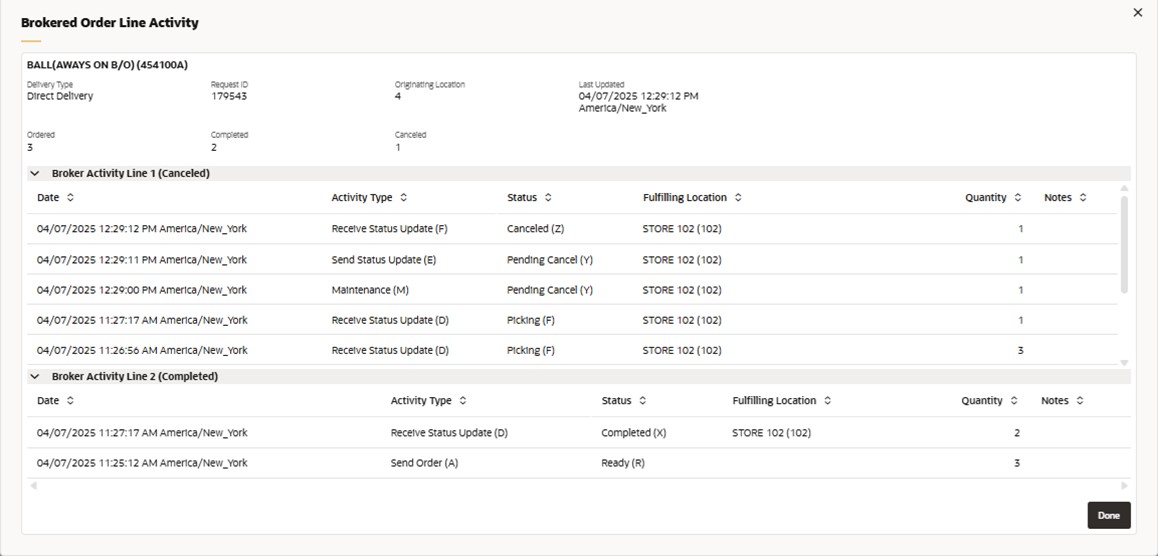 The following enhancements have been made to the screen:
-
The title has been renamed from Broker Details to Brokered Order Line Activity
-
Request ID will display ‘Not available’ if the status of the request is Ready, Waiting or Error
-
Last Updated, from the most recent history record, is stored in the database in UTC; however, the application converts the timestamp to the company time zone for display in Modern View
-
For example, if the company time zone is set to US/Central, it will be displayed as 01/12/2025 07:42:48 AM US/Central, and if it’s set to America/Chicago, it will be displayed as 01/12/2025 07:42:48 AM America/Chicago
-
-
Ordered will display the total ordered quantity for the line regardless of the current status
-
A summary of current statuses and the total quantity across all broker activity lines for this Request ID will be displayed
-
The list of possible statuses, based on the order journey, include Ready, New, Acknowledged, Accepted, Posted, Polled, In Process, Picking, In Transit, Resend In Transit, In Transit Polled, Received by Store, Resend Fulfilled, Partial Fulfill, Completed, Closed, Unfulfillable, Rejected, Pending Cancel, Canceled, Canceled by Store, Rejected by Store, Waiting and Error
-
-
Broker Activity Lines are displayed based on how Order Orchestration has split a single line into separate records when a partial quantity update occurs
- By default, the activity lines are collapsed and can optionally be expanded to view the data
- Each line displays the Order Orchestration line number and the current status. The line number may not be sequential depending on how many lines were on the original Request in Order Orchestration and when the partial line quantity split occurred
- Date, for each history record, is stored in the database in UTC;
however, the application converts the timestamp to the company
time zone for display in Modern View
-
For example, if the company time zone is set to US/Central, it will be displayed as 01/12/2025 07:42:48 AM US/Central, and if it’s set to America/Chicago, it will be displayed as 01/12/2025 07:42:48 AM America/Chicago.
-
Picked Status Mapping
When a Brokered Backorder or Store Pickup order line is updated to a status of ‘picked’ by a store, the status now always maps to ‘(F) Picking’ in Order Administration when received through the real-time status update from Order Orchestration.
Previously, this would have mapped to ‘(A) Accepted’ in Order Administration, and the user would not be able to see when it moved to picked.
This allows a user to better identify when full or partial units are picked on the request.
Order Administration: Release Holds without Lock/Unlock
With this update, releasing a hold through Modern View Order Summary or the Release Order Hold (/releaseOrderHold) API no longer locks and unlocks the order. However, if the order is locked for other edits, the hold(s) can be released, and then will need to be unlocked after.
The action of releasing a hold will no longer call repricing logic (that is, the Price Tables), only if unlock order is required.