Post-Event Email
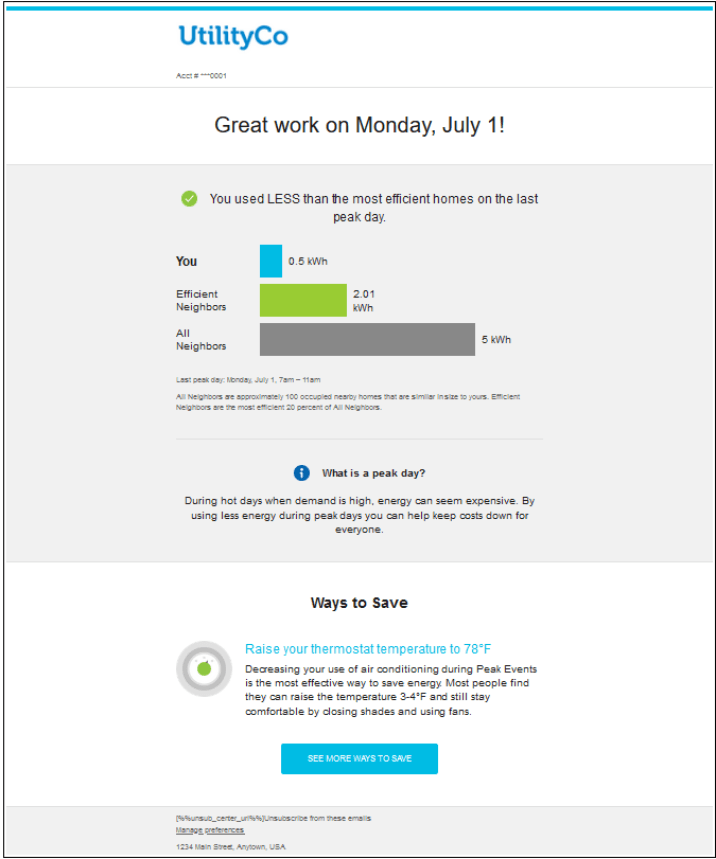
The post-event email shows customers how well they performed on their last peak day relative to other similar homes and may include ways to save more energy on subsequent peak events. The email has a different appearance depending on which user experience variation the customer receives.
Note:
If multiple peak days occur in close proximity to another, the customer results will be reported as they become available.Example
The following is an example of a post-event email for customers receiving the neighbor comparison experience during the hot-weather season:
Configuration Options
For each element listed in the table, indicate the desired configuration in the Input Value column. If you do not provide an input for optional configurations, the default will be used.
Table 3-3 Configuration Options for the Post-Event Email
| Configuration Option | Input Value |
|---|---|
| Utility Logo.
The CMYK and RGB versions of the utility logo as an .ai file type. |
Required.
Provide the utility logo in the Oracle Utilities Opower Platform Configuration Guide Oracle Utilities Opower Platform Configuration Guide. |
| Account Number Format.
The number of digits displayed in the customer account number can be altered. Default: Four digits are shown in the account number. |
Required.
Provide the account number format in the Oracle Utilities Opower Platform Configuration Guide Oracle Utilities Opower Platform Configuration Guide. |
| Checkmark Icon.
The checkmark icon shown in the Neighbor Comparison can be altered. |
Optional.
Provide the PNG file name of the desired icon. The icon must be the same color as the “Efficient Neighbors” bar color. |
| Bar Colors.
The colors of the bars in the graph can be configured to match utility branding guidelines. |
Required.
Provide the utility branding guidelines in the Oracle Utilities Opower Platform Configuration Guide |
| Neighbors Versus Similar Homes Terminology: “Neighbors” terminology can be replaced by “Similar Homes” terminology. Default: Neighbors terminology is used. | Optional.
Choose one of the following:
|
| Peak Day Definition.
The definition of a peak day that appears in Behavioral Demand Response emails can be altered. Hot-Weather Default: “During hot days when demand is high, energy can seem expensive. By using less energy during peak days you can help keep costs down for everyone.” Cold-Weather Default: “During cold days when demand is high, energy can seem expensive. By using less energy during peak days you can help keep costs down for everyone.” |
Optional.
Choose one of the following:
Note: Oracle Utilities has optimized and user-tested the default definition. Changing the default definition is not recommended. |
| Tip Content.
Oracle Utilities provides a set of Behavioral Demand Response tips that can be dynamically placed within email communications and web content. The utility can review and edit all tip content. Default varies by tip. |
Optional.
Talk to your Service Delivery Manager for tip editing options. |
| Link Color.
The color of links in Behavioral Demand Response emails can be configured to match utility branding guidelines. |
Required.
Provide the utility branding guidelines in the Oracle Utilities Opower Platform Configuration Guide. |
| From / Reply-To Email Address.
Provide the email address that should appear in the “From” line of Behavioral Demand Response emails. Example: peakdays@utilityco.com |
Required.
Provide email address. |
| Specific Savings Hours.
Hours of the day during which the Behavioral Demand Response program effect will be measured. These are the hours during which customers should be most focused on saving energy. |
Required.
Indicate time zone. Example: 9:00 AM – 5:00 PM PT |
| Seasonal Summary Module.
The Seasonal Summary module will display in post-event emails after the second peak event. Default Header: How you're doing this season. Default Disclaimer: Peak event lengths can vary, which can have an impact on total energy use. |
Required.
Note: Messages vary based on how the customer ranked after a peak event. For example, if there is no rank change from the previous peak day, the customer will see: "This peak day you used the same as the previous peak day." |
User Experience Variations
The user experience varies for customers depending upon their service types, available data, costs, and locale.
Note:
The following are the primary user experience variations, not all possible variations.Neighbor Rank Experience
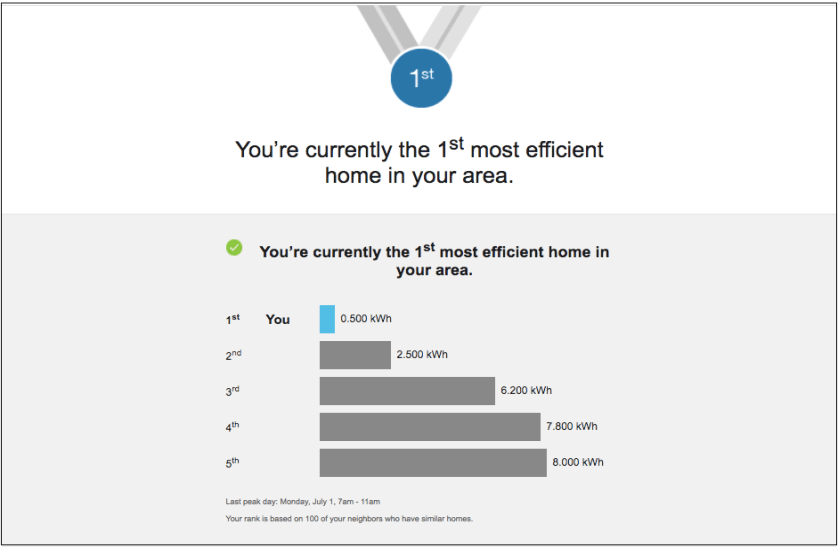
The post-event email can vary if customers receive the Neighbor Rank experience. The neighbor rank compares a customer's energy use to that of approximately 100 neighbors with similar homes, and then displays the customer’s numerical rank out of those neighbors based on how much energy they used during the last peak event.
The following example is a Neighbor Rank summer experience. During the cold-weather season, you can use this email to show the Neighbor Rank cold season experience.
For additional information about how the neighbor comparison user experience can vary, see the Neighbor Comparison Variation section in Pre-Event Email.
Non-AMI Gas Experience
The post-event email varies for customers whom receive the non-AMI gas experience. In such cases, post-event emails use static content to invite customers to participate in a peak event, but due to the absence of AMI data, the non-AMI experience does not include a neighbor comparison or neighbor rank module.