Solution Architecture
This chapter provides an overview of the application architecture used by the integration, including:
Solution Diagram
The technical aspects involved in Oracle Utilities Customer Cloud Service Integration to Oracle Fusion Cloud Service are:
-
An integration between Oracle Utilities Customer Cloud Service and Oracle Fusion Cloud Service.
-
The integration layer is made up of integration processes deployed on Oracle Integration Cloud.
-
It uses web services and REST APIs to facilitate communication between the two applications.
-
In the Oracle Utilities Customer Cloud Service initiated processes, outbound messages are sent, and Oracle Fusion Cloud Service uses REST API to receive the messages.
-
In the Oracle Fusion Cloud Service initiated processes, events are triggered, and Oracle Utilities Customer Cloud Service uses inbound web services (IWS) to receive the messages.
The integration patterns used in this solution are:
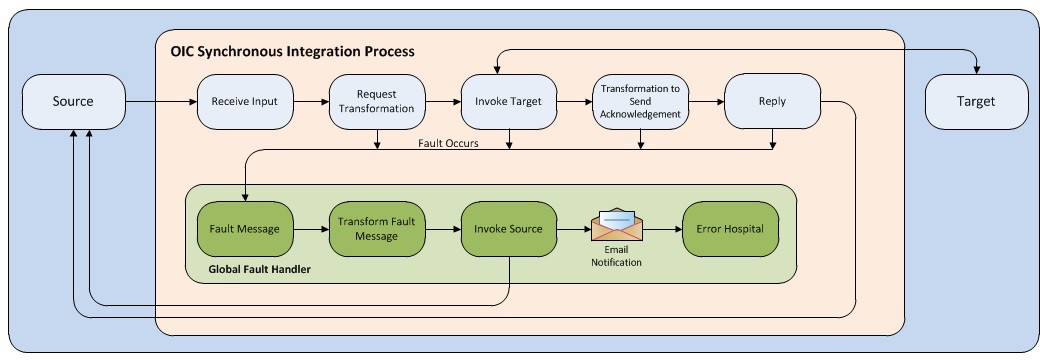
Synchronous
The synchronous integration process:
-
Receives request message from the source application.
-
Transforms the message from source format to the target format. Lookups are used for data translations.
-
Invokes the target application.
-
Transforms the message (after invoking the target application) from the target format back to the source format. It sends back an acknowledgment/synchronous response.
-
In case of any error, the global fault handler catches them and sends the transformed error message to the source application.
-
An optional email notification is sent to the respective users as configured.
One-way Asynchronous
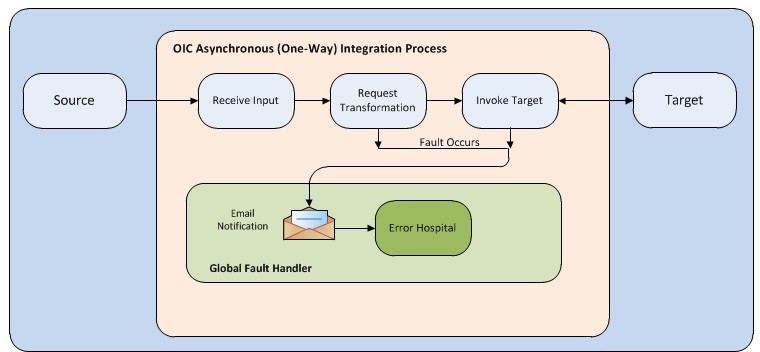
The one-way asynchronous integration process:
-
Receives request message from the source application.
-
Transforms message from the source to the target format. Lookups are used for data translations.
-
Invokes target application to send the request message.
-
In case of any error, the global fault handler catches them.
-
The error instance can be re-submitted from Oracle Integration Cloud. Refer to the Error Handling section in Configuring Lookups, Error Handling, and Email Notifications for more details.
Business Flows
The integration scope supports the following business processes:
- Person Synchronization (Oracle Utilities Customer Cloud Service Initiated)
- Contact Account Synchronization (Oracle Fusion CX Service)
- OU CX [Contact | Account] [Update | Delete] Events (Oracle Fusion CX Service)
- OU CX Account Update Event (Oracle Fusion CX Service)
- OU CX Account Delete Event (Oracle Fusion CX Service)
- OU CX Contact Update Event (Oracle Fusion CX Service)
- OU CX Contact Delete Event (Oracle Fusion CX Service)
- Case Synchronization (Oracle Utilities Customer Cloud Service Initiated)
- CCS CX Common Notification Handler
Person Synchronization
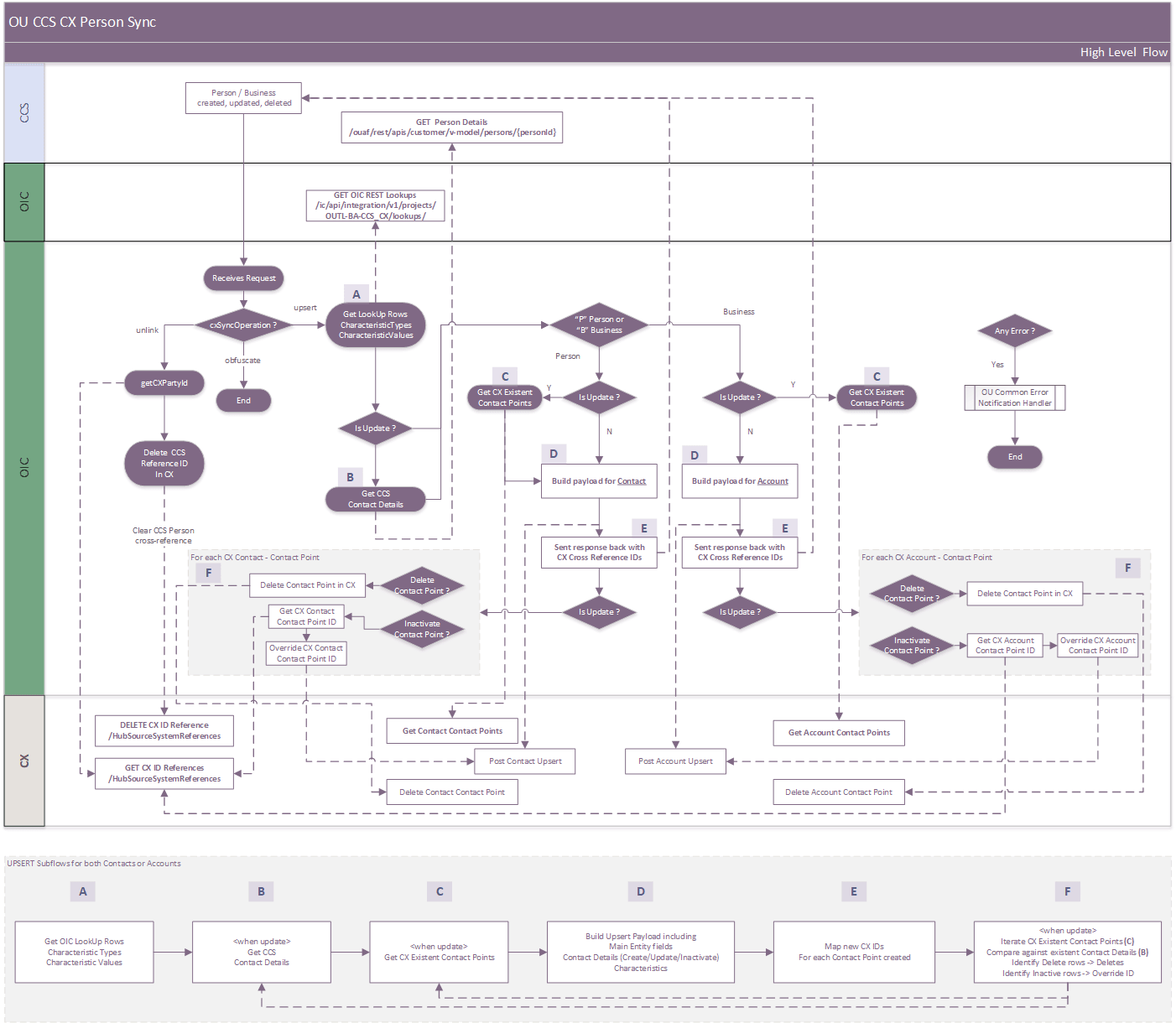
This is a near-real-time, two-way integration, that synchronizes Person details, including contact information, from CCS to CX as Accounts or Contacts when a Person is created, updated, or deleted.
The following diagram shows a graphical representation of the Person Synchronization integration process.
Business Processing
The integration synchronizes CCS Person records as CX Contacts for individuals or CX Accounts for businesses. Both synchronization paths follow the same processing stages, using the CX endpoints and field mappings appropriate to the target record type.
The integration process includes the following activities:
-
Receive and classify the CCS request
- The integration receives a CCS Person synchronization request containing person details, contact details, characteristics, and the requested operation.
- Obfuscation requests are discarded.
- For create or update requests, the integration determines whether the CCS Person represents an individual, synchronized as a CX Contact, or a business, synchronized as a CX Account.
-
Process unlink requests
- The integration obtains the CX SourceSystem value from the source.system.in.CX property in the OIC lookup OUTL-BRT-CCS_CX_TechnicalConfigProps. This property specifies the source-system code used to identify CCS in CX. Together with the CCS Person ID, mapped to SourceSystemReferenceValue, this value establishes the cross-reference between the CCS Person and the corresponding CX Account or Contact.
- For unlink requests, the integration removes this cross-reference while retaining the Account or Contact in CX.
-
Process creation or update requests (Diagram Steps A - C)
- The integration loads the characteristic mappings and value translations from OUTL-BRT-CCS_CX_PersonCharacteristicType and OUTL-BRT-CCS_CX_CharacteristicValue (step A).
- For initial synchronization, the contact details received in the request are sufficient.
- For updates, the integration retrieves the latest CCS contact details through the C1-Person inbound web service (step B) and the existing CX contact points before any inactivation occurs (step C). These snapshots support subsequent processing and distinguish deleted contact details from records still present in CCS, including Pending or Rejected Contact Detail records.
-
Map CX person information (Diagram Step D)
- The integration builds the request for the corresponding CX record, including the CCS cross-reference fields: source-system code and the SourceSystemReferenceValue with the corresponding personId from CCS.
- For persons, the integration maps the CCS first and last names to the CX Contact.
- For businesses, it maps the CCS primary name to the CX Account organization name.
-
Map contact methods using configured mappings (Diagram Step D)
-
The integration uses OUTL-BRT-CCS_CX_CommunicationType to translate CCS communication types into CX contact-point types. Only eligible contact details mapped to PHONE, EMAIL, or WEB are processed.
-
Pending and Rejected contact details are excluded from synchronization.
-
Contact purposes are translated using OUTL-BRT-CCS_CX_ContactTypePhonePurpose, OUTL-BRT-CCS_CX_ContactTypeEmailPurpose, or OUTL-BRT-CCS_CX_ContactTypeWebPurpose, according to the contact-point type. If no purpose translation exists, the original CCS purpose is retained.
-
The integration includes the contact value, extension where applicable, primary indicator, status, and CCS contact-detail identifier. New contact details create CX contact points, while existing linked details update their corresponding contact points.
Note: In CCS, each Person Contact Type can define the “Initial Person Contact Status” property, which determines the status assigned automatically when a contact detail is modified. Changes may place the contact detail in Pending status unless a direct transition to Approved is configured. This setting affects synchronization eligibility: contact details with a Pending or Rejected status are not sent to the integration process.
-
-
Map characteristics (Diagram Step D)
- The integration applies the mappings defined in OUTL-BRT-CCS_CX_PersonCharacteristicType that are relevant to the individual or business being synchronized, as determined by the PersonBusinessBoth column for each mapping.
- For each CharacteristicType identified in the previous step, the integration translates the characteristic value using OUTL-BRT-CCS_CX_CharacteristicValue when a matching translation exists; otherwise, the original CCS value is used.
- When a characteristic configured in OUTL-BRT-CCS_CX_PersonCharacteristicType is absent from the CCS request payload, the corresponding CX field is cleared. Configured target fields must use valid CX API field names for the target entity.
- Standard fields: Use the field name exactly as exposed by the CX API.
- Extended field for Contact records: PersonDEO_<FIELD>_c
- Extended field for Account records: OrganizationDEO_<FIELD>_c
- The prefixes and suffixes shown above apply only to extended fields. Replace <FIELD> with the extended field’s name.
-
Upsert the CX record (Diagram Step D)
- The integration submits the completed request through the CX upsert operation.
- CX uses the source-system cross-reference to determine whether to create or update the Account or Contact, together with its eligible contact points.
-
Return results to CCS (Diagram Step E)
After a successful upsert, the integration returns the CCS Person ID and the CX Party Number. It also returns contact-point cross-references for the contact details processed in the request, including inactive indicators where applicable. CCS uses these results to maintain the links between its contact details and the corresponding CX contact points.
-
Reconcile existing CX contact points (Diagram Step F)
For update requests, after returning the response to CCS, the integration compares the contact details and contact points retrieved in steps B and C.
- CX contact points associated with deleted CCS contact details are deleted.
- For inactive contact points, the integration adjusts their source-system references so the original CCS identifier can be reused if the contact detail becomes active again. Unrelated CX contact points remain unchanged.
-
Handle errors and send optional notifications
- Errors are routed to the OU Common Notification Handler. Each email notification is sent when its corresponding flag is set to true:
- Business errors: Data or configuration issues rejected by CX, such as invalid CX field names or unrecognized phone, email, or web purposes. In OUTL-BRT-CCS_CX_BusinessConfigProps,
functional.error.email.addressdefines the recipients, andnotification.email.business.error.flags enables business-error emails. The same lookup’s notification.email.informative.error.flag enables simplified technical-error notifications to these functional users. - Technical errors: Integration execution or connectivity failures, such as authentication errors, unavailable services, or timeouts. In OUTL-BRT-CCS_CX_TechnicalConfigProps,
technical.error.email.addressdefines the recipients, andnotification.email.technical.error.flagenables detailed technical-error emails. - Email settings: Recipient properties accept comma-separated email addresses. The from property in OUTL-BRT-CCS_CX_TechnicalConfigProps defines the sender address.
- Business errors: Data or configuration issues rejected by CX, such as invalid CX field names or unrecognized phone, email, or web purposes. In OUTL-BRT-CCS_CX_BusinessConfigProps,
Technical Details
The following table describes the integration processes and the respective Oracle Utilities Customer Cloud Service and Oracle Fusion Cloud Service artifacts used in this integration process:
| Artifacts | Value |
|---|---|
| Integration Process Name | OU CCS CX Person Sync |
| Integration Process Identifier | OUTL-BA-CCS_CX_PERSON_SYNC |
| Integration Project Name | OU CCS CX |
| Source Connection | OU REST CCS for CCS-CX (Oracle Utilities Adapter) |
| Target Connection | OU CX for CCS-CX (Oracle CX Sales and B2B Service Adapter) |
| OIC API(s) | /ic/api/integration/v1/projects/{projectId}lookups/{lookupName} |
| Local Integrations | OU Common Notification Handler |
Lookups Referenced
The following table describes customized properties referenced in the integration. For more information about the lookup properties, refer to Configuring Lookups, Error Handling, and Email Notifications.
| DVM | Property |
|---|---|
| OUTL-BRT-CCS_CX_BusinessConfigProps |
|
| OUTL-BRT-CCS_CX_TechnicalConfigProps |
|
| OUTL-BRT-CCS_CX_CommunicationType |
|
| OUTL-BRT-CCS_CX_ContactTypeEmailPurpose |
|
| OUTL-BRT-CCS_CX_ContactTypePhonePurpose |
|
| OUTL-BRT-CCS_CX_ContactTypeWebPurpose |
|
| OUTL-BRT-CCS_CX_PersonCharacteristicType |
|
| OUTL-BRT-CCS_CX_CharacteristicValue |
|
Contact Account Synchronization
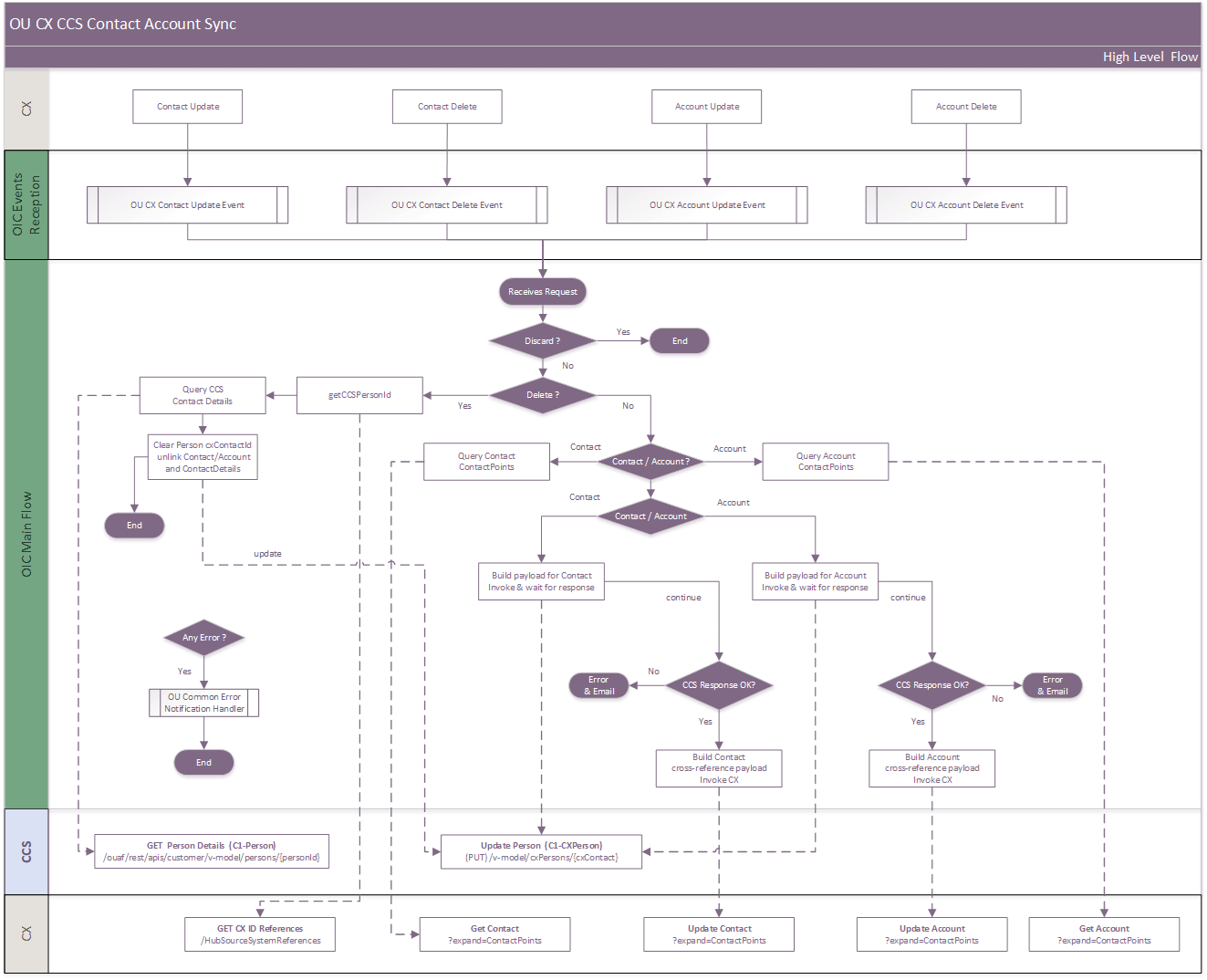
This is a near-real-time, two-way integration, that synchronizes Accounts and Contacts, including Contact Point information, from CX to CCS as Persons. The integration relies on CX Contact and Account updates, and deletion events. The integration process is not subscribed to creation events. A deletion event deletes the record in CX and results in unlinking the corresponding CCS Person rather than deleting the Person.
The following diagram shows a graphical representation of the Account Synchronization integration process.
Business Processing
The integration synchronizes updates and deletions of CX Contacts and Accounts originally created in CCS. Contacts correspond to individual CCS Persons, while Accounts correspond to business CCS Persons. Both paths follow the same processing stages, using the endpoints and field mappings appropriate to the source record type.
-
Receive and classify the CX event
- Dedicated Contact and Account event integrations receive UPDATE or DELETE events and forward them to OU CX CCS Contact Account Sync.
- The integration identifies the record type, requested operation, CX identifiers, and source-system information.
- Creation events are not handled.
Note: CX events may arrive after a delay following a change in the CX interface.
-
Filter integration-generated updates
- The integration uses OUTL-BRT-CCS_CX_TechnicalConfigProps to identify updates originating from CCS and prevent synchronization loops.
- An UPDATE event is discarded only when both conditions are met: LastUpdatedBy matches integration.service.account, and SourceSystem matches source.system.in.CX.
- Other UPDATE events continue to synchronization processing. DELETE events proceed to the unlink workflow.
-
Process deletion events as unlink requests
- The integration queries CX HubSourceSystemReferences, using the source-system code defined by source.system.in.CX in OUTL-BRT-CCS_CX_TechnicalConfigProps, to find the associated CCS Person ID.
- If no CCS Person ID is found, processing ends without invoking CCS.
- Otherwise, the integration retrieves the current CCS Person and contact details and builds an unlink request for C1-CXperson.
- The request clears the C1-EXCID characteristic that stores the CX cross-reference. It also inactivates the associated CCS contact details and appends :inactive to their CX external identifiers.
- Process ends
-
For Updates, retrieve the latest CX record
- Retrieve the current CX Contact or Account using the event’s PartyNumber, including source-system references and contact points (expand=ContactPoints), because CCS requires a complete Person record for updates
-
Map CCS Person information
- The integration maps the CX SourceSystemReferenceValue to the CCS personId and the CX PartyNumber to cxContactId.
- For Contacts, it sets personOrBusiness to P and maps the CX first and last names.
- For Accounts, it sets personOrBusiness to B and maps the CX organization name to the CCS primary name.
-
Map contact methods using configured mappings
- Only CX contact points of type PHONE, EMAIL, or WEB are processed.
- Contact purposes are translated to CCS Person Contact Types using OUTL-BRT-CCS_CX_ContactTypePhonePurpose, OUTL-BRT-CCS_CX_ContactTypeEmailPurpose, or OUTL-BRT-CCS_CX_ContactTypeWebPurpose. These lookups are read from the CX purpose column to the CCS_PersonContactType column.
- If the translation is blank or no matching translation exists, the original CX purpose is used.
- The integration transfers the contact value, extension where applicable, primary indicator, active or inactive status, and cross-reference identifiers. Phone values are formatted from the CX area code and phone number.
-
Map CX fields to CCS characteristics
-
The integration matches fields returned by CX against the CX_ElementName column in OUTL-BRT-CCS_CX_PersonCharacteristicType.
-
A mapping is processed only when CCS_CharacteristicType is populated and PersonBusinessBoth applies to the record: P, Both or white space for Contacts, and B or Both for Accounts.
-
Characteristic values are translated using OUTL-BRT-CCS_CX_CharacteristicValue, matching CX_ElementValue and returning CCS_CharacteristicValue. If no matching translation exists, the original CX value is used. Null and empty values are preserved.
-
No characteristic row is generated for a CX field absent from the retrieved record.
-
CX_ElementName must match the exact CX API field name.
a. Standard fields use their existing names b. Extended fields:
- Use PersonDEO_<FIELD>_c for Contacts
- Use OrganizationDEO_<FIELD>_c for Accounts.
- Replace <FIELD> with the extended field’s name.
-
-
Submit the Person update to CCS
-
The integration invokes the C1-CXperson inbound web service with the Person information, contact details, and applicable characteristics.
-
CCS updates the identified Person, adds contact details for new CX contact points, and updates existing linked contact details.
Note: CCS may required certain fields as required. Configure CCS Installation Options – Person to allow synchronization without government-issued identifiers before the Person is linked to a utility billing account.
-
-
Update cross-references in CX
- After CCS processing succeeds, the integration uses the returned identifiers to update the originating CX Contact or Account and its contact-point references.
- For each returned contact detail, the CX contact point’s SourceSystem uses
source.system.in.CXfrom OUTL-BRT-CCS_CX_TechnicalConfigProps, and SourceSystemReferenceValue stores the CCS contact-detail identifier. - These references maintain the association between CX contact points and CCS contact details for subsequent updates.
-
Handle errors and send optional notifications
- Errors are routed to the OU Common Notification Handler. Each email notification is sent when its corresponding flag is set to true.
- Business errors: Data or configuration issues rejected by CCS, such as invalid or missing Person Contact Types, invalid Characteristic Types, or invalid phone formats. In OUTL-BRT-CCS_CX_BusinessConfigProps,
functional.error.email.addressdefines the recipients, andnotification.email.business.error.flagenables business-error emails. The same lookup’s notification.email.informative.error.flag enables simplified technical-error notifications to these functional users. - Technical errors: Integration execution or connectivity failures, such as authentication errors, unavailable services, or timeouts. In OUTL-BRT-CCS_CX_TechnicalConfigProps,
technical.error.email.addressdefines the recipients, andnotification.email.technical.error.flagenables detailed technical-error emails. - Email settings: Recipient properties accept comma-separated email addresses. The
fromproperty in OUTL-BRT-CCS_CX_TechnicalConfigProps defines the sender address
- Business errors: Data or configuration issues rejected by CCS, such as invalid or missing Person Contact Types, invalid Characteristic Types, or invalid phone formats. In OUTL-BRT-CCS_CX_BusinessConfigProps,
- Errors are routed to the OU Common Notification Handler. Each email notification is sent when its corresponding flag is set to true.
Technical Details
The following table describes the integration processes and the respective Oracle Utilities Customer Cloud Service and Oracle Fusion Cloud Service artifacts used in this integration process:
| Artifacts | Value |
|---|---|
| Integration Process Name | OU CX CCS Contact Account Sync |
| Integration Process Identifier | OUTL-BA-CX_CCS_CONT_ACC |
| Integration Project Name | OU CCS CX |
| Source Connection | OU CX for CCS-CX (Oracle CX Sales and B2B Service Adapter) |
| Target Connection | OU REST CCS for CCS-CX (Oracle Utilities Adapter) |
| Local Integrations | OU Common Notification Handler |
Lookups Referenced
The following table describes customized properties referenced in the integration. For more information about the lookup properties, refer to Configuring Lookups, Error Handling, and Email Notifications.
| DVM | Property |
|---|---|
| OUTL-BRT-CCS_CX_BusinessConfigProps |
|
| OUTL-BRT-CCS_CX_TechnicalConfigProps |
|
| OUTL-BRT-CCS_CX_CommunicationType |
|
| OUTL-BRT-CCS_CX_ContactTypeEmailPurpose |
|
| OUTL-BRT-CCS_CX_ContactTypePhonePurpose |
|
| OUTL-BRT-CCS_CX_ContactTypeWebPurpose |
|
| OUTL-BRT-CCS_CX_PersonCharacteristicType |
|
| OUTL-BRT-CCS_CX_CharacteristicValue |
|
OU CX [Contact | Account] [Update | Delete] Events
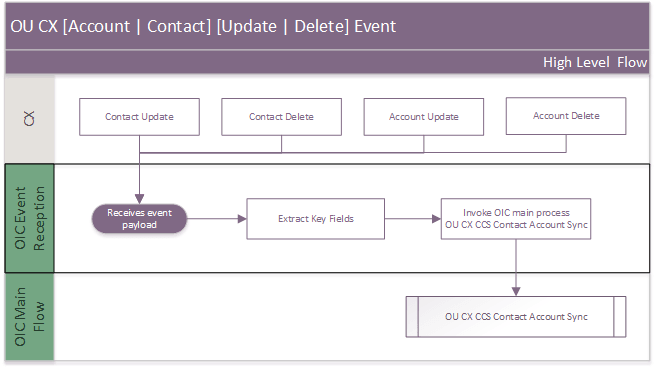
OIC is subscribed to CX Update and Delete events happening for Contact or Account records. This events are triggered by CX whenever a Contact or an Account is updated or deleted. CX publishes the event shortly afterward with the updated record details.
The following diagram shows a graphical representation of the process followed by the independent events:
- Contact Update event
- Contact Delete event
- Account Update event
- Account Delete event
Business Processing
Each event (UPDATE or DELETE) for each entity (ACCOUNT or CONTACT) is triggered separately by CX and sent to OIC. However, the business processing logic described below is the same for all event types.
The integration receives the event payload containing either Contact or Account information. The process extracts the PartyNumber and PartyId, sets the Entity Type to either ACCOUNT or CONTACT, sets the Operation to either UPDATE or DELETE, and invokes the shared OU CX CCS Contact Account Sync integration process, which is responsible for synchronizing the record with CCS.
Contact and Account creation events are out of scope for release 26.10; therefore, OIC does not subscribe to CX creation events for these entities. Update events are processed only for Contacts or Accounts originally created in CCS as Persons or Businesses and subsequently synchronized to CX as Contacts or Accounts.
No functional errors are expected within this integration process. Technical errors are handled directly by this integration process, while business errors are delegated to the shared OU CX CCS Contact Account Sync integration process.
Errors are routed to the OU Common Notification Handler. Each email notification is sent only when its corresponding flag is set to true.
- Technical errors: Integration execution or connectivity failures, such as authentication errors, unavailable services, or timeouts. In OUTL-BRT-CCS_CX_TechnicalConfigProps,
technical.error.email.addressdefines the recipients, whilenotification.email.technical.error.flagenables detailed technical-error notifications. - Email settings: Recipient properties accept comma-separated email addresses. The
fromproperty in OUTL-BRT-CCS_CX_TechnicalConfigProps defines the sender address.
Technical Details
The following table lists the main artifacts used in this integration process:
| Artifacts | Value |
|---|---|
| Integration Process Name | OU CX Contact Update Event OU CX Contact Delete Event OU CX Account Update Event OU CX Account Delete Event |
| Integration Process Identifier | OUTL-BA-CX_CCS_ACC_UPD_EVT OUTL-BA-CX_CCS_CONT_DEL_EVT OUTL-BA-CX_CCS_ACC_UPD_EVT OUTL-BA-CX_CCS_ACC_DEL_EVT |
| Integration Project Name | OU CCS CX |
| Source Connection | OU CX for CCS-CX (Oracle CX Sales and B2B Service Adapter) |
| Target Connection | OU REST OIC for CCS-CX (Rest Adapter) |
| Local Integrations | OU CX CCS Contact Account Sync OU Common Notification Handler |
Lookups Referenced
The following table describes customized properties referenced in the integration. For more information about the lookup properties, refer to Configuring Lookups, Error Handling, and Email Notifications.
| DVM | Property |
|---|---|
| OUTL-BRT-CCS_CX_TechnicalConfigProps |
|
Case Synchronization
This integration Process is required between Fusion CX Service and Oracle Utilities Customer Cloud Service (CCS) to create or update a Service Request in Fusion CX Service based on a change to a Case in Customer Cloud Service.
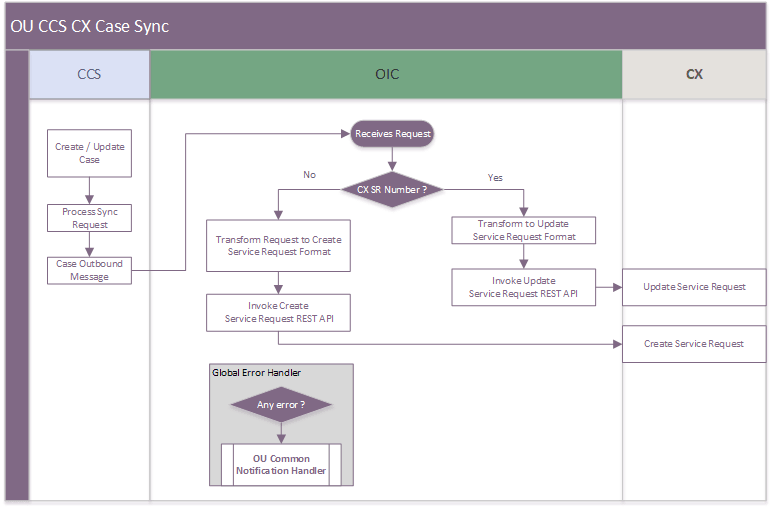
The following diagram shows a graphical representation of the Case Synchronization integration process.
Business Processing
The integration process includes the following activities:
-
Oracle Utilities Customer Cloud Service sends the create/update case request to the OU CCS CX Case Sync integration process deployed on Oracle Integration Cloud.
-
OU CCS CX Case Sync integration checks for the CX SR Number values.
-
If the SR Number values exists, it transforms the update case request message from Oracle Utilities Customer Cloud Service to the request message format in Oracle Fusion Service.
- Invokes Fusion Update Service Request REST Service using Oracle CX sales and B2B Service Adapter.
-
If the SR Number value does not exist, it transforms the create case request message from Oracle Utilities Customer Cloud Service to the request message format in Oracle Fusion Service.
- Invokes Fusion Create Service Request REST Service using Oracle CX sales and B2B Service Adapter.
-
Oracle Fusion Service sends the success or failure response to the integration.
-
Integration process transforms the response message and sends back to Oracle Utilities Customer Cloud Service.
-
In case of any errors, the integration uses error handling mechanism to capture, classify and communicate errors.
- When an error occurs during processing, the corresponding local fault handler captures the error and classifies it based on the error code.
- HTTP- 400, the error is classified as a business fault.
- Otherwise, the error is classified as technical fault.
- The fault is then propagated to the Global Fault Handler, to process the error.
- The Global fault handler,
- Invokes the CCS CX Common Notification Handler integration process to send the appropriate error notification.
- Also, reports the error back to Oracle Utilities Customer Cloud Service.
-
CCS CX Common Notification Handler sends optional email notification with error details to the users configured in the OUTL-BRT-CCS_CX_BusinessConfigProps lookup, based on the
business.error.to.emailvalue and in the OUTL-BRT-CCS_CX_TechnicalConfigProps lookuptechnical.error.to.emailvalue.
Technical Details
The following table describes the integration processes and the respective Oracle Utilities Customer Cloud Service and Oracle Field Service artifacts used in this integration process:
| Artifacts | Value |
|---|---|
| Integration Process Name | OU CCS CX Case Sync |
| Integration Project Name | OU CCS CX |
| CX Operation | Create/Update |
| CX API | ServiceRequest |
| CCS Outbound Business Object | C1-CaseDataSyncMessage |
CCS CX Common Notification Handler
This integration Process is used to send email notifications to the configured users. This common integration is invoked by all other integration process in this OU CCS CX Project.
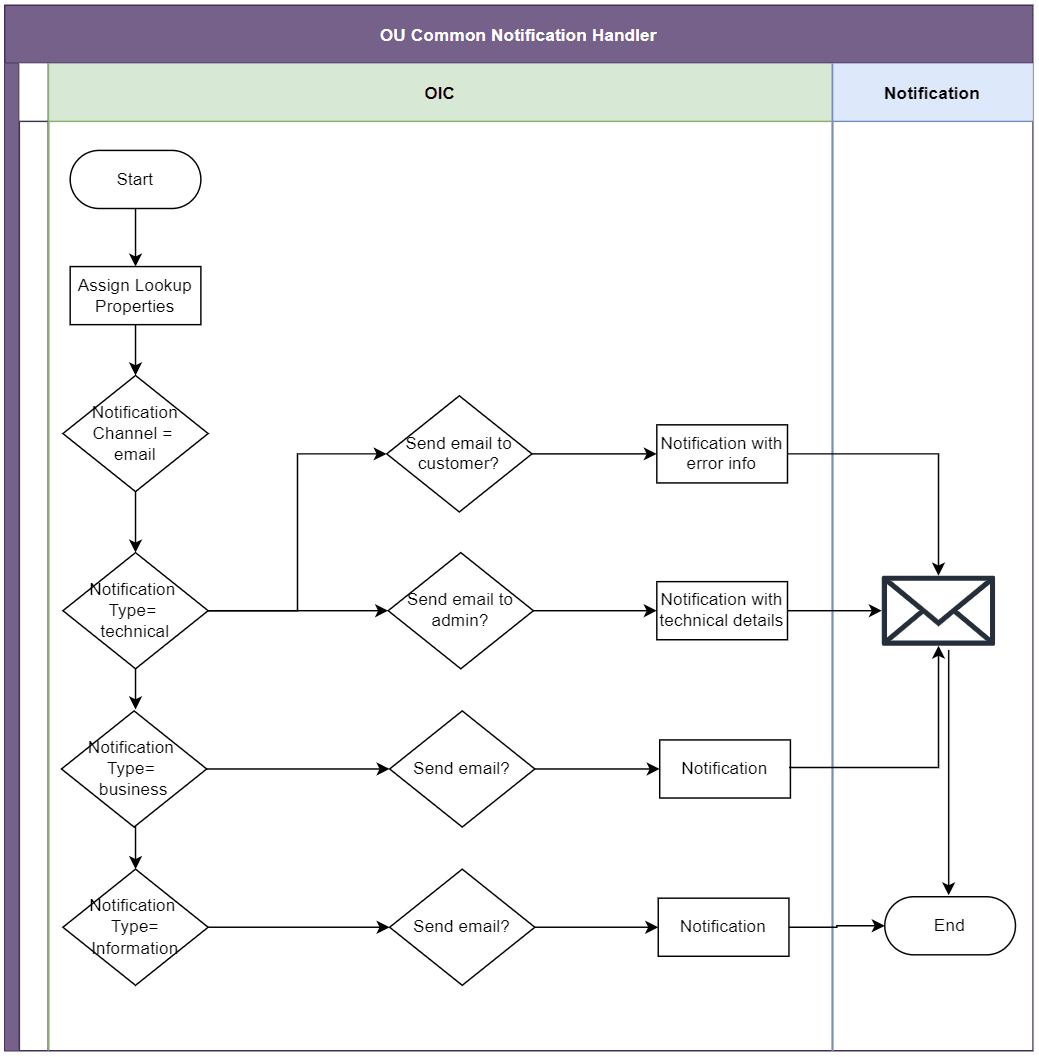
The following diagram shows a graphical representation of the Common Notification Handler integration process.
Business Processing
The integration process includes the following activities:
-
The integration process receives the notification message from the parent flow.
-
Initializes the variables with lookup property values defined.
-
Integration process checks for the
notification.channelproperty value configured in OUTL-BRT-CCS_CX_BusinessConfigProps lookup. -
If the notification channel value is set to ‘email’, proceeds with the rest of the processing.
-
Then the process checks for the notification type value.
-
If the notification type value is ‘technical’, routes the process to technical notification scope.
-
Process the technical error notifications in parallel.
- If the
notif.email.technical.error.flagproperty in OUTL-BRT-CCS_CX_TechnicalConfigProps lookup is set to ‘true’- Sends a technical error email notification to the users whose email Ids are configured in the
technical.error.to.emailproperty in OUTL-BRT-CCS_CX_TechnicalConfigProps lookup.
- Sends a technical error email notification to the users whose email Ids are configured in the
- If the
- If the
notif.email.techerror.info.flagproperty in OUTL-BRT-CCS_CX_BusinessConfigProps lookup is set to ‘true’- Sends a technical information error email notification to the users whose email Ids are configured in the
business.error.to.emailproperty in OUTL-BRT-CCS_CX_BusinessConfigProps lookup.
- Sends a technical information error email notification to the users whose email Ids are configured in the
-
If the notification type value is ‘business, routes the process to business notification scope.
- If notif.email.business.error.flag property in OUTL-BRT-CCS_CX_TechnicalConfigProps lookup is set to ‘true’
- Sends a business error email notification to the users whose email Ids are configured in business.error.to.email property in OUTL-BRT-CCS_CX_BusinessConfigProps lookup.
- If notif.email.business.error.flag property in OUTL-BRT-CCS_CX_TechnicalConfigProps lookup is set to ‘true’
-
A response is sent back to the integration process that has sent notification request.
Technical Details
The following table describes the integration process artifacts used in this integration process:
| Artifacts | Value |
|---|---|
| Integration Process Name | OU Common Notification Handler |
| Integration Project Name | OU CCS CX |