Get Account Communications (Oracle Utilities Customer Cloud Service Initiated)
Call center agents and other users should be able to view recent Opower communications in Customer Cloud Service.
Customer Cloud Service sends a synchronous request to retrieve the latest customer communications for a specific utility and account. Opower returns both email and mobile app push customer communications in the response.
The request may include the date and time of the account’s last communications synchronization. If provided, the response should include only communications after that timestamp. If no timestamp is provided, Oracle Integration Cloud (OIC) uses the values configured in the lookups for each channel.
The following diagram shows a graphical representation of the Get Account Communication integration process.
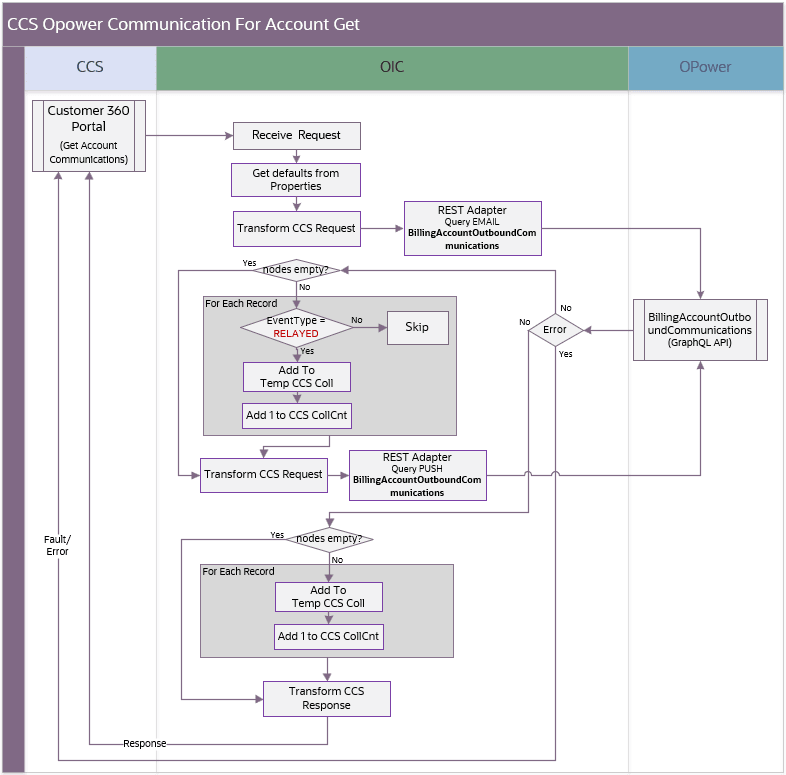
Get account communications
Processing Details
The integration process deployed on Oracle Integration Cloud is exposed as a REST API and performs the following activities:
- The process is triggered when it receives a request from Oracle Utilities Customer Cloud Service to get the latest communications for an account.
- Get the latest email communications by querying the OU Opower BillingAccountOutboundCommunications API given an account id and a date time interval.
- The query start interval is obtained from the OU Customer Cloud Service request or, if none is provided, the value from property
opower.startDateTime.sentCommin the OUTL-BRT-CCS_OPWR_BusinessConfigProps lookup. An additional second is added to the start interval to avoid duplication and it uses the current date and time as the end interval.
-
Check the response from the query:
- If no nodes are returned, proceed to the PUSH query.
- If error nodes are returned, throw a fault or error back to Customer Cloud Service and end the process.
- Otherwise, filter records so only RELAYED events are processed.
-
Next, get the latest mobile app push communications by querying the Opower BillingAccountOutboundCommunications API given an account id and a date time interval.
- The query start interval is obtained from the Customer Cloud Service request or, if none is provided, get the value from the
opower.startDateTime.pushCommproperty in the OUTL-BRT-CCS_OPWR_BusinessConfigProps lookup with the same one-second adjustment in the start interval and the current date and time as the end interval.
-
Check the response from the query:
- If no nodes are returned, proceed to the next step.
- If error nodes are returned, throw a fault or error back to Customer Cloud Service and end the process.
-
Collect the returned communications for both queries and map them to the Customer Cloud Service response format.
-
Return the communication information to Customer Cloud Service for customer contact creation and display.
-
Any errors encountered are reported back to Customer Cloud Service as a fault/error.
Each channel query requests communications for one billing account and returns up to 100 communications. The integration does not support account-level pagination and must not update the scheduled flows’ start and end timestamps. If no communications are returned, no new customer contacts are created
Technical Details
The following table describes the integration processes and the respective Oracle Utilities Customer Cloud Service and Oracle Utilities Opower artifacts used in this integration process.
| Artifact | Value |
|---|---|
| Integration Process Name | OU CCS OPOWER Account Communications Get |
| Integration Process Identifier | OUTL-BA-CCS_OPWR_ACCTCOMMS_GET |
| Integration Project Name | OU CCS OPOWER |
| Source Connection (Oracle Utilities Adapter) | OU REST CCS for CCS-OPOWER |
| trigger | Outbound Message Type: C1ACCCOMMUOM (Account Communications) |
| Target Connection (REST Adapter) | OU REST OPOWER for CCS-OPOWER |
| invoke | Service: Opower GraphQL API Query: BillingAccountOutboundCommunicationsMethod: POST URI: https://<host_name>/graphql/ |
| Lookups | OUTL-BRT-CCS_OPWR_BusinessConfigPropsOUTL-BRT-CCS_OPWR_CommunicationStatusOUTL-BRT-CCS_OPWR_DeliveryChannelOUTL-BRT-CCS_OPWR_TechnicalConfigProps |