Transfer Affordability Indicator File Process (Oracle Integration Cloud Initiated)
Opower generates the Affordability Indicator extract as a zipped csv file and places it in Opower’s Object Storage. Opower supports both initial data loads and subsequent incremental updates, including additions and modifications to existing records.
This integration process transfers the affordability indicator file(s) from Oracle Utilities Opower’s Object Storage to Customer Cloud Service’s content server, either from an on-premises FTP Server or from an OCI Object Storage location, based on the configured preference.
This file is picked up by Customer Cloud Service batch for upload and processing.
The following diagram shows a graphical representation of the Affordability Indicator File Transfer integration process:
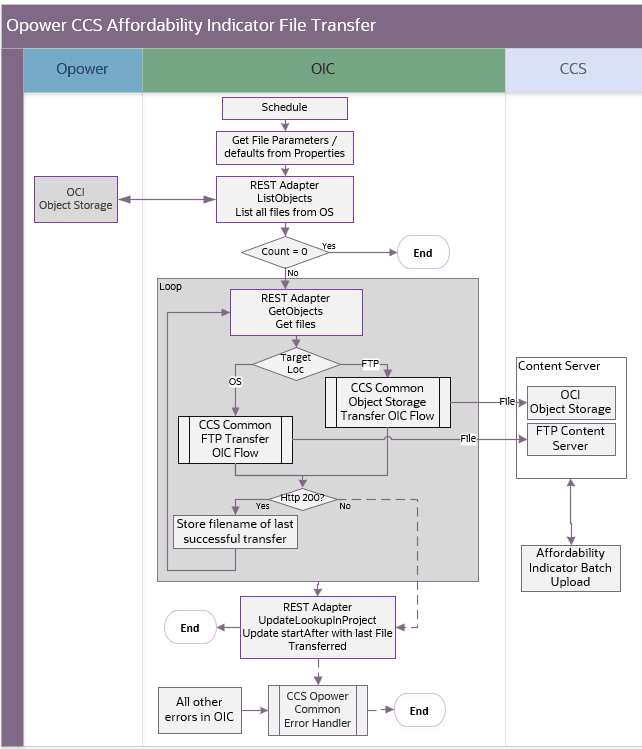
Affordability indicator file transfer
Processing Details
The scheduled integration process deployed on Oracle Integration Cloud performs the following activities:
-
The process is triggered by a schedule, or it can also be triggered manually.
- Define the integration schedule for this process and make sure the Opower Affordability pipeline always run first, so the file is available to be processed by the integration.
- Make sure the default values used in this integration are defined in the OUTLBRT-CCS_OPWR_TechnicalConfigProps.
-
The process lists objects or files found in the Oracle Utilities OPower Object Storage Bucket using the following property values:
opower.os.affordability.bucketname,opower.os.namespace,opower.affordability.filenamePrefix, andopower.affordability.startAfter.- If the list is empty, the process ends.
- If files are found, the process continues to the next step.
-
For each file, do the following:
-
Get the file from Opower’s Object Storage.
-
The process routes the file to either the OU CCS Common OS Transfer or OU CCS Common FTP Transfer child OIC process, depending on the value of the
ccs.file.target.transfer.prefproperty:- If the value is ‘os‘, the file is routed to the OU CCS Common OS Transfer child process and transferred to CCS OCI Object Storage. The destination namespace and bucket are specified by the
ccs.os.namespaceandccs.os.affordability.bucketnameproperties, respectively. - If the value is ‘ftp’, the file is routed to OU CCS Common FTP Transfer child process and transferred to CCS FTP location. The destination directory is specified by the
ccs.ftp.affordability.directoryproperty.
- If the value is ‘os‘, the file is routed to the OU CCS Common OS Transfer child process and transferred to CCS OCI Object Storage. The destination namespace and bucket are specified by the
-
If the child process returns HTTP status 200, the file transfer is successful:
- Record the filename of the successfully transferred file.
- Proceed to the next file, if available
If the file transfer fails:
- Update the opower.affordability.startAfter property in the OUTL-BRT-CCS_OPWR_TechnicalConfigProps lookup to the filename of the last successfully transferred file. The next run uses this value as a query parameter to retrieve only files after the specified filename.
- Capture the error and invoke the Common Notification Handler flow to send an error notification email.
- End the Process
-
After all files are successfully transferred to CCS, update the
opower.affordability.startAfterproperty in the OUTL-BRT-CCS_OPWR_TechnicalConfigProps lookup to the filename of the last successfully transferred file. The next run uses this value as a query parameter to retrieve only files after the specified filename.
-
Technical Details
The following table describes the integration processes and the respective Oracle Utilities Customer Cloud Service and Oracle Utilities Opower artifacts used in this integration process.
| Artifact | Value |
|---|---|
| Integration Process Name | OU OPOWER CCS Affordability File Transfer |
| Integration Process Identifier | OUTL-BA_OPWR_CCS_AFFORD_FILEXFER |
| Integration Project Name | OU CCS OPOWER |
| Source Connection (REST Adapter) | OU REST OPOWER Object Storage for CCS-OPOWER |
| Target Connections | OU REST CCS Object Storage for CCS-OPOWER; OU FTP CCS for CCS-OPOWER |
| Local Integrations | OU CCS Common OS Transfer OU CCS Common FTP Transfer OU Common Notification Handler OU Common Configuration Properties Lookup Update |
| Lookup | OUTL-BRT-CCS_OPWR_TechnicalConfigProps |