Common Integration Flows
This section describes the shared logic used across integrations. To promote reuse and consistency, these logics are implemented within common integration flows that can be invoked by other integration processes. These common components include design standards, email formatting, and reusable integration patterns, such as:
- File to File Transfer
- Common Child File Transfer OIC Flows (OIC Initiated)
- Common Configuration Properties Lookup Update (OIC Initiated)
- Common Notification Handler (OIC Initiated)
File to File Transfer
Many integrations involve transferring files between applications. The source and target locations may reside either in folders on an on-premises server or in cloud-based object storage, depending on the capabilities supported by the respective applications during implementation.
Note: Oracle Utilities Opower only supports Object Storage as its content storage while Oracle Utilities Customer Cloud Service supports both FTP and Object Storage as content storage options.
If the source application supports both FTP and object storage, two separate Oracle Integration Cloud (OIC) flows are created, one for each transfer method. This duplication is required because integration cannot be activated unless all referenced connections are properly configured.
To provide flexibility on the target application, a file transfer preference property must be defined to determine the target transfer method. The valid values are: “os” or “ftp”.
- If set to “os”, a child Oracle Integration Cloud flow is called to transfer the file to a target object storage location.
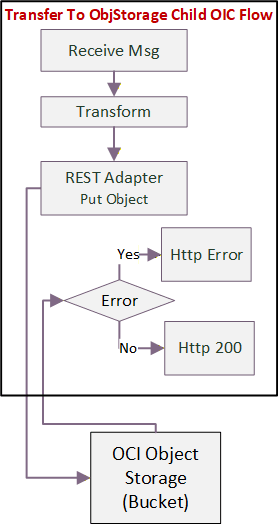
Common Object Storage Transfer
- If set to “ftp”, a child Oracle Integration Cloud flow is called to transfer the file to a target ftp location.
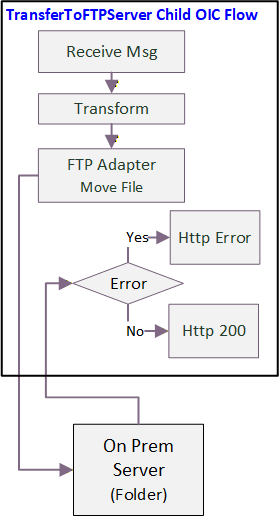
Common FTP Transfer
Common Child File Transfer OIC Flows (OIC Initiated)
- OU CCS Common FTP Transfer
- OU CCS Common OS Transfer
All child Oracle Integration Cloud flows are exposed as a REST API with multipart request media type to pass a json request message with a file attachment. They are setup similarly to receive the endpoint information to send to an FTP or Object Storage location.
The following table compares the destination and file references passed to the Object Storage and FTP transfer flows:
| To Object Storage | To FTP Server |
|---|---|
| Object Name | File Name |
| Namespace and Bucket Name | Directory |
| Stream Reference | File Reference |
Technical Details
The following table describes the integration processes and the respective Oracle Utilities Customer Cloud Service artifacts used in the integration process:
| Artifact | FTP Transfer | Object Storage Transfer |
|---|---|---|
| Integration Process Name | OU CCS Common FTP Transfer | OU CCS Common OS Transfer |
| Integration Process Identifier | OUTL-BA-CCS_FTP_TRANSFER | OUTL-BA-CCS_OS_TRANSFER |
| Integration Project Name | OU CCS OPOWER | OU CCS OPOWER |
| Source Connection (REST Adapter trigger) | OU REST TRIG for CCS-OPOWER | OU REST TRIG for CCS-OPOWER |
| Target Connection | OU FTP CCS for CCS-OPOWER (FTP Adapter) | OU REST CCS Object Storage for CCS-OPOWER (REST Adapter) |
Common Configuration Properties Lookup Update (OIC Initiated)
This integration process is used to update either the technical or business configuration properties lookups used in the integration.
The following diagram shows a graphical representation of the Common Configuration Properties Lookup Update integration process:
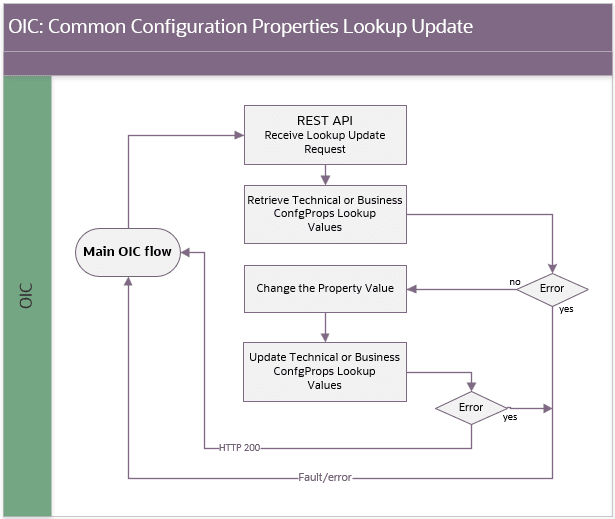
Common Configuration Properties Lookup Update
Processing Details
The Common Configuration Properties Lookup Update integration flow deployed on Oracle Integration Cloud is exposed as a REST API and performs the following activities:
- A main OIC flow invokes this flow whenever it needs to update a value in the configuration properties lookup. The request contains the lookup name and row name or property name to update
- First, it identifies the lookup to update and retrieves the current values defined in the lookup by invoking the OIC REST API Retrieve a Lookup in a Project.
- It processes each lookup row. When the row name matches the requested row, it prepares the updated value; otherwise, it retains the existing value.
- It assembles the existing and updated rows and updates the configuration properties lookup by invoking the OIC REST API Update a Lookup in a Project.
- If the lookup read or update fails, the fault handler captures and rethrows the error to the calling flow.
Technical Details
The following table describes the integration processes and the respective artifacts used in this integration process:
| Artifact | Value |
| — | — |
| Integration Process Name | OU Common Configuration Properties Lookup Update |
| Integration Process Identifier | OUTL-BA-OPWR_CCS_CP_UPDATE |
| Integration Project Name | OU CCS OPOWER |
| Source Connection | Local integration |
| trigger | /updateLookup |
Common Notification Handler (OIC Initiated)
This integration process is used to send email notification in case of errors in Oracle Integration Cloud.
The following diagram shows a graphical representation of the Common Notification Handler integration process:
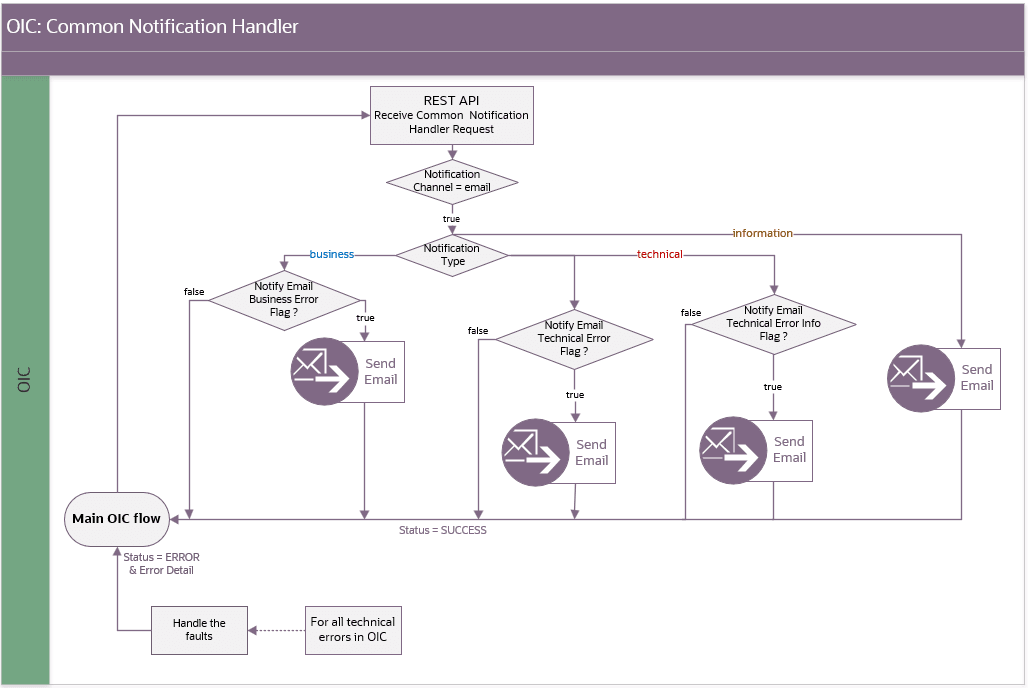
Common Notification Handler
Processing Details
The Common Notification Handler integration flow deployed on Oracle Integration Cloud is exposed as a REST API and performs the following activities:
-
The main OIC flow invokes the handler with the notification details.
-
The handler reads the relevant properties from the OUTL-BRT-CCS_OPWR_TechnicalConfigProps and OUTL-BRT-CCS_OPWR_BusinessConfigProps lookups.
-
Check for notification channel = email.
Note: Currently we only support email notifications.
-
Check for the notification type
4.a For a technical notification, it checks these two flags:
- If
notif.email.technical.error.flagis true, it maps the error details and sends a technical error email to administrators or the Cloud Operations team. - If
notif.email.techerror.info.flagis true, it sends a separate email with general information about technical errors to business users or administrators.
4.b For a business notification, if
notif.email.business.error.flagis true, it maps the business error details and sends an email to the business users.4.c For an information notification, it sends an email containing the information details. Currently, this is not used by this integration.
- If
-
It returns a SUCCESS status of no error occur; otherwise, it returns an ERROR status with error details to the main OIC flow.
Technical Details
The following table describes the integration processes and the respective artifacts used in this integration process:
| Artifact | Value |
|---|---|
| Integration Process Name | OU Common Notification Handler |
| Integration Process Identifier | OUTL-BA-CCS_OPWR_COMMON_NOTIFIER |
| Integration Project Name | OU CCS OPOWER |
| Source connection | Local integration |
| trigger | /receiveRequest |
| Lookups | OUTL-BRT-CCS_OPWR_BusinessConfigProps; OUTL-BRT-CCS_OPWR_TechnicalConfigProps |
For more information about the lookup properties, see Lookups and Configuration Properties.