Integration Overview
This guide describes the integration between Oracle Utilities Customer Cloud Service and Oracle Utilities Opower using Oracle Integration Cloud, including participating applications, requirements, prerequisites, and supported business processes.
Overview of the Integration
The integration between Oracle Utilities Customer Cloud Service integration and Oracle Utilities Opower passes details of customer communication and affordability insights from Opower to Customer Cloud Service.
Details of Opower email and push communications are sent to Customer Cloud Service, where each communication is recorded as a customer contact. The integration can also pass a link to the communication’s content, allowing Customer Cloud Service users to view it from the associated customer contact record.
Affordability indicators are passed from Opower to Customer Cloud Service. This enables Customer Cloud Service to display affordability insights.
About Oracle Utilities Customer Cloud Service (CCS)
Oracle Utilities Customer Cloud Service is a customer care, service order, metering, and billing solution for traditional scalar devices and billing processes. The solution is designed to cater for utilities of all sizes, supports one to many utility service types, and handles the complexities associated with a utility’s processes.
Oracle Utilities Customer Cloud Service includes:
- Customer information and customer lifecycle processing including:
- Sales and marketing management
- Customer information management for various types of customers, starting and stopping service, and supporting inbound and outbound customer care interactions.
- Financial management including rating, billing, payment, and collections activities.
- Meter data management functionality, including:
- Device and measurement data management including validating, editing, and estimating incoming data for traditional scalar devices.
- Usage management for calculating billable usage or billing determinants to support traditional scalar billing processes.
- Service order management for orchestrating service order activities for traditional scalar device.
- Operational device management functionality, including:
- Asset management, including location management and tracking of individual devices throughout their lifecycle, capturing device configurations and settings, and managing configuration between devices and components.
- Oracle Utilities Cloud Service Foundation: Tools used to orchestrate and automate infrastructure related processes and migrate data from legacy applications into the cloud service.
- Oracle Utilities Analytics Visualization: A suite of analytics applications that provides access to real-time data for self-service exploration, discovery, visualization, and analysis. It includes rich pre-built analytical data models, metrics, and key performance indicators that allow you to derive strategic insights from your data.
About Oracle Utilities Opower
Oracle Utilities Opower helps utilities deliver personalized energy insights that empower residential and business customers to understand their energy use, manage costs, and take action to save. Its cloud services combine energy data, analytics, AI, and behavioral science to support energy efficiency and customer engagement.
With Opower, utilities can provide:
- Personalized energy reports: Help customers understand consumption patterns and discover opportunities to save.
- Proactive bill alerts: Notify customers when usage indicates a potentially higher bill, with guidance to help manage costs.
- Digital energy-management tools: Give customers access to usage information and actionable insights through web and mobile experiences.
- Rate education and demand flexibility: Help customers understand rate options and shift energy.
About Oracle Integration Cloud (OIC)
Oracle Integration Cloud is a cloud-based integration application designed to integrate cloud and on-premises applications, automate business processes, gain insight into your business processes, develop visual applications, process files, and exchange business documents with a business-to-business (B2B) partner.
With the Process Builder business processes can be rapidly designed, automated, and managed in the cloud. Continuous business flows are quickly created by connecting and integrating applications that live in the cloud and/or on-premises.
Domain Value Map or lookups are available to match application specific codes between the applications.
Integration Insights and Stream Analytics help to simplify and extract business metrics and create custom dashboards.
Software Requirements
The following software is required for the integration to work:
- Oracle Utilities Customer Cloud Service
- Oracle Utilities Opower
- Oracle Integration Cloud
For specific application versions, refer to the Oracle Utilities Customer Cloud Service Integration to Oracle Utilities Opower Release Notes included in this release. The documentation is available on the Oracle Utilities Integrations page on Oracle Help Center.
Prerequisites
Make sure all participating applications are installed, set up, and working properly.
- Customer and account information must exist in both Customer Cloud Service and Opower.
- All configurations have been setup in Customer Cloud Service and the integration.
- Customer Cloud Service APIs are accessible and access to Object Storage are provisioned where applicable.
- Opower APIs are accessible and access to Object Storage are provisioned where applicable.
Supported Business Processes
The following diagram illustrates the supported business processes of this integration:
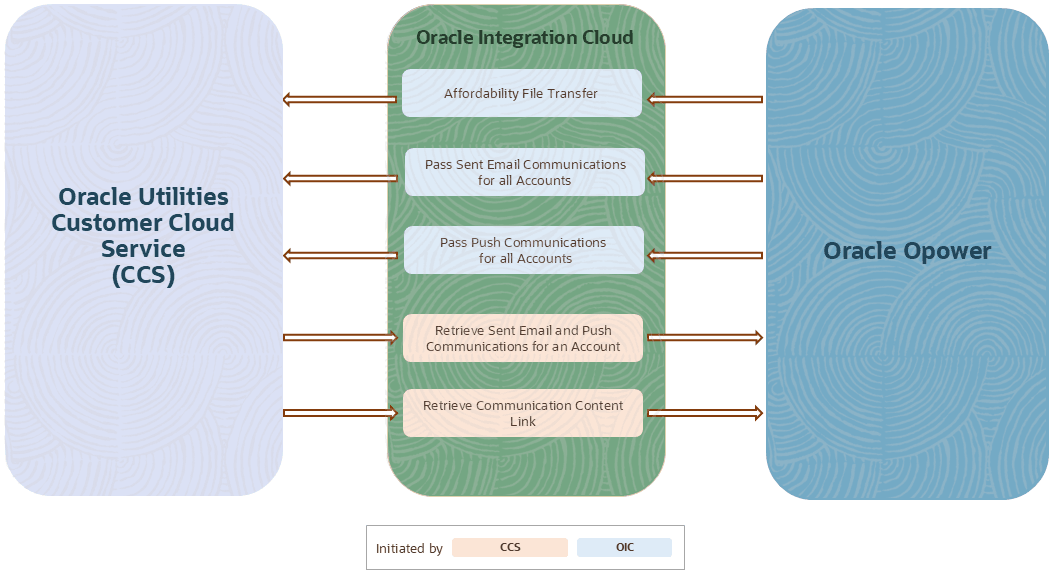
Supported Business Processes
The integration supports:
- Transfer of affordability indicator files from Opower to Customer Cloud Service to view the Affordability Insights from Customer Cloud Service.
- Synchronize email and mobile app push customer communication details from Opower to Customer Cloud Service.
- Retrieve the latest EMAIL and PUSH communications for an account when requested by Customer Cloud Service.
- Retrieve the communication content link for the customer contact when requested by Customer Cloud Service.