SENT and PUSH Customer Communication Synchronization
Opower runs periodic pipelines for each product. Each pipeline selects a subset of users, evaluates their eligibility, and delivers a targeted experience, such as a usage report or energy cost reduction recommendations, through channels including email, push notifications, print, SMS, or IVR. After delivery, the communications become available in Opower for Oracle Integration Cloud (OIC) to retrieve and send to Customer Cloud Service, where Customer Cloud Service Support can access it.
Synchronize SENT Customer Communications Process (Oracle Integration Cloud Initiated)
The SENT Customer Communications integration synchronizes details of sent customer email communications from Opower to Customer Cloud Service.
The flow diagram below shows the graphical representation of the SEND Customer Communications Sync integration process.
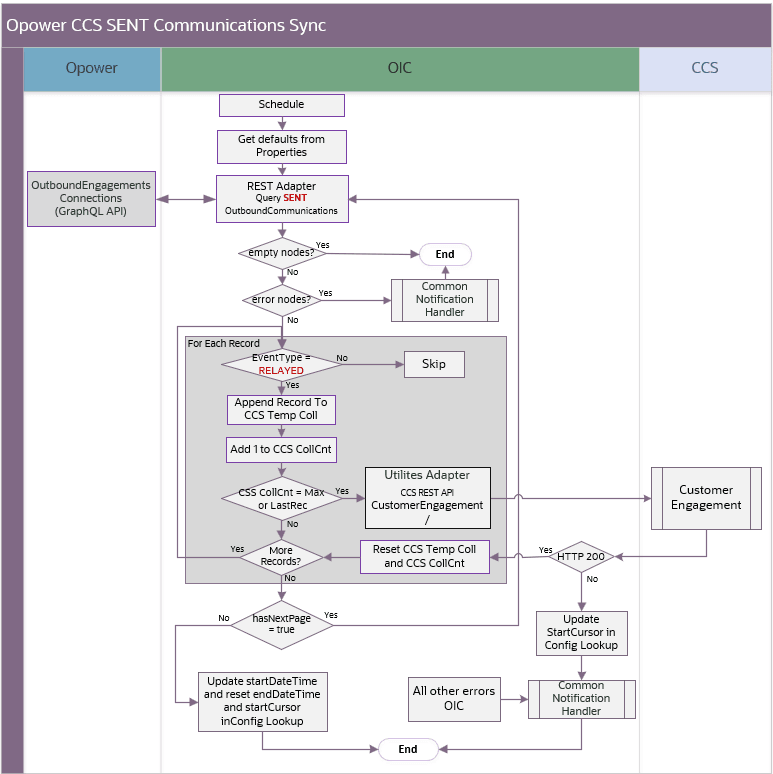
SENT customer communication synchronization
Processing Details
The scheduled integration process deployed on Oracle Integration Cloud performs the following activities:
-
The process is triggered by a schedule, or it can also be triggered manually.
- Define the integration schedule for this process and make sure the Opower periodic pipelines for each specific product are run first, so the communication information is available to be processed by the integration.
- Make sure the default values used in this integration are defined in the OUTLBRT-CCS_OPWR_BusinessConfigProps and OUTLBRT-CCS_OPWR_TechnicalConfigProps
-
Retrieve the default configuration properties.
-
Invoke Opower OutboundEngagements Connections GraphQL API to query Email Sent outbound communications for a specific client, time interval and ‘EMAIL_SEND’ filter type. The query always returns a maximum of 1000 records. If there are more than 1000 records returned, it will have multiple pages.
-
Validate the Opower GraphQL API response:
- If no nodes are returned, process ends.
- If error nodes are returned, invoke the Common Notification Handler to send an error notification email and process ends
- Otherwise, filter records so only RELAYED events are processed.
-
Group records with event type RELAYED into batches using a configurable Customer Cloud Service API collection count threshold. This is defined in the
ccs.maxAPICollCountproperty in the OUTL-BRT-CCS_OPWR_BusinessConfigProps lookup. -
If the Customer Cloud Service API collection count threshold is reached or it is the very last record read in the query.
-
Send the collection to the Customer Cloud Service Customer Engagement REST API through the Utilities Adapter.
-
If the Customer Cloud Service API returns an error (not HTTP 200)
- Update the
opower.startCursor.sentCommproperty in the OUTL-BRT-CCS_OPWR_BusinessConfigProps lookup with the last successful Opower page endCursor value. The next run uses this value as a query parameter to retrieve communications for the next page. - Capture the error and invoke the Common Notification Handler flow to send an error notification email.
- End the Process
- Update the
-
Else,
- Reset the CCS temp collection and counter
-
-
If more records returned by the query needs to be processed, repeat step 5 and 6 and send the remaining relayed records to CCS.
-
If all records from the query are processed, check if it has a next page.
-
If yes, repeat step 3 onwards. This time, the query will use the page’s endCursor as an added parameter to get the next page.
-
If no, update the following properties in the OUTL-BRT-CCS_OPWR_BusinessConfigProps lookup:
opower.startDateTime.sentCommto the processed interval end datetimeopower.startCursor.sentCommandopower.endDateTime.sentCommare reset to blank.
-
-
For any errors encountered in this process:
- An error email notification with error details is sent via the common notification handler.
- The Business Configuration Property lookup is updated if required.
- The integration flow stops the process.
Note: If no records are returned, do not invoke the Customer Cloud Service API with an empty collection.
Technical Details
The following table describes the integration processes and the respective Oracle Utilities Customer Cloud Service and Oracle Utilities Opower artifacts used in this integration process.
| Artifact | Value |
|---|---|
| Integration Process Name | OU OPOWER CCS Sent Customer Communication Sync |
| Integration Process Identifier | OUTL-BA-OPWR_CCS_SENTCOMM_SYNC |
| Integration Project Name | OU CCS OPOWER |
| Source connection (REST Adapter) | OU REST OPOWER for CCS-OPOWER |
| invoke | Opower GraphQL: https://host.example.com/graphql |
| Target connection (Oracle Utilities Adapter) | OU REST CCS for CCS-OPOWER |
| invoke | Service Name: C1-CustomerEngagementOperation: recordCustomerEngagementMethod: POST |
| Local integrations | OU Common Notification Handler OU Common Configuration Properties Lookup Update |
| Lookups | OUTL-BRT-CCS_OPWR_TechnicalConfigPropsOUTL-BRT-CCS_OPWR_BusinessConfigPropsOUTL-BRT-CCS_OPWR_CommunicationStatus |
Synchronize PUSH Customer Communications (Oracle Integration Cloud Initiated)
The PUSH Customer Communications integration synchronizes details of customer mobile app push communications from Opower to Customer Cloud Service.
The flow diagram below shows the graphical representation of the PUSH Customer Communications Sync integration process.
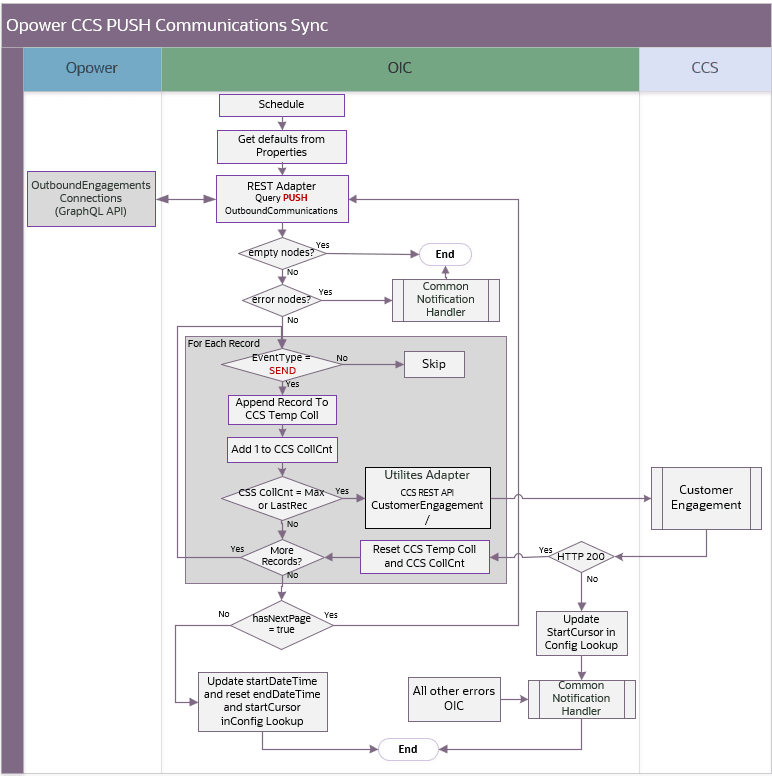
PUSH customer communication synchronization
Processing Details
The scheduled integration process deployed on Oracle Integration Cloud performs the following activities:
-
The process is triggered by a schedule, or it can also be triggered manually.
- Define the integration schedule for this process and make sure the Opower periodic pipelines for each specific product are run first, so the communication information is available to be processed by the integration.
- Make sure the default values used in this integration are defined in the OUTLBRT-CCS_OPWR_BusinessConfigProps and OUTLBRT-CCS_OPWR_TechnicalConfigProps
-
Retrieve the default configuration properties.
-
Invoke Opower OutboundEngagements Connections GraphQL API to query Mobile App Push outbound communications for a specific client, time interval and ‘PUSH’ filter type. The query always returns a maximum of 1000 records. If there are more than 1000 records returned, it will have multiple pages.
-
Validate the Opower GraphQL API response:
- If no nodes are returned, process ends.
- If error nodes are returned, invoke the Common Notification Handler to send an error notification email and process ends
- Otherwise, filter records so only SEND events are processed.
-
Group records with event type SEND into batches using a configurable Customer Cloud Service API collection count threshold. This is defined in the
ccs.maxAPICollCountproperty in the OUTL-BRT-CCS_OPWR_BusinessConfigProps lookup. -
If the Customer Cloud Service API collection count threshold is reached or it is the very last record read in the query.
-
Send the collection to the CCS Customer Engagement REST API through the Utilities Adapter.
-
If Customer Cloud Service API returns an error (not HTTP 200)
- Update the
opower.startCursor.pushCommproperty in the OUTL-BRT-CCS_OPWR_BusinessConfigProps lookup with the last successful Opower page endCursor value. The next run uses this value as a query parameter to retrieve communications for the next page. - Capture the error and invoke the Common Notification Handler flow to send an error notification email.
- End the Process
- Update the
-
Else,
- Reset the CCS temp collection and counter
-
-
If more records returned by the query needs to be processed, repeat step 5 and 6 and send the remaining records to Customer Cloud Service.
-
If all records from the query are processed, check if it has a next page.
-
If yes, repeat step 3 onwards. This time, the query will use the page’s
endCursoras an added parameter to get the next page. -
If no, update the following properties in the OUTL-BRT-CCS_OPWR_BusinessConfigProps lookup:
opower.startDateTime.pushCommto the processed interval end datetimeopower.startCursor.pushCommandopower.endDateTime.pushCommare reset to blank.
-
-
For any errors encountered in this process:
- An error email notification with error details is sent via the common notification handler.
- The Business Configuration Property lookup is updated if required.
- The integration flow stops the process.
Note: If no records are returned, do not invoke the Customer Cloud Service API with an empty collection.
Technical Details
The following table describes the integration processes and the respective Oracle Utilities Customer Cloud Service and Oracle Utilities Opower artifacts used in this integration process.
| Artifact | Value |
|---|---|
| Integration Process Name | OU OPOWER CCS Push Customer Communication Sync |
| Integration Process Identifier | OUTL-BA-OPWR_CCS_PUSHCOMM_SYNC |
| Integration Project Name | OU CCS OPOWER |
| Source connection (REST Adapter) | OU REST OPOWER for CCS-OPOWER |
| invoke | Opower GraphQL: https://host.example.com/graphql |
| Target connection (Oracle Utilities Adapter) | OU REST CCS for CCS-OPOWER |
| invoke | Service Name: C1-CustomerEngagementOperation: recordCustomerEngagementMethod: POST |
| Local integrations | OU Common Notification Handler OU Common Configuration Properties Lookup Update |
| Lookups | OUTL-BRT-CCS_OPWR_TechnicalConfigPropsOUTL-BRT-CCS_OPWR_BusinessConfigPropsOUTL-BRT-CCS_OPWR_CommunicationStatus |