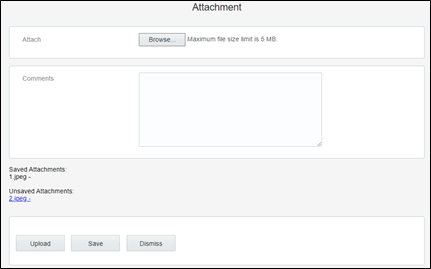
Attachment Screens
As part of 20C changes, a technician can upload the attachments at the following levels.
• Attachments at Service point
• Attachments at New Device
• Attachments at Existing Device
• Attachments at Activity
Note: here device includes meter, item, and equipment.
Attachments at Service Point
The Technician can upload the attachments of below Mime types at Service Point level in Oracle Field Service.
• image/gif
• image/jpeg
• text/plain
• text/html
• video/mpeg
• audio/x-wav
• application/zip
• application/vnd.ms-excel
• application/pdf
• application/msword
The figure below shows the Attachment option available in the Service Point section.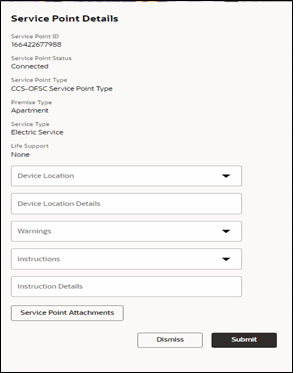
After uploading the attachments, saved and unsaved attachments can be viewed as shown below.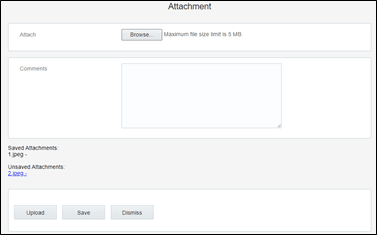
Attachments at New Device
A Technician can upload the attachments of below Mime types at New Device level in Oracle Field Service.
• image/gif
• image/jpeg
• text/plain
• text/html
• video/mpeg
• audio/x-wav
• application/zip
• application/vnd.ms-excel
• application/pdf
• application/msword
The figure below shows the Attachment option available at the New Device section.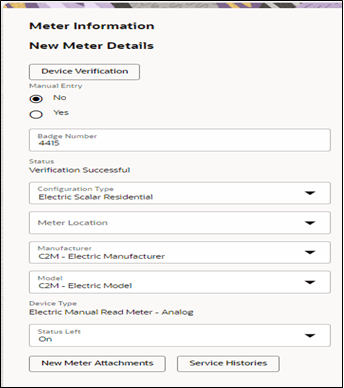
After uploading attachments, saved and unsaved attachments can be viewed as below. 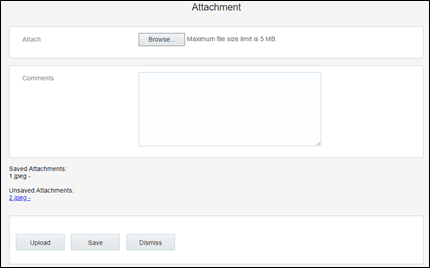
Attachments at Existing Device
A Technician can upload the attachments of below Mime types at Existing Device level in Oracle Field Service.
• image/gif
• image/jpeg
• text/plain
• text/html
• video/mpeg
• audio/x-wav
• application/zip
• application/vnd.ms-excel
• application/pdf
• application/msword
The figure below shows the Attachment button in the Existing Device section.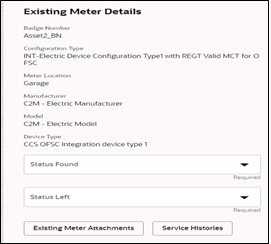
After uploading attachments, saved and unsaved attachments can be viewed as below.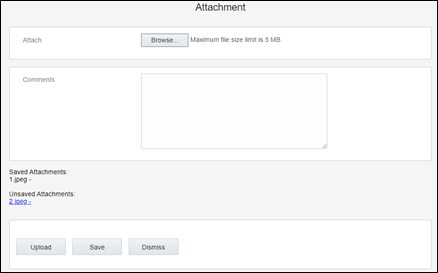
Attachments at Activity
A Technician can upload the attachments of below Mime types at Activity level in Oracle Field Service.
• image/gif
• image/jpeg
• text/plain
• text/html
• video/mpeg
• audio/x-wav
• application/zip
• application/vnd.ms-excel
• application/pdf
• application/msword
The figure below shows the Activity Attachments button..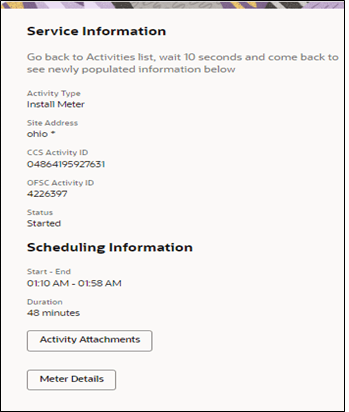
After uploading attachments, saved and unsaved attachments can be viewed as below.