Network Topology
Utilities and other large organizations typically have strict and specialized rules regarding network setup, and so it is likely that the examples used below do not perfectly align with your network topology. These examples should, however, provide useful guidance as long as you take care to map the concepts to your specific situation.
You should now have a VCN set up with both private and public subnets:
Figure 17-1 Network Topology - Subnets
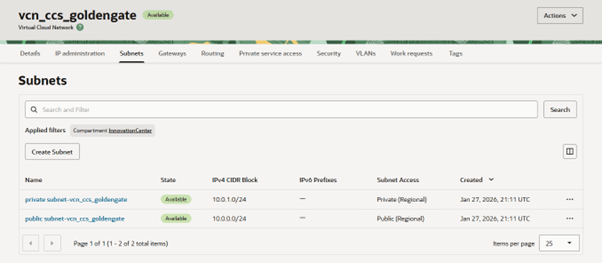
In this example:
- the public subnet is on CIDR block 10.0.0.0/24 (IPv4 addresses 10.0.0.1 thru 10.0.0.254)
- the private subnet is on CIDR block 10.0.1.0/24 (IPv4 addresses 10.0.1.1 thru 10.0.1.254)
Network traffic is typically enabled to flow into the public subnet (hence “public”) whereas network traffic ingress/egress is strictly controlled for the private subnet (hence “private”).
The general recommendation is to configure the GoldenGate Deployment into the private subnet, so as to protect it from external access.
Furthermore, the Private Endpoint which has been set up as part of the source Oracle Utilities Enterprise SaaS Service (via part # B110320 Oracle Utilities GoldenGate Replication for Enterprise SaaS) will also be created in the private subnet, so traffic can flow between the Private Endpoint and your target GoldenGate deployment within the private subnet.