Analytics Publisher
Oracle Utilities Analytics Visualization is included in the cloud service subscription, available via a separate URL for each environment.
Analytics Publisher is available and included in the service as a reporting/query tool only.
Note: Analytics Publisher and Oracle Utilities Analytics Visualization extract and display data from the primary database only.
Oracle Database Actions is also available and included in the service for querying the database (see Chapter 21: Oracle Database Actions for more information).
Data extraction is supported via the Generalized Data Extract and Specialized Data Extract functionality, and/or DataConnect (CCS & MSCS only) may be a starting point for extraction of data for a BI/reporting tool such as Cognos.
Analytics Publisher can only access the primary database that is provisioned with the associated cloud service (such as CCS, MSCS, WACS, BCS, and so on). External data sources (such as xml data models, and so on) are currently NOT supported.
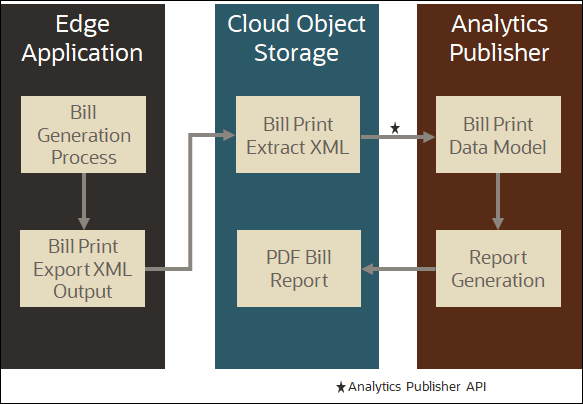
Analytics Publisher, as part of your cloud service, is not intended to be used directly as a bill/letter print system, however, it can be used to create reports based on extracted data. Billing/letter data can be extracted from Customer Cloud Service, Customer Care and Billing Cloud Service, and Billing Cloud Service via batch processing with target output files to be stored in Cloud Object Storage. The output file can then be uploaded into Analytics Publisher via an API for bill/letter data reporting.
Analytics Publisher can be configured to write output files to Cloud Object Storage (via Analytics Delivery Channel). This requires configuration of a value for the File Storage Configuration (F1-FileStorage) extendable lookup with the following settings:
• File Adapter: Oracle Cloud Object Storage
• User: The user Oracle Cloud ID (ODIC) for the object storage location
• Tenancy: The tenancy Oracle Cloud ID (ODIC) for the object storage location
• Compartment: The compartment Oracle Cloud ID (ODIC) for the object storage location
• Namespace: The namespace for the object storage location
• Key Ring: The API signature key used to connect your cloud service to Object Storage.
• Region: The region of the object storage tenancy for the connection (Values for this field are defined in the F1_REGION_FLG lookup.
• Bucket Name Prefix: Prefix used by Object Storage Bucket configuration
• Reporting Configuration: Enabled (checked)
Note: This applies to prior releases provided they are up to date with the latest maintenance pack and hot fix releases.
The following diagram outlines this process:
Note: The RTTYPOST batch control is not supported for bill generation using Oracle Utilities cloud services. Instead, customers should use batch-based extracts (such as the Customer Cloud Service bill extract functionality POSTROUT) in conjunction with 3rd party tools/services such as Documaker to ensure smooth, scalable, and successful implementation/operation of their services.
Refer to the following Knowledge Base articles on My Oracle Support for additional information about using Analytics Publisher for generating bills.
Using Analytics Publisher for Bill/Letter Creation
Analytics Publisher is part of Oracle Utilities SaaS cloud service offerings with limited resources and is provided to support operational reports ONLY. Operational reports are reports that extract low to medium data volumes from the Production database to avoid performance-related issues.
Note: The role of Analytics Publisher in terms of high-volume data reports like bill/letter is limited to formatting ONLY.
High-volume data reports such as Bill and or Letter Print include four steps:
1. Bill/Letter Generation
2. Bill/Letter Extraction
3. Bill/Letter Formatting
4. Bill/Letter Printing
Bill/Letter Generation
Mass bill/letter generation is always the responsibility of the cloud service application (for example CCS, CCS for Retail, CCBCS and BCS). No reporting tool including Analytics Publisher can be used as a replacement.
Bill/Letter Extraction
Once the bills/letters are generated, the cloud service application provides the bill/letter extract batch background processes that reads the bill/letter tables and create an output file (XML) to cloud object storage. NO reporting tool including Analytics Publisher should be used to extract the bill/letter data from the production database.
Bill/Letter Formatting
The next step is to READ the bill/letter xml files from cloud object storage and perform the bill/letter formatting. Analytics Publisher CANNOT read cloud object storage; the bill/letter xml file should be PUSHED to Analytics Publisher via API. The Analytics Publisher API writes the output file into Analytics Publisher database. After that, Analytics Publisher can be used to format the bill/letter file as per the layout defined in the Bill/Letter Print Report template. The output of the report can be pushed to cloud object storage.
Bill/Letter Printing
Bill/letter printing is the step where the Analytics Publisher report output file can be sent to the bill/letter print vendor for printing.
Examples
Below are some scenarios of what Analytics Publisher can and cannot be used for.
Scenario 1: Analytics Publisher to be used for monthly AR reporting.
Yes, AR reporting is considered as medium data volume report and Analytics Publisher can be used. Furthermore, reports like online bill / letter display (covering single account) are also considered as operational reports.
Scenario 2: Analytics Publisher to be used as bill/letter generation tool.
No. Bill and or Letter generation is always the responsibility of the cloud service and performed via batch background processes (such as BILLING batch process).
Scenario 3: Analytics Publisher to be used as mass data extraction tool.
No. Extraction of mass data cannot be performed via Analytics Publisher. Base Product provides batch background processes (such as POSTROUT) and or Generalized / Specialized data extracts to extract the data out from production database. We also now support GoldenGate replication to synch the Production data with the customer reporting database.
Scenario 4: Analytics Publisher to be used for Bill Printing.
No. Bill Printing is always considered as Bill Print vendor responsibility and out of the scope from SaaS services.
Scenario 5: Analytics Publisher to be used as a Bill formatting tool:
Yes, Analytics Publisher can be used to read the bill/letter print output file and perform the formatting. The report processing time varies based on the complexity of the bill print layout report. Customers / partners may need to adjust the bill generation and extraction process in the edge application to address performance-related issues and to speed up the bill / letter processing time in the Analytics Publisher.
Scenario 6: External and third-party applications like Doc/1, Documaker etc. can be used for Bill formatting.
Yes, Bill print extract output file (available on cloud object storage) can be downloaded and any external/third-party application like Doc/1, Documaker can be used for bill formatting and printing.