Incremental Conversion
Incremental data conversion enables the controlled migration of additional (delta) data into a live production environment after the initial data conversion has been completed. This approach is typically used when new records must be introduced without disrupting existing operations.
Because production environments contain active business data, incremental conversion is executed with strict safeguards, governance, and planning.
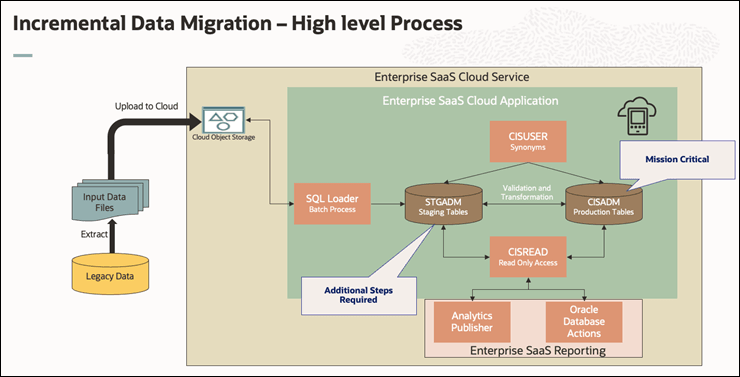
The following diagram provides a high-level overview of this process.
Figure 14-1 Incremental Data Migration - High Leve Process
This section outlines some common use cases.
Use Case 1: Adding Data to a Single Table (With Existing References)
Scenario: New records need to be added to a table (Table 1), where:
- The table has relationships (foreign keys) to another table (Table 2)
- Table 2 data is already fully converted and exists in production
- No new records are required in Table 2
Key Characteristics:
- Only one table receives new data
- All references point to already available production data
- No changes to existing records
Required Steps:
- Preparation
- Identify new (delta) records for Table 1
- Ensure all foreign key references exist in production (Table 2)
- Perform required configuration updates (if any)
- Staging Cleanup
- Truncate staging version of Table 1 and its key mapping
- Data Preparation
- Prepare clean data files containing only new records
- Key Generation
- Generate new system keys
- Use controlled parameters (such as startRowNumber offset) to avoid duplicates
- Data Load
- Load data into staging
- Insert into production
Use Case 2: Adding Data Across Multiple Related Tables
Scenario: New data must be added to multiple related tables (Table 1 and Table 2), where:
- Both tables contain new records
- Relationships exist between them
- Keys are system-generated and must remain consistent
Key Characteristics:
- Multiple tables updated together
- Requires synchronized key generation
- More complex dependency management
Required Steps:
- Preparation
- Identify delta records for both tables
- Prepare data maintaining relationships
- Backup Existing Key Mapping
- Extract key mapping data from staging
- Store safely for rollback
- Staging Cleanup
- Truncate staging tables and key mapping tables
- Key Generation
- Generate keys for both tables
- Ensure sequencing avoids overlap with production
- Data Load
- Load new records into staging
- Insert into production
- Restore Key Mapping
- Reload previous key mappings (append mode)
- Maintain continuity of historical mappings
Important Functional Limitation Across Both Use Cases
- Only new data insertion is supported
- No updates or deletions of existing production data are allowed
- This ensures stability and protects production integrity
Keys to Success for Incremental Conversion
Successful incremental conversion in a production environment depends on careful planning, strong governance, and disciplined execution. The following factors are critical to ensuring a smooth and risk-free process:
- Detailed Planning and Design
- Define a granular execution plan covering each step of the conversion
- Clearly identify:
- Data scope (delta records only)
- Dependencies between tables
- Sequence of execution
- Review and validate the plan with all stakeholders before execution
- Strong Data Validation
- Ensure all foreign key relationships are valid
- Validate that:
- No duplicate records are introduced
- Data aligns with production standards
- Perform pre- and post-load reconciliation
- Robust Key Management
- Use controlled key generation strategies to avoid overlaps
- Maintain accurate key mapping tables
- Always back up key mappings before execution
- Mock Runs in Production-Like Environments
- Conduct multiple dry runs in environments similar to production
- Validate:
- Performance
- Data integrity
- End-to-end execution timing
- Use discoveries to refine the final approach
- Performance and Capacity Planning
- Reassess system capacity and sizing based on incremental data volume
- Monitor:
- Batch processing times
- System load
- Optimize indexes and database performance as needed
- Controlled Execution Window
- Schedule activities during a planned maintenance window (if required)
- Minimize impact on business operations
- Ensure all teams are aligned and available during execution
- Backup and Rollback Readiness
- Take complete backups before starting conversion
- Define a clear rollback strategy
- Ensure ability to restore:
- Key mappings
- Affected datasets
- Governance and Stakeholder Coordination
- Ensure close coordination across:
- Project teams
- Technical teams
- Operations teams
- Maintain clear communication before, during, and after execution
- Ensure close coordination across:
- Controlled Enablement of Conversion Mode
- Enable conversion capabilities only when required
- Disable immediately after completion
- Prevent accidental or unauthorized execution
- Experienced Execution Team
- Engage a skilled data migration team with experience in:
- Production data handling
- Conversion tools and processes
- Proactively manage risks such as:
- Duplicate key generation
- Index inconsistencies
- Data integrity issues
- Engage a skilled data migration team with experience in: