Oracle App Manager
App Manager is an application control plane on OCI console that allows you to control the provisioning process and manage your cloud service environments.
Specifically, App Manager allows you to:
- Request a new service environment and provide various details about that new environment.
- Update an existing environment, for example change encryption key details for environments with Oracle Bring Your Own Key (BYOK) information (if your cloud service subscription includes support for BYOK).
Note:
BYOK is currently not available for Oracle Utilities cloud services. Oracle-managed encryption keys should therefore be used. Oracle-managed keys are managed and rotated by Oracle. With customer-managed keys, the customer is responsible for managing the key lifecycle and ensuring continued key availability. If a customer-managed encryption key is disabled, deleted, or otherwise becomes unavailable, access to the associated database may be impacted, and database restore or recovery operations may also be affected. - Delete an existing environment.
Access to App Manager in your OCI Console is controlled by OCI Identity and Access Management (IAM) policies. By default, any member of the OCI administrator group in your cloud account will have access to App Manager.
For Oracle App Manager documentation please refer to the Overview of Managing Application Environments in the Oracle Cloud Infrastructure documentation.
The rest of this chapter will discuss special considerations related to self service provisioning and the use of App Manager for Oracle Energy and Water SaaS cloud services.
Figure 5-1 App Manager in OCI Console
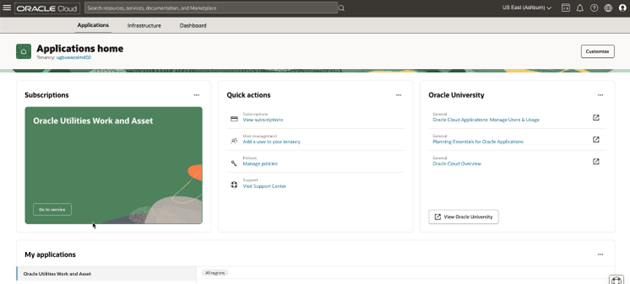
The App Manager dashboard can be reached by clicking the service type in the My Applications box (as shown in figure 5.1) or by selecting the service type from the OCI console menu.
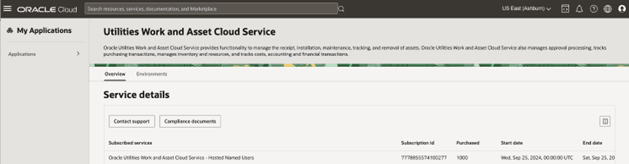
The App Manager dashboard has the following options (see figure 5.2):
- Overview - in which you can see the details about your service subscription and a link to contact the Oracle support portal.
- Environments - in which you can request new and manage your existing environments
Figure 5-2 App Manager Dashboard
You can get to the App Manager environment page by selecting the Environments tab (see figure 5.3).
Figure 5-3 App Manager Environments
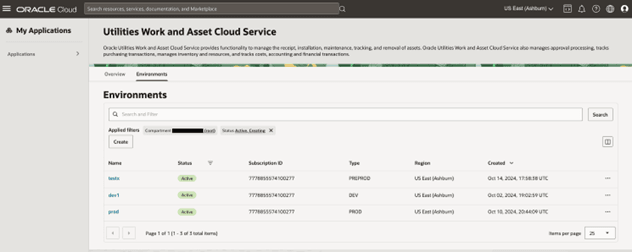
In the App Manager Environments page, the “Applied filters” section allows you to filter the displayed environment according to their status and the Compartment they belong to. Each environment is an OCI resource and therefore exists in a compartment. New environments are assigned to compartments as part of the creation request. By default the compartment filter will point to your root compartment.
Before we discuss how to request a new environment, there are some important considerations related to new environments.