Viewing Environment Details
When an environment appears in the App Manager Environments page, you can select the environment to see more details about it (see figure 5.4).
Figure 5-4 App Manager Environment Details
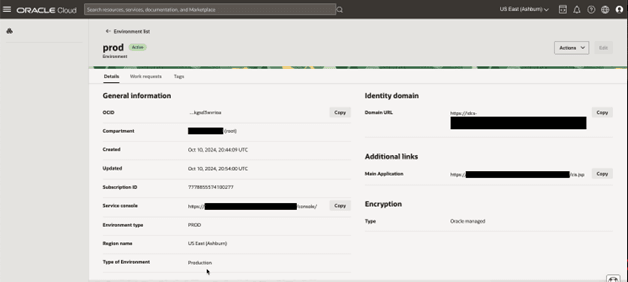
Since environments are OCI resources, many details that are available for an environment are similar to other OCI resources, such as: name, OCID, region, etc.
In this section we will cover a few attributes that are important for your cloud service environments:
- Details tab:
- Service Console: this link can be used to launch the Cloud Service Console for your cloud service (if available for your service and account). The View Application action on the page will open a new browser window with that link.
- Environment Type: This is the type of environment selected at creation time. This is the code for the type that was selected during the create environment dialog. The full name of the environment type is displayed in the Environment Configuration tab.
- Type of Environment: this is the name of the environment type according to the code that is displayed in the Environment Information tab.
- Main Application: this is the link to the main application in your cloud service. In order to use the link, copy it into a new browser window.
- Encryption:
- In this section you will see information about your Bring Your Own Key (BYOK) setup - if your service is enabled for that.
- You can change your BYOK configuration by selecting the Manage encryption key from the Actions menu. Changes in BYOK configuration will automatically generate an Update request and the environment status will be changed into "Updating" until the changes are accepted and completed.
Note:
BYOK is currently not available for Oracle Utilities cloud services. Oracle-managed encryption keys should therefore be used. Oracle-managed keys are managed and rotated by Oracle. With customer-managed keys, the customer is responsible for managing the key lifecycle and ensuring continued key availability. If a customer-managed encryption key is disabled, deleted, or otherwise becomes unavailable, access to the associated database may be impacted, and database restore or recovery operations may also be affected.
- Other tabs:
- Other available tabs include information about App Manager work requests associated with this environment or OCI tags assigned to it.
- Actions Menu:
- This menu lists common actions associated with the environment for example:
- View Application: opens the service console link.
- Manage encryption key: allows you to update your encryption key if you are using BYOK.
- Move resource: allows you to assign this environment to a different compartment.
- Delete: creates a request to delete the environment.
- This menu lists common actions associated with the environment for example: