E-Mail Configuration
This section provides information about requirements to configure settings for emails sent from within the system regarding objects such as approvals, purchase orders, timekeeping, and so on.
Note:
The “System Email From” Option Type used with email notifications is not supported for Oracle Utilities Cloud Services, including Oracle Utilities Work and Asset Cloud Service and Oracle Utilities Customer Program Management Cloud Service. Email configuration for "Cloud" customers is defined in "Service" properties.-
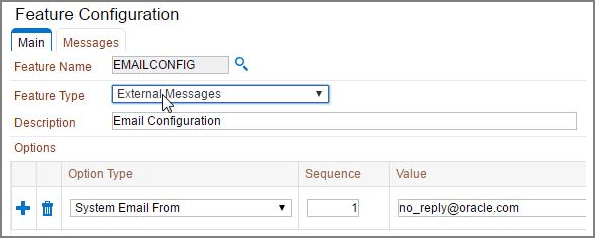
Create or update a Feature Configuration for email configuration (EMAILCONFIG).
The Feature Type should be set as External Messages
- Add the System Email From
Option Type with a valid from address in the
Value field.
This identifies the sender to use for system emails.
Example:
-
Create a Message Sender with the following:
-
Invocation Type: Real-time
-
Message Class: RTEMAILSNDR
-
-
Select the Context tab on the Message Sender and add the SMTP information.
This includes the following:
-
SMTP Host Name: Example: inernal-mail-router.yourcompany.com
-
SMTP Password: Your SMTP password
-
SMTP Username: Example: admin@oracle.com
-
Refer to the Real-Time Message Configuration and the Message Sender - Context section in the Oracle Utilities Application Framework documentation for more information.
Parent topic: General Options