Enable Custom Attributes
Characteristics of the type Predefined Value and Ad Hoc Value may be exposed in Oracle Utilities Data Intelligence subject areas so they can be used for analysis and data visualization.
About Characteristics and Dimensions
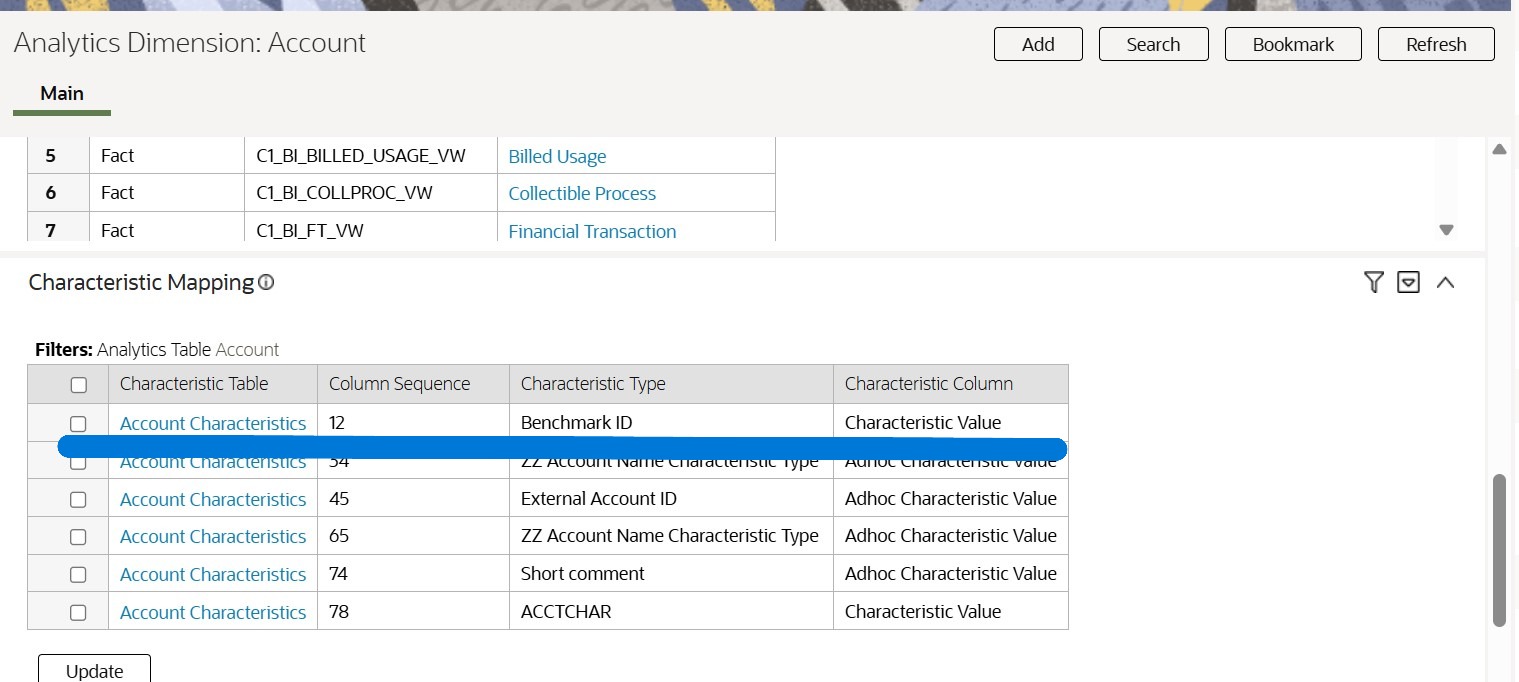
Custom values defined by characteristics types appear as columns in Custom SCD1 dimensions after they have been mapped to target SCD1 characteristic dimensions in Oracle Utilities Data Intelligence. For example, in the image shown below, the Account dimension includes the characteristic type "Benchmark ID":
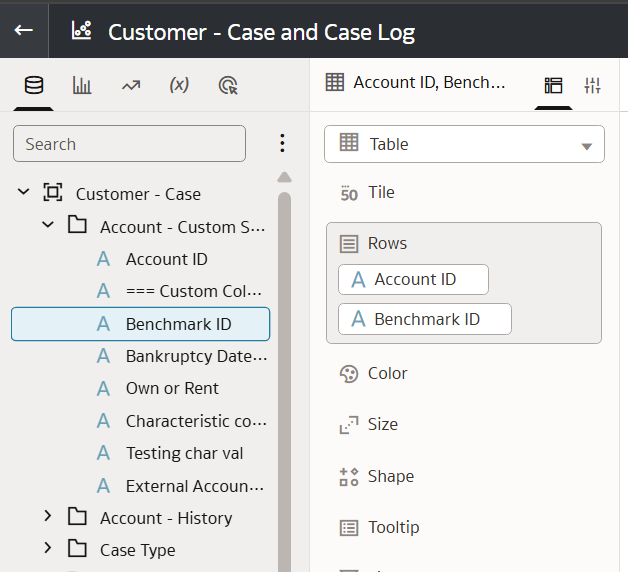
In Oracle Utilities Data Intelligence, mapped characteristics are displayed in the corresponding Custom SCD1 dimension for the base entity. Within that Custom SCD1 dimension, the characteristic attributes are displayed below the separator === Custom Columns === in the subject area. For example, an Account characteristic type such as “Benchmark ID” is displayed in the characteristic dimension named Account - Custom SCD1 under === Custom Columns ===.
Currently Oracle Utilities Data Intelligence supports custom attributes for the following dimensions and ranges:
| SCD1 Characteristic Dimension | Characteristics | Range | SKUs Availability |
|---|---|---|---|
| Account - Custom SCD1 |
Account Characteristics CI_ACCT_CHAR |
1 to 70 | Customer (EWDI_CUST) , Device (EWDI_DVC) and Grid Insights (EWDI_GRID) |
| Person - Custom SCD1 |
Person Characteristics CI_PER_CHAR |
1 to 30 | Customer (EWDI_CUST) , Device (EWDI_DVC) |
| Premise - Custom SCD1 |
Premise Characteristic CI_PREM_CHAR |
1 to 30 | Customer (EWDI_CUST) , Device (EWDI_DVC) |
| Service Agreement - Custom SCD1 |
SA Characteristics CI_SA_CHAR |
1 to 30 | Customer (EWDI_CUST) , Device (EWDI_DVC) |
| Service Agreement - Custom SCD1 |
SA Type Characteristic CI_SA_TYPE_CHAR |
71 to 75 | Customer (EWDI_CUST) , Device (EWDI_DVC) |
Map Characteristics to Dimensions
The underlying maintenance object of an analytics dimension supports a set of empty or free columns, as shown by the ranges mentioned above. These empty columns can be used by implementation teams to map characteristics to dimensions. Each of these empty columns has a unique identifier known as its Column Sequence number. To map a characteristic to a target SCD1 characteristic dimension in Oracle Utilities Data Intelligence means to select a characteristic type of an analytics table in the source application, and to map it to an empty Custom SCD1 dimension column from the supported set of ranges.
For example, the Service Agreement dimension supports characteristics mapping for the CI_SA analytics dimensions from range 1 to 30, and for the CI_SA_TYPE analytics dimensions from range 71 to 75. The Column Sequence number above these ranges are not supported. (The Column Sequence number determines the order in which characteristics are displayed in the dimension.)
WARNING:
During implementation it may be necessary to change the Column Sequence number of characteristics or even remove mappings by changing or deleting the column sequence number. However be aware that changing the column sequence number of a characteristics may break or modify the existing analytics canvas that uses the column's previous position or removed position. The change or removal of mappings of characteristics in the source application to dimensions in the application should be performed by application administrator.To map a characteristic to a target SCD1 characteristic dimension:
- Select the Description link of the table where you want characteristics mapped.
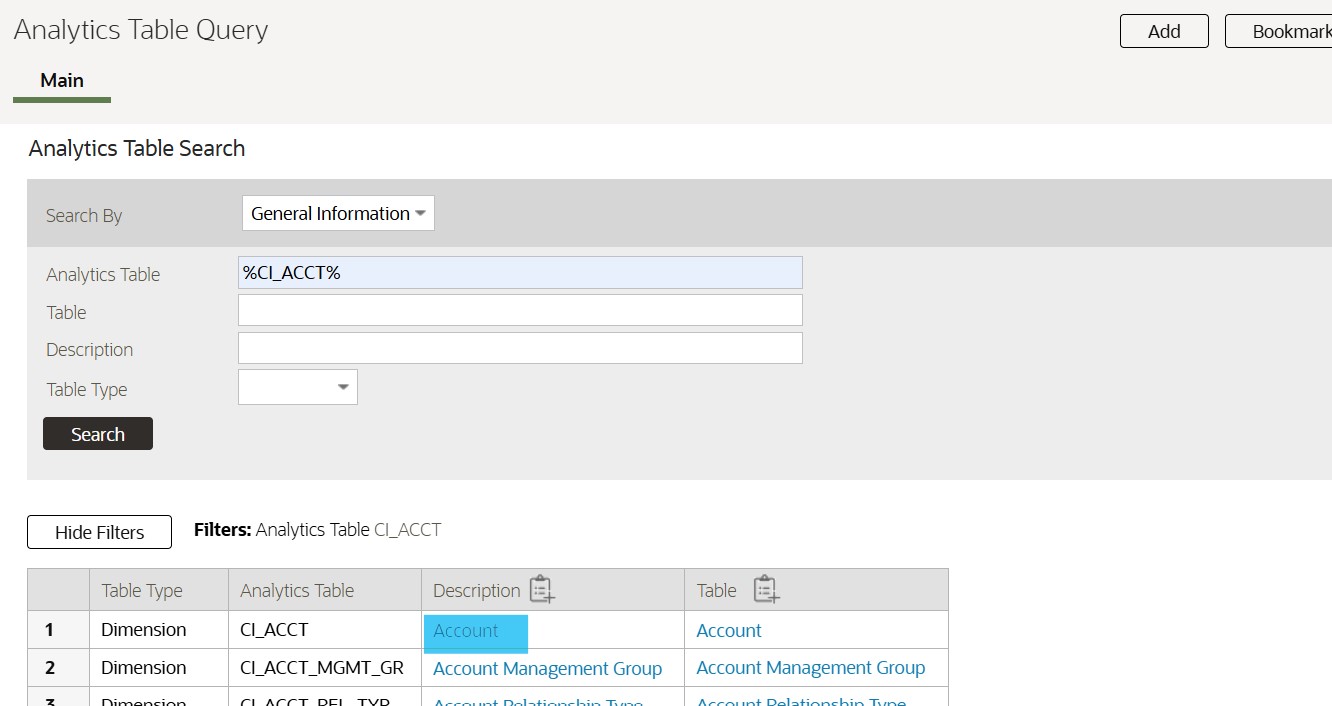 Clicking the description link takes you to the Analytic Dimension page.
To remove a characteristic mapping to a target SCD1 characteristic dimension:
- In the Characteristic Mapping zone, press the filter icon to search for the characteristic.
- Select the characteristic types that you want to unmap and click Update.
- Delete the Column Sequence for the mapping and click Save.
Note:
Removing the Column Sequence of a characteristic will break the analytics canvases that used it.