User Exit Include Files
Whilst the product supports custom templates it is now possible to only supply fragments of a customization rather than whole configuration templates, known as user exit include files. This allows you to specify additional settings to be included in the templates provided in stream when the product templates are used to generate the configuration files when using the initialSetup command. See initialSetup – Maintain Configuration Settings for details.
When initialSetup is executed the templates are applied with the following order of preference:
- Base framework templates (no prefix). These templates should not be altered.
- If a product specific template exists (prefixed by the product code) then the product template is used instead of the base Framework template for the configuration file. These templates should not be altered.
- If a template is prefixed with
"cm_"then this is a custom template to be used instead of the product specific and base framework template.
These templates should live in $SPLEBASE/templates.
Note:
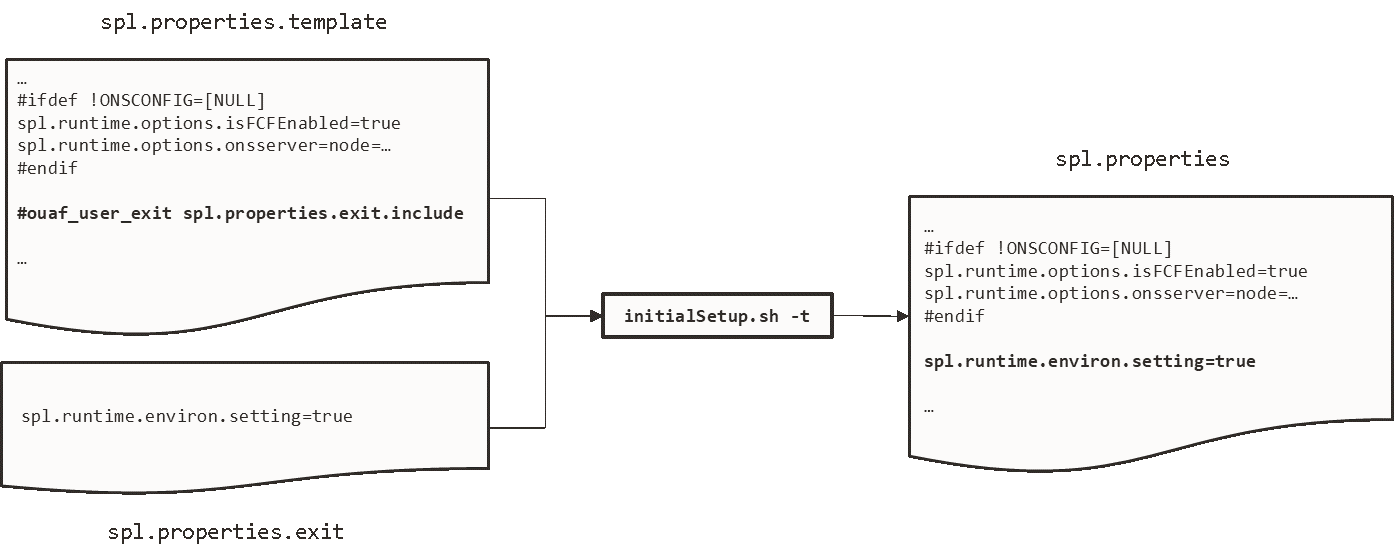
When creating custom templates please use the base framework and any related product templates as the basis for the content of the custom template.initialSetup is executed the existence of user exit files are checked (when an #ouaf_user_exit directive exists in the template) and the contents included in the generated configuration file. The following figure illustrates the process for a typical configuration change:
Figure 7-2 Configuration File Change
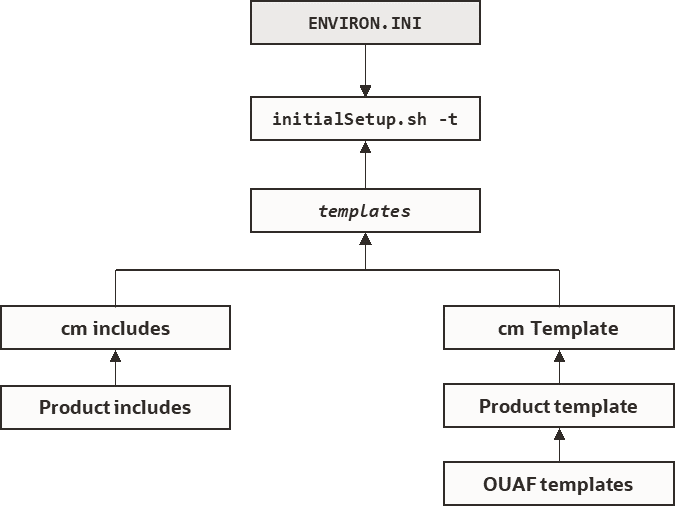
As with the custom templates user exits have preferences depending on the ownership of the user exit include file. Custom includes will override any product specific includes.
Figure 7-3 Template Hierarchy
The table below outlines the currently available user exits in the available templates:
| Template File | User Exit Include File | Position and Usage |
|---|---|---|
| boot.properties.template | boot.properties.exit.include | Used to change boot properties file from Oracle WebLogic. |
| ejb-jar.xml.template | ejb-jar.xml.wls.jms_1.include | JMS Mappings for Oracle WebLogic. |
| hibernate.properties.web.template | hibernate.properties.exit.include | At end of file (common hibernate.properties - Database Connectivity Settings entries). |
| hibernate.properties.web.exit.include | At end of file (online specific hibernate.properties - Database Connectivity Settings entries). | |
| log4j2.properties.template | log4j2.properties.exit.include | At end of file (common log4j2.properties – Product Logging Configuration entries). |
| log4j2.properties.root.exit.include | At end of file (specific online log4j2.properties – Product Logging Configurationentries). | |
| log4j2.properties.service.template | log4j2.properties.exit.include | At end of file (common log4j2.properties – Product Logging Configuration entries). |
| log4j2.properties.service.exit.include | At end of file (specific service log4j2.properties – Product Logging Configuration entries). | |
| ouaf.jmx.access.file.template | ouaf.jmx.access.file.exit.include | Allows for additional users to be specified for JMX connections. |
| ouaf.jmx.password.file.template | ouaf.jmx.password.file.exit.include | Allows for additional passwords to be specified for JMX users. |
| spl.properties.service.template | spl.properties.exit.include | At end of file (common spl.properties – Product Behaviour Settings entries). |
| spl.properties.service.exit.include | At end of file for EJB spl.properties – Product Behaviour Settings entries. | |
| spl.properties.service.timeouts.exit.include | User exit for service timeouts. | |
| spl.properties.template | spl.properties.exit.include | At end of file (common spl.properties – Product Behaviour Settings entries). |
| spl.properties.root.exit.include | At end of file for Web Application based spl.properties – Product Behaviour Settings entries. | |
| spl.properties.timeouts.root.exit.include | User exit for global timeouts. | |
| FW_spl.properties.keystore.truststore.include | User exit for keystore and trust store settings. | |
| . | spl.properties.filter_mapping.include | Allows custom filter mappings |
| spl.properties.mobile.template | spl.properties.exit.include | At end of file (common spl.properties – Product Behaviour Settings entries). |
| spl.properties.mobile.exit.include | At end of file for mobile Application based spl.properties – Product Behaviour Settings entries. | |
| spl.properties.timeouts.mobile.exit.include | Future use. | |
| submitmitbatch.properties.template | submitbatch.properties.exit.include | Submitter extensions. |
| threadpoolworker.properties.template | threadpoolworker.properties.exit.include | Threadpool extensions. |
| web.xml.template | spl.properties.images.include | Image processing overrides for web.xml – JEE Deployment Descriptor. |
| web.xml.servlet_mapping.include | Allows custom servlet mappings. | |
| web.xml.servlet.include | Allows custom servlet definitions. | |
| web.xml.topReplace_config.include | Allow exclusion of files from top replace |
To use these user exits create the user exit include file with the prefix "cm_" in the $SPLEBASE/templates directory. To reflect the user exits in the configuration files you must execute the initialSetup utility. Refer to the Custom JMS Configuration section for an example of this process.
Properties File User Exits
The product behavior is controlled at a technical level by the values in the properties files. Whilst most of the settings are defaulted to their correct settings in the file, additional parameters may be added to the properties files to add new behavior. User exits are used to set these additional parameters in the properties files.
From the table above there are more than one user exit available in each properties file template to use. This is designed to maximize the re-usability of configuration settings. There are a number of specialized user exits that may need to be used:
- Common Settings – The configuration files used by each channel of execution (online, Web Services and batch) has a common user exit. This user exit is used to house all the setting you want to implement regardless of the channel used. For example the common setting user exits are:
Configuration File User Exits for common settings hibernate.properties hibernate.properties.exit.include log4j2.properties log4j2.properties.exit.include spl.properties spl.properties.exit.include - Channel specific Settings – To implement custom settings per channel there is a separate user exit to hold those parameters for those channels. The specific user exits are:
Channel Configuration Files User Exits for Common Settings Web App Server hibernate.properties hibernate.properties.web.exit.include log4j2.properties log4j2.properties.root.exit.include spl.properties spl.properties.root.exit.include Business App Server log4j2.properties log4j2.properties.service.exit.include spl.properties spl.properties.service.exit.includespl.properties.service.timeouts.exit.include Inbound Web Services log4j2.properties No User Exit available. spl.properties No User Exit available. Batch Server hibernate.properties hibernate.properties.batch.exit.include log4j2.properties log4j2.properties.standalone.exit.include spl.properties spl.properties.standalone.exit.includespl.properties.timeouts.standalone.exit.include