Variable Access Tool
In addition to using the Node Monitor tab in the Central panel, you can monitor nodes in the Configuration Manager using the Variable Access tool. The Variable Access tool will also let you read and write values to certain points even if they are currently filtered out of the views in the Node Monitor and Node Table tabs.
Certain types of nodes are viewable and writeable. Typically, you will only be using the Variable Access tool to read or write IntermediatePointMonitor nodes.
To open the tool, select the Variable Access option from the View menu on the menu bar. To read a value from and write a value to a node with the Variable Access tool do follow these steps:
- In the VMD field, select the name of the VMD that contains the node of interest like, for example, Processor.
- Enter the name of the node to view in the Variable field. For example, if you are using the example configurations from the Quick Configuration Manager Tutorial, start typing DescretePoint_A and the Variable field will automatically populate the drop-down with possible nodes in the VMD that contain that string.Select the node you would like to read. For example, select DiscretePoint_A from the drop-down of the Variable field.
- Select Read. If it exists, the current value for that point will display as a structure in LEC Server's MMS-DL syntax format. If it does not exist, an error message appears in the Result field.
- To change the value of the node, edit the Value section of the Variable Access tool and select Write. If the write is successful, an Operation completed message appears in the Result field. If it not, an error message will appear in the Result field.
The following image shows the Variable Access tool after reading the IntermediatePointMonitor node in the processor VMD called DiscretePoint_A using the example ICCP client server configuration. This point is of type Data_DiscreteExtended, so its value includes four components: a discrete value (+122), a timestamp (+1594000241 ), a bit string of ICCP quality flags (’00000001’b), and a change-of-value counter (8503).
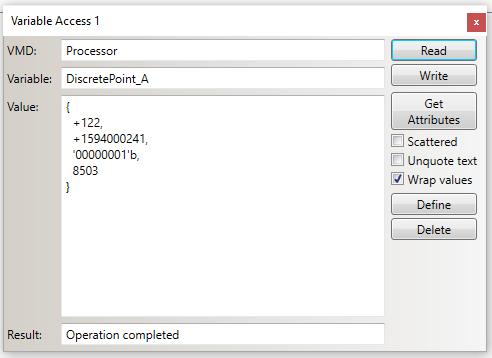
Note: Since the value of a node needs to be in a specific format, it is best to read the value of a node and use the result as a template to write to the node. This will avoid formatting errors.
Writing a value to a node with the Variable Access tool changes the value of that node in the server. This will affect the rest of the configuration. Writing values with the Variable Access tool is useful when developing or debugging server configurations, but it should be done with caution in production environments. In production environments, the side effects of a write to a particular node in an LEC Server instance should be well understood by the Configuration Manager user.