Loading a Batch File
The Oracle Utilities Live Energy Connect (LEC) Configuration Manager loads one or more batch files into a prototype configuration. After the batch files are loaded, the Configuration Manager has the information needed to define a specific, useable server configuration. Batch files are text files in CSV or JSON format that specify lists of point names and parameters. Sometimes batch files also contain lists ofVMD names and parameters if the Prototype Configuration uses prototype VMD’s.
Typically, Oracle Utilities engineers will help you create your prototype configuration and batch files.
To load a batch file:
- Select Load batch (share) from the File menu.
- Navigate to the C:\ProgramData\LiveEnergyConnnect\Config directory in the file browser that opens.
- Choose the IccpPoints.csv batch file and select Open.
- The file will load and appear in the Batch Files tab in the Properties panel (lower right).
Note: Most server configurations use batch files that are loaded using Load batch (share). The other option, Load batch (no Share) is used less often. Load batch (share) treats a collection of batch files as a single batch file (the tables in one batch file can reference something defined in an earlier loaded batch file). If loading only one batch file, you can use either option.
The following image shows what the example configuration looks like in the Configuration Manager after loading the IccpPoints.csv batch file. The prototype nodes (the nodes whose labels start with the ‘#’ character) have generated new nodes based on the information in the batch file. In this example, only nodes were created, but batch files can also be used to build VMD’s from prototype VMD’s as well.
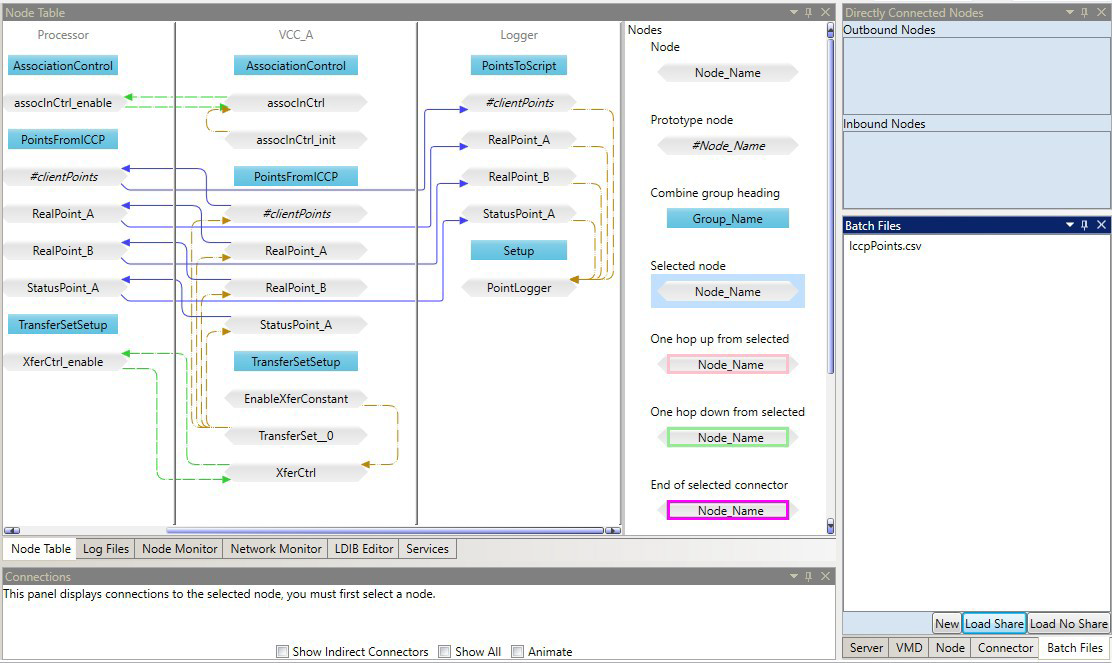
After loading the IccpPoints.csv batch file, the Configuration Manager generates new nodes based on the prototype nodes in the configuration. For example, in VCC_A, the node RealPoint_A is generated from the prototype node #clientPoints.
Consider the nodes in the VCC_A VMD that were generated by the batch file. VCC_A includes a prototype node #clientPoints. The figure below shows the properties of this node. Click the node inthe Node Table and select the Node tab in the Properties panel to view the nodes properties.
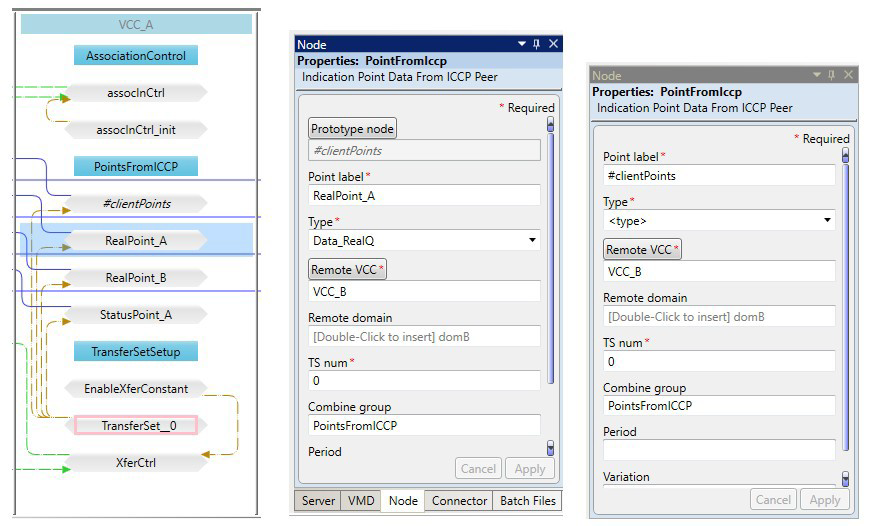
The Configuration Manager generates the node RealPoint_A from the placeholder parameters for the
Point label and Type parameters specified in the prototype node #clientPoints."
The figure below shows the structure of the IccpPoints.csv batch file. Point label and Type are common parameters for many types of nodes. In a batch file, each row after the header row corresponds to a node (or VMD) that should be generated. Each column corresponds to a parameter of prototype node (or prototype VMD) in the prototype configuration.
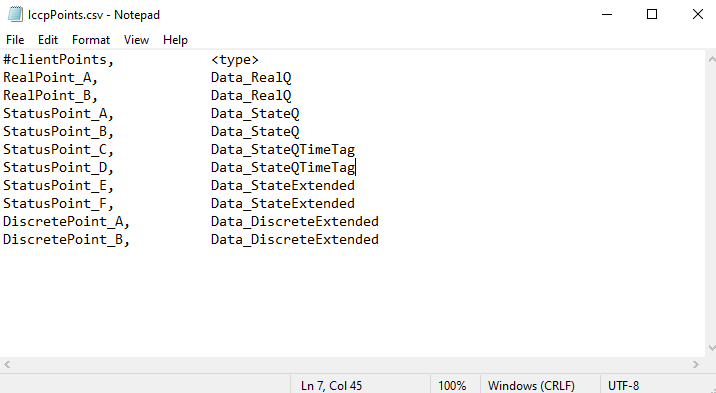
In the example configuration, the Type parameter refers to an ICCP type like Data_RealQ or Data_StateTimeTag but in other server configurations, valid values for Type might be an MMS type like <integer:32>, a type native to another industry protocol, or even a custom type defined by the user’s configuration. For more information about ICCP types, refer to the ICCP Reference.