Properties Panel
This panel specifies the properties of selected VMD’s, nodes, and connectors in the Oracle Utilities Live Energy Connect (LEC) Server configuration. It also specifies batch files to be loaded and some parameters that need to be specified for LEC Server to start.
There are various VMD, node, and connector types. Each type has its own set of properties. To identify what a field in the Properties panel is used for, hover over the field to read its tool tip. Fields that are required to create a particular VMD, node, or connector are marked with a red asterisk.
The following image shows the Properties panel when a PointFromIccp node is selected. Most nodes have Point label and Type parameters.
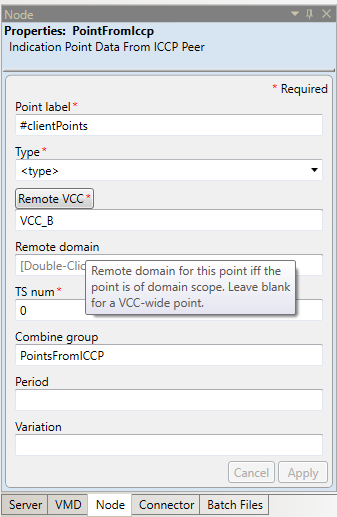
Selecting an item in the configuration (by clicking a node or VMD in the Node Table) automatically opens the relevant Properties panel for that item.
In the Properties panel, you can switch between the following tabs:
- VMD - Specify the properties of a selected VMD in the configuration. Each type of VMD has its own defined set of parameters.
- Node - Specify the properties of a selected node in the configuration. Some commonly used node types are: IntermediatePointMonitor, PointToIccp, PointToDnp, and PointFromMemory. Each type of node has its own defined set of parameters.
- Connector - Specify the properties of a selected connector in the configuration. The types of connectors are: UpdateConnector, TimedConnector, DemandConnector, and TwoWayConnector. Each type of connector has its own defined set of parameters.
- Batch Files - Allows to load and unload batch files into an LEC server configuration. It also shows which batch files are currently loaded in the open configuration.
- Server - Specify server-specific information for the Live Energy Connect Server
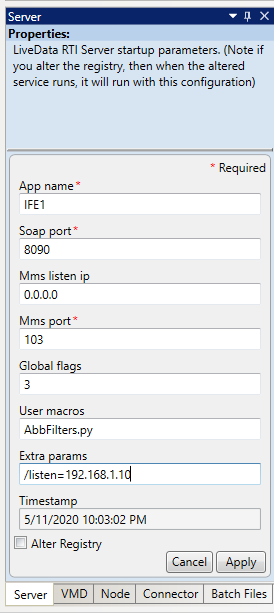
Note: By default, the LEC server listens on LOCALHOST (i.e. 127.0.0.1) for incoming MMS/ICCP associations. If you’re configuration requires inbound MMS/ICCP associations from remote peers (i.e. VCC’s on other machines), you will need to modify your LEC configuration to allow the server to listen on the appropriate external interface. To do this, with the appropriate configuration alias selected, open the Server tab of the Properties panel. In the Extra params field, add "/listen=<ip_address>" where <ip_address> is the IP address of the network interface you want the server to listen on (e.g. "/listen=192.168.1.10").
In the following image, the value in the Extra params field tells the LEC Server to listen for inbound ICCP associations from remote ICCP peers on the interface with the IP address of 192.168.1.10."