Adding Comments
In the Manual Call Entry mode, you can add comments in the Comments field at any time. In the Scripted Call Entry mode, entering comments follows the Follow Up steps. Comments are not added as a record until the call is submitted.
Adding Comments in Scripted Call Entry
The Scripted Call Entry mode's final data entry step prompts you to ask the caller whether they have any final comments. If they do, or if you wish to add something, the Comments field is active. Enter the comments and click Review and Submit to open the review section.
Submitting a Call
Manual Call Entry: Submit the Call
Once the search criteria has been found and the Request section data has been added, you can submit the call by clicking the Submit button.
Scripted Call Entry: Review and Submit
Before you can submit a call in Scripted Call Entry, you are prompted to review the entered details. All of the Manual Call Entry fields are visible below the listed responses. Scroll to the bottom of the page to complete the review. The Submit button then becomes active.
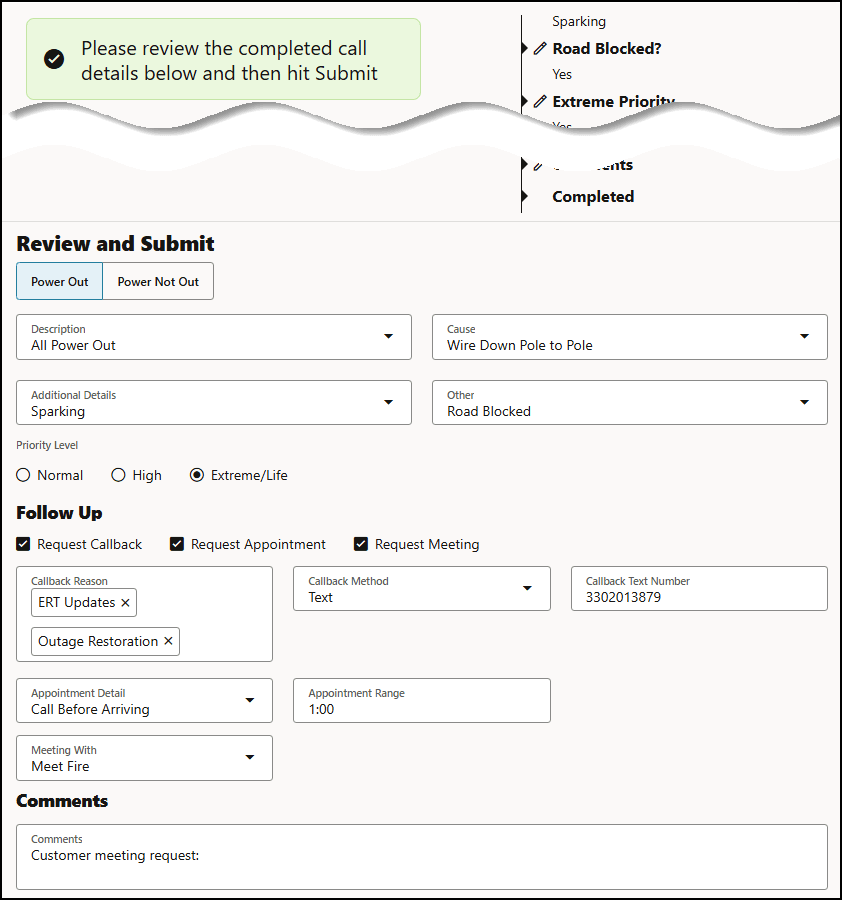
Click Submit to enter the call in the system.
Resetting Call Entry
If you wish to reset the form to its state prior to searching and/or adding Request information, click the Clear button.