Fetching Component Test Data from an Utilities Application
Instead of manually entering the test data for a component, you can fetch the test data from a Utilities application (such as Customer Care and Billing, Meter Data Management, etc.). Select the User, Flow configuration and provide the web service name and the transaction/operation name to access the WSDL and then provide values against required fields that are mandatory for the specified operation. Oracle Utilities Testing Accelerator calls the WSDL with provided details and fetches the response from web service and populates in the test data of the component.
To fetch the test data:
- Navigate to the Flows tab.
- Select and right-click the flow and then click Create/Update Flow Structure.
- On the Flow Definition page, navigate to the component. Right-click and select Edit Test Data.
- On the Edit Test Data page, click Fetch Test Data.
- On the Fetch Test Data page, enter in the web service name from which the test data has to be retrieved, operation (typically READ operation) to invoke and necessary credentials and any required info (for example: to retrieve data related to ToDoRole).
Figure 8-25 ToDoRole Read Operation in WSDL
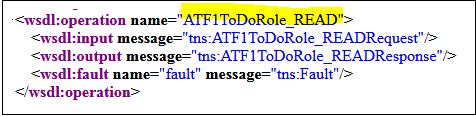
- Enter the WSDL name and operation name. Select the user and flow configuration set. Click Populate Form to populate the form with all fields that the web service supports.
Alternatively, use the URL and user credentials from the Flow/User Configuration properties file. Click Use Configuration Properties and select the appropriate flow/user configuration from the respective drop-down menus.
Note:
While creating an integration flow (a flow where components may send requests to more than one environment) prefix the URLs with keywords that can be used while specifying the WSDL to connect to. Example: If a flow should connect to an Oracle Utilities Meter Data Management instance apart from the Oracle Utilities Customer Cloud Service instance, specify the three properties mentioned below either in the flow or user configuration properties.MDM=<MDM url>
MDM_gStrApplicationUserName=johnDoe
MDM_gStrApplicationUserPassword=enc(pj0TFjXMczsoyzmQ8GuXPt2PSydO7VCbR2jhxtkUH06Fuz+zmChpGSCr241KggFC6FwgMg==)
To fetch the test data for an Oracle Utilities Meter Data Management component:
- Select the flow/user configuration file from the drop-down menu.
- Enter the WSDL URL as shown below.
Figure 8-26 Web service name and operation settings

- Provide the necessary key information to retrieve data (for example: in this case the ToDoRole name) and click Fetch Test Data.
- After the data is retrieved from the target application, review/validate it. Click Save and Close.