Deploy Oracle Kubernetes Engine (OKE) for Production: Best Practices and Guidelines
Introduction
This is the third tutorial in our Oracle Cloud Infrastructure Kubernetes Engine (OKE) automation series, building on the concepts introduced in the second tutorial, Deploy Oracle Cloud Infrastructure Kubernetes Engine (OKE) using Advanced Terraform Modules. In this guide, we focus on production-ready OKE deployments and explore key best practices that improve cluster reliability, optimize costs, and simplify operations. We’ll demonstrate some of the best practices using Terraform while also highlighting common pitfalls users encounter when building clusters.
Why Deploying OKE into an Existing VCN Matters
Building a production-grade OKE cluster requires careful planning across networking, node placement, and operational processes. Deploying into an existing Virtual Cloud Network (VCN) allows your cluster to integrate seamlessly with pre-configured subnets, route tables, and security rules. This reduces operational overhead, ensures consistency with your organization’s infrastructure, and enables multiple workloads or clusters to coexist efficiently within the same network.
Key Terraform parameters when deploying into an existing VCN include:
is_vcn_created=false– tells the module to use an existing VCN instead of creating a new one.vcn_id– the OCID of the existing VCN.- Subnet OCIDs for different cluster components:
my_k8apiendpoint_private_subnet_id– private subnet for the Kubernetes API.my_pods_private_subnet_id– private subnet for pods (CNI).my_workernodes_private_subnet_id– private subnet for worker nodes.my_serviceloadbalancers_public_subnet_id– public subnet for load balancers.my_bastion_public_subnet_id– public subnet for Bastion host (optional).
Alternatively, when deploying a brand-new environment from scratch, set is_vcn_created = true to provision a new network. After a successful terraform apply, Terraform captures the OCIDs of the newly created VCN and its subnets in the outputs. These values can be reused in future deployments by setting is_vcn_created = false and referencing the saved OCIDs in your terraform.tfvars file, allowing Terraform to use the existing network instead of creating a new one. Running terraform plan at this stage confirms that the current VCN and subnets are preserved, avoiding any unnecessary infrastructure changes.
With the network foundation in place, this tutorial shifts focus to a set of production-oriented best practices aimed at making OKE clusters more resilient, scalable, and easier to operate. By applying these practices, customers can deploy OKE clusters that are highly available, cost-efficient, and aligned with organizational policies, governance standards, and production-ready operational requirements. Download the latest code from here oke_advanced_module.zip.
OKE Best Practices: Production-Ready Guidelines
1. Use node cycling to upgrade OKE node pools.
Node cycling is a safe, rolling upgrade strategy that updates node images, Kubernetes versions, or system configurations without disrupting workloads. Node cycling is important because it allows clusters to evolve safely over time, applying patches or upgrades without impacting production workloads. For customers, this reduces operational risk, ensures continuous availability during upgrades, and allows workloads to run reliably while maintaining the latest versions. OKE supports two types:
-
INSTANCE_REPLACE: Deletes and recreates nodes from scratch, allowing updates to all attributes.
-
BOOT_VOLUME_REPLACE (BVR): Replaces only the boot volume, supporting in-place updates for a subset of fields.
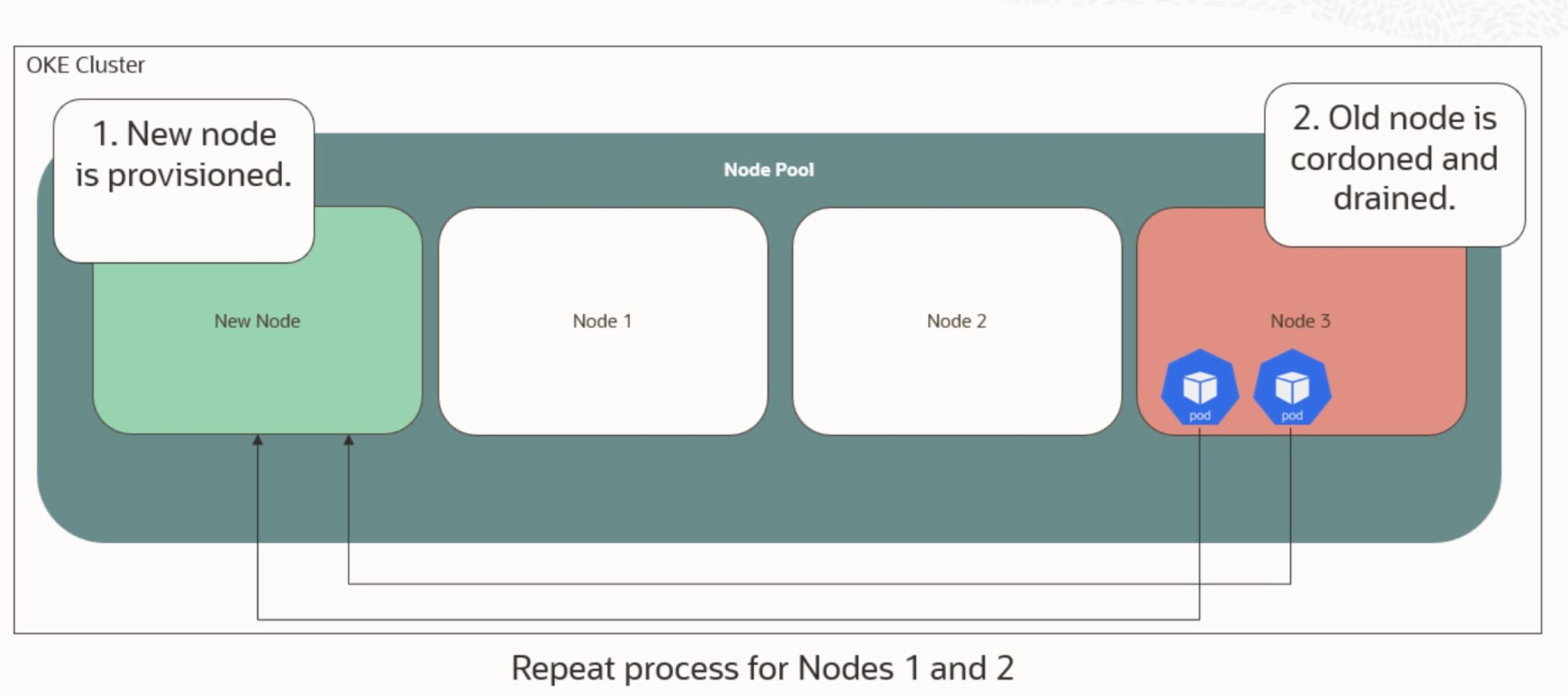
Parameters like maximum_surge and maximum_unavailable control how upgrades balance speed with availability. For zero-downtime upgrades, set maximum_surge = 1 and maximum_unavailable = 0, ensuring one new node comes online before replacing the old one. The following illustes an node cycling example with Max surge 1 and Max unavailable 0.
To trigger the upgrade of an existing OKE cluster that leads to node cycling:
In your terraform.tfvars file:
- Set
node_cycling_enabled= true - Update the
control_plane_kubernetes_versionandworker_nodes_kubernetes_version - Change the
kubernetes_versionto the desired version as above for automatic image selection.- Set the
cycle_modestoBOOT_VOLUME_REPLACEfor in-place update
- Set the
Then run terraform plan
You should see output like this:
- Node Pool upgrade:
- kubernetes_version = “v1.32.1” -> “v1.34.1”
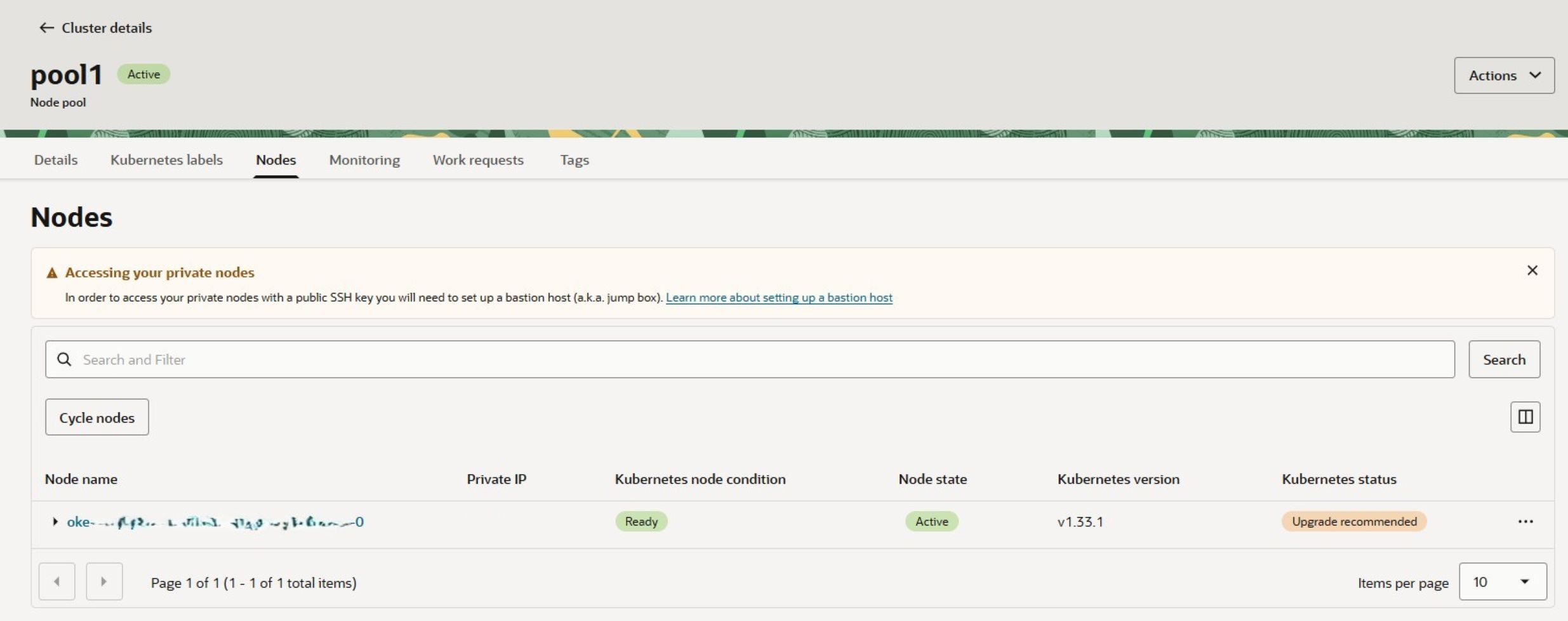
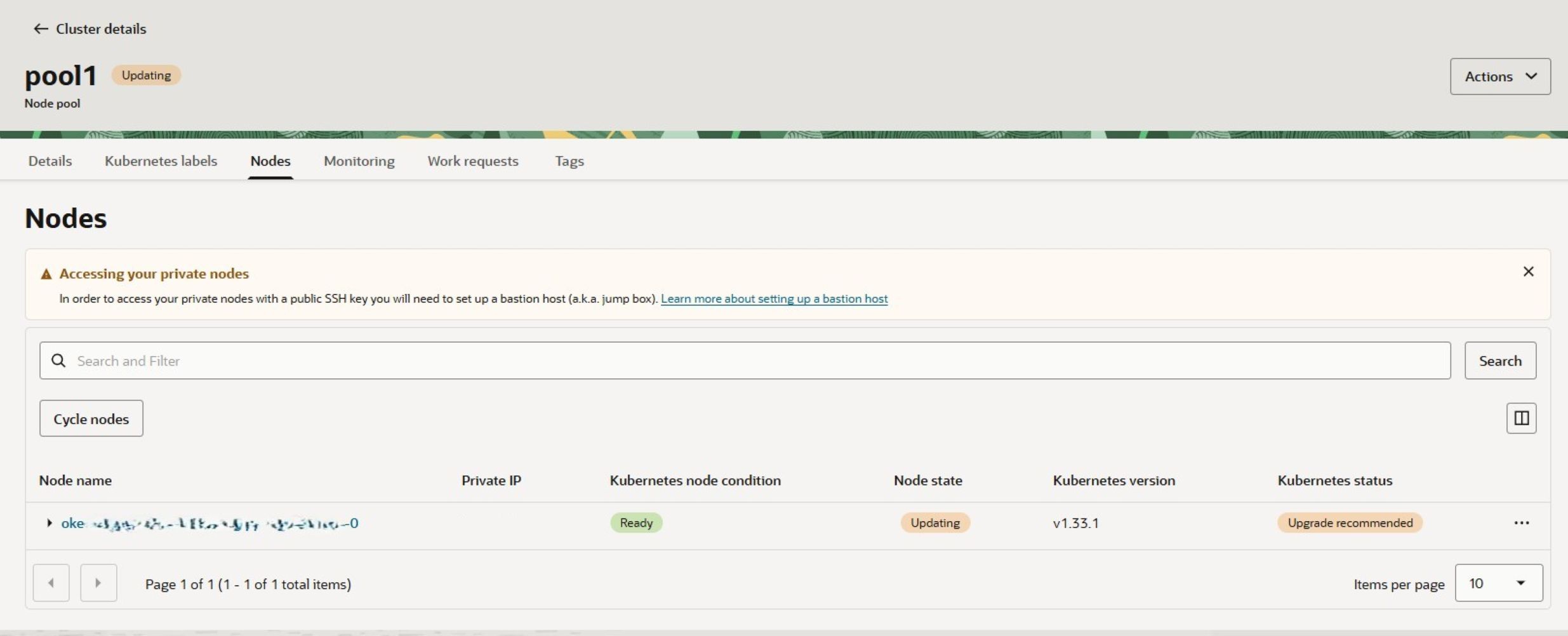
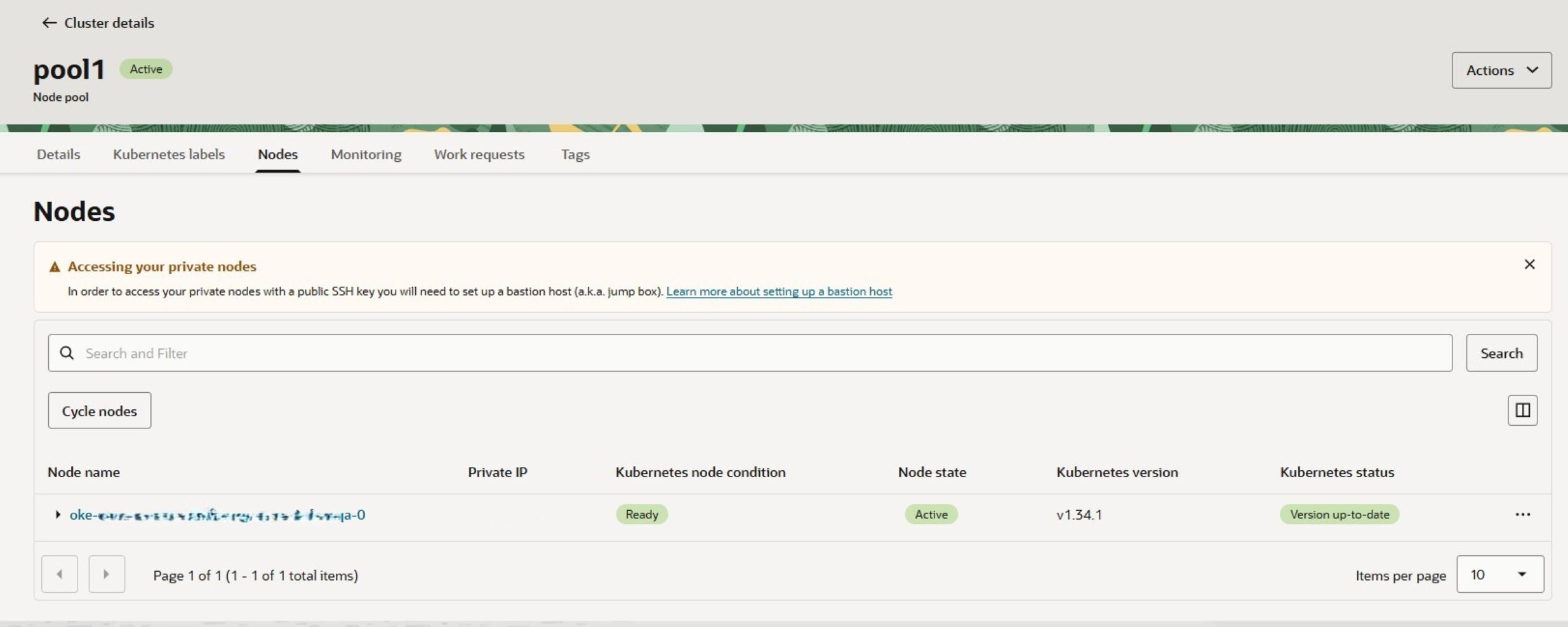
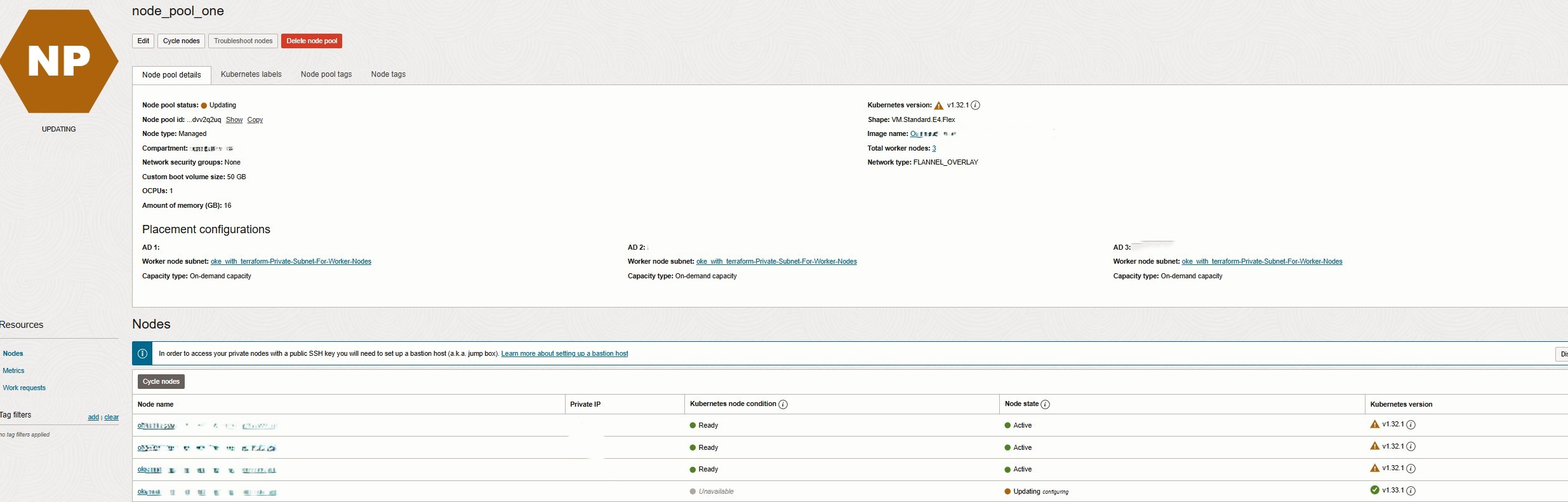
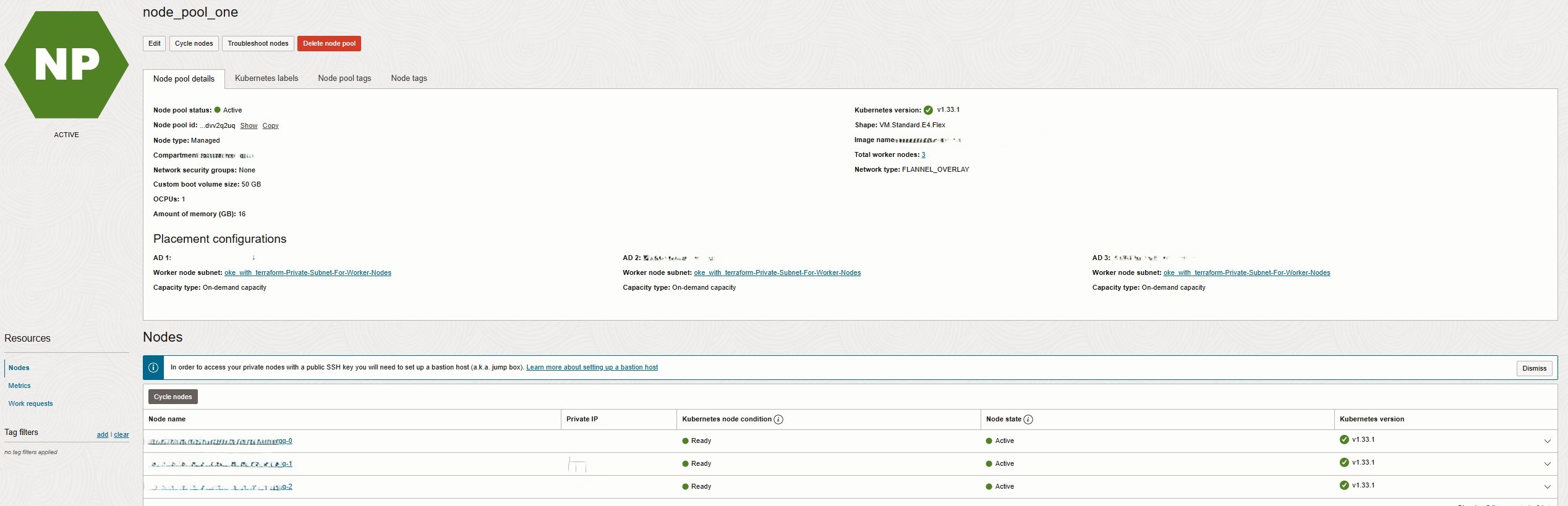
When you execute terraform apply, OKE begins cycling the node pools one node at a time using the BOOT_VOLUME_REPLACE strategy. In this mode, only the node’s boot volume is replaced while the underlying compute instance remains the same. As a result, the node upgrade is performed in place, and network attributes such as the private IP address remain unchanged as below:
To cycle nodes using INSTANCE_REPLACE option, set the cycle_modes to INSTANCE_REPLACE for OKE to cycle the node pools one node at a time. In this mode, each node is deleted and recreated from scratch, including the compute instance and its boot volume. As a result, the node upgrade applies all updated attributes, such as a new Kubernetes version or shape changes, but network attributes like the private IP may change. This approach ensures a fully refreshed node with the latest configurations, providing maximum update coverage while maintaining cluster availability through rolling replacements, as shown below:
2. Use OCI tagging on OKE worker nodes and load balancers to track costs
When running Kubernetes workloads in Oracle Cloud Infrastructure (OCI), it’s essential to understand where your costs are coming from. Tagging is the key. OCI allows you to apply defined and freeform tags to every resource, including OKE clusters, worker nodes, load balancers, and persistent volumes. This is important because it enables detailed cost reporting, easier auditing, and accountability for cloud consumption. For customers, tagging provides insights into which workloads consume the most resources, improves cost transparency, and supports optimization decisions to control cloud spending.
Why tagging matters:
- Cost Tracking: Assign tags such as Project, Environment, or Owner to monitor spending per team or project.
- Organization: Easily filter resources in OCI based on their purpose or lifecycle.
- Governance: Enforce standards across teams and ensure accountability.
# Cluster-level tagging
cluster_freeform_tag_key   = "Environment"
cluster_freeform_tag_value = "Development"

# Node pool-level tagging
node_pool_freeform_tag_key   = "LOB"
node_pool_freeform_tag_value = "DevOps Tech"

# Bastion host tagging
freeform_tags = {
  project     = "devops"
  environment = "production"}

# Defined tagging
defined_tags = {
  “Corporate_Standard.CostCenter”  = “Finance-123"
  “Corporate_Standard.Environment” = “Production” }
With these tags in place, you can generate detailed cost reports in OCI Cost Analysis, identify which workloads are consuming the most resources, and make informed decisions about scaling or optimization.
3. Separate API endpoint, node, load balancer, and pod subnets (if applicable).
Proper network design is a best practice in OKE because it improves security, performance, and scalability. Segregating API endpoints, worker nodes, pods, load balancers, and bastion hosts into separate subnets isolates critical traffic, allows for custom route tables or Network Security Groups (NSGs), and prevents one type of traffic from interfering with another. This approach is essential for maintaining secure communication, predictable routing, and strong resource isolation in production environments.
Customers benefit by having a more secure, manageable, and resilient cluster that can scale efficiently and handle traffic spikes or attacks without impacting workloads. Below is the snippet from terrform.tfvars that allows you define CIDR blocks for subnets.
k8apiendpoint_private_subnet_cidr_block       = "REPLACE_WITH_YOUR_CIDR"   # API endpoint subnet
workernodes_private_subnet_cidr_block         = "REPLACE_WITH_YOUR_CIDR"   # Worker nodes subnet
pods_private_subnet_cidr_block                = "REPLACE_WITH_YOUR_CIDR"   # Pod subnet (CNI)
serviceloadbalancers_public_subnet_cidr_block = "REPLACE_WITH_YOUR_CIDR"   # Load balancer subnet
bastion_public_subnet_cidr_block              = "REPLACE_WITH_YOUR_CIDR"   # Bastion host subnet
By following this practice, you improve security, simplify network management, and make your cluster more resilient to traffic spikes or attacks.
4. Use a Node Pool per Availability Domain Architecture when using Cluster Autoscaler
In OCI, each Availability Domain (AD) has independent capacity. While node pools can span multiple ADs to improve high availability, this is not recommended when the cluster autoscaler is enabled. The autoscaler requires capacity in all selected ADs and may fail to scale if any AD runs out of resources.
To avoid this, node pools should be configured to use a single AD when autoscaling is enabled. If capacity is unavailable in one AD, the autoscaler can scale an alternative node pool in another AD.
Example node pool configuration:
availability_domains = [
      "REPLACE_WITH_YOUR_AD"
    ]
Example cluster autoscaler configuration:
cluster_autoscaler_config = {
  node_mapping = {
    key = "nodes"
    value = "1:5:ocid1.nodepool....."
  }
}
5. Separate Node Pools for Different Workload Requirements (x86, ARM, GPU)
Use separate node pools for workloads requiring different compute shapes, such as x86, ARM, or GPU. This approach improves resource utilization, scheduling efficiency, and autoscaling behavior by ensuring that each workload runs on the most suitable infrastructure.
Pods are scheduled to the correct node pools using node labels, selectors, affinities, or taints and tolerations, allowing Kubernetes to place workloads on nodes with the required architecture or capabilities.
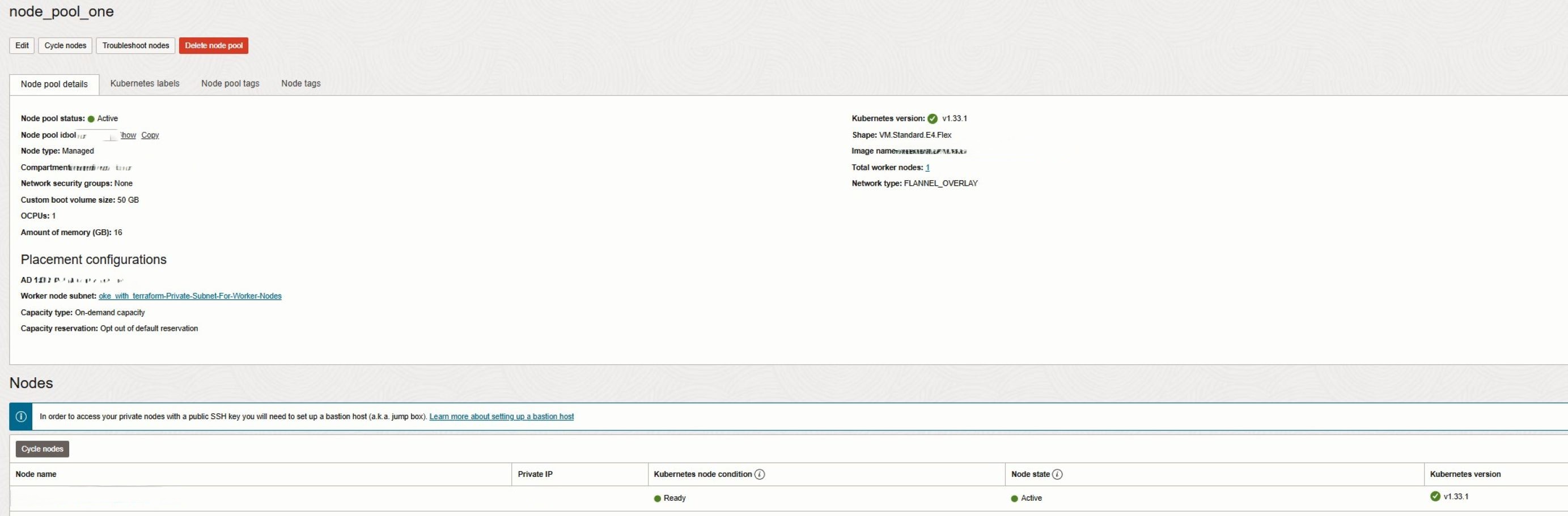
By combining dedicated node pools with explicit pod placement, customers achieve predictable performance, efficient scaling, and simplified cluster management. In this example, separate node pools are created for Intel and AMD shapes, ensuring optimal workload placement and resilient cluster operations.
worker_node_pools = {
  AMD_node_pool = {
    name               = "node_pool_one"                # Node pool name
    shape              = "VM.Standard.E5.Flex"          # Compute shape
    shape_config = {
      memory = 16                                       # Memory (GB)
      ocpus  = 1                                        # OCPUs
    }
    boot_volume_size   = 50                             # Boot volume size (GB)
    operating_system   = "Oracle-Linux"                 # OS for worker nodes
    kubernetes_version = "v1.33"                        # Node Kubernetes version
    source_type        = "IMAGE"                        # Source type for image
    node_labels = {
      Trigger = "Nodes_Cycling_0"                       # Node label
    }
    availability_domains = [                            # Availability_domain setting
      "REPLACE_WITH_YOUR_AD"
    ]                                                   # ADs for node distribution
    number_of_nodes          = 1                        # Number of worker nodes
    pv_in_transit_encryption = false                    # Boot volume in-transit encryption
    node_cycle_config = {
      node_cycling_enabled = true                       # Enable node cycling by default
      maximum_surge        = 1                          # Number of surge nodes
      maximum_unavailable  = 0                          # Max unavailable nodes
      cycle_modes          = ["BOOT_VOLUME_REPLACE"]    # cycle_modes"BOOT_VOLUME_REPLACE" or "INSTANCE_REPLACE"

    }
    ssh_key = "REPLACE_WITH_YOUR_KEY"                   # SSH public key for workers nodes
  }
  Intel_node_pool = {
    name               = "node_pool_two"                # Node pool name
    shape              = "VM.Standard2.8"      	        # Compute shape
    shape_config = {
      memory = 120                                      # Memory (GB)
      ocpus  = 8                                        # OCPUs
    }
    boot_volume_size   = 50                             # Boot volume size (GB)
    operating_system   = "Oracle-Linux"                 # OS for worker nodes
    kubernetes_version = "v1.33"                        # Node Kubernetes version
    source_type        = "IMAGE"                        # Source type for image
    node_labels = {
      Trigger = "Nodes_Cycling_0"                       # Node label
    }
    availability_domains = [                            # Availability_domain setting
      "REPLACE_WITH_YOUR_AD"
    ]                                                   # ADs for node distribution
    number_of_nodes          = 1                        # Number of worker nodes
    pv_in_transit_encryption = false                    # Boot volume in-transit encryption
    node_cycle_config = {
      node_cycling_enabled = true                       # Enable node cycling by default
      maximum_surge        = 1                          # Number of surge nodes
      maximum_unavailable  = 0                          # Max unavailable nodes
      cycle_modes          = ["BOOT_VOLUME_REPLACE"]    # cycle_modes"BOOT_VOLUME_REPLACE" or "INSTANCE_REPLACE"

    }
    ssh_key = "REPLACE_WITH_YOUR_KEY"                   # SSH public key for workers nodes
  }

}
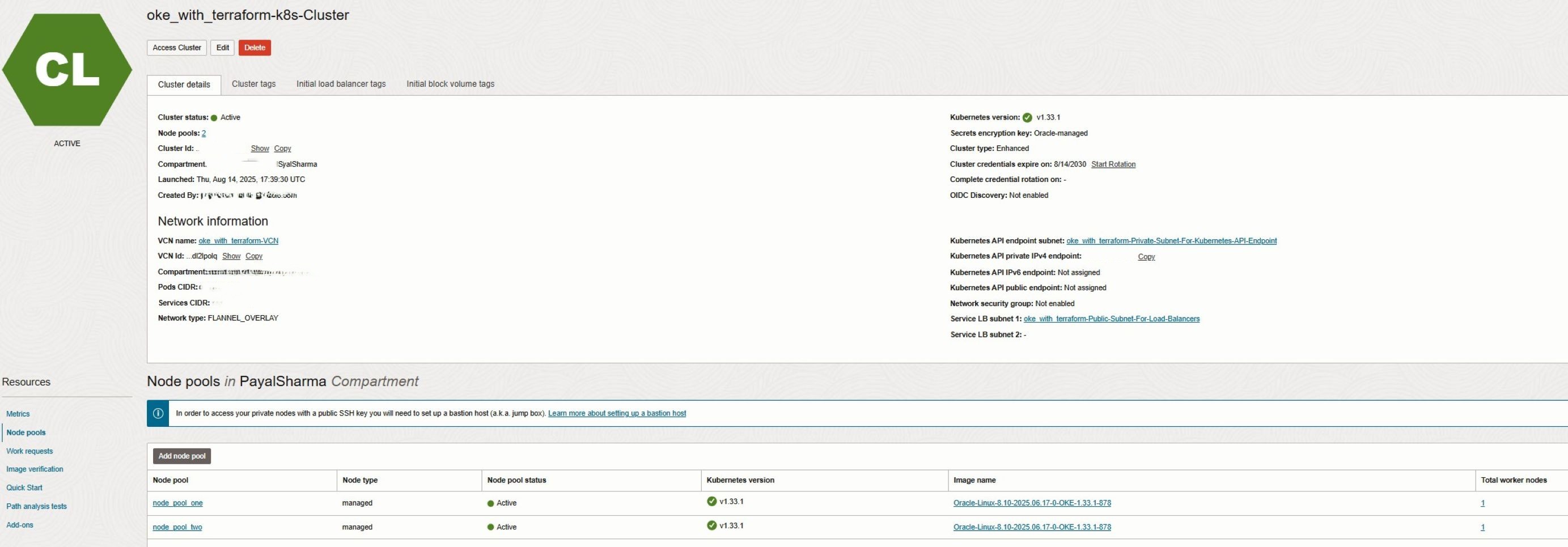
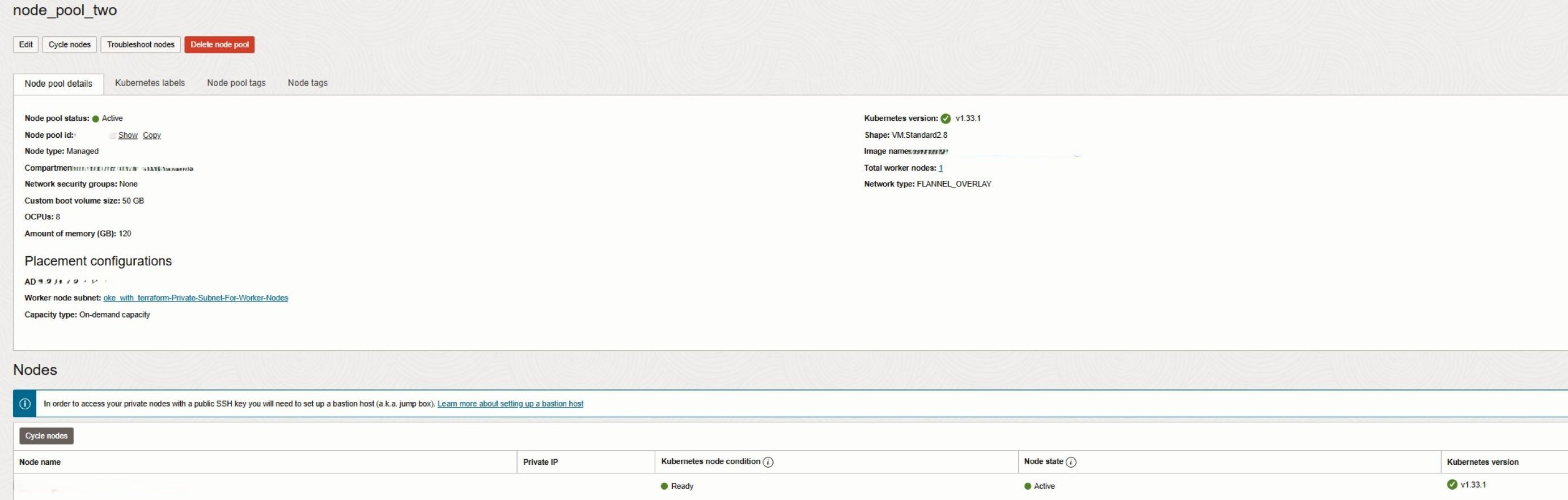
After running terraform apply, your OKE cluster will show two separate node pools:
6. Use Cloud-Init for Node Customization
Cloud-init scripts are essential for automating worker node configuration in OKE, ensuring consistent OS setup, package installation, and system tuning across all nodes. Integrating cloud-init with Terraform allows you to provision nodes automatically at boot, making deployments repeatable, auditable, and production-ready. Please review this document Using Custom Cloud-init Initialization Scripts to Set Up Managed Nodes for more information on cloud-init scripts.
In the provided Terraform code, each node pool references a cloud-init script using the cloud_init_path parameter. Customers can modify the contents of cloud-init-general.sh according to their requirements, following the guidance in the document above. In this demo, we use the default startup script provided in the referenced documentation. Customers can also change the location of the cloud-init script by updating the cloud_init_path parameter, as shown below:
cloud_init_path = "cloud-init-general.sh"This ensures that during node provisioning or node cycling, every new or replaced node is initialized consistently with the required system configuration. Combined with Terraform, cloud-init allows version-controlled scripts to be applied automatically, eliminating manual post-provisioning tasks.
Key benefits for worker nodes:
- Automated OS configuration, package installation, and system tuning at boot.
- Supports security hardening and application pre-configuration.
- Ensures repeatable, auditable node setups and reduces operational overhead.
- Integrates seamlessly with node cycling and rolling upgrades.
7. Enhance OKE Functionality Using Add-Ons
OKE add-ons extend cluster capabilities for observability, scaling, security, and traffic management. Using Terraform, you can selectively enable or disable add-ons based on workload requirements, and minimizing resource usage:
kubernetes_dashboard_enabled       = false
metrics_server_enabled             = false
cluster_autoscaler_enabled         = false
certificate_manager_enabled        = false
istio_enabled                      = false
native_ingress_controller_enabled  = false
Common add-ons and their benefits:
- kubernetes_dashboard: Provides a web-based UI to deploy, manage, and troubleshoot containerized applications.
- metrics_server: Enables collection of node and pod metrics for monitoring and autoscaling.
- cluster_autoscaler: Dynamically adjusts node pool sizes based on workload demands, optimizing cost and availability.
- certificate_manager: Automates TLS certificate provisioning for secure communication between services.
- istio: Provides service mesh capabilities, enabling traffic routing, telemetry, and security for microservices.
- native_ingress_controller: Simplifies ingress management and ensures high availability for external traffic.
Best practices for add-ons:
- Enable only the add-ons required for your workloads.
- Combine cloud-init and add-ons to create fully automated, standardized, and production-ready nodes.
8. Use OIDC authentication/discovery if outside resources need access to k8s clusters.
Integrate OIDC discovery with external identity providers (such as Okta or Azure AD) if developers or automation tools outside OCI need to authenticate to your Kubernetes cluster. This enables centralized identity management and federated access without the need to manage local Kubernetes users or distribute kubeconfig files. This approach is especially useful when external CI/CD tools like GitHub Actions need access to the cluster, or when workloads inside the cluster must securely integrate with external services such as HashiCorp Vault. By relying on OIDC, organizations can enforce consistent authentication policies, simplify access management, and reduce the operational overhead of credential rotation while maintaining strong security boundaries.
9. Use Network Security Groups instead of Security Lists
Network Security Groups (NSGs) is preferred over traditional Security Lists when securing OKE clusters. NSGs allow more granular, flexible, and reusable security rules that can be attached directly to specific resources such as worker nodes, load balancers, or pods. This makes them better suited for dynamic Kubernetes environments where resources frequently scale or change. In contrast, security lists apply at the subnet level and are designed to encompass entire VCNs or subnets, which provides less control when implementing fine-grained application security requirements. Using NSGs improves security hygiene, simplifies rule management, and enables tighter isolation between cluster components.
10. Enable observability with OCI Logging Analytics and OKE metrics
Integrate OKE with OCI Logging Analytics and Monitoring to gain deep visibility into cluster and workload performance. Logging Analytics provides advanced log aggregation, parsing, and anomaly detection, while Monitoring collects metrics from the Kubernetes control plane and worker nodes. Together, these services enable teams to visualize trends, troubleshoot issues faster, and configure alerts for proactive management. This solution is particularly well suited for customers looking for an OCI-native observability platform that abstracts the complexities of log ingestion, storage, and analysis, while integrating seamlessly with other OCI services.
11. Use workload identity if pods need access to OCI resources.
When authenticating to OCI, API keys are commonly used, but these credentials are long-lived and require persistent storage, making them difficult to manage securely at scale. While instance and resource principals improve this by allowing compute instances or services to assume their own identity, OKE Workload Identity extends this concept further by allowing individual Kubernetes pods to assume their own OCI identity. By enabling OCI Workload Identity, pods can securely access OCI services such as Object Storage or Logging using IAM policies, without hardcoding credentials or relying on node-level permissions. This provides fine-grained, auditable, and secure access control, which is essential for production-grade, multi-tenant Kubernetes environments.
12. Use the appropriate subnet size for OKE nodes and pods.
Planning subnet CIDR blocks correctly is a best practice because each node requires a primary IP and additional secondary IPs for pods. Small subnets can quickly lead to IP exhaustion, preventing scaling or upgrades. This is important for maintaining cluster stability and supporting growth. Customers benefit by ensuring clusters can scale predictably, avoiding operational disruptions, and supporting future workloads without requiring network redesign. For production environments, allocate larger CIDR blocks and refer to the OKE subnet sizing guide to ensure your VCN can support current and future workload demands.
13. Use Full Stack Disaster Recovery service to backup k8s cluster
Leveraging OCI Full Stack Disaster Recovery for OKE cluster is a best practice because it protects the cluster configuration, applications, and networking with coordinated failover and failback across regions. This is important for business continuity and compliance in the event of regional outages or system failures. Customers benefit from reduced downtime, rapid recovery, and confidence that mission-critical workloads remain operational even during disasters.
For more information review Automate Switchover and Failover Plans for OCI Kubernetes Engine (Stateful) with OCI Full Stack Disaster Recovery
Next Steps:
Terraform makes OKE provisioning consistent, automated, and scalable. By following best practices like OCI tagging, subnet separation, and standardized node configuration, your clusters remain secure, organized, and cost-transparent. In the next blog, we will build on these foundations to explore AI-driven operations, showing how to integrate Oracle AIOps, enable AI-powered observability, and create an end-to-end OKE blueprint for AI workloads. Stay tuned for our upcoming LiveLabs session, where you can get hands-on experience with these techniques and experiment with OKE deployments in a live environment.
Related Links
- Deploy Oracle Cloud Infrastructure Kubernetes Engine (OKE) using Advanced Terraform Modules
- Create Oracle Cloud Infrastructure Kubernetes Engine Cluster using Terraform
- Best practices for working with Kubernetes Engine (OKE)
- Using Custom Cloud-init Initialization Scripts to Set Up Managed Nodes
- Introducing Cluster Add-ons
- OKE subnet sizing guide
- Automate Switchover and Failover Plans for OCI Kubernetes Engine (Stateful) with OCI Full Stack Disaster Recovery
- Terraform OCI OKE on GitHub
- OCI Resource Manager
Acknowledgments
- Authors: Mahamat Guiagoussou (Master Principal Cloud Architect), Payal Sharma (Senior Cloud Architect), Matthew McDaniel (Staff Cloud Engineer)
More Learning Resources
Explore other labs on docs.oracle.com/learn or access more free learning content on the Oracle Learning YouTube channel. Additionally, visit education.oracle.com/learning-explorer to become an Oracle Learning Explorer.
For product documentation, visit Oracle Help Center.
Deploy Oracle Cloud Infrastructure Kubernetes Engine (OKE) using Best Practices and Automation
G52012-01