Use OKE to Improve Data Locality for Cassandra and Spark Activity
Introduction
Apache Cassandra is a distributed, masterless database where each node owns token ranges. Apache Spark is a distributed compute engine that can use the Spark–Cassandra connector to read from Cassandra replicas. In Kubernetes, pods are scheduled without knowledge of where data lives, so data locality isn’t guaranteed.
This tutorial shows how OKE can improve locality with Kubernetes primitives: StatefulSets (stable identity for Cassandra), node labels, and affinity/anti-affinity to co-locate Spark executors with Cassandra pods—so reads are served from the same node (ideal) or, worst case, one hop to the co-located replica.
Objectives
- Deploy a 3-node OKE cluster and bastion (ORM or Terraform).
- Co-locate Cassandra and Spark on two nodes with labels + affinity.
- Run and verify a Spark read Job against Cassandra.
- Observe cross-node traffic with VCN Flow Logs.
Prerequisites
- OCI tenancy with permissions for VCN, OKE, Compute, Logging (Flow Logs); optional Monitoring.
- SSH key pair for bastion access.
- Basic Kubernetes familiarity (nodes, labels, pods, etc.).
Task 1: Deploy the Environment with OCI Resource Manager (ORM) (recommended).
-
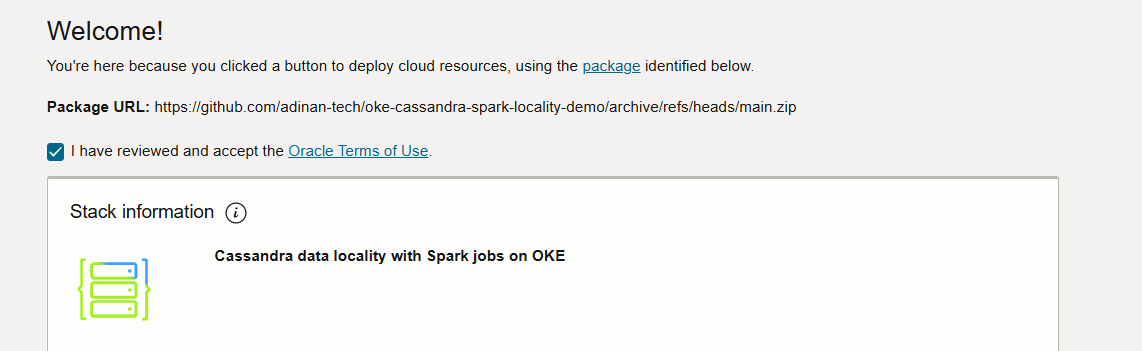
Click below to open the stack in the OCI console:

-
Follow the guided flow to:
-
Accept the terms of use.
-
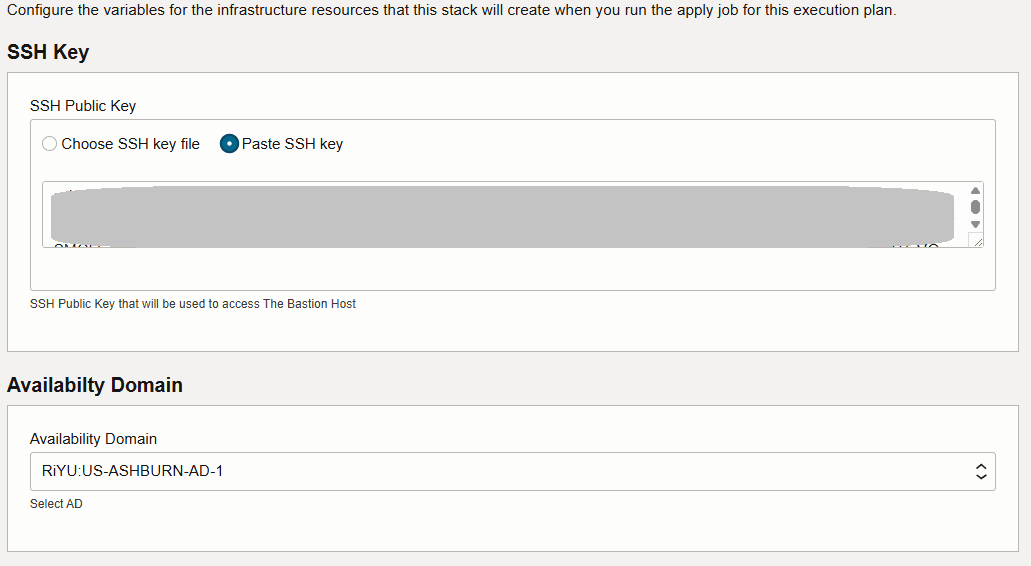
Insert an SSH key and select the Availability Domain.
-
You can leave the rest of the values as default in order to get a VCN, OKE cluster and bastion deployed.
-
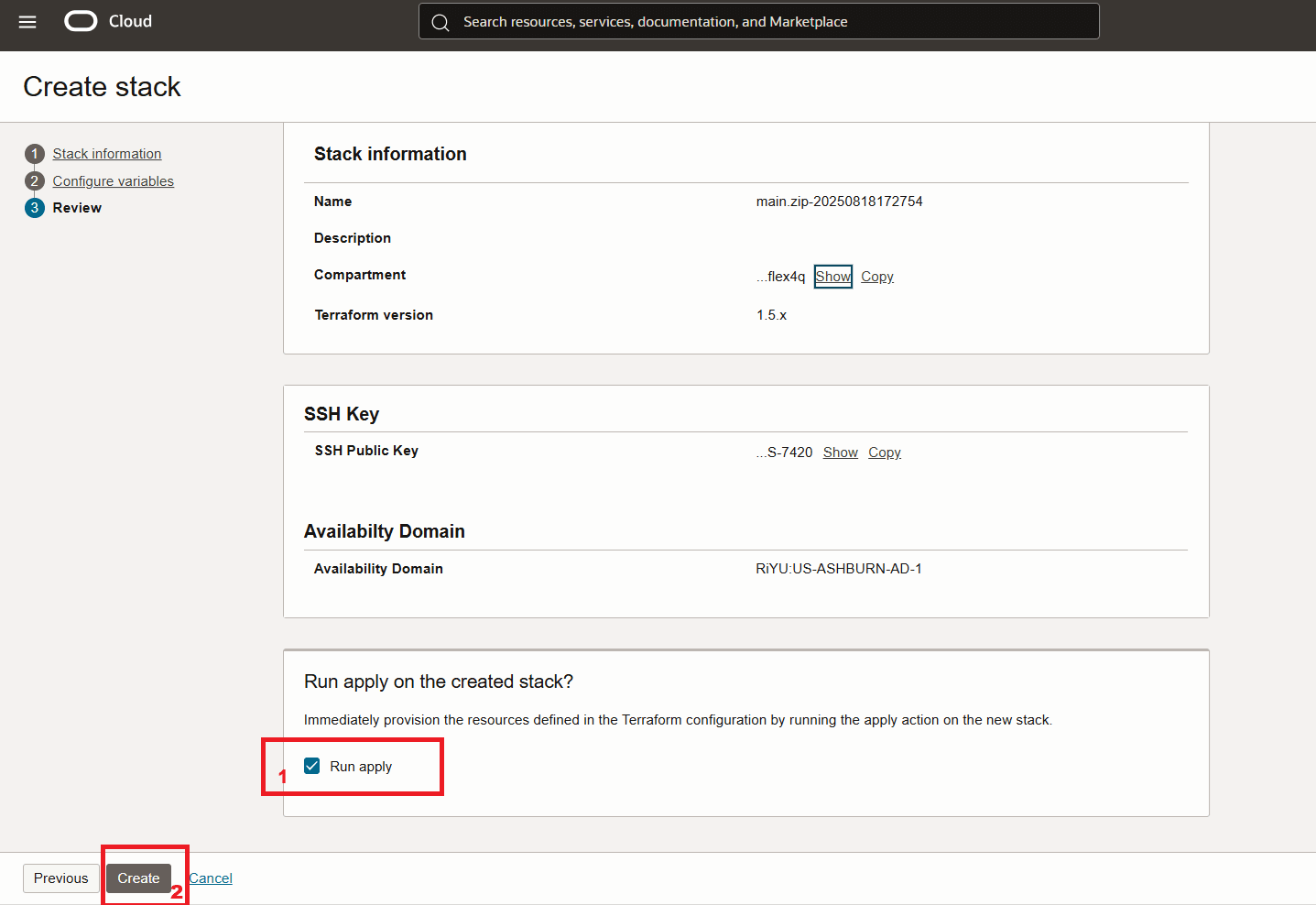
Launch the stack.
-
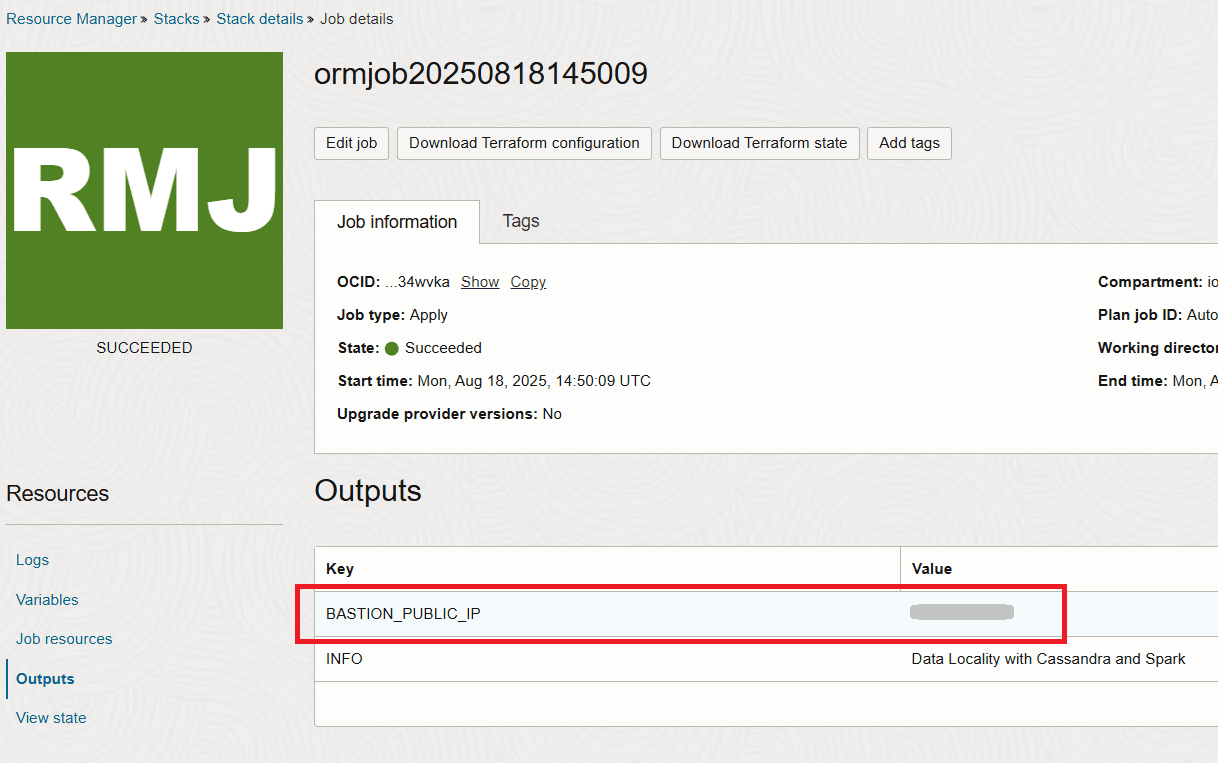
After the stack completes you will get the IP of the bastion in the output section.
Task 2: Connect to the Bastion and Verify the Deployment
The initial infrastructure provisioning completes within about 15 minutes, but the full setup (via cloud-init on the bastion) takes about 20 more minutes to install Helm, deploy Cassandra and Spark, and run the read job.
-
To monitor the process, SSH into the bastion:
ssh -i <path-to-private-key> opc@<bastion_public_ip> -
Run the below command to monitor progress of the cloudinit script.
tail -f /var/log/oke-automation.log -
The stack completes when you see the 3 seed Cassandra values being read and the Cloud-init complete message.
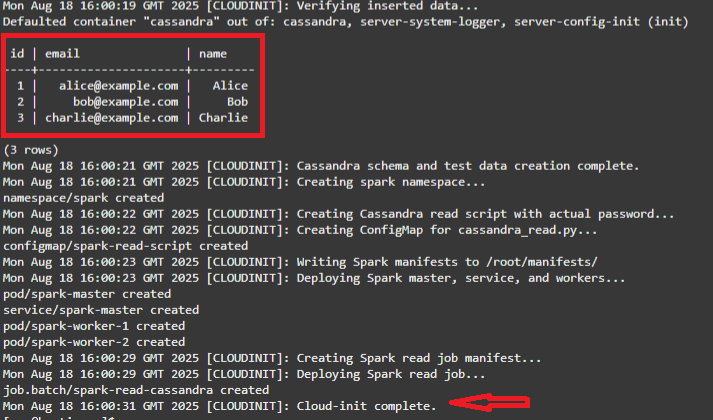
Note: What the cloudinit script has done is:
- Install kubectl, Helm, OCI CLI (instance principals), fetch kubeconfig.
- Wait for workers
- Label the first two nodes with:
spark-locality=true, data-locality=enabled, and node-role=zone-a/zone-b - Install cert-manager and k8ssandra-operator (CRDs)
- Apply K8ssandraCluster
- Wait for Cassandra
- Create testks.users and insert 3 rows
- Create spark namespace; build ConfigMap with /scripts/cassandra_read.py (reads testks.users)
- Deploy Spark master, Service, and two workers (nodeSelector spark-locality: “true”, worker anti-affinity)
- Submit Job spark-read-cassandra
-
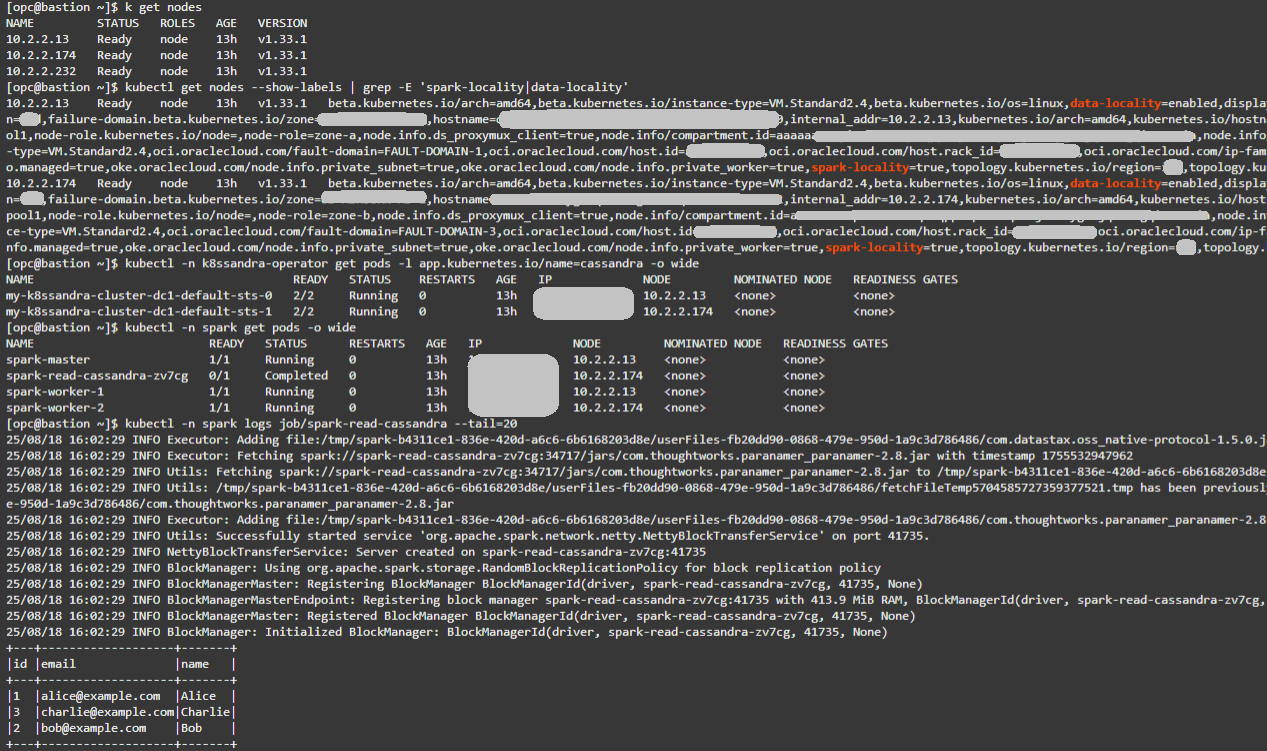
From the bastion VM confirm the existing nodes:
kubectl get nodes -
Confirm locality labels. Expect two nodes with spark-locality=true and data-locality=enabled.
kubectl get nodes --show-labels | grep -E 'spark-locality|data-locality' -
Verify Cassandra placement:
kubectl -n k8ssandra-operator get pods -l app.kubernetes.io/name=cassandra -o wide -
Verify Spark placement:
kubectl -n spark get pods -o wide -
Check Spark read Job logs. You should see the 3 records from testks.users and a successful run.
kubectl -n spark logs job/spark-read-cassandra --tail=20
Tip: Matching NODE values across Cassandra and Spark pods confirms co-location and ideal conditions for locality. For more conclusive Flow Log results, insert additional rows into testks.users using cqlsh. Larger datasets will generate more read traffic, making locality vs. non-locality effects easier to observe.
Below you can see an example output for the above commands:
Task 3: Observe Network Effects with VCN Flow Logs
Use VCN Flow Logs to understand where Cassandra traffic flows during Spark reads. The current automation uses Flannel (VXLAN), which affects what Flow Logs can see.
What changes with the CNI
- Flannel (VXLAN, this lab):
- Same-node pod traffic stays on the host bridge → no VCN Flow Log entry.
- Cross-node pod traffic is encapsulated as UDP
(VXLAN). By default Flannel uses port 8472, but if that port is unavailable it may select another high UDP port. The exact port can vary per deployment.
- VCN-Native Pod Networking (NPN):
- Pods get VCN IPs and traffic is routed at L3 without overlay.
- Flow Logs show the real application ports (for Cassandra: TCP 9042).
-
Enable Flow Logs on the worker subnet.
In the OCI Console, enable Flow Logs for the OKE worker subnet. Re-run (or wait for) the Spark read Job to generate traffic.
-
Query Flow Logs (choose the path that matches your cluster)
If using this automation (Flannel/VXLAN): Use an advanced query similar to:
   search "<your-flow-log-OCID>"
   | where data.protocolName = 'UDP'
   | where data.destinationPort = <vxlan-port>
Replace
- Pod-to-pod traffic is encapsulated in UDP
between worker node IPs (instead of the Cassandra port 9042). - Same-node reads: no VCN Flow Log entry (traffic stays local).
- Cross-node reads: visible as UDP 14789 flows between worker node IPs in the below picture.
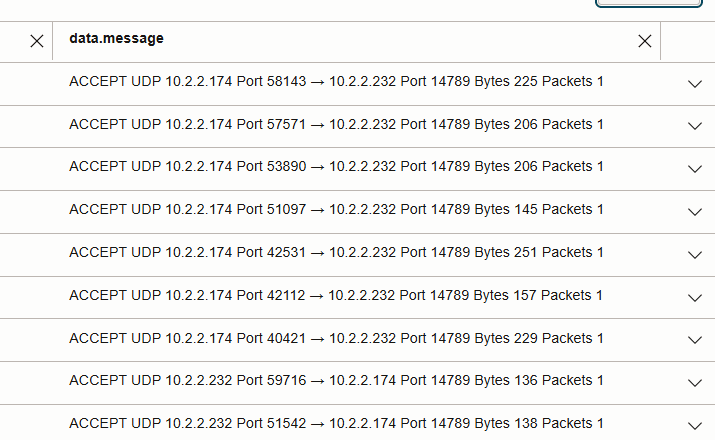
- Comparing packet counts on UDP 14789 highlights the effect of data locality vs non-locality.
If your cluster uses NPN:
- Filter directly for TCP dstPort = 9042 between pod/worker IPs.
- You should see Cassandra CQL reads/writes as 9042 flows. (ideally very little)
Note: Flow Logs can take a few minutes to ingest new entries.
Key Considerations
-
Clusters with >3 nodes:
Locality matters more as cluster size grows. Without placement rules, Spark executors may run on nodes with no local replicas, causing many remote reads. Co-location ensures reads are either local or, at worst, a single hop to another replica.
- Performance gains from co-location:
- Zero-hop local reads → lowest latency.
- Fewer cross-node reads → reduced bandwidth use and lower contention.
- Higher throughput for Spark jobs reading Cassandra in parallel.
- Mechanisms used in this automation:
- StatefulSets → stable Cassandra pod identities.
- Node labels (
spark-locality,data-locality) → designate nodes for co-location. - Pod affinity/anti-affinity → Spark executors scheduled onto Cassandra nodes, balanced across them.
- K8ssandra Operator → declarative Cassandra deployment and management.
- ConfigMap + Spark job → validates Cassandra reads and generates traffic.
- VCN Flow Logs → observe and confirm locality effects.
- Out of OKE’s scope (application-level factors):
- Spark task scheduling and partition assignment.
- Cassandra replication factor and consistency level.
- Spark–Cassandra connector logic for selecting replicas.
Related Links
Provide links to additional resources. This section is optional; delete if not needed.
Acknowledgments
- Authors - Adina Nicolescu (Principal Cloud Architect)
More Learning Resources
Explore other labs on docs.oracle.com/learn or access more free learning content on the Oracle Learning YouTube channel. Additionally, visit education.oracle.com/learning-explorer to become an Oracle Learning Explorer.
For product documentation, visit Oracle Help Center.
Use OKE to Improve Data Locality for Cassandra and Spark Activity
G43655-01