About Managing Data Model Indexing and Synonyms Using a CSV File
Administrators can manage subject area indexes and synonyms for home page searches using the Search Index page or they can export the data to a CSV file.
-
Migrate AI-ready subject area metadata between environments (using the import CSV file option).
-
Engage other business users to contribute to the data model metadata. Administrators can share the entire CSV file or segments of the file to subject-matter experts and ask them to populate the CSV file with synonyms. Administrators can then import the completed file and apply the provided synonyms to enhance data understanding and insights.
This image
shows what you see when you open the CSV file in an editor such as Excel. Business
users must update only the IndexType, and
Synonyms columns (highlighted with a red box in the
image). All the changes in the CSV file are imported into Oracle Analytics, so you must be very careful not to change values in the other columns as this
might introduce errors into the data model and break visualizations. 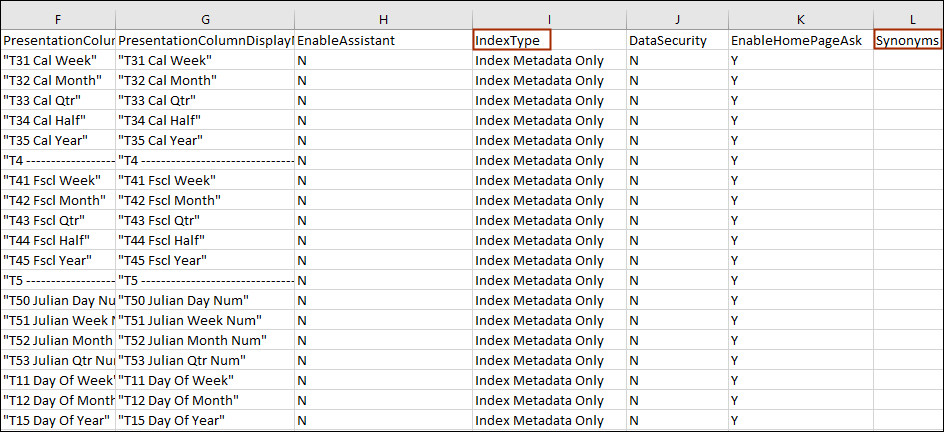
Description of the illustration csv_example_synomyms_oas.jpg
About Specifying Indexing Properties and Synonyms
-
IndexType - This cell is set to Index Metadata Only or Index or is blank depending upon how you set the object or column's Crawl Status field on the Data Model tab (Search Index page).
- Index Metadata Only - Indexes only dimension and measure names. For example, column names such as Product or Order, and metric names such as # of Orders. Always use this option if the column contains sensitive data values that you don’t want to expose to users when they search on the home page.
- Index - Indexes metadata (dimension names and measure names) and data values. Applies only to dimension or attribute columns. For example, if you select this on a Product column, both the metadata for the Product column and its data values (such as iPad, iPod, iPhone ) are indexed.
- No value - Excludes subject areas, tables, or columns from the index.
- DataSecurity - This cell is set to Y if the Sensitive Data checkbox is selected for the column in the Data Model tab (Search Index page). Y restricts indexed data to users with access to that column.
-
EnableHomePageAsk - Indicates whether you want home page searches to access the subject area data. This cell is set to Y or is blank depending on how the data model root level is set in the Data Model tab (Search Index page). If the data model root level is selected in the Data Model tab, this cell is set to Y for all child rows. If the data model root level is not selected in the Data Model tab, this cell is blank for all rows.
-
Synonyms - Enter synonyms using a comma to separate multiple synonyms. The cell contains any synonyms defined in the Synonyms field in the Data Model tab (Search Index page). See About Adding Synonyms to Your Data Models and Tips on Using Synonyms for Search.