2 Introduction to Building Your Metadata Repository
To effectively plan and build your metadata repository, you need to have experience with SQL queries and be familiar with reporting and analysis. You should also have experience with industry-standard data warehouse modeling practices, and be familiar with general relational entity-relationship modeling.
This chapter contains the following topics:
Identify the Content of the Business Model
To determine what content to include in your business model, you must first identify the logical columns on which users need to query.
Then, you must identify each column's role as either a measure column or a dimensional attribute. Finally, you need to arrange the logical columns in a dimensional model based on the relevant roles, relationships between columns, and logic.
Businesses are analyzed by relevant dimensional criteria, and the business model is developed from these relevant dimensions. These dimensional models form the basis of the valid business models to use with the Oracle BI Server.
Although not all dimensional models are built around a star schema, it's a best practice to use a simple star schema in the business model layer. In other words, the dimensional model should represent some measurable facts that are viewed in terms of various dimensional attributes.
After you analyze your business model requirements, you need to identify the specific logical tables and hierarchies that you need to include in your business model.
This section contains the following topics:
Identify Logical Fact Tables
Logical fact tables in the Business Model and Mapping layer contain measures that have aggregations built into their definitions.
Logical fact tables are different from physical fact tables in relational models. Physical tables in rational models define facts at the lowest possible grain. Logical fact table can contain measures of different grains,
You must define measures aggregated from facts in a logical fact table. Measures are calculated data such as dollar value or quantity sold. You can specify measures in terms of dimensions. For example, you might want to determine the sum of dollars for a given product in a given market over a given time period.
Each measure has its own aggregation rule such as SUM, AVG, MIN, or MAX. A business might want to compare values of a measure and need a calculation to express the comparison. You can specify aggregation rules to specific dimensions. You can define complex, dimension-specific aggregation rules in the Oracle BI Server.
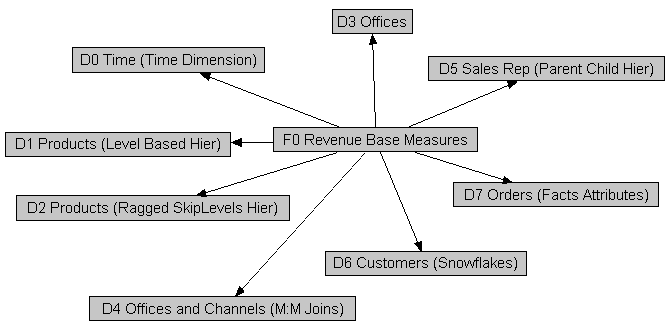
You don't explicitly label tables in the Business Model and Mapping layer as fact tables or dimension tables. The Oracle BI Server treats tables at the one end of a join as dimension tables, and tables at the many end of a join as fact tables.
The image shows the many-to-one joins to a fact table in a Business Model diagram. In the Business Model diagram, all joins have an arrow, indicating the one side, pointing away from the Fact-Pipeline table; no joins are pointing to it. For an example of this in a business model, open a repository in the Model Administration Tool, right-click a fact table, select Business Model Diagram, and then select Whole Diagram.
Identify Logical Dimension Tables
Dimension tables contain attributes that describe business entities such as Customer Name, Region, Address and Country.
A business uses facts to measure performance using established dimensions such as by time, product, and market. Every dimension has a set of descriptive attributes. Dimension tables contain primary keys that identify each member.
Dimension table attributes provide context to numeric data, for example, by providing the ability to categorize Service Requests. Attributes stored in a service requests dimension table could include Service Request Owner, Area, Account, and Priority.
Dimensions in the business model are conformed dimensions, that is those dimensions that are consistent across. If a specific data source has five different instances of a specific Customer table, the business model should only have one Customer table. To achieve conformance, all five physical source instances of Customer are mapped to a single Customer logical table, with transformations in the logical table source as necessary. Conformed dimensions hide the complexity of the Physical layer from users, and enable combining data from multiple fact sources at different grains. Conformed dimensions enable combining multiple data sources.
The business model uses business keys for a dimension and level keys instead of generated surrogate keys. For example, you would use Customer Name with values like Oracle instead of Customer Key with values like 1076823. Using business keys in the business model ensures that all sources for that dimension can conform to the same logical dimension table with the same logical key and level key.
Generated surrogate keys can exist in the Physical layer where the keys are useful for their query performance advantages on joins. The Business Model and Mapping layer doesn't have surrogate key columns.
Identify Dimensions
Dimensions are categories of attributes by which the business is defined.
Common dimensions are time periods, products, markets, customers, suppliers, promotion conditions, raw materials, manufacturing plants, transportation methods, media types, and time of day. Within a given dimension, there are many attributes. For example, the time period dimension can contain the attributes day, week, month, quarter, and year. Exactly what attributes a dimension contains depends on the way the business is analyzed.
Dimensions contain hierarchies that are sets of top-down relationships between members within a dimension. There are two types of hierarchies:
-
level-based hierarchies (structure hierarchies)
-
parent-child hierarchies (value hierarchies)
In level-based hierarchies, members of the same type occur only at a single level, while members in parent-child hierarchies all have the same type. Oracle Analytics Server supports a time dimension level-based hierarchy that provides functionality for modeling time series data. In level-based hierarchies, levels roll up from a lower level to higher level, for example, months can roll up into a year. These roll ups occur over the hierarchy elements and span natural business relationships.
In parent-child hierarchies, the business relationships occur between different members of the same real-world type such as the manager-employee relationship in an organizational hierarchy tree. Parent-child hierarchies don't have explicitly named levels. There isn't a limit to the number of implicit levels in a parent-child hierarchy.
To define your hierarchies, you define the contains relationships in your business to drive roll up aggregations in all calculations, as well as drill-down navigation in reports and dashboards. For example, if month rolls up into year and an aggregate table exists at the month level, you can use the table to answer questions at the year level by adding up all of the month-level data for a year.
You must use the right type of hierarchy for your needs. To determine the appropriate type to use, consider the following:
-
Are all the members of the same type such as employee, assembly, or account, or are they of different types that naturally fall into levels such as year-quarter-month, continent-country-state/province, or brand-line-product?
-
Do members have the same set of attributes? For example, in a parent-child hierarchy like Employees, all members might have a Hire Date attribute. In a level-based hierarchy like Time, the Day type might have a Holiday attribute, while the Month type doesn't have the Holiday attribute.
-
Are the levels fixed at design time (year-quarter-month), or can runtime business transactions add or subtract levels? For example, if you can add a level when the current lowest-level employee hires a subordinate, who then is the new lowest level.
-
Are there constraints in your primary data source that require a certain hierarchy type? If your primary data source is modeled in one way, you might need to use the same hierarchy type in your business model, regardless of other factors.
About Dimensions with Multiple Hierarchies
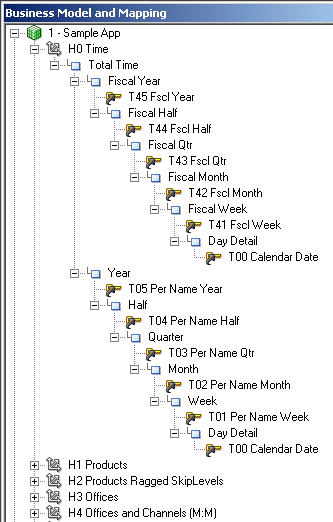
Dimensions can contain multiple hierarchies. Dimensions with multiple hierarchies must always end with the same leaf table.
For example, time dimensions often have one hierarchy for the calendar year, and another hierarchy for the fiscal year.
The image shows a dimension with multiple hierarchies in the Business Model and Mapping layer.
Description of the illustration mult-hier.gif
Identify Lookup Tables
When you need to display translated field information from multilingual schemas, you create a logical lookup table that corresponds to a lookup table in the Physical layer.
A lookup table stores multilingual data corresponding to rows in the base tables. Before using a specific logical lookup table, you must designate the table as a lookup table in the General tab of the Logical Table dialog. See Localizing Metadata Names in the Repository in Administering Oracle Analytics Server.
You can use lookup tables to display one set of values to users, while using a different, corresponding set of values in the physical query. You can use the lookup table to provide human-readable values that are looked up in a different data source.
Identify the Data Source Content for the Physical Layer
After you've determined the requirements for your business model, you can look at what data source content you need in the Physical layer.
Unlike the Business Model and Mapping layer that's always dimensional, each physical model mirrors the shape of the source, for example, normalized, and cube.
This section contains the following topics:
About Types of Physical Schemas in Relational Data Sources
You can successfully model any physical schema in the Oracle BI repository, regardless of its type, because you can break down the model of any physical source into overlapping subsets that are dimensional.
There are four types of physical schemas (models):
-
Star Schemas
A star schema is a set of dimensional schemas (stars) that each have a single fact table with foreign key join relationships to several dimension tables. When you map a star to the business model, you first map the physical fact columns to one or more logical fact tables. Then, for each physical dimension table that joins to the physical fact table for that star, you map the physical dimension columns to the appropriate conformed logical dimension tables.
-
Snowflake Schemas
A snowflake schema is similar to a star schema, except that each dimension is made up of multiple tables joined together. Like star schemas, you first map the physical fact columns to one or more logical tables. Then, for each dimension, you map the snowflake physical dimension tables to a single logical table. You can achieve this by either having multiple logical table sources, or by using a single logical table source with joins.
-
Normalized Schemas
Normalized schemas distribute data entities into multiple tables to minimize data storage redundancy and optimize data updates. Before mapping a normalized schema to the business model, you need to understand how the distributed structure is understood in terms of facts and dimensions.
After analyzing the structure, you pick a table that has fact columns and then map the physical fact columns to one or more logical fact tables. Then, for each dimension associated with that set of physical fact columns, you map the distributed physical tables containing dimensional columns to a single logical table. Like with snowflake schemas, you can achieve this by having multiple logical table sources, or by using a single logical table source with joins. Mapping normalized schemas is an iterative process because you first map a certain set of facts, then the associated dimensions, and then you move on to the next set of facts.
When a single physical table has both fact and dimension columns, you may need to create a physical alias table to handle the multiple roles played by that table.
-
Fully Denormalized Schemas
This type of dimensional schema combines the facts and dimensions as columns in one table (or flat file), and is mapped differently than other types of schemas. When you map a fully denormalized schema to the star-shaped business model, you map the physical fact columns from the single physical fact table to multiple logical fact tables in the business model. Then, you map the physical dimension columns to the appropriate conformed logical dimension tables.
About Cubes in Multidimensional Data Sources
Cubes are made up of measures and are organized by dimensions.
Cube are already dimensional, each cube maps to the logical fact and dimension tables in the business model.
-
Measures in multidimensional cubes and relational fact columns map to logical measures in the Business Model and Mapping layer. Measures in multidimensional cubes include calculations and aggregations. Relational fact columns require applying the calculations and aggregations in the business model. The Oracle BI Server takes advantage of the pre-aggregated data and powerful calculations in the cube.
-
Multidimensional physical objects and relational physical objects map to logical dimensions in the Business Model and Mapping layer. Dimensional and hierarchical semantics are built into multidimensional data sources. The Oracle BI Server takes advantage of the hierarchy and dimensional support in the cube during import and at query time.
Identify the Data Source Table Structure
The Model Administration Tool provides an interface to map logical tables to the underlying physical tables in your data sources.
Before you can map the tables, you need to identify the contents of the physical data sources as it relates to your business model. To do this correctly, you need to identify the following contents of the physical data source:
-
Identify the contents of each table
-
Identify the detail level for each table
-
Identify the table definition for each aggregate table. This lets you set up aggregate navigation. The following detail is required by the Oracle BI Server:
-
The columns by which the table is grouped (the aggregation level)
-
The type of aggregation (
SUM,AVG,MIN,MAX, orCOUNT)
To set up aggregate navigation in a repository, see Manage Logical Table Sources (Mappings).
-
-
Identify the contents of each column
-
Identify how each measure is calculated
-
Identify the joins defined in the database
To acquire this information about the data, you could refer to any available documentation that describes the data elements created when the data source was implemented, or you might need to spend some time with the DBA for each data source to get this information. To fully understand all the data elements, you might also need to ask people in the organization who are users of the data, owners of the data, or the application developers of applications that create the data.
Guidelines to Design a Repository
After analyzing your business model needs and identifying the database content that your business requires, you can complete your repository design.
This section contains some design best practices that can help you implement a more efficient repository.
You shouldn't make performance tuning changes until importing and testing your databases. Run performance tuning tasks during the final steps in completing the setup of your repository. See Complete Oracle BI Repository Setup.
This section contains the following topics:
Design Strategies for Structuring the Repository
Use these recommended design strategies for structuring your Oracle BI repository.
-
If you work in online mode, save backups of the online repository before and after every completed unit of work. If needed, use Copy As on the File menu to make an offline copy containing the changes.
-
Use the Physical Diagrams in the Model Administration Tool to verify sources and joins.
-
Decide whether you want to set up row-level security controls in the database, or in the repository. This decision determines whether you share connection pools and cache, and may limit the number of separate source databases you want to include in your deployment. See Applying Data Access Security to Repository Objects.
Design Tips for the Physical Layer
The Physical layer contains information about the physical data sources.
The most common way to create the schema in the Physical layer is by importing metadata from databases and other data sources. If you import metadata, many of the properties are configured automatically based on the information gathered during the import process. You can also define other attributes of the physical data source, such as join relationships, that might not exist in the data source metadata.
The Physical layer can contain data sources of many different types, including multidimensional, relational, and XML sources.
For each data source, there is at least one corresponding connection pool. The connection pool contains data source name (DSN) information used to connect to a data source, the number of connections allowed, timeout information, and other connectivity-related administrative details. See About Connection Pools.
The following is a list of tips to use when designing the Physical layer:
-
You should use table aliases in the Physical layer to eliminate extraneous joins, including the following:
-
Eliminate all physical joins that cross dimensions (inter-dimensional circular joins) by using aliases.
-
Eliminate all circular joins (intra-dimensional circular joins) in a logical table source in the Physical Model by creating physical table aliases.
A circular join involves using different joins from the same table to get results, for example, you've a Customer table that's used to look up ship-to addresses, and you use a different join to the Customer table to look up bill-to addresses. You can avoid the circular joins by creating an alias table in the Physical layer so that only one table instance is used for each purpose, with separate joins.
If you don't eliminate circular joins, you could get erroneous report results. In addition, query performance is negatively impacted by circular joins.
-
-
You should use alias tables to create separate physical joins when you need the join to perform as an inner join in one logical table source, and as an outer join in another logical table source.
-
You might import some tables into the Physical layer that you might not use right away, but that you don't want to delete. To identify tables that you do want to use right away in the Business Model and Mapping layer, you can assign aliases to physical tables before mapping them to the business model layer.
To display the original name of a table that has an assigned alias, select Tools, select Options, select General, and then select Display original name for alias in diagrams.
-
Use an opaque view only if there is no other solution to your modeling problem. You should create a physical table or a materialized view. Opaque views prevent the Oracle BI Server from generating optimized SQL because opaque views contain fixed SQL statements that are sent to the underlying data source.
Design Tips for the Business Model and Mapping Layer
The Business Model and Mapping layer organizes information by business model. In this layer, each business model is effectively a separate application.
The logical schema defined in each business model must contain at least two logical tables. You must define relationships between all the logical tables. See About Layers in the Oracle BI Repository and Work with Logical Tables, Joins, and Columns.
When designing the Business Model and Mapping layer:
-
Create the business model with one-to-many logical joins between logical dimension tables and the fact tables wherever possible. The business model should resemble a simple star schema in which each fact table is joined directly to its dimensions.
-
Join every logical fact table to at least one logical dimension table. When the source is a fully denormalized table or flat file, you must map its physical fact columns to one or more logical fact tables, and its physical dimension columns to logical dimension tables.
-
Associate every logical dimension table with a dimensional hierarchy. This rule holds true even if the hierarchy has only one level such as a scenario dimension (actual, forecast, or plan).
-
Map all appropriate fact sources map to the appropriate level in the hierarchy using aggregation content when creating level-based measures. You set up aggregation content in the Levels tab of the Logical Column dialog for the measure.
Set up aggregation content in the Levels tab of the Logical Column dialog for level-based measures. For measures that aren't level-based, leave the Logical Level field blank.
-
Create aggregate sources as separate logical table sources. For fact aggregates, use the Content tab of the Logical Table Source dialog to assign the correct logical level to each dimension.
-
Create a unique level key for each dimension level in a hierarchy. Each logical dimension table must have a unique primary key. The key is also used as the level key for the lowest hierarchy level.
-
Ensure that each logical level of a dimension hierarchy contains the correct value in the field named Number of elements at this level to prevent problems with aggregate navigation. Fact sources are selected on a combination of the fields selected as well as the levels in the dimensions to which they map. By adjusting these values, you can alter the fact source selected by the Oracle BI Server. See Create Logical Levels in a Dimension.
Logical Fact Tables
- Logical fact tables can contain measures of different grains. Don't use the grain as a reason to split up logical fact tables.
-
Logical fact tables shouldn't contain any keys, except when you need to send Logical SQL queries against the Oracle BI Server from a client that requires keys. In this case, you need to expose those keys in both the logical fact tables, and in the Presentation layer.
-
All columns in logical fact tables are aggregated measures, except for keys required by external clients, or dummy columns used as a divider. Other non-aggregated columns should exist in a logical dimension table.
-
You can use multiple logical fact tables in a single business model. For Logical SQL queries, the multiple logical fact tables behave as if they're one table. Reasons to have multiple logical fact tables include:
-
To assign projects, see Set Up Projects.
-
To automatically create small subject areas in the Presentation layer, see Automatically Create Subject Areas Based on Logical Stars and Snowflakes.
-
For organization and simplicity of understanding.
-
Renaming columns in the Business Model and Mapping layer automatically creates aliases (synonyms) for Presentation layer columns that have the property Use Logical Column Name selected. This occurs because Presentation layer columns with this option selected are automatically renamed so that the logical column and presentation column names are in sync. Renaming Presentation layer columns directly when Use Logical Column Name isn't selected creates an alias.
Calculations
-
You can define calculations in the following ways:
-
Before the aggregation, in the logical table source. For example:
sum(col_A *( col_B)) -
After the aggregation, in a logical column derived from two other logical columns. For example:
sum(col A) * sum(col B)
You can also define post-aggregation calculations in Answers or in Logical SQL queries.
-
Model Outer Joins
Use these guidelines on how to model outer joins.
-
Due to the nature of outer joins, queries that use them are usually slower. Because of this, define outer joins only when necessary. Where possible, use ETL techniques to eliminate the need for outer joins in the reporting SQL.
-
Outer joins are always defined in the Business Model and Mapping layer. Physical layer joins don’t specify inner or outer.
-
You can define outer joins by using logical table joins, or in logical table sources. Which type of outer join you use is determined by whether the physical join maps to a business model join, or to a logical table source join.
-
If you must define an outer join, try to create two separate dimensions, one that uses the outer join and one that doesn’t. Make sure to name the dimension with the outer join in a way that clearly identifies it, so that client users can use it as little as possible.
-
Avoid using more than one outer join. Instead, to achieve the same effect as a logical outer join, Oracle recommends that the logical join be an inner join and that the analysis designer at design time selects the Include Null Value option in the corresponding analysis.
Design Tips for the Presentation Layer
You set up the user view of a business model in the Presentation layer.
The names of folders and columns in the Presentation layer can appear in localized language translations. The Presentation layer is the appropriate layer in which to set user permissions. See Create and Maintain the Presentation Layer.
In this layer, you can do the following:
-
You can show fewer columns than exist in the Business Model and Mapping layer. For example, you can exclude the key columns because they have no business meaning.
-
You can organize columns using a different structure from the table structure in the Business Model and Mapping layer.
-
You can display column names that are different from the column names in the Business Model and Mapping layer.
-
You can set permissions to grant or deny users access to individual subject areas, tables, and columns.
-
You can export logical keys to ODBC-based query and reporting tools.
-
You can create multiple subject areas for a single business model.
-
You can create a list of aliases (synonyms) for presentation objects that are used in Logical SQL queries. You can change presentation column names without breaking existing reports.
The following is a list of tips to use when designing the Presentation layer:
-
Because there isn't an automatic way to synchronize all changes between the Business Model and Mapping layer and the Presentation layer, it's best to wait until the Business Model and Mapping layer is relatively stable before adding customizations in the Presentation layer.
-
There are many ways to create subject areas, such as dragging and dropping the entire business model, dragging and dropping incremental pieces of the model, or automatically creating subject areas based on logical stars or snowflakes. See About Creating Subject Areas. Dragging and dropping incrementally works well if certain parts of your business model are still changing.
-
It's a best practice to rename objects in the Business Model and Mapping layer rather than the Presentation layer, for better maintainability. Giving user-friendly names to logical objects rather than presentation objects ensures that you can use the names in multiple subject areas. Also, it ensures that the names persist even when you need to delete and re-create subject areas to incorporate changes to your business model.
-
Members in a presentation hierarchy aren't visible in the Presentation layer. You can see hierarchy members in Answers .
-
You can use the Model Administration Tool to update Presentation layer metadata to give the appearance of nested folders in Answers. See Nest Folders in Answers.
-
When setting up data access security for a large number of objects, consider setting object permissions by role rather than setting permissions for individual columns. See Apply Data Access Security to Repository Objects.
-
When setting permissions on presentation objects, you can change the default permission by setting the
NQSConfig.INIfile. See NQSConfig.INI File Configuration Settings in Administering Oracle Analytics Server