Create a Sample Schema for Users and Groups
You have schemas that you were using in an earlier installation of Oracle Analytics Server. This sample schema is intended to illustrate how to configure the system to use this schema.
Note:
You must use a database schema containing the users, credentials and groups required for authentication that is accessible from the WebLogic Server where Oracle Analytics Server is running.
The diagram shows tables, USERS, USER_VW, GROUPMEMBERS, GROUPS, and GROUPMEMBERS_VW, where USER_VW is a view on the USERS table, and GROUPMEMBERS_VW is a view joining the GROUPMEMBERS and GROUPS tables.
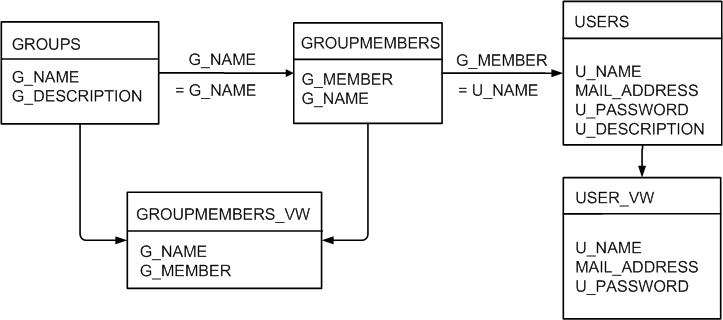
If user or group information exists in more than one table, remove USER_VW must create a view over the tables of each type of information.
Create a view on the GROUPMEMBERS and GROUPS tables, for example, GROUPMEMBERS_VW, with an outer join on the GROUPS table and an inner join on the GROUPMEMBERS table, which enables you to see groups in Fusion Middleware
Control even when they have no user assigned to them. To present the view shown in the diagram to the database adapter, you would need to follow the configuration shown in Configure a Database Adaptor.