Use the Search Bar to Find Your Content
Use the search bar to search for the content you're interested in using search terms, content types, and search tags.
- On your home page, type in a search term and either press Enter to search for content or Shift + Enter to visualize data.
- Specify the full or partial name of what you're looking for. The search is case-insensitive.
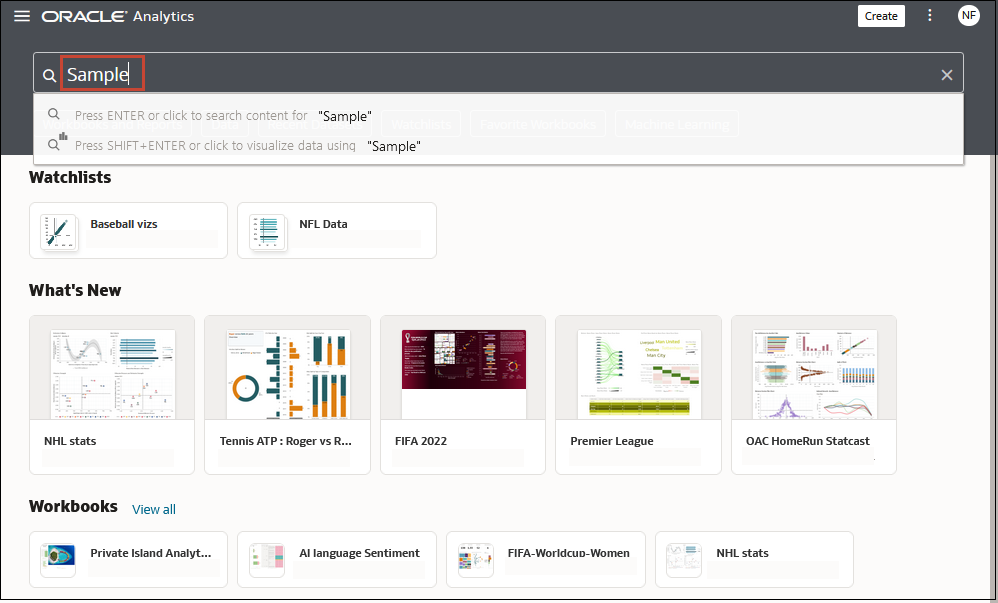
Description of the illustration searching-content.png - (Browser dependent) Click Dictate (if displayed) and speak your search term.
- Specify the full or partial name of what you're looking for. The search is case-insensitive.
- Click in the search bar for a drop-down list of all content types, such as workbook, dashboard, report, watchlist connection, or model. Click a content type to add it to the search bar. For example:
- Click Workbook to display visualization content
- Click Dashboard or Analysis to display reporting content
- Click Report to display pixel-perfect reporting content
- Click Watchlist to display visualization cards grouped in watchlists
- Click an option in the Data category to display connections, datasets, data flows, and other data-related content.
- Click an option in the Machine Learning category to display scripts and models.
- To narrow your search, add a free text search term to the search bar. For example, if you've searched on Workbooks, enter
'My Web Analysis'to display a workbook named My Web Analysis.
- Add or remove search tags to your search term.
- Enter
'type:'or'filter:'to display a list of search tags that you can select from. - Paste in
'type:'or'filter:'followed by one search term (not case-sensitive). For example:- Paste
type:connectionto find your connections. Or, pastetype:workbookto find your workbooks. - Paste
filter:recentto display your recently accessed content. Pastefilter:favoritesto find content that you've marked as a favorite.You can combine the
filtercommand with thetypecommand. For example, paste intype:workbook filter:recent.
- Paste
- Enter
- To clear your search terms, in the search bar click X or select search tags and press delete.