Configure Data Cache and Offline Support
Use the Oracle Offline Persistence Toolkit to enable data caching and offline support within your Oracle JET app.
About the Oracle Offline Persistence Toolkit
The toolkit is a client-side JavaScript library that Oracle maintains as an open-source project. The toolkit provides caching and offline support at the HTTP request layer.
This support is transparent to the user and is done through the Fetch API and an XHR adapter. HTTP requests made while the client or client device is offline are captured for replay when connection to the server is restored. Additional capabilities include a persistent storage layer, synchronization manager, binary data support and various configuration APIs for customizing the default behavior. This toolkit can be used in both ServiceWorker and non-ServiceWorker contexts within web apps.
Using the toolkit, you can configure your app to:
-
Download content for offline reading where connectivity isn't available.
For example, an app could include product inventory data that a salesperson could download and read at customer sites where connectivity isn't available.
-
Cache content for improved performance.
-
Perform transactions on the downloaded content where connectivity isn't available and upload the transactions when connectivity returns.
For example, the salesperson could visit a site with no Internet access and enter an order for some number of product items. When connectivity returns, the app can automatically send the transaction to the server.
-
Provide conflict resolution when the offline data can't merge with the server.
If the salesperson's request exceeds the amount of available inventory, the app can configure a message asking the salesperson to cancel the order or place the item on back order.
The architecture diagram illustrates the major components of the toolkit and how an app interacts with it.
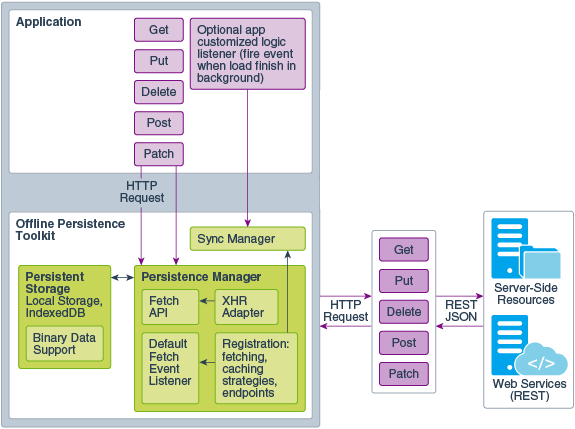
Description of the illustration persistence-framework.png
Install the Offline Persistence Toolkit
Use npm to install the offline persistence toolkit. After installation, you must update your application’s src/js/path_mapping.json file to recognize the new package.
-
Change to your application's top level directory and open a terminal window.
-
At the terminal prompt, enter the following command to install the toolkit:
npm install @oracle/offline-persistence-toolkit --save. -
Change to your app's
src/jsdirectory and openpath_mapping.jsonfor editing. -
Add the persistence toolkit to the
"libs"entry.The easiest way to add the toolkit is to copy an existing entry that's similar to your library and modify as needed. A sample entry for
offline-persistence-toolkit, which started with a copy of the"ojs"entry, is shown below."libs": { "offline-persistence-toolkit": { "cdn": "", "cwd": "node_modules/@oracle/offline-persistence-toolkit/dist", "debug": { "cwd": "debug", "src": [""], "path": "libs/offline-persistence-toolkit/debug", "cdn": "" }, "release": { "cwd": "min", "src": [""], "path": "libs/offline-persistence-toolkit/min", "cdn": "" } },
For information about using the toolkit once you have it installed in your Oracle JET app, see the README.md and Wiki for the persistence toolkit on Github at https://github.com/oracle/offline-persistence-toolkit.