Accessing Context Sensitive Online Help
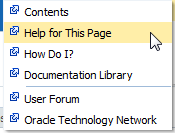
Each page in Oracle Enterprise Manager Fusion Middleware Control provides access to context sensitive help from the Help for This Page option of the Help main menu.
To access context sensitive online help:
- In the upper right corner of a page, select Help for This Page from the weblogic > Help main menu.
Context sensitive help that describes the fields for that page is displayed.
The Help main menu list provides the following selections.
Selection Description Contents
Displays a table of contents with links to relevant Oracle Enterprise Manager Fusion Middleware Control guides.
Help for This Page
Displays context sensitive help that describes the selectable fields of the selected page.
How Do I?
Displays links to conceptual and procedural documentation that is relevant to the selected page.
Documentation Library
Displays the main page for the Oracle Fusion Middleware documentation library.
User Forums
Displays the Oracle Fusion Middleware user forum.
Oracle Technology Network
Displays the main Oracle Fusion Middleware page of the Oracle Technology Network.