Analyze Videos Using OCI Generative AI multimodal models and Enterprise AI Agents
Multimodal Large Language Models (MLLMs) can understand images and, by extension, frames from videos.
A video is a sequence of frames, and each frame is an image that a multimodal LLM can analyze. The following reference architecture leverages this capability to build a general-purpose batch video analysis pipeline on Oracle Cloud Infrastructure (OCI). Videos are uploaded to Oracle Cloud Infrastructure Object Storage, detected automatically by Oracle Cloud Infrastructure Events, and processed on an Oracle Cloud Infrastructure Compute instance that decomposes them into frames, transcribes any spoken audio using Oracle Cloud Infrastructure Speech, analyzes the visual and audio content through AI models, and synthesizes the findings into coherent reports.
- Knowledge Retrieval Tool (OCI GenAI Enterprise AI Agents direct vector store search)
- Frame Analysis Tool (multimodal LLM)
- Report Generation Tool
- Evaluation Tool
When the video contains spoken audio, OCI Speech transcribes it and feeds the transcript into the downstream agents. OCI Events and Oracle Cloud Infrastructure Functions provide event-driven ingestion, triggering processing automatically when new videos are uploaded, while a front end (for example, Oracle APEX on Autonomous AI Database) provides the human-in-the-loop interface for review and configuration.
This solution includes:
- Agentic pipeline with four specialized tools (Knowledge Retrieval, Frame Analysis, Report Generation, Evaluation), each using the model best suited to its task.
- Event-driven video ingestion: OCI Events detects new uploads in OCI Object Storage and triggers an OCI Functions, which invokes the OCI GenAI Enterprise AI Agents hosted application for each new video.
- RAG-based context augmentation through OCI GenAI Enterprise AI Agents vector store search.
- Multiple multimodal models and LLMs available through OCI Generative AI.
- Audio transcription through OCI Speech for videos with spoken content, providing transcript context to the summary and evaluation tools.
Architecture
Each tool encapsulates a distinct capability (knowledge retrieval, frame understanding, report synthesis, or criteria-based evaluation) and uses the AI model best suited to that capability. Audio transcription through OCI Speech complements the visual analysis when videos contain spoken content.
The following diagram shows the logical architecture of the solution:
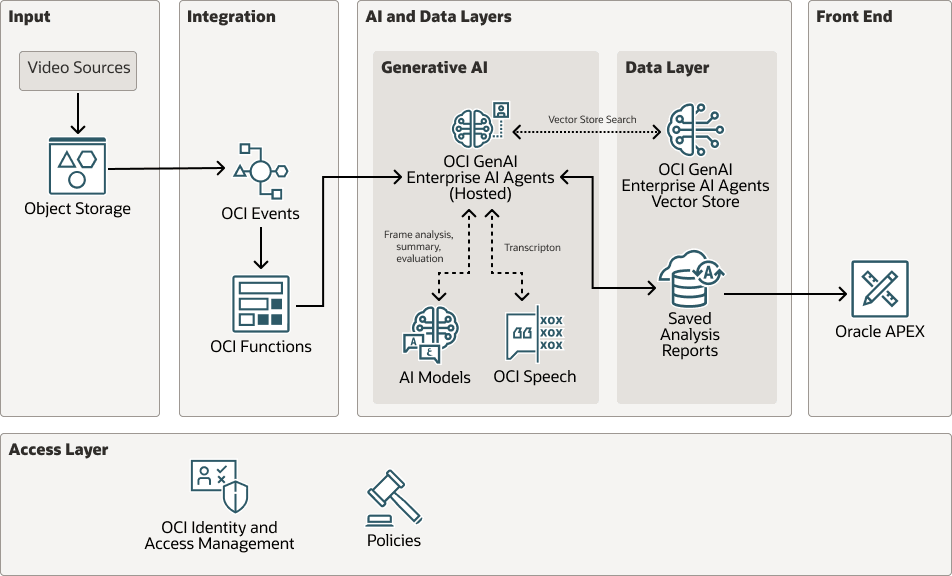
agentic-video-analysis-arch-oracle.zip#GUID-82D7B400-2350-4103-8894-94E5D26AF1E5
Workflow
The end-to-end workflow proceeds as follows:
- Video ingestion: Video files are uploaded to OCI Object Storage. The OCI Object Storage bucket has object events enabled, so each upload emits an event automatically.
- Event-driven pipeline trigger: OCI Events detects new video uploads through
com.oraclecloud.objectstorage.createobjectevents. An Events rule triggers OCI Functions, which calls the back end's REST API passing the video's OCI Object Storage reference (bucket name, object name, namespace). - Frame extraction: The Python back end deployed on OCI GenAI Enterprise AI Agents downloads the video from OCI Object Storage using the OCI SDK, then extracts frames at configurable intervals using OpenCV, producing JPEG images and base64-encoded thumbnails.
- Audio transcription (conditional): If the video contains an audio track, OCI Speech transcribes the spoken content using Whisper models with automatic language detection. OCI Speech accepts video files directly (MP4, MKV, WEBM) without requiring prior audio extraction. The transcription runs in parallel with frame analysis and knowledge retrieval.
- Agentic Pipeline:
- Knowledge Retrieval Tool (conditional): If retrieval augmented generation (RAG) is enabled, the analysis prompt is sent to the OCI GenAI Enterprise AI Agents Vector Store Search API. The application directly queries the managed vector store, retrieves relevant chunks and metadata from indexed reference documents, and formats those results as RAG context for downstream report generation. This retrieval step runs one time per analysis request before report generation; it can be optimized later to run independently or in parallel with frame analysis and audio transcription.
- Frame Analysis Tool (parallel, per frame): The agent receives an image frame and an analysis prompt, then returns structured observations using the selected multimodal vision model in OCI Generative AI. The pipeline can dispatch frames concurrently to accelerate the analysis.
- Report Generation Tool: After all frames are analyzed, the Report Generation Tool receives the complete set of frame-level observations, the audio transcript (when available), and context. It uses a text-reasoning model to synthesize a comprehensive structured report. When RAG is enabled, the reference context from the Knowledge Retrieval Tool is injected into the prompt, producing a context-aware report with an additional References section.
- Evaluation Tool: The Evaluation Tool receives the report, frame-level observations, the audio transcript (when available), and the reference context from the Knowledge Retrieval Tool. Using a text-reasoning model, it produces a structured evaluation report that explicitly maps each observation to specific criteria from the reference documents, listing findings with severity, conforming areas, and prioritized recommendations with citations.
- Result persistence: The analysis outputs are saved to Autonomous AI Database.
- Validation: The results can be reviewed and validated in the front end application, such as Oracle APEX.
Components
This architecture uses the following OCI services, components, and functionality:
- OCI Generative AI
- Enterprise AI models.
- Multimodal models (for example, Cohere Command A Vision, Google Gemini, Meta Llama 4) for frame analysis.
- A reasoning model, such as Cohere Command A Reasoning, is used for summary and compliance/evaluation reports.
- OCI GenAI Enterprise AI Agents
- Vector store: For managed ingestion, chunking, embedding, and retrieval for the document knowledge base.
- Hosted deployment: Runs the full Python pipeline: frame extraction, audio transcription orchestration, AI Agent orchestration (parallel frame analysis execution, direct AI vector store search retrieval, and report assembly).
- Enterprise AI models.
- OCI Speech
Automatic speech recognition using Whisper models with automatic language detection. Accepts video files directly (MP4, MKV, WEBM) for batch transcription, producing timestamped JSON and SRT output.
- Oracle Autonomous AI Database 26ai
Serves as the persistent storage layer for analysis reports, report history, validation status, APEX application state, and operational analytics.
- OCI Object Storage
Serves as the landing zone for video files (from cameras, secure file transfer protocol (SFTP), or manual upload). Object events are enabled on the bucket so that uploads are detected automatically by OCI Events. Optionally stores reference documents as the source-of-record/archive; approved documents are uploaded through the OCI GenAI Enterprise AI Agents Files API and attached to the OCI GenAI Enterprise AI Agents vector store for retrieval.
- OCI Events
Detects new video uploads in OCI Object Storage and triggers OCI Functions through event rules. Provides built-in retry and dead-letter handling for failed deliveries.
- OCI Functions
Lightweight Python function that receives the OCI Object Storage event payload and invokes the back end's REST API on OCI GenAI Enterprise AI Agents. Runs serverless with no idle cost.
- Oracle Cloud Infrastructure Identity
and Access Management
Authorizes all service interactions including OCI GenAI Enterprise AI Agents, OCI Speech, Autonomous AI Database, OCI Object Storage, OCI Events, OCI Functions, Enterprise OCI GenAI Enterprise AI Agents hosted deployments, Files API, Vector Store API, and direct vector store search.
-
OCI GenAI Enterprise AI Agents vector store and knowledge retrieval
OCI GenAI Enterprise AI Agents provides the managed platform for the agentic application runtime and its retrieval layer. Regulation and domain reference documents are uploaded through the Files API, attached to a project-scoped vector store, indexed by the managed service, and queried directly through vector store search.
At runtime, the Knowledge Retrieval Tool sends the analysis prompt to vector store search, retrieves relevant chunks, source metadata, and citations, and passes the formatted context to the Report Generation and Evaluation tools for grounded compliance mapping. This keeps vision analysis isolated from reference text while enabling regulation-aware synthesis and criteria mapping.
Recommendations
Consider the following recommendations when implementing this architecture.
- Video selection: Select a list of videos representative of real-world cases for evaluation.
- Vision model selection: Run the same video through multiple models to find the best fit.
- RAG document curation: Use a dedicated OCI GenAI Enterprise AI Agents vector store per domain, regulation set, or customer boundary. Keep source documents versioned in OCI Object Storage or another controlled repository when preview/audit of the original files is required. Attach only approved files to the vector store, tag them with attributes, wait for indexing, and validate retrieval quality with direct vector store search before enabling them in production.
- Prompt engineering: Be specific about what to observe and what quantitative data to extract. Build reusable prompt templates for recurring analysis tasks.
- Frame extraction tuning: Slowly changing scenes: 3-5 s intervals. Dynamic content: 1 s. Use the maximum frames cap to control cost.
- Audio transcription: Use OCI Speech with Whisper and automatic language detection. Whisper prompting can improve transcription quality. Run transcription in parallel with frame analysis where possible to minimize end-to-end processing time.
- Event-driven ingestion: Enable object events on the upload bucket and configure an OCI Events rule to trigger an OCI Functions on new uploads. This eliminates polling delays and ensures near-real-time processing. Use Oracle Cloud Infrastructure Logging and Oracle Cloud Infrastructure Notifications for error handling and alerting.
- Pipeline extension: The sequential agent design makes it straightforward to add tools (for example, Trend Analysis, Notification, Translation) within the Python pipeline on OCI Compute.
Considerations
-
High Availability
Autonomous AI Database, OCI Generative AI, OCI Speech, OCI Events, OCI Functions, OCI GenAI Enterprise AI Agents hosted deployments, and OCI GenAI Enterprise AI Agents vector store are managed services with built-in fault tolerance and service-managed operations. -
Security
- All API communications use HTTPS/TLS. Autonomous AI Database supports mTLS through a wallet or TLS connections for report persistence. Enterprise AI Agents Files, vector stores, Responses, and hosted deployment endpoints are invoked over HTTPS and must use OCI Identity and Access Management and resource-principal authorization in production.
- Apply least-privilege OCI Identity and Access Management policies for Enterprise AI access, files API, vector store API, direct vector store search, OCI Functions, OCI Object Storage, Autonomous AI Database, and OCI Speech. Use dynamic groups and matching rules to authorize OCI Functions and hosted deployments to invoke OCI GenAI Enterprise AI Agents endpoints and access the target project-scoped vector store. Add Responses API file search permissions only if a future file search-based retrieval mode is enabled.
- Use OCI Vault and OCI Secret Management for secrets management, OCI Object Storage lifecycle policies for video/source-document retention, and vector-store governance controls for document ingestion, deletion, and corpus versioning.
-
Performance
- Parallel frame analysis runs in the back end. Adjust concurrency based on Enterprise AI Models rate limits.
- Event-driven processing distributes load naturally as videos are uploaded. To control API contention during high-volume uploads, implement concurrency limits in the back end.
-
Enterprise Integration
This architecture uses OCI Events and OCI Functions for event-driven ingestion, which is the recommended pattern for OCI Object Storage-triggered processing pipelines. For deployments that require integration with multiple enterprise systems (for example, SaaS applications, B2B workflows, on-premises ERPs), Oracle Integration can be introduced as an orchestration layer downstream of the event-driven trigger, providing visual integration design, prebuilt application adapters, and enterprise-grade audit trails.