Enable GPU-accelerated AI camera analytics on OCI
The architecture accepts smart-camera events, traditional RTSP IP-camera streams, mobile or edge-device events, uploaded images, and short video clips. It separates CPU-intensive stream handling from GPU inference, uses Oracle Cloud Infrastructure Queue as a durable work buffer, and applies policy-based decisions before delivering alerts to operational systems.
The solution moves beyond simple object detection. It evaluates whether a visual event is expected, suspicious, urgent, or operationally relevant by using context such as role, zone, time, confidence, tenant policy, device ownership, and historical event patterns. Selected frames, detection metadata, rule outcomes, and downstream delivery status are retained for audit and replay.
- Camera, image, or clip workloads are bursty
- GPU cost and utilization require deliberate control
- Raw detection alone is insufficient
- Customers require traceability, replay, multitenant controls, or integration with existing operational systems
Before You Begin
The reference architecture is modular. You can adopt any of the required ingestion, inference, decision, or operations blocks.
- Define the video sources and topology including smart AI camera, traditional IP camera, mobile or edge device, uploaded media, or a combination. For traditional IP cameras, plan a VPN, TLS tunnel, or outbound camera connector to the OCI-side processing layer.
- Confirm use cases, object classes, target latency, expected alert freshness, retention requirements, human review needs, and downstream integration targets.
- Validate OCI region capacity, GPU shape availability, quotas, service limits, and network bandwidth before committing to production service-level objectives (SLOs).
- Select and evaluate inference models for the customer use case. The published architecture uses RT-DETR-style detection and CLIP-style contextual classification as examples. Model evaluation and selection remain customer-specific.
- Establish tenant, site, camera, user, and device identity policies. Plan device registration, certificate issuance and rotation, mutual TLS (mTLS), key management, and signed firmware validation where supported by the hardware.
- Start with a baseline sizing assumption of approximately 50 camera feeds, 720p streams, sampled at 1-5 frames per second (FPS) for inference; resize based on camera count, resolution, FPS, model, and latency requirements.
Architecture
The table below lists the key architectural layers, the OCI services used to implement them, and the purpose of each layer.
| Architecture layer | OCI services | Purpose |
|---|---|---|
| Ingress and capture | OCI Load Balancer, OCI API Gateway, OCI Object Storage | Accept retriable camera streams, clips, and image batches. |
| Stream processing | OCI Container Instances | Manage RTSP sessions, decode H.264/H.265, sample frames, buffer work, and reconnect sessions. |
| Decoupling | Oracle Cloud Infrastructure Queue | Absorb burst traffic and allow GPU consumers to run at a controlled pace. |
| GPU inference | OCI Compute GPU instance pools | Run object detection, classification, batching, and temporal correlation with customer-selected models. |
| Decision and operations | OCI Functions, OCI Notifications, OCI Connector Hub, OCI Object Storage, OCI Logging, OCI Monitoring, OCI Vault, OCI Identity and Access Management | Apply policy, notify downstream systems, retain evidence, manage secrets, and monitor the platform. |
The following diagram illustrates this reference architecture (not all services are represented).
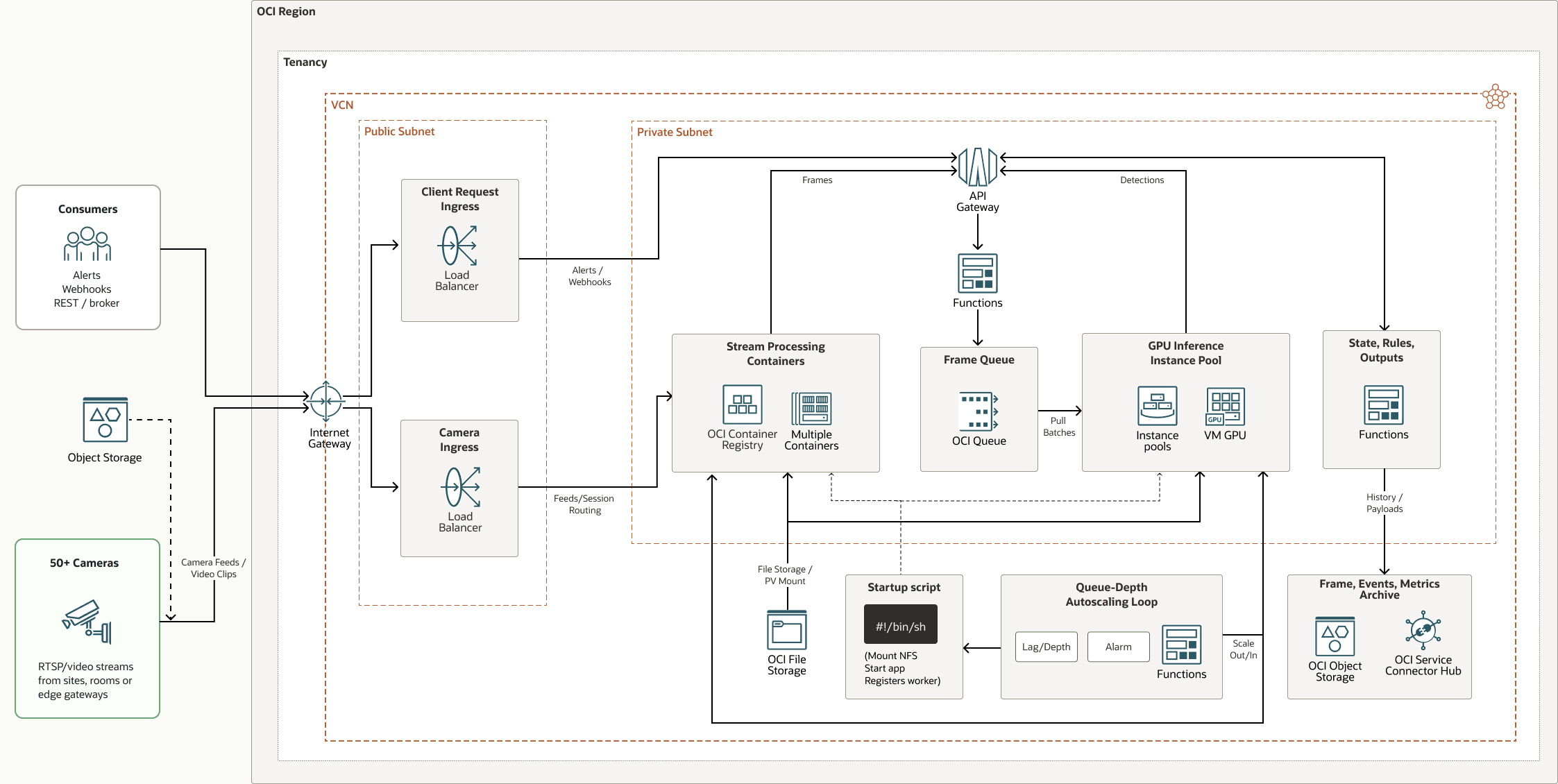
container-stream-processing-architecture-oracle.zip#GUID-A16027C3-0928-49C9-BA9D-BD5C6052E1A0
This architecture includes the following components:
- OCI API Gateway
Oracle Cloud Infrastructure API Gateway enables you to publish APIs with private endpoints that are accessible from within your network, and which you can expose to the public internet if required. The endpoints support API validation, request and response transformation, CORS, authentication and authorization, and request limiting.
- OCI Compute
With Oracle Cloud Infrastructure Compute, you can provision and manage compute hosts in the cloud. You can launch compute instances with shapes that meet your resource requirements for CPU, memory, network bandwidth, and storage. After creating a compute instance, you can access it securely, restart it, attach and detach volumes, and terminate it when you no longer need it.
- OCI Connector Hub
Oracle Cloud Infrastructure Connector Hub is a message bus platform that orchestrates data movement between services on OCI. You can use connectors to move data from a source service to a target service. Connectors also enable you to optionally specify a task (such as a function) to perform on the data before it is delivered to the target service.
You can use OCI Connector Hub to quickly build a logging aggregation framework for security information and event management (SIEM) systems.
- OCI Functions
Oracle Cloud Infrastructure Functions is a fully-managed, multitenant, highly scalable, on-demand, Functions-as-a-Service (FaaS) platform. It is powered by the Fn Project open source engine. OCI Functions enables you to deploy your code, and either call it directly or trigger it in response to events. OCI Functions uses Docker containers hosted in Oracle Cloud Infrastructure Registry.
- OCI Identity and Access Management
Oracle Cloud Infrastructure Identity and Access Management (IAM) provides user access control for OCI and Oracle Cloud Applications. The IAM API and the user interface enable you to manage identity domains and the resources within them. Each OCI IAM identity domain represents a standalone identity and access management solution or a different user population.
- Instance
pool
An instance pool is a group of instances within a region that are created from the same instance configuration and managed as a group.
- OCI Kubernetes Engine
Oracle Cloud Infrastructure Kubernetes Engine (OCI Kubernetes Engine or OKE) is a fully-managed, scalable, and highly available service that you can use to deploy your containerized applications to the cloud. You specify the compute resources that your applications require, and OKE provisions them on OCI in an existing tenancy. OKE uses Kubernetes to automate the deployment, scaling, and management of containerized applications across clusters of hosts.
- Load balancer
Oracle Cloud Infrastructure Load Balancer provides automated traffic distribution from a single entry point to multiple servers.
- OCI LoggingOracle Cloud Infrastructure Logging is a highly-scalable and fully-managed service that provides access to the following types of logs from your resources in the cloud:
- Audit logs: Logs related to events produced by OCI Audit.
- Service logs: Logs published by individual services such as OCI API Gateway, OCI Events, OCI Functions, OCI Load Balancer, OCI Object Storage, and VCN flow logs.
- Custom logs: Logs that contain diagnostic information from custom applications, other cloud providers, or an on-premises environment.
- OCI Monitoring
Oracle Cloud Infrastructure Monitoring actively and passively monitors your cloud resources, and uses alarms to notify you when metrics meet specified triggers.
- OCI Notifications
OCI Notifications broadcasts messages to distributed components by using a low latency publish-subscribe pattern, delivering secure, highly reliable, durable messages for applications hosted on OCI.
- OCI Object Storage
OCI Object Storage provides access to large amounts of structured and unstructured data of any content type, including database backups, analytic data, and rich content such as images and videos. You can safely and securely store data directly from applications or from within the cloud platform. You can scale storage without experiencing any degradation in performance or service reliability.
Use standard storage for "hot" storage that you need to access quickly, immediately, and frequently. Use archive storage for "cold" storage that you retain for long periods of time and seldom or rarely access.
- OCI Queue
Oracle Cloud Infrastructure Queue provides a scalable system to process messages while handling complex management tasks such as guaranteed at-least-once processing, tracking, and client isolation. This centralized service also manages message ordering and processing state, which allows stateless client processes to offload cursor tracking.
- OCI region
An OCI region is a localized geographic area that contains one or more data centers, hosting availability domains. Regions are independent of other regions, and vast distances can separate them (across countries or even continents).
- OCI Registry
Oracle Cloud Infrastructure Registry is an Oracle-managed service that enables you to simplify your development-to-production workflow. Registry makes it easy for you to store, share, and manage development artifacts, like Docker images.
- Tenancy
A tenancy is a secure and isolated partition that Oracle sets up within Oracle Cloud when you sign up for OCI. You can create, organize, and administer your resources on OCI within your tenancy. A tenancy is synonymous with a company or organization. Usually, a company will have a single tenancy and reflect its organizational structure within that tenancy. A single tenancy is usually associated with a single subscription, and a single subscription usually only has one tenancy.
- OCI Vault
Oracle Cloud Infrastructure Vault enables you to create and centrally manage the encryption keys that protect your data and the secret credentials that you use to secure access to your resources in the cloud. The default key management is Oracle-managed keys. You can also use customer-managed keys which use OCI Vault. OCI Vault offers a rich set of REST APIs to manage vaults and keys.
- OCI virtual cloud
network and subnet
A virtual cloud network (VCN) is a customizable, software-defined network that you set up in an OCI region. Like traditional data center networks, VCNs give you control over your network environment. A VCN can have multiple non-overlapping classless inter-domain routing (CIDR) blocks that you can change after you create the VCN. You can segment a VCN into subnets, which can be scoped to a region or to an availability domain. Each subnet consists of a contiguous range of addresses that don't overlap with the other subnets in the VCN. You can change the size of a subnet after creation. A subnet can be public or private.
- VNIC
The servers in OCI data centers have physical network interface cards (NICs). When you create an instance on one of these servers, the instance communicates using Networking service virtual NICs (VNICs) associated with the physical NICs. A virtual network interface card (VNIC) enables an instance to connect to a VCN and determines how the instance connects with endpoints inside and outside the VCN. Each VNIC resides in a subnet in a VCN.
Recommendations
Deploy the solution in a customer-specific virtual cloud network (VCN) design that separates public ingress from private processing services. The reference architecture recommends private subnets, network security groups (NSGs), service gateways, private endpoints, least-privilege OCI Identity and Access Management, compartments, dynamic groups, and OCI Vault-managed secrets when customer security requirements call for isolated service communication paths.
-
VCN: Place OCI Compute GPU instance pools, OCI Container Instances stream processors, Oracle Cloud Infrastructure Queue consumers, rules services, and operational services in private subnets. Expose only the required ingress through OCI Load Balancer or OCI API Gateway. Use OCI Object Storage and other OCI service access through service gateways or private endpoints where applicable.
-
Security: Use Oracle Cloud Guard to monitor and maintain the security of your resources in Oracle Cloud Infrastructure. Cloud Guard uses detector recipes that you can define to examine your resources for security weaknesses and to monitor operators and users for risky activities. When a misconfiguration or insecure activity is detected, Cloud Guard recommends corrective actions and helps you take those actions, based on responder recipes that you can define.
For resources that require maximum security, Oracle recommends that you use security zones. A security zone is a compartment associated with an Oracle-defined recipe of security policies that are based on best practices. For example, the resources in a security zone must not be accessible from the public internet and they must be encrypted using customer-managed keys.
-
Network security groups (NSGs): Use NSGs to define a set of ingress and egress rules that apply to specific virtual network interface cards (VNICs). Use NSGs instead of security lists because they separate the VCN subnet architecture from the security requirements of your application.
-
OCI Identity and Access Management and secrets: Apply least-privilege OCI Identity and Access Management policies, compartment boundaries, and dynamic groups. Store credentials and certificates in OCI Vault. Encrypt stored media and structured event payloads, and use short-lived OCI Object Storage access URLs for playback instead of exposing raw media paths.
Considerations
-
Performance: Scale CPU stream processing separately from GPU inference. Oracle Cloud Infrastructure Queue decouples bursts from GPU consumption, while queue depth, consumer lag, inference latency, throughput, and GPU utilization together provide more stable scaling signals than a single metric. A practical starting target is approximately 70 percent average GPU utilization to maintain headroom for variability.
-
Security: Use private subnets, network security groups (NSGs), service gateways or private endpoints, least-privilege OCI Identity and Access Management, OCI Vault, encryption, device certificates, mutual TLS (mTLS), and tenant-aware access controls. Treat contextual classifications as operational signals rather than identity assertions. Preserve human review for sensitive workflows, and audit model version, rule version, confidence score, timestamp, and operator outcome.
-
Availability: Keep stream processors and model workers stateless where possible, retaining frame references, temporal history, and replay data in OCI-managed services. Monitor camera heartbeats, queue depth, consumer lag, GPU capacity, OCI Object Storage uploads, and notification delivery. Build runbooks for camera-offline events, queue backlog, GPU unavailability, duplicate alerts, storage failures, and notification failures. Include idempotent event IDs, retries, and dead-letter handling.
-
Cost: Prefer event-triggered uploads over continuous high-resolution cloud uploads. Smart cameras can retain continuous footage locally and upload event metadata, thumbnails, or short clips; OCI processing can sample frames and retain high-resolution clips only around confirmed events. Reduce bandwidth and storage with frame sampling, H.265 compression, configurable frames per second (FPS), motion or person thresholds, zone filters, short clips, and OCI Object Storage lifecycle policies. Illustrative retention tiers are 7 days for standard clips, 30 days for high-priority security events, and 90 days for regulated or investigation workflows.
Deploy the Architecture
Begin with a small, representative set of cameras and tune model, sampling, queue, policy, and alert thresholds against measured workload characteristics.
To deploy the architecture:
- Establish foundations: Create VCNs and subnets, compartments, NSGs, OCI Identity and Access Management policies and dynamic groups, OCI Vault secrets, OCI Object Storage buckets, OCI Logging, OCI Monitoring, and lifecycle policies.
- Configure ingestion: Deploy OCI Load Balancer or OCI API Gateway and the secure camera bridge or producer service. Register camera streams, uploaded media sources, or mobile or edge producers.
- Deploy stream processing: Deploy containerized stream processors to terminate RTSP sessions, decode media, sample frames, buffer locally as needed, and publish inference work items to Oracle Cloud Infrastructure Queue.
- Deploy GPU inference: Deploy stateless GPU workers in Compute instance pools. Configure detection and classification models, batching, confidence thresholds, model metadata, and queue consumers.
- Configure decisions and integrations: Externalize rules in JSON, YAML, or a policy service. Apply role, zone, time, confidence, event history, and tenant policies before sending validated events to OCI Notifications, webhooks, APIs, OCI Connector Hub, or service management platforms.
- Operate and tune: Create alarms for queue depth, inference latency, GPU utilization, camera health, upload failures, and delivery status. Use these signals to scale CPU and GPU layers independently; test failure handling, replay, retention, and alert suppression.
Explore More
- GPU-Accelerated AI Camera Analytics on OCI (Blog)
- Overview of Oracle Cloud Infrastructure Queue
- Overview of OCI Streaming
- OCI Compute shapes
- OCI Compute autoscaling for instance pools
- Oracle Cloud Infrastructure Vision (Product documentation)
- OCI Vision Stream Video Analysis
- Overview of OCI Connector Hub
- Oracle Cloud Infrastructure documentation
- Best practices framework for Oracle Cloud Infrastructure
- Oracle Cloud Cost Estimator